#archived-lighting
1 messages · Page 12 of 1
 low dock
This is with linear as well
it's weird because in my scene view, the shapes look generally fine
but in my game view, the surfaces looks so brightened

notice the mass of white at the bottom there
 arctic isle
Are they translucent overlapping meshes?
Or can you explain what's going on? Maybe if there's too many semi-transparent shapes on top of each other it becomes overexposed?
low dock
arctic isle
Are they translucent overlapping meshes?
Funnily enough, they're not even transparent. They're actually just solid objects and they don't interact with each other.
 twin arrow
why is my model so lit up (ik i posted before just looking for answers)
 arctic isle
low dock
Funnily enough, they're not even transparent. They're actually just solid object...
arctic isle
low dock
Funnily enough, they're not even transparent. They're actually just solid object...
You can try to add a slight increasing offset so the meshes don't overlap, just to see if that's a problem
Slight as in 0.000x
low dock
arctic isle
You can try to add a slight increasing offset so the meshes don't overlap, just ...
How would I do this? 
arctic isle
low dock
How would I do this? <:Doggo_Think:817558113313095701>
As you draw, increment the z position by that offset and reset it when you clear the board
 rustic kestrel
Should be up shortly 🙂
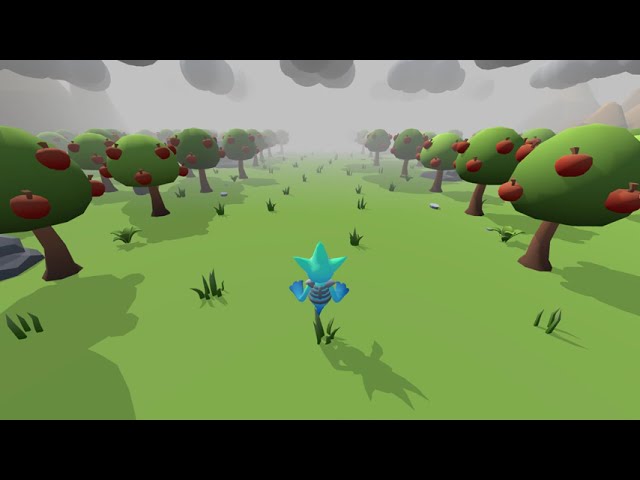
It's more noticeable at around the 20 second mark
The streaks of shadow on the ground
The weird waves of light shooting out to the side, which I'm guessing is the direction of the directional light
arctic isle
rustic kestrel
The weird waves of light shooting out to the side, which I'm guessing is the dir...
Ah yes I see. This does look like some shadow issues. I think the waves are distant shadows from trees projected really far, but that's just a guess. Are you sure that the directional light is off when it's not visible? You should switch between two light sources (one for night and one for day) to avoid this.
rustic kestrel
arctic isle
Ah yes I see. This does look like some shadow issues. I think the waves are dist...
It's not completely off no, just dimmed. It has to remain on otherwise the lighting is off
And the light is constantly changing
rustic kestrel
It's not a shadow issue from what I can tell, could be lightmap related. There aren't many trees in the distance, and shadow strength is actually reduced over time to 0 which is when it's at the darkest point
Which is when it's happening the most 😦
Unity is the ultimate game development platform. Use Unity to build high-quality 3D and 2D games, deploy them across mobile, desktop, VR/AR, consoles or the Web, and connect with loyal and enthusiastic players and customers.
I found this online earlier but
No one really helped him resolve it
arctic isle
rustic kestrel
It's not a shadow issue from what I can tell, could be lightmap related. There a...
So this is a realtime light and you have baked realtime lightmaps with enlighten rtgi?
rustic kestrel
yep
arctic isle
rustic kestrel
yep
hm. then perhaps you'll find an answer in your lightmap parameters. if you make a new asset and play around it may fix it, but I don't have anything more specific to suggest. If your light intensity goes down to 0, I wonder if this is somehow related to ambient lighting or cloud shadows.
arctic isle
rustic kestrel
https://answers.unity.com/questions/1858775/lightmapping-light-waves.html
The waves here are texture compression artifacts, but I don't think that applies to your setup 
rustic kestrel
arctic isle
hm. then perhaps you'll find an answer in your lightmap parameters. if you make ...
I'll test some things and see what I can come up with then. 😦 I did already try messing with all of the lightmap settings but none of them fixed it.
 dim zodiac

 night shell
 inner bough
is it baked?
inner bough
yes
night shell
if it is, could be lightmap UVs
inner bough
how would i fix that
night shell
I'm assuming that is a custom mesh
in the unity project settings for the mesh you can enable generate lightmap uvs
night shell
no
inner bough
k
night shell
should be as simple as pressing two buttons, 1 to generate it for the mesh, and 1 to rebake the lightmaps
inner bough
so do i rebake after?
night shell
yes
inner bough
could i ask questions if it doesnt work?
night shell
yes?
inner bough
see you in about 20-30 min
night shell
thats what this discord is for
inner bough
lol
rustic kestrel
Been trying to fix this for hours, does anyone have any idea what could be causing the weird dark wave of shadow going across my terrain?
It's not shadow related, I can disable shadows and it still happens
inner bough
night shell
thats what this discord is for
how could i make vr quality better
night shell
Your going to have to be specific because that is incredibly general
rustic kestrel
arctic isle
The waves here are texture compression artifacts, but I don't think that applies...
Just accidentally fixed it, was going to install Post Processing v2 to try and at least hide it a little, and after applying an empty Post Processing effect to my camera it has completely eliminated the problem.
No idea how or why, but it did
 limber zodiac
Do these weird lighting lines go away when you bake lights?
 arctic isle
limber zodiac
Do these weird lighting lines go away when you bake lights?
arctic isle
limber zodiac
Do these weird lighting lines go away when you bake lights?
can you give more context?
arctic isle
 For anyone working with Baked Lighting in
 2022.2+ we have just released a small but mighty UX improvement: our very own keyboard shortcuts!
From 2022.2.0f14 onwards, you can press CTRL+9 to bring up the Lighting Window and CTRL+SHIFT+L to trigger a bake from anywhere in the Editor 💡
Time to build some muscle memory!
 fair lily
Hi there, just reposting this in case someone have an answer,
I wish to use the 2D Freeform Light (using the 2D renderer) and use a shadow caster to... well have shadows. From testing, I understand that the shadows are cast from the object depending on the direction of the transform coordinates of the light. I have the desired effect but sadly if the object with the shadow caster is past a certain distance, the shadow is not cast anymore. This mean I can't simulate a shadow from a distant source (godrays).
I was wondering if it was possible to extend this range somehow ?
 brazen prism
Any clue why the shadow is showing like this ? ( the curtain shadow on the floor )


Oh i figured it out, needed to be set for two sided shadows
limber zodiac
arctic isle
can you give more context?
Those lighting lines appear when 2 seperate objects are next to eachother. Im wondering how to get rid of those and if it's there bc I havent baked my lighting yet? Sorry if this sounds dumb I'm not experienced with lighting
arctic isle
limber zodiac
Those lighting lines appear when 2 seperate objects are next to eachother. Im wo...
No dumb questions, we're all here to learn (even me!)
I would expect this to go away if you bake the lighting, though it's hard to know without looking at the whole scene setup. I'd say give it a go 
limber zodiac
Ok thank you
rustic kestrel

How do I go about making certain objects like those flowers be affected by light?
If I drag it in to the scene it works fine, but if I put it in through the terrain it doesn't light up.
 compact rock
Hi all. Is it possible to stop two light probe objects from influencing each other? See picture.

 deft fiber
compact rock
Hi all. Is it possible to stop two light probe objects from influencing each oth...
deft fiber
compact rock
Hi all. Is it possible to stop two light probe objects from influencing each oth...
The light probes don't influence each other, rather mesh renderers pick the nearest probes for their lighting
The purple lines here visualize what the nearest probes would be in that inbetween area
To my knowledge you cannot mask meshes to only use specific light probe groups
compact rock
Okay; great. I was worried. Thank you for your time 
deft fiber
But usually that won't be necessary
If you have probes at the furthest corners of all areas, those will be sampled near the edges unless your objects have passed out of the level area
And even if they do they start lerping towards the next probe, so with that distance it probably wouldn't be noticeable
arctic isle
To add to what Spazi is saying, mesh renderers sample from the tetrahedral area inside the purple lines, not the probe positions themselves. We interpolate the lighting along the mesh faces and so you get the best approximation, not the probe vertices. Probes don't affect each other, they are individual precomputed samples of indirect lighting in 3D space.
What you end up with after Tetrahedralize() is a global probe structure which you can't mask or segment because it's one tetrahedral mesh (per scene constellation).
compact rock
arctic isle
To add to what Spazi is saying, mesh renderers sample from the tetrahedral area ...
Thank you Mr. Unity
arctic isle
rustic kestrel
How do I go about making certain objects like those flowers be affected by light...
iirc the objects placed through the terrain tools are probe-lit by default.
 gleaming yarrow
hey guys! i would love if someone could help me with good lighting in my unity game
deft fiber
gleaming yarrow
hey guys! i would love if someone could help me with good lighting in my unity g...
Making good lighting is a whole trained profession, and subjective too
Your best course of action is to find tutorials and guides to follow along and post here when you run into problems
 rustic fable
Hey guys! I bought a AMD GPU last week, and baking lighting with GPU seems to be extremely slow? Is that normal?
Is AMD not good to work with the lightmapper in unity?
Bakery is NVIDIA only 😦
I changed from a RTX 2080Ti to a AMD RX 7900XTX
 forest rose
Okay, im back again to see what people think about the lighting of this room. Also to ask for help since for some reason the glass panel isn't doing box-projection like the other panel for some reason and I don't know why

Also applies to the other side as well for some reason
 forest rose
I have found the issue but don't know why it's happening. If the angle of the panel is more or less than 1' in any rotation then the reflection just breaks for some reason
 forest rose
I have no idea what the issue is, the panels that are horizontal have just broken and copy and pasting a panel that is vertical and rotating just breaks it. Box Projection also seems to have broken as well as reflections are now inaccurate
 fair wren
Hi guys! I honestly don't know where to put this, but I see that using the URP Balanced that Unity creates by default creates these weird sky artifacts.
weird artifacts in the sky. what could i do?

 timber lichen
unity boat attack demo; unity version 2020.3.23; I was trying to use it instructively to learn more about lighting in unity, so I copied all their lighting settings, their post processing, and imported a mesh; generating lighting in separate project unity version 2021.3.14

but I keep getting this very light, bluish coloration on all meshes and shadows; any ideas why?

URP
 main wolf
timber lichen
but I keep getting this very light, bluish coloration on all meshes and shadows;...
main wolf
timber lichen
but I keep getting this very light, bluish coloration on all meshes and shadows;...
sky lighting maybe?
timber lichen
main wolf
sky lighting maybe?
I copied skybox, lighting, and directional light settings
may you clarify what you meant if that's ok?
 polar wadi
Hi everybody, I'm using HDRP and trying to figure out how to switch from an outdoor lighting setup to an indoor lighting setup (Basically a low poly city map and you can enter high poly rooms of city buildings). The quirk is that I'm using Trilib to load all models on the fly from the StreamingAssets folder (So that my game can be easily moddable by players).
Default lighting is made for outdoor and since city is low poly, it doesn't matter if lighting is not optimized. However for interiors, I'm stuck...
Every tutorial I saw online about HDRP lighting includes a step of baking lighting in the lighting window but since my models are loaded from outside of Unity, it's no doable, at least from my understanding. So how should I make it work?
main wolf
timber lichen
may you clarify what you meant if that's ok?
maybe the bluish tint is caused by sky lighting, try changing it to gradient or just color
timber lichen
main wolf
maybe the bluish tint is caused by sky lighting, try changing it to gradient or ...
thank you for the suggestion; I tried it, but it ended up also making the other side of the rock darker; I don't understand why I copied all their settings and still get different lighting
main wolf
Maybe you can also check if the demo use some kind of color grading
timber lichen
I copied post processing as well
timber lichen
main wolf
Maybe you can also check if the demo use some kind of color grading
I'm really lost; I appreciate all your help though 🙏
 forest tree
Does anyone know why I am getting these weird dots in specific areas of my shadows?
 deft fiber
timber lichen
but I keep getting this very light, bluish coloration on all meshes and shadows;...
deft fiber
timber lichen
but I keep getting this very light, bluish coloration on all meshes and shadows;...
Probably lacking up to date reflections from reflection probes
And/or light probes if it uses baked lighting
deft fiber
forest tree
Does anyone know why I am getting these weird dots in specific areas of my shado...
Which render pipeline is it? Are you using light cookies or custom shaders?
forest tree
deft fiber
Which render pipeline is it? Are you using light cookies or custom shaders?
just the standard pipeline
only shader I've made is for the display above the radio
timber lichen
Why do my shadows appear like this when the light has a high outer angle?

When they have a low one, they look sort of fine

and also, the shadows look pretty garbage
 timber lichen
deft fiber
And/or light probes if it uses baked lighting
timber lichen
deft fiber
And/or light probes if it uses baked lighting
what do you mean by baked lighting? like generated lightmap? I used the mixed option on my directional light
timber lichen
deft fiber
Probably lacking up to date reflections from reflection probes
I baked reflection probes in my scene
deft fiber
timber lichen
what do you mean by baked lighting? like generated lightmap? I used the mixed op...
The scene may be using light probes from baked lightmapping for mesh ambient lighting
deft fiber
timber lichen
I baked reflection probes in my scene
Make sure the cubemaps of the reflection probes are in appropriate locations and reflect what they're supposed to reflect
 valid magnet
how do i make the yellow point light erase the shadow of the purple spotlight(using standart pipeline and pp)

or how should i search for source?
timber lichen
deft fiber
The scene may be using light probes from baked lightmapping for mesh ambient lig...
how?
 sour geode
complete noob here: anyone know how to render skybox on top of a canvas? don't know how to add sorting layers for the skybox (rendered as background in the Main Camera). Also tried camera stacking but couldn't figure out how to enable skybox in an overlay camera... appreciate any pointers!
deft fiber
timber lichen
how?
You'll have to look into what baked lightmapping and light probes are to determine if those were used
polar wadi
Hi everybody, would anybody know why my walls and cube don't project shadows ? I have only one directional light with shadows enable on it but the room is still completely lit...

If I lower the directional light intensity, the room does get dark, up to full dark at 0 intensity so I don't think it's ambient lighting problem
Using HDRP btw
deft fiber
polar wadi
Hi everybody, would anybody know why my walls and cube don't project shadows ? I...
Do your lights and meshes both have shadows enabled
polar wadi
Yes, even set it to two sided to make sure
deft fiber
Do they appear any better if you switch from orthographic to perspective camera
In Game view I mean
 deft fiber
Do the shadows work in any scene in your project?
polar wadi
Yes they do on the city map, buildings do project their shadows on the ground
I'm using the same scene to switch between indoor and outdoor models
Here is the city map for example

And here is my directional light setting

In the light explorer, it does say I use only one light so I don't think it should come from any other light

And here is the scene when I lower this directional light intensity
 deft fiber
If the shadows work in that scene elsewhere with the same light, that suggests a problem with the meshes or camera's placement
polar wadi
Hm, actually, it doesn't work either in the city map, or should I say it's barely visible

After moving the cube behind the building, it should be really dark but there's barely any changes.
It's as if the shadow intensity is too low to be noticeable
But I can't find the option to increase the shadow intensity
Is it in the volume ? Or Light ? Or on the mesh ?
The volume seems to offer some control of the shadows but after playing with the sliders, it seems to affect both the bright and dark side at once, it doesn't make just the shadow cast on the cube darker.

One thing I forgot to mention is that all my mesh are loaded from the StreamingAssets using the Trilib asset (to allow modding in the future). So I can't generate lighting using the lighting windows like all the hdrp lighting tutorials show
Could that be a reason why it behaves so weirdly?
 frozen lark
Can anyone give me some tips on fixing my lighting settings, first of all the torch itself is illuminated for some reason and is really bright (There is a point light above it)
It also appears somewhat low res even though from my experience lightmap resolution of 20+ texels should be enough (But then this level is much bigger than anything I would usually work with)


Everything is set to static and generate lightmap UV's are on too.
This is HDRP btw.
 austere tendon
is it possible to pause baking of progressive lightmap baking? (i need to turn off the notebook the unity is running on)
 polar wadi
Could that be a reason why it behaves so weirdly?
polar wadi
polar wadi
Could that be a reason why it behaves so weirdly?
Ok to answer my own question, I just had to change the shadow tint in the directional light settings. It was grey before, changing to black did make everything dark like it should
frozen lark
austere tendon
is it possible to pause baking of progressive lightmap baking? (i need to turn o...
Dont think so but you can try setting priority in the task manager really low or something
 quaint coyote
what does "Mesh doesn't have albedo UVs" mean?
arctic isle
In your mesh importer, check the "Generate Lightmap UVs" box
Select your 3D object file and go to the inspector
There should be a checkbox that says "Generate Lightmap UVs"
I think the shadow looks correct given the position of the light and the object
rustic fable
hi everyone. I bought this asset pack with shaders, and these shaders includes many time nodes. (like the fog, tree sway,...) but it seems like lightbaking is going into a loop when these nodes are connected. if I disconnect all time nodes then light bakes perfectly. Is this a bug in the latest URP?
arctic isle
rustic fable
hi everyone. I bought this asset pack with shaders, and these shaders includes m...
Interesting. Can you link to the asset pack if it's on the asset store?
 tawdry lake
Hey folks... no idea what I changed this morning, but suddenly my directional light is not appearing in my build. When I play in the editor it's fine, but my build is no bueno.
 rustic fable
arctic isle
Interesting. Can you link to the asset pack if it's on the asset store?
rustic fable
arctic isle
Interesting. Can you link to the asset pack if it's on the asset store?

Elevate your workflow with the HexTile: Nature Pack - URP/Standard asset from Alex Akins Art. Find this & other Environments options on the Unity Asset Store.
I actually took like 2 days to figure it out xD
I was stumped as to why I couldnt bake light
Even went as far to reinstall windows haha
tawdry lake
tawdry lake
Hey folks... no idea what I changed this morning, but suddenly my directional li...
thank you git!!! I moved my directional light into a child object to organize it under a ===lighting=== folder (gameobject), and for some reason the build didn't like that
 midnight sorrel
Are all gameobjects, which are static, static shadow caster?
midnight sorrel
Dammy boy.
rustic fable
Well when they sway, you want the real time lighting to react, no?
Btw, I didnt change the shadow settings of the prefebs. It came out of the box like this so I thought it was all correct
midnight sorrel
Thanks for the help!
tawdry lake
tawdry lake
thank you git!!! I moved my directional light into a child object to organize it...
ah, my dumb self made the lighting category editor only xD
rustic fable
arctic isle
Interesting. Can you link to the asset pack if it's on the asset store?
Oh, you are unity staff. Thanks a million for taking a look!!
arctic isle
rustic fable
Oh, you are unity staff. Thanks a million for taking a look!!
No worries, I'll take a look and let you know if I can reproduce your issue.
rustic fable
arctic isle
No worries, I'll take a look and let you know if I can reproduce your issue.
With disconnecting the time nodes, my level designer is able to bake light (rtx 3060) however, I still get stuck on my AMD RX 7900 XTX with latest drivers
arctic isle
rustic fable
With disconnecting the time nodes, my level designer is able to bake light (rtx ...
But with connected nodes neither works?
rustic fable
arctic isle
But with connected nodes neither works?
Correct
rustic fable
arctic isle
But with connected nodes neither works?
Were you able to reproduce the problem?
arctic isle
rustic fable
Were you able to reproduce the problem?
I didn't get to it today, lots to catch up after holiday. I'll take a look tomorrow 
rustic fable
I understand. Since this looks to be a AMD problem as well. Is there somewhere else I could go for support?
Maybe a radeonrays problem? (Im talking out of my butt)
arctic isle
rustic fable
I understand. Since this looks to be a AMD problem as well. Is there somewhere e...
Since it reproduces on both Nvidia and AMD GPUs I don't think it's a GPU vendor-related problem. Which version of Unity are you using? You are mentioning latest URP so is this 2023.2?
rustic fable
Seems like it does work on my AMD after waiting a long time and after disconnecting all time nodes. So the problem is def the time nodes. Since it happens on both amd and nvidia
Yes, haha I agree
rustic fable
arctic isle
Since it reproduces on both Nvidia and AMD GPUs I don't think it's a GPU vendor-...
2021.3.22f1
However, I also tried on the 2022 and 2023 beta
arctic isle
Interesting. I will investigate tomorrow 🕵️♂️
rustic fable
arctic isle
Interesting. I will investigate tomorrow 🕵️♂️
You're the best
arctic isle
rustic fable
You're the best
Hey, I reproduced the issue with the provided assets and I'll be filing a bug right away for you. I'll get back with the public issue tracker link.
This seems like an issue with the lightmapper so we'll handle it. I could reproduce it with the CPU Lightmapper as well so defo not a GPU issue.
rustic fable
Thank you so much!
arctic isle
rustic fable
Thank you so much!
Good news is that we know exactly what's going wrong, bad news is that there is no obvious best solution.
rustic fable
I see. Does the asset pack use a bad method for the tree sway?
 slim vector
I downloaded an office environment from asset store, it had already baked lights, from that scene I tried to redo the light baking (without changing anything) and the result was way worse
From this

To this
 deft fiber
slim vector
I downloaded an office environment from asset store, it had already baked lights...
deft fiber
slim vector
I downloaded an office environment from asset store, it had already baked lights...
What do you mean by "redo", bake again?
slim vector
I generated lightmaps


 stark temple
 deep marlin
why do lights go through walls
deep marlin
why do lights go through walls
I have edited your nickname as it's not suitable for our server.
arctic isle
deep marlin
why do lights go through walls
Try changing the lights to area lights and rebaking-- besides that, make sure your meshes are configured correctly to cast shadows, make sure that the mesh UVs are correct (and that you have Generate Lightmap UVs on) and make sure your meshes have correct normals.
The lights should also be placed in front of any emissive meshes you're using to display the light source.
deep marlin
arctic isle
Try changing the lights to area lights and rebaking-- besides that, make sure yo...
well probuilder meshes automatically set to cast shadows
lights are set infront of the meshes
how do rebake>
deep marlin
arctic isle
At the bottom click "Generate Lighting"
now lights just
don't
they just dont work
i had to place new light objects
lights still go through wall
srtrange
i switched to point light now it work
arctic isle
deep marlin
i switched to point light now it work
Did you mark your scene geometry as 'static' using the checkbox at the top right of the inspector?
deep marlin
no
arctic isle
deep marlin
no
Please do
Make sure you have the area lights in place of spotlights / point lights and rebake. Area lights won't have the preview but they'll bake nicely
 arctic isle
EDIT: All filled up, thanks for the help!!
Call for help: Do you want to help make lighting in Unity better? Do you have at-least a basic understanding of how to build Scenes in Unity?
I am looking for volunteers to help with user testing for the new Probe Volumes lighting feature in the product. If you, or anyone you know in your networks might be interested in participating, I'd love to hear from you. The only requirement is that you have used Unity's lighting features before, even if just experimentally.
User testing will be conducted between April 17th and 28th of April, between 10:00 - 17:00 (CEST).
During a 1hr user-testing session we provide a test project on a remote machine.
You will be asked to carry-out a short list of workflow challenges using the remote control feature of Zoom, and to speak about your experience. This informal user testing will not be recorded, and should take around 60-70 minutes.
Your feedback will help us shape the future of lighting in Unity. 🙏
slim vector
does exist a way to recalculate light only on one specific object?
arctic isle
slim vector
does exist a way to recalculate light only on one specific object?
Unfortunately, no. It's on our radar though.
slim vector
arctic isle
Unfortunately, no. It's on our radar though.
ok, thanlk for the info 🙂
deft fiber
arctic isle
**EDIT: All filled up, thanks for the help!!**
Call for help: Do you want to he...
Sounds like fun, hit me up then 
 strong igloo
my giant donut has some artefacts in the lightmap after using bakery. The only thing I changed between this and the last version to work is a limited dissolve on that mesh in blender. Generate UVs are on.
 deft fiber
strong igloo
my giant donut has some artefacts in the lightmap after using bakery. The only t...
deft fiber
strong igloo
my giant donut has some artefacts in the lightmap after using bakery. The only t...
It might be texel invalidity if the sprinkles are clipping into the donut's surface, but I haven't seen this type of artefact outside of Bakery
It might be better to ask in Bakery's channels
In any case dense and organically curved geometry is a bad fit for baked lightmapping
strong igloo
yeah sadly it has to be baked, where would I find bakery stuff?
deft fiber
strong igloo
yeah sadly it has to be baked, where would I find bakery stuff?
The store/docs/home page for assets usually has a link to forums, discord, etc
strong igloo
oki thx
 indigo jewel
Hi everyone, I have a question for all of you on Probe Volume. I am trying to make a little game in unity and I looked a ton of videos on graphics because, coming from blender, I really wanted to have a "base" on how I would like my game to look before importing the prefabs, and coding everything. I saw this video for example : https://www.youtube.com/watch?v=DlxuvvYZO4Q&t=1084s . After watching this video and trying the "3D HDRP" example project I decided to try building my own scene and use probe volume as it seemed easy to set up for a nice result and ressource efficient. However I am running into a lot of problems and there is very few documentation or videos on the topic. What is your opinion on probe volume, have you been able to work with it ? Or is it too soon to try anything with it ?

Step into the famous Sponza Atrium to see how to beautifully light an environment from scratch using a mix of baked and real-time techniques. Pierre Yves will showcase the GPU Lightmapper, the new Probe Volume system, ray tracing, and path tracing.
00:06 Introduction
01:18 Speaker
01:40 Volume system
02:47 HDRI sky setup
04:16 Direct lighting &...
arctic isle
indigo jewel
Hi everyone, I have a question for all of you on Probe Volume. I am trying to ma...
What issues are you running into? We're actively working on improving probe volumes at every level, so feedback is highly appreciated.
indigo jewel
arctic isle
What issues are you running into? We're actively working on improving probe volu...
In closed space, light seems to be leaking a lot but as I am very new I don't really know if it is because of something else or because of probe volume

For example in this scene it should be very dark as there is no lights and no opening, however it looks like the light from the sky still goes through the ceilling and lights up the whole scene 🤔
arctic isle
indigo jewel
For example in this scene it should be very dark as there is no lights and no op...
There are some known light leak issues with Probe Volumes currently. I am not sure that it's what you're seeing here though. If you can light the scene (or in this case... not light?) with lightmaps with no leaks and then switch to Probe Volumes and see leaks, then you can be sure. Otherwise it may be normals / shadow / UV issues.
timber lichen
What is going on with my flashlight? Look at the top, the light sort crawls slowly away. What's going on?
And what's with this weird motion blur thing?
 halcyon trench
hey guys, does anyone know how I can get the light level of a point/the amount of light received by a gameobject? I'm trying to make a kinda stealth system
 tepid minnow
you might be able to use the light probes for that
can use that to get the interpolated probe value for a position, then https://docs.unity3d.com/ScriptReference/Rendering.SphericalHarmonicsL2.Evaluate.html
to get a color from it
halcyon trench
thanks looks a bit complicated for me but I'll try figure it out 😅
deft fiber
timber lichen
What is going on with my flashlight? Look at the top, the light sort crawls slow...
This looks to me like an artefact of ray traced reflections or GI, as those are updated over time
deft fiber
timber lichen
And what's with this weird motion blur thing?
This trailing is also a similar temporal artefact, which could be from misconfigured ray tracing settings also, or from TAA lacking motion vectors or something similar
arctic isle
timber lichen
What is going on with my flashlight? Look at the top, the light sort crawls slow...
Are you using Enlighten RTGI?
arctic isle
halcyon trench
thanks looks a bit complicated for me but I'll try figure it out 😅
Either this or add a custom pass to your render pipeline that queries the lights in the scene if you only care about direct light. Alternatively, considering that your character may only be touching the ground, you may be able to unwrap the lightmaps to world space and use the lightmap color brightness at the player's XZ coordinates relative to the lightmap UVs to calculate the light levels.
timber lichen
Hello, I am developing a game and I have this lighting problem where there is I line where there is light and another which is black. Can someone help me ?


the light is a flashlight *
deft fiber
timber lichen
Hello, I am developing a game and I have this lighting problem where there is I ...
Issue with wall normal map textures, likely they aren't set as the normal map type
indigo jewel
Do you guys know where I can improve the pixelisation of the light rays ?


I am using hdrp and a volumetric fog
Here are my fog parameters

 indigo jewel
night shell
volumetric fog quality
indigo jewel
night shell
volumetric fog quality
Thank you elon
 fossil leaf
So I have a 2D URP project and I wanted to add point lights but for some reason there is no light or shadow at all when using with the URP 2D asset. It works fine when I use the universal one but it doesn't have 2D lights so I can't use that. All materials act like they're unlit, even in a fresh new project, what's the problem?
compact rock
Hi all, can I disable some objects/tags/layers from receiving environment reflections? Thank you.
 rugged galleon
Anyone here know how I can do baked lighting with ambient occlusion WITH Shader Graph shaders? Or are these two things not compatible
Having a lot of trouble with this
timber lichen
deft fiber
Issue with wall normal map textures, likely they aren't set as the normal map ty...
@deft fiber 1 - There is no normal map on the floor
2 - I already set the wall's normal map as a normal map
timber lichen
arctic isle
Are you using Enlighten RTGI?
Nope I don't think.
deft fiber
timber lichen
<@166982635950702592> 1 - There is no normal map on the floor
2 - I already set ...
So, changing the texture type helped the walls?
 gray harbor
so uh
made just a slight oopsie and uh.....idk what happened 😭

realtime lighting works just fine but baking just breaks textures
the lightmap 💀
 night shell
You need to generate lightmap uvs for the mesh @gray harbor
You can do that with a simple toggle on the mesh import settings when you select it in the project window
gray harbor
night shell
You need to generate lightmap uvs for the mesh <@354059736049778708>
idk chief, doesn't seem much better 💀

did some uv magic and it looks perfect now, thank's for the tip 😅
compact rock
Hi all, can I disable some objects/tags/layers from receiving environment reflections? Thank you.
arctic isle
compact rock
Hi all, can I disable some objects/tags/layers from receiving environment reflec...
No, but you can use reflection probes, edit the material specularity, or make your own shaders to control this behavior.
It won't be perfect, but it gives you some control. Out of curiosity, what is your use-case here?
compact rock
arctic isle
It won't be perfect, but it gives you some control. Out of curiosity, what is yo...
I didn't want some objects to have environmental reflections (like mountains) and some yes (like a river.). I realized I can just change the smoothness. Thank you!
timber lichen
deft fiber
So, changing the texture type helped the walls?
no
the texture type is normal map
deft fiber
timber lichen
the texture type is normal map
It looks like some kind of normal map issue, if not that
Maybe some channels could be inverted, the strength value could be wack and/or something could be wrong with the data itself, or with how the shader applies it if it's a custom shader
You can confirm this by removing the normal map entirely, assuming it uses Unity's lit or standard shader
Not sure what could be causing the floor problem
Is that a default shader as well?
 somber sapphire
Hi. I'm struggling with getting my lightings right for an indoor scene. After baking I got those ugly bright seems around the faces. Do you have any tips how to get rid of it?

 kind mortar
yo, im trying to port this map to another game and I want to know how to get the lighting effect on the lights
 deft fiber
somber sapphire
Hi. I'm struggling with getting my lightings right for an indoor scene. After ba...
deft fiber
somber sapphire
Hi. I'm struggling with getting my lightings right for an indoor scene. After ba...
Looks like the wall is full of seams, lightmap UV seams or geometric
https://forum.unity.com/threads/lightmapping-troubleshooting-guide.1340936/#post-8467097 explained here
How were the lightmap UVs generated for that mesh?
deft fiber
kind mortar
yo, im trying to port this map to another game and I want to know how to get the...
They are billboard sprites, though "sprites" in Unity terms
By default only the particle system supports the necessary billboard render modes
kind mortar
so any idea how i can achieve this?
somber sapphire
deft fiber
How were the lightmap UVs generated for that mesh?
I tried auto generate in Unity and making it in blender. Both had pretty same results, but I'm not sure that I did the lightmap uv in blender correctly.. Thank you, I will take a look on the link you sent
deft fiber
somber sapphire
I tried auto generate in Unity and making it in blender. Both had pretty same re...
If you used Blender's "lightmap pack" UV unwrap that'd explain why it's so incredibly spotty
somber sapphire
deft fiber
If you used Blender's "lightmap pack" UV unwrap that'd explain why it's so incre...
Yeah, I used exactly that
deft fiber
I wouldn't recommend it for anything
It doesn't respect any kind of continuity
So even a flat piece of geometry will be full of seams and wasting resolution into padding those seams
somber sapphire
Do you have some recommended tutorial how to do it properly? I was looking something, but with no luck.
deft fiber
A proper manual UV unwrap will likely produce good results if Unity's automatic one won't
What issues did you face with the automatic one?
somber sapphire
I had similar issues with bright seaems. I can switch to auto generate, baked and post a screenshot with the result. I will need a few minutes
deft fiber
somber sapphire
I had similar issues with bright seaems. I can switch to auto generate, baked an...
Your wall looks kind of curved so that may be making it unwieldy for the lightmap UV generation, so a manual unwrap may be required
Still, some tips to address that will be in the link
UV unwrapping manually is more of a whole tech art skillset than just a technique
somber sapphire
deft fiber
Your wall looks kind of curved so that may be making it unwieldy for the lightma...
That's interesting. Now it looks pretty decent.
Last time since I tried it, I merge it into one big meshes and added outer walls.
Before that I only had faces on the interior.
Do you think these changes might have helped?
 somber sapphire
deft fiber
Your wall looks kind of curved so that may be making it unwieldy for the lightma...
somber sapphire
deft fiber
Your wall looks kind of curved so that may be making it unwieldy for the lightma...
I probably have a commit without those changes. I will try to come back to it and look on the results.
somber sapphire
I got it. It looked something like this.

 lunar valve
i use a skybox

but when i start

the sky just has a flat colour
i've messed with every single light setting i've found
and nothing hhelps
please help
:T
standard buildt in shaders
 livid aurora
I have a 2d game. the game sometimes spawns coins in front of the screen. when I enable a new canvas, the coins are still in front of the screen but their lighting disappears. what could be causing this? the light is never disabled.
main wolf
lunar valve
check your camera clear flag setting, is it set to skybox?
timber lichen
deft fiber
Not sure what could be causing the floor problem
Is that a default shader as wel...
yes
standart
main wolf
timber lichen
the texture type is normal map
🤔 show us your texture import setting
deft fiber
Could be other things wrong with the texture too, such as flipped channels or something else
Anyway that can be ruled out by removing the texture and/or swapping it out for other normal map textures
 agile terrace
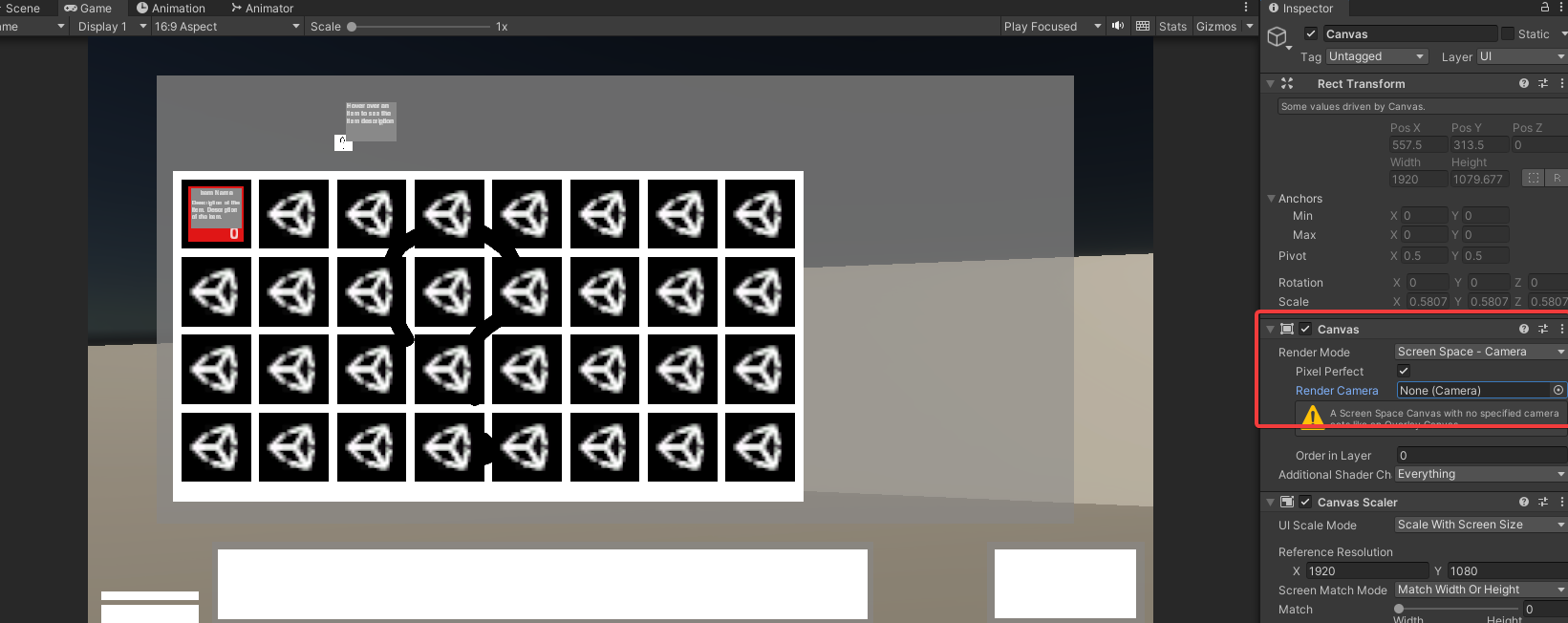
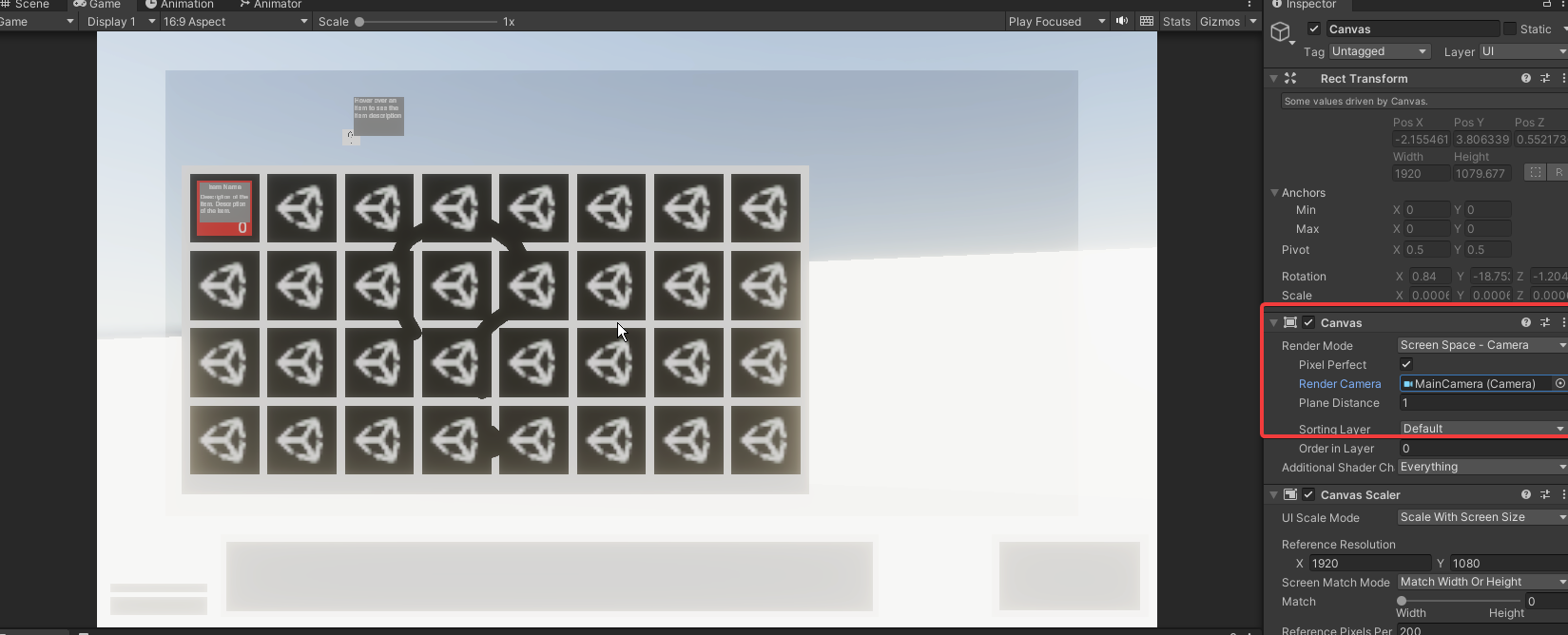
Does anyone know a work around.
I want it too look like this https://i.imgur.com/ickt5Tw.png but when I add a camera it goes like this https://i.imgur.com/J7FvJfT.png
 arctic isle
agile terrace
Does anyone know a work around.
I want it too look like this https://i.imgur.com...
arctic isle
agile terrace
Does anyone know a work around.
I want it too look like this https://i.imgur.com...
Check your post-processing settings, this looks like bloom from post-processing
agile terrace
arctic isle
Check your post-processing settings, this looks like bloom from post-processing
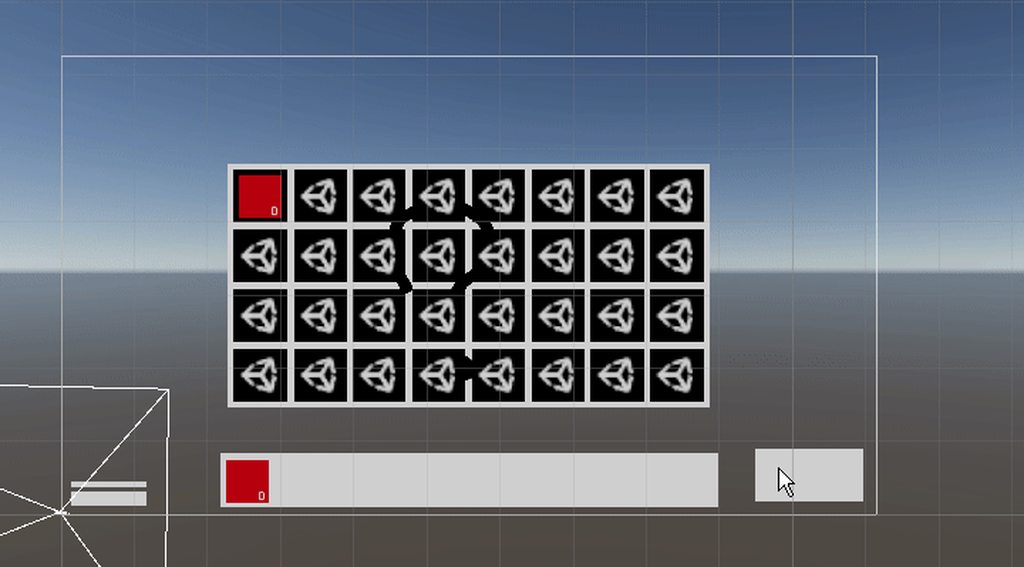
Disabling bloom does help but it still makes the world glow when I zoom in https://i.imgur.com/MnokwT8.gif
 mossy pivot
Hi in forward rendering do overlapping (same plane) surfaces end up with double lighting applied?
 hot path
why dont you test it?
mossy pivot
it does for me - really bad z-fighting like double lighting - but not sure if I am doing anything out of the normal
I guess I normally use defered, seems like a bad z fighting issue
deft fiber
mossy pivot
Hi in forward rendering do overlapping (same plane) surfaces end up with double ...
Each of them receives lighting independently, not sure what you mean by "double"
Z-fighting is expected when you overlap geometry, not sure why you would
mossy pivot
deft fiber
Each of them receives lighting independently, not sure what you mean by "double"...
Yes it is limited to point and spotlight I think now - I rarely see coplanar surfaces but it can happen in my procedural stuff currently
 fervent swift
Hi what is the differnce between the two assets?
 deft fiber
mossy pivot
Yes it is limited to point and spotlight I think now - I rarely see coplanar sur...
deft fiber
mossy pivot
Yes it is limited to point and spotlight I think now - I rarely see coplanar sur...
The best option is to make it not happen
deft fiber
fervent swift
Hi what is the differnce between the two assets?
We can't tell for sure what they are just by looking at the icon here
But most likely the first one is an "URP asset" which are more or less quality levels/tiers in asset form
Assuming the second one is an "URP renderer asset" that means it's basically defining the rendering back-end features to use
URP assets can share a renderer, they can each have their own or they can have many in a list to use situationally
fervent swift
deft fiber
We can't tell for sure what they are just by looking at the icon here
But most l...
Thank you @deft fiber that answered my question!
 sullen lotus
Hello,
Trying to bake lighting on a Text Mesh Pro Text with color is making it just become black.
Using the shader Distance Field (Surface), which brings the correct aspect when on preview:

But when baking lights this happens:
 fervent swift
deft fiber
We can't tell for sure what they are just by looking at the icon here
But most l...
fervent swift
deft fiber
We can't tell for sure what they are just by looking at the icon here
But most l...
Why do you assign the URP Asset to the Graphics -> Scriptable Render Pipeline Settings, vs the URP Render Asset? I would assume it makes more sense to apply the Render Asset
deft fiber
fervent swift
Why do you assign the URP Asset to the Graphics -> Scriptable Render Pipeline Se...
The one in graphics basically takes the URP asset as the default quality level, I think
There isn't a very good reason why the Graphics and Quality tabs both need an URP asset
I believe they're planning to simplify the system, including to make asset/renderer separation clearer or to get rid of it altogether
fervent swift
deft fiber
The one in graphics basically takes the URP asset as the default quality level, ...
Awesome, thanks @deft fiber , I appreciate your help!
sullen lotus
sullen lotus
Hello,
Trying to bake lighting on a Text Mesh Pro Text with color is making it ...
Is there any tip for fixing that?
deft fiber
sullen lotus
Is there any tip for fixing that?
The issue is probably that textmeshpro doesn't generate any lightmap UVs
sullen lotus
So that`s a Unity issue?
deft fiber
sullen lotus
So that`s a Unity issue?
TMP is designed for dynamic text elements, so they probably didn't consider lightmapping as as option
It's procedural geometry so it'd have to generate lightmap UVs additionally
And most TMP shaders don't support lighting at all
(if not all?)
Instead of TMP I'd use a quad with a cutout material and a texture of the text
Or a mesh text made in Blender or another modeling program
fervent swift
Hi Im following along with a unity lighting tutorial and I'm wondering why this spotlight on object doesnt cast a shadow on the robot - is there a specific shadow that I am missing? I tried enabling shadows on the specific light
Thank you
 timber lichen

 fervent swift
Thank you
sullen lotus
deft fiber
Instead of TMP I'd use a quad with a cutout material and a texture of the text
O...
Thanks for the heads up!
timber lichen
fervent swift
Thank you
?
fervent swift
If a light is set to baked - and there is no baked data - will it be realtime?
kind mortar
i keep getting this bakery error when im baking lights


 lunar valve
main wolf
check your camera clear flag setting, is it set to skybox?
lunar valve
main wolf
check your camera clear flag setting, is it set to skybox?
thank you, that fixed it
: D
 heavy monolith
anyone able to assist me with tattoo issues in this channel?
kind mortar
kind mortar
had to clear cache
deft fiber
fervent swift
If a light is set to baked - and there is no baked data - will it be realtime?
I would assume only in the editor, but maybe it's worth a try
deft fiber
heavy monolith
anyone able to assist me with tattoo issues in this channel?
No
Why do you think that
 spring igloo
I am having problems with baking, whenever I press generate it always finds its way to get stuck on this

Seconds left will increase infintiely
infinitely*
And I am using light probes.
Unity version 2021.3.23f1 if that matters.
hot path
how do i get better lighting here? something is off with the shadows... i think it would help if I had like additive shadows somehow? like dark shadows where there are multiple objects in the way of the light.. and yes cast shadows is checked on every object in the demo

and look in the trees, the denser parts of the leaves are REALLY dark compared to the rest
my ambient lighting is all bright white, and my sun is looking like this
 heavy monolith
deft fiber
No
Why do you think that
heavy monolith
deft fiber
No
Why do you think that
idk why would i think a unity help server would actually help people with unity issues..... ffs
i asked if it was the right channel for it
you didnt have to be rude about it
knock the chip off your shoulder
 radiant kettle
I'm trying to make an hallway dark, I tried both using quads and cubes for the walls, putting a plane over it to block lights, two-sided shadows, but it never seems to block shadows, thoughts? The light comes from a directional light.


 night shell
heavy monolith
you didnt have to be rude about it
night shell
heavy monolith
you didnt have to be rude about it
all you asked about is getting assistance with tattoo issues and that is it, not specific about anything else
tattoo issues about what? are you doing tattoos on a character?
and what exactly are you struggling with?
hot path
i changed indirect intensity btw, looks better, but id like shadows to look more realistic
 spring igloo
I am having problems with baking, whenever I press generate it always finds its ...
spring igloo
spring igloo
I am having problems with baking, whenever I press generate it always finds its ...
After waiting it'd resolve itself and start baking, but this baking would take MUCH longer than usual, whys that?
I don't have too many lightprobes and tooo many static objects, neither is the lightmap res too high.
night shell
system specs?
spring igloo
I mean, I had the same amount of these as before, and it was much faster, even with more probes.
spring igloo
Yeah, I realized it was just..extremely large light probes that I had dealt with.
After fixing all those problems and light probing properly, I have fell in love with them lol
spring igloo
Okay, I am working with giant areas to apply light probes, hopefully having multiple groups won't cause any issues judging by how the wireframes link up
timber lichen
hot path
how do i get better lighting here? something is off with the shadows... i think ...
If you want good graphics, choose Unreal Engine 5 or 4 (if you have a good gaming pc)
because, in Unity, it is hard to get AAA graphics or at least good graphics
timber lichen
@deft fiber
I found something


here I rotated the floor on the Z axis
BUT
now the black square is inverted
its in the right
not on the left
hot path
timber lichen
If you want good graphics, choose Unreal Engine 5 or 4 (if you have a good gamin...
Unfortunately im not expecting all of my players to have a good gaming pc and I also love unity's programming workflow a lot
Im not really one to mess with C++
So i want to get good graphics on unity
Ive switched to HDRP now so it should be easier
timber lichen
hot path
Unfortunately im not expecting all of my players to have a good gaming pc and I ...
yes switch to HDRP
timber lichen
but @hot path if you dont like visual scripting and c++ is hard for you Epic Games created a new language called "verse", and it A LOT easier than c++
but if HDRP works then stay on unity
hot path
timber lichen
but <@265112756322172929> if you dont like visual scripting and c++ is hard for ...
Verse looks like they just took python and added javascript
timber lichen
hot path
Verse looks like they just took python and added javascript
it is a mix of c++, C, java, and c#
I think
hot path
I disagree strongly
deft fiber
This is getting off topic for this channel
timber lichen
@deft fiber I fixed it, it was a mesh problem. (This game is a PC port of a mobile game) I replace the .obj mesh in the mesh filter component with the same mesh but in .asset ; now it is fixed. but there are some meshes that are only .obj and not .asset . do you know how to convert this type of files ?
 deft fiber
timber lichen
<@166982635950702592> I fixed it, it was a mesh problem. (This game is a PC port...
deft fiber
timber lichen
<@166982635950702592> I fixed it, it was a mesh problem. (This game is a PC port...
".Asset" is used by the editor for a variety of its own file types, not something you normally ever have to contend with
What do you mean by "pc port", do you not have the project source files?
timber lichen
deft fiber
".Asset" is used by the editor for a variety of its own file types, not somethin...
I decompiled the unity build
deft fiber
timber lichen
I decompiled the unity build
Shouldn't you have the source if you're developing a port? These kinds of issues are not part of any normal workflow
timber lichen
deft fiber
Shouldn't you have the source if you're developing a port? These kinds of issues...
I only dont have the scripts
I made them from scratch
@deft fiber the "WoodFloor" file is the .asset file; and the "Wood_18..." file is the .obj file


.asset "WoodFloor" file properties

.obj "Wood_18..." properties

.obj parent file properties
 deft fiber
There really isn't supposed to be loose mesh data assets floating in the project
This is an example of a decompilation issue, I presume
timber lichen
deft fiber
There really isn't supposed to be loose mesh data assets floating in the project...
no it is not a decompilation issue
its just
ok
just
ill send you something
the .asset mesh applied to the wood floor
 deft fiber
I think you showed this already
timber lichen
the .obj mesh applied to the wood floor
 deft fiber
It looks like the mesh data is partially loose in the project, some of it lacking normals, or something similar
Again not really something we're expected to face unless the project is decompiled or corrupted
But considering you said the project is a decompiled build, that seems like it'd explain it
timber lichen
deft fiber
It looks like the mesh data is partially loose in the project, some of it lackin...
I dont understand what are you saying
the "mesh data"
deft fiber
timber lichen
.obj parent file properties
Mesh data assets should always be generated on import by this type of file that contains that data, and reside under it, because mesh assets are more than just the geometry
timber lichen
deft fiber
Mesh data assets should always be generated on import by this type of file that ...
I re-imported it and it doesnt work
deft fiber
Well, you could try to re-export it in a modeling program to make sure it's not missing any data, but I can't really help because issues with decompiled projects are totally unpredictable and out of scope of game development
Decompilation is against the server rules due to this reason, and for its dubious legality
timber lichen
deft fiber
Well, you could try to re-export it in a modeling program to make sure it's not ...
I re-exported it in a modeling program and there is still the black line
deft fiber
timber lichen
I re-exported it in a modeling program and there is still the black line
You have to make sure that the data that is there makes sense, vertex normal direction most importantly
Anyway, normals don't randomly turns sideways or whatever when you're working with proper sources
If you're legitimately porting a game, you should never have to decompile anything
night shell
yeah thats pretty dodgy
not sure also how this applies to lighting
seems offtopic to me
night shell
timber lichen
because, in Unity, it is hard to get AAA graphics or at least good graphics
this I disagree with quite a bit, even in unreal if you don't know what you are doing you won't be able to achieve a high fidelity with good graphics
night shell
hot path
i changed indirect intensity btw, looks better, but id like shadows to look more...
noticed your still running into similiar issues prior, what pipeline are you using again?
hot path
night shell
noticed your still running into similiar issues prior, what pipeline are you usi...
URP im trying to use HDRP now
but i took a backup so i can switch back
im gonna upload a video to #archived-hdrp in a little bit showing a serious group of issues
night shell
the reason the lighting doesn't look good in that instance is because there is no global illumination happening
hot path
i have realtime GI on
night shell
shadows are flat, trees are also flat, no blend between the two
night shell
hot path
i have realtime GI on
its not doing its job here
hot path
well why not
night shell
those trees are painted on a terrain right?
hot path
yes
night shell
yep, thats probably why
hot path
? why
night shell
terrain lighting sucks pretty badly
when you paint objects on a terrain
unity resorts to lighting them mostly with probes
hot path
so am i just meant to make my own terrain thing
night shell
no, there are ways to make it look good
but in some way yeah
but to keep things simple
to imrpove the lighting of that scene
I would definetly use ambient occlusion
SSAO
since I recall also your lighting is fully dynamic, which certainly makes things harder
SSAO would help ground your trees and other terrain objects
night shell
HDRP will be an improvement but honestly not that much of one I would reckon
deft fiber
hot path
i have realtime GI on
Realtime GI needs to be precomputed, assuming you mean Enlighten
night shell
SSAO is a post process effect
deft fiber
HDRP could also be a downgrade if you aren't familiar with configuring and using it right
There's a lot to learn in it
hot path
deft fiber
HDRP could also be a downgrade if you aren't familiar with configuring and using...
yeah thats what issue im having atm
hot path
deft fiber
Realtime GI needs to be precomputed, assuming you mean Enlighten
yeah but my scene changes a LOT
i hit generate lighting
but thats what it looks like after
deft fiber
You have to make sure you're specifically precomputing realtime GI, not also baked lightmapping
night shell
deft fiber
You have to make sure you're specifically precomputing realtime GI, not also bak...
the problem is that as far as enlighten is concerned all that is baked is just the terrain itself, not the objects painted on it
which is why his trees and lighting looks awful currently because it resorts to probes
deft fiber
night shell
the problem is that as far as enlighten is concerned all that is baked is just t...
Quite possible, considering Terrain uses GPU instancing for trees, I think
That's something to test and confirm before trying to use it "in the field"
deft fiber
hot path
yeah thats what issue im having atm
My advice is that you start using HDRP on the template project
You'll be quite lost if you try to upgrade, as you're not only lacking examples of HDRP features working right, you'll also be fixing stuff that broke in the change
hot path
does HDRP let you work with terrains and trees? also will i be able to import all my scripts because i have a lot of stuff already working
night shell
what usually breaks/changes between SRPs are lighting/materials/shaders
your scripts should be unaffected
unless if some of your scripts specifically mess with lighting then you might need to change some things
hot path
how am I meant to import it though
night shell
import what, HDRP?
hot path
the pile of scripts and prefabs and objects i have
deft fiber
hot path
how am I meant to import it though
You'd install the package, configure the project to use HDRP, convert materials, lights and settings using the Pipeline Converter
Anything else will be untouched
night shell
^
hot path
deft fiber
You'd install the package, configure the project to use HDRP, convert materials,...
ive done that
i meant for your idea of creating a new template project
deft fiber
hot path
i meant for your idea of creating a new template project
Oh, I mean that mostly just for tests and most importantly practice so you're not flying blind
hot path
oh
deft fiber
But sure you can export+import all your game content as an .unitypackage if you so wish
deft fiber
The new project would include pre-configured HDRP settings which may work better than what you've got hacked together currently
fervent swift
Hi are there any common reasons why a shadow wouldnt be showing up on this baked spotlight. I appriciate your help!
 night shell
fervent swift
Hi are there any common reasons why a shadow wouldnt be showing up on this baked...
night shell
fervent swift
Hi are there any common reasons why a shadow wouldnt be showing up on this baked...
I'm assuming you want a shadow to appear on the mesh but that mesh is a skinned mesh renderer
you can't baked skinned meshes within unity
fervent swift
night shell
you can't baked skinned meshes within unity
Yes, I want a shadow that outlines the character (using urp)
i want a shadow on the lightmap, if that makes a difference to what you are saying
fervent swift
baked shadow
fervent swift
night shell
a realtime shadow?
would it wrk for realtime
night shell
yes
fervent swift
ok thank you
Hi there,
I am a bit confused about shadows there are so many areas to set the shadows and im not sure whats more important light source ,or the object, or the urp renderer if someone could provide me with any resources would be really helpful. Thank you!
night shell
fervent swift
Hi there,
I am a bit confused about shadows there are so many areas to set the ...
Unity is the ultimate game development platform. Use Unity to build high-quality 3D and 2D games, deploy them across mobile, desktop, VR/AR, consoles or the Web, and connect with loyal and enthusiastic players and customers.
fervent swift
Awesome thank you
fervent swift
is it possible to bake shadows entirely?
night shell
yes
fervent swift
Is that through ShadowMask?
night shell
shadowmasks are for when you are using mixed lighting
fervent swift
what if you are doing only baked
fervent swift
does that happen automatically or is there a setting for that
night shell
should happen automatically if your mesh contributes to GI and casts shadows, and if your baked light source also is casting shadows
fervent swift
Understood, I appriciate your help! @night shell
 dire copper
Hi,
My question touches both lighting and the new water system.
I have followed the guides and have the water system working, however, the lighting system is giving me quite a bit of confusion.
I have the hdrp outdoor setup
I have sun with strength 100000 Lux (High sun)
I have an ocean with an absorption of 9
A red cube at the bottom at 20m (units)
Down at the cube I have my camera, and a spotlight of 172376.7 Lumen (which is insane high)
Still I get the following result:

Could it be that the system doesn't take the water light absorption of the sun into account when considering underwater spotlights at depth?
A normal dive light has around 2000 lumen (more or less). So I'm already cranking up the spot light quite a bit.
dire copper
This is without the ocean

So might be still my misunderstanding. But I expected the spotlight underwater up close to be way more intensive.
I know that when I'm diving at ~20 meters, and I turn on my torch of 2000 lumen, I can definitely see the result at 1 meter
hot path

any feedback on this?
i think it looks better but i want feedback
i added ssao and sss
 formal veldt
idk what's going on here, I am doing baked lighting in URP. I had no lights, and everything was blank as expected. I put one small spot light and its somehow gone crazy

this is not what I expected from a single small spotlight at all
 night shell
formal veldt
idk what's going on here, I am doing baked lighting in URP. I had no lights, and...
night shell
formal veldt
idk what's going on here, I am doing baked lighting in URP. I had no lights, and...
generate lightmap UVs
formal veldt
what is that
 wraith mica
I'm having this issue with a plane with a water shader on it recieving shadows, creating this odd double shadow effect. Shadows seem to be casting onto the water plane and then onto the ground below it, causing a jarring and effect and doesnt seem to be how real life works too. Was wondering how I would be able to turn off receiving shadows for the water plane since I dont see any option?
 deft fiber
wraith mica
I'm having this issue with a plane with a water shader on it recieving shadows, ...
deft fiber
wraith mica
I'm having this issue with a plane with a water shader on it recieving shadows, ...
Receiving shadows is done in the shader
If the PolygonNatureWater shader doesn't expose that option, you may have to modify it
wraith mica
deft fiber
Receiving shadows is done in the shader
If the PolygonNatureWater shader doesn't...
yeah sadly im not even seeing that option in the shader options, you can see when i have the "Surface Options" open, theres no settings in it
ended up finding it in the shader settings, just not familiar with them\
thanks!
 robust spear
does anyone know why i don't have any shadows/darkness at all? i believe its a setting or something i might have messed up, but i cant seem to find it
 deft fiber
robust spear
does anyone know why i don't have any shadows/darkness at all? i believe its a s...
deft fiber
robust spear
does anyone know why i don't have any shadows/darkness at all? i believe its a s...
How are you lighting the scene? Baked, realtime or some other type of lighting?
The cave is lit by the scene ambient light / sky, which cannot be occluded without some form of precalculated lighting
robust spear
deft fiber
The cave is lit by the scene ambient light / sky, which cannot be occluded witho...
it was the scene ambient light that lit everything up, i made it work now🙏
 prime kindle
So it costs at least a bit memory having light objects in the scene. Is there a difference in just disable them or deleting them before building? Especially light objects that are only used for baking.
kind mortar
having issues with bakery
arctic isle
kind mortar
having issues with bakery
use the normal GPU lightmapper 😛
kind mortar
i mean
not technical
you see, i've got a lamp post similar to this

and i want a spotlight
problem is, i cant put a spotlight inside the pole or else there will be no light
here

and i cant put it to the side or it will cast a shadow
arctic isle
disable shadows for the lamp top
 kind mortar
thanks
one more thing, i haave white spots in dark areas, can this be solved by just making texels per unit higher or samples higher?
 kind mortar
arctic isle
use the normal GPU lightmapper 😛
kind mortar
arctic isle
use the normal GPU lightmapper 😛
also, bakery is much faster and i dont feel like waiting 5 hours to render the 100 lights in my scene
arctic isle
kind mortar
one more thing, i haave white spots in dark areas, can this be solved by just ma...
this is likely caused by too few lights in a large area of GI recievers or small emissive meshes that are getting samples too sparsely
kind mortar
soo just add more lights?
arctic isle
kind mortar
also, bakery is much faster and i dont feel like waiting 5 hours to render the 1...
5 hours?! with good lighting settings on a nice GPU you should never go that high with GPU lightmapper
kind mortar
because i think it'll be fixed since this is the same area with the broken lamp posts
kind mortar
arctic isle
5 hours?! with good lighting settings on a nice GPU you should never go that hig...
I have a 1650 :/
arctic isle
kind mortar
I have a 1650 :/
Hm... Bakery is optimized for Nvidia cards especially the older ones so I get it.
kind mortar
anyways, thanks for the info
oh yeah, forgot to mention the normal lightmapper is probably slower because im on 2021.3.5f1
arctic isle
kind mortar
oh yeah, forgot to mention the normal lightmapper is probably slower because im ...
Figures. We have made massive improvements in later versions (2022/2023.1/2023.2), most especially to improve speed / stability with lower-end cards. Next Monday I'll try to optimize the normal GPULM settings and try to beat Bakery's times with a 1650. How many GB VRAM do you have?
kind mortar
4 gb vram
kind mortar
it worked thanks
 hot path
night shell
but yeah use some ssao
hot path
night shell
but yeah use some ssao
i am using it lol
this was back to URP btw
i would rather get HDRP working
also i tried out UE, dont really like it for a number of reasons, namely infinite storage usage, it takes literally 2 minutes for ever save even though i have a pretty damn good PC
and lots of other small issues but it does have good lighting BUT i think i can good enough lighting on HDRP
arctic isle
hot path
any feedback on this?
I kind of don't understand the art direction, is the ground supposed to be a desert?
hot path
its a snowy forest
ive been told multiple times
my snow is shit
how do I add a glint to it? and also I need to find a good snow texture but ive got LOTS of sources for that
arctic isle
hot path
how do I add a glint to it? and also I need to find a good snow texture but ive ...
my best guess is a very small bloom effect paired with some specular highlights / detail mask
beyond that, I think the color of the sun could be colder
hot path
i dont understand those, not a professional artist yet 🙂
hot path
arctic isle
beyond that, I think the color of the sun could be colder
maybe
anyways i dont even have my scene working on HDRP yet
its SUPER buggy
like really bad lol
i posted a video of it
#archived-hdrp message here you go, along with a list of important issues
maybe i make a thread for HDRP issues?
i think ill do that, can i include multiple messages for a thread or nah
deft fiber
There's no way to make a 'good' snow glint without some shader magic
Here's a how Journey's sand glint was made which is very similar to snow https://youtu.be/wt2yYnBRD3U
arctic isle
hot path
i think ill do that, can i include multiple messages for a thread or nah
I don't think so but you can always link to them within the thread
I like the snow particles 👍
perhaps some frost / fog ??
hot path
arctic isle
perhaps some frost / fog ??
there is some light fog but yeah
hot path
arctic isle
I like the snow particles 👍
yeah its an asset i got
deft fiber
I stand what said before which is that if you don't want to be fighting against HDRP you'd have to practice its use first separately
Only then attempt to convert a pre-existing project and face the conflicts of that process
arctic isle
hot path
there is some light fog but yeah
nice! look up boreal forest for references like so and study them, like adding snow on your props around the scene
 deft fiber
Even the basics of HDRP lighting are far beyond what you'd ever do in other render pipelines
hot path
most likely because its not working on my main project
hot path
arctic isle
nice! look up boreal forest for references like so and study them, like adding s...
yeah i saw a shader tutorial on how to add snow to meshes, i can try that out
you can stack materials right?
or no
arctic isle
hot path
or no
depends on how many submeshes you have I believe
hot path
intersting, ill have to try it then
deft fiber
Snow is a challenging subject because it almost entirely defies all the principles that realtime graphics use for representing materials
It has no "texture", no "reflections" and it's very translucent/transmissive with sub-surface variation
So don't feel bad if it seems difficult ^^
arctic isle
Most snow you see in videogames looks like movie snow, kind of plastic-y and without that crystal element that makes it so beautiful. But yes, an approximation like that is enough to suspend disbelief.
hot path
deft fiber
So don't feel bad if it seems difficult ^^
fair but i am attached to the dream of the first map in my game being a snowy forest lol
i love snow and i love forest
so i can make it scary 👍
deft fiber
A non-realistic artstyle is also great for tempering player expectations towards the visual accuracy
hot path
deft fiber
A non-realistic artstyle is also great for tempering player expectations towards...
but then its kind of less scary idk
i wanna get good at art anyways
because i have a reasonable amount of programming background but i had like 2 hours total of art background in my entire life before ive started working on a game
hopefully ive got the creative mind in me to make good stuff, and hopefully i can find a good resource for learning art concepts
formal veldt
is it possible to use specular/metallic highlights with light probes in URP?
 arctic isle
formal veldt
is it possible to use specular/metallic highlights with light probes in URP?
arctic isle
formal veldt
is it possible to use specular/metallic highlights with light probes in URP?
nope
you need a reflection probe
deft fiber
hot path
because i have a reasonable amount of programming background but i had like 2 ho...
Practice and study are important, art excercises especially
I don't want to discourage you but you're facing a lot of problems at once on the daily with this project
It's often better to ramp up the complexity at a steady pace instead
formal veldt
arctic isle
you need a reflection probe
could I just like, duplicate the light probe and change it to a reflection probe?
arctic isle
formal veldt
could I just like, duplicate the light probe and change it to a reflection probe...
no, you need a new gameobject
formal veldt
or could I like, change the lights to mixed and only use the realtime lights for specular stuff on certain materials?
arctic isle
formal veldt
or could I like, change the lights to mixed and only use the realtime lights for...
yes, though would probably still need a reflection probe if you want accurate reflections
formal veldt
how do I make sure I only apply those lights to specific objects? I don't want to have the performance cost of baked lighting AND realtime lighting, just cuz I want some realtime effects on basically a single game object
is it possible to do that?
like if I mask it to only that object will that actually save performance or will it just discard calculations that arent on that object
hot path
deft fiber
Practice and study are important, art excercises especially
I don't want to disc...
yeah but i feel like its all art-related, meaning i can just dedicate a whole bunch of time to learning art stuff outside of my project, so i kind of agree with your advice regarding HDRP but im not sure what to make lol
arctic isle
formal veldt
how do I make sure I only apply those lights to specific objects? I don't want t...
you can use light layers for that
and skip the ref probe if you just need the specular response from the material instead of an actual reflection
formal veldt
im not sure exactly what that means but basically here is how I got here
I am using a sprite weapon, like the classic doom, but with shading and a normalmap. eventually realtime lights kept bothering me so I went to baked lights, and to make the sprite respond I needed to add light probes. and now it doesn't have that shiny look since there is no specular
most of my scene right now is illuminated from a single direction light and a lot of bouncing, is it not going to have any shinyness if it doesn't have a direct LOS to the direction light?
deft fiber
Why not use reflection probes? They normally go hand in hand with light probes
Rather why avoid it specifically
arctic isle
formal veldt
most of my scene right now is illuminated from a single direction light and a lo...
yeah so if you are relying on bounce light you pretty much need a baked reflection probe in areas where you won't get direct LOS to your directional light
formal veldt
deft fiber
Rather why avoid it specifically
thought it would be simpler since im only doing it on one object that doesn't need to be perfectly accurate, just convincing
I also don't have any tool to place light probes automatically so I'm gonna probably have way more than I need and im worried about performance
arctic isle
there is no fps/performance overhead if they're baked
same for lightmaps and light probes, you just load them from disk and that's it
formal veldt
well, it would be RAM overhead or something then rather than CPU
deft fiber
hot path
hopefully ive got the creative mind in me to make good stuff, and hopefully i ca...
In my opinion it'd be a great excercise to make dioramas, or isolated parts of an environment based on any random idea
I learned lighting just by experimenting with basically every feature I could find, though it didn't really leave me any porftolio to show for it which the diorama excercises would have
arctic isle
formal veldt
well, it would be RAM overhead or something then rather than CPU
a single reflection probe goes up to a single 2048 cubemap texture, you can go way lower and you can also compress them
deft fiber
formal veldt
well, it would be RAM overhead or something then rather than CPU
Light layers probably have more overhead
Reflection probes are ancient tech and you don't need many of them
hot path
deft fiber
In my opinion it'd be a great excercise to make dioramas, or isolated parts of a...
well that fit what i was thinking about already, do you know "I'm on Observation Duty"?
formal veldt
arctic isle
a single reflection probe goes up to a single 2048 cubemap texture, you can go w...
it looks like I need to place one in each room?
arctic isle
formal veldt
it looks like I need to place one in each room?
yes pretty much
formal veldt
:/ idk if I want to use them then
hot path
basically you try to find what changes in a few different rooms, and its sort of like a diorama for each room
formal veldt
though I guess I have to if I want shiny materials
deft fiber
One in each area where the lighting changes
If your rooms have "similar enough" lighting you might need just one total
formal veldt
deft fiber
One in each area where the lighting changes
If your rooms have "similar enough" ...
but the walls would block reflections would they not
deft fiber
No, anything within the probe's range will receive reflections from that probe
arctic isle
formal veldt
but the walls would block reflections would they not
no, but you'd risk some weird leaking though
deft fiber
hot path
basically you try to find what changes in a few different rooms, and its sort of...
Yes, that'd be a great genre of game for a visual environment designer to practice ^^
formal veldt
deft fiber
No, anything within the probe's range will receive reflections from that probe
does the probe ignore mesh renderers or something?
also can you just like not scale a light probe group?
deft fiber
formal veldt
does the probe ignore mesh renderers or something?
Each mesh renderer finds the closest probe and uses that for reflections
Same for light probes
hot path
deft fiber
Yes, that'd be a great genre of game for a visual environment designer to practi...
alright, i think ill take like 3months, 6months off? to make that kind of game? but im kind of worried about running out of time to work on my main project once I go to college, and then by then it feels like the game im trying to make will already have been made LOL
but this probably isnt the place to talk about that
formal veldt
from what I understand the reflection probe works like a 360 degree camera, so a reflective surface can show the surroundings on it or something
hot path
so if you have a response #💻┃unity-talk might be better
formal veldt
so if the probe is in a location that doesnt see the light, nothing will see the light right?
arctic isle
formal veldt
from what I understand the reflection probe works like a 360 degree camera, so a...
it works exactly like that yes
formal veldt
and if it's in a location that does, then it will always think it's in direct light
deft fiber
Correct
formal veldt
so only one probably wouldnt work for the level
deft fiber
Mixed lights are required for specular shadowing like that, but then you incur that cost
Or multiple reflection probes, yes
arctic isle
in the time we spent trying to convince you, you probably would have made all the reflection probes just saying 😂
formal veldt
nah cuz in one level theres hundreds of invidual small spaces and in an entire game that's gonna be a ton of work
im gonna see how the light layers thing works
deft fiber
I recommend you try them both out
Reflection probes don't take many minutes to set up!
arctic isle
Note to self: make "auto place reflection probes" button
formal veldt
it would be really nice for Unity to include a way to like "filter" a volume of light probes (and to place one in the first place instead of having to duplicate selected over and over) to remove probes that are in a large area where the lights don't change
cuz as a single person team I just don't think I have the time to manually edit all the shadows in the world
arctic isle
formal veldt
it would be really nice for Unity to include a way to like "filter" a volume of ...
probe volumes kind-of sort-of solve this
formal veldt
but there's a ton of unnecessary probes in that case
also is there a way to place probe volumes? cuz I only see the option to duplicate selected
and like, make a box by extruding the edges repeatedly
deft fiber
Probe volumes are a wholly different new system
formal veldt
do I have to add them to my project to be able to use them
cuz it would be really nice to just automatically fill in probes with a specific density within the convex areas of my level geometry or something
like the bounds
arctic isle
formal veldt
do I have to add them to my project to be able to use them
they're available in HDRP in 2022 and above and in URP in 2023 alpha
not saying you should use those editor versions just for probe volumes though
formal veldt
well the alternative is placing thousands of probes manually with duplicate selected or paying for Magic Probes
so I think I probably will
hm I'm trying to do the realtime thing and having a problem, basically the probe lighting appears to respect the normalmap but the "mixed/realtime" lighting doesn't and just lights it in a straight line
im gonna set it back to baked instead of mixed and see if I wasnt just seeing things
yea there's no "line" when it's baked
basically I'm just using this standard shader

on this object with a sprite renderer

and it seems that the indirect lighting is interacting with the normalmap of the material but the direct realtime lighting isn't
or...
its not doing the normalmap at all and it just kind of looks like that because of the directional information on the probes
deft fiber
formal veldt
well the alternative is placing thousands of probes manually with duplicate sele...
https://github.com/cgaueb/light_probe_placement there's also this free option which looks well made, though I can't speak for it
formal veldt
deft fiber
<https://github.com/cgaueb/light_probe_placement> there's also this free option...
hm ill try it out thanks
deft fiber
What does your level look like? From your description it sounds like a worst scenario for any kind of baked lighting
formal veldt
it's incomplete but mostly interiors with holes in the ceiling for light to come in

but realtime lights are just so ugly I can't stand using them
the problem I have is with the sprite renderer I think
when I was in the built in pipeline the sprite renderer didn't respect normalmaps
like at all
so I had to find a shader somewhere on reddit or something that applied normalmaps to a sprite renderer
but that shader doesn't work with URP it seems
which is what I switched to in order to get decals
if I try to do a regular shader on the plane, it shows the entire spritesheet at once
but sprite renderer seems to ignore normalmaps
like this looks pretty nice, WAY better than realtime lights which have instant sharp shadows and fade away in the distance and stuff

I actually like the sharp shadows in certain cases, but I want them to be overlayed onto a soft-lit area with bouncing rather than solid black
like you can't see the grate texture of the skylights because it's baked
but if I set it to realtime, you can't see the walls at all
and I don't want to just add ambient light because some areas do need to be pitch black
deft fiber
These kinds of spotty ceiling windows with sunlight definitely are kind of a worst case scenario ^^;
formal veldt
I mean it looks nice to me, much nicer than realtime
just doesn't look nice on the weapon because it's so soft
but I don't have a normalmapped sprite shader in URP
deft fiber
Light layers may help, but the sun's shadow casting still needs to render the environment, or there'd be no shadows from the ceiling
formal veldt
and this is why I can't just use a normal shader lol

doesn't even look like the normalmap is registering here anyways though
nvm it is... just extremely faint
 deft fiber
Sprite renderer with a lit normal mapped material 'works on my machine' on 2021.3.
formal veldt
the range is big but I had to turn the intensity to 21 to get anything
 deft fiber
formal veldt
and this is why I can't just use a normal shader lol
deft fiber
formal veldt
and this is why I can't just use a normal shader lol
You can change a material's tiling and offset values to replicate the frame animation, if you refer to that
formal veldt
normalmap is actually working though on a normal shader
just the realtime lights are weird
I noticed when I switched to URP it seemed Icould not increase the range of lights
no matter what I did, the light never reached further unless I increased intensity, which made a giant white overexposure spot where it was
formal veldt
deft fiber
You can change a material's tiling and offset values to replicate the frame anim...
I'd have to write a whole system to do that though... which maybe I will have to
but finding a sprite shader with normal maps would be much easier
deft fiber
formal veldt
no matter what I did, the light never reached further unless I increased intensi...
URP uses logarithmic light falloff, and the range is just for clamping its maximum range of influence
BiRP on the other hand uses linear light falloff, afaik
deft fiber
formal veldt
I'd have to write a whole system to do that though... which maybe I will have to
Or just keyframe the material's Tiling and Offset properties
formal veldt
so... all my lights are just gonna have to look really overexposed if I want them to have any chance of reaching the weapon?
why can't you do broad soft lighting in URP?
formal veldt
deft fiber
Or just keyframe the material's Tiling and Offset properties
doing that manually sounds awful
like without being able to set a certain frame index to a point on the timeline
deft fiber
formal veldt
so... all my lights are just gonna have to look really overexposed if I want the...
Well, that's not really expected
URP light falloff is real world accurate, for better or worse
So it also depends on unit scale
formal veldt
in the real world though I've seen lights where the wall 1 inch away isn't white and yet the whole room is illuminated
like this light can't even reach the edge of this room despite the range being massive
 deft fiber
Our eyeballs have an extremely wide dynamic range
Game renderers tend to simulate cameras
formal veldt
I have to make it burn your eyes out to do so, whereas I feel I did not in BiRP
 arctic isle
formal veldt
in the real world though I've seen lights where the wall 1 inch away isn't white...
arctic isle
formal veldt
in the real world though I've seen lights where the wall 1 inch away isn't white...
that's due to the albedo of the surface, the bounce lighting, and as Spazi says our eyes
formal veldt
maybe I should go back to BiRP, it has baked lighting right?
for some reason I just felt like I could NEVER get the lighting right in BiRP, felt like it never bounced and it took years and years to bake
deft fiber
Also make sure you're using HDR, tonemapping and linear color space
URP light attenuation won't look right otherwise
formal veldt
I set linear color space, where do I set those other ones
deft fiber
HDR is enabled in URP asset, tonemapping is a post processing voluime override
arctic isle
formal veldt
maybe I should go back to BiRP, it has baked lighting right?
birp does have baked lighting but sticking with URP is better for every other reason
deft fiber
I'm not sure how HDR works technically, or why the dynamic range doesn't appear to be customizable, but an eyeball simulation option would be nice
Would also be nice to configure light attenuation
formal veldt
HDR seems to be a bit better
although the range still has to be absurdly large to even reach the back wall lol

actually nvm
I had it bigger than it needed to be
deft fiber
formal veldt
although the range still has to be absurdly large to even reach the back wall lo...
It's for limiting the range, not extending it
formal veldt
however, my main issue of the weapon shader is still a big problem
there isn't any converts that convert shaders is there?
the one I ran in the first place that was build into unity didn't fix the weapon shader
probably cuz it was custom idk
deft fiber
formal veldt
there isn't any converts that convert shaders is there?
No, the pipeline converter only looks up matching Unity shaders and swaps them
formal veldt
whats the big issue with going back to BIRP tho?
if I can get a decal shader there I dont see the issue
arctic isle
The birp hasn't been in active development for a while, so most of the tools there are antiquated. If it works for you though then yeah no reason not to use it.
formal veldt
do you know of a decal renderer within the BIRP
also for some reason it seems the directional light simlpy is not affecting my weapon at all
deft fiber
You can get flipbook animation for non-sprite shaders, and from what I've seen you can also get normal mapped lit sprite shaders using Shader Graph
arctic isle
formal veldt
do you know of a decal renderer within the BIRP
like a quad? 🤔
formal veldt
that has z fighting
arctic isle
formal veldt
what is shader graph
built-in unity package that comes with the render pipelines, allows you to make shaders using a visual node system
deft fiber
Shader Graph is URP's (and HDRP's) tool for creating shaders
Flipbook is the generic concept of cycling parts of a texture to create animation or other types of sequences
formal veldt
so you're saying I could code those tools myself? not that they exist already?
I could make maybe the flipbook animator
but there is no way I'm writing a shader
 formal veldt
I still know nothing about shaders
my normalmaps were broken for a super long time just cuz the thing I was using to generate them had like, one number slight off, and it broke the whole thing
if I do flipbook on the material tiling though I wont need that
interesting thing, so the directional light I believe actually WAS affecting the normalmap but it simply looks bad, I guess because it's a flat shape. but point lights look pretty decent with it...

not sure how I'm gonna get good sharp lighting outdoors then
cuz it makes that ugly line that the point lights usually don't
I hate lighting ugh
might just have to not have sharp highlights outdoors tbh
formal veldt
hm I think I know the problem
the light probes are just a lot softer than a point light
which I LIKE for environment, but not for the weapon
I think because it's averaging from multiple probes or something
is there any way I can like increase the sharpness of the light it gets from the probes somehow?
night shell
light probes are softer than regular lighting because of how they work

they are almost like an ultra low resolution cubemap (think reflection probes but super low resolution)
as for increasing the sharpness, there is no in editor way for that currently (I think unticking removing ringing option could get you close). But if your writing your own custom shader...
and in that case within the shader you can apply some changes to make the probe lighting appear "Sharper" in some respects i.e. increasing the contrast of the resulting color or other ways
night shell
formal veldt
I hate lighting ugh
if you struggle with lighting and hate it, could just make your game flat and fullbright 😛 then you don't have to deal with lighting
but as for again retaining sharp lighting on probe lit objects its again possible, either through what I described or through some other more complex means that I don't know if shader graph will allow you to do
formal veldt
night shell
they are almost like an ultra low resolution cubemap (think reflection probes bu...
hm, I can't just decrease the amount of probes that it smooths between?
night shell
having more or less probes doesn't make the results sharper
only having more probes basically just increases the precision and the accuracy of what the light should look like at a given spot. doesn't make the result sharper, it will still be relatively soft most of the time
hot path
Ok id like to ask what the hell a reflection/light probe actually does?
night shell
a light probe is a point in space that is used by dynamic objects to sample lighting from
hot path
Why does it exist
night shell
to properly light dynamic objects with lighting that matches that of the rest of the scene
its almost always used in tandem with lightmaps

does that help explain it?
night shell
each ball is a light probe
each ball is placed in a spot where lighting is sampled. this lighting enviorment is used by dynamic objects in the game world
those balls basically show what the lighting of an object would look like at a given point
hot path
And so a dyanmic object sort of lerps between those?
hot path
Are they cheap?
night shell
yes
I believe enlighten realtime GI works with these probes as well
but generally they are used with typically static lighting
night shell
yeah it probably wouldn't
night shell
reflection probes are more than that
they can be used for mirrors
but in reality they should be used whenever you can
reflection probes are basically very similar to light probes
except that obviously they are a tad bit more expensive
hot path
Arent they expensive cuz higher res
night shell
a bit more expensive yes, depending on the resolution and the rate at which they are updated
if they are realtime anyway
which in your game they would be
for PBR renderers reflections/specular are CRITICAL
to getting good results
hot path
In what way
night shell
they provide the proper shine and enviormnent reflections at any given point. PBR is all about proper surface shading, and in order to do proper surface shading you have to feed it the right information
let me show an example
night shell
night shell
but in comparison to light probes lik ein this example, reflection probes would be used more sparingly since they can be more expensive but the idea is the same as light probes
its a point in space where the reflections of the enviorment are sampled from
give me a moment booting up unity
hot path
When is a render considered PBR
night shell
pbr - physically based renderer
to keep it simple it mostly starts with the shader that you use
and if the shader is a physically based shader
the unity standard shader for example is a PBS shader
and most of the other unity shaders now are using physically based models
lots of simplifcation and things im glossing over of course but generally thats the idea
hot path
Does that include hdrp lit shadera
night shell
yes
hot path
So i def want reflection probes then
night shell
100%
being physically based is in the name, its about using actual math and information to accurately shade materials
so material properties, light angles, and also imporantly is enviorment information
am I losing you?

 kind mortar
Reflection probes are cool
night shell
enviorment example but showing you what a scene looks like using physically based shaders would look like with and without reflection probes
top one is with reflection probes
bottom one is without
now
 kind mortar
The shiny stuff doesn’t look too good
night shell
here is the enviorment example with only the sky as the reflection probe
and you can see that even with "reflections" it looks wrong in this case
because the only "reflection" that is being sampled is the sky
so thats why you use reflection probes
because they can sample "reflections" from your actual scene


understand it a little better now @hot path ? or still have questions?
doesn't have to be just for "mirror like" or reflective materials
its needed also for some more diffuse materials as well
night shell
night shell
looking at the wooden table also which is rather matte you can see a difference here with proper reflection probes, versus without it or with incorrect reflections in the other screenshots. the color is off, but when its configured properly it looks more correct and right
aaaaaaand probably lost y'all
hot path
night shell
understand it a little better now <@265112756322172929> ? or still have question...
sorry i was busy with other stuff
now the question is if YOU are still here 🙂
hot path
night shell
understand it a little better now <@265112756322172929> ? or still have question...
yes
uh just some questions, the floor looks wrong with the reflection probe
is that just bad configuration
i actually like the floor more without the reflection probe is what i mean
night shell
ouch
hot path
?


 hot path
yeah from that angle it looks a lot cleaner
when i was far away though i could see a lot more floor detail without the reflection probe
not sure why
night shell
not sure how to respond to that
night shell
not quite its more of that someone doesn't really have the eye for realism
It depends on what style you are going for I suppose, if you prefer clarity of textures/details over reflections that is your choice
hot path
night shell
It depends on what style you are going for I suppose, if you prefer clarity of t...
up close the reflections are good but far a way it was affecting the texture quality lol
night shell
ahhh you mean mip mapping thats probably why
hot path
night shell
not quite its more of that someone doesn't really have the eye for realism
so true thats why i have to ask every three seconds why my scene looks like shit 🤣
night shell
well to pivot away and back to the original question
do you understand light probes and reflection probes now?
hot path
somewhat yes not sure how often to use them or how to use them though
night shell
The Unity Manual helps you learn and use the Unity engine. With the Unity engine you can create 2D and 3D games, apps and experiences.
for reflection probes its simple, you are given a bounding box, anything within that bounding box will use the reflection generate for that box
hot path
thanks ill read that later im gonna give my mind a break and do some gamin
hot path
night shell
for reflection probes its simple, you are given a bounding box, anything within ...
interesting
 ruby sail
I can't find where to enable Generate Lightmap UVs. Also, If I mess with the angle of the directional lighting is or add roughness to a texture, the baked lighting gets messed up. Any ideas on how to fix this?
 deft fiber
ruby sail
I can't find where to enable Generate Lightmap UVs. Also, If I mess with the ang...
deft fiber
ruby sail
I can't find where to enable Generate Lightmap UVs. Also, If I mess with the ang...
UV generation option is in mesh import settings
Static lights and objects should not be changed after baking lightmaps
Precomputed realtime GI can adapt to light source changes
ruby sail
deft fiber
UV generation option is in mesh import settings
Static lights and objects should...
How do I get to mesh import settings? Is it possible to send an image? Also, is there a way to undo baked lighting then, until I'm finished changing static objects?
night shell
ruby sail
How do I get to mesh import settings? Is it possible to send an image? Also, is ...
click on your model/mesh asset in your project window
the mesh import settings will pop up in your inspector tab
arctic isle
ruby sail
How do I get to mesh import settings? Is it possible to send an image? Also, is ...
Also, is there a way to undo baked lighting then, until I'm finished changing static objects?
In the Lighting Window (Window > Rendering > Lighting) click on the small arrow next to the Generate Lighting button and select Clear Baked Data
night shell
ruby sail
I can't find where to enable Generate Lightmap UVs. Also, If I mess with the ang...
also can you describe it more what you mean by your baked lighting getting messed up when you move your directional lights or add roughness textures?
ruby sail
arctic isle
> Also, is there a way to undo baked lighting then, until I'm finished changing ...
Thank you!!
ruby sail
night shell
also can you describe it more what you mean by your baked lighting getting messe...
For sure, when I switch the texture shader from standard to autodesk interactive then add a roughness material, the lighting does this:


A similar result happens if I rotate the directional light.
quaint coyote
I baked lightmap this scene. It seems not all right. How do I fix this lightmap baked problems like this?


 night shell
quaint coyote
I baked lightmap this scene. It seems not all right. How do I fix this lightmap ...
night shell
quaint coyote
I baked lightmap this scene. It seems not all right. How do I fix this lightmap ...
generate lightmap UVs
and try to bake
if you already have them its probably some other issues
deft fiber
ruby sail
For sure, when I switch the texture shader from standard to autodesk interactiv...
Assuming that your bake is finished and you have auto-generate off, nothing can change the baked lightmap texture but another bake
Shaders can technically have different ways of sampling the lightmap, but supposedly all that support lightmapping should be doing it the same way
In this case I would make sure the bake is finished and not on auto-generate, then confirm that the artefacts we're seeing now don't show up
quaint coyote
night shell
if you already have them its probably some other issues
I already did. but what some other issues?
deft fiber
quaint coyote
I already did. but what some other issues?
Check UV overlap and texel invalidity scene window debug view modes to rule out those problems
If what we're seeing are neither UV overlap or texel invalidity then I'm not quite sure
https://forum.unity.com/threads/lightmapping-troubleshooting-guide.1340936/ might be able to find a matching problem here
quaint coyote
deft fiber
If what we're seeing are neither UV overlap or texel invalidity then I'm not qui...
ahh I see. Ok thanks.
 stable ocean
hey, how would i make this more realistic?
 quaint coyote
deft fiber
Check UV overlap and texel invalidity scene window debug view modes to rule out ...
quaint coyote
deft fiber
Check UV overlap and texel invalidity scene window debug view modes to rule out ...
Why UV overlap and Texel invalidity didnt show this? Did I wrong anything?


these shows same with UV charts
deft fiber
quaint coyote
Why UV overlap and Texel invalidity didnt show this? Did I wrong anything?
Many of the debug views are valid only after the bake for that specific scene, up until the editor is closed
The dark grey checkers imply exactly that, I believe
quaint coyote
deft fiber
The dark grey checkers imply exactly that, I believe
Ok understandable.
Can you explain these reasons? (Lightmap UV artifacts)
 deft fiber
quaint coyote
Ok understandable.
Can you explain these reasons? (Lightmap UV artifacts)
deft fiber
quaint coyote
Ok understandable.
Can you explain these reasons? (Lightmap UV artifacts)
If every mesh has Generate Lightmap UVs enabled, the resulting lightmap UV should be valid with no extra required on your part
But to confirm that you'd have to do another bake to get to the debug views
Basically those rules are so that when a light ray hits a point on a mesh, there will be a place on the lightmap UV for the light calculation result to be painted on as a texel
(or rather, valid texels to fire the rays from to determine the color would be more accurate I believe)
quaint coyote
deft fiber
Basically those rules are so that when a light ray hits a point on a mesh, there...
Ohhh Understandable
maybe I understood hard.
night shell
stable ocean
hey, how would i make this more realistic?
Missing shadows, fog, post processing
quaint coyote
agreed
 drowsy talon
deft fiber
The dark grey checkers imply exactly that, I believe
drowsy talon
deft fiber
The dark grey checkers imply exactly that, I believe
The checkering is displaying the atlas resolution. Oh, and btw, the ephemeral nature of the debug visualization modes should be improved a bit in 2023.1+. You're able to view them even after closing the editor as long as you are baking on-demand.
deft fiber
drowsy talon
The checkering is displaying the atlas resolution. Oh, and btw, the ephemeral na...
That's good to hear
formal veldt
hmm... is it possible for me to have an object which recieves light both from light probes AND mixed lights in a realtime fashion?
and additionally does anyone know how I could render somthing lit as if it was a single point?

basically it should be all bright or all dark
rather than having the line
I just want it lit uniformly as if only taking light data from a single point
night shell
formal veldt
hmm... is it possible for me to have an object which recieves light both from li...
yes
should already happen by default
mixed lights already cast realtime lighting
formal veldt
night shell
mixed lights already cast realtime lighting
yes but it seems that individual objects only ever receive mixed or baked lighting
not a mix of both
night shell
as for your weapon model and the shading not sure whats going on there
are you using purely baked lighting?
and light probes?
formal veldt
basically my weapon is a 2d plane with a normalmap
night shell
huh intresting
formal veldt
I'm trying to emulate an effect from Amid Evil and failing completely lol
night shell
what is your scene lighting setup though, are you using light probes?
formal veldt
sort of
formal veldt
I have some light probes but I don't like how they look on the weapon
so basically for the level geometry im using bounced baked lighting
I like how that looks
but for the weapon I like the sharpness of the realtime lights
however I DONT like the line going through the middle when it has a shadow
and additionally I want to mix in some of the light probes so its not pitch black in areas that have some boucned light
but I want sharp highligts that the realtime lights give
night shell
ok, whats your light probe setup for your scene though?