#archived-lighting
1 messages · Page 6 of 1

 arctic isle
Click the downward arrow button next to Generate Lighting and select Clear Baked Data

 night shell
 timber lichen
because this literally looks ugly...
timber lichen
because this literally looks ugly...
I can help you get to where you want it
timber lichen
night shell
I can help you get to where you want it
i want realtime one...
night shell
yeah I know but I can try to help you with the baked lighting to get it to where you actually need it
timber lichen
arctic isle
Click the downward arrow button next to `Generate Lighting` and select Clear Bak...
should i click generate lighting again?
night shell
I work with lightmaps too much so 😛
timber lichen
night shell
yeah I know but I can try to help you with the baked lighting to get it to where...
i need to bring last one first
night shell
back to realtime that is?
it should be as simple as clearing the lightmap data
as @arctic isle showed
timber lichen
night shell
it should be as simple as clearing the lightmap data
wait

how it looked like before i did this
now

i want to bring old one
night shell
yeah there are ways to get it closer
timber lichen
night shell
yeah there are ways to get it closer
can i bring old one?
night shell
you can get it close to the old one yes
timber lichen
im bad at lightin
night shell
its alright, gotta start somewhere
timber lichen
night shell
you can get it close to the old one yes
so i cant get old one at all?
night shell
timber lichen
so i cant get old one at all?
you can
timber lichen
also this 😭

 timber lichen
night shell
you can
timber lichen
night shell
you can
how-
night shell
I can walk you through it, though lets move into a thread before we clog this channel up
timber lichen
okay
night shell
well
I suppose anyone else needs help with lightmapping?
thats two days in a row now 😛
 celest star
anyone know how to start from a base project and make lighting similar to this image from karlson?

 radiant kettle
Adding a Spot light, I get only black and white, same thing for point light, how can I tweak it so it also shows colors?


It works properly using a directional light, but it's the only one I managed to make show colors
Apparently it's just with the grass


I think it might have something to do with this, but I'm not sure how to fix it?
https://forum.unity.com/threads/solved-spotlights-not-showing-color-information.30331/

Unity Forum
I have found that in my scene if I use a spotlight and a point light, unless the point light is in range (I am using attenuation), the spotlight only...
Example with directionnal:

 deft fiber
radiant kettle
deft fiber
radiant kettle
Sounds like an error in the shader
Perhaps when calculating additional lights, the result is converted to single channel value at some point
night shell
celest star
lighting in that screenshot seems very simple
just large spotlights, I see alot of indirect bounce lighting so I'm betting that its either baked lighting (probably mixed lighting in this case if I had to geuss) or using enlighten, and ssao from the looks of it (judging by how there is AO even in the direct light of the spotlight) and some other post processing effects, bloom, chromatic aberration, vignetting
celest star
night shell
lighting in that screenshot seems very simple
ok, do you know how I would have to start off in a blank scene to do that?
night shell
the problem is that you don't end up with that lighting right off the bat, there are steps you have to do to achieve it
celest star
would i need to change stuff with the directional light or in the lighting tab?
night shell
well assuming you have your level geometry
and given that screenshot is of an interior
you would do away with that directional light
night shell
yes
night shell
night shell
just large spotlights, I see alot of indirect bounce lighting so I'm betting tha...
i pretty much broke it all down here
celest star
would i need to get rid of the skybox?
night shell
yes
celest star
should i set it to one color for the skybox in my camera and lighting tab?
night shell
sure yeah
and make it black
again in that screenshot it looks to be all interior with no windows, so no reason for there to be any sky/ambient lighting from outdoors
radiant kettle
deft fiber
Sounds like an error in the shader
Perhaps when calculating additional lights, t...
There was a ForwardAdd section, that apparently does that, sadly with it does this (see below). I guess there was a reason why it was commented out..
 radiant kettle
Here's the section that probably has an issue:
Pass
{
    Tags
    {
        "LightMode" = "ForwardAdd"
    }

    Blend One One

    CGPROGRAM
    #pragma vertex vert
    #pragma geometry geo
    #pragma fragment frag

    #include "UnityCG.cginc"
    #include "AutoLight.cginc"
    #include "UnityLightingCommon.cginc"

    float4 frag(geometryOutput i, fixed facing : VFACE) : COLOR
    {
        float3 normal = lerp(i.normal, -normalize(i.world.xyz - _WorldSpaceLightPos0.xyz), _TranslucentGain);
        float viewDirection = normalize(_WorldSpaceCameraPos - i.world.xyz);

        float3 lightDirection;
        float attenuation;

        float distanceToLight;

        if (_WorldSpaceLightPos0.w == 0.0)
        {
            attenuation = 1.0;
            lightDirection = normalize(_WorldSpaceLightPos0.xyz);
        }
        else
        {
            float3 vertexToLightSource = _WorldSpaceLightPos0.xyz - i.world.xyz;
            distanceToLight = distance(_WorldSpaceLightPos0.xyz, i.world);

            attenuation = 1.0 / distanceToLight;
            lightDirection = normalize(vertexToLightSource);
        }

        float NdotL = saturate(saturate(dot(normal, _WorldSpaceLightPos0)) + _TranslucentGain);

        float3 ambient = ShadeSH9(float4(normal, 1));
        float4 lightIntensity = NdotL * _LightColor0 + float4(ambient, 1);

        float4 col = tex2D(_GroundTexture, i.uv.zw);
        col *= lightIntensity;

        float3 ambientLight = UNITY_LIGHTMODEL_AMBIENT.rgb * col;

        float3 diffuseReflection = attenuation * _LightColor0.rgb * ambientLight
            * max(0.0, dot(normal, lightDirection));

        return float4(distanceToLight, 0, 0, 1.0);
    }
    ENDCG
}
 broken leaf
does anyone know why I get these weird artifacts when baking global illumination?

its like some areas are higher resolution than others
here are my settings

im very new to unity
night shell
broken leaf
does anyone know why I get these weird artifacts when baking global illumination...
looks like ray termination artifacts im seeing on that wall
that happens when you have geometry with no backfaces
quickest way to fix it is actually setting the double sided GI property on your material settings (or if that option isn't on but you have an option to set the render faces mode or culling mode, make sure it is set to both so both front and back faces are not culled
broken leaf
ok ill try this thank you so much 👍
broken leaf
ah i see what happened
i had stuff hidden blocking the way and i didn't realize that it would still interfere with the bake 😂
 cedar vale
why are bullet holes like that in the shadow

 chilly kettle
Well, I would disable the shadow for a bullet whole, makes no sense for me ^^
 tired edge
Hello ^^ I have a question regarding the URP spotlight.... For some reason the range of the spotlight is light very small.... If I Increase the Intensity to like 80 or 300 then the range is good but if I go close to something then it very bright. I know the build in / URP light works different but I am trying to understand it and set it up and achieve something similar with what I had in build in. I mostly trying to make a flashlight. I seen a lot of different workaround for it but I am just curious how to accomplish this? It is like the Range has no effect. I put the intensity to 4-8 and increasing the range does absolute nothing about 10.
Am I missing something ?^^
few ideas I had which are not ideal :
-changing the color of the light depending on the distance of the object he looking the cloesr you are the darker the color is (but looks weird and I dont thing looks good)
-changing the intensity depending on the distance (I dont it is recomended to do this and again it doesnt look good)
-Having the Intensity really high and changing the range depending on the distance (I havent tried that but maybe?)
deft fiber
tired edge
Hello ^^ I have a question regarding the URP spotlight.... For some reason the r...
"Range" is only for limiting the light's maximum effective range so you can exclude objects from its influence for performance or artistic reasons, not for extending it.
Built-in RP uses linear light falloff, whereas URP uses inverse squared, I believe, so lights will always get exponentially brighter/dimmer by distance.
Unless you modify your URP to use linear falloff you won't ever get it to be fully similar.
The harsh falloff is there for rendering realism and you can get pretty far with it as long as you're using linear color space, HDR and tonemapping post processing
tired edge
deft fiber
"Range" is only for limiting the light's maximum effective range so you can excl...
I am using Liean color space and tonemapping.
What is a good starting intensity then?
because 8 I can hardly see anything bit further ...
Have to like go real close to them to even see something
do you have any recommendation ? 🙂
maybe my scene is broken or bugged
yeah something with my FPS set up causes the light to act like that... hmm
Ill investigate because when I use just a main camera and spotlight then it works fine
tired edge
Ok solved it^^ I figured it out thanks.
 lyric gull
Do I need to place Light Probes in every room of my big castle scene or where / when ever place light probes ?
arctic isle
Place LightProbes wherever you will have dynamic objects that will receive indirect light
lyric gull
arctic isle
Place LightProbes wherever you will have dynamic objects that will receive indir...
so also wherever the player walks along for example
arctic isle
yep exactly
lyric gull
arctic isle
yep exactly
thx
 bronze charm
sorry for the n00b question, but what does "UV" stands for?
arctic isle
Doesn't exactly stand for something, it's like saying XY
https://en.wikipedia.org/wiki/UV_mapping
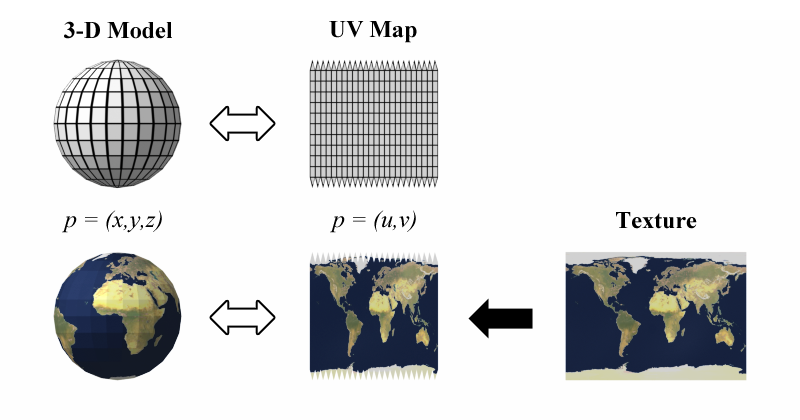
UV mapping is the 3D modeling process of projecting a 3D model's surface to a 2D image for texture mapping. The letters "U" and "V" denote the axes of the 2D texture because "X", "Y", and "Z" are already used to denote the axes of the 3D object in model space, while "W" (in addition to XYZ) is used in calculating quaternion rotations, a common o...
bronze charm
arctic isle
Doesn't exactly stand for something, it's like saying XY
https://en.wikipedia.or...
thank you very much!
arctic isle
cedar vale
why are bullet holes like that in the shadow
do you mean why is it not shiny like the other one?
cedar vale
arctic isle
do you mean why is it not shiny like the other one?
fixed it
cedar vale
arctic isle
do you mean why is it not shiny like the other one?
just an editor issue
 thorny goblet
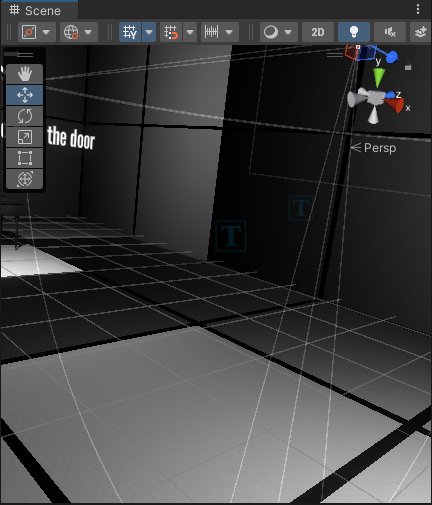
How do i fix this, its so annoying? https://i.imgur.com/he4ljI9.png
 arctic isle
Hey, there is a per-object limit for pixel lights
You can
- Decrease the number of lights hitting those objects
OR - Go to Edit > Project Settings > Quality and increase the pixel light count

If you're using URP, then you'll find this setting in the URP settings
thorny goblet
oh ok i'll try that
thorny goblet
arctic isle
Hey, there is a per-object limit for pixel lights
When i increase it to 8, the issue persists.
Do you want a video of how it looks?
arctic isle
Sure
 gray obsidian
Can someone help me with the lightmapper? I have an indoor office scene which I want to bake light for it to look good I have to increase the Lightmap Resolution to gigantic values, like 1024. I usually see people use values of like 30 or even lower. Why does my resolution have to be that high to look good? The first screenshot has a resolution of 100, the second one is baked with a resolution of 1000.


I'm also getting UV overlap errors with values as small as 100. These are the settings:

 slate ocean
Just a quick workflow question, but when it comes to lightmapping, what kind of static objects are not worth baking and should use light probes instead? I get something like an apple would be too small to be worth baking, but what about a barrel? a crate? a small shelf?
 simple viper
how do i achieve n64 lighting
im having trouble removing directional lighting and adding ambient
 limber delta
gray obsidian
Can someone help me with the lightmapper? I have an indoor office scene which I ...
limber delta
gray obsidian
Can someone help me with the lightmapper? I have an indoor office scene which I ...
You want higher res shadows I assume, comparing the images. I'd look into shadow resolution. Those lightmapper values are indeed quite insane 😄 Go to the render pipeline asset and change there.
 limber delta
slate ocean
Just a quick workflow question, but when it comes to lightmapping, what kind of ...
limber delta
slate ocean
Just a quick workflow question, but when it comes to lightmapping, what kind of ...
Probably best thing is to experiment. I guess it depends on the distance from the camera to objects as well. Not sure if this helps but here's a video on lightmapping where he talks briefly about what you are asking about https://youtu.be/hMnetI4-dNY?t=2877
Small, highly detailed objects seems to be what should be considered

In this video, you'll gain an understanding of how lights and shadows work in the Universal Render Pipeline, as well as how to set up a scenario with a mix of real-time shadows, Light Probes, and baked GI.
Speaker:
Ciro Continisio
Ask your questions here: https://on.unity.com/2UmP9TE
Did you find this video useful? Room for improvement? Let us...
limber delta
simple viper
im having trouble removing directional lighting and adding ambient
Here's a great video on how to work with lighting. Basically he starts with a totally dark scene and goes from there https://youtu.be/f6zUot73-gg
You could also try different shaders for your materials (for example unlit shader).

This tutorial is an explanation about dynamic lighting in Unity, and should help you make better looking scenes ! It will go over Skybox, Ambient, Reflection probes and post process.
NOTE : This tutorial is made with Unity 2019.x in mind, and the Built in render pipeline
this is NOT a tutorial for unity 2020.x or HDRP or URP. The theory is e...
slate ocean
limber delta
Probably best thing is to experiment. I guess it depends on the distance from th...
Much appreciated!
arctic isle
slate ocean
Much appreciated!
To add to what @limber delta said, since lightmapping depends on sampling texels, unless you have a really high-resolution lightmap you won't have very good quality on those small high-detailed meshes using lightmapping anyway.
gray obsidian
limber delta
You want higher res shadows I assume, comparing the images. I'd look into shadow...
The shadow resolution in the URP Asset is already set to 4096 in the examples I showed.
 rustic fable
Does anyone have any idea why my light is clipping? (viewport)


It depends on where I'm looking at. It's fine in my other scenes
simple viper
limber delta
Here's a great video on how to work with lighting. Basically he starts with a to...
Thank you
deft fiber
rustic fable
It depends on where I'm looking at. It's fine in my other scenes
Most likely due to directional light near plane
Polygons that are big or streched out can get clipped off from shadow casting with some near plane values
rustic fable
deft fiber
Most likely due to directional light near plane
Polygons that are big or streche...
The near values doesn't seem to change alot. What would you recommend doing? I'm indeed using directional light
 prime wharf
Hi im having issues with the custom map that I am working on, Some buildings on the map seem to have some weird line going across them. Has you can see on the screenshots, it should not look like that. I also have an issue where the spotlight is not lighting the scene (it will only appear on certain angles when I look at them.) Please let me know if you have an idea of what the issue could be.


 arctic isle
LightingSettings @weary frost
 weary frost
o ya

take the widescreen n everything

there easier
to see
i gtg in 2 mins
ill see your messages when im back ty for the help so far, i think ill try the cpu just to see if its faster since its significantly better hardware
arctic isle
resolution is very very high, drop it to like 20
weary frost
kk gotcha
arctic isle
and go up by 10s until you get a better image
deft fiber
@prime wharf Check texel invalidity and UV overlap debug views
prime wharf
deft fiber
<@670469353568862229> Check texel invalidity and UV overlap debug views
Ye I fixed it with help from the onward server
deft fiber
prime wharf
Ye I fixed it with help from the onward server
I recommend in the future to edit your initial request if the problem has been solved elsewhere
prime wharf
deft fiber
I recommend in the future to edit your initial request if the problem has been s...
sorry my bad
 wanton tendon
Hello! I'm on the URP with procedural meshes and some brick material, building for Android. I'm unsure what changed, but I'm getting these artifacts in specific areas. Lower right shows how the material looks 90% of the time, upper and lower left show the black artifacts. I'm no artist, it's hard for me to identify the issue. Any idea?
 arctic isle
@wanton tendon is this baked lighting? If so, try baking Non-Directional lightmaps. https://docs.unity3d.com/Manual/LightmappingDirectional.html
 wanton tendon
Thanks! That solved it. Will test in VR how it looks and then set the whole project to Non-Directional
wanton tendon
Okay - it wasn't working in VR at all. super over-saturated, made the game look like a destroyed visual novel.
arctic isle
Yeah you're not getting any of the normal maps that the directional lighting gives. What you see there are not artifacts but small shadows.
Can you share an image of what it looks like in VR? Does it look the same in the editor?
wanton tendon
WIt hthe directional baking it looks exactly the same
with non-directional in editor it looks great, in VR something like this (not a real screenshot but photoshop to mimic the look)
 arctic isle
Interesting, can you post about this in the Global Illumination forum? I'll make sure we get some eyes on it.
!Forums
 tawdry schoonerBOT
Have a question that requires a more detailed explanation? We suggest using the forums (https://forum.unity.com/) to ensure a your question is answered more effectively.
Unity Forum
Unity is the ultimate game development platform. Use Unity to build high-quality 3D and 2D games, deploy them across mobile, desktop, VR/AR, consoles or the Web, and connect with loyal and enthusiastic players and customers.
arctic isle
Lightmapping Troubleshooting Guide
https://forum.unity.com/threads/lightmapping-troubleshooting-guide.1340936/
Unity Forum
Introduction
I developed this guide in order to help developers get the most out of Baked Global Illumination (GI) in the Unity Editor. Here, I unpack...
<@&502880774467354641> can you pin this message ☝️
wanton tendon
I'll make a note and try to do it the day after tomorrow. Got a presentation coming and am crunching hard. Will accept the shadow dots until then 😄
arctic isle
In my opinion they look good because they add some depth to the brick material, they come from the surface normals
But yes, good luck with the presentation!
wanton tendon
They do look good in other places, but there they look like its from another dimension. The difference is just too harsh.
 mellow sierra
arctic isle
Lightmapping Troubleshooting Guide
https://forum.unity.com/threads/lightmapping-...
mellow sierra
arctic isle
<@&502880774467354641> can you pin this message ☝️
mellow sierra
arctic isle
Lightmapping Troubleshooting Guide
https://forum.unity.com/threads/lightmapping-...
mellow sierra
arctic isle
<@&502880774467354641> can you pin this message ☝️
Pinned
 noble fern
Hi everyone, I'm trying to bake light but burning spots appear. I've generated UV light maps. All of my light is mixed or baked. I try to help myself but it always finishes burned and dirty.


 arctic isle
Select No Shadows on your Light component
simple viper
arctic isle
Select `No Shadows` on your Light component
wow its that simple
thanks :D
timber lichen
is there a way to use hex codes for ambientlight
and if not, how do i convert the rgb values or hex code to whatever the 1,1,1,1 format unity uses is
nvm i figured it out
chilly kettle
Hello, i still have problems with the uv overlaps when baking. i have no clue why this is happening:


i set the scale lightmap to 1.5, but it doesnt change anything for the object scale in lightmap
deft fiber
chilly kettle
Hello, i still have problems with the uv overlaps when baking. i have no clue wh...
What baking settings were these generated with?
 frail carbon
I desperately need help! When ever I play my current game, the baked lightmaps disappear when I exit play mode. The only way I can make it reappear is by generating lighting all over. Any suggestions?
Update: It seems to only happen when I trigger another scene with SceneManager.LoadScene
deft fiber
frail carbon
Update: It seems to only happen when I trigger another scene with SceneManager.L...
If you're loading scenes additively, I believe only one of them can have their lightmaps loaded
frail carbon
deft fiber
If you're loading scenes additively, I believe only one of them can have their l...
Thanks for you answer! I didn't bake the second scene 
It must be a bug
arctic isle
This does sound like a bug we're tracking. Are you baking both scenes together?
frail carbon
I'm only baking the first scene
arctic isle
The recommended workflow is:
- Bake both scenes together
- Load scene the scene that now has a folder with lightmaps in the same directory as the .unity file
- Load the other scene additively
arctic isle
frail carbon
I'm only baking the first scene
Is the second scene supposed to have any baked data?
arctic isle
If you can get away with baking them together then go for that and I'll make a note to check on what issue we are tracking so I can provide any workarounds.
(but I can't do that until I'm back at the office)
You should also be able to bake them separately if you want, but if they contain light probes you need to do some extra stuff about that to combine the probes from the two scenes
frail carbon
arctic isle
You should also be able to bake them separately if you want, but if they contain...
Okay, thank you so much for your answers! I'll try it out 🙂
 lean moat
Does anybody know what's wrong with my baked lighting here?
 arctic isle
lean moat
Does anybody know what's wrong with my baked lighting here?
arctic isle
lean moat
Does anybody know what's wrong with my baked lighting here?
Can you switch to the Texel Validity debug mode in the scene view?
lean moat
arctic isle
Can you switch to the Texel Validity debug mode in the scene view?
It looks like I solved it
My meshes were one sided, but they need to be, so I just created a duplicate without flipped normals, baked the lighting, and then set them back, seemed to work fine.
arctic isle
Yep that was the suggestion I had in mind as well. Just make sure your front-facing geometry isn't exposed to back-faces
 knotty rover
Can someone from Unity tell us if Unity is interested in making some form of UE5 lumen like feature? Having a realtime GI that supports light bounces would greatly improve our games
arctic isle
knotty rover
Can someone from Unity tell us if Unity is interested in making some form of UE5...
Yes
We are interested 👀
Lots to look forward to in srps / weta tools / lighting BUT I am not an official source, just saying we're interested
Keep an eye on the Unity Blog for more info on all of that
knotty rover
I cannot wait until it's officially confirmed that we'll get some form of realtime GI with bounced lighting support.
For example: at the moment scenes are pretty dark without bounced lighting, and as a countermeasure we have to place more point lights and increase the range which sucks performance especially with shadows, some form of realtime GI with bounced lighting will drastically reduce the amount of point lights needed to illuminate a scene and will add a very realistic look, I'm pretty sure it'll be taxing performance as well, but it's better than having tens of light sources per location.
UE5's lumen gives a very realistic lighting behavior and as Unity devs we felt left out lol
I'm pretty sure their implementation is taxing performance as well, but seems like they introduced Nanite to win back some frames, so if you're taking notes, it'll be great if Unity also introduced auto LOD for better performance.
deft fiber
knotty rover
I cannot wait until it's officially confirmed that we'll get some form of realti...
There's many ways to simulate ambient lighting besides point lights, and there's ways to reduce cost of point lights as well
Games have been doing lighting quite fine without any kind of RTGI for over 20 years 😉
frail carbon
arctic isle
You should also be able to bake them separately if you want, but if they contain...
The only workaround I could fine is manually reloading the scene from assets 
arctic isle
frail carbon
The only workaround I could fine is manually reloading the scene from assets <:U...
That seems like a reasonable workaround.
frail carbon
arctic isle
That seems like a reasonable workaround.
Very much so!
 magic ether
can somebody please help me, baking lights just isnt working for me, anybody have any ideas?
First one is after bake, second one is before bake

 deft fiber
magic ether
can somebody please help me, baking lights just isnt working for me, anybody hav...
deft fiber
magic ether
can somebody please help me, baking lights just isnt working for me, anybody hav...
Like the warning suggests, you must not have any overlapping lightmap UVs
Could be other issues too, like not every mesh being marked as contribute GI static
There's so many steps to get right in the process I recommend you practice light baking on a much simpler scene a few times until you get the process consistently right
That said I haven't seen anyone get very good results when baking lights for voxel-based scenes
There's often way too many seams to account for and there's no practical way to conceal limitations with lightmap compression or resolution, due to the simplistic pixel textures
timber lichen
I'm trying to add a spotlight in HDRP and only the shape box works
Cone or pyramid aint working
 runic quarry
I baked the lighting in my scene, and for some reason this single object is glowing and completely blowing out the entire screen when it comes into view

it doesn't have any emissive material on it and even has a low smoothness
also besides the directional light there are no lights in the scene
this is what the scene is supposed to look like (a different location in the map)

it just appears to be that single object that's glowing
there is bloom enabled in post processing, but it's extremely minimal (see blue vending machine in above screenshot)
the only answer I found online said to uncheck "stick seams" in the mesh renderer, but that didn't work
 upper fable
runic quarry
I baked the lighting in my scene, and for some reason this single object is glow...
upper fable
runic quarry
I baked the lighting in my scene, and for some reason this single object is glow...
So is that just the default lit material?
runic quarry
it's a very simple urp lit shader graph
upper fable
runic quarry
it's a very simple urp lit shader graph
Could you show it?
runic quarry
 timber lichen
this should probably count as lighting, having this issue where when i run the Game scene it looks normal (top), but when I run the Menu scene and then go into the game it looks dark (bottom),
this does not happen when i start in the Game scene, go into the menu scene, and back into the Game scene, only happens when i open with the menu scene
(i use a directional light with shadows)

 dusky bay
its something that happens when you change scenes yeah
i think it was something to do with auto generate lighting in the lighting settings or something
timber lichen
oh yeah okay so i did that and now its always broken so i can probably just lower the shadow strength
upper fable
timber lichen
oh yeah okay so i did that and now its always broken so i can probably just lowe...
No, increase ambient lighting
timber lichen
where exactly is that
oh i found it had to turn off auto generate
seems to be looking good now
arctic isle
timber lichen
oh i found it had to turn off auto generate
Which version are you on?
chilly kettle
arctic isle
Which version are you on?
Hey, how deep are you into unitys Lightmap UV Generator? 😄 Having trouble for a while that the uv shells get placed to dense so i have many overlapping lightmap Uvs
arctic isle
chilly kettle
Hey, how deep are you into unitys Lightmap UV Generator? 😄 Having trouble for a...
I have the people who coded it across from me in the same room 😛 . That said, if you have a longer question post on the Global Illumination forum and the devs will take a look. (It's the holidays so people are soon going to be away, but we'll get back to you for sure)
chilly kettle
Ok, is it possible that i create that post NOW and you give them a hint to look into it? 😂
arctic isle
No guarantees but yeah I can give them a nudge
chilly kettle
great, thanks 😄
chilly kettle
arctic isle
No guarantees but yeah I can give them a nudge
 round fox
Does anybody know why this point light only shows light on the floors and not on the walls?

in the screenshot it looks like it does but trust me it doesnt ingame or on my screen right now in scene mode
limber delta
@arctic isle I hope you don't mind me pining you. I was wondering if you know why area lights in the URP acts like spotlights? It's a question I haven't been able to find an answer for.
 limber delta
round fox
Does anybody know why this point light only shows light on the floors and not on...
limber delta
round fox
Does anybody know why this point light only shows light on the floors and not on...
Is the texture/material very dark? Can you increase the intensity of the light x10 for example to see if it makes a difference?
round fox
yes i figured it out. tnx
limber delta
and what was the issue?
round fox
dark material
limber delta
ah 🙂 ok
arctic isle
limber delta
<@271000502555115521> I hope you don't mind me pining you. I was wondering if yo...
Do you mean why you have a circle on the floor? (Also yeah don't ping me for new questions, I usually see the channel regardless)
limber delta
arctic isle
Do you mean why you have a circle on the floor? (Also yeah don't ping me for new...
Yes exactly, the circle
arctic isle
So I am 99% sure this also happens in built-in. I think if you increase the range it will go away.
limber delta
Yep, it does get smoother by increasing the range but sometimes that causes other issues as the light bleed in into spaces below.
arctic isle
Are you trying to get a perfect square on the floor? You could use a cookie to get the shape you want
round fox
In the first image a couple lights is turned on in the hallway but in the seconds picture none of them are turned on. The point lights used here are turning on and off by itself. when i get close to them, they turn on, when i get further away, they turn off. The light component doesnt turn off just the visual light. And its not just in scene view its also in game view and in a build version. pls help!

 arctic isle
chilly kettle
https://forum.unity.com/threads/lightmap-uv-generator-placing-uvs-to-dense-uv-ov...
arctic isle
chilly kettle
https://forum.unity.com/threads/lightmap-uv-generator-placing-uvs-to-dense-uv-ov...
From within the depths of Unity:
Looks like they are using a model file with multiple meshes. The user needs to check the scale on the meshes within that FBX as a first point of entry
 fickle needle
round fox
In the first image a couple lights is turned on in the hallway but in the second...
fickle needle
round fox
In the first image a couple lights is turned on in the hallway but in the second...
sounds like URP forward light limit, try switching to deferred if you're on 2021.2 or above
or reduce the amount of lights you have, and/or their range
limber delta
arctic isle
Are you trying to get a perfect square on the floor? You could use a cookie to g...
I was expecting a rectangle, that is all. But you are right, a cookie will solve it
 round fox
fickle needle
sounds like URP forward light limit, try switching to deferred if you're on 2021...
round fox
fickle needle
sounds like URP forward light limit, try switching to deferred if you're on 2021...
Im a noob pls explain more detailed what you mean
round fox
fickle needle
or reduce the amount of lights you have, and/or their range
I have only 5 lights in the entire scene
fickle needle
go to your active URP asset, and switch "rendering path" from forward to Deferred
https://docs.unity3d.com/Packages/com.unity.render-pipelines.universal@14.0/manual/rendering/deferred-rendering-path.html
you will lose MSAA antialiasing though, you can possibly switch to forward+ as well
 merry turtle
I'm a complete noob to lighting, I baked my lights and it ended up looking like this, I don't know what is happening but how do I fix it?
 fickle needle
merry turtle
I'm a complete noob to lighting, I baked my lights and it ended up looking like ...
fickle needle
merry turtle
I'm a complete noob to lighting, I baked my lights and it ended up looking like ...
welcome to the lightmap experience 🙂
check your overlap UV view mode, anything red?
same with invalid texels
round fox
fickle needle
go to your active URP asset, and switch "rendering path" from forward to Deferre...
i cant find the setting were to switch that, could you help me?
fickle needle
round fox
i cant find the setting were to switch that, could you help me?

This is HDRP, so a bit different, but it should be similar
 fickle needle
Oh, I thought you were using URP
round fox
i have installed post processing and i am using it on my camera
fickle needle
been a while since I used built-in, I think you can do it from the camera in built-in.
Click on your camera, you should find it there
round fox
fickle needle
been a while since I used built-in, I think you can do it from the camera in bui...
find what`?
fickle needle
forward/deferred rendering path
round fox
oh i see, what should i change it to again?
fickle needle
deferred
merry turtle
fickle needle
welcome to the lightmap experience 🙂
check your overlap UV view mode, anything...
Where's that?
I was re-baking it it looks about the same
fickle needle
shading mode, should be under the scene tab somewhere
this is how it looks in 2022.2, I believe it's different In previous versions but should be around there.
 arctic isle
merry turtle
the checkerboard is the default result right?
arctic isle
merry turtle
the checkerboard is the default result right?
Checkerboard is your lightmap resolution
It's overlayed over the actual debug view
fickle needle
if nothing is red, for overlap UVs view and invalid texels, then it could be something else
I noticed stich seams can cause these types of issues, slight light leaks in corners, you can disable it per object in your scene, and rebake
 harsh swan
can you help me ?
 fickle needle
actually, giorgos, any ideas why that happens? I noticed meshes with very few polygons end up with light leaks in corners due to stich seams
is it supposed to have some edges to work with? This usually happens with things when an object has very few polygons
merry turtle
I re-baked everything and the lighting still looks odd, and that light leak is still there?
 fickle needle
how many texels?
arctic isle
Try out Kristijonas' recommendation here https://forum.unity.com/threads/lightmapping-troubleshooting-guide.1340936/#post-8467235
Unity Forum
Introduction
I developed this guide in order to help developers get the most out of Baked Global Illumination (GI) in the Unity Editor. Here, I unpack...
merry turtle
I don't know where to check the texels
fickle needle
in your lightmap settings
arctic isle
It's the Lightmap resolution
merry turtle
I think these are just the default settings
 arctic isle
harsh swan
can you help me ?
arctic isle
harsh swan
can you help me ?
Hey for this exception to go off, either your "RenderSettings" or your "LightmapSettings" are null for the scene you're trying to build
fickle needle
merry turtle
I think these are just the default settings
looks good to me, did you try turning off seam stiching?
merry turtle
I was about to say
fickle needle
Also you might want to switch to the GPU lightmapper, and disable progressive updates, & reduce max lightmap size to 1024
harsh swan
arctic isle
Hey for this exception to go off, either your "RenderSettings" or your "Lightmap...
how i can fix id
merry turtle
I thought I saw the option to change the seams on it but I can't find it now, yes it is set to 4 (stitchable)

I'm going through and disabling stich seams
fickle needle
just try it on a few meshes that had light leaking and see if it fixes it, no need to do it for all scene meshes
merry turtle
for context, this scene is pretty static, I don't think I will have anything realtime, the most that really happens is that a door will open
arctic isle
harsh swan
how i can fix id
Go to Window > Rendering > Lighting and make a new Lighting Settings asset at the top and assign it for all your scenes.
I will assume that "RenderSettings" means render pipeline so if that's missing you'd probably be able to tell or your project is broken somehow
merry turtle
I'm baking it again now
harsh swan
arctic isle
Go to Window > Rendering > Lighting and make a new Lighting Settings asset at th...
and how i can load it in teh scene
night shell
arctic isle
Try out Kristijonas' recommendation here https://forum.unity.com/threads/lightma...
holy shit where has this been all my life?
bookmarking...
merry turtle
that didn't fix it
merry turtle
fickle needle
just try it on a few meshes that had light leaking and see if it fixes it, no ne...
I didn't catch this message before baking but I did so, and it still has the light leaking, everything looks the same
fickle needle
merry turtle
I didn't catch this message before baking but I did so, and it still has the lig...
Are you sure there are no UV overlaps or invalid texels? If not, check the troubleshoot thread linked above, it has a section about light leaking
merry turtle
fickle needle
Are you sure there are no UV overlaps or invalid texels? If not, check the troub...
Here's what they look like, after my new bake (turning off seam stitching on all objects)
 fickle needle
try reducing padding to 4, if it doesn't help, check the thread
also make sure your meshes have generate lightmap UVs on, set to calculate mode and minimum Texel's set to 15
(if using custom meshes with no manual lightmap UVs)
merry turtle
Where's the setting to check if the mesh has "generate lightmap UVs"?
night shell
merry turtle
Where's the setting to check if the mesh has "generate lightmap UVs"?
on the model in the project view
locate the model in the project view, and in the inspector tab on the bottom you should see the option to generate lightmap uvs
merry turtle
thank you, just found it! Mine's set to 40 (I don't believe I changed this)

I'm going to try one more time then I'll look to the thread
anything else I need to change before that though? Baking takes about 5-10 minutes
night shell
merry turtle
anything else I need to change before that though? Baking takes about 5-10 minut...
for iteration and testing you can drop sample counts so it doesn't take so long
what do your settings look like for lightmapping @merry turtle
oh wait you just posted them
night shell
merry turtle
Here's what they look like, after my new bake (turning off seam stitching on all...
yeah you can drop your indirect and enviorment samples to speed things up considerably, drop them to 32
merry turtle
I'm looking at the thread
I did change it to 32 (and the other stuff) but the light leak is still there
night shell
merry turtle
I did change it to 32 (and the other stuff) but the light leak is still there
yeah changing sample counts won't remove light leaks, but I can see your enviorment is just an interior, are there any windows that let in natural light?
if there isn't, then there is no reason to have enviormental lighting or directional lights in your scene
merry turtle
no windows
night shell
well in that case remove any directional lights you have
if there is a skybox/enviorment lighting you should also remove them/disable/drop the intensity to zero
that should solve your light leaking

 night shell
merry turtle
What should I tweak now?
night shell
merry turtle
What should I tweak now?
are you using only emissives to light your scene?
lowering the sample counts definetly does make things ugly, but clearly also reveals to me you aren't using any dedicated light sources in your scene
I would use point lights for those ceiling lights (and also exclude them from the bake so the point lights don't get occluded by the emissive shape you have, which should also reduce the blobby/noisy artifacts caused by the low sample counts from emissive only sources)
merry turtle
night shell
are you using only emissives to light your scene?
I'm sorry for not responding, but I'll fix this tomorrow, I was just fiddling with the settings
timber lichen
arctic isle
Which version are you on?
Just realized now that I just didnt see the scroll bar and thought turning off auto-generate fixed it lol, all good now
radiant kettle
Is there a way around this?
 deft fiber
@merry turtle With how many UV seams you have and how much padding there is, there doesn't seem to be enough resolution, which is a common problem when trying to bake with a lot of small disconnected level geometry
Your best way to defeat all these problems is to get familiar with baking by practicing it in a much simpler scene
deft fiber
radiant kettle
Is there a way around this?
No
Though it depends what you consider your options to be
By that I mean that you cannot make Enlighten do realtime indirect bounce shadowing for lights other than directional, but maybe can use different types of lighting
 eager coyote
merry turtle
eager coyote
merry turtle
Are you building your scene using a lot of small, independent geometry? I'm seeing a LOT of seams.
merry turtle
night shell
I would use point lights for those ceiling lights (and also exclude them from th...
I'm back now, how do I exclude point lights from the bake?
I am using only emissives, those lights were just using an emission map
radiant kettle
deft fiber
No
Though it depends what you consider your options to be
By that I mean that yo...
Are there other types than Directional Light? (since this wont work for both Spot and Point)
deft fiber
radiant kettle
Are there other types than Directional Light? (since this wont work for both Spo...
No, basically what it means is that only directional light can calculate bounce shadowing
If there are any workarounds I'm not aware of them
radiant kettle
Okay, thanks
night shell
merry turtle
I'm back now, how do I exclude point lights from the bake?
No your replacing those emissives with point lights
Unmark the contributw GI flag on those emissive objects
deft fiber
night shell
Unmark the contributw GI flag on those emissive objects
I recommend we continue this specific issue in the thread, since it's quite sprawling
merry turtle
I see
merry turtle
night shell
Unmark the contributw GI flag on those emissive objects
I was looking for it on the light itself, it's not there, should I be looking somewhere else?
 night shell
merry turtle
I was looking for it on the light itself, it's not there, should I be looking so...
night shell
merry turtle
I was looking for it on the light itself, it's not there, should I be looking so...
Again, not the point light I'm talking about the emissive of the mesh itself
merry turtle
I unchecked that already, does the point light not have the contribute GI flag, and only relies on the mode I set it to?
night shell
Techically it does have that flag but because its a light it only relies on the mode you set it too
merry turtle
I see, should I just bake again now?
night shell
merry turtle
I was looking for it on the light itself, it's not there, should I be looking so...
Enable shadows
Then bake
deft fiber
@merry turtle @night shell It would be really practical to use a thread for this
 tall whale
hey guys! so when i walk around in my scene or move the camera in the edit view around my lighting it flickers for some reason. does anyone know how this could be solver?
night shell
tall whale
hey guys! so when i walk around in my scene or move the camera in the edit view ...
too many per pixel lights
wanton tendon
Any idea where this might originate from? Too many overlapping light sources while baking? Or can someone give me a hint for a keyword to google for?
Thanks!
 tall whale
night shell
too many per pixel lights
tall whale
night shell
too many per pixel lights
how do i fix it?
night shell
increase light limit in URP settings if you are using URP
if you are in built in pipeline you increase the per pixel count in the quality settings
arctic isle
wanton tendon
Any idea where this might originate from? Too many overlapping light sources whi...
Texel validity artifacts, you have backfaces in your scene
night shell
thats a temp solution though
you need to look into light baking since you have too many per pixel lights
tall whale
where would you increase the light limit
wanton tendon
arctic isle
Texel validity artifacts, you have backfaces in your scene
Thanks! it looks like mold, lol!
night shell
tall whale
where would you increase the light limit
 night shell
tall whale
where would you increase the light limit
night shell
tall whale
where would you increase the light limit
but thats a temp solution I'd say, you need to look into baking some lights because chances are you have too many per pixel lights
if you are using built in

 night shell
wrong place
thats the lightmapping panel
are you using built in pipeline or urp @tall whale
tall whale
urp, sry
night shell
you'd find the light count on the URP asset itself
on quality settings good chance that the asset is already assigned
tall whale
ok ya now i got it
night shell
you can click it and adjust the settings on the asset istelf
I would also look into light baking because you have too many per pixel lights if there is that much flickering
tall whale
ok all fixed! thanks, i didnt have the urp selected
whats a way i can fix this?

the lighting is off on that wall because the directional light is being pointed in that direction but its an enclosed box so idk wahts going on
i also have a baked map on this wall too
wanton tendon
arctic isle
Texel validity artifacts, you have backfaces in your scene
Praise your wisdom! Roommesh is procedurally generated, the tiles above the window were ceiling and floor tile, resulting in two meshes with opposite normals on the same spot. Switched two lines in extremely complicated meshmaker code, fixed this issue and 2 others I've had. You saved my weekend. Can call it a day, lol!
 crystal zephyr
for some reason the lights in my game won't work at all
they don't change, they won't let me change them, they just won't work and i even cleared baking many times
and i have to have this damn game done tonight
now when i bake it, the lights just go out!
night shell
tall whale
whats a way i can fix this?
im confused as to what your even wanting to fix here
light leaking into the room?
 soft edge
Hey there! Hope this is the right channel for this.
My shadows look detached the further I zoom out. How would I go about fixing this? (using URP)

Changing the depth and normal bias to 0 (in render pipeline asset -> Shadows) does help a little bit, but there's still a clearly visible line between wall and shadow

 woven badger
Hello, for some reason every time I try to bake lighting in my project, it just gets stuck at "Baking..." and says like that to the point to where my whole pc starts freezing
ive tried making a new scene and it still happens
even when just baking a point light on a default cube
night shell
woven badger
Hello, for some reason every time I try to bake lighting in my project, it just ...
could be alot of reasons into that
but sounds like its pointing to that your system isn't that capable
there are ways to get around it and make it so its not as intensive
 silver grove
soft edge
Hey there! Hope this is the right channel for this.
My shadows look detached the...
silver grove
soft edge
Hey there! Hope this is the right channel for this.
My shadows look detached the...
shadow distance problem
Gotta increase it for long range
crystal zephyr
question, how do i make it so then having two lights doesn't cause extreme blind spots in my level?
i have to have my game tonight and i really need an answer to this pretty fast
 drowsy scroll
Heyo, a quick question.
So I created this hole in the ground and it seems that the lighting in the scene doesn't seem to cast shadows in it.
It is completely lit.
Is there a way to make the inside of the cave dark?
 crystal zephyr
@summer aspen do you by chance know about specific lighting issues?
 summer aspen
@crystal zephyr Don't tag people not in conversation with you.
crystal zephyr
my apologies
soft edge
silver grove
shadow distance problem
Gonna check it out, thanks!
woven badger
night shell
but sounds like its pointing to that your system isn't that capable
it was working before
just out of no where now
 spark pasture
Does anyone know why in HDRP a light has to be THIS HIGH to actually look good


I am bad at lighting
 idle hinge
anyone know why the area light is making the shadows like this? the archway is supposed to cast a shadow from every part but the area light goes through the top for some reason
 lean moat
Anybody know why my realtime lights aren't working in the build?
I can't use baked so realtime is my only solution, however it won't show up in the build
Editor

Build

 warped trout
should it really take about 6 (went up to 9) hours to bake this small room with 1 single light?
im baking on my rtx 3060ti
 deft fiber
warped trout
should it really take about 6 (went up to 9) hours to bake this small room with ...
deft fiber
warped trout
should it really take about 6 (went up to 9) hours to bake this small room with ...
How about them lightmapper settings?
warped trout

think something must have bugged for a moment
changed settings back and forth before and now its going basically instantly
i think i might just need to look up how to get this light baking thing to work
deft fiber
warped trout
think something must have bugged for a moment
Sometimes editor restart is required to solve unexplained hang-ups, sometimes a GPU driver update
I prefer to turn down resolution instead of samples to speed up test bakes while keeping the look consistent
warped trout
gave it crazy high settings, turned off and on static on almost all objects and no global illumination calculation happened
slate ocean
I'm having a bit of confusion when it comes to modular asset workflow when they contain both exteriors and interiors. The reflection probe from outside seems to be affecting the walls on the inside. The exterior/interior walls are a single mesh, so I guess I have to separate them into their own mesh and object. But this just doubles the amount of work that needs to be done. Is there any good resources on lighting for both exteriors and interiors simultaneously?
arctic isle
warped trout
gave it crazy high settings, turned off and on static on almost all objects and ...
Can you upload an Editor log from one of you problematic bakes?
warped trout
arctic isle
Can you upload an Editor log from one of you problematic bakes?
to this channel or dm?
arctic isle
warped trout
to this channel or dm?
Send it as dm for your protection from posting logs publicly, but I'll continue any conversation here
warped trout
also, i cancelled the problematic baking before
does that matter?
arctic isle
No that's ok
arctic isle
warped trout
also, i cancelled the problematic baking before
does that matter?
Nice got it, I'll take a look
@warped trout can you send me Editor.log-prev?
 little condor
spark pasture
Does anyone know why in HDRP a light has to be THIS HIGH to actually look good
little condor
spark pasture
Does anyone know why in HDRP a light has to be THIS HIGH to actually look good
To get good indoor lighting without blowing out the Lumen values, you need to adjust the default post-processing volume overrides. So I create a new volume and add the following two changes:
-
A Visual environment with Sky type = none. Since you're indoors, you don't want the sky to contribute to the lighting.
-
Enable and set the Exposure settings.
If you're using area lights then you might find the ceiling doesn't receive any light. In this case you'll need to bake your lighting. If you do this, I find setting the Indirect Intensity to 2 or 3 gives better results, but you might have to experiment yourself.
 spark pasture
Oh yeah
spark pasture
little condor
To get good indoor lighting without blowing out the Lumen values, you need to ad...
I fixed it a while ago
Thank you though
soft edge
silver grove
shadow distance problem
Increasing it actually made it somewhat worse
 silver grove
soft edge
Increasing it actually made it somewhat worse
silver grove
soft edge
Increasing it actually made it somewhat worse
what the hell? there's no difference lol
Have you tried messing with the shadow bias of the directional light?
deft fiber
slate ocean
I'm having a bit of confusion when it comes to modular asset workflow when they ...
Some render pipelines (if not all by now? At least HDRP does) support blending multiple reflection probes over a mesh, so interiors can have their own reflections
Otherwise you do have to split the meshes into inside and outside, which also helps with light probes (Not sure why that would double the work)
Note that there's two kinds of reflection probe blending which can sometimes cause confusion: the kind that calculates the average of two reflection probe per mesh, and the other that calculates probe influence per-pixel over the mesh
soft edge
silver grove
what the hell? there's no difference lol
haha, yeah it is very slightly. Yes, I 've set the depth bias to 0 before. It's slightly better than what I started with.

Zooming a little bit closer and the gap disappears.
silver grove
what happens if you make the wall thicker? otherwise I'm out of options
might just be how Unity handles distance optimisation
soft edge
silver grove
what happens if you make the wall thicker? otherwise I'm out of options
That's it!
 silver grove
epic
silver grove
nw 🙂
Yeah unity doesnt like double side shadows on planes either, creates cracks through it
seeing a pattern here..
soft edge
I feel like unity wants to fight me sometimes 🙂
phew, that helped a lot for sure. Thanks again
upper fable
silver grove
might just be how Unity handles distance optimisation
I don't think it has to do with optimization, it's just that some bias values are required to avoid self shadowing/shadow acne
silver grove
bet
warped trout
why is there no difference in light on this

vs this

both snippets taken after manually generating lighting
my lightmapping settings:
 limber delta
Have you marked your objects as static and then baked your lights?
 gleaming kettle
Hello, for some reason every time I try to bake lighting in my project, it just gets stuck at "Baking..." and says like that to the point to where my whole pc starts freezing
ive tried making a new scene and it still happens
even when just baking a point light on a default cube
warped trout
limber delta
Have you marked your objects as static and then baked your lights?
objects set to static
no difference

 limber delta
warped trout
objects set to static
no difference
limber delta
warped trout
objects set to static
no difference
Did you also bake the lights?
Is your light inside a mesh?
warped trout
the light is separate but its also static
gonna check its pos
yeah, that was it, it was covered by a mesh
idk wth these black marks are
deft fiber
warped trout
idk wth these black marks are
Overlapping UVs, like the console is warning you
deft fiber
gleaming kettle
Hello, for some reason every time I try to bake lighting in my project, it just ...
Which editor version are you on?
gleaming kettle
2019
deft fiber
gleaming kettle
2019
Specifically?
gleaming kettle
 deft fiber
gleaming kettle
deft fiber
gleaming kettle
It's not the latest version of 2019 LTS, so updating may help
Upgrading to a newer LTS like 2020 or 2021 could also help solve these kind of problems
Important try is to bake with auto-generate off, as it can be buggy
Sometimes restarting the editor and updating relevant drivers solves vague hang-ups as well
gleaming kettle
deft fiber
It's not the latest version of 2019 LTS, so updating may help
Upgrading to a new...
cant go to a newer version, this is for vrchat so it requires 19.4
slate ocean
deft fiber
Some render pipelines (if not all by now? At least HDRP does) support blending m...
I just consider it double having to manage two objects per wall instead of a single one.
warped trout
deft fiber
Overlapping UVs, like the console is warning you
Seems like it was yeah
deft fiber
warped trout
Seems like it was yeah
Seems there was some confusion earlier
UV overlap problems are in most cases different meshes sharing the same space in the lightmap, which tends to happen when "generate lightmap UVs" box isn't checked in import settings
warped trout
Well, i didnt change anything with the lightmap
I just properly unwrapped each mesh in blender and reimported in unity
warped trout
deft fiber
Seems there was some confusion earlier
UV overlap problems are in most cases dif...
That might explain why unity says i have overlap where in blender i cant see the same overlap, ill check it out later
deft fiber
warped trout
That might explain why unity says i have overlap where in blender i cant see the...
I'd say it's better to rely on the automatic generation unless you have a specific reason to avoid it
They shouldn't be occupying the exact same space even with non-overlapping UVs, but that still seems to happen without automatic generation
warped trout
Yeah i will use automatic generation
I dont have enough knowledge to do any different with lightmaps
timber lichen
Does global illumination pre processing lose its progress if canceled partway through?
For realtime gi
limber delta
warped trout
Yeah i will use automatic generation
I dont have enough knowledge to do any diff...
Check out some tutorials. This one is really good https://sdk.massiveloop.com/tutorials/lightingTutorial.html
warped trout
limber delta
Check out some tutorials. This one is really good https://sdk.massiveloop.com/tu...
Not really my kind of thing
I only do what i have to with this, im mainly programmer
Programming is my interest, lighting stuff isnt
deft fiber
warped trout
Not really my kind of thing
I only do what i have to with this, im mainly progra...
You're still doing this, are you not?
Light baking has way too many steps and moving parts for anyone to realistically do it without instructions
warped trout
deft fiber
You're still doing this, are you not?
Light baking has way too many steps and mo...
Im only gonna tick the box u told me about
If there is anything more with lighting i have to do, ill just move on to something else
Dont have time or interest to learn something completely new
 raven nymph
i convert my 3d models into a 2d normal map and sprite in a render pass before post processing
is there a way i can make them work with 2d lights
 limpid salmon
when i import my model from blender (after fixing flipped normals)
by default has a urp/lit material
the model does not respond to light properly


 glad cipher
My friend is having a problem with normal maps, he says the light cuts off where the light placed and the shadow moves with the position of the light. He doesn't know if it's the problem with the normal map or something else (had to say this because he's too scared to ask) @sturdy cargo

 arctic isle
Hey there is a limit to realtime pixel lights per object depending on your render pipeline
 sturdy cargo
im using hdrp
arctic isle
🤔
sturdy cargo
whenever i move the light source around, the shadow moves with it, but when i don't use a normal map the shadowed section disappears
arctic isle
What's up with those 4 tiles being a different color
sturdy cargo
this is the roof without the normal map
 sturdy cargo
arctic isle
What's up with those 4 tiles being a different color
sturdy cargo
arctic isle
What's up with those 4 tiles being a different color
aesthetics tbh
little condor
glad cipher
My friend is having a problem with normal maps, he says the light cuts off where...
Select the texture and make sure the type is set to Normal map. That should fix it.

Also, you may need to change some of the texture settings. This could be a DirectX normal map, so get the right shadows I changed the swizzle settings to this:

That should give you something like this:
 deft fiber
 inland sparrow
how do I make a global light in unity 3d?
inland sparrow
how do I make a global light in unity 3d?
What do you mean by "global light"?
little condor
inland sparrow
how do I make a global light in unity 3d?
There is no "global light", but there is global illumination. This is where objects receive light that has bounced off other objects. Is that what you mean?
If so, then you can either bake the bounced light onto static objects and use light probes for dynamic objects, or you can use raytracing on RTX capable cards, or imitate it with environment lighting.
It depends on what you're wanting to do really.
night shell
most likely ambient lighting
as in probably a flat constant color
no directionality
 atomic summit
Hello, Im still new to baked lighting but I cant seem to figure out why theres this big black pillar in the hallway, (There is no black pillar to make the shadow and the building is inverted normals)

if you need more info im happy to provide 🙂
night shell
atomic summit
lightmap uvs?
atomic summit
I checked the light maps and there seems to be an issue with one of the mesh's crossing over the lightmap
Imma re import my mesh's and see if I can change some settings
FIXED IT
Just had to make the mesh generate lightmap uv's
inland sparrow
night shell
as in probably a flat constant color
yeah
 pastel vortex
I've been trying to set up light probes in my scene. But it seems my dynamic objects are all lit the same way from all angles, creating a "fullbright" effect. what am I doing wrong?
here's another example of how the material should look vs how it looks

 deft fiber
here s another example of how the


 wide loom
I'd love some help solving a weird lighting issue I'm experiencing.
I'm using the URP renderer with deferred lighting and experience light flickering on camera movements.
Spent a ton of time trying to figure out what is going on, as it's acting as if I reached the maximum light sources allowed even though it shouldn't happen using deferred?
chilly kettle
wide loom
I'd love some help solving a weird lighting issue I'm experiencing.
I'm using th...
Do some screen recordings please 🙂
wide loom
I managed to find the issue, seems like it's a bug Unity has with with light cookies. I wrote about it here:
https://forum.unity.com/threads/unity-2021-2-0b5-urp-deferred-rendered-lights-flickering.1152470/#post-8678427
Unity Forum
Hi Everyone,
I am using Deferred Rendering for URP Unity 2021.20b5 and I keep getting this weird behaviour with the lights in my scene. They flicker...
(It still happens in the latest LTS)
chilly kettle
Did you try 2022?
Maybe its already fixed there
wide loom
Didn't try 2022, I'm using this project for production
 wild idol
I used bakery to bake my lights. But the maps come out very wrong.

Except for a texel mismatch the uvs dont seem wrong

If anyone has an idea lemme know 🫶
 scarlet geode
don't know if this is where the post this, but does anyone know how to use emission maps for a URP sprite lit shader? would it be through using secondary textures?
 olive aurora
wild idol
I used bakery to bake my lights. But the maps come out very wrong.
olive aurora
wild idol
I used bakery to bake my lights. But the maps come out very wrong.
do the normals seem flipped by any chance?
 untold jolt
Can anyone help me when i disable the light it's dosen't go away 🙂
fickle needle
untold jolt
Can anyone help me when i disable the light it's dosen't go away 🙂
That's because the light is set to baked, which means that light isn't real-time anymore, and the light info is baked into textures that affect static objects which receive baked lighting
If you want to get global illumination but have the ability to disable lights, you can set the light to Mixed
which makes it bake the indirect lighting/gi only, while the direct light will always be realtime, and only the indirect portion will be baked
untold jolt
fickle needle
That's because the light is set to baked, which means that light isn't real-time...
Thanks you 😄
 zenith coral
So I'm working in URP and implementing a Frustum-Aligned Volumetric Fog effect.
I've got pretty much everything working EXCEPT shadow maps.
I can't for the life of me figure out how to pass a light's shadow map to a compute shader in URP
Does anybody who knows a bit more than me think they can help?
Here's a screenshot of the effect so far (even though that really doesn't help at all lol)

I need to use the depth of each light's shadow map to know when and where each light is blocked
 stuck jetty
zenith coral
So I'm working in URP and implementing a Frustum-Aligned Volumetric Fog effect.
...
stuck jetty
zenith coral
So I'm working in URP and implementing a Frustum-Aligned Volumetric Fog effect.
...
@thorny goblet you want to integrate your volumetric fog with shadow?
If that's true. Just get the light shadow map in each ray marching step, the position will be your ray position and only calculate the ray if shadowMapResult > 0
zenith coral
I'm unsure of how to get a light's shadow map in URP
And pass it into the compute shader where the calculations are taking place
stuck jetty
Light.shadowAttenuation
This will return the shadow of that light
zenith coral
I'm supposed to be able to use this in a compute shader?
I thought that was just for standard shaders
zenith coral
Nvm I got it working

Didn't know you could include Lighting.hlsl into a compute shader and have it work
stuck jetty
Great. Your volumetric effect looks nice.
 worthy relic
Is there a way I can prevent materials (the way material in the screenshot) from having lots of glare from a baked lightsource?

basically how can I make it look smooth and not like the light is concentrated on that one spot
stuck jetty
worthy relic
basically how can I make it look smooth and not like the light is concentrated o...
Do you mean light falloff?
worthy relic
to be honest I don't know what that is
basically how can I make every wall be evenly lit up (like this picture), rather then the walls near the direct lights being extremely bright
 worthy relic
i'll check it out, thanks
prime wharf
rustic fable
Hi. How can I trouble shoot that my lightmaps arent visible?
Idk if you got an answer but the most simple thing to check is if you are in shaded mode and that lighting is toggled
 twilit kraken
guys, the lighting in my scene gets changed when i load it through another scene
twilit kraken
I did google and saw about baked lights and pre generating light rendering, but none of it is working for me
deft fiber
twilit kraken
guys, the lighting in my scene gets changed when i load it through another scene
You should generate lighting for each scene from the lighting window
baked lightmapping does not need to be enabled for it
twilit kraken
deft fiber
You should generate lighting for each scene from the lighting window
baked ligh...
ohk that fixed it, but i think my light settings were corrupted because i had to create a new light setting for it to work, previously light setting was set to "none" and generating lighting used to just break the lighting
warped trout
can someone explain to me how the volume component works?
i have 2 different volumes for 2 different kind of objects
but 1 of the volumes control both objects even though the second object has its own volume
but that volume doesnt effect the object its inside of
deft fiber
warped trout
can someone explain to me how the volume component works?
i have 2 different vol...
Volumes in URP and BiRP control post processing for cameras within their influence
In HDRP they can also change how lights get rendered on objects within them
deft fiber
warped trout
so how should i have my volumes set up for my objects?
Volumes in URP don't have any relation to objects, only cameras
Though I'm not sure what "volumes for objects" exactly means in this context
warped trout
then how do i get different effects for different objects?
deft fiber
warped trout
then how do i get different effects for different objects?
Depends what you mean by "effects", but not with local volumes anyhow
warped trout
different emission strengths, the spread
deft fiber
warped trout
different emission strengths, the spread
Can't
You can change material emission intensities though
warped trout
thats what i mean (i think?)
timber lichen
Why does my scene look like this? I deleted the "Directional Light" because this is going to be an indoor scene.

I want it to be a dramatic scene with a light in the middle but...well, you see the issue
summer aspen
Turn down environmental lighting in lighting settings
timber lichen
can anybody help me? i have a flashlight with realtime light, and my scene is baked (completely). So i cant see flashlights realtime light on objects. Help
deft fiber
timber lichen
can anybody help me? i have a flashlight with realtime light, and my scene is ba...
Realtime lights do cast light onto surfaces that have baked lightmapping
Unless they use a shader that only implements baked lightmapping and no other type of lighting
timber lichen
deft fiber
Unless they use a shader that only implements baked lightmapping and no other ty...
i use baked?
 deft fiber
timber lichen
deft fiber
timber lichen
Which light is this? You said the flashlight was realtime
timber lichen
deft fiber
Which light is this? You said the flashlight was realtime
oh sry, that’s my lights
wait lemme send flashlight
deft fiber
wait lemme send flashlight
 untold vine
So, just upgraded to 2021 to test out point light shadows in URP, but can't seem to get them to show up.
Point Light is set to Hard Shadows, the meshes have Cast Shadows set on.
The URP object has the following settings for lighting and shadows:

I'm using this code in a shadergraph custom function to get the lighting from the point light in the scene
// More code:
// https://github.com/Cyanilux/URP_ShaderGraphCustomLighting/blob/main/CustomLighting.hlsl
// Unity Reference:
// https://github.com/Unity-Technologies/Graphics/tree/master/com.unity.render-pipelines.universal/ShaderLibrary

#ifndef CUSTOM_LIGHTING_INCLUDED
#define CUSTOM_LIGHTING_INCLUDED

void AdditionalLights_half(float3 WorldPos, out half3 Color, out half Attenuation, out half LightAmount)
{
#if defined(SHADERGRAPH_PREVIEW)
    Color = 1;
    Attenuation = 0;
    LightAmount = 0.5;
#else
    int additionalLightsCount = GetAdditionalLightsCount();

    float attenuation = 0;
    half3 direction = 0;
    half3 color = 0;
    float lightAmount = 0;

    for (int i = 0; i < additionalLightsCount; ++i)
    {
        Light light = GetAdditionalLight(i, WorldPos, half4(1,1,1,1));
        color += light.color;
        //attenuation += light.distanceAttenuation;
        attenuation += light.distanceAttenuation * light.shadowAttenuation;
        lightAmount += (1 - (light.distanceAttenuation * light.shadowAttenuation));
    }

    Color = color;
    Attenuation = attenuation;
    LightAmount = lightAmount;
#endif
}
#endif // CUSTOM_LIGHTING_INCLUDED
And it works, but objects on the other side are also getting lit.
untold vine
Here's what it's doing in the scene
 deft fiber
untold vine
Here's what it's doing in the scene
deft fiber
untold vine
Here's what it's doing in the scene
There's a part about these Keywords
    - Boolean Keyword, Global Multi-Compile "_ADDITIONAL_LIGHT_SHADOWS"
    - Boolean Keyword, Global Multi-Compile "_ADDITIONAL_LIGHTS" (required to prevent the one above from being stripped from builds)
- For a PBR/Lit Graph, these keywords are already handled for you.```
Not sure but it might be relatedThanks for the tip, I'm going to give it a try 🙂
glad cipher
I have an issue with the ceiling being too dark when using area light, is there any way to fix this or just use point light?

 digital ridge
I have very limited 3D experience, but I feel like this is something a lightmap could help with (for the ceiling).
little condor
glad cipher
I have an issue with the ceiling being too dark when using area light, is there ...
As Shearbot suggested, you can bake the reflected light into a lightmap, but this won't interact with your normal maps on the ceiling and so will look a bit flat.
Alternatively, you could add another area light but have it on the floor and point it upwards to mimic the reflected light on to the ceiling. You should increase the size of the light, disable the emissive mesh, and untick 'Affect specular.
glad cipher
little condor
As Shearbot suggested, you can bake the reflected light into a lightmap, but thi...
Thank you 
night shell
little condor
As Shearbot suggested, you can bake the reflected light into a lightmap, but thi...
actually you can bake lighting and have it affect normal maps, thats what directional lightmaps are for
but yeah the reason why it looks dark there is because there is zero bounce lighting
you could fake it like @little condor suggested, but also baking your lighting into a lightmap also solves this as in lightmapping bounces are computed
 craggy badge
To create shadows, I use Shadow Caster 2D. But it makes a strange transparency artifact in sprites."Self Shadow" makes more artifacts if it is activated for more than one sprite. The problem is solved if during "Play mode", enable and disable the component, but it seems to me that this is not the solution.


 timber lichen
Hi there! Tried to bake lighting on the my world but there is a problem. While the right table gets baked properly the left one has glitched baking.
Both of them are set to static. Is there a way to fix this issue?


Both of the light sources are identical
arctic isle
timber lichen
Both of the light sources are identical
Which unity version are you using? What are your lighting settings?
timber lichen
arctic isle
Which unity version are you using? What are your lighting settings?
I already fixed it. Used bakery point lights that are baked only. Replaced it with the default unity realtime point lights. Bit heavier on performance but it works
Seems like the lightmap that bakery is calculating on the left table is not working properly
timber lichen
hello guys (again). can anybody help me? I have a Realtime light for a flashlight. I have my whole scene with baked light. So i cant see this realtime light. I tried to increase Pixel Light Count (to 8). Firstly it did work, but now it doesnt. I tried to increase Pixel Light Count more but it still doesnt work. Can anybody help me?
 high elk
Why aren't these lights baking?? I've searched around but no one seems to be having the same issue as me.

I've set all the lights and game objects (that are going to receive lighting) to static, and I set the lights to baked. When I bake a lightmap, it still produces one based on GI, but none of my lights are included. When I disabled baked GI, it just didn't bake anything.
The lightmap also looks like total crap, but I'm not as worried about that since I've been able to fix it in the past.
 violet tapir
Hey everyone! We are making procedurally generated levels. The scene would look much better if we could generate and bake all the light probes during the level-loading sequence in runtime. Is it possible?
 austere canopy
high elk
I've set all the lights and game objects (that are going to receive lighting) to...
austere canopy
high elk
I've set all the lights and game objects (that are going to receive lighting) to...
might be missing some propper lightmap UVs on the static gemoetry
 brisk sedge
Yo, when you implement building system, aka you can build stuff from provided prefabs, what is the best way with lighting? as you cannot use Baked lights, as you change the enviroment. So using real time lighting is the best choice? even if that is not performance friendly
chilly kettle
Does someone have a clue why the gameobject take lightprobes that are incredibly far away from the object?

It could take hundreds of other probes that are closer
 languid dew
Hello all, rather new to dabbling with lighting and I'm curious if anyone can help me understand why the object on the far left is being lit by the light that emanates from the player. My expectation is that the object between the player and the far left object would be casting shadows upon it/blocking light getting through.
I am in URP and using Light2D (Experimental) to cast the light. The objects themselves are 2D planes and are set to Cast Shadows.
 chilly kettle
languid dew
Hello all, rather new to dabbling with lighting and I'm curious if anyone can he...
chilly kettle
languid dew
Hello all, rather new to dabbling with lighting and I'm curious if anyone can he...
Have a look if this helps you ^^
https://www.youtube.com/watch?v=n08EA3svNT8

This tutorial is lit
Learn how to setup 2d lights and lighting in this 5 minute Unity Tutorial!
Creates lights, shadows, and use post-processing effects to add incredible atmosphere to your games.
Adding 2D lights is rather simple, you just need to make use of the Universal Render Pipeline or URP provided by the Unity engine. Once you import...
high elk
austere canopy
might be missing some propper lightmap UVs on the static gemoetry
What do you mean?
I've got "Generate Lightmap UVs" checked for the mesh, if that's what you're talking about
austere canopy
high elk
I've got "Generate Lightmap UVs" checked for the mesh, if that's what you're tal...
that was what i meant
can you show an example how the light map looks wrong?
high elk
oh i don't really care about the light map looking wrong, I know I can fix that
I'm more concerned about the lights not contributing to the lightmap
You can see in this picture, where I've got a lightmap generated, that none of the lights are contributing to it
 austere canopy
high elk
You can see in this picture, where I've got a lightmap generated, that none of t...
austere canopy
high elk
You can see in this picture, where I've got a lightmap generated, that none of t...
does none of the lights have any infuence or just some of them?
high elk
none
austere canopy
does lightmapping work in a different scene?
high elk
I'll try it out
high elk
austere canopy
does lightmapping work in a different scene?
Yep, it works
thats really weird..
austere canopy
so its either the lights the geometry or the lightmap settings
you could try to use the same lightmapper setting the test scene
see if that makes a difference
also scene scale can be a issue
Unity expects to have 1 unit = 1 meter of pyhsics and lightmapping
high elk
Alright, I'll mess around w scale and settings. will come back when it either works or I've given up 😅 ty malzbier
languid dew
chilly kettle
Have a look if this helps you ^^
https://www.youtube.com/watch?v=n08EA3svNT8
Thank you, this was helpful to narrow the issue down the material I use on the objects. I can get the desired behaviour with the inbuilt 3D Object "Plane", but trying to use the same material on my own meshes renders them invisible 🤔
high elk
high elk
Alright, I'll mess around w scale and settings. will come back when it either wo...
i think i figured it out?? The big scene was too much for my GPU memory, so it fell back on my CPU for lightmapping, which isn't compatible (which I still dont fcking understand why💀)
reducing resolution and samples solved the problem
kinda dumb that i'll be stuck w a lower-res lightmap though
languid dew
Is anyone aware whether it's possible to modify the points of a ShadowCaster2D component upon creation?
Left = how they're generated when added to an object via code. Right = desired shape. Can't seem to find a way to edit points via script 😦
 languid dew
Left = how they're generated when added to an object via code. Right = desired s...
languid dew
languid dew
Left = how they're generated when added to an object via code. Right = desired s...
Found a solution, should anyone from the future be searching for a similar solve https://diegogiacomelli.com.br/unitytips-shadowcaster2-from-collider-component/ 😁
night shell
brisk sedge
Yo, when you implement building system, aka you can build stuff from provided pr...
spherical harmonics
which are typically provided by unity ambient probes (or light probes)
but other than that yeah realtime lighting is the only way
 modest carbon
Does anyone know if Emissive Materials are the best practice for glowing objects that turn their glow on and off? From what I’ve researched so far, it seems the glows have to be baked in to the surrounding materials.
little condor
modest carbon
Does anyone know if Emissive Materials are the best practice for glowing objects...
Correct. Emissive objects don't dynamically contribute to lighting other objects, so you need to bake the lighting. You can use light probes to pass colour information on to dynamic objects, but its still difficult to turn glowing objects off and on.
You can also double-up on the lighting by having an object with an emissive material that glows and also have normal light inside it. Then when you want to turn it off, disabled the light and swap out the object material for a non-emissive one.
What are you trying to do?
modest carbon
little condor
Correct. Emissive objects don't dynamically contribute to lighting other objects...
Thanks for the response! Using visual scripting, I’m randomly generating some tube lights in to certain areas. Sometimes the lights will be on, sometimes they will be off. So I need to avoid baking really. The thing is, the lights are an unusual shape (kind of like neon street signs) so it would be good for the light to come from the shape rather than one normal light. Any suggestions?
modest carbon
I suppose I could run some area lights along my tube light prefabs and have those nested lights turn on/off on events? If there’s a smarter way to do it please let me know!
merry turtle
Getting these issues in my scene after I baked my lighting where it's just black on some models, how do I fix it?
 merry turtle
Baking isn't working rn
it just keeps saying
every time I click Generate Lighting, with this result
 night shell
merry turtle
it just keeps saying
```Reduced additional punctual light shadows resolution by...
night shell
merry turtle
it just keeps saying
```Reduced additional punctual light shadows resolution by...
Sounds like your baking with shadowmasks?
I would bake in subtractive lighting mode
 hot hornet
Hi, anyone know why, when I bake lightmap one object is ignoring light? the mesh have the same configuration as the others.

 merry turtle
night shell
Sounds like your baking with shadowmasks?
merry turtle
night shell
Sounds like your baking with shadowmasks?
I managed to fix it in the end, turns out nothing was contributing to GI
deft fiber
merry turtle
it just keeps saying
```Reduced additional punctual light shadows resolution by...
The warning is related only to realtime light shadow maps
merry turtle
I never turned it on
deft fiber
merry turtle
I never turned it on
It's not related to baking at all
 hot yarrow
Trying to implement deferred lighting. How can I get unity to pass all current transformation matrices to a compute shader?
deft fiber
hot yarrow
Trying to implement deferred lighting. How can I get unity to pass all current t...
I would ask that in Shaders or in a relevant RP-specific channel
hot yarrow
thx
 fringe notch
Not sure whether this should be in #✨┃vfx-and-particles or here but no one is responsive in vfx so ill post here. Basically, I have a particle system and I can see the particles even in total darkness. This is not intended. Is there a way to make the particles only visible in light?
 thorny crane
Im trying to make a UV light map for complex geometry in blender for unity

What am I doing wrong here?
 deft fiber
thorny crane
Im trying to make a UV light map for complex geometry in blender for unity
deft fiber
thorny crane
Im trying to make a UV light map for complex geometry in blender for unity
Set Unity to generate the lightmaps or create continuous lightmap UV islands for each continuous piece of geometry
Never attempt to use "lightmap pack" UV unwrapping
thorny crane
I let unity create the lightmaps and it gave me this result
 thorny crane
deft fiber
Never attempt to use "lightmap pack" UV unwrapping
thorny crane
deft fiber
Never attempt to use "lightmap pack" UV unwrapping
I know, I was trying to follow this video and do it with just Unwrap map and margins

The proper way to do "Manual" lightmapping in blender if you cannot do automatic lightmaps for your specific model.
If you are here because you are having bleeding / fuzzy shadow issues with modular game assets and need to make manual lightmaps to fix this, make sure to turn on "Snap to pixel" ( sorry I forgot to mention this in the video). The...
 lone pier
I'm having an issue where the lighting looks lower quality when moving over to a new project. I tried copying the exact settings for the project, camera, lights, lighting settings, and materials and even copied the old map file over just to be sure I didn't miss anything. Does anyone know what could be causing this?


Not sure if it's relvent, but the old project used 2020.3.39 and the current project uses 2021.3.11
untold jolt
Why does it do that
 deft fiber
untold jolt
Why does it do that
deft fiber
untold jolt
Why does it do that
I would start by trying to determine if it's caused by realtime lights or the baked lightmap
Looks like it could be most likely pixel light limit of realtime lights
deft fiber
lone pier
I'm having an issue where the lighting looks lower quality when moving over to a...
Make sure HDR and color space settings match too
 rocky lantern
Is there a way to get the surface positions of surfaces on a lightmap?
I want to use my own compute shader pathtracer for making lightmaps as it should be much faster but im finding no information on how to get any data relating to the objects in a lightmap
 flint cedar
Is area light or plane with emissive material more performant?
deft fiber
flint cedar
Is area light or plane with emissive material more performant?
In what context?
If they're baked to lightmaps there's no difference in the end
flint cedar
deft fiber
In what context?
If they're baked to lightmaps there's no difference in the end
Oh, is there any difference on how long it will take to bake
deft fiber
flint cedar
Oh, is there any difference on how long it will take to bake
I guess emissive materials need more samples to work effectively
flint cedar
I would presume so, area light would work fine in my case
 deft fiber
 whole bramble
any solution?
whole bramble
any solution?
https://forum.unity.com/threads/static-batching-problem-with-light-probes.949707/ Posts 3 and 4 offer some workarounds
A static batched mesh is just one mesh technically, so it can use one "closest" probe as meshes do, or break the batching
In BiRP with "Use Proxy Volume" a mesh can be affected by multiple probes, but I'm not sure how that works for static meshes or how optimized it is
But it's worth a try
whole bramble
according to forum , now im trying to uncheck batching static and check gpu instancing for the lightprobe objects
let's see if it works or not
rocky lantern
If a single mesh is too big to fit inside a single lightmap how do you know which triangles belong to which lightmap?
 trail summit
How would i improve the shadows here? They look way too soft, and have a weird i guess filtering effect.
 deft fiber
trail summit
How would i improve the shadows here? They look way too soft, and have a weird i...
deft fiber
trail summit
How would i improve the shadows here? They look way too soft, and have a weird i...
Decreasing light diameter would make them more closely match the contact shadows, and give easier time for shadow filtering
The filtering artefacts are meant to be stabilized by temporal anti-aliasing which you may need to enable
trail summit
where do i enable it?
deft fiber
trail summit
where do i enable it?
Camera settings and/or graphics quality asset
don't recall precisely
Scene window has a separate toggle for it
 desert helm
hello guys, im having a problem with editing light properties in HDRP, they are basically unresponsive.
i can change Type and mode of the light, the rest i can only change trough script or light explorer.
Any ideas?
I just found out i can edit it if mode is set to baked.
 storm flax
trail summit
where do i enable it?
storm flax
trail summit
where do i enable it?
antialiasing setting on camera, and in the editor viewport up where you can change near plane etc.
if you want TAA to work in the editor you’ll also need to turn on the “always refresh” option for the viewport
brisk sedge
I made my wall get light from lighting probes, as these objects is not exactly static. Is ther a way how to blend the light difference between the meshes?
 brisk sedge
adding more faces or more orbs doesnt seem to help at all
lightmaps give me this bleeding effect. Which is solved by increasing the resolution of lightmaps, but that is very limited resource i have
 night shell
brisk sedge
lightmaps give me this bleeding effect. Which is solved by increasing the resolu...
night shell
brisk sedge
lightmaps give me this bleeding effect. Which is solved by increasing the resolu...
sounds like in that case its better to make that wall one mesh instead of consisting of multiple smaller meshes
night shell
brisk sedge
I made my wall get light from lighting probes, as these objects is not exactly s...
also for here unity has an anchor override field on the mesh renderer, which means that you can basically choose what probe you wish to sample from, and you can make it so all those peices are sampling the same light probe via an anchor override gameobject
deft fiber
brisk sedge
lightmaps give me this bleeding effect. Which is solved by increasing the resolu...
The seams between the panels result in lightmap UV seams which bleed if there's not enough margin
But if you have a lot of seams, you run out of space for margins
Which is why you'll want to prefer continuous geometry for light baking
 oblique otter
My point lights are not working at all, but when I use directional light they work. Is there a setting that I need to change ?
little condor
oblique otter
My point lights are not working at all, but when I use directional light they wo...
What do you mean by they aren't working. Can you post a screenshot of the light not working and the light inspector settings?
deft fiber
Quality settings would be good to see as well, in case of light limits
 grave edge
good evening everyone. regarding lighting, in the case of a building or at any rate an apartment, how should I select baked, realtime or mixed? i.e. what should I base on? Then in case I need to eventually repair the UV lighmaps, how do I do that? Help me plz 🙏🙏
limber delta
grave edge
good evening everyone. regarding lighting, in the case of a building or at any r...
Hello. I think you should start with some tutorials. This is a good one: https://youtu.be/hMnetI4-dNY
In this video, you'll gain an understanding of how lights and shadows work in the Universal Render Pipeline, as well as how to set up a scenario with a mix of real-time shadows, Light Probes, and baked GI.
Speaker:
Ciro Continisio
Ask your questions here: https://on.unity.com/2UmP9TE
Did you find this video useful? Room for improvement? Let us...
 kind axle
i made a basic main menu scene that leads to my testing area scene, but when i click play and get transported there the lighting is all dark? can someone help with this?

 formal veldt
how do I make it so light sources don't add together?
like in zone 2

where 2 point lights hit the same area
I want zone 2 to have the same intensity as zone 1 basically
deft fiber
formal veldt
I want zone 2 to have the same intensity as zone 1 basically
The lit/standard shaders calculate lights additively
You'd need to find or create a custom shader that caps the light intensity, or only checks if there's light or not regardless of intensity
 sage birch
I cannot believe how terrible the lighting system in unity is
Why are lights getting occluded so easily
what the actual f
If anyone knows how to fix this issue please tell me.
Everytime i add like 4 point lights it immediately starts to glitch out at certain angles when looking
deft fiber
sage birch
I cannot believe how terrible the lighting system in unity is
Per pixel light limits, which can be modified in quality settings
sage birch
deft fiber
Per pixel light limits, which can be modified in quality settings
Will this affect performance?
deft fiber
sage birch
Will this affect performance?
Yes, a mesh needs to be rendered again for every pixel light affecting it
The vast majority of games/engines use forward rendering and have to work around this limitation by avoiding bundled masses of lights or very big meshes within realtime light ranges
sage birch
deft fiber
Yes, a mesh needs to be rendered again for every pixel light affecting it
The va...
I've set the pixel light limit to about 12
deft fiber
Unity does support deferred rendering which doesn't suffer from this, but is worse at transparency and antialiasing
sage birch
And is this problem persistent in URP render pipeline?
deft fiber
Yes
"Forward+ renderer" is available in newest versions of URP, which should solve the problem for good
sage birch
I'm in unity 2021
So to change to deferred rendering you simply changed the rendering path to deferred?
deft fiber
sage birch
So to change to deferred rendering you simply changed the rendering path to defe...
Yes, that should make all lights visible regardless of limit
It has specific drawbacks though (depending on rendering pipeline) so best to be aware of them
https://docs.unity3d.com/Manual/RenderingPaths.html for built-in RP
sage birch
deft fiber
Yes, that should make all lights visible regardless of limit
It has specific dra...
Thank you a lot.
Will read about this
formal veldt
deft fiber
The lit/standard shaders calculate lights additively
You'd need to find or creat...
how can I light an area consistently then? it's gonna be a patchwork like this
 warm oxide
Hi all, i'm having a really weird issue with my game. Totally new to this, but i found i liked my levels the default way without lightmaps, i dont need it hyper realistic its for VR. (XR & VRIF)
So, If i start the scene loaded, it looks fine, but then if i go to a menu and hit restart, i get these horrible graphics issues:

Furthermore, when i try baking lighting, i get horrible results
This is how it looks both in scene and game view when i start with the scene loaded:

One lightmap turned everything blue:

Another gives me horrible squares on the materials:

I just want it so that when i restart the scene, or load the scene, it keeps the same image
night shell
Looks like I'm seeing some misunderstandings
warm oxide
Could well be David, im really new to this
i just got into the coding and design side but i know 0 about graphics
Im on a URP pipeline
night shell
warm oxide
Another gives me horrible squares on the materials:
First your loading lightmapping data from different scenes, but your complaining how its giving you artifacts. Thats because those lighting data assets are for the differwnt scenes that yoy baked before
Notice in the baked lightmapping view how the UVs are different
warm oxide
I was just trying to change them around and see if it improved anything
even set at default none it produced the result as first dispalyed above
None looks good, i like it this way:
 night shell
warm oxide
Hi all, i'm having a really weird issue with my game. Totally new to this, but ...
night shell
warm oxide
Hi all, i'm having a really weird issue with my game. Totally new to this, but ...
Because the lighting hasnt been configured corrwctly for the lightmaps
Have you looked into lightmapping tutorials?
Or are you just winging it?
warm oxide
I've looked at the Unity documentation

But this is targetted that someone who wants to bake and render
night shell
Yeesh yeah that is very surface level
warm oxide
i want it to maintain default all the way through, without any strange changes from something so simple as a SeceneManager.LoadScene()
night shell
Ill be on my PC in a few but i could try and give some pointers
But just to clear some things up
warm oxide
Any help would be greatly appreciated!
night shell
warm oxide
Hi all, i'm having a really weird issue with my game. Totally new to this, but ...
While this is a perfectly fine choice, its worth mentioning that lightmapping can also be used stylistically and doesnt have to be for realism. The point of lightmapping is to bake lighting that doesnt change to improve performance/efficency
Whether that lighting is realistic or stylistic depends on your art direction
night shell
warm oxide
Furthermore, when i try baking lighting, i get horrible results
As for this, can you elaborate?
What kind of bad results
Those can be many different things
If lighting looks awful when baking, it could be
- Lightmaps UVs are not generated for meshes
- No objects are marked static
- There are no lights that are marked mixed/baked
- Artifacts could be due to having alot of meshes in the scene with no backfaces in plain view
- Light leaking due thin meshes
- Etc
Screenshots would help
warm oxide
Ok
Its definitely not 2

So, we have None in the lighting settings


So i guess we'd focus on a tile where the artifacts were worst
Im not actually too sure about UV mapping
night shell
Thats fine unity can autogenerate lightmap uvs in editor
warm oxide
Anything else you wanted to see mate?
night shell
warm oxide
As for this I would create a lighting settings asset
warm oxide
 night shell
Are there any lights in your scene marked baked/mixed?
warm oxide
It doesnt look like it?
 night shell
Thats a mesh, not a light
warm oxide
 deft fiber
formal veldt
how can I light an area consistently then? it's gonna be a patchwork like this
deft fiber
formal veldt
how can I light an area consistently then? it's gonna be a patchwork like this
Lights add to each other, that's expected
There's no one size fits all solution to natural lighting, just many techniques and technologies that have pros and cons and which vary by render pipeline
night shell
warm oxide
Ok so you have lights in the scene but what modes aew they all using?
Realtime/mixed/baked
warm oxide
I just found these:
 night shell
Those are emissives, not lights
deft fiber
You could make a thread if it seems like it's taking a while
night shell
Go for it
warm oxide
Lighting Issues within URP in Unity
warm oxide
night shell
Ok so you have lights in the scene but what modes aew they all using?
They're all using Either Spot or Directional
night shell
warm oxide
They're all using Either Spot or Directional
Said it in the thread but this is the light type, not the mode
 latent lava
Hi! im new to unity and was developing an mobile game for my university project, i was having some issues with scene lighting and wondered if anyone could provide a fix! Im using just the normal scene directional light but for some reason often when i change scenes in play mode using buttons the scene will go all dark and shadows will be wrong, ive tried adding additional lighting and turning off shadows but this hasnt fixed my issue, ive also tried setting it to baked mixed and realtime ,none of these have fixed it either . the bottom scene view is what its meant to look like
 warm oxide
@latent lava Look at the thread me and david were in i had the axact same issue
latent lava
oh ty!
fringe notch
Hey guys, I have an issue with my light sources (spot-realtime). They interfere and what I mean by that is that they alternate, every single one of them cant be turned on at the same time for some reason. Also 99% sure that my flashlight breaks them even more. I can show visual evidence if so needed. Thanks!
warm oxide
fringe notch
Hey guys, I have an issue with my light sources (spot-realtime). They interfere ...
Too brief, what is controlling your lights? If you think your flashlight is breaking it, post some code from your flashlight of where you think the error might be
fringe notch
There should be nothing wrong with the flashlight, It's just a spot-realtime
i can record how it looks
warm oxide
go for it because im struglling to visualise
fringe notch
yeh, thats fine
here it is
going back and forth the lights flicker
they almost take turn/clip
warm oxide
Im not sure on this one, you look further ahead than i am with Unity. Maybe check the radius of those spots above? overlapping perhaps?
just a wild shot in the dark 🙂
latent lava
warm oxide
<@340123029344354324> Look at the thread me and david were in i had the axact s...
Im struggling to find a lot of the menu options you have as it seems you are much further with unity than i am😅 , ive found one of my level scenes used to have this problem and it doesnt anymore i was trying to find how i fixed it but couldnt work it out
warm oxide
latent lava
Im struggling to find a lot of the menu options you have as it seems you are muc...
If you do let me know! 😂
latent lava
the only thing i found different was a folder with some lighting data was created
but i cant recall how i got it haha mb
 latent lava

 warm oxide
Not a folder though, just an obj
latent lava
mine created a folder with those things inside it
warm oxide
interesting! 😄
latent lava
this and one ui issue is the only thing preventing from submitting this project haha so i hope i can get a fix
warm oxide
Whats annoying for me is the scene load fine from main menu, but then if i "Restart" then it goes all black and its been inhibiting progress for 2 days now
arctic isle
@latent lava The environment lighting has not been generated for your scene. Go to Window > Rendering > Lighting and hit Generate Lighting at the bottom. This will generate the directory with the same name as your scene (like you noted above) with the LightingDataAsset and Environment Reflection Probe.
arctic isle
warm oxide
Not a folder though, just an obj
The LightingDataAsset and LightingSettingsAsset are two different things. The first is the computed lighting for a given scene and the second is the settings to use when computing it.
latent lava
oh i see!
warm oxide
arctic isle
The Lighting**Data**Asset and Lighting**Settings**Asset are two different things...
Ahh ok, i've been following some help from Dave, because i HAVE generated my lightmaps on his instruction, but certain walls just arent appearing right
for example:
 arctic isle
As a general rule, when loading scenes that contain environment lighting you need to have that lighting computed into the LightingDataAsset (via auto mode or on-demand bakes). The presence of that identically-named directory is a sign that it's been computed. It works when loading scenes in the editor because the env. lighting is computed for you in the editor but you have to do it yourself in Playmode.
latent lava
arctic isle
<@340123029344354324> The environment lighting has not been generated for your s...
amazing ty this fixed it
now for my next issue over to the input channel XD
warm oxide
Over here it looks fine:
 warm oxide
latent lava
amazing ty this fixed it
warm oxide
latent lava
amazing ty this fixed it
Good luck! 🙂
fringe notch
warm oxide
just a wild shot in the dark 🙂
Sorry for the prolonged response, it might just work but it would possibly look a little weird
arctic isle
fringe notch
Sorry for the prolonged response, it might just work but it would possibly look ...
Just checking this, it seems you may be hitting the realtime pixel light limit. Are you using multiple realtime lights in your scene?
arctic isle
warm oxide
Over here it looks fine:
Hm... your project seems to have some problems with how the geometry is set up, possibly the lights? Can you follow through with @night shell in that thread?
Some things that may be going wrong:
- Incorrect / not generated lightmap UVs
- Geometry not static
- Lights are not set to baked
- Geometry not occluding realtime or environment lighting / light bleeding from outside
night shell
I've been having him check all of those boxes so no worries, was in the middle of something but back now
fringe notch
arctic isle
Just checking this, it seems you may be hitting the realtime pixel light limit. ...
yes thats correct
and i think you're actually right
arctic isle
If you're using URP, change the limit in the RP settings, otherwise it's under Edit > Player Settings > Quality
fringe notch
alright, will try it out rn
yes, so the problem was that the limited amount of realtime lights that can affect one singular pixel was too low
its fixed now i believe, thank you!
 paper oriole
When baking my lightmap, I’m getting this weird “burnt” look along the edges of things. What is this and how do I fix it lol
 deft fiber
paper oriole
When baking my lightmap, I’m getting this weird “burnt” look along the edges of ...
deft fiber
paper oriole
When baking my lightmap, I’m getting this weird “burnt” look along the edges of ...
Color bleeding from adjacent lightmap UV regions
The lightmap resolution may be too low, there might be too little lightmap padding or there's no sufficient space on the lightmap to represent all the UV regions along with the margins
Sometimes object scales that are off in the lightmap may skew the partitioning
 dusty parcel
Yeah, either more lightmap resolution or more padding for your UVs
 pliant gazelle
so im using enlighten baking lightmaps, but it only works with my first LOD. how do i make ALL LODS get baked? https://gyazo.com/b63b2b4bd1dd7871111b77b81b383ba2
 timber lichen
Why my 2d lighting asset do not show on create asset list?
Im making 2d game with installed urp and attached 2d render to urpasset
i can create 3d light, but it looks like the 2d light its not installed or smh
on every tutorial there is also placed "2d light"
 i belive in you community!

 earnest sluice
hi, how can i make a good&optimize stadium lighting?
 dawn pawn
earnest sluice
hi, how can i make a good&optimize stadium lighting?
dawn pawn
earnest sluice
hi, how can i make a good&optimize stadium lighting?
Spotlights aren't too expensive, especially if you can disable (or fake) shadows.
Otherwise baked lighting always is the most performant kind
 torpid ruin
I seem to have run into a problem in my HDRP 3D unity project, the lights seem to work fine, yet whenever the camera moves, the lights flicker randomly, anyone come across this before, if so any solutions?
happens in the editor and the actual game, I tried using the anti-flicker with no prevail and attempted to increase the amount of lights through the quality settings
rocky lantern
why is it that if I write to a lightmap, this happens?

heres the lightmap, its fine if unity makes it but as soon as I write to it this happens

even if I write a high value to the entire texture, it seems like some faces just dont use the lightmap as soon as I write to it
 glossy pike
i tried generating lights and this happened
 arctic isle
glossy pike
i tried generating lights and this happened
arctic isle
glossy pike
i tried generating lights and this happened
Can you DM me the editor log for this?
Also report a bug through the bug reporter if you haven't already. It should pop up automatically if the editor crashes.
arctic isle
rocky lantern
even if I write a high value to the entire texture, it seems like some faces jus...
Maybe you're overflowing the lightmaps? We use 16-bit float textures AFAIK
That's if you are using High Quality Lightmaps, otherwise it's not an exr
arctic isle
torpid ruin
Your file is not working for me 😬
arctic isle
earnest sluice
hi, how can i make a good&optimize stadium lighting?
Bake your lights and use light probes. You can use some mixed lights if you want realtime shadows, but I would keep that to a minimum.
arctic isle
timber lichen
Why my 2d lighting asset do not show on create asset list?
Im making 2d game wit...
I would recommend starting a project with the 2D URP template, then moving your project files over. Maybe ask in #archived-urp ?
timber lichen
arctic isle
I would recommend starting a project with the 2D URP template, then moving your ...
Solved!
Thank you for help
I just needed to open quality settings and assign urpasset to every quality level https://ibb.co/Zh9qt1h
 arctic isle
timber lichen
Solved!
Thank you for help
I just needed to open quality settings and assign urp...
arctic isle
timber lichen
Solved!
Thank you for help
I just needed to open quality settings and assign urp...
okay, good to know you solved it!
 dire otter
Anyone with a good eye know why the 2D Light goes through the ground even though the ground sorting layer is set correctly?
 rocky lantern
arctic isle
Maybe you're overflowing the lightmaps? We use 16-bit float textures AFAIK
rocky lantern
arctic isle
Maybe you're overflowing the lightmaps? We use 16-bit float textures AFAIK
ah ok thank you!
also is there any documentation on how unity converts from the texel position to say a world position? I am trying to use my own pathtracer for lightmap generation but I cant get the initial ray positions right, I keep getting seams, how does unity do it?
arctic isle
rocky lantern
ah ok thank you!
also is there any documentation on how unity converts from the ...
I do not think that we support that yet but I believe it's coming up in 2023.2- you can post in the GI forums to make sure you get the right eyes on it.
arctic isle
dire otter
Anyone with a good eye know why the 2D Light goes through the ground even though...
What is the intended outcome? What do you mean "goes through the ground"?
dire otter
arctic isle
What is the intended outcome? What do you mean "goes through the ground"?
You can clearly see the light going through the ground.
I wanna make it not clear
arctic isle
Are you expecting the light to somehow be on the surface of the ground only?
dire otter
So, the "ground" is a tilemap layer which will be toggled off revealing a cave. When it is not toggled off, you can still see the 2DLight through it.
I tried using sorting layers but it didn't affect it.
arctic isle
Okay now I understand. The Light2D has certain sorting layers that it affects. You should set your ground object to a layer on its own and have the cave lights affect other layers but not the one that the ground belongs to. Is that what you did?
dire otter
Yes
arctic isle
Can you show me the inspector for the ground object and the lights?
dire otter
1st Image is Ground Object, 2nd image is Parent object, 3rd image is individual light sources on said object.


 arctic isle
This I think looks correct... Is it possible that your sorting layers are in the wrong order?
I am not sure that it would make a difference here but I don't know what could be wrong. You could maybe try to tinker with the rendering layer mask.
Or change the overlap operation if that area is lit by a different light. Just some ideas.
 slow rose
How do I fix directional lights from coming through the wall? There are no gaps

 undone surge
slow rose
How do I fix directional lights from coming through the wall? There are no gaps
undone surge
slow rose
How do I fix directional lights from coming through the wall? There are no gaps
Are you using planes for your walls ?
slow rose
undone surge
Are you using planes for your walls ?
Nope, just the floor
night shell
slow rose
Nope, just the floor
Generally for interiors its a bad idea to have directional lights for this exact problem even if the geometry has no gaps
slow rose
night shell
Generally for interiors its a bad idea to have directional lights for this exact...
Its the light that lights up my sky though
night shell
You can use HDRIs for that
But to finish what I was gonna say, the solutions here is to either have a modeled light blocker mesh that is thick so as to prevent light coming tbrough, maks your interior walls thicker, or go to the shadow settings for the light and reduce the bias values
glossy pike
how would i make more dark/scary? i know nothing about lighting, explain it to me like im a 5 year old

 alpine bison
@glossy pike prolly start with lighting tab, go to env. and turn down the exposure from skybox. maybe look in to URP vids on youtube for lighting settings. allowing for post processing .
 desert dagger
Hi guys, I'm trying to make an rts game and I have a problem with lighting. I want my objects to cast shadows on the ground, which is now done as a tilemap. From what i read online there is an option for this in a debugger, and I found it, but it doesn't seem to do anything. Does anyone know why?

 deft fiber
 dark jay
how do i turn off auto exposure in hdrp
dark jay
how do i turn off auto exposure in hdrp
By setting exposure mode to fixed in volume overrides
deft fiber
desert dagger
Hi guys, I'm trying to make an rts game and I have a problem with lighting. I wa...
The material needs to use a shader that supports 3D lighting
Tilemap renderer is designed to work with sprite shaders that are unlit or support 2D lighting only, so the results may be unexpected
Non-sprite shaders by default don't support sprite features like tinting or masking
 hoary fossil


 lost granite
does anybody know why the light here might be bleeding through? HDRP, and I'd like to find any way to get rid of it by any means
the camera will be completely static for the entire time, the two point light sources and the gramophone itself are completely static too.
This isn't being used for a game, just to be rendered into a video so the solution can be as jank and inefficient as necessary, I just want to avoid ray tracing as I need to render ~4000 frames and when I was using ray tracing, each frame took like 8 seconds to render, also i couldnt figure out how to get the local volumetric fog or particle systems to show up in ray tracing, google didnt have many answers for me

a thought I had was to straight up use a shadow-only object to block the light but for some reason that wasn't doing the trick
oh is it an issue with the model actually
dark jay
deft fiber
By setting exposure mode to fixed in volume overrides
here?

cuz its not working
deft fiber
dark jay
cuz its not working
These are the default volume profiles
Your scene's volume components might be using different volume profiles
 turbid forum
I'm getting the following error when trying to bake my lighting:
[PathTracer] Failed to add geometry for mesh 'Combined Mesh (root scene) 13'; mesh contains non-finite values.
Is there any way to "fix" this mesh so that it is pathtraceable? :)
deft fiber
turbid forum
I'm getting the following error when trying to bake my lighting:
```[PathTracer]...
Are they ProBuilder meshes per chance?
timber lichen
Should I optimise lights by my self
(Light turning them off if the player is far away) or is there some default stuff for that
deft fiber
timber lichen
Should I optimise lights by my self
(Light turning them off if the player is fa...
I believe that there's no such system for lights, but also that light cost is proportional only to meshes within their range, so if you cull meshes with frustum or occlusion culling or with LOD component, the lights won't be a burden
Those would not help with lights near meshes that are viewed from very far, especially with shadow casting lights and forward rendering
lost granite
lost granite
does anybody know why the light here might be bleeding through? HDRP, and I'd li...
still struggling with this btw sorry to bump, if anybody knows anything about if the issue is the mesh, the light, the settings or something else please let me know cos im stuck a little
ill keep trying though
setting cast shadows to two sided did not fix the issue, here's the mesh renderer settings btw if that helps

also does anybody know why setting any kind of light mode to baked and baking the lighting makes them disappear
im on 2022.0b16.112.5806 so that might be part of it
using the CPU lightmapper does not appear to fix it
ill download the full release 2022.2.2f1 and see if that solves the issue
lost granite
the baked lightmap doesnt show it
 main wolf
lost granite
setting cast shadows to two sided did not fix the issue, here's the mesh rendere...
main wolf
lost granite
setting cast shadows to two sided did not fix the issue, here's the mesh rendere...
is the pink light's shadow enabled?
lost granite
main wolf
is the pink light's shadow enabled?
it is yes
main wolf
That's weird, the handle looks like it doesn't cast any shadow either, only the box itself cast shadow from what I can see.
lost granite
here's a comparison between the mixed and baked


the baked is the dark one
reflection probes are the only reason its not like black
lost granite
main wolf
That's weird, the handle looks like it doesn't cast any shadow either, only the ...
you're right
the gramophone is made up of 4 meshes
actually the vinyl itself is also seperate
here's the 4 parts


the vinyl with the model is different and i just put the other one on top of it
the other one isn't static so i dont really care
looks good enough from the fixed angle
the light bleeding through seems to go away and change in shape as I move around it
main wolf
lost granite
Looks like it does cast shadow, but it seems like overlaps with the mesh. Maybe try playing around with shadow bias
lost granite
oh hmmm
weird
changing it from distance shadowmask to shadowmask made it go away


ohhhhhh

so since its static its only using baked shadows now
this will work
imo it looks kinda worse now
maybe i need to bake it again
i cant quite put my finger on why it looks worse but it does
yeah it definitely looks worse
timber lichen
deft fiber
I believe that there's no such system for lights, but also that light cost is pr...
Even if the lights are deferred? Since they work a bit differently with the meshes
lost granite
lost granite
imo it looks kinda worse now
switching from distance shadowmask to shadowmask has the same effect as setting the dimmer to 0
exactly the same
 karmic grove
How do you handle night lighting for open world games?

in GTA5 for example they use point and spot lights with no shadows everywhere, but they use like a hundred light sources for an average scene that is used by cars and buildings and even then it doesn't look super realistic due to the lack of GI and light bounces
is there a smarter solution that can be used with Unity like the irradiance volumes in Blender?
 visual lion
Hey so I realize this might be a bit broad, but does anyone have any tips on how I can improve the lighting in this simple scene? For background it is a 3d world built up with 2d sprites. I want it to feel more "spooky" and moody I suppose, but can't pin point exactly what I need for it
 deft fiber
timber lichen
Even if the lights are deferred? Since they work a bit differently with the mesh...
deft fiber
timber lichen
Even if the lights are deferred? Since they work a bit differently with the mesh...
Deferred lights aren't rendered if they light no screen pixels, unless they cast shadows as well
timber lichen
deft fiber
Deferred lights aren't rendered if they light no screen pixels, unless they cast...
Wait so that means if you’re not looking at the light or the things that get lit up by it, it’s not rendering?
deft fiber
timber lichen
Wait so that means if you’re not looking at the light or the things that get lit...
That's the idea with deferred rendering
Forward rendered lights are calculated per mesh, but if meshes in range are culled then there's nothing to render