#modules
1 messages · Page 482 of 1
 turbid ore
PUT /flag.php HTTP/1.1
Host: 178.62.0.100:30806
User-Agent: Mozilla/5.0 (Windows NT 10.0; rv:68.0) Gecko/20100101 Firefox/68.0
Accept: text/html,application/xhtml+xml,application/xml;q=0.9,image/webp,/;q=0.8
Accept-Language: en-US,en;q=0.5
Accept-Encoding: gzip, deflate
DNT: 1
Connection: close
Upgrade-Insecure-Requests: 1
Cache-Control: max-age=0
Content-Length: 21
<?='cat /flag.txt';?>
 twilit fractal
Use get request
Now
Did u get the msg the file has been uploaded
In that response
turbid ore
yea
twilit fractal
So u need to just make a get request
turbid ore
HTTP/1.1 200 OK
Server: nginx/1.10.3 (Ubuntu)
Date: Fri, 04 Dec 2020 18:08:27 GMT
Content-Type: text/html; charset=UTF-8
Connection: close
Content-Length: 13
cat /flag.txt
thats the response the page just displays that text
twilit fractal
Just study that page once again
If ur not getting after trying also
Just ping me
turbid ore
hmm ok, thanks
 stark rover
hey guys
twilit fractal
Hello
stark rover
im doing the java obfuscation module
and im up to decoding
so far everything went ok, but then it asks me to post "serial=............"
and what i got
so i do that
then it gives me another string to decode
i decode it
and try to put it in as the result
when it didnt owrk i tried using it as a serial
and it also didnt work
any tips or ideas on what to do here?
twilit fractal
Skills assessment in java deobfuscation is there anything wrong with that js script because when I'm using it in pretfier its showing me a syntax error
twilit fractal
stark rover
and it also didnt work
Saiko u just need to decode it and post the result to the server
U will get the output
turbid ore
@twilit fractal guess i needed to know how to run a shell command in php heh thanks for the guidance
twilit fractal
Ur welcome
twilit fractal
Skills assessment in java deobfuscation is there anything wrong with that js script because when I'm using it in pretfier its showing me a syntax error
I'm getting unrecoverable syntax error
 rustic sage
Stack-Based Buffer Overflows on Linux x86 : Submit the size of the stack space after overwritting the EIP as the answer. (Format: 0x00000)
Do I sub the value of EIP from 0xFFFFFFFF to get the result?
 drifting knoll
@rustic sage take a look at the hint
rustic sage
info frame + info registers eip + x/x $esp + x/x $eip . it's more I don't understand the logic of "stack space"
https://miro.medium.com/max/800/1*1Or1lGJksfMPGUqHOZXVUw.png
when looking at this I try to subtract different values
x/100x $sp also don't make me understand it more
drifting knoll
why don't you follow the hint?
rustic sage
hint is : With "help info" in GDB
drifting knoll
use it
 patent blaze
hello everyone ! I'm new at this channel and I was hoping if someone could just answer a quesion of mine ?
 tough fjord
Just ask the question instead of asking to ask 
patent blaze
gotcha ! lol
rustic sage
info all-registers gives me (raw 0x00000000000000000000) from st0 - st7
and esp 0xffffcd80, but 0xffffffff - 0xffffcd80 = 0x327F does not work either
info args & info locals = No symbol table info available
info proc just gives me the payload in ascii
drifting knoll
which options do you have with "info proc"?
rustic sage
drifting knoll
which options do you have with "info proc"?
gives me process 2044
info proc all
Start of stack: 0xffffce40
0xffffffff−0xffffce40 = 0x31BF ; not correct
drifting knoll
experiment more with "info proc"
@rustic sage stop sharing details here
use "help" for the commands, think smart not hard
look at the options you have and GDB provides
patent blaze
I'm in system information from linux fundamentals and so far I've noticed that I can start Myworkstation without a problem, however right under it there's this " start the target ".
What is it for ?
Do I need to start it do solve the questions ?
 ember heart
so the question wants to filter unique domains, yes?
i have no idea how to remove duplicate and same patterns from that 🤔
tough fjord
look for linux commands that can de-duplicate lists of things
rustic sage
I dont't get it
ember heart
patent blaze
Do I need to start it do solve the questions ?
yes
rustic sage
is info proc all > Start of stack the right path?
patent blaze
rustic sage
is info proc all > Start of stack the right path?
could you please make it crystal clear ?
patent blaze
ember heart
yes
do I have to netcat or something like this ?
ember heart
patent blaze
do I have to netcat or something like this ?
click on Target: Click here to spawn the target system!
it will be the target that u need to work on it
then u need that GET VPN Key
download it and open it in ur VM machine with sudo openvpn /downloaded VPN Key's location
let it be open
open another terminal tab and u r ready
tough fjord
all this information is covered in the intro to academy module
 small moat
do I have to use nmap to find what user a ProFTPd sever is running under?
patent blaze
ember heart
click on `Target: Click here to spawn the target system!`
it will be the target ...
thx
ember heart
tough fjord
all this information is covered in the intro to academy module
Academy HTB is the best learning platform i've ever seen
tough fjord
no @small moat you should be ssh'd into that box to find this information
annd glad to hear you like it davy!
small moat
I am ssh'd
tough fjord
so why would you nmap a box that you are on? you can find all that information out using tools on there
small moat
because I'm not sure what to do? that's why I asked
tough fjord
the module content should cover things like how to check running processes
small moat
ok thanks
tough fjord
the ftp service is going to be a running process - show running processes, look for the one you want and see what user it is running as. Have a read of the content again to refresh yourself. Everything you need to do is covered
rustic sage
break main & break bowfunc does not give other value on info proc mappings for calculate the stack space
 shell jungle
Whats xfreerdp? I have connected to rdp and same error the powershell not recognize it
tough fjord
xfreerdp is the rdp solution they mention using to connect to the target
rustic sage
stack space = buffer + ebp + return address + name-parameter right?
patent blaze
ember heart
click on `Target: Click here to spawn the target system!`
it will be the target ...
@ember heart Am I able to open the VPN key with a linux os instead of a VM ????
ember heart
patent blaze
<@!751203831546904576> Am I able to open the VPN key with a linux os instead of ...
VM = virtual machine (whatever OS)
u have to be familiar with VMware and virtual box for this kinda stuff
patent blaze
gotcha
rustic sage
info proc files $pid = Too many parameters: files $pid
tried https://sourceware.org/gdb/current/onlinedocs/gdb/Process-Information.html but don't get any further
with info proc status for 'its stack size' but nothing
converted VmStk: 136 kB to hex = 0x1269760 but wrong
 ivory dock
Stuck at Linux Fundamentals "How many services are listening on the target system on all interfaces? " - I already searched this chat for solutions. I tried: netstat -l | wc -l but its rejected
How can I get ALL services from all interfaces?
tough fjord
have you seen the output of nestat -l?
doing a count of lines from that isn't gonna work as you will have headers and other info in there
ivory dock
Thats a good hint...
tough fjord
make sure you are filtering the right stuff and only counting the lines you actually need
ivory dock
I tried netstat -l | grep LISTEN | wc -l
tough fjord
thats just gonna show all listening ones
the question wants some specific ones
read the question again
ivory dock
How many services are listening on the target system on all interfaces? (Not on localhost and IPv4 only): OK so they do not want those who run on localhost only, so no unix sockets which leaves me with the TCP/UDP connections but that also is rejected
 tulip jacinth
guys i need help
when evaluating skills - Web Fuzzing, I no longer found any extensions other than php
i did many hours
my last section is just crazy https://prnt.sc/vw3y5i
how make it ?!
 sudden summit
@ivory dock That question confused me too. I believe they only want IPv4 connections. Needs to be reworded I think.
I did get through that one the other day but cannot 100% remember if it was just ipv4 but preeeeeeeety sure it is.
@tulip jacinth I am on the last skills assessment for that right now too. Remember you are fuzzing VHOSTS.
tulip jacinth
ofcourse i add all subdomains in to /etc/hosts
sudden summit
Remember your ffus syntax for fuzzing vhosts.
sudden summit
Your screenshot is confusing me. I just use command line with no coding so its just one long command.
tulip jacinth
https://prnt.sc/vw4cqj just a for cycle in fish-shell
sudden summit
Remember the different syntax for fuzzing public subdomains vs vhosts. Also remember to check if your fuzz list has a "." already in the list so your not fuzzing for ..php etc
tulip jacinth
thx! i did it this, just another file-list
sudden summit
Whats helped me get through those "stuck" moments is just walking away and then redoing the entire module from scratch with new notes the next morning. I hit the reset switch. First time learning anything new is filled with so much information that makes it easy for your brain to get focused on one thing and lose track of everything else that led up to it.
 lethal stratus
Hello guys . I am stuck at In Windows Fundamentals/ Windows Services & Processes question. I think my command is perfect , I even put in the end | ft -auto to see the full name of the services . As a result I can clearly see a non-standard update service in the cmd window, but the answer isn’t correct .
lethal stratus
Lol never mind guys , I found it 😅😅
 sweet plaza
Hi guys im stuck in question 3 in JavaScript deobfuscation module in skills assessment, i got the flag in the question but it says incorrect answer. I also checked the hint for it and done it. Any help is appreciated. Thanks
Nvm i erased a single character in the flag XD
 dim flame
ember heart
Academy HTB is the best learning platform i've ever seen
dim flame
ember heart
Academy HTB is the best learning platform i've ever seen
I agree, I'm in love with that platform😆
hey, I figured it out the find options for first question, and I used 2 time -size option to find only the specific file. But I was wondering if I can use only 1 time the -size option and enter 2 sizes.
For instance, instead use -size -5k -size +3k using only -size (and than enter 2 sizes)
Is it possible?
 clever crow
I cannot get the response of this website: „http://206.189.25.23:30147“ Please somebody check it.
 limber palm
bro chill out
@languid fjord @urban sage
can any of you do sth about that?
thank you ❤️
 languid fjord
np
 surreal rain
👀
 sharp glade
No, but I would suggest turning your data on and off to get a new IP, just in case. Lets hope its dynamic hey.
clever crow
?
sharp glade
He posted your IP in chat, so he might be trying to take it a little bit further than just snooping as revenge. Maybe.
clever crow
What should I do?
sharp glade
You're on a phone. So just turn your data off and on again.
clever crow
How?
sharp glade
On android you just pull the drop down bar at the top down and press on data. No idea how you do it on an iphone. Never used one.
Google will help with that one.
Keep in mind that I am very far from an expert, so that is just what I suggest, because that is what I would do.
 high zinc
He can hack you through WiFi if he's sitting in your room or outside your window
Besides that, no
 pastel narwhal
Hey, can anyone help me with a question in the Linux Fundamentals module? It's one of the questions in the filter contents section
Fell free to DM me
 sick vine
yeah sure DM me @pastel narwhal
 normal crescent
Hey, Can someone help me?
Like it's personal is anyone up?
sick vine
is it htb related?
normal crescent
I don't know what it means
I don't know anything about hacking
I was told that I would get some help here
So I'm here
Need to hack a discord account
Or
If possible need to hack a mobile
tough fjord
No
What you want help with is illegal
Continue this conversation and you wont remain on the server. Like dpgg said, read the rules. If you are unable or unwilling to follow them then please leave
normal crescent
Thank you
rustic sage
Stack-Based Buffer Overflow on Linux x86 @ read the flag /root/flag.txt - Shell works but SUID not triggered, only shell as htb-student so can't read the flag. hint?
tough fjord
are you running it whilst in gdb?
rustic sage
ahh. understand. thx
tough fjord
now you've got a working exploit do it straight to the program and it will do what you expect
 fleet moth
@tough fjord i have got a question
tough fjord
depends on what it is
fleet moth
currently i am doing this Web Requests module
i got to the question "Login with the credentials guest / guest and try to get to admin." so i am at the admin page and i have no idea what should i use as an answer.
tough fjord
yeah - so login as guest, and escalate to admin
investigate the cookie
decode it, see what it does,
fleet moth
decode the cookie?
tough fjord
login, and check the cookie value in the headers in burp
decode it
when you are successfully logged in as admin the flag will be on the page
fleet moth
ok. Thank You
fleet moth
Hey @tough fjord so I think I did it. But still can not see the flag ;d
tough fjord
then something is not quite right
fleet moth
Welcome, admin_149e5af8264a45c2c7337!
tough fjord
ok
fleet moth
i tried to use admin_149e5af8264a45c2c7337
tough fjord
yeah
tough fjord
so do you know what that number is at the end that appears with guest account?
fleet moth
cookie number?
tough fjord
it's just a unique value assigned to the guest account - multiple people use guest accounts and there needs to be a way to tell them apart
yeah, everytime you login as guest it will give a different one
fleet moth
so i have to start from the beginning? ;d
tough fjord
no
just think about it
that value added to guest is just a random unique identified
would an admin account need something like that?
fleet moth
tough fjord
would an admin account need something like that?
from the way you asked the question, i must say: no, admin doesnt need it ;p
tough fjord
i don't understand @fleet moth
if you had solved the task you would have the flag
when you sucessfully login as a proper admin account the flag is displayed on the page
if the flag is not on the page then you have not done it correctly
fleet moth
Welcome, admin_149e5af8264a45c2c7337!
tough fjord
thats not a proper admin account
why would an admin account need a unique identifier appending to it - something reserved for guest accounts in this instance?
fleet moth
why do i receive this message then? if i am not an admin... this is really confusing...
tough fjord
what is the name of the valid admin account?
fleet moth
admin (probably)
tough fjord
does admin = admin_149e5af8264a45c2c7337
small moat
could someone give me a hint as how to find the answer to "Use cURL from your Pwnbox (not the target machine) to obtain the source code of the "https://www.inlanefreight.com" website and filter all unique paths of that domain. Submit the number of these paths as the answer." I know I use cURL and I tried reading the manual but I didn't see anything I will keep looking though the manual but I thought I'd ask, I know i have to filter it for all unique paths but I just am lost.
 blazing briar
When you get the admin flag make sure to remove the final '!' in order to get the cubes.
-In Web Request: Post Method
 crimson stratus
Hi! Could someone help me with the web request module
I'm at the same point as @fleet moth
I'm not getting the flag, and I don't know what else to do
 sinful talon
Hey I am currently doing the Web Request module as well but having issue connecting to inlanefreight.com on port 80. When going to http://inlanefreight.com it automatically loads the https page. Do I have to change something in the browser's settings? Even admin:password@inlanefreight.com automatically redirects to the https page. Please @me when you respond thanks
sinful talon
Also thru IP:port
tough fjord
@sinful talon spin up the target instance just above the questions. That is what you practise against
Replace inlanefreight with the ip port and it should load a sight
dim flame
Hi I'm trying to figure it out how many packages are installed on target machine in Linux fundamental.
I used packet manager to list all installed and combine with wc tool. But the number is wrong. I'm not listing all packages?
tough fjord
Have you looked at the output of your first command to see if it lists anything on a line that isnt a packagr
dim flame
oh do you mean that if I list all packages install can I output something is not packet too?
tough fjord
Like is the first line a list of headings
And when you run wc it counts that as well
So you may need to filter on something to only get the installed packages
dim flame
ok, I did it. The problem for me is that because there so many packets with word "installed" at the end that I didn't notice that there are some without . With your tips I did grep "installed" too and yeah. Thanks so much for this! Now I understood.
tough fjord
No problem
crimson stratus
Hey could someone lend me a hand in the post module? I got the cookie, I changed it but I'm getting a message with 2 characters on the dashboard
ivory dock
Same Problem
@crimson stratus I had to encode my cookie first... do not send it in cleartext
crimson stratus
@ivory dock yeah I already solved it, thanks tho!
 opaque elm
I don't understand this question, how do I answer? Web requests fundamentals, => POST request => Login with the credentials guest / guest and try to get to admin.
With Burp, I sent the GET request with the auth=token_admin cookie, once logged in as a guest.
I try to add the name of the admin I get with a 200 answer, but I still get an error
tough fjord
@rustic sage backticks ` and not single quotes '
opaque elm
@tough fjord Do I indicate the name of the admin in the answer? "Welcome, hgehhuhgeigiehri!"
tough fjord
When you have got access as an admin the flag will be there
opaque elm
ok
sinful talon
@tough fjord thanks for the help
 pliant mountain
Guys where's the modules
tough fjord
Under the modules option when you login to academy.hackthebox.eu
tough fjord
Npq
opaque elm
@tough fjord It is not easy to understand some steps of this tutorial, can you add some explanations or examples for a better understanding and better assimilation of the steps, thank you. , thank you. I have the flag now !
tough fjord
which bits are not easy to understand?
the exercises are designed to make you confirm your understanding - not just copy paste commands
removed for spoilers - will dm and explain
patent blaze
I'd run "openvpn" with the vpn key from system information, however since then I have no idea how to proceed. If I either use MyWorkstation or my terminal ?
tough fjord
work through the modules and complete the exercises
patent blaze
thx
dim flame
sorry but in the linux fundamentals, in filter content the last question. Unique paths are they referring to all links that are posted on page or something different?
tough fjord
All inlanefreight links
dim flame
ok thanks, sometimes I'm wondering if I'm understanding well the question because of english😅 so thanks again
 cinder bobcat
Hey guys I’ve just began the “Windows Fundamentals” course. On the first exercise the terminal is saying “Get-WmiObject: command not found”
 stone iron
I have a problem
Im doing the linux fundamentals module right now and when I try to log in with ssh it wont type out the password
When I try to type the password nothing comes out
cinder bobcat
@stone iron yo
stone iron
Hi @cinder bobcat
stone iron
When I type out the password its just says its wrong
And im carefully entering letter by letter
stone iron
Caps also werent locked idk what to do
stone iron
True😅
stone iron
Yeah
 flat kite
Hey guys 🙂 I'm taking the Linux Fundamentals course and I'm sort of stuck on the question:
How many services are listening on the target system on all interfaces? (Not on localhost and IPv4 only)
Can someone guide me in the right direction? I'm assuming I should be using the ss command along with the wc -l command.
sick vine
should be netstat -tulpn | grep -i listening
something along those lines
or | grep -v "127\.0\.0" the wording for that question I admit is confusing
flat kite
Sweet! Thanks @sick vine, I'm still trying to figure out how linux works so questions like this come off as super intimidating 😅
sick vine
no worries man feel free to ping me directly if you have any more. keep it up!
flat kite
Thank you! I appreciate it! 😄 You'll probably see me here often. I really wanna get this stuff down.
 daring nimbus
umm guys I know we are not allowed to ask for answers directly so can anyone give me a hint or something for this question from Linux Fundamentals
What is the path to htb-student's home directory?
I can't find htb-student anywhere, I tried entering ssh password but it keeps showing permission denied
tough fjord
have you turned on the target instance?
then ssh to it with ssh htb-student@ip that appears when you spawn instance
daring nimbus
yeah I did that
I also entered the password correctly twice but it still shows permission denied
 vernal fossil
Use cURL from your Pwnbox (not the target machine) to obtain the source code of the "https://www.inlanefreight.com" website and filter all unique paths of that domain. Submit the number of these paths as the answer.
- 1 Use cURL from your Pwnbox (not the target machine) to obtain the source code of the "https://www.inlanefreight.com" website and filter all unique paths of that domain. Submit the number of these paths as the answer. any hints
 orchid gazelle
I'm also stuck at same question
rustic sage
ssh -l htb-student [ip] ?
yes
[password]
vernal fossil
rustic sage
ssh -l htb-student [ip] ?
yes
[password]
What do you mean??
rustic sage
I do it this way, and it works. Sorry for bad english. 😄
vernal fossil
rustic sage
I do it this way, and it works. Sorry for bad english. 😄
can you help on the Use cURL from your Pwnbox (not the target machine) to obtain the source code of the "https://www.inlanefreight.com" website and filter all unique paths of that domain
rustic sage
Sorry, but I don't understand. 😄 My English is poor. :S
vernal fossil
rustic sage
Sorry, but I don't understand. 😄 My English is poor. :S
Okay dont worry😆
daring nimbus
rustic sage
ssh -l htb-student [ip] ?
yes
[password]
What is the path to the htb-student's mail? any hints
drifting knoll
@daring nimbus check your env
daring nimbus
sorry if I am asking a lot but I am new to this stuff
Which kernel version is installed on the system? (Format: 1.22.3)
I used the command uname -v but I am not getting which matches the format
tough fjord
you will get a lot of output in that - you just need to find which part of it is the kernel version
daring nimbus
#1 SMP Parrot 5.5.17 -1 parrot1
this is what I am getting
daring nimbus
tough fjord
have you ssh into the target box?
yeah my bad got it thanks
tough fjord
no problem
 errant delta
guys, I'm stucked in " Use cURL from your Pwnbox (not the target machine) to obtain the source code of the "https://www.inlanefreight.com" website and filter all unique paths of that domain. Submit the number of these paths as the answer.", any hint or sth else???? I've tried grep, sort and all filter stuff
tough fjord
yep - you need to chain a few tools together to get the output
even a bit of regex if thats the way you want to go
 timid grove
sigh stuck at
Filter Content - Linux Fundamentals for 2 hours now 😂
but damn good challenge . really squeezing my brain out. i almost forget to take a break too
timid grove
i think i havent reach there yet. its just the listening services question.
i might be tired due to overthinking. should sleep and continue tmr
tough fjord
ah - add filters slowly
so start with just a command that will display all listening services
see what you can filter on to only display those listening. then how you can filter to remove those on localhost (127.0.0.1) and how to only show those that are ipv4
timid grove
i see ! thanks man !
very helpful
what i did was list out all listening services which is netstat -al
but i didnt really filter
i think i misintepret the question ... damn
but thanks @tough fjord u put me on the right track !
the urge to turn on my laptop and go for another round is real 
tough fjord
no problem, a couple of grep commands will get you there
 potent cloud
Anyone done the Bufferoverflow module? I don't understand the question "How large can our shellcode theoretically become if we count NOPS and the shellcode size together?" Can anyone help me out?
drifting knoll
NOPS + Shellcode = ?
potent cloud
Thats what I thought, but it says incorrect answer
cinder bobcat
Hey guys I’ve just began the “Windows Fundamentals” course. On the first exercise the terminal is saying “Get-WmiObject: command not found”
Anybody 😥
 gilded compass
I'd like to learn how to pull local IP addresses on my router to test breaching capabilities on one of my computers. Maybe I can branch off and go from there. Granted, I have the IPs, but I want to know how to pull them should I not know them at all.
shell jungle
Hello
tough fjord
@cinder bobcat have you rdp into the windows box and using powershell
shell jungle
Why i cant write on medium modules , im actually learning on file transfer and its medium level
tough fjord
you need to verify / link your account on here to your hackthebox account
potent cloud
Can anyone help me out with the buffer overflow module? Some of the questions just don't make sense to me
stone iron
I still cant login with SSH to htb-student with IP
Its all fine until it asks for the password
When I start typing in the password its acting as if im not typing anything
Idk what to do
@tough fjord help me please
 autumn pilot
it is supposed to be like that
you can copy and paste the password
and press enter
stone iron
Now im stuck again, I cant find path to htb-student mail and I dont know how can I find what is the specified shell for htb-student
stone iron
Cant find it
Tried to search on yt how to find the specific shell but no results
And I cant seem to find anything related to mail
tough fjord
find out how to view environment variables
 fathom geyser
@tough fjord Just wanted to say thanks for your contributions in this thread. They have helped me a lot.
tough fjord
no problem
cinder bobcat
@tough fjord I did
rustic sage
hi
 pseudo perch
Hi
 magic furnace
I was doing linux fundamentals, question is , in order to create a new users home directory which option needs to be set with 'useradd' ..... I tried sudo useradd -m and it shows incorrect answer. Could anybody let me know what I'm doing wrong
 dusty token
hi, i need cloudflare uam mod bypass script
I want special software
I will pay your fee
autumn pilot
what will be the purpose
 west rampart
@dusty token
 ocean solstice
Hi can any one tell me what is the path to the mail of htb student I’ve tried /var and all the other combinations
I’m in Linux fundamentals I swear this stuff is squeezing my brain all out I’m loving it god that says allot about me XD
tough fjord
Check your environment info
tough fjord
Yeah
 flint tangle
Use cURL from your Pwnbox (not the target machine) to obtain the source code of the "https://www.inlanefreight.com" website and filter all unique paths of that domain. Submit the number of these paths as the answer.
flint tangle
flint tangle
Use cURL from your Pwnbox (not the target machine) to obtain the source code of ...
Solution please
tough fjord
sorry but we don't give answers - the aim of the exercise is for you to work with the tools to get used to combining them to achieve things like this
tough fjord
get the file. then find items you can filter on to only show the urls. then find a way to remove the junk that surrounds it
then find a way to only show the unique ones
then a way to count the entries
 solar dragon
I also ran into this issue.. I think your issue is that you are uploading the .txt file rather than the whole .zip directory. When I uploaded the entire zip directory, unzipped it while SSH'ed into the target machine, and ran the hasher function I got the correct flag
ocean solstice
Hi guys Which option needs to be set to execute a command as a different user using the "su" command? (long version of the option)
can i get a hint i dont undestand should i check in su-h Or some were else
nvm found it
 zenith laurel
Hi guys, could anyone tell me what one needs to know in order to start your adventure with hack the box and start solving tasks?
zenith laurel
no programming etc?
zenith laurel
not sure lol but i guess so 😉
ocean solstice
Well the academy is we’re you learn
Bte the ctf and chalenge place is we’re the real shit happens
You need allot of knowledge
So try to learn in the academy first
zenith laurel
sure, I get it now. Thanks 🙂
zenith laurel
how do you find it?
I mean what are your impressions on the thing? Hard, bearable?
sudden summit
@zenith laurel What is your knowledge level at? Have you used a VM before? Do you know what a VM is? Have you used linux before?
shell jungle
Why its a problem in powershell pwnbox
Does not recognize the commands of the module im learning
zenith laurel
@sudden summit I've used VMs, installed some linux distros and were using it just as a regular user, managed to install xampp anyway with some tuts but have little deeper knowledge about it, i can do some python but nothing advanced and some html, css and a bit of php.
rustic sage
Can anyone help?
"How many packages are installed on the target system?"
I write this: apt list --installed | wc -l
A few auxiliary sentences. Am I thinking well?
and I write this: dpkg -l | wc -l
 latent sequoia
grep for installed
i didnt understand when it was explained to me, but apparently without grepping itll show you something in addition to just installed or something to that affect too @rustic sage
per the person that it explained it to me:
- doing the grep will show the true result for the packages that show 'installed' from the list
- apt list --installed --> will show you the list but if you look to the right --> [installed,automatic] you'll see something that says this like a bunch of em
- from them you want to filter out the ones that don't have [installed]"
rustic sage
Thank you! ❤️
latent sequoia
np
im personally stuck on teh filtering section. i find it extremely difficult to determine the right combination of commands. so if you get there and understand it better than I, let me know plz 🙂
latent sequoia
playing with the tools will sure get you use to what output they provide, but if you dont understand the output then you wont be able to combine multiple commands
even more so if you dont know what to input to get the desired output.
for example what im on: How many services are listening on the target system on all interfaces? (Not on localhost and IPv4 only)
no where in any of the previous lessons is there any mention of 'interfaces', let alone what it means or how to check them. I went though and did a ctrl +f and checked.
i can netstat, npm, service status, top, etc with any number of parameters and not know what im looking at (even with the help of google searches). ive gone back and re-read sections multiple times with no clear answer or hint as to what should be used to determine if im looking at 'all interfaces'
tough fjord
A line has to be drawn at some point in what knowledge should be assumed.
Netstat will display what you need. Then its a case of filtering to show what the answer requires
sudden summit
@zenith laurel Your all set then man. Install Kali on a vm and start with the fundamentals modules in the Academy.
zenith laurel
@sudden summit Thanks!
latent sequoia
i sorted for all listening in netstat but it still says the answer is wrong
netstat -a | grep LISTEN | wc -l
netstat -l | wc -l
tough fjord
Ok. So you are listing all listening services
But the question wants you to ignore any listening on localhost (127.0.0.1)
And to only include ipv4. So ignore any ipv6
Look at the output of netstat. See if you can differentiate between the ipv4 and ipv6 services..then figure out how to filter those out
latent sequoia
tough fjord
And to only include ipv4. So ignore any ipv6
ahhh, it should be typed like that, was thinking it meant "not only on local and IPv4"
only ipv4 makes much more sense
latent sequoia
$ netstat -a | grep LISTENING | grep -v "127.0.0.1|localhost" | cut -d":" -f1 | wc -l
ive tried about 5 variations of this and im getting the same (wrong) output
tough fjord
That will.still have ipv6 stuff i think
latent sequoia
netstat -al | grep LISTEN |grep -v localhost |grep -v 127.0.0.1 |grep -v [::]:* | wc -l
netstat -al | grep LISTEN |grep -v localhost |grep -v 127.0.0.1 |grep -v :: | wc -l
and a ton of variations
i keep getting a different outputs but none are incorrect
many are the same
im starting to hate the number 86
tough fjord
Have you looked at the output of your attempts before piping to wc
latent sequoia
just did and it looks like my grep -v arent removing anything...
is it even viable to use multiple grep -v with |
tough fjord
It is
latent sequoia
ok so now i used htb-student@nixfund:~$ netstat -a | grep LISTEN |grep -v localhost |grep -v "127.0.0.1" |grep -v "[::]:*" | grep -v "tcp6"
and im seeing it remove the stuff, but when i add back the wc -l it still outputting 86
tough fjord
netstat -l is for listening services
Should definitely not be getting 86 as the answer
latent sequoia
htb-student@nixfund:~$ netstat -l | grep -v localhost | grep -v tcp6 | wc -l
105
htb-student@nixfund:~$ netstat -l | grep LISTEN | grep -v localhost | grep -v tcp6 | wc -l
93
im not getting anything in output that is localhost (or local IP), nor any ipv6 when checking without wc -l
tough fjord
Try -lnt
 frigid monolith
Hi @tough fjord or anyone here. Wondering if you could give me a hand with the exercise on Web Requests module -> POST method. I seem to be missing something with this exercise and havent quite gotten the right challenge response yet.
I have done such things as used base64 encoded version of 'admin' and 'admin_xxxxxxx..' as the auth cookie value, but still i don't get the response to the challenge. I know I am missing something fundamental or maybe I'm looking too far, but any tips or guidance will be helpful.
frigid monolith
Haaaa I see, I over looked that. I will test that out shortly.
timid grove
patent blaze
questio
u mean connect to the target without vpn ?
 magic bough
Hey there!
I'm doing this How many total packages are installed on the target system?
I'm sure I'm using the right command but it's not marking it correct
is there is something trivial im missing ?
Im doing Linux Fundamentals to refresh my memory
- File Descriptors and Redirections -
 next zephyr
hello i am preety new to HTB i have done CEH now have to go for OSCP but i want to start from beginner to OSCP and suggestion how a beginner can start in HTB
frigid monolith
 dapper belfry
`echo -n admin | base64`
dapper belfry
`echo -n admin | base64`
Absolutely spot on @dapper belfry . Couldn't have imagined that all I was missing was the newline character. Appreciate the help again 🤝 👍
patent blaze
timid grove
u mean connect to the target without vpn ?
actually i've run sudo openvpn but no idea how to preceed. But is it possible to access the target locally ?
tough fjord
you either need to be on the vpn - or the target is publicly accessible
it's not possible to have the content on your local machine to do without an internet connection - if thats what you mean
patent blaze
tough fjord
you either need to be on the vpn - or the target is publicly accessible
@tough fjord here’s what I’ve done. I downloaded the VPN key and opened it with sudo openvpn. Right after, I opened another tab and tried to ssh to the target through my terminal, but I got time out. Any idea of what I’m doing wrong ?
autumn pilot
are you able to ssh in thru the pwnbox
rustic sage
hi
autumn pilot
into the target
timid grove
@patent blaze download the vpn key, then sudo openvpn academy.opvn .
u shd see last line " initializing complete " or something like that
u then can connect to the target
patent blaze
timid grove
u then can connect to the target
@timid grove Yes, I saw that line “initializing complete”. But the remaining question is, how do I connect to the target ? Should I ssh to in another terminal window ?
timid grove
yes sir
just open a new tab or a new terminal window and connect it
but dont close the terminal that is running the openvpn
patent blaze
Ok @timid grove thank you
tough fjord
case sensitive?
 rose moat
I'm struggling to identify unique file paths following the curl of inlanefrieght.com under the linux fundamentals > filter content section, using grep followed by sort and wc at the moment, am I on the right lines?
timid grove
rose moat
I'm struggling to identify unique file paths following the curl of inlanefrieght...
im doing it as of now, i gonna try what i have in mind either later or tmr when i wake up 😆
rose moat
timid grove
im doing it as of now, i gonna try what i have in mind either later or tmr when ...
Let me know how it goes
 timid fog
hey ??
 sacred zenith
magic bough
I'm sure I'm using the right command but it's not marking it correct
sacred zenith
magic bough
I'm sure I'm using the right command but it's not marking it correct
I'm currently stuck on the same and also know that i'm using the right command(s) but still no matching number; no hints available so maybe there is someone who could give a hint on this one?
tough fjord
it worked yesterday when I checked it
sacred zenith
Any additional hints maybe?
sacred zenith
Nevermind got it! But still wondering if thats correct haha
patent blaze
timid grove
u shd see last line " initializing complete " or something like that
I thought I was getting that “initializing complete” as last line but it turned out I’m. The service keeps restarting. Any idea what I might be doing wrong ?
patent blaze
tun ? Sorry, but I don't know what that means
patent blaze
tough fjord
you have any firewall rules that would prevent it?
I'm trying with an Ubunto os, so I don't think firewall and this kinda stuff would be a problem
tough fjord
check the output of ifconfig
it will show the interfaces - tun is typically the interface for the vpn. if you have tun0 it's all good. if you have tun0, tun1, tun2, tun3 etc it isn't
patent blaze
thank you so much. I think I'll be able to solve it with all this information I've just provided
 bitter cloud
sacred zenith
I'm currently stuck on the same and also know that i'm using the right command(s...
bitter cloud
sacred zenith
I'm currently stuck on the same and also know that i'm using the right command(s...
the same here, I think I'm using the right command but the answer is wrong, could anyone give me a hand?
tulip jacinth
hello all,
maybe can who tell me what mean address EBP register in to "Take Control of EIP"
this is offset? address after run prog? or something else?
I use all tools r2 gdb but wrong answer...
 gentle herald
ebp is base pointer and have the base address of stack
may be from ebp onwards ur data has been overflown
try to locate content from ebp or from esp
then jump to that specific register and execute shellcode
 tough jolt
oof.. been stuck a couple hours and alrdy read through the prior advice on where i'm stuck..
I'm in the POST method section of the WEB REQUESTS module..
I'm at the part where I think i'm logging in as admin... I get this: Welcome, admin_xxxxxxxxx!
No flag in sight, i'm guessing i'm not at the end yet but any hints on where to go from here would be great!! Thanks!!
sudden summit
@tough jolt play with cookie a bit more.
tough jolt
sudden summit
<@!249400457775153152> play with cookie a bit more.
thnx haha .. hrm can u gimme a lil more nudge towards a direction haha.. im coming up empty
sudden summit
The cookie generates a random hash for each guest right? Would it need to do the same for members that arent guests?
tough jolt
oh gosh... tiro mentioned that earlier.. but it didn't click in my brain until you mentioned it -_- @sudden summit thnx buddy, what an oversight
sudden summit
All good bro. Im learning from so many stupid oversights myself. Kicked myself a few times when looking up how to do something and then realising I actually have the knowledge but just didnt think of it. All part of developing a strong methodology
tough jolt
it was deceiving since it was alrdy telling me i was admin when technically i wasnt haha
sudden summit
haha yeah. I find most challenges and skills asses do that kind of thing. Its to teach you outside the box thinking.
timid grove
patent blaze
thank you so much. I think I'll be able to solve it with all this information I'...
yeap like what agent said. PM if you still cant get thru.
 valid arrow
Hello everyone, I need your help because I need to learn about how to start http-server on port 8080 with npm please give in an idea and how to find every services on state listen all can us Help me?
I used nmap, netstat together pipes and grep and wc -l to account the lines of result, I need an idea thanks
and curl to find source code web and account the paths
sudden summit
The netstat question is a bit confusing. It actually wants to list only listening ipv4 services. Check out the man page for netstat on how to list only v4 listening services. Google for npm http server as your going to be doing a looooooooot of googling if you want to learn infosec.

 crystal swan
I wanna join a ctf team. I am a complete noob. Any other noob intrested? We can be a team
A ctf team of noobs
 steady cave
sure @crystal swan
 rain scarab
hello there, sorry to bother you guys but i currently stuck on Windows Fundamental at questions "which Windows NT version is ....?" i got the version number and build but always get incorrect answer, ant hint would be great, thank you guys
 surreal tusk
I have some problems in Linux fundamentals...
[10:03 AM]
so i am looking for hours for answer for this questions, think its bugged...
[10:04 AM]
Which kernel version is installed on the System(Format: 1.22.3)
What is the name of the network interface that MTU is set to 1500?
[10:04 AM]
so in machine I've typed
uname --kernel-version
ip link list
[10:05 AM]
and everything i put in answer, got me an error...
 viscid moth
@surreal tusk and this one
What is the path to the htb-student's mail?
I expected the answer to be /var/spool/mail
viscid moth
Ya got it thanks
tough fjord
can we not just give the answers away please
hints and nudges on where to look to discover the answer is a better way to learn
 knotty lantern
hi
o get the cubes back from this module, answer the following question. What is the difference between the two numbers of the learning progress mentioned above?
I get this quetsion in laering procces module, I tried so many things like continuously, increase your performance by 1% per day
but i couldn't come up with the right answer
any help? 
timid grove
oh no
u have to do subtraction my friend
u will feel weird asking this question the moment u solve it 😩
either that or u are overthinking
tough fjord
@knotty lantern there is one maths problem in the section - it is the answer to that. check the hint
knotty lantern
timid grove
either that or u are overthinking
i feel weird already
knotty lantern
tough fjord
<@!647047081827106855> there is one maths problem in the section - it is the ans...
THX guys
patent blaze
surreal tusk
I have some problems in Linux fundamentals...
[10:03 AM]
so i am looking for hou...
take a loot at ssh first
rustic sage
Hello guys/girls,
I'm stuck on the Linux fundamentals where we have to find the name of the service with the description "Load AppArmor Profiles".
I found the service with the command 'systemctl --type=service' but when I type the corresponding name in the textfield, I always get an error.
Check many times for a typo and try with or without .service at the end but doesn't solve the issue.
Can someone help me to get through it ?
potent cloud
I'm stuck on the Buffer Overflow module, "Determine the Length for Shellcode". I don't understand what the question is looking for:
"How large can our shellcode theoretically become if we count NOPS and the shellcode size together? (Format: 00 Bytes)"
I've tried the size of the shell code + NOPS. Just not getting it. Can anyone help?
surreal tusk
i have a question also... could I go SSH from my machine in Oracle, or should I just use this laggy website machine?
gentle herald
@potent cloud if u create using msfvenom u will get the information there
like size of shellcode
bitter cloud
have somebody already completed the Linux Fundamentals module?
surreal tusk
half way there
 torpid terrace
I have completed Linux Fundamentals
gentle herald
me too
70% completed , will complete tomorrow
bitter cloud
I'm stuck with the command to list all the packages installed, could you give me a hand please?
surreal tusk
which content exactly?
gentle herald
apt list --installed gives u all packages installed but its telling wrong answer
will figure out tomorrow
bitter cloud
yes, I'm using the command
apt list --installed | wc -l
but is wrong, also I tried with
dpkg -l | wc -l
apt list --installed | here you need to filter out to only show installed | wc -l
bitter cloud
🤔
bitter cloud
yes, I applied a filter in order to get just the packages installed but is still wrong.... thinking what else could be....
torpid terrace
have you set grep before wc -l
bitter cloud
yes
tough fjord
then maybe you are not filtering on the right thing
 abstract thistle
I'm having trouble with the linux intro becasue when I ssh to the ip and login, The cmdline freezes and wont let me run any commands, anyone know a fix to this?
never mind it finally started working haha
 sharp birch
hey
 urban sage
Not here. We aren't going to help you with anything illegal. Please refer to the #rules @sharp birch
sharp birch
so what is this server
urban sage
It's a server for Hack the Box a cyber security training platform. https://hackthebox.eu/

Hack The Box
An online platform to test and advance your skills in penetration testing and cyber security.
urban sage
You don't need to know how to do it to protect from it. And knowing how it's done doesn't help. Don't click on links from people you don't know and you are find 99% of the time. If you slip up then you can power off your modem for a while to change your IP or call your Internet Service Provider and explain the situation to them. They should be able to change it as well.
urban sage
I'm afraid there isn't anything we can do. As I mentioned you can try powering of your router for a day or calling your Internet Service Provider.
 crimson hill
sudden summit
The cookie generates a random hash for each guest right? Would it need to do the...
crimson hill
sudden summit
The cookie generates a random hash for each guest right? Would it need to do the...
Thx !! got the flag 👍
crimson hill
rustic sage
Hello guys/girls,
I'm stuck on the Linux fundamentals where we have to find the ...
Are u sure that u r looking in the right place ? 😋
rustic sage
crimson hill
Are u sure that u r looking in the right place ? 😋
found the solution, was not looking in the target system 😩
patent blaze
surreal tusk
i have a question also... could I go SSH from my machine in Oracle, or should I ...
I don't know about oracle. But if you download the VPNkey you can actually open that and right after ssh to the target.
 ancient shell
Is
the machine hardware name Linux?
I'm at linux fundamental and i just stuck there
urban sage
Linux is branch of operating systems.
patent blaze
ancient shell
Is
the machine hardware name Linux?
I'm at linux fundamental and i just stuck ...
take a look at uname utilities
patent blaze
Does the user management part need to be done logged inside the target ?
tough fjord
yeah
 turbid scarab
The Web Requests module uses a website called inlanefreight as an example login system. In the module it seems that this is set up as an example website, but both inside the vm and in real life, it's a completely different website. Am I missing something here? I can't seem to actually do any of the activities
sudden summit
@turbid scarab The website should just be the public ip and port number you past into your browser. If your pasting the same IP it cannot possibly be two different websites. Should be no domain name. Just the ip addresse and port. ie: http://0.0.0.0:1111
turbid scarab
It isn't given as an IP though, just the URL. In the example you are shown the URL inlanefreight.com. In the screenshot you get a 401 code, but in real life it's an actual website. Later you are given the URL of a search page for this fake website, but if you actual use this URL you get a 404.
sudden summit
What exact module of the HTTP Requests is it and il have a look
sudden summit
Ahh yeah I see. Just above the questions "Spawn Target Machine". Thats the machine you want. Ignore the domain in the screenshots.
Well. IN the questions section I should have said
turbid scarab
I don't think I understand. The same thing happens if I try from the machine. In order to be able to do the exercise, I need to go to that domain.
sudden summit
Click on spawn target maching and copy past it into your browser
turbid scarab
Ok my bad, I was actually just mixing up the target and the vm, didn't realize i needed to spawn the target despite your doubling down on that. Cheers
sudden summit
All good bro
 pure moss
I may be over my head in this, but I really enjoy the challenge. I am in User Management now. Dang!!! 
twilit fractal
hello can anyone give me a hint abt systemctl for load app armor profiles
surreal tusk
Yeah, hint is that you need to find it there
Find the corresponding description and you will have your answer 🙂
tough fjord
have you connected to the target?
surreal tusk
did you do ssh to target?
twilit fractal
yes
surreal tusk
then find it, it will take you some time to search through all the descriptions
twilit fractal
ok then
 rain mauve
Hello y’all i am having difficulty with the Linux fundamental module specifically with the question about how many services are listening on the target machine in the filter contents section. I would appreciate a nudge if anyone is willing to pm me
tough fjord
use the command to display all listening services - look at the output then figure out what you need to do to filter it to remove the lines you are not interested in
viscid moth
@gentle herald please help me with the web service questions
 dire ridge
guys ho do i ssh to an ip with user and password?
autumn pilot
viscid moth
Please someone help me with this > find a way to start a simple http server using npm submit the command that starts the web server on port 8080
rustic sage
viscid moth
Please someone help me with this > find a way to start a simple http server usin...
Search for information about http server in npm on your favorite search engine. You should get the answer quickly.
viscid moth
rustic sage
Search for information about http server in npm on your favorite search engine. ...
Thanks 👍
 light gate
hey, say ive got my hands on a Disk with alot of nested directories. is there a tool on kali that can map and show it efficiently?
light gate
gentle herald
npm have direct http-server option
thanks
 tepid scroll
I am struggling with the question What is the path to htb-student's home directory? still don't get to the end, is something to do with specific folder or a terminal command to show me the path!? Thank you
tough fjord
I dont know how to answer that question without giving you the answer
your home directory is basically your user folder
so what is the path to that
i.e on Windows it would be C:\users\agent_tiro\
tepid scroll
tough fjord
i.e on Windows it would be C:\users\agent_tiro\
I tried that path I have to try to see what I am missing there
opaque elm
Hi,
Linux fundamentals => Filter contents => Use cURL from your Pwnbox (not the target machine) to obtain the source code of the "https://www.inlanefreight.com" website and filter all unique paths of that domain. Submit the number of these paths as the answer.
What is a unique path ?
tough fjord
tepid scroll
Dear @red obsidian my head is exploding I am out for today, will continue today again having fun to unlock new achievements
 red obsidianBOT
Shame and remorse about what?
 arctic basalt
I am at WEB REQUESTS==>PUT and DELETE Methods 2 days in a row
Create a file named "flag.php" with contents '<?=`cat /flag.txt`;?>' and request it to get the flag.
My PUT:
PUT /flag.php HTTP/1.1
Host: 178.128.40.63:30032
User-Agent: Mozilla/5.0 (Windows NT 10.0; rv:68.0) Gecko/20100101 Firefox/68.0
Accept: text/html,application/xhtml+xml,application/xml;q=0.9,image/webp,*/*;q=0.8
Accept-Language: en-US,en;q=0.5
Accept-Encoding: gzip, deflate
DNT: 1
Connection: close
Upgrade-Insecure-Requests: 1
Cache-Control: max-age=0
Content-Length: 22

'<?=`cat/flag.txt`;?>'
And after GET:
GET /flag.php HTTP/1.1
Host: 178.128.40.63:30032
User-Agent: Mozilla/5.0 (Windows NT 10.0; rv:68.0) Gecko/20100101 Firefox/68.0
Accept: text/html,application/xhtml+xml,application/xml;q=0.9,image/webp,*/*;q=0.8
Accept-Language: en-US,en;q=0.5
Accept-Encoding: gzip, deflate
DNT: 1
Connection: close
Upgrade-Insecure-Requests: 1
Cache-Control: max-age=0
Content-Length: 22

'<?=`cat/flag.txt`;?>'
Am getting this:
HTTP/1.1 200 OK
Server: nginx/1.10.3 (Ubuntu)
Date: Sat, 12 Dec 2020 05:41:33 GMT
Content-Type: text/html; charset=UTF-8
Connection: close
Content-Length: 2

''
What am doing wrong? Sorry for my eng.
 robust lava
well firstly there is no space between cat and the file you're trying to read
arctic basalt
Oh my god, am i so stupid think you
 clear bough
hi guys, i'm stuck in post method(web request), now i found the cookie of guest user and i have send it to decoder and decode as base64 and found guest_xxxxx... , now i change guest_ in admin_ and encode it as base64 and past it in auth= section for send to the server.when i send it to the server it respond me with the same cookie that i have before encoded but i didn't see the flag....please help me!!!
tough fjord
Why would an admin account need a unique id in the username?
 digital pewter
clear bough
hi guys, i'm stuck in post method(web request), now i found the cookie of guest ...
digital pewter
clear bough
hi guys, i'm stuck in post method(web request), now i found the cookie of guest ...
Another member in this channel made a good point about this question. If a website has a lot of guests that log in at the same time, the site would need a way to distinguish one guest from another right? In this scenario, we can see that each guest is assigned a unique, random looking number after the guest identifier (guest_xxxxxxxxxxxx). However, if logged in as a known user, would that unique identifier be necessary?
tough fjord
@digital pewter good to see people remember my advice
timid grove
opaque elm
What is a unique path ?
i spent 2 days on this man . dont give up ! hint is just like agent says
tough fjord
@final sequoia that looks good to me. Try it in a browser as well
Removed it as it contains the answer pretty much
Haha no worries
clear bough
digital pewter
Another member in this channel made a good point about this question. If a webs...
thank you...i resolve it!!!
rustic sage
I need some help with the "Use WMI to find the serial number of the system." question of the Windows fundamentals. Basically, I've found a serial number like VMWare-some random numbers but I get an error when I enter it. I feel like I'm missing something but can't find what
timid grove
did u connect to the spawn target ?
timid grove
hello ! anw web request, post method section. for the cookie header htb academy says PHPSESSID, but when i do it on my instance it says cookie: auth . is there any difference ?
tough fjord
not particularly for this
timid grove
for my challenge , log in with guest and try to get to admin ?
as in after logging in as guest, i switch out to admin
or ?
tough fjord
login as guest, then play with the cookie and see how you can become an admin
timid grove
got it
finally understand the concept
i was about to head to bed since its 8 morning here . right before i fall aslp i remember i didnt "properly" check my cookies 😩
 earnest flame

dire ridge
guys
Find a way to start a simple HTTP server using "npm". Submit the command that starts the web server on port 8080.
to this challenge i gave the exact responde
response*
and it says error
its very strange, any suggestions?
sudden summit
the npm http server starts on port 8080 by default. start the server by manually giving it the port to start on and submit that as the answer. If that makes sense...
basically just imagine it doesent start on 8080 and you need to start it on 8080
 nova tide
I want to learn hacking can anyone help me
 spice dawn
Hello I am in web requests module and i can't pass POST method section. Help me with solution
sudden summit
@nova tide Start at https://academy.hackthebox.eu/ . Use Kali in a virtual machine.

Cyber security training with hands-on exercises and labs made by Hack The Box, join now and advance your cyber security skills!
@spice dawn play with the cookie
spice dawn
please send me the solution
sudden summit
Thats not how hacking works kgb.
Hacking is thinking outside the box and making things behave in ways they were not designed to. For your POST question, think about what a cookie is and what it is meant to do and then look at the cookie you have and think about how you might be able to manipulate it to get the server to think you are the admin and not the guest.
Hacking is solving these kinds of problems. You cannot just ask for solutions on a pentest...
tough fjord
Exactly what swepss said @spice dawn giving you the solution just means you haven't bothered to learn it the same way everyone else who completed it has. You are welcome to ask for hints or nudges to get you on track but straight up wanting the solution will just mean you will struggle on a similar problem in the future as you never bothered to build a base understanding
timid grove
spice dawn
please send me the solution
U got this ! Try harder ! I manage to clear it this morning 
dire ridge
sudden summit
basically just imagine it doesent start on 8080 and you need to start it on 8080
yes in fact i tried to manually write the port
and it still says me error
ivory dock
I am currently in Windows File Transfer Methods and need to upload the attached zip file to the target. Do i need to provide credentials for the target machine? I tried to upload from my host windows but windows could not establish a connection when using Invoke-WebRequests within the PowerShell...
 mental kindle
Hello guys. Need Help.
Module LINUX FUNDAMENTALS
Navigation
What is the index number of the "sudoers" file in the "/etc" directory?
Can't get the right answer
i do ls -l > file and then get line number with sudoers file. i tried nums from -3 to +3 and no success. also filtered out directories. same result(
what im doing wrong?
(in bg burp brutes number)
tough fjord
@ivory dock rdp into windows and download the file
@mental kindle there is a specific way to get index numbers using linux cmd
Look at options for ls
mental kindle
tough fjord
<@712913597314891816> there is a specific way to get index numbers using linux c...
ok. ill see. thanks
ivory dock
@tough fjord But first i need to upload it to the Windows target...
tough fjord
No. Login to windows and download it
Forcing file uploads isnt possible outside withoug auth is only possible in some circumstances. None of them present in this instance
 limber pier
Hey. I want to ask about the POST method in web request too. I dont understand what the question is . I copy-paste the cookie that the server answers, but it doesnt seem to be what we need
limber pier
What flag? I am lost.. Do you mean in burp ? i follow the various steps in that section but i dont get it. Thanks for the answer though
ancient shell
yo why ssh command so laggy
frigid monolith
A bit of a tricky one that Cookie.
magic furnace
Doing linux fundamentals and stuck at the below question:
Name of the config file that has been created after 2020-03-03 and is smaller than 28k but larger than 25k?
I tried:
find / -type f -name '*.config' -newermt 2020-03-03 -size -28k -size +25k -exec ls -hla {} \;
I'm getting a bunch of files on target machine with all permission denied tag
Anyone please help.... Stuck for two days at same question
timid grove
Hmmm use redirection command too, to throw away all the permission denied tag
magic furnace
timid grove
Hmmm use redirection command too, to throw away all the permission denied tag
I tried redirecting permission denied tag adding 2>Desktop/error.log
Now terminal is not showing anything but when I open the error.log ....I has the same output as I was getting before
magic furnace
timid grove
Hmmm use redirection command too, to throw away all the permission denied tag
Dude thanks!!! I tried restarting the terminal and it worked ..... Thank you so much !!!!!
timid grove
magic furnace
I tried redirecting permission denied tag adding `2>Desktop/error.log`
Now termi...
idk what happen here but happy to know that i point you in a good direction 👍
 rancid badger
can anyone help me with web requests module's question?
post method section?
it says login with guest/guest and try to get to admin.
Hint says: Cookies
I tried encoding and decoding of cookies but none works.. What am I missing?
 red fulcrum
 high gate
Stuck on the very last question
high gate
Stuck on the very last question
the curl one?
tough fjord
@rancid badger look at the cookie and what it represents. Then modify it and see what happens. Apply that knowledge to what you need to do
rancid badger
tough fjord
<@788051455490654250> look at the cookie and what it represents. Then modify it ...
Thanks I found my way..!!
high gate
Yes the CURL one
timid grove
u need to filter all those things u dont want
and only take the domain path
good if u open a notepad or a piece of paper and jot it down on what u filter, i did those when clearing it. take me a few days 😫
how u get the "pro hacker" and other roles ? looks cool tho
 cerulean ridge
timid grove
how u get the "pro hacker" and other roles ? looks cool tho
cerulean ridge
timid grove
how u get the "pro hacker" and other roles ? looks cool tho
you need to verify your hackthebox account
 frigid summitBOT
To talk in other channels you need to verify yourself first:
- Send
++verifyin the #bot-commands channel - Follow the instruction you will receive in PM (i.e send
++identify <Account Identifier>directly to the bot
(The instructions are available in the #welcome channel)
timid grove
cerulean ridge
you need to verify your hackthebox account
ahhh i see ! ah im not that good to get a code for account yet 😫 slowly .. 😢
 crimson schooner
never mind i got it 🙂
cerulean ridge
timid grove
ahhh i see ! ah im not that good to get a code for account yet 😫 slowly .. 😢
you will get it eventually 😄
timid grove
crimson schooner
never mind i got it 🙂
good job !
timid grove
cerulean ridge
you will get it eventually 😄
thanks man !
crimson schooner
my bad should have open the vms, was using my own parrot
timid grove
crimson schooner
my bad should have open the vms, was using my own parrot
HAHAHHAH ! it happens at time . i use my parrot on my system and ssh to the target
crimson schooner
yeah 😦
rustic sage

 rare bolt
I am in the Linux fundamentals course. I've ssh'd successfully before, but now when I attempt to execute the command it just gives me a blank line. Help please!
timid grove
are u using vm or personal system ? or the instances ?
timid grove
u're right . i never tried ssh from the instances tho . i just tried but somehow couldnt get it
i think im doing it wrong
rare bolt
It's worked before.
rare bolt
Kinda bizarre.
 subtle oriole
Hi, is there anyone having issues with opening the very first url on the Web Request course? The one asking to open http://206.189.25.23:30147
Site seems to be down or rejecting requests even without using burp
Any help is appreciated
rare bolt
For my problem, I reached out to support and it finally worked.
shell jungle
Nobody helped me with the question
Why in pwebox the powershell does not recognize the commands
timid grove
rare bolt
For my problem, I reached out to support and it finally worked.
nice one bro
rare bolt
In the Linux Fundamentals Course->The Shell->System Information there is the question of how to get the path to htb-student's mail. Any hints on that one? I have everything else.
timid grove
shell jungle
Why in pwebox the powershell does not recognize the commands
powershell does not recognize linux command or ?
timid grove
rare bolt
In the Linux Fundamentals Course->The Shell->System Information there is the que...
read up the commands on the same page
rare bolt
timid grove
read up the commands on the same page
Wouldn't it just be pwd? I used that and ls and I can't find it.
rare bolt
right, so I was just using pwd, cd to go to some other places and ls to list everything out. Am I going the wrong way with this?
Right now, I'm using lsof to see if I can find mail and the file path associated.
timid grove
try checking in ur environment variables
rare bolt
Got it, I feel dumb
timid grove
rare bolt
Got it, I feel dumb
congrats ! its okay ! it will get harder 😂
rare bolt
timid grove
congrats ! its okay ! it will get harder 😂
Lol, I don't know why that eluded me. I'm further along already, that was just one I didn't get and it kept bothering me.
timid grove
rare bolt
Lol, I don't know why that eluded me. I'm further along already, that was just o...
👍
 tidal flare
Hi, I'm having trouble with the Web Request post method.
I think I found the correct way to get into the admin panel but once there I have no clue what I should enter as flag. The reason why I think I'm there is because my welcome message in the admin panel is different
rustic sage
tidal flare
Hi, I'm having trouble with the Web Request post method.
I think I found the cor...
Hi NeonZz, im triying to get that flag too
tidal flare
Hi, I found it I was really close I just made a stupid little mistake 😅
subtle oriole
Any hint for the get request flag.php bla bla?
I swear to go I am putting the curl command and it does make sense so not sure what the right answer is
Any help appreciated 🙋🏼♂️
Alright, no worries, I got it in the end, was missing to enter user and password previously
rustic sage
tidal flare
Hi, I found it I was really close I just made a stupid little mistake 😅
@tidal flare Can you give me a hint what to do with the cookie and where to change it - texteditor, burpsuite or elsewhere?
I have read, that the unique "admin" doesnt need the generic id in form of user_909450x099fsd9f. But i am not sure where to manipulate it. I am also a little bit confused because of in the guide there is a Cookie: PHPSESSID= and in my version i only see Cookie: auth= ? Whats the difference?
tidal flare
Hi, I'm new to this all also, but I had Cookie: auth as well and it still works so I guess that you don't need to worry about that
For the hint I would suggest to kind a follow the steps provided who were in burp 😉
And a second hint for the cookie would simply be don't overthink it too much 😉
rustic sage
tidal flare
Hi, I'm new to this all also, but I had Cookie: auth as well and it still works ...
Ok great - but where do i intercept it or change it? I see in firefox cookie quick manager this cookie, i also see that the value of the cookie is representated on the website, but should i input "admin:password" in the textbox? Current Value of the Cookie is: guest_cb16eb04033923ea4b27 but i entered this as a hint... !? 😦
tidal flare
So euhm I'm trying to explain without spoiling here so it will be a vague explanation. What I did was to follow all the steps explained in the module
after that I needed a hint and that hint was cookies, so what I did then was to do all the steps again and look what the closest step was towards the hint cookie
after that I used my knowledge from the GET method and POST method and mixed it together to get the flag
rustic sage
tidal flare
So euhm I'm trying to explain without spoiling here so it will be a vague explan...
Ok got the flag - thanks 🙂 I tried it nearly the same way but i have forgotten to make it "unreadable" again and then copied to much for the answer... 🙂
tidal flare
Ohh yeah you copied the "!" as well? XD
rustic sage
tidal flare
Ohh yeah you copied the "!" as well? XD
😫 yesss haha
tidal flare
Trust me you are not the only one, I made the same mistake 
 clever imp
Linux Fundamentals - Find Files and Directories.
Submit the full path of the "xxd" binary.
I dont understand what it is asking me. Can someone please poke me in the right direction? I've lost the scent completely on this one...
drifting knoll
clever imp
Linux Fundamentals - Find Files and Directories.
Submit the full path of the "x...
you should ask yourself the following:
- What is a path?
- What is a binary?
- What is "xxd"?
clever imp
Thanks for the message 🙂
From what I understand, a path is something like /var/backups
a binary is a file is something that has been compressed to 0s and 1s?
and I have no idea what this xdd is
So maybe my question should be, what is xdd referring to?
drifting knoll
maybe "xxd" is a binary?
drifting knoll
what else you can do if that command doesn't work?
clever imp
so far I have tried locate, find, and which
both locate and which didn't work, so I am guessing I need to play around with the options of find
omg
that was lot of searching when in the end it was a typo jaja
 ornate coral
anyone could throw me a hint for the post part? been on it for a couple of days already and im clearly missing something, is the /admin directionary part of it or its just part of the website backend?
ornate coral
hmm i managed to get the flag. wierdly enough it seems like i've already done it but only now i see the flag. very well
 agile torrent
hiya, I'm prob being really dumb, but I'm having a bit of trouble with one of the ending cURL questions:
Use cURL from your Pwnbox (not the target machine) to obtain the source code of the "https://www.inlanefreight.com" website and filter all unique paths of that domain. Submit the number of these paths as the answer.
||I've managed to pull the html with just the basic curl command, and tried filtering through that with grep for 'https://', which got me all of the urls, but there were doubleups (due to the two navbars). I'm probably just reading over an argument in the curl manual thing, but||
would I be able to get a slight nudge in the right direction? thanks in advance
timid grove
@long fog u need to verify ur account 🙂
timid grove
agile torrent
hiya, I'm prob being really dumb, but I'm having a bit of trouble with one of th...
curl is tricky no doubt. i would say yes on what u did but only take inlanefreight.com path . 😋
agile torrent
oh cool, thanks a lot
timid grove
agile torrent
oh cool, thanks a lot
👍
 long fog
@timid grove how
knotty lantern
hi , im currently on web requests module on page 3 they asked me to enter the target URL into the URL bar, but when I did it, it doesn't uploding
 rich hatch
has anyone done the windows fundamentals module. I am having trouble figuring out how to get the workstation build number and could use a push in the right direction
knotty lantern
rich hatch
has anyone done the windows fundamentals module. I am having trouble figuring ou...
didnt reach to this point yet, sorry
rich hatch
knotty lantern
didnt reach to this point yet, sorry
no problem, I have not done web requests yet so I don't know how to help you either. Hope you figure it out
knotty lantern
its ok,
timid grove
rich hatch
has anyone done the windows fundamentals module. I am having trouble figuring ou...
first u have to connect to the target by using rdp command, the guidelines are on the page . second the answer to ur question is also on the same page
timid grove
knotty lantern
hi , im currently on web requests module on page 3 they asked me to enter the ta...
for yours, make sure ur target time is not expired. copy paste the whole thing and paste it on the firefox url
 tawny mountain
hello everyone!!!, ive been beating my head against the wall with this module linux fundamentals. I dont think the reading materials covers what the questions I'm not complaining however I do need hel on some of these questions like Which shell is specified for the htb-student user?
timid grove
it covers
drifting knoll
tawny mountain
hello everyone!!!, ive been beating my head against the wall with this module li...
experiment with the provided commands
tawny mountain
?????? ok none of the previous answers where in the reading before the questions
timid grove
page 5, system information . there's list of commands from whoami to lspci
did u see it ?
rich hatch
timid grove
first u have to connect to the target by using rdp command, the guidelines are o...
I connected to the page but I cant figure out where to find the build number
rich hatch
I feel stupid lol, i follow the command, ive got the second question done but still cant get the build number
knotty lantern
timid grove
for yours, make sure ur target time is not expired. copy paste the whole thing a...
i did like you said,, but it didn't work
timid grove
rich hatch
I feel stupid lol, i follow the command, ive got the second question done but st...
dont be hehe ! its good that it squeeze our brain, well thats how i feel about it.
rich hatch
timid grove
dont be hehe ! its good that it squeeze our brain, well thats how i feel about i...
it is a good thing, that's why i like doing stuff like this, thanks for trying to help
timid grove
rich hatch
I feel stupid lol, i follow the command, ive got the second question done but st...
study the pic of the windows versions, there's an example of command down there that print out both version and buildnumber. now if u only want the buildnumber, what will you type ?
timid grove
knotty lantern
i did like you said,, but it didn't work
its working on my side, are u using instance or vm ?
knotty lantern
it would be easy if i just could send a screen shot
timid grove
pm me then
knotty lantern
how i can send it
timid grove
snapshot it using snipping tool if u want , then send it on me personally
rancid badger
Why am I behavin' the dumb?
Can anyone help me with this question?(linux fundamentals)
What is the path to htb-student's mail?
Give me some hint..!!
no answer , only hint
tough fjord
Have you checked the environment?
rancid badger
Oh! Nice!! I didn't try that, but re-reading earlier section helped me find the answer
 brittle berry
Yo! Can someone explain me why I'm getting different results when looking for installed packages with 2 different commands (linux fundamentals)? The commands are apt list --installed | wc -l and dpkg --list | wc --lines . I even get a different number when i use a 3rd command dpkg-query -l | grep "^ii" | wc -l . Kinda stuck on this for a while.. tried different approaches but cannot wrap my head around what I'm doing wrong.
 edgy escarp
Hello people, I'm having some trouble with the Web Requests fundamentals. The challenge at the bottom of the unit "POST Method" asks me to login with credentials guest/guest and try to get admin. The prior units do not explain how to do this? Could someone give me some guidance please 🙂
timid grove
edgy escarp
Hello people, I'm having some trouble with the Web Requests fundamentals. The ch...
Start with paying attention to ur cookies
timid grove
cookies with random strings right ? can u make it to readable strings ?
edgy escarp
base64 decode?
timid grove
well u can try 🙂
edgy escarp
thanks! :p ill give it a go now
timid grove

tough fjord
@brittle berry different output because different tools display stuff differently.
edgy escarp
timid grove
<:tipsfedora:749902518166749217>
Still cant do it -_- I can only see one cookie which when decoded translates to guest_5961850a13bba93b617d! I dont see how this will give me admin :/
tough fjord
When you login what do you see displayed on the screen
brittle berry
tough fjord
<@640596553240805378> different output because different tools display stuff dif...
So if different tools display stuff differently then the answer to a question "how many total installed packages are on the machine" should differ right?
tough fjord
Is there a relationship between that and the cookie?
@brittle berry no. The answer is set. But those tools display different things so you need to use the right arguments and filter for the right content
Look over the output from the tools and see if there are things you could filter on
edgy escarp
@tough fjord Not that I can see lmao. I think iv been trying to figure it out for so long now that its all jumbled up in my head lmao
tough fjord
Login. Look at what is shown on screen. Examine cookie. Then have a think dude.
brittle berry
tough fjord
Look over the output from the tools and see if there are things you could filter...
edgy escarp
ill give it another go 🙂
tough fjord
A cookie is just a way of saying who you are to keep authenticated
edgy escarp
@tough fjord im completely lost
im assuming if a cookie is a way of authenticating yourself then there will be some sort of admin cookie? If i change my cookie to this admin cookie it might work? Ive spent ages trying to find a cookie that might not exist lmao
timid grove
edgy escarp
im assuming if a cookie is a way of authenticating yourself then there will be s...
almost there. execute what u think now.
edgy escarp
Thanks man
I think I might know :p
Got it :p thanks for the help @timid grove @tough fjord
timid grove
congrats man
tough fjord
Good work
 covert grotto
hello
 tepid hearth
hi, little question about de post section. Maybe i'm idiot, but i found the cookie, modify them to be admin and send the good request, like a good boy. Now i've *welcome, admin_blablabla" that nice.. but i don't know what i need to write inside the answer ?
tough fjord
that doesn't sound like you are logged in as an admin account
if you were logged in as admin then the flag would be displayed
but you are very close 😉
tepid hearth
okaay 👍
 fair ore
Great, glad I joined because I've been stuck in the same place as @tepid hearth for a few hours now.
tough fjord
welcome
tepid hearth
tough fjord
that doesn't sound like you are logged in as an admin account
Very close but far away. That's nice challenge, i'm thinking that i did wrong something but where... That's another question😆
tough fjord
did you get it then?
tepid hearth
no, always the same. Admin panel
Welcome, admin_a1e7f2f2e29cc034d39d7!
but anything more now.
timid grove
tepid hearth
no, always the same. Admin panel
Welcome, admin_a1e7f2f2e29cc034d39d7!
but any...
hmm , you are 98% there 😆
tepid hearth
😆 the most harder is the remaining 2% hahah. I continue
tough fjord
Think about it logically
A guest account is used by multiple people..so assigning a unique id to each session /username login makes sense
Now does that make sense for an admin account which isnt meant to be used by multiple people
tough fjord
np
tawny mountain
timid grove
did u see it ?
yes I do and I'm trying to figure out which one, thank you
 weak tendon
I have problem with one question in the Linux Fundamentals module. It asks me "How many total packages are installed on the target system". So I tried: dpkg -l | wc -l and apt list --installed | wc -l. I got to number 748. However, this answer is incorrect. What should I do? Any hints?
 karmic crater
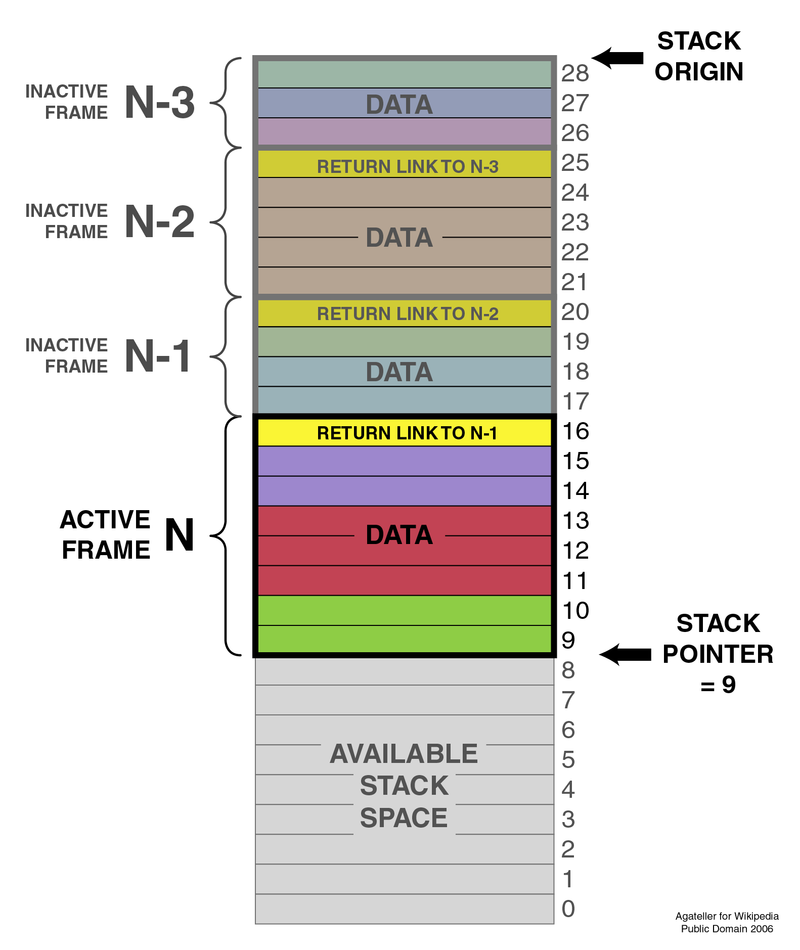 timid grove
hello @karmic crater
timid grove
weak tendon
I have problem with one question in the Linux Fundamentals module. It asks me "H...
what page is this again ?
i finally finish with all the fundamentals 😩
 sharp matrix
About the Linux Fundamentals, I just can't get the command(s) for extracting unique paths from inlanefreight.com right. Can anyone help with the command?
weak tendon
timid grove
what page is this again ?
I just solved it
weak tendon
sharp matrix
About the Linux Fundamentals, I just can't get the command(s) for extracting uni...
i am just getting to it
timid grove
sharp matrix
About the Linux Fundamentals, I just can't get the command(s) for extracting uni...
After u curl, find the domain path and start to filter it . What i did was, everytime i filter i redirect it to a text file so that i can " cat " the text file and start to filter again .
timid grove
weak tendon
I just solved it
Congrats man ! Curl is up next 🤣
weak tendon
Damn that curl question is hard
Any idea how to extract only the links from the whole html?
oh with grep -oP
Oh man I got it!
rustic sage
I'm working on the module Web Request, the POST method section. In the browser i can't login with admin:password
I can login with guest:guest
But in Burp suite i can't login with
username=guest&password=guest
What do i wrong?
 summer silo
Hello! So , I am not sure if i am not getting something or if just need to turn it off and on again. I think i finished the post module. I have an "admin" panel that says the flag is {insert letters and numbers and such} but when I use that as the answer its says its wrong... any help would be appreciated.
 jagged shore
same here SoCO
rancid badger
Linux Fundamentals (name of the config file that has been created after 2020-03-03 and < 28k and >25k )
When I use the command without additional options, it shows the list of config files but when I with options set, it says permission denied? Any clue ? Help Needed!!!
rancid badger
Though I got the answer the other way (using x command inside the y command), I would still like to get some clue if there is other way around.
timid grove
weak tendon
Damn that curl question is hard
it is, i spend more than a day for that. but it was a good challenge.
timid grove
rustic sage
I'm working on the module Web Request, the POST method section. In the browser i...
pay attention with the cookies and the page after u login as guest
timid grove
summer silo
Hello! So , I am not sure if i am not getting something or if just need to turn ...
only copy the flag and nothing else
timid grove
rancid badger
Though I got the answer the other way (using x command inside the y command), I ...
there's alot of ways of executing it actually so i think its fine ! 🙂
rancid badger
timid grove
there's alot of ways of executing it actually so i think its fine ! 🙂
how did you solve that? I want to know the other way too.
timid grove
what i did was the finding the extension of the file and etc, then redirect all permission denied to null and ls
rancid badger
👍
rancid badger
weak tendon
I have problem with one question in the Linux Fundamentals module. It asks me "H...
i am stuck, anyone help?
timid grove
keep trying man !
turbid scarab
rancid badger
i am stuck, anyone help?
are you still getting permission denied or is it something else?
timid grove
i think he is doing the package installed now
turbid scarab
word, I feel like the permission denied thing didn't make sense to me until the lesson immediately after, like the redirecting permission denied to null thing
timid grove
mhm its pretty useful when u know how to use that tool when looking for stuff 🙂
rancid badger
I was not stuck on the permission denied, but packages problem , though I solved both by now
rancid badger
turbid scarab
are you still getting permission denied or is it something else?
I was not stuck on the permission denied, but packages problem , though I solved both by now
turbid scarab
nice
timid grove
congrats man
rustic sage
sharp matrix
About the Linux Fundamentals, I just can't get the command(s) for extracting uni...
turbid scarab
timid grove
After u curl, find the domain path and start to filter it . What i did was, ever...
I feel like I don't understand what I'm filtering for in this part. I'm obviously just overlooking something, but the only thing I can think of is to just look at the cleanest output file I can think of and try to count off paths and try to filter around them. Is it the case the you need to keep adding different filters or am I missing something else?
rancid badger
number of opened port == number of services running? Am I right?
Damn I am dumb
timid grove
turbid scarab
I feel like I don't understand what I'm filtering for in this part. I'm obviousl...
only filter inlanefreight.com path. anything before or after, remove it.
basically what u see is blahblahblahwww.inlanefrieght.comblahblahblah, throw away the blah
but remember, they ask for unique domain path
timid grove
rancid badger
number of opened port == number of services running? Am I right?
Damn I am dumb
what page again is this ?
rancid badger
timid grove
what page again is this ?
I am overthinking a problem, How many services are listening on the target system on all interfaces? (Not on localhost and IPv4 only)
Page 15: Filter contents
I tried looking sockets, services, processes , all those that relates to services i n one way or other.
 I am adding complication only.
 undone garnet
<@&486603600085123073> theres a spammer here
red obsidianBOT
Success
Member banned
dapper belfry
skid
timid grove
oof wow what happen haha
timid grove
rancid badger
I am overthinking a problem, How many services are listening on the target sys...
oh, only take IPV4 only
the rest all dont take, according to the question
 odd python
can someone help me i dont know what to do here
drifting knoll
odd python
can someone help me i dont know what to do here
reread the content carefully
odd python
@drifting knoll i dont know what the task mean by "num1 and num2 such that their sum is 1337" please help
summer silo
odd python
can someone help me i dont know what to do here
In the notes its says you can send 2 request via a get using the &, right?
odd python
yes....
summer silo
So if you send a get request to get the port_whatever=a you are telling the system give the thing called port_whatever=
so what if you tell the system I need to things
two*
odd python
umm but the target is an ip so i just need to do http://<iphere>?port_code=a&&port_code=b ?@summer silo
summer silo
yeah, you are close but are you asking for the "port code"?
summer silo
No problem! Glad i could help!
summer silo
timid grove
only copy the flag and nothing else
yeah, I have coped and pasted the flag and nothing else but It still says incorrect answer. Looks like a few others are having the same issue.
twilit fractal
Can anyone help me with linux filters
tough fjord
if there is a ! remove it from the end of the flag
twilit fractal
I'm sorry I didn't get u
tough fjord
it was for n33tn0w0rk
turbid scarab
timid grove
only filter inlanefreight.com path. anything before or after, remove it.
Filtering for the unique paths is the part I don't understand. I list the occurrences, and then try to filter them down from there, but I can't get which occurrences need to be filtered out. Is it something earlier in the line like "stylesheet"? "href?" Is it a bunch of different filters? Is awk necessary? I got the answer literally hours ago, but I still don't understand how
 smoky prism
The best way is to use regex, but combining awk, grep, sort, uniq will work as well. You are looking for unique URI's. At least thats the way I interpreted it.
turbid scarab
Word, I guess I need to just keep at it. Thanks
timid grove
turbid scarab
Filtering for the unique paths is the part I don't understand. I list the occurr...
bunch of filters correct. u can use awk too . i use that
turbid scarab
timid grove
bunch of filters correct. u can use awk too . i use that
I appreciate it
drifting knoll
Hey everyone!
We have just released two more Tier 1 modules for you.
[Easy] Introduction to Bash Scripting:
https://academy.hackthebox.eu/module/details/21
[Medium] DNS Enumeration Using Python:
https://academy.hackthebox.eu/module/details/27
Log in to HTB Academy and continue you cyber security learning
Log in to HTB Academy and continue you cyber security learning
 spark wyvern
Hello, I just made it trough the systemctl question in Linux module. I was wondering if it was possible to couple the command with some kind of | grep Load AppArmor profiles ?
ok it looks like I got it already
 wispy tree
Hey guys, I'm working on cracking into hack the box, Post Method module. The Content-Type portion. I'm intercepting the login request and changing the Content-Type to application/json, then adding { "username" : "admin".... The server will not accept the credentials and give me the 302 Found response. Any ideas?
turbid scarab
drifting knoll
Hey everyone!
We have just released two more Tier 1 modules for you.
**[Easy] I...
nice
turbid scarab
wispy tree
I think will just Post the credentials, but that isn't the admin password so it won't let you actually log in. What can you POST that will actually let you in?
 frozen barn
Hi everyone, I am new around here name is Zeb, silly question but has anyone come across on the linux fundamentals. Service and process management the systemctl start ssh asks for a password that I haven't come across it from the beginning of the course. Can anyone help?
wispy tree
turbid scarab
I think will just Post the credentials, but that isn't the admin password so it ...
This is the lesson
wispy tree
turbid scarab
I think will just Post the credentials, but that isn't the admin password so it ...
This is what I get when I intercept the request and the first pic I sent is my alteration
rustic sage
Help
drifting knoll
rustic sage
Help
your mask seems to be pretty worn out, let me know where i can send you a new one asap
tough fjord
@rustic sage typically to get help requires a bit more effort on your part. All youve done is post a picture of a question
turbid scarab
frozen barn
Hi everyone, I am new around here name is Zeb, silly question but has anyone com...
Do you mean when trying to ssh into the target? The password should be right by the username
turbid scarab
wispy tree
This is what I get when I intercept the request and the first pic I sent is my a...
Ok so from these pictures, it seems what you've done is intercept your own request to the web server(1st picture), and then altered it before passing to the web server (2nd pic). You need to send the request with the guest credentials you do have, and look through that response for something.
wispy tree
turbid scarab
Ok so from these pictures, it seems what you've done is intercept your own reque...
Thanks a lot! I'll work on that
turbid scarab
wispy tree
Thanks a lot! I'll work on that
No worries, I spent a lot of time on this question iirc because I didn't really understand what burp suite was doing. Hang in there, some of this is pretty confusing.
wispy tree
Right on. ty
rustic sage
tough fjord
<@456226577798135808> typically to get help requires a bit more effort on your p...
the problem is that I don't know what the question refers to, start an http service using npm?