#modules
1 messages · Page 360 of 1
 pine dune
pine dune
pine dune
 flat patrol
ok then again, focus on the php and js
flat patrol
ok then again, focus on the php and js
okay thanks
 plush venture
guys how do i use an ovpn file to connect to a vpn server?
pine dune
this is xss prevention?
pine dune
plush venture
guys how do i use an ovpn file to connect to a vpn server?
sudo openvpn "name of file"
plush venture
oh so i need to install that package first right?
pine dune
yea
 fathom pendant
plush venture
oh so i need to install that package first right?
fathom pendant
plush venture
oh so i need to install that package first right?
It's installed by default on Kali and Parrot
 dapper moth
How will the purple modules count in completion percentage?
Will there be a new percentage "blob" or will they count for both?
plush venture
pine dune
sudo openvpn "name of file"
any idea why im encountering an error with ssh conection after i connected to vpn?
 frosty stump
Hi guys
plush venture

idk what to do with the vpn cause its causing some kind of connectivity issue when i'm using ssh
pine dune
plush venture
any idea why im encountering an error with ssh conection after i connected to vp...
Can u pls screenshot? I may not be able to help but someone else may be
plush venture
plush venture
@pine dune
frosty stump
Guys can someone help me pls
 dark hedge
connect to the HTB Academy network using openvpn
$ sudo openvpn /path/to/file.ovpn
then SSH to the target machine
$ ssh htb-student@10.129.x.x
whats the issue?
frosty stump
I got my acc gotten from a hecker
plush venture
dark hedge
connect to the HTB Academy network using `openvpn`
```bash
$ sudo openvpn /path/...
yes but for some reason it says "no route to host"
dark hedge
frosty stump
I got my acc gotten from a hecker
which website
frosty stump
Reblex
dark hedge
contact their support then
frosty stump
They said I don't have enough info but I have photos that the acc is mine
pine dune
plush venture
idk what to do with the vpn cause its causing some kind of connectivity issue wh...
U need to use the ssh username shown in the following syntax ''' ssh@username''' then enter the password they provide
dark hedge
frosty stump
They said I don't have enough info but I have photos that the acc is mine
well we can't do anything about it
frosty stump
Ok
fathom pendant
pine dune
U need to use the ssh username shown in the following syntax ''' ssh@username'''...
It's ssh username@ip
plush venture
pine dune
U need to use the ssh username shown in the following syntax ''' ssh@username'''...
its not even connecting, i did try to do that
fathom pendant
plush venture
its not even connecting, i did try to do that
What do you mean "not even connecting", screenshots help
Also
dark hedge
plush venture
yes but for some reason it says "no route to host"
you're replacing 10.129.x.x with the target IP address?
 compact patrolBOT
Need to speak to a person? Learn how to reach our support via HTB Labs.
pine dune
Also try changing vpn and pinging ip
plush venture
dark hedge
you're replacing 10.129.x.x with the target IP address?
yep
pine dune
fathom pendant
It's `ssh username@ip`
Yes this
fathom pendant
dark hedge
you're replacing 10.129.x.x with the target IP address?
A target isn't even spawned in the initial screenshot
dark hedge
doesn't mean they haven't spawned it
pine dune
Sorry phone on 1 percent @fathom pendant will be more help then me anyways and calcuore
dark hedge
but.. have you spawned the target?
plush venture
ofc 🥲
dark hedge
show us screenshots of your steps
fathom pendant
I'm busy cleaning and prepping for a move so I'm in and out, and a game just dropped that I'm downloading
plush venture
okay
fathom pendant
Path of Exile 2 early access because copium

 dark hedge
that's not the same IP address
fathom pendant
Are you connected to the vpn?
plush venture
fathom pendant
Are you connected to the vpn?
yes
fathom pendant
if you do ip a; do you have multiple tunX interfaces?
plush venture
lemme check once
fathom pendant
if so sudo killall openvpn then reconnect to the vpn
plush venture
fathom pendant
if you do `ip a`; do you have multiple tunX interfaces?
its showing me some real mess 💀
... it's beyond my comprehension
dark hedge
ip link for less information
fathom pendant
we can only help with as much info as you give us
dark hedge
it should show your interfaces
fathom pendant
"it's showing me a whole mess" doesn't help us figure out your issues ¯_(ツ)_/¯
plush venture
fathom pendant
if you do `ip a`; do you have multiple tunX interfaces?
uh sorry but whats tunX ?
plush venture
dark hedge
you can always show us screenshots if you're unsure
wait lemme retry
and another question
why is it necessary to connect to a vpn?
cant i just use ssh to connect to that ip directly?
dark hedge
because the machine isn't accessible from the internet
plush venture
it allows only certain ips?
dark hedge
your machine is not in the same network as the machine you're trying to connect to
one way to communicate with the target is to use a VPN to connect to the same network that the target machine is in
plush venture
dark hedge
your machine is not in the same network as the machine you're trying to connect ...
so is it necessary to be on the same network to connect to that machine?
plush venture
so not necessarily always?
dark hedge
if you're unsure, safest bet is to connect to the VPN
plush venture

can you please explain whats it saying in here ?
im a little unsure with what it means by "fingerprint"
and why did it not connect previously up until i used sudo killall openvpn
 lusty thicket
plush venture
im a little unsure with what it means by "fingerprint"
lusty thicket
plush venture
im a little unsure with what it means by "fingerprint"
it’s a host key for the server to verify it’s identity
dark hedge
plush venture
and why did it not connect previously up until i used `sudo killall openvpn`
most likely because you connected to the VPN multiple times and didn't close your other connections
lusty thicket
the first time you connect ssh doesn’t have this key on record
fathom pendant
plush venture
you're connected to the target here
fathom pendant
lusty thicket
the first time you connect ssh doesn’t have this key on record
you eventually have a whole bunch of diff host keys that will yell at you for various reasons
lusty thicket
plush venture
and this message basically means ssh has no clue the server is who it says it is
fathom pendant
lusty thicket
and this message basically means ssh has no clue the server is who it says it is
the message on logging in is just the "here's what happened since last time" message
not "ssh has no clue"
plush venture
lusty thicket
and this message basically means ssh has no clue the server is who it says it is
so basically it does not have any record of any host with that fingerprint?
fathom pendant
plush venture
so basically it does not have any record of any host with that fingerprint?
yes
fingerprinting is how most devices ensure that there hasn't been any tampering on the other end
plush venture
and the "host" in here is the target machine?
lusty thicket
fathom pendant
you eventually have a whole bunch of diff host keys that will yell at you for va...
yeah, pro tip split known hosts for different environments
lusty thicket
fathom pendant
the message on logging in is just the "here's what happened since last time" mes...
the message “the authenticity of host x can’t be established”?
plush venture
dark hedge
most likely because you connected to the VPN multiple times and didn't close you...
how is that supposed to cause an issue?
fathom pendant
plush venture
how is that supposed to cause an issue?
if you have multiple connections to the same endpoint that are all giving you the same IP you get Network Collisions
where no traffic can escape because it doesn't know how to properly route it out/in
plush venture
so in layman terms theres basically 3 clones and 1 original but just because we cant identify the original one we cant kill the other three and let the original one go?
@fathom pendant
fathom pendant
plush venture
so in layman terms theres basically 3 clones and 1 original but just because we ...
it's treating all connections as valid
and because of how the VPN connection works, it assigns you a static IP whenever you connect to it
 foggy monolith
Performance of the Citrix Breakout section of WinLPE is so bad I'm having to do this.
 plush venture
fathom pendant
it's treating all connections as valid
plush venture
fathom pendant
it's treating all connections as valid
so basically the conflict is arising because i can only connect with one connection meanwhile i have a bunch of connections open, which are all valid according to the host
fathom pendant
plush venture
so basically the conflict is arising because i can only connect with one connect...
not the host
the VPN server
the VPN server that's assigning your IP
plush venture
so it cant figure out which connection to use to connect to the host ?
since its assuming all the connections are valid
lusty thicket
plush venture
so it cant figure out which connection to use to connect to the host ?
yes, as there’s no conflict resolution system in place
plush venture
oh
and how are all the connections different from each other? dont they all have the same ip?
fathom pendant
lusty thicket
yes, as there’s no conflict resolution system in place
it's not that there's no conflict resolution in place, it's that it's assigning the device the same IP
so tun0, tun1, ... tun10 would all have the same 10.10.x.x IP address
so the routing process doesn't know how to resolve which interface to resolve it to
lusty thicket
fathom pendant
it's not that there's no conflict resolution in place, it's that it's assigning ...
so… basically there’s no conflict resolution system in place
fathom pendant
again, not about conflict resolution
LOL
you're not gonna have the same IP as another user
lusty thicket
so there’s no intelligent mechanism for handling multiple clients in place?
fathom pendant
there would be no need for you to use multiple vpn connections from one device
and using the vpn connection on multiple devices also causes issues, as the VPN pack has an assigned IP to it
lusty thicket
because there’s no conflict resolution system in place
fathom pendant
idk why you keep running back to conflict resolution LOL
it's like you just learned what that is in networking and are calling a spade a horse
plush venture
fathom pendant
so the routing process doesn't know how to resolve which interface to resolve it...
so when i say i created another connection it basically means i opened up another instance where the vpn server assigned a ip to me, but creating multiple instances result in a network collision where its treating all the connections as valid since they all have the same ip and hence it can't figure out which connection to use to connect to the host and permitting none at last
lusty thicket
fathom pendant
it's like you just learned what that is in networking and are calling a spade a ...
if you strip away the jargon what you’re dealing with is resource contention, which is basically what conflict resolution is
fathom pendant
plush venture
so when i say i created another connection it basically means i opened up anothe...
yes
fathom pendant
lusty thicket
if you strip away the jargon what you’re dealing with is resource contention, wh...
resource contention would be if it wasn't statically assigned and it was trying to get an IP from a DHCP server, not what's happening here
lusty thicket
fathom pendant
resource contention would be if it wasn't statically assigned and it was trying ...
if you don’t manage the resources yourself openvpn will merrily assign what it can and that’s where the “conflict” happens
can be prevented with a conflict resolution system in place
fathom pendant
that has nothing to do with how HTB handles the vpn system
plush venture
uhh guys which one is the machine hardware name in it?
 fathom pendant
the only way to prevent it would be to hardcode a check to see if an instance of openvpn is running
fathom pendant
plush venture
uhh guys which one is the machine hardware name in it?
uname --help
plush venture
okk
lusty thicket
fathom pendant
the only way to prevent it would be to hardcode a check to see if an instance of...
are you talking about a conflict resolution system?
fathom pendant
but there's no resolution that needs to happen on HTB end
as this issue only occurs locally if you're a dummy and run multiple instances of OpenVPN
but again, you're not contending for the IP being resourced
¯_(ツ)_/¯
we can keep going in circles all day bro
there's a reason the vpn connection doesn't dynamically assign you an IP
lusty thicket
fathom pendant
there's a reason the vpn connection doesn't dynamically assign you an IP
i get what you mean
the conflict resolution system needs to be implemented locally
fathom pendant
i'm tired of running in circles with you
fathom pendant
use one of the commands listed in the module
plush venture
theres nothing as such in the working dir, i went into "/" but even theres nothing as mail, its possible that mail is a subdir of one among the many that are in "/", but isnt there any more efficient way ?
plush venture
fathom pendant
use one of the commands listed in the module
ok
 solar zodiac
Hi everyone! Has anyone had any success with the Exchange Portion of the MSSQL, Exchange, and SCCM Attacks module? When I try to log into OWA it just redirects me to a blank page. None of the tools(mailsniper) seem to work either.
 static roost
Having issues with the first question on crackmapexec skills assessment. I've ||got a list of users with --rid-brute 10000|| Not getting anything when ||asreproasting||. Any help would be awesome.
solar zodiac
I don't think the exchange module is working properly.....
static roost
nvm got it
lusty thicket
solar zodiac
I don't think the exchange module is working properly.....
why's that
solar zodiac
lusty thicket
why's that
After trying to log in to owa with the given credentials of htb-stdnt, the page doesn't load
I've tried waiting 1/2 hour but it still wasn't working
lusty thicket
strange stuff
solar zodiac
yeah :/
lusty thicket
you need to make a post in #1234357888114364508
solar zodiac
I was hoping someone could confirm that what I was doing was right/wrong
before reporting an error
 tranquil axle
used to take 8m or so for me to boot but it did end up running in the end
I'll try and spin it up again
solar zodiac
did you login to owa with inlanefreight/htb-student?
solar zodiac
tranquil axle
I'll try and spin it up again
thanks
the RDP was working for me, but none of the tools that used owa were working
like when trying to get the Global Address Table with mail sniper, it errored out saying invalid xml
and that was just me copy/pasting the exact command from the module
tranquil axle
I'm booting up the target, but it'll take a few minutes
solar zodiac
tranquil axle
I'm booting up the target, but it'll take a few minutes
I really appreciate it 🙂
tranquil axle
that awkward moment where you are not sure if the target is still spawning or if its broken and you are just waiting
solar zodiac
it happens after trying to log into owa
the target spawns fine, and I can RDP into it
but anything owa-related fails
tranquil axle
I mean its not spawning for me yet lol, still waiting for an ip
 winter schooner
Sure
solar zodiac

after trying to log in as inlanefreight\htb-student it just loads this page and never does anything
solar zodiac
tranquil axle
it went from spawning to "click here to spawn", nice
yikes maybe try refreshing the page
tranquil axle
got an ip now
yea I can log in normally

I did it with INLANEFREIGHT.LOCAL\htb-student
 autumn pilot
It can take up to 10-15 minutes for exchange to fully load
tranquil axle
yea
solar zodiac
lol now it is saying the username or password is incorrect instead of redirecting me

 rustic sage
Hello
Ad directory attack - skill assessment part 2 - question 4
I have been stuck on here basically for 12 hours of computer screen.
I decided to look it up and turns out I already did many many many times the crackmapexec commands and it never gave me the username.
I'm on mobile and I'll send a pic of the output but it's never gave me the answer.
Also I tried all commands and all variations of commands from password spraying - making a user list and not one of those commands gave me a user list. By all variations of commands I mean:
Enum4linux, with creds, without creds, copying it the same way as the module , downloading enum4linux-ng.py and trying with and without creds and with all flags that could help get a user.
Tried all commands of rpcclient but this one just says logon failure immediately so I figured its a creds problem.
Ldap also immediately gives me network error.
I found a user with kerbrute on DC but it's not the right user.
Now finally CRACKMAPEXEC, oh my beloved, turns out this is how you solve it, it always gave only one output , Ik I cant spoiler previous questions here but yes it basically tells me that the credentials for user A are right, I never got any diffetent output ever from crackmapexec and im not kidding i changed ALL the flags multiple times. The only time it gave a different output is when I'm enumerating smb shares but I can't connect to those.
Also I tried the only script from internal password spraying from windows and I get the first line of output which lets me know I imported the .PS1 file correctly but I let it run for 40+ minutes and i also got no output from that.
This is the only question I had to ask for help for during this skills assessment
Literally the only question, I was thinking holy shit if I can finish all of this assessment without getting stuck I'm a fucking rockstar
 near abyss
Hi, anyone solved the skills assement for Malicious Document Analysis module ?
 viral lotus
Is there a way to see when your cubes regen (monthly subscription)? I tried looking in all the settings on dashboard but you could change plan but it didn't give me a date
tranquil axle
in the billing section if you select monthly plan it tells you when it renews
 viral lotus
perfect thanks
 gray yacht
rustic sage
Hello
Ad directory attack - skill assessment part 2 - question 4
I have been st...
gray yacht
rustic sage
Hello
Ad directory attack - skill assessment part 2 - question 4
I have been st...
You can send me a DM.
rustic sage
gray yacht
You can send me a DM.
Thx
 safe star
pine dune
XSS skills assessment
safe star
pine dune
XSS skills assessment
Dm what u did so far
 jovial cliff
Hello, for the Windows Attack and Defense > Object ACLs (https://academy.hackthebox.com/module/176/section/1789).
I managed to generate the sharphound ZIP file.
How do I get to visualize it in BloodHound? I tried downloading bloodhound from Github, but it wouldn't let me.
The remote name could not be resolved: 'github.com
I guess it's locked on this machine.
Does it have bloodhound installed already? I can't find it anywhere.
I am trying to replicate the graph shown in the section.

Login to HTB Academy and continue levelling up your cybsersecurity skills.
fathom pendant
You can install bh on your own machine, the pwnbox also has the legacy CE, which if i recall the user/pass is neo4j:neo4j
 dim ridge
Did anyone else find the pivoting module super awkward, i'm following parts step by step but getting different results to the exact same things run from the lessons
lusty thicket
dim ridge
Did anyone else find the pivoting module super awkward, i'm following parts step...
then you aren’t following step by step
dim ridge
followed this one step by step, meterpreter session doesn't get established with the exact same two commands
socat TCP4-LISTEN:8080,fork TCP4:172.16.5.19:8443
msf6 > use exploit/multi/handler...
@lusty thicket did you not find the same with that module?
lusty thicket
i haven’t done that module
dim ridge
so how do you know im not following step by step then 😆
fathom pendant
dim ridge
socat TCP4-LISTEN:8080,fork TCP4:172.16.5.19:8443
msf6 > use exploit/multi/hand...
did you set the payload in msf console?
dim ridge
@fathom pendant this is the response i get in msfconsole
msf6 exploit(multi/handler) > run
[] Started bind TCP handler against 10.129.202.64:8080
[] Sending stage (203846 bytes) to 10.129.202.64
[-] Meterpreter session 3 is not valid and will be closed
[*] 10.129.202.64 - Meterpreter session 3 closed.
its session 3 because i tried it 3 times got the same issue each time
fathom pendant
is your listening portion on your tun0?
OH
I KNOW THE ISSUE
you need to use the SPAWNED TARGET
not the example IP
dim ridge
but that is the same IP i got in my target
fathom pendant
is it?
dim ridge
yeah 100%
gray yacht
dim ridge
<@134323136853311488> this is the response i get in msfconsole
msf6 exploit(mul...
Did you get the backupscript.exe to the .19 host?
fathom pendant
dim ridge
yeah 100%
i mean either way, (being totally honest) getting the bind shell isn't even necessary to answer the question
just reading comprehension
dim ridge
yeah true but that kind of makes it more frustrating because i feel like im jumping ahead and missing something
no ricky but thats also confusing because it doesn't mention how thats done
fathom pendant
you can use any pivoting method you prefer
dim ridge
is that needed for it to work @gray yacht
fathom pendant
dim ridge
no ricky but thats also confusing because it doesn't mention how thats done
you transfer the file over to the windows host; as it shows a forward to the windows host for RDP
gray yacht
dim ridge
no ricky but thats also confusing because it doesn't mention how thats done
You can use SSH or like marcie said other methods, but to trigger what is being shown in that section, you need to get the executable file to the windows host and execute it.
fathom pendant
i think or just to the windows host
dim ridge
thats frustrating because its only shown in the image nothing is mentioned in the text from what i can see
And i don't know how im meant to do that
gray yacht
dim ridge
And i don't know how im meant to do that
In a previous section you had creds for a victor I believe. You can use them to RDP with SSH
fathom pendant
^
dim ridge
ty checking!
fathom pendant
this section reuses creds a fair bit, mostly because it's a showcase of pivoting not so much exploiting
dim ridge
xfreerdp /v:localhost:3300 /u:victor /p:pass@123
yeah that makes sense, but i would rather get it to fully work, i feel like im not learning if im not doing the full thing from start to finish
fathom pendant
well yeah, i'm just stating, it seems like this section is bouncing off the previous section
dim ridge
true
fathom pendant
which can feel clunky for sure
dim ridge
100%, ahh man xfreerdp isn't on the pivot machine
fathom pendant
(and maybe something for /feedback, or #1234357888114364508 )
gray yacht
dim ridge
100%, ahh man xfreerdp isn't on the pivot machine
SSH from your machine
fathom pendant
dim ridge
100%, ahh man xfreerdp isn't on the pivot machine
you can't rdp from an ssh session anyway
dim ridge
but i can't get to the windows machine can i though that was the point of this
fathom pendant
there's no display variable set in an SSH session
fathom pendant
dim ridge
but i can't get to the windows machine can i though that was the point of this
use a previous pivoting technique to set this up
gray yacht
ssh -L 13389:172.16.5.19:3389 ubuntu@IP
Try that from your VM
Then xfreerdp from your vm with a similar command to what you used earlier. Add a drive to make the file transfer super easy.
fathom pendant
the way that it's poised is "hey what if you social engineered this dude to run this malicious backup script"
so in a realistic sense, you wouldn't need to go in and detonate the payload yourself
dim ridge
ty guys, that did it @gray yacht
gray yacht
Yeah that's how another one was setup and it can be confusing, as it isn't explained for those who don't really understand that stuff yet.
fathom pendant
but there's also a valuable lesson to showcase "if it isn't working, this is what you'd expect"
dim ridge
yeah true, sometimes thats the best way of learning, when it doesn't work
it would be handy if they had some videos on this module though just to make it super clear
not sure why they don't put videos on academy 🤷
fathom pendant
imho documenting what to expect if it's not working is valuable for learning
fathom pendant
dim ridge
not sure why they don't put videos on academy 🤷
because it bypasses the actual learning, and someone can just skip to the end and submit the flag in the video instead of putting in the work
gray yacht
dim ridge
not sure why they don't put videos on academy 🤷
Would be a pain to fix videos, at least that's one aspect I can think of.
fathom pendant
not to mention whenever a module gets updated, they'd also need to update the video to match the content
gray yacht
Ha, that's another. Folks putting them on 2x fast and still asking for hints, lol. There are some legitimate questions or assists, but then some are easily answered in the content.
dim ridge
no i don't mean walkthroughs where you see the flag, i mean like teaching the material
fathom pendant
the only content that can have videos for it is the free content (Tier 0) content
fathom pendant
dim ridge
no i don't mean walkthroughs where you see the flag, i mean like teaching the m...
it'd be hard to do that, but it is something i've considered reaching out to g0b and the team about for trying to do an explainer series for the module reading
but you get into grey areas where the module sections are the walkthrough for it
i.e. Attacking Enterprise Networks module
 cloud urchin
my guess is due to the annual sub they want to sell, as that does include walkthroughs.
fathom pendant
the annual walkthroughs are shit for explaining what to do tbqh
they're good for sanity checks
dim ridge
i think videos would be really good to help those that don't learn with reading as well as seeing it done
fathom pendant
dim ridge
i think videos would be really good to help those that don't learn with reading ...
it also runs into the case of people sharing the video of paid content so they don't have to buy/do it themselves
dim ridge
it could be done with different creds, etc and flags so as not to give it away
true, but people could just share text tho right
fathom pendant
that's a lot of extra work tbh as the flags in academy are meant to be static
dim ridge
i guess it would have to be a differnet environment then
fathom pendant
yeah, but are you more likely to read a wall of copy/pasta text -- or watch a video
fathom pendant
your idea has been pitched by others before, it's just not something (at this time) that HTB has any intention of doing
mostly for the cited reasons I did, and the fact that they'd have to also update videos if/when content gets updated
dim ridge
yeah true
fathom pendant
i.e. for the info gathering - web edition, module there was a massive overhaul of the module so they'd need to make a whole new video
dim ridge
what did they change in that
dim ridge
so its not like they could have a different environment so that the principles stay the same,but the users, passwords, flags, ips etc are different
fathom pendant
and because of how backend shenanigans work, when they updated the old answers were still there for the new content questions
dim ridge
ahh
fathom pendant
i.e. instead of grabbing flags from various subdomains (imo this was better), they just had you submit the various subdomain names you get from fuzzing
mind you, you still had to fuzz for the various subdomains to grab the flags from
fathom pendant
but imo having to subdomain fuzz, and grab a flag, reinforces the idea of you doing it right
but you can find vids galore on the various t0 modules
i've considered recording content for t0 shit at one point but gave up bc it's boring to me
dim ridge
t0 modules?
flat patrol
I'm still stuck. I must have 12 hours now on these three last questions for Web Information Gathering Assessment.
fathom pendant
flat patrol
I'm still stuck. I must have 12 hours now on these three last questions for Web ...
did you check for subdomains? :)
i need to run back through a handful of modules and re-update my notes and compile a quick-sheet
dim ridge
what part you stuck on @flat patrol
fathom pendant
the last questions from the skill assessment, i'm guessing
i haven't updated my notes to reflect the new Skill Assessment, should probably do that at some point
dim ridge
thanks for the help @fathom pendant really appreciated!
fathom pendant
it's good to note here as well, even if you don't think it would be worthwhile to go back and do updated content -- do it anyway as you may have a different perspective than when you first went through it
dim ridge
https://academy.hackthebox.com/module/158/section/1431 --- plink and proxifier both tools used in the examples of what we could use on the windows machines don't exist on the windows machine when you connect
fathom pendant
you can always transfer them
fathom pendant
xfreerdp /u:user /p:pass /v:ip /drive:name,/path/to/folder
dim ridge
man sharing all the golden stuff here nice ty
fathom pendant
not something that hasn't already been shared before
¯_(ツ)_/¯
also read the man pages
dim ridge
i dont remember that in the modules so far but i might be wrong
fathom pendant
it's not
the typical file transfer methods were shown in the file transfers module, like standing up an ftp server, smb share, web server
dim ridge
yeah i should probably go back and redo that one
i might be being stupid here, but i used that command, i see the drive in the file explorer but it says i don't have permissions
ah its working now nvm
thats so useful ty!
 distant swift
Anyone able to help me figure out why I can't get nmap scan to run through proxychains?
I ssh to my compromised ubuntu server using
ssh -D 9050 ubuntu@10.129.209.111
The connection is fine, but I am still unable to reach the windows host using
proxychains nmap -v -Pn -sT 172.16.5.19
dim ridge
i've been getting the same issues @distant swift you on the pivoting module? haha
distant swift
Yes, page 3 question 2
lusty thicket
distant swift
Anyone able to help me figure out why I can't get nmap scan to run through proxy...
are you sure you setup proxy conf correctly?
distant swift
@lusty thicket My "tail /etc/proxychains.conf" matches that of the lesson.
cloud urchin
that might be your problem, i believe the newest proxychains uses proxychains4.conf
cloud urchin
if everything is setup correctly, it should work. reboot the target and let it fully spawn 3-5 mins. if it still doesn't work, it's very likely your setup
dim ridge
do you have the socks proxy set up on msfconsole too @distant swift
cloud urchin
he needs to set it up with proxychains4.conf
dim ridge
that too though right? but the lesson also mentions having the socks proxy set up on msf console before using proxychains nmap, or am i misunderstanding?
cloud urchin
he didn't mention that, he just said he's using dynamic port forwarding with proxychains
dim ridge
ah ok thats not the method in that lesson specifically but ok
cloud urchin
yeah it is
it goes on to explain using metasploit with proxychains as well, but from what they posted it doesn't seem like they're that far in the section yet
dim ridge
ah yeah i must be on the page after
cloud urchin
same page, it's just a small section at the end
distant swift
@dim ridge No, I've only been trying to get nmap to work thus far.
distant swift
Yes thats the one
dim ridge
ah yeah sorry i was looking at the one a little later about meterpreter
what result do you get when you nmap @distant swift
distant swift
nmap -v -Pn -sT 172.16.5.19
[proxychains] config file found: /etc/proxychains.conf
[proxychains] preloading /usr/lib/x86_64-linux-gnu/libproxychains.so.4
[proxychains] DLL init: proxychains-ng 4.17
[proxychains] DLL init: proxychains-ng 4.17
[proxychains] DLL init: proxychains-ng 4.17
Host discovery disabled (-Pn). All addresses will be marked 'up' and scan times may be slower.
Starting Nmap 7.94SVN ( https://nmap.org ) at 2024-12-06 20:09 EST
Initiating Parallel DNS resolution of 1 host. at 20:09
Completed Parallel DNS resolution of 1 host. at 20:09, 0.00s elapsed
Initiating Connect Scan at 20:09
Scanning 172.16.5.19 [1000 ports]
Connect Scan Timing: About 15.50% done; ETC: 20:12 (0:02:49 remaining)
Connect Scan Timing: About 30.50% done; ETC: 20:12 (0:02:19 remaining)
Connect Scan Timing: About 45.50% done; ETC: 20:12 (0:01:49 remaining)
Connect Scan Timing: About 60.50% done; ETC: 20:12 (0:01:19 remaining)
Connect Scan Timing: About 75.50% done; ETC: 20:12 (0:00:49 remaining)
Completed Connect Scan at 20:12, 201.29s elapsed (1000 total ports)
Nmap scan report for 172.16.5.19
Host is up.
All 1000 scanned ports on 172.16.5.19 are in ignored states.
Not shown: 1000 filtered tcp ports (no-response)
Read data files from: /usr/share/nmap
Nmap done: 1 IP address (1 host up) scanned in 201.33 seconds
dim ridge
what do you get back if you add tag -p3306,3389
distant swift
still nothing
dim ridge
sorry try 3389
safe star
distant swift
still nothing
Try sudo
distant swift
I tried it as sude, nothing differs.
 rich turret
does anyone know how i can hack my kick account back
like the streaning website
streaming
dim ridge
you are doing 'proxychains nmap -v -Pn -sT -p3389 172.16.5.19' right?
cloud urchin
rich turret
does anyone know how i can hack my kick account back
No one here is going to break the law and risk prison for your kick account. Your only recourse is reaching out to kick support.
fathom pendant
distant swift
nmap -v -Pn -sT 172.16.5.19
[proxychains] config file found: /etc/proxychains....
It's showing its reading from /etc/proxychains.conf here
cloud urchin
rich turret
ive tried
oh well. keep trying or give up then. this isn't kick support discord, no one can help you here.
fathom pendant
rich turret
ive tried
 rich turret
cloud urchin
oh well. keep trying or give up then. this isn't kick support discord, no one ca...
rich turret
cloud urchin
oh well. keep trying or give up then. this isn't kick support discord, no one ca...
lol
 acoustic thorn
distant swift
Anyone able to help me figure out why I can't get nmap scan to run through proxy...
acoustic thorn
distant swift
Anyone able to help me figure out why I can't get nmap scan to run through proxy...
I actually think I had this same issue. Does the module require you do this because I recall just ignoring this problem and connecting with RDP as if I could ping it anyway
rich turret
is that illegal?
to hack your own account
i just need someone to tell me how not do it
cloud urchin
its not 'your' account, it's kick's account that you use. yes it's illegal to attack their infrastructure without their permission.
dim ridge
^
rich turret
cloud urchin
its not 'your' account, it's kick's account that you use. yes it's illegal to at...
oh
im cooked
i had 40k followers
dim ridge
i think youre right @acoustic thorn
rich turret
😭
cloud urchin
then you should have no problem reaching out to kick and getting access back
rich turret
they say theres no way of verifying its me but ill try harder
dim ridge
🤷
safe star
@distant swift What does ur proxychains.conf look like?
cloud urchin
rich turret
they say theres no way of verifying its me but ill try harder
you have your answer. no one here can help you, i'm not going to keep repeating this. this channel is for discussion about the hackthebox modules and isn't the place to discuss this. reach out to kick support, again, they are your only recourse.
acoustic thorn
dim ridge
i think youre right <@759214197158051891>
I couldn't make sense of the issue. I tried pinging a million different ways before telling myself it was bugged😂 I'd be curious to know if there is something I've overlooked though
dim ridge
also @distant swift what is the result of this on your machine where your proxychains config is ls /etc/ | grep proxy
rich turret
@cloud urchin may i ask what is this sever for?
dark hedge
not a hacker for hire server
acoustic thorn
rich turret
<@206552578568224769> may i ask what is this sever for?
This is for students of htb academy
rich turret
omg im so sorry i thoght it was hacker for hire
does anyone know where i could find that tho
cloud urchin
anyone telling you they can do it is lying and trying to scam you. you need kick support.
rich turret
✅
rich turret
dark hedge
nope, because stuff like that is illegal
i dont know the laws i thoght becuase its my account i can hack it
dim ridge
- you could be someone trying to hack someone elses account
distant swift
It seems to work with specifying the port specifically.
rich turret
dim ridge
+ you could be someone trying to hack someone elses account
yea you can never trust anyone i guess
dark hedge
rich turret
i dont know the laws i thoght becuase its my account i can hack it
you're missing the other party's consent
dim ridge
distant swift
It seems to work with specifying the port specifically.
weird, but good stuff that it's working, try to rdp to it
distant swift
It worked.
I'm still not sure why I can't see anything using "proxychains nmap -v -Pn -sT 172.16.5.19"
Thank you for your help
fathom pendant
Proxychains sucks at relaying tcp scans
acoustic thorn
distant swift
I'm still not sure why I can't see anything using "proxychains nmap -v -Pn -sT 1...
I'd be willing to bet if you repeated the same steps on another machine it would work fine
fathom pendant
In general
cloud urchin
fathom pendant
Proxychains sucks at relaying tcp scans
that is true, but this is specifically the command given in the pivot module to use
acoustic thorn
fathom pendant
Proxychains sucks at relaying tcp scans
Do you prefer ligolo?
fathom pendant
It's a much better tool, yes
cloud urchin
he's on dynamic port forwarding in the pivoting module
dim ridge
going to move to that after this module
cloud urchin
i tried ligolo for the first time the other day, seems nice, but i need to figure out how to double pivot it wasn't working when i tried
fathom pendant
It worked fine for me
acoustic thorn
fathom pendant
It's a much better tool, yes
I'll have to give it a go👀
cloud urchin
so easy to just port forward crap
dim ridge
sshuttle worked nicely just now
fathom pendant
cloud urchin
so easy to just port forward crap
You need to port forward a listener for a new agent
cloud urchin
i think i need a htb module on it because i'm dumb i wish they included it in the pivot module
ahh
well that explains it
fathom pendant
It was in like 0.4 when i went through the pivoting module
acoustic thorn
Has anyone noticed a large amount of bot traffic recently? I've been seeing a lot of get requests from random Ip addresses seemingly looking to exfiltrate from my python http.server during module exercises. I should clarify I usually use the attackbox
cloud urchin
that's been going on for 30+ years
i remember connecting my pc to dialup and it would instantly be scanned
acoustic thorn
Lol well I'm see a lot now but fair 😂
cloud urchin
just run it on the vpn nic instead of publicly
rustic sage
can somebody help with the web module for beginners
dim ridge
how do you mean @cloud urchin
cloud urchin
rustic sage
can somebody help with the web module for beginners
probably, ask your question
acoustic thorn
cloud urchin
just run it on the vpn nic instead of publicly
I hadn't thought of that actually, what would that look like exactly
rustic sage
cloud urchin
probably, ask your question
The exercise above seems to be broken, as it returns incorrect results. Use the browser devtools to see what is the request it is sending when we search, and use cURL to search for 'flag' and obtain the flag.
cloud urchin
idk how accurate this is but chatgpt says to use ```python -m http.server 8080 --bind 192.168.1.100
Most commands that allow you to open ports also allow you to specify which interface to open those ports on [all interfaces by default]
fathom pendant
cloud urchin
idk how accurate this is but chatgpt says to use ```python -m http.server 8080 -...
--bind is the right one
cloud urchin
marcielee knows too much
cloud urchin
it is
fathom pendant
cloud urchin
marcielee knows too much
I got bored one day and spent a lot of time on google
acoustic thorn
So to be clear the --bind/-S restricts connections to the specified ip?
cloud urchin
apparently, try it out
dim ridge
ah ok i get ya sorry i wasn't following, in context of a python http server
so you're hosting it on the private address to avoid it being reachable publicly no?
acoustic thorn
dim ridge
so you're hosting it on the private address to avoid it being reachable publicly...
In this case it was being hosted publicly, just wondering about the parameters that were mentioned
cloud urchin
i don't recall any module that requires a public http server being open 
acoustic thorn
Maybe I'm misunderstanding lol
dim ridge
me neither hehe
its late im not sure im understanding much 😴
Where did you see the traffic though, and im assuming you just did something like python3 -m http.server?
acoustic thorn
I feel the same lol I'm not sure I'm making sense. Time for me to wrap it up haha
acoustic thorn
dim ridge
Where did you see the traffic though, and im assuming you just did something lik...
Yeah exactly
dim ridge
that should keep it on the private ip though, shouldn't go public
acoustic thorn
That's what I thought so I was surprised to see random ips interacting with it. A mystery for another day I suppose 😴
cloud urchin
are they public ip's?
are you using a vm? it depends on your network setup. youll need to be forwarding ports unless you have a device in the dmz or you have just a modem.. not aware of any modern router that allows traffic through and routes it to a specific device without explicitly setting it up
acoustic thorn
I ran an IP lookup on one, it geolocated to Finland so probably but I'll admit since I'm just on the attack box I didn't dig considerably
cloud urchin
do you mean you're using the pwnbox?
acoustic thorn
Yeah
acoustic thorn
A mystery for another time haha
cloud urchin
that makes more sense though as those pwnboxes are internet connected
acoustic thorn
Yeah I'd be very concerned if I was seeing that on my personal vm
Definitely going to try that --bind trick though thanks for the tip
dim ridge
Im kinda new to discord, why can't i react to messages with emojis on this server
cloud urchin
dim ridge
Im kinda new to discord, why can't i react to messages with emojis on this serve...
probably need to follow the instructions in #welcome
 mystic fjord
I love this kind of details lol
 dim ridge
Login to HTB Academy and continue levelling up your cybsersecurity skills.
anyone else able to get the web page loaded through the browser here, mine times out
cloud urchin
i was able to yeah
dim ridge
hmm :S
weird, my rpivot connection is successful, then i run this but it times out in browser proxychains firefox-esr 172.16.5.135:80
safe star
cloud urchin
i tried ligolo for the first time the other day, seems nice, but i need to figur...
was it the writing error?
safe star
dim ridge
weird, my rpivot connection is successful, then i run this but it times out in b...
you could also use foxyproxy and just set the port to whatever you're using
dim ridge
yeah good point, i'll try that ty!
gray yacht
cloud urchin
i tried ligolo for the first time the other day, seems nice, but i need to figur...
I made a couple of videos on this I could share with you if you'd like.
dim ridge
same issue, doesn't seem to be the command, seems to not be reaching it not sure
cloud urchin
gray yacht
I made a couple of videos on this I could share with you if you'd like.
sure
gray yacht
dim ridge
same issue, doesn't seem to be the command, seems to not be reaching it not sure
I didn't even bother with rpivot, just used ssh -L
gray yacht
cloud urchin
sure
Want me to DM or just post them here.
cloud urchin
i think here is fine?
dim ridge
haha it seems like everyone skipped over this modules tools, surely they need to update it then
gray yacht
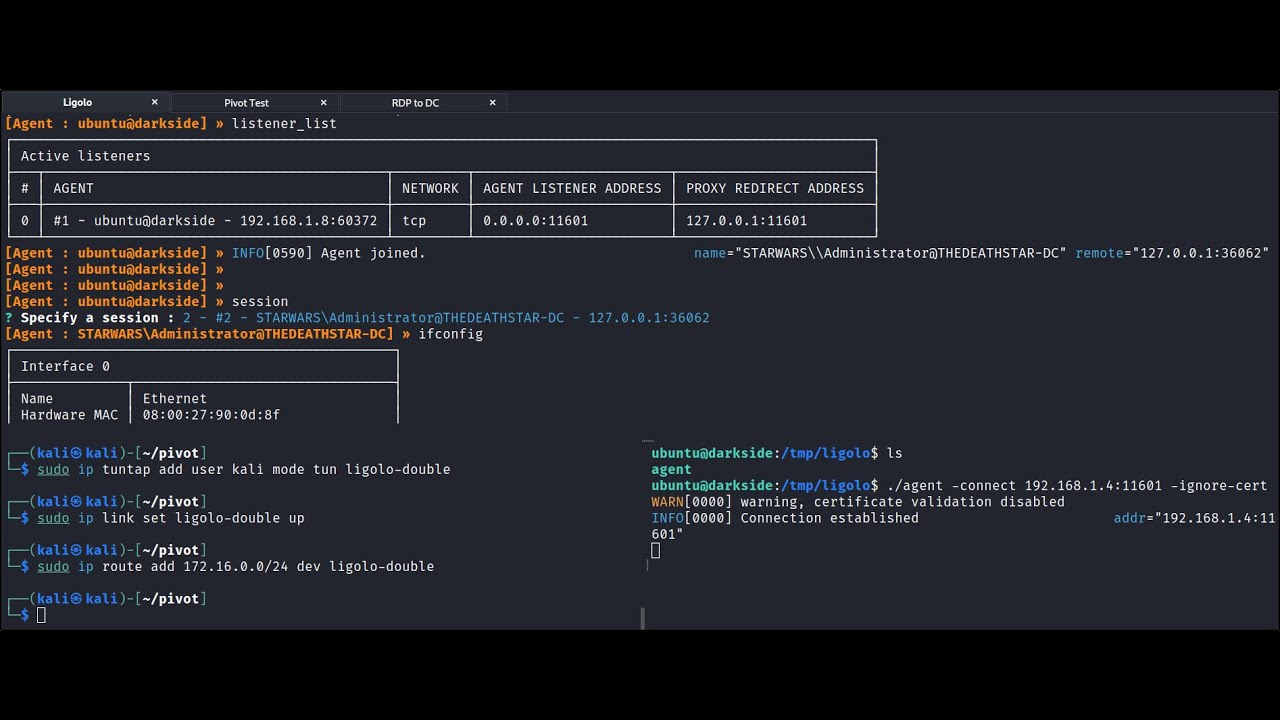
Demonstration of how to use ligolo-ng to perform a double pivot with Linux and Windows hosts.
▬ Contents of this video ▬▬▬▬▬▬▬▬▬▬
00:00 - Intro
03:06 - First Pivot
09:04 - Second Pivot
16:37 - Conclusion
Ligolo-ng:
https://github.com/Nicocha30/ligolo-ng

Demonstration of how to use ligolo-ng to perform file transfers and establish reverse shells orginiating from internal pivots on Linux and Windows hosts.
▬ Contents of this video ▬▬▬▬▬▬▬▬▬▬
00:00 - Intro
00:33 - Lab Environment
02:49 - Configuring Pivot One Agent Listeners
06:43 - File Transfer Pivot One
08:40 - Reverse Shell Pivot One
10:09 ...
cloud urchin
thanks
gray yacht
Np.
safe star
the alpha releases have trouble with double pivots in my experience
gray yacht
0.6.2 has been my go to.
gray yacht
Yup
dim ridge
trying it with SSH -L still getting a timeout for port 172.16.5.135:80
gray yacht
dim ridge
trying it with SSH -L still getting a timeout for port 172.16.5.135:80
How are you running it?
dim ridge
ssh -L 13389:172.16.5.19:80 ubuntu@10.129.202.64
 strange valve
Hey guys
gray yacht
dim ridge
ssh -L 13389:172.16.5.19:80 ubuntu@10.129.202.64
Should be to the .135:80 right?
dim ridge
🤦♂️
haha oops, i used bash history and forgot to edit the ip
yeah this is my last flag for the night haha
gray yacht
All good
dim ridge
hmm still getting timeout tho
ssh -L 13389:172.16.5.135:80 ubuntu@10.129.202.64
firefox-esr 172.16.5.135:13389
gray yacht
dim ridge
hmm still getting timeout tho
ssh -L 13389:172.16.5.135:80 ubuntu@10.129.202.64
...
Think about what the SSH command is doing. How did you connect via RDP earlier?
dim ridge
Using these
ssh -L 13389:172.16.5.19:3389 ubuntu@10.129.202.64
xfreerdp /v:172.16.5.19:13389 /u:victor /p:pass@123
gray yacht
localhost
 gray yacht
dim ridge
Thank you! i could have sworn i used the ip for xfreerdp tho 😅
gray yacht
dim ridge
Thank you! i could have sworn i used the ip for xfreerdp tho 😅
Nope, lol. Add this stuff to your notes.
dim ridge
doing it now haha ty
solar zodiac
hi everyone! was curious if anyone could nudge me about the password pattern for the exchange modules' spraying exercise
Ive tried Season2021-2024!
and Inlanefreight2021-2024!
 fickle thicket
Hi, seeking help for injection attacks skills assessment. I can read the /etc/passwd but i cannot find the internal page.
 shadow grove
fickle thicket
Hi, seeking help for injection attacks skills assessment. I can read the /etc/pa...
shadow grove
fickle thicket
Hi, seeking help for injection attacks skills assessment. I can read the /etc/pa...
Can you read the / directory and find the filename you need?
foggy monolith
Curious if anyone has ever gotten JuicyPotato to work without access to Visual Studio. The version from 2018 hosted on GitHub doesn't cut it for the modules and the CI is completely gone; where else is a prebuilt binary available besides an attempted pillage from the SRV01 box?
And what alternatives are there for exploiting SeImpersonate? @gray yacht any ideas?
 burnt spruce
Hi guys, so
Once you decode the cookie, you will notice that it is only 31 characters long, which appears to be an md5 hash missing its last character. So, try to fuzz the last character of the decoded md5 cookie with all alpha-numeric characters, while encoding each request with the encoding methods you identified above. (You may use the "alphanum-case.txt" wordlist from Seclist for the payload)
So i tried everything and its not working


the max response is 7

 sweet jewel
is it normal for the ADCS labs to take a while to deploy? mine has been deploying for ~10 mins
fickle thicket
shadow grove
Can you read the / directory and find the filename you need?
No. /flag.txt doesnt work
 safe star
foggy monolith
Curious if anyone has ever gotten JuicyPotato to work without access to Visual S...
safe star
foggy monolith
Curious if anyone has ever gotten JuicyPotato to work without access to Visual S...
what module
pine dune
 safe star
what about PrintSpoofer or GodPotato?
foggy monolith
safe star
what module
Windows Privesc § Assessment 1. Have SeImpersonate but all the prebuilt binaries I'm seeing on the Internet are 6 years old and thus incompatible.
safe star
foggy monolith
Windows Privesc § Assessment 1. Have SeImpersonate but all the prebuilt binaries...
oh yeah the juicypotato worked
pine dune
safe star
try ctrl + shift + r
already tried refreshing the page :/ also im tryna practice XSS and this is the only easy one there
foggy monolith
safe star
oh yeah the juicypotato worked
Didn't for me. Getting timeouts because the only binary I can find is from 2018.
safe star
foggy monolith
Didn't for me. Getting timeouts because the only binary I can find is from 2018.
its all about the -c option
safe star
pine dune
already tried refreshing the page :/ also im tryna practice XSS and this is the ...
what about another machine
pine dune
safe star
what about another machine
wanna try an easy machine first
foggy monolith
safe star
its all about the -c option
Perfect, that was all I needed.
 stoic estuary
hey Guys
i am stuck with a question in the Attacking enterprice network module

i already exploit the vulnerability but i can't find the flag anywhere
 carmine coral
pine dune
machine is taking forever to load
carmine coral
pine dune
machine is taking forever to load
Happened to me too yesterday, after 10-20mins of waiting the loading state reverted back to « click to spawn target »
(And then it worked)
safe star
stoic estuary
i already exploit the vulnerability but i can't find the flag anywhere
I’m pretty sure there was more to that vuln
fathom pendant
stoic estuary
hey Guys
i am stuck with a question in the Attacking enterprice network module
You should be doing the module blind tbh, meaning not even looking at the questions
As the module itself is the walkthrough
 sacred gull
For LOLBAS: RunDll32 on the win evav techs I they use a local package source but I cant find anywhere to download it
Login to HTB Academy and continue levelling up your cybsersecurity skills.
They show this but I cant see a download for it anywhere, can someone point me in the right direction?
 tranquil axle
I shows the path right there, this is just because the box doesn't have access to the internet so nuget doesnt work on it unless they do it this way
you don't need to dl anything
sacred gull
The file isnt on the box either, i did check. The idea it to compile outside of the box
I just used the normal source but figured I would ask anyway
tranquil axle
the module comes with 2 instances, theres a dev box and a target box, you need to spin up the dev box from one of the early sections and in there it should be
if you awnt to build it on your machine then just use the normal source yea
sacred gull
Ahhh okay, thankyou I didnt remember the dev box
 silk flicker
Hi guys! I'm stuck on Information Gathering - Web Edition, I tried all what I learned during this module but I didn't manage to solve the last three questions. Someone could help me please!
 olive slate
I'm stuck in "Advanced XSS and CSRF Exploitation
XSS Filter Bypasses", can anyone help?
 teal sparrow
silk flicker
Hi guys! I'm stuck on Information Gathering - Web Edition, I tried all what I le...
teal sparrow
silk flicker
Hi guys! I'm stuck on Information Gathering - Web Edition, I tried all what I le...
Sure
Lmk what u have tried so far
 acoustic owl
olive slate
I'm stuck in "Advanced XSS and CSRF Exploitation
XSS Filter Bypasses", can anyon...
acoustic owl
olive slate
I'm stuck in "Advanced XSS and CSRF Exploitation
XSS Filter Bypasses", can anyon...
What exactly is not working?
Send me a dm so as not to spoil anything
 hybrid bison
Hello guys, Id like to ask you some questions because I’m new and don’t know much about.
-
In Kali Linux when I scan my network with /24 I can see from my mobile network and my laptop,have open ports, like 53/TCP . Could you please tell me how can hide my open ports and generally hide any vulnerabilities pls?
-
When I try msf or toolkit to make a session all the times missing something and doesn’t work. So can I have a specific commond , downloading or something to make me strong.
Last one, on Hack the Box when I open the machine can’t work on that. Is that because starting easy easy till I wou learn?
I will appreciate to get my gold answers.
Many thanks
 green minnow
Module fingerprinting: "What version of the SMB server is running on the target system? Submit the entire banner as the answer."
nmap -sV -sC RHOST -p445 says:
445/tcp open netbios-ssn syn-ack ttl 63 Samba smbd 4```
But Samba smbd 4 and smbd 4 aren't accepted as correct answers. pulsar oak
Good afternoon, I am running a lab on attack common services and I cannot make these changes in the temp folder on the created machine, it gives an error that there are not enough rights, what is the problem, has anyone encountered?
 tranquil axle
green minnow
Module fingerprinting: "What version of the SMB server is running on the target ...
tranquil axle
green minnow
Module fingerprinting: "What version of the SMB server is running on the target ...
try to use nc to connect to it on that port. The answer expects a version like x.y.z
green minnow
That just gives (microsoft-ds) open and nothing else
tranquil axle
if you try to do "nc <ip> 445" ? without nmap I mean
green minnow
Yeah it doesn't return anything
tranquil axle
okay my nmap -sV -sC scan returns the full version number
outdated nmap or something?
green minnow
Wow I've found another example of a module task only working in pwnbox. Pwnbox returns a different version number
tranquil axle
what version is your local nmap?
green minnow
Same exact command sudo nmap -sC -sV -p445 -vv RHOST

 green minnow
tranquil axle
what version is your local nmap?
green minnow
tranquil axle
what version is your local nmap?
Nmap version 7.95
tranquil axle
weird, my vm has 7.94SVN and gives the right results
green minnow
pwnbox and personal machine getting different results also occured to me in the firewall / IDS evasion medium lab.
Searching on google it seems this error isn't a one off either.
tranquil axle
I only remember having issues with this once where nmap would return the wrong string instead of the flag
99% of the rest I could do on my own machine
green minnow
tranquil axle
I only remember having issues with this once where nmap would return the wrong s...
That might have been the firewall / ids one.

 urban elk
same version in this case, so not a version issue normally... I've done this on a parrot VM and didn't have the issue, for what it's worth
 vagrant wraith
Hi huys currently doing ( Documentation & Reporting - Notetaking & Organization ) and the question is " Steve is learning about the tool that can make logging a session easier. He messages you for help mentioning that he would like to try to split the panes vertically. What do you tell him? (Answer format: [key] + [key] + [key], i.e., fill in the values for "key" and leave the brackets and + signs.) " ive tried everything so far im not sure what im missing
 jolly yacht
did you solved this?
fathom pendant
vagrant wraith
Hi huys currently doing ( Documentation & Reporting - Notetaking & Organization ...
4 keys total
vagrant wraith
fathom pendant
4 keys total
yeah i got it thanks
 silk cedar
i had to install nasm
jolly yacht
silk cedar
i had to install nasm
Cool. I solved the first task in the assessment, but I've been stuck on the second Task for days. So, if you can help me with that, it would be awesome. Thank you.
lusty thicket
if its allocated memory dynamically with mmap or malloc it defaults to non executable, make it executable
might be wrong tho without any context
 grave tinsel
Hi, can someone help with machine Certified
lusty thicket
grave tinsel
Hi, can someone help with machine Certified
silk cedar
jolly yacht
Cool. I solved the first task in the assessment, but I've been stuck on the seco...
i'm not to the skills assessment yet- i disassembled disasm.zip but the flag is a mix of "leat" and coded values? d154553m811n9 81n42135...
grave tinsel
lusty thicket
<#706656410376732802>
It tells me that I don't have access
lusty thicket
grave tinsel
It tells me that I don't have access
silk cedar
@lusty thicket - any clues on decoding the flag for disasm.zip? (no spoilers)
lusty thicket
i haven't done that module
silk cedar
lusty thicket
i haven't done that module
cool- it's fun 🙂
jolly yacht
silk cedar
cool- it's fun 🙂
you done?
Use the hint and the technique you learned from that section that matches the hint.
hybrid bison
Hey guys , how can hide my open ports
lusty thicket
hybrid bison
Hey guys , how can hide my open ports
use rules
silk cedar
jolly yacht
Use the hint and the technique you learned from that section that matches the hi...
yeah- i did that but i get HBT{d154553m811n9...
jolly yacht
silk cedar
yeah- i did that but i get HBT{d154553m811n9...
revisit how you can disassemble the .data section of the binary from that module section, it was at the last part.
jolly yacht
silk cedar
yeah- i did that but i get HBT{d154553m811n9...
you already got the flag, what's the problem?
 opal plinth
If the server santizes these characters
; & | < > ( ) ` $
And I can input command in
ls - l {command}
What command should it be so that it can print the flag ?
silk cedar
jolly yacht
you already got the flag, what's the problem?
i'll try entering it again- it's says the flag isn't valid
jolly yacht
silk cedar
i'll try entering it again- it's says the flag isn't valid
make sure you entered all the string from the .data section(like shown in the module's section) of that binary
silk cedar
jolly yacht
make sure you entered all the string from the .data section(like shown in the mo...
it worked- must have mistyped it; thx for the help!
opal plinth
opal plinth
If the server santizes these characters
; & | < > ( ) ` $
And I can input comma...
Can anybody help?
jolly yacht
opal plinth
Can anybody help?
mention the module and section to add more context
hybrid bison
lusty thicket
use rules
Thanks
fathom pendant
opal plinth
Can anybody help?
#programming or #web read and follow #welcome to access
strange valve
Hello guys, I'm having trouble answering the first question of the Introduction to Web Applications module
"Check the above login form for exposed passwords. Submit the password as the answer." Could someone help me
fathom pendant
strange valve
Hello guys, I'm having trouble answering the first question of the Introduction ...
Did you check the page source?
:)
rustic sage
How do you say, ":)" without dc turning it into an emoji
fathom pendant
rustic sage
How do you say, ":)" without dc turning it into an emoji
By disabling it in settings
strange valve
fathom pendant
:)
hack the box?
fathom pendant
strange valve
hack the box?
Of the spawned target login page
 slow hawk
AD Enumeration & Attacks part 1:-
Enter-PSSession doesn't work in "rlwap nc ", it doesn't show any output, sometimes it(terminal) just hung-ups! any idea what to do?
rustic sage
I see
 sturdy laurel
i am stuck in this session hijacking section in xss module don't know which input field is vulnerable can someone help me?
fathom pendant
sturdy laurel
i am stuck in this session hijacking section in xss module don't know which inp...
Doesn't the section show you different ways to find out?
sturdy laurel
fathom pendant
Doesn't the section show you different ways to find out?
yeah man i tried but i am not getting any response back in my server
fathom pendant
Are you having it send the request to your tun0 ip and port?
burnt spruce
hi guys
Login Brute Forcing Basic HTTP Authentication
After successfully brute-forcing, and then logging into the target, what is the full flag you find?
So i tried different wordlist and etc but nothing got:
hydra -L /usr/share/wordlists/seclists/Usernames/top-usernames-shortlist.txt -P 2023-200_most_used_passwords.txt 94.237.53.186 http-get / -s 53496
Can someone help?
 proven swift
Could someone help me on http attacks, http response splitting?
 cyan lark
Hey guys I'm stuck on this challenge right here in Getting Started.
I ran nmap scans:
Found open ssh version 9.2, looked it up on searchsploit, msfconsole, didn't find any exploits for that.
Found rpcbind on port 111, didn't find any exploits either.
I ran go buster directory enumeration:
/wp-includes (I didn't find any important files there)
/wp-admin (Asks for user pass, which I didn't find)
/wp-content (Empty page)
 fathom pendant
cyan lark
Hey guys I'm stuck on this challenge right here in Getting Started.
I ran nmap ...
fathom pendant
cyan lark
Hey guys I'm stuck on this challenge right here in Getting Started.
I ran nmap ...
Ssh is not the vulnerability
cyan lark
Any directions I'm missing here?
acoustic owl
cyan lark
Hey guys I'm stuck on this challenge right here in Getting Started.
I ran nmap ...
Looking at the screenshot, it seems like you scanned a public IP.
Public IPs are Docker containers. You ONLY have the specified port available.
fathom pendant
cyan lark
Hey guys I'm stuck on this challenge right here in Getting Started.
I ran nmap ...
You're given an ip and port, use those. Whenever given an IP:Port, that's your scope as those are docker targets
cyan lark
fathom pendant
You're given an ip and port, use those. Whenever given an IP:Port, that's your s...
That's weird because I was learning about nmaps in this chapter.
fathom pendant
Well the getting started module isn't just about nmap
cyan lark
Yeah it's about dir enumeration too..
cyan lark
fathom pendant
It helps to also provide the section name
My bad, Public Exploits Section
fathom pendant
Yeah, nmap not required
cyan lark
I think I got the direction. Thank you
fathom pendant
Just enumerate in other ways, like web
cyan lark
I'll look up for vulnerability in the wordpress version
fathom pendant
cyan lark
I'll look up for vulnerability in the wordpress version
It's more direct than wp version
cyan lark
The plugin
fathom pendant
Look directly at the page and it'll hit you in the face
cyan lark
fathom pendant
Look directly at the page and it'll hit you in the face
I'm not seeing it but I'm keeping on looking.
Now I see the simple-backup thing, page has an empty directory.
tried /wp-includes/simple-backup and /wp-content/simple-backup - not a thing.

Ok I think I found it. It's the plugin
fathom pendant
cyan lark
I'm not seeing it but I'm keeping on looking.
Now I see the simple-backup thing...
Utilize msfconsole for the plugin name
cyan lark
Exactly what I'm doing right now, thank you
fathom pendant
cyan lark
I'm not seeing it but I'm keeping on looking.
Now I see the simple-backup thing...
"Not a thing" well if you're accessing the directory it's a thing
cyan lark
fathom pendant
"Not a thing" well if you're accessing the directory it's a thing
Only on those dirs it's empty, but /simple-backup is a dir I mean
fathom pendant
cyan lark
Only on those dirs it's empty, but /simple-backup is a dir I mean
Well you're thinking linearly
cyan lark
fathom pendant
Utilize msfconsole for the plugin name
It's not on msfconsole nor searchsploit so I found it on google
fathom pendant
The exploit might be, for instance, lfi
The exploit is on msfconsole
Ik bc i used msfconsole for this
Yes
cyan lark
what, but this one is called simple backup file
slow hawk
can we "evil-winrm" if we can "Enter-PSSession" to it i.e MS01.inlanefreight.local?? (talking about active directory)
cyan lark
ahhh
well either way I found it on exploit db too if I wouldn't have understood that on msf
Yoo that's so cool
I appreciate the help @fathom pendant
dapper moth
proven swift
Could someone help me on http attacks, http response splitting?
Did you ping me in the forum?
proven swift
dapper moth
Did you ping me in the forum?
Yeah lol
dapper moth
You can ask here.
Some other person might have the same doubt and can search in the channel history later
 final kite
https://medium.com/@mrclimp/web-archives-a-journey-through-digital-history-f18c152cbb6a cant get this question right
i found the answer but for some reason doesn't accept it
fathom pendant
final kite
i found the answer but for some reason doesn't accept it
Htb used to be eu, not .com
final kite
i just opeened solutions
since archives been hacked
so there isn't all data there
o nvm
it was 0 instead of O
proven swift
dapper moth
You can ask here.
Some other person might have the same doubt and can search in ...
Right but i was gonna send my payload and screenshot of what im doing, dont know if thats allowed
dapper moth
Probably not that detailed.
I’m afk but can give you a few pointers later
proven swift
prob gonna spoil it lol
dapper moth
Don’t think they will be any different than the ones in that forum post though
proven swift
dapper moth
Probably not that detailed.
I’m afk but can give you a few pointers later
gotcha, so do u want me to dm u what i did then?
safe star
Ok
 hardy plover
I’m able to upload a file with character injection
Except that idk how would php server would interpret them
In other other words how do i access the uploaded image
cloud urchin
go to the upload directory and navigate to your payload
safe star
Idk what the character is
lusty thicket

hardy plover
Like %00 would eradicate anything after it
safe star
If it’s a slash, it probably won’t work
safe star
Try something else
safe star
No different
safe star
You can check the source page and see what the file name looks like after
 queen birch
Hello everyone who have already solved LinkVortex?
cloud urchin
queen birch
Hello everyone who have already solved LinkVortex?
this channel is for academy talk try #boxes
safe star
hardy plover
If you jkow any
Idk
queen birch
cloud urchin
this channel is for academy talk try <#706656410376732802>
Oh thank you got it
cloud urchin
hardy plover
If you jkow any
think about uploading afile.. with a / in your payload. if you add a / in your payload it's going to try to put the file into a subdirectory that probbaly doesn't exist
safe star
hardy plover
can i have any documentation about these chars
There’s Other extensions that work here
hardy plover
safe star
You can check the source page and see what the file name looks like after
I used burp intruder with a long wordlist to inject multiple files
What you suggest would work but will consume lot of time.
I mean i’ll have to use repeater for each successful submission
hardy plover
cloud urchin
think about uploading afile.. with a / in your payload. if you add a / in your p...
Yeah kinda
hardy plover
hardy plover
I used burp intruder with a long wordlist to inject multiple files
What you sug...
Than manually visit the page
cloud urchin
you can just see if it was successful within intruder itself
hardy plover
cloud urchin
think about uploading afile.. with a / in your payload. if you add a / in your p...
But it’s not base64 decoding. Like php server interprets them differently
hardy plover
cloud urchin
you can just see if it was successful within intruder itself
Intruder shows successful submissions, but in order to retrieve it i need to know how to access it, for that i need to know how php server interprets the injected chars
If you know what i mean
cloud urchin
TLattice told you how...
you can view the source code of the page.. if you're uploading something like a profile picture and you can see the picture after you upload it, you can also right click and go to open image in new tab and see where it' stored
hardy plover
cloud urchin
TLattice told you how...
Yep but that’s time consuming like I explained
Thanks
hardy plover
That would require individual requests via repeater than visiting the web page and see source code
Not every request would work
I got 20 submissions, in the end i would have no choice but to try the manual way
Thank you for your time gentlemen 😊
cloud urchin
are you able to upload a profile picture?
dapper moth
proven swift
gotcha, so do u want me to dm u what i did then?
I gotta check my notes cause It’s been a couple of months since I did the module
I can check it out when I hop in the pc
dim ridge
Anyone able to help on this one, https://academy.hackthebox.com/module/158/section/1435
Have to rdp to an ubuntu machine and use netsh and then connect to a DC through rdp on the port set up, but it's not connecting
Connecting to ubuntu machine -
xfreerdp /size:1500x800 /u:htb-student /v:10.129.42.198 /p:'HTB_@cademy_stdnt!'
Set up portproxy -
netsh.exe interface portproxy add v4tov4 listenport=8080 listenaddress=10.129.42.198 connectport=3389 connectaddress=172.16.5.25
Then attempt to connect to DC via rdp
freerdp /v:10.129.42.198:8080 /u:victor /p:pass@123 [20:27:16:536] [49938:49939] [ERROR][com.freerdp.core.transport] - BIO_read returned a system error 104: Connection reset by peer [20:27:16:536] [49938:49939] [ERROR][com.freerdp.core] - transport_read_layer:freerdp_set_last_error_ex ERRCONNECT_CONNECT_TRANSPORT_FAILED [0x0002000D] [20:27:37:583] [49938:49939] [ERROR][com.freerdp.core.transport] - BIO_read returned a system error 104: Connection reset by peer [20:27:37:583] [49938:49939] [ERROR][com.freerdp.core] - transport_read_layer:freerdp_set_last_error_ex ERRCONNECT_CONNECT_TRANSPORT_FAILED [0x0002000D] [20:27:37:583] [49938:49939] [ERROR][com.freerdp.core] - freerdp_post_connect failed
Login to HTB Academy and continue levelling up your cybsersecurity skills.
 tender nimbus
Hey guys im doing the web proxy module, any one knows the problem here? it was working perfectly yesterday
 hardy plover
tender nimbus
Hey guys im doing the web proxy module, any one knows the problem here? it was w...
hardy plover
tender nimbus
Hey guys im doing the web proxy module, any one knows the problem here? it was w...
Try reinstalling the certificate
Just like you did before
tender nimbus
hardy plover
Try reinstalling the certificate
can you help me with that i'm quit new with this
i did nothing before i use the browser from burp suite
the default one
 tender nimbus
i dont remember trying it, you know what i will make some research to night and let you know if i found out 🙂
dim ridge
@tender nimbus download foxyproxy as an extension on your browser, set it to go to 127.0.0.1 port 8080
or just use the proxy settings in the browser, but its much easier to use foxyproxy.
To install the burp cert i think its sometihng like https://burpsuite
Then try navigating to the web page
hardy plover
tender nimbus
i dont remember trying it, you know what i will make some research to night and ...
Excellent 😊
 gusty ivy
Hello can I get a hint for web blue print
acoustic owl
is it a challenge?
#challenges <--
And please don't post your question in every available channel.
gusty ivy
acoustic owl
And please don't post your question in every available channel.
Okayyy I’m sorry
Can you tell me at least where should I ask
dim ridge
i think he's trying, he's asking if its a challenge
gusty ivy
dim ridge
i think he's trying, he's asking if its a challenge
Yes it is a challenge from HTB I’ve got the file but I can’t send it here
burnt spruce
hi guys
Login Brute Forcing Basic HTTP Authentication
After successfully brute-forcing, and then logging into the target, what is the full flag you find?
So i tried different wordlist and etc but nothing got:
hydra -L /usr/share/wordlists/seclists/Usernames/top-usernames-shortlist.txt -P 2023-200_most_used_passwords.txt 94.237.53.186 http-get / -s 53496
Can someone help?
gusty ivy
Okkkk I will Thanks everyone
dim ridge
dim ridge
Anyone able to help on this one, https://academy.hackthebox.com/module/158/secti...
anyone? 🥹
dim ridge
burnt spruce
hi guys
Login Brute Forcing Basic HTTP Authentication
After successfully brut...
you tried rockyou?
lusty thicket
dim ridge
Anyone able to help on this one, https://academy.hackthebox.com/module/158/secti...
looks like the connection was reset
cyan lark
I have a shell with SSH connection. How to run this msf console exploit to Privilege Escelate?
I don't understand the part with the sessions.
 cloud urchin
looks like you have the wrong options
dim ridge
@cyan lark you would run that on a session where you have a meterpreter shell
from what im seeing looks like you're not providing a session number, am i right @cloud urchin
cloud urchin
idk, no ide what he's trying to do, but the nic seems off, probably need an open session for that since i dont see a rhost option
dim ridge
get the shell with msfconsole, use bg to put it in background and then use this and use the session number that the meterpreter session is on
cyan lark
dim ridge
<@1049824206168264704> you would run that on a session where you have a meterpre...
I ran a linpeas on the shell that I have access to through ssh
 cyan lark
cloud urchin
that's probably not the right exploit
cyan lark
cloud urchin
that's probably not the right exploit
It is the right exploit, I just don't understand how to pass over the shell to it
cyan lark
dim ridge
get the shell with msfconsole, use bg to put it in background and then use this ...
The command is just "get"?
get ssh user@ip -p etc etc?
 brazen apex
Working on Module Footprinting Assessment Hard - I've discovered a user ||Tom and got their credentials|| currently logged into the IMAPS server but having a very difficult time with the IMAP commands, and their output. Can I be given a hint if I'm in the right direction or not? The phrase "HasNoChildren" indicates to me that the inboxes are empty but I'm very unfamiliar with IMAP
||```
1 LIST "" *
- LIST (\HasNoChildren) "." Notes
- LIST (\HasNoChildren) "." Meetings
- LIST (\HasNoChildren \UnMarked) "." Important
- LIST (\HasNoChildren) "." INBOX
1 OK List completed (0.001 + 0.000 secs).
this has helped me a lot on imap sessions https://donsutherland.org/crib/imap
 devout saddle
cyan lark
The command is just "get"?
devout saddle
cyan lark
The command is just "get"?
Hey man, Is it the msf module, your doing? it sounds like you need to read the part about starting shells and sending them to the background before starting the exploit
cyan lark
devout saddle
Hey man, Is it the msf module, your doing? it sounds like you need to read the p...
Getting Started module, Privilege Escalation section.
devout saddle
You need to provide an active shell session for that exploit, and that has to be established before you are using the exploit
devout saddle
For sure not the right exploit then, totally agree
Way more complicated than what it needs to be
cyan lark
I have an active shell already

its just through ssh, I don't know how to run the exploit on it
cloud urchin
did you try sudo -l
cyan lark
Yeah
cloud urchin
does it show anything?
cyan lark
 cloud urchin
there you go
cyan lark
I ran the entire linpeas script. I got the exploits
brazen apex
dim ridge
this has helped me a lot on imap sessions https://donsutherland.org/crib/imap
Does this syntax look right im getting errors ||1 FETCH 1:* \Answered||
cloud urchin
you can run /bin/bash as user2 it seems
cyan lark
cloud urchin
there you go
I am inside user1, user2 is my target
dim ridge
brazen apex
Does this syntax look right im getting errors ||`1 FETCH 1:* \Answered`||
im not sure IMAP is the place to go, wrong path
cloud urchin
cyan lark
I am inside user1, user2 is my target
Re-read the section. Look at what access you have with sudo. Use https://gtfobins.github.io as the page says. You'll want to bookmark this page and lolbins they are used a lot.
dim ridge
from checking my notes
brazen apex
dim ridge
im not sure IMAP is the place to go, wrong path
Alright I kinda felt that way too, mailboxes have no subsidiaries/children
Thanks for the advice
cyan lark
cloud urchin
Re-read the section. Look at what access you have with sudo. Use https://gtfobin...
I have read it multiple times man, I'm just asking for more directions lol
I got these two alerts with the linpeas just like the section says to do
 cloud urchin
cyan lark
I have read it multiple times man, I'm just asking for more directions lol
I go...
cloud urchin
cyan lark
I have read it multiple times man, I'm just asking for more directions lol
I go...
i just handed it to you on a silver platter, exploit your sudo privs, use gtfobins to see how
cyan lark
But blue doesn't mean much.
 dim ridge
brazen apex
Alright I kinda felt that way too, mailboxes have no subsidiaries/children
Than...
dim ridge
brazen apex
Alright I kinda felt that way too, mailboxes have no subsidiaries/children
Than...
no problem, let us know if you need any more help, try another path for now 👍 any other mail ports?
cyan lark
cloud urchin
i just handed it to you on a silver platter, exploit your sudo privs, use gtfobi...
What do you mean, these commands cannot be ran as sudo which is what I need, no?
dim ridge
dim ridge
Anyone able to help on this one, https://academy.hackthebox.com/module/158/secti...
@cloud urchin @fathom pendant you see any issues here? i can't seem to get past this one, tried resetting the target and everything
cloud urchin
cyan lark
What do you mean, these commands cannot be ran as sudo which is what I need, no?
re-read the section on sudo again, sudo lets you run a binary as another user
cyan lark
cloud urchin
re-read the section on sudo again, sudo lets you run a binary as another user
My friend, I read it.
I only have access to user1. I can't su as user2 because I need a pass.
cloud urchin
sudo is not su
lusty thicket
the syntax for this is sudo -u
cloud urchin
re-read the section again, use sudo
gray yacht
dim ridge
Anyone able to help on this one, https://academy.hackthebox.com/module/158/secti...
Check your IP addresses
cyan lark
cloud urchin
re-read the section again, use sudo
I am looking at it. I don't see the answer.
cloud urchin
cyan lark
I am looking at it. I don't see the answer.
sudo allows you to run a command as another user. you're trying to run a command as user 2. use sudo -l to see what commands you can run as other users. use gtfobins to see how you can abuse various binaries and escalate privileges.
cyan lark
My friend
I am on user1, not user2, on sudo -l I can see that user2 has an app that it can use with sudo.
dark hedge
Raz
cyan lark
I don't understand
dark hedge
the sudo command lets you run commands as other users without needing their credentials
you just need your credentials
tranquil axle
the output even tells you that user1 can run this command as user2 with NOPASSWD
dark hedge
if it's NOPASSWD then you don't even need to input your password
cyan lark
tranquil axle
the output even tells you that user1 can run this command as user2 with NOPASSWD
ohhh
I thought it means that user2 can run this with nopasswd,
Why does sudo -l ask me for user2's password now?
I think I got it. I can su to any user I want but not perform anything other than what they're allowed to run with no passwd, right?
dark hedge
su is not sudo. with su you are switching your current user, which requires you to input the target user's password. with sudo you are running commands as another user, and depending on how the sudoers file is configured, it may require you to input your current user's password
NOPASSWD in sudo -l simply means you can run the command without supplying your password to sudo
cyan lark
I appreciate it guys I understand it now
Where have I went wrong here though, do you know?
 dark hedge
you're trying to run multiple commands
just execute the command you're allowed to execute
dim ridge
gray yacht
Check your IP addresses
thanks @gray yacht isn't that the right ip addresses tho, it doesn't really explain very well in the module, i wish it would use names rather than just putting the ip addresses relevant to them...
netsh.exe interface portproxy add v4tov4 listenport=8080 listenaddress=<GivenTargetIP> connectport=3389 connectaddress=<DCipadd>
cyan lark
I got it thanks so much @dark hedge !!
So there is no need in even using the sudo -u command, right?
dark hedge
if you're allowed to run different commands as multiple different users, you'd probably need to specify -u
cyan lark
I now realize I need to move on to root.
brazen apex
dim ridge
no problem, let us know if you need any more help, try another path for now 👍 a...
Do you have one of those cheat sheets for POP3
gray yacht
dim ridge
thanks <@705508803080093777> isn't that the right ip addresses tho, it doesn't r...
So I would RDP in with the provided htb-student credentials and verify the internal IP address of that host. Then, the question provides you with the internal IP address it wants you to target, so I would use that one in the command.
cyan lark
which isn't in sudo -l
dim ridge
brazen apex
Do you have one of those cheat sheets for POP3
checking
This one is the only one i have i think. You have to scroll down a bit.
Search for Retrieving Emails and Modifying the Inbox
https://www.atmail.com/blog/pop-101-manual-pop-sessions/

This POP 101 post is the second of our how-to tutorials designed to help you interact with open, text-based protocols in the email industry. What is POP?
brazen apex
You're the man @dim ridge, I'll check it out
dim ridge
gray yacht
So I would RDP in with the provided htb-student credentials and verify the inter...
Do you mean how it switches to using 10.129.42.198 suddenly, i didn't quite get why. I thought it was an error, not sure how they get that in the result for netsh.exe interface portproxy show v4tov4 when the listen address they put in the previous command was 10.129.15.150
gray yacht
dim ridge
Do you mean how it switches to using 10.129.42.198 suddenly, i didn't quite get ...
What I'm saying is you can't copy/paste the stuff in that section completely, i.e., the IP addresses and expect it to work, when they are different from what you are given when you spawn the target and actually remotely access the target.
They are different. Like I said, access the host, perform some host based enumeration and then work the task with that information.
dim ridge
true, which is why i wish they labelled it rather than just putting the IP address that was the right one in their session
makes it hard to follow

you mean like that @gray yacht
looks like it nearly worked, but different error this time
xfreerdp /v:10.129.14.47:8080 /u:victor /p:pass@123 .... Do you trust the above certificate? (Y/T/N) Y [22:10:33:271] [58217:58218] [WARN][com.freerdp.core.nla] - SPNEGO received NTSTATUS: STATUS_LOGON_FAILURE [0xC000006D] from server [22:10:33:271] [58217:58218] [ERROR][com.freerdp.core] - nla_recv_pdu:freerdp_set_last_error_ex ERRCONNECT_LOGON_FAILURE [0x00020014] [22:10:33:271] [58217:58218] [ERROR][com.freerdp.core.rdp] - rdp_recv_callback: CONNECTION_STATE_NLA - nla_recv_pdu() fail [22:10:33:271] [58217:58218] [ERROR][com.freerdp.core.transport] - transport_check_fds: transport->ReceiveCallback() - -1
gray yacht
dim ridge
looks like it nearly worked, but different error this time
`xfreerdp /v:10.129.1...
The question gave you a different IP to connect to right? In your screenshot, you are already connected to the .150 right?
dim ridge
yes 172.16.5.19 but i've tried that on portproxy too as the connectaddress but still get errors
gray yacht
dim ridge
yes 172.16.5.19 but i've tried that on portproxy too as the connectaddress but s...
Well you're trying to connect via RDP to the same host by setting it as .150
dim ridge
I have it set up now like this
netsh.exe interface portproxy show v4tov4
Listen on ipv4: Connect to ipv4:
Address Port Address Port
10.129.42.198 8080 172.16.5.19 3389
10.129.42.198 8081 172.16.5.150 3389
and get this error
xfreerdp /v:10.129.42.198:8080 /u:victor /p:pass@123
[22:21:38:926] [59553:59554] [ERROR][com.freerdp.core] - freerdp_tcp_connect:freerdp_set_last_error_ex ERRCONNECT_CONNECT_FAILED [0x00020006]
[22:21:38:926] [59553:59554] [ERROR][com.freerdp.core] - failed to connect to 10.129.42.198
i switched the listener port for the other - 5.150 to avoid it messing it up
gray yacht
Ok, so I am confused. In your screenshot above, the IP of that host is 10.129.14.47, but you are using 10.129.42.198 as the listener IP. What is the actual target IP that you received when you spawned the target?
dim ridge
ah sorry i reset the target, the target ip is now 10.129.42.198
gray yacht
Idk man, you may just need to reset the target. You've got all the information, just need to put it together.
dim ridge
i feel like its just borked
i've reset a few times now, tried it every which way but still nothing 😮💨
@gray yacht the thing that confuses me though is that they set it up like this
netsh.exe interface portproxy add v4tov4 listenport=8080 listenaddress=10.129.15.150 connectport=3389 connectaddress=172.16.5.25
And then get this result when running the next command
netsh.exe interface portproxy show v4tov4
Listen on ipv4: Connect to ipv4:
Address Port Address Port
***10.129.42.198 *** 8080 172.16.5.25 3389
Have they just switched IP's in documentation by error
gray yacht
dim ridge
<@705508803080093777> the thing that confuses me though is that they set it up l...
I have no clue.
fathom pendant
dim ridge
<@705508803080093777> the thing that confuses me though is that they set it up l...
The example won't match what you do
The listen address they use a faux 10.129 address, to let you know to use the target IP
dim ridge
ah ok understood
it should be working then 
target ip - 10.129.42.198
targets 2nd Nic address - 172.16.5.150
DC IP (need to connect to DC) - 172.16.5.19
netsh.exe interface portproxy add v4tov4 listenport=8080 listenaddress=10.129.42.198 connectport=3389 connectaddress=172.16.5.19
xfreerdp /v:10.129.42.198:8080 /u:victor /p:pass@123
[22:57:05:165] [62304:62305] [ERROR][com.freerdp.core] - freerdp_tcp_connect:freerdp_set_last_error_ex ERRCONNECT_CONNECT_FAILED [0x00020006]
[22:57:05:166] [62304:62305] [ERROR][com.freerdp.core] - failed to connect to 10.129.42.198
burnt spruce
dim ridge
you tried rockyou?
yes
hi guys
Login Brute Forcing Basic HTTP Authentication
After successfully brute-forcing, and then logging into the target, what is the full flag you find?
So i tried different wordlist and etc but nothing got:
hydra -L /usr/share/wordlists/seclists/Usernames/top-usernames-shortlist.txt -P 2023-200_most_used_passwords.txt 94.237.53.186 http-get / -s 53496
Can someone help?
dim ridge
gray yacht
I have no clue.
its finally worked, just needed another another another target reset 🤷♂️
 tepid stag
Anyone tried cloudfall enterprise machine? If so could someone please help me with something?
fathom pendant
tepid stag
Anyone tried cloudfall enterprise machine? If so could someone please help me wi...
burnt spruce
burnt spruce
hi guys
Login Brute Forcing Basic HTTP Authentication
After successfully brut...
can someone help with it?
gray yacht
burnt spruce
can someone help with it?
Should be able to just use the same user and password list from the section.
burnt spruce
gray yacht
Should be able to just use the same user and password list from the section.
tried nothing
f.e. it says ```
hydra -l basic-auth-user -P 2023-200_most_used_passwords.txt 127.0.0.1 http-get / -s 81
i use and get nothing
hydra -l basic-auth-user -P 2023-200_most_used_passwords.txt 94.237.61.84 http-get / -s 48047
Login Brute Forcing Basic HTTP Authentication
foggy monolith
Out of curiosity, does setting up your own local WriteHat instance on 127.0.0.1 and logging into it count as completion of the optional exercise in the "How to Write Up a Finding" section of the Documentation and Reporting module?
gray yacht
burnt spruce
tried nothing
Is that password list in the directory you are running the hydra command?
burnt spruce
gray yacht
Is that password list in the directory you are running the hydra command?
i downloaded it from the site so i idk, and there is no solution o the internet
0-0
gray yacht
burnt spruce
i downloaded it from the site so i idk, and there is no solution o the internet
Find out where it is located.
└─$ locate 2023-200_most_used_passwords.txt
/opt/SecLists/Passwords/2023-200_most_used_passwords.txt```If it is something like that, use the full path after the -P
burnt spruce
 gray yacht
burnt spruce
gray yacht
burnt spruce
Hey send me a DM
lusty thicket
foggy monolith
Out of curiosity, does setting up your own local WriteHat instance on 127.0.0.1 ...
it’s bare minimum but yeah
 alpine ingot
how tf do you guys remember the stuff in these modules? its so dense.
dim ridge
cherrytree
foggy monolith
lusty thicket
it’s bare minimum but yeah
Was asking because running my own WH instance is going to make it much easier to make sure that notes on the MSI Aegis R2 desktop that I happen to have completely overwritten Windows with Parrot 6.2 HTB Edition on (AKA the attack machine) are safely synced with the M1 MacBook Pro that I use for actually writing things up. For both AEN and the exam, it helps to make sure that everything is in every location.
 midnight galleon
alpine ingot
how tf do you guys remember the stuff in these modules? its so dense.
midnight galleon
alpine ingot
how tf do you guys remember the stuff in these modules? its so dense.
obsidian got ur back

 pine dune
fathom pendant
This looks like it's for a box; <#706656410376732802>
pine dune
fathom pendant
This looks like it's for a box; <#706656410376732802>
okay, ill ask there, thanks
fathom pendant
If you want it to be verbose btw -v[vv]
rustic sage
Hello, I'm doing ad attacks assessment, part 2 , question 6.
I found the hash of user k but I can't crack it
Tried hashcat and john
pine dune
fathom pendant
If you want it to be verbose btw -v[vv]
ok ill try that
rustic sage
Starts with $krb5tgs$18$
So it should be harder to crack but both hashcat and john don't even recognize the hash
 nova wharf
Hey guys I have a question I'm not sure if I'm getting the correct out put for ffuf on the filering Results question can you let me know what I may be doing wrong here. thanks in advance
 pine dune
fathom pendant
If you want it to be verbose btw -v[vv]
pine dune
fathom pendant
If you want it to be verbose btw -v[vv]
was placing "FUZZ" in the wrong place. I think I managed to fix it (the module didn't cover this if im not mistaken or I may have skimmed over it) but it had to be replaced the "support" sub directory
nova wharf
I thought that the -fs 900 was supposed to filter out anything above 900 but when I run the scan with the ip:port the bx is pawned with I get a full list of 200 with sizes over 986 but when I use academy.htb nothing
dark hedge
nova wharf
I thought that the -fs 900 was supposed to filter out anything above 900 but whe...
-fs filters out responses of a specific size, not anything above that size
nova wharf
dark hedge
`-fs` filters out responses of a specific size, not anything above that size
okay but how come I don't get any results using the academy.htb when I've added it as well as the IP and Port to my hosts file but I get a bunch off results when I use just the IP and Port
dark hedge
you don't add the port to your hosts file
only IP addresses and hostnames go in /etc/hosts
nova wharf
dark hedge
you don't add the port to your hosts file
okay I was able to get the correct results thanks
 weary trellis
Hello I wanted to install Kali Linux in my pc (window 10) but the virtual machine executor (VMware, virtuel box)refuse to open the files
Please help me
 sharp torrent
Question Regarding password module's hard lab. I discovered a vhd file. I can't get it to mount on my intel machine ? Help would be appreciated. I'm using the command below. I have the password to but it's still not working.
guestmount --add backup.vhd --inspector --ro vhd -v
lusty thicket
weary trellis
Hello I wanted to install Kali Linux in my pc (window 10) but the virtual machin...
 ivory flume
Hello, i'm new to tryhackme
I'm a biginner developer android in kotlin language
burnt spruce
 fathom pendant
burnt spruce
fathom pendant
burnt spruce
Either a backend issue or a you issue
 main moat
I have a problem, can anyone help, how do I add the price to increase the value?
Hello
foggy monolith
Is someone trying to DDoS HTB or something? ALL the regions just slowed to a crawl.
foggy monolith
burnt spruce
Beat me to it
It's a good thing I managed to scp the partial report in the Documentation skills assessment to my local machine before this slowdown started. Going to make it much easier to work when performance returns to normal.
Still, absolutely sucks that it has to come to this.
The only region unaffected by whatever is happening to HTB's internal network to slow down all the machines is Canada. Any insiders have any ideas?
 storm elk
ivory flume
Hello, i'm new to tryhackme
I'm a biginner developer android in kotlin language
storm elk
ivory flume
Hello, i'm new to tryhackme
I'm a biginner developer android in kotlin language
This is Hack The Box, not THM server 😅
foggy monolith
The RDP PAR01 machine for the Documentation assessment won't even start.
storm elk
main moat
I have a problem, can anyone help, how do I add the price to increase the value?
Add price to what?
foggy monolith
Never mind, now it's started but it took 2 minutes to. Why has HTB's network suddenly regressed to Internet speeds as they were 16 years ago when I first started using Linux on bare metal?
storm elk
Maybe there’s some issues going on, best to contact support
foggy monolith
burnt spruce
For context: ^
foggy monolith
Well I sent a message to Support and haven't heard back, so just wait I guess…
Interestingly though the VPNs don't seem to have nearly as much trouble as the PwnBoxes.
fathom pendant
foggy monolith
Well I sent a message to Support and haven't heard back, so just wait I guess…
messaging staff on the discord isn't generally the best way to know if issues are arising lol
unless you mean that's who messaged you in support
¯_(ツ)_/¯
foggy monolith
fathom pendant
unless you mean that's who messaged you in support
This.
fathom pendant
it's much simpler to just say "I messaged support and haven't heard back yet" instead of a specific person to avoid confusion
also weekend support hours are limited
foggy monolith
Dropping Ligolo onto PAR01 seems to be an OK workaround for now, but definitely need to get that D&R skills assessment done before finals week and these kinds of slowdowns hinder that.
 astral ravine
SSH to the target, create a bind shell, then use netcat to connect to the target using the bind shell you set up. When you have completed the exercise, submit the contents of the flag.txt file located at /customscripts.
I'm stuck into this
after ssh the target, when i execute this command : rm -f /tmp/f; mkfifo /tmp/f; cat /tmp/f | /bin/bash -i 2>&1 | nc -l <ip> <port no.>> /tmp/f
It stops & nothing pops up
jolly yacht
Any help on Intro to** Assembly Language/ Skill Assessment Task 2**? I made a shellcode by optimizing the given assembly code file and there are no Null bytes, also** the code comes under 50 bytes**(45 bytes precisely). I also tested with my machine by creating a text file with some strings, in the / directory with the same filename (flg.txt), and it worked as expected. But I am getting no response(flag) if i share the shellcode to the vulnerable server as mentioned via Netcat (I did echo 'shellocde' | sudo netcat -l server -p port). I am out of ideas since the code is working well and I don't see any flaws but I don't know why it is not working. So if you can give me some insights or hints, I can complete this Module. Thank you.
tranquil axle
I think you are supposed to send the hex presentation, so you can connect via nc and then copy paste it in, did you do it that way?
tranquil axle
jolly yacht
Any help on Intro to** Assembly Language/ Skill Assessment Task 2**? I made a s...
So instead of sending the 0x01 byte you’d send the ascii string “01” is what I’m trying to say
jolly yacht
tranquil axle
So instead of sending the 0x01 byte you’d send the ascii string “01” is what I’m...
yeah, I removed the hex representation 0x and only send the actual hex data
like I did it on the previous task(Task 1)
tranquil axle
jolly yacht
yeah, I removed the hex representation 0x and only send the actual hex data
I can send you my assembly code if you want, I think I have it still somewhere
 stark lark
https://academy.hackthebox.com/module/51/section/470
Linux Privilege Escalation
Special Permissions
What is up with this question? I'm 100% sure it's correct.
 jolly yacht
tranquil axle
I can send you my assembly code if you want, I think I have it still somewhere
jolly yacht
tranquil axle
I can send you my assembly code if you want, I think I have it still somewhere
sure please, it will help. Thank you.
cloud urchin
stark lark
https://academy.hackthebox.com/module/51/section/470
Linux Privilege Escalation...
it is in fact not correct
 polar parcel
I am having some trouble solving the XSW lab. XSW1,2 and 4-8 say that the saml resp is invalid but xsw3 makes the server hang for some reason. I am not sure what I am doing wrong here. Using Burp Community with saml raider extension to solve the lab.
fathom pendant
It's a private ip so it can do RFI and call back to your machine.
acoustic owl
Because the module explains the technology. However, your target is not the same server and you therefore have to apply the knowledge you have acquired in order to obtain a result
green minnow
So it's not the target ip?
acoustic owl
No, the target and the techniques shown in the module are usually not the same
The aim is for you to learn the techniques and then apply them yourself
green minnow
I don't understand, what ip do I set if not the spawned target?
acoustic owl
You cannot apply the techniques shown in the module 1:1, except in very few cases
green minnow
The walkthrough mentions nothing about having to change the IP address you used for the previous question
It says run smtp-user-enum -M VRFY -U ./footprinting-wordlist.txt -t STMIP -m 60 -w 20 where STMIP is supposed to be the spawned targets IP yes?
fathom pendant
green minnow
The walkthrough mentions nothing about having to change the IP address you used ...
-W increase the wait time
acoustic owl
Is your screenshot from the walkthrough or from the module text?
fathom pendant
-w increases the worker processes
green minnow
One is the walkthrough and one is my own terminal output
fathom pendant
-w 20-25
acoustic owl
Then use the exact command as shown in the walkthrough.
fathom pendant
green minnow
One is the walkthrough and one is my own terminal output
Don't share walkthrough screenshots, as those are paid/gated content
acoustic owl
^
green minnow
I am running the same command
fathom pendant
If it's from the module itself, at least spoiler it for modules above t0
As again, paid content
green minnow
So how do I talk about this kind of thing?
fathom pendant
Asking for help and sharing solutions are two different things