#h1-tech-support
1 messages · Page 60 of 1
 stray elm
Heyo! I'm not totally sure—how much of a difference is it? It could just be from environmental effects.
And for the freezing, does it usually happen after playing for a bit, or just whenever?
 fluid wing
i think sometimes when it's playing an animation, like after i picked up a boon
Also what environmental effects?
stray elm
fluid wing
Also what environmental effects?
I wasn't referring to any specific ones, just in general.
If it's usually during an animation, I'd suggest reinstalling if you haven't already, and that may fix it.
fluid wing
...will that affect my save slot in the game?
 atomic valve
Hi, I am unable to get all the available resolutions when running hades on my G9. The highest it goes is 2560x1600. I used to be able to run 5120x1440 but now it just stretches. No idea why. Any help would be appreciated.
stray elm
fluid wing
...will that affect my save slot in the game?
Nope
stray elm
atomic valve
Hi, I am unable to get all the available resolutions when running hades on my G9...
Heyo! Could you try setting the launch option /AttemptHighDPI=true?
atomic valve
stray elm
Heyo! Could you try setting the launch option `/AttemptHighDPI=true`?
Well, now I am getting a whole other issue. It's launching the game, but I cant see it. It's in my taskbar, I can hear the music but if I hover over the game in my taskbar and look at the preview, its a white box. I am not sure how that just happened.
stray elm
atomic valve
Well, now I am getting a whole other issue. It's launching the game, but I cant ...
Alright--try also adding /FullScreen=false
atomic valve
stray elm
Alright--try also adding `/FullScreen=false`
Do I put both in the same line?
stray elm
Yes, with a space in between
atomic valve
ok, I am reinstalling, should be a few min

Didnt work, this is the white box I am talking about
stray elm
atomic valve
Alright--close the game, go to Documents / Saved Games / Hades, then backup and delete Profile1.sjson. If that still doesn't work, you'll probably want to use /X=5120 /Y=1440 in place of the other launch options
atomic valve
works! Thank you. I guess before I assumed this game had 5120x1440 but it doesnt, right? At least now it doesnt stretch out
stray elm
It doesn't expand the viewport, but sometimes the game can fail to recognize that you're on a widescreen monitor, for some reason
so manually telling it to use widescreen fixes that
atomic valve
I see. Can I delete the copy I made of profile 1 that I put on my desktop?
stray elm
Yup ^.^
atomic valve
Thanks again! I appreciate your help!
stray elm
Sure thing! Best of luck 
 little remnant
Hey everyone, I hope this is the correct chat to post this. I have a small problem when opening Hades, every time i open the game this window appears

The interesting thing is that the game still works fine, and my save file works intact, so im not sure why that keeps popping up
I have my "Saved Games" folder hidden to keep my "Documents" folder organized
Im not sure if that could be the case
Also the folder has the "Read Only" option active and everything works fine
 worthy flax
little remnant
Also the folder has the "Read Only" option active and everything works fine
worthy flax
little remnant
Also the folder has the "Read Only" option active and everything works fine
Pop up says to not do that, that's probably the issue
little remnant
It still pops up even when "Read Only" is not checked
And game works fine in both cases, my save file still there no problem
worthy flax
Not sure, swan might know but they could be busy rn, they'll probably be here soon
stray elm
little remnant
Also the folder has the "Read Only" option active and everything works fine
It could be an antivirus / Windows Controlled Folder Access trying to restrict Hades? Also if you have a Cloud service that regularly backs up your files, it might interfere with Hades if both are trying to access the files at the same time
little remnant
I only use Windows Defender and have no Cloud service, only Adobe but I only open it when I need it
And it only backs up Adobe related files
Controlled Folder Access is off
stray elm
Mmkay. It could also be Windows Defender ^.^" You might also be able to fix it by launching steam as admin
 west holly
stray elm
Hello! Thank you for the report. The contractor shows a notification when you ga...
west holly
stray elm
Hello! Thank you for the report. The contractor shows a notification when you ga...
Ive had it crash twice on Theseus and twice on Hades.
stray elm
west holly
Ive had it crash twice on Theseus and twice on Hades.
Does it usually happen after you've been playing for a couple hours, or even when you've just started out?
west holly
stray elm
Does it usually happen after you've been playing for a couple hours, or even whe...
3 of them happened after about 3 hours of playing but the last one i had only been playing for about 30 minutes. It was my first run of the night
stray elm
Mmkay. The devs are investigating the crashing issues, so thank you for the report! For now, if you save and restart the game after a bit less than 3 hours, it should prevent the game from crashing as much
west holly
Ok ty. Hope my info helps
 molten moth
ok i tried, same problem
stray elm
Mmkay. I'm not totally sure what would be causing that, unfortunately. Could you reach out to the devs for help through their contact page? https://www.supergiantgames.com/contact/
Supergiant Games is an independent game developer in San Francisco, California. We created the games Bastion, Transistor, and Pyre.
 torpid mauve
Hi, uhmm...
I've been having trouble for a long while with the game, essentially taking forever to boot up, loading levels...
I've found out deleting certain json file works, but this fix doesn't last for long
I also tried some launch commands and at first it looked good, and it goes smoother indeed, but its still far from acceptable
is there any protocol I need to follow here?
stray elm
torpid mauve
Hi, uhmm...
I've been having trouble for a long while with the game, essential...
Heyo! I'm sorry to hear about the performance issues. What platform are you on, and what are your computer's specs?
In addition, what files did you delete that helped, and which launch options did you try?
torpid mauve
Hi!
I play on Steam, computer specs are:
Ryzen 5 3600
RTX 2060 6GB
16GB RAM DDR4
1 TB SSD
the file I deleted is C:\Users\hue\Documents\Saved Games\Hades\Profile1.json , and the launch options I applied were "/UseNativeGaInput=true /UseNativeGaInputNoControllers=false /UseSwapEffectDiscard=true /UseAnalytics=false"
all of these just in case, since I had to try command after command...
stray elm
torpid mauve
Hi!
I play on Steam, computer specs are:
Ryzen 5 3600
RTX 2060 6GB
16GB RAM D...
Have you made sure your graphics drivers are up to date? And how long have you been playing for?
torpid mauve
Yes, they are up to date, I've been having this issue for months now
as per how many hours...
 stray elm
torpid mauve
Yes, they are up to date, I've been having this issue for months now
as per how...
stray elm
torpid mauve
Yes, they are up to date, I've been having this issue for months now
as per how...
Hahaha, mmkay ^.^
I'd suggest toggling fullscreen and potentially borderless modes--that may improve performance a bit. The same goes for making sure you don't have any other intensive programs running at the same time.
When you say long time loading levels, are you referring to the black screen between rooms being longer than before?
torpid mauve
yes, exactly that
it was always smooth as silk, but its been some time now since it worked properly for the last time ...
ALSO, might be important, I bought it on Nintendo Switch as well, and toggled the cross save option, do you think that may have to do with this?
stray elm
torpid mauve
yes, exactly that
it was always smooth as silk, but its been some time now sinc...
Cross save shouldn't be affecting this, no. Have you already tried verifying file integrity and/or reinstalling?
torpid mauve
Yes I did, multiple times just in case
At this point I'm somehow convinced it must have to do with either saved games or profile settings, although not sure to what extent that might be the case
as soon as I delete said Profile.json it works fine for a minute, just before the game recreates it back again
IN FAACT... I recall trying to erase my second saved game multiple times, but it won't "allow me to", as in, I delete it but seconds later it appears back
even if I manually delete it through the folder
stray elm
torpid mauve
At this point I'm somehow convinced it must have to do with either saved games o...
For the second saved game, you need to delete the files while the game is open, otherwise the steam cloud will recover it.
The Profile1.sjson file is a different thing--that's your settings file, which is automatically recreated by the game itself.
There is a possibility it's due to having a large save file with a lot of progress, but that usually causes delays with saving, not with loading rooms, and usually doesn't happen until even more than you have.
Have you tried the Vulkan startup option?
torpid mauve
Yeah, I tried both deleting it in-game in the first place, then outside since it didnt work on the first attempt
I know the settings recreate from scratch no matter what but in Supergiant's website they suggest erasing it so the game creates it back anew can solve things
I tried all the other options and found they work more or less as bad as the x64 does, except the x86 works a biiiit smoother, it behaves janky and uncomfortable to the eye (textures not loading correctly or low res, clipping between 3d bodies...)
stray elm
torpid mauve
Yeah, I tried both deleting it in-game in the first place, then outside since it...
Sorry for the delay--
Could you try getting a recording of the long load time between rooms, so I can use that as a reference?
 torn yew
Silly question, I was playing Hades on the Xbox, and I have both a physical and Game Pass copy... It seems like the Achievements are glitched - I played for a few days, logged in one day and had all of my Xbox Achievements appear at once, and then have not seen another achievement since... I did switch from the Game Pass version to the Physical Copy and then back again and have power cycled my console a few times but have not been able to get any further recognition of my achievements for things like the Pierced Butterfly and Lambent Plum.
stray elm
torn yew
Silly question, I was playing Hades on the Xbox, and I have both a physical and ...
Heyo--I've seen a few reports of achievements being delayed, though as you said most have been showing up correctly.
Are you certain you met the requirements for the Butterfly and Plume achievements?
torn yew
Yes. I pulled up the achivement description and saw I was over the line.
 grim vessel
in order for me to get the achievements to show up I had to open the xbox menu, select hades and then hit quit
as long as I did that whenever I finished playing, the achievements worked
if you can't find it then you can always do a full shutdown in the xbox settings for a similar effect
torn yew
I'll give it a try tonight and report back - thank you @grim vessel
 fading cradle
hello! I just wanted to ask if I start playing hades on the Xbox game pass and buy the physical copy, will my progress still be there once my game pass runs out and I use the physical disc copy?
stray elm
fading cradle
hello! I just wanted to ask if I start playing hades on the Xbox game pass and b...
Your progress should still be the same as far as I know
@sharp narwhal might know for sure?
 upper loom
fading cradle
hello! I just wanted to ask if I start playing hades on the Xbox game pass and b...
upper loom
fading cradle
hello! I just wanted to ask if I start playing hades on the Xbox game pass and b...
Yes! Your progress is tied to your Xbox profile, as long as you use the same profile your saves should be there!
fading cradle
okay!! Thank you!!!
 wooden basin
Is there a bug report channel?
Aphrodite's Life Affirmation boon doesn't increase the max hp Thanatos grants after beating him
torpid mauve
stray elm
Sorry for the delay--
Could you try getting a recording of the long load time b...
I guess I can record it with nvidia shadowplay
stray elm
wooden basin
Is there a bug report channel?
Aphrodite's Life Affirmation boon doesn't increa...
Iirc, Life Affirmation specifically says "Room Rewards", and I don't think Thanatos' gift counts for that
wooden basin
Yeah it does, I figured it might be intentional
stray elm
No worries Best of luck!
torpid mauve
@stray elm would you need me to send the video to you on private or should I send it here?
stray elm
Either is fine ^.^
 pseudo carbon
Hello
I know there's a way to report bugs through the game, but I wasn't sure if this has already been reported and there's a fix going underway and "how" to report it since it only included 1 screenshot of whatever as on the screen.
Plus, I managed to "fix" ("fix" as in, find a way around the issue)
My saves got glitched
I used to play on save file 1, later creating a second save file to test out the harder difficulty
However, something happened which caused the first save to, essentially, stay "stuck". No progress can be made on it and it can't even be deleted.
The save is stuck on Tartarus, dying, giving up or moving to the next room don't do anything to the save. At least not the first one, because for some reason, instead of having the data saved on file #1, it gets saved on the file #2, "overwriting" it. Then, if I delete file #2, it shows up the new game with hell mode on.
I "fixed" it by using step 4 of "If the Game Won't Start or Read/Write Save Data" in #h1-tech-fixes , moving the second save, that had more progress into the new saves location.
It was so confusing to experience, and even more to try and explain it. I could provide screenshots if needed.
stray elm
pseudo carbon
Hello
I know there's a way to report bugs through the game, but I wasn't sure if...
Heyo! I'm sorry you had to deal with that, and I appreciate the detailed report! I do have a couple more questions—are you on Steam or Epic, and did you have any success at all with Steps 1 and 2 from that section?
pseudo carbon
I'm using Steam
And step 1 and 2 didn't solve the issue
I even tried deleting the save from the save location in my computer, but even deleting it that way didn't do much, because, the moment I opened the game, the save appeared again.
stray elm
pseudo carbon
I'm using Steam
And step 1 and 2 didn't solve the issue
I even tried deleting th...
Alright. I've heard this reported a couple times before, though not recently. I'll check in with the devs about it 
For now, do you need any additional help getting your save working, or is it stable?
pseudo carbon
Oh, right now everything is all right. If anything occurs again, I'll come and report it
Thanks for the help! ^^
 alpine dawn
im using hades on gamepass on pc. i get to the "press any key to continue" page, i click a key, and it wont go to the main menu. ive tried reinstalling, but that hasnt worked. this is the first time this has happened to me.
stray elm
alpine dawn
im using hades on gamepass on pc. i get to the "press any key to continue" page,...
Heyo! When you say first time, do you mean the game has worked before? And are you using keyboard or controller?
alpine dawn
yes the game has worked for a while until now. i play with controller but i start the game with keyboard
stray elm
alpine dawn
yes the game has worked for a while until now. i play with controller but i star...
Mmkay. What controller are you using?
alpine dawn
xbox one controller
stray elm
Alright.
The potential fixes I have for this all involve setting launch options for the game. Unfortunately, the GamePass version doesn't have a direct way to add these, though the devs are working on implementing a more straightforward way.
In the meantime, you could try following the steps listed here (a combination of my comments and Dravic's): https://steamcommunity.com/app/1145360/discussions/1/3038228110737012239/
Replacing the launch options I listed there with /UseNativeGaInput=true /UseNativeGaInputNoControllers=false
If those don't work, you could also try adding /AllowControlHotSwap=true
alpine dawn
alright i will try that. i have to try and locate the game files first
stray elm
Sounds good, and sorry for the inconvenience
alpine dawn
im almost half tempted to buy it on steam and restart if i cant get it to work
stray elm
There is a way to transfer progress, though not directly, if that's what you decide to do. I can link that as well ^.^
alpine dawn
@stray elm link me with that. it might be what i end up doing
stray elm
reddit
96 votes and 36 comments so far on Reddit
 modest geode
Sorry to bring it up again but do you know if anything is being done regarding the screen size issue? I have since used my ps4 on my friends big ol' plasma screen tv and that was having the same issue
when streaming or taking screenshots it's fits perfectly but no matter what settings i toy with on ps4 and tv the picture is just slightly too large to fit
 random summit
I have two achievements that are not working on xbox. Pierced Butterfly and Bad Call. Is SG still working on fixes?
torpid mauve
Hi again! Here I attach yesterday's video
https://drive.google.com/file/d/1331FFYQEkyWSsHA0ficnrl_XyBnQt0FU/view?usp=sharing
Google Drive
the loading times are obnoxiously high as you'll see
stray elm
modest geode
when streaming or taking screenshots it's fits perfectly but no matter what sett...
Heyo! One potential fix I've seen is adjusting a TV setting called Overscan--is that one that you looked at?
stray elm
random summit
I have two achievements that are not working on xbox. Pierced Butterfly and Bad ...
Heyo--I've been in touch with the devs about some achievements not loading. Are the rest of yours getting recognized?
stray elm
torpid mauve
Hi again! Here I attach yesterday's video
https://drive.google.com/file/d/1331F...
Oh wow, that is even longer than I thought. I'd suggest following the steps at the end of #h1-tech-fixes about emailing support@supergiantgames.com some log files, and also include that video. Sorry that I wasn't able to help more
torpid mauve
you're ok, don't worry
i'll follow the steps and see
thanks a lot for your efforts!
torn yew
random summit
I have two achievements that are not working on xbox. Pierced Butterfly and Bad ...
I think that the ones that aren't tracked on the Fated Prophecy list aren't saved anywhere, so if the achievement didn't pop when you got them, you just need to do another run.
I had the same issue, but after Quitting Hades in the Home Screen and restarting my console.
torn yew
stray elm
Heyo--I've seen a few reports of achievements being delayed, though as you said ...
@grim vessel I followed the advice of quitting Hades from the Home screen and restarting the console, and that seemed to cause many of the achievements to register - thought I was surprised that the EM3 Theseus Achivement didn't - I'd already beaten him for Poseidon's Fated Prophecy, but just had to do the EM3 Theseus, the Lambent Plume, Pierced Butterfly, "Bad Call" and "Well Stocked" achievements again.
stray elm
Alright--thank you both for the reports and information! I've been in touch with the devs about it, so hopefully it's something they can look info
random summit
stray elm
Heyo--I've been in touch with the devs about some achievements not loading. Are ...
yes the other one‘s are unlocking properly.
torn yew
stray elm
Alright--thank you both for the reports and information! I've been in touch with...
One other thing to mention, I've had the ability for the game to detect achivements break twice now - it looks like the "Instant On" functionality of the new Xboxes doesn't play with the function that tracks achievements.
I'm going to "Hard Quit" from the home menu if I want to be sure that they register.
random summit
stray elm
Alright--thank you both for the reports and information! I've been in touch with...
thanks man 🙂
 stable osprey
The texts in the Hades version for the Nintendo Switch are so tiny in the gods menus that you can hardly read them as an older person!
stray elm
stable osprey
The texts in the Hades version for the Nintendo Switch are so tiny in the gods m...
Heyo! Unfortunately, I don't have anything I can do to help, but you can reach out to the devs directly through their contact page: https://www.supergiantgames.com/contact/
Supergiant Games is an independent game developer in San Francisco, California. We created the games Bastion, Transistor, and Pyre.
 fathom hatch
anyone knows how to dump all the icons with their names and descriptions?
stray elm
fathom hatch
anyone knows how to dump all the icons with their names and descriptions?
Which icons?
fathom hatch
the icon of boons and other traits
stray elm
I'd ask the modding server, pinned in #self-promotion
fathom hatch
where's this modding channel ?
stray elm
fathom hatch
where's this modding channel ?
It's a separate server, their discord link is pinned in #self-promotion
 viscid quest
Anybody know why athenas boons are not spawning for me? I haven't found a single athena boon in 20 runs and even had the fists on to up my chances
stray elm
viscid quest
Anybody know why athenas boons are not spawning for me? I haven't found a single...
Heyo--unfortunately, it's most likely just poor RNG. If you have Athena's keepsake, I'd suggest using that. The fists also don't increase your chances, as far as I know
viscid quest
@stray elm I don't have her keepsake since I haven't seen her since the first run I ever did
stray elm
Ah, fair enough :/ What platform are you on?
viscid quest
Ps4
It has to be a glitch right? 0 in 20 runs dosent sound right and athena boons are some of the most crucial in builds
stray elm
You could try verifying file integrity (if that's an option on PS4?) or reinstalling--if it is a glitch, that would most likely fix it
viscid quest
K hopefully it's just really really really bad luck
stray elm
that's my guess, yeah
 red tartan
Hiya! So I've got a laptop hooked up to a 3440x1440 ultrawide monitor. I used to get the nice border art for Hades on the ultrawide, but after running the game once on the laptop monitor, I no longer have the option to run the game at 3440p. My only choice is to run 2650x1440 windowed (ugh) or full-screen stretched (double-ugh). I put in a bug report via F-10 but wanted to see if anyone has suggestions here.
(I see this has been brought up a few times before, sorry for the dupe)
stray elm
red tartan
Hiya! So I've got a laptop hooked up to a 3440x1440 ultrawide monitor. I used ...
Heyo--what launcher are you using?
 junior harness
Hello I am having an issue when I get to Asphodel

My ground is gone
I have not played in a while so was not sure if this was a bug or feature, but I could not find anything on it.
stray elm
junior harness
Hello I am having an issue when I get to Asphodel
What platform are you on?
stray elm
Which launcher are you using?
junior harness
steam
stray elm
I'd suggest restarting Steam and/or your computer fully, and verifying again—sometimes things can get cached incorrectly, and a restart is the best way to fix that
junior harness
Will do.
junior harness
Look who can see the ground!

there were more files to redownload after the PC restart btw
stray elm
Glad that fixed it!
junior harness
Thanks for the help
 austere drift
viscid quest
Anybody know why athenas boons are not spawning for me? I haven't found a single...
austere drift
viscid quest
Anybody know why athenas boons are not spawning for me? I haven't found a single...
Once you have boons from 4 gods in a run (not counting Lord Hermes and Master Chaos), you'll only be offered boons from those 4 in that run. So if you want to increase your chances of Lady Athena, don't equip another god's keepsake and try to skip other gods' boons when you can.
viscid quest
austere drift
Once you have boons from 4 gods in a run (not counting Lord Hermes and Master Ch...
No that's the thing Athena only appeared in the first run do I wasn't able to get her keepsake and she hasn't appeared for almost 25 runs since then
austere drift
m saying don't equip any god's keepsake because that will force that god into the 4-god pool and make it harder for you to see Lady Athena.
 rain wave
Hey hey!
So this is the 2nd time I’ve completely lost my save file. I’m actually not even sure it created a slot when I went into new game.
I’ve played about 3 hours then 20ish on rhe 2nd game run through. Each save was killed when I was sorta done with an Escape run, went into menu and hit ‘give up’ to go back to base. But it takes me to the main menu and there’s no continue - just New Game with 4 empty slots.
I’ve been playing on Xbox series x.
stray elm
rain wave
Hey hey!
So this is the 2nd time I’ve completely lost my save file. I’m actually...
Heyo! I'm sorry to hear that, and thank you for the report!
Unfortunately, I think there may be a bit of a misunderstanding here—"Give Up" does not save your progress. You want to use "Quit".
The reason that it didn't appear to save any progress is because it was saving to the temporary autosave, and doesn't save to the main file until you select "Quit".
Could you give that a try and see if it's working? There is a possibility that something else is happening, in which case we can investigate further.
rain wave
Yeah I understand that, but when I get to the main menu my entire game save is gone. I’m not talking about a run’s progress, I’m taking about all the progress I’d had thus far, spending gems, keys, nectar etc. over 10 runs worth.
When I am sent back into the main menu, there is no option to get back to that point of progress. There is only New Game, Options and Change Profile (my profile is loaded).
When I go into New Game, there are 4 empty save slots.
stray elm
Had you selected "Quit" at any point before that? And do you have the game digitally or physically?
rain wave
I don’t think so? It’s possible I suppose. It should be saving to a main save file though shouldn’t it?
Digitally
Game Pass on Xbox
stray elm
I'm not totally sure, unfortunately—I know for sure it saves to the main file on Quit, but it doesn't on Give Up. I don't know where else it saves to the main file.
I'd try giving "Quit" a try, and if that doesn't work, I'd suggest reinstalling
 mighty badger
just read on a list that Hades supports the Adaptive Triggers feature of the DualSense controller.
a) how does it use them and
b) only on the ps5 copy or on the PC version aswell?
hope this question fits in here
stray elm
mighty badger
just read on a list that Hades supports the Adaptive Triggers feature of the Dua...
I'm not actually sure-- @sharp narwhal , do you know?
 sharp narwhal
I'm asking around a bit, just a sec
mighty badger
knowing how the adaptive triggers work on ps5 might also help, then i could try it with my new dualsense on pc, just got back and could try it
like, does it mess with the triggers when using a specific weapon like the rail fpr example?
sharp narwhal
We do some things with haptics and rumble that are unique to the PS5 controller, but only in a few specific situations (petting Cerberus being the big one, I think there might be some different haptics on summons and calls as well). As far as I can tell, these likely aren't supported in the PC version of the game, even if you're playing with a PS5 controller.
Here's some more detail from a Sony blog post back in June:
"We also take advantage of the DualSense controller’s immersive haptic feedback in certain cases, such as when you go to pet the notorious hound of hell, Cerberus. It’s a fine way of cheering yourself up a bit between escape attempts, and you’ll practically feel his breath as you pet him (especially if you keep the trigger held!). Also, later in the game, you’ll gain the ability to summon aid from certain companions, and the quick, high-intensity pulses on the Left Trigger will reassure you help is immediately on the way."
https://blog.playstation.com/2021/06/13/hades-launches-august-13-on-ps4-and-ps5/
mighty badger
damn... yeah all i'm getting from petting cerberus is pretty generic rumble. Definitely nothing like that description :c
In that case, follow-up: Any plans on implementing those special features into the PC version? Or is that less of a Supergiant task and more of a Steam task? I really dunno
sharp narwhal
It's definitely got to do with hardware, build, and API differences - I'm not sure how feasible it'd be to add. The Playstation consoles obviously have native support for it but that's not the case everywhere
mighty badger
All i can find so far is that the PC version of Metro Exodus Enhanced Edition now supports the dualsense features natively, and I think so does COD Cold War, and there's some pc software that allows tinkering with the controllers adaptive triggers and haptics. I'm guessing older games that are still popular might maybe get fan-made mods to introduce those features.
sharp narwhal
You can send an email as feedback if you'd like - we don't respond to everything, but everything does get read
mighty badger
I might just do that! Thank you very much for listening and helping 👍
 naive hatch
Game video keeps freezing but the game still runs in the background and I get this error when I open task manager.

 faint jewel
naive hatch
Game video keeps freezing but the game still runs in the background and I get th...
faint jewel
naive hatch
Game video keeps freezing but the game still runs in the background and I get th...
Did you update your graphic card drivers and/or tried Vulkan, alternatively also 32-bit version? When it comes to graphic drivers I'd suggest downloading and installing them manually, as doing so via system (Windows in my case) doesn't always work... There are also some things you can try in #h1-tech-fixes in If You're Experiencing Hitching / Freezing / Lag / Frame Rate / Performance Issues section that might help, I think
naive hatch
faint jewel
Did you update your graphic card drivers and/or tried Vulkan, alternatively also...
Il try the troubleshooting steps, the newest graphics drivers unfortunately make my system more unstable than older versions so that is not an option.
 livid geode
When I'm selecting upgrades (Pom menus, boons selections, hammers ect.) my controls are backwards. So in order to go down I have to press up and to go up, I have to press down. Any ideas why?
It doesn't happen in game
faint jewel
livid geode
When I'm selecting upgrades (Pom menus, boons selections, hammers ect.) my contr...
Are you using controller?
faint jewel
Maybe try those launch options: /UseNativeGaInput=true /UseNativeGaInputNoControllers=false
livid geode
Can I use keyboard and mouse on Xbox actually? I'll see if that fixes the issu3
faint jewel
You should be able to, yeah: https://support.xbox.com/en-GB/help/hardware-network/accessories/mouse-keyboard
But still, it's weird what happens with the controller. Does that happen when using D-pad or stick?
livid geode
Both
stray elm
livid geode
Both
What controller are you using?
livid geode
Xbox one
stray elm
Do you have the game physically or digitally?
livid geode
Digitally
stray elm
Have you tried reinstalling? And do you have any other controllers connected?
livid geode
No other controllers. Haven't tried reinstalling yet.
Thing is it started randomly when I opened up the game. It was fine yesterday
I won't lose my progress if I delete and reinstall the game right?
stray elm
Correct
faint jewel
No, it should be saved on the cloud.
livid geode
Okay good. Thanks for helping!
faint jewel
Let's hope the reinstalling will help 😉
livid geode
It better because I can't access the broker either
faint jewel
As in you can't interact with the broker?
faint jewel
I was thinking that you might tried remapping the controls - map the control to something else and then back to your preferred one. If the reinstalling doesn't help, that is.
faint jewel
livid geode
Think it's my controller, not my game.
Have you experienced something similar in other games?
And is it wired?
faint jewel
Maybe try reconnecting the controller? Not sure how it's done on Xbox, but should be possible to disconnect it completely (forget the controller or something) and then reconnecting to your console. Also, have you checked the battery level? Maybe it needs charging?
livid geode
Controller needed updating I think
livid geode
Restarting the console seemed to fix the issue.
faint jewel
Cool, have fun with Hades, then 🙂
 real arrow
Hi, I was playing Hades from PC gamepass earlier and when I opened up my xbox app the game somehow got uninstalled without me clicking anything. When I reinstalled it, the game save selector showed that all my save files are blank. I'm using the gamepass version, so I dont think i can follow the steps in #h1-tech-fixes
Never mind, I was able to get a fairly recent save back that was locally stored on my xbox
 loud hare
I can't get into the game

it i click resume it just does something really fast and then goes back to resume
stray elm
loud hare
I can't get into the game
Heyo! I'd try restarting Steam and/or your computer. If that doesn't work, I'd suggest uninstalling and reinstalling.
loud hare
is restarting steam just closing it and opening it again?
also in case this is important previously i tried to verify the integrity of the game files and i got this
 stray elm
loud hare
is restarting steam just closing it and opening it again?
stray elm
loud hare
is restarting steam just closing it and opening it again?
Restarting steam is going to Steam -> Exit in the top left
just closing it only closes the launcher, not the entire application
loud hare
I did both of the things and it's stuck
 stray elm
loud hare
I did both of the things and it's stuck
stray elm
loud hare
I did both of the things and it's stuck
If you check the Downloads tab, does it show any error message?
loud hare
stray elm
If you check the *Downloads* tab, does it show any error message?
uh corrupt disk

what does that mean
stray elm
Did you already try uninstalling and reinstalling?
And here's an article that explains what the issue is, and lists a few ways to fix it: https://appuals.com/how-to-fix-the-steam-corrupt-disk-error-on-windows/
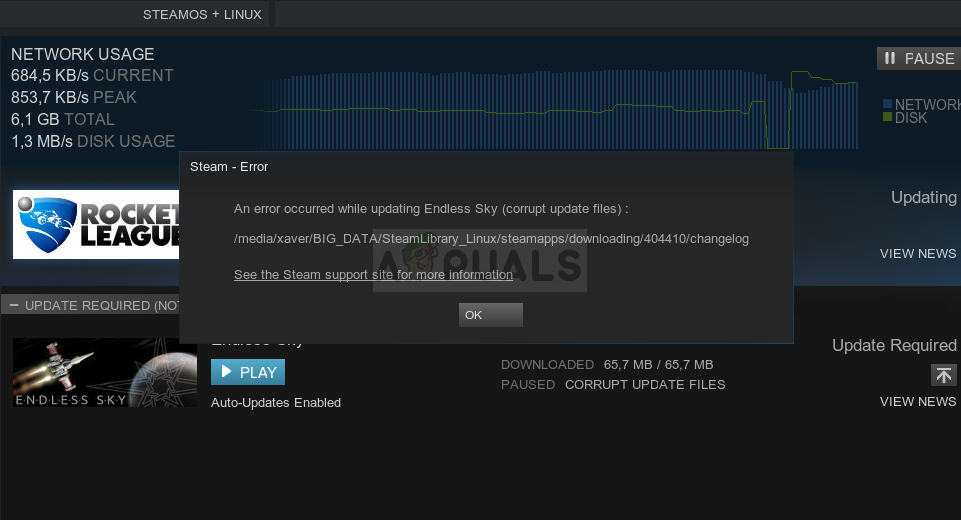
The Corrupt Disk error in Steam usually occurs when users are trying to download the game they have just purchased or to update a game already installed
loud hare
stray elm
Did you already try uninstalling and reinstalling?
i have
stray elm
Mmkay--then I'd go through the steps listed in that article
loud hare
stray elm
Mmkay--then I'd go through the steps listed in that article
i did the first 4 and it didnt work, I gotta go now but thanks for the help

 uncut river
Does anyone know what the sound effect when than poofs away is called in the game files
 flint compass
try asking in the modding server pinned in #self-promotion
uncut river
Will do, thanks
 crisp oxide
i turned fullscreen off for hades and i cant drag it out from the corner or see the rest of the game - how can i fix this?
i tried restaring my computer and force quitting the game. the background is my wallpapeer and the game is hanging out in the corner
 stray elm
crisp oxide
i turned fullscreen off for hades and i cant drag it out from the corner or see ...
stray elm
crisp oxide
i turned fullscreen off for hades and i cant drag it out from the corner or see ...
What platform/launcher are you using?
crisp oxide
i use steam on windows 10
i have two screens
OH I got it to work!!
i pressed alt + enter
 novel minnow
whenever i load in , im in the house but its all glitched out. it almost looks like im in tartarus, i can move around and dodge but i cant see the character or do anything else
 stray elm
novel minnow
whenever i load in , im in the house but its all glitched out. it almost looks l...
stray elm
novel minnow
whenever i load in , im in the house but its all glitched out. it almost looks l...
Heyo! What platform/launcher are you using?
novel minnow
using steam on pc
stray elm
Could you try verifying file integrity?
novel minnow
how do i do that?
stray elm
· Right-click on Hades in your Steam Library
· Select 'Properties...', then select the 'Local Files' tab
· Select 'Verify Integrity of Game Files...'
novel minnow
ok one sec
the properties window wont load its just a black screen
ive tried a couple times now
stray elm
novel minnow
ive tried a couple times now
Could you try fully restarting Steam by going to Steam -> Exit in the top left?
(and feel free to ping me when you reply ^.^)
novel minnow
ok ill try that hold up
ok the properties worked now ty, its doing its thing looks like itll take a few min
@stray elm ok it said all files succesfully validated
stray elm
how does it look if you start up the game?
novel minnow
will try now
it just crashed immediately lol said memory allocation error, im gona try again
ok it crashed again, but harder - even kicking me out of this disc, and it brought up the bug report screen
stray elm
novel minnow
ok it crashed again, but harder - even kicking me out of this disc, and it broug...
Alright--I'd do a full reboot, if you haven't already, and try verifying again after doing so
novel minnow
@stray elm ok will do, few min brb gona just restart my whole pc
@stray elm ok i verified them again, loaded up , im still in the same spot. in the house but glitched out
stray elm
novel minnow
<@!132661721922797569> ok i verified them again, loaded up , im still in the sam...
When you start up the game, there should be three options (Default, 32-bit, Vulkan). Could you give all three of those a try?
I'd also suggest making sure you don't have too many other applications running, and that your graphics driver is fully up to date
novel minnow
@stray elm kk ill try those
novel minnow
ok i tried to run in vulkan and 32 bit, both just crash, updating windows now
 zinc sphinx
Can you guys fix the 3840x1600 ultrawide issue where the left and right pillars are shifted halfway up the screen?
I can fix it with a hex edit but it's annoying to have to do it after every patch. Thanks!
stray elm
zinc sphinx
I can fix it with a hex edit but it's annoying to have to do it after every patc...
Heyo! Could you send that directly to the devs through their contact page? That'll be easier for them to track.
https://www.supergiantgames.com/contact/
Supergiant Games is an independent game developer in San Francisco, California. We created the games Bastion, Transistor, and Pyre.
novel minnow
@stray elm ok i tried updating, still i have the same issue :((
stray elm
novel minnow
<@!132661721922797569> ok i tried updating, still i have the same issue :((
Drat :/
Could you try setting the following launch options:
/UseNativeGaInput=true /UseNativeGaInputNoControllers=false
· Right-click on Hades in your Steam Library and select 'Properties...'
· In the pop-up menu, look for the field with the heading 'LAUNCH OPTIONS'
novel minnow
@stray elm ok is that all one or should i try those seperately?
stray elm
Both of them together, with a space in between
novel minnow
@stray elm still the same, i made sure everything was correct there
stray elm
Is it still launching and just corrupted, or crashing on start?
novel minnow
still launching, still in the same area, can move and dodge around but thats it
stray elm
novel minnow
still launching, still in the same area, can move and dodge around but thats it
About how long have you been playing, before this?
novel minnow
i have 94.9 hours , multiple successful runs, it just happened one day and i couldnt figure out what to do
i have uninstalled and reinstalled as well
stray elm
Could you go to Documents / Saved Games / Hades, then backup and delete Profile1.sjson?
novel minnow
how do i back it up
stray elm
just save a copy to another folder
stray elm
No worries ^.^ Right click the file in the file explorer, and the click on "Copy" in the menu that pops up. Go over to another folder (some people will make a new folder called "backup", other people might use the desktop), then right click in the folder and click "paste"
novel minnow
ok i put it in a dif folder so now just delete from the hades folder?
stray elm
yup!
novel minnow
It made my whole Pc crash this time , discing from my phone , gona restart
stray elm
Wow, okay. I'm super sorry about that ^.^" What kind of crash was it?
novel minnow
It just black screened everything
It's all good i appreciate the help, the game still works if i play a new game or load my hell mode file but i was still progressing my main
stray elm
Hmm...could try moving the save file to a different save slot? You can do that by renaming the save file while the game is open to the main menu
If your main save is in slot 1, you'd want to rename Profile1.sav to Profile4.sav
novel minnow
Ok im back at the main menu il try that
I see profile1.sav.bak and profile1.sav.bak 1-7 which one should i do
stray elm
There should be a file just called Profile1, you can rename that to Profile4
novel minnow
Ok i see that one
Now i have that same save in slot 4 but it doesn't have that gold coin icon above it what does that mean?
stray elm
that shouldn't matter, that just marks the save slot you used most recently
stray elm
awesome!
novel minnow
Should i delete the slot 1 save?
stray elm
Up to you--If you want to keep this progress in slot 1 instead of moved to slot 4, you could try backing up and then deleting the Profile1_temp file, then renaming Profile4 back to Profile1 (again, making these changes from the main menu)
There are a couple files that could be the culprit of the corruption, and that's one of them
novel minnow
Ok if i do that there's a chance that's not the bad file though and id be back in the same spot? :D
stray elm
Yes, but then we can keep trying more files, if you want to ^.^
novel minnow
I might just save that for later , im just gonna play for now i haven't been able to for a while lol. Thx for all your help
stray elm
Sure thing! Best of luck
 lofty hill
is the in-game settings being synced with steam, or would it be back to default when I reinstall it?
stray elm
lofty hill
is the in-game settings being synced with steam, or would it be back to default ...
The in-game settings should be saved locally, not certain if they're also synced to Steam.
lofty hill
Copy, @stray elm. Thank you!
 sonic spade
Hello! I noticed that lines are being cut off randomly in the game (PS4). It seems to only happen on the one liners. Usually it's because another person talks at the same time, but sometimes it just happens for no reason (no one else is talking). Is this normal? I hate missing dialog since it all so good.
(Also, any plans on making a PS4 theme?)
stray elm
sonic spade
Hello! I noticed that lines are being cut off randomly in the game (PS4). It see...
Heyo! Thank you for the report. The devs have been investigating some audio issues on the PS versions of the game, which this is likely a part of.
sonic spade
stray elm
Heyo! Thank you for the report. The devs have been investigating some audio issu...
Awesome! Thank you for the quick response. It is very much appreciated. I hope they can fix it soon. I really love this game. It's eaten my brain.
stray elm
Happy to help ^.^ And hopefully not too much of your brain, I hear those are useful to have 
 last nexus
is there any way to force playstation icons on PC? I know they're there, they were working a while ago (I use a dualshock 3, and emulate a dualshock 4). However, now the controller is only detected if I use XInput, and that shows XBOX button prompts, which is a little frustrating. I've tried changing steam settings but it still doesn't seem to detect the 'emulated' DS4 (I'm using DS4Windows)
stray elm
last nexus
is there any way to force playstation icons on PC? I know they're there, they we...
Heyo! You can try setting the launch option /PS4Gamepad=true , and that may help
last nexus
stray elm
Heyo! You can try setting the launch option `/PS4Gamepad=true` , and that may he...
still showing XBOX prompts 😦
nvm it works now!!
but now vibrate doesn't work 😦
only works when using XInput O.o
is there any way to just delete the xbox button prompts so it'll only show playstation ones 😂
stray elm
last nexus
is there any way to just delete the xbox button prompts so it'll only show plays...
Not that I know of, but did you try toggling the vibrate option in the settings menu?
You could also try removing that launch option, and backing up + deleting the Profile1.sjson file in Documents / Saved Games / Hades
last nexus
stray elm
Not that I know of, but did you try toggling the vibrate option in the settings ...
yeah that's how I know it doesn't work: when I have "/UseNativeGaInput=true /UseNativeGaInputNoControllers=false" as launch options, PS prompts show, but toggling vibrate on/off doesn't actually vibrate the controller, whereas when I remove those launch options (and reverting back to XBOX prompts), the controller vibrates when I toggle the vibrate button :/
I deleted the saved folder completely, doesn't help
stray elm
last nexus
yeah that's how I know it doesn't work: when I have "/UseNativeGaInput=true /Use...
How about the other launch option I suggested, the PS4 one? Did that do anything?
last nexus
stray elm
How about the other launch option I suggested, the PS4 one? Did that do anything...
yeah tried it, it didn't do anything 😦
stray elm
last nexus
yeah tried it, it didn't do anything 😦
Mmkay. You could potentially reach out to the modding server (link pinned in #self-promotion ), they might be able to help you force the icons, and it'll probably be easier than trying various different configurations here.
last nexus
got it, thank you so much ❤️
stray elm
Sure thing! Best of luck
 brave crescent
hey I've been having this glitch that misplaces a lot of sprites in the game whenever I load a save file, Zag's legs clip onto the ground and he's not where the sprite actually is
this thread had the same issue but there were no solutions I could find https://www.reddit.com/r/HadesTheGame/comments/k39bmd/graphics_bug_cutting_off_legs_and_affecting_aim/ge61uij/
reddit
5 votes and 4 comments so far on Reddit
it's the exact same problem
sharp narwhal
I guess I missed following up on this 9 months ago haha - this is likely to be a missing or corrupted game file, you can repair it by verifying through the game's launcher.
· Right-click on Hades in your Steam Library
· Select 'Properties...', then select the 'Local Files' tab
· Select 'Verify Integrity of Game Files...'
On Epic Games Store:
· Locate Hades in your Library
· Click the three-dots symbol near the game title, and select 'Verify'``` humble nebula
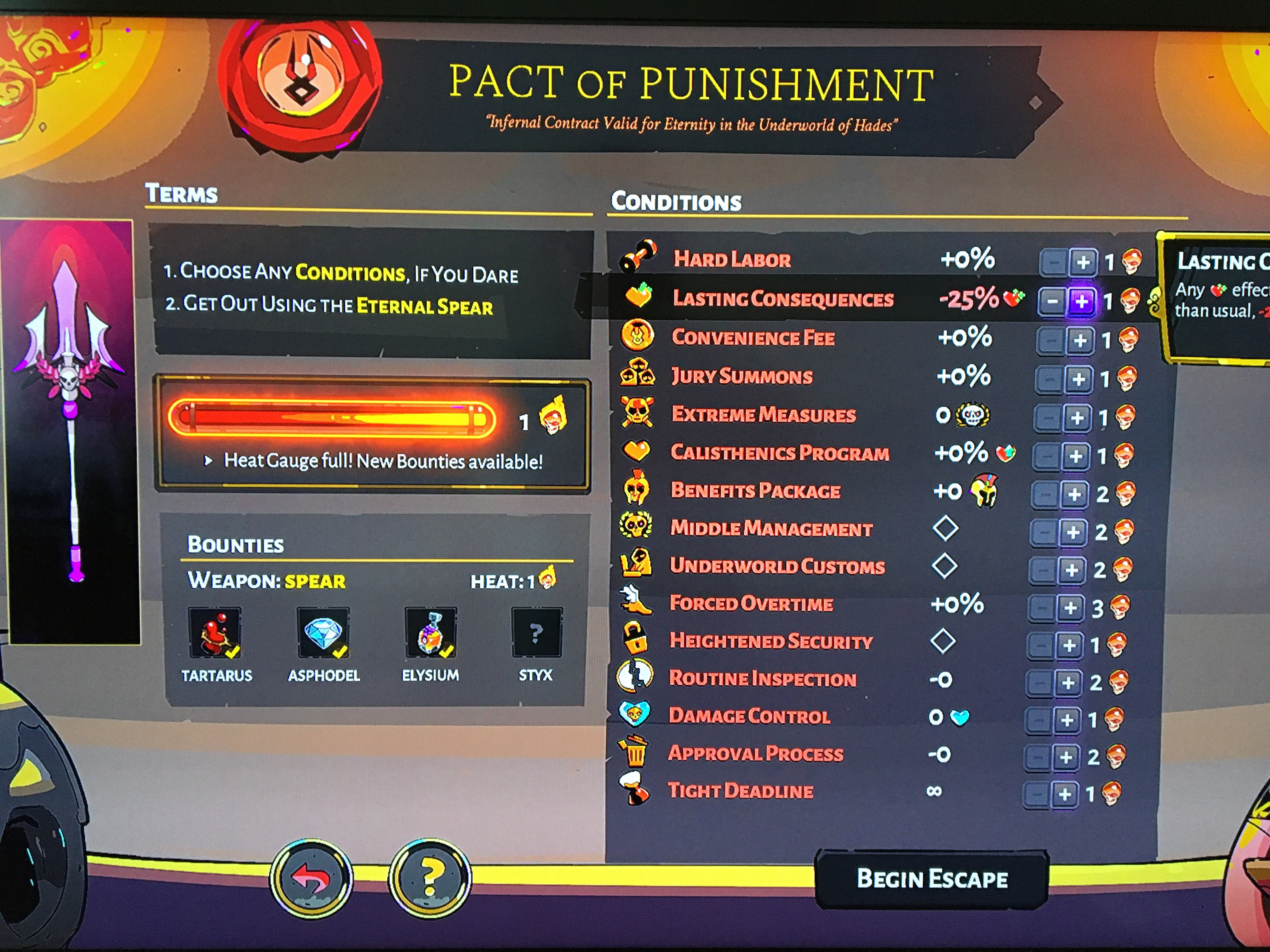
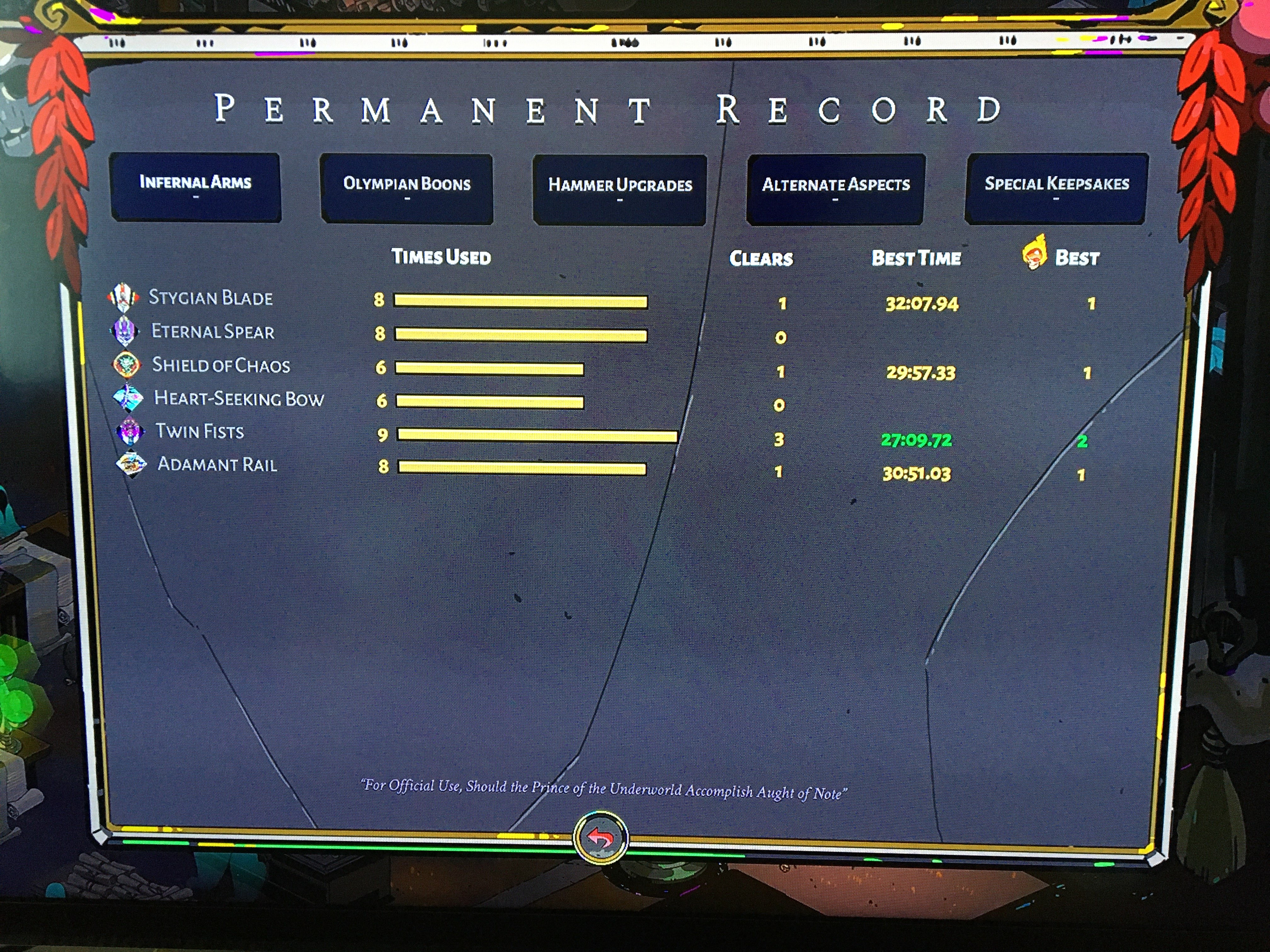
I have never collected those first bounties with heat on as said in the first picture.
stray elm
humble nebula
I have never collected those first bounties with heat on as said in the first pi...
The permanent record only shows clears in that list, so if you'd done an attempt and failed, it could look like that?
humble nebula
No I collected first three bounties (furies titan blood,hydras gem,champion and minators ambrosia) with bow and spear
If I didn’t, shouldn’t those checked boxes in the pact of punishment be empty
stray elm
I don't quite understand, sorry ^.^" You've cleared those three with the spear, but not with the spear + heat?
humble nebula
Yes
stray elm
Okay. What does it look like with 0 heat selected?
humble nebula
Same with 0 to full
stray elm
Have you gotten Titan's Blood with the spear once or twice?
humble nebula
Twice
Twice with every other weapon too
This same thing happens with bow too
Was it Coronacht
Something like that
Is this a bug?
I dont understand if it isnt
stray elm
Alright. Unfortunately, without being able to walk through everything that happened, I can't be sure. My best guess is the game thinks you did a run with heat, and already gave you the rewards for it. You could try looking back through the other records, the per-run records, and see if you had heat applied for a spear run that went past Elysium?
If that's not the case, it's certainly possible that it's a glitch of some sort, though not one that I've seen—you could try verifying file integrity, or reinstalling if that isn't an option.
humble nebula
I checked all of those pre records again and yes I did not even applied heat on spear before
I can’t verify file integrity. I play the game on Xbox
I just wanted to let you know that there is something wrong
Its not that big a deal for me but thanks for helping out
stray elm
humble nebula
Its not that big a deal for me but thanks for helping out
Alright. Well, thank you for the report! Best of luck
stray elm
@alpine dawn @languid crypt @rugged pulsar I've previously helped the three of you with issues on the PC GamePass/Microsoft Store version of the game where we needed to manually set launch options through the shortcut.
The devs have just pushed out an update (make sure to manually update) that allows you to set the launch options much more easily. If you'd like to switch over to that instead of setting them through the shortcut, you can do the following (just make sure to also reset the shortcut's Target)
· Navigate to your Documents folder, create a folder called Saved Games, then create another folder in that one called Hades
· Run Notepad, or any text editor, and enter the launch settings you'd like to use (see below)
· Save the file as HadesCommands.txt in the folder \Documents\Saved Games\Hades\
alpine dawn
Thanks @stray elm
 kindred shell
Hi. Please. Can you enlarge the fonts for PS4 ?? on small screens, nothing is visible.
stray elm
kindred shell
Hi. Please. Can you enlarge the fonts for PS4 ?? on small screens, nothing is vi...
Heyo! I can't help with that here, unfortunately, but you can reach the devs directly through their contact page: https://www.supergiantgames.com/contact/
Supergiant Games is an independent game developer in San Francisco, California. We created the games Bastion, Transistor, and Pyre.
kindred shell
stray elm
Heyo! I can't help with that here, unfortunately, but you can reach the devs dir...
Thanks.
 languid crypt
@Swan That's great, thanks! My game runs pretty smooth since I added that one launch option, and I don't really want to change up stuff, don't want to risk ruining something. 😄
But thanks again, great community support. 😄
 somber kernel
Greetings! I'm having some issues with my house appearing on the game screen. I've tried changing resolutions, fullscreen/windowed, etc. Most of the issues I've seen with this are users who run f.lux (I am not) just wondering how I could get this resolved. Thanks!
stray elm
somber kernel
Greetings! I'm having some issues with my house appearing on the game screen. I'...
Hello! I'm not quite sure what you mean by the house appearing, sorry—could you maybe send a screenshot?
somber kernel
stray elm
Hello! I'm not quite sure what you mean by the house appearing, sorry—could you ...
apologies, mistype. I meant *mouse
stray elm
Ah, okay, that makes more sense 
What platform are you on?
stray elm
Steam or Epic?
somber kernel
Epic
stray elm
Do you have any controllers connected?
somber kernel
I don't. Only the mouse
stray elm
Mmkay. You could try setting the launch option /UseMouse=true . There are instructions for setting launch options towards the top of #h1-tech-fixes (I would paste in but on mobile)
somber kernel
Understood. Will give that a go. Thank you!
 unique crystal
Steam isn't really updating with achievements and hours played. I've played well over 50 runs but apparently only have 2.2 hours on steam with 1/3 of the achievments i've unlocked
stray elm
unique crystal
Steam isn't really updating with achievements and hours played. I've played well...
Are you launching the game through Steam or through a shortcut?
unique crystal
shortcut i think
stray elm
That would be why--most Steam features (such as time tracking and achievements) won't work unless you start the game through Steam's launcher
 granite crown
Somehow after a week of inactivity
my progress has been set back like 10-15 runs
All that happened as a week break and a windows update
even a clean reinstall didn't resolve it
Went back like 3 house contractor ranks as well
lost some fun runs, at least I have the win screens
I last played (before yesterday when discovering the issue) on sept 1 but my most recent run on the save is dated to 8/17/21, I know cuz I posted my win screen

Went from 212 clears to 197
I did start another save file a few times to try a 1st run win but idk what effect that would have
stray elm
Heyo @granite crown --there are some steps towards the end of #h1-tech-fixes about recovering save data, I'd start with that
granite crown
Hey @stray elm, thank you so much! I found a tem save dated to the time I closed the game the last time before I left on my trip and it worked, got all my data back
stray elm
Awesome!
granite crown
Just a question, what is the difference between the .sav and .bak file extensions
and temp sav
I'm really bad at understanding file stuff
stray elm
The temp sav is updated during a run, so that it doesn't overwrite your actual save every time you enter a room. The .bak files are just backups, regularly updated, in case your.sav (save) gets corrupted
granite crown
stray elm
The temp sav is updated during a run, so that it doesn't overwrite your actual s...
If this issue occurs again, I can change a .bak to a .sav?
stray elm
Yup!
granite crown
Thanks again, that file had 2 40 heat runs I lost and boy were they a pain
I can do 32 consistently but 40 is a pain for me still
stray elm
Sure thing ^.^ Best of luck!
 elder moth
On console hades is it possible to move the safe frame some of the icons on the right are hidden past the edge of my tv screen
stray elm
elder moth
On console hades is it possible to move the safe frame some of the icons on the ...
Heyo! Could you check some of your TV settings, specifically one called Overscan? It's possible that that's cropping the game
elder moth
stray elm
Heyo! Could you check some of your TV settings, specifically one called Overscan...
Oh ok I think that fixed my issue thanks ❤️
 stray elm
awesome!
 thorny swan
idk if this really belongs here, it's more of a general switch question i guess? but i can't really find any info about it online
a friend loaned me his Hades cartridge to try, and I really loved it (obviously) but now he needs the cart back. If I purchase Hades in the nintendo store, will my save data carry over, or will I have to start from scratch??
stray elm
thorny swan
idk if this really belongs here, it's more of a general switch question i guess?...
I believe your save data will carry over, but I'm not 100% certain
thorny swan
yeah...
i think i kind of assumed that because you can send save file data from one switch to another, it wouldn't matter that i didn't have the same cart because the save data is on the console
the only problem i can see is if the data is somehow encoded to that specific copy of the game and won't work for a new downloaded one??
stray elm
it wouldn't be to a specific copy of the game
thorny swan
cool cool
i might risk it regardless, cos i really want to keep playing
it'll just suck if i have to start over
 loud gorge
I have a question I am trying to record my gameplay at 60fps but when I record it the frames drops a lot. I found that the biggest reason is that the CPU increases from 50% to 100% that is a huge jump but my ram is not changing by a lot. I tried playing around with my recording setting and none of them helped me record with a decent quality-perfomance. Any advice?
My gpu seems to record decently, but my gpu is not that good so I can't rely on my gpu
I found a way to record it with decent fps but I get some artifacts in the recording.
 terse brook
Hi I have an issue with Hades, my game starts well but I have no cursor, I tried restarting the game and also my pc but nothing changes and it only happens with hades
sonic spade
I couldn't find if this had been answered previously, will a theme be made for the PS4? I would love one.
stray elm
terse brook
Hi I have an issue with Hades, my game starts well but I have no cursor, I tried...
What launcher are you using, and has it worked before?
terse brook
I am using epic and it was working perfectly until today
stray elm
terse brook
I am using epic and it was working perfectly until today
Could you go to Documents / Saved Games / Hades , then backup and delete Profile1.sjson?
stray elm
sonic spade
I couldn't find if this had been answered previously, will a theme be made for t...
I don't know, sorry—I'd suggest reaching out to the devs directly through their contact page: https://www.supergiantgames.com/contact/
Supergiant Games is an independent game developer in San Francisco, California. We created the games Bastion, Transistor, and Pyre.
terse brook
by backup you mean keep it away from the file ?
I'm not perfect at english so I'm asking
stray elm
Save a copy in another folder
stray elm
Yup!
terse brook
it works again !
stray elm
Awesome!
terse brook
Thanks for all your help and have a wonderful day ☺️
stray elm
Sure thing, and the same to you!
sonic spade
stray elm
I don't know, sorry—I'd suggest reaching out to the devs directly through their ...
Thanks!
 chrome hound
Not sure if this is intended, but on Switch, the Customer Loyalty prophecy doesn't show up until it's fulfilled
 stray basalt
I do not think the middle panels are meant to encroach over the stats on the right
 stray elm
stray basalt
I do not think the middle panels are meant to encroach over the stats on the rig...
stray elm
stray basalt
I do not think the middle panels are meant to encroach over the stats on the rig...
Heyo--this is unfortunately just a side effect of how the boons panel grows in size as you gain more boons, since the middle panels are connected to the boons panel. Definitely looks a bit funky though :S
stray basalt
stray elm
Heyo--this is unfortunately just a side effect of how the boons panel grows in s...
Oh, I see that now! it appears there is a little room for the featured boons to reduce in width in reaction to this, but understandable all the same. Another thought, perhaps the sin of an extra row on the top and bottom of the boon icon diamonds would be a smaller visual sin than the current situation, but no biggie. Cheers!
stray basalt
Athena boon symbol disappeared after not long in the room. I Quit to reload the room and it happened again. Can't tell what I did to trigger it but the other options work as normal

This is more of a bug report because it's not a problem. Is there a better avenue I should send this through?
stray elm
stray basalt
This is more of a bug report because it's not a problem. Is there a better avenu...
If you're on PC, you should be able to report it in-game with  . That being said--does it reappear if you walk around the room?
 lime sedge
hey all ive been playing hades for a while now, escaped couple of times but i still havent unlocked the 4th aspect on any weapon whilst i know i have spend WAY more than 4 titan's blood but still not able to unlock spear :S what am i missing?
flint compass
lime sedge
hey all ive been playing hades for a while now, escaped couple of times but i st...
you can check out the requirements for unlocking hidden aspects in the pins of #h1-story-discussion
you have to unlock the spear one first
lime sedge
yeah well
i have unlocked all weapons long time ago
defeated boss more than 8x now i think
spend tons of blood
but still no conversation with achilles
ill delete this text later for spoilers 🙂
flint compass
do you have more than 5 aspects that are not zagreus aspects unlocked?
flint compass
which ones?
lime sedge
can i DM u to screenshot?
dont wanna clutter the chat here
kk send^^
so that should be 15 non zagreus
flint compass
alright, is achilles still having new dialogue?

 flint compass
uh, do you have the fated list?
flint compass
then i dont know whats going on, @stray elm will probably know better than me :P
lime sedge
haha cool thx anyways! 🙂
stray elm
lime sedge
no 😦
Heyo! How long has it been since Achilles had new dialogue?
flint compass
chrome hound
Not sure if this is intended, but on Switch, the Customer Loyalty prophecy doesn...
according to the wiki, you need to buy the following items to activate it - HydraLite, Cyclops Jerky, Chimaera Jerky, Stygian Shard, Prometheus Stone, Yarn of Ariadne. is it possible that you bought one of these items last, therefore completing the prophecy at the same time you activated it?
stray basalt
stray elm
If you're on PC, you should be able to report it in-game with <:f10:588476684609...
Thanks for the tip! I walked around a little but not far away from it. I'll test a little more extensively next time
chrome hound
flint compass
according to the wiki, you need to buy the following items to activate it - Hydr...
ohh yeah I never bought the Stygian shard and assumed for the longest time that I was just not fated to have that prophecy...thanks!
 pulsar steeple
hey all, can I ask about an odd little issue (maybe feature idk)? I used to play hades on pc with an xbox one controller. I liked to assign attack to the right trigger and dash to left trigger. it worked absolutely fine and got me to high heat. However, when I tried to play hades on my xbox series s using that control, the trigger bindings don't work correctly. I can't rapidly attack or dash. The triggers will only accept a single input in a short period of time and when repeatedly used, they sometimes stop detecting any inputs altogether. I only noticed this because I picked up the controller and started playing exactly as I would but zag seem to be attacking very slowly - I then figured out it wasn't detecting my inputs. I presume I am using the controller in basically the same way as I did with my xbox one controller on pc.
stray elm
pulsar steeple
hey all, can I ask about an odd little issue (maybe feature idk)? I used to play...
Heyo! Sorry to hear the controls are acting weird. What happens if you hold down the trigger, instead of rapidly pulling?
pulsar steeple
holding down will do one attack or dash and then nothing
stray elm
Have you tested rapidly pulling the triggers for any other games?
pulsar steeple
it seems to work as i expect in curse of the dead gods but ill admit i haven't done much testing
ill get a shooter or something. its a new xbox, first thing i downloaded was hades 🙂
well i just tried dead cells and it behaved as expected, then I went back to hades again and it also behaved as i remember it. maybe i just wasn't used to how the triggers worked or something. false alarm. not sure what i was doing before. Thanks so much for the help! Such a great dev team and such an excellent game. I look forward to playing through it again!
stray elm
Glad it worked out ^.^ Best of luck!
lime sedge
stray elm
Heyo! How long has it been since Achilles had new dialogue?
Maybe 1-2 runs ago. but i have finished the game over 8 times now. i should have the dialogou by now right?
 lime belfry
I found that when other side stories were in progress i wouldn't get other stuff as well. I am not saying you don't have an issue but some of my quest stuff didn't trigger for ages (e.g. finishing Hypnos took about 20 additional funds after the epilogue to trigger the final dialogue and unlock).
faint jewel
lime sedge
Maybe 1-2 runs ago. but i have finished the game over 8 times now. i should have...
Not necessarily, there's a pool of dialogue for each character which is chosen randomly and some events have priority over others (like the main story-related ones). So keep playing and Achilles should give you the waking-phrase soon. You can also verify the game files integrity just to make sure it's all good there.
lime sedge
will do, but sometimes he has no dialogues at all whilst im still waiting for the damn 4th aspect whilst my heat is already getting decently high hehe
lime belfry
So if you have a high clear rate and are triggering primary story stuff I think smaller story stuff is deprioritised
lime sedge
ugh ye that makes sense
lime belfry
My last hidden aspect took ages too
lime belfry
I don't remember when my first one popped.
I am guessing here but maybe it helps if you explore other aspects first??
lime sedge
googled. tried everything. apearently u must unlock spear first and need 5 non zagreus. im on 15 non zagreus upgrades and 0 aspects 😛
so i just roll with it for now but feels weird
lime belfry
Huh. That does seem a bit weird, but not impossible I guess.
lime sedge
yeah true didnt need it so far. adds to the challange i guess😆
 carmine berry
Hi I just had a save suddenly disappear for me, it was here yesterday but gone today

trying to rename a .bac file in the saves folder made it into this
 stray elm
carmine berry
trying to rename a .bac file in the saves folder made it into this
stray elm
carmine berry
trying to rename a .bac file in the saves folder made it into this
Heyo! Could you send me a screenshot of your saves folder? And which file specifically did you rename?
carmine berry
there was no profile1.sav file first time I reopened it so I tried renaming the profile1.sjson.bak file as just profile1.sjson

wait I tried renaming the profile1.sjson to profile1.sav first
I think reloading the game to check if something was just bugging may have overwritten anything that was there...
stray elm
carmine berry
there was no profile1.sav file first time I reopened it so I tried renaming the ...
The .sjson isn't save data—it's your settings.
Are you just starting out with the game? If so, it looks like the game failed to save
carmine berry
stray elm
The `.sjson` isn't save data—it's your settings.
Are you just starting out with...
I'd just defeated Hades for the first time and had done a couple runs with pact of punishment
stray elm
Alright—what platform/OS are you on?
stray elm
Alright—I'd check this link and see if it has any .sav files
https://store.steampowered.com/account/remotestorageapp/?appid=1145360
carmine berry
 stray elm
Alright—download those files, and replace the ones in the saved games folder with them
carmine berry
any specific one of the three or all three of them?
stray elm
All three, though you technically only need the first one
carmine berry
and just remove everything up to where it says Profile1?
 stray elm
Yup!
 stray elm
Awesome! Happy to help ^.^ Best of luck!
carmine berry
 carmine berry
stray elm
Awesome! Happy to help ^.^ Best of luck! <:friendly:459075377617436683>
carmine berry
stray elm
Awesome! Happy to help ^.^ Best of luck! <:friendly:459075377617436683>
I tried to give up on the run to go back to the house...
lime sedge
back on my issue: i finaly got my first 4th aspect after my 18th succesful run 😄
stray elm
carmine berry
I tried to give up on the run to go back to the house...
Alright—without closing the game, download that file again, but don't put it into the folder.
Can you also send me an updated screenshot of the saves folder?
carmine berry
I already closed it... sorry
stray elm
No worries! We can still potentially recover it ^.^
If you check that Steam link again, has it updated?
carmine berry
the middle one has
 stray elm
Okay, I think I know what we can do, though you won't be able to "Give Up"—you'll need to finish the run or die, to head back.
Move the Profile1.sav and Profile1_temp.sav files in the saved games folder into a different one (to have as a backup, potentially), then download the two .sav files (you don't need the .v.sav). Take the downloaded Profile1_temp.sav, move it to the saved games folder, and rename it to Profile1.sav
Oh--
Do this while the game is open, as well
You can close and reopen the Play menu to refresh without closing the entire game
carmine berry
ok so just the Profile1_temp.sav into the games folder and delete the existing .sav files, yes?
stray elm
In the opposite order, but yes
(order matters to make it easier to ensure you have the correct file)
 stray elm
Yes (or finish the run, but that'll probably take longer)
I'd also download and save another copy of that temp file before closing the game
carmine berry
ok I died and got back to the house
I made sure to walk into a room to see a save icon
is it safe to try quit and come back now?
stray elm
Once you've downloaded another copy just in case, it should be
carmine berry
yep saved in a folder in Docs
Ayyyyy! relaunched the game and its still there
thanks for your patience
stray elm
Awesome! And sure thing, glad we got it working ^.^
carmine berry
any suggestions on how to try avoid this happening in future?
stray elm
I'd check and make sure Hades is whitelisted on any antivirus software you have, and/or Windows Controlled Folder Access/Windows Defender. Also make sure your Steam Client is fully up to date
carmine berry
I'm just surprised since I've been playing for months with no issues then this out of the blue
stray elm
Yeah—usually stuff like that is a one-off due to a glitch, especially corrupted files
carmine berry
anyways, Thanks again!
stray elm
Happy to help ^.^
 warm rose
I just got an update for Hades on my Xbox One. Does this mean anything?
Size was about 64MB and it says v1.38237 on the title screen.
stray elm
warm rose
I just got an update for *Hades* on my Xbox One. Does this mean anything?
It's a few bugfixes as far as I know, no content updates
warm rose
stray elm
It's a few bugfixes as far as I know, no content updates
Alright, cool. I'll sleep better tonight knowing those bugs were crushed XD
 fiery violet
I need help my game will not save and i dont know why. i have tried validating the files on steam and that is the extent of what i know how to fix things.
stray elm
fiery violet
I need help my game will not save and i dont know why. i have tried validating t...
Heyo—there are some more things to try in #h1-tech-fixes , I'd start there
fiery violet
stray elm
Heyo—there are some more things to try in <#675070621075374090> , I'd start ther...
so it turns out i didnt have a folder in "saved games" for hades. kinda dumb but now it works 👍
 latent schooner
Hello, the first thing I would like to tell you is that I am a fan of your games and I have enjoyed them all, Transistor is my favorite.
Right now I'm playing Hades, unfortunately I can't unlock the hidden bow, I've already passed the game more than 50 times and invested more than 10 Titan Bloods in the bow and I've already unlocked the rest of the hidden weapons and talked to Artemis dozens times.
Is there any way to fix it? Is there a patch in development to fix the problem? I´m playing in PS5
faint jewel
latent schooner
Hello, the first thing I would like to tell you is that I am a fan of your games...
Have a look at the wiki to make sure you've met all the requirements, specifically ||Talking to Artemis with the Bow equipped until you get this phrase: "Hey, how'd you get your hands on a nice bow like that? You take good care of Coronacht for me, so I can try it too once you're up here"||
https://hades.fandom.com/wiki/Heart-Seeking_Bow#Aspects
If you've met all the requirements, the case might be that the triggering line (waking-phrase or her commenting on Coronacht I wrote before) is pushed back by other dialogue of higher priority, so I'd suggest you keep talking to her to get that line, and also talk to every other character, as sometimes other unspoken lines might block others (and it seems that some unfinished quests might affect that as well).
If the issue persists (so even after you've met all the requirements listed on wiki, talked to all other characters to unclog the dialogue pool and finished all opened quests), I'd suggest that you contact devs directly using the contact form here: https://www.supergiantgames.com/contact/
 brazen remnant
The game just got a update for Xbox but don’t know it’s for?
faint jewel
brazen remnant
The game just got a update for Xbox but don’t know it’s for?
Most likely just some tech fixes.
brazen remnant
faint jewel
Most likely just some tech fixes.
Ok
 jolly tide
Anyone know if there is any patch for Switch coming to fix the whole "controller not responding" bug?
Where if you have like a pro controller connected, and the console/controller sleeps while the game is up, you have to close the game and start up again to get it to respond again?
stray elm
jolly tide
Anyone know if there is any patch for Switch coming to fix the whole "controller...
Heyo! You may be able to get the game to respond by going into the controller settings and reconnecting it
jolly tide
tried that and it's never worked. The switch recognizes it if I go into menus out of the game, but never in the game itself
stray elm
Drat, alright. I don't know for sure if there's a patch coming, but you can reach out to the devs about it directly through their contact page: https://www.supergiantgames.com/contact/
Supergiant Games is an independent game developer in San Francisco, California. We created the games Bastion, Transistor, and Pyre.
 stoic raven
isnt hades xbox play anywhere?
I bought the physical edition
but i cant play it on my computer
damn nvm its only the digital edition
 willow niche
I can’t get the crossaves to work
Help
I turned it on in switch
And it’s not popping up on my steam
 jovial latch
brazen remnant
The game just got a update for Xbox but don’t know it’s for?
jovial latch
brazen remnant
The game just got a update for Xbox but don’t know it’s for?
https://twitter.com/SupergiantGames/status/1437862629700096000?s=20
if you haven't found out what the xbox patch was for

Hades players on Xbox, we recently pushed an update that should address issues with achievements not always unlocking when expected. Thank you for playing! #HadesGame
Likes
1428
 Twitter
·
faint jewel
willow niche
I can’t get the crossaves to work
Twitter
·
faint jewel
willow niche
I can’t get the crossaves to work
Make sure your date and time are synced between devices (they need to be the same). Also, having latest Steam beta Client usually helps with cross-saves issue, so make sure you opted in.
 vale nebula
Hello, i'm having issues with my game, it suddenly keeps crashing (i can't go past the first menu).
i get this error

i tried everything listed above unfortunately
stray elm
vale nebula
Hello, i'm having issues with my game, it suddenly keeps crashing (i can't go pa...
Heyo! It looks like your game version is out of date. You most likely need to update it to fix the crash. If you're on Steam or Epic, you can do that by starting the game through the launcher.
vale nebula
That's weird tho it stop working in the middle of the day like yesterday. Also, can i retrieve my saved once i uninstalled/update the game using the profile1.sav file ?
stray elm
Yeah, not sure why it just stops. I imagine that's whatever the update fixed . And yes, that file just needs to be in the Saved Games / Hades folder ^.^
 azure kraken
So I've been playing the game through X-Box Game pass. I'm really enjoying it, but I'm not sure I'll want to keep paying for it.
I recently got a 20 Euro Steam Card as a Gift, and I was thinking of buying Hades. Is there any way to transfer my data to the steam version?
Nevermind, just read #hades-faq
Sorry,
stray elm
azure kraken
So I've been playing the game through X-Box Game pass. I'm really enjoying it, b...
There is a way, actually, though it's a bit roundabout
reddit
107 votes and 36 comments so far on Reddit
azure kraken
stray elm
There is a way, actually, though it's a bit roundabout
Alright thanks!
 wild citrus
Hey there! I've been playing Hades on my iMac 2021 M1 from steam the past two days and last night I got to the Meg fight and the game crashed. I tried again and it crashed again but only during the Meg fight. I've tried uninstalling and reinstalling a few times, verifying the integrity, adding your suggested startup launch setting that are in your tech fixes, as well as updating my OS and restarting my iMac. I was able to get through a fight once, but died, and when getting back to her again it crashed. It happens during the fight and I've been anywhere from 2-5 minutes into the fight when it crashes. I don't even get a crash notification either as to why it crashes, the game just shuts down. One time even steam shut down too. I'm just not really sure what the next steps would be or if maybe my save file is corrupt, but I'm not very far into the game and it's only when I'm fighting Meg that it chooses to crash.
stray elm
wild citrus
Hey there! I've been playing Hades on my iMac 2021 M1 from steam the past two da...
Heyo! Have you checked if your graphics card drivers are fully up to date?
wild citrus
I just updated last night to the newest OS version Big Sur 11.6 to see if that would fix the issue and that didn't help
So it should all update when I update my software like that
stray elm
wild citrus
I just updated last night to the newest OS version Big Sur 11.6 to see if that w...
Sorry for the delay Unfortunately, I'm not sure what would be causing that, so I'd suggest following the steps at the end of #h1-tech-fixes about emailing support@supergiantgames.com some log files.
wild citrus
I did those steps though😅
I guess I'll email
How would I get log file info to send
stray elm
The very end of the channel has directions to them
 nimble skiff
Hey 👋 is there a way to transfer save from ps4 version to ps5 version of the game on the same console? I started last night and didn't realise I was playing ps4 version and my save does not show up in ps5 version
stray elm
nimble skiff
Hey 👋 is there a way to transfer save from ps4 version to ps5 version of the ga...
Heyo! Sorry for the delayed response. I'm unfortunately not exactly sure how the system works for that-- @sharp narwhal might know?
nimble skiff
Actually I just started over, its a great game, a lot of fun 🙂
 eager dune
Today I tried opening Hades and my antivirus (avast) blocked it, is this normal? I downloaded the game from the xbox app on PC
stray elm
eager dune
Today I tried opening Hades and my antivirus (avast) blocked it, is this normal?...
Heyo! Unfortunately, yes, many antivirus softwares flag the game. You should be able to safely whitelist it
eager dune
thank you
 pseudo topaz
havin some weird problems with mouse
I'm unable to click and drag, it only registers my mouse position when I first click
makes playing any weapon where you hold down the button to aim very difficult
anyone seen something like this? could be some xwayland nonsense
stray elm
Haven't noticed anything like that for me, not familiar with xwayland (I'll look into it tonight or tomorrow, see if anything pops up)
 mystic violet
im having a lot of trouble with cross-save that the FAQ doesnt seem to answer, I am able to (seemingly atleast) download saves from epic to my switch, but every time I click "sync and quit" from my switch, I get a connection error, which doesnt happen when I check my saves
nevermind, its not connecting to either anymore (another update: its also not letting me sync and quit anymore, the option is just completely gone)
stray elm
mystic violet
im having a lot of trouble with cross-save that the FAQ doesnt seem to answer, I...
Heyo! Could you try disconnecting your Switch from your Epic account, restarting, and reconnecting it? Also make sure that your Switch date/time are synced.
mystic violet
stray elm
Heyo! Could you try disconnecting your Switch from your Epic account, restarting...
IT WAS THE FREAKIN TIME AAA thank you, i havent touched my switch in a whiiiile and just wanted to play Hades on PC, I didnt know it wasnt synced thank you !
stray elm
Sure thing ^.^ Best of luck!
stoic raven
I bought hades on xbox and when i tried to play it on pc the save isnt there?? I'm reinstalling in case that fixes it
 dreamy pagoda
Hi, I have an issue with Hades. Its happens couple hours ago - Platform PC. In one location my game crash and after rebooting my pc i found Hades delete himself. After install my FPS dropped - before gamecrash 60 fps now 20-30 fps
stray elm
stoic raven
I bought hades on xbox and when i tried to play it on pc the save isnt there?? I...
Heyo--did the reinstall fix it?
stray elm
dreamy pagoda
Hi, I have an issue with Hades. Its happens couple hours ago - Platform PC. In o...
Hello! What launcher are you using? (Steam, Epic, Microsoft)
stoic raven
reinstalling did the trick
dreamy pagoda
stray elm
Hello! What launcher are you using? (Steam, Epic, Microsoft)
Steam
stray elm
dreamy pagoda
Steam
Could you try going to Documents / Saved Games / Hades, then backup and delete Profile1.sjson? See if that makes a difference
dreamy pagoda
stray elm
Could you try going to `Documents / Saved Games / Hades`, then backup and delete...
Only sjson or sjson and sjson.bak
stray elm
Just the .sjson is fine
dreamy pagoda
stray elm
Just the .sjson is fine
All the same ... eh :c
stray elm
Alright--I'd suggest also verifying file integrity
 rose mulch
Heyo, I've got a small problem. I reinstalled Hades just recently on Steam and it can read my old Hades save just perfectly. But it doesn't seem to write on the save past that, so I effectively lose any progress that happens once I play.

I've tested it repeatedly. It just doesn't progress.
The next run is always run 84. It always starts out with a Zeus boon.
I've checked documents\savedgames\hades to see if there were any new files with saved progress, but the latest date of change in that folder was somewhere around 02/02/2021.
 tacit saffron
Hello, im on mac os and i cant sure if the game uses discrate gpu or not
rose mulch
got the log and dxdiag, if required
 wild igloo
@rose mulch are your save files read only?
rose mulch
Well, seems like it.
wild igloo
if you go to user\Documents\Saved Games\Hades, select all files, right click on any > select properties, do you see a checked read only box?
it theres a problem it would look like this
https://imgur.com/GJsy9Mb
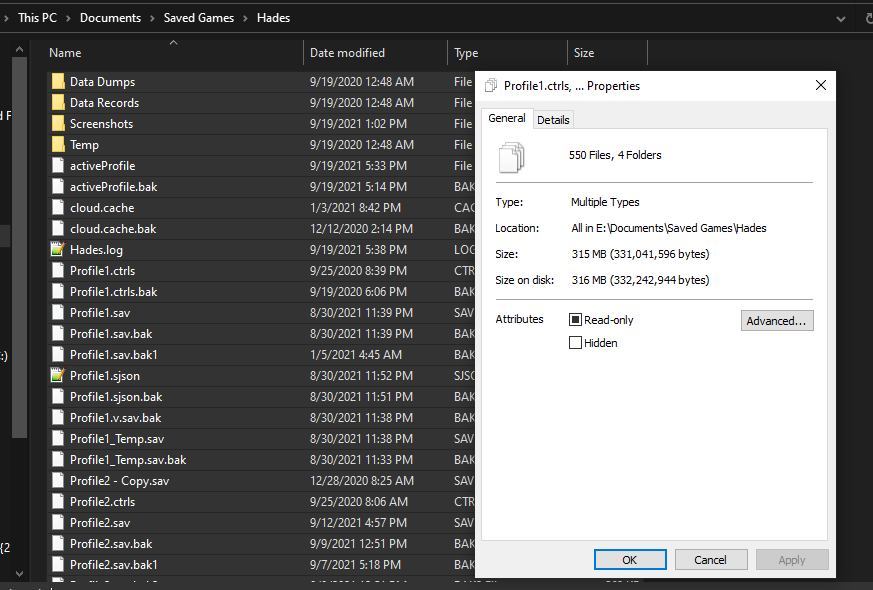 rose mulch
That would the first one under attributes, yes?
wild igloo
yes
rose mulch
They are not writing-protected. An odd translation, really.
 rose mulch
I suppose a work-around could be to make a new profile, then move the contents of the old save into the new.
Since uninstalling the game, then reinstalling it later on seems to be what decoupled the saved game half-way.
I just don't know which files I need to transfer the data from. All of them? A few specific ones?
Anyone know how to duplicate an old save into a new one?
stray elm
rose mulch
I suppose a work-around could be to make a new profile, then move the contents o...
Heyo! There are steps in #h1-tech-fixes for this issue—most likely, you need to whitelist the game with your antivirus and/or Windows Controlled Folder Access / Windows Defender. You can also try starting Steam as Admin.
rose mulch
MMmmmmm, now that you write that... WCFA could easily be the culprit.
rose mulch
@stray elm It was. Thank you.
Adding an exception to Controlled Folder Access for Hades allowed it to read and write on the save.
 hot sinew
yo just lost 5 hours of progress for the 3rd time in a row, tried yalls advice on recovering saves and nothing worked
stray elm
hot sinew
yo just lost 5 hours of progress for the 3rd time in a row, tried yalls advice o...
Heyo! Sorry about the issue. What platform/OS are you on?
hot sinew
got the steam version of hades running on Windows 10
stray elm
hot sinew
got the steam version of hades running on Windows 10
Alright. When you tried recovering your save, did you have the game open while you renamed the files? If you closed the game in between, the Steam cloud may have overwritten your changes
hot sinew
i had steam cloud disabled while i was messing with the saves, and i re-opened the game for each save i tried
stray elm
hot sinew
i had steam cloud disabled while i was messing with the saves, and i re-opened t...
Mmkay, then that probably wasn't it. Unfortunately, it's possible that the game failed to save. I'd suggest launching Steam as Admin, or whitelisting the game with your antivirus and/or Windows Controlled Folder Access / Windows Defender, and trying again.
hot sinew
 stray elm
Sorry about that ^.^" If you lost a lot of progress, the devs do have some pre-made saves that may be close to where you were, potentially
hot sinew
do you think you could send me a link to those so i could check the saves out?
stray elm
If you tell me about how far you were, I can let you know if there are any close ^.^ (feel free to send that here or DM it to me)
hot sinew
i was around 25 runs in, beat hades 3 times, (once with spear, twice with malphon, if weapon type matters) had all but 2 of the charms, and I remember I had just maxed out the entire purple tree in the mirror before i hopped off
stray elm
Mmkay, I've got one that should be pretty close, I'll DM it to you ^.^
 polar stump
Hello, I opened the game and all my saves were gone is there a way I can fix this?
stray elm
polar stump
Hello, I opened the game and all my saves were gone is there a way I can fix thi...
Heyo! What platform/OS are you on?
stray elm
And what launcher?
polar stump
Like Steam?
stray elm
Yup, like that ^.^
If you check Documents / Saved Games / Hades, are there any .sav files there? (Or a file just called Profile1)
And were you just starting out with the game, or have you played at least a few times?
polar stump
Okay ill check and i had beat hades 5 times
theres a file called profile1.sjson
i'll brb
stray elm
polar stump
theres a file called profile1.sjson
Alright. Could you check https://store.steampowered.com/account/remotestorageapp/?appid=1145360 and see if it has any files?
stray elm
Are you on a new device, from the last time you played?
polar stump
no
stray elm
Mmkay. I'm not totally sure what happened, unfortunately, but you could try searching the Recycle Bin for Profile1 or .sav and see if anything comes up.
You could also try starting Steam as Admin—it's possible the files just aren't showing up for some reason
polar stump
theres nothing in recycle bin im gonna try starting steam as admin
nothing changed 😦
stray elm
Drat. My best guess is an antivirus or Windows Controlled Folder Access / Windows Defender took issue with them, which is why they aren't recycled.
Sorry about that—the devs do have some pre-made save files to help people who've lost their progress, and I can send one of them over to you if you'd like. I definitely have one at the same number of successful escapes, though it may not be the same total number of runs.
polar stump
It kind of sucks that this happened but I would appreciate it if you sent me a different save.
stray elm
Will do, and sorry again about that. I haven't seen a save completely vanish like that before without some sort of clear reason, but usually issues like that are one-off glitches.
I won't be able to send the save right away (I'm on mobile at the moment), but I'll make sure to do so either later tonight or early tomorrow
polar stump
Okay thanks you can send it whenever, I was planing on going to sleep fairly soon, thanks you for the help.
stray elm
Sure thing! I'll DM it when I get the chance ^.^
 frosty tiger
Is there any way I can make the game run smoother on my laptop? It runs well enough but the frames are awful, and it overheats my computer, the best I've been able to help was dropping the resolution of the game
Vsync is on, and I'm not playing it in a windowed browser
stray elm
frosty tiger
Is there any way I can make the game run smoother on my laptop? It runs well eno...
Turning vsync off may help, but there are other things, yes. You could start with the other options under the Performance section of #h1-tech-fixes , and I can link more in a few
 cinder bear
frosty tiger
Is there any way I can make the game run smoother on my laptop? It runs well eno...
cinder bear
frosty tiger
Is there any way I can make the game run smoother on my laptop? It runs well eno...
Same
stray elm
@frosty tiger @cinder bear
You can try the steps listed in #h1-tech-fixes for performance issues, and I have some additional launch options listed here: https://steamcommunity.com/app/1145360/discussions/2/4747300038115249105/
frosty tiger
stray elm
<@456226577798135808> <@!772106914162278440>
You can try the steps listed in <...
I'm playing the one from Xbox Games Pass for PC, not steam
stray elm
You can still use those launch options--there are instructions on how to do so near the top of #h1-tech-fixes
 solemn blaze
Why am I making it to Asphodel and not starting in Asphodel after taking a break ? I’m on Switch Lite ; I’m pretty sure it’s saving. Am I missing something?
stray elm
solemn blaze
Why am I making it to Asphodel and not starting in Asphodel after taking a break...
Heyo--when you take a break from the game, what do you do? (e.g., close the game, select "quit" from the menu, something else)
solemn blaze
stray elm
Heyo--when you take a break from the game, what do you do? (e.g., close the game...
I make it to the hydra, died and return home. The game should be save correct? Me taking a break is going to the Home Screen then walking away from the device.
stray elm
solemn blaze
I make it to the hydra, died and return home. The game should be save correct? ...
Ah--if you've died, then you'll respawn at the House no matter what. The game doesn't continue from the furthest point you reached.
solemn blaze
stray elm
Ah--if you've died, then you'll respawn at the House no matter what. The game do...
Wait wait wait a minute! A “run” is making it through all of chambers without dying to beat the game ? While improving zag and the weapons each escape attempt?
stray elm
solemn blaze
Wait wait wait a minute! A “run” is making it through all of chambers without dy...
A "run" is an attempt through the game. An "escape" is a run where you get through every region without dying.
Some of the resources you get (such as Darkness and Keys) are used to upgrade Zag's abilities and survivability
 dusk charm
So not sure if this is tech support or something I am missing in the game but I am having an issue. I have unlocked certain dialogues from characters to the point that I should be receiving work orders to complete them. But every time I go over to the contractor with the special exclamation mark, nothing is new. I am playing on Switch with the latest update, so that's why I think either I am missing something or its a bug
Video to help explain
stray elm
dusk charm
So not sure if this is tech support or something I am missing in the game but I ...
Heyo! The exclamation mark doesn't always mean that there's something new—sometimes it just means that you now have enough resources to purchase something you couldn't before.
dusk charm
Ok, but I have reached the dialogue end for ||nyx and chaos|| and I still haven't gotten the work order for them. That's why i think it may be a bug. ||I have a couple hidden artifacts and escaped a couple times so I am in the endgame||
stray elm
You've gotten the dialogue || from Nyx telling you to purchase the work order ||? I don't remember the exact words off-hand, sorry
dusk charm
I'm pretty sure I have, I feel like i've gotten all of it.
Looking it up not certain now, sorry to bother
stray elm
No worries! If you're still getting narrative dialogue (marked by an exclamation mark) from either || Nyx or Chaos ||, it's possible that there's one last thing one of them needs to say
frosty tiger
i love this game pls port it to mobile eventually that’d be great thx 🙏🏻
 dim lynx
Hi!, i have a question about the PS5 version. I have recently buy a PS5 and I want to use the save game from PS4. All I have now is the PS4 version and PS5 version of the game in my PS5 but the save game only works on PS4 version. ¿How can i use the save game in the PS5 version?
 hidden lagoon
So...I'm looking for my save file from the gamepass version of Hades, installed locally. I checked the Faq and went to Documents\Saved Games\Hades. The folder is there but it's empty. Where is my save file?
stray elm
hidden lagoon
So...I'm looking for my save file from the gamepass version of Hades, installed ...
It's stored differently because of GamePass' setup:
https://www.reddit.com/r/HadesTheGame/comments/p30gsg/it_is_possible_transfer_saves_to_xbox_if_you_have/?utm_medium=android_app&utm_source=share
reddit
109 votes and 36 comments so far on Reddit
stray elm
dim lynx
Hi!, i have a question about the PS5 version. I have recently buy a PS5 and I wa...
Heyo! Unfortunately, I'm not sure how that part of the system works. @sharp narwhal might know?
sharp narwhal
Unfortunately, due to technical limitations, you can't transfer Hades save files between PS4 and PS5. Sorry for the inconvenience!
hidden lagoon
stray elm
Heyo! Unfortunately, I'm not sure how that part of the system works. <@326373279...
Thank you so much for that! I've been searching for that for over a week!
stray elm
(I think you replied to the wrong message but) you're welcome!
stray elm
sharp narwhal
Unfortunately, due to technical limitations, you can't transfer Hades save files...
@dim lynx
 snow girder
Hello, i was cleaning my PC files i went too quickly and accidentaly deleted my "saved games" folder 😬 . I can't access it from the game now. is there a way to get my save back? Thanks.
stray elm
snow girder
Hello, i was cleaning my PC files i went too quickly and accidentaly deleted my ...
Heyo--it's possible that it's still in the Recycle Bin, if you didn't clear that. In addition, what launcher are you using? (Steam, Epic, Microsoft)
snow girder
I cleared my recycle bin. i'm using steam
stray elm
snow girder
I cleared my recycle bin. i'm using steam
Mmkay--you might be able to find your save files here: https://store.steampowered.com/account/remotestorageapp/?appid=1145360
snow girder
so i just download the last one?
stray elm
snow girder
so i just download the last one?
You'll want all of the files listed there, most likely. At the very least, the Profile1.sav file (or a different number, if you used a different slot)
snow girder
So now i need to replace them in my Saved_games folder?
oh they're already here
ey it worked
thank you
stray elm
Sure thing!
 bleak sun
Don’t see a channel for reporting a Bug so I will do it here: I am doing a run with Dionysus’ Black Out (Legendary Boon that grants +60% damage to enemies in Festive Fog), and the bonus damage didn’t apply to Ares’ Doom effects, which it should (I have Curse of Pain). I so happened to have a Hangover Boon as well, and I noticed an increase in damage when an enemy is in the Fog vs. when he is out. If it matters, I had Exploding Launcher (Daedulus Boon for Spear).
So again, Doom effects not receiving Bonus Damage from Black Out Boon
stray elm
Thank you for the report!
bleak sun
My pleasure, thank you for a great game!
bleak sun
stray elm
Thank you for the report!
Scratch it…not a bug. When Doom was applied the enemy wasn’t Hangover inflicted, which I didn’t realize was also a prerequisite. My bad.
stray elm
Ah, that makes sense. And no worries!
 carmine bronze
HI all - I just downloaded Hades for the Switch, and discovered that it supported cross-platform with Steam, which I've long had a savegame upon. I didn't remember my steam password correctly, however, and got the error stating that I had to wait to try again to log in. It's now been almost 24 hours, however, and it continues to give the same error - even after I've logged into steam and confirmed my password I'm using is correct.
How long do I need to wait before my next attempt to sync my switch save to steam?
stray elm
carmine bronze
HI all - I just downloaded Hades for the Switch, and discovered that it supporte...
Heyo--have you tried fully restarting your Switch?
And could you make sure your Switch date/time are synced?
carmine bronze
I have; I have also deleted and reinstalled the game. I've also attempted logging in from a different network, since the error says that the network I'm on is blocked.
Let me check on the date/time.
Confirmed. It states it's 9/24/2021 10:11 PM PST.
carmine bronze
stray elm
And could you make sure your Switch date/time are synced?
And that matches the time on my PC using Steam.
@stray elm - I see in a post from 12/19/2020 that you recommended the person experiencing the same issue I've described to contact support@supergiantgames.com. Should I do the same?
stray elm
Most likely, yeah
(sorry for not replying, in the middle of something else)
carmine bronze
No worries. I'll do that.
jovial latch
as the localization channel has been archived, i'd like to report it here (please direct me to the correct channel if this channel is not appropriate):
in the japanese text, when trying to use your call, and your god meter has not been filled enough, the popup text above zagreus translates to "0 god meter!" (ゴッドメーター 0!) even if it's not actually at 0%. i understand if there's text space limitations, but i believe it'd be more appropriate to say ゴッドメーター足りない! ("not enough god meter!")
stray elm
jovial latch
as the localization channel has been archived, i'd like to report it here (pleas...
Heyo! Thank you for the report. I'd suggest also sending that in through their contact page here: https://www.supergiantgames.com/contact/
Supergiant Games is an independent game developer in San Francisco, California. We created the games Bastion, Transistor, and Pyre.
jovial latch
got it, thanks!
 winter solstice
Not sure if this is a bug, but if both Asterius and Theseus are killed at the same time, their voice lines cut the other off
lime belfry
Question: Is slow/stuttering animation a known issue on PS4? I'm seeing occasional drops to as low as 4fps briefly during big fights. I have some clips if needed. If it is an issue, are there any tips on how to avoid it? I am running from an internal SSD.
stray elm
lime belfry
Question: Is slow/stuttering animation a known issue on PS4? I'm seeing occasion...
Could you make sure your game is fully up to date? I'm not sure if you need to manually update on the PS4
lime belfry
Good point, will check tomorrow and record the version number (it's late here)
 hidden haven
So, just wondering... I have twice had my computer controls glitch in the final battle and when I attempted to remap them so I could continue playing, it froze and would not do anything so I was forced to do a hard reboot. when rebooted, my entire run was wiped and i found myself back at the House. I'm currently trying to figure out how to even access the game files to try and get back my progress but typing the commands into my finder has simply taken me to Application Support where no such files are in evidence... i feel like my computer is girlboss gatekeep gaslighting me :(((
chrome hound
Switch combat/visual combat bug here, at first I thought it was linked to Alecto, or mashing the text box too quickly, or holding down a movement button, but after some more experimenting none of them seem to be the direct cause.
Unlisted video link:
https://www.youtube.com/watch?v=w2vms6zHDTU

Boss and miniboss fights that involve Zag starting diagonally to the left of the boss has a visual glitch where the screens snaps to him and back. Happens for Furies, Asterius solo, and Champions, both with and without Extreme Measures
stray elm
hidden haven
So, just wondering... I have twice had my computer controls glitch in the final ...
Heyo, and sorry for the delay--what launcher are you using? (Steam/Epic)
I'm not the most familiar with Macs, so I can't be sure why the files aren't showing up for you. What are you typing in, exactly?
Last question for now--when you say "computer controls glitch", what is happening with them?
stray elm
chrome hound
Switch combat/visual combat bug here, at first I thought it was linked to Alecto...
Heyo! Thank you for the report
hidden haven
stray elm
Heyo, and sorry for the delay--what launcher are you using? (Steam/Epic)
I'm no...
steam. I am typing /Library/Application Support/Supergiant Games/Hades and simply ending up in application support with no evidence of any supergiant folder.
hidden haven
stray elm
Heyo, and sorry for the delay--what launcher are you using? (Steam/Epic)
I'm no...
when I say "controls glitch", I mean that I will have Zag move autonomously and get stuck in a corner and be unable to move out of it. I thought for a while that it's bc of sticky keys, but i don't have it active. This has happened a bunch, I basically end up stuck in the corner and dash n attack n such all go towards the left corner. Big problem in Asphodel, as you might guess. I have the controls mapped weirdly bc I do not own a mouse currently (😬 I know) and I can show you how if that helps, but cast is control which is probably an issue, so when I get stuck I sometimes try to change my cast key to z only to have it all freeze and be unable to escape the controls menu entirely, forcing a hard reboot
and then I forget about the issue until I'm fighting Final Boss and have it happen again and then lose the whole run bc my braincell quantity is regrettably low
lime belfry
lime belfry
Good point, will check tomorrow and record the version number (it's late here)
I'm on version v1.38226 (latest according to my console). And this is one example of the animation stuttering I am getting.
https://youtu.be/NaWXzx7HZeE
 stray elm
hidden haven
when I say "controls glitch", I mean that I will have Zag move autonomously and ...
stray elm
hidden haven
when I say "controls glitch", I mean that I will have Zag move autonomously and ...
While I don't know for sure, I'm going to guess that having cast bound as control may be a part of that, so you may want to bind it to something else if possible. I'd also suggest trying the launch options listed in #h1-tech-fixes under the section for Input issues, those may help. There are instructions for setting launch options near the top of that channel.
stray elm
lime belfry
I'm on version v1.38226 (latest according to my console). And this is one exampl...
Hello!
That one specifically looks to me like it's not stuttering, since Athena's call is still animating at full speed, though I see what you mean with the spears. Not totally sure.
Your version looks correct, so that wouldn't be it. I can pass it along to the devs—if you can get another clip of the stuttering, that would be very useful, though no worries if not.
lime belfry
It's not a big deal and providing is not affecting gameplay (e.g. messing up hit boxes) it's fine. I just wondered if it was a known thing.
stray elm
I hadn't heard of it for the PS4, no
hidden haven
stray elm
While I don't know for sure, I'm going to guess that having cast bound as contro...
ok thanks so much!
also the issue I had with being unable to see any evidence of game folders is because I omitted the initial ~/ before library, when I added it and followed the save restoral stuff it worked which is neat so! thanks!
my tip to mac users. Remember tildes
stray elm
Awesome! Glad that worked out. Let me know if you need any extra help with the controls, and I'll see what I can do ^.^
hidden haven
yeah ofc! I am honestly just real glad to have gotten the save back bc I fulfilled 2 prophecies and unlocked another on that run and I did Not want to lose that
stray elm
Oof, yeah
 neat trench
I'm having some difficulties with the Epic Games version of Hades. It shows my mouse cursor a bit as the game loads in, but it disappears as the title screen is shown. It is not shown in game, and none of the options are fixing it. I've reinstalled it, verified files, searched on google what could fix it, (I don't have and had never even heard of f.lux before searching) I'm just stumped.
stray elm
neat trench
I'm having some difficulties with the Epic Games version of Hades. It shows my m...
Heyo! Could you go to Documents / Saved Games / Hades, then backup and delete Profile1.sjson ? That may fix it
stray elm
It doesn't really matter where you back it up, just needed it out of that folder
And drat. Could you try setting the launch option /UseMouse=true ? Instructions on setting those are near the top of #h1-tech-fixes
neat trench
sadly not.
stray elm
Do you have a controller connected?
neat trench
no, I don't have any controllers that work with my pc
oh wait, I put the Profile1.sjson back into the folder, is that what you wanted me to do? I saved it in Drive, deleted it, then redownloaded from Drive and put it back into the folder
stray elm
Nope, leave it out of the folder—the backup is in case this doesn't work, so you don't need to redo all your settings
stray elm
Sure thing ^.^ Best of luck!
neat trench
thanks, haven't played since beta, so I'm gonna need it 😄
 verbal spade
Hello, nice to meet everyone. Im having some issues with the framerate when im playing in my very cheap joystick. It only appears when im moving to another instance or fighting. It only happen when i play with the joystick, and i dont want to buy another one.
stray elm
verbal spade
Hello, nice to meet everyone. Im having some issues with the framerate when im p...
Heyo—what platform/OS are you on, and have you tested the joystick with other games?
verbal spade
Im in Windows 10. And yes, i do have try the joystick in other games, and somethings it works, sometimes dont, but those are problems with the gameplay itself. Hades is the only one that i have trouble with the framerate.
stray elm
Mmkay. There are some steps you could try for performance issues in #h1-tech-fixes , and you could also try the launch options listed for controller issues
verbal spade
I will give it a try, thanks
neat trench
neat trench
I'm having some difficulties with the Epic Games version of Hades. It shows my m...
Hey, remember me? Yeah my cursor disappeared again. Is there a way to have this stop happening permanently? Or do I have to delete that file everytime I open the game?
stray elm
neat trench
Hey, remember me? Yeah my cursor disappeared again. Is there a way to have this ...
What happens if you reset the settings in-game?
verbal spade
verbal spade
Hello, nice to meet everyone. Im having some issues with the framerate when im p...
Hi, i fix the problem. I unmark the "vibration" option. I hope this comment help people with the same problem.
stray elm
Thanks for the update! Glad it was a straightforward fix ^.^
neat trench
stray elm
What happens if you reset the settings in-game?
Let me check
neat trench
Okay, sorry, was busy last night and this morning. Nothing happened.
stray elm
neat trench
Okay, sorry, was busy last night and this morning. Nothing happened.
Mmkay. When you started the game back up the first time that it worked, do you recall what (if any) settings you changed?
neat trench
none
stray elm
Are you starting the game through Epic or through a shortcut?
 north pasture
Frame issues on Switch after latest update - anyone else? Very apparent when entering a new chamber. Also, Zag jogging has a lot of stutter (been that way for the past few versions).
stray elm
north pasture
Frame issues on Switch after latest update - anyone else? Very apparent when ent...
Heyo! Do you have the game digitally or physically?
 naive skiff
Hey, i'm trying to 100% Hades, and i just found out i'm missing the prophecy for releasing orpheus. He clearly has been released, and i've completed musician and muse, but for some reason the game has no record of me purchasing the order to release Orpheus. In the shop, it does not give me the option to buy it, nor is it in my list of purchased items.
any idea how i can fix this to get the last prophecy completed?
neat trench
stray elm
Are you starting the game through Epic or through a shortcut?
Hey! I'm so sorry, I've tried both ways
stray elm
neat trench
Hey! I'm so sorry, I've tried both ways
Mmkay. I'm not totally sure why it keeps disappearing. Could you try toggling Fullscreen, Borderless, and Mouse Lock?
neat trench
I tried that before we fixed it initially, I can try again tho
That's so weird
It's normal again
I didn't even do anything
Gonna sleep now though, so I'll respond in the morning
stray elm
naive skiff
Hey, i'm trying to 100% Hades, and i just found out i'm missing the prophecy for...
Heyo—just so we're on the same page, which prophecy isn't showing up as completed?
(as in, the name)
naive skiff
the reluctant musician
and its not just not showing up as complete
its not showing up at all
@stray elm any ideas?
stray elm
naive skiff
<@!132661721922797569> any ideas?
Are you still getting narrative dialogue from Orpheus? (Indicated by an exclamation mark above his head)
frosty tiger
the screen keeps glitching out
it keeps turning to glitchy stuff
what am i supposed to do
flint compass
i saw your glitch, you should try verifying your files. if youre on steam, you can do that by right clicking the game in the library > properties > local files > verify integrity of game files
flint compass
what platform are you playing on?
stray elm
If you have it on Epic, there are steps for verifying file integrity in #h1-tech-fixes . If you have it on the Microsoft Store, you can try reinstalling.
stray elm
Sure thing, glad it's working out ^.^
carmine bronze
stray elm
Most likely, yeah
(sorry for not replying, in the middle of something else)
Thought I'd update you on our thread from 9/24; heard back from Supergiant support, and they directed my to contact Steam support. So, just in case you see this issue again, you may just want to direct folks to steam for lockout messages, as it sounds like Supergiant support doesn't have a recourse to the issue.
stray elm
Sounds good, thank you for following up!
naive skiff
@stray elm sorry, i somehow missed your last message, no i am not getting new dialogue from orpheus
or anyone really
stray elm
naive skiff
<@!132661721922797569> sorry, i somehow missed your last message, no i am not ge...
Mmkay--what platform are you on?
naive skiff
PC
stray elm
what launcher?
naive skiff
steam
if it helps, i've been playing since about halfway thru early access
so it might have something to do with that?
also, on a new file, i have no issues getting and completing the prophecy
stray elm
Mmkay. Could you go to Documents / Saved Games / Hades, and DM me the Profile1.sav file? (It may show up as just Profile1). I can't take a look right away, but I might be able to figure out what's happening
naive skiff
I discovered a reproducible crash, steps are:
- In the courtyard, equip the shield (if you don't have it equipped already)
- Change your shield aspect to any other shield aspect
- Move next to any another weapon and charge the shield dash without releasing it
- Equip the other weapon
Game should immediately crash
Reproducible >50% of the time, the game will lag significantly if it doesn't crash. Sometimes comes with interesting graphical bugs in the final seconds before the game crashes.
Platform: PC
stray elm
Could you try verifying file integrity?
naive skiff
sure, but it works for everyone else from #h1-discussion as well
also it works for bow, but at a less reproducible rate
stray elm
huh, aight
naive skiff
did you try it?
naive skiff
nope
stray elm
Aight. You can report it directly through their contact page here: https://www.supergiantgames.com/contact/
Or by emailing them at support@supergiantgames.com , including the log file from your Saved Games / Hades folder
naive skiff
cool, i will do that soon
stoic raven
Im having this syncing issue with xbox
i play usually on pc
but when i start up my xbox and play a run or something
then go back to pc the next day or something
the save in pc just vanishes
and i have to delete and redownload hades every time to get the save working right
how do i fix this?
 stray elm
stoic raven
how do i fix this?
stray elm
stoic raven
how do i fix this?
Heyo--when you redownloaded Hades, did it keep the progress you made on the Xbox?
stoic raven
stray elm
Heyo--when you redownloaded Hades, did it keep the progress you made on the Xbox...
yeah
its so weird
it works fine when i redownload it
then when i play on xbox
it breaks on pc again
maybe its an xbox play anywhere problem
stray elm
That's a possibility, though there are a couple things we can try.
Are you starting the game through a shortcut or through Microsoft's launcher, on the PC?
 stray elm
Mmkay--I'm not super familiar with the xbox launcher, what options are available to you in the submenu there? (the three dots on the far right)
stoic raven
its just uninstall
 stray elm
xD aight
First thing I'd suggest is if you have a way to run the launcher as Admin, try that next time you go to play after playing on the xbox
stoic raven
lemme try
i dont think i can run it as admin
i can try running hades as admin
doesnt work
damn
stray elm
Alright. Do you have Windows Defender / Windows Controlled Folder Access enabled?
stray elm
stoic raven
maybe thats messing with it
that could be it, yeah--I'd see if you can whitelist the Hades exe through that software, or temporarily disable the software
stray elm
Sure thing! Best of luck
 opal idol
alt-tabbing crashes hades 50% of time for me tried both borderless and fullscreen
faint jewel
opal idol
alt-tabbing crashes hades 50% of time for me tried both borderless and fullscree...
I'd make sure your graphic card drivers are up to date. Also, you can try this launch option: /RequireFocusToUpdate=false. The game will not pause when alt-tabbing if you use it, though.
opal idol
my graphics drivers are latest, I'll try the launch option
faint jewel
I think it might be related to memory issues, so maybe make sure all other unnecessary programs are closed when playing Hades. And there's a "Performance" section in #h1-tech-fixes you can look at - something might help there.
north pasture
stray elm
Heyo! Do you have the game digitally or physically?
Digitally. Apologies for the late reply.
stray elm
north pasture
Digitally. Apologies for the late reply.
No worries! Is it on system memory or an SD card?
 serene parcel
I'm not sure if this is the right place or not for this, but there's a QOL/visual clarity feature that would be awesome to have implemented in relation to a specific hammer upgrade for the bow. The chain shot hammer upgrade makes it so the indicator for the distance (the arrow that points away from Zag) that the bow shot travels when charging the bow does not extend past the enemy you are pointing at. I find that by far the most visually clear way to time the release of a charged bow shot is in relation to the extension of the bow indicator (the arrow that points away from Zag). Around the time the arrow indicator is at max length the shot can be released for a power shot. With the chain shot hammer upgrade, this visual clarity is removed in favor of having the arrow not extend beyond/through the enemy you are aiming at to reflect the fact that the shot no longer travels through the enemy but instead jumps to a nearby enemy. I find this detracts substantially from visual clarity in regards to timing the power shot on the bow as the other indicators (the gradually intensifying shiny effect on the point of the bow or the lines that appear on the edge of the screen, for instance) are much harder to see. Would it be possible to have an option or something that allows the arrow from the bow to always extend to the full distance when charging, regardless of the shot's actual ability to follow that path after striking an enemy?
Thank you for taking the time to read and hopefully consider this!
faint jewel
serene parcel
I'm not sure if this is the right place or not for this, but there's a QOL/visua...
The game is finished so it's unlikely any new features are gonna be added, however, I'd ask / look in Hades modding server that's pinned in #self-promotion for that
serene parcel
I'm hoping it isn't too late for an official QOL/accessibility/clarity change that I don't imagine to be terribly labor intensive to add/change. Though I'm sure I underestimate the complexity of rolling out even a small change to a game on as many platforms as Hades is.
 haughty belfry
this would be cool on steam
see ya

 viral needle

Hi! Sorry if this message doesn't get with the text channel, but this user of this server tried to scammed me! If you could ban him or something. He tried to use the "I accidentally reported you" type of scam. Now that I confront him, he blocked me!
 stray elm
@viral needle heyo! Could you DM that to one of the moderators?
flint compass
i got it
viral needle
Thank you so much
He send me "his" steam profile and another steam profile (the one on the second pic) supposedly, the steam admin but I think it's obviously fake. I hope he or they doesn't talk to anyone else of the server!!  and thank you for your help
 flint phoenix
Any bodies interact button just stops working ?
I’m on switch and I’ve tried remapping it but I can’t interact
Earlier it happend with a Pom now I’m in Styx and lost a sub 10 because I couldn’t open a chamber door
stray elm
What were you able to do after the Pom, to reset it?
flint phoenix
For the Pom run I just ended the run cause it was early
For Styx I closed and opened the game and it worked
 dusty wharf
Hey hello everyone. I bought the soundtrack on steam (best game music ever) but it refuses to play in the steam player. I know that I can just use the music files, but I really would like to use the steam player for it. Anyone knows a fix?
stray elm
flint phoenix
For Styx I closed and opened the game and it worked
Have you had any similar issues with other games?
flint phoenix
Nope
stray elm
flint phoenix
Nope
Is it that the button stops working, or the game doesn't let you interact, if that makes sense?
stray elm
flint phoenix
I swapped buttons and still didn’t work
Okay--next time this happens, could you send me a screenshot? That'll hopefully help me identify what's going on
flint phoenix
Sure
 tardy gyro
Hi! Unfortunately I just found a bug while I was playing but I couldn't react fast enough to fully capture it. Here it is:

One of the "Souls" stuck in between that 2 things in the highlighted area. It became immune to my attacks but I manage to kill it with using "Doom". It was the first time it's happening.
faint jewel
dusty wharf
Hey hello everyone. I bought the soundtrack on steam (best game music ever) but ...
This should work: https://steamcommunity.com/app/1145360/discussions/0/3104640984531292724/#c3048356136492172456
Particularly Moving the files from "Darren Korb - Hades Original Soundtrack" to "Hades Original Soundtrack" and Deleting FLAC folder worked for me (or you can simply move it somewhere else to listen on another player, as it looks like Steam Player doesn't support FLAC?). Looks like Steam looks for the files that are the same name as the soundtrack appears in library (so "Hades Original Soundtrack" in this case).
dusty wharf
Says on their site it should support FLAC
But thanks, will try it out in a sec and will let you know if it worked. 
stray elm
tardy gyro
One of the "Souls" stuck in between that 2 things in the highlighted area. It be...
Thanks for the report!
stray elm
faint jewel
This should work: https://steamcommunity.com/app/1145360/discussions/0/310464098...
Thanks, I was having trouble finding that for some reason
dusty wharf
faint jewel
This should work: https://steamcommunity.com/app/1145360/discussions/0/310464098...
It does indeed work. Thank you. Somehow the flac files aren't supported I guess? Not sure why that's the case (this is the dutch steam support, my main language. Woops) and it says ''what files does Steam support.'' It says FLAC (under te red arrow) and some more

Found out, names don't match
FLAC files are somehow (don't ask me why and how) named ''No Escape - Darren Korb'' while steam tries to find the song ''No Escape'' in the files. The mp3 files are called the right way. Not sure how to fix it tho
faint jewel
Well, you can change the name when you click with right mouse button on a file, select Properties and go to Details and edit appropriate field (on Windows at least), but tried that just now and nothing happens. However, it looks like the FLAC files force the field "Contributing Artist" to be "Darren Korb", while for MP3 files it's empty... Deleting it just makes it reappear. However, adding that to MP3 files' empty field still allows the player to play the song, so it's something different, I'd say. It's like Steam Player can't see Hades' FLAC files specifically for some reason. And Steam Player can indeed read FLAC files as I tried that on This War of Mine OST (on a side note, there's apparently no way to select which format to play via player, needed to delete other formats in order to do that...)
dusty wharf
Thanks for the info, I've contacted steam and will see what they say about it. It's kinda weird tbh
 livid hollow
I cant seem to connect my epic games cloud save from switch. my progress on my switch is the most recent. It gives me a sync failed message.. i tried reconnecting the accounts but stilld oesnt work
stray elm
livid hollow
I cant seem to connect my epic games cloud save from switch. my progress on my s...
Heyo--could you make sure your Switch time/date are synced?
livid hollow
stray elm
Heyo--could you make sure your Switch time/date are synced?
ok cool that fixed it. idk why my clock was out of sync
thx
stray elm
Sure thing ^.^
 covert nimbus
hades now crashes after i launch it and as soon as i see the main menu
i tried everything
stray elm
covert nimbus
hades now crashes after i launch it and as soon as i see the main menu
Heyo! What platform/OS are you on, and could you briefly list out what you've tried?
covert nimbus
stray elm
Heyo! What platform/OS are you on, and could you briefly list out what you've tr...
pc/ win 10 pro / i tried verifying and my gpu driver is up to date to the latest and i tried both x64 and x86 "run as administrator"
stray elm
Did you try the listed launch options, as well as the Vulkan option?
covert nimbus
stray elm
Did you try the listed launch options, as well as the Vulkan option?
what is the vulkan option?
steam
stray elm
What launcher do you have the game through?
Aight
It should be one of the options when you start the game through Steam
covert nimbus
i will try it
covert nimbus
it worked @stray elm thanks very much
stray elm
Sure thing ^.^
 mystic leaf
Hello hello, I just started replaying Hades on PS5 (previously played on PC), and I’ve had lots of “tinny” sounds from Zag’s voiceovers and some of the Olympian boon SFX also. I’ve updated the game and am using 3D Pulse wireless headphones. Is this a known issue or is it my setup?
stray elm
mystic leaf
Hello hello, I just started replaying Hades on PS5 (previously played on PC), an...
Heyo--last I heard, the audio issues are a known issue that the devs are investigating. In the meantime, could you try with different audio outputs and see if that makes any difference?
mystic leaf
Sounds good, I’ll try it out. Thank you very much 🥳🤘🏻
 fossil coral
Can we please implament the pause mechanic when your ps4 controller dies out? Just lost a good run cause ofthis
 rain cradle
ouch, weird, I remember that when i played on PC and my xBox controller died it paused
chrome hound
since the localization channel is archived, does it mean that no more localization feedback will be accepted?
fossil coral
I dont know how something so simple was overlooked. Its the first game I ever played that doesnt have this.
stray elm
chrome hound
since the localization channel is archived, does it mean that no more localizati...
You can still send some to their contact page, but I can't guarantee the changes will go through.
Supergiant Games is a small independent game development studio in San Francisco, known for its award-winning titles Hades, Pyre, Transistor, and Bastion.
stray elm
fossil coral
Can we please implament the pause mechanic when your ps4 controller dies out? Ju...
Sorry to hear that! Could you use the contact link above to report that directly to the devs?
chrome hound
there's something meta about a "Zagreus" reflecting the controller issue
rain cradle
Localization Channel was closed half year after release. As it was open during early access as well. Yes, for sure you can use the contact page on SGG site, and if you play on PC I think that the basic tool in F10 form still works 🙂
fossil coral
stray elm
Sorry to hear that! Could you use the contact link above to report that directly...
Sure. But isnt this the official discord channel? Dont they see the feedback?
stray elm
fossil coral
Sure. But isnt this the official discord channel? Dont they see the feedback?
They do, but it's easier to track things through that contact page
fossil coral
stray elm
They do, but it's easier to track things through that contact page
well I send them an e mail. Hope they will patch this up in a future update. Thanks
 vestal eagle
Hey, I have an issue and I haven't seen anyone on the net having the same. So I run Hades from the Microsoft gamepass on an ultrawide monitor (1440x3440). I already played this game without problem, it was in 16:9 and black spaces were filled by beatiful artwork. I reseted my computer for some reason and now with latest graphic drivers, and now if I run the game in fullscreen it stretch and take the whole screen (very weird) and if I play it in fullscreen windowed (in 1440x2560), I can see my desktop on the side (as if the windowed button didn't change anything).

here in full screen

Thank you in advance if you achieve to solve my problem 🙂
faint jewel
I'd try some launch options - have a look here first to see where and how set those up for gamepass: #h1-tech-fixes message
Then try /FullScreen=true /UseSideBarArt=true
Possibly also adding /X=3440 /Y=1440 (or any other resolution you'd like) if just those two first options won't do it.
vestal eagle
Erf, not working 😦 .It's like the game didn't read HadesCommands.txt before launch. It doesn't even switch to fullscreen. More weird behaviour: now the fullscreen option is on but the game is not in fullscreen (not even stretched)
 faint jewel
Hm, maybe try running it as administrator? Use the shortcut that can be pinned to "start" for that, or open Microsoft Store as admin, maybe.
Oh, and there's also "Repair" option when you go to game's shortcut pinned in "Start" menu, right click and select More -> App Settings and scroll down - try that.
btw, those launch options - have you tried only /FullScreen=true to see if they work at all?
vestal eagle
I cant run either Xbox app or Microsoft store in administrator. If I run the pinnable shortcut in admin, it does nothing. I already tried repairing or even reseting the game via app settiings and it doesn't change anything. And using only /FullScreen=true doesn't work either. 😦
faint jewel
Hm, it's weird that launch options don't work; they don't work for me either now that I've tried them... Maybe Swan would be able to troubleshoot this when they're around. Other than that, you can also try reinstalling the game.
vestal eagle
I already reinstalled it but I'll give it another shot. Thank you for your help, hope he will be able to help me ^^
stray elm
vestal eagle
I already reinstalled it but I'll give it another shot. Thank you for your help,...
Heyo! I have some steps that should hopefully fix the issue, though it's a little bit more complex.
Replace the launch options you put in that text file with /SkipProfileLoad, then launch the game. From there, change the settings to what you'd want them to be, then close the game and remove that command.
If changing the settings in-game doesn't work, add the launch options that Tiank suggested when you remove the /SkipProfileLoad command, then launch the game again.
vestal eagle
Yo, none of this two fix change anything. Indeed, when I change the option in game to fullscreen, it stretch the game and when I relaunch it, it's back to windowed but options are still on
Like that

(I first did the command you gave me)
stray elm
vestal eagle
Yo, none of this two fix change anything. Indeed, when I change the option in ga...
Could you try just putting /AttemptHighDPI=true? (You may need to reset it again first with /SkipProfileLoad)
stray elm
vestal eagle
same thing as the screenshot before
What happens the first time you start after using the skip load command?
stray elm
vestal eagle
exactly same thing every time command or not
Huh, alright--could you double-check that the text file in the correct folder?
vestal eagle
D:\Dossier windows\Documents\Saved Games\Hades
right here
yeah my documents file is in another disk
stray elm
Could you try creating it in a documents folder on your C: drive? That may make a difference, I'm not sure
vestal eagle
what's the default path for documents ?
stray elm
C:\Users\<username>\Documents\
vestal eagle
ty
I moved my all document file but nothing changed
C:\Users\MyUserName\Documents\Saved Games\Hades
here this time

like this I assume
stray elm
yeah, that looks correct
and that file has the skip load command?

 stray elm
Huh, okay. As far as I know, that should be working, so I'll reach out to the devs and hopefully they can investigate what's going on. Sorry for the inconvenience!
vestal eagle
no problem Thank you very much for your dedication and your help. ^^