#h1-tech-support
1 messages · Page 56 of 1
 sharp narwhal
 visual stone
Ah I see. Okay I’ll try that. Actually, I’ve done that once, but the bug still happens. But I’ll give it a shot
sharp narwhal
Alright, yeah, if it still happens then you could also try reinstalling
 stray elm
Alright, sorry for the delay. Have you tried updating your graphics drivers or using the different startup options?
some achievements will not work while offline, no. Could you report this in-game with  , and include that link?
 celest jasper
yo wait i just launched the game and for some reason im getting no audio help pls
stray elm
celest jasper
yo wait i just launched the game and for some reason im getting no audio help pl...
Have you tried restarting the game & checking your system/in-game audio settings?
 shell perch
I know this isn't where to post this but I don't know where to post this but y'all got some roaming the server tryna take advantage of gullible mfs
 stray elm
shell perch
I know this isn't where to post this but I don't know where to post this but y'a...
stray elm
shell perch
I know this isn't where to post this but I don't know where to post this but y'a...
They've all been banned already, thank you for reporting though
shell perch
Ye
 viscid flax
Just a recommendation: In any server that is popular and has a glorified verified type of tick like SG has; turn off dm's from server members. This way you don't have to worry about all those scam attempts.
 delicate junco
Hi I’ve been really enjoying hades the past 2 weeks and today I got to hades. And nearly beat him first time!
However before that I started to notice a weird visual bug where parts of scenery had a weird green blue streak in them where they hadn’t before or if it did it wasn’t as glaring.
I’ve updated my drivers and verified my files and the visual bug is still present.
I’ve hear that running the game in x86 could solve this but I don’t know how to launch it like that.
If anyone’s got any other suggestions I’d love to hear them
stray elm
delicate junco
Hi I’ve been really enjoying hades the past 2 weeks and today I got to hades. An...
Could you send a screenshot of the visual bug?
delicate junco
I’ve sent one with f10 (I’m in bed and on phone now sorry)
but there’s one a few post off with a simular visual issue involving a sword. I was using the elisuim gun upgrade.
I’m not sure it’s the gun causing the issue I’ve used it plenty of times before and not encountered the bug and it seems to been in the loading screen as well. I’ll post sometime once I wake up
stray elm
I ask because there are some colorful stripes that are a part of the game's art style, and not a bug
delicate junco
Na these are defo new stripes in places where they weren’t before. I have a feeling that they were present before but for some reason are more pronounced.
stray elm
Alright. When you get the chance, feel free to drop them here and ping me ^.^
delicate junco
Cool ty! I may not need to though. You wouldn’t happen to know how to launch the game in x86 I’ve heard that could solve the issue
stray elm
I would, in fact ^.^
Do you have Steam or Epic?
delicate junco
Steam
stray elm
Do you start the game through Steam, or through a shortcut?
delicate junco
Normally through shortcut
stray elm
If you launch through Steam, it will be an option presented on startup.
(Note that launching through a shortcut means that you don't get any Steam features, such as achievements or cloud backups)
If you want to continue using the shortcut, you can go to C:\Program Files (x86)\Steam\steamapps\common\Hades\x86 and create a shortcut from the Hades.exe there
delicate junco
Ah okay so just find hades in my steam library and launch it via there?
stray elm
Yeah!
There will be three options (Default, 32-bit, and Vulkan)
32-bit is the same as 86x
delicate junco
Okay cool I’ll give that a shot!
delicate junco
Thank you!
visual stone
sharp narwhal
Alright, yeah, if it still happens then you could also try reinstalling
The game has become unplayable for me 😦 restarted and rebooted, reinstalled, and it still speeds up
sharp narwhal
visual stone
The game has become unplayable for me 😦 restarted and rebooted, reinstalled, an...
Alright, sorry about that - it's a bit of a shot in the dark, but have you changed your Switch clock recently, or can you tell if it's keeping time correctly? You can also try zeroing out your Pact of Punishment and throwing away a run to maybe get anything that got bugged out reset, then try turning it on again
 unique sail
Is it possible to transfer my Hades game data from an sd card to a nintendo switch? I've been trying to see the settings but it's still not working, does this count as tech support?
stray elm
unique sail
Is it possible to transfer my Hades game data from an sd card to a nintendo swit...
Are you referring to the game itself, or to your save data?
stray elm
I'm not actually sure, sorry. I can ask one of the devs tomorrow, if you'd like
 last herald
I come bearing many cast glitches!
and by many I mean two! yes I know about the f10, I'm on a mac so that's null.


It says 192 base damage, and I had a (during the fight before recieving the miniboss boon) +10% family favorite, but it was doing 162 damage only
I'm aware a patch recently claimed to have fixed "trippy flare doing less damage than expected on aspect of Hera," but apparently this wasn't the case, I noticed it as soon as I levelled up the boon
family favorite might have something to do with it as well, possibly


the second glitch is this one
if you do a charge and try to load just as the charge is coming to an end, you can pretty reliably trigger this bug where the AOE appears (not sure if it actually is) to be bigger
it only does the normal damage, no +100% bonus with the glitched rush
and no casts shoot out at the end
see how there's no casts loaded in as the rush is charged and lookin thicc
anyway, that's all the glitches I have for today! the only other one I have is crystal beam being reliably underneath the back walls in styx and the champions fight (at least where I've noticed it), but I've reported that before
✌️😁✌️
 slim hearth
last herald
I come bearing many cast glitches!
slim hearth
last herald
I come bearing many cast glitches!
Could you make sure you have the most current patch installed? (1.37828 I believe, can be checked in top right of title screen or by checking patch notes in game) I am also on a mac and the patch is not available (I have 1.37332, even though the patch is listed in the news section of steam), which I suppose is a bug of its own. I believe the current patch lowers the tooltip damage to be the damage you saw in game, and also lowers beowulf trippy flare damage and tooltip to that value 
As for the 2nd thing, to trigger this you just need to cast any time during a bull rush after you start moving. The damage of your current rush then increases for the remaining duration of the rush, and the aoe (but not damage) increases for your next. This has been how it worked since beowulf was added iirc.
last herald
:0!
last herald
slim hearth
Could you make sure you have the most current patch installed? (1.37828 I believ...
thank you!
but is the 2nd thing a bug or not? is it somehow intentional?! that's wild
slim hearth
I'm not sure to be honest. It definitely is odd though. I've just sort of gotten used to it haha. I use it from time to time in my runs, when I need some extra aoe vs some numbskulls

 faint jewel
 frosty tiger
Just booted up my game after resetting the comp
frosty tiger
Just booted up my game after resetting the comp
Try verifying the game files integrity.
frosty tiger
Alrighty
faint jewel
It does look kinda cool though 😉
stray elm
Most of the corrupted graphics bugs look pretty neat
 scenic spruce
kinda reminds me of the spoilers I guess ||3rd phase of the Extreme Measures Hades boss||
frosty tiger
Perhaps lord Chaos has finally showed their true form
 woven grotto
Since the last patch, Hades does not launch anymore for me 😦
Steam / Mac OS version. I tried rebooting Mac, re-installing Hades, verifying game file integrity, deactivating steam overlay, the various suggested launch options, and deleting Profile1.sjson.
I think those are all things mentioned at #h1-tech-fixes that apply to Mac. Still, Game won't launch. Worked fine yesterday 😦
no Steam update or Mac OS update in the meantime, Hades patch is the only thing that changed, I think
launch stuck at this state
 stray elm
woven grotto
Since the last patch, Hades does not launch anymore for me 😦
Steam / Mac OS ve...
stray elm
woven grotto
Since the last patch, Hades does not launch anymore for me 😦
Steam / Mac OS ve...
Which launch options specifically did you try?
Also, I'm not familiar with the Mac layout, sorry—is the Hades Icon in the bottom right a shortcut, or saying it's "open" but you're unable to view it?
woven grotto
stray elm
Which launch options specifically did you try?
/UseNativeGaInput=true /UseNativeGaInputNoControllers=false
If those don't work, there are a couple of additional options to try, adding one at a time, each one with a space after the ones above:
/UseSwapEffectDiscard=true
/UseAnalytics=false
woven grotto
stray elm
Also, I'm not familiar with the Mac layout, sorry—is the Hades Icon in the botto...
the icon appears when an app is running (being "open"), yes. But it is basically only the icon appearing without the game actually starting
activity monitor (Mac's equivalent to the Windows Task Manager) lists a hades process running, but only using 45 Mb
stray elm
What MacOS do you have?
woven grotto
Mac OS 11.2.3 (iMac from 2019)
stray elm
If you check the saved games / Hades folder again, is Profile1.sjson back?
woven grotto
Nope
stray elm
Alright. I know the most recent update did adjust some things on the Mac, so it's possible something happened there. Could you follow the steps at the end of #h1-tech-fixes about emailing support@supergiantgames.com some log files?
stray elm
Sure thing, sorry for the inconvenience 
 quartz hawk
So I found a neat bug! I've been playing Hades a lot but not 131k darkness... yet!


(not sure if this is where to put bug reports?)
Ope. Just saw the note about F10. Will do that. Sorry!
Actually - i'm on a mac and fn+F10 isn't working for bug reporting. Happy to send my save file if it would help. It's not a bad thing per se, just feels like cheating 😂
sharp narwhal
We're looking into it currently, sorry for the trouble!
quartz hawk
No problem! Thanks for all you do!
sharp narwhal
Ok, we're pretty sure it's a Mac-only issue. We'll work on reproducing it and pushing a hotfix; once that's out you can restore a backup save using the guide here: https://supergiantgames-kb.groovehq.com/help/hades-missing-or-corrupted-save
Check here if you lost your save file due to a crash, or if your save file was corrupted or reverted to an earlier state
stray elm
quartz hawk
So I found a neat bug! I've been playing Hades a lot but not 131k darkness... ye...
If you saved and quit, did the darkness on the save slot screen update to match the increased darkness in-game?
(You may want to save a backup before doing that if you haven't already, since that'll make it easier to recover to where you were)
quartz hawk
stray elm
If you saved and quit, did the darkness on the save slot screen update to match ...
It did not update to match, unfortunately I restarted the app before I thought to take a backup.
There's a possibility I have a cloud save to pull from though!
stray elm
so the darkness shown on your save slot does not match the darkness shown in-game?
stray elm
quartz hawk
There's a possibility I have a cloud save to pull from though!
https://store.steampowered.com/account/remotestorageapp/?appid=1145360
here's the link if you didn't already have it
frosty tiger
hi there! i'm having the same issue as @quartz hawk, but with gemstones instead! every time i enter a room the gemstones just increase a bunch. am also on Mac
stray elm
frosty tiger
hi there! i'm having the same issue as <@!355375361401290752>, but with gemstone...
I'd save a backup of your files before closing the game, but if you then save, quit, and reenter the game, does it save the increased gemstones?
save files are in ~/Library/Application Support/Supergiant Games/Hades
quartz hawk
stray elm
so the darkness shown on your save slot does not match the darkness shown in-gam...
Correct - save file says 18,644 and in-game says 131004 in-game, and it increased entering a room as well for me
stray elm
and that's even after saving, closing, and reentering the game?
quartz hawk
stray elm
and that's even after saving, closing, and reentering the game?
Correct
frosty tiger
stray elm
I'd save a backup of your files before closing the game, but if you then save, q...
yeah. when i saw this happening i saved, quit the game, reentered, and still had more gems than i should've. when i entered and exited the bedchambers the gems would increase each time + when i started a run each chamber would also increase the number of gems by a huge amount. i uninstalled and reinstalled but still same issue
stray elm
Alright. Thanks a ton for the report, and for your patience!
sharp narwhal
We're investigating currently and hope to have a fix out soon - for now, don't play for a bit, and we'll let you know when there's a fix
frosty tiger
thank you all for all your hard work!
quartz hawk
Thanks all!
 plush needle
quartz hawk
Correct - save file says 18,644 and in-game says 131004 in-game, and it increase...
plush needle
quartz hawk
Correct - save file says 18,644 and in-game says 131004 in-game, and it increase...
i have the same issue as this, save file darkness does not match in game darkness, and my darkness + gemstones increase each room. also
my version at the top right is v1.0, but i have the patch notes for april 2021 in my game

i checked in game, and changes made in 1.37 (||sigil|| nerf, trippy flare nerf, etc), are still on my game, so it might just be a visual thing
stray elm
plush needle
i have the same issue as this, save file darkness does not match in game darknes...
Heyo--the devs are aware and are investigating the issue. For now, there are some steps for recovering to a save pre-bug, and they recommend holding off on playing until a hotfix is put out
 wary remnant
I don’t know if I’m the only one who’s experienced this, but I was doing a run and for some reason I’d be gaining back all the health I lost whenever I cleared an enemy/boss chamber. Even when I entered a Chaos portal (without Cosmic Egg) I’d just get back all the health I paid
Here’s a brief clip showcasing this
I’m guessing it’s a bug
(Also, I know it says to use F10 for in game stuff but it doesn’t seem to work on Mac)
stray elm
wary remnant
Here’s a brief clip showcasing this
Could you show the rest of the boons you have?
I'm guessing this might somehow be related to the other bugs though
 wary remnant
Though the full health thing was happening well before I even had the boons in the pic
Lmao, now that you say that I just noticed that I have 127k Darkness even though the number next to all the mirror talents says 16k
stray elm
Yup, had a feeling
The devs are aware of this bug--you may want to force-quit the game for now, as they work on a hotfix
wary remnant
Alrighty
stray elm
Sorry for the inconvenience
wary remnant
No worries
 opal spear
For some reason, with the aspect of hera, I still turn invisible whenever I'm standing still with the bow held, and during the entire duration of the special volley fire thing
I can record it if desired
stray elm
opal spear
For some reason, with the aspect of hera, I still turn invisible whenever I'm st...
What platform are you on?
stray elm
have you tried verifying file integrity?
opal spear
I can do that
stray elm
I'd start with that, then
opal spear
All I know is this has been happening to me since I bought the game in beta lmao
scenic spruce
well why does Zag need ||The Sigil of the Dead|| if he can just turn invisible at his whim
opal spear

I'm gonna pop off if this fixed it lol
Well that fixed it, strange bug, could've sworn I tried that way back when
woven grotto
stray elm
Sure thing, sorry for the inconvenience <:friendly:459075377617436683>
Just wanted to write the eMail, noticed another update of Hades. Gave it a try and Hades launches again. 🙂 Thanks to the uknown dev who pushed a fix so quickly
 shut swift
Hi I have a question. Yesterday I was playing this game without issue but when I opened it today my windows bar and the bottom of the screen does not disappear even when I set the game to fullscreen, this issue is unique Hades and was wondering if there was a way to fix it
faint jewel
shut swift
Hi I have a question. Yesterday I was playing this game without issue but when I...
Try verifying the game files integrity first and if that doesn't help, try going to Documents / Saved Games / Hades , then back up and delete Profile1.sjson.
stray elm
shut swift
Hi I have a question. Yesterday I was playing this game without issue but when I...
If those steps don't fix it, what platform are you on?
shut swift
I tried those steps and they did not work
Im on windows 10 from Steam
Im not super techy either so im not 100% sure I did them right
stray elm
shut swift
Im not super techy either so im not 100% sure I did them right
No worries ^.^ Have you tried restarting?
shut swift
stray elm
No worries ^.^ Have you tried restarting?
Yeah several times but that hasn't worked :p
stray elm
Drat :/
Alright, if you look in Documents / Saved Games / Hades, do you see a file named Profile1.sjson?
shut swift
stray elm
Drat :/
Alright, if you look in `Documents / Saved Games / Hades`, do you see a ...
Yeah I backed up and deleted it then place the new file into the folder but nothing changed
stray elm
Placed the new file in?
shut swift
into the place where I originally found in
stray elm
Try deleting it from that folder (keep the backup in a different one), then start up without replacing the file
stray elm
Yeah, you can leave that one
stray elm
Sweet! Happy to help ^.^
 rancid girder
Hey good morning, I'm experiencing a bug on the Mac version of Hades where the bottom three talents on the mirror reset to 0% and Darkness is wasted after each run.
faint jewel
rancid girder
Hey good morning, I'm experiencing a bug on the Mac version of Hades where the b...
It's currently being investigated by the devs and hopefully will be patched soon.
rancid girder
faint jewel
It's currently being investigated by the devs and hopefully will be patched soon...
That's great news. I hope the lost Darkness can be recovered somehow via the discrepancy between earned and spent.

 crude acorn
rancid girder
Hey good morning, I'm experiencing a bug on the Mac version of Hades where the b...
crude acorn
rancid girder
Hey good morning, I'm experiencing a bug on the Mac version of Hades where the b...
that should be reverted, could you verify your game files or check if there is an update to download?
faint jewel
 sharp root
Is there no spawn point in the Hades game?
sharp root
Is there no spawn point in the Hades game?
If you mean a way to start from Asphodel, Elysium or Temple of Styx rather than from the beginning, then no - you always start from the beginning. Also, for such questions you should head to #h1-discussion as this is tech support server.
sharp root
oh oke 
 upper rain
Heyyyyy I just had a weird bug show up yesterday, is this the place for bugs?
whenever I'm in the house of hades and go from one room to another (like, into my chambers or back out of them) I gain ~70,000 darkness. i suddenly have a TERRIFYING AMOUNT OF DARKNESS
faint jewel
upper rain
Heyyyyy I just had a weird bug show up yesterday, is this the place for bugs?
From Steam forum: "This is a Mac-only issue that we're currently investigating. We've reverted the patch to the previous version for now, which shouldn't have this issue (restart Steam or verify your installation if it's not automatically updating). You can restore a backup save by following the steps here: https://supergiantgames-kb.groovehq.com/help/hades-missing-or-corrupted-save"
upper rain
Ooooh, okay, glad it's not just me! @faint jewel do you have a link to the forum discussion?
thanks so much
faint jewel
Sure, but it's only reply, really 😉 https://steamcommunity.com/app/1145360/discussions/1/3126037522459320209/

I recently had a glitch happen where every time i enter through a room I gain like ~70k darkness. I currently have like 3 million or something. Just wondered if this has happened to anyone else.
upper rain
thank youuuuu!
oh wow here's someone else with the same thing https://steamcommunity.com/app/1145360/discussions/1/3126037522457084564/

First noticed the issue during a run, when I gained Darkness for killing Lernie. Tried to spend the darkness at the mirror later and wound up gaining, not losing it.
i thought i was losing my mind yesterday
thanks so much
faint jewel
No worries
 ionic atlas
so on aspect of zeus you could throw two shield specials out at once
 agile falcon
though the return of the sheild let me recast it, it went in a spiral loop that ended because casting caused the older one to come back
resulting in 1 shield only
i couldn't reproduce after it, though
stray elm
rancid girder
That's great news. I hope the lost Darkness can be recovered somehow via the dis...
You can manually revert your progress to a slightly earlier save—there's no way to do that automatically through the game.
To revert your progress (this should only bring you back by a little bit, let me know if it has a large affect on your progress)
1. Start up the game
2. Go to ~/Library/Application Support/Supergiant Games/Hades
3. Rename Profile1.sav to Profile1_old.sav
4. Sort the files by date
5. Rename the most recent .sav file to Profile1.sav
6. Open the Play menu in-game
faint jewel
 small oak
can someone help
small oak
can someone help
Hi, what do you need help with?
small oak
hi so my mirror screen looks like this ;
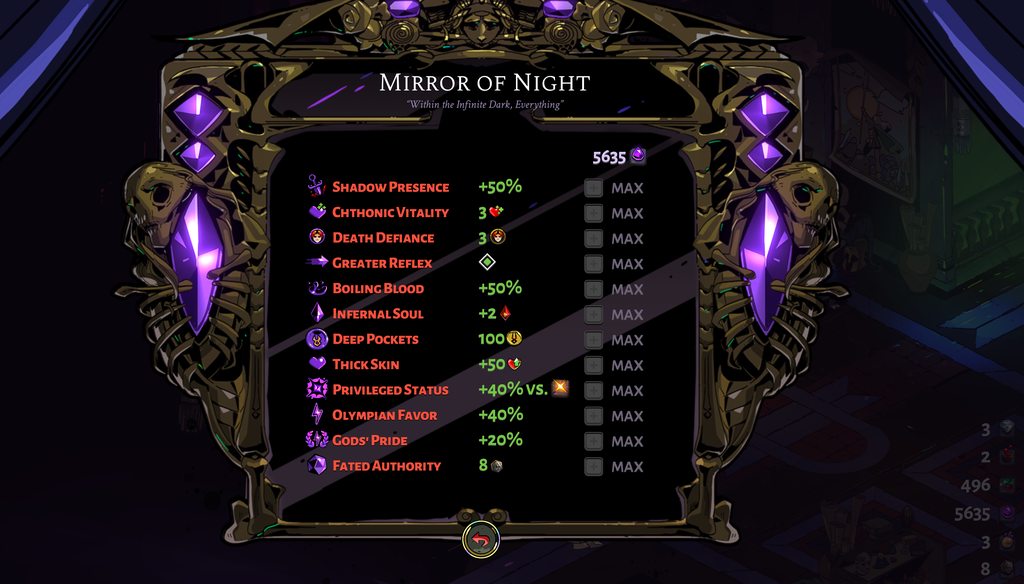
after 175 escape attempts and 10 now succesfull escapes
im on the newest version
how come i cant switch between fated things
stray elm
small oak
im on the newest version
What platform are you on?
stray elm
Could you try verifying file integrity?
stray elm
There are steps towards the top of #h1-tech-fixes —I'm on mobile, otherwise I'd paste them here
 patent heath
Hey, I opened up the game after a recent patch today and I'm having two weird glitches happening. Whenever I hit the Wretched Lout enemies (with spear weapon after destroying their armor is when I noticed it) and stun them with an attack, there character model vanishes and get's replaced with a creepy, floating still-frame of Zagreus. Also all the character voices are suddenly mute.
The character voice issue I'm trying to see if that's a result of my volume controls but so far nothing has helped that. Not resetting the game or PC itself either. And all other sounds (music, BG effects, attacks, etc) are perfectly fine.
stray elm
patent heath
Hey, I opened up the game after a recent patch today and I'm having two weird gl...
Could you try verifying file integrity?
patent heath
Let me give it a shot, thank you
Okay, that fixed the voices I think. Zagreus just said a quip. Give me a second to track down the enemy
And the Louts are louts again. Thank you! I was getting Luigi's Mansion phone vibes from the weird hanging Zagreus still-frame thing.
stray elm
Sure thing ^.^
 vernal canopy
Has anyone else observed Lernie relocating out of his lava pool? I've had over 120 runs and this is my first time seeing it, unsure if it's a glitch or if he's just been really reluctant to move on my previous playthroughs.

This was on the Switch version, Demeter fists. I dashed to avoid a slam attack from him and he suddenly veered off towards the other side of the arena, found him parked on the middle of the island after I dealt with his other heads.
 pseudo topaz
With EM2 on, lernie's neck no longer binds him
vernal canopy
Well, aight then. Hadn't seen it on any of my previous EM2 runs, but figured it was worth posting.
 worthy tree
Hello, my problem is:
2021-04-23 07:42:44 [MainThread ] remoteprofilescreen.cpp:510 DBG| Not loading CheckPoint
2021-04-23 07:42:44 [MainThread ] remoteprofilescreen.cpp:520 DBG| Exit StartOrContinueGame
2021-04-23 07:42:44 [MainThread ] profilemanager.cpp:126 INFO| saveProfile()
2021-04-23 07:42:44 [NoName ] profilemanager.cpp:90 INFO| beginning profile write
2021-04-23 07:42:44 [MainThread ] app.cpp:254 DBG| Shutting down
2021-04-23 07:42:44 [MainThread ] ingameui.cpp:37 INFO| InGameUI Destroy
2021-04-23 07:42:44 [NoName ] profilemanager.cpp:110 INFO| profile write done
2021-04-23 07:42:44 [MainThread ] luaext.cpp:445 INFO| Lua interface destroyed
Someone could help me?
If i choose my save to load game - i see black screen, that's all.
stray elm
worthy tree
Hello, my problem is:
2021-04-23 07:42:44 [MainThread ] remoteprofilescreen...
There are some things to try in #h1-tech-fixes , I'd start there
 sly rapids
Is there any indication as to when the patch updates are getting to Switch?
stray elm
sly rapids
Is there any indication as to when the patch updates are getting to Switch?
There has not been an announcement about it to my knowledge, sorry. I know that they need to go through some additional steps, so the devs have been solidifying patches on the PC first before updating the Switch
sly rapids
Yeah that's understandable
 glass marten
hi, i have a problem with my game, today open the game and i lost my progress, and i have 44 hours play, i need help please
glass marten
ty
 rain cradle

皆様!Our new PC patch for HADES adds a full text translation in Japanese, provided by the team at 8-4. We're still putting the finishing touches on it, though invite you to try it! The finalized translation will be coming to the Nintendo Switch version in the coming weeks.
Retweets
318
Likes
2454
 Twitter
·
Twitter
·
 grand tendon
Hello guys, I have an issue to synchronise my saves from my switch (latest save) to the cloud. The connection to the epic game store works fine, it tells me that the cross platform is enable but everytime I press play it just search for a sec and fail to synchronise... I just don't know what to do and I don't wan't to lose all the stuff I did today on my switch. Any idea ? :/
faint jewel
grand tendon
Hello guys, I have an issue to synchronise my saves from my switch (latest save)...
Hello, make sure your PC and Switch have the same time and date, as usually that causes the issue (check the timezone on Switch)
grand tendon
faint jewel
Hello, make sure your PC and Switch have the same time and date, as usually that...
Thank you so much, it seems someone was cheating on animal crossing with the switch... I just did not notice that before trying to synchronise 😅
 sand basin
Hi, I'm finding that when mouse lock is selected I can still move my cursor half-way across my right-hand (non-game) monitor, and if I click then the game will tab out. I can show a photo if needed (cursor doesn't show up on screenshot)
stray elm
sand basin
Hi, I'm finding that when mouse lock is selected I can still move my cursor half...
Does this happen during gameplay, or just in the main menu?
sand basin
stray elm
Does this happen during gameplay, or just in the main menu?
In gameplay. In the main menu the cursor isn't locked in any direction for me
stray elm
sand basin
In gameplay. In the main menu the cursor isn't locked in any direction for me
are you in fullscreen, windowed, windowed borderless?
sand basin
stray elm
are you in fullscreen, windowed, windowed borderless?
fullscreen
stray elm
alright. Are your monitors different aspect ratios and/or resolutions?
sand basin
yup, all 3 are different.
left hand is 1920x1080, primary is 2560x1440, right hand is 1080x1920 (portrait orientation)
(I noticed when checking that it was fullscreen that it's set to 1920x1080 in game, but I changed it to 2560x1440 and it made no difference)
the primary monitor is set to 125% text scaling as well
stray elm
after changing the resolution, could you try restarting the game and see if that helps?
sand basin
no change (except a slightly sharper image 😉 )
stray elm
xD
Mmkay...obviously this isn't ideal, but this'll help identify the issue--could you try setting the text scaling to 100% instead of 125%?
sand basin
I will do - can't do it right this moment but will in the next hour
stray elm
sounds good, and thank you for your patience
 covert sonnet
Hi, hope i dont crash in this conversation. I just bought the game today. First time: everything fine on max res. Second time: white Screens and flickers whenever i leave the rooms. Changing res didnt work as a fix.😰
stray elm
covert sonnet
Hi, hope i dont crash in this conversation. I just bought the game today. First ...
Heyo--could you try verifying file integrity?
covert sonnet
Thanks for your answer, but i already did that. Together with re-installing😬
Also if i close the game in a low res and then start the game and change it to a higher res everything works fine, but if i start in a high res my fps drop and the white screen occurs. Also sometimes my controlls wount work. I really dont understand whats going on😭🤣
glass marten
i can't fix my progress, i lost all
stray elm
glass marten
i can't fix my progress, i lost all
What happened?
stray elm
covert sonnet
Also if i close the game in a low res and then start the game and change it to a...
Could you try setting the launch options /UseNativeGaInput=true /UseNativeGaInputNoControllers=false?
and what platform/system are you on?
covert sonnet
stray elm
Could you try setting the launch options `/UseNativeGaInput=true /UseNativeGaInp...
Tried that aswell. Oh im on mac.
glass marten
i don't now wht happen, I play on steam
stray elm
covert sonnet
Tried that aswell. Oh im on mac.
alright--could you run me through what you've already tried so I don't just repeat things? :3
stray elm
glass marten
i don't now wht happen, I play on steam
What happens when you start up the game?
glass marten
yesterday I played normally and today I lost everything
stray elm
as in, when you start up the game, the save slot is empty?
glass marten
i have all slot empty, and i have 44 hours played
stray elm
glass marten
i have all slot empty, and i have 44 hours played
Could you check here to see if there are any files stored in the Steam Cloud?
https://store.steampowered.com/account/remotestorageapp/?appid=1145360
After that, can you check Documents / Saved Games / Hades and send me a screenshot of what you see? You can send it here or DM me, either is fine
covert sonnet
stray elm
alright--could you run me through what you've already tried so I don't just repe...
Oh, sorry😰, i thought bec at the top of the thread is written: try those troubleshootings first, i dont have to mention these. But i basically did just the ones u listed now
stray elm
No worries ^.^ I'm not always sure how much people have tried on their own before asking here
What MacOS are you on?
covert sonnet
stray elm
No worries ^.^ I'm not always sure how much people have tried on their own befor...
10.14.6 also maybe thought my CPU or gpu isnt strong enough? But it worked the first time so😅 idk
stray elm
do you know what your graphics card is?
 covert sonnet
stray elm
do you know what your graphics card is?
covert sonnet
stray elm
do you know what your graphics card is?
Its a 3,2Ghz Intel core i5 and a amd radeon r9 390 2gb
stray elm
alright, that should be fine
Not all of these are applicable to Mac, but I'd take a look at the stuff under If You're Experiencing Hitching / Freezing / Lag / Frame Rate / Performance Issues in #h1-tech-fixes
covert sonnet
stray elm
alright, that should be fine
Not all of these are applicable to Mac, but I'd ta...
Hi hope i can write here on Sunday too😅, i now tried everything and nothing helped. However i found out, that i could play atleast in the 1600×900 res. Although if i tried to start the game without steam open, my mac told me that the programm was damaged or missed some parts. Still thank you so much for your help and the great game. I might just ask the Support via email now. Have a nice weekend^^
sand basin
stray elm
xD
Mmkay...obviously this isn't ideal, but this'll help identify the issue--cou...
Following up from last night - with the scaling set to 100% instead of 125% the cursor correctly locks to the game
stray elm
sand basin
Following up from last night - with the scaling set to 100% instead of 125% the ...
Alright. Could you report that in-game with , and include your discord tag in the name field?
sand basin
done
 swift wadi
Hello. I just wanted to ask if you're ever going to be enabling Nvidia GeForce NOW support? Thank you!
viscid flax
Tbf game has really low sys reqs that GFN is not really needed if you have some 10 year old hw even
swift wadi
It's not something I need, it's something I'm interested about.
 elder tundra
Hey guys, just noticed something that is maybe a normal thing but just wanted to make sure. Is it normal for the golden ring around the boons to sometimes have a green outline?
ionic atlas
do you have a screen shot?
elder tundra
not atm. but i'll try to get one
ionic atlas
also what boon was it?
elder tundra
doesn't matter what boon it is unfortunately
ionic atlas
oh
elder tundra
ionic atlas
do you have a screen shot?
Got a screenshot. I think it occurs when the boon is behind something?

sort of a greenish outline on the golden ring
ionic atlas
im pretty sure that is normal
faint jewel
Yea, I've seen it before as well.
elder tundra
Thanks! Good for my peace of mind 😅
 jovial latch
elder tundra
Got a screenshot. I think it occurs when the boon is behind something?
jovial latch
elder tundra
Got a screenshot. I think it occurs when the boon is behind something?
just for reference, the green outline occurs not just on boons, but other things like gemstones or darkness as well. probably to emphasize it while it's behind an object. so as the others have said, i believe it's normal
 primal bluff
on switch if you select an aspect then select any weapon afterwards you suffer a 2 second long buffer until you complete a run or close the game. i’m wondering whether this is just for my switch or a reoccurring bug

here’s a video
stray elm
primal bluff
on switch if you select an aspect then select any weapon afterwards you suffer a...
do you have the game on an SD card or your system memory?
stray elm
alright--it's possible that that's causing the issue, unfortunately
stray elm
Sure thing ^.^
primal bluff
it worked 
stray elm
awesome!
stray elm
@upper rain @rancid girder @wary remnant @plush needle @frosty tiger @quartz hawk Heyo! Thank you all for your reports and your patience. A hotfix has just gone out for the Mac that should hopefully fix the resource multiplication bugs y'all were getting. Please let us know if you're seeing the same or similar issues
wary remnant
Ok. Thanks!
upper rain
stray elm
<@!120777264743841794> <@!325328364737003522> <@!175804803375562752> <@!14494837...
Awesome, thank you! Is there any way to get rid of some of the absurd amts of darkness I have?
stray elm
stray elm
You can manually revert your progress to a slightly earlier save—there's no way ...
like so ^.^
woven grotto
Hi, with today’s patch, the issue from a few days ago re-occurred. Like exactly that issue, even though is was fixed via patch in the mean time: #h1-tech-support message
Looking through this channel, it looks like this is the second time I just wanna play the game 10 minutes after a game-breaking patch has been published 😢
I am such an unlucky person
stray elm
woven grotto
Hi, with today’s patch, the issue from a few days ago re-occurred. Like exactly ...
Ah, that's because it hadn't been patched--the patch that caused the break had been reverted. I had hoped it had the same root cause, and that the hotfix would prevent your break as well.
I'm super sorry about that--can you follow the steps at the end of #h1-tech-fixes about emailing support@supergiantgames.com some log files?
woven grotto
Sure thing, will do so tomorrow
 silver skiff
hello in have a query
I*
so
my game has been laggy recently in mini boss areas like the gorgon head and the boulder thing
so i decided to use vulkan
but It doesn't seem like vulkan works with and 3440x1440 monitor
stray elm
doesn't work at all, or doesn't allow you to set that resolution?
silver skiff
the screen turns black
so i used the launch commands
and those worked just fine
but the game doesnt match my res
and if i make it borderless
it doesnt fill the entire screen for some reason
i can give a pic if thats needed
stray elm
does it have the sidebar art?
stray elm
sure, a pic would help
 stray elm
ah, I see
it looks like the whole thing is shifted offset slightly, down and to the left
could go to Documents / Saved Games / Hades and find the file Profile1.sjson, and send that to me?
stray elm
alright--replace that file with this one
the X and Y positions were offset for some reason
Y was 37 and X was 5 lmao
silver skiff
oh lol
stray elm
no idea how that happened xD
silver skiff
sshould i still run with launch cmds?
stray elm
which ones did you end up setting?
stray elm
you shouldn't need to launch with them, no
and if this comes up again, you should be able to open the .sjson file in a text editor like word or notepad 👌
silver skiff
ah ok
thanks
also
just as a thing
i cant run vulkan in fullscreen
but only borderless
i dont know why
but it doesnt really matter
actually i cant run in borderless either
stray elm
oh?
silver skiff
its a black screen with music for both
it noly works with these cmds /FullScreen=false /NoBorder=false and to not change any settings
only*
stray elm
weird. does it otherwise work fine?
stray elm
sure thing! Feel free to report the fullscreen & borderless not working with in-game, so the devs are aware of it
silver skiff
ok, will do
stray elm
Best of luck 
silver skiff
Hi, I have an update
so it works
but the performance is terrible
and i know that it isnt on my end as i used to frequent 100fps
now its 50 when i just apporaach the pact of punishment
i can only imagine what it would be when fighting enemies
stray elm
silver skiff
Hi, I have an update
Alright—there are some other things to try in #h1-tech-fixes , I'd look through there
upper rain
stray elm
<@!120777264743841794> <@!325328364737003522> <@!175804803375562752> <@!14494837...
thanks again for the help, got a pre-bug save restored and i'm back and cooking
 vapid terrace
Hello dear all. I am having problems the launching the Hades. I don't know what happened. It was working in the morning. However, in afternoon it downloaded a patch/update, and now it is not working 😦 I am using macOS Catalina
any help would be a greatly appreciated
stray elm
vapid terrace
Hello dear all. I am having problems the launching the Hades. I don't know what ...
Heyo--there are some things in #h1-tech-fixes to try that may help.
If those don't, please follow the steps at the end of #h1-tech-fixes about emailing support@supergiantgames.com some log files. I believe they're aware of this issue, and that information will help them identify and fix it
vapid terrace
I ended up sending an e-mail. Nothing really worked. It looks like many Mac users experiencing the same problem. Hopefully, a patch would solve the problem. Thanks for the recommendations.
 inner matrix
I'm playing on Steam on MacOS 11.3, and today after Hades update, the mapping on some button is wrong. I check it works fine on other game in my Steam library
Am I the only one with this bug ?
 silk violet
Hi.I have Hades on the Epic Games Store and I have a problem with the "Bounty limit": I'm not sure when this issue has been there, perhaps shortly after the full version of the game was released. In this case even if the highest heat of "Stygius" is 20 the "Bounty limit" it is reached. This problem occurs only with "Stygius". Screenshots follow. I have reinstalled the game several times, even after formatting the pc.


 ionic atlas
if you have claimed every bounty starting at 0 heat to 20 heat then there are no more
if you have not done that then it is a glitch and idk what to do
silk violet
Yes It's a bug. Even climbing with the conditions the result does not change.
If not here you know where to report this bug and get support?
ionic atlas
if you are on pc hit f10 and submit the bug
silk violet
Thanks a lot ❤️
stray elm
inner matrix
I'm playing on Steam on MacOS 11.3, and today after Hades update, the mapping on...
Have you checked the controls menu in-game? And what controller do you have?
stray elm
silk violet
Hi.I have Hades on the Epic Games Store and I have a problem with the "Bounty li...
Just to make sure—there are no bounties past 20 heat. It looks like you've done 22 escapes, highest heat of 20, so if you've been increasing the heat each run, there aren't any more bounties
stray elm
That doesn't help, sorry. Once you have the rewards for 0-20, there are no more rewards for that weapon
quartz hawk
Mind marking this a spoiler?
silk violet
stray elm
That doesn't help, sorry. Once you have the rewards for 0-20, *there are no more...
Ah OK. So there is a limit of 20 for each weapon, am I right?
stray elm
Correct
silk violet
quartz hawk
Mind marking this a spoiler?
Yes you are right. I delete it then, it is no longer needed.
silk violet
stray elm
Correct
Thank you very much. I just didn't get it.
stray elm
Sure thing ^.^
inner matrix
stray elm
Have you checked the controls menu in-game? And what controller do you have?
Thanks for help, my controller is an Xbox Series Controller, and was working fine since the April Update.
inner matrix
inner matrix
Thanks for help, my controller is an Xbox Series Controller, and was working fin...
The config in game was fine, but button are now wronly maaped, ex when I press LB, it's act like the X, etc...
stray elm
inner matrix
Thanks for help, my controller is an Xbox Series Controller, and was working fin...
Could you try going to the Properties menu for Hades and setting Steam Input to "Disabled"?
 unique garnet
Possible spoiler???
Not sure how to black anything out if that's possible, so don't read further if you haven't beaten the game. I'm super new to discord.
Hopefully this is the right place to put this. Is there a known bug for not learning the lyre? I've beaten the game including the epilogue, gotten all the steam achievements, and have at least 8 heat for each weapon. I play the lyre at least 5 times in between each run, but I still haven't "learned how to play it" completely. I'm on the second stage where it doesn't sound completely terrible, but this is the only prophecy I haven't been able to complete.
stray elm
unique garnet
Possible spoiler???
Not sure how to black anything out if that's possible, so do...
Two things--one, you can tag spoilers with 2 vertical bars on either side like this || spoilers go here ||
two, it requires a couple hundred interactions (|| 210, specifically ||)--do you think you're past that point?
unique garnet
stray elm
Two things--one, you can tag spoilers with 2 vertical bars on either side like t...
||Test||
I'm fairly sure I've done pretty close, if not more than that, but I can keep grinding. Does it have a limit to how many interactions can be done between each run?
Thanks for the spoiler help too!
 split cradle
i got the whole lyre prophecy between 3 runs lmao
just sat there and pressed e every once in a while while i was reading
unique garnet
Maybe I'll just spend a good 10 minutes just tapping away so I can count properly haha. I'll pop back in with an update in a bit.
faint jewel
unique garnet
Maybe I'll just spend a good 10 minutes just tapping away so I can count properl...
Just to add to it - even after learning how to play it perfectly, it might take some time before ||Orpheus acknowledges it, commenting on that, which will fulfil the prophecy.||
unique garnet
Hahahaha. Of course XD
I play it 3 more times and it finally works. Thanks everyone
stray elm
nice 
inner matrix
stray elm
Could you try going to the Properties menu for Hades and setting Steam Input to ...
Hi, I just try it, but it doesn't change anything. Am I the only one with this issue ? Maybe my controler need a frmware refresh, but I strange it happen after Hades update....
stray elm
inner matrix
Hi, I just try it, but it doesn't change anything. Am I the only one with this i...
Could you try setting the launch options /UseNativeGaInput=true /UseNativeGaInputNoControllers=false?
· Right-click on Hades in your Steam Library and select 'Properties...'
· In the pop-up menu, look for the field with the heading 'LAUNCH OPTIONS'
inner matrix
stray elm
Could you try setting the launch options `/UseNativeGaInput=true /UseNativeGaInp...
Thanks that solve the problem ! 
stray elm
Awesome ^.^
inner matrix
stray elm
Awesome ^.^
Thanks for your help ! I glad to have this fixed before the week-end 😉
stray elm
Sure thing! Best of luck
 sterile maple
Hello could you please help me, I have played the game yesterday but my game was not saved. I tried to check on /Documents/Saved Games/Hades but there are no .sav files.
i tried to run again but it always say empty save slot here
 stray elm
sterile maple
Hello could you please help me, I have played the game yesterday but my game was...
stray elm
sterile maple
Hello could you please help me, I have played the game yesterday but my game was...
Heyo--there are some things to try in #h1-tech-fixes for save issues (If the Game Won't Start or Read/Write Save Data). Unfortunately, the data from your gameplay yesterday is most likely lost--however, the devs have some pre-made saves to help people who've lost their progress, if you'd like.
sterile maple
Thanks for the help. It was blocked by my windows security, thus the files were not saved in the folder. 😦
stray elm
sterile maple
Thanks for the help. It was blocked by my windows security, thus the files were ...
About how much had you played?
stray elm
Alright. best of luck
sterile maple
thanks
frosty tiger
cheers
frosty tiger
so, sometimes when you fire the rail special the area highlight moves and sometimes bounces around until it settles somewhere randomly. the projectile too actually flies ambivalently trying to impact where the highlight is (which looks somewhat hilarious)
the second one is regarding the hammer upgrade "dash nova" for the stygian blade. if you spam dash and special (as you commonly do in normal hectic gameplay) you sometimes teleport around randomly or, like, if you lunge but dash mid-flight you can sort of dash out of the animation (and sometimes you can manage a double dash) before teleporting to where your lunge shouldve landed
really disorienting
faint jewel
frosty tiger
so, sometimes when you fire the rail special the area highlight moves and someti...
The special bounces off the walls and pillars, so you need to take that under consideration while using it.
 flat bluff
yeah it bounces off of surfaces
which changes the landing circle's location as it happens
i.e. the aiming doesn't anticipate where things are gonna land after a bounce, before the bounce has occurred
frosty tiger
oh... sorry i had no idea. it just looked so weird i figured it must be unintended
flat bluff
it's fine haha
faint jewel
frosty tiger
the second one is regarding the hammer upgrade "dash nova" for the stygian blade...
That is a known issue I believe, so whenever you experience it, could you please press F10 to send a bug report to help investigate it further (if you're on Windows).
frosty tiger
sure i could, except the whole thing triggers really randomly and the animation is, what, half a second? not sure how im supposed to capture a teleportation in a picture lol
but if it happens again i'll give it a go haha
awesome game anyway! been playing like crazy
faint jewel
frosty tiger
sure i could, except the whole thing triggers really randomly and the animation ...
No need to capture the exact moment it happens, just use F10 after it happens and you can describe what happened and the data will be sent to the devs so they can have a look at it.
frosty tiger
right... i dont really use discord communities so im a bit of a rookie
 mossy oar
Greens and whites are the plebians of this Greek world lmao
flat bluff
lol only paige on the top right is a dev
i've never seen a dev chat before tho
and it's probably a bad idea to ping them
frosty tiger
not gonna
flat bluff
or pm
frosty tiger
i just wanted to submit a bug report man lol
faint jewel
Yea, don't ping them, and please stay on topic here (it's a tech support channel)
frosty tiger
noted. i wont ping [REDACTED]
flat bluff
hahaha
faint jewel
If you encounter any issues, feel free to ask / write them here, and someone here might be able to help you.
stray elm
frosty tiger
so, sometimes when you fire the rail special the area highlight moves and someti...
if it seems like the projectile is bouncing around in mid-air, as opposed to bouncing against a wall or pillar, feel free to also report that with . It should only bounce when it's against a part of the terrain that looks 3D (generally, this terrain will also stop normal projectiles)
 tepid schooner
f10 isn't working for me for reporting a bug
what should i do?
faint jewel
tepid schooner
f10 isn't working for me for reporting a bug
what should i do?
F10 doesn't work in Mac. If you're on Windows, you might need to alt tab to bring the F10 reporting window to the front, as it tends to get hidden sometimes. You can also describe what's wrong here.
stray elm
tepid schooner
i'm on mac. how should i report bugs?
Yes, that works
tepid schooner
aight
the guan yu aspect cancels all projectiles on-screen
not just the ones in front of you
p sure that's a glitch
ionic atlas
tepid schooner
the guan yu aspect cancels all projectiles on-screen
wait what do you mean cancel?
do they just disappear?
tepid schooner
yup
ionic atlas
weird
tepid schooner
i can send a screen recording if u want
ionic atlas
yeah let me see
tepid schooner
cant upload the vid cuz its too large of a file, but i'll link u to my reddit post

reddit
23 votes and 7 comments so far on Reddit
ionic atlas
yeah thats a bug
sharp narwhal
tepid schooner
https://www.reddit.com/r/HadesTheGame/comments/n184tj/not_sure_if_this_was_inten...
I tried to reproduce that and didn't see it occurring with vanilla Guan Yu - it looks like you may have a hammer upgrade? Do you remember which one?
tepid schooner
oh also: another glitch, that's happening on the run that i'm on
i had poseidon's boon that gives your cast extra dmg and knockaway effect (i forget what its called), then i got blizzard shot, then i sold that original poseidon boon (but kept blizzard shot) but now my cast is like "normal" without the blizzard shot even tho i still have the blizzard shot boon
sharp narwhal
tepid schooner
i had poseidon's boon that gives your cast extra dmg and knockaway effect (i for...
That's intended - the effect of Blizzard Shot requires the base Poseidon cast in order to work, so if you purge it, you lose both effects. It's the same idea as purging your only Aphrodite boon when you have something like Curse of Longing; if you can't inflict Weak anymore, the duo won't work.
tepid schooner
wow i'm stupid
oops sry
so if i get rid of the base boons, it gets rid of the duo effect?
sharp narwhal
Generally speaking, yeah
tepid schooner

@sharp narwhal
those were the boons/mirror upgrades that i had on when the glitch was happening, but it happens for all of my runs on guan yu
sharp narwhal
That's really strange, like I said I started a run on Guan Yu and didn't see that happening. I'll see if it might be Mac-only, could you also try verifying your installation through the game's launcher?
 bold night
Alright so I'm at heat 2 and I only got the rewards with the sheild one I hit level 2. But for some reason all the weapons don't give me the rewards. I just get darkness. And even if I raise the darkness it's still the same thing
The rewards aren't refreshing
stray elm
bold night
Alright so I'm at heat 2 and I only got the rewards with the sheild one I hit le...
Could you include a few screenshots? I'm not sure exactly what you mean
bold night
stray elm
Could you include a few screenshots? I'm not sure exactly what you mean
Sure
One sec
Wait actually nvm I'm just dumb. Turns out I have to actually beat the game for me to be able to raise the heat. I've been dying after getting my diamond since that's the only thing I needed
 agile pulsar
Is it supposed to aim this way with joystick controller? Because when I use keyboard it aligns with those rectangle tiles
 stray elm
agile pulsar
Is it supposed to aim this way with joystick controller? Because when I use keyb...
stray elm
agile pulsar
Is it supposed to aim this way with joystick controller? Because when I use keyb...
Is it not lining up with your input?
agile pulsar
stray elm
Is it not lining up with your input?
The input is down left, and the joystick works like the direction pad, so only 8 directions available, not sure if that's how it's intended. When I aim down left with keyboard wasd it lines up with the rectangle tiles.
stray elm
Alright...I don't remember exactly how it lines up for me, I'll load up the game in a little bit and test on my end. Is this with all weapons, not just the shield?
agile pulsar
stray elm
Alright...I don't remember exactly how it lines up for me, I'll load up the game...
All weapons, that's how zagreus moves as well, in keyboard he follows the tiles but with my joystick he walks in a different angle
 narrow stirrup
looks like keyboard movement follows the isometric camera angle
whereas joystick is angle-accurate
agile pulsar
narrow stirrup
whereas joystick is angle-accurate
Yes but is it supposed to be that way?
narrow stirrup
My xbox controller d-pad doesn't do that
What joystick are you using, and is any mapping software involved?
agile pulsar
narrow stirrup
What joystick are you using, and is any mapping software involved?
I'm using a generic controller tbh, no software open, does your joystick have infinite fluid directions or is it only 8?
narrow stirrup
D-pad only has 8 directions
Are you on steam? Maybe you can map your joystick to use d-pad
agile pulsar
narrow stirrup
Are you on steam? Maybe you can map your joystick to use d-pad
The d-pad works like yours, I was asking if the analog stick is supposed to allow for more than 8 directions
narrow stirrup
Oh, my stick does full 360
 ebon star
context: I'm "steeling myself" to use the Aspect of Hestia on Exagryph.
I play on mouse and keyboard, and pressing R (reload) after every shot is just too debilitating, so in order to get the most out of it, I need to remap "reload" to "right-click". Every single time I use that weapon (because I only use that aspect, because it's the only aspect of Exagryph that actually has good DPS, Eris aside (asks for a too risk-heavy gameplay for my taste))
I really hate that because it means that when I use it, I just can't really use Special for the whole run
(Side note, why is "Cast" mapped to right-click by default?? Mapping Cast to Q and Special to right-click just feels way better, IMO)
So this one time, I ask myself if there really is no alternative. Mapping Reload to anything on my left hand is just impossible. Fingers are busy moving me around, and thumb presses space. There's really just the right hand; the mouse...
The mouse... two buttons... left-click... right-click... ... ...
and... ... ...
the mouse wheel?
The mouse wheel, huh... can you even map anything to that?
So I try: I go in controls, press "Reload", and press on the mouse wheel (It's a mouse that has a mouse wheel that you can "press down" (not "scroll", "press").
Nothing happens.
Aw, guess you can't.
A little saddened, I scroll up with the mouse wheel, fully expecting absolutely nothing to happen.
To my surprise, it mapped!!
It mapped "reload" to "scroll up"!
This definitely got a laugh out of me. I then exit the menu and test it. Yep, sure enough, scrolling up reloads Exagryph.
This is actually really something, this means two new buttons on my right hand. Double what I thought!!
So, I go back to Controls to ponder over different combinations I could use. I left-click on "Reload", which unmaps "scroll up" from it... I release the left-click... And it remaps to the mouse wheel instantly
not "it remaps reload to scroll up, it remaps it to "mouse wheel" Absolutely no idea what input this actually is, because scroll up, scroll down, and pressing the mouse wheel all don't work. It's just the icon of the scroll wheel.
and I can't change it back
every time I click, it unmaps, but whenever I let go of the click, it maps it back
same with using space
stray elm
if you go to Documents / Saved Games / Hades, then backup and delete the Profile1.ctrls file, that will reset your controls
ebon star
huh, weird, now it DOES let me map things to "pressing the mouse wheel"...
stray elm
dunno xD
ebon star
seems to be an uncommon bug, do you want me to send the .ctrls file so you can look at what the game was internally mapping Reload to?
stray elm
Could you email it to support@supergiantgames.com ? I don't have a way to read it myself
ebon star
stray elm
Could you email it to support@supergiantgames.com ? I don't have a way to read i...
sadly, no. I restored the file and tried it, and when I opened the controls, Reload was just mapped to "nothing".
Seems like this is a runtime bug that doesn't get carried over to the save file...
 night surge
Hi guys! First of all - great game! I enjoy Hades so much.
I have a bug. I have two monitors. I switched to the second monitor while playing the game for a moment. And now I have my mouse cursor in the game all the time. The cursor does not disappear in battle mode.
Please help.
I play with Mouse Lock and switching it off doesn't work.
stray elm
night surge
Hi guys! First of all - great game! I enjoy Hades so much.
I have a bug. I hav...
Have you tried toggling full-screen and/or borderless?
night surge
stray elm
Have you tried toggling full-screen and/or borderless?
Yep, didnt help
stray elm
and just to clarify--by "switched to the second monitor", you mean you clicked over to it?
night surge
Yeah
night surge
I use mouse and keyboard and two Dell monitors S2441HN
Windows 10
AMD Ryzen 5 1400 Quad-Core Processor
NVidia GeForce GTX 1050 TI
8 GB RAM
stray elm
Alright. I'm not totally sure, unfortunately. You could try verifying file integrity, that may help. Beyond that, you can also report it in-game with
night surge
Thank you
if nothing else works I will reinstall my OS, planned to do it anyway, hope it will work
night surge
stray elm
Alright. I'm not totally sure, unfortunately. You could try verifying file integ...
Sadly it didnt work
night surge
I reinstalled Windows 10 and it didnt work. I'm confused. Should the mouse cursor appear in combat mode?
Maybe its my imagination and everything is alright
 unborn sky
Hey I just got the game yesterday and played it for a while. I have Windows defender restricting Access which means that Hades won't save. I read the "If the Game Won't Start or Read/Write Save Data" Part and I know what needs to be done but I would have liked if the Game told me that it was unable to save while trying to do so.
Then I would have been able to fix it before loosing all my progress.
I have read this part and fixed the problem already. I was just suggesting to implement a notification that tells you if the game is unable to save.
unborn sky
ionic atlas
i have monke brain
no problem. Got the same brain since it ain't the first save I lose to windows defender
stray elm
night surge
I reinstalled Windows 10 and it didnt work. I'm confused. Should the mouse curso...
If you're using the mouse, it should be there
I might've misunderstood last night
stray elm
unborn sky
I have read this part and fixed the problem already. I was just suggesting to im...
There should be :/ Could you report that there wasn't in-game with ?
unborn sky
stray elm
There should be :/ Could you report that there wasn't in-game with <:f10:5884766...
Sure will do
stray elm
Also, if you played for a while and would like a jump-start, the devs have some pre-made save files I can help you with
unborn sky
stray elm
Also, if you played for a while and would like a jump-start, the devs have some ...
thank you but I'll replay it I think so I don't miss any part of the Story
 exotic star
hello! My saved games are gone after the latest update :/ anything I can do here?
stray elm
exotic star
hello! My saved games are gone after the latest update :/ anything I can do here...
What platform and OS are you on?
 stray elm
Could you check if your OneDrive(?) storage or trash bin has the files?
exotic star
ummmmm yes I can check what would the file be named?
stray elm
Search for Profile1.sav
exotic star
alright so it is in my onedrive apparently
stray elm
Ayy, sweet. Try putting it back into that saved games folder
 stray elm
Just the Hades folder

 hazy fog
help, i can't scale the size of the windows mode as i read you could
faint jewel
hazy fog
help, i can't scale the size of the windows mode as i read you could
Could you please write here exactly what launch options you tried and maybe take a screenshot of how you wrote them to make sure the format is right?
frosty tiger
Hey everyone, does someone know something about frame drops/stutters from the moment you enter Asphodel?
The first world is fine, but after that it drops. I'm running on a 3700x/2070super, so that can't be the problem. I tried the graphical settings from the other channel already.
faint jewel
frosty tiger
Hey everyone, does someone know something about frame drops/stutters from the mo...
By "graphical settings from the other channel" do you mean those steps: #h1-tech-fixes message
so among other things, making sure your graphic card drivers are up to date?
Also, try verifying the game files integrity and resetting your PC if that doesn't help.
frosty tiger
I do mean those steps, yes. I'll try the verification through the epic launcher. What do you mean by resetting my PC?
Like a full clean install?
faint jewel
frosty tiger
Like a full clean install?
no, just turn off your PC and turn it on again. Or just make sure there are no programs working in the background that might slow down Hades' performance.
frosty tiger
Ah, that kind of reset is already done. I've closed all the background programs as well. Also made sure there's no overlays active.
3700x/2070s/32GB RAM should be more than enough for a game that's also on Switch, right?
stray elm
Have you tried Vulkan or 32-bit?
frosty tiger
How do I switch between those? I launch from the epic store.
stray elm
For now, you need to manually launch them. I'll be on my computer in a few and I can give you the file address
frosty tiger
I might've found the (most stupid) solution!
It seems less stuttering when I turn vsync off now.
That didn't help before, but it seems to make a difference for now.
I expected screen tearing but it doesn't do that either.
faint jewel
frosty tiger
How do I switch between those? I launch from the epic store.
Navigate to the install directory, such as:
\Program Files\Epic Games\Hades
Then, open the x64, x64vk, and x86 folder. x64 is default, DirectX. x64vk is Vulkan. x86 is 32-bit version. Try them and see if that helps if stuttering appears again.
faint jewel
stray elm
For now, you need to manually launch them. I'll be on my computer in a few and I...
I got your back, mate! 😉
frosty tiger
Has someone already told you you're amazing, @faint jewel
stray elm
I sure hope someone has >:3
 naive creek
Hi all, does anyone have any advice on getting the game to run at 3840 x 2160 on Mac on an external display?
Someone on Reddit said to run the game with the AttemptHighDPI=true option set in the game launcher properties, which opens more display options in the game but not 3840 x 2160
stray elm
naive creek
Hi all, does anyone have any advice on getting the game to run at 3840 x 2160 o...
You can set the launch options /X=3840 /Y=2160
naive creek
stray elm
You can set the launch options `/X=3840 /Y=2160`
Thank you!!!
stray elm
Sure thing ^.^
 silk pendant
https://gyazo.com/5caa78f66cc6ef1f24ba5fa77d3453b4
Small thing, but heat effect from the fire ends midway of this stand. I'm sure this is known, but it's something i've noticed going into Asphodel every time. 🙂 No biggie.

Will file bug report ingame next playthrough ❤️ didnt know the shortcut prior to reading the description of this channel 🙂
stray elm
silk pendant
Will file bug report ingame next playthrough ❤️ didnt know the shortcut prior to...
could you also try verifying file integrity, see if that helps?
silk pendant
oh, will do, hold on
 autumn robin
so i transferred all of my data from one hard drive to another, and i think it corrupted my saves. Tried renaming the backup files (modified date is from before the transfer) but my save is still at 0%. Any suggestions?
stray elm
autumn robin
so i transferred all of my data from one hard drive to another, and i think it c...
Could you send me a screenshot of your saved games folder, and the in-game save menu?
autumn robin
in chat or DM?
stray elm
either is fine for me
 peak spear
I bought hades for my 16 GB M1 Macbook Pro but it is not opening. All I see is a black screen.
stray elm
peak spear
I bought hades for my 16 GB M1 Macbook Pro but it is not opening. All I see is a...
Heyo--there are some things to try in #h1-tech-fixes for the game not starting, I'd check there
 bold galleon
Hello! Not sure how to describe this (bug? error??) but for some reason I cannot quit the game despite clearing the chamber.
I opened a trove and defeat all the enemies, if that's of any help? Not sure if you need any other details or if I should submit this in-game.
EDIT: I play on PC. Windows. Steam.

Brief update: I was able to quit safely after completing the room after that! Not sure what might have triggered that bug, but it wasn't a big deal, fortunately 😊
 slender musk
Hi, I’ve been trying unsuccessfully to use a PS5 controller as a gamepad with Hades on an M1 Mac. It says a driver needs to be installed but the install is unsuccessful. I’ve read some things online that make it appear Steam needs to release an updated driver. Is that accurate or is there a workaround?
slender musk
slender musk
Hi, I’ve been trying unsuccessfully to use a PS5 controller as a gamepad with Ha...
For anyone else that might have that, it looks like applying the very latest Mac update solved it 👍
 velvet pendant
bold galleon
Brief update: I was able to quit safely after completing the room after that! No...
velvet pendant
bold galleon
Brief update: I was able to quit safely after completing the room after that! No...
I get similar issues in charon shops and maybe other places, where there's no way to save even though there's no way to "clear" the chamber
bold galleon
I can't check right now because I'm in bed, but do you per chance remember if it should be possible to save on Charon's shop before a boss fight?
Because you made me remember that happened to me on the run previous to the one I had to report. I didn't think much of it and kept playing
faint jewel
velvet pendant
I get similar issues in charon shops and maybe other places, where there's no wa...
You should be able to save in Charon's shop before buying something.
velvet pendant
I was probably trying to save afterward
 trim cairn
bold galleon
Brief update: I was able to quit safely after completing the room after that! No...
trim cairn
bold galleon
Brief update: I was able to quit safely after completing the room after that! No...
I noticed you can not quit if you have a chaos curse on you, that makes you lose health when attacking
bold galleon
trim cairn
I noticed you can not quit if you have a chaos curse on you, that makes you lose...
Oh dang, I don't remember if I had a curse...I think I did. Too bad I forgot to leave the boons part open 😭
frosty tiger
So my kids overwrote my 400 hours hades save between my Switch and Pc. Anything i can do?
stray elm
frosty tiger
So my kids overwrote my 400 hours hades save between my Switch and Pc. Anything...
If you played with the save on your PC, you can follow the steps towards the end of #h1-tech-fixes for save recovery
plush needle
has anyone else had performance drops since the new patch? I’ve been seeing noticeable lag spikes here and there happening much more often than it used to pre patch
stray elm
plush needle
has anyone else had performance drops since the new patch? I’ve been seeing noti...
Heyo--what platform are you on?
plush needle
i'm on mac
i'm mostly tossing the idea out there im not entirely sure if its the new patch or something else
just trying to see if anyone else has had similar issues
stray elm
What MacOS? Someone else reported a similar issue on Steam a couple days ago
plush needle
uhh mojave
stray elm
Aight, so different OS. Either way, there are some steps in #h1-tech-fixes for performance issues that I'd suggest trying out
 echo kettle
Hii does anyone run into a similar problem with Hades on macOS? My game keeps crashing on launch (it ran perfectly like a half of month ago). I did everything from the technical support message, i tried reinstalling the game and deleting my save files, but it still didn't help. My macOS version is: Catalina 10.15.7
sharp narwhal
echo kettle
Hii does anyone run into a similar problem with Hades on macOS? My game keeps cr...
Hi there, sorry for the trouble! If you have an older Mac, this may be an issue we've received some reports of recently. We're preparing a general patch, but here's something you can try right away if you want.
Right click on Hades in your Steam library and go to Manage > Browse Local Files. This should bring up a folder with only one item "Game.macOS". Right-click / Two finger tap on it, and click on Show Package Contents. In that folder, go to Content > Resources and delete the gpu.cfg file.
echo kettle
sharp narwhal
Hi there, sorry for the trouble! If you have an older Mac, this may be an issue ...
Oh that actually worked!! Damn, thank you a lot! You're the best!
 opal vault
Hey guys, just bought the game on steam after enjoying Transistor. Im on my third run total and just beat meg, but all of my 3d models look very blurry. This is very noticeable on the big orange gloop guys and in the death animations. 2560p monitor i think, launching on directx and i have a RX 580. I went on reddit to look for fixes but they just said it got fixed in a earlier patch, which doesnt really show for me. Thanks in advance
bold galleon
opal vault
Hey guys, just bought the game on steam after enjoying Transistor. Im on my thir...
Oh! I had this issue before and I got asked to verify file integrity! Let me find you the message
Here's the message I received! You can read my message above where I explain the same issue you had.
opal vault
Thanks mate
bold galleon
Did it work for you?
opal vault
Just finished verifying file integrity and its a no
Im going to set the launch settings now
bold galleon
fingers crossed!!
opal vault
Launching now
It looks better but it feels like placebo
Let me die to see how it is
Its still weird
Shucks
I guess it looks better than before
I might just be used to it now
Still a great game
opal vault
Yeah i agree
pseudo topaz
<@&456908176877551658>
 toxic trout
sighs deeply
bold galleon
what happened? Discord closed on me, was it the gif??
pseudo topaz
Yepp
 vast gull
gif that crashes discord
bold galleon
Oh, I didn't know that could happen. Thank you for the explanation
 tepid nacelle
I found a glitch in the game it has to do with Beowulf and mirage shot it has a weird interaction if you have trippy flare. when you do a bull rush with one cast loaded only one cast comes out when you have mirage shot is there’re something that I’m doing wrong?
stray elm
tepid nacelle
I found a glitch in the game it has to do with Beowulf and mirage shot it has a ...
Heyo--what platform are you on?
tepid nacelle
Pc
 candid thunder
If anybody here can help me, i wanted to start a new save and accidentally overrode my old one, didn't realize until i'd already died and came back. It overrode my old save entirely, and i'm unsure what to do right now. I am on PC.
ionic atlas
candid thunder
If anybody here can help me, i wanted to start a new save and accidentally overr...
you should check #h1-tech-fixes and then come back if nothing worked
stray elm
candid thunder
If anybody here can help me, i wanted to start a new save and accidentally overr...
Heyo—could you zip up all of your .sav and .sav.bak files and DM the zip to me? I'll take a look through. Please also send about how many runs you'd attempted, so I know i grabbed the right save
stray elm
tepid nacelle
Pc
Alright—could you report that in-game with ?
 tulip canyon
Strange thing just happened
I was trying to give up a run
But every time I did it sent me to the main menu and when I rejoined the game I was still in the same room
 worn lance
bit of an odd question, but when i plug my xbox controller in before i open Hades, a steam window (says so in task manager) shows up, its a transparent window and it doesn't do anything, idk if its just glitching out the steam sign in or something else
stray elm
tulip canyon
But every time I did it sent me to the main menu and when I rejoined the game I ...
Was this a run you'd previously Saved and Quit in the middle?
stray elm
worn lance
bit of an odd question, but when i plug my xbox controller in before i open Hade...
is this a Hades-related issue or something Steam side?
worn lance
stray elm
is this a Hades-related issue or something Steam side?
I think it's steam, but I assumed since a lot of people play controller here, they might know
stray elm
worn lance
I think it's steam, but I assumed since a lot of people play controller here, th...
Has this persisted after restarting Steam and/or your computer?
worn lance
Yeah
I think I've found what it is, it's steam asking if I want big picture mode
Because my controller is plugged in
stray elm
Mm, that would make sense
tulip canyon
stray elm
Was this a run you'd previously Saved and Quit in the middle?
Yes it was
stray elm
tulip canyon
Yes it was
Alright. Could you report that in-game with ? (If you're on Windows. Otherwise, could you email your .sav and Hades.log files to support@supergiantgames.com?)
tulip canyon
Sure
 opaque harbor
Hi! Is it normal that I cannot choose between DirectX and Vulkan when running the macOS version?
sharp narwhal
The Mac version of the game only uses the Metal API instead of either Vulkan or DirectX
opaque harbor
Thanks, got it!
What can I do to improve performance besides decreasing the resolution?
The game is running my 16 inch MBP 2019 quite hot, so I'd rather have worse graphics but a quiet and cool MBP
sharp narwhal
There are a couple of additional launch commands that you can try, #13 in #h1-tech-fixes
 wooden turtle
Hi all, is there any way to enable Hades to continue playing audio while alt-tabbed?
faint jewel
wooden turtle
Hi all, is there any way to enable Hades to continue playing audio while alt-tab...
This launch option should do the trick: /RequireFocusToUpdate=false
wooden turtle
Legend, thank you!
 green cobalt
Hey, i think I'm having an issue with hades on switch, ive already forged a bond with 7/9 olympians before getting access to the Queen's plan fated list quest, and it doesnt automatically mark as complete, i cant find out whether this a bug or whether theres some dialogue that needs to occur for the quest to complete
stray elm
green cobalt
Hey, i think I'm having an issue with hades on switch, ive already forged a bond...
Heyo--I believe you need to have a specific dialogue with each of the gods after receiving the quest
green cobalt
Ah! okay, tysm!
 reef aurora
Hey, this might not belong here but I didn't kow where to ask. Is there some recommended program to use to record when speedrunning? Preferably a free one 🙂
faint jewel
reef aurora
Hey, this might not belong here but I didn't kow where to ask. Is there some rec...
Video-games is probably better for this type of questions (just so you know for the next time) ;). About program - try OBS for recording. Also, check https://livesplit.org/ as it seems to be used to keep track of the current time / personal best (I'm not a speedrunner myself though).
reef aurora
faint jewel
Video-games is probably better for this type of questions (just so you know for ...
Thanks for the help!
 kind whale
hey why do the models of my game look so blurry?
i have the drivers updated and i have verified
faint jewel
kind whale
hey why do the models of my game look so blurry?
Maybe try different executables - Vulkan and 32-bit. Or try switching VSync on/off.
stray elm
kind whale
hey why do the models of my game look so blurry?
You can also try setting the launch options /AutoDetectLowResAssets=false /UseLowResAssets=false
 echo perch
i was playing on switch, and the game just randomly froze. the only way i was able to fix it was by quitting and reloading the save from that room.
stray elm
echo perch
i was playing on switch, and the game just randomly froze. the only way i was ab...
Do you have the game on system memory or an SD card?
 spring ember
I am currently trying to get the Friends Forever achievement on steam. I have all the keepsakes and they are all at three stars and I even maxed out friendships. I even tried to do the bug where you start a new file but it didn't work. I can share a screenshot in case I'm truly not seeing something
stray elm
spring ember
I am currently trying to get the Friends Forever achievement on steam. I have al...
Sure, send that screenshot
 stray elm
How long has it been since you maxed out the last one?
spring ember
Like in game? i think about three escape attempts. I didnt even notice I maxed it out cause I was expecting the achievement to pop up. After that I started a new file, died, didnt get it in case the bug was still active. Did the same with hell mode. Nothing
stray elm
Were you launching the game through Steam or through a shortcut?
spring ember
Through a desktop shortcut but i can try and do it straight from steam to see what happens
stray elm
yeah, that would do it
when you launch through a shortcut, you don't get most of Steam's features
spring ember
oh my gosh thank you it worked!
stray elm
sure thing ^.^
spring ember
I will be sure to remember that next time an achievement doesnt pop up for me. I'm so happy bless
stray elm
Best of luck
hazy fog
Hi, i can't resize the game's window to my will, i have Hades for Steam
faint jewel
hazy fog
Hi, i can't resize the game's window to my will, i have Hades for Steam
Try those launch options: /FullScreen=false /X=1920 /Y=1080, where instead of 1920 and 1080 put your desired resolution (which will result in changing the window size as well).
hazy fog
faint jewel
Try those launch options: /FullScreen=false /X=1920 /Y=1080, where instead of 19...
sorry i don't know where i am to put that, however i just pick the 32 bit option and it runs smoother which is what i wanted and without reducing resolution so.. but anyways i would like to know how to do put that code
faint jewel
· Right-click on Hades in your Steam Library and select 'Properties...'
· In the pop-up menu, look for the field with the heading 'LAUNCH OPTIONS'
If you encounter any other performance issues have a look at #h1-tech-fixes for potential fixes.
hazy fog
all solved, thanks
 leaden abyss
is this supposed to be spelled this way?

 flint compass
do you mean inasmuch? Yes, it’s correct
stray elm
it's one of those weird words that's just several words smashed into one
 turbid barn
Today Hades downloaded a small 13mb update. Now every time I start the game it says: "Steam was unable to sync your files for Hades witht he Steam Cloud." I tried searching for solutions online (like verifying integrity of local game files in steam) but it's not working. So I come here for help. Anyone else having this issue after the game updated?
 void furnace
Hey guys i've been facing a really annoying bug. I'm playing on Nintendo Switch.
I was doing a run normally. Then came the moment i had to fight Theseus and Asterius .
(I always kill Asterius before Theseus ) .
Everthing was fine until Asterius was in his last quarter life. He was attacking me with his axe so i dashed at the opposite of him. The bug occured here.
The game froze: the current image was frozen but the sounds ( music like slashing Asterius sounds ) were still playing. So i tried to pause the game but nothing appeared, neither pause menu nor boons list.
Leading to that, i left the game and restarted it. But when i came back to my current game, the run wasn't saved, so that i appeared to be leaving my room to go see Skelly.
This bug happened to me a second time when Asterius had the golden armor
faint jewel
void furnace
Hey guys i've been facing a really annoying bug. I'm playing on Nintendo Switch....
Some things you can try:
Restarting your Switch (Powering it off completely and turning it on again) before playing.
Moving the game to your internal memory if you have it on SD card - this should improve performance and reduce risk of such things happening (as it might be related to that).
Forcing an update for Hades to make sure you have the latest update.
Verifying game files integrity:
From the HOME Menu, select System Settings
Scroll down the options on the left and select Data Management.
On the right-hand side select Manage Software, then select the software you would like to check (Hades).
Select Check for Corrupt Data.
Reinstalling the game.
If it after all that it still keeps happening, then I'd suggest contacting devs directly via the contact form: https://www.supergiantgames.com/contact/
Supergiant Games is an independent game developer in San Francisco, California. We created the games Bastion, Transistor, and Pyre.
void furnace
Thanks for answer
stray elm
turbid barn
Today Hades downloaded a small 13mb update. Now every time I start the game it s...
Heyo--sorry for the delayed response. If you look at this link, do you see your .sav files? https://store.steampowered.com/account/remotestorageapp/?appid=1145360
turbid barn
I had to go out for a while. When I came back, turned on my pc and booted up Hades it's working as it should. I didn't do anything. But thanks for the response👍
void furnace
void furnace
Hey guys i've been facing a really annoying bug. I'm playing on Nintendo Switch....
The same just just happened to me while beating Hades
i wanna dia
i recorded it fortunately
I tried to do pause like for Theseus fight
but nothing
stray elm
void furnace
The same just just happened to me while beating Hades
Heyo, I'm sorry to hear that—what fixes have you tried so far?
echo perch
stray elm
Do you have the game on system memory or an SD card?
Sorry for the late response, but it’s on the sd card
stray elm
echo perch
Sorry for the late response, but it’s on the sd card
Alright. That could the cause, unfortunately. The game can have some minor issues when it's not on system memory. If it hasn't crashed or frozen again I probably wouldn't worry about it, but if it starts happening more you may want to switch it over if possible
echo perch
alright
 stark crown
not sure exactly the best place to ask this but: my game/contoller glitched (game acts as if there is a constant up input being pressed and none of the controller buttons work). I've run into this problem a few times, and it tends to fix itself for a little while with a game restart, however I'm in the middle of a boss fight and i do not know what happens if i quit the game in the middle of combat. will i just have to restart the fight from the state i was in at the start, or is there a risk i lose my entire run, or what?
stark crown
blrgh after some wiki reading it looks like i have to do my best to win this fight with borked controls before i can safely restart the game and fix my controller
ugh this is impossible, nothing i do stops zagreus from constantly running upward into the wall and being unable to move down at all
stray elm
stark crown
not sure exactly the best place to ask this but: my game/contoller glitched (gam...
Heyo--you should be able to save after clearing a room
oh, I see, mid-fight
you can recover your mid-run progress
even after a hard quit
I can write up the steps in a moment
are you on Windows or Mac?
stark crown
Mac
stray elm
1. Reopen the game
2. Go to ~/Library/Application Support/Supergiant Games/Hades
3. Rename Profile1.sav to Profile1_old.sav
4. Rename Profile1_temp.sav to Profile1.sav
5. Open the "Play" menu in-game
6. It should start you up as you enter the boss fight
stark crown
(i also wish i understood why this keeps happening, I've been struggling on and off with controller support on my laptop for months with this and hollow knight. but i have no idea how to get to the bottom of things there)
nod. so that's after doing a hard quit?
stray elm
yes
stark crown
well here goes nothing. thanks for the tip.
i understand why they dont wanna let you quit and restart combat or you could just savescum, but I'm glad it's theoretically still possible for situations like this
it worked! you're a saint, thank you so much
it wasnt the most amazing run in the world but losing a run to a dumb reason like that always sucks out my motivation to keep playing
so I'm glad i still get to play :)
stray elm
Best of luck
 magic quartz
stark crown
not sure exactly the best place to ask this but: my game/contoller glitched (gam...
magic quartz
stark crown
not sure exactly the best place to ask this but: my game/contoller glitched (gam...
the same thing happened to me (i think)!! twice yesterday, once i think i changed out of full screen or something to stop streaming on discord and then zagreus just wouldnt stop attacking when i wasn’t pressing anything, i tried to reset the controls but got stuck on the controls screen and neither my mouse nor controller could do anything, the second time was after i screenshotted the victory screen he kept running down and into the wall and wouldn’t move up? do u know if it’s specifically a problem w the controller? i haven’t used controllers on my laptop before (mac) and i usually dont use it for many games so i was wondering what was causing that bc i doubt it’s the game itself
stark crown
I've had slightly sticky inputs from tabbing in and out really often - switching to discord and back sometimes has zag running to the left or whatever key i pressed most recently or something. that's fixed by just tapping that key to make the game notice I've stopped pressing it. this unfixable thing feels like something related to my controller breaking or something? like it just suddenly disconnects and the software defaults to assuming the controller is pressing up always or something, iunno!
I've found that stuff related to fullscreen and switching whether an app is running in my first or second virtual desktop sometimes alters whether a controller is detected??
something about OSX and ps3 controllers is super finnicky and i have no good handle on exactly what does or doesn't cause problems
magic quartz
yeah makes sense :/ i use an xbox controller i’ve had for a while but not used much, i might try using it on a diff gamer to see if it rly is a problem w the controller
stray elm
There are some things in #h1-tech-fixes that may help
 plain heart
So, I am playing on my nintendo switch and when ever I apply maim to skelly it only shows that it did 300 damage when I have it upgraded all the way to 400. Is this just a visual bug?
faint jewel
plain heart
So, I am playing on my nintendo switch and when ever I apply maim to skelly it o...
I believe that's a bug that's been fixed on PC already and will come to Switch with the next update (June, probably?)
 sharp pine
Even though I already have the 2 skelly gifts, I still haven't achieved the achievements related to this, does anyone know how to solve it? Play by Epic Games Store
 ionic atlas
the achievement has to do with ||beating 8 and 16 heat||
void furnace
stray elm
Heyo, I'm sorry to hear that—what fixes have you tried so far?
I tried all the fixes @faint jewel told me
stray elm
void furnace
I tried all the fixes <@!348403962191413259> told me
You have the game on system memory?
void furnace
yes
and i have 18Go left on the system memory
my others games are on a microSD card
stray elm
And it's still freezing consistently?
void furnace
The first time occured in my 50th run ( not sur but somewhere there ) . The second and third times happened in my 89th and 91st runs
i did the tiank fixes between the 89 and 91 runs
stray elm
Alright. Could you send an email to support@supergiantgames.com and let them know? They may not be able to do anything immediately to help, but any information you can give them will help them hopefully track down the cause.
void furnace
i already contacted them from their website
i can also do it with my mail directly
but i doubt it will be useful
stray elm
Yeah, if you've already used the contact page that should be fine. Sorry that I don't have an immediate fix—it's much harder to troubleshoot on the Switch :S
void furnace
No problem
Just knowing someone will work on it is enough for me
I know that the team is able to fix the bugs
i saw the Noclips videos
developping hell
really funny to watch
hazy fog
is it really posible to scale the windows to whatever size you want? i have no problems but i can't do that and i have read that you could
stray elm
hazy fog
is it really posible to scale the windows to whatever size you want? i have no p...
You can set the resolution using the launch option /X=1920 /Y=1080, replacing with your desired resolution
I don't know for sure about window size
hazy fog
stray elm
You can set the resolution using the launch option `/X=1920 /Y=1080`, replacing ...
that doesn't work for me unless i set a resolution listed on the game settings
stray elm
I don't think it can be any size you want, then
 twin atlas
hi there everyone !
i’m coming here cause i have some issues on my game.
i played on an other pc (with my steam account on my session no prob), but as soon as i came back on my computer the data weren’t saved ? i tried the advices of supergiant but it didn’t work. thanks guys ! :///
stray elm
twin atlas
hi there everyone !
i’m coming here cause i have some issues on my game.
i pla...
Heyo--if you check this link, do you see some .sav files? https://store.steampowered.com/account/remotestorageapp/?appid=1145360
twin atlas
stray elm
Heyo--if you check this link, do you see some .sav files? <https://store.steampo...
yes, but the last one is from the 9th while my most recent game was the 14th
stray elm
twin atlas
yes, but the last one is from the 9th while my most recent game was the 14th
Alright. Do you have access to the other computer?
You may need to manually move the save files over if they didn't update to the cloud correctly
twin atlas
stray elm
Alright. Do you have access to the other computer?
yes i have a distance access ? is this fine ?
so i need to check this link on the other computer ?
stray elm
That link will be the same
Your save files are located in Documents / Saved Games / Hades
You want to save a copy of the files in there on your current computer (just in case), then copy Profile1.sav from the other computer to your current computer
twin atlas
stray elm
Your save files are located in `Documents / Saved Games / Hades`
You want to sa...
okay, i’ll try that when i’ll be able to access to this computer. thanks a lot for now !! i’ll keep you in touch
twin atlas
stray elm
Your save files are located in `Documents / Saved Games / Hades`
You want to sa...
okay i fixed it ! i downloaded the files on the cloud and it went back. thank you so much for your quick help and reactivity, have a great day (:
frosty tiger
im stuck in this position, im not sure what caused it tbh. could be a modpack issue but felt i should share

update: just pressed special again and it fixed itself, but sliding around like that was pretty funny
stray elm
frosty tiger
im stuck in this position, im not sure what caused it tbh. could be a modpack is...
It's a known issue, though as you discovered, usually easy to escape from
frosty tiger
haha nice
 polar badger
Ok I've now run out of Achilles dialogue, and I STILL haven't unlocked patroclus
Achilles has mentioned patroclus specifically, I have his codex entry, I've read his entry, I've talked to him enough times to complete his entry, and I've done 65+ runs total. This last run, Achilles had no exclamation point over his head, he only told me not to throw away my life.
I think my save is bugged. This is on switch btw. I also have a problem where the left and right arrows do nothing when opening the mirror fwiw.
stray elm
polar badger
I think my save is bugged. This is on switch btw. I also have a problem where th...
Heyo--you can try verifying file integrity by doing the following:
Verifying game files integrity:
From the HOME Menu, select System Settings
Scroll down the options on the left and select Data Management.
On the right-hand side select Manage Software, then select the software you would like to check (Hades).
Select Check for Corrupt Data.
polar badger
Tried that just now, didn't find any
stray elm
Alright. Do you consistently reach Elysium?
polar badger
Yes
stray elm
Then I'm not totally sure, sorry. It may unfortunately just be very poor RNG. I haven't played on the Switch recently so I'm not sure about the Mirror's controls
polar badger
Yeah I know the controls, it just doesn't work sometimes, and it's run dependent. Some runs I'm able to hit left and right on the stick or d-pad to select the icon for switching abilities, and on other runs left and right just don't work and only make the cursor move up and down over and over, even if I use the d-pad. When it doesn't work, I haven't found any way to make it start working except by just dying and hoping it works the next time.
There's also a bug with the UI where when you are offered a boon and you open the codex and check the boon list, then exit the menu, you can't move the selection unless you wiggle the stick or spam the d-pad first. It's like the cursor is stuck off the screen on a button that doesn't exist and you have to move it back. Once the cursor moves back, everything works as intended, but this happens every time you get a boon and open the codex. Sometimes I just can't open the codex at all when I'm in a boon selection menu though. So far, I'm pretty sure that this one only happens when you're in the first room, or selecting the first boon of a room where two gods offer boons.
stray elm
Hmm. Could you report those to the devs through their contact page here? https://www.supergiantgames.com/contact/
 tulip narwhal
Hello, I've been playing on my switch for a couple weeks now and had made some decent progress. The Switch is on our TV and I decided to buy Hades a second time from steam so I could play on my pc while my wife and kids watch TV. When I synced Steam and Switch, the Steam save overwrote my Switch save. Is there any way to get the Switch save back as the main?
stray elm
tulip narwhal
Hello, I've been playing on my switch for a couple weeks now and had made some d...
Unfortunately, there isn't a way to recover progress off the Switch. However, the devs have some pre-made saves that can get you close to where you were, if you'd like.
tulip narwhal
anything would be appreciated
stray elm
Alright--could you DM me about how far you'd gotten? In terms of number of escape attempts and number of successful escapes?
 visual osprey
I'm currently trying to sync my saves from epic games to my switch but it won't work. I have cloud saves enabled in epic. Is it because the 2 games have different versions? But when I try to update it on switch it says its already on the latest version. It's all linked and everything idk whats the problem. Can someone help?
stray elm
visual osprey
I'm currently trying to sync my saves from epic games to my switch but it won't ...
Heyo--what's the issue?
As in, what's not working
visual osprey
I can't sync my save from Hades PC epic games to my switch
stray elm
what happens when you try?
stray elm
alright--could you make sure your Switch's date and time are synced?
visual osprey
Ok that was the problem
Thank you so much!
My date and time wasn't sync with the internet so that was all!
 simple crypt
I have the strangest glitch. I'm on pc, steam controller input is disabled (this happens when it's enabled too)
I play on an xbox controller. I also have a force-feedback steering wheel (for sim racing) that is xbox compatible. To clarify, I am playing on the controller, not the wheel.
When both the wheel and the controller are plugged in, rumble on the controller does not activate. Instead, inputs that should be rumble LITERALLY TURN THE STEERING WHEEL
As far as I know these should be two completley diffrent, unrelated sets of instructions. I've never in my life had a game do this before, ever
My steering wheel is fairly low powered. However, if this is a persistent bug through xbox compatible (or all) force feedback wheels, this could actually be really dangerous. High end force feedback wheels have enough torque to literally snap peoples hands, and as far as I can tell it's signaling the wheel to turn at full speed/power
The wheel is a thrustmaster tmx, my controller is a generic pdp wired xbox controller, i'm happy to provide video or anything you might need
stray elm
simple crypt
I have the strangest glitch. I'm on pc, steam controller input is disabled (this...
Heyo--could you send an email to support@supergiantgames.com with that info, your DxDiag (instructions at the end of #h1-tech-fixes ), and a video?
simple crypt
I have to go to bed but will do in the morning, ty
bold night
Is there any way to play the December 6 2018 version of the game?
stray elm
bold night
Is there any way to play the December 6 2018 version of the game?
Not that I know of off the top of my head, why?
The only way I could think of would be if someone happened to have a copy of that version saved somewhere?
bold night
stray elm
Not that I know of off the top of my head, why?
Game looks completely different and it would be cool if I could try it out
stray elm
bold night
Game looks completely different and it would be cool if I could try it out
Best bet would probably be asking the modding server, pinned in #self-promotion
bold night
Already did
 lime egret
uhhhh my saved progress is gone
i did try to search for the folder and follow the steps but i couldnt even find the folders needed to attempt the fix
stray elm
lime egret
uhhhh my saved progress is gone
Heyo--what OS are you on, and what platform?
lime egret
oh hey im on win 10 64bit and i was playing on steam
stray elm
lime egret
oh hey im on win 10 64bit and i was playing on steam
Alright--can you go to the Documents folder, then go to View and select Hidden Items

the Saved Games folder may be hidden by default
stray elm
Could you send me a screenshot of it? Here or DM is fine.
And could you also send me a screenshot of what your "Play" screen looks like in-game?

 stray elm
lime egret
stray elm
lime egret
specifically, the screen after you select "Play" ^.^
lime egret
oh right my b
stray elm
Could you check here to see if your Steam Cloud has a backup? https://store.steampowered.com/account/remotestorageapp/?appid=1145360
You may also want to do a search through your Recycle bin for a file called Profile1.sav

 stray elm
Are you just starting out, or have you been playing for a bit?
as in, has the game successfully saved at least once before when you've started it back up?
lime egret
well i have roughly six hours into the game and im sure its autosaved at least once
i was playing vulkan if it matters
stray elm
not talking about the autosave (which happens every room), I'm referring to saving and quitting
stray elm
sorry for the confusion
lime egret
no problem
stray elm
my guess is that the game (despite you selecting quit) failed to save. There are a few steps in #h1-tech-fixes to fix that issue (<#h1-tech-fixes message>). Beyond that, the devs have some pre-made saves to help people who've lost their save progress. Do you remember about how many runs you'd attempted?
lime egret
well i did around 5 and in my recent one i beat the second boss
stray elm
Alright. If you'd like, I can send you a save file with 5 runs on it, to get you started back up? It won't be exactly the same, of course, but it will be pretty close
Either way, you'll want to follow those steps in #h1-tech-fixes
lime egret
well i did check the firewall advanced settings and Hades isn't listed in outbound rules
and yeah thatd be greatly appreciated#
stray elm
You may need to specifically whitelist it in Windows Controlled Folder Access
I'll DM it to you
lime egret
alrighty ill let you know if anything else breaks
stray elm
Best of luck
lime egret
oh btw is there suposed to be 3 folders for hades that need allowed access
stray elm
If you're using Vulkan, you can just allow that one through
lime egret
okay thanks
stray elm
C:\Program Files (x86)\Steam\steamapps\common\Hades\x64vk
lime egret
yeah i see it now
 proven mauve
i think something wrong with Charon bond forge,im sure i've spent 10k by now after over a hundred runs,and his final heart still didn't unlock,i got everyone else but him,is there a way to edit save file to get it,im frustrated
need helps
faint jewel
proven mauve
i think something wrong with Charon bond forge,im sure i've spent 10k by now aft...
I'd try verifying the game files integrity to make sure it's all good there. And did you keep talking to him? Zag needs to say this line so that heart can be unlocked: ||Charon mate? As a longtime customer, I just wanted to take a moment to thank you again for your invaluable service as a part of my repeated attempts at getting out of here. What would I have done without your wares all these many times? Besides dying a lot faster.||
As for edit a save file, you can ask about it on the mod server, as someone there is the most likely to know the answer (or how to do it): https://discord.gg/KuMbyrN
faint jewel
proven mauve
and no i was talking to him like
Hm, then it does seem like something's wrong indeed... If you're on Windows you can also press F10 while in-game to send a bug report, so it can be investigated.
 late plinth
Hello :) ! I encountered a little issue after the update when I downloaded it today and tried all the fixes listed in save file recovery but have had no luck! I also tried to verify all the files to make sure everything was correct and no luck there either!
I've got two save files currently, one that's pretty decently far into the game (about 60+ runs in) and another save file in slot 2 that is fairly new (30ish? runs in) as I wanted to start over and experience the full game in all its glory.
The second save file in slot 2 has been rewritten to be the first save file somehow! They're currently almost the exact same when I start either of them up. Any idea how to fix this issue or should I just cut my losses and start over? Thanks !
stray elm
late plinth
Hello :) ! I encountered a little issue after the update when I downloaded it to...
Heyo--could you send me a screenshot of your Documents / Saved Games / Hades folder? Here or DM is fine
late plinth
Sure thing !
 stray elm
Alright--I'd try reverting to Profile2.sav.bak2, by the looks of things. So start up the game, then rename Profile2.sav to something else, then rename Profile2.sav.bak2 to Profile2.sav.
late plinth
That did the trick ! Thank you so much for your help <3 !
stray elm
Sure thing ^.^
polar badger
what is the current version for switch?
stray elm
polar badger
what is the current version for switch?
I believe v1.36579
polar badger
hmm i guess i should update before i submit those bugs lol
my switch doesn't work on my home wifi so my games don't really get updated
I'm on 1.34818
stray elm
Aight. I can tell you if any of the bugs you're encountering have been fixed to my knowledge, if you'd like?
polar badger
we already talked in here 2 days ago :)
stray elm
ah! I see, so we did haha
 tepid void
Hi, so I finally bought hades on my pc and i wanted to transfer my data from my switch to the pc. I did all the directions that it said on the switch, connected my steam account, and I opened up PC hades and it wasnt showing up, so I kept exiting out and going back in and it still wasnt appearing, so I thought, maybe if I go into a new file on PC, then it will just automatically update like that, but once i noticed that it started from the beginning. I quit out and go back ojnto my switch and it updates and its now a new file
so all 90 of my hours have been overwritten
is there any way this can be recovered? if not i might just get a refund for it, because its a lot of progress im losing
pseudo topaz
there's a section in #h1-tech-fixes for when you lose your save
see if you can find the backup save file
stray elm
tepid void
Hi, so I finally bought hades on my pc and i wanted to transfer my data from my ...
Heyo--if your progress on the Switch was lost, there's most likely not a way to recover it, unfortunately. However, the devs do have some pre-made save files that can get you closer to where you were, if you'd like.
tepid void
idk, i put a lot of time into it and im not sure if i wanna play it anymore if i lost that much progress. I have beaten the game like 30-50 times
stray elm
I totally understand. I definitely have a save with 30 escapes—I'm not certain about 50, I'd have to check in the morning
 sterile pivot
had a run with skelly's lucky tooth as my keepsake, lost all 4 death defiances before Styx and got an athena boon that replenished 1 use of death defiance. When I died (only had 1 DD left, the athena one) zagreus said something along the lines of "My Skelly lucky tooth!", when the tooth's DD had already been used before. Something very minor but thought to mention it because why not 🙂
faint jewel
sterile pivot
had a run with skelly's lucky tooth as my keepsake, lost all 4 death defiances b...
If you encounter something like that next time and you're on Windows, you can press F10 to send a bug report, where you can describe what just happened. The report will send game's data to the devs, which should help investigate the issue.
 sudden relic
Hello I come here after not having found solutions on the hades-tech-fixes server so here is my problem both simple and complicated: my game starts the sound is present and I suppose I can move around in the menus but I have no image of the game
faint jewel
sudden relic
Hello I come here after not having found solutions on the hades-tech-fixes serve...
Try using this launch option (right-click on Hades in Library, in Properties section if you're on Steam):
/FullScreen=true
You can also try going to Documents / Saved Games / Hades , then backing up and deleting Profile1.sjson.
sudden relic
Thanks I'll see if this changes anything
sterile pivot
@faint jewel oh thanks, knew that was an option but didn’t know what key it was 🙂
sudden relic
faint jewel
Try using this launch option (right-click on Hades in Library, in Properties sec...
It works perfectly. thank you I will finally be able to resume my anti-paternal escape 😂
 half root
i've been playing the game on switch and recently booted up the steam version for the first time, for whatever reason my switch save isn't showing up on the steam version after i synced them up. the switch version shows the steam file i made super quick though
is there a way to get my switch file to show up on steam?
stray elm
half root
i've been playing the game on switch and recently booted up the steam version fo...
Heyo--if your Switch is showing the Steam file, then most likely your save progress has unfortunately been lost. There isn't a way to access the save files directly on the Switch like we can on PC.
However, the devs do have some pre-made save files to help with people who've lost progress.
half root
stray elm
Heyo--if your Switch is showing the Steam file, then most likely your save progr...
even if the switch file in question is still intact on the switch?
stray elm
Is the file still there? From how you said it, I thought the file was overwritten
half root
nah, i had the PC file on the second slot and the switch tied to the first in case anything weird happened
stray elm
ah, okay! In that case, have you already tried selecting "Sync and Quit" from within your Switch save?
half root
yup! i tried that and figured out that my switch clock wasn't correct, fixed it and tried again, still no dice
stray elm
half root
yup! i tried that and figured out that my switch clock wasn't correct, fixed it ...
Sorry for the delayed response, got pulled away If you check https://store.steampowered.com/account/remotestorageapp/?appid=1145360 , do you see any files named Profile1, or just Profile2?
half root
stray elm
Sorry for the delayed response, got pulled away <:friendly:459075377617436683> I...
Yeah, there are files for both Profile1 and Profile2
stray elm
Alright--and when you start up on Steam, it still doesn't show a save in slot 1?
half root
Right
stray elm
Alright. Could you try running Steam as Admin, and see if that works?
 wind otter
Hi, I'm been enjoying Hades for almost 80 runs and just now I learned about Call Aid. As I learned on internet, it should pop around 4-5th run with Poseidon. However, I never encountered and never used any Call Aid through my 80 runs. Please help :)
stray elm
wind otter
Hi, I'm been enjoying Hades for almost 80 runs and just now I learned about Call...
Heyo--what platform are you on? Steam, Epic, Switch?
wind otter
Steam, pc
stray elm
Is your game fully up to date?
wind otter
yes
stray elm
Alright--could you report that in-game with ?
And I'd try verifying file integrity:
· Right-click on Hades in your Steam Library
· Select 'Properties...', then select the 'Local Files' tab
· Select 'Verify Integrity of Game Files...'
stray elm
Thank you! I'm not really sure why that would be happening, so hopefully the devs will be able to figure it out with that report--I'd also include your discord tag in the Name field, or some other form of contact info, so the devs can get back to you if need be
wind otter
Thanks!
stray elm
Best of luck!
 pearl ocean
Hey, I had previously lost all of my progresson Hades until yesterday. For some reason, the game wasn't reading my save files at C:\Users\Username\Documents\Saved Games\Hades but I got my progress back after moving my save file to C:\Program Files (x86)\Steam\steamapps\common\Hades\x64\Saved Games\Hades. Just wanted to share since I had no luck with the steps at tech-fixes.
stray elm
pearl ocean
Hey, I had previously lost all of my progresson Hades until yesterday. For some ...
What steps had you tried from #h1-tech-fixes ? And I'm glad you found a workaround!
 cyan comet
So yesterday I got into the game and realized my controller wasnt being detected. Tried other games and it worked without problems so it must be an issue with Hades. Tried the additional command /UseNativeGaInput fix and it causes the game to freeze in the middle of the loading screen. Sometimes I manage to get into the main screen and the controller does work fine but I just crash in the loading screen after selecting my save anyway. The freeze problem goes away the moment I disable the launch options. Since this is some kind of mix between 2 issues Im not sure what fix I should be trying.
stray elm
cyan comet
So yesterday I got into the game and realized my controller wasnt being detected...
What platform are you on? Steam or Epic? And Windows or Mac?
cyan comet
Windows, Epic
stray elm
cyan comet
Windows, Epic
Alright—there are steps in #h1-tech-fixes for using the 32-bit or Vulkan executables, I'd give that a try. It's slightly more work to make those also work with launch options, but I can help you with that when I get on my computer
cyan comet
32 bit didnt work but Vulkan was able to get me into the actual game with the controller working and not freeze.
half root
stray elm
Alright. Could you try running Steam as Admin, and see if that works?
sorry about the late reply, had a busy day. i tried that and it loaded the file! will i need to run steam in admin every time?
stray elm
Hopefully not--there are also some other steps in #h1-tech-fixes for save issues. Most likely, you need to whitelist Hades with your antivirus or Windows Controlled Folder Access
@half root
half root
stray elm
Hopefully not--there are also some other steps in <#675070621075374090> for save...
good to know, thanks for the help!
 foggy mango
Hello, so I really wanted to play this game but it isn’t on PS unfortunately. I was wondering if either my pc or mac could run it. My pc has 4gb of ram, i3 and intel hd 2500, and my mac has 8gb of ram and intel hd 4000. Do either of these have a chance of running the game?
Thanks
 slender quail
@foggy mango Look up the game specs and then specs for your devices
also
Got a problem as well
Hades froze mid run :/ no idea what to do not to lose progress
Happened before but i havent played for quite some time so not sure what to do (prob didnt care and just alt+f4'd)
But im feeling confident on this run sooo, i want to make it respond again
I'll wait like 15 minutes and then alt+f4 since there is not a lot of options
slender quail
Farewell, my spear run
faint jewel
foggy mango
Hello, so I really wanted to play this game but it isn’t on PS unfortunately. I ...
You can buy it on Steam and see how it works for you. If it doesn't really work well, you can then request a refund within 14 days of purchase and if the game has been played for less than 2 hours. If the performance is not good, there are some options listed in hades-tech-fixes you could try.
There's also this website that might be helpful: https://www.systemrequirementslab.com/cyri/requirements/hades/18379
Looking at the specs - it looks like both PC and Mac might struggle, Mac might have better chance of handling it.

Check the system requirements. Can I Run it? Test your specs and rate your gaming PC.
foggy mango
faint jewel
You can buy it on Steam and see how it works for you. If it doesn't really work ...
Ah thanks for that, i’ll check it out!
faint jewel
slender quail
Hades froze mid run :/ no idea what to do not to lose progress
There are some things listed in #h1-tech-fixes you can try next time, here to be exact: #h1-tech-fixes message
 broken wren