Hello! I'm not sure if this is a bug or intended, but I've noticed that, after acquiring the Vintage Nectar work order from the House Contractor, that nectars from nectar chambers or from the Dionysus Premium Vintage boon will give you the random lvl+1, but nectars that pop out as extras from Infernal Troves won't give the lvl+1.
#h1-tech-support
1 messages · Page 38 of 1
 olive gull
 tulip solstice
This isn’t anything that needs to be fixed that’s crucial, but dusa is currently talking to meg after leaving the scene.
 solemn flume
This is a very weird thing to ask for help with, but my game is locked to 60fps. I was able to run it at 240 a few weeks ago perfectly fine and I haven't changed any settings. Anyone know why this would be 😮
 marble elm
On Nintendo Switch: Game is letting me get 10 heat rewards again even though I just completed 10 heat with the same weapon aspect.
solemn flume
GSync was the culprit. I missed that part in #h1-tech-fixes Apologies 🙃
I've definitely been spoiled by 240 Hz 
 stray elm
@olive gull that is intended--those nectars are not room rewards
@tulip solstice if you're on PC, could you report that in-game with  ?
?
@marble elm you get rewards for the lowest heat you have not yet completed, even if you're attempting higher heats.
stray elm
have you completed 10 runs with heat?
marble elm
I can't really prove the chronology of the images
I did heat 0 to heat 10 with spear, so yes
now it's giving me rewards for heat 10 and up with spear
olive gull
@stray elm so the Dionysus ones count as room rewards because they come from the boon, which is a room reward itself? This extends to those bought in Charon's shop, too.
stray elm
I'm not sure exactly, but I do believe that it's intended that the ones from Troves do not grant the +1 level
@marble elm last time you did a run, did it say what heat rewards you were getting?
marble elm
What do you mean?
I did an aspect of demeter run afterwards, heat 5 i think
and then the heat rewards made sense
stray elm
when you do a run, after picking up a boss reward, it'll say "heat X cleared with <weapon>". Do you remember what it said last time you did a run with the Spear?
marble elm
I'm afraid I don't
I'm now doing another 10 heat run with the spear to see if it gives me the rewards again
stray elm
sounds good
marble elm
maybe it's just a visual bug
 crimson island
oh ya, did you do a 10 heat run and get the 9 heat rewards? That would be the most likely explanation
marble elm
oh wait that's possible?
stray elm
that's what I said
crimson island
Like if the next heat you need to do is 9, but you do 10, you still get the 9 rewards
and 10 is still available
marble elm
I misunderstood you then Swan sorry!
stray elm
you get rewards for the lowest heat you have not yet completed, even if you're attempting higher heats.
so if you have not yet completed 9, you'll get rewards for it
I could've clarified ^.^
marble elm
I must've skipped a heat then on accident
stray elm
no worries 
marble elm
but does this also mean I can get all rewards by just playing higher heat??
crimson island
Yes, but not in fewer escapes
stray elm
yup, though not all at once
marble elm
That's awesome, I wanted some more challenge
crimson island
hire me @stray elm
crimson island
Haha fair enough
stray elm
I've probably spent more time in this channel than in the rest of the server, especially these past few weeks xD
crimson island
Your fancy green name tricked me.
marble elm
yea now that I think more about it I simply skipped 9 heat because I was too excited to try 10 heat...
crimson island
Despite Supergiant names being red
stray elm
¯_(ツ)_/¯
marble elm
Thanks again you two!
stray elm
Sure thing! Best of luck
 feral flint
hi,my game refuses to show the screen when i start it up, i can hear the music and everything but i cant see it at all, ive played it just fine before but today i dragged the bordered screen down to my other monitor and it simply vanished,i've tried reinstalling the game and it didn't help
stray elm
@feral flint there are some things to try in #h1-tech-fixes relating to the game not starting, have you tried those?
feral flint
yes i have,i think the problem is that it starts but the screen just doesn't show up???
stray elm
could you try the things under If You're Having Issues Launching the Game, or See a Black Screen?
feral flint
i have infact tried those
stray elm
alright--could you follow the steps at the top, about sending in those files?
tulip solstice
@tulip solstice if you're on PC, could you report that in-game with
@stray elm I'm on switch sorry
 dim spruce
@feral flint it sounds like the game thinks it's on a monitor/position that isn't connected anymore after you dragged it down. please try these steps to reset the game window position:
If you ran the game and it worked for you before, try backing up and then deleting your settings file:
\Documents\Saved Games\Hades\Profile1.sjson
Note: This is not your save progress. This will simply make the game restore its default settings.
 limber lynx
Hello, I need some help. My saved game just disappeared. I checked tech fixes and I don't have any of the files to rename in that folder. I have those files in the steamapps folder though, but all of the mentioned types of files are there as well. I'm afraid I might have overwritten my save file since i only realised my save was gone when the initial cutscene came up. I didn't look at the screen in the saved game selection.
 flint shale
I know this isn't really tech support but how much do these choices matter?
stray elm
@limber lynx If your Documents/Saved Games/Hades folder is empty, you could check the steam cloud if you had cloud saves enabled, you can check those here: https://store.steampowered.com/account/remotestorageapp/?appid=1145360
feral flint
@dim spruce thak you so much! that worked!
stray elm
@flint shale
DirectX and Vulkan are two different modes of processing graphics
32 bit refers to a version of Hades that uses less memory
64 bit DirectX is the default for the game, but you can use 64 bit Vulkan (Vulkan), or 32 bit DirectX (32 bit) if you're having problems running the game
flint shale
ok thanks
limber lynx
@stray elm I tried it but apparently my steam cloud isn't working? It's not showing any of my saves and I know for a fact I have cloud sync in all my games. This is weird
stray elm
I'm not sure, then, sorry. Hopefully one of the devs will have an idea
limber lynx
@stray elm that's ok. Thanks for your time!
 spice sand
hello, i think i found a minor and weird UI issue? the +55% font seems to be quite odd
stray elm
@spice sand yup! If you're on PC, could you report that in-game with ?
stray elm
no worries ^.^
 stray elm
You've reported it here as well, which is still helpful
spice sand
ill redo the run and see if i can get it again
spice sand
are they?
stray elm
from what I've seen, yeah
 desert flume
I was wondering if someone could help me out with this: https://steamcommunity.com/app/1145360/discussions/1/2995417278816157208/
(P.S.: I have an Nvidia GTX 1080 Ti, using driver version 456.71)
 grim zodiac
so steam big picture mode is opening when im in game, but its not showing up over the game itself, my controller goes to steam and i cant control anything in hades until i hit the middle button again, anyone have any ideas? i have tried it in fullscreen, windowed, and borderless window and didnt change anything
only in hades, why i asked here, forgot to mention that
im validating files just to be sure
ok so i fixed it, by putting it in windowed mode, borderless, and running on DirectX11 makes it work. Doesnt work in vulkan, not sure if that a vulkan issue or what
stray elm
@desert flume
If you ran the game and it worked for you before, try backing up and then deleting your settings file:
\Documents\Saved Games\Hades\Profile1.sjson
Note: This is not your save progress. This will simply make the game restore its default settings.
I'd give that a try
 round stone
hi there once again, i managed to fix the issue, but just now after playing the game for serveral hours without issue i try to reopen the game and the same issue has presented itself. trys to download/install a file, then gets stuck saying "disk write error
just restarting my pc fixed it again but having to restart everytime i have played and want to play again is both strange and frustrating so i was wondering if its just me or more people and if a longer term fix has been found
 chrome marsh
@dim spruce Thanks so much.. It worked really nicely...
desert flume
hi there once again, i managed to fix the issue, but just now after playing the game for serveral hours without issue i try to reopen the game and the same issue has presented itself. trys to download/install a file, then gets stuck saying "disk write error
@round stone
I have had this happen before for a silly but real reason. My disk was just full. Would have been cool if Steam had worded it a little better than "disk write error", but that's what it was for me. You sure you got enough space on the drive you're installing to?
desert flume
@stray elm Thank you for the suggestion but I fixed it in a completely different way. Right clicked on Windows taskbar, selected "cascade windows" and voila; Hades was pulled in from what appeared to be a few thousand pixels off-screen. Genuinely no clue how it would have gotten over there.
Setting the game to full-screen from there would then fix my other issue; whichever monitor the window is on at the time is the one that takes over.
 dense delta
So I noticed the game updated and I decided to delete the launch option settings from earlier and game still worked with DirectX (Default) for me. Great job. That was quick.
 quiet wharf
Hi all, tried running Hades in Vulkan mode today (since the latest update, I've been experiencing fps fluctuations in directX mode), and was unable to launch - could someone guide me on what needs to be done to run vulkan mode on a gtx1050Ti (mobile)?
dim spruce
@quiet wharf Vulkan can't run on all graphics cards, especially slightly older ones. however you can update your graphic drivers to have the best chance!
quiet wharf
Thanks @dim spruce, I don't think I've updated drivers in a month or so, I'll give it a shot! (and might consider the tech-fixes guides for figuring out why directX mode is acting up for me)
 surreal zinc
So, uh, apparently ||Chaos ||knows how to use sarcasm font...?
Where's the right place to report bugs? 😅
 urban lily
Been having trouble launching the game in big picture mode with ps4 controller connected to MacBook via Bluetooth
dim spruce
@urban lily hey our support for Bluetooth controllers on Mac isn't great yet, though you can try some of the suggestions in #h1-tech-fixes as well as playing with the Big Picture controller settings
stray elm
@surreal zinc @tepid warren if you're on PC, you can report bugs in-game with . Otherwise (or in addition, depending on the bug), feel free to report them here!
 tepid warren
okay thank you
stray elm
 feral spoke
Already did an f10 but thought id post here as well
His spear is just laying there. It wasnt a big deal until he started doing the spear throw and it was confusing me which one wasnt xD
At the start of phase 3 it disappeared
 dense slate
Not sure if this is the right place to report an issue with the Switch version. If not, please let me know where to go.
I started my 36th run and got all the way to the Temple of Styx with the spear. I did the necessary chambers and when I returned to the entrance of Styx, the game saved normally and I closed it.
I was able to load my game normally at first (only wanted to take some screen caps of my current build as I wasn't planning on fighting Hades as I forgot to take them earlier), but then, I decided to switch to another game. When I got the dialog box to close Hades, I figured it was fine since it already autosaved...
However... When I went back to Hades a lil while later, I saw that particular run is completely missing. 😭 When I saw the timestamp and location of my save file, I was in shock.
I'm pretty upset since I was having such a good run and especially since I'm new to the game (that and I'm honestly not great at games like this in general so definitely challenged myself to not play in God mode), I was super proud that I was gonna do my 2nd attempt at the final boss in my next game session. And finally got to my 2nd ever win against Theseus since he's really difficult for me and he tends to kill me. 👀
Is there anything I can do to attempt to recover that particular run or am I just screwed? I haven't loaded my file since I saw that my file is missing my most recent run. I'm honestly thinking that run is permanently lost and that sucks. 😭
 sweet geode
Bug report: Aspect of Lucifer hellfire orbs are ignored by aim assist, making the weapon unusable if you use aim assist.
 harsh wasp
Love the game! But! loading it up while wearing headphones almost popped my eardrums. Thanks for that lmao
 crude acorn
@feral spoke thanks for the F10!
@sweet geode can you report that in game using F10, please?
@harsh wasp due to the music or something else? 👀
@dense slate looking into it right now, sorry to hear about lost progress. Was it the one run that looks like it's lost or more? I don't think that there's a way to hack the saves on the Switch, but I need to check.
harsh wasp
No @crude acorn just the insanely loud "slash" sound effect that starts at the menu. I didn't have my personal volume up that high T.T
crude acorn
@dense slate no luck unfortunately, please let us know if this happens again, as it shouldn't be happening
 frosty tiger
Just reporting a few things that are not major, but inconsistencies (playing on latest SWITCH version):
-There are times when I pet Ceberes where I am not even touching his head, I seem to be petting the air. Doesn't happen always and seems to depend on my angle
-Sometimes I am definitely not looking into the Well of Charon at checkpoints and trying to open the Keepsake cabinet, but it opens up the well anyway. It appears I have to be at 1/2 half or more into looking into the cabinet for it to open. The angle of Zagreus doesn't seem to matter.
-Before Furies battles and Theseus battle: after dialogue exchange and just before fight begins, the animation frequently skips multiple frames (hiccups) so there is no smooth camera transition to Zagreus. This is about 70+ hours into the game and did not happen early game. This doesn't seem to happen with hydra battles: transition from Zagreus's sass dialogue and hydra scream to battle camera motion is very smooth.
-After slaying a boss or mini-boss, the final blow often times requires Zagreus to completely finish the move (dash strike, for instance) even as the game moves to post battle "mode," slows down, and shows the reward creating an awkward moment where the hydra (for instance) is gone, but Zagreus still slashing. This did not happen early game.
These are all minor (caracterized by frame hiccups, action delays, and selection screens), but something I keep noticing increasingly happen as I continue through the game after about 70 hours.
Love the game, thank you to developers: no crashes to report. I never thought I'd like a rogue-like, but here I am obsessed.
dense slate
@crude acorn Just 1 run from what I can tell. I'll have to load my game later today to be sure if I lost anything else, besides that 1 run. Probably not since my save says I'm in the house of hades and did 35 runs, but I'll check.
Thanks for looking into it and I'll definitely let you guys know if it happens again. I really hope it doesn't though since losing 1 run, especially a really good one, definitely hurts. 😭
dense slate
@crude acorn I can also attempt to make the issue happen again for science with a new run and can stop very early on so if I lose progress, I'm not losing much
 raw ridge
I'm having a FPS issue in hades and it's only in hades. Normally I just have gsync on and I run vsync in game. When I did that hades would keep dropping to 60 FPS (instead of the 144 I want) and sometimes drop as low as 30.
When I say drop I mean it would stay and not come back up
And others it would go to 600 fps
So I turned vsycn on with my gpu settings and it's still going on
dim spruce
@raw ridge please check the framerate section in #h1-tech-fixes for a few suggestions, one of which is disabling gsync
crude acorn
@dense slate That could be helpful, yes, thanks 🙂 It would also possibly help you, to make sure you are not losing any progress
stray elm
@hardy horizon if it's happening outside of Hades, you may want to try updating your drivers for those
 hardy horizon
Thanks, I'll try doing that in the little window of time where my mouse works ^^'
stray elm
if you have another mouse available, you might want to test with that
hardy horizon
I'll see, but I don't think it's all my peripherics just failing at the same time
Thanks anyway
stray elm
Best of luck!
 opal flint
Hello, I am having an issue with PS4 controller on Steam. Outside of combat, it runs fine. But in-combat, every 3-5 hits the controls will become 'stuck' on whatever the last input was. For instance, with shield, mashing light attack it will either, start a charge attack, or he will just stand there, while im pressing the button a couple more times. Same if I am moving during an attack, he will continue to move in that direction for a couple seconds before controls become responsive again. I've tried adding the launch options, but it has not made a difference: /UseNativeGaInput=true /UseNativeGaInputNoControllers=false
I've also tried 2 controllers, unplugging while launching and plugging in during, disabling overlay, etc.
 sterile siren
can you not delete save files in hades?
I'm on switch and if I delete a save file it just comes back the next time I look at the save menu
dim spruce
@sterile siren you can't delete save files directly as a safety precaution. after using the Trash Bin you can simply start a new run in that slot to overwrite it!
@opal flint that sounds very strange, I would try updating or re-installing the drivers for your controllers, and also unplug any extra controllers or USB devices that are non-essential
sterile siren
thats what I assumed after the save file kept coming back
its just a bit annoying to my ocd that i have a random save file with two runs on it that one of my friends started to try out the game one day
but i can live with it
opal flint
no other USB connections (besides mouse and headset). not sure about drivers for controller, as it runs through steam itself. thing is, it was working fine in a previous patch (1.0) and now it is giving me this issue
dim spruce
you could also try running it outside of Steam and see if the game works any better detecting it directly
 hushed bronze
Guys when the latest patches will be released on switch? We are like 2 patches behind vs pc version. Also any info when the cross save feature will be released?
dim spruce
@hushed bronze we made a statement about this yesterday that is the most recent update we have!
https://twitter.com/SupergiantGames/status/1321497067714347008

Cross-Saves dev update: We are still actively working on this feature and trying to get the important details of it right. The nature of the work means we currently don't have an ETA for when it will be done. We will keep you posted, and thank you for your patience and suppor...
Retweets
126
Likes
1712
 Twitter
·
hushed bronze
Twitter
·
hushed bronze
you gotta post this also on your FB page not only on Twitter
opal flint
just tried running outside of steam, i test on skelly and still same issue :(
I have a switch pro controller i can attempt to try. but just not sure why this would be happening now
hushed bronze
okay what about standard patches that were released on pc? Are you going to push something on switch any soon?
dim spruce
@hushed bronze sorry we don't have a definitive date for those either at the moment, we're working to get everything to Switch as soon as we can
hushed bronze
i know that nintendo probably has some special approvals on patches etc which takes longer than pc
opal flint
@dim spruce Tried the Switch Pro Controller now, and works fine. Wondering if its something with PS4 controller support/configuration, but I did try those launch options fixes..
Least I can play the game now 🙂
 sturdy galleon
is the list of fate sea god spite broken because i think i should have gotten it by now (after talking to him 10+ times after getting the achievment
sturdy galleon
and a friendly war is also not triggering (or do i need to do that fight twice in 1 run?)
urban lily
off topic, but just a genuine and heartfelt thank you to the team here for providing this platform and for being responsive and caring. yall are amazing
 sharp narwhal
@sturdy galleon Are you on Switch?
sturdy galleon
pc
sharp narwhal
Alright; the Friendly Wager quest had been bugged to where it actually required 3 wins, but should now require only 2. The wins don't have to be in back-to-back runs, but you can't lose to Charon in between your first and second win. You can only fight him once per run.
If you fight him twice and win and don't get the quest completion, report that in-game using F10 please!
RE: Sea God's Spite, Poseidon will only respond if you ||defeated EM Theseus on the run right before talking to Poseidon||, so you may need to defeat him multiple times to get the conversation. Just keep trying!
sturdy galleon
so i need to speak to him after i defeat them?
or can it be on a seperate run aswell?
 thorny sequoia
sounds like defeat, then talk to pos the run after
sturdy galleon
so defeat then run after talk if it doesnt trigger repeat am i understand that correctly?
thank you, for the advies and tips
awesome game btw i just wish there was more things (there is so much that could still be added 🙂 ) but non the less i still love it thanks once again @thorny sequoia @sharp narwhal
 winter idol
just lost a run after a chamber reward didn't appear, then i hit F10 to report it and the game stopped responding
stray elm
@winter idol if you haven't already closed the game
could you try alt+tab? The window sometimes appears behind the game window
which can look like a freeze
winter idol
already closed, updated, and relaunched. i did my usual way of finding the f10 window but there wasn't a second hades window
which involves alt+tab
should i report it via f10 now?
stray elm
sure
winter idol
hmm it's in the same state now, just a black screen on the hades window, no f10 window
oh now i see f10 window
took a while
stray elm
yup
 sick swan
I'm sure this has been brought up before but on save files with a large number of attempts there's a consistent hitching issue at the end of a room, after picking up reward right when the game goes to auto save. I've mostly confirmed that it's save file dependent. My personal save with ~50 clears it doesn't happen on, a fresh save with no clears at all doesn't get it, multiple maxed saves used for speedrunning with a couple thousand clears on it, it happens every time.
Not a huge deal for the casual player base, but as a speedrunner it really starts to eat up a lot of real time, especially in longer runs like all weapons. Not 100% certain if this is the place for this kind of feedback and if not let me know and I can delete it! Also if there's a fix ya'll know about I'm more than happy to try anything at this point. I've done all the framerate/hitching troubleshooting tips found in #h1-tech-fixes and still the same.
stray elm
@sick swan As I understand it, that hitching is because of the autosave process, which can take longer on larger saves. I don't know of a fix for it right now, though the devs might have something ¯_(ツ)_/¯
 nova vortex
I think I'm having an issue with the game's story and I'm not sure how to report it. ||Nyx had a conversation with Dusa to not talk to Zagreus||, but nothing comes out of that conversation, ||Dusa still talks about random stuff like a conversation about Skelly and there doesn't seem to be any progress in that interaction, which I assume there is||
I've done +3 runs and there hasn't been any progress in that regard.
Not sure how to even report that with a bug report
stray elm
@nova vortex You can just send in a bug report wherever, just describe the issue. It sends in your save, which the devs can take a look at
nova vortex
I've done a total of 77 escape attempts and 57 of them were successful. In addition to that, it seems like I'm completely stuck on Hypnos' progress. I've had 0 new voice lines in the past 10 runs, and still many gods are ambrosia locked.
stray elm
For the gods, you need to complete a favor for them, which generally involves talking to them and other gods a lot. Hypnos' progress involves || several dialogues between him and Thanatos, so if you're getting other stuff from Than it may be blocking Hypnos ||
nova vortex
I just had the ||scene with Than in Zagreus' room|| on my last run
nova vortex
I'll send a report about ||Dusa|| though, that's the one that seems really weird to me
 willow garden
Is it expected that poms in the final Charon shop in Styx get the same boon choices, in the same order? I guess it has to be, getting 3 poms with same choices, in two runs in a row has some pretty lottery-like chances otherwise 🙂
stray elm
@willow garden if you're on PC, could you report that in-game? I've seen some other people mentioning RNG not working in similar places recently
willow garden
we have reported it. Not my safe file, I'm spectating a friend playing, but I did suggest F10 and he did. In both runs. Might help
it really just feels like they get generated on floor creation, and just don't increment the RNG
 fringe delta
Anyone experience save data not deleting on Nintendo Switch? It won't let me save another game in a slot.
stray elm
@fringe delta deleting a save in-game doesn't actually delete it, but you should be able to overwrite it if you do so right away
dense slate
@fringe delta I noticed that too, so I now have a 2nd file that's basically useless 😂 Originally wanted to test God mode, but then I was like "nah". And yes, I know you can turn that mode off. It was very late when I made it
stray elm
on PC/Mac, you can manually delete the save file in the file explorer--I imagine something similar might be doable once cross saves come out
dense slate
@crude acorn Few updates from earlier:
I checked my main file and I’m in the weapons area and spear is equipped, so it’s literally like my 36th run didn’t even happen... 👀
So, I tried to replicate what happened last night on a separate file so I don’t mess up my main one any worse. And I got it to replicate. Here’s what I did and please tell me if this is normal that this happened in the first place or it’s just user error on my part.
- Started my run and completed the first room and the game auto saved.
- Hit + then 'Quit', which brings me back to the title screen
- Went back to Switch home screen and closed the game
- Reopened the game and loaded my file. Game loaded fine and I'm back in the first room.
- Went to the next room, where the game autosaved as normal. I started combat, then hit + to pause the game.
- Went back to home screen and closed the game (when switching to another game, you also get the close game dialog)
- Reopened the game and when I went to check my files, I noticed that the location said the house of hades (when I previously saw it was in Tartarus) and missing a run.
Sure enough, when I loaded that file, I was back in the house of hades, at the weapons area. Like that run never happened.
I also tested it when I was in the first room you start in and interacted with the lil glowing dot where the narrator has a lil dialog. When I forced closed the game and reloaded, I was still in that room, but had to do that interaction again.
Basically, if you interact with anything else, besides those glowing points with narrator dialog, and the game is closed without quitting out first, that run goes poof and you're back in the house of hades like nothing happened.
I would think that if you load your game, interact with something, if for some reason you paused the game, then closed it, forgetting that it didn't auto save (does it when you enter/exit rooms and when you defeat all the enemies in the room), when you reopened it, you'd only have to redo that room... Not the entire run.
Hopefully that made sense. 😂 Let me know if there's anything else to clarify on it.
^ @crude acorn (for whatever reason, it wouldn't tag you before
Probably because I had to copy and paste the post since it was too long as 1 post 😂 oops
dim spruce
hey @dense slate so that is actually the intended behavior. the key part of the steps you describe is here:
"5. Went to the next room, where the game autosaved as normal. I started combat, then hit + to pause the game."
if we allowed you to quit the game mid-combat and go back to the start of the room, you could use that to easily re-attempt any combat or boss over and over until you beat it with no danger of dying. the Pause Menu will always tell you if it's safe to Quit or if Quitting isn't allowed at that moment (with red warning text)
 timber yew
Hey, i am having an issue with the game; when i open the game it says it is "unable to read data" i followed the trouble shooting it gave me but it still pops up
stray elm
@timber yew have you also followed the instructions in #h1-tech-fixes ?
timber yew
i looked at those and didn't know what ones to follow specifically for this issue, they all seemed specific to other things, i did verify integrity too though
steam on windows pc is my platform btw
stray elm
On Steam:
· Right-click on Hades in your Steam Library
· Select 'Properties...'
· Press the button that says 'Set Launch Options...'
timber yew
same result after i did that
dim spruce
@timber yew the section "If the Game Won't Start or Read/Write Save Data" should be relevant
timber yew
thanks ill look at that one
@dim spruce got it working with that thank you, just had to figure out how to white list on bit defender
 zinc cape
Anyone else using Vulkan fullscreen and tried alt-tabbing and the game uh, doesn't like it sometimes? alt-tab window view doesn't show, it still takes the normal inputs for alt-tabbing but like everything is covered by Hades and ctrl-alt-deleting gets my view back to normal mostly, except Hades.exe is just a black screen
I submitted it a bug report for it, but curious if it's happening to anyone else. Didn't see it in the tech-fixes channel, so assuming it's a new bug specific to Vulkan.
Also, not sure how, but Hades just went back to normal (from black screen) a couple min after I submitted the bug report, and I was then able to replicate it after alt-tabbing a few times in a row (first few tries were fine).
 worthy mountain
Has anyone been having performance issues since the most recent patch? I've been having a lot of lag since playing, as well as delays in loading. Zero issues before the patch.
stray elm
@worthy mountain there are some things to try about performance issues in #h1-tech-fixes, have you looked there?
worthy mountain
Tried a few of those, I'll try the fullscreen option see if that helps
disabling fullscreen seems to make it much worse
it seems to lag upon loading, notably when loading the icons for new rooms, loading the weapon courtyard, and the like.
dim spruce
@worthy mountain are you playing on Steam or Epic? have you tried the Vulkan and 32-bit options?
worthy mountain
playing on Steam, I haven't tried Vulkan or 32 bit. I assumed DirectX was what I was using before.
dim spruce
yes, DirectX is what it was before, though it's worth trying the others
worthy mountain
launching in Vulkan resulted in frame loss on the title screen lol
let's try 32 bit
worthy mountain
32 bit seems to be performing better. Thanks!
Not sure why the performance changed between last patch and this one though.
dim spruce
good to hear but yes, strange there shouldn't have been any notable changes there. one last thing you can try based on that is to add all these launch options:
/UseNativeGaInput=true /UseNativeGaInputNoControllers=false /UseSwapEffectDiscard=true
and then try the original DirectX again
@vapid cargo those are different rendering options for the game. we recommend using the top default option but the game may perform better with the others on some PCs
 vapid cargo
thanks a lot!
 silver shadow
Hi guys I’m new to Hades! I just reported a bug issue using F10, but now the game has been stuck on a blue screen for about an hour. I know it’s supposed to take a long time, but is it supposed to take this long?
worthy mountain
@dim spruce Turns out I'm an idiot. A windows update re-enabled a program with a memory leak. I disabled it again and now everything is just as buttery smooth as it was before. Thanks for the troubleshooting help! You as well @stray elm
silver shadow
Also a second problem that I ran into is every time I boot up the game, it gives me the “Warning: Unable to Read Data” screen. I followed all of the steps yet I still get that screen. I’ve never done a run in the game and downloaded it yesterday, so I have no save data in the game yet.
stray elm
@silver shadow could you check if you have the Documents/Saved Games/Hades folder?
silver shadow
@stray elm I do not have that folder yet
stray elm
could you try manually creating it?
silver shadow
@stray elm I can manually make it. Are there any files I should add to this folder?
stray elm
hopefully not!
silver shadow
@stray elm I just made the folder and I’m going to restart my computer. I’ll give you an update tomorrow. Thanks for the help
 proven widget
Hi I run into a prob the game would not show up anything (not black screen) when launch on steam, but I can hear the game audio and reported the bug
stray elm
@proven widget have you tried the steps listed under If You're Having Issues Launching the Game, or See a Black Screen?
proven widget
ok trying do the deleting the file thing...
@proven widget have you tried the steps listed under If You're Having Issues Launching the Game, or See a Black Screen?
@stray elm Hi thank you very much, it worked!
stray elm
Sweet! Happy to help!
proven widget

 smoky plinth
Hi! I hope this is the right place for this.
Is there any chance that you guys would be able to add an option for explicit mixed input to the menu?
The game handles it pretty well, but I've had way more than one time where I'm holding backwards with my analog stick so I can dash backwards after a shield bash.. to suddenly have my mouse disappear and have Zag turn around and shield bash into lava instead.
In addition, the GUI/button prompts frequently switch between xbox and PC prompts for the same reason.
For reference, I am using this: https://site-835705.mozfiles.com/files/835705/IMG_2200_550px.png
The expected behavior would be: a checkbox for Mixed Input (Controller + Mouse) which always shows PC controls, regardless of whether you're using a joystick, and doesn't make the mouse cursor ever 'deactivate'. Has the added benefit of supporting the now-discontinued Steam Controller and gamers with accessibility issues in a better way. C:
Overwatch, for example, supports this option.

 past matrix
that's Underworld Customs heat modifier. You have to sell a boon in the red well before leaving the zone.
 thick socket
oh well .... you right nvm ^^"
 wispy cobalt
I'm just curious, don't really need any help but I just wanted to know something. Does anyone have a full list of the launch options for this game you can set on Steam?
Like I said, not looking for any in particular. Just curious.
stray elm
@wispy cobalt several of them are in #h1-tech-fixes . I could go through and compile a list of the ones that I've seen, along with their purpose, maybe later today
wispy cobalt
Thanks for the prompt reply!
 wind pagoda
i have a prob but dont know if its the right channal for it , my girl was komplanin the other day on her favorit shield / chaos / the maxed out multy trow does not return evrytime , if playd it and confirm , pls fix her fav wepon or she will trow a tantrum trow at me XD
sharp narwhal
Hey there, if she's on PC she can report that in-game using the F10 key when it happens!
stray elm
@wind pagoda ahh, I can explain that one, btw
 bleak kiln
Hello, I was wondering if it was possible to have Hades available on Geforce Now ? It's a cloud platform to play game we own on Nvidia Pc's, it would allow people with oldpc/notebooks to play the game without problems. Geforce Now is just a service to use cloud computers to play the games we own, so Supergiant would have nothing to lose with it. It would be pretty neat 🙂
stray elm
@wind pagoda the extra shields from Chaos Aspect don't return if they hit something
wind pagoda
yes but its stupid if you lvl on multyhit with suss or get horror flight / ger / schrekensflug
stray elm
I mean, you still get the benefit of them flying out and hitting an extra enemy or two, or hitting one enemy multiple times
wind pagoda
ahhhh ill let her report ingame she has better writing skills then i have anyway 😄
stray elm
Sure ^.^
wind pagoda
the benefit of the flight back is better cuzz you do dmg from the back
thx for your help with the f 10 clue she happy XD
stray elm
Best of luck to you both!
 crude widget
Hello guys, maybe I'm just blind but is there no option to remap the dialogue inputs? I'm playing on switch and have dash and gifting on the same button since I prefer dashing on the right shoulder button (too much Hollow Knight dashing), which results in unwanted gift giving in the house or after a fight.
smoky plinth
On PC, the 'give gift/misc' has an option. Is that not there for Switch?
crude widget
I found it. But I could have sworn that it wasn't there before. Definitely blind. Thx.
smoky plinth
I put dash on left trigger when I was playing. Was way too hard to simultaneously hit (your controller's bottom button) and (your controller's top button) simultaneously.
 twilit bough
Hello! Is there any way to set the joystick dead zone to a numeric value through launch options or a config file?
dim spruce
@twilit bough you want to adjust it more precisely than the slider in the Controls menu lets you?
twilit bough
Not necessarily. The slider seems to be very precise. It's more of a problem of having to guess the value it is set to. If I use the controller's D-pad to adjust it, the change is not consistent, because the slider does not use fixed sized steps.
dim spruce
ok sure, you can find and change that value in:
\Documents\Saved Games\Hades\Profile1.sjson
 sinful zenith
hey, i can not start game. there is an error in log file says that; it can not locate profile1.sjson file. I checked the folder there is no such a file. What should i do?
@dim spruce
dim spruce
@sinful zenith can you DM me your DxDiag following the instructions here:
https://support.microsoft.com/en-us/help/4028644/windows-open-and-run-dxdiagexe
as well as this file:
\Documents\Saved Games\Hades\Hades.log
smoky plinth
Hey Gavin, I just wanted to ask while you're paying attention to this channel: Is this the right place to make suggestions/feature requests? (Not for the story or game design, for an option)
dim spruce
@smoky plinth sure you can let us know about any technical suggestions you have here
smoky plinth
OK. I posted it a bit ago and just wanted to make sure it was in the right spot.
I'm sure someone will see it eventually 🙂 (that sounded super passive aggressive, it totally is not. I appreciate the game you guys made and my problem is a relatively minor one)
twilit bough
Works perfectly, Gavin. Thank you!
 edgy pagoda
Hey, I was told that I can give feedback here: ||Are there plans to add an option to disable the announcer at the end of a run? I already exhausted all dialogue options and it's starting to get a bit annoying to be stuck for those extra 15-20 seconds every time that add little to the gameplay experience after you've seen it all.||
 ancient snow
Are there any plans to patch the x86 version of the game i do have a 64 bit system but it only has 4 gigabytes of RAM and that gets eaten by Windows 10 and the Intel on-board graphics card and that causes the game to lag a lot due to high ram usage
dim spruce
@ancient snow the x86 version is available for anyone to use. it is available right from the launcher if you're playing on Steam by selecting the 32-bit option
ancient snow
@dim spruce yes but it keeps crashing right after i try to load the save file
dim spruce
ok, what is the crash? does it show the bug reporter and let you send it in? if so can you include your Discord name one one so I can look it up
ancient snow
I think it didn't send an error screen but I'll try again gimme one sec
dim spruce
yea let me know what happens when you load the save file
ancient snow
@dim spruce nothing happened, it just crashed and showed nothing.
 dim sand
not to butt in, just a thought though, you might want to check windows eventvwr to see if the crash messages show up there instead then, probably under windows logs / application
tho that tends to be hit/miss with helpful information as well
 tired folio
Hello, it looks like I lost about 3 days of progress 😦 These are the steps of what happened
- I tried to start Hades, but it didn't start so I restarted my computer
- Started up Epic Games, it prompted me that my cloud and local saves did not match. Cloud saves were from today, so I chose that one
- Loaded up, but the cloud save was actually from 1 run ago, so I quit the game to see if maybe I misclicked
3a) In hindsight, this actually caused my Local save to overwrite my cloud save!! - Loaded up, it did not give me an option to choose local or cloud. At this point I noticed I was way behind, my total darkness was 3k (down from 5k)
- Quit out and reloaded to see what happened, same as step 4
- Googled what to do, I saw that I can try to restore a backup. I'm Profile1, however all of these files all have the same date of 10/27/20 6:41PM: Provile1.v.sav, Profile1.v.sav.bak, Profile1_Temp.sav, Profile1_Temp.sav.bak
- So it looks like all my temporary and backup saves (and now also my cloud save) all have the exact same data?
Is there anything else I can do? It seems like I followed a natural flow of user clicks for what limited information I have, I'm kind of bummed out that it automatically overwrote my (more recent cloud save) when I immediately quit out the first time
This might be an Epic question, but does the cloud save have a temp or backup that I can try to retrieve from?
Thanks for the help in advance!
Oops, my bad, cut off the relevant bits
dim spruce
@ancient snow ok can you DM me your DxDiag following the instructions here:
https://support.microsoft.com/en-us/help/4028644/windows-open-and-run-dxdiagexe
as well as this file:
\Documents\Saved Games\Hades\Hades.log
@tired folio after making a backup of the whole folder, you can certainly try loading all the various save files by renaming them to Profile1.sav despite the timestamps. the .bak files should not be uploaded to the cloud so those should still represent your local progress unless you overwrote them already
tired folio
Ok, I'll try that. These backup files are all older than the cloud save file was, though
Is there a way to manually pull the cloud save?
dim spruce
i'm not sure there's a way to do that manually on Epic
tired folio
Is there a way to turn off auto cloud sync?
Aha "Epic Services" checkbox
Ok, so I've checked all the various save files by renaming them to Profile1.sav. You are correct that they are all in different places, but from what I can tell they are all still around 3 days old
Do I have any other options?
dim spruce
yea unfortunately, that may be it if we can't find any files from 10/30, sorry about that!
tired folio
Ok
Just checking that my understanding is correct
- If you quit a game in House of Hades, it doesn't save at that point (it saves when you enter a new room/clear a room)
- If you quit a game, if you have cloud sync enabled, it uploads your local save to cloud
- If you choose to use a cloud save during a conflict, it loads it but it doesn't replace your local save
Am I wrong in any of those (I know 1 is probably a bit more complex then a simple sentence summary)
So I know what to be careful about in the future
dim spruce
@tired folio yea that's the basic idea but as you say it's fairly complex. if you're really worried you can always backup the local folder to your desktop at various points
tired folio
Ok, thanks! I think for me the main takeaway is if I load a cloud save (because it's more recent), I need to make sure to leave the room and come back before quitting out
Have a great weekend!
dim spruce
thanks, you too!
 twilit oak
hello i want to make a backup of my game because i have put around 80 hours into it and i would probably cry if that progress gets removed, anyone know how?
dim spruce
@twilit oak you can simply make a copy of your whole save folder here:
\Documents\Saved Games\Hades
and keep that wherever you like
dim spruce
yep, that's the simplest
 dawn knot
Why am I not getting 30% with family favorite right now?
(the top middle boon not featured is aphrodite's love affirmation)
smoky plinth
because there's only 10 olympians
 uncut shell
FYI I can confirm that Bitdefender Total Security auto-flags hades.exe under Vulkan as suspicious and won't run it properly
actually
i'm also getting significant performance hits under Vulkan vs the default
smoky plinth
Vulkan, as far as I've seen in other titles, requires a pretty extensive amount of optimization to run properly.
But, as an added bonus, can be optimized a lot further.
uncut shell
I thought they said most systems should see improved performance under Vulkan?
dawn knot
@smoky plinth I don't know what you mean. I've gotten the bonus up to 35% before, but sometimes it does this.
It feels like a bug to me
smoky plinth
I mean, just based off the wording of the thing: "Each Olympian whose boons you have"; and under codex there are only 10 olympians listed.
That may be incorrect though
@uncut shell From what I've seen - Vulkan makes more use of video memory (and memory bandwidth) and reduces some load on GPU but uses a bit more on CPU.
So.. it varies pretty greatly from PC to PC. Haven't tested specifically in Hades on my rig yet.
dawn knot
Oh, yeah, but the benefit is actually 5%/olympian atm. The mirror has two ranks of 2.5% each.
smoky plinth
Got it. Then I'm not incredibly sure.
Alright yeah something's possibly going on with Vulkan then - more power usage on CPU and GPU, more VRAM, but a bit less RAM, while not sustaining 144fps (that 141/142 was happening the whole time I was in game. And I know we're talking about 140fps vs 144 fps but it never once hit 144fps despite obviously having the room to do so.)
Can definitely try again with vsync off to see what the upper tier is...
stray elm
@dawn knot I believe Hermes boons may not count towards Family Favorite, though I may be incorrect
dawn knot
They do. Later on in that run I was able to get up to 35% as predicted, after using an Athena and Dionysus keepsake.
I think it was just a visual bug that happens. Or perhaps a calculating error when you get your sixth boon.
crimson island
Premium vintage doesn’t count
 real trail
hey im not a 100% sure if this is based on the newest Hades update but since the newest update I am having issues with my wireless controller. after a few attacks and dashes it will start to disconnect and reconnect, sometimes getting stuck on walking down
i bought a new controller thinking it was because of the controller/receiver being broken but the issue still was there
and it hadnt been an issue before the newest update
crimson island
@stray elm Hermes counts but there are a few boons that don’t count. Premium Vintage here as well as Rare Crop and the Poseidon one where you just get stuff
Sunken Treasure
smoky plinth
@real trail Have you restarted steam?
That happened to me following a remote play session.
Rebooting steam fixed it.
stray elm
@real trail have you checked #h1-tech-fixes ? There are some things to try there related to input issues
real trail
ill check, was just curious considering i havent had an issue the last month and only since the newest update
real trail
i dont have other games that im playing with controller
stray elm
alright. And Steam or Epic?
real trail
i do have steam yea
stray elm
aight--if the launch options don't work, the next two things I'd suggest are checking if the drivers for the controller are up to date, as well as playing using Big Picture Mode (if you're not already)
smoky plinth
@stray elm Any idea what /UseNativeGaInput=true does?
stray elm
nope!
smoky plinth
Just curious it it has even the slightest chance of fixing my problem lol
I'll give it a shot.
stray elm
sure
you were having trouble with dual input, right?
also--
I think you need both of those launch options for them to do anything
not certain though
worth a try
real trail
seems like turning off vibrations did it for now, which is so odd since it has worked over the last 4 weeks without any issues. oh well 🙂 thanks
 winter bronze
Hey! I have a question about the game, can you play it on one device and transfer the data to another one on the same steam account? Also can you play this online and still have the data saved to your steam when you get online?
stray elm
Yes and yes!
You can transfer saves either by manually moving the save files or by using the steam cloud.
@winter bronze
 river lava
I think Aspect of Hades is broken:
I can list my whole build if need be but essentially the special attack does 146 (front) damage without punish and 153 with punish. Shouldn't it be ~277 for a rank 4 (+90%) Aspect of Hades?
stray elm
if you're on PC, could you report that in-game with ?
 undone iris
Good evening! I'm sorry to be a pain in the tartarus but last week I was asked by this very nice person, @sharp narwhal, to submit a game report because despite having completed many things I haven't been able to trigger Divided by Death, which I did. I haven't even gotten on the prophecy least, and well I've done pretty much everything else. I think I'm nearin g 90 hours of play. I was just wondering if a problem with my game was found.
sharp narwhal
It must have slipped through the cracks somewhere - let me take another look
Oh, did you put your Discord tag on it? I can't find your report
I have a report about it, but not sure if this is yours
The timing seems right though. Let me see
undone iris
I didn't put my discord tag on it.
If the e-mail address has to do with a dog not being cool, that's me
i feel so dumb for not having done the tag thing
sharp narwhal
I don't see any obvious progression blockers - you're 2/3 of the way through the back and forth between Achilles and Patroclus, or thereabouts. From this save, you would've needed the next convo with Patroclus, and it should've come up readily, you've met the requirements
||Two back to back convos with Patroclus, a follow-up with Achilles, and then the quest start with Patroclus again not long after||
undone iris
||hmmm... patroclus has only short dialogue now||
But I will keep trying. I'm sure I'm maybe one encounter away from getting whcih will make me feel very guilty about the whole thing.
I'm sorry and thank you for your time hehe
😅
sharp narwhal
You can send another F10 when you get a Patroclus room if he doesn't have anything new to say and I can pass it to someone who knows more than me, haha
undone iris
will do. you've been very kind.
sharp narwhal
no problem, sorry for the delay!
undone iris
please, do not apologize. QA is heavy work, I know. Many things to keep track of.
 fleet saddle
(switch) is fated persuasion bugged sometimes? i just re-rolled twice with poseidon and it was the same 3 boons (strike, dash, flourish) all 3 opportunities. i approached poeidon with zero boons prior to this and was holding the conch shell (also, all offered boons were of common rarity despite having the shell)
 lavish hemlock
I had fonts problem.
While I was choosing a boon
all the text was fine except a number 5
Drunken Flourish "Your Special inflicts Hangover". "Damage: 5"
the number 5 had white color with a font looked like Tahoma while the rest had the game's font
inconsistent font
frosty tiger
Hello guys! I am trying to configure my mouse (logitech g203) buttons 4 and 5 to dash and cast (and possibly mouse wheel to reload rail), but the game interpret any of them as middle click. Any idea?
lavish hemlock
Do you use the official Logitech Gaming Software?
frosty tiger
Yes, but I usually go with internal settings of the mouse. I use it just to configure it when needed.
lavish hemlock
maybe you choose the wrong profile
or automatic game detection
I often forget the profile
I have G300s, 3 modes: office, FPS, MMO
frosty tiger
As I said, I don't run the software in background, I just configure internal profile and forget it. I just use one default profile.
frosty tiger
The game just don't seem to see "mouse 4" and "mouse 5" as possible options
lavish hemlock
your internal profile is your on-board memory on your mouse
frosty tiger
I know
And I am ok with it
And BTW even with the g hub on, the game does not recognize mouse 4 and 5
So I suppose that's not the issue
lavish hemlock
try using the PC memory instead of on board
frosty tiger
Already tried it
lavish hemlock
try assigning Cut (Ctrl + X) to those buttons or something else if you want
then open MS Word and test
frosty tiger
Already tried it, and it works. Usually do that when I work in excel.
lavish hemlock
maybe it's because of the game
frosty tiger
Yeah, that's what I was saying, and trying to find a workaround
Probably I will just set the mouse buttons to some random keyboard keys
And use the
that
But it is very inelegant as a solution
 frosty tiger
This one is new, I used to use a different one too
But this is the standard stuff now
I guess I'll do as I said, using keys on mouse clicks and send a bug report to devs
Appreciate the help though, thanks mate
crude acorn
@lavish hemlock as for the fonts, it happens sometimes, we are looking into it 🙂
@frosty tiger let me see if anyone else had experience/issues with these mice
lavish hemlock
Good to know
crude acorn
@frosty tiger it appears that someone else had the issue a couple of months ago, I'll log this to look into it
 grand tiger
Dear All,
Any way to manualy get switch save to install it on a PC (Epic/Steam) ?
 real umbra
The sidebars seem to be rendering wrong on my ultrawide monitor. My resolution is 3840x1600Please see this screenshot https://i.imgur.com/DiQYamL.jpg
 quiet wharf
PC version: Game crashed while fighting Meg, the bug reporter window popped up but even that had a CTD before I could hit Submit. Had the bow with Demeter on special, true shot and special charge shot on hammer, if that helps.
 rustic python
Hello, I've just bought Hades and I have some issues. I can play the game normally, but when I leave it, my mouse is totally blocked on the bottom right corner of my screen, so I can't do anything (except rebooting my computer). How can I fix that plz ?
 worthy coral
PC version: Nyx dialogue triggered where she puts in the work order for the sigil, but the work order for it didn't appear at the House Contractor. Resetting game did not cause it to appear.
stray elm
@grand tiger not yet, there will be soon though! Keep an eye on #announcements for details!
@real umbra I believe there are issues with certain ultrawide resolutions. Could you report that with ?
@quiet wharf sorry to hear that! If you lost any run progress and haven't already started back up, you can recover your progress (see the end of #h1-tech-fixes )
@worthy coral it'll take a run or two for it to show up
@rustic python in the game settings, could you try disabling mouse lock?
worthy coral
Thank you!
stray elm
Sure thing ^.^
rustic python
I'll try thanks 🙂
 midnight scarab
Hey Supergiant team. I just installed the game on PC after playing it for more than 50 hours on Switch. THe game gives me a popup immediately on starting saying I can't save because of like 10 different potential reasons... was really not expecting this. Tried everything on the list and still have the issue. Any advice?
stray elm
@midnight scarab do you have a folder Documents/Saved Games/Hades?
midnight scarab
I did not... so created it and then removed the read only from it. Maybe I need to remove it on the entire documents folder?
stray elm
Are you using something like Google drive to backup your documents folder?
midnight scarab
not that I am aware of
stray elm
How did you remove the read only?
midnight scarab
after creating the folder from the properties of the folder itself
i just set the administrator stuff on both Hades.exe and Steam.exe - still did not work
stray elm
You may need to exclude that folder from your antivirus/windows defender
midnight scarab
hm ok the folder itself
stray elm
I'd give that a try
midnight scarab
i only know how to let apps through... but how to exclude a folder?
stray elm
Don't know off the top of my head, sorry. I believe one of the links in #h1-tech-fixes for this issue mentions that, though, iirc
midnight scarab
solved! it was the controlled access folder which I had never opened before
let hades in there and it went away
thanks for your advice!
midnight scarab
cant wait for cross-save 🙂
 hushed knoll
theres a few glitches on the switch version, mainly that sometimes i can still talk to thanatos after he's gone, and the woodland theme work order not showing up unless i have 2000+ darkness with me
also these scene?? he stood up after i talked to him so im pretty sure this is a glitch but pretty funny to see anyway haha
 fringe pike
how can I report a bug or check if a bug I want to report was already reported?
sharp narwhal
@hushed knoll We're aware of the Thanatos issue and the Hades animation issue, both should be fixed with the next Switch patch. We're looking into the Woodland Theme issue
@fringe pike You can report bugs using the F10 key on PC. Don't worry about if it's already been reported or not, we appreciate duplicate reports
fringe pike
thanks
fleet saddle
(switch) is unlocking ||chariot, imported|| related to maxing out ||resource director||, weapons, court music, west hall or work orders? contractor is bugged so i can't complete those things, and i wonder if its bugged because of it.
sharp narwhal
The Resource Director isn't blocked by anything other than not having enough resources for whatever the next badge is, as far as I know
There's a bug on Switch where the Sundial may not be obtainable
It should be fixed in the next Switch patch
I don't think anything hinges on it as a requirement though
 solar radish
I don't really understand tech specs that much. How well would Hades run on these specs?
fleet saddle
ah ok the sundial was what i meant to ask about. got it. thanks! ❤️
 jovial wave
I don't know where to put this but I found a weird visual glitch. It's not game breaking just a smol glitch I found.


It looks like the wall just kinda pops forward for a sec
hushed knoll
@sharp narwhal I see ty for the reply!
ah yes the sundial work order is also not available in my switch version either, at least not that i can see
also just to ask is the sonorous theme and infinite theme not available on the switch? I only discovered them with people's steam screen shots
sharp narwhal
They're not available yet, no
hushed knoll
ah ok then, ty for the info
 dense sparrow
my game is unable to read data
like ive done all the steps to fix the game says
but nothing has worked :/
i would appreciate any help
i am on steam btw
sharp narwhal
@dense sparrow Do you have Windows Defender, or a third-party antivirus like Norton or Bitdefender?
dense sparrow
i checked defender
and excluded hades
exe from it
I dont have norton or bitdefender
Or any third party antivirus
sharp narwhal
Ok - try turning off controlled folder access too: https://support.microsoft.com/en-us/help/4046851/windows-10-allow-blocked-app-windows-security
sharp narwhal
Alright; another thing you can try is the following launch option:
· Right-click on Hades in your Steam Library
· Select 'Properties...'
· Press the button that says 'Set Launch Options...'
· Enter the following: /SaveToTempAndMove=true
dense sparrow
ok trying now
nope no effect
thanks for trying anyway
im going to reinstall and see if that makes a difference
 cobalt kindle
Hi there - I'm using Hades on my 16" Macbook Pro connected to an external 4k screen. The maximum resolution available in the game is 3008x1692, regardless of what I set my external display settings to (default, or scaled = 3840x2160). Is there any way to get the full 4k resolution here?
stray elm
@cobalt kindle I believe you can force the resolution with the launch options /x= and /y=, with the desired resolution after each one (and a space in between)
For yours, /x=3840 /y=2160
cobalt kindle
@stray elm thanks - I did something similar to that (can’t find the exact command) to enable ‘high resolution’. Previously it topped out at 1050.
stray elm
Alright—I'd still give this one a try, though I'm not 100% sure it'll work for an external display
cobalt kindle
I can try that; it wasn’t clear if that would actually render the game at the higher resolution vs just multiply pixels. I’ll definitely give it a try though, thanks!
 solemn robin
Switch: the House Contractor always has the exclamation mark when I start the game/come back from a run, even if no new items are available (or indeed showing as new). Is this a known issue?
sharp narwhal
Yes - we've been working on addressing that issue in PC/Mac patches, those fixes will roll out to Switch in the next patch there
solemn robin
Ok, thanks! Very small issue, thought I'd bring it up in case it hadn't been.
 south star
I turned on god mode, and my clear stats reset. The first page for weapon clears is all zeroes, but the other pages are normal.
Is there a way to get those back? No big deal or anything, just asking if there's already a way to do it. I'm on switch latest version
stray elm
@south star they're not actually reset, they're just counted separately
If you switch back and do a run or two, they'll show up again
stray elm
Sure thing! If they don't seem to pop back up after a run or two, definitely say so here!
Best of luck
 quick meteor
I don't get the option to use Vulkan when starting the game and I don't see it in settings. Is there a flag for it?
stray elm
@quick meteor what platform are you on, and how recently have you updated the game?
quick meteor
Epic, I have the latest patch
sharp narwhal
The alternate launch option isn't available in Epic because Epic doesn't support that feature; you have to launch the Vulkan version directly from the .exe file at \Program Files\Epic Games\Hades\x64Vk
quick meteor
Ah, I see. I knew I could launch it from there but I was wondering if there was a way to get it to launch directly from the Epic Launcher as Vulkan
sharp narwhal
Nope, not that I know of, sorry
quick meteor
Thank you very much for your help
dense sparrow
@sharp narwhal i reinstalled restarted my pc and nothing has worked
i plaeyd for a bit and none of what i did saved too
i might aswell just factory reset
but before i do is there anythign else i can try
sharp narwhal
Do you know of anything else on your computer that would be restricting access to your Documents folder? File or administrator permissions?
 frank kite
I clicked borderless and unclicked fullscreen, now I can't pull up the game. If I hover the icon on my task bar, it shows up as a white screen. What file contains the settings? I think resetting the settings might fix it. I've tried reinstalling already but it looks like the settings persisted
sharp narwhal
Profile1.sjson in \Documents\Saved Games\Hades
dense sparrow
Do you know of anything else on your computer that would be restricting access to your Documents folder? File or administrator permissions?
@sharp narwhal idts
ive done everything ive seen online
maybe valorant anti cheat?
ill try it with it disabled
sharp narwhal
The last-ditch thing you can try is the launch option /alternatesavemount which will create a save file in a different location; it won't work with things like cross-saves or Steam cloud, though
 lime crescent
idk if this can really be solved on this side but i may as well ask
every time i open hades my internet connection just
tanks
i normally have 10 mbps but whenever i open hades it drops to near 0 (usually hovers around 32 kbps)
i play through steam, but no other steam games have this problem
it persists while i play hades and typically resolves itself within 10 minutes of me closing the game
anyone have any clue what i can do for this
the game itself runs perfectly fine
 drowsy talon
Hi, someone could help me please?
I'm having trouble, with Dusa romance and cause of it maxing hearts of Aphrodite as well.
stray elm
@drowsy talon what platform are you on? and what's the specific issue?
drowsy talon
@stray elm i'm on steam. I am not having the romance with Dusa! And according with what i research i need this to max hearts with Aphrodite
I already max hearts with Dusa
stray elm
max hearts including past the locked heart?
drowsy talon
Yeah
stray elm
alright. How long has it been since you maxed out her hearts?
drowsy talon
I just finished all achievs from the game but this dialogue's
stray elm
and are you still getting ❕ dialogue from her?
@oblique thistle could you drop that in #hades-localization ?
 oblique thistle
I can, i didn't know where i should post
stray elm
No worries ^.^
drowsy talon
alright. How long has it been since you maxed out her hearts?
@stray elm
I dont know how many runs has passed.. but yes, i am just receiving recycled dialogues from Dusa
And have tried keep dying to reset dialogue, but didn't work as well
stray elm
could you submit a bug report in-game with , including your discord tag or some other contact info? When one of the devs or QA people get a chance, they can check that and see what is missing ^.^
drowsy talon
Ok i missed the bug report in game, but i will look for it and submit!
stray elm
You can just press the button
drowsy talon
I have already shut down my notebook.. so just tomorrow
stray elm
(when the game is open)
drowsy talon
Ah ok f10
stray elm
sure
drowsy talon
But thanks! Hope we can find some way to fix
Here where i am is 3am.. so have good night! (Or day) haha
stray elm
You too ^.^
 narrow crest
Should the font issue be marked as a known issue somewhere?
I experienced something very much like #h1-tech-support message
stray elm
They are a known issue, @narrow crest , though feel free to report them as you find them. It's good to know for each instance
narrow crest
Ah, I was just looking in #h1-tech-fixes as directed by the topic and didn't see it listed there
stray elm
there isn't a list for all minor bugs--the things listed there tend to be more gamebreaking issues
 terse bramble
just crashed the game for me 😦
I've seemed to do "The Gift Of Song" (||I can play well, got lesson from Orpheus, Zagreus says it's "decent" as well||), but the prophecy is not closed off... Is there something else or is it bugged?
stray elm
@terse bramble if the game went to a black screen, you may need to alt+tab to find the bug report screen. || The Gift of Song" requires a lot of interactions with the lyre, and there are several steps after the lesson ||
 terse ledge
Hey, switch player here, I seem to be missing a song to buy from the house contracted, I've checked the wiki, and I can't find which one it is, || I've gotten the epilogue done, and I've got 16 songs, there's 12 empty slots, and there 11 songs left to buy|| Do I need to unlock it, or is this a glitch?
Actually, scratch that I think I figured out which one it is, ||it's good riddance|| but i think I've already, met the requirements to unlock it
 tough fjord
I've heard good riddance unlock is bugged and they are working on it
dense sparrow
@sharp narwhal i just realised there is no saved games folder and i reinstalled and it is not made
in my documents
can i just make a folder and it would work or what can i do?
could i force the game to make one
sharp narwhal
It makes sense that the game can't make a save folder if it can't access your Documents; you can try making one, sure
C:\Users\ [your name]\Documents\Saved Games\Hades
frosty tiger
Are you on macos?
stray elm
@sonic adder there are some things to check in #h1-tech-fixes regarding freezes. In addition, if you haven't already started a new run, you may be able to recover your run progress
 sonic adder
I couldnt pause and exit
stray elm
@terse ledge that's a known issue that I believe should be fixed in the next patch, iirc
stray elm
Alright. Could you try verifying file integrity?
terse ledge
Thank you for following up on me
 shadow cape
I'm playing Hades on Linux and it works well with dxvk but it would be even better with Vulkan. But when you select Vulkan the game shows an error popup about missing a graphics card. Is this something you are planning to fix? Other games using Vulkan work perfectly via Wine.
stray elm
@shadow cape there's a link in #h1-tech-fixes with instructions on how to make sure that Hades is using the correct graphics card, that may be worth a try. I'm not 100% sure that that works for Linux as well, though.
frosty tiger
Hello, I've run into an issue when trying to complete the "Customer Loyalty" prophecy where you have to buy all the available items from the shop. It constantly says I'm missing "Touch of Styx" (the thing that refreshes death defiance), even though I've already picked it up many times. Has anyone else run into this issue? It's a small thing but I'm going for a 100% completion and it keeps bugging me 🙂
stray elm
@frosty tiger Touch of Styx is the item that goes with Stubborn Defiance, that increases the health % healed. You're thinking of Kiss of Styx
uncut shell
The "Nyx's Mirror" achievement won't pop despite me absolutely for sure having at least one rank in all aspects
Is this an F10 bug or something else?
stray elm
@uncut shell you need to complete a run with all of them, not just unlock them
uncut shell
I've done that, too, prophecy fulfilled. But that's not what the achievement description says: "Have at least one rank in each Mirror of Night Talent"
stray elm
Ooh, the achievement. Uhh, not sure then. I guess , yeah
 rough wagon
hey, so... I had some sort of issue with the game after a chaos boon, i'm not sure if it's a part of the effect or just a bug
the entire UI including health, money and the ability to check my boons disappeared for the rest of the run after selecting the negative effect of hiding rewards
stray elm
That's, uhh, definitely a bug
rough wagon
when I tried to check
stray elm
What platform are you on?
stray elm
Could you report that in-game with ? And try quitting the game (you may need to complete the next room to quit), then opening back up
rough wagon
that was yesterday, though...
I thought it was a part of the boon but
opening the codex up
certainly doesn't mention it being there
rough wagon
dying to the final boss bc I had no idea how much health I had or how many defiances heh
if it helps, I also had the achilles trinket
stray elm
Ouch, sorry to hear that. Did the UI come back after you died?
rough wagon
yes, it did
stray elm
Well that's good
rough wagon
yeah, that's why I thought it was normal at first :p
but, what really weirded me out
is when I pressed to check my boons
it only highlighted the chamber number
top-right of the screen
and nothing else
no health, no UI
stray elm
Yeah—what happened most likely is the UI got stuck in a hidden state. The chamber # seems to be a different UI element, because it can show up between rooms, iirc
rough wagon
well... I'll keep an eye out if it happens again, I guess since I'm too late to report it
stray elm
@rough wagon you could still report it now—there's additional information sent along with the screenshot that might be helpful
rough wagon
unfortunately I don't have any proof of it, I didn't take a screenshot...
uncut shell
what he means is that the report sends info in addition to a screenshot. if you describe what happened (and mention that the screenshot is from after the fact), they can look at your system information, save file, etc.
stray elm
That's exactly correct, Reliken, thanks
 obtuse nebula
Bug: I beat high heat before noticing you can try to examine the "useless trinket" at 8 heat. I died my next run (oops), but when entering the room Skelly will say "you did it boyo! claim your prize", but obv when you go to do so he says cant do that yet and obviously, you can't. (Even though I've beaten like heat 13, still makes sense to clear it once more)
stray elm
@obtuse nebula if you're on PC, could you report that in-game with ?
obtuse nebula
Yup I forgot that it was a thing til I read above haha
doing that rn
Also, I would have NEVER noticed the extremely faint sparkles there unless someone told me...
stray elm
Yeah, it took me a while to notice xD I'm pretty sure I had to ask as well
shadow cape
@stray elm I took a look at it again and I don't think it is related to GPU selection. It is probably a problem with how the Vulkan API is used or how the dll is loaded. I get this popup before the no gpu popup.
stray elm
Huh. Alright. That's unfortunately outside of my knowledge here, so you'll have to wait until one of the devs pops in Sorry for the inconvenience
frosty tiger
hades dont save, anyone have a solution?
shadow cape
I don't mind waiting. I'm happy if this is fixed in some future release.
 eager pawn
how do I know which hades version is better for my pc?
dim spruce
@frosty tiger there are a number of solutions in #h1-tech-fixes you can try
@eager pawn we recommend just using the default DirectX option if you're unsure
stray elm
@shadow cape maybe check your drivers? You may need to update or reinstall something
shadow cape
I can play for example Path of Exile with Vulkan
I have seen other people with the same issue
I will try bleeding edge drivers just to be sure that the issue doesn't fix itself
The program outputs "2020-11-01 23:25:49 [MainThread ] forgerenderer.cpp:1717 INFO| Showing MessageBox: Vulkan Driver Error" so apparently the problem is in Forge
Are you planning to make a native Linux release at some point? At least Forge claims to support Linux.
dim spruce
@shadow cape a native Linux port isn't planned at the moment as Proton has provided a good way for most people to play the game on Linux, though it's certainly something we can consider for the future
shadow cape
@dim spruce Yeah, might not be worth it. Proton is very good for games that use Vulkan and don't have this weird problem.
Ok, so the issue persists even with the newest available Linux, Wine and nvidia. But I found out what the problem is
01b0:fixme:vulkan:wine_vkCreateInstance Support for allocation callbacks not implemented yet
01b0:fixme:vulkan:convert_VkInstanceCreateInfo_struct_chain Application requested a linked structure of type 1000247000
That is output right before showing the error message
shadow cape
@dim spruce I tried using the LunarG Vulkan SDK with Wine too, which I assumed would solve the problem but to my surprise it didn't. So the solution is either that you/Forge remove callbacks from Vulkan initialization in Forge or Wine/Valve add support for that.
dim spruce
@shadow cape thanks for checking that
 jaunty veldt
so apparently there's a prophecy for buying stuff from Well of Charon?
i don't have that one in my list at all despite having bought numerous items from the Well
what should I do to fix this?
 unborn schooner
hell, I just spent 200 on a death defiance recharge but it's not showing so graphically
ahh, redrawing the UI got it
 pliant hazel
hello, not sure where to put this but blinding flash is interacting very weirdly with poms
exposed status is making enemies taking far more damage than the percent value would predict
for example, at level 3 on a common rarity blinding flash, exposing an enemy increases my backstab damage from 30 base to 87 (a total of 430% of the normal damage value)
level 1 seems to be working as intended
sharp narwhal
Hey there, are you on PC/Mac or Switch?
pliant hazel
Hi Ellis! I am on PC
sharp narwhal
Alright - can you report that in-game using the F10 key? If the bug reporter doesn't show up immediately, you may need to alt+tab to bring it to the front
pliant hazel
sure
sharp narwhal
Preferably on a run where you have Blinding Flash with the Pom buff
though if you already finished the run, that's fine too
sharp narwhal
Nope, it sends us your save file so screenshot isn't super important!
 tired summit
Also came in to report this, though I reported at the end of my run during the ||hades fight|| with level 14 blinding flash. Hopefully the save file is still usable at that point?
pliant hazel
LOL your save file may be more useful than mine haha
sharp narwhal
@tired summit Only if you submitted the report before picking up the boss reward 😅
tired summit
Yep, I was just trying to get a good screenshot with both the backstab and regular damage, I died pretty soon after lol
 frail sorrel
Hi Tech team, I have tried following all the advise online to fix this but I have had no luck, I have the issue of "oops unable to read data", This has only popped up recently after about 26 hours of game play, please advise nothing seems to fix it.
sharp narwhal
@frail sorrel If it only recently popped up it's likely related to some change in antivirus settings; do you have Windows Defender or a third party antivirus like Norton?
sterile siren
Had a weird interaction with the skullcrusher miniboss on switch. Ignore the first 15 seconds of the clip, the switch only lets me capture footage in exactly 30 second increments.
It looks like the skullcrusher's attack got desynced with his animation. He fell down so I dashed towards him, and then the hitbox came out about a second later and killed me.
 near anvil
Hi. Can anybody help me? My game is not saving. I lost all my progress.
When I open the game it appears: "Alert: could not read data!"
stray elm
@near anvil there are some things to try in #h1-tech-fixes
 left plover
Has anyone else had a problem where moving the cursor moves the camera around? My partner has the game with the same settings as me and it doesn't do it for them, but it does for me. It makes me so motion sick I cannot play. 😦
stray elm
@left plover moving the cursor should move the camera, I don't know of a way to disable that. One of the devs might have an idea when they're next on
 scenic nest
I have a question then.
My camera doesn't move when I move the cursor, it stays centered over Zagreus. How do I get it to?
stray elm
Also not sure xD
 tawdry yew
i don't suppose anyone running Hades on windows 10 could talk me through how to uncheck the "read only" setting on the file so that it can save/load? I'm the system admin, I'm the owner of the file, I've disconnected the game completely from One Drive sync, and it still gives me the "unable to save" warning only a few runs into the game. i'm about ready to pull my hair out
I just want to play this game 😭 😭 😭
stray elm
@tawdry yew there are some additional things to try in #h1-tech-fixes , such as checking Controlled Folder Access
tawdry yew
Unfortunately I've run through all of the potential problems in the tech-fix channel. As far as I can tell there's no reason the game shouldn't be running correctly except that the file is designated "read only", and that's something that my computer refuses to allow me to change no matter what I've tried so far
stray elm
What have you tried?
tawdry yew
I disabled Controlled Folder Access for Windows Defender, AND made sure that Windows Firewall has Hades as an exception. I separated the Hades folder from my One Drive so it's not syncing. I've made myself the administrator on my laptop and made sure that I'm the listed user as the one who owns the Hades file folder, yet it's still stuck on the "read only" setting. As far as I can tell, that's the only reason the game might not be working for me. I've also basically done all of this twice because when nothing worked the first time I uninstalled the game and re-downloaded it
I've even tried to go in through my laptop's command settings to change the read-only setting and it just. does nothing.
stray elm
Alright. There're two other things I can think of to try, a couple different launch options. The first one is /SaveToTempAndMove=True. If that doesn't work, you can instead try /alternatesavemount, which will try to save Hades in a different folder (this will prevent Steam/EGS Cloud and Cross-platform saves from working, though there is a way to manually do steam cloud saves at least
One other thought—did you disable Controlled Folder Access, or exempt the Hades folder from it? If you did the former, I've got a hunch that disabling it might not actually release folders that were locked by it, though that might just be my distrust of Windows showing through :P
tawdry yew
the first launch option worked! I also see that it was suggested in the tech fix channel, I'm just selectively blind apparently. Hopefully this sticks; I really don't want to go back to the endless hell-maze of windows file permissions. thank you!
spice sand
um, i think this might be a bug: the bonus health gain from demeter's boon that increases health restoration doesn't go away when you sell it
so for example, the one mirror perk had me healing by +3 per room
the boon increased that to +4
and when i sold the boon, it still would increase by +4 instead of +3
stray elm
@spice sand if you're on PC, could you report that in-game with f10?
spice sand
sure
 edgy iris
Not sure if this is intended or not, but empowering flight doesn't proc on Zeus Aspect until after shield is caught, or atleast the VFX for empowering flight don't activate
crude acorn
@edgy iris can you report in-game with F10 so we can take a look?
 wind gyro
Hey guys, a lot of German translation is not in the game. I often get english in the german version. Love the game 🙂
stray elm
Hey @wind gyro ! What platform are you playing on?
wind gyro
Steam
stray elm
Alright. Could you try verifying file integrity? As far as I'm aware, the German translation should be in the game, though I could be wrong about that. If that doesn't fix it, could you also bring the missing translations up in #hades-localization ?
wind gyro
How to bring them up when they already happened? Also there are some mistakes in the german language. Some words are spelled wrong but I dont remember them really. Just noticed it when reading.
stray elm
You can take screenshots and drop them in #hades-localization , along with a comment about the inaccuracy (whether that's a missing or incorrect translation). For ones you've already passed, I don't think there's much to do there.
Your best bet is to ask in localization about the best way to help--they'll probably know more specifics than I do, including the status of the German translation.
wind gyro
just wanted to point that out. these are just minor complains. English is fine for me.
frail sorrel
@sharp narwhal sorry for the late reply, I have Bitdefender, I doubled checked and it is still white listed, is there something I might have missed?
edgy iris
@edgy iris can you report in-game with F10 so we can take a look?
@crude acorn Was a previous run and just wanted to mention it, wil F10 it once I get the particular interaction again
 wild plaza
i have a problem, ever since the last update which introduce the different rendering system like directx, vulkan, etc from steam, my game tends to get laggier when i reach the boss or hades house, but the gameplay is still silky smooth (edited : what i mean by laggier is that the load level is longer like 5 - 10 seconds, not like 1 or 2 seconds)
also, when thanatos showed up, it kinda freezes for a bit
i played with the directx version
stray elm
@frail sorrel are you getting save errors/Hades folder is read-only? If so, you may also want to check Controlled Folder Access (instructions are in #h1-tech-fixes )
@wild plaza Are you using the 32-bit or 64-bit directx?
wild plaza
hmm how do i know to check that?
my pc says i have 64 bit
sorry i'm not quite good with this thing haha
stray elm
no worries ^.^ When you start up the game, it should pop up with three options--Default, Vulkan, and 32-bit. Which one are you using?
stray elm
alright--could you try using the 32-bit and see if you get the same issue? (hopefully without reducing game quality)
wild plaza
ok lemme hop in real quick 
okay i'm done, it is faster, but the characters seems a bit blurrier again
even with the command launch... 
stray elm
Mmkay. I'm not sure what would be the next thing to try, unfortunately--one of the devs might have an idea when they're next on though

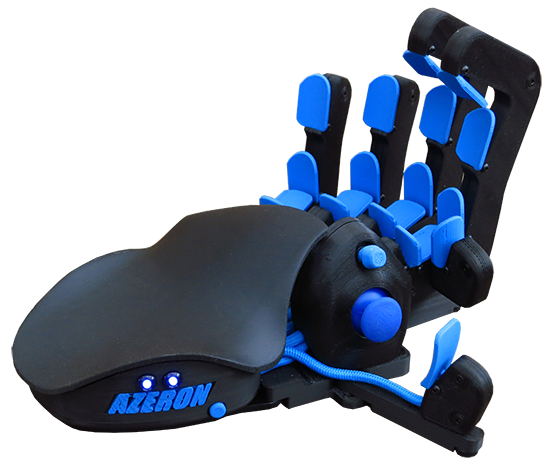
 stray elm
Sure thing ^.^ Best of luck!
wild plaza
cause i just checked google and the results vulkan is much better than directx
i used amd radeon rx 580 8 gbs of ram
generally speaking swan, which one do you prefer? vulkan or directx?
stray elm
I actually haven't had a chance to play Hades since the update where Vulkan was added, so I don't have a preference yet. Vulkan will work better on some systems--I don't know enough about it to guess for yours.
crude acorn
@wild plaza it depends a lot on the PC configuration you have, for some DX will work better, for others Vulkan, that's why we added a choice
wild plaza
ahh i see...
stray elm
@wispy cobalt
as requested, a comprehensive list of all launch options mentioned in this channel, including purpose, and if necessary, additional information tags
(disclaimer: I mighta missed some, but I doubt it)
(Disclaimer for anyone looking to this for help: #h1-tech-fixes should be your first stop, and #h1-tech-support should be your second. This is a reference more than a support guide)
(sending as a text file because it's over Discord's character limit)
 fallen spire
hello! I joined to consult with trying to launch the game as well from a mac computer. It won't let me
right now i'm trying to see if a restart will help...
stray elm
@fallen spire what's the specific issue you're getting?
fallen spire
@fallen spire what's the specific issue you're getting?
@stray elm I recently installed, and it was successful. Everytime though I try to click it to play, it briefly runs, and then stops immediately without playing the game.
stray elm
Alright—have you checked #h1-tech-fixes ? There are some suggestions for that issue
fallen spire
Yeah, I'm trying to go through it one by one, I just restarted my mac
what I'm worried about if it's something graphics related
stray elm
Why so?
fallen spire
my mac's just kinda old, but it's still running games so I think it's pretty stable
stray elm
Aight. As long as you meet the min specs, you should be good, have you checked that?
sharp narwhal
@frail sorrel Bitdefender has a "Safe Files" function that has a separate whitelist; make sure Hades is whitelisted there too
crude acorn
@fallen spire can you attach a screenshot of your system configuration here? just the first screen from here https://support.apple.com/en-us/HT203001
@edgy iris just checked with @sharp narwhal, this is as designed
smoky plinth
Assuming Swan is hanging around (I don't want to tag him.) - I just saw your reply from a few days (I think) ago. Yes, I have been having trouble with my setup. Joystick to move, mouse to aim. The bow/gun/shield (anything that you want to continuously aim in one direction) are pretty painful at times because it'll just randomly start shooting/bull rushing where my joystick is pointing b/c the mouse disappears.
Since they lock you in place, I often keep my joystick aimed where I want to dash to after attacking and if I am not moving my mouse around the whole time, it disappears and snaps my aim to the stick instead. For what it's worth, the tech-fixes "nativeinput" launch commands did not help, but I didn't really expect them to.
edgy iris
@edgy iris just checked with @sharp narwhal, this is as designed
@crude acorn , this is as designed
Ah, okay, just wanted to make sure that it wasn't an unintended nerf to Zeus
 misty lake
Hello! I just got this error on my game. I've never seen it before, and I've saved previously within this game session. I tried all of these except the administrator one, as I don't want to lose my relationship progress/unlocking a hidden aspect. Thanks!
edit: this happened after unlocking access to the administrative chambers, going into them, leaving, and heading into the bedchambers.
 marsh dawn
Hello !
I've been playing the game for a month (it's a blast, I have almost - I think - finished the epilogue) but since yesterday I experience small freezes here and there (mostly in Asphodele, when auto-saves and sometimes with a lot of foes / effects (but not always)). I never had technical problems prior to that. Since the only thing that changed was that I updated my graphics drivers (intel & nvidia) I tried to rollback to the last version of the drivers but it didn't helped ... (I have played everyday since the last patch (10/27) and I didn't encounter the freezes until yesterday).
The second thing that changed is that my girlfriend has started playing Hades on my computer so the game as now two saves, dunno if it is relevant.
I tried the fixes from the "tech-fixes" page, but it didn't work either.
Hope someone had the same issue and can help me!
Cheers
stray elm
@smoky plinth hello! While I don't have a tech suggestion for you, I know of one person who successfully had a similar setup to you. What I think they did differently (based on your description) is they actively held both controls (mouse in one, controller in the other), so that they only applied input to the controller when they needed to
@misty lake there are some additional things to try in #h1-tech-fixes , have you looked there?
smoky plinth
That's about how my setup is, the problem is just when I stop moving the mouse (say, aiming the bow).
I can compensate for it by letting go of the joystick while aiming, or by doing a little 'mouse wiggle' on the enemy, but I do not need to do that with say, the fists or the sword because I'm always moving the mouse with those.
So it's awkward to switch between weapons for that reason
The funny thing is the key that I use to charge the bow attack is a keyboard key, not a controller key or anything like that. So you'd think it would keep the mouse active
stray elm
One thing I just thought of—there are some aiming toggles in the game settings, have you messed with those? Not sure exactly how helpful they'd be, but might be worth looking at
smoky plinth
Yeah, I was hopeful that 'always aim at cursor' would do it, and it does, but when the cursor disappears it breaks.
Wonder if there's a launch option to never disable the cursor...
stray elm
Drat...well...
/AllowControlHotSwap=false /UseMouse=true
This might break your ability to use both (and may be completely out of date and not do anything), but it could be worth a try
Could also try just the second one, maybe
smoky plinth
I'll give it a shot, but that vaguely sounds like it may disable the joystick altogether
smoky plinth
Thanks for the suggestions. I'm hopeful that it is something that would be super easy to implement (even if just as a launch option, I'm sure those of us in my situation would Google it and find it) so it may get added sooner or later
I'll give those a shot when I get home and let you know
stray elm
Sounds good!
 pseudo mirage
Less tech support needed, and more a question because I couldn't quite find if it was explained somewhere (I may very well have missed it): For the planned save transfer system, I've got my save (Hell mode) on Switch right now, and would plan to shift it over to Steam when I can. If I started a save on Steam right now, would that transfer interfere, or would it just go to a different slot? (I'm guessing/hoping the latter.) Kinda haven't touched the PC version because I want to start a non-Hell save, but want them co-resident on one platform once things can be transferred.
(Also any just... general details on how the system will work, if that's documented anywhere, would be appreciated)
stray elm
I'd start your PC save in a different slot
There isn't a lot of information that I know of about how the system will work
misty lake
@misty lake there are some additional things to try in #h1-tech-fixes , have you looked there?
@stray elm I've done most of them except the ones that have commands in them; not sure where i'd write those
stray elm
there are instructions in #h1-tech-fixes for how to set those
pseudo mirage
Beyond the above comingling of slots (not merging a save, just not interfering with extant ones on the destination platform) I'm mainly just wondering if it'll be bidirectional/how easily it'll work. PC as a home platform would be super nice, and then being able to transfer back to my switch for travel would be the best of both worlds, but I know that with cert and everything, keeping console platforms in lock-step with PC updates is infeasible, so I'm sure that upgrading/downgrading save versioning wouldn't be trivial. Magical christmas land version's obviously "It just auto-syncs all the time and everything's perfect", but that sorta implementation is sort of a minor nightmare from an eng perspective, potentially.
stray elm
Afaik it hould be bi-directional, beyond that I don't know
misty lake
Hm, I exited to do the launch stuff and now my save file isn't being read :/
 green drum
Not sure if this is know or intended but i found leaving the Aspect of Lucifers Special outside of the screen causes it to just not detonate.
It Keeps its damaging aura but doesnt explode automatically.
Nothing gamebreaking just thought id post it here
sharp narwhal
@misty lake There are some tips in #h1-tech-fixes if you haven't tried them already!
stray elm
ahh
J_Squirtles, did you try both of the launch options or just the first one?
You want to start with just the first one (/SaveToTempAndMove=true)
misty lake
So far I've only used that one, with no luck
stray elm
alright--when you look at the file properties, are they marked as read-only?
misty lake
I remove the read-only, but then I check properties again and it's reset to being read-only
misty lake
Trying to do that right now, it's being kind of annoying. I'll let you know how it goes- thank you so much for your help so far!!!
stray elm
Sure thing! Best of luck
misty lake
I've turned off controlled folder access and still can't turn off read only, hmm
stray elm
You may need to specifically exempt that folder, instead of just turning CFA off
misty lake
I can't find the option to specifically exempt the folder, just to exempt apps
misty lake
What in particular should I be looking at in Windows Defender? Should I change Override from no to yes?
stray elm
not sure, sorry. I haven't looked at the details for that process
smoky plinth
@stray elm Swan - Just FYI, UseMouse did not seem to make any difference, but AllowControlHotSwap seems to fix it 100% in-game.
stray elm
oh sick!
smoky plinth
The menu got REALLY weird though, the second I moved the joystick, the mouse disappeared and wouldn't come back.
stray elm
huh
smoky plinth
As long as the boons menus aren't TOO jacked up though, this is definitely better.
narrow crest
Is there a reason why you can't right click Hades in the Windows taskbar to close it?
Er, to clarify, nothing happens when you click close.
I may or may not be a dirty save-scummer
stray elm
lol
smoky plinth
Oh.. Wait. Now it's even worse..
stray elm
task manager @narrow crest
smoky plinth
Damn. So close.
stray elm
drat
narrow crest
Yes, that's what I've been doing, I'm just curious
stray elm
no idea--I always have TM open so I just default to that
smoky plinth
When I hit escape and once again tried to use the joystick in the menu, i got back in the game and the mouse wouldn't come back 😦
For a few glorious seconds it worked exactly as I expected though
narrow crest
yeah, I'm just trying to get some focused practice in on || Theseus and Asterius || >_>
smoky plinth
Swan, if you care to look at the results with the tags: https://drive.google.com/file/d/1-nuRYTvyfN-Z0vefJoBCVZuvgGGETmdB/view?usp=sharing
The first half is my "preferred" working state; where the mouse is always on screen even when I'm not moving it.
Interestingly, I decided to try out /UseMouse=true /UseNativeGaInput=false /UseNativeGaInputNoControllers=true for launch options, just to SEE.. And it seemingly does nothing at all. The joystick still works, hijacking the mouse and everything.
Seems like disabling hotswap works, but for some reason still lets the controller jack the menu..
Here is the 'default' state of things where it starts ignoring mouse if it stops moving. https://drive.google.com/file/d/1cKgexzcejpx_AIdf-N3UadqXP62-JnZG/view?usp=sharing
Google Drive
Google Drive
stray elm
will do in a bit, sure
smoky plinth
All in all, good call on the AllowHotSwap flag... it's interesting that that works this way, but.. I can deal with maybe having to exit to the menu and coming back in every once in a while if I accidentally use the joystick in a menu...
winter idol
feedback: i'd like a button that resets heat to 0
feral spoke
feedback: id like weapons and furthermore aspects to keep their own heat settings
 nimble flame
Since my last run, most menus (like the trinket select menu) act like I'm holding down the left button on my controller at all times. Any ideas on how to fix this? I tried restoring my Temp save file, but still have the same issue. I don't have a terribly recent backup save file before that.
Notably, character movement isn't affected, and not all menus either. I see it in the trinket select and the mirror of night and the weapon aspect menus, but not in the boon viewer mid-run.
I've restart the game, steam, and my computer, all to no effect. I've pressed and unpressed all the possible keys/buttons that could be related.
...huh. OK, I solved it by increasing the dead zone. Somehow the required deadzone jumped up by a lot in the last half hour for this controller. Weird.
It's still acting quite weird though, even using the D-pad the menu goes right much faster than it does to the left
but intermittently, randomly
edgy iris
another thing im not sure if intended or not: the audio for character voices when in a room get super quiet and drowned out by other audio, particularly when character is far from Zag, particularly noticeable on Than and Hades when they're in the room but off screen
nimble flame
I think intended; when Orpheus sings it's the same
stray elm
character voices should be spatial afaik
and @nimble flame , do you run the game using Big Picture Mode?
edgy iris
them being spatial is understandable, but I mean that I can't hear their dialogue at all, even though theyre just off-screen in the same room, even Orpheus and Hades are louder from Zag's room
stray elm
is this active dialogue, or just them passively talking?
edgy iris
passive talking/side conversations, nothing with full screen text boxes and portraits
 misty nebula
hello, i bought the game on mac but the screen has been constantly freezing for minutes at a time despite the audio and my cursor being fine, and it takes ages to get through the title screen. once the game does start the screen turns black with some small patches of color for some reason. i tried all the things listed in #h1-tech-fixes but none of them worked
stray elm
@misty nebula what platform are you on? Steam or Epic?
misty nebula
steam
stray elm
Have you tried the different startup options? default vs. vulkan vs. 32-bit?
misty nebula
i heard of them but wasn't offered the option upon launch like tech fixes said, no idea where to find them
stray elm
could you double-check that the game is fully up to date?
actually--
could you try verifying file integrity?
misty nebula
steam said the files are all fine
stray elm
alright. Could you try navigated to steam's install directory C:\Program Files (x86)\Steam\steamapps\common\Hades (or C:\Program Files\Steam... ) and manually running the different x-- versions? In each of those folders, there should be a Hades application
oh wait
sorry
Mac
I apologize, I don't actually know off the top of my head where those files go on Mac, let me look that up
misty nebula
its fine
misty nebula
in that folder theres only a single launcher called Game.macOS
misty nebula
wdym
stray elm
- In some rare cases, the game's default settings can cause problems. To change those settings before launching:
On Steam:
· Right-click on Hades in your Steam Library
· Select 'Properties...'
· Press the button that says 'Set Launch Options...'
· Enter the following: /UseNativeGaInput=true /UseNativeGaInputNoControllers=false
misty nebula
oh those. yeah ive tried all the ones in tech fixes
stray elm
alright--have you also tried the fixes under If You're Experiencing Hitching / Freezing / Lag / Frame Rate / Performance Issues?
misty nebula
yeah
stray elm
maybe try reinstalling? Failing that, could you follow the steps at the very top of #h1-tech-fixes , about emailing supergiant?
misty nebula
alright then ill be waiting for the download to finish, thanks
stray elm
sure thing! hopefully that'll do it
 tranquil badger
I'm using a powera wired controller for the nintendo switch, and I'm having problems with registering input and binding keys. The triggers on my controller are not recognized when I try to bind them, and I wish there was an option to switch the a and b buttons for inputs on the menu (the switch layout for a and b buttons are flipped). I'm using the epic games launcher, and I always quit steam before running it. Can someone help me out?
I'm using the launch options in the tech-fixes too
frail sorrel
@sharp narwhal Thank you very much, I double checked it and it seems after an update it was no longer white listed, I am back in action, thank you again 🙂
smoky plinth
@misty nebula The startup options won't show if you right click your task bar icon or the notification area icon and start the game
If you haven't fixed that yet. You have to launch from the library.
 ancient crescent
is it possible to apply a max-fps cap? the game runs at 600fps which is cool and all but thats unnecessary resource usage...
 fluid sinew
Hey guys so in EM4 ||when Hades summons the Doomstone (or doomstones if I’m really unlucky) they’ll spawn like a bazillion baby doomstone thingies and it lags my game out very hard. I don’t have Jury Summons on at all so I’m just a little confused? It only happens in the EM4 fight, is this a bug?||
edgy iris
|| He’s summoning MM Doomstones, which spawn a bunch more and your PC is likely lagging under the excess amount of things on screen ||
crude acorn
@misty nebula what Mac are you playing on? there are known issues on some GPUs, you can check out #h1-tech-fixes
- Mac Users: There is a known issue with some older Intel graphics card models causing the screen to freeze occasionally. Lowering the game’s resolution and closing all other running applications should help reduce the frequency and severity of the freeze. Additionally, you can add the following launch options which should also help:
/DrawBlendMax=8 /DrawLights=false
fyi, there is no Vulkan of 32-bit launch option on the Mac version of the game
@ancient crescent I think turning on Vsync may help 🙂
@tranquil badger I'm not familiar with those controllers, are they fully supported on Windows?
ancient crescent
vsync 🤮
but i guess youre right. vsync shouldnt be too bad if your FPS is stable above the refresh rate of the display
it helped, thanks
 solemn bane
meant to F10 in game, but forgot to
not supposed to be able to get parting shot on beo shield, right?
frosty tiger
is it normal for the game to hit 100% gpu utilisation?
sharp narwhal
@solemn bane No, thanks for the report
 remote estuary
Hi i have problem - i have new PC and i dont have me save
in new pc i play new and this new game is in cloud recording
and i cant reccording me true save
 hot sequoia
Hi I've maxed out all the character bonds completely, but I still don't have good riddance sheet music appearing in the contractor's list. Is this a bug or am I missing something? It's the last one I'm missing. I've already had 147 escape attempts.
Oh I'm on the Nintendo switch version.
sharp narwhal
@hot sequoia It's a bug, sorry - it should be fixed with the next Switch patch!
sterile siren
do we have an eta on the next switch patch or is it contingent on cross saves being finished?
sharp narwhal
It is contingent on cross-saves, yes
stray elm
@remote estuary do you still have access to your old PC?
@frosty tiger probably not, unless you have an older GPU. You might want to check the section about performance issues in #h1-tech-fixes
frosty tiger
@frosty tiger probably not, unless you have an older GPU. You might want to check the section about performance issues in #h1-tech-fixes
@stray elm 1660 Ti :/
i turned on Vsync and it went down to 60%
ancient crescent
is there a way to make the game stop minimizing and pausing when its out of focus
stray elm
@ancient crescent you can set the launch command /RequireFocusToUpdate=false to have it not pause, and I believe you can have it not minimize through in-game options
ancient crescent
are you sure it starts with /? ive never seen a game on steam launch like that
or do i put it in a windows shortcut?
i think setting it to borderless and not fullscreen did the trick
thanks
 kindred folio
Hey, I got a problem launching Hades. First time I launch the game it works fine. But when I close it and relaunch the game it crashes and the bug reporter pops up.
Can someone help me with this? Error message:
Version: Release 36621
Renderer: NVIDIA GeForce GTX 1060 6GB (vendor id: 0x10de   model id: 0x1c03   rev: 0xa1)
OS: Microsoft Windows NT 10.0.19041.0
RAM: 16317
Cores: 6
64-bit: True
Region: nl-NL


FATAL EXCEPTION at 0x00007FF9198C60C5
Violation when reading address 0x8
Code: 0xc0000005

ExceptionStack Trace:
 at sgg::Subtitles::load in d:\jenkins\workspace\minos_pc_latest\gsge\engine.native\code\gui\subtitles.cpp:line 62 (0x00007ff9198c600d)
 at sgg::GameDataManager::ReadSubtitles in d:\jenkins\workspace\minos_pc_latest\gsge\engine.native\code\datastructures\gamedatamanager.cpp:line 559 (0x00007ff9197a4e6d)
 at sgg::WorkerManager::ExecuteCmd in d:\jenkins\workspace\minos_pc_latest\gsge\engine.native\code\helpers\workermanager.cpp:line 179 (0x00007ff9198f6c2d)
 at taskThreadFunc in d:\jenkins\workspace\minos_pc_latest\gsge\the-forge\common_3\os\core\threadsystem.cpp:line 166 (0x00007ff919a11de0)
 at ThreadFunctionStatic in d:\jenkins\workspace\minos_pc_latest\gsge\the-forge\common_3\os\windows\windowsthread.cpp:line 126 (0x00007ff919a1b5bd)
 at BaseThreadInitThunk (0x00007ff95cb27020)
RAM usage: 34% (~10 GB available or 11218173952 bytes)
@kindred folio Have you verified your installation through the game's launcher?
kindred folio
Yes, I also reinstalled the game already, ran as administrator and deleted my save files (made backup)
sharp narwhal
Interesting, that's from subtitles so I would've assumed a corrupt file. All the stack traces are exactly the same too which seems like a specific problem. I'll get an engineer to take a look.
kindred folio
Thanks alot, super fast response :)
 stoic briar
I'm trying to launch Hades on my MacBook Air. It's launched before with no problems, but for some reason today when I launch it it opens this white window and stays like this for a minute for before closing. How do I fix this?
Found a solution to this problem: going into ~/Library/Application Support/Steam/SteamApps/common/ and clicking on the Hades app icon from there seems to fix the problem
sharp narwhal
Interesting - if it runs from the .exe, sounds like it might be a Steam problem of some sort?
Have you tried disabling the Steam overlay?
misty nebula
@crude acorn im on a late 2012 mac mini, will there be a possible fix for this issue in a patch since the steam store page says it reaches the minimum requirements?
stray elm
@ancient crescent it's a launch option, instructions for setting those are in #h1-tech-fixes
But if setting to borderless worked, that's good too!
remote estuary
@stray elm yes i have me older pc
 steady coral
Hi, I'm playing Hades on epic games, windows and it keeps bringing up the save game bug. I already tried everything it suggested.
steady coral
The problem seems to have been getting worse too as before it'd save at least some of the time
sharp narwhal
@steady coral Do you have Windows Defender, or a third party antivirus like Norton?
steady coral
Windows Defender
sharp narwhal
Try disabling controlled folder access: https://support.microsoft.com/en-us/help/4046851/windows-10-allow-blocked-app-windows-security
stray elm
@remote estuary you can manually copy your save files (located in Documents/Saved Games/Hades over to your new PC
steady coral
Try disabling controlled folder access: https://support.microsoft.com/en-us/help/4046851/windows-10-allow-blocked-app-windows-security
@sharp narwhal It's already off
sharp narwhal
Alright; there are a couple launch commands in #h1-tech-fixes that may also help, under the "game can't save" tips
remote estuary
i delete folder with hades in me new pc and i put here folder from old pc but Epic games dont see this
south star
Been told I should mention this here. On latest switch version, in the 45 second survival room, you can start fishing before things spawn, and get stuck in the fishing animation while thing spawn. They can attack you to cancel the fishing.
sharp narwhal
@south star Yes, we're aware of that issue - thanks for the report!
nimble flame
@stray elm No, just launching from normal steam mode, with the game in normal fullscreen without steam overlay. macOS 10.14
stray elm
Alright, @nimble flame could you try using the Big Picture? It tends to enhance controller support
 idle ether
Sometimes my character just stops moving, mostly when leaving or about to enter a door.
The escape button still works and all but the character no longer responds
 fossil warren
With Athena's attack/deflect boon the beam on Lucifer's rail wouldn't deflect attacks including the witches purples blobs - is this a error or intentional? Sorry if posting in the wrong place.
stray elm
@fossil warren it does, but only right at the base of the weapon, not along the beam
@idle ether what platform are you on?
idle ether
pc
stray elm
Keyboard or controller?
idle ether
keyboard
stray elm
And no inputs work at all, other than escape? You can't attack or move?
idle ether
to elaborate, the character walked into the next room. game progressed as normally.
After I finished the room and exit it the game had the bug again, the character walked outside the room but the door kept open. I waited for a bit and then the new room was loaded again and I could continue. then at the next transition it happened again. the music continues the graphics on the screen continued, I could hit escape and the menu would funtion. when I died the game stopped working.
stray elm
Alright...could you try verifying file integrity? I'm not sure that'll necessarily fix it, but it's a place to start
idle ether
When I rebooted the game some files where downloaded, the game is only 2 days old but I think somethign might have been wrong
stray elm
did verifying file integrity change anything? it would've popped up with a message afterward
idle ether
no the game downloaded when I rebooted, I am in another run will try afterwards
stray elm
sounds good 👍