#h1-tech-support
1 messages · Page 36 of 1
 dim spruce
 sly oxide
Sorry, I think I'm just dumb and don't know the effects of the weapons in game, My bad 😦
 glacial karma
So I'm getting the "wont read saved data" bit and I think I put in in to be whitelisted from my anti-virus, but the game still wont save data. I checked my Saved Game folder and its stuck on read-only, even when I change it away from read-only. Would this be a cause to my problem or is it something else?
 stray elm
@glacial karma it's probably your anti-virus, or one of the other things mentioned in #h1-tech-fixes
glacial karma
Ok, I have my Hades folder in the Saved games bit whitelisted, and the folder from the steam games, is there another one that needs to be in there?
stray elm
those should be the only ones
glacial karma
kk, thx for the help
 compact spindle
@stray elm Usually, toward the end, but sometimes smack-dab in the middle.
stray elm
huh. If you're not dash-attacking, then I'm not sure why you'd be losing i-frames
compact spindle
Man, you have been here all day. About 15h, anyway. Get some shut-eye.
 feral spoke
he gets paid overtime
 grand raven
I've beaten Extreme Measures Theseus and talked to Poseidon, but Sea-God's Spite didn't unlock.
stray elm
@grand raven was it in the same run? it make require an extra run or two
stray elm
sure ^.^
grand raven
do I need to beat it at that heat level again?
grand raven
once more worked
used conch shell but I don't think it was needed
thanks @stray elm
stray elm
woot!
 sly knoll
I'm having some weird interaction with the adamant rail special. Half the time when I fire it, the marker will move across the map once or twice, and cause it to explode completely separate from where the marker was when I fired it.
sly knoll
Even placing it cente of an open room? It seems to move twice, and almost exclusively to my current location, regardless of where enemies are
stray elm
Huh... Could you get a screenshot, or ideally a short clip, of it bouncing weirdly?
If you're on PC, you can also report it in-game with 
sly knoll
On switch, but I'll see if I can record it
I've just tested, I can Def see it bouncing off walls, but sometimes it doesn't seem to collide with anything, just move the marker back to me
 steady horizon
My game keeps freezing and then crashing
 arctic mortar
did you try any of the potential fixes in #h1-tech-fixes ? and if those don’t help and you’re playing on PC, please use the ingame reporting tool with
if you’re playing on switch, a little more information regarding the freezes/crashes would be nice. as in: is it crashing/freezing in certain situations or not etc
 frosty tiger
Guys, since last update freezing on MacOS has even gotten worse.
Now it is literally unplayable
steady horizon
I am using windows and it is sufficient for my system specs but still the freeze and crashes continue
And like you said I tried all the solutions I saw there but it doesn't work
[MainThread ] windowsfilesystem.cpp:209 ERR| Error opening file: C:\Users\Windows 10\Documents\Saved Games\Hades\activeProfile -- rb (error: No such file or directory)
This error comes to me
 true rivet
Hello, I have been having a technological issue with HADES as of late
For some reason, the game pauses automatically at random intervals
This issue is not to major, but still a minor annoyance nonetheless
Has anybody else been having this issue?
 mortal turret
With Malphon using the aspect of Demeter and Flying Cutter at the same time, sometimes when you've activated the aspect of Demeter the special doesn't charge up and releases right away when you press Y. Is this a bug?
Oh wait it happens when you dash+special. Nevermind.
 ocean kiln
I have a problem to launch the game, it crash everytime at the end of launching, i tried everything to run this game (admin, check the files, uninstall then install again ...)
Do you have some ideas how to make this game playable again ?
 low peak
Just wanna ask: Will there be a Linux-native Version of Hades as the other Games from Supergiant have? It currently runs using Proton, but it has some issues regarding performance.
 mortal needle
hey guys , is there anybody who can tell me how to unlock the hidden weapon aspects? not the normal ones. I have checked dozens of articles and videos which were not helpfull. I have unlocked every weapons aspects exept the hidden ones. Maxed out 2 weapons but still achillies is simply not talking to me about unlocking them? There are absolutely no guides whatsoever about unlocking them. Please help out. Thanks
 thick lava
@mortal needle This thread may be of help to you: https://www.reddit.com/r/HadesTheGame/comments/j1lc13/comprehensive_guide_to_unlocking_all_hidden/
reddit
222 votes and 53 comments so far on Reddit
mortal needle
@thick lava i did check this article along with others, but achillies is not responding as they would say whatsoever, i have put in at least 5 titans blood on every weapon, opened every avaliable aspect on the weapon exept the hidden ones. did 41 escape attempts done 31 succesfull ones. mother is back game is finished now im at the grinding spot. but achillies is just talking about other stuff instead of true nature of weapons. another friend of mine is playing along he has 48 attemps. now he is randomly unlocking weapons after talking to npc's. why isn't there a simple video i don't get it but anyway that article is not hepling. i literally can't unlock hidden aspects.
 jagged ingot
tech
thick lava
@mortal needle Can you PM me your save file? I'll check it out real quick
 solar mesa
I don't have Discord Nitro to upload a video version, but on Oct 10 2020 I experienced a glitch in the Tiny Vermin AI. When the player and Tiny Vermin were in these positions then Tiny Vermin ran back and forth along the border of the pit for about a solid minute. I just sat there watching it run back and forth while not attacking or summoning minions. Eventually it broke out of this pattern and warped over to resume the fight, but I could have probably gotten in a bunch of free shots with my bow. Unsure if damage would have modified its behavior either:
thick lava
Thanks for this, I think we have this bug tracked
mortal needle
@thick lava yeah i'll try to find it and pm it to you asap
compact spindle
Can a tech staff member answer why I'm getting hit through i-frames when wielding Varatha or why perfect catches are not possible for some of us?
thick lava
I heard a similar bug a while back (re: the spear). Are you using a controller or kb/m?
@compact spindle ^
compact spindle
Controller.
thick lava
Which controller, and wired or bluetooth?
First thing I'd try is setting these launch options to swap the input system (might be better for your setup): /UseNativeGaInput=true /UseNativeGaInputNoControllers=false
compact spindle
Wired PDP Fight Pad. Acts like a Switch Pro Controller.
Can't augment settings like that. On Switch.
thick lava
Hmm. In that case, have you noticed any difference if you use the joycons? I'm not saying it's your controller specifically. There are reports of input problems on a variety of switch controllers, which I'm still looking in to
compact spindle
I don't use the Joy-Cons.
I sent mine in for drift repair and had them sent to my mom's place because I'm planning to move soon, but coronavirus has delayed everything.
thick lava
Understood. I think you're running into the input bug, which currently doesn't have a solution yet (sorry)
 pliant sorrel
Hi everyone, I’m new here and want to know if I have a bug. I’m playing on the switch version and currently in the middle of the Orpheus quest line and was able to hear his rendition of Good Riddance. I loved it so much and want him to play it again but it’s not showing in his music stand nor as an unlockable. Is this a bug or do I have to finish the quest line first?
thick lava
@pliant sorrel I've been rifling through the requirements data over here. Since I can't see your save file I suspect you need to progress a bit more for it to appear as an unlockable. Keep speaking with Orpheus and it should appear
pliant sorrel
Sounds good, I’ll finish up his quest line. Thanks 
And you can view my save file? If so, do you need my switch username for that?
thick lava
No, I can't see saves from console, unfortunately
 marsh roost
Anything on the issue with the blurry visuals (all enemies and characters in general) on MacOS? I did research and it seems as if it may be because of of the fact that the display isn't 16:9, and i have no 16:9 resolution options in settings, just ratios that fit with my screen. If changing the resolution to a 16:9 one would fix it, I'd do so, but unfortunately there isn't a custom resolution option in display settings. Hope thats added cause it could fix my graphics problem hopefully. (current resolution is 1440 x 900)
thick lava
@marsh roost You can try running with /AttemptHighDPI=true and boost the resolution a bit. The character and enemy models are prerendered though, so it might not fix everything
stray elm
@steady horizon could you open up Documents/Saved Games/Hades and see what files you have?
 kind yarrow
Hi, not sure if this has been mentioned before, but I'm currently encountering this issue where the game will softlock when I try to change my control scheme?
Playing on Steam
thick lava
@kind yarrow What controls are you trying to change, and what's your input method (controller or kb/mouse)?
stray elm
(and what kind of softlock?)
thick lava
^
kind yarrow
Using controller (standard ds4)
Basically, after going into the controls menu, and attempting to remap any button, the game will lock up/get stuck on that menu. I have to force quit the game in order to do anything
stray elm
Freeze, or just can't exit the menu?
thick lava
I wonder if the bug reporter appeared behind the window. Can you alt-tab or is it straight-up 'Not Responding'?
Could also try these launch options and see if that helps: /UseNativeGaInput=true /UseNativeGaInputNoControllers=false /PS4Gamepad=true
kind yarrow
I can alt tab, but that doesn't help. Pretty much have to alt+f4 /restart the game any time I try
Ah, will try that out
aha! That's worked, thank you
 narrow heart
Are some themes supposed to only be available occasionally/rarely from the contractor? I seem to have some themes that are always available for purchase, some that show up occasionally but aren't always there, and some that I haven't seen at all yet
From what I've read in the server, there doesn't seem to be any specific unlock conditions for individual themes, is there?
stray elm
Not that I know of—what platform are you on?
narrow heart
I'm playing on switch
compact spindle
@thick lava @pliant sorrel There is a way to share your Switch file to a dev, though.
narrow heart
Ive just seen that the most recent post-launch update is coming to switch later, so it might be addressed with that, actually
compact spindle
The dev has to contact Nintendo to set it up, and then the user goes to Settings -> Data Management, highlights any option, and holds L3 and + simultaneously for 2s.
thick lava
As far as I'm aware, we don't have anything like that available right now
compact spindle
Maybe not, but you can go ask Ninty if you can set it up.
narrow heart
That seems like a fair deal of effort, but I'm happy to send in any files/data that might help. It also might be something that's addressed by the patches that are still on the way for switch so it might not really be an issue
thick lava
Yeah we have another patch for switch in the works (the cross-saves patch in fact)
I don't know the theme unlock reqs off the top of my head
narrow heart
Nice, I have the game on epic as well. If it's still an issue when that's out, it'll make it easier to share my save data
 wide spire
Hi, playing on the switch. Just lost progress on my last five runs. Extremely frustrating. I was in the house of hades when I closed out from the switch home screen. I believe auto save was working. Is my progress gone for good?
 drowsy vigil
Hi, I'm trying to fullfill the prophecy ||Family Reunion|| and I have done all the condition but the last one but I don't have the exclamation mark on the involved characters 😕 What am I missing?
 graceful vapor
not sure if this is tech support but where do i install mods
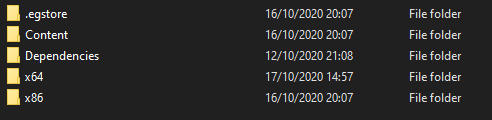
in which file?
or do i need a seperate installer
(for epic games)
 flint compass
you might want to go to the modding discord with that https://discord.gg/KuMbyrN
 hollow adder
hey, my game keeps popping up the not being able to save screen
ive turned on its whitelist on my bitdefender, turned off read only and ran as administrator
ive also uninstalled and reinstalled twice
 dreamy vector
Hey guys, I booted up the game today over steam and my save was reverted all the way back to before 1.0. I have steam cloud saves on and tried restoring but nothing's changed. I have no idea what happened, I've lost at least 30 hours of play...
hollow adder
idont know what else to do to try and fix it
stray elm
@hollow adder if you check the files again, are they still read-only?
hollow adder
yes, how do i turn it off?
stray elm
@dreamy vector could you check Documents/Saved Games/Hades and see when your most recent .sav file is from?
@hollow adder there are some other things to try in #h1-tech-fixes , beyond what you mentioned
dreamy vector
It's from today since I checked the file and ran around, I also appear to have files from oct 1st and sept 22nd
stray elm
Did you leave the room you started in?
dreamy vector
Yeah, so I think it saved over :/
stray elm
That would've saved over the temp sav, and quitting the game would've saved over your main save, unfortunately.
 simple juniper
I don't know if there's a current bug list, but I'm experiencing receiving a different gift than the one in the preview. For example now i finished the inferno bomber battle in tartarus and the next chamber had as reward keys, once i finished the next chamber the reward I got was Daedalus's hammer 🤔
dreamy vector
Yeah..............
stray elm
If you don't want to do that all again, I could send you mine later today—it's not quite done story-wise
@simple juniper what platform are you on?
dreamy vector
I'll see if I can restore the oct 1 files, it's probably better than nothing
simple juniper
@simple juniper what platform are you on?
@stray elm PC
stray elm
If you sent in any bug reports recently with your name on them, you might be able to ask the devs to send it to you
@simple juniper could you report that in-game with ?
simple juniper
oh of course!
dreamy vector
Oh dang, I guess I'll see if I can send a report then
dreamy vector
unless you mean I'd have had to do that before
stray elm
Yeah
dreamy vector
oh, yeah no 😢
stray elm
Reports send your save along with them
Drat
Well, I can DM you with where my save is, if you'd like me to potentially send it to you?
dreamy vector
Yeah sure! I was pretty far along, I've been playing the same save since early access so it
it's really a bummer
stray elm
Ye
dreamy vector
I played like crazy after release!
hollow adder
ive tried what the tech fixes said and it still keeps popping up with the unable to read data thing
stray elm
Alright—try the launch option /SaveToTempAndMove=true
Edit: @sharp narwhal so you can see that this worked ^.^ (I think y'all are still testing these, yeah?)
hollow adder
i think its fine now
the screen hasnt popped up in like 3 encounters and the autosave icon is apperaing in the corner now
stray elm
Sweet!
hollow adder
thanks @stray elm
stray elm
Yeah!
 fleet sigil
Hi every time I quit the game it crashes to the point where I have to force quit it and restart steam
stray elm
@fleet sigil I'd suggest verifying file integrity, and if that doesn't work, reinstalling
fleet sigil
Yes that’s what I’ve tried it just seems to keep happening tho after I close it only started doing it a few days ago
 crimson heron
Having an issue where Hades crashes everytime I try to launch it, have tried running as admin, disabling steam overlay, verifying file integrity, reducing resolution to 1920x1080 (monitor is ultra-wide). Game seems to start, but then screen flickers as if to switch resolution, then I get the bug report dialogue.
Win 10 Pro
Core i7-9700
32GB RAM
GeForce RTX 2060 SUPER
 sharp narwhal
@crimson heron If you include your discord tag in the contact info section of the bug report and then submit it, I can look it up and see what the issue may be!
sharp narwhal
Alright, thanks - there are some launch commands in #h1-tech-support , could you try starting the game with those and see if they help? And maybe try restarting your computer, too, and then launching it again
stray elm
@fleet sigil even after reinstalling?
fleet sigil
@stray elm yeah still does it
stray elm
alright--to be clear, is it instantly closing, freezing, not responding, what kind of crash?
crimson heron
Instantly crashing using /UseSwapEffectDiscard=true seems to have worked for now 🙂
fleet sigil
Freezing and not responding
stray elm
alright. not sure what to do to fix that, sorry. Could you send in a bug report with next time you start up the game?
if you include your discord tag, the devs could potentially reach out to you with a fix, if they have one and can ID the issue
 shy edge
hi there
i'm trying to play hades and i'm getting a screen of blackness
i've done the list of things to try that super giant has recommended
stray elm
you've tried the launch options @shy edge ?
shy edge
yes, I have tried the one that is listed under steam section
wasn't entirely sure if the extras below the epic game store was meant for me to try
stray elm
best of luck!
 limber helm
hey! I found a little visual bug in Hades but not sure where is the best place to report it?
 clever bronze
I've also got two minor things that I'd like to tell about, also wondering where I should put it?
stray elm
@limber helm @clever bronze if you're on PC, you can report bugs in-game with ! Otherwise, feel free to describe them here (pictures of bugs are welcome!)
clever bronze
oh, cool!
well, one's a bug I'd assume, and other's a suggestion.
Some enemies has been "caught" on corners, Asterius once in the Elysium fight (he was bull rushing, was stuck doing the animation for a good 5 seconds), where he was stuck on one of the middle pillars. Same with one of the skeletons in the Bomb Skeleton Duo fight in Tartarus
I sure hope that's descriptive enough 
As for the suggestion, I'm not 100% if it's like that, but a handful boons, like Zeus' that boosts god gauge gain, doesn't appear unless you have a Call, even though those boons in the codex say (no specific boon required)
 last kettle
@clever bronze thanks! We'll investigate these.
 devout bear
I was asking some questions and realized my save bugged. When the game changed to 1.0, some random things got "reset" in my save - I lost ||companion fidi|| and had to get it again (the rest of the ||companions|| were fine), i lost my fists and had to unlock them again, the ||lyre quest|| and the ||eurydice+orpheus quest|| got reset (and maybe, but not sure, the ||nyx+chaos quest||, i don't remember for sure if i finished that one). Everything I was able to get back again, except for the ||story quests||, and I just want to know if it's a known bug and if i'll get to experience what is missing, or if I'm locked from the ||questline||.
last kettle
@devout bear You shouldn't be locked out of the questlines, but if you've been playing on the same save where progress was lost there's not an easy way to tell for certain. If you find that you've been playing for a while and haven't been able to progress the questlines, I'd recommend emailing support@supergiantgames.com with your Hades.log and DxDiag (instructions on how to find those is on #h1-tech-fixes ). From there, an engineer will take a look and help you figure out how to proceed
devout bear
Thank you! I'll try to get a few more runs in to see if I just needed to wait for a quest prompt, if not, I'll do that.
 silver canyon
Hello! Are there any known bugs with duo boons or anything right now? I'm on my last prophesied duo boon (smoldering air) and I've had the requirements met by the end of asphodel in my last 6-7 runs, but have not yet received it. Am I just getting unlucky, or is there anything that could be preventing me from getting this?
limber helm
Hey so bug I spotted is that the font is not correctly applied in the pom of power menu for battle rage. The text is white and plain, not green
 radiant dome
Actually, I'm having a little trouble getting the game to run, at the moment.
I followed the suggestions that were listed in the techinical FAQ including updating the drivers for my video card, uninstalling and reinstalling the game and turning off the Steam overlay.
What's appears to be happening in my case is that the game's executable can't find a certain .dll file - d3dcompiler_47
I did a search for it on my computer and it's on there more than once including the folders of a few other games in my Steam library.
last kettle
@silver canyon There aren't any currently known blocks involving Smoldering Air. I'd say it's bad RNG, but if you still can't get it in a few runs, feel free to send a report to support@supergiantgames.com and an engineer can dig into it more thoroughly.
@limber helm Thanks! This is a known bug we're currently investigating.
@radiant dome Okay, thanks for going through those steps. Could you please send your Hades.log and DxDiag to support@supergiantgames.com ? We'll take a look.
radiant dome
I have a dxdiag file available and will send it to you in a moment. ^_^
However, because Hades can't find the .dll file, it can't finish the setup process.
Not yet, anyway. ^_^U
silver canyon
@last kettle sounds good, thank you!
radiant dome
Actually, would you prefer that I send it through Discord or via e-mail?
sharp narwhal
@radiant dome Hold on, there's a steam thread that may help you

When I press play on steam it simply doesn't open, at all. I've tried verifying integrity of game files multiple times and restarting my pc but it just refuses to open.
I don't know if you're on Windows 8 or not - this tends to affect Windows 8 users
A missing Windows update or something, I guess
radiant dome
It wouldn't surprise me. 9_9
I am using plain vanilla Windows 8.
I had it installed on my computer years ago knowing that I'd have to tweak it a little to get it working how I'd like it.
Actually, I'll be back in a bit. The 'dinner bell' is ringing.
Thank you again for your help, Allison. ^_^
Here's hoping that this problem can be fixed. I've heard good things about this game. ^_^
 pine knoll
Hi, I am having trouble opening the game on mac steam client. It starts up saying it's launching, then the play button turns green, then it forces me to hit play again. Never ending loop and there's no error messages. I followed the tech support guide. Uninstalled, reinstalled, verified game files, no luck. Any suggestions? I also just emailed supergiant support but figured to throw a question in here if you can help. Thank you!
stray elm
@pine knoll there are some Launch Options in #h1-tech-fixes you could try--I believe /UseSwapEffectDiscard=true has been successful?
radiant dome
Hi, I'm back.
I just sent a copy of the DxDiag text file for my system via e-mail.
I hope that it proves useful in solving this 'puzzle'. ^_^
sharp narwhal
Did you check the steam thread up there?
There are others there that had this issue, they describe how they got it working
radiant dome
I read the first post so far and tried out the advice involving Event Viewer.
I'll read the rest of the thread now. ^_^
pine knoll
@stray elm thanks for your suggestion. Still no luck. I hit play > it says cancel/stop > reverts back to play
radiant dome
Have you all tried the files from the suggested site, dll-files.com
These days, it doesn't hurt to be cautious. ^_^U
 ashen monolith
Hi, my Hades won't save and I cannot locate a "Saved games" file. What should I do?
radiant dome
There is also different versions of the file in folders for other games in my steam library, if it will help. ^_^
sharp narwhal
I haven't tried them; I trust the players who use them didn't have any issues with them, though , or they wouldn't be linking and recommending them
@ashen monolith Do you have Windows Defender, or a different antivirus?
ashen monolith
@sharp narwhal I cannot access my Windows Defender so I'm assuming it is not running
sharp narwhal
Gotcha. Steam or Epic?
radiant dome
gets an idea
If I happen to find the latest version of the .dll file that Hades is asking for, what folder to I copy it into?
sharp narwhal
· Right-click on Hades in your Steam Library
· Select 'Properties...'
· Press the button that says 'Set Launch Options...'
· Enter the following: /SaveToTempAndMove=true
@ashen monolith
@radiant dome based on the thread up there, into \Program Files\Steam\steamapps\common\Hades\x64
ashen monolith
@Ellis I still have the error when I launch the game/every time it tries to save
@sharp narwhal
should I revert the launch option before I try anything else?
sharp narwhal
Sure
Can you turn Windows Defender back on and see if you can turn off "controlled folder access"? https://support.microsoft.com/en-us/help/4046851/windows-10-allow-blocked-app-windows-security
ashen monolith
I can't find any
I just have Windows Defender shut off right now since it's being so finicky with accessing virus protection and controlled folder access pages
Windows Defender is giving me such an awful time that I can't be bothered to deal with it, so it's staying shut off for now
It won't even let me sign in to my Microsoft account lol
@sharp narwhal When I installed the game, it did not create a Saved Games file anywhere on my computer. Does that help diagnose the issue at all?
sharp narwhal
No, it makes sense if the game can't access the folder at all that it won't be able to create a saved games folder
Sorry, looking for some more resources for you
ashen monolith
No worries, I'm not in a rush
radiant dome
Okay, so I copied the latest version of the file, d3dcompiler_47.dll from one of Steam's folders into Hades\x64 folder and tried to run the game.
ashen monolith
@sharp narwhal I have verified the cache as well as turning off the steam overlay
radiant dome
So far it isn't liking the idea. 9_9
sharp narwhal
There are a few more steps here: https://windowsreport.com/access-is-denied-windows-10/
Generally if you can't access Windows Defender's settings, it's because your computer thinks (correctly or incorrectly) that you have another 3rd party antivirus installed. Sometimes this is because there are remnants of an earlier antivirus still on your machine, if you installed or uninstalled something. If you're not using an administrator account on the computer it's also possible you're locked out because of insufficient permissions.
Not having the correct file permissions would also be blocking Hades from saving - it's a problem where the game, for whatever reason, doesn't have access to your Documents folder.
radiant dome
I tried telling Steam to run the game, it tries to set it up and after 50 seconds it gives up.
sharp narwhal
Hopefully these work on Windows 8: https://support.microsoft.com/en-us/help/2977003/the-latest-supported-visual-c-downloads
Get the latest x64 version and reinstall it, and try clearing Steam's download cache: https://support.steampowered.com/kb_article.php?ref=3134-TIAL-4638
radiant dome
At least there's no message saying that it can't find the .dll file shrugs
Ah, yes, Visual C++. I have the redistributables installed too.
ashen monolith
@sharp narwhal I'm just reinstalling the game in the meantime just to try
radiant dome
I can try installing them again, though, if it will help.
Thundering typhoons, what a puzzle.
brb
I tried repairing the redistributables and have to reastart.
ashen monolith
@sharp narwhal sadly nothing changed
sharp narwhal
Alright - an engineer may have more options for you on Monday. Unfortunately all that's certain is that there's an access or permissions problem where the game can't get into your Documents folder
frosty tiger
whre is the game file located i need it to change the graphics card the game is using
radiant dome
I'm back again...and still no luck getting Hades to run. 9_9
This is the first game that has proven to be as stubborn as its title villain.
 exotic shuttle
Hi, I don't know if this is something known / fixed on the pc as I'm on switch but I got a heat issue: it glitched to where I will be able to get bounties twice at the same heat level
stray elm
@frosty tiger it's located in C:\Program Files (x86)\Steam\steamapps\common\Hades\x86 (or your other program files, or x64 or x32)
@exotic shuttle what heat did you get bounties at, and what was the highest heat you had done before that?
exotic shuttle
I just did 8 heat on Adamant Rail and the pact page says I can do it again. When I started the run I got the voiceline implying I will have too low heat, and in the boss reward claiming screen it said 7 heat. In the corner and post-battle it was shown correctly and I did get all the bounties
stray elm
ah, yup
just a moment for me to explain
you get rewards for the lowest heat you have not yet completed. So if you're attempting a higher heat (let's say the highest you had done previously was 6 heat, and you're attempting 8) you'll get rewards for 7 heat.
exotic shuttle
Nope, I did do it at 7 heat before
Unless I'm mixing it up
But that would explain things :D
stray elm
so what was the highest before that first run?
exotic shuttle
Why does the voiceline say I won't get bounties from it?
exotic shuttle
So sadly I cant say for sure if I had 7 heat before, I was sure it told me to fill from 7 to 8 when I was setting it up but I could be wrong, so thanks for clarifying!
radiant dome
tries adding the scripts listed in the Technical FAQ, hoping they will get the game running
stray elm
sure thing! best of luck!
exotic shuttle
But still, the voiceline said "I won't get bounties from this but why not" So I guess it mistook high heat for low heat?
stray elm
¯_(ツ)_/¯
exotic shuttle
¯_(ツ)_/¯
Not too big of a problem but that threw me for a loop with the rest of it, thanks again 🙏
radiant dome
@sharp narwhal So far I'm still having no luck getting Hades to run. If it will help, I'll try again on Monday.
In the meantime, I've sent a DxDiag text file to support via e-mail. Hopefully it will help solve this puzzle.
To be honest, this is only the second game that I've had trouble running through Steam. It's surprising to say the least. ^_^U
Still, the help that you and Allison provided was welcome.
If it will help further, I can post a screenshot of what's happening with each attempt.
Basically, steam will try to setup the game and give up after about 50s.
I'll leave the decision up to you.
sharp narwhal
Nah, it shouldn't be necessary, thank you though
Usually when Steam gets stuck in the setup it's because it's getting stuck installing some redistributable or other component required for the game to run
Which isn't too surprising, given the missing dll issue; it's probably not the only thing
radiant dome
Well, we'll see what happens on Monday.
In the meantime, I hope that you all have a good weekend. ^_^
sharp narwhal
You too!
radiant dome
😎 👍
 sacred pulsar
Hiya!! I'm playing Hades off a 16" Macbook Pro and the performance is very impressive - I'm getting ~130fps.
Unfortunately, the thermal design of these machines means that the fan runs extremely loud and even makes the case resonate a little after you've been running the CPU or GPU at full tilt for a while.
Honestly I really only need 60fps on a laptop - is there any way to get the game to run frame-limited? That way I could give the fan a break - and not risk what I assume are some fairly narrow heat tolerances in the macbook.
 acoustic mirage
guys i need help, the game started from the beginning after I spend hours in this game. I loss everything
 upper loom
@sacred pulsar have you tried running with VSync on?
stray elm
@acoustic mirage what platform?
sacred pulsar
@upper loom I have! But, er.. I have a 144hz display. I guess I could just reduce that to 60hz or something and keep vsync on, so i'll get 60fps?
acoustic mirage
windows 10
upper loom
there might be a command line option to limit your FPS manually, but I'd have to check with an engineer as I don't know it off the top of my head. limiting your display refresh rate might be the best bet for now!
@acoustic mirage have you looked at the steps in #h1-tech-fixes under "If the Game Won't Start or Read/Write Save Data"?
acoustic mirage
@upper loom yea, thats not the problem because i don't have any anti virus
upper loom
but you have a save folder and everything?
acoustic mirage
yes
in the steps in #h1-tech-fixes under If Your Game Crashes and You Lose Progress, says to edit a file, I'm confuse to witch one i have to edit
acoustic mirage
yea i think i was on profile 1
stray elm
you want to move Profile1.sav to a different folder, and then rename Profile1_temp.sav to Profile1.sav (or whichever save you were using)
 dark leaf
I still can't get mine to save and iv tried all the steps and now I'm lost on what to do
stray elm
Have you tried some of the launch options? I don't remember what we've suggested so far
dark leaf
Lauch options?
stray elm
Are you on Epic/Steam?
dark leaf
Steam
stray elm
Alright—look in #h1-tech-fixes , there are things called launch options you can set before you start the game. The launch option you want to try isn't listed—it's /SaveToTempAndMove=True
dark leaf
Think I did it pressed play now its downloading content
It timed out didnt launch
Nevermind its downloading and if this works thank you so much @stray elm
stray elm
Sure thing!
dark leaf
Still unable to read data
I can see my save data and enter game but it won't save at check poijts
stray elm
Alright. I'm not sure what else, right now. Hopefully one of the devs will have another idea when they're next on
dark leaf
Could it maybe be something with the game syncing to my desktop and laptop? It was working before but maybe has a new issue
dark leaf
No clue i just logged into my laptop to play it and there was my saved file didn't do anything
stray elm
Ah, that sounds like the steam cloud. That shouldn't be interfering
stray elm
Huh
dark leaf
On my laptop hades runs with no issue
stray elm
I guess there's something different about your setup?
stray elm
You start with some heat, and there's an exclusive Pact option
dark leaf
Ooo
frosty tiger
i tried to change the graphics card the game is using
and it would not let me
is that an issue with the game itself or something i need to do with windows
stray elm
what are you doing to change it?
 hasty cedar
Hi guys, yesterday's update broke my game 
steps I've taken thus far
The problem: Opening the game, I just get a black screen, and clicking causes the game to crash
- Uninstalled and reinstalled (noticed that antivirus didnt like a file and deleted it)
- Validated files and Steam said one missing, fetched the missing file
- Validated again, Steam says all files accounted for
- Whitelisted Hades in my AV (ESET)
I have sent the Hades.log and dxdiag to support as requested in the tech fixes chat
I also enabled steam overlay, but to no avail
stray elm
@hasty cedar there are some launch options in #h1-tech-fixes , I'd check those out
On Steam:
· Right-click on Hades in your Steam Library
· Select 'Properties...'
· Press the button that says 'Set Launch Options...'
· Enter the following: /UseNativeGaInput=true /UseNativeGaInputNoControllers=false
If those don’t work, there are a couple of additional options to try, adding one at a time, each one with a space after the ones above:
/UseSwapEffectDiscard=true
/UseAnalytics=false
hasty cedar
/UseSwapEffectDiscard=true seems to have fixed it
stray elm
sweet!
hasty cedar
thanks, should have just tried it myself 
stray elm
no worries ^.^
 grand tiger
Hey all.
I got an issue. Hope someone can help me.Yesterday, to show some things to a friend in Hades, i connected his account (steam). THen I launched the game. We played a bit. Now i'm unable to access my backup and only got his backup. More strange, i'm playing on Epic. seems like it overwrotten my backup on the cloud due to cross save..
Tried to play with profile files. Doesn't help
stray elm
hey @grand tiger -- save files are stored in the same location for a given user on your computer (Documents/Saved Games/Hades), so playing from another person's Steam/Epic account would overwrite your own saves. You may be able to recover from your backup save (Profile1.sav.bak or Profile1_temp.sav.bak), but that may not be very recent, and it could've been overwritten when you loaded your friend's save.
grand tiger
Hey, tried some things.... no succes... you don't have any backup on the cloud for some time ?
Got the feeling that the content of the profile has been overwritten... the profile remains good.
stray elm
As far as I know, Epic does not have multiple cloud backups, unfortunately.
If you've submitted any in-game bug reports with some form of contact info attached, you may be able to ask the devs to pull that up, which would have your save from that point.
grand tiger
never did that 😦
stray elm
Then if your save files in Documents/Saved Games/Hades have been overwritten, and your Epic Cloud saves were also overwritten...unfortunately, I'm not very familiar with how Epic's Cloud services works. I know Steam will check if there is a mismatch between Local and Cloud before overwriting anything, but I don't know if Epic does that. Sorry ^.^"
If you lost a lot of progress because of this, there are story-complete saves on the speedrunning website, or you could get a save from a member of the community here.
grand tiger
I was on Boosted Hades 😦
stray elm
alright--had you || completed the epilogue ||?
grand tiger
I had the game credits with Zagreus and the 2 chars (C & P) in the board.
P was in back in the house
didn't complete bossted Hades.
stray elm
okay--if you'd like, I could send you my save file. I'm not quite that far along (|| only a little bit past the credits||) but you wouldn't have a ton to catch up on. You could also poke around in #h1-story-discussion and ask if anyone is closer to where you were
grand tiger
well, that sound good. What weapon are you on mainly ?
stray elm
I played on most of them, but my most progress is on the shield of chaos (|| 40 heat ||)
stray elm
nice ^.^
grand tiger
I'm above than frustrated 😦
stray elm
Again, sorry for the loss. I would double-check your Epic Cloud save, if you haven't already.
stray elm
I don't know, exactly--let me boot up Epic real quick
alright--
@grand tiger what happened when you started up your game through Epic?
grand tiger
from scratch :
- Disconected steam
- loggon with steam on another account
when started Hades (with friend account), it told me
Hey, you have more recent save locally
what do you want to do ?
we wanted to play with the other account
so clicked : play with save from cloud
we played
then
this morning
went back to my own steam account
started hades from epic
that's where i'm
my guess : i downloaded the save from my friend's account. It Cross saved it automatically
stray elm
so clicked : play with save from cloud
this overwrote your own saves, which steam detected because they're stored in the same place
stray elm
theoretically, you should've gotten a pop-up like this when you started the game through Epic, unless you did not enable cloud saves on epic
grand tiger
I could understand how "profiles" are working. Profile 1 is slot one in backup
etc
all my profiles 1 (my main backup are now with my firend's account
stray elm
yup. your friend's Profile1 overwrote your own Profile
did you have cloud saves enabled through Epic?
stray elm
you should've gotten that pop-up from Epic...
grand tiger
I don't
stray elm
weird
then yeah, your save is almost definitely gone. I could send you mine, or you could ask in #h1-story-discussion if anyone has one they could send you that might be closer to where you are.
Sorry :S
grand tiger
Thx for your help anyway
grand tiger
Do you mind sending me your save?
grand tiger
Thx to you, i'm just below 9 temperatures with my Fists. I know it's not Mandatory, but I'll do that anyway. You made my day putting me back to a point i was not far from. Thx a ton. I whish you a great day.
 narrow apex
Hello, I have an issue after using my special, i lose the control of zagreus for 1 sec, if i inout something during the special (like up for exemple) zagreus will follow the input, and i cant cancel it for 1 sec.
If i dont inout anything, i can't move zagreus for 1 sec after the special
It occured on both weapon i tried today (excalibur + normal gun). It never occured to me before the last update (it doesnt happend after each special use, but about 30% at least)
 teal elm
My game seems to freeze rather often, making the game stop responding for about 1-10min each time
The logs seem to contain nothing usefull. I think it might have to do with high CPU usage.
frosty tiger
ok so i've been trying to change the graphics card my computer is using for my game and by right clicking on it and changing the nividia default yet when i right click the hades .exe it does not come up at all
 topaz swallow
I have now defeated charon several times in a row and the minor prophecy has yet to tick off, does it not count if you use a death's defiance or something?
sharp narwhal
@narrow apex Try the following and see if it helps with the input issues:
On Steam:
· Right-click on Hades in your Steam Library
· Select 'Properties...'
· Press the button that says 'Set Launch Options...'
· Enter the following: /UseNativeGaInput=true /UseNativeGaInputNoControllers=false
On Epic Games Store:
· Select 'Settings'
· Scroll down to Hades under 'Manage Games' and select it
· Select 'Additional Command Line Arguments'
· Enter the following: /UseNativeGaInput=true /UseNativeGaInputNoControllers=false
@teal elm Try the steps here and see if performance improves: https://supergiantgames-kb.groovehq.com/help/hades-performance-issues
narrow apex
thnaks, i'll try that (i play with a ps4 controller)
sharp narwhal
@frosty tiger You should have an Nvidia control panel or something similar, that would be the best place to change your GPU settings. https://www.techadvisor.co.uk/how-to/pc-components/how-set-default-graphics-card-3612668/
frosty tiger
i'll try that
thank you very much
it's just odd that the panel menu didn't come up like it does on all my other games
narrow apex
@sharp narwhal now the bug happends 90% of the time
sharp narwhal
Hm, well that's not ideal. Are you on Mac or PC?
narrow apex
PC
sharp narwhal
Alright; clear the commands, then. Could you send a bug report in-game about it using the F10 key? We'll investigate.
narrow apex
yep, i'm doing the f10 report
sharp narwhal
@topaz swallow Death Defiances shouldn't affect it, but if you fight him and lose in between victories, it does break your streak
narrow apex
@sharp narwhal Bug donest occur when using keyboard+mouse, i forgot to add that into the f10 repport
sharp narwhal
@solar mesa It may be better to send an email; it's more likely to get directly to our writer that way!
We have a contact form here: https://www.supergiantgames.com/contact/
Supergiant Games is an independent game developer in San Francisco, California. We created the games Bastion, Transistor, and Pyre.
solar mesa
Okay, deleting and sending via email to reduce clutter.
 timid latch
i have this problem with save folder stuck at readme. i tried everything but it doesn't work. can i change save folder location?
sharp narwhal
@timid latch Not really, no; do you have Windows Defender or a third party antivirus?
timid latch
defender
sharp narwhal
Alright; can you try turning off controlled folder access? https://support.microsoft.com/en-us/help/4046851/windows-10-allow-blocked-app-windows-security
timid latch
its already off
sharp narwhal
Alright; are you on Steam or Epic?
timid latch
steam
sharp narwhal
Try this:
· Right-click on Hades in your Steam Library
· Select 'Properties...'
· Press the button that says 'Set Launch Options...'
· Enter the following: /SaveToTempAndMove=true
 sweet musk
alright, i've noticed a visual bug when i play bow, and i can't figure out how to solve it
after attacking (left click or special) zag holds the bow like he's ready to shoot another arrow
he holds this position until i move or attack again (if i attack again he holds the position afterwards)
sharp narwhal
That's just his post-firing idle animation; if I remember correctly, some of the other weapons have that too
sweet musk
okay, i was just wondering because it looks very static and unnatural
timid latch
@sharp narwhal i think it worked, thanks
 celest spindle
My friend has been telling me his game takes about 30 seconds to get to title screen and if he clicks on the window then Windows says its unresponsive
He tried again but just waited and got to start the game. But when he talked to the renovations guy the game froze. And now some models are not loading in
he has the Steam version also if that matters
stray elm
@celest spindle I'd suggest verifying file integrity, for a start
celest spindle
right, Ill tell him and see if that helps
 alpine yarrow
Hi! My brother’s might have run into an issue where Eurydice’s affinity gauge is still locked even after completing the Musician and Muse prophecy and buying the singer’s gamble? Orpheus’s gauge is already unlocked and he’s already spoken to Eurydice after buying the singer’s gamble but her gauge has not changed
(We play on the switch)
sharp narwhal
I think you may need to speak to Eurydice again after that conversation with both of them - shouldn't be a bug
alpine yarrow
Okay thanks so much!
 latent fulcrum
Hello! I submitted an in game report but wanted to see if this is a known issue or has a workaround. I have cleared up through Heat 20 and wanted to run 21 and the Pact is telling me I have Bounties available at 0, but also that I have claimed the rewards for 21 (which I have not). This is only happening with Twin Fists.
stray elm
@latent fulcrum bounties stop at 20, and 0 heat is counted separately
latent fulcrum
ooooooooooooh thanks!
stray elm
Sure thing!
latent fulcrum
sorry for the bug report for not understanding the feature 😂
 blissful sable
not too sure if this fits in the tech-support section, but I'm having a few issues with achievements (on the EGS)
I've been playing since the Nighty Night update through to the Blood Price and my progress from then has been carried over successfully but some achievements are still locked despite having completed their requirements in the past (and for some, completing the requirements again recently)
stray elm
@blissful sable any achievements that you could reasonably complete in a run (like getting % on Thanatos' keepsake) were not given retroactively. What achievements specifically haven't unlocked, even after recompleting their requirements?
blissful sable
the ones that haven't unlocked yet are:
-To Charon's Credit -> Ive beaten him again in a recent run but it was still locked
-Death Dealer -> This one I've completed again 2~3 times since the full launch but it's still locked
-Thorn of Thanatos & Haste of Hermes -> I haven't tested out unlocking these ones since the full launch yet
-Day-or-Night Trader -> I haven't traded with the Broker 20 times since launch so that may be why it's still locked?
-Friends Forever -> For this one I'm assuming it's because I still have 2 more keepsakes to max out? (Don't want to mention them due to spoilers since I obtained them a few runs after the credit rolled)
sorry for the delay with that
 merry zealot
are there any plans for a colorblind mode?
sometimes the red on red in asphodel is hard
stray elm
No worries! You're correct about the Broker and Friends Forever ones. Could you send in a bug report with , including your discord tag? @blissful sable
@merry zealot there is a setting to change the cursor to make it more visible, though I know that isn't a full colorblind mode
merry zealot
yeah, it doesnt do what i need it to. still my game of the year, just surprised it wasnt included
should get a free heat for being cb
:d
😄
stray elm
Understandable, lol. I don't know anything more about that, though, sorry
merry zealot
Yeah no worries
Supergiant is still one of my all time top gaming companies
ill buy everything they ever release
blissful sable
for the bug report, is it alright if i send it from anywhere? (I'm in the courtyard with Skelly rn)
also, is there a preferred name to enter for it in this case?
stray elm
anywhere is fine! And whatever you're most comfortable with--generally your discord tag will be the fastest, since they can just ping you here
blissful sable
thanks, will do that immediately!
 summer lantern
Oh, I have @/Brrr's same issue, should I do the same and make a list of all the achievements I'm missing?
Also, I've noticed this https://prnt.sc/v1tize and idk if it's considerable as a bug? Should I still send a bug report through the game?

 tacit shuttle
i uploaded a very small video that contains a bug can i link it here?
dusa’s whispering to meg even though she left
stray elm
@summer lantern that would be fine. And yes, please report bugs like that in-game
@tacit shuttle if you're on PC, could you report that in-game with ? Otherwise, here is fine
tacit shuttle


Dusa left but you can still hear her whispers 0-0 #HadesGame #NintendoSwitch https://t.co/zYFelFDZwi
 Twitter
topaz swallow
Twitter
topaz swallow
@sharp narwhal I haven't lost. I've actually sat down now and farmed out 0 heat runs and got three more victories. I visit every shop and have won each encounter
sharp narwhal
Alright - if you're on PC, report that using F10 in-game please!
 terse sedge
This channel is for bugs right? If so there is this one Dusa companion glitch that is annoying. Whenever you use her against the bone hydra and it summons its heads it fires at the invincible bone hydra instead of its mini heads. Or is this not a glitch?
dim spruce
hey @terse sedge game content bugs like that are best reported in game with F10. we can take a look at if it's intended or not
terse sedge
Oh do you want me to take a video of it happening?
dim spruce
@terse sedge that's probably not necessary but you can certainly take a video if you like, and include a link to wherever you hosted it in the F10 report
terse sedge
Oh okay.
topaz swallow
im on switch unfortunately
clever bronze
I just sent in a report via , but I'm curious if anyone might know better than me
does the hidden aspect for the Shield, or Frost Strike have a draw-in effect?
because with the Double-hit upgrade from Daedalus hammer, it draws enemies in.
last kettle
@clever bronze thanks for reporting, we'll investigate!
solar mesa
Found a flaw in the giant rat AI. When my character was in this placement the rat got stuck in this area for about half of a minute. Eventually got itself unstuck but I could have gotten some cheap hits off.
Maybe it got pinned behind some of the falling rocks that persist on the Styx levels until attacked?
 hollow coyote
Not sure what caused this but when I enterd a room and Hades decided to do the survive for 45 Seconds thing my game froze towards the end, It could be my computer and not really likeing the amount of stuff on screen but I thought I should bring it up here
stray elm
@hollow coyote what platform?
hollow coyote
@hollow coyote what platform?
@stray elm PC
stray elm
Alright—you can report that in-game with f10. If you lost any progress from your run, check the end of #h1-tech-fixes
hollow coyote
kk
 nocturne kestrel
I did a bug report about this earlier. Troves are sometimes really big. It has no in game effect it is purely visual.
Should I report it each time I see it?
 sleek pasture
quick note - when im on mac and i command tab or use a second monitor and toggle off to another app and back, about half the time i come back the left direction (a) acts like it's forever pressed down
stray elm
@last kettle I know someone else mentioned that issue a little bit ago—did you end up finding a solution?
last kettle
@nocturne kestrel Generally yes, if you see it feel free to report. The more logs we have, the better.
@sleek pasture @stray elm Yeah, this is currently a known issue. We have a potential solution that should be released in a forthcoming patch
nocturne kestrel
alright good to know thank you
radiant dome
Hi. I'm back and I have good news.
 wise spruce
hi! i’m playing the nintendo switch version, and i’ve run into an issue getting ||hades’s keepsake. i gave him a nectar before finishing the main story just for the hell of it but now the option to give him another one just isn’t appearing at all. the codex implies that i should be able to give him another one to get the keepsake, as the second heart has the little ribbon overlayed on top of it. || i was first wondering if there is some way around it and if not is there a plan to patch it in? thank you so much!
radiant dome
I managed to get the 32-bit version of Hades working. 😎 👍
If I wanted to get the 64-bit version working, where would I find a copy of d3dcompiler_47.dll (ie would I find it on Microsoft's site or is there another trusted web site I can download it from)?
upper loom
@radiant dome and you already did the steps here: https://support.microsoft.com/en-us/help/4054531/microsoft-net-framework-4-7-2-web-installer-for-windows ?
@wise spruce a common issue with trying to gift Hades nectar after it's unlocked is that he's tied up in partner conversations (where he will be unavailable to gift). Was this occurring consistently while Hades had no other characters he was talking to?
stray elm
@wise spruce there is more story you need to complete to be able to unlock that
does his heart also have a lock on it?
radiant dome
I may try that next, actually. Thank you.
No such luck, I'm afraid.
I think the installer wants a system that uses windows 8.1 - I have plain vanilla, Windows 8.
I think that, for now, I'll stick with the 32-bit version.
Thanks again for your assistance. 😁
does a happy dance
upper loom
ahh, unlucky; well if you haven't already you can always send a dxdiag to support@supergiantgames.com and an engineer might be able to find a solution. but glad you've found at least some kind of way to play!
radiant dome
So am I, James. ^_^
I did send a copy of my dxdiag text file to support and another staff member offered his help, as well.
I also told him the good news about my getting the x86 version of Hades running.
Needless to say, I hope that you and everyone else at Supergiant continue your wonderful work.
And enjoy the rest of your weekend, as well. ^_^
does another happy dance
🥰
Have fun, everyone. 😎
 wind wing
I don't know if it's simply the Switch port or if it's my copy, but I've noticed there's some textures in the game that seem really low quality or almost muddled in comparison to the rest of the game. I know I've seen a couple of examples, but I think the one I'm most frequently reminded of is when you defeat the Bone Hydra - the fiery explosion looks very low in quality.
upper loom
@wind wing There are some changes to the Switch version to improve performance, but we can look into the Bone Hydra in particular to see if it's lower quality than expected, thank you for the report!
wind wing
@upper loom I figured more than anything it could've just been a necessary downgrade to make everything else smooth, but wanted to say something anyway just in case it happens to be an oversight! The quality seems poor both docked and in handheld mode, I did just beat Lernie without taking a picture but would be happy to go back and share a screenshot if needed
upper loom
ah, no worries about the picture, and yeah, it's great to have as much info as possible so every report helps, thank you!
wind wing
Of course! I certainly hope it's something simple, thank you!
 cedar path
I just purchased the extreme measures upgrade for the hades fight and Im pretty sure its stuck always on now
stray elm
@cedar path what platform are you playing on?
cedar path
PC
the fight was much harder twice in a row
way more enemy spawns and more aggression
stray elm
harder, or EM4 hard? There're some very noticeable differences
cedar path
I might watch a video on EM4 hard, but he went invunerable multiple times without me emptying a bar
stray elm
he normally does that
|| first phase, he has 2 stages of invulnerability. second phase, he has 1. || Did you have anything beyond that?
cedar path
how do that? haha.
cedar path
||i didnt make it past stage 1 both times||
||maybe since I beat the game it gets harder?||
stray elm
alright--|| did he have more than 2 stages of invulnerability ||?
and I don't think so
cedar path
||pretty sure he went invunerable twice in the first half of his bar||
stray elm
If you check || the Pact of Punishment, does it show EM4 as turned on ||?
cedar path
||it does but I was only putting in the points for Meg and Lernie||
stray elm
alright. I'd suggest reporting that in-game with next time you get to that fight
cedar path
will do, i will see how it goes this time 🙂
stray elm
Best of luck!
cedar path
Thanks!
stray elm
Sure thing!
 vapid vortex
Hello, not sure if it was a bug or a feature I unlocked but on the switch, in the fight with redacted, sometimes the green waves from the skulls were invisible. Unfortunately, I don't have pics, I would just suddenly get damaged as if I got hit by a wave.
dim spruce
hey @vapid vortex thanks for reporting that, we're definitely looking into it and hope to have fixed in a future patch
vapid vortex
Thank you, it's happened for the past few fights now
 wild plaza
Hello, i want to ask, uh why is the characters, the cutscenes and the enemies are blurry while the background are crisp and clear? like is that normal?
dim spruce
hi @wild plaza what system are you running Hades on?
dim spruce
thanks, can you DM me your DxDiag following the instructions here:
https://support.microsoft.com/en-us/help/4028644/windows-open-and-run-dxdiagexe
as well as this file:
\Documents\Saved Games\Hades\Hades.log
wild plaza
i'll do that gavin!
sorry gavin, i can't send the message to you  like it keeps forbid me from doing it
dim spruce
hmm ok you're just trying to drop those files into a chat?
dim spruce
well private DM is better since it includes info about your personal computer -- but if it's not working could you just let me know what graphics card you have?
wild plaza
radeon rx 580 8 gb
dim spruce
ok yes that should definitely be able to play Hades at maximum resolution. ok, you could you instead e-mail those files to support@supergiantgames.com? be sure to include your Discord name so I can identify you
wild plaza
ok, thank you very much gavin!
really love hades 😄
done sending it gavin! i hope you could fix it 
dim spruce
ok thank you! I see that you are running the game at 1366x768 resolution. is that the highest resolution your monitor is able to display?
wild plaza
yes
dim spruce
ok thanks, so that displays isn't full HD so the game isn't loading the max quality assets. however, you can force the game to load them with the following:
- Right-click on Hades in your Steam Library
- Select 'Properties...'
- Press the button that says 'Set Launch Options...'
- Enter the following: /AutoDetectLowResAssets=false /UseLowResAssets=false
wild plaza
i'll try to do that gavin!
oohhhh it's fixed!
thank you very much for your help!
time to battle out my way from hell 
 dense mica
i find it play on controller with lucifer aspect, the auto aim sometimes aimed on bomb i launched is kinda "unwanted"
i would suggest auto aim on controller can choose what to "snap on" for preference lol. 
(i am not sure where to put this so i think i should drop here?)
dim spruce
thanks for the feedback @dense mica ! you can of course turn off auto-aim in the settings as well if you would prefer
dense mica
yeah but i want to snap on foes, not my bomb lol 😆
 tall lintel
I think the issue is different: Do Stygian Soul casts not do anything with Boiling Bood? They still have the bloodstone icon on the healthbar
frosty tiger
Hello idk if this is just me but does hermes trinket not work in Styx?
 past matrix
it only works in the final room of every tunnel (same goes for Thanatos' keepsake), would've been overpowered if it worked in every small room.
sharp narwhal
@tall lintel Stygian Soul should work with Boiling Blood.
@wraith geode Do you have Windows Defender, or a third-party antivirus like Norton or Bitdefender?
sharp narwhal
Try turning off Controlled Folder Access: https://support.microsoft.com/en-us/help/4046851/windows-10-allow-blocked-app-windows-security
 wraith geode
Alright
Thank you very much
I thought I was gonna lose my progress for the past hour
 scenic trail
Hello guys! is it there anyway to download the data for my runs (maybe some CSV file)?
 raw elk
Hi. I just logged in and was prompted that there was an epic cloud save conflict, with the local one on this machine being much older than the cloud. It asked me to pick which one - I just hit the third option, cancel, assuming that'd back me out so I could check some things and back up, but apparently it took this as 'assume the local one is correct and upload that to overwrite the cloud save'. Is there any way that I can get my old, more advanced cloud save back?
sharp narwhal
@scenic trail Not that I know of; you could see if the Hades modding server had any ideas
@raw elk Not sure, but that doesn't sound like the intended design there for sure; I'll take a look at that and see if there's a problem or if we can change the text there to make it clear what it's actually doing.
 lusty cypress
Hi, my friend who plays the Switch version seems to have an issue with a certain work order. ||She got the work orders for freeing Sisyphus and reuniting Achilles and Patroclus. She paid for Sisyphus and was unable to pay for Achilles' so she left it be. Afterwards she had a conversation with Achilles, and since then the work order has disappeared from the list.||
sharp narwhal
Hm, I haven't heard of something like that - unfortunately not a lot I can do to investigate it right now since there's not really a way to export Switch save files. I may have more options to look into it after the cross-save feature is rolled out
 lean turret
Maybe more of a bug? On the switch version, I have done about 80 rounds, my kids wanted to play so I turned on godmode for the very first time. Later I checked my permanent record and my infernal arms data was wiped. Nothing else, just infernal arms, which includes all clear times.
Which is frustrating because I've been trying to beat a personal best and can't remember the exact time
sharp narwhal
God Mode and non-God Mode clears are stored separately. Clearing a run without God Mode will restore the non-God Mode records.
lean turret
Wonderful, thank you
Oh wait no
Haha I discovered this because I cleared without godmode after turning it off
sharp narwhal
Did you turn it off during the run?
sharp narwhal
Hm
It should still go back once you turn it off; give it another go and let me know if things still don't restore
sharp narwhal
Oh, sorry, I wasn't clear. Clear another run without god mode and let me know if it's still stuck.
lean turret
Oh haha I thought you meant like clear the app cache, I'll report back
sharp narwhal
The records are definitely still there, if nothing else, so no worries regarding that - just sounds like it's stuck on the god mode stats temporarily
lean turret
I have the PC version too, if cross saves contain ALL save files would it end up in a separate directory?
Not that cross save is ready
Future reference
sharp narwhal
Yeah, I'm not too sure of the details of how cross-saves are going to work; we'll be able to clarify that once the feature is finished and available
 bleak scroll
Just curious if there's a known issue with using a charging controller (switch pro on steam). Controller died during a run so I plugged it in and Hades crashed and had issues starting while the controller was connected to my computer
sharp narwhal
Not sure @bleak scroll but you can try this:
· Right-click on Hades in your Steam Library
· Select 'Properties...'
· Press the button that says 'Set Launch Options...'
· Enter the following: /UseNativeGaInput=true /UseNativeGaInputNoControllers=false
bleak scroll
Didn't work, not too big of a deal though. Thanks anyway!
 fleet saddle
(switch) i found on reddit (see https://www.reddit.com/r/HadesTheGame/comments/j2bcky/missing_good_riddance_song/ for image) a problem that i have as well, and i wanted to check if it is indeed a bug. i am missing the song "good riddance" at the music stand and can't figure out how to get it
 sterile siren
i also have this problem
lean turret
Reporting back on the god mode thing, clearing a second time cleared the issue, thanks
sharp narwhal
@fleet saddle Yes, sorry about that - it's been fixed on Mac and PC but that fix hasn't gone out to Switch yet. It should roll out to Switch along with cross-save functionality later this month. Sorry for the inconvenience in the meantime!
@sterile siren Assuming you're on Switch, this is also the case for you
fleet saddle
no problem. thank you for confirming that its a bug!
sterile siren
I'm playing on switch as well
if the devs are aware of the issue I can definitely wait until the cross save patch drops
 teal wraith
Hello, I don't know if it's a bug translation, or a background color bug behind the text, but a little bit is missing. (**Before **is actually version)
 fleet badge
Is there some way to turn off cloud saves? Game isn't letting me permanently delete 2nd, 3rd, and 4th cloud saves.
Every time I delete a save, it returns. I want to replace the returning save file with a more current save file of a build I have to practice.
 rain cradle
Hello, I don't know if it's a bug translation, or a background color bug behind the text, but a little bit is missing. (**Before **is actually version)
@teal wraith it's not bug, and not translation bug. It can be fixed via using different wording. Sadly it's just the background have fixed size.
So there is chance that you will find more of these. But I hope not many. Across all languages, even English - - I believe.
fleet badge
Hmmm...I think I found it. There's an option in setting to turn off "Epic Services."
rain cradle
Erad, if you want to turn off these saves you need to turn off the services, yes.
fleet badge
@rain cradle
I just copied the save file I wanted into slot #2 and it reset the entire run. Dammit. (I was in secret hallway before styx.)
Any suggestions?
stray elm
@fleet badge did you copy all of the files, or just the primary .sav file?
fleet badge
all of them.
I think there's 9 per slot.
Someone explained to me about a month ago that there's a way to repeat boss fights over and over. So I had a great build for EM4 hades that i wanted to practice. But it seems I did something something wrong.
stray elm
ahh
I follow
what may work is taking the Profile1_temp.sav file and making that the Profile2.sav file
fleet badge
Here's what I did after I reached secret chamber between elysium and styx on my main file (slot #1).
- I exited out of hades.
- copied and pasted all 9 save files (from save slot #1) to a separate folder.
- renamed all 9 save save files to 2 (because I intended to put them in 2nd save slot).
- deleted existing save slots 2, 3, and 4 (after turning off epic servers in setting).
- copied and pasted renamed save files to save slot 2
- loaded in...ended up back at house of hades.
somehow that process reset the run and i lost the build (but i suppose i have the seed).
So apparently, I did something wrong.
That said, is there a simple way? Was I only supposed to rename 1 specific save file and copy/paste that? @rain cradle @stray elm
What about the other 8 files per save slot?
stray elm
You should only need to do what I mentioned, the rest will regenerate automatically
What happens when you load save slot 1?
fleet badge
Got it. I'll try that for the next build I like.
To answer your question: when I loaded up save slot 1, I was still in secret hall between elysium and styx. (But I completed that run.)
stray elm
Mmkay
fleet badge
@stray elm
I just tried what you suggested for a new build and it worked perfectly. Thank you!
stray elm
sweet!
 wheat arrow
@slim tendon hello. I'm having the same issue with the Rail. Just wanted to ask if you were able to resolve it and acquire the final aspect of rail already? If so, what did you do differently? I'm on switch as well. Im on run 89 already.
stray elm
@wheat arrow what's the issue you're having?
wheat arrow
Thanks for reaching out! The last aspect of rail is not unlocking for me. None of the Gods have mentioned the catch phrase yet. I have unlocked all other hidden aspects of the other weapons. @stray elm
stray elm
@wheat arrow you need to talk to || Zeus || to unlock it. When you talk to them, does their boon shake and have an extra effect, or is it just normal filler dialogue?
wheat arrow
It's been a normal dialogue for a while. I've finished ||the story about reuniting the Olympians already || but ||Zeus|| hasn't mentioned it still. I'll keep trying though.
I guess the requirements must be:
- || Having the Rail equipped||
- || Acquire a boon from Zeus||
- || Have the Aspect of Guan Yu unlocked||
Correct?
flint compass
is "the reluctant musician" prophecy still in the game? i see it in the wiki but not in my game, wondering if its a bug that it never showed up
wheat arrow
@stray elm Ill try it out! Waaah. So exciting!
stray elm
@flint compass which one is that?
flint compass
the prophecy for releasing orpheus from solitary confinement
 abstract pebble
Not sure what channel this belongs to, but I just had a bug where Thanatos got invisible after I beat him
I could still interact with him, but I just wanted to report that
 frail folio
Oo interesting
flint compass
ive completed every single prophecy and had the conversation with nyx indicating that all of them are completed, but that one just never showed up. ive been playing since before "unlocking" orpheus was a requirement, so i think it may just be bugged
abstract pebble
Than has become one with the aether
lmao he impressed me with that one
 lucid pier
I just caught my first Chlam via fishing in Elysium, and my codex said it updated but everything under “River Denizens” is still marked as undiscovered 
lucid pier
I get a lot of “codex updated” notifications and then don’t see their additions  I’ve noticed it most in Elysium
edit: forgot about the F10 for bug report feature; will use when/if this occurs again!
abstract pebble
Not sure if this is a bug, but I have the boon that gives me +25 HP every time I get some nectar.
Now I got 88 HP from the chest, and it randomly dropped a nectar
Is it supposed to work in the other direction too?
 spiral sun
Hello! I just bought the game from Steam and I can't have it start. I'm running on a 27in iMac on MacOS catalina and I'm being stuck with this for a while
I tried to do the 'Verify Integrity of Game Files...' from Steam, but it didn't solve anything
wheat arrow
@abstract pebble hello! I don't think it's a bug.
It's a ||work order in the House Contractor called Nectar Vintage.||
||It rewards you with a random pom power up for each nectar you pick up.||
abstract pebble
Hey! It didn't reward me with a pom, it just dropped a nectar when I got health
And I don't have that work oder done yet^^
wheat arrow
Oh I see. It happens to me too! Usually in high heat. Nectar appears as a bonus loot.
Sorry if I spoiled you there! Let me edit my comment and delete the photo.
abstract pebble
Oh dw I already have it, I just don't have enough gems to buy it yet
Oh I see. It happens to me too! Usually in high heat. Nectar appears as a bonus loot.
Oh? Now that's good to know
 woven remnant
Hey I'm kind of new and I've been wondering if either the multicoloured specs I see in game are a stylistic choice or my graphcs card is dying
sharp narwhal
Stylistic choice! Your hardware is fine 🙂
woven remnant
Oh thank god I thought my graphics card was going to explode any minute now. Thank you
 supple wyvern
Yo my dudes, I can't read or save data
Tried running as admin
Didn't have a saved games folder in Documents, so I made one, made sure it wasn't read only too
No antivirus shenanigans I don't think, but I'll check defender rn
stray elm
@supple wyvern after making it and trying a run, could you check again to make sure it's not been set to read-only?
And just to double-check, you made the full folder path of Documents/Saved Games/Hades?
supple wyvern
Moving the drive I have it on now, maybe being on my F drive was an issue
Kk one sec, I'll make 101% sure
I'm a big stupid lazyboy who just makes install directories directly in my excess SSD's so I'm not unfamiliar with tons of dumb issues due to it 😂
This PC > Documents > Saved Games > Hades
Trying to relaunch now
stray elm
Alright—lemme know how it goes ^.^
supple wyvern
Unable to read
stray elm
When does that message pop up?
supple wyvern
On boot before interacting with any UI
stray elm
Alright...are you just starting up Hades for the first time, or have you been playing (at least one previous session) and this just popped up?
supple wyvern
Happened on first boot
stray elm
Okay. Had a feeling xD
Could you try verifying file integrity?
stray elm
Oof xD
supple wyvern
Yeah it hates me it seems
stray elm
Well thank you for being proactive, sorry those didn't work 
One thing you could try is grabbing a save from someone else (the speedrunning website has some, or I could send you one) and seeing if the game will start up, and then just deleting that in-game to start your own.
supple wyvern
I have an idea, if it doesn't work I'll try that
Fixed at least the unable to read.
Lmao
 analog widget
Spoilers for the following bug
||On Nintendo switch version I got all the prerequisites required for the aspect of lucifer but it is not unlocking||
fleet saddle
@analog widget you got ||the phrase that you need to say to unlock||?
stray elm
Wait, || you got the phrase|| and it's not happening?
analog widget
||Unless the phrase isnt this anymore "Well, if it isn't the one and only Rail of Adamant in your possession, there! To strike one's enemies from afar is really the only way, I think, and it's about as good a substitute for lightning bolts as you're likely to find!" Then yes I got it||
 timid goblet
Hello.
I had a strange display bug today where the wrong font was being used for a boon effect description:
https://twitter.com/kurisu_fr/status/1318534070591057920


(First one, "Attack damage")
stray elm
@timid goblet thanks for reporting!
 copper epoch
"If You're Having Issues Launching the Game, or See a Black Screen"
i followed all the steps and it still wont open
reinstalled the game and c++, restarted pc, tested integrity and still nothing
stray elm
Did you try the launch options? @copper epoch
copper epoch
yes
stray elm
Including the extra two listed below the rest? (I ask because they're kinda easy to miss :P)
copper epoch
yep /UseSwapEffectDiscard=true
/UseAnalytics=false
stray elm
Drat :S
What's the specific issue you're having?
dim spruce
hey @copper epoch sorry to hear that, can you DM me your DxDiag following the instructions here:
https://support.microsoft.com/en-us/help/4028644/windows-open-and-run-dxdiagexe
as well as this file:
\Documents\Saved Games\Hades\Hades.log
 ancient verge
any
anyone had a problem with frozen game?
but it sounds likee it plays normal
aaaand aa bug crush
stray elm
@ancient verge Sorry to hear that! There are some things to try in #h1-tech-fixes if that keeps happening. If you lost any progress inside of your run, check the end of #h1-tech-fixes to recover it if you'd like ^.^
stray elm
Sure thing!
 pseudo snow
Hello Supergiant team. About 2 weeks ago I've reported here a save file issue and after 2 patches, it hasn't been fixed. I've had help via PM but no luck until now. Tried /SaveToTempAndMove=true command but still the same. I've been holding back not to play the game because of this and has been stressed out by it to be honest. Who can I pm to further investigate the issue? I've recreated the issue and ready to provide any files and details to you. Much thanks.
sharp narwhal
@pseudo snow Nikola was investigating this; after one more report we received through F10, he thinks he may have found the issue, though I'm not sure if the suspected fix was part of the most recent patch or not. He's currently on vacation until next week so I can't check in with him on it either; I assume you've checked recently and this is still occuring?
pseudo snow
yes I recreated it just now and left the game opened
sharp narwhal
Alright; @dim spruce ?
frosty tiger
Hi. My version on switch says 1.0.36054. Is this the latest version?
When I try to manually update, it tells me I have the latest version.
sharp narwhal
Yes, that's the latest version on Switch.
frosty tiger
thank you!
 rotund imp
Heyo sorry to bother, I'm returning to finish the fight with the official release but having some technical issues. My last patch I played on was the launch of Demeter, and had a very smooth experience. Now it seems I'm experiencing in-game lag. I was losing frames, but turned off vertical sync. Now I'm not losing frames, it's smoother.... but even in 0 heat/no extra spawns, I'm having in-game lag without showing any lost frames. I made sure to update all drivers, and restart.
stray elm
@rotund imp Mac or PC?
There are also a few other things to try, from #h1-tech-fixes :
· Try toggling the Fullscreen and/or VSync settings in-game
· If you have Nvidia G-Sync or AMD FreeSync, please disable them and turn on AMD Anti-Lag if available.
· Add the following launch option (instructions on how to do this above):
/UseSwapEffectDiscard=true
· Close all other running programs
· If available, in your graphics device control panel, set “Maximum Performance Priority” and/or “Fast VSync”
· Ensure Windows 7 compatibility mode is NOT turned on for Hades.exe
· Disable any overlays, e.g. Steam, Epic, GeForce, etc.
· Physically disconnect all secondary display devices
rotund imp
PC
I've tried everything so far except disabling g-sync, and unplugging all usb devices, both seem like good ideas, I should have thought of first haha. My brain isn't in it today. Thanks!
pseudo snow
@sharp narwhal can I leave my log and activeprofile to you? I'm heading to bed soon
sharp narwhal
Send them to Gavin, please, there's not much more I can do with them; I tagged him up there, you can just click his name to message him
pseudo snow
oh well alright just worrying about the etiquettes. Thanks
sharp narwhal
Yeah, no problem!
fleet saddle
i remember court music with the contractor is bugged. is west hall also bugged? i have unlocked everything else in that category but ||Sundial, Imported|| does not show up. or is it after some event happens (and so i can't complete that category)? (maybe i need more progression with ||the resource director||?)
 open pagoda
Hey, um I just beat hades on 5 heat with the gun, and it says it in the aspects menu, but the pact of punishment doesnt say so
stray elm
@open pagoda When clearing heat with the Pact, you get rewards for the lowest heat you have not yet completed, as long as you're attempting at least that heat. So the Pact won't say that you've completed 5 heat, because you haven't gotten rewards for that yet
limber helm
Sea-God's Spite seems to be bugged. I definitely defeated ||Extreme Measures Theseus|| but after talking to Poseidon on atleast 10 runs he still hasn't commented on it. Is this intended?
Same with a friendly wager. I defeated ||Charon ||twice without dying and the prophecy isn't fulfilled
stray elm
@limber helm what platform are you playing on?
limber helm
PC Steam
stray elm
could you send in a bug report in-game with , detailing that? You could also include your Discord tag, if you'd like
limber helm
no problem! just wanted to check here if this is intended or if I have to summon Poseidon on the run AFTER killing ||Extreme Measures Theseus||
stray elm
shouldn't need to be in the same run
limber helm
Thanks.
solar mesa
I just remembered something from a previous run, though I don't have a photo of it. You know how when you're selecting one of the 3 upgrade options on a Boon or Hammer page, and how some hint boxes appear on the right side to explicitly explain the different status effects, critical, cooldown details, how much health you currently have? Well I had a run where I needed to consult my overall boon/item list and I clicked the button to bring that all up. But when I went back to the boon list all the hints that normally explain all the different effects had disappeared. At that point I had to kinda remember the exact mechanics on my own. Did I accidentally hide them using another button?
To clarify, I looked all over the UI to find a way to bring those hint boxes back and didn't see any option.
stray elm
@solar mesa what platform are you on?
solar mesa
PC
stray elm
alright--could you report that in-game with ? I know you're already past the run, that's alright
solar mesa
👍 Done
fleet saddle
@limber helm for friendly wager the bug makes it so that you need to win thrice in a row instead of twice
 harsh bronze
This is a new kind of glitching I'm facing during playing on my Mac
stray elm
@harsh bronze has this happened more than once?
 slow fulcrum
I use the keyboard to play (no mouse). When I use exagryph's special, I have auto aim on and "attack at cursor" disabled. it should auto target enemies. but sometimes when i fire the special it just fires at my cursor which is off screen. How do i get it to always fire the special locked on a target?
stray elm
@slow fulcrum "attack at cursor" being disabled should mean that your attacks go in the direction you're moving, iirc. Auto Aim is more of an aim assist than true auto aim.
That being said, Exagryph's special has been a bit finnicky sometimes, so if you think it's not working right, could you send in a bug report with in-game?
slow fulcrum
yeah, so when i do a normal shooting attack, it goes in the direction im facing, but when i use its special move, it fires a bomb at my cursor, which isnt what i want it to do
harsh bronze
@stray elm happened 3 times now
stray elm
@harsh bronze have you tried verifying file integrity?
@slow fulcrum then yeah, definitely report that in-game
slow fulcrum
ok thanks
stray elm
Sure thing! Hopefully you're still able to play alright
 craggy pilot
hey so ultrawide support just broke for me?
there used to be borders pillarboxing the display but now if i go fullscreen it just stretches
it worked on my old 2560x1080 monitor but now it doesnt on my new 3440x1440 one
stray elm
@craggy pilot you should be able to use launch options to set the resolution manually with: /X=2560 /Y=1080 (or whatever values you want here)
that may work?
craggy pilot
that did, thanks so much!
stray elm
sweet!
wheat arrow
There is this visual bug in Switch during the fight with the heroes. See the upper right corner. :)
This is more of an inconvenience rather than a bug. But the bloodstones becomes out of reach when using Ares' Boon in Cast when equipped with ||the Shield with aspect of Beowulf||.
 south stag
Chaos has twice used...uh..sarcastic fonts with me in boon descriptions. see 'encounter' in slippery flourish
and 'attack' in Addled Strike
stray elm
@south stag if you're on PC, can you report that in-game with ?
south stag
gah i'll remember that if i see it again. i knew there was a button.
stray elm
no worries ^.^
 woven forge
Hi i've done a fair few runs since ||Hades unlocked his second heart but even when he's sitting in the house I cant give him nectar is this just uber unlucky rng or?|| On Switch version
 lofty nest
Im on the switch port, and I've tried legit to get the legendary boon from Athena about 10 runs, and I still come up empty, every single time, brilliant riposte just does not want to show up for me, the only thing that shows up is blinding flash, and I dont know what to do to change that
I even just conpleted a run with only athena getting all the requirements for brilliant riposte, and it still eludes me
 sly panther
Like most everyone, love Hades. Wanted to report a bug in case it's useful.
Switched to the rail gun, and found myself locked in the special targeting. I could dash but would immediately lock back into Zag standing tip toe with the AoE before me and maneuverable. Couldn't attack or move normally, but could fire the special. If I dashed after using special then it would return to normal, but then would return to locking after using the special.
Leaving the room, quitting to the menu, and switching to another weapon and switching back to the gun did not stop the issue. This issue was the same with both forms I had unlocked–Eris and Zag.
However restarting the game did fix this issue: returned the gun to normal functionality.
This bug seems to be recreated by holding the special while switching to the gun, tho it's not always consistent.
Don't need help but in case a minor bug report was helpful, thought to do my part. Sorry no screenshots or anything.
Playing on PC on steam on mac, with keyboard, and updated game.
stray elm
@sly panther (just to be clear, you're on a Mac?)
sly panther
Yes. Could have made that clearer.
stray elm
only reason I ask is because people often refer to "PC" for a computer running Windows ^.^
 green garden
Every time i try to play in my main save, the game crashes, i tried to create a new one and the game works so i think the problem is in my save, anyone knows how to fix it?
sharp narwhal
When the game crashes, is it creating a bug report window?
green garden
yes
 spare gust
Hey, I'm playing on PC through Epic Games Launcher and using a wired Xbox One controller. About once per every other session (usually within the first 20 minutes or so) my mouse cursor will appear in the centre of the screen despite not touching either the keyboard or mouse, and locking up my controller inputs for a second before picking up controller inputs again. To check, I played some other games via Steam (including playing through all of Transistor and Pyre again) since I don't have any other games on Epic, and I never saw this happen on these other games, so it seems like an issue either with Hades or Epic Games Launcher. I also submitted this through f10 a while back, but posting here to be sure.
sharp narwhal
@green garden Put your Discord tag in the contact information section of the bug report and submit it, I'll look it up and check the error
green garden
ok
sharp narwhal
@spare gust Do you know if other windows are opening up behind the game that might be pulling focus away or something?
green garden
i put my discord tag in the Name section ok?
spare gust
@sharp narwhal None other than Epic Games, though even if I Alt+tab in and out to replicate that, the mouse doesn't appear.
sharp narwhal
@green garden Yes, that's fine! I'll look for it now
@spare gust See if this launch option helps:
· Select 'Settings'
· Scroll down to Hades under 'Manage Games' and select it
· Select 'Additional Command Line Arguments'
· Enter the following: /UseNativeGaInput=true /UseNativeGaInputNoControllers=false
spare gust
@sharp narwhal I had already tried that and it hasn't helped, unfortunately
sharp narwhal
Gotcha, sorry about that. We'll look at your F10 report
spare gust
@sharp narwhal No worries, it's not a big issue since I can just turn off my mouse but just worth reporting
sharp narwhal
@green garden Your save file is fine; your game installation is old. Update through the game's launcher and the issue should resolve
green garden
Ok
 high ice
sharp narwhal
high ice
sharp narwhal
Yes, it's fixed on PC.
 honest prawn
hi guys, Hades has been running at an extremely low frame rate today for some reason. Usually runs at 165Hz, but today it sputters along at around 22. no hardware changes, have restarted the game. It just ran properly during most of a run with nothing changed on my end, but it's back at 20fps or so most of the way through elysium
i'm on PC, btw
 sick fox
Good afternoon,
sorry for the long explanation but I hope that everything is now included.
First of all a short description of my problem. If the game saved automatically, I got only one display with different hints for this problem. (AutoSave Problem)
This problem occurs with every AutoSave operation.
Of course I followed the tips given there.
-
The complete SaveGame folder + subfolder is not write protected and my account has all permissions. (read, write, etc.)
-
My computer has no extra firewall program, only Windows Defender.
-
The Hades.exe is definitely allowed by the Windows Defender. (I have already tested it with Windows Defender disabled)
-
I always start the game from the installation folder and as admin.
-
Out of sheer desperation I updated Windows ,Java and my graphic drivers to the latest version.
-
I am using an Nvidia graphic card and I check that Hades is using my Nvidia GPU.
I thank you for any help and wish you a nice evening.
With kind regards
Cyronix
 violet hedge
SPOILERS!
||Hey guys! As I warned, spoilers. So, the only Olympian god who's favor I don't have yet before having the gathering is Aphrodite (besides Hermes who has a bunch of hearts beyond my current locked one and Demeter who's grandma so I'm guessing both of them are for post true ending but please don't spoil it). On the wiki, if says that I need to fully romance Dusa and Meg OR Than. I've fully romanced Meg and Dusa, but a thousand runs later and I still didn't unlock the last ambrosia giveaway to her. I currently have the Dusa is fired plot going on. Do I need to finish this plot? Do I need to fully romance Than? Is this a bug? Thanks for your time!
Also, just to clarify: I already have the option to have the gathering but I really want Aphrodite's favor first.||
I've seen on Steam and Reddit that this used to be a bug way back in the beggining of the year, but I doubt it hasn't been fixed
stray elm
@honest prawn have you checked in #h1-tech-fixes ? There are some things to try
@sick fox there are a couple extra things to try in #h1-tech-fixes , including some launch options. Have you checked those out?
@violet hedge are you on PC?
violet hedge
Yes
stray elm
Could you submit a bug report in-game with , including your discord tag in the name section? That way, one of the devs can check to see what's missing ^.^
stray elm
Thanks
violet hedge

violet hedge
Does it usually take long?
stray elm
Depends on what they're working on--I'm just here to help out, so I don't know what that necessarily is ^.^
From what I've seen, Ellis usually handles this kinda stuff (checking story progression), so one of us could ping her when she's next online
I also had to do a double-take real quick, took me a moment to realize you'd changed your nickname xD
stray elm
Sure thing!
Also--
just realized
are all || of Dusa's hearts filled in the Codex ||?
stray elm
Figured, just wanted to double-check
violet hedge
no problems
sharp narwhal
@violet hedge The wiki is wrong; you need all 3.
 abstract temple
How do i report a bug on a Mac? my f10 is my mute button, and fn f10 isn't doing anything?
sharp narwhal
F10 doesn't work on Mac; what's the issue?
abstract temple
video freezes with the game contenuing in the background, can still hear audio when it freezes
sharp narwhal
Is this happening mainly in the halls after defeating bosses?
abstract temple
yeah
sometimes it happens after the bosses tho, its gotten me killed a few times lol
it seems to start being a problem after the first fountian room
sharp narwhal
We're aware of that and still working on a fix; in the meantime you can try the following launch command:
On Steam:
Right-click on Hades in your Steam Library
Select 'Properties...'
Press the button that says 'Set Launch Options...'
Enter the following: /DrawBloom=false /DrawColorGrading=false /DrawBlendMax=8
On Epic Games Store:
Select 'Settings'
Scroll down to Hades under 'Manage Games' and select it
Select 'Additional Command Line Arguments'
Enter the following: /DrawBloom=false /DrawColorGrading=false /DrawBlendMax=8
abstract temple
ty, ill try that now
violet hedge
@sharp narwhal thanks for the help! In that case, I think I have another problem, because Than is not showing up on the House of Hades, and when he is showing up on my runs I can't give him Ambrosia... Is this because I'm on the verge of triggering the party or is this a bug?
sharp narwhal
As far as I know the party shouldn't affect that. There's a random chance even when you encounter him on runs that he won't appear back in the House (this is the case for all House NPCs); if you haven't encountered him on a run, he won't show up back at the House at all. Not being able to gift him in the field if he doesn't have a conversation there for you is as-designed. It sounds like you're probably just getting bad RNG
stray elm
I'm also going to update the wiki, thanks Ellis
@sharp narwhal just to be clear, before I update the Wiki -- Aphrodite's bond requires you do forge a bond with all three of Dusa, Meg, and Than?
topaz swallow
is it intended that competitions with than don't count as encounters towards the ill effects of chaos boons?
stray elm
Afaik, they should count--however, certain Chaos Banes have slightly different requirements. Which one was this?
@topaz swallow
topaz swallow
I don't remember the name, but it was if i used special, it damaged me and after the 4 rooms the money I found was worth 50 percent more. the than encounter was in the fiery place, and i'm on switch
stray elm
alright...yeah, that should've ticked down after a Than encounter
topaz swallow
thought so, thanks for the confirmation
 sullen badger
Hey hey, wondering if anyone could help me out, I'm having this issue with the sidebar art being cut-off in half. Is there a known fix or nothing so far? Thanks in advance! 🙂
dim spruce
@sullen badger you can use /UseSideBarArt=false (instructions for setting this are in #h1-tech-fixes ) if you'd prefer to simply remove that!
sullen badger
Hey thanks! 🙂 other than turning it off there's no way to have it fully display? It's kinda of a shame to have to turn off such pretty art
dim spruce
you can try changing your resolution in the display settings but unfortunately for now I think there are certain resolutions it doesn't fit correctly
sullen badger
Okidokes Thanks so much! 🙂
 signal bridge
I just learned about being the key to access the bug reporter ingame, but already closed the game before I found out! So here is a screen shot :
"Bolt damage" is in a different font
last kettle
@signal bridge Thanks! This is an issue we're currently working to resolve 🙂
pine knoll
HI there, still waiting to hear back from an email i sent support 5 days ago. Would someone be able to assist? I still cannot launch Hades, and i'm itching to play 🙂
stray elm
@pine knoll what platform are you on?
and what's the specific issue--game won't start, black screen on launch, crashing on launch, etc.?
pine knoll
@stray elm Mac, steam, game won't start.
I will hit play and it never loads, reverts back to me having to hit play again. And nothing occurs
I did go through all of the steps in "tech fixes" Maybe in my email to support, there's clarity to whats happening? I sent the whole error and the main issue seems to be " Termination Reason: DYLD, [0x4] Symbol missing"
stray elm
alright--did you try the fixes listed under "If You're Having Issues Launching the Game, or See a Black Screen", including all 4 launch commands?
(I'm also not a dev, so I don't have access to any of those emails--I just know my way around the tech support channel ^.^)
pine knoll
ahh I see. no problem. and thank you for helping. I did troubleshoot with the launch commands and still no luck. I can certainly try again
stray elm
I asked about those specifically because there are 2 additional commands that aren't grouped with the rest, that people have missed before
hmm
"Symbol missing" makes me think you may need to verify file integrity--have you tried that?
pine knoll
I see which are the two people typically miss? And i'll try verify file integrity one more time
stray elm
/UseSwapEffectDiscard=true
/UseAnalytics=false
just because they're grouped separately ¯_(ツ)_/¯
pine knoll
ahh, i see. Just tried but no luck again. appreciate your help
stray elm
then assuming you've already gone through everything else, like reinstalling and running as administrator, I'm not sure what else. Hopefully one of the devs can get back to you soon
 azure gorge
this is like the 10th time I persistently get this bug, where the balcony in the top right glitches into the foreground. I keep sending tickets but its here everytime. It doesnt glitch out on every weapon tho.
does sending tickets even do anything? I didnt get feedback either
 noble vine
Hey my save file from profile 1 suddenly replaced the one of profile 2 is there any way I can restore this?
dim spruce
@noble vine there should be several backup save files in:
\Documents\Saved Games\Hades
I recommend looking for one with a timestamp that looks correct and renaming it to ProfileX.sav where X is the profile you want it to be loaded in
@azure gorge thanks for reporting, we are looking into it!
noble vine
I did that but unfortunately none of them have the right timestamp
dim spruce
ok well there should be 4 .sav files per profile, you can certainly check all of them. I would suggest making a backup of the entire folder to your desktop first
noble vine
All the profile 2 sav files have the same date ☹️
dim spruce
you can also check the Steam cloud itself here:
https://store.steampowered.com/account/remotestorageapp/?appid=1145360

 noble vine
It's empty
dim spruce
ok sorry about that -- can you provide a bit more detail on what happened? you've been playing on Profile2 exclusively for some time now and today you logged in and your Profile2 slot showed the Profile1 data?
noble vine
I've been playing on profile 1 for like a month and last week my brother started on profile 2. Didnt have any issues with the save files before but an hour ago I log in and see that profile 2 has like three runs less than profile 1 eventhough my brother was only on his 30th run or so
Profile 1 had 127 runs just to clarify
dim spruce
ok thanks, would you mind sending me a DM with a zip file of your entire \Documents\Saved Games\Hades folder?
noble vine
Alright will do thanks
stray elm
does sending tickets even do anything? I didnt get feedback either
@azure gorge You won't hear back on every ticket, but I can assure you that they're seen and noted! Fixing bugs can be quite a bit of a process sometimes, after all ^.^
 proper thunder
Hey has this game been known to overright others save files when using family share?
I cant figure out for the life of me what happened but that sounds the most plausable reason my files are screwed
stray elm
@proper thunder quite possibly—save files are stored in your documents folder, so if that folder is shared, your saves could be potentially overwritten
feral spoke
They did follow up with my ticket on my problem with aphrodite
Swan i need a report of you getting some sleep
stray elm
Wdym, it's only 7 pm
feral spoke
Theres not one time I check here that you aren't on
stray elm
Then you don't check between the hours of 3 am to 9 am PT
(I usually get to sleep before 3, that's just the latest I've been on recently)
proper thunder
that video did not record what i wanted it to
stray elm
@proper thunder deleting save files in game doesn't actually delete them, it just allows you to overwrite them with a new save