#h1-tech-support
1 messages · Page 33 of 1
 sharp narwhal
Sorry about that, there's some steps in #h1-tech-fixes to restore progress!
 light forge
Will it work even for that run? Thought that was if the entire file had corrupted
sharp narwhal
Should work
If something happens and you start the game and find your save data missing, chances are it can still be recovered.```
It can work for corrupted files too (though generally the .bak saves are more likely to be useful for that)Ah ok the reading thaty thought it meant if the entire save data was missing
will give another try 😦
Worked! Back on Hades and after this clear think I will have to shelve the game as these crashes are ruining it a bit
I put my email in some of the crash reports so if there is any news could you let me know on there? Dont use disc much
And thanks very much Ellis
 brazen dove
finally can play yay, thx you guys to take care of Mac OS problem!!!
next will be another suggestion then.
I have problem with direction of attack cause I using laptop and using keyboard to attack, the problem is the attack direction mostly follow by cursor, if the game has disable mouse cursor when attacking as option would be help so much
tbh, die because dash butt to enemy is no joke
 plucky cradle
I F10 reported this just now, but I figured that I'd mention it here, too: the 20 ambrosia from finishing the epilogue prophecy seems to have vanished from my inventory, and I'm not sure where it might have gotten off to. Is this a known issue?
 pseudo snow
Hello guys. Yesterday I got the game finally booting, but now I'm not able to load the save file. It's probably the blackscreen issue as I'm stuck after selecting the file I want to load. I've tried suggestions from #h1-tech-fixes including the addtional Set Launch Options and deleting Profile1.sjson but to no avail. I have no antivirus softwares, and I can still start a brand new game. Anything else I can do? Thank you
sharp narwhal
@brazen dove There should be "attack at cursor" and "dash to cursor" options you can toggle in the game's settings menu
@plucky cradle No, not sure about that - will take a look soon
@pseudo snow It's just sticking indefinitely on a black screen when you try to load it up?
sharp narwhal
There's another settings menu called "Controls"
pseudo snow
@sharp narwhal Yes right after the shading effect played when you load the file. With game version on top right and cursor able to move
sharp narwhal
Could you send @dim spruce an updated Hades.log file from \Documents\Saved Games\Hades ? He'll get with you when he has a chance
pseudo snow
Ok. Saw he isn't online and am afraid to bother him with DM lol. Will do
 brittle harness
@native matrix @astral arch I dont know if you guys fixed your issue, but I went to "Control Folder Access" in Windows Security and added the whole Hades folder in my Steam library, then deselected "Read-only" and it worked.
sharp narwhal
Yeah, Erroor was using Bitdefender; having a third-party antivirus automatically disables and blocks access to controlled folder access
Controlled Folder Access is only active if Windows Defender is your only installed antivirus, as far as I know
 celest sluice
sharp narwhal
celest sluice
sharp narwhal
Yes, that's a known bug that we're currently investigating!
 low current
Steam Controller not working since the last patch. Independent of the setup I load, the buttons are not working. I can rebind in settings to different keys (x is shown as "shift", y as "tab"). Launch options did not help, vibration is disabled. I am on a Mac.
low current
@past edge I was experiencing the same. Did the freezing also occur after the last patch?
 past edge
Yes it was after the last patch, I think is the 1.36090 as written. I just opened the logs, I cannot see any error output relative to the screen freezing. I guess the game think everything is working fine
low current
A workaround for me was opening the menu which sometimes unfreezed the game - suboptimal but better than nothing.
past edge
tried everything when I was in this state nothing helped. (and I couldnt find the next door to open since I couldnt see a thing haha)
 quaint falcon
Hello
When i try to install the game on EGS, its tell me "Installation failure" and error code MD-0011
I tried several things to fix the issue but it didn't work
 dim spruce
@quaint falcon it appears EGS is having a temporary service outage now and are working to resolve it ASAP, sorry for the inconvenience
quaint falcon
Ah okay
Thanks for the quick answer 👍
dim spruce
@low current @past edge if you try running with /SteamGamepadCount=1 does that allow your Steam controller work?
 mortal turret
Some of the achievements are not working. I think it's an issue with my save file as I started the save in early access before achievements were added. The achievements not working include: Hold the Onions, The Useless Trinket and Three-Headed Boy. Any way to fix this without making a new save?
sharp narwhal
Three-Headed Boy should be unlocking retroactively if you'd pet him before, I think, but is it still stuck if you pet him enough times again and then go into another room to trigger the achievement? Same for Useless Trinket, if you have Skelly's first statue that should retroactively unlock
Hold the Onions you have to do over again post-1.0
plucky cradle
Much appreciated!
 nova radish
Running into a really weird issue. Was in the middle of the run and had some kind of power surge (internet died, computer did not) and the screen went black but I could still hear game actions. Eventually force quit the game and I have not been able to restart it since. Walked through the steps in #h1-tech-fixes without success, including complete reinstall of the game. I've already sent in the report but not sure what to do next.
sharp narwhal
@nova radish Have you restarted your computer since the power surge?
nova radish
not yet, let me try that
 proven iron
Does anyone have a fix for saves overwriting eachother. We have two copies of the game but various cloud saves and local copies are overwriting eachother
nova radish
@nova radish Have you restarted your computer since the power surge?
@sharp narwhal Thank you! that seems to have done it. Save progress still intact too.
 fallen zodiac
I'm assuming this is somewhat known at least but I figured I'd ask, I play both versions a decent amount [switch and PC] where ||redacted uses a beam attack and it phases through the rock meant to protect you, I imagine this is a clipping issue as it on't happens when their face is in the rock.||
 last kettle
@fallen zodiac Thanks for reporting. This is a known issue that we're working to fix. If you encounter it again, it's also helpful to send an in-game bug report with F10 so we have a screenshot of it occurring.
fallen zodiac
will do next time I'm on the pc version!
sharp narwhal
@proven iron If you have multiple people playing on the same computer, your best bet is probably just to use separate save slots; I'm not sure how this interacts with the Steam cloud, but on Epic, save slot 2 saves should only ever sync with other save slot 2 saves, and so on.
proven iron
@ellis We have two different pcs, with two different accounts. If I use profile1, and my son uses profile2, we see eachothers data
@sharp narwhal sometimes, when you log in, it will tell you cloud and local copies do not match
@sharp narwhal and then depending on the choice, overwrites, syncs them
sharp narwhal
Do both of you sometimes use both computers, or is it strictly one user to one computer?
proven iron
we each stick to our own PCs
sharp narwhal
Are you using Steam family share or something like that?
proven iron
Nope
sharp narwhal
Or a family OneDrive account, or anything else that might be linking your local data?
sharp narwhal
Aha, ok, I'd take a look at that - local saves are stored in \Documents\Saved Games\Hades, so if OneDrive is syncing your Documents folder across multiple computers in the household, that would do it
proven iron
That may be it
i hadnt considered it
Is there a way to disable syncing of directorys/files
C:\Users\benbr\OneDrive\Documents\Saved Games\Hades
thats where my saves are
sharp narwhal
You can disable sync for the entire Documents folder, but not sure about specific folders within Documents
proven iron
ok. this gives me a new avenue. Thanks
sharp narwhal
Yeah, I'd just give that a google - stop specific folders from syncing in OneDrive, or something
 charred forge
Hello all! just encountered a very strange display bug (texture or something else ?). Here's the screen :
Know bug ?
sharp narwhal
@charred forge Looks likely to be corrupted game files; I'd try verifying through the game's launcher, steps are in #h1-tech-fixes
charred forge
ok i'll try that and keep you informed
Strange... I restart the game juste after the game, same issue, made the verifying files on the steam, all OK, and the game run fine now...
i continue playing, if it happen again, i'll tell you here
 bleak night
Got a hard game crash with Aspect of Gilgamesh + Poseidon Dash.
Happened in elysium, didnt have time to get a screenshot
dim spruce
@bleak night sorry to hear that, there are steps in #h1-tech-fixes that may allow you to get your progress back if you lost any
bleak night
I assume the run is lost, oh well, time to go again 😄
Though im really impressed, roughly 50 hours in the game and the only thing that has made for this kind of crash has been that combination. I assume the constant effects with the wave spam caused something
 young kite
Got a small bug after Meg and Dusa have a drinking dialogue, Dusa disappears but her speech bubble continues to exist. Nbd but figured I might as well tell somebody. Great game btw
sharp narwhal
Yep, we're aware of that issue and working on a fix!
bleak night
Ooof.. picked different boons, died in elysium to a greatshield after 15 runs of winning @dim spruce 😄
 frosty tiger
Why does my progress keep disappearing 😦
Ive looked at the backup files already
Exited the game multiple times and came back to the right moment
then suddenly im 5 hours back
sharp narwhal
Is this on PC/Mac or Switch?
frosty tiger
PC
sharp narwhal
Does your system clock keep time accurately?
frosty tiger
yes
sharp narwhal
Alright, if it's telling the correct time, the only thing I can imagine is that some kind of sync pulled an old save file and overwrote a newer one
Steam sync, OneDrive sync, Google Drive sync...
frosty tiger
:/ I dont think the latter two would be an issue on my setup but I have no idea about steam sync
dim spruce
@frosty tiger if you happen to notice is the auto-save animation in the upper-right corner always playing when you clear chambers?
frosty tiger
Yup. Also saved a minute ago on my last exit.
dim spruce
thanks, and then when you load later it's an older save? have you noticed if the Windows file timestamps are also older?
 jovial holly
every time i alt tab my game just locks to 60 fps randomly i managed to fix it before but i dont know how exactly is this a known issue?
frosty tiger
@dim spruce Yeah. I had an issue with a crash that made me reload an earlier file. I think one of the files I used as backup might have screwed me over
can I delete any of the files related to the profile?
dim spruce
@frosty tiger sorry not sure what you mean? the .sjson files are your settings files and the .sav files are the save games
frosty tiger
Profile1.sav_old
Profile1_Temp - Copy.sav
are my old files that i saved
could the format of the files mess it up?
i.e. could a file with .sav_old extension affect the autosave
dim spruce
umm I think it should be ok, only Profile1.sav and Profile1_Temp.sav should matter
the safest way should be to always sort by timestamp in windows and rename the most recent one to Profile1.sav
anyway please let us know if it seems to happen again!
jovial holly
every time i alt tab my game just locks to 60 fps randomly i managed to fix it before but i dont know how exactly is this a known issue?
frosty tiger
@dim spruce @sharp narwhal solved issue by moving all save files from savefile directory and reinstalling game on steam :):):)
actually ended up in greece and lost a few minutes but im so relieved 😄
dim spruce
@jovial holly are you saying you don't want the game to run at 60fps? are you running with VSync toggled off in the display settings?
jovial holly
nope everything is on 144 fps the game works in 144 fps but i alt tabbed to discord and now its capped to 60
dim spruce
ok thanks and it won't restore to 144fps unless you exit the game and restart?
jovial holly
even that doesnt work
i just cant seem to get it back to 144, its only this game all the other games work now it happend after an alt tab i dont know
dim spruce
oh it won't go back to 144 at all now? do you have multiple monitors with multiple refresh rates? if so, what is the refresh rate of your primary monitor?
jovial holly
Yes i do my primary is 144 And the second one is 60
I think the issue is there somewhere
Im in destiny 2 now and its 144fps
dim spruce
hmm ok the game should pick its refresh rate based on your primary monitor at the moment. anyway something we can look into thanks for letting us know!
sharp narwhal
Crashing as in creating a bug report window with crash details; as in crashing to desktop; or as in freezing and becoming unresponsive?
 eager rune
Steps to Reproduce:
- Load Hades
- Click play
- Both my saves appear. They have accurate data.
- I click the rightmost save of the two
Effect: Crash to desktop, no crash details
Rate: 100%
oop got it to load
Fix was loading the left save, clicking quit, then attempting to load the right save. Worked fine
For details, I quit during the >!Theseus and Bull!< dialogue before my 3rd time battling them
sharp narwhal
Huh, weird! If it starts happening again let us know
eager rune
👍🏻 Sorry to waste your time!
Has someone already reported the text string issue?

this was unrelated, but occasionally strings have no font
Fountain in the highlight boon for example
sharp narwhal
Yep, we're aware of that one! Still investigating
 winter marsh
Hey so I just died to bone Hydra (lernie) with blade and now my game crashes every time I try to enter the the house of hades. Aka I cant play my file any more. I'm on switch. Is there anything I can do?
dim spruce
hi @winter marsh what version of the game are you on? there should be a patch available that fixes similar issues
winter marsh
I checked for updates and its downloading one so here's hoping that it gets fixed.
It did! Thank you so much!
 tidal tide
Hey everyone. I'd like to report two visual bugs I've encountered in the Nintendo Switch.
They happened before the latest patch so I'm not sure if they're fixed.
I recorded a clip of them on the Switch so I include them below.
This one happens at 23 seconds into the video, Suddenly a couple of frames appeared with what seems to be the UI for choosing boons:
https://drive.google.com/file/d/1_jtGWXVo96JzavnIzGbih9o8GLUefK_a/view?usp=sharing
The last one happens in the first 5 seconds. I had one death defiance from the mirror of night, one from Patroclus, and one from Skelly.
My keepsake from Skelly got upgraded and the death defiance from Patroclus disappeared. However, once I entered the next chamber it appeared again so it didn't actually remove it. Scared me for a second.
https://drive.google.com/file/d/1PCPSt2VjJoxC826Ju0XP_O166WFLF5Ph/view?usp=sharing

Google Drive

Google Drive
 weary vine
I had my first crash on my Switch
 elder cosmos
I'm not sure if this has been brought up already, but I've been getting some weird coloration since the update. I first really noticed it when I saw the sunrise for the first time, but in Hades' chambers in the bottom-left it's the worst.
weary vine
wow my whole run got deleted
elder cosmos
You can see it in the main room in a number of spots, too.
Oh snap, Mayo. I'm sorry to hear that, dude.
dim spruce
@weary vine sorry to hear that, if you haven't updated to the latest patch already please do so as it may help!
elder cosmos
@dim spruce Any idea about my visual bug?
sharp narwhal
@elder cosmos That's intentional, it's a part of the graphic design. You can see similar lines of color in all the environments and on character portraits
elder cosmos
The neon colors are intentional?
sharp narwhal
Yep
elder cosmos
I guess I never noticed them until I saw the sunrise since they seemed to clash with the scene a lot.
 plush jungle
Anyone else have Hades crash on launch? Like literally immediately when starting?
I was playing earlier today without an issue.
Verified files.
dim spruce
@plush jungle are you getting a bug reporter window you can submit or it simply closes?
plush jungle
The bug reporter for early access? Nope. The screen just goes white and does the typical Windows crash.
I haven't noticed an update since I played some 4hrs ago. Nor did I do any changes to myself or the game files. Restarted and did the typical troubleshooting things.
dim spruce
yea strange, like you said, nothing has changed. if you have any AntiVirus software running I would try disabling that. otherwise can you DM me your DxDiag following the instructions here:
https://support.microsoft.com/en-us/help/4028644/windows-open-and-run-dxdiagexe
as well as this file:
\Documents\Saved Games\Hades\Hades.log
plush jungle
Sure. Will try a few small things first.
 jovial hearth
Hi there, there seems to be a bug that causes a crash whenever I reach the level of the first encounter with Eurydice. The level starts off fine but as soon as I get near her, the game just crashes, and she is sometimes pixelated.
dim spruce
@jovial hearth I'd suggest verifying your game files you can find instructions for in #h1-tech-fixes
jovial hearth
Hi Gavin, I’ve tried that and nothing. I’ve verified integrity of game files, that’s all ok as well.
dim spruce
ok thanks, please try updating your graphics drivers too, but if that doesn't help can you DM me your DxDiag following the instructions here:
https://support.microsoft.com/en-us/help/4028644/windows-open-and-run-dxdiagexe
as well as this file:
\Documents\Saved Games\Hades\Hades.log
 paper ivy
hi I am new here, I am having problems getting dual shock button prompts to show up in game, I have all the controller configuration settings disabled, and I am launching form the .exe rather than from steam. I assume you all are asked this alot lol but is there something i can do?
 ember flicker
I know you guys get reports of game crashes of the like, but I was wondering if you can help me with what I can do for this scenario:
Whenever I reach the Asphodel Zone and combat at certain points of the levels, (usually at ending-half points of the level where lava pits begin spawning), the game screen will freeze yet I can still hear the program itself continue running as per enemies still attacking me, when I take damage, etc. I've attempted to try and open up the pause menu and interact with any of the options, however, it appears that I cannot click/interact with them. I go back to resume the game and all still progresses while the screen remains frozen. If by per chance that I do manage to either die or find my way to progress to the next level, the game goes silent and I cannot continue any further into the game, forcing to shut down the program and lose the run progress.
Additionally upon further inspection of the game's performance, I've noticed that the program uses so much allocated resources to run it (understandably-so). Is there a way that I can mitigate this issue?
sharp narwhal
@paper ivy Try this:
· Right-click on Hades in your Steam Library
· Select 'Properties...'
· Press the button that says 'Set Launch Options...'
· Enter the following: /PS4Gamepad=true
dim spruce
@ember flicker are you running on a Mac?
ember flicker
Yes
paper ivy
@sharp narwhal Thankyou it works perfectly now 🙂
ember flicker
Oh sorry, no
Also, not sure if this bit will help any, but the resource allocation looks consistently like this post-crash
dim spruce
@ember flicker there are a number of steps you can try in #h1-tech-fixes that may improve that for you but if none of them help can you DM me your DxDiag following the instructions here:
https://support.microsoft.com/en-us/help/4028644/windows-open-and-run-dxdiagexe
as well as this file:
\Documents\Saved Games\Hades\Hades.log
from after the next time the freeze occurs?
ember flicker
I will try to follow the prompts as instructed and will let you know how it turns out; thank you
 hasty ravine
Hey so im having a wierd issue on pc
so i was trying to stream hades and frames where dropping so i looked up a solution in the discord, and than i ending up using the launch options from the pyre help thing cause for some reason i did not notice it said pyre
i than restart my pc and now hades is not even showing up as a window, like it'll launch i hear the music and sound, but when i try to go to the game window it just wont pop up anything at all i'll be on the same window its just no popping up at all, when i hover over hades in my task bar the preview shows a white screen, idk whats up
hasty ravine
so also i can take screenshots to and they do show screen shots of the game
like i can even control the game still i was able to figure out how to get into a save file but i just cant see anything
also when alt tab to the hades "window" my mouse cursour is stuck to the right edge of my monitorbut cant really go that far to the right
dim spruce
@hasty ravine try backing up and deleting this file:
\Documents\Saved Games\Hades\Profile1.sjon
to clear your settings and let the game auto-detect them again
hasty ravine
did not work
but i have new discover, i am able to see the game when its selected on the right side of my screen, it was just blocked by my taskbar, but i see a small sliver of it
hey i got it to work
dim spruce
yea it sounds like the window is in a bad spot. are there any other ProfileX.sjson files in that folder? it might be using one of the other ones you can remove them all
frosty tiger
I don't seem to be getting the right triggers to continue || the sisyphus quest ||. any ideas? I've got the prophecy entry, but the rest isn't happening.
hasty ravine
i was able to manipulate the menu and trigger borderless and it works now
thanks a bunch though still
love the game thanks for the help!
 worldly gorge
My game is crashing on startup, giving me the report a bug screen. I've gone through #h1-tech-fixes already and tried restoring my settings and running as a administrator but nothing has worked. the game ran fine for me two days ago when I last played it, the first crash happened when I tabbed out of the game while i had the pack of punishment up. i tabbed back in and tried to continue changing the pact and the game stopped responding and i had to force close it, when i tried reopening it later it started just crashing on startup and giving me the report a bug screen.
I also tried uninstalling and reinstalling the files on steam and that didnt fix it either
 elder arrow
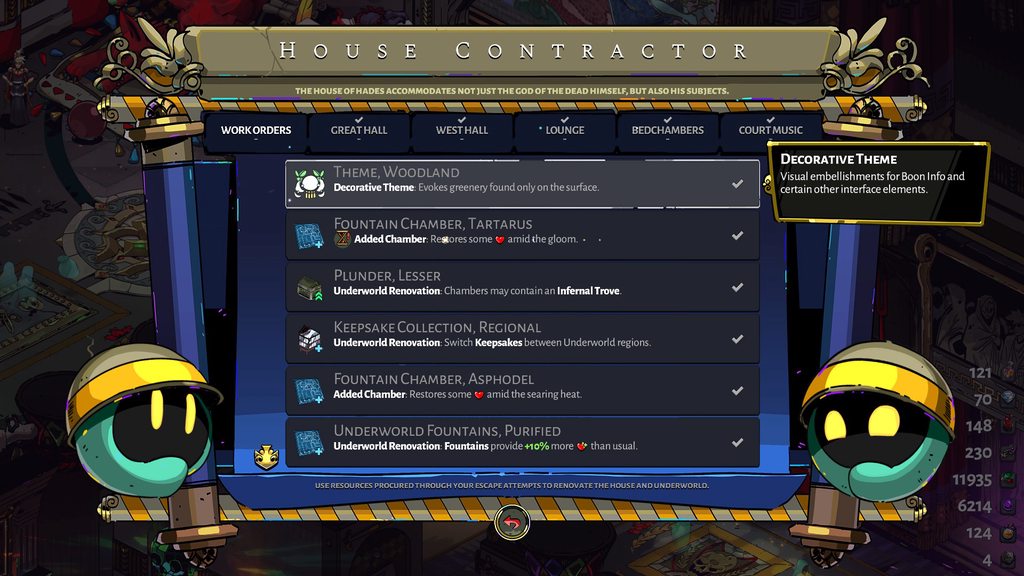
Not sure what happened here but I know I've bought all of the Boon info cosmetics but now this is the only one that appears whenever I visit the contractor and I can't change the theme. Any idea what the issue could be here? https://imgur.com/a/oB8YR0t
 past edge
Crash on Mac updates: after a few runs it appears I have the game Freezing Only when a quicksave is performing. I Always get some display lags when I reach the 2nd Biome after defeating Meg, and some occurs right after the top right icon pops up.
 brazen frost
I'm not sure where to go for this, but anyone had any solutions or awareness of an issue of streaming Hades over discord?
 limber crater
Hi, I runned in what i hope was a bug hahaha (Windows version from Steam). I summoned Dusa for the fight with Asterious as mini boss, and she continued to shot while Asterious was defeated and in his retreat animation, so as soon as he as out of the room, one of the remaining shots of Dusa redirected to me and hit me, and i couldn't dodge it because I'm locked in place while the door closes.
brazen frost
AH hah, I figured it out, I had to set it to windowed borderless with vsync off and it suddenly popped up
 pure dagger
So I just updated the game on my switch and when I start it all my progress has been lost. I've played for a number of hours but my only save has 2 escape attempts (I'd guess I have well over 30) and my last played time is january of next year 2021
frosty tiger
Game just crashed, while fithing Hades. The complete run is lost.
Is there any other way to restore game data, besides the one mentioned in the #h1-tech-fixes ? The method there is not working for me 😦
 stray elm
@frosty tiger what did you try doing, specifically?
frosty tiger
These steps:
· On Windows, navigate to \Documents\Saved Games\Hades
· Sort by 'Date modified' to locate your most recent save matching one of these names (assuming you use Save Slot 1): Profile1_Temp.sav, Profile1_Temp.sav.bak, or Profile1.sav.bak
· Rename that file to Profile1.sav
· Then open the Play menu in-game and look for the save.
Seems like restarting the game already overwrote the old quick-saves
stray elm
did you walk into another room before trying to recover your save?
frosty tiger
sadly, yes
stray elm
then yeah, that'll overwrite it, sorry
frosty tiger
it's from 24.09.2020
stray elm
yeah, that's probably not from your most recent run :P
frosty tiger
don't think so ^^
stray elm
on the plus side, you'll have the same seed, so at least the same start, and a similar run at least towards the beginning
 flint reef
hello. I've bought the game on PC and love it. all of you who worked and are working on the game have done an excellent job. Now I wish to own the game on Switch however when can we expect cross save? thank you
frosty tiger
yeah that's nice, but I don't think I'll beat the Stage 3 Boss(es) again. That was a pretty close fight
stray elm
they're aiming to get cross saves up later this year, @flint reef (image from #announcements )
I'm sure they'll make an announcement when they get them out
and best of luck Tucaen! I believe!
flint reef
they're aiming to get cross saves up later this year, @flint reef (image from #announcements )
I'm sure they'll make an announcement when they get them out
@stray elm Good stuff, thank you 🙂
 brisk cove
Is Dusa supposed to cost so much more ambrosia than everyone else? I had to give 2 than 3 at once for her for friendship boosts
If it's deliberate never mind haha just seemed strange
stray elm
@brisk cove yes, it's intentional
brisk cove
Alrighty. Cool then!
in terms of actual bugs then, and this is obviously certainly not game breaking haha, I -have- had a few boons show up with the font looking weird on occasion. (In the case of this screenshot, check the percentage for Enshrouded Eclipse)
No idea what causes it; here it is again on Reduced Damage from Traps
stray elm
@brisk cove you can report those In-game with  ^.^
^.^
brisk cove
Oh! Didn't know that. Neat. Thank you
stray elm
Sure thing!
brisk cove
But seriously the fact I've played this game so many hours already and that's literally the only bug I've encountered lmao. Y'all really knocked it out of the park with this one, it's amazing.
worldly gorge
I still cant open the game and cant figure out why
stray elm
@worldly gorge what platform?
worldly gorge
windows
I posted more infor earlier. i can past it again, but it was working and then i crashed once and since i havnt been able to open it.
just opens as a bug report
stray elm
Yeah, I just scrolled up to it
Two things—
Did you include your discord tag and/or email on the bug report? That'll let the devs potentially reach out to you with a fix
And, could also try verifying file integrity?
I know you reinstalled, but it couldn't hurt to try
Most likely though, it's a save corruption of some sort, which the devs should be able to help with
worldly gorge
i didnt on the bug report cause i thought at first that it was just a crash and auto created the report bug screen and would launch the game after i reported but it hasnt. i can try sending another with my email but the instructions on the bug report said to come here to get more help so i did
ill try verifiying the files
stray elm
Yup! I'd send another one with your discord tag included, so that it's easier for them to find it and help you out 
(or your email, your preference obviously)
worldly gorge
it says the files are valid. or at least when i ran the steam process didnt tell me any of them wernt
stray elm
Aight. Then if you've already gone through #h1-tech-fixes , which I think you said you did, I don't have any other suggestions, sorry. Hopefully one of the devs will reach out to you soon with some help
Also! I just realized your pfp is a Lapras and that's really cool!
stray elm
boop
worldly gorge
blessed you be
 copper warren
good afternoon. the game does not start. black screen and bug report. who can help, tried everything that is written in support and installed the latest drivers and library
gives this error
worldly gorge
ive got the same problem Smike, i know that doesnt realy help but just letting you know
copper warren
what is most interesting, I downloaded the pirated version and it started quietly
 strange jolt
Hi fam, I summoned Dusa companion to help me with Asterius mini-boss fight and defeated Asterius right as Dusa launched some projectiles. Asterius walks away then Dusa’s projectiles hit ME for 54 damage. I don’t think I have ever felt more betrayed 😢
 celest ocean
Hi, I've been trying to figure this out and can't. I started Hades today after about a week of not playing, using a DualShock 4 controller. Previously, Hades has given the correct button prompts for a DS4 controller (R1/R2/L1/L2, etc). Now, however, it seems to think I'm using an Xbox controller, giving the wrong prompts (RB/RT/LB/LT, etc). I've tried disabling Steam controller support (no dice), plugging my controller in (nada), disabling Steam overlay (nothing), using DS4Windows (nope), and every combination of those 4 things with absolutely no change.
I'm not aware of changing any settings re: controllers or Hades since I last played that would affect the game's recognition of which prompts I should be using. Is there a way to force the game to use DS4 prompts only?
edit: I'm on a Windows 10 laptop, running Hades through Steam.
FIXED, this worked perfectly:
https://discordapp.com/channels/456889434672201729/520430049003044864/761057411888054282
Big Picture Mode in Steam correctly identifies the controller and uses the right prompts in Steam menus (not in Hades menus) no matter what, so I'm assuming that a recent Hades or Windows update may have been the culprit.
FIXED, this worked perfectly:
https://discordapp.com/channels/456889434672201729/520430049003044864/761057411888054282
Fixed, this seems to work: https://discordapp.com/channels/456889434672201729/520430049003044864/761057411888054282
 ebon lake
@worldly gorge We are looking into this. Did you already try the additional 'Launch Options...' from #h1-tech-fixes or the x86 version?
worldly gorge
i didnt try the launch options since resetting the settings by deeting the setting folder. i did try the x86 version
copper warren
tried both versions do not start
ebon lake
Could you try the launch changes: Right-click on Hades in your Steam Library
· Select 'Properties...'
· Press the button that says 'Set Launch Options...'
· Enter the following: /UseNativeGaInput=true /UseNativeGaInputNoControllers=false
 crude acorn
yes
worldly gorge
did not work, using steam or by running as admin
copper warren
copper warren
added such a line to the launch parameters, it helped
/ UseNativeGaInput = true / UseNativeGaInputNoControllers = false / UseSwapEffectDiscard = true
crude acorn
hm, no space between / and U, or surrounding =
/UseNativeGaInput=true /UseNativeGaInputNoControllers=false /UseSwapEffectDiscard=true
 cedar spire
Hey guys !
Not sure I'm in the right place or not. I just had a corrupted save message when launching the game. Tried to move the profile1.sav and rename the profile1_temp.sav and profile1.sav.bak.... But I still end up with a virgin save
 sterile jacinth
my saves keep getting resetted to the house of hades whenever I quit
it says that's it's been modified, and it shows the correct time but it just doesn't save during the run
it does save in the house of hades though
sharp narwhal
When you say it shows the correct time, this is including when you're on a run? Like if you tried to quit from the pause menu during a run it would say "saved 1 minute ago" or whatever?
 wheat arrow
No idea what causes it; here it is again on Reduced Damage from Traps
@brisk cove
I experienced the same but on Switch.
sharp narwhal
Yes, that's a known issue, we're currently investigating!
wheat arrow
I'm also playing on the switch. I'm not sure if it is qualified as a bug, it's not really game breaking, but I can launch a cast in my bedroom. I suppose all weapons should not be usable in the house?
sharp narwhal
That happens when Beowulf is equipped in the weapons room; we have a fix that should be out on Mac/PC soon, and will go to Switch when the next patch is ready.
wheat arrow
I see. Thank you for hearing me out. I really love this game. And it really is flawless. I thought Bastion was already good (with the Narrator doing an awesome job), but boy did Hades took a huge step forward. Thanks a lot again!
sharp narwhal
Thank you!
pure dagger
Any chance for a way to ressurect a save that got reset after last update on switch?
sharp narwhal
Reset like completely wiped?
pure dagger
well not really, it got reset to a point where nothing is unlocked, I have 40 darkness and my last played date is set to january 2021
 teal elm
:(
sharp narwhal
Ahh strange. I don't think there's a way to resurrect it unless you had backed your save up to Nintendo's cloud at some point but someone may follow up with you for more details about that
@teal elm Hey there, sorry about that! If you lose progress from that freeze, there are steps to restore it in #h1-tech-fixes
pure dagger
I actually tried downloading a backup from 3 days ago (last time I played) but it didnt work
teal elm
oh, the game recovered after about a minute somehow
havent seen that before
sharp narwhal
Hm, yeah, not sure - in \Documents\Saved Games\Hades there should be a file called Hades.log, assuming you haven't quit out and rebooted the game yet since you got that error it should have some info about the freeze, if you want to send that to me? I can take a look
@pure dagger Hm, yeah, not sure - I'll ask one of the folks who does Switch stuff when they log on in a couple hours
 covert sable
I'm just gonna mention that I had the "can't save" and it was bcs google drive was syncing the files. I suggest adding it to the FAQ, joined the discord to say this hope it helps
pure dagger
Thanks Ellis, I'm guessing it's gone but it would be nice to not have to begin anew
cedar spire
@sharp narwhal Hey Ellis, if the renaming in "Profile1.sav" doesn't work, is there any other way to get back a saved game ? through steam lcoud or I don't know ?
Or does it means that we have to strat from scratch again ?
sharp narwhal
@cedar spire As long as you haven't uploaded a reverted save to the Steam cloud, you can try and download your cloud saves from the browser: https://store.steampowered.com/account/remotestorage
sterile jacinth
When you say it shows the correct time, this is including when you're on a run? Like if you tried to quit from the pause menu during a run it would say "saved 1 minute ago" or whatever?
yep
sharp narwhal
And then when you try to start the game again, it's an old file?
sterile jacinth
the save file itself is modified at the correct time too
yeah
or well not necessarily an old file, just back at the house of hades like nothing happened
kind of like what happens when you give up
sharp narwhal
Do you have any kind of file sync set up that might be reverting progress?
sterile jacinth
only steam cloud I think
but this happens immediately
like I don't even exit the program, just quit back to the main menue
sharp narwhal
@crude acorn Any ideas?
cedar spire
@sharp narwhal Hey Ellis, thanks for your Link, I tried to get the files from the Steam storage but they revert aswell to a 25sept virgin save from when I bought the game
sharp narwhal
Sounds like they may have uploaded to Steam after being corrupted then - I'm not too sure what happened, but I don't know of any other way to recover a save, sorry about that! If it happened randomly, you may want to check your hard drive health just to make sure there aren't any bad sectors or anything.
 latent relic
I can't for the life of me figure out how to change controller settings in game? I'd like to remap my dash to RT instead of the default A, but when I go to settings, and try to change it, it says press any button, and when I press RT nothing happens. Is this because RT is already mapped to call? I tried switching my call from RT to A first, but the same thing happens. What do I do?
sharp narwhal
@latent relic Are you on Epic or Steam?
sharp narwhal
Try this:
· Right-click on Hades in your Steam Library
· Select 'Properties...'
· Press the button that says 'Set Launch Options...'
· Enter the following: /UseNativeGaInput=true /UseNativeGaInputNoControllers=false
cedar spire
@sharp narwhal Aww feels bad, 45h in 5 days gone I guess :|
But what you guys did is Game of the year material to me so I guess I'll just restart from scratch anyway. Thnak you for you answers
crude acorn
@sterile jacinth could you do the following please:
- Start the game
- Start a run
- Load that save file, play through the first room
- Quit the game
- Start again and load that same file
- Alt tab and send me your Hades.log file
That may help
latent relic
@sharp narwhal thank you so much! That fixed it.
 fiery ridge
Hey everyone, I've bougth the game 2 days ago and it cannot launch at all, I have the recommended computer, tried all the options you laid out in tech-fixes + the usual fixes (reboot, uninstall and download) and I still cannot get the game to launch, is there anything else I could try ?
sharp narwhal
Saves are stored in \Documents\Saved Games\Hades
 frozen flare
Ok, thank you! I thought it would be in local file
But it didn't work...I guess I'll do that again...
fiery ridge
Is there anyone that could help for my message above ?
sterile jacinth
huh
it... works now
crude acorn
@fiery ridge Does anything appear on your screen? Do you have the Hades.log file in Documents/Saved Games/Hades fodler?
sterile jacinth
not really sure what that was about but nice I guess
fiery ridge
Nothing appears on the screen at all, I'm on steam and the game goes from the blue "STOP" button to the green "PLAY" button, and there is unfortunately nothing on my Hades folder, I actually don't even have an Hades folder, maybe due to the fact that the game never actually started
crude acorn
I suggest verifying game files, checking for new GPU drivers, and trying to start the game directly from the installed folder (both x86 and x64), one of those usually fixes the issue or points to the source
fiery ridge
I actually tried all 3 of these 2 days ago when I had the problem after buying, and just today after trying again
And unfortunately It did not change anything.
My computer is still on Windows 7 if that changes anything, I know it's not optimal but it seems like it should work with the minimal and recommended config seen on steam page
worldly gorge
im not sure if this is a bug or where i should even put this but ive noticed that occasionally im getting the wrong rewards for things. for example i just did a trove that was supposed to be for gold and got a nectar instead for some reason? or ive also had sometimes room rewards say they are a boon of some kind and i get darkness instead of a boon afterward. its very strange.
sharp narwhal
@worldly gorge There is a small percentage chance on any given trove that it will spawn a nectar in addition to its intended rewards, though not sure what's going on with the Darkness.
Could you report in-game with F10 if you're on Windows after you receive an incorrect reward?
worldly gorge
oh i maybe i just didnt notice. i convinced myself i didnt get the gold cause i didnt notice how much i had before cause im doing a crazy gold run. will do next time i notice it
its only happened like 2-3 times in probably 10-20 runs if not more
elder arrow
Hello team! Not to spam, but I wanted to check if there's something wrong with my save file because the other boon cosmetic themes are missing considering I bought all of them already and I've been changing themes regularly. I already F10'd it but I was wondering if there's anything I can do about it on my end. https://imgur.com/a/oB8YR0t
Scrolling through the contractor, I can't find the other themes anymore anywhere when it was previously grouped with the theme I'm using now.
fiery ridge
@crude acorn Is there anything else you think I could check ? Or do you guys maybe know there is some problem with that and are planning a fix ? I just dunno what I should do
sharp narwhal
@elder arrow At what point did the other themes disappear?
@fiery ridge Could you check in Windows Event Viewer to see if there are any errors associated with Hades?
- Type "Event Viewer" into the Windows search bar, and open the program.
- Once the Event Viewer is open, click the dropdown menu on the left for "Windows Logs", then select "Application"
- Click on the error entries on the right to highlight them and view the details of the error. Look for errors that mention "Hades" or "Hades.exe"
- Hold down Ctrl and then click to select all of the "Error" events related to Hades
- In the Action menu bar at the top of the screen, choose "Save Selected Events". This will create a ".evtx" file that contains all of the errors you highlighted
You can message me the .evtx file, if there's anything there
fiery ridge
I'll try that and get back to you, thanks a lot
 sacred salmon
Can anyone help me with this weird problem? For some reason I am not getting steam achievements at all. Everything else about the game works and runs fine but none of the steam achievements are popping at all. I've made it out of elysium, gotten all the weapons, basic stuff that I notice have achievements but just haven't gotten. Again, the rest of the game runs perfectly and I'm loving it, just wish I could save some of the progress I've made through steam.
elder arrow
@sharp narwhal Thanks for responding. It happened a couple of days ago more or less; I'm pretty sure it was just this week. I've done a few runs hoping that it would show up again but no dice. I checked file integrity earlier and no dice. I accessed another save to see if it affects that too (I haven't bought them there yet) and I was able to buy and use them just fine.
sharp narwhal
@sacred salmon You're connected consistently to the internet and Steam's social services, right?
sacred salmon
Correct, I'm able to message people through steam and have a web browser open with a youtube video going while im playing
sharp narwhal
@elder arrow I'm pretty sure that a requirement for themes to show up changed at some point; I can double check but if I had to guess ||you don't have enough lifetime accumulated Darkness||, though you're probably pretty close. Try targeting that for a run or two and see if they show back up
@sacred salmon I'm not too sure what else would be interfering with it, I can ask around; a lot of the achievements you're getting should be retroactive, if that's any consolation
elder arrow
@sharp narwhal Alright thanks! I'll do that. 
sacred salmon
@sharp narwhal alright! again it's not a huge problem, as long as i'm still able to play the game i'm fine, just thought it was a weird problem since i can't find anyone else having it
sharp narwhal
I feel like I've heard of delays with achievements getting recognized if you moved a save file manually over from another computer, maybe? But yeah for everyone I've talked to, the achievements eventually pop, even if at a delay
fiery ridge
@sharp narwhal I've messages you with what I've found, thanks a lot
 hard phoenix
Hi guys, I cannot remap my keybindings even though I put the launch arguments in steam. Are their other solutions known yet?
My “w” key is broken so I cannot play on the normal settings 🙈
 radiant current
Is fiery presence bugged or the tooltip is wrong?
sharp narwhal
It's bugged, we're investigating!
 silent hound
Hi! All of a sudden my DualShock 4 button prompts are appearing as Xbox pad button prompts. Also I've never been able to map up on the d-pad. Analogue up works fine.) I'm playing on EGS and I have the most recent update of the game installed.
hard phoenix
This does not make any difference 😦
sharp narwhal
Sorry @hard phoenix I don't know any other fixes off the top of my head - the game is freezing when you try to rebind keys?
hard phoenix
Yes
sharp narwhal
@silent hound Try this:
· Select 'Settings'
· Scroll down to Hades under 'Manage Games' and select it
· Select 'Additional Command Line Arguments'
· Enter the following: /PS4Gamepad=true
 wild igloo
@sharp narwhal Hey! On PC, other than restoring a backup save, do you have a fix for softlocked savefiles? ie cannot exit the current room with any in-game mean
sharp narwhal
If you're on a run, delete/rename your _Temp save and revert to your Profile1.sav; if you're in the House, change your Profile1.sav name and change your Profile1_Temp.sav to Profile1.sav to load you into the last room of your previous run
wild igloo
Thanks for the answer!
sharp narwhal
You need a role from #bot-commands , check the pinned post in #hades-feedback
 fathom apex
A weird and midly annoying thing: my computer froze and I had to reboot, no biggie, but oddly enough when I went back in my save wasnt in the latest room as I guessed it would (game saves every room after all). Its like my whole run never happened.
I'll look at the save timestamps, but that's not ideal.
Still I suppose no huge harm done
Okay by deleting Profile1.sav and renaming Profile1_Temp.sav to Profile1.save I restored my run progression
Probably a reasonable system to avoid crashes from ruining save files.
But before messing with any of that I made an archive of the whole directory. I recommand doing that before manually touching any save-related stuff.
 buoyant mulch
has anyone reported weird issues with bindings, like they can't rebind keys? my friend that I mentioned in the other channel who probably turned off attack-at-cursor said all bindings were static
 mellow garden
Apologies if this isnt the right place but seeing some strange behavior on my switch. I have bad drift on my joycons, and as such tend to play even no docked with a pro controller. If I turn off the switch mid run, when I resume, I briefly can move around with the pro controller, then the controller join screen comes up, I confirm the pro conteoller but when it drops me back to the game it does not recognise the pro controller. Can't move, attack etc. I have to switch to the joycons or quit the game and restart.
sharp narwhal
@buoyant mulch Steam or Epic?
 undone cliff
Hey Guys, not sure how it works of if there is a forum to search for this but I am getting this error on a newly downloaded version on Steam + Windows
sharp narwhal
@undone cliff If you already tried the steps listed there, there are a few more in #h1-tech-fixes you can try.
buoyant mulch
@sharp narwhal steam
I do see the post in tech fixes about this now. So I guess it's possible he's not imagining things lol. He said his "attack at cursor" defaulted to Off (lol can you imagine) and he couldn't rebind anything
sharp narwhal
Yeah, try the /gainput launch commands, that should clear up any weirdness
undone cliff
@sharp narwhal I use Windows only to play games, I use linux otherwise. Is there a way to give permissions to the folder in Windows (like chmod in linux)
sharp narwhal
Did your copy of Windows come with Windows Defender?
undone cliff
Yes, this is an original copy of windows downloaded directly from Microsoft
sharp narwhal
Try turning off controlled folder access: https://support.microsoft.com/en-us/help/4046851/windows-10-allow-blocked-app-windows-security
undone cliff
I am currently "verifying the integrity of my game files" and hopefully that should fix it. Will turn off the folder access option if this doesn't work. Will keep you posted.
I don't want to apply a blanket change unless absolutely necessary 😄
sharp narwhal
That's fair! I don't think verification will have any effect on file access permissions but it's always good to verify regardless
There's also a thread here on turning off read-only permissions via the command prompt, but if controlled folder access is on, it will probably just turn read-only back on immediately: https://superuser.com/questions/653951/how-to-remove-read-only-attribute-recursively-on-windows

Super User
I need to remove read-only attributes of all files under a directory recursively on Windows using command line. Could you please provide an example on this?
undone cliff
@sharp narwhal Turns out, my game was actually saved. When I returned I was a the door I left. Strange I got that message. Will keep you posted if this happens again.
@sharp narwhal Man I've been playing this game for just about 20 minutes now and I ABSOLUTELY LOVE IT.
Not everyday I get to say it to the people in charge directly so wanted to take the opportunity to do so 😄
 vague dock
@thick lava Hi! I'm forwarding you this problem since you were the one who dealt with additional characters in font previously. So with the v1.0 launch we have looked at the files again and saw that the some of the characters are not shown properly in-game at "Languages" menu. I'm including screenshots where it's supposed to read "ÜüÖöİiIıŞşÇçĞğ".
Hi again, I'm really sorry for repeating but is there a possibility that this addition could be done on your side? 🙂
 thick lava
@vague dock Yeah these letters aren't included in the Lang.xnb. Do you need all of them in that location, or would İıŞşĞğ be enough there?
 jovial belfry
I am trying to erase my second save slot from steam but everytime I boot the game back up the save file is back again.
thick lava
Could also copy AlegreyaSansRegular.xnb and rename it to Lang.xnb (though this would ruin Chinese/Korean/Russian on that menu)
vague dock
Just in case the Lang font is used elsewhere, it would be great if you could add them all 🙂
thick lava
@jovial belfry To fully delete a save slot, you need to clear it and then start a new save file on that slot (it's more of an overwrite than a delete)
stray elm
(or delete the file manually)
thick lava
The Lang font is only ever used on the language screen. It's the only place where we need a font that has glyphs from multiple alphabets in the same place
vague dock
Well, the native language name Türkçe has two of those special characters, so... I believe those would be enough then, if that's not too much work?
thick lava
Sounds good, shouldn't be much trouble
vague dock
Uhm, could I push my luck and try to persuade you to take a look at other font files to see if they have all the special characters ÜüÖöİiIıŞşÇçĞğ as well? 😄
thick lava
So long as the underlying font family supports these characters, I think you should be good. The Lang font was a bit of a special case, which explains why it didn't include BuildFonts_Turkish from MiscText.en.sjson
All of the xnbs are named after readily-available google fonts. If you see any '*' or '?' characters in a particular font, it's more likely that the glyph doesn't exist in the original font (as opposed to not being included in the xnb)
Hope that makes sense -- I'm getting a bit techical
 knotty rivet
Yo idk if its a glitch or somethign but ive beaten the game and ive still not gotten the achilies talk where u unlock the hidden aspects
 violet sun
Hi All, first time trying to play the game and the game crashes when i get past the initial room
frosty tiger
Hey guys
I'm becoming literally mad trying to fix the saving issue
i've tried absolutely everything - that "Saved Games" won't switch to "not read only"
sharp narwhal
Is Windows Defender your only antivirus?
frosty tiger
i have bitDefender wich is disabled...
Oh damn i think i just found out what was wrong
BitDefender actually locks the Documents folder
even when the antivir is disabled
sharp narwhal
Yeah, someone was having trouble with BitDefender's "safe files" setting I think? I'm looking for the message now
frosty tiger
yep it works now
i have spend like 1h30 trying to solve the issue and even completely change my computer's access permissions for it
damn
sharp narwhal
i could activate the application access for hades in the "safe files" option and now it worked Should be a setting to add Hades as an exception so you can leave the other settings on
frosty tiger
thanks anyway have a good night 🙂
sharp narwhal
@violet sun I'd try verifying your installation through the game's launcher if you haven't already, there are instructions in #h1-tech-fixes
violet sun
running that now, but this on a fresh install
vague dock
Hope that makes sense -- I'm getting a bit techical
@thick lava No problem 🙂 I've previously checked the Google Fonts and saw the special characters were there, figured your program didn't add them while compiling probably for some efficiency concern. Thank you so much again! We'll be impatiently waiting next update! 🙂
 cinder rivet
Hello. Having an issue with controller buttons layout. Using dualshock4. Previously everything worked just fine. But now I'm struggling to get PS buttons layout.
When I boot up the game and go to settings I see PS layout there. But as soon as I load up my run or try a new save it switches to Xbox layout. Any possible fix?
Tried turning off the overlay.
And switching on and off the PS configuration support in steam with no luck so far.
sharp narwhal
Yes, sorry, we're working on that - in the meantime, you can use this launch command:
· Select 'Settings'
· Scroll down to Hades under 'Manage Games' and select it
· Select 'Additional Command Line Arguments'
· Enter the following: /PS4Gamepad=true
cinder rivet
@sharp narwhal Thank you.
 radiant sorrel
I think this is a technical error. Why is my background still hanging from the "The nighty night"update?
sharp narwhal
Try clearing Steam's download cache, close out of Steam entirely, and boot everything back up: https://support.steampowered.com/kb_article.php?ref=3134-TIAL-4638
Article "Clear download cache"

 keen shoal
hi im trying to launch this game on mac
but after i press play on steam, the game closes by itself within 5 seconds
violet sun
@violet sun I'd try verifying your installation through the game's launcher if you haven't already, there are instructions in #h1-tech-fixes
@sharp narwhal this worked, than kyou very much 🙂
 bleak zephyr
Hi there, I'm playing on switch. I've noticed that when I'm in some menus (the codex, etc) they will randomly scroll. My joycons are not drifting and I've only noticed this in the menus, normal gameplay is unaffected
keen shoal
but after i press play on steam, the game closes by itself within 5 seconds
@keen shoal
Im on macOS Sierra - v.10.12.6 - Earlier 2015 Pro - Intel 6100
dim spruce
@keen shoal the min spec for macOS is 10.13.6. sorry about any confusion there
dim spruce
@bleak zephyr you can try adjusting the deadzone settings in the controls menu
bleak zephyr
I'll try that!! Thank you so much
Congratulations on the success of the game btw, been a fan since Bastion released. Great to see you guys get the recognition you deserve
@bleak zephyr you can try adjusting the deadzone settings in the controls menu
@dim spruce That worked!
 fleet saddle
hello. sorry for reposting but i might have missed if this was answered. i'm not sure if bug or not, but i'm having trouble getting backstab with spear (can get it with other weapons). i thought it would be easy with special attack and i've done it before the update iirc. could someone please help me confirm whether this is indeed a bug or i'm just bad at backstabbing? i wasn't able to find anyone to cross-check with (switch)
 upper loom
@fleet saddle I seem to be getting backstab okay on Skelly with the basic attack series and the special throw, looking at it on Switch. was there a particular enemy or attack you're having trouble with?
fleet saddle
i have been trying it on skelly and other easier enemies like wretched thug and lout
i thought the special would give backstab easily since it goes two ways (and i think i've gotten it before patch but i can't go back and double check so i'm not 100% sure)
also i apologize for being as persistent about this. backstab is just one of my favorite things to do with the spear 🙂. thank you for checking
upper loom
and just to double check, you've definitely got the correct mirror upgrade (Shadow Presence) and/or Nyx's keepsake equipped (Black Shawl)?
fleet saddle
i did not know that was a requirement. i'll check
i have been using all green mirror during my testing
upper loom
that would do it! if you flip the first upgrade back to red (Shadow Presence) and have some points invested, you should see those backstabs again!
fleet saddle
oh gosh. i'm really sorry about that. i'll be able to check in a few minutes and confirm
upper loom
no worries! backstabbing becomes so second nature it's easy to forget it's a mirror talent, haha
 cursive portal
are fatal exception crashes becoming more common? i've been getting them every time I play
 rugged zephyr
So I searched around the server to see if this was addressed, but couldn't find anything. I apologize if this has been covered so far. I'm having issues where I'm unable to talk to Thanatos even though he's not involved in a plot conversation? I'm up to his heart lock, his portrait changed for me in the field. He hasn't requested a favor yet, and I'm not able to give him ambrosia. The codex says I still have to talk to him 3 more times but the prompt to talk to him doesn't come up in the field nor in the house. Is this normal and I just have to do more runs, or did I bug my file? I'm playing on the Switch
fleet saddle
@upper loom that was it! thank you so much and sorry again for the trouble
 jagged fjord
hi there, I've tried the three suggested fixes but I'm getting the warning that my game can't save. "Warning: Unable to Save".
hoping someone found a solution. I'm on Windows 10, it definitely saved once already. This is the second time I've turned it on and I get the warning when going into the second chamber of this run
 valid perch
Is there any hope of recovering a corrupted save file? Both my main save file and temp save file appear to be toast and the backup save file is from several months ago
 amber adder
Just letting u know sometimes game gives xbox button layout while using ps4 controller fixed it by unplugging controller and plugging it back in.
sharp narwhal
@amber adder Are you on Epic or Steam?
amber adder
Epic
sharp narwhal
@jagged fjord There are some additional suggested fixes in #h1-tech-support
@amber adder Alright, try this:
· Select 'Settings'
· Scroll down to Hades under 'Manage Games' and select it
· Select 'Additional Command Line Arguments'
· Enter the following: /PS4Gamepad=true
We're working on a fix, but that should fix it in the meantime!
amber adder
Ok no big deal just thought I'd mention it if you weren't aware
sharp narwhal
@rugged zephyr As far as I know, you should always be able to talk to him at the House, even if he doesn't have a full conversation for you - you're saying he isn't interactable at all?
@cursive portal They're hopefully becoming less common; if you include your discord tag in the bug reports when you submit them we can get back to you with suggestions
amber adder
Good to see the praise game getting now that it's released 1.0 feels like I've had it for 2 years though 👍
rugged zephyr
@rugged zephyr As far as I know, you should always be able to talk to him at the House, even if he doesn't have a full conversation for you - you're saying he isn't interactable at all?
@sharp narwhal
Yeah he just stands at his balcony and I'm unable to give him anything or talk to him. Though I just did another run where I ran into him, unable to talk to him in field, but when I came back to the house he was in a convo with Hypnos so I'm wondering if it's because there's a different plot chain taking priority?
sharp narwhal
No, that shouldn't be the case - it's probably a data error somewhere. We're straightening out a few things like that on PC and Mac now so it might end up resolved for you in another patch; I'll keep an eye on it with reports from there too
rugged zephyr
Thank you so much!
 sonic sedge
PC crashed, Profile1_Temp.sav seems to be corrupted beyond repair
...and then I accidentally deleted Profile1_.sav (it had data from last night). what the hell do I do with this, this is beyond depressing
honestly don't get why this game in particular does this thing where crashes revert you to the beginning of your run, and rather than having crash protection instead we have to do this asinine thing where we have to play musical chairs with one of many similarly-named files in hopes that... the game actually saved?
I hope the weirdly passive aggressive anti-save scum protection is worth all of the tech support hours spent recovering cases where genuine crashes > screwed up save games thanks to this feature
sharp narwhal
Sorry for the frustration - can you restore Profile1 from the Recycle Bin/Trash Can, assuming you only deleted it once?
We implemented a system to help restore data after crashes; in addition, we're running the test branch beta currently in order to target ongoing engine and audio bugs and help us test larger or more experimental solutions before they go out to the broader public. Changes around save locations and save recovery are also part of that, and we're investigating reports - like yours - where our new save recovery system isn't working as intended. Gavin has been looking into these today, and you could probably reach out to Nikola as well; I don't think either of them is on right now, but Nikola will be on before too long!
sonic sedge
I got yesterday's saved files from here for future reference, if anyone's wondering how to get their saved files from Steam Cloud: https://store.steampowered.com/account/remotestorageapp/?appid=1145360
didn't realise steam cloud had a web UI where you could download the files directly, so I've just lost a single run's worth
@sharp narwhal I have it set to permanently delete files/don't use the Recycle Bin, but thanks anyway. I'll check out the test branch beta. will it let me carry over my saves without too much problems?
sharp narwhal
It should, though as with any beta I'd recommend making a backup copy; saves modified in the beta branch may not play nice if you try to use them with the current live branch (though obviously once the live branch catches up, they'll work just fine)
sonic sedge
alright, will do. thanks again.
 mortal rain
hi i just fought the boss after elysium but he destroyed me and now i have a black screen
 red anvil
my game crashes randomly when i quit to desktop
 graceful maple
random, minor thing: I've noticed the game no longer seems to realise I have a playstation controller connected and shows Xbox button icons instead of PS ones.. is there something I can do to solve?
ebon lake
@graceful maple Thank you for reporting this, it is a known issues. Are you on Epic or Steam?
 stray briar
On a Mac, game is mostly stable now but there are occasional unimpactful screen freezes that only happen in the foundtain chamber between areas (after bosses), just a heads up
ebon lake
@mortal rain @red anvil If you got a bug reporter pop-up, could you send in the report so we can take a look at it. If you lost any progress, please check out #h1-tech-fixes to retrieve your progress.
red anvil
thanks, no progress lost the game just crashes on quit for some reason,not often though
graceful maple
@ebon lake thanks! I'm on Epic.
stray briar
I saw the weird font on special on full screen, mac, 1440x900 resolution, only happened on one boon that was offered that run, so weird, not sure if this is the right channel for this
ebon lake
Okey, could you try this:
. Select 'Settings'
· Scroll down to Hades under 'Manage Games' and select it
· Select 'Additional Command Line Arguments'
· Enter the following: /PS4Gamepad=true
stray elm
@stray briar this is an okay place to report that, since I don't think works on Mac
 cyan fog
Morning all - I'm panicking this morning, as it seems my games doesn't recognise my save (1) with 85hrs on it!! Anyone else have a 'save game' issue since the last mini update? Help/Suggestions needed pretty pls? Thanks
stray elm
@cyan fog what platform?
cyan fog
oh sorry, PC/Steam
stray elm
alright--can you check Documents\Saved Games\Hades, and make sure it has a Profile1.sav file?
cyan fog
well that's the thing, it looks like that file had been changed to 'Profile1.sjson' so i did change it back to 'Profile1.sav' but to no avail - am i able to upload a photo here of what was in my folder (took one on my phone)
cyan fog
yeah i did change that one back, but it seems to make duplicates and now im not sure which is the correct file lol
I havent deleted anything, so all the files are still there etc
ebon lake
@cyan fog You can distinguish the .sav and .sjson files by looking at the file size (.sjson should be around 1 KB) or opening the files with a text editor (.sjson should be readable text)
cyan fog
good idea - roughly what file size 'should' the correct file be?
ebon lake
Could you send the files to me in a PM, I can take a look
cyan fog
thanks Olaf, that would be awesome mate
 lavish sorrel
why Hades isnt avalible in geforce now?
ebon lake
@lavish sorrel Did you "Scan for games" and is the install folder below one of your "Scan location" in GeForce?
 dire veldt
is this the right channel to report bugs?
 arctic mortar
if you're on PC, please use in game to report bugs 🙂
dire veldt
my game crashed when I pressed F10 xD
lavish sorrel
@lavish sorrel Did you "Scan for games" and is the install folder below one of your "Scan location" in GeForce?
@ebon lake i did i even searched it because geforce now displays even unowned games, nothing
crude acorn
@dire veldt then here works 😄
@lavish sorrel Hades is currently not available on GeForce Now, if something changes, we'll make an official announcement
lavish sorrel
ok, thanks
frosty tiger
can someone send me the Default save Files PLEase
sharp narwhal
@frosty tiger What do you mean?
sharp narwhal
The game generates files when you start it up for the first time - did you have saves that were deleted?
sharp narwhal
Ok, the game is failing to save? You're getting the "Game can't save" error message?
sharp narwhal
The game creates the files when you start a new save slot; a "default" or "empty" save file doesn't exist for me to give to you, and even if I gave you a random save, if the game is unable to save, it won't be able to update that file. Try the other steps in the error message and #h1-tech-fixes to make sure antivirus or file permissions aren't blocking the game from your Documents folder and that should resolve the problem.
frosty tiger
i mean the lvl 1 file
sharp narwhal
I don't understand what you mean, could you clarify? If you mean an empty or beginning save, you should be able to make one by just starting the game.
sharp narwhal
If the game can't save, getting a save from me won't make a difference
sharp narwhal
This will load but it's not going to fix the save issue
 jagged trail
Minor textmissing space
last kettle
@jagged trail Thank you! Could you please also report this in-game with F10?
low current
@dim spruce thank you for the tip. Sadly the command /SteamGamepadCount=1 does not change the behaviour...
 honest willow
Is there a way to report bugs when you're not on pc? I know #hades-feedback says to use F10 but uhhh. I don't got that on my switch.
(Tbh the "issue" is incredibly mild. Blocking for spoilers. ||Hades was on the premises but in the garden with Seph. When I walked behind the throne, he made a comment about Zag annoying him despite not being on the throne.|| I took a video on my switch but I just wanted to ensure that this is certainly not a zero day kinda deal going on lol)
 opaque depot
Okay so I'm losing my mind right now
On the main menu and in controls, it will show PS4 buttons. But in-game it shows Xbox ones.
W H Y
I have been trying everything to get it to work but it refuses to show PS4 input in-game
Fixed it by putting /PS4Gamepad=true in the launch options
 marsh mica
Blackguard is the correct spelling
 vernal burrow
I'm 99,9 % sure he said Blaggard
stray elm
@vernal burrow that is one of the correct pronunciations of that spelling
vernal burrow
It's nice to learn something new from time to time ;P
stray elm
Yeah!
 velvet cradle
hey so im really annoyed by the non cloud saving features in epic games so i was thinking of repurchasing it on steam, is there any way for me to transfer my epic games save files or would i have to start from scratch?
dim spruce
@velvet cradle as of 1.0 Hades has cloud saves on EGS. but yes the save game location is the same between EGS and Steam and should transfer automatically
dim spruce
make sure you accept and turn it on when you launch the game
frosty tiger
Hello there, Macbook Air 2013 user here! Just want to point out that even after update 1.36090 the game still freezes and crashes a lot. Both with standard and test branch.
sharp narwhal
@honest willow There isn't a way to report bugs on the Switch - you can just leave them here like that. Thanks for the report!
 night magnet
Win10:Hades 1:0 😦 new SSD, new win10 installation, newest geforce drivers, Hades (from epic store) doesn't start. the process doesn't even show up in the task manager for a second, and no error message or anything.
sharp narwhal
@night magnet Try reinstalling the latest C++ redistributable: https://support.microsoft.com/en-us/help/2977003/the-latest-supported-visual-c-downloads
night magnet
@Ellis well thank you very much kind sirmadam, didn't think of that one 🤦 usually bloat from other software brings that one on board at some point 😅
sharp narwhal
No problem! Steam tries to install redists when it installs the game, but I think Epic doesn't always do that, so it's a somewhat common issue with Epic if the redist hasn't already been installed for some other game haha
Especially since you're on a fresh Windows install
night magnet
Yes, we've found our real culprit! Naughty Epic. All these game launchers want to look so polished and they do an even worse job at dependency management than pip
 plush star
Hey i have a question, nearly every time iv fought the Hydra, the head turns inviasble for about half the fight, is that intentional or is it a glitch?
sharp narwhal
Sounds like you may have some corrupted or missing game files; I'd recommend verifying your installation through the game's launcher, instructions are in #h1-tech-fixes
plush star
ok thank you
 edgy walrus
Hello, I have a problem that I can’t gift Hades nectar after the true ending. Did about 50 runs after the ending and nothing. Every other character is normal and the story is progressing. His hearts are unlocked and i gifted him the first one early game.
 azure hamlet
I don't see the minor prophecy for getting all of Athena's boons in the list, either fulfilled or unfulfilled. Am I missing something?
 misty wraith
I'm not 100% sure what's going on here, but it seems that on the current patch I am not getting the +200% backstab damage from the Sword's "Shadow Slash" hammer upgrade.
My build for reference:
Sword (HiddenAspect) - Lv1
Excruciating Lunge (Chaos Boon) - +53% DashAttack dmg
Double Edge (Hammer upgrade) - +20% DashAttack dmg (and 2x hit)
Pierced Butterfly - +18% dmg
Cyclops Jerky (From Pat.) - +60% dmg
NO Mirror (Blocked with Heat)
With this, my DashAttack deals 126 twice, whether from the front or back. When attacking from behind, the "Backstab" notice shows up on screen, but the damage is the same
stray elm
@misty wraith generally, hammers only apply to attack or dash attack, not both
misty wraith
Thanks for quick response
stray elm
sure thing ^.^ Does the damage otherwise add up?
misty wraith
Normal Attacks from behind does indeed do the additional dmg! Just wasn't using it because the enemies are small and fast lol
stray elm
fair enough ^.^ best of luck with your run!
sharp narwhal
@azure hamlet I'm pretty sure you need to gift Athena nectar once for that prophecy to appear.
azure hamlet
I have the trinket from her already though, which you get at the first relationship level.
sharp narwhal
@edgy walrus Submit a report in-game with F10 please and include your Discord tag, I'll take a look!
azure hamlet
Will do, thanks!
Sorry, I meant Artemis, not Athena. Artemis is missing from my List of Minor Prophecies. I'm submitting the report now.
edgy walrus
@sharp narwhal I play on the switch and can’t find a way to report it , can you tell me how to do it? Thanks for the fast response
sharp narwhal
Oh, sorry, yeah - there's currently no bug report feature on the Switch. You said his hearts are unlocked? So it's not that his heart bar isn't unlocking for you. Do you always have nectar when you're trying to gift him? He also won't be giftable if he's been in a partner conversation with other characters
edgy walrus
@sharp narwhal apparently just talking to you guys fixed the problem. Wtf. Thank you for the miracle I guess?
sharp narwhal
Haha well glad it's working!
Tech support does often seem to be like that
@azure hamlet When did you start playing the game?
azure hamlet
Originally? The moment it was announced haha. This is the same save file as then.
sharp narwhal
Alright, I see - so what happened is somehow you have Artemis' 2nd gift conversation and her 4th gift conversation, but not her 1st one
I'm guessing it's some sort of extreme backwards compatibility issue.
azure hamlet
That makes sense, but it's super weird
sharp narwhal
We've moved gift conversations around for some characters in the past 2 years and I'd imagine that somehow messed things up
azure hamlet
That makes sense. I'll gift her another nectar and see if it fixes it?
sharp narwhal
I'll see if I can jostle it back and if not I'll report it and we can get a backwards compatibility fix-- yeah I'm going to take a look haha
 swift lintel
So, Hades' beams can pass straight through the pillars in his arena sometimes. I tried to catch it in a bug report, but I accidentally hit F12 instead of F10. :-/
Got a screenshot, though.
sharp narwhal
@azure hamlet Good news, gifting her again will give you the Gift01 convo you need!
swift lintel
You can see the ones on either side of the one that hit me are blocked by the pillar, but that one goes straight through.
sharp narwhal
hopefully there shouldn't be any other weird repercussions, though I'll double check
azure hamlet
Excellent, thanks!
sharp narwhal
Yeah, double checked and it looks like this shouldn't mess anything up - you should get 1, 3, and then 5 (since 2 and 4 were already "seen") and from there it should be normal.
 mighty oracle
Hey, im not sure if this is the right channel for my issue but here goes: I have trouble unlocking the legendary aspect for the fists and i dont know if its a bug. I unlocked the other aspects and put some more titan blood in them and spoke to asterius roughly 20 times since then and still didnt get the dialogue. I dont think i need to cycle through any more dialogue because the last 10 times i met him his greeting were rather generic. I didnt have any other issues with the other legendaries.
stray elm
@mighty oracle do you also have || Guan Yu ||?
mighty oracle
Yes i have every other legendary
stray elm
alright
you also need to || speak to Asterius while wielding the fists, have you done that ||?
mighty oracle
Oh
stray elm
yeah ^.^"
mighty oracle
Only once or twice
stray elm
then that might be it
mighty oracle
Why didnt i think if that
 hearty tinsel
hii, does anyone have the bug with the achievement of the 9 items of the wall of charon? In one run I had like 15 items, but it never comes out, is it a bug? or is there something i'm doing wrong?
 rich quiver
I'm using /UseNativeGaInput=true /UseNativeGaInputNoControllers=false in launch options, the game will load now, but my contoller no longer works
dim spruce
@rich quiver what platform are you on and what controller are you using?
rich quiver
on mac, with a ps4 controller bluetooth
dim spruce
yea apologies /UseNativeGaInput=true is likely not compatible with bluetooth on Mac. are you able to plug it in directly? and the game doesn't load at all without those options?
rich quiver
i'll try plugging it in, the game will crash on startup every time without those options
dim spruce
thanks, sorry for the inconvenience. if you have any other USB devices plugged in to your computer that are unimportant you could also try disconnecting those and removing them from the device manager and that may solve the launch issue
rich quiver
ok thanks, I'm getting an alienware pc soon, so that will fix a lot of problems. lol
hearty tinsel
gavin, could you answer my question?
"hii, does anyone have the bug with the achievement of the 9 items of the wall of charon? In one run I had like 15 items, but it never comes out, is it a bug? or is there something i'm doing wrong?"
dim spruce
hey sorry @hearty tinsel I am not an expert on specific game content questions unfortunately! @sharp narwhal might be able to get back to you later if she knows, otherwise please send an F10 (and include your Discord name) next time you believe you've completed it in a run and it still hasn't unlocked
 silver surge
Hey, one thing. I think got a visual bug that could be repaired. https://imgur.com/a/3P9ilYR May we remove skeleton on this one collumn? It doesn't look good 😛 (switch version)
 sharp narwhal
There shouldn't be any issues with that achievement; you're connected to Steam/Epic's online services and your game is on the latest version (1.36211), right? @hearty tinsel
hearty tinsel
yep, I opened it a while ago and I think the bug is still there, anyway it also seems that there are people in this forum who have the same problem as me: https://www.reddit.com/r/HadesTheGame/comments/edbrx1/barge_of_death_bug_enemy_can_get_stuck_at_the_top/
lol
not that one

Anyone got this? Does it only count certain items or only certain wells or does it just straight up not work? I went out of my way to purchase at least 12 items per run twice now and never gotten it. All other achievements so far have worked fine, so it's not a general issue w...
sorry
stray elm
does it need to be 9 unique items, maybe?
sharp narwhal
It looks like it should be any 9 items just from looking at the scripts; go ahead and F10 it when you do a run you think should have gotten it but didn't, I think the data should help
 tiny axle
So, Eurydice said in like, 3 runs in a row the phrase " I am warming up to this song". She is always singing in the blood with orpheus when that happens
sharp narwhal
Report with F10 in-game if you can, please!
 zealous thistle
Hey! Is there anyone who knows things about how to get the Cloud save to download on my other PC?
dim spruce
@zealous thistle sure, which platform are you playing on?
zealous thistle
Epic
dim spruce
thanks, did you log into the PC with the saves and choose to connect to the cloud? there should be cloud icons over your save files
zealous thistle
Yeah, I did that on my main PC and the clouds are there. So I got on our second one to play it there so the roomie could use the main pc, and it says its synced, and connected but when I go to start the game all the save files are blank
dim spruce
hmm ok and you're sure it's the same Epic account on both PCs?
zealous thistle
Yeah. I just double checked lol
dim spruce
@zealous thistle could you try making a save in the 4th slot on your 2nd PC, play for 1 room, quit the game, and then load it back up and see if it downloads the saves in your primary slots at that point?
tiny axle
Report with F10 in-game if you can, please!
@sharp narwhal every time I try that the game stays stuck into a black screen :/.
sharp narwhal
Try alt+tabbing? The bug reporter sometimes opens up behind the game
zealous thistle
I can do that! 🙂 Thanks @dim spruce Ill let you know in just a moment. I appreciate the help so much.
zealous thistle
That didn't work. But it gave me a list of things to try bc it wasn't able to save. I just don't know where the hades.exe file is installed on the pc
dim spruce
oh, instructions for all those issues should be in #h1-tech-fixes . it sounds like AntiVirus or Windows might be blocking access to the save folder on PC2
tiny axle
Now it opened without alt tab, weird.
Anyway, thank you!
zealous thistle
So I changed the file from read only (it's no longer that option checked), ran as administrator, and whitelisted it on both firewall and antivirus but it's still saying ' Warning: unable to save' when I go into the first room
And no cloud data saves when I load one
dim spruce
you need the whole folder \Documents\Saved Games\Hades to not be read-only if you only changed it for a file?
do you have Controlled Folder Access turned on here?
zealous thistle
It says on
dim spruce
yea try turning that off if so
zealous thistle
Do I need to reboot or just try running it?
It worked!
Not only did y'all help make an amazing game that I've spent two weeks advertising to anyone who would listen but your support team is by far the most prompt and nicest group I've interacted with. Y'all are literally saints in these trying times 😂🥰💖
 marsh whale
I fixed this issue myself but I had stubborn defiance and died to chaos gate
which played the death presentation and took me back to the house and ended the run
and THEN teleported me into chaos's realm
and I was stuck there, every time you exit the chamber it takes you to another chaos chamber
and since I wasn't in a run I also had no health and there were no enemies so couldn't kill myself or "Give Up" only exit which didn't help because the game had saved me being there
the solution was to load the backup
stray elm
@marsh whale could you also report that in-game with ?
 uncut cipher
Is there any way to amend a bug report made with F10?
I made a report where after colliding with Asterius, Theseus stopped moving or attacking. Just wanted to add that he didn't react to damage either until breaking the charriot
stray elm
you can just submit a follow-up
 uneven solstice
Hey, I dont know if this is intentional, because it started happening after I maxxed out my chaos egg, but it started happening all the time. Blinding screen glitch effects to the point where I can't see anything. It felt like an intentional Soma or Doki Doki-esque glitch effect. It seemed to happen most whenever the gods arrived. I took pictures on my phone and there was like weird data in the background. Seemed cool, but its happening so much that its hard to play. It blinds me during boss fights and other things randomly. It stops when I pause, which is why i thought it was intentional, but its really obstructive and seems to happen all the time . I can share vids and pics if you guys want proof/evidence. Can anyone tell me what's going on?
stray elm
I'd suggest verifying game files
On Steam:
· Right-click on Hades in your Steam Library
· Select 'Properties...', then select the 'Local Files' tab
· Select 'Verify Integrity of Game Files...'On Epic Games Store:
· Locate Hades in your Library
· Click the three-dots symbol near the game title, and select 'Verify'
 dreamy geyser
I'm having a lot more frametime irregularities after this patch that even Gsync cant clean up
borderless or not
 rain stream
I have two things I have a question about. The first one is on hades on the switch are there any achievements on the switch version and the second thing is how do I stop the FPS from dropping when I get a really good cast build cause I’m not sure but for some reason it drops to like 2 FPS for about 5 seconds
dim spruce
@dreamy geyser there are some suggestions in #h1-tech-fixes for framerate issues you can try, including disabling gsync
@rain stream there are no achievements on the Switch version right now, just all the in-game Fated List Prophecies and other objectives. and we will be looking at further optimization for the game on Switch in future patches
rain stream
Aww that stinks but that’s only for now so I’m the future though nice and that’s good that you guys are working on the switch FPS thing the game is an amazing fit for the switch and a great game in general
 hushed dove
When is the latest patch going live for the Switch version? Also is the planned cross-save going to allow transfers from Switch to PC?
dim spruce
@hushed dove (edit: wrong name!) we hope to have the latest patch including cross-saves out sometime in October. we can't say exactly how the implementation will work yet but hope to cover as many cases as possible like the one you describe
hushed dove
Thank you looking forward to it! 😊
 wispy orbit
Hello again! Have you guys fixed the issue with Hypnos favor progression? I noticed several other people were having similar issue for past few weeks and I was wondering if it was being looked into... 😦
 oak mauve
Any update on the error reports i sent? The game crushes every 5-10 minutes. It shows this: FATAL EXCEPTION at 0x00007FFD8028BBBD.
crude acorn
@wispy orbit Hey, what is the issue with it? If you are playing on PC, can you report it with F10 in game?
@oak mauve There are several different reports here, I'm wondering if there may be something wrong with your installation. Did you try verifying your game files in Steam/Epic?
 deft rock
Ah, so report is F10. I'll remember to use this feature in the future. Unfortunately I only grabbed a screenshot. But during the fight with Extreme Measures against Theseus and Asterius, Theseus got stuck firing in the lower right pillar until I defeated Asterius and destroyed his chariot.
oak mauve
@crude acorn yes i verified the files and uninstall the game but the error persists.
wispy orbit
@crude acorn I've reported my issue few weeks ago. I've been checking up on this channel from time to time and noticed that this issue has been persistent for some time since.
oak mauve
@crude acorn the path for the game is D:\Παιχνίδια\Steam\steamapps\common\Hades. Is it a problem that the game is on a folder which name is on my native language?
crude acorn
@wispy orbit ah, yes, I see the report, I'll need to wait for someone else from the team to see the status of it, though, sorry
@oak mauve you are able to start the game? It crashes during gameplay?
oak mauve
@crude acorn Yes the game starts normally. It only crushes during gameplay at random moments.
crude acorn
then it shouldn't be related to your folder name being in Greek, but I'll keep it in mind while investigating
oak mauve
Ok thanks 
dire veldt
Hi, when I try to launch the game, there is only a black screen. It worked perfectly fine yesterday. I tried verifying the files and it still doesn't work
crude acorn
can you send me your Hades.log file from Documents/Saved Games/Hades folder?
 pseudo pollen
hi i'm on a mac can i force the game to change to a certain window size?
 whole anvil
Has anyone else had a problem with achievements not unlocking? I only got the achievement for beating the game after my second clear, and I've beat Thanatos by over 15 twice now and still don't have the achievement.
 silver stone
"Well Stocked" doesn't unlock for me despite having 9 different well of Charons on me at once
 polar current
*Does hades load resources with each room instances?
i have like 3gb left in my ssd, so i installed hades on hdd. My laptop is extra potato, so if running the game on ssd helps I'd definitely reinstall the game.
I suspect this might be why the framerate gets nuked every time I enter a new chamber, but I just wanted to be sure.
whole anvil
@silver stone Thanks for the confirmation. Good to know I'm not crazy at least
brisk cove
I swear the dusa romance questline is bugged for me. Maybe I'm wrong. But like I've done 100+ runs, I've gotten everyone elses ambrosia conversations and stuff completely done but she seems... stuck. I've given her full ambrosia by this point, too. But every time I return now she just has the generic dialogue.
(apologies if this is the wrong section i wasn't sure)
crude acorn
@pseudo pollen do you mean to set the resolution?
@whole anvil @silver stone you can report any bugs ingame with F10
@polar current not all resources, no, only new ones. SSD will definitely help tho
whole anvil
@crude acorn Will do, just wanted to make sure I wasn't crazy first
crude acorn
@brisk cove you can report any bugs ingame with F10
 remote phoenix
I think one of the daedalus hammers is bugged?
I got long knuckle and afterwards got colossus knuckle and it feels like I lost the range from long knuckle
brisk cove
f10
whole anvil
Yep, all bugs are f10 it seems
seems this thread is more for people having trouble running the game
brisk cove
yeah. fair enough
 wanton thicket
Hey. So every time I come up to Mageara and Nyx having a conversation and talk to them, I get a crash report popping up on my screen. I can't move my character around after that but I can still hear the game, see it and see animations go off. I tried restarting the game and then killing myself in an escape attempt to reset the game or something but I got a crash report again right as I died, then the screen stayed black. I could still hear game audio though. Any idea what might cause this?
And now I just got one as I opened the game and clicked "Play"
These issues don't seem to happen on a brand new save file. The one it's happening on is about 100 attempts in
I tried all the fixes in the popup window without any success (Including installing the latest graphics card drivers, and reinstalling the drivers completely)
frosty tiger
Question: how to report bugs on Mac? F10 doesn't seem to work
 solemn nymph
F10 seems to just kill the game, at the moment
last kettle
@wanton thicket Hi, sorry about that. Could you please send your DxDiag and Hades.log to support@supergiantgames.com? Instructions on how to do so are under #h1-tech-fixes . Also, does the crash report have a title?
@frosty tiger Unfortunately we don't have an in-game bug reporter for Mac, so feel free to post any bugs you encounter here.
@solemn nymph Thanks for reporting, we'll investigate! In the meantime, could you please send your DxDiag and Hades.log to support@supergiantgames.com? Instructions on how to do so are under #h1-tech-fixes .
pseudo pollen
@pseudo pollen do you mean to set the resolution?
@crude acorn yup!
last kettle
@pseudo pollen you should be able to specify a custom resolution via the following:
- Right-click on Hades in your Steam Library
- Select 'Properties...'
- Press the button that says 'Set Launch Options...'
- Enter the following: /AttemptHighDPI=true
You can also attempt to specify a specific resolution via the following: /X=1920 /Y=1080
(changing X and Y values to your custom resolution)
 brittle glen
i wish the game just offered the hidpi resolutions by default on mac. on my macbook pro 16", i can actually run it at 4k, but it doesn't let me set that without launch options. in windows on the same machine (boot camp), it does offer it, and it also runs just a bit better than on macOS, but still.
brazen frost
Is there a place to report very obvious, but fairly minor bugs? I just got a kerning issue on a boon (looks like the font dropped out entirely)
I can drop in the screenshot image, of course
Not sure what else to report with it, or where to do so
sharp narwhal
@brazen frost If you're on Windows you can report bugs in-game with F10; if you're on another system, you can drop screenshots here, but regarding that specific bug, no worries about a thorough report - we're aware of that issue and are trying to track it down on our end!
 muted quarry
I have a graphical mirror bug which is has to be shown via video to understand. It only occurs when using the Twin Fists of Malphon. All my drivers are up to date, I've disabled vsync, full screen and tried disabling AMD freesync and enabling anti-lag. Anywhere i can send this video too? It's just over 50mb.
brazen frost
Perfeclty fine, just want to do my part ot report an issue if I happen across tis
sharp narwhal
@muted quarry You mean your screen kind of mirrors itself when you use the Twin Fist attack? That's usually due to corrupted game packages - try verifying your installation through the game's launcher, instructions are in #h1-tech-fixes
@brazen frost Yeah thanks, appreciate it!
brazen frost
Just dropped in an f10 report, hopefully another data point will help.
wait this is a discord I should be saying 'how are you ruin the game! Breaking immersion! And other mean things! Or something!'
 hoary meadow
Hi, im still having problems with my savegame, even after trying the fixes described, any1 can help?
sharp narwhal
Hi there, you're getting the "game can't save" message?
muted quarry
Thanks @sharp narwhal I'll try that. If it doesn't fix it, i'll be back.
hoary meadow
@sharp narwhal , no, the game is trying to get the savegame 2 weeks ago, even if i put the savegame 2 days ago as profile1.sav, like it was showing in the ig message
sharp narwhal
Alright - as in, when you go into the "Play" menu, the date/time listed on the save slot is an old save rather than a newer one? Or is this a cloud conflict/cloud sync issue?
 unborn onyx
is this the right channel to post a bug with a screenshot?
sharp narwhal
Sure
If you're on Windows, you can also report bugs using F10 in-game
It sends us a screenshot
unborn onyx
I was able to give Than some Ambrosia after he disappeared
oops didn't mean to mark as spoiler
muted quarry
@sharp narwhal Issue fixed. Thanks. Super weird bug too.
sharp narwhal
@unborn onyx Was this after the most recent patch to v 1.36211, or before?
We patched yesterday afternoon
unborn onyx
hmmm it was last night around midnight central US time and I play on steam, so... yes?
hoary meadow
@sharp narwhal there is no savegame ig atm, profile1.sav with my latest savegame exits in the folder structure, didnt noticed any cloud issues
sharp narwhal
@unborn onyx Alright - I assume you kept playing after that
sharp narwhal
Hahaha. Yeah, alright - do you remember the topic of the conversation with Thanatos before he disappeared? Assuming you talked to him first and then left the main area of the House, came back, and gifted him?
unborn onyx
||hmmmm... I believe he was remarking on persephone's return to the house of hades ||
this is a tech support channel but I hate doing spoilers for folks
sharp narwhal
Ok, thanks. I'll take a look later and see if I can narrow down which convo that is for someone to take a look at
unborn onyx
oh, and I had the conversation with him, noticed the ambrosia indicator was still there, and hit it
didn't leave and come back
sharp narwhal
@hoary meadow Sorry about that - so your Profile1.sav is in the folder but not showing up in game. Could you zip up your entire save game folder into a zip folder and message it to me? I'll take a look.
\Documents\Saved Games\Hades
 quiet silo
there's a typo!!!!
sharp narwhal
"Daemon" is an archaic spelling of "demon", closer to the ancient Greek "daimon" and Latin "daemon", and also used in older English. It's intentional!
solemn nymph
will we be able to get the soundtrack on bandcamp for the early access owners on Epic? I already own the soundtrack
sharp narwhal
Yeah the pronunciation is the same - just the spelling is like that. Same for "blackguard", it's pronounced "blaggard" but written out because English Is Weird haha
 rain cradle
There is even an app called deamon tool heheh
sharp narwhal
@solemn nymph Hey, I'm not sure about that and the folks I'd ask aren't in the office this weekend - maybe hit up our contact form and someone will get back with you before long: https://www.supergiantgames.com/contact/
Supergiant Games is an independent game developer in San Francisco, California. We created the games Bastion, Transistor, and Pyre.
frosty tiger
Hi, I recently started playing Hades and I have a question. Why can't I sit and lie on the bed in this game whenever I want? I really miss this feature in the game.
 charred oar
Anyone know how to get the keyboard and mouse command prompts back, friend was using an xbox controller and now all the prompts are stuck on xbox, even the options have xbox even though I am using the keyboard and mouse.
sharp narwhal
Lying down and sleeping has only been used in the game for a couple of "flashback" scenes; it wasn't an option that used to be there and went away. I think the practical answer is "it would require making a whole set of animations just for that" and the fun answer is "Zag is too restless to want to sit or lie down and waste time"
@charred oar If you're on Steam it might be a Steam controller/Steam big picture mode thing?
charred oar
Does not seem to work
frosty tiger
@sharp narwhal
I understand that, but would it really be that difficult to do? does it take so many resources to draw these animations? I will not launch this game until this feature is added 😛
sharp narwhal
You're welcome to contact us about that using the contact form here and someone will get back with you: https://www.supergiantgames.com/contact/
Supergiant Games is an independent game developer in San Francisco, California. We created the games Bastion, Transistor, and Pyre.
frosty tiger
thanks
sharp narwhal
@charred oar If you launch the game outside Steam from its .exe file in \Program Files\Steam\steamapps\common\Hades\x64, do you still see Xbox prompts when using the mouse?
charred oar
I have launched the game the way you said and they still show xbox prompts
sharp narwhal
Gotcha, that's strange, and the mouse doesn't show up at all when you move it or anything?
charred oar
The mouse curser shows us and the keyboard works, just the prompts are showing xbox,
sharp narwhal
Alright, can you submit a bug report in-game using the F10 key? We'll investigate
charred oar
I will submit a report for you guys.
 hybrid swallow
Hi I have beat Hades for the "first" time twice now, but the game hard crashes right after Zagreus says "goodbye father" both times. I've submitted the bug report both times but just wondered if you guys know if I could do anything on my end to prevent this as I really want to keep playing
sharp narwhal
It's creating a bug report window with error details when the game crashes, and you're submitting that?
hybrid swallow
yep!
sharp narwhal
Have you been including your discord tag? I can look up the error if you have
hybrid swallow
I still have the bug report window open, I'll include my discord tab, then send it
sharp narwhal
👍
hybrid swallow
Just sent it
charred oar
I have sent the report, I might try and reinstall the game, see if that helps.
sharp narwhal
@hybrid swallow Very strange, going to load up your save and see if it breaks on me too or if it's something compatibility/engine-related
hybrid swallow
No worries
 safe rivet
[edit: nvm, I scroll up and see people with similar issue. Remove my post for duplicate]
sharp narwhal
Ok @hybrid swallow not sure what the issue is - I can look out for similar reports and pass on to an engineer on Monday
hybrid swallow
No problem, thanks for the swift response. I'll reinstall my game and let you guys know if I run into it again
safe rivet
Hahaha. Yeah, alright - do you remember the topic of the conversation with Thanatos before he disappeared? Assuming you talked to him first and then left the main area of the House, came back, and gifted him?
@sharp narwhal About Thanatos disappearing, mine is a bit different from kswa1987, the conversation with Thanatos before he disappear
||was Zagreus budging in between Thanatos and Hades having discussion. They were talking about how Thanatos said there should be a resolution to Zagreus escaping, but it seems like that matter is settled.||
solemn nymph
seems like the 9 item Charon achievement on Epic is not working properly,m and also my F10 is still dead so reporting here
wanton thicket
@last kettle I just woke up and have done as requested
And the bug report has no specific title
unborn onyx
unless I simply haven't progressed far enough, it seems that my save is not unlocking the "something from everyone" achievement
||I have all standard keepsakes, including persephone's||
 random spear
I'm getting this error when trying to boot up the game: FATAL EXCEPTION at 0x00007FFB6E4B4A3F
Violation when reading address 0x30
Code: 0xc0000005
ExceptionStack Trace:
at sgg::AudioManager::AudioManager in d:\jenkins\workspace\minos_pc_latest\gsge\engine.native\code\audio\audiomanager.cpp:line 213 (0x00007ffb6e4b4a07)
at sgg::AudioManager::Initialize in d:\jenkins\workspace\minos_pc_latest\gsge\engine.native\code\audio\audiomanager.cpp:line 315 (0x00007ffb6e4b53ee)
at eastl::internal::function_base_detail<16>::function_manager<<lambda_ed52730e3dc84a6c8c87148a28c77309>,void>::Invoker in d:\jenkins\workspace\minos_pc_latest\gsge\the-forge\common_3\thirdparty\opensource\eastl\internal\function_detail.h:line 315 (0x00007ffb6e62949d)
at sgg::WorkerManager::ExecuteCmd in d:\jenkins\workspace\minos_pc_latest\gsge\engine.native\code\helpers\workermanager.cpp:line 179 (0x00007ffb6e67761d)
at taskThreadFunc in d:\jenkins\workspace\minos_pc_latest\gsge\the-forge\common_3\os\core\threadsystem.cpp:line 166 (0x00007ffb6e78c2a0)
at ThreadFunctionStatic in d:\jenkins\workspace\minos_pc_latest\gsge\the-forge\common_3\os\windows\windowsthread.cpp:line 126 (0x00007ffb6e795a1d)
at BaseThreadInitThunk (0x00007ffbed5c7bc0)
RAM usage: 54% (~7 GB available or 7876952064 bytes)
 winter bay
I don't know if has something to do, but when I tried the renaming solution, Steam kept syncing the "corrupted" savegame. Maybe turning off its cloud can make that option work better
thick lava
@random spear This could be a few things. I'd definitely make sure your audio drivers are up-to-date in Device Manager, and I would also verify your installation to make sure you don't have any corrupt audio files
thick lava
@winter bay So long as you do the rename step while Hades isn't running, the Steam cloud sync should not overwrite your changes. Though, it depends on your unique situation
 stark sequoia
So I got this issue right after getting the bad call achievement on steam, my game went to a black screen but the gameplay was still playing in the background for a solid minute, and then it just stopped working altogether, now every time I try to launch it it's just a black screen and the error menu comes up telling me what I can do about it, its tried updating my graphics card, running the game as administrator, validating my game files and the other things that are in hades-tech-fixes but it still doesn't work
thick lava
@stark sequoia Hey, sorry this happened. Can you PM me your DxDiag and Hades.log file? Also, what are you seeing in the error menu?
 lilac pewter
Is there an ongoing bug with favors not working correctly?
sharp narwhal
There shouldn't be - what's up?
lilac pewter
So like
I gave Nyx and Thanatos all the gifts, right?
Can't get a single dialogue option for their favor to be spoken
sharp narwhal
When you say "their favor" you mean, to unlock the rest of their heart bars?
lilac pewter
Yes
I know for Thanatos it's pretty easy, but I'm not sure if Nyx is related to Chaos or not and if I need to keep giving gifts to them too
sharp narwhal
||Yes, Nyx's is related to Chaos.||
lilac pewter
|| So would I need to give gifts to Chaos to further both of them to get their Favors? ||
as for Thanatos, I'm not sure why he just won't talk to me >:(
maybe it was because I || Beat the main story so all those conversations relating to the story have to go first? ||
sharp narwhal
||It actually doesn't look like you need to gift Chaos any more, but you should try to talk to them frequently.|| And yes, generally main story quests take precedence over other lines.
lilac pewter
That's probably it, and it's also a little bit of RNG I figured
sharp narwhal
Hm, ||maybe you need to gift Chaos some, but not to the max.|| Either way it can't hurt. These convo tracks are long and I can't see 100% of the requirements easily
lilac pewter
I think out of all my runs I talked to Chaos like 5 times in total and only had nectar on me twice
I really didn't use the Chaos gates until || I had a better understanding of how Hade's fight works ||
Still, thanks for the advice!
fleet saddle
in "permanent records", shouldn't the total of the of "clears" under "infernal arms" column be greater than or equal to that under "special keepsakes"?
sharp narwhal
God Mode displays clears separately from non-God Mode clears, so if you've used it, it might be related to that
fleet saddle
i have never used god mode
and i don't see that in records either (maybe because i haven't used it)
sharp narwhal
Gotcha - you can report in-game with F10 if you're on Windows and we'll take a look
fleet saddle
i'm on switch, sorry. i can send a screenshot here or in pm if you'd like
sharp narwhal
Sure, that works!
 stuck bronze
Hey there! Wanted to report what I think is a visual bug. I've noticed it myself and while watching other people's playthroughs as well. When I'm fighting the version of the hydra that spits out the little guys that you have to kill before they respawn, sometimes their health bars will remain on screen for a while (a couple seconds maybe) after I kill them. I've noticed that it happens consistently if I kill them while the hydra is phasing or right as they're about to respawn.
sharp narwhal
Yes, we're aware of that issue and working on a fix!
stuck bronze
Great thanks so much!
 alpine tapir
is there something up with perf on the new patch? I'm seeing about 45fps consistently on a Win10 2004/i9 9900k/3080 machine that was running much better before. Turning vsync off improves the framerate, but it still feels like it's framey
sharp narwhal
I'm not really sure, sorry; we've been making engine adjustments to address rare graphics issues and crashes since the game launched, it's possible that one of those affected performance, though generally speaking by the time we're done patching we would hope to be back up at a good level for most people.
You can submit a report using F10 from areas where performance is especially bad and we can take a look!
thick lava
@alpine tapir Can you send me your DxDiag.txt & Hades.log? It's possible there are some launch options that might help
alpine tapir
Will do Dexter
 sour crown
Hello! Hope this is the right channel, but I just have a quick question: When Cross-Saves are finally implemented, will I get Steam Achievements for progress made on the Switch version?
sharp narwhal
Some Steam achievements are retroactive, but achievements that take one run or less to get will have to be done again
On your computer, that is
thick lava
@sour crown Do you mean transferring your switch save to PC (or vice versa)?
sour crown
Fair enough. Thanks for the quick answer. 🙂
Yes, transferring Switch save to PC.
I hit credits on the Switch version, and I'd hate for all that progress to be nullified by switching platforms
thick lava
OK, yeah Ellis' comment stands about retroactively applying achievements. We're still ironing out the implementation of cross-saves
sour crown
Cool! thanks for the quick replies. 🙂
thick lava
Yep, there's a launch option for that! Try /DisplayIndex=1
charred oar
Hello everyone, I have an update with regards to my game showing the wrong button prompts. The game currently shows xbox controller prompts despite me using keyboard and mouse. However, I found that if I started a brand new game it shows the correct keyboard button prompts. However, when I go back to my original save file, it flips back to the x-box button prompts. Does that narrow it down?
thick lava
@charred oar Can you PM me your Profile1.sjson (or whichever # is the one affected) file, from \Documents\Saved Games\Hades ? I suspect there's an option turned on to always use controller on that profile
charred oar
Will do, let me find it
thick lava
Oh, and if you're running with any special launch options, that'd be helpful to know as well
charred oar
Special launch options, like aim assist?
thick lava
Anything you might've added from #h1-tech-fixes
 rugged heath
Hello i am having an issue with my saved game profile corruption/ loss of progress. I am trying to rename profile1.sav temp file to profile1.sav , but where/ how do i move the current profile1.sav file
sharp narwhal
You can just change the name, or move it anywhere that isn't the \Documents\Saved Games\Hades folder
sharp narwhal
Sure
 nova vortex
Not sure if this is the channel for that, I'd report it with F10 but
 half leaf
So after alt tabbing my screen has now turned to black and all I can hear is the audio
nova vortex
Is it normal for the fists' kick special to not connect with the 4th aspect?
half leaf
Aand now there's no audio either and cursor turned to windows cursor, haven't crashed though
nova vortex
Many, many times it seems like the kick is supposed to connect but it does not damage and it leaves Zagreus hanging in the air as he collides with his target.
sharp narwhal
@half leaf Runs do have save points; it almost sounds like a window focus issue? If you alt tab around again can you pull it back?
@nova vortex No, that shouldn't happen - are you able to F10?
half leaf
Been trying to alt tab back and forth
I think my game is just frozen even if it hasn't crashed
nova vortex
I didn't do it during my run. I figured I'd ask if I ran into the issue later on. I had the charged kick upgrade and the explody upgrade, I don't know what the latter is called.
I F10'd an issue I had with a vanishing enemy where maim just seems to vanish. I don't know if that's intentional. If that's intended, apologies for sending a dud.
 coral minnow
Uhhhh... I pressed and my game minimized itself and hung on a black screen. What do I do when the report button is the thing that's bugged?
sharp narwhal
Alright; go ahead and close out of it, it may revert your save but there are steps to recover it in #h1-tech-fixes . After you close out could you send your DxDiag and Hades.log file to support@supergiantgames.com? Steps for that are also at the top of #h1-tech-fixes @half leaf
@coral minnow alt+tab, sometimes the bug reporter window is hiding behind the game
or elsewhere
coral minnow
Ah that pesky thing, thanks. Didnt think it'd open a new window, sorry
sharp narwhal
@nova vortex It's intentional, or at least not a bug - status effects clear when teleporting enemies teleport/go invisible
nova vortex
Oh, I see. It just seemed weird and felt bad because I need to commit to it.
As for the other thing, I was just trying to apply the maim after the dash. It got annoying fairly quickly as kicks often didn't connect and Zag would just... backflip across the room.
I'll see if I run into it on my next fist run. 4th aspect is fun
 grand quartz
I’m playing on the Switch. I just had one of the skulls in the final boss fight trigger the green wave without displaying the green wave
You can see the dust in the snow ripple with the ring of damage, and it hits me, but the ring isn’t visible
last kettle
@grand quartz Thanks for reporting! We're aware of this issue and are currently working on resolving it
 rain brook
I have a handful of text issues in the game. Some messages are broken (like getting "Gain +TempTextData.AddResources.SuperLockKey" on a pickup prompt or "Farthest Chamber Reached: FurthestRunProgress" in the training room overlook), some are mixed up (the prompt to pet Cerberus is usually shown as RT even though LT does the action), and some descriptions are missing ("Clear Fur House Decor: TKTK."). Then there are a few general formatting errors where text formatting seems off. This is the latest patch, and I've tried rebuilding the install in Epic to no avail. I can send images if that would be helpful
 tiny scroll
My game periodically freezes for several seconds on pc. This happens multiple times every time I play it.
 violet dome
Found a minor text issue on switch, passive probably shouldn't look like that
upper loom
@tiny scroll Have you tried the steps in #h1-tech-fixes for freezing issues?
@violet dome thank you for the report! we are looking into that!
tiny scroll
yes nothing seems to work
upper loom
@rain brook Hmm, seems like something wrong with your build, you've tried verifying/reinstalling already though?
@tiny scroll sorry you're running into issues, if you can send a dxdiag and hades.log to support@supergiantgames.com an engineer can look into your issue when they are available next! (let me know if you need help getting those files)
tiny scroll
Yes I could use some help with the files please
 dry saffron
Possibly uncommon setup but Hades only detects my fight stick and not my Xbox One controller. Is there a way to force Hades to ignore the fight stick? Or add a controller choice option to the game?
The Fight stick is USB and the controller is using bluetooth. If I disconnect the fithe stick it lets me use the controller but I have to reach to the back of the PC every time.
upper loom
@dry saffron There isn't a way to force Hades to use one controller over another, sorry! Unplugging the undesired controller is the most consistent way to get Hades to use what you want.
 fallow stump
The Infernal Arms data in my Permanent Record seems to have gotten wiped and I think it might have happened after enabling God Mode. Is this intentional?
dry saffron
Ah that's a bummer. I didn't see a way to force it in Steam somehow either. Figured I'd at least throw that out there if it could be patched in later
upper loom
@fallow stump God Mode runs are tracked separately from not God Mode, if you disable God Mode and do another run, all your runs should be there again
@dry saffron yeah, sorry about that, we'll take it into consideration though, thank you for the feedback!
fallow stump
I did not know that. Thanks for clearing that up! 😊
 vernal canyon
hi, having an odd issue in elysium where theseus's spear sometimes just...hovers in place? like one spear returns to him while another hovers randomly doing nothing and is not interactable whatsoever, and it lingers after he's defeated as well. it's happened three or so times now
upper loom
@vernal canyon we're aware of that issue and are looking into it, thank you for the report! in the future, feel free to use F10 in-game to report anything you see!
vernal canyon
alright, thank you!
 prime dirge
the most recent patch has completely fixed the long startup times i reported a while back, thanks! ❤️
 calm roost
I've done about 10 runs after completing >12 lounge renovations (including repairs and rugs) but ||revelry|| still not completing for me
upper loom
@calm roost Have you chatted with Dusa about the Lounge being fixed up?
upper loom
yeah, if you could F10 while you're in the house and include your Discord tag, I can look up your save data and see what might be an issue
rain brook
@upper loom I ran verify a couple of times and it never caught anything, but just did the full uninstall/reinstall and it looks like all is well now. Thanks!
 slate garnet
Found what seems a Font type error (Attacco Speciale = Special Attack) not sure if it's just Italian or it's a global error (I hope it's the right channel to report it )
upper loom
@slate garnet thank you for the report! in the future, you can use F10 in-game to report any issues you see!
slate garnet
ah sorry I forgot! been a while since I had to report something xD
calm roost
@upper loom seems like ||A place of revelry|| can be turned in now, ty.
 analog scarab
I just quit my game mid-run, a few chambers before finishing, so I could go walk my dogs, but when I pulled Hades back up, I started back at the courtyard? All my earnings were lost, too... :\
 solar shell
analog scarab
solar shell
analog scarab
ah, the save file isnt showing up in my documents either
its not a HUGE deal, just a bit frustrating
crude acorn
@analog scarab if some save files are missing, there may be some program preventing the game from saving, if you run into this issue again, check #h1-tech-fixes anyway
analog scarab
👍
 dry wedge
Hey #h1-tech-fixes I have a small issue.
After having to nuke my machine with a new Windows 10 install, I can't seem to launch Hades from my Epic Games Store.
I've tried un-installing and re-installing, without any success.
I've also tried verifying the files, but that didn't help either.
After I click it, the game simply says "running" before reverting back to "play"
Anything that's happened before?
stray elm
Not sure it this is the solution, but try moving all of the files in Documents/Saved Games/Hades into another folder, then reinstalling
@dry wedge
You'll need to move some of them (your profile1. files) back in after, of course
dry wedge
I'll see if that works.
Keep you posted :)
stray elm
Sure thing! Hopefully it does 
frosty tiger
No problem, sorry that didn't fix it! You can also try to access OneDrive from the start menu/search bar
@sharp narwhal I refunded the game back then cuz I didn't find a solution, but when I heard that they added cloud saves I bought it again and I am now enjoying the game without any problems!
 stark burrow
hello ! @ anyone,
i have what i think its a bug for the game with the saving the game.
i have done everything in the tech fixes chat 2-3 times now any and all help or ideas would be great I LOVE this game and wanna play it more.
ill give more dets once i have some one here :3
last kettle
Hi @stark burrow , what platform are you using? I'm here to help, if have any more details
 keen jay
Guys. I have a weird issue. Bought Hades from Steam. Played for 3 hours yesterday, using my Xbox controller. Zero issues. About 30 minutes ago, opened Steam again to play. When I tried to launch, it asked me to wait for an update. It was a "Steamworks Common Redistributables" update. It got installed. After that, I am opening Hades again, and it just won't launch. I tried even going to the directory where it's installed and tried running the exe as Admin from there. Tried the usual file integrity check, etc. Tried even uninstalling and reinstalling.
last kettle
@keen jay Could you please send your DxDiag and Hades.log files to support@supergiantgames.com ? Instructions on how to access those files can be found under #h1-tech-fixes . We'll get an engineer to take a look directly.
keen jay
@last kettle /UseNativeGaInput=true /UseNativeGaInputNoControllers=false
This helped. Question. I can't use my controller anymore?
last kettle
I'm looking into potential solutions for you now. We'll also have an engineer on starting at 12 PST who may be able to help
Try deleting the input option /UseNativeGaInputNoControllers=false and see if that works
stark burrow
@last kettle yes so i have a game save bug i think. after fixing the reading writing problem in property's i then restarted the game with no susses.
I then started the game with admin as it said and that worked. i played all day yesterday when i got off last night around 8pm i looked i had 40 or so attempts to escape and over 5000 kills.
This morning i loaded the game to see my save not saying what it should. around 16 escapes and 2000 or so kills, so i loaded the game thinking it was a visual bug and it was not :(. the last save that was saved on my game was 11:38 am yesterday. so i said ok ill play some more and it should work i got up to world 3 died and respawned after seeing the auto save icon i quit the game as i hovered over it the game said last save 1 sec ago.
i then re loaded the game to see i loaded back were i had started 😦 😦
then i found this discord and did everything in the list 2 times to make sure i did it right to no fix. i have tryed with admin and with out admin to play.
@last kettle i have also made a ticket and sent my log
 cloud spear
Hey, just throwing out an issue I've been having recently. For some weird reason, Gorgon projectiles really negatively impact performance, like, knocking the game below five fps. There have been a few other times the game gets a little rough, but for some reason, with the Gorgons it's constant.
last kettle
@stark burrow Thanks, we'll take a look. Do you have a third party antivirus software, or only Windows Defender? Sometimes Windows Defender can interfere with auto-saves. OneDrive sync can also interfere with the game's ability to save, as can a faulty or out of sync computer clock/calendar
@cloud spear Thank you for reporting! If you're on Windows, could you please report that in-game with F10 the next time it happens?
cloud spear
Sure thing!
stark burrow
@last kettle one drive i haven't seen it give me a problem my saves are there as well.
windows defender also hasn't done anything that i know of to stop me from playing and saving
my clock and calendar are up to date and don't seem to be having a problem that i can see.
Is there a direct way to tell that one of the options you have given are the problem? i know W,D would pop up if it has a problem with me loading the game and that has not showed up. same with O,D were it would say I'm guessing cant sync data or something.
last kettle
Yeah, if antivirus or OneDrive were the culprit you'd most likely see a “Warning: Unable to Save” or “Warning: Unable to Read Data” when launching the game. If those aren't the issue, we'll have to take a look at your .log file and get back to you.
If you haven't already, you can try restoring your save progress by doing the following:
· On Windows, navigate to \Documents\Saved Games\Hades
· Sort by 'Date modified' to locate your most recent save matching one of these names (assuming you use Save Slot 1): Profile1_Temp.sav, Profile1_Temp.sav.bak, or Profile1.sav.bak
· Rename that file to Profile1.sav
stark burrow
I'm 2 for 2 now 2 game is wanna play and i have a=n amazing bug XD welp hopefully me being here helps others.
I'm going to try that one now!
last kettle
Sorry for the save trouble, and thanks for your patience!
stark burrow
if i didn't say I'm using steam
2020-10-03-11:35 AM :
and it looks like this is the newest save that i have matching the Profile1.sav with the only other one being 2 min later under the similar Profile1.sjson
could I give the save to someone would that help?
@last kettle
last kettle
If we have your DxDiag and your Hades.log files, that should be enough info to troubleshoot this. We'll have some engineers on later in the day (beginning around 12 PM PST) who may have some more ideas
stark burrow
ok i will be here thank you for you time :3 @last kettle
 barren sentinel
Hi! I have a consistent lag spike issue: after 10-20 minutes of play, the game's performance consistently degrades and the game quickly becomes unplayable. Alt-tabbing provides some temporary relief, but after a few minutes it starts lagging heavily again.
I've tried everything from #h1-tech-fixes , updated my drivers, made sure my NVIDIA graphics card is the one being used, etc. but to no avail.
I've F10'd a bug report earlier today with my Discord name, I can also provide my Hades.log and dxdiag.txt if it helps!
Thanks in advance!
last kettle
@barren sentinel Thank you and sorry for the performance issues! Yeah, if you're able to send your DxDiag and Hades.log to support@supergiantgames.com, it would be a huge help. We'll take a look.
barren sentinel
@last kettle thank you, I'll do it right away!
 delicate spruce
My colors are going crazy with green and blue tint and sometimes all light goes away. And my shop and coin visuals are missing. Does anybody know a fix? I play on Mac FYI.
last kettle
@delicate spruce You might have some corrupted or missing game files. I'd recommend verifying your installation through the game's launcher. You can find instructions in #h1-tech-fixes
 tiny sundial
As anyone ever got a graphic bug on the final boss ?
(spoilers) ||Hades is invisible most of the time, for instance on the cinematic intro before the fight I just see his shadow. Just a faw animations are actually showing him but must of the time he's just invisible. I'm not talking about his actual ability that makes him invisible of cours, I'm talking about the rest of the fight||
last kettle
@tiny sundial This might be a case of a missing or a corrupted game file. Could you try verifying your installation through the game's launcher? You can find instructions in #h1-tech-fixes
tiny sundial
Thanks 👍
Well apparently, I redownloaded 7 mb of data, so maybe that was it 🤷
Gonna see in my next run I hope ^^
last kettle
Awesome, best of luck!
 stuck plaza
Hi, I'm experiencing some pretty bad screen freezes. I got the game a while ago and it's been working perfectly for 20-some hours of playtime, but all of a sudden when I started playing today the screen will freeze for up to several seconds at a time every few minutes. I've tried restarting my computer, verifying the integrity of the game files, uninstalling/reinstalling, and disabling vsync, all of which had no effect
sharp narwhal
Hey there, sorry about that! Are you on PC or Mac?
stuck plaza
Oh sorry, Windows 10 with an Nvidia card on the latest drivers
sharp narwhal
Gotcha. There are some launch options in #h1-tech-fixes that may help, under If You're Experiencing Hitching / Freezing / Lag / Frame Rate / Performance Issues. There are also instructions in there for applying launch options in general depending on your launcher.
If that doesn't help, could you follow the steps at the top of that channel to send your Hades.log (after a session of the game where you saw this freezing) and your DxDiag.txt to support@supergiantgames.com? We'll take a look soon and get back to you!
stuck plaza
Sure, I'll try those launch options and let you know
Nope, I applied both of those and it still froze. I'll send an email with the log files, thanks for the help
sharp narwhal
No problem, sorry that didn't help! We'll check that out soon
brittle glen
on macOS, the game seems to capture the mouse even when it's not active (e.g. you've tabbed out of it or switched away from its fullscreen space)
thick lava
@brittle glen Thanks for the report. I wonder if there's any difference if you toggle Mouse Lock?
brittle glen
i'd assume so, but then i wouldn't have mouse lock in regular play, right?
i'll give it a test anyway if you like
the game loads absurdly fast on mac lol, less than 2 seconds of loading bar
yeah, without mouse lock it doesn't lock anything, whether active or not
it unlocks the pointer in the pause menu, i just wish it also did so (1) whenever you're navigating a gui, i.e. whenever clicking wouldn't attack (or try to), and (2) whenever the game's window is not focused/active