#h1-tech-support
1 messages · Page 12 of 1
 sharp narwhal
sharp narwhal
sharp narwhal
I see I see. Yeah, thanks for submitting a bug report about it, Morgan may have a suggestion for you in this channel later today
I'm not a dev so the advice I have is limited ^^;
 mental ice
thats cool, thank you. love the game so very very much 😃
 quartz hamlet
Hi! Please, when I finish the game (in other words: I kill the second boss, the snake/serpent), my save is deleted ???
 full crater
@analog fjord this seems like your domain?
 analog fjord
The game won’t save
Whitelist the game in your antivirus software, or allow access to your Documents folder in Windows Defender. Ensure that you have a folder at Documents\Saved Games\Hades
Follow the information here https://support.microsoft.com/en-us/help/4046851/windows-10-allow-blocked-app-windows-security
Use Controlled folder access in Windows Security to review apps that can change files in protected folders.
quartz hamlet
Hi @analog fjord ! And thanks @full crater .
Well, it's not antivirus. But you gave me a good idea and I checked the save folder and found Profile1.sav and Profile1.sav.bak. I deleted Profile1.sav and changed the name from Profile1.sav.bak to Profile1.sav, and my save game came back! I have no idea about what happened 😦
Thanks 😃
analog fjord
Weird! Glad it helped
 lyric pulsar
Decreasing the sound resets after a while, dont know why.
 toxic trout
yeah, sound options not saving properly is a known thing
 queen linden
Feedback: I have an Nvidia RTX 2070 with 4K display. The game defaulted to 4K resolution when I first ran it, even though 4K seems not to be supported. The resulting flickering in the menus was so bad I could have had a seizure. I dialed back resolution to 1920x1080, but there was still a vibrating-flickering effect during gameplay whenever the field of view panned in any direction. Here's what helped: using the Nvidia Control Panel to set custom 3D settings (namely, enforcing V-sync = Off). NB: there is no second GPU in my PC.
 west roost
Hi All, any idea how or If it is possible to play Hades with a controller on windoes 10 ? (just bought a xbox one S controller)
sharp narwhal
It should be possible! Xbox controllers automatically work with Windows, and Hades has a pretty wide variety of controller support
Just plug and play!
west roost
oke ehh any tips on where to begin, i can only find "how to connect xbox one 2 controller to windows 10 pc" this was almost plug and play, only needed to pair with bleutooth dongle and done
no buttons respond or do anything while in hades start up menu
sharp narwhal
Hmmm
west roost
cannot find any button remap menu also in hades
am i missing something ?
dont even know if I want to remap but this is usually a way to check if your controller is found by game sort of
sharp narwhal
Yeah, I gotcha. It's possible it's not supported, but I'm not sure...I know Hades has the same controller support as Pyre
Can you try the controller out on a different game to see if it's registering there?
west roost
oke, just wired it up and it DOES work
weird as the bluetooth is being paires and being recognized
I do have some noise that is being played each time i use the directional pad or analoque stick
 wooden cairn
If it helps, try launching the game through steam and using it for controller support
 vapid dew
Everytime i boot up the game the audio has been reset anyone know how to fix this?
toxic trout
it's a known issue, not sure there's a fix at the moment
 daring forum
Hello, so apparently the params reset at the reboot of the game is a known issue so I wont ask about it.
I got an other minor issue with the game that apparead couples days ago, it's that everytime I finish a run, successfully, the counter is stuck to 1 finished run. Before that the counter was working and it was displaying number of run finished per weapon.
Sorry if my english sucks a bit ;c
 dense rune
That is a bit odd, but sounds like a bug rather than a tech issue. Have you reported it in-game with F10 when it happens? If not, please do that
daring forum
Oh yeah, you're right, I'll do that, thanks 😃
daring forum
Hello, I can't make the "send a feedback" function working, when I press F10 nothing happen and I can continue to play normally, tried to reinstall the game and bind the command to an other key aswell, no changes. It's a bit awkward since i got an other bug in game (3 messages upper 😛 )
I got a dual monitor, GTX 1080, i5, Windows 10. Game version: V.12032.
Thanks for the good work, love your game ❤
 limpid halo
are your F keys doubling for any other function keys? Do you have an fn key?
dense rune
For what it's worth, we discussed this in another channel before suggesting that they post a message here. They had a Fn key, which is why they also tried rebinding it to a different key. Seems an odd bug
 misty bough
hello seems that when i plug in my ps4 controller the game will have no sound
limpid halo
Are you plugging it in before or after starting the game?
When this occurs, what's device is showing as your default output device for audio? (in Windows)
 worn tendon
@misty bough had the same trouble, fixed with changing audio device in settings back to the default one.
I'm using ds4win app to avoid such bugs. Cheers!
(for some reason win detects the audio input and output in ds4 as an audio device.)
 burnt bear
hi, every time i start the game my settings get reset. Is there a fix for this?
worn tendon
Are you running epic launcher as an administrator?)
 flint compass
There is no current fix for it as far as I’m aware? But it is a known issue that will hopefully be fixed in this next update tomorrow
burnt bear
ok thank you
 lament relic
I just had a quick question. I just bought a new PC and wanted to play Hades on it, since it's better than my old one. But none of my save data is there when I redownloaded the game. Any ideas?
 cinder totem
Hey Rayjack! Cloud saves aren't currently supported, but you can transfer the save files manually and continue playing your save that way.
toxic trout
you'll have to manually transfer your saves unfortunately!
lament relic
That's ok. What file should I transfer?
toxic trout
whoops, cait beat me to it
cinder totem
Go for it Sparrow 😄
toxic trout
Profile1.sav from your Saved Games > Hades folder should do it, unless i'm mistaken?
or, you know, Profile2 or 3 or whichever one it is you're transferring.
lament relic
Oh, I see it. Thank you for the help!
 queen nymph
Is there a way to remove the boarder on really wide resolutions, it's cutting off quite a bit of the UI
My res is at 3840x1080
dense rune
Can you just use windowed borderless with a non-ultra widescreen resolution selected?
queen nymph
That does remove the boarder, yes... But then cllicking off screen becomes an issue when playing with mouse and keyboard.
 halcyon bison
I noticed my in-game cursor sometimes switches to desktop default one very fast and comes back. It happens when I move mouse very fast or spam click. Is it known issue?
 glad pawn
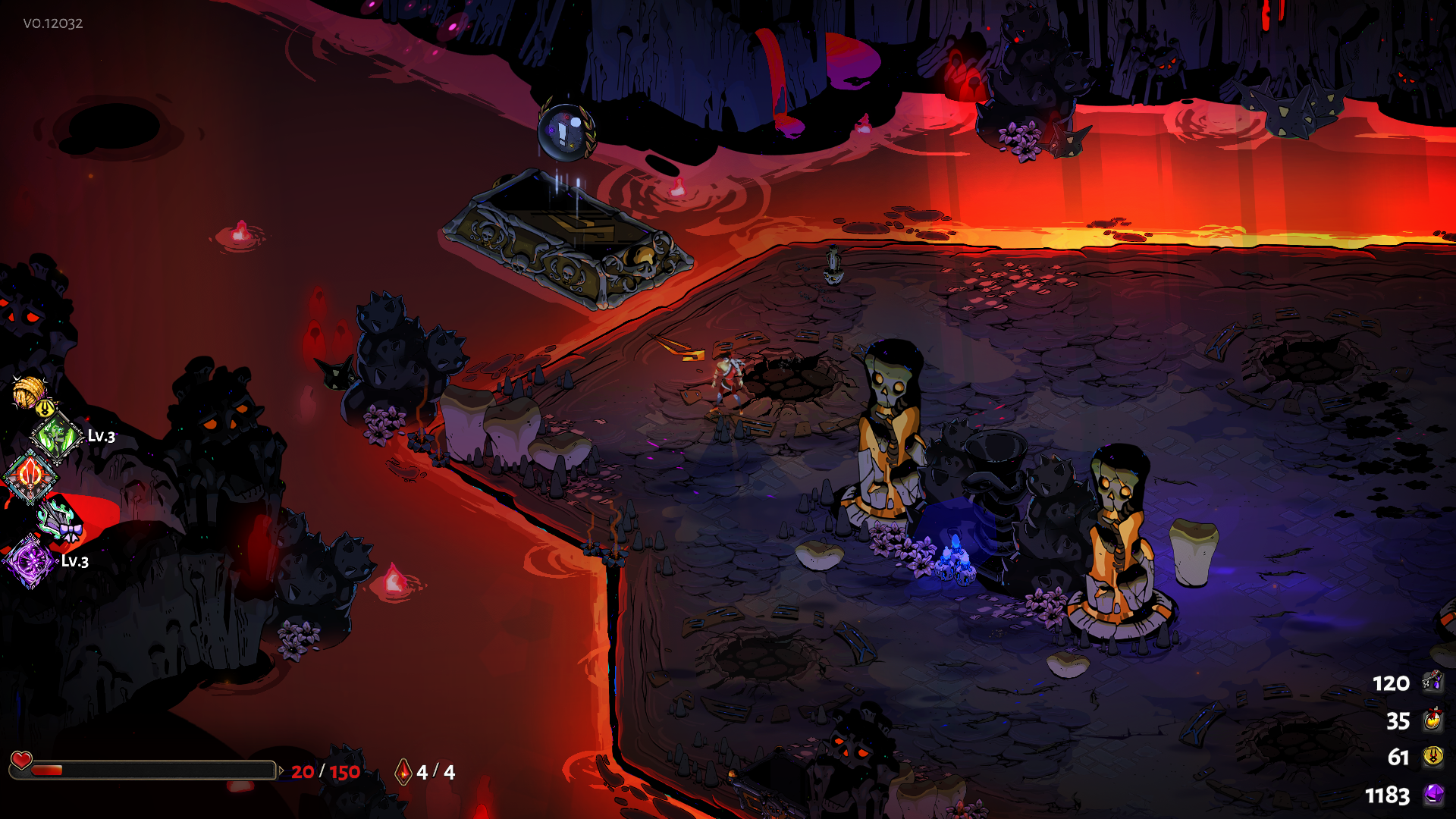
Okay, this may sound really dumb, but whenever i screenshot it completely ignores the boon info. For example, here in the time of screengrab, i was holding L1, as in to show the boon info in text, but it does not show it. https://i.imgur.com/g0sekSH.png
 toxic trout
screenshots are a bit weird
glad pawn
i can see that... how does one even manage to make something un-screenshottable 
 fierce oriole
Nvidia Shadowplay
 past parrot
Have you tried binding one of your controller's buttons to the "send feedback" thing? That's how I do it.
glad pawn
oh, you're right, capturing with inbuilt F10 screenshot really does work!
past parrot
Yeah. Bit clunky since you open the feedback window and have to close it, but it works fine enough. I personally binded it to the select button on my controller so I don't even have to use F10.
 sharp ice
i recently got a new computer and i have none of my progress on Hades. is that intentional? i assumed it would be saved on my Epic account.
toxic trout
epic launcher doesn't have cloud saves right now
you need to transfer saves manually
toxic trout
if you'd like to do that, then take it to #off-topic-discussion !
analog fjord
@glad pawn Hopefully screenshots will get better this patch
 thick lava
Also F11 will take full-resolution screenshots. F10 is really meant for bug reporting from now on
@queen nymph the patch has a new option to enable mouse lock to the window. That won't fix the border in ultrawide, but should help
 whole stone
updated to the new patch, my main menu is black but mouse and sound work
analog fjord
@thick lava ^ ?
whole stone
controller inputs seem to be working and selecting menu items
let me know if there are any log files I can send if needed!
 formal sierra
 woeful rock
oh boy I try to buy the game and epic games won't let me use my paypal balance
formal sierra
@analog fjord zeus keepsake
woeful rock
isn't it great
whole stone
Are you sure?
woeful rock
I know there's this clause and that if I have a PayPal balance, that balance will be used first to complete my payment. but it's still annoying
analog fjord
@formal sierra Did you start the run with that?
It should fix itself next run if you did
formal sierra
@analog fjord yes i switched from collarbone to that
analog fjord
@whole stone Check #hades-tech-fixes-old and ensure that you're using the proper Graphics Card too!
woeful rock
this is #h1-tech-support
analog fjord
@formal sierra Okay -- it should fix itself next run
formal sierra
@analog fjord nice, thank you
 hearty token
Hi guys I'm new to this discord but I just wanted to ask about the game. Unless I'm mistaken it was suppose to be given out to creators who applied to Support a Creator program right? I never got the game despite being in the program. I was told by support that I will get it on a later date but its been a while since they said that. I dont know if you guys know anything about it but I was just curious if you guys did know something
analog fjord
I'm not sure about that @hearty token ... that program is operated by Epic, not us...
hearty token
ah ok
thank you! i'll probably just buy the game instead of all that hassle lol. game looks great! thank you guys
 crisp panther
I'm not sure if this has been addressed before or was fixed in the recent patch, but I've had my game freeze multiple times now. It only happens when I will leave my game paused for long periods of time whilst doing something else. I'm not tabbed out when I do this, I'm usually afk
 mild meteorBOT
Thanks for reporting a game freeze! The most common solution to this issue can be found in #hades-tech-fixes-old
analog fjord
^^^ ALSO we tried to address this in the new patch
 wraith crown
Guys, when i'm streaming the game is shaking like crazy on my stream when i move with zagreus
am i the only one with such an issue
?
analog fjord
Try the suggestions in #hades-tech-fixes-old
whole stone
I am running this on a desktop through my GPU, so I don't even have the option to push it through my integrated graphics @analog fjord The mouse pointer is rendering which is weird
analog fjord
Are your drivers up to date?
whole stone
Just updated this morning to the new nvidia driver
I might try to uninstall and reinstall the game
analog fjord
Yeah good call. I updated to the latest this morning too...
If nothing else works please send an F10 report from in-game from the main menu!
whole stone
will do! I just hope nobody else has to deal with this
whole stone
After reinstall, same issue 😦
 prisma pilot
here's an interesting problem idk if anyone else is seeing it- but in windowed mode I can't move my mouse outside of the borders of the game?
if I wanna open up another tab I have to minimize hades entirely
whole stone
weird, screen is black, but the F10 bug reporter shows the actual screen
 topaz minnow
ummm ok here is a problem: finally beated the game for the first time and I wanted t otake a screenshot. Accidently pressed F10 indtead of F11 and the game just blacked out. any ideas before I have to close and reopen it?
 quaint lichen
is there a way to get the character art from the game? am i on the right channel to ask that?
topaz minnow
I don't want to reopen since I don't think it would save my last run and this is my first ever win :\
analog fjord
@prisma pilot We added a new option for that in the Settings Menu
analog fjord
@topaz minnow I think it maybe opened the Bug Reporter window. You should be able to close that window and continue playing!
topaz minnow
I thought that too, but there is no bug reporter video
window* sorry my brother talked to me XD
analog fjord
It should be a secondary Window? Can you not alt-tab to it or anything?
That is... concerning
analog fjord
Can you Hit Alt-Tab and take a screenshot of all your windows and send it to me?
beat me to it
topaz minnow
lol
analog fjord
not sure why it isn't launching! @thick lava Any ideas?
topaz minnow
if it helps, i pressed it just as the "hydra vanquished" title was gone from the screen
whole stone
I got it working!
I had to navigate through the menu on the black screen to tick off fullscreen
thick lava
@topaz minnow Are you hearing any game audio?
topaz minnow
nope
thick lava
What's your graphics card?
thick lava
Windows Key > search for "Error" and click "View Event Logs"
whole stone
ok, so confirmed, setting my game to fullscreen causes it to go black
thick lava
I suspect the bug reporter crashed when you hit F10, which may have frozen the game
mild meteorBOT
Thanks for reporting a game freeze! The most common solution to this issue can be found in #hades-tech-fixes-old
topaz minnow
ok where do I see that? im there
formal sierra
@analog fjord the zeus ring is the same even after i completed the run. Also (this happened before as well) the chest text remains "locked" when you complete the challenge and you are in range of it, not updating itself until you go far from it and make the text disappear then reappear
topaz minnow
that's the screen. looks into errors?
topaz minnow
it happened around 10:39 for me, and there is nothing there i think
(sorted by time)
thick lava
Yeah that rules that out
what you can do, if the game is still running, is collect a dump of the game state. Cause I'm not entirely sure what's happening here
thick lava
Open Task Manager, find Hades. Right-click on it and click "go to details"
(or search for Hades.exe in the Details panel of task manager)
This file is probably gonna be like 5 GB
topaz minnow
I have hades, console windows host and something from razer for some reason under "hades"
thick lava
hmmmmmmmm
topaz minnow
analog fjord
Oh dang
topaz minnow
it has the logo of the new razer synapse, so i think its the new "game boost" they have
actually this might be the problem
topaz minnow
it closes some programs to make the game run faster, never really thought of it before
thick lava
I mean, either way the game is in a unrecoverable state
thick lava
Yeah you can close out the bug reporter
topaz minnow
want me to check again to be sure? now that i have the game (probably) i can try to repreduce it
thick lava
I assume if you killed the process that blocked it, it won't repro unless you restart that process
topaz minnow
yeah it worked
topaz minnow
yeah i could reopen the game just to check
thick lava
feel free to do that if you'd like
topaz minnow
hmm, hades doesnt seem to want to talk now
or anyone else
there is sound, but they dont speak
oh, nevermind. it fixed itsself when i returned to the game
thick lava
great! I guess for future reference, don't have that process running if you think you'll need to report a bug
or you can un-bind F10 so it doesn't bring it up
topaz minnow
i'll just block that process. its easy and i dont really need it
thanks for the help!
 river viper
Quick question, where do the screenshots go after F11?
thick lava
Documents\Saved Games\Hades\Screenshots
river viper
Awesome, thank you!
 foggy vine
I have this bug since ever
analog fjord
Hi, that is a known issue. We will try to address it with a patch this week (that whole message should change)
 frosty tiger
Hm... After today's patch the game runs noticably slower. I was able to stream it through discord yesterday, today the frames drop to like 20 when i turn screen share on. Any idea why?
I run i7 7700hq, 8 gigs of ram and geforce 1060 with 6 gigs on it.
 hard crane
More for the discord than the game, but I have a "Do not have permission to post here" in hades feedback
 edgy sigil
The new boon from Chaos the causes bombs to drop on fallen enemies does seem to work for the "pot enemies?".
 formal portal
if you go to #bot-commands and join the Hades rank it lets you post
my b you actually join early access not hades @hard crane
hard crane
Thanks AM, weird that I had to do that since I was able to post in feedback at launch no problem
cinder totem
Yeah please go ahead and check out the pins in the #hades-feedback channel for full details - we had a change in our feedback process in mid-December.
 atomic solstice
does borderless window not working for anyone else?
makes the game and stream lag hard
or framedrop
 knotty dagger
huch pressed f10 accidently and returned to a totally different safe. was done with hydra and now im back in tartarus
after i task managed it, i weirdly returned to hydra and the game then dissapeared
 lethal harbor
Found a hole in the boundaries of a map
lethal harbor
Will do!
 lavish sorrel
i walked through this spikes at the end of the room and they stuck like this, but they arent functional
thick lava
^ Please report bugs like that with F10 in-game
frosty tiger
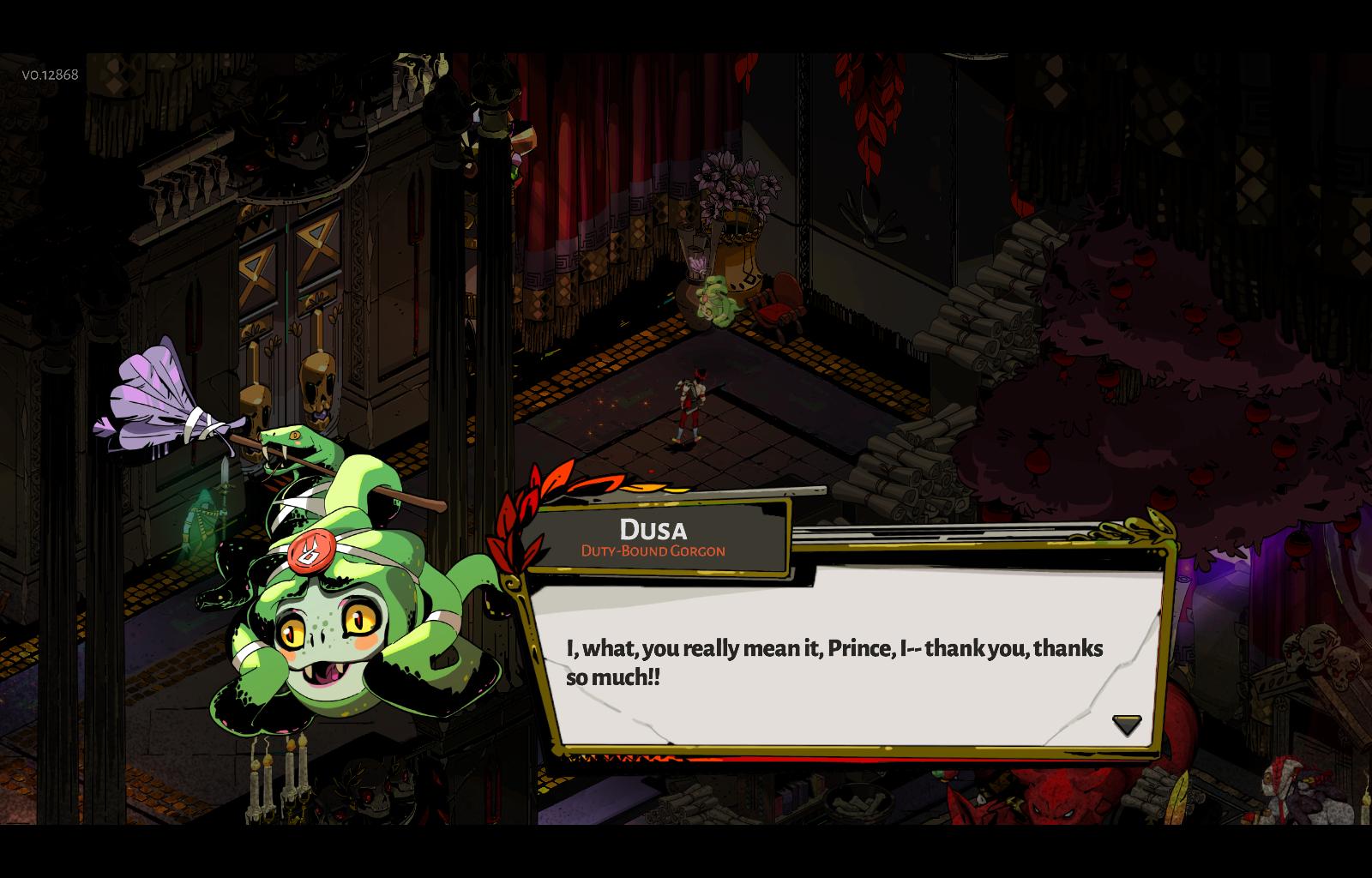
This is not a bug but more of a very minor grammatical error: https://i.imgur.com/Q58CeJa.jpg - Should probably be: "I, what, you really mean it, Prince?"
 analog fjord
That is definitely artistic liberty with the English language at work 😃
It is intended
 torn musk
Is there any way to save your game to a cloud? I'm using the same account on two different computers and my save doesn't transfer 😦
 austere talon
i'm using gdrive for games who doesn't have cloud save
analog fjord
^^ that's a good solution!
 tough isle
Hi! After the chaos patch i can't continue the game. Every time i tried to start a new escape, the game crashed. I tried to start a new game and the same error happend again.
analog fjord
Does the Bug Reporter appear when the game crashes?
tough isle
nope
analog fjord
If not, can you DM me your save file? It should be in Documents\Saved Games\Hades
tough isle
sure
analog fjord
Actually, if it happens with new saves too... try this:
The game won’t save
Whitelist the game in your antivirus software, or allow access to your Documents folder in Windows Defender. Ensure that you have a folder at Documents\Saved Games\Hades
Follow the information here https://support.microsoft.com/en-us/help/4046851/windows-10-allow-blocked-app-windows-security
Use Controlled folder access in Windows Security to review apps that can change files in protected folders.
daring forum
Hello, even after the update I still can't access to the "report a bug" panel same issue with screenshots function. I tried to reinstall the game, change the key bind, tried to do it with my controller, nothing seems to work. There is simply no reaction when i try to use those functions, not even a little freeze, I still can move like i did nothing
 shrewd oar
Looking for support not for the game itself, but for the discord. For some reason, it still won’t let me comment in #hades-feedback
toxic trout
check the pinned messages in there
shrewd oar
Weird, I could have sworn I’d already done that. Thanks!
 dense saffron
anyone else having frame drops in asphodel after getting a few boons like zeus cast for instance?
woeful rock
Hey guys um
What was that program that made your controller look like a 360 controller to everything else called again?
Usually Steam does that to my Switch Pro controller but obviously I can't use Steam with Hades... wait
flint compass
you can
woeful rock
What if I add it as a non-Steam game?
flint compass
add it to steam as a non steam game, yeah
woeful rock
I wonder if that would help with the controller
I hope so
It works!
Yes!
Thank you
thick lava
@woeful rock The program I think you're talking about is called x360ce. But if you want to use a Switch Pro controller, this patch supports that
you shouldn't need to have Steam running or w/e to use it either
woeful rock
well the controller worked, yes, but it wasn't mapping right
it thought A was B and B was A and that stuff
 versed spindle
Umm hello, I was wondering if anyone could help, after the patch everytime I start a game I get a white screen even though I do hear music , see the cursor and when I randomly click on the screen I sometimes open up the contact links on the bottom of the screen
I tried restarting my pc and re-installing but none worked
analog fjord
Hi, please try setting these launch options in the Epic Launcher:
/FullScreen=false /NoBorder=true
 void apex
So I tried to report a bug, so I pressed f10, but now the screen has been blue for like 3 min without the bug reporter actually opening
 kind pier
You'll need to alt-tab over to the reporter
analog fjord
There's no second window with it anywhere @void apex that you can Alt-Tab to?
void apex
Ooh, thanks, there it is
analog fjord
We tried to make it reliably appear on top, but I think windowed/borderless may still have issues
kind pier
Also, for some reason my mouse feels like it's moving really slowly on the main menu, no matter how I adjust the dead zone.
void apex
I’ve got game full screen
kind pier
In game it's fine
analog fjord
Hmmm good to know!
void apex
Bug reporter didn’t cause any problems before in full screen
analog fjord
@kind pier Dead Zone should only affect controllers...
void apex
Alrighty, successfully reported the bug, thanks!
I appreciate that now it gives confirmation it’s been sent ❤ Good QoL upgrade!
analog fjord
Woo!
versed spindle
@analog fjord i tried the fix but only now it shows none of the game window shown, still has sounds and the cursor is on screen
analog fjord
hmmmm maybe just try /FullScreen=false ?
versed spindle
white window is back but thats it 😦
analog fjord
@thick lava Any ideas?
thick lava
@versed spindle The game was working normally for you on the last patch, correct?
versed spindle
yes it was a few hours ago before patched released
thick lava
Have you updated any drivers today?
NVidia has new video drivers out today, if you have an NVidia card
versed spindle
haven't updated yet but I did saw there's an update on nvidia
thick lava
Yeah, I'd give that a try first and see if it improves things
versed spindle
alright will update drivers and see what'll do
thick lava
Feel free to @ me when it's done
woeful rock
So the Perilous Foes section of the Codex is stuck like this for me
 vocal vortex
yo, i reinstalled windows and now my saves are gone. does the epic games launcher not save my files on a cloud?
flint compass
nope :(
analog fjord
No... no it does not. Did you back them up at all?
vocal vortex
sadly no, i dropped the backup harddrive down a flight of stairs 😅
analog fjord
omg
That sucks
I bet somebody could give you a save, but it will never be the same
vocal vortex
meh its fine, ill just redo
theres more rooms and stuff now so it will just be more fun 😄
 wanton pulsar
I think this is a new bug but it could also be confirmation bias.
I know they lowered the effectiveness of the relics and added ranks, but I have max mirror upgrades (50% chance for a rare and 25% chance for an epic) and I am finding that with a "god relic", the first boon I see always has 1 to 2 commons and the rest rares and every other boon after has the standard 2 epics.
analog fjord
Nothing much changed there... I think it's just luck
wanton pulsar
aight, I also notice that their tooltips are "ForceAphroditeBoonTrait_Tray_Inactive"
analog fjord
That's known -- you can check #hades-tech-fixes-old for known issues 😄
wanton pulsar
thanks 😃
queen nymph
If border issue isn't listed in known issues, does that mean it's not marked as to be fixed?
REf this image: https://cdn.discordapp.com/attachments/520430049003044864/534623853700448275/HighRes_3840x1080.jpg

If so, do I need to submit the issue ingame via feedback or is here ok?
flint compass
report it in-game with F10
queen nymph
Ta
analog fjord
We are certainly fixing far more issues than what is listed in the Known Issues list, but those are the most commonly reported ones
That we don't need more information to reproduce.
woeful rock
@analog fjord Ah, right, I misinterpreted what that meant, thank you!
analog fjord
All good 😄
versed spindle
@thick lava sadly after updating problem is still the same, white screen with sound, cursor. If it helps my pc spec is 8700k gtx 1070 16gbram
thick lava
Alright, that's weird.
Your driver version is 417.71 (in GeForce Experience) and it's still a white screen
In the Epic launcher, click the settings cog on the game, and click "Verify" to make sure all of the game files are good
Another thing to check, is to go to the start menu, search for "error" and click "view event logs". This will open Event Viewer. From there, go to Windows Logs > Application and scroll through the middle panel to find any errors that might've happened recently
(looks like this)
@versed spindle Are you running any sort of video/desktop capture software that could be interfering here?
versed spindle
@thick lava 417.71 still white screen, verified the game and still white screen and looked at window logs and no errors regarding hades.exe
thick lava
Try the following launch options: /FullScreen=false or /FullScreen=false /NoBorder=true
Settings Cog (on the bottom left) > scroll to Hades
versed spindle
@thick lava yeah I did those but I actually found an answer, cause im actually using dual screens so I just turned off the first monitor and now the game shows perfectly, guessing it might need some optimization for switching monitors in the video options
sorry for taking up your time
thick lava
Which monitor worked?
/DisplayIndex=0 or /DisplayIndex=1
(0 is your primary)
That might work, if that's what's causing it
versed spindle
I'll try turning on the other monitor again and see what happens
thick lava
If you have both monitors turned on and the game works on neither, then I'll have to do more digging
thick lava
The screenshot is sent when after you click Submit. You should see a message confirming after the upload finishes
dense rune
@versed spindle out of curiosity, is one monitor running off of onboard graphics?
versed spindle
so I tried first to just turn both monitors on without any added command line arguments and opened the game and now it works perfectly
thick lava
^ That is an EXCELLENT point. EDIT: @dense rune
versed spindle
might just have been a hiccup
@dense rune they're actually both on card, one's on dvi and the other is hdmi
thick lava
I have dual monitors at home, and had problems with flickering with my old 970
on one of them. Which happened to be DVI, actually.
Not sure if it's a Win 10 thing or a driver thing
versed spindle
could have been a win 10 thing since it happens even on the older driver
thick lava
Yeah my issue at home was maybe a year or two ago now
Well anyway, grats on the game working now
I'm sorry it was so much trouble
dense rune
If you still have problems, one possible solution that worked for a different problem and different user a while back, but I suspect has similar root cause — in your BIOS, check to make sure that Intel HD (or Intel UHD) is disabled and that PCIe is set as your default for graphics rather than leaving on auto (if applicable)
versed spindle
its fine im enjoying the game that I dont mind these as I understand that its still under development, also sorry for taking up your time
thick lava
No worries. This is why I'm here 😄
 lethal crest
Turns out my F10 key coresponds to keyboard lighting and was ignored by the game. Assigned report key to diffrent one and works fine
 copper swallow
Do i have to do anything specific to update my game? Or is it automatic
flint compass
reopen your launcher if it hasnt automatically started the update
 ocean dome
how can I report a bug ?
dense rune
F10 in-game
 fading osprey
Hope this is the right channel, it seems the closest - can anyone tell me how to access screenshots I've taken with F11? Is there a folder they save to somewhere?
dense rune
C:\Users\username\Documents\Saved Games\Hades\Screenshots
fading osprey
Thank you!
 sacred wadi
Went to access the codex after giving Artemis Ambrosia, but it wouldn't let me showing a X where the little codex icon would load. When I pressed F10 to report it, game crashed onto a light blue screen.
dense rune
That's not a crash, the cyan screen covers the game during the bug report. There should be a separate window with the bug report. Try alt+tabbing
The X indicates you haven't received the Codex from Achilles  yet, so unless you had it before and now it's saying you don't, you need to talk to Achilles a couple more times
 tribal crown
umm my caracter model is above where my caracter is. i made a screen shot but i dont know where to find them
flint compass
report it with F10 in game
 subtle spindle
I already submitted a bug report in game, but is anyone else having issues with their mouse? I have a T7 wired mouse, and prior to the update, I had no issue. Now it's lagging and stuttering in the game, but in nothing else on my computer. It has DPI settings, and I changed the DPI to counter it, but it's still present even on the highest and lowest settings.
daring forum
Hello, It's me again, nothing new for my problem to the report a bug not showing at all?
https://discordapp.com/channels/456889434672201729/520430049003044864/534881080646565890
(I'll try asap the thing in known issue but the fact that it does it everytime, like i never saw the menu, lead me to think it'll not work for me ;c)
 eager fog
the reward isn't showing, but i took the route and it was a centaur heart
frosty tiger
are you sure you haven t picked chaos’ boon that renders the rewards invisible ?
oh actually , as it turns out , that boon replaces the icons but doesn t remove them , my bad..!
 rugged egret
is there any way to avoid the screen crashes when i dont have an nvidia card? i only have the intel graphics card that came with the laptop
it crashes randomly whenever im in asphodel and is currently the only reason i have not even been able to see the final boss yet; keep crashing on the second or third stage
fierce oriole
I had an issue where one of the chests did not have a key / chain hovering over it
So I assumed it was a free one, it wasn't
Didn't think to log a bug at the time but thought it'd be worth mentioning here
halcyon bison
My mouse cursor switches to default desktop one when I move it rapidly. It's hard to spot but once you do you get annoyed very fast https://youtu.be/hH-ptkCa9ys

 old gulch
So basically Hades completely breaks my pc everytime i try to play it, the whole pc starts to lag, not just Hades. I can't find any fixes, tried all resolutions, no fullscreen and re-installing and stuff, but none of it works. Anyone got any tips or fixes i can try?
sharp narwhal
Did you check which graphics card it's running on?
 late hearth
I play in full screen If i Alt Tab And move while to other place then I try to make a Screen Shot with (print screen key) just save the place (screen) before i Alt tabing the game (sorry for my bad english), and it takes a short (considerable) time to load the Hades againg when I do the Alt tab thing
oh this is the topic to send a Report - bug ¿? sorry xD
old gulch
i mean, i've only got one gpu
i don't know what happened, but now it stops breaking my entire pc, but it still lags occationally tho
frosty tiger
Hello. Is there an option I can't find to enable the sound when the game is put to background? It's nice that the game pauses itself while alt-tab, but losing the sound annoys me sometimes.
rugged egret
is there absolutely no solution if you dont happen to own an nvidia graphics card? i would really like to progress in the game and this is beyond frustrating.
 small swan
My game just crashed for the first time after playing since week 1. I recently was forced to update my pc by Windows 10, so I don't know if that had something to do with it. I was real close to BoneHydra when it happened too. =/
thick lava
@daring forum If you have a razer product, there's a potential fix for you in #hades-tech-fixes-old. Otherwise, be sure your F10 key isn't mapped to something else in Windows (such as Play/Pause or volume controls). This can sometimes interfere with the game
@rugged egret If you've tried everything in #hades-tech-fixes-old, PM me your DxDiag.txt and I can help you troubleshoot. https://support.microsoft.com/en-us/help/4028644/windows-open-and-run-dxdiagexe
Open and run DxDiag.exe
@frosty tiger We don't really have a way to still have the game be paused when it's minimized/alt-tabbed-out while still playing the audio. This would be a good thing to put in #hades-feedback
small swan
Update to my earlier crash. I opened the game after the crash and went to start a new run. I was placed back at the level I was in when the game crashed.
thick lava
When you crashed, did the bug reporter open up?
Generally after a crash, you should load back in wherever you were (either before or after the room encounter, if you completed it). I'm looking through the bug reports to see if I see your crash
 strange zinc
Seems like a bug, sometimes a part of picture jumps (see clip) 🤔
Clip: https://clips.twitch.tv/ObeseMistyTortoiseTF2John
 dense rune
@old gulch even with just 1 gpu, a lot of computers have onboard graphics that can cause problems with Hades. Try disabling Intel HD in your BIOS and making sure default video is set to PCIe and not Auto
 karmic plinth
Is there anyway to gauge the my fps in game? Only feel like I'm getting 30
prisma pilot

already reported it but looks like there's still some stuff to be ironed out w the chaos boons
(understandable though, and i love the addition of them)
toxic trout
wow, you actually have working god keepsake descriptions
frosty tiger
Wrong room. Sorry! (edit)
prisma pilot
im also gonna go out on a limb here and say

spawning duplicate sisyphus rooms probably wasnt intended?
frosty tiger
I got that too yesterday.
prisma pilot
I'm assuming it wasn't but
I figured I'd post it here and be certain before I do the proper f10
frosty tiger
Ares as next boon, failed. Also, apparently this is the channel to post this in after all.
full crater
is this from a chaos boon?
the hidden room icon is the same as sisyphus
I REALLLLY WISH THEYD CHANGE THAT TBH
past parrot
@prisma pilot Probably just the effect of your chaos boon, yeah.
Maybe have it be a ? instead of a !, but with a similar design and Chaos' colours.
toxic trout
[raises hand] well the "sisyphus room" icon is actually just the mystery room icon
that's why the room after meg and the first room of asphodel also use that icon.
prisma pilot
ohhhh ok
past parrot
I was lucky when I got that chaos boon, because I never had to choose between two rooms.
prisma pilot
yeah that's confusing
the thing is I thought I'd already gone through all of the rooms my chaos boon requested me to
like it said three rooms without knowing the rewards, and then the boon would grant you benefits
 thick cedar
prisma pilot
thick cedar
prisma pilot
i have not
past parrot
You have a boon with 2 encounters left. The one on top.
prisma pilot
ok gotcha
past parrot
If you're still on that run, might be worth checking to see if it's got that effect.
prisma pilot
i was looking at the chaos boon to detail the downsides too I hadn't noticed they were split up
my b!
I got two other boons before that even showed up so I didn't notice
ok this is. another weird one, right after I finished a Zeus/Artemis room in Asphodel
I'm getting a room for another Zeus/Artemis boon room
could be godly rng (lmao) but
full crater
theyre coming back...to settle the score
full crater
someone a sore loser
prisma pilot
and I have the blood vial equipped
full crater
omg WEEEEIRD
prisma pilot
YEA
i picked up the blood vial after i beat meg and now I'm getting two boon rooms with Zeus/Artemis
full crater
ares: sorry my kin im busy
prisma pilot
ares: thou art on thine own, Zagreus
artemis: like hell he is
im still like
going for the second boon room
bc dang
but still it's weird
I thought runs had like a soft thing in place where you cant get the same rewards twice in a row
full crater
nah
prisma pilot
huh
welp my boon list is looking crazy rn
like legit do you wanna see how many artemis and zeus boons i have now
 wanton breach
chaos boon description error
sharp narwhal
Do you have today's patch installed?
Oh you do, sorry
Please report using the F10 bug reporter!
woeful rock
I'm trying to update Hades but the launcher just says Queued and is stuck
I know this isn't a problem with Hades itself but uh
full crater
oh i just had a problem like that and i restarted epic and it worked? 🙏 hope u can get it too
 tepid wind
Tru, haven't put it down since I started yestrday
woeful rock
Hmm
The issue I have with the Perilous Foes section of the Codex still remains
Even after the update
 magic rivet
can't scroll down the codex monster page with a controller? I can scroll between each entry and the next, but not up and down the page, unless I use the mouse. Does anyone else have this issue?
@woeful rock is that what you're talking about?
past parrot
Are you using the D-pad or the analog stick?
magic rivet
neither works
past parrot
Weird, definitely works for me. What kind of controller do you have? Does everything work fine for the rest of the game?
magic rivet
xbox one controller. Everything else works fine, as far as I can tell
 reef cedar
If you are on the boss labled fire boat, it is possible to end up pushing the protector gems into the wall on the north eastern corner.
This was done using the shield while having the deflect boost to attacks. Unsure if it was the bullcharge or the normal swipe.
He then was unable to be hit by normal attacks, the Q special, or standard casts. He was still able to be hit by the bull rush's large AoE
flint compass
report that with F10 in game!
 rustic zenith
does boiling blood not work on backstabs? i just tested it on skelly and it only gave me a 25% damage buff instead of 50%
reef cedar
Thanks. Didn't know that was an option. I'll try to do that in order to get a screen cap should it happen again
flint compass
that sounds like a bug to me, chau
rustic zenith
im not sure on how to report it
rustic zenith
okay. thank you!
woeful rock
Yeah so uh the bug reporter failed???
sharp narwhal
hi lumi - check hades tech fixes for a way to counter this
you're going to need to open task manager and close a process
analog fjord
@woeful rock If you get that again can you copy and paste the text in that error and DM it to me?
thick lava
Gah I was busy dying to the hydra. Thanks for sending that over. I need to track that crash down
 proper nova
I assume the game froze my computer and I restarted my pc and well, my first save file is now this
sharp narwhal
@proper nova I don't know exactly what your issue is, but you should try renaming "Profile1.sav.bak" to "Profile.sav"
those files should be in C:\ Users\ [your name]\Documents\Saved Games\Hades\
proper nova
I already did that, still nothing has changed
sharp narwhal
I see. @analog fjord ?
ah...it's kind of late. hopefully Morgan or Dexter will drop in and they'll be able to help you out
dense rune
I seem to recall last time this happened to someone posting here that Morgan said the game thought the person was trying to save scum or some such  Perhaps it incorrectly interprets a computer freeze as suspect?
mild meteorBOT
Thanks for reporting a game freeze! The most common solution to this issue can be found in #hades-tech-fixes-old
sharp narwhal
thank you proxy
 teal pecan
sometimes after i attack a lot and when a room clears zagreus will be locked in an attack pose and i can still move and stuff with him and if i attack it fixes itself but just id let it be known
teal pecan
ok thank you
subtle spindle
Has anyone noticed that the Codex will not pop up when there's a boon? Used to be able to do that. And I was able to do it for Chaos
 hushed atlas
Hello guys. I got stuttering type performance issues, running rx 580, i5 3570k, 8gb ram. Tech-fixes didnt help. Any idea?
dense saffron
same allso getting performance issues at random times , mostly when i have a zeus boon and theres alot of armoured witches involved, my fps drops down to under 20 fps probably, i have fx8350,8gb ram, gtx 970
 civic cliff
Also getting stuttering with an 8GB RX580, E5-2670 and 32G Ram
sharp narwhal
I know Jay said they checked tech fixes, but have you guys? The most common cause of performance issues is the game defaulting to the weaker onboard graphics
You may need to tweak your BIOS
dense saffron
i just checked my 3d settings i cant choose my gpu, so i may not have an onboard gpu
civic cliff
It's not that, the game runs fine 95% of the time but occasionally it just starts stuttering. I'm assuming it's probably a garbage collector running
Gonna make a more detailed observation later today i suppose
sharp narwhal
👍 I'll leave these here for the folks who know what they're doing to look at, then!
dense saffron
i just tried to submit a bug twice but after i submit i get a microsoft .net framework error, does this stop the bug report from goin through if i press continue?
 worthy locust
I just get a light blue screen upon pressing F10 to report a bug. Anybody have this issue as well?
worthy locust
Unfortunately nothing's happened besides that light blue screen
worthy locust
It automatically minimizes the game but nothing shows up. I'll look up the fixes, thank you. I'll come back to report on what happens.
The bug reporter showed up on the third try. The window just failed to appear earlier.
 late creek
Is anyone feeling laggier after the patch?
dense saffron
ive had preformance issues since a few patches back
 unborn flower
 toxic trout
that's a known issue!
analog fjord
It is indeed
unborn flower
Oh, wasn't sure.
dense rune
For people with constant FPS/stuttering issues, the problem is more than likely related to onboard graphics. FPS drops during high amounts of Zeus effects and/or witch projectiles is a different matter. For the former, please make sure Hades is set to use your GPU in the NVIDIA Control Panel (see #hades-tech-fixes-old ). If there is no option to select your GPU, you will have to manage it in the BIOS. Disable Intel HD and make sure you set PCIe as the default for graphics in the BIOS, don't leave it at Auto
full crater
OH OOPS ID BUGREPORTED IT EARLIER ;;
analog fjord
Also, we likely still have memory leak issues, so if you start experiencing slowdowns after an extended play session try restarting the game!
woeful rock
I would like to report a bug
I can't change the currently selected audio device with my controller
sharp narwhal
Please report bugs using the in-game F10 bug reporter!
woeful rock
Okay
thick lava
I'll log this one, Lumi. I imagine your F10 is still bugged
sharp narwhal
ah, sorry, i missed that her F10 was broken ;;
thick lava
np. I am also directly responsible for that playback device switcher
so...... my baaaaad
dense rune
Could the #hades-tech-fixes-old entry for framerate/performance issues be amended to include what to do when there is no option to select the GPU in the NVIDIA Control Panel? (see my post above)
It seems fairly common that the option is missing, and adjusting BIOS settings has proven effective
thick lava
I don't see why not. Looks like I can't edit @analog fjord's messages, so he'll have to be the one to make the change
It's a shame something like that has to be buried in the BIOS
 toxic bough
Sorry if I am talking out of school here but hopefully this is where I should report a bug. I got the big Gorgon stuck in the wall here and couldn't damage it until I dash into the wall in just the right way. It couldn't shoot me or move at all.
dense rune
Bug reports should be done in-game using the F10 bug reporter 
 quick ivy
I dont see anything in the readme about why I can't submit feedback??
dense rune
Read the pinned message in #hades-feedback
quick ivy
Okay thank you, I'm blocked from submitting feedback, any idea how to correct this?
dense rune
Again, read the pinned message in #hades-feedback
If you don't know what a pinned message is, click the pin icon in the top right of the channel. If on mobile, click the three vertical dots in the top right of the channel and select Pinned Messages
 tall inlet
Just a little spelling error where it should be spelled "underworld" I would safely assume
flint compass
report that with F10 in game! @tall inlet
 shy tapir
I can't report bugs because the F10 Bug report function is bound to basecamp authentification.
The window however is not clickable so I can't enter a token and therefore authentification fails.
Is there a solution to this or another possibilty to report bugs?
As a reminder for myself:
- Since the latest update I neither can launch Hades inside the epic games launcher nor the x64 version outside of it, only the x86 version in Admin mode works
- the ultra widescreen shows a cropped and deformed picture of the loading screen instead of the two ornated columns, making it uncomfortable playing in this resolution
- my settings (not my progress) gets resetted with every launch (no antivirus software interfering // #hades-tech-fixes-old mentioned folder is present)
- my first run in a session displays in out-of-combat situations only the walking animation and not the running one
Completely reinstalling the game did not solve any of these issues.
 slender fjord
i started hades after the last update and all my progress is gone
i now have to start completely new
analog fjord
@slender fjord Is there anything in Documents\Saved Games\Hades?
@shy tapir Can you DM @thick lava re: your bug reporter issues? And probably the rest since they're all his area of expertise!
shy tapir
Will do.
frosty tiger
Ok so because reporting bug doesn't work properly for me and crashes the game EDIT: freezes* I would like to report that if you push the button to give the gift fast enough you will be able to give 2.
analog fjord
Can you send us the crash that occurs when you try to report a bug?
Let's solve that first...
@frosty tiger
That's a far worse issue
frosty tiger
I will try
analog fjord
Do you get an error message popping up?
frosty tiger
@analog fjord Ok so what happens is that the game simply freezes while pressing F10, it doesn't crash so I don't get an error, I just tried using borderless window and it turns out the bug reporter actually appears but you need to choose the window to see it and after submitting you can play again.
mild meteorBOT
Thanks for reporting a game freeze! The most common solution to this issue can be found in #hades-tech-fixes-old
analog fjord
Yes, we are working on that! What were you in before? You should have been able to alt-tab to the window. It's not reliably popping on top 😦
frosty tiger
I used the fullscreen and didn't try the alt-tab but went straight for the CTRL-ALT-F4 and closed from task manager, my bad  .
.
 valid kettle
I have framerate issues #h1-tech-support
valid kettle
Can someone explain how i can set launch options please?
analog fjord
Yes:
- In the Epic Launcher open the Settings Menu
- Scroll to the bottom until you see Hades.
- Expand Hades
- Click "Additional Command Line Arguments"
- Type Launch Options into the text box that appears
I added that to #hades-tech-fixes-old
I'd say try this first:
Be sure to follow this guide to ensure that the game is using your nVidia card, and not your onboard Intel card:
https://www.techadvisor.co.uk/how-to/pc-components/how-set-default-graphics-card-3612668/
After that, make sure that your Window power settings are set for High Performance while running Hades. Ensure that the monitor running the game is connected to your nVidia video card on the back of your computer.
If there is no option to select your GPU, you will have to manage it in the BIOS. Disable Intel HD and make sure you set PCIe as the default for graphics in the BIOS, don't leave it at Auto

Tech Advisor
You don't always want integrated GPU so we show you how to set a default graphics card in Windows, whether it's Nvidia or AMD.
prisma pilot
uhhhhh has anyone gotten to hydra on today's patch yet?
i got
a few weird bugs
I had screen tearing when I attacked the hydra's main head- hitting it when it entered it's impervious stats gave it a huge amount of knockback on zag (going from the central head to the bottom of the screen), and I had some issues dashing between the main hydra head (through it from side to side) and at one point it resolved this by teleporting me into lava
I had Zeus' thunder dash so I was dashing through it's head to get max damage and it just. teleported me behind it after one move
analog fjord
Please F10 report these things! Your save file is really useful for us to figure out if it was related to a boon, or to your system.
prisma pilot
will do! I couldn't actually grab shots of these in the middle of the fight but I'll log them now
aaaand reported!
i wish i couldve clipped those cause they were a wild bug to notice in the middle of the fight
 elder thistle
Hi, i'm not sure if this a reported / known issue, I've looked at tech-fixes and nothing was mentioned there but in the Main Menu screen of Hades, my mouse movement is EXTREMELY clunky. I've reported it via bug reporter as well.
This only happens in the main menu, in-game I can't seem to notice the issue.
 solar mica
Hi! I got a problem: when i playing sometimes picture just freeze, i can listen how my character moving or fighting, but on screen just a picture. Maybe its known issue and i can fix it? Sorry for my English -_- Thx!
mild meteorBOT
Thanks for reporting a game freeze! The most common solution to this issue can be found in #hades-tech-fixes-old
slender fjord
@Morgan no there is not
 edgy roost
sooo my game crashed, and now it wont open
dense saffron
have u tried verifying the game through the little options menu in epic launcher ?
edgy roost
did that, still didnt fix, restarted my computer, fixed it enough for me to die, start a new run, and then froze again shortly after
dense saffron
have u read the stuff in tech fixes channel?
edgy roost
I have, and nothing there seems to help with this issue
edgy roost
rip me
halcyon bison
I did 150 heat before but it shows I've never done pact runs before
 tardy sentinel
Hey @halcyon bison we’re working on a fix for this. It won’t apply retroactively, but should fix it going forward.
 hardy coyote
I don't know if this is a bug or not, but when I enter each chamber I'm only recovering +2 instead of +3 health, and even though I am using the Pact where it limits the darkness in the mirror, Chthonic Vitality is still maxed out, so I don't know... is anyone else having this problem?
dense rune
You don't have the Pact enabled that reduces HP recovered from healing sources, do you?
Because that will affect Cthonic Vitality as well
hardy coyote
Oops, yeah, I hadn't noticed that, my bad 😅
 royal river
Hi, uh i dont know if this is happening to anyone but whenever I dash the textures good down a little bit and the screen slighty moves also
I also just noticed it happening when attacking
worn tendon
Hey guys. Any suggestions how to make f10 work properly during the run? Trying to report some sweet things, but Hades just goin blackscreen and stop responding
 maiden basin
Hi, with the current version (V0.13019) I'm having trouble with the game stuttering and freezing throughout the entire game plus menus. As well when the game is running smoothly my mouse has had extreme lag.
mild meteorBOT
Thanks for reporting a game freeze! The most common solution to this issue can be found in #hades-tech-fixes-old
dense rune
@worn tendon Do you have a Razer product? It may be related to the Razer synapse program. Try opening task manager, finding Hades.exe, expanding it and then ending ProcessCapturer.exe (see #hades-tech-fixes-old for a screenshot, last post)
sharp narwhal
@royal river Could you report that with F10 in-game?
I know there have been problems with screen tearing near the Hydra
sharp narwhal
if you can manage that it would be good, but if you can't that's understandable! the save and config data will be useful for tracking down the issue
royal river
ah
sharp narwhal
just be sure to describe the issue in your report - when it happens, what it looks like etc
royal river
im not sure how to describe it to well
 gleaming swan
Hi, I can not play Hades because I can not save my game, when I play the game a message "the current game settings are corrupt, do you have a solution?"
sharp narwhal
Hi, does your computer have antivirus software? Windows Defender or something like that?
Sometimes antivirus programs will try to stop the game from saving
gleaming swan
Yes I only used Windows defender
I tried to uninstall / reinstall the problem persists
sharp narwhal
Can you try turning Windows Defender off to see if that fixes it?
gleaming swan
Whitelist the game in your antivirus software, or allow access to your Documents folder in Windows Defender. Ensure that you have a folder at Documents\Saved Games\Hades

Follow the information here https://support.microsoft.com/en-us/help/4046851/windows-10-allow-blocked-app-windows-security ```

I found a solutionSorry for the disagreament, thank you to help me 😃
 light marsh
My game crashed during a run (late Asphodel) and on restarting, I'm back at the House of Hades without any of my gained darkness, ambrosia, etc. as if I never left. Renaming Profile1_Temp.sav.bak to Profile1_Temp.sav, as suggested in temp fixes, hasn't fixed the issue.
late creek
Hello! Not sure if someone reported this yet but here goes.
I took a boon that was rare (hunter's dash) which was supposed to give me 200+% extra damage for a dash attack.
However later on i realized it became 100% extra damage only. Is this a bug or intended?
dense rune
Sounds to me like a bug, did you report it in-game with F10? The save file is very helpful to them in tracking these things down
worn tendon
@dense rune nope. not using any of the razer thirt parties =\
late creek
Ah dang i ddn't report it in game. I'll do it if it happens again
 upbeat pewter
Do only i feel like the textures are kinda sharp? Will they be smoothened in later updates?
toxic trout
i like the sharpness so hopefully not
upbeat pewter
I mean, i think there should be at least option to smoothen it
I kinda like it too
Wanna see how it looks smoothened tho
 sleek prism
Game wasn't starting. Booted epic games in admin, tried to launch the game. Decided to wait. Took 2.5 minutes to start, no loading/black screen or anything. Just took actually forever :/
limpid halo
So it loaded in the end? What if you run it directly from the folder itself (i.e. not via epic launcher)?
sleek prism
Same difference
It did load in the end
it just took a long time to do so, task wasn't using any CPU or anything
limpid halo
Hmmm, will get back to you
 vernal cobalt
Not sure if it's the right channel, but does anybody know if epic game store can refund via paypal? I was going to wait for a PS4 release, but I'm too hyped for Hades so I'll buy it on PC. Problem is, I'm not sure my PC will be able to handle the game since it's very old and I want to make sure refund is available if that's the case
 keen hamlet
They...don't allow refund on their store if I remember correctly. It's in the user agreement.
 tropic root
@vernal cobalt from what I read in the Store specifics, each user has 2 automatic refunds, but you can only use it within 2 weeks since your purchase
How do refunds work on the Epic Games store?
We will offer two no-questions-asked refunds per player within two weeks of purchase.
keen hamlet
Ah! That makes sense.
frosty tiger
It has the same refund policy as steam, 2 weeks, 2 hours playtime. Not that I would like you to refund a good game. You should check the mininum specs for the game.
limpid halo
@sleek prism after the long loading time occurs, submit a report outlining what you have here via in the game bug reported (F10) 👍
 acoustic trout
As of the latest update the game does start on my PC (wasn't able to get it to run before, some kind of Open GL error).
Unfortunately I have a new issue: the mouse pointer isn't showing at all (neither during menues nor during gameplay).
Any idea what might be going wrong? I have no controller connected, does it maybe get confused by existing controller drivers or something?
The mouse seems to work as expected, it's a "simple" visual bug
Removing the "Borderless" and the "Fullscreen" Options under the Display menu seems to fix it.
late hearth
Sorry for my bad english but...
Guys i found a bug using the shield weapon....
If you throw the shield and then (like a insta) use dash, your next throws gonna be stuck in our hand, before you stop spaming and let do the animation finish your throw gonna be effective againg
analog fjord
Thanks! That's been reported and we're tracking it down.
@acoustic trout Glad to know that helped!
late hearth
No problem ^^,
 tiny sundial
Hey i just found a bug where the music disappears (not sure where to report)
Here's how I got It :
- I met chaos for the first time in my run (2nd/3rd time across all runs, not sure if that's relevant though)
- Gave him an estus flask and got chaos egg
- Talked to him and got the bonus that deals more damage from traps for 3 encounters, but increases attack power afterwards
- Later in the run, bought in the well the upgrade that spawns a blood gate ahead
- The very next room was the first semi boss (two little monsters with bombs (sorry, forgot their names))
- When I killed them and took ares' boon, the blood gate appeared
- I went through it and talked to chaos again
- Took the epic boon that makes you take more damage for 3 encounters but then gives you one death defiance
- Finally, when I exited this second blood gate, I was put into a room and the music was gone (the sounds are still there tough)
I just encountered the bug so I'm gonna keep playing until the music is back, I'll tell you here what I find
If you want more details with my run you can ask ^^
sharp narwhal
Can you report using F10 in game?
Your save data is really useful in tracking issues like that down!
sharp narwhal
And if you could just copy and paste what you have here into the bug description ^^
tiny sundial
Well when I tried to do f10 then alt+tab...
My computer crashed :'(
It was an Internal video scheduler error i think (not sure)
But I really don't think it's due to the game, I've been having this error randomly lately (connecting an hdmi while on netflix, putting it out of sleep mode, etc...)
So i'll report it with f10 tomorrow, sorry :/
sharp narwhal
Alright, thanks for trying anyways!
frosty tiger
hello fellas
i had a bug where i got the epic huntersdash in the first room and in the second it was just the basic one
that happend two times in a row
tardy sentinel
Hey @frosty tiger this is a known issue, thanks. Hunter dash will currently revert to common rarity/effect when you progress to a new room
 silk gust
I'm getting some serious lag in the game, these are my specs:
Version: Release v0.12868
NVIDIA Corporation GeForce GTX 1060 6GB/PCIe/SSE2 OpenGL = 4.6.0 NVIDIA 416.34 GLSL = 4.60 NVIDIA HasBC7 = True, HasFrameBuffer = True
OS: Microsoft Windows NT 10.0.17134.0
RAM: 16329
Cores: 12
64-bit: True
Region: en-GB```It lags most notably when enemies spawn
And also after cleaning a room? Not sure why
 rare needle
silk gust
rare needle
silk gust
Can actually confirm the same
A good third of the Meg fight is queuing up the moves I hope will keep me alive
 meager nest
For some reason the game close in the first loading when you start the game for me
silk gust
(it feels like I'm playing Transistor again :P)
 small lark
I already posted this in feedback but if you get hunter's dash from Artemis and then find her again, she will offer boons that increase critical damage and critical damage against armor.
I just got two useless boons in a single run.
 obsidian seal
Did you already have things that affected your attacks from other gods?
small lark
Yes but nothing prohibiting pressure points
which should have been offered because i had no way of doing crits
It was those two or fully loaded
obsidian seal
Hm
toxic trout
i sent a feedback about this on saturday and it got like 40 👍
small lark
Okay good
toxic trout
small lark
I'll delete my feedback post then
 autumn ingot
Hi all, I'm having some weird behavior as of the last patch when using a controller. Starting the game things will work fine, but after an hour or so my inputs will start getting messed up. For example, pushing B on my controller will start dashing instead of casting 90% of the time (10% of the time pushing the same button it will cast). I am fairly certain this isn't an issue with the controller or its drivers, as I don't have this issue in other games. I also have a virtual controller up and it's clearly registering a B press each time.
 mellow fernBOT
Thanks for reporting a game freeze! The most common solution to this issue can be found in #hades-tech-fixes-old
slender fjord
for me the only voiceline megaera has whenever she hits me is go home zagreus
 weak bluff
!bug I’ve murdered a number of Gorgon. However, its codex page is still locked for me
 mild larkBOT
To report a bug, please press F10 in-game in the appropriate context. Visit #hades-tech-support for assistance.
 echo crown
Pretty sure health troves need to be looked at. They don't get the "Grim Enevitiblity" penalty factored into displayed number.
 wintry moon
hey ummm this seemed to be the closest section under hades to report this so just tossing it out there dashing around with thunder dash can some times straight up get you out of the map where you apear on a wall suddenly then proceed to be able to walk through the wall you stay stuck till the rooms complete but something tells me the prince is not suposed to have magical wall walking juju >.>
flint compass
You can report bugs by pressing F10 in-game when they happen!
 muted sphinx
I am trying to use windowed mode/borderless and no matter what I change in the settings, the game just sits at fullscreen
obsidian seal
Switch to windowed/borderless and then changing resolution might fix it
 opal owl
Hey everyone I installed hades on my laptop which should be good enough but hades instantly closes on startup
analog fjord
@opal owl I'd recommend that you start by looking into the fixes listed over at #hades-tech-fixes-old !
opal owl
Oh then maybe let me rephrase, my laptop has an oboard graphics card intel hd 3000. So that does not work at all?
past parrot
Don't think it would close on startup, but I'm pretty sure that's not nearly enough to run Hades.
opal owl
I see my bad 😃 but it should support up to 1.6gb of vram and has opengl 3.1 support so I was just taking that from the requirements page
analog fjord
Hmm I'm a bit surprised it doesn't work at all.
past parrot
Yeah, even if it's not enough to run it correctly (and it might be enough, I'm not an expert), game should at least not crash on startup, so the issue probably lies elsewhere.
analog fjord
If the game is crashing before it even has a chance to start up and generate the DebugLog, we can check the Windows error log. You can follow the instructions here to find where that is created after you get the Windows crash error message:
http://www.cyberlink.com/support/faq-content.do?id=10449
Please copy-paste and DM me all the information in the General and Details tabs of the logs.
opal owl
Ehm sure I'll do that tomorrow, but i dont actually get a windows crash error, at least not if you mean something like notification and not just the general crash, it just actually closes right when it wants to start not even a frame for the gpu to crash on yet. I'll send you what i find tomorrow.
sharp narwhal
hey wait just as a last thing
are you running the game from its shortcut on the desktop, or from the .exe?
opal owl
I tried desktop shortcut and epic games launcher
sharp narwhal
Try running it directly from the executable file
just to rule out a launcher issue
should be C:\Program Files\Epic Games\Hades\x64\Hades.exe
dense rune
Assuming you are on a 64-bit OS, otherwise it's x86 folder ☝
sharp narwhal
most people are on x64 these days haha
opal owl
Thanks I really would but i am on my main mashine right now xD I'll write tomorrow thanks for your help already I'll try that too
sharp narwhal
Mk! Yeah give it a try. If it still doesn't work it's a deeper issue but if it does it's some kind of Epic thing
Let us know how it goes!
opal owl

 spice bobcat
Just finished a run. Got the completion screen, picked up the 5 heat and exited the Hydra's lair. Half way through the death animation, my game locked and crashed, force-closing itself. Loaded back up and it had reverted to before the entire run, not at any point when it saved throughout the run. The run was also not counted in any stats, and all collectables picked up were not saved.
Is this a common bug?
sharp narwhal
Sometimes crashes cause the game to think you're save-scumming, which is why it jumps back to the beginning. Give me a sec to search and see if there's a solution
Ah, it doesn't look like there is...but it is a known issue that I'm sure is being looked at
dense rune
The only thing I would suggest is trying to recover your save data by renaming the .temp save file, if you haven't started a new run already
spice bobcat
I'm fine with it being a bug, just stinks to lose progress. Wasn't my first completed run either way. It's an actively worked on game still in Alpha, which I'm enjoying thoroughly. I'm just hoping it isn't a chronic issue
If it helps the devs, after the clear screen, half the audio stopped working. Could be something to do with that?
dense rune
This is the post from #hades-tech-fixes-old that tells you have to use the .temp save file https://discordapp.com/channels/456889434672201729/521144863023169536/523221207345266688
spice bobcat
Just tried it. Unfortunately it's still coming up where I was before the run. I do appreciate the tip though @dense rune, thank you :).
dense rune
Ah, that's too bad
spice bobcat
All in all, I'll just count it as a death and keep playing. Seemed like a bug worth mentioning either way as I'm sure some people will be a lot more upset about it
dense rune
Did you move between rooms before trying the fix? I think that might overwrite the temp save
spice bobcat
reloaded the game, but didn't move rooms.
dense rune
Darn... Well, better luck next time, I guess? ¯_(ツ)_/¯
spice bobcat
exactly 😃
 wicked mica
Hey guys, is there an option to turn mouse acceleration off? I have it off in every other game but I can't find a way to turn it off in hades for some reason so the game feels real whack.
 mild shoal
Game boots fine and menu runs buttery smooth, but when i load my save file I'm getting exactly 1 frame-per-second when I'm not giving any input. Please fix, I love this game and I don't want to restart my progress yet.
 austere burrow
I had previously asked this question before on the discord, but I haven't been able to save my game at all. I am using Windows 10 Home and I have Bitdefender for my anti virus software. I tried making sure that Hades is cleared on Bitdefender to connect, and to my knowledge it should be able to. However, I'm still getting the "unable to save" message. I always have tried turning both off as well and still no luck. Any help would be great!
sharp narwhal
Have you whitelisted Hades in Windows Defender?
Sorry I know you said you tried turning "both" off but you didn't mention Defender before that so just double-checking
austere burrow
yeah, I mean as far as I know I had windows defender completely off the last time I attempted any sort of troubleshooting. I've checked exceptions lists etc on bitdefender and windows defender.
austere burrow
That I didn't try
analog fjord
@spice bobcat Did the game open the Crash Reporter?
@austere burrow From #hades-tech-fixes-old:
The game won’t save
Whitelist the game in your antivirus software, or allow access to your Documents folder in Windows Defender. Ensure that you have a folder at Documents\Saved Games\Hades
Follow the information here https://support.microsoft.com/en-us/help/4046851/windows-10-allow-blocked-app-windows-security
Use Controlled folder access in Windows Security to review apps that can change files in protected folders.
silk gust
Hey boyos I just wanted to inform you guys that (for reasons I can't really comprehend) my lag problem simply....went away. Here's hoping it stays that way!
spice bobcat
@analog fjord It did not. Just full crashed the game to a complete close to the desktop
austere burrow
I don't see the controlled folder access when I get to the virus and protection section. Basically just gives me the option to open up Bitdefender.

this is basically all I see when I get to this point
and I do have the Documents\Saved Games\Hades file, but it seems it's through OneDrive. Does that effect it?
analog fjord
Most likely! We also recommend disabling OneDrive for Hades
This may help: Follow the information here https://support.microsoft.com/en-us/help/4046851/windows-10-allow-blocked-app-windows-security
Use Controlled folder access in Windows Security to review apps that can change files in protected folders.
austere burrow
ok so the other question I have is in that article you sent me
how do I get to the controlled folder access without being able to click on manage settings from my virus/protection window that I posted above?
and would I move the saved folder from the OneDrive to a different location
I figured it out guys
Basically I just needed to remove the protection from the OneDrive settings
which was under the AutoSave tab in OneDrive
austere burrow
no problem! thanks for the help
 sage vessel
Hello! The game will not open for me and I get this window appear as I launch it.
Message: Unable to create OpenGL context!
Detailed Message: SDL Error: Could not create GL context:
Module: Hades.exe
Source: Unable to load symbols (pdb)
Stack trace:
vid Game.Windows.Program.SDLError(String message)
vid Game.Windows.Program.Main(String[] args)
All my drivers are updated and I tried reinstalling the game and opening it from the .exe file
 lofty ore
hmm, should hades be eating 2gb of ram
dense rune
Have you been running the game for a few hours? There is a known issue with some variety of memory leak, restarting the game will help mitigate it. That being said, I don't actually know how much RAM it takes normally
lofty ore
yeah, figured. I'll give it a restart
Nope, seems like that's normal. Ah well, my computer is old, so I'll put the chugging down to that XD
meager nest
Yeah I know how you feel my PC after I click in start the game just close.
 nimble torrent
Hi. Game freezes whole computer:
I've been playing Hades since the beginning and, until the past few days, with the exception of some lag here and there, it's been fine. However, the last few times I've tried to play, even on the first run after loading the game, partway into my play through, the game freezes, and it freezes my whole computer. I can't F10 it because it freezes everything and I have to hard restart my computer when it happens.
(Notes: I am using SteamLink to stream to my TV while I play, and an XBox controller. My computer has 32gb ram, 1080ti, and the game is using the correct graphics card).
Thanks.
 light seal
Sorry - i saved a screenshot and i can't get a new one for the ingame bug reporter
The pink rock got stuck inside the wall on this map!
so this is a bug report
flint compass
If you reported in game with F10, there is no need to report here!
 pearl tapir
I tried to report something on F10 and the game turned blue
Nevermind, it showed up after some alt-tabbing
That was odd, though
sharp narwhal
Yeah, sometimes the bug report window spawns behind the background screen. Glad you got it to show!
frosty tiger
Hi! My game freezes in specific rooms which prevents me in continueing a run. Can I prevent this bug somehow?
mellow fernBOT
Thanks for reporting a game freeze! The most common solution to this issue can be found in #hades-tech-fixes-old
 cedar torrent
Hi, im not getting the minus symbol on ranks in the pact of punishment. Is it an unlock or something? Seems to be a bug
full crater
huh, i feel like someone just talked about this earlier too...must be a bug! report it with f10, please!
cedar torrent
yeah sure will! Trying to reinstall first
I asked in 'feedback' earlier so might just be be two times over 😃
 solemn meteor
@full crater Heyyy, I was wondering if Hades can be gifted or not, I have been trying to find a way to gift it to my friend but I haven't found the option, am i just really dumb and cant see it or does it not exist?
full crater
hmmmm.... i'm googling about it, and to be honest I'm not sure! most of this is fortnite-specific lol
solemn meteor
I have literally been looking for a way and i am dyingggggg .-.
full crater
paypal your friend 20$ and say "youd better buy hades with this" i guess 😂
solemn meteor
Lmao this is what I just did XDDDD
 thick crescent
@solemn meteor I've contacted both Supergiant and Epic Games to see if you can gift Hades, but right now they say the option is unavailable. I sent a formal request to the Epic Games store for them to add it.
 void garden
Hey, is anyone else having stuttering issues? My game stutters every time I get hit and when the orbs spawn at the doors when the stage is cleared. Funnily enough I didn't have this issue when I first launched the game, but it has been there for subsequent launches. I don't believe there have been any updates in that time
 nocturne helm
I have no issues with the game unless my machine becomes otherwise occupado
 devout oak
Hi, I have problem with my pact or even mirror, I don't have a minus sign and I don't know how to solve this.
toxic trout
how many runs have you attempted in the game?
wait, no, unlocking respeccing at the mirror is based on your total darkness not your number of runs completed....
past parrot
You need to unlock the minus sign on the mirror. Didn't know you had to unlock it for pact of punishment too, though... that seems kinda butts to me.
 terse perch
This is a really minor problem but I gave Dusa an ambrosia bottle, the animation for giving her one played and it got removed from my inventory (I dunno if that's the right word, but the part at the bottom right that keeps track of how many u have) but no dialogue was had...I was really looking forward to hearing more of what Dusa had to say. And now I can't give her any more ambrosia either cause all the little hearts she has left to fill up are locked right now
devout oak
@toxic trout i've done 40 runs, so how do I unlock this?
toxic trout
i don't know - i was working off the assumption you might not have unlocked respeccing at the mirror, which might interfere with respeccing at the pact, but i feel like in 40 runs you've probably gotten that
terse perch
You need to talk to Nyx since I'm sure you only unlock it after you have a "you've been doing well my child" talk with her
Btw I absolutely love how she at some point literally says something along the lines of "I sense a growing darkness within you,my child...that makes me really proud" like she's so awesome
devout oak
Thanks a lot! It worked 😄
void garden
So nobody have the stuttering issues? 
nimble torrent
I have them, they've been there since I first started playing. Just like you, when getting hit or when the orb spawns. Used to kill me at the end of some rooms, but at least the invulnerability is working now.
void garden
@nimble torrent I've managed to tentatively resolve the issue by turning off fullscreen, although I don't know if it will hold through future launches of the game
nimble torrent
thanks
analog fjord
@nimble torrent Does the game freeze when you aren't using Steam Link?
 viral bear
i boot up the game and it's a black screen. There is sound and using mouse and keyboard i do see the cursor. nothing else
dense rune
Have you tried this fix from #hades-tech-fixes-old ? https://discordapp.com/channels/456889434672201729/521144863023169536/523255738794115115
viral bear
yes
viral bear
nvm, i have fixed my issue. i had fullscreen and borderless on at the same time. had to use a capture software to see anything.
 ivory shoal
Hi! This is not exactly a tech problem, but I need help. Is there a way to purchase Hades in somewhere that says "This product is currently unavailable in your region."in Epic Games store?
I live in Korea and my account's region is also registered as Korea.
sharp narwhal
@ivory shoal Unfortunately, the Epic Store is simply unavailable in some parts of the world; others living in Korea and China have mentioned being unable to get the game. I'd assume there are licensing, currency, or other market issues.
The game is DRM free though so it can be purchased in another region and then played anywhere
ivory shoal
Is Epic Store the only way of purchasing the game as of now?
sharp narwhal
For right now, yes. When the game is out of early access in a year or so, it will be released on other platforms and marketplaces.
ivory shoal
Do you know if it's available in Japan? I plan to go to Japan in a month and perhaps it's worth taking my laptop with me if it's available.
I've been a big fan of Supergiant Games and I 100%ed all the achievements so I'm quite eager to play the game.
sharp narwhal
It's available in Japan, yes! I got it in Japan.
ivory shoal
Thank you!
pearl tapir
Not sure if this is the best place to ask, but I got a partial refund because of regional pricing - yay! -, and I was thinking of buying a giftable version of the game, like a redeemable code or something that'd sit in my inventory and I could send over. Is that possible?
I gave a quick search at the website and didn't find it, but I thought it'd be best to ask.
sharp narwhal
The Epic Store doesn't currently have any mechanism in place to allow for gifting games
sharp narwhal
No prob!
toxic trout
re: issues refunding heat from the pact of punishment - if you manage to unlock the pact without having unlocked the ability to refund darkness at the mirror, you won't be able to refund heat in the pact menu either
tested by killing hydra and unlocking the pact on a fresh save without speaking to nyx once, then when i went to speak to her, she unlocked the refunding stuff and suddenly the pact had minus symbols like it's supposed to
i can finally go back to my proper save now ;3;
 gritty dawn
Sorry to report yet another game freeze, but what is there to do when the Intel GPU is the only option I have? It seems setting the performance to Quality solved the issue for a while, but the game still freezes after an hour or so of gameplay (sound is still there, screen is either frozen or black) thank you
mellow fernBOT
Thanks for reporting a game freeze! The most common solution to this issue can be found in #hades-tech-fixes-old
atomic solstice
So apparently my game starts to freeze again when im in asphodel after completing a room, collecting the reward and start to walk to the boats. Tried abandoning the run and reinstalling the game but both didn't work out. The Problem came up again in the new run and reinstalling crashes/freezes the game at the same spot before deinstalling.
mellow fernBOT
Thanks for reporting a game freeze! The most common solution to this issue can be found in #hades-tech-fixes-old
 old marsh
sooo, i try to open the game and the icon apears and all, but the window never opens, nor the game starts, i tried looking for "processcapturer.exe" but i haven't found, what can i do?
old marsh
just found out that the launcher isn't downloading the files to the folder of epic games.... what do i do?
sharp narwhal
You mean the game is installing in the wrong folder?
The best way to fix that is to uninstall and reinstall, and when you reinstall you should have the option to choose where the game installs
 manic harness
I just submitted a bug report in game via F10, but forgot to post a video link with the bug report to better show the bug; should I submit a new bug ticket or get you folks the video elsewhere?
(bug report was for darkness spending in mirror)
Video I would have sent in: https://streamable.com/29kuy
sharp narwhal
If you described the bug in some detail and sent a report, I think it should be fine!
thick lava
@old marsh First, make sure you have up-to-date graphics and audio drivers for your system. Secondly, please message me your DxDiag information. You can get this by pressing Win-R and typing in "dxdiag.exe". When it's finished loading, click "Save All Information" and send the resulting .txt file to me
Also, type "Error log" into your start menu, and launch "View Event Logs". From there, click "Windows Logs" > Application and scroll down until you find an Error from Hades.exe. If you find an error, please paste the text from the General and Details tab to me
 sharp anvil
can I send mine too?
old marsh
here's mine
sharp anvil
and mine
thick lava
@old marsh @sharp anvil You both have Intel graphics 2000, which (most likely) isn't supported. Latest graphics drivers were released in 2015 (https://downloadcenter.intel.com/product/53426/Intel-Core-i3-2120-Processor-3M-Cache-3-30-GHz-)
Drivers & Software
Download new and previously released drivers including support software, bios, utilities, firmware and patches for Intel products.
sharp anvil
alright thanks
thick lava
Sorry for the trouble 😦
sharp anvil
it's alright
 plush lynx
sometimes when trying to defend immediately after attacking with shield I just stand there, is that intentional?
dense rune
Intentional might be a stretch, but it is within the scope of how the game is programmed currently so also probably not a bug?
The game does not currently support input buffering (or at least not as much as a number of people would like)
plush lynx
Ah, alright
 fluid grail
for some reason, I can't download the game
sharp narwhal
Sounds like an Epic Launcher problem. Are you using the desktop app? Have you tried restarting the launcher?
fluid grail
I've restarted my computer twice
the site says I own the game, but it doesn't show up in the app
 deft sparrow
Got stuck in asphodel no more enemies left i think i pushed one out of bound
plush lynx
the broker doesn't say you can buy things with items you just purchased till you back out of the shop
for instance: I bought an ambrosia in the shop, and one of the items cost 1 ambrosia. I couldn't buy that item, but when I backed out and re-entered I could buy it.
 plucky cradle
I've got an Nvidia GTX1060 6GB and Intel i5 4560k, 16GB RAM, shouldn't have any challenges running Hades at all. I get quite bad stuttering as animations are onscreen
It's particularly bad with the bow draw animation
dense rune
@plucky cradle Have you tried the fixes in #hades-tech-fixes-old ? https://discordapp.com/channels/456889434672201729/521144863023169536/521145565455581195
 next marsh
So I don't know if this is an issue with the Epic Games Launcher or with Hades, but my controller is not being detected anymore
I use a PS4 controller
Never had to use any third party software for it to work
Never mind, it's working now
 modest plover
Hey guys I have a new PC and wanted to transfer the save files from my old PC to my new, I copied the hades files found in EpicGames>Hades and copied all of them and replaced the ones that existed before from when I launched the game my save still doesn't show, any ideas?
dense rune
Saves are located in Documents\Saved Games\Hades on your old machine
Just copy that folder to the same location on your new machine and you should be good to go
 glacial wedge
I have a dual screen set up and like to access other apps while using games. With hades I can't seem to take the mouse away from the game. Is this not there or am I missing something?
dense rune
Disable Mouse Lock in the game settings
glacial wedge
Thank you!
 deft grove
Hey, I just loaded up the game and it looks like I lost most of the progress I made yesterday
Any known issues with the auto-saving?
And if so, any known solutions?
sharp narwhal
Sometimes antivirus software will block access to the save folder since it's located in your documents folder
dense rune
OneDrive can also cause problems, I think
sharp narwhal
Usually the game will let you know it was unable to autosave though
deft grove
When I quit out yesterday, the "last saved" was a matter of minutes
dense rune
I'd suggest trying the fixes for saving issues here: https://discordapp.com/channels/456889434672201729/521144863023169536/521229208714739712
Alternatively you can try the fix for lost progress after a crash (though you didn't crash as far as I can tell?) here: https://discordapp.com/channels/456889434672201729/521144863023169536/523221207345266688
deft grove
Nope, no crash
It looks like the last _Temp save is from way before I quit out
😕
Could be an issue I've been having with my computer's time
dense rune
Sounds like it's gone for good then. I'd still make sure all the issues in the can't save entry are looked at
deft grove
Yeah, whitelisted the program and saves folder in MBAM
And controlled files access in Windows Defender is off
Guess I get to unlock a bunch of keepsakes again 😃

Thanks for the pointers
dense rune
You're welcome, sorry it wasn't of more help 
deft grove
If it happens again, is there a place I can submit the debug log?
sharp narwhal
I believe @thick lava would probably take it
You can also submit an in-game bug report using F10
 stone wave
My save is gone, it was in the game earlier today and no one else used my computer. Is there a way to restore the save?
sharp narwhal
There are some things you can try in #hades-tech-fixes-old , but there have been issues with lost progress recently...
worthy locust
Hello all,
Would anyone know where save files are stored in the installation directory? I'd like to make a backup of mine as I am going to reset my PC.
flint compass
Documents\Saved Games\Hades
worthy locust
Thank you very much!
 arctic current
Another save bites the dust
thick lava
@arctic current Have you tried using the backup save method in #hades-tech-fixes-old ?
arctic current
Yep, but either i did something wrong or it didnt help.
Not a big deal, no one said escaping hell would be easy
 sleek mural
using the thing mentioned in #hades-tech-fixes-old for reclaiming data after the game crashes, what do i do with the file already named Profile1_Temp.sav?
sharp narwhal
move it elsewhere, i'd guess? or get rid of it, but i tend to hold onto things like that in case i need to undo what i changed
 outer locust
Guys, I encountered some errors in the game's translation, where is the best place or channel to report them?
tardy sentinel
hey @outer locust can you email us at info@supergiantgames.com? Thank you!
outer locust
@tardy sentinel actually, I got a response from you in a email that I sent a week ago asking about the translation to portuguese. Can I reply to you with those reports or it's better to send a new email?
tardy sentinel
feel free to use that same thread
outer locust
sure, thanks
frosty tiger
Hello, i have some issue, when i launch Hades from Epic Launcher, it don't start, when I launch , C:\Program Files\Epic Games\Hades\x86\Hades.exe , appear loading screen, and then shutdown and back to Windows
Do you know how fix it ?
tardy sentinel
Hey there @frosty tiger, have you tried out any of the suggestions in #hades-tech-fixes-old ?
tardy sentinel
Ok, sorry to hear that, if you get in touch with us via email, we can dig into it a bit more and see what we can do to help.
frosty tiger
what is the email contact ?
ocean dome
Hi, what is the tech support for Bastion?
sharp narwhal
@frosty tiger info@supergiantgames.com
frosty tiger
@sharp narwhal ok, sended
sharp narwhal
👌
stone wave
You know, I tried starting over after my save went missing, and I just can't do it. Thanks for the fun game!
dense rune
Hope to see you back when the game is finished 
sleek mural
is it normal for the mouse lock to suddenly stop working??
 digital cipher
hi all. Have a problem - no saves if you install the game on another computer
and progress cannot be continued... maybe it fixed in future?
toxic trout
the epic game launcher doesn't have cloud saves
you need to transfer saves manually if you want to keep playing on a different pc
sharp narwhal
You can find your saves in Documents\Saved Games\Hades
digital cipher
thx
 upper warren
after coming out of chaos, every object had this black ractangle around it, did anyone else had that ?
upper warren
nope, now I will tho
sharp narwhal
👍
frosty tiger
Older SG games sometimes had similar issues. Darren Korb even encountered it on the Bastion live stream hehe


 analog fjord
@upper warren I would suggest updating your graphic card's drivers!
upper warren
oh, thanks! Haven't actually done that in a month, might help in the future lol
 rocky mountain
is anyone having issues launching hades? or other games from the epic store?
i think its more of an issue with the epic game launcher rather than hades but im curious if anyone else has had similar problems?
sharp narwhal
If the Epic launcher isn't running properly or isn't connected to the internet, the game won't launch from the icon Epic creates on your desktop (which starts the game through the internet)
The launcher isn't required to run the game though; if you're having trouble, feel free to make a custom shortcut to the .exe file
You can bypass the launcher completely
rocky mountain
noted, cheers
 stone gull
I built a new computer and realized today that my saves for Hades didn't transfer over through the EG launcher. Is there a cloud option I can use or can I somehow pull the profile through a flash drive?
toxic trout
do you still have the files from your old computer?
because if so then you need to look in Documents\Saved Games\Hades
 scenic lynx
I take it that stutter is unrelated to hardware?
"Hades should run smoothly on most systems" -well, damn
scenic lynx
why wouldn't you copy all of them?
stone gull
¯_(ツ)_/¯
scenic lynx
all of them are related to this game, haha
toxic trout
profile1.sav or 2 or 3 depending on which profile you're after
stone gull
Hades won't launch when I have a controller connected and will crash if I try and connect a controller at the main screen
analog fjord
What kind of controller are you using?