#✨︱vfx
480 messages · Page 21 of 1
 quick fox
 cyan gust
aight
 lucid condor
@quick fox u could do like little acceleration for like sparks, like 0.2,0.2,0.2, then make another particle emitter with another acceleration direction
or something like that
cyan gust
i diagnose all of you with E I and stupid
lucid condor
its not completely random but it still has that little vibe to it
 pseudo hearth
particles, are VFX.
quick fox
lucid condor
its not completely random but it still has that little vibe to it
alr thanks <3
pseudo hearth
Mesh VFX, is technically still considered VFX.
lucid condor
i diagnose u all are cuties
quick fox
 ** You are now Level 18! **
https://gyazo.com/68ebe0ae8ead3356de8da8a09ca49324 anything i could add to SPICE this up
lucid condor
yes
quick fox
supposed to be air btw
cyan gust
im talanted af :P
pseudo hearth
queenie
lucid condor
hi
cyan gust
plus i can model, texture, draw, animate, script, write shaders
pseudo hearth
 quick fox
Woah
lucid condor

lucid condor

pseudo hearth
It's all VFX.
lucid condor
yes 
 cyan gust
lucid condor
i could be a trap
pseudo hearth
cyan gust
lucid condor
i could be a trap
pseudo hearth

cyan gust
i do
i just take roblox coms to make ends meet durring quarantine
Dependsoncontextmydude
its computer generated graphics
basically vfx falls under it
but its also animation
cartoons
Yes
quick fox
pseudo hearth
the fuck
HUMAN SONIC
pseudo hearth
man, i'd fire them
cyan gust
quick fox
HUMAN SONIC
hedgehog furry who likes inflamation porrrrr
 fallen siren
abomination uber class on rl got a remake I see
quick fox
cyan gust
hedgehog furry who likes inflamation porrrrr
ez dub
pseudo hearth
fired
quick fox
I still feel like it was a marketing scheme tbh
pseudo hearth
probably was.
quick fox
yea lol
cyan gust
quick fox
I still feel like it was a marketing scheme tbh
might be. but it was a hel of a good movie regardless
quick fox
cyan gust
might be. but it was a hel of a good movie regardless
i haven't watched it
cyan gust
fokin loved the portrayel of eggman himself
cyan gust
quick fox
i haven't watched it
dont. its furry porn
fallen siren
cyan gust
might be. but it was a hel of a good movie regardless
me who doesn’t remember the movie
😀
quick fox
cyan gust
dont. its furry porn
DAmn, guess i gotta go watch it now
anyway
what could i add to this wind effect
to
cyan gust
HAHA my plot all along
fallen siren
💯

 cyan gust
I HAVE PROOF YOU watch furry portn too
quick fox
LOL
cyan gust
👀
cyan gust
naw man. im asexual sadly. ._.
fallen siren

quick fox
So you get horny by lookin in the mirror?
seems sus
goat
pls give advice for wind particle
or suggest what meshes to add
lolz
cyan gust
OH I KNOW
quick fox
SKREEE
fallen siren
🍉🍴
cyan gust
And just redraw the particle effects you see
fallen siren
🔪🔪
fallen siren
yes you can see wind
cyan gust
Then look up around at the air
quick fox
Yes
fallen siren
what if we all secretly gave head to wind without knowing
nah man the wind is time stopping it’s why sometimes we get hard randomly
quick fox
wtf-
fallen siren
I remember one of my friends were jus telling my other friend that they got a 3 inch
fallen siren
I was so tempted to tell him I saw his 2mm defeated
quick fox
to spice it up
fallen siren
defeater**
 frigid steppe
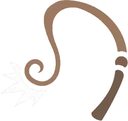
this was beautiful to look at tbh
fallen siren
you looked at outside wind?
 fallen siren
goat
quick fox

pseudo hearth
dirty humanoid
fallen siren
fr
quick fox
quick fox
pseudo hearth
dirty humanoid
Humanoid.Clean()
fallen siren
quick fox
Humanoid.Clean()
Humanoid:Clean()
quick fox
fallen siren
Humanoid:Clean()
shut
fallen siren
that looks so fire
fallen siren
quick fox
shut
neva
quick fox
Hmm whats harder, magic customization system? or lightning module
uhhh
WoM customization system
world of magic
O3o
damn i thought it was popular
ig not
fallen siren
It died out so quickly
quick fox
fallen siren
It died out so quickly
so what do you think
fallen siren
its not rp-
fallen siren
well cyaaa
quick fox
then again its not like
i actually finished the magic customization yet-
ffs
mmmm ye....
attributes make it 10x easier too
lol
I wish i was good at
~Art~
cause i need to make a book decal for the finished GUI
i-
o3o
i want old book style texture
this lol

how hard would it be to make a flipping effect for a gui?
like a page shrinking and expanding like a page flipping
 cedar vine
🌚
@quick fox this good enough for effects1?
While I’m at it might as well get the others over with. Here’s a submission for building.

I’ll make a animation and script when I get home
Someone called them Gacha stars in another server and I almost flipped
Lmao
 heady meteor
was bored so i was just messing around with trails, thought it looked kinda cool
https://gyazo.com/cab2a3059c67a97b513e692073fd6473
https://gyazo.com/8b75f131322497e35ca8249b50926aa8
 cedar vine
heady meteor
https://gyazo.com/cab2a3059c67a97b513e692073fd6473
https://gyazo.com/8b75f131322...
cedar vine
heady meteor
https://gyazo.com/cab2a3059c67a97b513e692073fd6473
https://gyazo.com/8b75f131322...
Nice
heady meteor
yeah its pretty basic but i thought it looked neat
cedar vine
Awesome bubble like effect 👍
pseudo hearth
heady meteor
https://gyazo.com/cab2a3059c67a97b513e692073fd6473
https://gyazo.com/8b75f131322...
Reminds me of waterbending VFX, when Benders Will used to exist.
 lean cedar
man looks cool
 sick lark
z
 hexed ivy
z
 gaunt aspen

 stark python
bruhh
hexed ivy
bruhh
quick fox
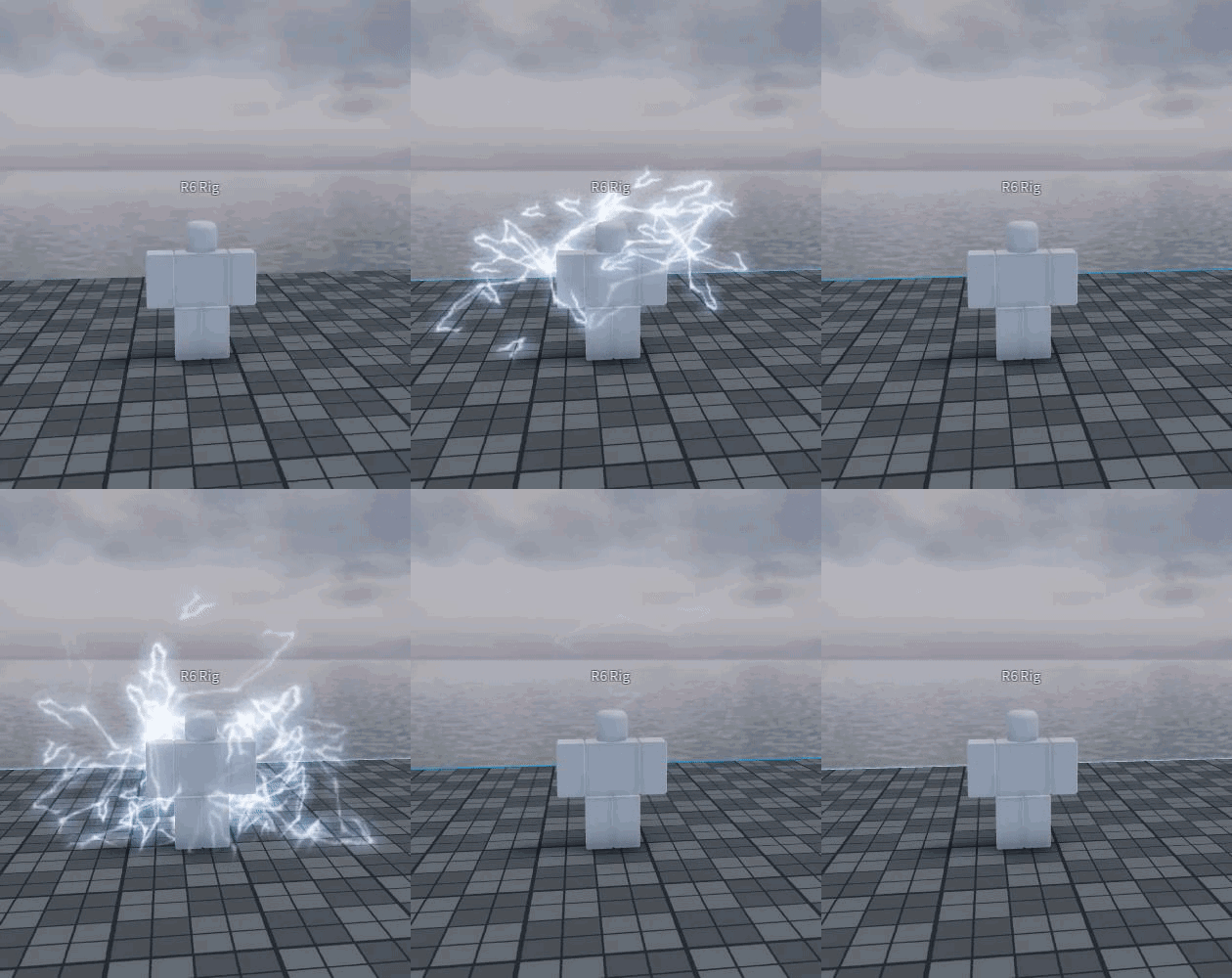
https://gyazo.com/d3e28c51717d0d607b12610144b9ab43 Wind mode or smthn

 quick fox
HOW?!?
 polar fractal
Dude. How do people make these effects
quick fox
** You are now Level 3! **
 quartz whale
Particle
 onyx vapor
Particles, beams, and playing with settings.
There are a LOT of settings.
Oh, and being really good at creating meshes & textures helps
heady meteor
polar fractal
Dude. How do people make these effects
ive been doing it for like
probably 4 years now
ive only gotten serious about it in 2020
heady meteor
onyx vapor
Oh, and being really good at creating meshes & textures helps
(just a little tip, textures dont matter most of the time for particles)
unless its like lightning
otherwise you can get away with making a blob and make it still look good
w8 i just realized i pinged a mod for that
uh
sry
onyx vapor
lol that's fine, it was a response
heady meteor
if im being honest most of my textures are just blobs 
onyx vapor
Like I was trying to do some bolt type effects, and it came out alright, but not great... but better bolt textures would help:https://gyazo.com/789d5047abf2f4d605694544b163b9c7
 heady meteor
onyx vapor
Like I was trying to do some bolt type effects, and it came out alright, but not...
heady meteor
onyx vapor
Like I was trying to do some bolt type effects, and it came out alright, but not...
ill send you some lightning textures in dms
(if ur dms are open)
onyx vapor
nah, if I wanted to get some, I'd just rip them
I'd rather learn how to do it well myself
heady meteor
ah
alright
i respect that
is the orb on that using two different particles rotating in different directions?
if it is, i wouldnt recommend doing it like that
id instead recommend one particle with rotationspeed of
a negative and positive number
something like -100, 100
onyx vapor
Yeah, I have 2 emitters going in opposite directions
onyx vapor
That's what I really need, is to start learning the techniques for making it look better.
heady meteor
i recommend stuff like this

its what i do for things like this https://gyazo.com/ec318ddab481eeb9d77f5bc2820b9738
 onyx vapor
I'm more interested in the scripting side of things honestly. Like how I can code the properties to change to produce really interesting effects
Like the lightning bolts in my effect randomly hit different points.
lean cedar
heady meteor
its what i do for things like this https://gyazo.com/ec318ddab481eeb9d77f5bc2820...
awesome fire effect!
that looks so cool 
heady meteor
thx
quick fox
** You are now Level 3! **
heady meteor
effects III when 
pseudo hearth
onyx vapor
I'm more interested in the scripting side of things honestly. Like how I can cod...
Scripting side?
Well, I got you.
onyx vapor
Lol, I'm the scripter.
pseudo hearth
https://devforum.roblox.com/t/fresh-new-particle-system-update-forum/1006158 https://devforum.roblox.com/t/effect-lightning-beams-seamless-smooth-and-procedurally-animated-with-beam-like-properties/843534

DevForum | Roblox
What is this? When I say, “What is this?” I’m not talking about the actual system, I’m talking about this post. This post is the update board for the system, so you can come back any time and check up on the new Versions of fresh. Keep in mind, the actual Post for the new Fresh Versions will be way more detailed rather than a simple list of the...

DevForum | Roblox
Lightweight, and highly customisable Lightning Effects for use in Roblox. Can be made into all sorts of special effects. Has been previously used within the popular game elemental battlegrounds. Features: Layered, moving Perlin noise with a variety of animation properties Uniform disk-point picking for even distribution of control points Can ...
pseudo hearth
lean cedar
bad
pseudo hearth
lean cedar
bad
That's from the forum, scripting related.
pseudo hearth
 heady meteor
damn
pseudo hearth
Man... roblox needs to upgrade their features when it comes to VFX.
Feels neglected asf.
heady meteor
people are fr creating the unity particle system on their own in roblox
heady meteor
pseudo hearth
Feels neglected asf.
yeah they added it then never really touched it again
pseudo hearth
it's not even remotely close, wish they could ;-;.
onyx vapor
pseudo hearth
Man... roblox needs to upgrade their features when it comes to VFX.
I can't disagree with this. So much of it seems pretty limited.
heady meteor
slowly but surely
pseudo hearth
onyx vapor
I can't disagree with this. So much of it seems pretty limited.
Matter of fact extremely limited.
heady meteor
within the next year my job as a vfx particle guy is gonna be taken away from me through people scripting effects in

those script lightning things are fire af
pseudo hearth
heady meteor
within the next year my job as a vfx particle guy is gonna be taken away from me...
nah, scripters with modules aren't gonna come that far when it comes to pure VFX.
unless, they're talented asf
pseudo hearth
blame roblox for that one
pseudo hearth
mf's told us to script our own particle emitter system
We need a hero, to write a post regarding it on the DevForum.
Won't be me, I'm too lazy for that.
heady meteor
im not even able to post on the devforum
pseudo hearth
Anyone got some anime VFX inspiration, maybe even reference images?
I'll try to re-create it.
heady meteor
yee
onyx vapor
It's hard for me to even see the difference, but I guess that comes with experience.
polar fractal
heady meteor
oh ive seen that lightning thing
Dude just seeing that makes me wanna Just. Eughh. That’s just insane
polar fractal
Honestly. It must be really hard
Would you be able to script the lighting to do dmg too?
onyx vapor
laughs in Lua
pseudo hearth
pretty simple if u know how to do basic scripts
quick fox
https://gyazo.com/ca9f6ce4ceab886e4f3a3fc6a1ea0c4c cool effect with beams
quick fox
Would a tornado be better with particles? or a mesh?
pseudo hearth
quick fox
Would a tornado be better with particles? or a mesh?
With the current state of ROBLOX, i'd suggest you to do it with meshes if you know how to script and if you know how to properly texture it, and a few sprinkles of particles,
quick fox
pseudo hearth
With the current state of ROBLOX, i'd suggest you to do it with meshes if you kn...
hmmm
Can someone teach me
quick fox
pseudo hearth
With the current state of ROBLOX, i'd suggest you to do it with meshes if you kn...
I'd like some advice please lol
it's gonna be spinning and stuff
and the white rings will appear and get larger and go up
so
onyx vapor
Script it. I bet it'll look good.
quick fox
onyx vapor
Script it. I bet it'll look good.
Yea but i like to visualize it first e.e
polar fractal
yeah that actually looks really good
 soft marsh
anyone got any good particle effect tutorial vids?
cedar vine
soft marsh
anyone got any good particle effect tutorial vids?
There is none
you gotta learn off other vids non studio related
And the dev forum
soft marsh
ah..
cedar vine
soft marsh
ah..
Yea a real pain ;-;
soft marsh
ig i gotta find someone and rent him to teach e.e
quick fox
** You are now Level 3! **
soft marsh
pain..
cedar vine
unity particle effect systems
tutorials could help
And so could sword effects in after effects
even though you can’t import unity into roblox, it’s good fundamentals
cedar vine
np, if I find a good tutorial I’ll make sure to dm it to you
soft marsh
alr ty
heady meteor
soft marsh
anyone got any good particle effect tutorial vids?
in all honesty i'd just say learn through experimenting
thats what I did for 3 years w/o taking it seriously until just last year
Also, avoid fremodel particles & auras
 heady meteor
They almost all the time are also made by inexperienced people and will just teach you bad habits
i cant really teach, ive tried in the past lol
sorry
most i can do is give some tips
heady meteor
hello
 slim thorn
What's an example of something that can earn you e1
slim thorn
thanks
heady meteor
np
cedar vine
I’m working on a sword slash effect
quick fox
I just hope they eventually add more segments for trails :(
It’s the only reason I try to avoid the trails
T H E C O R N E R S
soft marsh
hows this for progress @heady meteor


trying to see how to connect em
as in material drawing

 granite sky
People talk too much
quick fox
Fr lmao
Blur, Changing Decals, Swaying, etc
Mhm
Tbh, with the new stuff and companies wanting to make games on roblox, we might see improvements
Idek tho
Fuck no lmao
I don’t think that’s ever gonna happen
Like, ever
Roblox would lose tons of players and money. So yeah. No
They would lose tons of players, and games
Losing robux and money
Idk what you’re tryna get at, it won’t happen
Anyway
Is there a way to make trials look
Not like just lines?
And more like beams?
Pretty sure that has the bad trail too
Lol
 west monolith
yea the carpet has a horrible trail
quick fox
I think that’s just roblox in general
We got mesh deformation, which was, nice, but now we need improved VFX
People can make some epic things with meshes
If they know what they’re doing
Where did that come from? And who cares?
pseudo hearth
quick fox
https://gyazo.com/45a4a9396a539d7fe8dbbe701d8f78d1
Tweenservice, + add ground FX.
By the way, re-sending this but ehh take a good look at this piece.

Like really, dive deep into it.
And search for some references regarding Tornado VFX's.
quick fox
I didn’t make the one I posted lol, and yea I will. Gotta look at them anime tornadosss
I just edited it and added particles + lights
pseudo hearth
Ah, you should try to create your own meshes.
quick fox
Yeah that’s what I’ll be doing for a couple of weeks
pseudo hearth
Mostly are just solid copies, of eachother. The similarities, are insane.
the long voronoi lines, make it all look the same, bland texturing usage of roblox materials kinda drag the quality back.
This is why i'd advice you to take a few lessons regarding texturing.
quick fox
@pseudo hearth texturing?
 quick fox
Ah so that’s just an actual texture? Not just a mesh?
pseudo hearth
It's a mesh with a texture.
pseudo hearth
Yep.
If you manage to create some of your own, then you're ready to do some big brain stuff.
This could be possible, but in a bootleg fashion.. but ehh atleast you could nail the particles on this one.
 hexed ivy
clean
quick fox
Hmmmmm
I guess this is just one of those things you keep doing until you get good
Hey, have you met anyone who’s like a jack of all trades?
Like they’re good at everything?
pseudo hearth
Technically, this one could be possible you just need to fix up the textures, particles and lots of scripting.
pseudo hearth
quick fox
Like they’re good at everything?
Ehh a few, but that's not related to this section of development.
quick fox
pseudo hearth
Ehh a few, but that's not related to this section of development.
Yea sorry lol, was just curious
pseudo hearth
Met a bunch of them for a matter of fact lolz.
I'm trying to become one myself, a lil jack of all trades, but this time a bit more limited.
quick fox
Huh
Since I hate relying on others it’s not much of an option to not be one lol
Gotta get gud 😩
pseudo hearth
quick fox
Since I hate relying on others it’s not much of an option to not be one lol
It's good, you'll learn overtime to be honest.
quick fox
pseudo hearth
It's good, you'll learn overtime to be honest.
I’ve learned most things for scripting, can’t think of something I haven’t learned tbh
pseudo hearth
quick fox
I’ve learned most things for scripting, can’t think of something I haven’t learn...
Welp, you're gonna learn VFX now which is a bit more of a rough surface when it comes to ROBLOX.
quick fox
I’m moving onto meshes for now so I can make some better ~attacks~
pseudo hearth
nearly untouched subject.
quick fox
My main issue is just, making things smooth I think? I tried making a slash before and it had a bunch of edges and corners and just looked
Yikes
pseudo hearth
quick fox
My main issue is just, making things smooth I think? I tried making a slash befo...
ehh, gotta fix that up in Blender. ROBLOX, decides to triangulate objects that get imported into it.
quick fox
Nah it was awful looking in blender lol
pseudo hearth
guess thats the issue lmfao
lmao, you could do uv texturing in Blender when it comes to good looking meshes.
 quick fox
Yo that’s epic, but probably over the face limit right?
pseudo hearth
ehh, you decide the face limit.
Max was around 10k I can remember, but I think it's higher now depending on if it's a .fbx
quick fox
I’m just sad we don’t have the stuff where we can see into the middle like that
It’s 10K for mesh pets
Parts
pseudo hearth
well, i've tried rigging up a tornado
you could rig it up, and do some animations with it.
quick fox
?
pseudo hearth
yh tweenservice, would be better.
Since moving those bones, was just essentially moving around an part of the mesh deforming it.
quick fox
What do you recommend making modules for btw?
I made one for tween service to help not flood my code
pseudo hearth
I'm skipping scripting for now, but I guess you can ask this big boy @kind glacier
quick fox
Ah alr
pseudo hearth
My scripting time, will come later.
quick fox
What should I start with btw
pseudo hearth
After, I finish off the fundamentals.
quick fox
In meshes
pseudo hearth
As in fundamentals, I'd just learn how to model VFX meshes properly first, after that you get to worry about texturing.
quick fox
So, shape first
pseudo hearth
You could also do it the other-way around, but that's all your preference.
quick fox
pseudo hearth
You could also do it the other-way around, but that's all your preference.
What type of attack should I try making a model for first?
pseudo hearth
Your choice, to be honest.
Take the reference image, that's pinned in the chat.
As a reference.
So you'll create some amazing shit.
pseudo hearth
quick fox
I just wish we had gradients for fuckin parts lol
Welcome to the texturing section of Blender.
You could fix that up.
pseudo hearth
 quick fox
Yeah I can only see like half of the fireball, and it looks like it’s mostly like, effects from unity
Err
Eeee*
pseudo hearth
mesh > decals (texture) > groundpart with a decal or a beam.
this one could be replicated in studio, with a couple of beams.

 pseudo hearth
attachment within your mesh give it a particle emitter or, just put a pointlight within.
depending on what you want to do.
pseudo hearth
that's solid texturing lmao
quick fox
Yeah that seems complicated 😩
pseudo hearth
and a part.
pseudo hearth
Not particularly, it all just depends on how far you can stretch your capabilities and if you are eager to learn more.
quick fox
Yeah.. I’m just intimidated is all
pseudo hearth
but it's heavily recommended to learn certain aspects, such as color and stuff to fix up your textures.
pseudo hearth
If you know how to use colors properly, you'll be able to do more.
Unless you want to colorize your mesh, with a horrible blend of yellow and purple.
Which looks kinda off-putting.
quick fox
Ok what I’m concerned about is like, importing it into roblox.
What’s the difference between colorize and color?

 pseudo hearth
quick fox
What’s the difference between colorize and color?
pseudo hearth
quick fox
What’s the difference between colorize and color?
difference between colorize and color.
colorize = coloring it.
quick fox
You’re telling me I can import it, almost exactly how it looks, into roblox? The gradient color and all?
pseudo hearth
What I'm saying is yes, you can import a mesh with it's textures that are supposed to be baked into roblox yes.
pseudo hearth
Unity VFX tutorials, etc.
quick fox
Uhm, ok
pseudo hearth
Mhm, there's a bunch of resources.
You just gotta look for it, use some better keywords and you'll find them in no-time.
 quick fox
?
 pseudo hearth
That's a good start.
quick fox
Tbh wouldn’t making the shockwave 3D be better?
pseudo hearth
All your preference
 pseudo hearth
Shockwave, and the debris around it.
quick fox
H e h e, nope, i was saying I could make the whole thing with meshes I already have, but I need to learn how to make stuff since it wouldn’t look right
Similar, but off
quick fox
pseudo hearth
Shockwave, and the debris around it.
Also Im trying to think of how to make things curved but I can’t really figure it out lol
So that’s another thing i gotta look into
C U R V I N G
Also, question, would the middle have to be textured too? In response to the tornado. Or does double sided work?
@pseudo hearth
pseudo hearth
quick fox
<@!415575571959906335>
Which one? Which Tornado.
quick fox
pseudo hearth
This
Since it’s semi-transparent
Don’t want it looking too wacky on the inside
pseudo hearth
quick fox
Also, question, would the middle have to be textured too? In response to the tor...
Essentially the entire mesh is textured.
So, you could experiment around with double sided if it causes a better visual effect.
quick fox
I gotta learn how to make shapes 🌝
quick fox
pseudo hearth
Essentially the entire mesh is textured.
Have you played world of magic?
Just curious on what you think of their effects
they seem to use basic meshes and look very epic.
pseudo hearth
SFX, Particle Emitters, meshes and a bunch of scripting.
Their effects, are quite good but it just feels bland in my perspective.
quick fox
Hm
pseudo hearth
All I'm seeing is old recycled assets, being put into a fairly designed game
quick fox
I think for being quite basic it looks nice
pseudo hearth
quick fox
I think for being quite basic it looks nice
yeah it looks pretty nice, don't get me wrong on that part.
but it just all feels the same, a bit too bland.
quick fox
Is there a real way to make a wind ball with a mesh? Or is it better to go with particles
Cause hold on a second

Trying to make some good looking wind magic
Idk
pseudo hearth
What's that mesh called again in the parts section in Studio.
It's that circle part.
quick fox
?
pseudo hearth
You insert it, add an attachment inside of it and give it the speed of 0, change transparency to 0.
After that you insert a texture that sorta glows around it.
play a bit with zOffset.
and a few more things, but I'm sure you'll figure that out.
quick fox
Circle part in the parts section...?
pseudo hearth
By the way, how many times have you seen this mesh appear?

I've seen it for years, that's why I mentioned it being bland in my perspective.
I just see most assets being the same, nothing new really.
 quick fox
Ah

 quick fox
Yea
pseudo hearth
But it's just an invisible part, with two attachments + beams.
pseudo hearth
quick fox
How would I use that to help with wind effects for
I didn't mention wind effects, you could use that technique to display anticipation, or dissipation.
quick fox
Ahhh
pseudo hearth
You just need a diff texture for it.
 quick fox
pseudo hearth
But it's just an invisible part, with two attachments + beams.
quick fox
pseudo hearth
But it's just an invisible part, with two attachments + beams.
Single beam? Or multiple? I’m confused on how this works tbh
quick fox
Mhm
 pseudo hearth
I assigned one beam, that's connected to both attachments.
pseudo hearth
Would work for nearly everything depending on how you use it.
Could be impact, dissipation, anticipation.
quick fox
Idk how you would like.
Make it rotate for a wall? If you get what I’m saying, I think I should use a point light for that tbh
pseudo hearth
Then you'd have to rotate the part, instead of the attachments.
You could do that with scripts, ofcourse.
I'm probably gonna give lessons regarding VFX for a price, after I get good at most of it.
quick fox
@pseudo hearth no I’m talking about like, the anticipation, to rotate so it’s acting like it’s on the wall
But I’d use a point light for that probably
pseudo hearth
quick fox
<@!415575571959906335> no I’m talking about like, the anticipation, to rotate so...
Ah.
quick fox
What’s the benefits of using beams over point lights?
pseudo hearth
More control.
Flexibility, you can use scripts to move the invisible part around, give it a particle emitter, add on more beams.
One invisible part, attachment and a particle emitter with a good texture results into this*

And voila, you've got that masterpiece you can use with beams.
quick fox
Huh
pseudo hearth
 quick fox
Still a bit confused
pseudo hearth
quick fox
Still a bit confused
What's the issue?
quick fox
pseudo hearth
Flexibility, you can use scripts to move the invisible part around, give it a pa...
This, I mean, can you just do the same with point lights? Idk, beams seem cool but idk how to implement them into my attacks and stuff
 raw abyss
yeah, aha.. i don't know what beams do..
 pseudo hearth
quick fox
This, I mean, can you just do the same with point lights? Idk, beams seem cool b...
pseudo hearth
quick fox
This, I mean, can you just do the same with point lights? Idk, beams seem cool b...
It's more like an flexible layer.
raw abyss
ugly particle 😔
pseudo hearth
You can decide what to do with it.
quick fox
Ah
pseudo hearth
By the way you can't uhh put a particle emitter inside of a pointlight.
pseudo hearth
You can put a point light on an attachment.
but you can't put an particle emitter inside of a pointlight.
thats the thing
pseudo hearth
wym.
quick fox
You just put a point light on an attachment and then put the particle emitter on the attachment
pseudo hearth
You do realize, it only works because of it being inside of an attachment.
But if you make it a child of the pointlight
it doesn't work.
quick fox
Yes, but I don’t see why that matters
pseudo hearth
it matters because, if you're gonna try to do that it's just gonna end up in nothing happening lmfao
it's good to know certain things.
pseudo hearth
alright
raw abyss
@pseudo hearth may i ask?
what's the purpose of beams?
I have no idea on how beams work but i'm interested lol
i'ma just look it up 
pseudo hearth
raw abyss
i'ma just look it up <:pensivecowboy:748220565592211526>
"A beam object connects two attachments by drawing a texture between them.", it's just a fancy way of having trails
raw abyss
yeah but how do i use them?
pseudo hearth
awe shit.
 pseudo hearth
I'll just guide you to an youtube video instead.
raw abyss
alright
pseudo hearth
I could explain this rq, but press the beam, click on Attachment0
and press on Attachment0.
raw abyss
yeah i already did those


 onyx vapor
heady meteor
Also, avoid fremodel particles & auras
onyx vapor
heady meteor
Also, avoid fremodel particles & auras
Avoid freemodel anything.
Personally, I'm fascinated by the potential of scripting effects. I think that might be why some of the effects artists on here feel that it's so limited on Roblox... they don't get into the scripting side of it, which is hugely important.
quick fox
Freemodels are pretty good
hexed ivy
.
 onyx vapor
Some are. Not everyone.
 tired rivet
how do i make seamless lightning for trails like this


Game used(for more testing, pick any speedster character and hold q and walk): https://www.roblox.com/games/4812093631/The-Flash-Earth-Prime

ROBLOX
Check out The Flash: Earth Prime. It’s one of the millions of unique, user-generated 3D experiences created on Roblox. Recent Update:
-Added Cupid (valentine's day exclusive suit)
-Added new lightning
type !votekick [players name] to initiate a votekick
The Flash: Earth Prime. Be a hero or villain in this free roam superhero game! Explore Eart...
are these just regular trails?
they do not look like them.
onyx vapor
Looks like either trails or beams with really good textures
tired rivet
Alright, thanks!
heady meteor
Think they’re trails
They just have
A really long texture
Wait no
It’s two trails

They have a basic trail with a high light emission to get the start a lot brighter
tired rivet
Ohhh
onyx vapor
I'm gonna try to think of a way to procedurally generate lightning like that...
onyx vapor
I'm a programmer, so I think of everything in terms of coding lol.
heady meteor
That’s
quick fox
** You are now Level 4! **
heady meteor
Yeah
If both ends don’t match there’ll be a jagged line in where the texture restarts
 pseudo hearth
heady meteor
Also, avoid fremodel particles & auras
pseudo hearth
heady meteor
Also, avoid fremodel particles & auras
Ehh, just came back.
Freemodels, are usable and could be used for a learning curve.
But once someone starts publishing it, and claims it theirs, then avoid tf out of it.
heady meteor
You really shouldn’t use free models for stuff like that though
I made the same mistake
tired rivet
now its vertical lol
 pseudo hearth
If you have no idea, it's good to learn a bit from pre-made assets.
heady meteor
tired rivet
now its vertical lol
Flip the texture in like paint.net and reupload
tired rivet
k
heady meteor
pseudo hearth
If you have no idea, it's good to learn a bit from pre-made assets.
If you can find a good one then yeah, but looking at things such as attack effects or auras through free models almost guarantees you’ll learn bad habits
It happened to me before when I first started
The only thing I can semi recommend is
tired rivet
 pseudo hearth
heady meteor
If you can find a good one then yeah, but looking at things such as attack effec...
pseudo hearth
heady meteor
If you can find a good one then yeah, but looking at things such as attack effec...
What do you mean with bad habits in this instance.
heady meteor
That one particle pack
heady meteor
pseudo hearth
What do you mean with bad habits in this instance.
A bad habit of having light influence at anything above 0
I used to have light influence at like 1 for everything
pseudo hearth
heady meteor
A bad habit of having light influence at anything above 0
It's good, to start with no prior experience. They'll figure out over-time, if it gets the job done properly to the result they want, then there really is no bad habit.
pseudo hearth
I only do light influence 1, for transparency due to the alpha being rendered as black.
tired rivet
can i make the texture size larger from studio
pseudo hearth
Had to hop back in studio, to verify lol
heady meteor
Light emission 1 isn’t bad if you use it scarcely
For things such as optimization for all environmental lightings I don’t recommend going above like 0.7
And the reason your texture had a black background is because whoever made it didn’t make the background transparent
Meaning you’re forced to have light emission 1 at all times
pseudo hearth
I know how it works, I create my own textures.
You could also make it transparent without the usage of light emission at all.
pseudo hearth
Man, those ones are pretty decent most of the time.
pseudo hearth
heady meteor
As long as you make the background transparent then you don’t gotta worry
tbh, i don't really worry all that much regarding light influence.
heady meteor
Light influence is disgusting
pseudo hearth
lmao
heady meteor
Very rarely do you ever actually have to use it
The first thing I do is set that to 0 lol
 heady meteor
I’d recommend adding more connecting stands to it
tired rivet
wym
 tired rivet
ohhhhhhhhhhh
okay im just gonna use packs i have no idea how to do this myself
wait
 pseudo hearth
mesh vfx kinda fun doe
 quartz whale
Yeah having stuff that cuts the glow off is no good

 desert socket
Effect
pseudo hearth
good shit.
 desert socket
Lmao
 tacit mesa
onyx vapor
Avoid freemodel anything.
tacit mesa
onyx vapor
Avoid freemodel anything.
except for meshes cause i don't use blender 
quick fox
pseudo hearth
good shit.
happened to me when i tried importing a valve asset to studio
pseudo hearth
 desert socket
Effect
desert socket
Mesh
pseudo hearth
 desert socket
It looks kinda odd don’t know why tho
pseudo hearth
cause of the shape, and texture.
desert socket
True the true
pseudo hearth
its quite trippy.
desert socket
Triply
pseudo hearth
You could do some neat stuff, with mesh VFX.
 cedar vine
pseudo hearth
You could do some neat stuff, with mesh VFX.
cedar vine
pseudo hearth
You could do some neat stuff, with mesh VFX.
thats mesh vfx?
looks like a beam lol

 pseudo hearth
cedar vine
force field effect?
pseudo hearth
cedar vine
force field effect?
Could be, an impact.

Could even turn it into this.
cedar vine
is that in studio or unity?
 cedar vine
nice
onyx vapor
And scripting makes any effects better 😄 😄 😄
pseudo hearth
Man.. @onyx vapor
I might need to hit up scripting a bit sooner, than I expected.
@stark python
I'm sure you could re-create this with your current skill-set.
 tired rivet
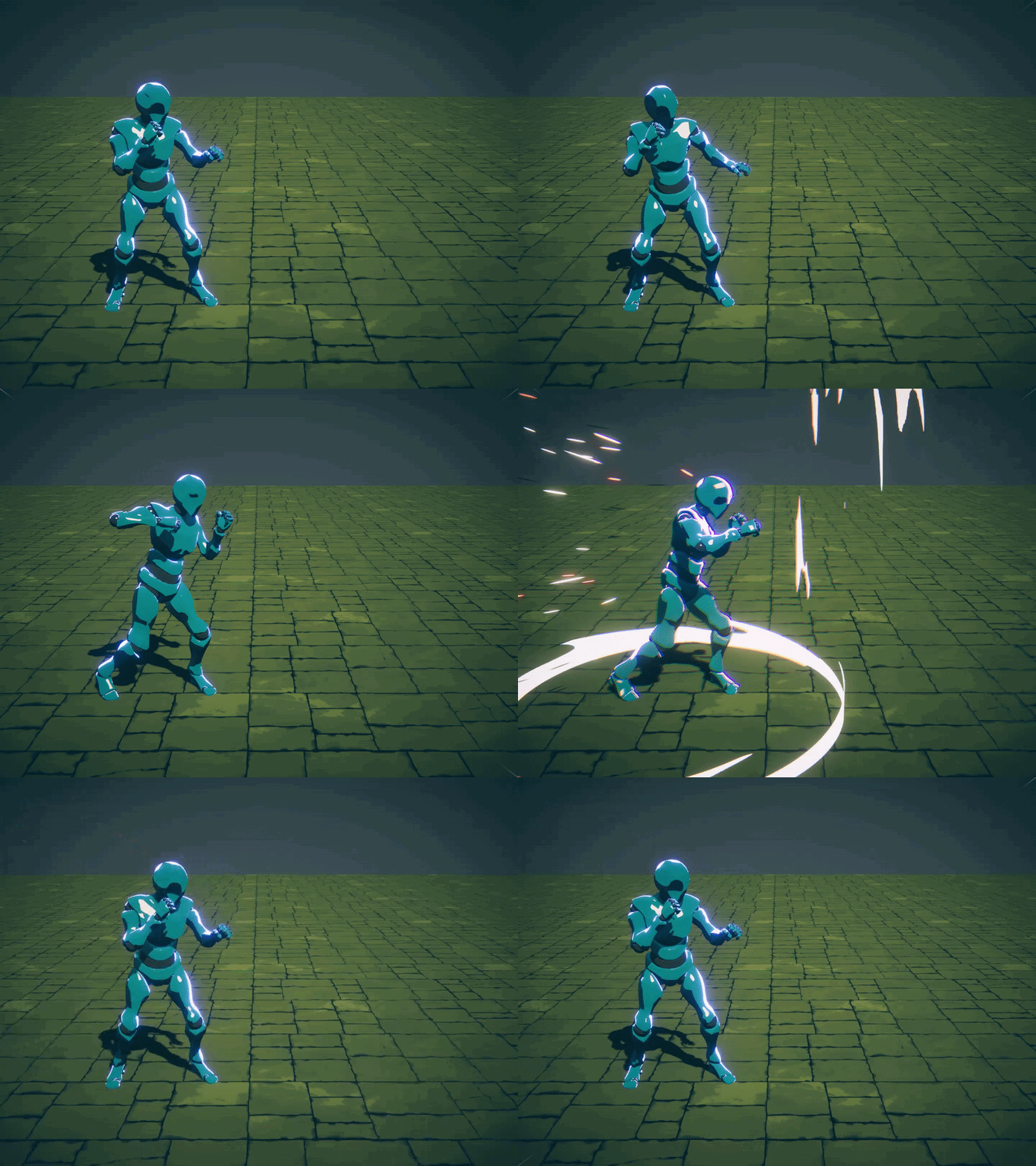
those of you that were interested, i think i got it(but not gradient)
i duplicated it so the light would overlap(same physics, don't worry) and halved the lifetime of the second one.
the first one(longest) you might want to lower the lightemission to 0.8 instead of 1 just to give it a somewhat nicer look.
 onyx vapor
I didn't do anything in this except the scripting, but here's what I'm currently working on:
https://www.youtube.com/watch?v=sfcZCBGPdq8&ab_channel=BahamutFierce

A new project I'm working on with a team!
Here's a look at the work I've been doing on combat, specifically the combo-based attack system.
The game is in the same vein as Monster Hunter, but on the Roblox platform. I'm excited to see where it goes!
https://discord.gg/Q62c6GCncu
#FightingFiesta #FF
I added rolls back into the game, but they're still pretty wonky and need fixed.
stark python
pseudo hearth
https://i1.wp.com/halisavakis.com/wp-content/uploads/2020/06/anime_punch.gif?ssl...
yeah i could make something like that lol
pseudo hearth
stark python
yeah i could make something like that lol
Let's go champ.
pseudo hearth
onyx vapor
I didn't do anything in this except the scripting, but here's what I'm currently...
Reminds me of a extremely light version of dark souls.
good choice of combat.
onyx vapor
Yeah, that's what I'm going for. It's basically a monster hunter clone.
stark python
im probably not gonna make that tho lol
busy with comms and other stuff
quick fox
** You are now Level 5! **
 pallid lodge
at first i thought you said coma instead of comms
pseudo hearth
lil neat effect** re-sending it.
 pseudo hearth
A+ for effort, keep going!
quick fox
what should i change
pseudo hearth
Nothing, experiment around with it.
Add textures, also don't forget.
Transparency matters, when adding an transparent texture ontop of it.
So in that case, shrivel the transparency property setting to 0.2
Otherwise, you'll get a raw texture without the transparency example: left one has the property transparency: 0.2

Right one has transparency set to 0.
pseudo hearth
quick fox
like, swirls of wind?
Add in this texture onto the mesh, set transparency to 0.2
rbxassetid://6508794778
I want to see the result of it.
pseudo hearth
quick fox
like, swirls of wind?
Yeah, like try drawing them.
pseudo hearth
You can do it in photoshop, substance painter/designer and much more.
quick fox
i don't have photoshop :|
pseudo hearth
quick fox
https://gyazo.com/72ab375bfe50691fb9383e8156eb2e42
Also turn on doublesided, experiment with it.
pseudo hearth
quick fox
in which tab in blender?
You should follow a tutorial regarding it, so far. I assume, if you want to do it in Blender you should learn to uv unwrap/wrap, and basic painting/texturing.
pseudo hearth
By the way, the standard self-made VFX with the black background doesn't really reflect onto it it will return an ugly odd-looking texture instead.
quick fox
?
pseudo hearth
So try having them transparent, just like the described image:
 quick fox
https://www.youtube.com/watch?v=u9nE2Xg6Jgk would this work?

This is my tutorial on texture painting within Blender 2.8. It's a quick start guide and meant to get you going painting quickly and easily. In later episodes i will go through brushes, textures, painting on layers, transparency, and much more.
Full texture painting playlist.
https://www.youtube.com/playlist?list=PLn3ukorJv4vtvjZvdiOeoSA5kBohtn...
pseudo hearth
Experiment, around with it.
pseudo hearth
quick fox
https://www.youtube.com/watch?v=u9nE2Xg6Jgk would this work?
wym, with it.
You're asking me if it would work, yeah the textures would definitely work if you bake them ofcourse.
Just a tip: after you know the fundamentals, search up VFX tutorials that are related to texturing.
onyx vapor
quick fox
i don't have photoshop :|
Use Paint.net... it's almost as good
quick fox
onyx vapor
Use Paint.net... it's almost as good
uhhh k
lean cedar
oh
cedar vine
bro
just tested
what it would be like
if you used shift lock
with a 16000 dpi mouse
 pale frost
imagine trading
cedar vine
pale frost
imagine trading
It’s for plebs like me who don’t do commissions 
 sand heart
is there way to make sky: chlidren of light style game in roblox???
 warm terrace
@quick fox effects channel
quick fox
oh yee
crappy explosion
will update maybe
its based on rust's explosion
if you guys wanna see something more realistic pls tell me
pseudo hearth
I need some feedback, on which looks more aesthetically pleasing. (WIP)
Scrapped it.
Got something way better.
 pale frost
dam
cedar vine
pseudo hearth
Same thing happened to me
For posting a decal of a night sky
Said it was “adult content”
 onyx vapor
I like it. How many beams is that?
pseudo hearth
granite sky
https://gyazo.com/aa8e6c0b3be318e25db32a94a70f6f5f
Damn.. the amount of clouds I have seen in VFX dedicated channels... ;-;
granite sky
onyx vapor
I like it. How many beams is that?
2
granite sky
pseudo hearth
Damn.. the amount of clouds I have seen in VFX dedicated channels... ;-;
I just made a lightning effect and added clouds for fun idk
pseudo hearth
fair enough.