#🔥︱curseforge-support
1 messages · Page 655 of 1
 brittle cargo
 red patioBOT
╰( ͡° ͜ʖ ͡° )つ──☆*:・゚ *˜”*°•.˜”*°• Many Help •°*”˜.•°*”˜* <:curselit:796985620550385705>
Please provide a description of your issue with as much detail as possible. If you have an issue with a mod or modpack, tell us the name. Explain what you can see happening. Be specific!
 Tell us what is happening, we already know it "doesn't work".
Avoid using words like "it", tell us exactly what "it" is.
Don't assume anyone knows what you are talking about, be specific.
Tell us what you expected to happen.
Provide screenshots or video if possible.
Provide a log if possible. ?mc-log
 remote bluff
Is it possible to report an ad?
 signal ridge
Screen shot what you got send it here
remote bluff

I'm not sure how you guys generate you ad pool, but I feel this is not appropriate for the launcher
signal ridge
Will forward this on.
 weak tangle
thanks i have two accounts on my pc it was just logged into the wrong one
remote bluff
signal ridge
Will forward this on.
Thank you, I appreciate it
 mossy fox
my curseforge dont open
 upper root
Screenshot?
mossy fox
ok
 spice arrow
Hi guys. My problem is that I get this message when I try to create a custom profile or try to download a modpack: "an error occurred while executing forge install comand". It happens to me in any version of minecraft. I have reinstalled courseforge and overwolf and it hasn't fixed anything. It happens to me when the installation arrives at "applying patch 2 of 6".
red patioBOT
Error/Exit codes are useless. Follow these steps so someone can actually help you.
- Right-click the modpack profile icon OR click the
 button in the modpack profile.
 - Click

Open Folder. - Open the
logsfolder. - Drag and drop the FILE named
latestORdebuginto discord.
red patioBOT
- Download and install this https://download.oracle.com/java/17/archive/jdk-17.0.3.1_windows-x64_bin.msi
- Open CurseForge and click the
 in the bottom left corner.
 - Go to the
 Minecraft tab and scroll down to the bit about java versions.
 - Click the
 icon and then choose Java: 17.0.3.1 (64 Bit) from the list.
 - Follow the instructions from
!mc-installfix(if your internet is slow the instructions from!mc-updatemodloaderwork but need to be done on every profile made since the error began to happen)
 final spade
How do you manually update forge?
 lyric crescent
!mc-updatemodloader
red patioBOT
You can update the mod loader within the same game version in the CurseForge app by following these steps!
- Click on the modpack profile you are working with.
- Click on the button next to the play button.
- Click on the
 Profile Options button.
 - Select the mod loader version you want from the dropdown.
- Play!
If you need to update to a new game version, a new profile is required.
final spade
Is there version higher than 40.1.6? One of the mods need version 40.1.9
upper root
If a mod needs that version it probablt exists, have you tried scrolling both ways in the list?
spice arrow
!mc-installfix
red patioBOT
This is NOT instructions for Repair Profile! They are NOT the same! You need to do this!
- Click on the Minecraft Tab on the Left side of the CurseForge App.
- Click button next to the
Create Custom Profileoption. - Click

Repair Installationoption. - Play game.
NOTE: You will not lose any modpacks or worlds!
spice arrow
upper root
!mc-forgejava do this Mehdi
nothing changed, it keeps showing me the same error
upper root
?cflogs-app
red patioBOT
<:overwolf:857375414002384916> How to get CurseForge App logs! <:overwolf:857375414002384916>
- Click the

Create logs zipin the menu.
menu. - Drag and drop the file it just made to this chat room to upload it.
- Wait for someone to look at it so they can help you.

 weary lark
lyric crescent
weary lark
lyric crescent
!notcf
red patioBOT
Your question is not related to CurseForge owned/maintained features or services.
Please use the appropriate game room by getting a game role from #786424115535544350.
Otherwise use #👽︱game-support for game related help.
CurseForge does not make or maintain any of the content or games used on the site or app. Just because it's on the site/app does not make it a problem with CurseForge. Move rooms as requested, arguing about it will result in you being muted.
 silk patio

 echo rose
I can't install Curseforge, when I try it boots into a weird little taskbar and then nothing happens
upper root
spice arrow
Sorry, i have no idea why that didnt work, and no idea how to go about fixing it
spice arrow
upper root
Sorry, i have no idea why that didnt work, and no idea how to go about fixing it
np
red patioBOT
Error/Exit codes are useless. Follow these steps so someone can actually help you.
- Right-click the modpack profile icon OR click the button in the modpack profile.
- Click
Open Folder. - Open the
logsfolder. - Drag and drop the FILE named
latestORdebuginto discord.
 vagrant raven
I keep getting this error: Invalid manifest.json file: Cannot read property 'find' of undefined when I try to publish a new version for my modpack. I tried exporting the profile several times and I always get rejected with that error message in the notes. I had previously published other versions for the same modpack and everything went fine, I don't know why now it's not working.
If I look at the manifest.json it doesn't seem to have any syntax error.
 digital roost
i keep getting a "failed to start application" message
upper root
Screenshot?
 blissful void
how do i get my modpack verified quicker? is there any way?
red patioBOT
Project Moderation Time
Project/File moderation is done on these days unless otherwise mentioned:
Sunday, Monday, Tuesday, Wednesday, Thursday: <t:1631170800:t> - <t:1631199600:t> (Your time)
Friday, Saturday: No Moderation!
Projects are moderated First in, First out. If you submit late in the work day, it will likely get left until the next day!
New Projects or anything flagged for manual review: 1-3 Working Days
Updates to approved projects not needing manual approval: 1 Hour
-If your file has been "Under Review" for more than an hour, then it is at manual review!
Changes will only show in the app if the project meets the requirements in the ?sync command and up to 24 hours has passed from when it was accepted.
blissful void
i knnoowwwww
but ive already waited all day yesterday too
and it still hasnt been
so i made a new one
and that one hasnt been done either
ur telling me i have to wait until sunday
woooowww
lyric crescent
why would you think a new one would be done any sooner..
lyric crescent
did you try actually reading the information provided
blissful void
yes
im just confused on why i have to wait so long
i just wanna play with my friends :(
lyric crescent
what is there to be confused about
blissful void
because its a mod pack
lyric crescent
it takes the amount of time it takes, which you know by reading the info provided
blissful void
yes but i thought i might get some further info here
upper root
You can share it with your friends manually if you do not want to wait for moderation
But it means that they cannot update it as easily
!mc-packshare
red patioBOT
There are two ways to share a modpack you've made with others...
Export and Share - For Friends to Small Groups.
- Click the Icon for the modpack.
- Click the button next to play.
- Click

Export. - Select the files that should be included.
- Send the zip to the people that want it! They can follow the instructions in
!mc-installpackto install the pack!
Upload to Curseforge - For Public Release to Everyone.
This options will make your pack public to EVERYONE, it comes with extra requirements and will take some effort to set up.
- Go to here: https://www.curseforge.com/project/432/4471/create
- Fill out the information with a proper description of the pack. This should allow anyone to understand what the pack is.
- Click the Icon for the modpack in the CurseForge app.
- Click the button next to play.
- Click
Export. - Select the files that should be included.
- Open your Project you made on the CurseForge site and Upload the file you just made.
- Wait for Moderation & Sync so it can show up in the client! (See
!syncfor limitations)
blissful void
!mc-installpack
red patioBOT
How to install modpacks with the search features in app.
- Open the
Minecraftsection of the app. - Click the top search bar where it says
Search for modpacksOR Click theBrowse ModpacksTab. - Find the Modpack you want to install and click install on it.
- Wait for CurseForge app to download and unpack all the required files.
- Once finished, click
Play!
======================================================
** **
======================================================
How to install modpacks from a Export. (Custom/Private/Site downloaded Modpack zip)
- Get CurseForge App if you don't have it, use
!downloadfor a link. - Get the exported modpack from CurseForge or someone else,
!mc-packshareexplains how to make them. - Open the
Minecraftsection of the app. - Click

Create Custom Profile - Click the
Importoption. - Find the file you just downloaded in step 2 and select it.
- CurseForge app will now attempt to download and unpack the modpack. If it fails, try steps 4-6 again.
- Once finished, click
Play!
 upper root
The same file as you uploaded to curseforge
upper root
Yes
digital roost
Hello! is this support channel also for the forge mod client? cause I have a few questions
upper root
!!=
red patioBOT
Wording is important!
Forge = Minecraft Forge, This is a modloader often just called "Forge".
Fabric = Fabric MC, this is another modloader, just called "Fabric".
CurseForge = A Website/App that has content for games.
Mods = Individual mod files.
Modpacks = Multiple mods put into the mods folder or downloaded from CurseForge.
These are not Interchangeable! Please use the correct terms as it allows us to help you faster!
upper root
If you have quesions about Minecraft Forge => #👽︱game-support
digital roost
Alright, tysm!!
 remote nimbus
curseforge wont open
it does the little loading screen
but it just doesnt open
not even overwolf
opens
 pallid fox
hello, I was trying to download a modpack and I have a problem that doesn't let me download it, it get stuck saying "cancelling installations; Deleting files..."
 upper root
!mc-forgejava
red patioBOT
- Download and install this https://download.oracle.com/java/17/archive/jdk-17.0.3.1_windows-x64_bin.msi
- Open CurseForge and click the in the bottom left corner.
- Go to the Minecraft tab and scroll down to the bit about java versions.
- Click the icon and then choose Java: 17.0.3.1 (64 Bit) from the list.
- Follow the instructions from
!mc-installfix(if your internet is slow the instructions from!mc-updatemodloaderwork but need to be done on every profile made since the error began to happen)
 ancient mortar
Hey I'd like a bit of help with an issue but I'm not entirely sure if it's curseforge or the minecraft launcher but I'm trying to load up my own game but it keeps popping up with "Game failed to launch" then this comes up Failed to start download.
Name: 1.19.jar
URL: https://launcher.mojang.com/v1/objects/c0898ec7c6a5a2eaa317770203a1554260699994/client.jar
Error details: permission denied
Couldn't open file for download
Filename on disk: 1.19.jar
Path: C:\Users\gtd42\curseforge\minecraft\Install\versions\1.19\1.19.jar
Exists: File
Any ideas?
 paper goblet
I am having a hard time with getting this mod up, It's not letting me get the mod up and running. If you have any idea how to fix them please DM me it.
 pallid fox
upper root
!mc-forgejava
pallid fox
upper root
!mc-forgejava
It worked, thank you so much!!!
 drifting kiln
Is it just me or is there something causing the standalone app to take a few minutes to open? It's been this way for a couple of days.
lyric crescent
i mean that's pretty normal. the more packs you have the longer it takes
paper goblet
lyric crescent
i mean that's pretty normal. the more packs you have the longer it takes
Could you explain my issue?
red patioBOT
Your question is not related to CurseForge owned/maintained features or services.
Please use the appropriate game room by getting a game role from #786424115535544350.
Otherwise use #👽︱game-support for game related help.
CurseForge does not make or maintain any of the content or games used on the site or app. Just because it's on the site/app does not make it a problem with CurseForge. Move rooms as requested, arguing about it will result in you being muted.
drifting kiln
lyric crescent
i mean that's pretty normal. the more packs you have the longer it takes
I'm not talking about the "update" buttons not being greyed out, I'm talking about the stand alone client actually launching once I've clicked on the shortcut icon. It used to open instantly, then it'd take a little bit before I could click on "update" for my addons. Now I click on the icon and it takes like 3ish, maybe more, minutes.
lyric crescent
yes i know what you're talking about
ancient mortar
What about mine?
digital roost
hello, can someone explain to me actually what do that mean? my project has both and both have information but the descripition is more detailed.

 rich prawn
I just downloaded this to use with Minecraft and it keeps giving me
failed to download the Minecraft launcher due to network error
I have given it all the commands it needs it's through my firewall and antivirus. I don't know what else to do
 still gyro
what is this? The game crashed whilst initializing game
Error: java.lang.NoClassDefFoundError: net/minecraft/world/chunk/Chunk
Exit Code: -1
red patioBOT
Error/Exit codes are useless. Follow these steps so someone can actually help you.
- Right-click the modpack profile icon OR click the button in the modpack profile.
- Click
Open Folder. - Open the
logsfolder. - Drag and drop the FILE named
latestORdebuginto discord.
 finite oar
is it possible to use optifine and mods at the same time?
still gyro
finite oar
is it possible to use optifine and mods at the same time?
optifine is a client not a mod loader
it is optionally also used as a mod
in older minecrfat versions
finite oar
huh ok
still gyro
why is there so much text what am i even supposed to be looking for in here how do i find whats causing my problem 😐
Error: java.lang.NoClassDefFoundError: net/minecraft/world/chunk/Chunk
what does this even mean bro i need help desperately
 haughty scaffold
yo so im trying to install a modpack and whenever i click install it goes like its installing but then the button like fades and is transparent, i cant click it again, and the modpack isn't intalled
 glacial leaf
everytime i download a modpack and click play it just says launch failed
and it just keeps telling me to reinstall my minecraft, i did, it still continues
 rich flint
glacial leaf
everytime i download a modpack and click play it just says launch failed
rich flint
glacial leaf
everytime i download a modpack and click play it just says launch failed
?mc-launcherlog
red patioBOT
How to get the launcher log
- Right click a modpack / profile.
- Select
Open Folder - Go back two folders.
- Open the
Installfolder. - Drag the
launcher_log.txtinto discord.
 turbid salmon
Everytime i try to install a specific modpack it says "Index was outside the bounds of the array" any help?
rich flint
?notcf
red patioBOT
Your question is not related to CurseForge owned/maintained features or services.
Please use the appropriate game room by getting a game role from #786424115535544350.
Otherwise use #👽︱game-support for game related help.
CurseForge does not make or maintain any of the content or games used on the site or app. Just because it's on the site/app does not make it a problem with CurseForge. Move rooms as requested, arguing about it will result in you being muted.
vagrant raven
I keep getting this error: Invalid manifest.json file: Cannot read property 'find' of undefined when I try to publish a new version for my modpack. I tried exporting the profile several times and I always get rejected with that error message in the notes. I had previously published other versions for the same modpack and everything went fine, I don't know why now it's not working.
If I look at the manifest.json it doesn't seem to have any syntax error and it looks similar to the manifest.json of previous versions, the only difference is the amount of mods listed under "files".
 west merlin
[2022-07-16 15:50:29.890] [info] [PluginWebSocket] Failed to connect: Error: Invalid WebSocket frame: invalid UTF-8 sequence
[2022-07-16 15:50:29.897] [info] [PluginWebSocket] disconnected from plugin: [object Object]
[2022-07-16 15:50:29.908] [info] [CoreServiceImpl] Disconnected: [object Object]
[2022-07-16 15:50:29.979] [info] [PluginWebSocket] plugin disconnected
[2022-07-16 15:50:29.985] [info] [PluginWebSocket] disconnected from plugin: null
[2022-07-16 15:50:33.422] [info] [AnalyticsService] Sent a Grafana event to https://tracking.overwolf.com/tracking/InsertStats?Stats=true. Status code is 200
[2022-07-16 15:50:33.976] [info] [GamesServiceImpl] plugin not connected
[2022-07-16 15:50:33.982] [info] [TwitchApiImpl] Fetching users?id=809244279 ...
whats this error
when i cilck retry this happens
 west merlin
[2022-07-16 15:50:29.890] [info] [PluginWebSocket] Failed to connect: Error: In...
west merlin
west merlin
[2022-07-16 15:50:29.890] [info] [PluginWebSocket] Failed to connect: Error: In...
this happened while i was trying to create a profile
upper root
!cflogs-app
red patioBOT
<:overwolf:857375414002384916> How to get CurseForge App logs! <:overwolf:857375414002384916>
- Click the
Create logs zipin the menu. - Drag and drop the file it just made to this chat room to upload it.
- Wait for someone to look at it so they can help you.
upper root
That is not the one the bot said to get.
west merlin
upper root
I think one of your instances is corrupt
Go to /Users/mineman/Documents/curseforge/minecraft/Instances and move all of those out of that folder to somewhere else
Then try start the app
upper root
Now you can move them back in gradually till it breaks
Then you should know which one is breaking it, and can add back all the others
 west merlin
upper root
Now you can move them back in gradually till it breaks
west merlin
upper root
Now you can move them back in gradually till it breaks
i had pretty much nothing
upper root
Try restart your computer
west merlin
there was just one instance
west merlin
upper root
Try restart your computer
ok
 tender socket
Hi guys is there anything i could do?
i only want to start it
 upper root
!cflogs-oops does the creaate logs button exist?
red patioBOT
Oops :(
- Make sure you tried these steps first!
- Click the
Create logs.zipbutton on the bottom of the oops error. - Drag and drop the file it makes into this room.
- Wait for someone to look the logs.
 tender socket
upper root
tender socket
upper root
!outdated
red patioBOT
Your CurseForge App version is outdated!
To use CurseForge with the latest features & fixes you should update your CurseForge App.
You can do this by uninstalling the app from your computer programs and then install it again from https://download.curseforge.com/
NOTE: Uninstalling CurseForge will not remove any game/mod data, It's entirely safe to remove and install again!
tender socket
thx ❤️
 zinc pumice
Hey!
I found that one of the mods on a modpack is flagged as a trojan.
Modpack - GT New Horizons
Mod - logisticspipes-1.7.10-0.9.4.5.4-GTNH.jar
Is this normal/allowed?
 maiden grove
Can someone help me i cant launch rlcraft


 noble tundra
maiden grove
Can someone help me i cant launch rlcraft
noble tundra
maiden grove
Can someone help me i cant launch rlcraft
ill try
 olive orbit
my mods arent working but tweaky scale is tho
noble tundra
 finite fern
try clicking on your modpack in the CF launcher, then the ..., and click "Repair profile", maybe it can fix it @finite fern
 pliant harness
hello i have a problem
curseforge does not launch when I start it
 iron idol
I have a problem with curseforge
i wanna play minecraft with the better mc modpack with my friends
but when i go and install better mc from curseforge
it starts the instalation
and then it arrives at "applying patch 2 of 6"
the download auto cancels itself
without touching anything
and idk why it does that
and this shows up

and freezes to this
it continues to cancel instalation

 raven stratus
I've created a modpack with curse-forge, forge 1.16.5, and now that I run it my mods folder is empty. help
digital roost
run curseforge as admin
raven stratus
I mean, it worked, then it deleted all of the mods for some reason
I had the mods in the file and suddenly they're all gone
 tough grail
2 questions
-When you upload a modpack to cureforge can you do it so when the client loads Minecraft it also loads specific shaders?
-Is it obligatory that when you upload a modpack it has the modlist.html?
 young bone
The second question: the modlist.html is part of the export when done through the Curseforge app, you can’t make it not do that
 tight saddle
hi i want to make a custom profile on curgeforge but when is do it i go always this error can someone help me?

 crisp crest
I started having a weird error yesterday so i used the repair minecraft instillation and now all i get is "Failed to download the Minecraft launcher due to a network error."I even tried reinstalling curseforge and it didn't work
noble tundra
i only have 1 question : how long can it take for a modpack to get approved ?
young bone
?status
red patioBOT
Project Moderation Time
Project/File moderation is done on these days unless otherwise mentioned:
Sunday, Monday, Tuesday, Wednesday, Thursday: <t:1631170800:t> - <t:1631199600:t> (Your time)
Friday, Saturday: No Moderation!
Projects are moderated First in, First out. If you submit late in the work day, it will likely get left until the next day!
New Projects or anything flagged for manual review: 1-3 Working Days
Updates to approved projects not needing manual approval: 1 Hour
-If your file has been "Under Review" for more than an hour, then it is at manual review!
Changes will only show in the app if the project meets the requirements in the ?sync command and up to 24 hours has passed from when it was accepted.
 minor mountain
tight saddle
hi i want to make a custom profile on curgeforge but when is do it i go always t...
minor mountain
tight saddle
hi i want to make a custom profile on curgeforge but when is do it i go always t...
me too i have been looking for a fix for hours
tight saddle
me2
lyric crescent
Weird, it took me maybe 2 minutes scrolling up this chat to see that image and then a solution directly below it
! mc-forgejava
red patioBOT
- Download and install this https://download.oracle.com/java/17/archive/jdk-17.0.3.1_windows-x64_bin.msi
- Open CurseForge and click the in the bottom left corner.
- Go to the Minecraft tab and scroll down to the bit about java versions.
- Click the icon and then choose Java: 17.0.3.1 (64 Bit) from the list.
- Follow the instructions from
!mc-installfix(if your internet is slow the instructions from!mc-updatemodloaderwork but need to be done on every profile made since the error began to happen)
crisp crest
any help with my "Failed to download the minecrfat launcher due to a network error" problem? I even tried reinstalling curseforge
my antivirus isn't blocking it or anything
lyric crescent
Not much anyone can do to help with that. Restart your devices(pc/modem/router) or try a different network.
crisp crest
ok i'll try restarting again, and then my router if that doesn't work
tough grail
btw when you add a shaderpack to a profile
red patioBOT
Your question is not related to CurseForge owned/maintained features or services.
Please use the appropriate game room by getting a game role from #786424115535544350.
Otherwise use #👽︱game-support for game related help.
CurseForge does not make or maintain any of the content or games used on the site or app. Just because it's on the site/app does not make it a problem with CurseForge. Move rooms as requested, arguing about it will result in you being muted.
tough grail
alr my question was related abt when uploading a modpack tho
 clever surge
heyy
can anyone help me
i wanna play all the mods 7 but when i wanna start it, it doesnt open the game
 wary rover
can someone help me

 red patioBOT
This is NOT instructions for Repair Profile! They are NOT the same! You need to do this!
- Click on the Minecraft Tab on the Left side of the CurseForge App.
- Click button next to the
Create Custom Profileoption. - Click
Repair Installationoption. - Play game.
NOTE: You will not lose any modpacks or worlds!
 clever laurel
!mc-updatemodloader
red patioBOT
You can update the mod loader within the same game version in the CurseForge app by following these steps!
- Click on the modpack profile you are working with.
- Click on the button next to the play button.
- Click on the Profile Options button.
- Select the mod loader version you want from the dropdown.
- Play!
If you need to update to a new game version, a new profile is required.
 tight idol
curseforge keeps saying "modloader installation failed" when i try to play a mod
 ember sluice
Anyone know what this error means?
digital roost
!java
red patioBOT
Minecraft requires specific Java versions to run, pick the correct one for the version of Minecraft you are playing!
Java for Minecraft versions 1.16.X and below
Java for Minecraft 1.17.X
Java for Minecraft 1.18.X and 1.19.X
Java for other operating systems.
 novel acorn
Is your website down?
 sick field
Can somebody help me?
 novel acorn
thats because the website is down.
sick field
oh
 spice hearth
"The service is unavailable." on the web yeah
sick field
how long?
novel acorn
I do not know?
 opal cipher
It's known that the site is temporarily down, they're rebooting a thing
No clue of when it's up again.
novel acorn
ok thank you
 brazen osprey
like when i try to get on curseforge website it just dont work it goes to a error page
HTTP ERROR 401
403 - Forbidden: Access is denied.
like what
 last drum
same that just happened
 subtle lintel
i get the Same thing
subtle lintel
it is on
last drum
lol
brazen osprey
curseforge works kinda but private measeges are donw
subtle lintel
i'm on the Site rn
 plush granite
does it work now??
 void plaza
eyo it's busted
 brazen osprey
yeah
last drum
yeah
brazen osprey
im on measeges
void plaza
i'm on error 504 screen
subtle lintel
i'm getting to the sites rn:

 hazy patrol
last drum
hazy patrol
last drum
as soon as i join the discord to get some help it crashed lmao
subtle lintel
wait, it just happened now?
brazen osprey
yeah they need to fix it
last drum
yea just now
subtle lintel
huh, that is oddly specific
 frail coral
probably just some maintenance stuff they are doing - I wouldn't worry too much.
subtle lintel
ye
last drum
ye
subtle lintel
i was thinking that too
void plaza
kind of weird a huge company like curseforge, can't have a stable website
subtle lintel
oh, that messages. i mean the Website itself
last drum
its back
plush granite
it comes and go
 deep garnet
Hi I have a bug on the site, I can't install a mode, and when I go to the site, it doesn't want to open
brazen osprey
plush granite
it comes and go
yeah
subtle lintel
nvm, it is 401 again on my Side.
brazen osprey
mines ok
subtle lintel
that is cool
digital roost
wait is the website down?
brazen osprey
sometimes
digital roost
same i wanted to download Distant Horizons lol
subtle lintel
digital roost
same i wanted to download Distant Horizons lol
lol, i'm using Farplane 2
subtle lintel
same. i'm experimenting with how i can make a bit better performance for further Viewing distance
brazen osprey
yeah im using it for my modded server wiht a earth map
subtle lintel
the site is on my Side back alive
digital roost
same
subtle lintel
by the way, i don't mind the ads on the Site.
digital roost
same!
subtle lintel
i even wanted to say that they are pretty interresting tbh
last drum
i came to the support channel just cuz i was curious how long it normally takes for a modpack to be approved? my pack was reviewed and they told me to add a description in less than an hour but idk how long it takes for them to get back to it for a re review
brazen osprey
they dont work today tho
last drum
what dont work
last drum
fr?
brazen osprey
thats what someone told me
last drum
i just got this
 last drum
doesnt that mean they reviewed my pack
last drum
yea im not sure what they do to review it cuz they denied my pack for the sole reason that the description was too short but its a pack for just me and about 4 other people lol
last drum
im not sure why i would need a long description anyway considering if i dont than how would it hurt anything but idk
 surreal heath
how do i check my ram through the run command i remember it being wia something
young bone
If it’s just for a few people you don’t have to publish it
brazen osprey
you have to
This is a new project. Until approved by a moderator, the project will not be visible to others, and its files will not synchronize across CurseForge.
thats the measege
brazen osprey
young bone
If it’s just for a few people you don’t have to publish it
you see
last drum
yea unless u got another way to let others play the pack @young bone
if so thatd be awesome
brazen osprey
yueah
red patioBOT
There are two ways to share a modpack you've made with others...
Export and Share - For Friends to Small Groups.
- Click the Icon for the modpack.
- Click the button next to play.
- Click
Export. - Select the files that should be included.
- Send the zip to the people that want it! They can follow the instructions in
!mc-installpackto install the pack!
Upload to Curseforge - For Public Release to Everyone.
This options will make your pack public to EVERYONE, it comes with extra requirements and will take some effort to set up.
- Go to here: https://www.curseforge.com/project/432/4471/create
- Fill out the information with a proper description of the pack. This should allow anyone to understand what the pack is.
- Click the Icon for the modpack in the CurseForge app.
- Click the button next to play.
- Click
Export. - Select the files that should be included.
- Open your Project you made on the CurseForge site and Upload the file you just made.
- Wait for Moderation & Sync so it can show up in the client! (See
!syncfor limitations)
young bone
The first set of instructions
last drum
awesome ill try it
brazen osprey
well export file dident work for me and my friends
last drum
ill give it a shot if that works thatd really help
digital roost
can someone help me
 young bone
brazen osprey
well export file dident work for me and my friends
young bone
brazen osprey
well export file dident work for me and my friends
Who is the one that made the pack to give to the others
surreal heath
squizzle im making a modpack for the public and idk what mod is making curseforge think its a third party mod but all the mods in this modpack were from curseforge itself so i need help here
young bone
digital roost
can someone help me
?mc-forgejava
red patioBOT
- Download and install this https://download.oracle.com/java/17/archive/jdk-17.0.3.1_windows-x64_bin.msi
- Open CurseForge and click the in the bottom left corner.
- Go to the Minecraft tab and scroll down to the bit about java versions.
- Click the icon and then choose Java: 17.0.3.1 (64 Bit) from the list.
- Follow the instructions from
!mc-installfix(if your internet is slow the instructions from!mc-updatemodloaderwork but need to be done on every profile made since the error began to happen)
young bone
surreal heath
squizzle im making a modpack for the public and idk what mod is making curseforg...
Show a screenshot of the message you get from Curseforge about it
 last drum
!mc-installpack
red patioBOT
How to install modpacks with the search features in app.
- Open the
Minecraftsection of the app. - Click the top search bar where it says
Search for modpacksOR Click theBrowse ModpacksTab. - Find the Modpack you want to install and click install on it.
- Wait for CurseForge app to download and unpack all the required files.
- Once finished, click
Play!
======================================================
** **
======================================================
How to install modpacks from a Export. (Custom/Private/Site downloaded Modpack zip)
- Get CurseForge App if you don't have it, use
!downloadfor a link. - Get the exported modpack from CurseForge or someone else,
!mc-packshareexplains how to make them. - Open the
Minecraftsection of the app. - Click
Create Custom Profile - Click the
Importoption. - Find the file you just downloaded in step 2 and select it.
- CurseForge app will now attempt to download and unpack the modpack. If it fails, try steps 4-6 again.
- Once finished, click
Play!
last drum
ignore me
young bone
surreal heath
There should be some icons next to mods not available on Curseforge in the mod list
surreal heath
ok thanks for that but if the mods are important to the modpack like for example icbm i did have to search a stable version because that mod alone constantly crashed my aternos server when i shot missles so i had to look for a stable version
yeah i checked there are no icons next to the modpack
i scrolled but no luck
squizzle is it ok if i screen share real quick so you can see for yourself
brazen osprey
ok fr when is moderators at work so they can approve modpacks?
digital roost
young bone
?status
red patioBOT
Project Moderation Time
Project/File moderation is done on these days unless otherwise mentioned:
Sunday, Monday, Tuesday, Wednesday, Thursday: <t:1631170800:t> - <t:1631199600:t> (Your time)
Friday, Saturday: No Moderation!
Projects are moderated First in, First out. If you submit late in the work day, it will likely get left until the next day!
New Projects or anything flagged for manual review: 1-3 Working Days
Updates to approved projects not needing manual approval: 1 Hour
-If your file has been "Under Review" for more than an hour, then it is at manual review!
Changes will only show in the app if the project meets the requirements in the ?sync command and up to 24 hours has passed from when it was accepted.
digital roost
help
surreal heath
surreal heath
squizzle is it ok if i screen share real quick so you can see for yourself
squizzle
young bone
They ain’t pinging me
surreal heath
?
last drum
@young bone thank you kindly it worked perfectly <3 <3 <3 <3
amazing help thank you very much
young bone
You’re pinging me
brazen osprey
XD
 brazen osprey
its sad the thing rat did dosent work for me and my friends
surreal heath
squizzle but is that ok if i screen share my screen rq in a dm to show you so we can fix this
digital roost
digital roost
I only have the xray and optifine mod installed (both correct version).
young bone
surreal heath
squizzle but is that ok if i screen share my screen rq in a dm to show you so we...
Export the pack and post it here and I can look through it
brazen osprey
u can just use a xray tecture pack instead of a mod
surreal heath
ok
brazen osprey
Well i hope you all have a great rest of the day im of to watch ninjago
young bone
Dang, Ninjago
surreal heath
surreal heath
there
digital roost
I prefer the xray mod anyway
digital roost
But can you understand what the issue is?
surreal heath
i think the client doesnt like it
digital roost
Nah you dont say 
surreal heath
lol
surreal heath
omg my dog brb
digital roost
Squizzle u still here?
young bone
I’m honestly not too familiar with 1.12.2 errors
digital roost
its 1.19
surreal heath
hes just yelping at the window like always
digital roost
surreal heath
but squizzle did you get the modpack
young bone
digital roost
its 1.19
I need to look a little harder
digital roost
Maybe i should just...not xray. XD
young bone
surreal heath
but squizzle did you get the modpack
The pack is still importing
young bone
digital roost
Maybe i should just...not xray. XD
And you have optifine, that typically doesn’t do well with most mods
digital roost

surreal heath
pfft
surreal heath
its optifine
surreal heath
no but its evidentially hates you
young bone
I didn’t notice that Forge had a few more updates
surreal heath
seriously yeah they updated it a week ago
young bone
Yeah, they don’t exactly make many announcements, like when they made a workaround for CTM being weird, I didn’t know about it until I asked about it
surreal heath
yeah they should've fixed it by now if that being the case
im looking to see if they fixed it but right now im more concerned with my MP then anything else
young bone
My modpack is for 1.18.2, I had to leave it back on 40.1.36 because of that problem and it was fixed on version 40.1.54
surreal heath
did you switch it over to that version when you found it out
 hearty kestrel
Can someone help me with that error (better minecraft - 1.19 & 1.18.2)
young bone
Switched over to the latest, 40.1.60, and tested the pack and everything worked
surreal heath
the mod itself was last updated on Apr 6, 2022 so idk
hearty kestrel
hearty kestrel
Can someone help me with that error (better minecraft - 1.19 & 1.18.2)
surreal heath
try accolating more ram into the modpack and see if that helps
are you using ftb or curseforge?
hearty kestrel
surreal heath
are you using ftb or curseforge?
me? or the other guy?
hearty kestrel
Memory: 200772952 bytes, not enough? ~ i think 20GB ram (memory)
surreal heath
it should be
 paper wing
server-side crash upon loading a world... I am just running optifine with JDK 17 and 1.18
surreal heath
i always keep mine at a solid 10gb
hearty kestrel
young bone
Too much RAM can be a problem
I don't know how to change the ram 'cause it was set auto
young bone
?mc-ram
red patioBOT
How to set Global Minecraft RAM value.
- Click the icon in the bottom left to open settings.
- Click the Minecraft tab.
- Scroll down.
- Slide slider to recommended ram range as seen below.
 hearty kestrel
young bone
?mc-ram
hearty kestrel
young bone
?mc-ram
 young bone
So you’re playing on a server
hearty kestrel
Yes
young bone
You may need to look up how to set RAM usage in a self hosted server
surreal heath
squizzle hows the modpack looking?
young bone
Not sure yet
surreal heath
well im gonna go for a bit seeya
paper wing
paper wing
server-side crash upon loading a world... I am just running optifine with JDK 17...
some help with this please
hearty kestrel
young bone
Not sure yet
and this error also comes before the minecraft error
 worldly pulsar
[02:00:56] [main/WARN]: Error loading class: net/minecraft/server/level/ServerPlayerGameMode (java.lang.ClassNotFoundException: net.minecraft.server.level.ServerPlayerGameMode)
can someone help me with this one
rich flint
worldly pulsar
```[02:00:56] [main/WARN]: Error loading class: net/minecraft/server/level/Serve...
?notcf
red patioBOT
Your question is not related to CurseForge owned/maintained features or services.
Please use the appropriate game room by getting a game role from #786424115535544350.
Otherwise use #👽︱game-support for game related help.
CurseForge does not make or maintain any of the content or games used on the site or app. Just because it's on the site/app does not make it a problem with CurseForge. Move rooms as requested, arguing about it will result in you being muted.
 boreal frigate
this keeps happening- can someone help im confused
 red patioBOT
Your question is not related to CurseForge owned/maintained features or services.
Please use the appropriate game room by getting a game role from #786424115535544350.
Otherwise use #👽︱game-support for game related help.
CurseForge does not make or maintain any of the content or games used on the site or app. Just because it's on the site/app does not make it a problem with CurseForge. Move rooms as requested, arguing about it will result in you being muted.
boreal frigate
oh
 iron forge
idk if it is just my internet but every time i try to download or update something it will just say "Timeout attempting to download:" after a while of trying to download
raven stratus
When I try to export my custom made modpack with 104 mods, I get the zip file without the mods folder, even though the export mods option is turned on
digital roost
Deleting mods is not deleting them right away. Also can we have a 'remove all disabled' button.
 sonic shell
 digital roost
It does not show - because its cached @raven stratus
your mods exported fine they are in a manifest
raven stratus
Though when I had 50 mods it had the mod folder?
digital roost
That means one of those mods was not being properly cached
raven stratus
I see
digital roost
you only see 'mods' when something cannot be widely distributed.
sonic shell
sonic shell
Im trying to make a custom mod pack
digital roost
sonic shell
Um what have you tried so far - have you tried reinstalling cursforge?
sonic shell
yes
digital roost
Can you run this please? https://i.imgur.com/0HXCpx0.png
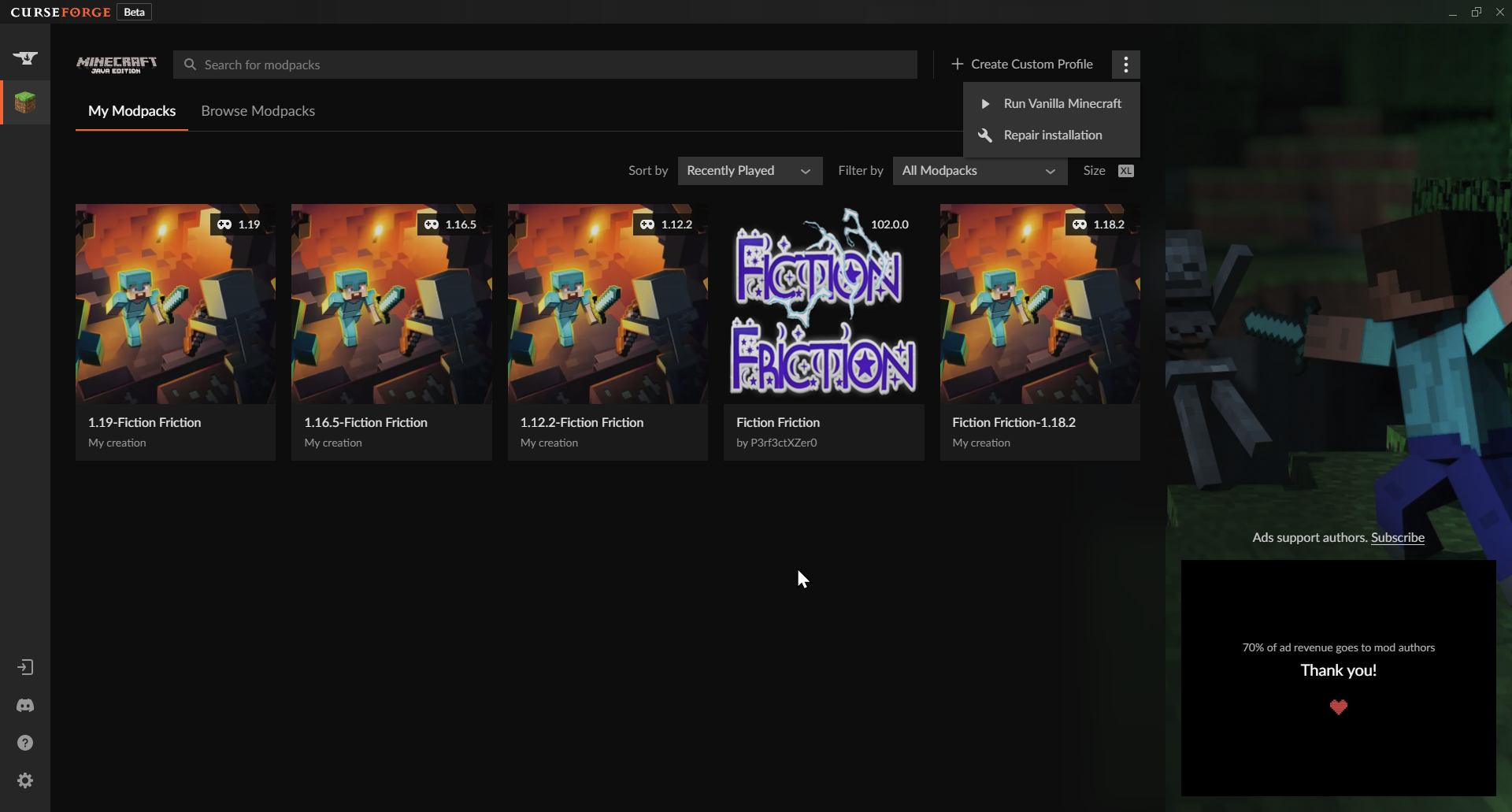
repair install
also 11 or 10?
digital roost
Has this ever worked yet? (Have you successfully used curseforge before this on the same pc)
digital roost
Yikes - Im out
crisp crest
I'm still having this problem:

 fossil hatch
@digital roost can u help me
digital roost
Are you running windows?
fossil hatch
yes
digital roost
Hey I am going to create a template or I will get stuck asking the same 4 questions each time - one second.
crisp crest
i tried restarting my router and pc, reinstalling and deleting all files related to overwolf and curseforge and reinstalling again. Note: I'm on windows 7
digital roost
!logs
crisp crest
fossil hatch
@digital roost do u know how to fix this?
 digital roost
!java
red patioBOT
Minecraft requires specific Java versions to run, pick the correct one for the version of Minecraft you are playing!
Java for Minecraft versions 1.16.X and below
Java for Minecraft 1.17.X
Java for Minecraft 1.18.X and 1.19.X
Java for other operating systems.
 alpine bough
This was working yesterday but now it wont launch this modpack

Modpack is mythic novus
digital roost
alpine bough
This was working yesterday but now it wont launch this modpack
Did a mod update?
Can I have a copy of your modpack?
fossil hatch
digital roost
Can I have a copy of your modpack?
can you take a look at my problem too please
 unkempt willow
right after the download ends it this happens
 digital roost
Julian - I am not yet familiar with overwolf logs. I am studying now I can't promise the solution will jump at me.
crisp crest
alpine bough
This was working yesterday but now it wont launch this modpack
I was having the exit code 1 issue yesterday and i tried to repair instillation and it broke my curseforge
red patioBOT
Error/Exit codes are useless. Follow these steps so someone can actually help you.
- Right-click the modpack profile icon OR click the button in the modpack profile.
- Click
Open Folder. - Open the
logsfolder. - Drag and drop the FILE named
latestORdebuginto discord.
digital roost
(More skilled at fixing modpacks than launchers XD)
alpine bough
digital roost
Did a mod update?
Unless it did it 7 hours ago no and either way i am on most recent version
fossil hatch
digital roost
Julian - I am not yet familiar with overwolf logs. I am studying now I can't pro...
alright
digital roost
alpine bough
Unless it did it 7 hours ago no and either way i am on most recent version
useless info - can you export your modpack in its failed state for me?
alpine bough
How?
 stable mantle
unkempt willow
right after the download ends it this happens
stable mantle
unkempt willow
right after the download ends it this happens
i have the same error
digital roost
hey I was wondering, what requirements does a modpack need to meet to be approved?
digital roost
digital roost
hey I was wondering, what requirements does a modpack need to meet to be approve...
That I can answer. You basically have to show you care - Description etc image and a vision. Also they are closed till tuesday XD I told my friend a 500 character description.
alpine bough
What do i do to export? I am new to this sorry
digital roost
digital roost
That I can answer. You basically have to show you care - Description etc image a...
ohhh right right. Wdym by vision?
!mc-installpack
red patioBOT
How to install modpacks with the search features in app.
- Open the
Minecraftsection of the app. - Click the top search bar where it says
Search for modpacksOR Click theBrowse ModpacksTab. - Find the Modpack you want to install and click install on it.
- Wait for CurseForge app to download and unpack all the required files.
- Once finished, click
Play!
======================================================
** **
======================================================
How to install modpacks from a Export. (Custom/Private/Site downloaded Modpack zip)
- Get CurseForge App if you don't have it, use
!downloadfor a link. - Get the exported modpack from CurseForge or someone else,
!mc-packshareexplains how to make them. - Open the
Minecraftsection of the app. - Click
Create Custom Profile - Click the
Importoption. - Find the file you just downloaded in step 2 and select it.
- CurseForge app will now attempt to download and unpack the modpack. If it fails, try steps 4-6 again.
- Once finished, click
Play!
red patioBOT
There are two ways to share a modpack you've made with others...
Export and Share - For Friends to Small Groups.
- Click the Icon for the modpack.
- Click the button next to play.
- Click
Export. - Select the files that should be included.
- Send the zip to the people that want it! They can follow the instructions in
!mc-installpackto install the pack!
Upload to Curseforge - For Public Release to Everyone.
This options will make your pack public to EVERYONE, it comes with extra requirements and will take some effort to set up.
- Go to here: https://www.curseforge.com/project/432/4471/create
- Fill out the information with a proper description of the pack. This should allow anyone to understand what the pack is.
- Click the Icon for the modpack in the CurseForge app.
- Click the button next to play.
- Click
Export. - Select the files that should be included.
- Open your Project you made on the CurseForge site and Upload the file you just made.
- Wait for Moderation & Sync so it can show up in the client! (See
!syncfor limitations)
digital roost
digital roost
ohhh right right. Wdym by vision?
Well each pack adds to server load so like what is your pack? What makes it stand out
digital roost
think so if not you can dm me try here first
@digital roost Example ``Welcome to Fiction Friction a world created by you. This is a mod pack that will almost always be using the latest version of Forge as well as Minecraft as a base. I am hoping that this project will be my final title as it allows me the flexibility to make whatever I desire. I have gone many days thinking that I could maintain multiple projects only to get creatively burnt out. This is my magnum opus and I truly hope you enjoy your time here.
I would like to say thank you to all the skilled coders that allowed this to even be possible. Thank you so much. As a reminder I do not own a single mod as I am unable to code due to mental challenges with mathematical processing.
Actively Supporting Development (1.12.2, 1.16.5, 1.18.2, 1.19.X )``
digital roost
alpine bough
Kk i have it do i just drag it?
Did it work - I never got it.
unkempt willow
digital roost
hold on gonna study logs
digital roost
unkempt willow
your 3rd in line
unkempt willow
okay
alpine bough
it says "writing export file" reaches 100% progress bar goes away and i dont see it
can i send you the link to the modpack?
digital roost
it is whereever you saved it
digital roost
alpine bough
can i send you the link to the modpack?
If you want
alpine bough
idk if i can paste links here
digital roost
digital roost
Well each pack adds to server load so like what is your pack? What makes it stan...
ok so basically: I wanted to set up a server to play hexxit: updated with some friends on Aternos. But I wanted to add some other mods to it, and Aternos doesn't let you configure modpacks for servers. So I set up a new modpack with all the Hexxit Updated mods in it, as well as the other mods that I wanted, and then put it on Curseforge so that it'll appear as an available modpack on Aternos. Also in the description for the modpack I explained that the pack was just Hexxit with some slight changes and I gave full credit to the original pack because without that honesty/transparency its just theft imo
rich flint
please discuss game issues in #👽︱game-support
for other MC discussions you can use MC channels locked behind getting role in #786424115535544350
digital roost
rich flint
please discuss game issues in <#778097796410376242>
for other MC discussions y...
Apologies - I just saw trouble shooting as trouble shooting.
Could you please inform me - what the overwolf logs mean - I am having trouble helping a user and only two things stood out.
15:06:06.859(INFO)[1138]: init obs video [width:1920 height:1080] 15:06:06.864(WARNING)[1138]: [CoreAudio encoder]: CoreAudio AAC encoder not installed on the system or couldn't be loaded
16/07/2022 15:03:31.976 [ 1] < 148.12MB> (Error ) ScriptingObjectAnalyticsDelegateHandler - : : System.NullReferenceException: Object reference not set to an instance of an object. at OWInstaller.WebApp.API.DelegateHandlers.ScriptingObjectAnalyticsDelegateHandler.SetCommonParams()
I can't see those stopping the app from working though >_>
rich flint
doing 'repair installation' usually fixes the latter
digital roost
User claims to have done this and it broke more - user is on 7
rich flint
windows 7?
digital roost
yes
rich flint
ah well uh. thats a problem
digital roost
@digital roost I just saw that you're dyslexic in your "about me". Sorry my last message was so long and wordy. Would really appreciate knowing how likely I am to be approved tho
Its fine whever mods you add as long as you make it yours -
rich flint
!win7
red patioBOT
Hey there,
You seem to be running Windows 7 which is not supported anymore by Overwolf or Curseforge. Please upgrade your machine if possible.
You can find the download link here
rich flint
hey that still works
digital roost
I was unofficially trying to be helpful - so just let users know; sorry only 10 and 11 are supported for windows.
digital roost
digital roost
Its fine whever mods you add as long as you make it yours -
oh ok. but the thing is that I admitted to it being an offshoot of another modpack for my own use. Does it still count as my own seeing as I changed some things and admitted to it being an altered version of a previous modpack?
how do if fix
AS long as you are not a carbon copy and offer something different. Last time I will say it 😄
rich flint
digital roost
how do if fix
?cflogs-app
red patioBOT
<:overwolf:857375414002384916> How to get CurseForge App logs! <:overwolf:857375414002384916>
- Click the
Create logs zipin the menu. - Drag and drop the file it just made to this chat room to upload it.
- Wait for someone to look at it so they can help you.
digital roost
digital roost
AS long as you are not a carbon copy and offer something different. Last time I ...
oh ok. Just wanted to make sure. Thank you for your help :)
(sorry if I was a bit annoying)
fossil hatch
@rich flint do you know how to fix this?
 digital roost
Special character
rich flint
must have a bad mod
rich flint
can you post the logs marked 'overwolf logs'
red patioBOT
<:overwolf:857375414002384916> How to get CurseForge App logs! <:overwolf:857375414002384916>
- Click the
Create logs zipin the menu. - Drag and drop the file it just made to this chat room to upload it.
- Wait for someone to look at it so they can help you.
hearty kestrel
hearty kestrel
and this error also comes before the minecraft error
can someone help me with that error?
digital roost
i cant find it
rich flint
hearty kestrel
and this error also comes before the minecraft error
Forge for 1.19 is heavily in development right now. unless a given mod literally updated in the last 2 days then it's not compatible with the current version.
digital roost
oh ok so do i have to wait for it to update or is there a chance theywont update it
rich flint
can't tell what the issue is
hearty kestrel
rich flint
Forge for 1.19 is heavily in development right now. unless a given mod literall...
But in singleplayer it works
young bone
Site still works for me
rich flint
that's no guarantee of anything
 vernal sage
Strange. I'm getting connection errors when i try to open launcher
hearty kestrel
rich flint
Forge for 1.19 is heavily in development right now. unless a given mod literall...
and better minecraft 1.19 & 1.18.2 is for 1.19 because 1.19 is in the name
should i try it in the 1.18.2?
rich flint
up to you.
 civic olive
Hello, I have used CurseForge for the past few months with no issues until now. The application will not launch when i double click or try any method of opening. Is there a forum or a common fix for this issue?
 lunar meadow
whenever i try to load a mod it says it cant load launcher core
 golden sky
Why is intellij yelling at me that 1.8.9 mdk gradle isn’t 3.0 and not making an environment to work in?
 high coral
I just installed curseforge, how can we put mods on minecraft ?
high coral
yea
golden sky
Press windows key and r at the same time
high coral
okay
high coral
okay
golden sky
If there is a mods folder that’s where u put them, if there isn’t, make a folder called mods
golden sky
Okay question for smart ppl Why is intellij yelling at me that 1.8.9 mdk gradle isn’t 3.0 and not making an environment to work in?
rich flint
use #⚙️︱authors-help for this in room locked behind role in #786424115535544350
also be aware this is the CurseForge discord, not Forge. people do get that kind of help here in the dev chan
 raven fulcrum
How do I change the folder for a game?
high coral
if I want to install optifine, how do I do it?
 barren tapir
hi, I'm having a problem importing the modpack made by my friend, when I try, appears that the file is invalid
rich flint
was the export file also made by using the CF app export feature?
 rapid thicket
Hello! I have an issue where several modpacks on curseforge crash upon attempting to load into my world, Aloocated RAM shouldnt be an issue as I have 16 GB and have 8000 MB allocated to minecraft in the launcher and I've given both modpacks adequate amounts of time (>5 minutes) to load in, I was also incapable of finding any reddit posts on the matter so I hope someone can figure out the issue with a log file. - note: I was able to leave and load the world several times the first day I played ATM7 but once I closed that instance of minecraft I could never access the world again
high coral
How do you play with a mod at minecraft ?
 fierce sable
friends can you help me
barren tapir
@rich flint
fierce sable
barren tapir
<@257002150503251968>
what is this for
red patioBOT
╰( ͡° ͜ʖ ͡° )つ──☆*:・゚ *˜”*°•.˜”*°• Many Help •°*”˜.•°*”˜* <:curselit:796985620550385705>
Please provide a description of your issue with as much detail as possible. If you have an issue with a mod or modpack, tell us the name. Explain what you can see happening. Be specific!
Tell us what is happening, we already know it "doesn't work".
Avoid using words like "it", tell us exactly what "it" is.
Don't assume anyone knows what you are talking about, be specific.
Tell us what you expected to happen.
Provide screenshots or video if possible.
Provide a log if possible. ?mc-log
fierce sable
Can you answer
barren tapir
sorry
 serene dragon
rich flint
was the export file also made by using the CF app export feature?
serene dragon
rich flint
was the export file also made by using the CF app export feature?
Even when he tries to create a profile this error happen
rich flint
is it a Forge 1.18.x profile?
serene dragon
rich flint
is it a Forge 1.18.x profile?
yes
red patioBOT
- Download and install this https://download.oracle.com/java/17/archive/jdk-17.0.3.1_windows-x64_bin.msi
- Open CurseForge and click the in the bottom left corner.
- Go to the Minecraft tab and scroll down to the bit about java versions.
- Click the icon and then choose Java: 17.0.3.1 (64 Bit) from the list.
- Follow the instructions from
!mc-installfix(if your internet is slow the instructions from!mc-updatemodloaderwork but need to be done on every profile made since the error began to happen)
serene dragon
rich flint
hail mary approach - just try this 😉
follow all steps 1-5
Ok, it worked for him, thanks for the help
 olive hawk
Im stuck on Forging your library. No antivirus other then windows defender. I have tried uninstalling and reinstalling multiple times. I've seen some other discussions about it being stuck trying to retrieve a games list, can I send over some logs and have someone take a look?
rich flint
?cflogs-app
red patioBOT
<:overwolf:857375414002384916> How to get CurseForge App logs! <:overwolf:857375414002384916>
- Click the
Create logs zipin the menu. - Drag and drop the file it just made to this chat room to upload it.
- Wait for someone to look at it so they can help you.
 sonic shell
does anybody know how to fix Curseforge minecraft on Mac, im getting exit code 1.
Its not allowing me to download or create modpacks, this is a new issue. I was using it fine a week ago, its not giving me any information other than the code
red patioBOT
Error/Exit codes are useless. Follow these steps so someone can actually help you.
- Right-click the modpack profile icon OR click the button in the modpack profile.
- Click
Open Folder. - Open the
logsfolder. - Drag and drop the FILE named
latestORdebuginto discord.
sonic shell
it says "An error occured while executing forge install command"
olive hawk
How do I can curseforge app logs, if the app will not get past forging your library?
rich flint
can you click a different game tab?
rich flint
olive hawk
I was able to get them from past instructions
hmm try reinstalling your overwolf and curseforge apps
?getcf
red patioBOT
Looking to install the CurseForge app?
<:windows:798410728188936222> Windows
Minimum Requirements:
- OS Version: 10 or 11
- 64 bit Required.
- 350MB storage space.
- Microsoft .Net 4.8
- Intel/AMD quad-core CPU
- 8GB ram
[Windows Download]
[Windows Alternative Download]
If you are having issues with the Windows Download use the Windows Alternative Download to install Overwolf. Then download CurseForge from the App Store.
Windows Standalone: NOTE: ONLY SUPPORTS WORLD OF WARCRAFT CURRENTLY!
Requirements:
Uh, Windows? (No not the ones in your house)
WoW as that's all it's useful for..
Some sort of zoomy box that does teh verk.
[Windows Standalone] NOTE: ONLY SUPPORTS WORLD OF WARCRAFT CURRENTLY!
<:mac:798410654418862130> Mac
:penguin: Linux
NOTE: ONLY SUPPORTS WORLD OF WARCRAFT CURRENTLY!
Minimum Requirements:
Something not windows or mac would be a start.
Hopefully it turns on.
A screen would be beneficial too.
rich flint
'windows alternative download'
 obsidian parrot
whenever i try to play a mod i have installed for minecraft it comes up with an error couldn't load launcher core is there a fix for this?
olive hawk
Briar, went though that process. Still stuck on Forging your library
rich flint
 olive sorrel
?notcf
red patioBOT
Your question is not related to CurseForge owned/maintained features or services.
Please use the appropriate game room by getting a game role from #786424115535544350.
Otherwise use #👽︱game-support for game related help.
CurseForge does not make or maintain any of the content or games used on the site or app. Just because it's on the site/app does not make it a problem with CurseForge. Move rooms as requested, arguing about it will result in you being muted.
rich flint
olive hawk
Briar, went though that process. Still stuck on Forging your library
so you reinstalled both apps? next i'd try checking if your firewall and/or antivirus is blocking web traffic
olive hawk
Firewall has been off since the beginning of this journey and I dont have any antivirus.
I've tried on my hotspot on my phone as well
Is there a way to manually get Curseforge logs vs Overwolf?
rich flint
what type of connection are you usuing normally? broadband?
olive hawk
default ISP is Starlink. My hotspot is with Verizon
Odd thing is though I have 2 other PCs in the house with that are all fine
obsidian parrot
Whenever i try to play a mod i have installed for minecraft it comes up with an error couldn't load launcher core is there a fix for this?
 robust radish
Is it possible to use Java Cloud to run a 1.18.2 modpack? I managed to do it for a vanilla server since it was a jar file that I had to run, but Im using an Ubuntu VM and I don't know how to run a start.bat file.
 drowsy basin
in my project work is all fine for weeks but today the librarian show always the same trade
but all other villagers shows different trades
pls help
olive hawk
Anything else I can try Briar?
lyric crescent
no
lyric crescent
drowsy basin
in my project work is all fine for weeks but today the librarian show always the...
!notcf ⤵️
red patioBOT
Your question is not related to CurseForge owned/maintained features or services.
Please use the appropriate game room by getting a game role from #786424115535544350.
Otherwise use #👽︱game-support for game related help.
CurseForge does not make or maintain any of the content or games used on the site or app. Just because it's on the site/app does not make it a problem with CurseForge. Move rooms as requested, arguing about it will result in you being muted.
lyric crescent
robust radish
Is it possible to use Java Cloud to run a 1.18.2 modpack? I managed to do it for...
⤴️
lyric crescent
obsidian parrot
Whenever i try to play a mod i have installed for minecraft it comes up with an ...
!mc-installfix
red patioBOT
This is NOT instructions for Repair Profile! They are NOT the same! You need to do this!
- Click on the Minecraft Tab on the Left side of the CurseForge App.
- Click button next to the
Create Custom Profileoption. - Click
Repair Installationoption. - Play game.
NOTE: You will not lose any modpacks or worlds!
olive hawk
Yamza have any advice for my issue?
 grave briar
 lyric crescent
olive hawk
Yamza have any advice for my issue?
lyric crescent
olive hawk
Yamza have any advice for my issue?
no. send your OW logs and CF support can look at it.
!owlogs
red patioBOT
<:overwolf:857375414002384916> How to get CurseForge App logs! <:overwolf:857375414002384916>
- Click the
Create logs zipin the menu. - Drag and drop the file it just made to this chat room to upload it.
- Wait for someone to look at it so they can help you.
lyric crescent
doesnt look like cf is being allowed to even try doing anything, never seen that before.
 prime helm
The Curseforge website seems to be down for me as well as some other people. Just wanted to let you guys know.

 mild sundial
lyric crescent
olive hawk
mild sundial
lyric crescent
olive hawk
try removing and reinstalling curseforge and overwolf
 lethal sigil
yea
 midnight crown
lethal sigil
midnight crown
lethal sigil
cause umm i the website isn't loading at all
 quartz jungle
same here
olive hawk
@lyric crescent Done that already at Briar Thrain instructions to do a Windows alternate download
lethal sigil
i've gotten a 404 error and 405 and 401
prime helm
same
 hasty basin
What happened with website?
 pseudo umbra
hasty basin
What happened with website?
pseudo umbra
hasty basin
What happened with website?
It’s down for me
I though it was just me tho…
hasty basin
pseudo umbra
I though it was just me tho…
#📢︱news there is actually said
quartz jungle
ya me to
pseudo umbra
hasty basin
<#525372338653626389> there is actually said
Alright thx
 granite iris
dose the CurseForge App work as normal?
 narrow minnow
granite iris
dose the CurseForge App work as normal?
narrow minnow
granite iris
dose the CurseForge App work as normal?
yes
narrow minnow
olive hawk
<@125588118538682368> Done that already at Briar Thrain instructions to do a Win...
What do you have under: C:\Windows\Microsoft.NET\assembly\GAC_MSIL\System.Runtime.InteropServices.RuntimeInformation\v4.0_4.0.0.0__b03f5f7f11d50a3a ?
looks like you have a corrupted file
granite iris
wait does it come with any bloatware or adware again?
pseudo umbra
granite iris
dose the CurseForge App work as normal?
For me it does
narrow minnow
granite iris
wait does it come with any bloatware or adware again?
That depends on what you define adware - it shows ads
granite iris
I mean when not running it
narrow minnow
 granite iris
like If I'm just on my desktop
prime helm
nope
granite iris
will it ever show any popups
okay thats good
but what about the bloatware
does it come with anything else other than jus curseforge?
narrow minnow
It doesn't popup more software either
CurseForge is based on Overwolf - which is an enabler of web applications for games
Other apps you might know - such as Porofessor, Outplayed etc... run on Overwolf - but only if you install them
Similar to how Discord runs on Electron
olive hawk
@narrow minnow

 olive hawk
 narrow minnow
yeah, that doesn't look valid
olive hawk
.net framework reinstall?
olive hawk
Anything special to do after tossing yours in that location? Or just try restarting curse?
olive hawk
Holy cannoli. You're a wizard sir
This has been a 3 week issue and finally gave in to get verified here to chat.
Thank you for the help
narrow minnow
Let's hope you don't have more corrupted files
olive hawk
Something in the logs pointed you in that direction?
narrow minnow
olive hawk
Something in the logs pointed you in that direction?
Yes OverwolfBrowserError_xxx.log
Site is back
digital roost
can anyone help me im trying to open a mod that i play a week ago but when i click play it opens the micraft launcher and then closes
narrow minnow
digital roost
can anyone help me im trying to open a mod that i play a week ago but when i cli...
?mc-installfix
red patioBOT
This is NOT instructions for Repair Profile! They are NOT the same! You need to do this!
- Click on the Minecraft Tab on the Left side of the CurseForge App.
- Click button next to the
Create Custom Profileoption. - Click
Repair Installationoption. - Play game.
NOTE: You will not lose any modpacks or worlds!
narrow minnow
try that
digital roost
thanks that worked your a life saver ive been trying to get it to work for about 2 hours now i asked about an hour ago but noone would tell me what was wrong
narrow minnow
Sorry to hear - but there are a lot of questions here and not a lot of moderators
 keen vector
My lucraft power gui isnt showing up does anyone know what i could do??
sonic shell
Im not able to create or download modpacks for minecraft for some reason. It gets to the final stage of loading and then deletes the modpack
ive been able to use curseforge in the past, and Ive asked for help several times today
 violet ether
I cant install Curseforge, everytime i´ll try to install Curseforge the Error warning shows up. What can i do?
sonic shell
It gets to applying patch 2/6 and than deletes the pack, than I get the message "An error occured while executing forge install command"
rich flint
sonic shell
It gets to applying patch 2/6 and than deletes the pack, than I get the message ...
try this step by step
?mc-forgejava
red patioBOT
- Download and install this https://download.oracle.com/java/17/archive/jdk-17.0.3.1_windows-x64_bin.msi
- Open CurseForge and click the in the bottom left corner.
- Go to the Minecraft tab and scroll down to the bit about java versions.
- Click the icon and then choose Java: 17.0.3.1 (64 Bit) from the list.
- Follow the instructions from
!mc-installfix(if your internet is slow the instructions from!mc-updatemodloaderwork but need to be done on every profile made since the error began to happen)
sonic shell
Im on mac
rich flint
ah.
sonic shell
who might have a solution
rich flint
https://adoptium.net/download macOS > x64 > JRE installer
for java 17
but you must be sure to include it in your registry in install options
pseudo umbra
sonic shell
Im on mac
Which one? M1 or Intel
sonic shell
dont know
rich flint
follow the forgejava steps above but install the java from the source at adoptium
pseudo umbra
sonic shell
dont know
Is it older than 1.5 years?
sonic shell
no
pseudo umbra
sonic shell
no
So it’s like 1 year old?
 rich flint
did you do the steps above? yes/no?
pseudo umbra
sonic shell
yes
Nope that’s Intel
rich flint
M1 issue will be on launch failure, not installing modloader failures
pseudo umbra
rich flint
M1 issue will be on launch failure, not installing modloader failures
I actually found a fix for my M1
So it works lol
rich flint
nice. not all MC versions have M1 issues also - mostly just 1.16.5 issue
pseudo umbra
rich flint
nice. not all MC versions have M1 issues also - mostly just 1.16.5 issue
Ik I am on 1.16.5 Forge 🙂 it’s around 50/50 chance if I enter a specific code (I forgot what it’s called)
This one: -Dfml.earlyprogresswindow=false
Most people say it doesn’t work but it sometimes does
digital roost
I was wondering
Is it legal for the curseforge app to share it's add revenue with mod authors? Especially given how some companies aren't okay with paid mods?
rich flint
i'm going to assume a lawyer checking things was involved at some point 😉
lyric crescent
Have you paid for a mod on curseforge?
digital roost
lyric crescent
Have you paid for a mod on curseforge?
Nope
lyric crescent
So they arn't paid mods. Which is the important distinction.
 vague rampart
Anyone got a few mins to help?
 sudden tinsel
if i post a crash log can someone tell me whats wrong
lyric crescent
if you put it in #👽︱game-support
vague rampart
I cannot install any packs?
It goes through a process, then just says 'Deleting files'
Anyone able to assist? I've been looking on google for some time now and there isn't anything
lyric crescent
!owlogs
red patioBOT
<:overwolf:857375414002384916> How to get CurseForge App logs! <:overwolf:857375414002384916>
- Click the
Create logs zipin the menu. - Drag and drop the file it just made to this chat room to upload it.
- Wait for someone to look at it so they can help you.
lyric crescent
!mc-forgejava
red patioBOT
- Download and install this https://download.oracle.com/java/17/archive/jdk-17.0.3.1_windows-x64_bin.msi
- Open CurseForge and click the in the bottom left corner.
- Go to the Minecraft tab and scroll down to the bit about java versions.
- Click the icon and then choose Java: 17.0.3.1 (64 Bit) from the list.
- Follow the instructions from
!mc-installfix(if your internet is slow the instructions from!mc-updatemodloaderwork but need to be done on every profile made since the error began to happen)
vague rampart
Shall i uninstall my current java?
lyric crescent
you only need to do what it says there
vague rampart
ok sweet
 toxic moss
Is this what you guys are talking about?

Should i just scroll up and copy the messages? Or is this a new problem im facing?
red patioBOT
This is NOT instructions for Repair Profile! They are NOT the same! You need to do this!
- Click on the Minecraft Tab on the Left side of the CurseForge App.
- Click button next to the
Create Custom Profileoption. - Click
Repair Installationoption. - Play game.
NOTE: You will not lose any modpacks or worlds!
lyric crescent
toxic moss
Should i just scroll up and copy the messages? Or is this a new problem im facin...
!outdated
red patioBOT
Your CurseForge App version is outdated!
To use CurseForge with the latest features & fixes you should update your CurseForge App.
You can do this by uninstalling the app from your computer programs and then install it again from https://download.curseforge.com/
NOTE: Uninstalling CurseForge will not remove any game/mod data, It's entirely safe to remove and install again!
 low grotto
I have a problem with curse forge, I can't download any mod
 tired light
hey, i used to play minecraft with mods using curseforge but when i try to install it in the curse app say failed to download the minecraft launcher due to a network error
 lethal roost
im having an issue where the game gives me exit 1 when i try to play? literally worked yesterday so idk what you guys did.


just does this "preparing" thing then code 1s me
and its happening to a few other people too, is this some obvious issue with curse forge that can be fixed? or?
digital roost
Help xD
 lethal roost
digital roost
Help xD
lethal roost
digital roost
Help xD
im having the same issue and just posted it too but you're unlikely to get a response it seems
apparently people say this is a common issue that just happens and apparently they have no idea how to fix it lol
here's hoping we get a response but i doubt it
lyric crescent
!notcf
red patioBOT
Your question is not related to CurseForge owned/maintained features or services.
Please use the appropriate game room by getting a game role from #786424115535544350.
Otherwise use #👽︱game-support for game related help.
CurseForge does not make or maintain any of the content or games used on the site or app. Just because it's on the site/app does not make it a problem with CurseForge. Move rooms as requested, arguing about it will result in you being muted.
lyric crescent
send logs in the channel you go to
lunar meadow
it says when i try to open a mod "couldnt load launcher core from C:\User\simpl\curseforge\mincraft\Install\game\launcher.dll
 vivid juniper
this has been happening for a day now what does this mean?

 viral sentinel
why is this happening
 lyric crescent
!outdated
red patioBOT
Your CurseForge App version is outdated!
To use CurseForge with the latest features & fixes you should update your CurseForge App.
You can do this by uninstalling the app from your computer programs and then install it again from https://download.curseforge.com/
NOTE: Uninstalling CurseForge will not remove any game/mod data, It's entirely safe to remove and install again!
lyric crescent
vivid juniper
this has been happening for a day now what does this mean?
!mc-installfix
red patioBOT
This is NOT instructions for Repair Profile! They are NOT the same! You need to do this!
- Click on the Minecraft Tab on the Left side of the CurseForge App.
- Click button next to the
Create Custom Profileoption. - Click
Repair Installationoption. - Play game.
NOTE: You will not lose any modpacks or worlds!
lyric crescent
lunar meadow
it says when i try to open a mod "couldnt load launcher core from C:\User\simpl\...
⤴️
vivid juniper
lyric crescent
!mc-installfix
its still happening when i try to load mod packs
lyric crescent
send a log in #👽︱game-support
 buoyant stone
hi, I have been trying to play a custom mod pack on minecraft but for some reason everytime I get past the launcher the game will open for a second and then crash and close. If I don't have any mods in the mod folder it works and it doesnt work through the regular launcher or the curseforge app. I have tried restarting my computer, changing the forge update, and deleting and reputting in the mods. Help please
 bronze oriole
when i open a mod it logs me out of mc but if i open minecraft normally its still logged in
why does it happen
lyric crescent
Just log in
bronze oriole
ok, i was looking for a solution because logging into microsoft sucks
lyric crescent
Solution is log in.
buoyant stone
Im not sure if it helps for my case but regular minecraft 1.19 will load fine
lyric crescent
!notcf
red patioBOT
Your question is not related to CurseForge owned/maintained features or services.
Please use the appropriate game room by getting a game role from #786424115535544350.
Otherwise use #👽︱game-support for game related help.
CurseForge does not make or maintain any of the content or games used on the site or app. Just because it's on the site/app does not make it a problem with CurseForge. Move rooms as requested, arguing about it will result in you being muted.
 weak patio
can i make a suggestion for the app
make an update all button on modpacks you are working on so you dont spend what feels like years pressing update on each mod
red patioBOT
<:CFidea:798388634972717066> Have an idea on how to improve CurseForge? <:CFidea:798388634972717066>
CurseForge is looking for great ideas and user feedback! Get into the CurseForge Community by providing some feedback and voting on what's important to you!
Think some game should be supported? Post an idea and explain why!
Got a to die for feature idea? Let's hear it!
Location In-app
- Click the button on the bottom left of the app.
- Click on

Suggest a Featureoption!
digital roost
Alright well I tried to report a scammer living in this server but I guess since it was deleted right away, it doesnt matter. Have fun with that.
weak patio
lyric crescent
Bad idea, but sure you can suggest it
also, if you dont mind may i ask why?
digital roost
Can I get a mod please
lyric crescent
Beacuse it encourages laziness. You should be paying attention to what you're updating so if problems arise you know where to look instead of having to ask people for help
lyric crescent
digital roost
Can I get a mod please
If it's about a dm scam report it to discord
digital roost
lyric crescent
If it's about a dm scam report it to discord
How do?
lyric crescent
The big ass report button on the dm?
digital roost
Where
 strong coral
young bone
digital roost
Where
strong coral
young bone
digital roost
Where
It’s a red button, it shouldn’t be hard to miss at the top of the DM
 ember grove
I need help
so I have curseforge but its only showing me world of warcraft not other games like minecraft and etc
young bone
You have the standalone, alpha client, which only has World of Warcraft right now
?getcf
red patioBOT
Looking to install the CurseForge app?
<:windows:798410728188936222> Windows
Minimum Requirements:
- OS Version: 10 or 11
- 64 bit Required.
- 350MB storage space.
- Microsoft .Net 4.8
- Intel/AMD quad-core CPU
- 8GB ram
[Windows Download]
[Windows Alternative Download]
If you are having issues with the Windows Download use the Windows Alternative Download to install Overwolf. Then download CurseForge from the App Store.
Windows Standalone: NOTE: ONLY SUPPORTS WORLD OF WARCRAFT CURRENTLY!
Requirements:
Uh, Windows? (No not the ones in your house)
WoW as that's all it's useful for..
Some sort of zoomy box that does teh verk.
[Windows Standalone] NOTE: ONLY SUPPORTS WORLD OF WARCRAFT CURRENTLY!
<:mac:798410654418862130> Mac
:penguin: Linux
NOTE: ONLY SUPPORTS WORLD OF WARCRAFT CURRENTLY!
Minimum Requirements:
Something not windows or mac would be a start.
Hopefully it turns on.
A screen would be beneficial too.
ember grove
ok so what do i have to do to get other games on here?
ember grove
how long?
young bone
There’s no ETA
ember grove
i just download it yesterday around now
young bone
What operating system are you using
ember grove
windows 10
 plush cliff
Where i can contact an admin of this server?
ember grove
ok thank you
young bone
plush cliff
Where i can contact an admin of this server?
Why do you need an admin
plush cliff
I think i foumd something ilegal comi.g from ir server
U need an admim eight now
Right*
Is important
 versed skiff
i had curseforge a while ago and deleted it and now i cant get my old world, does anyone know how to restore it?
plush cliff
I need to contact an admin i think someone in this server is doimg something ilegal
I have md proof
young bone
plush cliff
I think i foumd something ilegal comi.g from ir server
What’d you get, a scam DM?
plush cliff
Maybe?
young bone
?dm
plush cliff
Amazon related
red patioBOT
Don't want scam DM?
Scams are distributed via throwaway accounts, They get used once and then tossed. There's no point in banning them.
 versed skiff
💀 bro that happens in almost all public servers
plush cliff
Is mi firat time in 6 years of discord that a md like that gets to me
And the user is in this server is the only server related with me
versed skiff
yea but idk if the admin can do smth abot that
young bone
Report them, they’re just bot accounts
lyric crescent
Report to discord and move on
versed skiff
versed skiff
i had curseforge a while ago and deleted it and now i cant get my old world, doe...
?
ember grove
hey it keeps saying download error and failing
not sure what to do
even though all my virus protection is off
what should i do?
 queen pagoda
 plush granite
you shouldn't turn off virus protection
queen pagoda
what is happening??
versed skiff
if i deleted curseforge before, where do i find the old curseforge folder?
plush granite
queen pagoda
close the app and reopen it, it sometimes work
queen pagoda
oh ok thanks
versed skiff
versed skiff
if i deleted curseforge before, where do i find the old curseforge folder?
?
plush granite
versed skiff
?
idk but when you download it again, it will open the old mods and stuff you downloaded before
lyric crescent
Search for a folder called instance
versed skiff
yea i found it but it only has my new files
plush granite
then you must have deleted everything that's why it's only showing the new files
 twilit widget
can anyone help me when i download a mod pack it gets stuck on "processing deep link request"
<@&524645667818307596>
red patioBOT
<:overwolf:857375414002384916> How to get CurseForge App logs! <:overwolf:857375414002384916>
- Click the
Create logs zipin the menu. - Drag and drop the file it just made to this chat room to upload it.
- Wait for someone to look at it so they can help you.
 civic garden
Its been a month since I filled out the form for a Third Party Mod, this is getting ridiculous
rich flint
 steel python
hey anyone know how to upload a pack
?
pls
steel python
hey anyone know how to upload a pack
?
pls
?mc-packshare
red patioBOT
There are two ways to share a modpack you've made with others...
Export and Share - For Friends to Small Groups.
- Click the Icon for the modpack.
- Click the button next to play.
- Click
Export. - Select the files that should be included.
- Send the zip to the people that want it! They can follow the instructions in
!mc-installpackto install the pack!
Upload to Curseforge - For Public Release to Everyone.
This options will make your pack public to EVERYONE, it comes with extra requirements and will take some effort to set up.
- Go to here: https://www.curseforge.com/project/432/4471/create
- Fill out the information with a proper description of the pack. This should allow anyone to understand what the pack is.
- Click the Icon for the modpack in the CurseForge app.
- Click the button next to play.
- Click
Export. - Select the files that should be included.
- Open your Project you made on the CurseForge site and Upload the file you just made.
- Wait for Moderation & Sync so it can show up in the client! (See
!syncfor limitations)
steel python
!mc-installpack
red patioBOT
How to install modpacks with the search features in app.
- Open the
Minecraftsection of the app. - Click the top search bar where it says
Search for modpacksOR Click theBrowse ModpacksTab. - Find the Modpack you want to install and click install on it.
- Wait for CurseForge app to download and unpack all the required files.
- Once finished, click
Play!
======================================================
** **
======================================================
How to install modpacks from a Export. (Custom/Private/Site downloaded Modpack zip)
- Get CurseForge App if you don't have it, use
!downloadfor a link. - Get the exported modpack from CurseForge or someone else,
!mc-packshareexplains how to make them. - Open the
Minecraftsection of the app. - Click
Create Custom Profile - Click the
Importoption. - Find the file you just downloaded in step 2 and select it.
- CurseForge app will now attempt to download and unpack the modpack. If it fails, try steps 4-6 again.
- Once finished, click
Play!
 nocturne shore
I need help with updating forge
 misty dawn
!mc-updatemodloader
red patioBOT
You can update the mod loader within the same game version in the CurseForge app by following these steps!
- Click on the modpack profile you are working with.
- Click on the button next to the play button.
- Click on the Profile Options button.
- Select the mod loader version you want from the dropdown.
- Play!
If you need to update to a new game version, a new profile is required.
 lime sable
having this issue whenever I try to create a custom profile. the profile creating get's to "Applying patch 2 of 6" before the error pops up and the creation stops
 rich flint
lime sable
having this issue whenever I try to create a custom profile. the profile creatin...
rich flint
lime sable
having this issue whenever I try to create a custom profile. the profile creatin...
?mc-forgejava
red patioBOT
- Download and install this https://download.oracle.com/java/17/archive/jdk-17.0.3.1_windows-x64_bin.msi
- Open CurseForge and click the in the bottom left corner.
- Go to the Minecraft tab and scroll down to the bit about java versions.
- Click the icon and then choose Java: 17.0.3.1 (64 Bit) from the list.
- Follow the instructions from
!mc-installfix(if your internet is slow the instructions from!mc-updatemodloaderwork but need to be done on every profile made since the error began to happen)
lime sable
!mc-installfix
red patioBOT
This is NOT instructions for Repair Profile! They are NOT the same! You need to do this!
- Click on the Minecraft Tab on the Left side of the CurseForge App.
- Click button next to the
Create Custom Profileoption. - Click
Repair Installationoption. - Play game.
NOTE: You will not lose any modpacks or worlds!
lime sable
rich flint
?mc-forgejava
it worked thanks
 pure musk
Hey :) so everytime im playing a custom modpack i get these massive lag spikes and I wanted to ask if theres something i could do to prevent it?

Im using Optifine, phosphor, performant, vanilla fix etc but it seems pretty laggy at all even with these mods
Also i have a pretty good pc so Idk if its just modded or mc in general or so
brazen osprey
when moderators online so they accept modpacks?
 cold wren
I cant update my addons, when i try to go on to curseforge it shows this, is there someone who can help me with this issue?
 brazen osprey
wehen are the moderators online so they accept modpacs???
red patioBOT
Project Moderation Time
Project/File moderation is done on these days unless otherwise mentioned:
Sunday, Monday, Tuesday, Wednesday, Thursday: <t:1631170800:t> - <t:1631199600:t> (Your time)
Friday, Saturday: No Moderation!
Projects are moderated First in, First out. If you submit late in the work day, it will likely get left until the next day!
New Projects or anything flagged for manual review: 1-3 Working Days
Updates to approved projects not needing manual approval: 1 Hour
-If your file has been "Under Review" for more than an hour, then it is at manual review!
Changes will only show in the app if the project meets the requirements in the ?sync command and up to 24 hours has passed from when it was accepted.
misty dawn
!status
 strong mulch


i have re downloaded minecraft many times
but still i cant play
can someone help on this
tired light
Hey, i have an error trying to play minecraft with mods
 mighty jewel
Can someone help me
 strong mulch
@mighty jewel I have the same problem
 twin quest
https://cdn.discordapp.com/attachments/806841101737525248/998164987677786192/Screen_Shot_2022-07-17_at_11.50.41_AM_2.png could someone help me with this?
 strong mulch
check the version
strong mulch
dont know
red patioBOT
This is NOT instructions for Repair Profile! They are NOT the same! You need to do this!
- Click on the Minecraft Tab on the Left side of the CurseForge App.
- Click button next to the
Create Custom Profileoption. - Click
Repair Installationoption. - Play game.
NOTE: You will not lose any modpacks or worlds!
red patioBOT
Sending logs for support.
- Right-click the modpack profile icon OR click the button in the modpack profile.
- Click
Open Folder. - Open the
logsfolder. - Drag and drop the FILE named
latestORdebuginto discord.
brazen osprey
i made a modpack 3 days ago how long time dose it take for it to get verified?
twin quest
upper root
!mc-logs
ok
strong mulch
THANKS SO MUCH
brazen osprey
i made a modpack 3 days ago how long time dose it take for it to get verified?
upper root
twin quest
it didnt create one
!mc-launcherlog and #📛︱rules 5️⃣ please
red patioBOT
How to get the launcher log
- Right click a modpack / profile.
- Select
Open Folder - Go back two folders.
- Open the
Installfolder. - Drag the
launcher_log.txtinto discord.
upper root
brazen osprey
i made a modpack 3 days ago how long time dose it take for it to get verified?
!status
red patioBOT
Project Moderation Time
Project/File moderation is done on these days unless otherwise mentioned:
Sunday, Monday, Tuesday, Wednesday, Thursday: <t:1631170800:t> - <t:1631199600:t> (Your time)
Friday, Saturday: No Moderation!
Projects are moderated First in, First out. If you submit late in the work day, it will likely get left until the next day!
New Projects or anything flagged for manual review: 1-3 Working Days
Updates to approved projects not needing manual approval: 1 Hour
-If your file has been "Under Review" for more than an hour, then it is at manual review!
Changes will only show in the app if the project meets the requirements in the ?sync command and up to 24 hours has passed from when it was accepted.


 upper root
!help
red patioBOT
╰( ͡° ͜ʖ ͡° )つ──☆*:・゚ *˜”*°•.˜”*°• Many Help •°*”˜.•°*”˜* <:curselit:796985620550385705>
Please provide a description of your issue with as much detail as possible. If you have an issue with a mod or modpack, tell us the name. Explain what you can see happening. Be specific!
Tell us what is happening, we already know it "doesn't work".
Avoid using words like "it", tell us exactly what "it" is.
Don't assume anyone knows what you are talking about, be specific.
Tell us what you expected to happen.
Provide screenshots or video if possible.
Provide a log if possible. ?mc-log
upper root
 remote badge
tried updating a mod and this pops up
remote badge
tried updating a mod and this pops up
!cflogs-app
red patioBOT
<:overwolf:857375414002384916> How to get CurseForge App logs! <:overwolf:857375414002384916>
- Click the
Create logs zipin the menu. - Drag and drop the file it just made to this chat room to upload it.
- Wait for someone to look at it so they can help you.
upper root
What happens if you try download this through a browser?
https://edge.forgecdn.net/files/3877/324/mahoutsukai-1.16.5-v1.34.28.jar
upper root
You have some software preventing curseforge from turning that url into an ip address it can connect to, probably a webfilter or firewall.
Do have either of those, and if so can you try turn them off?
upper root
Try the "DNS" fix listed in this page under the oops category
https://support.curseforge.com/en/support/solutions/articles/9000194900-curseforge-troubleshooting#win
upper root
Oh, huh