#🔥︱curseforge-support
1 messages · Page 610 of 1
 rich flint
well how about checking a less gigantic pack and seeing if that will work - as a baseline
should continue in a game channel as this isn't CF website or app related problem
 gilded shadow
ok but the issue is i run huge packs with shaders on the technic launcher and they run just fine so idk what it could be.
i just downloaded a smaller pack, ill try it and see if it gives me the same issues.
can i take this to the minecraft channel without breaking rule 4?
 upper root
Yes you can
gilded shadow
sweet thank you guys for your help though
 maiden imp
Hi, hope I'm posting this at the right place, I have a little "issue". I have a game (RIFT) that I used to have but uninstalled before I got curseforge. I just noticed I still had the folders, so I deleted them, and the game still show up. Is there a way to remove it from the sidebar?
 fleet bear
No.
There's likely a specific folder it looks for.
The only real option you have is to entirely reinstall the app without that folder existing. I have no clue what it is.
maiden imp
Allright, thanks anyway.
 rich flint
!oops
 red patioBOT
You had an "Oops, that was not supposed to happen!"
https://support.curseforge.com/en/support/solutions/articles/9000194900-curseforge-troubleshooting#oops
Please follow these instructions
 strong oasis
thanks
 tardy turret
Regarding the fact that funds from CF Authors were not withdrawn to paypal, apply here?
The same account
 raven current
how do i update a curseforge profile to a new version of mc
 queen storm
New version of minecraft: make a new profile, start from nothing
 carmine pine
heya i saw that this feature was shipped:
https://curseforge-ideas.overwolf.com/ideas/CF-I-153
but i don't see the affect of this yet in my launcher, is this something that'll arrive in the next public version or?
queen storm
It got removed as it broke more than it did good
 lyric crescent
the comments on that sure are 
 vapid gorge
Hello! I have a question .. how is it possible to have more FPS on a modpack of 300-400 mods and when I want to make a custom modpack with what I like and I get somewhere around 130 mods I have a huge lag, does anyone know what I could do or what exactly does it do?
queen storm
!notcf
red patioBOT
Your question is not related to CurseForge owned/maintained features or services.
Please use the appropriate game room by getting a game role from #786424115535544350.
Otherwise use #👽︱game-support for game related help.
CurseForge does not make or maintain any of the content or games used on the site or app. Just because it's on the site/app does not make it a problem with CurseForge. Move rooms as requested, arguing about it will result in you being removed from the discord.
carmine pine
queen storm
It got removed as it broke more than it did good
why is the status shipped instead of will not implement?
queen storm
Because it was shipped, removed from the internal tracker, then forgotten
carmine pine
aaah i see, it's a shame but i do understand 🙂 i've heard a few times that it broke everything
then i'm gonna leave it to rest forever, i was really suprised and excited when i got an email today that it was shipped XD
lyric crescent
today? 
carmine pine
lyric crescent
today? <:cursethonk:915887594938724404>
 queen storm
They are so silly 🤦♂️
lyric crescent
that was like 7 months ago wtf.. lol
carmine pine
xD that's why i was so confused really
 digital roost
im trying to play a modpack but whenever i press play on the mc launcher it says the game crashed and it says "exit code:1"
red patioBOT
Error/Exit codes are useless. Follow these steps so someone can actually help you.
- Right-click the modpack profile icon OR click the
 button in the modpack profile.
 - Click

Open Folder. - Open the
logsfolder. - Drag and drop the FILE named
latestORdebuginto discord.
queen storm
!mc-installfix
red patioBOT
This is NOT instructions for Repair Profile! They are NOT the same! You need to do this!
- Click on the Minecraft Tab on the Left side of the CurseForge App.
- Click button next to the
Create Custom Profileoption. - Click

Repair Installationoption. - Play game.
NOTE: You will not lose any modpacks or worlds!
digital roost
thats what i do?
queen storm
Yes, and next time you keep the log there
digital roost
oh ok sorry im new
digital roost
Why does the search function take so long with Curseforge Launcher?
I'll make a search and it takes 5 - 10 seconds at a time
lyric crescent
Like what are you searching for? Takes less than a second for me.
 lyric crescent
!oops
red patioBOT
You had an "Oops, that was not supposed to happen!"
https://support.curseforge.com/en/support/solutions/articles/9000194900-curseforge-troubleshooting#oops
Please follow these instructions
lyric crescent
What didn't? Be specific, what have you actually tried?
 flat geyser
I tried every one
red patioBOT
<:overwolf:857375414002384916> How to get CurseForge App logs! <:overwolf:857375414002384916>
- Click the

Create logs zipin the menu.
menu. - Drag and drop the file it just made to this chat room to upload it.
- Wait for someone to look at it so they can help you.
 flat geyser
queen storm
flat geyser
queen storm
That is not what was asked for
flat geyser
queen storm
Did you just make that?
flat geyser
Please wait, I will give you the latest
queen storm
Yes, please do, as others are useless
flat geyser
queen storm
Network connected, but internet not available. Waiting for connection
flat geyser
just wait?
queen storm
Issue is forwarded to staff
flat geyser
thanks
 unborn basin
flat geyser
thanks
unborn basin
flat geyser
thanks
Do you have private relay on?
 mental talon
hi im tryna get some mods with curseforge and i get a crash when i start the game or well when its loading into the game it looks like this
lyric crescent
Invalid id 4096 - maximum id range exceeded.
red patioBOT
To fix "Invalid ID 4096" install this mod: https://www.curseforge.com/minecraft/mc-mods/jeid
mental talon
ok ty ill try that <3
mental talon
lyric crescent
Invalid id 4096 - maximum id range exceeded.
excuse me how do i share like the pack i made, with friends ? is that possible
queen storm
!mc-packshare
red patioBOT
There are two ways to share a modpack you've made with others...
Export and Share - For Friends to Small Groups.
- Click the Icon for the modpack.
- Click the button next to play.
- Click

Export. - Select the files that should be included.
- Send the zip to the people that want it! They can follow the instructions in
!mc-installpackto install the pack!
Upload to Curseforge - For Public Release to Everyone.
This options will make your pack public to EVERYONE, it comes with extra requirements and will take some effort to set up.
- Go to here: https://www.curseforge.com/project/432/4471/create
- Fill out the information with a proper description of the pack. This should allow anyone to understand what the pack is.
- Click the Icon for the modpack in the CurseForge app.
- Click the button next to play.
- Click
Export. - Select the files that should be included.
- Open your Project you made on the CurseForge site and Upload the file you just made.
- Wait for Moderation & Sync so it can show up in the client! (See
!syncfor limitations)
mental talon
ty
 glossy spindle
How do you fix duplicate files cause I've kind of got myself soft locked and cant put in this one file what so ever even though the past files are on deleted projects
lyric crescent
you delete them..? not sure i understand what you are saying though.
glossy spindle
I have it still says their duplicate files
lyric crescent
what says
glossy spindle
I made a modpack I put the zip file for the file of the modpack and no matter what I do it says its a duplicate
lyric crescent
what says
glossy spindle
When I post the file the little bell in the top right corner gets a notification
I press it and it says
Its a duplicate file
lyric crescent
show the notification
queen storm
Then you uploaded it before
glossy spindle
It said this the first time I uploaded it so I dont really know how that bit works
queen storm
Then show a screenshot of the message
glossy spindle
 queen storm
How did you make that zip?
glossy spindle
I used the app put mods in my custom modpack and exported it
queen storm
You sure you are uploading the correct file?
glossy spindle
I am Ive deleted the file and exported it again and its definitely the file opened it and looked thru every mod to compare it with the modpack
mental talon
hey when i click the export thingy, it does not expoert all the jar files?
glossy spindle
No it exports it as a zip file
queen storm
mental talon
hey when i click the export thingy, it does not expoert all the jar files?
It saves them as references, not actual files
mental talon
oh so they just drag the zip and it works ?
queen storm
glossy spindle
I am Ive deleted the file and exported it again and its definitely the file open...
Then make a change and try again
lyric crescent
glossy spindle
I am Ive deleted the file and exported it again and its definitely the file open...
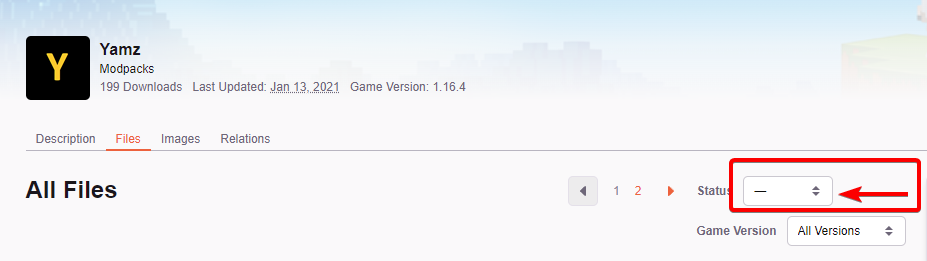
Go to your files page, then view all.
Set this, then screenshot the page.
https://i.imgur.com/fhmvvlR.png
 queen storm
mental talon
oh so they just drag the zip and it works ?
queen storm
mental talon
oh so they just drag the zip and it works ?
No, they use the app for installation
glossy spindle
Alrighty Ill tell you what happens
mental talon
no like, the mods are in the zip even tho i cant see them ?
queen storm
They are in the manifest.json
glossy spindle
queen storm
Then make a change and try again
Should I wait for it to finish being approved as a modpack before adding the file?
queen storm
glossy spindle
Should I wait for it to finish being approved as a modpack before adding the fil...
 blissful valve
Hi ! How do you upload a Modpack on Cursforge?
 signal ridge
!mc-packshare
red patioBOT
There are two ways to share a modpack you've made with others...
Export and Share - For Friends to Small Groups.
- Click the Icon for the modpack.
- Click the button next to play.
- Click
Export. - Select the files that should be included.
- Send the zip to the people that want it! They can follow the instructions in
!mc-installpackto install the pack!
Upload to Curseforge - For Public Release to Everyone.
This options will make your pack public to EVERYONE, it comes with extra requirements and will take some effort to set up.
- Go to here: https://www.curseforge.com/project/432/4471/create
- Fill out the information with a proper description of the pack. This should allow anyone to understand what the pack is.
- Click the Icon for the modpack in the CurseForge app.
- Click the button next to play.
- Click
Export. - Select the files that should be included.
- Open your Project you made on the CurseForge site and Upload the file you just made.
- Wait for Moderation & Sync so it can show up in the client! (See
!syncfor limitations)
blissful valve
Merci ^^
signal ridge
Link the project
signal ridge
!sync
red patioBOT
Sync and your Project.
CurseForge App and site do not share the same requirements! You can find things on the site but this does not mean it will be in the app!
For a mod to show up in the app:
- Projects MUST have a file marked as RELEASE
 or BETA
- Projects MUST be APPROVED
- Projects MUST have a file marked for the GAME VERSION SELECTED/LOADED
- Projects CAN'T be EXPERIMENTAL
- Projects CAN'T be ABANDONED
Files can take a while to show up in the app. If your files still have not shown up either your project is new and you have yet to mark a file as Release/Beta or there is issues with the sync system making it slow.
Vote this issue up if you would like to know when the last sync was! https://curseforge-ideas.overwolf.com/ideas/CF-I-1617
 frail abyss
so i need to make the project as beta?
signal ridge
yes
lyric crescent
or release, as it says
signal ridge
you can edit the file and change it
frail abyss
ok thx
 feral plank
hi , i can't download a mod pack
it's that modpack

when I click on the button for download
 lyric crescent
do you have the app?
lyric crescent
then why not use that instead
feral plank
?
lyric crescent
?
lyric crescent
that isnt the app, it's a website
feral plank
lyric crescent
that isnt the app, it's a website
yes , i know
lyric crescent
there is no "click here" on the app. also dont ping me
feral plank
but how I can download my modpack
lyric crescent
put the name in the search bar and install it?
feral plank
lyric crescent
put the name in the search bar and install it?
on the app ?
feral plank
we can't find little mod like that on search bar ?
lyric crescent
show me that you cant
feral plank
 signal ridge
take out the the
lyric crescent
yoyo reads 👍

 lunar ibex
Can someone tell me how to fix this? Im trying to load my Skyfactory 4 world and this keeps showing up
 lyric crescent
Send a log in #👽︱game-support
lunar ibex
sec
Im trying to update it rq
Because there is an update or somethin which fixes server crashes, maybe this helps idk
lyric crescent
Cool, but please stop using this channel. The issue doesn't belong here.
lunar ibex
Oh, sorry didnt know this
ah I see #👽︱game-support for the game and #🔥︱curseforge-support for curse forge oops xD
 hushed barn
Hello so I am having an issue with my anitvirus deleting the file for CurseForge everytime I try to download it, can anyone help me fix this issue?
 fallen loom
?getcf
red patioBOT
Looking to install the CurseForge app?
<:windows:798410728188936222> Windows
Minimum Requirements:
- OS Version: 7 (64 bit), 8.1, 10, 11
- 64 bit Required.
- 350MB storage space.
- Microsoft .Net 4.8
- Intel/AMD quad-core CPU
- 8GB ram
Download: https://download.overwolf.com/install/Download?&PartnerId=4047
If you are having issues with the installer use the URL below to install Overwolf then go to the app store to download CurseForge.
https://content.overwolf.com/downloads/setup/latest/regular.html
<:mac:798410654418862130> Mac
Minimum Requirements:
- OS Version 10.14 or newer.
- 64 bit Required.
Download: https://curseforge.overwolf.com/downloads/curseforge-latest.dmg
:penguin: Linux
Minimum Requirements:
Yes. SOON:tm: ( ͡~ ͜ʖ ͡°)
Download: :person_shrugging:
fallen loom
Try the Overwolf method instead
hushed barn
It says that it failed, a download error
fallen loom
Screenshot?
fallen loom
I say again, try installing Overwolf and then installing Curse via Overwolf
 signal ridge
That for the second link?
hushed barn
I went to the overwolf website on my computer and tried downloading cursedforge there but it says virus scan failed
signal ridge
In the bot deamon sent click the second link for windows
hushed barn
It’s takes me to a white screen with the words ‘Downloading latest Overwolf Setup’

When it’s done I open it and it shows a security version asking me if I want to open it, I open it and I’m greeted with this

Alright I managed to figure out the overwolf download
signal ridge
Once ow is done, open it up search for the curseforge app and download it using the ow app
hushed barn
I’ve got it done, thank you for the help
 dusk echo
i'm having trouble finding the 2fa token, is this the right place to ask about that?
 onyx finch
does anyone know how to get out of admin mode when running curseforge?
like on windows
 slim oriole
I SERIOUSLY NEED HELP !
i made a custom map in CurseForge singleplayer world using world edit, and i want to download my own world to put it into a server, but i can't find it anywhere, i tried to google my problem, but it didn't help. i tried to find it in %appdata% but it didn't have my world, what can i do ?
A big thanks to whoever helps me :DDD
signal ridge
Right click the profile the map is in > open folder.
slim oriole
thanks 🤩
 flat veldt
hey is anyone able to help me with my minecraft modpack?
signal ridge
Dont ask to ask, Just ask / explain
flat veldt
okay well my modpack keeps crashing and i dont know how to get it to stop
signal ridge
Ill post how to get the logs in #👽︱game-support
digital roost
Anyone know any mods that can make less lagger?
slim oriole
 upper root
!notcf
red patioBOT
Your question is not related to CurseForge owned/maintained features or services.
Please use the appropriate game room by getting a game role from #786424115535544350.
Otherwise use #👽︱game-support for game related help.
CurseForge does not make or maintain any of the content or games used on the site or app. Just because it's on the site/app does not make it a problem with CurseForge. Move rooms as requested, arguing about it will result in you being removed from the discord.
 charred epoch
Something is wrong with my computer. Cursefore isn't the only program to have this issue but I thought you guys might be able to help.

For example, downloads also are resulting in errors

and I get this message on an application I was using just a couple hours earlier
 charred epoch
Something is wrong with my computer. Cursefore isn't the only program to have th...
charred epoch
charred epoch
Something is wrong with my computer. Cursefore isn't the only program to have th...
titanfall also had that issue
 opal cipher
If you need help that's not directly related to Overwolf/CurseForge, I'd suggest trying in #🥑-off-topic-chat
dusk echo
does anyone know where this is actually generated
 fleet bear
dusk echo
does anyone know *where* this is actually generated
fleet bear
dusk echo
does anyone know *where* this is actually generated
In whatever app you used to set up your 2FA for CF.
dusk echo
fleet bear
In whatever app you used to set up your 2FA for CF.
it's not there, that's the reason I'm trying to reset it
but in order to reset it i need the code

 opal cipher
!mc-path
red patioBOT
Change your install path to the following:
For Windows: C:\CurseForge
For Mac: /Users/Shared/CurseForge
You will need to make this folder!
If Minecraft is not installed in CurseForge App:
- Click the
 in the top left.
 - Select Minecraft from the list of games.
- Select the
Advancedoption and pick the location for your computer listed above. - Click
Continue.
If Minecraft is installed in CurseForge App:
- Click the
 in the bottom left.
 - Select the Minecraft tab.
- Click
Change. - Select the location for your computer listed above.
:no_entry_sign: Minecraft Files should NOT be installed inside the following locations :no_entry_sign:
:no_entry_sign: .minecraft folder.
:no_entry_sign: OneDrive folders.
:no_entry_sign: Desktop folder.
:no_entry_sign: iCloud enabled folders.
:no_entry_sign: or any other cloud saved folder.
:no_entry_sign: or folders with non-English characters in them.
If any of the above are in the path you need to change/move it!
opal cipher
So you need to create another folder that is not in your user folder, as CurseForge right now can only work within folders with English letters.
So for Windows, as suggested, you can use C:\CurseForge (need to create it, if it doesn't exist), or in another drive if you have more.
It also requires at least 10GB disk space on C: (for temporary files) and the drive you use for the modding path.
 mint nymph
opal cipher
So you need to create another folder that is not in your user folder, as CurseFo...
mint nymph
opal cipher
So you need to create another folder that is not in your user folder, as CurseFo...
Non-English Korean shouldn't be included in the path.
opal cipher
Exactly. :)
mint nymph
Thank you so much! If there's an error, I'll call you again.
opal cipher
Good luck and have fun!
mint nymph
😄
digital roost
How do i import a zip file in curseforge?
opal cipher
!mc-installpack
red patioBOT
How to install modpacks with the search features in app.
- Open the

Minecraftsection of the app. - Click the top search bar where it says
Search for modpacksOR Click theBrowse ModpacksTab. - Find the Modpack you want to install and click install on it.
- Wait for CurseForge app to download and unpack all the required files.
- Once finished, click
Play!
How to install modpacks from a Export. (Custom/Private/Site downloaded Modpack zip)
- Get CurseForge App if you don't have it, use
!downloadfor a link. - Get the exported modpack from CurseForge or someone else,
!mc-packshareexplains how to make them. - Open the
Minecraftsection of the app. - Click

Create Custom Profile - Click the
Importoption. - Find the file you just downloaded in step 2 and select it.
- CurseForge app will now attempt to download and unpack the modpack. If it fails, try steps 4-6 again.
- Once finished, click
Play!
 opal cipher
Second part, since it's a zip
opal cipher
Yes, buy the game and stop using tlauncher.
 austere stump
Hello, is there a way to slightly modify a modpack to use it for myself?
queen storm
!mc-editpack
red patioBOT
How to add/remove mods in a modpack.
- Click on the picture of the modpack.
- Click the

Add More Contentbutton, IF this button is not there, see below before continuing. - Find the Mods, Resource Packs or Maps you wish to Install and click
Installon them. - Wait for all the required mods to be downloaded.
- Start the modpack.
How to Enable/Disable content management for modpacks.
- Click on the picture of the modpack.
- Click on the button next to the
Playbutton. - Click on

Profile Options. - Check the
Allow content management for this profileoption if you want to edit the content of the modpack, uncheck it to disable.
NOTE: The Allow content management for this profile option is what allows you to Delete, Disable, Update or Install any Mods, Resource Packs or Maps managed by CurseForge. It must be on to modify any of them! (Currently)
red patioBOT
<:overwolf:857375414002384916> How to get CurseForge App logs! <:overwolf:857375414002384916>
- Click the
Create logs zipin the menu. - Drag and drop the file it just made to this chat room to upload it.
- Wait for someone to look at it so they can help you.
 half ibex
I keep having the curse forge web browser force me on to a capcha page and not let me progress for whatever reason, any idea why?
lyric crescent
!cloudflare
red patioBOT
Captcha issues
If you are receiving captcha confirmations on CurseForge then the host company Cloudflare has flagged your IP. This seems to happen at random for no known reason, though people uploading files are more likely to trigger it. There is nothing OverWolf/CurseForge can do to resolve this, you must simply wait until it stops happening.
half ibex
Alright fair enough I suppose, thank you!
digital roost
I'm on a Mac. Hi i'm having trouble loading the curseforge app. everytime i open it, it says "forging library", finds my WoW installation and then says Oops that was not supposed to happen. I changed my DNS settings, turned off ipv6, reinstalled, and opened up my firewall.

 ruby apex
i have a modpack that is completely ready to be uploaded for and smp im starting but i have no idea how to publish it so i'm looking for someone to publish it for me because im stupid
red patioBOT
There are two ways to share a modpack you've made with others...
Export and Share - For Friends to Small Groups.
- Click the Icon for the modpack.
- Click the button next to play.
- Click
Export. - Select the files that should be included.
- Send the zip to the people that want it! They can follow the instructions in
!mc-installpackto install the pack!
Upload to Curseforge - For Public Release to Everyone.
This options will make your pack public to EVERYONE, it comes with extra requirements and will take some effort to set up.
- Go to here: https://www.curseforge.com/project/432/4471/create
- Fill out the information with a proper description of the pack. This should allow anyone to understand what the pack is.
- Click the Icon for the modpack in the CurseForge app.
- Click the button next to play.
- Click
Export. - Select the files that should be included.
- Open your Project you made on the CurseForge site and Upload the file you just made.
- Wait for Moderation & Sync so it can show up in the client! (See
!syncfor limitations)
 wise pivot
When I try to delete a profile for minecraft, it says files are locked, cannot delete
 delicate pebble
Hello, I've got a question. My mods are in a modpack and the downloads on my mods do not match with downloads on a modpack. Is there some kind of option that has to be turned on, in order to let the downloads from modpack count into the mod? (my points reward program is turned on)
fleet bear
wise pivot
When I try to delete a profile for minecraft, it says files are locked, cannot d...
Restart the computer and try again.
wise pivot
I did. multiple times
fleet bear
delicate pebble
Hello, I've got a question. My mods are in a modpack and the downloads on my mod...
Downloading the modpack doesn't mean the mod was downloaded.
Theres no such option and whatever you are saying doesn't make any sense as downloads are already counted as they should be.
fleet bear
wise pivot
I did. multiple times
Then you have some other file permission problem, delete the folder via the file browser.
 fossil patrol
I require help
wise pivot
fleet bear
Then you have some other file permission problem, delete the folder via the file...
ok thx
red patioBOT
╰( ͡° ͜ʖ ͡° )つ──☆*:・゚ *˜”*°•.˜”*°• Many Help •°*”˜.•°*”˜* <:curselit:796985620550385705>
Please provide a description of your issue with as much detail as possible. If you have an issue with a mod or modpack, tell us the name. Explain what you can see happening. Be specific!
 Tell us what is happening, we already know it "doesn't work".
Avoid using words like "it", tell us exactly what "it" is.
Don't assume anyone knows what you are talking about, be specific.
Tell us what you expected to happen.
Provide screenshots or video if possible.
Provide a log if possible. ?mc-log
signal ridge
fossil patrol
I require help
!help
wise pivot
weird tho, some profiles i could delete but others no
fossil patrol
I have yet to discover a reason as to why but both OverWolf and CurseForge refuse to open. There's no error messages or anything of the sort.
delicate pebble
fleet bear
Downloading the modpack doesn't mean the mod was downloaded.
Theres no such opt...
How can it mean the mod wasn't downloaded if the mod is in the modpack
 next frost
mine wont download every time I try it is just a black screen how do make it work?
does anyone know
fleet bear
delicate pebble
How can it mean the mod wasn't downloaded if the mod is in the modpack
The mods are not in the pack.
The pack is just a file with a bunch of text in it.
fleet bear
fossil patrol
I have yet to discover a reason as to why but both OverWolf and CurseForge refus...
Sounds like your antivirus is blocking it
fleet bear
next frost
mine wont download every time I try it is just a black screen how do make it wor...
what doesn't download.
next frost
curseforge
fleet bear
!getcf
red patioBOT
Looking to install the CurseForge app?
<:windows:798410728188936222> Windows
Minimum Requirements:
- OS Version: 7 (64 bit), 8.1, 10, 11
- 64 bit Required.
- 350MB storage space.
- Microsoft .Net 4.8
- Intel/AMD quad-core CPU
- 8GB ram
Download: https://download.overwolf.com/install/Download?&PartnerId=4047
If you are having issues with the installer use the URL below to install Overwolf then go to the app store to download CurseForge.
https://content.overwolf.com/downloads/setup/latest/regular.html
<:mac:798410654418862130> Mac
Minimum Requirements:
- OS Version 10.14 or newer.
- 64 bit Required.
Download: https://curseforge.overwolf.com/downloads/curseforge-latest.dmg
:penguin: Linux
Minimum Requirements:
Yes. SOON:tm: ( ͡~ ͜ʖ ͡°)
Download: :person_shrugging:
next frost
do you have any ideas
queen storm
See second link above
next frost
here i will send a pic of what is happening

and it sat like that for hours and did nothing
queen storm
Which link is that?
next frost
the one that i just got from the bot then its the same one as google
queen storm
First or second link?
next frost
first
queen storm
Then try the second one like I said?
queen storm
Mac is the third one.
Please count again
 dusky shore
RL Craft don't download I don't know why, it tells me that it timedout or idk what, how to fix this please ?
upper root
!webclient
red patioBOT
Timeout/WebClient errors are from networking issues to your computer. You can try a few things to fix it:
- Restart the computer.
- Restart your router/modem.
- Try another internet source like a hotspot, wired connection or moving closer to the WiFi.
- Pause/Stop other things using the internet. (Streams, music, etc)
- If this still doesn't work, try again in an hour and hope your connection is stable.
upper root
The website does not download the full pack
dusky shore
I'm gonna restart I guess, I know this but it's always Lycanite
upper root
It only downloads a couple txt files that tells the app what to install
next frost
o well i give up
dusky shore
Or I should unzip, I don't remember
upper root
Can you show a screenshot of the error?
dusky shore
Hum, I guess I need to wait long minutes then...
Of the importing or of the timeout ?
upper root
The Importing
 upper root
What curseforge version are you on? bottom left
 foggy ridge
How do I report a user on this discord spam advertising in DMs? Or do I just hit the “report spam” button to report them to discord and call it there?
dusky shore
 upper root
foggy ridge
How do I report a user on this discord spam advertising in DMs? Or do I just hit...
upper root
foggy ridge
How do I report a user on this discord spam advertising in DMs? Or do I just hit...
Just report to discord, not much we can do about it as they just leave and make a new account
foggy ridge
If it’s someone like active in the server tho?
upper root
Post proof in #💬︱general-chat, not here as this is a support channel
foggy ridge
Thank you
upper root
dusky shore
Try restart your computer
dusky shore
Fine, I guess I have no other choices...
 junior crypt
just curious; for a custom profile can you upload an image for it?

 crimson tinsel
my curseforge keeps crashing
upper root
junior crypt
just curious; for a custom profile can you upload an image for it?
Yes. In the profile options screen click the pencil button on the image
 glossy crescent
crimson tinsel
my curseforge keeps crashing
glossy crescent
crimson tinsel
my curseforge keeps crashing
same
junior crypt
it doesnt show up with an image in the profile options and the one if i just click the profile doesnt have a pencil on the image
 junior crypt
okay
glossy crescent
i mean not cursforge
 junior crypt
ah thanks
glossy crescent
minecraft keeps crashing when the modpack is done loading
fleet bear
glossy crescent
minecraft keeps crashing when the modpack is done loading
!notcf
red patioBOT
Your question is not related to CurseForge owned/maintained features or services.
Please use the appropriate game room by getting a game role from #786424115535544350.
Otherwise use #👽︱game-support for game related help.
CurseForge does not make or maintain any of the content or games used on the site or app. Just because it's on the site/app does not make it a problem with CurseForge. Move rooms as requested, arguing about it will result in you being removed from the discord.
junior crypt
if i reinstall curseforge does it lose my profiles?
queen storm
No
junior crypt
whats the most recent version?
upper root
193, although not everyone can update to that yet. As long as its 190+ you should be fine
crimson tinsel
all my modpacks are gone
fleet bear
Explain
 eternal wyvern
Hello, Can i please be given some sort of waver for the 1 post per min on curse
fleet bear
what?
eternal wyvern
As a owner of the project, Trying to reply to people when you have multiple projects i usually go through messages at the same time and reply but it's taking ages
crimson tinsel
fleet bear
Explain
my curseforge kept crashing and when it finally worked, all my modpacks were gone and all my saves
fleet bear
eternal wyvern
As a owner of the project, Trying to reply to people when you have multiple proj...
It can't be removed. Just plan ahead.
eternal wyvern
I have, But when you have 9 projects and 30+ messages on each it takes some time...
fleet bear
You got 30 messages in one day?
eternal wyvern
We have loads
fleet bear
sounds like you need better project pages then.
eternal wyvern
What would you suggest for a better project page?
fleet bear
Well, whatever they are asking about likely should be on the project page.
eternal wyvern
We have a FAQ and a load of stuff. but people still post there
fleet bear
Otherwise if you are having long conversations, find a better place for it like discord/issue trackers.
eternal wyvern
We have all that too 😛
fleet bear
Then delete the comments that are people refusing to use them/read or disable comments entierly.
eternal wyvern
Well, I'm trying to help everyone.
fleet bear
If you are taking less than a minute to write out comments, then the comments are junk to start with as you are just copy pasting info or redirecting people.
eternal wyvern
But i guess, Yeah we could have a banner for support on the bottom and disable them
 shut birch
this is probably a dick move to ask admins, but is there any way i can speed up the process for a moderator to check my modpack? Apparently the description was not very descriptive so i did my best and kinda really need this thing public so my 30 friends and a massive discord server can use it for an event in a few hours.
eternal wyvern
Thank you.
fleet bear
shut birch
this is probably a dick move to ask admins, but is there any way i can speed up ...
Nope.
eternal wyvern
@shut birch I had that with my experimental pack, Review took around 8 hours
fleet bear
Gotta wait till sunday now.
lyric crescent
shut birch
this is probably a dick move to ask admins, but is there any way i can speed up ...
if you could, everyone could, defeating the point of it even being possible
shut birch
eternal wyvern
<@!111325649959952384> I had that with my experimental pack, Review took around ...
i updated it almost 14 hrs ago or more
fleet bear
They don't work Friday.
shut birch
lyric crescent
if you could, everyone could, defeating the point of it even being possible
tru.
fleet bear
!status
red patioBOT
Project Moderation Time
Project/File moderation is done on these days unless otherwise mentioned:
Sunday, Monday, Tuesday, Wednesday, Thursday: <t:1631170800:t> - <t:1631199600:t> (Your time)
Friday, Saturday: No Moderation!
Projects are moderated First in, First out. If you submit late in the work day, it will likely get left until the next day!
New Projects or anything flagged for manual review: 1-3 Working Days
Updates to approved projects not needing manual approval: 1 Hour
-If your file has been "Under Review" for more than an hour, then it is at manual review!
Changes will only show in the app if the project meets the requirements in the ?sync command and up to 24 hours has passed from when it was accepted.
fleet bear
You don't need to upload a modpack to distribute it. Just post the exported file in discord.
they can use the import method to import the pack in the mean time
shut birch
exported files is how my current modpack works although it is quite a headache.
ig im too late lol
eternal wyvern
You know the above moderation stuff, Can a CurseForge Core game admin validate packs/mods that are following guidelines for their own project?
Or even others?
fleet bear
No. All moderation is handled by CF.
shut birch
honestly i dont get why there isnt a "Unlisted" modpack option so we can share links, is that in the works?
fleet bear
shut birch
honestly i dont get why there isnt a "Unlisted" modpack option so we can share l...
There is, it's called share the file.
lyric crescent
what would the link be to..
eternal wyvern
Right, So me being a CF Core Game Admin, I'd still have no way to pick and choose what can be added to our project?
fleet bear
Anything you upload to CF is always going to be moderated.
shut birch
lyric crescent
what would the link be to..
The same way YT handles publication, ie Public, Unlisted, and Private.
its fine tho i understand
fleet bear
eternal wyvern
Right, So me being a CF Core Game Admin, I'd still have no way to pick and choos...
I don't understand your question as that doesn't relate to what you just asked.
Moderation is done by CF only.
If you have a game via CFCore, you set the guidelines they follow for moderating your games content.
eternal wyvern
Yeah, That's fine. Was just wondering if we would have any ability to revoke or review some things our self.
fleet bear
You can't pick random stuff to allow if the CF TOS or otherwise doesn't allow it and your rules don't allow it.
eternal wyvern
What if guidelines change?
fleet bear
You could likely open a support ticket asking to change the guidelines though.
eternal wyvern
Okey, Thank you. Obviously as things grow and we create new content guidelines may update.
fleet bear
I don't really know how they plan to handle all of that TBH. They never gave me any information pertaining to that.
I'm only going off the information they provide on the CF Core site.
eternal wyvern
I don't know much either.
fleet bear
I hope that doesn't become common place.
eternal wyvern
Still going through all the documentation and new API 🙂
But if that 1 min per message thing persists then it could become a problem
I understand there being one generally but project owners are not likely to spam their own project
fleet bear
Also, If you are looking for CFCore support we don't really have that and you should have a handler to contact in regards to that stuff from my understanding.
This Discord only really deals with user support and general info. The Dev Discord handles the CF API and Project level issues.
eternal wyvern
Haven't really been given one, Maybe i can send a ticket in.
fleet bear
They are the ones that decided to handle it this way. Not I.
fleet bear
eternal wyvern
I understand there being one `generally` but project owners are not likely to sp...
The site is built from old forum software. It's likely an issue with the way it was implemented some 8 years ago. After they replace the site it will likely go away.
Maddog, Not in the support room please.
shut birch
srry, is there a limit on how many people i can add to a project?
(: definitely not going to add 30 people to a project or something
fleet bear
Not that I'm aware of.
I've certainly seen around 10, so that shouldn't be an issue? It might not display all of them though.
shut birch
k thanks
 acoustic cobalt
hello i am makeing a modpack but i need optifine but i dont know how to get it
upper root
 little pine
how do i share a minecraft profile
little pine
how do i share a minecraft profile
!mc-packshare
red patioBOT
There are two ways to share a modpack you've made with others...
Export and Share - For Friends to Small Groups.
- Click the Icon for the modpack.
- Click the button next to play.
- Click
Export. - Select the files that should be included.
- Send the zip to the people that want it! They can follow the instructions in
!mc-installpackto install the pack!
Upload to Curseforge - For Public Release to Everyone.
This options will make your pack public to EVERYONE, it comes with extra requirements and will take some effort to set up.
- Go to here: https://www.curseforge.com/project/432/4471/create
- Fill out the information with a proper description of the pack. This should allow anyone to understand what the pack is.
- Click the Icon for the modpack in the CurseForge app.
- Click the button next to play.
- Click
Export. - Select the files that should be included.
- Open your Project you made on the CurseForge site and Upload the file you just made.
- Wait for Moderation & Sync so it can show up in the client! (See
!syncfor limitations)
upper root
acoustic cobalt
hello i am makeing a modpack but i need optifine but i dont know how to get it
!mc-optifine note that you cannot upload modpacks that contain optifine to curseforge tho
red patioBOT
We do not offer support for Optifine!
If you have issues with Optifine, remove it. If you want further support try the discord found on their website.
https://www.optifine.net/home
Installing Optifine with modpacks on Curseforge:
- Right click the modpack icon, select
Open Folder. - Put the
Optifine.jarinto themodsfolder. - Now start the modpack.
little pine
upper root
!mc-packshare
is it possable to do it with a link
acoustic cobalt
thanks
 tough kite
help
upper root
little pine
is it possable to do it with a link
Send the zip to them on discord
tough kite
cheif
little pine
upper root
Send the zip to them on discord
k
red patioBOT
╰( ͡° ͜ʖ ͡° )つ──☆*:・゚ *˜”*°•.˜”*°• Many Help •°*”˜.•°*”˜* <:curselit:796985620550385705>
Please provide a description of your issue with as much detail as possible. If you have an issue with a mod or modpack, tell us the name. Explain what you can see happening. Be specific!
Tell us what is happening, we already know it "doesn't work".
Avoid using words like "it", tell us exactly what "it" is.
Don't assume anyone knows what you are talking about, be specific.
Tell us what you expected to happen.
Provide screenshots or video if possible.
Provide a log if possible. ?mc-log
little pine
ty
tough kite
ok so i was loading on to modded mc server and when i joined the server it auto crashed my game but i can join other server i was on the server the other night and idk if its my launcher or just the mod pack i keep getting exit code -1
red patioBOT
Error/Exit codes are useless. Follow these steps so someone can actually help you.
- Right-click the modpack profile icon OR click the button in the modpack profile.
- Click
Open Folder. - Open the
logsfolder. - Drag and drop the FILE named
latestORdebuginto discord.
tough kite
upper root
!notcf
red patioBOT
Your question is not related to CurseForge owned/maintained features or services.
Please use the appropriate game room by getting a game role from #786424115535544350.
Otherwise use #👽︱game-support for game related help.
CurseForge does not make or maintain any of the content or games used on the site or app. Just because it's on the site/app does not make it a problem with CurseForge. Move rooms as requested, arguing about it will result in you being removed from the discord.
 tepid prism
can someone help me, 1.16.5 wont launch. ive tried everything, even trying to launch it with no mods it still crashes
upper root
!mc-logs into #👽︱game-support
red patioBOT
Sending logs for support.
- Right-click the modpack profile icon OR click the button in the modpack profile.
- Click
Open Folder. - Open the
logsfolder. - Drag and drop the FILE named
latestORdebuginto discord.
tepid prism
this is my crash report
upper root
This isnt #👽︱game-support
 analog bane
Hey do u guys manage Forge to for the launcher? minecraf launcher
upper root
No, this is for Curseforge, a launcher that manages forge and fabric installations (and other games mods too)
!!=
red patioBOT
Wording is important!
Forge = Minecraft Forge, This is a modloader often just called "Forge".
Fabric = Fabric MC, this is another modloader, just called "Fabric".
CurseForge = A Website/App that has content for games.
Mods = Individual mod files.
Modpacks = Multiple mods put into the mods folder or downloaded from CurseForge.
These are not Interchangeable! Please use the correct terms as it allows us to help you faster!
analog bane
Hey sp i have a question
Im tryna install forge and i install it click install client and in my launcher there is no forge
upper root
This is not forge support
 young bone
And they left
 craggy locust
Hi I"m having issues trying to upload a minecraft resource pack, i routinely get this error:
HTTP Code: 403
Status Text: error
Address: https://www.curseforge.com/project/432/12/create
Date: Fri Mar 04 2022 15:13:36 GMT-0800 (Pacific Standard Time)
Request: POST /upload-file-chunk
every time i try to upload my file.
dusk echo
dusk echo
does anyone know *where* this is actually generated
could I get some help with this? I don't have curseforge in my authenticator app but it seems like to get it there, I need to have generated codes
upper root
If you need to reset your 2fa without a 2fa token make a ticket with adequate proof that you own the account (like multiple screenshots of you logged in and on pages only that account could see)
!ticket-site
red patioBOT
:bug: Reporting via Website :bug:
Can't open the app or would rather use the website? You can do so here: https://support.curseforge.com/en/support/tickets/new
Fill out the form with accurate detailed information, "It doesn't work" isn't helpful! What exactly doesn't work and why doesn't it work should be easy to answer!
Make sure to upload your Overwolf logs with the Upload File option on the ticket, information on how to get these logs can be found here https://support.overwolf.com/en/support/solutions/articles/9000176827-how-to-get-your-overwolf-logs
upper root
Ignore the overwolf logs bit
dusk echo
oh, ok, I made a ticket a few days ago but it was closed. I'll provide proof this time, thanks :)
Would a screenshot of the account settings work?
upper root
That would be a step in the right direction
 obsidian patrol
i keep getting Invalid java runtime configuration error 1 when i try to run minecraft, any fixes?
red patioBOT
"Invalid Java Runtime Configuration" does not help us, Follow these steps so someone can actually help you.
- Right-click the modpack profile icon OR click the button in the modpack profile.
- Click
Open Folder. - Open the
logsfolder. - Drag and drop the FILE named
latestORdebuginto discord.
upper root
Remove optifine, if it still happens post a new log
obsidian patrol
fixed, thanks
digital roost
hey, im trying to add a java file into my mideval minecraft mod, but, i dropped it into the file, re opened the client, but it should say Mods: 266 not Mods: 265
upper root
Is the mod for the correct version of minecraft and the correct mod loader?
 fluid barn
anyone know how to add custom maps to the mods
upper root
Right click the pack icon and choose add more content, then go to the maps tab and search for a map
 hearty rampart
how would i go about fixing this Java runtime issue
 upper root
!mc-logs post these into #👽︱game-support. Not here
red patioBOT
Sending logs for support.
- Right-click the modpack profile icon OR click the button in the modpack profile.
- Click
Open Folder. - Open the
logsfolder. - Drag and drop the FILE named
latestORdebuginto discord.
upper root
I said #👽︱game-support
hearty rampart
ok
delicate pebble
Could someone please tell me what happens when i enable project pages in a mod's settings? What does it mean?
 fleet bear
delicate pebble
Could someone please tell me what happens when i enable project pages in a mod's...
fleet bear
delicate pebble
Could someone please tell me what happens when i enable project pages in a mod's...
it just gives you a wiki like space to write up mod info like the description page
delicate pebble
Oh okay, thanks
 pearl sage
upper root
pearl sage
upper root
Forge 1.13-1.16 does not work on M1 macs due to a problem apple would have to fix
If your friends problem is not that get them to join and explain what is going wrong
 pulsar vapor
is there a way to change the font in the app?
lyric crescent
No
pulsar vapor
aye.. probably not with out going into the files and editing them.. (that might be against the tos... been a while since i looked at them)
 wanton spruce
why my custom profile turn out to be vanilla? i have bunch of mod installed
queen storm
!mc-installfix
red patioBOT
This is NOT instructions for Repair Profile! They are NOT the same! You need to do this!
- Click on the Minecraft Tab on the Left side of the CurseForge App.
- Click button next to the
Create Custom Profileoption. - Click
Repair Installationoption. - Play game.
NOTE: You will not lose any modpacks or worlds!
wanton spruce
it said failed to repair installation, minecraft is currently running yet there is no minecraft instance running?
 lusty condor
When I manually choose to make curseforge use java 64 bit, it instantly turns it into automatic anyone know the reason?
 upper root
wanton spruce
it said failed to repair installation, minecraft is currently running yet there ...
upper root
wanton spruce
it said failed to repair installation, minecraft is currently running yet there ...
Restart your compter then try again
queen storm
lusty condor
When I manually choose to make curseforge use java 64 bit, it instantly turns it...
That is just for installing modloaders
red patioBOT
Error/Exit codes are useless. Follow these steps so someone can actually help you.
- Right-click the modpack profile icon OR click the button in the modpack profile.
- Click
Open Folder. - Open the
logsfolder. - Drag and drop the FILE named
latestORdebuginto discord.
upper root
Soo, its vanilla or it crashes?
 digital condor
when i try to play my vanilla crashes when i try to play forge
like play on forge it loads the thing you press play and it crashes
upper root
!mc-logs post these into #👽︱game-support if you want help with mc crashes
red patioBOT
Sending logs for support.
- Right-click the modpack profile icon OR click the button in the modpack profile.
- Click
Open Folder. - Open the
logsfolder. - Drag and drop the FILE named
latestORdebuginto discord.
upper root
wanton spruce
my own one is vanilla
Can you send the logs of the vanilla one too?
crimson tinsel
How can I get my worlds and modpacks back?
upper root
Copy them across from the old path location
crimson tinsel
Don't the new and old use the same path location?
upper root
If they disappeared then the path either changed or some other program yeeted the files
If you do not know the old path these may have it
!cflogs
red patioBOT
<:overwolf:857375414002384916> How to get CurseForge App logs! <:overwolf:857375414002384916>
- Click the
Create logs zipin the menu. - Drag and drop the file it just made to this chat room to upload it.
- Wait for someone to look at it so they can help you.
crimson tinsel
upper root
They should be located here : C:\Users\<username>\Documents\curseforge\minecraft\Instances and need to be copied to here: C:\Users\<username>\curseforge\minecraft\Instances
crimson tinsel
I got all the modpacks back, thanks
 vernal copper
yo im tryna play but the launcher just stays in like a grey screen ive restarted it multiple times and everything but its not working
upper root
Screenshot?
 upper root
!notcf
red patioBOT
Your question is not related to CurseForge owned/maintained features or services.
Please use the appropriate game room by getting a game role from #786424115535544350.
Otherwise use #👽︱game-support for game related help.
CurseForge does not make or maintain any of the content or games used on the site or app. Just because it's on the site/app does not make it a problem with CurseForge. Move rooms as requested, arguing about it will result in you being removed from the discord.
 broken creek
Oh sorry
vernal copper
how do i change the version of a curren mod pack? i have a mod pack with like 150 mods and 1.18.2 is out and its on 1.18.1 and i need 18.2
upper root
You cannot change minecraft versions, you have to make a new profile
 upper root
!mc-logs put this into #👽︱game-support
red patioBOT
Sending logs for support.
- Right-click the modpack profile icon OR click the button in the modpack profile.
- Click
Open Folder. - Open the
logsfolder. - Drag and drop the FILE named
latestORdebuginto discord.
upper root
 ornate fulcrum
hi,i have a problem
how can i change my java version
I made a modpack, and it won't let me because the java version is very old
 queen storm
You can't
ornate fulcrum
..
Well, how can I get into minecraft, it crashes if I get into a world
and I searched and that would be the solution
to change the java version to a newer one
queen storm
What error then? Crashes have a reason
upper root
Ignore what the mc launcher tells you about java, it is not made for modded mc. Post your logs
!mc-logs
red patioBOT
Sending logs for support.
- Right-click the modpack profile icon OR click the button in the modpack profile.
- Click
Open Folder. - Open the
logsfolder. - Drag and drop the FILE named
latestORdebuginto discord.
ornate fulcrum
curseforge is not for modded mc?
upper root
The vanilla launcher that cf opens
ornate fulcrum
here
 upper root
That error is a generic one for "minecraft didnt start"
upper root
If you are playing vanilla then that is likely the cause, if you are playing modded then its almost certainly something else
queen storm
May be caused, not is caused
queen storm
Here
upper root
Remove optifine, if it still happens post a new log
ornate fulcrum
its the same thing
ornate fulcrum
ok
without optifine
I think it's because of the java version, it's old, but I don't understand why it's not being updated
upper root
It is not the java version
ornate fulcrum
then?
upper root
The one set in the app is for only the installers, as it says
upper root
The version of kotlin forge you have was made for 1.18, you should use the 1.16 version
ornate fulcrum
oh
I'm solving now
wait
ok, now start

its ok right?
I searched on google and he said to skip
upper root
That is fine, there are mods to disable it too (shut up experimental settings)
upper root
Let ls move to #👽︱game-support
 queen hearth
Hello, i'd like to know why is this happening.
i just downloaaded curseforge, ran rlcraft but when loading the world this always happens to me
when i click back to server list it is for some reason in multiplayer mode

 inner charm

 junior crypt
upper root
193, although not everyone can update to that yet. As long as its 190+ you shoul...
junior crypt
upper root
193, although not everyone can update to that yet. As long as its 190+ you shoul...
im on 0.193.2.1 and it still doesnt let me do the profile thing
 zinc lava
Hey I’m on a mac and this thing keeps popping up when I launch

Someone please help
Ping me when you reply thanks!
red patioBOT
Your question is not related to CurseForge owned/maintained features or services.
Please use the appropriate game room by getting a game role from #786424115535544350.
Otherwise use #👽︱game-support for game related help.
CurseForge does not make or maintain any of the content or games used on the site or app. Just because it's on the site/app does not make it a problem with CurseForge. Move rooms as requested, arguing about it will result in you being removed from the discord.
 hoary ginkgo
What were the times moderator would moderate
Like the period of time moderators approve new modpacks
red patioBOT
Project Moderation Time
Project/File moderation is done on these days unless otherwise mentioned:
Sunday, Monday, Tuesday, Wednesday, Thursday: <t:1631170800:t> - <t:1631199600:t> (Your time)
Friday, Saturday: No Moderation!
Projects are moderated First in, First out. If you submit late in the work day, it will likely get left until the next day!
New Projects or anything flagged for manual review: 1-3 Working Days
Updates to approved projects not needing manual approval: 1 Hour
-If your file has been "Under Review" for more than an hour, then it is at manual review!
Changes will only show in the app if the project meets the requirements in the ?sync command and up to 24 hours has passed from when it was accepted.
hoary ginkgo
Thank you
 lethal perch

 tired cloak
What's going on with the website? I'm not able to access it and when it works, it takes 30 seconds to load a page.
hoary ginkgo
its down it seems
lethal perch
fuck i was tryna install rtx
whats
the best shader
that can get closest to the rtx windows 10 shit but in java
 narrow minnow
tired cloak
What's going on with the website? I'm not able to access it and when it works, i...
narrow minnow
tired cloak
What's going on with the website? I'm not able to access it and when it works, i...
working on it, try in 10-15 minutes
queen storm
lethal perch
that can get closest to the rtx windows 10 shit but in java
!notcf
red patioBOT
Your question is not related to CurseForge owned/maintained features or services.
Please use the appropriate game room by getting a game role from #786424115535544350.
Otherwise use #👽︱game-support for game related help.
CurseForge does not make or maintain any of the content or games used on the site or app. Just because it's on the site/app does not make it a problem with CurseForge. Move rooms as requested, arguing about it will result in you being removed from the discord.
 worldly beacon
can someone help my friends trying to play pixelmon and it keeps saying play demo we tried logging out and loging back we tried logging out and restarting his computer and logged back in
queen storm
Check if it is the right account
 twilit pawn
is it possible to unban chunk loading in atm6?
 wanton olive
Hello, I just created my profile, added my mods etc. And then I want to share my mods to my friends to play with em plz How can I do this ?
worldly beacon
yeah its the right profile
no because normal minecraft is working
its just curseforge
queen storm
wanton olive
Hello, I just created my profile, added my mods etc. And then I want to share my...
!mc-packshare
red patioBOT
There are two ways to share a modpack you've made with others...
Export and Share - For Friends to Small Groups.
- Click the Icon for the modpack.
- Click the button next to play.
- Click
Export. - Select the files that should be included.
- Send the zip to the people that want it! They can follow the instructions in
!mc-installpackto install the pack!
Upload to Curseforge - For Public Release to Everyone.
This options will make your pack public to EVERYONE, it comes with extra requirements and will take some effort to set up.
- Go to here: https://www.curseforge.com/project/432/4471/create
- Fill out the information with a proper description of the pack. This should allow anyone to understand what the pack is.
- Click the Icon for the modpack in the CurseForge app.
- Click the button next to play.
- Click
Export. - Select the files that should be included.
- Open your Project you made on the CurseForge site and Upload the file you just made.
- Wait for Moderation & Sync so it can show up in the client! (See
!syncfor limitations)
queen storm
worldly beacon
yeah its the right profile
Show a screenshot of both launchers
queen storm
twilit pawn
is it possible to unban chunk loading in atm6?
!notcf
red patioBOT
Your question is not related to CurseForge owned/maintained features or services.
Please use the appropriate game room by getting a game role from #786424115535544350.
Otherwise use #👽︱game-support for game related help.
CurseForge does not make or maintain any of the content or games used on the site or app. Just because it's on the site/app does not make it a problem with CurseForge. Move rooms as requested, arguing about it will result in you being removed from the discord.
queen storm
Both
worldly beacon
ok
 dire valve
hey so for some reason forge won't see any of my mods I have put inside my mods folder?
(1.18.2)
queen storm
How did you put them there?
dire valve
if youre asking which folder I put them into then here's a ss
 queen storm
Yeah, curseforge does not look there
wanton olive
Can someone help me with creating of a modpack on curseforge please ?
dire valve
huh? but it does for 1.8.9?
queen storm
Curseforge has its own folders
queen storm
wanton olive
Can someone help me with creating of a modpack on curseforge please ?
!mc-installmods
red patioBOT
How to install mods in CurseForge App.
- Click
+ Create Custom Profile - Name it, select the required Minecraft version, select the modloader & modloader version (usually the highest number), click
Create. - Click the profile icon.
- Click
Add More Content - Search and install the desired mods.
- Start the game!
How to install mods not on CurseForge.
- Right click the profile picture or Open the profile and click the Icon next to the play button.
- Click
Open Folder. - Drag the mod(s) into the
modsfolder. (Note: Some mods will require others, to run. Make sure to read the instructions for the mod!) - Start the game!
 dire valve
queen storm
Curseforge has its own folders
dire valve
queen storm
Curseforge has its own folders
it also refers to that folder when opening it in minecraft tho?
queen storm
Nope, should not
dire valve
let me get a screenshot
queen storm
Curseforge blocks usage of that folder
 grave kite
Hey guys is this where we can submit the crash logs for Cruse Forge. Mine keeps crashing. will load for 2 secs and crashes. uninstalled in last night and installed it and still nothing.
queen storm
grave kite
Hey guys is this where we can submit the crash logs for Cruse Forge. Mine keeps ...
dire valve
queen storm
Nope, should not
 queen storm
I don't care about the vanilla launcher
grave kite
queen storm
<#778097796410376242>
thank you
wanton olive
queen storm
!mc-installmods
I mean create a modpack and share it on the curseforge app so that it can be downloaded by other people
queen storm
!mc-packshare
red patioBOT
There are two ways to share a modpack you've made with others...
Export and Share - For Friends to Small Groups.
- Click the Icon for the modpack.
- Click the button next to play.
- Click
Export. - Select the files that should be included.
- Send the zip to the people that want it! They can follow the instructions in
!mc-installpackto install the pack!
Upload to Curseforge - For Public Release to Everyone.
This options will make your pack public to EVERYONE, it comes with extra requirements and will take some effort to set up.
- Go to here: https://www.curseforge.com/project/432/4471/create
- Fill out the information with a proper description of the pack. This should allow anyone to understand what the pack is.
- Click the Icon for the modpack in the CurseForge app.
- Click the button next to play.
- Click
Export. - Select the files that should be included.
- Open your Project you made on the CurseForge site and Upload the file you just made.
- Wait for Moderation & Sync so it can show up in the client! (See
!syncfor limitations)
dire valve
queen storm
I don't care about the vanilla launcher
so..?
queen storm
dire valve
so..?
So you are not using curseforge to manage your mods
!mc-installmods
red patioBOT
How to install mods in CurseForge App.
- Click
+ Create Custom Profile - Name it, select the required Minecraft version, select the modloader & modloader version (usually the highest number), click
Create. - Click the profile icon.
- Click
Add More Content - Search and install the desired mods.
- Start the game!
How to install mods not on CurseForge.
- Right click the profile picture or Open the profile and click the Icon next to the play button.
- Click
Open Folder. - Drag the mod(s) into the
modsfolder. (Note: Some mods will require others, to run. Make sure to read the instructions for the mod!) - Start the game!
dire valve
but why does it work when I play minecraft on 1.8.9?
wanton olive
queen storm
!mc-packshare
THX
queen storm
dire valve
but why does it work when I play minecraft on 1.8.9?
Because the mods fit
dire valve
well I also got mods for 1.18.2
queen storm
Not on a curseforge instance!
dire valve
wdym
fleet bear
You arent using curseforge app, therefore it's not our problem.
dire valve
so you guys don't provide support for those who have questions or issues with forge on the vanilla launcher?
fleet bear
No...
queen storm
Not in curseforge support at least
 west delta
Hey,I need help with curseforge he doesn't working. I tried reinstall installer but it didn't help, i tried 10 times and nothing helped.


 agile cedar
Hey, does anyone know how to download download a "server file" for a modpack, but I made a modpack, and it does not show the option to download that??
signal ridge
Server files are made by the packs authors. If you didnt make any then your pack wont have server files
agile cedar
signal ridge
Server files are made by the packs authors. If you didnt make any then your pack...
oh lord, how will I go about doing that?
signal ridge
Are you wanting to make a server out of the pack OR make server files for other people to download?
agile cedar
signal ridge
Are you wanting to make a server out of the pack OR make server files for other ...
Make a server out of the pack. but are those different?
signal ridge
Ill post the how to make a server in #👽︱game-support As servers have nothing to do with cf
agile cedar
signal ridge
Ill post the how to make a server in <#778097796410376242> As servers have nothi...
alrighty, thanks 😄
 nimble heart
hey
my curse forge is not downloading
whenever I install it
it just vanishes and then I cannot open it
queen storm
!getcf Use the second link
red patioBOT
Looking to install the CurseForge app?
<:windows:798410728188936222> Windows
Minimum Requirements:
- OS Version: 7 (64 bit), 8.1, 10, 11
- 64 bit Required.
- 350MB storage space.
- Microsoft .Net 4.8
- Intel/AMD quad-core CPU
- 8GB ram
Download: https://download.overwolf.com/install/Download?&PartnerId=4047
If you are having issues with the installer use the URL below to install Overwolf then go to the app store to download CurseForge.
https://content.overwolf.com/downloads/setup/latest/regular.html
<:mac:798410654418862130> Mac
Minimum Requirements:
- OS Version 10.14 or newer.
- 64 bit Required.
Download: https://curseforge.overwolf.com/downloads/curseforge-latest.dmg
:penguin: Linux
Minimum Requirements:
Yes. SOON:tm: ( ͡~ ͜ʖ ͡°)
Download: :person_shrugging:
red patioBOT
Your question is not related to CurseForge owned/maintained features or services.
Please use the appropriate game room by getting a game role from #786424115535544350.
Otherwise use #👽︱game-support for game related help.
CurseForge does not make or maintain any of the content or games used on the site or app. Just because it's on the site/app does not make it a problem with CurseForge. Move rooms as requested, arguing about it will result in you being removed from the discord.
 runic wigeon
just a quick question how long does it usally take for your mod to be aproved on curse forge
signal ridge
!status
red patioBOT
Project Moderation Time
Project/File moderation is done on these days unless otherwise mentioned:
Sunday, Monday, Tuesday, Wednesday, Thursday: <t:1631170800:t> - <t:1631199600:t> (Your time)
Friday, Saturday: No Moderation!
Projects are moderated First in, First out. If you submit late in the work day, it will likely get left until the next day!
New Projects or anything flagged for manual review: 1-3 Working Days
Updates to approved projects not needing manual approval: 1 Hour
-If your file has been "Under Review" for more than an hour, then it is at manual review!
Changes will only show in the app if the project meets the requirements in the ?sync command and up to 24 hours has passed from when it was accepted.
signal ridge
Why ping the bot?
digital roost
my curse forge wont go to the minecraft installer page
 whole drift
signal ridge
Why ping the bot?
whole drift
signal ridge
Why ping the bot?
because it helped me
lyric crescent
digital roost
my curse forge wont go to the minecraft installer page
You now have 1 hours to review the #📛︱rules before you recieve support.
relog
 kindred thistle
How can I update my curseforgename? I updated my twitch name and it didn't get updated.
signal ridge
Pretty sure yamza answered that.
lyric crescent
weird how the question is now after the answer
whole drift
the time king has reversed time
ruby apex
!mc-installpack
red patioBOT
How to install modpacks with the search features in app.
- Open the
Minecraftsection of the app. - Click the top search bar where it says
Search for modpacksOR Click theBrowse ModpacksTab. - Find the Modpack you want to install and click install on it.
- Wait for CurseForge app to download and unpack all the required files.
- Once finished, click
Play!
How to install modpacks from a Export. (Custom/Private/Site downloaded Modpack zip)
- Get CurseForge App if you don't have it, use
!downloadfor a link. - Get the exported modpack from CurseForge or someone else,
!mc-packshareexplains how to make them. - Open the
Minecraftsection of the app. - Click
Create Custom Profile - Click the
Importoption. - Find the file you just downloaded in step 2 and select it.
- CurseForge app will now attempt to download and unpack the modpack. If it fails, try steps 4-6 again.
- Once finished, click
Play!
whole drift
oh. I have a question, I can't seem to find Minetweaker3 by searching for it in the curseforge app but can find it through googling MineTweaker3
ruby apex
what version is that for?
whole drift
1.7.10
signal ridge
ah wait nvm. Project has been marked as abandoned. You will have to add it manually to your packs.
whole drift
Understood. Why is that? just seems more of a hassle
signal ridge
Projects marked as abandoned dont sync. Looks like the owner didnt claim their account after the swap.
whole drift
well jared is still there
signal ridge
They would need to put in a ticket getting it un abandoned then
whole drift
Well it is more or less abandoned, I don't think jared intends on working on it at all. It's just that many old packs (and my new pack) rely on it
signal ridge
Crafttweaker is avaliable for 1.7.10 tho.
Not much we can do here about it. the owner of the mod would need to do it.
whole drift
Yeah. about that. I talked to jared once and he suggested I keep using Minetweaker since the crafttweaker port was possibly unstable
signal ridge
¯_(ツ)_/¯
whole drift
but this was 2 years ago
signal ridge
Dont know what to tell you.
whole drift
I will update to crafttweaker and hope for the best 😎
thanks anyways for clearing up the searching thing
 tight ether
is my rx 550 the reason crazy craft keeps crashing
red patioBOT
Your question is not related to CurseForge owned/maintained features or services.
Please use the appropriate game room by getting a game role from #786424115535544350.
Otherwise use #👽︱game-support for game related help.
CurseForge does not make or maintain any of the content or games used on the site or app. Just because it's on the site/app does not make it a problem with CurseForge. Move rooms as requested, arguing about it will result in you being removed from the discord.
 spiral igloo
Does Curseforge randomly chose which uploads to manually review?
I'm trying to publish a new build of my mod but I think it's under manual review. It contains some vital fixes, but if I have to wait, that's fine 🙂
red patioBOT
Project Moderation Time
Project/File moderation is done on these days unless otherwise mentioned:
Sunday, Monday, Tuesday, Wednesday, Thursday: <t:1631170800:t> - <t:1631199600:t> (Your time)
Friday, Saturday: No Moderation!
Projects are moderated First in, First out. If you submit late in the work day, it will likely get left until the next day!
New Projects or anything flagged for manual review: 1-3 Working Days
Updates to approved projects not needing manual approval: 1 Hour
-If your file has been "Under Review" for more than an hour, then it is at manual review!
Changes will only show in the app if the project meets the requirements in the ?sync command and up to 24 hours has passed from when it was accepted.
lyric crescent
has nothing to do with time, if the bot flags it for manual it goes to manual
whole drift
oh i misunderstood the question
mine got flagged since my description wasn't long enough ._.
 trail remnant
Yo can someone help me, trying to play Enigmatica - E2
 signal ridge
!mc-logs send these in #👽︱game-support
red patioBOT
Sending logs for support.
- Right-click the modpack profile icon OR click the button in the modpack profile.
- Click
Open Folder. - Open the
logsfolder. - Drag and drop the FILE named
latestORdebuginto discord.
trail remnant
oh oke thx
 reef belfry
Mat ebal
signal ridge
No idea what that is. This is a support channel not a random chat channel
reef belfry
Im russian
queen storm
Rule 1 still applies
reef belfry
No
signal ridge
yes?
reef belfry
Im russian
signal ridge
ok? And this is curseforge support. What do you need help with?
queen storm
And now you are timed out.
Follow the rules
 thorny hawk
I need some input here:
I have opened an issue ticket (on the 2nd of March at 12:20 CET) because of a name change request I got on one of my minecraft mods because we use a trademarked name (although we have explicit permission) and today I got this email (without any answer on my initial ticket message)
Hey there Minecraftschurli!
We haven’t heard from you since our last conversation.
We're wondering if you've had a chance to review the latest update from on your recent support request (Name change request on minecraft mod project Ars Magica: Legacy). Just a reminder you can view your original ticket here: https://support.overwolf.com/helpdesk/tickets/112069
If we don't hear back from you in a few days, we'll consider the issue resolved.
Many thanks,
Overwolf Support Team
lyric crescent
reply to it
thorny hawk
Reply to myself?
lyric crescent
yes, we are aware its stupid. just do it.
thorny hawk
ok
 storm saffron
Hey, so I still have this issue.
Does anyone know what the problem could be?
Last time I waited a day and nothing had changed, I then pushed it again and then curseforge finally picked it up.
However I am now trying to push another update, and it's the same issue again.
Everything is clearly pushed as github shows it, but curseforge doesn't.
 hollow plover
does anyone know why this happens? basicly when i try to install forge it give me a forge installer that brings me to another installer
lyric crescent
storm saffron
Hey, so I still have this issue.
Does anyone know what the problem could be?
L...
Might wanna put this in #🧙🏼♂️︱warcraft-support instead.
lyric crescent
hollow plover
does anyone know why this happens? basicly when i try to install forge it give m...
!notcf ⤵️
red patioBOT
Your question is not related to CurseForge owned/maintained features or services.
Please use the appropriate game room by getting a game role from #786424115535544350.
Otherwise use #👽︱game-support for game related help.
CurseForge does not make or maintain any of the content or games used on the site or app. Just because it's on the site/app does not make it a problem with CurseForge. Move rooms as requested, arguing about it will result in you being removed from the discord.
 vocal lantern
Can I ask for code help?
queen storm
#⚙️︱authors-help after getting the role in #786424115535544350
thorny hawk
or if it's not minecraft related #778026646695182359
vocal lantern
Ok thanks
 raven vessel
when will the luancher be updated to the new launcher?
red patioBOT
Ignore the new launcher update. CF does not use it or works with it, yet.
Everything will work fine otherwise.
raven vessel
o
 stable aspen
i installed windows 11 and when i launched cursedforge non of my modpacks were there but they are in the instances folder is there a way to fix this
upper root
Check if the instances folder moved ( –> –> Minecraft modding path)
stable aspen
yea i changed that and they still arent showing up
upper root
It needs to be set to the folder the instances folder is inside

 digital roost
I just downloaded curseforge and i wanted to get loads of mods but when i go on installation on minecraft launchers curseforge isnt there
young bone
Curseforge doesn't touch the base launcher
 short wing
when i but in a modpak in curseforge dis messege pop off curse.redium.instalermanagement.installtaskfailedexception was deleted
digital roost
How do i get my own mods instead of just playing mod packs instead
young bone
You can make your own modpack and play that
digital roost
How?
young bone
!mc-installmods
red patioBOT
How to install mods in CurseForge App.
- Click
+ Create Custom Profile - Name it, select the required Minecraft version, select the modloader & modloader version (usually the highest number), click
Create. - Click the profile icon.
- Click
Add More Content - Search and install the desired mods.
- Start the game!
How to install mods not on CurseForge.
- Right click the profile picture or Open the profile and click the Icon next to the play button.
- Click
Open Folder. - Drag the mod(s) into the
modsfolder. (Note: Some mods will require others, to run. Make sure to read the instructions for the mod!) - Start the game!
short wing
when i but in a modpak in curseforge dis messege pop off curse.redium.instalermanagement.installtaskfailedexception was deleted
can some one help me
 blissful sleet
Hi! I need some help, I'm trying to add optifine to fabric but it's being weird! I have optifabric added and when I add optifine into the mods folder it says the game crashed. If I remove it from the mods folder it loads minecraft then says it can't find optifine in the mod folder. I'm not sure what to do!
signal ridge
!mc-optifine
red patioBOT
We do not offer support for Optifine!
If you have issues with Optifine, remove it. If you want further support try the discord found on their website.
https://www.optifine.net/home
Installing Optifine with modpacks on Curseforge:
- Right click the modpack icon, select
Open Folder. - Put the
Optifine.jarinto themodsfolder. - Now start the modpack.
blissful sleet
I did that. It said it crashed
signal ridge
Read the first line
blissful sleet
oop thank you lol #blind
 honest rose
every time i try to launch the app it crashes and i just reinstalled it after in no longer wanting to open can i gert some help
 livid pebble
!mc-launcher
 verbal dune
not sure how to include list of mods, but when I try to launch my Forge minecraft modpack with Oculus it crashes with no crash report to look at.
livid pebble
has anyone had issues where the launcher wont load a modpack but load vanilla mc? could it be i need to run a version of that mc?
signal ridge
verbal dune
not sure how to include list of mods, but when I try to launch my Forge minecraf...
!notcf
red patioBOT
Your question is not related to CurseForge owned/maintained features or services.
Please use the appropriate game room by getting a game role from #786424115535544350.
Otherwise use #👽︱game-support for game related help.
CurseForge does not make or maintain any of the content or games used on the site or app. Just because it's on the site/app does not make it a problem with CurseForge. Move rooms as requested, arguing about it will result in you being removed from the discord.
signal ridge
livid pebble
has anyone had issues where the launcher wont load a modpack but load vanilla mc...
Are you using the cf app?
livid pebble
yes
signal ridge
win or mac?
signal ridge
make sure any other mc instances are closed
livid pebble
was working fine till i downloaded and used vanilla once time i deleted and reinstalled cf
to make sure nothing is using it but get the same thing trying to launch 1.18.2
signal ridge
The cf app doesnt touch the vanilla minecraft files.
!mc-installfix give this a try
red patioBOT
This is NOT instructions for Repair Profile! They are NOT the same! You need to do this!
- Click on the Minecraft Tab on the Left side of the CurseForge App.
- Click button next to the
Create Custom Profileoption. - Click
Repair Installationoption. - Play game.
NOTE: You will not lose any modpacks or worlds!
livid pebble
okay will do give a few and ill let you know
i forget how do it but need to screen shot my screen so send to ya
signal ridge
Windows key + Shift + S
livid pebble
okay since it didnt work umm did the repair and still nothing
signal ridge
You did repair installation yes? no the repair profile
livid pebble
i did both
signal ridge
Do the installation again and as soon as it is done reboot you pc
 teal stump
do the (fabric) mods:
BetterEnd
Rangers Heaven
Sky villages
Stoneholm
Mythic mounts
support plugins?
livid pebble
okay did that did a restart now waiting ot still what happens since i deleted all the packs
signal ridge
teal stump
do the (fabric) mods:
BetterEnd
Rangers Heaven
Sky villages
Stoneholm
Mythic mou...
plugins like what? Sounds more like a question for the mods devs
teal stump
signal ridge
plugins like what? Sounds more like a question for the mods devs
For servers so members don’t have to download all the mods
signal ridge
Mods need to be the same on both client and server to join a server. If the mods add blocks, items or anything else. Also Curseforge has nothing to do with servers as well.
 tropic wyvern
Hey, I know it was a joke with the most recent update that they didn't have it, but if I was to try to make a Klingon translation for the desktop app, what resources do I start with? Is there a developer I should talk to first? Is there a specific file or set of files that contain the things needing translation? Basically, I've got the translation knowledge, but I don't know where to start trying to make it official, or even implemented
lyric crescent
 honest oak
Hello,
i'm trying to upload modpack version with MicdoodleCore 1.6.4, but it gets rejected because of license redistribution thing.
But how can I upload something to Curseforge what is available only on Micdoodle's site?
lyric crescent
If it's not allowed to then you don't upload it.
upper root
You need to install the version from cf
honest oak
upper root
You need to install the version from cf
There isn't one. :/ It's 1.6.4 and author used only his own website.. But on 1.12.2 it got approved, huh.
upper root
you wont be able to use it then, unless you can convince the author to also upload the 1.6.4 version
honest oak
But how is possible that 1.12.2 version of MicdoodleCore was approved? ( It's not on CF too ). It doesn't make sense.. one version approved, another not.
I'll try contact author, but I have little faith.
honest oak
upper root
so im pretty sure the core would of been too
I don't think so.


F for 1.6.4 modpack. 😂

 pseudo parcel
So when I click on read more it just throws me to curseforge support page. How do I actually read more?

 steep cargo
what happend to this? i was launching pixelmon in curseforge

 formal saffron
Hey.
(Hope this is the right place to ask.)
Anyone there can tell me who my reply got marked as spam immediately after I clicked "Post Reply" ?
I would really like to know what I did to trigger the filter, just so I don't do it again. 😉
Link til the message there was marked:
https://www.curseforge.com/wow/addons/ctmod?comment=1176
Link to the forum question about it:
https://authors.curseforge.com/forums/bounty-board/wow/256557
Thanks
queen storm
Cam you post the reply here?
queen storm
No
formal saffron
queen storm
Cam you post the reply here?
Using the addon in TBC Classic (9.1.5.1)
There is a bug / issue in "CT_ExpenseHistory" about the "spent on ammo".
According to the addon (CT) I spent 3454g 40s after our raid Thursday on ammo, that is 431.800 arrow used in one Mount Hyjal and Black Temple, that is a lot. 😄
Just did a test, if I normal buy a stack of arrows (200), it's saying that I spent 1g 60s, that is correct
If my addon (Auto Restocker) buys what I need to fill up my bags, then it's (CT) bugging out.
Testet again and the addon (Auto Restocker) bought 2 arrows and the addon (CT) is saying I spent 3g 20s, but I only spent 1s 60c
Testet again and the addon (Auto Restocker) bought 201 arrow and the addon (CT) is saying I spent 321g 60s, but I only spent 1g 60s 80c
Testet is again with 2 other restock addons, same issue.
If there is the same issue with auto buy of reagents also, that I don't know, but there might be as I have used a lot on that too according to CT. 😉
Thanks for all the good work, just love this addon. 🙂
queen storm
That is silly, why would that be spam?
Please report the comment and ask why it is marked
formal saffron
Yep, nothing to do with spam. 😉
Just tried to report, it wont let me report it.
Is it be course it's my own post maybe ?
wanton spruce
upper root
Can you send the logs of the vanilla one too?
also the game starting to breaking, there is no text on the gui
upper root
You sure you did the installfix?
Cause that is full of errors fixed by that
!mc-installfix try it again
red patioBOT
This is NOT instructions for Repair Profile! They are NOT the same! You need to do this!
- Click on the Minecraft Tab on the Left side of the CurseForge App.
- Click button next to the
Create Custom Profileoption. - Click
Repair Installationoption. - Play game.
NOTE: You will not lose any modpacks or worlds!
queen storm
formal saffron
Yep, nothing to do with spam. 😉
Just tried to report, it wont let me report it....
!ticket-site
red patioBOT
:bug: Reporting via Website :bug:
Can't open the app or would rather use the website? You can do so here: https://support.curseforge.com/en/support/tickets/new
Fill out the form with accurate detailed information, "It doesn't work" isn't helpful! What exactly doesn't work and why doesn't it work should be easy to answer!
Make sure to upload your Overwolf logs with the Upload File option on the ticket, information on how to get these logs can be found here https://support.overwolf.com/en/support/solutions/articles/9000176827-how-to-get-your-overwolf-logs
short wing
when i but in a modpak in curseforge dis messege pop off curse.redium.instalermanagement.installtaskfailedexception was deleted
formal saffron
Thanks @ Timtower
Ticket made. 🙂
pulsar vapor
downloaded a modpack that has mods but the mods aren't downloaded
 rugged latch
So the launcher is really buggy, it barely ever works
and it worked now when I wanted to generate a logs.zip
 summer portal
i cant start minecraft it crashes or doesnt load to the end modded or vanilla
 weak basin
can someone tell me why my launcher dont start
queen storm
!mc-ram
red patioBOT
How to set Global Minecraft RAM value.
- Click the icon in the bottom left to open settings.
- Click the Minecraft tab.
- Scroll down.
- Slide slider to recommended ram range as seen below.

 hallow moat
anyone knows if there is a way to add project relations for a minecraft resource pack project? While in edit mode there is no tab, nor option regarding dependencies.
queen storm
How does a resource pack have dependencies?
hallow moat
for example packs that modify something that is already modified by the core pack
or to give a more specific example, when you have a resource pack that beside other changes has different UI and you want to make a dark themed version of it, so you make like a expansion / plugin pack instead of an exact copy but with dark theme and you want to link it, so that every time someone downloads dark theme through the launcher, root also gets downloaded
 waxen crescent
 mighty hearth
What are the moderation days for Curseforge?
queen storm
!status
red patioBOT
Project Moderation Time
Project/File moderation is done on these days unless otherwise mentioned:
Sunday, Monday, Tuesday, Wednesday, Thursday: <t:1631170800:t> - <t:1631199600:t> (Your time)
Friday, Saturday: No Moderation!
Projects are moderated First in, First out. If you submit late in the work day, it will likely get left until the next day!
New Projects or anything flagged for manual review: 1-3 Working Days
Updates to approved projects not needing manual approval: 1 Hour
-If your file has been "Under Review" for more than an hour, then it is at manual review!
Changes will only show in the app if the project meets the requirements in the ?sync command and up to 24 hours has passed from when it was accepted.
mighty hearth
Thanks!
 eternal haven
lyric crescent
eternal haven
lyric crescent
what exactly is not working?
 quick latch
The game crashed whilst initializing game
Error: java.lang.VerifyError: Expecting a stackmap frame at branch target 461
Exit-Code: -1
u know what that error code means ?
red patioBOT
Error/Exit codes are useless. Follow these steps so someone can actually help you.
- Right-click the modpack profile icon OR click the button in the modpack profile.
- Click
Open Folder. - Open the
logsfolder. - Drag and drop the FILE named
latestORdebuginto discord.
red patioBOT
Your question is not related to CurseForge owned/maintained features or services.
Please use the appropriate game room by getting a game role from #786424115535544350.
Otherwise use #👽︱game-support for game related help.
CurseForge does not make or maintain any of the content or games used on the site or app. Just because it's on the site/app does not make it a problem with CurseForge. Move rooms as requested, arguing about it will result in you being removed from the discord.
 odd comet
is there a way to get multiple filters applied to the modpack search?
 west folio
odd comet
odd comet
is there a way to get multiple filters applied to the modpack search?
west folio
odd comet
odd comet
is there a way to get multiple filters applied to the modpack search?
i want to have a small/light modpack with tech and quests but its a pain to only use 1 filter and search trough them all
 celest tinsel
When I am starting the app, nothing happens. It runs in the background and I closed it that way several times, but restarting does nothing.
 meager prawn
CF is incredibly slow at the moment. Especially the website keeps loading near a minute before first content paint.
 glacial rose
yea, also getting several 500/502 errors right now
 elfin mesa
Yeah, not loading at all anymore.
glacial rose
seems to be back up again 👍
celest tinsel
Still not working here...
 lean arch
How to fix it? I have updated my java to the latest version

 queen storm
lean arch
How to fix it? I have updated my java to the latest version
queen storm
lean arch
How to fix it? I have updated my java to the latest version
!notcf
red patioBOT
Your question is not related to CurseForge owned/maintained features or services.
Please use the appropriate game room by getting a game role from #786424115535544350.
Otherwise use #👽︱game-support for game related help.
CurseForge does not make or maintain any of the content or games used on the site or app. Just because it's on the site/app does not make it a problem with CurseForge. Move rooms as requested, arguing about it will result in you being removed from the discord.
hallow moat
hallow moat
anyone knows if there is a way to add project relations for a minecraft resource...
so I guess there is no possibility to do that, yeah?
 marsh prairie
Not able to load any modpack it doesnt show the instances for them
queen storm
 ebon totem
how do i put shaders in my modpack project?
ebon totem
how do i put shaders in my modpack project?
Which mod are you using for it?
ebon totem
can i install iris shaders in my modpack?
 gloomy ravine
ebon totem
can i install iris shaders in my modpack?
gloomy ravine
ebon totem
can i install iris shaders in my modpack?
ok, but Timtower — Aujourd’hui à 18:43
Which mod are you using for it?
gloomy ravine
if you want shader u need something to put a shaders
ebon totem
now i want other people to use shaders in that but optifine is not allowed
gloomy ravine
no. u cant put optifine on your modpack, BUT u cant recommanded it with a shader link
^^
ebon totem
cant or can?
signal ridge
If the mod is from the cf site you can put it in your modpack
 junior zealot
hi
my curseforge isnt downloading

it just shows that
ive tried multiple times
fallen loom
?getcf
red patioBOT
Looking to install the CurseForge app?
<:windows:798410728188936222> Windows
Minimum Requirements:
- OS Version: 7 (64 bit), 8.1, 10, 11
- 64 bit Required.
- 350MB storage space.
- Microsoft .Net 4.8
- Intel/AMD quad-core CPU
- 8GB ram
Download: https://download.overwolf.com/install/Download?&PartnerId=4047
If you are having issues with the installer use the URL below to install Overwolf then go to the app store to download CurseForge.
https://content.overwolf.com/downloads/setup/latest/regular.html
<:mac:798410654418862130> Mac
Minimum Requirements:
- OS Version 10.14 or newer.
- 64 bit Required.
Download: https://curseforge.overwolf.com/downloads/curseforge-latest.dmg
:penguin: Linux
Minimum Requirements:
Yes. SOON:tm: ( ͡~ ͜ʖ ͡°)
Download: :person_shrugging:
fallen loom
Try the second link
young bone
I've got a bit of a problem with exporting a 1.18.1 modpack, one that's going to be used for a server, a mod has a 1.18.2 version available but the server crashes with that version, I was able to get the pack exported with the 1.18.1 version of the mod earlier and now it's warning me that it has a mod version not available on CF
young bone
Apparently some mods were still present in the profile's mod folder and not on the installed mods section of the profile <-- That was apparently the cause of the above problem
 ancient plank
i made 1.1 profile and it can't run minecarft
 slim compass
is two mods not working together from CurseForge count for this section? Like you could attach an alert that they just don't work at all tigether?
signal ridge
Would be something to report to the mods respective devs
slim compass
how do I do that then?
signal ridge
?projectissue
red patioBOT
Please visit the project page for the content you posted about and look for a way to contact the developer.
Somewhere on the page there is usually a method of contact. Look for one of the following things:
Issuestab like the image below.- Discord link.
- Twitter link.
- Comments section below the project.
If no contact method exists you will either have to remove the project or find a solution on your own.
 slim compass
ah, thanks
 upper citrus
how do i make a pixelmon server
red patioBOT
Your question is not related to CurseForge owned/maintained features or services.
Please use the appropriate game room by getting a game role from #786424115535544350.
Otherwise use #👽︱game-support for game related help.
CurseForge does not make or maintain any of the content or games used on the site or app. Just because it's on the site/app does not make it a problem with CurseForge. Move rooms as requested, arguing about it will result in you being removed from the discord.
mental talon
can i move curseforge to another hard drive easily ?
or at least mc with the mods so it loads a bit faster idk
signal ridge
You can move the path the app saves to another drive, then manually move the packs to the new instance folder. Or reinstall the packs and just move the world saves.
!mc-path
red patioBOT
Change your install path to the following:
For Windows: C:\CurseForge
For Mac: /Users/Shared/CurseForge
You will need to make this folder!
If Minecraft is not installed in CurseForge App:
- Click the in the top left.
- Select Minecraft from the list of games.
- Select the
Advancedoption and pick the location for your computer listed above. - Click
Continue.
If Minecraft is installed in CurseForge App:
- Click the in the bottom left.
- Select the Minecraft tab.
- Click
Change. - Select the location for your computer listed above.
:no_entry_sign: Minecraft Files should NOT be installed inside the following locations :no_entry_sign:
:no_entry_sign: .minecraft folder.
:no_entry_sign: OneDrive folders.
:no_entry_sign: Desktop folder.
:no_entry_sign: iCloud enabled folders.
:no_entry_sign: or any other cloud saved folder.
:no_entry_sign: or folders with non-English characters in them.
If any of the above are in the path you need to change/move it!
signal ridge
if your on win just change the "C:" to the other drive
fallen loom
Ideally C: would be your fastest drive because you would want the system to boot fast
signal ridge
very true, unless you have a second ssd installed
mental talon
ty
i mean i got an m2 but i installed it on the c first cuz i kinda didnt think of it
but then i remeberd its mods i got like 180 it takes a while xD so hopefully a bit faster when its on the m2
queen storm
Mac is third, please count again
junior zealot
my bad
signal ridge
Installing the pack for client OR a server?
Curseforge has nothing to do with servers. Ask Shockbyte support
 cinder frigate
 queen storm
!notcf
red patioBOT
Your question is not related to CurseForge owned/maintained features or services.
Please use the appropriate game room by getting a game role from #786424115535544350.
Otherwise use #👽︱game-support for game related help.
CurseForge does not make or maintain any of the content or games used on the site or app. Just because it's on the site/app does not make it a problem with CurseForge. Move rooms as requested, arguing about it will result in you being removed from the discord.
 abstract pulsar
I have the game and it is not showing
 signal ridge
Stardew?
abstract pulsar
yea I even did a scan and its not there
signal ridge
!stardew
red patioBOT
Overwolf maintains a known list of issues here, some with solutions, others without.
https://support.curseforge.com/en/support/solutions/articles/9000196615-curseforge-known-issues
Scroll down, look at "Other games"
abstract pulsar
it says to get a app should i trust?
signal ridge
Others have done the same and its worked.
abstract pulsar
alr ill try
junior zealot
queen storm
Mac is third, please count again
the only reason i needed curseforge or overwolf was for pixelmon
and i cant use curseforge cuz it doesnt work and overwolf doesnt have it
queen storm
Curseforge is ON overwolf
signal ridge
Use the ow app to install the cf app
junior zealot
queen storm
Curseforge is ON overwolf
well for some reason when i search for it i cant find pixelmon
but my friend downloaded pixelmon off curseforge
junior zealot
queen storm
Stop the pings, rule 5
im replying its not pinging
signal ridge
Replys ping unless you turn it off
abstract pulsar
@signal ridge it says Download from nexus or direct download what should i do
signal ridge
Direct? Im not sure I have not played stardew.
junior zealot
its fine dw bout it
signal ridge
Have you looked in the ow app for the curseforge app?
junior zealot
u talking to me?
signal ridge
yes

 signal ridge
Did you hit cancel?
junior zealot
hint: look at the red
abstract pulsar
@signal ridge is there a mod online that works w/ the strawdew mods?
junior zealot
what does this mean?
 signal ridge
What are you trying to do? Still installing the SMAPI?
signal ridge
junior zealot
what does this mean?
!webclient
red patioBOT
Timeout/WebClient errors are from networking issues to your computer. You can try a few things to fix it:
- Restart the computer.
- Restart your router/modem.
- Try another internet source like a hotspot, wired connection or moving closer to the WiFi.
- Pause/Stop other things using the internet. (Streams, music, etc)
- If this still doesn't work, try again in an hour and hope your connection is stable.
abstract pulsar
Yes but there are 2 options
 abstract pulsar
oh ok ty
fallen loom
Frankly unless you're using NMM you probably want the direct
abstract pulsar
ty
young bone
I installed SMAPI for myself through Nexus and CF app recognized Stardew Valley’s file location
fallen loom
Are you trying to make a server?
red patioBOT
Your question is not related to CurseForge owned/maintained features or services.
Please use the appropriate game room by getting a game role from #786424115535544350.
Otherwise use #👽︱game-support for game related help.
CurseForge does not make or maintain any of the content or games used on the site or app. Just because it's on the site/app does not make it a problem with CurseForge. Move rooms as requested, arguing about it will result in you being removed from the discord.
mental talon
can i reload configs when i change them in the files ?
or do i have to restart the servER?
queen storm
Restart
mental talon
sad
 wary bear
My mod was taken down with a request to change some assets. I did that, removed the old versions and uploaded the new version with the offending material removed. This was about a week ago and it hasn't been reinstated. What am I supposed to do now?
fallen loom
mental talon
can i reload configs when i change them in the files ?
In modern versions of Forge configs should be updated as soon as they save to disk
fleet bear
wary bear
My mod was taken down with a request to change some assets. I did that, removed ...
Uploading a file should have put it back in moderation queue
What's it say on the description page and what's the status of the new file you uploaded?
wary bear
fleet bear
Uploading a file should have put it back in moderation queue
On the description page it says
This project requires changes in order to be approved. Until the changes are made and the project is approved by a moderator, the project will not be visible to others, and its files will not synchronize across CurseForge.
And the file status is 'Under Review'
As long as it's in the queue and there aren't extra steps that need to be taken, I'm good. I just wanted to make sure I wasn't missing something.
fleet bear
It should be in queue, but it also shouldn't have taken a week.
Do you happen to have any more work you can do? Upload another version of whatever it is and see if it gets looked at. Otherwise open a support ticket, but that's going to be just as slow.
wary bear
Yeah, It is actually just a BETA that got blocked, and I'm working on updating to a newer version of the core mod, so I'll be uploading a new version in about a week or so. Plus I make other mods and this is a smaller one so it's not really a big deal.
 fiery star
how do i update the curseforge ?