#🔥︱curseforge-support
1 messages · Page 600 of 1
 drifting crescent
 astral orchid
has stardew support been added to Cf app yet ?
 young bone
I don’t know about you but I’ve been able to mod stardew valley with the Curseforge app
astral orchid
it keeps saying a error about unsupported game
young bone
Huh, I haven’t actively used the CF app for modding stardew valley, but it knows I have it
 rich flint
astral orchid
has stardew support been added to Cf app yet ?
rich flint
astral orchid
has stardew support been added to Cf app yet ?
?stardew
 red patioBOT
Overwolf maintains a known list of issues here, some with solutions, others without.
https://support.curseforge.com/en/support/solutions/articles/9000196615-curseforge-known-issues
Scroll down, look at "Other games"
 uncut ledge
Hey so I downloaded modpacks for minecraft before moving out by myself and I was wondering if theres any way to open curseforge without the need of internet?
rich flint
no
astral orchid
young bone
Huh, I haven’t actively used the CF app for modding stardew valley, but it knows...
seems like its the steam version that it has issues with
young bone
I have it through Steam
astral orchid
wait im gonna try adding smapi to it
young bone
I’m not sure what I did to make it recognize that I have it, I started out using the nexus (vortex?) mod application
astral orchid
i seen this on ideas page https://curseforge-ideas.overwolf.com/ideas/CF-I-1192
young bone
It may have been me adding smapi with the other app that got CF app to recognize it
 proper flax
I just got a tower all set up and was downloading everything and I went to where I was previously playing and got all the files and evrything onto a usb safley ejected the usb and plugged in the usb to the tower transfered all the files to the correct areas now nothings working but when i launch the game it still says modified game client identified so what happened?
rich flint
it always gives a modified warning that you need to ignore if you're loading modded minecraft. is that what you mean?
proper flax
No None of the modpacks I transferred over are showing up but if I create a custom one with the same name it syas same name (1) so what
 rancid musk
HI
im using the HypixelTNT plugin on my server
so like whenevr i throw the firecharge, it still stays in my inventory. it never gets finished. i don't want it unlimited
the players should only get one chance. after throwing one firecharge, it should go from they're inventory
what can i do?
 opal cipher
And now go to #786424115535544350 and then ask in #🧱︱mc-other-help
 wide mist
hi i instaled a modpack and it wont let me delete it it says locked files could not delete
 upper root
Restart your computer
wide mist
i already tride that but i did fix the problemb by maualy going in to files sorry if i inconvenianced you
 patent dagger
Hey y'all i've been trying to download pixelmon modpack off of the app and it seems to be getting stuck at 14%, i have good upload and download, i have memory space, and it just seems to be stuck... I also tried rebooting the whole system, turning off what i could turning back on and reopening application.
upper root
That is pixelmon being massive, be patient
patent dagger
I mean i have a 124 mb download...
it couldn't possibly be that big... that should at least be a percentage lol
rich flint
the pixelmon mod itself is like 364mb
upper root
And the pecentage only updates on mod download finishing
 misty inlet
i have a question, not sure where to ask it
 last ember
Hello
opal cipher
misty inlet
i have a question, not sure where to ask it
!help
red patioBOT
╰( ͡° ͜ʖ ͡° )つ──☆*:・゚ *˜”*°•.˜”*°• Many Help •°*”˜.•°*”˜* <:curselit:796985620550385705>
Please provide a description of your issue with as much detail as possible. If you have an issue with a mod or modpack, tell us the name. Explain what you can see happening. Be specific!
 Tell us what is happening, we already know it "doesn't work".
Avoid using words like "it", tell us exactly what "it" is.
Don't assume anyone knows what you are talking about, be specific.
Tell us what you expected to happen.
Provide screenshots or video if possible.
Provide a log if possible. ?mc-log
misty inlet
its more pertinent to minecraft than curseforge
i have just had difficulties hosting a server
upper root
Try #👽︱game-support then
 molten solstice
Every time i try to open the installer i get Error: Invalid or corrupt jar file
upper root
Can you show a screenshot
 upper root
Any reason you don't use the curseforge app, which automatically installs and manages stuff like forge for you?
molten solstice
Oh do i need that
red patioBOT
Looking to install the CurseForge app?
<:windows:798410728188936222> Windows
Minimum Requirements:
- OS Version: 7 (64 bit), 8.1, 10, 11
- 64 bit Required.
- 350MB storage space.
- Microsoft .Net 4.8
- Intel/AMD quad-core CPU
- 8GB ram
Download: https://download.overwolf.com/install/Download?&PartnerId=4047
If you are having issues with the installer use the URL below to install Overwolf then go to the app store to download CurseForge.
https://content.overwolf.com/downloads/setup/latest/regular.html
<:mac:798410654418862130> Mac
Minimum Requirements:
- OS Version 10.14 or newer.
- 64 bit Required.
Download: https://curseforge.overwolf.com/downloads/curseforge-latest.dmg
:penguin: Linux
Minimum Requirements:
Yes. SOON:tm: ( ͡~ ͜ʖ ͡°)
Download: :person_shrugging:
molten solstice
upper root
No, but it does all this automatically error free (99% of the time)
Still have the same error
opal cipher
.. Did you install CurseForge, and then install/make a profile for 1.18.1 in CurseForge, or did you download the installer and then try the other one again?
molten solstice
opal cipher
.. Did you install CurseForge, and then install/make a profile for 1.18.1 in Cur...
I think i did
opal cipher
Then you won't need to install the modloader manually any longer, you can just install modpacks from CurseForge (the app)
molten solstice
opal cipher
Then you won't need to install the modloader manually any longer, you can just i...
oh wait
i know what you mean now
and i cant make a 1.18.1 forge profile
upper root
What goes wrong?
molten solstice
molten solstice
this
I cant download forge 1.18.1
I have the installer but that error keeps popping up
molten solstice
I just got it
How do i make a profile with it
Although idk if it will work
Because i am using aternos for a server and it requires very specific things to run
upper root
Is it a premade modpack, or a custom one?
upper root
!mc-installmods
red patioBOT
How to install mods in CurseForge App.
- Click
+ Create Custom Profile - Name it, select the required Minecraft version, select the modloader & modloader version (usually the highest number), click
Create. - Click the profile icon.
- Click
Add More Content - Search and install the desired mods.
- Start the game!
How to install mods not on CurseForge.
- Right click the profile picture or Open the profile and click the
 Icon next to the play button.
 - Click

Open Folder. - Drag the mod(s) into the
modsfolder. (Note: Some mods will require others, to run. Make sure to read the instructions for the mod!) - Start the game!
 molten solstice
upper root
!mc-installmods
molten solstice
upper root
!mc-installmods
Do i still do this if i already have all the mods in my mods folder
upper root
You can follow the second set after creating the profile to copy the mods over
molten solstice
wait, so i rightclick and open mods folder then drag them over
molten solstice
upper root
You can follow the second set after creating the profile to copy the mods over
Oh i did it
thanks
 jovial flame
my Request to non-experimental has been stuck for the last few days with no progress, any updates?
 queen storm
!status
red patioBOT
Project Moderation Time
Project/File moderation is done on these days unless otherwise mentioned:
Sunday, Monday, Tuesday, Wednesday, Thursday: <t:1631170800:t> - <t:1631199600:t> (Your time)
Friday, Saturday: No Moderation!
Projects are moderated First in, First out. If you submit late in the work day, it will likely get left until the next day!
New Projects or anything flagged for manual review: 1-3 Working Days
Updates to approved projects not needing manual approval: 1 Hour
-If your file has been "Under Review" for more than an hour, then it is at manual review!
Changes will only show in the app if the project meets the requirements in the ?sync command and up to 24 hours has passed from when it was accepted.
 slim lintel
how do you launch curseforge, I can only find the installer, even though i installed it and used it yesterday
opal cipher
Press the Win-key, type CurseForge. Or open it through Overwolf.
slim lintel
how do I open overwolf?
curseforge doesnt show in win search bar nor does overwolf only curseforge installer
opal cipher
That I have no response to, as software usually doesn't magically uninstall itself.
 toxic spade
Minecraft, MacOS, Personal server
Hello, Im new to the modded side of things. I want to use miniHud to play on a server however when I start up with my Fabric launcher(that the forge app loads me into). When I try to join the server it says connection failed, or something along the lines of that. However when I join Hypixel for example it does work. What setting do I need to change in my server so it allows me in?
 native flume
Is there a problem with my curseforge because buggering up my modpack installations and other modpacks I have like pixelmon and ATM magic is something up as curseforge is stressing me out. what happens is that freezes up on installing modpacks and it takes to long and cancels it self out that also makes it so I can't join a sever in a modpack as the mods won't download properly
queen storm
toxic spade
Minecraft, MacOS, Personal server
Hello, Im new to the modded side of things. I...
!notcf
red patioBOT
Your question is not related to CurseForge owned/maintained features or services.
Please use the appropriate game room by getting a game role from #786424115535544350.
Otherwise use #👽︱game-support for game related help.
CurseForge does not make or maintain any of the content or games used on the site or app. Just because it's on the site/app does not make it a problem with CurseForge. Move rooms as requested, arguing about it will result in you being removed from the discord.
 main dirge
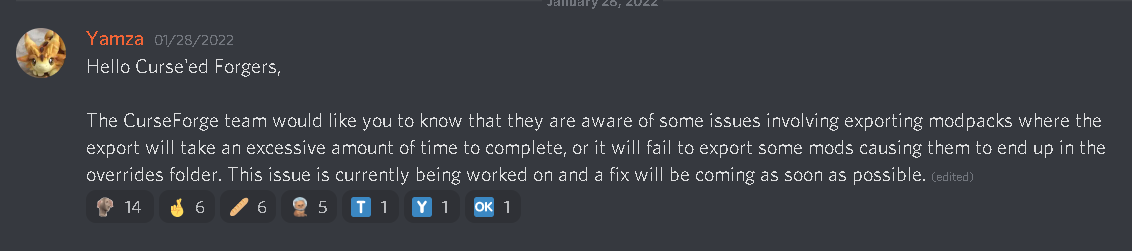
https://i.imgur.com/CXRn2r4.png Has this issue been fixed? I just had a message back from CF stating that I can just export my modpack, but I have tried countless times and it still throws mods into the override folder.
 upper root
The fix being rolled out rn, but its happening quite slowly so the servers don't die like they did last time.
For now you can try the below
?reject-cfhosted
red patioBOT
The following files belong to CurseForge-hosted projects, and should therefore not be added directly to zip files:
-
Remove any mods listed in the error message from the profile you exported. Then reinstall them with the CurseForge app. DO NOT drag and drop files from the site.
-
Export the profile again, open the new zip that was just made. Check for the
overrides/modsfolder. If you still see any mods in that folder do the step above again for each mod. -
Upload the zip once complete and no more mods show in the
overrides/modsfolder.
main dirge
I don't ever get an error messages or anything tho it successfully makes the export. Do I just do what is in the Override folder?
upper root
It doesn't error, you should always manually check the overrides folder for a mods folder tho
main dirge
Ye there is a mods folder in the overrides folder.
And there shouldn't be?
That's what I assume anyways
upper root
Yeah. Mods should be referenced in the manifest.json, which the app should do automatically
main dirge
Ye I try to let CF do it's thing but just throws mods into the override folder anyways. Is that thing you sent a little bit ago a workaround?
toxic spade
queen storm
!notcf
Thank you! Will do
upper root
Yeah, just keep trying till it works.
You can also manually edit the manifest, but that requires getting the project id from the project page and the file id from the files download link
main dirge
That sounds like mad effort ngl, i'll keep trying.
 vague veldt
Is it allowed to download someones modpack, add/remove some mods, tweak some configs and than upload it yourself?
upper root
It depends on the modpacks license
If its something permissive like MIT, then its fine as long as you follow the rules of the license (in MIT's case include a copy of the orginal unedited license file, which includes the original authors name).
If its All Right Reserved or an unset license then you need the authors explicit permission to
main dirge
Even adding in the IDs on my own, it still didn't bring over the mods.
Should I just keep trying to export it?
upper root
If you add the ids yourself thats the file you upload (make sure to delete the mod files first!) the client cant see what you did
main dirge
Ok I'll give that a crack.
What about the "modlist.html"?
Do I delete that too or keep that?
upper root
Keep it, dont think its used by angthing for anything tho
 subtle condor
i try download curse forge app but cant open the installer what happen
main dirge
Alright, thanks mate, i'll let you know how it goes.
red patioBOT
╰( ͡° ͜ʖ ͡° )つ──☆*:・゚ *˜”*°•.˜”*°• Many Help •°*”˜.•°*”˜* <:curselit:796985620550385705>
Please provide a description of your issue with as much detail as possible. If you have an issue with a mod or modpack, tell us the name. Explain what you can see happening. Be specific!
Tell us what is happening, we already know it "doesn't work".
Avoid using words like "it", tell us exactly what "it" is.
Don't assume anyone knows what you are talking about, be specific.
Tell us what you expected to happen.
Provide screenshots or video if possible.
Provide a log if possible. ?mc-log
red patioBOT
Sending logs for support.
- Right-click the modpack profile icon OR click the button in the modpack profile.
- Click
Open Folder. - Open the
logsfolder. - Drag and drop the FILE named
latestORdebuginto discord.
opal cipher
subtle condor
how
!getcf Second link
red patioBOT
Looking to install the CurseForge app?
<:windows:798410728188936222> Windows
Minimum Requirements:
- OS Version: 7 (64 bit), 8.1, 10, 11
- 64 bit Required.
- 350MB storage space.
- Microsoft .Net 4.8
- Intel/AMD quad-core CPU
- 8GB ram
Download: https://download.overwolf.com/install/Download?&PartnerId=4047
If you are having issues with the installer use the URL below to install Overwolf then go to the app store to download CurseForge.
https://content.overwolf.com/downloads/setup/latest/regular.html
<:mac:798410654418862130> Mac
Minimum Requirements:
- OS Version 10.14 or newer.
- 64 bit Required.
Download: https://curseforge.overwolf.com/downloads/curseforge-latest.dmg
:penguin: Linux
Minimum Requirements:
Yes. SOON:tm: ( ͡~ ͜ʖ ͡°)
Download: :person_shrugging:
opal cipher
Then install CurseForge through the Overwolf app store.
subtle condor
alr imma try
 stark frigate
Weird question. When you want to add additional mods to an already published pack, do you add them to the pack in the curse app, export it all again, and reupload, or is there a better method?
subtle condor
opal cipher
Then install CurseForge through the Overwolf app store.
how to fix when run installer nothing happens btw
opal cipher
Then you need to ask the support at Overwolf for help
https://discord.gg/overwolf
opal cipher
stark frigate
Weird question. When you want to add additional mods to an already published pac...
Is it your own pack?
stark frigate
opal cipher
Is it your own pack?
Yes
opal cipher
Then you need to update/add the mods in the CurseForge app, export and then upload the new version, yes.
It's so that you can make sure that it works locally before publishing the update.
stark frigate
opal cipher
Then you need to update/add the mods in the CurseForge app, export and then uplo...
Uploading the same mods wont cause error or anything like that? (between whats already published and uploading the files again)
opal cipher
As long as you give it a new version number it shouldn't be any issues, as long as there actually are any changes to the modpack before you publish the update.
subtle condor
opal cipher
Then you need to ask the support at Overwolf for help
https://discord.gg/overwol...
the curseforge installer
not overwolf
stark frigate
opal cipher
As long as you give it a new version number it shouldn't be any issues, as long ...
Understood, thanks so much! Ill do that right away
opal cipher
subtle condor
the curseforge installer
I told you to use the second link, which is the Overwolf installer.
main dirge
Hey Chief, I wanted to thank you again mate, what you said worked a dream. You are a lovely person, and an AMAZING community supporter!
subtle condor
opal cipher
I told you to use the second link, which is the Overwolf installer.
Alr Ty Bro now i can use curseforge
opal cipher
Awesomesauce. Now stop breaking rule 5 before I go and tell the moderators!
 ornate wadi
Hi! For some reason my modpack is still getting rejected on CurseForge because of Invalid manifest.json file: References invalid fileIDs: fileID: 3097188, projectID 410482 (project-410482). Which I can't understand, since there are no archived or broken mods in the list in CurseForge launcher and it doesn't say what's wrong? I can't figure out what mod "410482" is because it's not possible to search for Project IDs on CurseForge either. Any help would be much appreciated!
main dirge
Bad JSON formatting?
ornate wadi
I just exported it through CurseForge launcher's "Export" function so I don't see why it would be :/
I'll try again, though!
main dirge
Ye, make sure the end comma is actually there.
If it doesn't work again, feel free to send me a pastebin of the manifest.
ornate wadi
Will do, thank you!
opal cipher
Give me a second, and I'll check what mod it complains about.
Nether Enhanced is deleted.
So you can't use that in the modpack
ornate wadi
opal cipher
Nether Enhanced is deleted.
Ah!! That explains everything, thank you so much! ❤️
opal cipher
No worries.
red patioBOT
Ignore the new launcher update. CF does not use it or works with it, yet.
Everything will work fine otherwise.
queen storm
!mc-installpack
red patioBOT
How to install modpacks with the search features in app.
- Open the

Minecraftsection of the app. - Click the top search bar where it says
Search for modpacksOR Click theBrowse ModpacksTab. - Find the Modpack you want to install and click install on it.
- Wait for CurseForge app to download and unpack all the required files.
- Once finished, click
Play!
How to install modpacks from a Export. (Custom/Private/Site downloaded Modpack zip)
- Get CurseForge App if you don't have it, use
!downloadfor a link. - Get the exported modpack from CurseForge or someone else,
!mc-packshareexplains how to make them. - Open the
Minecraftsection of the app. - Click

Create Custom Profile - Click the
Importoption. - Find the file you just downloaded in step 2 and select it.
- CurseForge app will now attempt to download and unpack the modpack. If it fails, try steps 4-6 again.
- Once finished, click
Play!

 solid wyvern
how to install optifine in fabric 1.16.5?
 lyric crescent
optifine doesnt work with fabric, and this isnt related to curseforge. #👽︱game-support
solid wyvern
lyric crescent
optifine doesnt work with fabric, and this isnt related to curseforge. <#7780977...
):
 digital roost
Hi every time I try to download mc a modpack are the mods not downloaded and it is just the logo of the modpack there
lyric crescent
use the curseforge app to install a modpack
 coral orbit
I'm running macOS 10.14.6 and the CurseForge app works well... Think that this warning in the bottom can be removed or should be modified...
 digital roost
lyric crescent
use the curseforge app to install a modpack
digital roost
lyric crescent
use the curseforge app to install a modpack
i do
 unborn basin
coral orbit
I'm running macOS 10.14.6 and the CurseForge app works well... Think that this w...
unborn basin
coral orbit
I'm running macOS 10.14.6 and the CurseForge app works well... Think that this w...
Thanks
 plain tiger
I can't seem to install ATM7
 lyric crescent
guessing it took a long time?
unborn basin
plain tiger
I can't seem to install ATM7
!owlogs send logs please
red patioBOT
<:overwolf:857375414002384916> How to get CurseForge App logs! <:overwolf:857375414002384916>
- Click the

Create logs zipin the menu.
menu. - Drag and drop the file it just made to this chat room to upload it.
- Wait for someone to look at it so they can help you.
 lyric crescent
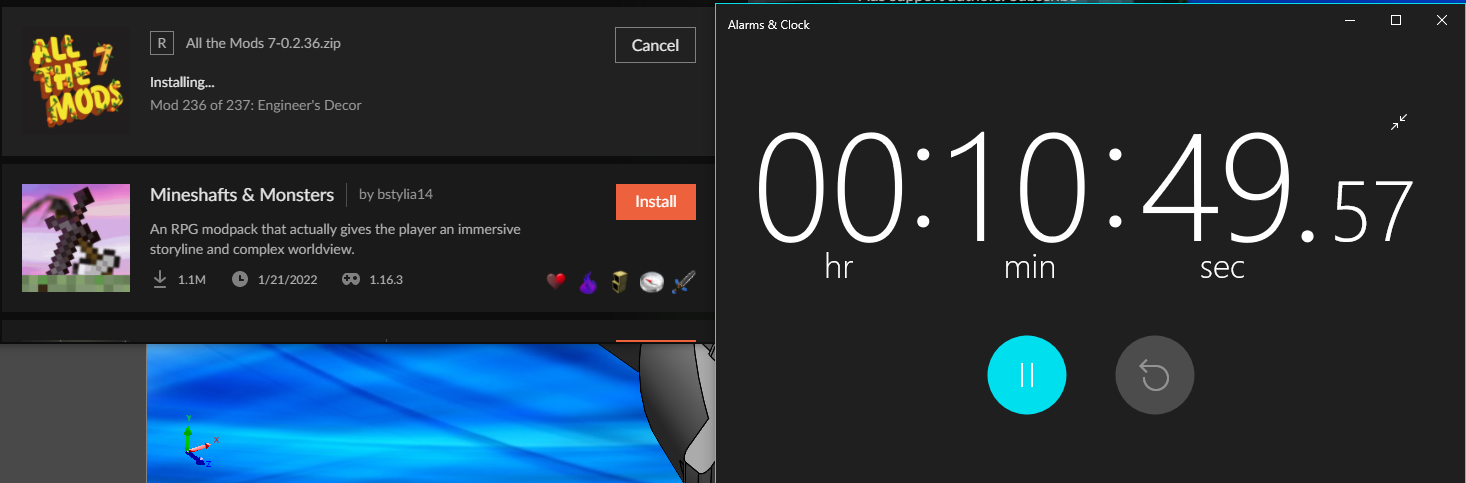
idk if this is helpful at all but it took over 10 minutes to install atm7 for me https://i.imgur.com/UOkUigE.png
 dense musk
lyric crescent
idk if this is helpful at all but it took over 10 minutes to install atm7 for me...
dense musk
lyric crescent
idk if this is helpful at all but it took over 10 minutes to install atm7 for me...
ya for me it takes 20 - 30 mins cause of where i live and the speed of my internet connection
lyric crescent
I'm not implying the issue is internet speed or where I live. A modpack like this usually takes 2 minutes roughly.
 coral sphinx
how do i fix my mcreator mod that is broken and added on curse forge
lyric crescent
Fix it in what way?
coral sphinx
lyric crescent
Fix it in what way?
my mod
lyric crescent
I have no clue what you're saying.
lyric crescent
dont need that here
coral sphinx
ok
lyric crescent
Why?
RAM has no relation to download speed.
The servers do seem a bit slow at the moment.
Servers being down also has nothing to do with being able to play a pack you have.
I'm not sure what you're actually having an issue with at this point as you're talking about two unrelated things.
 drifting holly

 red patioBOT
You can update the mod loader within the same game version in the CurseForge app by following these steps!
- Click on the modpack profile you are working with.
- Click on the button next to the play button.
- Click on the
 Profile Options button.
 - Select the mod loader version you want from the dropdown.
- Play!
If you need to update to a new game version, a new profile is required.
 molten totem
quick question: I have a quick question in regards to the curse forge website, my mod has a page that has the approved status on it and one recent build and is able to be accessed via the website link, yet it does not appear in the mod search or anywere on the mods page is there something further I must do in order for my mod to show up?
lyric crescent
link?
lyric crescent
?sync
red patioBOT
Sync and your Project.
CurseForge App and site do not share the same requirements! You can find things on the site but this does not mean it will be in the app!
For a mod to show up in the app:
- Projects MUST have a file marked as RELEASE
 or BETA
- Projects MUST be APPROVED
- Projects MUST have a file marked for the GAME VERSION SELECTED/LOADED
- Projects CAN'T be EXPERIMENTAL
- Projects CAN'T be ABANDONED
Files can take a while to show up in the app. If your files still have not shown up either your project is new and you have yet to mark a file as Release/Beta or there is issues with the sync system making it slow.
Vote this issue up if you would like to know when the last sync was! https://curseforge-ideas.overwolf.com/ideas/CF-I-1617
molten totem
oh ok thank you
 acoustic pulsar
whats up with the site? i keep getting captchas everytime i get on the site and they seem broken because it keeps telling me to try again
lyric crescent
!cloudflare
red patioBOT
Captcha issues
If you are receiving captcha confirmations on CurseForge then the host company Cloudflare has flagged your IP. This seems to happen at random for no known reason, though people uploading files are more likely to trigger it. There is nothing OverWolf/CurseForge can do to resolve this, you must simply wait until it stops happening.
acoustic pulsar
gosh darn it
drifting crescent
where do i find a server to play with a friend
lyric crescent
not here
use one of the minecraft channels to find suggestions #786424115535544350
 noble marsh
What causes the modpack installation failed error?
lyric crescent
the curseforge servers are a bit slow, and if you have slow internet already it will cause a failure. try again later.
noble marsh
Alright thank you for the help!
https://i.imgur.com/SoMoQNu.png
Im not sure whats causing this error (new modpack)
 lyric crescent
What were you doing?
noble marsh
Installing the modpack, it errors out whilst trying to install
lyric crescent
so then it's the same thing i already told you?
noble marsh
I assume not, 300mb
lyric crescent
-getting install error
-answer that the network is slow
-getting install error
-assume it's not the same thing
-???
noble marsh
Install error first
i get 400mbps
Got the 2nd error shown above
1st error is via installing from curseforge btw
2nd error is from installing via download
lyric crescent
installing through the app and download are exactly the same
noble marsh
Crundee Craft wont even install
i assume its an issue with curseforge
as i did that as a control test
lyric crescent
i did say that
noble marsh
so is it just a matter of waiting now?
lyric crescent
yep
noble marsh
ight then
 narrow minnow
noble marsh
ight then
narrow minnow
noble marsh
ight then
worked well for me

 bright horizon
Whats the most ram I should dedicate to modpacks? I've read that over 8 Gb can cause issues?
upper root
Yeah. Stick to 6 for small packs, 8 for medium large packs, and only 10+ for MASSIVE ones that you plan on using stuff like shaders or a high res texture pack
bright horizon
gotcha, thanks!
noble marsh
narrow minnow
worked well for me
maybe the servers are back up then lemme test with my modpack
 void field
I keep getting "Oops, that was not supposed to happen!" and I followed all of the steps to troubleshoot the problem, and none of it worked. I am starting to think it might be my ISP.
 edgy ruin
hi
red patioBOT
Hey there, it is Curseforge, not "Cursed forge"
lyric crescent
!oops
red patioBOT
You had an "Oops, that was not supposed to happen!"
https://support.curseforge.com/en/support/solutions/articles/9000194900-curseforge-troubleshooting#oops
Please follow these instructions
 raw heron
When I try to uninstall the curseforge installer it says this action cant be completed because the file is open in curseforge
lyric crescent
try restarting your pc
raw heron
lyric crescent
try restarting your pc
it worked, thanks!
stark frigate
Is there a way to add like a single additional mod to your pack, without the need to reupload all the files again?
void field
I just used a vpn and it works so I know now that my isp is blocking the connection of curseforge
upper root
stark frigate
Is there a way to add like a single additional mod to your pack, without the nee...
No. you have to re-export it
 hazy ibex
hey my minecraft isnt being detected on curseforge what do i do
 paper lodge
This might be much but I made a modpack for 1.16.5 and I've been getting crashes at the 'Freezing Data' part of loading and I was wondering if it was possible for someone to test it out and see if they might get it to work and send me a way to fix it?
I can send more info and the modpack if anyone's interested
upper root
!mc-logs send these in #👽︱game-support
red patioBOT
Sending logs for support.
- Right-click the modpack profile icon OR click the button in the modpack profile.
- Click
Open Folder. - Open the
logsfolder. - Drag and drop the FILE named
latestORdebuginto discord.
 sudden jolt
so i recently installed MC eternals and some other 1.12.2 modpacks and when i get to the minecraft launcher and click play the game loader doesnt open and nothing happens
ive played other 1.12.2 modpacks aswell such as enigmatica 2 expert
 alpine lintel
I was trying it earlier and it kept crashing about half way thru launch
 magic atlas
i made a custom modpack and a server for it but how do i get my friend to join that server i tried looking up a yt video for it but they dont show anything from the friends perspective do they just download all the mods on their own profile and join off the IP?
red patioBOT
There are two ways to share a modpack you've made with others...
Export and Share - For Friends to Small Groups.
- Click the Icon for the modpack.
- Click the button next to play.
- Click

Export. - Select the files that should be included.
- Send the zip to the people that want it! They can follow the instructions in
!mc-installpackto install the pack!
Upload to Curseforge - For Public Release to Everyone.
This options will make your pack public to EVERYONE, it comes with extra requirements and will take some effort to set up.
- Go to here: https://www.curseforge.com/project/432/4471/create
- Fill out the information with a proper description of the pack. This should allow anyone to understand what the pack is.
- Click the Icon for the modpack in the CurseForge app.
- Click the button next to play.
- Click
Export. - Select the files that should be included.
- Open your Project you made on the CurseForge site and Upload the file you just made.
- Wait for Moderation & Sync so it can show up in the client! (See
!syncfor limitations)
magic atlas
!mc-installpack
red patioBOT
How to install modpacks with the search features in app.
- Open the
Minecraftsection of the app. - Click the top search bar where it says
Search for modpacksOR Click theBrowse ModpacksTab. - Find the Modpack you want to install and click install on it.
- Wait for CurseForge app to download and unpack all the required files.
- Once finished, click
Play!
How to install modpacks from a Export. (Custom/Private/Site downloaded Modpack zip)
- Get CurseForge App if you don't have it, use
!downloadfor a link. - Get the exported modpack from CurseForge or someone else,
!mc-packshareexplains how to make them. - Open the
Minecraftsection of the app. - Click
Create Custom Profile - Click the
Importoption. - Find the file you just downloaded in step 2 and select it.
- CurseForge app will now attempt to download and unpack the modpack. If it fails, try steps 4-6 again.
- Once finished, click
Play!
magic atlas
!mc-packshare
red patioBOT
There are two ways to share a modpack you've made with others...
Export and Share - For Friends to Small Groups.
- Click the Icon for the modpack.
- Click the button next to play.
- Click
Export. - Select the files that should be included.
- Send the zip to the people that want it! They can follow the instructions in
!mc-installpackto install the pack!
Upload to Curseforge - For Public Release to Everyone.
This options will make your pack public to EVERYONE, it comes with extra requirements and will take some effort to set up.
- Go to here: https://www.curseforge.com/project/432/4471/create
- Fill out the information with a proper description of the pack. This should allow anyone to understand what the pack is.
- Click the Icon for the modpack in the CurseForge app.
- Click the button next to play.
- Click
Export. - Select the files that should be included.
- Open your Project you made on the CurseForge site and Upload the file you just made.
- Wait for Moderation & Sync so it can show up in the client! (See
!syncfor limitations)
 fickle cedar
hello I have a question I have a modpack that has been updated, I wanted to know how long it takes between when the moderators accept it and when it is available on the app
upper root
!sync
red patioBOT
Sync and your Project.
CurseForge App and site do not share the same requirements! You can find things on the site but this does not mean it will be in the app!
For a mod to show up in the app:
- Projects MUST have a file marked as RELEASE or BETA
- Projects MUST be APPROVED
- Projects MUST have a file marked for the GAME VERSION SELECTED/LOADED
- Projects CAN'T be EXPERIMENTAL
- Projects CAN'T be ABANDONED
Files can take a while to show up in the app. If your files still have not shown up either your project is new and you have yet to mark a file as Release/Beta or there is issues with the sync system making it slow.
Vote this issue up if you would like to know when the last sync was! https://curseforge-ideas.overwolf.com/ideas/CF-I-1617
magic atlas
upper root
!sync
thanks for your help we got the server thing to work i think its downloading the mods rn 😄


 upper root
yeah, seems syncs running slow today
 celest kernel
Having some issues relating to the CurseForge installer. I installed the game and it was running slow. So i was moving its location and then it bugged out and stopped working. I deleted it uninstalled it through control panel. I then tried to reinstall it and its never worked installing since. It asked if it can make changes and then nothing else happens
fickle cedar

CurseForge Support
We're here to get you informed on everything you need to know about CurseForge, including helpful guides and troubleshooting articles to back you up when you get in a pickle
fickle cedar
the discord link is invalid on the support site
sudden jolt
where do i send errors from curseforge in the crash logs from game output
lyric crescent
magic atlas
i cant place blocks in my server but my friend can is this a mc thing ik my mouse is fine since i can shift click items into my inventory anyone know how to fix this
rich flint
?notcf
red patioBOT
Your question is not related to CurseForge owned/maintained features or services.
Please use the appropriate game room by getting a game role from #786424115535544350.
Otherwise use #👽︱game-support for game related help.
CurseForge does not make or maintain any of the content or games used on the site or app. Just because it's on the site/app does not make it a problem with CurseForge. Move rooms as requested, arguing about it will result in you being removed from the discord.
 hoary patrol
can i send questions here about mods
 marsh lintel
I need help if anyone is available
Curse forge is only allowing me to launch MC Eternal modpack in demo mode when I have and still have the xbox game pass that's allowed me to play the game for motnhs
rich flint
?getcf
red patioBOT
Looking to install the CurseForge app?
<:windows:798410728188936222> Windows
Minimum Requirements:
- OS Version: 7 (64 bit), 8.1, 10, 11
- 64 bit Required.
- 350MB storage space.
- Microsoft .Net 4.8
- Intel/AMD quad-core CPU
- 8GB ram
Download: https://download.overwolf.com/install/Download?&PartnerId=4047
If you are having issues with the installer use the URL below to install Overwolf then go to the app store to download CurseForge.
https://content.overwolf.com/downloads/setup/latest/regular.html
<:mac:798410654418862130> Mac
Minimum Requirements:
- OS Version 10.14 or newer.
- 64 bit Required.
Download: https://curseforge.overwolf.com/downloads/curseforge-latest.dmg
:penguin: Linux
Minimum Requirements:
Yes. SOON:tm: ( ͡~ ͜ʖ ͡°)
Download: :person_shrugging:
rich flint
'if you are having issues' link
rich flint
then you need to change your OS settings to not auto-deny downloads
or whatever browser you are using not sure
digital roost
im using chrome
rich flint
set security and privacy to 'standard' protection if it's on enhanced now
rich flint
you'll need to find whatever antivirus program or windows security setting is doing it
 stone hamlet
Need to speak with admin
@fleet bear
May I Dm you need to report someone (scammer) in this discord
Got screenshots as proof
rich flint
you can but you also pinged a moderator, and for something that happens like 50 times a day
stone hamlet
928829130722652212


 stone hamlet
rich flint
you can but you also pinged a moderator, and for something that happens like 50 ...
stone hamlet
rich flint
you can but you also pinged a moderator, and for something that happens like 50 ...
Maybe create a channel so something that tells us what to do?
rich flint
turn off dm's from non-friends
digital roost
Scam DM's are a constant nuisance. It is recommended that you turn off your DM's in this server to avoid them - they usually just drop their payload and leave, so trying to combat them individually isn't really valid. See #📢︱news message in #📢︱news . As Briar said though, pinging is specifically against the rules.
red patioBOT
Don't want scam DM?

 narrow lion
When do the gift card rewards refresh?
queen storm
When somebody manually refills them
 frosty spruce
Okay does the reject-cfhosted issue (the part where the curseforge app exports things it shouldn't be exporting) just happen randomly in some instances? I had it re-download the 2 mods I had issues with the otther day, but now I just checked the zip after I re-exported, and a completely different mod is in the mods folder, one I didn't even touch! If it's just going to happen randomly, I'm going to have issues, since I have a LOT of mods...
Furthermore, I don't actually recognize this mod by its jar name: CosmeticArmorReworked-1.16.5-v4.jar. What's the name of the curseforge project that corresponds to?
queen storm
frosty spruce
Okay does the reject-cfhosted issue (the part where the curseforge app exports t...
frosty spruce
queen storm
<https://www.curseforge.com/minecraft/mc-mods/cosmetic-armor-reworked/files>
Thanks... I somehow kept missing it in my profile, but it does say it's installed...
Just in case this messes up again, what would I need to do to manually fix the manifest so the override is unnecessary?
lyric crescent
The next Curseforge version 0.191.3.2 should fix that issue. You may or may not have access to that now, you can restart to check. If not you should have it within the next day or two.
main dirge
Has the issue relating to the Exporting still alive, where mods are being dragged into the override folder wrongfully? (Editing the manifest didn't work just broke it more)
lyric crescent
What i was referring to in the message above yours.
main dirge
Oh, so is 0.191.3.2 out now, or is it still to come?
Just so I am understanding you lol!
lyric crescent
Depends. "You may or may not have access to that now, you can restart to check."
 lyric crescent
"If not you should have it within the next day or two."
main dirge
Brill, thank you mate, I do apologies for technically asking the same question as above, I didn't realize it.
 reef stag
not my pack, but curious, what makes a resourcepack valid or invalid?
 lyric crescent
Zip likely isnt structured correctly, or doesnt contain what is expected. Download another resource pack and compare.
reef stag
what would be expected? is there a page with info on this?
lyric crescent
Why I said you should compare. There isn't one that I know of.
reef stag
hmm.
 carmine peak
Hello, any problem with curseforge? I got infinite loading on website and many problems on app (not my internet connection):
 opal cipher
Works fine for me. What browser are you using? OperaGX?
 opal cipher
Any interesting browser plugins?
lyric crescent
Also working normally. (Might be your internet).
opal cipher
VPN maybe?
carmine peak
lyric crescent
Also working normally. (Might be your internet).
Ok i will check that thanks
 frosty spruce
Just want to point out a very minor bug with the file upload page. This string is too long for the box so the only way I would be able to read the full thing is probably checking the page source (but I get the idea of what it probably says)

(The rest of the string appears to be "displayed on the site")
carmine peak
carmine peak
Mhhh no problem with my internet...
Ok work with a vpn, it's probably my internet supplier
 proper wren
ehi can you help me minecraft vanilla crash with this error
Process crashed with exit code -1073741819
queen storm
!notcf
red patioBOT
Your question is not related to CurseForge owned/maintained features or services.
Please use the appropriate game room by getting a game role from #786424115535544350.
Otherwise use #👽︱game-support for game related help.
CurseForge does not make or maintain any of the content or games used on the site or app. Just because it's on the site/app does not make it a problem with CurseForge. Move rooms as requested, arguing about it will result in you being removed from the discord.
proper wren
ok sorry
 mental spoke
Im so confused
My modpack got appoved but the mods that was in it didnt how do i fix that issue
queen storm
What?
mental spoke
Um my modpack got appoved
But the mods didnt
They said this
These files should, instead, be referenced in the manifest.json file generated by the Twitch Desktop App during a profile export.
lyric crescent
?mc-packshare do the bottom
red patioBOT
There are two ways to share a modpack you've made with others...
Export and Share - For Friends to Small Groups.
- Click the Icon for the modpack.
- Click the button next to play.
- Click
Export. - Select the files that should be included.
- Send the zip to the people that want it! They can follow the instructions in
!mc-installpackto install the pack!
Upload to Curseforge - For Public Release to Everyone.
This options will make your pack public to EVERYONE, it comes with extra requirements and will take some effort to set up.
- Go to here: https://www.curseforge.com/project/432/4471/create
- Fill out the information with a proper description of the pack. This should allow anyone to understand what the pack is.
- Click the Icon for the modpack in the CurseForge app.
- Click the button next to play.
- Click
Export. - Select the files that should be included.
- Open your Project you made on the CurseForge site and Upload the file you just made.
- Wait for Moderation & Sync so it can show up in the client! (See
!syncfor limitations)
mental spoke
lyric crescent
?mc-packshare do the bottom
I did that but the mods got rejected
I did all the exports and stuff and it got rejected
lyric crescent
open your zip and screenshot it
 empty violet
So
My modpack got rejected
For licensing restrictions
I'm about to look more into it
It was from the lucky block mod I think
I have ss if need
lyric crescent
doesnt the notice tell you what mod it was?
empty violet
I'm stupid it's right infront of me
So basically I can't have the mod in my modpack?
lyric crescent
show the notice
 lyric crescent
cant use lucky block yep
lyric crescent
could always tell users to go download it, but that likely would not work very well
empty violet
Can I ask playerindistress if I can use it?
lyric crescent
You can ask them to change the license or upload it to curseforge for you, but you will not get sole permission to upload a mod without it being available to all of curseforge.
lyric crescent
I knew what the words were, just don't understand the meaning of them.
lyric crescent
Ok. I don't know what that is. That also doesn't explain what you are meaning by "making the modpack dependent on it".
empty violet
Linking them to the page to download
Or just
Making a file that has the mod and not make it the final download
lyric crescent
Well, you can do the first. but you cant rehost the mod per its license.
empty violet
Ok so basically
It's a mini-game
And as per the rules
They have to download the mod separately
lyric crescent
follow the instructions
empty violet
So it's fair
 bright flax
guys i have been waiting 20 days on my support ticket is there any way to get some one to sort it faster
digital roost
how do I delete my own comment on their site
queen storm
bright flax
guys i have been waiting 20 days on my support ticket is there any way to ge...
What was it about?
bright flax
fixing my 2fa so i can withdraw money from my curseforge
i had to reset it up as i had a new phone with no access to the old one
 dark harness
Did you guys fix the exporting problem yet
lyric crescent
dark harness
Did you guys fix the exporting problem yet
dark harness
Thx
lyric crescent
oh didnt read the initial complaint
lyric crescent
got the ticket number?
bright flax
#108135 2FA
digital roost
iv been doing this like 100 times
 red patioBOT
Captcha issues
If you are receiving captcha confirmations on CurseForge then the host company Cloudflare has flagged your IP. This seems to happen at random for no known reason, though people uploading files are more likely to trigger it. There is nothing OverWolf/CurseForge can do to resolve this, you must simply wait until it stops happening.
digital roost
bruh
lyric crescent
Really? People have said they tried different browsers and the issue continued.
digital roost
lyric crescent
Really? People have said they tried different browsers and the issue continued.
worked for me
queen storm
Then why did you do it 100 times first?
lyric crescent
"like 100 times" probably meant like 4
digital roost
lyric crescent
"like 100 times" probably meant like 4
it was like 10
bright flax
Yamza ..... Did u notice I posted the ticket number
lyric crescent
yep i passed it on to staff, sorry
bright flax
It's ok I know there's other people here just wondering 😹 I will slip back in to the shadows now and wait thanks
 clear oxide
hey so i'm trying to download this modpack (medieval minecraft forge 1.16.5) and both times i tried it failed, first time it said "missing dependency 3426545" and second time it says "failed to download modpack"
 wintry atlas
Hey, I have an issue, I can't download anything from the curseforge app on both my computers, using 2 different ISPs. Any known issue ?
lyric crescent
why cant you
lyric crescent
can you show the error?
wintry atlas
here you go

this is from the info panel
i'm trying again to download one, i'll put the error when it shows up
Note that I tried uninstalling and reinstalling once
lyric crescent
clear oxide
hey so i'm trying to download this modpack (medieval minecraft forge 1.16.5) and...
The CurseForge servers are a bit slow at the moment due to an update coming out. Keep trying or try again later.
wintry atlas
Do you happen to know when things will be resolved ?
lyric crescent
no
clear oxide
ok so it’s not me then?
wintry atlas
Alright thanks
wintry atlas
clear oxide
ok so it’s not me then?
U too ?
clear oxide
wintry atlas
U too ?
yeah
lyric crescent
dont assume your issues are related
clear oxide
true
lyric crescent
packs are still downloadable, but if your internet sucks in general then they will timeout, leading to the issue i was replying to.
wintry atlas
wintry atlas
i'm trying again to download one, i'll put the error when it shows up
I tried again, but instead of showing up the error, it unqueued itself
lyric crescent
?owlogs
red patioBOT
<:overwolf:857375414002384916> How to get CurseForge App logs! <:overwolf:857375414002384916>
- Click the
Create logs zipin the menu. - Drag and drop the file it just made to this chat room to upload it.
- Wait for someone to look at it so they can help you.
wintry atlas
lyric crescent
Passed this on to the curseforge devs.
lyric crescent
yep i did
 lyric crescent
ok
 storm stratus
 Hello I am trying to upload my modpack to curseforge I now noticed a few mistakes that I will correct but do not understand something said in the denied notification.
I understand I simply put the modpack into a .zip file and did not Export Modpack (from the curseforge launcher) and I just added an icon for my modpack.

What I did not understand is the "expected jar, litemod'. Can someone please elaborate on this just a little. ```how do I delete my own comment on curseforge website
lyric crescent
storm stratus
```
Hello I am trying to upload my modpack to curseforge I now noticed a few mi...
link your project page
lyric crescent
digital roost
how do I delete my own comment on curseforge website
you can try the report button 🤷♂️
 red patioBOT
The following files belong to CurseForge-hosted projects, and should therefore not be added directly to zip files:
-
Remove any mods listed in the error message from the profile you exported. Then reinstall them with the CurseForge app. DO NOT drag and drop files from the site.
-
Export the profile again, open the new zip that was just made. Check for the
overrides/modsfolder. If you still see any mods in that folder do the step above again for each mod. -
Upload the zip once complete and no more mods show in the
overrides/modsfolder.
mental spoke
But if they dont got them mods the server wont let them in
lyric crescent
Why are we talking about a server now?
lyric crescent
no..?
mental spoke
Why?
lyric crescent
ok let me be more specific
yes, you technically can rename them.
but it will not solve your issue.
mental spoke
So how do i keep them in without have that problem
lyric crescent
by following the instructions i provided
lyric crescent
yes
 rocky sail
I've been having a problem with the curse-forge application as it wont allow me to fully load "my mod-packs" nor show results in the brows section despite it saying that i have 3 mod-packs downloaded. i have rebooted my computer several times and also uninstalled the application both in files and through the over-wolf app yet i still get the same result of being unable to load it


 lyric crescent
?owlogs
red patioBOT
<:overwolf:857375414002384916> How to get CurseForge App logs! <:overwolf:857375414002384916>
- Click the
Create logs zipin the menu. - Drag and drop the file it just made to this chat room to upload it.
- Wait for someone to look at it so they can help you.
rocky sail
lyric crescent
?mc-path
red patioBOT
Change your install path to the following:
For Windows: C:\CurseForge
For Mac: /Users/Shared/CurseForge
If Minecraft is not installed in CurseForge App:
- Click the
 in the top left.
 - Select Minecraft from the list of games.
- Select the
Advancedoption and pick the location for your computer listed above. - Click
Continue.
If Minecraft is installed in CurseForge App:
- Click the
 in the bottom left.
 - Select the Minecraft tab.
- Click
Change. - Select the location for your computer listed above.
:no_entry_sign: Minecraft Files should NOT be installed inside the following locations :no_entry_sign:
:no_entry_sign: .minecraft folder.
:no_entry_sign: OneDrive folders.
:no_entry_sign: Desktop folder.
:no_entry_sign: iCloud enabled folders.
:no_entry_sign: or any other cloud saved folder.
:no_entry_sign: or folders with non-English characters in them.
If any of the above are in the path you need to change/move it!
lyric crescent
try that. might be an issue with a pack you installed though
rocky sail
nope dose not work
lyric crescent
send the logs again
bright flax
this sounds dumb but i had this issue and downloading technic installing minecraft that way fixed the curseforge side for me
rocky sail
bright flax
i have both because i have my packs on both platforms
rocky sail
bright flax
i have both because i have my packs on both platforms
i have both to
lyric crescent
you didnt move the folder
rocky sail
i tried and it crashed the entire app it was unresponsive now completely dosnt show any advanced settings for minecrat
bright flax
have u stried installing a base pack that installs a base vanilla forge of minecraft thats what fixed it for me it sorted the folder structure out and allowed me to run java on curseforge ,gd launcher and on technic
lyric crescent
why would you tell me "nope dose not work"
instead of "i tried and it crashed the entire app it was unresponsive now completely dosnt show any advanced settings for minecrat"
🤦♂️
what are you able to do at this point then, and where is curseforge currently pointed for minecraft?
rocky sail
my apologizes for all this touble im currently stuck on this screen unable to continue
 lyric crescent
that isnt the path you were told to use
rocky sail
ik i haven't changed anything nor did i understand what i was told, clearly
lyric crescent
okay... so do what the instructions say or explain what issue you have with them.
rocky sail
dose not matter thanks for trying to help
 trim nest
my server says out of date how do i fix
red patioBOT
Your question is not related to CurseForge owned/maintained features or services.
Please use the appropriate game room by getting a game role from #786424115535544350.
Otherwise use #👽︱game-support for game related help.
CurseForge does not make or maintain any of the content or games used on the site or app. Just because it's on the site/app does not make it a problem with CurseForge. Move rooms as requested, arguing about it will result in you being removed from the discord.
 hexed nova
Is there a way to download a minecraft mod on the curseforge website and have it send to a specific modpack on the overwolf curseforge launcher?
rich flint
?mc-installmods
red patioBOT
How to install mods in CurseForge App.
- Click
+ Create Custom Profile - Name it, select the required Minecraft version, select the modloader & modloader version (usually the highest number), click
Create. - Click the profile icon.
- Click
Add More Content - Search and install the desired mods.
- Start the game!
How to install mods not on CurseForge.
- Right click the profile picture or Open the profile and click the Icon next to the play button.
- Click
Open Folder. - Drag the mod(s) into the
modsfolder. (Note: Some mods will require others, to run. Make sure to read the instructions for the mod!) - Start the game!
rich flint
The in-app search filters to only show mods/files compatible with the profile you are searching from
hexed nova
TY!
 bold axle
 my manifest.json looks perfectly fine

wait
is fabric-0.13.0 not supported yet or smth
downgraded fabric, what the hell

but its still installing the mods
can i ignore this??
ok tried again and didnt get the error
I assume its fine now
rich flint
Are you loading your own export file as a test? Or is this off a file on CF already
rich flint
What version is your CF app? Settings > lower-left
rich flint
Yeah. Restart your app now and then and eventually you'll get your version updated to a new one
 jovial marten
i have trouble downloading addons from website and the app, the webpage don't load properly and the app gives me error when i want to download an addon, tried to clear the cache, and it says trouble shoot problems can anyone help me out.
rich flint
By add-ons do you mean Minecraft bedrock edition?
jovial marten
addons in general i can't download any addon + i can't even log in
lyric crescent
For what game
jovial marten
world of warcraft
lyric crescent
?owlogs
red patioBOT
<:overwolf:857375414002384916> How to get CurseForge App logs! <:overwolf:857375414002384916>
- Click the
Create logs zipin the menu. - Drag and drop the file it just made to this chat room to upload it.
- Wait for someone to look at it so they can help you.
jovial marten
should i post the logs here ?
lyric crescent
Step 2
jovial marten
i am redownloading the curseforge app so i can get the logs
okay i did the zip files for logs
 cinder sun
Not long after Overwolf took over Curseforge launching, I encountered an issue where booting up Curseforge took hours and hours. I eventually found that if I uninstalled it and launched it anew from overwolf, it would grab the appropriate version, and everything was fine for a while.
Then, a new issue began, when at each and every launch, even ones with a single mod (like JEI), it would dump the folder, and then spend up to 7 minutes at a time reinstalling forge. It didn't matter which version of forge this was, either. I checked the vanilla game, I checked manually launching with forge, and I checked using FTB. All of these methods performed perfectly. It was only Curseforge.
I completely uninstalled Overwolf and Curseforge again, several times, rebooting to make sure no instances of Minecraft or anything else was running when it shouldn't. I only allocate 10 of my 32 gigs of RAM, and while not the newest, my computer is still pretty beefy. I have no issues with almost 500 Skyrim mods at once, and when Curseforge worked, it was like greased lightning. I put the whole thing aside for a while, then decided to try again.
To my amazement, everything launched in a snap. This worked as expected for a few weeks. Now, once again, when I launch ANY mod pack, even singular ones, I am once again greeted with the MASSIVE launch time, while every time it lingers on re-installing a fresh copy (as I understand it) of forge.
I checked the pins, and am fairly convinced I didn't see this issue mentioned. Though, my building headache is making me less inclined to read walls of text, even though I tend to write them.
My question is simply whether this is a reasonably fixed issue, or if I must once again step away from playing my favorite modpacks already. I was having so much fun until this experience recurred.
 verbal crater
I keep getting error code 0 on half the modpacks i try to play
red patioBOT
Error/Exit codes are useless. Follow these steps so someone can actually help you.
- Right-click the modpack profile icon OR click the button in the modpack profile.
- Click
Open Folder. - Open the
logsfolder. - Drag and drop the FILE named
latestORdebuginto discord.
rich flint
cinder sun
Not long after Overwolf took over Curseforge launching, I encountered an issue w...
What CF app version do you have? Also - what is your Minecraft modding folder path set to in settings
rich flint
verbal crater
please someone help
?mc-installfix
red patioBOT
This is NOT instructions for Repair Profile! They are NOT the same! You need to do this!
- Click on the Minecraft Tab on the Left side of the CurseForge App.
- Click button next to the
Create Custom Profileoption. - Click

Repair Installationoption. - Play game.
NOTE: You will not lose any modpacks or worlds!
cinder sun
rich flint
What CF app version do you have? Also - what is your Minecraft modding folder pa...
v. 0.191.2.1
and
c:\Users[username]\Documents\Curse\Minecraft
respectively
cinder sun
I thought I set it to never @ on replies, apologies. I presume a Discord update mucked up the settings again.
verbal crater
THANK YOU SO MUCH IVE BEEN TRYING TO FIX THIS FOR MONTHS
rich flint
There is a new version being rolled out which you should be auto updating on launch anytime now, see if it changes speeds
cinder sun
Should I be looking at a wait of days, weeks, or months for that time frame? I am not hoping to present as impatient. I simply do not wish upon myself the frustration of repeated attempts to no avail, when I could be doing other activities. I thank you for your offer to help, your delicate manner of pointing out my pings had been reactivated, and your answers on this matter.
rich flint
New versions are rolled in a progressive manner to not overwhelm their server system - within a day or rltwo most likely
 crimson cypress
Hello! I have a doubt
Let's say I install a modpack called "A" and configure it to my shape. But if later I want to install a modpack called "B". Will the settings and mods that these modpacks have be affected? Or is it that each modpack will have its own separate configuration?
 river thorn
guys, can i tell me one thing?
does anybody know what the redstone flux API mode does?
rich flint
?notcf
red patioBOT
Your question is not related to CurseForge owned/maintained features or services.
Please use the appropriate game room by getting a game role from #786424115535544350.
Otherwise use #👽︱game-support for game related help.
CurseForge does not make or maintain any of the content or games used on the site or app. Just because it's on the site/app does not make it a problem with CurseForge. Move rooms as requested, arguing about it will result in you being removed from the discord.
lyric crescent
cinder sun
Not long after Overwolf took over Curseforge launching, I encountered an issue w...
I'm curious what you mean by forge reinstalling. Are you talking about when you press play on the minecraft launcher? Because that is loading mods into RAM, not installing them. And the wait time for this can be several minutes even with a "beefy" system.
cinder sun
lyric crescent
I'm curious what you mean by forge reinstalling. Are you talking about when you ...
That is when it happens, yes. When I press play, each time it will display this message and, at first, this process took moments, whether on a fresh boot, or on a long up-time. Then, after just a few weeks of launching in moments, it has, with no discernible changes to my system or parameters, suddenly begun hanging on this step for unpredictably long times.
 lyric crescent
ok, that's not what i was thinking.
cinder sun
I thank you for trying to offer insight.
red patioBOT
Change your install path to the following:
For Windows: C:\CurseForge
For Mac: /Users/Shared/CurseForge
If Minecraft is not installed in CurseForge App:
- Click the in the top left.
- Select Minecraft from the list of games.
- Select the
Advancedoption and pick the location for your computer listed above. - Click
Continue.
If Minecraft is installed in CurseForge App:
- Click the in the bottom left.
- Select the Minecraft tab.
- Click
Change. - Select the location for your computer listed above.
:no_entry_sign: Minecraft Files should NOT be installed inside the following locations :no_entry_sign:
:no_entry_sign: .minecraft folder.
:no_entry_sign: OneDrive folders.
:no_entry_sign: Desktop folder.
:no_entry_sign: iCloud enabled folders.
:no_entry_sign: or any other cloud saved folder.
:no_entry_sign: or folders with non-English characters in them.
If any of the above are in the path you need to change/move it!
cinder sun
lyric crescent
?mc-path
Once again, I thank you greatly for taking the time out of your day to help with what might be a benign issue.
My instances are all located at C:\Users[username]\Documents\Curse\Minecraft
Will changing the directory to the indicated directory path of C:\Curseforge have an effect on my savegames, configuration settings, or anything of the like?
In other words: Will it duplicate my 38 modpacks as-is, or will it attempt to recreate them?
Finally, if it does NOT directly copy them, am I then tasked with having to meticulously copy perhaps hundreds of savegames and in several cases config files by hand?
I ask because I am not keen to copy almost 30 GB of files to yet another location on my hard drive.
lyric crescent
it will do neither, but it will test if the issue is the folder used or something else.
if you dont want to do that you can atleast send logs so the issue can be looked at
?owlogs
red patioBOT
<:overwolf:857375414002384916> How to get CurseForge App logs! <:overwolf:857375414002384916>
- Click the
Create logs zipin the menu. - Drag and drop the file it just made to this chat room to upload it.
- Wait for someone to look at it so they can help you.
lyric crescent
my only guess is that you either have a program on your computer wiping files, or you have some cloud storage active in there messing with them
 near river
Good evening I'm having a problem with connecting my mc account to curseforge it keeps saying I have have the wrong info even though I have checked and and made sure that everthing was entered correctly.
lyric crescent
?mc-login
red patioBOT
Minecraft Logins
Step 1: Get to the Microsoft login screen.
Step 2: Log in with a Microsoft account that owns the Java version of Minecraft.
Done!
Issues: If it says PLAY DEMO then the account used DOES NOT own Java Minecraft. Log in with one that does.

 floral quail
for some reason, whenever i launch mc eternal, is crashes after reaching the second mod loading phase at about the 50 mod markcan anyone help me?
upper root
!mc-ram try increase this
red patioBOT
How to set Global Minecraft RAM value.
- Click the icon in the bottom left to open settings.
- Click the Minecraft tab.
- Scroll down.
- Slide slider to recommended ram range as seen below.
 floral quail
i have twelve gigs allocated in curseforge launcher
upper root
!mc-logs post these into #👽︱game-support
red patioBOT
Sending logs for support.
- Right-click the modpack profile icon OR click the button in the modpack profile.
- Click
Open Folder. - Open the
logsfolder. - Drag and drop the FILE named
latestORdebuginto discord.
floral quail
 wild pine
pardon me
every time i try to start up Mineshaft and Monsters on MultiMC it gives me this
 rich flint
?notcf
red patioBOT
Your question is not related to CurseForge owned/maintained features or services.
Please use the appropriate game room by getting a game role from #786424115535544350.
Otherwise use #👽︱game-support for game related help.
CurseForge does not make or maintain any of the content or games used on the site or app. Just because it's on the site/app does not make it a problem with CurseForge. Move rooms as requested, arguing about it will result in you being removed from the discord.
 woeful fiber
hey, i was moving some files around to make some room in my C: drive and now all of my modpacks along with the saves are gone. does anyone know how t o fix this?
rich flint
do a search with your file browser to find where you moved things?
woeful fiber
nothing shows up
rich flint
assuming this was minecraft packs?
rich flint
search for minecraft.exe
it should have been in the folder CF was using for modded installs
woeful fiber
do you know the name of that fiolder?
rich flint
no because it could be something you created
rich flint
you said that you moved things around...
the place the app is using is set in app settings
woeful fiber
all i did was move the files from C: do D:, so in dont know what happened to them
rich flint
search for 'minecraft.exe' - it should be in the \install folder of the folder CF app was using. if you get nothing then that's not a good sign for getting whatever that folder had.
woeful fiber
ok
alright so all of my saves for minecraft are still there. but they arent the modded saves, just the vanilla game saves
rich flint
screenshot the folder 1 folder above where minecraft.exe was
woeful fiber
 woeful fiber
 rich flint
searching for 'minecraft' is not searching for 'minecraft.exe' - you would narrow the search down alot. you are reallly going to have to look around yourself and try and find any files you moved.
 tacit steeple
why moderators not reviewing my mod? it's take 15 hour but still under review
tacit steeple
moderators please i upload a video if people see this not have any download link they will unsubscribe me 🙏
rich flint
moderators don't approve mods, curseforge does. it can take awhile, and right now it's not even working hours
?status
red patioBOT
Project Moderation Time
Project/File moderation is done on these days unless otherwise mentioned:
Sunday, Monday, Tuesday, Wednesday, Thursday: <t:1631170800:t> - <t:1631199600:t> (Your time)
Friday, Saturday: No Moderation!
Projects are moderated First in, First out. If you submit late in the work day, it will likely get left until the next day!
New Projects or anything flagged for manual review: 1-3 Working Days
Updates to approved projects not needing manual approval: 1 Hour
-If your file has been "Under Review" for more than an hour, then it is at manual review!
Changes will only show in the app if the project meets the requirements in the ?sync command and up to 24 hours has passed from when it was accepted.
upper root
Looks like you misclicked the channel, where you looking for #768717413918179368?
 sudden helm
upper root
Looks like you misclicked the channel, where you looking for <#76871741391817936...
sudden helm
upper root
Looks like you misclicked the channel, where you looking for <#76871741391817936...
hi remember me?
u wanted to know what the fix was for my problem
well it was a factory reset where i kept my files but deleted all apps
jovial marten
okay i have a problem connecting to curseforge and overwolf from the app and the website it says connection time out, can't log in or download addons, it don't even load pictures or anything related to the website and the app
 timber junco
how do i fix this?
 opal cipher
!notcf
red patioBOT
Your question is not related to CurseForge owned/maintained features or services.
Please use the appropriate game room by getting a game role from #786424115535544350.
Otherwise use #👽︱game-support for game related help.
CurseForge does not make or maintain any of the content or games used on the site or app. Just because it's on the site/app does not make it a problem with CurseForge. Move rooms as requested, arguing about it will result in you being removed from the discord.
opal cipher
But short answer, you need to update LunatriusCore.
timber junco
ok
 idle isle
how i can change my pürofil pic
upper root
Change it on twitch, then sign out of cf and sign back in
 gray inlet
Hi , i've got a recent issue with curseforge app , it begun to take ages to launch , and won't update addons anymore. It just tell me : General Intsall error. Tryed to reinstall everything , turn off antivirus and firewall , nothing do the trick :/
opal cipher
!owlogs
red patioBOT
<:overwolf:857375414002384916> How to get CurseForge App logs! <:overwolf:857375414002384916>
- Click the
Create logs zipin the menu. - Drag and drop the file it just made to this chat room to upload it.
- Wait for someone to look at it so they can help you.
digital roost
why doesn't the download server pack feature work on my modpack its not showing up to anyone who is downloading my modpack?, I need help fixing it!
opal cipher
Link your project
digital roost
to where ?
young bone
Here
opal cipher
Like, here.
opal cipher
Have you uploaded a server pack file? I can't see any additional files uploaded.
lyric crescent
there is none
opal cipher
Explains why I can't see one then. You need to make a server pack-file and upload it. It's not made for you automatically.
digital roost
how do i make one ?
lyric crescent
?mc-serverpack
red patioBOT
Serverpacks are special files uploaded alongside an existing project file. If the main file is rejected the server pack is also rejected.
You require an already uploaded export file to upload a server pack!
- Make the server pack by zipping up the required files by selecting the required folders & files. It should include the config and mod folders at a minimum, plus anything else you specifically required to run the server. Start/Run/Setup scripts are optional. Don't include modloader files or the minecraft server jar.
- Go to the
Filestab on the project. - Click the name of the file you wish to upload the server pack to. The pack and server should match pack versions.
- Click
Upload Additional File. - Fill out the form.
digital roost
ok thx
 fading moth
you call this fast?? (been sitting here for 5 minutes with good internet) and now for some reason just running Curseforge is making my PC fans spin to maximum speed... WHAT?
 lyric crescent
I don't call that fast. 🤷♂️
click off it and go back
fading moth
already tried
lyric crescent
loaded for me in 5 seconds
fading moth
just sittin here

and now I have a dead profile of AOF5 sittin here that I can't delete
lyric crescent
It is working slower than usual, but it still works as far as i can tell. try restarting your computer.
lyric crescent
I expected it to still be slow, but does it work now?
digital roost
red patio
is there a video that explains it cuz i cant seem to understand by what files it need
lyric crescent
there is not
digital roost
can ik where to find the files and what to do with them specifically
lyric crescent
as the person who made the pack, you should already know what needs to be included as it would be basically the same as your client files.
digital roost
"File is a duplicate of an existing file." what does this mean
queen storm
That it has been uploaded before
digital roost
but its the first time i upload it
lyric crescent
cant be
queen storm
What are you uploading then?
digital roost
im uploading the config and mod folder
queen storm
How? Show a screenshot of what you are uploading
digital roost
 fading moth
lyric crescent
I expected it to still be slow, but does it work now?
fading moth
lyric crescent
I expected it to still be slow, but does it work now?
nope still slow
digital roost
queen storm
How? Show a screenshot of what you are uploading
nvm it just got accepted again
lyric crescent
fading moth
nope still slow
try again later i guess. give it a few hours. if there is still an issue lmk.
storm stratus
lyric crescent
link your project page
sorry sorry this is a day later, been a crazy day..
https://www.curseforge.com/minecraft/mc-mods/whowhatwhere
 elfin sand
Please help me, I don't understand why I can't

 mint parcel
???? What is the solution to the problem?

 lyric crescent
Try again later. Curseforge servers are a bit slow at the moment.
mint parcel
kk ty
storm stratus
and as for my issue? (sorry if that sounds mean if it does, im patient if needed)
elfin sand
lyric crescent
Try again later. Curseforge servers are a bit slow at the moment.
I've been waiting for 2 days
lyric crescent
storm stratus
and as for my issue? (sorry if that sounds mean if it does, im patient if needed...
nah its fine, i got distracted. your project is for a mod, not a modpack.
storm stratus
lyric crescent
nah its fine, i got distracted. your project is for a mod, not a modpack.
are you telling me ive been trying to upload a modpack in the mods section...
lyric crescent
yep
lyric crescent
you dont change it. you make a modpack project
 livid radish
who is french and explain mi how I can install optifine with curseforge because i can't with internet
red patioBOT
We do not offer support for Optifine!
If you have issues with Optifine, remove it. If you want further support try the discord found on their website.
https://www.optifine.net/home
Installing Optifine with modpacks on Curseforge:
- Right click the modpack icon, select
Open Folder. - Put the
Optifine.jarinto themodsfolder. - Now start the modpack.
livid radish
tkank's
storm stratus
how is this possible when i've downloaded everything straight from the curseforge launcher?
 lyric crescent
look at what files got flagged
storm stratus
also how do i export the modpack's profileImage if it is not here in the selection dropdown when exporting
lyric crescent
there is a section for uploading an image on the project page
storm stratus
oh that's what the image upload is okay okay, sorry
storm stratus
lyric crescent
look at what files got flagged
now how do i check that? while exporting i can see what is flagged?
lyric crescent
click the drop down arrow
storm stratus
ahh thank you
somehow had 2 of the same mods
anything on curseforge launcher that helps game preformance, like sodium
lyric crescent
!notcf
red patioBOT
Your question is not related to CurseForge owned/maintained features or services.
Please use the appropriate game room by getting a game role from #786424115535544350.
Otherwise use #👽︱game-support for game related help.
CurseForge does not make or maintain any of the content or games used on the site or app. Just because it's on the site/app does not make it a problem with CurseForge. Move rooms as requested, arguing about it will result in you being removed from the discord.
storm stratus
sry sry
unborn basin
storm stratus
sry sry
So things are fixed now?
storm stratus
uploading modpack yes, think so just waiting on approval to see where/if i messed up anywhere
red patioBOT
<:overwolf:857375414002384916> How to get CurseForge App logs! <:overwolf:857375414002384916>
- Click the
Create logs zipin the menu. - Drag and drop the file it just made to this chat room to upload it.
- Wait for someone to look at it so they can help you.
unborn basin
mint parcel
???? What is the solution to the problem?
Can you send me your logs as well please?
fading moth
enjoy
 dense cloak
Site is refusing to load. Wifi and others work fine.
lyric crescent
What does refusing to load mean? It appears to load fine.
 hoary cloak
Hi i got problem
 lyric crescent
?owlogs
red patioBOT
<:overwolf:857375414002384916> How to get CurseForge App logs! <:overwolf:857375414002384916>
- Click the
Create logs zipin the menu. - Drag and drop the file it just made to this chat room to upload it.
- Wait for someone to look at it so they can help you.
hoary cloak
sorry
lyric crescent
I passed this on to support to look at.
hoary cloak
ok thanks
lyric crescent
hoary cloak
ok thanks
What version of curseforge do you have? ⚙️ then bottom left.
hoary cloak
lyric crescent
What version of curseforge do you have? ⚙️ then bottom left.
new version
lyric crescent
that is not an answer
 hoary cloak
 young bone
There you go
hoary cloak
and what now yamza
lyric crescent
Wait.
hoary cloak
okay
 somber merlin
Can anyone tell me how to get levels on curseforge ?
lyric crescent
What
 cold fiber
what
somber merlin
I somehow can't add link of other sites on curseforge because it needs levels to add link in our project
lyric crescent
What levels? What are you talking about? Screenshot it.
 slate pagoda
So like, me installed some modpacks, and ive been playing them for a while now, but i wanted to play vanilla minecraft on some servers again, i open up my minecraft launcher, and all of the optifine version are gone, every profile i created is gone ? Why and how ?
queen storm
Did you start it normally?
As curseforge controls its own instances, not connected to vanilla
 lyric crescent
curseforge doesnt touch the minecraft launcher
slate pagoda
it does on mine ?
queen storm
So that will only use the stoneblock version.
slate pagoda
 lyric crescent
it's not possible for it to on yours, the default minecraft location is specifically blocked from use
slate pagoda
lyric crescent
it's not possible for it to on yours, the default minecraft location is specific...
how do you explain this than ?
lyric crescent
that's a picture of a minecraft launcher. what is there to explain
lyric crescent
open vanilla minecraft. dont use curseforge to open the launcher
lyric crescent
no, that is what opens when you press playo n curseforge
queen storm
slate pagoda
without curseforge
queen storm
Don't do it there
slate pagoda
okay
wait what ?
Yes i dont do it there
ik how to open the vanilla minecraft launcher
lyric crescent
then why did you show that image
opal cipher
Close all instances of the Minecraft Launcher and Minecraft, close CurseForge. Open the start menu and open Minecraft from there. If it's still the "wrong" one, restart your computer and try again.
slate pagoda
lyric crescent
then why did you show that image
To explain u the situation
slate pagoda
opal cipher
Close all instances of the Minecraft Launcher and Minecraft, close CurseForge. O...
ill try that rn
slate pagoda
opal cipher
Close all instances of the Minecraft Launcher and Minecraft, close CurseForge. O...
oh yea that fixed it thx
lyric crescent
That image is curseforge, which opens curseforge's version of the minecraft launcher. which is not the vanilla one.
slate pagoda
lyric crescent
That image is curseforge, which opens curseforge's version of the minecraft laun...
ik that thats not the vanilla version, but if i open the Vanilla version after i have opened a curseforge versio mc thing, i have to close all of them to get acces to my profiles again
lyric crescent
yes
slate pagoda
u could have just helped instead of being a passive aggressive person to me
queen storm
That is normal
slate pagoda
queen storm
That is normal
i didnt know
queen storm
Now you do
slate pagoda
queen storm
Now you do
yes thx u
queen storm
Stop with the pings, rule 5
slate pagoda
okay
hoary cloak
hoary cloak
and what now yamza
queen storm
lyric crescent
lyric crescent
Wait.
☝️
hoary cloak
okay okay
lyric crescent
hoary cloak
okay okay
Try making a new custom profile.
lyric crescent
What is it doing?
lyric crescent
need a better explanation if you want help. not dealing with one word answers.

 lyric crescent
do you have minecraft open?
hoary cloak
nope
opal cipher
Do you own Minecraft Java Edition?
hoary cloak
yes
opal cipher
Hm.. Then I have no clue. :|
lyric crescent
Would have been nice if you'd shared the above details before. Need to get back with support on this again now.
hoary cloak
ok i wait
narrow minnow
wait, when you click Advanced, what do you see?
hoary cloak
wait

maybe fixed
bcs i clicked
overwolf
and open curseforge
by
overwolf
and i click recomennded
and load
queen storm
How about putting more words in a message?
hoary cloak
sorry im excited
 patent ingot
queen storm
How about putting more words in a message?
patent ingot
queen storm
How about putting more words in a message?
do you know why my modpack is stuck at validating manifest files
 queen storm
Rule 5?
 random ermine
I got told to post this here:
Enigmatica 2 Expert is crashing on world load for me, yesterday it worked fine, but now it loads, says building terrain, then shutting down internal server and crashes after ~30 seconds.
I have tried restarting my computer and downgrading to forge 1.12.2.14.23.5.2768, But that didnt work.
I'm using curseforge launcher.
Crash report: https://pastebin.com/4dSPpCg1
Pastebin
Pastebin.com is the number one paste tool since 2002. Pastebin is a website where you can store text online for a set period of time.
lyric crescent
Why would someone tell you to put this here, and who did so?
random ermine
 lyric crescent
I dont see how this would be a curseforge problem. Curseforge uses the mojang launcher, it doesn't handle login.
Did you log in with a legit account on the launcher?
random ermine
Yes
lyric crescent
?mc-installfix
red patioBOT
This is NOT instructions for Repair Profile! They are NOT the same! You need to do this!
- Click on the Minecraft Tab on the Left side of the CurseForge App.
- Click button next to the
Create Custom Profileoption. - Click
Repair Installationoption. - Play game.
NOTE: You will not lose any modpacks or worlds!
lyric crescent
that'll wipe your login so you can do it again. if you still have an issue then something is blocking your connection to the mojang servers. nothing we can do about that.
 jade marsh
Im having some issues where when i try to load one of my minecraft modpacks it will only show the ones i have installed from FTB, i dont know if this is because they both run n overwolf but i need some help figuring it out
lyric crescent
What will only show the ones installed by ftb
jade marsh
the minecraft launcher
lyric crescent
you need to close the minecraft launcher before doing anything with curseforge
jade marsh
it wasnt open before
lyric crescent
explain what you are doing exactly please
jade marsh
i click play on one of my packs
it open the minecraft launcher
and in the versions drop menu i only see my ftb pack and not the ones i have on cureforge
lyric crescent
you should only see one, and should not be touching that drop down at all
jade marsh
no matter what pack i click play on it opens my ftb pack
lyric crescent
did you install curseforge to the same place as the ftb stuff is installed?
jade marsh
maybe i didnt touch the files
lyric crescent
?mc-path
red patioBOT
Change your install path to the following:
For Windows: C:\CurseForge
For Mac: /Users/Shared/CurseForge
If Minecraft is not installed in CurseForge App:
- Click the in the top left.
- Select Minecraft from the list of games.
- Select the
Advancedoption and pick the location for your computer listed above. - Click
Continue.
If Minecraft is installed in CurseForge App:
- Click the in the bottom left.
- Select the Minecraft tab.
- Click
Change. - Select the location for your computer listed above.
:no_entry_sign: Minecraft Files should NOT be installed inside the following locations :no_entry_sign:
:no_entry_sign: .minecraft folder.
:no_entry_sign: OneDrive folders.
:no_entry_sign: Desktop folder.
:no_entry_sign: iCloud enabled folders.
:no_entry_sign: or any other cloud saved folder.
:no_entry_sign: or folders with non-English characters in them.
If any of the above are in the path you need to change/move it!
jade marsh
i mean they are both on my desktop
lyric crescent
good reason to do what that says then
jade marsh
so should i just move them to downloads or something
lyric crescent
no, you should read and follow the instructions
jade marsh
okay ill do that
okay i did that and now all my packs are gone, do i need to find them or reinstall them
 sacred nymph
this comes up whenever i try loading modded minecraft through curseforge
 jade marsh
i got mine figured out thank you @lyric crescent
lyric crescent
sacred nymph
this comes up whenever i try loading modded minecraft through curseforge
?mc-log
red patioBOT
Sending logs for support.
- Right-click the modpack profile icon OR click the button in the modpack profile.
- Click
Open Folder. - Open the
logsfolder. - Drag and drop the FILE named
latestORdebuginto discord.
sacred nymph
where about in the discord
lyric crescent
what
sacred nymph
where should i put it
lyric crescent
here..
opal cipher
Remove optifine
 weak fable
Sorry we can't load this project. Missing dependency: 3137659
All-in-one Modpack for Minecraft.
Any reason it's giving these errors when trying to install?
lyric crescent
Try again.
weak fable
Already tried again
red patioBOT
Your question is not related to CurseForge owned/maintained features or services.
Please use the appropriate game room by getting a game role from #786424115535544350.
Otherwise use #👽︱game-support for game related help.
CurseForge does not make or maintain any of the content or games used on the site or app. Just because it's on the site/app does not make it a problem with CurseForge. Move rooms as requested, arguing about it will result in you being removed from the discord.
 tiny geyser
oh my fault
lyric crescent
weak fable
Already tried again
It's just curseforge being slow, try again later.
digital roost
hey I keep getting this error
A problem occurred configuring root project 'Test-Forge-Mod'.
> Could not resolve all files for configuration ':_compileJava_1'.
> Could not resolve net.minecraft:client:1.17.1.
     Required by:
         project :
> Could not resolve net.minecraft:client:1.17.1.
> Could not get resource 'https://libraries.minecraft.net/net/minecraft/client/1.17.1/client-1.17.1-extra.jar'.
> Could not HEAD 'https://libraries.minecraft.net/net/minecraft/client/1.17.1/client-1.17.1-extra.jar'.
> Connect to libraries.minecraft.net:443 [libraries.minecraft.net/192.168.4.1] failed: Connection refused: no further information```
is it because I don't have Minecraft installed on my laptop? Mc java edition is on my PC so is that the problem or is there something else? Also I turned off my firewall and tried but it gave the same thing...What am i looking at?
lyric crescent
I want some context, because this doesnt seem like its related to curseforge.
digital roost
wait is this a dev community or not?
lyric crescent
no, not really.
 vocal rock
Whenever I try installing a modpack I get "an exception occured during a WebClient request", what is going on ? 😭
digital roost
oh then my apologies @lyric crescent
lyric crescent
all good. if you want dev help you can try in #⚙️︱authors-help but there are probably better places.
lyric crescent
vocal rock
Whenever I try installing a modpack I get "an exception occured during a WebClie...
The curseforge network is a bit slow at the moment, try again later.
vocal rock
uhm its not something I face for the first time, that's been happening for days now :/
is it just a network problem ?
red patioBOT
<:overwolf:857375414002384916> How to get CurseForge App logs! <:overwolf:857375414002384916>
- Click the
Create logs zipin the menu. - Drag and drop the file it just made to this chat room to upload it.
- Wait for someone to look at it so they can help you.
lyric crescent
passed it on 👍



 opal cipher
Seeing as it is close to midnight at their place, probably in about 10 hours or so.
 slate gorge
!sync
red patioBOT
Sync and your Project.
CurseForge App and site do not share the same requirements! You can find things on the site but this does not mean it will be in the app!
For a mod to show up in the app:
- Projects MUST have a file marked as RELEASE or BETA
- Projects MUST be APPROVED
- Projects MUST have a file marked for the GAME VERSION SELECTED/LOADED
- Projects CAN'T be EXPERIMENTAL
- Projects CAN'T be ABANDONED
Files can take a while to show up in the app. If your files still have not shown up either your project is new and you have yet to mark a file as Release/Beta or there is issues with the sync system making it slow.
Vote this issue up if you would like to know when the last sync was! https://curseforge-ideas.overwolf.com/ideas/CF-I-1617
 lapis oxide
do any of you know why my curse forge installer is not opening
i just downloaded curse forge and its nothing pop-ups when i click on it
@hidden fern
Anyone?
opal cipher
Rules, do you read them? #📛︱rules
You broke rule 5
!getcf Use the second link instead
red patioBOT
Looking to install the CurseForge app?
<:windows:798410728188936222> Windows
Minimum Requirements:
- OS Version: 7 (64 bit), 8.1, 10, 11
- 64 bit Required.
- 350MB storage space.
- Microsoft .Net 4.8
- Intel/AMD quad-core CPU
- 8GB ram
Download: https://download.overwolf.com/install/Download?&PartnerId=4047
If you are having issues with the installer use the URL below to install Overwolf then go to the app store to download CurseForge.
https://content.overwolf.com/downloads/setup/latest/regular.html
<:mac:798410654418862130> Mac
Minimum Requirements:
- OS Version 10.14 or newer.
- 64 bit Required.
Download: https://curseforge.overwolf.com/downloads/curseforge-latest.dmg
:penguin: Linux
Minimum Requirements:
Yes. SOON:tm: ( ͡~ ͜ʖ ͡°)
Download: :person_shrugging:
 peak flint
what would the reccomended server GB size should be for a modded server?
Currently I have 10 GB of ram but seems like it is maxxed out. I use pebblehost
upper root
!notcf
red patioBOT
Your question is not related to CurseForge owned/maintained features or services.
Please use the appropriate game room by getting a game role from #786424115535544350.
Otherwise use #👽︱game-support for game related help.
CurseForge does not make or maintain any of the content or games used on the site or app. Just because it's on the site/app does not make it a problem with CurseForge. Move rooms as requested, arguing about it will result in you being removed from the discord.
unborn basin
vocal rock
well thanks I guess
Hey, did you try restarting your machine and trying again?
 last flower
My mod is divided into a forge and fabric page on 1.16 but I'm trying to merge them into one project on 1.18
the project slugs are unearthed-fabric and unearthed-forge
I want to change that to unearthed
but CF is saying that the slug is taken??
can't even change the name from Unearthed[Forge] to Unearthed bc CF says Unearthed is taken too
but there is no mod called Unearthed neither a mod that has unearthed as a project slug
if I'm not mistaken
queen storm
Maybe not anymore, but the slug is still there being used possibly
upper root
Im pretty sure you can make a ticket to request slugs that are taken but not actually visible
last flower
I see
 hidden fern
lapis oxide
i just downloaded curse forge and its nothing pop-ups when i click on it
hidden fern
lapis oxide
i just downloaded curse forge and its nothing pop-ups when i click on it
Not a whole lot of info to go with from that.
lapis oxide
yea nvm i got it
lapis oxide
it was because overwolf wasnt downloaded
hidden fern
I see, maybe there's something to improve there then.
vocal rock
unborn basin
Hey, did you try restarting your machine and trying again?
Hello,,
I did try that once and worked, but I was trying to find another way to fix it. Is there none?
(I don’t want to keep restarting my machine every time I want to install something, if possible)
unborn basin
vocal rock
Hello,,
I did try that once and worked, but I was trying to find another way to...
I think you are trying to do something while minecraft is already running, that might cause some problems
vocal rock
unborn basin
I think you are trying to do something while minecraft is already running, that ...
I’m pretty sure it was not running by that time, unless it was somehow hidden in the background but that’s also not likely because since the last machine restart I didn’t open it, and as I mentioned before this error is not happening for the first time. idk what’s going on
 clear root
I created a ticket 7 days ago. I got an email that someone will take care of it within the next 48-72 hours. Now it is already 168 hours. How long does it currently take until a ticket is answered?
queen storm
Tickets are very slow sadly
clear root
I just want my project to be accepted xD
queen storm
And you made a ticket for that?
queen storm
Ahh, that explains
clear root
It's about a project that should be re-released. the old developer has on CurseForge but as a license "All rights reserved" indicated I have but the consent of him and he has specially changed his license to Githunb. ^^
 visual plover
I am having some trouble trying to download some mods onto curse forge
The button no longer works for me
 opal cipher
Use the app to download mods instead of the website.
visual plover
It doesn't show me the updated version of the mod
opal cipher
What mod?
cold fiber
so my file has been up for 13 hours.. its a update to a modpack i made, any reason why its taking so long?
queen storm
!status
red patioBOT
Project Moderation Time
Project/File moderation is done on these days unless otherwise mentioned:
Sunday, Monday, Tuesday, Wednesday, Thursday: <t:1631170800:t> - <t:1631199600:t> (Your time)
Friday, Saturday: No Moderation!
Projects are moderated First in, First out. If you submit late in the work day, it will likely get left until the next day!
New Projects or anything flagged for manual review: 1-3 Working Days
Updates to approved projects not needing manual approval: 1 Hour
-If your file has been "Under Review" for more than an hour, then it is at manual review!
Changes will only show in the app if the project meets the requirements in the ?sync command and up to 24 hours has passed from when it was accepted.
cold fiber
oh, its under manual review. okay
lyric crescent
weak fable
`Sorry we can't load this project. Missing dependency: 3137659`
All-in-one Modp...
This should be working fine now.
 coral turtle
I uploaded a new world to the website, how long should It take for it to get approved?
lyric crescent
!status
red patioBOT
Project Moderation Time
Project/File moderation is done on these days unless otherwise mentioned:
Sunday, Monday, Tuesday, Wednesday, Thursday: <t:1631170800:t> - <t:1631199600:t> (Your time)
Friday, Saturday: No Moderation!
Projects are moderated First in, First out. If you submit late in the work day, it will likely get left until the next day!
New Projects or anything flagged for manual review: 1-3 Working Days
Updates to approved projects not needing manual approval: 1 Hour
-If your file has been "Under Review" for more than an hour, then it is at manual review!
Changes will only show in the app if the project meets the requirements in the ?sync command and up to 24 hours has passed from when it was accepted.
opal cipher
.. You said "new", so 1-3 workdays
lyric crescent
pretty sure there are more words there besides 1 hour
coral turtle
opal cipher
.. You said "new", so 1-3 workdays
What about not working days? Do those go faster?
opal cipher
If you read the message the bot wrote, you'll realize that no moderation will be done then.
Otherwise I think there's plenty of videos explaining how time works.
digital roost
should i post my log here?
young bone
Yes
digital roost
young bone
You also need to give some context for the problem you’re having
digital roost
yeah sure well i kinda just put together a 1.18.1 modpack on curseforge with optifine. and it just crashes
red patioBOT
Your question is not related to CurseForge owned/maintained features or services.
Please use the appropriate game room by getting a game role from #786424115535544350.
Otherwise use #👽︱game-support for game related help.
CurseForge does not make or maintain any of the content or games used on the site or app. Just because it's on the site/app does not make it a problem with CurseForge. Move rooms as requested, arguing about it will result in you being removed from the discord.
young bone
Partially my fault
 opal folio
can anyone help me im trying to make a modded server when i download the server to the folder its not the right filles
red patioBOT
Your question is not related to CurseForge owned/maintained features or services.
Please use the appropriate game room by getting a game role from #786424115535544350.
Otherwise use #👽︱game-support for game related help.
CurseForge does not make or maintain any of the content or games used on the site or app. Just because it's on the site/app does not make it a problem with CurseForge. Move rooms as requested, arguing about it will result in you being removed from the discord.
 minor vigil
whats the rules on taking a modpack that is no longer being worked on, updating it and publishing it??? it feels like a gray area for me
lyric crescent
check the license
minor vigil
its all rights reserved so is it ok?
lyric crescent
pretty sure that isnt what that license means
minor vigil
so what does it mean? im confused
lyric crescent
google is your friend

"All rights reserved" is a copyright formality indicating that the copyright holder reserves, or holds for its own use, all the rights provided by copyright law. Originating in the Buenos Aires Convention of 1910, it is unclear if it has any legal effect in any jurisdiction. However, it is still used by many copyright holders.
aka you cannot touch it
minor vigil
ah ok thanks
 keen vector
My friend is getting an error when he joins our server it says Fatally missing registry entries
red patioBOT
Your question is not related to CurseForge owned/maintained features or services.
Please use the appropriate game room by getting a game role from #786424115535544350.
Otherwise use #👽︱game-support for game related help.
CurseForge does not make or maintain any of the content or games used on the site or app. Just because it's on the site/app does not make it a problem with CurseForge. Move rooms as requested, arguing about it will result in you being removed from the discord.