#🔥︱curseforge-support
1 messages · Page 585 of 1
 signal ridge
!mc-installmods
 red patioBOT
How to install mods in CurseForge App.
- Click
+ Create Custom Profile - Name it, select the required Minecraft version, select the Forge version (usually the highest number), click
Create. - Click the profile icon.
- Click
Add More Content - Search and install the desired mods.
- Start the game!
How to install mods not on CurseForge.
- Right click the profile picture or Open the profile and click the
 Icon next to the play button.
 - Click

Open Folder. - Drag the mod(s) into the
modsfolder. (Note: Some mods will require others, to run. Make sure to read the instructions for the mod!) - Start the game!

 sterile geyser
i could just drag and drop a mod there
signal ridge
CF app doesnt touch the .minecraft folder. Follow the bot above
sterile geyser
ok i'm sorry
signal ridge
All good
sterile geyser
i hope this works xd
i'm not even sure if this mod is for 1.8.9 anyways i couldn't find anything on the page about it

GitHub
Pwease siw downwoad my minecwaft mod (^w^). Contribute to kerbybit/MinecwaftOwO development by creating an account on GitHub.
signal ridge
Send the link for it
 signal ridge
looks right
Mods not on cf wont show in the app, but they are there. Try launching it
signal ridge
¯_(ツ)_/¯
signal ridge
It is not a cf mod so no idea, you would have to ask the mod author about it
sterile geyser
it just doesn't even show up in the mod list
signal ridge
in the cf app? Thats because its not a cf registered mod
sterile geyser
in minecraft
signal ridge
Honestly, I have no idea
signal ridge
Should just be drop it in the mods folder for the custom profile and play. After that you may need to either ask the dev (issues) and/or read the github if there is something special needed to be done.
 spiral sigil
Guys, can I download mods from CurseForge and use it on Minecraft Education Edition? If so, how would I be able to do that?
red patioBOT
Error/Exit codes are useless. Follow these steps so someone can actually help you.
- Right-click the modpack profile icon OR click the button in the modpack profile.
- Click
Open Folder. - Open the
logsfolder. - Drag and drop the FILE named
latestORdebuginto discord.
 arctic burrow
Hey I don't know how to read code and I made this modpack that worked perfectly once and won't work again for minecraft 1.16.5 the crash report was The game crashed whilst exception in server tick loop
Error: org.spongepowered.asm.mixin.transformer.throwables.MixinTransformerError: An unexpected critical error was encountered
Exit Code: -1 and I don't know what it means how do I fix this?
 gusty grail
Can anyone help me with checking out my custom profile list I made I’m trying to play it but can’t figure out how to start up without it crashing it would be much appreciated
red patioBOT
Your question is not related to CurseForge owned/maintained features or services.
Please use the appropriate game room by getting a game role from #786424115535544350.
Otherwise use #👽︱game-support for game related help.
CurseForge does not make or maintain any of the content or games used on the site or app. Just because it's on the site/app does not make it a problem with CurseForge. Move rooms as requested, arguing about it will result in you being removed from the discord.
 lost quarry
I have been trying for months now and cannot download any mods on curseforge
everytime It gets anywhere it stops because of a "webclient request"
 lyric crescent
?owlogs send this
red patioBOT
<:overwolf:857375414002384916> How to get Overwolf logs! <:overwolf:857375414002384916>
lost quarry
lyric crescent
?owlogs send this
are you talking to me?
lyric crescent
seems like i am since my message is after yours
lost quarry
lyric crescent
seems like i am since my message is after yours
my bad
lyric crescent
How about reading the rules.
lyric crescent
That is what I asked for
lyric crescent
Are you using a wifi connection?
lost quarry
yes
lyric crescent
Do you have any alternative? Or another source you can connect to?
lost quarry
no
lyric crescent
! webclient
red patioBOT
Timeout/WebClient errors are from networking issues to your computer. You can try a few things to fix it:
- Restart the computer.
- Restart your router/modem.
- Try another internet source like a hotspot, wired connection or moving closer to the WiFi.
- Pause/Stop other things using the internet. (Streams, music, etc)
- If this still doesn't work, try again in an hour and hope your connection is stable.
lyric crescent
If none of that helps then there is nothing we can do
lost quarry
Ok
Its just very frustrating because I have looked everywhere for a solution and nothing works
Ive been trying for months
Ive uninstalled and reinstalled
lyric crescent
Curseforge doesn't like wifi
lyric crescent
Read what the bot said
lost quarry
ok
arctic burrow
I no longer need help I figured it out
 tidal topaz
I keep getting these errors anytime i try launching a modpack.


My minecraft launcher works perfectly fine, it just does this with curseforge
Can someone please help me fix this?
 upper root
!mc-installfix
red patioBOT
- Click on the Minecraft Tab on the Left side of the CurseForge App.
- Click button next to the
Create Custom Profileoption. - Click

Repair Installationoption. - Play game.
NOTE: You will not lose any modpacks or worlds, These are saved in the Instances folder. DO NOT TOUCH THIS FOLDER OR YOU WILL LOSE EVERYTHING
tidal topaz
upper root
!mc-installfix
Do I follow these steps?
upper root
Yes
tidal topaz
it's not giving me a "Repair Installation"
can i possibly screenshare to you
@upper root
upper root
You can send a sceenshot
tidal topaz
 upper root
Read the instructions again and start from the first step
 boreal sentinel
how do i fix an invalid folder path was chosen?
 opal cipher
!mc-path
red patioBOT
Change your install path to the following:
For Windows: C:\CurseForge
For Mac: /Users/Shared/CurseForge
If Minecraft is not installed in CurseForge App:
- Click the
 in the top left.
 - Select Minecraft from the list of games.
- Select the
Advancedoption and pickC:\drive. - Click
Continue.
If Minecraft is installed in CurseForge App:
- Click the
 in the bottom left.
 - Select the Minecraft tab.
- Click
Change. - Select the
C:\drive.
:no_entry_sign: Minecraft Files should NOT be installed inside the following locations :no_entry_sign:
:no_entry_sign: .minecraft folder.
:no_entry_sign: OneDrive folders.
:no_entry_sign: Desktop folder.
:no_entry_sign: iCloud enabled folders.
:no_entry_sign: or any other cloud saved folder.
:no_entry_sign: or folders with non-English characters in them.
If any of the above are in the path you need to change/move it!
 small granite

 digital roost
theres a glwf error that i should update my driver can someone help me i watched a yt tutorial but itr odesnt work
 rich flint
digital roost
theres a glwf error that i should update my driver can someone help me i watched...
rich flint
digital roost
theres a glwf error that i should update my driver can someone help me i watched...
Either you need to look up (Google) for drivers for your video card model number, or it's that the game didn't detect dlthe driver's you do have and you need to fix like this:
?mc-videocard
red patioBOT
How to set minecraft to use your videocard
Got NVIDIA?

 broken dune
Greetings! Can anyone tell me how to update curseforge? I am lost 😄
 tender plume
Help please. I'm not able to install minecraft from the curseforge library. It worked fine the last I played, but today when I tried to start it I got an error saying some thing about failed to download 1.16.json. So I reinstalled curseforge and now I'm not even able to add minecraft.

 drifting spindle
I have about 58 mods loaded and whenever I try to load up I get an error, I close the Error and the second time I click play on the launcher it either closes and I have to reopen it or it will work fine, here is the error I get when I very load it up

 queen storm
broken dune
Greetings! Can anyone tell me how to update curseforge? I am lost 😄
queen storm
broken dune
Greetings! Can anyone tell me how to update curseforge? I am lost 😄
Restart does it
queen storm
drifting spindle
I have about 58 mods loaded and whenever I try to load up I get an error, I clos...
!mc-installfix
red patioBOT
- Click on the Minecraft Tab on the Left side of the CurseForge App.
- Click button next to the
Create Custom Profileoption. - Click
Repair Installationoption. - Play game.
NOTE: You will not lose any modpacks or worlds, These are saved in the Instances folder. DO NOT TOUCH THIS FOLDER OR YOU WILL LOSE EVERYTHING
 wise dagger
your sweet concreat mod is not workin whit forge 1.17.2
 fleet bear
!projectissue
red patioBOT
Please visit the project page for the content you posted about and look for a way to contact the developer.
Somewhere on the page there is usually a method of contact. Look for one of the following things:
Issuestab like the image below.- Discord link.
- Twitter link.
- Comments section below the project.
If no contact method exists you will either have to remove the project or find a solution on your own.

 wicked hedge
a: is this the discord server for forge or not?
if yes, b: WHY CAN I NOT FKN INSTALL THE DAMN THING
lyric crescent
A: CurseForge is not Forge
B: If you want help with an issue you should explain your issue, talking in caps doesnt tell us what is wrong.
Issues with Forge go in #👽︱game-support
 marsh ivy
i repaired my instalation of minecraft and it wont register the other modpacks i have installed
lyric crescent
Were they ever registered? How were they installed?
marsh ivy
lyric crescent
Were they ever registered? How were they installed?
via curseforge
app
i am reloading the app
lyric crescent
dont ping.
what do you mean by "repair installation" then. using the repair install option wouldnt make modpacks disappear.
marsh ivy
even tho the app is so slow
marsh ivy
lyric crescent
dont ping.
what do you mean by "repair installation" then. using the repair inst...
i clicked the repair instalation button and then only some of the modpacks came back and what do you mean by ping
lyric crescent
what you just did..
marsh ivy
marsh ivy
i clicked the repair instalation button and then only some of the modpacks came ...
i restarted the app it is now back
marsh ivy
lyric crescent
what you just did..
how is replying ping
why was i kicked from this server i dont get what you are trying to say
i was replying not pinging if replying is pinging then what is the point of even replying
queen storm
If you reply you have a thing at the right side that you can turn on and off, turn it off when you reply to people
marsh ivy
is it the "@on"
lyric crescent
or dont reply? there is literally no reason to.
marsh ivy
cause i dont get this at all
 candid coyote
Hello, when I try to create a new modpack or search for modpacks nothing is displayed. Can someone help me?

 lyric crescent
try restarting curseforge
candid coyote
lyric crescent
try restarting curseforge
I've tried several times and it doesn't work.....
queen storm
marsh ivy
is it the "@on"
It is
marsh ivy
that has happened to me and i just reinstlled java and curseforge cause i did not really care
and that helped me atleast
marsh ivy
queen storm
It is
so does this work
queen storm
Yes
marsh ivy
well i am closing discord for more ram for minecraft
lyric crescent
if you have to close discord for enough ram to run minecraft, then it sounds like you dont have enough ram in general which would make the app slow
 uncut vector
Hello everyone does any one know how to solve this ?
 lyric crescent
?owlogs send this here
red patioBOT
<:overwolf:857375414002384916> How to get Overwolf logs! <:overwolf:857375414002384916>
 bright fox
Hello! I have a question about minecraft and courseforge launcher. By default curseforge use official launcher for launching minecraft. Can I replace official launcher to TLauncher? Thanks!
bright fox
Okey, thanks.
drifting spindle
@queen storm I did what you said and no, its still the same
 idle isle
ouf

how can i fix that?
i dont use windows 11
i still use windows 10
and it does not work
how can i uninstall previw builds?
 mellow ridge
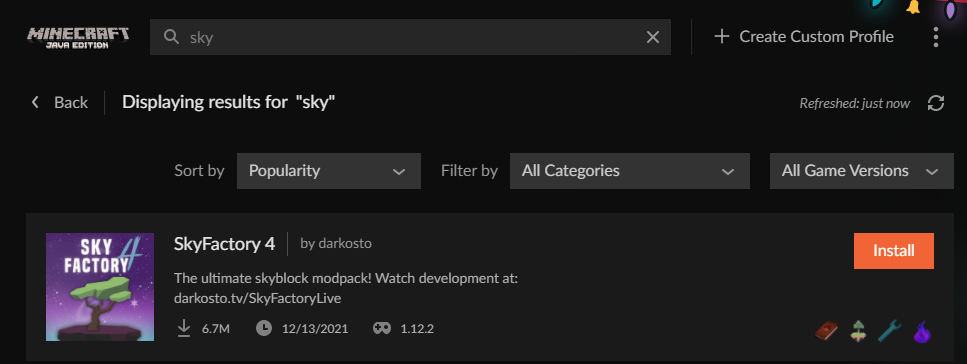
Hey, I can't find the sky factory 4 modpack, anyone know whats going on? I am searching for it and it does not appear under the version its built for
lyric crescent
under the version its built for...?
sounds like you're using mod search, not modpack search
mellow ridge
lyric crescent
under the version its built for...?
sounds like you're using mod search, not mod...
I'm using the 'Browse Modpacks' function
instead of selecting 'All Game Versions' I selected 1.12.2, the intended version for the pack
 mellow ridge
lyric crescent
just type sky??
mellow ridge
lyric crescent
just type sky??
ill try
mellow ridge
sorry
lyric crescent
what is with everyones need to "reply" to a message literally above theirs, so annoying
 sweet owl
Hi, Is there a way to sort minecraft mods as both 1.18 and fabric in the search bar? I only found a way to sort by one criteria, not multiple. If this isn't already a feature, can it please be implemented, it would be incredibly useful to everyone.
 grave current
umm i have a problem no real idea how to fix this ie
Exception in thread "main" [19:17:05] [main/INFO] [STDERR/]: [java.lang.ThreadGroup:uncaughtException:-1]: joptsimple.MissingRequiredOptionsException: Missing required option(s) [fml.forgeVersion, fml.mcVersion, fml.mcpVersion]
it was working day before
red patioBOT
Your question is not related to CurseForge owned/maintained features or services.
Please use the appropriate game room by getting a game role from #786424115535544350.
Otherwise use #👽︱game-support for game related help.
CurseForge does not make or maintain any of the content or games used on the site or app. Just because it's on the site/app does not make it a problem with CurseForge. Move rooms as requested, arguing about it will result in you being removed from the discord.
lyric crescent
sweet owl
Hi, Is there a way to sort minecraft mods as both 1.18 and fabric in the search ...
you can do this by making a profile on the app.
sweet owl
im talking about the website
lyric crescent
it's not possible on the website as you can see. this gets asked about almost every day.
lyric crescent
yes
sweet owl
how do i acess to mod browsing section in the app?
lyric crescent
?mc-installmods
red patioBOT
How to install mods in CurseForge App.
- Click
+ Create Custom Profile - Name it, select the required Minecraft version, select the Forge version (usually the highest number), click
Create. - Click the profile icon.
- Click
Add More Content - Search and install the desired mods.
- Start the game!
How to install mods not on CurseForge.
- Right click the profile picture or Open the profile and click the Icon next to the play button.
- Click
Open Folder. - Drag the mod(s) into the
modsfolder. (Note: Some mods will require others, to run. Make sure to read the instructions for the mod!) - Start the game!
digital roost
wassup
so i got this... and idk what to do

i added optifine to the mod list
but i tested the mods indivitually and it worked
1.16.5
now with all together it wont work..
queen storm
idle isle
how can i fix that?
Click the learn more, scroll to override
lyric crescent
digital roost
i added optifine to the mod list
!mc-optifine
red patioBOT
We do not offer support for Optifine!
If you have issues with Optifine, remove it. If you want further support try the discord found on their website.
https://www.optifine.net/home
Installing Optifine with modpacks on Curseforge:
- Right click the modpack icon, select
Open Folder. - Put the
Optifine.jarinto themodsfolder. - Now start the modpack.
digital roost
oh yeah ty 😄
 narrow minnow
idle isle
ouf
narrow minnow
idle isle
ouf
Did you click the Learn More button - it should have instructions to get rid of this message: https://support.overwolf.com/en/support/solutions/articles/9000197893-running-overwolf-on-windows-insider#override

Overwolf Support Help Center
We're here to get you informed on everything you need to know about Overwolf, including helpful guides and troubleshooting articles to back you up when you get in a pickle
idle isle
queen storm
Click the learn more, scroll to override
thx
 high tapir
Is there the Twilight Forest mod?
 astral wigeon
My friend has this problem where when he tries to download some mods it says "Cant provide secure connection" does anyone have an idea what could cause this?
lyric crescent
what says that
lyric crescent
high tapir
Is there the Twilight Forest mod?
use the search bar or google?
 glad basalt
What's the easiest way of making a modded server with curseforge?
fleet bear
You don't.
 sonic sedge
so when i launch my forge modpack, it says that java and all the other stuff is running well, although i can't see any game window
when i end the java task, it gives me the regular exit code 0 with the launcher
red patioBOT
Error/Exit codes are useless. Follow these steps so someone can actually help you.
- Right-click the modpack profile icon OR click the button in the modpack profile.
- Click
Open Folder. - Open the
logsfolder. - Drag and drop the FILE named
latestORdebuginto discord.
 stoic panther
How can I add mods i have on my computer to the game with the curseforge app
upper root
Which game? Curseforge supports a lot
stoic panther
minecraft sorry
upper root
Mods or modpacks?
stoic panther
i have 3 mods
upper root
Just press play in curseforge then
stoic panther
yeah but i lost the 3 mods i installed
 upper root
Hover over the mopack and click play
 maiden hare
I understand right that you want a own small modpack right
stoic panther
yes
maiden hare
maiden hare
You cant finde that button ?
 maiden hare
Close that again and open curseforge

 young hemlock
All the mods I use When i load it up it crashes, It used to work Until Now
I tried reinstall then Uninstalling curseforge but didn't work
upper root
!mc-logs and lets move to #👽︱game-support (put the log in there)
red patioBOT
Sending logs for support.
- Right-click the modpack profile icon OR click the button in the modpack profile.
- Click
Open Folder. - Open the
logsfolder. - Drag and drop the FILE named
latestORdebuginto discord.


 cursive hare
probably your pc
curseforge isnt loading my profiles despite it being linked to the folder which has the profiles
stoic panther
cursive hare
probably your pc
on lunar i get about 200
cursive hare
stoic panther
on lunar i get about 200
could be the area your in is just taking up too many frames
upper root
cursive hare
curseforge isnt loading my profiles despite it being linked to the folder which ...
Did you create them using curseforge?
cursive hare
yes
upper root
Is the path set to the folder that contains the Instances folder?
 upper root
Set it to MC-MODS not Instances
cursive hare
THANK YOU i have spent an hour fiddling with folders to try to get it to work
 lost canopy
i cant find any schematic mods for forge 1.18 i've been searching for like an hour
this is messing with me can someone hep me find one
stoic panther
My minecraft sometimes just goes into an infitine white loading screen and i have to always reinstall forge
is there a fix for that

 violet wigeon
When i uninstalled Curseforge, i found it still running in my Task Manager. Anyone know where the remaining files might be?
lyric crescent
lost canopy
i cant find any schematic mods for forge 1.18 i've been searching for like an ho...
!notcf ⤵️ use #🔎︱mod-hunting
red patioBOT
Your question is not related to CurseForge owned/maintained features or services.
Please use the appropriate game room by getting a game role from #786424115535544350.
Otherwise use #👽︱game-support for game related help.
CurseForge does not make or maintain any of the content or games used on the site or app. Just because it's on the site/app does not make it a problem with CurseForge. Move rooms as requested, arguing about it will result in you being removed from the discord.
 potent bay
I try to install a mod but it says failed to insttall web client i think it sthe download path anyone know how to fix it?
 lyric crescent
! webclient
red patioBOT
Timeout/WebClient errors are from networking issues to your computer. You can try a few things to fix it:
- Restart the computer.
- Restart your router/modem.
- Try another internet source like a hotspot, wired connection or moving closer to the WiFi.
- Pause/Stop other things using the internet. (Streams, music, etc)
- If this still doesn't work, try again in an hour and hope your connection is stable.
potent bay
lyric crescent
! webclient
I tried these i even Wiped the pc
lyric crescent
Nothing we can do about your connection
potent bay
lyric crescent
Nothing we can do about your connection
Its the internet?
 obsidian berry
i tried to download a modpack and it been patching 2 of 4 for a hour now
rich flint
then it's been frozen and you should have restarted everything 0.75 hours ago
obsidian berry
ight ill do it again
 steady flax
Question:
I made MC pack https://github.com/Krutoy242/Enigmatica2Expert-Extended
Based on another popular MC pack https://www.curseforge.com/minecraft/modpacks/enigmatica2expert
I want to upload my modpack on CF.
I have the permission from original dev to upload the pack https://github.com/NillerMedDild/Enigmatica2Expert/blob/d80cc094a7fa1dc750071f8848a96e154c2d40f2/LICENSE.md
How to check that this won’t cause any problems with curseforge staff?
Also, where i can find links to EULA or some kind for conditions for modpack publishing?
lyric crescent
Upload it, if there is an issue make a ticket
steady flax
Ok
obsidian berry
is it being like this normal

or does create hate me
ill just go use gd launcher
 jaunty ginkgo
is reviewbot having issues tonight
queen storm
!status
red patioBOT
Project Moderation Time
Project/File moderation is done on these days unless otherwise mentioned:
Sunday, Monday, Tuesday, Wednesday, Thursday: <t:1631170800:t> - <t:1631199600:t> (Your time)
Friday, Saturday: No Moderation!
Projects are moderated First in, First out. If you submit late in the work day, it will likely get left until the next day!
New Projects or anything flagged for manual review: 1-3 Working Days
Updates to approved projects not needing manual approval: 1 Hour
-If your file has been "Under Review" for more than an hour, then it is at manual review!
Changes will only show in the app if the project meets the requirements in the ?sync command and up to 24 hours has passed from when it was accepted.
 hexed locust
why do i have to complete this every time i visit the site?

even if the visits. are just hours. away from each other?
upper root
You can, you need to have server to do so tho. You can set that up on your pc if its powerful enough. For help with that ask in one of the mc channels (  from #786424115535544350).
You can also pay a hosting provider to do it for you, there are plenty out there
 craggy isle
thanks much
do you know where i would ask someone to pay for a server? just like in help?
upper root
If you want to pay for a dedicated host to provide it just google modded mc server hosting. Make sure to check out a couple tho to get the best deal.
If you are asking for someone to pay that cost for you your out of luck, this is a support server not a philanthropists server
craggy isle
oh no, im willing to pay i just wasnt sure how to go about it
new to the modding game
 acoustic pagoda
myself and others have run into an issue where adding mods to the CF folder does not register correctly.
Adding 60 mods all at once and CF says only 40 are added.
if i add each file on its own... and slowly CF "sees" that it was added to the folder.
please tell me there is a fix for this
upper root
Add them manually through the cf app, curseforge has issues reading them from the folder (they will still launch with mc perfectly fine tho)
acoustic pagoda
they wont. ive tried launching when the number was incorrect and it says the mod is not there
how do i do what you are suggesting please
upper root
!mc-installmods
red patioBOT
How to install mods in CurseForge App.
- Click
+ Create Custom Profile - Name it, select the required Minecraft version, select the Forge version (usually the highest number), click
Create. - Click the profile icon.
- Click
Add More Content - Search and install the desired mods.
- Start the game!
How to install mods not on CurseForge.
- Right click the profile picture or Open the profile and click the Icon next to the play button.
- Click
Open Folder. - Drag the mod(s) into the
modsfolder. (Note: Some mods will require others, to run. Make sure to read the instructions for the mod!) - Start the game!
acoustic pagoda
that still does not solve my issue. everyone i try to add to the server will have to search and download each mod anyway.... unless im not understanding correctly
upper root
Ahhhh.
You can export the apck for them to import (ignore the instructions about uploading to cf)
!mc-packshare
red patioBOT
There are two ways to share a modpack you've made with others...
Export and Share - For Friends to Small Groups.
- Click the Icon for the modpack.
- Click the button next to play.
- Click

Export. - Select the files that should be included.
- Send the zip to the people that want it! They can follow the instructions in
!mc-installpackto install the pack!
Upload to Curseforge - For Public Release to Everyone.
This options will make your pack public to EVERYONE, it comes with extra requirements and will take some effort to set up.
- Go to here: https://www.curseforge.com/project/432/4471/create
- Fill out the information with a proper description of the pack. This should allow anyone to understand what the pack is.
- Click the Icon for the modpack in the CurseForge app.
- Click the button next to play.
- Click
Export. - Select the files that should be included.
- Open your Project you made on the CurseForge site and Upload the file you just made.
- Wait for Moderation & Sync so it can show up in the client! (See
!syncfor limitations)
How to install modpacks with the search features in app.
- Open the
Minecraftsection of the app. - Click the top search bar where it says
Search for modpacksOR Click theBrowse ModpacksTab. - Find the Modpack you want to install and click install on it.
- Wait for CurseForge app to download and unpack all the required files.
- Once finished, click
Play!
How to install modpacks from a Export. (Custom/Private/Site downloaded Modpack zip)
- Get CurseForge App if you don't have it, use
!downloadfor a link. - Get the exported modpack from CurseForge or someone else,
!mc-packshareexplains how to make them. - Open the
Minecraftsection of the app. - Click

Create Custom Profile - Click the
Importoption. - Find the file you just downloaded in step 2 and select it.
- CurseForge app will now attempt to download and unpack the modpack. If it fails, try steps 4-6 again.
- Once finished, click
Play!
 red patioBOT
There are two ways to share a modpack you've made with others...
Export and Share - For Friends to Small Groups.
- Click the Icon for the modpack.
- Click the button next to play.
- Click
Export. - Select the files that should be included.
- Send the zip to the people that want it! They can follow the instructions in
!mc-installpackto install the pack!
Upload to Curseforge - For Public Release to Everyone.
This options will make your pack public to EVERYONE, it comes with extra requirements and will take some effort to set up.
- Go to here: https://www.curseforge.com/project/432/4471/create
- Fill out the information with a proper description of the pack. This should allow anyone to understand what the pack is.
- Click the Icon for the modpack in the CurseForge app.
- Click the button next to play.
- Click
Export. - Select the files that should be included.
- Open your Project you made on the CurseForge site and Upload the file you just made.
- Wait for Moderation & Sync so it can show up in the client! (See
!syncfor limitations)
upper root
If you want to run the commands more use #🟢︱user-bot-spam
acoustic pagoda
thank you for your help i will try these once i get all the mods together.
sorry about that
 visual yarrow
when i try to download this https://dev.bukkit.org/projects/skquery plugin its almost like it wont work togetter with my skript plugin cuz when i put this on the server, every skript command dont work and all my skripts are turned off
(i was told this was curseforge related)

Bukkit
An addon to the popular addon Skript that exposes the Bukkit API to general server owners
upper root
!notcf
red patioBOT
Your question is not related to CurseForge owned/maintained features or services.
Please use the appropriate game room by getting a game role from #786424115535544350.
Otherwise use #👽︱game-support for game related help.
CurseForge does not make or maintain any of the content or games used on the site or app. Just because it's on the site/app does not make it a problem with CurseForge. Move rooms as requested, arguing about it will result in you being removed from the discord.
visual yarrow
okay sry
opal cipher
Yeah, as Chief posted, it's not entirely CF related. But it's MC related, so grab the MC-role and head to #⚙️︱authors-help ^^
visual yarrow
okay thanks for the help 😄
 north dagger
How can I add dependencies to my minecraft mod?
digital roost
guys whenever i try to run the install file of forge 1.12.2 2855 nothing happens why?
upper root
!notcf
red patioBOT
Your question is not related to CurseForge owned/maintained features or services.
Please use the appropriate game room by getting a game role from #786424115535544350.
Otherwise use #👽︱game-support for game related help.
CurseForge does not make or maintain any of the content or games used on the site or app. Just because it's on the site/app does not make it a problem with CurseForge. Move rooms as requested, arguing about it will result in you being removed from the discord.
upper root
Try #👽︱game-support or !mc-forge
red patioBOT
digital roost
!mc-forge
 fallen ridge
when I click play on a modpack nothing happens, what can I do?
 thorn raptor
im currently making up an application for my minecraft modpack to be published on curse forge, but i wanted to ask are you able to change the pack icon and other details such as the description after its published?
opal cipher
Yes.
fallen ridge
!mc-forge
red patioBOT
 cold cliff
I need help because I downloaded this mod it was the demon slayer mod for 1.16.5 and I downloaded forge 1.16.5. I run minecraft and all it says before crash is completed scan of demon slayer mod and then minecraft crashes and it says exit code 255
I use macOS
I have 16g of ram 4 dedicated to minecraft
Everytime I run forge it crashes with this exit code
red patioBOT
Error/Exit codes are useless. Follow these steps so someone can actually help you.
- Right-click the modpack profile icon OR click the button in the modpack profile.
- Click
Open Folder. - Open the
logsfolder. - Drag and drop the FILE named
latestORdebuginto discord.
cold cliff
this is it
 ornate shard
i need help
i cant start a server with mods for my friends to join how do i do that
digital roost
can anyone help me with this

 manic sun
I cant play 1.18+. I have tried switching between Fabric and Forge. How to fix?
 lyric crescent
remove your additional arguments
lyric crescent
digital roost
can anyone help me with this
?owlogs send this here
red patioBOT
<:overwolf:857375414002384916> How to get Overwolf logs! <:overwolf:857375414002384916>
lyric crescent
cold cliff
this is it
M1 Mac
How to identify: (in log)
GLFW error before init: [0x10008]Cocoa: Failed to find service port for display
Reason:
Certain versions of Forge (1.13 up to 1.16.5) are not compatible with M1 Mac due to Apple removing support for methods used by Forge. This would need to be fixed by Apple
Fix: Use a forge version below 1.13 or above 1.16.5.
manic sun
lyric crescent
remove your additional arguments
how to do that?
lyric crescent
settings > minecraft > scroll to the bottom and clear the box
manic sun
its already empty
lyric crescent
reinstall curseforge
manic sun
Wont that remove all my other modpacks?
lyric crescent
no
 humble zephyr
I can´t delete a modpack from 1.18.1
queen storm
What error do you get?
humble zephyr
 queen storm
Restart your pc, try again
lyric crescent
Because..?
humble zephyr
I don´t know
queen storm
Then show the error you are getting, can't fix if we don't know the problem
humble zephyr
I´m starting the Modpack and nothing´s happening
But if I want to delete it, then it won't work
red patioBOT
- Click on the Minecraft Tab on the Left side of the CurseForge App.
- Click button next to the
Create Custom Profileoption. - Click
Repair Installationoption. - Play game.
NOTE: You will not lose any modpacks or worlds, These are saved in the Instances folder. DO NOT TOUCH THIS FOLDER OR YOU WILL LOSE EVERYTHING
 quick ocean
how make multiplayer server
red patioBOT
Your question is not related to CurseForge owned/maintained features or services.
Please use the appropriate game room by getting a game role from #786424115535544350.
Otherwise use #👽︱game-support for game related help.
CurseForge does not make or maintain any of the content or games used on the site or app. Just because it's on the site/app does not make it a problem with CurseForge. Move rooms as requested, arguing about it will result in you being removed from the discord.
 little wind
 red patioBOT
Your question is not related to CurseForge owned/maintained features or services.
Please use the appropriate game room by getting a game role from #786424115535544350.
Otherwise use #👽︱game-support for game related help.
CurseForge does not make or maintain any of the content or games used on the site or app. Just because it's on the site/app does not make it a problem with CurseForge. Move rooms as requested, arguing about it will result in you being removed from the discord.
 rich flint
Post your crash report linked in the button to a MC help channel
stoic panther
rich flint
Post your crash report linked in the button to a MC help channel
alright when it happens again
but you guys know issue?
 lyric crescent
when you send a log maybe
stoic panther
its been like that for so long
stoic panther
lyric crescent
when you send a log maybe
no the whole other thing
stoic panther
stoic panther
this
 finite wagon
is forge 1.8.9 now safe?
red patioBOT
Your question is not related to CurseForge owned/maintained features or services.
Please use the appropriate game room by getting a game role from #786424115535544350.
Otherwise use #👽︱game-support for game related help.
CurseForge does not make or maintain any of the content or games used on the site or app. Just because it's on the site/app does not make it a problem with CurseForge. Move rooms as requested, arguing about it will result in you being removed from the discord.
 knotty trellis
its not working

 quasi cradle
I need help I lost my authentication app code when resetting and switching phones
i.e. the CF points code thing
idk what it is actually called
@lyric crescent can you help me real quick with this I have about 1000 point
and I was hoping to use it on a christmas present
lyric crescent
Can you read the rules? Would be a good start
red patioBOT
:bug: Reporting via Website :bug:
Can't open the app or would rather use the website? You can do so here: https://support.curseforge.com/en/support/tickets/new
Fill out the form with accurate detailed information, "It doesn't work" isn't helpful! What exactly doesn't work and why doesn't it work should be easy to answer!
Make sure to upload your Overwolf logs with the Upload File option on the ticket, information on how to get these logs can be found here https://support.overwolf.com/en/support/solutions/articles/9000176827-how-to-get-your-overwolf-logs
 tender mirage
im on mac and cant find the curseforge folder
queen storm
tender mirage
im on mac and cant find the curseforge folder
Curseforge, settings, Minecraft, top part
 queen storm
You can't
queen storm
And if so: everybody would be doing that so cancels out
tender mirage
queen storm
Curseforge, settings, Minecraft, top part
its not connected to that folder
its connected to a twitch thing
queen storm
knotty trellis
After how long?
knotty trellis
how??
queen storm
tender mirage
its connected to a twitch thing
What is that folder then?
queen storm
knotty trellis
how??
It was a question... How long does it stay there?
 dense current
hows cf handling new projects since its around christmas?
knotty trellis
queen storm
It was a question... How long does it stay there?
overtime
queen storm
dense current
hows cf handling new projects since its around christmas?
Same as normal, 3 working days
knotty trellis
it never changes
queen storm
knotty trellis
overtime
I want a time unit like 30 minutes or hours
knotty trellis
queen storm
I want a time unit like 30 minutes or hours
-30 minutes and is uninstall
queen storm
That would be a timeout
red patioBOT
Timeout/WebClient errors are from networking issues to your computer. You can try a few things to fix it:
- Restart the computer.
- Restart your router/modem.
- Try another internet source like a hotspot, wired connection or moving closer to the WiFi.
- Pause/Stop other things using the internet. (Streams, music, etc)
- If this still doesn't work, try again in an hour and hope your connection is stable.
 high saffron
getting this repeatedly on the app
 queen storm
See steps above
tender mirage
queen storm
What is that folder then?
hold on lemme get it
/Users/my name/Twitch/Minecraft
 worthy burrow
Im trying to download a modpack, but whenever i download it, the files dont show anything downloaded
queen storm
tender mirage
/Users/my name/Twitch/Minecraft
So what is wrong with that?
worthy burrow
worthy burrow
Im trying to download a modpack, but whenever i download it, the files dont show...
on minecraft
queen storm
Minecraft is the only game with modpacks anyways.
Downloading how?
worthy burrow
queen storm
Minecraft is the only game with modpacks anyways.
Downloading how?
from the modpack list, its called RAD
queen storm
And other packs?
queen storm
Well, that could explain it
worthy burrow
i mean
let me see if i can find the message
it said it timed out
but its like, my internet is what it normaly is and i can download alot of other things
worthy burrow
my computor doesnt have wifi connection
narrow minnow
 unborn quiver
stop working?
unborn quiver
stop working?
no, CF has it's own distribution of the launcher
You might not be able to run them both at the same time though
unborn quiver
i see..
 narrow minnow
Just kidding
queen storm
That is Heasers job wolf 😂
unborn quiver
i don't get it..
narrow minnow
it's a pun-joke (aka dad-joke) don't worry about it
unborn quiver
ooh
dumb question how does mod installing work outside of curseforge for minecraft?
(i'm asking here cause, well..)
 queen storm
Manual modloader install
unborn quiver
i see..
narrow minnow
you drop the mods in the .minecraft/mods folder
and make sure you have the modloader installed
queen storm
If it exists
narrow minnow
do you know what game version it is for?
queen storm
Why not use curseforge for it?
unborn quiver
queen storm
Why not use curseforge for it?
curseforge honestly confuses the fuck out of me and when i tried to load it up it tried updating my minecraft launcher and that scared me
if you want the honest truth ;w;
queen storm
Just ignore that message
narrow minnow
unborn quiver
confused..
DMed you
unborn quiver
ik that but
unborn quiver
queen storm
Just ignore that message
what's with this?
narrow minnow
Dude... it gets boring here all day
don't have to understand everything that is written
unborn quiver
i meant that specific message from that person not you
sorry for any confusion
cause these messages in this exact order makes it seem like it's untrustworthy

but it might just be my brain going into overdrive again ;~;
narrow minnow
I think he meant to ignore his previous message
queen storm
No, it was to ignore the launcher update message
worthy burrow
Ok, im downloading a different modpack and its doing just fine
it seems like its just RAD
queen storm
Big mod in there, does that
red patioBOT
Your question is not related to CurseForge owned/maintained features or services.
Please use the appropriate game room by getting a game role from #786424115535544350.
Otherwise use #👽︱game-support for game related help.
CurseForge does not make or maintain any of the content or games used on the site or app. Just because it's on the site/app does not make it a problem with CurseForge. Move rooms as requested, arguing about it will result in you being removed from the discord.
 pallid lagoon
Hi! Whenever I try to launch one of my modpacks, itll open the launcher and then the actual installation profile doesnt pop up. How can I fix that?
pallid lagoon
 unkempt cosmos
hey can you have 2 ppl on single player ??
unkempt cosmos
hey can you have 2 ppl on single player ??
only if you guys are on the same internet
 ebon coral
signal ridge
ebon coral
signal ridge
Care to share what?
upper root
pallid lagoon
Hi! Whenever I try to launch one of my modpacks, itll open the launcher and then...
Try restart your computer (and don't open the mc launcher, let cf do it for you)
signal ridge
Are you on wifi by chance?
pallid lagoon
upper root
Try restart your computer (and don't open the mc launcher, let cf do it for you)
Got it, Ill try that now 😄
signal ridge
Are you able to try a wired connection? Wifi is sometimes not stable enough for the cf app
What doesnt?
Are you able to try what I said?
Restart your pc
Not the place and #📛︱rules 5
Ignore it,
pallid lagoon
Thank you so much @upper root, it worked
 thorn lantern
hey guys so i have all of fabric 4 on curse forge but in the newest there are no controls like to change sensitivity they released a download to get the controls but im not sure how to add that file to my existing modpack. if this makes any sense please help
 vocal sigil
Im trying to upload an update to my Modpack to add Better Dungeons and I keep getting rejected for this
The following files belong to CurseForge-hosted projects, and should therefore not be added directly to zip files:
overrides/mods/BetterDungeons-Fabric-1.16.5-1.0.1.jar
These files should, instead, be referenced in the manifest.json file generated by the Twitch Desktop App during a profile export.
signal ridge
vocal sigil
Im trying to upload an update to my Modpack to add Better Dungeons and I keep ge...
Delete that mod from your pack then use the app to reinstall it. Export the pack again > open the zip and look in the overrides/mods folder. If the mod is still there do it again
 cyan spruce
When I attempt to install the pixelmon modpack the first part installs correctly but as soon as it starts downloading the mods it takes forever and times out
signal ridge
cyan spruce
When I attempt to install the pixelmon modpack the first part installs correctly...
?webclient
red patioBOT
Timeout/WebClient errors are from networking issues to your computer. You can try a few things to fix it:
- Restart the computer.
- Restart your router/modem.
- Try another internet source like a hotspot, wired connection or moving closer to the WiFi.
- Pause/Stop other things using the internet. (Streams, music, etc)
- If this still doesn't work, try again in an hour and hope your connection is stable.
signal ridge
Try those, pixelmon itself is a rather large mod, so can take time/ can be hard on some networks
cyan spruce
Ok thanks
thorn lantern
thorn lantern
hey guys so i have all of fabric 4 on curse forge but in the newest there are no...
anyone know this?
signal ridge
Did the pack release the update or was it a mod that updated?
thorn lantern
the creators of the mod sent out a download and said to put that file in the modpack but idk how to do it on curseforge
its all of fabric 4
signal ridge
Should tell the pack authors to update their pack to fix.
upper root
Or ask them for mor detailed instructions
 knotty bay
hi i'm having a problem with my forge server is this the right place?
upper root
Try #👽︱game-support
 silk wind
I am trying to download mods from the website but they aren't the right type of file they are .jar i remember you have to download something to fix that but it has been a long time since I have done it. can someone provide a link or tell me what i need to download?
upper root
!getcf
red patioBOT
Looking to install the CurseForge app?
<:windows:798410728188936222> Windows
Minimum Requirements:
- OS Version: 7 (64 bit), 8.1, 10, 11
- 64 bit Required.
- 350MB storage space.
- Microsoft .Net 4.8
- Intel/AMD quad-core CPU
- 8GB ram
Download: https://download.overwolf.com/install/Download?&PartnerId=4047
If you are having issues with the installer use the URL below to install Overwolf then go to the app store to download CurseForge.
https://content.overwolf.com/downloads/setup/latest/regular.html
<:mac:798410654418862130> Mac
Minimum Requirements:
- OS Version 10.14 or newer.
- 64 bit Required.
Download: https://curseforge.overwolf.com/downloads/curseforge-latest.dmg
:penguin: Linux
Minimum Requirements:
Yes.
Download: :person_shrugging:
silk wind
how do you download just mods on the app
upper root
!mc-installmods
red patioBOT
How to install mods in CurseForge App.
- Click
+ Create Custom Profile - Name it, select the required Minecraft version, select the Forge version (usually the highest number), click
Create. - Click the profile icon.
- Click
Add More Content - Search and install the desired mods.
- Start the game!
How to install mods not on CurseForge.
- Right click the profile picture or Open the profile and click the Icon next to the play button.
- Click
Open Folder. - Drag the mod(s) into the
modsfolder. (Note: Some mods will require others, to run. Make sure to read the instructions for the mod!) - Start the game!
silk wind
alright thanks
 steep pewter
I need help, i got a new computer and downloaded wow. But when i downloaded curse forge it wont locate my game or let me install the addons.
 brittle cargo
You need to download it again in curseforge
steep pewter
how?
brittle cargo
!mc-path
red patioBOT
Change your install path to the following:
For Windows: C:\CurseForge
For Mac: /Users/Shared/CurseForge
If Minecraft is not installed in CurseForge App:
- Click the in the top left.
- Select Minecraft from the list of games.
- Select the
Advancedoption and pickC:\drive. - Click
Continue.
If Minecraft is installed in CurseForge App:
- Click the in the bottom left.
- Select the Minecraft tab.
- Click
Change. - Select the
C:\drive.
:no_entry_sign: Minecraft Files should NOT be installed inside the following locations :no_entry_sign:
:no_entry_sign: .minecraft folder.
:no_entry_sign: OneDrive folders.
:no_entry_sign: Desktop folder.
:no_entry_sign: iCloud enabled folders.
:no_entry_sign: or any other cloud saved folder.
:no_entry_sign: or folders with non-English characters in them.
If any of the above are in the path you need to change/move it!
signal ridge
This is for WoW right? not minecraft?
steep pewter
yes
signal ridge
Try #786424115535544350 get the WoW role and ask down in one of the wow related rooms,
steep pewter
ty
steep pewter
signal ridge
Try <#786424115535544350> get the WoW role and ask down in one of the wow relate...
no one is answering for help
 long willow
 signal ridge
lost quarry
signal ridge
lost quarry
!mc-installfix try this
red patioBOT
- Click on the Minecraft Tab on the Left side of the CurseForge App.
- Click button next to the
Create Custom Profileoption. - Click
Repair Installationoption. - Play game.
NOTE: You will not lose any modpacks or worlds, These are saved in the Instances folder. DO NOT TOUCH THIS FOLDER OR YOU WILL LOSE EVERYTHING
signal ridge
has the pack worked before?
lost quarry
no
signal ridge
Try reinstalling the pack
lost quarry
Ive done that
signal ridge
Do other packs work?
lost quarry
Ive never been able to download anything else
Always an exception with webclient
This is the first time ive ever been able to download anything
signal ridge
ah yeah thats a networking issue on your end
lost quarry
So is nothing going to work until i get etherenet
signal ridge
For the webclient bit its hit and miss if your on wifi, can try changing your mc path but you will need to redownload the pack again. If you want to try that route
!mc-path
red patioBOT
Change your install path to the following:
For Windows: C:\CurseForge
For Mac: /Users/Shared/CurseForge
If Minecraft is not installed in CurseForge App:
- Click the in the top left.
- Select Minecraft from the list of games.
- Select the
Advancedoption and pickC:\drive. - Click
Continue.
If Minecraft is installed in CurseForge App:
- Click the in the bottom left.
- Select the Minecraft tab.
- Click
Change. - Select the
C:\drive.
:no_entry_sign: Minecraft Files should NOT be installed inside the following locations :no_entry_sign:
:no_entry_sign: .minecraft folder.
:no_entry_sign: OneDrive folders.
:no_entry_sign: Desktop folder.
:no_entry_sign: iCloud enabled folders.
:no_entry_sign: or any other cloud saved folder.
:no_entry_sign: or folders with non-English characters in them.
If any of the above are in the path you need to change/move it!
 twilit pawn
yo guys is there anyway to remove the 122k cobbled deepslate i have in my me system from applied energistics 2 without having to remove it manually?
lyric crescent
!notcf
red patioBOT
Your question is not related to CurseForge owned/maintained features or services.
Please use the appropriate game room by getting a game role from #786424115535544350.
Otherwise use #👽︱game-support for game related help.
CurseForge does not make or maintain any of the content or games used on the site or app. Just because it's on the site/app does not make it a problem with CurseForge. Move rooms as requested, arguing about it will result in you being removed from the discord.
lyric crescent
!notcf
red patioBOT
Your question is not related to CurseForge owned/maintained features or services.
Please use the appropriate game room by getting a game role from #786424115535544350.
Otherwise use #👽︱game-support for game related help.
CurseForge does not make or maintain any of the content or games used on the site or app. Just because it's on the site/app does not make it a problem with CurseForge. Move rooms as requested, arguing about it will result in you being removed from the discord.
 eager furnace
I dont know how to get the new forge version, is it the separate mod or is it the software itself that i need to update?
 red patioBOT
You can update the mod loader within the same game version in the CurseForge app by following these steps!
- Click on the modpack profile you are working with.
- Click on the button next to the play button.
- Click on the
 Profile Options button.
 - Select the mod loader version you want from the dropdown.
- Play!
If you need to update to a new game version, a new profile is required.
upper root
!mc-updatemodloader
eager furnace
👍
 coral pilot
CurseForge will not load even though all i did was turn on and off my PC
it was working before
 high dawn
are uh the server files not working anymore
coral pilot
i reinstalled it and it worked until I turned off the PC
upper root
!notcf (lil sizzle)
red patioBOT
Your question is not related to CurseForge owned/maintained features or services.
Please use the appropriate game room by getting a game role from #786424115535544350.
Otherwise use #👽︱game-support for game related help.
CurseForge does not make or maintain any of the content or games used on the site or app. Just because it's on the site/app does not make it a problem with CurseForge. Move rooms as requested, arguing about it will result in you being removed from the discord.
 spiral seal
how do you fix strait up curseforge corruption it launches but when ever you try to play anything from it, it crashes instantly
upper root
Can you show a screenshot of the error you get?
spiral seal
its my friends issue but it crashes normaly like it starts the minecraft launcher but when they try to launch the game form the launcher it crashes and we have already tryed the install fix and it happen with all modpacks they launch
lyric crescent
Friend should be the one talking then
spiral seal
there discords broken right now
it wont launch they are trying to get it fixed
we are talking over the phone
lyric crescent
If they arnt here or able to provide what is asked for then they don't get help
coral pilot
curseforge is not loading and I had to re install it compleatly and it worked but then I turned off my PC again and it stopped working
lyric crescent
Yea you said that, but haven't explained what stopped working means
coral pilot
it wont load
lyric crescent
As in it never opens, or it opens and stuff happens?
coral pilot
it opens but it says it could not load it
lyric crescent
Show a screenshot
coral pilot
hello?

what happen
does it not work because I have both the new and old minecraft launcher
yamza?
red patioBOT
<:overwolf:857375414002384916> How to get Overwolf logs! <:overwolf:857375414002384916>
 analog jasper
hello my modpack keeps timing out but I can install other ones
coral pilot
what do I do with it
 upper root
Send it here
upper root
analog jasper
hello my modpack keeps timing out but I can install other ones
!webclient ⤵️
red patioBOT
Timeout/WebClient errors are from networking issues to your computer. You can try a few things to fix it:
- Restart the computer.
- Restart your router/modem.
- Try another internet source like a hotspot, wired connection or moving closer to the WiFi.
- Pause/Stop other things using the internet. (Streams, music, etc)
- If this still doesn't work, try again in an hour and hope your connection is stable.
coral pilot
 atomic sonnet
Hello, i got a problem in ragnamod 6 modpack, i can’t unlock some quests help pls
lyric crescent
coral pilot
Try moving this folder somewhere else, then reload curseforge
C:\\Users\\danie\\curseforge\\minecraft\\Instances\\MC Eternal
lyric crescent
atomic sonnet
Hello, i got a problem in ragnamod 6 modpack, i can’t unlock some quests help pl...
!notcf ⤵️
red patioBOT
Your question is not related to CurseForge owned/maintained features or services.
Please use the appropriate game room by getting a game role from #786424115535544350.
Otherwise use #👽︱game-support for game related help.
CurseForge does not make or maintain any of the content or games used on the site or app. Just because it's on the site/app does not make it a problem with CurseForge. Move rooms as requested, arguing about it will result in you being removed from the discord.
 hoary echo
@lyric crescent Remember the problem I a few days ago?
Well since the I have been saving my worlds on my desktop just in case
and it usually kept it
but after a restart and relaunch today
the old world showed up
lyric crescent
sounds like you have a computer issue then
hoary echo
probably lol
 hollow breach
Are there any issues with creating a modpack to mirror someone else's modpack? For example, if a youtuber is creating a modded minecraft series but didnt release the pack to the public, etc
lyric crescent
you cant take someone else's pack and upload it as your own, that would be a copyright violation
hollow breach
No that's not what I'm suggesting. This person has a list of mods that they play on and I just want to curate that pack into a curseforge modpack (for discoverability purposes)
lyric crescent
fact that you are asking that question suggests you are actually doing something worng. if you make a pack from scratch then there is no issue. if you are copying anything from another pack then i suggest you do not.
hollow breach
gotcha. This "pack" doesn't exist in any other form than a list of mod names, just thought others might enjoy it being easily downloadable
lyric crescent
that isnt up to you.
you can make any pack you want, as long as it doesnt take anything from this "pack", including name and configs
 gentle jasper
ok so as soon as i try to hit the play button i get it popping up loading for a split second and then it closes with exit code 0
red patioBOT
Error/Exit codes are useless. Follow these steps so someone can actually help you.
- Right-click the modpack profile icon OR click the button in the modpack profile.
- Click
Open Folder. - Open the
logsfolder. - Drag and drop the FILE named
latestORdebuginto discord.
gentle jasper
its not just this one modpack its any of them
its not ram its got half of my ram alotted
upper root
!mc-installfix
red patioBOT
- Click on the Minecraft Tab on the Left side of the CurseForge App.
- Click button next to the
Create Custom Profileoption. - Click
Repair Installationoption. - Play game.
NOTE: You will not lose any modpacks or worlds, These are saved in the Instances folder. DO NOT TOUCH THIS FOLDER OR YOU WILL LOSE EVERYTHING
gentle jasper
tried that
multiple times
just tried it again still nothing
it may be something with my pc since its new but normal minecraft works just fine
hollow breach
Looks like it's running forge 36 on java 1.8?
Oh jk it's 1.16.5
what files are in your C:\Users\Jayden\curseforge\minecraft\Install\libraries\net\minecraftforge\forge\1.16.5-36.2.8\ folder?
 lyric crescent
? mc-path
red patioBOT
Change your install path to the following:
For Windows: C:\CurseForge
For Mac: /Users/Shared/CurseForge
If Minecraft is not installed in CurseForge App:
- Click the in the top left.
- Select Minecraft from the list of games.
- Select the
Advancedoption and pickC:\drive. - Click
Continue.
If Minecraft is installed in CurseForge App:
- Click the in the bottom left.
- Select the Minecraft tab.
- Click
Change. - Select the
C:\drive.
:no_entry_sign: Minecraft Files should NOT be installed inside the following locations :no_entry_sign:
:no_entry_sign: .minecraft folder.
:no_entry_sign: OneDrive folders.
:no_entry_sign: Desktop folder.
:no_entry_sign: iCloud enabled folders.
:no_entry_sign: or any other cloud saved folder.
:no_entry_sign: or folders with non-English characters in them.
If any of the above are in the path you need to change/move it!
lyric crescent
Try that
gentle jasper
I will try my best
Will prob need help following it tho
first-
how do you change the install path
nvm
found it
just type C:\CurseForge in the install path
?
k thats done
where is the advanced option-
k i did it all
i think
LeTs FiNd OuT
yes
YES
THANK YOU SO MUCH
 merry cosmos
yup, i haven't been able to figure it out what im doing for a couple hours now because im dumb as 🦆 . so here i am .
my problem is: I'm trying to make a Mod Pack and it's currently for 1.18.1, and so far 4/90 mod's are for 1.18 and won't let me add them to it?
my question is: is there a way i can bypass the 1.18.1 forge thingy like the "Add More Content" Where it would show 1.18 mods?
(thank you in advance  )
)
upper root
You can download them from the site and install them manually
!mc-installmods second one
red patioBOT
How to install mods in CurseForge App.
- Click
+ Create Custom Profile - Name it, select the required Minecraft version, select the Forge version (usually the highest number), click
Create. - Click the profile icon.
- Click
Add More Content - Search and install the desired mods.
- Start the game!
How to install mods not on CurseForge.
- Right click the profile picture or Open the profile and click the Icon next to the play button.
- Click
Open Folder. - Drag the mod(s) into the
modsfolder. (Note: Some mods will require others, to run. Make sure to read the instructions for the mod!) - Start the game!
 trail tartan
Why cant CurseForge find Stardew valley on my computer? Do I need to put it somewhere specific because my desktop isn't working...
Also the scan for game didnt work either
lyric crescent
!stardew
red patioBOT
Overwolf maintains a known list of issues here, some with solutions, others without.
https://support.curseforge.com/en/support/solutions/articles/9000196615-curseforge-known-issues
Scroll down, look at "Other games"
merry cosmos
upper root
You can download them from the site and install them manually
is there not a way where i can bypass the 1.18.1 only mods and have a 1.18 mod because i would much rather not have to install every individual mod?
rich flint
pretend 1.18 and 1.18.1 are different versions of minecraft. (because they are). only certain mods will work on more than 1 version - that is why files are tagged for the versions they are tagged for.
merry cosmos
rich flint
pretend 1.18 and 1.18.1 are different versions of minecraft. (because they are)...
okay so i went ahead and downloaded a whole mod pack to just explain what i mean,
this mod pack called Better Minecraft [Forge] Has the same mod i want for my pack, and it's called Better Third Person.
the modpack is for 1.18.1 and this mod is for 1.18 (but it still works)
MY modpack is for 1.18.1 and the mod doesn't show up in the add more content folder
do i have to just download that mod maunally? or will that still not work? im just confused in general
rich flint
you can download it manually and place in your mods folder - it should export (look for it in the export list in the gui). obviously check out first to see that it works/loads
quasi cradle
How long do tickets take to be answered
I have one going 14 hours in
just curious btw
queen storm
5 working days
digital roost
how can I assign my own created profile to my relatives?
queen storm
!mc-packshare
red patioBOT
There are two ways to share a modpack you've made with others...
Export and Share - For Friends to Small Groups.
- Click the Icon for the modpack.
- Click the button next to play.
- Click
Export. - Select the files that should be included.
- Send the zip to the people that want it! They can follow the instructions in
!mc-installpackto install the pack!
Upload to Curseforge - For Public Release to Everyone.
This options will make your pack public to EVERYONE, it comes with extra requirements and will take some effort to set up.
- Go to here: https://www.curseforge.com/project/432/4471/create
- Fill out the information with a proper description of the pack. This should allow anyone to understand what the pack is.
- Click the Icon for the modpack in the CurseForge app.
- Click the button next to play.
- Click
Export. - Select the files that should be included.
- Open your Project you made on the CurseForge site and Upload the file you just made.
- Wait for Moderation & Sync so it can show up in the client! (See
!syncfor limitations)
 quick flower
uhh what happend
 queen storm
Clear your cookies and cache
 remote warren
same
 unborn charm
helo im having an issue where i cant update my curseforge

everytime i click restart curseforge nothing happens
any idea on how to fix it?
cant find anything about it online
upper root
Try reinstall curseforge, not the ideal solution but it should work (and update you at the same time)
unborn charm
will it keep all my modpacks?
upper root
Yes
unborn charm
alright thanks
unborn charm
upper root
Try reinstall curseforge, not the ideal solution but it should work (and update ...
it worked thank u
 regal quest
I have a question regarding CurseForge webby... I keep getting Internal Server Error pretty much all the time.
I have started my new project and it failed and I got that message. Then after some days I was able to upload file, change description and... was not accepted because of some foolish reason - so I wanted to change that - and had that error again. Is the Website server dying or what?
 quick flower
regal quest
I have a question regarding CurseForge webby... I keep getting Internal Server E...
quick flower
regal quest
I have a question regarding CurseForge webby... I keep getting Internal Server E...
thats what also happend to me
clearing the cache and cookies doesnt work
regal quest
Exactly. I have tried pretty much everything I know of.
queen storm
@narrow minnow
regal quest
4 different browsers, 3 different machines. All return the same error. And that happens for weeks now.
queen storm
Can you logout?
regal quest
You mean - relog?
Log out and back in? Tried that, but I'll do it again if that is to help you.
quick flower
still that error
narrow minnow
What url?
regal quest
Full one to my project?
quick flower
it only does this with modpacks that isnt approved it looks like
regal quest
I don't mind. Not a big work. Only started
narrow minnow
yeah, thanks, we'll take a look right now
regal quest
@quick flower Hmmm didn't notice that. Good find.
narrow minnow
a fix is on it's way
regal quest
Thanks man. Appreciate that
remote warren
thanks 🙂
 runic scroll
 narrow minnow
should be fine now
quick flower
it is :)
 golden palm
Hey! I have a problem when I want to log into my Mojang account from a minecraft launcher started by forge. The normal MC launcher works totally fine, when I start it through forge I just can't get it to work.
queen storm
!notcf
red patioBOT
Your question is not related to CurseForge owned/maintained features or services.
Please use the appropriate game room by getting a game role from #786424115535544350.
Otherwise use #👽︱game-support for game related help.
CurseForge does not make or maintain any of the content or games used on the site or app. Just because it's on the site/app does not make it a problem with CurseForge. Move rooms as requested, arguing about it will result in you being removed from the discord.
 gray violet
Hello just wondering if there's anyway for settings to be transferred when uploading a modpack such as sound and brightness levels
as in the settings will be already set when someone else downloads the modpack
lyric crescent
include options.txt (usually people hate this)
or find a mod that lets you include default settings.
gray violet
oh ok its mainly for a presence footsteps because i find them far too loud at 100% volume
thanks for the help
 gray igloo
Hey is it ok if I add an nether mod that adds new stuff to the nether while I'm in the middle of a play through but I haven't been to the nether yet
lyric crescent
!notcf
red patioBOT
Your question is not related to CurseForge owned/maintained features or services.
Please use the appropriate game room by getting a game role from #786424115535544350.
Otherwise use #👽︱game-support for game related help.
CurseForge does not make or maintain any of the content or games used on the site or app. Just because it's on the site/app does not make it a problem with CurseForge. Move rooms as requested, arguing about it will result in you being removed from the discord.
 grizzled sierra
Oh sry
 finite ether
Curseforge keeps showing the "oops that wasnt supposed to happen" screen, ive tried all of the troubleshooting things but none of them worked, im on mac os catalina
lyric crescent
?owlogs send this here
red patioBOT
<:overwolf:857375414002384916> How to get Overwolf logs! <:overwolf:857375414002384916>
queen storm
finite ether
nor do i have the logs folder
Need the entire zip
finite ether
the whole zip of the logs folder or just curseforge
the curseforge file is too big compressed
queen storm
Then close overwolf, delete the logs folder, try again
finite ether
i dont have overwolf i just have curseforge, im on a mac
 spiral igloo
Is there a simple HTTP request I can make to the CurseForge API to get details about the latest update available for a specific Minecraft mod?
fleet bear
spiral igloo
Is there a simple HTTP request I can make to the CurseForge API to get details a...
Read the docs for the API, this is documented on how to get project data.
You can find it on core.curseforge.com
spiral igloo
Ah, thanks.
 mellow veldt
what can i do about this lol
 queen storm
mellow veldt
what can i do about this lol
queen storm
mellow veldt
what can i do about this lol
!notcf
red patioBOT
Your question is not related to CurseForge owned/maintained features or services.
Please use the appropriate game room by getting a game role from #786424115535544350.
Otherwise use #👽︱game-support for game related help.
CurseForge does not make or maintain any of the content or games used on the site or app. Just because it's on the site/app does not make it a problem with CurseForge. Move rooms as requested, arguing about it will result in you being removed from the discord.
mellow veldt
i used cf to load the pack though
queen storm
mellow veldt
i used cf to load the pack though
But the issue is the mods and loader
mellow veldt
ohhh thanks
 warped cairn
Does curseforge support Among Us?
queen storm
Site does, app not
mellow veldt
queen storm
!notcf
i understand its not related but do you know how to fix this? i got this laptop for Christmas and have no idea what any of that means
queen storm
How about doing what you were told to do?
mellow veldt
ok i posted in game support instead
 frosty trout
Receiving this error upon launching multiple packs: - Error log is mostly mentioning
Unable to launch java.lang.RuntimeException: java.lang.RuntimeException: Patcher expecting non-empty class data file for net.minecraft.entity.projectile.EntityThrowable, but received empty, your vanilla jar may be corrupt.
I have uninstalled and reinstalled the pack in question, and others multiple times. I have also tried installing modpacks on another launcher (and it works fine).
 lyric crescent
?mc-installfix
red patioBOT
- Click on the Minecraft Tab on the Left side of the CurseForge App.
- Click button next to the
Create Custom Profileoption. - Click
Repair Installationoption. - Play game.
NOTE: You will not lose any modpacks or worlds, These are saved in the Instances folder. DO NOT TOUCH THIS FOLDER OR YOU WILL LOSE EVERYTHING
frosty trout
lyric crescent
?mc-installfix
Legend, thanks!
 quartz pawn
already tried firewall and dns what could be the problem?
 narrow minnow
quartz pawn
already tried firewall and dns what could be the problem?
narrow minnow
quartz pawn
already tried firewall and dns what could be the problem?
Did you try to disable ipv6?
quartz pawn
no how do i do that?
narrow minnow
Although, if you have other software that might be blocking it (like Intel Killer network)
I'd start there
quartz pawn
why is the ipv6 stuff not recommended?
narrow minnow
well, ipv6 isn't a bad thing, in general
we have seen users who have issues with ipv6 (on epic and battle.net too)
so try it out
quartz pawn
tried ipv6 didnt work what now?
narrow minnow
I'll DM
 mighty scroll
so i have little problem. Half-year ago i stopped playing on my modpack and leave it on my disc. And now i want to come back but on curse forge i see my modpack with mods witch i chose back then. problem is that these modes aren't in modpack folder. I discover this after adding some more modes and these are there.

 narrow minnow
So if you add a new mod from Add More Content - it goes into the folder?

 mighty scroll
exactly to this folder
 narrow minnow
ok, so you see mods in the app that don't appear in the folder?
mighty scroll
correct
narrow minnow
That is odd - maybe look if you have a back up under: Twitch/mc/Backups
mighty scroll
i don't have this folder.
 narrow minnow
do you have a PogoXgames folder in instances
without the (1)?
maybe you can find the mods there
mighty scroll
PogoXgames looks like this
 narrow minnow
and inside mods?
mighty scroll
and in mods is nothing
narrow minnow
ok, so i'm not sure what happened to the files - one way (not great) to get the mods is to go into each link

go to versions

and manually install the file you want
or just click the Update/Install button
 mighty scroll
thx 🙂
 reef mesa
Hey, I am trying to download a mod but it keeps timing out. Help please?
lyric crescent
! webclient
red patioBOT
Timeout/WebClient errors are from networking issues to your computer. You can try a few things to fix it:
- Restart the computer.
- Restart your router/modem.
- Try another internet source like a hotspot, wired connection or moving closer to the WiFi.
- Pause/Stop other things using the internet. (Streams, music, etc)
- If this still doesn't work, try again in an hour and hope your connection is stable.
reef mesa
Thank you
 woeful nimbus
So Idk whats going on with the Curseforge Launcher, but every single time I go an export a modpack. It tells me inside the zip that Mods are showing up in the mods folder, this was not happening before the holidays and now all of sudden its happening after. Idk if the launcher itself is broken or what going on
lyric crescent
? reject-cfhosted
red patioBOT
The following files belong to CurseForge-hosted projects, and should therefore not be added directly to zip files:
-
Remove any mods listed in the error message from the profile you exported. Then reinstall them with the CurseForge app. DO NOT drag and drop files from the site.
-
Export the profile again, open the new zip that was just made. Check for the
overrides/modsfolder. If you still see any mods in that folder do the step above again for each mod. -
Upload the zip once complete and no more mods show in the
overrides/modsfolder.
 low wing
Hi lads, I'm having some issues trying to get a mod installed on Minecraft. This is my first time using mods and so I'm following a YT vid to get the basics set up. Everything has worked ok so far but the person in the video has just gone on to downloading the mod as a Java File I believe yet when I look at the downloads on CurseForge they're ZIP's and I'm stuck as to what to do

How Minecraft Mods Work: https://www.youtube.com/watch?v=ZkVuiDOnpS8&t=49s&ab_channel=MattVideoPro
How to Install Mods for iOS:https://www.youtube.com/watch?v=hvdkWUv6rts&ab_channel=MattVideoPro
Minecraft Mod Website: https://www.curseforge.com/minecraft/mc-mods
Forge: http://files.minecraftforge.net/
Java: https://www.java.com/en/download/
...
This is the video I've been following
upper root
Are you trying to install mods or a modpack?
low wing
A modpack
upper root
!mc-installpack
red patioBOT
How to install modpacks with the search features in app.
- Open the
Minecraftsection of the app. - Click the top search bar where it says
Search for modpacksOR Click theBrowse ModpacksTab. - Find the Modpack you want to install and click install on it.
- Wait for CurseForge app to download and unpack all the required files.
- Once finished, click
Play!
How to install modpacks from a Export. (Custom/Private/Site downloaded Modpack zip)
- Get CurseForge App if you don't have it, use
!downloadfor a link. - Get the exported modpack from CurseForge or someone else,
!mc-packshareexplains how to make them. - Open the
Minecraftsection of the app. - Click
Create Custom Profile - Click the
Importoption. - Find the file you just downloaded in step 2 and select it.
- CurseForge app will now attempt to download and unpack the modpack. If it fails, try steps 4-6 again.
- Once finished, click
Play!
low wing
Absolute legends, thank you very much man
digital roost
i need help
with the audio ive tried F3 +T but it just freezes ive waited for 5 mins and it doesnt do anything
 tepid aspen
is there a no hurt cam mod for 1.18.1?
lyric crescent
If you don't see one then no. This isn't where you look for mods either. #🔎︱mod-hunting
tepid aspen
lyric crescent
If you don't see one then no. This isn't where you look for mods either. <#84723...
o ok
upper root
digital roost
with the audio ive tried F3 +T but it just freezes ive waited for 5 mins and it ...
Some large modpacks cannot do F3 + T without crashing, your only option is restarting
 wanton knot
Theres a huge bug with curse forge i found. Basically whenever I press play on this modpack ive made curseforge will open the minecraft launcher with the modpack profile installed. The problem is that when it opens the launcher it increases the saturation of everything on my computer until I restart it
 jolly apex
hi need help
so i am trynna install a mod but it wont pop up in my folder
its not a mod on fordge its custom mod
and it wont load but it is in my reg filed folder
upper root
wanton knot
Theres a huge bug with curse forge i found. Basically whenever I press play on t...
Probably a program turning on 'game mode', it is not curseforge doing that
upper root
jolly apex
so i am trynna install a mod but it wont pop up in my folder
!mc-installmods second set of instructions ⤵️
red patioBOT
How to install mods in CurseForge App.
- Click
+ Create Custom Profile - Name it, select the required Minecraft version, select the Forge version (usually the highest number), click
Create. - Click the profile icon.
- Click
Add More Content - Search and install the desired mods.
- Start the game!
How to install mods not on CurseForge.
- Right click the profile picture or Open the profile and click the Icon next to the play button.
- Click
Open Folder. - Drag the mod(s) into the
modsfolder. (Note: Some mods will require others, to run. Make sure to read the instructions for the mod!) - Start the game!
wanton knot
upper root
Probably a program turning on 'game mode', it is not curseforge doing that
?
what does that mean
fleet bear
It's not related to curseforge as curseforge doesn't edit anything like that or even have the ability to
jolly apex
upper root
!mc-installmods second set of instructions ⤵️
its not letting me open the folder
wanton knot
what does 'game mode' mean
fleet bear
Its a color profile/modification for your computer/monitor
wanton knot
also if its soemthing seperate why is it only happening when i specifically use curseforge
fleet bear
mate, it's your computer. There's nothing we can do or know about it...
Start looking at whatever you have installed and running.
fleet bear
jolly apex
its not letting me open the folder
Show the error.
 daring fjord
so I'm trying to play ftb sky adventures but whenever I try to load a new or old world it never gets past "building terrain" in the loading screen
it never crashes and there isnt any log
I also cannot close the game and am forced to use task manager to shut down minecraft
wanton knot
i literally have nothing running that would cause that
and if i did why does it only happen when i open the launcher using curse forge and never anytime else in the 3 years ive had my pc
jolly apex
it just keeps saying that access is not available
wanton knot
jolly apex
it just keeps saying that access is not available
cause your not using an administrator account
fleet bear
daring fjord
so I'm trying to play ftb sky adventures but whenever I try to load a new or old...
!mc-ftb
red patioBOT
We do not provide support for FTB Modpacks or the FTB App.
If you are looking to play FTB modpacks use the FTB launcher.
https://www.feed-the-beast.com/
Any Overwolf FTB launcher issues you have should be directed here:
https://github.com/FTBTeam/FTB-App/issues/426
daring fjord
when did this happen?
jolly apex
how do i get admin account
 versed cloak
jolly apex
it just keeps saying that access is not available
versed cloak
jolly apex
it just keeps saying that access is not available
that what i get too
fleet bear
wanton knot
and if i did why does it only happen when i open the launcher using curse forge ...
Post a screenshot of the issue then if you insist on it being a CF bug.
fleet bear
jolly apex
it just keeps saying that access is not available
Post a screenshot of the error
wanton knot
jolly apex
how do i get admin account
go into settings and change your account type
jolly apex
 jolly apex
fleet bear
Post a screenshot of the error
jolly apex
fleet bear
Post a screenshot of the error
^
fleet bear
stop spamming and let me handle this...
jolly apex
...
fleet bear
Do as I asked you to do.
fleet bear
jolly apex
Is your computer shared?
wanton knot
stop deleting my message
 worn plume
can i get help from someone on how to add stardew valley to curse forge
wanton knot
this is the solution
fleet bear
jolly apex
n o
Do you have multiple users made on the PC?
You should only be getting this message if you are logged into another user on the PC.
fleet bear
worn plume
can i get help from someone on how to add stardew valley to curse forge
!stardew
red patioBOT
Overwolf maintains a known list of issues here, some with solutions, others without.
https://support.curseforge.com/en/support/solutions/articles/9000196615-curseforge-known-issues
Scroll down, look at "Other games"
jolly apex
ah no I do not
fleet bear
jolly apex
ah no I do not
Can you open the start menu and take screenshot of side bar expanded out?
https://i.imgur.com/w6csYKd.png

 twilit summit
Hello I was just wanted to ask if you help with Forge server set up I have a server set but cant get it to run the mods
fleet bear
twilit summit
Hello I was just wanted to ask if you help with Forge server set up I have a ser...
!notcf
red patioBOT
Your question is not related to CurseForge owned/maintained features or services.
Please use the appropriate game room by getting a game role from #786424115535544350.
Otherwise use #👽︱game-support for game related help.
CurseForge does not make or maintain any of the content or games used on the site or app. Just because it's on the site/app does not make it a problem with CurseForge. Move rooms as requested, arguing about it will result in you being removed from the discord.
twilit summit
Ok sorry
wanton knot
Curseforge messing up my color mode
If you slow it down the color wheel changes right when it opens Minecraft
fleet bear
wanton knot
If you slow it down the color wheel changes right when it opens Minecraft
close curseforge, if it stays like that it's not curseforge.
wanton knot
Then what would it be
fleet bear
I already told you, It's your computer. You need to figure it out.
It's beyond anything we can help you with.
wanton knot
Clearly something related to curseforge is causing it, if it changes my color settings closing the program wouldn’t make curseforge go and change it back
Like if I break something taking away my hammer doesn’t unbreak it
upper root
What is probably happening is a program seeing the minecraft launcher start, recognising that minecraft is a game and so adjusting your colour settings for you because you are now playing a game
fleet bear
wanton knot
Clearly something related to curseforge is causing it, if it changes my color se...
Not at all. Curseforge stops doing anything once the MC launcher is started.
You click, play on CF. App is done, it can be closed entierly.
lyric crescent
Didn't you say this almost half an hour ago at this point
 toxic gale
when i download mods for mc on the curseforge app, can i disable the mods or are they always on
fleet bear
use the slider to turn them off
toxic gale
fleet bear
use the slider to turn them off
ohhhh ty, i found the slider i downloaded it earlier cause i had loads of files going in and out of my mods folder
 sterile tulip
What are the best things to do to get All The Mods 7 for Minecraft to work using the forge launcher?
upper root
Are you having issues getting it to work? If so explain what they are, there is no one fix for everything
 runic wigeon
Why dosent RLcraft work
red patioBOT
╰( ͡° ͜ʖ ͡° )つ──☆*:・゚ *˜”*°•.˜”*°• Many Help •°*”˜.•°*”˜* <:curselit:796985620550385705>
Please provide a description of your issue with as much detail as possible. If you have an issue with a mod or modpack, tell us the name. Explain what you can see happening. Be specific!
 Tell us what is happening, we already know it "doesn't work".
Avoid using words like "it", tell us exactly what "it" is.
Don't assume anyone knows what you are talking about, be specific.
Tell us what you expected to happen.
Provide screenshots or video if possible.
Provide a log if possible. ?mc-log
sterile tulip
Well, I can run it, but lags extremely bad. I've died many died to preventable deaths due to lag alone.
runic wigeon
ok just give a second
upper root
sterile tulip
Well, I can run it, but lags extremely bad. I've died many died to preventable d...
How much ram do you have allocated?
sterile tulip
The default I think. I still havent figured out how to allocate more ram.
upper root
k. we should move to #👽︱game-support, ill put instructions in there for increasing the amount
sterile tulip
Thank you.
 tall saddle
Just wondering I was making a custom modpack for me and my friend and I recieved a Crash report stating its Coremods and it shows multiple so does that mean remove the mods its listed as coremods?
---- Minecraft Crash Report ----
WARNING: coremods are present:
upper root
its not coremods, its just warning that they exist
if you post the full crash in #👽︱game-support someone may have a look at it and tell you whats actually wrong
merry cosmos
is there a mod that can preload chunks in a minecraft server before i play?
upper root
What version? Also questions like this belong in #🔎︱mod-hunting
merry cosmos
👍
 prisma flax
Guys my friend is having some issues running the launcher as it comes up with this

we have already tried
Reinstalling
Restarting
Running as Admin
Adding to windows antivirus exceptions
Nvm all good
digital roost
Hey can someone tell me where my downloaded mods are stored for minecraft
upper root
Right click on the instance icon and select Open Folder
upper root
!mc-installpack
red patioBOT
How to install modpacks with the search features in app.
- Open the
Minecraftsection of the app. - Click the top search bar where it says
Search for modpacksOR Click theBrowse ModpacksTab. - Find the Modpack you want to install and click install on it.
- Wait for CurseForge app to download and unpack all the required files.
- Once finished, click
Play!
How to install modpacks from a Export. (Custom/Private/Site downloaded Modpack zip)
- Get CurseForge App if you don't have it, use
!downloadfor a link. - Get the exported modpack from CurseForge or someone else,
!mc-packshareexplains how to make them. - Open the
Minecraftsection of the app. - Click
Create Custom Profile - Click the
Importoption. - Find the file you just downloaded in step 2 and select it.
- CurseForge app will now attempt to download and unpack the modpack. If it fails, try steps 4-6 again.
- Once finished, click
Play!
digital roost
thx
i have a question im trying to find the mods in 1.18 on 1.18.1 modpack when im creating one i dont see them but on other modpacks it has them
upper root
You need to add them manually, the reason the other modpacks have them is because they manually added them then exported it with those mods
digital roost
oh how do i export?
upper root
!mc-packshare
red patioBOT
There are two ways to share a modpack you've made with others...
Export and Share - For Friends to Small Groups.
- Click the Icon for the modpack.
- Click the button next to play.
- Click
Export. - Select the files that should be included.
- Send the zip to the people that want it! They can follow the instructions in
!mc-installpackto install the pack!
Upload to Curseforge - For Public Release to Everyone.
This options will make your pack public to EVERYONE, it comes with extra requirements and will take some effort to set up.
- Go to here: https://www.curseforge.com/project/432/4471/create
- Fill out the information with a proper description of the pack. This should allow anyone to understand what the pack is.
- Click the Icon for the modpack in the CurseForge app.
- Click the button next to play.
- Click
Export. - Select the files that should be included.
- Open your Project you made on the CurseForge site and Upload the file you just made.
- Wait for Moderation & Sync so it can show up in the client! (See
!syncfor limitations)
digital roost
ok THX!
Chief arug u really saved my dignity
the server i created should be tested and fixed within 6 hours today and you really saved me
upper root
Happy to help!
digital roost
Finally made my modpack to work THX Chief
 marsh fable
hey uh could someone help me out with something
red patioBOT
╰( ͡° ͜ʖ ͡° )つ──☆*:・゚ *˜”*°•.˜”*°• Many Help •°*”˜.•°*”˜* <:curselit:796985620550385705>
Please provide a description of your issue with as much detail as possible. If you have an issue with a mod or modpack, tell us the name. Explain what you can see happening. Be specific!
Tell us what is happening, we already know it "doesn't work".
Avoid using words like "it", tell us exactly what "it" is.
Don't assume anyone knows what you are talking about, be specific.
Tell us what you expected to happen.
Provide screenshots or video if possible.
Provide a log if possible. ?mc-log
marsh fable
so i went to home then i went back to the minecraft icon where all the mods i downloaded where
then it gave me an option of changing where the mods are located and i changed it to the curseforge one
and all of the mods are gone and dont know how to get them back i see them in my folders but dont know how to get them back in the launcher
 marsh fable
the twitch minecraft folder?
upper root
Yes, if that was where it was before
marsh fable
ye because in the instance the mods are there
marsh fable
thank you
little wind
Can you give copies of a modpack to your friends for personal use, and if so, how?
queen storm
!mc-packshare
red patioBOT
There are two ways to share a modpack you've made with others...
Export and Share - For Friends to Small Groups.
- Click the Icon for the modpack.
- Click the button next to play.
- Click
Export. - Select the files that should be included.
- Send the zip to the people that want it! They can follow the instructions in
!mc-installpackto install the pack!
Upload to Curseforge - For Public Release to Everyone.
This options will make your pack public to EVERYONE, it comes with extra requirements and will take some effort to set up.
- Go to here: https://www.curseforge.com/project/432/4471/create
- Fill out the information with a proper description of the pack. This should allow anyone to understand what the pack is.
- Click the Icon for the modpack in the CurseForge app.
- Click the button next to play.
- Click
Export. - Select the files that should be included.
- Open your Project you made on the CurseForge site and Upload the file you just made.
- Wait for Moderation & Sync so it can show up in the client! (See
!syncfor limitations)
queen storm
First part
little wind
will they need curseforge?
queen storm
Yes, they will need curseforge
little wind
little wind
Can you give copies of a modpack to your friends for personal use, and if so, ho...
In a lot of mod descriptions, it says stuff about crediting the author if you use it in a modpack, and sometimes things about copyright. Does this still apply for personal use, and do i need to make sure my friends don't give it to someone else or anything?
queen storm
There is no need to credit them as the site itself does that already
little wind
ok
little wind
queen storm
Yes, they will need curseforge
how can they download curseforge?
red patioBOT
Looking to install the CurseForge app?
<:windows:798410728188936222> Windows
Minimum Requirements:
- OS Version: 7 (64 bit), 8.1, 10, 11
- 64 bit Required.
- 350MB storage space.
- Microsoft .Net 4.8
- Intel/AMD quad-core CPU
- 8GB ram
Download: https://download.overwolf.com/install/Download?&PartnerId=4047
If you are having issues with the installer use the URL below to install Overwolf then go to the app store to download CurseForge.
https://content.overwolf.com/downloads/setup/latest/regular.html
<:mac:798410654418862130> Mac
Minimum Requirements:
- OS Version 10.14 or newer.
- 64 bit Required.
Download: https://curseforge.overwolf.com/downloads/curseforge-latest.dmg
:penguin: Linux
Minimum Requirements:
Yes.
Download: :person_shrugging:
 polar pike
so im trying to upload my minecraft build project. and it keeps rejecting because i need the level.dat in a root-level folder
can anyone tell me how to do that?
queen storm
Do you have a folder in the zip?
polar pike
wait give me a second. im gonna make a screenshot and you tell me what the freak im doing wrong
 queen storm
Now should the full window, why does everybody crop those things?
 queen storm
What kind of file does worlds need? Zip?
queen storm
Show a screenshot of the first thing you get when you open the zip, if there is 1 folder, and no files: you zipped wrong
queen storm
Have fun, out to get something to eat for tonight
polar pike
i swear if this is the only thing i had to do im gonna be so mad at myself
IT WORKED
THANK YOU SO MUCH
steady flax
How to change User Icon on CF page?
I couldn't see any button for it
 polar pike
theres a big "edit profile" button next to your profile
 polar pike
are you using a mod from curseforge?
little wind
queen storm
First part
In the export menu, there's a text box which says, "package version". What should I write in that?
steady flax
polar pike
theres a big "edit profile" button next to your profile
Nothing happen when i pressed it.
Video proof:
https://imgur.com/3l6wZgW


 steady flax
Its already about 2 years since its work in progress.
polar pike
you can change it if you log in with twitch
queen storm
steady flax
How to change User Icon on CF page?
I couldn't see any button for it
Change it on twitch, then relog
steady flax
Ok
queen storm
little wind
In the export menu, there's a text box which says, "package version". What shoul...
A number, what version of the pack is it?
little wind
forge version or minecraft version?
queen storm
Modpack version
little wind
i made the modpack
queen storm
Then think of a version
little wind
does it matter what i type in
queen storm
As long as the next version is higher 🤷♂️