#🔥︱curseforge-support
1 messages · Page 553 of 1
 fallen loom
 brittle cargo
Is there a way to connect my modpack activity to my discord?
So every time there is a comment or an update people will see it in my discord?
 fleet bear
no
 astral cloud
Considering windows 11 is officially is there any date on when support for it coming? (ping me)
 queen storm
No date, that is on Overwolf
 magic lotus
Yes apparently very broken. In every project handled differently for some reason
 topaz barn
@fallen loom and @fleet bear thank you both for the help. I ended up sending a support ticket to Microsoft and couldn’t believe when they sent a message back with a link to do a different update then what I was doing. Been running that now for almost 2 hours and it says only at 50% done.
fleet bear
yeesh
 potent grail
That’s a pity I don’t understand how many people download my mod
magic lotus
Ikr
 rigid turtle
hey guys, I need help
 wanton umbra
idk if this has been asked before but does curseforge offer syncing? it would be much easier then trying to remember which addons i have installled at home on my tower?
rigid turtle
I have been trying to play project ozone 3 but when I open the modpack it says game crashed exit code 0
 lyric crescent
for wow yes
rigid turtle
rigid turtle
I have been trying to play project ozone 3 but when I open the modpack it says g...
what do I do
lyric crescent
?mc-log
 red patioBOT
Sending logs for support.
- Right-click the modpack profile icon OR click the
 button in the modpack profile.
 - Click

Open Folder. - Open the
logsfolder. - Drag and drop the FILE named
latestORdebuginto discord.
wanton umbra
@lyric crescent how do i do that?
when i try hitting the sync button it takes me back to twitch page
lyric crescent
did you sign in?
wanton umbra
yes
lyric crescent
idk beyond that, sorry.
wanton umbra
ah well thx anyway maybe im not logged in on my tower ill have to look when i get home
 carmine wolf
How can I confirm that I have permission to upload this pack?
 lyric crescent
you ask the owner of that project
carmine wolf
I asked him for permission on the day the original was released (For McHeli 1.7.10) via voice chat.
He allowed. And how can I provide proof of this moderation?
carmine wolf
I understand it.
Will it be enough proof if I ask him in Discord? And I will attach the original screenshots (it's not difficult to verify the authenticity) of our correspondence?
lyric crescent
have the dev write you a message that they are giving you permission. and it must be clear that this person is the dev and not some random person. a message on curseforge would likely be ideal
carmine wolf
He's not on Curseforge. He's a youtuber.
And the problem is that he stupidly posted his pack in the public domain, throwing off the link to Yandex.Disk (the Russian analogue of Google)
The video that he dedicated to uploading his pack for free access:
 lyric crescent
get his permission in whatever medium you like, but you must make a provable connection that this person is the dev of the thing
 novel nebula
I just have a question in regrades that we got an email saying that the pack is verified but it is not made public yet?
queen storm
Is the file approved?
novel nebula
yes
queen storm
Show a screenshot of the project page
carmine wolf
lyric crescent
get his permission in whatever medium you like, but you must make a provable con...
It would be much easier if the author was not from Russia.
From the evidence that Nuckem is the author of the original pack, only his first video with this pack remained (uploaded January 22, 2019)
 novel nebula
 lyric crescent
carmine wolf
It would be much easier if the author was not from Russia.
From the evidence th...
lyric crescent
carmine wolf
It would be much easier if the author was not from Russia.
From the evidence th...
you need to submit the proof with your project, pretty sure it goes in the images tab. you should open a ticket if you need help with this, it's not something that i can deal with.
red patioBOT
Sync and your Project.
CurseForge App and site do not share the same requirements! You can find things on the site but this does not mean it will be in the app!
For a mod to show up in the app:
- Projects MUST have a file marked as RELEASE
 or BETA
- Projects MUST be APPROVED
- Projects MUST have a file marked for the GAME VERSION SELECTED/LOADED
- Projects CAN'T be EXPERIMENTAL
- Projects CAN'T be ABANDONED
Files can take a while to show up in the app. If your files still have not shown up either your project is new and you have yet to mark a file as Release/Beta or there is issues with the sync system making it slow.
Vote this issue up if you would like to know when the last sync was! https://curseforge-ideas.overwolf.com/ideas/CF-I-1617
lyric crescent
click the file, change the release type
 digital roost
Hello do the mods work on Minecraft bedrock edition I'm on PC?
 opal cipher
Addons work on Bedrock, mods on Java.
novel nebula
ok done, know whats the estimated time for it to be posted
lyric crescent
0-24 hours
digital roost
Okay thank you @opal cipher
novel nebula
thank you for your help
 vivid frost
Hi, I just saw that you added Minecraft Dungeons to curseforge. But I can't manage to locate the game. I tried the automatic scan which did not work and tried to manually add it (I looked up the directory on Google) which did not work either. Please take into consideration that I bought the game from the Microsoft Store . Is there anything I can do?
fleet bear
@unborn basin ^ any info on this?
rigid turtle
guys, I've been trying to play minecraft modpacks from the curseforge but someones (specially the ones I really want the most) dont seem to be working. When I open them it shows thgat teh game crashed and gives me an exit code 0. I already updated my drivers to the newest version but it didnt seem to help. Does anyone know what to do
lyric crescent
?mc-log
red patioBOT
Sending logs for support.
- Right-click the modpack profile icon OR click the button in the modpack profile.
- Click
Open Folder. - Open the
logsfolder. - Drag and drop the FILE named
latestORdebuginto discord.
 unborn basin
vivid frost
Hi, I just saw that you added Minecraft Dungeons to curseforge. But I can't mana...
unborn basin
vivid frost
Hi, I just saw that you added Minecraft Dungeons to curseforge. But I can't mana...
%localappdata%\Mojang\products\dungeons\dungeons
Run this
Tell me if it's there
vivid frost
unborn basin
`%localappdata%\Mojang\products\dungeons\dungeons`
I don't have a Mojang folder
lyric crescent
probably wherever windows installs stuff, no idea what that would be though
unborn basin
vivid frost
I don't have a Mojang folder
Can you run minecraft dungeons?
fleet bear
Doesn't store put them in the games folder?
vivid frost
unborn basin
Can you run minecraft dungeons?
I am pretty sure let me check that
unborn basin
C:\Users\(Username)\AppData\Local\Packages\Microsoft.Lovika_8wekyb3d8bbwe\LocalCache\Local\Dungeons
Maybe it's here?
vivid frost
I already tried that directory
unborn basin
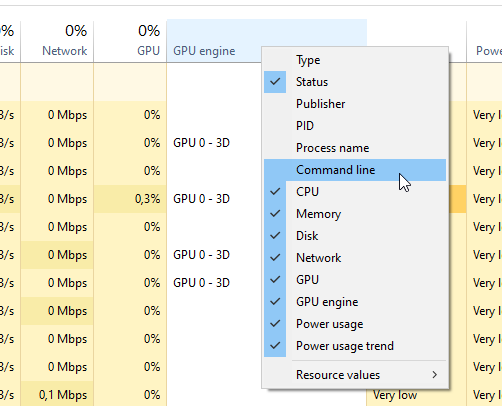
You can also run MCD and look at the command line through the process manager
vivid frost
where can I find the process manager
opal cipher
Right click the taskbar, and select Task manager.
unborn basin
Ctrl+Shift+Escape
opal cipher
Or that..
opal cipher
I'll let you handle this. :D Sorry for butting in
unborn basin
You can always butt in
unborn basin
vivid frost
where can I find the process manager

 fleet bear
Didn't know that. makes mental note
vivid frost
Everyone Thanks SO much for the help, you have helped me a LOT. But I have to go, I will keep you posted and again Thank you so much
opal cipher
Good luck on your journeys.
 astral lake
?download
red patioBOT
Looking to install the CurseForge app?
<:windows:798410728188936222> Windows
Minimum Requirements:
- OS Version: 7, 8.1, 10
- 64 bit Required.
- 350MB storage space.
- Microsoft .Net 4.8
- Intel/AMD quad-core CPU
- 8GB ram
Download: https://download.overwolf.com/install/Download?&PartnerId=4047
If you are having issues with the installer use the URL below to install Overwolf then go to the app store to download CurseForge.
https://content.overwolf.com/downloads/setup/latest/regular.html
<:mac:798410654418862130> Mac
Minimum Requirements:
- OS Version 10.14 or newer.
- 64 bit Required.
Download: https://curseforge.overwolf.com/downloads/curseforge-latest.dmg
:penguin: Linux
Minimum Requirements:
Yes.
Download: :person_shrugging:
rigid turtle
lyric crescent
?mc-installfix
red patioBOT
- Click on the Minecraft Tab on the Left side of the CurseForge App.
- Click button next to the
Create Custom Profileoption. - Click

Repair Installationoption. - Play game.
NOTE: You will not lose any modpacks or worlds, These are saved in the Instances folder. DO NOT TOUCH THIS FOLDER OR YOU WILL LOSE EVERYTHING
rigid turtle
what is minecraft install directory not found
queen storm
Did you do it twice?
rigid turtle
yeah
queen storm
Don't do it twice, just hit play
 last quest
Project analytics, stats of downloads.
fleet bear
They dont exist currently.
last quest
ok
 rare remnant
hi
an invalid folder path was chosen error
and says minecraft not installed but ı installed and runned
lyric crescent
?MC-PATH
red patioBOT
Change your install path to the following:
For Windows: C:\CurseForge
-Go to C:\ drive. Make a new folder. Name it Curseforge.
For Mac: /Users/Shared/CurseForge
If Minecraft is not installed in CurseForge App:
- Click the
 in the top left.
 - Select Minecraft from the list of games.
- Select the
Advancedoption and pick the folder you just made. - Click
Continue.
If Minecraft is installed in CurseForge App:
- Click the
 in the bottom left.
 - Select the Minecraft tab.
- Click
Change. - Select the folder you just made.
:no_entry_sign: Minecraft Files should NOT be installed inside the following locations :no_entry_sign:
:no_entry_sign: .minecraft folder.
:no_entry_sign: OneDrive folders.
:no_entry_sign: Desktop folder.
:no_entry_sign: Drive roots I.E. Directly into the C:\ drive.
:no_entry_sign: iCloud enabled folders.
:no_entry_sign: or any other cloud saved folder.
:no_entry_sign: or folders with non-English characters in them.
If any of the above are in the path you need to change/move it!
 old nymph
wait what does this mean

i put it in a zipfile bc i was sending it to the website from the curseforge app
lyric crescent
!reject-cfhosted
red patioBOT
The following files belong to CurseForge-hosted projects, and should therefore not be added directly to zip files:
-
Remove any mods listed in the error message from the profile you exported. Then reinstall them with the CuseForge app. DO NOT drag and drop files from the site.
-
Export the profile again, open the new zip that was just made. Check for the
overrides/modsfolder. If you still see any mods in that folder do the step above again for each mod. -
Upload the zip once complete and no more mods show in the
overrides/modsfolder.
 inner pumice
can someone help me when ever i try to load in a modpack i load in fine but there is only 2 mods which are forge and mc
 half hawk
When I’m in a mod pack with the twilight forest my game crashes
old nymph
yo lads where do you acually get rid of some of the files from projects
lyric crescent
inner pumice
can someone help me when ever i try to load in a modpack i load in fine but ther...
restart your computer and try again. make sure you are hitting play on curseforge only, not opening minecraft.
lyric crescent
half hawk
When I’m in a mod pack with the twilight forest my game crashes
?projectissue
red patioBOT
Please visit the project page for the content you posted about and look for a way to contact the developer.
Somewhere on the page there is usually a method of contact. Look for one of the following things:
Issuestab like the image below.- Discord link.
- Twitter link.
- Comments section below the project.
If no contact method exists you will either have to remove the project or find a solution on your own.
 lyric crescent
old nymph
yo lads where do you acually get rid of some of the files from projects
lyric crescent
old nymph
yo lads where do you acually get rid of some of the files from projects
unsure what this means
 lyric crescent
well first, why?
deleting the files can potentially mess up users of the project.
If anything you should archive them and then forget they exist. Push a new update and no one will ever know.
old nymph
well it hasnt been approved yet
due to having some files i accidentally drag and dropped
lyric crescent
then it doesnt exist to be deleted
old nymph

but then i get this
the zip file is completely different and i got all the mods off of curseforge and some mods arent in the section in here
 lyric crescent
!reject-cfhosted
red patioBOT
The following files belong to CurseForge-hosted projects, and should therefore not be added directly to zip files:
-
Remove any mods listed in the error message from the profile you exported. Then reinstall them with the CuseForge app. DO NOT drag and drop files from the site.
-
Export the profile again, open the new zip that was just made. Check for the
overrides/modsfolder. If you still see any mods in that folder do the step above again for each mod. -
Upload the zip once complete and no more mods show in the
overrides/modsfolder.
old nymph
thats what i did however
the mods that arent installed in the folder for the project arent showing so i cant remove them
old nymph
yes
but in the new export
i cant find some of them
xerca towers and xerca arent on the folder
lyric crescent
are there mods in the overrides folder?
old nymph
yes
lyric crescent
then.. you didnt follow the instructions?
lyric crescent
did you look in the mods folder for your profile?
they gotta be coming from somewhere
old nymph
thats what im thinking but im looking through the profile and cant find anything of them
they were in the previous one but when i go to curse forge they arent there
should i create a entirely new profile and export it to there?
lyric crescent
huh?
if you plan to make a new profile then you should probably just rebuild it completely. idk what you mean with "export it to there"
old nymph
sorry thats my bad from phrasing
ok so should i re do the profile and then export it from the new profile to the website just in case there are mods that are in there but not showing?
lyric crescent
yea, i guess. i dont really see how that's possible but that would be one way to deal with it
 haughty charm
I've noticed some weird times with my curse points
Sometimes a day gets missed?
vivid frost
@unborn basin & @opal cipher Thanks so much I now have modded minecraft dungeons (BTW it was in this directory: C:\Program Files\WindowsApps\Microsoft.Lovika_1.10.3.0_x64_8wekyb3d8bbwe\Dungeons\Binaries\Win64)
 wintry dock
What is the reason for long waiting times to approve?

1.6 is afther 20 hours not approved and 1.5 took only 3 mins
red patioBOT
Project Moderation Time
Project/File moderation is done on these days unless otherwise mentioned:
Sunday, Monday, Tuesday, Wednesday, Thursday: <t:1631170800:t> - <t:1631199600:t> (Your time)
Friday, Saturday: No Moderation!
Projects are moderated First in, First out. If you submit late in the work day, it will likely get left until the next day!
New Projects or anything flagged for manual review: 1-3 Working Days
Updates to approved projects not needing manual approval: 1 Hour
Changes will only show in the app if the project meets the requirements in the ?sync command and up to 24 hours has passed from when it was accepted.
wintry dock
Okay tomorrow then a new day, hope for an approval... 👍
 flat pelican
Hi can we get this guy banned / remove me from the Modpack that im not involved in?


he is adding random people to his modpack
lyric crescent
link the project
lyric crescent
have you reported it yet?
flat pelican
well ive reported things before and it hasnt been dealt with in months
lyric crescent
Do that.
flat pelican
welp
 viral briar
Guessing the guy has done it to make it appear to others that you were involved in it or support it or just to prompt you to help him. Which obviously the first two is very fraud like and the last is annoying I’m sure . That’s how it comes across
 raw saddle
Hey Guys! My CurseForge App cant find Runes of Magic for Addons. Can anyone help?
old nymph
!sync
lyric crescent
old nymph
!sync
#🟢︱user-bot-spam
lyric crescent
click the file, change release type
old nymph
does the modpack sync automatically or do i have to request it?
lyric crescent
it's automatic but can take a few hours
 lyric crescent
i guess
old nymph
alright cool
 empty rover
hi
i wanted to download voxelmap for 1.12.2 but it doesnt want to download
after the waiting time
it just stops with downloading and goes to cloudflare
 wild lark
Hello everyone! Who knows the mod for raincoats that work on pirate servers? They are displayed only for you and those who have the mod installed.
lyric crescent
?mc-packshare
red patioBOT
There are two ways to share a modpack you've made with others...
Export and Share - For Friends to Small Groups.
- Click the Icon for the modpack.
- Click the button next to play.
- Click

Export. - Select the files that should be included.
- Send the zip to the people that want it! They can follow the instructions in
!mc-installpackto install the pack!
Upload to Curseforge - For Public Release to Everyone.
This options will make your pack public to EVERYONE, it comes with extra requirements and will take some effort to set up.
- Go to here: https://www.curseforge.com/project/432/4471/create
- Fill out the information with a proper description of the pack. This should allow anyone to understand what the pack is.
- Click the Icon for the modpack in the CurseForge app.
- Click the button next to play.
- Click
Export. - Select the files that should be included.
- Open your Project you made on the CurseForge site and Upload the file you just made.
- Wait for Moderation & Sync so it can show up in the client! (See
!syncfor limitations)
lyric crescent
wild lark
Hello everyone! Who knows the mod for raincoats that work on pirate servers? The...
!notcf
red patioBOT
The question you are asking about isn't related to CurseForge. Please use the appropriate game rooms by getting the role from #786424115535544350 or use #👽︱game-support for help.
This room is only for CurseForge Owned & Maintained features/services.
lyric crescent
empty rover
i wanted to download voxelmap for 1.12.2 but it doesnt want to download
How are you trying to download it? also link it.
empty rover
via curseforge
lyric crescent
curseforge what
empty rover
site
lyric crescent
website/app
empty rover
lyric crescent
downloaded fine
red patioBOT
Project Moderation Time
Project/File moderation is done on these days unless otherwise mentioned:
Sunday, Monday, Tuesday, Wednesday, Thursday: <t:1631170800:t> - <t:1631199600:t> (Your time)
Friday, Saturday: No Moderation!
Projects are moderated First in, First out. If you submit late in the work day, it will likely get left until the next day!
New Projects or anything flagged for manual review: 1-3 Working Days
Updates to approved projects not needing manual approval: 1 Hour
Changes will only show in the app if the project meets the requirements in the ?sync command and up to 24 hours has passed from when it was accepted.
flat pelican
lyric crescent
have you reported it yet?
I keep getting added back to the Pack -_- and i know this wont be resolved for months
lyric crescent
Did you report it?
flat pelican
yes and as I said ive reported other things that never get resolved
lyric crescent
K, i'll mention it to them as well. ty
 south mantle
are 1.16.4 mods compatible with .5 mods
lyric crescent
some might be
 mighty parcel
help pls
the curseforge app isn't downloading any mc modpacks and keeps giving me a timeout error
 steel belfry
uh no. take that crap out of here
steel belfry
mighty parcel
the curseforge app isn't downloading any mc modpacks and keeps giving me a time...
are you sure CF does MC?
mighty parcel
steel belfry
are you sure CF does MC?
yes, i have the curseforge app linked to minecraft
steel belfry
mighty parcel
yes, i have the curseforge app linked to minecraft
wow, most of my MC mods are from twitch
mighty parcel
wha- how do you get minecraft mods from twitch?
steel belfry
mighty parcel
wha- how do you get minecraft mods from twitch?
it's easy, get the twitch app
mighty parcel
on pc?
steel belfry
mighty parcel
on pc?
yes
mighty parcel
are all curseforge modpacks there? bc i want to get the better minecraft plus modpack
i keep trying to download said modack but it just keeps getting stuck on the blue skies mod
lyric crescent
Why are we talking about twitch? Twitch hasn't had minecraft stuff for a year now.
mighty parcel
holy frick the download's actually working
yay
aand i just got an error called "Exception during webclient"
w h y
red patioBOT
WebClient errors are from networking issues to your computer. You can try a few things to fix it:
- Restart the computer.
- Restart your router/modem.
- Try another internet source like a hotspot, wired connection or moving closer to the WiFi.
- Pause/Stop other things using the internet. (Streams, music, etc)
- If this still doesn't work, try again in an hour and hope your connection is stable.
mighty parcel
ok
 steep wedge
Is this for windows 11 released?
south mantle
steel belfry
uh no. take that crap out of here
what was the og message
lyric crescent
doesnt matter
south mantle
k
 grand seal
Getting a Messing dependency error 3014000 when trying to download "Fear the Brian Departed" minecraft pack. Is this an issue with Curse or the pack itself? Replicated issue across multiple systems on multiple sites.
lyric crescent
screenshot
 lyric crescent
Passed it on to the CF devs, should be fixed in a few hours.
grand seal
thank you!
 pastel patrol
how do i run liteloader with forge through curse forge?
 lyric crescent
if there is a overrides/mods folder, is anything inside?
Did you include a resource pack?
lyric crescent
?ticket-app
red patioBOT
:bug: Reporting via the CurseForge App :bug:
-
Click the
 icon in the bottom left.
 -
Select

Open a Ticket. -
Fill out the form with accurate detailed information, "It doesn't work" isn't helpful! What exactly doesn't work and why doesn't it work should be easy to answer!
-
Make sure to upload your Overwolf logs with the
Upload Fileoption on the ticket, information on how to get these logs can be found here https://support.overwolf.com/en/support/solutions/articles/9000176827-how-to-get-your-overwolf-logs -
Submit!

 signal ridge
!status
red patioBOT
Project Moderation Time
Project/File moderation is done on these days unless otherwise mentioned:
Sunday, Monday, Tuesday, Wednesday, Thursday: <t:1631170800:t> - <t:1631199600:t> (Your time)
Friday, Saturday: No Moderation!
Projects are moderated First in, First out. If you submit late in the work day, it will likely get left until the next day!
New Projects or anything flagged for manual review: 1-3 Working Days
Updates to approved projects not needing manual approval: 1 Hour
Changes will only show in the app if the project meets the requirements in the ?sync command and up to 24 hours has passed from when it was accepted.
 shell copper
Is it possible to forward a support request from content managers to actual Curseforge Launcher developers?
I have a modpack that is structurally correct, approved in CF and works in GDLauncher and MultiMC (importing from the CF format), but Curseforge Launcher is having an issue parsing it.
#101233 is the support request
lyric crescent
Fabric?
shell copper
Yes
lyric crescent
You are likely using a fabric version not on cf yet
shell copper
But the modpack version was created on CF launcher itself
and exported from it
just cannot be imported back nor downloaded
Also tried the newest, v0.182.2.1
inner pumice
lyric crescent
restart your computer and try again. make sure you are hitting play on curseforg...
sorry for the late reply but i restarted my pc and still didn't work
whenever i look in the folders they have no mods in them
lyric crescent
what did you install then
lyric crescent
?mc-path
red patioBOT
Change your install path to the following:
For Windows: C:\CurseForge
-Go to C:\ drive. Make a new folder. Name it Curseforge.
For Mac: /Users/Shared/CurseForge
If Minecraft is not installed in CurseForge App:
- Click the in the top left.
- Select Minecraft from the list of games.
- Select the
Advancedoption and pick the folder you just made. - Click
Continue.
If Minecraft is installed in CurseForge App:
- Click the in the bottom left.
- Select the Minecraft tab.
- Click
Change. - Select the folder you just made.
:no_entry_sign: Minecraft Files should NOT be installed inside the following locations :no_entry_sign:
:no_entry_sign: .minecraft folder.
:no_entry_sign: OneDrive folders.
:no_entry_sign: Desktop folder.
:no_entry_sign: Drive roots I.E. Directly into the C:\ drive.
:no_entry_sign: iCloud enabled folders.
:no_entry_sign: or any other cloud saved folder.
:no_entry_sign: or folders with non-English characters in them.
If any of the above are in the path you need to change/move it!
 shell roost
So since Microsoft is forcing Mojang accounts to merge to a Microsoft account, has the launcher implemented the Microsoft account login yet?
lyric crescent
has been for months

 shell roost
Ah okay, cause I have hesitated to merge do to fear of not being able to play my packs.
I actually wish they would have made that optional
lyric crescent
then no one would do it, defeating the purpose
queen storm
shell roost
Ah okay, cause I have hesitated to merge do to fear of not being able to play my...
Curseforge uses the vanilla launcher, so would work regardless
shell roost
Ah okay so that isnt directly tied to the launcher itselfand accessing my modpacks, but rather when I hit play it would prompt me for that login once merged. Gotcha
I always get nervous when theres a merger
queen storm
Curseforge just tells the vanilla launcher where to look instead of doing it themselves
shell roost
nice
inner pumice
so what do i do with my problem
lyric crescent
what i said to do
shell roost
Thank you for the quick answers y'all
inner pumice
got it thanks
 strange bone
!webclient
red patioBOT
WebClient errors are from networking issues to your computer. You can try a few things to fix it:
- Restart the computer.
- Restart your router/modem.
- Try another internet source like a hotspot, wired connection or moving closer to the WiFi.
- Pause/Stop other things using the internet. (Streams, music, etc)
- If this still doesn't work, try again in an hour and hope your connection is stable.
 raw fox
why does this keep happening

 ornate storm
how do i look up or load my friends custom profile, he made a mod pack but we cant figure out how to play it without both of us looking up every mod individually then hoping the server he paid for lets us both play
lyric crescent
? mc-packshare
red patioBOT
There are two ways to share a modpack you've made with others...
Export and Share - For Friends to Small Groups.
- Click the Icon for the modpack.
- Click the button next to play.
- Click
Export. - Select the files that should be included.
- Send the zip to the people that want it! They can follow the instructions in
!mc-installpackto install the pack!
Upload to Curseforge - For Public Release to Everyone.
This options will make your pack public to EVERYONE, it comes with extra requirements and will take some effort to set up.
- Go to here: https://www.curseforge.com/project/432/4471/create
- Fill out the information with a proper description of the pack. This should allow anyone to understand what the pack is.
- Click the Icon for the modpack in the CurseForge app.
- Click the button next to play.
- Click
Export. - Select the files that should be included.
- Open your Project you made on the CurseForge site and Upload the file you just made.
- Wait for Moderation & Sync so it can show up in the client! (See
!syncfor limitations)
 lyric crescent
? ticket-app
red patioBOT
:bug: Reporting via the CurseForge App :bug:
-
Click the
icon in the bottom left. -
Select
Open a Ticket. -
Fill out the form with accurate detailed information, "It doesn't work" isn't helpful! What exactly doesn't work and why doesn't it work should be easy to answer!
-
Make sure to upload your Overwolf logs with the
Upload Fileoption on the ticket, information on how to get these logs can be found here https://support.overwolf.com/en/support/solutions/articles/9000176827-how-to-get-your-overwolf-logs -
Submit!
lyric crescent
That's what the instructions are for
 verbal stirrup
so no fast way to fix?
lyric crescent
Making a ticket is the way to fix..
 hoary flame
++++++++++++++++++++
signal ridge
hoary flame
++++++++++++++++++++
Do you need help with something?
 fervent crown
can someone help?
fervent crown
I was playing some sky factory 4 on a 2018 Macbook Air using the curse forge app, and a pattern emerged- after playing more than about 40mins without saving and joining back, then after saving to quit, the screen freezes, and doesn't do anything. The app isn't marked as "not responding", but it seems frozen, and resizing the window looks weird(as seen underneath). I let it run overnight, still hasn't saved. This has happened before with other modpacks and just mods. After forcequitting, I lost progress. Why is this happening? Why won't it just save and go to the main menu?

 stoic panther
Hello!
I want to turn off the force threaded chunk rendering but i cant find where
fervent crown
this has happened with both mods and modpacks, but only seemed to occur in 1.12
signal ridge
fervent crown
I was playing some sky factory 4 on a 2018 Macbook Air using the curse forge app...
How much memory do you have allocated to the CurseForge app?
fervent crown
lemme check
5920 mb
and i have 8 in total
but ive played with mods before...
and I had the same issue
If anyone has had the same issue please ping me
lyric crescent
Well this is an issue with your computer, not curseforge
 plush cypress
I can log in via Microsoft account on the "minecraft launcher" but not in curseforge, where it tells me that if i have migrated, to use it.. i can't even use my old login to login. Am I not understanding something? I'm on windows?
 raw siren
any way i can add a curse forge modpack into a server that i run off my pc?
fallen loom
?mc-installserver
red patioBOT
How to **manually** install a server - **On your own PC**
- Check if the modpack has a server pack, if it does: use that and skip below.
- Go to the Forge website http://files.minecraftforge.net/ and download the Installer for the forge version the pack is using.
- Run the installer and choose
Install server. Do not install to your desktop. Also do not install inside a OneDrive folder. - Run the server using the forge.jar. A file called
eula.txtwill be generated. Open it and changeeula=falsetoeula=true - From the Client; Copy the
modsfolder,configfolder, and any other folders needed for the pack to work into the server folder. If the modpack has a server pack, use this instead! - Run the server again.
- Port forward your machine if needed. (Google it)
Long version: https://pastebin.com/83DXfGTH
raw siren
thx bby
fleet bear
plush cypress
I can log in via Microsoft account on the "minecraft launcher" but not in cursef...
It doesnt say that anywhere.
fervent crown
lyric crescent
Well this is an issue with your computer, not curseforge
have you/anyone you know every experienced this?
plush cypress
fleet bear
It doesnt say that anywhere.
when you launch curseforge and click play on one of your modpacks, the minecraft launcher comes up.. it tells you to use your microsoft log in if you you've migrated. Maybe mine is broken, but it does tell me that. They even said not everyone will get that notification.
where the red is, is where it prompted me to migrate
 fleet bear
!MC-LOGIN
red patioBOT
Minecraft Logins
CurseForge does not handle or touch the Minecraft Login.
If you have a DEMO button instead of a PLAY button in the launcher you are logged into an account that does not own the game. CurseForge requires you to own the game to use it.
Follow the steps in the pictures below. If you bought Minecraft after October 2020 or you have transferred your account you will use a Microsoft account.
Otherwise you must use a Mojang account until you transfer it!

 fossil crane
what does this mean?
The game crashed whilst there was a severe problem during mod loading that has caused the game to fail
Error: cpw.mods.fml.common.LoaderException: java.lang.NoClassDefFoundError: JinRyuu/DragonBC/common/Npcs/EntityAura
Exit Code: -1
lyric crescent
?mc-log
red patioBOT
Sending logs for support.
- Right-click the modpack profile icon OR click the button in the modpack profile.
- Click
Open Folder. - Open the
logsfolder. - Drag and drop the FILE named
latestORdebuginto discord.
fossil crane
are you talking to me?
lyric crescent
dont know who else i'd be talking to
lyric crescent
havent looked yet
fossil crane
ok
signal ridge
Got codeChicken lib installed?
signal ridge
one of your mods needs it.
fossil crane
oh ok
signal ridge
Would recommend using the Curseforge app. Makes this easier
fossil crane
yeah I made a modpack and played it from the curseforge app
signal ridge
Not according to this log.
lyric crescent
did you follow the instructions to get the log?
signal ridge
Curseforge doesnt touch the .minecraft folder.
lyric crescent
curseforge does not use appdata
signal ridge
Reading it now
fossil crane
ok
signal ridge
Looks like an issue with Jwan's DBC Essentials mod
fossil crane
what about it?
signal ridge
That mod is erroring.
cpw.mods.fml.common.LoaderException: java.lang.NoClassDefFoundError: JinRyuu/DragonBC/common/Npcs/EntityAura
Means it cannot find that class. You should report it to the mod dev
fossil crane
but that dosent happen when I run it by itself?
signal ridge
Would have to putt this mod in first then, then add a dew mods at a time testing in between till the pack crashes.
fossil crane
oh ok
signal ridge
Once you figure out which mod is the problem report it to the mods author
signal ridge
You wait patiently. Can take time for Authors to look at things, Otherwise just dont use the mod thats causing the crash for now
 placid inlet
Hi. In immersive railroading, Could anyone tell me how to display the circle map in the upper right hand corner ?
signal ridge
Do you have a map mod installed?
placid inlet
no. which one do you think I would need.
signal ridge
What mc version are you on?
placid inlet
running java forge 1.16.5
fallen loom
You're sure the minimap is from IR?
signal ridge
Most common is, JourneyMap
 quartz cipher
Do 1.12 mods work for 1.16?
lyric crescent
no
placid inlet
trying to get the map shown in this tutorial

This tutorial goes over IR Tracks in detail.
Contents:
INTRO
1:40 Building Tracks in Survival
3:07 Vanilla Comparison
3:37 Track Blueprint GUI
TRACK TYPES
4:02 Straight
4:09 Crossing
4:59 Slope
5:16 Turn
6:02 Switch
7:03 Turntable
9:40 Custom Curve
MISC GUI
13:17 Track Length/Radius 24:35 Max Length
16:39 Rail Bed
18:10 Rail Bed Fill
17:27 r...
lyric crescent
!notcf
red patioBOT
The question you are asking about isn't related to CurseForge. Please use the appropriate game rooms by getting the role from #786424115535544350 or use #👽︱game-support for help.
This room is only for CurseForge Owned & Maintained features/services.
placid inlet
ok. sorry.
fervent crown
repost someone know the solution to my problem?
viral briar
fervent crown
*repost* someone know the solution to my problem?
as I can see from yamza had said to you 2-3 hours ago, it seems to be a problem with your computer and not curseforge
not something we can fix for you here.
fervent crown
😦
digital roost
Anyone know of a mod that removes the damage from campfires?
It's annoying and idk how to fix it
I'll send in my mod list
lyric crescent
!notcf
red patioBOT
The question you are asking about isn't related to CurseForge. Please use the appropriate game rooms by getting the role from #786424115535544350 or use #👽︱game-support for help.
This room is only for CurseForge Owned & Maintained features/services.
 hybrid garden
hello
anyone that can help
when i open the curseforge - installer
it gets me this error

 outer merlin
 rotund gate
guys i need help
i cant download sevtech
every time its almost downloaded an error occurs
what does this mean

and how to fix it
pls help
 storm bane
I think it cant connect to the server for some reason
maybe an error with the servers
storm bane
^
bruh i wish forge was easier to debug
like wth does this mean

like what mod is being reffrenced?
fallen loom
That's an issue with mixin
storm bane
this is why i like fabric more
fallen loom
This is an issue with the framework that Fabric's hooks are based on, dude xD
Whatever is providing Mixin to 1.12.2 (or earlier) Forge is borked
shell copper
storm bane
where can i find support for this problem
storm bane
ty!
opal cipher
Yeah, sorry, was in an escalator, didn't have time to write where it should be x) Would've fallen over
hybrid garden
can somebody answer me pls?
anyone that can help
when i open the curseforge - installer
it gets me this error
 opal cipher
!getcf
red patioBOT
Looking to install the CurseForge app?
<:windows:798410728188936222> Windows
Minimum Requirements:
- OS Version: 7, 8.1, 10
- 64 bit Required.
- 350MB storage space.
- Microsoft .Net 4.8
- Intel/AMD quad-core CPU
- 8GB ram
Download: https://download.overwolf.com/install/Download?&PartnerId=4047
If you are having issues with the installer use the URL below to install Overwolf then go to the app store to download CurseForge.
https://content.overwolf.com/downloads/setup/latest/regular.html
<:mac:798410654418862130> Mac
Minimum Requirements:
- OS Version 10.14 or newer.
- 64 bit Required.
Download: https://curseforge.overwolf.com/downloads/curseforge-latest.dmg
:penguin: Linux
Minimum Requirements:
Yes.
Download: :person_shrugging:
opal cipher
Try the other link.
 smoky fossil
Why does this keep happening?

 dusk siren
I have cloned my old hardrive into a new one recently, it shows i have no mods and when i change the minecraft modding folder to what it used to be just on the new drive it doesnt detect any of the mods in instances, i tried making a new folder and cuting a mod into the instances of that one and it still doesnt work.
I also closed out of forge when doing that
queen storm
Restarted your pc as well?
digital roost
is curseforge available for windows 11
digital roost
My modpack got rejected again, (file) and it says to make plugins a jar file, but I do not have any plugins?
queen storm
Project link please
queen storm
Got resource packs in there?
queen storm
Check it please when you have access
digital roost
if I am lying it is cos I then have created storage network texture pack
 thin saffron
"Could not verify Minecraft Version." help?
queen storm
How much free space do you have on your disk?
 gaunt pebble
If the program now works with Windows 11?
gaunt pebble
What does soon mean roughly?
 quasi cradle
I don't know if you know but twitch.tv was leaked here is a screenshot to prove it https://media.discordapp.net/attachments/895249279818563584/895249897916342282/unknown.png?width=576&height=671

the torret found by vampherion
in his server
@fleet bear I'm pinging you only so you can know immediately
this is scary
fleet bear
Yes, we know.
 dark spruce
i am trying to make a custom profile but i cant can anyone help me?
gaunt pebble
Yes, I'm still thinking about loading Win11 or waiting for something.
dark spruce
and it says when i try to delete mods one or more errors
smoky fossil
@storm bane Thx, But I already fixed it 🙂
 vague ferry
Is my curseforge info safe? Twitch has just had all their databases hacked
fleet bear
Twitch didn't have all of it's data hacked (that is known and confirmed)
They had the source code and what streamers earned leaked.
 dense aspen
Hi, if I uses my microsoft account to log into curseforge, do i need to reset my microsoft password as well?
what a bummer...
vague ferry
fleet bear
They had the source code and what streamers earned leaked.
what about people who had to fill out tax forms to earn through curseforge? I am pretty sure that was sent to Twitch
fleet bear
That was done via amazon, not twitch. Also, as mentioned there's no personal information confirmed to be leaked thus far.
vague ferry
fleet bear
That was done via amazon, not twitch. Also, as mentioned there's no personal inf...
I hope they confirm that personal info has not leaked. I have tax forms for Twitch despite never streaming, so now I am very confused
with reference to curse llc
queen storm
dense aspen
Hi, if I uses my microsoft account to log into curseforge, do i need to reset my...
You login with microsoft on minecraft, not curseforge
queen storm
Where you don't login
dense aspen
i have no idea how it works
dense aspen
No, but I uses microsoft account to use curseforge, which is set to auto login
queen storm
No, you are logging in on minecraft, not on curseforge
dense aspen
oh, okay mb thanks
 light bronze
how do i add proximity chat for minecraft?
lyric crescent
?mc-installmods
red patioBOT
How to install mods in CurseForge App.
- Click
+ Create Custom Profile - Name it, select the required Minecraft version, select the Forge version (usually the highest number), click
Create. - Click the profile icon.
- Click
Add More Content - Search and install the desired mods.
- Start the game!
How to install mods not on CurseForge.
- Right click the profile picture or Open the profile and click the Icon next to the play button.
- Click
Open Folder. - Drag the mod(s) into the
modsfolder. (Note: Some mods will require others, to run. Make sure to read the instructions for the mod!) - Start the game!
 fleet bear
digital roost
queen storm
Check it please when you have access
fleet bear
digital roost
queen storm
Check it please when you have access
back, Quark made me a .zip for texture pack
queen storm
digital roost
back, Quark made me a .zip for texture pack
Remove it, that is causing the issue
lyric crescent
If the mod made the zip, then it will make the zip again when run, so there is no need to include it.
digital roost
ah ok
then lets upload again 🙂
so
I dont need backups, saves and resource packs?
lyric crescent
are those things you want people to have
digital roost
where are resource packs loacted?
lyric crescent
is there a reason you would be sending those to people?
if the answer is "no" or "i dont know", then the answer is probably just no
 dry night
wat shud i do?
 lyric crescent
?mc-path
red patioBOT
Change your install path to the following:
For Windows: C:\CurseForge
-Go to C:\ drive. Make a new folder. Name it Curseforge.
For Mac: /Users/Shared/CurseForge
If Minecraft is not installed in CurseForge App:
- Click the in the top left.
- Select Minecraft from the list of games.
- Select the
Advancedoption and pick the folder you just made. - Click
Continue.
If Minecraft is installed in CurseForge App:
- Click the in the bottom left.
- Select the Minecraft tab.
- Click
Change. - Select the folder you just made.
:no_entry_sign: Minecraft Files should NOT be installed inside the following locations :no_entry_sign:
:no_entry_sign: .minecraft folder.
:no_entry_sign: OneDrive folders.
:no_entry_sign: Desktop folder.
:no_entry_sign: Drive roots I.E. Directly into the C:\ drive.
:no_entry_sign: iCloud enabled folders.
:no_entry_sign: or any other cloud saved folder.
:no_entry_sign: or folders with non-English characters in them.
If any of the above are in the path you need to change/move it!
 wise obsidian
Hello
 torpid dove
im currently tryung to make a modpack for 1.16.5 using CF 36.2.4 and after it completes the registries it crashes and says this
"The game crashed whilst rendering overlay
Error: java.lang.NullPointerException: Rendering overlay
Exit Code: -1" Inside of the minecraft launcher anyone have some help?
lyric crescent
?mc-log
red patioBOT
Sending logs for support.
- Right-click the modpack profile icon OR click the button in the modpack profile.
- Click
Open Folder. - Open the
logsfolder. - Drag and drop the FILE named
latestORdebuginto discord.
red patioBOT
Please visit the project page for the content you posted about and look for a way to contact the developer.
Somewhere on the page there is usually a method of contact. Look for one of the following things:
Issuestab like the image below.- Discord link.
- Twitter link.
- Comments section below the project.
If no contact method exists you will either have to remove the project or find a solution on your own.
torpid dove
is it actually just geckolib...
omfg
okay so until they fix the mod I can't get my modpack to work?
lyric crescent
answer is in the message above
torpid dove
yeah I see that now
okay it works without geckoolib idfk what used it
think CreateDeco may have but thats disabled
cuz it was being buggy af
 signal widget
question; my modpack just got approved yesterday, and when i look it up on the curseforge app it's not there. does it take a certain amount of time to get there? a certain amount of downloads?
lyric crescent
link?
signal widget
lyric crescent
!sync
red patioBOT
Sync and your Project.
CurseForge App and site do not share the same requirements! You can find things on the site but this does not mean it will be in the app!
For a mod to show up in the app:
- Projects MUST have a file marked as RELEASE or BETA
- Projects MUST be APPROVED
- Projects MUST have a file marked for the GAME VERSION SELECTED/LOADED
- Projects CAN'T be EXPERIMENTAL
- Projects CAN'T be ABANDONED
Files can take a while to show up in the app. If your files still have not shown up either your project is new and you have yet to mark a file as Release/Beta or there is issues with the sync system making it slow.
Vote this issue up if you would like to know when the last sync was! https://curseforge-ideas.overwolf.com/ideas/CF-I-1617
signal widget
thank you!
 hoary temple
!optifine
signal widget
im so sorry i have another question, how do i tell if my project is marked as beta or release? i think i marked it as beta but i cant find where i can confirm
lyric crescent
the icon next to the file
signal widget
oh i see! thank you!
lyric crescent
!status
red patioBOT
Project Moderation Time
Project/File moderation is done on these days unless otherwise mentioned:
Sunday, Monday, Tuesday, Wednesday, Thursday: <t:1631170800:t> - <t:1631199600:t> (Your time)
Friday, Saturday: No Moderation!
Projects are moderated First in, First out. If you submit late in the work day, it will likely get left until the next day!
New Projects or anything flagged for manual review: 1-3 Working Days
Updates to approved projects not needing manual approval: 1 Hour
Changes will only show in the app if the project meets the requirements in the ?sync command and up to 24 hours has passed from when it was accepted.
 neat sapphire
am i obligated to install curseforge at c: ?
lyric crescent
no, you can put it wherever you want barring a few exceptions
neat sapphire
i can't update or delete my minecraft modpacks instaces
everytime it try to find a path that do not exist, always the same for each isntance
lyric crescent
then you should probably change the path
neat sapphire
is possible to change the path of each instance?
lyric crescent
...no?
neat sapphire
i never saw this option
lyric crescent
?mc-path
red patioBOT
Change your install path to the following:
For Windows: C:\CurseForge
-Go to C:\ drive. Make a new folder. Name it Curseforge.
For Mac: /Users/Shared/CurseForge
If Minecraft is not installed in CurseForge App:
- Click the in the top left.
- Select Minecraft from the list of games.
- Select the
Advancedoption and pick the folder you just made. - Click
Continue.
If Minecraft is installed in CurseForge App:
- Click the in the bottom left.
- Select the Minecraft tab.
- Click
Change. - Select the folder you just made.
:no_entry_sign: Minecraft Files should NOT be installed inside the following locations :no_entry_sign:
:no_entry_sign: .minecraft folder.
:no_entry_sign: OneDrive folders.
:no_entry_sign: Desktop folder.
:no_entry_sign: Drive roots I.E. Directly into the C:\ drive.
:no_entry_sign: iCloud enabled folders.
:no_entry_sign: or any other cloud saved folder.
:no_entry_sign: or folders with non-English characters in them.
If any of the above are in the path you need to change/move it!
neat sapphire
lyric crescent
?mc-path
instance, not the app
lyric crescent
i said no
 soft meteor
where do i ask for reward claiming related stuff?
lyric crescent
what about it
soft meteor
what does "Paypal Order was sent to accounting for fulfillment." means
lyric crescent
means it's waiting to be fulfilled by accounting
lyric crescent
they only pay out once a month
soft meteor
sure as hell i dont like losing $400.0

 final eagle
anyone how how make Eternals Work?
lyric crescent
what is that
 lyric crescent
send a log in #👽︱game-support
lyric crescent
the issue is not related to curseforge which is why i moved it to another channel
neat sapphire
i change the instance path to another folder and copied my stance for this folder
curseforge still trying to find every modpack at the same wrong modpack path
lyric crescent
Try a restart
lyric crescent
show the message
neat sapphire
 lyric crescent
any reason you didnt change to the path the bot says?
neat sapphire
it tries farming valley for any modpáck
this is why i asked "am i obligated to install curseforge at c: ?"
red patioBOT
:bug: Reporting via the CurseForge App :bug:
-
Click the
icon in the bottom left. -
Select
Open a Ticket. -
Fill out the form with accurate detailed information, "It doesn't work" isn't helpful! What exactly doesn't work and why doesn't it work should be easy to answer!
-
Make sure to upload your Overwolf logs with the
Upload Fileoption on the ticket, information on how to get these logs can be found here https://support.overwolf.com/en/support/solutions/articles/9000176827-how-to-get-your-overwolf-logs -
Submit!
 rustic sable
Tried making a modpack for forge 1.17.1 on the curseforge launcher, but when it started making the modpack and almost finished it deleted itself and the error Curse.Radium.Installmanagement.InstallTaskFailedException appeared. I've uninstalled and reinstalled curseforge, and the problem was not fixed. What do I do to fix this?
 sudden mulch
win11 no insider :(
 signal ridge
Announcement on W11 #📢︱news message
 cerulean gate
i got the problem with missing dependencies 3106433 pls help
lyric crescent
screenshot
lyric crescent
rustic sable
Tried making a modpack for forge 1.17.1 on the curseforge launcher, but when it ...
?mc-path
red patioBOT
Change your install path to the following:
For Windows: C:\CurseForge
-Go to C:\ drive. Make a new folder. Name it Curseforge.
For Mac: /Users/Shared/CurseForge
If Minecraft is not installed in CurseForge App:
- Click the in the top left.
- Select Minecraft from the list of games.
- Select the
Advancedoption and pick the folder you just made. - Click
Continue.
If Minecraft is installed in CurseForge App:
- Click the in the bottom left.
- Select the Minecraft tab.
- Click
Change. - Select the folder you just made.
:no_entry_sign: Minecraft Files should NOT be installed inside the following locations :no_entry_sign:
:no_entry_sign: .minecraft folder.
:no_entry_sign: OneDrive folders.
:no_entry_sign: Desktop folder.
:no_entry_sign: Drive roots I.E. Directly into the C:\ drive.
:no_entry_sign: iCloud enabled folders.
:no_entry_sign: or any other cloud saved folder.
:no_entry_sign: or folders with non-English characters in them.
If any of the above are in the path you need to change/move it!
sudden mulch
signal ridge
Announcement on W11 https://discord.com/channels/428228256236306434/525372338653...
thanks
rustic sable
...but I have a curseforge folder.
I've been using curseforge for the past, I don't know, year or so and it's been working fine
signal ridge
rustic sable
I've been using curseforge for the past, I don't know, year or so and it's been ...
Goto > Minecraft tab > Screen shot the path the app is using
 signal ridge
ok, now do what the bot says
cerulean gate
pls Help
 signal ridge
cerulean gate
pls Help
signal ridge
cerulean gate
pls Help
Forwarding to those that can fix the error. Issue on CF server side
lyric crescent
rustic sable
everything exists
if you dont want to move it you can make a ticket instead
?ticket-app
red patioBOT
:bug: Reporting via the CurseForge App :bug:
-
Click the
icon in the bottom left. -
Select
Open a Ticket. -
Fill out the form with accurate detailed information, "It doesn't work" isn't helpful! What exactly doesn't work and why doesn't it work should be easy to answer!
-
Make sure to upload your Overwolf logs with the
Upload Fileoption on the ticket, information on how to get these logs can be found here https://support.overwolf.com/en/support/solutions/articles/9000176827-how-to-get-your-overwolf-logs -
Submit!
rustic sable
signal ridge
ok, now do what the bot says
how would I direct it to a new folder if that exact folder already exists
rustic sable
lyric crescent
if you dont want to move it you can make a ticket instead
I've opened a ticket
I'll try to replace the curseforge folder but if that doesn't work that's weird
lyric crescent
i dont think you actually read the bot message
signal ridge
Make a new one like the bot says, reinstall your packs, move any world saves over that you want to keep
rustic sable
Hold on
this is weird
I tried creating a 1.12.2 modpack for forge and that works
so it's specific to creating 1.17.1 modpack
lyric crescent
ok, then wait for the ticket
 floral grove
did the curseforge accounts get leaked (passwords) because i heard that they are related to twitch in an article i read
rustic sable
strange, seems to be specific to forge 1.17.1 as well
tried making a fabric 1.17.1 modpack and that works just fine
not many forge players play on 1.17 that may be why the issue is unreported
signal ridge
You mean Forge 36.2.4 not CF
torpid dove
yea
signal ridge
#👽︱game-support for this
torpid dove
oh
 covert pendant

 red patioBOT
Change your install path to the following:
For Windows: C:\CurseForge
-Go to C:\ drive. Make a new folder. Name it Curseforge.
For Mac: /Users/Shared/CurseForge
If Minecraft is not installed in CurseForge App:
- Click the in the top left.
- Select Minecraft from the list of games.
- Select the
Advancedoption and pick the folder you just made. - Click
Continue.
If Minecraft is installed in CurseForge App:
- Click the in the bottom left.
- Select the Minecraft tab.
- Click
Change. - Select the folder you just made.
:no_entry_sign: Minecraft Files should NOT be installed inside the following locations :no_entry_sign:
:no_entry_sign: .minecraft folder.
:no_entry_sign: OneDrive folders.
:no_entry_sign: Desktop folder.
:no_entry_sign: Drive roots I.E. Directly into the C:\ drive.
:no_entry_sign: iCloud enabled folders.
:no_entry_sign: or any other cloud saved folder.
:no_entry_sign: or folders with non-English characters in them.
If any of the above are in the path you need to change/move it!
lyric crescent
?mc-path
 wild cape
hello, when I start the game it tells me error 0 is what it is normal I use it forever stranded as modpack
lyric crescent
?mc-log
red patioBOT
Sending logs for support.
- Right-click the modpack profile icon OR click the button in the modpack profile.
- Click
Open Folder. - Open the
logsfolder. - Drag and drop the FILE named
latestORdebuginto discord.
wild cape
lyric crescent
?mc-installfix
red patioBOT
- Click on the Minecraft Tab on the Left side of the CurseForge App.
- Click button next to the
Create Custom Profileoption. - Click
Repair Installationoption. - Play game.
NOTE: You will not lose any modpacks or worlds, These are saved in the Instances folder. DO NOT TOUCH THIS FOLDER OR YOU WILL LOSE EVERYTHING
 dusky shore
Hello, I don't know why but I have an error, Curse said that it can't create Minecraft directories
lyric crescent
?mc-path
red patioBOT
Change your install path to the following:
For Windows: C:\CurseForge
-Go to C:\ drive. Make a new folder. Name it Curseforge.
For Mac: /Users/Shared/CurseForge
If Minecraft is not installed in CurseForge App:
- Click the in the top left.
- Select Minecraft from the list of games.
- Select the
Advancedoption and pick the folder you just made. - Click
Continue.
If Minecraft is installed in CurseForge App:
- Click the in the bottom left.
- Select the Minecraft tab.
- Click
Change. - Select the folder you just made.
:no_entry_sign: Minecraft Files should NOT be installed inside the following locations :no_entry_sign:
:no_entry_sign: .minecraft folder.
:no_entry_sign: OneDrive folders.
:no_entry_sign: Desktop folder.
:no_entry_sign: Drive roots I.E. Directly into the C:\ drive.
:no_entry_sign: iCloud enabled folders.
:no_entry_sign: or any other cloud saved folder.
:no_entry_sign: or folders with non-English characters in them.
If any of the above are in the path you need to change/move it!
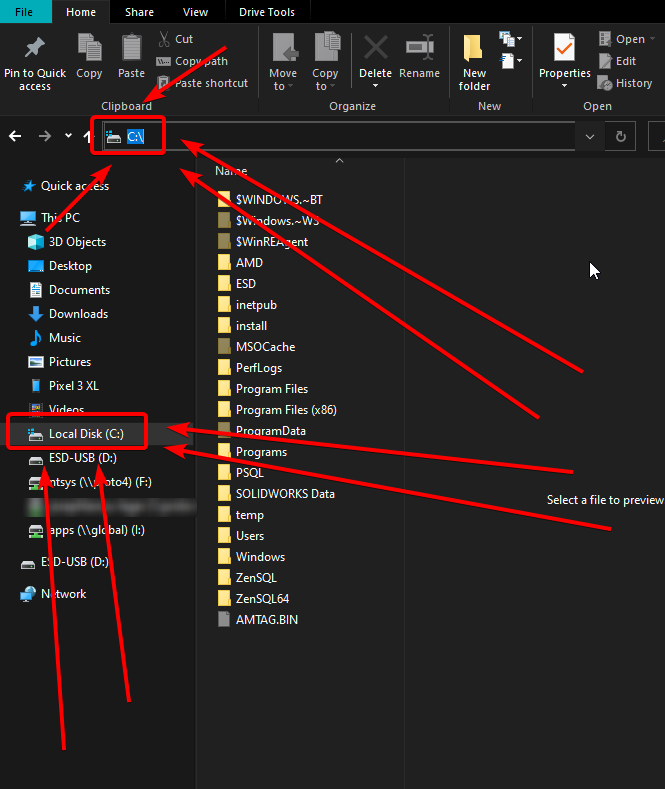
dusky shore
I don't have C:\drive ?
lyric crescent
are you on windows?
dusky shore
Yes
lyric crescent
then you have some drive that your system runs on
dusky shore
But why the f Minecraft is not installed ?
lyric crescent
i think the error says why the f minecraft not installed
lyric crescent
curseforge does not use the vanilla minecraft files
i know exactly what you were saying
lyric crescent
so do the one the instructions say?
dusky shore
 lyric crescent
 dusky shore
Yes I know this, but C: is not in the tab by default
lyric crescent
then what is
lyric crescent
C is the name of the drive..
signal ridge
Your not going to see the word drive. Just C:\ when your in it
dusky shore
Oh it's the NAME OF THE DRIVE REALLY, I know this
Ok I see I think
I need to go to the drive manually right ?
lyric crescent
yes
dusky shore
Ah ok
I have it on D: disk but I lost my instances I think
Idk why my Curse is reset
I lost all my instances but I still have them in my folder
Look
 lyric crescent
yes, moving the install folder means the instances are no longer there. since they install to the install folder. you can try moving them over, or just reinstall the packs and move your saves.
dusky shore
Ok thanks, I'll try to reinstall on my C: disc I think
 left pewter
Almost the same problem i have... So, if all folders were moved into the install folder, they'll go to instances and know which mod is which? I had to copy over the curse folder from an old computer, got it all setup, just it has trouble finding the instances that were inside of it, like they just don't exist at all. Made sure the directory is right and i tested it, was right.
lyric crescent
yea it doesnt really like stuff moved manually
left pewter
So if i place all the folders in the instance folder to the install folder, it'll fix it all right back to normal, or delete it all?
lyric crescent
uhh i dont think i understand what you're suggesting
signal ridge
Guessing your asking if moving the files from the Instances folder to the Install folder in the Curseforge folder will fix it? Is that what your asking?
left pewter
I'm saying if i need to move whats inside the instances folder, into install, to fix the problem, or if it doesn't. Since thats what it sounded like from the possible solution.
 lyric crescent
uh no. the install folder is for the minecraft installation. that wont fix anything
signal ridge
All that would do is mess up the install folder and all your instances would no longer appear in the app
lyric crescent
the solution would be to reinstall the packs and move the saves over
left pewter
Thing is i got the entire thing set up, just i wish there was a way i can tell the application to scan the instances folder, since it acts like they don't exist.
And some of them are custom profiles that i don't know if i can even make anymore.
lyric crescent
You can, if you want, submit a ticket on the issue. It's something that's needed to be fixed since the beginning for obvious reasons but they apparently have difficulty recreating the issue for whatever reason.
App just doesn't recognize things that it doesnt do itself.
?ticket-app
red patioBOT
:bug: Reporting via the CurseForge App :bug:
-
Click the
icon in the bottom left. -
Select
Open a Ticket. -
Fill out the form with accurate detailed information, "It doesn't work" isn't helpful! What exactly doesn't work and why doesn't it work should be easy to answer!
-
Make sure to upload your Overwolf logs with the
Upload Fileoption on the ticket, information on how to get these logs can be found here https://support.overwolf.com/en/support/solutions/articles/9000176827-how-to-get-your-overwolf-logs -
Submit!
left pewter
Just, 20 gigs is probably gonna hit CurgeForge bandwidth hard if i have to reinstall them all.
signal ridge
!mc-installfix try this
red patioBOT
- Click on the Minecraft Tab on the Left side of the CurseForge App.
- Click button next to the
Create Custom Profileoption. - Click
Repair Installationoption. - Play game.
NOTE: You will not lose any modpacks or worlds, These are saved in the Instances folder. DO NOT TOUCH THIS FOLDER OR YOU WILL LOSE EVERYTHING
 feral knot
hey so im having some trouble updating a modpack. I can update to the second latest version but when i try to update to the latest version it says that a file is missing. im not home rigth now so i cant access my PC to get what it says exactly but i was told to come here from the modpacks discord. the modpack is Minecolonies Official if that matters at all.
signal ridge
feral knot
hey so im having some trouble updating a modpack. I can update to the second lat...
When you get home screen shot the error message you get.
feral knot
will do 👍
 signal ridge
 umbral mural
This a pack your making OR you downloaded?
umbral mural
I downloaded RL craft
signal ridge
umbral mural
I downloaded RL craft
Did you add, remove or change anything in the pack?
umbral mural
signal ridge
Did you add, remove or change anything in the pack?
nope
 obtuse void
Repair of the instance.
signal ridge
umbral mural
nope
Reinstall the pack, back up any worlds you wish to keep first
umbral mural
signal ridge
Reinstall the pack, back up any worlds you wish to keep first
ok I´ll try
umbral mural
I have another problem now.
I now can´t start with my RL craft modpack

 hoary bison
every time i try to open up game options this happens. anyone know how to fix
 fleet bear
Are you running out of disk space?
 odd eagle
How can I update forge via Curse?

Would that cause issues with other mods I have installed If I did?
And if there is an older version solution for TConstruct (1.16.5) that will also work, but i'd still like to know how to update forge
This is a custom modpack
 meager geyser
I'm trying to get the curseforge app but every time I try download the installer its automatically stops the download
 untold quest
Hey! Is this the right channel for modding help? I just want to know where and how to start. I've been googling around but still have no clue about anything.
Apologies in case I'm not very clear, too. I can provide more details or answer questions.
pastel patrol
How do I run liteloader with forge through curse forge? (Minecraft)
fallen loom
odd eagle
How can I update forge via Curse?
?mc-updatemodloader
red patioBOT
You can update the mod loader within the same game version in the CurseForge app by following these steps!
- Click on the modpack profile you are working with.
- Click on the button next to the play button.
- Click on the
 Profile Options button.
 - Select the mod loader version you want from the dropdown.
- Play!
If you need to update to a new game version, a new profile is required.
fallen loom
meager geyser
I'm trying to get the curseforge app but every time I try download the installer...
?getcf Try the second method
red patioBOT
Looking to install the CurseForge app?
<:windows:798410728188936222> Windows
Minimum Requirements:
- OS Version: 7, 8.1, 10
- 64 bit Required.
- 350MB storage space.
- Microsoft .Net 4.8
- Intel/AMD quad-core CPU
- 8GB ram
Download: https://download.overwolf.com/install/Download?&PartnerId=4047
If you are having issues with the installer use the URL below to install Overwolf then go to the app store to download CurseForge.
https://content.overwolf.com/downloads/setup/latest/regular.html
<:mac:798410654418862130> Mac
Minimum Requirements:
- OS Version 10.14 or newer.
- 64 bit Required.
Download: https://curseforge.overwolf.com/downloads/curseforge-latest.dmg
:penguin: Linux
Minimum Requirements:
Yes.
Download: :person_shrugging:
 rocky girder
so, i found a mod on the website, but cant find it on the curseforge app, what do i do?
fallen loom
untold quest
Hey! Is this the right channel for modding help? I just want to know where and h...
as in mod development or mod use?
fallen loom
rocky girder
so, i found a mod on the website, but cant find it on the curseforge app, what d...
Where in the app are you looking for the mod? A common mistake people make is looking for mods in the modpack section of the app
rocky girder
its the mod section, i made sure of that
fallen loom
Make sure your profile is set to a version of Minecraft and modloader that the mod supports
untold quest
fallen loom
as in mod development or mod use?
development
fallen loom
For Minecraft mods?
 fossil temple
i need help
fallen loom
!help
red patioBOT
╰( ͡° ͜ʖ ͡° )つ──☆*:・゚ *˜”*°•.˜”*°• Many Help •°*”˜.•°*”˜* <:curselit:796985620550385705>
Please provide a description of your issue with as much detail as possible. If you have an issue with a mod or modpack, tell us the name. Explain what you can see happening. Be specific!
 Tell us what is happening, we already know it "doesn't work".
Avoid using words like "it", tell us exactly what "it" is.
Don't assume anyone knows what you are talking about, be specific.
Tell us what you expected to happen.
Provide screenshots or video if possible.
Provide a log if possible. ?mc-log
untold quest
fallen loom
For Minecraft mods?
yup
fossil temple
when i try to download a mod pack curseforge says missing dependancy
untold quest
fossil temple
when i try to download a mod pack curseforge says missing dependancy
what's the mod pack name?
a dependency is like a mod that other mod needs to work
fallen loom
untold quest
yup
You probably want #⚙️︱authors-help then
untold quest
so you prolly need that
fossil temple
dimension c-138F
fossil temple
?
fossil temple
untold quest
what's the mod pack name?
dimension c-138F
untold quest
What game is it for?
fossil temple
minecraft
fossil temple
untold quest
What game is it for?
minecraft
untold quest
dayum that's a lotta mods
fossil temple
ik
fossil temple
ok
untold quest
and scroll down slowly, check for warnings
fossil temple
kk
untold quest
wait
there
that's the list of dependencies
you gotta install all those mods too
fossil temple
kk
 mighty mango
When can i login with discord on the app
signal ridge
With discord on the cf app? You dont?
mighty mango
oh i mean to crate projects
signal ridge
What exactly are you trying to do?
 sterile hollow
I was informed that i should change any passwords connected to twitch at all because of the breach. how do i change my curseforge password
signal ridge
Curseforge uses your twitch login currently. So if you changed your twitch logout of Curseforge and sign back in
 lament kernel
hey idk if this is the correct channel but i got this
 viral briar
seems that one has not left unlike the others - @digital roost still very much in the server
lament kernel
well idk on other servers they usually ban them so no one else gets scammed but okay
viral briar
the reason why daemon said this is because this particular "carder" one , usually sends messages and then leaves the discord instantly
leaving the admins/mods not be able to do anything
fallen loom
They're usually join, drop, and leave
lament kernel
oh okay yeah i just wanted to post it but its fine okay bye
 uneven timber
Anyone know why when I load up my Minecraft world it says not responding every single time?
fallen loom
Sounds like an under-powered PC
fallen loom
!notcf as well
red patioBOT
The question you are asking about isn't related to CurseForge. Please use the appropriate game rooms by getting the role from #786424115535544350 or use #👽︱game-support for help.
This room is only for CurseForge Owned & Maintained features/services.
 haughty vector
yo anyone have expirence with kerbal space program mods showing as modified with a corruption error warrning? ive tried reinstalling the mods already
ive searched youtube and the internet and its all manual downloads
ive also tried repairing folder perms
This is an example, its all like this
 feral knot
@signal ridge this is the issue I am running into
 novel nebula
i need help
i am trying to remove a mod from my pack and add the updated one but i cant find the old one in my file on the website and when i try to add it says that the old onne is there
 glossy breach

 boreal grove
Whenever my friend tries to install curseforge it give him an error msg Melonloader internal error, can someone help?
 hot shoal

When I go to download Minecraft it keeps saying this
Anyone know the solution? Please help lol.
red patioBOT
Change your install path to the following:
For Windows: C:\CurseForge
-Go to C:\ drive. Make a new folder. Name it Curseforge.
For Mac: /Users/Shared/CurseForge
If Minecraft is not installed in CurseForge App:
- Click the in the top left.
- Select Minecraft from the list of games.
- Select the
Advancedoption and pick the folder you just made. - Click
Continue.
If Minecraft is installed in CurseForge App:
- Click the in the bottom left.
- Select the Minecraft tab.
- Click
Change. - Select the folder you just made.
:no_entry_sign: Minecraft Files should NOT be installed inside the following locations :no_entry_sign:
:no_entry_sign: .minecraft folder.
:no_entry_sign: OneDrive folders.
:no_entry_sign: Desktop folder.
:no_entry_sign: Drive roots I.E. Directly into the C:\ drive.
:no_entry_sign: iCloud enabled folders.
:no_entry_sign: or any other cloud saved folder.
:no_entry_sign: or folders with non-English characters in them.
If any of the above are in the path you need to change/move it!
 robust junco

 celest turtle
@digital roost just sent me some sketchy messages on discord and I saw that this was a mutual server that we had, you should probably ban them. I can send screenshots
 alpine steeple
I can’t seem to logon to Minecraft wit the launcher for curse forge
novel nebula
how long does it take for an additional file thats approved take to be put on the app
 cinder palm
Anyone around to handle a support ticket issue?
 warped surge
I'm trying to connect to a LAN with my brother, we got the same internet yes and were using the exact same Modpack version everything on curse forge.
 signal ridge
warped surge
I'm trying to connect to a LAN with my brother, we got the same internet yes and...
signal ridge
warped surge
I'm trying to connect to a LAN with my brother, we got the same internet yes and...
!notcf
red patioBOT
The question you are asking about isn't related to CurseForge. Please use the appropriate game rooms by getting the role from #786424115535544350 or use #👽︱game-support for help.
This room is only for CurseForge Owned & Maintained features/services.
warped surge
...
signal ridge
cinder palm
Anyone around to handle a support ticket issue?
As in making one OR you have one it that you want looked at?
signal ridge
warped surge
...
Curseforge has nothing to do with servers
cinder palm
https://support.overwolf.com/en/support/tickets/101739# was summarily closed with no response nor changes
signal ridge
warped surge
yk how to fix it tho?
Someone has answered you in #👽︱game-support
 hollow timber
lament kernel
hey idk if this is the correct channel but i got this
hollow timber
lament kernel
hey idk if this is the correct channel but i got this
so did i
cinder palm
@signal ridge you got it?
signal ridge
cinder palm
<@!217048549706301442> you got it?
I dont have access to support tickets. I am not apart of that team.
cinder palm
what do I do?
signal ridge
What was the original issue?
lyric crescent
Just reply to it. And quit pinging people
cinder palm
There are several extension I own but where originally posted on my friends account with me listed as member, but now he's quit development completely
you can reply to a closed ticket?
lyric crescent
Yes
cinder palm
ok, ty.. niceness works
fossil crane
When I join a single player world then it just says shutting down internal servers why???
 hardy iron
Hi, I was debugging an issue and found that the log files are being spammed with the line below:
[Render thread/INFO] [net.minecraft.client.renderer.GlDebugTextUtils/]: OpenGL debug message, id=1280, source=API, type=ERROR, severity=HIGH, message=Error has been generated. GL error GL_INVALID_ENUM in (null): (ID: 173538523) Generic error
Anyone know how I can fix this issue?
Let me know if you require a full log or any other info.
Edit: Found the same bug on vanilla launcher without using Curseforge, but the same fix (using beta launcher) doesn't work.
Edit: Reinstall Curseforge and Minecraft doesn't help.
 hard owl
Sorry if this is the wrong channel. But does anyone know how I can remedy the error "Oops, that was not supposed to happen!"
 white nacelle
Why did updating to the latest version of the curseforge app log me out of the app?
 summer hornet
I just got DMed with a phishing link, and the last I saw they had this server as a mutual server.
Where do I report this?
 jovial marsh
Hey all, my pc crashed yesterday when my network adapter went out… curseforge now won’t open past the initial “launching app on overwolf”. When the bar fills nothing pops up. Never had a problem before this
 wanton orchid
i been getting this one error message for months now, and though one way did work, it didn't last very long but, i keep getting a WebClient error ("An exception occurred during a WebClient Request") regardless of what settings i change or try to do, i been wanting an answer that will work far better and only something i have to do once, and not worry about it ever again, and this error occurs as i'm trying to download/update a modpack, and if its on my side, then i don't know what is causing this, and its driving me nuts because i just want to stay updated with some of the modpacks or play some that caught my interest but can't because of this one error that gives little information of what is causing it to happen which results in nothing going anywhere, and if it has to do with deleting cache, then i'm tough out of luck because i can not, for the life of me, find where to go within the files to find the CurseForge file, because i know cache's causing a lot of issues if built up, but i can't just find the files to get to it, and CurseForge and Overwolf, give no info or hints of how to get to it
digital roost
I been geting this error mesage alot when i am trying to downlaod a modpack
it have happen to most of the modpack please help
 red patioBOT
WebClient errors are from networking issues to your computer. You can try a few things to fix it:
- Restart the computer.
- Restart your router/modem.
- Try another internet source like a hotspot, wired connection or moving closer to the WiFi.
- Pause/Stop other things using the internet. (Streams, music, etc)
- If this still doesn't work, try again in an hour and hope your connection is stable.
smoky fossil
digital roost
I been geting this error mesage alot when i am trying to downlaod a modpack
it h...
Close and open curseforge maybe?
queen storm
summer hornet
I just got DMed with a phishing link, and the last I saw they had this server as...
Check if it is still a mutual server, if it is: provide proof and tag the user
 rich flint
final eagle
The crack Pack crashed while loading from launcher. Any ideas?
rich flint
final eagle
The crack Pack crashed while loading from launcher. Any ideas?
you only have 2gb of memory/ram allocated. that is usually insufficient for modded minecraft. allocate 5-6 and try again.
summer hornet
queen storm
Check if it is still a mutual server, if it is: provide proof and tag the user
They left the server immediately after DMing me, so I don't have evidence of that. However, if you have any form of join/leave log then I believe it should be evident that he left earlier today, close to when I originally sent that message.
I do have the screen shot of the phishing link, and their discord tag is @tame dust
https://i.gyazo.com/a9183e34c4289cc1442751a39677928a.png
https://i.gyazo.com/a5eb41df5714361b4a336e67895246c0.png

Honestly the most sophisticated phishing link I've gotten on discord.
queen storm
summer hornet
They left the server immediately after DMing me, so I don't have evidence of tha...
Report to discord
final eagle
rich flint
you only have 2gb of memory/ram allocated. that is usually insufficient for mod...
ok thank you
final eagle
rich flint
you only have 2gb of memory/ram allocated. that is usually insufficient for mod...
actually i have 24 gigs of ram
rich flint
Memory: 33978312 bytes (32 MB) / 2147483648 bytes (2048 MB) up to 2147483648 bytes (2048 MB)
Your computer may have that much ram, but your run of MC only had 2gb allocated. how are you launching this modpack?
(should really be discussed in MC chat btw)
 lofty sigil
Hi, so, my Minecraft crashes on startup every time, even after I have reinstalled both Minecraft and Curseforge... im bretty sure i found the Problem in the crash-log, buti've been scouring the internet for a solution all night, but could find any solutions to it.
This is the part of the log I mean:
"[main/FATAL]: Patcher expecting non-empty class data file for net.minecraft.entity.passive.EntityOcelot, but received empty."
queen storm
lofty sigil
did that already
queen storm
What is the page you hit the 3 dots on?
lofty sigil
here is the entire log, I tested it in a custom profile with no mods at all for good mesure:
queen storm
No need for log
lofty sigil
ok
queen storm
Show a screenshot of the page you hit the 3 dots on
fossil crane
Nei crashes my game And I don't know why
lofty sigil
is a pic ok? my laptop can't doo screenshots
queen storm
lofty sigil
is a pic ok? my laptop can't doo screenshots
Anything will do

 rich flint
after you press play again does the MC launcher re-download the core MC files?
queen storm
First one is the wrong one.
lofty sigil
actually, let me check
it's downloading them, again, ill get back to you when it's done, though the problem should still persist. I have done this once before, did not work
unborn basin
lofty sigil
it's downloading them, again, ill get back to you when it's done, though the pro...
Try changing your modding folder (you might need to move your modpacks manually afterwards)
rich flint
the ocelot crash is a classic corrupted mc files message
lofty sigil
well, technically its not the Minecraft launcher doing it rn, curseforge is downloading v1.12.2 again
lofty sigil
unborn basin
Try changing your modding folder (you might need to move your modpacks manually ...
how? you mean put the entire Overwolf file somwhere else? bc mods should only work in the mods folder, no?
rich flint
he means change the folder where curseforge app places the mc content it uses
it's in settings > mc tab
lofty sigil
rich flint
he means change the folder where curseforge app places the mc content it uses
ah, thank you, i'll try that
rich flint
it'll then need to download new mc files for the new location, so should get everything fresh (seems like what it does?)
it's automatic
lofty sigil
I am currently waiting for it to finish downloading v1.12.2 again, because moving files around while the computer is doing stuff with them is never a good idea
aaaaaaand done, ok, let's try the new approach
what location would you reccomend? desktop as good as any?
 maiden narwhal
how do manually put .jar mods to curseforge modpack
for example some mods are not on curseforge but on other webs
i want to add that
 narrow minnow
You open the modpack's mod folder and place it there:
 maiden narwhal
narrow minnow
You open the modpack's mod folder and place it there:
maiden narwhal
narrow minnow
You open the modpack's mod folder and place it there:
ok ty
 nova loom
is there a way to force update the curseforge launcher? one of the mods in my modpack is requesting ver. 36.2.4 of the curseforge laucher. it just started doing that.
queen storm
!mc-updatemodloader
red patioBOT
You can update the mod loader within the same game version in the CurseForge app by following these steps!
- Click on the modpack profile you are working with.
- Click on the button next to the play button.
- Click on the Profile Options button.
- Select the mod loader version you want from the dropdown.
- Play!
If you need to update to a new game version, a new profile is required.
queen storm
Is not curseforge that is the wrong version
lofty sigil
rich flint
it'll then need to download new mc files for the new location, so should get eve...
Thx m8, seems to be working now
 glass lagoon
Hi my game crashes every time i try yo play with the modpack that i created. what should i do?
lofty sigil
glass lagoon
Hi my game crashes every time i try yo play with the modpack that i created. wha...
that worked for me at least
queen storm
glass lagoon
Hi my game crashes every time i try yo play with the modpack that i created. wha...
!mc-logs
red patioBOT
Sending logs for support.
- Right-click the modpack profile icon OR click the button in the modpack profile.
- Click
Open Folder. - Open the
logsfolder. - Drag and drop the FILE named
latestORdebuginto discord.
glass lagoon
lofty sigil
how? you mean put the entire Overwolf file somwhere else? bc mods should only wo...
this one?
thx
now what?
lofty sigil
nah, what Briar said, do that and make your modpack again
glass lagoon
?
lofty sigil
also m8, I have no idea what im doing
glass lagoon
cool
queen storm
lofty sigil
nah, what Briar said, do that and make your modpack again
Shall we search for the issue first before we say things that might not do anything?
glass lagoon
maybe?
lofty sigil
good idea
glass lagoon
lol
lofty sigil
lol indeed
queen storm
Got a crash report as well?
That is a log Sir, not a crash report.
If you don't know what you are talking about then please don't try to help
lofty sigil
k
glass lagoon
help? pls?
queen storm
glass lagoon
help? pls?
Asked for a crash report: #🔥︱curseforge-support message
glass lagoon
yes many times
queen storm
Then post the latest?
glass lagoon
how?
queen storm
Same as you did with the log? Drag and drop
 queen storm
That is not a crash report, looking for a file which has crash_report in the name
viral briar
 tulip flax
what is the command to create a server plz
tulip flax
what is the command to create a server plz
For server things go to #👽︱game-support as it’s not curseforge related so this is not the channel for that


 queen storm
Can you search for a file with "crash" in it?
glass lagoon
this

 calm cloak
How do I set other donation websites as donation type for an project?
selecting - as type enables an text field which apparently only takes numbers so I cannot put an URL there
queen storm
glass lagoon
this
That does not have the word "crash" in it
glass lagoon
sry
queen storm
!mc-debuglog
red patioBOT
Missing the debug.log file? Enable it by following these steps.
- Click the icon in the bottom left.
- Click the

Minecrafttab. - Turn on the
Enable Forge debug.logoption.
red patioBOT
- Click on the Minecraft Tab on the Left side of the CurseForge App.
- Click button next to the
Create Custom Profileoption. - Click
Repair Installationoption. - Play game.
NOTE: You will not lose any modpacks or worlds, These are saved in the Instances folder. DO NOT TOUCH THIS FOLDER OR YOU WILL LOSE EVERYTHING
queen storm
!mc-installfix
queen storm
glass lagoon
nothing changed.
Try a different pack please
Then check the rest of the message
glass lagoon
the problem was just some of the mods it works now. sry for bathering u.
 rain quiver
I have a question
When i download a mod then i go to my minecraft game either it doesn't show there and i have to keep downloading it every time i leave the game
queen storm
Didn't ask for a link
queen storm
rain quiver
When i download a mod then i go to my minecraft game either it doesn't show ther...
How are you downloading it?
rain quiver
I just press download on the mod and just go to my game
Sometimes it shows up there but when I leave the game it disappears and i have to download again
U there
queen storm
rain quiver
I just press download on the mod and just go to my game
Site or curseforge app?
queen storm
Where are you hitting play?
rain quiver
On the mod as it get downloaded
queen storm
Show a screenshot please
 warped mirage
i cant down load mods
queen storm
!mc-installmods
red patioBOT
How to install mods in CurseForge App.
- Click
+ Create Custom Profile - Name it, select the required Minecraft version, select the Forge version (usually the highest number), click
Create. - Click the profile icon.
- Click
Add More Content - Search and install the desired mods.
- Start the game!
How to install mods not on CurseForge.
- Right click the profile picture or Open the profile and click the Icon next to the play button.
- Click
Open Folder. - Drag the mod(s) into the
modsfolder. (Note: Some mods will require others, to run. Make sure to read the instructions for the mod!) - Start the game!
red patioBOT
╰( ͡° ͜ʖ ͡° )つ──☆*:・゚ *˜”*°•.˜”*°• Many Help •°*”˜.•°*”˜* <:curselit:796985620550385705>
Please provide a description of your issue with as much detail as possible. If you have an issue with a mod or modpack, tell us the name. Explain what you can see happening. Be specific!
Tell us what is happening, we already know it "doesn't work".
Avoid using words like "it", tell us exactly what "it" is.
Don't assume anyone knows what you are talking about, be specific.
Tell us what you expected to happen.
Provide screenshots or video if possible.
Provide a log if possible. ?mc-log
 dawn whale
!help
digital roost
deleted Quark's texture pack, but still got rejected for plugin files need to be a jar?
lyric crescent
show the message, then show what is in your overrides folder, overrides/mods and overrides/resourcepacks
digital roost
when I get home I'll show you 😄
digital roost
I’m playing a modpack on forge (seaopolis) and i wanna run iris shaders on it can i do that or not (iris runs on fabric)