#🔥︱curseforge-support
1 messages · Page 517 of 1
 fleet bear
 minor vigil
fleet bear
You have a mod that was removed from the platform.
minor vigil
fleet bear
You have a mod that was removed from the platform.
how do i find them?
fleet bear
Googling the project ID is usually the best way
 opal cipher
"Blockgame.jpeg Tweaker" according to google
 uncut notch
it could be this file?
 minor vigil
fleet bear
Googling the project ID is usually the best way
minor vigil
fleet bear
Googling the project ID is usually the best way
ok do i need to put anything before so its like a link or something?
uncut notch
minor vigil
ok do i need to put anything before so its like a link or something?
there
minor vigil
it says not found when i click on it
uncut notch
so you need to del it
minor vigil
so how do i know what mod it was?
fleet bear
uncut notch
it could be this file?
I have no idea at this point.
minor vigil
oh! lmao sorry its early im not functioning
 fleet bear
That's not going to fix it.
 fleet bear
It dosent care about config files.
uncut notch
oh
fleet bear
Something else is wrong.
 fleet bear
You edited the file?
uncut notch
wich one?
fleet bear
After you exported it
uncut notch
no
fleet bear
Also you shouldn't be adding texture packs like that. They arent allowed if you dont have permission.
fleet bear
If they are on CF they need to be added via cf.
uncut notch
ahh
fleet bear
That's not how it works.
uncut notch
so thats my problem
 red patioBOT
Minecraft Modpack 3rd party
Mods not on CurseForge must be on the 3rd-party list to be included in modpacks uploaded to CurseForge. If a mod is not on this list it can't be included in the export of a modpack and must be removed before uploading. If you upload with a mod that isn't on this list the file will be rejected.
List of approved 3rd party mods:
https://docs.google.com/spreadsheets/d/176Wv-PZUo9hFxy6oC6N8tWdquBLPRtSuLbNK-r0_byM
uncut notch
i saw a mod wich adds vt to the mod menu
maby i chech the lisence and if i goo i can use
anyway
im going to remoove it
wait
i have my custome texture pack
how do i upload it?
fleet bear
Same rules apply unless its mod textures.
uncut notch
can i upload my texture pack?
fleet bear
Same way you make any project. Just make a texture pack one
 safe sentinel
hello I have tried to make a custom modpack to download on curseforge but it keeps on getting rejected
minor vigil
opal cipher
-> Blockgame.jpeg Tweaker <-
i dont have that mod in my files at all
nor on my entire pc
but yet it is in my modlist
fleet bear
safe sentinel
hello I have tried to make a custom modpack to download on curseforge but it kee...
Post the reason it was rejected.
minor vigil
claycorp, so apparently i have this mod called blockgame.json tweaker but i dont have it on my pc however it is on my modlist
im trying to find it but cant
 viral briar
jpeg not json
minor vigil
wait actually i might be just being really stupid
viral briar
blockgame.jpeg tweaker not .json
uncut notch
finaly its under review and not rejected
opal cipher
!mc-log
red patioBOT
Sending logs for support.
Right-click the modpack profile icon OR click the  button in the modpack profile.
Click 
Open Folder.
Open the logs folder.
Find the file called debug.log OR latest.log and drag it into discord.
opal cipher
Something something com.creativemd.itemphysic
minor vigil
ah that worked thanks
 digital roost
hello I was told a modpack takes 1-3 days on the website to get approved and mine has been up for 3 days without me getting a single notification, I would like to enquire how far support are?

and it does say its currently under review, however its been saying that for 3 days now

 wind loom
Hey, how long does it usually take for a paypal reward to be processed?
viral briar
<@&524645667818307596>
viral briar
indeed , stupid little scams that folk still fall for.
 vital raft
how can i enter curseforge
viral briar
you mean how to get the curseforge app?
vital raft
my curseforge seems like thisif i retry i repeats

so what can i do now
do i have to login but there is no login option
 unborn basin
vital raft
so what can i do now
unborn basin
vital raft
so what can i do now
Restart your computer and try again
vital raft
ok ill try
 grim crater
red patioBOT
grim crater
red patioBOT
The question you are asking about isn't related to CurseForge. Please use the appropriate game rooms by getting the role from #786424115535544350 or use #👽︱game-support for help.
This room is only for CurseForge Owned & Maintained features/services.
 leaden mortar
you guys know how 2 add optifine manually on a modpack?
 lyric crescent
?mc-optifine
red patioBOT
Optifine and Curseforge
To install Optifine with modpacks on Curseforge:
Right click the modpack icon, select Open Folder.
Put the Optifine.jar into the mods folder.
Now load the modpack normally.
We do not offer support for Optifine. If you have issues with Optifine, remove it. If you want further support try the discord found on their website.
https://www.optifine.net/home
leaden mortar
lyric crescent
?mc-optifine
ty
minor vigil
ah why is curseforge so slow on the app
i have been trying to export for 2 hours now
this is getting ridiculous
lyric crescent
either something wrong with your profile, or your pc. curseforge is exporting normally.
minor vigil
it just has been really laggy for me recently
opal cipher
Using WorldEdit or something like that?
opal cipher
Ah, ok. Because some mods like that leave a lot of extra stuff behind, that makes it hard for CF to grab the immense amount of files. That could be the problem.
Check the file count in the profile folder.
minor vigil
ah ok
lyric crescent
what is your cpu
 flint sentinel
while the download counter did jump up yesterday for my mod, I'm not sure it's still updating, and it's definitely still not adding up for at least some others' projects: https://www.curseforge.com/minecraft/mc-mods/dj-music-disc/files/all https://www.curseforge.com/minecraft/texture-packs/rare-pack/files/all (both reported to CF forums)
hm, I think mine is still updating. mine's a lot more confusing to add up. weird that it'd be different for different projects though.
lyric crescent
dont think anyone even looks are the forums tbh.
flint sentinel
I know haha, sometimes I feel like the only person watching over it
viral briar
Least you’ve reported it and they probably are still looking at it for the few still having issues that have said the past couple of days .
lyric crescent
passed this on. thank you 😄
I didn't even know the forums existed until like 3 months ago when someone came to complain that no one looks at them 😂
flint sentinel
cool, thanks! I'll respond to their posts to let them know
viral briar
Reason why I said it was supposedly fixed was due to this message yesterday - #💬︱general-chat message
flint sentinel
thanks, good to know. yeah that corresponds with when I noticed mine finally updating
 slate dust
how do i make a server pack for my custom modpack?
lyric crescent
?mc-serverpack
red patioBOT
Serverpacks are special files uploaded alongside an existing project file. If the main file is rejected the server pack is also rejected.
You require an already uploaded export file to upload a server pack!
- Make the server pack by zipping up the required files by selecting the required folders & files. It should include the config and mod folders at a minimum, plus anything else you specifically required to run the server. Start/Run/Setup scripts are optional. Don't include modloader files or the minecraft server jar.
- Go to the
Filestab on the project. - Click the name of the file you wish to upload the server pack to. The pack and server should match pack versions.
- Click
Upload Additional File. - Fill out the form.
slate dust
thanks
 lyric crescent
@unborn basin Can you help here?
red patioBOT
<:overwolf:857375414002384916> How to get Overwolf logs! <:overwolf:857375414002384916>
 modern peak
huh?
unborn basin
Send your logs
 jade wedge
I need help
red patioBOT
╰( ͡° ͜ʖ ͡° )つ──☆*:・゚ *˜”*°•.˜”*°• Many Help •°*”˜.•°*”˜* <:curselit:796985620550385705>
Please provide a description of your issue with as much detail as possible. If you have an issue with a mod or modpack, tell us the name. Explain what you can see happening. Be specific!
 Tell us what is happening, we already know it "doesn't work".
Avoid using words like "it", tell us exactly what "it" is.
Don't assume anyone knows what you are talking about, be specific.
Tell us what you expected to happen.
Provide screenshots or video if possible.
Provide a log if possible. ?mc-log
modern peak
Ok ill look
unborn basin
jade wedge
I need help
?
jade wedge
unborn basin
?
Every time I try to do the client or whatever it says error
And so I can’t use my mod
lyric crescent
what error
jade wedge
 lyric crescent
and this is from what?
(as the bot said "be specific")
jade wedge
lyric crescent
and this is from what?
(as the bot said "be specific")
Wdym by bot
lyric crescent
on what file
 unborn basin
You are trying to run MinecraftInstaller?
lyric crescent
Seems like Forge to me, not Curseforge.
We don't offer support for Forge here. You can use Curseforge to install Forge for you though if you can't figure it out.
lyric crescent
You are not using Curseforge
jade wedge
Curse*
lyric crescent
!!=
red patioBOT
Wording is important!
Forge = Minecraft Forge, This is a modloader often just called "Forge".
Fabric = Fabric MC, this is another modloader, just called "Fabric".
CurseForge = A Website/App that has content for games.
Mods = Individual mod files.
Modpacks = Multiple mods put into the mods folder or downloaded from CurseForge.
These are not Interchangeable! Please use the correct terms as it allows us to help you faster!
lyric crescent
!getcf
red patioBOT
Looking to install the CurseForge app?
<:windows:798410728188936222> Windows
Minimum Requirements:
- OS Version: 7, 8.1, 10
- 64 bit Required.
- 350MB storage space.
- Microsoft .Net 4.8
- Intel/AMD quad-core CPU
- 8GB ram
Download: https://download.overwolf.com/install/Download?&PartnerId=4047
If you are having issues with the installer use the URL below to install Overwolf then go to the app store to download CurseForge.
https://content.overwolf.com/downloads/setup/latest/regular.html
<:mac:798410654418862130> Mac
Minimum Requirements:
- OS Version 10.14 or newer.
- 64 bit Required.
Download: https://curseforge.overwolf.com/downloads/curseforge-latest.dmg
:penguin: Linux
Minimum Requirements:
Yes.
Download: :person_shrugging:
jade wedge
And don’t know what I’m doing
lyric crescent
get that, use it to install stuff for you
jade wedge
I’m on mobile but I can’t get discord
So
Uh
I’ll just type it
Brb
I downloaded the first link
Now what
opal cipher
Now use that to install modpacks/mods.
lyric crescent
doesnt open itself
 wide totem
curse forge is not working guys :/
lyric crescent
how so
lyric crescent
what says? screenshot?
opal cipher
🎉
wide totem
just checked it again and im in
lyric crescent
ez fix, you're welcome 😄
wide totem
thanks xD
lyric crescent
what do you want to do
jade wedge
lyric crescent
what do you *want* to do
I want to play dragon block c
lyric crescent
is that a mod or a modpack
lyric crescent
?mc-installmods
red patioBOT
How to install mods in CurseForge App.
- Click
+ Create Custom Profile - Name it, select the required Minecraft version, select the Forge version (usually the highest number), click
Create. - Click the profile icon.
- Click
Add New Content - Search and install the desired mods.
- Start the game!
How to install mods not on CurseForge.
- Right click the profile picture or Open the profile and click the Icon next to the play button.
- Click
Open Folder. - Drag the mod(s) into the
modsfolder. (Note: Some mods will require others, to run. Make sure to read the instructions for the mod!) - Start the game!
 lyric crescent
explain
lyric crescent
what said
lyric crescent
bruh
we cannot help you if you cant explain what is happening
jade wedge
Idk what’s happening
As it ain’t telling me anything
It hasn’t loaded anything
It’s been 20 mins
 modern sky
Hullo
I need help
My friend is trying to open mc, but for some reason the byg mod is not working, can someone help me?
slate dust
uhh also how do i add mods to my modpack if it is already approved?
lyric crescent
modern sky
My friend is trying to open mc, but for some reason the byg mod is not working, ...
Maybe with a better explanation and put it in #👽︱game-support since it's not related to Curseforge.
modern sky
Ok
lyric crescent
slate dust
uhh also how do i add mods to my modpack if it is already approved?
you export and upload it as a new file
slate dust
ah ok cool do i have to wait for approval for that also or no
lyric crescent
yes
 dawn bluff
so i was trying to install a mod (optifine but faster) and it said (warning, google translate):The object reference was not set to an object instance
lyric crescent
screenshot
 lyric crescent
?mc-installfix
 covert moat
i am @modern sky fraind
And i cant join his seavear
When i do it
it wont let me
But
dawn bluff
so i should reinstall minecraft?
covert moat
i got all da mods
lyric crescent
covert moat
i got all da mods
modern sky
It's just byg isn't cooperating
covert moat
Alr
lyric crescent
dawn bluff
so i should reinstall minecraft?
do this #🔥︱curseforge-support message
dawn bluff
ok, thank you
 lyric crescent
 raw fox
anyone know what this means on apex hosting?
raw fox
anyone know what this means on apex hosting?
Apex hosting issues have nothing to do with curseforge. Ask them.
jade wedge
Bruh
slate dust
@lyric crescent what is usercache.json?
lyric crescent
You came here because forge was not working, unless I am missing something??
When you can explain what is going on clearly we can help you.
lyric crescent
slate dust
<@!125588118538682368> what is usercache.json?
idk stores username?
slate dust
so do i need it when i am exporting the files?
lyric crescent
if it is not something you edited or added, you dont need to include it
slate dust
ah alright
@lyric crescent it takes 1 hour for it to be approved correct?
nvm it got approved
 slow geyser
raw fox
anyone know what this means on apex hosting?
slow geyser
raw fox
anyone know what this means on apex hosting?
Update the Forge Version (everyone else needs to update to the same version as well)
digital roost
hello I just updated my modpack on the website how do I delete the old one?
 lyric crescent
no reason to delete it
lyric crescent
so archive it. deleting stuff is bad
digital roost
how do I do that
lyric crescent
click the file
digital roost
ah thanks
slate dust
so do i need to add the downloads folder to the zip file for the server pack?
lyric crescent
why would you be doing anything with a downloads folder
slate dust
dude idk i have never done this before its a first time thing thats why im asking so much questions
these are the stuff i have so far config,defaultconfig,journeymap,mods,resourcepack
lyric crescent
How to make server files for a modpack:
- Copy your mods, configs, and any other files needed for the pack to a folder.
- Make a forge/fabric server install on your pc.
- Copy the step 1 folder into the server folder.
- Run the server.
- Fix any issues.
- Once issues are corrected, update the folder in step 1 to match the changes.
- Zip the folder in step 1 and upload it as an additional file.
slate dust
thats all i got
slate dust
lyric crescent
How to make server files for a modpack:
1. Copy your mods, configs, and any oth...
i dont see the additional file option
lyric crescent
 slate dust
it aint there bruh
lyric crescent
click the file bruh
 fierce ore
i need help
slate dust
listen man im kinda mentally retarded sorry about the trouble
fierce ore
i keep got this
The status of the file CovenCraft (CovenCraft Smp Season 2) has been changed to Rejected
Notes:
The following files belong to CurseForge-hosted projects, and should therefore not be added directly to zip files:
overrides/mods/alexsmobs-1.11.1.jar
These files should, instead, be referenced in the manifest.json file generated by the Twitch Desktop App during a profile export.
The following files are not allowed to be redistributed due to licensing restrictions:
overrides/mods/OptiFine_1.16.5_HD_U_G8.jar
lyric crescent
iirc they are processed once per month at a set time. dont recall what the exact time is though. end of the month most likely
 obsidian heart
Hello there, i have a question, is it possible to play in LAN with a curseforge modpack ?
If someone can help me i'll be happy
lyric crescent
yes
lyric crescent
you are trying to connect with someone in the same network correct?
 sinful schooner
i have question for posting mc mod pack on curseforge, what exactly are moderators looking for when they determine if it can be posted
lyric crescent
are you both running the same mods/modpack?
obsidian heart
yeah of course
lyric crescent
sinful schooner
i have question for posting mc mod pack on curseforge, what exactly are moderato...
If the description matches the requirements, if the files are made correctly. Usually that's it.
not sure then, could be something to do with your router/firewalls
sinful schooner
lyric crescent
If the description matches the requirements, if the files are made correctly. Us...
what are the requirements tho
obsidian heart
it is only by a server ?
it's running when we don't use curseforge but not when it's by curseforge
lyric crescent
sinful schooner
what are the requirements tho

CurseForge Support
We're here to get you informed on everything you need to know about CurseForge, including helpful guides and troubleshooting articles to back you up when you get in a pickle
lyric crescent
obsidian heart
it's running when we don't use curseforge but not when it's by curseforge
idk what you're talking about. curseforge has nothing to do with what is running or servers. it manages mods and that is it.
obsidian heart
Yes i know that but my question is it is working with LAN or not, that's it
lyric crescent
same answer applies
obsidian heart
can we just copy mods and use it with only forge ?
lyric crescent
you are already using it with only forge
 austere urchin
What is the maxim wait tie for your mod to get accepted it has been 5 days and i have heard it takes 1-2 days
lyric crescent
!status
red patioBOT
It is 06:45PM on Tuesday for CurseForge my dudes.
Project Moderation Time
Project/File moderation is done on;
Sunday, Monday, Tuesday, Wednesday, Thursday: 10AM - 6PM GMT+2
Friday, Saturday: No Moderation!
This process is First in, First out. Thus files submitted late in the work day may not be checked until the next work day.
New Projects or uploads requiring manual approval: 1-3 Working Days
Updates to approved projects not needing manual approval: 1 Hour
File sync to the Curseforge app may take up to 24 hours after approval.
lyric crescent
curseforge is only there to manage mods. once you press play on the curseforge app, curseforge is no longer involved in any part of what happens.
If forge is installed you are now using forge.
obsidian heart
so why the game cannot be found in multiplayer ?
lyric crescent
lyric crescent
not sure then, could be something to do with your router/firewalls
☝️
 balmy plank
Hello, I get this error, how do I fix it?
 obsidian heart
okay i will try it, thanks for help
austere urchin
New Projects or uploads requiring manual approval: 1-3 Working Days.
Its been almost 4^^^
lyric crescent
balmy plank
Hello, I get this error, how do I fix it?
Do you have an existing profile to join?
 signal ridge
austere urchin
New Projects or uploads requiring manual approval: 1-3 Working Days.
Its been al...
signal ridge
austere urchin
New Projects or uploads requiring manual approval: 1-3 Working Days.
Its been al...
Friday and Saturday are not working days
lyric crescent
it does say working days specifically
austere urchin
Yeah but today was my 3rd working day so i was confused. sorry for the problems.
lyric crescent
probably will be tomorrow then
austere urchin
lyric crescent
probably will be tomorrow then
Never mind i just got rejected. How long would it take to get accepted then .-.
lyric crescent
same time period
austere urchin
ok how do i remove the zip file to make just jar files... sorry i used a youtube tutorial and it used zip files
lyric crescent
context would help
austere urchin
Okay so my project got denied for using a zip file instead of using jar files and then I dont know how to remove the zip file to make it jar files to get accepted
lyric crescent
what kind of project
austere urchin
modpack
lyric crescent
link the project
austere urchin
Zombie apocalypse modpack survival
lyric crescent
link
austere urchin
lyric crescent
now show the reject message
austere urchin
The status of the file Zombie apocalypse modpack survival (Zombie apocalypse modpack survival) has been changed to Rejected
Notes:
The following files belong to CurseForge-hosted projects, and should therefore not be added directly to zip files:
overrides/mods/Lootable-Bodies-Mod-1.12.2 (1).jar
overrides/mods/openmodularturrets-1.12.2-3.1.12-378 (1).jar
lyric crescent
 white helm
hey the site is down, I want to download a mod. when will it go up again? or is it issues with the host?
viral briar
Use the curseforge app
white helm
viral briar
Use the curseforge app
I only see modpacks there, no specific mods
or do you mean a mobile app?
red patioBOT
How to install mods in CurseForge App.
- Click
+ Create Custom Profile - Name it, select the required Minecraft version, select the Forge version (usually the highest number), click
Create. - Click the profile icon.
- Click
Add New Content - Search and install the desired mods.
- Start the game!
How to install mods not on CurseForge.
- Right click the profile picture or Open the profile and click the Icon next to the play button.
- Click
Open Folder. - Drag the mod(s) into the
modsfolder. (Note: Some mods will require others, to run. Make sure to read the instructions for the mod!) - Start the game!
white helm
ah thank you
 winged ember
I do wonder tho will the site of curseforge be forever down or will it work again?
 west sky
how do iget server files if website down?
 meager path
west sky
how do iget server files if website down?
meager path
west sky
how do iget server files if website down?
The app
uncut notch
hi
signal ridge
Use google Translate if you need too. English only here
red patioBOT
The question you are asking about isn't related to CurseForge. Please use the appropriate game rooms by getting the role from #786424115535544350 or use #👽︱game-support for help.
This room is only for CurseForge Owned & Maintained features/services.
lyric crescent
what is it..
signal ridge
Think they mean the site issue
signal ridge
¯_(ツ)_/¯
lyric crescent
never seen that name before
 jolly grove
why does the site have to be down when I want to use it
lyric crescent
it just doesnt like you i guess
 signal ridge
Its not just you,
lyric crescent
want a cookie?
site is down
it will be up later
 native citrus
why error?
 hearty rampart
same with website for me
jolly grove
Shouldn't they make a announcement saying the site is down
signal ridge
Sites down, its being looked into as we speak
 tranquil hare
anywhere to download the Fabric API? without curseforge
signal ridge
People would still come and ask why its down even with the announcement
tranquil hare
 junior snow
ahhhhhhhhhh
junior snow
ahhhhhhhhhh
Also if its 5XX- its server side
4XX- Client SIde
jolly grove
tranquil hare
Also if its 5XX- its server side
4XX- Client SIde
except error 404
tranquil hare
it is a client side error
jolly grove
tranquil hare
it is a client side error
no because the file is missing on the server so it would say error 404
tranquil hare
That is true, but it is technically still a client side error
jolly grove
explain how it is a client side issue then
tranquil hare
Well its when a user tries to access a page that is not there. So if the user types in a wrong URL, its client side. There is no server for the page to be on
signal ridge
Servers are down. Dont need to go into the discussions here. Can use #🥑-off-topic-chat for that
lyric crescent
press the update button next to the pack
 arctic sleet
where is it?
 lyric crescent
go back a page
arctic sleet
ok
 lyric crescent
if an update is available you will see this https://i.imgur.com/EHnP60g.png
if you dont see that, then no update is available
arctic sleet
i must be blind
thanks
never saw that option before
hmm now it shows this

i made a duplicate tho


 red patioBOT
The question you are asking about isn't related to CurseForge. Please use the appropriate game rooms by getting the role from #786424115535544350 or use #👽︱game-support for help.
This room is only for CurseForge Owned & Maintained features/services.
 odd dagger
ok
 magic birch
is the website down? i cant load a single page
magic birch
lyric crescent
<#525372338653626389>
ok thank u i was hoping it was down
not my computer then
thanks
jolly grove
What even odder is download.curseforge.com works
balmy plank
lyric crescent
Do you have an existing profile to join?
Yes, there it is, it says Wow Addons @lyric crescent its the profile I joined otherwise it looks like this before joining
 balmy plank
Hello, I get this error, how do I fix it?
balmy plank
balmy plank
Hello, I get this error, how do I fix it?
And after joining and trying to upload or donwload I get this error
red patioBOT
:bug: Reporting via the CurseForge App :bug:
-
Click the
 icon in the bottom left.
 -
Select

Open a Ticket. -
Fill out the form with accurate detailed information, "It doesn't work" isn't helpful! What exactly doesn't work and why doesn't it work should be easy to answer!
-
Make sure to upload your Overwolf logs with the
Upload Fileoption on the ticket, information on how to get these logs can be found here https://support.overwolf.com/en/support/solutions/articles/9000176827-how-to-get-your-overwolf-logs -
Submit!
 jolly grove
Anything that is XXX.curseforge.com works (XXX is anything that goes before it e.g. core, download, etc)
digital roost
finally back
jolly grove
no it's not back
digital roost
back for me
 runic bobcat
Hello i need help with finding modding folder for minecraft
jolly grove
jolly grove
no it's not back
that or the page is taking a while to load
lyric crescent
Can we take conversations about the website status to #💬︱general-chat please.
lyric crescent
runic bobcat
Hello i need help with finding modding folder for minecraft
for what?
runic bobcat
I cant find it it just say thats invalid
lyric crescent
what are you trying to do
runic bobcat
Find modding folder
runic bobcat
So i can install mod pack
lyric crescent
that doesnt tell me why
runic bobcat
I just got curseforge and when i selected minecraft it just took me to where i have to select folder for mods but i cant find it...
lyric crescent
you shouldnt be selecting a folder, it should do that for you
 runic bobcat
lyric crescent
you shouldnt be selecting a folder, it should do that for you
runic bobcat
lyric crescent
you shouldnt be selecting a folder, it should do that for you
It doesnt
lyric crescent
it doesnt what
runic bobcat
It doesnt work just says invalid path
austere urchin
?mc-packshare
red patioBOT
There are two ways to share a modpack you've made with others...
Export and Share - For Friends to Small Groups.
- Click the Icon for the modpack.
- Click the button next to play.
- Click

Export. - Select the files that should be included.
- Send the zip to the people that want it! They can follow the instructions in
!mc-installpackto install the pack!
Upload to Curseforge - For Public Release to Everyone.
This options will make your pack public to EVERYONE, it comes with extra requirements and will take some effort to set up.
- Go to here: https://www.curseforge.com/project/432/4471/create
- Fill out the information with a proper description of the pack. This should allow anyone to understand what the pack is.
- Click the Icon for the modpack in the CurseForge app.
- Click the button next to play.
- Click
Export. - Select the files that should be included.
- Open your Project you made on the CurseForge site and Upload the file you just made.
- Wait for Moderation & Sync so it can show up in the client! (See
!syncfor limitations)
signal ridge
If you use the export feature they will need it to import the pack into their cf apps.
austere urchin
ok ty
 marble mural
is the website down again? its taking ages to load
marble mural
ah damn ok thanks
 turbid condor
I think it just loaded for me , try it again
digital roost
curseforge
lyric crescent
No server can handle the mess that twitch made. only a complete purge can alleviate such evil.
digital roost
hello\
 cloud arrow
Is a forge mod file valid for auto approval?
lyric crescent
there is no guarentee for auto approval
cloud arrow
So I just wait one hour and see if it is approved I guess ;-
signal ridge
Forge or Curseforge?
signal ridge
If your using just straight forge then best place is their discord
signal ridge
Forge discord: https://discord.gg/UvedJ9m
 lone lion
thanks
jolly grove
I am trying to download VoxelMap but keep getting this

and it is only doing that on the latest 1.12.2 one
 fathom oxide
how do I check if I got donations
fleet bear
fathom oxide
how do I check if I got donations
Curseforge doesn't handle donations currently. Your donation provider would be the place to check.
hearty rampart
for some reason the apps export system is not working for some reason
fleet bear
How is it not working
hearty rampart
it says failed to get minecraft export tree
fleet bear
did you try restarting the app?
hearty rampart
not yet but i tryed install fix
fleet bear
fully exit overwolf and start the app again
 stark mulch
I noticed that my (approved) mod isn't appearing in search results. Is there something I have to do to fix that? I tried enabling project pages, but that didn't seem to solve the issue.
signal ridge
Link the project
hearty rampart
fleet bear
fully exit overwolf and start the app again
did not work
fleet bear
does it work on any profile?
hearty rampart
none
fleet bear
even a new profile with one mod?
hearty rampart
 fleet bear
idk what this is for?
hearty rampart
thought might help
fleet bear
make a new profile, add one mod, try to export
fleet bear
Wait
fleet bear
hearty rampart
guess i need to put mods and stuff in new folder
 click this in the bottom left, then go to the minecraft tab, post your modding folder here.
 stuck osprey
I have a problem with curse forge reloading forever
hearty rampart
 fleet bear
hearty rampart
fleet bear
hearty rampart
now right click the profile you made and click open folder and post the location here
hearty rampart
C:\Users\Thinc\Twitch\Minecraft\Instances\b
fleet bear
Ok now do the same for the old one that didn't work
hearty rampart
C:\Users\Thinc\Twitch\Minecraft\Instances\Modpack Core [FORGEFABRIC]
fleet bear
🤔
stark mulch
signal ridge
Link the project
fleet bear
hearty rampart
C:\Users\Thinc\Twitch\Minecraft\Instances\Modpack Core [FORGEFABRIC]
!bug-app
red patioBOT
:bug: Reporting via the CurseForge App :bug:
-
Click the
icon in the bottom left. -
Select
Open a Ticket. -
Fill out the form with accurate detailed information, "It doesn't work" isn't helpful! What exactly doesn't work and why doesn't it work should be easy to answer!
-
Make sure to upload your Overwolf logs with the
Upload Fileoption on the ticket, information on how to get these logs can be found here https://support.overwolf.com/en/support/solutions/articles/9000176827-how-to-get-your-overwolf-logs -
Submit!
fleet bear
Please report the bug thanks.
lyric crescent
twitch folder probably
fleet bear
no
 remote horizon
hello i have downloaded Forge 1.12.2-14.23.5.2768 but the launcher] wont start
fleet bear
They might be old broken profiles though.
fleet bear
remote horizon
hello i have downloaded Forge 1.12.2-14.23.5.2768 but the launcher] wont start
!notcf
stupid bot
The question you are asking about isn't related to CurseForge. Please use the appropriate game rooms by getting the role from #786424115535544350 or use #👽︱game-support for help.
This room is only for CurseForge Owned & Maintained features/services.
lyric crescent
forge =/= curseforge
hearty rampart
i think i did best to explain
fleet bear
did you upload the logs?
hearty rampart
can i add more to it afterward somehow
fleet bear
reply to the ticket
fleet bear
hearty rampart
and where are logs stored btw
the instructions tell you what to do.
hearty rampart
k
 snow kindle
I haveing troubling with gettin JEI to work. can someone please offer up some advice for this
signal ridge
stark mulch
https://www.curseforge.com/minecraft/mc-mods/observable/
File is an alpha. Projects need at least a file marked as release or beta to sync with the app. You can edit the file and change it tho
!sync
red patioBOT
Sync and your Project.
CurseForge App and site do not share the same requirements! You can find things on the site but this does not mean it will be in the app!
For a mod to show up in the app:
- Projects MUST have a file marked as RELEASE or BETA
- Projects MUST be APPROVED
- Projects MUST have a file marked for the GAME VERSION SELECTED/LOADED
- Projects CAN'T be EXPERIMENTAL
- Projects CAN'T be ABANDONED
Files can take a while to show up in the app. If your files still have not shown up either your project is new and you have yet to mark a file as Release/Beta or there is issues with the sync system making it slow.
Vote this issue up if you would like to know when the last sync was! https://curseforge-ideas.overwolf.com/ideas/CF-I-1617
stark mulch
I see, thank you
 distant onyx
Is there a faster way to import 43 minecraft modpacks into the launcher besides just compressing each one and importing them?
signal ridge
Could make custom profiles that match the versions of each pack and just copy the folders over. Where are the modpacks from?
distant onyx
They are all from curseforge but nearly all of them broke after a drive migration
signal ridge
Could just reinstall them using the app. If ypu had any worlds that you want to keep can copy them over after the reinstall
 hot wadi
lyric crescent
No server can handle the mess that twitch made. only a complete purge can allevi...
hot wadi
lyric crescent
No server can handle the mess that twitch made. only a complete purge can allevi...
True
 toxic wadi
hey guys how can i fix laggs on my world
and i dont mean FPS lags
when I destroy any block it just dissapears 5 seconds later and drops even later
distant onyx
That just means the tps is low, you can restart your world or remove what is causing the tps lag to fix it most of the time
toxic wadi
but how
distant onyx
press esc, click save and quit, click quit game, start your game again, re-enter your world
toxic wadi
i did that like 10 times already
hearty rampart
 distant onyx
Is that a server?
toxic wadi
no
fleet bear
distant onyx
They are all from curseforge but nearly all of them broke after a drive migratio...
How did they break?
toxic wadi
its a world
distant onyx
I migrated them to a different directory and set curseforge to that directory, was there any other way of moving them?
I did this all a while ago but only discovered this server now
fleet bear
hearty rampart
You would need to contact support. And I'm unsure as to why that's so large...
toxic wadi
distant onyx
Is that a server?
what do i have to do to reduce these lags
distant onyx
I wasn't talking to you with that, sorry
fleet bear
distant onyx
I migrated them to a different directory and set curseforge to that directory, w...
That shouldn't break them. Just move the install folder to the new location and it should work.
distant onyx
I moved all 4 of the folders when I moved them
Then set the curseforge directory to it
There are 56 or so modpacks total, only 13 show
fleet bear
Did you do it with the app closed?
distant onyx
I did
toxic wadi
uhh i finally fixed the lags
the problem was that the dark matter pedestal boosted hundreds of inferium seeds and 10 machines...
 weary bone
Hello, I uploaded my modpack but no one can see it in the search list
lyric crescent
link it
weary bone
How ?
lyric crescent
copy the link from your browser and paste it here
weary bone
Using the desktop app
lyric crescent
...what?
 lyric crescent
you said you uploaded it. you cannot upload a pack in the app
weary bone
Wait
red patioBOT
There are two ways to share a modpack you've made with others...
Export and Share - For Friends to Small Groups.
- Click the Icon for the modpack.
- Click the button next to play.
- Click
Export. - Select the files that should be included.
- Send the zip to the people that want it! They can follow the instructions in
!mc-installpackto install the pack!
Upload to Curseforge - For Public Release to Everyone.
This options will make your pack public to EVERYONE, it comes with extra requirements and will take some effort to set up.
- Go to here: https://www.curseforge.com/project/432/4471/create
- Fill out the information with a proper description of the pack. This should allow anyone to understand what the pack is.
- Click the Icon for the modpack in the CurseForge app.
- Click the button next to play.
- Click
Export. - Select the files that should be included.
- Open your Project you made on the CurseForge site and Upload the file you just made.
- Wait for Moderation & Sync so it can show up in the client! (See
!syncfor limitations)
lyric crescent
?mc-packshare
 lyric crescent
read the instructions
 ripe crater
Why does this keep happening.
 weary bone
!sync
red patioBOT
Sync and your Project.
CurseForge App and site do not share the same requirements! You can find things on the site but this does not mean it will be in the app!
For a mod to show up in the app:
- Projects MUST have a file marked as RELEASE or BETA
- Projects MUST be APPROVED
- Projects MUST have a file marked for the GAME VERSION SELECTED/LOADED
- Projects CAN'T be EXPERIMENTAL
- Projects CAN'T be ABANDONED
Files can take a while to show up in the app. If your files still have not shown up either your project is new and you have yet to mark a file as Release/Beta or there is issues with the sync system making it slow.
Vote this issue up if you would like to know when the last sync was! https://curseforge-ideas.overwolf.com/ideas/CF-I-1617
 formal harness
how do i add a picture to my custom modpack
lyric crescent
only uploaded packs get a picture
formal harness
stupid
fleet bear
tell us how you really feel
 sand moat
I need some help, I'm trying to install the CurseForge app however after the app asks for permission to edit files, It doesn't do anything, Ive waited 10+ minutes with no result even using task manger wont make it function.
red patioBOT
Looking to install the CurseForge app?
<:windows:798410728188936222> Windows
Minimum Requirements:
- OS Version: 7, 8.1, 10
- 64 bit Required.
- 350MB storage space.
- Microsoft .Net 4.8
- Intel/AMD quad-core CPU
- 8GB ram
Download: https://download.overwolf.com/install/Download?&PartnerId=4047
If you are having issues with the installer use the URL below to install Overwolf then go to the app store to download CurseForge.
https://content.overwolf.com/downloads/setup/latest/regular.html
<:mac:798410654418862130> Mac
Minimum Requirements:
- OS Version 10.14 or newer.
- 64 bit Required.
Download: https://curseforge.overwolf.com/downloads/curseforge-latest.dmg
:penguin: Linux
Minimum Requirements:
Yes.
Download: :person_shrugging:
 formal knoll
I recently uploaded a pack to curseforge, (https://www.curseforge.com/minecraft/modpacks/school-squad-spinny-pack) however I cannot find it in the Curse Launcher, I also tried the GDLauncher and I couldn't find it there either, no matter what search terms I put in it does not show up, am I missing something? Is there some way to give the launcher a specific link to a curse project?
lyric crescent
something broke on curseforge's end. i'll forward this to them. you can find it by using the project id for now
formal knoll
Oh, how do I do that?
I just tried just putting the project ID into the search bar and it still gave me no results
lyric crescent
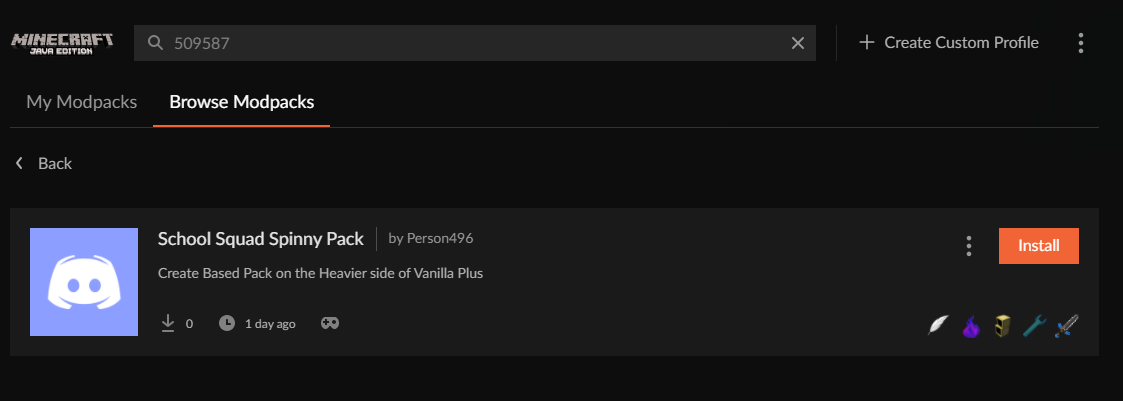 formal knoll
thats strange
 lyric crescent
🤷♂️ either way i passed the issue on. will probably be a few hours before anyone gets to it though
formal knoll
Ok, thanks for your help anyways :)
hearty rampart
yamza we need ya in community support
 pale wedge
!mc-installpack
red patioBOT
How to install modpacks with the search features in app.
- Open the

Minecraftsection of the app. - Click the top search bar where it says
Search for modpacksOR Click theBrowse ModpacksTab. - Find the Modpack you want to install and click install on it.
- Wait for CurseForge app to download and unpack all the required files.
- Once finished, click
Play!
How to install modpacks from a Export. (Custom/Private/Site downloaded Modpack zip)
- Get CurseForge App if you don't have it, use
!downloadfor a link. - Get the exported modpack from CurseForge or someone else,
!mc-packshareexplains how to make them. - Open the
Minecraftsection of the app. - Click

Create Custom Profile - Click the
Importoption. - Find the file you just downloaded in step 2 and select it.
- CurseForge app will now attempt to download and unpack the modpack. If it fails, try steps 4-6 again.
- Once finished, click
Play!

 gleaming jackal
hey guys i'm trying to make a modpack and i'm having issues understanding what they want me to fix on it to get approved. is there anyone here that can help me understand it?
formal knoll
lyric crescent
🤷♂️ either way i passed the issue on. will probably be a few hours before anyo...
Sorry to bother you with this again, but I tried putting another project id in to see if maybe i was just searching wrong (that ones the id for ATM6) and that got me the same result, am I doing something incorrectly?
 gleaming jackal
do i just send what the page says of why it was rejected?
lyric crescent
if you want us to know why it was rejected, yea
formal knoll
I have, even restarted my computer and still no dice, same results on GDLauncher too
gleaming jackal
The status of the file xXPinkBunnieXx Modpack-1.16.5.zip (xXPinkBunnieXx World of Fun) has been changed to Rejected
Notes:
The following files belong to CurseForge-hosted projects, and should therefore not be added directly to zip files:
These files should, instead, be referenced in the manifest.json file generated by the Twitch Desktop App during a profile export.
The following file versions have been removed from CurseForge:
overrides/mods/NamePain-1.3.1+Forge-1.16.x.jar
i took the mod list out casue there was to much for it to senfd
lyric crescent
?reject-cfhosted
red patioBOT
The following files belong to CurseForge-hosted projects, and should therefore not be added directly to zip files:
-
Remove any mods listed in the error message from the profile you exported. Then reinstall them with the CuseForge app. DO NOT drag and drop files from the site.
-
Export the profile again, open the new zip that was just made. Check for the
overrides/modsfolder. If you still see any mods in that folder do the step above again for each mod. -
Upload the zip once complete and no more mods show in the
overrides/modsfolder.
 tidal grotto
Are there any like tutorials or anything on how to drag & drop a modpack into a server so I can play with my friends?
formal knoll
lyric crescent
click browse modpacks, type the number
I believe thats what I did?
what do you mean by the search on the main page? the only search bar I see here is the one ive been using at the top that says "search for modpacks?"
 fallen loom
tidal grotto
Are there any like tutorials or anything on how to drag & drop a modpack into a ...
fallen loom
tidal grotto
Are there any like tutorials or anything on how to drag & drop a modpack into a ...
?mc-installserver
red patioBOT
How to **manually** install a server - **On your own PC**
- Check if the modpack has a server pack, if it does: use that and skip below.
- Go to the Forge website http://files.minecraftforge.net/ and download the Installer for the forge version the pack is using.
- Run the installer and choose
Install server. Do not install to your desktop. Also do not install inside a OneDrive folder. - Run the server using the forge.jar. A file called
eula.txtwill be generated. Open it and changeeula=falsetoeula=true - From the Client; Copy the
modsfolder,configfolder, and any other folders needed for the pack to work into the server folder. If the modpack has a server pack, use this instead! - Run the server again.
- Port forward your machine if needed. (Google it)
lyric crescent
formal knoll
I believe thats what I did?
what do you mean by the search on the main page? the...
could try reinstalling curseforge. no idea why that wouldnt work. if it continues after a reinstall you may need to make a ticket
formal knoll
lyric crescent
could try reinstalling curseforge. no idea why that wouldnt work. if it continue...
alright, will do, thanks again :)
 copper mason
what is the average wait time for mods being approved?
 strong island
why cant i find a modpack on the app but i can on the website?
fallen loom
!sync
red patioBOT
Sync and your Project.
CurseForge App and site do not share the same requirements! You can find things on the site but this does not mean it will be in the app!
For a mod to show up in the app:
- Projects MUST have a file marked as RELEASE or BETA
- Projects MUST be APPROVED
- Projects MUST have a file marked for the GAME VERSION SELECTED/LOADED
- Projects CAN'T be EXPERIMENTAL
- Projects CAN'T be ABANDONED
Files can take a while to show up in the app. If your files still have not shown up either your project is new and you have yet to mark a file as Release/Beta or there is issues with the sync system making it slow.
Vote this issue up if you would like to know when the last sync was! https://curseforge-ideas.overwolf.com/ideas/CF-I-1617
lyric crescent
download it, then make a new profile and use import
strong island
im stupid
fallen loom
You either find it in the app or download the pack zip and import it manually
lyric crescent
copper mason
what is the average wait time for mods being approved?
!status
red patioBOT
It is 05:22AM on Wednesday for CurseForge my dudes.
Project Moderation Time
Project/File moderation is done on;
Sunday, Monday, Tuesday, Wednesday, Thursday: 10AM - 6PM GMT+2
Friday, Saturday: No Moderation!
This process is First in, First out. Thus files submitted late in the work day may not be checked until the next work day.
New Projects or uploads requiring manual approval: 1-3 Working Days
Updates to approved projects not needing manual approval: 1 Hour
File sync to the Curseforge app may take up to 24 hours after approval.
gleaming jackal
okay so i deleted the modpack zip that i origianlly exported and made sure they were installed on the curseforge app but yet they are all still in the overides folder where should they be instead?
lyric crescent
not in there. mods should be in the manifest file, unless they are not from curseforge
fallen loom
Did you install any of the mods manually or were they all installed through the app?
gleaming jackal
all through the app
fallen loom
Send us the zip please?
 fallen loom
Looked at the error again and we were wrong about the cause of it
Update the mod on your end, the version you have was expunged
gleaming jackal
expunged?
lyric crescent
solution would still be the same tho
gleaming jackal
but did exactly what you told me to do and ended up with the same result
fallen loom
Who is "you" in this case?
gleaming jackal
well actually the bot sorry
fallen loom
The bot has said many things so that doesn't really narrow it down
lyric crescent
how are you getting a version of the mod that doesnt exist
show the overrides folder
fallen loom
It's a version that used to be visible but was archived/removed
gleaming jackal
The following files belong to CurseForge-hosted projects, and should therefore not be added directly to zip files:
-
Remove any mods listed in the error message from the profile you exported. Then reinstall them with the CuseForge app. DO NOT drag and drop files from the site.
-
Export the profile again, open the new zip that was just made. Check for the overrides/mods folder. If you still see any mods in that folder do the step above again for each mod.
-
Upload the zip once complete and no more mods show in the overrides/mods folder.
fallen loom
If you need the mod then use a version of it that is still available
gleaming jackal
but it basically was listing all of them
lyric crescent
click settings > minecraft. what is the modding folder listed?
gleaming jackal
in the curseforge app?
lyric crescent
yes
gleaming jackal
C:\Users\User\curseforge\minecraft
lyric crescent
k restart the app then do as the bot said
gleaming jackal
okay
lyric crescent
show the overrides folder here after you export
gleaming jackal
 lyric crescent
mods folder
gleaming jackal
that doesnt show all of them since the file is big
 fallen loom
Holy crap those are all in ovberrides?
gleaming jackal
aparently
not gunna lie i have no idea what overides are lol im very new at this
fallen loom
overrides is supposed to be all the off-network things, so there should be no curse-hosted mods in it
gleaming jackal
oh okay well i have no idea why they are in there cause its put all the mods in that folder
lyric crescent
so lets reveiw a few things:
Did you use the app to install all of these mods?
Did you copy any of the mods from one profile and paste them into another?
Did you copy the profile at all?
gleaming jackal
nope i went through them one by one downloading them all from the curseforge app
lyric crescent
This is going to require a ticket then as the app is apparently not doing what it should be. Make sure to describe the situation and detail what you have done.
!ticket-app
red patioBOT
:bug: Reporting via the CurseForge App :bug:
-
Click the
icon in the bottom left. -
Select
Open a Ticket. -
Fill out the form with accurate detailed information, "It doesn't work" isn't helpful! What exactly doesn't work and why doesn't it work should be easy to answer!
-
Make sure to upload your Overwolf logs with the
Upload Fileoption on the ticket, information on how to get these logs can be found here https://support.overwolf.com/en/support/solutions/articles/9000176827-how-to-get-your-overwolf-logs -
Submit!
gleaming jackal
what do i put down as the subject?
lyric crescent
some short description of your situation
lyric crescent
Might want to try reinstalling the app and restart
gleaming jackal
okay
 lilac matrix
Why cant i download java?
everytime it says "you have downloaded java"
but then i click the close button and its not
fallen loom
Where are you seeing this?
 turbid dawn
should I select "update to new profile"?
 digital roost
hello
I need help
My mod total downloads is not getting calculated correctly and now it has stop going up
but
the files in that mod
downloads of files are going up
so i think there should be a recheck for all mods
 runic depot

 median sage
what is the latest version of curse forge
 leaden thistle
is it possible to update a modpack (that you made) to a later version while still being able to play on the same worlds? If so, how do you do it?
 crisp zenith
when i try to play sky factory 4 its instantly crashes and says error code zero what should i do
 proven kraken
any modpack just closes when i launch it
turbid dawn
turbid dawn
should I select "update to new profile"?
Help
leaden thistle
When I run forge 1.17.1 with optifine it instantly crashes when I try to start it up.
 fleet bear
leaden thistle
When I run forge 1.17.1 with optifine it instantly crashes when I try to start i...
fleet bear
leaden thistle
When I run forge 1.17.1 with optifine it instantly crashes when I try to start i...
Then remove optifine.
leaden thistle
is it possible to play with it?
fleet bear
Clearly not if its crashing
fleet bear
Ask the people that make it
leaden thistle
ok, ty for the help!
 azure dune
Hello,
there is a visual bug in curseforge with the logo... has it been reported yet?
This little visual glitch

With the profile logo
viral briar
ah yeah that's been a thing for a while , it should sort itself on its own
azure dune
Oh, it's started some update ago and never resolved, just curious if it was known, thanks!
viral briar
a couple of folk reported that couple months ago but it sorted itself according to them
and a pretty minor thing on the app
 zealous bloom
help it say ohh oh when i download it not work
i try several times not workin
 soft thunder
Hey I wanted to play the better Minecraft Modpack. I have seen youtubers playing with optifine but when I put the 1.16.5 optifine in to the mods fowlder than it crashes everytime with the text exit code 0. also sorry for my bad english
viral briar
!mc-optifine
red patioBOT
Optifine and Curseforge
To install Optifine with modpacks on Curseforge:
Right click the modpack icon, select Open Folder.
Put the Optifine.jar into the mods folder.
Now load the modpack normally.
We do not offer support for Optifine. If you have issues with Optifine, remove it. If you want further support try the discord found on their website.
https://www.optifine.net/home
soft thunder
this is the exact way I did it
viral briar
then follow the bottom part if you have issues
soft thunder
ok I will try
viral briar
optifine is one those things that doesn't tend to work for everyone and optifine's discord is the better place to be for such support.
turbid dawn
turbid dawn
should I select "update to new profile"?
help
 muted yoke
hello i need help when i tryed to download a mod it said

and i pressed here but nothing happend
so i
to download the app
and then its been stuck on this for a long time
 digital roost
can someone help me out my server crashes everytime i click on the time machine from the Prehistoric Dinosour Biomes mod here is crash report
red patioBOT
The question you are asking about isn't related to CurseForge. Please use the appropriate game rooms by getting the role from #786424115535544350 or use #👽︱game-support for help.
This room is only for CurseForge Owned & Maintained features/services.
digital roost
k
viral briar
muted yoke
and then its been stuck on this for a long time
Pixelmon can take its time as it’s sizeable download
lyric crescent
Also could be your internet. Try something more stable.
muted yoke
Ok ty I will try
 noble temple
does anyone know why the forge download launcher wont work it shows the picture and the file but when i click on it nothing happens
lyric crescent
forge, or curseforge?
noble temple
forge 1.12 i am trying to download it.
red patioBOT
The question you are asking about isn't related to CurseForge. Please use the appropriate game rooms by getting the role from #786424115535544350 or use #👽︱game-support for help.
This room is only for CurseForge Owned & Maintained features/services.
 lyric crescent
?MC-LOG
red patioBOT
Sending logs for support.
Right-click the modpack profile icon OR click the button in the modpack profile.
Click Open Folder.
Open the logs folder.
Find the file called debug.log OR latest.log and drag it into discord.
 halcyon crypt
ok
1 sec pls
logs
i think it is a mod i installed
maybe i accidently installed a fabric on a forge or smt
lyric crescent
doesnt look like a fabric mod, but also doesnt specify the issue. undo whatever you last did and try again
halcyon crypt
ooook, will try
i neve even opened this modpack, and it has a lot of mods
so that might not be the answer
but will try
lyric crescent
might be easier to just start over and test it after adding a few mods at a time
halcyon crypt
yes, am trying that now
 wraith jetty
Hello, my curseforge/overwolf is broken.
i have a message : Ahh... we're sorry. This overwolf version is broken beyond repair. Please download and install latest version
I tryed to uninstall and install it, but nothing happened and same message
I need helps 😄
lyric crescent
!getcf try this link
red patioBOT
Looking to install the CurseForge app?
<:windows:798410728188936222> Windows
Minimum Requirements:
- OS Version: 7, 8.1, 10
- 64 bit Required.
- 350MB storage space.
- Microsoft .Net 4.8
- Intel/AMD quad-core CPU
- 8GB ram
Download: https://download.overwolf.com/install/Download?&PartnerId=4047
If you are having issues with the installer use the URL below to install Overwolf then go to the app store to download CurseForge.
https://content.overwolf.com/downloads/setup/latest/regular.html
<:mac:798410654418862130> Mac
Minimum Requirements:
- OS Version 10.14 or newer.
- 64 bit Required.
Download: https://curseforge.overwolf.com/downloads/curseforge-latest.dmg
:penguin: Linux
Minimum Requirements:
Yes.
Download: :person_shrugging:

 lavish rivet
Hello i'm having some problems with my modpacks because when i start one up it generally dosn't end up loading could you help me with this?
lyric crescent
so what is it doing
lyric crescent
wraith jetty
Where i put the Setup.zip ?
What do you mean?
lavish rivet
When i go to start it up it just dosn't load at all and it will crash
lyric crescent
?mc-log
red patioBOT
Sending logs for support.
Right-click the modpack profile icon OR click the button in the modpack profile.
Click Open Folder.
Open the logs folder.
Find the file called debug.log OR latest.log and drag it into discord.
wraith jetty
lyric crescent
What do you mean?
The file i download. The .zip
lyric crescent
idk what you downloaded that gave a zip
viral briar
the second one does , the one if you have issues
lavish rivet
i think this may help
lyric crescent
ah so it does
viral briar
wraith jetty
https://content.overwolf.com/downloads/setup/latest/regular.html
extract it from the zip and run the installer
lavish rivet
also it says leah because i don't know how to change the name on my computer
lyric crescent
lavish rivet
also it says leah because i don't know how to change the name on my computer
remove backpacked. might just need to reinstall it
opal cipher
wraith jetty
it change nothing
You might need to reinstall Overwolf then.
lavish rivet
lyric crescent
remove backpacked. might just need to reinstall it
got it
lyric crescent
the zip is an overwolf install
wraith jetty
opal cipher
You might need to reinstall Overwolf then.
And re install with the zip file ?
opal cipher
Yeah, worth a try at least.

Overwolf Support Help Center
We're here to get you informed on everything you need to know about Overwolf, including helpful guides and troubleshooting articles to back you up when you get in a pickle
wraith jetty
because i reinstall overwolf like 10 times and nothing happened more
lyric crescent
Might want to head over to Overwolf's support then. https://discord.gg/overwolf
opal cipher
Then you should probably head over to the Overwolf Discord and ask for help.
Damnit, Yamza being quicker than me, as usual! :D
viral briar
minds thinking alike, hope it gets fixed for you
lavish rivet
uh yamza it's stil crashing
lyric crescent
log
lyric crescent
?mc-installfix
red patioBOT
- Click on the Minecraft Tab on the Left side of the CurseForge App.
- Click button next to the
Create Custom Profileoption. - Click

Repair Installationoption. - Play game.
NOTE: You will not lose any modpacks or worlds, These are saved in the Instances folder. DO NOT TOUCH THIS FOLDER OR YOU WILL LOSE EVERYTHING
lavish rivet
ok lemme try that
lyric crescent
get the curseforge app and install it there
 wind mauve
it is not there
lyric crescent
link
lyric crescent
that's a mod, not a modpack
wind mauve
oh
lyric crescent
?mc-installmods
red patioBOT
How to install mods in CurseForge App.
- Click
+ Create Custom Profile - Name it, select the required Minecraft version, select the Forge version (usually the highest number), click
Create. - Click the profile icon.
- Click
Add New Content - Search and install the desired mods.
- Start the game!
How to install mods not on CurseForge.
- Right click the profile picture or Open the profile and click the Icon next to the play button.
- Click
Open Folder. - Drag the mod(s) into the
modsfolder. (Note: Some mods will require others, to run. Make sure to read the instructions for the mod!) - Start the game!
wind mauve
Thank You soo much i wanted to have a morph mod since forever. thanks!
lavish rivet
@lyric crescent Its still crashing for some reason
lyric crescent
log
lavish rivet
lyric crescent
try removing controlable
lyric crescent
every time it crash just send a log
lyric crescent
alright, so it's just a new mod every time which makes me think there is some issue with the folder being used
?mc-path
red patioBOT
Change your install path to the following:
For Windows: C:\CurseForge
-Go to C:\ drive. Make a new folder. Name it Curseforge.
For Mac: /Users/Shared/CurseForge
If Minecraft is not installed in CurseForge App:
- Click the
 in the top left.
 - Select Minecraft from the list of games.
- Select the
Advancedoption and pick the folder you just made. - Click
Continue.
If Minecraft is installed in CurseForge App:
- Click the in the bottom left.
- Select the Minecraft tab.
- Click
Change. - Select the folder you just made.
:no_entry_sign: Minecraft Files should NOT be installed inside the following locations :no_entry_sign:
:no_entry_sign: .minecraft folder.
:no_entry_sign: OneDrive folders.
:no_entry_sign: Desktop folder.
:no_entry_sign: Drive roots I.E. Directly into the C:\ drive.
:no_entry_sign: iCloud enabled folders.
:no_entry_sign: or any other cloud saved folder.
If any of the above are in the path you need to change/move it!
lavish rivet
ok
 fading egret
Hey I'm having issues getting my pack approved - it got denied for plugins again even tho it's a modpack & there is nothing spigot related.. yet it keeps linking me to spigot articles to fix it for re-uploaded
Everything was added using the add more content button bc it was giving me an issue with on of the resource packs when I downloaded it from the CF site - so it should all be in the manifest
 red patioBOT
The question you are asking about isn't related to CurseForge. Please use the appropriate game rooms by getting the role from #786424115535544350 or use #👽︱game-support for help.
This room is only for CurseForge Owned & Maintained features/services.
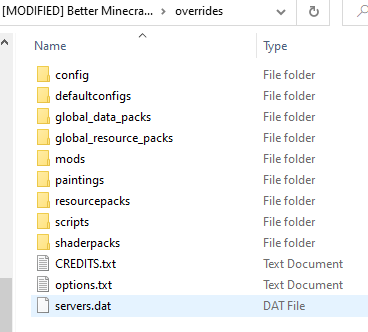 lyric crescent
and what is in mods, and also resource packs
fading egret
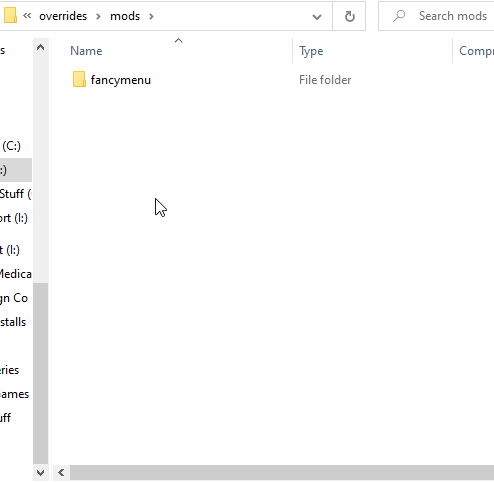
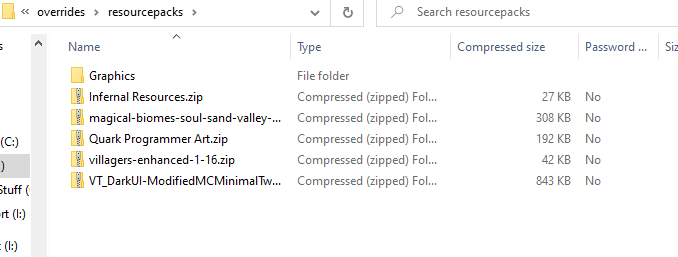
Only one not from CF is the Vanilla Tweaks resourcepack / datapacks but I had it in my last file & it got approved np
lyric crescent
mind dming me your zip? gunna mess with it
fading egret
sure thing! ty
 coral canopy
I was just about to see if you could help me because whenever I loaded up modded minecraft it gave me a screen error for the past two days but it just worked out of no where lmao
 amber grove
My game can't get past pre-initialization, and I know what mod is causing it (salty) but I need it for reasons
Heres the fml-client-latest.log: https://paste.ubuntu.com/p/qQSt8Bc5qb/
lyric crescent
If you know the cause then go report it
amber grove
afaik the mod hasnt been updated for 6 years
lyric crescent
Nothing we can do about that
 glossy aurora
Whenever I try and launch a minecraft game under a modpack it just doesn't open, it seems to just not do anything. I use curse forge and I play on a MacBook. Here's an example of what I mean https://streamable.com/lrdafq


 amber grove
oh well
lyric crescent
glossy aurora
Whenever I try and launch a minecraft game under a modpack it just doesn't open,...
?mc-installfix
red patioBOT
- Click on the Minecraft Tab on the Left side of the CurseForge App.
- Click button next to the
Create Custom Profileoption. - Click
Repair Installationoption. - Play game.
NOTE: You will not lose any modpacks or worlds, These are saved in the Instances folder. DO NOT TOUCH THIS FOLDER OR YOU WILL LOSE EVERYTHING
glossy aurora
I’ll try that
glossy aurora
lyric crescent
?mc-installfix
no luck does the same thing
 keen pecan
my and my friend ar tryinng to play sevtech together i press play on sevtech and it opens the mc launcher and every thing fine but when my friend does it it says play demo
lyric crescent
glossy aurora
no luck does the same thing
Check if the folder curseforge is using has cloud sync enabled. If so disable it
lyric crescent
keen pecan
my and my friend ar tryinng to play sevtech together i press play on sevtech and...
Log out of the launcher, then log in with an account that owns java Minecraft.
keen pecan
k ill try it
 neon charm
How can I setup a forge workspace on Linux? Everything I've read/watched runs batch files, which dont work on linux
lyric crescent
!notcf
red patioBOT
The question you are asking about isn't related to CurseForge. Please use the appropriate game rooms by getting the role from #786424115535544350 or use #👽︱game-support for help.
This room is only for CurseForge Owned & Maintained features/services.
lyric crescent
#⚙️︱authors-help would be the best place to ask
neon charm
Ok ty
red patioBOT
The question you are asking about isn't related to CurseForge. Please use the appropriate game rooms by getting the role from #786424115535544350 or use #👽︱game-support for help.
This room is only for CurseForge Owned & Maintained features/services.
formal harness
I added project e to skyfactory 3 and added custom emc now my world is stuck on building terrain
Also the dark matted pedestal and watch dosent work with mystical agricultural
lyric crescent
Still isn't related to curseforge, just like last time you asked this.
digital roost
should you not ask about modpacks here?
lyric crescent
Bot message makes it clear what this channel is used for.
digital roost
sorry about that
formal harness
lyric crescent
Still isn't related to curseforge, just like last time you asked this.
well no one checks community support
lyric crescent
Wrong. Checked it. Don't have an answer. Just like all the other people who have also likely checked it.
 trim sierra
exit code 0 on origins SMP datapack plz help
lyric crescent
?mc-log
red patioBOT
Sending logs for support.
Right-click the modpack profile icon OR click the button in the modpack profile.
Click Open Folder.
Open the logs folder.
Find the file called debug.log OR latest.log and drag it into discord.
 hollow light
Okay so...hi! I'm running Roguelike adventures and dungeons with 16 gigs of ram and an AMD Ryzen 5 3600 6 core cpu. For some reason even though I've never had this issue before Minecraft is hitting 100% cpu and just like hovering at 80% and then constantly spiking back up to 100. Normally it doesnt use any more than 60%. Does anyone know what could be causing this?
lyric crescent
send a log in #👽︱game-support
 tight pelican
hi i was wondering why the shapeshifter mod is not here
i have more questions coming not just about the mods not showing up
lyric crescent
it's not where?
tight pelican
on the curse forge modpack search
lyric crescent
send the link to it
tight pelican
i search the name up and it says theres no results
lyric crescent
i assume you have found it somewhere to be looking for it. where have you found it. link it
red patioBOT
How to install mods in CurseForge App.
- Click
+ Create Custom Profile - Name it, select the required Minecraft version, select the Forge version (usually the highest number), click
Create. - Click the profile icon.
- Click
Add New Content - Search and install the desired mods.
- Start the game!
How to install mods not on CurseForge.
- Right click the profile picture or Open the profile and click the Icon next to the play button.
- Click
Open Folder. - Drag the mod(s) into the
modsfolder. (Note: Some mods will require others, to run. Make sure to read the instructions for the mod!) - Start the game!
viral briar
Rlcraft is a modpack not a mod
lyric crescent
k
 unreal abyss
i cant figure out how to upload my modpack
it seems like it wants me to upload each individual mod
i cant upload a folder
 lyric crescent
?mc-packshare
red patioBOT
There are two ways to share a modpack you've made with others...
Export and Share - For Friends to Small Groups.
- Click the Icon for the modpack.
- Click the button next to play.
- Click
Export. - Select the files that should be included.
- Send the zip to the people that want it! They can follow the instructions in
!mc-installpackto install the pack!
Upload to Curseforge - For Public Release to Everyone.
This options will make your pack public to EVERYONE, it comes with extra requirements and will take some effort to set up.
- Go to here: https://www.curseforge.com/project/432/4471/create
- Fill out the information with a proper description of the pack. This should allow anyone to understand what the pack is.
- Click the Icon for the modpack in the CurseForge app.
- Click the button next to play.
- Click
Export. - Select the files that should be included.
- Open your Project you made on the CurseForge site and Upload the file you just made.
- Wait for Moderation & Sync so it can show up in the client! (See
!syncfor limitations)
unreal abyss
ty
 dense current
!status
red patioBOT
It is 06:56PM on Wednesday for CurseForge my dudes.
Project Moderation Time
Project/File moderation is done on;
Sunday, Monday, Tuesday, Wednesday, Thursday: 10AM - 6PM GMT+2
Friday, Saturday: No Moderation!
This process is First in, First out. Thus files submitted late in the work day may not be checked until the next work day.
New Projects or uploads requiring manual approval: 1-3 Working Days
Updates to approved projects not needing manual approval: 1 Hour
File sync to the Curseforge app may take up to 24 hours after approval.
unreal abyss
!sync
red patioBOT
Sync and your Project.
CurseForge App and site do not share the same requirements! You can find things on the site but this does not mean it will be in the app!
For a mod to show up in the app:
- Projects MUST have a file marked as RELEASE or BETA
- Projects MUST be APPROVED
- Projects MUST have a file marked for the GAME VERSION SELECTED/LOADED
- Projects CAN'T be EXPERIMENTAL
- Projects CAN'T be ABANDONED
Files can take a while to show up in the app. If your files still have not shown up either your project is new and you have yet to mark a file as Release/Beta or there is issues with the sync system making it slow.
Vote this issue up if you would like to know when the last sync was! https://curseforge-ideas.overwolf.com/ideas/CF-I-1617
 round hull
Hey guys, could you help me out? I have put mods for Minecraft in the correct folder, which CF made itself. But the mods don't show in the list in CF itself.
lyric crescent
use the app to install mods
 gaunt tartan
Hey! Why am I getting this error?
 round hull
lyric crescent
use the app to install mods
round hull
lyric crescent
use the app to install mods
I know, i do that. But inside the app, where i clicked create custom profile, followed the steps of both the ways to install.
Input the mods that aren't on CF in the correct folder. But they don't show in the list in CF.
lyric crescent
You said "put mods in the folder". That is not using the app to install.
round hull
lyric crescent
You said "put mods in the folder". That is not using the app to install.
How can i install mods that aren't on CF then?
lyric crescent
if you install mods that are not from CF then they wont be in the list
lyric crescent
Forge will load them if they are in the folder.
round hull
Ok thnx
lyric crescent
gaunt tartan
Hey! Why am I getting this error?
Try a pc restart
Try reinstalling Curseforge
If neither work you need to send a ticket with your logs.
!ticket-site
red patioBOT
:bug: Reporting via Website :bug:
Can't open the app or would rather use the website? You can do so here: https://support.curseforge.com/en/support/tickets/new
Fill out the form with accurate detailed information, "It doesn't work" isn't helpful! What exactly doesn't work and why doesn't it work should be easy to answer!
Make sure to upload your Overwolf logs with the Upload File option on the ticket, information on how to get these logs can be found here https://support.overwolf.com/en/support/solutions/articles/9000176827-how-to-get-your-overwolf-logs
round hull
lyric crescent
!ticket-site
You have anwsered my question. Thnx
 olive remnant
What is the difference between curseforge app or web?
lyric crescent
the app manages mods, website hosts mods
olive remnant
thanks
 real marsh
hi friend. I have problem. impossible to show visible the Server Additional files for my modpack. Only visible when i'm login in. How to solve this please ?
lyric crescent
screenshot?
 noble fox
on minecraft curse forge mods how do i like use them i installed them and i do have minecraft i remmember doing this once but i cant remmember can someone help me?
lyric crescent
not really sure what you are asking
noble fox
im basically askin how do i use mods after i install everything
lyric crescent
press play
noble fox
on vanilla minecraft?
lyric crescent
depends on how you installed the mods
noble fox
through cursed forge
red patioBOT
Hey there, it is Curseforge, not "Cursed forge"
noble fox
dam
lyric crescent
then you press play on curseforge
noble fox
ok
noble fox
lyric crescent
then you press play on curseforge
oh wow
noble fox
lyric crescent
then you press play on curseforge
i hate you for this i feel like im the defeniton of stupid for this one but im very gratefull too dam i shouldnt have skipped the introduction
lyric crescent
that's cool, but why do i need to be pinged for this unbroken conversation
 fervent matrix
if im uploading a modpack,do i need a changelog for the first version of said pack?
real marsh
oh i think it's ok ! due to a removed mod from the author.. i'll try again with the update
thx 🙂
tight pelican
okay so i put in my password and it says its wrong even tho i put it in correctly
i change it then the minecraft launcher wont even start up
nevermind it started
 turbid mica
Hey guys. I have some kind of error that I have been tormenting for about an hour, I just can't figure out what the problem is. In English this means "the value can not be certain." It comes out after installing absolutely ANY mod. I thought it was related to folders, I checked it - everything is okay. Does anyone know how to fix this?
 tight pelican
turbid mica
Hey guys. I have some kind of error that I have been tormenting for about an hou...
tight pelican
turbid mica
Hey guys. I have some kind of error that I have been tormenting for about an hou...
i dont think anyone here can fix a problem like that
turbid mica
It is sad
red patioBOT
Change your install path to the following:
For Windows: C:\CurseForge
-Go to C:\ drive. Make a new folder. Name it Curseforge.
For Mac: /Users/Shared/CurseForge
If Minecraft is not installed in CurseForge App:
- Click the in the top left.
- Select Minecraft from the list of games.
- Select the
Advancedoption and pick the folder you just made. - Click
Continue.
If Minecraft is installed in CurseForge App:
- Click the in the bottom left.
- Select the Minecraft tab.
- Click
Change. - Select the folder you just made.
:no_entry_sign: Minecraft Files should NOT be installed inside the following locations :no_entry_sign:
:no_entry_sign: .minecraft folder.
:no_entry_sign: OneDrive folders.
:no_entry_sign: Desktop folder.
:no_entry_sign: Drive roots I.E. Directly into the C:\ drive.
:no_entry_sign: iCloud enabled folders.
:no_entry_sign: or any other cloud saved folder.
If any of the above are in the path you need to change/move it!
turbid mica
lyric crescent
Not sure what error that is even. Could be folders..
Unfortunately, it didn't help : ( The error keeps showing up

 unkempt light
How come when I play a world from a mod it doesn't load at all?
lyric crescent
turbid mica
Unfortunately, it didn't help : ( The error keeps showing up
!ticket-app
red patioBOT
:bug: Reporting via the CurseForge App :bug:
-
Click the
icon in the bottom left. -
Select
Open a Ticket. -
Fill out the form with accurate detailed information, "It doesn't work" isn't helpful! What exactly doesn't work and why doesn't it work should be easy to answer!
-
Make sure to upload your Overwolf logs with the
Upload Fileoption on the ticket, information on how to get these logs can be found here https://support.overwolf.com/en/support/solutions/articles/9000176827-how-to-get-your-overwolf-logs -
Submit!
turbid mica
Thank you!
 meager mist
I think the error message actually means something more along the lines of "The value cannot be null"
turbid mica
yes, probably. I just don't have very good English, I described it as best I could)
slate dust
My modpack is lagging alot any idea on why its so laggy?
meager mist
that is usually due to poor performance
 sick fiber
I need help with my forge 1.12.2 server
the server works perfectly fine for me and a few of my friends but 2 of my friends who both live in the same house can't join the server
slate dust
meager mist
that is usually due to poor performance
On other modpacks with over 100 mods my game runs at 100 to 150 fps
sick fiber
sick fiber
the server works perfectly fine for me and a few of my friends but 2 of my frien...
they both have a problem where when they load in they either get 0 fps and there game stops responding or they get disconnected right away
 glacial herald
fix you fucking app
 timid birch
Keep chat nice please
So i have been trying all day to get a minecraft modpack running but it wont work. So i press play in curseforge and then in the “minecraft launcher” and then it goes back to curseforge and does nothing. Im on mac m1 chip. Can someone help?
 obtuse iron
hello! so i have forge installed and is running perfectly, until the moment i add a mod (worldedit 1.17.1) to the mods folder. now, whenever i launch minecraft it crashes with exit code 0. mac m1 chip, please help
timid birch
Do you have the curseforge launcher or just forge profile in the minecraft launcher
 worldly cape
Hello! I have just now installed the curse forge app but when I search up the mod I want to get (emerging technology) it says that the are no results. Help please. I really want to do some mods!
timid birch
Is it just a single mod or a modpack
worldly cape
Single mod I think
timid birch
Can you send the link of the mod