#🔥︱curseforge-support
1 messages · Page 514 of 1
 lyric crescent
 lyric crescent
is it in the zip?
lyric crescent
!ticket-app
 red patioBOT
:bug: Reporting via the CurseForge App :bug:
-
Click the
 icon in the bottom left.
 -
Select

Open a Ticket. -
Fill out the form with accurate detailed information, "It doesn't work" isn't helpful! What exactly doesn't work and why doesn't it work should be easy to answer!
-
Make sure to upload your Overwolf logs with the
Upload Fileoption on the ticket, information on how to get these logs can be found here https://support.overwolf.com/en/support/solutions/articles/9000176827-how-to-get-your-overwolf-logs -
Submit!

 livid veldt
im trying to install a minecraft mod and it all works until it opens the Minecraft launcher and the mod doesnt show up in the installations tab can anyone help
 long hazel
lyric crescent
is it in the zip?
long hazel
lyric crescent
is it in the zip?
if you mean the manifest I dont know
long hazel
livid veldt
im trying to install a minecraft mod and it all works until it opens the Minecra...
sure thing, you need forge
Do you have the right forge version?
long hazel
lyric crescent
it should be in `overrides/mods` since its not a curseforge mod
only the core is there
lyric crescent
livid veldt
hoe do i find that out
get the curseforge app, it can install everything for you
!getcf
red patioBOT
Looking to install the CurseForge app?
<:windows:798410728188936222> Windows
Minimum Requirements:
- OS Version: 7, 8.1, 10
- 64 bit Required.
- 350MB storage space.
- Microsoft .Net 4.8
- Intel/AMD quad-core CPU
- 8GB ram
Download: https://download.overwolf.com/install/Download?&PartnerId=4047
If you are having issues with the installer use the URL below to install Overwolf then go to the app store to download CurseForge.
https://content.overwolf.com/downloads/setup/latest/regular.html
<:mac:798410654418862130> Mac
Minimum Requirements:
- OS Version 10.14 or newer.
- 64 bit Required.
Download: https://curseforge.overwolf.com/downloads/curseforge-latest.dmg
:penguin: Linux
Minimum Requirements:
Yes.
Download: :person_shrugging:
lyric crescent
?mc-installmods
red patioBOT
How to install mods in CurseForge App.
- Click
+ Create Custom Profile - Name it, select the required Minecraft version, select the Forge version (usually the highest number), click
Create. - Click the profile icon.
- Click
Add New Content - Search and install the desired mods.
- Start the game!
How to install mods not on CurseForge.
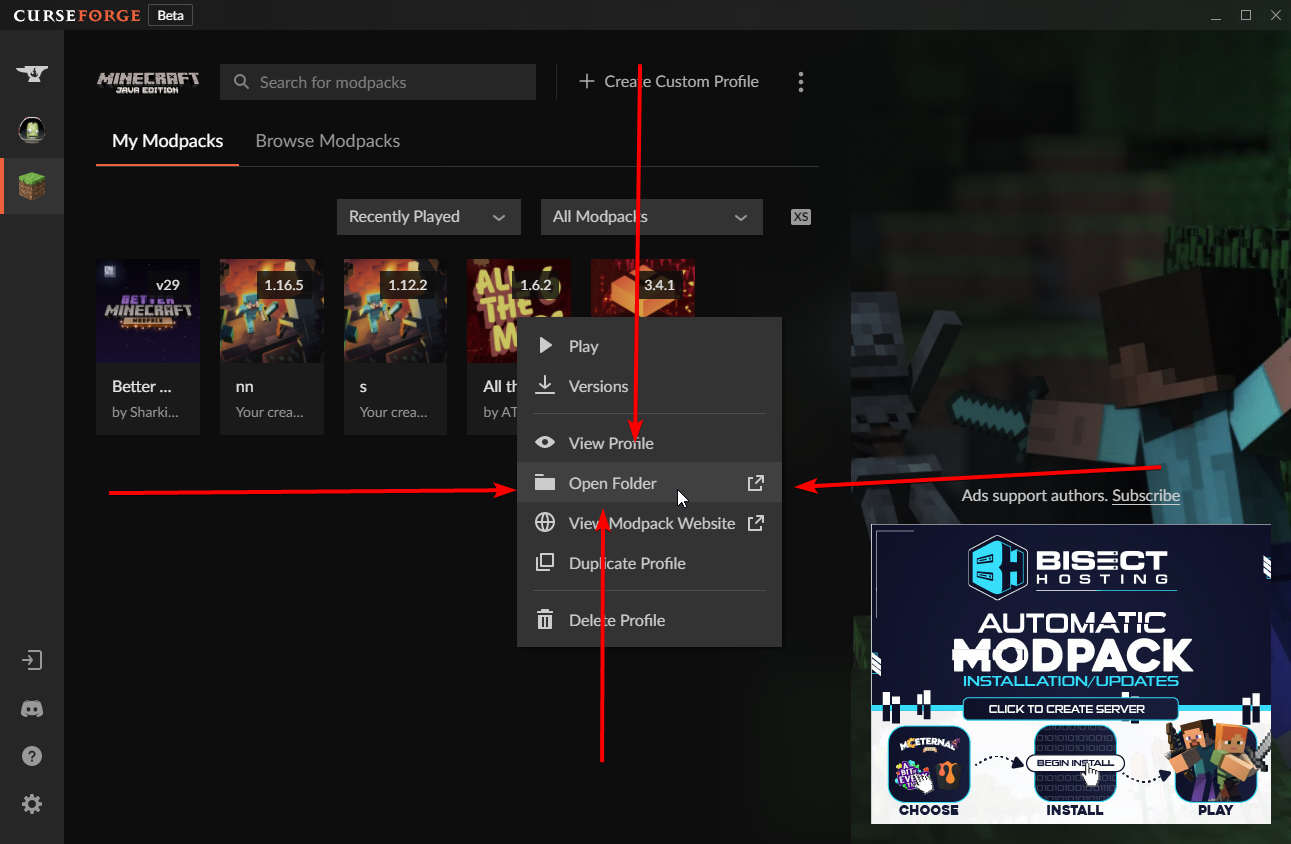
- Right click the profile picture or Open the profile and click the
 Icon next to the play button.
 - Click

Open Folder. - Drag the mod(s) into the
modsfolder. (Note: Some mods will require others, to run. Make sure to read the instructions for the mod!) - Start the game!

 dim pendant
Hey, Yamza, did you see my message earlier?
lyric crescent
i dont do tickets
long hazel
Go to the download and drag it into your mods folder
 sturdy hornet
Nothing will load if I search for a Mod. Is there any step I missed or what can I do?
 dim pendant
long hazel
<@!805553983044583455> this will help
dim pendant
long hazel
<@!805553983044583455> this will help
Thanks 🙂 I'll try that.
Just so I understand, doesn't the CurseForge desktop app have access to all the mods on curseforge.com?
long hazel
dim pendant
Thanks 🙂 I'll try that.
Just so I understand, doesn't the CurseForge desktop ap...
It has access to alot of them but not at all. what mod are you adding?
dim pendant
long hazel
It has access to alot of them but not at all. what mod are you adding?
Ah, gotcha
I wanted to add Create.
livid veldt
im still abit confused with minecraft mods because it says ive installed the modpack i want and when i click play it doesnt show up in my minecraft launcher
lyric crescent
dim pendant
Ah, gotcha
I wanted to add Create.
create is there, you are doing something wrong. follow the instructions
lyric crescent
livid veldt
im still abit confused with minecraft mods because it says ive installed the mod...
are you using the curseforge app?
livid veldt
yeah
 trim bay
Hey I’m trying to troubleshoot for my cousin who is using curseforge to open minecraft with mods on her laptop running windows 10. She is getting a SE binary error and cannot open the game. I have had her update her display driver, reinstall/update java, and update windows and nothing has worked. Any advice? Thanks in advance
lyric crescent
livid veldt
yeah
restart your pc and try again. you need to press play on curseforge, not open the minecraft launcher.
livid veldt
ok ill try that
dim pendant
Hi, is it possible to do a search of installed mods in a modpack?
lyric crescent
look at the mods tab
dim pendant
lyric crescent
look at the mods tab
Okay, thanks 🙂
Can I do a filter there for installed mods, too?
long hazel
trim bay
Hey I’m trying to troubleshoot for my cousin who is using curseforge to open min...
It might be heard laptop just cant handle it
long hazel
dim pendant
Okay, thanks 🙂
Can I do a filter there for installed mods, too?
I believe so, wait nvrm idk
dim pendant
long hazel
I believe so, wait nvrm idk
Do you know how?
lyric crescent
wym a filter
long hazel
dim pendant
Do you know how?
nvrm idk
dim pendant
lyric crescent
wym a filter
e.g write in the search box something like @installed and it will show only the installed mods. So I could combine it with the other filters the Add More Content > Mods section has.
lyric crescent
the list will say it's installed if its installed
dim pendant
lyric crescent
the list will say it's installed if its installed
I can see that. That's not what I'm asking, though.
I'm asking if I can, in that page, filter in only the installed mods.
lyric crescent
no
dim pendant
lyric crescent
no
Okay, thanks 🙂
Can I see the dependency tree for a specific mod? Or for all the mods, instead?
 viral briar
Website shows you that
lyric crescent
in the relations tab on a mod's page. no to all the mods
dim pendant
Gotcha, thanks 🙂
long hazel
lyric crescent
https://discord.com/channels/428228256236306434/782027635252920322/8700244830696...
Core is only here and thanks for the help.......
trim bay
long hazel
It might be heard laptop just cant handle it
She had to move to curseforge from twitch because twitch said they moved modpacks there. So you think it is just a computer outdated issue? It has run with the modpacks on this laptop up until last week and everything is up to date. It is a gaming laptop less than a year old she just told me
lyric crescent
long hazel
Core is only here and thanks for the help.......
you already said that, and then i told you to make a ticket...............
long hazel
lyric crescent
you already said that, and then i told you to make a ticket...............
Yes I did
 unborn basin
sturdy hornet
Nothing will load if I search for a Mod. Is there any step I missed or what can ...
unborn basin
sturdy hornet
Nothing will load if I search for a Mod. Is there any step I missed or what can ...
Did it work out?
 slate dust
what times are modpacks being approved?sorry for asking i don't know the command
lyric crescent
!status
red patioBOT
It is 10:25PM on Wednesday for CurseForge my dudes.
Project Moderation Time
Project/File moderation is done on;
Sunday, Monday, Tuesday, Wednesday, Thursday: 10AM - 6PM GMT+2
Friday, Saturday: No Moderation!
This process is First in, First out. Thus files submitted late in the work day may not be checked until the next work day.
New Projects or uploads requiring manual approval: 1-3 Working Days
Updates to approved projects not needing manual approval: 1 Hour
File sync to the Curseforge app may take up to 24 hours after approval.
slate dust
alright thanks
long hazel
trim bay
She had to move to curseforge from twitch because twitch said they moved modpack...
Ahh what modpack and what happens when she tries to play it
long hazel
trim bay
It gives her a SE Binary Error
Any idea on whats the error code
trim bay
long hazel
Any idea on whats the error code
Ill have her try again and send it to me one moment
red patioBOT
Sending logs for support.
Right-click the modpack profile icon OR click the button in the modpack profile.
Click Open Folder.
Open the logs folder.
Find the file called debug.log or latest.log and drag it into discord. (Debug prefered see instructions below to enable it)
Missing the debug.log file? Enable it by following these steps.
- Click the
 icon in the bottom left.
 - Click the

Minecrafttab. - Turn on the
Enable Forge debug.logoption. - Restart the pack & cause the issue again.
- Drag the
debug.loginto the discord chat.
long hazel
trim bay
Ill have her try again and send it to me one moment
Send the log yazma will takr care of it
lyric crescent
see the instructins above
lyric crescent
why are you pinging me with something unrelated
 queen horizon
im having a problem with curse forge wdym?
 shell wasp
 queen horizon
ok thanks
trim bay
@lyric crescent here is my cousin’s log, it is long should I send via direct message?
 fickle olive
Anyone know what mod it is that adds the recipes and stuff to the right of your inventory?

 digital roost
not enough items
fickle olive
thanks
digital roost
or NEI
np
Can someone help me add this as a modpack in curseforge, cuz i've tried multiple times and it wont work? i also took out the file inside and tried that but that also didnt work
oh
for some reason i cant send it
unborn basin
It's a mod, not a modpack
digital roost
no theres a file inside the .zip file, with like 20 mods in it i think
im not sure how many but
theres a few
theres 40
its 200 mb so i cant send it here
uhhh
Ok so basically, this is what the zip file looks like, that file has 40 mods in it, but whenever i try to import the zip file, it doesnt work, the menu just goes away, does anybody know how to fix this?

I installed curseforge and minecraft on the same drive. Worked for about a day or two, then it stopped opening up because of something being corrupted in the files. Uninstalled both minecraft and curseforge and downloaded them again. Nothing seems to work and I keep getting the same error messages.
trim bay
Yamza still there?
 long siren
hi can i get some help
digital roost
I need help too
 round bone
i need help
so
i started to play miencraft on curseforge
with mods and now i cant open curse forge
i open it and its says loading then it finishes then i doesent open nothing
ok i got it to open finally
but somtimes it doesent open and its annoying
digital roost
digital roost
Ok so basically, this is what the zip file looks like, that file has 40 mods in ...
i still cant figure this out, i've taken the mods out and put them directly into a .zip folder and those zip files dont even show up, please can someone help me with this, i've been trying to figure this out for 2 days
lyric crescent
digital roost
i still cant figure this out, i've taken the mods out and put them directly into...
? mc-packshare
red patioBOT
There are two ways to share a modpack you've made with others...
Export and Share - For Friends to Small Groups.
- Click the Icon for the modpack.
- Click the button next to play.
- Click

Export. - Select the files that should be included.
- Send the zip to the people that want it! They can follow the instructions in
!mc-installpackto install the pack!
Upload to Curseforge - For Public Release to Everyone.
This options will make your pack public to EVERYONE, it comes with extra requirements and will take some effort to set up.
- Go to here: https://www.curseforge.com/project/432/4471/create
- Fill out the information with a proper description of the pack. This should allow anyone to understand what the pack is.
- Click the Icon for the modpack in the CurseForge app.
- Click the button next to play.
- Click
Export. - Select the files that should be included.
- Open your Project you made on the CurseForge site and Upload the file you just made.
- Wait for Moderation & Sync so it can show up in the client! (See
!syncfor limitations)
lyric crescent
trim bay
<@125588118538682368> here is my cousin’s log, it is long should I send via dire...
Send it here
digital roost
red patio
no i cant even get the modpack into a custom profile on curseforge
thats what im struggling with
like it just doesnt work
lyric crescent
That is because what you are doing does not work
digital roost
what do i do then?
cuz its not on curseforge, i cant play it or do anything with it cuz i just have the file
lyric crescent
Not sure I understand what you are trying to do to start with
digital roost
Ok, so I've got a .zip file i downloaded from google, its got a file inside of it, and inside that file there are 40 or so mods
when i press create custom profile, import and then click the .zip file
the menu just goes away and it doesnt work
lyric crescent
You can only import zips made by the curseforge app
lyric crescent
Well whatever you downloaded isn't going to work
lyric crescent
You could make a custom profile of the correct version for that zip then manually add the stuff to it. Or pick something actually from curseforge
digital roost
oh
alright
oh hey, i just made a custom profile, opened the file and dragged the mods into the mods folder in there
oh my god
took 2 days to do that
thank you for helping me
 crystal vale
ok curse forge says its recomended to use JEID but JEID crashes my game wel NEID works?
trim bay
@lyric crescent she sent it to me via email because I dont have the laptop with me, discord says it is too much text to post here. I dont have it formatted in the log because im not with the computer
 dense current
okay so, i have a bit of a conundrum. I have a custom audio pack using a mod that requires audio in its own folder, not resource packs. Is there a way i can say, compress the audio files or host them elsewhere with curseforge and have it download when it downloads the mods?
(ping if you reply, please)
 fleet bear
dense current
okay so, i have a bit of a conundrum. I have a custom audio pack using a mod tha...
fleet bear
dense current
okay so, i have a bit of a conundrum. I have a custom audio pack using a mod tha...
Mod is made poorly, shouldn't be using a separate folder for audio. This is what the resource system is literally made for.
You shouldn't host copyrighted material on CF thus you will need to find another way to distribute it. CF doesn't allow arbitrary downloads so you would need to use another mod to install it and that's also a gray area that shouldn't be relied on.
dense current
fleet bear
Mod is made poorly, shouldn't be using a separate folder for audio. This is what...
I see, thank you for the reply. It's Ambience by Vazkii, but ported to 1.16.5. If i have a license to redistribute, am i allowed to host on curseforge?
fleet bear
If you have the rights yes you can upload things to CF.
dense current
Thank you. I am unsure how i will go about getting a license to the Mythology mashup pack soundtracks, but, alas, i will try
 stray mural
So I am guessing Gilgamesh is mostly afk even when he is online. Is there someone ELSE i can talk to about getting a new game on the site or is he the only one?
fleet bear
stray mural
So I am guessing Gilgamesh is mostly afk even when he is online. Is there someon...
When did you contact him? Its currently the middle of the night for the team.
stray mural
fleet bear
 forest fossil
I have a question, how do i ping the question bot thingy
forest fossil
I have a question, how do i ping the question bot thingy
That's not a curseforge problem?
stray mural
i guess it was about 11hrs ago
fleet bear
send him a DM, not in chat here
stray mural
hrmm guess I thought DM would be too intrusive but I can i guess.
fleet bear
They don't watch this space all that much due to how fast it moves. Makes conversations too hard
I'll send him a message so he's aware.
forest fossil
well it is a curse-forge related question
basicallly I uploaded a modpack to curseforge using their modpack creation tool a few years ago, and i want to make a server .jar file for it but Im not sure how. currently there's only a client file for it.
https://www.curseforge.com/minecraft/modpacks/electric-roots/files
i have experience running servers, just not making the files for them
fleet bear
You just zip the required files and upload it as an additional file to the ones that's there.
forest fossil
what are the required files?
is there anything i need to add to the normal files for it to be used by a server
fleet bear
Whatever the server requires to run. Minus Forge & minecraft files.
Mods, configs, scripts, stuff like that.
forest fossil

what has to be added to the client files?
obviously i need the actual modpack
i dont know what else the server needs
lyric crescent
forest fossil
the missing link here is that i dont know what the "any other files needed for the server" inludes
lyric crescent
you would know, since you made the pack
forest fossil
everyone says "the files needed for the server" but the whole problem is i dont know what those are
all i need is the pack?
lyric crescent
if you dont know then you dont need anything else
forest fossil
?
then why do modpack websites have two different files, one for the client and one for the server
how is the server one different
what has to be added
because right now i only have the client one
lyric crescent
cuz you can put extra mods in a server, or remove unneeded ones
fleet bear
If you deleted the file/folder in question does the server still run and work as expected?
Yes = You don't need it.
No = You need it.
Excluding all the libraries for the game and Forge obviously.
forest fossil
so i can run the client .jar as a server?
dense current
Does CurseForge have certain words it doesnt allow in upload names? Would "Damned" be too uh... sensitive for a pack name?
fleet bear
I'm confused at how you say you know how to run servers but don't know what you need to do for the server to work..?
 crude atlas
Can i use curseforge minecraft mods on a different client like lunar client?
dense current
crude atlas
Can i use curseforge minecraft mods on a different client like lunar client?
does Lunar Client have forge?
or fabric
crude atlas
dense current
does Lunar Client have forge?
idk ill search it up lol
fleet bear
dense current
Does CurseForge have certain words it doesnt allow in upload names? Would "Damne...
They do but it's mostly limited to the nasty bad things.
dense current
i can ask a dev for you
dense current
fleet bear
They do but it's mostly limited to the nasty bad things.
ah so Damned is fine?
fleet bear
should be
fleet bear
crude atlas
Can i use curseforge minecraft mods on a different client like lunar client?
CurseForge doesn't make mods.
 fleet bear
No idea
crude atlas
ok ill look for a yt video then
dense current
crude atlas
this doesnt answer anything
forest fossil
fleet bear
I'm confused at how you say you know how to run servers but don't know what you ...
can i just open a dm with you
fleet bear
Stop using launchers that are bad and you don't have this issue
crude atlas
dense current
this doesnt answer anything
Its the only thing i see
forest fossil
because i have a very specific question
dense current
forest fossil
how is the server one different
most modpacks inclued a few client side mods
crude atlas
fleet bear
Stop using launchers that are bad and you don't have this issue
yea I use normal minecraft and have all my graphics on low for a mod and I lag a lot and lunar client reduces lag
dense current
which cannot run on the server
 native loom
Why doesnt the curseforge app show mods? It only shows modpacks
fleet bear
native loom
Why doesnt the curseforge app show mods? It only shows modpacks
!mc-installmods
red patioBOT
How to install mods in CurseForge App.
- Click
+ Create Custom Profile - Name it, select the required Minecraft version, select the Forge version (usually the highest number), click
Create. - Click the profile icon.
- Click
Add New Content - Search and install the desired mods.
- Start the game!
How to install mods not on CurseForge.
- Right click the profile picture or Open the profile and click the Icon next to the play button.
- Click
Open Folder. - Drag the mod(s) into the
modsfolder. (Note: Some mods will require others, to run. Make sure to read the instructions for the mod!) - Start the game!
fleet bear
crude atlas
yea I use normal minecraft and have all my graphics on low for a mod and I lag a...
Yeah, i doubt that.
crude atlas
fleet bear
Yeah, i doubt that.
I can legit show you in a screenshare.
but i cant move because of the lag
fleet bear
It's going to run bad in whatever you put it in...
crude atlas
yea true
but like my brother and I play servers and i use to be laggy a lil bit on normal minecraft now i got no lag with lunar
so yea
thats why i asked
fleet bear
Stop using 3rd party game clients is the easiest fix to all problems.
crude atlas
dense current
Lunar does have a lot of optimization things
Correct
dense current
but still
3rd party client bad
i know one of the devs of lunar but i still refuse to use it
from a dev: you cant use forge or fabric mods on lunar
 crude atlas
yea i see
fleet bear
Anyway. This is off topic.
dense current
anyway, ty for your help clay, back to pestering mojang about getting rights to the mythology soundtracks for my pack
fleet bear
yeah... good luck with that one
forest fossil
so there are just some mods that run only client side? how do i distinguish them?
fleet bear
forest fossil
because i have a very specific question
Unless it contains personal information or is an urgent issue that can't be shared publicly I don't do DMs.
Just post the questions here.
fleet bear
forest fossil
so there are just some mods that run only client side? how do i distinguish them...
The server doesn't load.
dense current
forest fossil
so there are just some mods that run only client side? how do i distinguish them...
yes. if your server crashes, look in the logs, and remove what shows up in the crash.
 lavish jungle
i have been trying to get optifine in the mods but it wont work this is my mods folder
 fleet bear
lavish jungle
i have been trying to get optifine in the mods but it wont work this is my mods ...
fleet bear
lavish jungle
i have been trying to get optifine in the mods but it wont work this is my mods ...
!notcf
red patioBOT
The question you are asking about isn't related to CurseForge. Please use the appropriate game rooms by getting the role from #786424115535544350 or use #👽︱game-support for help.
This room is only for CurseForge Owned & Maintained features/services.
red patioBOT
Optifine and Curseforge
To install Optifine with modpacks on Curseforge:
Right click the modpack icon, select Open Folder.
Put the Optifine.jar into the mods folder.
Now load the modpack normally.
We do not offer support for Optifine. If you have issues with Optifine, remove it. If you want further support try the discord found on their website.
https://www.optifine.net/home
forest fossil
@dense current can i dm you, i have a specific question about this and you seem to know a bit, and theres so many other conversations going on
dense current
the answer was literally jsut
install the pack manually through cf to get the files
lol
lavish jungle
i want optifine in my modpack on curseforge but i cannot seem to work it. i have optifabric and optifine both in the mods folder of the modpack but it crashes every time i try to load it. this is the folder

 warm fiber
I'm trying to redeem author rewards points but the new system for two factor authentication is telling me to install an app and that is not really something I can do. Is there an alternate way? I tried a TOPT website but the codes aren't working.
(please ping if replying)
 quasi mirage
does curseforge have shader packs
 grizzled pumice
is it possible to change the forge version after reatig the modpack
and how do i do it
 sonic elk
Hello I am having a small issue regarding minecraft mods
The mod in question is Valhelsia 3 and it runs fine but every time I want to play it, I open it from curseforge and click play (I can't select it from MC launcher) and the problem is that it seems to be downloading every time I want to play
Is there a way to fix this?
fleet bear
lavish jungle
i want optifine in my modpack on curseforge but i cannot seem to work it. i have...
!notcf
red patioBOT
The question you are asking about isn't related to CurseForge. Please use the appropriate game rooms by getting the role from #786424115535544350 or use #👽︱game-support for help.
This room is only for CurseForge Owned & Maintained features/services.
fleet bear
warm fiber
I'm trying to redeem author rewards points but the new system for two factor aut...
No idea what a "topt" website is.
You don't have any other existing 2fa auth options?
fleet bear
quasi mirage
does curseforge have shader packs
Yes, but not via the app.
fleet bear
grizzled pumice
is it possible to change the forge version after reatig the modpack
Profile settings will allow you to change it.
grizzled pumice
fleet bear
Profile settings will allow you to change it.
where is that?
fleet bear
sonic elk
The mod in question is Valhelsia 3 and it runs fine but every time I want to pla...
downloading what?
fleet bear
grizzled pumice
where is that?
menu next to the play button
sonic elk
fleet bear
downloading what?
the mod itself I think
grizzled pumice
fleet bear
<:CFmenu:798402764425527356> menu next to the play button
thank you my savior
sonic elk
It's a red screen that says FML early loading and looks like it's installing the data
fleet bear
sonic elk
the mod itself I think
It's not a mod. It's a modpack and you wouldn't have it listed in the profile window if it wasn't downloaded.
fleet bear
sonic elk
It's a red screen that says FML early loading and looks like it's installing the...
mate, that's the game loading.
sonic elk
oh I see, sorry and thank you!
fleet bear
🤣 It's all good
sonic elk
would it be possible to select the mod pack from the launcher?
fleet bear
No. CurseForge loads the profiles on demand.
You need to use the CF app to launch packs from CF.
sonic elk
Ah okay, thanks again 
 halcyon crypt
i tried to reupdate all my mods, but that still gives out this error
 fleet bear
!mc-installfix
red patioBOT
- Click on the Minecraft Tab on the Left side of the CurseForge App.
- Click button next to the
Create Custom Profileoption. - Click

Repair Installationoption. - Play game.
NOTE: You will not lose any modpacks or worlds, These are saved in the Instances folder. DO NOT TOUCH THIS FOLDER OR YOU WILL LOSE EVERYTHING
quasi mirage
fleet bear
Yes, but not via the app.
where do i find them
fleet bear
quasi mirage
where do i find them
quasi mirage
fleet bear
most are here https://www.curseforge.com/minecraft/customization?filter-sort=5
they dont look like they are for 1.17.1
red patioBOT
The question you are asking about isn't related to CurseForge. Please use the appropriate game rooms by getting the role from #786424115535544350 or use #👽︱game-support for help.
This room is only for CurseForge Owned & Maintained features/services.
 jovial marsh
i dont know if im able to get any help on this: I am hosting a custom modpack on CurseForge and hosting a server on that modpack and whenever my friends join they get this error message

and on their end they see this
 fleet bear
jovial marsh
i dont know if im able to get any help on this: I am hosting a custom modpack on...
fleet bear
jovial marsh
i dont know if im able to get any help on this: I am hosting a custom modpack on...
!notcf
red patioBOT
The question you are asking about isn't related to CurseForge. Please use the appropriate game rooms by getting the role from #786424115535544350 or use #👽︱game-support for help.
This room is only for CurseForge Owned & Maintained features/services.
jovial marsh
got it, thanks
grizzled pumice
jovial marsh
got it, thanks
they see the server?
 torpid garnet
I am having an issue where whenever i try to download a modpack, it says Failed to create mod pack: MOD NAME and when i try to repair the installation, it says Failed to repair insallation: Minecraft is currently running, even though i am not running it and task manager agrees. Help?
jovial marsh
grizzled pumice
they see the server?
im sorry? i dont know what you are trying to say
grizzled pumice
jovial marsh
im sorry? i dont know what you are trying to say
as in do they see the server online in menue
torpid garnet
I can't run modpacks and i can't insall new ones, and when i try to repair the insalation, it tells me im playing minecraft already when im not
grizzled pumice
torpid garnet
I am having an issue where whenever i try to download a modpack, it says Failed ...
um u can stop minecraft from running there?
torpid garnet
where? in task manager?
 oak harness
when will it release?
 grizzled pumice
torpid garnet
where? in task manager?
grizzled pumice
torpid garnet
where? in task manager?
yes
grizzled pumice
oak harness
when will it release?
?
 blissful condor
Hi im using curseforge trying to download the pixelmon mod for minecraft and it keeps getting stuck at 42% on the 3rd mod out of 7
oak harness
grizzled pumice
?
 torpid garnet
grizzled pumice
yes
torpid garnet
grizzled pumice
yes
when i launch task manager, it dosen't say im running minecraft, it only says im running overwolf, curseforge
grizzled pumice
torpid garnet
when i launch task manager, it dosen't say im running minecraft, it only says im...
trey retsarting entire app
from task
including overwol
torpid garnet
ive tryed that, im now trying reinstalling curseforge entirely
jovial marsh
grizzled pumice
as in do they see the server online in menue
yea i can connect fine, and one of my friends can join, but no one else can and thats the only error message i get for them
lyric crescent
oak harness
Soon
oak harness
lyric crescent
Soon
👍
grizzled pumice
jovial marsh
yea i can connect fine, and one of my friends can join, but no one else can and ...
config file
digital roost
so earlier today i downloaded forge for the first time the version was 1.16.3 but now i downloaded it for a different version and it doesnt give me the option to pick that version
so
lyric crescent
What
digital roost
hm
so i downloaded
one version of forge
and now i dowloaded another
but i cant play in it
lyric crescent
Are we talking about curseforge?
jovial marsh
grizzled pumice
config file
which one?


 lyric crescent
This issue is unrelated to curseforge and a config is not going to fix it. Please take this to #👽︱game-support
grizzled pumice
lyric crescent
This issue is unrelated to curseforge and a config is not going to fix it. Pleas...
config will fix
but idk his server
halcyon crypt
fleet bear
!mc-installfix
did not work still 😦
fleet bear
!mc-log
red patioBOT
Sending logs for support.
Right-click the modpack profile icon OR click the button in the modpack profile.
Click Open Folder.
Open the logs folder.
Find the file called debug.log or latest.log and drag it into discord. (Debug prefered see instructions below to enable it)
Missing the debug.log file? Enable it by following these steps.
- Click the icon in the bottom left.
- Click the
Minecrafttab. - Turn on the
Enable Forge debug.logoption. - Restart the pack & cause the issue again.
- Drag the
debug.loginto the discord chat.
halcyon crypt
halcyon crypt
i tried to reupdate all my mods, but that still gives out this error
the error still appears
ok
 drowsy lagoon
halcyon crypt
the error still appears
drowsy lagoon
halcyon crypt
the error still appears
what pc do u have it might not be able to handle the mods
drowsy lagoon
halcyon crypt
mac
f
drowsy lagoon
what mod pack is it
drowsy lagoon
ok
fleet bear
halcyon crypt
remove/update/backdate DynamicSurroundings
halcyon crypt
fleet bear
remove/update/backdate DynamicSurroundings
wat?
is dynamic surroundings the problem?
drowsy lagoon
tell me your computer species i will find reqierment for mod and tell u if your pc can run it
halcyon crypt
drowsy lagoon
tell me your computer species i will find reqierment for mod and tell u if your ...
i totally have a pc yes
drowsy lagoon
sorry laptop
halcyon crypt
fleet bear
remove/update/backdate DynamicSurroundings
so the DynamicSurroundings is the problem here, right?
fleet bear
halcyon crypt
is dynamic surroundings the problem?
yes. Remove/Update/Backdate the mod.
drowsy lagoon
i got a laptop to so i dont jude
fleet bear
drowsy lagoon
tell me your computer species i will find reqierment for mod and tell u if your ...
Whatever this is doesn't exist. Please don't mislead people
drowsy lagoon
-_-
halcyon crypt
oh lol
 rotund bison
how to solve 1.17 JVM error?
drowsy lagoon
fleet bear
Whatever this is doesn't exist. Please don't mislead people
im not missleading im helping
halcyon crypt
drowsy lagoon
im not missleading im helping
you tried 👍
fleet bear
Yes you are. There's no such thing as "Mod computer requirements"
drowsy lagoon
halcyon crypt
you tried 👍
a lot of people have the crashing problem
fleet bear
rotund bison
how to solve 1.17 JVM error?
Explain
fleet bear
Via curseforge?
halcyon crypt
drowsy lagoon
a lot of people have the crashing problem
i guess
fleet bear
If you are using curseforge the vanilla launcher does it for you
can you show whatever the error you are getting is?
rotund bison
 drowsy lagoon
fleet bear
Yes you are. There's no such thing as "Mod computer requirements"
drowsy lagoon
fleet bear
Yes you are. There's no such thing as "Mod computer requirements"
there is eg it might take up more ram then your computer has avalibale
halcyon crypt
Claycorp, the error is still present
fleet bear
post a new log
drowsy lagoon
halcyon crypt
k
how much ram does ur computer have
fleet bear
rotund bison
https://cdn.discordapp.com/attachments/870117607972421692/870135302113591377/unk...
Use the button in the top right and use the "launch vanilla" option
Load up a 1.17 profile
then launch the modpack
halcyon crypt
drowsy lagoon
how much ram does ur computer have
idk lol
drowsy lagoon
halcyon crypt
idk lol
is the crash exit code 0
halcyon crypt
yes
fleet bear
halcyon crypt
Remove vanilla fix
halcyon crypt
ok
drowsy lagoon
halcyon crypt
yes
go into your folder and get rid of performant mod
halcyon crypt
drowsy lagoon
go into your folder and get rid of performant mod
why?
drowsy lagoon
just try it
rotund bison
fleet bear
Use the <:CFmenu:798402764425527356> button in the top right and use the "launch...
kek
fleet bear
Removing tweak mods like performant and vanilla fix are typical starting points
halcyon crypt
ok
 north wagon
[Minecraft Modpack creation question] I'm trying to add a file (update) to a modpack that got approved but the updated file gets rejected saying the reasons in the picture attached. The Client modpack files doesn't have any of the mods I added in the app, just Optifine which I can't have in the updated file. The mods are also server capable so it's drag and drop for that. It also says that "manifest.json" is missing when it's in the folder. Anyone know what I can do to get that fixed?
 fleet bear
does vanilla work?
rotund bison
vanila launches
drowsy lagoon
north wagon
[Minecraft Modpack creation question] I'm trying to add a file (update) to a mod...
try uninstalling the old one and then just download it agian insted of uptading it
fleet bear
north wagon
[Minecraft Modpack creation question] I'm trying to add a file (update) to a mod...
Modpacks don't get updates by just adding changes. You export the whole profile again and then upload it.
You can't upload optifine to Curseforge.
halcyon crypt
IT WORKED!
performant was the issue
it loaded up after i deleted it
niiiiice
thx everyone 🙂

north wagon
drowsy lagoon
try uninstalling the old one and then just download it agian insted of uptading ...
I'll have to recreate the pack from scratch, that's what I gotta do?
drowsy lagoon
north wagon
I'll have to recreate the pack from scratch, that's what I gotta do?
what game is this pack for
drowsy lagoon
 novel karma
every time i launch minecraft my game crashes instantly
novel karma
every time i launch minecraft my game crashes instantly
tell me more
novel karma
drowsy lagoon
tell me more
i click play on curse forge and it worls fine then i hit play on minecraft launcher ant 2 seconds later it says game crashes

 fierce stag
fleet bear
<#847232261883035718>
fierce stag
fleet bear
<#847232261883035718>
sorry <3
drowsy lagoon
novel karma
i click play on curse forge and it worls fine then i hit play on minecraft launc...
what mod r u useing
north wagon
drowsy lagoon
what game is this pack for
Minecraft, I made a created a custom profile in the CurseForge app. The first time I extracted it, it worked fine, everything was there, but from then on it doesn't have anything on there besides Optifine.
The mods are still showing up there and the game works 100% but wont let me export it again to update the pack on the website. I can't figure out where to make a public modpack on the CurseForge app either
novel karma
drowsy lagoon
what mod r u useing
just normal mods iv tried using diffrent mods but no changes
 noble timber
Everytime I try to update a pack, the app crashes
drowsy lagoon
novel karma
just normal mods iv tried using diffrent mods but no changes
try no mods if that doesnt work tell me
novel karma
drowsy lagoon
try no mods if that doesnt work tell me
same thing
novel karma
drowsy lagoon
try no mods if that doesnt work tell me
no changes
fleet bear
north wagon
Minecraft, I made a created a custom profile in the CurseForge app. The first ti...
!mc-packshare
red patioBOT
There are two ways to share a modpack you've made with others...
Export and Share - For Friends to Small Groups.
- Click the Icon for the modpack.
- Click the button next to play.
- Click
Export. - Select the files that should be included.
- Send the zip to the people that want it! They can follow the instructions in
!mc-installpackto install the pack!
Upload to Curseforge - For Public Release to Everyone.
This options will make your pack public to EVERYONE, it comes with extra requirements and will take some effort to set up.
- Go to here: https://www.curseforge.com/project/432/4471/create
- Fill out the information with a proper description of the pack. This should allow anyone to understand what the pack is.
- Click the Icon for the modpack in the CurseForge app.
- Click the button next to play.
- Click
Export. - Select the files that should be included.
- Open your Project you made on the CurseForge site and Upload the file you just made.
- Wait for Moderation & Sync so it can show up in the client! (See
!syncfor limitations)
drowsy lagoon
that is probly a problem with your computer or with mincraft
novel karma
ok
drowsy lagoon
do u have a vpn?
fleet bear
novel karma
i click play on curse forge and it worls fine then i hit play on minecraft launc...
!mc-installfix
red patioBOT
- Click on the Minecraft Tab on the Left side of the CurseForge App.
- Click button next to the
Create Custom Profileoption. - Click
Repair Installationoption. - Play game.
NOTE: You will not lose any modpacks or worlds, These are saved in the Instances folder. DO NOT TOUCH THIS FOLDER OR YOU WILL LOSE EVERYTHING
north wagon
fleet bear
!mc-packshare
Well, that's the problem. I export it from the app, mods don't show up. I added them in manually and the website says manifest.json isn't there when it clearly is
 fleet bear
novel karma
what folder do i need for "Minecraft modding folder"
fleet bear
novel karma
what folder do i need for "Minecraft modding folder"
!mc-path
red patioBOT
**Minecraft Files should NOT be installed inside the following locations
.minecraft folder.
OneDrive folders.
Desktop folder.
Drive roots I.E. Directly into the C:\ drive.
iCloud enabled folders.
or any other cloud saved folder.
If any of the above are in the path you need to change/move it by following the instructions below!**
If Minecraft is not installed in CurseForge App, start here.
- Click the
 in the top left.
 - Select Minecraft from the list of games.
- Select the
Standardoption to Install to.
OR
3b. Select theAdvancedoption if you wish to change the folder location. - Click
Continue.
If Minecraft is installed in CurseForge App, follow these steps.
- Click the in the bottom left.
- Select the Minecraft tab.
- Click
Change. - Make a folder in the root directory called
CurseForge. - Select the folder you just made.
The text box should show something like the following:
For Windows:C:\CurseForge
For Mac:/Users/Shared/CurseForge
drowsy lagoon
novel karma
what folder do i need for "Minecraft modding folder"
do u have a vpn cause if not u might have a virus
novel karma
no vpn
fleet bear
drowsy lagoon
do u have a vpn cause if not u might have a virus
alright, that's enough
You have no clue what you are talking about
drowsy lagoon
fleet bear
You have no clue what you are talking about
oh i do
fleet bear
If you don't stop I'm removing you from the discord.
drowsy lagoon
fleet bear
If you don't stop I'm removing you from the discord.
why
fleet bear
because you have no clue what you are talking about.
 drowsy lagoon
fleet bear
because you have no clue what you are talking about.
drowsy lagoon
fleet bear
because you have no clue what you are talking about.
i do tho
noble timber
soooo... crashing?
drowsy lagoon
ok buddy
 fringe topaz
hi every one this is my first time on this
fleet bear
north wagon
_Well, that's the problem._ I export it from the app, mods don't show up. I adde...
What do you mean they don't show up? The export does everything for you, there's nothing to edit/change when you export it. You follow the directions exactly as listed.
fleet bear
If you don't need support, this isn't the room to chat.
north wagon
fleet bear
What do you mean they don't show up? The export does everything for you, there's...
And I do. But NOTHING in the mods folder appears except for Optifine.
 fleet bear
and as i just said.
It's working as it should
and you can't upload optifine to curseforge.
 tribal bane
yes
noble timber
Op, it just crashed again.
fleet bear
Curseforge uses a special format for modpacks it's not just a zip of mod files.
noble timber
Which makes creating server packs annoying.
north wagon
fleet bear
Curseforge uses a special format for modpacks it's not just a zip of mod files.
Yes. I know. I delete it. The problem is I added more mods to it from the app and they don't show up. Even then I try to upload it to my modpack and it's declined for not having manifest.json when it's there
rotund bison
also, Curseforge doesnt seem to detect java 16 at any point
fleet bear
if you want more mods, you add them in the app and export again.
north wagon
oh my god listen to me please
noble timber
 north wagon
I add them in the app. They don't show up.
fleet bear
rotund bison
also, Curseforge doesnt seem to detect java 16 at any point
Curseforge doesn't detect openjdk.
that box also doesn't do what you think it does.
fleet bear
north wagon
I add them in the app. They don't show up.
They don't show up where
rotund bison
fleet bear
Curseforge doesn't detect openjdk.
that box also doesn't do what you think it do...
fuck
hm, how do i do this then
vanila launches fine
fleet bear
Give me a bit
rotund bison
fabric fucks itself for whatever reason
alright ping my ass when its ready, time to fuck with 1.16.5 forge server opening bullcrap
noble timber
I feel bad for you Clay. Trying to give support to like 3 people at once LOL
fleet bear
noble timber
That's a new error to me. Does the app not work currently?
fleet bear
🤷
3 at once isn't too bad with simple issues. This is better than the waves of people that come when the site dies.
noble timber
LOL
digital roost
Is there I way where I can have curseforge without overwold
fleet bear
Takes ~3-6 of us to keep that managed.
fleet bear
noble timber
I'm on mac, but everything was working fine early.
What are you doing to get that error?
noble timber
Trying to play the Mana and Artifice mod pack.
Wait...
I was trying to cancel the update of Mana and Artifice
Because it kept crashing.
fleet bear
the whole app?
red patioBOT
:bug: Reporting via the CurseForge App :bug:
-
Click the
icon in the bottom left. -
Select
Open a Ticket. -
Fill out the form with accurate detailed information, "It doesn't work" isn't helpful! What exactly doesn't work and why doesn't it work should be easy to answer!
-
Make sure to upload your Overwolf logs with the
Upload Fileoption on the ticket, information on how to get these logs can be found here https://support.overwolf.com/en/support/solutions/articles/9000176827-how-to-get-your-overwolf-logs -
Submit!
fleet bear
north wagon
I add them in the app. They don't show up.
I'm going to take it as that you either figured it out or you don't want help anymore?
fleet bear
rotund bison
alright ping my ass when its ready, time to fuck with 1.16.5 forge server openin...
alright. Lets get this figured out.
Vanilla works via the CF app and the default install?
whats the install path you are using?
What's the pack that isn't working, does any other pack/profile work?
rotund bison
install path: D drive- HDD
was making a private 1.17 fabric pack, just for experiment
1.16.5 forge versions all work fine
idk what the first question is
fleet bear
do you have a regular install of vanilla minecrafT?
whats the full path?
If you click the button next to the 
Create Custom Profile button then click 
Run Vanilla Minecraft it works fine?
rotund bison
the original minecraft launcher?
fleet bear
yes
rotund bison
well thats on C
i think
and yes run vanila minecraft it works fine

works fine
curseforge mc launcher is located at D drive
while normal minecraft launcher is located at C drive
fleet bear
Click the in the bottom left, go to the Minecraft tab and what is the full folder path?
 dense current
Clay, if you dont mind me asking, CurseForge would never allow a mod that downloads a file from elsewhere to your minecraft installation would it? or would it need vetted extremely in detail
rotund bison
curseforge one or the vanila one
fleet bear
novel karma
!mc-installfix
red patioBOT
- Click on the Minecraft Tab on the Left side of the CurseForge App.
- Click button next to the
Create Custom Profileoption. - Click
Repair Installationoption. - Play game.
NOTE: You will not lose any modpacks or worlds, These are saved in the Instances folder. DO NOT TOUCH THIS FOLDER OR YOU WILL LOSE EVERYTHING
fleet bear
rotund bison
curseforge one or the vanila one
curseforge
rotund bison
 fleet bear
dense current
Clay, if you dont mind me asking, CurseForge would never allow a mod that downlo...
fleet bear
dense current
Clay, if you dont mind me asking, CurseForge would never allow a mod that downlo...
They exist already. Many mods do external downloading but it's a gray area that's up for debate as to if it should be allowed or not.
digital roost
does curseforge allow galacticraft mod in their modpacks??
because it is not avaible in curseforge we need to do it manually
fleet bear
digital roost
does curseforge allow galacticraft mod in their modpacks??
!mc-3rdparty
red patioBOT
Minecraft Modpack 3rd party
Mods not on CurseForge must be on the 3rd-party list to be included in modpacks uploaded to CurseForge. If a mod is not on this list it can't be included in the export of a modpack and must be removed before uploading. If you upload with a mod that isn't on this list the file will be rejected.
List of approved 3rd party mods:
https://docs.google.com/spreadsheets/d/176Wv-PZUo9hFxy6oC6N8tWdquBLPRtSuLbNK-r0_byM
dense current
fleet bear
They exist already. Many mods do external downloading but it's a gray area that'...
I see. I have run into a bit of a predicament with my modpack currently.
One of the developers of a mod we use has created a customized version of their mod, but they do not want to upload it to curseforge to avoid confusion for players who are not using our modpack. Curseforge does not allow me to upload the file either, as it is "too similar" to the already existing mod.
digital roost
fleet bear
!mc-3rdparty
tysm
fleet bear
rotund bison
Have you tried a computer restart for shits and giggles?
rotund bison
did some
but not right now, currently doing server setup shit on a remote computer so cant
fleet bear
dense current
I see. I have run into a bit of a predicament with my modpack currently.
One of...
Whats changed about it where they can't make it a config of the main mod...?
fleet bear
rotund bison
but not right now, currently doing server setup shit on a remote computer so can...
yeah thats fine. I'm kinda lost on this one. Not sure why you would be missing java if the play vanilla option works.
dense current
fleet bear
Whats changed about it where they can't make it a config of the main mod...?
Mechanic changes to allow compatibility with some mods in our pack, it gets pretty specific.
fleet bear
rotund bison
but not right now, currently doing server setup shit on a remote computer so can...
Try a new profile with a different version of fabric.
fleet bear
dense current
Mechanic changes to allow compatibility with some mods in our pack, it gets pret...
I still don't see why that can't be a config option or an addon mod?
rotund bison
both java16 requiring version(1.17 and 1.17.1) didnt work afaik
didnt experiment with 1.16 i guess
dense current
fleet bear
I still don't see why that can't be a config option or an addon mod?
There are core changes to the mechanics of the mod, about 50% is different to the original
fleet bear
so? There's tons of mods that with the configs you can turn into something else.
The only real option you have is to upload it to CF if the licence of the original allows.
It won't get rejected if you name it something else.
dense current
hm, i'll have a poke around
digital roost
Clay i hope you dont became crazy with all those kids to give support to
north wagon
fleet bear
I'm going to take it as that you either figured it out or you don't want help an...
I went ahead and remade the pack from scratch by creating a new custom profile, readded all the mods inside the app, exported it, and mods doesn't show up at all. There isn't even a "mods" folder.

(I remade it, uploaded it, and downloaded it from the site, that's what you're seeing)
fleet bear
I already told you this is what it should be doing
It's not a regular format
The mods are in the manifest file
IF you follow the dammed instructions as provided it would work perfectly for you
rotund bison
rght
im bac
justchecked out the vanila launchere
it works
still jvm error when fabric
tested with 1.17
also crashes
 glass flame
Hey is anyone on right now that would be available to help me with an issue im having?
rotund bison
@fleet bear 1.17 both version doesnt work, 1.16.5 works fine
idk why does this happen
does it have to do with something that i am using java 16 from adoptopenjdk?
glass flame
@everyone is someone able to help me with an issue im having with a minecraft modpack through curseforge
glass flame
damn
 opal cipher
Also, trying to ping this amount of users..
 fallen loom
I have mass pings turned off so I have to ask, was that real and why is it enabled?
fallen loom
Oh it still highlights though...wtf Discord
opal cipher
Yup, it's still a valid highlight, but it won't start pushing notifications to everyone.
digital roost
so can someone please explain to me why there is a backup addon settings feature if the backup addon settings feature doesnt work
i just lost so many profiles and hours of setting up. it's going to take me days if not weeks to set back up all of my addons properly.
why pretend like it's possible when the sync doesn't work at all.
 vital panther
red patioBOT
vital panther
red patioBOT
How to set Global Minecraft RAM value.
- Click the icon in the bottom left to open settings.
- Click the Minecraft tab.
- Scroll down.
- Slide slider to recommended ram range as seen below.

 magic lotus
Im afraid you can’t. Use another launcher like multimc or gdlauncher. For whatever weird reason curseforge forces you to use this 4 years old java version no matter what you change
magic lotus
I would recommend this to anyone as long this isn’t fixed yet. Since i can play with java 8.301 on gdlauncher for example
Are there any plans at all to fix that?
viral briar
We don’t support piracy here
 tacit mango
good day, i seem to have a problem with my curseForge app? it can't find my (private server) WoW even if i pointed it to the folder where it's installed
viral briar
surely making a private server of wow breaks blizzard ToS?
tacit mango
this problem occured probably too much with people. but I'd just like to play soms WoW again after a few years
you mean.. CurseForge doesn't work with a PrivateServer like WoW-Freakz? they point to CF on their page, i mean..
unborn basin
Do you have the newer version installed?
tacit mango
of CF? i think so, it updated like 2 days ago or something
 normal sand
I am now waiting for Two Days to get my Project Approved... is that Normal?
opal cipher
Yes. It can take up to 3 work days.

 river jungle
Hi
The CurseForge app doesn't show up the right version of my WoW add-on
Search for "Musician" for WoW Retail. The current version is 1.7.5.1 on the website : https://www.curseforge.com/wow/addons/musician/files
The CurseForge client shows 1.7.4.0 for WoW Burning Crusade Classic (2.5.1) instead of 1.7.5.1 for WoW Retail (9.1.0).
BTW, all the plugins (Musician List, Piano and MIDI) are compatible with the current Retail version 9.1.0 but the 9.0.5 is till showing up while it's correct on the website.
 unborn basin
river jungle
Hi
The CurseForge app doesn't show up the right version of my WoW add-on
Search...
unborn basin
river jungle
Hi
The CurseForge app doesn't show up the right version of my WoW add-on
Search...
PMed you
 mild sundial
hey so i reached 628 downloads on my mod and now it just wont register any new downloads
unborn basin
mild sundial
hey so i reached 628 downloads on my mod and now it just wont register any new d...
Link it please
unborn basin
river jungle
Hi
The CurseForge app doesn't show up the right version of my WoW add-on
Search...
Anyways, take a look at your toc files for each game flavor - they are all set to 90100 - I assume you just uploaded the same file and tagged it with multiple game versions. We do not support multi tocs just yet, so the best workaround for now is to upload for each flavor a seperate addon file, with the appropriate interface num for each flavor.. Let me know if you have any further questions
mild sundial
unborn basin
Link it please
river jungle
unborn basin
Anyways, take a look at your toc files for each game flavor - they are all set t...
But I manually set the right Retail / BC and Classic version on the website and they show up properly on the website
river jungle
unborn basin
Anyways, take a look at your toc files for each game flavor - they are all set t...

 wind hatch
mild sundial
hey so i reached 628 downloads on my mod and now it just wont register any new d...
wind hatch
mild sundial
hey so i reached 628 downloads on my mod and now it just wont register any new d...
We're looking into it - thanks
unborn basin
river jungle
There's a difference between the website and the app
mild sundial
wind hatch
We're looking into it - thanks
not really thank you as your fixing it xD
wind hatch
btw if you look at the d/l per file it should reflect the actual d/l
it's the total d/l that is not calculating correctly atm, which is what we picked up thus far
hopefully once it's fixed - the total will amend itself 🙂
 limpid imp
I was about to report the download issue as well. glad to see its being worked on!
warm fiber
fleet bear
No idea what a "topt" website is.
You don't have any other existing 2fa auth opt...
(TOPT = time based one time passcode) Normally websites would text me a code, but that isn't an option here. I guess if it really comes down to it I can install an android emulator on my computer, but that's such a hassle.
 timid saddle
It keeps crashing and saying this, how do I fix
 unborn basin
timid saddle
It keeps crashing and saying this, how do I fix
unborn basin
timid saddle
It keeps crashing and saying this, how do I fix
Do you have iCloud / Private relay on?
timid saddle
I have Icloud, but I am not extremely tech savy
unborn basin
Disable it and try again
timid saddle
how i do that
unborn basin
timid saddle
how i do that
Apple Support
Change which iCloud features you’re using on any of your devices by turning features on or off.
timid saddle
wait, I need that on, it has all my data in it, and curseforge worked until i updated it, is there another way to fix?
unborn basin
Might be, I've sent you a PM
 silk stump
Hello, I have a problem with my curseForge I think. When I try to launch a modpack for MC, it sends a pop up saying that a laucher.dll file is not present. I looked and effectively, there isnt a laucher.dll file. But when I uninstall and reinstall Curse and MC, it keep saying the same error. Can you pls help me ?
 unborn basin
silk stump
Hello, I have a problem with my curseForge I think. When I try to launch a modpa...
unborn basin
silk stump
Hello, I have a problem with my curseForge I think. When I try to launch a modpa...
Restart your machine, try again
silk stump
I just did it, same message
red patioBOT
- Click on the Minecraft Tab on the Left side of the CurseForge App.
- Click button next to the
Create Custom Profileoption. - Click
Repair Installationoption. - Play game.
NOTE: You will not lose any modpacks or worlds, These are saved in the Instances folder. DO NOT TOUCH THIS FOLDER OR YOU WILL LOSE EVERYTHING
 blissful magnet
thank you its good @unborn basin
 north ocean
I have published a mod pack, but I waited for a day and it still says that this is a new project… is everything fine and I just have to be patient or I need to do something?
 lyric crescent
did you upload a file?
silk stump
Thanks it worked
red patioBOT
It is 04:13PM on Thursday for CurseForge my dudes.
Project Moderation Time
Project/File moderation is done on;
Sunday, Monday, Tuesday, Wednesday, Thursday: 10AM - 6PM GMT+2
Friday, Saturday: No Moderation!
This process is First in, First out. Thus files submitted late in the work day may not be checked until the next work day.
New Projects or uploads requiring manual approval: 1-3 Working Days
Updates to approved projects not needing manual approval: 1 Hour
File sync to the Curseforge app may take up to 24 hours after approval.
north ocean
Thx
 rain mountain
help
red patioBOT
╰( ͡° ͜ʖ ͡° )つ──☆*:・゚ *˜”*°•.˜”*°• Many Help •°*”˜.•°*”˜* <:curselit:796985620550385705>
Please provide a description of your issue with as much detail as possible. If you have an issue with a mod or modpack, tell us the name. Explain what you can see happening. Be specific!
 Tell us what is happening, we already know it "doesn't work".
Avoid using words like "it", tell us exactly what "it" is.
Don't assume anyone knows what you are talking about, be specific.
Tell us what you expected to happen.
Provide screenshots or video if possible.
Provide a log if possible. ?mc-log
rain mountain
when i went on minecraft to install mods on curseforge it sead to select a path and i clickt both paths and none of them wark the standard dosent woark nor the advanct help plt ;-;
lyric crescent
what do you mean "doesnt work"
red patioBOT
**Minecraft Files should NOT be installed inside the following locations
.minecraft folder.
OneDrive folders.
Desktop folder.
Drive roots I.E. Directly into the C:\ drive.
iCloud enabled folders.
or any other cloud saved folder.
If any of the above are in the path you need to change/move it by following the instructions below!**
If Minecraft is not installed in CurseForge App, start here.
- Click the in the top left.
- Select Minecraft from the list of games.
- Select the
Standardoption to Install to.
OR
3b. Select theAdvancedoption if you wish to change the folder location. - Click
Continue.
If Minecraft is installed in CurseForge App, follow these steps.
- Click the in the bottom left.
- Select the Minecraft tab.
- Click
Change. - Make a folder in the root directory called
CurseForge. - Select the folder you just made.
The text box should show something like the following:
For Windows:C:\CurseForge
For Mac:/Users/Shared/CurseForge
lyric crescent
?mc-path
lyric crescent
read the bottom


 lyric crescent
that folder does not appear to be in c:/curseforge like the instructions say
rain mountain
How do you do that
lyric crescent
go to c drive, make the folder
rain mountain
So just name it curseforge?
viral briar
Yes
rain mountain
Ok now what
lyric crescent
select it as your path
viral briar
Path it to that folder you made and should be all good
viral briar
Well you can go off and mod Minecraft now .
Either browsing and installing modpacks or installing individual mods into a custom profile instance that you create
slate dust
!status
red patioBOT
It is 05:10PM on Thursday for CurseForge my dudes.
Project Moderation Time
Project/File moderation is done on;
Sunday, Monday, Tuesday, Wednesday, Thursday: 10AM - 6PM GMT+2
Friday, Saturday: No Moderation!
This process is First in, First out. Thus files submitted late in the work day may not be checked until the next work day.
New Projects or uploads requiring manual approval: 1-3 Working Days
Updates to approved projects not needing manual approval: 1 Hour
File sync to the Curseforge app may take up to 24 hours after approval.
 strong magnet
What sgould I do?
 lyric crescent
remove the duplicates
strong magnet
How?
lyric crescent
open the mods folder and delete them
strong magnet
only this
 lyric crescent
clearly not the correct mods folder then
strong magnet
Thats the mods file in .minecraft/mods
lyric crescent
are you using the curseforge app?
strong magnet
Yes.
lyric crescent
then mods dont go there. right click your instance and open folder
strong magnet
?
 lyric crescent
screenshot
 lyric crescent
this is the same pack that you were just playing..?
strong magnet
yes.
lyric crescent
?mc-log
red patioBOT
Sending logs for support.
Right-click the modpack profile icon OR click the button in the modpack profile.
Click Open Folder.
Open the logs folder.
Find the file called debug.log or latest.log and drag it into discord. (Debug prefered see instructions below to enable it)
Missing the debug.log file? Enable it by following these steps.
- Click the icon in the bottom left.
- Click the
Minecrafttab. - Turn on the
Enable Forge debug.logoption. - Restart the pack & cause the issue again.
- Drag the
debug.loginto the discord chat.
strong magnet
k
lyric crescent
also screenshot the whole window
 rugged quiver
Can I ask how long it takes for a project to get onto curse forge?
after it has been approved obv
lyric crescent
!status
red patioBOT
It is 05:46PM on Thursday for CurseForge my dudes.
Project Moderation Time
Project/File moderation is done on;
Sunday, Monday, Tuesday, Wednesday, Thursday: 10AM - 6PM GMT+2
Friday, Saturday: No Moderation!
This process is First in, First out. Thus files submitted late in the work day may not be checked until the next work day.
New Projects or uploads requiring manual approval: 1-3 Working Days
Updates to approved projects not needing manual approval: 1 Hour
File sync to the Curseforge app may take up to 24 hours after approval.
 mossy owl
My total downloads is no longer updating, known issue?
lyric crescent
mossy owl
thanks!
 drowsy glen
Ah had the same question
dense current
!status
 quasi dawn
I'm pretty new to Minecraft modpacks and I've gotten used to just downloading from the app itself. I recently found Dragon Block C and really want to play that but I cant seem to get it to work. I download it from the Curseforge website and it says to hit import and choose the Zip file. Problem is Im not getting Zip files, I'm getting Jar files and have no idea what to do with them. Any help please?
lyric crescent
where does it say to do that? link?
quasi dawn
the curseforge help guide on their website says that
lyric crescent
it says to import a mod like a modpack?
quasi dawn
it says to import the Zip file. everything i download from the Curseforge Website is a jar file and doesnt show up in the import menu
lyric crescent
modpacks come as zip files, which you can import
mods come as jar files, which are not modpacks.
quasi dawn
so how to I get the dragon Block C jars to work?
lyric crescent
link it
lyric crescent
instructions here #🔥︱curseforge-support message

 solid tusk
Why when I put minecraft 1.17.1 forge, it puts fabric instead of forge and the mods won't load and it even crashes sometimes please help (this is on curseforge)
lyric crescent
 north roost
Change your install path to the following:
For Windows: C:\CurseForge
For Mac: /Users/Shared/CurseForge
Go to the approprate location based on your OS, then make the folder listed above!
If Minecraft is not installed in CurseForge App:
- On the Curseforge app click the in the top left.
- Select Minecraft from the list of games.
- Select the
Advancedoption. Select the folder you made above. - Click
Continue.
If Minecraft is installed in CurseForge App:
- Click the in the bottom left.
- Select the Minecraft tab.
- Click
Change. - Select folder you made above.
Minecraft Files should NOT be installed inside the following locations:
.minecraft folder, Desktop folder
Drive roots (Directly into the C:\ drive)
Anywhere inside a OneDrive folder, iCloud enabled folders, or any other cloud saved folder.
digital roost
HI curseforge makers may u please add fisks superheros to the app lz i really love that mod and i use to have it but now i don't so please add it
lyric crescent
ask the dev to add it. curseforge has nothing to do with that
digital roost
ok who is the dev and whta does dev mean??
lyric crescent
solid tusk
Why when I put minecraft 1.17.1 forge, it puts fabric instead of forge and the m...
try restarting curseforge, then make a new profile
lyric crescent
digital roost
ok who is the dev and whta does dev mean??
no clue. you'd have to figure that out
lyric crescent
no clue
lyric crescent
#💬︱general-chat for questions that are not related to support
solid tusk
ok
north roost
lyric crescent
**Change your install path to the following:**
For Windows: `C:\CurseForge`
For...
How do I change my install path
lyric crescent
read what i said
 lapis ember
Hi, new downloads aren't registering on my account from any of my projects, does anyone know a solution, thanks.
lyric crescent
lapis ember
errm so its a platform wide bug?
lyric crescent
yes
north roost
lyric crescent
read what i said
It doesn't let me change it
lyric crescent
explain
north roost
So when I go to folders to make the C :\CurseForge it says it can't have that in the folder name
lyric crescent
what says that? screenshot it
north roost
 north roost
oh ight
lapis ember
lyric crescent
yes
Hi, I hope I am not bothering you but is everyone experiencing this or is there something I did to trigger it?
lyric crescent
everyone
lapis ember
ok, thank you once again
north roost
ok done thx
 proper ravine
HI guys, i need help, im a boy from spain, when i try to start one ModPack in CurseForge for minecraft 1.16.5 the game crashed
This is the error

Im a Mac player
 vague mulch
on a mac and this happens everytime i try to load something
 lyric crescent
proper ravine
This is the error
lyric crescent
proper ravine
This is the error
?mc-log
red patioBOT
Sending logs for support.
Right-click the modpack profile icon OR click the button in the modpack profile.
Click Open Folder.
Open the logs folder.
Find the file called debug.log or latest.log and drag it into discord. (Debug prefered see instructions below to enable it)
Missing the debug.log file? Enable it by following these steps.
- Click the icon in the bottom left.
- Click the
Minecrafttab. - Turn on the
Enable Forge debug.logoption. - Restart the pack & cause the issue again.
- Drag the
debug.loginto the discord chat.
lyric crescent
@unborn basin can you get the one above?
#🔥︱curseforge-support message
proper ravine
unborn basin
vague mulch
on a mac and this happens everytime i try to load something
Restart your machine
Try again
vague mulch
unborn basin
Restart your machine
wdym "machine"
unborn basin
vague mulch
wdym "machine"
Your computer
proper ravine
proper ravine
HI guys, i need help, im a boy from spain, when i try to start one ModPack in Cu...
The ModPack its the 1337 Modpack by pr0vinciano
lyric crescent
looks like the pack is missing images. reinstall it. if the error continues report it to the person who made it
vague mulch
unborn basin
Your computer
uh also apparently it sometimes works and sometimes doesnt ;-;
proper ravine
lyric crescent
looks like the pack is missing images. reinstall it. if the error continues repo...
You say to me?
lyric crescent
yes
 keen obsidian
i got a problem with a modpack the text is bugged its the Mineshaft& Monsters modpack by bstylia14 and idk what to do pls help me
lyric crescent
report it to the pack dev, not a curseforge issue
keen obsidian
how can i do that
lyric crescent
go to the pack page and look for a way to contact them
keen obsidian
k
proper ravine
lyric crescent
yes
But my friends can play it, i dont know if have a mac its the reason why the game crash
lyric crescent
have you reinstalled like i said
unborn basin
vague mulch
uh also apparently it sometimes works and sometimes doesnt ;-;
Shouldn't happen anymore
proper ravine
yes
unborn basin
Let me know if it does
proper ravine
lyric crescent
have you reinstalled like i said
yes
lyric crescent
dont need to ping me every time
proper ravine
sorry
lyric crescent
do you have cloud saving enabled in the folders that curseforge installs packs to?
proper ravine
i dont know
lyric crescent
may want to check
proper ravine
im not good in english at all can i screen share to you?
lyric crescent
no
i dont know how it works anyway, dont use mac
just know it can mess things up
proper ravine
lyric crescent
do you have cloud saving enabled in the folders that curseforge installs packs t...
okay, let me check this
This what you mean?
 lyric crescent
that is the folder used, you need to check if cloud saving is enabled there
proper ravine
how can i check this?
unborn basin
proper ravine
okay, let me check this
Are you using a mod called solarflux?
lyric crescent
they are
unborn basin
That's causing problems
proper ravine
unborn basin
Are you using a mod called solarflux?
Solar Flux Networks and Flux Networks
lyric crescent
it's a modpack though, and others seem to be using it without issue
lyric crescent
Modpack 1337
 lyric crescent
checking it
proper ravine
Okay thank you guys
lyric crescent
pack loaded fine. so either it's an issue with your folders, or i guess it could be mac itself, but that seems like a stretch
 lyric crescent
try this
Change your install path to the following:
For Windows: C:\CurseForge
-Go to C:\ drive. Make a new folder. Name it Curseforge.
For Mac: /Users/Shared/CurseForge
If Minecraft is not installed in CurseForge App:
- On the Curseforge app click the in the top left.
- Select Minecraft from the list of games.
- Select the
Advancedoption. Select the folder you made above. - Click
Continue.
If Minecraft is installed in CurseForge App:
- Click the in the bottom left.
- Select the Minecraft tab.
- Click
Change. - Select folder you made above.
Minecraft Files should NOT be installed inside the following locations:
.minecraft folder, Desktop folder
Drive roots (Directly into the C:\ drive)
Anywhere inside a OneDrive folder, iCloud enabled folders, or any other cloud saved folder.
(anyone with a mac wanna tell how to make a folder in that location?)
proper ravine
i make the folder, but when i try to change it dont appear

Compartido mean Shared
lyric crescent
where does it not appear?
lyric crescent
yea
proper ravine
i feel nervous
red patioBOT
The question you are asking about isn't related to CurseForge. Please use the appropriate game rooms by getting the role from #786424115535544350 or use #👽︱game-support for help.
This room is only for CurseForge Owned & Maintained features/services.
 lavish widget
Ok
proper ravine
Exactly the same 😭
 lyric crescent
interesting. is that an M1 mac? didnt seem like it was
proper ravine
M1?
lyric crescent
going to assume no, so back to cloud storage
check if the folder has icloud sync or whatever it is
proper ravine
no its not
its a mac from 2014 with the new operative system actualitation
yes the capet have icloud sync
 lyric crescent
try a diffrent pack
lyric crescent
best conclusion i have then is that one of the mods in that pack doesnt like mac
proper ravine
lyric crescent
best conclusion i have then is that one of the mods in that pack doesnt like mac
yes probably, i hate mac
lyric crescent
could be solarfluxreborn if you wanna try testing. could report it to the dev for a possible fix
proper ravine
vague mulch
on a mac and this happens everytime i try to load something
Mate you have mac, can you try to open this pack?
lyric crescent
!notcf
red patioBOT
The question you are asking about isn't related to CurseForge. Please use the appropriate game rooms by getting the role from #786424115535544350 or use #👽︱game-support for help.
This room is only for CurseForge Owned & Maintained features/services.
 candid narwhal
lyric crescent
!notcf
candid narwhal
lyric crescent
!notcf
This is a modpack I made in curseforge it's approved too
lyric crescent
doesnt make the issue related to curseforge
proper ravine
lyric crescent
could be solarfluxreborn if you wanna try testing. could report it to the dev fo...
okay
candid narwhal
lyric crescent
doesnt make the issue related to curseforge
Ok sorry
digital roost
I tried deleting a empty profile but this message keeps coming up
 lyric crescent
try restarting your pc, then delete it
proper ravine
Yamza you did a great job helping me, thanks for your time a good day 🙂
lyric crescent
good luck
 valid torrent
why did it remove me?
digital roost
why have i lost all of my mods??
lyric crescent
valid torrent
why did it remove me?
as i said to you in the other channel, your issue does not belong here
valid torrent
where should it belong then? (im not being sarcastic)
lyric crescent
valid torrent
thank you
digital roost
my whole server is down. The modpack exports only a few mods over curse, my players cannot play
37 mods, curse will copy the list of all the mods, but include only 4 mods, with every export it varies how much are in it
this is also causing the server to crash constantly, as some mods are simply missing
lyric crescent
what do you mean include only 4 mods
lyric crescent
there should be no mods included in the zip, unless they are not from curseforge
digital roost
they are all from curse forge
lyric crescent
then all mods should go into the manifest, none in the zip
digital roost
wdym?
lyric crescent
think that is clear. what do you not get?
 wet mantle
You might have better luck copying the mods folder from the instance than using the export, if your goal is setting up a server.
digital roost
how do I do that?
wet mantle
digital roost
wdym?
The way CF exports mods, it creates a "manifest" (list) of all the mods in the modpack, and download links, so that their installer can install them. The export doesn't include the mod files themselves.
digital roost
(it worked perfectly before the server but when people tried joining it curse refused to give them the mods
lyric crescent
how did curse refuse to give mods?
wet mantle
digital roost
(it worked perfectly before the server but when people tried joining it curse re...
Wait, I may have misunderstood. Does your server not have the mods needed, or do your players not have the mods needed?
digital roost
saying that they are all missing
lyric crescent
you have to give people the modpack to install. curse doesnt do that
the server doesnt do that either
digital roost
wet mantle
Wait, I may have misunderstood. Does your server not have the mods needed, or do...
before the server had all the mods, and the players dont. Now the whole server got wiped
lyric crescent
?mc-packshare
digital roost
so now neither
red patioBOT
There are two ways to share a modpack you've made with others...
Export and Share - For Friends to Small Groups.
- Click the Icon for the modpack.
- Click the button next to play.
- Click
Export. - Select the files that should be included.
- Send the zip to the people that want it! They can follow the instructions in
!mc-installpackto install the pack!
Upload to Curseforge - For Public Release to Everyone.
This options will make your pack public to EVERYONE, it comes with extra requirements and will take some effort to set up.
- Go to here: https://www.curseforge.com/project/432/4471/create
- Fill out the information with a proper description of the pack. This should allow anyone to understand what the pack is.
- Click the Icon for the modpack in the CurseForge app.
- Click the button next to play.
- Click
Export. - Select the files that should be included.
- Open your Project you made on the CurseForge site and Upload the file you just made.
- Wait for Moderation & Sync so it can show up in the client! (See
!syncfor limitations)
digital roost
so i need to wait a week for it to get released and checked on the page? rip
digital roost
in the tutorial to that
lyric crescent
see the first option???
digital roost
but I mean I exsported the same profile 3 times and each all had a different number on gbs
one had 24gb one had 34gb one had 4gb
lyric crescent
ok so your export is messed up, lets start there. make an export then open it. go to overrides/mods and screenshot it.
digital roost
 lyric crescent
all of those come from curseforge?
digital roost
yes
lyric crescent
did you install them with the app, or did you download them and put them in the mods folder
digital roost
I installed them with the app
wet mantle
For the server side (unrelated to export):
If you have a working cf mod profile, you can go to CF settings (bottom left ), go to "Minecraft" settings, then find the specified Minecraft Modding Folder, then navigate to the Instances directory. Open the folder for your desired instance in your file viewer of choice, and copy the mods folder w/in it to the server.
red patioBOT
The following files belong to CurseForge-hosted projects, and should therefore not be added directly to zip files:
-
Remove any mods listed in the error message from the profile you exported. Then reinstall them with the CuseForge app. DO NOT drag and drop files from the site.
-
Export the profile again, open the new zip that was just made. Check for the
overrides/modsfolder. If you still see any mods in that folder do the step above again for each mod. -
Upload the zip once complete and no more mods show in the
overrides/modsfolder.
lyric crescent
for everything in that folder, do this 🔼
digital roost
where do I find the error message?
or do you mean the one from the server that the new people are getting?
lyric crescent
for the love of..
Remove any mods in that folder, Then reinstall them with the CuseForge app.
- Export the profile again, open the new zip that was just made. Check for the overrides/mods folder. If you still see any mods in that folder do the step above again for each mod.
digital roost
I removed them


 lyric crescent
report to the pack dev
 quiet pebble
how?
lyric crescent
go to the pack page and look for a way to contact them
lyric crescent
like dependencies?
lyric crescent
sounds like you have other issues unrelated to curseforge going on there
lyric crescent
that is exactly the opposite of what i said to do, good luck with that
 solar sigil
How does one get a project in which files are automatically and instantly approved?
fleet bear
Depends on the project type. Most of them arent manually moderated once they have been around for a while
solar sigil
hmm... interesting
what would you consider 'a while'
i'd assume 6/7 months isnt all too long?
fleet bear
Again, the main point is they type of project it is.
solar sigil
A bukkit plugin
fleet bear
They are always manually reviewed as they get code verified
solar sigil
huh, what does that mean exactly
fleet bear
Someone looks over the code for the plugin and approves it.
 west tinsel
There any way to allocate more than 12gb of ram through curseforge for minecraft?
fleet bear
Not currently.
west tinsel
Damn.
fleet bear
99% of the time you shouldn't need it but you can edit the java args in the mc launcher after its booted.
west tinsel
AllTheMods 6 chugs and sometimes crashes on launch, adding 4g helped (at the 12gb max) but I wanted to add more cause well...
 fleet bear
Adding more ram isnt going to fix a pack running poorly on 12
You have other issues and adding more ram is just going to make more problems.
fleet bear
That's how all modpacks are.
 hasty mauve
So I'm trying to make a modpack that i made on 1.7.10 but each time I play the game it crashes on the launcher with the exit code 0, what do I do?
fleet bear
hasty mauve
So I'm trying to make a modpack that i made on 1.7.10 but each time I play the g...
!mc-installfix
red patioBOT
- Click on the Minecraft Tab on the Left side of the CurseForge App.
- Click button next to the
Create Custom Profileoption. - Click
Repair Installationoption. - Play game.
NOTE: You will not lose any modpacks or worlds, These are saved in the Instances folder. DO NOT TOUCH THIS FOLDER OR YOU WILL LOSE EVERYTHING
hasty mauve
what does it mean by ''not touching the folder''? like I can't add more mods?
 ancient turtle
is there a way to launch a modpack when offline had some internet problem the other day and I wasnt able to find a way...
lyric crescent
?mc-log
red patioBOT
Sending logs for support.
Right-click the modpack profile icon OR click the button in the modpack profile.
Click Open Folder.
Open the logs folder.
Find the file called debug.log or latest.log and drag it into discord. (Debug prefered see instructions below to enable it)
Missing the debug.log file? Enable it by following these steps.
- Click the icon in the bottom left.
- Click the
Minecrafttab. - Turn on the
Enable Forge debug.logoption. - Restart the pack & cause the issue again.
- Drag the
debug.loginto the discord chat.
lyric crescent
ancient turtle
is there a way to launch a modpack when offline had some internet problem the ot...
no
ancient turtle
thx
fallen loom
ancient turtle
is there a way to launch a modpack when offline had some internet problem the ot...
iirc it's on the to do list
lyric crescent
 gritty crypt
lyric crescent
<#768713291643486218>
gritty crypt
lyric crescent
<#768713291643486218>
thanks!
 dusky oasis
Whenever i try to launch curseforge it just doesnt launch
i tried to run as adminstrator
didnt work
tried reinstalling it
didnt work
 karmic berry
Why is does every mod that I instal have a “failed to launch” screen? And what’s the fix?
lyric crescent
?mc-log
red patioBOT
Sending logs for support.
Right-click the modpack profile icon OR click the button in the modpack profile.
Click Open Folder.
Open the logs folder.
Find the file called debug.log or latest.log and drag it into discord. (Debug prefered see instructions below to enable it)
Missing the debug.log file? Enable it by following these steps.
- Click the icon in the bottom left.
- Click the
Minecrafttab. - Turn on the
Enable Forge debug.logoption. - Restart the pack & cause the issue again.
- Drag the
debug.loginto the discord chat.
 hot kestrel
whenever i start up minecraft at the last point in loading it crashes
 signal ridge
hot kestrel
whenever i start up minecraft at the last point in loading it crashes
signal ridge
hot kestrel
whenever i start up minecraft at the last point in loading it crashes
Send your latest log, Follow the bot post above