
#🔥︱curseforge-support
1 messages · Page 498 of 1
 brisk bronze
 queen storm
Did you install the mod?
brisk bronze
what mod?
queen storm

 gaunt dust
what should i do to fix this
 queen storm
!mc-path
 red patioBOT
**Minecraft Files should NOT be installed inside the following locations
.minecraft folder.
OneDrive folders.
Desktop folder.
Drive roots I.E. Directly into the C:\ drive.
iCloud enabled folders.
If any of the above are in the path you need to change/move it by following the instructions below!**
If Minecraft is not installed in CurseForge App, start here.
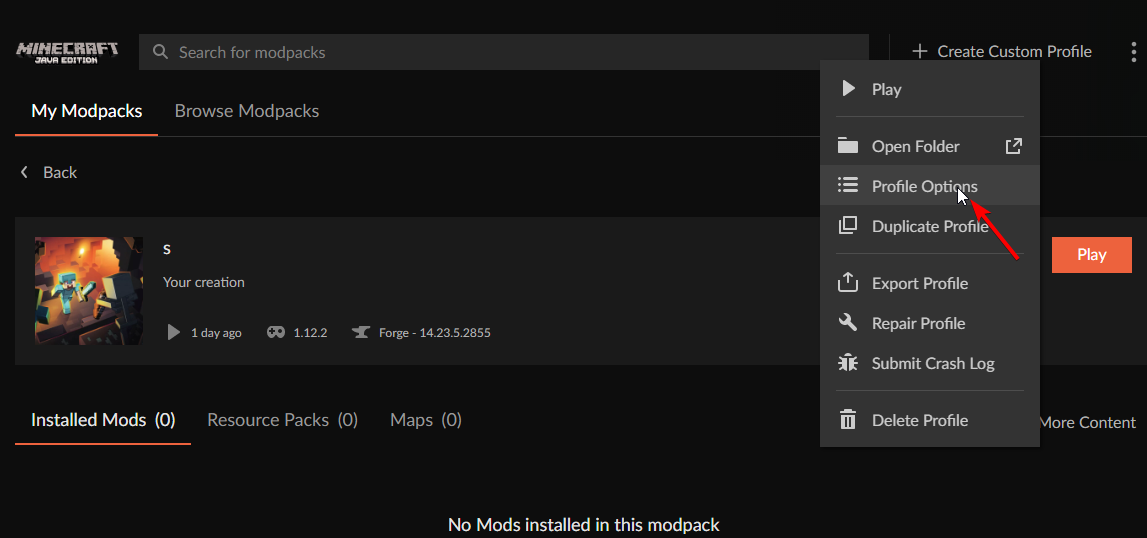
Click the  in the top left.
Select Minecraft.
Click "Edit".
Move to the "Continue here:" section below.
If Minecraft is installed in CurseForge App, follow these steps.
Click the  in the bottom left.
Select the Minecraft tab.
Click "Change".
Move to the "Continue here:" section below.
Continue here:
Make a folder in the root directory called CurseForge.
Select the folder you just made.
The text box should show something like the following:
For Windows: C:\CurseForge
For Mac: /Users/Shared/CurseForge

 rancid shore
rancid shore
rancid shore
@queen storm can help me too
queen storm
rancid shore
<@!525950791710801921> can help me too
Not with that, and that breaks rule 5
gaunt dust
How do I move the folder out of the onedrive?
 opaque coral
how to change forge versioN?
 lyric crescent
 hexed marsh
Why is the logo from the discord server & twitter profile in a rainbow shape?
queen storm
hexed marsh
Why is the logo from the discord server & twitter profile in a rainbow shape?
Pride month...
 fleet bear
No, it's an anvil shape.
lyric crescent
🌈 this is a rainbow shape
hexed marsh
queen storm
Pride month...
ok
opaque coral
what you expet
we need to suport them
them been getting a lot of hate on tik tok
and its gono end tommorow
hexed marsh
Btw I think that the logo right now is better than the normal
fleet bear
Topic please
 nocturne karma
Hi i can't redownload an addon that i already have downloaded
 sleek raptor
!status
red patioBOT
It is 08:43PM on Wednesday for CurseForge my dudes.
Project Moderation Time
Project/File moderation is done on;
Sunday, Monday, Tuesday, Wednesday, Thursday: 10AM - 6PM GMT+2
Friday, Saturday: No Moderation!
This process is First in, First out. Thus files submitted late in the work day may not be checked until the next work day.
New Projects or uploads requiring manual approval: 1-3 Working Days
Updates to approved projects not needing manual approval: 1 Hour
File sync to the Curseforge app may take up to 24 hours after approval.
nocturne karma
It's called GW2 UI and i've been having issues with it today so i want to redownload it and it says I/O error occurred
 mortal steppe
I am looking at getting a mod for 1.16.5 and it’s main file is 1.17 do I just download the 1.16.5 file or both?
 viral briar
Just use the 16.5 for 16.5
 slim thunder
stands for Release, Beta, and Alpha
viral briar
If you don’t ask . You don’t learn so all good
 viral briar
It will say that for all Jar files
mortal steppe
Ok, thanks
viral briar
Curseforge is safe place for mods
mortal steppe
Is there a way to send it to the app since it’s trying to open it with something from the store
lyric crescent
use the app to install it
viral briar
You can install mods in the app internally
lyric crescent
?mc-installmods
red patioBOT
How to install mods in CurseForge App.
- Click
+ Create Custom Profile - Name it, select the required Minecraft version, select the Forge version (usually the highest number), click
Create. - Click the profile icon.
- Click
Add New Content - Search and install the desired mods.
- Start the game!
How to install mods not on CurseForge.
- Right click the profile picture or Open the profile and click the
 Icon next to the play button.
 - Click

Open Folder. - Drag the mod(s) into the
modsfolder. (Note: Some mods will require others, to run. Make sure to read the instructions for the mod!) - Start the game!
 viral briar
Has its own search and install system within the curseforge app making modding much easier especially for those new to it all .
mortal steppe
Is there a way to have both it and a mod pack go at the same time because I don’t see how
Do I combine them or something?
 digital roost
how long does it take for a project to get accepted?
 oblique cradle
When i download cursedforge for windows, then click open file it just gets removed
And before when it didnt, it wouldnt open
 brazen silo
so i have a question regarding minecraft on the curseforge client and the "custom profile" option.
i created a modpack(a bunch of mods for 1.16.5) for myself and a few freinds, and i was testing them out to see if it works. when i launch it it loads partway, then crashes and gives me the message "a unexpected issue has occured and the game has crashed. we are sorry for the incovnice. exit code: 0"
i tried to repair the instalation, like the help guide said, but it didnt work. i tried a bunch of other things, such as de-activating mods one by one but that didnt seem to help, iether. does anyone know how ti fix this issue?
viral briar
digital roost
how long does it take for a project to get accepted?
!status
red patioBOT
It is 09:22PM on Wednesday for CurseForge my dudes.
Project Moderation Time
Project/File moderation is done on;
Sunday, Monday, Tuesday, Wednesday, Thursday: 10AM - 6PM GMT+2
Friday, Saturday: No Moderation!
This process is First in, First out. Thus files submitted late in the work day may not be checked until the next work day.
New Projects or uploads requiring manual approval: 1-3 Working Days
Updates to approved projects not needing manual approval: 1 Hour
File sync to the Curseforge app may take up to 24 hours after approval.
fleet bear
brazen silo
so i have a question regarding minecraft on the curseforge client and the "custo...
post your log file in #👽︱game-support
viral briar
oblique cradle
When i download cursedforge for windows, then click open file it just gets remov...
!getcf try this way.
red patioBOT
Looking to install the CurseForge app?
Todo: Place system requirements here.
<:windows:798410728188936222> Windows
<:mac:798410654418862130> Mac
Linux
:person_shrugging:
mortal steppe
Is there a way to have both it and a mod pack go at the same time because I don’t see how—-do I combine them or something
fleet bear
what is "it"
mortal steppe
A tree cutting mod and enigmatica6
fleet bear
You put the mods in the mods folder?
mortal steppe
Both are in the same area that curseforge put them
 fallen loom
!mc-modifypack
red patioBOT
How to add/remove mods in a modpack.
- Click on the picture of the modpack.
- Click the

Add More Contentbutton, IF this button is not there, see below before continuing. - Find the Mods, Resource Packs or Maps you wish to Install and click
Installon them. - Wait for all the required mods to be downloaded.
- Start the modpack.
How to Enable/Disable content management for modpacks.
- Click on the picture of the modpack.
- Click on the button next to the
Playbutton. - Click on

Profile Options. - Check the
Allow content management for this profileoption if you want to edit the content of the modpack, uncheck it to disable.
NOTE: The Allow content management for this profile option is what allows you to Delete, Disable, Update or Install any Mods, Resource Packs or Maps managed by CurseForge. It must be on to modify any of them! (Currently)
mortal steppe
It doesn’t have the modify button
fleet bear
then read the other part
 quick sphinx
Hey anyone know when or if the forge will be updated to 1.17? And if someone doesn't mind updating a faithful pack 32 bits? DM me. Thanks in advance
fleet bear
quick sphinx
Hey anyone know when or if the forge will be updated to 1.17? And if someone doe...
CurseForge doesn't make forge nor upload any of the content on the site. That's up to the devs to do
 tacit glacier
Hi! For Minecraft, is there a way to save the preferred java version in ones curseforge profile?
In the Minecraft launcher you can specify what java executable you would like to use. This is reset to the default 'bundled runtime' every time however - when launched via curseforge
 alpine cedar
Os mods do CurseForge funcionam para o Minecraft da Microsoft Store?
 signal ridge
alpine cedar
Os mods do CurseForge funcionam para o Minecraft da Microsoft Store?
signal ridge
alpine cedar
Os mods do CurseForge funcionam para o Minecraft da Microsoft Store?
English please #📛︱rules 1
signal ridge
Google Translate
alpine cedar
I don't speak English because I'm Brazilian
signal ridge
You will have to use google translate then, as this is an English only discord
 tall moth
can I report bugs here
signal ridge
Whats up?
tall moth
who are you talking to
signal ridge
you?
tall moth
I publish a mod and instantly its rejected
signal ridge
Show the reject notice
tall moth
well I updated it
The status of the file Fortnite edition 1.8.jar (Fortnite edition) has been changed to Rejected
File is a duplicate of an existing file. Fortnite edition 1.7.jar on Fortnite edition
If you have any questions please contact our support team https://support.curseforge.com.
signal ridge
Did you make any changes between versions?
tall moth
no
signal ridge
Then thats why
tall moth
do you mean forge versions
signal ridge
Need to make some changes to the mod between versions. otherwise its a dupe file
tall moth
I did change it
signal ridge
What did you change?
tall moth
I fixed a bug
signal ridge
hmm
 idle thicket
I installed a mod and every time I try to launch it, it crashes. I tried repairing it once didnt work. I did it again and still didn't work please help
tall moth
HA HA HA
signal ridge
idle thicket
I installed a mod and every time I try to launch it, it crashes. I tried repairi...
!mc-logs
red patioBOT
Where to find the log on the CurseForge Client.
Right-click the modpack profile icon OR click the button in the modpack profile.
Click Open Folder.
Open the logs folder.
Find the file called latest.log and drag it into discord.
idle thicket
signal ridge
idle thicket
This a pack you made or downloaded?
idle thicket
signal ridge
This a pack you made or downloaded?
Downloaded
signal ridge
idle thicket
Downloaded
What did you add?
idle thicket
signal ridge
What did you add?
I didn't add anything
I just downloaded it and tried to launch it
Then I tried repairing it cause it crashed
signal ridge
Delete it and reinstall the pack, something went wrong
fleet bear
tall moth
The status of the file Fortnite edition 1.8.jar (Fortnite edition) has been chan...
did you upload the new file or the old one?
tall moth
new
idle thicket
When I try to delete it it says "One or more errors occurred"
tall moth
1.8
fleet bear
post both files here.
signal ridge
idle thicket
When I try to delete it it says "One or more errors occurred"
Restart your app (close and open)
idle thicket
signal ridge
Restart your app (close and open)
That didn't work
signal ridge
pc reboot then
idle thicket
signal ridge
pc reboot then
That worked
tall moth
check the old battleground biome one has TNT the other stone
fleet bear
in what file location. I'm not digging through the whole mod to find it
mortal steppe
fleet bear
then read the other part
I was able to add it and it shows up as added but it doesn’t end up working. I don’t get error messages or anything either
fleet bear
"add it" what is it?
mortal steppe
mortal steppe
A tree cutting mod and enigmatica6
This
I tried it on a normal tree and a modded tree. It’s supposed to cut down the whole tree if you mine the bottom log
fleet bear
tall moth
check the old battleground biome one has TNT the other stone
Exactly the same.
https://i.imgur.com/S5tKSJk.png
https://i.imgur.com/4Uj3GdE.png

 idle thicket
signal ridge
Delete it and reinstall the pack, something went wrong
idle thicket
signal ridge
Delete it and reinstall the pack, something went wrong
Didnt work
I'm trying to repair it again
fleet bear
mortal steppe
I tried it on a normal tree and a modded tree. It’s supposed to cut down the who...
Then it's not a curesforge issue
idle thicket
Repairing it didn't work
mortal steppe
fleet bear
Then it's not a curesforge issue
Ok, thank you
 kind flame
I am assuming looking for is where I ask about addons I am looking for?
idle thicket
Can someone help pls i tried downloading a mod but whenever I try to play it, it crashes and gives exit code 0
fleet bear
kind flame
I am assuming looking for is where I ask about addons I am looking for?
!notcf
red patioBOT
The question you are asking about isn't related to CurseForge. Please use the appropriate game rooms by getting the role from #786424115535544350 or use #👽︱game-support for help.
This room is only for CurseForge Owned & Maintained features/services.
oblique cradle
How to download a mod from the curseforge app?
red patioBOT
Hey there, it is Curseforge, not "Cursed forge"
fleet bear
oblique cradle
How to download a mod from the curseforge app?
you click install?
fleet bear
you can't wait for me to reply gotta mention me while im talking to you?
oblique cradle
Sorry
fleet bear
you search for the mod pack and click the download server or go to the site and download it
oblique cradle
Okay thanks
 fast trout
hello
i have an error curse forge didnt download after i agree to make changes on my pc
<@&524645667818307596>
red patioBOT
Looking to install the CurseForge app?
Todo: Place system requirements here.
<:windows:798410728188936222> Windows
<:mac:798410654418862130> Mac
Linux
:person_shrugging:
fast trout
it didnt install overwolf also
signal ridge
Try that install link from the bot
fast trout
yes i tried the link of the ot
signal ridge
Reboot your pc and try agai
fast trout
its downloaded thanks for help
 hallow magnet
Im having an issue with my modpack getting approved, specifically the manifest.json and mods folder, I have removed optifine as instructed but i dont know how to check the projectID and fileID for the mods listed to make sure they are present in my manifest.json

 elder fog
same ^
i mean The following files belong to CurseForge-hosted projects, and should therefore not be added directly to zip files:
not the optifine thing
lyric crescent
delete those mods from your profile, then readd them with the app. export again and check your zip before uploading
hallow magnet
thanks
I will try that
ok got it hopefully it gets approved now, thank you for your very to the point advice
elder fog
lol sucks for me i have 100 plus mods to do
elder fog
kinda
 soft pagoda
how to have curseforge bot from my server ?
fleet bear
There's no such thing as a curseforge bot
 fleet bear
idk what that is. Nothing CurseForge makes or provides
lyric crescent
you can name bots anything you want...
fleet bear
oh look google

GitHub
A discord bot, which informs users about new files of specific mods - ErdbeerbaerLP/Curseforge-Bot
hallow magnet
I am also thoroughly confused, I believe you are referring to a third party bot that sends messages when certain instances are updated. I see no option to add it from any botlisting sites, only github.
I have no experience using github but if you know how then im sure its not a problem to get it from there
tall moth
how do I fix a issue where my projects instantly get rejected once I update them
signal ridge
Show the reject message
tall moth
The status of the file Fortnite edition 1.8.jar (Fortnite edition) has been changed to Rejected
File is a duplicate of an existing file. Fortnite edition 1.7.jar on Fortnite edition
If you have any questions please contact our support team https://support.curseforge.com/.

CurseForge Support
We're here to get you informed on everything you need to know about CurseForge, including helpful guides and troubleshooting articles to back you up when you get in a pickle
fleet bear
tall moth
The status of the file Fortnite edition 1.8.jar (Fortnite edition) has been chan...
I already told you the files are the same
You need to make a new file
 bitter wadi
how long on average dose it take for a modpack to be verified?
signal ridge
!status
red patioBOT
It is 02:58AM on Thursday for CurseForge my dudes.
Project Moderation Time
Project/File moderation is done on;
Sunday, Monday, Tuesday, Wednesday, Thursday: 10AM - 6PM GMT+2
Friday, Saturday: No Moderation!
This process is First in, First out. Thus files submitted late in the work day may not be checked until the next work day.
New Projects or uploads requiring manual approval: 1-3 Working Days
Updates to approved projects not needing manual approval: 1 Hour
File sync to the Curseforge app may take up to 24 hours after approval.
bitter wadi
cus the one i uploaded has been under review for the past 7 hours
signal ridge
Read what the bot says
 dreamy seal
Can we post links to our modpacks so people of the community can give us their opinion?
signal ridge
If you go to #786424115535544350 and get the Minecraft role you can post your project down in #768717413918179368
 uncut pulsar
oh im sorry. i downloaded curse forge launcher to play RLcraft
but it dont let me login
signal ridge
Make sure your using the account that owns the Java Version of minecraft
uncut pulsar
yes it is
i can login to official mc launcher with my ID but curse forge launcher says its wrong
signal ridge
Do you have the vanilla minecraft launcher from mojang by chance?
Screen shot the account logged into the official mc launcher then do the same with the launcher from cf.
dreamy seal
Quick tip: You can download a pirate launcher of minecraft, do some quick setting and Play any modpack without minecraft premium :)
signal ridge
dreamy seal
Quick tip: You can download a pirate launcher of minecraft, do some quick settin...
#📛︱rules 8
uncut pulsar
how?
bitter wadi
Dont be advertising pirating minecraft!
signal ridge
Do that and you will not get any support here from us
signal ridge
Best to have another go at the rules
uncut pulsar
no no i was just curiouse..that all. i uninstalled official launcher..thinking that its affecting cf 😦
dreamy seal
ok, thank you Mr. Admin
signal ridge
uncut pulsar
no no i was just curiouse..that all. i uninstalled official launcher..thinking t...
The cf launcher doesnt touch the vanilla launcher
uncut pulsar
iim going to download offcial mc launcher now
dreamy seal
uncut pulsar
no no i was just curiouse..that all. i uninstalled official launcher..thinking t...
I was about to make the clown joke (🤡 ) but i just see Rule #2 xd
uncut pulsar
please enlighten me about vanilla and cf difference?
dreamy seal
uncut pulsar
please enlighten me about vanilla and cf difference?
There is no difference cause cf use the same launcher
signal ridge
Cf installs its own version of the launcher. Still the same launcher but the files are separate
dreamy seal
uncut pulsar
please enlighten me about vanilla and cf difference?
you just need to put your account and that's all
signal ridge
2 different save locations
dreamy seal
But same method
signal ridge
thats why when you set up the cf launcher for the first time it wont let you save it in .minecraft. as its separate.
uncut pulsar
dreamy seal
There is no difference cause cf use the same launcher
but it dont let me login brother
dreamy seal
uncut pulsar
but it dont let me login brother
It let you join in the normal launcher but not in the cf ?
signal ridge
uncut pulsar
but it dont let me login brother
Take a screen shot of the account that is logged into the official launcher, then a screen shot of the account logged into the cf launcher.
would something look like this
 uncut pulsar
i took a sceenshot
uncut pulsar
sure
 tidal pulsar
Well i am having some issues whith one mod everytime i try to play thr game just closes
And it's only 1 mod
signal ridge
What mod?
tidal pulsar
Rofl mod
signal ridge
!mc-logs
red patioBOT
Where to find the log on the CurseForge Client.
Right-click the modpack profile icon OR click the button in the modpack profile.
Click Open Folder.
Open the logs folder.
Find the file called latest.log and drag it into discord.
uncut pulsar
one thing, do i have to login with email? i use my username on official launcher
signal ridge
tidal pulsar
Drag and drop the log called latest into here
signal ridge
uncut pulsar
one thing, do i have to login with email? i use my username on official launcher
Log into the cf launcher the same way you log into the official launcher

 signal ridge
uncut pulsar
cf Failing
signal ridge
uncut pulsar
cf Failing
Make sure your signing into the Mojang option on the cf app. may need to use the email of the account that goes with that user
uncut pulsar
signal ridge
Make sure your signing into the Mojang option on the cf app. may need to use the...
i am using mojang option
signal ridge
uncut pulsar
i am using mojang option
try using your email as the user for that account
 meager wharf
i just downloaded curse forge and loaded minecraft it got rid of all my settings how can i play through the minecraft launcher
uncut pulsar
the thing is its been a long time i made that account and its all forgotten 😦
signal ridge
tidal pulsar
add the mod GeckoLib for 1.12.2
signal ridge
meager wharf
i just downloaded curse forge and loaded minecraft it got rid of all my settings...
The cf app doesnt touch the official minecraft launcher
 onyx pilot
{insert something political here}
signal ridge
onyx pilot
{insert something political here}
Not the channel for random
meager wharf
signal ridge
The cf app doesnt touch the official minecraft launcher
so what should i do
signal ridge
uncut pulsar
the thing is its been a long time i made that account and its all forgotten 😦
You will have to contact mojangs support then. Or see if you can log in on their site and change your email
signal ridge
meager wharf
so what should i do
What settings where changed?
tidal pulsar
signal ridge
add the mod GeckoLib for 1.12.2
Ok thx
meager wharf
signal ridge
What settings where changed?
my resource packs skins other instalations and custom binds
signal ridge
meager wharf
my resource packs skins other instalations and custom binds
You will have to readd them on the cf app
meager wharf
ok
uncut pulsar
signal ridge
You will have to contact mojangs support then. Or see if you can log in on their...
my brother came in and tried to login with his mojang account using email..it failed too. he not gonna let me screenshot it 😦 im sure. but it failed too.
 icy wolf
Where can I go to report bugs/make suggestions?
signal ridge
icy wolf
Where can I go to report bugs/make suggestions?
Bugs here
icy wolf
signal ridge
Bugs here
Ah, to a specific mod
uncut pulsar
icy wolf
Where can I go to report bugs/make suggestions?
i think u are in the right place buddy
signal ridge
icy wolf
Ah, to a specific mod
Whats up?
icy wolf
signal ridge
Whats up?
Well, one of my mods that im using has Advanced generators, but I have no way to pump fuel into them
they dont have a compatable mod im pretty sure
uncut pulsar
signal ridge
Whats up?
can i change location of the folder and try?
signal ridge
icy wolf
Well, one of my mods that im using has Advanced generators, but I have no way to...
ask the mod author
signal ridge
uncut pulsar
can i change location of the folder and try?
!mc-path
icy wolf
signal ridge
ask the mod author
Yeah, where can I do that?
signal ridge
icy wolf
Yeah, where can I do that?
Go to the mods project page on the curseforge site and see if they have a discord. Otherwise they should have an issues page
!mc-path
red patioBOT
**Minecraft Files should NOT be installed inside the following locations
.minecraft folder.
OneDrive folders.
Desktop folder.
Drive roots I.E. Directly into the C:\ drive.
iCloud enabled folders.
If any of the above are in the path you need to change/move it by following the instructions below!**
If Minecraft is not installed in CurseForge App, start here.
Click the in the top left.
Select Minecraft.
Click "Edit".
Move to the "Continue here:" section below.
If Minecraft is installed in CurseForge App, follow these steps.
Click the in the bottom left.
Select the Minecraft tab.
Click "Change".
Move to the "Continue here:" section below.
Continue here:
Make a folder in the root directory called CurseForge.
Select the folder you just made.
The text box should show something like the following:
For Windows: C:\CurseForge
For Mac: /Users/Shared/CurseForge
icy wolf
signal ridge
Go to the mods project page on the curseforge site and see if they have a discor...
ah okay
signal ridge
uncut pulsar
can i change location of the folder and try?
Follow The bot above
icy wolf
There is no section for reporting bug issues...
 signal ridge
You need to look at it on the site. not the app
icy wolf
uh okay
signal ridge
Click the and click view modpack website
uncut pulsar
So mods should be installed C:\Curseforge folder?
signal ridge
yes
 shrewd thicket
hey when i start up curse forge in overwolf it just disappears and nothing happens
uncut pulsar
my mods were downloaed somewhere else.is that why it didnt let me loging?
im downloadeing a mod now
signal ridge
The folder you set the path too will be the curseforge folder in C. When you create a custom profile it will be installed to Curseforge\instances\NameofProfile\
uncut pulsar
wish there was a way to install mods into official launcher. im not a po when it comes to mc in pc. i rarely use my PC. mostly i use my phone. let see after its downloaded
do i have to create custom profile too?
signal ridge
If you want to install individual mods you make a custom profile. Otherwise you can download pre-made modpacks made by other users
uncut pulsar
can u tell me how?
signal ridge
!mc-installmods
red patioBOT
How to install mods in CurseForge App.
- Click
+ Create Custom Profile - Name it, select the required Minecraft version, select the Forge version (usually the highest number), click
Create. - Click the profile icon.
- Click
Add New Content - Search and install the desired mods.
- Start the game!
How to install mods not on CurseForge.
- Right click the profile picture or Open the profile and click the Icon next to the play button.
- Click
Open Folder. - Drag the mod(s) into the
modsfolder. (Note: Some mods will require others, to run. Make sure to read the instructions for the mod!) - Start the game!
 versed zealot
help! i submitted my pack but it got rejected. how do i fix this
fallen loom
Did you get a rejection reason in your notifications?
versed zealot
File is not a valid resource or texture pack.
slim thunder
versed zealot
File is not a valid resource or texture pack.
screenshot the contents of the zip
red patioBOT
Hey there, it is Curseforge, not "Cursed forge"
 kind current
This is gonna sound stupid but did you try restarting your computer. And then running the installer
digital roost
HI i have a issue it is saying "
The status of the file BLAZE MODPACK 1.0 (1.16.5) (BLAZE MODPACK) has been changed to Rejected
Notes:
Missing manifest.json file.
Client modpack files must be created from within the Twitch Desktop App: https://authors.curseforge.com/knowledge-base/game-specific-support/120-how-to-create-a-modpack
Server modpack files should be uploaded as an Additional File on a client modpack file.
If you have any questions please contact our support team https://support.curseforge.com"
Can any one help me out??
slim thunder
how did you make the zip
slim thunder
screenshot the contents of the zip
digital roost
send you?
queen storm
Send here
digital roost
oh k

The modpack contains
I am having a issue "
The status of the file BLAZE MODPACK 1.0 (1.16.5) (BLAZE MODPACK) has been changed to Rejected
Notes:
Missing manifest.json file.
Client modpack files must be created from within the Twitch Desktop App: https://authors.curseforge.com/knowledge-base/game-specific-support/120-how-to-create-a-modpack
Server modpack files should be uploaded as an Additional File on a client modpack file.
If you have any questions please contact our support team https://support.curseforge.com/"
Can any one help me out??
 noble junco
Is anyone having an issue with curse forge not updating and when you manually to do it doesn't do anything
digital roost
When i create a new profile in 1.12.2
I go to the molder and copy paste my already pre-made mods, after that when i go to curseforge it only shows a few of them not all of them
 azure ember
I'm having an issue with downloading modpacks. Whenever I click on the download button for some modpacks, nothing happens. I'm confused because some modpacks allow me to download them, however others just don't respond.
fleet bear
digital roost
I am having a issue "
The status of the file BLAZE MODPACK 1.0 (1.16.5) (BLAZE M...
drop the file here
fleet bear
digital roost
When i create a new profile in 1.12.2
I go to the molder and copy paste my alrea...
don't copy paste mods it breaks the app
fleet bear
azure ember
I'm having an issue with downloading modpacks. Whenever I click on the download ...
Clicking it where?
fleet bear
!notcf
red patioBOT
The question you are asking about isn't related to CurseForge. Please use the appropriate game rooms by getting the role from #786424115535544350 or use #👽︱game-support for help.
This room is only for CurseForge Owned & Maintained features/services.
digital roost
oh k
hello i have a question my modpack file is rejected saying- "Server modpack files should be uploaded as an Additional File on a client modpack file.
If you have any questions please contact our support team https://support.curseforge.com."
I have not uploaded any server file
queen storm
digital roost
hello i have a question my modpack file is rejected saying- "Server modpack file...
You were told to drop the file here
digital roost
i was not there at that moment
ok let me drop it
it is too heavy for discord
it if of 400+ mb
fleet bear
then you did it wrong
queen storm
Lets focus on the client first.
Install the mods using the app
digital roost
hi so basically im experiencing an error where the looading screen (mojang screen) will make the ding sound as if its going to bring me to the main page but then the prgress resets to the starts and reloads. its very confusing but here is my latest log
 rich flint
digital roost
hi so basically im experiencing an error where the looading screen (mojang scree...
rich flint
digital roost
hi so basically im experiencing an error where the looading screen (mojang scree...
Is this a custom modpack/instance you made, or is it an existing modpack hosted on curseforge.com? Did it used to work?
 graceful oak
hey so the error started happening again...
the curseforge app is no longer loading when started
 unborn basin
graceful oak
hey so the error started happening again...
unborn basin
graceful oak
hey so the error started happening again...
Which error? Can you send a screenshot?
 unborn basin
Please redownload and reinstall CF
graceful oak
will do!
unborn basin
Should solve things
graceful oak
same error

I had this error two days ago aswell and it resolved itself rather randomly
digital roost
rich flint
Is this a custom modpack/instance you made, or is it an existing modpack hosted ...
its an existing modpack!
graceful oak
but its back for a round two
digital roost
rich flint
Is this a custom modpack/instance you made, or is it an existing modpack hosted ...
i also forgot to mention that the modpack works fine without sodium but the error occurs with sodium.
rich flint
digital roost
i also forgot to mention that the modpack works fine without sodium but the erro...
sounds like the solution is to not use sodium
digital roost
rich flint
sounds like the solution is to not use sodium
yep, ive taken it out now but do you have any idea of what the problem may be
graceful oak
I'm gonna try multimc and see if that works
rich flint
nope. it messes with alot of things so i have no idea. should contact the mod authors
unborn basin
graceful oak
same error
PMed you
graceful oak
cool
 copper fjord
 lyric crescent
!notcf
red patioBOT
The question you are asking about isn't related to CurseForge. Please use the appropriate game rooms by getting the role from #786424115535544350 or use #👽︱game-support for help.
This room is only for CurseForge Owned & Maintained features/services.
 wind hatch
In recent months, the CurseForge staff has witnessed an abuse of the website content reporting tools in relation to OreSpawn mod.
Through reports, tickets, project page descriptions and DMs - we were 'introduced' to a group of users that to various degrees reposted and ported OreSpawn. The rivalling groups then used the different tools available on CurseForge in attempt to take each other down, often using aggressive tone of speech.
As a clarification - the different tools offered for users are meant to help us keep CurseForge safe and fun. The scale and contents used by the specific user group mentioned above was not used as intended, but rather as a form of conflict. This required a lot of time, energy and patience.
We see this as abusing the system, and despite our efforts (including contacting and having the original creator of OreSpawn upload his project), we kept seeing more and more projects coming through, each time resulting in high volume 'use' of the tools available for users, regardless of if the project followed moderation standards or not.
After deliberating several times over the past month, we have decided to remove OreSpawn ported mods from CurseForge, regardless of if they are not a direct copy of the code. That is aside the point at this stage.
Additional spam or harassing of the CurseForge team will result in warnings, and if required - bans. We value and protect our team members and their wellbeing just as much as we care for the community and creators.
We will continue to have an open communication channels with the broad community.
 last lynx
All this could have been avoided is if they didn't port the OreSpawn mod at all.
And stuck with making their own content.
lyric crescent
or at the very least stop mentioning orespawn in your mods 🙄
 broken granite
could have been avoided by not abusing the cf support features 🙄
 cloud belfry
could have been avoided by actually realizing that the reports were one sided 🙄
broken granite
ok, added the rolling eyes
last lynx
lyric crescent
or at the very least stop mentioning orespawn in your mods 🙄
Not if that mod's a literal copy of OreSpawn with different assets and some new content 🙄
RedRoseWarrior was doing it and as CA took a similar approach to his but different, he stroke against them.
cloud belfry
CA got permission from danger as well since we were using different assets 🙄
 last locust
I am making a mod on my own and I am getting exit code 1 so I am unable to test it. Should I ask in the forums, here or minecraft community about it?
lyric crescent
last locust
I am making a mod on my own and I am getting exit code 1 so I am unable to test ...
?mc-log
red patioBOT
Where to find the log on the CurseForge Client.
Right-click the modpack profile icon OR click the button in the modpack profile.
Click Open Folder.
Open the logs folder.
Find the file called latest.log and drag it into discord.
last locust
I dont understand. Do I need to open the game to do that?
lyric crescent
Not sure I understand. Are you making a mod or a modpack? If you are making a mod then you should ask in #⚙️︱authors-help by getting the minecraft role #786424115535544350.
If you are making a modpack without using the curseforge app then #👽︱game-support
last locust
I am making a mod
 sharp plume
i want to download a minecraft texture pack in the app
viral briar
!mc-installmods
red patioBOT
How to install mods in CurseForge App.
- Click
+ Create Custom Profile - Name it, select the required Minecraft version, select the Forge version (usually the highest number), click
Create. - Click the profile icon.
- Click
Add New Content - Search and install the desired mods.
- Start the game!
How to install mods not on CurseForge.
- Right click the profile picture or Open the profile and click the Icon next to the play button.
- Click
Open Folder. - Drag the mod(s) into the
modsfolder. (Note: Some mods will require others, to run. Make sure to read the instructions for the mod!) - Start the game!
sharp plume
i don't want to install mods. i want to install resource packs
 sharp plume
thanks
viral briar
no problem
 silent karma
Is the chaos awakens mod removed?
digital roost
Yup
silent karma
Why tho :/
lyric crescent
drama
silent karma
Now im curious
silent karma
So the drama is related to orespawn and porters fighting...
Understood
Btw anyone know any mods with painful weapons?
last locust
spartans weaponry
 unkempt shadow
how do i put a modpack to dawload
silent karma
last locust
spartans weaponry
Something as powerful as the weapons in orespawn
And i already have spart wep
last locust
dont know that mod
silent karma
last locust
dont know that mod
Then weapons with around 30+ dmg
last locust
whew
unkempt shadow
I made a modpack and want to dawload
queen storm
unkempt shadow
I made a modpack and want to dawload
!mc-packshare
red patioBOT
There are two ways to share a modpack you've made with others...
Export and Share - For Friends to Small Groups.
- Click the Icon for the modpack.
- Click the button next to play.
- Click

Export. - Select the files that should be included.
- Send the zip to the people that want it! They can follow the instructions in
!mc-installpackto install the pack!
Upload to Curseforge - For Public Release to Everyone.
This options will make your pack public to EVERYONE, it comes with extra requirements and will take some effort to set up.
- Go to here: https://www.curseforge.com/project/432/4471/create
- Fill out the information with a proper description of the pack. This should allow anyone to understand what the pack is.
- Click the Icon for the modpack in the CurseForge app.
- Click the button next to play.
- Click
Export. - Select the files that should be included.
- Open your Project you made on the CurseForge site and Upload the file you just made.
- Wait for Moderation & Sync so it can show up in the client! (See
!syncfor limitations)
dreamy seal
Why when i try to get the minecraft role, the bot tell me that i am not eligible for the role?
queen storm
dreamy seal
Why when i try to get the minecraft role, the bot tell me that i am not eligible...
Did you talk about tlauncher before?
dreamy seal
queen storm
Did you talk about tlauncher before?
i only mentioned it once
 lime knot
I uninstalled galactic craft and the other one idk what it is and it says me this
 queen storm
dreamy seal
i only mentioned it once
queen storm
dreamy seal
i only mentioned it once
#🔥︱curseforge-support message
Ahh yes, rule 8
dreamy seal
queen storm
https://discord.com/channels/428228256236306434/782027635252920322/8599720763374...
Yea but i ask for perdon and never talk about that again :(
queen storm
You are lucky that I am in a good mood
unkempt shadow
how do I put an 18mb file and if not to put it with reduce
queen storm
unkempt shadow
how do I put an 18mb file and if not to put it with reduce
Put it where?
unkempt shadow
for download
queen storm
Just upload it?
unkempt shadow
for download
unkempt shadow
I don't speak, I have to use the translator
queen storm
And there is nothing I can do to fix that issue
unkempt shadow
i know but how to compress a file
queen storm
Link says how
lime knot
I uninstalled galactic craft and the other one idk what it is and it says me this

 smoky frigate
i cant run seablock rustic waters help
queen storm
smoky frigate
i cant run seablock rustic waters help
Please follow rule 4
smoky frigate
yea but can you help me
queen storm
Not with more info
smoky frigate
The log of the crash
queen storm
!mc-installfix
red patioBOT
- Click on the Minecraft Tab on the Left side of the App.
- Click button next to the
Create Custom Profileoption. - Click

Repair Installationoption. - Play game.
NOTE: You will not lose any modpacks or worlds, These are saved in the Instances folder. DO NOT TOUCH THIS FOLDER OR YOU WILL LOSE EVERYTHING
smoky frigate
i did it 2 times still
queen storm
lime knot
already did that
Who are you then?
lime knot
Purple
queen storm
smoky frigate
i did it 2 times still
Do that, pc restart after
lime knot
and you are timtower
queen storm
lime knot
Purple
But why are you responding? How are you related to this issue?
smoky frigate
he is related by this
#🔥︱curseforge-support message
queen storm
Wasn't talking to him though 🤷
 weary lynx
Hi everyone i have some questions
Can I ask questions here?
 tribal dragon
Don't ask to ask, it's on the server rule!
 rocky pivot
everytime i download curseforge it uninstalls itself
please help
@grand umbra can you help me?
red patioBOT
Looking to install the CurseForge app?
Todo: Place system requirements here.
<:windows:798410728188936222> Windows
<:mac:798410654418862130> Mac
Linux
:person_shrugging:
rocky pivot
 opal cipher
Rule #5, no random pings.
opal cipher
Rule #5, no random pings.
oh sorry
me and my friend been trying to install for 32 minutes
opal cipher
Could be due to some either overly aggressive antivirus, or that SAntivirus, that's basically malware.
opal cipher
No clue about that one.
opal cipher
No.
rocky pivot
to trun on screen share
man
ITS UNINSTALLED
EVERYTIME I HIT THE BUTTON TO INSTALL
IT UNINSTALLS
opal cipher
Yes, you said that, no need for caps.
rocky pivot
welcome to overwolf setup
next
install loaction
next
and done
and ITS NOT THERE
i been doing this for a hour
all i want IS A FLIPING MODPACK
unborn basin
rocky pivot
all i want IS A FLIPING MODPACK
What are you talking about?
unborn basin
Everytime you install Curseforge - Curseforge is being uninstalled?
unborn basin
Is it only me or is logic is lacking in this sentence?
rocky pivot
NOW ME AND MY FRIEND CAN PLAY WITH MODS
weary lynx
I downloaded the 1.12 version of the module, how do I make it run on 1.17
unborn basin
weary lynx
I downloaded the 1.12 version of the module, how do I make it run on 1.17
Mind giving us some more context?
weary lynx
I downloaded the zombie apocalypse module. Can I make it run on version 1.17?
My english is not very good.sorry
viral briar
it's a modpack set at 12.2 due to the mods that it has , most likely a lot of the those same mods used in the pack do not have a 1.17 version + the fact forge 1.17 does not exist yet.
unborn basin
What do you mean by module?
weary lynx
So I can only play with version 1.12
?
digital roost
Hi, when enabling a mod why does the button sometimes not work?
viral briar
weary lynx
So I can only play with version 1.12
?
For that modpack yes . It’s preset to 12.2 and using forge mods . Forge mod loader does not have a 1.17 version yet so you won’t see any 1.17 forge mods till that is released
 stuck sonnet
I am trying to get Stardew Valley mods and I scan it I have it downloaded and it doesn't show me mods?
viral briar
!stardew
red patioBOT
Overwolf maintains a known list of issues here, some with solutions, others without.
https://support.curseforge.com/en/support/solutions/articles/9000196615-curseforge-known-issues
Scroll down, look at "Other games"
viral briar
Follow that what the bot messages says and you’ll find a link to something called “smapi”
stuck sonnet
It didn't help me
viral briar
Stardew via steam I presume
stuck sonnet
it says get more addons and it says scan and it does nothing
stuck sonnet
windows
 narrow minnow
I'll DM
stuck sonnet
ok
hallow magnet
wolfgang was very helpful when I couldn't run packs on curse, great guy 👍
digital roost
I've relaunched 3 times and nothing is fixing it
stuck sonnet
wolfgang was very helpful thanks for the help man!
 woven depot
I just downloaded the mine mine no mi mod but how can i import it? pls help
narrow minnow
?mc-installmod
red patioBOT
How to install mods in CurseForge App.
- Click
+ Create Custom Profile - Name it, select the required Minecraft version, select the Forge version (usually the highest number), click
Create. - Click the profile icon.
- Click
Add New Content - Search and install the desired mods.
- Start the game!
How to install mods not on CurseForge.
- Right click the profile picture or Open the profile and click the Icon next to the play button.
- Click
Open Folder. - Drag the mod(s) into the
modsfolder. (Note: Some mods will require others, to run. Make sure to read the instructions for the mod!) - Start the game!
narrow minnow
woven depot
I just downloaded the mine mine no mi mod but how can i import it? pls help
get the CurseForge app from https://download.curseforge.com

Overwolf | Tech for developers who love gaming
Welcome to the CurseForge community! Build, manage and download mods and addons for your favorite games
 weak fulcrum
Hey, not sure if this is the right place to ask this question but, I added AE2 to a enigmatica 6 server I run. Im missing the silicon crafting recipe. Is there any way to add this or use the refined storage silicon, with like a forge tag or something?
 scarlet forum
Hello, i was setting up skyfactory 3 servers for a few years now, but suddenly i ran into an issue:
I downloaded this server pack: https://www.curseforge.com/minecraft/modpacks/ftb-presents-skyfactory-3/files/3302998
as my CuresForgeapp tells me i have version 3.0.21 installed on my client.
Then I unzip the file and run the installer.bat. BUT the installer fails and I'm not sure why. This is the Log: https://pastebin.com/CWvtZA66
I have tried manually putting in the forgecore but that didnt worked out, which could be my fault.
Pastebin
Pastebin.com is the number one paste tool since 2002. Pastebin is a website where you can store text online for a set period of time.
 native citrus
Hello, How do I remove the option from world of warcraft? app
lyric crescent
what option
native citrus
 lyric crescent
i dont get it
native citrus
I mean, how do I remove or uninstall that plugin manager option from the app wow
scarlet forum
scarlet forum
Hello, i was setting up skyfactory 3 servers for a few years now, but suddenly i...
i think im going to use 3.0.15
lyric crescent
native citrus
I mean, how do I remove or uninstall that plugin manager option from the app wow
settings, select game, turn off manage addons?
native citrus
yea
scarlet forum
thanks for your help! cya
weary lynx
viral briar
For that modpack yes . It’s preset to 12.2 and using forge mods . Forge mod load...
thank you
stuck sonnet
how do I activate the mods?
lyric crescent
press play?
 sacred echo
hey, I try to launch a modpack but it wont load. Can someone help
lyric crescent
what does it do
 tiny flicker
idk hwo to fix this problem
 lyric crescent
sacred echo
if i press play it does not load
lyric crescent
sacred echo
if i press play it does not load
?mc-installfix
red patioBOT
- Click on the Minecraft Tab on the Left side of the App.
- Click button next to the
Create Custom Profileoption. - Click
Repair Installationoption. - Play game.
NOTE: You will not lose any modpacks or worlds, These are saved in the Instances folder. DO NOT TOUCH THIS FOLDER OR YOU WILL LOSE EVERYTHING
lyric crescent
i dont see a problem?
tiny flicker
its not a problem but idk hwo to do it
says that its a older version of the game so it dont let me play it
im bad with this kind of stuff so idk hwo to make it work sry ;/
lyric crescent
where does it say that
tiny flicker
well if you hover oevr it it says 'this is an older version of the game that doesnt support latest player safety features.'
is there an way to change that?
lyric crescent
it's a warning, you read it and move on
 worn wasp
is Galacticraft not available for 1.12.2? as it wont show up when i look for it
lyric crescent
its not on curseforge
signal ridge
Can get it from the authors main website tho.
worn wasp
will that cause issues if i was export the pack?
lyric crescent
?mc-3rdparty
red patioBOT
Minecraft Modpack 3rd party
Mods not on CurseForge must be on the 3rd-party list to be included in modpacks uploaded to CurseForge. If a mod is not on this list it can't be included in the export of a modpack and must be removed before uploading. If you upload with a mod that isn't on this list the file will be rejected.
List of approved 3rd party mods:
https://docs.google.com/spreadsheets/d/176Wv-PZUo9hFxy6oC6N8tWdquBLPRtSuLbNK-r0_byM
worn wasp
Thanks for the help 🙂
digital roost
Can I get help my pack has approved but I had the file for the packet denied
lyric crescent
check your reject notice
 brittle needle
i have a question
 vestal moth
how do i download cursforge 12.2
lyric crescent
what is curseforge 12.2?
lyric crescent
brittle needle
but it dont work...
Don't know what your question is, or what you're saying at all to be honest.
brittle needle
:/
digital roost
It is showing no issues but it also get rid of the files for it
lyric crescent
If your file was rejected there will be a notice on the website that explains why.
 digital roost
If Remember right I think it said something about it being zip folder
lyric crescent
so go read it, and if you dont understand screenshot and send it here
digital roost
 red patioBOT
There are two ways to share a modpack you've made with others...
Export and Share - For Friends to Small Groups.
- Click the Icon for the modpack.
- Click the button next to play.
- Click
Export. - Select the files that should be included.
- Send the zip to the people that want it! They can follow the instructions in
!mc-installpackto install the pack!
Upload to Curseforge - For Public Release to Everyone.
This options will make your pack public to EVERYONE, it comes with extra requirements and will take some effort to set up.
- Go to here: https://www.curseforge.com/project/432/4471/create
- Fill out the information with a proper description of the pack. This should allow anyone to understand what the pack is.
- Click the Icon for the modpack in the CurseForge app.
- Click the button next to play.
- Click
Export. - Select the files that should be included.
- Open your Project you made on the CurseForge site and Upload the file you just made.
- Wait for Moderation & Sync so it can show up in the client! (See
!syncfor limitations)
digital roost
i did it the second way on my computer
lyric crescent
were you manually adding mods?
 lyric crescent
well for all the mods in that list:
Remove them from your profile, then reinstall them with the app.
Export again. Open your export and check overrides/mods. if mods are still there, repeat the process.
lyric crescent
yea, i got that
 jaunty iris
Hello, I'm playing the assembly "all in one[modded one block]" and there is a world of bees there if you throw an ender pearl into a hive or nest, do you know how to get out of it?
lyric crescent
!notcf
red patioBOT
The question you are asking about isn't related to CurseForge. Please use the appropriate game rooms by getting the role from #786424115535544350 or use #👽︱game-support for help.
This room is only for CurseForge Owned & Maintained features/services.
digital roost
How long will take for the files to be processed
lyric crescent
!status
red patioBOT
It is 10:00PM on Thursday for CurseForge my dudes.
Project Moderation Time
Project/File moderation is done on;
Sunday, Monday, Tuesday, Wednesday, Thursday: 10AM - 6PM GMT+2
Friday, Saturday: No Moderation!
This process is First in, First out. Thus files submitted late in the work day may not be checked until the next work day.
New Projects or uploads requiring manual approval: 1-3 Working Days
Updates to approved projects not needing manual approval: 1 Hour
File sync to the Curseforge app may take up to 24 hours after approval.
 silent fiber
Hey, I'm trying to install some TBC classic addons via the CurseForge app. It seems like many addons that exist online can't be found / won't load in the app (e.g. https://www.curseforge.com/wow/addons/itemrack-classic) ? I'm on a Mac fwiw
Clicking the orange Install button on the curseforge.com page deeplinks into the CurseForge app but only reloads the UI / doesn't pull the addon up. Is this a known problem / is there a step I'm missing?
It looks like it's pointing towards some weird copy of the app. Can I reset / redirect the app it's pointing at?
Figured it out. 3 dot menu in the top right -> scan computer for games, and then switch to BCC in the top right dropdown.
 olive ocean
so I downloaded some more ram and now my pc is like breaking
fleet bear
you can't download more ram
olive ocean
on the forge app it said if u need more ram download it and it had a link

I downloaded that ram
fleet bear
it's a joke
olive ocean
bra u fucked my pc
fleet bear
It doesn't do anything...
olive ocean
It a virus
fleet bear
it's not
olive ocean
I just scanned it
viral briar
Completely safe meme website
 modest kayak
what does it mean when it says i have mods that are duplicate within my system?
viral briar
Means you have two of the same mod
 tight sluice
how do i make my very own modpack were every can click instal and just play
rich flint
You use the app to make an export file, and then create a project for it to go on curseforge.com
It takes time and patience
 upbeat fable
I need some help i keep trying to play pixelmon but it keeps on saying "could not verify minecraft version"
tight sluice
rich flint
You use the app to make an export file, and then create a project for it to go o...
is it going to be freee
digital roost
viral briar
Completely safe meme website
Man now I want to see the website link.
lyric crescent
yes it's free..
digital roost
how long does it usually take for review of a modpack do you think? just curious
lyric crescent
!status
red patioBOT
It is 11:52PM on Thursday for CurseForge my dudes.
Project Moderation Time
Project/File moderation is done on;
Sunday, Monday, Tuesday, Wednesday, Thursday: 10AM - 6PM GMT+2
Friday, Saturday: No Moderation!
This process is First in, First out. Thus files submitted late in the work day may not be checked until the next work day.
New Projects or uploads requiring manual approval: 1-3 Working Days
Updates to approved projects not needing manual approval: 1 Hour
File sync to the Curseforge app may take up to 24 hours after approval.
digital roost
oh shoot
tight sluice
can somone help me with my project logo
fleet bear
if you post the problem sure
tight sluice

that me problem
dm or ping me when u got anweser or soultion ill be gone for 2 hour
s
signal ridge
tight sluice
dm or ping me when u got anweser or soultion ill be gone for 2 hour
What kind of file is it your uploading?
signal ridge
windows or mac?
tight sluice
win
signal ridge
Logo Tutorials
Windows:
Paint 3d: https://puu.sh/HSFQG/e5e2eb7299.mp4
MS Paint: https://puu.sh/HSFWt/2f9fc9f924.mp4
hallow magnet
@olive ocean did you click the link for more info after you downloaded the ram
On the website which he "downloaded ram" on
After you do it there's a link for further info
Which leads to a rick roll
signal ridge
I am aware of it, More wondering why your pining them
hallow magnet
Well they seem convinced that curseforge basically led people to malware so I wanted them to see that it was a joke and wasn't real, hence mentioning the joke video that came after
 flat frigate
I have been having issues with pallypower so I deleted the add on and now I can't find it anywhere. It says no results found. Any suggestions?
 warm ravine
guys i ned help whenever i try to play 1.17 it gives me this...

can someone help me please?
signal ridge
Update your graphic drivers
signal ridge
did you restart your pc after updating them?
signal ridge
How did you update them? in device manager?
signal ridge
Open device manager
signal ridge
Click display adapters pull down, then right click on your display adapter and update driver
signal ridge
close minecraft and do it again
signal ridge
just now?
signal ridge
in device manager rightclick the graphics driver > click properties > Driver tab > Take a screen shot of that tab
warm ravine
signal ridge
in device manager rightclick the graphics driver > click properties > Driver tab...
ok

@signal ridge
signal ridge
Unless yesterday was 5/19/2016 thats not the latest driver for intel ...
signal ridge
Click update drivers on that same page. Screen shot what it says when its done
warm ravine
what should i do now?
 signal ridge
Search automatically
 signal ridge
huh
warm ravine
search automatically means not from the internet
its fromn the drivers on this device lol
and btw
how do i update my opengl?
@signal ridge u there?
signal ridge
Im still here, dont need to keep pinging me
signal ridge
This is one option I found since you cant be patient enough for me to look up you graphics card https://www.techwalla.com/articles/how-to-update-opengl-drivers
warm ravine
my opengl version is below the minimum req for mc
warm ravine
signal ridge
This is one option I found since you cant be patient enough for me to look up yo...
bruh ok u don t have to be mean like that but okl
signal ridge
You running windows 10?
signal ridge
May have to look at some work arounds, Seeing a lot of incompatibilities with win 10
warm ravine
signal ridge
May have to look at some work arounds, Seeing a lot of incompatibilities with wi...
i dont understand
signal ridge
How old is the computer
signal ridge
ah ok, Open system info and take a screen shot of system summary
signal ridge
Click the magnifier glass on your task bar, search system information

 signal ridge
Dont need to keep pinging me
warm ravine
kk
warm ravine
signal ridge
Dont need to keep pinging me
somthing wrong? with pc or smthng lol
signal ridge
I mean its currently under the recommended requirements set by mojang for minecraft
signal ridge
May have to wait till then.
signal ridge
or you can try googling ways around this with the specs you have
signal ridge
From the looks of your specs Vanilla minecraft would be the only thing you may be able to play
signal ridge
Most modded minecraft packs need a minimum of 4gb to start with
warm ravine
but all of them gives me the error
warm ravine
signal ridge
Most modded minecraft packs need a minimum of 4gb to start with
my pc is 6gb ram
signal ridge
Best to leave a minimum of 2gb of ram for Win10.
signal ridge
for?
warm ravine
signal ridge
for?
for my pc
signal ridge
In what way? Also is this curseforge related?
warm ravine
coz everytime i open it my pc just takes away 30% ram
warm ravine
signal ridge
In what way? Also is this curseforge related?
no i dont think so
signal ridge
Then #🥑-off-topic-chat Would be a better place for this convo if its not cf related
 normal jungle
 fading moth
Hi there, so I made a modpack and got it approved about 3 days ago, may I ask why when I search for it in the curse app, it doesnt show up? @ me when you have an answer (if you do have one) because im not super active
slim thunder
fading moth
Hi there, so I made a modpack and got it approved about 3 days ago, may I ask wh...
link the modpack
slim thunder
!sync
red patioBOT
Sync and your Project.
CurseForge App and site do not share the same requirements! You can find things on the site but this does not mean it will be in the app!
For a mod to show up in the app:
- Projects MUST have a file marked as RELEASE or BETA
- Projects MUST be APPROVED
- Projects MUST have a file marked for the PROFILE VERSION USED
- Projects CAN'T be EXPERIMENTAL
- Projects CAN'T be ABANDON
Files can take a while to show up in the app. If your files still have not shown up either your project is new and you have yet to mark a file as Release/Beta or there is issues with the sync system making it slow.
Vote this issue up if you would like to know when the last sync was! https://curseforge-ideas.overwolf.com/ideas/CF-I-1617
warm ravine
xD
fading moth
its in alpha currently
silent karma
Does anyone have the file of the latest chaos awakens mod
 brisk sequoia
Idk is this a bug or internet issue but
The Reward Site
Added point to me at 7:00A.M but it responded to me 12 hours later at 7:00P.M
fleet bear
brisk sequoia
Added point to me at 7:00A.M but it responded to me 12 hours later at 7:00P.M
I don't even know what this means
fleet bear
silent karma
Does anyone have the file of the latest chaos awakens mod
The mod was removed from the site, this isn't a place to ask for mod jars
brisk sequoia
fleet bear
I don't even know what this means
So I opened the page at 7am then i have no point added
And keep checking it for hours
Then 7pm it send notification to me
fallen loom
You're upset about a delay in point awards?
brisk sequoia
12 hours ago: you had been ....... points for project(s)
No im not upset
I just ask
fleet bear
I still don't know what the issue is
brisk sequoia
Nah nvm
fallen loom
Apparently their points were awarded internally before the user end was notified, and the notification included the delay between internal and user ends
brisk sequoia
Okay
fleet bear
so.... there's no problem.
fallen loom
It's not broken, just a bit odd
brisk sequoia
Ye that is what i mean
 tiny quest
hi, i am triyng to upload a mod and it says that the image did not match the required aspect ratio, can someone help?
fallen loom
Meaning you tried to upload an image that wasn't square?
tiny quest
i edited it to be 1:1 but it doesn`t worked
fallen loom
Send me the image?
 fallen loom
You're two pixels off square
 tiny quest
do you know some site i can edit it?
fallen loom
Are you on Windows?
tiny quest
yes
fallen loom
Use paint3d
tiny quest
ok, ty i will try
fallen loom
(Yes, Paint3D is supposed to be the successor to MSPaint)
tiny quest
worked now, ty
fleet bear
!notcf
red patioBOT
The question you are asking about isn't related to CurseForge. Please use the appropriate game rooms by getting the role from #786424115535544350 or use #👽︱game-support for help.
This room is only for CurseForge Owned & Maintained features/services.
fleet bear
Please explain to me why I shouldn't ban you right now.
 sinful oak
i have no reason im sorry ive just ran into a big issue and ive been looking to solve it for the past 3 hours
and this area was my last hope
fleet bear
so you come here and break not 1, not 2 but 3 rules?
sinful oak
im sorrry
fleet bear
and you think ~16K people need to help you
sinful oak
well that wasnt what i meant
fleet bear
Oh yeah, my bad, everyone would ping ~105K people.
sinful oak
i dont have anything else to say besides my bad if you want you can ban but i atleast need some form of help
fleet bear
not sure how you want anyone to help if there's nothing to help you with
sinful oak
well everytime i download curse forge it gets deletes
fleet bear
!getcf
red patioBOT
Looking to install the CurseForge app?
Todo: Place system requirements here.
<:windows:798410728188936222> Windows
<:mac:798410654418862130> Mac
Linux
:person_shrugging:
sinful oak
thank you very much
versed zealot
slim thunder
screenshot the contents of the zip

 fluid axle
I can't download curseforge
 queen storm
That windows 8?
 drowsy shell
I can't download any file from the firefox browser, although everything is fine in other browsers. I have disabled all add-ons
 drowsy shell
yes
drowsy shell
queen storm
Why not use the app?
I didn't know it was there
queen storm
With windows 7 you won't be able to, only works on 10.
drowsy shell
Okay, then how do I solve the problem with downloading in the firefox browser?
queen storm
Can you link the project?
queen storm
My firefox works fine
drowsy shell
this problem occurs when downloading any file
for example, I tried to download applesin, and it gave the same error
here the solution is only to download it from another browser?
 coarse ruin
if im having issues with creating my own server can anyone help ?
red patioBOT
The question you are asking about isn't related to CurseForge. Please use the appropriate game rooms by getting the role from #786424115535544350 or use #👽︱game-support for help.
This room is only for CurseForge Owned & Maintained features/services.
queen storm
coarse ruin
if im having issues with creating my own server can anyone help ?
!notcf
queen storm
drowsy shell
here the solution is only to download it from another browser?
For now yes
coarse ruin
@queen storm its a curesforge mod that is causing issues, cus its a modded server, but if you say so...
 tardy socket
Hey, my friend has made his own minecraft modpack on curseforge and sent it to me to download, except when I download it it comes in a file that I can't download and play? im on a mac btw
fluid axle
queen storm
That windows 8?
no windows 10
queen storm
fluid axle
no windows 10
Install .net 4.8
queen storm
tardy socket
Hey, my friend has made his own minecraft modpack on curseforge and sent it to m...
!mc-installpack
red patioBOT
How to install modpacks with the search features in app.
- Open the

Minecraftsection of the app. - Click the top search bar where it says
Search for modpacksOR Click theBrowse ModpacksTab. - Find the Modpack you want to install and click install on it.
- Wait for CurseForge app to download and unpack all the required files.
- Once finished, click
Play!
How to install modpacks from a Export. (Custom/Private/Site downloaded Modpack zip)
- Get CurseForge App if you don't have it, use
!downloadfor a link. - Get the exported modpack from CurseForge or someone else,
!mc-packshareexplains how to make them. - Open the
Minecraftsection of the app. - Click

Create Custom Profile - Click the
Importoption. - Find the file you just downloaded in step 2 and select it.
- CurseForge app will now attempt to download and unpack the modpack. If it fails, try steps 4-6 again.
- Once finished, click
Play!

 glossy tinsel
why when ever i put optifine 1.16.5 in mods folder, the game crashes ? ;-; pls help me
queen storm
!mc-optifine
red patioBOT
Optifine and Curseforge
To install Optifine with modpacks on Curseforge:
Right click the modpack icon, select Open Folder.
Put the Optifine.jar into the mods folder.
Now load the modpack normally.
We do not offer support for Optifine. If you have issues with Optifine, remove it. If you want further support try the discord found on their website.
https://www.optifine.net/home
queen storm
Then don't use it or seek support at optifine as we don't help with it
glossy tinsel
ok
 viscid plover
Hi. I downloaded Curseforge from official website for Window but when I open it it says this app cannot run on your computer, if you want a operable version please contact developer. Anyone has this problem as well? Thank you!
queen storm
viscid plover
Hi. I downloaded Curseforge from official website for Window but when I open it ...
!getcf
red patioBOT
Looking to install the CurseForge app?
Todo: Place system requirements here.
<:windows:798410728188936222> Windows
<:mac:798410654418862130> Mac
Linux
:person_shrugging:
 quasi cradle
what time is the CF team awake again I forgot the command for it
queen storm
!status
red patioBOT
It is 12:28PM on Friday for CurseForge my dudes.
Project Moderation Time
Project/File moderation is done on;
Sunday, Monday, Tuesday, Wednesday, Thursday: 10AM - 6PM GMT+2
Friday, Saturday: No Moderation!
This process is First in, First out. Thus files submitted late in the work day may not be checked until the next work day.
New Projects or uploads requiring manual approval: 1-3 Working Days
Updates to approved projects not needing manual approval: 1 Hour
File sync to the Curseforge app may take up to 24 hours after approval.
quasi cradle
ah thanks
 honest seal
when i uploaded a file it said error in processing the file
lyric crescent
try another browser
 quasi rune
when i tried to install a mod it wouldn't do anything it
tiny quest
is there a way to delete a file that is under review?
 elder wind
I made a Custom Profile thing, how do I share it? Like be able to have friends play with me
fluid axle
queen storm
Install .net 4.8
not install .net 4.8 error
 royal plaza
When exporting a modpack (minecraft) with FTB Library there is a problem because it has both FTB Library and FTB GUI.
so when trying to upload the exported pack to the project in curseforge - it doesn't let you because it puts one of the mods @override and not modlist.html (since they use same project link)
anyway to fix it?
queen storm
fluid axle
not install .net 4.8 error
That is why you need to install it
queen storm
elder wind
I made a Custom Profile thing, how do I share it? Like be able to have friends p...
! mc-packshare
red patioBOT
There are two ways to share a modpack you've made with others...
Export and Share - For Friends to Small Groups.
- Click the Icon for the modpack.
- Click the button next to play.
- Click
Export. - Select the files that should be included.
- Send the zip to the people that want it! They can follow the instructions in
!mc-installpackto install the pack!
Upload to Curseforge - For Public Release to Everyone.
This options will make your pack public to EVERYONE, it comes with extra requirements and will take some effort to set up.
- Go to here: https://www.curseforge.com/project/432/4471/create
- Fill out the information with a proper description of the pack. This should allow anyone to understand what the pack is.
- Click the Icon for the modpack in the CurseForge app.
- Click the button next to play.
- Click
Export. - Select the files that should be included.
- Open your Project you made on the CurseForge site and Upload the file you just made.
- Wait for Moderation & Sync so it can show up in the client! (See
!syncfor limitations)
fluid axle
fluid axle
I can't download curseforge
because
queen storm
tiny quest
is there a way to delete a file that is under review?
Why though?
And thay is curseforge support how?
 cursive cipher
i accidentally changed the destination folder of minecraft and cant get it back now it just keeps saying an invalid folder path was chosen
oof
queen storm
! mc-path
red patioBOT
**Minecraft Files should NOT be installed inside the following locations
.minecraft folder.
OneDrive folders.
Desktop folder.
Drive roots I.E. Directly into the C:\ drive.
iCloud enabled folders.
If any of the above are in the path you need to change/move it by following the instructions below!**
If Minecraft is not installed in CurseForge App, start here.
Click the in the top left.
Select Minecraft.
Click "Edit".
Move to the "Continue here:" section below.
If Minecraft is installed in CurseForge App, follow these steps.
Click the in the bottom left.
Select the Minecraft tab.
Click "Change".
Move to the "Continue here:" section below.
Continue here:
Make a folder in the root directory called CurseForge.
Select the folder you just made.
The text box should show something like the following:
For Windows: C:\CurseForge
For Mac: /Users/Shared/CurseForge
cursive cipher
thanks dude
 jolly yacht


 digital roost
elder wind
I made a Custom Profile thing, how do I share it? Like be able to have friends p...
digital roost
elder wind
I made a Custom Profile thing, how do I share it? Like be able to have friends p...
No idea if anyone helped you with this yet but if its not officially published by you and doesn't show up when searching up your modpack what you're going to have to do is send them the folded containing the mods. There should be a option to upload or extract folder that will allow you to send the file to them for them to make
 dense kettle
i cant get my curseforge by overwolf to let me play the modpack 😦
royal plaza
royal plaza
When exporting a modpack (minecraft) with FTB Library there is a problem because...
anybody knows?
queen storm
Prevent stealing?
digital roost
yup@queen storm
some people often take other people's textures/models without the author's approval and put them in their own pack
then claim it as their own creation
and I don't want this to happen to my creations because I spend a lot of time on these
queen storm
And you will always have that
digital roost
have what ?
queen storm
Stealing
digital roost
so, can my file be approved ?
opal cipher
That's probably why the website can't read your archive.
digital roost
the archive can be read
opal cipher
I'm talking about the website. The thing that rejected the archive.
digital roost
yup
opal cipher
It needs to be able to read the files, to check for malware and things like that.
royal plaza
but i cant put both ftb-library and ftb-gui since they share the same link 🤦♂️
 queen storm
digital roost
the archive can be read
queen storm
digital roost
the archive can be read
What you did also stops curseforge from checking it
digital roost
can it be manually checked ?
queen storm
No
digital roost
rip
queen storm
royal plaza
but i cant put both ftb-library and ftb-gui since they share the same link 🤦♂️
They are on the same project?
digital roost
guess I'll just stop using curseforge then
royal plaza
queen storm
They are on the same project?
yes
tiny quest
queen storm
Why though?
There was an error in my mod, an loot table
queen storm
royal plaza
yes
That is stupid. Can you link it?
queen storm
tiny quest
There was an error in my mod, an loot table
Files, select, archive
tiny quest
Ok, ty
queen storm
royal plaza
https://www.curseforge.com/minecraft/mc-mods/ftb-library-forge/files
Isn't the gui version including the other one?
royal plaza
imma go check that, first time creating a pack
yes it does. kinda confusing that they are on the same page
 dusty comet
how can i approve my project?
 queen storm
dusty comet
how can i approve my project?
queen storm
dusty comet
how can i approve my project?
You wait
queen storm
royal plaza
yes it does. kinda confusing that they are on the same page
I agree
dusty comet
queen storm
You wait
ok
royal plaza
its not mentioned in there too xD
 elfin merlin
I can't disable run on startup, help pls ;c

and when I try to set this to "Exit Curseforge" it fails too

I tried reinstalling
 split geyser
can someone tell me what is crashing this, because it says an ocelot is doing it, and i dont know what that means
queen storm
split geyser
can someone tell me what is crashing this, because it says an ocelot is doing it...
! mc-installfix
red patioBOT
- Click on the Minecraft Tab on the Left side of the App.
- Click button next to the
Create Custom Profileoption. - Click
Repair Installationoption. - Play game.
NOTE: You will not lose any modpacks or worlds, These are saved in the Instances folder. DO NOT TOUCH THIS FOLDER OR YOU WILL LOSE EVERYTHING
queen storm
elfin merlin
I tried reinstalling
! ticket-app
red patioBOT
:bug: Reporting via the CurseForge App :bug:
-
Click the
 icon in the bottom left.
 -
Select

Open a Ticket. -
Fill out the form with accurate detailed information, "It doesn't work" isn't helpful! What exactly doesn't work and why doesn't it work should be easy to answer!
-
Make sure to upload your Overwolf logs with the
Upload Fileoption on the ticket, information on how to get these logs can be found here https://support.overwolf.com/en/support/solutions/articles/9000176827-how-to-get-your-overwolf-logs -
Submit!
 split geyser
queen storm
! mc-installfix
split geyser
queen storm
! mc-installfix
didny work
queen storm
What message did you get?
queen storm
From curseforge itself
split geyser
nothing
queen storm
When you hit those buttons
split geyser
nothing
queen storm
Then do it again, and screenshot the button you are about to press, full window screenshot
 hard phoenix
how do i increase the passive mob spawn rate.
what file do i have to edit
i think a mod decreased the spawn rate
queen storm
!notcf
red patioBOT
The question you are asking about isn't related to CurseForge. Please use the appropriate game rooms by getting the role from #786424115535544350 or use #👽︱game-support for help.
This room is only for CurseForge Owned & Maintained features/services.
 cursive stag
hi
 marble temple
I successfully installed a modpack (Better Minecraft for 1.17). When I launch minecraft to play I can see the java window in the dock but I can't see the window or interact with it in any way.
 jovial cradle
So where the fuck have you shoved my addons and created a new profile for me 25 seconds ago
I'm bipolar but this is on steroids
Get bought by Amazon, merge with Twitch, stop being freeware, change the name back again and delete all saved profiles and settings
It's Windows ME-stupid
Fucking retardation if I ever saw some
 cedar sand
pardon me..... is there where i can look for support for a add-on?
marble temple
Yeah then this is probably the right place
cedar sand
would it appropriate to tag a mod... or should i just wait?
marble temple
I think it would be fine, I have a feeling we'll be waiting a while otherwise hehe
queen storm
jovial cradle
Fucking retardation if I ever saw some
Keep it nice
queen storm
cedar sand
would it appropriate to tag a mod... or should i just wait?
Rule 5, don't do it
cedar sand
whew.... thank ya thats why i wasnt sure
i just read the rules sorry bout that
Pardon me Tim... is this the page where i would let some one know about a constant Lua Error for an Addon on CurseForge?
queen storm
The addon probably has a discord
cedar sand
ah ill double check, thank ya
unfortunately they do not have a discord.... but they did have a comment forum under their page, so i promptly logged in and posted the copied lua errors for troubleshooting; thank you Tim for the idea ^_^
 junior ravine
It said I had to join discord for LAN to work?
queen storm
junior ravine
It said I had to join discord for LAN to work?
What said?
junior ravine
queen storm
What said?
The mod
queen storm
junior ravine
The mod
What mod? Screenshot
junior ravine
gimme a bit
junior ravine
queen storm
What mod? Screenshot
 queen storm
junior ravine
queen storm
junior ravine
And that goes here?
junior ravine
queen storm
And that goes here?
Idk it said join discord