#🔥︱curseforge-support
1 messages · Page 486 of 1
 signal ridge
!status
 red patioBOT
It is 07:30AM on Saturday for CurseForge my dudes.
Project Moderation Time
Project/File moderation is done on;
Sunday, Monday, Tuesday, Wednesday, Thursday: 10AM - 6PM GMT+2
Friday, Saturday: No Moderation!
This process is First in, First out. Thus files submitted late in the work day may not be checked until the next work day.
New Projects or uploads requiring manual approval: 1-3 Working Days
Updates to approved projects not needing manual approval: 1 Hour
File sync to the Curseforge app may take up to 24 hours after approval.
 solid marsh
oh! thank you
signal ridge
To publish packs to the app you have to create a project on the site and upload an exported zip file you created from the app. Once approved it can take up to 24h to sync with the curse app
solid marsh
noted noted
thanks!
 gleaming plaza
!status
red patioBOT
It is 08:07AM on Saturday for CurseForge my dudes.
Project Moderation Time
Project/File moderation is done on;
Sunday, Monday, Tuesday, Wednesday, Thursday: 10AM - 6PM GMT+2
Friday, Saturday: No Moderation!
This process is First in, First out. Thus files submitted late in the work day may not be checked until the next work day.
New Projects or uploads requiring manual approval: 1-3 Working Days
Updates to approved projects not needing manual approval: 1 Hour
File sync to the Curseforge app may take up to 24 hours after approval.
gleaming plaza
red patio
** **
**It is 08:07AM on Saturday for CurseForge my dudes.**
okay zoomer
signal ridge
gleaming plaza
okay zoomer
Do you need help with something?
gleaming plaza
yea kinda
each modpack doesnt let me see each world
for example, if i play on the iceandfire mod, it wont view my tinkers construct world
signal ridge
? Is the world your using pre made? As in not from the same packs
gleaming plaza
yes
signal ridge
What mc version was the world made in?
gleaming plaza
TC in 1.12 and IAF 1.16
signal ridge
A lot changed between 1.12 and 1.16, so 1.12 worlds will really only work with 1.12 packs that have the same mods as well.
signal ridge
Yeah
Tinkers also changed a lot between 1.12 and 1.16 so your world really wouldn’t look the same even if it did work
 misty basin
hay is there a way i can run a sever or make one?
signal ridge
misty basin
hay is there a way i can run a sever or make one?
I’ll post the server bot tutorial in #👽︱game-support since curseforge doesn’t do servers.
misty basin
ok
 neat plank

 kind eagle
hi
how i can look at the replies of my massages can you help me
hey
@fleet bear can you help me
 hard crest
 wide viper
emm

A tutorial showing that Jumploader or the Van to Curseforge methods are no longer needed because you now have the new Fabric modloader button when creating new Fabric modpacks in the Curseforge launcher. I will test a Fabric modpack to upload though when I have time.
If I sound weird it's because it's really cold/winter for me. XD But otherwise...
check this
 wide viper
why?
kind eagle
i cant look the replies of the massages i send
wide viper
emm
 sharp totem
I need a 2FA Reset for the Reward Store :/
 fleet bear
Ticket number?
 hidden saffron
What's the best way to copy the full list of mods in a pack to show someone?
I don't want to write them out one by one
 fickle parcel
Hello, the launcher doesn´t work
fleet bear
how
fickle parcel
It doesn´t load in My Modpacks
 pallid wren
Hi! I'm using a fabric modpack, but when adding new mods, it shows all mods (even forge ones). How do I only show fabric mods
I can see on the website that you can filter mods by fabric, but the option is not available on the launcher and it's not doing that automatically for some reason
 viral briar
Setting fabric profile should filter them out . Some mods need to amended of their tags by the mod authors so some may do the forge ones by accident
pallid wren
The modpack is a fabric modpack, so i'm assuming it's set to fabric by default. Still, all mods are showing up
viral briar
There is an issue with fabric modpacks from what I’ve seen recently
Since it’s still all been new to the app itself
pallid wren
So is it possible to click something on the website and it would install it on the launcher on the modpack you've opened. Or will I have to manually search it up on the launcher with each mod
 queen storm
pallid wren
So is it possible to click something on the website and it would install it on t...
queen storm
pallid wren
So is it possible to click something on the website and it would install it on t...
You can download it in the correct folder
wide viper
what time it support m1 natively
pallid wren
queen storm
You can download it in the correct folder
Good idea. Thanks
Is there a dark mode for curseforge website btw?
queen storm
wide viper
what time it support m1 natively
That an old mac right?
queen storm
pallid wren
Is there a dark mode for curseforge website btw?
Nope
queen storm
No idea when
queen storm
!feedback
red patioBOT
<:CFidea:798388634972717066> Have an idea on how to improve CurseForge? <:CFidea:798388634972717066>
CurseForge is looking for great ideas and user feedback! Get into the CurseForge Community by providing some feedback and voting on what's important to you!
Think some game should be supported? Post an idea and explain why!
Got a to die for feature idea? Let's hear it!
Location In-app
- Click the
 button on the bottom left of the app.
 - Click on

Suggest a Featureoption!
 proven knot
Does CurseForge backup your addons? or do the addons get deleted completely if they're deleted from your computer
viral briar
Dark mode on the website is on the list for future development @pallid wren
 digital roost
Can I see a list of modpacks using my mod? If yes, how?
queen storm
digital roost
Can I see a list of modpacks using my mod? If yes, how?
Link your mod
digital roost
digital roost
thank you!
 desert tinsel
can someone tell me what to do? This happens when updtating ATM: To the Sky, but it even does it when I downgrade to the version I already had

 drowsy citrus
What is the default folder destination for mods in minecraft? I can't find it.
queen storm
!mc-path
red patioBOT
**Minecraft Files should NOT be installed inside the following locations
.minecraft folder.
OneDrive folders.
Desktop folder.
Drive roots I.E. Directly into the C:\ drive.
iCloud enabled folders.
If any of the above are in the path you need to change/move it by following the instructions below!**
If Minecraft is not installed in CurseForge App, start here.
Click the  in the top left.
Select Minecraft.
Click "Edit".
Move to the "Continue here:" section below.
If Minecraft is installed in CurseForge App, follow these steps.
Click the  in the bottom left.
Select the Minecraft tab.
Click "Change".
Move to the "Continue here:" section below.
Continue here:
Make a folder in the root directory called CurseForge.
Select the folder you just made.
The text box should show something like the following:
For Windows: C:\CurseForge
For Mac: /Users/Shared/CurseForge
 drowsy citrus
Thank you!
Using CurseForge requires me to login in Minecraft. Is this normal?
I mean give my password and stuff.
digital roost
drowsy citrus
Using CurseForge requires me to login in Minecraft. Is this normal?
I mean give ...
yeah
because if you don't login into your minecraft account you cannot launch the game
drowsy citrus
ok thx
 frosty ember
Hey I'm playing ATM3 and I updated it. Do I need to copy my saves folder and other folders to the new version manualy to be able to play on the new version with my old worlds and settings? and if yes which folders do i need to copy?
 dawn slate
I said this before but I think you should either let the player allocate more ram to the app itself or work on optimisation, because having loads of modpacks makes you have to wait 10 minutes to open anything
Minecraft modpacks btw*
Idk about the rest
queen storm
!feedback
red patioBOT
<:CFidea:798388634972717066> Have an idea on how to improve CurseForge? <:CFidea:798388634972717066>
CurseForge is looking for great ideas and user feedback! Get into the CurseForge Community by providing some feedback and voting on what's important to you!
Think some game should be supported? Post an idea and explain why!
Got a to die for feature idea? Let's hear it!
Location In-app
- Click the button on the bottom left of the app.
- Click on
Suggest a Featureoption!
dawn slate
Huh
queen storm
Put it there, then the devs can read it
frosty ember
So i dont need to update the modpack from the launcher to play the new version? That doesn't sound right
dawn slate
Submitted
 meager mist
frosty ember
Hey I'm playing ATM3 and I updated it. Do I need to copy my saves folder and oth...
meager mist
frosty ember
Hey I'm playing ATM3 and I updated it. Do I need to copy my saves folder and oth...
Your current instance should have a button for you to update without creating a new one but you should still create a back-up before playing on the new version, if you click the  icon you should have a button to open the instance folders and your save will be located inside the saves folder just make a copy of that to a folder you won't lose
frosty ember
meager mist
Your current instance should have a button for you to update without creating a ...
Oh yes that worked thanks a lot!!
 high acorn
hello
i downloaded few mod
and go to creative inventory
and go tab 3
and instead error this v
java.lang.IllegalStateException: Not building!
Exit Code: -1
red patioBOT
Where to find the log on the CurseForge Client.
Right-click the modpack profile icon OR click the button in the modpack profile.
Click 
Open Folder.
Open the logs folder.
Find the file called latest.log and drag it into discord.
queen storm
!mc-logs
 queen storm
How big is the file?
 lone moat
Like 800M
queen storm
Mod or modpack?
lone moat
modpack
queen storm
How is it that big?
lone moat
There's no way for a mod to be that big anyways lol
It contains a lot of music, that's it
But I've uploaded this sized modpack for a lot of times and it's the first time for this to happen
 queen storm
!ticket-site
red patioBOT
:bug: Reporting via Website :bug:
Can't open the app or would rather use the website? You can do so here: https://support.curseforge.com/en/support/tickets/new
Fill out the form with accurate detailed information, "It doesn't work" isn't helpful! What exactly doesn't work and why doesn't it work should be easy to answer!
Make sure to upload your Overwolf logs with the Upload File option on the ticket, information on how to get these logs can be found here https://support.overwolf.com/en/support/solutions/articles/9000176827-how-to-get-your-overwolf-logs
queen storm
!mc-path
red patioBOT
**Minecraft Files should NOT be installed inside the following locations
.minecraft folder.
OneDrive folders.
Desktop folder.
Drive roots I.E. Directly into the C:\ drive.
iCloud enabled folders.
If any of the above are in the path you need to change/move it by following the instructions below!**
If Minecraft is not installed in CurseForge App, start here.
Click the in the top left.
Select Minecraft.
Click "Edit".
Move to the "Continue here:" section below.
If Minecraft is installed in CurseForge App, follow these steps.
Click the in the bottom left.
Select the Minecraft tab.
Click "Change".
Move to the "Continue here:" section below.
Continue here:
Make a folder in the root directory called CurseForge.
Select the folder you just made.
The text box should show something like the following:
For Windows: C:\CurseForge
For Mac: /Users/Shared/CurseForge
queen storm
How is your normal disk doing?
C, how is your C:\ on space?
Yeah, that won't cut it.
And it is still using temporary storage on C
No, you need to clean your C disk, there is too much stuff there
 next yoke
i want to get a mod on curseforge but not a modpack
queen storm
next yoke
i want to get a mod on curseforge but not a modpack
!mc-installmods
red patioBOT
How to install mods in CurseForge App.
- Click
+ Create Custom Profile - Name it, select the required Minecraft version, select the Forge version (usually the highest number), click
Create. - Click the profile icon.
- Click
Add New Content - Search and install the desired mods.
- Start the game!
How to install mods not on CurseForge.
- Right click the profile picture or Open the profile and click the Icon next to the play button.
- Click
Open Folder. - Drag the mod(s) into the
modsfolder. (Note: Some mods will require others, to run. Make sure to read the instructions for the mod!) - Start the game!
 digital roost
how can i fix this problem

Hi, if I try to find Runes of Magic, it says it's already detected. But Curseforge thinks its another game...
 mint badge
hi im having trouble with curseforge launcher opening up. what do i do
 sturdy basin
How do I share my custom modpack so my friends may download it?
 lyric crescent
?mc-packshare
red patioBOT
There are two ways to share a modpack you've made with others...
Export and Share - For Friends to Small Groups.
- Click the Icon for the modpack.
- Click the button next to play.
- Click

Export. - Select the files that should be included.
- Send the zip to the people that want it! They can follow the instructions in
!mc-installpackto install the pack!
Upload to Curseforge - For Public Release to Everyone.
This options will make your pack public to EVERYONE, it comes with extra requirements and will take some effort to set up.
- Go to here: https://www.curseforge.com/project/432/4471/create
- Fill out the information with a proper description of the pack. This should allow anyone to understand what the pack is.
- Click the Icon for the modpack in the CurseForge app.
- Click the button next to play.
- Click
Export. - Select the files that should be included.
- Open your Project you made on the CurseForge site and Upload the file you just made.
- Wait for Moderation & Sync so it can show up in the client! (See
!syncfor limitations)
 mint canyon
!sync
red patioBOT
Sync and your Project.
CurseForge App and site do not share the same requirements! You can find things on the site but this does not mean it will be in the app!
For a mod to show up in the app:
- Projects MUST have a file marked as RELEASE or BETA
- Projects MUST be APPROVED
- Projects MUST have a file marked for the PROFILE VERSION USED
- Projects CAN'T be EXPERIMENTAL
- Projects CAN'T be ABANDON
Files can take a while to show up in the app. If your files still have not shown up either your project is new and you have yet to mark a file as Release/Beta or there is issues with the sync system making it slow.
Vote this issue up if you would like to know when the last sync was! https://curseforge-ideas.overwolf.com/ideas/CF-I-1617
sturdy basin
Ok so I sent the file to my friends, how do they download and use it in minecraft?
queen storm
!mc-installpack
red patioBOT
How to install modpacks with the search features in app.
- Open the

Minecraftsection of the app. - Click the top search bar where it says
Search for modpacksOR Click theBrowse ModpacksTab. - Find the Modpack you want to install and click install on it.
- Wait for CurseForge app to download and unpack all the required files.
- Once finished, click
Play!
How to install modpacks from a Export. (Custom/Private/Site downloaded Modpack zip)
- Get CurseForge App if you don't have it, use
!downloadfor a link. - Get the exported modpack from CurseForge or someone else,
!mc-packshareexplains how to make them. - Open the
Minecraftsection of the app. - Click

Create Custom Profile - Click the
Importoption. - Find the file you just downloaded in step 2 and select it.
- CurseForge app will now attempt to download and unpack the modpack. If it fails, try steps 4-6 again.
- Once finished, click
Play!

 digital roost
lyric crescent
first step is reading the rules <#777323206884327484>
digital roost
lyric crescent
first step is reading the rules <#777323206884327484>
no one answear me
 meager mist
It would help if the entirety of the message was in the picture
 queen storm
 cerulean jackal
!notcf
red patioBOT
The question you are asking about isn't related to CurseForge. Please use the appropriate game rooms by getting the role from #786424115535544350 or use #👽︱game-support for help.
This room is only for CurseForge Owned & Maintained features/services.
cerulean jackal
bruh
its to do with forge since without java i cant get forge
and i cant get java.
andddd theres no java discord...
 opal cipher
Are you using the app? Because Forge is not CurseForge, they're two different things.
 shy fern
I also have a question, I downloaded curseforge and installed Craft to exile for minecraft through it but uhhh
whenever I launch it through the curseforge client, it logs me into a minecraft account i've never heard of before?
and it has different installations than my account, so I wanted to know if there was a way to just put it on my account
queen storm
shy fern
and it has different installations than my account, so I wanted to know if there...
Logout, then back in?
shy fern
queen storm
Logout, then back in?
Wouldn't that just bring me to my account with entirely different installations?
And i'm moreso curious as to why it even logged me into a random mc account i've never heard of
queen storm
Which account is it then?
shy fern
wait, wtf
I just logged out and logged back in again with my account details and it brought me back to fish_93
queen storm
! mc-installfix
red patioBOT
- Click on the Minecraft Tab on the Left side of the App.
- Click button next to the
Create Custom Profileoption. - Click

Repair Installationoption. - Play game.
NOTE: You will not lose any modpacks or worlds, These are saved in the Instances folder. DO NOT TOUCH THIS FOLDER OR YOU WILL LOSE EVERYTHING
shy fern
It still logged me into fish_93, weird
queen storm
Might want to talk to the modpack maker
mint badge
i need help with curseforge launcher not opening
 leaden socket
When my freind try’s to open the forge 1.16.5 .jar, they get this error
Java Installation Not Complete Unable to install Java There are errors in the following switches:"C:/User/matth/Downloads/forge-1.16.5-36.1.0-installer(2).jar";. Check that the commands are valid and try again.
Ping me if you have an awnser
 peak gorge
there is a bug with the new update, basically(i tried it with chiseldecor mod)it says that its a forge mod when its a fabric mod, and lets you download it on forge
viral briar
More issue on the mod author not tagging it properly
queen storm
leaden socket
Java Installation Not Complete Unable to install Java There are errors in the fo...
!notcf
red patioBOT
The question you are asking about isn't related to CurseForge. Please use the appropriate game rooms by getting the role from #786424115535544350 or use #👽︱game-support for help.
This room is only for CurseForge Owned & Maintained features/services.
 next belfry
why does it only let me play the demo with the modpack installed
mint badge
the app won't launch
 arctic fable
does anyone know how to fix this error ?
 mint badge
curseforge launcher wont open help plz.
queen storm
next belfry
why does it only let me play the demo with the modpack installed
You got minecraft java?
next belfry
yes
next belfry
queen storm
You got minecraft java?
i do
queen storm
next belfry
i do
Then which account is in the top left corner?
next belfry
u want my ig name?
when i dont have the modpack on im signed in
but with it im not signed in
 hoary zephyr
I have some questions for CurseForge
When it says launch, it does not launch with the mods
queen storm
When you launch from curseforge
hoary zephyr
Yes
queen storm
hoary zephyr
When it says launch, it does not launch with the mods
Restart pc, try again
hoary zephyr
ok will do
mint badge
curseforge launcher wont open for me why
next belfry
idk
queen storm
mint badge
curseforge launcher wont open for me why
Open overwolf
queen storm
next belfry
idk
Then show a screenshot of your launcher
mint badge
how do i do a screenshot sorry
next belfry
are u on mac or windows
mint badge
windows
mint badge
whole screen
queen storm
mint badge
how do i do a screenshot sorry
Open overwolf, screenshot was not for you
next belfry
fn and prt screen
queen storm
next belfry
fn and prt screen
Still waiting on your screenshot btw
queen storm
Install the modpack, click play, show screenshot of that minecraft launcher
 mint badge
it does this but won't open
 next belfry
but when i click on the arrow it gives me a option to sign out
even tho i own the game
and i normally dont plat the demo
queen storm
next belfry
there
Logout, then log back in?
queen storm
mint badge
it does this but won't open
Did you open overwolf first?
next belfry
ill try
hoary zephyr
queen storm
Restart pc, try again
No good
next belfry
still no
hoary zephyr
Nope
queen storm
next belfry
still no
!mc-installfix
red patioBOT
- Click on the Minecraft Tab on the Left side of the App.
- Click button next to the
Create Custom Profileoption. - Click
Repair Installationoption. - Play game.
NOTE: You will not lose any modpacks or worlds, These are saved in the Instances folder. DO NOT TOUCH THIS FOLDER OR YOU WILL LOSE EVERYTHING
queen storm
hoary zephyr
Nope
Which button are you clicking then?
hoary zephyr
The one that says "Run Game"
queen storm
hoary zephyr
The one that says "Run Game"
Where?
queen storm
I am talking about in curseforge
 ancient plank
why there's no optifine but there's optifabric
 fallen loom
Optifine forbids anyone to rehost their mod, that includes CurseForge
and afaik all the OptiFabric/OptiForge mods were originally made to allow Optifine to load with their appropriate loader before official support was there
So they don't contain Optifine, they just bootstrap it
fallen loom
Relog
digital roost
i did lmao
many times
i have the better minecraft mod downloaded and when i tap play it brings me into the official minecraft store and says i can only play in demo
queen storm
hoary zephyr
Are we both talking about KSP?
No, I am talking about minecraft, you didn't specify it was ksp
queen storm
digital roost
i have the better minecraft mod downloaded and when i tap play it brings me into...
Do you have minecraft java?
queen storm
hoary zephyr
Sorry it i
What did you install?
digital roost
no and neither does my friend but he can launch it just fine
queen storm
digital roost
no and neither does my friend but he can launch it just fine
We don't support piracy, rule 8
digital roost
wdym
fallen loom
Have you paid for the darn game?
digital roost
we both have bedrock and curseforge but he can launch it just fine
yes in the microsoft store same with him
we both bought it from the microsoft store but mines the only one saying play demo
fallen loom
afaik the Curse Client only supports Java Edition
hoary zephyr
queen storm
What did you install?
just a few mods
queen storm
digital roost
i know that
Then you have the wrong version and we won't give support
digital roost
we both have bedrock
queen storm
hoary zephyr
just a few mods
And what makes you think they are not active?
fallen loom
Are you trying to run Bedrock or Java?
digital roost
i have bedrock and trying to run it on java
same with my friend
but he can run java
fallen loom
Bedrock and Java are two separate games
fallen loom
Owning bedrock does not entitle you to Java
fallen loom
He probably bought the game!
digital roost
im saying he can run java from bedrock
digital roost
we bought bought it from the microsoft store
from bedrock
but he can use the launcher just fine even though it doesnt support bedrock yet
but we both only have the bedrock version
thats the thing
fallen loom
If he can launch Java Edition he either bought it or is a dirty pirate
queen storm
Then we can't help!
fallen loom
If you want to run Java Edition, buy the game, simple as
queen storm
Last thing that is being said about it ^
digital roost
well thanks anyways
 dense musk
i am getting this when i tried to have my cursforge safe minecraft to onedrive, how can i fix this?
 queen storm
dense musk
i am getting this when i tried to have my cursforge safe minecraft to onedrive, ...
queen storm
dense musk
i am getting this when i tried to have my cursforge safe minecraft to onedrive, ...
!mc-path
red patioBOT
**Minecraft Files should NOT be installed inside the following locations
.minecraft folder.
OneDrive folders.
Desktop folder.
Drive roots I.E. Directly into the C:\ drive.
iCloud enabled folders.
If any of the above are in the path you need to change/move it by following the instructions below!**
If Minecraft is not installed in CurseForge App, start here.
Click the in the top left.
Select Minecraft.
Click "Edit".
Move to the "Continue here:" section below.
If Minecraft is installed in CurseForge App, follow these steps.
Click the in the bottom left.
Select the Minecraft tab.
Click "Change".
Move to the "Continue here:" section below.
Continue here:
Make a folder in the root directory called CurseForge.
Select the folder you just made.
The text box should show something like the following:
For Windows: C:\CurseForge
For Mac: /Users/Shared/CurseForge
queen storm
Nope
dense musk
It sucks
queen storm
It also causes a lot of issues if it sits in there
dense musk
😭
now i have to download 10Gb instances i saved to onedrive
cause i do not want to loose that progress i did on some of my modpacks
fallen loom
Or you could just move them
fallen loom
Did you have your instances saved on onedrive or an external storage?
fallen loom
Then they're presumably sitting in onedrive on your new installation, you can move them from there
 distant quarry
Hi,
I always have trouble updating modpacks. When I update a modpack it always show this message and doesn't progress. Does anyone faced this problem or had this issue?
 digital roost
when i try to use my cruse forge it says can not use one drive and i have no idea how to fix it?
queen storm
digital roost
when i try to use my cruse forge it says can not use one drive and i have no ide...
!mc-path
red patioBOT
**Minecraft Files should NOT be installed inside the following locations
.minecraft folder.
OneDrive folders.
Desktop folder.
Drive roots I.E. Directly into the C:\ drive.
iCloud enabled folders.
If any of the above are in the path you need to change/move it by following the instructions below!**
If Minecraft is not installed in CurseForge App, start here.
Click the in the top left.
Select Minecraft.
Click "Edit".
Move to the "Continue here:" section below.
If Minecraft is installed in CurseForge App, follow these steps.
Click the in the bottom left.
Select the Minecraft tab.
Click "Change".
Move to the "Continue here:" section below.
Continue here:
Make a folder in the root directory called CurseForge.
Select the folder you just made.
The text box should show something like the following:
For Windows: C:\CurseForge
For Mac: /Users/Shared/CurseForge
viral briar
Onedrive can mess with things especially of modded stuff
 candid stratus
Hello everyone
What are we talking about?
Well, since I'm not interrupting anything; I'll explain my request
I'm a game developer, and I'm attempting to learn how to make mods and/or plugins in minecraft
Does anyone have good documentation where to start?
I have already downloaded eclipse and got some knowledge in setting up a local server and use some commands, but the process of learning doesn't seem linear and I would appreciate some tutorials on becoming familiar in the minecraft engine and library.
If you have any documentation to share, it would be most appreciated.
queen storm
candid stratus
If you have any documentation to share, it would be most appreciated.
#786424115535544350 Minecraft then #⚙️︱authors-help
candid stratus
queen storm
<#786424115535544350> Minecraft then <#768713291643486218>
Thank you
 inner glacier
hey im having an issue with a modded profile for minecraft with fabric enabbled, it keeps crashing and i have no clue why. i could provide the logs if you need it but any help is appreciated. it gives me exit code 0 everytime and it always crashes before it even displays the red loading screen.
digital roost
Guys please i need help
 viral briar
digital roost
Guys please i need help
viral briar
digital roost
Guys please i need help
Webclient request points to your own internet connection . I suggest resetting router/modem . If you are using WiFi . Use wired connection if possible or even mobile hotspot . When downloading something on curseforge it’s best to not be doing other things that may take bandwidth away from the download such as Netflix,Spotify…etc
 neat owl
Whenever I try to delete my modpacks it just say the the files are locked and that im not allowed does anybody know how to fix thi
queen storm
Restart pc, try again
 radiant sundial
hey does anybdoy have any idea why the texture pack i want doesnt download when i click on install?
digital roost
viral briar
Webclient request points to your own internet connection . I suggest resetting r...
ok thanks 
 novel quiver
i have this super annoying problem with a lot of my modpacks where my modpack won't start...
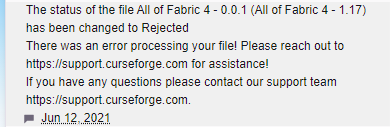
 valid fjord
idk how to use forge
i cant login to my account or install the mods
novel quiver
i go into curseforge and tap my modpack, then i tap the play button wich leads me to the minecraft launcher. I tap play in the MC launcher and it seems to start working, but the loading screen for forge never appears... and i never get to see the minecraft/forge game appear either.
 acoustic sand
ive had my mod pack approved for a few days now, but its still not appearing in the search or letting people download it. How long do i need to wait before others can see it and download it
 kindred berry
can you get escapists 2 on curse forge?
 reef raft
Hi! Kinda new to the discord and maybe i could get some help. I am an inspiring Modpack creator for minecraft and im having a bit of issues with some file sync-age. Ill export my modpack, and the mods folder be in there. But when i upload to the website, not only is the mods missing but the only thing in a mods folder is the hats mod i have.Now this is a problem because my server hosting site cannot put my server up unless the mods folder is in that file. But when you download the modpack on the App you do have the mods folder. i need to know what i can do. besides uploading a seperate file with the mods being the only thing in that file.
inner glacier
does the site tell you that you cant turn your server on when you try it?
reef raft
no its like when we upload the file, the mods are missing. all of them
i downloaded the file and opened it for my self and all i see is overrides and another folder
inner glacier
does the site have a limit to how much data it can store?
reef raft
when i open that it says mods i click that and it just says hats listing all the hats
No.
inner glacier
mabye its just saying that the folder is missing but its actually there, mabye just try it like it is and see if it will work? if not idk
digital roost
radiant sundial
hey does anybdoy have any idea why the texture pack i want doesnt download when ...
figure that out on your own you should find out very soon
radiant sundial
digital roost
figure that out on your own you should find out very soon
?
digital roost
you can figure it out on your own its a easy thing to fix if anyone ran into the problem
 fringe fractal
 vague ridge
Hm?
https://i.imgur.com/DDGAT36.png
vague ridge
Hm?
https://i.imgur.com/DDGAT36.png
same thing happend to me but im using 1.16.5
 midnight niche
my fabric keeps crashing pls help
 drifting nexus


 slim thunder
?mc-ftb
red patioBOT
We do not provide support for FTB Modpacks or the FTB App.
If you are looking to play FTB modpacks use the FTB launcher.
https://www.feed-the-beast.com/
Any Overwolf FTB launcher issues you have should be directed here:
https://github.com/FTBTeam/FTB-App-Overwolf/issues
slim thunder
ftb packs on curseforge are outdated
 serene lodge
i uploaded my new version for my modpack and even though it was uploaded as fabric, it still thinks its a forge mod loader
acoustic sand
Can someone please tell me how long it takes for my mod pack that's been approved to show up on the launcher and website. It's been 2 or 3 days since it was approved
serene lodge
acoustic sand
Can someone *please* tell me how long it takes for my mod pack that's been appro...
get them to search for your modpack and the filter to be "latest updated" or get them to search your username on curseforge and select the filter "author"
i think searching the modpack name and choosing the filter "name" also works
acoustic sand
I've done this but it still doesn't appear
Is there something in the settings that may affect this
 last oriole
I just downloaded the new curseforge because I got a new PC, and it's not able to detect stardew valley, I own it on steam and I tried to locate it manually but it still didn't work, anyone have a solution?
signal ridge
last oriole
I just downloaded the new curseforge because I got a new PC, and it's not able t...
!knownissues look under other games
red patioBOT
Known Issues with solutions or status of the issue.
Overwolf maintains a known list of issues here, some with solutions, others without.
https://support.curseforge.com/en/support/solutions/articles/9000196615-curseforge-known-issues
last oriole
ok thanks
serene lodge
serene lodge
i uploaded my new version for my modpack and even though it was uploaded as fabr...
bumping this since i gotta roll out the fix soon or the players wont be happy
 severe wing
Is there a way to upload many .jar files at once for a custom modpack (to be shared among a few friends)
Should it be uploaded as a .zip file?
Is that how modpacks are typically uploaded?
slim thunder
severe wing
Is there a way to upload *many* .jar files at once for a custom modpack (to be s...
?mc-sharepack
?mc-packshare
red patioBOT
There are two ways to share a modpack you've made with others...
Export and Share - For Friends to Small Groups.
- Click the Icon for the modpack.
- Click the button next to play.
- Click
Export. - Select the files that should be included.
- Send the zip to the people that want it! They can follow the instructions in
!mc-installpackto install the pack!
Upload to Curseforge - For Public Release to Everyone.
This options will make your pack public to EVERYONE, it comes with extra requirements and will take some effort to set up.
- Go to here: https://www.curseforge.com/project/432/4471/create
- Fill out the information with a proper description of the pack. This should allow anyone to understand what the pack is.
- Click the Icon for the modpack in the CurseForge app.
- Click the button next to play.
- Click
Export. - Select the files that should be included.
- Open your Project you made on the CurseForge site and Upload the file you just made.
- Wait for Moderation & Sync so it can show up in the client! (See
!syncfor limitations)
severe wing
Oh coolio, thanks
digital roost
@queen storm @fallen loom I found out why curseforge was launching it in demo, you need to buy the starter edition for bedrock for it to work
fallen loom
Still doesn't seem to have anything to do with Java Edition, which is the one the Curse client supports
Starting to feel like posting screenshots might have been helpful
 sand fjord
Hi, is there a mod on forge for 1.16.4 that can increase the enchantement lock in the anvil from 6 to a higher number ?
And, I downloaded some mods that add ores, but my map is a custom saved one from a server, is these mods can generated ores even on a custom map from vanilla ?
digital roost
hello everyone just wondering if u can get curse forg on minecraft education??
fleet bear
serene lodge
bumping this since i gotta roll out the fix soon or the players wont be happy
then you exported it as a forge pack
fallen loom
digital roost
hello everyone just wondering if u can get curse forg on minecraft education??<:...
Please don't cross post, especially after I already tried to help you in #👽︱game-support and got a garbled response
sand fjord
up ?
fallen loom
!notcf
red patioBOT
The question you are asking about isn't related to CurseForge. Please use the appropriate game rooms by getting the role from #786424115535544350 or use #👽︱game-support for help.
This room is only for CurseForge Owned & Maintained features/services.
serene lodge
fleet bear
then you exported it as a forge pack
i dont think i did since i created a new fabric profile for it
 fallen loom
send the zip?
serene lodge
for the profile?
fallen loom
The file you're uploading to Curse, the one exported by the client
serene lodge
sand fjord
oh sorry
fallen loom
serene lodge
Yesh that's a Fabric pack, I wonder if the site forces you to pick rather than auto-detecting from the file
serene lodge
not sure, it said "supported modloader versions" but i think thats just cosmetic for display
the thing is, when launching from the exportable profile it says about the fabric loader but it doesnt work when uploaded so its really strange
fallen loom
!notcf
red patioBOT
The question you are asking about isn't related to CurseForge. Please use the appropriate game rooms by getting the role from #786424115535544350 or use #👽︱game-support for help.
This room is only for CurseForge Owned & Maintained features/services.
 unique shard
serene lodge
serene lodge
bumping this since i gotta roll out the fix soon or the players wont be happy
unique shard
serene lodge
serene lodge
bumping this since i gotta roll out the fix soon or the players wont be happy
last bump before i go insane can someone please help not even using jumploader fixes it it just crashes like usual
 bold sonnet
Is there a way to set the minecraft ram usage to only use what is put in the JVM section
 median sundial
wide viper
median sundial
wide viper
what time did curseforge mac support fabric
 iron walrus
does anyoone know what modpack is used in this video https://www.youtube.com/watch?v=hjV30hf6yEM
I Spent 100 Days in Medieval Times in Minecraft. Click https://vessi.com/Forge and use my code FORGE to get $25 off of your Vessi shoes if you miss the
sale! Free shipping to CA, US, AUS, NZ, JP, TW, KR, SGP
#100Days #Minecraft #HardcoreMinecraft
Patreon:
https://www.patreon.com/ForgeLabs
Subscribe Here! http://bit.ly/ForgeLabsSub
Join My D...
acoustic sand
He or someone normally uploads the modpack, 90% sure there custom made modpacks
acoustic sand
iron walrus
does anyoone know what modpack is used in this video https://www.youtube.com/wat...
User mustardsean2 is where normally the modpacks are posted
Doesn't seem like this ond has been posted, if he made it ofc
iron walrus
thanks man
acoustic sand
Np
lone moat
I'm still having trouble uploading a big modpack, every time I upload this shows up

Tried to make a ticket but they just straight up changed my ticket's status to "awaiting your reply" without any feedback
lyric crescent
reply to it then
 gray imp
@signal ridge i tried uploading again and it didnt show any errors. It's under review now
 dreamy musk
hey my friend is trying to join my server (we're playing through hamachi and it's worked before just fine) and he keeps getting this message! what do i do?
 lyric crescent
dreamy musk
hey my friend is trying to join my server (we're playing through hamachi and it'...
lyric crescent
dreamy musk
hey my friend is trying to join my server (we're playing through hamachi and it'...
!notcf
red patioBOT
The question you are asking about isn't related to CurseForge. Please use the appropriate game rooms by getting the role from #786424115535544350 or use #👽︱game-support for help.
This room is only for CurseForge Owned & Maintained features/services.
dreamy musk
oh yeah i mean like, the mods are on curseforge so thats why im asking here
lyric crescent
hamachi = not related to cf
servers = not related to cf
your issue = not related to cf
digital roost
can someone tell me the real difference between these 2?
 lyric crescent
Read the description, ask the devs..
 floral cape
I download a mod for Minecraft but when I open it it doesn’t show it as a option
lyric crescent
?mc-installmods
red patioBOT
How to install mods in CurseForge App.
- Click
+ Create Custom Profile - Name it, select the required Minecraft version, select the Forge version (usually the highest number), click
Create. - Click the profile icon.
- Click
Add New Content - Search and install the desired mods.
- Start the game!
How to install mods not on CurseForge.
- Right click the profile picture or Open the profile and click the Icon next to the play button.
- Click
Open Folder. - Drag the mod(s) into the
modsfolder. (Note: Some mods will require others, to run. Make sure to read the instructions for the mod!) - Start the game!
floral cape
Do you have to start the game within the app?? I always use Minecraft launcher
 dense cloak
floral cape
Do you have to start the game within the app?? I always use Minecraft launcher
dense cloak
floral cape
Do you have to start the game within the app?? I always use Minecraft launcher
From the app, yes.
Hence each profile having a big obvious play button.
 fluid tangle
How long does it normally take for a mod to get approved by curse forge? I'm getting anxious waiting for approval...🥺
fallen loom
!status
red patioBOT
It is 08:53AM on Sunday for CurseForge my dudes.
Project Moderation Time
Project/File moderation is done on;
Sunday, Monday, Tuesday, Wednesday, Thursday: 10AM - 6PM GMT+2
Friday, Saturday: No Moderation!
This process is First in, First out. Thus files submitted late in the work day may not be checked until the next work day.
New Projects or uploads requiring manual approval: 1-3 Working Days
Updates to approved projects not needing manual approval: 1 Hour
File sync to the Curseforge app may take up to 24 hours after approval.
fluid tangle
🥺 OK... 😊
digital roost
how do i instal rlcraft
hidden saffron
Holy crap! Curseforge mods marked my pack as having optifine again!
How do I tell them it doesn't??
 digital roost
faaaack i cant get anything because im on mac, can i play rlcraft on mac???
queen storm
digital roost
faaaack i cant get anything because im on mac, can i play rlcraft on mac???
Yes
digital roost
queen storm
Yes
how? when i press play it doesnt do anything
queen storm
digital roost
how? when i press play it doesnt do anything
!mc-installfix
red patioBOT
- Click on the Minecraft Tab on the Left side of the App.
- Click button next to the
Create Custom Profileoption. - Click
Repair Installationoption. - Play game.
NOTE: You will not lose any modpacks or worlds, These are saved in the Instances folder. DO NOT TOUCH THIS FOLDER OR YOU WILL LOSE EVERYTHING
hidden saffron
I'm so confused. Is there some way that the curseforge app is adding optifibe to my pack?
queen storm
hidden saffron
I'm so confused. Is there some way that the curseforge app is adding optifibe to...
Open the zip that you exported please, see if it contains an overrides/mods
hidden saffron
queen storm
Open the zip that you exported please, see if it contains an overrides/mods
Seems not

Just the config for tweaks I want to ship with the pack, and mostlymekanism for the resources for the custom menu
queen storm
Sending somebody your way
hidden saffron
Thanks
 wind hatch
hidden saffron
Holy crap! Curseforge mods marked my pack as having optifine again!
wind hatch
hidden saffron
Holy crap! Curseforge mods marked my pack as having optifine again!
hey there 🙂 Mind sending me a DM with the project page link? would like to check it out!
hidden saffron
Hi sure, give me a moment
wind hatch
👍🏼
and thanks Tim
queen storm
That was fast...
hidden saffron
Can I get my project's icon to show up locally?
 queen storm
hidden saffron
Can I get my project's icon to show up locally?
queen storm
hidden saffron
Can I get my project's icon to show up locally?
Probably need to install it using browse modpacks for that
hidden saffron
Ohh, alright
wind hatch
wide viper
when support fabric on mac
next version update - expect it this week if QA approve it. we want it to work just as well for you as it is for PC 🙂
fleet bear
that would mean this week.
wide viper
because today is sunday inGMT+8
wind hatch
hey 🙂 mind if we take this in DMs?
ping me, I'm not sure about the details here and would like to learn more from you, feel free to send a message
wind hatch
wide viper
because today is sunday inGMT+8
We work sundays-thursdays, so our week has started
 steep jay
hi guys can u help me with this problem? thanks
 queen storm
Your disk is full
steep jay
the disk C?
queen storm
Could be, any full disk is a bad one
steep jay
ok thanks
 brisk sequoia
Surviving Mars:
i just bought the game on steam
CF used to run very smooth
after i installed SM, it runs with snail speed: 3 sec / frame
 velvet hearth
how do i delete backup modpacks
 unborn basin
velvet hearth
how do i delete backup modpacks
unborn basin
velvet hearth
how do i delete backup modpacks
Either delete them from the backups folder, or when you delete them you check the 'delete backup' checkbox
 velvet hearth
wheres the backup folder
unborn basin
In your modding folder
digital roost
How do you delete mods off of you modpack?
queen storm
digital roost
How do you delete mods off of you modpack?
Did you make it yourself?
digital roost
queen storm
Did you make it yourself?
Yea
queen storm
digital roost
Yea
Then there should be a trash icon
digital roost
queen storm
Then there should be a trash icon
where on the screen tho
queen storm
digital roost
where on the screen tho
Click the modpack itself
queen storm
!mc-installserver
red patioBOT
How to **manually** install a server - **On your own PC**
- Check if the modpack has a server pack, if it does: use that and skip below.
- Go to the Forge website http://files.minecraftforge.net/ and download the Installer for the forge version the pack is using.
- Run the installer and choose
Install server. Do not install to your desktop. Also do not install inside a OneDrive folder. - Run the server using the forge.jar. A file called
eula.txtwill be generated. Open it and changeeula=falsetoeula=true - From the Client; Copy the
modsfolder,configfolder, and any other folders needed for the pack to work into the server folder. If the modpack has a server pack, use this instead! - Run the server again.
- Port forward your machine if needed. (Google it)
digital roost
Will a lan sever work?
queen storm
Probably not
queen storm
Would work
 prime topaz
pls hlp
queen storm
prime topaz
pls hlp
Rule 10 and 4
prime topaz
i put optifine in the mod folder of all the 6 mods and then when i lauch there is no mods
queen storm
prime topaz
i put optifine in the mod folder of all the 6 mods and then when i lauch there i...
Remove optifine
prime topaz
but then i have garbage fps
queen storm
prime topaz
but then i have garbage fps
But does everything load then?
prime topaz
idk
il check
wait no
but when i open the folder of AT6M
and click the mods folder nothing is there
queen storm
prime topaz
and click the mods folder nothing is there
Then you did something wrong, reinstall it
acoustic sand
It's been about 3 days since my mod pack has been approved, but it wont show up in the search results
unborn basin
acoustic sand
It's been about 3 days since my mod pack has been approved, but it wont show up ...
Which one is it?
acoustic sand
Can I send links?
unborn basin
Please do
queen storm
!sync
red patioBOT
Sync and your Project.
CurseForge App and site do not share the same requirements! You can find things on the site but this does not mean it will be in the app!
For a mod to show up in the app:
- Projects MUST have a file marked as RELEASE or BETA
- Projects MUST be APPROVED
- Projects MUST have a file marked for the PROFILE VERSION USED
- Projects CAN'T be EXPERIMENTAL
- Projects CAN'T be ABANDON
Files can take a while to show up in the app. If your files still have not shown up either your project is new and you have yet to mark a file as Release/Beta or there is issues with the sync system making it slow.
Vote this issue up if you would like to know when the last sync was! https://curseforge-ideas.overwolf.com/ideas/CF-I-1617
acoustic sand
The first file was approved 3 days ago
Then it wasnt appearing, but I updated it yesterday
 acoustic sand
Huh?
acoustic sand
I see the 1.0 version and the 1.5
queen storm
Still needs to be marked as Release though 🤷♂️
acoustic sand
i did the same process for both files, did i do something wrong with the first one?
both have been approved
unborn basin
Are both marked as release?
unborn basin
When you upload a file you select
But you can see it from the project panel
Go to files
acoustic sand
both seem to be the same
ig it doesn't matter cause i want people to use the new version
just weird
thanks guys
unborn basin
Let's wait for tomorrow, shoot me a message if you still don't see it
acoustic sand
alright will do
queen storm
acoustic sand
alright will do
Change the file that is there to release, else it will never show up
acoustic sand
idk how to do that
all it says is approved
and im 90% sure i clicked release when i uploaded it
queen storm
Click the file, edit file
brisk sequoia
brisk sequoia
**Surviving Mars:**
Excuse me ?
 frozen sierra
shouldn't that be in off topic section
 timid gust
 unborn basin
brisk sequoia
Excuse me ?
unborn basin
brisk sequoia
Excuse me ?
Restart your computer
timid gust
Hi, how do I do her not wanna play
queen storm
timid gust
Hi, how do I do her not wanna play
What?
timid gust
please help
 queen storm
!mc-logs
red patioBOT
Where to find the log on the CurseForge Client.
Right-click the modpack profile icon OR click the button in the modpack profile.
Click Open Folder.
Open the logs folder.
Find the file called latest.log and drag it into discord.
 queen storm
 cold ibex
how do i change my curseforge email address?
cold ibex
how do i change my curseforge email address?
It is your twitch one
cold ibex
okay 🙂 allredy changed that
queen storm
Then it should be good
 coarse sandal
hey can someone help me? i get this problem with almost every modpack i play. theres only a few modpacks that ive tried that dont crash like this and its been going on for ages. :(
thats a video of the problem cuz its easier to just show you than explain
queen storm
!mc-logs
red patioBOT
Where to find the log on the CurseForge Client.
Right-click the modpack profile icon OR click the button in the modpack profile.
Click Open Folder.
Open the logs folder.
Find the file called latest.log and drag it into discord.
coarse sandal
queen storm
!mc-installfix
red patioBOT
- Click on the Minecraft Tab on the Left side of the App.
- Click button next to the
Create Custom Profileoption. - Click
Repair Installationoption. - Play game.
NOTE: You will not lose any modpacks or worlds, These are saved in the Instances folder. DO NOT TOUCH THIS FOLDER OR YOU WILL LOSE EVERYTHING
 fallen spoke
wind hatch
hey 🙂 mind if we take this in DMs?
fallen spoke
wind hatch
hey 🙂 mind if we take this in DMs?
Not at all
coarse sandal
that didnt work :(
wait
rl craft doesnt work but now a different one does :O
you know what its good enough for me
tysm :D
 dawn elm
Hello! some time ago i made a server with fabric on curseforge. it worked perfectly. but now the new update came out. How can i change my modpack to a fabric modpack or at least make sure i can use the fabric mods again?
queen storm
You need to recreate it with fabric
dawn elm
so i have to make a new pack?
when i try it says ' failed to create custom profile'
someone else in the server just found out how! but ty for the help!
 rugged bison
so i've been having issues with downloading curseforge for a long time now, but about 2 days ago it finally worked. BUT when i turn off the computer or switch accounts because there are multiple owners of this computer, it deletes itself. and now when i try redownloading it, it just does not download. please help i really want to use modpacks
viral briar
possibility anti virus is messing with it and removing it by mistake. Or the program is only being done for that one user on the computer.
rugged bison
the only anti virus i have on my computer is windows defender
and what i meant for the switching account thing, when i return to the original account where i installed cf it is uninstalled
viral briar
Windows defender has done that to folk with other programs in the past to my knowledge
You could try installing it from this link instead
!getcf
red patioBOT
Looking to install the CurseForge app?
Todo: Place system requirements here.
<:windows:798410728188936222> Windows
<:mac:798410654418862130> Mac
Linux
:person_shrugging:
viral briar
@rugged bison well it’s overwolf program and then you add curseforge through the App Store on it
rugged bison
what do you mean by app store
 cyan ridge
guys does curseforge work for MacOs?
because mine is not loading
it is saying "Whoops, something went terribly wrong"
 wind harness
!status
red patioBOT
It is 05:55PM on Sunday for CurseForge my dudes.
Project Moderation Time
Project/File moderation is done on;
Sunday, Monday, Tuesday, Wednesday, Thursday: 10AM - 6PM GMT+2
Friday, Saturday: No Moderation!
This process is First in, First out. Thus files submitted late in the work day may not be checked until the next work day.
New Projects or uploads requiring manual approval: 1-3 Working Days
Updates to approved projects not needing manual approval: 1 Hour
File sync to the Curseforge app may take up to 24 hours after approval.
 opal bolt
hello i am creating a modpack for the community but i would like to have a license that allows me to play it but that does not allow you to modify the files or that does not allow redistribution as
such as the license with the registered trademark / author
exists?
 fair vigil
Umm I cant seem to be able to download anything from the curse forge overwolf thing
 inner sail
yea whats happening
 tranquil slate
it says the mod list is incomopatable but i just copy and pasted the mods from my server to my client and i still cant join
 narrow minnow
fair vigil
Umm I cant seem to be able to download anything from the curse forge overwolf th...
narrow minnow
fair vigil
Umm I cant seem to be able to download anything from the curse forge overwolf th...
what do you mean? from the app?
 rustic elk
hi when i download forge 1.8.9 i dont get it in my minecraft launcher
why?
narrow minnow
I'm not able to assist with that
opal bolt
narrow minnow
I'm not able to assist with that
ok do you know who can do it?
narrow minnow
You'll have to wait for other moderators - but also, do not add mentions please - this is against rule 5 - you'll have to wait
queen storm
@fair vigil@inner sailAnd do you get any errors?
queen storm
rustic elk
hi when i download forge 1.8.9 i dont get it in my minecraft launcher
why?
Where did you download it from?
inner sail
never mind it works
 thin plume
can someone help me
ive loaded up enigmatica 6 and it loaded quickly (<2mins), i added optifine and a shader and now its taking over 10mins. ive also removed optifine and the shader and it still takes over 10mins
any ideas?
spec:
ryzen 5 3600
gtx 1660 super
32gb ram, 5 gb allocated
queen storm
Did you also remove the worlds etc?
queen storm
Did the worlds exist before you added optifine?
thin plume
yes
queen storm
No idea
thin plume
yeah, im pretty well versed in modpacks and ive never seen smth like this
queen storm
fair vigil
nop
Then what steps are you following?
fair vigil
I went to a modpack
Download
And it took me to overwolf thing
download not starting
queen storm
Ahh, install button on the site?
fair vigil
yep
queen storm
Don't use that one
queen storm
Use the app itself
fair vigil
Ty
 terse oyster
does anybody know how to fix forge crashing? please
queen storm
terse oyster
does anybody know how to fix forge crashing? please
!mc-logs
red patioBOT
Where to find the log on the CurseForge Client.
Right-click the modpack profile icon OR click the button in the modpack profile.
Click Open Folder.
Open the logs folder.
Find the file called latest.log and drag it into discord.
digital roost
CAN YOU GERMAN WHY I HAVE A QUESTIONS
queen storm
digital roost
CAN YOU GERMAN WHY I HAVE A QUESTIONS
No, rule 1
 queen storm
!mc-logs
red patioBOT
Where to find the log on the CurseForge Client.
Right-click the modpack profile icon OR click the button in the modpack profile.
Click Open Folder.
Open the logs folder.
Find the file called latest.log and drag it into discord.
 vernal copper
yo is there a way to fix curse cause everytime im launching it i have to launch it like 4 times untill it actually starts
queen storm
What happens the other 3 times then?
queen storm
terse oyster
How do i fix this
And follow rule 4 🤦
vernal copper
it starts the loading thingy and then just exits and i have to relaunch
queen storm
Try starting overwolf first
queen storm
You able to come back in ~14 hours?
terse oyster
!mc-logs
queen storm
terse oyster
!mc-logs
Just do the steps in it, no need to run the command again, already ran it twice for you
vernal copper
queen storm
You able to come back in ~14 hours?
me?
queen storm
vernal copper
me?
Yes
vernal copper
wym
queen storm
Then the actual overwolf / curseforge staff is here and can look at your logs.
queen storm
Timezones are a thing, no idea what time it is for you
digital roost
Hi can someone help me please?
queen storm
digital roost
Hi can someone help me please?
Rule 10
digital roost
I am unable to login to my server through the curseforge launcher. I keep getting "Invalid login session", and then it asks me to restart the launcher or the game. Which I have done multiple times but keep getting the same issue. What can I do to fix this?
queen storm
digital roost
I am unable to login to my server through the curseforge launcher. I keep gettin...
Restart the server
 rare monolith
When I try to install a couple of mods for minecraft through the app, i get a "General Install Error" message. It's not happening on most mods, but has on a couple. The one I'm looking at right now is "Waila Harvestability"; I didn't make a note of which other ones.
The "Learn More" link goes to a page with a couple of specific errors, but none of them address this. When i google Curseforge "general install error" there aren't any results, so I guess I'm the only person who has ever experienced this haha
 queen storm
Mac or windows?
rare monolith
Windows
queen storm
!ticket-app
red patioBOT
:bug: Reporting via the CurseForge App :bug:
-
Click the
icon in the bottom left. -
Select

Open a Ticket. -
Fill out the form with accurate detailed information, "It doesn't work" isn't helpful! What exactly doesn't work and why doesn't it work should be easy to answer!
-
Make sure to upload your Overwolf logs with the
Upload Fileoption on the ticket, information on how to get these logs can be found here https://support.overwolf.com/en/support/solutions/articles/9000176827-how-to-get-your-overwolf-logs -
Submit!

 lofty sable
Hi, I was told that it takes 24 hours for a mod to review your submissions, yet its been 3 days, could someone review the changes I've made to my mod pack please
queen storm
lofty sable
Hi, I was told that it takes 24 hours for a mod to review your submissions, yet ...
!status
red patioBOT
It is 08:22PM on Sunday for CurseForge my dudes.
Project Moderation Time
Project/File moderation is done on;
Sunday, Monday, Tuesday, Wednesday, Thursday: 10AM - 6PM GMT+2
Friday, Saturday: No Moderation!
This process is First in, First out. Thus files submitted late in the work day may not be checked until the next work day.
New Projects or uploads requiring manual approval: 1-3 Working Days
Updates to approved projects not needing manual approval: 1 Hour
File sync to the Curseforge app may take up to 24 hours after approval.
lofty sable
queen storm
!status
??
queen storm
lofty sable
??
Takes 1-3 working days to get approved
 left hazel
So my modpack has been under review for an hour or two now 1.16
queen storm
left hazel
So my modpack has been under review for an hour or two now 1.16
Read up
 verbal arrow
my curseforge just keeps crashing, what should i do?
queen storm
!mc-logs
red patioBOT
Where to find the log on the CurseForge Client.
Right-click the modpack profile icon OR click the button in the modpack profile.
Click Open Folder.
Open the logs folder.
Find the file called latest.log and drag it into discord.
queen storm
And that is forge, not curseforge
verbal arrow
sorry😳
 daring fjord
hello again everyone, I am here with another issue regarding waila
whenever I try to install waila or waila harvestability in 1.16.5, it says "general install error" and wont let me install it
queen storm
Mac or windows?
daring fjord
windows 10
queen storm
daring fjord
windows 10
Click the mod, go to versions, hit install there
queen storm
verbal arrow
drag #here?
Yes
verbal arrow
this one?
queen storm
verbal arrow
this one?
!mc-installfix
red patioBOT
- Click on the Minecraft Tab on the Left side of the App.
- Click button next to the
Create Custom Profileoption. - Click
Repair Installationoption. - Play game.
NOTE: You will not lose any modpacks or worlds, These are saved in the Instances folder. DO NOT TOUCH THIS FOLDER OR YOU WILL LOSE EVERYTHING
daring fjord
is there maybe an alternative to Wawla that you know of that I can use instead?
queen storm
daring fjord
is there maybe an alternative to Wawla that you know of that I can use instead?
One probe
daring fjord
ok thank you!
 warm mist
hello
i need help
whenever i try to launch minecraft forge from the curse forge app launcher i get this
Error: java.lang.RuntimeException: Invalid id 4096 - maximum id range exceeded.
Exit Code: -1```it's modded
i have 181 mods
lyric crescent
you need a mod that extends the id range, like jeid
warm mist
lyric crescent
you need a mod that extends the id range, like jeid
no results
lyric crescent
Google: curseforge jeid
viral briar
How bout no
signal ridge
Still not the place
daring fjord
hey does anyone know why my minecraft just keeps crashing with no explanation?
viral briar
What a rubbish scam
 viral gorge
daring fjord
hey does anyone know why my minecraft just keeps crashing with no explanation?
viral gorge
daring fjord
hey does anyone know why my minecraft just keeps crashing with no explanation?
Log?
signal ridge
daring fjord
hey does anyone know why my minecraft just keeps crashing with no explanation?
!mc-logs
red patioBOT
Where to find the log on the CurseForge Client.
Right-click the modpack profile icon OR click the button in the modpack profile.
Click Open Folder.
Open the logs folder.
Find the file called latest.log and drag it into discord.
signal ridge
daring fjord
!mc-installfix try this
red patioBOT
- Click on the Minecraft Tab on the Left side of the App.
- Click button next to the
Create Custom Profileoption. - Click
Repair Installationoption. - Play game.
NOTE: You will not lose any modpacks or worlds, These are saved in the Instances folder. DO NOT TOUCH THIS FOLDER OR YOU WILL LOSE EVERYTHING
signal ridge
Er wait, remove optifine first, and try to load the game again
signal ridge
!mc-optifine
red patioBOT
Optifine and Curseforge
To install Optifine with modpacks on Curseforge:
Right click the modpack icon, select Open Folder.
Put the Optifine.jar into the mods folder.
Now load the modpack normally.
We do not offer support for Optifine. If you have issues with Optifine, remove it. If you want further support try the discord found on their website.
https://www.optifine.net/home
viral briar
Just some mods do not agree with it
lyric crescent
Optifine does not support curseforge
daring fjord
ahhhh I see
I tried running as admin and restarting my pc but it still wasn't working so thanks for the help I was starting to lose my mind
 steady galleon
so an updated version of my pack wasnt approved because the "file versions have been removed from curseforge" even though i just downloaded them from curseforge less than an hour ago
lyric crescent
show the message
steady galleon
The following file versions have been removed from CurseForge:
overrides/mods/CoFHCore-1.12.2-4.6.3.27-universal.jar
overrides/mods/ThermalCultivation-1.12.2-0.3.3.12-universal.jar
overrides/mods/ThermalDynamics-1.12.2-2.5.5.21-universal.jar
overrides/mods/ThermalExpansion-1.12.2-5.5.4.43-universal.jar
overrides/mods/ThermalFoundation-1.12.2-2.6.3.27-universal.jar
overrides/mods/ThermalInnovation-1.12.2-0.3.3.12-universal.jar
overrides/mods/TravellersBackpack-1.12.2-1.0.22.22.jar
The modpack will not be approved until these files are replaced with versions that are currently available.
If you have any questions please contact our support team https://support.curseforge.com.
daring fjord
do you maybe have duplicates of those mods in your pack?
steady galleon
no
lyric crescent
reinstall those mods and export again
steady galleon
its still going to be the wrong version
these same versions are used in other modpacks on cursforge
lyric crescent
make a ticket if you dont want to do that 🤷♂️
steady galleon
ok
daring fjord
signal ridge
Er wait, remove optifine first, and try to load the game again
thanks for the help, its working now!
 umbral fractal
hey, I was trying to load astroblock, as I have been for the past week or so with no problems and now its crashing everytime i try to launch (exit code 0). I have not changed the amount of ram dedicated.
well now it finally worked after maybe 30 tries and it's stuck like this 😐

 glossy jacinth
Hi, sorry if this is in the wrong place.
For a couple of days now i have been messing with settings, looking online and re reinstalling both minecraft and curseforge to be able to use my mods in the new minecraft update, but i cant seem to find how to make an updated forge profile and mods.
Thank you for your time.
 queen storm
There is no forge for 1.17 yet
 tropic crypt
is it possible to create a custom profile and give it an icon like all modpacks have?
lyric crescent
only uploaded and approved packs get icons
vague ridge
What is the problem may I ask?
https://i.imgur.com/yGBX0cU.png
https://i.imgur.com/UxpPaEE.png
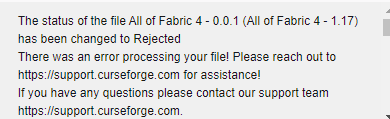
Been told it's fixed and should be approved but I've now tried twice times more and still gets rejected
queen storm
Yeah, fix is coming in ~12 hours
vague ridge
Hm alright
 proper wren
does anyone know a mod to increase miecraft build height in 1.12
 tepid hatch
i have a problem where loot doesn't spawn in chest or barrels
i found some chest and barrels before and they wore empty but i just thought that was bad luck
but now i'm in a dungeon and i opened every chest and theirs no loot
 hollow carbon
I've been trying to make my own modpack using a bunch of mods but i keep running into this issue
The game crashed whilst there was a severe problem during mod loading that has caused the game to fail
Error: net.minecraftforge.fml.common.LoaderExceptionModCrash: Caught exception from The Beneath (beneath)
Exit Code: -1
 raw oasis
I accidentally didn't select "Create desktop shortcut" when installing curseforge and now the only way to open it is to restart my computer, any help?
umbral fractal
search in cortana (windows) or use command+space and search for it (mac)
raw oasis
I seaeched my files and cortana for it but there was nothing that was posssible to delete
 fading moth
I have a weird question
if I were able to, could I have my mod never go into inactive status if im not updating it?
lyric crescent
mods dont go inactive
 quartz echo
i have a question i have mods downloaded and when i try launching the game it goes into minecraft launcher and then it gives me the eroor code 0
error*
lyric crescent
?mc-log
red patioBOT
Where to find the log on the CurseForge Client.
Right-click the modpack profile icon OR click the button in the modpack profile.
Click Open Folder.
Open the logs folder.
Find the file called latest.log and drag it into discord.
 chilly pivot
fallen loom
chilly pivot
fallen loom
?mc-path
red patioBOT
**Minecraft Files should NOT be installed inside the following locations
.minecraft folder.
OneDrive folders.
Desktop folder.
Drive roots I.E. Directly into the C:\ drive.
iCloud enabled folders.
If any of the above are in the path you need to change/move it by following the instructions below!**
If Minecraft is not installed in CurseForge App, start here.
Click the in the top left.
Select Minecraft.
Click "Edit".
Move to the "Continue here:" section below.
If Minecraft is installed in CurseForge App, follow these steps.
Click the in the bottom left.
Select the Minecraft tab.
Click "Change".
Move to the "Continue here:" section below.
Continue here:
Make a folder in the root directory called CurseForge.
Select the folder you just made.
The text box should show something like the following:
For Windows: C:\CurseForge
For Mac: /Users/Shared/CurseForge
 pine edge
Hi, does anyone know how I can add a non-curseforge mod to my modpack?
signal ridge
pine edge
Hi, does anyone know how I can add a non-curseforge mod to my modpack?
!mc-imstallmods
!mc-installmods
red patioBOT
How to install mods in CurseForge App.
- Click
+ Create Custom Profile - Name it, select the required Minecraft version, select the Forge version (usually the highest number), click
Create. - Click the profile icon.
- Click
Add New Content - Search and install the desired mods.
- Start the game!
How to install mods not on CurseForge.
- Right click the profile picture or Open the profile and click the Icon next to the play button.
- Click
Open Folder. - Drag the mod(s) into the
modsfolder. (Note: Some mods will require others, to run. Make sure to read the instructions for the mod!) - Start the game!
pine edge
I did that, but when I started the game it crashed. I checked the compatibility by entering the mods in the .minecraft folder and starting it with another launcher and there was no problem.
signal ridge
Wait what? Are you using the curseforge app?
pine edge
Yes.
signal ridge
!mc-logs do this for that pack
red patioBOT
Where to find the log on the CurseForge Client.
Right-click the modpack profile icon OR click the button in the modpack profile.
Click Open Folder.
Open the logs folder.
Find the file called latest.log and drag it into discord.
pine edge
fallen loom
?mc-installfix
red patioBOT
- Click on the Minecraft Tab on the Left side of the App.
- Click button next to the
Create Custom Profileoption. - Click
Repair Installationoption. - Play game.
NOTE: You will not lose any modpacks or worlds, These are saved in the Instances folder. DO NOT TOUCH THIS FOLDER OR YOU WILL LOSE EVERYTHING
pine edge
 red patioBOT
Where to find the log on the CurseForge Client.
Right-click the modpack profile icon OR click the button in the modpack profile.
Click Open Folder.
Open the logs folder.
Find the file called latest.log and drag it into discord.
pine edge
 cold fiber
for this crash, do i just remove the mod thats doing the problem, or is there something else? i just had to remove another mod cos of the same problem
signal ridge
pine edge
It did not work. I keep getting the same error.
Try is again then restart your pc.
pine edge
@signal ridge I tried running a modpack that I downloaded from the curseforge platform and I got the same error.
signal ridge
pine edge
<@!217048549706301442> I tried running a modpack that I downloaded from the curs...
the installfix is the only real fix for that. All your pack will likely have the same issue. Give it another go and reboot your pc after it is done > before trying to launch a modpack
pine edge
So do you recommend that I reinstall the curseforge app?
pine edge
Ok, thanks. I'll let you know if it works
signal ridge
cold fiber
for this crash, do i just remove the mod thats doing the problem, or is there so...
open your config folder find and delete this file: modnametooltip-client.toml then try starting the pack
cold fiber
signal ridge
open your config folder find and delete this file: `modnametooltip-client.toml` ...
it works. Thanks!
 ripe copper
when i try to load certain mods this happens
 tropic crypt
ripe copper
when i try to load certain mods this happens
tropic crypt
ripe copper
when i try to load certain mods this happens
not very descriptive, most likely caused by 2 conflicting mods
ripe copper
i only have 1 mod on it
tropic crypt
which mod
ripe copper
tropic crypt
`.minecraft/logs/latest.log`
where do i put that
tropic crypt
its a text file
just copy it and put that here it will reveal why it crashed
remove personal info if you want
 open lagoon
whenever i try downloading a mod it gets to a certain percent then just stops, how do i fix?
 drifting grail
Does Valhelsia 3 have its own support server or would I talk in here about the server crashing due to two of our server players going into the Twilight Forest portion of the mod?
 cerulean turret
hi i am unable to nstal cruseforge but ii rem,e,mber that someone game me a dirent download link lastime and it worked can somone do that?
 loud helm
Whenever I try submitting a file for an update of my minecraft modpack, it says: "The status of the file Nightly SMP.zip (Nightly SMP) has been changed to Rejected
There was an error processing your file! Please reach out to support.curseforge.com for assistance!
 digital jackal
Can someone help me
I've been trying to get my Minecraft mod pack approved but it keeps getting rejected for Invalid file extension, expected jar, and litemod
 slow mason
Does forge- 14.23.5.2847 have a bug or something? My computer wont run the installer.jar, or universal.jar and I cant find any documentation on it.
 obsidian scarab
when can i upload a 1.17 modpack as mine keeps getting auto rejected
 ember ice
an exception occurred during a webclient request any solutions for a fix?
signal ridge
digital jackal
I've been trying to get my Minecraft mod pack approved but it keeps getting reje...
Sounds like your trying to upload a Modpack zip to a mod project. Need to make a modpack project.
signal ridge
slow mason
Does `forge- 14.23.5.2847` have a bug or something? My computer wont run the `in...
!forgeinstaller Forge broke their forge installers. this is a list of the working ones 1.12.2 and down
red patioBOT
Known Working Forge Installers
1.5.2: 7.8.1.738
1.6.4: 9.11.1.1345
1.7.10: 10.13.4.1614
1.8.9: 11.15.1.2318
1.9.4: 12.17.0.2317
1.10.2: 12.18.3.2511
1.11.2: 13.20.1.2588
1.12.2: 14.23.5.2855
slow mason
So I can't play those forges?
signal ridge
ember ice
an exception occurred during a webclient request any solutions for a fix?
Thats an internet issue on your end. So can try pc reboot, router reboot, or try again later
signal ridge
slow mason
So I can't play those forges?
this for a server or client?
slow mason
Like, will they ever be fixed or something like that?
slow mason
signal ridge
this for a server or client?
Server.
ember ice
signal ridge
Thats an internet issue on your end. So can try pc reboot, router reboot, or try...
i've tried all of those still not fix 😦
signal ridge
slow mason
Like, will they ever be fixed or something like that?
Forge has stopped their support for anything that isnt 1.15+ . So would need to use the version of forge the bot said for your version of mc
slow mason
So, can I just change to a different form of forge and it will work?
signal ridge
ember ice
i've tried all of those still not fix 😦
Then will have to try again when your internet is more stable/better. Webclient errors are usually on the Users side
slow mason
Or do the mods need to be made for that specific forge?
signal ridge
slow mason
So, can I just change to a different form of forge and it will work?
can try the latest version of forge for minecraft 1.12.2. Which is 14.23.5.2855
slow mason
Okay. I'll test it out.
 frigid tree
how do i make it so that my game doesn't crash every 5 minutes in the world
digital jackal
signal ridge
Sounds like your trying to upload a Modpack zip to a mod project. Need to make a...
Ok so how do i upload my modpack zip to a modpack project
signal ridge
digital jackal
Ok so how do i upload my modpack zip to a modpack project
!mc-packshare
red patioBOT
There are two ways to share a modpack you've made with others...
Export and Share - For Friends to Small Groups.
- Click the Icon for the modpack.
- Click the button next to play.
- Click
Export. - Select the files that should be included.
- Send the zip to the people that want it! They can follow the instructions in
!mc-installpackto install the pack!
Upload to Curseforge - For Public Release to Everyone.
This options will make your pack public to EVERYONE, it comes with extra requirements and will take some effort to set up.
- Go to here: https://www.curseforge.com/project/432/4471/create
- Fill out the information with a proper description of the pack. This should allow anyone to understand what the pack is.
- Click the Icon for the modpack in the CurseForge app.
- Click the button next to play.
- Click
Export. - Select the files that should be included.
- Open your Project you made on the CurseForge site and Upload the file you just made.
- Wait for Moderation & Sync so it can show up in the client! (See
!syncfor limitations)
signal ridge
frigid tree
how do i make it so that my game doesn't crash every 5 minutes in the world
!mc-logs
red patioBOT
Where to find the log on the CurseForge Client.
Right-click the modpack profile icon OR click the button in the modpack profile.
Click Open Folder.
Open the logs folder.
Find the file called latest.log and drag it into discord.
frigid tree
signal ridge
!mc-logs
ty
slow mason
signal ridge
can try the latest version of forge for minecraft 1.12.2. Which is 14.23.5.2855
This one also failed to open.
signal ridge
slow mason
This one also failed to open.
lets take this to #👽︱game-support as its for a server
digital jackal
signal ridge
!mc-packshare
 signal ridge
Are you making a mod OR Modpack?
digital jackal
A modpack
So when i follow these steps and upload the .zip file the mod pack gets rejected.
 signal ridge
If you go to your projects page, under where the name of your project is does it say modpacks or mods?
digital jackal
This page ?

 digital jackal
Ok so in order to hace a mod pack it has to be a mod pack project
signal ridge
yep
signal ridge
I think you just delete the project and make a new one
signal ridge
Click the Orange Manage Project > Delete project tab. Then go to the create projects link again and make sure the "Select a Category" part is set to Modpacks
digital jackal
Where is the Orange manage project tab located
signal ridge
On your projects page
digital jackal
ok
red patioBOT
Hey there, it is Curseforge, not "Cursed forge"
digital jackal
signal ridge
On your projects page
Ok so now that its a mod pack project i should just have to follow the steps you told me before and it should be approved
 signal ridge
Now that its a modpack project can now upload the exported zip
 lilac root
its gonna be added a way to install mods for a modpack? thats better than searching them and then go to the file (srry if my english is bad)
signal ridge
As in premade packs or custom packs?
 chrome turret
hi i have a macbook and id like help. this is the destination to which my mods should go.

I downloaded this mod off the cursedforge website, so now where do i put that?

it is in jar form
 lilac root
signal ridge
As in premade packs or custom packs?
lilac root
signal ridge
As in premade packs or custom packs?
i mean that when u download the modpack and u right click it, it adds a new option that says "add mods" or something like that, or in the view profile it adds a option for the same
signal ridge
lilac root
i mean that when u download the modpack and u right click it, it adds a new opti...
Reason its not there is adding mods to premade packs can/will cause issues and or break the pack. So its not recommeded to do. If you want to add or remove mods its easier and safer to make your own pack and get the mods you want that way
digital jackal
signal ridge
Now that its a modpack project can now upload the exported zip
Do you know how long it takes to get you're modpack approved ?
signal ridge
digital jackal
Do you know how long it takes to get you're modpack approved ?
!status
red patioBOT
It is 04:02AM on Monday for CurseForge my dudes.
Project Moderation Time
Project/File moderation is done on;
Sunday, Monday, Tuesday, Wednesday, Thursday: 10AM - 6PM GMT+2
Friday, Saturday: No Moderation!
This process is First in, First out. Thus files submitted late in the work day may not be checked until the next work day.
New Projects or uploads requiring manual approval: 1-3 Working Days
Updates to approved projects not needing manual approval: 1 Hour
File sync to the Curseforge app may take up to 24 hours after approval.
digital jackal
signal ridge
!status
?
signal ridge
Read what the bot says
 brisk imp
I remembered to come back here Sunday, and yeah unfortunately no word
 edgy furnace
i need help on setting up a minecraft modded server from curseforge, dm me please if you have any knowledge in server hosting
 violet flicker
Hey so I watched a video on some mods, and can't find any of them in the Curseforge launcher mod search. The creator had them all linked in the description, but it links to the browser page.
On top of that, if I copy and paste the name of it into the browser curseforge search, it also comes up with no results
 wild cradle
I think you can just download the mods online and put them in the mods folder
 keen thicket
How do you pick a dependent when it's listed in alphabetical order and your mod won't show up bc it starts with O
violet flicker
wild cradle
I think you can just download the mods online and put them in the mods folder
Yeap, this works. Thanks
 lethal leaf
hi
i´m having issues trying to download a modpack, it says time out attempt to download. any solution ;-;?
 weary hare
does anyone know why this keeps popping up whenever i try to update my mc modpacks? i don't have anything relating to minecraft open besides cf
 fleet bear
edgy furnace
i need help on setting up a minecraft modded server from curseforge, dm me pleas...
fleet bear
edgy furnace
i need help on setting up a minecraft modded server from curseforge, dm me pleas...
!notcf
red patioBOT
The question you are asking about isn't related to CurseForge. Please use the appropriate game rooms by getting the role from #786424115535544350 or use #👽︱game-support for help.
This room is only for CurseForge Owned & Maintained features/services.
fleet bear
violet flicker
Hey so I watched a video on some mods, and can't find any of them in the Cursefo...
!mc-installmods
red patioBOT
How to install mods in CurseForge App.
- Click
+ Create Custom Profile - Name it, select the required Minecraft version, select the Forge version (usually the highest number), click
Create. - Click the profile icon.
- Click
Add New Content - Search and install the desired mods.
- Start the game!
How to install mods not on CurseForge.
- Right click the profile picture or Open the profile and click the Icon next to the play button.
- Click
Open Folder. - Drag the mod(s) into the
modsfolder. (Note: Some mods will require others, to run. Make sure to read the instructions for the mod!) - Start the game!
fleet bear
keen thicket
How do you pick a dependent when it's listed in alphabetical order and your mod ...
you type more of the name
fleet bear
weary hare
does anyone know why this keeps popping up whenever i try to update my mc modpac...
restart the computer
keen thicket
fleet bear
you type more of the name
It still won't pop up when I do
It has a short name
fleet bear
is it approved and have a file?
keen thicket
Yeah, the origins mod
But so many mods have origins in the name, that It won't show up
wild cradle
Can you not just install the mod online and put the file in the curse forge mod folder?
Well the mod folder for your modpack
keen thicket
wild cradle
Can you not just install the mod online and put the file in the curse forge mod ...
I'm trying to add it as a dependent on my mod page, not a mod pack
wild cradle
Oh
keen thicket
But good idea if it was a modpack
 topaz tapir
Hello curseforge community, I am just a hummble minecraft player that is trying to make a mod pack to play with some friends. I built it with mods similar to RL craft, but with my own customizations of it. I finally finished putting it together, but every time I try to run it crashes. Anyone know how I can fix it?
queen storm
brisk imp
I remembered to come back here Sunday, and yeah unfortunately no word
Should have specified a time
topaz tapir
Here is a screenshot
 violet flicker
fleet bear
!mc-installmods
violet flicker
fleet bear
!mc-installmods
Thanks, I figured it out a couple hours ago though
brisk imp
queen storm
Should have specified a time
No specified time to my knowledge
 queen storm
brisk imp
No specified time to my knowledge
queen storm
brisk imp
No specified time to my knowledge
No, the time I wanted you to come back 😛
brisk imp
queen storm
No, the time I wanted you to come back 😛
OH lol gotcha, sorry totally misunderstood 😳 😅
queen storm
brisk imp
OH lol gotcha, sorry totally misunderstood 😳 😅
What I do know is that they are rolling out an update to fix this in the next hours. Is a server side one.
brisk imp
queen storm
What I do know is that they are rolling out an update to fix this in the next ho...
Oh awesome! That's great to hear 😄
opal cipher
 burnt trellis
thanks :)
digital roost
hey, does someone know how to update the app?
opal cipher
Usually works by just relaunching it.
digital roost
okay thanks
 wooden hare
how do i become an author and post a modpack
queen storm
!mc-packshare
red patioBOT
There are two ways to share a modpack you've made with others...
Export and Share - For Friends to Small Groups.
- Click the Icon for the modpack.
- Click the button next to play.
- Click
Export. - Select the files that should be included.
- Send the zip to the people that want it! They can follow the instructions in
!mc-installpackto install the pack!
Upload to Curseforge - For Public Release to Everyone.
This options will make your pack public to EVERYONE, it comes with extra requirements and will take some effort to set up.
- Go to here: https://www.curseforge.com/project/432/4471/create
- Fill out the information with a proper description of the pack. This should allow anyone to understand what the pack is.
- Click the Icon for the modpack in the CurseForge app.
- Click the button next to play.
- Click
Export. - Select the files that should be included.
- Open your Project you made on the CurseForge site and Upload the file you just made.
- Wait for Moderation & Sync so it can show up in the client! (See
!syncfor limitations)
wooden hare
!mc-installpack
red patioBOT
How to install modpacks with the search features in app.
- Open the
Minecraftsection of the app. - Click the top search bar where it says
Search for modpacksOR Click theBrowse ModpacksTab. - Find the Modpack you want to install and click install on it.
- Wait for CurseForge app to download and unpack all the required files.
- Once finished, click
Play!
How to install modpacks from a Export. (Custom/Private/Site downloaded Modpack zip)
- Get CurseForge App if you don't have it, use
!downloadfor a link. - Get the exported modpack from CurseForge or someone else,
!mc-packshareexplains how to make them. - Open the
Minecraftsection of the app. - Click
Create Custom Profile - Click the
Importoption. - Find the file you just downloaded in step 2 and select it.
- CurseForge app will now attempt to download and unpack the modpack. If it fails, try steps 4-6 again.
- Once finished, click
Play!
 narrow lotus
red patioBOT
narrow lotus
red patioBOT
How to use Fabric until support to the app is added in the near future.
- Make a Forge modpack of the appropriate version.
- Install a mod called 'Jumploader'
Fabric mods do not work with Forge.
Forge mods do not work with Fabric.
Fabric mods should be marked with a Fabric Icon like this: 
queen storm
Welp, that isn't needed anymore
 vital fable
for some reason Gregblock isnt working.
 plain yarrow
FYI, seems like rhino-1.7.13-build.24.jar isn't available on curseforge app, but is available for download off the website and is what my server is using, thanks.
https://www.curseforge.com/minecraft/mc-mods/rhino/files/all
viral briar
I think I know why
that particular file was tagged both fabric and forge which may be getting it confused
the build.24 file shows up on fabric profile side of things but not on forge profile side
latvian is trying to find a way where the file will show up on both sides of profiles within the app since one file can work on either side but when tagged with both modloader it will only show up on one side.
I only know of a small handful of mods that do the one file for both so may be something for the team to look at
plain yarrow
Thanks
Another mod i'm having trouble finding on the mod list on the app that i have on the server is this one, thanks. https://www.curseforge.com/minecraft/mc-mods/time-speed-mod
I see, it's a 1.16.4 mod that works with 1.16.5, is there any way to add this to my modlist on 1.16.5?
queen storm
Have the dev fix it
 fallow rampart
1 day random when i load curseforge the orange load bar will never finish loading its stuck at 100% it worked fine before is there a solution?
plain yarrow
I've private messaged the dev, thanks.
viral briar
yeah with that kind of stuff mod dev/author needs to just sort out the tags.
plain yarrow
viral briar
yeah with that kind of stuff mod dev/author needs to just sort out the tags.
Rgr
unborn basin
steady galleon
The following file versions have been removed from CurseForge:
overrides/mo...
For this one overrides/mods/CoFHCore-1.12.2-4.6.3.27-universal.jar I don't see this version in the client nor the website, if you did download it from either one - the mod author probably removed it
Just checked - same goes for the rest
 median olive
Hi ive got a C and D drive and im trying to download curseforge/overwolf + mods for the game im trying to play (Minecraft) into my extra space D drive so it doesnt get into my C drive and slow my computer down, how can i make sure that it does this all right and im still able to play them without it getting into my C drive and clogging it all up
opal cipher
You set the path to your D-drive instead of your C-drive.
 outer siren


 queen storm
Make a server
unborn basin
median olive
Hi ive got a C and D drive and im trying to download curseforge/overwolf + mods ...
Change your modding folder through Curseforge's settings
 wet carbon
i have a problem. My modpacks doesn,t load in. do you know i can fix that?
unborn basin
wet carbon
i have a problem. My modpacks doesn,t load in. do you know i can fix that?
What are you getting?
wet carbon
only a loading beam, and it now is loading for like 20 minutes
it has been loaded now
lethal leaf
every time that i try to download a modpack this happen, help pls ;-;
