#🔥︱curseforge-support
1 messages · Page 457 of 1
 signal ridge
 signal ridge
Yeah dont know what that says but ok
 fossil rock
the best drivers was already instaled
fossil rock
fossil rock
the best drivers was already instaled
it say that
it s mean it update
but i think is a key problem but why?
signal ridge
See what I dont get is this issue was "fixed" back in 1.12.2 by mojang. So will need to do some digging. Unless a mod is causing it
fossil rock
ther are 1.12.2 modpacks
 quartz compass
hey for some reason when i import the Zip file for my friends mod pack it doesn't pop up under "my modpacks". it worked for my brother so idk why its not working for me. Anyone have any advice??
signal ridge
fossil rock
ther are 1.12.2 modpacks
could be a mod, mix of mods that arent compatible throwing mixed signals. Optifine if you have it
fossil rock
no
signal ridge
quartz compass
hey for some reason when i import the Zip file for my friends mod pack it doesn'...
How did they make the zip
quartz compass
not sure
fossil rock
but it's worked 1-2weeks ago
signal ridge
quartz compass
not sure
Open the zip file and take a screen shot of the contents
quartz compass
ok
signal ridge
fossil rock
but it's worked 1-2weeks ago
Did you change anything between then and now?
fossil rock
nvdia driver but nothing other
signal ridge
Have you changed any key binds by chance?
fossil rock
key bind on minecraft?
signal ridge
yeah, any control keys
fossil rock
some one why?
quartz compass
 signal ridge
If you can reset them back to default.
quartz compass
 fossil rock
but it's woked
signal ridge
quartz compass
Looks correct.
 fervent sail
I keep trying to install minecraft mods and the installation gets stuck at 100%. I've been waiting for awhile, but it's still stuck there... It does that with every mod I try. Currently i'm trying to install the Pixelmon modpack
quartz compass
yea it worked for everyone else not sure why its not working for me.
fossil rock
fervent sail
I keep trying to install minecraft mods and the installation gets stuck at 100%....
test with an other one it's probably this modpack problem i have the same with decimation
signal ridge
fervent sail
I keep trying to install minecraft mods and the installation gets stuck at 100%....
!mc-logs
 red patioBOT
Where to find the log on the CurseForge Client.
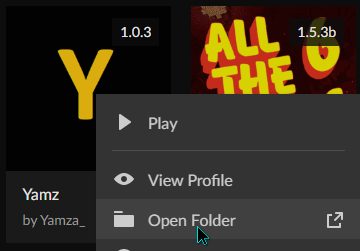
Right-click the modpack profile icon OR click the  button in the modpack profile.
Click 
Open Folder.
Open the logs folder.
Find the file called latest.log and drag it into discord.
signal ridge
quartz compass
yea it worked for everyone else not sure why its not working for me.
Reboot your pc then try it again
signal ridge
fossil rock
it a modpack bug some times it happend stuck at 100%
Try removing custom main menu mod
fossil rock
where?
quartz compass
signal ridge
Reboot your pc then try it again
yea i tried that a couple times. i might try deleting cursed forge and redownloading the app.
red patioBOT
Hey there, it is Curseforge, not "Cursed forge"
fervent sail
fossil rock
test with an other one it's probably this modpack problem i have the same with d...
I mentioned that it does this with every mod I try. That's just the one i'm currently trying to install. There's really only a few I want to install though so I don't want to install a random one 😫
fossil rock
fervent sail
I mentioned that it does this with every mod I try. That's just the one i'm curr...
you are or have vpn?
signal ridge
quartz compass
yea i tried that a couple times. i might try deleting cursed forge and redownloa...
Have you tried redownloading a new zip file?
quartz compass
signal ridge
Have you tried redownloading a new zip file?
yea that didn't work either.
fervent sail
fossil rock
you are or have vpn?
no...
signal ridge
quartz compass
yea that didn't work either.
Its just not showing up?
fossil rock
fervent sail
no...
any connection problem?
signal ridge
fervent sail
no...
post your latest log please. May be something else
fervent sail
Do i need to be to use mods? This is literally my first time trying to mod on minecraft java lol. I played on console for a long time.
quartz compass
signal ridge
Its just not showing up?
yea like it will let me import it but then it doesn't show it downloading or anything after that. the "my modpacks" section is still empty.
signal ridge
sosofif focus on your issue please
fossil rock
signal ridge
sosofif focus on your issue please
it's a mc issue
signal ridge
quartz compass
yea like it will let me import it but then it doesn't show it downloading or any...
Have your friend export it with the app again and try the new zip file.
quartz compass
signal ridge
Have your friend export it with the app again and try the new zip file.
ok ill give it a try
signal ridge
fervent sail
no...
!mc-logs do this please I will see if It is getting stuck on something
red patioBOT
Where to find the log on the CurseForge Client.
Right-click the modpack profile icon OR click the button in the modpack profile.
Click Open Folder.
Open the logs folder.
Find the file called latest.log and drag it into discord.
fervent sail
i clicked on the 3 dots and it just says "install" or "view modpack site"
and right clicking doesn't do anything at all for me
 lyric crescent
mac?
fervent sail
no, windows
signal ridge
Screen shot the curse app (what your looking at)
fossil rock
i think is a download issue
and for me the game and overwolf crash/lag
lyric crescent
fervent sail
no, windows
 quartz compass
signal ridge
Have your friend export it with the app again and try the new zip file.
quartz compass
signal ridge
Have your friend export it with the app again and try the new zip file.
didn't work. could it be that the mods originally came in a file and i had to compress them for it to upload?
lyric crescent
you what
signal ridge
quartz compass
didn't work. could it be that the mods originally came in a file and i had to co...
? The way the export works is it puts all the mods in the manifest file, and when you import it uses that file to download them from the site. there shouldnt be any actual mods in the zzip
quartz compass
signal ridge
? The way the export works is it puts all the mods in the manifest file, and whe...
oh ok. im dumb lmao...
quartz compass
yea
fossil rock
signal ridge
sosofif focus on your issue please
i can't now it freezing
and now i can help
signal ridge
Other option is get the mod versions your friend used and manually download them with the app
signal ridge
!mc-installmods
red patioBOT
How to install mods in CurseForge App.
- Click
+ Create Custom Profile - Name it, select the required Minecraft version, select the Forge version (usually the highest number), click
Create. - Click the profile icon.
- Click
Add New Content - Search and install the desired mods.
- Start the game!
How to install mods not on CurseForge.
- Right click the profile picture or Open the profile and click the Icon next to the play button.
- Click
Open Folder. - Drag the mod(s) into the
modsfolder. (Note: Some mods will require others, to run. Make sure to read the instructions for the mod!) - Start the game!

 small gorge
How can i see a full list of mods that a modpack has on the curse launcher? I'm on the mod page and there doesn't seem to be a way to see a list of all mods
signal ridge
quartz compass
okay maybe ill give that a try
Will jsut need to make sure they didnt change any configs as well
lyric crescent
small gorge
How can i see a full list of mods that a modpack has on the curse launcher? I'm ...
check the dependencies tab (on the website)
quartz compass
signal ridge
Will jsut need to make sure they didnt change any configs as well
okay 👍 thanks
signal ridge
quartz compass
okay 👍 thanks
Np, 👍
small gorge
Where would that be?
 lyric crescent
on the website
small gorge
i have to go to the website of every single pack just to look at what it has?
lyric crescent
or install it, yes
small gorge
Where's teh dependacies tab on the website?
lyric crescent
sorry, relations
fossil rock
how download modpack manualy beacause cursforge is full bug
lyric crescent
you dont
fossil rock
why?
lyric crescent
cuz there is no way to install manually
fossil rock
you can add it like in 2015 pls?
lyric crescent
???
fervent sail
sorry i had to tend to my toddler lol, this is what it looks like when i click on the 3 dots
 signal ridge
Can install the mods for that pack manually
lyric crescent
fervent sail
sorry i had to tend to my toddler lol, this is what it looks like when i click o...
it needs to be a modpack you have installed
fossil rock
the modpack download button in 2015 i haven't the buggy cursforge app
fervent sail
yes i know, i canceled because it was frozen at 100%
 fleet bear
"the buggy app"
Well if you don't use the app, you need to find something else and that isn't here.
signal ridge
fervent sail
yes i know, i canceled because it was frozen at 100%
ah ok I get it now
 rustic drift
Can worldedit work on Forge?
fleet bear
rustic drift
Can worldedit work on Forge?
Read the project page for the mod
small gorge
Is there really no way to see what a mod pack has without going into each mod packs website?
It seems extremely stupid that the launcher just removed the ability to check what mods a pack has
fervent sail
signal ridge
Can install the mods for that pack manually
you mean like do all of them separate?
fleet bear
small gorge
Is there really no way to see what a mod pack has without going into each mod pa...
It's always been like this
signal ridge
fervent sail
you mean like do all of them separate?
Pixelmon is a rather large modpack, can take it some time to install. Some have had 40min +
lyric crescent
small gorge
Is there really no way to see what a mod pack has without going into each mod pa...
there never was that ability
fossil rock
ok thx mods but for my problem its fullscreen bug thx google
signal ridge
I said this....
fossil rock
yes and you say after its a drivers problems
lyric crescent
they said to remove custom main menu actually, and so far all you've done is complain
fossil rock
and how disable fullscreen you don t say that 😆
lyric crescent
delete options.txt
small gorge
Is there a way to like filter out certain tags for modpacks or at least search for more than one tag?
lyric crescent
no
fossil rock
thx but i have set in option.txt fullsreen:false
lyric crescent
then it's not opening in fullscreen
small gorge
As so the program sucks, thanks for the help at least
lyric crescent
sure, have a good one
fossil rock
with the customisable icon and account manager the true old cursfogre but that one is less buggy
fleet bear
mate, IDK what you are even going on about, I've been using CF since they supported MC mods.
None of what you are talking about has existed for like 7 years.
fossil rock
CF isn't a app before and it's was good because you can use all launcher you want some bugged and some not
signal ridge
? there was a cf app before this one?
fossil rock
before twitch
lyric crescent
So are you here for support or for complaint? This is a support channel.
fossil rock
support but it isn't work very well in the future i will go in google for my problem and it will work better
lyric crescent
K good luck then
fossil rock
thx i have fix it
rustic drift
When you delete a file from curseforge, do you delete it forever?
The latest version of Optifine says it's archived, what do I do?
 distant pebble
How to remove specific modded item recipe from a fabric mod?
fleet bear
 ember glade
how do i add more ram
ember glade
how do i add more ram
!mc-ram
red patioBOT
How to set Global Minecraft RAM value.
- Click the
 icon in the bottom left to open settings.
 - Click the Minecraft tab.
- Scroll down.
- Slide slider to recommended ram range as seen below.

 novel zephyr
Ah, true. I had forgotten about ad revenue, fair enough.
fleet bear
you buy the game
It is for people that own the game and don't pirate it.
ok and?
well that's you decided then.
and deciding that means you can't have support
 lapis needle
I swear everytime i come in here its just people with cracked asking “why mod no work”
fleet bear
yep
 final schooner
can someone help me? i'm trying to download the edge of infinity modpack

 opal cipher
!mc-path
red patioBOT
**Minecraft Files should NOT be installed inside the following locations
.minecraft folder.
OneDrive folders.
Desktop folder.
Drive roots I.E. Directly into the C:\ drive.
iCloud enabled folders.
If any of the above are in the path you need to change/move it by following the instructions below!**
If Minecraft is not installed in CurseForge App, start here.
Click the  in the top left.
Select Minecraft.
Click "Edit".
Move to the "Continue here:" section below.
If Minecraft is installed in CurseForge App, follow these steps.
Click the in the bottom left.
Select the Minecraft tab.
Click "Change".
Move to the "Continue here:" section below.
Continue here:
Make a folder in the root directory called CurseForge.
Select the folder you just made.
The text box should show something like the following:
For Windows: C:\CurseForge
For Mac: /Users/Shared/CurseForge

 strong iron
Why isnt there a filter modpack depending on specific mods instead of just the categories
 queen storm
final schooner
dosen't work
queen storm
final schooner
dosen't work
Where did you put the modding folder?
queen storm
strong iron
Why isnt there a filter modpack depending on specific mods instead of just the c...
You can view that on the website
final schooner
.mods?
queen storm
final schooner
.mods?
Full path
final schooner
Local disc :C - users - my account - appdata - roaming - mods
or
the instances
also that path
queen storm
That is not what the command said
strong iron
strong iron
Why isnt there a filter modpack depending on specific mods instead of just the c...
I meant, why can't I search for modpacks with the specific mod I want. Sorry if I'm just being difficult
 lunar river
delete mods and config and try again
queen storm
strong iron
I meant, why can't I search for modpacks with the specific mod I want. Sorry if ...
You can on the website, link the mod
queen storm
lunar river
delete mods and config and try again
How is that gonna help with a path too long error?
lunar river
I did not understand the error
queen storm
lunar river
I did not understand the error
Then don't respond to it
lunar river
error in file name?
queen storm
lunar river
error in file name?
The path is too long, just like the error says
lunar river
Is she giving this error only on that guy?
final schooner
i removed every minecraft file in the folders the command said
queen storm
final schooner
i removed every minecraft file in the folders the command said
Then show the new "minecraft modding folder"
queen storm
lunar river
Is she giving this error only on that guy?
What are you even talking about?
final schooner
I don't know alot of stuff about mods but clicking the "change" button the minecraft tab brings me to all the mods 6 folder, if that helps
queen storm
final schooner
I don't know alot of stuff about mods but clicking the "change" button the minec...
Go to curseforge, settings, minecraft, send screenshot
 queen storm
You did not move it
final schooner
which one
queen storm
The minecraft modding folder, you did not change it
final schooner
o
queen storm
 queen storm
Did you modify the file?
 random cedar
the backround texture, does it matter?
queen storm
If you changed the jar than it won't work anymore
queen storm
Probably
 undone mountain
hi everyone i have problem. so i installed curse forge by overwolf and all was fine but after i shut down my computer it uninstalled itself so after that i downloaded it again beacause i thought it was a single problem but it happend again so what i can do now to not uninstall itself?
 viral briar
O_o
can't say i've ever seen something uninstall itself
especially that of curseforge
queen storm
undone mountain
hi everyone i have problem. so i installed curse forge by overwolf and all was ...
What uninstalled itself?
Curseforge or overwolf?
undone mountain
curse forge and overwolf'
queen storm
!getcf
red patioBOT
Looking to install the CurseForge app?
Todo: Place system requirements here.
<:windows:798410728188936222> Windows
<:mac:798410654418862130> Mac
Linux
:person_shrugging:
queen storm
Then install it again
 night blade
my friend can only play 2 mods and the other mods dont work for him do yall know what to do?
 finite dune
specifically, these are the only 2 that i can play
 queen storm
finite dune
specifically, these are the only 2 that i can play
queen storm
finite dune
specifically, these are the only 2 that i can play
And what happens with the others?
 queen storm
!mc-logs
red patioBOT
Where to find the log on the CurseForge Client.
Right-click the modpack profile icon OR click the button in the modpack profile.
Click Open Folder.
Open the logs folder.
Find the file called latest.log and drag it into discord.
finite dune
i have no idea how to drag it so i guess i'll do this


(sorry for the spam btw)

 digital roost
Why isn't my project approved. Give me more info.
or im going to ping everyone because idk who i have to ping
0% suppoer
 solid cipher
So I have a question about a minecraft texture pack called stay true resource pack. I want to port it to bedrock but idk how the permissions are for it. It just states that "All rights reserved unless explicitly stated" I tried dming the owner but he hasn't answered and i fear that the owner might be inactive. What do I do and am I allowed to port it? thanks!
pings dont work
night blade
please stop
solid cipher
you're just getting yourself banned and your thing wont get approved
digital roost
yeahg
finite dune
hmmmmmm
 digital roost
hey overwolf 
digital roost
finite dune
hmmmmmm
idk what you posted but it does not show to me
digital roost
ok im going to dm
this is not normal they have 6 days to approve
but they never do it
lets dm gilgamesh
queen storm
digital roost
ok im going to dm
The heck is wrong with you?
digital roost
everything is with me
queen storm
!status
red patioBOT
It is 11:55AM on Tuesday for CurseForge my dudes.
Project Moderation Time
Project/File moderation is done on Sunday - Thursday from 10am - 6pm GMT+2
This process is First in, First out. Thus files submitted late in the work day may not be checked until the next work day.
New Projects or uploads requiring manual approval: 1-3 Working Days
Updates to approved projects not needing manual approval: 1 Hour
File sync to the Curseforge app may take up to 24 hours after approval.
 fast glade
hello there, i downloaded some mods and try making a server, but it keeps giving this error
digital roost
im waitinh 6 day
fast glade
A problem occurred running the Server launcher.java.lang.reflect.InvocationTargetException
        at java.base/jdk.internal.reflect.NativeMethodAccessorImpl.invoke0(Native Method)
        at java.base/jdk.internal.reflect.NativeMethodAccessorImpl.invoke(NativeMethodAccessorImpl.java:62)
        at java.base/jdk.internal.reflect.DelegatingMethodAccessorImpl.invoke(DelegatingMethodAccessorImpl.java:43)
        at java.base/java.lang.reflect.Method.invoke(Method.java:566)
        at net.minecraftforge.fml.relauncher.ServerLaunchWrapper.run(ServerLaunchWrapper.java:70)
        at net.minecraftforge.fml.relauncher.ServerLaunchWrapper.main(ServerLaunchWrapper.java:34)
Caused by: java.lang.ClassCastException: class jdk.internal.loader.ClassLoaders$AppClassLoader cannot be cast to class java.net.URLClassLoader (jdk.internal.loader.ClassLoaders$AppClassLoader and java.net.URLClassLoader are in module java.base of loader 'bootstrap')
        at net.minecraft.launchwrapper.Launch.<init>(Launch.java:34)
        at net.minecraft.launchwrapper.Launch.main(Launch.java:28)
... 6 more```Check your notifications
queen storm
And follow the damn rules, this is your only warning
Then send a screenshot of the project
queen storm
Send a screenshot of the project then
queen storm
fast glade
hello there, i downloaded some mods and try making a server, but it keeps giving...
solid cipher
solid cipher
So I have a question about a minecraft texture pack called stay true resource pa...
btw, if someone can help me. (Just needed to reply to it just so someone can see it since people have msged a lot, sorry if this is wrong)
queen storm
solid cipher
So I have a question about a minecraft texture pack called stay true resource pa...
You are not allowed if all rights reserved
solid cipher
oh oki thanks but i can use it for personal uses right?
digital roost
APPROVE
 queen storm
digital roost
APPROVE
queen storm
digital roost
APPROVE
Upload a file, till there is a file it will not be approved
digital roost
file?
queen storm
Now be patient and read everything
digital roost
FILE?!?!?!?!?!?!?!?!?!?!?!?!?!?!?!?!?!?!?!?!?!
red patioBOT
Sync and your Project.
CurseForge App and site do not share the same requirements! You can find things on the site but this does not mean it will be in the app!
For a mod to show up in the app:
- Projects MUST have a file marked as RELEASE
- Projects MUST be APPROVED
- Projects MUST have a file marked for the PROFILE VERSION USED
- Projects CAN'T be EXPERIMENTAL
- Projects CAN'T be ABANDON
Files can take a while to show up in the app. If your files still have not shown up either your project is new and you have yet to mark a file as Release or there is issues with the sync system making it slow.
digital roost
wait i need to upload file?
solid cipher
queen storm
You are not allowed if all rights reserved
tho i have seen someone use the textures before and just credited the person, tho it is the same pack?
queen storm
digital roost
wait i need to upload file?
That is what I have been saying
digital roost
and if i never do that it never be approved?
queen storm
solid cipher
tho i have seen someone use the textures before and just credited the person, th...
Then report it and let CF handle it
queen storm
digital roost
and if i never do that it never be approved?
Correct, and then the project is useless
digital roost
Oh.
Then i understand.
This
`The status of the file TheBlock999's MrCrayFish Modpack 1.16+.rar (Unofficial MrCrayFish's modpack) has been changed to Rejected
Invalid file extension, expected zip.`
solid cipher
queen storm
Correct, and then the project is useless
wait tho if i asked the owner and he said yes for example for future things, will i be able to then?
queen storm
digital roost
This
`The status of the file TheBlock999's MrCrayFish Modpack 1.16+.rar (Unoffic...
How did you export it?
digital roost
Ok sorry of my rage and everything
queen storm
digital roost
Ok sorry of my rage and everything
Which you should never do
queen storm
solid cipher
wait tho if i asked the owner and he said yes for example for future things, wil...
If the owner gives approval then you can
digital roost
queen storm
How did you export it?
i created a folder and i put there a mods and then i click to "add to "[foldername].rar"
queen storm
digital roost
i created a folder and i put there a mods and then i click to "add to "[folderna...
!mc-packshare
red patioBOT
There are two ways to share a modpack you've made with others...
Export and Share - For Friends to Small Groups.
- Click the Icon for the modpack.
- Click the button next to play.
- Click

Export. - Select the files that should be included.
- Send the zip to the people that want it! They can follow the instructions in
!mc-installpackto install the pack!
Upload to Curseforge - For Public Release to Everyone.
This options will make your pack public to EVERYONE, it comes with extra requirements and will take some effort to set up.
- Go to here: https://www.curseforge.com/project/432/4471/create
- Fill out the information with a proper description of the pack. This should allow anyone to understand what the pack is.
- Click the Icon for the modpack in the CurseForge app.
- Click the button next to play.
- Click
Export. - Select the files that should be included.
- Open your Project you made on the CurseForge site and Upload the file you just made.
- Wait for Moderation & Sync so it can show up in the client! (See
!syncfor limitations)
digital roost
i need tutorial
what i need a application from curseforge
wait i have a lunch ...
 @digital roost is AFK, loading...
queen storm
!getcf
red patioBOT
Looking to install the CurseForge app?
Todo: Place system requirements here.
<:windows:798410728188936222> Windows
<:mac:798410654418862130> Mac
Linux
:person_shrugging:
 molten coral
Mincraft crashes every time im trying to load a modpack doesnt matter wich one what can i do ?
queen storm
molten coral
Mincraft crashes every time im trying to load a modpack doesnt matter wich one ...
!mc-logs
red patioBOT
Where to find the log on the CurseForge Client.
Right-click the modpack profile icon OR click the button in the modpack profile.
Click Open Folder.
Open the logs folder.
Find the file called latest.log and drag it into discord.
molten coral
?
queen storm
Follow those steps
queen storm
!mc-installfix
red patioBOT
- Click on the Minecraft Tab on the Left side of the App.
- Click button next to the
Create Custom Profileoption. - Click

Repair Installationoption. - Play game.
NOTE: You will not lose any modpacks or worlds, These are saved in the Instances folder. DO NOT TOUCH THIS FOLDER OR YOU WILL LOSE EVERYTHING
queen storm
You gonna say anything useful?
queen storm
There is no need to run that command, stop it
digital roost
thats reason for deleting it?
opal cipher
You could also go into #🟢︱user-bot-spam and type the commands
digital roost
ok
queen storm
digital roost
thats reason for deleting it?
Yes, it is spam if not needed
queen storm
Stay ontopic, keep the non-required talk out of this channel.
Final warning
 spark ermine
how can I download an older Forge Version ?
molten coral
hey it me again minecraft still crashes with every modpack
queen storm
spark ermine
how can I download an older Forge Version ?
Select a different minecraft version
queen storm
molten coral
hey it me again minecraft still crashes with every modpack
!mc-logs
red patioBOT
Where to find the log on the CurseForge Client.
Right-click the modpack profile icon OR click the button in the modpack profile.
Click Open Folder.
Open the logs folder.
Find the file called latest.log and drag it into discord.
spark ermine
There is no Version
 red patioBOT
How to install mods in CurseForge App.
- Click
+ Create Custom Profile - Name it, select the required Minecraft version, select the Forge version (usually the highest number), click
Create. - Click the profile icon.
- Click
Add New Content - Search and install the desired mods.
- Start the game!
How to install mods not on CurseForge.
- Right click the profile picture or Open the profile and click the Icon next to the play button.
- Click
Open Folder. - Drag the mod(s) into the
modsfolder. (Note: Some mods will require others, to run. Make sure to read the instructions for the mod!) - Start the game!
spark ermine
thanks
 queen storm
digital roost
I'm back
help please
queen storm
digital roost
I'm back
help please
!mc-path
red patioBOT
**Minecraft Files should NOT be installed inside the following locations
.minecraft folder.
OneDrive folders.
Desktop folder.
Drive roots I.E. Directly into the C:\ drive.
iCloud enabled folders.
If any of the above are in the path you need to change/move it by following the instructions below!**
If Minecraft is not installed in CurseForge App, start here.
Click the in the top left.
Select Minecraft.
Click "Edit".
Move to the "Continue here:" section below.
If Minecraft is installed in CurseForge App, follow these steps.
Click the in the bottom left.
Select the Minecraft tab.
Click "Change".
Move to the "Continue here:" section below.
Continue here:
Make a folder in the root directory called CurseForge.
Select the folder you just made.
The text box should show something like the following:
For Windows: C:\CurseForge
For Mac: /Users/Shared/CurseForge
digital roost
ok, next?
queen storm
You try again
digital roost
What I'm trying again?
digital roost
Yes I'm trying to use somehow that thing with tutorial
Applying patch 2 of 4 is long...
ok now?
lyric crescent
now explain the results
digital roost
could someone help me with crazy craft problems so when i try to join a server this error comes up but only on 1 server the others work fine it happend after i spammed random possitvie potions could anyone help pls? i have this problem since yesterday and i dont know how i can play on the server anymore
 lyric crescent
That is not an Curseforge issue. You can try #👽︱game-support and sending your logs but reporting the issue to the pack devs would be a good idea as well.
lyric crescent
Check their pack page.
lyric crescent
curseforge is a website
digital roost
https://www.curseforge.com/minecraft/modpacks/rlcraft/files this is the place where i downloaded the pack
lyric crescent
uh huh
queen storm
Join the official discord here https://discord.gg/2BZseKW for more info regarding public servers and updates to RLCraft.
digital roost
thx
 balmy lion
I don't who to ask, but can someone tell me if there is anything wrong with my project as it usually does not take that long to get verified?
 lyric crescent
did you upload a file? is it approved?
balmy lion
I think I uploaded the file
is there a way for me to check if it did upload correctly?
lyric crescent
click the file tab
 queen storm
Check your notifications first
lyric crescent
well if you did upload a file you should check for a reject notice. if you did not upload a file then do so
balmy lion
oh here

I just upload a .zip file with a ReadMe.txt and folder that is a world save
is there anything wrong with that?
lyric crescent
As the message says. Reupload the file, if it's rejected again contact support.
balmy lion
Okay, I will do that
thank you for the help 😊
I appreciate it
Here we go now its uploaded correctly I think
 lunar river
spark ermine
lunar river
spark ermine
I would play the Tecktopia Mod but something is not working, I startet Minecraft in the right version with the Mod but ingame isnt the mod
spark ermine
can someone help me ?
lyric crescent
need a more detailed explaination
 maiden echo
how do i delete a comment from a page? the comment is irrelevant now and i would like to delete it. (reply with ping is appreciated ty)
 barren karma
Guys a question, there is a discord enchantment, what is it for?
queen storm
barren karma
Guys a question, there is a discord enchantment, what is it for?
What discord enchantment?
barren karma
in a mod, called random enchantments
 heady cloak
hi
barren karma
hi
heady cloak
if i have a mod installed
queen storm
barren karma
in a mod, called random enchantments
Talk to the dev about that please
heady cloak
and that mod is not installed on the server
barren karma
queen storm
Talk to the dev about that please
ok, so sorry
heady cloak
will i be able to use it
queen storm
heady cloak
will i be able to use it
Depends on the mod
queen storm
barren karma
ok, so sorry
No need for sorry 😉
 cursive trail
@signal ridge sorry to ask again mate can you resend me the link you sent me yday please. My curseforge is not opening
queen storm
cursive trail
<@!217048549706301442> sorry to ask again mate can you resend me the link you se...
!getcf
red patioBOT
Looking to install the CurseForge app?
Todo: Place system requirements here.
<:windows:798410728188936222> Windows
<:mac:798410654418862130> Mac
Linux
:person_shrugging:
queen storm
I assume
queen storm
heady cloak
world edit?
Nope, not gonna work
heady cloak
what will
 spring valley
is there a immersive portals mod on curse?
lyric crescent
did you look?
maiden echo
sorry to repeat a question, but is there a way to delete an old comment on a page?
queen storm
Hit the "Tools" thingy
 queen storm
Is it your message?
maiden echo
Yes its mine
queen storm
Could report it, why do you want it gone anyways?
maiden echo
queen storm
Could report it, why do you want it gone anyways?
i was just googling my username and this came up. decided i wanted to delete it because it didnt really contribute anything anymore to the page
lunar river
lunar river
help me
signal ridge
lunar river
help me
!mc-logs need the full log
red patioBOT
Where to find the log on the CurseForge Client.
Right-click the modpack profile icon OR click the button in the modpack profile.
Click Open Folder.
Open the logs folder.
Find the file called latest.log and drag it into discord.
lunar river
I'm not on the computer right now
signal ridge
Then cant help.
lyric crescent
...
signal ridge
Something crashed the event bus earlier in the loading stage. This is NOT a Cooking for Blockheads issue! Scroll up in your latest.log to find the real crash log.
Sending the latest log is always better then the crash report.
digital roost
How can your friends go to your server without starting the start.bat folder
lunar river
:/
lyric crescent
Server questions go in #👽︱game-support
digital roost
k
 magic lion
quick question is mcreator really all that bad
lyric crescent
#⚙️︱authors-help for that
magic lion
lyric crescent
<#768713291643486218> for that
ok
digital roost
how come curseforge is maxing out my cpu and disk
how do i change the profile pic?
on the cursed forge for custome profile creation thingy
red patioBOT
Hey there, it is Curseforge, not "Cursed forge"
signal ridge
When you upload a project to the site you set the profile pic there
lyric crescent
there is an option to select one when you upload it. a picture is required. you cant miss it
maiden echo
queen storm
Could report it, why do you want it gone anyways?
so the best thing i can do for now is to report my own comment?
digital roost
can anyone help answer why curseforge is maxing out my cpu and disk
lyric crescent
screenshot where you see this
signal ridge
Sounds like your pc cant handle what your playing
lyric crescent
screenshot
 trim stump
i cant delete a profile
lyric crescent
why
 trim stump
ok
maiden echo
queen storm
Yes
thank you
trim stump
it still wont let me
lyric crescent
?ticket-app
red patioBOT
:bug: Reporting via the CurseForge App :bug:
-
Click the
 icon in the bottom left.
 -
Select

Open a Ticket. -
Fill out the form with accurate detailed information, "It doesn't work" isn't helpful! What exactly doesn't work and why doesn't it work should be easy to answer!
-
Make sure to upload your Overwolf logs with the
Upload Fileoption on the ticket, information on how to get these logs can be found here https://support.overwolf.com/en/support/solutions/articles/9000176827-how-to-get-your-overwolf-logs -
Submit!
 trim stump
thx
 viral copper
so i created a project and uploaded files, but it wont show up in the Launcher for others to download(Yes it was approved)
signal ridge
Link the project
viral copper
here?
signal ridge
yep
signal ridge
!sync
red patioBOT
Sync and your Project.
CurseForge App and site do not share the same requirements! You can find things on the site but this does not mean it will be in the app!
For a mod to show up in the app:
- Projects MUST have a file marked as RELEASE
- Projects MUST be APPROVED
- Projects MUST have a file marked for the PROFILE VERSION USED
- Projects CAN'T be EXPERIMENTAL
- Projects CAN'T be ABANDON
Files can take a while to show up in the app. If your files still have not shown up either your project is new and you have yet to mark a file as Release or there is issues with the sync system making it slow.
signal ridge
 viral copper
ahh i made it experimental thanks
signal ridge
and an alpha as well
lyric crescent
and alpha
viral copper
i just wanted to make it so my friends can easy download the same mods i chose for our server
so it cant be alpha ?
signal ridge
A project needs atleast 1 file marked at Release to sync
viral copper
ok thanks a lot
 balmy kernel
can someone help me
this happens when i try to join my server

the modpack is RAD
signal ridge
!mc-logs
red patioBOT
Where to find the log on the CurseForge Client.
Right-click the modpack profile icon OR click the button in the modpack profile.
Click Open Folder.
Open the logs folder.
Find the file called latest.log and drag it into discord.
balmy kernel
i shut down the server once and then this happened the next time i tried to log in
kk ill do that
digital roost
in the curse forge app not the website
balmy kernel
Yup
im assuming the minecraft game or just the curseforge launcher?
oh wait got it
viral copper
how long does approving take?
signal ridge
!status
red patioBOT
It is 06:40PM on Tuesday for CurseForge my dudes.
Project Moderation Time
Project/File moderation is done on Sunday - Thursday from 10am - 6pm GMT+2
This process is First in, First out. Thus files submitted late in the work day may not be checked until the next work day.
New Projects or uploads requiring manual approval: 1-3 Working Days
Updates to approved projects not needing manual approval: 1 Hour
File sync to the Curseforge app may take up to 24 hours after approval.
digital roost
digital roost
how do i change the profile pic?
talkin about this
viral copper
if Alpha was approved does the Updates 1Hour rule apply?
signal ridge
viral copper
if Alpha was approved does the Updates 1Hour rule apply?
- Projects MUST have a file marked as RELEASE
If it is approved but there is no other files, then it will not sync
lyric crescent
digital roost
talkin about this
This is how you get an icon, there is no other way #🔥︱curseforge-support message
digital roost
yea...but upload where?
lyric crescent
the website
lyric crescent
then you dont get an icon
balmy kernel
can someone help me when your done btw
i dont wanna interupt
just also i dont wanna be forgotten
take ur time tho ill be here whenever u finish
lyric crescent
feel free, this person has been answered already
signal ridge
digital roost
i didnt upload website
To change the picture in the app a project must be uploaded to the site. Otherwise it is the default pic
balmy kernel
basically when i try to join my server i get this
signal ridge
Im reading it now
digital roost
ok that answers it ok >.<
balmy kernel
its a roguelike adventures and dungeons pack
i shut it down last night
it was working yesterday
and this happened today when i tried to join

heres the client logs
lyric crescent
yoyo is already reading it as they said. also this really isnt a curseforge issue anyway
balmy kernel
oh didnt realize he was helping me
signal ridge
Im so lost... Too many posted logs now
balmy kernel
my bad
ty
okay so everything in that message is related to my issued
not sure what other stuff is
signal ridge
I got that, let me look through the logs
balmy kernel
tysm
signal ridge
Since this is also a server issue lets move to #👽︱game-support
balmy kernel
okay ty
 thorny wave
What do I need to publish a modpack correctly? because the Link in the Text is not working
queen storm
thorny wave
What do I need to publish a modpack correctly? because the Link in the Text is n...
What link? And not working how?
queen storm
What was the rejection message?
thorny wave
oh sorry. As far as I understood that was the link for the things I need
 wild mountain
How do I install the forge launcher (to get a curse modpack running) on LINUX?
Is there source somewhere I can compile? It works on MacOS, it should be fairly trivial to get it running on linux...
lyric crescent
curseforge does not work on linux
wild mountain
It works on macOS, linux isn't too far different. Also, linux DOES have (mostly) working windows emulation for directly running windows programs. (It's made only slightly more difficult by the fact that the "OverWolf" installer apparently runs both 32 and 64 bit components.
If I had a working install, I could probably run it. But the install process borks.
signal ridge
the mac OS =/= Linux. It is a flavor of linux but not the same
wild mountain
It's not a flavor of linux. It's a flavor of freeBSD. Totally different kernel. Same POSIX compliant libraries/interfaces though.
lyric crescent
Curseforge does not support linux. You can have this discussion if you like in #💬︱general-chat or #🥑-off-topic-chat but running curseforge on an unsupported OS doesnt belong here.
wild mountain
Can you tell me where the source is?
lyric crescent
It's not open source.
wild mountain
Really? Really really? Well. That sucks. Thank you for confirming that though! Now I have to spend time swearing at binary blobs, which is always unpleasant.
queen storm
 subtle quail
why dont any of my modpacks pop up on the app
subtle quail
why dont any of my modpacks pop up on the app
Link please
signal ridge
Has it been approved?
subtle quail
yes it has
queen storm
!sync
red patioBOT
Sync and your Project.
CurseForge App and site do not share the same requirements! You can find things on the site but this does not mean it will be in the app!
For a mod to show up in the app:
- Projects MUST have a file marked as RELEASE
- Projects MUST be APPROVED
- Projects MUST have a file marked for the PROFILE VERSION USED
- Projects CAN'T be EXPERIMENTAL
- Projects CAN'T be ABANDON
Files can take a while to show up in the app. If your files still have not shown up either your project is new and you have yet to mark a file as Release or there is issues with the sync system making it slow.
queen storm
My guess
subtle quail
i made 2 mod packs and they both dont pop up
queen storm
Waits for links
subtle quail
oh thats why...
 turbid nova
wasnt there a mod that allowed fabric mod things in cf or something
red patioBOT
How to use Fabric until support to the app is added in the near future.
- Make a Forge modpack of the appropriate version.
- Install a mod called 'Jumploader'
Fabric mods do not work with Forge.
Forge mods do not work with Fabric.
Fabric mods should be marked with a Fabric Icon like this: 
lyric crescent
?mc-fabric
 lapis sand
okay here is the thing, i want to put optifine with forge but how do i do that
turbid nova
install optifine jar and put it in the mods folder of the pack
lapis sand
but it says its for a older version when its not
lyric crescent
?mc-optifine
red patioBOT
Optifine and Curseforge
To install Optifine with modpacks on Curseforge:
Right click the modpack icon, select Open Folder.
Put the Optifine.jar into the mods folder.
Now load the modpack normally.
We do not offer support for Optifine. If you have issues with Optifine, remove it. If you want further support try the discord found on their website.
https://www.optifine.net/home
lapis sand
thank you ill try again
probably downloading optifine again
do i need to download a special type of optifine or can i use the normal one
lyric crescent
the one listed for your mc version
 stone junco
?help
red patioBOT
╰( ͡° ͜ʖ ͡° )つ──☆*:・゚ *˜”*°•.˜”*°• Many Help •°*”˜.•°*”˜* <:curselit:796985620550385705>
Please provide a description of your issue with as much detail as possible. If you have an issue with a mod or modpack, tell us the name. Explain what you can see happening. Be specific!
 Tell us what is happening, we already know it "doesn't work".
Avoid using words like "it", tell us exactly what "it" is.
Don't assume anyone knows what you are talking about, be specific.
Tell us what you expected to happen.
Provide screenshots or video if possible.
Provide a log if possible. ?mc-log
signal ridge
Whats up?
stone junco
 signal ridge
Curseforge app ?
signal ridge
What were you doing when you got this?
stone junco
trying to launch omnifactory
signal ridge
!mc-installfix try this
red patioBOT
- Click on the Minecraft Tab on the Left side of the App.
- Click button next to the
Create Custom Profileoption. - Click
Repair Installationoption. - Play game.
NOTE: You will not lose any modpacks or worlds, These are saved in the Instances folder. DO NOT TOUCH THIS FOLDER OR YOU WILL LOSE EVERYTHING
stone junco
i already did this
queen storm
Restart your pc
queen storm
stone junco
!help
How does spamming commands help?
queen storm
With the same outcome as the first time
stone junco
once a while ago
red patioBOT
- Click on the Minecraft Tab on the Left side of the App.
- Click button next to the
Create Custom Profileoption. - Click
Repair Installationoption. - Play game.
NOTE: You will not lose any modpacks or worlds, These are saved in the Instances folder. DO NOT TOUCH THIS FOLDER OR YOU WILL LOSE EVERYTHING
queen storm
!ticket-app
red patioBOT
:bug: Reporting via the CurseForge App :bug:
-
Click the
icon in the bottom left. -
Select
Open a Ticket. -
Fill out the form with accurate detailed information, "It doesn't work" isn't helpful! What exactly doesn't work and why doesn't it work should be easy to answer!
-
Make sure to upload your Overwolf logs with the
Upload Fileoption on the ticket, information on how to get these logs can be found here https://support.overwolf.com/en/support/solutions/articles/9000176827-how-to-get-your-overwolf-logs -
Submit!
stone junco
ok
 wheat quiver
do u guys also have datapacks?
lyric crescent
There isn't any category for them, but i believe there are some on the website.
Opening a ticket doesn't solve the issue...
You need to wait for a reply
 narrow minnow
This usually means you are on a slow/unstable internet connection - try lan or mobile hotspot
 lusty geyser
howdy, trying to change the modloader version on my minecraft modpack but its only letting me go up to 35.1.37 despite me having, and being able to select on launching the modpack, forge 36.1.16 installed
narrow minnow
lusty geyser
howdy, trying to change the modloader version on my minecraft modpack but its on...
Forge versions are limited to the game version you've selected
lyric crescent
35.x.xx is 1.16.4, and 36.x.xx is 1.16.5
lusty geyser
? im running 1.16.5?
lusty geyser
 narrow minnow
and now of the custom profile
lusty geyser
oh, huh
 narrow minnow
there you go
lusty geyser
well, how do i change that then?
narrow minnow
Thing is - we don't allow this because mods are also game specific
lyric crescent
make a new profile in 1.16.5
lyric crescent
?mc-optifine
red patioBOT
Optifine and Curseforge
To install Optifine with modpacks on Curseforge:
Right click the modpack icon, select Open Folder.
Put the Optifine.jar into the mods folder.
Now load the modpack normally.
We do not offer support for Optifine. If you have issues with Optifine, remove it. If you want further support try the discord found on their website.
https://www.optifine.net/home
 fast ore
i put it on Roaming/Minecraft/mods
 high spear
How can I download stardew valley on curseforge? All it says when I click on it is "We didn't find this game. Let's try again." and under it says scan now and locate game.
lyric crescent
not what the instructions say
queen storm
Those are two very different things
fast ore
idk whats the name
queen storm
Speed can't be changed
fast ore
it makes me like use more RAM to install
like changing how many gigs it used
or somethin
queen storm
!mc-ram
red patioBOT
How to set Global Minecraft RAM value.
- Click the icon in the bottom left to open settings.
- Click the Minecraft tab.
- Scroll down.
- Slide slider to recommended ram range as seen below.
queen storm
Has nothing to do with download speed
high spear
I'm still really confused on how to download stardew valley.
 mystic shuttle
hey my modpack keeps saying that it missing forge but idk what that means
signal ridge
mystic shuttle
hey my modpack keeps saying that it missing forge but idk what that means
Screen shot the error message
mystic shuttle
 signal ridge
Need to update the modpacks forge versio
rustic drift
How do you view forge screenshots?
signal ridge
rustic drift
How do you view forge screenshots?
What?
rustic drift
Like screenshots you took, they don't appear in the normal screenshot folder
signal ridge
With F2?
mystic shuttle
how do i updtae the modpack forge verison
rustic drift
signal ridge
With F2?
yeah
signal ridge
rustic drift
yeah
They show up in the screenshot folder for that pack.
 rocky coral
every time i try to open curseforge it gives me a pop up saying "failed to start application, please contact support"
signal ridge
mystic shuttle
how do i updtae the modpack forge verison
In the curse app go to your pack click on the goto profile options and change the forge version to what it says in the screen shot or the latest
signal ridge
rocky coral
every time i try to open curseforge it gives me a pop up saying "failed to start...
Win or mac?
rustic drift
signal ridge
They show up in the screenshot folder for that pack.
coo
rocky coral
signal ridge
Win or mac?
windows
rocky coral
signal ridge
Did overwolf install ok?
ive had both for a while, they just now started having problems, and no overwolf won't work either
signal ridge
Did you change anything on your pc? Any updates or anthing
rocky coral
no
signal ridge
Have you rebooted your pc?
rocky coral
yes
signal ridge
Tried reinstalling both apps?
rocky coral
I have not tried that yet, I will now
signal ridge
Alright.
 knotty oasis
Im playing modded minecraft, and upgraded my ram recently, is there a way to allocate more that 12 gigs in the curseforge settings?
fleet bear
No
signal ridge
Why would you even need more then 12gb allocated?
fleet bear
Large texturpacks, shaders and texturepacks.
That's about it.
knotty oasis
im playing All The Mods 6
theres like 188 mods in it, and I was getting a few frame drops
signal ridge
atm6 needs 6-8gb at most. unless your using shaders and such
knotty oasis
oh, it was loading really slow so I added more and it loaded faster
signal ridge
Ram isnt the only thing needed for minecraft, cpu is a factor as well
knotty oasis
yeah
lyric crescent
ram is not a magical panacea. just throwing more at it wont solve every issue. having too much ram will cause sutddering and freezes.
knotty oasis
its mainly just for the loading screen and loading worlds
it used to take like 5-8 minutes now its like 2-3
 zenith juniper
Hi, I'm currently having issues importing a mod from the website, can anyone help me?
signal ridge
zenith juniper
Hi, I'm currently having issues importing a mod from the website, can anyone hel...
Sure, whats the issue?
zenith juniper
The import navigator seems to only look for .zip files but the mod I got is .jar
signal ridge
Link the mod
lyric crescent
mods should be .jar
lyric crescent
dont see any .zip here
signal ridge
Downloads as a jar for me. Have you tried using the app to download it?
zenith juniper
When I click "import" in the curseforge app, it refuses to look for .jar files
that's the issue
lyric crescent
oh, are you trying to import a mod as a modpack cuz uh.. that is not how you do it
?mc-installmods
red patioBOT
How to install mods in CurseForge App.
- Click
+ Create Custom Profile - Name it, select the required Minecraft version, select the Forge version (usually the highest number), click
Create. - Click the profile icon.
- Click
Add New Content - Search and install the desired mods.
- Start the game!
How to install mods not on CurseForge.
- Right click the profile picture or Open the profile and click the Icon next to the play button.
- Click
Open Folder. - Drag the mod(s) into the
modsfolder. (Note: Some mods will require others, to run. Make sure to read the instructions for the mod!) - Start the game!
zenith juniper
Also I couldn't find it (the mod) in the app at all
signal ridge
make sure the minecraft version the mod needs is the same as the custom profiles mc version
lyric crescent
It only has beta files, so you probably need to manually install as it says in the 2nd part.
zenith juniper
I don't understand, is it more than one mod? It's actually a whole pack?
I thought I was downloading a single mod
Also should I be setting up my minecraft before downloading the mod? I thought I could do that in the launcher later
lyric crescent
it is a mod. you were using the modpack import feature to try installing a mod.
zenith juniper
oh okay
lyric crescent
You need to make a profile for the version the mod works on, then install it to that using the instructions above.
 austere wedge
hehehehehy
lunar river
signal ridge
Gunna add any context to the report?
lunar river
I do not understand
signal ridge
Explain what you were doing before it crashed. Otherwise we have no idea what your asking for
lunar river
I press the play button suddenly crash when loading mods while entering the game
signal ridge
Did you make the modpack or download is?
lunar river
download
signal ridge
what pack?
lunar river
 lyric crescent
reinstall the pack. if that doesnt fix it report to the devs
lunar river
okey
 cloud helm
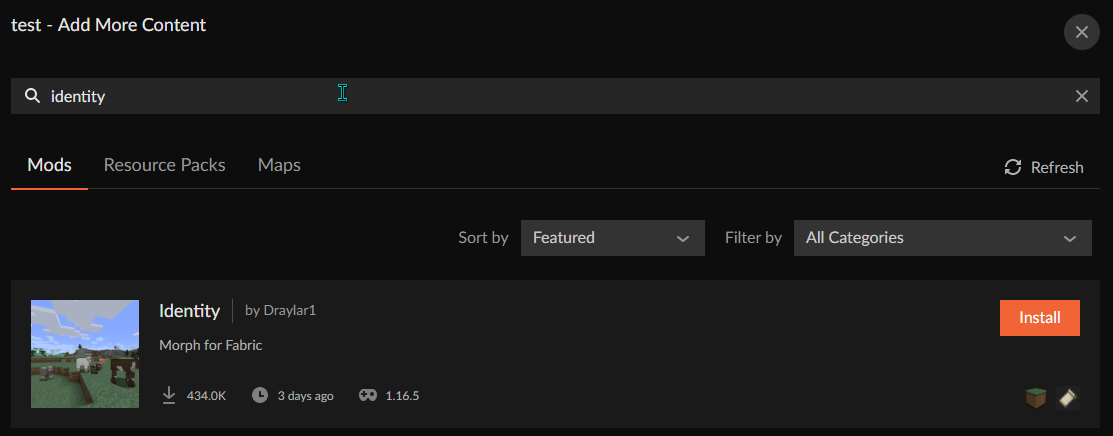
How can i install Identity?
austere wedge
!overwolf
cloud helm
ive been trying and nothing working lmao
lyric crescent
What is identity?
cloud helm
a mod for mc
lyric crescent
?mc-installmods
red patioBOT
How to install mods in CurseForge App.
- Click
+ Create Custom Profile - Name it, select the required Minecraft version, select the Forge version (usually the highest number), click
Create. - Click the profile icon.
- Click
Add New Content - Search and install the desired mods.
- Start the game!
How to install mods not on CurseForge.
- Right click the profile picture or Open the profile and click the Icon next to the play button.
- Click
Open Folder. - Drag the mod(s) into the
modsfolder. (Note: Some mods will require others, to run. Make sure to read the instructions for the mod!) - Start the game!
cloud helm
yeah ive been doing that over and over
lyric crescent
explain the issue then
cloud helm
So, I used the website because that's what all of the people said to to, also because there is not a morph mod that i could find on the app, they said Identity was the best one, i have to install the fabric installer and fabric API then put identity in the mods folder. When i opened minecraft to play the mod, it crashed i thought i was just the game to i went in on vanilla and didnt.
red patioBOT
How to use Fabric until support to the app is added in the near future.
- Make a Forge modpack of the appropriate version.
- Install a mod called 'Jumploader'
Fabric mods do not work with Forge.
Forge mods do not work with Fabric.
Fabric mods should be marked with a Fabric Icon like this:
lyric crescent
you need that mod to use fabric mods
 signal ridge
whos "they"?
lyric crescent
you got this by making a profile in the curseforge app?
cloud helm
No, i got from watching many videos and downloading fabric, so i can play a fabric mod.
which is on the CF website
lyric crescent
Then do it the way i just told you
signal ridge
the Identity mod can be found via the app.
signal ridge
lyric crescent
do it now, not 3 hours ago
cloud helm
Bro, i cant do something that's not on the app.
lyric crescent
Not your bro. If it's on the website it's on the app.
cloud helm
Clearly not.
signal ridge
 cloud helm
is this a morph mod?
 lyric crescent
 signal ridge
Not on the app huh?
lyric crescent
clearly not in the app
cloud helm
Legit don't see it for me
cloud helm
I did this shit already a while back to get another mod, im just reseting my comupter.
fleet bear
Ok, bye.
signal ridge
Same process for this mod.
 kind kestrel
how do i log in with my other account of minecraft
lyric crescent
log out, upper left corner of the app
 plush gulch
I'm having trubble figuring out were to put the modding folder
signal ridge
plush gulch
I'm having trubble figuring out were to put the modding folder
For the curse app?
plush gulch
yeah
signal ridge
!mc-path
red patioBOT
**Minecraft Files should NOT be installed inside the following locations
.minecraft folder.
OneDrive folders.
Desktop folder.
Drive roots I.E. Directly into the C:\ drive.
iCloud enabled folders.
If any of the above are in the path you need to change/move it by following the instructions below!**
If Minecraft is not installed in CurseForge App, start here.
Click the in the top left.
Select Minecraft.
Click "Edit".
Move to the "Continue here:" section below.
If Minecraft is installed in CurseForge App, follow these steps.
Click the in the bottom left.
Select the Minecraft tab.
Click "Change".
Move to the "Continue here:" section below.
Continue here:
Make a folder in the root directory called CurseForge.
Select the folder you just made.
The text box should show something like the following:
For Windows: C:\CurseForge
For Mac: /Users/Shared/CurseForge
plush gulch
thx
 fossil marlin
how do i add a dependency to my mod page?
 cerulean oar
why everytime i try to play MC Eternal it says "an error during startup prevented minecraft to startup"
 balmy flax
same
cerulean oar
cerulean oar
why everytime i try to play MC Eternal it says "an error during startup prevente...
theres more
cerulean oar
balmy flax
same
really bro
balmy flax
hope it helped
 thin kiln
can anyone have any idea why overwolf/curse using so much cpu when doing nothing...

 white fractal
eargf
cerulean oar
mods sleeping
lyric crescent
nope, perfectly awake
cerulean oar
oh ok
cerulean oar
@lyric crescent so do you know why or ?
lyric crescent
if i did i would have replied
cerulean oar
balmy flax
WOWOWOWOWOWW DONT PING MODERATOR
why not
balmy flax
DONT ASK QUESTIONS JUST LIVE WITH IT
lyric crescent
@balmy flax gunna remove you if you keep spamming here
balmy flax
oops soz
cerulean oar
welp i didnt know so oh well
balmy flax
🤐
 graceful adder
quick question
i downloaded curseforge and tried to open the launcher
but it didnt open anything
graceful adder
well ive tried restarting my pc
signal ridge
graceful adder
i downloaded curseforge and tried to open the launcher
Mac or pc?
Win*
graceful adder
windows
signal ridge
Did overwolf install just fine?
graceful adder
no nothing did
after i donwloaded the launcher
i tried opening it
and nothing happened
signal ridge
!getcf try this one
red patioBOT
Looking to install the CurseForge app?
Todo: Place system requirements here.
<:windows:798410728188936222> Windows
<:mac:798410654418862130> Mac
Linux
:person_shrugging:
graceful adder
k
lyric crescent
you cant. mods are only for java edition
signal ridge
You cant?
signal ridge
Nope. Mobile used the bedrock edition. Java edition has modpacks
 outer basin
How long does it normally take for a modpack to be approved?
 sand root
ok
signal ridge
Right click and run as admin?
lyric crescent
outer basin
How long does it normally take for a modpack to be approved?
!status
red patioBOT
It is 02:21AM on Wednesday for CurseForge my dudes.
Project Moderation Time
Project/File moderation is done on Sunday - Thursday from 10am - 6pm GMT+2
This process is First in, First out. Thus files submitted late in the work day may not be checked until the next work day.
New Projects or uploads requiring manual approval: 1-3 Working Days
Updates to approved projects not needing manual approval: 1 Hour
File sync to the Curseforge app may take up to 24 hours after approval.
graceful adder
:/
outer basin
ah ok thanks! didnt realize it took that long...
 neat crest
Anybody know why ATM6 is extremely laggy? I have 7 GB RAM to the minecraft curseforge launcher but its still laggy, not sure what to do, my settings are also fairly low.
lyric crescent
That is something to ask the devs of the pack.
neat crest
but
I have played it before right, and it was not laggy at all but now its extremely laggy
lyric crescent
Doesn't change what I said.
neat crest
Alright thanks, have a nice one
 sterile tulip
How do I allocate more memory to the launcher? I have spent so much time trying to find it and haven't been able to find a way to do it in the launcher.
signal ridge
!mc-ram
red patioBOT
How to set Global Minecraft RAM value.
- Click the icon in the bottom left to open settings.
- Click the Minecraft tab.
- Scroll down.
- Slide slider to recommended ram range as seen below.
 regal stream
i made a modpack and uploaded all the files and it has been approved do i need to request it to be added to Curseforge beta or just wait a few days
 signal ridge
!sync
red patioBOT
Sync and your Project.
CurseForge App and site do not share the same requirements! You can find things on the site but this does not mean it will be in the app!
For a mod to show up in the app:
- Projects MUST have a file marked as RELEASE
- Projects MUST be APPROVED
- Projects MUST have a file marked for the PROFILE VERSION USED
- Projects CAN'T be EXPERIMENTAL
- Projects CAN'T be ABANDON
Files can take a while to show up in the app. If your files still have not shown up either your project is new and you have yet to mark a file as Release or there is issues with the sync system making it slow.
regal stream
thx
signal ridge
np
sterile tulip
Omg thank you. I'm sure this will fix most lag issues I've been having.
signal ridge
Do note: Upping ram isnt necessarily a fix. Allocating more ram then needed can cause lag spikes and stuttering as well
sterile tulip
Oh. Ok, I will start with the recommended allocation according to the screenshot provided.
signal ridge
This a custom pack or downloaded?
 manic gazelle
hey, I have a problem, it links the curseforge app with the original launcher and does not put it in the tlauncher, which is what I use
can you help me? please
sterile tulip
Dousnloaded. FTB Infinity Evolved.
fleet bear
manic gazelle
hey, I have a problem, it links the curseforge app with the original launcher an...
That's because you need to own the game.
manic gazelle
ok, thanks
 ornate nimbus
My download keeps saying removed every time i try to download it
 gilded trellis
im having some trouble with my minecraft mods, i bought an apex server but i type in the ip on pokehaan and it says unidetifiable host and i ownt he server
ornate nimbus
why wont my curse forge download?
digital roost
how do i make a server with a modpack (FTB Relevations) in curse forge
signal ridge
digital roost
how do i make a server with a modpack (FTB Relevations) in curse forge
#👽︱game-support curseforge doesnt do servers
signal ridge
ornate nimbus
why wont my curse forge download?
Did overwolf install or is it not working either? Mac or Windows?
signal ridge
gilded trellis
im having some trouble with my minecraft mods, i bought an apex server but i typ...
Curseforge doesnt do servers, Would need to contact Apex
 upper jolt
How do I make my modpacks public
signal ridge
upper jolt
How do I make my modpacks public
!mc-packshare
red patioBOT
There are two ways to share a modpack you've made with others...
Export and Share - For Friends to Small Groups.
- Click the Icon for the modpack.
- Click the button next to play.
- Click
Export. - Select the files that should be included.
- Send the zip to the people that want it! They can follow the instructions in
!mc-installpackto install the pack!
Upload to Curseforge - For Public Release to Everyone.
This options will make your pack public to EVERYONE, it comes with extra requirements and will take some effort to set up.
- Go to here: https://www.curseforge.com/project/432/4471/create
- Fill out the information with a proper description of the pack. This should allow anyone to understand what the pack is.
- Click the Icon for the modpack in the CurseForge app.
- Click the button next to play.
- Click
Export. - Select the files that should be included.
- Open your Project you made on the CurseForge site and Upload the file you just made.
- Wait for Moderation & Sync so it can show up in the client! (See
!syncfor limitations)
 dusty crown
My modpack disapeared and now nothing is loading
red patioBOT
Looking to install the CurseForge app?
Todo: Place system requirements here.
<:windows:798410728188936222> Windows
<:mac:798410654418862130> Mac
Linux
:person_shrugging:
 green canyon
why isnt FTb Endeavour on the curseforge app?
signal ridge
green canyon
why isnt FTb Endeavour on the curseforge app?
?mc-ftb
red patioBOT
We do not provide support for FTB Modpacks or the FTB App.
If you are looking to play FTB modpacks use the FTB launcher.
https://www.feed-the-beast.com/
Any Overwolf FTB launcher issues you have should be directed here:
https://github.com/FTBTeam/FTB-App-Overwolf/issues
 amber flare
what exactly is happenin here?

 mortal herald
Looks to me like you have some duplicate mods. Have you not tried deleting one of them?
amber flare
 mortal herald
Have you tried deleting the one you do have?
amber flare
no?
 echo oar
I remove a mod and 10 other mods are being removed with iit
It is really big pain, removing addons should not remove core mod and remving mod shouldnt remove library
amber flare
does biomes o plenty work with oh the biomes you'll go

 glossy beacon
guys anyone know how to fix this when i try to install something?
 opal cipher
Set the path to a folder that doesn't require you to run as admin.
glossy beacon
my secondary drive doesn't require admin o,o
glossy beacon
Dangit ;w;
great...if i can't find help here, how am i gonna fix it D; anything i type in youtube, thinks im talking about windows 10
Well fek. i restarted it and it worked but i'm sure that's not how to fix it if anyone knows please tell me cos it'll most likely pop up again
 onyx cobalt
Hi poggers, I have recently noticed the epicness in urr launcher so i tried it out. I just spat in my face with a long crash report and i was wondering i u guys would know how to fix it, what im doing wrong or if its just not gonna work.
 drowsy eagle
Hallo kan man bei einem Minecraft Aternos server nicht die Valhelsia 3- 1.16.5 auf einen server spielen?
queen storm
drowsy eagle
Hallo kan man bei einem Minecraft Aternos server nicht die Valhelsia 3- 1.16.5 a...
Rule 1, only English here
 random solar
Hi I have an issue where I have a server up and my two friends can join it but I can't join myself as it was I don't have a compatable mod list compared to the server. The mod pack is geosmelt.
queen storm
random solar
Hi I have an issue where I have a server up and my two friends can join it but I...
 ruby apex
queen storm
ruby apex
queen storm
!mc-packshare
red patioBOT
There are two ways to share a modpack you've made with others...
Export and Share - For Friends to Small Groups.
- Click the Icon for the modpack.
- Click the button next to play.
- Click
Export. - Select the files that should be included.
- Send the zip to the people that want it! They can follow the instructions in
!mc-installpackto install the pack!
Upload to Curseforge - For Public Release to Everyone.
This options will make your pack public to EVERYONE, it comes with extra requirements and will take some effort to set up.
- Go to here: https://www.curseforge.com/project/432/4471/create
- Fill out the information with a proper description of the pack. This should allow anyone to understand what the pack is.
- Click the Icon for the modpack in the CurseForge app.
- Click the button next to play.
- Click
Export. - Select the files that should be included.
- Open your Project you made on the CurseForge site and Upload the file you just made.
- Wait for Moderation & Sync so it can show up in the client! (See
!syncfor limitations)
queen storm
Or #🟢︱user-bot-spam


 queen storm
Reinstall that mod
queen storm
That file yes
digital roost
well
queen storm
Not sure about the entire mod
digital roost
 queen storm
The heck
queen storm
 primal ice
sa
primal ice
sa
Rule 1, English only
digital roost
english
primal ice
queen storm
Rule 1, English only
ok
queen storm
digital roost
you were asking if there was a turkish channel?
Turkish people*
primal ice
How can I go if there is a Turkish channel?
queen storm
There is no Turkish channel
primal ice
queen storm
There is no Turkish channel
okay no problem
queen storm
Nope
digital roost
why does it still say 1.10.0
queen storm
Or about your issue: yes, that is why I contacted staff
queen storm
I understand that
primal ice
what time is it there
queen storm
primal ice
what time is it there
!status
red patioBOT
It is 09:58AM on Wednesday for CurseForge my dudes.
Project Moderation Time
Project/File moderation is done on Sunday - Thursday from 10am - 6pm GMT+2
This process is First in, First out. Thus files submitted late in the work day may not be checked until the next work day.
New Projects or uploads requiring manual approval: 1-3 Working Days
Updates to approved projects not needing manual approval: 1 Hour
File sync to the Curseforge app may take up to 24 hours after approval.
queen storm
digital roost
i need it approved
They removed the version and uploaded a fixed one, reinstall the mod please
digital roost
ok
Tim, question. If I request for Packer Role once I get 10k Downloads, does my username need to be the same
queen storm
digital roost
Tim, question. If I request for Packer Role once I get 10k Downloads, does my us...
Nope
 thorny pilot
Hi, wanting to know, for modpacks, it is an obligation for it to be created and exported from the twitch launcher?
I don't use the twitch launcher but multimc (and vanilla launcher) and wanted to make it so non-twitch users can download the modpack and play it easily, i've even added all the links to the mods, added the dependencies, etc.
I don't understand why it needs to be from the twitch launcher only cause, if someone not using the twitch launcher wants the modpack, he/she/they'll have to download the mods one by one and make the modpack himself/herself/themselves
digital roost
well overwolf controls the launcher
thorny pilot
Client modpack files must be created from within the Twitch Desktop App
thorny pilot
i just got that message
red patioBOT
How to add/remove mods in a modpack.
- Click on the picture of the modpack.
- Click the

Add More Contentbutton, IF this button is not there, see below before continuing. - Find the Mods, Resource Packs or Maps you wish to Install and click
Installon them. - Wait for all the required mods to be downloaded.
- Start the modpack.
How to Enable/Disable content management for modpacks.
- Click on the picture of the modpack.
- Click on the button next to the
Playbutton. - Click on

Profile Options. - Check the
Allow content management for this profileoption if you want to edit the content of the modpack, uncheck it to disable.
NOTE: The Allow content management for this profile option is what allows you to Delete, Disable, Update or Install any Mods, Resource Packs or Maps managed by CurseForge. It must be on to modify any of them! (Currently)
thorny pilot
^? ok ?
digital roost
!mc-packshare
red patioBOT
There are two ways to share a modpack you've made with others...
Export and Share - For Friends to Small Groups.
- Click the Icon for the modpack.
- Click the button next to play.
- Click
Export. - Select the files that should be included.
- Send the zip to the people that want it! They can follow the instructions in
!mc-installpackto install the pack!
Upload to Curseforge - For Public Release to Everyone.
This options will make your pack public to EVERYONE, it comes with extra requirements and will take some effort to set up.
- Go to here: https://www.curseforge.com/project/432/4471/create
- Fill out the information with a proper description of the pack. This should allow anyone to understand what the pack is.
- Click the Icon for the modpack in the CurseForge app.
- Click the button next to play.
- Click
Export. - Select the files that should be included.
- Open your Project you made on the CurseForge site and Upload the file you just made.
- Wait for Moderation & Sync so it can show up in the client! (See
!syncfor limitations)
thorny pilot
just know, when I tried to upload my modpack which is in a format: "IndustrialRevolution.zip" which contains the mods folder, the config folder, resources folder and few other folders containing needed things, it just removed it for this:
The status of the file TheNolle's Industrial Revolution v1.5.2-release (TheNolle's Industrial Revolution) has been changed to Rejected

Notes:
Missing manifest.json file.
Client modpack files must be created from within the Twitch Desktop App: https://authors.curseforge.com/knowledge-base/game-specific-support/120-how-to-create-a-modpack
Server modpack files should be uploaded as an Additional File on a client modpack file.
If you have any questions please contact our support team https://support.curseforge.com.
did you export it
thorny pilot
as said
digital roost
sorry
thorny pilot
thorny pilot
I don't use the twitch launcher but multimc (and vanilla launcher) and wanted to...
^
digital roost
!getcf
red patioBOT
Looking to install the CurseForge app?
Todo: Place system requirements here.
<:windows:798410728188936222> Windows
<:mac:798410654418862130> Mac
Linux
:person_shrugging:
digital roost
try from curseforge
thorny pilot
no you don't understand, i'm not using it, cause i know a lot other don't
I made the modpack containing the mods (including the links to all mods used)
digital roost
oof
queen storm
Then start using it
thorny pilot
so basically, no possibility to make modpack for non overworlf launcher's users?
queen storm
thorny pilot
so basically, no possibility to make modpack for non overworlf launcher's users?
If you find the right launcher to export it
digital roost
curseforge is the best option
thorny pilot
?
but, huh, ok so if someone uses the vanilla launcher he can't use a modpack from curseforge
queen storm
thorny pilot
but, huh, ok so if someone uses the vanilla launcher he can't use a modpack from...
Correct
queen storm
That is how it works
 left wolf
why no dog i like dogs
digital roost
Stop
thorny pilot
well, thx for the help tho
queen storm
@left wolf This is your only warning, stop
left wolf
ok