#🔥︱curseforge-support
1 messages · Page 453 of 1
 digital roost
 queen storm
No idea
digital roost
 tough marsh
will the new one be accepted today you think?
tough marsh
will the new one be accepted today you think?
depends
 stiff totem
Hello. Is curseforge With Titan Launcher compatible when yes how can i set it up to be.
queen storm
stiff totem
Hello. Is curseforge With Titan Launcher compatible when yes how can i set it up...
No
digital roost
stiff totem
Hello. Is curseforge With Titan Launcher compatible when yes how can i set it up...
no, it isn't
also can somebody uh help?
 lyric crescent
Bro apparently can't read.
queen storm
digital roost
also can somebody uh help?
That is for #👽︱game-support , not curseforge issue
tough marsh
ok i really hope it get accepted soon
lyric crescent
quit with the gif spam
 thorny moth
How would I set my modpack to notify players of an update?
lyric crescent
they will automatically get an update icon on the app when an update is available
 hasty basin
how do i change alpha to release?
lyric crescent
click the file, edit file, change it
hasty basin
omg how did i not saw it earlier
digital roost
how do I add a server pack to my project?
lyric crescent
click on upload additional files under the client file

 lyric crescent
it needs to be a release file if you want to find it in the app
tough marsh
what is a release file?
lyric crescent
R
tough marsh
i uploaded it through the curseforge launcher and used the zipped file to add the the modpack on the website
lyric crescent
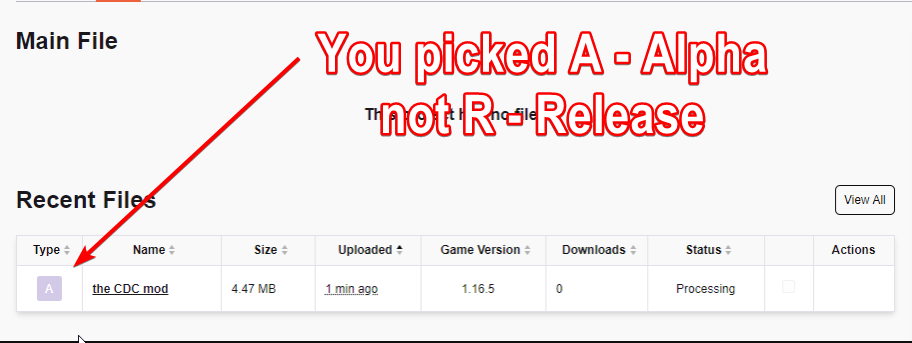 tough marsh
now its saying the files are rejected cause they are the same files as the one i deleted
ok so should i change it to a release for my friends to download it thru launcher
lyric crescent
yes
tough marsh
can i do that without deleting it
lyric crescent
tough marsh
ty
so just to make sure, this is what will allow my friends to see and download it once its approved
 lyric crescent
yes
 magic sleet
how i can add a mod in curseforge pls ?
lyric crescent
?mc-installmods
 red patioBOT
How to install mods in CurseForge App.
- Click
+ Create Custom Profile - Name it, select the required Minecraft version, select the Forge version (usually the highest number), click
Create. - Click the profile icon.
- Click
Add New Content - Search and install the desired mods.
- Start the game!
How to install mods not on CurseForge.
- Right click the profile picture or Open the profile and click the
 Icon next to the play button.
 - Click

Open Folder. - Drag the mod(s) into the
modsfolder. (Note: Some mods will require others, to run. Make sure to read the instructions for the mod!) - Start the game!
 magic sleet
ok thx
digital roost
can somebody help me uploading my curseforge modpack?
I have made the modpack, extracted the profile on Curseforge, but I got the following message:

I installed the twitch app and when I click mods, it just shows me curseforge and tells me to visit Overwolf
help would be HIGHLY appreciated
lyric crescent
twitch app is not useful for this, ignore that part. you included optifine as the message says, remove it.
digital roost
I did, but I still receive the same message
lyric crescent
then you didnt
digital roost
lyric crescent
then you didnt
I have checked 4 times yet I don't see Optifine in the mods folder
lyric crescent
and you made a new export after removing optifine?
lyric crescent
open your zip, go to overrides/mods and screenshot it
 lyric crescent
whole window please
digital roost
lyric crescent
whole window please
there is a lot and it won't fit unfortunately
a lot of mods*
lyric crescent
i dont need to see your mods, i want to see the window
 queen storm
So, how did the mods get there?
lyric crescent
this is not an export made by the app. there should be no mods there
lyric crescent
the files you need (mods, configs at a minimum)
digital roost
do I export this?
 digital roost
lyric crescent
the files you need (mods, configs at a minimum)
digital roost
lyric crescent
the files you need (mods, configs at a minimum)
where are the files places
placed*
lyric crescent
in the manifest.json
digital roost
digital roost
do I export this?
do I export this?
lyric crescent
yea
digital roost
so config, mods, resource packs?
lyric crescent
lyric crescent
the files you need (mods, configs at a minimum)
^
digital roost
understood
I submitted it, Lord in heaven tell me it will work
OMG IT HAS BEEN APPROVED. TYSM @lyric crescent FOR THE HELP YOU ARE A LEGEND!!!!!
Just another quick question
does the modpack appear on the Curseforge app when browsing it or are there some sort of requirements for it
queen storm
!sync
red patioBOT
Sync and your Project.
CurseForge REQUIRE a project to have one file marked Released on them for the projects to show up in search. Otherwise only Direct links to the project work.
Files can take a while to show up in the app. If your files still have not shown up either your project is new and you have yet to mark a file as Release or there is issues with the sync system making it slow.
digital roost
understood.
lyric crescent
it got approved that quickly? 👀
digital roost
 queen storm
That is not gonna sync to the client
 peak pine
Is the iframe html tag allowed in the project description?
queen storm
Probably not
peak pine
I can insert it using the html editor from the tool bar.
 next oar
kann nemand deutsch ?
queen storm
next oar
kann nemand deutsch ?
Rule 1, English only
next oar
queen storm
Rule 1, English only
ok 😦
queen storm
peak pine
I can insert it using the html editor from the tool bar.
Then why are you asking?
peak pine
Because it's strange that it's possible to insert it, it can be misused.
queen storm
Yes, yes it could
peak pine
So, it's allowed as long it's not being misused?
queen storm
Why would you use it?
peak pine
Discord invite widget.
queen storm
Image with link?
peak pine
An iframe object from html.
queen storm
How about not using a support channel for that?
queen storm
peak pine
An `iframe` object from html.
Why not an image with link?
digital roost
Why isn't my first picture on my project in the middle?
 vague hinge
IS THERE VIRUSES ON CURSEFORGE
 turbid ore
no
vague hinge
ok
turbid ore
i dont think so
turbid ore
well watch videos on which ones arnt viruses
 distant quail
how do i download minecraft mods. It only lets me download modpacks
peak pine
Go to the mods tab?
magic sleet
what is normal if jurrasiccraft mod have a black hole ? idk is the black hole or no the problem but i have bigggggg lag with mod jurassiccraft
queen storm
distant quail
how do i download minecraft mods. It only lets me download modpacks
!mc-installmods
red patioBOT
How to install mods in CurseForge App.
- Click
+ Create Custom Profile - Name it, select the required Minecraft version, select the Forge version (usually the highest number), click
Create. - Click the profile icon.
- Click
Add New Content - Search and install the desired mods.
- Start the game!
How to install mods not on CurseForge.
- Right click the profile picture or Open the profile and click the Icon next to the play button.
- Click
Open Folder. - Drag the mod(s) into the
modsfolder. (Note: Some mods will require others, to run. Make sure to read the instructions for the mod!) - Start the game!
magic sleet
ah no im wrong the mod make lag me is death gun and spaceship but i continute do not know why i have lag but what you you know or have a idea why lag?
queen storm
magic sleet
ah no im wrong the mod make lag me is death gun and spaceship but i continute do...
#👽︱game-support or ask the dev
magic sleet
ok sorry
digital roost
I want my picture at middle
 unborn basin
digital roost
I want my picture at middle
unborn basin
digital roost
I want my picture at middle
You can enter the source code and apply html and css from there, not sure exactly what you have there but you can try using flexbox or margin: auto, depends on how you added it
digital roost
it dont work
unborn basin
Click it and send the content please
unborn basin
Yes, if you prefer you can PM me
unborn basin
Nice
 foggy cipher
so i opened this ticket about me wanting to reset my 2FA but in the middle of it i had lost access to my email for like a month and the ticket was closed
so i dont want to be reported as spam if i reopen it
queen storm
Won't happen
foggy cipher
oh alr thanks
digital roost
does anyone know how to make your own fabric profile on curseforge?
red patioBOT
Fabric modpacks or the use Fabric mods require you to install a mod called Jumploader.
Fabric mods do not work with Forge.
Forge mods do not work with Fabric.
Fabric mods should be marked with a Fabric Icon like this: 
red patioBOT
How to install mods in CurseForge App.
- Click
+ Create Custom Profile - Name it, select the required Minecraft version, select the Forge version (usually the highest number), click
Create. - Click the profile icon.
- Click
Add New Content - Search and install the desired mods.
- Start the game!
How to install mods not on CurseForge.
- Right click the profile picture or Open the profile and click the Icon next to the play button.
- Click
Open Folder. - Drag the mod(s) into the
modsfolder. (Note: Some mods will require others, to run. Make sure to read the instructions for the mod!) - Start the game!
digital roost
oh ok thank you so much
 devout jungle
hey, there was once a bug in which you couldn't open lan world... is this still in existance or is it fixxed?
queen storm
Bug where?
devout jungle
it goes like this...
you download exactly the same stuff and when you try to join the lan world it just pops a messege and doesn't let you in
queen storm
Get a normal server instead
devout jungle
queen storm
Get a normal server instead
i dont have internet strong enough to handle a server
queen storm
devout jungle
i dont have internet strong enough to handle a server
Then lan won't work either as it is using the same internet 🤦
 tacit hare
I'm getting local gradle build failures due to HTTP 429: Too Many Requests errors with https://maven.minecraftforge.net maven repo and I'm really not sure why, I tried building offline and it's saying I'm missing specific libraries when I've built this project just fine like an hour ago. I'm not doing anything weird like purging my gradle caches
I don't know if it's a problem on your site's side or what but it's really annoying not being able to build lol
devout jungle
i am really confused
but the main issue is that the game that lunches curse forge (by overwolf) application isnt working with lan worlds
queen storm
tacit hare
I'm getting local gradle build failures due to HTTP 429: Too Many Requests error...
We are not forge, we are curseforge
queen storm
devout jungle
but the main issue is that the game that lunches curse forge (by overwolf) appli...
Then make a normal forge isntallation
devout jungle
queen storm
Then make a normal forge isntallation
...
yeah i know
but that doesnt fix the problem
queen storm
Neither does blaming the mod manager
 twilit flare
My forge keeps crashing every time i open a world in minecraft
tacit hare
queen storm
We are not forge, we are curseforge
ah, my bad. Guess I need more coffee this morning.
queen storm
devout jungle
you should be able to join a lan world
Check if a normal forge installation will work, curseforge only installs forge, puts the mods in the right place, starts the vanilla launcher
tacit hare
Misread it and thought it was curse maven for some reason
devout jungle
queen storm
Check if a normal forge installation will work, curseforge only installs forge, ...
normal forge instalation works. lunching the same mod pack from curse forge doesn't let me join a lan world
queen storm
devout jungle
normal forge instalation works. lunching the same mod pack from curse forge does...
Then find the differences between the two please, as curseforge isn't doing anything anymore when you have the launcher running
 obsidian pumice
I can get curseforge to instal
queen storm
obsidian pumice
I can get curseforge to instal
!getcf Use this link
red patioBOT
Looking to install the CurseForge app?
Todo: Place system requirements here.
<:windows:798410728188936222> Windows
<:mac:798410654418862130> Mac
Linux
:person_shrugging:
digital roost
where is "Date Created" like in the website
 obsidian pumice
queen storm
!getcf Use this link
obsidian pumice
queen storm
!getcf Use this link
holy mother of god thank you
queen storm
digital roost
where is "Date Created" like in the website
!feedback
red patioBOT
<:CFidea:798388634972717066> Have an idea on how to improve CurseForge? <:CFidea:798388634972717066>
CurseForge is looking for great ideas and user feedback! Get into the CurseForge Community by providing some feedback and voting on what's important to you!
Think some game should be supported? Post an idea and explain why!
Got a to die for feature idea? Let's hear it!
Location In-app
- Click the
 button on the bottom left of the app.
 - Click on

Suggest a Featureoption!
digital roost
nvm someone already suggested that
queen storm
Then upvote it!
 round rivet
Can someone help me publish a modpack?
 fleet bear
round rivet
Can someone help me publish a modpack?
fleet bear
round rivet
Can someone help me publish a modpack?
!mc-packshare
red patioBOT
There are two ways to share a modpack you've made with others...
Export and Share - For Friends to Small Groups.
- Click the Icon for the modpack.
- Click the button next to play.
- Click

Export. - Select the files that should be included.
- Send the zip to the people that want it! They can follow the instructions in
!mc-installpackto install the pack!
Upload to Curseforge - For Public Release to Everyone.
This options will make your pack public to EVERYONE, it comes with extra requirements and will take some effort to set up.
- Go to here: https://www.curseforge.com/project/432/4471/create
- Fill out the information with a proper description of the pack. This should allow anyone to understand what the pack is.
- Click the Icon for the modpack in the CurseForge app.
- Click the button next to play.
- Click
Export. - Select the files that should be included.
- Open your Project you made on the CurseForge site and Upload the file you just made.
- Wait for Moderation & Sync so it can show up in the client! (See
!syncfor limitations)
fleet bear
Sure, in 1-3 working days.
 cedar sparrow
i am playing in a one block mc sever rn and its a netrite pick but looks like a diamond pick help pls
queen storm
cedar sparrow
i am playing in a one block mc sever rn and its a netrite pick but looks like a ...
#👽︱game-support or their own support discord
cedar sparrow
ok
 austere wedge
whats the overwolf link?
round rivet
I wil just say that i love curseforge and all it adds
queen storm
austere wedge
whats the overwolf link?
!getcf
red patioBOT
Looking to install the CurseForge app?
Todo: Place system requirements here.
<:windows:798410728188936222> Windows
<:mac:798410654418862130> Mac
Linux
:person_shrugging:
 jade remnant
lyric crescent
jade remnant
lyric crescent
make a project on the website and upload it
 primal spire
how do i upload images in descriptions and why do my files keep getting rejected?
lyric crescent
send the reject notice
primal spire
The status of the file Verison 1 (Small changes) has been changed to Rejected
File is not a valid resource or texture pack.
If you have any questions please contact our support team https://support.curseforge.com.
this?
lyric crescent
seems like it's not a valid file
lyric crescent
download one from the site and compare
austere wedge
thank u
lyric crescent
use the image formatting
digital roost
does anyone know how i can like upload modpacks so that anyone can download them?
queen storm
digital roost
does anyone know how i can like upload modpacks so that anyone can download them...
!mc-packshare
red patioBOT
There are two ways to share a modpack you've made with others...
Export and Share - For Friends to Small Groups.
- Click the Icon for the modpack.
- Click the button next to play.
- Click
Export. - Select the files that should be included.
- Send the zip to the people that want it! They can follow the instructions in
!mc-installpackto install the pack!
Upload to Curseforge - For Public Release to Everyone.
This options will make your pack public to EVERYONE, it comes with extra requirements and will take some effort to set up.
- Go to here: https://www.curseforge.com/project/432/4471/create
- Fill out the information with a proper description of the pack. This should allow anyone to understand what the pack is.
- Click the Icon for the modpack in the CurseForge app.
- Click the button next to play.
- Click
Export. - Select the files that should be included.
- Open your Project you made on the CurseForge site and Upload the file you just made.
- Wait for Moderation & Sync so it can show up in the client! (See
!syncfor limitations)
twilit flare
why doesnt optifine HD G7 work with curse forge?
queen storm
twilit flare
why doesnt optifine HD G7 work with curse forge?
!mc-optifine
red patioBOT
Optifine and Curseforge
To install Optifine with modpacks on Curseforge:
Right click the modpack icon, select Open Folder.
Put the Optifine.jar into the mods folder.
Now load the modpack normally.
We do not offer support for Optifine. If you have issues with Optifine, remove it. If you want further support try the discord found on their website.
https://www.optifine.net/home
lyric crescent
ask them ^
primal spire
primal spire
but also how do you insert images in descriptions?
is there a specific link you have to use? im using an imgur link but its not showing as an image
fleet bear
You embed the image like every other web editor.
 devout cape
hey i had a qwestion it's ok if the audio of the review inside the launcher don't sound but when i click in they go to youtube the audio come back that's a bug right?
lyric crescent
maybe dont use wysiwyg
digital roost
does anyone know a mod that gives you better fps? or a way to get better fps? bc right now im running on 20/17 fps
fleet bear
digital roost
does anyone know a mod that gives you better fps? or a way to get better fps? bc...
Not a curseforge problem.
fleet bear
devout cape
hey i had a qwestion it's ok if the audio of the review inside the launcher don'...
I dont even know what you are asking. Can you clarify that
fleet bear
primal spire
ive never used a web editor though
You click the button that looks like a picture and then fill it out.
lyric crescent
 primal spire
thats what i used
but it didnt show as an image
it works now that i use markdown though
fleet bear
Then you likely did it wrong.
devout cape
fleet bear
I dont even know what you are asking. Can you clarify that
video reviews within the curse forge desktop app have no audio
is this a bug?
fleet bear
Video reviews of what?
devout cape
the mods
lyric crescent
for example?
fleet bear
That's likely the client stripping it out to prevent autoplay from having audio.
 signal ridge
Do you mean the videos that mods have on their pages?
devout cape
signal ridge
Do you mean the videos that mods have on their pages?
yes
when i use the app they don't have audio
primal spire
fleet bear
Then you likely did it wrong.
probably, thanks for the help though
devout cape
this videos have no audio until i go to youtube

 flint sentinel
devout cape
this videos have no audio until i go to youtube
flint sentinel
devout cape
this videos have no audio until i go to youtube
just for good measure, can you verify your system mixer doesn't have the CF app volume muted?
I haven't used the app yet myself or I would test it
devout cape
flint sentinel
just for good measure, can you verify your system mixer doesn't have the CF app ...
i did it before but i can send you a pic of it if you want
flint sentinel
that's alright, good enough for me :)
devout cape
the thing is curse forge don't even apear
 flint sentinel
I think that means it's not even trying to play audio
devout cape
yep
lyric crescent
wonder if the thing that mutes ads muted it
gunna need to make a ticket on this. and provide examples with the ticket
?ticket-app
red patioBOT
:bug: Reporting via the CurseForge App :bug:
-
Click the
icon in the bottom left. -
Select

Open a Ticket. -
Fill out the form with accurate detailed information, "It doesn't work" isn't helpful! What exactly doesn't work and why doesn't it work should be easy to answer!
-
Make sure to upload your Overwolf logs with the
Upload Fileoption on the ticket, information on how to get these logs can be found here https://support.overwolf.com/en/support/solutions/articles/9000176827-how-to-get-your-overwolf-logs -
Submit!
 lyric crescent
lucraft/mods/lucraftcore/infinity/render/ItemRendererFinestTinyIon
Report to the mod dev
find info on the mod page if it exists
issue tracker? some link? 🤷♂️
flint sentinel
first see if your issue already exists in this list. if not, create a new issue https://gitlab.com/threetag/legacy/LucraftCore/-/issues

changing topics... on the MC side of the site, version 1.17 is sorted at the bottom of version lists even though it's the newest. is that temporary while 1.17 only has snapshots or something, or is it an oversight? for example, the mod list version filter

yeah that sounds different from the "Intense Crashing" issue then
flint sentinel
flint sentinel
changing topics... on the MC side of the site, version 1.17 is sorted at the bot...
this can also be seen on the project file upload/edit page where you select versions, and on the public project description page where 1.17 doesn't show up under recent files if you have files belonging to any other 3 versions, since they're all sorted above 1.17
 digital roost
hello~ im back to bother you all once more- so i got error code 0 to be fixed, but i get it when a creeper explodes qand looking at it, it seems everytime a creeper explodes it corrupts? what is this and how do i fix it? ive already repaired the instillation as well as im unsure of any mods that would do this
flint sentinel
looks to me like a Blood Magic problem
looks like it's trying to check the loot table of an entity that isn't there (the creeper I guess)
 maiden glade
if anyone can help me would be great:)
lyric crescent
how long is "forever"
maiden glade
i was going to transfer my problem in mc help
but forever is i let it go for like 2 hour and it didnt move
lyric crescent
probably should try a pc restart first, and yea #🧱︱mc-other-help makes more sense
maiden glade
maybe im going to try this
digital roost
flint sentinel
looks to me like a Blood Magic problem
sorry to ping, but do you know how i can fix that? or is it just.. get rid of that mod as a whole? ive had it in other packs on older versions and it seemed to be fine
flint sentinel
digital roost
sorry to ping, but do you know how i can fix that? or is it just.. get rid of th...
let's take this to #🧱︱mc-other-help :)
lyric crescent
Doesn't belong here. #👽︱game-support was correct.
digital roost
lyric crescent
Doesn't belong here. <#778097796410376242> was correct.
my apologies
 ruby drum
Hey why am I not able to export a modpack
digital roost
ruby drum
Hey why am I not able to export a modpack
open the profile and then click the dots
and it should appear
ruby drum
this is all it exports
 lyric crescent
that is correct
ruby drum
oh
 hazy agate
how do i install this into curseforgehttps://www.curseforge.com/minecraft/mc-mods/dragon-block-super
i need it to be a zip
 tepid burrow
any among us mods?
lyric crescent
hazy agate
how do i install this into curseforgehttps://www.curseforge.com/minecraft/mc-mod...
make a profile that the mod works on and find it in the app
?mc-installmods
red patioBOT
How to install mods in CurseForge App.
- Click
+ Create Custom Profile - Name it, select the required Minecraft version, select the Forge version (usually the highest number), click
Create. - Click the profile icon.
- Click
Add New Content - Search and install the desired mods.
- Start the game!
How to install mods not on CurseForge.
- Right click the profile picture or Open the profile and click the Icon next to the play button.
- Click
Open Folder. - Drag the mod(s) into the
modsfolder. (Note: Some mods will require others, to run. Make sure to read the instructions for the mod!) - Start the game!
hazy agate
but draogn ball super isnt on there and to make a cusotm profile i need it to be a zip
the onyl dragon ball one doesnt have the dragon ball mod
lyric crescent
did you read what i said?
hazy agate
but was does works for mean
flint sentinel
tepid burrow
any among us mods?
tepid burrow
thanks
lyric crescent
hazy agate
but was does works for mean
look at what mc version the mod is for, make a profile for that version
 brazen kernel
How can I play with a frien that has the same modpack as me?
lyric crescent
make a server
brazen kernel
theres no other way? if i alread have a world
lyric crescent
only if you're on the same network
brazen kernel
oh ok. How do i make a server?
lyric crescent
Pastebin
Pastebin.com is the number one paste tool since 2002. Pastebin is a website where you can store text online for a set period of time.
brazen kernel
Last question does it cost money?
lyric crescent
depends what you do
brazen kernel
Ok thank you
digital roost
ya that happenes to me just leave it its ok its just saying that you need to update your mac but i cant so its ok its not bad its just telling you your mac is no latest version
oh and my game wont start like i click play but it never shows up. i restarted my mac a few times and it still does it
signal ridge
digital roost
oh and my game wont start like i click play but it never shows up. i restarted m...
!mc-installfix try this
red patioBOT
- Click on the Minecraft Tab on the Left side of the App.
- Click button next to the
Create Custom Profileoption. - Click

Repair Installationoption. - Play game.
NOTE: You will not lose any modpacks or worlds, These are saved in the Instances folder. DO NOT TOUCH THIS FOLDER OR YOU WILL LOSE EVERYTHING
 ornate siren
=----------\
signal ridge
np
 rare yew
How do I fix this? I don't code much, use english I can understand please!
Also modpack is Starwars Conquest

 tame raven
I have minecraft on my PC but it isnt showing in the app
when I open in it tells me to select a file to put them in but its ot showing the files for minecraft
lyric crescent
use the file it gives you
lyric crescent
just press continue
lyric crescent
?mc-installmods
red patioBOT
How to install mods in CurseForge App.
- Click
+ Create Custom Profile - Name it, select the required Minecraft version, select the Forge version (usually the highest number), click
Create. - Click the profile icon.
- Click
Add New Content - Search and install the desired mods.
- Start the game!
How to install mods not on CurseForge.
- Right click the profile picture or Open the profile and click the Icon next to the play button.
- Click
Open Folder. - Drag the mod(s) into the
modsfolder. (Note: Some mods will require others, to run. Make sure to read the instructions for the mod!) - Start the game!
tame raven
thx
 queen plank
So I am trying to play 1.16.4 with a bunch of mods, and the forge version that it defaults to for 1.16.4 is 35.1.4, and thats the highest version it will let me set that profile to for 1.16.4, but when I load up minecraft, an error pops up that says four of the mods need newer versions of forge and I dont know how to fix this.

 slim thunder
queen plank
slim thunder
queen plank
you might need to use 1.16.5
queen plank
The mods are for 1.16.4
When I tried loading 1.16.5 with the mods it crashed immediately
slim thunder
?mc-log
red patioBOT
Where to find the log on the CurseForge Client.
Right-click the modpack profile icon OR click the button in the modpack profile.
Click Open Folder.
Open the logs folder.
Find the file called latest.log and drag it into discord.
slim thunder
post that log
queen plank
queen plank
 queen plank
When creating the profile it sets the highest one I can choose to 35.1.4
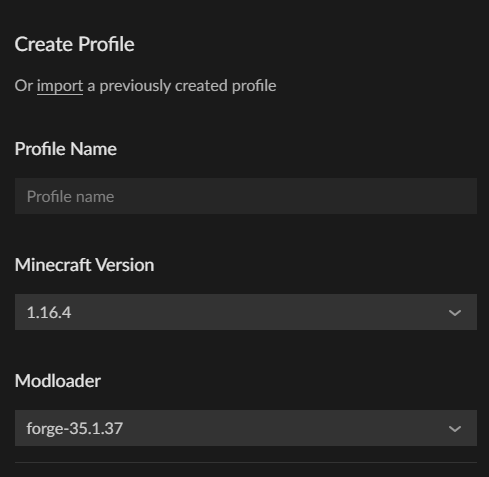

 lyric crescent
not sure if didnt read or actually having some issue
 weak oasis
Hey, I'm trying to make a apex server, on mc, can I get some help
lyric crescent
Not here. This is for Curseforge issues.
weak oasis
sorry'
queen plank
Never mind I figured out what the problem was
rare yew
How do I fix? Modpack is Starwars COnquest

 small delta
hi when downloasing pixelmon it just says error or it stops downloasing the whole pack
lyric crescent
rare yew
How do I fix? Modpack is Starwars COnquest
?mc-log also if this is for a specific modpack only then it doesnt really belong here.
red patioBOT
Where to find the log on the CurseForge Client.
Right-click the modpack profile icon OR click the button in the modpack profile.
Click Open Folder.
Open the logs folder.
Find the file called latest.log and drag it into discord.
lyric crescent
 meager crane
or create them
meager crane
or create them
Care to explain?
lyric crescent
small delta
hi when downloasing pixelmon it just says error or it stops downloasing the whol...
Most likely an internet issue. Try again, or try stabelizing your bandwidth. Router reset may help too.
 inland cypress
anybody know what to do if i get exit code zero? it crashes instantly after loading
lyric crescent
send a log, see above
inland cypress
digital roost
is there a way to mod a realm?
signal ridge
digital roost
is there a way to mod a realm?
Nope
digital roost
alr
lyric crescent
inland cypress
remove optifine
 glass harbor
Hello i need some help im trying to update my modpack but curse forge isnt accepting some of the mods and i cant get them into the manifest where should i go from here im missing baout 30 mods that are being denied? @glass harbor if u can help
inland cypress
i removed optifine and its still the same
lyric crescent
send log
inland cypress
lyric crescent
do you have a graphics card?
inland cypress
yes
signal ridge
glass harbor
Hello i need some help im trying to update my modpack but curse forge isnt accep...
The mods that show in the reject message, delete them from your profile then re add them with the app.
lyric crescent
try updating your driver
digital roost
Whenever I try to install a mod it gives me the "Failed to create modpack." error
Please help
glass harbor
then just re export and try to upload it again?
meager crane
lyric crescent
Care to explain?
it seems to be working now i just had to restart my pc
signal ridge
glass harbor
then just re export and try to upload it again?
yes
glass harbor
okay i will try it now
https://gyazo.com/1ef07f68cd4aeea66eb04e2976b44944 so i need to redo all of these except galacticraft?
 signal ridge
That in the reject message?
glass harbor
yes almost all these mods where listed but galacticraft.
glass harbor
i click my profile and just clicked export with the resources and configs
glass harbor
thats the mods in the overrides/mods
glass harbor
glass harbor
https://gyazo.com/1ef07f68cd4aeea66eb04e2976b44944 so i need to redo all of thes...
right here
lyric crescent
there should be no mods in there
twilit flare
why does my curseforge crash everytime i try to load 1.12.2?
signal ridge
twilit flare
why does my curseforge crash everytime i try to load 1.12.2?
!mc-logs
red patioBOT
Where to find the log on the CurseForge Client.
Right-click the modpack profile icon OR click the button in the modpack profile.
Click Open Folder.
Open the logs folder.
Find the file called latest.log and drag it into discord.
glass harbor
they wont go into the manifest and im not sure why i have tryed about 6-7 times just today
lyric crescent
delete them all and reinstall them then
signal ridge
glass harbor
they wont go into the manifest and im not sure why i have tryed about 6-7 times ...
With the app *
twilit flare
glass harbor
yes with the curseforge app and okay yamza
signal ridge
twilit flare
!mc-installfix do this
red patioBOT
- Click on the Minecraft Tab on the Left side of the App.
- Click button next to the
Create Custom Profileoption. - Click
Repair Installationoption. - Play game.
NOTE: You will not lose any modpacks or worlds, These are saved in the Instances folder. DO NOT TOUCH THIS FOLDER OR YOU WILL LOSE EVERYTHING
twilit flare
YoYo do i need to do this everytime i switch versions?
signal ridge
Did you do what the bot said?
twilit flare
yes
signal ridge
Probably not, should be fine now
twilit flare
thanks!
inland cypress
lyric crescent
try updating your driver
that works, tho for some reason my driver keeps uninstalling itself, i had it yesterday🤔
digital roost
I made a mod but when I search it it doesn't show up
fleet bear
!sync
red patioBOT
Sync and your Project.
CurseForge App and site do not share the same requirements! You can find things on the site but this does not mean it will be in the app!
For a mod to show up in the app:
- Projects MUST have a file marked as RELEASE
- Projects MUST be APPROVED
- Projects MUST have a file marked for the PROFILE VERSION USED
- Projects CAN'T be EXPERIMENTAL
- Projects CAN'T be ABANDON
Files can take a while to show up in the app. If your files still have not shown up either your project is new and you have yet to mark a file as Release or there is issues with the sync system making it slow.
fleet bear
Not a curseforge problem
 vivid violet
So where dose this go?
fleet bear
vivid violet
Ty
digital roost
Whenever I try to install a mod it gives me the "Failed to create modpack." error
red patioBOT
How to install mods in CurseForge App.
- Click
+ Create Custom Profile - Name it, select the required Minecraft version, select the Forge version (usually the highest number), click
Create. - Click the profile icon.
- Click
Add New Content - Search and install the desired mods.
- Start the game!
How to install mods not on CurseForge.
- Right click the profile picture or Open the profile and click the Icon next to the play button.
- Click
Open Folder. - Drag the mod(s) into the
modsfolder. (Note: Some mods will require others, to run. Make sure to read the instructions for the mod!) - Start the game!
digital roost
where can I install the modpack without needing curseforge
lyric crescent
you cant
lyric crescent
you said you were installing a mod not a modpack, which is it..
digital roost
any
lyric crescent
any isnt helpful..
signal ridge
mod =/= modpack
digital roost
literally any modpack
I try to install doesnt work
and ones I already have dont work
lyric crescent
what happens with ones you have
signal ridge
screen shot the error you get
digital roost
it works all of sudden
amen to the curse forge support discord
I've been healed from your speech
thanks
fleet bear
???
 unkempt hemlock
I've downloaded the beta curseforge for my minecraft, but the home page size is too big and cuts off the lower portion, where I would have access to the lower right side of the page. Unfortunately, all the settings I need are now located out of view. Can anyone help? Otherwise it runs fine.
glass harbor
Okay I Fixed It Thank You for the help hopefully it gets accepted now
fleet bear
unkempt hemlock
I've downloaded the beta curseforge for my minecraft, but the home page size is ...
picture please
unkempt hemlock
One. moment
small delta
 fleet bear
small delta
fleet bear
small delta
your internet is too slow or unstable
small delta
hi this been happening can someone help me?
glass harbor
use google
fleet bear
!mc-path
red patioBOT
**Minecraft Files should NOT be installed inside the following locations
.minecraft folder.
OneDrive folders.
Desktop folder.
Drive roots I.E. Directly into the C:\ drive.
iCloud enabled folders.
If any of the above are in the path you need to change/move it by following the instructions below!**
If Minecraft is not installed in CurseForge App, start here.
Click the  in the top left.
Select Minecraft.
Click "Edit".
Move to the "Continue here:" section below.
If Minecraft is installed in CurseForge App, follow these steps.
Click the  in the bottom left.
Select the Minecraft tab.
Click "Change".
Move to the "Continue here:" section below.
Continue here:
Make a folder in the root directory called CurseForge.
Select the folder you just made.
The text box should show something like the following:
For Windows: C:\CurseForge
For Mac: /Users/Shared/CurseForge
 unkempt hemlock
 small delta
fleet bear
your internet is too slow or unstable
small delta
fleet bear
your internet is too slow or unstable
Hi my internet isnt that bad i can donwload game with 12 mbps
unkempt hemlock
even hiding Taskbar doesn't help
signal ridge
small delta
Hi my internet isnt that bad i can donwload game with 12 mbps
Pixelmon is a rather large modpack,
unkempt hemlock
no idea how to force enter settings either to try and reduce resolution
fleet bear
small delta
Hi my internet isnt that bad i can donwload game with 12 mbps
Then try another connection type like a a hard wire
small delta
signal ridge
Pixelmon is a rather large modpack,
is there anything i could do?
fleet bear
unkempt hemlock
no idea how to force enter settings either to try and reduce resolution
uhhh....Can you change the resolution of the computer?
unkempt hemlock
resolution for everything else is fine
I Uninstaller and reinstalled the app but it just came up the same
*uninstalled
fleet bear
The base resolution of the computer is too small to fit the app from the looks of it.
unkempt hemlock
modlist is also cut off inside the packs and I can't scroll

no scroll bar appears and my mouse is to the left of the puzzle piece
fleet bear
What is the base resolution currently.
unkempt hemlock
I'll try fixing base resolution though
glass harbor
signal ridge
With the app *
yes it worked and was approved
unkempt hemlock
thank you, it turned out to be a problem related to accessibility settings
my eyes are going so I had my daughter zoom in the apps
thanks for your patience and the support, it's much appreciated
fleet bear
No problem
digital roost
when i try to install zombie Apocalypse by forge labs it says 👇
 fleet bear
!mc-path
red patioBOT
**Minecraft Files should NOT be installed inside the following locations
.minecraft folder.
OneDrive folders.
Desktop folder.
Drive roots I.E. Directly into the C:\ drive.
iCloud enabled folders.
If any of the above are in the path you need to change/move it by following the instructions below!**
If Minecraft is not installed in CurseForge App, start here.
Click the in the top left.
Select Minecraft.
Click "Edit".
Move to the "Continue here:" section below.
If Minecraft is installed in CurseForge App, follow these steps.
Click the in the bottom left.
Select the Minecraft tab.
Click "Change".
Move to the "Continue here:" section below.
Continue here:
Make a folder in the root directory called CurseForge.
Select the folder you just made.
The text box should show something like the following:
For Windows: C:\CurseForge
For Mac: /Users/Shared/CurseForge
 sick bloom
Could someone help me understand why my project is crashing? It doesn't give me a crash report, only the log
Pastebin
Pastebin.com is the number one paste tool since 2002. Pastebin is a website where you can store text online for a set period of time.
lyric crescent
try without optifine
sick bloom
will do
No luck, here's the new log
Pastebin
Pastebin.com is the number one paste tool since 2002. Pastebin is a website where you can store text online for a set period of time.
sick bloom
yeah, I can't even get to the menu now though. Crashes upon hitting play
lyric crescent
no
sick bloom
i tried removing hostilevillages already but ill try again
lyric crescent
go into the save folder, go into the world folder then open serverconfigs
delete everything
fleet bear
also you have random patches and tan conflicting
sick bloom
alright, removed hostilevillages, optifine and random patches. Deleted the serverconfigs. Testing again
Well that seemed to do it. Thanks gents
 inland elk
wheres the button to become an author
or at least how do i share a modpack profile with friends?
signal ridge
inland elk
or at least how do i share a modpack profile with friends?
!mc-packshare
red patioBOT
There are two ways to share a modpack you've made with others...
Export and Share - For Friends to Small Groups.
- Click the Icon for the modpack.
- Click the button next to play.
- Click
Export. - Select the files that should be included.
- Send the zip to the people that want it! They can follow the instructions in
!mc-installpackto install the pack!
Upload to Curseforge - For Public Release to Everyone.
This options will make your pack public to EVERYONE, it comes with extra requirements and will take some effort to set up.
- Go to here: https://www.curseforge.com/project/432/4471/create
- Fill out the information with a proper description of the pack. This should allow anyone to understand what the pack is.
- Click the Icon for the modpack in the CurseForge app.
- Click the button next to play.
- Click
Export. - Select the files that should be included.
- Open your Project you made on the CurseForge site and Upload the file you just made.
- Wait for Moderation & Sync so it can show up in the client! (See
!syncfor limitations)
digital roost
is it possible to maek a modded realm
lyric crescent
no
red patioBOT
How to install modpacks with the search features in app.
- Open the

Minecraftsection of the app. - Click the top search bar where it says
Search for modpacksOR Click theBrowse ModpacksTab. - Find the Modpack you want to install and click install on it.
- Wait for CurseForge app to download and unpack all the required files.
- Once finished, click
Play!
How to install modpacks from a Export. (Custom/Private/Site downloaded Modpack zip)
- Get CurseForge App if you don't have it, use
!downloadfor a link. - Get the exported modpack from CurseForge or someone else,
!mc-packshareexplains how to make them. - Open the
Minecraftsection of the app. - Click

Create Custom Profile - Click the
Importoption. - Find the file you just downloaded in step 2 and select it.
- CurseForge app will now attempt to download and unpack the modpack. If it fails, try steps 4-6 again.
- Once finished, click
Play!
 lyric crescent
what are you doing
 native mesa
Oh im sorry
I wanted to know if I can suggest a mod for minecraft, since I see that it is not. It is called modernlx, it is a modern decoration mod as its name says.
 lyric crescent
You can, but this isnt the place for it. Need to find people who make mods.
native mesa
Wait traductor.
sorry for my ignorance but I don't understand very well, it is supposed to be already created (?
lyric crescent
Then the issue is that it's not on curseforge? In that case the person who made it is responcible for getting it added. Nothing Curseforge can do.
native mesa
oh I understand, sorry for my ignorance again.
 viral briar
it is already on curseforge
digital roost
I made a modpack on curseforge.com but how do i add the actual modded stuff
It just told me to add a summary, description, logo, and categories
 light lotus
How do I make a Modpack that I created Public? Or at the very least able to be shared with people?
fleet bear
!mc-packshare
red patioBOT
There are two ways to share a modpack you've made with others...
Export and Share - For Friends to Small Groups.
- Click the Icon for the modpack.
- Click the button next to play.
- Click
Export. - Select the files that should be included.
- Send the zip to the people that want it! They can follow the instructions in
!mc-installpackto install the pack!
Upload to Curseforge - For Public Release to Everyone.
This options will make your pack public to EVERYONE, it comes with extra requirements and will take some effort to set up.
- Go to here: https://www.curseforge.com/project/432/4471/create
- Fill out the information with a proper description of the pack. This should allow anyone to understand what the pack is.
- Click the Icon for the modpack in the CurseForge app.
- Click the button next to play.
- Click
Export. - Select the files that should be included.
- Open your Project you made on the CurseForge site and Upload the file you just made.
- Wait for Moderation & Sync so it can show up in the client! (See
!syncfor limitations)
light lotus
Thank you!
 short wren
Bonjour ! Est-ce qu'il y a une communauté française ici ? Parce que j'ai un petit problème :/
queen storm
short wren
Bonjour ! Est-ce qu'il y a une communauté française ici ? Parce que j'ai un peti...
Only English, rule 1
short wren
Hello ! excuse me for disturbing you. i have a little problem with my modpack on minecraft i have to reinstall it every day because once installed everything is fine but once i restart my computer and go to the modpack i have a huge drop in FPS ... base I am at 40-50 fps on Modded Minecraft but here I am at 7-8fps all the time ...
 balmy scroll
heyo. How long does it take to check my modpack? Does it take 2 weeks or 1 day?
queen storm
balmy scroll
heyo. How long does it take to check my modpack? Does it take 2 weeks or 1 day?
!status
red patioBOT
It is 11:36AM on Thursday for CurseForge my dudes.
Project Moderation Time
Project/File moderation is done on Sunday - Thursday from 10am - 6pm GMT+2
This process is First in, First out. Thus files submitted late in the work day may not be checked until the next work day.
New Projects or uploads requiring manual approval: 1-3 Working Days
Updates to approved projects not needing manual approval: 1 Hour
File sync to the Curseforge app may take up to 24 hours after approval.
balmy scroll
Thanks
 queen storm
That somebody needs to check it
digital roost
is there any reason behind it or it is just normal protocol?
queen storm
This is normal
digital roost
aha, understood. I have never seen the Status go "Under Review" so I just needed to see to be sure everything is OK
!sync
red patioBOT
Sync and your Project.
CurseForge App and site do not share the same requirements! You can find things on the site but this does not mean it will be in the app!
For a mod to show up in the app:
- Projects MUST have a file marked as RELEASE
- Projects MUST be APPROVED
- Projects MUST have a file marked for the PROFILE VERSION USED
- Projects CAN'T be EXPERIMENTAL
- Projects CAN'T be ABANDON
Files can take a while to show up in the app. If your files still have not shown up either your project is new and you have yet to mark a file as Release or there is issues with the sync system making it slow.
digital roost
"Projects MUST have a file marked for the PROFILE VERSION USED" what do they refer by this?
"Projects CAN'T be ABANDON"
and this
 opal cipher
Abandoned projects won't show up in the app.
 brave python
how can i upload bigger modpack than 2 gb i make modpack with 460 mods and itss too big 😦
queen storm
brave python
how can i upload bigger modpack than 2 gb i make modpack with 460 mods and itss ...
!mc-packshare
red patioBOT
There are two ways to share a modpack you've made with others...
Export and Share - For Friends to Small Groups.
- Click the Icon for the modpack.
- Click the button next to play.
- Click
Export. - Select the files that should be included.
- Send the zip to the people that want it! They can follow the instructions in
!mc-installpackto install the pack!
Upload to Curseforge - For Public Release to Everyone.
This options will make your pack public to EVERYONE, it comes with extra requirements and will take some effort to set up.
- Go to here: https://www.curseforge.com/project/432/4471/create
- Fill out the information with a proper description of the pack. This should allow anyone to understand what the pack is.
- Click the Icon for the modpack in the CurseForge app.
- Click the button next to play.
- Click
Export. - Select the files that should be included.
- Open your Project you made on the CurseForge site and Upload the file you just made.
- Wait for Moderation & Sync so it can show up in the client! (See
!syncfor limitations)
queen storm
digital roost
"Projects MUST have a file marked for the PROFILE VERSION USED" what do they ref...
Yours is Alpha, look at Type
queen storm
digital roost
"Projects CAN'T be ABANDON"
Some projects are marked as abandoned
digital roost
queen storm
Yours is Alpha, look at Type
I archived the Alpha version and uploaded a release version
when the person has access to your modpack
opal cipher
digital roost
I archived the Alpha version and uploaded a release version
You can just.. change the release type.
digital roost
opal cipher
You can just.. change the release type.
yeah, but the release version is way bigger than the alpha version 
 amber magnet
hello i install reauth, but its saying invalid username or password.
which username or password do i have to write
digital roost
your acc's?
opal cipher
Probably Mojang one, as I think Tim pointed out earlier.
amber magnet
i dont have mojang i play minecraft on tlauncher
queen storm
amber magnet
i dont have mojang i play minecraft on tlauncher
We don't support piracy
digital roost
amber magnet
gmail?
Mojang for now
digital roost
amber magnet
i dont have mojang i play minecraft on tlauncher
then fuck outta here with that piracy bro Piracy is not very good. Apart from being illegal, it also isn't very wholesome Big Chungus 100 because that would mean you aren't supporting the creators of Minecraft.
 lusty sandal
hey,do any one know how to hide the header
digital roost
?sync
red patioBOT
Sync and your Project.
CurseForge App and site do not share the same requirements! You can find things on the site but this does not mean it will be in the app!
For a mod to show up in the app:
- Projects MUST have a file marked as RELEASE
- Projects MUST be APPROVED
- Projects MUST have a file marked for the PROFILE VERSION USED
- Projects CAN'T be EXPERIMENTAL
- Projects CAN'T be ABANDON
Files can take a while to show up in the app. If your files still have not shown up either your project is new and you have yet to mark a file as Release or there is issues with the sync system making it slow.
digital roost
a
opal cipher
.. any reason you couldn't just scroll up to the previous call you made? :P
opal cipher
Otherwise we have #🟢︱user-bot-spam, where you can use them.
digital roost
oh thats what its for
mb
just a question about this whole sync fiasco, how long does it usually take (theoretically speaking) to have the modpack added to the app?
I am willing to wait for how much I need to
but its just my curiosity that is really forcing me to know
queen storm
digital roost
just a question about this whole sync fiasco, how long does it usually take (the...
Needs to be approved first, then a couple hours
digital roost
Aha, for now, its approved and it has been 40 minutes ever since its been approved so I am in the clear
thank you for telling me
queen storm
Is the file approved as well then?
digital roost
queen storm
Is the file approved as well then?
file has been approved, thats all ik

wait mb
wrong thing
 queen storm
That is still an alpha file
digital roost
how? I have uploaded a new file and set it as a release
queen storm
That shows Alpha though 🤷♂️
 lusty sandal
its annoying
 queen storm
What is annoying then?
opal cipher
Probably that they have a low resolution screen, and they have a really small area where they can view the modpack description, since the nav-bar with the tabs for overview, changelog, screenshots and versions take up about 10% of their screen.
Just increase the resolution of the screen 🤷♂️
queen storm
O wait, there is an "do you know how to get rid of this" in the image itself
opal cipher
Yup.
queen storm
No, not possible
unborn basin
lusty sandal
its annoying
You are more than welcome to add a new idea in our ideas portal https://curseforge-ideas.overwolf.com/
Customer Feedback for CurseForge . Add a new product idea or vote on an existing idea using the CurseForge customer feedback form.
round rivet
I don't understand how i fix this
 queen storm
Reinstall the mod using the app
round rivet
But i only dowloaded the mods from thr app
but i can try
Ummm does Xaero's minimap have a forge version?
I can't find a forge version in the app
lyric crescent
you had the forge version installed already
round rivet
Ok
it was just that it had the fabric catecory so i toght it was an fabric only
I did it now
 next hearth
Minecraft launcher wasn't loading, I saw the Minecraft logo in the top left and i clicked on it, not knowing what it did. It opened something where i can load a modpack file, i have none so i quit CurseForge I reopened CurseForge and it said that it didn't happen right. It kept saying that so i logged out of the account on my computer, logged back in and it opened. But, it didn't have the Minecraft section open. When i clicked it in the home part, it opened the place where i can load a file.
i just hit continue and it loaded the minecraft part to browse modpacks, and your modpacks.
lyric crescent
Curseforge is supposed to load mods and modpacks. That is it's purpose.
next hearth
well it was loading minecraft launcher with a modpack
lyric crescent
Okay. So what is the problem?
next hearth
well now i reinstalled the modpack and i think its loading now
i am hitting play and its not loading it
lyric crescent
what's not loading what
lyric crescent
?mc-installfix
red patioBOT
- Click on the Minecraft Tab on the Left side of the App.
- Click button next to the
Create Custom Profileoption. - Click
Repair Installationoption. - Play game.
NOTE: You will not lose any modpacks or worlds, These are saved in the Instances folder. DO NOT TOUCH THIS FOLDER OR YOU WILL LOSE EVERYTHING
lyric crescent
restart your computer
 weak furnace
Can someone help? I have a modpack that i made and installed on my server for forge, but i want my members to get to play on the server, how do i send them the modpack?
queen storm
weak furnace
Can someone help? I have a modpack that i made and installed on my server for fo...
!mc-packshare
red patioBOT
There are two ways to share a modpack you've made with others...
Export and Share - For Friends to Small Groups.
- Click the Icon for the modpack.
- Click the button next to play.
- Click
Export. - Select the files that should be included.
- Send the zip to the people that want it! They can follow the instructions in
!mc-installpackto install the pack!
Upload to Curseforge - For Public Release to Everyone.
This options will make your pack public to EVERYONE, it comes with extra requirements and will take some effort to set up.
- Go to here: https://www.curseforge.com/project/432/4471/create
- Fill out the information with a proper description of the pack. This should allow anyone to understand what the pack is.
- Click the Icon for the modpack in the CurseForge app.
- Click the button next to play.
- Click
Export. - Select the files that should be included.
- Open your Project you made on the CurseForge site and Upload the file you just made.
- Wait for Moderation & Sync so it can show up in the client! (See
!syncfor limitations)
queen storm
And rule 4
 meager iron
Mmmmm when i open the app it said... Oops, something went wrong... I need help
I really need help my app is bad i cant open the app well i can click on it then as i said in my past text it does not work. Please i need help.
queen storm
Restart your pc
meager iron
ok thanks for the help:) And thanks for the quick help! 🙂
 whole maple
Is there a way to add optifine to my curse forge or to the modpack from curse forge?
lyric crescent
?mc-optifine
red patioBOT
Optifine and Curseforge
To install Optifine with modpacks on Curseforge:
Right click the modpack icon, select Open Folder.
Put the Optifine.jar into the mods folder.
Now load the modpack normally.
We do not offer support for Optifine. If you have issues with Optifine, remove it. If you want further support try the discord found on their website.
https://www.optifine.net/home
whole maple
ok ty
Why when i use curse forge on rl craft and i enter full screen its at the bottom right (I play on mac)
 lyric crescent
doubt this is related to curseforge. dont use fullscreen?
whole maple
lyric crescent
doubt this is related to curseforge. dont use fullscreen?
when i play on vanilla or lunarcleint it goes to full screen, or maybe just smthn else
idk
 rough cove
i just downloaded curseforge for macOS and it keeps saying it crashed unexpectedly, any tips on what to do?
digital roost
this screen comes up everytime i launch curse forge any advice?
 unborn basin
digital roost
this screen comes up everytime i launch curse forge any advice?
unborn basin
digital roost
this screen comes up everytime i launch curse forge any advice?
PMed you
rough cove
i got this when trying to relaunch
 digital roost
srry I didnt realise
unborn basin
rough cove
i got this when trying to relaunch
Relaunch is currently not supported in Mac, will be fixed soon
rough cove
ah ok thanks
 brave kayak
I keep getting this message every time I re-open it
 unborn basin
brave kayak
I keep getting this message every time I re-open it
unborn basin
brave kayak
I keep getting this message every time I re-open it
Mac?
brave kayak
yes
unborn basin
What happens after you click relaunch? Still you get this error?
brave kayak
no its my first time
unborn basin
Can you reinstall it and see if it solves it?
brave kayak
Sure
rough cove
oh that's what happened to me, reinstalling didn't do anything, but when i relaunched from the dropdown menu i got the javascript error message
 lapis needle
Hey, so, ive submitted approximately 14 versions of my pack over the last month, each with significant changes, and alterations in attempt to correct them, and they have all been rejected. Im hoping someone can help me understand why they get rejected 1-i used GD Launcher at first, but now use curselauncher and every mod or resourcepack comes from there
2- no i dont have optifine in the pack, and in fact. Upon export, there is no mods folder
3-i used datapacks and shaderpacks at first, but these have all since been removed in attempt to get approval (all shaders removed, but one datapack remains, but ive seen it approved on other projects)
lyric crescent
show the reject message
lapis needle
 lyric crescent
seems like you still have stuff in your pack that's not from curseforge
lapis needle
Im trying to figure out what that could be
lyric crescent
simple solution would be to rebuild the pack in a new profile
lapis needle
Yikers. What would i do about the project id in the manifest... or just copy/paste
queen storm
How did you install the mods?
lapis needle
Originally all from GDlauncher's curseforge tab
moved over to curselauncher and upon import, it removed a single mod
and i went from there
lyric crescent
rebuild the mods in curseforge with the app
unborn basin
brave kayak
I'll see if it makes a difference for me
Let me know if reinstalling solves it
 lyric crescent
wym import?
lapis needle
well. i wouldnt get things like my ambience music folder from rebuilding the mods
same with kubejs and all the things i did in there
so by import i just mean transfer
lyric crescent
so the best way to check that would be to get a profile of just the mods you want, upload it as a beta or something to make sure it gets approved, then upload another version with the other stuff you want added
lapis needle
ah. true
lyric crescent
if it gets rejected from there you can trial & error out what the issue is, if any
lapis needle
I know you have nothing to do with my rejections thus far, and im really appreciative that youre helping me right now ❤️ but excuse me while i scream into a pillow at the thought of more trial and error 😂
But i will do exactly that, and report my findings 😅
lyric crescent
well trying to move stuff from one app to another is almost certainly some part of the issue
 patent mesa
I can't install a specific modpack (REVRB:Ruthless Enemies, Violent Redemption and Bosses), can I fix that somehow?
 queen storm
patent mesa
I can't install a specific modpack (REVRB:Ruthless Enemies, Violent Redemption a...
queen storm
patent mesa
I can't install a specific modpack (REVRB:Ruthless Enemies, Violent Redemption a...
!mc-path
red patioBOT
**Minecraft Files should NOT be installed inside the following locations
.minecraft folder.
OneDrive folders.
Desktop folder.
Drive roots I.E. Directly into the C:\ drive.
iCloud enabled folders.
If any of the above are in the path you need to change/move it by following the instructions below!**
If Minecraft is not installed in CurseForge App, start here.
Click the in the top left.
Select Minecraft.
Click "Edit".
Move to the "Continue here:" section below.
If Minecraft is installed in CurseForge App, follow these steps.
Click the in the bottom left.
Select the Minecraft tab.
Click "Change".
Move to the "Continue here:" section below.
Continue here:
Make a folder in the root directory called CurseForge.
Select the folder you just made.
The text box should show something like the following:
For Windows: C:\CurseForge
For Mac: /Users/Shared/CurseForge
patent mesa
It worked, thanks!
 frozen elm
i cannot get in curseforge app it is saying that it has crashed. can someone help me
frozen elm
yes
unborn basin
Is this your first time using Curseforge?
frozen elm
i been using it for about 2 weeks
unborn basin
frozen elm
i been using it for about 2 weeks
Which version or iOS are you using?
frozen elm
I am using 10.15
unborn basin
Can you upgrade?
frozen elm
No
unborn basin
np
lapis needle
oh my god..... while rebuilding my modlist, i realized none of the resource packs except my own were on curse anymore
well.... they all are... they just dont show up on the curse launcher?

Would this get my pack rejected?
lyric crescent
if they arnt on CF, yes
lapis needle
Theyre on the website
but they dont show up under the "add more content" button under the "resources" tab on the launcher
lyric crescent
link(s)?
lapis needle
Mine is the only one that shows up (ill get the links in a sec)

.... I didnt find quark programmer art >.>
But it was in an approved pack?
unborn basin
frozen elm
Ok
Please reinstall curseforge
frozen elm
Ok
lapis needle
So, if my pack, fresh animations, and animated entities are on curse, and i remove Quark Programmer, then do you think that may solve the issue?
lapis needle
@turbid nova .... you're just everywhere i am, aren't you?
 turbid nova
:)
 boreal wren
hi i need support
opal cipher
without the possibility of adding external mods
From their webpage.
And we don't support piracy either.
Buy the game and play with mods.
signal ridge
We don’t support illegal Minecraft, have to buy the game from mojang if you want support
digital roost
what does creating a mod on curseforge.com do because it doesn't add any files or anything it just asks for a summary description and categories
signal ridge
digital roost
what does creating a mod on curseforge.com do because it doesn't add any files o...
It creates a project page that allows you to upload your mod file to the site. So that it can then be used by anyone via the site or the app.
digital roost
how do I upload my mod file
signal ridge
Did you make a mod or modpack?
digital roost
modpack
signal ridge
!mc-packshare
red patioBOT
There are two ways to share a modpack you've made with others...
Export and Share - For Friends to Small Groups.
- Click the Icon for the modpack.
- Click the button next to play.
- Click
Export. - Select the files that should be included.
- Send the zip to the people that want it! They can follow the instructions in
!mc-installpackto install the pack!
Upload to Curseforge - For Public Release to Everyone.
This options will make your pack public to EVERYONE, it comes with extra requirements and will take some effort to set up.
- Go to here: https://www.curseforge.com/project/432/4471/create
- Fill out the information with a proper description of the pack. This should allow anyone to understand what the pack is.
- Click the Icon for the modpack in the CurseForge app.
- Click the button next to play.
- Click
Export. - Select the files that should be included.
- Open your Project you made on the CurseForge site and Upload the file you just made.
- Wait for Moderation & Sync so it can show up in the client! (See
!syncfor limitations)
lyric crescent
upload button on the project page
signal ridge
Did you do the export like the bot said?
signal ridge
Then you upload the zip
For mod packs you upload the exported zip the app created when you click export
digital roost
tysm
 stoic citrus
I need help I am trying to load rl craft and it keeps crashing
signal ridge
stoic citrus
I need help I am trying to load rl craft and it keeps crashing
!mc-logs
red patioBOT
Where to find the log on the CurseForge Client.
Right-click the modpack profile icon OR click the button in the modpack profile.
Click Open Folder.
Open the logs folder.
Find the file called latest.log and drag it into discord.
stoic citrus
Like this?
signal ridge
How did you install this pack?
stoic citrus
In the curse forge client
signal ridge
do you have a world in it yet that you would like to keep?
signal ridge
Rightclick the packs picture > delete profile and reinstall it
 astral olive
My curseforge doesn't relaunch when I press relaunch
lyric crescent
Mac?
astral olive
yes
lyric crescent
delete curseforge and reinstall it. the new version was rolled back due to crashing issues.
 covert agate
hi could someone help me when yall are done helping other people:) i keep getting “oops something went wrong seems like curseforge has crashed unexpectedly” and i tried reinstalling but it did not work.
lyric crescent
deleting it will not remove any packs or worlds, but you can back them up if you are worried (usually a good idea in general)
covert agate
i downloaded optifine earlier and now this happened. i got rid of optifine and it wont fix it
lyric crescent
if you have any saves on that pack, back them up then try deleting the instance.
covert agate
i moved the instance out of the curseforge folder
im gonna try to reinstall one more time i just restarted my pc
its still not working i dont understand 😦
lyric crescent
try taking all your instances out?
covert agate
yeah i did that
 torpid patrol
I am next in line Yamza 😛
lyric crescent
@unborn basin still about? Can you help with this?
torpid patrol
Is it possible to force CurseForge to syncronize the minecraftinstance.json with mods provided in the /mods/ directory? Having issues with getting the client to recognize mods manually added in the /mods/ dir
lyric crescent
no, it's best to install with the app
torpid patrol
What if I "cant" in this case 😛
lyric crescent
then they wont be in the list
foggy cipher
alr so i got my 2FA reset and am trying to set up a new one and the code its giving me wont work when i enter it
i tried to manually enter it with yet no result and just says wrong code
am using google authenticator
red patioBOT
:bug: Reporting via Website :bug:
Can't open the app or would rather use the website? You can do so here: https://support.curseforge.com/en/support/tickets/new
Fill out the form with accurate detailed information, "It doesn't work" isn't helpful! What exactly doesn't work and why doesn't it work should be easy to answer!
Make sure to upload your Overwolf logs with the Upload File option on the ticket, information on how to get these logs can be found here https://support.overwolf.com/en/support/solutions/articles/9000176827-how-to-get-your-overwolf-logs
signal ridge
?
 ocean spruce
Curse forge will not load
foggy cipher
i just closed mine for reseting it god dam it i will try to see if i can get help there
signal ridge
ocean spruce
Curse forge will not load
The app? a game? explain
ocean spruce
i dont know what happing i was playing rl craft 10 min ago and now i cant open it. the app
signal ridge
ocean spruce
i dont know what happing i was playing rl craft 10 min ago and now i cant open i...
did it crash?
signal ridge
ddi you try rebooting your pc?
signal ridge
win or mac?
ocean spruce
mac
queen storm
ocean spruce
mac
What version of curseforge do you have?
ocean spruce
how do i check
queen storm
Curseforge, settings in bottom left
queen storm
Reinstall curseforge
signal ridge
App doesnt open Tim, might be the issue Zappah was talking about
ocean spruce
will i lose my files?
queen storm
ocean spruce
will i lose my files?
No
queen storm
signal ridge
App doesnt open Tim, might be the issue Zappah was talking about
Probably is
ocean spruce
ok im reinstalling
signal ridge
queen storm
Probably is
Should make an announcement to send people too 😉
digital roost
if i add mods to my modpack does the zipcode update or do i need to resubmit it
lyric crescent
uh, the zipcode?
signal ridge
digital roost
if i add mods to my modpack does the zipcode update or do i need to resubmit it
not sure what zipcodes have to do with it? But you need to make a new export and submit the new file.
 abstract stump
what do i do?
 lyric crescent
delete curseforge and reinstall it
digital roost
signal ridge
not sure what zipcodes have to do with it? But you need to make a new export and...
ok
lapis needle
Soooo. i made all the changes that should get my pack approved

and it gets rejected...
because i added.. my own... resource pack..
lapis needle
from curse launcher "add more content"
queen storm
Can you send a link to the modpack project?
queen storm
Thank you, forwarded to staff
 modern urchin
 lapis needle
waitwaitwait. Should i just not be including resource packs period? cuz my modpack kind of relies on least 3 resource packs (yes, all are on curseforge)
modern urchin
traduction of the error : The specified path, file name, or both are too long. The fully qualified file name must be less than 260 characters and the directory name must be less than 248
queen storm
modern urchin
!mc-path
red patioBOT
**Minecraft Files should NOT be installed inside the following locations
.minecraft folder.
OneDrive folders.
Desktop folder.
Drive roots I.E. Directly into the C:\ drive.
iCloud enabled folders.
If any of the above are in the path you need to change/move it by following the instructions below!**
If Minecraft is not installed in CurseForge App, start here.
Click the in the top left.
Select Minecraft.
Click "Edit".
Move to the "Continue here:" section below.
If Minecraft is installed in CurseForge App, follow these steps.
Click the in the bottom left.
Select the Minecraft tab.
Click "Change".
Move to the "Continue here:" section below.
Continue here:
Make a folder in the root directory called CurseForge.
Select the folder you just made.
The text box should show something like the following:
For Windows: C:\CurseForge
For Mac: /Users/Shared/CurseForge
queen storm
lapis needle
waitwaitwait. Should i just not be including resource packs period? cuz my modpa...
No, app is broken
lapis needle
oh >.>
digital roost
I made a modpack and it was reviewed and I got a notification telling me that the description wasn't good. I changed the description will it be reviewed again?
signal ridge
!status next working day it will be
red patioBOT
It is 07:56PM on Thursday for CurseForge my dudes.
Project Moderation Time
Project/File moderation is done on Sunday - Thursday from 10am - 6pm GMT+2
This process is First in, First out. Thus files submitted late in the work day may not be checked until the next work day.
New Projects or uploads requiring manual approval: 1-3 Working Days
Updates to approved projects not needing manual approval: 1 Hour
File sync to the Curseforge app may take up to 24 hours after approval.
 queen storm
Does overwolf open?
 brittle swift
overwolf does the same
queen storm
brittle swift
overwolf does the same
https://discord.gg/overwolf
Read support-rules, then ask for help in support
 sullen basalt
how do i uninstall mods, i removed some mods on rl craft and now none of the mods will load
brittle swift
kk
modern urchin
Thanks Timtower ! It's work 😉
queen storm
sullen basalt
how do i uninstall mods, i removed some mods on rl craft and now none of the mod...
You remove then like the others...
sullen basalt
queen storm
You remove then like the others...
i dont know how to remove it, this the first time im using cursedforge
queen storm
sullen basalt
i dont know how to remove it, this the first time im using cursedforge
i removed some mods
How did you do that then?
sullen basalt
queen storm
> i removed some mods
How did you do that then?
the mod folder in rlcraft
queen storm
!mc-editpack
red patioBOT
How to add/remove mods in a modpack.
- Click on the picture of the modpack.
- Click the

Add More Contentbutton, IF this button is not there, see below before continuing. - Find the Mods, Resource Packs or Maps you wish to Install and click
Installon them. - Wait for all the required mods to be downloaded.
- Start the modpack.
How to Enable/Disable content management for modpacks.
- Click on the picture of the modpack.
- Click on the button next to the
Playbutton. - Click on

Profile Options. - Check the
Allow content management for this profileoption if you want to edit the content of the modpack, uncheck it to disable.
NOTE: The Allow content management for this profile option is what allows you to Delete, Disable, Update or Install any Mods, Resource Packs or Maps managed by CurseForge. It must be on to modify any of them! (Currently)
queen storm
But best to leave pre-made packs as they are
sullen basalt
queen storm
But best to leave pre-made packs as they are
yeah but is there a way to unstill the whole rl craft?
queen storm
sullen basalt
yeah but is there a way to unstill the whole rl craft?
Go to the main modpack page, right click it
sullen basalt
queen storm
Go to the main modpack page, right click it
i right clicked it, went to delete profile but a error popped up
queen storm
sullen basalt
i right clicked it, went to delete profile but a error popped up
Then open the folder where it is sitting, close curseforge, remove folder, try again
 fervent tusk
How can I install single mods in the curse forge app (on Mac)
 dark bobcat
Where did the Project downloads data (.csv) go? Seems to be no longer available from the Dashboard.
There was a button in this page https://authors.curseforge.com/dashboard/projects
fervent tusk
fervent tusk
How can I install single mods in the curse forge app (on Mac)
For minecraft
queen storm
fervent tusk
How can I install single mods in the curse forge app (on Mac)
!mc-installmods
red patioBOT
How to install mods in CurseForge App.
- Click
+ Create Custom Profile - Name it, select the required Minecraft version, select the Forge version (usually the highest number), click
Create. - Click the profile icon.
- Click
Add New Content - Search and install the desired mods.
- Start the game!
How to install mods not on CurseForge.
- Right click the profile picture or Open the profile and click the Icon next to the play button.
- Click
Open Folder. - Drag the mod(s) into the
modsfolder. (Note: Some mods will require others, to run. Make sure to read the instructions for the mod!) - Start the game!
queen storm
dark bobcat
Where did the Project downloads data (.csv) go? Seems to be no longer available ...
Disabled till rebuild
sullen basalt
queen storm
Then open the folder where it is sitting, close curseforge, remove folder, try a...
i hit open file, closed cursedforge, and tried to delete the rl craft folder but it didnt let me
queen storm
Where is your modding folder?
sullen basalt
queen storm
Where is your modding folder?
nvm i got it, we good
 wooden knot
help
 signal ridge
wooden knot
help
signal ridge
wooden knot
help
What were you trying to do when you got that?
lyric crescent
its an internet issue
 ember bridge
hi so I have this Problem where my curseforge wont say my Minecraft is installed
queen storm
Click it, hit continue
 queen remnant
when i try to download a modpack from the curseforge, it says that the required operation requires elevation
how do i fix that
queen storm
queen remnant
when i try to download a modpack from the curseforge, it says that the required ...
!mc-path
red patioBOT
**Minecraft Files should NOT be installed inside the following locations
.minecraft folder.
OneDrive folders.
Desktop folder.
Drive roots I.E. Directly into the C:\ drive.
iCloud enabled folders.
If any of the above are in the path you need to change/move it by following the instructions below!**
If Minecraft is not installed in CurseForge App, start here.
Click the in the top left.
Select Minecraft.
Click "Edit".
Move to the "Continue here:" section below.
If Minecraft is installed in CurseForge App, follow these steps.
Click the in the bottom left.
Select the Minecraft tab.
Click "Change".
Move to the "Continue here:" section below.
Continue here:
Make a folder in the root directory called CurseForge.
Select the folder you just made.
The text box should show something like the following:
For Windows: C:\CurseForge
For Mac: /Users/Shared/CurseForge
 honest stump
i have a question
everytime i upload my modpack file to curseforge, it says "invalid manifest.json file" and its a new modpack i made. Can I get some help?
signal ridge
honest stump
everytime i upload my modpack file to curseforge, it says "invalid manifest.json...
How did you make the zip file?
honest stump
i made the modpack on curseforge then exported it to my files
then imported it into the curseforge website
like i made the modpack on the curseforge app
signal ridge
Using the export feature on the app?
honest stump
yes
signal ridge
Open the zip file, screen shot whats inside
 signal ridge
!mc-packshare
red patioBOT
There are two ways to share a modpack you've made with others...
Export and Share - For Friends to Small Groups.
- Click the Icon for the modpack.
- Click the button next to play.
- Click
Export. - Select the files that should be included.
- Send the zip to the people that want it! They can follow the instructions in
!mc-installpackto install the pack!
Upload to Curseforge - For Public Release to Everyone.
This options will make your pack public to EVERYONE, it comes with extra requirements and will take some effort to set up.
- Go to here: https://www.curseforge.com/project/432/4471/create
- Fill out the information with a proper description of the pack. This should allow anyone to understand what the pack is.
- Click the Icon for the modpack in the CurseForge app.
- Click the button next to play.
- Click
Export. - Select the files that should be included.
- Open your Project you made on the CurseForge site and Upload the file you just made.
- Wait for Moderation & Sync so it can show up in the client! (See
!syncfor limitations)
 carmine fulcrum
Hey, I've got a question regarding a forge version.
I have a server installed on forge xx.x.12, but I only find xx.x.10 and 13 in the curse forge app. is there any way to add custom forge version?

 frozen crow
can someone help me download the random loot mod for minecraft on overwolf
cuz i wam lost
signal ridge
honest stump
When you made the export zip did you open it and add stuff?
signal ridge
frozen crow
can someone help me download the random loot mod for minecraft on overwolf
!mc-installmods
red patioBOT
How to install mods in CurseForge App.
- Click
+ Create Custom Profile - Name it, select the required Minecraft version, select the Forge version (usually the highest number), click
Create. - Click the profile icon.
- Click
Add New Content - Search and install the desired mods.
- Start the game!
How to install mods not on CurseForge.
- Right click the profile picture or Open the profile and click the Icon next to the play button.
- Click
Open Folder. - Drag the mod(s) into the
modsfolder. (Note: Some mods will require others, to run. Make sure to read the instructions for the mod!) - Start the game!
 wraith swallow
my curseforge wont launch
https://gyazo.com/2347f6218e1da6dc8dce06a0fba13eb5

it says this everytime i launch
and relaunch
signal ridge
Reinstall the app
honest stump
wraith swallow
my curseforge wont launch
https://gyazo.com/2347f6218e1da6dc8dce06a0fba13eb5
dont uninstall go to task manager and end the overwolf task after closing curse
if no worl uninstall
*worl
*work
thats what works for me
wraith swallow
will i lose modpacks if i reinstall?
signal ridge
nope
honest stump
i didnt add anything
signal ridge
Make a new export with the app, take a screen shot of the contents of the zip (first folder)
honest stump
ok in a bit im in school
 jovial moon
whenever i download curseforge i click open i click yes or no and i click yes nothing happens it doesnt launch at all :) need helps
digital roost
how do i import mods from other websites into my modpack
 ancient plank
Does it need minecraft launcher?
ancient plank
digital roost
how do i import mods from other websites into my modpack
In files you can add
jovial moon
whenever i download curseforge i click open i click yes or no and i click yes nothing happens it doesnt launch at all :) need helps
digital roost
ancient plank
In files you can add
where is files
signal ridge
digital roost
how do i import mods from other websites into my modpack
!mc-installmods second bit
red patioBOT
How to install mods in CurseForge App.
- Click
+ Create Custom Profile - Name it, select the required Minecraft version, select the Forge version (usually the highest number), click
Create. - Click the profile icon.
- Click
Add New Content - Search and install the desired mods.
- Start the game!
How to install mods not on CurseForge.
- Right click the profile picture or Open the profile and click the Icon next to the play button.
- Click
Open Folder. - Drag the mod(s) into the
modsfolder. (Note: Some mods will require others, to run. Make sure to read the instructions for the mod!) - Start the game!
digital roost
Let's go approve my project! 👍
signal ridge
!status they are back to work sunday
red patioBOT
It is 11:03PM on Thursday for CurseForge my dudes.
Project Moderation Time
Project/File moderation is done on Sunday - Thursday from 10am - 6pm GMT+2
This process is First in, First out. Thus files submitted late in the work day may not be checked until the next work day.
New Projects or uploads requiring manual approval: 1-3 Working Days
Updates to approved projects not needing manual approval: 1 Hour
File sync to the Curseforge app may take up to 24 hours after approval.
digital roost
signal ridge
!mc-installmods second bit
thx
weak furnace
if i share my custom modpack through google drive how can someone download them from google drive?
signal ridge
weak furnace
if i share my custom modpack through google drive how can someone download them ...
Sure, they will need to import the zip if you used the export feature in the curse app
honest stump
signal ridge
Make a new export with the app, take a screen shot of the contents of the zip (f...
ok here it is
signal ridge
What wont?
signal ridge
honest stump
ok here it is
? No pic attached
 signal ridge
honest stump
here <@!217048549706301442>
signal ridge
honest stump
here <@!217048549706301442>
Ok so thats correct, open Overrides and take a screen shot


 signal ridge
honest stump
signal ridge
honest stump
Anything in the mods folder?
opal cipher
Optifine cannot be added in modpacks on CurseForge
honest stump
yes it can
opal cipher
Not the ones that are being uploaded
honest stump
drag optifine installer into mods folder of modpack
signal ridge
not if you want to upload it to the site
opal cipher
But they can be added afterwards, yes.
opal cipher
License-thing. And Optifine wants their ad-money
signal ridge
As for the other mod, delete it from your pack and reinstall it with the app
honest stump
what
i didnt want that mod anymore
so i deleted it but for some reason its still there
signal ridge
Need to delete it from your app, not the zip
honest stump
did
thats how i did it in the first place
if it ever gets accepted btw would u guys wanna play
signal ridge
Just make sure you did the export again after deleting, add, or changing anything. So that you get the new zip file to upload
 exotic relic
how can i shaders to a curse forge modpack im currently starting life in the village 2
honest stump
do u have optifine
exotic relic
yee