#🔥︱curseforge-support
1 messages · Page 439 of 1
 vagrant echo
Please elaborate
 short bluff
hello so ive tried installing numerous different mods, and for some reason some times the mods will end up giving me this "shutting down internal server" message, its mostly with bigger modded packs such as rl craft, or the walking dead ones, but its quite annoying and i was wondering if anyone else is having the same issue or how i could fix it?
anyone ?
 outer turtle
Idk why its freezing i have one of the worlds most powerful builds
short bluff
??? /\
 digital roost
How do I download mods to among us?
 opal cipher
digital roost
How do I download mods to among us?
opal cipher
digital roost
How do I download mods to among us?
#807094035272433704 message
You download mods from the website, and read the instructions for the mods on the modpage.
short bluff
hello so ive tried installing numerous different mods, and for some reason some times the mods will end up giving me this "shutting down internal server" message, its mostly with bigger modded packs such as rl craft, or the walking dead ones, but its quite annoying and i was wondering if anyone else is having the same issue or how i could fix it?
digital roost
hello, does anyone know how to upload own modpack?
opal cipher
!mc-packshare
 red patioBOT
There are two ways to share a modpack you've made with others...
Export and Share - For Friends to Small Groups.
- Click the Icon for the modpack.
- Click the
 button next to play.
 - Click

Export. - Select the files that should be included.
- Send the zip to the people that want it! They can follow the instructions in
!mc-installpackto install the pack!
Upload to Curseforge - For Public Release to Everyone.
This options will make your pack public to EVERYONE, it comes with extra requirements and will take some effort to set up.
- Go to here: https://www.curseforge.com/project/432/4471/create
- Fill out the information with a proper description of the pack. This should allow anyone to understand what the pack is.
- Click the Icon for the modpack in the CurseForge app.
- Click the button next to play.
- Click
Export. - Select the files that should be included.
- Open your Project you made on the CurseForge site and Upload the file you just made.
- Wait for Moderation & Sync so it can show up in the client! (See
!syncfor limitations)
 static dawn
can i have the link to cursforge
red patioBOT
Looking to install the CurseForge app?
Todo: Place system requirements here.
<:windows:798410728188936222> Windows
<:mac:798410654418862130> Mac
Linux
:person_shrugging:
digital roost
Hi. Can someone write me a message on how to download mods for Minecraft 1.16.5? I will be very grateful
 queen storm
digital roost
Hi. Can someone write me a message on how to download mods for Minecraft 1.16.5?...
queen storm
digital roost
Hi. Can someone write me a message on how to download mods for Minecraft 1.16.5?...
!mc-installmods
red patioBOT
How to install mods in CurseForge App.
- Click
+ Create Custom Profile - Name it, select the required Minecraft version, select the Forge version (usually the highest number), click
Create. - Click the profile icon.
- Click
Add New Content - Search and install the desired mods.
- Start the game!
How to install mods not on CurseForge.
- Right click the profile picture or Open the profile and click the Icon next to the play button.
- Click

Open Folder. - Drag the mod(s) into the
modsfolder. (Note: Some mods will require others, to run. Make sure to read the instructions for the mod!) - Start the game!
 static dawn
thanks
digital roost
Thank you very much, but I have minecraft through Crystal Launcher applications and I want to download Mod Resource Packs for Minecraft
queen storm
digital roost
Thank you very much, but I have minecraft through Crystal Launcher applications ...
Then ask them for help?
digital roost
Please Somebody write me here or elsewhere on how to download mods 😦
 fleet bear
We don't support people who don't own the game
digital roost
Well 😦
fleet bear
buy the game
static dawn
can i get some help with the forge launcher
i try to launch it
but it doesent
sorry
overwolf launcher
queen storm
static dawn
i try to launch it
Did you install it?
digital roost
how do I get texture packs
queen storm
You can download them from the site
static dawn
what would the argument be to allocate 12gb of ram to my minecraft
 void hollow
-Xmx12G -Xms12G -Xmn768m I believe
 frank wedge
hello
 tight elbow
tried to play forever stranded after downloading it clicked play and it juust stopped loading at 5/7 and and wouldnt open no matter how long we waited and it happened to all 3 of us i restarted curse forge and repaired the pack 3 times but nothing worked
would get stuck in the same place every time
 narrow minnow
tight elbow
tried to play forever stranded after downloading it clicked play and it juust st...
narrow minnow
tight elbow
tried to play forever stranded after downloading it clicked play and it juust st...
Windows or Mac?
tight elbow
windows all 3 off us got stuck at the same point andd live in different places
we all used more than 10 gb of ram too
narrow minnow
ok, let me see if it happens to me
tight elbow
it does it for both regular and hurt edition
narrow minnow
stuck here on 5/7?
 void hollow
static dawn
now it wont open
void hollow
static dawn
now it wont open
Have you tried using the settings? Not using arguments?
 narrow minnow
Ok, i managed to pass the 5/7 - so i guess you'll need to check your logs
 prime girder
how to use curseforge in minecraft?
narrow minnow
prime girder
how to use curseforge in minecraft?
?mc-installmods
red patioBOT
How to install mods in CurseForge App.
- Click
+ Create Custom Profile - Name it, select the required Minecraft version, select the Forge version (usually the highest number), click
Create. - Click the profile icon.
- Click
Add New Content - Search and install the desired mods.
- Start the game!
How to install mods not on CurseForge.
- Right click the profile picture or Open the profile and click the Icon next to the play button.
- Click
Open Folder. - Drag the mod(s) into the
modsfolder. (Note: Some mods will require others, to run. Make sure to read the instructions for the mod!) - Start the game!

 tight elbow
it will fully load up like every few tries for one us but it gets stuck for 2 of us like every time
narrow minnow
only keep the error and critical logs
tight elbow
ill try to get theirs
void hollow
!mc-logs
red patioBOT
How to get a Minecraft log file.
Where to find the log on the CurseForge Client.
Right-click the modpack profile icon OR click the button in the modpack profile.
Click Open Folder.
Open the logs folder.
Find the file called latest.log and drag it into discord.
 proper furnace
can i play 2 or more mods at once
queen storm
proper furnace
can i play 2 or more mods at once
Mods yes, modpacks: no
proper furnace
how do i do that
queen storm
You install multiple mods instead of 1?
What do you think modpacks are?
 true crescent
Hey I was looking at !mc-installmods but when I have went through option 2 it has been rejected ass should have been set as dependencies how do I do this?
 lyric crescent
how does installing mods get you to a rejection?
true crescent
sorry wrong command lol !mc-packshare
lyric crescent
show the rejection message please
true crescent
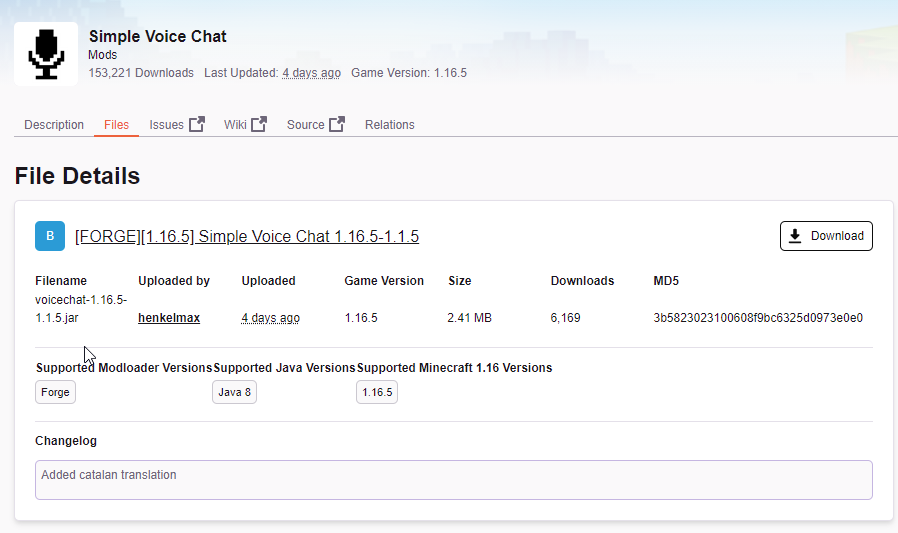
The status of the file voicechat-1.16.5-1.1.5.jar (Tie Pack) has been changed to Rejected
File is a duplicate of an existing file. [FORGE][1.16.5] Simple Voice Chat 1.16.5-1.1.5 on Simple Voice Chat
If you have any questions please contact our support team https://support.curseforge.com.
lyric crescent
well it is a duplicate https://i.imgur.com/ZqMncF7.png
 fervent tendon
whats the coolest mod?
on cureseforge
 plain eagle
erm, is the server having a bit of a brain fart? I am getting internal server errors and SQL errors being thrown out
 queen storm
digital roost
how long does it usually take for a modpack to get approved ?
queen storm
digital roost
how long does it usually take for a modpack to get approved ?
!status
red patioBOT
It is 02:10PM on Tuesday for CurseForge my dudes.
Project Moderation Time
Project/File moderation is done on Sunday - Thursday from 10am - 6pm GMT+2
This process is First in, First out. Thus files submitted late in the work day may not be checked until the next work day.
New Projects or uploads requiring manual approval: 1-3 Working Days
Updates to approved projects not needing manual approval: 1 Hour
File sync to the Curseforge app may take up to 24 hours after approval.
digital roost
oh so they'll do it tmrw
alright :D
i already tested my modpack , and the gb needed
so i don't think it should take too long
 civic notch
how do i load fabric mods? they aren't loading on forge
queen storm
!mc-fabric
red patioBOT
Fabric modpacks or the use Fabric mods require you to install a mod called Jumploader.
Fabric mods do not work with Forge.
Forge mods do not work with Fabric.
Fabric mods should be marked with a Fabric Icon like this: 
 broken ferry
Well....Ex Compressum works right now.....
 mossy sundial
is cusforge website down ?
it's taking a while to load and it doesn't even work when i click on the file section
queen storm
mossy sundial
is cusforge website down ?
It is having issues yes
mossy sundial
oh ok
 clever loom
Can someone help me , when it try to download curseforge it says "download error" . One time i managed to download it and it instantly got deleted. Please help :(
 timid root
yo anyone know good mod pack that has twilight forest in it for minecraft
queen storm
clever loom
Can someone help me , when it try to download curseforge it says "download erro...
clever loom
Thanks!
 umbral beacon
hey, can someone help me, yesterday i downloaded the pixelmon mod and played a lot with my friends, and today i cant play it, when i press the play button on curseforge nothing happens
 austere frigate
Try reopen pc and then again?
narrow minnow
umbral beacon
hey, can someone help me, yesterday i downloaded the pixelmon mod and played a l...
Hi, Mac or Windows?
 slate lynx
Could that be related to the current system outage for the CDN?
In theory if the Launcher is trying to make a call to the CDN on launch, and the CDN is failing to respond that could cause the Launcher to fail to launch the Mojang launcher
and since the /files page for modpacks is not responding and is kicking a rather lengthy error message...
narrow minnow
slate lynx
Could that be related to the current system outage for the CDN?
If you mean what @umbral beacon is experiencing, then I don't think it is related. He already has the modpack downloaded
digital roost
Is there an eta on native fabric support?
narrow minnow
digital roost
Is there an eta on native fabric support?
~2 months
slate lynx
In that case, log files would be extremely helpful to know the reason for his fallover
narrow minnow
maybe less
digital roost
Alr thx
 neat plover
We're all trying to find the issue, seems to be happening for everyone
 thin island
the cusrse forge website is not loading and going really slow
digital roost
is the website down?
 grim bane
yeah
digital roost
this is sad
thin island
when will it be back up
 feral venture
I was just going to download a texture pack :((
digital roost
is the website getting DDossed ? cause if it is why isnt it running on cloudflare i think it has a protection
I can't go to files to download it takes a long time to open and the error
 signal ridge
?mc-timeout
red patioBOT
Increase the timeout for downloading mods and modpacks
Increase the timeout for downloading mods and modpacks
If you have issues with CurseForge getting timeouts when you try to download Modpacks or Mods,
you can try running this file: https://cdn.discordapp.com/attachments/778097796410376242/817150662953402368/increase_timeout.reg
What it will do, is increase the download timeout to 20 minutes.
You need to run the increase_timeout.reg, and when it is done, you'll need to restart CurseForge,
you can do this by right clicking the tray icon and select "Relaunch".
digital roost
i cant dowload mods
signal ridge
why not?
digital roost
i try to open files but have a error
 remote basin
Looks like CurseForge might be having some issues, I'm getting connection errors on the website
 digital roost
yes u cant download nothing it says error
signal ridge
digital roost
i try to open files but have a error
Need more info, what ther error says, are you downloading with the app or from the site?
digital roost
website
 slow laurel
website
digital roost
signal ridge
Need more info, what ther error says, are you downloading with the app or from t...
the web site
signal ridge
Have you tried using the curseforge app?
digital roost
remote basin
shows this
signal ridge
to download mods or modpakc
digital roost
signal ridge
Have you tried using the curseforge app?
but i need mods no modpacks
signal ridge
!mc-installmods
red patioBOT
How to install mods in CurseForge App.
- Click
+ Create Custom Profile - Name it, select the required Minecraft version, select the Forge version (usually the highest number), click
Create. - Click the profile icon.
- Click
Add New Content - Search and install the desired mods.
- Start the game!
How to install mods not on CurseForge.
- Right click the profile picture or Open the profile and click the Icon next to the play button.
- Click
Open Folder. - Drag the mod(s) into the
modsfolder. (Note: Some mods will require others, to run. Make sure to read the instructions for the mod!) - Start the game!
signal ridge
what mod is giving the error? or is it any mod?
digital roost
any mod i try
slow laurel
yes any mod
 peak plover
same problem here
grim bane
website down
digital roost
yeah the website is throttling its loading but slowly
slow laurel
I don't know is it just for me but the website opens slow as well
digital roost
i think its getting dossed
signal ridge
Ill see if somethings going on
slow laurel
okey thanks
 jovial chasm
Do you have a bot?
 abstract monolith
any idea when its gonna be normal?
 rain edge
Is the CurseForge website down?
signal ridge
I think they are having server issues atm
rain edge
kk ty
signal ridge
Read 2 lines up
digital roost
F for the website
signal ridge
Lets not spam this channel with fs alright
 misty shard
You can click the F icon above to pay your supports instead!
digital roost
misty shard
You can click the F icon above to pay your supports instead!
clciked 🙂
 desert torrent
Is CurseForge slow today?
digital roost
Yep
misty shard
desert torrent
Is CurseForge slow today?
There are some server issues, hopefully they are resolved tomorrow 🙂
desert torrent
Ah
digital roost
can i download mutiple mods for 1.16?
lyric crescent
yes
 sleek tulip
how to play multiplayer?
digital roost
lyric crescent
yes
okay tyy
 brave compass
my mod doesnt work coz it says:
Internal Server Error
An internal server error has occurred. Please try again later. If the error continues please reach out to support.
 blazing cargo
digital roost
blazing cargo
digital roost
@brave compass mine is doing the same
brave compass
does anyone know a good fabric chisel mod
coz i want to match it with a shrink mod for my server
lyric crescent
that isnt a question about curseforge. #💬︱general-chat or #🧱︱minecraft-chat would be better
brave compass
ok
 fierce yacht
is anyone else having problems opening the files tab?
 chilly flame
Me
chilly flame
fierce yacht
is anyone else having problems opening the files tab?
Me too
fierce yacht
every time i try it comes up with an "internal server error"
lyric crescent
when it do
fierce yacht
i guess they'll fix it when they fix it
 glad summit
how do I get rl craft?
lyric crescent
install it with the curseforge app
 final crest
When will signing in with discord or Google become an option?
glad summit
how do u install rl craft?
final crest
IDK
 full rose
Can you mix mods With The Launcher
 digital roost
how do i create a mod with (example) forestry
final crest
When will signing in with discord or Google become an option?
Like on the curseforge app or site.
lyric crescent
when the site gets remade
digital roost
no one is going to tell me ;v;
lyric crescent
creating a mod with a mod doesnt make sense tho
digital roost
I mean how can I create an addon for another mod
lyric crescent
you make a mod that modifies the mod i guess?
lyric crescent
a modpack is a pack of mods, not a mod that modifies a mod
digital roost
lyric crescent
you make a mod that modifies the mod i guess?
yes
final crest
Oh, my bad. I don't play mods much because I don't have minecraft on a PC yet. Going to soon tho
That's why I needed a curseforge account.
digital roost
dont worry is a quetion
 wide roost
how do I download individual mods on the curseforge app?
red patioBOT
How to install mods in CurseForge App.
- Click
+ Create Custom Profile - Name it, select the required Minecraft version, select the Forge version (usually the highest number), click
Create. - Click the profile icon.
- Click
Add New Content - Search and install the desired mods.
- Start the game!
How to install mods not on CurseForge.
- Right click the profile picture or Open the profile and click the Icon next to the play button.
- Click
Open Folder. - Drag the mod(s) into the
modsfolder. (Note: Some mods will require others, to run. Make sure to read the instructions for the mod!) - Start the game!
lyric crescent
?mc-installmods
wide roost

 tribal sigil
any server tutorials?
final crest
wide roost
how do I download individual mods on the curseforge app?
Ok, this helps me to.
lyric crescent
tribal sigil
any server tutorials?
Curseforge is not involved in making servers. Try #👽︱game-support or #🧱︱mc-other-help
digital roost
cant i mod among us?
final crest
Prbly
digital roost
it dosent say i can when i open the app
digital roost
ok but it should say when i go in and it says choose a game on the website it says u can but its not there
lyric crescent
it isnt on the app
digital roost
nani
lyric crescent
you get the mods from the website, and follow the instructions they give on the mod page
digital roost
ok ill try-
digital roost
lyric crescent
you get the mods from the website, and follow the instructions they give on the ...
I can ask you a question?
lyric crescent
asking questions is why this channel exists
lyric crescent
nope
digital roost
queen storm
<#786424115535544350> <:grass:795906775852515338> <#768713291643486218>
thanks
digital roost
any mod dev s here? who can help me into mod making?
signal ridge
#⚙️︱authors-help is the channel you want
digital roost
ty
vagrant echo
So I have an issue, when I try to launch any minecraft modpack it comes up with an error message and tells me it cannot connect to minecraft due to a corruption, I have uninstalled and reinstalled both minecraft and curse/overwolf and nothing has changed, some help would be appriciated
queen storm
vagrant echo
So I have an issue, when I try to launch any minecraft modpack it comes up with ...
Screenshot please
vagrant echo
I will when I get a chance to
 flat maple
Can someone help me solve this issue? Everytime i try and join my world it freezes, and it'll stay frozen until i exit out of it. It wont load my world and i dont know what to do.
signal ridge
flat maple
Can someone help me solve this issue? Everytime i try and join my world it freez...
!mc-logs do this please
red patioBOT
How to get a Minecraft log file.
Where to find the log on the CurseForge Client.
Right-click the modpack profile icon OR click the button in the modpack profile.
Click Open Folder.
Open the logs folder.
Find the file called latest.log and drag it into discord.
 restive briar
Hello, all. I've had bagnon for a while, but now it's not working. I entered arathi battlegrounds and a pop up said i had to disable something so I pressed disable. Now my bags are all individual. I uninstalled and reinstalled bagnon, rebooted the game. Didn't work. Any advice?
flat maple
queen storm
restive briar
Hello, all. I've had bagnon for a while, but now it's not working. I entered ara...
Which game is that? Wow?
restive briar
Yea classic
queen storm
restive briar
Yea classic
Might be best to get the  role in #786424115535544350 and ask again in #768028293231542303
 queen storm
It works for me
lyric crescent
flat maple
Failed loading config file woodenhopper-server.toml of type SERVER for modid woodenhopper
try deleting the config for this mod
signal ridge
flat maple
Right click your packs profile pic > open files > open the config folder > find this woodenhopper-server.toml and delete it
lyric crescent
that one might actually be in saves/worldname/serverconfig
restive briar
@queen storm dont have permission to post in there unfortunately.
flat maple
signal ridge
Right click your packs profile pic > open files > open the config folder > find ...
there is no wooden hopper
 solar cloud
How long after signing up for the paid overwatch subscription does it usually take to show up and remove the ads from CurseForge? Thanks!
signal ridge
that one might actually be in saves/worldname/serverconfig
queen storm
restive briar
<@!525950791710801921> dont have permission to post in there unfortunately.
Did you pick the role already? You do that by clicking
flat maple
okay did it, launch?
signal ridge
yes
flat maple
wasn't this the issue the last time?
signal ridge
¯_(ツ)_/¯
lyric crescent
if it keeps happening you should report it to the dev
signal ridge
^^^
flat maple
okay, how to i report it to them if it dont work?
lyric crescent
go to the modpage, find an issue tracker or discord or contact method and report
digital roost
You solve the bug in website?
signal ridge
its behaving more or less now
digital roost
Ok
flat maple
they didnt help much
 summer mulch
hey how do I increase the download time so it doesn’t timeout when I try to download a pack
signal ridge
?mc-timeout
red patioBOT
Increase the timeout for downloading mods and modpacks
Increase the timeout for downloading mods and modpacks
If you have issues with CurseForge getting timeouts when you try to download Modpacks or Mods,
you can try running this file: https://cdn.discordapp.com/attachments/778097796410376242/817150662953402368/increase_timeout.reg
What it will do, is increase the download timeout to 20 minutes.
You need to run the increase_timeout.reg, and when it is done, you'll need to restart CurseForge,
you can do this by right clicking the tray icon and select "Relaunch".
summer mulch
ty
 viscid root
Is there a way to change the profile picture of my custom profiles? I have a lot of profiles with the same image and sometimes it's difficult to find the profile i want
viscid root
digital roost
(im not english fluent)
which is your native language?
digital roost
Portuguese
viscid root
F, what do you mean about you can't pick the version you want? do you want to make a custom profile?
digital roost
For me to get the version I want I need to click on view all right?
But when I click the error
flat maple
digital roost
What is this?
flat maple
my game crash, i thought someone was helping but they left
my world will not load at all
lyric crescent
Failed loading config file ironjetpacks-server.toml of type SERVER for modid ironjetpacks
same thing as before, delete that config
thin island
bro the website ughhh
 random kayak
im not sure how well this can be helped but i need to stop a payment plan from curseforge's site for my server on minecraft and i cannot find my server anywhere now. can literally ANYBODY help me?
signal ridge
thin island
bro the website ughhh
should be alright ish now? what mod or modpack you trying to download?
thin island
no the curse forge website
thin island
were u downloads mods like jei
thin island
i just want to record a video with tommy
signal ridge
ok?
thin island
signal ridge
What about it?
it doesnt work
signal ridge
What isnt tho, like its not downloading, sites not loading, its slow,
lyric crescent
tommy is going to be so sad
thin island
sites not loading, its slow,
 eager moth
content://com.android.chrome.FileProvider/images/screenshot/16177359474546337035021816816619.jpg
thin island
virus?
signal ridge
Been an on off issue today
Downloading mods or modpacks with the curse app still works fine
random kayak
can anyone help me navigate where to find my servers on curseforge so i can stop my payment plan?
lyric crescent
curseforge doesnt have servers
random kayak
where can i find it then?
signal ridge
server or the ads?
lyric crescent
find what? i've no clue what your talking about
random kayak
my server for minecraft lmao
lyric crescent
how can i help you find it
signal ridge
Need to go to where ever you rented the server from.
lyric crescent
i assume you have some kind of receipt or transaction record, use that
summer mulch
cool so the timeout thing didn’t work
signal ridge
what pack?
random kayak
it was through curseforge, that's why i was confused but i'll check through different sites. thank you
lyric crescent
curseforge does not, nor has ever had server hosting.
signal ridge
unless your talking about the ads superscription ? which just deals with the ads in the app
lyric crescent
probably clicked one of those server host ads, not sure how you'd think that's curseforge tho
random kayak
must've been on curse when i saw it. i think i found my receipt in my email tho so i'll go from there.
 halcyon lotus
is there like a way to pick a modlist.json from a curseforge modpack and manually download in a folder all the mods with a bat file?
 hard vapor
How long does it take for a project to be reviewed and accepted?
lyric crescent
!status
red patioBOT
It is 09:30PM on Tuesday for CurseForge my dudes.
Project Moderation Time
Project/File moderation is done on Sunday - Thursday from 10am - 6pm GMT+2
This process is First in, First out. Thus files submitted late in the work day may not be checked until the next work day.
New Projects or uploads requiring manual approval: 1-3 Working Days
Updates to approved projects not needing manual approval: 1 Hour
File sync to the Curseforge app may take up to 24 hours after approval.
hard vapor
-<
signal ridge
#786424115535544350 get the minecraft role  , can promote it in #768717413918179368
signal ridge
like if mods will work together or not in a pack
 knotty coyote
if they will work together, i have 3 packs i want to combine basically
signal ridge
Did you make the 3 packs?
knotty coyote
no
signal ridge
combining packs is usually not recommended unless you built them yourself.
knotty coyote
kk
signal ridge
can break more then work most likely as well
knotty coyote
hmm
lyric crescent
if you say "i want to combine packs" instead say "let me make a pack with all the mods i want"
signal ridge
^
knotty coyote
sorry. not the best at wording my thoughts
lyric crescent
more the intent than the wording, i think. combining packs is always going to be a bad time
 quick sentinel
i downloaded it to play rlcraft, but it isnt noticing my minecraft and is opening a new launcher
and wants me to buy minecraft
signal ridge
Do you own the JAVA edition of minecrft?
lyric crescent
just log in
quick sentinel
how do i log in
lyric crescent
when it asks you to
quick sentinel
i own java on this computer
signal ridge
in the launcher top left corner
knotty coyote
well when i say combine, i want to basically add all the mod packs the others don't have. maybe i dont understand how this will work in my head
lyric crescent
still better off doing it from scratch
signal ridge
Best way to do it is make a custom profile, pick the mc version you want and download the mods you want
knotty coyote
if i were to do it from scratch how do i know if it will run correctly?
signal ridge
If you can play the pack and get to the menu screen. thats the first step
lyric crescent
add mods, try to play. if it loads then you know it runs correctly
knotty coyote
i have the feeling i will somehow mange to screw something up lol
signal ridge
Its all trial and error when making packs, takes time and depends on how much effort your willing to put in as well
knotty coyote
looking at the versions some of them are running 1.7... other one is running 1.12... will that conflict which version would you recommend i run of forge?
quick sentinel
figured it out
lyric crescent
this is why you make a profile first. you can only use mods that are available on the mc version you choose
signal ridge
knotty coyote
looking at the versions some of them are running 1.7... other one is running 1.1...
yes,
knotty coyote
sorry if its alot of questions
signal ridge
All good, rather questions then just getting "It broke you fix it"
knotty coyote
is it possible to send someone else the pack so they can just download the pack instead of doing it all by hand
signal ridge
!mc-packshare
red patioBOT
There are two ways to share a modpack you've made with others...
Export and Share - For Friends to Small Groups.
- Click the Icon for the modpack.
- Click the button next to play.
- Click
Export. - Select the files that should be included.
- Send the zip to the people that want it! They can follow the instructions in
!mc-installpackto install the pack!
Upload to Curseforge - For Public Release to Everyone.
This options will make your pack public to EVERYONE, it comes with extra requirements and will take some effort to set up.
- Go to here: https://www.curseforge.com/project/432/4471/create
- Fill out the information with a proper description of the pack. This should allow anyone to understand what the pack is.
- Click the Icon for the modpack in the CurseForge app.
- Click the button next to play.
- Click
Export. - Select the files that should be included.
- Open your Project you made on the CurseForge site and Upload the file you just made.
- Wait for Moderation & Sync so it can show up in the client! (See
!syncfor limitations)
 rich escarp
is there a way to download curseforge without admin rights?
 lusty badge
when I am trying to update a minecraft modpack is not saving anything / not updating it
signal ridge
rich escarp
is there a way to download curseforge without admin rights?
either get the correct perms needed form the admin account or lo into the admin account
lusty badge
lusty badge
when I am trying to update a minecraft modpack is not saving anything / not upda...
never mind it just started working for some reason
 vapid ingot
Am I able to add steam games?
halcyon lotus
vapid ingot
Am I able to add steam games?
Are you italian?
vapid ingot
No...
halcyon lotus
lol
signal ridge
How is that relevant to their issue?
halcyon lotus
signal ridge
How is that relevant to their issue?
uhm, actually it was just curiosity XD
signal ridge
vapid ingot
Am I able to add steam games?
Only the games available by the curse app can be played on the curse app. If thats what you mean
vapid ingot
terraria
signal ridge
currently terraria isnt supported by the curse app
vapid ingot
Dang
 junior laurel
i need help with something
i downloaded it opened it it did the whole thing where it ask for permisions then just didnt open
signal ridge
whats it?
junior laurel
its the curseforge installer
junior laurel
windows
signal ridge
did you install overwolf as well
junior laurel
well its called overwolf installer
signal ridge
did you go through the insulation process already?
junior laurel
thats what wont open
i went to the website pressed windows then tried to open ot and it did nothing
signal ridge
On your task bar lower left is there an overwolf icon?
 junior laurel
no
signal ridge
open file explorer and search for overwolf
junior laurel
ok
signal ridge
If you did the inicial installation, it installed. unless an error message is poping up
signal ridge
ah
junior laurel
the instilation wont open
signal ridge
reboot your pc, then try the installer again.
signal ridge
Got it from the curse site, yes?
signal ridge
?ticket-app
red patioBOT
:bug: Reporting via the CurseForge App :bug:
-
Click the
 icon in the bottom left.
 -
Select

Open a Ticket. -
Fill out the form with accurate detailed information, "It doesn't work" isn't helpful! What exactly doesn't work and why doesn't it work should be easy to answer!
-
Make sure to upload your Overwolf logs with the
Upload Fileoption on the ticket, information on how to get these logs can be found here https://support.overwolf.com/en/support/solutions/articles/9000176827-how-to-get-your-overwolf-logs -
Submit!
 junior laurel
whats ticket app
junior laurel
do you have a file for the installer that might work because from what ive seen on videos there file looks diffrent
signal ridge
!getcf
red patioBOT
Looking to install the CurseForge app?
Todo: Place system requirements here.
<:windows:798410728188936222> Windows
<:mac:798410654418862130> Mac
Linux
:person_shrugging:
junior laurel
that file is diffrent it might work
signal ridge
oh?
knotty coyote
is it possible to change the edition of minecraft without deleting everything
junior laurel
the one i have is overwolf installer this one is overwolf etup
and its a zip not an exe
signal ridge
knotty coyote
is it possible to change the edition of minecraft without deleting everything
Like java vs bedrock?
junior laurel
yoooo its working
 kind thunder
Has anybody else had the issue of modpacks not updating their version on the curseforge launcher?
knotty coyote
never i figured it out, i cant seem to find something
kind thunder
Its a custom modpack ive updated for a server, its been approved and theres nothing wrong with its configs. It just simply wont show up on the curseforge launcher
signal ridge
!sync
red patioBOT
Sync and your Project.
CurseForge REQUIRE a project to have one file marked Released on them for the projects to show up in search. Otherwise only Direct links to the project work.
Files can take a while to show up in the app. If your files still have not shown up either your project is new and you have yet to mark a file as Release or there is issues with the sync system making it slow.
 strange creek
Anyone else here who used to play Forge (for Minecraft) before the whole Twitch integration ever existed, was never prompted by the desktop app to make a Twitch account, and now has no idea how to get their data back?
(Feel free to @ me in your reply)
kind thunder
Ah crap that might be the issue! Thank you
strange creek
...Anyone?
 prisma sonnet
Pasting mods into my profile modpack, only detecting 13/(number). What can I do/am I doing wrong?
fleet bear
Install mods from the site via the app. Pasted mods aren't always detected and mods not on the site aren't listed
prisma sonnet
fleet bear
Install mods from the site via the app. Pasted mods aren't always detected and m...
Search manually from my list and install via that method then?
fleet bear
yes
civic notch
how do i open dowloaded worlds with forge?
lyric crescent
run forge?
lyric crescent
this isnt forge support, this is curseforge support. I suggest getting the minecraft role #786424115535544350 and use #🧱︱mc-other-help instead.
prisma sonnet
fleet bear
yes
Thanks, if I don't come back, assume it worked. Lmao.
knotty coyote
does forge not like when you have mods that add onto a mod pack?
lyric crescent
kinda need to know what you're doing
halcyon lotus
What’s the function of root pages in curseforge?
knotty coyote
lyric crescent
kinda need to know what you're doing
I was making that custom modpack
I downloaded all the mods I wanted and tried launching it
i will take it to the support channel
digital roost
hey everyone 🙂 i need your help
i have custom modpack that im working on and everything is fine. i released the first version and it shows up in the curseforge app. but today i wanted to release an update, i has been approved, but the update isnt showing in the curseforge app. anyone know what to do?
signal ridge
!sync
red patioBOT
Sync and your Project.
CurseForge REQUIRE a project to have one file marked Released on them for the projects to show up in search. Otherwise only Direct links to the project work.
Files can take a while to show up in the app. If your files still have not shown up either your project is new and you have yet to mark a file as Release or there is issues with the sync system making it slow.
signal ridge
can take up to 24h for files to sync to the app as well
digital roost
ooo i didnt know that 🙂 thank you for helping me
i have one more little question 😅 is it possible that one version is still Under Review and the next version is already approved?

like this
 lapis glade
lyric crescent
lapis glade
lyric crescent
well it seems possible since you just showed a picture of it
digital roost
okay im just making sure 🙂
 night hamlet
 hollow torrent
Hey, I am trying to access the "more files" option for downloading mods in minecraft and it keeps saying that there is a internal server error
 turbid violet
Is there a reason the most recent version of my pack is not showing up on the desktop app?
signal ridge
Can take time to sync with the app
turbid violet
Its been 4 hours
lyric crescent
!status
red patioBOT
It is 01:48AM on Wednesday for CurseForge my dudes.
Project Moderation Time
Project/File moderation is done on Sunday - Thursday from 10am - 6pm GMT+2
This process is First in, First out. Thus files submitted late in the work day may not be checked until the next work day.
New Projects or uploads requiring manual approval: 1-3 Working Days
Updates to approved projects not needing manual approval: 1 Hour
File sync to the Curseforge app may take up to 24 hours after approval.
signal ridge
File sync to the Curseforge app may take up to 24 hours after approval.
turbid violet
Alright
 opal atlas
Hi, I'm trying to Export a custom modpack using the Launcher. I used to be able to do this, but now it runs through the process, but the file is never actually created. Instead it acts like it is just reinstalling as a profile. I've tried multiple times, and my son is having the same issue on his computer as well (different modpack profiles) He noticed this happening a few weeks ago. Is this a known problem? Is there a manual way I can create a .zip that can be imported to someone else's Launcher? (also we are both on Macs if that matters... I'm on newest M1, he's on older intel mac).
lyric crescent
no manual way. would try a pc restart, but it could also be due to the website issues. that said, no one else has reported any problems so after a restart if it doesnt work still might need to make a ticket
 fair shadow
is there a way to look for raw mods rather than mod packs
im kinda new and the curseforge app will only let me browse modpacks for minecraft
signal ridge
!mc-installmods
red patioBOT
How to install mods in CurseForge App.
- Click
+ Create Custom Profile - Name it, select the required Minecraft version, select the Forge version (usually the highest number), click
Create. - Click the profile icon.
- Click
Add New Content - Search and install the desired mods.
- Start the game!
How to install mods not on CurseForge.
- Right click the profile picture or Open the profile and click the Icon next to the play button.
- Click
Open Folder. - Drag the mod(s) into the
modsfolder. (Note: Some mods will require others, to run. Make sure to read the instructions for the mod!) - Start the game!
 red eagle
how do i change the mod launcher profile picture?
 soft wind
So I'm having an issue downloading ALM 6

 ocean shuttle
i have a question about mod and twitch extension Chat Torture!.... when i install the mod for my minecraft in the curseforge app and load into a minecraft world with it installed, the twitch extension doesnt recognize that im in the game. Does anyone know how to fix this or what im doing wrong?
 finite remnant
soft wind
So I'm having an issue downloading ALM 6
finite remnant
soft wind
So I'm having an issue downloading ALM 6
i'm having this exact same issue with every modpack I try to download....
 boreal aspen
my RLCRAFT just crashes evertime i try to run it on minecraft
 cobalt cape
HI, So I downloaded the desktop app, installed about 20 warcraft mods all on my desktop. Can I now somehow have these appear (sync) to my laptop if I download the desktop app there and login?? TY
 brisk compass
I cant install ATM6 either
 boreal dome
I am having the same issue with modpacks for minecraft.... any information yet?

 split vault
to the sky?
boreal dome
same I have also tried other mods as well
brisk compass
no just normal
brisk compass
Same
boreal dome
I also tried restarting my comp twice
brisk compass
🤷
split vault
ah im having problems with alm6 to the sky i havent checked the others
brisk compass
I just want to play atm6
boreal dome
i tried sev tek ages to the sky too
 olive violet
its a curse forge issue i think atleast from what the announcements say
 boreal dome
exactly i needed to see if my server was fixed after someone crashed it lol
fleet bear
ocean shuttle
i have a question about mod and twitch extension Chat Torture!.... when i instal...
Talk to the dev. That has nothing to do with Curseforge.
 pearl wharf
so im trying to download stoneblock 2 but when it gets to downloading Dark Utils its just stops
and deletes the whole profile
 hidden spire
 winter harbor
i cant download any mods for minecraft 😦
 hearty nexus
 jovial salmon
hey i have a question... does steam work with curseforge
lyric crescent
In what way
lyric crescent
!knownissues at the bottom in other games
red patioBOT
Known Issues with solutions or status of the issue.
Overwolf maintains a known list of issues here, some with solutions, others without.
https://support.curseforge.com/en/support/solutions/articles/9000196615-curseforge-known-issues
 light ravine
already deleted and reinstalled everything and restarted. need help to play valhesia 3

 cinder estuary
i have the same issue atm with all modpacks

 manic haven
its been like 2 hours and I still have this problem
signal ridge
Its been an ongoing issue. The people that can fix it are still asleep as well.
 candid forge
Dang I joined the discord to ask about that lol
 proven parcel
Mods were installing fine one moment then the next it gets to the last mod then before it installs it goes to one or more errors have occured in red should i be looking at a crash report or something?
 proven parcel
gotcha mate ill check in later then thanks for letting me know
proven parcel
thanks yoyo
 boreal elbow
is the website not working for anyone else?
boreal elbow
thx
opal cipher
It's going up and down, until it's properly fixed
 midnight escarp
since everyone is trying to connect
i expect that they will shut it down for a while
because to fix bug in live production is quiet fun 😄
 empty shard
I have a default instance for ATM6S 1.0.5, is there a rule against sharing it?
 limpid dust
The website seems to be working but when I hit "files" on a mod the page doesn't load, is anyone else having this issue?
limpid dust
midnight escarp
guys, last 5 hours there is topic about bug. Just read few sentences above...
oops sorry I just joined the server when I had the issues!
thanks for pointing it out haha
trying to set up a server and oh boy I am struggling to make sense of it all!
static dawn
setting up a server, an easy option would be go for aternos, but it would run like crap
especially with a modpack
limpid dust
im using shockbyte
limpid dust
I looked into it and I saw it was a good option
static dawn
me and my friends are using Xshell
digital roost
static dawn
me and my friends are using Xshell
never heard of it
static dawn
search it up
 acoustic slate
so the main problem is downloading the client ?
static dawn
An SSH Client with superior session management, advanced customizations, and an intuitive UI. Xshell is Free for Home and School users.
u can use it for minecraft servr hosting
server*
if u want the curseforge app
!getcf
red patioBOT
Looking to install the CurseForge app?
Todo: Place system requirements here.
<:windows:798410728188936222> Windows
<:mac:798410654418862130> Mac
Linux
:person_shrugging:
static dawn
😦 if ur on linux
 normal totem
I am having issues downloading the 'Project Ozone 3' modpack for Minecraft Java. Every time I attempt to do so, it halts near the end on installation when it is manifesting the files. I get the same error code each time saying:
Cannot find file
System.Linq.Enumerable+WhereSelectListIterator`2[Curse.Radium.Minecraft.Models.ManifestResource,System.Int32 for addon 242195 in database. Aborting installation.
normal totem
opal cipher
<#525372338653626389>
thank you. My bad for not reading that. I just got here.
opal cipher
np
static dawn
cool boi needs help with his curseforge app
 safe idol
Hey, i know the curseforge app isnt working properly rn but im tryning to download a mod from the app, but it only shows modpacks
opal cipher
!mc-installmods
red patioBOT
How to install mods in CurseForge App.
- Click
+ Create Custom Profile - Name it, select the required Minecraft version, select the Forge version (usually the highest number), click
Create. - Click the profile icon.
- Click
Add New Content - Search and install the desired mods.
- Start the game!
How to install mods not on CurseForge.
- Right click the profile picture or Open the profile and click the Icon next to the play button.
- Click
Open Folder. - Drag the mod(s) into the
modsfolder. (Note: Some mods will require others, to run. Make sure to read the instructions for the mod!) - Start the game!
safe idol
oo thx
 livid girder
hey i cant download the server files for 'All the mods 6' on the curseforge website, it just loads the website forever and never works, it did not work with my friend either... not sure whats going on
livid girder
ohh yes thank you sorry
empty shard
I was able to download server files from the curseforge app, maybe try there rather than the website
 hasty bay
I just enter the channel, dont judge me 😄
empty shard
Just scroll up, it affects everyone
livid girder
empty shard
I was able to download server files from the curseforge app, maybe try there rat...
how?
i have no idea on how to do that
OH WAIT
yes i see now
thank you man
empty shard
if you find the pack in the browse section, the icon to the left of Install/play, that's the server one
no worries
 static hawk
Is there a way to launch a curseforge profile with minecraft launcher without opening curseforge?
fleet bear
 hasty bay
extract every mod in the default minecraft launcher
fleet bear
Feel free to report as needed.
fleet bear
static hawk
Is there a way to launch a curseforge profile with minecraft launcher without op...
No. That's the whole point of the launcher.
hasty bay
oh, nvm then 😄
static hawk
Okie
static hawk
hasty bay
oh, nvm then 😄
😅
hasty bay
I would assume that it worked, mb
empty shard
configs would be a pain too probably
fleet bear
It does work but why would you use the vanilla launcher when CF does it all for you?
empty shard
fleet bear
It does work but why would you use the vanilla launcher when CF does it all for ...
about that,,, 😅
static hawk
empty shard
about that,,, 😅
😅😅😅
hasty bay
that's why I never did it myself 😄
static hawk
Well I thought there was a shortcut instead of opening curseforge, clicking play, and then clicking play in mc launcher
empty shard
but yea mod managers are pretty sweet
static hawk
It's a huge process
And curseforge sometimes bugs out and I need to open it like 5 times for it to actually open
 opal cipher
 sick vessel
when installing all mods pack 6
sick vessel
when installing all mods pack 6
 scarlet elm
 scarlet elm
issues*
livid girder
i dont know if this has to do with the issues going on at the moment with curse forge, but i cant join my server for All the Mods 6 that im hosting right now

this is the thing that shows up
queen storm
livid girder
i dont know if this has to do with the issues going on at the moment with curse ...
livid girder
okay
 little ivy
Anyone know why Skyfactory 4 won't install?
It gets to mod #162 and then cancels the install and throws up and error message.
little ivy

 digital roost
Thnks !!
 distant iris
Hi guys. am i the only one who cant download ATM6 anymore?
digital roost
distant iris
Hi guys. am i the only one who cant download ATM6 anymore?
read #📢︱news
 pulsar leaf
i cant even download atm6
 urban marsh
distant iris
Hi guys. am i the only one who cant download ATM6 anymore?
urban marsh
distant iris
Hi guys. am i the only one who cant download ATM6 anymore?
It might be regional or only some of the files, but I just managed to update ATM6 - To the Sky a few minutes ago.
distant iris
ok .. how do i find out? 😄 thx!
knotty coyote
is there anyway to make mods compatible with forge
urban marsh
You might try it if you have one available. Don't go grabbing some free one, though, those things are shady.
urban marsh
Not sure what your options are, but I'm in Florida, US.
urban marsh
Np, would be interesting to find out whether it's regional or some other problem.
pulsar leaf
it just worked without vpn lol
opal cipher
We don't support piracy here.
urban marsh
ahem You mean ATLauncher right?
pulsar leaf
@ nolifeking is like no noo I dont wanna break discord tos
opal cipher
pulsar leaf
@ nolifeking is like no noo I dont wanna break discord tos
More like, I want people to follow the rules of this server :)
pulsar leaf
hahaha good one :)
urban marsh
In the case of ATLauncher, you can right-click the taskbar icon and click Show Console. In there should be an error followed by a bunch of "at java.package.name.function" lines. Is yours a connection issue?
Should say something about a 404 if you're still having the issue.
 steel jolt
Roughly how long does it take for updates to packs/mods to propagate out the client?
queen storm
steel jolt
Roughly how long does it take for updates to packs/mods to propagate out the cli...
!status
red patioBOT
It is 10:50AM on Wednesday for CurseForge my dudes.
Project Moderation Time
Project/File moderation is done on Sunday - Thursday from 10am - 6pm GMT+2
This process is First in, First out. Thus files submitted late in the work day may not be checked until the next work day.
New Projects or uploads requiring manual approval: 1-3 Working Days
Updates to approved projects not needing manual approval: 1 Hour
File sync to the Curseforge app may take up to 24 hours after approval.
steel jolt
queen storm
!status
Awesome, thank you.
 fervent field
!mc-installserver
red patioBOT
How to **manually** install a server - **On your own PC**
- Go to the Forge website http://files.minecraftforge.net/ and download the Installer for the forge version the pack is using.
- Run the installer and choose
Install server. Do not install to your desktop. Also do not install inside a OneDrive folder. - Run the server using the forge.jar. A file called
eula.txtwill be generated. Open it and changeeula=falsetoeula=true - From the Client; Copy the
modsfolder,configfolder, and any other folders needed for the pack to work into the server folder. If the modpack has a server pack, use this instead! - Run the server again.
digital roost
is there any way I can link my microsoft account to Curseforge?
queen storm
You start minecraft, login there with the microsoft account
fervent field
i have migrated my old normal minecraft server to forge server and it let me open the server but now it wont reopen
i can only open the minecraft_server file but not the forge_server file
and i need the forge one because of the mods
queen storm
fervent field
i can only open the minecraft_server file but not the forge_server file
Use a run.bat please
queen storm
Then make one?
fervent field
OK
queen storm
PAUSE```Server filename is the name of the forge file
queen storm
Then show a screenshot of the thing
fervent field
It just goes through a bunch of files and then tells me to press any key to continue and then closes
And now it won't start
The cmd just does nothing
queen storm
Show a screenshot
 queen storm
Please send the latest.log
digital roost
Im trying to download a modpack, once the download is almost done I get a message says "An error has occured"
queen storm
fervent field
There isn't one
There should be one though
digital roost
 fervent field
There are about 40-50
I'm going to try and make a new server and put the world files and mods files in it
 wanton ridge
Hi all, how to delete files?
 queen storm
wanton ridge
Hi all, how to delete files?
queen storm
wanton ridge
Hi all, how to delete files?
You don't
digital roost
I can download other modpacks
but not that one
I recently messed with the file display names and logos, idk if that has any relation to the problem
 tight crane
How do I make a fabric profile?
queen storm
tight crane
How do I make a fabric profile?
!mc-fabric
red patioBOT
Fabric modpacks or the use Fabric mods require you to install a mod called Jumploader.
Fabric mods do not work with Forge.
Forge mods do not work with Fabric.
Fabric mods should be marked with a Fabric Icon like this:
tight crane
So, what I can't just make one from this screen?
 queen storm
tight crane
So, what I can't just make one from this screen?
queen storm
tight crane
So, what I can't just make one from this screen?
No, there is no full fabric support yet
tight crane
So... I just start that as normal?
So, what, Jumploader lets me use any mod?
Like, I can run forge & fabric mods simultaneously?
queen storm
tight crane
So, what, Jumploader lets me use any mod?
No, it lets you use fabric mods.
Fabric mods do not work with Forge. Forge mods do not work with Fabric.
tight crane
Ah
 viral briar
no you can't use forge and fabric mods together
tight crane
How does it work?
queen storm
tight crane
How does it work?
It replaces the modloader
tight crane
Ah, ok
viral briar
it basically "hijacks" the launching process so that forge doesn't load and loads fabric instead
tight crane
I wanna piss around w/ this mod, that's why:

Is there a mod similar to JEI for Fabric?
queen storm
Probably is, but more suitable for #🧱︱minecraft-chat
viral briar
"roughly enough items" I believe it's called
tight crane
Help
Name: forge-36.1.0.jar
URL: https://s3.amazonaws.com/Minecraft.Download/versions/forge-36.1.0/forge-36.1.0.jar
Filename on disk: forge-36.1.0.jar
Path: D:\Minecraft\Install\versions\forge-36.1.0\forge-36.1.0.jar
Exists: File```!mc-installfix
red patioBOT
- Click on the Minecraft Tab on the Left side of the App.
- Click button next to the
Create Custom Profileoption. - Click

Repair Installationoption. - Play game.
NOTE: You will not lose any modpacks or worlds, These are saved in the Instances folder. DO NOT TOUCH THIS FOLDER OR YOU WILL LOSE EVERYTHING
tight crane
 queen storm
Restart curseforge
viral briar
Don’t think this is the best place to asking stuff to do with piracy 😂👍🏻 go buy Minecraft don’t be cheap
 proper lantern
One message removed from a suspended account.
opal cipher
And we don't support piracy

 trim yacht
So it only affects certain mods? Other download just fine. Is there a way to download the modpack outside of CF?
queen storm
Please restart Curseforge and try again
 desert raft
is there a way to transfer mods between profiles
queen storm
Copy paste?
desert raft
its that i went to files and transfered the files but they didn't do anything
 pine sail
Hey I have a question I would like to play FTB Lite again bit when I installed it no Mods loaded
Somebody knows how to fix it?
queen storm
Just ignore that and hit play
tight crane
 queen storm
!mc-logs
red patioBOT
How to get a Minecraft log file.
Where to find the log on the CurseForge Client.
Right-click the modpack profile icon OR click the button in the modpack profile.
Click Open Folder.
Open the logs folder.
Find the file called latest.log and drag it into discord.
tight crane
queen storm
That is one I never saw before
pine sail
Look I started it and i have nothing in Creative
 tight crane
Nothing outside the standard 12 tabs, anyway
queen storm
pine sail
Look I started it and i have nothing in Creative
Restart your pc, try again
digital roost
I have a question
queen storm
digital roost
can I talk to a curseforge moderator, like one that approves modpacks and such
What question do you have then?
pine sail
queen storm
Restart your pc, try again
ok
digital roost
I basically put my modpack for approval, it got accepted, but the same minute it got rejected because It had optifine in it, but some modpacks do have optifine in them, which got me a bit confused, I exported it again and put the same one without optifine
is there any perculiar reason why mine got rejected ?
queen storm
digital roost
I basically put my modpack for approval, it got accepted, but the same minute it...
If you can find those packs then report them, optifine is not allowed in modpacks on CF
digital roost
oh damn
alright for sure
Will my modpack be approved with no problem now that I removed it ?
trim yacht
queen storm
Please restart Curseforge and try again
I have restarted CF multiple times. I’ll restart my PC and try again.
pine sail
pine sail
ok
I restarted my PC and tryed to load the modpack again nothing changed
queen storm
digital roost
Will my modpack be approved with no problem now that I removed it ?
Depends on the other stuff in it :p
queen storm
pine sail
I restarted my PC and tryed to load the modpack again nothing changed
Can you reinstall the pack?
pine sail
ok i try
digital roost
queen storm
Depends on the other stuff in it :p
I fixed those problem that were, like "Alpha" in the name not allowed, that was literally the only reason besides the optifine, my description is descriptive and clear
so It should be fine now
viral briar
optifine is not allowed in packs as the only place you should be downloading optifine is from their own website. not curseforge or anywhere else. it's up to the creator(s) of optifine.
pine sail
still the same thing no mods installed
queen storm
pine sail
still the same thing no mods installed
Can you link the pack?
digital roost
pog It's been approved
does it usually take time to appear on the curseforge list?
I can't find it yet lol
lyric crescent
not sure curseforge can actually install a pack that old. you'd have to set it up manually as this seems to predate forge
lyric crescent
im not
pine sail
he or she is talking about me
lyric crescent
yea, this is for liteloader
pine sail
lyric crescent
not sure curseforge can actually install a pack that old. you'd have to set it u...
ok thanks then i have to do it the old way
lyric crescent
digital roost
does it usually take time to appear on the curseforge list?
!status see last line
red patioBOT
It is 02:07PM on Wednesday for CurseForge my dudes.
Project Moderation Time
Project/File moderation is done on Sunday - Thursday from 10am - 6pm GMT+2
This process is First in, First out. Thus files submitted late in the work day may not be checked until the next work day.
New Projects or uploads requiring manual approval: 1-3 Working Days
Updates to approved projects not needing manual approval: 1 Hour
File sync to the Curseforge app may take up to 24 hours after approval.
 timber cedar
j ai une question
lyric crescent
english please
tight crane
Ok, I've found the culprit of what's crashing my game
It's Jumploader
BUT WHY IS IT KILLING MY GAME?!?
 stone granite
Hey! When i want to publish my own modpack do i have to make an actual description of the modpack?
Since i just want to publish it so my friends can download it.
lyric crescent
?mc-packshare
red patioBOT
There are two ways to share a modpack you've made with others...
Export and Share - For Friends to Small Groups.
- Click the Icon for the modpack.
- Click the button next to play.
- Click
Export. - Select the files that should be included.
- Send the zip to the people that want it! They can follow the instructions in
!mc-installpackto install the pack!
Upload to Curseforge - For Public Release to Everyone.
This options will make your pack public to EVERYONE, it comes with extra requirements and will take some effort to set up.
- Go to here: https://www.curseforge.com/project/432/4471/create
- Fill out the information with a proper description of the pack. This should allow anyone to understand what the pack is.
- Click the Icon for the modpack in the CurseForge app.
- Click the button next to play.
- Click
Export. - Select the files that should be included.
- Open your Project you made on the CurseForge site and Upload the file you just made.
- Wait for Moderation & Sync so it can show up in the client! (See
!syncfor limitations)
lyric crescent
sounds like the first option would be better suited to your need
stone granite
Oh, Thank you!
digital roost
when getting my modpack verified, it stated that quark itself was not on the 'approved non-curseforge' list
despite the fact that it is not only quark... but it can also be downloaded directly from the curseforge app...
lyric crescent
show the message

 opal cipher
Remove the overrides folder and re-export
lyric crescent
fact that it is the overrides folder is the issue yea
digital roost
oh, so were the mods accidently stored there when exporting?
lyric crescent
reinstall quark with the app and export again. double check the zip before you upload
do the other mod too, custom cursor
stone granite
When i started my CurseForge project, how do i upload my files?
Cannot really find any button on something like that.
lyric crescent
!mc-packshare
red patioBOT
There are two ways to share a modpack you've made with others...
Export and Share - For Friends to Small Groups.
- Click the Icon for the modpack.
- Click the button next to play.
- Click
Export. - Select the files that should be included.
- Send the zip to the people that want it! They can follow the instructions in
!mc-installpackto install the pack!
Upload to Curseforge - For Public Release to Everyone.
This options will make your pack public to EVERYONE, it comes with extra requirements and will take some effort to set up.
- Go to here: https://www.curseforge.com/project/432/4471/create
- Fill out the information with a proper description of the pack. This should allow anyone to understand what the pack is.
- Click the Icon for the modpack in the CurseForge app.
- Click the button next to play.
- Click
Export. - Select the files that should be included.
- Open your Project you made on the CurseForge site and Upload the file you just made.
- Wait for Moderation & Sync so it can show up in the client! (See
!syncfor limitations)
 wild mirage
25 hours and still waiting on curseforge approval check. so slow
queen storm
wild mirage
25 hours and still waiting on curseforge approval check. so slow
Yeah, server was having issues so staff was busy
wild mirage
Yeah. I couldn't even install the zip I made cause of server issues
 subtle ice
tight crane
BUT WHY IS IT KILLING MY GAME?!?
subtle ice
tight crane
BUT WHY IS IT KILLING MY GAME?!?
If ur using it u cant load forge mods only fabric
tight crane
I'm not using anvil-based mods
lyric crescent
maybe explain what the issue is, or provide logs so we have some idea what is going on. "it killing my game" is not very descriptive.
lyric crescent
upload the logs directly please
lyric crescent
?mc-installfix try this first
red patioBOT
- Click on the Minecraft Tab on the Left side of the App.
- Click button next to the
Create Custom Profileoption. - Click
Repair Installationoption. - Play game.
NOTE: You will not lose any modpacks or worlds, These are saved in the Instances folder. DO NOT TOUCH THIS FOLDER OR YOU WILL LOSE EVERYTHING
tight crane
Already repaired it once
narrow minnow
It's a fabric issue - what modpack is this?
tight crane
One I DIYed
I was more trying to yeet stuff together & seeing what stuck
Apparently, nothing stuck
narrow minnow
might be related to incompatible game versions - like a mod targeting the wrong version of the game, but i'm no expert on this
tight crane
All the mods are for 1.16.5
lyric crescent
same, dont really know much about fabric stuff. they have a discord, you can try there.
narrow minnow
did you try to disable all of the mods? and then try to enable them slowly - seeing what breaks it?
tight crane
Yes, and since they're all Fabric-based, I thought it would've been Jumploader that caused it, but it crashes without Jumploader on
lyric crescent
jumploader is required to use fabric mods through curseforge
lyric crescent
make a new profile, add just jumploader
 midnight orchid
idk where to post, but could someone help rq with modded mc
tight crane
Then load?
 lyric crescent
ye
tight crane
 lyric crescent
?mc-log
red patioBOT
How to get a Minecraft log file.
Where to find the log on the CurseForge Client.
Right-click the modpack profile icon OR click the button in the modpack profile.
Click Open Folder.
Open the logs folder.
Find the file called latest.log and drag it into discord.
tight crane
lyric crescent
are you selecting a forge version when you make your profile?
 lyric crescent
select the latest forge version available
tight crane
36.1.4
 lyric crescent
why does you log say forge-36.1.0 then
lyric crescent
...
tight crane
Sry?
subtle ice
half the time the fabric section on curseforge doesnt really work and i hate it because 900 times it crashes before i can even get to the first initilizing crash.
then another 10,000 troubleshooting hours to grt the to main screen and crash on loading into a world
 half flame
Hi ive been told to add a origins for my minecraft server but it doesnt seem to work and i dont know how to impiort the correct mod into a profile
lyric crescent
?mc-installmods
red patioBOT
How to install mods in CurseForge App.
- Click
+ Create Custom Profile - Name it, select the required Minecraft version, select the Forge version (usually the highest number), click
Create. - Click the profile icon.
- Click
Add New Content - Search and install the desired mods.
- Start the game!
How to install mods not on CurseForge.
- Right click the profile picture or Open the profile and click the Icon next to the play button.
- Click
Open Folder. - Drag the mod(s) into the
modsfolder. (Note: Some mods will require others, to run. Make sure to read the instructions for the mod!) - Start the game!
half flame
Thasnk you
 sterile quarry
MY curse forge isnt working
i cant download it
if had it before put then i got a new computer and it ownt download
😦
opal cipher
?getcf
red patioBOT
Looking to install the CurseForge app?
Todo: Place system requirements here.
<:windows:798410728188936222> Windows
<:mac:798410654418862130> Mac
Linux
:person_shrugging:
stone granite
If my modpack gets accepted to curseforge, will i receive an email or something like that?
wild mirage
I only got notifications on the site.
lyric crescent
you do get an email, but its usually 24-48 hours after
 loud juniper
how do i make a mod for 1.8.9
cuz
when i do gradlew genEclipseRuns
it crashed
and says
build failed
 split wren
I tried to join my modded server but got disconnected and this popped up. CTRL + I doesn't do anything. It keeps going away then popping up again right after, anyone know what this is?
 lyric crescent
loud juniper
how do i make a mod for 1.8.9
lyric crescent
loud juniper
how do i make a mod for 1.8.9
Would be better to ask in #⚙️︱authors-help
get the minecraft role first #786424115535544350
not sure anyone even deals with versions that old anymore though
loud juniper
ok
lyric crescent
@quasi phoenix This is not related to curseforge.
digital roost
why does my pack's icon history show up in screenshot tab
 lyric crescent
Known issue. Someday it'll be fixed.


 lyric crescent
try restarting cf
digital roost
anyone know a modpack on minecraft that is good for low end computers and has a lot of stuff to do and quests
lyric crescent
use #💬︱general-chat or #🧱︱minecraft-chat for that
digital roost
k
quick question why is it that on the minecraft curseforge modpack section i can only pick one topic filter i mean why cant i look for both quests and light
red patioBOT
<:CFidea:798388634972717066> Have an idea on how to improve CurseForge? <:CFidea:798388634972717066>
CurseForge is looking for great ideas and user feedback! Get into the CurseForge Community by providing some feedback and voting on what's important to you!
Think some game should be supported? Post an idea and explain why!
Got a to die for feature idea? Let's hear it!
Location In-app
- Click the button on the bottom left of the app.
- Click on

Suggest a Featureoption!
digital roost
when i put in my email when suggesting an idea are other people able to see my email
Idk if this is an obvious question or im missing something, but i was successfully able to upload my modpack, how do i find it on the curseforge app modpack list (browsing modpacks to download)
lyric crescent
digital roost
Idk if this is an obvious question or im missing something, but i was successful...
link your project
digital roost
red patioBOT
It is 05:48PM on Wednesday for CurseForge my dudes.
Project Moderation Time
Project/File moderation is done on Sunday - Thursday from 10am - 6pm GMT+2
This process is First in, First out. Thus files submitted late in the work day may not be checked until the next work day.
New Projects or uploads requiring manual approval: 1-3 Working Days
Updates to approved projects not needing manual approval: 1 Hour
File sync to the Curseforge app may take up to 24 hours after approval.
lyric crescent
!sync
red patioBOT
Sync and your Project.
CurseForge REQUIRE a project to have one file marked Released on them for the projects to show up in search. Otherwise only Direct links to the project work.
Files can take a while to show up in the app. If your files still have not shown up either your project is new and you have yet to mark a file as Release or there is issues with the sync system making it slow.
 fiery mauve
Hey, recently half my addons just disapeared idk why... is there a way to fix it?
queen storm
@kind niche #🟢︱user-bot-spam
 short zephyr
can you use optifine in the curseforge launcher?
 kind niche
When I try and add Minecraft as a game nothing happens and it just takes me back to the path page
queen storm
short zephyr
can you use optifine in the curseforge launcher?
!mc-optifine
red patioBOT
Optifine and Curseforge
To install Optifine with modpacks on Curseforge:
Right click the modpack icon, select Open Folder.
Put the Optifine.jar into the mods folder.
Now load the modpack normally.
We do not offer support for Optifine. If you have issues with Optifine, remove it. If you want further support try the discord found on their website.
https://www.optifine.net/home
queen storm
kind niche
When I try and add Minecraft as a game nothing happens and it just takes me back...
You don't add it to the original one
kind niche
?
queen storm
kind niche
?
!mc-path
red patioBOT
Minecraft Files should NOT be installed inside the .minecraft folder or inside OneDrive folders. If this shows up in the path at all you need to move it by following the instructions below!
If Minecraft is not installed, start here.
Click the  in the top right.
Select Minecraft.
Click "Edit".
Move to the "Continue here:" section below.
If Minecraft is installed, follow these steps.
Click the  in the bottom left.
Select the Minecraft tab.
Click "Change".
Move to the "Continue here:" section below.
Continue here:
Make a folder in the root directory called CurseForge.
Select the folder you just made.
The text box should show something like the following:
For Windows: C:\CurseForge
For Mac: /Users/Shared/CurseForge
 kind niche
I’m doing that but when I press add a game and try and add Minecraft nothing happens
On settings
queen storm
kind niche
I’m doing that but when I press add a game and try and add Minecraft nothing hap...
Where do you set it to then?
kind niche
Wdym
This is my screen

When I press add Minecraft it just takes me to the page that makes me choose a path
queen storm
And where do you put that path then?
queen storm
kind niche
I can’t find curseforge either
You don't need to do that, you need to make a folder for it
 fringe herald
hello can someone try to help me figure this out? im trying to get my modpack aproved but i was given the message "The following files belong to CurseForge-hosted projects, and should therefore not be added directly to zip files:
overrides/mods/abnormals_core-1.16.5-3.1.0.jar
These files should, instead, be referenced in the manifest.json file generated by the Twitch Desktop App during a profile export."
queen storm
Reinstall it using the app
fringe herald
like re export the modpack?