#🔥︱curseforge-support
1 messages · Page 27 of 1
 signal ridge
Did that pack have optifine in it as well?
 warm zodiac
no
signal ridge
Can look at that pack after. 1 pqck at a time
warm zodiac
didnt work
warm zodiac
nope
 lofty rampart
Hey,thanks it worked!Have a nice night!
signal ridge
Did you change the pack in any way? Other then adding optifine
warm zodiac
no
signal ridge
!mc-installfix try this first.
 red patioBOT
This is NOT instructions for Repair Profile! They are NOT the same! You need to do this!
- Click on the Minecraft Tab on the Left side of the CurseForge App.
- Click
 button next to the
 Create Custom Profileoption. - Click

Repair Installationoption. - Play game.
NOTE: You will not lose any modpacks or worlds!
warm zodiac
it said in the description to add optifine for it to work
signal ridge
What did? Link the modpack that says this
warm zodiac
the person who made the pack said in the description to add optifine
signal ridge
Send the link for that pack
warm zodiac
its the same 1
 minor barn
what would the cause be for this? i removed iris from my mods folder
 signal ridge
minor barn
what would the cause be for this? i removed iris from my mods folder
signal ridge
minor barn
what would the cause be for this? i removed iris from my mods folder
Double check you removed it from the right mods folder.
minor barn
yup, its deleted in the right folder
signal ridge
warm zodiac
https://www.curseforge.com/minecraft/modpacks/ryannotbrianns-minecraft-war-hq
Ah the pack has vics modern warfare which is a very broken mod.. report the pack issue to the packs dev
red patioBOT
Please visit the project page for the content you posted about and look for a way to contact the developer.
Somewhere on the page there is usually a method of contact. Look for one of the following things:
Issuestab like the image below.- Discord link.
- Twitter link.
- Comments section below the project.
If no contact method exists you will either have to remove the project or find a solution on your own.
 minor barn
would kubejs have anything to do with it?
signal ridge
Shouldnt.
minor barn
ive restarted the mc launcher (since i have it to always open)
signal ridge
Are you using the cf app? OR the vanilla launcher from the .minecraft folder?
minor barn
vanilla
signal ridge
Should probably move this to #🧱︱mc-other-help then. As this channel is for cf app or site issues.
minor barn
oh sorry
 rancid musk
Hey, I'm using the Multiverse-NetherPortals plugin, it works totally perfect when I linked it from Over World to Neteher, but when I linked it from Nether to the Over World, It doesn't go Anywhere.
signal ridge
!notcf
red patioBOT
Your question is not related to CurseForge owned/maintained features or services.
Please pick the appropriate game support channel
Otherwise use #👽︱game-support for game-related help.
CurseForge does not make or maintain any of the content or games used on the site or app. Just because it's on the site/app does not make it a problem with CurseForge. Move channels as requested, arguing about it will result in you being muted.
rancid musk
sorry
 lean carbon
I have been waiting for modpack approval for 3 days now - anybody have an idea if they're having longer than normal wait times?
red patioBOT
Project Moderation Time
Project/File moderation is done on these days unless otherwise mentioned:
Sunday, Monday, Tuesday, Wednesday, Thursday: <t:1631170800:t> - <t:1631199600:t> (Your time)
Friday, Saturday: No Moderation!
Projects are moderated First in, First out. If you submit late in the work day, it will likely get left until the next day!
New Projects or anything flagged for manual review: 1-3 Working Days
Updates to approved projects not needing manual approval: 1 Hour
-If your file has been "Under Review" for more than an hour, then it is at manual review!
Changes will only show in the app if the project meets the requirements in the ?sync command and up to 24 hours has passed from when it was accepted.
lean carbon
!status
signal ridge
Didnt need to run the command again. Doesnt change
 mild lynx
i'm trying to download modpacks to play but except those i already had since april, i cannot download any more modpacks, i click on "install" button and after waiting the download process the button just appear like invisible and when i click it opens the modpack page and starts downloading it again.

 light shore
The run button for Kerbal Space Program isn't doing anything for me. This may be because I own the game through steam, but is there any way to fix this?
 young bone
Use CKAN for Kerbal
mild lynx
i keep receiving this error message when i try to create a custom modpack

 fallen loom
?owlogs
red patioBOT
<:overwolf:857375414002384916> How to get CurseForge App logs! <:overwolf:857375414002384916>
- Click the

Create logs zipin the menu.
menu. - Drag and drop the file it just made to this chat room to upload it.
- Wait for someone to look at it so they can help you.

 muted gorge
Hey so my friend is trying to download sevtech ages and he keeps getting this error message

and after uninstalling and reinstalling his curseforge it still does not work
mild lynx
fallen loom
?owlogs
i've been trying to download the modpacks but it seens that the problem is with minecraft version, for now i solved my problem
red patioBOT
**Network Issues**
- Try restarting the app
- Try restarting your computer
- Disable any programs that interfere with your connection. VPN, ping tunnels, antivirus, firewall.
- Try restarting your router and modem. Also try using a different connection if possible.
- Try reinstalling Curseforge.
If you still have issues open a ticket (!ticket-site for info) and send your logs with it.
muted gorge
I will let him know
 crimson urchin
Hi, I'm the friend here, I've just tried all 5 of these things and none work
 lyric crescent
see the bottom message then
crimson urchin
!ticket-site
red patioBOT
:bug: Reporting via Website :bug:
Can't open the app or would rather use the website? You can do so here: https://support.curseforge.com/en/support/tickets/new
Fill out the form with accurate detailed information, "It doesn't work" isn't helpful! What exactly doesn't work and why doesn't it work should be easy to answer!
Make sure to upload your Overwolf logs with the Upload File option on the ticket, information on how to get these logs can be found here https://support.overwolf.com/en/support/solutions/articles/9000176827-how-to-get-your-overwolf-logs
 meager swan
hey yall, idk whats wrong but whenever i start curseforge to either play or install a new mod, it shows the bar loading, but then it just wont show the mods i have installed or anything when i search for new ones... any ideas what might be causing this, and how i can fix it?

im logged in, it loads like this and then it just stops
i tried restarting my pc, my router/modem, i deleted and re-installed curseforge 2 times, but its still not working
 summer flax
I would like to add a mod to a minecraft modpack that is not on curseforge and i have no idea how to.... someone please help... (im adding vivecraft to skyfactory 3
 rich flint
summer flax
I would like to add a mod to a minecraft modpack that is not on curseforge and i...
rich flint
summer flax
I would like to add a mod to a minecraft modpack that is not on curseforge and i...
?mc-modifymodpack
red patioBOT
How to add/remove mods in a modpack.
- Click on the picture of the modpack.
- Click the

Add More Contentbutton, IF this button is not there, see below before continuing. - Find the Mods, Resource Packs or Maps you wish to Install and click
Installon them. - Wait for all the required mods to be downloaded.
- Start the modpack.
How to Enable/Disable content management for modpacks.
- Click on the picture of the modpack.
- Click on the button next to the
Playbutton. - Click on

Profile Options. - Check the
Allow content management for this profileoption if you want to edit the content of the modpack, uncheck it to disable.
NOTE: The Allow content management for this profile option is what allows you to Delete, Disable, Update or Install any Mods, Resource Packs or Maps managed by CurseForge. It must be on to modify any of them! (Currently)
rich flint
meager swan
hey yall, idk whats wrong but whenever i start curseforge to either play or inst...
Windows? What version?
rich flint
Windows
rich flint
That's fine
meager swan
what other things could be causing the problem
rich flint
Can you check the location of your modding folder in CF settings?
Do profiles show up before you click any play button?
meager swan
i open CF, it starts loading the bar to show mods or search for mods, it loads and then it just stops
rich flint
Check the modding folder location is a valid useable location (not inside one drive, no non Unicode characters, etc) if not that then it's a we client issue probably
!webclient
red patioBOT
Timeout/WebClient errors are from networking issues to your computer. You can try a few things to fix it:
- Restart the computer.
- Restart your router/modem.
- Try another internet source like a hotspot, wired connection or moving closer to the WiFi.
- Pause/Stop other things using the internet. (Streams, music, etc)
- If this still doesn't work, try again in an hour and hope your connection is stable.
meager swan
i restarted my pc, router and modem, i havent tried using hotspot yet but ill try that in a sec.. theres nothing running on my pc that uses internet except discord and CF
rich flint
So about that folder location I keep hinting at looking at...
meager swan
yea about that, where do i find it.. computers isnt my strong side
red patioBOT
Instructions for changing CurseForge Minecraft install path!
If Minecraft is not installed in CurseForge App:
- Click the
 in the top left.
 - Select Minecraft from the list of games.
- Select the
Advancedoption and select:
--- Windows:Local Disk (C:)at the left side of the window. If you do not see it, clickThis PCfirst.)
--- Mac:/Users/Shared/CurseForge, If it does not exist, make it. - Click
Continue.
If Minecraft is installed in CurseForge App:
- Click the
 in the bottom left.
 - Select the Minecraft tab.
- Click
Change. - Select the location:
--- Windows:Local Disk (C:)at the left side of the window. If you do not see it, clickThis PCfirst.)
--- Mac:/Users/Shared/CurseForge, If it does not exist, make it.


 red patioBOT
<:overwolf:857375414002384916> How to get CurseForge App logs! <:overwolf:857375414002384916>
- Click the
Create logs zipin the menu. - Drag and drop the file it just made to this chat room to upload it.
- Wait for someone to look at it so they can help you.
rich flint
See if you can get that
rich flint
Someone else might recognize that issue but I don't. Until then submit a ticket
!ticket
red patioBOT
Issue Reporting with CF tickets!
Issues can be reported two ways!
Via the website, or in app. Instructions for both are below!
Make sure to include logs when reporting a problem with the client!
Upload your Overwolf logs with the Upload File option on the ticket, information on how to get these logs can be found here https://support.overwolf.com/en/support/solutions/articles/9000176827-how-to-get-your-overwolf-logs
:bug: Author/Client issues via Website :bug:
Can't open the app or are an author trying to get support? https://support.curseforge.com/en/support/tickets/new
Info for Project Authors:
Make sure to select Author Support in the What kind of support do you need? box.
You also need to include a link to the project and your CF name!
Logs, Game and OS boxes can be ignored when opening an author ticket.
:question: Ticket Status :question:
Tickets you have made can be looked at, replied to and closed if you make/login to an account. If you submit a ticket with a specific Email make sure to use that when you make your account so you can see your past tickets!
https://support.curseforge.com/en/support/tickets
Otherwise you will only get email replies at the email you used to open the ticket.
:bug: Reporting via the CurseForge App :bug:
- Click the icon in the bottom left.
- Select

Open a Ticket. - Fill out the form with accurate detailed information, "It doesn't work" isn't helpful! What exactly doesn't work and why doesn't it work should be easy to answer!!
- Upload your Overwolf logs with the
Upload Filesection. (see the top of this message for details) - Submit!
rich flint
Uh good? heh
meager swan
bro im not kidding, ive been trying to get it to work for what
7 hours now
as im getting help.. it decides to work
well uh, thanks for the help ig?
rich flint
Button spamming: my usual software repair strategy 😅
meager swan
rich flint
Button spamming: my usual software repair strategy 😅
i didnt click anything, thats what im confused about
for some odd reason it just worked
 vapid sable
hey everyone, just got curseforge and started playing wow classic. When I download the addons and they are in my My Addons list under wow classic does that mean when I start the game next that they will all be active?
 harsh gulch
I'm having mad trouble with this, it's been difficult to make a Skyfactory 3 server on a VPS with Pterodactyl Wings+Panel before but now it's completely impossible
tried the server files themselves, no jar start file, tried the API key with a curseforge egg, it had trouble downloading every single mod and resource, and when I tried joining the server, it was a regular world with just the client-side mods

like
what
does that for every single curl it tries

but clicking the links themselves lets me download them just fine?

??
rich flint
?notcf
red patioBOT
Your question is not related to CurseForge owned/maintained features or services.
Please pick the appropriate game support channel
Otherwise use #👽︱game-support for game-related help.
CurseForge does not make or maintain any of the content or games used on the site or app. Just because it's on the site/app does not make it a problem with CurseForge. Move channels as requested, arguing about it will result in you being muted.
 devout flint
i suppose i might as well share the solution in case it happens to someone else, reinstall minecraft from windows store and everything else related to your game (profiles/mod packs, curseforge), and make sure you allot atleast 8gb of memory
that's what i did and it worked out just fine
harsh gulch
rich flint
?notcf
it is related cause I can't find valid server files for Skyfactory 3
rich flint
Curseforge doesn't make server packs. People post server packs to the CF website/database. This channel is for issues with the website and app
The CF API did change a few months ago so if someone was using that and has done no changes then that is no longer valid
 glossy torrent
YOOO idk why the hek im getting these stupid spam bots in my dms idk where to put this
its ridiculous
 twin shoal
Jesus Christ I’m leaving this server
I’ve gotten 2 bot messages in the past hour
Gl mods
 fathom fable
rich flint
fathom fable
rich flint
!dm
red patioBOT
Don't want scam DM?
If you want us to ban the user you need to mention them with a screenshot proof of their scam message or we will not do anything about it.
We also recommend you disable DM's in this server.
 harsh gulch
I'm having trouble downloading modpacks via ubuntu terminal on my vps
signal ridge
I mean currently cf only really supports linux for wow. Minecraft is still in the works but no eta.
harsh gulch
Tf is wow? I'm trying to install a Skyfactory 3 server on a linux commandline with 0 gnome assistance
signal ridge
World of warcraft
Cf also has nothing to do with servers
Server packs are created by the authors of the packs. Not cf
harsh gulch
it's the literal thing that hosts the server files and sets the guidelines for what is modpack worthy
signal ridge
The cf site is just a hosting site. They dont make or maintain any of the projects. Authors are the ones that make and upload the files. So if something doesnt work in a pack best to seek the author out for assistance
harsh gulch
how am I supposed to get ahold of Feed The Beast
signal ridge
!mc-ftb
red patioBOT
We do not provide support for FTB Modpacks or the FTB App.
If you are looking to play FTB modpacks use the FTB launcher.
https://www.feed-the-beast.com/
Any Overwolf FTB launcher issues you have should be directed here:
https://github.com/FTBTeam/FTB-App/issues/426
glossy torrent
so cringe server i havnt even talked for like a month and getting bots so pathetic bye
red patioBOT
Don't want scam DM?
If you want us to ban the user you need to mention them with a screenshot proof of their scam message or we will not do anything about it.
We also recommend you disable DM's in this server.
 idle isle
 opal cipher
Yeah, I hope they have good holidays as well. :) But us community people, we never take holidays! (Except when we're not near our computers/devices xD)
 swift portal
Hey. Im unable to add my friend as contributor any reason why? It says it needs username even tho Im putting it in?
 fossil bluff
i apparently have overwolf and curseforge but when i type it into the windows searchbar it doesnt show up.
can someone please help with this
signal ridge
!notcf
red patioBOT
Your question is not related to CurseForge owned/maintained features or services.
Please pick the appropriate game support channel
Otherwise use #👽︱game-support for game-related help.
CurseForge does not make or maintain any of the content or games used on the site or app. Just because it's on the site/app does not make it a problem with CurseForge. Move channels as requested, arguing about it will result in you being muted.
signal ridge
Forge =/= Curseforge
 edgy crypt
hey I wanted to upload my modpack on the curseforge app so my friends have it easier but do I really need to search every single mod again cant I just put the mods into the mods folder from the profile?
 tropic grail
signal ridge
edgy crypt
hey I wanted to upload my modpack on the curseforge app so my friends have it ea...
tropic grail
signal ridge
edgy crypt
hey I wanted to upload my modpack on the curseforge app so my friends have it ea...
App doesn’t always sync properly when mods are dropped in the mods folder, it’s better to install them via the app
edgy crypt
really? I have like 160 mods
signal ridge
Yep.
App should auto install dependencies if the authors set them correctly, so should help cut down the amount you have to search and install
mild lynx
can someone help me with this, i'm trying to download the modpack and when the download ends it starts deleting the archives on its own

first i was receiving the error "couldn't launch core" then i reinstalled the app and now i can't download modpacks
 snow lynx
 signal ridge
Please stick to one channel and be patient.
signal ridge
!mc-installfix try this
red patioBOT
This is NOT instructions for Repair Profile! They are NOT the same! You need to do this!
- Click on the Minecraft Tab on the Left side of the CurseForge App.
- Click button next to the
Create Custom Profileoption. - Click
Repair Installationoption. - Play game.
NOTE: You will not lose any modpacks or worlds!
 livid stone
how to fix this problem
 young bone
Stick to one channel, if someone knows a solution, they may tell you
 static perch
fossil bluff
i apparently have overwolf and curseforge but when i type it into the windows se...
static perch
fossil bluff
i apparently have overwolf and curseforge but when i type it into the windows se...
Yh that always happens to me, so I had to reinstall and make windows shortcut and pin to taskbar overwolf
 pine kiln
opal cipher
pine kiln
opal cipher
So, go ahead and report them in #🛑︱report-users
 autumn flare
I am having a major issue with the Curseforge app and there is little to no information on how to solve the error. The first error is what I get when trying to update any addon via the app. The only information I have been able to find on "General Install Error" is that it is an internet connection (which isn't the case) or a server issue (but none of my friends are experiencing this) so I don't know how to solve this. The second one is what I get when I attempt to download any addon at all from the Curseforge website and it doesn't matter which browser I use (Firefox, Chrome, Edge). I could use some help on solving this issue. It worked fine a few days ago but now nothing at all.


 unreal parcel
So ive been trying to contrust a modpack but suddendly i got this Error. I searched everywhere but theres no solutions i could find. This Occurs when trying to update/download all modpacks and i think its also affecting the ability to download mods too because i cant download any mods right now too.
 unreal parcel
Sry if this is a stupid question then but where is the hosts file?
signal ridge
Says in that channel...
 dire forge
Hey Guys
 rich flint
people with the above issue message >>
https://discord.com/channels/428228256236306434/1028679720386166794
 digital roost
rich flint
people with the above issue message >>
https://discord.com/channels/42822825623...
digital roost
rich flint
people with the above issue message >>
https://discord.com/channels/42822825623...
yes and Again i dont quite understand that
I dont got C:\Windows\system32\drivers\etc\hosts
Cuz After Etc it doesnt exist
unreal parcel
it is there but it doesnt want to appear when u open it from notepad
rich flint
if you have windows you have that file
unreal parcel
so idk either
unreal parcel
digital roost
Etc isnt a thing. on my pc.
found it out, if ur opening it from notepad do this

All Files instead of text decuments
digital roost
What thats not in note pad
 compact plume
 signal ridge
!oops
red patioBOT
You had an "Oops, that was not supposed to happen!"
Follow the instructions in this link!
If the info in the link does not work please do ?cflogs-oops and follow the instructions there to get the log files.
 opal cipher
Yup
signal ridge
Yep
unreal parcel
Oof. Well it said it will only possibly work so its expected
 digital roost
It only happens when I try to enter in the curseforge
 signal ridge
digital roost
It only happens when I try to enter in the curseforge
signal ridge
digital roost
It only happens when I try to enter in the curseforge
!mc-installfix try this
red patioBOT
This is NOT instructions for Repair Profile! They are NOT the same! You need to do this!
- Click on the Minecraft Tab on the Left side of the CurseForge App.
- Click button next to the
Create Custom Profileoption. - Click
Repair Installationoption. - Play game.
NOTE: You will not lose any modpacks or worlds!
digital roost
it worked, thank you so much
unreal parcel
unreal parcel
Oof. Well it said it will only possibly work so its expected
Tried to use a VPN instead, Seems to work c:
 real scaffold
Frequently (almost every time), when opening Curseforge, my addons for World of Warcraft Classic will have their update button not-clickable and it will sit there for upwards of an hour not doing anything. Is there some troubleshooting I can do for this?
I'm using v 0.207.2.6523
 blazing hearth
Hiya! I just had my pc crash and had to install a new SSHD. I had no issue with getting my addons back, but can no longer sync my account. Would appreciate some help, plz. Using version 0.207.3.663

 upper root
try asking again #🧙🏼♂️︱warcraft-support, stuff is buried fast here
 hot kite
I have question! I downloaded the curseforge addon and im getting the error message " the ssl connection could not be established, see inner exception.
 tawny wedge
every mod i try to download or update says the handshake failed due to an unexpcted packet format
for minecraft sorry
young bone
autumn flare
@opal cipher I did what was in the Problems thread and it did not change the error. Still getting the General Instal error
The main difference seems to be just sitting in download versus throwing an error immediately.

Sits there for about 3-5 minutes then General Install error gets thrown out.
rich flint
 magic shore
game just isnt launching
magic shore
game just isnt launching
?notcf
red patioBOT
Your question is not related to CurseForge owned/maintained features or services.
Please pick the appropriate game support channel
Otherwise use #👽︱game-support for game-related help.
CurseForge does not make or maintain any of the content or games used on the site or app. Just because it's on the site/app does not make it a problem with CurseForge. Move channels as requested, arguing about it will result in you being muted.
rich flint
pinged lol
magic shore
rich flint
pinged lol
minecraft then ig?
 signal ridge
 wet hemlock
small error, please help
wet hemlock
small error, please help
#🧱︱mc-other-help for this
 sand path
Oh sorry thanks
signal ridge
That wasnt for you..
sand path
Oh ok
well... can you still help me then
or anyone if your busy iv been trying to get this to work for hours
rich flint
what did you do to get this error
sand path
All I did was go to create custom profile and imported the mod i wanted
red patioBOT
This is NOT instructions for Repair Profile! They are NOT the same! You need to do this!
- Click on the Minecraft Tab on the Left side of the CurseForge App.
- Click button next to the
Create Custom Profileoption. - Click
Repair Installationoption. - Play game.
NOTE: You will not lose any modpacks or worlds!
 cyan violet
im having issues with curseforge for WoW. Im not able to download any addon for wow is there anything i can do? i went on the website but everything ive tried i still can not download anything. I keep getting general instalation error
sand path
rich flint
ok - try this and let us know if it still happens. follow exactly.
it was acting like it was going tp download but then at the last second gave me the same error
rich flint
?owlogs
red patioBOT
<:overwolf:857375414002384916> How to get CurseForge App logs! <:overwolf:857375414002384916>
- Click the
Create logs zipin the menu. - Drag and drop the file it just made to this chat room to upload it.
- Wait for someone to look at it so they can help you.
rich flint
can you post that
cyan violet
posted
sand path
rich flint
"message": "[InstallTaskManager] InstallTask unhandled exception e70365e5-df15-4d8f-aadd-359a6fe57520 AddOnInstallTask1", "error": { "message": "The handshake failed due to an unexpected packet format.",
oh ok it's this (one sec)
sand path
is that where you want the zip file?
rich flint
oh wait you guys are sneaky posting 2 OW logs at once
-44 had the above issue link
ah ok also -23
sand path
oh ok im sorry i dont mean to make anyhting anymore complicated
rich flint
both of you click the discord post link above and follow the instructions
cyan violet
i did what they said but still not working
sand path
same
rich flint
after you edit the host file close and open again to confirm you did in fact change it with admin permissions. then restart the app
 dusk ibex
how do i make minecraft pop up
 lyric crescent
dusk ibex
how do i make minecraft pop up
lyric crescent
dusk ibex
how do i make minecraft pop up
You need to use the version that isnt WoW only.
 median ferry
where do i ask questions about SWEM at
lyric crescent
what is that
median ferry
a mod by GeckoLib, its a mod through this i think?
dusk ibex
when i try to click install nothing happends
 lyric crescent
Curseforge doesnt make mods. You'd need to look up the mod's author and find some way to contact them.
median ferry
okay thanks
digital roost
is that labymod or something
its a minecraft client, but what is that program
oh wait its overwolf
lmfao
signal ridge
Image Darkfear posted above is of the overwolf app.
 stone basalt
how do i get terraria mods
young bone
Use Tmodloader
young bone
The Steam workshop
young bone
There really isn’t much for Terraria in Curseforge
 abstract violet
How do I stop it from opening in internet explorer so i can actually use forge?
 young bone
Your jar association is messed up
abstract violet
how do i fix it
young bone
Why not use the Curseforge app so you don’t have to manually install Forge
abstract violet
i didnt even know there was an app
young bone
?getcf
red patioBOT
Looking to install the CurseForge app?
<:windows:798410728188936222> Windows
Minimum Requirements:
- OS Version: 10 or 11
- 64 bit Required.
- 350MB storage space.
- Microsoft .Net 4.8
- Intel/AMD quad-core CPU
- 8GB ram
[Windows Download]
[Windows Alternative Download]
If you are having issues with the Windows Download use the Windows Alternative Download to install Overwolf. Then download CurseForge from the App Store.
Windows Standalone: NOTE: ONLY SUPPORTS WORLD OF WARCRAFT CURRENTLY!
Requirements:
Uh, Windows? (No not the ones in your house)
WoW as that's all it's useful for..
Some sort of zoomy box that does teh verk.
[Windows Standalone] NOTE: ONLY SUPPORTS WORLD OF WARCRAFT CURRENTLY!
<:mac:798410654418862130> Mac
:penguin: Linux
NOTE: ONLY SUPPORTS WORLD OF WARCRAFT CURRENTLY!
Minimum Requirements:
Something not windows or mac would be a start.
Hopefully it turns on.
A screen would be beneficial too.
young bone
It’s existed for a good while
young bone
?mc-installmods
red patioBOT
How to install mods in CurseForge App.
- Click
+ Create Custom Profile - Name it, select the required Minecraft version, select the modloader & modloader version (usually the highest number), click
Create. - Click the profile icon.
- Click
Add More Content - Search and install the desired mods.
- Start the game!
How to install mods not on CurseForge.
- Right click the profile picture or Open the profile and click the Icon next to the play button.
- Click

Open Folder. - Drag the mod(s) into the
modsfolder. (Note: Some mods will require others, to run. Make sure to read the instructions for the mod!) - Start the game!
 abstract violet
young bone
?mc-installmods
abstract violet
young bone
?mc-installmods
how come I dont have any of my saved worlds?
i installed my mod
loaded up the game and all my worlds are gone
young bone
Curseforge doesn’t use the .minecraft folder
If you want your worlds, you have to copy them over
 worthy sail
So I went to import a custom modpack and a error message came up saying "'curse.radium.installmanagement.installtaskfailedexception; was thrown."
rich flint
worthy sail
So I went to import a custom modpack and a error message came up saying "'curse....
 placid copper
Would someone please explain how to use KSP mods. I have it installed on curseforge, but do not know where to go from there.
lyric crescent
Don't bother using curseforge for KSP, just use CKAN instead.
lyric crescent
It's been broke since they added ksp stuff.
I wish it worked too, but half the mods dont install correctly.
placid copper
thanks again
 pale wedge
 signal ridge
What os are you on?
 neat summit
Hey I've been having trouble with addons just not showing up for download on my app. Addons in question are Name2Chat and Wintergrasp Timer, both for WOTLK classic. I can find them on the website but when I try to download them it sends me to the app and nothing happens from there. Any idea how to fix this?
I am seeing now that the wintergrasp timer is very old, so that one makes sense. But someone from my guild has the name 2 chat addon for wotlk classic so i know that one should work
 steel ivy
this keeps happening ive retried a million times and switched internet and even tried my hotspot anyone knows why?

 fossil cradle
Hi i want ask what that mean
 opal cipher
Press Win + R, write in notepad c:\windows\system32\drivers\etc\hosts, screenshot the entire file and post here
fossil cradle
 opal cipher
Hm.. Looks ok. Could be that you have an old version of Java installed, looks like you're trying to install Forge manually.
Why not use CurseForge (they are not the same thing) to manage mods?
red patioBOT
Minecraft requires specific Java versions to run, pick the correct one for the version of Minecraft you are playing!
Java for Minecraft versions 1.16.X and below
Java for Minecraft 1.17.X
Java for Minecraft 1.18.X and 1.19.X
Java for other operating systems.
dusk ibex
anyone know how to fix this?
 red patioBOT
Your CurseForge App version is outdated!
To use CurseForge with the latest features & fixes you should update your CurseForge App.
You can do this by uninstalling the app from your computer programs and then install it again from https://download.curseforge.com/
NOTE: Uninstalling CurseForge will not remove any game/mod data, It's entirely safe to remove and install again!
fossil cradle
opal cipher
I happen to know a bit polish, and know that word. :P
its not the same word
opal cipher
Different between w and v then?
opal cipher
Anyway, if you update your java, it should work.
fossil cradle
i mean what t f
fossil cradle
opal cipher
Anyway, if you update your java, it _should_ work.
ok
opal cipher
Ah, right.
opal cipher
🎉
 steep idol
Hello. I seem to be running into an issue where i cannot install the curseforge app i previously used (after uninstalling it) for windows 11 to access minecraft modpacks like Project Ozone 3, Stone Block 2, etc. The attached picture shows where i believe you install the Curseforge app however when i hover over Curseforge and press "Install", it then shows "Error X". can i please receive help regarding this. you are welcome to message me privately or AT me here.

I can access Java Minecraft launcher though
And i have the FTB app installed as well which i can launch
young bone
Curseforge doesn’t touch the .minecraft folder or the launcher that’s installed separate
steep idol
thanks
young bone
Did it give any error when you tried installing CF
 young bone
Reinstall the Overwolf app
 ashen coral
how do i fix "the handshake failed due to an unexpected pack format"
steep idol
Curseforge is downloaded. Now redownloading the modpacks I use
 loud tundra
i need help
If I uplolad a file, and another for review that is a duplicate, how do I delete one of them?
 lusty bloom
i need help. when i try to install a modpack it's say The handshake failed due to an unexpected packet format. how do i fix this?
 devout grove
My modpack is now aproved with the files how can the modpack get to the curseforge app?
opal cipher
devout grove
My modpack is now aproved with the files how can the modpack get to the cursefor...
!sync
red patioBOT
Sync and your Project.
CurseForge App and site do not share the same requirements! You can find things on the site but this does not mean it will be in the app!
For a mod to show up in the app:
- Projects MUST have a file marked as RELEASE
 or BETA
- Projects MUST be APPROVED
- Projects MUST have a file marked for the GAME VERSION SELECTED/LOADED
- Projects CAN'T be EXPERIMENTAL
- Projects CAN'T be ABANDONED
Files can take a while to show up in the app. If your files still have not shown up either your project is new and you have yet to mark a file as Release/Beta or there is issues with the sync system making it slow.
Vote this issue up if you would like to know when the last sync was! https://curseforge-ideas.overwolf.com/ideas/CF-I-1617
 steep idol
Hello. Is it the intention that even after reinstalling Curseforge and Overwolf that your saved data is safe? I loaded up Stoneblock 2 and my private worlds are gone
lyric crescent
It would still be in whatever folder it was in before you reinstalled. You can find the folder on your computer by searching for a folder named instances.
steep idol
thanks
 rustic depot
hey guys i am trying to run a private ATM7 To the sky server, but it says i need java 17
where can i get it? i can only find the jdk not jre [ oh thanks i scrolled up and found java 17 link]
red patioBOT
Your question is not related to CurseForge owned/maintained features or services.
Please pick the appropriate game support channel
Otherwise use #👽︱game-support for game-related help.
CurseForge does not make or maintain any of the content or games used on the site or app. Just because it's on the site/app does not make it a problem with CurseForge. Move channels as requested, arguing about it will result in you being muted.
 meager gate
Sorry i just understand i'm in the wrong channel
 tall shell
hey i have a problem that curseforge doesn't load my modpacks and doesn't even open the launcher could anyone help me with this?? and if it loads it stops at applying patch 4/4
tall shell
could someone help with this?????
 upbeat swift
hey i have a problem everytime i got to the next page in the craft menu it crashes
could i get some help?
red patioBOT
Your question is not related to CurseForge owned/maintained features or services.
Please pick the appropriate game support channel
Otherwise use #👽︱game-support for game-related help.
CurseForge does not make or maintain any of the content or games used on the site or app. Just because it's on the site/app does not make it a problem with CurseForge. Move channels as requested, arguing about it will result in you being muted.
 tawdry belfry
Okay so I just received a message saying; the following files belong to CurseForge-hosted projects, and should therefore not be added directly to zip files:
- Overrides/mods/appliedenergetics2-12.7.0.jar
- Overrides/mods/quicksort-0.1.6+1.19.2.jar
These files should, instead, be referenced in the manifest.json file generated by the Twitch Desktop App during profile export.
You see I have no clue what this means and how to do it. It's from an unapproved modpack in minecraft curseforge
red patioBOT
The following files belong to CurseForge-hosted projects, and should therefore not be added directly to zip files:
-
Remove any mods listed in the error message from the profile you exported. Then reinstall them with the CurseForge app. DO NOT drag and drop files from the site.
-
Export the profile again, open the new zip that was just made. Check for the
overrides/modsfolder. If you still see any mods in that folder do the step above again for each mod. -
Upload the zip once complete and no more mods show in the
overrides/modsfolder.
 slate elk
please help, im getting this error and im at a complete loss as for why its appeared. this wasnt there before, i added about 15-20 new mods by folder, all from curseforge, all of which it has recognised, and yet its still there

i swear i get this every single time i try to update my modpack
lyric crescent
Is there a mark next to any of the things?
lyric crescent
export it and look at what ends up in overrides/mods
slate elk
there isnt an overrides/mods
lyric crescent
then you should be good to go?
lyric crescent
could be, or its trying to point out some other issue that it wasnt made for
guess you'll find out if it gets rejected
tawdry belfry
I'm still confused
rich flint
slate elk
please help, im getting this error and im at a complete loss as for why its appe...
This has been showing up for me also when exporting. Ignore it if there are no mods placed in the overrides folder
 lost canopy
my game seems to be crashing without a error when it takes me back to the launcher
like whenever i load it
red patioBOT
This is NOT instructions for Repair Profile! They are NOT the same! You need to do this!
- Click on the Minecraft Tab on the Left side of the CurseForge App.
- Click button next to the
Create Custom Profileoption. - Click
Repair Installationoption. - Play game.
NOTE: You will not lose any modpacks or worlds!
lost canopy
it says minecraft is running but it isnt
rich flint
Restart your computer and then do the button
 distant brook
Hi, im getting a General install error when trying to update my addons for wow, ive done the ipv4 thing and reinstalled overwolf, But still getting the same issue
lost canopy
the game crashed again but this time gave me an error message
rich flint
Post your log file in #🧱︱mc-other-help
 cloud topaz
It keeps saying that it can't be loaded. What can I do to fix it? Also when I try to run the game it remains on a black screen
 vague tulip
anyone know anything about the mod ortus? you need it for malum but i cant find it on curseforge
vague tulip
well the problem is i dont know who the mod author is but i could probably ask in the #🔎︱mod-hunting
young bone
The mod you’re looking for was renamed
vague tulip
ok what was it renamed to?
young bone
Lodestone
 young bone
Lets move this to #🧱︱mc-other-help
vague tulip
ok
digital roost
I need help
red patioBOT
╰( ͡° ͜ʖ ͡° )つ──☆*:・゚ *˜”*°•.˜”*°• Many Help •°*”˜.•°*”˜* <:curselit:796985620550385705>
Please provide a description of your issue with as much detail as possible. If you have an issue with a mod or modpack, tell us the name. Explain what you can see happening. Be specific!
 Tell us what is happening, we already know it "doesn't work".
Avoid using words like "it", tell us exactly what "it" is.
Don't assume anyone knows what you are talking about, be specific.
Tell us what you expected to happen.
Provide screenshots or video if possible.
Provide a log if possible. ?mc-log
digital roost
the server was having issue with starting up and whenever I go into the Minecraft server when the atentos server is online it always says internal exception and and then it always shows coding stuff that I don’t understand
signal ridge
!notcf
red patioBOT
Your question is not related to CurseForge owned/maintained features or services.
Please pick the appropriate game support channel
Otherwise use #👽︱game-support for game-related help.
CurseForge does not make or maintain any of the content or games used on the site or app. Just because it's on the site/app does not make it a problem with CurseForge. Move channels as requested, arguing about it will result in you being muted.
digital roost
It’s curseforge on aternos for Minecraft btw
signal ridge
CF has nothing to do with servers, please use the appropriate channel(see bot)
digital roost
Oh ok then
 kind jasper
I try installing 1.16.5 forge but it tells me forge install command exit code 1.
red patioBOT
Error/Exit codes are useless. Follow these steps so someone can actually help you.
- Right-click the modpack profile icon OR click the button in the modpack profile.
- Click
Open Folder. - Open the
logsfolder. - Drag and drop the FILE named
latestORdebuginto discord.
kind jasper
1.16.5 forge won't install at all
rich flint
kind jasper
1.16.5 forge won't install at all
At you using the Curseforge app or are you manually trying to install forge over vanilla
kind jasper
curseforge
rich flint
Do you have a PC or mac
kind jasper
Windows 11 fully up to date
rich flint
Ok. Try the following exactly. If it says MC is already running restart your PC first
?mc-installfix
red patioBOT
This is NOT instructions for Repair Profile! They are NOT the same! You need to do this!
- Click on the Minecraft Tab on the Left side of the CurseForge App.
- Click button next to the
Create Custom Profileoption. - Click
Repair Installationoption. - Play game.
NOTE: You will not lose any modpacks or worlds!
kind jasper
rich flint
Ok. Try the following exactly. If it says MC is already running restart your PC ...
it won't even creat the profile
nvm thanks
rich flint
I understand. That's still the 'fix it fix it' button
 wise drift
hello! is there a way that i could make a particular modpack available offline?
young bone
No
wise drift
aw.....
 versed haven
i need help with cursed forge
rich flint
!help
red patioBOT
╰( ͡° ͜ʖ ͡° )つ──☆*:・゚ *˜”*°•.˜”*°• Many Help •°*”˜.•°*”˜* <:curselit:796985620550385705>
Please provide a description of your issue with as much detail as possible. If you have an issue with a mod or modpack, tell us the name. Explain what you can see happening. Be specific!
Tell us what is happening, we already know it "doesn't work".
Avoid using words like "it", tell us exactly what "it" is.
Don't assume anyone knows what you are talking about, be specific.
Tell us what you expected to happen.
Provide screenshots or video if possible.
Provide a log if possible. ?mc-log
 pseudo topaz
How do I change the minecraft launcher version, when booting the latest version of Vault Hunters?
red patioBOT
Your question is not related to CurseForge owned/maintained features or services.
Please pick the appropriate game support channel
Otherwise use #👽︱game-support for game-related help.
CurseForge does not make or maintain any of the content or games used on the site or app. Just because it's on the site/app does not make it a problem with CurseForge. Move channels as requested, arguing about it will result in you being muted.
pseudo topaz
im sorry thanks
 limber badge
Is there anyway I can receive some help on my modpack? I haven’t received an update on my review on CurseForge. Modpack Name is chaositys-bettermc
young bone
How long ago did you upload it
limber badge
Maybe a week now
young bone
Is there any red bordered message in the pack page or a notification
opal cipher
Do you have permission to use BetterMC in your modpack name, from the BetterMC authors?
limber badge
I don’t think it’s copyrighted but could that be as to why
This project is currently under review by the moderation staff, pending approval of the changes that have been made. Until approved by a moderator, the project will not be visible to others, and its files will not synchronize across CurseForge.
I changed it to chaosity-bettercraft
young bone
Was there a notification for the status of the pack, up at the little bell
limber badge
No it says I’m clear
young bone
They don’t allow for multiple packs of the same name, by different people, or having the name of another pack as part of a different pack
limber badge
It’s named BetterCraft
young bone
I know that
limber badge
Chaosity BetterCraft
I’m not sure what’s similar to that
It’s different mods and everything
Lmao
young bone
Pack content is meaningless
limber badge
Whats* the same as another pack then
limber badge
It’s not a bettermc pack
young bone
I know that, but it was
limber badge
Just the name not the content
young bone
It having having better mc in the name, was getting it rejected
young bone
I don’t think it’s a matter of copyright
limber badge
So I highly doubt that’s why it was rejected
young bone
It’s Curseforge rules
limber badge
Show me where it states that in the TOS please.
young bone
You’re not allowed to have MC or Minecraft in the pack name
limber badge
It’s not the pack name
young bone
I’m not saying it is
 tardy dragon
Tried asking in Dev-help with no response so I'll try here, I have a WOW addon showing that it is ready for game version 10.0.2 even though the last release shows it's only 9.2.7. Not sure how to fix this or how that version even got bumped. - https://www.curseforge.com/wow/addons/out-of-mana-2
lyric crescent
I would suggest a ticket for that.
opal cipher
Yeah, #⚙️︱authors-help is not where the CurseForge developers hang out, it's where content creators (addons, mods and so on) hang out, to ask programming questions, more or less.
!ticket-site
red patioBOT
:bug: Reporting via Website :bug:
Can't open the app or would rather use the website? You can do so here: https://support.curseforge.com/en/support/tickets/new
Fill out the form with accurate detailed information, "It doesn't work" isn't helpful! What exactly doesn't work and why doesn't it work should be easy to answer!
Make sure to upload your Overwolf logs with the Upload File option on the ticket, information on how to get these logs can be found here https://support.overwolf.com/en/support/solutions/articles/9000176827-how-to-get-your-overwolf-logs
opal cipher
Can skip the part about logs.
tardy dragon
Thanks, Had a feeling that was going to be the case.
opal cipher
But, I know Tex has a great answer to this.
It's because for retail, there are no flavours. Like you have with classic.
But let's not bother Tex right now, they're currently playing around with one of their interface addons for WoW
 restive frigate
I have made a forge server and set up port forwarding on my router, but my friend can't join and he gets "connection timeout error". How do I fix this?
red patioBOT
Your question is not related to CurseForge owned/maintained features or services.
Please pick the appropriate game support channel
Otherwise use #👽︱game-support for game-related help.
CurseForge does not make or maintain any of the content or games used on the site or app. Just because it's on the site/app does not make it a problem with CurseForge. Move channels as requested, arguing about it will result in you being muted.
 abstract stirrup
hey guys can someone look into this crash report and tell me whats causing the crash
young bone
Refer to the bot message above
abstract stirrup
i dont mean to be rude or anything but no one replied to my message earlier
young bone
Have patience and stick to one channel
abstract stirrup
ok thank you
 lime pond
i cant play with forge for any version for 1.18. It says this:
Exception in thread "main" java.lang.module.FindException: Module org.objectweb.asm.commons not found, required by org.openjdk.nashorn
signal ridge
Using curseforge?
lime pond
yes
signal ridge
Screenshot the error
 signal ridge
Where did you get this from?
lime pond
im using cracked launcher. is it problem
lime pond
i actually have but original launcher takes so long to open the game
i'll try forge with that
signal ridge
Then use it and not cracked. You will never get support for cracked launchers here
Going to stop this convo here as well.
 glad wren
anyone know what this is?

If i boot up a modpack from curseforge this happens
but from the minecraft launcher it opens fine
signal ridge
!mc-installfix try this
red patioBOT
This is NOT instructions for Repair Profile! They are NOT the same! You need to do this!
- Click on the Minecraft Tab on the Left side of the CurseForge App.
- Click button next to the
Create Custom Profileoption. - Click
Repair Installationoption. - Play game.
NOTE: You will not lose any modpacks or worlds!
glad wren
that worked thanks
signal ridge
!mc-installfix
red patioBOT
This is NOT instructions for Repair Profile! They are NOT the same! You need to do this!
- Click on the Minecraft Tab on the Left side of the CurseForge App.
- Click button next to the
Create Custom Profileoption. - Click
Repair Installationoption. - Play game.
NOTE: You will not lose any modpacks or worlds!
signal ridge
If it says minecraft is running reboot your pc then try again
digital roost
k
 proper abyss
I am trying to download on Minecraft automatically deletes itself when I try to download it
rich flint
Try the above auto message for installfix
proper abyss
It does not work
 dusk copper
Hey why does my curseforge app delete a modpack by itself when it finishes downloading
signal ridge
Could be a network issue on your end, could be an issue with the pack. Can have a look in the cf logs.
red patioBOT
<:overwolf:857375414002384916> How to get CurseForge App logs! <:overwolf:857375414002384916>
- Click the
Create logs zipin the menu. - Drag and drop the file it just made to this chat room to upload it.
- Wait for someone to look at it so they can help you.
proper abyss
signal ridge
!mc-installfix try this
red patioBOT
This is NOT instructions for Repair Profile! They are NOT the same! You need to do this!
- Click on the Minecraft Tab on the Left side of the CurseForge App.
- Click button next to the
Create Custom Profileoption. - Click
Repair Installationoption. - Play game.
NOTE: You will not lose any modpacks or worlds!
signal ridge
any errors?
proper abyss
no
signal ridge
open the program powershell > paste this into it and screen shot the output
Get-Content "$env:windir\System32\drivers\etc\hosts"
 signal ridge
you do own a legit copy of minecraft right?
proper abyss
yes
signal ridge
That last line shouldnt be there then... unless you added that manually?
proper abyss
i did not add it it was what was there
signal ridge
Open the program Notepad with administrator > File , open > go to this location C:\Windows\System32\drivers\etc and open the hosts file
Delete that line and save.
signal ridge
the one with mojang in its name. That 1 line shouldnt be in the hosts file
proper abyss
there is none
signal ridge
That doesnt make sense.
Open the C:\Windows\System32\drivers\etc folder with notepad and screen shot the whole application screen
proper abyss
 signal ridge
ah ok, I see why now. Click the File type drop down, change it to the all option. Hosts file isnt a text file
proper abyss
done
signal ridge
found the proper hosts file and removed the mojang line?
proper abyss
yes
signal ridge
Reboot your pc then try the cf app again. May need to do a repair installation again after reboot
proper abyss
it worked thanks
 unkempt briar
is anyone else having this issue?

FF 91 ESR Linux
on Twitch login
no matter what password i type in it gives this issue
the log shows a 400 bad request error
and also Uncaught SyntaxError: invalid range in character class
ok it worked on opera
 rocky wing
Hi was just wondering if you all took out the altoholic from the bbc & are you going to add a new once for wotlk classic altoholic
please help
 rich flint
 fervent osprey
why dose this show up when i try to update a modpack
fervent osprey
why dose this show up when i try to update a modpack
?mc-installfix
red patioBOT
This is NOT instructions for Repair Profile! They are NOT the same! You need to do this!
- Click on the Minecraft Tab on the Left side of the CurseForge App.
- Click button next to the
Create Custom Profileoption. - Click
Repair Installationoption. - Play game.
NOTE: You will not lose any modpacks or worlds!
 quartz knoll
Please help it wont let me make a new profile
signal ridge
Getting an error?
signal ridge
Screen shot the error
quartz knoll
 signal ridge
Do you share this pc with others?
quartz knoll
No just me
signal ridge
!mc-path follow the second part of this
red patioBOT
Instructions for changing CurseForge Minecraft install path!
If Minecraft is not installed in CurseForge App:
- Click the in the top left.
- Select Minecraft from the list of games.
- Select the
Advancedoption and select:
--- Windows:Local Disk (C:)at the left side of the window. If you do not see it, clickThis PCfirst.)
--- Mac:/Users/Shared/CurseForge, If it does not exist, make it. - Click
Continue.
If Minecraft is installed in CurseForge App:
- Click the in the bottom left.
- Select the Minecraft tab.
- Click
Change. - Select the location:
--- Windows:Local Disk (C:)at the left side of the window. If you do not see it, clickThis PCfirst.)
--- Mac:/Users/Shared/CurseForge, If it does not exist, make it.
quartz knoll
don't see it in shared
quartz knoll
i don't see cursed forge in shared @signal ridge
signal ridge
quartz knoll
i don't see cursed forge in shared <@217048549706301442>
Did you make the folder? Like the bot said? or like I said after the first time you said it wasnt there
quartz knoll
signal ridge
Did you make the folder? Like the bot said? or like I said after the first time ...
I ment to say
I don't see cursed forge in shared
signal ridge
I get that. Im asking have you made the folder? Bot tells you to make it if its not there.
--- Mac: /Users/Shared/CurseForge, If it does not exist, make it.
quartz knoll
alr hold on brb
 near onyx
signal ridge
<#1027591560658948117>
near onyx
signal ridge
<#1027591560658948117>
Thanks
quartz knoll
im lost
signal ridge
How so?
quartz knoll
It never did this till I updated my mac
signal ridge
Looks like permissions changed for what ever reason. maybe something the update brought 🤷
quartz knoll
updated my mac to 10.15
signal ridge
I dont have a mac so no idea why perms would change. The path change should help tho
quartz knoll
signal ridge
I dont have a mac so no idea why perms would change. The path change should help...
never buy a mac its ass
BRUH IT RESET MY FUCKING MOD PACKS
So turns out it didn't have some perms
and I gave it perms for stuff
and it took down all my shit
signal ridge
Did reset them, it just moved the save location. They are still in the original spot
quartz knoll
signal ridge
Did reset them, it just moved the save location. They are still in the original ...
where>
??
How I check
signal ridge

in the instances folder
Can move the contents of the old instance folder to the new one in /sharded/curseforge/instances
quartz knoll
signal ridge
Can move the contents of the old instance folder to the new one in /sharded/curs...
new what
signal ridge
Dont need to keep pining me.
 grave snow
im having an issue to where i downloaded a mod pack worked perfect yesterday and now minecrafts not even opening after i try and load the mod through the launcher
quartz knoll
signal ridge
Dont need to keep pining me.
Sorry
signal ridge
quartz knoll
Sorry
Did you move the files?
quartz knoll
signal ridge
Did you move the files?
where do u want me to move it
I see them
But like
signal ridge
From: Users/username/Documents/curseforge/instances
To: /Users/Shared/CurseForge/instances
quartz knoll
they are in instances
But it wont load on the cursed forge thing
mind if I join a VC and show u
signal ridge
I dont do vc
quartz knoll
signal ridge
I dont do vc
We don't need to talk just screen share stuff
signal ridge
Last time, stop pining me
quartz knoll
signal ridge
Last time, stop pining me
I keep forgeting
signal ridge
!noping
red patioBOT
⛔**DO NOT PING OR DM UNLESS ASKED**⛔
Please keep in mind - Quote reply is considered a ping!
⚠️You will be timed out / banned according to moderation judgment.⚠️
signal ridge
Are the packs now in /Users/Shared/CurseForge/instances?
signal ridge
Restart your mac, be sure to click the check box that closes all apps
grave snow
digital roost
i think im having this same issue
signal ridge
grave snow
im having an issue to where i downloaded a mod pack worked perfect yesterday and...
You click play in the app and the mc launcher opens > press play there and nothing happens? OR you press play in the app and it loads but nothing opens?
Did you try the solution that was given to them?
grave snow
so after i press play it opens the launcher then from there i press play through the launcher then nothing happens
signal ridge
!mc-installfix try this
red patioBOT
This is NOT instructions for Repair Profile! They are NOT the same! You need to do this!
- Click on the Minecraft Tab on the Left side of the CurseForge App.
- Click button next to the
Create Custom Profileoption. - Click
Repair Installationoption. - Play game.
NOTE: You will not lose any modpacks or worlds!
grave snow
signal ridge
Did you try the solution that was given to them?
and yes ive tried that as well
sorry ping forgot to turn it off
signal ridge
!mc-logs
red patioBOT
Sending logs for support.
- Right-click the modpack profile icon OR click the button in the modpack profile.
- Click
Open Folder. - Open the
logsfolder. - Drag and drop the FILE named
latestORdebuginto discord.
grave snow
so i need to send the file in?
signal ridge
send it here.
signal ridge
Between when it last worked and now, did you do any pc updates or graphic related updates?
grave snow
nope i played it last night and hardly went on my computer today
signal ridge
Laptop or desktop?
grave snow
desktop
signal ridge
Do you have a gpu card? Or just an integrated one?
grave snow
i honestly dont know
signal ridge
Open device manager > clcik the drop down for Display Adapters < screen shot
grave snow
 signal ridge
you have a gpu, and it looks unhappy.. lovely
grave snow
😭
quartz knoll
signal ridge
Restart your mac, be sure to click the check box that closes all apps
Didn't work
signal ridge
grave snow
😭
Right click nvidia > properties > screen shot the Device status
grave snow
 signal ridge
quartz knoll
Didn't work
signal ridge
quartz knoll
Didn't work
In the CF app click the > > minecraft tab > screen shot the folder the app is using at the top.
THEN
Go to your instances folder with your packs in it > screen shot the whole folder application so I can see the folder path
signal ridge
grave snow
Open a command prompt with administrator, then run this command > sfc /scannow
It may take some time to process. Dont need a screen shot for after tho. If it tells you to reboot your pc, do it
quartz knoll
signal ridge
In the CF app click the > <:CFsettings:798388925072408577> > minecraft tab > scr...
nvm I did it thank you
grave snow
signal ridge
Open a command prompt with administrator, then run this command > `sfc /scannow`...
ok
somethings weird
i might be doing it wrong but my accounts an administrative account but its saying You must be an administrator running a console session in order to use the sfc utility.
signal ridge
Did you run command prompt in admin mode?
 grave snow
oh ok i got it
quartz knoll
Yea every time I click play through curedforge
It wont load the forge on the thing
Like to click what versions to play
grave snow
ok it said Windows Resource Protection did not find any integrity violations.
quartz knoll
Wont show forge
signal ridge
quartz knoll
Wont show forge
Do you have the vanilla launcher also on your mac?
signal ridge
grave snow
ok it said Windows Resource Protection did not find any integrity violations.
Try reinstalling or updating your graphics drives.
quartz knoll
signal ridge
Do you have the vanilla launcher also on your mac?
mhm
signal ridge
Ok... Ive warned you enough about the pings. take 10min
grave snow
signal ridge
Try reinstalling or updating your graphics drives.
so uninstall and reinstall?
signal ridge
yes
grave snow
ok well its uninstalled how do i reinstall
signal ridge
Open the nvidia experience app > Drivers tab
grave snow
ok i think its back
signal ridge
reboot your pc, then try the cf pack again
quartz knoll
Yea uhhh
quartz knoll
signal ridge
reboot your pc, then try the cf pack again
Any way I can turn off the ping thing?
grave snow
theres a yes or no option before u send
signal ridge
quartz knoll
Any way I can turn off the ping thing?
Nope, discord didnt add that feature. Have to turn it off each time. Can also hold Shift when clicking reply to auto disable it.
quartz knoll
grave snow
theres a yes or no option before u send
Thats so dumb
signal ridge
theres no perma disable. Something you would have to yell at discord about.
signal ridge
quartz knoll
mhm
Anyways, make sure the Vanilla launcher is fully closed. Some mac users have it so it either auto turns on or stays on after reboot.
quartz knoll
Looks like I gotta reinstall forge :/
signal ridge
?
signal ridge
which is? and do you mean Curseforge?
quartz knoll
No
signal ridge
ok?
quartz knoll

It always does this when I wanna open forge or some other sights
and yes I did clear the cookies
Didn't work
signal ridge
Thought you were using the cf app? Why do you need to reinstall forge?
quartz knoll
Cursed forge doesn't work
signal ridge
Thats what we were working on fixing? Unless you dont want to do that anymore?
quartz knoll
signal ridge
Thats what we were working on fixing? Unless you dont want to do that anymore?
Im trying to do sumthin
signal ridge
ping
signal ridge
You know that reinstalling forge manually wont fix the cf app right?
quartz knoll
signal ridge
You know that reinstalling forge manually wont fix the cf app right?
I use mac
Who knows.
signal ridge
I know, it doesnt work like that. CF app installs its own copies of the modloaders
signal ridge
Gunna try what I said at some point? Or just gunna keep trying other things?
quartz knoll
Fixed my optifine but like why not forge.
signal ridge
I have 0 clue to what your doing at this point
signal ridge
signal ridge
Anyways, make sure the Vanilla launcher is fully closed. Some mac users have it ...
Did you try what i said?
signal ridge
!mc-launcherlog send this from the cf app
red patioBOT
How to get the launcher log
- Right click a modpack / profile.
- Select
Open Folder - Go back two folders.
- Open the
Installfolder. - Drag the
launcher_log.txtinto discord.
quartz knoll
ok bruh I really do hate mac
When I started to make a clip to send you
It works
💀
signal ridge
Sounds about right, happens to windows users too.
signal ridge
I know, I have friends that use macs.
quartz knoll
signal ridge
I know, I have friends that use macs.
Do they play minecraft?
signal ridge
They have. and I trouble shoot them.
Anyways, if its working now enjoy.
Midnight if your reporting a scam user please use #🛑︱report-users
quartz knoll
signal ridge
They have. and I trouble shoot them.
any shaders that support mac?
oh crap did I ping you...
signal ridge
#🟢︱user-bot-spam for testing bot commands
 cursive monolith
sorry i miss typed
signal ridge
quartz knoll
any shaders that support mac?
That support mac itself, no idea. I just know mods that can support shadders other then optifine.
Forge: 1.16.5+ Oculus & Rubidium
Fabric: 1.16+ Iris
signal ridge
cursive monolith
sorry i miss typed
Focus Stop running the command in this channel. I already told you where to run bot commands if you want to try them out
#🟢︱user-bot-spam is for testing out the bot commands. Not this channel
cursive monolith
For the last 2 months CurseForge zip file downloads for minecraft modpacks are structured in a broken format. Am I doing something wrong? I am simply clicking download on the curseforge modpack page.
signal ridge
Why not use the app to download the modpacks?
cursive monolith
I use MultiMC for playing packs and I used to download them from CurseForge through the application, but that was removed about 5 months ago I believe.
signal ridge
yeah, dont think Multimc ever fixed their app to use the new api
cursive monolith
so the modpack zip files are simply not compatible, its not a bug?
signal ridge
Its something Multimc would need to fix.
FTB, PolyMC, Atlauncher, GDlauncher, are all apps that can use CF packs. Other then the Offical CF app.
cursive monolith
Is there a reason zip files from curseforge modpacks do not have a mods folder I can just copy from?
signal ridge
PolyMC is a fork of multimc as well. If your comfortable with how multimc works
lyric crescent
The reason is that they don't want you to use them for piracy 🙂
signal ridge
also lets the authors of the projects get something back when people download their packs/mods.
cursive monolith
does that mean the download option on curseforge is obsolete and should be removed?
lyric crescent
it works just fine. what are you talking about
cursive monolith
from the website not the app
lyric crescent
..yes?
signal ridge
Nope, cuz some people like in your case download the zip files, then apps that can read them can import the needed files. If we remove that how would you get your packs?
cursive monolith
when I download packs from curseforge the zip files have a corrupted structure that is lacking in any content other than configs and overrides
lyric crescent
that is what its supposed to be
rich flint
you can download the export files of other modpacks off the website to see what is typical in a correct export
signal ridge
The manifest file is what apps read to download the content hosted on the cf site. Mods, texturepacks, etc. Only configs, scripts or any other resources are saved in the folder. Helps cut down on zip size
cursive monolith
nice to know, thanks for the help
 latent tusk
i need help i oopened curseforge and it says seems like we could not load curseforge let retry this and i hit retry and nothing still say the same
nvm i got it just reinstalls application
 scarlet oak
hello, is there an option to save my addons? i want to download them on my new PC without searching for all of them one by one.
digital roost
None of my modpacks are launching on curse forge
Like forge it self won't even launch
But the launcher it self does open of over wolf and minecraft
But not forge 1.18
 novel scaffold
Hi, I cant find the option to "change version" anywhere on my modpack, what happened to it?
lyric crescent
Did you go into profile options and check the box to allow content management?
novel scaffold
yes
lyric crescent
Then you need to uncheck that box.
novel scaffold
why is that? it works but can you explain?
lyric crescent
Any changes you make to the pack, or things you've added will be removed upon updating. That is a hard check to ensure things don't happen unexpectedly.
novel scaffold
I see thanks very much
 misty pivot
hello. does anybody know of a a good level system mod that scales levels based on dimensions
lyric crescent
digital roost
Hello. I have seen under the 3 dots tab you can change version but when I look there, there is no such option. Is my launcher missing something? Please help!
young bone
Change what version
digital roost
the version on the mod pack. It says -1.0.8.zip when I want 1.1.0.zip . I dont see a way of doing it
young bone
You don’t see  next to the play button when you hover over the profile
digital roost
I have seen that the 3 dot menu has many options but mine only has 8. any ideas?
nope :/
just play
young bone
Show a screenshot of what you see
You don’t have content management turned on for the pack do you?
young bone
?mc-modifypack
red patioBOT
How to add/remove mods in a modpack.
- Click on the picture of the modpack.
- Click the
Add More Contentbutton, IF this button is not there, see below before continuing. - Find the Mods, Resource Packs or Maps you wish to Install and click
Installon them. - Wait for all the required mods to be downloaded.
- Start the modpack.
How to Enable/Disable content management for modpacks.
- Click on the picture of the modpack.
- Click on the button next to the
Playbutton. - Click on
Profile Options. - Check the
Allow content management for this profileoption if you want to edit the content of the modpack, uncheck it to disable.
NOTE: The Allow content management for this profile option is what allows you to Delete, Disable, Update or Install any Mods, Resource Packs or Maps managed by CurseForge. It must be on to modify any of them! (Currently)
young bone
Turning it on means you can’t update the pack when an update for it is released
digital roost
AH!!! it is working now. perfect thanks
 upper rover
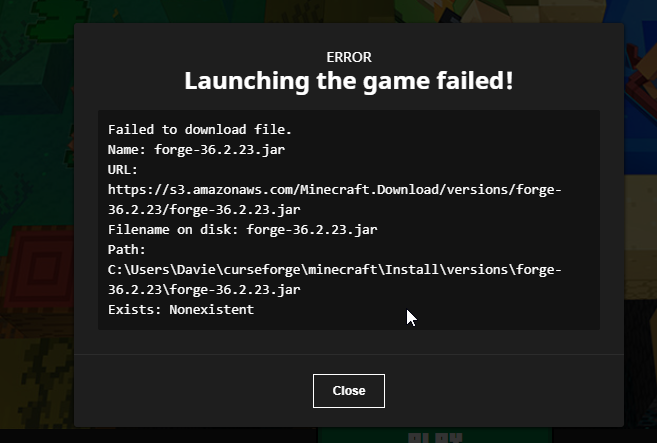 lyric crescent
!mc-installfix
red patioBOT
This is NOT instructions for Repair Profile! They are NOT the same! You need to do this!
- Click on the Minecraft Tab on the Left side of the CurseForge App.
- Click button next to the
Create Custom Profileoption. - Click
Repair Installationoption. - Play game.
NOTE: You will not lose any modpacks or worlds!
lyric crescent
need more info then. what exactly is the problem?
 native blaze
idk when im dowloading it just erases itself
u want me to browse to show show u its rly weird
lyric crescent
!cflogs-app
red patioBOT
<:overwolf:857375414002384916> How to get CurseForge App logs! <:overwolf:857375414002384916>
- Click the
Create logs zipin the menu. - Drag and drop the file it just made to this chat room to upload it.
- Wait for someone to look at it so they can help you.
native blaze
 loud lark
ive tried uploading a server pack for my modpack but i keep getting this message.. what should i do?
 rich flint
You would be better off not including unpacked modloader (forge/fabric) files and have instead a readme.txt explaining to the downloader what modloader to install themselves, or include a script file to install it
native blaze
me?
loud lark
arh okay 😄 thanks
young bone
No
lyric crescent
native blaze
do installfix again, but restart your computer before you try opening the game
lyric crescent
the app, the game, whatever
 smoky cloak
hello i have a problem that i don´t know how to fix it is wenn ever i start a modpack that is custom ist start and launch the Minecraft launcher but never start the game is there a way to fix it i try to reinstall the launcher and the modpack but whit no success
native blaze
anyone here
lyric crescent
smoky cloak
hello i have a problem that i don´t know how to fix it is wenn ever i start a m...
Do other packs work?
lyric crescent
native blaze
anyone here
You don't need to keep asking this. This is a volunteer service, when someone has time they reply to you.
Send a new app log please.
 simple quiver
smoky cloak
hello i have a problem that i don´t know how to fix it is wenn ever i start a m...
simple quiver
smoky cloak
hello i have a problem that i don´t know how to fix it is wenn ever i start a m...
i have the same problem bro
lyric crescent
Have you tried a different pack, or is this just one pack you keep trying?
simple quiver
other pack are working
lyric crescent
!mc-path
red patioBOT
Instructions for changing CurseForge Minecraft install path!
If Minecraft is not installed in CurseForge App:
- Click the in the top left.
- Select Minecraft from the list of games.
- Select the
Advancedoption and select:
--- Windows:Local Disk (C:)at the left side of the window. If you do not see it, clickThis PCfirst.)
--- Mac:/Users/Shared/CurseForge, If it does not exist, make it. - Click
Continue.
If Minecraft is installed in CurseForge App:
- Click the in the bottom left.
- Select the Minecraft tab.
- Click
Change. - Select the location:
--- Windows:Local Disk (C:)at the left side of the window. If you do not see it, clickThis PCfirst.)
--- Mac:/Users/Shared/CurseForge, If it does not exist, make it.
native blaze
its just says dowloading windows 8 runtime then it says deleting files
lyric crescent
!ticket-site
red patioBOT
:bug: Reporting via Website :bug:
Can't open the app or would rather use the website? You can do so here: https://support.curseforge.com/en/support/tickets/new
Fill out the form with accurate detailed information, "It doesn't work" isn't helpful! What exactly doesn't work and why doesn't it work should be easy to answer!
Make sure to upload your Overwolf logs with the Upload File option on the ticket, information on how to get these logs can be found here https://support.overwolf.com/en/support/solutions/articles/9000176827-how-to-get-your-overwolf-logs
native blaze
oh dam its that serous?
lyric crescent
serious? 🤷♂️
i simply don't have an answer for you.
opal cipher
Windows 7 and 8 is not supported any longer, since a long time ago
opal cipher
Do you have Windows 8?
 opal cipher
Then you should do as Yamza said, and open up a ticket and upload those logs
lyric crescent
the issue is forge not installing properly. only guess is a network issue.
but it could be something else too
native blaze
if its network im gonna cry ngl i paid too much for it
lyric crescent
!network
red patioBOT
**Network Issues**
- Try restarting the app
- Try restarting your computer
- Disable any programs that interfere with your connection. VPN, ping tunnels, antivirus, firewall.
- Try restarting your router and modem. Also try using a different connection if possible.
- Try reinstalling Curseforge.
If you still have issues open a ticket (!ticket-site for info) and send your logs with it.
lyric crescent
but like it says, if none of that helps, make a ticket
native blaze
yeah i did all of it early
uhh i dont have a cf acc will it be a prob
cuz i erased my twitch acc of smt
lyric crescent
doesnt matter, tickets use your email
native blaze
my modpacks r gone...
 severe kayak
Hey
lyric crescent
nope. they are just in the previous location. you can either change that back or move them to the new one
severe kayak
How to fix it?
 lyric crescent
You will need to ask for help in the Overwolf discord.
severe kayak
I am writing here out of desperation. They didn't help me
 gaunt badge
is there a way to launch the minecraft launcher as administrator through curseforge?
lyric crescent
severe kayak
I am writing here out of desperation. They didn't help me
That is an overwolf problem. Not a curseforge problem.
severe kayak
Ok
 limber stream
 signal ridge
!mc-installfix try this
red patioBOT
This is NOT instructions for Repair Profile! They are NOT the same! You need to do this!
- Click on the Minecraft Tab on the Left side of the CurseForge App.
- Click button next to the
Create Custom Profileoption. - Click
Repair Installationoption. - Play game.
NOTE: You will not lose any modpacks or worlds!
signal ridge
Not really?
 red patioBOT
Error/Exit codes are useless. Follow these steps so someone can actually help you.
- Right-click the modpack profile icon OR click the button in the modpack profile.
- Click
Open Folder. - Open the
logsfolder. - Drag and drop the FILE named
latestORdebuginto discord.
signal ridge
 mental sigil
Remove optifine then try again
 harsh citrus
hi im on a mac this keeps popping up every time i try and play a modpack it's the same thing for every one and i even changed the install path and put it in the users/shared file
 mental sigil
signal ridge
Remove optifine then try again
mental sigil
signal ridge
Remove optifine then try again
still doesnt work
young bone
Post new log then
mental sigil
young bone
Post new log then
young bone
?noping
red patioBOT
⛔**DO NOT PING OR DM UNLESS ASKED**⛔
Please keep in mind - Quote reply is considered a ping!
⚠️You will be timed out / banned according to moderation judgment.⚠️
young bone
Optifine is still there
mental sigil
but i deleted it
young bone
You didn’t have the launcher open still did you?
Or did you send the same log again, from before removing Optifine
mental sigil
no i didn't send the same log
young bone
Make sure you actually removed optifine, have the launcher closed, and then rerun the game
 wooden fable
can i make a server with curseforge
signal ridge
Nope, Curseforge is just a client mod manager and file hosting site. Has nothing to do with servers
wooden fable
ok thanks
signal ridge
You can make servers using the mods/modpacks and the correct modloaders tho. But for mc server support or questions use #🧱︱mc-other-help
mental sigil
i made sure i deleted optifine, then started the game again but the problem is still there
young bone
Post log
 pseudo quest
its stuck at this
 signal ridge
pseudo quest
its stuck at this
signal ridge
pseudo quest
its stuck at this
What OS are you using?
 crystal kite
I dont see the Problem!
young bone
This is the wrong channel and were already told of the problem in #🧱︱mc-other-help
pseudo quest
signal ridge
What OS are you using?
windows
mental sigil
crystal kite
young bone
This is the wrong channel and were already told of the problem in <#768367574001...
but they dont help me with this
young bone
pseudo quest
windows
Which windows
signal ridge
xp, 7, 8.1, 10, 11?
young bone
crystal kite
but they dont help me with this
You were told to report the problem to mod developer
crystal kite
i dont know what mod the problems make
lyric crescent
the one i told you
young bone
You were told of that too
pseudo quest
signal ridge
xp, 7, 8.1, 10, 11?
11
signal ridge
!network try these
red patioBOT
**Network Issues**
- Try restarting the app
- Try restarting your computer
- Disable any programs that interfere with your connection. VPN, ping tunnels, antivirus, firewall.
- Try restarting your router and modem. Also try using a different connection if possible.
- Try reinstalling Curseforge.
If you still have issues open a ticket (!ticket-site for info) and send your logs with it.
pseudo quest
also the problem may be because i live in iran
young bone
mental sigil
Optifine is still there
lyric crescent
the problem might be with your network then
mental sigil
but i removed optifine, and optifine is no longer in the mod folder
young bone
There’s mention of Optifine in the log
signal ridge
Your removing it from the packs mods folder right? not the mods folder in the .minecraft folder
lyric crescent
C:\Users\f\curseforge\minecraft\Instances\1\mods\OptiFine_1.12.2_HD_U_E3 - Kopie.jar
young bone
Weird thing is, it mentions it twice, one with Kopie, which is concerning and the other without
signal ridge
2 versions maybe?
pseudo quest
what should i do? when i click play, no minecraft launches
signal ridge
!mc-installfix try this
red patioBOT
This is NOT instructions for Repair Profile! They are NOT the same! You need to do this!
- Click on the Minecraft Tab on the Left side of the CurseForge App.
- Click button next to the
Create Custom Profileoption. - Click
Repair Installationoption. - Play game.
NOTE: You will not lose any modpacks or worlds!
mental sigil
i removed optifine from this mod folder
 lyric crescent
make sure there is nothing called optifine in there. then make sure you close the launcher and press play again to restart it
mental sigil
there is nothing called optifine in there
young bone
Where did you get the optifine jar that has Kopie in the file name
lyric crescent
it's not the only thing that had that
young bone
Okay, that’s really concerning
mental sigil
but 3 days ago everything still worked, even with optifine
from one day to the next it suddenly stopped working
lyric crescent
unless you've got a time machine idk how that helps. you can try reinstalling everything.
mental sigil
okay i'll try
young bone
Also, please go to the Optifine server
mental sigil
hm okay
mental sigil
i reinstalled everything and now minecraft starts without error but when i start the map i want to play minecraft crashes
 broken sedge
Experiencing an issue with the curseforge site, where when I try to look at the dependents for a certain mod, I get a cloudflare page telling me theres an issue with the site
It seems like this is happening with multiple mod pages
Is this something others are experiencing as well?
signal ridge
Man was hopping this was just an issue on my end.. Will forward this to support


 signal ridge
What mod was it for?
broken sedge
signal ridge
What mod was it for?
It occured for both Cyclops core and Tetra
And I assume more