#👽︱game-support
1 messages · Page 209 of 1
 acoustic idol
He will need the pack as well
 lethal trench
okay thats what im asking, can he look it up on curse forge or how do i go about that?
acoustic idol
!mc-packshare
 golden muskBOT
There are two ways to share a modpack you've made with others...
Export and Share - For Friends to Small Groups.
- Click the Icon for the modpack.
- Click the
 button next to play.
 - Click

Export. - Select the files that should be included.
- Send the zip to the people that want it! They can follow the instructions in
!mc-installpackto install the pack!
Upload to Curseforge - For Public Release to Everyone.
This options will make your pack public to EVERYONE, it comes with extra requirements and will take some effort to set up.
- Go to here: https://www.curseforge.com/project/432/4471/create
- Fill out the information with a proper description of the pack. This should allow anyone to understand what the pack is.
- Click the Icon for the modpack in the CurseForge app.
- Click the button next to play.
- Click
Export. - Select the files that should be included.
- Open your Project you made on the CurseForge site and Upload the file you just made.
- Wait for Moderation & Sync so it can show up in the client! (See
!syncfor limitations)
golden muskBOT
How to install modpacks with the search features in app.
- Open the

Minecraftsection of the app. - Click the top search bar where it says
Search for modpacksOR Click theBrowse ModpacksTab. - Find the Modpack you want to install and click install on it.
- Wait for CurseForge app to download and unpack all the required files.
- Once finished, click
Play!
How to install modpacks from a Export. (Custom/Private/Site downloaded Modpack zip)
- Get CurseForge App if you don't have it, use
!downloadfor a link. - Get the exported modpack from CurseForge or someone else,
!mc-packshareexplains how to make them. - Open the
Minecraftsection of the app. - Click

Create Custom Profile - Click the
Importoption. - Find the file you just downloaded in step 2 and select it.
- CurseForge app will now attempt to download and unpack the modpack. If it fails, try steps 4-6 again.
- Once finished, click
Play!

 swift copper
Any idea why if I try to download the Better Minecraft Fabric 1.18 modpack for any other launcher, it either sits at "downloading mods" and never moves past 0% (GDLauncher) or sits at the main menu loading screen right at the end but never loads (MultiMC)?
 wild jewel
And curseforge? Which discord you are in
swift copper
Curseforge downloads it fine, but the issue I have is I cannot play my mods if I don't have internet, since CF just flat out won't do anything until the internet is back
 lilac flume
for the spartnary weapon mod how do i get platinum ore and stuff
wild jewel
swift copper
Curseforge downloads it fine, but the issue I have is I cannot play my mods if I...
Then ask those other launchers for help? We don't know what they are doing
swift copper
Alright
 unkempt fable
my previously run servers are not working anymore and the command prompt only has this message

i cant rlly make sense of it, can anyone help me transcribe it?
wild jewel
Did you update java?
wild jewel
Probably not
 waxen pine
look in the pic - it's trying to use java 17 when you must use 8. update to the latest 36.2.28 forge and use java 8 64 bit
unkempt fable
ok but what about when i wanna run older versions of minecraft?
waxen pine
you can edit your start.bat files to directly point to java.exe such as - instead of 'java' at beginning you put "C:\program files\java\whatever-java-folder\bin\java.exe" (keep the quotes)
and fyi - there was a problem with 1.16.5 forge running the newest java 8 versions. looks like they fixed that problem in 36.2.28
unkempt fable
ok but the problem is im trying to run a 1.12 server and the its only 14.21.1.2443
wild jewel
That is 1.16 though
unkempt fable
all of my server where having the same problem so i just ran one of the 1.16 ones
waxen pine
because 1.16.5 and before require java 8
this is all the same issue
also don't use that forge - it's old and has security issue. update to newest forge for 1.12.2 also
waxen pine
use the java 8 tim linked inl ist above
 inland yew
I have a 1.12.2 modded mc server with the morph mod on but whenever someone else morphs my player model gets messed up. Is there any fix for that? It doesnt happen all the time.
inland yew
something like this
 wild jewel
!projectissue
golden muskBOT
Please visit the project page for the content you posted about and look for a way to contact the developer.
Somewhere on the page there is usually a method of contact. Look for one of the following things:
Issuestab like the image below.- Discord link.
- Twitter link.
- Comments section below the project.
If no contact method exists you will either have to remove the project or find a solution on your own.

 coarse nest
I cant see any errors in that
 coarse nest
That is normal
 coarse nest
You wait, and dont close it
 wide magnet
kk
 hoary mulch
Hi i need some help
golden muskBOT
╰( ͡° ͜ʖ ͡° )つ──☆*:・゚ *˜”*°•.˜”*°• Many Help •°*”˜.•°*”˜* <:curselit:796985620550385705>
Please provide a description of your issue with as much detail as possible. If you have an issue with a mod or modpack, tell us the name. Explain what you can see happening. Be specific!
 Tell us what is happening, we already know it "doesn't work".
Avoid using words like "it", tell us exactly what "it" is.
Don't assume anyone knows what you are talking about, be specific.
Tell us what you expected to happen.
Provide screenshots or video if possible.
Provide a log if possible. ?mc-log
 waxen pine
don't send logs as zip files - send them as their regular form
waxen pine
https://www.curseforge.com/minecraft/mc-mods/libvulpes/files/3612649
looks like a problem with this mod / advanced rocketry? it's not very developed yet and they state in that mod version it's probably very break-ey
 amber smelt
Can someone please find the Problem
coarse nest
Can you send this file: C:\Users\henri\curseforge\minecraft\Instances\Modpack\crash-reports\crash-2022-02-20_21.48.35-fml.txt?
coarse nest
Refined curios is erroring, it probably needs updating/an older version of refined storage
coarse nest
Mod extrastorage requires refinedstorage 1.9.16 or above
		Currently, refinedstorage is 1.9.15
 storm tundra
I created a "custom modpack" type thing. Is it possible to create a server and share that exact grouping of mods with friends to play together
 pine rapids
?mc-packshare
golden muskBOT
There are two ways to share a modpack you've made with others...
Export and Share - For Friends to Small Groups.
- Click the Icon for the modpack.
- Click the button next to play.
- Click
Export. - Select the files that should be included.
- Send the zip to the people that want it! They can follow the instructions in
!mc-installpackto install the pack!
Upload to Curseforge - For Public Release to Everyone.
This options will make your pack public to EVERYONE, it comes with extra requirements and will take some effort to set up.
- Go to here: https://www.curseforge.com/project/432/4471/create
- Fill out the information with a proper description of the pack. This should allow anyone to understand what the pack is.
- Click the Icon for the modpack in the CurseForge app.
- Click the button next to play.
- Click
Export. - Select the files that should be included.
- Open your Project you made on the CurseForge site and Upload the file you just made.
- Wait for Moderation & Sync so it can show up in the client! (See
!syncfor limitations)
 marble anchor
how can you make 1.16.5 medieval modpack more manageable for low end pcs
coarse nest
Play a different modpack thats not got 300+ mods in it
marble anchor
ok
 night flame
 quasi hinge
You use a modpack through Curseforge, it doesn't use the new launcher
golden muskBOT
Ignore the new launcher update. CF does not use it or works with it, yet.
Everything will work fine otherwise.
waxen pine
?mc-logs
golden muskBOT
Sending logs for support.
- Right-click the modpack profile icon OR click the button in the modpack profile.
- Click

Open Folder. - Open the
logsfolder. - Drag and drop the FILE named
latestORdebuginto discord.
 dusky musk
the mod is not working
 grizzled marlin
 coarse nest
Go to the settings in the bottom left corner of cf, then to the minecraft category
Scroll down till you see something labelled "Java version", click on the dropdown and send a screenshot of that
grizzled marlin
 golden muskBOT
Servers require specific java version, pick yours here!
Java 8 (for MC versions 1.16.5 and below)
Java 16 (for MC version 1.17)
Java 17 (for MC version 1.18)
Other operating systems and versions
coarse nest
Get a newer one from above, and then set that to the one you just installed
 coarse nest
Try restart cf
 wild wind
I did something in my modded world and now when I attempt to load into it it never does. It happened when my game froze and I had to close the world.
amber smelt
😐
waxen pine
Remove mod "Performant" and see if get same crash report
amber smelt
New Crash report
waxen pine
Well something about refined storage or refined curios
amber smelt
refined Storage
 clear bough
Hey, I have a JEI issue. I'm using an ultrawide monitor, and it is way too small. Does anyone have a fix for this? TipTheScales doesn't work here, and I don't think there's a JEI option to set the GUI scale.

And I want to avoid turning up the normal mc GUI scale
coarse nest
You can change how many rows of items are shown, but it doesnt seem like theres a general jei size option
clear bough
coarse nest
You can change how many rows of items are shown, but it doesnt seem like theres ...
How?
coarse nest
In the config, either through the gear icon in the bottom right or through the config file at config/jei-client.toml
 slate crystal
Hi! I have a question, where can i download curseforge 14.23.5.2856 or a newer version. When i download it from the curse forge site or from overwolf I cant choose the version i want to download, and it always downloads version .2830
golden muskBOT
Wording is important!
Forge = Minecraft Forge, This is a modloader often just called "Forge".
Fabric = Fabric MC, this is another modloader, just called "Fabric".
CurseForge = A Website/App that has content for games.
Mods = Individual mod files.
Modpacks = Multiple mods put into the mods folder or downloaded from CurseForge.
These are not Interchangeable! Please use the correct terms as it allows us to help you faster!
golden muskBOT
You can update the mod loader within the same game version in the CurseForge app by following these steps!
- Click on the modpack profile you are working with.
- Click on the button next to the play button.
- Click on the
 Profile Options button.
 - Select the mod loader version you want from the dropdown.
- Play!
If you need to update to a new game version, a new profile is required.
slate crystal
coarse nest
Are you sure you dont mean forge?
mb it is forge
 autumn agate
I got a Javaw.exe threat warning from Avast after launching Minecraft. Is it related to Forge? Should I be worried? (Using the Forge version that ends with .79 if that helps)
coarse nest
That is fine, just minecraft running lIke it normally should
No idea why avast picked it up
 fleet jewel
its avast, ive got a personal history of using avast for a few years, 99% of what they pick up is false
 last parcel
java.lang.NoClassDefFoundError: dev/sapphic/backpackbaubles/client/BackpackLayer
Reinstall that mod or report to the dev
?projectissue
golden muskBOT
Please visit the project page for the content you posted about and look for a way to contact the developer.
Somewhere on the page there is usually a method of contact. Look for one of the following things:
Issuestab like the image below.- Discord link.
- Twitter link.
- Comments section below the project.
If no contact method exists you will either have to remove the project or find a solution on your own.
autumn agate
ok ty
 zinc flint
My server crashes when (I assume) its generating some structure in the nether, does anyone know for sure what it is?
last parcel
looks related to bclib
last parcel
one mod requires a higher forge version, and you are missing some other mod(s)
    unknown : need any: have missing

Missing Mods:
    unknown : need [14.23.5.2858,): have 14.23.5.2855

Missing Mods:
unknown : need [1.5.1,): have missing```still the first issue
java.lang.NoClassDefFoundError: dev/sapphic/backpackbaubles/client/BackpackLayer
autumn agate
its not there anymore
last parcel
also still wrong forge
autumn agate
curseforge is broken for me I guess cause im using the right forge and I removed that mod
last parcel
look at the 4th line in your log
what you have is not what this needs
Mod biomesoplenty (Biomes O' Plenty) requires [forge@[14.23.5.2858,)]
autumn agate
ok
wild wind
My world crashed and now I cant join it. When I do try it only gets to 'loading terrain' then never continues
 lime ermine
forge 1.8.9 wont show up in installations
how do i get it to show up? i already asked in the forge discord server but they said it wasnt supported
last parcel
Sounds to me like you didn't install it correctly somehow.
lime ermine
i have reinstalled the installer multiple times, delted the 1.8.9 forge in the forge folder multiple times
last parcel
Perhaps instead you could try a mod manager (like curseforge) to install it for you.
lime ermine
the mod isnt on curseforge its on github because im using NotEnoughUpdates for hypixel skyblock
golden muskBOT
How to install mods in CurseForge App.
- Click
+ Create Custom Profile - Name it, select the required Minecraft version, select the modloader & modloader version (usually the highest number), click
Create. - Click the profile icon.
- Click
Add More Content - Search and install the desired mods.
- Start the game!
How to install mods not on CurseForge.
- Right click the profile picture or Open the profile and click the Icon next to the play button.
- Click
Open Folder. - Drag the mod(s) into the
modsfolder. (Note: Some mods will require others, to run. Make sure to read the instructions for the mod!) - Start the game!
 clear bough
zinc flint
My server crashes when (I assume) its generating some structure in the nether, d...
clear bough
zinc flint
My server crashes when (I assume) its generating some structure in the nether, d...
Your server can't have ANY clientside mods.
You have appleskin in the folder, which causes it to crash
I'm not too updated on what mods are clientside in fabric, but I can tell you appleskin is one of them
zinc flint
clear bough
I'm not too updated on what mods are clientside in fabric, but I can tell you ap...
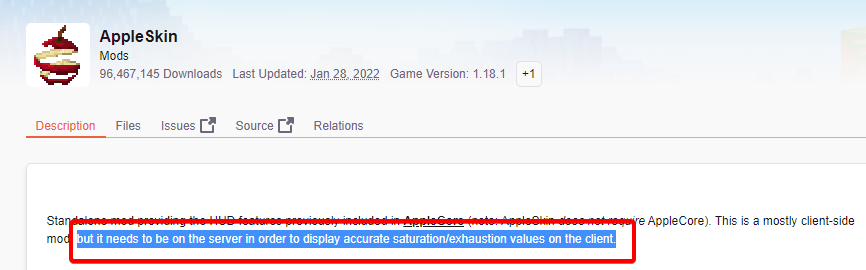
Appleskin is also server side
''This is a mostly client-side mod, but it needs to be on the server in order to display accurate saturation/exhaustion values on the client.''
clear bough
I've had my own server crash with it, so I would check just to be sure
But yea remove any clientside mods you have
last parcel
wtf does that have to do with client side mods..
did you even look at the log they sent?
clear bough
last parcel
wtf does that have to do with client side mods..
I noticed he had clientside mods in his folder when trying to run a server
server's do not like that
last parcel
If the mod is programmed correctly the server does not care.
last parcel
Oh okay.
 naive flint
is there a way i can message the creator of mc eternal because the modpack is broken rn
last parcel
?projectissue
golden muskBOT
Please visit the project page for the content you posted about and look for a way to contact the developer.
Somewhere on the page there is usually a method of contact. Look for one of the following things:
Issuestab like the image below.- Discord link.
- Twitter link.
- Comments section below the project.
If no contact method exists you will either have to remove the project or find a solution on your own.
naive flint
ty
 clear bough
last parcel
https://i.imgur.com/qxYOqdl.png
clear bough
last parcel
https://i.imgur.com/qxYOqdl.png
Maybe I was wrong about appleskin, because it seems it's not a 100% client side mod anymore
naive flint
oo yeah btw is apple skin purely cosmetic and shows saturation? or does it give each food their own saturation?
clear bough
If you were to add, say, JEI into a server's mod folder, the server wouldn't run
clear bough
naive flint
oo yeah btw is apple skin purely cosmetic and shows saturation? or does it give ...
just shows saturation
last parcel
And client side mods have nothing to do with their issue. It is quite obvious what the issue is if you read the log.
clear bough
sigh
I don't really want to argue about running a server with a person who obviously has no experience doing it
It's more complicated then put a mod folder in the server file and bap boom pow
last parcel
That's good, since all you seem to do is assume things.
acoustic idol
clear bough
That's not how it works
How does it work then? Cuz pretty sure what yamza said is how it works.
zinc flint
clear bough
I noticed he had clientside mods in his folder when trying to run a server
Cough I don't
autumn agate
the mods button keep going here and now i cant change mod settings

i fixed it with mods button but some gui things are weird
 frail rampart
Just asking is there a way to remove dynamic trees even after i explored my world a lot?
 toxic agate
hi am i supposed to sumbit my logs here?
fleet jewel
yes
toxic agate
oh ok do i send the file or the text
fleet jewel
file
fleet jewel
reinstalling what
fleet jewel
that doesnt fix crashes 95% of the time
 buoyant quiver
pfff, you're mean
toxic agate
me?
fleet jewel
with the crash log posted, just wait for someone to take a peek at it
toxic agate
oh ok thanks for helping
buoyant quiver
toxic agate
me?
Lol no it's what the crash says
toxic agate
buoyant quiver
Lol no it's what the crash says
prob cuz i reinstalled it 10 times
buoyant quiver
pffffff
fleet jewel
no need to have chats here
buoyant quiver
Dang
last parcel
Failed loading config file forge-common.toml of type COMMON for modid forge
delete that config
buoyant quiver
sorry walper
toxic agate
in the log?
fleet jewel
no, the config file, in the config folder
fleet jewel
are you using curseforge's app (the curseforge launcher)
fleet jewel
it makes life simpler but you arent mandated to use it
toxic agate
is there a way for me to get into the config folder without downloading the app?
fleet jewel
yes
 fleet jewel
delete the bottom one as yamza said
toxic agate
oh yeah
fleet jewel
toxic agate
this might be the wrong folder
config is the name of the folder, and yamza said forge-common.toml which is clearly there, cant be more right than that
toxic agate
i thought there were 2 config folders one for forge and one for minecraft
fleet jewel
minecraft doesnt have a config folder, the config folder is for mods
toxic agate
i thought he said a code line that he wants me to delete thats why i thought its the wrong folder
toxic agate
fleet jewel
minecraft doesnt have a config folder, the config folder is for mods
oh
just curious how did this acctually happen?
i download another launcher before maybe thats the reason
i downloaded voidlauncher
my pc is too shit to even play voidlauncher
last parcel
Could be anything, could be nothing. not really here to dig into why, that'd be for the Forge team if they care.
 weary heath
how do i get my config of ksp
wild jewel
What config?
 shy moss
My game has been crashing without any log after launch. Is there any known fix?
last parcel
what game
shy moss
Minecraft, my bad
last parcel
?mc-installfix restart your computer after
golden muskBOT
This is NOT instructions for Repair Profile! They are NOT the same! You need to do this!
- Click on the Minecraft Tab on the Left side of the CurseForge App.
- Click button next to the
Create Custom Profileoption. - Click

Repair Installationoption. - Play game.
NOTE: You will not lose any modpacks or worlds!
shy moss
I'll try it, ty :D
weary heath
wild jewel
What config?
game version
wild jewel
weary heath
game version
Try making full sentences
Why do you need the config?
weary heath
wild jewel
Try making full sentences
Why do you need the config?
because EVE doesnt work unless you know the version
shy moss
last parcel
?mc-installfix restart your computer after
Didn't work.
 tender pawn
Is Java 8 Update 321 patched from log4j?
coarse nest
Java versions have nothing to do with it
coarse nest
I am talking to the one who asked about java versions
shy moss
Ah, k
tender pawn
So it's safe to install?
coarse nest
Yes, although it breaks older forge versions if you are still using those
tender pawn
I mainly just play modded on forge version 1.12.2 and 1.16.5 on curseforge
i usually use forge version 2860 or 2859 for 1.12.2
coarse nest
If you use curseforge other java versions on your computer are not used, updatingm/downgrading them does nothing
shy moss
tender pawn
bclib is incompatible with RecipeConfidence
I didn't find recipeconfidence
So that's probably not it.
weary heath
wild jewel
Is probably 1.12.2
this is kerbal space program not minecraft
shy moss
Does anyone have a fix? I've updated my drivers, uninstalled mc and reinstalled but nothing is working.
weary heath
shy moss
Does anyone have a fix? I've updated my drivers, uninstalled mc and reinstalled ...
whats the problem
shy moss
weary heath
whats the problem
Whenever I launch Minecraft, it stays for a second or two then disappears with no crash log, and it doesn't send me back to the launcher.
weary heath
shy moss
Whenever I launch Minecraft, it stays for a second or two then disappears with n...
ive had this before, search on yt cause i forgot how but ik thats where i got it from
last parcel
its an issue with the mods they installed
shy moss
what folder could I find that in?
last parcel
the mods folder
shy moss
Not there.
last parcel
attributefix
golden muskBOT
Error/Exit codes are useless. Follow these steps so someone can actually help you.
- Right-click the modpack profile icon OR click the button in the modpack profile.
- Click
Open Folder. - Open the
logsfolder. - Drag and drop the FILE named
latestORdebuginto discord.
last parcel
i dont see any issue here
shy moss
hm. Probably just a normal crash then
last parcel
did you just throw every mod you found into a pack?
shy moss
It's the BetterMinecraft pack
last parcel
oh, then you should be asking them for help with this
shy moss
I have, no response
last parcel
so wait for one?
last parcel
you're not supposed to use more than that for fabric
shy moss
huh
last parcel
reinstall the pack
shy moss
Will do. Thank you for all of the help, Yam
acoustic idol
Whats up?
fleet jewel
they appear to have moved to mc help
acoustic idol
Ah,
 rancid cradle
how can i join my friend? we have a modpack we want to play together and its on 1.16.5, but i dont know how to join him.
last parcel
Find a server, make a server, or buy a server.
rancid cradle
how can i make a server with the modpack on it, and is it free?
last parcel
If your pc can handle it it's free.
rancid cradle
ok thank you
last parcel
How much ram do you have? and what pack?
rancid cradle
16 gb of ram, and its The Kingdom of Daldar
golden muskBOT
How to **manually** install a server - **On your own PC**
- Check if the modpack has a server pack, if it does: use that and skip below.
- Go to the Forge website http://files.minecraftforge.net/ and download the Installer for the forge version the pack is using.
- Run the installer and choose
Install server. Do not install to your desktop. Also do not install inside a OneDrive folder. - Run the server using the forge.jar. A file called
eula.txtwill be generated. Open it and changeeula=falsetoeula=true - From the Client; Copy the
modsfolder,configfolder, and any other folders needed for the pack to work into the server folder. If the modpack has a server pack, use this instead! - Run the server again.
- Port forward your machine if needed. (Google it)
Long version: https://pastebin.com/83DXfGTH
rancid cradle
thank you so much
 fierce mason
what should I do if all the mods I have are on the right version and I have forge and there in the mods folder but when I load the game it doesn't show that I have the mods in the mod section
pine rapids
Did you install the mods with Curse or manually?
pine rapids
It's Curse... not cursed
fierce mason
so is my problem to download them with forge
pine rapids
So you downloaded the mod manually? Did you move it anywhere?
fierce mason
to the mods section to minecraft
pine rapids
are you launching the game with Curse?
fierce mason
yes
pine rapids
Curse uses a separate installation from the standalone launcher, it doesn't search .minecraft/mods for mods
?mc-installmods
golden muskBOT
How to install mods in CurseForge App.
- Click
+ Create Custom Profile - Name it, select the required Minecraft version, select the modloader & modloader version (usually the highest number), click
Create. - Click the profile icon.
- Click
Add More Content - Search and install the desired mods.
- Start the game!
How to install mods not on CurseForge.
- Right click the profile picture or Open the profile and click the Icon next to the play button.
- Click
Open Folder. - Drag the mod(s) into the
modsfolder. (Note: Some mods will require others, to run. Make sure to read the instructions for the mod!) - Start the game!
fierce mason
oh ok
fierce mason
golden musk
I did the section option but it didnt work
pine rapids
Was the game running when you added the mod?
fierce mason
no
pine rapids
Where was the mods folder that you put the mod into?
fierce mason
in the minecraft folder
pine rapids
Then you didn't do the second option
fierce mason
oh
pine rapids
Read closer
fierce mason
Im confused on which profile there talking about
 agile zodiac
What mods take lots of RAM usage
I’m playing using 5GB and got 80 mods
Yet my game always reaches max within minutes of world boot, making lots of freezes happen
coarse nest
Mods that add a ton of blocks often can, like BoP or Mr Crayfishes furniture
agile zodiac
Even mods that add blocks but no biomes???
coarse nest
Yes? Thats what I said
agile zodiac
Oh right, sorry
coarse nest
Also 64x+ texture packs will use up a lot of ram
agile zodiac
That makes loads of sense cos I have many block adding mods
Ah that’s not a concern, I’ve just got 16x16 but that’s good to know
pine rapids
fierce mason
Im confused on which profile there talking about
Another name for it would be "Instance"
agile zodiac
Well thanks!
Ima go to sleep for now but I’ll let you know if it works out
Removed 8 mods
autumn agate
single player world stuck at 26%
 tribal brook
I got this, as well as 2 Invalid Biome ID Crashes from ChromatiCraft. Uhhh...Help?
 coarse nest
!mc-logs
golden muskBOT
Sending logs for support.
- Right-click the modpack profile icon OR click the button in the modpack profile.
- Click
Open Folder. - Open the
logsfolder. - Drag and drop the FILE named
latestORdebuginto discord.
tribal brook
Here's both a Crash Report, and the Log.
Also, not using the app. The base launcher.
And feel free to @ me in replies. Does get me to respond faster.
coarse nest
tribal brook
Here's both a Crash Report, and the Log.
Also, not using the app. The base laun...
Seems to be a known issue with no solution, its probably a mod conflict somewhere, or it could just be old stuff that isnt working now days
https://github.com/ReikaKalseki/Reika_Mods_Issues/issues/2962
tribal brook
Ahhh great.
Looks like I won't get to see the ending anytime soon.
 autumn arch
I have a problem there a game that I need the map and the map wont show up got eny thing for me
Eny one?
Please tell me
golden muskBOT
╰( ͡° ͜ʖ ͡° )つ──☆*:・゚ *˜”*°•.˜”*°• Many Help •°*”˜.•°*”˜* <:curselit:796985620550385705>
Please provide a description of your issue with as much detail as possible. If you have an issue with a mod or modpack, tell us the name. Explain what you can see happening. Be specific!
Tell us what is happening, we already know it "doesn't work".
Avoid using words like "it", tell us exactly what "it" is.
Don't assume anyone knows what you are talking about, be specific.
Tell us what you expected to happen.
Provide screenshots or video if possible.
Provide a log if possible. ?mc-log
autumn arch
I need a map and I installed the map but it won’t let me play the map?!??
I playing superhero ultimate too
coarse nest
You need to explain your problem fully, no one knows what "superhero ultimate" is, or what map you are trying to use
Getting angry will not help your case either
autumn arch
It called vertoak map for super hero ultimate and you know how a map sould show when I installed it it won’t show up so I can play it I made a new world and I tryed to find out why it won’t work for a map that doese not show up
Cant*
coarse nest
How did you install the map?
coarse nest
Can you show a screenshot of what you used to install it/where you placed it if you used file explorer? I am not sure what you mean by "the option curse forge or folder"
coarse nest
It should just be in your worlds screen then
autumn arch
But it not I will show you
 crystal stirrup
I don't know where to exactly ask but how do I ask for a curseforge sponsorship
coarse nest
Hmm.
Click the three dots In the modpack screen, the click Open folder. In the folder it opens open the saves folder, send a screenshot of that
autumn arch
Mac is the map
It won’t load
No the image won’t load
Ok here

It the mac it the map
And the button one too
coarse nest
Open the bottom one, whats inside there?
 coarse nest
Ahhhh
Click on the top folder in there then press Ctrl + C. Go back to the saves folder and press Ctrl + V
autumn arch
Wait go press what what top folder
Will it says config
In saves in it confit
Config*
coarse nest
autumn arch
The top folder one in this screenshot, "Veratook map V12"
It needs to go into the saves folder, not the config one
autumn arch
I think I know what the problem is it probably this why

I think I spawned somewere else
If not I will ask for more support
coarse nest
The map will not be loaded when you create a world, it is only loaded when you open it from the worlds screen.
The reason it is not in the worlds screen is because the map does not seem to support curseforges map install system
If you copy the folder I said above to the saves folder it will appear in the worlds list
 molten halo
autumn arch
molten halo
autumn arch
So what I need to do tell me one more time then I will stop bothering you
Hello?
Nvm thank you again
Nvm it still won’t work
wild jewel
weary heath
this is kerbal space program not minecraft
I know, I checked the ksp changelog and saw that they were on 1.12.2, or 1.2.2 🤷♂️
Could look for yourself, or just boot the game and look on the menu screen for the version
autumn agate
 hidden spruce
i was building with some steel and iron type of blocks and then it crashed and when i load it it crashes
but it didnt crash due to me placing something
it crashes when a chunk loads
zinc flint
My modpack crashes at startup
golden muskBOT
Sending logs for support.
- Right-click the modpack profile icon OR click the button in the modpack profile.
- Click
Open Folder. - Open the
logsfolder. - Drag and drop the FILE named
latestORdebuginto discord.

 fervent lynx
?
golden muskBOT
Please visit the project page for the content you posted about and look for a way to contact the developer.
Somewhere on the page there is usually a method of contact. Look for one of the following things:
Issuestab like the image below.- Discord link.
- Twitter link.
- Comments section below the project.
If no contact method exists you will either have to remove the project or find a solution on your own.
fervent lynx
do i instal it and add it to the modpack?
last parcel
the instructions tell you what to do about this, read them...
fervent lynx
ok
autumn agate
jeid?
autumn agate
thanks
last parcel
If you have a problem just explain the problem and someone will answer. You do not need to call out specific people.
fleet jewel
mans dm'd me

 still vessel
no
last parcel
Random DM is against the rules.
still vessel
but the problem i have right now is that when i start minecraft in curseforge nothing shows up
still vessel
I hav restarted my pc
wild jewel
Then what does show up?
wild jewel
What launcher? Curseforge or minecraft itself?
 pliant mortar
Noo are you trying to make your own mod file ?
still vessel
no
i have 2 on
“MinecraftCapes Mod” Hypixel Skyblock Modpack
I can screen share if you’d like
pliant mortar
Are you trying to play those mods together?
still vessel
yes
pliant mortar
I’ve had the same problem
still vessel
Have you fixed it?
pliant mortar
No I’ve have been trying to get help and no one has helped me
still vessel
my friend said its probably syntax..
last parcel
You still have not explained an issue, and now you are making a mess out of someone else's issue.
still vessel
Who me?
 still vessel
nope
pliant mortar
last parcel
Now can we move on from assuming you have the same issues?
still vessel
i just want to get this over with
last parcel
still vessel
i just want to get this over with
?mc-installfix do this, then restart your computer, then try again to play the pack.
golden muskBOT
This is NOT instructions for Repair Profile! They are NOT the same! You need to do this!
- Click on the Minecraft Tab on the Left side of the CurseForge App.
- Click button next to the
Create Custom Profileoption. - Click
Repair Installationoption. - Play game.
NOTE: You will not lose any modpacks or worlds!
last parcel
pliant mortar
?mc-log
golden muskBOT
Sending logs for support.
- Right-click the modpack profile icon OR click the button in the modpack profile.
- Click
Open Folder. - Open the
logsfolder. - Drag and drop the FILE named
latestORdebuginto discord.
still vessel
alright
last parcel
§7Currently, §6curios§r§7 is §o§nnot installed```my game crashed again:
pliant mortar
So I need to change something? I don’t follow
last parcel
You did not install a required mod, install it.
pliant mortar
Ok
last parcel
autumn agate
my game crashed again:
Caught exception from RPG Backpacks (rpg_backpacks)
?projectissue
golden muskBOT
Please visit the project page for the content you posted about and look for a way to contact the developer.
Somewhere on the page there is usually a method of contact. Look for one of the following things:
Issuestab like the image below.- Discord link.
- Twitter link.
- Comments section below the project.
If no contact method exists you will either have to remove the project or find a solution on your own.
pliant mortar
last parcel
You did not install a required mod, install it.
All I have is jei I thought that didn’t need any other mods
last parcel
Clearly jei is not the only mod you have installed, since the log states you have a mod called eartifacts which is missing its dependency.
still vessel
yamza i dont think it worked
last parcel
what happens
still vessel
the same problem
last parcel
explain the same problem
last parcel
no
pliant mortar
This is the profile I opened and sent the log for and that’s the only mod it has
 still vessel
and now the same problem happened and the launcher pops up and i press launch and nothing happens
last parcel
pliant mortar
This is the profile I opened and sent the log for and that’s the only mod it has
That isnt what the log you sent is saying.
pliant mortar
Hmm
last parcel
still vessel
and now the same problem happened and the launcher pops up and i press launch an...
show the launcher that pops up
still vessel
 last parcel
then you press play and..?
still vessel
lemme record a video
last parcel
has any pack worked previously?
still vessel
well it has with another profile i wanted to update it but i didnt know how so i deleted the profile and now its nack here
(ik how to update it)
last parcel
Well my guesses are that:
-You have an issue with the folder it is installed to. But if it worked before then it shouldnt be this.
-Something is blocking the download for the launcher to work.
still vessel
do you know what potentially could block the launcher to work?
last parcel
connection issue, firewall, antivirus, virus, isp, vpn, random programs
still vessel
could avast block it
last parcel
antivirus was the 3rd thing in my list
autumn agate
I got another crash
last parcel
dev/sapphic/backpackbaubles/client/BackpackLayer
last parcel
GitHub
https://pastebin.com/QX3TFdSj java.lang.NoClassDefFoundError: dev/sapphic/backpackbaubles/client/BackpackLayer at net.minecraft.client.renderer.entity.RenderPlayer.<init>(RenderPlayer...
🤷♂️
autumn agate
holy shit too many problems
 noble needle
Why does post initialising thaumcraft take ages? I have 10gb of ram allocated so that shouldn’t be the problem
last parcel
Not sure what you're talking about.
noble needle
The fifth stage of the loading progress has been stuck on thaumcraft for a good 30 minutes now.
last parcel
autumn agate
holy shit too many problems
It's the same error dude. You need to remove whatever mod is calling that function since it doesn't work. If you dont know which you need to remove mods until solved.
last parcel
autumn agate
i removed the mod
🤔
still vessel
Yamza so there no way to fix curseforge from not launching minecraft?
last parcel
The issue is not from curseforge.
still vessel
Im not sure what to do than..
golden muskBOT
<:overwolf:857375414002384916> How to get CurseForge App logs! <:overwolf:857375414002384916>
- Click the

Create logs zipin the menu.
menu. - Drag and drop the file it just made to this chat room to upload it.
- Wait for someone to look at it so they can help you.
 last parcel
2. Drag and drop the file it just made to this chat room to upload it.
still vessel
last parcel
You ever used a cracked client perhaps?
last parcel
Using them at all messes with stuff on your computer that can screw up legit minecraft installs. But if you didn't then it's not that and i'm back to it being your computer/connection.
still vessel
can i fix that?
last parcel
if you figure out what it is
quasi hinge
Lunar, you can’t use other mods with, it’s a modpack combined with a launcher
last parcel
either/any. note that i do not know how to fix the issues they cause. I only know they can create issues.
still vessel
is there any other launchers i can use other than curseforge that has sba neu ect
last parcel
no idea what those stand for
still vessel
like u talked about fabric
last parcel
fabric is a modloader, not a launcher. and that doesnt explain what you said at all.
still vessel
So curseforge is the only way i can use sba neu mods?
last parcel
last parcel
no idea what those stand for
?
still vessel
is curseforge a mod loader?
last parcel
!!=
golden muskBOT
Wording is important!
Forge = Minecraft Forge, This is a modloader often just called "Forge".
Fabric = Fabric MC, this is another modloader, just called "Fabric".
CurseForge = A Website/App that has content for games.
Mods = Individual mod files.
Modpacks = Multiple mods put into the mods folder or downloaded from CurseForge.
These are not Interchangeable! Please use the correct terms as it allows us to help you faster!
still vessel
Alright
autumn agate
java.lang.RuntimeException: Invalid id 256 - maximum id range exceeded. << problem im getting
and i downloaded jei
acoustic idol
Need to download jeid
autumn agate
i did
acoustic idol
You downloaded this one?
To fix "Invalid ID 4096" install this mod: https://www.curseforge.com/minecraft/mc-mods/jeid
golden muskBOT
To fix "Invalid ID 4096" install this mod: https://www.curseforge.com/minecraft/mc-mods/jeid
last parcel
then jeid doesnt fix the problem and you need to remove a mod that is exceeding the id limit
autumn agate
where do find the dimensioon cfg
last parcel
all configs are in the config folder
 left bolt
When u update a mod does it change the version because a few of the mods i have need updates but i play on 1.16.5
last parcel
it changes the version of the mod, yes
noble needle
what can I do to fix this?The game crashed whilst there was a severe problem during mod loading that has caused the game to fail
Error: net.minecraftforge.fml.common.LoaderExceptionModCrash: Caught exception from Just Enough Items (jei)
Exit Code: 255
noble needle
Ah okay I’ll see what I can find
last parcel
what
 oblique parcel
i instal a modpack in curseforge app but where are the file ? because in the past we can play with unoficial minecraft version
and curseforge start all time the real minecraft launcher
oblique parcel
why ? Your in colaboration with mojang ?
last parcel
Obviously.
 obtuse sparrow
not exactly sure where to ask this, but i get an error when trying to join a modded aternos server. any chance someone from here could help me out? i tried forums already but didnt really get an answer.
fleet jewel
show the error then?
obtuse sparrow
https://mclo.gs/o9DkiQN heres the log
667 lines
thank you so much
it always says "fatally missing registry entries" when i try to join
 coarse elm
Your client doesn't match the server in mods/configs
obtuse sparrow
i checked all the mods and they are all exactly the same as in the server folder
i went thrue all the mods thats the weird part
even the versions and everything
coarse elm
Then do all the configs.
Your client should be a one to one copy of the server with client mods.
obtuse sparrow
will it work if i delete the config folder and let minecraft remake it?
obtuse sparrow
omg thank you so much i forgot that i need to do it on the servers config too. this helped me out so much
coarse elm
What version are you playing out of curiosity
obtuse sparrow
1.12.2 i would play on a lil higher version but some mods dont run on higher versions
coarse elm
👍
 fathom forge
hi hello im having an issue with the Controllable mod for Minecraft and wondering if i could get some help
golden muskBOT
╰( ͡° ͜ʖ ͡° )つ──☆*:・゚ *˜”*°•.˜”*°• Many Help •°*”˜.•°*”˜* <:curselit:796985620550385705>
Please provide a description of your issue with as much detail as possible. If you have an issue with a mod or modpack, tell us the name. Explain what you can see happening. Be specific!
Tell us what is happening, we already know it "doesn't work".
Avoid using words like "it", tell us exactly what "it" is.
Don't assume anyone knows what you are talking about, be specific.
Tell us what you expected to happen.
Provide screenshots or video if possible.
Provide a log if possible. ?mc-log
coarse nest
Keep in mind you would probably get better help from the mod authors discord, but we may be able to help depending on the problem
fathom forge
I installed the mod using the curseforge launcher, but nothing seems to change, it feels like it isn't being applied at all
but sure i'll check the author's discord as well 👉 😎 👉
coarse nest
How did you install it?
(its not worth going to the authors discord if its a problem with installing it btw)
fathom forge
i hit the orange install button with the curseforge logo
coarse nest
Does it show in the list of installed mods in the cf app?

 sweet gate
Don't know if anyone is able to help with this, but my friend has been hosting an ATM6 Minecraft server for a few weeks now and 3 of us have been playing on it fine until now, every time we try to join the server, everyone but the host loads in for a few seconds and then gets disconnected with the following error: "Internal Exception: java.io.IOException: An existing connection was forcibly closed by the remote host"
coarse nest
fathom forge
Is the instance it launches a modded one or a vanilla one?
fathom forge
It seems vanilla, but i don't have any other mods installed. Is there a way to tell otherwise?
coarse nest
In the f3 menu in the top left it will say "forge" if its forge
fathom forge
oof, it fixed itself, thanks a bunch, though
i think i was using the wrong launcher
coarse nest
Ahh. That can happen if you dont close the vanilla launcher
fathom forge
the updated one with windows 10 support doesn't seem to work with forge
golden muskBOT
Ignore the new launcher update. CF does not use it or works with it, yet.
Everything will work fine otherwise.
fathom forge
that'll do it lmao
last parcel
Doesn't work with curseforge

 last parcel
Probably should report that to the dev of mcdoodlecore
last parcel
?projectissue
golden muskBOT
Please visit the project page for the content you posted about and look for a way to contact the developer.
Somewhere on the page there is usually a method of contact. Look for one of the following things:
Issuestab like the image below.- Discord link.
- Twitter link.
- Comments section below the project.
If no contact method exists you will either have to remove the project or find a solution on your own.
sweet gate
sweet gate
Don't know if anyone is able to help with this, but my friend has been hosting a...
I can get my friend who hosts the server to upload his debug and latest logs here tomorrow if needed.
 brave rover
last parcel
?projectissue
brave rover
last parcel
?projectissue
I cant find the mcdoodlecore on forge, I dont think its there
last parcel
Ok then I wouldn't know either. Don't use it
brave rover
last parcel
Ok then I wouldn't know either. Don't use it
there is 2 cores tho on this, does that have to do with something

Galacticraft core and micdoodlecore
last parcel
Seems like they might be the same thing
brave rover
Should i disable one of them?
last parcel
That would answer the question
 mental adder
keep getting an error code 1 after trying to launch a mod, what would be my best course of action?
golden muskBOT
Error/Exit codes are useless. Follow these steps so someone can actually help you.
- Right-click the modpack profile icon OR click the button in the modpack profile.
- Click
Open Folder. - Open the
logsfolder. - Drag and drop the FILE named
latestORdebuginto discord.
mental adder
coarse nest
!mc-installfix
golden muskBOT
This is NOT instructions for Repair Profile! They are NOT the same! You need to do this!
- Click on the Minecraft Tab on the Left side of the CurseForge App.
- Click button next to the
Create Custom Profileoption. - Click
Repair Installationoption. - Play game.
NOTE: You will not lose any modpacks or worlds!
 hollow steppe
what does this crash report mean??
autumn agate
I'm making my own modpack and I'm trying to figure out a solution to this error so please someone help thanks!
 waxen pine
?mc-logs
golden muskBOT
Sending logs for support.
- Right-click the modpack profile icon OR click the button in the modpack profile.
- Click
Open Folder. - Open the
logsfolder. - Drag and drop the FILE named
latestORdebuginto discord.
 terse nimbus
Hi guys, on Forge MTG for desktop, there is a Workshop Tab. It has a card designer Tab and a Script Tab. But nothing appears on them? Are they already implemented features or not yet?
coarse elm
That doesn't sound like anything CurseForge owns?
terse nimbus
Is this not owned by CurseForge?
 coarse elm
Nope. No clue what that is.
coarse elm
🤨
coarse elm
terse nimbus
Because i was directed to this group
https://www.slightlymagic.net/forum/viewforum.php?f=26
Seems like this should be the place you should be at.
terse nimbus
I am there, but not a very active community at the momment
coarse elm
Just searched "Discord" in the site and found that on a release post
Give them a try
 torpid dew
I think the MTG stands for Magic The Gathering so...
 sage pier
Yup, it indeed does. That's why you have deck sets in the screenshot.
Been a few years since I last looked at my decks. :'D
torpid dew
lol
 fickle jolt
keep getting data pack safemode shit in 1.16.5 everytime I try to load a save with mods
coarse nest
!mc-logs
golden muskBOT
Sending logs for support.
- Right-click the modpack profile icon OR click the button in the modpack profile.
- Click
Open Folder. - Open the
logsfolder. - Drag and drop the FILE named
latestORdebuginto discord.
fleet jewel
#786424115535544350 minecraft, then #⚙️︱authors-help
 white steeple
My game crashed at 100% after starting a new world with Better Minecraft, how can I fix it?
last parcel
try increasing ram
white steeple
to how much?
last parcel
more than you have now and less than you have total
last parcel
?mc-ram
golden muskBOT
How to set Global Minecraft RAM value.
- Click the
 icon in the bottom left to open settings.
 - Click the Minecraft tab.
- Scroll down.
- Slide slider to recommended ram range as seen below.
 autumn agate
I'm trying to add MCheli to my modpack so if anyone can help please do! thanks
wild jewel
!projectissue
golden muskBOT
Please visit the project page for the content you posted about and look for a way to contact the developer.
Somewhere on the page there is usually a method of contact. Look for one of the following things:
Issuestab like the image below.- Discord link.
- Twitter link.
- Comments section below the project.
If no contact method exists you will either have to remove the project or find a solution on your own.
autumn agate
what if the mod page has no issues tab (if you're directing it towards me)
wild jewel
Then you try one of the other 3 options listed.
autumn agate
well then i'm outta luck
wild jewel
Firstly, this is not my mod. This is created by a Japanese user by the name of EMB4. I have had permission from both him and the Curse team (via Facebook) to upload this here. You can view the original Japanese page here.
autumn agate
leads to a dead link sadly
wild jewel
Then you probably won't get a fix for it
autumn agate
now I got another problem
 outer bramble
So im getting minecraft code -1 how do i fix this?
golden muskBOT
Sending logs for support.
- Right-click the modpack profile icon OR click the button in the modpack profile.
- Click
Open Folder. - Open the
logsfolder. - Drag and drop the FILE named
latestORdebuginto discord.
outer bramble
white steeple
i put my ram up to 9gb and the better minecraft mod still crashes before loading in at 100%
outer bramble
outer bramble
So im getting minecraft code -1 how do i fix this?
its now a error code 1
golden muskBOT
Error/Exit codes are useless. Follow these steps so someone can actually help you.
- Right-click the modpack profile icon OR click the button in the modpack profile.
- Click
Open Folder. - Open the
logsfolder. - Drag and drop the FILE named
latestORdebuginto discord.
white steeple
white steeple
i put my ram up to 9gb and the better minecraft mod still crashes before loading...
how do i fix it? it's an exit code 6
golden muskBOT
Error/Exit codes are useless. Follow these steps so someone can actually help you.
- Right-click the modpack profile icon OR click the button in the modpack profile.
- Click
Open Folder. - Open the
logsfolder. - Drag and drop the FILE named
latestORdebuginto discord.
autumn agate
its giving me an exit code -1 is there a way to fix it?
golden muskBOT
Error/Exit codes are useless. Follow these steps so someone can actually help you.
- Right-click the modpack profile icon OR click the button in the modpack profile.
- Click
Open Folder. - Open the
logsfolder. - Drag and drop the FILE named
latestORdebuginto discord.
golden muskBOT
Please visit the project page for the content you posted about and look for a way to contact the developer.
Somewhere on the page there is usually a method of contact. Look for one of the following things:
Issuestab like the image below.- Discord link.
- Twitter link.
- Comments section below the project.
If no contact method exists you will either have to remove the project or find a solution on your own.
autumn agate
last parcel
`zmaster587.libVulpes`
talking about my file?
last parcel
seems so
last parcel
white steeple
how do i fix it?
How much ram is allocated, and how much do you have?
white steeple
last parcel
How much ram is allocated, and how much do you have?
i have 12228 in total and allocated is 9024
last parcel
you should report to the pack dev then
white steeple
?
last parcel
last parcel
read
 south carbon
If I upgrade my PC, will my minecraft worlds persist?
wild jewel
Define upgrade
last parcel
Backup your files!
south carbon
wild jewel
Define upgrade
getting a new pc entirely
wild jewel
Then you need to copy the files over
hidden spruce
who knows how to create mobs
last parcel
You should probably use a development discord, like MMD perhaps.
autumn agate
im trying to convert my modpack that i made to a server and put it on my server but it crashes
last parcel
send the latest.log from the server
autumn agate
last parcel
you are missing dependencies, did you actually test this pack?
autumn agate
yes it works on the client
last parcel
somehow you are missing mantle
autumn agate
oh
i guess it did not copy over
one sec
im booting the server up to test it again
crashed
autumn agate
yea i dont remember what mods are client side tho
ok
ok i removed combat music
its says nekos enchantment books
as well
is create automated a clinet side mod?
last parcel
either that or it's broke
these mods should not be crashing even if they are client mods. devs are being lazy and not programming them correctly.
autumn agate
should i reinstall create automated into it?
acoustic idol
The creat mods are funky sometimes. They just stop for no reason. Never heard back from the devs when I asked about this. Its a server and client mod
last parcel
you should report to the dev for that answer 🤷♂️
acoustic idol
Github auto closed it cuz it was "stale"
autumn agate
i mean i can send u the debug log
 high silo
hey, my modpack has been crashing every time I try and access a recipe through jei. I'm not confident in reading code so if anyone is able to identify the issue, help would really be appreciated, thanks
autumn agate
I need to add liteloader to a modpack and I was hoping to get some help with it?
last parcel
high silo
hey, my modpack has been crashing every time I try and access a recipe through j...
Report this to agricraft
wild jewel
Liteloader? That is old, what is saying you need to add it?
autumn agate
it worked
high silo
what should i report exactly
autumn agate
thanks (:
last parcel
the crash
high silo
ok will do
autumn agate
wild jewel
Liteloader? That is old, what is saying you need to add it?
voxelmap
its required for it
wild jewel
Which version?
autumn agate
1.7.10
high silo
@last parcel in the meantime, is there anything in the crash report that I could fix?
wild jewel
autumn agate
1.7.10
http://www.liteloader.com/
Have fun with the manual install
last parcel
high silo
<@!125588118538682368> in the meantime, is there anything in the crash report th...
you can remove either of those mods
autumn agate
i mean when i tried to join it gave me this
 autumn agate
wild jewel
<http://www.liteloader.com/>
Have fun with the manual install
autumn agate
wild jewel
<http://www.liteloader.com/>
Have fun with the manual install
weird thing I keep clicking the link for it but it won't download
high silo
how do I remove mods?
wild jewel
autumn agate
weird thing I keep clicking the link for it but it won't download
It is old as can be, what else do you expect?
autumn agate
so now I'm looking for the files directly but idk if I'll find that here sadly
last parcel
high silo
how do I remove mods?
The trash icon next to the mod name.
high silo
ok, will this screw up my world?
last parcel
depends on what you remove
high silo
so just agricraft then
autumn agate
autumn agate
i mean when i tried to join it gave me this
did i do something wrong
last parcel
i assume that mod adds items, so that could mess up the world
high silo
ok..
autumn agate
when i try to join the server crashes
and it ssaid because of 60 ticks something
i changed it
now i dont get that error but a i get disconnected
zinc flint
autumn agate
now i dont get that error but a i get disconnected
Send screenshots and log files, we cant do much with this info
zinc flint
Yup send both
 last parcel
Don't ping people unless they ask you too #📛︱rules 5.
You need a mod to expand packet size. I don't recall the name.
autumn agate
last parcel
could be
autumn agate
would i need to install it on my server and client?
last parcel
ya.
 golden muskBOT
Error/Exit codes are useless. Follow these steps so someone can actually help you.
- Right-click the modpack profile icon OR click the button in the modpack profile.
- Click
Open Folder. - Open the
logsfolder. - Drag and drop the FILE named
latestORdebuginto discord.
 fading swift
Recently I have been dealing with a modpack problem for quite some time now. whenever I launch a custom pack the launcher first tells me I need to switch over to the new launcher but that gives me my vanilla launcher with none of the mods on it, so i would decline because i like my mods and it would never even enter a title screen before saying "this crash may be caused by an invalid Java Runtime configuration. Check any custom configuration settings"
golden muskBOT
"Invalid Java Runtime Configuration" does not help us, Follow these steps so someone can actually help you.
- Right-click the modpack profile icon OR click the button in the modpack profile.
- Click
Open Folder. - Open the
logsfolder. - Drag and drop the FILE named
latestORdebuginto discord.
fading swift
forgot to add logs (first time using this server)
 real finch
not sure if this goes in game support or curseforge supprot so ill put it here i dont know how to update to that version of forge and ive looked a bit on the internet and cant find anything there either

this is from the minecraft Wynntils modpack
pine rapids
Is this a pack installed with Curse?
Are you running it with Curse?
 eternal forge


 golden muskBOT
Error/Exit codes are useless. Follow these steps so someone can actually help you.
- Right-click the modpack profile icon OR click the button in the modpack profile.
- Click
Open Folder. - Open the
logsfolder. - Drag and drop the FILE named
latestORdebuginto discord.
hollow steppe
what does this mean???
pine rapids
Possible conflict between reskillable and movingworld
hollow steppe
ill check it out, thanks
hollow steppe
its still not working, what else should i do?
almighty @coarse elm, may you assist me like you have before
coarse elm
I can but next time please post it and wait for someone
hollow steppe
got it, my fault
its something to do with the specific world and not the modpack itself. it was working fine until aroma backup buttfucked my storage and i ran out of space, which caused it to crash saying something ab "disk space". i went into my files and deleted what seemed to be usless backups. since, everytime i load into the world my hotbar shows but the world wont generate
coarse elm
then your world is corrupted. There's no fixing that.
hollow steppe
all those hours down the drain 😭
coarse elm
You can delete the chunks you are in but yeah, they are lost for good.
Full drives = bad
hollow steppe
funny part too was that it wasnt like i didnt have that much space to begin with. aroma ate up 130 Gb
thanks for the help anyway
 radiant orbit
Sorry, very new here... if I install 2 mods, and each have it's own respective "Play" button with Forge... I'm assuming having multiple mods is a no-no? Asking because I use Controllable and I want to use that with RLCraft. Thanks everyone.
quasi hinge
You can play with more than one mod, I’m not sure how else to respond to that
radiant orbit
to play each mod, I hover, and hit play on each, but for RLCraft it doesn't allow me to access Controllable. I'm sure I'm just missing something. Any help would be great.
 quasi hinge
You can’t really launch two modpacks at the same time
There’s a setting that can be turned on for RLCraft so you can add a mod
acoustic idol
!mc-modifypack
golden muskBOT
How to add/remove mods in a modpack.
- Click on the picture of the modpack.
- Click the

Add More Contentbutton, IF this button is not there, see below before continuing. - Find the Mods, Resource Packs or Maps you wish to Install and click
Installon them. - Wait for all the required mods to be downloaded.
- Start the modpack.
How to Enable/Disable content management for modpacks.
- Click on the picture of the modpack.
- Click on the button next to the
Playbutton. - Click on
Profile Options. - Check the
Allow content management for this profileoption if you want to edit the content of the modpack, uncheck it to disable.
NOTE: The Allow content management for this profile option is what allows you to Delete, Disable, Update or Install any Mods, Resource Packs or Maps managed by CurseForge. It must be on to modify any of them! (Currently)
quasi hinge
That’s what I’m thinking of
radiant orbit
Thanks for the help. I'll give it a shot. 👍
 cold knot
Hey, I was hoping someone maybe had advice on this? I'm playing modded MC with a friend of mine and I cannot see myself in singleplayer, and attempting to play with my friend I cannot see her and she can't see me. I genuinely have no idea what mod could be affecting this, I do have shaders and optifine but I took the shaders off and still nothing. And I've been flipping through like animations and other video settings and nothing has let me see my playermodel yet. Here are a list of the mods we're using if this helps weed out whatever could be causing this. Thanks! We've also tried relogging/restarting to no avail. I also just noticed that I cannot see any mobs at all
Bookshelf | Chisel | ConnectedTexturesMod | CoroUtil | Custom Mob Spawner | DarknessLib |Doctor Who - Weeping Angels (Forge) | Dynamic Lights | Game Stages | GraveStone Mod | Grue | Improved Mobs | Just Enough Items (JEI) | Lieutenant | Macaw's Bridges | Macaw's Doors | Macaw's Fences and Walls | Macaw's Furniture | Macaw's Roofs | Macaw's Trapdoors | Macaw's Windows | Mo' Creatures | OpenBlocks Elevator | Ore Excavation | Pam's HarvestCraft | Smooth Entity Light | TenshiLib | TrashSlot | Tree Chopper | U Team Core | Useful Backpacks | Xaero's Minimap | Zombie Awareness
waxen pine
cold knot
Hey, I was hoping someone maybe had advice on this? I'm playing modded MC with a...
can you post the latest.log file of the server after it's been booted up?
cold knot
waxen pine
can you post the latest.log file of the server after it's been booted up?
Hopefully this link works, it's got the logs of booting up and also me joining https://mclo.gs/Gl0HaNa
327 lines | 1 error
waxen pine
good start
hm
dynamic lights, smooth entity light, and optifine all do basically the same thing and are probably having a fight
hollow steppe
coarse elm
Full drives = bad
wait, quick question. do you think if i try deleting the backups folder entirely it might fix the world? or would i screw it up even more?
coarse elm
If you have backups you can just restore from that
and no, the world data itself is missing
hollow steppe
i see. ill try using the backups and see if it works
 unreal cape
so i am trying to load into a stoneblock server and keep getting the error "recipe minecraft:wheat produces unregistered item minecraft:wheat"
any fix to this?
last parcel
unreal cape
so i am trying to load into a stoneblock server and keep getting the error "reci...
?mc-installfix
golden muskBOT
This is NOT instructions for Repair Profile! They are NOT the same! You need to do this!
- Click on the Minecraft Tab on the Left side of the CurseForge App.
- Click button next to the
Create Custom Profileoption. - Click
Repair Installationoption. - Play game.
NOTE: You will not lose any modpacks or worlds!
waxen pine
oh what is that mod. that's a conflict thing. starts searching
waxen pine
right looks like you can edit config so that
ediblewheat=false
to fix - mod is named just "harvestcraft" in 1.12.2 or whatever oldness this is
hollow steppe
coarse elm
If you have backups you can just restore from that
for some reason I'm no longer able to restore it through the main menu, but i still have the backups folder will all the backups. is there anyway for me to implement the backups folder world back into the game?
coarse elm
just copy the folders over
hollow steppe
over to where? into "saves"?
coarse elm
yesa
 trim matrix
Can someone help? When i try to launch Minecraft modded, it says that mod are loading incorrectly. Here is the exact words, "java.lang.reflect.InvocationTargetException: null"
It is with the mode "Core Anti Cheat"
This is MineCraft BTW
golden muskBOT
Your question is not related to CurseForge owned/maintained features or services.
Please use the appropriate game room by getting a game role from #786424115535544350.
Otherwise use #👽︱game-support for game related help.
CurseForge does not make or maintain any of the content or games used on the site or app. Just because it's on the site/app does not make it a problem with CurseForge. Move rooms as requested, arguing about it will result in you being removed from the discord.
coarse elm
this is game support?
waxen pine
oops lol
coarse elm
trim matrix
Can someone help? When i try to launch Minecraft modded, it says that mod are lo...
Are you playing on a server?
 torn drift
doot
waxen pine
it's a stuidly big modpack that chokes on loading sometimes
adding a few JVM args can usually get it past the stupidly-stuck-because-too-big issues
torn drift
how?
waxen pine
in the CF app settings > next to the ram/memory slider bar is a text box to add JVM args to pass to java
torn drift
what do i put there?\
trim matrix
coarse elm
Are you playing on a server?
I am not. i am just trying to launch the modpack.
coarse elm
then delete the stupid anti-cheat mod
trim matrix
I need it FOR my server
I am just trying to launch the modpack to test it for my server
quasi hinge
Is this the mod https://www.curseforge.com/minecraft/mc-mods/core-anti-cheat
waxen pine
torn drift
what do i put there?\
sent you a text string in DM - copy/paste it to your jvm box
coarse elm
That anti-cheat isn't going to do anything useful
torn drift
thanks
trim matrix
When it is on my server, it will
coarse elm
No it won't.
trim matrix
This will block them, no?
coarse elm
lol no
coarse elm
there's no way to block them.
trim matrix
wait what!!!???
coarse elm
This won't even stop xraying
coarse elm
It won't be their screen.
trim matrix
huh?
coarse elm
I guarantee they aren't taking remote pictures.
trim matrix
thats not what /screenshot does
coarse elm
If if they do, It's easy to block.
last parcel
lmao 🍿
trim matrix
if someone (hacker) sees this in the modpack, there is a chance that they will not hack
like
coarse elm
Not even a chance.
trim matrix
Then why use curseforge?
coarse elm
All it does is stops people from using client mods.
coarse elm
Yes.
But if they use a modified forge or Jar mods, you already defeated it as you can't control the space above you.
trim matrix
Do you know if there is a SERVER-SIDE ONLY mod that stops things like xraying and other things? Mainly just xraying or .give
coarse elm
there's no such thing as .give
coarse elm
That's exploiting broken mods. Another thing your mod will do absolutely nothing about.
I don't think there's anything server side to stop xray (in forge)
hollow steppe
coarse elm
yesa
i don't thing I'm doing it right lmao. i moved the backup folder to saves but it doesn't pop up as its own world. would i put the backup under a different world or...?
coarse elm
You need to open the file and make them match.
So whatever folders it has saved in it, you need to replace them in your world.
hollow steppe
im not smart enough for this witchcraft 😭
hollow steppe
coarse elm
So whatever folders it has saved in it, you need to replace them in your world.
here look. the first 4 numbers are all the same world but none of them work. "new worldo" is the backup i think might work. inside "new worldo" is a file and a compressed zip saying that its a backup from a couple of days ago. what do i do from here?
 coarse elm
you un zip it and copy the files from there to the world folder/saves folder
hollow steppe
j tried again. does this mean the world is fully corrupted?
coarse nest
Never paste bits of logs into chats anywhere, the instructions said drag and drop the file.
As for the problem, remove shrink from the client or add it to the server
 pliant pewter
what games are compatible with curseforge?
coarse nest
 rustic hemlock
Remove shrink from the client or add it to the server
rustic hemlock
Ok ok thx
 next scroll
help
waxen pine
next scroll
help
remove mod "Performant" - try again.
i'd recommend trying the mod "roadrunner" instead fyi
next scroll
waxen pine
remove mod "Performant" - try again.
i'd recommend trying the mod "roadrunner"...
ok thx
 pallid mulch
Can you help me plz
 waxen pine
Post the crash-report.txt listed in the photo
 tidal pebble
Hey guys,
I have an issue with our RAD mod server. It all happened while i was in the Aether with a friend and booted me out. Everytime I join in, it kicks me out right away and gives me the error "internal exception java.io.ioexception: An Existing Connection Was Forcibly Closed By The Remote Host”.
We've cleared out DNS, ipconfig, downloaded java to enable native sandbox, restarted pc, brought up server console to locate me in a different area, went to network and changed DNS to 88888884 some thing like that and now we're restarting the wifi.
if yall have experienced something like this it would help :c
waxen pine
Posting the latest.log file of the server would help
tidal pebble
I hope that's correct
coarse nest
Seems spartan shields is erroring
Possibly because of whether or not botania is installed
tidal pebble
makes sense
i did use the shield and it booted me after
am i able to just take out the item out ?
coarse nest
You can remove it by deleting your player data file (clearing your inv, ender chest, advancements, levels ect) or editing that file with an nbt editor program to remove only the shield from your inventory
autumn agate
something in my modpack has replaced the dirt in my world with diamond blocks, I have no clue what it could be besides an overlapping id issue?
wild jewel
!mc-path
golden muskBOT
Change your install path to the following:
For Windows: C:\CurseForge
For Mac: /Users/Shared/CurseForge
You will need to make this folder!
If Minecraft is not installed in CurseForge App:
- Click the
 in the top left.
 - Select Minecraft from the list of games.
- Select the
Advancedoption and pick the location for your computer listed above. - Click
Continue.
If Minecraft is installed in CurseForge App:
- Click the in the bottom left.
- Select the Minecraft tab.
- Click
Change. - Select the location for your computer listed above.
:no_entry_sign: Minecraft Files should NOT be installed inside the following locations :no_entry_sign:
:no_entry_sign: .minecraft folder.
:no_entry_sign: OneDrive folders.
:no_entry_sign: Desktop folder.
:no_entry_sign: iCloud enabled folders.
:no_entry_sign: or any other cloud saved folder.
:no_entry_sign: or folders with non-English characters in them.
If any of the above are in the path you need to change/move it!
autumn agate
autumn agate
something in my modpack has replaced the dirt in my world with diamond blocks, I...
I forgot to mention placed dirt from creative is being replaced with diamond blocks as well
coarse nest
Is it a singleplayer world?
autumn agate
yes
coarse nest
Does sound like a mod messing with ids, maybe your log might have smthn helpful
!mc-logs
golden muskBOT
Sending logs for support.
- Right-click the modpack profile icon OR click the button in the modpack profile.
- Click
Open Folder. - Open the
logsfolder. - Drag and drop the FILE named
latestORdebuginto discord.
autumn agate
okay I'll pull up the log again