#👽︱game-support
1 messages · Page 141 of 1
 violet cipher
 wild jewel
Read-only file system
violet cipher
oh wait i think i figured it out hold on
wild jewel
Might want to fix that
violet cipher
seems like the skinned lanterns mod for mc isn't server compatible in 1.17 yet
 autumn walrus
wild jewel
Might want to fix that
autumn walrus
wild jewel
Might want to fix that
About my problem. You got a clue for why it wont work or do I try to get support from minecraft?
wild jewel
autumn walrus
About my problem. You got a clue for why it wont work or do I try to get support...
Try a vanilla server
autumn walrus
aight
autumn walrus
wild jewel
Try a vanilla server
It worked for him
It's just my local server that doesn't work
wild jewel
Was that vanilla server on your pc?
autumn walrus
wild jewel
Was that vanilla server on your pc?
No I tried on his pc
Cause it's he that has the problem
 magic jetty
can u help to find another mod?
 old flame
i need help with my server
so i created my server and installed forge on it
but
its not loading any mods folder
or anything
magic jetty
i am finding a mod in which we can wear backpack and chestplate at the same time. like better minecraft ?anyone?
 acoustic idol
magic jetty
i am finding a mod in which we can wear backpack and chestplate at the same time...
acoustic idol
magic jetty
i am finding a mod in which we can wear backpack and chestplate at the same time...
#🔎︱mod-hunting for this
autumn walrus
wild jewel
Can you connect with the same IP you give him?
Is it direct connect or add server? you type in the ip into
wild jewel
autumn walrus
Is it direct connect or add server? you type in the ip into
Either work, they do the same in the end, add server just saves a lot of typing next time
autumn walrus
wild jewel
Either work, they do the same in the end, add server just saves a lot of typing ...
Yep it works for me
I'll try on his again
Nope, still no luck.
I used my private ipv4 to get into the server on my pc bc my public one didn't work
I also used Direct connect. And you only need to put in my ip and nothing more?
Omg this is impossible to fix
wild jewel
Disable your firewall
 distant cape
Hey I'm having trouble with my modpack, I can't oppen a world without the game crashing
autumn walrus
wild jewel
Disable your firewall
Mine or his?
ig mine
How will that help him join me?
I opend a port in my router btw cause ppl told me it would help
wild jewel
Router is useless when in the same network.
Firewall is the protection for your pc
 sand crow
can someone tell me whats wrong
 midnight ridge
It turns out it wasn't Optifine
acoustic idol
If a pack has optifine its usually the first to go. As optifine changes how the game loads
midnight ridge
I removed it and then I let the game run for a while
 rapid bear
forgeinstaller for 1.6.4 does'nt open
rapid bear
rapid bear
forgeinstaller for 1.6.4 does'nt open
.
midnight ridge
the console only started to get spammed when I hit a mob
Any idea what it might be?
wild jewel
rapid bear
.
!forgeinstaller
 golden muskBOT
Known Working Forge Installers
1.5.2: 7.8.1.738
1.6.4: 9.11.1.1345
1.7.10: 10.13.4.1614
1.8.9: 11.15.1.2318
1.9.4: 12.17.0.2317
1.10.2: 12.18.3.2511
1.11.2: 13.20.1.2588
1.12.2: 14.23.5.2855
autumn walrus
wild jewel
Router is useless when in the same network.
Firewall is the protection for your ...
Yeah yeah I know what the firewall does. But do i need to have it off everytime we play?
sand crow
whats wrong with my thing
autumn walrus
You should maybe explain the issue
sand crow
its crashing forgot to say that
autumn walrus
sand crow
its crashing forgot to say that
I'm not really good at this at all but it mentions "little tiles" so that might be the mod crashing your game
 autumn walrus
sand crow
its crashing forgot to say that
autumn walrus
sand crow
its crashing forgot to say that
Can also be these

 pine rapids
You're missing creativecore
 worldly ether
Creativecore is the required dependency for little tiles
 spice bramble
Does create mod work on Minecraft PE?
worldly ether
No
worldly ether
Mods are for Java edition
 bitter kindle
when i launch a 1.16 curseforge modpack, it'll run fine for a few minutes, then get huge lag spikes and crash the game with error code 0 -- does anyone know how to stop this from happening? It seemed to just... start; I've been playing on that world without too much trouble for a while
rapid bear
i need this forge for sponge but it doesn't start how can i solve?
this forge installer does not start
pls help me
 next abyss
So, is it safe to remove RogueLikeDungeon, DoomLikeDungeons, and RinsSoManyEnchants from a server I host? I do not want to reset the world, so I am wondering how each would effect it
 stiff oak
has anyone figured out whats wrong with the solidification chamber in skybees yet?
acoustic idol
stiff oak
has anyone figured out whats wrong with the solidification chamber in skybees ye...
Go to #786424115535544350 get the mincraft role > then try asking down in #🧱︱minecraft-chat
 glacial root
how do you add comments on a modpack
 dreamy yacht
i can't make a proper description, can someone do it for me? its the cheat sword from valeheim

 trim snow
If someone can help me understand whats wrong and how to fix this it would be appreciated.
 coarse elm
trim snow
If someone can help me understand whats wrong and how to fix this it would be ap...
coarse elm
trim snow
If someone can help me understand whats wrong and how to fix this it would be ap...
your waystones server config is invalid
trim snow
oh thank you
sand crow
pine rapids
You're missing creativecore
i have creative core
 silver orchid
how do i use my healing

 worn sable
is that a modpack?
silver orchid
yes
worn sable
what one is it
worn sable
it comes with the galuent?
silver orchid
no
silver orchid
i can give u my modpack download which has alll thoose things
worn sable
hmm sure did you make it your self
silver orchid
yes
worn sable
how many mods?
 worn sable
and you put this in your mod folder in forge?
silver orchid
Yes
No
@worn sable sry for late reply but there should be a folder with all the mods In there
silver orchid
silver orchid
how do i use my healing
oh yea kik u stiil need my answee
 cursive creek
hi so basically me and my friends are starting a modded server using curse forge, it works for them but everytime i try launching it says error game crashed exit code 0
please help
silver orchid
cursive creek
hi so basically me and my friends are starting a modded server using curse forge...
Allocate more rem into it @p
cursive creek
8gb in it
im redownloading the modpack
but the ram isnt the problem
have you seen the problem before @silver orchid
?
silver orchid
Ram is most likely the problem
silver orchid
cursive creek
have you seen the problem before <@!415638119774289921>
Yea this happens to my friends
silver orchid
Do u know how to put in more ram ?
cursive creek
yes
silver orchid
Igt just askin
cursive creek
lmao yeye
silver orchid
yeyeyeyeyeyeeyeyeyyeeyeyeye
cursive creek
almost done
silver orchid
K
silver orchid
Chilll y u so excited
 rotund axle
anyone know how to upload a curseforge modpack
silver orchid
Ye
cursive creek
doesnt work
rotund axle
can you help me #🔥︱curseforge-support
 timber imp
cursive creek
hi so basically me and my friends are starting a modded server using curse forge...
timber imp
cursive creek
hi so basically me and my friends are starting a modded server using curse forge...
i had to re-direct my curseforge download location but i wasnt doing a server
cursive creek
timber imp
i had to re-direct my curseforge download location but i wasnt doing a server
huh
cursive creek
timber imp
i had to re-direct my curseforge download location but i wasnt doing a server
i cant even launch tho
 cursive creek
all good
silver orchid
Did u allocate more ram
cursive creek
yes
silver orchid
How much mods and how much ram u allocating
silver orchid
How much ram allocating
cursive creek
10 gigs
silver orchid
How much ur friends allocating
cursive creek
like 8
silver orchid
What presser u have like i9 i7
cursive creek
i7 8700
silver orchid
Your friends same
cursive creek
wdym
silver orchid
Prosecco
silver orchid
Uhhh can u get your friend to upload his exact mod to media fire
silver orchid
That’s what my friend did when it didn’t work for him
cursive creek
why dont i
rotund axle
i recently developed a modpack using the curseforge app created a custom profiles added mods used kubejs for custom recipes and changed some config files.
once i was done wit the pack i exported all the things out and it came as a winrar. file and i went onto the curse website and created a project and uploaded the winrar. file in files.
when i go to download it i just get the winrar. file and i am confused on how i get the export file to be in my curseforge minecraft modpacks library and ready to play would someone be bale to help me?
silver orchid
Yea
silver orchid
rotund axle
i recently developed a modpack using the curseforge app created a custom profile...
When u press the plus there should be export mod pack on top left
rotund axle
silver orchid
When u press the plus there should be export mod pack on top left
import
cursive creek
 silver orchid
cursive creek
then do i launch off of normal forge or what do i do
silver orchid
cursive creek
then do i launch off of normal forge or what do i do
Normal forge
cursive creek
installing forge
silver orchid
If your using curse forge u don’t need forge 😂😂😂
cursive creek
wait what
silver orchid
Yea lol I found ur problem
cursive creek
silver orchid
Normal forge
but you said...
cursive creek
i have beem
thats wheree the problem is
i cant even start the launch
before crash
silver orchid
Uhhh ok so press the plus to add a new profile and send a screenshot of what version and forev
cursive creek
plus??
silver orchid
Like the thing to make a new profile
 silver orchid
Did u make that mod pack
 silver orchid
Then just search up the mod pack
cursive creek
k
silver orchid
U just press browse mod packs
 silver orchid
Ye just press download
silver orchid
Pres. play then
golden muskBOT
Where to find the log on the CurseForge Client.
Right-click the modpack profile icon OR click the  button in the modpack profile.
Click 
Open Folder.
Open the logs folder.
Find the file called latest.log and drag it into discord.
acoustic idol
!mc-logs
cursive creek
 acoustic idol
golden musk
acoustic idol
golden musk
Do what the bot says
cursive creek
oh
silver orchid
Yes I was just about to ask for logs
cursive creek
acoustic idol
cursive creek
!mc-installfix do this
golden muskBOT
- Click on the Minecraft Tab on the Left side of the App.
- Click button next to the
Create Custom Profileoption. - Click

Repair Installationoption. - Play game.
NOTE: You will not lose any modpacks or worlds, These are saved in the Instances folder. DO NOT TOUCH THIS FOLDER OR YOU WILL LOSE EVERYTHING
cursive creek
it says minecraft already running when its not
acoustic idol
restart your pc then try the fix
cursive creek
nvm its background process in task manager ima close
acoustic idol
that works too. Its not a glitch
cursive creek
repaired successfully
acoustic idol
now try playing your pack
silver orchid
Might be it’s trying to find problems
cursive creek
k
silver orchid
cursive creek
aussie internet...
Dam I got a fd up sleep schedule is Australia’s up rn
What time is it there actually cause it’s only 12:34 here
Pm
acoustic idol
Problem was a corupted file in the install folder, the install fix should have fixed that issue.
cursive creek
okay tysm
silver orchid
It work or still loading lol
 silver orchid
K
cursive creek
FINALISING OMGOMGOMGOMGOMGOMGOMG took it long enough holy poop
IT WORKS OMGOMGOMGOMGMo
TY
acoustic idol
what mod?
 fleet rampart
are you guys going to add more games
wild jewel
fleet rampart
are you guys going to add more games
To where?
 pastel jewel
How do you set up a modded server
golden muskBOT
How to **manually** install a server - **On your own PC**
- Check if the modpack has a server pack, if it does: use that and skip below.
- Go to the Forge website http://files.minecraftforge.net/ and download the Installer for the forge version the pack is using.
- Run the installer and choose
Install server. Do not install to your desktop. Also do not install inside a OneDrive folder. - Run the server using the forge.jar. A file called
eula.txtwill be generated. Open it and changeeula=falsetoeula=true - From the Client; Copy the
modsfolder,configfolder, and any other folders needed for the pack to work into the server folder. If the modpack has a server pack, use this instead! - Run the server again.
- Port forward your machine if needed. (Google it)
wild jewel
!mc-installserver
 pseudo oriole
Hi everyone. My Friend installed this R.A.D. modpack thanks to your app. We have a question. How could we play together? how costly it is? is there any free alternative? Thanks fo your answer in advance.
wild jewel
pseudo oriole
Hi everyone. My Friend installed this R.A.D. modpack thanks to your app. We have...
See message above yours
 balmy owl
can you install modpacks without using the client?
balmy owl
may i ask why?
wild jewel
File format
balmy owl
huh okay thanks for the info
pseudo oriole
wild jewel
See message above yours
thankyou, just saw it after i texted. ^^
wild jewel
balmy owl
huh okay thanks for the info
Bit like opening a word doc without having word
pseudo oriole
So after downloading the serverpack, it had a HOWTO file obv. i followed it. but when opening a launchserver file it basically does nothing. the erverfile HOWTO said nothing about coping file from client. should i still do it?
pseudo oriole
i think the do, so i will ask my question there. thanks! 🙂
 glossy geyser
Hi, i have a problem with my server, i have these mods: Alexsmobs, BiomesOPlenty, Botania, Citadel, Create, CreativeCore, Curios, DungeonsMod, FallingTree, Gravestone, Itemphysic, Jei, mining helmet, patchouli, travellers map, twoplayeronehorse, useful backpacks. And when i start my world all fine but yesterday the agressive mobs doesn't spawn in the overworld for any reason, i dont know, i have difficult in hard and the gamerule fine and i dont know how fix it
wild jewel
glossy geyser
Hi, i have a problem with my server, i have these mods: Alexsmobs, BiomesOPlenty...
Follow rule 4
glossy geyser
Sorry i didnt know i cant do it
 scarlet root
how can i fix "an invalid folder was choosen" error
worldly ether
!mc-path
golden muskBOT
**Minecraft Files should NOT be installed inside the following locations
.minecraft folder.
OneDrive folders.
Desktop folder.
Drive roots I.E. Directly into the C:\ drive.
iCloud enabled folders.
If any of the above are in the path you need to change/move it by following the instructions below!**
If Minecraft is not installed in CurseForge App, start here.
Click the  in the top left.
Select Minecraft.
Click "Edit".
Move to the "Continue here:" section below.
If Minecraft is installed in CurseForge App, follow these steps.
Click the  in the bottom left.
Select the Minecraft tab.
Click "Change".
Move to the "Continue here:" section below.
Continue here:
Make a folder in the root directory called CurseForge.
Select the folder you just made.
The text box should show something like the following:
For Windows: C:\CurseForge
For Mac: /Users/Shared/CurseForge

 autumn agate
whats this 

 signal fjord
I creating my first modpack on the curseforge web page and I dont know what licensing to use and also must i ask the developer of those mods if i can use there mods in the modpack?
 last parcel
you do not need to get permission or give credit for any mods on curseforge
signal fjord
ok thanks
 fervent spruce
Can I use fabric mods and forge mods at the same time?
last parcel
no
 earnest shadow
autumn agate
whats this <:sadCat:644851686099255297>
earnest shadow
autumn agate
whats this <:sadCat:644851686099255297>
its for fixing block sides if im not wrong
earnest shadow
its activated by a button on your keyboard
not sure which one, try all the letters
last parcel
k
earnest shadow
im assuming youre using the enimatica 6 pack
 mortal hawk
i believe the "key name" in the controls is "rotation lock" or something like that
default should be "K" (?)
earnest shadow
mortal hawk
i believe the "key name" in the controls is "rotation lock" or something like th...
yea sounds about right
autumn agate
nvm
Hello I was wondering if any of the minecraft players could point me towards a light overlay.
 blazing thorn
can i put zip files to mods folder?
wild jewel
You can, but it does nothing
autumn agate
hey guys, If i want to host a server for sky factory 3 on pterodactyl what egg dose it require?
 marsh vault
Hello, anyone here can help me with an error?
marsh vault
I mean i can't send but it's when i join a friends world with the same mods (custom modpack) it says "shutting down internal server"
marsh vault
give me a sec pls
it happens this but if i'm the one joining the world when the "Loading Terrain" finishes loading the screen turns a bit black and gives the "shutting down internal server"

 last parcel
those are screenshots, not logs
last parcel
?mc-log if using curseforge
golden muskBOT
Where to find the log on the CurseForge Client.
Right-click the modpack profile icon OR click the button in the modpack profile.
Click Open Folder.
Open the logs folder.
Find the file called latest.log and drag it into discord.
last parcel
this is your log, i asked for the log from the world being joined
marsh vault
How can i get that?
last parcel
ask the person who has the world?
 regal orbit
marsh vault
regal orbit
marsh vault
This is what he sent me
last parcel
seems to be an issue with whatever this mod is https://i.imgur.com/0zFkwr7.png
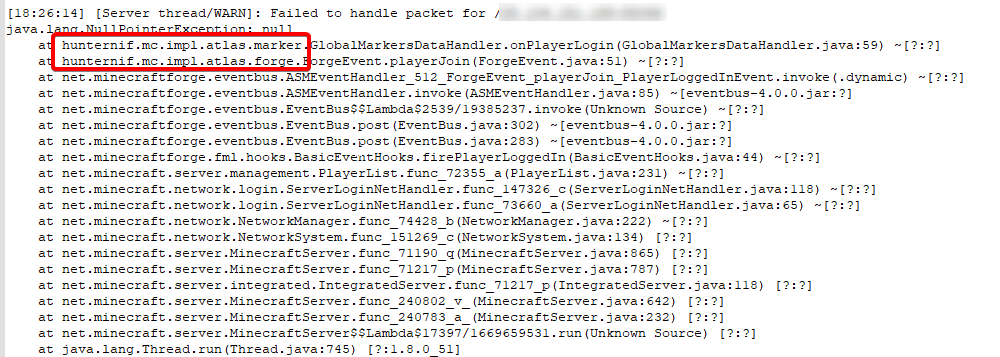
remove it or report it to the dev
marsh vault
sure i'll try ty
 tulip jolt
So I tried making 2 fabric profiles but when I load the second one it says "Could not find required mod: fabric requires {minecraft @ [~1.17.1-rc]}"
Why is that?
Is it because I need a second mods folder or somehting?
or like a .minecraft2
marsh vault
last parcel
seems to be an issue with whatever this mod is https://i.imgur.com/0zFkwr7.png
Just want to say thanks for the help 🙂
Everything is working after deleting that mod.
tulip jolt
tulip jolt
So I tried making 2 fabric profiles but when I load the second one it says "Coul...
Halp
coarse elm
tulip jolt
Halp
Your trying to use a pre release for modding, I dont believe CF supports this.
tulip jolt
coarse elm
Your trying to use a pre release for modding, I dont believe CF supports this.
Wdym?
I don't think 1.17.1 is a pre release
coarse elm
It says right in the version number. Rc, (release candidate)
 heavy orchid
wait where do i ask for help
tulip jolt
If I have only one mod folder won't the versions collide?
tulip jolt
heavy orchid
wait where do i ask for help
Do you need help with curse forge?
heavy orchid
yes
tulip jolt
then ask at #🔥︱curseforge-support
heavy orchid
ok
last parcel
last reply was 6 minutes before.. yup, such dead https://i.imgur.com/tpcYA7H.png
 last parcel
?mc-path
golden muskBOT
**Minecraft Files should NOT be installed inside the following locations
.minecraft folder.
OneDrive folders.
Desktop folder.
Drive roots I.E. Directly into the C:\ drive.
iCloud enabled folders.
If any of the above are in the path you need to change/move it by following the instructions below!**
If Minecraft is not installed in CurseForge App, start here.
Click the in the top left.
Select Minecraft.
Click "Edit".
Move to the "Continue here:" section below.
If Minecraft is installed in CurseForge App, follow these steps.
Click the in the bottom left.
Select the Minecraft tab.
Click "Change".
Move to the "Continue here:" section below.
Continue here:
Make a folder in the root directory called CurseForge.
Select the folder you just made.
The text box should show something like the following:
For Windows: C:\CurseForge
For Mac: /Users/Shared/CurseForge
 torn wyvern
ty
heavy orchid
make a new profile
autumn walrus
Pls help me I'm tuck in the dessert my local server keeps crashing
Heres the log

Pls tag me if you got an answer 🙂
It has happend before but then I managed to bug out of it
last parcel
autumn walrus
It has happend before but then I managed to bug out of it
go into server properties and find the line that says max tick, add a zero.
if it continues to lag and crash then report to this mod dev xyz.marstonconnell.randomloot
 torn wyvern
Does curseforge work with tlauncher
torn wyvern
ok
worldly ether
Very much illegal . Probably won’t be long till Microsoft probably end up doing a cease and desist on it when mojang/Minecraft is fully on their systems after the migration . Plenty of money to do that
 thorn timber
Hey guys, I've been having a crash report with whenever I insert Pam's Harcestcraft into my modpack. I've looked across places and asked a couple people about it but no luck so far. Anybody here might know the issue?https://cdn.discordapp.com/attachments/136993351756021760/862047477343584316/unknown.png
 acoustic idol
thorn timber
Hey guys, I've been having a crash report with whenever I insert Pam's Harcestcr...
acoustic idol
thorn timber
Hey guys, I've been having a crash report with whenever I insert Pam's Harcestcr...
!mc-logs
golden muskBOT
Where to find the log on the CurseForge Client.
Right-click the modpack profile icon OR click the button in the modpack profile.
Click Open Folder.
Open the logs folder.
Find the file called latest.log and drag it into discord.
thorn timber
acoustic idol
thorn timber
Try replacing the mod NotEnoughIDs with the mod JustEnoughIDs
thorn timber
yeah previously I was getting a different error that had something to do with a mod called FancyMenu but this current error seems to be a bigger problem I guess
acoustic idol
How did you install the mods? From the app or from the site?
thorn timber
app
acoustic idol
I asked some higher ups about this, Ive never really seen an issue with java.lang.NoClassDefFoundError: paulscode/sound/codecs/CodecJOrbis
thorn timber
alright
It may just be that I'll have to not include Pam's Harvestcraft if there isn't a solution
thorn timber
Yeah it does, lemme check just to be sure
 tawdry parcel
Why can you only find blocklings mod in the browser but not in curseforge application?
acoustic idol
tawdry parcel
Why can you only find blocklings mod in the browser but not in curseforge applic...
Link the mod
tawdry parcel
acoustic idol
Project is abandoned. The author would need to reclaim their mod for it to show up in the app.
thorn timber
thorn timber
Yeah it does, lemme check just to be sure
Oh apparently not
I got the same error
tawdry parcel
Ok can I still download the mod and place it in the mod folder of my profile for it to work?
thorn timber
thorn timber
I got the same error
even without Pam's Harvestcraft
acoustic idol
thorn timber
even without Pam's Harvestcraft
May have to try removing the mods and trying a few at a time till it gets the error. Im not 100% sure which mod is the issue
acoustic idol
tawdry parcel
Ok can I still download the mod and place it in the mod folder of my profile for...
Yep.
thorn timber
acoustic idol
May have to try removing the mods and trying a few at a time till it gets the er...
alright
 viscid creek
Why do random mods sometimes disappear when I relog? For example, Quark deleted itself for no reason.
 undone copper
prob a bug, I would restart
 sick mango
Curse forge won't launch through my minecraft. thoughts?
worldly ether
Are you using curseforge app or forge?
 worldly ether
Have you tried restarting pc ?
golden muskBOT
- Click on the Minecraft Tab on the Left side of the App.
- Click button next to the
Create Custom Profileoption. - Click
Repair Installationoption. - Play game.
NOTE: You will not lose any modpacks or worlds, These are saved in the Instances folder. DO NOT TOUCH THIS FOLDER OR YOU WILL LOSE EVERYTHING
sick mango
ok
autumn agate
hi
I need help
i made a custom mod pack
and it wont download when i click download on it?
When I run my server and we log on, it works for a minute or so and then just crashes. Using Mohist to run plugins + mods.
acoustic idol
autumn agate
and it wont download when i click download on it?
Are you downloading from the site or app?
acoustic idol
autumn agate
When I run my server and we log on, it works for a minute or so and then just cr...
May need to contact the Mohist devs on this one.
autumn agate
ur saying that based on anything in the log?
just asking cuz im trying again without it rn
acoustic idol
autumn agate
ur saying that based on anything in the log?
Your using mohist its still rather new (ish) and is a mix of apis at this point (last time I looked at it) . I doubt anyone here knows much on its errors. If it happens without it tho can have a look.
autumn agate
aha lright thx
thorn timber
thorn timber
alright
Okay so I started putting all the mods in one by one and opening the game to see if it crashes, FancyMenu being the first mod, and I've gotten no crash until putting in content tweaker.
mortal hawk
contenttweaker needs crafttweaker
it's a dependence
net.minecraftforge.fml.common.MissingModsException: Mod contenttweaker (ContentTweaker) requires [crafttweaker]
 autumn sky
 spark moon
Hi so my friends and I are using curseforge to make a 1.17 fabric modpack and we need some help making a server with a third party server company. (Stop me if you've heard this one before) We're using serverminer and we are hitting a blockade which says we are hitting a JNI error when we try to start the server up. We aren't very computer savvy people so any help would be great.
 serene kiln
Would i be able to some help regarding forge 1.12.2 server files here?
 waxen pine
spark moon
Hi so my friends and I are using curseforge to make a 1.17 fabric modpack and we...
waxen pine
spark moon
Hi so my friends and I are using curseforge to make a 1.17 fabric modpack and we...
Log file?
Yeah. Although asking in the MC channels once you get the role in #786424115535544350 is better
 stable granite
I uploaded a modpack file as a .zip which had a mods folder and an addonpacks folder for the mods but it was rejected for "invalid archive" What file type must it be?
waxen pine
Use a launcher app to do an "export" of a profile to make modpack file. It mostly indexes the mods needed in a file called manifest.json. additional customizations can be included.
stable granite
Which launcher app?
waxen pine
The CF one can
coarse elm
spark moon
Hi so my friends and I are using curseforge to make a 1.17 fabric modpack and we...
sounds like the server isn't using java 16 as 1.17 mc requires.
spark moon
Interesting. Okay. Sorry I'm wrangling my friends to try and give me accurate responses my replies may be slow
spark moon
waxen pine
Log file?
What format do you need?
waxen pine
The latest.log file - if loading got far enough there might be a helpful crash-report.txt in the crash-reports folder
Like clay said though your issue may very well be the Java 16 requirement - would need to check your server provider to see if that is possible to choose
spark moon
My friend has the server so I'm on call troubleshooting with them right now. I don't think we're having a JNI problem anymore but we still can't load everything
Here's the log
coarse elm
remove/update wrenchable
spark moon
is wrenchable a mod?
 cunning notch
why doesnt my forge server work when i add mods to the mod folder it doesnt work in the actual world why is that>?
coarse elm
spark moon
is wrenchable a mod?
yes?
acoustic idol
cunning notch
why doesnt my forge server work when i add mods to the mod folder it doesnt work...
How do you start your server?
acoustic idol
Did you make the start.bat file?
cunning notch
yes
java -Xmx2048M -Xms2048M -jar minecraft_server.1.16.5.jar nogui
PAUSE
is it a problem that there are 3 people on the server?
acoustic idol
cunning notch
yes
minecraft_server starts a vanilla server. You need to have it use the forge-x.x.x.x.jar file
acoustic idol
Edit your file to fix that
spark moon
coarse elm
yes?
we can't find it in the mods file where can we go to delete it? I can see it on the crash list but not in the curseforge zip file
 hollow inlet
it black screens and dosent show the usal red 1.16.5 red screen of loading
acoustic idol
hollow inlet
it black screens and dosent show the usal red 1.16.5 red screen of loading
Remove optifine and try again
cunning notch
[21:55:23] [main/INFO] [cp.mo.mo.Launcher/MODLAUNCHER]: ModLauncher running: args [--gameDir, ., --launchTarget, fmlserver, --fml.forgeVersion, 36.1.32, --fml.mcpVersion, 20210115.111550, --fml.mcVersion, 1.16.5, --fml.forgeGroup, net.minecraftforge, nogui]
[21:55:23] [main/INFO] [cp.mo.mo.Launcher/MODLAUNCHER]: ModLauncher 8.0.9+86+master.3cf110c starting: java version 16.0.1 by AdoptOpenJDK
Exception in thread "main" java.lang.IllegalAccessError: class cpw.mods.modlauncher.SecureJarHandler (in unnamed module @0x67e2d983) cannot access class sun.security.util.ManifestEntryVerifier (in module java.base) because module java.base does not export sun.security.util to unnamed module @0x67e2d983
at cpw.mods.modlauncher.SecureJarHandler.lambda$static$1(SecureJarHandler.java:41)
at cpw.mods.modlauncher.api.LamdbaExceptionUtils.uncheck(LamdbaExceptionUtils.java:95)
at cpw.mods.modlauncher.SecureJarHandler.<clinit>(SecureJarHandler.java:41)
at cpw.mods.modlauncher.Launcher.lambda$new$6(Launcher.java:55)
at java.base/java.util.concurrent.ConcurrentHashMap.computeIfAbsent(ConcurrentHashMap.java:1708)
at cpw.mods.modlauncher.api.TypesafeMap.computeIfAbsent(TypesafeMap.java:52)
at cpw.mods.modlauncher.api.TypesafeMap.computeIfAbsent(TypesafeMap.java:47)
at cpw.mods.modlauncher.Environment.computePropertyIfAbsent(Environment.java:62)
at cpw.mods.modlauncher.Launcher.<init>(Launcher.java:55)
at cpw.mods.modlauncher.Launcher.main(Launcher.java:66)
at net.minecraftforge.server.ServerMain$Runner.runLauncher(ServerMain.java:63)
at net.minecraftforge.server.ServerMain$Runner.access$100(ServerMain.java:60)
at net.minecraftforge.server.ServerMain.main(ServerMain.java:57)
now it says this
coarse elm
spark moon
we can't find it in the mods file where can we go to delete it? I can see it on ...
it won't be in the cf zip
you need to look in the server mods folder
acoustic idol
cunning notch
[21:55:23] [main/INFO] [cp.mo.mo.Launcher/MODLAUNCHER]: ModLauncher running: arg...
Need java 8 for minecraft 1.16.x. Java 16 only works for 1.17+
spark moon
coarse elm
you need to look in the server mods folder
They say they checked there, I'll invite them in as well.
coarse elm
the person running the server should be asking the questions
spark moon
👍
acoustic idol
cunning notch
theres no big download button anymore
For the latest version of java 8: https://java.com/en/download/manual.jsp
cunning notch
thx
 errant galleon
coarse elm
the person running the server should be asking the questions
errant galleon
coarse elm
the person running the server should be asking the questions
yo, mb friend was doing it on my behalf. I uploaded each .jar file into the mods folder individually so I'm not entirely sure where to find wrenchable
autumn sky
acoustic idol
autumn sky
Care to add any explanation to what your trying to do or expect to happen when this crash happens?
cunning notch
Error occurred during initialization of VM
Could not reserve enough space for 3145728KB object heap
uh
acoustic idol
autumn sky
I click play in the mc launcher and instant crash
!mc-installfix try this
golden muskBOT
- Click on the Minecraft Tab on the Left side of the App.
- Click button next to the
Create Custom Profileoption. - Click
Repair Installationoption. - Play game.
NOTE: You will not lose any modpacks or worlds, These are saved in the Instances folder. DO NOT TOUCH THIS FOLDER OR YOU WILL LOSE EVERYTHING
cunning notch
so uh
acoustic idol
cunning notch
Error occurred during initialization of VM
Could not reserve enough space for 31...
!mc-logs
golden muskBOT
Where to find the log on the CurseForge Client.
Right-click the modpack profile icon OR click the button in the modpack profile.
Click Open Folder.
Open the logs folder.
Find the file called latest.log and drag it into discord.
pine rapids
cunning notch
Error occurred during initialization of VM
Could not reserve enough space for 31...
This is starting a server, right?
pine rapids
Uninstall Java 8, you installed the 32-Bit version when you need the 64-Bit version
autumn agate
java.lang.RuntimeException: Invalid id 256 - maximum id range exceeded
how do i fix this
worldly ether
Get jeid mod
cunning notch
anyone send 64x bit of java pls?
i cant find it
i only see 32 bit
is it the offline one?
autumn agate
autumn agate
java.lang.RuntimeException: Invalid id 256 - maximum id range exceeded
help please? lol
last parcel
log?
cunning notch
IT WOIRKS
THX @pine rapids @acoustic idol
i wouldve gave kiss if you were okay with it and not being considered gay
hollow inlet
What do this be mean?
 last parcel
something
pine rapids
The way you've cropped it basically only gives us "Something went wrong with an array access"
hollow inlet
It did it with create then restarted the game now its doing this mod
 autumn agate
it just crashes on startup lol
hollow inlet
autumn agate
it just crashes on startup lol
its so mishforunate
autumn agate
nevermind, my minecraft didnt like abyssal craft apparently
hollow inlet
Create null?
 pine rapids
?mc-log
golden muskBOT
Where to find the log on the CurseForge Client.
Right-click the modpack profile icon OR click the button in the modpack profile.
Click Open Folder.
Open the logs folder.
Find the file called latest.log and drag it into discord.
 grim tapir
Hey how do I open my world to LAN on the medieval mod?
hollow inlet
Che che check it
grim tapir
whats that
acoustic idol
hollow inlet
Che che check it
What version of abnormals_core do you have?
hollow inlet
acoustic idol
What version of abnormals_core do you have?
abnormals_core-1.16.5-3.2.0.jar
acoustic idol
hollow inlet
abnormals_core-1.16.5-3.2.0.jar
Try using version 3.1.1.
acoustic idol
grim tapir
Hey how do I open my world to LAN on the medieval mod?
Press Esc, open lan?
grim tapir
yeah i just sends me into the mod menu doesnt pop up like it usually does that gives me the code
coarse elm
don't use lan, make a server
grim tapir
oh ok
hollow inlet
sigh well now lets now ill post the latest log for this one
 next abyss
So, the server I host recently 'Crashed' - as we play, the server just stops running, messages don't send, inventories done open, until people leave with the 'Timed Out' screen. It says we are still on, (in the client) and the server never says we left. Infact, console says nothing related to crashing, or leaving, or anything the sort.
Trying to join gets stuck on Logging In, then goes to Timed Out
 half portal
does it work on minecraft bedrock edition ?????
acoustic idol
half portal
does it work on minecraft bedrock edition ?????
The curseforge app? No
half portal
ok but if you can make changes pls sure do
hollow inlet
acoustic idol
half portal
ok but if you can make changes pls sure do
Bedrock edition doesnt use the same "mods" as the java version. It uses addons.
half portal
ok
hollow inlet
half portal
ok
and you have to pay for em too wich i think is a bit greedy
acoustic idol
autumn sky
Last thing I can think of is try changing the modded minecraft folder path in the app. Put it in the root folder for the drive your using. EX: C:\Curseforge
acoustic idol
hollow inlet
and you have to pay for em too wich i think is a bit greedy
Thats a microsoft issue. CF Doesnt have control over that. there are some bedrock addons you can get on the cf site tho
half portal
does it work on this??
acoustic idol
Define "it" ?
half portal
curse forge
acoustic idol
Yes. Windows and Mac are the current supported OS
half portal
ok thx
half portal
half portal
ok but if you can make changes pls sure do
bye i mean add some addons for cf (curse forge)
acoustic idol
half portal
bye i mean add some addons for cf (curse forge)
Curseforge doesnt add/make any of the addons. People would need to make them and upload them to the site.
hollow inlet
acoustic idol
Curseforge doesnt add/make any of the addons. People would need to make them and...
could i get some help with my issue?
acoustic idol
Reading it now.
half portal
acoustic idol
Curseforge doesnt add/make any of the addons. People would need to make them and...
thats what i said allow it
hollow inlet
okay
acoustic idol
half portal
thats what i said allow it
There are some already.
acoustic idol
hollow inlet
okay
Can you find and post this file Galactic But its 1.16.5\crash-reports\crash-2021-07-06_20.22.57-fml.txt
hollow inlet
acoustic idol
hollow inlet
Try changing BotanyPots to version BotanyPots-1.16.5-7.1.23.jar Beta
 noble smelt
i cant download curseforge for some reason it say please check your internet connection and try again
acoustic idol
noble smelt
i cant download curseforge for some reason it say please check your internet con...
!getcf try this
golden muskBOT
Looking to install the CurseForge app?
<:windows:798410728188936222> Windows
Minimum Requirements:
- OS Version: 7, 8.1, 10
- 64 bit Required.
- 350MB storage space.
- Microsoft .Net 4.8
- Intel/AMD quad-core CPU
- 8GB ram
Download: https://download.overwolf.com/install/Download?&PartnerId=4047
If you are having issues with the installer use the URL below to install Overwolf then go to the app store to download CurseForge.
https://content.overwolf.com/downloads/setup/latest/regular.html
<:mac:798410654418862130> Mac
Minimum Requirements:
- OS Version 10.14 or newer.
- 64 bit Required.
Download: https://curseforge.overwolf.com/downloads/curseforge-latest.dmg
:penguin: Linux
Minimum Requirements:
Yes.
Download: :person_shrugging:
noble smelt
golden musk
i cant download net 4.8
acoustic idol
What os do you have? Win8?
noble smelt
win 10
acoustic idol
Should be able to download net 4.8 on win 10
noble smelt
when i download net 4.8 it say i already download it
acoustic idol
Reboot your pc
noble smelt
BUT the question is why do i have to download it if i have it
acoustic idol
If you have it you dont need to download it again
noble smelt
 acoustic idol
The links in the bot are for overwolf/curseforge


 acoustic idol
ok, but you said it didnt work, so try the second option in the bot for windows
acoustic idol
Are you using a wired or wireless connection?
noble smelt
wired
acoustic idol
Restart your pc and/or modem/router.
 acoustic idol
Does overwolf open?
noble smelt
yes?
 acoustic idol
how did you originally install the cf app? With the installer or from the overwolf app?
noble smelt

Overwolf | Tech for developers who love gaming
Welcome to the CurseForge community! Build, manage and download mods and addons for your favorite games
acoustic idol
Try uninstalling the cf app then open overwolf and use it to install the cf app
noble smelt
what app is this
 acoustic idol
that the Curseforge installer. That isnt what i said to do
acoustic idol
Try uninstalling the cf app then open overwolf and use it to install the cf app
noble smelt
acoustic idol
> Try uninstalling the cf app then open overwolf and use it to install the cf ap...
how to open overwolf
acoustic idol
Do you have the overwolf app installed?
noble smelt


 acoustic idol
and you have .net framwork is up to date?
noble smelt
how is this work
acoustic idol
!ticket may need to just make a ticket on this one
golden muskBOT
Issue Reporting with Overwolf tickets!
Issues can be reported two ways!
Via the website, or in app. Instructions for both are below!
Make sure to include logs when reporting a problem!
Upload your Overwolf logs with the Upload File option on the ticket, information on how to get these logs can be found here https://support.overwolf.com/en/support/solutions/articles/9000176827-how-to-get-your-overwolf-logs
:bug: Reporting via Website :bug:
Can't open the app or would rather use the website? You can do so here: https://support.curseforge.com/en/support/tickets/new
Fill out the form with accurate detailed information, "It doesn't work" isn't helpful! What exactly doesn't work and why doesn't it work should be easy to answer!
:question: Ticket Status :question:
Tickets you have made can be looked at, replied to and closed if you make/login to an account. If you submit a ticket with a specific Email make sure to use that when you make your account so you can see your past tickets!
https://support.curseforge.com/en/support/tickets
Otherwise you will only get email replies at the email you used to open the ticket.
:bug: Reporting via the CurseForge App :bug:
- Click the
 icon in the bottom left.
 - Select

Open a Ticket. - Fill out the form with accurate detailed information, "It doesn't work" isn't helpful! What exactly doesn't work and why doesn't it work should be easy to answer!!
- Upload your Overwolf logs with the
Upload Filesection. (see the top of this message for details) - Submit!
noble smelt
so what should i do?
wild jewel
noble smelt
so what should i do?
Do above steps
 wild jewel
Then you wait
noble smelt
why is it taking so long for them to wait
wild jewel
Because you are not the only one that made a ticket?
 wild jewel
Why are you not just waiting on that ticket? We can't help here!
 autumn steppe
how can i change the files i choose to transfer mods
wild jewel
autumn steppe
how can i change the files i choose to transfer mods
What?
autumn steppe
how can i change any file i transfer mods
wild jewel
You don't transfer mods with curseforge...
 neon violet
is it possible to combine mods? like if i want to play a certain modpack, but i also want the portal gun mod, is there any way to do that?
wild jewel
neon violet
is it possible to combine mods? like if i want to play a certain modpack, but i ...
!mc-editpack
golden muskBOT
How to add/remove mods in a modpack.
- Click on the picture of the modpack.
- Click the

Add More Contentbutton, IF this button is not there, see below before continuing. - Find the Mods, Resource Packs or Maps you wish to Install and click
Installon them. - Wait for all the required mods to be downloaded.
- Start the modpack.
How to Enable/Disable content management for modpacks.
- Click on the picture of the modpack.
- Click on the button next to the
Playbutton. - Click on

Profile Options. - Check the
Allow content management for this profileoption if you want to edit the content of the modpack, uncheck it to disable.
NOTE: The Allow content management for this profile option is what allows you to Delete, Disable, Update or Install any Mods, Resource Packs or Maps managed by CurseForge. It must be on to modify any of them! (Currently)
 tardy shuttle
Does anyone have experience with including datapacks in modpacks?
Since adding them would be redistributing, I want to know what the preferred way is to include them, or if there is an easier way.
 rapid imp
hello i have a problem with my curseforge. I have been trying to connect to a freinds server through curseforge with the same mod pack they have right. however when i go to multiplayer and try and connect to their server it tells me the authentication servers are down for maintence. How do i fix this as this has been happening for 5 days now? 😦
wild jewel
rapid imp
hello i have a problem with my curseforge. I have been trying to connect to a fr...
Tried a pc restart?
rapid imp
Yeah
last parcel
?mc-installfix try this?
golden muskBOT
- Click on the Minecraft Tab on the Left side of the App.
- Click button next to the
Create Custom Profileoption. - Click
Repair Installationoption. - Play game.
NOTE: You will not lose any modpacks or worlds, These are saved in the Instances folder. DO NOT TOUCH THIS FOLDER OR YOU WILL LOSE EVERYTHING
rapid imp
Is that on the launcher?
wild jewel
On Curseforge
rapid imp
i do not see the repair option
wild jewel
Are you looking at the modpack description?
last parcel
are you using the curseforge app?
rapid imp
yeah the curseforge launcher
rapid imp
So i tried to repair and it still didnt fix my problem :9
last parcel
are you using a vpn?
rapid imp
no
last parcel
then no idea, sorry
rapid imp
dzmn okay
neon violet
is there any way to make a custom profile public? so i can play the mods of my choice with my friendds
last parcel
?mc-packshare
golden muskBOT
There are two ways to share a modpack you've made with others...
Export and Share - For Friends to Small Groups.
- Click the Icon for the modpack.
- Click the button next to play.
- Click

Export. - Select the files that should be included.
- Send the zip to the people that want it! They can follow the instructions in
!mc-installpackto install the pack!
Upload to Curseforge - For Public Release to Everyone.
This options will make your pack public to EVERYONE, it comes with extra requirements and will take some effort to set up.
- Go to here: https://www.curseforge.com/project/432/4471/create
- Fill out the information with a proper description of the pack. This should allow anyone to understand what the pack is.
- Click the Icon for the modpack in the CurseForge app.
- Click the button next to play.
- Click
Export. - Select the files that should be included.
- Open your Project you made on the CurseForge site and Upload the file you just made.
- Wait for Moderation & Sync so it can show up in the client! (See
!syncfor limitations)
 cerulean nexus
just a quick question is there any client side mods that allow me to display what block i am looking at
waxen pine
cerulean nexus
just a quick question is there any client side mods that allow me to display wha...
I think Jade can be client side?
cerulean nexus
waxen pine
I think Jade can be client side?
that for 1.16?
waxen pine
yes
waxen pine
wawla is not a standalone mod - it's an addon for HWYLA - it needs that also
cerulean nexus
hmm i downloaded hwyla and it didnt even launch
waxen pine
heh
cerulean nexus
said it couldnt be loaded
waxen pine
100% sure it was the forge version? assuming that is what you are using
cerulean nexus
waxen pine
he keeps both versions on the same project... :/
waxen pine
ding 🙂
fwiw i'd try out Jade - it's actually a fork of hwyla and incorporates some fixes
cerulean nexus
i thought we had gei, but i guess we had a different one
waxen pine
JEI is a different thing with different features
cerulean nexus
ignore me spelling it wrong
maybe it was a different version or a different mod, but the one i installed had the block indicator and a light level mod
waxen pine
the most popular ones are HWYLA, Jade, The One Probe - i really don't know if TOP is client only or not
cerulean nexus
well hopefully this will work
idk why but whenever i load into this mod pack it freezes my pc
cerulean nexus
waxen pine
the most popular ones are HWYLA, Jade, The One Probe - i really don't know if TO...
by chance do you know if wawla will tell me if the block can be broken
 lavish raptor
Hi, I saw one mod, but I do not know the name, please tell me?

 cunning stag
1.why does it say mdk example instead it should be minecraft or something like that right and its supposed to be a directory
2.what are these errors?
[sry but i am new to eclipse]
 wild jewel
cunning stag
1.why does it say mdk example instead it should be minecraft or something like t...
wild jewel
cunning stag
1.why does it say mdk example instead it should be minecraft or something like t...
#786424115535544350 Pick Minecraft, go to #⚙️︱authors-help
 civic temple
What should I edit to include extra .jar libraries when building Forge gradle for a minecraft mod?
wild jewel
See above
cunning stag
wild jewel
<#786424115535544350> Pick Minecraft, go to <#768713291643486218>
i did
and i have the role
ohh ok
got it
 flint grotto
anyone use hunter traps bar? it only shows freezing trap and nothing else and i dont know how to fix it
 hushed nacelle
Hello, Sorry for this as I have tried to and getting a little flustered with trying to figure this one out but I made a custom profile to play 1.17 with the forge modes with curse forge, But given the diamond distribution bug been trying hard not to load as many chunks as I can, that bug should be fixed with 1.17.1 being released now and I show that fabric is compatible with the update but besides having to move to the native launcher with all my files, mods and saves and installing the fabric launcher there with it I am having trouble figuring out how to do so with Curse launcher.
Am I missing something in how to set that up without having to migrate my stuff or to get 1.17.1 with the custom profile do I have to bite the bullet or is it just a waiting game for a launcher update?
last parcel
well you dont have a 1.17 profile with forge mods, since forge doesnt exists on 1.17 yet.
im assuming your issue is that curseforge doesnt have 1.17.1 as an option yet? if so you will have to wait until it does, or make a fabric install manually.
hushed nacelle
I know forge is not up yet. I was impatient at wanting the 1.17 goodies and have a lightweight fabric custom profile to get me by till the nice forge mods I like are out and I can try to convert the save to that. As Curse's launcher just has release, alpha and beta hard to tell.
autumn agate
anyone know if there are some mods like optifine that make your game run better? I need to know because i play a large modpack and my fps are always like 10 or 15
last parcel
mc version? forge/fabric?
no mod is going to magically get you from 10 fps to 60, hope you know that. at best you may get minor improvements, and at worst more lag or crashing
autumn agate
the version is 12.2 and forge
autumn agate
last parcel
mc version? forge/fabric?
no mod is going to magically get you from 10 fps to 60...
ik it wont do a HUGE improvement im just looking for mods that help a little
 fading flax
I created a mc modpack, and I'm having an issue where after playing for around an hour it becomes super laggy. Can anyone help?
golden muskBOT
How to set Global Minecraft RAM value.
- Click the icon in the bottom left to open settings.
- Click the Minecraft tab.
- Scroll down.
- Slide slider to recommended ram range as seen below.
 fading flax
alright, I'll try that, thanks!
 real pasture
so im playing on my modpack. and i have a particle accelerator from physica nuclear physics build. (im on 1.7.10) i have it just how its tells me to make it. but the particle accelerator block wont accept the empty cells. anyone know how to fix this?
 distant sand
hey so I'm trying to join my server after I updated the modpack it's using but I can't connect for whatever reason. It's pointing out that it's "rejecting" mods that I removed from the pack. What do I do?
last parcel
screenshot
distant sand
 last parcel
it's saying the server has those mods and the client does not
distant sand
they aren't in the mods folder anymore nor the pack
last parcel
did you restart
distant sand
I'll try again
I have discovered I am just an idiot
didn't even upload it to the host
thx for the help
 split fjord
if you install a mod for mc off there website how do you use it
real pasture
so. i want a vehicle/gun mods. similar to flans. if not flans. and ice & fire. but i would like the dragons from ice & fire to be able to damage the vehicles from the mod. is there something i can turn on. or a mod i can use that enables that?
suppose that dont exist?
acoustic idol
Use #🔎︱mod-hunting for this
real pasture
oki
also, anyone know how i can fix this? https://paste.dimdev.org/ewehijobab.mccrash
thorn timber
Getting a crash
thorn timber
fixed it
autumn agate
Anyone can help me figure out why it crashes? (server)
pine rapids
BetterF3 is poorly made and won't work on a server
autumn agate
thx
coarse elm
gotta love mods that still fuck that up
it's only been an option to stop your mod from loading on the wrong side for ~8 years.
autumn agate
yeah kinda surprised cuz usually they do except this i guess
pine rapids
coarse elm
it's only been an option to stop your mod from loading on the wrong side for ~8 ...
I can't recall if that's still a thing post-1.13... but having your mod no-op on detecting the wrong side has always been an option
 silent lantern
so im trying to set up a server that does not have a server pack and im almost done but i ran into a problem and it would not start can someone help me to make sure everything is there

idk whats wrong i think i put everything in that needs to be in there but i dont really know how to debug packs i usually just download the serverpack
also all the mods i have not tampered with
so i dont know why they say wrong version
it works in single player
 steady hedge
silent lantern
so im trying to set up a server that does not have a server pack and im almost d...
steady hedge
silent lantern
so im trying to set up a server that does not have a server pack and im almost d...
looks at the names of each of those mods, for example "AppleSkin-mc1.16.2-forge-1.0.14.jar. the mods are for 1.16 while the server forge version is 1.12.2
hense why it says "wrong minecraft version"
silent lantern
so should i find a different forge version?
steady hedge
or downgrade your mods. i'd suggest that instead of upgrading your forge version cause not all mods are made for all version.
not only that, but the client and server have to run the same mods, same mod version and same forge version
silent lantern
ok so i need to uninstall all of those and then get older ones but that does not explain why it works in single player and not on a server pack
yea i know that part
steady hedge
because if your using curseforge to install the pack, it will limit you to the version that the profile is, while if you get it from the web, they just give you the latest, i'll tell you an easy trick.
navagate to your curse install\instances/"name of pack"\mods and copy everything in there and put it into your server mods folder
then try relaunching
silent lantern
thats what i did
thats exactly what i did
i dont go on the site
i just delted half of a old server pack except some of the base stuff for the server
steady hedge
ah, so your not trying to run 1.12.2, apoligies i missunderstood
then you need to update your server version
silent lantern
that would make more sense
silent lantern
do you know the link where to download the different servers from i think it was on the forge site somewhere i just dont know where
its been a really long time sense i had to make a server pack
steady hedge
ah, simply search up "minecraft forge 1.16.2" and download the installer
then when your installing, select "server" and direct it to your server folder, keep in mind, i'd delete everything and do a fresh install
otherwise there could be conflicts
silent lantern
ok so i just did that so i just need to put the mods folder in there and the default configs folder? or do i need more like the resource packs and stuff?
steady hedge
just copy the mods folder, and if you have changed anything config wise, then the configs
 steady hedge
then id do both the default and regular configs
and keep in mind, the server will unpack and install some stuff the first time you run it then shut down, simply open the "EULA.txt" file and type "true" where it says false
silent lantern
yea i have to do that for all the server packs i use
except one that already had it as true
steady hedge
yee, didnt know if you knew so thought i'd mention XD
silent lantern
which i dont know if there aloud to automatically have it set to true because the eula thing is like a agreement thing that you have to agree to
steady hedge
i dont know how but there is a way
silent lantern
so my forge version or modded version of the server is not opening just the vanilla
 inner crow
How does one update a profile to the lastest version of minecraft?
steady hedge
do you have a .bat file? to allocate ram to your server?
silent lantern
i dont think so i dont see it
 steady hedge
you have to create it XD
hold on
that alocates 10-15 gigs of ram which should be more then enough, you can tweak with it to fit your needs, but make sure to copy the entire name of your forge jar, so "forge-1.16.3-34.1.0" and replace the "forge-1.12.2-14.23.5.2855.jar" at the end with it
and theres one step i forgot
you need to change the .txt file to a .bat file
steady hedge
steady hedge
download this, it'll be a text file.
i put it in this how i did so that you can read whats in it
silent lantern
i click the click to see attachment button and nothing happens
oh
nvm
it highlights the thing you put in earlyer
silent lantern
i downloaded it
steady hedge
put it in your server folder
silent lantern
i did
steady hedge
alright, now at the top of your file explorer, click "view"
then top right hand side check the box labeled "file name extensions"
silent lantern
ok i checked that
 steady nest
hello has a quick and probably simple question. I could play e.g. rlcraft on windows 10 edition or do i need to buy java edition?
silent lantern
java
steady hedge
now go back to the txt file you downloaded, and right click, hit "rename" and then highlight the ".txt" and change it to ".bat"
inner crow
How does one update a profile to the lastest version of minecraft
steady hedge
brb, but you right click and hit "edit"
replace the "forge-1.12.2-14.23.5.2855.jar" at the very right hand side of the length of text with "forge-1.16.3-34.1.0.jar"
then save and exit and now double click the .bat file
you should be good, if not i brb
silent lantern
i never had a forge-1.12.2-14.23.5.2855.jar
i replaced it anyways
but i cant run the bat file it just does not open or something
i can edit but not open
steady hedge
hol don
marsh vault
Can someone help?
Like since yesterday, i didn't add anything, but the mod pack keeps lagging
 modest star
guys, whats a JDK and how do I download it on mac?
pine rapids
JDK is Java Development Kit, you'll need it if you want to make something in Java
 coarse light
I need some help restarting my server for dd&ss wont let any of my friends connect to server does anyone know how to fix this?
acoustic idol
 cosmic palm
<@!316701494319513603><@!267090226269126658> you two talking about some confuzin...
cosmic palm
<@!316701494319513603><@!267090226269126658> you two talking about some confuzin...
#📛︱rules 5 why did you need to ping them at random?
coarse light
is anyone able to help me the owners of our server will not answer us back
acoustic idol
Are you giving them the right IP? Can you connect to the server?
coarse light
no nobody that plays on this server can connect
acoustic idol
coarse light
no nobody that plays on this server can connect
Is the server online?
acoustic idol
hollow inlet
Error code -1 tessalating liquid
Remove optifine and try again
coarse light
it says that a block ticking and entity ticking is crashing our server but we dont know how to fix and its an online server but not available for the last 3 days
hollow inlet
acoustic idol
Remove optifine and try again
why is optifine casuing issues i downgraded to g7and it fixed the black screen issue i guess 1.16 aint exactly stable
acoustic idol
coarse light
it says that a block ticking and entity ticking is crashing our server but we do...
Would need the servers crash report to see whats going on. But if the server isnt available at all youll have to talk with the servers owners on it
acoustic idol
hollow inlet
why is optifine casuing issues i downgraded to g7and it fixed the black screen i...
Optifine changes the way the game loads/works. Its can cause big issues due to this. If you want to use optifine best to ask their support for help. As we dont offer optifine support
coarse light
can i dm you the crash report @acoustic idol
acoustic idol
coarse light
can i dm you the crash report <@!217048549706301442>
Drag and drop it here
acoustic idol
There is an rftools builder at this location World: (-88,67,92) that is causing the ticking block entity issue
coarse light
do you know how to clear it?
acoustic idol
seeing how its 1.12.2 the worldedit mod would most likely work
coarse light
okay one moment
acoustic idol
If you know how to use it
acoustic idol
is worldedit on the server?
coarse light
no its not
acoustic idol
ok, there is another option you can try as well. using a feature forge has.
https://serverminer.com/article/how-to-fix-a-ticking-block-entity-on-a-forge-server/ Scroll down to the 1.12.2 part
acoustic idol
np, just be sure to turn those forge configs back to false again.
coarse light
it wont work unless we leave it to true
acoustic idol
Remove the block that is causing the issue. Then stop the server and set it back to false
coarse light
okay
 crude bay
Is there any function to stream a modpack? (With stream I mean on another pc starts and you can play it per connection)
coarse elm
not via curseforge
crude bay
And how can I then "stream" it?
wild jewel
crude bay
And how can I then "stream" it?
Stream to what?
crude bay
I have 1 laptop and 1 pc. And most time on my laptop and cant get to my pc. So I want to start a modpack on the pc and then play via streaming on my pc.
wild jewel
No idea how to do that, can't imagine that it will be smooth
crude bay
We have a 40MB/S upload and 100MB/s Download. It will be smooth.
 weary rampart
hi
can someone help me with this ?

i try to install 1.12 but it keep showing me this
wild jewel
weary rampart
hi
!forgeinstaller
golden muskBOT
Known Working Forge Installers
1.5.2: 7.8.1.738
1.6.4: 9.11.1.1345
1.7.10: 10.13.4.1614
1.8.9: 11.15.1.2318
1.9.4: 12.17.0.2317
1.10.2: 12.18.3.2511
1.11.2: 13.20.1.2588
1.12.2: 14.23.5.2855
weary rampart
i dont get it 😦
wild jewel
O wait, you have the correct version
worldly ether
Do as it says and try again if not done already ?
weary rampart
ok i will try
worldly ether
Worth a go
 wild jewel
And why are you not using curseforge?
weary rampart
it cruseforge right ?
 wild jewel
Then why did you use an installer?
 fleet jewel
crashes when i try to launch it
weary rampart
ok i can use it now , thank you
autumn agate
Whats wrong here?
 jolly dirge
how do i setup a server for rlcraft?? asking for a friend
wild jewel
jolly dirge
how do i setup a server for rlcraft?? asking for a friend
!mc-installserver
golden muskBOT
How to **manually** install a server - **On your own PC**
- Check if the modpack has a server pack, if it does: use that and skip below.
- Go to the Forge website http://files.minecraftforge.net/ and download the Installer for the forge version the pack is using.
- Run the installer and choose
Install server. Do not install to your desktop. Also do not install inside a OneDrive folder. - Run the server using the forge.jar. A file called
eula.txtwill be generated. Open it and changeeula=falsetoeula=true - From the Client; Copy the
modsfolder,configfolder, and any other folders needed for the pack to work into the server folder. If the modpack has a server pack, use this instead! - Run the server again.
- Port forward your machine if needed. (Google it)
jolly dirge
golden musk
Thank you!!!!
fleet jewel
fleet jewel
crashes when i try to launch it
i removed the 2 mods i had added since i last started it (when it still worked) and it still crashed
theres also this message
 wild jewel
!mc-logs
golden muskBOT
Where to find the log on the CurseForge Client.
Right-click the modpack profile icon OR click the button in the modpack profile.
Click Open Folder.
Open the logs folder.
Find the file called latest.log and drag it into discord.
fleet jewel
wild jewel
What did you add?
fleet jewel
minecolonies and structurize, then removed them and tried to start it again, the current message and log are from my latest attempt
wild jewel
Got advancedrockety in?
fleet jewel
yes
wild jewel
No idea with that log
fleet jewel
there a reason you mentioned advancedrocketry?
hm, wasnt rocketry either
it crashed again but this time the log size is like half the size of the previous one
maybe something changed?
 wild jewel
weary rampart
ummmm sorry but it still crash
wild jewel
weary rampart
ummmm sorry but it still crash
!mc-logs
golden muskBOT
Where to find the log on the CurseForge Client.
Right-click the modpack profile icon OR click the button in the modpack profile.
Click Open Folder.
Open the logs folder.
Find the file called latest.log and drag it into discord.
silent lantern
well i never changed config but my friends were adding things to my server and changed some configs so i assume its a config problem and i just need to delete the config file?
last parcel
yes
neon violet
how do i send my profile to others`?
last parcel
?mc-packshare
golden muskBOT
There are two ways to share a modpack you've made with others...
Export and Share - For Friends to Small Groups.
- Click the Icon for the modpack.
- Click the button next to play.
- Click
Export. - Select the files that should be included.
- Send the zip to the people that want it! They can follow the instructions in
!mc-installpackto install the pack!
Upload to Curseforge - For Public Release to Everyone.
This options will make your pack public to EVERYONE, it comes with extra requirements and will take some effort to set up.
- Go to here: https://www.curseforge.com/project/432/4471/create
- Fill out the information with a proper description of the pack. This should allow anyone to understand what the pack is.
- Click the Icon for the modpack in the CurseForge app.
- Click the button next to play.
- Click
Export. - Select the files that should be included.
- Open your Project you made on the CurseForge site and Upload the file you just made.
- Wait for Moderation & Sync so it can show up in the client! (See
!syncfor limitations)
neon violet
where do i find the zip
last parcel
the place you told it to go
 paper shadow
gradlew genSource command results in "BUILD FAILED"
in terminal
 vague flint
Hey so I got a problem. I’ve never downloaded any mods before and today I decided I wanted to. First, I downloaded Java (so I could open forge) then downloaded forge 1.12.2 so I could install fossils and archeology revival mod. Both downloaded fine and I got forge on my desktop, but when I try and open it it says “Java Installation Not Completed
Unable to install Java
There are errors in the following switches:
C:\Users\my name\Desktop\forge-1.12.2-14.23.5.2855-installer(1).jar
Check that the commands are valid and try again”
last parcel
vague flint
Hey so I got a problem. I’ve never downloaded any mods before and today I decide...
I would recommend using the curseforge app to install mods. it'll do most of the work for you so you wont have issues like that.
!getcf
golden muskBOT
Looking to install the CurseForge app?
<:windows:798410728188936222> Windows
Minimum Requirements:
- OS Version: 7, 8.1, 10
- 64 bit Required.
- 350MB storage space.
- Microsoft .Net 4.8
- Intel/AMD quad-core CPU
- 8GB ram
Download: https://download.overwolf.com/install/Download?&PartnerId=4047
If you are having issues with the installer use the URL below to install Overwolf then go to the app store to download CurseForge.
https://content.overwolf.com/downloads/setup/latest/regular.html
<:mac:798410654418862130> Mac
Minimum Requirements:
- OS Version 10.14 or newer.
- 64 bit Required.
Download: https://curseforge.overwolf.com/downloads/curseforge-latest.dmg
:penguin: Linux
Minimum Requirements:
Yes.
Download: :person_shrugging:
last parcel
!mc-installmods
golden muskBOT
How to install mods in CurseForge App.
- Click
+ Create Custom Profile - Name it, select the required Minecraft version, select the Forge version (usually the highest number), click
Create. - Click the profile icon.
- Click
Add New Content - Search and install the desired mods.
- Start the game!
How to install mods not on CurseForge.
- Right click the profile picture or Open the profile and click the Icon next to the play button.
- Click
Open Folder. - Drag the mod(s) into the
modsfolder. (Note: Some mods will require others, to run. Make sure to read the instructions for the mod!) - Start the game!
 last parcel
and i was not replying to you, hence the reply to someone else
silent lantern
im playing vault hunters and the boss is not spawning anyone know
 void island
can someone please help me out, I have a really good pc that can run any other game but when I try to run modded minecraft it struggles.
 wicked snow
need help with crash
last parcel
while waiting for a reply i suggest reading the #📛︱rules so i dont need to delete any more messages from you
wicked snow
k sorry
 austere star
Does anyone know this mod

It’s bugged for me and I want to turn it off
It’s not better foliage ffs
For some trees it doesn’t but for others it does
 green wasp
what mod do you mean?
last parcel
wicked snow
need help with crash
seems like an issue with ice & fire, report it to the dev
austere star
Uh it’s like a foliage mod I guess? And it’s buggy the leaves are all white which one is it?
 tall rapids
 last parcel
ah fabric. wouldn't know. might wanna try the fabric discord
void island
can someone please help me out, I have a really good pc that can run any other game but when I try to run modded minecraft it struggles.
 wintry oak
Is it possible to add mods to labymod?
obviously of the same version
because it isn't working for me
idk why
but it keeps on crashing
worldly ether
Labymod is what is known as a cheat client, it’s a preloaded client of their own built in “mods”. It’s a “use at own risk” if you were to play on hypixel servers and were to use the things on labymod to your own unfair advantage and were found to use it . Would get banned basically.
wintry oak
Oh, i thought it was just a pvp client. Never mind then
coarse elm
Pvp clients are also cheat clients.
wintry oak
eh
worldly ether
Anything that gives you an unfair advantage over a vanilla player is a cheat and pvp clients do tend to have such . Like damage indicators are bannable on hypixel
fleet jewel
crashes when i try to launch it, shows a weird symbol version of the settings menu twice, then gives an error message at the launcher:

 warm jolt
minecraft Dungeons role for discord ??
since now me and my team can post our mods to curseforge
 silver saffron
jus a question right how do you join your friends custom profile
not as in join but like get the modpack
coarse elm
warm jolt
minecraft Dungeons role for discord ??
Why? The only thing people talk about here is regular minecraft and sometimes wow, otherwise it's all support related.
Among us has essentially zero traffic.
 quick tapir
Are there any mod interactions that are known to bug out and not spawn sheep in your world?
also i keep getting this error in my console over and over
[08.07 17:05:24] [Server] [Server thread/WARN] [minecraft/ServerWorld]: Tried to add entity oddwatermobs:ghost_shark but it was marked as removed already
silent lantern
anyone know the file for characters?

i needed to wipe character and world data to wipe the server
 rigid kraken
I am using shockbyte but I dont think that matters in this case. No modded crafting recipes work ingame and most of the modded items just dont work. Is it not detecting the forge thingy or am I doing something wrong? It all works in singleplayer so its something with the server not the mods (1.12.2)
 coarse elm
rigid kraken
I am using shockbyte but I dont think that matters in this case. No modded craft...
coarse elm
rigid kraken
I am using shockbyte but I dont think that matters in this case. No modded craft...
you need to run the forge jar not the vanilla jar
 silent totem
So Im trying to run a custom modpack that I just created. Roughly around 232 mods and I know one of them is the cause. Minecraft begins to run but crashes with exit code 0 after a few seconds. I thought it was cuz I had fabic-api installed by accident but I removed it and still same result. Help would be greatly appreciated.
rigid kraken
coarse elm
you need to run the forge jar not the vanilla jar
I Did that and it crashed everytime
coarse elm
rigid kraken
I Did that and it crashed everytime
then your server isn't setup correctly.
silent lantern
anyone know whats going on?
coarse elm
silent lantern
anyone know whats going on?
continousmusic is loading client code on a server where it doesn't exist.
You should report it to the dev and remove it from the server
silent lantern
where do i find continousmusic?
coarse elm
in the mods folder?
silent lantern
i dont see it in mods
rigid kraken
coarse elm
then your server isn't setup correctly.
coarse elm
rigid kraken
Diamond Caliber (caliber)
09.07 00:37:22 [Server] INFO Caused by: java.lang.NoClassDefFoundError: net/minecraft/client/gui/GuiScreen


 coarse elm
can't load client code on the server.
fr.frinn.continousmusic.ContinousMusic
that's all the info I have you need to figure out the rest.
I can't do anything about devs not using names that match files.
mortal hawk
kinda not related to the crash, but why do you have 2 versions of the clumps mod?
:v
silent lantern
ok now my server is starting but it says i have mismatched mods
 vital gull
mortal hawk
kinda not related to the crash, but why do you have 2 versions of the clumps mod...
vital gull
mortal hawk
kinda not related to the crash, but why do you have 2 versions of the clumps mod...
maybe bc of this
silent lantern
but i literally copy and pasted the mods from the server onto my pack and vise versa
silent lantern
it says incompatibly fml modded server
coarse elm
Post the error
silent lantern
im on there discord :/
coarse elm
whos?
silent lantern
its craft to exile dissonance
silent lantern
i found there discord and nobody is answering and its kind of dead on there discord
and there is no support chats there just a general
void island
I added vein miner 1.10.2 to a 1.10.2 pack but now it wont launch, any ideas on why?
 floral marsh
i need help finding a mod that i can add to a mod pack im using
i want a mod that makes all drops doubled.
not necessarily the chances but
make each block i mine drop 2 instead of one
need it for 1.16.5
 lethal summit
I'm going to make a multiolayer modded server, on 1.16.5, any suggestions on what to use? I was thinking pebblehost or apex hosting, & also how do I upload the modpack to the client?
wild jewel
lethal summit
I'm going to make a multiolayer modded server, on 1.16.5, any suggestions on wha...
Assuming last word needs to be server: some hosts allow curseforge modpack installation
lethal summit
wild jewel
Assuming last word needs to be server: some hosts allow curseforge modpack insta...
ok
And in regards to what I should use? Pebblehost is inexpensive, I'm not sure what a good host would be
wild jewel
Can't answer those questions, don't know hosts
lethal summit
gotcha
acoustic idol
Apex and bisect are 2 good host option that I know of. Good rule of thumb for online hosts is you pay for what you get. So if you choose to cheap out a bit and get a cheap host doesn’t always mean you’ll get a good setup
lethal summit
What about bisect hosting?
acoustic idol
I use bisect for my servers, seems good so far
acoustic idol
Yep.