#👽︱game-support
1 messages · Page 86 of 1
 toxic raptor
when i press play on a modpack, it opens my launcher with the modpack selected...but when i wanna play normal minecraft and i open my launcher, it still gives me the modpack selected
 sage pier
That's a bit trickier, and I do not know the answer. Could depend on where you pointed the installation directory to, when you installed CurseForge and started running modpacks.
It shouldn't be pointed to the .minecraft-folder. But I really don't have any clue how the vanilla launcher could grab the modpack. ^^;
 eager kiln
Is there anybody that has problems playing Craft to Exile?
Everytime i try to play it says Curse.radium.installmanegement.installtaskfailExeption was thrown

 tender jolt
why cant i drink water in the tough as nails mod for 1.16 i shift and right click
water source
 stuck adder
@coarse elm hey clay,
    Entity Type: minecraft:villager (net.minecraft.entity.merchant.villager.VillagerEntity)
    Entity ID: 275
    Entity Name: Farmer
    Entity's Exact location: 2951.29, 77.10, 5960.15
    Entity's Block location: World: (2951,77,5960), Chunk: (at 7,4,8 in 184,372; contains blocks 2944,0,5952 to 2959,255,5967), Region: (5,11; contains chunks 160,352 to 191,383, blocks 2560,0,5632 to 3071,255,6143)
    Entity's Momentum: -0.01, 0.08, 0.04
    Entity's Passengers: []
    Entity's Vehicle: ~~ERROR~~ NullPointerException: Cannot invoke "net.minecraft.entity.Entity.toString()" because the return value of "net.minecraft.entity.Entity.func_184187_bx()" is null
    Entity NBT: ```

It's a specific entity right? Not ONE farmer, it happens again, and its immediate I cant get to it before it crashes.Apparently as soon as it spawns it triggers some sort of dmg type event that it inflicts on itself.
Very odd
sage pier
No Tim, this is not random, they talked about it earlier.
And Clay is probably asleep. :)
stuck adder
Ah yikes :p
Nolife would you happen to know how to ban this entity?
Because it's not a random villager right? it's a specific merchant villager?
Because if I help stop it from spawning, it wont occur, just until its fixed
 wild jewel
sage pier
No Tim, this is not random, they talked about it earlier.
wild jewel
sage pier
No Tim, this is not random, they talked about it earlier.
Good warning there
stuck adder
I have been trying to disable a HEAPTON of mods but I just cant seem to fix the error unless I ban bloodmagic but I just dont want to do that to the community.
oh rip sorry nolife I thought you meant no to me.
LOL
that was rude.
❤️ sorry for askin ye straight up like that.
sage pier
wild jewel
Good warning there
I know, I'm awesome and have great memory banks for storing logs in my brain.
sage pier
stuck adder
Nolife would you happen to know how to ban this entity?
I have no clue actually. I don't play modded minecraft. :D
stuck adder
hahaha fair fair 😛
sage pier
I'm just a really sofisticated AI.
wild jewel
sage pier
I'm just a really sofisticated AI.
Explains the meltdowns
stuck adder
Well if you are this really sophisticated AI. that you say, would you be able to help me solve this by googling more powerfully than me?
You look faster than I do :>
sage pier
So, you want to ban all villagers in the entire world (your world)?
stuck adder
Well not any villager.
Just this one.
It's a specific villager type isnt it?
Because I have encountered villagers before and they were all fine.
Just this merchant.villager I guess iti s?
Or an ACTUAL farmer?
sage pier
I have no idea, since I know next to nothing about minecraft modding.
stuck adder
👍 😂
wild jewel
Random thought, would #⚙️︱authors-help be a good channel for this? Can get the role in #786424115535544350
 vestal willow
is there a max limit to the amount of mods a mod pack can have?
wild jewel
vestal willow
is there a max limit to the amount of mods a mod pack can have?
Nope, your pc will die sometime though
tender jolt
why cant i drink water in the tough as nails mod for 1.16 i shift and right click
water source
vestal willow
Ok, thanks, just having troubles with 300 mods haha, wasnt sure if there was a limit to loading in the Forge or something
wild jewel
tender jolt
why cant i drink water in the tough as nails mod for 1.16 i shift and right clic...
https://discord.gg/GyyzU6T Their support
vestal willow
Narrowed it down to a mod, trying to find exactly which mod it is, down to about 30 of 300 for causing the crash
wild jewel
vestal willow
Narrowed it down to a mod, trying to find exactly which mod it is, down to about...
You doing that using the logs or by hand?
wild jewel
!mc-logs
 golden muskBOT
How to get a Minecraft log file.
Where to find the log on the CurseForge Client.
Right-click the modpack profile icon OR click the  button in the modpack profile.
Click 
Open Folder.
Open the logs folder.
Find the file called latest.log and drag it into discord.
wild jewel
Yeah
vestal willow
wild jewel
Optifine
vestal willow
Ill take it out and run the pack
Much love to you Tim, you saved the day! You fixed it up just right haha
wild jewel
vestal willow
Much love to you Tim, you saved the day! You fixed it up just right haha
Don't know much about modding, but I do know how to read stacktraces 😄
Have fun with your pack 😉
vestal willow
Well you read that one perfectly haha. Does Optifine struggle with mods often or is mine just outdated you think?
wild jewel
Optifine is not always nice with other mods, that I do know
vestal willow
wild jewel
Don't know much about modding, but I do know how to read stacktraces 😄
Have fun...
Makes sense lol. Thanks again for the help, and I'll do my best to make an amazing mod pack cause of your help!!! 😄
 azure rune
I can't start any modpack...
 south ether
anybody running into an issue on macOS where addons are failing to unzip?
 next panther
south ether
anybody running into an issue on macOS where addons are failing to unzip?
next panther
south ether
anybody running into an issue on macOS where addons are failing to unzip?
Yes - this was a bug in the last client
Try to download the app again: https://curseforge.overwolf.com

Overwolf | Tech for developers who love gaming
Welcome to the CurseForge community! Build, manage and download mods and addons for your favorite games
but make sure to Quit the one that is currently running
south ether
doing now, will post feedback shortly
victory!!! ty, that worked instantly lol. i tried just about everything but a reinstall.
 foggy grotto
Hi all, I'm currently trying to setup All mods 6, but when I attempt to join the server it says "Incomplete Set of tags received". The logs can be found here (https://logs.panel.gg/2d33dd2157b2cf707a7ea4741d3b44a8)
wild jewel
Hate to say it, but that looks like a vanilla server
foggy grotto
Ah ops!, I've updated the server to Forge but this is the logs, (https://logs.panel.gg/6f00cc72317a26dd2985e87ddaa69b22)
 foggy grotto
I've already got it installed, I'll try to uninstall it and re download it again.
 wild jewel
 autumn agate
where do i submit a modpack to be added to curseforge
autumn agate
where do i submit a modpack to be added to curseforge
Why the random ping?
!mc-packshare
golden muskBOT
There are two ways to share a modpack you've made with others...
Export and Share - For Friends to Small Groups.
- Click the Icon for the modpack.
- Click the button next to play.
- Click

Export. - Select the files that should be included.
- Send the zip to the people that want it! They can follow the instructions in
!mc-installpackto install the pack!
Upload to Curseforge - For Public Release to Everyone.
This options will make your pack public to EVERYONE, it comes with extra requirements and will take some effort to set up.
- Go to here: https://www.curseforge.com/project/432/4471/create
- Fill out the information with a proper description of the pack. This should allow anyone to understand what the pack is.
- Click the Icon for the modpack in the CurseForge app.
- Click the button next to play.
- Click
Export. - Select the files that should be included.
- Open your Project you made on the CurseForge site and Upload the file you just made.
- Wait for Moderation & Sync so it can show up in the client! (See
!syncfor limitations)
sage pier
Maybe it's not available. I found this one https://www.curseforge.com/minecraft/mc-mods/the-lord-of-the-rings-mod-renewed, but it's for 1.15.2, so that won't help you.
 thick rover
So I had this same problem and did this solution yesterday, but (whoops cat) it has recurred now that I've restarted Minecraft, I'm trying it again but does anybody have any idea if there's a more permanent fix coming?
autumn agate
!mc-installpack
golden muskBOT
How to install modpacks with the search features in app.
- Open the

Minecraftsection of the app. - Click the top search bar where it says
Search for modpacksOR Click theBrowse ModpacksTab. - Find the Modpack you want to install and click install on it.
- Wait for CurseForge app to download and unpack all the required files.
- Once finished, click
Play!
How to install modpacks from a Export. (Custom/Private/Site downloaded Modpack zip)
- Get CurseForge App if you don't have it, use
!downloadfor a link. - Get the exported modpack from CurseForge or someone else,
!mc-packshareexplains how to make them. - Open the
Minecraftsection of the app. - Click

Create Custom Profile - Click the
Importoption. - Find the file you just downloaded in step 2 and select it.
- CurseForge app will now attempt to download and unpack the modpack. If it fails, try steps 4-6 again.
- Once finished, click
Play!
 keen ravine
@acoustic idol how do I make a server
 acoustic idol
Well there are 2 options now, you can make one on your personal machine (if you have the ram) and portforward, OR you can rent a server ($$) and go from there
 full hemlock
anyone know how to add optifine to a mod?
acoustic idol
full hemlock
anyone know how to add optifine to a mod?
!mc-installmods
golden muskBOT
How to install mods in CurseForge App.
- Click
+ Create Custom Profile - Name it, select the required Minecraft version, select the Forge version (usually the highest number), click
Create. - Click the profile icon.
- Click
Add New Content - Search and install the desired mods.
- Start the game!
How to install mods not on CurseForge.
- Right click the profile picture or Open the profile and click the Icon next to the play button.
- Click
Open Folder. - Drag the mod(s) into the
modsfolder. (Note: Some mods will require others, to run. Make sure to read the instructions for the mod!) - Start the game!
 acoustic idol
keen ravine
<@!217048549706301442> how do I make a server
acoustic idol
keen ravine
<@!217048549706301442> how do I make a server
If you want to do the "free" method you can do this
?mc-installserver
golden muskBOT
How to **manually** install a server - **On your own PC**
- Go to the Forge website http://files.minecraftforge.net/ and download the Installer for the forge version the pack is using.
- Run the installer and choose
Install server. Do not install to your desktop. Also do not install inside a OneDrive folder. - Run the server using the forge.jar. A file called
eula.txtwill be generated. Open it and changeeula=falsetoeula=true - From the Client; Copy the
modsfolder,configfolder, and any other folders needed for the pack to work into the server folder. If the modpack has a server pack, use this instead! - Run the server again.
full hemlock
i cant add the mod i want
golden muskBOT
How to add/remove mods in a modpack.
- Click on the picture of the modpack.
- Click the

Add More Contentbutton, IF this button is not there, see below before continuing. - Find the Mods, Resource Packs or Maps you wish to Install and click
Installon them. - Wait for all the required mods to be downloaded.
- Start the modpack.
How to Enable/Disable content management for modpacks.
- Click on the picture of the modpack.
- Click on the button next to the
Playbutton. - Click on

Profile Options. - Check the
Allow content management for this profileoption if you want to edit the content of the modpack, uncheck it to disable.
NOTE: The Allow content management for this profile option is what allows you to Delete, Disable, Update or Install any Mods, Resource Packs or Maps managed by CurseForge. It must be on to modify any of them! (Currently)
acoustic idol
?mc-modifypack
Can either download em in the app itself, once you set the pack to editable OR off the website
!mc-installmods
golden muskBOT
How to install mods in CurseForge App.
- Click
+ Create Custom Profile - Name it, select the required Minecraft version, select the Forge version (usually the highest number), click
Create. - Click the profile icon.
- Click
Add New Content - Search and install the desired mods.
- Start the game!
How to install mods not on CurseForge.
- Right click the profile picture or Open the profile and click the Icon next to the play button.
- Click
Open Folder. - Drag the mod(s) into the
modsfolder. (Note: Some mods will require others, to run. Make sure to read the instructions for the mod!) - Start the game!
autumn agate
!mc-install
acoustic idol
autumn agate
!mc-install
? trying to get the curse app?
 mortal wing
hey guys does anybody know how to upload server files to amodpack
 keen fractal
when i try to luanch the new version of allthemods 6

 amber agate
anyone know how to install cursefroge for windows 10+?
acoustic idol
amber agate
anyone know how to install cursefroge for windows 10+?
Like the windows 10 edition of mc or on a win 10 pc
acoustic idol
keen fractal
when i try to luanch the new version of allthemods 6
!mc-logs
golden muskBOT
How to get a Minecraft log file.
Where to find the log on the CurseForge Client.
Right-click the modpack profile icon OR click the button in the modpack profile.
Click Open Folder.
Open the logs folder.
Find the file called latest.log and drag it into discord.
amber agate
windows 10 pc
acoustic idol
amber agate
windows 10 pc
!getcf
golden muskBOT
Looking to install the CurseForge app?
Todo: Place system requirements here.
<:windows:798410728188936222> Windows
<:mac:798410654418862130> Mac
Linux
:person_shrugging:
 narrow sun
amber agate
narrow sun
amber agate
yeah mr.teas helping, but im so bad at pc'ing
keen fractal
acoustic idol
!mc-logs
Pastebin
Pastebin.com is the number one paste tool since 2002. Pastebin is a website where you can store text online for a set period of time.
mortal wing
hey guys does anybody know how to upload server files to a modpack
foggy grotto
I've installed both the serverside/client side mod All mods 6 -- But it says "Connection Closed - Mismatched mod channel list``. -- I will attach the photos and logs. (https://logs.panel.gg/a0906bdad70c5c0e69a06f22a72f3a99)

 acoustic idol
keen fractal
https://pastebin.com/hg4mN3Gz
acoustic idol
keen fractal
https://pastebin.com/hg4mN3Gz
Try this
golden muskBOT
- Click on the
 icon in the bottom left.
 - Click the
MinecraftTab. - Click
Changenext to theMinecraft Modding FolderOption. - Select the folder named
Install. - Delete it.
- Restart CurseForge App.
- It will ask to install MC again, do so.
- Play game.
NOTE: You will not lose any modpacks or worlds, These are saved in the Instances folder. DO NOT TOUCH THIS FOLDER OR YOU WILL LOSE EVERYTHING
acoustic idol
!mc-installfix
acoustic idol
foggy grotto
I've installed both the serverside/client side mod ``All mods 6`` -- But it says...
Need the clients latest log to see whats wrong
 cobalt harness
hi uhh i need some help everytime i try to play a 1.12.2 modpack on minecraft i get exit code 0 and idk how to fix it...
acoustic idol
cobalt harness
hi uhh i need some help everytime i try to play a 1.12.2 modpack on minecraft i ...
!mc-logs
golden muskBOT
How to get a Minecraft log file.
Where to find the log on the CurseForge Client.
Right-click the modpack profile icon OR click the button in the modpack profile.
Click Open Folder.
Open the logs folder.
Find the file called latest.log and drag it into discord.
 toxic osprey
i cant open the Dungeons, Dragons and Space Shuttles mod pack it just wont let me
acoustic idol
toxic osprey
i cant open the Dungeons, Dragons and Space Shuttles mod pack it just wont let m...
As in you hit play in the app and nothing happens? OR it opens a launcher then crashes?
toxic osprey
in the launcher when i want to lauche it it just loads for a sec and never opens
acoustic idol
!mc-installfix
golden muskBOT
- Click on the icon in the bottom left.
- Click the
MinecraftTab. - Click
Changenext to theMinecraft Modding FolderOption. - Select the folder named
Install. - Delete it.
- Restart CurseForge App.
- It will ask to install MC again, do so.
- Play game.
NOTE: You will not lose any modpacks or worlds, These are saved in the Instances folder. DO NOT TOUCH THIS FOLDER OR YOU WILL LOSE EVERYTHING
acoustic idol
Do that
 last parcel
?mc-installfix
golden muskBOT
- Click on the icon in the bottom left.
- Click the
MinecraftTab. - Click
Changenext to theMinecraft Modding FolderOption. - Select the folder named
Install. - Delete it.
- Restart CurseForge App.
- It will ask to install MC again, do so.
- Play game.
NOTE: You will not lose any modpacks or worlds, These are saved in the Instances folder. DO NOT TOUCH THIS FOLDER OR YOU WILL LOSE EVERYTHING
keen fractal
acoustic idol
!mc-installfix
i think that worked thanks! 🙂
cobalt harness
last parcel
?mc-installfix
this fixes the exit code 0?
last parcel
it fixes the corrupted vanilla jar
cobalt harness
ok ill try it
 tepid furnace
can annyone help?
 acoustic idol
tepid furnace
can annyone help?
acoustic idol
tepid furnace
can annyone help?
!mc-logs
golden muskBOT
How to get a Minecraft log file.
Where to find the log on the CurseForge Client.
Right-click the modpack profile icon OR click the button in the modpack profile.
Click Open Folder.
Open the logs folder.
Find the file called latest.log and drag it into discord.
tepid furnace
acoustic idol
!mc-logs
what now
wild jewel
You follow those instructions
acoustic idol
Will need your latest client log to see whats going on
tepid furnace
 acoustic idol
Need the file not a screen shot.
last parcel
trying to connect to your own server?
tepid furnace
its my frends server
last parcel
they gave the wrong address then
tepid furnace
kk
 bold jetty
tepid furnace
can annyone help?
bold jetty
tepid furnace
can annyone help?
what mod pack is that
acoustic idol
Looks like sf4
autumn agate
overwolf wont launch curse forge crashes everytime i open it can anyone help?
everytime i open a custom profile and it sends me to the minecraft launcher, it crashes a few moments after i press play
RAD will not install
acoustic idol
autumn agate
everytime i open a custom profile and it sends me to the minecraft launcher, it ...
!mc-log
golden muskBOT
How to get a Minecraft log file.
Where to find the log on the CurseForge Client.
Right-click the modpack profile icon OR click the button in the modpack profile.
Click Open Folder.
Open the logs folder.
Find the file called latest.log and drag it into discord.
acoustic idol
Do that maeii, can have a look at whats going on
acoustic idol
Just drag and drop the file into discord
 slim sparrow
uhh whenever I click the play button, it doesn't do anything even though its supposed to open the launcher
autumn agate
this is just a random profile bc none of them were working
acoustic idol
slim sparrow
uhh whenever I click the play button, it doesn't do anything even though its sup...
!mc-installfix
golden muskBOT
- Click on the icon in the bottom left.
- Click the
MinecraftTab. - Click
Changenext to theMinecraft Modding FolderOption. - Select the folder named
Install. - Delete it.
- Restart CurseForge App.
- It will ask to install MC again, do so.
- Play game.
NOTE: You will not lose any modpacks or worlds, These are saved in the Instances folder. DO NOT TOUCH THIS FOLDER OR YOU WILL LOSE EVERYTHING
acoustic idol
autumn agate
this is just a random profile bc none of them were working
Do you have java installed? the program not minecraft.
acoustic idol
try the bot fix I posted above as well,
slim sparrow
Still not working
to clarify, I've played this modpack many times before on curseforge. I did clear the cache today however
would that affect it in any way?
acoustic idol
slim sparrow
to clarify, I've played this modpack many times before on curseforge. I did clea...
Did you try the installfix?
slim sparrow
yup
acoustic idol
restarted the app fully after deleting the file
acoustic idol
ah
slim sparrow
if that makes a difference
acoustic idol
I dont know much on macs...
slim sparrow
its suppsoed to be the same
autumn agate
 acoustic idol
autumn agate
acoustic idol
autumn agate
Reboot your pc and try again
slim sparrow
is there a way to manually open that launcheer?
i've never tried pinning it to the dock
that might be it
acoustic idol
slim sparrow
is there a way to manually open that launcheer?
Not that I know of
slim sparrow
rip
so i basically cant play
damn i was really looking forward to a break
well thanks for your time
acoustic idol
Someone with more knowledge then me might know.
last parcel
check what curseforge version you are on. settings, lower left
autumn agate
ok so idk but this exit code 0 thing has pushed me to my limits im wanna break my monitor, ive tried EVERYTHING and nothing works idk whats wrong
acoustic idol
autumn agate
ok so idk but this exit code 0 thing has pushed me to my limits im wanna break m...
!mc-logs
golden muskBOT
How to get a Minecraft log file.
Where to find the log on the CurseForge Client.
Right-click the modpack profile icon OR click the button in the modpack profile.
Click Open Folder.
Open the logs folder.
Find the file called latest.log and drag it into discord.
acoustic idol
Drop those logs here, can take a looksee
autumn agate
acoustic idol
That is the smallest log I've ever seen.. You got java installed as well?
 potent tartan
that is the shortest log i have ever seen
slim sparrow
wdym what version im on
autumn agate
 acoustic idol
slim sparrow
wdym what version im on
acoustic idol
slim sparrow
wdym what version im on
The app itself,
autumn agate
I have this java
 acoustic idol
autumn agate
acoustic idol
autumn agate
ok, so java errors.
autumn agate
what should I do?
acoustic idol
slim sparrow
Try unistalling the app and reinstalling it, your version is old
acoustic idol
¯_(ツ)_/¯
autumn agate
?
acoustic idol
That was for Destroyer
slim sparrow
ack
its always a restart
i cant restart rn cuz im working on important stuff and it takes like 15 minutes to restart
but ok
acoustic idol
cxxch One thing you can try is unistalling java and reinstalling it. After do a pc reboot
acoustic idol
slim sparrow
its always a restart
Oddly enough in the IT world a reboot can be the easiest fix.
slim sparrow
ik
autumn agate
send a link to the download I dont want to download the wrong thing
acoustic idol
https://java.com/en/download/manual.jsp youll want the 64bit one
autumn agate
the online or offline one
acoustic idol
Windows Offline (64-bit)
autumn agate
oh
acoustic idol
unless your on a mac, then the mac one
acoustic idol
Yamza you still hanging around? Need an aid.
last parcel
?mc-installfix
golden muskBOT
- Click on the icon in the bottom left.
- Click the
MinecraftTab. - Click
Changenext to theMinecraft Modding FolderOption. - Select the folder named
Install. - Delete it.
- Restart CurseForge App.
- It will ask to install MC again, do so.
- Play game.
NOTE: You will not lose any modpacks or worlds, These are saved in the Instances folder. DO NOT TOUCH THIS FOLDER OR YOU WILL LOSE EVERYTHING
acoustic idol
Im not sure on this one, Know its a java issue, after that not sure how to go about it
last parcel
would give that a shot
 acoustic idol
Now did you just delete it or uninstall it?
slim sparrow
i went to the application folder and moved it to trash
acoustic idol
mac or windows?
slim sparrow
mac
acoustic idol
did you do overwolf as well?
 slim moss
so myself and a lot of my friends on the server are getting this bug, and it does not seem to be server side

and we havent changed any mods since last night when it was working
and everyone is getting this issue
last parcel
so basically there is likely an item near you that has too much data
slim moss
so how would we figure out where it is and what it is
because this was working properly last night without issue, and nothing was changed
last parcel
hopefully someone has an idea of what they were doing before this happened
otherwise you'll be loading a backup
slim sparrow
acoustic idol
did you do overwolf as well?
what is that
acoustic idol
slim sparrow
what is that
... The program that you downloaded first before installing the curse app
acoustic idol
search your pc for an app called overwolf
 frosty mountain
im trying to create a server for MCEternal 1.4.1 beta but the server isnt loading
and once i fix 1 problem another appears and it feels like a loop
acoustic idol
slim sparrow
dont have it
Im not sure then, dont have a mac to try and trouble shoot, sorry
frosty mountain
last parcel
broken config i think?
frosty mountain
dammit
acoustic idol
Looks like it,
frosty mountain
which mod?
frosty mountain
probably
last parcel
or treasure2
frosty mountain
ill delete both haha
slim sparrow
hello, I couldn't fix this earlier with YOYOK9, but the launcher doesn't open after I click play anymore. I have deleted and redownloaded curseforge, and have played on this modpack before. I am on mac. Does anybody know how to fix this?
The last time I played was yesterday, and the only thing i did between was clear the cache from my pc and empty my trash. Could clearing the cache have caused this?
cobalt harness
how to fix this
 acoustic idol
cobalt harness
how to fix this
acoustic idol
cobalt harness
how to fix this
make sure the server and your client have the same pack version.
cobalt harness
how do i check what version my server has
acoustic idol
is it your server?
last parcel
safe to say the server is more updated than client
acoustic idol
^
cobalt harness
soooooo which version of sev tech ages do i need to downlaod
last parcel
host should say somewhere what version was available before you installed it
slim sparrow
this is sad
frosty mountain
frosty mountain
im still getting this error after deleting the old config, and reinstalling the mod to the server to see if it was corrupt
acoustic idol
frosty mountain
im still getting this error after deleting the old config, and reinstalling the ...
youve opened the new log, made sure its identical?
frosty mountain
acoustic idol
youve opened the new log, made sure its identical?
yep its exactly identical
acoustic idol
If you remove the mods in question completely does it boot?
frosty mountain
yeah but at that point i have another error but ill get to that bridge when i get to it
this one stops server from booting
the other stops people from joining
 bronze gust
is harvest fesival 1.16.5?
acoustic idol
bronze gust
is harvest fesival 1.16.5?
Would have to check their curse page.
bronze gust
acoustic idol
Would have to check their curse page.
ok
acoustic idol
frosty mountain
this one stops server from booting
the other stops people from joining
Guessing the joining bit is cuz the server is missing the mod. This a custom pack or someone else made it?
frosty mountain
acoustic idol
Guessing the joining bit is cuz the server is missing the mod. This a custom pac...
its because the mod isnt there and it says that wheat doesnt exist
acoustic idol
Client would need to remove the mod as well.
 vital tide
anyone know what to do when it gets to here but doesnt do anything

 hearty shuttle
How long do you have to wait for a mod to be seen by a moderator?
acoustic idol
hearty shuttle
How long do you have to wait for a mod to be seen by a moderator?
!status
golden muskBOT
It is 10:40PM on Tuesday for CurseForge my dudes.
Project Moderation Time
Project/File moderation is done on Sunday - Thursday from 10am - 6pm GMT+2
This process is First in, First out. Thus files submitted late in the work day may not be checked until the next work day.
New Projects or uploads requiring manual approval: 1-3 Working Days
Updates to approved projects not needing manual approval: 1 Hour
File sync to the Curseforge app may take up to 24 hours after approval.
hearty shuttle
acoustic idol
!status
ok thanks
acoustic idol
frosty mountain
but thats a bit dificult when im using MCEternal beta 1.4.1
May be an issue for the pack devs.
acoustic idol
vital tide
anyone know what to do when it gets to here but doesnt do anything
How much ram do you have allocated to the app? 2) how much on your pc total
frosty mountain
acoustic idol
May be an issue for the pack devs.
yeah im trying the hardest to get it to work
acoustic idol
frosty mountain
yeah im trying the hardest to get it to work
As a base recommendation I would say use the released version over the beta versions. Bug wise. Otherwise I would try their discord.
frosty mountain
acoustic idol
As a base recommendation I would say use the released version over the beta vers...
alright, im using the beta because the recent released one has caused errors on the server, we had corrupt chunks and had to reset so were doing this to add atleast a little more variation to all the work we already lost
acoustic idol
ah
autumn agate
overwolf and curseforge wont open what should i do
 dusty hamlet
help. wnenever i click play it freezes like this

 main vessel
i just joined cuz whenever i press play from the curseforge app it never opens the launcher
dusty hamlet
main vessel
i just joined cuz whenever i press play from the curseforge app it never opens t...
it does this for me to but, if i restart my computer it works
main vessel
thanks
dusty hamlet
NP
slim sparrow
hello, I couldn't fix this earlier with YOYOK9, but the launcher doesn't open after I click play anymore. I have deleted and redownloaded curseforge, and have played on this modpack before. I am on mac. Does anybody know how to fix this?
The last time I played was yesterday, and the only thing i did between was clear the cache from my pc and empty my trash. Could clearing the cache have caused this?
 coarse elm
slim sparrow
hello, I couldn't fix this earlier with YOYOK9, but the launcher doesn't open af...
coarse elm
slim sparrow
hello, I couldn't fix this earlier with YOYOK9, but the launcher doesn't open af...
!mc-installfix
golden muskBOT
- Click on the icon in the bottom left.
- Click the
MinecraftTab. - Click
Changenext to theMinecraft Modding FolderOption. - Select the folder named
Install. - Delete it.
- Restart CurseForge App.
- It will ask to install MC again, do so.
- Play game.
NOTE: You will not lose any modpacks or worlds, These are saved in the Instances folder. DO NOT TOUCH THIS FOLDER OR YOU WILL LOSE EVERYTHING
slim sparrow
coarse elm
!mc-installfix
Hi, I already tried that before and nothing changed. Is there anything else you can think of that might work?
 urban isle
why was my question immediately deleted? lol
slim sparrow
idk
coarse elm
urban isle
why was my question immediately deleted? lol
Due to our spam rule of reposting the same question in multiple rooms.
coarse elm
slim sparrow
Hi, I already tried that before and nothing changed. Is there anything else you ...
"Tried before" when?
slim sparrow
uhhh
next panther
slim sparrow
uhhh
What app version are you on?
slim sparrow
two hours ago
next panther
 slim sparrow
 next panther
ok cool
you need to go to the modding folder
and manually erase the Install directory
 urban isle
ok nws @coarse elm
toxic osprey
my pack is laging for me and i haw low fps is it my fault or how can i fix it ?
 solid shard
Can somebody help? whenever i press play on the curseforge luancher for all the mods 6 it opens the minecraft luancher and says sorry, something went terribly wrong and you probably encountered a bug
acoustic idol
solid shard
Can somebody help? whenever i press play on the curseforge luancher for all the ...
Before or after pressing play on the launcher?
acoustic idol
ok, so you press play in the curse app, it opens the launcher then errors. OR you press play in the launcher it starts then stops
!mc-logs
golden muskBOT
How to get a Minecraft log file.
Where to find the log on the CurseForge Client.
Right-click the modpack profile icon OR click the button in the modpack profile.
Click Open Folder.
Open the logs folder.
Find the file called latest.log and drag it into discord.
acoustic idol
Do that ^
slim moss
Everyone in my server is getting this same issue when attempting to connect to the server, we loaded an earlier backup and its still the same issue, is there an easier way for us to figure out what is causing this issue?
 acoustic idol
slim moss
Everyone in my server is getting this same issue when attempting to connect to t...
acoustic idol
slim moss
Everyone in my server is getting this same issue when attempting to connect to t...
Thought we talked about this earlier?
slim moss
we did, what you recommended didnt work so I was coming back to figure it out more
acoustic idol
slim moss
we did, what you recommended didnt work so I was coming back to figure it out mo...
You loaded a backup
solid shard
acoustic idol
ok, so you press play in the curse app, it opens the launcher then errors. OR yo...
i pressed play on the curse forge luancher amd than pressed play on all the mods 6 for minecraft it opens the minecraft luancher and gives me an error message
slim moss
server side it doesnt appear that anything is wrong either
so I was wondering if there was a way to check the modpack for something that could cause this
acoustic idol
slim moss
server side it doesnt appear that anything is wrong either
Other possiblility is someone is holding a storage item with way to many items in it. Best I idea, see who was doing what at the time, anything storage related
acoustic idol
solid shard
i pressed play on the curse forge luancher amd than pressed play on all the mods...
Do this Lobester #👽︱game-support message
solid shard
ok
 strong crescent
hola
strong crescent
alguien abla español
solid shard
acoustic idol
Do this Lobester https://discord.com/channels/428228256236306434/778097796410376...
I dont have a logs folder is this becuase im on mac?
acoustic idol
strong crescent
alguien abla español
#📛︱rules 1
acoustic idol
solid shard
I dont have a logs folder is this becuase im on mac?
nope. Next step then do this:
!mc-installfix
golden muskBOT
- Click on the icon in the bottom left.
- Click the
MinecraftTab. - Click
Changenext to theMinecraft Modding FolderOption. - Select the folder named
Install. - Delete it.
- Restart CurseForge App.
- It will ask to install MC again, do so.
- Play game.
NOTE: You will not lose any modpacks or worlds, These are saved in the Instances folder. DO NOT TOUCH THIS FOLDER OR YOU WILL LOSE EVERYTHING
acoustic idol
slim moss
everyone woke up and then couldnt connect
Any crashes from before anyone got on? Someone must have done something, otherwise this wouldnt happen/cant on its own
slim moss
nothing, the only mods I could imagine that would affect storage are carry on, minecolonies, and thats about it
acoustic idol
slim moss
nothing, the only mods I could imagine that would affect storage are carry on, m...
got ae2 or refined storage?
slim moss
only myself and one other person had connected to the actual world before it did this, it was essentially a fresh start
neither of those
I can send you the modpack for the full modlist if that would help
its published on curseforge
acoustic idol
Sure, and something you can try is go into the world folder and temperarly remove the playerdata folder (copy it somewhere safe) and then try to join. If its a player causing the issue this will temp clear their inv
slim moss
Heres the exported zip folder for the modpack, link to the curseforge pack coming in a second
solid shard
@acoustic idol It did not work
slim moss
the server is on the 1.3.1 version of the pack
acoustic idol
solid shard
<@!217048549706301442> It did not work
rebooted the app after deleting the install folder?
solid shard
yeah
oh wait
i dint restart the minecraft luancher so maybe since it opens through the minecraft luancher i need to restart that too?
acoustic idol
solid shard
i dint restart the minecraft luancher so maybe since it opens through the minecr...
close everything related to the app, open just the app and delete the install folder, then close and reopen the app
slim moss
ok i copied the player data folder and am now restarting my server
acoustic idol
ok
solid shard
It didnt work again i dont want to bother you with more questions so im going to look at troubleshooting instead
acoustic idol
slim moss
ok i copied the player data folder and am now restarting my server
Pack booted just fine, new world created as well. Something on your server itself it looks like
slim moss
the deletion of the player data folder allowed me to load in
acoustic idol
So was something on your player causing the issue then.
slim moss
is there a way to find out now knowing that player data is the source of the problem what in that caused it
theres only two files in that folder
acoustic idol
it might show in the client log,
slim moss
ok where can I find that info
acoustic idol
!mc-logs
golden muskBOT
How to get a Minecraft log file.
Where to find the log on the CurseForge Client.
Right-click the modpack profile icon OR click the button in the modpack profile.
Click Open Folder.
Open the logs folder.
Find the file called latest.log and drag it into discord.
acoustic idol
You would need to put the old player logs back in, as the newest latests.log will be of the file that worked
 obsidian tapir
I need help
acoustic idol
obsidian tapir
I need help
ok? With what? need more info
slim moss
well i didnt put the old folder back, it just made a new one
slim moss
should I drag the old log from the folder i removed into discord?
acoustic idol
Once you have put the old player data back and have tried to connect yes.
acoustic idol
obsidian tapir
My mod won't download for some reason
Are you using the curse app?
obsidian tapir
I don't know
acoustic idol
obsidian tapir
I don't know
uh.. Where/how did you download the mod
obsidian tapir

 pulsar seal
hey
obsidian tapir
I need it as a file
pulsar seal
does anyone know anything about exit code -1 crash
acoustic idol
obsidian tapir
Then yes you are using the curse app
obsidian tapir
Oh
acoustic idol
obsidian tapir
I need it as a file
Why do you need it as a file?
obsidian tapir
Yes
acoustic idol
pulsar seal
does anyone know anything about exit code -1 crash
!mc-logs
golden muskBOT
How to get a Minecraft log file.
Where to find the log on the CurseForge Client.
Right-click the modpack profile icon OR click the button in the modpack profile.
Click Open Folder.
Open the logs folder.
Find the file called latest.log and drag it into discord.
acoustic idol
obsidian tapir
Yes
yes doesnt answer my question of why you want it as a file
 fickle zealot
When I open the curseforge app I can only access mod packs and cannot download or evensee any singlular mods
obsidian tapir
To put it in 1.12.2
acoustic idol
fickle zealot
When I open the curseforge app I can only access mod packs and cannot download ...
!mc-installmods
golden muskBOT
How to install mods in CurseForge App.
- Click
+ Create Custom Profile - Name it, select the required Minecraft version, select the Forge version (usually the highest number), click
Create. - Click the profile icon.
- Click
Add New Content - Search and install the desired mods.
- Start the game!
How to install mods not on CurseForge.
- Right click the profile picture or Open the profile and click the Icon next to the play button.
- Click
Open Folder. - Drag the mod(s) into the
modsfolder. (Note: Some mods will require others, to run. Make sure to read the instructions for the mod!) - Start the game!
acoustic idol
obsidian tapir
To put it in 1.12.2
The pack should already be in the version it needs when you download it. When you hit play does anything happen
slim moss
so for my issue, you want me to upload the most recent log back into the playerdata folder, or both files?
@acoustic idol
acoustic idol
slim moss
so for my issue, you want me to upload the most recent log back into the playerd...
Put the original player data you copied out back in, so it is just them (delete the new one) and then try to load into the server, Should get the error again.
acoustic idol
pulsar seal
Try this:
slim moss
so we're intentionally uploading the bad player data in and taking out the corrected one?
acoustic idol
!mc-installfix
golden muskBOT
- Click on the icon in the bottom left.
- Click the
MinecraftTab. - Click
Changenext to theMinecraft Modding FolderOption. - Select the folder named
Install. - Delete it.
- Restart CurseForge App.
- It will ask to install MC again, do so.
- Play game.
NOTE: You will not lose any modpacks or worlds, These are saved in the Instances folder. DO NOT TOUCH THIS FOLDER OR YOU WILL LOSE EVERYTHING
acoustic idol
slim moss
so we're intentionally uploading the bad player data in and taking out the corre...
Correct, I want the log from your client with the broken bits. Otherwise you can keep the wiped inv and just "cheat" back what you lost
 ancient mason
hi
slim moss
ok so you want me to upload it so we can get the log for it and figure out what specifically is the issue, and then remove it again after?
and you want it uploaded into the server files, not discord?
(for the player data)
acoustic idol
Log here, playerdata back on the server. i dont have the tools installed currently to look at playerdata files
slim moss
so you want the latest log file here, and then the old playerdata back into the server. got it
acoustic idol
...
slim moss
last parcel
what is even happening lol
acoustic idol
Step 1) Put the player data back on server
Step 2) Reboot
Step 3) Connect to server
Step 4) post log
acoustic idol
last parcel
what is even happening lol
3-4 issues at once... Possible corrupt player data, they wanted to know what the cause was
slim moss
oh ok lemme do it
acoustic idol
Yamza I dunno how yall do it,
pulsar seal
acoustic idol
Yamza I dunno how yall do it,
i did the thing still crashed
acoustic idol
pulsar seal
i did the thing still crashed
!mc-logs
golden muskBOT
How to get a Minecraft log file.
Where to find the log on the CurseForge Client.
Right-click the modpack profile icon OR click the button in the modpack profile.
Click Open Folder.
Open the logs folder.
Find the file called latest.log and drag it into discord.
pulsar seal
last parcel
A missing or outdated video card driver in your computer can cause the error of Pixel format not accelerated in Minecraft, so you should make sure that the graphics card driver in your computer is up to date, and update it if it's not. .
acoustic idol
Been a long time since I've seen this
org.lwjgl.LWJGLException: Pixel format not accelerated
slim moss
thats really weird
with the old player data I was able to connect this time
and its running fine
acoustic idol
slim moss
thats really weird
Items still there as well? ie inv ¯_(ツ)_/¯
slim moss
yea
pulsar seal
so am i just stupid and havnt updated my drivers
acoustic idol
slim moss
i guess that solves my issue for now
Flukes happen. MC is weird
slim moss
thanks for the help! If there's any more issues with it ill try the same thing first, thanks for all of the help!
acoustic idol
np
acoustic idol
pulsar seal
so should i update my drivers then?
Yes, always good practice to keep em updated
pulsar seal
acoustic idol
Yes, always good practice to keep em updated
so uh... there updated still coming up with the same error code
acoustic idol
Did you reboot your pc after updating the drivers
last parcel
do you have a graphics card?
pulsar seal
yes i have a graphics card
last parcel
send log again
last parcel
well i cant tell you why but neither your cpu or gpu are being detected
pulsar seal
oh?
last parcel
?mc-installfix
golden muskBOT
- Click on the icon in the bottom left.
- Click the
MinecraftTab. - Click
Changenext to theMinecraft Modding FolderOption. - Select the folder named
Install. - Delete it.
- Restart CurseForge App.
- It will ask to install MC again, do so.
- Play game.
NOTE: You will not lose any modpacks or worlds, These are saved in the Instances folder. DO NOT TOUCH THIS FOLDER OR YOU WILL LOSE EVERYTHING
last parcel
maybe try that, something might be messed up there
 dry lintel
So Im Trying To Boot Up A Modpack I Made With Origins, Mob Origins, Origins Classes, Etc Etc (Ill Send A Full List Of All Of Them If I Need To) And I Keep Trying To Load Up The Mod. Everytime It Just Gives Me This Message. I Tried Deleting The Mod It Said It Had An Issue With, But Then Itll Just Say A Dif Mod Had An Issue Until I Delete All But The Base Origins Mod, And Itll Let Me Load Minecraft But It Wont Work & Just Act Like Vanilla Minecraft. Any Ideas?
 pulsar seal
hey thats the same as me
dry lintel
Huh. Might Be A Overall Curseforge Problem?
last parcel
not the same as you at all..
dry lintel
 uneven cloud
I can send you my origins modpack
uneven cloud
I can send you my origins modpack
What Mods. Im Looking For All The Origins Mods. So Origins, Origins Plus, Mob Origins, And Origins Classes. Plus Im Prob Gonna Add More Down The Line (Since Im Tryna Make A Modded MC World To Stream On) So Idk If That'll Work
uneven cloud
All origin mods but theres also some perfomance mods
dry lintel
Ah, Nah Ill Just See If I Can Fix This First
last parcel
definitly a pc issue then, cant really help you on that
pulsar seal
but everything else runs completely fine
wouldnt it do it to other stuff if it was a pc issue?
uneven cloud
Whenever I try to load a superflat world it just crashes
last parcel
more implying that the issue is limited to being a problem with your pc, and not the app or anything else.
without knowing what the issue actually is how can i possibly say what else would and would not be affected
dry lintel
last parcel
definitly a pc issue then, cant really help you on that
Cant Tell Who Your Talking To But If You Meant Me Other Modpacks Work Fine, So I Dont Think Its A Computer Related Thing
last parcel
pretty sure i was talking to the person directly above my message
dry lintel
Ah Sorry
last parcel
uneven cloud
Whenever I try to load a superflat world it just crashes
some conflict between simplerpg and whatever saoui is
uneven cloud
ok ty
last parcel
pulsar seal
cause maybe im doing the steps wrong
if you think you've done it wrong than do it again. the steps are pretty simple. doubt it's going to solve your problem at this point though
last parcel
dry lintel
So Im Trying To Boot Up A Modpack I Made With Origins, Mob Origins, Origins Clas...
?mc-log
golden muskBOT
How to get a Minecraft log file.
Where to find the log on the CurseForge Client.
Right-click the modpack profile icon OR click the button in the modpack profile.
Click Open Folder.
Open the logs folder.
Find the file called latest.log and drag it into discord.
dry lintel
last parcel
oh fabric. nope sorry can't help on that. might want to try the fabric discord
dry lintel
Theres A Fabric Discord? Does It Still Help With CurseForge
last parcel
well the issue doesnt involve curseforge so i assume so
uneven cloud
new problem new world
last parcel
overpoweredarmorbar and saoui
last parcel
if you die ingame you die in real life
acoustic idol
Hey Yamza do you by chance know how long it takes for a new forge version to sync with the app?
last parcel
nope. so far i've seen a few hours to 2 days
acoustic idol
hmm alright, All good, trial and error time I guess XD
tender jolt
Is the lycanites mod discontinued or are they working on it?
last parcel
check the upload date, make an assumption. see their github if they have one and check dates 🤷♂️
tender jolt
Not checked yet cause its quite late so I just came here, oh ok I will check tomnorow 👍 .
 eternal galleon
can someone help me with every time i go to play ftb revealtion i click play and i get stuck on preparing and it doesnt load from there.
foggy grotto
Hi all, I'm attempting to install All mods 6. And I only meant to upload the server side SIMPLE-SERVER-FILES-1.5.3.zip, and the mods or just the server files? -- Also would I just put the SIMPLE-SERVER-FILES-1.5.3.zip file in the mods folder or should I extract the files?
last parcel
check the readme. if there isnt one you should ask the pack devs
foggy grotto
There sadly is not a readme file, and I don't think the developers have any way to contact them (Such as a Discord server).
last parcel
check the pack page
foggy grotto
That's the issue, it does not say anything about installing it. -- (https://www.curseforge.com/minecraft/modpacks/all-the-mods-6/files/2997714)
last parcel
but it does have a discord link
foggy grotto
Where? -- I only see the Discord link for this Discord.
last parcel
wait what
foggy grotto
Haha yea, that's what I don't understand 😅
foggy grotto
Ah right right, thank you 🙂
foggy grotto
What's up Jidw? 🙂
autumn agate
ok so im tryna make a pack with two diffrent mods
rl craft and the wings mod
they both say they are for 1.12.2
but when i launch it says "the wings mod needs 1.7 or higher but lower then 1.8"
acoustic idol
Soo rlcraft is a modpack
autumn agate
yes
golden muskBOT
How to get a Minecraft log file.
Where to find the log on the CurseForge Client.
Right-click the modpack profile icon OR click the button in the modpack profile.
Click Open Folder.
Open the logs folder.
Find the file called latest.log and drag it into discord.
acoustic idol
do that for the pack your doing
acoustic idol
where do you see the error for this then
but when i launch it says "the wings mod needs 1.7 or higher but lower then 1.8"
acoustic idol
ok
autumn agate
there
acoustic idol
Your missing a mod called llibrary
acoustic idol
yep
autumn agate
tysm
acoustic idol
np
autumn agate
Last question do I get version 1.12.2 or 1.7.2?
acoustic idol
if your using mc version 1.12.2 then you want a 1.12.2 version
autumn agate
Ok ty
acoustic idol
👍
 fallen verge
 zinc wraith
bro what is manifest.json when i upload a file into my modpack it says manifest.json missing
vital tide
@acoustic idol
hey what do i do if when i try to delete the mod it says
the file is locked
coarse elm
zinc wraith
bro what is manifest.json when i upload a file into my modpack it says manifest....
!mc-packshare
golden muskBOT
There are two ways to share a modpack you've made with others...
Export and Share - For Friends to Small Groups.
- Click the Icon for the modpack.
- Click the button next to play.
- Click
Export. - Select the files that should be included.
- Send the zip to the people that want it! They can follow the instructions in
!mc-installpackto install the pack!
Upload to Curseforge - For Public Release to Everyone.
This options will make your pack public to EVERYONE, it comes with extra requirements and will take some effort to set up.
- Go to here: https://www.curseforge.com/project/432/4471/create
- Fill out the information with a proper description of the pack. This should allow anyone to understand what the pack is.
- Click the Icon for the modpack in the CurseForge app.
- Click the button next to play.
- Click
Export. - Select the files that should be included.
- Open your Project you made on the CurseForge site and Upload the file you just made.
- Wait for Moderation & Sync so it can show up in the client! (See
!syncfor limitations)
zinc wraith
oh i see i install the modpack myself not from curseforge/overwolf app

 autumn agate
what mods
vital tide
RL
autumn agate
rl craft?
help me please
https://hatebin.com/rqcnkvgjrc
Not sure but my server still isn't showing up
as connectable
latest log^
can somebody please help me
acoustic idol
autumn agate
https://hatebin.com/rqcnkvgjrc
Not sure but my server still isn't showing up
This the same issue as last night?
acoustic idol
autumn agate
can somebody please help me
!mc-logs
golden muskBOT
How to get a Minecraft log file.
Where to find the log on the CurseForge Client.
Right-click the modpack profile icon OR click the button in the modpack profile.
Click Open Folder.
Open the logs folder.
Find the file called latest.log and drag it into discord.
acoustic idol
jldw will need more info, Do the above please ^
vital tide
sigh
acoustic idol
vital tide
sigh
Post your logs too.
iCaleb still getting files are locked? just saw the ping now
autumn agate
acoustic idol
This the same issue as last night?
Yes o-o
acoustic idol
Reboot your pc
acoustic idol
yes, close out the app and reboot your pc.
 somber zodiac
I am pretty bad at setting up modded stuff so i had a question. Ive been playing on a modded server with some friends for a while and recently when I try to join the server I instantly get disconnected. The only fix ive found is reinstalling the pack but it doesnt always work
Does anyone know a fix?
acoustic idol
somber zodiac
Does anyone know a fix?
!mc-logs
golden muskBOT
How to get a Minecraft log file.
Where to find the log on the CurseForge Client.
Right-click the modpack profile icon OR click the button in the modpack profile.
Click Open Folder.
Open the logs folder.
Find the file called latest.log and drag it into discord.
somber zodiac
acoustic idol
Looks like the client is missing mods, but also so is the server
somber zodiac
Every once in a while I need to redownload certain mods to get back onto the server
acoustic idol
Attempting connection with missing mods [minecraft, mcp, FML, forge, micdoodlecore, applecore] at CLIENT
Attempting connection with missing mods [minecraft, mcp, FML, forge, micdoodlecore, applecore] at SERVER
Double check the server and the client have the same mods. right down to the same version
somber zodiac
Im using Project Ozone 3 A New Way Forward without downloading any extra mods, and thats what the server is using to
acoustic idol
If you do any updates to the server the client needs the same, and vise versa
somber zodiac
ive asked the person running it if they made any server changes when i have the issue, but they say they havent changed anything
acoustic idol
Try redownloading your pack then.
 azure thunder
I cannot load my minecraft modpacks from the curseforge launcher, I click top play them from the launcher and nothing happens
Is there any fix? I am also on mac
acoustic idol
azure thunder
I cannot load my minecraft modpacks from the curseforge launcher, I click top pl...
!mc-installfix
golden muskBOT
- Click on the icon in the bottom left.
- Click the
MinecraftTab. - Click
Changenext to theMinecraft Modding FolderOption. - Select the folder named
Install. - Delete it.
- Restart CurseForge App.
- It will ask to install MC again, do so.
- Play game.
NOTE: You will not lose any modpacks or worlds, These are saved in the Instances folder. DO NOT TOUCH THIS FOLDER OR YOU WILL LOSE EVERYTHING
azure thunder
I am having problems deleting that folder it seems not to want to delete
acoustic idol
azure thunder
I am having problems deleting that folder it seems not to want to delete
is it saying its locked or in use somewhere else
azure thunder
No it isnt saying that but I closed out curseforge to try it again and all my modpacks were gone
i reinstalled the mod pack and it seems to be working now
acoustic idol
Did you delete the Instance folder instead of the Install folder?
azure thunder
No I only tried to delete the install folder
acoustic idol
If you only did the install folder it shouldnt have deleted packs,
azure thunder
It didnt work the way the directions says but it is working now thank you
 sour fern
Look at your instances folder, don't delete or touch anything...what do you see?
acoustic idol
azure thunder
It didnt work the way the directions says but it is working now thank you
np
sour fern
azure thunder
It didnt work the way the directions says but it is working now thank you
nvm, glad it's working for you
 void sentinel
Is anyone else having an issue where the curseforge app is not showing downloads available for world of warcraft mods? I loaded the game and it said I had out of date mods. I got a message in game saying DMB was out of date. But when I go to the curseforge app, it doesn't show an update available. I checked the curseforge website and it says the mods were updated a few hours ago...so at this point I am having to download the updates manually from the website.
 main basin
When I try to update my addons they only get to about 33% then say there is a connectivity issue. None of my addons will update. This has been an issue since the last Forge update. Is there some workaround, or just update manually?
void sentinel
I tried reinstalling curseforge/overwolf and it didn't fix the issue.
 broken bough
Anyone else having an issue where updates they push arent showing up in the curseforge app after being approved?
acoustic idol
Can take up to 24h to sync with the app
broken bough
ah ok, assumed it was basically instant since I got good results first go around
ty
acoustic idol
this channel isnt really ment for random, #💬︱general-chat is better
 primal marsh
void sentinel
broken bough
Anyone else having an issue where updates they push arent showing up in the curs...
primal marsh
void sentinel
broken bough
Anyone else having an issue where updates they push arent showing up in the curs...
yes I am having this issue. I just had to update all of mine manually because they were throwing LUA error left and right in WoW lol
autumn agate
I am having an issue where I start downloading a mod pack for minecraft and it says Object reference not set to an instance of an object and I have tried several other mod packs and I still get the same thing
 daring osprey
Is there anybody that can tell me how or lead me to somewhere i can look for help. I am trying to do a minecraft server, but would like to do it with modpacks i have downloaded.
I keep getting an out of date error
 mental dragon
Hi
 hidden panther
hey everyone, I got in a pickle, I was playing rlcraft when i had to alt tab to something and when i did the game was taking a while so i force closed it and then since then it has been stuck on preparing. So when i open forge and click play on the minecraft launcher it gets stuck on preparing but every other mod is opening just fine, ive tried to open different versions but all are stuck on preparing any tips?
 verbal prawn
when I had my game freeze, I just clicked on it and waited but I also had OverWolf running and I stopped overwolf from running and no more freezing after the mods were loaded
I am not "saying" that overwolf is bad by the way, I am just stating that since closing overwolf it isn't freezing so overwolf may be taking up lots of resources compared to mc.
coarse elm
autumn agate
I am having an issue where I start downloading a mod pack for minecraft and it s...
you need to reinstall CurseForge.
coarse elm
daring osprey
Is there anybody that can tell me how or lead me to somewhere i can look for hel...
the server and anyone connecting needs the same version
coarse elm
hidden panther
hey everyone, I got in a pickle, I was playing rlcraft when i had to alt tab to ...
restart the computer
coarse elm
verbal prawn
I am not "saying" that overwolf is bad by the way, I am just stating that since ...
Overwolf doesn't take up like any resources.
verbal prawn
Well clearly it does if the game is more frozen half the time while overwolf is open
pulsar seal
hey
so earlier i was having issues
and did everything
i was wondering if i could see someones curseforge launcher
like what are there settings
cause i get the same dawm thing
i just want to play mods
heres the latest log
daring osprey
@coarse elm yeah the problem is the setup though, like i dont know how to setup the server to work with my curse forge mod thats downloaded, when i start the server and add it to minecraft, i go to click it to join and it says its out of date
acoustic idol
pulsar seal
Same issue as before,
pulsar seal
yep
same as always
sorry for bugging you so much
wish I knew more about it so I could learn from it
and possibly help
coarse elm
verbal prawn
Well clearly it does if the game is more frozen half the time while overwolf is ...
the current app setup takes less resources than the Twitch app did. Sounds like you have other problems.
coarse elm
daring osprey
<@117433042401886214> yeah the problem is the setup though, like i dont know how...
there's hundreds of guides on how to set up a server
daring osprey
Alright sounds like your not very insightful. Thank you anyway i guess
acoustic idol
pulsar seal
thankgod for memorie
? ok
pulsar seal
for one
im reinstalling java
idk
just cycling what i did when it was still on twitch
acoustic idol
ok
coarse elm
daring osprey
Alright sounds like your not very insightful. Thank you anyway i guess
I'd die of old age if I hand held everyone through how to set up a server.
All you need to do is follow a guide. If you mess it up, try again. It's not hard at all.
pulsar seal
nope came up with the same thing
nearing the bottom
is where im assuming most of the problems are
coarse elm
update your GPU drivers
pulsar seal
one thing being
acoustic idol
Its either something with your phisical host parts, or drivers again
pulsar seal
I did that earlier
coarse elm
restart the computer
acoustic idol
check em again
verbal prawn
@daring osprey It means that you have the wrong forge version to connect
acoustic idol
try updating any and all drivers you can at this point,
coarse elm

Home
If you’re experiencing technical- or performance issues with Minecraft, please try updating your video card (graphics card) drivers.Description: Outdated video card drivers have been known to cause...
acoustic idol
Or do whay clay posted
pulsar seal
I did my video card drivers earlier
acoustic idol
Just for fun check em again, sometimes drivers will update but not to the latest.
pulsar seal
so im doing my CPU
and its taking me to the intel sight
kinda confused once i get there
coarse elm
 pulsar seal
Well
I did everythign the stpe said
just theres a lot of options
dont know if its for the right one
acoustic idol
ah ok, yeah I see what your looking at, 1 sec
 edgy hedge
doesnt anyone know why the person im trying to join on mc doesnt have ipv4 show up on hamachi
acoustic idol
pulsar seal
im not a genius with computers
so you want the graphics tab, not sure on the driver after that, dunno what your system has
pulsar seal
kinda confused
I just checked my graphics card or GPU drivers and there up to date
now how do I check my Processor and or CPU drivers if they have any
pulsar seal
acoustic idol
so you want the graphics tab, not sure on the driver after that, dunno what your...
probably should of replied
acoustic idol
Im still here your good
pulsar seal
So do processors have drivers?
acoustic idol
technically yes, a little bit anoying to update tho, start with the video drive
acoustic idol
correct
pulsar seal
okay
i did those
i checked for updates
and it immediately responded with nothing
so those are as up to date as can be
acoustic idol
Im starting to wonder if its a hardware over software thing
pulsar seal
I also noticed it said CPU is unknown
hidden panther
coarse elm
restart the computer
I have restarted it, reinstalled both the mod and the client. After that i restarted pc and still nothing
acoustic idol
pulsar seal
I also noticed it said CPU is unknown
How old is this windows pc? or laptop
coarse elm
hidden panther
I have restarted it, reinstalled both the mod and the client. After that i resta...
!mc-installfix
golden muskBOT
- Click on the icon in the bottom left.
- Click the
MinecraftTab. - Click
Changenext to theMinecraft Modding FolderOption. - Select the folder named
Install. - Delete it.
- Restart CurseForge App.
- It will ask to install MC again, do so.
- Play game.
NOTE: You will not lose any modpacks or worlds, These are saved in the Instances folder. DO NOT TOUCH THIS FOLDER OR YOU WILL LOSE EVERYTHING
coarse elm
does your computer meet the minimum specs?
pulsar seal
built it with my dad
another thing
it has 2 graphics cards
one being built in to the motherboard
other completely seperate
would that alter anything?
acoustic idol
Not usually, the pc should usually switch to the card gpu once installed
acoustic idol
Check this with your pc specs. https://help.minecraft.net/hc/en-us/articles/360035131371-Minecraft-Java-Edition-system-requirements-
coarse elm
are you plugged into the graphics card and not the motherboard...?
pulsar seal
yes im plugged into the graphics card
and my specs match up just fine
with normal mc it works fine
its my drivers
acoustic idol
I cant remember at this point, all curseforge packs give you this error?
pulsar seal
so
i usally just use a client
like
lunar or BLC
bad lion
and installed normal mc
and it ses
ill send screenshot

:/
fml
hidden panther
coarse elm
!mc-installfix
god bless your soul
pulsar seal
im so so so sorry for being dumb
acoustic idol
pulsar seal
ok basically the drivers you have dont have the support needed to play mc.
acoustic idol
open the dxdiag again like you did earlier
coarse elm
if you have an external graphics card you shouldn't have a internal one listed in the steps you did to update the driver
acoustic idol
Once you got it open, whats the DirectX version
pulsar seal
DirectX12
coarse elm
take a screenshot of the display tab
coarse elm
pick one
acoustic idol
Ill leave this to you clay if you wish, less crossing
coarse elm
or both
pulsar seal
 coarse elm
idc, trying to figure out why they have a internal GPU getting used as the problem is almost always with those
pulsar seal
 autumn agate
im trying to follow these steps but i dont know how to make a folder in the root directory for Mac. Can anyone here help
 coarse elm
make a folder in the users directory
coarse elm
pulsar seal
push windows key then the pause break key. Open device manager
pulsar seal
whats the pause break key
coarse elm
top left of the window it opens, open device manager, ope the "display adapters" list
whats it list there?
pulsar seal
intel R UHD Graphics 630 and Radeon Rx 560 Series
coarse elm
perfect.
pulsar seal
what now
coarse elm
give me a bit to do some looking around
coarse elm
Right click the desktop, there should be a "Intel graphics settings" option
pulsar seal
yep
coarse elm
right click the Intel one and click disable.
coarse elm
You don't need the intel one, the Radeon RX560 is 1000% better
pulsar seal
ik but wouldnt it distribute pressure
potent tartan
you don't want to use integrated graphics if you have dedicated graphics
coarse elm
no
pulsar seal
so it worse for my computer?
coarse elm
Disable it as it does nothing but cause issues.
potent tartan
yeah disable it
pulsar seal
i disabled it
coarse elm
That's fine, we will deal with that in a second
 flint iris
do you have you display plugged into motherboad i/o?
pulsar seal
So should i try running a modpack now?
coarse elm
did you restart the computer?
pulsar seal
should I?
coarse elm
yes
coarse elm
K
coarse elm
awh the turdss
pulsar seal
what
coarse elm
pulsar seal
k its installing
coarse elm
then from there you will need to take screenshots if you get stuck as I can't see how it works 😛
pulsar seal
okay so about the monitors
coarse elm
rightclick an empty space on the desktop
pulsar seal
yep then display settings
coarse elm
should show a AMD/Radeon control panel option.
pulsar seal
uhhh nope
coarse elm
Display settings works too then.
coarse elm
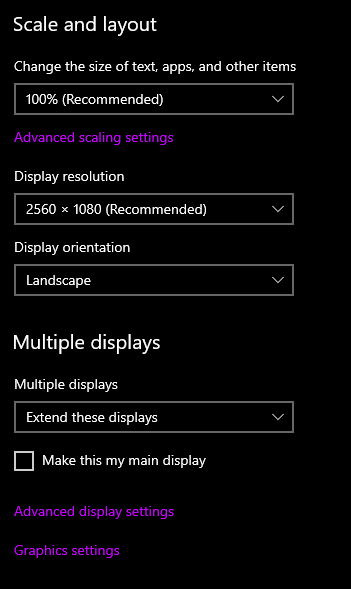
click on the box with the 1 in it, then scroll to the bottom under "multiple displays" and select "Extend these displays"
coarse elm
what are the options then?
pulsar seal
coarse elm
what are the options then?
^
coarse elm
oh
pulsar seal
is that a good oh or a bad oh
 pulsar seal
no
coarse elm
Well shoot
pulsar seal
should i try unplugging and then replugging one in?
coarse elm
No, did the AMD thing finish it's thing?
pulsar seal
Yes
coarse elm
did it install anything?
coarse elm
Do that!
pulsar seal
I restarted it
coarse elm
That should get us the missing option I hope
pulsar seal
And if it doesnt?
coarse elm
We go to other menus!
pulsar seal
Doing another quick restart
coarse elm
Starting to think you never got a graphics driver and you never where using the AMD GPU....
coarse elm
good
pulsar seal
Still not detecting two monitors
coarse elm
one is black?
pulsar seal
Yea
coarse elm
picture of the program thats open please
pulsar seal
Wdym?
coarse elm
Whatever the raedon software that opened up was
coarse elm
picture please

 coarse elm
oh ok
Open the display settings to see if the option came up first
if not then open the AMD software option and take a screenshot
pulsar seal
the option for the monitors
coarse elm
yes
pulsar seal
nope not there
coarse elm
open the AMD one and take a screenshot of it then 😛
coarse elm
oh that looks like a web browser
pulsar seal
yep did it
coarse elm
picture
pulsar seal
 coarse elm
Lets go with the "Video" tab
pulsar seal
 coarse elm
:/
pulsar seal
😬
 languid nebula
Why are people going into bios for minecraft mods
acoustic idol
Graphics maybe?
languid nebula
Thats bios
pulsar seal
 coarse elm
that's def not bios...
acoustic idol
though, clay what are the chances his bios is actually seeing the wrong card?
pulsar seal
😬
coarse elm
Open the windows display settings again
pulsar seal
yep
coarse elm
take a picture of the whole thing if you can


 coarse elm
click detect
coarse elm
but you have two.
pulsar seal
ik
coarse elm
is one old?