#ror2-tech-support
1 messages · Page 73 of 1
 radiant solstice
 deft beacon
Hey look its the dev trying to explain the issue, I wonder what you will say now :\
 steady topaz
@radiant solstice uninstalling the game with steam does nothing to the files that are placed there not by steam - mods namely.
Uninstall the game with steam, wipe the game root folder manually and install the game back.
Also drop me this file:
C:\Users\icecb\AppData\LocalLow\Hopoo Games, LLC\Risk of Rain 2\Player.log
 crisp pulsar
deft beacon
Hey look its the dev trying to explain the issue, I wonder what you will say now...
crisp pulsar
deft beacon
Hey look its the dev trying to explain the issue, I wonder what you will say now...
you still not doing them any good by attacking me you know? also what you want me to say? you seem to have made a straw doll out of me :D
 stuck nebula
bruh i cant find the temp folder
radiant solstice
@steady topaz
deft beacon
crisp pulsar
you still not doing them any good by attacking me you know? also what you want m...
Telling someone their being rude isn’t attacking but go ahead sir.
stuck nebula
bruh not rn pls
crisp pulsar
yet again, you just attacking a straw doll
stuck nebula
also i cant find my appdata folder
when i go to the owner folder in my pc i cant see it
crisp pulsar
go to your user appdata
steady topaz
@crisp pulsar HG never failed to deliver, hard to argue with that.
Game have issues - again, hard to argue.
But
They aren't silencing anyone about its downsides.
They are helpful if you provide actuall info about issues.
They are right here, under a couple of minutes. Not somewhere else behind an email that you wait a week for where they say they do all they could and nothing actually helpfull.
Can you like? Respect that and give them time? I mean its YOUR hardware failed to run the game, not theyr game filed to run on everyone's hardware.
@stuck nebula press winkey+r and type in appdata
stuck nebula
alright
crisp pulsar
steady topaz
<@!385422892466176002> HG never failed to deliver, hard to argue with that.
Game...
yet again with the attacking, i swear you dont do em any good by doing this
stop trying to be paladins  it only confuses and murks the discussion, and issue
 hollow geyser
hey y'all, im sorry but I gotta ask again since this is still an ongoing issue
I've been trying to play the new DLC with my friends, right?
Earlier today I was able to play a couple runs with myself and one friend just fine. But then a few hours later we got 2 more for a full lobby, and my ping suddenly skyrocketed to between 3000ms and 8000ms.
And this issue is only in ROR2, I can load 1080p60 video perfectly fine, and after an internet speed test I got 90mb down, 20mb up.
I've tried almost everything. Restarted the game, Steam, my PC, disabled and re-enabled my ethernet, uninstalled all mods, re-installed the game, and I'm a bit miffed to be honest because none of it worked.
steady topaz
radiant solstice
<@!302553827389865986>
@crisp pulsar you speak to the one who helps ppl here, see those pins in the channel? those were found out by fenec me and a bunch of others. No one is trying to defend HG here, its just that we actually know what's what and its offending to blame things on HG all things considered.
crisp pulsar
steady topaz
<@!385422892466176002> you speak to the one who helps ppl here, see those pins i...
yet again when have i blamed hg?
stuck nebula
oh my god yall need to stop arguing
steady topaz
im closing this discussion. not the time and not the place
its 5.31 am for me and too many ppl i talk to. i lost the thread
stuck nebula
oh i didnt know it was 5:31 for you, I can ask someone else
crisp pulsar
:D okey, i understand
radiant solstice
its only when im in game playing it happens after like 10-15 minutes
steady topaz
@hollow geyser Read:
#ror2-tech-support message
stuck nebula
why cant i find the hopoo games folder in my temp folder?
steady topaz
@radiant solstice you must have more crash files, one for each crash. Send me an error log from about 5 crashes (should be enough) they are separated by folders with time in theyr names
stuck nebula
i would post a screenshot here but idk if anything there is personal
radiant solstice
i got about 4 i think
steady topaz
send em
steady topaz
@stuck nebula mine are here:
C:\Users\REPLACE THIS WITH YOUR USERNAME\AppData\LocalLow\Hopoo Games, LLC\Risk of Rain 2
stuck nebula
ok thank your
uh
sorry to be so annoying but i dont seem to have a low or local low folder
 safe basin
anyone know how to fix this yet?
 stuck nebula
nvm im dumb i found it
 fervent sapphire
Anyone know what this means? Only popped up after Risk crash, taskbar says it's from LogiOptions (to customize my mouse sens and button bindings)
 steady topaz
@radiant solstice Does look like RAM issue.
Disable XMP memory prfile from BIOS (google on how to for your specific motherboard)
Run memtests, see how in pins.
Download CPU-Z, check core speed. It should be stable (and high) while game runs. If it goes up and down fast - update your BIOS.
Try reseating your ram cards. Unplug every, but one ram cards, try the game with only one. Then swap it for other ram card and try again. If its stable that way - your ram cards aren't going well together under load, no fix for that known.
 tepid gazelle
I can’t do anything other than press enter… any ideas?
 steady topaz
@fervent sapphire uninstall Microsoft Visal C++ libs from your pc and install those (both 86 and 64)
https://www.microsoft.com/en-us/download/details.aspx?id=48145

Microsoft Download Center
The Visual C++ Redistributable Packages install run-time components that are required to run C++ applications built using Visual Studio 2015.
@tepid gazelle vjoy installed?
fervent sapphire
Uh where do I find my Visual C++ thing in the first place
steady topaz
@safe basin send error logs from all crashfolers you have.
See messages above for locations
@fervent sapphire programs and components (its a component)
fervent sapphire
okay
steady topaz
@fervent sapphire

Renamed it apparently. Yet again great change from win7 to win10. (sarcasm)
fervent sapphire
So go to control panel and look up the C++ thing form there
steady topaz
@fervent sapphire get rid of 2015-2019 one namely, likely to cause an issue
fervent sapphire
Alright
steady topaz
@tepid gazelle press winkey+r, type in dxdiag. Wait till data collected. Save data to txt file with a button on bottom right. Send the file my way in DM, dont share it here.
fervent sapphire
steady topaz
<@!573909604107419659> get rid of 2015-2019 one namely, likely to cause an issue
Alright, uninstalled. Now get the ones from above?
stuck nebula
ok, something i found trying to look for my crashes folder was my player log, and it was bringing up that it was missing files for a lot of the new sotv stuff
steady topaz
fervent sapphire
Alright, uninstalled. Now get the ones from above?
yeap
steady topaz
stuck nebula
ok, something i found trying to look for my crashes folder was my player log, an...
send it here
stuck nebula
steady topaz
@tepid gazelle im limited in time, please hurry. or at least tell me you wont do that.
tepid gazelle
I am trying to my fps isn’t the best
fervent sapphire
64x and 86x @steady topaz ?
steady topaz
fervent sapphire
64x and 86x <@302553827389865986> ?
both
fervent sapphire
Alright
stuck nebula
Goo is a godsend rn 🙏
steady topaz
tepid gazelle
I am trying to my fps isn’t the best
fps? what it does to what i asked? you shouldn't do that from the game. Its a windows command. It will collect data about your hardware, along with a list of... ah you already did it. im looking into it rn
tepid gazelle
I sent a dm
fervent sapphire
Alright got em installed
radiant solstice
alright i swapped off xmp which looking at some of those settings could have been an issue so lets hope
steady topaz
stuck nebula
Goo is a godsend rn 🙏
quick look on the log didn't spot anything off, besides it abruptly ending. Those missing mesh messages are just warnings.
fervent sapphire
Anything more I have to do after this?
steady topaz
@fervent sapphire
-------------------
      Device Name: Mouse
         Attached: 1
    Controller ID: n/a
Vendor/Product ID: n/a
        FF Driver: n/a

      Device Name: Keyboard
         Attached: 1
    Controller ID: n/a
Vendor/Product ID: n/a
        FF Driver: n/a

      Device Name: Wired Gaming Mouse
         Attached: 1
    Controller ID: 0x0
Vendor/Product ID: 0x258A, 0x0036
        FF Driver: n/a

      Device Name: vJoy Device
         Attached: 1
    Controller ID: 0x2
Vendor/Product ID: 0x1234, 0xBEAD
        FF Driver: n/a
this is what causing it, your pc have vjoy driver installed that game confuses for actual gamepad with no mapped keys
  Device Name: vJoy Device
     Attached: 1
Controller ID: 0x1
Vendor/Product ID: 0x1234, 0xBEAD
FF Driver: n/a
      Device Name: Wired Gaming Mouse
         Attached: 1
    Controller ID: 0x0
Vendor/Product ID: 0x258A, 0x0036
        FF Driver: n/a

      Device Name: vJoy Device
         Attached: 1
    Controller ID: 0x4
Vendor/Product ID: 0x1234, 0xBEAD
        FF Driver: n/a

      Device Name: Wired Gaming Mouse
         Attached: 1
    Controller ID: 0x0
Vendor/Product ID: 0x258A, 0x0036
        FF Driver: n/a

      Device Name: vJoy Device
         Attached: 1
    Controller ID: 0x3
Vendor/Product ID: 0x1234, 0xBEAD
        FF Driver: n/a

      Device Name: Wired Gaming Mouse
         Attached: 1
    Controller ID: 0x0
Vendor/Product ID: 0x258A, 0x0036
        FF Driver: n/a
ok, the game doesnt crash, but it stops responding and wont do anything afterwards so i have to force close it with task manager. the abrupt ending could have been from that
fervent sapphire
How get rid of vjoy
steady topaz
@fervent sapphire isntall fresh version and then restart pc. Uninstall from programs and features, restart again. Should do the trick. (last uninstallation were done with errors so it needs to be installed back)
fervent sapphire
How install new
steady topaz
google it, should be easy.
fervent sapphire
Okie
steady topaz
@stuck nebula not a common thing, ill investigate.
stuck nebula
ok
steady topaz
@fervent sapphire oh man wait
fervent sapphire
I haven't done anything yet
steady topaz
@fervent sapphire damn i did. You were the guy with MSVC++ component. Those vjoy stuff arent your issues. You dont need to install it
steady topaz
Did the wizzard said installation complete? Have it appeared in programs and features?
fervent sapphire
Lemme check
 loud tangle
tested pinned message about High DPI Scaling override -- game boots, but is a quarter of my left monitor. any attempt to bring it over to my main monitor causes a blue screen hard crash and reboot
steady topaz
loud tangle
tested pinned message about High DPI Scaling override -- game boots, but is a qu...
damn
want a script that moves the window to the left top corner to try?
loud tangle
i'm going to try with a fresh save file
steady topaz
@stuck nebula hard to figure out something without error logs.
Gpu seems to be uncommon. Can you tell more about that?
stuck nebula
let me check what kind it is
steady topaz
loud tangle
i'm going to try with a fresh save file
there is nothing that could change how the game run in the profile (save)
steady topaz
stuck nebula
let me check what kind it is
ATI FirePro V5800
driver is 151.10
fervent sapphire
fervent sapphire
Lemme check
I'm a goof, didn't run the setup exe for each but it's good now
stuck nebula
steady topaz
ATI FirePro V5800
driver is 151.10
it came with my computer when i got it a few years ago, idk if its been changed in the past
 rain rune
goo, you are a goddamn legend
stuck nebula
he really is
steady topaz
@stuck nebula its listed as min-mid level for ror2.
Idk how much we can trust it. But if you're able to test lower gfx settings that might help.
Game gained a chink of data to load, might be your gpu struggling to run that impact. Just a guess. Hanging is definitely an issue.
 stuck nebula
how do i test that?
i really hope my crash isnt because my gpu is now out of date but idk
 pale leaf
my friend is having this error anyone know how to fix it?
 steady topaz
I mean just lower the gfx settings of the game and see if it still hangs.
Your gpu is old, its only 4% worse than my 2nd gpu 5770 and it was long ago i had it.
stuck nebula
steady topaz
I mean just lower the gfx settings of the game and see if it still hangs.
Your g...
i would do that but my game crashes when i click settings
i can try again but idk how well it will go
steady topaz
pale leaf
my friend is having this error anyone know how to fix it?
this is just a unity crash window, it isn't making any error. What does is error logs. make your friend to post it here, see message below
?files
 plush treeBOT
@steady topaz,
Output Logs
While the game is running, it is continually writing to a file called output_log.txt. This file can help us get more information about the issue. If possible, please upload the file here. The file is usually located at:
C:\Users\<UserName>\AppData\LocalLow\Hopoo Games, LLC\Risk of Rain 2\output_log.txt
Crash Dumps
If the game crashes it will generate a Dump file. Similarly to output_log.txt, it can help us track down the source of the crash. Please upload your crash dumps here if possible. The file is usually located at either:
C:\Users\<UserName>\AppData\Local\Temp\Hopoo Games, LLC\Risk of Rain 2\Crashes\crash.dmp
or
C:\Users\<UserName>\AppData\LocalLow\Hopoo Games, LLC\Risk of Rain 2\Crashes\crash.dmp
 viscid vine
Hey I asked a while back but I'm having a lot of performance issues now, mainly overheating and I can't limit fps, any clues if there's a fix for that?
steady topaz
pale leaf
he cant log into the game thats the problem
not sufficient of a description. Bring the error logs if there any, include output log and player log (same folder)
@tepid gazelle gld it worked out for you. Enjoy
tepid gazelle
👍
steady topaz
viscid vine
Hey I asked a while back but I'm having a lot of performance issues now, mainly ...
open game console with ctrl+alt+` and type in fps_max 60
stuck nebula
i just tried entering the settings tab in ror2 and it crashed as i thought
viscid vine
steady topaz
open game console with ctrl+alt+` and type in fps_max 60
Bruuh
tepid gazelle
I think I got banned and I don’t plan on being on this server so I made this alt. Thank you for helping me! @steady topaz
rain rune
wait, plant, how did you get your game to boot
steady topaz
rain rune
wait, plant, how did you get your game to boot
different issue
rain rune
i remeber plant was having booting issues yesterday
stuck nebula
my game has never crashed, it just goes black
fervent sapphire
tepid gazelle
I think I got banned and I don’t plan on being on this server so I made this alt...
What did you even do to get banned
stuck nebula
i said crashed cause it was easier to say than "went black and i had to close it" every time i did lol
viscid vine
steady topaz
open game console with ctrl+alt+` and type in fps_max 60
This didn't work, unfortunately
steady topaz
viscid vine
This didn't work, unfortunately
there is a higher priority setting then. Maybe preset on your nvidia thingy, check if you have any presets for games.
rain rune
error log if anyone who knows what their doing wants to look at it
viscid vine
steady topaz
there is a higher priority setting then. Maybe preset on your nvidia thingy, che...
After updating my NVidia drivers it set the preset to quality instead of letting the App decide, which was causing the problem. Thanks for the help, and I thought I'd let you know in case anyone else needs help
steady topaz
@stuck nebula
Drop this here, replace. (note your game might be installed in other place, this is default path)
C:\Program Files (x86)\Steam\steamapps\common\Risk of Rain 2\Risk of Rain 2_Data\Config
steady topaz
viscid vine
After updating my NVidia drivers it set the preset to quality instead of letting...
much appreciated for feedback. Always helps to pinpoint the problem.
radiant solstice
@steady topaz yeah im hoping xmp was the issue cause it was trying to force higher speeds and some other setting that were faster than my memory
 tranquil wedge
For me the game starts just fine, but going into any part of the menu crashes the game/causes it to stop responding, it doesn't even create a crash log. I've reinstalled the game, uninstalled every mod I've had on, verified game files, everything but it still crashes after the pressing any of the menu buttons, it started with crashing on joining multiplayer, then spread to singleplayer, now its anything.
at one point I saw a notif that said my display driver crashed and recovered
steady topaz
radiant solstice
<@!302553827389865986> yeah im hoping xmp was the issue cause it was trying to f...
it wont force faster, it is certified to run close to what tested. But it does create misbehaviour from cpu memory controller to ram memory controller, data gets lost. There is algo that reads errors and fixes them, but on such edge of capabilities it fails. Which is critical for the game.
pale leaf
trying to follow the files and we found this error message might not be the right one but is there a fix to this
WARNING: Shader Unsupported: 'Hidden/PostProcessing/Uber' - Pass '' has no vertex shader
radiant solstice
but my clocks are stable worst case i have to replace
steady topaz
pale leaf
trying to follow the files and we found this error message might not be the righ...
nothing bad, it's how it should be. This particular line is a warning, its okay.
stuck nebula
@steady topaz I replaced the config, game still freezes up when i click on settings
tranquil wedge
seems me and plant_btw are having the same problem
stuck nebula
possibly
steady topaz
@stuck nebula does it run in windowed mode with potato graphics? (this indicated replacing config went well)
stuck nebula
the game had black borders and looked like it was running on an old tv if thats what you mean
pale leaf
steady topaz
nothing bad, it's how it should be. This particular line is a warning, its okay.
Im still confused because whenever my friend trys to open the game it instantly closes and in his files there is no crash log so we have no idea how to fix the problem
steady topaz
stuck nebula
the game had black borders and looked like it was running on an old tv if thats ...
are you able to run it like that for a couple of minutes untill it freezes if so?
steady topaz
pale leaf
Im still confused because whenever my friend trys to open the game it instantly ...
send output log
and player log too
stuck nebula
i can run the game in main menu for a while, clicking any buttons freezes my game
tranquil wedge
does the same for me plant
I went as far as to uninstall all mods and even the mod api i use
stuck nebula
deleted, i no longer have a config
steady topaz
@tranquil wedge send me your player and output logs.
stuck nebula
tranquil wedge
I went as far as to uninstall all mods and even the mod api i use
i uninstalled r2modman yesterday and reinstalled steam, so most of my stuff is wiped clean
steady topaz
stuck nebula
deleted, i no longer have a config
it will be created on startup. mine were modified for potato settings.
stuck nebula
ok
 lusty kraken
gentle reminder, kinda got spammed out earlier
stuck nebula
oh i havent sent my output log yet let me send it rq
 primal meteor
Is there a way to rejoin a game?
I have irregular internet issues with disconnects about 10-30 seconds and that seems to be enough to kick me out of a running game.
stuck nebula
steady topaz
primal meteor
Is there a way to rejoin a game?
I have irregular internet issues with disconne...
copy the lobby id, use that to join as you usually do with join with clipboard button
stuck nebula
primal meteor
Is there a way to rejoin a game?
I have irregular internet issues with disconne...
i think you can rejoin with an invite
 mortal latch
When I launch the game it I get a black screen for 1/4th of the screen and the rest is just white. After waiting for a while I was able to interreact with the main menu but still could only see 1/4th of the game. Changing resolution didn't help.
tranquil wedge
steady topaz
<@!380840164429398016> send me your player and output logs.
Ok one moment
mortal latch
anyone know of a fix?
fervent sapphire
None of the things I fricked with today actually worked but I didn't really expect it to tbh
primal meteor
stuck nebula
i think you can rejoin with an invite
oh gonna try that next time, because just trying to join over steam led me strait into a blackscreen
mortal latch
mortal latch
anyone know of a fix?
before the dlc this hadn't ever happened, so I'd guess its something related to the new files
 thin quest
My game will not load and stops responding when i try to play. This never happened before the dlc came out
mortal latch
thin quest
My game will not load and stops responding when i try to play. This never happen...
yeah 4 out of 5 launches that happens for me also
fervent sapphire
Casually ready to play while also apparently just not taking up any space
 steady topaz
primal meteor
oh gonna try that next time, because just trying to join over steam led me strai...
steady topaz
primal meteor
oh gonna try that next time, because just trying to join over steam led me strai...
@primal meteor more techy way if you wish:
press ctrl+alt+` in that order, this opens the game console. Then you can enter the commands.
Enter
steam_lobby_copy_to_clipboard
to copy current host id numbers (the ones that you use to join) Use those numbers to join the game
If you have the numbers you can use
steam_lobby_join
like
steam_lobby_join 109775240999144611
to connect.
If you have host ip adres (asked for external ip, like on https://www.myip.com) you can use
connect 192.168.1.1:7777
command, where you replace 192.168.1.1 with host's external ip. Leave the 7777 - its a port game uses. Note this bypasses the steam entirely so perfect NAT required.
(EDIT: text formating went to brasil, im spacing the commands out instead)
tranquil wedge
so uh goo, 1 problem, there appears to be no output log.
steady topaz
damn.. im not fixing the text formating the discord butchered hre.
steady topaz
tranquil wedge
so uh goo, 1 problem, there appears to be no output log.
player log in place?
steady topaz
send
primal meteor
steady topaz
<@!237212845257785344> more techy way if you wish:
press ctrl+alt+` in that orde...
Oh thank you!
Definitly gonna try that out next time I dc.
mortal latch
mortal latch
When I launch the game it I get a black screen for 1/4th of the screen and the r...

its strange cause I can interact with the parts that I can't see
 merry stag
mortal latch
anyone know of a fix?
merry stag
mortal latch
anyone know of a fix?
I had a similar issue. Try this
https://media.discordapp.net/attachments/559902278018924557/948374485516562492/Screenshot_817.png
 stuck nebula
i managed to get to the character select screen just now! but game died when i selected railgunner 😦
steady topaz
@tranquil wedge@stuck nebula I see similarity in your logs. Also GPUS are fairly close to eachother performance wise. But very very different in nature. I have no idea how that correlates to what happens with your game.
 stuck nebula
interesting
stuck nebula
same
pale leaf
Goo can you help with my friends game not loading at all i can sent output and player logs if needed
tranquil wedge
I confirmed its not the dlc by uninstalling it, so i must be something with the update itself perhaps?
stuck nebula
maybe
tranquil wedge
steady topaz
<@!380840164429398016><@!610514704120414208> I see similarity in your logs. Also...
when the crash happens my pc gives me a notif saying my display driver stopped responding and has recovered.
steady topaz
You guys need to speak with devs, im lost on this. I dived real deep trying to find what this could be. But im no programmer and its way beyond my knowledge.
stuck nebula
steady topaz
You guys need to speak with devs, im lost on this. I dived real deep trying to f...
i think their dms are closed?
I could @ one of them but idk
steady topaz
@tranquil wedge@stuck nebula that's a guess. But you might need to uninstall GPU driver completely with DDU and then install lattest aviable for your gpus.
See pins for ddu
tranquil wedge
I can try that
steady topaz
@pale leaf send me error logs from this location (exact)
C:/Users/findi/AppData/Local/Temp/Hopoo Games, LLC/Risk of Rain 2/Crashes
pale leaf
steady topaz
<@!535916938434707478> send me error logs from this location (exact)
`C:/Users/f...
forgot about pined messages and the first one worked
steady topaz
pale leaf
forgot about pined messages and the first one worked
Well at least i have an example of log that points to the problem.
Alright folks its 7 am, i need to get to work in 30 min. Ill probb wont be around for a couple of days. Good luck with your game issues, hope it gets solved soon.
 obtuse sequoia
Ok I tried the memtest and everything was fine, about the gpu driver I already have the latest update a while ago cause it got discontinued
stuck nebula
steady topaz
Alright folks its 7 am, i need to get to work in 30 min. Ill probb wont be aroun...
alright goo, tysm for your help!
i know why my game is dying now
deft beacon
For those with the hard crash, I have found they are very common in unity, and their soloutions seem to be making the game look in the right install folder (or if it is) Putting the files where they belong.
 orchid flame
how can I fix void fiend

 fair coral
hey there, probably a common problem but my ROR2 won't start up on steam
however, I got to play as soon as i installed it last night
does anyone have a fix to this? ive already reinstalled ROR2, Updated graphics drivers and set it to compatibility mode
 slate nexus
ror2 wont start after purchasing the DLC any ideas as to what's causing it
fair coral
^^
deft beacon
Cheeto and Draco you might want to look up :/
stuck nebula
tranquil wedge
My DDU is up to date
oh monke did you get the game to work?
fair coral
deft beacon
Cheeto and Draco you might want to look up :/
that was my first solution, but after about an hour of trying, no solution
but thanks for the input
deft beacon
No... im saying your problem has no fix
And people have been running into it for a while
Hence look up, cause your not alone, and we all have a bad feeling unity is to blame
fervent sapphire
And we've got no official confirmation anybody is looking into it
fair coral
i see..
tranquil wedge
stuck nebula
oh monke did you get the game to work?
I didn't need to be updated, sadly it didnt work.
fair coral
so in short, i basically bought the game to be able to play it once and never again till something comes up for it?
 vivid elm
I am having the same problem before the DLC was installed I was able to play fine then I installed had the problem then uninstalled it and it stayed the same
deft beacon
fair coral
so in short, i basically bought the game to be able to play it once and never ag...
No, the dlc wasn't the issue it's unity and your computer
it's a common bug, check your crash log and google unity: Then whatever you got
deft beacon
Cause hte update introduced the new unity feature
Please look at pins im pretty sure they show that
stuck nebula
tranquil wedge
I didn't need to be updated, sadly it didnt work.
Rip
I cant even find my gpu for an update 
 lean crypt
Game is loading super slow, anyone else having that issue? Takes around 5 minutes on an M2 SSD. Tried verifying and restarting and all that good stuff with no luck.
deft beacon
if anyone here ever finds their crashlog stuff, my friend found his and fount two prompts that are infamous unity bugs that cause the game to not proiperly load.
 summer crypt
fair coral
hey there, probably a common problem but my ROR2 won't start up on steam
summer crypt
fair coral
hey there, probably a common problem but my ROR2 won't start up on steam
I ended up fixing it by launching the game, going into the task manager, and closing the unity crash handler
deft beacon
summer crypt
I ended up fixing it by launching the game, going into the task manager, and clo...
Wait really? that's a funny fix for that.
fair coral
ill give you a big smooch on the lips if that works
summer crypt
I thought it was weird too, but it worked for me
it might also be found in the steam drop down menu, so you can look there
 tranquil wedge
stuck nebula
Rip
tranquil wedge
stuck nebula
Rip
i managed to fix it but...at a large cost
I ended up deleting all folders associated with risk of rain 2, even the hopoo folder in the locallow file
old player profiles seem to be corrupted
stuck nebula
So, had to reset basically?
tranquil wedge
if only it allows us to delete said profiles
tranquil wedge
stuck nebula
So, had to reset basically?
yup pretty much.
stuck nebula
Im ok with that, ive done before actually to play with a friend who had a cracked version
Let me see if it works for me, but im making copies of everything first
fervent sapphire
summer crypt
I ended up fixing it by launching the game, going into the task manager, and clo...
Sadge, didn't work for me
tranquil wedge
pretty much deleting all progress, just make sure not to go on the old file
stuck nebula
whats funny is that i just 100% on the 28th of february
stuck nebula
tranquil wedge
pretty much deleting all progress, just make sure not to go on the old file
old profile?
im gonna delete my stuff and then reinstall ror2 and see if it works
fair coral
summer crypt
I ended up fixing it by launching the game, going into the task manager, and clo...
mine's just stuck on this. nothing else is popping up
 stuck nebula
im probably not gonna make copies since im lazy
 haughty meteor
hey my friends game wont start, its crashing so fast that he cant even get a screenshot of the error message. anyone have any idea whats happening? it wasnt like this before he installed the dlc
stuck nebula
alright my game is reinstalling, i have the old files in my bin jic
fair coral
fair coral
mine's just stuck on this. nothing else is popping up
oh, i just ended the suspended ror2 task and launched it again
tranquil wedge
stuck nebula
old profile?
yeah old profile as in player profiles
stuck nebula
oooh
tranquil wedge
 stuck nebula
do i have to delete my profiles or not
stuck nebula
ok, i wont then
fair coral
@summer crypt pucker up baby, im comin in for a massive smooch <3
stuck nebula
i just deleted the risk of rain 2 folder and the hopoo games folder
fair coral
worked for me
stuck nebula
idk what else i would need to remove
tranquil wedge
stuck nebula
idk what else i would need to remove
nothing, just reinstall the game after deleting the folders
stuck nebula
its on its way 👍
tranquil wedge
cool
stuck nebula
i still have all the steam achievments and i can probably just import a 100% save file if this works
it didnt work oh no 😭
i cant pick the railgunner or else the game crashes
let me just uh, restore those files rq
tranquil wedge
damn, i just tried going into settings and it crashed
stuck nebula
could you enter runs or pick the railgunner?
now its seeming like i might be forced to buy a new gpu or upgrade my pc
tranquil wedge
i wanted to reset my settings
orchid flame
anybody getting the unity crash too?
stuck nebula
a lot of people are
 versed falcon
Hello I have a question. After the update, the original [ror2 dedicated Server] without mod cannot be played with more than 4 players. I already edited [sv_maxplayers 8; // The maximum number of players] in the [server_startup] file under the [\Risk of Rain 2_Data\Config]. The console says [Warning: no free slot for incoming connection]. but before the update it was possible to play multiplayer, regardless of whether or not you had dlc.
Someone told me it is a bug, just wait the update. Is it?
orchid flame
well I'm glad I'm not the only one lol
versed falcon
This is what console says
 stuck nebula
looks like the devs cant really fix this from their end, im probably going to end up refunding the dlc
 sinful cargo
orchid flame
anybody getting the unity crash too?
sinful cargo
orchid flame
anybody getting the unity crash too?
Im also getting this issue on startup
stuck nebula
yeah the new update kinda killed a lot of peoples games
im just refunding since i essentially wasted 10 dollars lmaoo
i can keep pretending like everything is fine by just opening the game everyday and hoping it magically works but idk
fervent sapphire
stuck nebula
i can keep pretending like everything is fine by just opening the game everyday ...
I would've kept it until a fix went out
No reason to refund now to spend 15 when it starts working
 summer fiber
Anyone have any suggestions to troubleshoot bad latency when playing multiplayer with my buddy? We've had this issue for a long time. Don't think its our internet because everything else runs fine.
stuck nebula
fervent sapphire
No reason to refund now to spend 15 when it starts working
the thing is, I dont think they can fix my issue, and even if i refund im only going to end up paying 5 extra dollars
orchid flame
stuck nebula
the thing is, I dont think they can fix my issue, and even if i refund im only g...
- Go to the RoR2 app in the local files > right click on it > Properties > Compatibility > Change high DPI settings > check the High DPI scaling override box > switch the scaling from Application to System or System enhanced
i did that and it works now
for me at least
stuck nebula
orchid flame
- Go to the RoR2 app in the local files > right click on it > Properties > Compa...
i did that yesterday and it didnt work sadly
fervent sapphire
stuck nebula
the thing is, I dont think they can fix my issue, and even if i refund im only g...
I think it's just a graphics optimization problem
stuck nebula
it might be?
im not sure, but if the update comes out in less than 13 days than i can just not refund lol
fervent sapphire
It'll most likely be within a week imo
 limpid flame
HELP PLS!!!
every time i try to launch the game i see this for a couple of seconds then it disappears
 stuck nebula
check pins
stuck nebula
enjoy :)
 dim mulch
I have a dedicated server and it works but it randomly disconnects people who are on it. Is there a way to improve latency on it or whatever?
stuck nebula
ror1?
dim mulch
ror2
dim mulch
the only reason I hosted a ror2 dedi server instead of using the steam system is cause it would crash me every time I didn't so I wouldn't be able to play multiplayer
got the classic blank screen no text issue... but realized dedicated servers can bypass it
and then it worked, but then you clear 3 stages and my friends dc o-o
stuck nebula
interesting
 summer juniper
for whatever reason, ever since SOTV's release, my game crashes when I attempt to host a game
as soon as I click the Start Game button, my game immediately crashes
in the lobby player list it shows me and 1 +, which is odd since I believe previous versions always had 4 visible slots
the game immediately closes, no crash reporter or anything
I'm running the game with Proton 5.13-6, Proton 6.3-8 has the same problem, Proton 7.0-1 also has the same problem
fixed my problem, disabled esync and it works, but it does make the game laggier
 snow cave
YESSSSSS
stuck nebula
btw mari, did you see what ben was talking about earlier?
summer crypt
summer crypt
I ended up fixing it by launching the game, going into the task manager, and clo...
Have you tried this yet, plant?
stuck nebula
my issue isnt with unity, has to do with my gpu
summer crypt
ohhh
deft beacon
Did you try the GPU fix Plant?
stuck nebula
updating the GPU?
i have no idea what im doin lmao
just ran my driver update exe
bruh, how long is this gonna stay here

bruh
didnt need an update
merry stag
this is an ongoing problem that ive been struggling with since day one (over a year and a half of gameplay)
im using an xbox one controller on my pc.
ive gone into big picture mode, and activated all my controller support settings and downloaded all the most recent drivers. and this is ONLY an issue on risk.
but if i have my controller plugged into the pc (wired or wireless) before i start a round, i will not be able to have any control support in game.
the only fix ive been able to find is to have the controller completely disconnected from the pc. load up risk, start a game, plug in the controller, die.
from then on i have full controller support in game. this has become increasingly annoying when trying to play with my friends. does anybody have any suggestions???
deft beacon
merry stag
this is an ongoing problem that ive been struggling with since day one (over a y...
Steam issue not this games
trust me I play fighting games on steam, it happens alot there too
 timid garnet
My game keeps randomly crashing Midway through a run and it also makes my screen flash black and then the game no longer responds and fully crashes It's never done this until the new update came out and I verified my files I've reloaded my monitor so that way they are synced up properly I have done everything it's like my PC alt tabs without me actually doing it and it causes the game to die
 half pendant
Hello so i have been for i would say at least nearly half a year now having where my risk of rain 2 will randomly cause a BSOD. i have tried various fixed none of which have fixed the problem or only seemingly made it less common. it seems to be entirely random as to when it will happen sometimes it will happen 2 hours into a play session other times it will happen stage 1. this issue seems to happen for some other unity based games such as gunfire reborn and such art. the fixes i have tried so far include
Updating my gpu drivers
Updating my bios
Editing ram speed
Disabling overlays on risk of rain
Updating my Bios
Buying new ram
Updating my direct x
Fresh do a soft wipe of my pc.
Multiple reinstalls of risk of rain.
and many more that i forget.
limpid flame
My homie's game aint working ONLY in multiplayer, when he joins my lobby his game shows nothing except the ui, no characters no artifacts no nothing
he thinks its a problem with his wifi
 steel jackal
is there a solution for 26f1 error?
timid garnet
half pendant
Hello so i have been for i would say at least nearly half a year now having wher...
bsod?
half pendant
blue screen of death
 idle matrix
So i launched risk of rain and it gave me a prompt to make a new profile and it says my past one is corrupted. What do i do so i can keep my progress?
ive checked my profile sizes and its at 0 bytes and i have had this happen twice in the past
 kind gazelle
idle matrix
So i launched risk of rain and it gave me a prompt to make a new profile and it ...
kind gazelle
idle matrix
So i launched risk of rain and it gave me a prompt to make a new profile and it ...
back it up
idle matrix
even when its already gone
cause i was really close to 100%ing the game and it corrupted
 tough pasture
hi, risk of rain 2 refuses to start with the new dlc and it won't tell me what the issue is
so far i've tried:
reinstalling
launching vanilla from thunderstore (my mod manager)
restarting steam
restarting my pc
verifying my game files
beating my wife
moving it back and forth between my two drives
and none of these have changed anything
update: just tried the fix in the pinned message (about high dpi settings, tried both system and system enhanced) and nothing changed
update 2: completely nuked thunderstore and all included content off my pc, reinstalled ror2 and got the same error, though it hung for a bit longer before throwing the error
update 3: nuked every mention of thunderstore in my files and got no change
 glad scarab
Does anyone know how to get the DLC on switch?
 bold stream
glad scarab
Does anyone know how to get the DLC on switch?
bold stream
glad scarab
Does anyone know how to get the DLC on switch?
There are no dlc for consoles
glad scarab
Damn
bold stream
They said dlc will go out later for consoles
glad scarab
Ahhhh, that makes a lot more sense lol. I haven't been able to keep up with everything so I wasn't aware of that 😅😅😅😅
 delicate charm
Sudden fps drops halfway through the game. Any fixes?
 harsh marsh
is anybody elses game freezing mid run? I can hear the background but the screen is frozen.
 pallid parrot
So I'm having trouble deleting all my save files, I tried deleting them through file location. I've also tried deleting the profile through game but that doesn't do anything. Now I'm stuck with mitosis game files that I cannot delete.
 gaunt cove
Does multiplayer usually requires a lot of bandwith even while not hosting the lobby?
 frozen vector
pallid parrot
So I'm having trouble deleting all my save files, I tried deleting them through ...
frozen vector
pallid parrot
So I'm having trouble deleting all my save files, I tried deleting them through ...
yeah there is a bug with the new update
bold stream
frozen vector
yeah there is a bug with the new update
alot of bugs
frozen vector
bold stream
alot of bugs
i agree
bold stream
many people cant even play the game
 mossy dragon
Has it fixed yet -_-
bold stream
nope
 native knoll
is this the appropriate place to put some crash dump files to potentially get help with a fix?
 undone yarrow
Hi, is it a previously reported issue that audio in game cuts out intermittently, or is it just me?
 lusty nova
Sometimes when I activate the teleporter my audio fades in and out really weirdly but it's kinda rare
snow cave
bold stream
nope
all we can do is pray for a patch
undone yarrow
I get it every 30 seconds or so, where the game just goes silent despite not much graphical load or anything.
My PC has been having issues lately, so I'm unsure if it's the game or not, since it is running fine framerate wise.
bold stream
snow cave
all we can do is pray for a patch
I asked Bizz to help, he said it gonna be hard to diagnose
snow cave
man
hopefully there's a fix
tbh we're better off waiting for the patch
i've been doing a good job not getting spoiled
bold stream
Thankfully i know how to get to new boss
 weary skiff
Hello
I'm having problems with the game when I bought it, the game runs for a few moments but then it freezes and goes to my desktop, then it says not responding and the only way is for me to finish the task in the task manager, I really want to play, but this is not letting me, if anyone knows a solution for this I would be very grateful, and sorry for my bad english, english is my second language
bold stream
snow cave
i don't
I can tell, it wont spoil alot i think
fervent sapphire
You better not
bold stream
fervent sapphire
You better not
I wont until she wants to
bold stream
weary skiff
Hello
I'm having problems with the game when I bought it, the game runs for a fe...
We got same problem here
The solution is unknown at the moment, but im trying to solve it with devs
weary skiff
ok thanks
bold stream
And your English is not bad, its also my second language and my grammar is bad
weary skiff
huh
steel jackal
bold stream
And your English is not bad, its also my second language and my grammar is bad
english is still much easier than russian
bold stream
steel jackal
english is still much easier than russian
Russian is one of the hardest languages
And its my main language
steel jackal
yeah
weary skiff
Portuguese s kinda of difficult too
lusty nova
Every ESL person I've ever talked to online types better English than all my English first language friends lmao
weary skiff
weary skiff
Portuguese s kinda of difficult too
i mean its my language
but is annoying to learn
 wintry rampart
What Dev is the programmer on Hopoo games / Risk of rain?
 serene summit
Guys
I need some assistance
I am stuck on wave 50 of simulacrum
the red bar just won't progress and I think it has to do with happiest mask that I have
stuck nebula
wintry rampart
What Dev is the programmer on Hopoo games / Risk of rain?
All of them i think
bold stream
Not all of them
stuck nebula
Eh whatever
bold stream
Bizz is an artist
Chris Christodoulou is an artist
Hopoo and paul are programmers i think
But you wont contact them in discord
stuck nebula
Chris doesnt have dev role 
bold stream
stuck nebula
Chris doesnt have dev role <:happiesttroll:790347758732050463>
He makes music
stuck nebula
I know lol
bold stream
Awesome music
stuck nebula
Very good stuff
bold stream
Yeah
stuck nebula
From what ive done so far i at least know why my game is being stupid and freezing when i hit singleplayer
Has to do with my gpu
bold stream
Wow, i got that first times i been getting this error
stuck nebula
?
stuck nebula
Ok
Im thinking my issue could be from optimization problems
If its not i would have to buy a brand new gpu
bold stream
stuck nebula
Im thinking my issue could be from optimization problems
Probably
stuck nebula
If it is, i can wait for a patch and it will probably be fixed
 elder ermine

 indigo raptor
When the patch
 tired void
hi
me and my friend are tryign to play multiplayer but its really laggy
it went fine for the first few minutes but my friend started lagging and now we cant even start a game
orchid flame
has there been a patch yet?
snow cave
no 
orchid flame
sad
serene summit
orchid flame
has there been a patch yet?
We probably won't get a patch before 1 week has passed since launch and that is still just hopeful thinking
 high walrus
hey fellas, was wondering i can get a little understanding as to why i am consistently crashing. it's not on start-up. i can get into the game every time i try. the issue is my game out of nowhere likes to crash at consistently inconsistent times. it could happen within 3 minutes or 30. i've checked the pins out and have tried pretty much everything that could apply to me.
yesterday i even had some degree of success, after I had reinstalled C++ and it didn't crash for a good 4-5ish hours of gameplay after that. fast forward to today and it's still crashing. imma get the error a sec

 jovial inlet
high walrus
jovial inlet
high walrus
?files
plush treeBOT
@jovial inlet,
Output Logs
While the game is running, it is continually writing to a file called output_log.txt. This file can help us get more information about the issue. If possible, please upload the file here. The file is usually located at:
C:\Users\<UserName>\AppData\LocalLow\Hopoo Games, LLC\Risk of Rain 2\output_log.txt
Crash Dumps
If the game crashes it will generate a Dump file. Similarly to output_log.txt, it can help us track down the source of the crash. Please upload your crash dumps here if possible. The file is usually located at either:
C:\Users\<UserName>\AppData\Local\Temp\Hopoo Games, LLC\Risk of Rain 2\Crashes\crash.dmp
or
C:\Users\<UserName>\AppData\LocalLow\Hopoo Games, LLC\Risk of Rain 2\Crashes\crash.dmp
high walrus
jovial inlet
in the crash dump folder, there is an error.log, please send that here
high walrus
ohh 1 sec
snow cave
serene summit
We probably won't get a patch before 1 week has passed since launch and that is ...
indigo raptor
serene summit
We probably won't get a patch before 1 week has passed since launch and that is ...
Why
high walrus
thanks 🙂
native knoll
Been having a bunch of issues with crashes, any help would be appreciated as I've tried the pins except for the visual c++ reinstall. can play the game for about 20 min no problems but past that it sems to crash anywhere from 25-90 minutes in.
 shut mauve
so i did a dumb thing and uninstalled/reinstalled risk of rain but now when i play it's asking for a new profile, i'd rather not do that, I have a file with all my unlocks and i'd like to get it back, i'm stupid when it comes to this though and i'm sure it's an easy fix but i'm not sure how to do it
 white stag
high walrus
white stag
high walrus
I am having the same issue.
Any updates on this error?
bold stream
Pins
 hexed furnace
I'm just gonna bring this up again as I really want to know if this is a problem that the dlc brought up. Like can someone just test this.
 clear turret
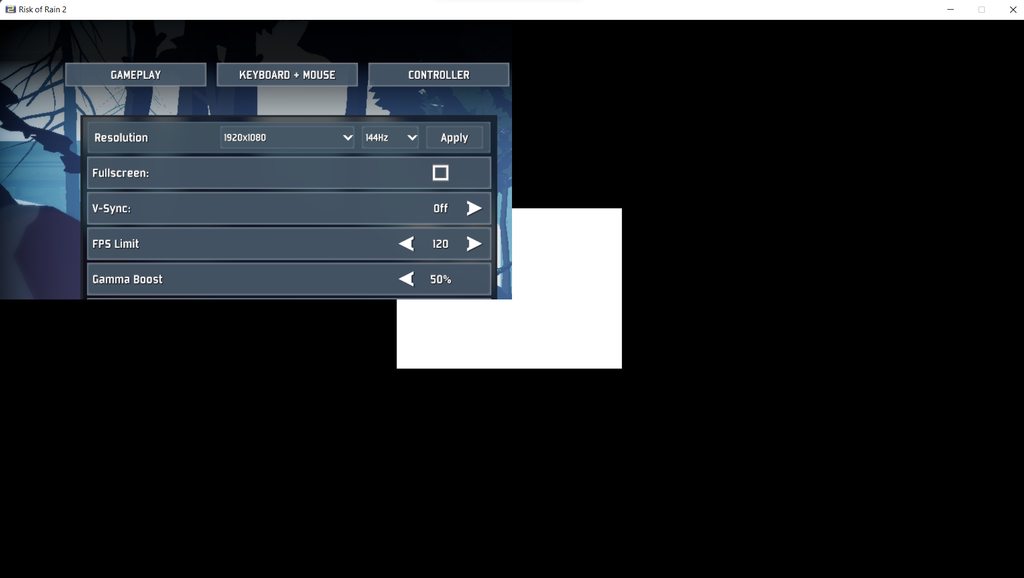
Game screen only shows upper left corner.
Everything runs as usual, I can interact with the unviewable part of the screen (by guessing).
Image of issue: https://imgur.com/a/kmY8A4j
Tried going into config file and edit resolution (it resets to a preset once the game launches), verified file integrity, reinstalling, and even brute forcing into the in-game settings, made it till the video settings (as shown in picture), tried to set whatever I can, but it would only still show one corner of the screen even after switching the different resolutions. Enabled and disabled fullscreen, no change.
Currently using Window 11
need help
 bold stream
clear turret
Game screen only shows upper left corner.
Everything runs as usual, I can intera...
bold stream
clear turret
Game screen only shows upper left corner.
Everything runs as usual, I can intera...
Its something with DPI, scroll up, solution must be there
clear turret
Switched the DPI scaling from System (Enhanced ) to System, problem fixed. Thanks!
bold stream
Enjoy the game
shut mauve
pins helped lol i just am so bad with this stuff sometimes, ty for an easy fix
jovial inlet
high walrus
aksoundengine
this means audio drivers are interfering
uninstall everything except for Realtek (or install Realtek if you do not have it)
things like Sonic Studio or Headset drivers (which are honestly just worthless junk anyway) can cause the game to stop knowing where to put audio
jovial inlet
native knoll
Been having a bunch of issues with crashes, any help would be appreciated as I'v...
unityplayer
so unfortunately, we have no real idea as to what this common crash is post-dlc as solutions differ for every machine. if you have tried the pinned solutions it could potentially be:
- faulty ram/storage. check the pins for scans you can perform
- outdated/malfunctioning drivers, Visual C++ or windows is outdated. un- and reinstall your GPU driver completely and only enable recommended updates, not experimental. For Visual C++ links, check the pins. windows update speaks for itself
- overclock enabled. set your CPU/GPU/RAM clock speed to stock in your bios.
 daring pelican
Im writing for you because one of my friend has some problems with the game launch, and his english is not really good. His game is crashes on launch without any error message. We almost tried all possible fixes what we could find on the internet incudeing updateing gpu drivers and windows and reinstalling the game. Can u help us the solve the issue? I cant paste the crashlog because its not even generated.
jovial inlet
daring pelican
Im writing for you because one of my friend has some problems with the game laun...
did you check the pins
currently, launch crashes are not consistent so we have no set solution, but the ones mentioned there seem to work for some
daring pelican
jovial inlet
currently, launch crashes are not consistent so we have no set solution, but the...
i already did 😦
plush treeBOT
@jovial inlet,
Output Logs
While the game is running, it is continually writing to a file called output_log.txt. This file can help us get more information about the issue. If possible, please upload the file here. The file is usually located at:
C:\Users\<UserName>\AppData\LocalLow\Hopoo Games, LLC\Risk of Rain 2\output_log.txt
Crash Dumps
If the game crashes it will generate a Dump file. Similarly to output_log.txt, it can help us track down the source of the crash. Please upload your crash dumps here if possible. The file is usually located at either:
C:\Users\<UserName>\AppData\Local\Temp\Hopoo Games, LLC\Risk of Rain 2\Crashes\crash.dmp
or
C:\Users\<UserName>\AppData\LocalLow\Hopoo Games, LLC\Risk of Rain 2\Crashes\crash.dmp
jovial inlet
same folder as the crash.dmp
 keen coyote
I don't know why but since i downloaded the DLC, the game take 3-5 minutes to launch...
Before, it takes me 10-20 sec...
bold stream
keen coyote
I don't know why but since i downloaded the DLC, the game take 3-5 minutes to la...
Its okay
keen coyote
?
bold stream
It usually takes to load more now
More content - longer loading
You can play atleast
tough pasture
sir one game should not take up to 5 minutes to load, even with all the dlc in the world
bold stream
tough pasture
sir one game should not take up to 5 minutes to load, even with all the dlc in t...
Dlc isn't perfect
tough pasture
not on modern gaming specs
keen coyote
3 min to get 11 % of launch
it exactly takes me 8 minutes and 18 sec to launch the game
for sure the DLC is heavy, but 8 minutes...
bold stream
Thats kinda serious
 plush cove
Hi, I have an issue with the multiplayer. So when ever I try to join one of mx friends lobbys or the try to join mine we only see this image, but if the try to join each others lobbys it works so it has to be me who has the Problem, does anyone know how to fix it?
 bold stream
plush cove
Hi, I have an issue with the multiplayer. So when ever I try to join one of mx f...
bold stream
plush cove
Hi, I have an issue with the multiplayer. So when ever I try to join one of mx f...
Try to scroll up maybe there is a solution
Kinda popular problem
plush cove
Ok thx
 hollow briar
i have yet to see someone give a solution lol
it just seems to happen when someone in the group doesn't have the dlc
plush cove
Yes me too, it seems that this issue was avoided somehow
But some of my friends have the DLC and others dont and they can still play together
hollow briar
yeah I really don't know what's the specific trigger except from the lack of dlc
plush cove
Oh ok
hollow briar
when a friend had this problem we just, kept closing and reopening the game, and eventually it worked out lol
simulacrum seems to have a way higher chance of doing this though
plush cove
OK well I tried this yesterday but it still didnt work out, but I will keep trying
hollow briar
so i'd recommend playing classic until someone smarter figure this out lol
yeah its weird
plush cove
Is there some way for me to get notified or something like that if the Problem gets solved
hollow briar
well, they @.everyone when a patch comes out i think, so it'll probably be it
orchid flame
does my friend need the dlc too if he wants to play with me simulacrum?
plush cove
OK Thank you very much
hollow briar
plush cove
Hi, I have an issue with the multiplayer. So when ever I try to join one of mx f...
you should be able to play simulacrum with someone who doesn't own the dlc but for now there's a chance that the game just shows you this screen when either of you tries to join
so uh, technically, yes he needs the dlc ?
orchid flame
is there a fix for my game to stop working after i press single player?
snow cave
bold stream
Dlc isn't perfect
dlc need a massive patch
snow cave
orchid flame
is there a fix for my game to stop working after i press single player?
we'll probably get pinged if there is a fix/patch
 maiden rune
hey. My game fails to start after the update and DLC download. I haven't played in a while and decided to see whats new but now when i start from steam, it says starting, a launch window appears on the screen for a split second before it closes and the game doesn't start
Any info on this for a fix or will i have to wait a bit?
bold stream
maiden rune
hey. My game fails to start after the update and DLC download. I haven't played ...
No solution, sorry
bold stream
snow cave
dlc need a massive patch
What if we wont get patch 
snow cave
no fucking way they don't give us a patch
orchid flame
bold stream
What if we wont get patch <:HuntressThink:587307251497435146>
then no ror2
maiden rune
bold stream
No solution, sorry
ah hm. is it known/common issue or am i a snowflake with this one?
snow cave
i hope they add Gogeta in the next update
bold stream
maiden rune
ah hm. is it known/common issue or am i a snowflake with this one?
Common i think
snow cave
snow cave
i hope they add Gogeta in the next update
fuck it. Broly boss
bold stream
snow cave
fuck it. Broly boss
Dr Manhattan
orchid flame
snow cave
i hope they add Gogeta in the next update
fusion reborn gogeta or dbs broly
bold stream
maiden rune
ah hm. is it known/common issue or am i a snowflake with this one?
Sadly most dlc problems with freezing/crashing are unsolved
I contacted devs they might do something with it
snow cave
orchid flame
fusion reborn gogeta or dbs broly
DBS one since that's the canon one
bold stream
Damn, i cant wait for a patch, i really love ror2 and beloved dlc
snow cave
i've really stepped up my spoiler dodging game
orchid flame
how many hours yall got on ror2
snow cave
recently hit 100 hours
orchid flame
i have like 110 or smth
snow cave
y'know i think we might wanna take this to #ror2-no-sotv-spoilers
bold stream
snow cave
y'know i think we might wanna take this to <#943510055146356766>
Lets move there
mossy dragon
jovial inlet
currently, launch crashes are not consistent so we have no set solution, but the...
Can you please assist me?
jovial inlet
mossy dragon
Can you please assist me?
whats wrong
mossy dragon
When I press single player the or something else on the menu, the game crashes and if I do make it in the survivor select, when I press railgunner, the game crashes as well
plush treeBOT
@jovial inlet,
Output Logs
While the game is running, it is continually writing to a file called output_log.txt. This file can help us get more information about the issue. If possible, please upload the file here. The file is usually located at:
C:\Users\<UserName>\AppData\LocalLow\Hopoo Games, LLC\Risk of Rain 2\output_log.txt
Crash Dumps
If the game crashes it will generate a Dump file. Similarly to output_log.txt, it can help us track down the source of the crash. Please upload your crash dumps here if possible. The file is usually located at either:
C:\Users\<UserName>\AppData\Local\Temp\Hopoo Games, LLC\Risk of Rain 2\Crashes\crash.dmp
or
C:\Users\<UserName>\AppData\LocalLow\Hopoo Games, LLC\Risk of Rain 2\Crashes\crash.dmp
 foggy thistle
Most issues can be fixed with the suggested actions in the pinned messages for this channel. So if you haven't tried those suggestions, please read those suggestions carefully.
But if none of the suggested actions are helping, there's a good chance that the issue is related to your hardware. To help us figure out which hardware configurations might be experiencing issues, we'd appreciate it if you:
- Run dxdiag
- Save the information via the "Save All Information..." button
- Send us that text file with a detailed description of your specific issue (e.g., "Game crashes when loading progress reaches 37%") to support@hopoogames.com. PLEASE DO NOT POST THIS FILE IN DISCORD! The file contains identifying information, so keep it private.
 jovial inlet
same folder as the crash.dmp
foggy thistle
foggy thistle
Most issues can be fixed with the suggested actions in the pinned messages for t...
jovial inlet
oh sick, thanks ben
foggy thistle
jovial inlet
oh sick, thanks ben
Thank you! I see you helping out, and I really appreciate it
mossy dragon
No the game just closes out but it's still on my Taskbar. I Vantage reopen it and I have to close it by either restarting, or using task manager
jovial inlet
then i suggest you follow what Ben just posted
jovial inlet
you just type 'dxdiag' without the '' into your windows search bar
mossy dragon
Ok
jovial inlet
then you use that 'save all info' button, save the info wherever is convenient for you and email that to hopoo
afterwards you can just delete the file again
mossy dragon
I hope it works 🙏
jovial inlet
same, i hope it works as well
mossy dragon
I havent been able to play the new DLC or the game because of this
Many other people are having similar issue so if this works I could share it
foggy thistle
mossy dragon
When I press single player the or something else on the menu, the game crashes a...
Another thing to try is closing out of other applications before you launch the game. It's possible that your system is running out of memory
jovial inlet
foggy thistle
Another thing to try is closing out of other applications before you launch the ...
added this to the pin as well
bold stream
What if problem is not in hardware?
jovial inlet
thats unlikely
if all of your drivers are in working order, either your machine is malfunctioning or not powerful enough, but even in the latter case it should still launch at low settings
bold stream
I will try the Bens' solution when i can
bold stream
jovial inlet
if all of your drivers are in working order, either your machine is malfunctioni...
I wonder how to set low settings if you cant get in settings
jovial inlet
you can edit the config file manually
its not too hard to do but if you arent comfortable doing so, then i'd advice against it
bold stream
May you tell the folder where it is please?
bold stream
jovial inlet
its not too hard to do but if you arent comfortable doing so, then i'd advice ag...
Its okay, ill do everything to play ror
jovial inlet
C:\Program Files (x86)\Steam\steamapps\common\Risk of Rain 2\Risk of Rain 2_Data\Config\config.cfg
you can open it with notepad
 drowsy flax
So my friend is thinking of getting the game, though he might not be able to get the dlc right away. How is the dlc content handled ?
jovial inlet
the main thing you will want to edit is the resolution
so just look up online what you want it to be
drowsy flax
Can i host a lobby with dlc on, while he doesnt have it
bold stream
Ill set 800x600
jovial inlet
be sure to save afterwards
bold stream
Yeah
bold stream
jovial inlet
you can open it with notepad
What if i wont have config.cfg file?
jovial inlet
then the game doesnt know what settings to play on
bold stream
Okay
jovial inlet
it either creates a new one with the default ones on startup, or verifying files brings it back
im not sure if it does the first as i have never seen anyone delete the file
bold stream
mossy dragon
Many other people are having similar issue so if this works I could share it
Please tell if it works
jovial inlet
orchid flame
hello all how do i fps boost i only get 30-40 fps
what are your GPU/RAM
orchid flame
jovial inlet
what are your GPU/RAM
a9 apu radeon r5 graphics 8 gb ram
runs games perfectly and solid 200 fps in minecraft
 mortal drift
FYI I was having the problem where you pressed play on steam and it would say running while the game would not start . I reinstalled the game on a different drive then checked integrity for missing files then restarted the PC and it now works. Mind u the game didn't start until I restarted the pc so i guess if u make any changes to try getting ur game to launch make sure to restart after changes. With new dlc. (gpu drivers and windows up to date)
jovial inlet
orchid flame
a9 apu radeon r5 graphics 8 gb ram
then no, im afraid not
its a 2GB card
the game's recommendation is 4GB
jovial inlet
note that the game is also CPU intensive
jovial inlet
orchid flame
so how can i fps boost like a little bit
occasionally, turning off Vsync tends to help
orchid flame
as its around 30-40 and 60 whilst looking at the sky
jovial inlet
other than that, just lower settings i guess
orchid flame
i have put lower settings
 pale minnow
I can't seem to move my character's viewduring a run but I can still navigate the menus (so it's reading my mouse input but when it's in the run and playing, it's unresponsive)
jovial inlet
mortal drift
FYI I was having the problem where you pressed play on steam and it would say ru...
did you reinstall on the same drive as steam was or on a different one?
mortal drift
different one
jovial inlet
okay, thank you
jovial inlet
pale minnow
I can't seem to move my character's viewduring a run but I can still navigate th...
does it say no gamepad binding on the title screen?
plush treeBOT
@jovial inlet, We have two known solutions for the topic 'no gamepad binding'. Would you like to view them? (Y/N)
jovial inlet
y
plush treeBOT
@jovial inlet,
This issue occurs when Windows is reporting a gamepad, joystick, or other input device providing a non-neutral input. This is usually caused by:
- Having a gamepad, flight stick, HOTAS, pedal, racing wheel, or any other kind of non-keyboard/non-mouse input device plugged in. Simply unplug the device from your computer.
- Having vjoy installed. If you've ever tried to use a GameCube controller with your PC, you probably have it installed. Opening your computer's Device Manager window should allow you to disable or uninstall it.
jovial inlet
if so, follow above
jovial inlet
happy to help
 bold stream
 stable cairn
when i press a key on the controller it gets "???" can anybody help me
stable cairn
when i press a key on the controller it gets "???" can anybody help me
Try to bind every button manually
I accidently solved that once for my friend
It should automatically bind other things
stable cairn
so, I click and it appears to press a button, I press and this appears
jovial inlet
stable cairn
so, I click and it appears to press a button, I press and this appears
note that multiple controllers or a usb hub may cause this to malfunction
also, be sure that the controller you are using is registered in steam
you can edit this in the steam settings
bold stream
There is no crash fix in plans
bold stream
jovial inlet
also, be sure that the controller you are using is registered in steam
Kinda weird
jovial inlet
its not weird actually
bold stream
My friend has controller and it functioned
stable cairn
jovial inlet
you can edit this in the steam settings
how ?
bold stream
I just pressed button and it binded everything
jovial inlet

top left it says 'steam', click on that and then settings
then the general controller settings
stable cairn

risk of rain 2 does not detect
steam detected my controller and it is configured correctly
jovial inlet

this one and general gamepad need to be selected
otherwise, i honestly dont really know, controllers sometimes just dont feel like working
jovial inlet
yes?
if you edit steam settings, you should never be in game as that can affect stuff unwillingly
stable cairn
alright ❤️
 velvet fable
i need help with finding the compatibility in the properties as it says to do in the pinned messages
 gilded frost
ror2 wont launch even though i played it fine the other day. has anyone solved this issue? press play on steam and the loading bar appears and then nothing.
jovial inlet
gilded frost
ror2 wont launch even though i played it fine the other day. has anyone solved t...
check pins
gilded frost
ty
velvet fable
jovial inlet
check pins
i need help with finding the compatibility in the properties as it says to do in the pinned messages
 fierce tiger
same
jovial inlet
velvet fable
i need help with finding the compatibility in the properties as it says to do i...
are you trying via steam?
fierce tiger
yes
velvet fable
yes
jovial inlet
because this is done in file explorer
velvet fable
ok
jovial inlet
you need to use the ror2.exe
jovial inlet
 fierce tiger
idk my friend was following it
jovial inlet
ill edit it for clarity, thanks for bringing it to my attention
fierce tiger
ok yeah we were confused, ty
 hollow cape
what can i do to get the void fiends body back since it looks like having intel just deletes it
gilded frost
the pinned stuff didn't work rip played fine the other day multiple times but just doesnt work now
jovial inlet
gilded frost
the pinned stuff didn't work rip played fine the other day multiple times but ju...
then please follow Ben's pin
fervent sapphire
Wait so just looked at new dev thoughts
They're not even looking into how to fix the game just straight up crashing on launch/main menu???
bold stream
fervent sapphire
They're not even looking into how to fix the game just straight up crashing on l...
Probably no
fervent sapphire
I feel like that'd be REALLY important
mossy dragon
Nope I guess not 😐
fervent sapphire
Seeing as y'know
mossy dragon
What did I say?
fervent sapphire
We literally can't play the game
mossy dragon
They did say they are fixing some issues that were reported but I don't know if it is the ones we have
fervent sapphire
From what I read, not at all
mossy dragon
It's kinda sad because people literally will not be able to play the game
 shrewd edge
look at pins
bold stream
mossy dragon
It's kinda sad because people literally will not be able to play the game
Omega, you tried ben suggestion?
mossy dragon
We’re currently working on a patch that should fix most of the issues you have reported to us, along with some balance/gameplay changes.
gilded frost
How long does it take to get a response from the email typically?
bold stream
Lets just belive in devs
mossy dragon
bold stream
Omega, you tried ben suggestion?
To answer your question
bold stream
mossy dragon
To answer your question
?
mossy dragon
Which of Ben's suggestions did you want me to test?
bold stream
The one with dxdiag
bold stream
Alright
 mild delta
I don't think they're aware of the void fiend intel graphic bug
mossy dragon
I'm just trying to at least enter the game lol
gilded frost
so no answer on response time? i guess no ror2 for us
bold stream
fervent sapphire
I just want my heckin game working
Same
I hope Bizz sent my message
mossy dragon
How to you free RAM
fervent sapphire
What
mossy dragon
How to free up RAM space
tranquil wedge
i'm guessing a lot of people are experiencing crashes after the main menu?
mossy dragon
Yep
bold stream
tranquil wedge
i'm guessing a lot of people are experiencing crashes after the main menu?
You're goddamn right
tranquil wedge
well guess i'm glad me and plant_btw aren't the only ones, hopefully it gets fixed soon, been wanting to play for a while
mossy dragon
Same
mossy dragon
All my friends are always like "Yo have you played the new ROR2 DLC" and I'm always like, "No 😐 "
mossy dragon
You can play it kinda if you go in offline mode
jovial inlet
fervent sapphire
They're not even looking into how to fix the game just straight up crashing on l...
if you read Ben's pin, yes they are
mossy dragon
But it still crashes
jovial inlet
its just not a thing for many users and was therefore not mentioned
mossy dragon
jovial inlet
its just not a thing for many users and was therefore not mentioned
Thanks for helping us 🙂
jovial inlet
it should be noted that the update may fix the issue(s), but even if it doesnt, a consistent solution will likely arrive eventually
bold stream
I hope in patch
mossy dragon
Ok
bold stream
With a small chance it may fix our problem
mossy dragon
I hope it does
I'm currently waiting for a response from HoppoGames so there might be a solution soon
bold stream
jovial inlet
dont hype yourself up for it, please
Hah, it wont work
mossy dragon
Ok I'm trying too
bold stream
Im already disappointed
mossy dragon
bold stream
Hah, it wont work
Well don't put yourself down either
mossy dragon
The said thing is it's not like the DLC isn't working its the game in its entirety so if it doesn't fix I won't be able to play the game as a whole.
bold stream
I think DLC broke the game
Because DLC is built-in-the-game
I dont know why devs made that system, but it looks cool ngl
kind gazelle
anyone figure out the run history bug
 shrewd edge
?files
plush treeBOT
@shrewd edge,
Output Logs
While the game is running, it is continually writing to a file called output_log.txt. This file can help us get more information about the issue. If possible, please upload the file here. The file is usually located at:
C:\Users\<UserName>\AppData\LocalLow\Hopoo Games, LLC\Risk of Rain 2\output_log.txt
Crash Dumps
If the game crashes it will generate a Dump file. Similarly to output_log.txt, it can help us track down the source of the crash. Please upload your crash dumps here if possible. The file is usually located at either:
C:\Users\<UserName>\AppData\Local\Temp\Hopoo Games, LLC\Risk of Rain 2\Crashes\crash.dmp
or
C:\Users\<UserName>\AppData\LocalLow\Hopoo Games, LLC\Risk of Rain 2\Crashes\crash.dmp
shrewd edge
there are 2 possible locations
 white peak
so I just upload my .dmp file here right?
shrewd edge
hmm
white peak
heres my crash.dmp and error.log from earlier today
crap how do you make it smaller

 autumn dock
 vague dove
turn off vpn
rain rune
Anyone here know how to fix a acsess violation?
vague dove
autumn dock
turn off vpn
He doesn't have a VPN on
stuck nebula
Wait so the patch being feleased isnt fixing launch issues?
 pine spear
youtube videos lag while i play ror2 (even in the menu), i think due to nearing 100% gpu usage sometimes. is there any real way to fix this?
timid garnet
i need help game just crashed but i have no crash dump or crash logs or folder

 faint wasp
I can't delete excess profiles after pressing delete on the profile and saying "Yes, I'm sure!" the profile remains. is there some hidden solution via deleting game files or some form of workaround?
foggy thistle
stuck nebula
Wait so the patch being feleased isnt fixing launch issues?
I'm very actively monitoring this channel and others for any launch issues that we can fix on our end. Some issues are out of our hands (such as issues with outdated drivers), but if you're experiencing launch issues, please read this: #ror2-tech-support message
foggy thistle
faint wasp
I can't delete excess profiles after pressing delete on the profile and saying "...
We're aware of issues pertaining to deleting profiles and we'll be addressing it in the patch
stuck nebula
alright, im going to go send my info now
wait, is this a website or the twitter page?
foggy thistle
rain rune
Anyone here know how to fix a acsess violation?
Try putting the access violation into Google and seeing what comes up. The error is most likely not specific to our game, so there's a good chance that someone online has run into the same issue and found a fix that will work for you, even if they encountered it with another game.
foggy thistle
stuck nebula
wait, is this a website or the twitter page?
please email to support@hopoogames.com
stuck nebula
ok
 royal trellis
hey anyone have any fixes out for huge fps lag?
stable cairn
how i can delete this import ?
 mossy dragon
How long does it take for Hoppo to reply (not complaining btw)
 normal wadi
Is there any solution to the very long load time on game startup ever since since the DLC came out?
 tender patrol
My game won't finish loadign and just shows a command line window named BepinX contains the following
Output:
My game keeps hanging at 100% on startup T.T
 vestal folio
I am not able to play multiplayer with anyone and i am getting this screen. If you have a fix please let me know but i am not using a vpn and my firewall is on
https://cdn.discordapp.com/attachments/559902278018924557/949068908516749393/unknown.png
i know this is not my picture and the one from before, but i am having the same issue

 polar locust
royal trellis
hey anyone have any fixes out for huge fps lag?
polar locust
royal trellis
hey anyone have any fixes out for huge fps lag?
No, but I sent an email to hopoo support. Got a prompt reply from Paul, saying it was kind of puzzling because the DLC included a bunch of optimizations and performance tweaks. If you can, do a DiagDx and send them an e-mail with the attachment; maybe it's a specific hardware platform issue?
I lowered a bunch of graphic settings, cleared up a lot of the stuttering in early stages, but I still drop to single digit FPS by stage 4 or so.
tranquil wedge
I GOT IT TO WORK
it no longer crashes past the main menu!
I just had to update display driver!
safe basin
any fix? this happens every time i open the game. it crashes basically
 tranquil wedge
I just had to update display driver!
tranquil wedge
tranquil wedge
I just had to update display driver!
nvm my display driver doesnt crash now, but the game freezes on switching characters.
 vital folio
Sooo other than those that are crashing anyone having FPS issues especially In Simulacra(whatever) Im getting hard drops to like 3fps and my Gfx card: 6900xt and Cpu: 5900x are only sitting at like 30% and 10% utilization with still 114GB of Ram free. Any thoughts?
you can see in that quick capture it happen
stable cairn
how i can delete this import ?

 royal lance
I just downloaded the game today together with the DLC, and I can't even start the game. Any fixes?
 vestal folio
anyone have a fix for this yet with multiplayer

 minor tangle
my friends game has a ton of objects missing from the game (like he can't even interact with them and can just walk through them) and sometimes he can't load into the next stage at all. doesn't crash or anything just never loads in and has to close the game.
at first I thought the dlc installed wrong, but even after he verified files and even tried reinstalling it fixed nothing. he wasn't having these issues before the dlc but he does have a very old and slow computer.
anyone got any ideas? I'd really like to play with him. he and I have been waiting forever for this.
 mortal sequoia
the focus wont move, friends game crashed and he rejoined, only thing i can think of.
 orchid flame
Hello! I am trying to get console to work, i cannot get the cheats to be activated. do i have to be on a certain screen, what do i have to do to activate them, or are they broken because of the update?
 dull wagon
Hm. My profile corrupted, is there any way to recover it? Or at least make a new profile with my stuff unlocked?
orchid flame
orchid flame
Hello! I am trying to get console to work, i cannot get the cheats to be activat...
(i mostly want to fuck around and make me and my friends different enemies
unless monster mash mod is updated to the dlc, if it is someone please tell me
 north narwhal
soo im at wave 184 in simulacrum and shit stopped spawning

there are void chests nearby and they spawn the little gouls still
is there a way to fix the spawning problem?
tough pasture
FOUND A POTENTIAL FIX FOR THE GAME NOT STARTING UP
i did a clean install of my gpu drivers and now it starts up just fine!!
bold stream
Anyone knows how to update amd drivers?
 young nest
Hello! Had a third crash in simulacrum trying to go through a portal, this time on Monsoon wave 60 (ouch) from the Rallypoint Delta zone. Crash log directory attached.
 odd crag
Hello, just after this last update I keep getting Unity crash 2019.4.26f1_e0392c6b2363. What do I do about this?
bold stream
odd crag
Hello, just after this last update I keep getting Unity crash 2019.4.26f1_e0392c...
Scroll up, there must ve answer
 fossil temple
hey my lunar coin counter disappeared what do
was trying to give myself more coins
 hardy vigil
so uhhh for steam achievements

i already did railgunner's challenges and mastery and unlocked void fiend as well yesterday
then steam updates achievements and now im stuck my 100% completion
is there any fix to this aside from bruteforcing by making another profile and doing the challengess again cuz i really dont wanna go through all that
 desert smelt
Playing simulacrum with friends and it seems like we've hit the ceiling ? Because the game is not progressing at all right now. I've died going to where the screen side markers are saying the enemies are and there's nothing there. The Void field is not getting smaller either.

 rain gazelle
Before the update, a friend of mine had zero issues with this game, however, since this DLC launched, he's been crashing left and right. Fixes he's tried: Relaunching, Reinstalling, Verifying Game Integrity, Ran as administrator, set priority to high, and many others. He also MORE than meets the system requirements, and his PC has shown no issues in any area on other games, all of which typically more intensive.
 night lake
Im getting 0% loading despite waiting for nearly 30minutes already. Reinstalled the game, still the same. Any fix?

it wasnt like this before the survivor of the void update
 grizzled thicket
I'm having the same issues other are describing, like the guy above me, where after downloading the dlc loading is super slow, usually stuck at 0% (though, if i wait long enough, it gets stuck at like 12%, 68%, 90%, and eventually loads after >40 min of waiting). I think I have tried everything in the pins (even though my problems aren't related to crashing) except for stuff related to early access 2019. It's not that the game is crashing I'm pretty sure (I checked the place in local where the crash dumps should be, there is nothing there related to crashes, just an output log). I've never had an issues with RoR2 before, and I have more than good enough software to play the game for the most part (1080ti, ryzen 5 1600, game on SSD, 24GB ram, etc.) so I don't think its a hardware related issue, though I'm still planning on emailing support like the pin said. I also do not have any mods installed, and never have, so I don't think that could be an issue.
night lake
yeah i think its the game itself. we're just going to wait for the next patch note
although not everyone is having the same issue
since if it was hardware issue, we should not be able to play it before the update.
hardy vigil
hardy vigil
ok nvm it updated

 dull cedar
when i start up the game it shows a black screen forever and when i press it says game not responding
how do i fix this issue?
do reinstalling the game will help and will it delete my save?
orchid flame
your savegame should be fine as it is synced on steam cloud, so unless you have deactivated that you should be fine
also if your game is run with modifications, make sure to remove/disable them and try it again. could be an incompatibility
bold stream
Try updating drivers
dull cedar
still doesnt work
bold stream
Wait for patch
I have quite same problem
Aw hell no, I can't update drivers
Damn
dull cedar
that sucks man
bold stream
jovial inlet
C:\Program Files (x86)\Steam\steamapps\common\Risk of Rain 2\Risk of Rain 2_Data...
I dont have config
i only have server_startup.cfg
jovial inlet
bold stream
I dont have config
then files are deadass missing
bold stream
I have xml file
jovial inlet
its a .cfg
orchid flame
bold stream
No idea, it shows config in mono folder
ur name could be a a alt ability for him to me, just passing by
bold stream
I cant find resolution
bold stream
orchid flame
ur name could be a a alt ability for him to me, just passing by
Lol, good idea
jovial inlet
bold stream
I cant find resolution
one sec
change config settings to
resolution 1280x1024x75;
fps_max 60;
although the ratios arent correct
so dont copy those
bold stream
I see
jovial inlet
this is how it looks in the file
generally, you may wanna try 1280x720x[your monitor's refresh rate]
no
bold stream
Looks like i dont have any config file wtf
jovial inlet
its a 1kb .cfg file in the folder i mentioned before
bold stream
Theres only 1
 tight spoke
hi, can i buy the dlc or a key for it somewhere outside of steam and activate it there? i can't buy it on steam because steam forbidden credit cards from the country i live in. please help.
bold stream
 jovial inlet
hell
there really isnt a config
@queen pulsar this may be something
config files are missing for people after dlc
could it be possible you guys make a blank config slate we can copy into these folders?
bold stream
I think its not bcs config
bold stream
jovial inlet
i think it is
I pray that will be the problem
bold stream
jovial inlet
the game doesnt know what to load
I started a run somehow
On a first launch
bold stream
No problem
jovial inlet
lets hope it brings a solution
you have verified steam files, yeah?
because it should be returned
bold stream
@mossy dragon can you show config folder for us?
We need to ask someone with same problem to show config folder
 flint drum
I have the same problem as Vortex, where my game crashes after clicking more or less anything on the main menu (Apart from the Log Book). I just had a look and I still have my Config
bold stream
If everyone will be missing it, it means the problem is in config
jovial inlet
weird
jovial inlet
he is a dev so any forwarded info is helpful
bold stream
Yeah
jovial inlet
unless im to ping Ben from now on, which is totally fine
he was just online, so i figured, why not
bold stream
flint drum
I have the same problem as Vortex, where my game crashes after clicking more or ...
Problem may have "mutations"
bold stream
tight spoke
hi, can i buy the dlc or a key for it somewhere outside of steam and activate it...
Ключи вроде не продают
 quasi void
got preformance issues with sacrifice swarms on wave... i think 80
They increace with waves.
tight spoke
bold stream
Ключи вроде не продают
блен. ладно. спасибо за ответ. буду терпеть пока вся эта дрянь не закончится.
bold stream
tight spoke
блен. ладно. спасибо за ответ. буду терпеть пока вся эта дрянь не закончится.
Надеюсь скоро все кончится
quasi void
Yes i can't keep up with the items
Basically the game doesn't load the items out when they are out of view, i think
Also there are no item printers past wave maybe 100
bold stream
On console i never found any printer but i played alot
quasi void
PC, linux
Also got an intense lag spike in the game at that point

There is literally a frame per minute
and a little more frames for sound
bold stream
Holy cow, that must be okay to have 1 fps on 145+ wave?


 quasi void
bold stream
Holy cow, that must be okay to have 1 fps on 145+ wave?
quasi void
bold stream
Holy cow, that must be okay to have 1 fps on 145+ wave?
well i wanna moar xD
bold stream
Bro i cant even play the game
You look like ac-130 "death angel" or smt like it damn
quasi void
yeah, and it's automatic somehow too
I think the captain bots trigger it.
Or overheal skulls
bold stream
I want to play ror2 so much but i cant
quasi void
F
 smoky lotus
bold stream
If everyone will be missing it, it means the problem is in config
smoky lotus
bold stream
If everyone will be missing it, it means the problem is in config
I just checked that exact file, and i have been having the same problem as you and im missing the config file
steel jackal
bold stream
I want to play ror2 so much but i cant <:wispcryyy:930220148093235200>
same
snow cave
bold stream
I want to play ror2 so much but i cant <:wispcryyy:930220148093235200>
it's ok
patch is confirmed, we just gotta wait
it is incoming
so it can't be that far away
quasi void
Do the unlocks pass through if i crash the game instead of waiting for it to stop lagging and die?
Because i am still waiting for the game to stop doing it's <1FPS death dance
quasi void
quasi void
Do the unlocks pass through if i crash the game instead of waiting for it to sto...
Alright imma test that
Nice, it's on-state and not on-death unlock
 candid kestrel
hi guys, my friend wants to play ror2 but she only has an AMD Ryzen 7 4700U with integrated graphics. Will this be enough the run the game?
mossy dragon
bold stream
<@711073021120610326> can you show config folder for us?
Back sorry
I haven't gotten a response from HoppoSupport yet
mossy dragon
jovial inlet
weird
Idk of the configuration is the issue because that wouldn't explain why the game only loads the survivor menu sometimes
Although it could be the case
I'll check to see if I have a config file asap
jovial inlet
mossy dragon
Idk of the configuration is the issue because that wouldn't explain why the game...
maybe not, but its still a weird thing i would like to investigate
so thanks
mossy dragon
Also I did some experimenting and figured out RAM isn't the issue
vestal folio
has anyone found a fix for the problem with mulitplayer, like not being able to join other people, or people join you
mossy dragon
jovial inlet
maybe not, but its still a weird thing i would like to investigate
Something that might help you on your investigation is that when I played ROR2 with Steam Link, nothing showed up on my phone. Normally, it would project my PC screen on my phone but it didn't.
vestal folio
vestal folio
has anyone found a fix for the problem with mulitplayer, like not being able to ...
this is what i am talking about. If anyone knows how to fix this, please let me know

 little wren
So last night I noticed that when i was using my primary fire with the sniper it would give me backwards movement... I think this was because I got the "double health half speed" powerup
jovial inlet
mossy dragon
Something that might help you on your investigation is that when I played ROR2 w...
thats not very useful to me because i have zero knowledge on steam link (i didnt even know it existed a few days ago) but thanks for mentioning it anyway
jovial inlet
little wren
So last night I noticed that when i was using my primary fire with the sniper it...
no, it does that normally, and with enough attack speed you can essentially fly with it
little wren
ooooooooooooooooooooooooooooooooooooooooooooooooooooooooooh, it was attack speed, and that my movement wasn't enough to overcome the knockback
(I had a lot of speed)
That makes sense, I was def getting sent flying backwards
 strange stratus
So i have this problem that my game crashes upon start.. since the update, validated files and reinstalled the game, anyone know smth bout this?
jovial inlet
strange stratus
So i have this problem that my game crashes upon start.. since the update, valid...
check pins
strange stratus
oop will do
quasi void
Is spawning within a void sphere in singleplayer normal for Void Fiend? I mean on the second location. First time reaching the second stage on that character was a frighten and a death.
orchid flame
just found out how to fix
the achievements not appearing on steam
create another profile in ror2, switch to new profile then switch back to og profile
 gloomy cloak
i have a problem, me and 2 of my friends were playing the game, and i disconnected for somereason. and we made a lot of progress, but when i press join game in the steam tab, it only lets me spectate, but i cannot play the game??...
and the things is, i watch them progress through stages, hoping i could respawn, but it didnt??
 grizzled vapor
So I had decided to go onto r2modman to play with characters and decided to play with the mod “Unlock All”. I had seen the mod was deprecated so I went onto mod browser and saw another one called “Unlock All” That was updated 2 days ago. I had gotten it and then when I launched the game it gave me every single achievement, meaning I now had gotten every single item illegitimently, is there a way to reverse this or am I stuck with it forever?
 quaint echo
Is there a way to get my Eclipse 8 wins back? SOTV saved all my eclipse 1-7 wins, but none of my eclipse 8s on all survivors.
 quartz spear
Soo I have this problem ever since the Dlc came out my game lags out of nowhere. It goes smooth for like 5mins and then its unplayable for like 1min so i afk in menu and start after it stops. That didnt happen before the dlc and i tried everything i could think of. I check the Requirements for the game and i have everything better then the things they recommend. I tried and checked many things i cant really list all of them here but any advice or help would be apreciated.
grizzled vapor
grizzled vapor
So I had decided to go onto r2modman to play with characters and decided to play...
Okay so good news is even though it unlocked everything most achievements are still in tact
stuck nebula
jovial inlet
maybe not, but its still a weird thing i would like to investigate
I have pretty much the exact same problem as omega and vortex, but i have a config file
orchid flame
is there somebody who could tell me why my game just randomly decides to crash? it worked perfectly fine on my old PC that whas MUCH worse. hope i got the right file btw, sorry if its not