#ror2-tech-support
1 messages · Page 70 of 1
 jovial inlet
 daring lava
anyone else having problems with the game crashing at the end of a run and having it crash discord along with it?
jovial inlet
daring lava
anyone else having problems with the game crashing at the end of a run and havin...
do you have an error.log by chance?
?files
 plush treeBOT
@jovial inlet,
Output Logs
While the game is running, it is continually writing to a file called output_log.txt. This file can help us get more information about the issue. If possible, please upload the file here. The file is usually located at:
C:\Users\<UserName>\AppData\LocalLow\Hopoo Games, LLC\Risk of Rain 2\output_log.txt
Crash Dumps
If the game crashes it will generate a Dump file. Similarly to output_log.txt, it can help us track down the source of the crash. Please upload your crash dumps here if possible. The file is usually located at either:
C:\Users\<UserName>\AppData\Local\Temp\Hopoo Games, LLC\Risk of Rain 2\Crashes\crash.dmp
or
C:\Users\<UserName>\AppData\LocalLow\Hopoo Games, LLC\Risk of Rain 2\Crashes\crash.dmp
jovial inlet
same folder as the crash.dmp
daring lava
jovial inlet
do you have an error.log by chance?
do you want the log in a dm? There's somewhat personal info in the log
jovial inlet
daring lava
do you want the log in a dm? There's somewhat personal info in the log
almost everyone is fine with posting their logs here
the only thing it reveals is the account that was using the pc at the time so unless that uses your real name and you want that hidden, then dm'ing it is fine i suppose
do note i wont be able to look at it for a while tho, as im gonna go sleep for now
you are free to edit your name out of the log though, so long as the error message can be displayed (a screenshot of the error message is fine as well)
daring lava
 twin sedge
jovial inlet
so disable any overlay (aside from steam) you may have, and if that doesnt work,...
twin sedge
jovial inlet
so disable any overlay (aside from steam) you may have, and if that doesnt work,...
Thanks a lot, it worked 
 crystal swallow
We figured this out, the hitmarker is only visible if you have the Texture Resolution at atleast "Half". Probably a bug but I wont tell anyone ;)
 tropic elbow
 daring lava
ok I was playing just fine yesterday with a crash happening every hour or so either mid run or at the end. This morning I turn on the pc and attempt to launch the game only to reach 4% on the initial loading screen before the game freezes and crashes. One of the errors I got was a breakpoint error but otherwise the other 10+ times it crashed I received no error message.
daring lava
in my crash logs, the common error I'm seeing is
0x00007FF8519F3DF5 (UnityPlayer) (function-name not available)
ERROR: SymGetSymFromAddr64, GetLastError: 'Attempt to access invalid address.' (Address: 00007FF8519F242A)
0x00007FF8519F242A (UnityPlayer) (function-name not available)
ERROR: SymGetSymFromAddr64, GetLastError: 'Attempt to access invalid address.' (Address: 00007FF8519F6CB0)
0x00007FF8519F6CB0 (UnityPlayer) (function-name not available)
0x00007FF8519FAF0B (UnityPlayer) UnityMain
ERROR: SymGetSymFromAddr64, GetLastError: 'Attempt to access invalid address.' (Address: 00007FF6097611FA)
0x00007FF6097611FA (Risk of Rain 2) (function-name not available)```here is the full error.log file
daring lava
waiting on a zoom meeting to conclude before trying a pc restart
 proper dew
Hi, i've been playing ror2 multiplayer duo with my friend for the past few days, no problems at all until yesterday when he invited me and i got a character selection screen like that. I can click on the survivors but when i go to loadout, its empty/i get a blank menu. I can't click ready either and when we get into the game, i'm stuck with a black screen. On his screen he is in the first stage and he can see his drop pod and a blacked out hp bar on my character.
I can play single player/multiplayer on public lobbies without a problem, so can he. The problem is only when the 2 of us play together.
I've tried to reinstall the game, verify file integrity but to no avail. I searched online and saw some other people having trouble as well (reddit posts) but there were no solutions in the comments. No mods installed on either of us.


 open scroll
Is there a specific reason why I can see these barriers, that seem to separate the cave from the rest of the level?
 daring lava
 steady topaz
@open scroll yea, soft particles turned off.
jovial inlet
proper dew
Hi, i've been playing ror2 multiplayer duo with my friend for the past few days,...
jovial inlet
daring lava
here is the full error.log file
verify game files via steam
something may be missing
daring lava
tried that too
jovial inlet
daring lava
tried that too
is your windows up to date?
daring lava
yeah. i've done every troubleshooting step imaginable that i could find. idk why the game decided to crap out today but i feel like i might just have to wait until they push a patch for the crashing issues some people are having
jovial inlet
daring lava
yeah. i've done every troubleshooting step imaginable that i could find. idk why...
did you check the scans we have listed in the pins here?
and if yes, make sure ALL drivers are up to date and that your RAM is working properly
daring lava
yeah. so by some miracle, it's running again. I had already reinstalled twice before this but what worked this time it seems was uninstalling, removing every RoR2 file i could find in appdata and clearing my DXCache in Nvidia Corporation
hopefully it stays this way
 dapper oak
Hello! So I have been trying for a couple of days now on my own to get this game to run for me have tried most things I have come across online and through searching here on discord. Game either just hangs shortly after the intro video is playing or on the rare occasion it will decided to crash shortly after hanging there. I have updated all of my drivers for everything, downloaded and installed the c++ runtime redist, did all of the stuff in the pins. Attached are the output_log and crash.dmp. Am sad boy this game looks so fun!
jovial inlet
dapper oak
Hello! So I have been trying for a couple of days now on my own to get this game...
can you attach the error.log?
same folder as crash.dmp
 bronze kettle
<@&559786374228738069> Hi sorry I may be in the wrong channel but I'm not sure where to post this exactly.
@formal wadi I just found out that account has been compromised and is asking arlo for people to "review" his game.
If someone could send me a DM I can provide pictures of the conversation that set us off.
Please not my service is awful so may take me a minute to reply
 hearty bronzeBOT
 Riosthename#8202 was banned
bronze kettle
Thank you
 orchid flame
hey, good evening.
i am havinf troubles with my ror2. ever since getting ym new pc it will just crash randomly without any reason i can think of. its only with ror2 and ive tried evey common solve method i could vind.
 wheat heath
Hey, guys. We recently are having issues with games - I host a game, one player plays from the same local net as mine, and other friends from the Internet, and we all play on Discord. The thing is at some point Discord stopped working properly on side of the local player and lags tremendously as long as he's connected to my game. Where could the issue be?
jovial inlet
orchid flame
i am havinf troubles with my ror2. ever since getting ym new pc it will just cra...
can you provide the error.log for us by chance?
?files
plush treeBOT
@jovial inlet,
Output Logs
While the game is running, it is continually writing to a file called output_log.txt. This file can help us get more information about the issue. If possible, please upload the file here. The file is usually located at:
C:\Users\<UserName>\AppData\LocalLow\Hopoo Games, LLC\Risk of Rain 2\output_log.txt
Crash Dumps
If the game crashes it will generate a Dump file. Similarly to output_log.txt, it can help us track down the source of the crash. Please upload your crash dumps here if possible. The file is usually located at either:
C:\Users\<UserName>\AppData\Local\Temp\Hopoo Games, LLC\Risk of Rain 2\Crashes\crash.dmp
or
C:\Users\<UserName>\AppData\LocalLow\Hopoo Games, LLC\Risk of Rain 2\Crashes\crash.dmp
jovial inlet
same folder as the crash.dmp
jovial inlet
wheat heath
Hey, guys. We recently are having issues with games - I host a game, one player ...
orchid flame
jovial inlet
same folder as the crash.dmp
where can i find the folder? sorry not too techy
jovial inlet
read the message from autosupport above
orchid flame
this is what i was able to find
jovial inlet
thats not what im looking for
basically, type %appdata% in your search bar, go one folder back (because %appdata% takes you to Roaming, which is a folder inside Appdata)
and from there its located in either of those two locations
dapper oak
jovial inlet
can you attach the error.log?
here you go
jovial inlet
oh joy, d3d11
okay so, may we assume you have windows on the latest versions, ensured no drivers are broken and that you have ran some diagnostic tests
if yes, be sure your ram sticks are working properly and perhaps fully uninstall and re-install your GPU driver, in addition to disabling experimental updates and only taking verified ones
dapper oak
@jovial inlet pulled each ram stick and tried one by one already and that didn't do anything I did a clean install of the graphics driver no experimental updates allowed
jovial inlet
well dang, there goes every solution we know then
d3d11 is annoying because it doesnt tell us anything
please contact gearbox with the link in the pins, i hope that they can help you
dapper oak
alright thanks @jovial inlet
dapper oak
@jovial inlet I have reached out to them and if they are able to help me get it running I will be sure to come back here and post what fixes it for your future reference!
 fallen fractal
hey yall, having an issue with my game. Everytime i beat challenges for specific characters, or unlock skins, the second i close my game, the inventory reverts and i lose all my stuff. I have re-beaten the game with the same characters, and its done it again. Im getting very frustrated at this point as my progress is pointless, and would love to talk to someone. @jovial inlet
 plush stirrup
Hello-- me and a friend are trying to play but when we start a game, the nonhost gets a black screen and is sent back to the main menu. That is all, no errors or anything like that... Any thoughts?
jovial inlet
fallen fractal
hey yall, having an issue with my game. Everytime i beat challenges for specific...
make sure you close the game via the menu and not alt+f4
jovial inlet
plush stirrup
Hello-- me and a friend are trying to play but when we start a game, the nonhost...
 severe ivy
hi! im having an issue with both connecting to hosts and hosting.
me joining a host

and then we have the host connecting to me

one second ill get the inverse where they join me and i host them
me hosting:

them joining:
https://cdn.discordapp.com/attachments/865797645346930739/940892177804968037/unknown.png

i do not have a modded game, so thats out of the question
and i cant seem to pinpoint the issue at all really
i know its a problem on MY end because i tried this with multiple people
i joined a public server however, and i was able to interact with everyone just fine
so it may not be an isp issue
ive read up and saw some posts pertaining to this but ive read through them and it doesnt look like i can do anything
i have a strong feeling this has to do with steam
please ping if you see this!
 past hull
Hi! I'm having trouble with my game in the way that when i tried to fix my corrupted profile it became fixed but everything was set to 0. I still have all the achievements in steam but everything in-game is gone.
Can someone help?
jovial inlet
past hull
Hi! I'm having trouble with my game in the way that when i tried to fix my corru...
check first pin
jovial inlet
severe ivy
please ping if you see this!
#ror2-tech-support message so you have read this?
severe ivy
checked it already, thats why i want help
STEAM is rejecting the connection

it behaves slightly differently with other people
for example sometimes i manage to get in a lobby with my friend al but he blackscreens when we start the game
i can see him controlling which character he selects in the lobby just fine
but the second the game environment is created he cant do anything
ive tried all the simple telltale methods of just resetting things and reinstalling and whatnot
im going to see if its local to the machine or not, i have another pc here
jovial inlet
@severe ivy im not a big expert on steamworks so i cant really help you with this, sorry
severe ivy
rip
jovial inlet
maybe @steady topaz , do you know stuff about this?
severe ivy
mfw when steamworks fucks everything up again for the third time in the past year
jovial inlet
it truly be a steamworks moment
severe ivy
i thought it may have been due to me changing like 1 setting so ror2 only uses like 40% of my gpu at max resolution
but i changed it back and it didnt resolve anything
steady topaz
@severe ivy Have you tried direct connection or radmin?
I haven't seen steamworks to be an issue. That log in the console doesn't point to it, it just mentions that "handshake" connection that uses steamworks done, but after that there should be unreliable channel or straight up bad connection line. Instead there is none.
I curious what cmd got to say for tracert command to your friend ip.
severe ivy
¯_(ツ)_/¯
havent tried those things
earlier this morning i tried again and like
it worked somehow idk why
holy shit this slowmode is annoying
 thorn rose
my ROR2 keeps crashing (not on launch, mid-game) and i tried uninstalling the drivers and reinstalling them like the Pin says
does any1 have any advice?
it pops up a Unity loading bar looking thing that disappears almost immediately
also how do i access Crash Files
 spiral kraken
hey soo i have this problem
that when i play rof2 my game crash my computer
after playing 30min /1h
plss help me i am having this problem over and over again and because of that i am staring to dislike the game because i cant play with my friends
and i have a computer with 16gb with a intel i7-8700 with a nivia geforce gtx 960
 fathom anvil
im trying to run modded risk of rain 2 but it keeps crashing on the menu
ERROR: SymGetSymFromAddr64, GetLastError: 'Attempt to access invalid address.' (Address: 00007FFC94EAC55A) 0x00007FFC94EAC55A (UnityPlayer) (function-name not available) ERROR: SymGetSymFromAddr64, GetLastError: 'Attempt to access invalid address.' (Address: 00007FFC94F0CE29) 0x00007FFC94F0CE29 (UnityPlayer) (function-name not available) ERROR: SymGetSymFromAddr64, GetLastError: 'Attempt to access invalid address.' (Address: 00007FFC94F11CAB) 0x00007FFC94F11CAB (UnityPlayer) (function-name not available) ERROR: SymGetSymFromAddr64, GetLastError: 'Attempt to access invalid address.' (Address: 00007FFC94F11D87) 0x00007FFC94F11D87 (UnityPlayer) (function-name not available) 0x00007FFC951C8161 (UnityPlayer) UnityMain 0x00007FFD10FB7034 (KERNEL32) BaseThreadInitThunk 0x00007FFD12202651 (ntdll) RtlUserThreadStart
this is from the bottom of the crash log but i can send the whole log
- its a unity error not a crash
i think ive fixed it actually

 jovial inlet
thorn rose
also how do i access Crash Files
jovial inlet
thorn rose
also how do i access Crash Files
?files
plush treeBOT
@jovial inlet,
Output Logs
While the game is running, it is continually writing to a file called output_log.txt. This file can help us get more information about the issue. If possible, please upload the file here. The file is usually located at:
C:\Users\<UserName>\AppData\LocalLow\Hopoo Games, LLC\Risk of Rain 2\output_log.txt
Crash Dumps
If the game crashes it will generate a Dump file. Similarly to output_log.txt, it can help us track down the source of the crash. Please upload your crash dumps here if possible. The file is usually located at either:
C:\Users\<UserName>\AppData\Local\Temp\Hopoo Games, LLC\Risk of Rain 2\Crashes\crash.dmp
or
C:\Users\<UserName>\AppData\LocalLow\Hopoo Games, LLC\Risk of Rain 2\Crashes\crash.dmp
jovial inlet
we want the error.log, same folder as the crash.dmp
jovial inlet
spiral kraken
that when i play rof2 my game crash my computer
same as above, and send the bluescreen crash code so we can investigate
 knotty zodiac
its ok?
 spiral kraken
jovial inlet
same as above, and send the bluescreen crash code so we can investigate
spiral kraken
jovial inlet
same as above, and send the bluescreen crash code so we can investigate
hey man can you tell me how can i get that??
jovial inlet
get a bluescreen and make a photo of it
bluescreens display an error code that tells us what exactly went wrong
spiral kraken
its showing this error dpc_watchdog_violation
jovial inlet
spiral kraken
its showing this error dpc_watchdog_violation
there is likely a corrupted driver or windows file
please check the second pin, we have some scans listed there
those may solve your issue
 mossy dragon
Everytime I play a round of Risk of Rain 2 there is a random chance of it crashing. Can someone help me?
jovial inlet
mossy dragon
Everytime I play a round of Risk of Rain 2 there is a random chance of it crashi...
check second pin
mossy dragon
jovial inlet
check second pin
Where
mossy dragon
jovial inlet
check second pin
Oh thank you!
 hidden helm
Why i cant play with my friend?
 thorn rose
jovial inlet
we want the error.log, same folder as the crash.dmp
thorn rose
jovial inlet
we want the error.log, same folder as the crash.dmp
should i send the error.log into here?
jovial inlet
thorn rose
should i send the error.log into here?
yes please
 dry raven
I have question there is a mod file in my local risk of rain 2 file inside it only one file called enabled mods and there is nothing inside even I never tried to mod the game, I tried to delete it but when ever I open the game it appear again I tried to reinstall the game delete all the save file and it still appear again is it normal file?
I have the steam version
thorn rose
jovial inlet
yes please
jovial inlet
dry raven
I have question there is a mod file in my local risk of rain 2 file inside it on...
best to ask in #ror2-modding or the modding discord, they can probably help you
jovial inlet
thorn rose
thank you, i will have a look asap
dry raven
jovial inlet
best to ask in <#760945335702388756> or the modding discord, they can probably h...
alright thank you
jovial inlet
thorn rose
joy, d3d11
have you followed every single step listed in the second pin?
thorn rose
i do believe i have
its been a little while since i did tho i can try it again when i get home from work?
jovial inlet
that would be appreciated
if the issue persists, then please send the new error.log here and i'll have a look
thorn rose
thank you
 clear cobalt
What to do if ROR2 does not start for me?
in steam
jovial inlet
clear cobalt
What to do if ROR2 does not start for me?
in steam
is there an error message?
or does the game just shut itself down
clear cobalt
I enter the game and it exits
clear cobalt
all is well with the files
thorn rose
jovial inlet
have you followed every single step listed in the second pin?
hey so the 'memtest' command isnt recognized, is that gonna be an issue or can i just skip over this?
 sharp rune
thorn rose
jovial inlet
if the issue persists, then please send the new error.log here and i'll have a l...
sharp rune
thorn rose
jovial inlet
if the issue persists, then please send the new error.log here and i'll have a l...
hey so the game is still crashing
but also i cant seem to find the crash folder anymore
nvm im just dumb
i've followed every other step afaik
 wheat field
so... today I went to go play a bit and got met with this

is my save completely done for or is there a way that I might be able to salvage my near 200hrs?
 slate minnow
erm i also happen to have a question to but skilled's is more important
*too
ok then I might as well ask: im a mac user and installed windows to play risk of rain 2, but whenever i start a level i get stuck staring strait up at the sky and can only rotate in circles so i cant see what im doing; is there an easy way to fix this?
steady topaz
@slate minnow check for input devices, game sees non 0 input on y axis. Unplug any HID device untill its just mouse. Restart the game.
Note that vjoy known for input issues, uninstall it, disabling does not work.
Gamepads wheels hotas might be doing that.
@wheat field salvageable.
Disable steam cloud save for the game.
Locate save in steam userdata of the game, use search by name from your pic.
Backup it.
Open with notepad (preferable notepad++).
Copy achievements data set.
Open game, select corrupted profile, press delete on keyboard.
Create new one with same name, close the game.
Open new profile with notepad and paste achievements block inside. Make sure you replaced tags marking start and end of the block. Check the brackets, slashes and make sure its in its own place.
Save the profile, don't change the text coding or other settings.
Try it out with the game, you'd loose statistics and gamepad mappings, but unlocks should be there.
Enable steam cloud and replace the data by newer one.
Make a backup.
There also save editors aviable, but i never used those. Essentially same thing with them.
wheat field
I found the file but it's completely empty when I open it. Am I just better off making a new profile and editing that?
steady topaz
@wheat field that shouldn't happen. Drop it in my pm.
wheat field
to be fair I might just be opening either the wrong thing or incorrectly
 warped verge
How does one let ROR2 bypass a firewall?
steady topaz
7777 port needs to be accessible
See tutorials on the net, Google for your specific router, allow game in your firewall.
Read those for workarounds
#ror2-tech-support message
jovial inlet
thorn rose
ill check it asap, ty
 frail yew
quick question
can ror2 somehow fry my pc if there are too many projectiles?
jovial inlet
frail yew
quick question
can ror2 somehow fry my pc if there are too many projectiles?
in theory, yes
but what are your specs exactly
because on lower settings it should be totally fine on a dedicated gpu
slate minnow
steady topaz
<@688800460445843462> check for input devices, game sees non 0 input on y axis. ...
I only have the mouse pluged in, and im not using vjoy
jovial inlet
thorn rose
imagine telling someone you would look at it ASAP but spend the rest of your day making chicken soup. couldnt be me.
anyway, your issue is still d3d11.dll, and since memtest is important, please do this instead

i updated the pin as well because we have had several reports of memtest not working properly, so thanks for that reminder as well 👍
thorn rose
thank you <3
steady topaz
@slate minnow open windows run by pressing winkey + r. Type in "dxdiag". Wait till data collected, save it to a text file with button on bottom right corner. Send it to my pm.
There might be some input devices drivers that game confuse for actial controller with non 0 input.
Is navigation on menus alright? Only character canera control doing up movement? Can you move your character with wasd? Does F, Spacebar and Ctrl work?
slate minnow
ooo yeah
steady topaz
Ah.. mac. Use the search feature to find dxdiag.exe
slate minnow
sry i figured it out
steady topaz
Glad it pan out for you, what it was?
slate minnow
i have to use a triple converter to plug in my mouse (cause its a mac) so the other two ports counted as HIDs
so i just have to uninstall them whenever i plug it in
or until i can find a single converter
 civic marten
i olny needed 1 more acevment
thorn rose
jovial inlet
imagine telling someone you would look at it ASAP but spend the rest of your day...
is there a way to know if the memtest thing actually resolved the problem without me leaving the game open til it maybe probably crashes XD
nvm it just crashed
looks like its still the d3d11
 olive frigate
So when I launch RoR2 via steam I get 60-100 fps
But when I launch RoR2 via administrator I get 120-160 fps
Is there any specific reason why?
jovial inlet
thorn rose
looks like its still the d3d11
then i'd like you to test your ram sticks
pull them out one by one and see if that fixes the issue
thorn rose
hmm im running ROR2 on a laptop
jovial inlet
well thats an issue
there is a link in the pins to the gearbox tech support, please message them with the output.log, error.log and crash.dmp so they can potentially help you out further
thorn rose
thank you
 pseudo linden
Anyone having a problem where they turn off SSAO and it turns itself back on? It's happened to me twice
I'm just now noticing a bunch of my settings got swapped to default so I might be having a steam problem
Separate question: What are the best graphical settings to turn down when I do a lot of loops with a lot of mods
jovial inlet
pseudo linden
Separate question: What are the best graphical settings to turn down when I do a...
corpses and anti-aliasing
also, check your gpu driver, it may force SSAO for some reason
spiral kraken
soo i am having another problem i did the second pin but now after 20 30 min the game crash my pc the problem is that dosnt give me any error just frezze my computer
jovial inlet
spiral kraken
soo i am having another problem i did the second pin but now after 20 30 min the...
no bluescreen either?
and no crash files?
spiral kraken
nop just frezzes i need to force restart by pressing the button
jovial inlet
?files
plush treeBOT
@jovial inlet,
Output Logs
While the game is running, it is continually writing to a file called output_log.txt. This file can help us get more information about the issue. If possible, please upload the file here. The file is usually located at:
C:\Users\<UserName>\AppData\LocalLow\Hopoo Games, LLC\Risk of Rain 2\output_log.txt
Crash Dumps
If the game crashes it will generate a Dump file. Similarly to output_log.txt, it can help us track down the source of the crash. Please upload your crash dumps here if possible. The file is usually located at either:
C:\Users\<UserName>\AppData\Local\Temp\Hopoo Games, LLC\Risk of Rain 2\Crashes\crash.dmp
or
C:\Users\<UserName>\AppData\LocalLow\Hopoo Games, LLC\Risk of Rain 2\Crashes\crash.dmp
jovial inlet
please check if the folder with the crash.dmp exists. if yes, then please send us the error.log that is stored there. if not, please send your output log
spiral kraken
 spiral kraken
yes
jovial inlet
manually?
spiral kraken
no
jovial inlet
or via r2modman
spiral kraken
via r2modman
jovial inlet
well then, please redirect this issue to the modding discord or #ror2-modding
spiral kraken
but on vannila its the same thinf
jovial inlet
did it happen before you started using mods?
jovial inlet
then please do the following:
- uninstall r2modman via programs list
- make a back-up of your save file just in case (folder can be found in the first pin)
- uninstall ror2 via steam
- check if ror2 left any files in your steamapps\common folder. if yes, delete them manually
- re-install ror2 and verify files via steam, and check if the issue persists
if it does, then either a driver or hardware is at fault, and if it doesnt, it was a mod you were using
ill be out for a bit but please @ me to let me know if it did/didnt work out
 jovial inlet
@spiral kraken windows driver issue or storage driver issue
please make sure windows is up to date, no files are missing and that your SSD/HDD drivers are up to date and working properly
spiral kraken
@jovial inlet do you think if i change ror to my ssd this error going to stop??
jovial inlet
spiral kraken
<@!379700829965516801> do you think if i change ror to my ssd this error going t...
there is a good chance that will fix it, yes
especially if steam is on a different disk
spiral kraken
my steam is on hdd because my ssd its just for my windows
jovial inlet
its worth a try regardless
spiral kraken
and my ssd just have 250gb
jovial inlet
and r2modman was on the hdd as well?
spiral kraken
yha
jovial inlet
its either the windows SSD not properly connecting with the HDD or the HDD driver being wacky
so please make sure the drivers of both storages are up to date
spiral kraken
i think so i use the "driveridentifier" and i just have like 6 drivres that arent up to date
jovial inlet
well, at least be sure you dont press any fake download button alright
from what i know its a working program but i wouldnt recommend it
spiral kraken
i think i can send you the link of my drivres i trust this site
jovial inlet
its not like i dont believe you
but just be careful to not download something you dont want
non-paid driver scanners often have scams built into them like fake download buttons and the like
its best you update them manually
spiral kraken
yha i know
but this its not a program its a site that scans the drivers and tells you what drivers need updates
spiral kraken
@jovial inlet its workinggggg (i guess) i play for 90min without crashing
thank you soooo mutch
 jovial inlet
its something, i suppose
 brave fjord
i just discovered that ive had ror2 for 49 days now......i have 119.8 hours SOMEONE PLEASE HELP!!


actually not that bad
only 2 hours a day
hmmm
 white dove
Hi there!
Since I got RoR2 I have changed my profile name on Steam, although my profile name in RoR2 didn't seem to change to my new Steam name.
Does anyone know how to change profile name in RoR2?
jovial inlet
white dove
Does anyone know how to change profile name in RoR2?
because it is not linked to your steam account name
the game just picks your name as a placeholder of sorts, but it does not affect the file in any way
you could try and edit it manually (location is in the first pin) BUT make a back-up first in case it becomes corrupted
white dove
Okay I'll try that. Thanks!
orchid flame
hi guys I need help
for some reason my fps is terrible on ror for the last few days and it isn't like that on any other game (I got a GTX 1650 btw), can anyone help me fix that please?
jovial inlet
orchid flame
for some reason my fps is terrible on ror for the last few days and it isn't lik...
the game can be quite CPU intensive, maybe your issue lies there
in addition, Vsync is known for causing issue on occasion, so please disable it both in-driver and in-game
orchid flame
ok so i tried that
no change
I opened a heavier game (valhiem) and it ran smoothly, what the hell is going on?
jovial inlet
please open the game and have task manager run in the back, play for a bit, then check what is performing at its limit
orchid flame
how do I open task manager and run it?
I checked the cpu usage when I played and it was 23% so I don't think it's a performance problem
jovial inlet
right click your task bar
press the task manager button and press the 'show details' button on the bottom left of the window
then, there should be a couple pages on the top, with programs as the default, you want the one that shows CPU/GPU/RAM usage (iirc its the second window)
just have that open while running the game
play for a minute with low fps and then check the graphs, that should tell you exactly whats causing it
orchid flame
wtfffff
I reopened the game
and it's smooth again
I did nothing to change it
howwwwwwwww??????????????
the problem fixed itself
@jovial inlet thank you so much dude 🙂 ❤️
 undone niche
Hi, I've just recently started playing RoR2 on PC after having played it on console for sometime and want to keep playing on controller, and I have been having issues with my movement as I cannot move left or right. Any help with this would be appreciated. Thank you.
 cold crystal
Every time I try to play this game it crashes after like 4 minutes and gives a unity crash screen really quick. Anyone know some fixes dm me if you know
jovial inlet
cold crystal
Every time I try to play this game it crashes after like 4 minutes and gives a u...
please send your error.log
?files
plush treeBOT
@jovial inlet,
Output Logs
While the game is running, it is continually writing to a file called output_log.txt. This file can help us get more information about the issue. If possible, please upload the file here. The file is usually located at:
C:\Users\<UserName>\AppData\LocalLow\Hopoo Games, LLC\Risk of Rain 2\output_log.txt
Crash Dumps
If the game crashes it will generate a Dump file. Similarly to output_log.txt, it can help us track down the source of the crash. Please upload your crash dumps here if possible. The file is usually located at either:
C:\Users\<UserName>\AppData\Local\Temp\Hopoo Games, LLC\Risk of Rain 2\Crashes\crash.dmp
or
C:\Users\<UserName>\AppData\LocalLow\Hopoo Games, LLC\Risk of Rain 2\Crashes\crash.dmp
jovial inlet
same location as the crash.dmp
jovial inlet
undone niche
Hi, I've just recently started playing RoR2 on PC after having played it on cons...
unplug ALL devices that are controllers/provide mouse imputs (like steering wheels etc.) with the exception of your mouse. Also uninstall any controller drivers like Vjoy
undone niche
Okay is that all? Also I’ve tried it on other games and it works so I’m guessing it’s a problem with the game itself
orchid flame
I require help
orchid flame
Multiplayer is barely functioning on PS4
cold crystal
jovial inlet
please send your error.log
hopefully this is what you were talking about
Crash log above, anyone got an idea of how to fix
 brittle epoch
Was not sure whether to post this here or over in #ror2-modding because I don't know which it falls under properly but does the Risk of Rain 2.exe fall under a different name in task manager? I tried launching it as modded but it can't alter a file and manually deleting that files says that it's open in Risk of Rain 2.exe but task manager shows nothing.
Edit: I just renamed the file because apparently it let me do that now the game launches fine.
 fleet spire
@cold crystal go to task manager and then the performance tab and tell me what gpu it says there
cold crystal
@fleet spire unless theres a different way of finding it besides in device manager and directx then idk
doesnt show one
 cold crystal
nope
fleet spire
ok show me what is says in the device manager then
cold crystal
 fleet spire
ok then thats seems right then. didnt know that was a card. found this seems like your sol. the card is no longer supported so therefore that might be why your game is crashing https://community.amd.com/t5/drivers-software/where-s-i-can-find-drivers-amd-radeon-hd-6700/td-p/118215
from the rest of what i have seen your pc seems perfectly capable of running the game. I know its hard to get a gpu rn but it might be best to find an upgrade for it.
cold crystal
Gonna try this one last time and of it crashes I give up
Yea pretty much impossible to find
fleet spire
if you really wanna play it put it to the lowest resolution and play windowed ya it will be small and kinda dumb but if you really wanna play it maybe it will work.
 ember bolt
hey, can someone help me
My profile in the game got corrupted, i think it was becouse the game crashed while i was using a mod, can someone help me ? i realy want my profile, i just got the 57 leaf clover and the gester of the drowned
i used the same profile before using a mod
but when i crashed it got corrupted
i have unstaled and instaled it but it doesn't work
 slate lotus
@steady topaz heya, figured I’d let you know that I think ultimately solved the issue. It was heating. My CPU had massive heat issues that weren’t initially apparent. So, thank you so much for all the help!
jovial inlet
orchid flame
Multiplayer is barely functioning on PS4
multiplayer on console just doesnt work sometimes :/
jovial inlet
ember bolt
i used the same profile before using a mod
but when i crashed it got corrupted
i...
check first pin
orchid flame
Shame
 weak fractal
How to fix this problem with multiplayer?
 weak fractal
jovial inlet
https://discord.com/channels/417739215355510784/559902278018924557/8288982604580...
weak fractal
jovial inlet
https://discord.com/channels/417739215355510784/559902278018924557/8288982604580...
i can join to public servers, but i cant join to friend's server, also if he makes a public server, i cant see it in the list
undone niche
@jovial inlet I tried your fix and it didn’t seem to work I also tried a wired controller and that didn’t work either. Any other fixes that might work?
jovial inlet
undone niche
<@!379700829965516801> I tried your fix and it didn’t seem to work I also tried ...
im honestly not very well-versed when it comes to controllers
undone niche
jovial inlet
im honestly not very well-versed when it comes to controllers
Okay do you know someone who does, by chance?
jovial inlet
no gamepad binding
plush treeBOT
@jovial inlet, We have two known solutions for the topic 'no gamepad binding'. Would you like to view them? (Y/N)
jovial inlet
Y
plush treeBOT
@jovial inlet,
This issue occurs when Windows is reporting a gamepad, joystick, or other input device providing a non-neutral input. This is usually caused by:
- Having a gamepad, flight stick, HOTAS, pedal, racing wheel, or any other kind of non-keyboard/non-mouse input device plugged in. Simply unplug the device from your computer.
- Having vjoy installed. If you've ever tried to use a GameCube controller with your PC, you probably have it installed. Opening your computer's Device Manager window should allow you to disable or uninstall it.
jovial inlet
if it displays that, then above is the solution
if not, then i recommend contacting gearbox support, link in the pins
 small mauve
Hi, i'm having some problems with Risk of Rain 2
I've been getting many random micro stutterings lately and i don't know what causes it
For some reason i've noticed that i also have this probelm with other unity based games, like gunfire reborn:(
Is there a fix for this by any chance?
jovial inlet
small mauve
Is there a fix for this by any chance?
vsync may be the cause of this
either turning it off or on, depending on what your current setting is, could solve the issue
if you want to try mods, there is a mod called stutterstunter (https://thunderstore.io/package/Rein/StutterStunter/) that may help with this issue

Thunderstore
Eliminates game stuttering from garbage collection. Read the readme please.
 loud tangle
hi just joined server:
I'm getting a "Steamworks Authentication Failed, AuthTicketInvalid" error and I get booted out of Multiplayer games, even if I'm the only one in the session. Anyone know how to fix this?
this issue, that someone else seems to have had https://steamcommunity.com/app/632360/discussions/1/2998795613891530552/
Hi, I'm trying to play in a multiplayer session with a friend, but after 1-3 minutes it disconnects me and a screen pops up. It reads : Disconnected Steamworks authentication failed or was revoked: AuthTicketInvalid
jovial inlet
loud tangle
this issue, that someone else seems to have had https://steamcommunity.com/app/6...
verify game files and game cache
also, ensure that steamworks is properly connected, restarting your PC can randomly fix this issue
loud tangle
alright, where do I find the game cache verification? I know where the game files verification is in Steam
i'll try rebooting after verification
jovial inlet
 loud tangle
oh that's what I did lol
jovial inlet
also, may i ask, have you modded the game?
jovial inlet
manually or via r2modman?
loud tangle
hmm I'll test both
jovial inlet
thats not what im asking
are you using mods via manually dragging them into the game files OR using mods via r2modman
that does make quite a difference for troubleshooting
if you are using mods manually, please delete all folder related to it, and you can verify files via steam in case you accidentally deleted something
if playing via r2modman, please uninstall it, make a back-up of your save file (location in the first pin) and un- and reinstall ror2
im not sure if the game does this automatically, but have it recall your save file from the cloud if you have that enabled
if the issue persists, then it may be that your save file contains modded data the game does not comprehend and thus steamworks gets question marks, you can fix this by making a new profile (and using the first pin to re-unlock everything)
loud tangle
r2modman
When this previously happened, I had a corrupt profile, that kept getting resurrected from the dead because of the cloud save, so I turned that off and nuked everything, and it worked for a while.
I'll try making a new profile per your instructions
jovial inlet
so restarting steam did not work?
usually steamworks is related to servers having a brainfart, but considering ror2 runs on p2p that does not apply
loud tangle
I rebooted my PC and tested unmodded, no r2modman and it did not crash after 2 mins of gameplay
loud tangle
jovial inlet
if you are using mods manually, please delete all folder related to it, and you ...
I'll try this now
jovial inlet
regardless, ill be going to sleep in a bit but please keep us updated
ill read it tomorrow
loud tangle
will do, thanks for your help! real bummer cause I have 5 other friends that have been playing and I can't play with em
rebooted PC and no issues so far. Going to test with a friend
loud tangle
Played for 15 minutes with a friend and no issues. I guess all i needed to do was reboot
 manic star
HELP
when i join my friends game or they join me my internet just disconnects for like 5 seconds
cant even start a game
qWAit i just read this
manic star
lol i only had to turn my router on and off again btw
 tough sparrow
is there any ways to wipe a save file from modded data (outside of tediously deleting things 1 by 1 in the profile txt. file)?
jovial inlet
tough sparrow
is there any ways to wipe a save file from modded data (outside of tediously del...
nope
but you can make a new profile with the link in the first pin, that way you can have everything unlocked
tough sparrow
guess I’ll just do that and fill in the other details from my current file
 hexed dove
anyone know how to fix this? always happens for the guest of a lobby

 quaint echo
hexed dove
anyone know how to fix this? always happens for the guest of a lobby
quaint echo
hexed dove
anyone know how to fix this? always happens for the guest of a lobby
Do you have any mods enabled?
hexed dove
no, i just uninstalled and reinstalled the game. i can ask my friend to do the same if needed
quaint echo
Yeah I'm sorry about that I'm not sure what to do fix it. I guess make sure they have no mods enabled and that they restart the game
You'll probably have to wait for someone who's more experienced with this so get online to help you out
hexed dove
they just reinstalled, problem still happening.
jovial inlet
quaint echo
Yeah I'm sorry about that I'm not sure what to do fix it. I guess make sure they...
if anyone posts a screenshot like that or mentions connection issues, link em the message Goo sent. it ends with 682 so just remember that
 main zenith
ok so we tried doing that thing where my friend makes an private game, i write his ip, stuf, execute, but this happens and i get kicked out, what to do

#ror2-tech-support message
like here was told
like literally what i supposed to do
we tried everything
none worked
jovial inlet
main zenith
none worked
you sure steam is connected properly?
main zenith
jovial inlet
you sure steam is connected properly?
how do i make sure it is
jovial inlet
steamworks doesnt work on occasion for no apparant reason
try a few other p2p games and see if they work
main zenith
tried
only ror2 doesnt work(only with my friend)
why cant it just work
game is good, but if you unlucky you cant enjoy most of the game
jovial inlet
main zenith
only ror2 doesnt work(only with my friend)
all i can truly say in that case is that your friend's connection could use some work
since you mentioned 511 im gonna assume you have read this #ror2-tech-support message
what you can still try is joining a dedicated server hosted by someone else
 candid trench
Game starts with like 80fps but then drops to 20-40 fps for the rest of the game over like round 2-3
Gpu usage is like 25% and my rig is 5600x 3080, 32gb of ram
I’m tired of playing the game with such low fps is there a fix
 crisp crescent
i started the void fields event and the monsters just arent spawning
heres a screenshot

wait shit wrong channel
jovial inlet
candid trench
Game starts with like 80fps but then drops to 20-40 fps for the rest of the game...
vsync probably
turn it on/off both in-game and in-driver
 real flax
is it just me or does ror2 go from 60fps on startup to 30fps in game
been doing this for a while now for me
 serene frost
Anyone else having issues with really choppy gameplay? GPU is barely being used. 32 gb ram, 5900x, 3090. Playing at 2560x1440. I've tried lowering settings, turning off fullscreen, nothing seems to fix the issue.
serene frost
candid trench
Game starts with like 80fps but then drops to 20-40 fps for the rest of the game...
Pretty much same issue
Except my fps stays high, it just randomly drops a ton and is super choppy it's weird
jovial inlet
@real flax @serene frost both, check your Vsync
turn it off/on in game and in driver, that may solve the issue
if its inconsistent in either, thats known to cause problems
serene frost
I'll try it out thanks
 mint lintel
alot of enclosed areas of the game have this white layer that it only visible from the outside. this also happens in abyssal depths, and most prominently commencement hallway.


 jovial inlet
mint lintel
alot of enclosed areas of the game have this white layer that it only visible fr...
jovial inlet
mint lintel
alot of enclosed areas of the game have this white layer that it only visible fr...
soft particles
just turn em on and it fixes itself
mint lintel
thank you
 shrewd ravine
the folder straight up doesn't show up
jovial inlet
shrewd ravine
the folder straight up doesn't show up
do you have multiple storage devices?
shrewd ravine
no

 unreal bronze
the game is suddenly unplayable for me
it constantly desyncs and i cant join lobbies unless they have already started
even then it doesnt work most times
steady topaz
@shrewd ravine profile is saved in userdata folder of steam. Press f3 on desctop and search for it.
shrewd ravine
ok thx
jovial inlet
unreal bronze
it constantly desyncs and i cant join lobbies unless they have already started
 distant pebble
My friend got risk of rain 2 today. We have been trying to play multiplayer with him, but when ever he hosts we cant join. We can get into the lobby but we get kicked immediately. When any of us host we can all get in but that friend has the same problem we have connecting to his server. Is this common issue that we can fix?
steady topaz
@distant pebble read mrssages by the link above. It's a connection issue
distant pebble
So the only workaround is opening up a port on your router and playing lan?
steady topaz
@distant pebble locate where daya gets lost. Looks like it's your friends network. Check that he doesn't use any proxy or vpn services.
Allow upnp pn hos router, forward pr open 7777 port. Check that the network set as "home" one. Check that there is exception in brandmouer for the game (when you first run multiplayer in a game it asks if you allow it to pass data, he might click the no button then)
If after that game still doesn't let him in lobby then try workarounds.
distant pebble
thx
orchid flame
So today i played with 3 people (we were 4 with me, first time to do that too) and when we were at stage 4-5 that got very laggy but i feel it was because of diablo strike texture or something, when i was near a diablo strike (after it fall) or when it was on my screen my game was just shutting in ips
 elder mason
So... I recently did a game with 12 players (One of Every Survivor) and I exited the game incorrectly. I didn't press the "Exit to Desktop" button, and instead closed the game down through pressing the Red X that every application has. Now, my game is just... not working anymore. Does anyone know how to help/ fix this?
jovial inlet
elder mason
So... I recently did a game with 12 players (One of Every Survivor) and I exited...
best to consult #ror2-modding since mods are involved
or the modding discord, which is pinned there
elder mason
Well no. It was a few lines in the game that were changed to allow for 16 players. Fully vanilla, no mods, no nothing.
jovial inlet
so you edited a binary file?
elder mason
I am more so concerned about the exiting out of the game incorrectly. I know that it can affect game performance in some ways.
No, I wasnt hosting.
jovial inlet
then verifying files via steam should fix it
elder mason
I did that. Didnt do anything.
jovial inlet
so what happens when you boot up the game?
does it just not open at all or does it still give a crash screen
elder mason
Game boots up fine, with some minimal drops. But then when I boot into the actual game, once I get to the TP, like 5 frames a second.
jovial inlet
may have something to do with vsync
elder mason
Vsync?
elder mason
no, I do not.
jovial inlet
basically, vsync makes sure that the refresh rate of your monitor works well with the framerate, so screentearing doesnt happen
but sometimes, it causes a massive reduction in framerates for unknown reasons
elder mason
Ok. Im on laptop, so does that affect Vsync at all?
jovial inlet
does your laptop have a dedicated gpu?
elder mason
Let me check...
Ok, so I dont know if does. It just lists processor
I have 8gbs of RAM, if that affects anything, too.
jovial inlet
what is your laptop model?
elder mason
Here is all the specs, if this helps:
HP Pavilion Gaming Laptop
Processor Intel(R) Core(TM) i5-9300H CPU @ 2.40GHz 2.40 GHz
Installed RAM 8.00 GB (7.84 GB usable)
Product ID 00325-81489-67518-AAOEM
System type 64-bit operating system, x64-based processor
Pen and touch No pen or touch input is available for this display
elder mason
fuck
jovial inlet
HP Pavilion Gaming 15-dk0618nd
is that the one?
15-dk0xxx is not a model as far as i could find
elder mason
no, but the 15 is a model
jovial inlet
there are multiple 15 models
hp naming is incredibly annoying 💀
but regardless, do you have an Nvidia control panel?
elder mason
yes
jovial inlet
okay, then you probably have a dedicated gpu
please boot up ror2 and check the vsync setting in the video settings tab
elder mason
ok. give it a few moments. I may have uninstalled the game to try and fix with a reinistallation, so Ill get back to you when things are working again.
jovial inlet
👍
elder mason
ok, it is installed.
jovial inlet
great
elder mason
v sync is off
jovial inlet
since you reinstalled, can you check if the issue persists?
elder mason
hop in general and i will stream it to you
jovial inlet
no
jovial inlet
im on phone for one, and second im just not very comfortable doing that, so its not because of you
alrighty then, please close the game and check the nvidia driver
find ror2 and see if the vsync is enabled in there. if yes, turn it off
elder mason
Vertical Sync? Its off.
elder mason
still bad. even after I lowered all my graphics again.
jovial inlet
elder mason
still bad. even after I lowered all my graphics again.
did you enable vsync in game as well?
elder mason
it was on by default.
jovial inlet
okay
then please run task manager in the back for a minute or so while playing the game
that way we can check if something is overheating
when opening task manager, press the bottom left button and head to the second tab
jovial inlet
if the game is paused it doesnt do anything
so alt tabbing is not an accurate representation if that is what you did
elder mason
no, this is when the game isnt even running
elder mason
I dont know, but I dont have any more time. I have to do schoolwork now. Ill troubleshoot later.
 chilly minnow
Hey, I've been having this issue where I can't more character once I've started a game. the starting menu works fine and in game I can attack just not move my character or the camera. This is happening with and without a controller. Thanks
jovial inlet
chilly minnow
Hey, I've been having this issue where I can't more character once I've started ...
does it say no gamepad binding on the title screen
plush treeBOT
@jovial inlet, We have two known solutions for the topic 'no gamepad binding'. Would you like to view them? (Y/N)
jovial inlet
y
plush treeBOT
@jovial inlet,
This issue occurs when Windows is reporting a gamepad, joystick, or other input device providing a non-neutral input. This is usually caused by:
- Having a gamepad, flight stick, HOTAS, pedal, racing wheel, or any other kind of non-keyboard/non-mouse input device plugged in. Simply unplug the device from your computer.
- Having vjoy installed. If you've ever tried to use a GameCube controller with your PC, you probably have it installed. Opening your computer's Device Manager window should allow you to disable or uninstall it.
jovial inlet
if yes, follow above message
chilly minnow
Ive tried disabling it but nothing changed though I'm not sure I did right
jovial inlet
chilly minnow
Ive tried disabling it but nothing changed though I'm not sure I did right
disabling vjoy is not enough
you need to uninstall it completely and then restart your pc
 steel owl
I've got only 1 question....Why does deactivating Soft Particles makes this happen?
 jovial inlet
steel owl
I've got only 1 question....Why does deactivating Soft Particles makes this happ...
jovial inlet
steel owl
I've got only 1 question....Why does deactivating Soft Particles makes this happ...
because soft particles is the setting that renders fog
steel owl
that's fog?
steel owl
It's the only place in the whole game where it happens and when I activate it..... I still don't see any fog, it just makes the white squares disappear.
jovial inlet
turning it off creates these visual barriers instead
steel owl
But thanks for the explanation, it makes sense.
jovial inlet
steel owl
It's the only place in the whole game where it happens and when I activate it......
it applies to siren's call and some other stages as well
👍
 ocean epoch
anyone else having this issue? it happens when me and my friend try and join eachothers games

we have tried uninstalling and reinstalling, verifying game files, restarting computers, restarting routers etc.
jovial inlet
ocean epoch
anyone else having this issue? it happens when me and my friend try and join eac...
 serene rose
Where do I access the TXT files so I can change the item names into funny memes?
 hearty pebble
so does anyone know how to turn this off
 jovial inlet
serene rose
Where do I access the TXT files so I can change the item names into funny memes?
jovial inlet
serene rose
Where do I access the TXT files so I can change the item names into funny memes?
x86/steam/steamapps/common/risk of rain 2/riskofrain2_data/language/(usually EN if you play on english)
jovial inlet
hearty pebble
so does anyone know how to turn this off
could be a mod probably
please check in with #ror2-modding or the modding discord
 finite oak
i just got 1 shotted by mitrix on full health?
this game has 1 shot protection right?
steady topaz
@finite oak Pillars do continuous damage. Osp protects only from one hit.
I recommend to record your game to examine what got you for improvement reasons and to catch intresting things.
I had lots of moments like that, but all the time it was legit my mistake that got me, or a mechanic that i didn't fully understood.
steady topaz
Hit did dmg and pillar that he puts by that hit finished you.
finite oak
i see
steady topaz
He does lot more than just 1000dmg, depends on his attacks
finite oak
i just gotta not get hit
steady topaz
You better not indeed
finite oak
but i had absolutly no mobility that run so it was easier sad then done
jovial inlet
finite oak
he just hit me with the hammer and i died
also, that hammer has 3 hitboxes iirc
the big slam anyway
so it hits you multiple times for 20000% if you are hit in the center if im not mistaken

 zealous falcon
Is there a way I can make the camera zoom out? Like increase the distance from the player?
Also fov
 quick walrus
Any idea why my game temporarily freezes when items are picked up?
quick walrus
Also, why is my game locked at 50fps when I have the cap set at 60
quick walrus
Please tag me if you answer both/either question
jovial inlet
zealous falcon
Is there a way I can make the camera zoom out? Like increase the distance from t...
some mods may allow for that, but the base game does not
jovial inlet
quick walrus
Any idea why my game temporarily freezes when items are picked up?
perhaps a vsync related issue, please ensure it is turned off both in driver and in game
plus, check your gpu driver and see if its limiting frames
quick walrus
jovial inlet
perhaps a vsync related issue, please ensure it is turned off both in driver and...
I've updated my drivers, checked control panel to make sure v-sync is off, turned v-sync on then off in-game then restarted the game. Still didn't work.
plush treeBOT
@jovial inlet,
Output Logs
While the game is running, it is continually writing to a file called output_log.txt. This file can help us get more information about the issue. If possible, please upload the file here. The file is usually located at:
C:\Users\<UserName>\AppData\LocalLow\Hopoo Games, LLC\Risk of Rain 2\output_log.txt
Crash Dumps
If the game crashes it will generate a Dump file. Similarly to output_log.txt, it can help us track down the source of the crash. Please upload your crash dumps here if possible. The file is usually located at either:
C:\Users\<UserName>\AppData\Local\Temp\Hopoo Games, LLC\Risk of Rain 2\Crashes\crash.dmp
or
C:\Users\<UserName>\AppData\LocalLow\Hopoo Games, LLC\Risk of Rain 2\Crashes\crash.dmp
jovial inlet
i dont have time rn but ill have a look asap
quick walrus
I'm not finding that file path
found it... nevermind
um, do I just copy/paste the whole log?
nevermind, dumb question
@jovial inlet
quick walrus
ok
steady topaz
quick walrus
Any idea why my game temporarily freezes when items are picked up?
Check your drive for errors. The one that hosts the game files (E) and the one that holds logs and your program files (should b C)
Log does not seem suspicious. Gpu drivers up to date and no mentions of malfunction. But that means basically nothing.
Does other games also act up?
 cedar stream
well I just wanted to play but for some reason my keyboard and mouse inputs dont work, although I didnt change the settings since the last time I played and I have no idea how to fix it. Oh well, enter is the only thing that works
jovial inlet
cedar stream
well I just wanted to play but for some reason my keyboard and mouse inputs dont...
do you have a controller plugged in?
or anything thats not M/K
cedar stream
at first but then I unplugged it and restarted the game
cedar stream
ah i also hear my mouse clicks but the cursor is gone
main zenith
what does this mean
 steady topaz
@main zenith data got lost, check connection. 7777port must be open
jovial inlet
cedar stream
ah i also hear my mouse clicks but the cursor is gone
did it say no gamepad binding
plush treeBOT
@jovial inlet, We have two known solutions for the topic 'no gamepad binding'. Would you like to view them? (Y/N)
jovial inlet
y
plush treeBOT
@jovial inlet,
This issue occurs when Windows is reporting a gamepad, joystick, or other input device providing a non-neutral input. This is usually caused by:
- Having a gamepad, flight stick, HOTAS, pedal, racing wheel, or any other kind of non-keyboard/non-mouse input device plugged in. Simply unplug the device from your computer.
- Having vjoy installed. If you've ever tried to use a GameCube controller with your PC, you probably have it installed. Opening your computer's Device Manager window should allow you to disable or uninstall it.
jovial inlet
if yes, please check above
cedar stream
ooh i think its because of my gc controller, anyways tysm
main zenith
steady topaz
<@734337022768185376> data got lost, check connection. 7777port must be open
ok how do i do it correctly, i stuck at the last part since i have no idea where to put tcp and udp and where to put 7777(tp link)
please help
steady topaz
@main zenith Google how yo open ports gor your specific router model. Could be found on the back label of your router.
Read about p2p connection type.
Note that yhe actual problem might be not on your end, but your friend.
Also note that proxy, vpn, dpeed boosters and other software that changes how your internet and network works could result in that.
Ill be ZZZzzz... Now, but ill check whatever posted here later.
main zenith
gn, but where to put internal port and where to put the ucp and tcp none tell
orchid flame
Does anyone know why it's always like that when i try to find some servers ?
 quick walrus
steady topaz
Check your drive for errors. The one that hosts the game files (E) and the one t...
quick walrus
steady topaz
Check your drive for errors. The one that hosts the game files (E) and the one t...
I've checked all of my drives. No errors found.
quick walrus
steady topaz
Log does not seem suspicious. Gpu drivers up to date and no mentions of malfunct...
This is the only game that I've had a problem with the game locking my FPS like it does and freezing when I interact with something.
I've had frame dropping issues, but nothing like this.
 full olive
my game's framerate keeps dropping independent of any quality settings I have
if i set it to the minimum or maximum it's the exact same
 cloud rose
My game crashes constantly, i have reinstalled the game, I have updated my graphics drivers, i have a Radeon HD6870, and i have also verified the game files through steam. if there is any help, please let me know, i am in the process of checking C++,, will keep you updated
Commands didnt work and i have C++ installed
quick walrus
@jovial inlet Any luck finding something in my output log?
@steady topaz Any ideas?
quick walrus
Nevermind. I solved my issue. It was RTSS limiting my framerate. Still not sure about the temporary freezing but I played a few rounds earlier and it didn't seem to happen. It's possible that it was because I had just started the game yesterday and hadn't closed it since the very first launch.
jovial inlet
cloud rose
My game crashes constantly, i have reinstalled the game, I have updated my graph...
do you have the error.log for us please?
?files
plush treeBOT
@jovial inlet,
Output Logs
While the game is running, it is continually writing to a file called output_log.txt. This file can help us get more information about the issue. If possible, please upload the file here. The file is usually located at:
C:\Users\<UserName>\AppData\LocalLow\Hopoo Games, LLC\Risk of Rain 2\output_log.txt
Crash Dumps
If the game crashes it will generate a Dump file. Similarly to output_log.txt, it can help us track down the source of the crash. Please upload your crash dumps here if possible. The file is usually located at either:
C:\Users\<UserName>\AppData\Local\Temp\Hopoo Games, LLC\Risk of Rain 2\Crashes\crash.dmp
or
C:\Users\<UserName>\AppData\LocalLow\Hopoo Games, LLC\Risk of Rain 2\Crashes\crash.dmp
jovial inlet
same folder as crash.dmp
cloud rose
I dont have an app data i have the game through steam and i cant find a folder like that
if it helps it hasn't been unity errors that much its just been not responding crashes
i got it
 lone perch
hello gamers ive previously played risky rain 2 on a cozy 144fps at max settings with no issues using a ryzen 5950x cpu and 3080 gpu but now i get unplayable choppy fps drops.
I've tried verifying integrity of files, turning graphics settings to low, and reinstalling the game. gpu driver is the latest. Any ideas?
jovial inlet
cloud rose
if it helps it hasn't been unity errors that much its just been not responding c...
ah ok that explains that at least
ill have a look asap
jovial inlet
lone perch
hello gamers ive previously played risky rain 2 on a cozy 144fps at max settings...
vsync probably
turn it off both in driver and in game
lone perch
jovial inlet
vsync probably
you're a legend, thanks! as far as i know it's always been on, any idea why it suddenly might've started affecting my fps?
jovial inlet
¯\_(ツ)_/¯
sometimes it just does after a driver update
all we know is that it potentially affects framerate
lone perch
i see, thanks again!
 bitter wyvern
I just beat eclipse 1 with loader and I can't play eclipse 2
I am using unlock all mod i don't know if that effects it
 analog frigate
is there a way to fix ror2 frame rate on my laptop because it is 1 fps for the entire game
I already reinstalled the game but it is still 1fps
and the game crashed now
 burnt chasm
Imma be honest it probably just doesn’t run on your laptop
analog frigate
ok
jovial inlet
bitter wyvern
I just beat eclipse 1 with loader and I can't play eclipse 2
I am using unlock a...
known issue, unlockall deletes all logs and eclipse levels due to a bug, so id advise against using it
jovial inlet
analog frigate
is there a way to fix ror2 frame rate on my laptop because it is 1 fps for the e...
what kind of laptop are you using?
no gamepad binding @somber cairn
plush treeBOT
@jovial inlet, We have two known solutions for the topic 'no gamepad binding'. Would you like to view them? (Y/N)
jovial inlet
y
plush treeBOT
@jovial inlet,
This issue occurs when Windows is reporting a gamepad, joystick, or other input device providing a non-neutral input. This is usually caused by:
- Having a gamepad, flight stick, HOTAS, pedal, racing wheel, or any other kind of non-keyboard/non-mouse input device plugged in. Simply unplug the device from your computer.
- Having vjoy installed. If you've ever tried to use a GameCube controller with your PC, you probably have it installed. Opening your computer's Device Manager window should allow you to disable or uninstall it.
jovial inlet
see above ^
analog frigate
I dont have that and my laptop is a intel core i7
jovial inlet
the gamepad stuff wasnt for you dw
jovial inlet
but an intel core i7 isnt a laptop model far as i know
 somber cairn
just unplugged my wheel thanks mate
analog frigate
it might be dell laptop with windows 10
let me check
it is a Intel(R) Core(TM) i7-4500U CPU @ 1.80GHz 1.80 GHz
i think
analog frigate
dell inspiration 15 7000-7537
elder mason
Alright. Im back, ready to try and solve this shit again. I have made a crap load of room on my pc, and have gotten my extended storage back up. However, my framerate issues are still persisting. The issue started after playing a lobby with 12 people, and I exited the game by closing the program with the ❌ button on windows. Since then, my game has not played at a consistent framerate, often at or around 15 after plugging back in my extended storage. I have tried everything, from driver updates, to V-Sync, to anything else. Nothing has changed, and on top of all this, my mouse inputs are not being registered, being really sticky and feeling like I'm dragging it through molasses. Please help!
elder mason
Ok, so... situation changed. The game can run fairly well now, but not quite like how it used to. I am running mods, which may be the issue, but overall, I can play the game again. Thing is, I know the game wants to get back to its old framerate, which I have seen in the logbook. Crisp, buttery smooth there, but in settings and game, the mouse is has a lot of delay, and the game still seems pretty slow.
jovial inlet
analog frigate
dell inspiration 15 7000-7537
make sure your laptop is using your gpu
but if that doesnt work, then its the heat exhaust thats the problem. your laptop model family is noted to have less than great thermal control and thus gets hot very quickly
jovial inlet
elder mason
Ok, so... situation changed. The game can run fairly well now, but not quite lik...
and without mods?
 past wave
Ror2 has been crashing randomly while playing. Sometimes it doesn't crash at all and I can finish a run. The last crash was on the post run run menu after I clicked continue. Sometimes when it crashes it will bring my computer with it or mess up the resolution of my computer.
My PC is an Acer Aspire A515-56, 11th Gen Intel(R) Core(TM) i5-1135G7 @ 2.40GHz 2.42 GHz. The game runs fine with most effects disabled.
This is the latest crash report.
Thanks.
 vestal jasper
past wave
Ror2 has been crashing randomly while playing. Sometimes it doesn't crash at all...
vestal jasper
past wave
Ror2 has been crashing randomly while playing. Sometimes it doesn't crash at all...
while i'm absolutely no expert in this sort of stuff, from what i can tell it looks like there's some kind of texture or file that isn't able to be loaded, maybe because the system is trying to read a file that doesn't actually exist even though it NEEDS to exist.
could you try validating your game files through steam?
also because of the more modern specs of your computer, it doesn't look like it's a hardware issue
past wave
vestal jasper
while i'm absolutely no expert in this sort of stuff, from what i can tell it lo...
I've validated the files and reinstalled the game many times and the error persists. I've also tried running the game as admin.
vestal jasper
oh i think i see the problem, it might actually be a hardware issue after all
in the later part of the report near where the crash occurs, it reports that your system ran out of available memory and proceeded to try loading in a scene until it crashed because of, well, the lack of memory
yep, looks like this is the case. your system only has 4 gb of memory when the game needs to utilize at least 3 in most scenarios, and the rest of your system still needs to use well over 1 gb of memory
luckily a memory upgrade is one of the easiest upgrades you can do to any computer, just as long as you find the right tools for disassembly and the right format of memory
even if you can't afford a memory kit, you could always try shutting down unnecessary processes that take up a lot of memory
@past wave
wait no i'm sorry your system has 8 gigs and i'm a dumbass
that means it should be fine considering the minimum spec for ror2 is 4gb as listed on the store page
 hallow flare
yall i need some help
my game crashed twice today already
both times during a vagrant fight
it worked PERFECTLY FINE before
and i didnt mod the game whatsoever
i have no clue what's causing it, but for obv reasons that's quite "detrimental" to my experience
vestal jasper
hallow flare
both times during a vagrant fight
how far were you into the game?
hallow flare
idk happened at different stages
i think like 4th and 2nd or 1st stage
🤷♀️
as i said the game never crashed before until now for me
well actually "froze" is the right term, my bad
vestal jasper
i've honestly never heard of that before
i only see the game crash when it has no clue what to do after you've gone through a run for far too long (75+ stages) or if there's too much crap happening on screen
a couple vagrants let alone a single one shouldn't be causing the game to freeze up
hallow flare
i mean
not having heard of it dont mean it isn't happening
and nothing else froze or crashed on my pc
🤷♀️
you tell me, you're the dev/tech support 🤷♀️
sorry, that was rude of me
 signal hinge
¯_(ツ)_/¯
vestal jasper
hallow flare
sorry, that was rude of me
bruh no it's fine, don't worry about it
hallow flare
but obv id still like some kind of fix, also im surprised you didnt even ask about any specs whatsoever...
i wouldnt know whether it helps you tho
vestal jasper
it could
and it would be helpful to know stuff like memory and processor, since those would be the two main things that are important right now
hallow flare
Gerätename DESKTOP-ETUIT5I
Prozessor 11th Gen Intel(R) Core(TM) i7-11700K @ 3.60GHz 3.60 GHz
Installierter RAM 16,0 GB (15,8 GB verwendbar)
Geräte-ID 08119E4B-68FE-48EA-B1AA-F339AF6E7E15
Produkt-ID 00325-82179-62331-AAOEM
Systemtyp 64-Bit-Betriebssystem, x64-basierter Prozessor
Stift- und Toucheingabe Für diese Anzeige ist keine Stift- oder Toucheingabe verfügbar.
sorry its in german, i hope you can still make use of the info anyways
vestal jasper
yeah i can make sense of basically all of it, and you have more than adequate specs
hallow flare
i mean as i said
ive played before, had much longer runs with much crazier stuff happening on screen
vestal jasper
if you could go to C:/Users/(your username)/AppData/Local/Temp/Hopoo Games, LLC/Risk of Rain 2/Crashes
and then send me whatever the crash report is, that can help solve the issue
hallow flare
at best the two new things that are different from before was me playing rex and me having played multiplayer yesterda yfor the first time kekw
hallow flare
vestal jasper
if you could go to C:/Users/(your username)/AppData/Local/Temp/Hopoo Games, LLC...
ight give me a second
im in the temp folder but i can't see the Hopoo Games sub folder anywhere
is there possibly another way to access that folder more directly?
vestal jasper
i'm not able to get on my own pc right now so it's a little harder, but is there any sort of hopoo related folder in the local appdata at all?
hallow flare
uhhh I'm looking but I can't seem to see anything with Hopoo or anything related to RoR2 in there
vestal jasper
hmmm
hallow flare
shouldn't i be able to find it from the steam folder as well iirc? or is that something else ( i dont really know much abt this kinda stuff sry)
vestal jasper
maybe there would be crash reports within the userdata on steam??
if you go to C:\Program Files (x86)\Steam\userdata[Number]\632360
then maybe you'll find something??
vestal jasper
wait wait wait hold on you don't have a steam folder under program files?
how the heck do you even use steam?
what about under just your normal program files
 vestal jasper
there we go
hallow flare
this is all there's to be seen in the ror2 folder
cant find anything about crashes anywhere though
vestal jasper
and you checked through that folder right there that says risk of rain 2_data?
hallow flare
here ya go
 vestal jasper
damn i guess not then
well then i'm honestly stumped as to how your game is crashing from some vagrants
and i'm guessing you've already tried validating files, uninstalling then reinstalling the game, and so on
hallow flare
im telling you this never happened before and today i started trying to play rex, got to some vagrant fights and it crashed both times when i assume their explosion would've kicked in
hallow flare
vestal jasper
and i'm guessing you've already tried validating files, uninstalling then reinst...
yes
vestal jasper
hallow flare
yes
huh, now i seriously have no clue why it's happening
it's just rex
so weird
jovial inlet
hallow flare
are you using mods manually or via r2modman
because if you are doing it manually, thats likely the culprit
hallow flare
jovial inlet
are you using mods manually or via r2modman
i am not using ANY mods
jovial inlet
then why is there a mods folder
jovial inlet
is there something inside?
hallow flare
no
jovial inlet
then you can just delete it anyway
but what i wanted to ask was what kind of crashes are occuring
jovial inlet
does the game show the ror2 logo upon crashing or does it freeze the game/machine and nothing else happens
hallow flare
jovial inlet
does the game show the ror2 logo upon crashing or does it freeze the game/machin...
i have literally gone made myself coffee and breakfast and it didnt unfreeze.... nothing else happens but i can tab out etc
jovial inlet
?files
plush treeBOT
@jovial inlet,
Output Logs
While the game is running, it is continually writing to a file called output_log.txt. This file can help us get more information about the issue. If possible, please upload the file here. The file is usually located at:
C:\Users\<UserName>\AppData\LocalLow\Hopoo Games, LLC\Risk of Rain 2\output_log.txt
Crash Dumps
If the game crashes it will generate a Dump file. Similarly to output_log.txt, it can help us track down the source of the crash. Please upload your crash dumps here if possible. The file is usually located at either:
C:\Users\<UserName>\AppData\Local\Temp\Hopoo Games, LLC\Risk of Rain 2\Crashes\crash.dmp
or
C:\Users\<UserName>\AppData\LocalLow\Hopoo Games, LLC\Risk of Rain 2\Crashes\crash.dmp
jovial inlet
error.log is the same folder as crash.dmp
please send them here and i will have a look asap
 last escarp
Just saying that after using mods(dont know what exectly) I got x35 used on every non release item
I had, if we believe stats, 35 Mascs, 35 Dio's, 35 Glasses.
35 EVERYTHING exept new Meat, Captain's Bot and Pollyp(and other items ca,e out with them or late)
jovial inlet
hallow flare
will try to find it
unfortunately i cannot say what the hell went wrong here
your log just ends, which is expected for a freeze i suppose
in the pins we have a page to Gearbox support, please send a ticket through there
 dawn folio
Hey, can I get some help? My game keeps crashing and I don't know why and now it keeps disconnecting from MP
jovial inlet
dawn folio
Hey, can I get some help? My game keeps crashing and I don't know why and now it...
does it show a ror2 logo when crashing?
dawn folio
The unity thing pops out
plush treeBOT
@jovial inlet,
Output Logs
While the game is running, it is continually writing to a file called output_log.txt. This file can help us get more information about the issue. If possible, please upload the file here. The file is usually located at:
C:\Users\<UserName>\AppData\LocalLow\Hopoo Games, LLC\Risk of Rain 2\output_log.txt
Crash Dumps
If the game crashes it will generate a Dump file. Similarly to output_log.txt, it can help us track down the source of the crash. Please upload your crash dumps here if possible. The file is usually located at either:
C:\Users\<UserName>\AppData\Local\Temp\Hopoo Games, LLC\Risk of Rain 2\Crashes\crash.dmp
or
C:\Users\<UserName>\AppData\LocalLow\Hopoo Games, LLC\Risk of Rain 2\Crashes\crash.dmp
dawn folio
But I am not sure if it happened the last time
jovial inlet
in the same folder as the crash.dmp, there is an error.log
could you send that here please?
dawn folio
Sure, give a second
jovial inlet
if it doesnt exist, please send the output log instead
dawn folio
I turned off my computer, so I don't know if it's still there
jovial inlet
im going to sleep now, ill read it when i have time tomorrow or maybe someome else has time
jovial inlet
dawn folio
I turned off my computer, so I don't know if it's still there
if its possible, you can always create a new one via crashing. sounds kinda backwards but its very useful for tracking the source
dawn folio
Where is the log stored?
dawn folio
jovial inlet
im going to sleep now, ill read it when i have time tomorrow or maybe someome el...
Yes it's fine
jovial inlet
plush tree
<@!379700829965516801>,
**Output Logs**
While the game is running, it is contin...
same folder as crash.dmp
hallow flare
jovial inlet
in the pins we have a page to Gearbox support, please send a ticket through ther...
game seems to be working fine again but idk if anything else like it happens again i will
thx for having a look at t anyways tho
cloud rose
Any update on my situation
cloud rose
cloud rose
Here’s the log
 woven siren
hey so i've wanted to play again after some while and i have a lot of mouse lag?
like a 2 second delay
jovial inlet
cloud rose
Here’s the log
unfortunately, i cannot help with this via the log, as it cuts off before the crash/freeze takes place
also, the 'appdata' folder itself can be found by typing %appdata% into your search bar and then moving one folder back
jovial inlet
woven siren
hey so i've wanted to play again after some while and i have a lot of mouse lag?
have you tried unplugging the device?
i know its a stupid question but sometimes it really does fix stuff
woven siren
restarting my pc worked but thanks anyways
 hard sonnet
Just wanted to make sure does anyone else's game crash when you destroy the vagrant ball with rex's default utility?
jovial inlet
hard sonnet
Just wanted to make sure does anyone else's game crash when you destroy the vagr...
its been reported before i believe, but i thought that had been patched
can you reliably reproduce this?
if you can, its a pretty big thing
hard sonnet
ummmm
i can probably check like the crash log or whatever, but how do i even do that
jovial inlet
hard sonnet
i can probably check like the crash log or whatever, but how do i even do that
?files
plush treeBOT
@jovial inlet,
Output Logs
While the game is running, it is continually writing to a file called output_log.txt. This file can help us get more information about the issue. If possible, please upload the file here. The file is usually located at:
C:\Users\<UserName>\AppData\LocalLow\Hopoo Games, LLC\Risk of Rain 2\output_log.txt
Crash Dumps
If the game crashes it will generate a Dump file. Similarly to output_log.txt, it can help us track down the source of the crash. Please upload your crash dumps here if possible. The file is usually located at either:
C:\Users\<UserName>\AppData\Local\Temp\Hopoo Games, LLC\Risk of Rain 2\Crashes\crash.dmp
or
C:\Users\<UserName>\AppData\LocalLow\Hopoo Games, LLC\Risk of Rain 2\Crashes\crash.dmp
jovial inlet
the error.log is in the same folder as the crash.dmp
please send that and the output log
im not smart when it comes to the game's code, but maybe i can find something
 limber mango
yo, I'm having an issue with being unable to change the lobby visibility of my game. I get an error in console reading Could not set value of ConVar "steam_lobby_type" to "FriendsOnly": Lobby type cannot be set while not the owner of a valid lobby. when attempting to change it. any thoughts?
limber mango
restarting fixed it.
 grand blade
Can anyone help me with this? Can't ever seem to play with my friend cuz of this https://i.imgur.com/uXjAico.png
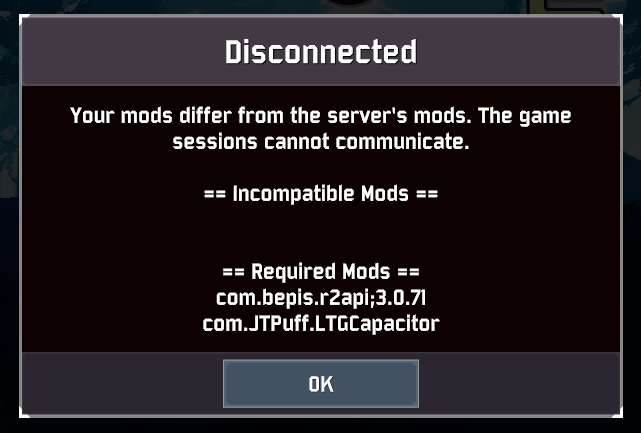
 orchid flame
how do i make ror2 not crash or have fps drops this game hates me
 violet quartz
every time i try to play the game for more than 10 minutes it just freezes and stops responding, then crashes


These are 2 of the most recent ones
ive done the usual update drivers, verify files, reinstall the game but none of it has changed anything
jovial inlet
grand blade
Can anyone help me with this? Can't ever seem to play with my friend cuz of this...
please ask #ror2-modding or the modding discord
jovial inlet
orchid flame
how do i make ror2 not crash or have fps drops this game hates me
what are your machine specs?
jovial inlet
violet quartz
every time i try to play the game for more than 10 minutes it just freezes and s...
do you have the error.log for us perchance?
?files
plush treeBOT
@jovial inlet,
Output Logs
While the game is running, it is continually writing to a file called output_log.txt. This file can help us get more information about the issue. If possible, please upload the file here. The file is usually located at:
C:\Users\<UserName>\AppData\LocalLow\Hopoo Games, LLC\Risk of Rain 2\output_log.txt
Crash Dumps
If the game crashes it will generate a Dump file. Similarly to output_log.txt, it can help us track down the source of the crash. Please upload your crash dumps here if possible. The file is usually located at either:
C:\Users\<UserName>\AppData\Local\Temp\Hopoo Games, LLC\Risk of Rain 2\Crashes\crash.dmp
or
C:\Users\<UserName>\AppData\LocalLow\Hopoo Games, LLC\Risk of Rain 2\Crashes\crash.dmp
jovial inlet
same folder as the crash.dmp
violet quartz
this was my output log
at the end it just says 'crash ! ! !'
this is the dmp file
jovial inlet
violet quartz
this is the dmp file
the dmp is not of use to us
do you have the error.log instead
violet quartz
where are they stored?
in the crashdumps folder there are only dmp files
and in the risk of rain 2 folder in appdata>locallow theres only output-log.txt and a folder called unity which doesnt have an error log in
jovial inlet
did you check both local and locallow?
orchid flame
jovial inlet
what are your machine specs?
Intel(R) Core(TM) i3-1005G1 CPU @ 1.20GHz, 1190 Mhz, 2 Core(s), 4 Logical Processor(s)
Installed Physical Memory (RAM) 8.00 GB
jovial inlet
and no dedicated gpu?
 jovial inlet
orchid flame
found this
jovial inlet
orchid flame
found this
thats an integrated gpu
and unfortunately, those cant run ror2 well because the game is cpu-heavy
orchid flame
jovial inlet
and unfortunately, those cant run ror2 well because the game is cpu-heavy
is there any work around?
jovial inlet
orchid flame
is there any work around?
not really, im afraid
orchid flame
rip
steady topaz
I made potato mode script for testing, it does increase fps if gpu were the limiting factor. It reserves first core for system and uses second one for the game, looks like crap, but it does help. However i look up on the cpu and it's clear. There is no way it would be helpfull.@orchid flame but if you're despetate to try ill send it to you.
jovial inlet
 ornate bough
is there anyway for me to recover my save?
ornate bough
is there anyway for me to recover my save?
occasionally, verifying files brings it back after manually deleting it (make a back-up first, always)
otherwise, check first pin, except make a new profile first
ornate bough
i tried that, didnt work, ended up editing save
but was hoping there was still some way to recover cause I lost all my logbook collections
jovial inlet
ornate bough
but was hoping there was still some way to recover cause I lost all my logbook c...

How to unlock every item, character, and achievement without actually doing work, as well as how to register every item as discovered (in the logbook)...
just be sure to read carefully and make a back up
mossy dragon
Can someone please walk me through the process of fixing RoR2 randomly crashing mid game
jovial inlet
mossy dragon
Can someone please walk me through the process of fixing RoR2 randomly crashing ...
what kind of crash
does the ror2 logo show up with the unity window or does the game permanently freeze/close itself
mossy dragon
jovial inlet
does the ror2 logo show up with the unity window or does the game permanently fr...
RoR2 logo shows up after freezing
plush treeBOT
@jovial inlet,
Output Logs
While the game is running, it is continually writing to a file called output_log.txt. This file can help us get more information about the issue. If possible, please upload the file here. The file is usually located at:
C:\Users\<UserName>\AppData\LocalLow\Hopoo Games, LLC\Risk of Rain 2\output_log.txt
Crash Dumps
If the game crashes it will generate a Dump file. Similarly to output_log.txt, it can help us track down the source of the crash. Please upload your crash dumps here if possible. The file is usually located at either:
C:\Users\<UserName>\AppData\Local\Temp\Hopoo Games, LLC\Risk of Rain 2\Crashes\crash.dmp
or
C:\Users\<UserName>\AppData\LocalLow\Hopoo Games, LLC\Risk of Rain 2\Crashes\crash.dmp
jovial inlet
in the same folder as the crash.dmp, there is a text file called error.log
please send that here
i wont be able to look at it now unfortunately, im gonna sleep in a bit, but ill check it as soon as i have time tomorrow
mossy dragon
Ok thanks for helping
mossy dragon
I can't find the file anywhere 😦
jovial inlet
well you definitely need to turn it on, but ill check it later
gonna sleep now
launch crashes?
that doesnt say much
but ill look at it later
mossy dragon
The only game I can't find in the folder is ROR2 😐
mossy dragon
Just lost another good run to the glitch :<
 odd kayak
i just moved my computer to a new setup, no hardware changes or anything... since i've moved my computer ror2 has been about 3 fps after bootup, when it's booting up it takes about 30% cpu. before i changed my setup it took all the cpu it needed.

i booted up a commando run and the water on titanic plains is a solid magenta... if that helps. somebody please help if you have any idea what's going on... i want to play the dlc tomorrow and this is stressing me out hard
ping me if you have a response!
odd kayak
also... it seems to affect everything else on my computer, inflicting that 3 fps on literally everything
 viscid plinth
whenever im tabbed in my game it runs at such low fps, but whenever im tabbed out it runs smoother
update, running in fullscreen makes it run bad but windowed it fine
 low quiver
odd kayak
i booted up a commando run and the water on titanic plains is a solid magenta......
low quiver
odd kayak
i booted up a commando run and the water on titanic plains is a solid magenta......
from what i read, i assume you actually moved your specs to a new case (?) and if so you probably installed your hardware wrong
jovial inlet
viscid plinth
update, running in fullscreen makes it run bad but windowed it fine
turn off vsync
that will probably fix it
jovial inlet
odd kayak
i just moved my computer to a new setup, no hardware changes or anything... sinc...
same goes for you, but since you mention its for everything, check if your CPU, GPU, cooling system and their respective drivers are properly installed
odd kayak
i didn't change cases or anything, i literally just moved my tower 4 feet. i've checked my drivers 3 times, and when it affects my whole pc the cpu usage is only about 50%
i can run games of a higher intensity than ror2 fine (deep rock galactic for example)
 weary nymph
My game keeps crashing randomly with a unity engine error,its getting really annoying
 brave urchin
@weary nymph
So what have you tried so far?
To fix the issue that is
weary nymph
Lowering the graphics to the lowest possible,reinstalling the game,verifying the files multiple times,and tried Windows Compatibility mode
brave urchin
And you're sure the specs you have are enough to handle the game just fine?
If so, have you tried updating your drivers?
 prisma spade
Does this happen in other games as well?
weary nymph
My laptop runs the game smoothly on high graphics no lag,and it doesn't happen in any other games and my laptop is updated
prisma spade
Also - are there any errors in event log?
brave urchin
Oh also also - you're running the game vanilla, right?
weary nymph
brave urchin
Oh also also - you're running the game vanilla, right?
Yup
weary nymph
prisma spade
Also - are there any errors in event log?
I don't know how to Access the event log
prisma spade
If you are on PC, then open start menu and start typing "event viewer"
weary nymph
Ok,got it
prisma spade
Under Application, there might be an error at the time of the crash

That might give you some more information on what to google next. If you get stuck, feel free to ask
weary nymph
Ok,so it says that something goes wrong in the file d3d11.dll
weary nymph
prisma spade
That might give you some more information on what to google next. If you get stu...
And i don't know what to do next
weary nymph
So i replaced the d3d11.dll file and so far it works
 tight idol
just bought the new dlc only it didnt apear to be bought or added to my charachter list,
normaly it would say i already got the explainsion but atm it didnt maybe it needs some time? idk never had this 😄


 minor torrent
tight idol
just bought the new dlc only it didnt apear to be bought or added to my characht...
minor torrent
tight idol
just bought the new dlc only it didnt apear to be bought or added to my characht...
I have the same problem
 radiant vault
Same here. Though it did give me a receipt on steam and took the money from my wallet.
tight idol
ah txs well lets just have patience then and give the devs goodluck🧙♂️
minor torrent
ok👍
prisma spade
Restart your steam
tight idol
yessurr
tight idol
prisma spade
Restart your steam


 frank anvil
anyone elses game just refuses to open??
all i see is this screen and then it just closes
 frank anvil
anyone elses game just refuses to open??
frank anvil
frank anvil
anyone elses game just refuses to open??
i fixed it, the game just didnt work with dual monitors
 lusty kraken
so i got the dlc and now when i load the game its just a black screen. ive completely uninstalled, reinstalled, validated files, and reset my pc twice. no luck
 jovial coyote
lusty kraken
so i got the dlc and now when i load the game its just a black screen. ive compl...
jovial coyote
lusty kraken
so i got the dlc and now when i load the game its just a black screen. ive compl...
me too!
fathom anvil
hi my game keeps crashing on startup? its a unity error and i can provide full logs if needed
ERROR: Shader Shader is not supported on this GPU (none of subshaders/fallbacks are suitable)WARNING: Shader Unsupported: 'Hidden/Nature/Terrain/Utilities' - Setting to default shader.
thats the error it gives me and i dont know how to fix it, any help would be appreciated :-)
here is the full log
 merry pelican
frank anvil
i fixed it, the game just didnt work with dual monitors
merry pelican
frank anvil
i fixed it, the game just didnt work with dual monitors
THANK YOU, unplugged my second monitor and the game immediately launched
 rotund rover
I’m not having any issues loading the game but every time it launches only the top left corner of the screen is visible. Anyone else experience this or have a fix?
 snow cave
ok so whenever i press singleplayer my game stops responding, any way to fix this?
fathom anvil
fathom anvil
hi my game keeps crashing on startup? its a unity error and i can provide full l...
i have uninstalled and reinstalled the game and i have verified the integrity of the files with steam, so im not sure what is happening, but its hard to play the game when 90% of the time it crashes on the main menu
 barren lynx
frank anvil
barren lynx
frank anvil
How are you supposed to fix this problem
frank anvil
frank anvil
i fixed it, the game just didnt work with dual monitors
this worked for me @barren lynx
if you dont have dual monitors then i dont know how to help sorry
snow cave
snow cave
ok so whenever i press singleplayer my game stops responding, any way to fix thi...
verified the integrity, fixed it for a second, game crashed again
rotund rover
rotund rover
I’m not having any issues loading the game but every time it launches only the t...
I’ve restarted my computer, uninstalled and reinstalled, and verified the integrity
snow cave
snow cave
verified the integrity, fixed it for a second, game crashed again
oh my god, i can't even press settings to lower my graphics, everything i press crashes the game
gonna try to uninstall and reinstall the game and see if that works
 hot basin
having the same issue, crashing every time I try to open anything on the main menu
 pseudo crest
same
 verbal moss
Hey, when i open the game it only renders the top left corner for some reason?????? everything off screen is completely functional but dosent work at all
 rotund rover
verbal moss
Hey, when i open the game it only renders the top left corner for some reason???...
rotund rover
verbal moss
Hey, when i open the game it only renders the top left corner for some reason???...
I’m having the same issue haven’t found a fix for it yet though