#ror2-tech-support
1 messages · Page 8 of 1
 abstract mural
help, where do i find the ror2 save files in epic games?
 fast vault
is there any way to get this game to recognize that im not using a gamepad, even though i have one plugged in? i dont know why it just ignores all my keyboard inputs just because i have another input active on my computer
 orchid flame
 pliant token
did i fr just lose like 200 hrs of progress
pliant token
did i fr just lose like 200 hrs of progress
you can recover the lost progress with cheatunlocks tho
 forest ivy
My game is bugged and I can't unlock the 1000 poisons as Acrid achievement. I should have completed it 100% but on my stats page it says that my infections inflicted count is 391. So to confirm I went into a game poisoned an enemy and left and the counter is still stuck at 391. Anyone know a fix/solution/workaround?
 tardy jolt
Hey so im on xbox one and ive been trying to play multiplayer, but when i tried inviting, getting invited, and joining a friend it would kick the person who joined out after a few seconds.
Is this a thing i can fix or is this just borked xbox version being borked?
Note that we also tried doing it in the character selection screen and it did the same
 graceful flint
game crashes on startup? tried relaunching steam n verifying game files but i see the loading bar for a split second and then it crashes.
 mystic hill
i’m getting a error code for trying to connect on switch? for multiplayer online play (something about NAT type not processing)
 golden scroll
My friend and me cant play the game online anymore which is really really sad. Somebody has an idea what we can try to fix our issues?
With crossplay enabled we face random disconnects after 20-30 mins, that seems to be a common problem.
But we cant turn crossplay off. As soon as we are doing that the 5 Stage Sky Meadow becomes unplayable for everyone besides the host. That makes the eclipse grind kinda dump when you cant play stage 5. With crossplay enabled Stage 5 runs smoothly but than we never had a full Mithrix run without someone disconnecting. We tried alot of the common ideas already. On singleplayer everything runs fine aswell
I dont get why Stage 5 suddenly becomes a lag fiesta for everyone as soon as we turn crossplay off.
 burnt blade
Hey y’all, does anyone know the status of the PlayStation servers. I can’t seem to connect to the multiplayer mode
 fickle torrent
burnt blade
Hey y’all, does anyone know the status of the PlayStation servers. I can’t seem ...
fickle torrent
burnt blade
Hey y’all, does anyone know the status of the PlayStation servers. I can’t seem ...
Experiencing that rn
burnt blade
Real
 idle pond
same, I’ve been trying for like thirty minutes and it doesn’t let me connect
 pulsar spear
On steamdeck using proton to run ROR2 through steam, and for some reason im lagging way more since the 2nd newest update. Its unlikely to be anything with my device cus no other games have experienced more lag recently, and ive checked task manager, processes, and stuff like that.
Is anyone else experiencing this? Are there any mods that could help this?
settings are basically at minimum btw, but if i try reduce the resolution it wont let me do 144hz - only 60. Its hooked up to a 1080p 144hz monitor.
 halcyon galleon
hello can I ask about the hosting issues that I have ?
 celest oasis
Hello, I was wondering on how i can load a old cloud save, i want to reset my progress to a cloud save i did yesterday, is it possible?
 carmine thistle
Hello, wondering if anyone else is having trouble launching RoR2? As of today I am unable to launch it..
I have tried verifying and re-installing to no avail.
The little unity executable window pops up for half a sec and dissapears, and then the steam status goes back to "Play".

 twilit fern
I love when I can't contiune my run. (Context: I just unlocked Commando's stage 20th no lunar skill, with me also unlocking the clover. But when I tried to progress to the 21st stage this happened.)


For whatever reason, the game will not go past this screen.
pliant token
can someone help
i donwloaded like 3 modpacks and im tryna play w friends, we checked that our mods were synced and everything
but when i join him
theres like 20 player ids
and i cant ready up + all the player ids say disconnected player
and stuff anyone know whats up?
 vague meadow
A friend of mine has an issue that we don't know how to solve. Every time we start a lobby he faces a black screen and is sent back to the menu. When he starts the lobby I experience the same thing. After testing the issue with a someone else we can confirm the issue is on my friends end. Does anyone know a fix we have tried multiple methods online but none have worked.
orchid flame
vague meadow
A friend of mine has an issue that we don't know how to solve. Every time we sta...
do ur friend have a vpn ?
orchid flame
pliant token
and stuff anyone know whats up?
don't forget that some mods are not compatible in multiplayer
ur best bet is to try and find what mod is causing this issue, you can also try to look up your logs / modded logs to see if the mod causing it is in here
orchid flame
twilit fern
I love when I can't contiune my run. (Context: I just unlocked Commando's stage ...
first time i see that, did u verify your game files ?
look like u were in the bazaar between time
there's a lot of people having the same bug it seem, you should post it in #ror2-bug-reports-pc because they write down the bugs in there to (hopefully) fix them in a future update
orchid flame
carmine thistle
Hello, wondering if anyone else is having trouble launching RoR2? As of today I ...
do you have double monitor ?
don't forget to checks pins, there's solutions in them
twilit fern
orchid flame
first time i see that, did u verify your game files ?
It appears that the game may had a stroke when I said "I'm getting a lunar because I got the skill"
Nothing else is wrong with my game
vague meadow
orchid flame
do ur friend have a vpn ?
I don't belive so
orchid flame
@vague meadow then that #ror2-tech-support message
 misty echo
Hello, I have about 300 hours in the game, started playing on Steam Deck recently. I’ve run into a problem where if I’m holding my secondary button, pressing my primary button will stop my secondary from being active. For example, as Loader, if I’m grappled to an enemy, hitting my primary, or any of my specials/utilities, will deactivate my grappling hook. If I’m holding primary, my secondary won’t even activate. This makes Railgunner completely unusable as you need to activate your primary while secondary is held in order to take critshots. This started happening randomly, I didn’t change any controller settings. Thanks.
misty echo
If anyone has this problem, I fixed it by setting the game to run Proton 7
vague meadow
orchid flame
<@380174191347105792> then that https://discord.com/channels/417739215355510784/...
This doesn't relate to the issue. The character screen doesn't go black, hes just booted to the main menu when he tries joining a multiplayer game
orchid flame
vague meadow
This doesn't relate to the issue. The character screen doesn't go black, hes jus...
even with crossplay disabled ?
 short root
So i revently got a 75hz monitor and im trying to figure out a solution so i dont go to 7fps when im just in the menu.i tried putting in "fps_max 75; resolution 1920x1080;" in launch options but that didnt work
 split turret
unfortunately its been abotu a year since ive played and somehow my files corrupted but arnt visible on my drive to delete and any new profile i make... also gets corrupted instantly when I exit the game, fresh install and reinstall doesnt do jack, and I get a funny bad profile . log that just says AAAA on repeat
id rather start from scratch than have a literal dead game in my library
no profiles are in the folder


 vague meadow
orchid flame
even with crossplay disabled ?
vague meadow
orchid flame
even with crossplay disabled ?
Yep, we have followed every piece of advice we could find online but so far none have worked
orchid flame
ah
 random dragon
Whenever i try to start a coop game with one of my friends the selection screen the game is stuck like this, any idea what could be the cause

 humble sable
Check pinned messages
pliant token
orchid flame
ur best bet is to try and find what mod is causing this issue, you can also try ...
o tysm
 runic scroll
what fps should I be getting with a 4090/7950x3d on max settings?
because I'm not even getting a stable 144fps by stage 5 and that feels very low
orchid flame
recent graphics card can have trouble with some games i guess, but it's mostly on optimisation of the game
are you on a laptop or a fix ?
@runic scroll
risk of rain is processor heavy too
orchid flame
lots of entity and i don't know if the game use cores (most games don't even bother with that sadly)
 chrome condor
is co-op available in ror1 on ps4? me and a couple of friends got the game hoping to play together, but when one of us tries hosting a room we get stuck on the creating room screen
orchid flame
chrome condor
is co-op available in ror1 on ps4? me and a couple of friends got the game hopin...
i'm not sure how that work in console, there is still ips things ? port forwading ?
 loud meadow
I clicked on the roles I wanted and Mithrix won't give them to me


He just keeps thinking and won't actually do anything
loud meadow
Nvm he was just being a slow boy
I'm good now
orchid flame
lol
 sonic grotto
Hello! im trying to get a dedicated server instance working, it looks like it is fully launched but on the main menu for some reason does anyone know how to make it be a multiplayer lobby, i tried putting gamemode ClassicMode; in the startup/pregame_config files individually and together but neither worked
orchid flame
sonic grotto
Hello! im trying to get a dedicated server instance working, it looks like it is...
dunno if that can help but there is a pin about dedicated server
sonic grotto
@orchid flame i appreciate it but i actually already had found that from the steam forums inevitably they had posted it there too lol. the server is "working" and its already port forwarded but for some reason its saying that it loaded the title screen instead of the lobby, if there's something i could add to the config to force it into a lobby i would appreciate it
 orchid flame
sadly i don't know ._.
sonic grotto
im thinking i may just make a fork of the docker container verison i found that just didnt have the lobby setup where it could be run, hopefully that works... we'll see i guess
sonic grotto
aaaaaaaaand i found out I'm just dumb apparently for the docker container version. so apparently my server on that was already working i just thought the config was messed up because none of the options or the start button works, but its just because i had steam/epic crossplay enabled and that breaks it for some reason
 muted sable
Hello, I am wondering if anybody knows how I can fix my Risk of Rain 2. I believe it is not working because I enabled crossplay on it. Anybody know what I should do?
It wont even start
orchid flame
muted sable
Hello, I am wondering if anybody knows how I can fix my Risk of Rain 2. I believ...
there is some pins in this channel that can help
orchid flame
 twin karma
guys the game opens, black screen then closes
twin karma
guys the game opens, black screen then closes
pinned comments
if u have double monitor unplug it beforr launching
 abstract crystal
Im having a problem where a friend and I are trying to play on ps4 but regardless of how many times we retry we keep getting a message saying "could not connect" or if we're in a public lobby "lost conection"
Both of us have NAT type 2
 jaunty patio
My C: drive was suddenly full. After running WinDirStat, I saw that Risk of Rain 2 was creating this massive log.
It might be a mod? But I haven't installed any new mods. Alas today was my first time playing in about 2 months.
What's going on here? This was 1 run to mithrix that made this massive file.

Thanks to anyone who will think about this.
 hollow briar
my game is staying at 0% and not loading when i launch it
hollow briar
hollow briar
my game is staying at 0% and not loading when i launch it
fixed by unplugging my second monitor, starting the game, then plugging it back in once loaded
split turret
well since noone wants to help me
ill just leave, super unhelpful bunch, i legit cant even play the game i PAID MONEY FOR
 hollow cave
why ask again when you can just leave
 hollow cave
have you tried to verifiy the files integrety?
both of you
that is a fix for a lot of problems
 graceful tulip
tried thrice
graceful tulip
thx though
 elfin tree
graceful tulip
does anyone have a solution to this issue
elfin tree
graceful tulip
does anyone have a solution to this issue
i have it
elfin tree
hollow cave
have you tried to verifiy the files integrety?
i tried it but it doesn't work
 twin arch
elfin tree
i tried it but it doesn't work
twin arch
elfin tree
i tried it but it doesn't work
have u tried a fresh install?
twin arch
elfin tree
i should uninstall the game and install it again?
first of all do you use any mods at all?
twin arch
what platform are you using steam or epic games?
elfin tree
steam
hollow cave
do you have crossplay enabaled?
elfin tree
hollow cave
do you have crossplay enabaled?
i should
twin arch
okay right click properties and goto launch options on ror2
let me know when u did that
hollow cave
elfin tree
i should
try to turn it off and restart your game
twin arch
elfin tree
i should
after u get to ur launch options type in this command then try start ur game -disable-gpu-skinning
elfin tree
twin arch
after u get to ur launch options type in this command then try start ur game -di...
where i can find launch options?
i got in the properties
ah found it
twin arch
elfin tree
where i can find launch options?
steam libary right click risk of rain 2 click on properties and scroll down it should say launch options
then type in -disable-gpu-skinning
try launching game and checking if that dont work ill tell you some other things you can try
hollow cave
oh well i gtg, hope you get it fixed
elfin tree
twin arch
try launching game and checking if that dont work ill tell you some other things...
still the same
twin arch
hmm 1 second
twin arch
elfin tree
still the same
try a fresh install of the game, Only other option i can think of really, Seems like some of your files might have been corrupted or something
elfin tree
twin arch
try a fresh install of the game, Only other option i can think of really, Seems ...
im doing it rn
i'll tell you if it works as soon as it finishes
elfin tree
twin arch
try a fresh install of the game, Only other option i can think of really, Seems ...
nothing changed
elfin tree

so nobody knows how to fix it?
I tied, a fresh install, I tried verifing file integrity, i tried toggling the cross platform
twin arch
I have 0 idea then gotta wait for someone more technical man those are the only fixes I know of for this issue
elfin tree
twin arch
I have 0 idea then gotta wait for someone more technical man those are the only ...
that's sad 😭
elfin tree
twin arch
I have 0 idea then gotta wait for someone more technical man those are the only ...
thanks tho
orchid flame
elfin tree
you should try the pins
elfin tree
the pins?
orchid flame
pinned comments
elfin tree
ahhh
elfin tree
thx
orchid flame
graceful tulip
does anyone have a solution to this issue
you too
elfin tree
the only problem is that rn there's no one with a public game on steam
so i don't know how to test it
orchid flame
it was on public ?
elfin tree
found one
orchid flame
the first time u did
elfin tree
it works
orchid flame
noice
elfin tree
love u
orchid flame
so you did just disabled crossplay that's it ?
elfin tree

elfin tree
orchid flame
so you did just disabled crossplay that's it ?
yeah
orchid flame
okay :P they really do need to turn that off by default fr xD
or just fix it one day
anyway, gl hf
elfin tree
orchid flame
anyway, gl hf
gl hf, have a great day
elfin tree
orchid flame
okay :P they really do need to turn that off by default fr xD
there's only one issue, why i had this bug when i was trying to play with a friend, we are both on steam
orchid flame
it's just a bugged feature, it does really weird thing
even if u manage to get ingame with it, it bug everything
the synch and such
elfin tree
and 2 days ago worked just fine and yesterday it didn't
orchid flame
i wonder if i have seen someone using it with someone on epic
ah ?
well, maybe it's a other issue but i don't know yet, if you still have this issue one day just be sure to get here again, and the pinned comments too
basically everything is in the pins beside if the game crash your steam too, it's because you need to reinstall steam or verify the files of steam redistribuable (don't know if that one work yet tho)
elfin tree
thx ❤️
orchid flame
npnp !
elfin tree
isn't just better to fix this issues with crossplay and steam?
and have a game that workes every time
graceful tulip
@elfin tree @orchid flame let me know if you get it to work
elfin tree
I just turned off cross play and it worked fine
graceful tulip
wtf... i literally tried everything and dosent seem to work
elfin tree
Idk
graceful tulip
just sad...
 upper breach
My last 3 runs have ended because the next stage didn't load after the teleporter event. It just leaves me at a black screen.
Is there a reason for this? something I can fix?
orchid flame
upper breach
My last 3 runs have ended because the next stage didn't load after the teleporte...
disable crossplay
also check pins there is useful things in there
 uncut verge
hey there, im new to the game and im trying to make a multiplayer lobby to play with a friend, but regardless of which one of us is hosting, the joining player always has an insane amount of delay and lag on their end, almost up to a whole minute
we're not sure what to do so if anyone has any suggestions ill gladly try :D
orchid flame
uncut verge
hey there, im new to the game and im trying to make a multiplayer lobby to play ...
do you have crossplay enabled ?
uncut verge
orchid flame
do you have crossplay enabled ?
no, i dont
he switched to another wifi though and that seemed to fix it
sorry for bothering you xD
 frosty cypress
how do I unfreeze the frames when I get stuck, I'm in the bazaar btw, and I can move the camera around and the character follows with his head, I cant do absolutely nothing else.
twilit fern
Why is my ROR2 keeps resetting my Resolution setting? This is killing my PC...
orchid flame
twilit fern
Why is my ROR2 keeps resetting my Resolution setting? This is killing my PC...
if u got double monitor that's a issue
orchid flame
then i don't know, u could try pinned comments and try to delete ur config file and verify the files after
twilit fern
It just 1080's the fuck out and im at 10 FPS
 spring shoal
Is there a way to disable Crossplay outside of the in-game settings?
I'm stuck at 0% loading on launch
humble sable
There should be either a config or ini file somewhere in the installation menu?
But I'm not certain, I'm just assuming here
spring shoal
It seems that the game isn't stuck at 0%, but it is loading veeeeeery slowly (and a couple of days ago, it didn't)
Any way to fix that besides the solutions posted in the Pin 4 and Pin 6 ?
and by very slowly I mean 5+ mins
spring shoal
For anyone having the issue where the game loads very slowly (seems stuck at 0%) ,
disabling HPET fixed the issue - https://steamcommunity.com/app/1527950/discussions/0/6222330214313935470/
Maybe this should be pinned?
 frail gyro
My Risk of Rain 2 crashes when I try to boot it up I tried validating the files and even reinstalled the game
orchid flame
frail gyro
My Risk of Rain 2 crashes when I try to boot it up I tried validating the files ...
do u have double monitor?
orchid flame
spring shoal
For anyone having the issue where the game loads very slowly (seems stuck at 0%)...
that case seem weird, haven't seen anyone needed to do that to play the game
have u tried everything else in the pins?
 lavish glade
Does anyone have any tips for improving the stability for ror2? when playing online we're consistently suffering with either game crashes or disconnects and it's frustrating 😂
Also, another thing I have an issue with I can't seem to remove people from friends in-game nor change my visible name so I'm stuck with some goofy random name I didn't choose.
Any assists would be accepted, I've read the pins and the advice shown has been followed.
 simple kindle
Hello! I really need help. I've played this twice before but afterwards, i get an error when starting the game. Ive done everything with reinstalling the game or deleting files but continues crashing and im not sure what else to do
orchid flame
lavish glade
Does anyone have any tips for improving the stability for ror2? when playing onl...
#ror2-tech-support message did u read that ?
also if one of your friend or you is using a vpn when playing disable it
orchid flame
simple kindle
Hello! I really need help. I've played this twice before but afterwards, i get ...
Check the pinned comments !
but are you using a double monitor ?
that's the more common one
frail gyro
orchid flame
do u have double monitor?
nah
orchid flame
frail gyro
nah
ay, then check the pins and see what work for u
spring shoal
orchid flame
have u tried everything else in the pins?
yes, I tried all the suggestions in Pin 4 and Pin 6.
They didn't help, only disabling HPET worked
orchid flame
spring shoal
yes, I tried all the suggestions in `Pin 4` and `Pin 6`.
They didn't help, only ...
i didn't know HPET was a thing so i searched about it but it seem it's something that can mess with the synch and registration like when you hit someone with a bullet in cs:go for example, specially in multiplayer i guess...
if nothing worked you should try to do a ticket to the support too, ur the only one i saw that disabling that thing did the trick, nobody else had it
but i'm not a expert tbh i'm still searching what this thing is
spring shoal
orchid flame
i didn't know HPET was a thing so i searched about it but it seem it's something...
https://steamcommunity.com/app/632360/discussions/1/4334097152429723622/?ctp=2
There are/were a bunch of people with the same issue.
For at least some (maybe all) of them, disabling HPET worked.
orchid flame
spring shoal
https://steamcommunity.com/app/632360/discussions/1/4334097152429723622/?ctp=2
T...
mkay, weird issue tho but i can see this thing could cause conflict in other games when u disable it, it is sure a bug of some sort
spring shoal
well, I'm just glad that I can play ror2 again 🙂
orchid flame
Ay, i trust you on the fact you did try to scan disk and reinstall visual c++ redistribuables since it's the more common thing we told about here
but yeah, if you can feel free to report that issue to gearbox support tho
maybe they can look around this
 sly needle
Hey, just a quick question. Me and two friends are trying to join a private game with each other (I’m on ps4 and the others are both on ps5) however, one of my friends can join me but the other can’t? Seem to be having problems joining one another and we’re not too sure why. We all have PlayStation plus too. Any help would be greatly appreciated as my friend who can’t join the both of us is a little disappointed as he’s just bought the game 😅🫶
spring shoal
orchid flame
Ay, i trust you on the fact you did try to scan disk and reinstall visual c++ re...
yep, I scanned the disk, memory, etc.
I reinstalled both x86 and x64 version of visual c++ redist
I changed the disk on which my game is installed
and literally every other suggestion from the pins
I even checked the player.log file, but there was nothing out of the ordinary there
and my setup isn't that special - 1060 6GB + ryzen 1600
orchid flame
mh okay, then i guess it's kind of a solution, will note it in my head
 kind ice
whenever i open my game its just a few seconds of a dark screen and then it crashes
orchid flame
kind ice
whenever i open my game its just a few seconds of a dark screen and then it cras...
do u have double monitor ?
kind ice
orchid flame
do u have double monitor ?
I do
Im lsunching ror2 of my main monitor, but i lsunched it on the other one back when i only had one
orchid flame
ay, that's a common issue you can plug it after the game launched
kind ice
Is there a way to fix this without constantly unplugging my monitor?
orchid flame
sadly it doesn't seem there is one or at least we don't know here
kind ice
:(
kind ice
Also i just noticed, another niko! :3
 minor loom
how do I progress without a portal

 placid raven
Does anybody have problem joining friends lobby after starting the game it return to the main menu
 visual roost
Hi! Need help with a controller. I can move left/right perfectly fine but not forward or backward. I have all the buttons binded and on menus can move up/down the menus. I play on PC through steam and use a switch controller. Any ideas are helpful. Thanks!
orchid flame
placid raven
Does anybody have problem joining friends lobby after starting the game it retur...
disable crossplay
orchid flame
visual roost
Hi! Need help with a controller. I can move left/right perfectly fine but not fo...
switch controller ? does it support it ?
humble sable
orchid flame
switch controller ? does it support it ?
It's through Steam, it should use Steam Input by default
So in theory, it supports every controller on the market
orchid flame
oh okay
i remember in 2019 some people said it was buggy to do with a switch controller
humble sable
Sometimes Steam Input doesn't behave well with Switch controller, so it could be the case
orchid flame
@visual roost also try to create a new profile on the game and test if it does the same
i remember something like that
humble sable
visual roost
Hi! Need help with a controller. I can move left/right perfectly fine but not fo...
On a personal note, I highly recommend you look into ProconXinput. It's a bit complicated, but if you know what you're doing, it'll make the Switch Pro Controller behave like an Xbox Controller
orchid flame
also there was this #ror2-tech-support message
kind ice
@orchid flame i tried disconnecting my other monitor, even made sure that windows only used the connected one and nothing else and it still crashes
orchid flame
kind ice
<@456226577798135808> i tried disconnecting my other monitor, even made sure tha...
mh
Well i guess you should just try the pins then but remember to not connect your second monitor until it work
kind ice
eh its 4am almost, imma do it tommorow
orchid flame
ay
orchid flame
gud night !
 loud pivot
Hey, I've been having trouble with disconects when playing with a friend. Basically can't make it an hour without DCing. Doesn't happen in any other game so I figure it's a solvable issue and not just trashy internet. Any ideas?
 near rock
loud pivot
Hey, I've been having trouble with disconects when playing with a friend. Basica...
near rock
loud pivot
Hey, I've been having trouble with disconects when playing with a friend. Basica...
Hi!
Do you both play on PC and have cross-play enabled in the Settings menu? It normally causes connection issues
By the way, I came here to say I lost my progress after today's tiny update. I had last played yesterday, and today I don't have any of the characters, logbook entries, etcetera. I guess I'll use a mod, but just wanted to let you know 😅
orchid flame
near rock
By the way, I came here to say I lost my progress after today's tiny update. I h...
and i got my game parameters reset...
i wanna die
humble sable
Now I'm wanting to back up my save before updating
near rock
orchid flame
and i got my game parameters reset...
Can't that be set up rather quickly? Artifacts, Settings menu... 🤔
near rock
humble sable
Now I'm wanting to back up my save before updating
Well, I checked both the subreddit and this Discord server, but it doesn't seem like anybody else had their progress erased. I forgot to say even my profile was deleted 😅
orchid flame
near rock
Can't that be set up rather quickly? Artifacts, Settings menu... 🤔
not really, imagine if ur setting everything up, a table or not and something just erase everything
so i did something to try to recall my old config file, i did try to get a restore point of my system, but it bugged everything and i couldn't open discord or something else even after a scan disk
so i just did a photo of my old config file and will just write it after my restore point is back to where i was before
because somehow, the risk of rain 2 config file get deleted after the update, not modified, deleted
so i can't even put the config file on "read only"
when you found the perfect settings on your game you don't want to redo everything, even more when you don't remember it
if it's a game with just 2-3 things to redo it's okay not when it's 10+ things to tweaks
 distant ruin
Hi friends, I'm having some issues launching ror2, and I feel like I'm going mad 
I try and launch, it brings up a window with the ror2 logo and little red exclamation point symbol and then crashes
I've updated graphics drivers, restarted my pc, reinstalled the game and also verified my game files on steam, and nothing is working, any suggestions?
near rock
orchid flame
if it's a game with just 2-3 things to redo it's okay not when it's 10+ things t...
Good luck with it then! Taking a pic of the files sounds like a good workaround
orchid flame
distant ruin
I try and launch, it brings up a window with the ror2 logo and little red exclam...
do u have double monitor ?
distant ruin
orchid flame
do u have double monitor ?
I do yeah, but it turns out it was a unity issue, I found an old steam community post with the fix
orchid flame
distant ruin
I do yeah, but it turns out it was a unity issue, I found an old steam community...
how did u fix it
distant ruin
As usual, steam community has all the answers, they are very wise

I keep getting some "Unity 2019.4.26f1_e0392c6b2363" window and it immediately closes without any indication as to what's wrong.
orchid flame
cuz there is many things in the pins comments
but usually people with double monitor have trouble with launching the game
orchid flame
distant ruin
https://steamcommunity.com/app/632360/discussions/0/3189116454991747872/
yeah uh...but which option did the trick for you
this ? "Press windows+r and type in regedit and press enter
Navigate as such: HKEY_CURRENT_USERS > SOFTWARE
Click on Hopoo Games, LLC, make sure it is the only folder selected, and right click delete"
distant ruin
Yeah thats the one
distant ruin
No, I still have my save file, my mods aren't working now, but I think thats a separate thing
 inner talon
how do I progress without a portal
I don't have any objective
 orchid flame
@jovial inlet Hi, about the crash unity thing, did you knew about this one ?
"Press windows+r and type in regedit and press enter
Navigate as such: HKEY_CURRENT_USERS > SOFTWARE
Click on Hopoo Games, LLC, make sure it is the only folder selected, and right click delete"
The person above just fixed his crash with double monitor with this
orchid flame
inner talon
how do I progress without a portal
I don't have any objective
modded game, does it happens on vanilla too ?
inner talon
Some mods
orchid flame
could be related to that, you can try to find a error in the logs too
inner talon
how i can find logs 😅
 jovial inlet
orchid flame
<@379700829965516801> Hi, about the crash unity thing, did you knew about this o...
jovial inlet
orchid flame
<@379700829965516801> Hi, about the crash unity thing, did you knew about this o...
i tend to not bother people with regedit because more can go wrong than not, but no i genuinely was not aware of that
orchid flame
jovial inlet
i tend to not bother people with regedit because more can go wrong than not, but...
oh okay !
distant ruin
Not sure if the second monitor I have had any impact, but I didn't try it with only one monitor tbh, I thik the unity laucnher was just throwing a tantrum hahha
jovial inlet
another issue is that both of my pinned messages are already at the character limit so i cant really edit them either, but its good to keep in mind
orchid flame
inner talon
how i can find logs 😅
"A full log is way more useful for finding what your mod problem is.
If you are using r2modman or Thunderstore Mod Manager:
You can copy your log by going to the Settings screen, selecting the Debugging tab and clicking Copy LogOutput.log to clipboard
And paste it in this channel.
If you have manual install:
You can find such log file in your Risk of Rain 2/BepInEx/ folder, the file is called LogOutput.log.
Drag the file in this channel so that other users can help you.
You can find a more detailed log file for debugging in either :
C:\Users<UserName>\AppData\LocalLow\Hopoo Games, LLC\Risk of Rain 2\ folder,
or
C:\Users<UserName>\AppData\Local\Temp\Hopoo Games, LLC\Risk of Rain 2
the file is called Player.log.
Drag the file in this channel so that other users can help you.
"
jovial inlet
distant ruin
Not sure if the second monitor I have had any impact, but I didn't try it with o...
second monitors have been causing crashes for ages
distant ruin
I was not aware of that, good to know! Thanks ! 🙂
jovial inlet
generally if you just unplug them during startup and then replug after the game has booted, it solves itself
but thats not convenient
orchid flame
ig we should pin it
there was also a issue with steam crashing and people needed to reinstall steam
when they were launching the game
jovial inlet
for rorr (if we get tech channels anyway) ill probably just make a google doc
because constantly editing the pinned messages is annoying
orchid flame
yeah for sure
jovial inlet
which is also why i stopped existing for a good while
orchid flame
Goo was here too but he left the server sadly
jovial inlet
he left for the same reason as me, but im glad you and some other folks have picked up where we left off
its greatly appreciated
orchid flame
haha yeah, but i have not much as expertise as you two, i kinda just make people look the pins often lul
inner talon
orchid flame
"A full log is way more useful for finding what your mod problem is.
If you are...
jovial inlet
(which is something thats very much needed)
orchid flame

jovial inlet
also just for the record: i have no knowledge of coding whatsoever, i just spy around for error codes and connect the dots from reports/fixes from others
anyway, ill leave you to it, if you need me for something lmk
orchid flame
same, and okay ! see ya
orchid flame
oh wait there's still more i didn't saw it
mh to me it seem stage aesthethic is doing something but i might be wrong
try to post your problem in #ror2-modding
there is more people that know mods
there's a lot of mods so it's probably because some are not compatible too
inner talon
I thought this mod only changes visually
orchid flame
yeah technically it only does, but again there's a lot of mods in it and i don't see many "errors" related to the teleporter
 spare scaffold
hello, can i know when dedicated server updates up to 1.2.4.4?
 mellow marsh
Hello, my game will not launch after I clicked on enable crossplay. PLEASE ASSIST
 versed lance
Hello,me and my friend are trying to play multiplayer with each other and we cant because my friend cant select a charecter and it is very laggy for him. when i try to do the same,it happened to me too, we have this problem for half a year now so we hope you can come with a solution.
orchid flame
spare scaffold
hello, can i know when dedicated server updates up to 1.2.4.4?
maybe they forgot about them ? but it should be updated, verifiy the files of it maybe
orchid flame
mellow marsh
Hello, my game will not launch after I clicked on enable crossplay. PLEASE ASSIS...
pins
orchid flame
versed lance
Hello,me and my friend are trying to play multiplayer with each other and we can...
#ror2-tech-support message i guess try that
spare scaffold
orchid flame
maybe they forgot about them ? but it should be updated, verifiy the files of it...
yeah, i have already done it, maybe need just wait some time
orchid flame
spare scaffold
yeah, i have already done it, maybe need just wait some time
yeah, i don't really know how that thing work and i think it was not their work either so...idk
well sort of iirc, i don't remember
send them a ticket too
or else they're gonna forgot since most people don't use that
versed lance
how do i manually wipe the root folder of the game to delete leftover mod files
spare scaffold
orchid flame
send them a ticket too
okay, thanks you
orchid flame
@versed lance if you want to wipe the root folder you can just go to your steam account -> library -> right click on your game -> property -> browse local files and just wipe out everything but be aware it would wipe ur settings and such unless you backup them
"If you have played with Mods in the past, verify game files and try again. If it still crashes, uninstall the game (back up your save file just in case), then go into the Steam\Steamapps\Common folder and delete the Risk of Rain 2 folder manually, then reinstall and verify files"
versed lance
still doesn't work,any other solution?
versed lance
i will try that also, thank you
orchid flame
there is a ton of pinned comments here you should try them and if nothing work, well...ur good to send a ticket
orchid flame
versed lance
what is VC?
visual c++ redistribuable
@versed lance follow that comment
it's the 2 one
versed lance
i didnt had it, should i install it?
orchid flame
well, yeah
install the last one tho
might be not related to your problem tho
when you said he cannot select a character, his screen is blackened or something ?
just like the screenshot in the comment
versed lance
can i send you a video?
orchid flame
yeah u can
versed lance
versed lance
yea
orchid flame
you have crossplay disabled right
versed lance
yes
orchid flame
tbh that's a thing a never saw before
versed lance
bommer
orchid flame
well, rip
versed lance
searched for over 6 months now
orchid flame
versed lance
searched for over 6 months now
it happens in vanilla right ?
versed lance
explain vanilla
orchid flame
without mods
orchid flame
versed lance
yes no mods
~~Okay, try to add the game exception to your firewall (search it up cuz it's a bit long to explain it in here)
also did you try to reinstall your game/steam ? ~~
at last you could try that one i guess
"-A driver may be broken or Visual C++ may be malfunctioning. Open command prompt in administrator mode and type the following commands (let them finish before entering the next). Copy paste without the ''
'sfc /scannow'
'chkdsk /r'
'DISM /Online /Cleanup-Image /ScanHealth'
'memtest' (If memtest doesn't work, use winkey+R, then 'mdsched.exe' without '')"
@versed lance also how do you invite your friend in the lobby ?
do he join you ? via steam
if you have some DLCS, try to uncheck them and restart it
orchid flame
unplugging controllers and turning off vpn worked" also this
orchid flame
~~"This was happening to me when I first got the game. From my experience having one person host a private match and invite people from the characters select screen while the people they are inviting don’t have the game launched. when they get the invthey accept and they game will load up, and they should be in the lobby
Kinda complex but it works normally for me now"~~
orchid flame
versed lance
we are not playing from controllers not have a vpn
well okay
versed lance
orchid flame
~~"This was happening to me when I first got the game. From my experience having...
does not work either
orchid flame
well, test the rest and tell me later, if nothing worked send a ticket to gearbox support (it's in the pin), i could technically told you about the register deleting thing but uuh i don't know if that would mess your game up more so idk
well basically it was only for someone who couldn't get their game launched even with the fixs in the pinneds comments
versed lance
i opened a ticket already to gearbox suport,they did not help
orchid flame
but if ur curious and want to test, there is that
"I helped fix my friend's issue and I hope this helps.
For some reason, deleting the ror2 registries seems to be able to reset the game from crashing. To do this:
WARNING: PLEASE EDIT YOUR OWN REGISTRY AT YOUR OWN RISK
Press windows+r and type in regedit and press enter
Navigate as such: HKEY_CURRENT_USERS > SOFTWARE
Click on Hopoo Games, LLC, make sure it is the only folder selected, and right click delete
Now you can try running your game again. Hopefully this works for everyone out there with that weird red-exclamation mark unity engine error. If it DOES help, please share this with others who might have this issue!"
orchid flame
versed lance
i opened a ticket already to gearbox suport,they did not help
hm
try the hopoo ticket then xD
versed lance
i just want to play the game
orchid flame
i know, but the problem you have seem to not have a solution idk why
versed lance
😦
orchid flame
versed lance
😦
if you have 4G, try that
maybe it's the connexion doing something
"I have the same issue i think it has to do with the internet and the router. bc when i use my phones shared 4g i got no problems but i havent figuered the exact issue out yet.
the things is that the game uses a peer to peer style when hosting so the person that creates the game host."
versed lance
 orchid flame
first time i can't find anything really xD
@versed lance did u tried to do it with a other friend/people
might be related to him
versed lance
we dont have another player with the game
orchid flame
you can still try to join a public lobby
versed lance
okay, we now have the fact that the problem is from my position
versed lance
whats that
orchid flame
orchid flame
~~Okay, try to add the game exception to your firewall (search it up cuz it's a ...
that part
 versed lance
nothing works really
versed lance
orchid flame
did you try chksk /r too ?
wha?
orchid flame
versed lance
wha?
the others things on the comment
orchid flame
orchid flame
~~Okay, try to add the game exception to your firewall (search it up cuz it's a ...
here after "sfc /scannow"
versed lance
i am somehow not an administrator
orchid flame
versed lance
i am somehow not an administrator
open the command prompt in admin lol
visual roost
orchid flame
<@810405115571470368> also try to create a new profile on the game and test if i...
Thank you! I created a second profile and it let me move all directions without issues and the bindings didn't have to change. Any ideas on how to correct on my original profile so I don't have to re-unlock everything?
orchid flame
visual roost
Thank you! I created a second profile and it let me move all directions without ...
i don't have much idea, maybe try to reset your config file
when i can do i will search it up
orchid flame
visual roost
Thank you! I created a second profile and it let me move all directions without ...
"Here is one community found fix that you might want to try, please be extra cautious with your Save if you try this:
If some or all of your controller axis aren't responding (if you can turn left and right but not move the camera up and down, for example) first, unplug all other non-keyboard non-mouse peripherals. Steam controller, fight stick, hotas, ect, all of it.
Next, create a new profile. Name it 'Fix Me' (the name isn't mandatory but it helps.) Keep your old profile. Close the game.
Go to your Steam install directory (not the RoR install directory.) You're looking for where the profiles are stored
In my case it's C:\Program Files (x86)\Steam\userdata\ (some numbers)\632360\remote\UserProfiles
632360 is the same for everyone, that's Risk of Rain 2's ID.
You should see however many profiles you have. You're looking for the 2 you access most recently. (one will be your bugged profile, one will be the new profile you created.) Open both in Wordpad.
On your bugged profile, highlight and then delete everything between <joystickMap> and <name>'Profile Name'</name> ('Profile Name' will be whatever name you entered for your profile)
Tab to the other Word Pad. Copy everything between <joystickMap> and <name>Fix Me</name> and paste it (in the correct position) into your bugged profile.
If there are multiple instances of any of those terms, use the top-most instance for <joystickMap> and the first instance of <name>Fix Me</name> below that point.
Save changes and exit."
orchid flame
when i play im in for 1 minute then my visuals go deepfried for a second then my pc stops posting images
orchid flame
 raw axle
told me to contact tech support
raw axle
told me to contact tech support
bruh
yeah gearbox tech support isn't very helpful tbh
did you try to look up your dlc in steam and check the box/uncheck them ?
verify the files on steam also
and verify the files of steam redistribuable (idk if this do something anyway but who know)
orchid flame
orchid flame
when i play im in for 1 minute then my visuals go deepfried for a second then my...
check pins / get your log here too
orchid flame
orchid flame
?
check the comments pinned messages to try some solutions to your problem and also to send your logs here (it's in the pins too just read what to do to get it)
game logs obviously
idk how to get those
it's in the pins as i said :P
If ur asking for my crash logs my pc doesn’t mske them
there is player.log
Ohh
but your issue might be hardware related tho
raw axle
orchid flame
bruh
nah thought it would be a step to the arg
orchid flame
orchid flame
but your issue might be hardware related tho
The game itself doesnt close
My pc stops posting images to the monitor
orchid flame
raw axle
nah thought it would be a step to the arg
oh that one xD okay right
orchid flame
orchid flame
My pc stops posting images to the monitor
uuh
do you have like a overlay or something
?
steam overlay/geforce experience
yeah
try to disable them and try again
ah ok
i can't really search more rn, i might be back later
Ok
raw axle
orchid flame
oh that one xD okay right
but now that you mention it
what if there's a way to get the dlc
orchid flame
raw axle
what if there's a way to get the dlc
there's not for now
there was the same thing with the void dlc before
orchid flame
orchid flame
My pc stops posting images to the monitor
btw
when you say that it's a "freeze" right ? your sceen is frozen and you need to restart your pc ?
no the pc full on stops posting any image
black screen
and you need to restart it ?
forcefully ig
i need to unplug my pc
or hold the off button
yeah right okay
You're on Windows 10 ?
11
you should probably reinstall direct X (the last you can)
and reinstall your drivers cleanly, for that i suggest you to use DDU (alias Display Driver Uninstall) and perform a clean reinstall of your drivers
the only thing i had a black screen one day was on league of legends and it was a directX problem
ive tried drivers before
and it only happens on a few games
its a blue screen but it doesn’t restart
blue screen too ?
damn
and its straight to a black screen a small flash of blue
well, that's definitly hardware
I can try direct x
could be your mother board too, memory or idk
technically on a blue screen there is a error
that you can search up but if there's nothing well...i'm not a expert but it could be the mother board
Its only a few games that cause the crash
then
it's strange
streaming games also crash it after like 2 hours
wut
yeah idk what causes it
did you try to scan ur pc
with that :
"A driver may be broken or Visual C++ may be malfunctioning. Open command prompt in administrator mode and type the following commands (let them finish before entering the next). Copy paste without the ''
'sfc /scannow'
'chkdsk /r'
'DISM /Online /Cleanup-Image /ScanHealth"
already done all of those before
It’s saying its fine.
The games that crash it that I know of are destiny 2 and risk of rain 2
mkay, well that's maybe something that theses 2 games use, or it's just something on hardware idk
ill retry everything you said
i can only see directX, Visual C++ and also Microsft .net framework ig
how do i fix
orchid flame
orchid flame
how do i fix
you only need to download it
it will reinstall them if you have them already
download just the last version you can do
also only download it on microsoft website
oka
orchid flame
orchid flame
oka
also if you download a setup, don't forget to uncheck some box, sometime it has Bing in it
?
Wym
like, on directX setup i know there is a AD for the bing search bar
it's checked on by default and u need to check it off
Oka
that's just it
 steady topaz
Checking hardware with stress tests wouldn't be a bad idea either.
This sounds like actual circuitry failure.
orchid flame
orchid flame
<@456226577798135808> why my pc say im back in in cmd
wdym
can u get a screenshot ?
its good
okay xD
ive done alll commands and everything good
well, i'm kinda out of idea
you said it only happens on theses specific games, what are the others games you tried ?
some example
how do i get my logs
@orchid flame
orchid flame
orchid flame
how do i get my logs

pinned comment number 2
there's differents logs tho
i dont see no log
orchid flame
orchid flame
i dont see no log
get this log too #ror2-tech-support message
Player.log i think it only appear after you played one game of risk of rain 2
i'm not sure about it
i dont have those
I got player and player prev
player is the player.log
small tips to have the ".log .exe and more" on thoses files, go on your file explorer -> display settings and check the box "extensions files names"

this thing but it's in french for me
 limber adder
Anyone know why RoR2 crashes all the time at 144hz?
orchid flame
limber adder
Anyone know why RoR2 crashes all the time at 144hz?
i have a 144hz too and it doesn't crash, tell us more about how it happens
limber adder
Entirely random, once was right after hitting the lift up to mithrix, another was mid run, and most recent one was during the teleporter event on the first stage
No issues with 60fps cap
orchid flame
well that's new
can you try to post your logs here ? output.log and crashlogs, even player.log too ig
limber adder
orchid flame
limber adder
you know you can actually just drag the .txt on discord
it's more safer this way
orchid flame
that's a lot
even after reading i don't really know what could cause it, do you play on modded too ?
orchid flame
limber adder
i found something, could you try that ?
"I had been having crashes with an almost identical log. Attempted replacing the mono bdwgc dll with a different version, running as admin (possibly could be accessing some privileged dll, thus invalid addr? Don't know what I expected), closing out basically every other running program that could be messing with it.
None of that worked for me, but may as well document what was attempted.
Eventually used process explorer to look at what libraries RoR2 was loading, in case I had screwed up my system path or something, and the only thing that looked out of place were some cached shaders. Searching for that, found similar crash reports from another unity game.
Solution for me was:
Delete all the files under C:\ProgramData\NVIDIA Corporation\NV_Cache
Delete all the files under %localappdata%\D3DSCache
Relaunch the game (regenerates the shaders).
To do those you have to exit out of a few different programs that are using the cached shaders - windows will tell you which one. If this is happening on AMD graphics hardware, the relevant files will be stored differently (definitely for the first, maybe for the second).
Hope that solved the issue for someone."
limber adder
Ill try a clean install of my drivers and start there
and no i have no mods. completely vanilla
orchid flame
ay
 mental maple
I bought the survivors of the void dlc on console but the Button to activate it doesn't show up ingame
orchid flame
i installed sotv and it's not showing up, any ideas (console)
 glad widget
Updates coming out soon, then you can access it! I came here for that too
mental maple
glad widget
Updates coming out soon, then you can access it! I came here for that too
In how many hours does it come out?
glad widget
mental maple
In how many hours does it come out?
Just under 2 hours, so 7pm
 rancid fog
After the last update, when the game starts, a black screen appears for a second and the game crashes. Reinstalled on different disks, did not help
 bronze trout
I bought sotv and updated game on ps5 Japanese version, but I can’t play sotv.
 grand tapir
I have a question my friend keeps disconnect from our lobby when we invite did they change the Net type with this update he always joined before but now he can't, Need a little bit help to understand.
fast vault
does anybody know if theres a way to get this game to recognize my mouse and keyboard with more than 1 gamepad device plugged into my computer
with my controller and flight sticks plugged in, it refuses to acknowledge keyboard and mouse inputs
 woven ruin
Is internet required for the dlc on console i cant play it while offline
 ancient crater
My games crashes everytime I exit a multiplayer lobby
 waxen meteor
not sure where this belongs but i can’t get the dlc, every time i try to open the eshop this error message pops up

 north frigate
I can’t load my game because logbook isn’t working on console?

 steady swallow
I won an eclipse run and it didn't count. what do i do?
 hasty moss
Hi there folks. Was wondering if anyone else has seen/experienced the issue i'm having at current.
I've recently upgraded my setup to windows 11, alongside buying a 165hz ultrawide monitor. I've noticed pretty consistent stutters on both the main menu and in-game.
Things i've tried to resolve this:
- changing my monitor's resolution in windows to 144hz
- Verifying game files
- Running a community mod called "stutterstunter"
- Disabling Fullscreen optimizations via windows compatibility settings.
- Running the game in windowed.
- Running the game in borderless window
- forcing the game to launch windowed via steam command line parameters.
- Windows file integrity scan
If anyone is able to help me debug this issue (or point me in the right direction!) that would be greatly appreciated. I am happy to provide a Dxdiag file to prove my system isn't the issue here. Additionally I'm happy to supply unity logs, though they are notoriously awful. Especially in unity 2019LTS
Honestly really hoping win11 isn't the issue, but I dunno if unity 2019 LTS has support for it (or ror2 for that matter)
woven ruin
Oky so i fire why the dlc dosent work offline because is not downloaded on xbox most licenes are downloaded but tiny but not for survivors or the void it only appers while online and i dont thing this is fixsable

 void lagoon
Hey all, I keep crashing some time into a run and keep seeing this pop up in my event viewer saying tyhat it's crashing cause of the dll. Any fixes? https://i.imgur.com/TMNf5E7.png
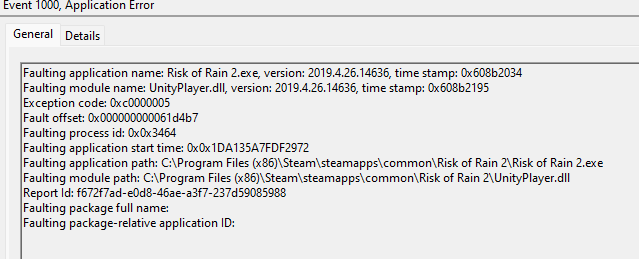
 lusty raptor
void lagoon
Hey all, I keep crashing some time into a run and keep seeing this pop up in my ...
lusty raptor
void lagoon
Hey all, I keep crashing some time into a run and keep seeing this pop up in my ...
this happends to me aswell. i cant find out why though. randomly freezes my whole pc and i have to hard reset it. music stops everything freezes and nothing reacts anymore
orchid flame
don't forget to check the pins guys
it has some solutions in it
mostly on PC tho, not Console
 unreal spoke
Hey guys, I have a problem where I get a black screen when I launch ROR2 (either from Steam or from the exe file). I notice that the frame rate spikes to 4000+ upon launch, and then after a couple seconds, the application stops responding and I am forced to end it through task manager. The game was launching and running completely fine until recently, and I have tried a number of potential solutions with no luck. Here is what I have tried so far:
- Restarting my computer
- Uninstalling and reinstalling the game
- Verifying the installation (it says it was verified 2019)
- Updating my graphics driver
- Running the game as administrator
- Changing the DPI scaling from application to system (enhanced)
- Adding the config file provided into Risk_of_Rain2_Data\Config
- Checked for any unnecessary audio drivers
- Tried running "bcdedit /set xsavedisable 0" (without the ") in a command prompt as admin
Based on what have observed from task manager, launching the game spikes the CPU usage rate to about 50%, and then returns to 1%, whilst memory and disk remain at lower values. I currently run a single monitor setup and have not run mods with ROR2 in the past (I have run mods with other games however). I have also not being using crossplay. I run other games completely fine, and this problem only occurs for ROR2. From what I remember the only thing that has changed since the last time I was able to play the game was that I installed a trial for an antivirus (McAfee), however uninstalled it since then, and the problem still persists.
Any help or advice would be appreciated, and I am keen to get back to playing ROR2, especially with the announcement of the new DLC!
 manic hare
waxen meteor
not sure where this belongs but i can’t get the dlc, every time i try to open th...
manic hare
waxen meteor
not sure where this belongs but i can’t get the dlc, every time i try to open th...
This keeps happening to me too
manic hare
where’s the dlc for switch please
orchid flame
unreal spoke
Hey guys, I have a problem where I get a black screen when I launch ROR2 (either...
does it crash steam too ?
@woven ruin @manic hare check the #ror2-console-discussion pins there is that
"ROR2: SOTV Console Launch Timing
PS4 - Out now in all regions!!!!!
XB1 - Out now in all regions!!!!!
Switch for the Americas - Out now!
Switch Europe - 11/23 - midnight local (sorry about the later arrival there folks 😢)
Switch Japan/KO - 11/9 (tomorrow) - midnight local"
and also #ror2-bug-reports-console if anything related
unreal spoke
orchid flame
does it crash steam too ?
It does not crash steam. ROR2 just freezes on a black screen
orchid flame
unreal spoke
Hey guys, I have a problem where I get a black screen when I launch ROR2 (either...
is your game using your native card too ?
unreal spoke
What do you mean by native card? Sorry I am not super familiar with PC building
orchid flame
do you have a nvidia graphic card ?
unreal spoke
yes i do
orchid flame
are you on a fix or a laptop ?
orchid flame
go into your nvidia control panel and look in manage 3D Settings -> Preferred graphics proccesor and check if you have your "high performance" usage
unreal spoke
I am currently at 3D Settings -> Manage 3D Settings -> Program settings. I have selected ROR2 as the program to customise. Where can i find this "high performance" usage? Or do you mean I should set them to lower settings?
Currently majority fo the settings is set to Global
 unreal spoke
Unfortunately It seems like I do not have an option to choose my prefered graphics processor
 orchid flame
mmh never saw that one but i guess it's because you don't have anything else
i guess it's using it anyway
unreal spoke
Yeah I would assume so, I am able to run other games just fine
orchid flame
unreal spoke
Yeah I would assume so, I am able to run other games just fine
there is some windows thing too like game bar/graphic settings
if you can try to disable some and see if it do anything
i'm out of idea, unless you can try the others pinned comments and see which thing can do the trick, if you find the solution don't forget to tell us here
unreal spoke
orchid flame
there is some windows thing too like game bar/graphic settings
I will try that
unreal spoke
orchid flame
i'm out of idea, unless you can try the others pinned comments and see which thi...
Thank you for trying! I will continue to find a solution and will definitely let you know if I find a fix
 haughty meteor
how do I disable crossplay?
 zealous ether
everytime i try and play a run solo, everything is fine. but whenever i play with one of my friends, my game will always crash before the 2nd planet. it always says its gotta do something with unreal engine, any advice?
orchid flame
haughty meteor
how do I disable crossplay?
in the settings
orchid flame
zealous ether
everytime i try and play a run solo, everything is fine. but whenever i play wit...
if there is a error number you can look it up on google
if you could screenshot that it would be helpful, also "unreal engine ?" are you on epic games ?
 lusty drum
Hey everyone, I’m having an issue with multiplayer on PS5. I’m trying to get on with one of my friends(on PS4) while I’m on PS5. For some reason, every time he joins my lobby my PS5’s WiFi crashes. It doesn’t do this with any other player on my friends list and I can’t figure out what is going on. Could any of you help me troubleshoot this?
orchid flame
lusty drum
Hey everyone, I’m having an issue with multiplayer on PS5. I’m trying to get on ...
#ror2-bug-reports-console there's a lot of problems related to connexion, you should check it out
my bad, it's #1172187541349347429
they really should merge the channels...
lusty drum
orchid flame
<#676860142381432849> there's a lot of problems related to connexion, you should...
Thanks for the tip
 fickle wraith
anyone have any idea why ROR2 decided to create a 200+ gigabyte log file earlier today?
orchid flame
hem
orchid flame
can you post it ?
fickle wraith
i deleted it so i don't remember exact-
fickle wraith
i had 4gb free space left on my pc so it had to go
orchid flame
it could be spamming a error or something like that, don't forget to verify ur games files
fickle wraith
will do
 vagrant sand
if i need help with ror returns should i do it here?
orchid flame
vagrant sand
if i need help with ror returns should i do it here?
you will have more chance in #1113080759952097340 even if it's tech issue
you can post it here too tho but most people are on the channel i linked to
ah nvm it's ror2 tech channel here i forgot
 tawdry egret
Help my entire save has been deleted when I loaded up the game on Xbox
 polar spire
So I don't know if this is the channel to ask this, but my group is trying to do modded ror2 together. I'm using thunderstore so I sent a friend my profile code. After like 3 tries, every time it told us we didn't have the same mods, despite having the exact same profile.
When he tries to join us, it says his mods differ. When we try to join him, it says our mods differ, despite using the exact same profile.
We tried importing with a code, and importing with a file, and nothing. Idk what to do 
We're trying a fresh install of thunderstore rn. Will update if it works
Did not work.
 craggy garnet
hello, i've been wondered. I moved from Asia to Europe recently, so does ror2 automatically change the region or i'll have to change it manually in steam? cuz its weird that i didnt found any lobbys in multiplayer. when i'm still in Asia, everytime i enter the multiplayer there are a list full of lobbys, but now i didnt find any, even before turning on crossplay
 mint iris
Hi guys, sorry to bother you, it has been communicated why survivors of the void is not available on the EU eshop ( nintendo ) ? It is available everywhere ( US/UK ) but not in EU.
unreal spoke
orchid flame
i'm out of idea, unless you can try the others pinned comments and see which thi...
Hi Kwyu, it finally works!
I used the commands provided in Pin 4 solutions:
'sfc /scannow'
'chkdsk /r'
'DISM /Online /Cleanup-Image /ScanHealth'
It took a while to conduct the checkdsk upon restarting, but I was able to launch it today.
orchid flame
unreal spoke
Hi Kwyu, it finally works!
I used the commands provided in Pin 4 solutions:
'sf...
Oh, cool ! Thanks for the answer too, gl hf :)
orchid flame
polar spire
So I don't know if this is the channel to ask this, but my group is trying to do...
there's a pin related to mods in this channel, also some mods are not compatible in multiplayer and are broke because of this update
did you two verify files ?
it doesn't crash so it surely related to a specific mod
orchid flame
mint iris
Hi guys, sorry to bother you, it has been communicated why survivors of the void...
timezones and delay, it's in the pinned comments of RoR2 console channel iirc
it's the 23 for europe, there was a issue sadly
mint iris
Oh ok thanks for answer ❤️
orchid flame
Ok i know this is a long shot but does anyone happen to know if its possible at all to transfer save data from risk of rain on steam to the psvita version?
orchid flame
orchid flame
Ok i know this is a long shot but does anyone happen to know if its possible at ...
unless psvita has steam cloud, i don't know
i don't think that's possible
orchid flame
orchid flame
Ok i know this is a long shot but does anyone happen to know if its possible at ...
if that can help i've got this link from the playstation website https://manuals.playstation.net/document/en/psvita/cm/wifi_pc.html#:~:text=Click the Content Manager Assistant icon in the menu bar,3.
PlayStation®Vita Official User's Guide. Explains how to use the PS Vita system, including basic operations, settings, and use of software applications.
orchid flame
Noted gonna check this out
I guess what i can do is try and get the vita save on my pc and then replace any files from my steam save
 ripe quartz
so i bought the dlc but for some reason it says i don't have it and it won't let me use it ive tried a lot and out of ideas
 slow jewel
I cant find my save files on linux ive looked it up and checked in the places it said but I cant find them
ive looked in ~/.steam/userdata ive looked in Risk of Rain 2/ ive looked in Steam/steamapps/compatdata/632360/pfx
but my save files clearly exist because in game I can see them and use them
 cinder dirge
anyone know why ror2 is crashing on startup?
is there any place to read crash reports? unitycrashhandler starts immediately after ror2 crashes and idk how to fix it
 icy dagger
Is anyone having issues with multiplayer on Xbox series x? We can’t get it to connect & we both have tried hosting & it just doesn’t connect 🧐
 flint bolt
where should i go to ask about how to play as the enemies in vanilla ror2
orchid flame
ripe quartz
so i bought the dlc but for some reason it says i don't have it and it won't let...
on pc or console ?
orchid flame
cinder dirge
is there any place to read crash reports? unitycrashhandler starts immediately a...
read pins
orchid flame
icy dagger
Is anyone having issues with multiplayer on Xbox series x? We can’t get it to co...
hello, yeah there is some problem iirc you should check #ror2-console-discussion and #ror2-bug-reports-console
orchid flame
flint bolt
where should i go to ask about how to play as the enemies in vanilla ror2
you need a mod for that, you can download r2modman it's a mod manager that let you install mods for this game easily
 silver shale
game refuses to launch, tried the dpi scaling fix and it boots to a black screen then immediately crashes. anyone know how to fix this or is it still an open issue
 lime hawk
You don't care about the problems that are happening.
You can purchase the PS4 version DLC for "Risk of Rain 2", but you cannot play it. It seems like you can do it if you buy the bundle version, but it seems like you have to start from the beginning. Are you aware of this fact?
Is it not possible to play in Japan?
orchid flame
lime hawk
You don't care about the problems that are happening.
You can purchase the PS4 v...
a bit weird translation but you should try to send a ticket to gearbox or just go into #ror2-console-discussion
orchid flame
silver shale
game refuses to launch, tried the dpi scaling fix and it boots to a black screen...
look more pins, if u have double monitor unplug ur second one and launch
silver shale
tried all of that, nothing works so far
 modest totem
my game keeps crashing on startup, I literally tried everything I could find online, nothing works...
modest totem
silver shale
tried all of that, nothing works so far
same here
orchid flame
silver shale
tried all of that, nothing works so far
do you have double monitor tho ?
modest totem
i tried with 1 monitor, disabling the other one, didnt work
orchid flame
there's a other "fix" with people having double monitor but we don't know if it really work, you could try if you want :
"Press windows+r and type in regedit and press enter
Navigate as such: HKEY_CURRENT_USERS > SOFTWARE
Click on Hopoo Games, LLC, make sure it is the only folder selected, and right click delete"
be aware this one is probably like a clean uninstallation
ah nvm
it doesn't delete your progress
But overall if you have double monitor you need to unplug your second one and then launch the game, you can replug it after the game is launched, that's a temporary fix sadly for now
modest totem
again, the monitor thing didnt work
seems like the registry clear did the job, the game is loading up now
worked with double monitor
orchid flame
modest totem
seems like the registry clear did the job, the game is loading up now
okay, seem this one do more the trick, keep a eye if it do it again tho because i think someone on steam had it again after some time
i really hope they do a patch to fix theses issues one day
silver shale
orchid flame
do you have double monitor tho ?
no, one monitor
orchid flame
silver shale
no, one monitor
try the others fixs in the pin then
 exotic void
Does anyone know how to get the multiplayer to work on console sense I got the DLC it hasn’t been working at all 🥹
exotic void
Imma cryyyy
orchid flame
exotic void
Imma cryyyy
exotic void
Ik I couldn’t find anything and their were other people with the same issue but we haven’t found an way
silver shale
no luck with any of this, tried on a separate computer/running off igpu as well and the game refuses to boot
orchid flame
silver shale
no luck with any of this, tried on a separate computer/running off igpu as well ...
ig delete the root folder and verify files after then launch
Or do this thing #ror2-tech-support message
(if u haven't do already)
orchid flame
exotic void
Ik I couldn’t find anything and their were other people with the same issue but ...
pretty sad that in the end, there are bugs and they wanted to make sure there isn't any on launch 😅
 sharp sundial
@severe ridge May you help unban my friend? He was banned a year and a half ago for posting slightly more memes. His account id: kirymonov
 severe ridge
sharp sundial
severe ridge
sharp sundial
thanks very much
 red jacinth
Can someone help me fix my game, when i try to create a lobby or join my friends it keeps loading infinitely
 copper jewel
For some reason whenever my console isn't connected to the Internet I can't play the dlc. Is there some way to fix that?
 solemn coral
How can I find my risk of rain save file, I went into Hopoo Games LLC in app data and nothing is there, despite having 100% the game
exotic void
red jacinth
Can someone help me fix my game, when i try to create a lobby or join my friends...
Same thing has been happening for the past 3 days
 spring mural
So it's not just me who can't make a lobby or join people?
 green shoal
hello, im trying to connect to my dedicated server but its giving me version error "your version of the game is differs from the server's" how do i fix it?
 round ridge
hi all, fairly new player here. absolutely loving the game but connectivity issues are kind of frustrating.
Admittedly, when grouping up wiht my mate we so far had no issues, but "normal" matchmaking feels like playing the lottery whether I or someone else will DC.
I don't have any issues in other games (or at least: not that I would be aware of them).
orchid flame
solemn coral
How can I find my risk of rain save file, I went into Hopoo Games LLC in app dat...
C:\Program Files (x86)\Steam\userdata\632360\remote\UserProfiles
something like that
orchid flame
green shoal
hello, im trying to connect to my dedicated server but its giving me version err...
ticket gearbox, they probably forgot to upload the new update to that
orchid flame
round ridge
hi all, fairly new player here. absolutely loving the game but connectivity issu...
there are issues right now on console and that's know, wait and see until it's fixed sadly
also you could try to #1172187541349347429 report ur issue there
round ridge
orchid flame
there are issues right now on console and that's know, wait and see until it's f...
alrite, cheers. As long as grouping up iwht my mate is "stable" I'm not even that annoyed....and in the end, randomly DCing from public MM groups in the end might even do you a favour by saving you from all those loot goblins lol
joke aside: I'm fine waiting but would love public matchmaking to be more stable at some point...
also: no need to post in bug reports when they are aware of the issue already...guess things will get fixed eventually then
orchid flame
haha true
 wide flame
why did gearbox break multiplayer?
 ebon finch
does anyone know how to fix the ror2 not rendering any character chest or enemy models when using crossover wine on mac?
 dry abyss
My game would suddenly crash at the character select screen and present with a unity engine error
Happened a few time to the point my GPU died
Any idea what would be the cause fellas?
 modest wind
Hi i have a problem with the startup of the game
orchid flame
check pinned comments
modest wind
where is it
orchid flame
modest wind
where is it
top right of the discord screen, left side of the research bar
orchid flame
sadly i do not know about mac
ebon finch
orchid flame
sadly i do not know about mac
aw
well i have the game running on mac using wine
but none of the character models enemy models or chest models load
orchid flame
you can't launch the game without using it ?
ebon finch
orchid flame
you can't launch the game without using it ?
no because the game doesnt run on mac regularly. Wine is a app that translates windows protocals into mac protocals
so esentailly its tricking the game into thinking its running on windows
orchid flame
i see
ebon finch
do you know anyone who might know about this?
orchid flame
mmh maybe if i can find him wait
ebon finch
yippe
orchid flame
@steady topaz hi, sorry for pinging you but since you're more experienced in tech i thought you would know about this :
Xana is running the game on Mac using a program called Wine but it doesn't load the models of the characters/chests/enemy, is there anything you could know about this issue ?
@ebon finch also does the missings textures are purple and black ?
ebon finch
orchid flame
<@525218784630276102> also does the missings textures are purple and black ?
no
orchid flame
nvm
ebon finch
there are no missing textures
orchid flame
ebon finch
there are no missing textures
if you can change the launch option of the game, can you try to do this ?
"disable-gpu-skinning" without the "
ebon finch
orchid flame
if you can change the launch option of the game, can you try to do this ?
"disa...
i will try that
ebon finch
orchid flame
if you can change the launch option of the game, can you try to do this ?
"disa...
uh it no worky
orchid flame
dang
delete the launch option
and uh, there is someone on reddit that managed to play risk of rain 2 on his mac with this video if you want, using game porting toolkit
ebon finch
orchid flame
and uh, there is someone on reddit that managed to play risk of rain 2 on his ma...
oh
can you sned it here?
orchid flame
https://www.reddit.com/r/riskofrain/comments/144yiyx/im_probably_the_only_one_who_cares_but_i_can/ here's the reddit post with the video in it

Reddit
Explore this post and more from the riskofrain community
that look pretty rough to do
ebon finch
you sure there isnt another way?
steady topaz
most successful reports about game performance are ran on Proton GE
orchid flame
i'm not sure since i don't know things about mac, i'm just tellin at this point :P
ebon finch
steady topaz
most successful reports about game performance are ran on Proton GE
doesnt proton only allow remote play? from another computer
steady topaz
try to put that in launch options
-force-feature-level-11-0
steady topaz
ebon finch
doesnt proton only allow remote play? from another computer
it's not remote play, game runs on linux, however it is not supported.
ebon finch
steady topaz
it's not remote play, game runs on linux, however it is not supported.
oh so it only supports linux?
orchid flame
steady topaz
try to put that in launch options
-force-feature-level-11-0
that look like a pin one but without the numbers
it was 10-1 for the other one
ebon finch
steady topaz
it's not remote play, game runs on linux, however it is not supported.
btw its not the biggest deal but is there a way for slightly better performance? i have it on all low settings and only get 30-40 fps
also does proton only run on linux?
ebon finch
steady topaz
try to put that in launch options
-force-feature-level-11-0
also this didnt make the models reapear
should i run it along the other command that @orchid flame said
steady topaz
ebon finch
should i run it along the other command that <@456226577798135808> said
no, remove it. Models are rendered using directx and that command makes the game to forcebly use only 11 shader version, without reflections etc, it often helps with models problems.
ebon finch
steady topaz
no, remove it. Models are rendered using directx and that command makes the game...
ok
with the one you said it still doesnt render the models tho
steady topaz
I have no first hand expirience running ror2 from linux, but i know that wine is not as reliable as proton.
steady topaz
ebon finch
with the one you said it still doesnt render the models tho
i understood that. i have no solution.
ebon finch
steady topaz
i understood that. i have no solution.
ah i see mb
would playonmac be better?
steady topaz
can you run dxdiag?
orchid flame
dxdiag is your hardware diagnostic
steady topaz
it most likely not present on linux machine
ebon finch
steady topaz
it most likely not present on linux machine
im not on linux im on mac
orchid flame
oopsi
steady topaz
Not sure if it's even possible, but it seems that some 3rd party software helps

So you basically need to run a vm inside your mac os, not sure if it's ok-ish performance, as ror2 needs good bit of cpu power
orchid flame
ebon finch
whats that?
also if you want for later there's that https://support.aspyr.com/hc/en-us/articles/360056544471-How-to-Locate-your-System-Profile-DxDiag

Aspyr Support
Your System Profile/DxDiag is a detailed view of your hardware's specs and configuration, for Mac and Windows respectively. For Linux devices, we can also get detailed info through Steam's System I...
ebon finch
steady topaz
So you basically need to run a vm inside your mac os, not sure if it's ok-ish pe...
alr
ill figure this thanks for the help 🙂
orchid flame
👍 good luck finding this out
steady topaz
try to update gpu drivers, i've seen this exact no models problem fixed by newer nvidia drivers
 umbral cloak
Hi, I'm having the multiplayer issue where the desync is unplayable and it loads the "black character selection screen" for the non-host players. I know this is an FAQ and I have tried following the steps for the ROR2DS in the pinned messages, but I couldn't set it up since my internet provider blocks direct access to router settings - so I'm unable to do port forwarding. Is there another way to to fix this issue? I'm currently unable to play with friends. Thx and sry is this is being brought up a lot
steady topaz
@umbral cloak What type of connection do you have?
umbral cloak
As in wired or wireless? If so then wireless
steady topaz
umbral cloak
As in wired or wireless? If so then wireless
5g?
umbral cloak
To be honest I don't know 😰
orchid flame
are you using your phone connexion or from a box
umbral cloak
oh from the box itself
orchid flame
can you access it ?
umbral cloak
not to its settings
orchid flame
i see, you will probably need to contact ur provider for that but here's is the message that can probably help you the most right now #ror2-tech-support message
umbral cloak
ok tysm!
steady topaz
@umbral cloak Can you open up browser and type 192.168.1.1 there?
umbral cloak
it sends me nowhere,
"The connection has timed out
The server at 192.168.1.1 is taking too long to respond."
 median sail
for some reason some one im playiong tyhwi the join is destroyed
can not join clip board and when he copys code for lovvy it looks like and r2modman code
 twilit hill
Can anyone help me start the server through aws windows ec2?
I downloaded steam, downloaded the ror2 dedicated server, configured server.cfg and start up, then it reported an error that the version number does not match.
Then I used the steam console to download version 1.4.4.1, and now I still get an error saying that the connection cannot be made.
it shows that wrong connection channel:6 bytestosend:1096
orchid flame
Hi, whenever i try to press "start game" in multiplayer it does nothing, and if i try and join someone elses it blackscreens me and sends me back to the menu.
I have tried verifying game files, reinstalling, restarting pc, etc nothing seems to fix it
humble sable
orchid flame
Hi, whenever i try to press "start game" in multiplayer it does nothing, and if ...
Do you have crossplay enabled?
orchid flame
no
orchid flame
median sail
can not join clip board and when he copys code for lovvy it looks like and r2mod...
if u have problem with r2modman try #ror2-modding
orchid flame
twilit hill
Can anyone help me start the server through aws windows ec2?
I downloaded steam,...
i think the teaser update broke the dedicated server overall, you could try to send a ticket to gearbox but eh...i don't think they would help much
orchid flame
orchid flame
Hi, whenever i try to press "start game" in multiplayer it does nothing, and if ...
do you or your friend have a VPN enabled ?
does it happens with another people ?
do your buddy have crossplay on too ?
if nothing worked you can look at this step #ror2-tech-support message
also someone tried this and it worked for him : https://www.reddit.com/r/riskofrain/comments/iju98h/risk_of_rain_2_black_screen_when_joining/
Reddit
Explore this post and more from the riskofrain community
 twin lily
ebon finch
ill figure this thanks for the help 🙂
twin lily
ebon finch
ill figure this thanks for the help 🙂
Heya, have you tried doing -disable-gpu-skinning? Before it seemed like you were missing the dash at the beginning.
ebon finch
twin lily
Heya, have you tried doing -disable-gpu-skinning? Before it seemed like you were...
huh
lemme try that real quick
ebon finch
twin lily
Heya, have you tried doing -disable-gpu-skinning? Before it seemed like you were...
ah it worked
do you know anyway to make it run any better
ebon finch
twin lily
Cause getting it over 40-60 (ew) is neigh impossible
eh im sitting 40 so yeah
damn
twin lily
Yeah sorry it doesn’t get much better :) u get used to it tho
Try turning down ur graphics setting a crap ton, doesn’t do much but it helps
ebon finch
alr
twin lily
glhf :D
orchid flame
twin lily
Heya, have you tried doing -disable-gpu-skinning? Before it seemed like you were...
i did told that already lul
orchid flame
orchid flame
if you can change the launch option of the game, can you try to do this ?
"disa...
here :D
 tardy belfry
Hi, is it allowed to use steam input to make use of gyro as mouse to control the camera and other Keyboard + Mouse + Controller input changes? I ask because I don't know if that will break any "unauthorized 3rd party software not allowed" rule since steam input is a tool from Steam itself
orchid flame
i don't think risk of rain has any
 frosty gorge
Why is the game not letting me play singleplayer
orchid flame
frosty gorge
Why is the game not letting me play singleplayer
verify ur files i guess ?
does it like, crash or something ?
frosty gorge
I select single player and it just reloads the main menu
Deselecting crossplay fixes it
But when i put it back on it happens again
orchid flame
frosty gorge
Deselecting crossplay fixes it
oh yeah, that thing is very buggy
didn't knew that it happen in solo too
frosty gorge
Strange
orchid flame
yeah the feature is completly broken
and at this point it should be disabled by default for all
orchid flame
frosty gorge
Also im not getting any games on the lobby browser
that's what crossplay do too
if you want to seek games in a better way i suggest you go here #lfg-pc-ror2
frosty gorge
ok cool thanks
 queen cloud
@queen pulsar, @carmine arrow when will the dedicated server be updated to the latest version of the game?
We decided to play with a friend, however on a dedicated Steam server I have too much ping. I decided to create a dedicated server (in Steam tool Dedicated server) Started the server, I went to it and saw an error logging in "the game version is 1.2.4.4 but the server version is 1.2.4.1.".
 viscid siren
I have humbly come to this discord tech support channel as a final resort to fix my overly specific (and probably stupid) setup.
Ror2, running inside of Steam's Proton is broken only when using the internet. The game fails to boot or give any proton error log, unless I go offline. Then it boots and runs SP normally. I can even reconnect to the internet in main menu and continue SP normally. The moment I send or receive any multiplayer invites, crash.
I have done a lot of troubleshooting, including but not limited to: settings resets, Steam verifications, full reinstalls, swapping Epic Games Crossplay backends, proton version swaps including GE versions, a handfull of proton options, and testing with a second Windows system as both host and client. So. Any new ideas? 🥺
 queen pulsar
queen cloud
<@97138400905146368>, <@195390578488246272> when will the dedicated server be u...
queen pulsar
queen cloud
<@97138400905146368>, <@195390578488246272> when will the dedicated server be u...
That'd be up to Gearbox at this point, so you'd have to poke one of them.
queen cloud
@proper kiln @past pecan 🙃
orchid flame
viscid siren
I have humbly come to this discord tech support channel as a final resort to fix...
there was a speak about mac some days ago, try to scroll up a bit you could find some answers
you would have more chance in a reddit post i think, since it's pretty specific and i remember they had more mac user/proton on reddit than here
 slate hazel
I just downloaded the survivors of the void dlc and i have been crashing mid game now did anyone face this issue and might know what I can do to fix it?
 high steppe
Hello, i'm struggling to find a clear answer for if there is crossplay between pc steam and pc ms store. And is there corssplay between any pc and xbox?
orchid flame
high steppe
Hello, i'm struggling to find a clear answer for if there is crossplay between p...
it's only between steam and epic games on PC, i don't think ms store do it too
orchid flame
slate hazel
I just downloaded the survivors of the void dlc and i have been crashing mid gam...
try the pinned comments
 dreamy temple
Hello I have a liiiitle problem. My PS4 data deleted a little while ago and all my ROR2 stuff is gone. I still have all the achievements on my playstation account. Is there ant way I can recover my stuff so I don’t have to unlock all the characters and items all over again?
 lucid loom


 exotic basalt
Playing on PC and my mouse isn't working in menus. I tried plugging in a controller to play that way, but my character is stuck looking straight up. The stuff I'm finding only pretty much just says to unplug your controller, but my only usbs plugged in rn are mouse, keyboard, and microphone. I'm currently restarting to try some things, but I wanted to ask if anyone knew anything in the meantime. I think this is related to the recent windows update, but it's hard to say for sure. I do know this issue seems to be risk of rain 2 specific, as the mouse worked fine in a different game
Update: I'm good and the issue was just vjoy
 ashen valve
A couple months ago I tried editing my user data to give myself Lunar Coins, and when I tried to run the game it crashed, I figured I messed up somewhere, or the couple dozen mods I had downloaded prevented it from working as I thought. I went back and changed the Lunar Coin count to its original value, but when I went to open the game, it crashed again. I've tried verifying the integrity of my files, deleting every file and reinstalling the game, I even tried using my friend's user data and my game still crashes. I saw other people having similar issues when I searched in this channel, and I saw someone mention a save editor, but I trued using that and Idk if I did it wrong but that didn't work either. I'm super stumped here and I have no idea what to try at this point, any pointers?
queen cloud
queen pulsar
That'd be up to Gearbox at this point, so you'd have to poke one of them.
I think they ignored me((. Can i take code for download old version of game in steam?
queen pulsar
queen cloud
I think they ignored me((. Can i take code for download old version of game in s...
They would have to upload those branches too at this point, its not anything i could assist with.
 rough star
slate hazel
I just downloaded the survivors of the void dlc and i have been crashing mid gam...
rough star
slate hazel
I just downloaded the survivors of the void dlc and i have been crashing mid gam...
(PC) Hi, my game crashes either with unity`s crash handler or straight up goes nuts, or frozen display. Happens between 5-30mins into the game, ive tried so many things i even factory resetted my pc, looked at older forums but cant get a hold of it
queen cloud
queen pulsar
They would have to upload those branches too at this point, its not anything i c...
I find way to download old version from steam. Write "steam://naw/console" in the browser or in the console. Here write "download_depot game_id platform_id version_id" (here is download_depot 632360 632361 8981465225844154625). Game will download in other folder. Then you just need to copy it to the game folder with a replacement. Just in case, you need to make a backup of the game files.
but i dont try yet
queen cloud
it was a long time..... Usually it takes about 5 minutes to download 20 GB, but right now I waited about an hour.

yes it works!
 queen cloud
I find way to download old version from steam. Write "steam://naw/console" in th...
queen cloud
queen cloud
I find way to download old version from steam. Write "steam://naw/console" in th...
steam://naw/console bad work, better use steam://open/console
queen cloud
uhh, i just now check, game start, but I can't enter the character selection. The logbook, settings and other menus work, but not the choice of characters (even in a local game, even in a prismatic test, even in an eclipse)
slate hazel
rough star
(PC) Hi, my game crashes either with unity`s crash handler or straight up goes n...
Do you have a second monitor by chance?
rough star
i dont
slate hazel
It seems to be working fine for me now that I unplugged my second monitor before I play because someone mentioned unity not liking a second monitor or something like that
rough star
yeah ive seen that but
orchid flame
rough star
(PC) Hi, my game crashes either with unity`s crash handler or straight up goes n...
try the pinned comments
 lilac salmon
Hello my name is Gary and I am having trouble
I am having constant crashes on risk of rain 2 within 1 minute to 3 minutes of playing. What is odd is that it was working just last night. I've tried most things I've read on the internet like compatibility mode for Windows 8, changing the high dpi settings, running as admin, checking my ram speed and making sure its working properly, and maybe some other stuff.
Additionally I have gone over everything in Pinned post #4.
Oh, also about half of the time my whole pc crashes, the other half of the time unity crash 2019.4.26.14636 briefly pops up and the game quits.
orchid flame
lilac salmon
Hello my name is Gary and I am having trouble
I am having constant crashes on ...
try the pins 6 too, also bring the crash log
lilac salmon
I did indeed do that as well
orchid flame
lilac salmon
I did indeed do that as well
did you verify ur files on steam / reloaded ur pc ?
did you do the scan disk ?
orchid flame
lilac salmon
I also uninstalled and reinstalled on different drives
there is a last resort solution but be aware that it's a registry thing
"Press windows+r and type in regedit and press enter
Navigate as such: HKEY_CURRENT_USERS > SOFTWARE
Click on Hopoo Games, LLC, make sure it is the only folder selected, and right click delete"
lilac salmon
😢 I tried this
orchid flame
ugh
does it happens on others games too ? @lilac salmon
maybe a windows update or hardware related
do you had a error when ur PC crashed ?
lilac salmon
It does not happen with other games. Everything else runs flawlessly.
I can post a problem report and my specs later
orchid flame
okay
 next thorn
Ok I have aproblem... I run elden ring in consistent 60fps but get stutters and even low fps in RoR2 how do I fix it? I have ran lot heavier games but this one stutters???
Rtx 3050
24 gigs of ram
Core I5 (not sure for the numbers after the i5 but I'll chek when I'm home)
queen cloud
queen cloud
uhh, i just now check, game start, but I can't enter the character selection. Th...
Hmm, on my friends PC game work... Maybe need try again....
next thorn
guys pls help me... i just want to play with my friends i have the specs why why is it running badly?
 worn plume
Hey guys, has anyone heard if Gearbox is planning on updating the dedicated server files on Steam anytime soon?
 rich belfry
Hey guys, wanted to play risk of rain 2 again so reinstalled the game, now when I launch it , I see 0% loading screen with a lil icon that looks like commando and game instantly crash, no unity report or anything. I tried reinstalling on a new drive but still the same issue. Tried running the game in administrator mode, limit the fps to 60, unplugged second monitor but nothing seems to work
Just checked pinned message, tried everything on there and still nothing sadly
lilac salmon
You and me both Goks.
It’s odd because I played the game with no issues one night. Changed nothing and the game is unplayable the next day no matter what I do. And I tried everything suggested.
rich belfry
I changed my computers so i'm thinking maybe that something to do about it but it's still really weird :/
 queen herald
could someone help me out? I sucessfully modded ror2 and played it for a bit but then it stopped working. I have uninstalled it and reinstalled it so many times and even went super deep into my files to uninstall any remnants of the game and any mod and it will still not launch
orchid flame
next thorn
Ok I have aproblem... I run elden ring in consistent 60fps but get stutters and ...
check pins, also this game is CPU intensive, a lot of entitys also
orchid flame
worn plume
Hey guys, has anyone heard if Gearbox is planning on updating the dedicated serv...
sadly not, they didn't said anything
orchid flame
rich belfry
Hey guys, wanted to play risk of rain 2 again so reinstalled the game, now when ...
did you try every fixs in the pins ?
mostly people get it work with deleting the config file -> verify files in steam and launch again
(Don't forget to backup your config file / to note it if you don't want to lose the config overall)
And also this if you got a second monitor :
"Press windows+r and type in regedit and press enter
Navigate as such: HKEY_CURRENT_USERS > SOFTWARE
Click on Hopoo Games, LLC, make sure it is the only folder selected, and right click delete"
You would want to restart the pc after doing that tho, messing with registry can be a bit dangerous sometime but in case of a game i don't think it matter that much
rich belfry
Yeah i've tried every single fix , i did manage to make it work after a restart so thankfully it seems fixed now !
orchid flame
lilac salmon
I can post a problem report and my specs later
some days ago u posted a player.log, can you post a output.log ? it's the crash log iirc
orchid flame
rich belfry
Yeah i've tried every single fix , i did manage to make it work after a restart ...
technically if you did every fix in the pins you scanned your disk, that make you restart your pc after so...
rich belfry
Yeah , first reboot didn't work when I tried that part , but a restart after a step afterwards might have fixed the issue
Thanks for your help anyway !
orchid flame
strange
lilac salmon
orchid flame
some days ago u posted a player.log, can you post a output.log ? it's the crash ...
where is the output.og? I'm sorry.
Source
Risk of Rain 2.exe
Summary
Stopped working
Date
11/20/2023 5:20 PM
Status
Report sent
Description
Faulting Application Path: C:\SteamLibrary\steamapps\common\Risk of Rain 2\Risk of Rain 2.exe
Problem signature
Problem Event Name: APPCRASH
Application Name: Risk of Rain 2.exe
Application Version: 2019.4.26.14636
Application Timestamp: 608b2034
Fault Module Name: UnityPlayer.dll
Fault Module Version: 2019.4.26.14636
Fault Module Timestamp: 608b2195
Exception Code: c0000005
Exception Offset: 00000000010b471a
OS Version: 10.0.19045.2.0.0.768.101
Locale ID: 1033
Additional Information 1: 9991
Additional Information 2: 9991141adf1b28a1c00b28e6e155bd8e
Additional Information 3: dfee
Additional Information 4: dfeee8d2cdfc15d750cb9b704962855a
Extra information about the problem
Bucket ID: 5312d974477d9d50e268c5e84fd47ce4 (1326527691823021284)
That is the probelm report.
Specs:
Device name Gary-PC
Processor Intel(R) Core(TM) i5-9600K CPU @ 3.70GHz 3.70 GHz
Installed RAM 32.0 GB
EVGA 2070 XC Ultra
orchid flame
lilac salmon
Source
Risk of Rain 2.exe
Summary
Stopped working
Date
11/20/2023 5:20 PM
...
i think the exception code error is a memory issue
i'm doing searchs to see some solutions
you don't have citrix workspace on your pc btw ?
also a application named Duet
saw some people that's cpu related too and they needed to change it
like this comment "Fixed mine with a RMA for my CPU.
Worked with devs on the unity forums and found where my CPU was failing at basic integer subtraction (still only within the unity game engine)."
technically if you want to test ur memory, memtest should have been enough but i'm not sure, some people said sometime it show 0 errors and you need test it with another software
again i'm not a expert on that, i never tried
also that one
 lilac salmon
orchid flame
you don't have citrix workspace on your pc btw ?
lilac salmon
orchid flame
you don't have citrix workspace on your pc btw ?
I do not
lilac salmon
orchid flame
also that one
My ram is set to its proper clock speed, 3200. confirmed that one
I do not have a cpu to switch to test unfortunatly
if it is something happening just in unity and my cpu is completely fine elsewhere I cannot replace it right now
lilac salmon
neither can I. I greatly appreciate your help though.
orchid flame
you did everything i could possibly throw for fixs lol
lilac salmon
It's so odd though too because I played for like 24 hours straight one day, and it didn't work the next.
updated nothing.
orchid flame
mh
unless it's hardware, i can't see something else
you did try to clean uninstall your drivers with the software DDU ?
if it worked before the worst thing could be hardware, and the nicers one could be just a windows update or something else that updated
or files corrupted but you already scanned for that ones, you did try to delete the config file too right ?
lilac salmon
I did not try to delete the config file. Where’s that one located?
I’ve also not done a DDU wipe. I can try that tonight!
@orchid flame 🧡
 timid river
Not really risk of rain game related, but is it possible for a beanbag shop for people to buy. I am talking about the Gup beanbag that was recently put as a giveaway (I do not know what happened with the giveaway, but I don't think i won). Any information will be appreciated. : )
orchid flame
lilac salmon
I did not try to delete the config file. Where’s that one located?
I’ve also ...
it is located in ur game local files in "data" iirc
next thorn
orchid flame
check pins, also this game is CPU intensive, a lot of entitys also
hi im kinda new can u help me idk what am i looking for in pins
 autumn gate
Anyone know any ways to roll back the main client to 1.2.4.1 on Steam to make it compatible with the ongoing delay on the Dedicated Server tool?
 orchid flame
next thorn
hi im kinda new can u help me idk what am i looking for in pins
orchid flame
next thorn
hi im kinda new can u help me idk what am i looking for in pins
in pins you can try like, reinstalling VC ++ or directX, things like that
next thorn
orchid flame
in pins you can try like, reinstalling VC ++ or directX, things like that
oh man im so confused idk what ur talking sorry....