#ror2-tech-support
1 messages · Page 3 of 1
 raven maple
okay I have an idea:
you will need
-17 liters of peanut butter
-1 can of WD40
-3 to 5 rolls of duct tape
-and a willing attitude
this will get you...
nowhere I am out of ideas
Good luck fixing it though. sorry I couldn't help
 vale mountain
its aight
i guess i'll send it off, best thing to do unless they somehow drop a patch that fixes it, which is as hopeful as anything gets
 tardy sentinel
Good morning
I recently bought risk of rain 2 and I gotta tell ya, i've never had a game that hated existing the way it was intended like this one. I've been all over the internet trying every fix i can and it just keeps crashing. Either i can't boot the game, or i can't finish a run
 nocturne harbor
Need Help, Haven't played the game in a while and now when i try to the game Crashes after some time Playing.
I don't know if an update to the game did it or it's something on my end, I haven't touched to game in a little over a year and now i return to find it mostly unplayable. And it's a 50/50 on weather the crash is a "simple" 'crash to desktop' of a straight up BSOD
This happens "only" most of the time in single player, and usualy by stage 4/5 but it happens ALL the time in multiplayer and usually happens earlier in stage 1/2 (sometimes i'm lucky and make it all the way to stage 3!)
I've update all my drivers, reinstalled the game, Verified integrity of files(which always returns with "1 files failed to validate... " but i haven't been after to figure out which after every time I launch the game, and I can't figure out which[might be the culprit but can't find it what changes]), tried the "simple" fixes of compatibility mode and star as admin, This only happens with RoR2 and my online search don't yield any good solutions.
Here are the crash files.
and also a screen shot of resource monitor seconds after the crash
and a screen shot on Event Viewer
couldn't find the Output_log.txt listed where it supposed to be.
https://i.imgur.com/uNfDymz.png
https://i.imgur.com/kgsPye6.png
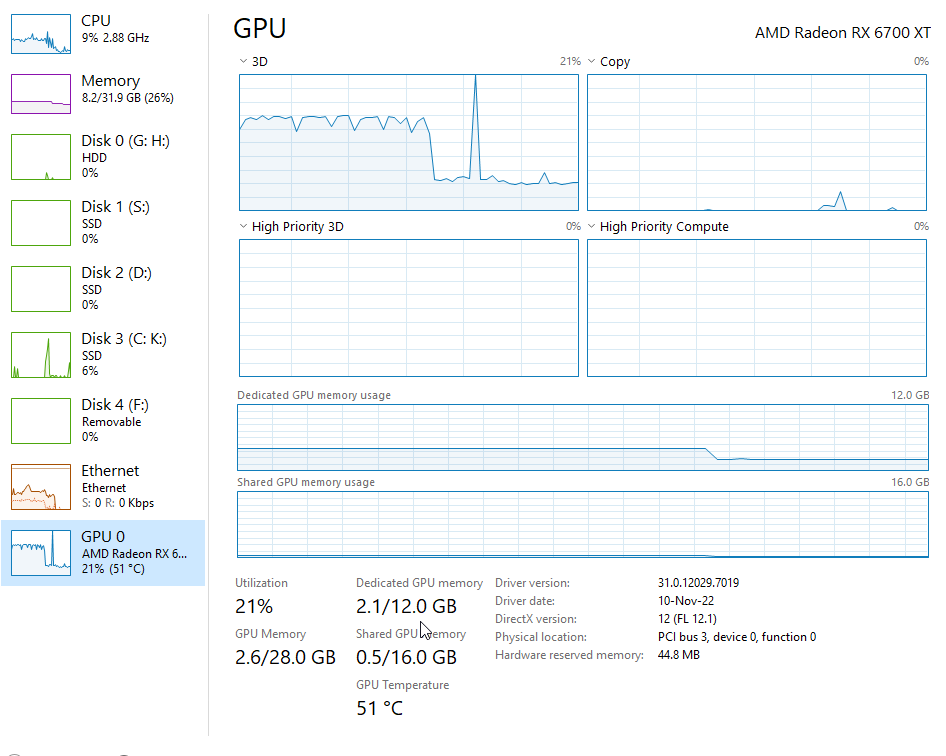
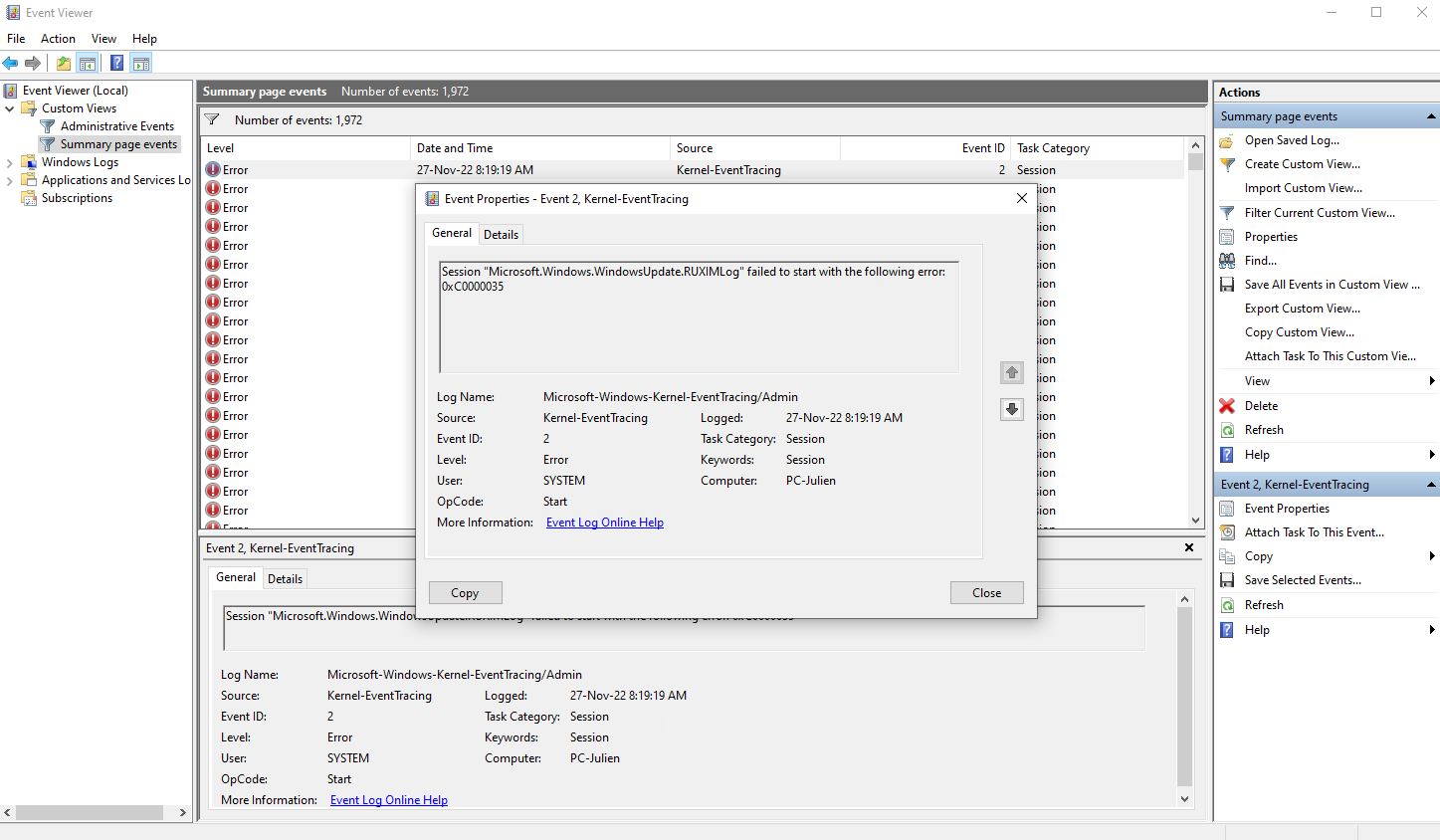
 steady topaz
@nocturne harbor disable xmp memory profile, try the game. Disable cpu boosting, set it on performance, try the game.
Reseat ram cards, try each other separately.
This is most likely your hardware.
tardy sentinel
Oh lord it's gonna turn out i'm too stupid to fix a steam game
nocturne harbor
@steady topaz I will and let you know the results.
Thanks for answering so quickly, stay awesome.
steady topaz
nocturne harbor
<@302553827389865986> I will and let you know the results.
Thanks for answerin...
There is like 90% chance nothing of those helps you.
People i talked to fixed random crashing related issue by changing cpu/motherboard/ram (mostly just getting new pc all together)
There were some cases where suggested fixes worked, yet those are rare.
Random crashing happens due to misplaced or misread ram memory bit. This might be caused by ram controller, cpu or ram itself.
tardy sentinel
I mean i don't think it's necessarily random. The problem is the fixes i use work, but they don't keep working
It crashed at startup, it crashed at the initial loading screen, when i thought i had everything working it'd crash near the end of a run, it just doesn't want to exist, and when i fix one problem the others seem to come back
It's like a rubix cube of malfunction
i do know when i go to verify the game files there's sometimes 1 file broken or missing or something but it's happened more than once
 limber terrace
Is there a guide anywhere for setting up a dedicated server?
 shrewd radish
A dedicated server for this? I don't think there is such a thing.
limber terrace
shrewd radish
A dedicated server for this? I don't think there is such a thing.
Check under tools for Steam in your Library
shrewd radish
I'm surprised it exists then, usually one of the requirements for such a thing is that users are able to join and leave at will.
 crimson dagger
Hello guys help pls, after we with my friends buy dlc we have fps drop and lags in multiplayer
If someone know how to fix that would be very nice 🤧
 tiny plover
^
Im also crashing for no reason
and ive tried everything in the pins
I have the dlc so i don't think pin 6 will work
i can try to validate and restart but i doubt that would do anything
if i were to send files to someone so they could help me who would be that person(s)?
if anyone can help me please let me know
tiny plover
yeah now it wont even get to the base loading screen
if anyone has a fix please let me know, i literally can't run it now
 hearty bronzeBOT
 GamerIsMyName#5107 was banned
tiny plover
good shit
 placid trout
Why does my monitor do this and how do I fix it? When I leave my computer off or it gets cold in my room this happens. It’ll start to clear up then have these lines plus an old frame for like 10 seconds then repeat. I have new drivers and this monitor is only 2 years old.
 steady topaz
@limber terrace If you want to workaround connectivity issues dediserver hosted on your pc won't be your solution. It's the same as if you just host a game, due to whole thing beeing p2p you need your nat to be able to send and receive packets on certain ports (7777) without obstructions.
But if you want to host without actually playing on that pc - dediserver is your tool.
#ror2-tech-support message
@placid trout does look like the cable that connects inner parts of your monitor with actual display goes loose. You need to send it to repair shop or to your seller (if there is active warranty still you would get it fixed)
tiny plover
tiny plover
if anyone can help me please let me know
Still need help with a fix.
tiny plover
Sent a ticket into gearbox and hopoo games
 fossil jolt
help please

i cant start or open settings, game crash
Computer shit. But I used to play this game before dls.

 ocean pier
fossil jolt
help please
ocean pier
fossil jolt
help please
Try pins 4 and 6
tiny plover
I tried pins 4 and 6 and im still getting crashes when trying to start up RoR2. This can happen in between just opening up the game or reaching the tile screen. Ive already sent in a ticket into gearbox software and hopoo support. This is my second day here
 quasi void
Should i ask for assistance here if the game never appears through an upscaling compositor on linux or rather ask the dev of gamescope about this? According to process monitor i use, RoR2 spawns threads and kills them after a second of activity or so, that repeats each... 3 to 5 seconds, i think
 quasi void
ok, nevermind, the issue was elsewhere entirely
Probably something to do with steamtinkerlauncher
 wooden agate
my game just crashes about when the precentage loading thing appears
 bleak cradle
My game also crashes upon launch
 obtuse matrix
I have a problem that makes it extremely hard to play.
Who knows why after 5-6 stages the fps is released from 400 to 20-60?
This does not happen in other heavy games.
GPU rtx3060 12gb
CPU i5-12400F
RAM 16gb
 obtuse matrix
I really count on the help, I have already tried everything and I just have no ideas.
 cloud stone
obtuse matrix
I have a problem that makes it extremely hard to play.
Who knows why after 5-6 s...
cloud stone
obtuse matrix
I have a problem that makes it extremely hard to play.
Who knows why after 5-6 s...
thats just normal i'm afraid
You can try installing r2modman and install the mod called "HolyDLL" I heard it can help with fps on the later stages
obtuse matrix
cloud stone
thats just normal i'm afraid
I'm afraid it's still not normal.
I play with a friend whose system is weaker, where I have 30 fps, he has 100.
 silent tartan
i'm playing with a friend of mine and she keeps encountering this glitch in any stage that has water in it, be it wasteland aspect, the bazaar, etc, and we have no idea what's causing it. any clues?
 ocean pier
silent tartan
i'm playing with a friend of mine and she keeps encountering this glitch in any ...
ocean pier
silent tartan
i'm playing with a friend of mine and she keeps encountering this glitch in any ...
Check pin 4
silent tartan
ah i see, thank you
 thin sedge
Hey! Trying to play multiplayer ps4, it puts me and my friend in a lobby together but just says joining lobby and kicks us when we try to start a game. Same issue with quick play or inviting each other. Are the servers working rn? Any known issue as to what this could be?
steady topaz
@obtuse matrix player.log и dxdiag в личку скинь.
obtuse matrix
steady topaz
<@410424137740320768> player.log и dxdiag в личку скинь.
кинул
 split trellis
My game crashes when im trying to open it, I have tried pin 4 but its still not working. help!
tiny plover
tiny plover
I tried pins 4 and 6 and im still getting crashes when trying to start up RoR2. ...
Still here 5 days later. Game still crashing. Tried pins 4 and 6. Nothing is working
If anyone has a fix for this please let me know.
 tepid stag
The game did this and after I beat the stage and entered the telaporter the game crashed
 scarlet wren
hey guys,
I just bought the game and it takes me 10min to open the game. I have the DLC And I already reinstalled / Validated the integrity but is still slow.
Is there any fix?
 dry wyvern
How do I join people on multiplayer
 unborn nimbus
anyone recognize this bug?
when I host and my friend joins me he gets this, when he host and I join him I get it... we've tried online guides to fix it to no prevail.
things we've tried->
- verified file integrity
- ran as administrator
- disabled windows firewall and added exclusion for risk of rain
- joined and rejoined like 100 times, its consistent
Image
I should add that while the game worked previously, its installed on a separate hard drive, and about 6 months ago he installed an update which is when we encountered the bug, we haven't played since and we got back on to see if the bug was still there. (it was)
not sure if this is related ^ but just trying to provide any info that could help
 steady topaz
unborn nimbus
anyone recognize this bug?
when I host and my friend joins me he gets this, whe...
steady topaz
unborn nimbus
anyone recognize this bug?
when I host and my friend joins me he gets this, whe...
Not a bug.
#ror2-tech-support message
 narrow cape
Hello, a weird thing started happening recently with my game: everytime I (try to re)open it, it always restarts with default graphic settings (such as 640x480 resolution). It looks like it has something to do with the game files, since when I try to validate the files, it says that one file failed to validate. However, it keeps happening again and again everytime after I changed the settings back to "my" settings, and closing the game. Any help? I'm only using windows defender and risk of rain 2.exe is allowed in the controlled folder access as well as steam
hmm looks like I have this weird line in my config.cfg file saying resolution 1897x1348x120; but I don't know what to do with it, as it keeps getting back to that state. also tried to reinstall the game once and nothing
any help would be appreciated, in the meantime I will try more things such as restarting my computer I guess
steady topaz
@narrow cape edit the line with your resolution and flag the file as read only.
Alternatively create autoexec.cfg and add the same line with your resolution. No need to flag it as read only. Place the autoconfig in the same folder.
narrow cape
I see, thank you very much!
 worn wasp
when i try to export a modpack as a code in r2modman, it says there's a network error. any idea what i could do?
 solid ermine
my friend always laggs on ror2
is it any fix to this?
he is the only one i lagg with
its like 1-3 sec delay ingame
 feral patio
Not enough information
 flat cliff
I used to play this game a lot in 2020, but coming back to it I've been having an issue where even while holding "W" and nothing else, the character will randomly stop moving. I've tested this on multiple keyboards, all with n-key rollover and still having the issue. Platform is windows 10
steady topaz
@solid ermine disable vpn, both of you. Also see those #ror2-tech-support message
solid ermine
@steady topaz no one has vpn and we tried those things :( he has strict network i think that has something to say
steady topaz
@solid ermine delay literally means there is delay. Usually that's vpn/proxy. In rare cases that's residential antivirus that scans the networks.
Might be slow router, all be it unlikely
Try radminvpn, should eliminate software issue if it works
solid ermine
aight will try <3
 lone pelican
Anything I can do to fix this crash
 scarlet wren
hey guys,
I just bought the game and it takes me 10min to open the game. I hav...
scarlet wren
scarlet wren
hey guys,
I just bought the game and it takes me 10min to open the game. I hav...
Can someone help me with this? This is really killing my mood to play the game...
ocean pier
lone pelican
Anything I can do to fix this crash
try pins 4 and 6
 modest bronze
my game has been loading into a map but not loading the player, the only way to fix it is to use aerolt to revive the player
 tropic crest
hi is there a way to export my stadia data over to steam?
steady topaz
@tropic crest no, but you can edit your save file to match the unlocks. See pinned messages
narrow cape
scarlet wren
Can someone help me with this? This is really killing my mood to play the game.....
Hello, what are your specs? Are they above requirements or below?
scarlet wren
narrow cape
Hello, what are your specs? Are they above requirements or below?
Yeah, they are above
narrow cape
Make sure your graphics drivers are up to date I guess, and you can also monitor your device comsuption during the game booting time
What are exactly your specs ? Just wondering? Curious if it's a laptop or nah
scarlet wren
narrow cape
What are exactly your specs ? Just wondering? Curious if it's a laptop or nah
Everything is up to date and I'm using a desktop:
CPU: Ryzen 7 2700X
RAM: 16GB DDR4 3200MHz
GPU: RTX 2070
narrow cape
try to boot the game while keeping an eye in the performance tab in the task manager: do you see anything weird?
also I guess make sure that there aren't any nvidia settings that are messing things up i suppose
 boreal narwhal
black
 tender wing
I'm having a issue with multiplayer when me or friends try and join, it either DC's them or me sending us to the main menu..
Either get DC'd at the survivor choosing stage, or get DC'd before the pods even hit the ground.
Been playing no issue for the last week, just started today
 vast grotto
Custom item-description shows up in log book, but not in game. Is there a fix for this?
 near notch
Hello,hey i need some help with my game,i just re-installed bc it keeps freezing on the main menu,i see that it just crashes in a x time window where i can open the character select menu,but it freezes only the image,the music and sound that the cursor makes when passing on a option are still there
i don´t have any mod btw,it´s all vanilla
steady topaz
@scarlet wren just so you know.
I've seen logs and other data from like 20 ppl with long loadings. There is no clue why this happens. There is no other information about similar issues other than Bluetooth input devices messing up controllers software that game loads. And even that isn't true. These are just speculations without proof or fixes.
Gl finding what cause that, we don't know.
steady topaz
@near notch try those steps:
Uninstall the game with steam, go to game root folder and delete it manually, install the game back.
Get to programs and components, sort the list by name, find Microsoft visual C, find the ones with 2015 in name, uninstall both for 86 and 64. Go to https://www.microsoft.com/en-us/download/details.aspx?id=48145
Download for 64 and 86, install.

Microsoft Download Center
The Visual C++ Redistributable Packages install run-time components that are required to run C++ applications built using Visual Studio 2015.
@vast grotto we need an oracle to answer that. No specific whatsoever. 😶
@tender wing reboot your router, disable vpn.
@flat cliff try virtual keyboard.
Message me.
scarlet wren
steady topaz
<@168031117432061952> just so you know.
I've seen logs and other data from like ...
Thank you for this information. Maybe it will get patched out in the future...
Is just this is really something that makes me and others frustrated because booting up a game for that long is just... Dreadful
steady topaz
scarlet wren
Thank you for this information. Maybe it will get patched out in the future...
...
there is like 30 guys that have this problem, and i assume no one even reported it. It's unlikely to be fixed.
scarlet wren
steady topaz
there is like 30 guys that have this problem, and i assume no one even reported ...
How can I report it
steady topaz
@scarlet wren  #ror2-tech-support message
scarlet wren
steady topaz
<@168031117432061952> <:CheckPins:593031121172824074> https://discord.com/channe...
Should I attach that log here and the gearbox ticket?
near notch
steady topaz
<@975107637526011974> try those steps:
Uninstall the game with steam, go to game...
now it just crashing,idk what its wrong with it,i perfectly played the game before and now it just crashes
Yeah,it just crashes on a X time window starting from the intro cinematic
can a man just enjoy a good game 😞
 sand reef
My game crashes when I try to go to settings, lobby mp and solo.
 cyan salmon
Hey all, i searched in this channel and saw input lag comes up quite frequently, but i didn't find an answer to my problem so I'm asking. I started having severe keyboard lag out of nowhere. I have around 40 hours in the game with no issues, but one day I turn on the computer and, when i boot the game, keys hang, there's a notable delay of around 2 seconds (empirically). Even alt tabbing away doesn't help. It comes back to normal if I terminate the game.. I checked for updates on windows, drivers, steam, the game itself, and couldn't find anything. I reinstalled the game on steam. i also tested other games. Is this a known issue, or what things can I look for in order to root cause this problem?
steady topaz
near notch
Yeah,it just crashes on a X time window starting from the intro cinematic
Do you have 2 monitor setup? Disconnect one before starting.
Drop me the player.log
@sand reefdrop your player.log
C:\Users\USERNAME\AppData\LocalLow\Hopoo Games, LLC\Risk of Rain 2\Player.log
 tulip geyser
for thunderstore how do i use codes to download mods from them
cyan salmon
cyan salmon
Hey all, i searched in this channel and saw input lag comes up quite frequently,...
So, updating back in case anyone has the same issue, after peeling several layers and disabling component by component, steam overlay was the culprit in my case. steam updated on the day before and I saw some suspicious warnings on event viewer related to xbox overlay. I use steam overlay for a decade and never had to even think about it, for that reason i disabled xbox overlay first, with no help. after disabling steam overlay, game is now back to its original working state
near notch
steady topaz
Do you have 2 monitor setup? Disconnect one before starting.
Drop me the player....
Here
i just updated my drives also,i´m just hopping to be able to play the game again,i´m doing everything rn
and no,i only have one
 grizzled prairie
steady topaz
grizzled prairie
steady topaz
@near notch remove all launch parameters from steam launch parameters/ game exe shortuct.
Instead add that:
-force-feature-level-10-1
Or even
-force-feature-level-9-3
Had that gfx card with my 1st pc, im pretty sure it should run the game, but it seems there is some problems with gfx card or driver. Game doesn't specify.
@grizzled prairie bad connection most likely.
near notch
steady topaz
<@975107637526011974> remove all launch parameters from steam launch parameters/...
Damn it,I'm going to try that tomorrow,if that doesn't work I guess I'm "shit out of luck"
Thank you anyway
 balmy marlin
@tropic crest you probably cant (im not an expert) but you can probably edit your save files to match. theyre mostly just txt files
oh my discord didnt update to new messages lol
feral patio
near notch
Damn it,I'm going to try that tomorrow,if that doesn't work I guess I'm "shit ou...
This is off - topic as all hell but what the fuck is your About Me
 glacial skiff
yo, me & my brother get kicked out of each others lobbys on simulacrum
totally throws us of when were almost at unlocking the void fiend
near notch
feral patio
This is off - topic as all hell but what the fuck is your About Me
i changed some words of the dialogue of Joshua Graham from new vegas
i wanted to do the most bizzare and out of context dialogue i could ever produce
near notch
steady topaz
<@975107637526011974> remove all launch parameters from steam launch parameters/...
IT WORKED IT WORKED!!!
THANK YOU SO MUCH FR FR 😭
 small hull
hi everyone, my friend is trying to start modded risk of rain 2 but he's crashing on startup, the game freezes at 0% and the mod console says unable to load Facepunch.Steamworks, we have tried the fixes in pinned comments and nothing worked. Any Ideas ?
feral patio
small hull
hi everyone, my friend is trying to start modded risk of rain 2 but he's crashin...
Add one mod at a time until shit hits the fan, then you know what mod is the problem
small hull
feral patio
Add one mod at a time until shit hits the fan, then you know what mod is the pro...
its not mods, cause even without it says the same thing
 deep panther
small hull
its not mods, cause even without it says the same thing
deep panther
small hull
its not mods, cause even without it says the same thing
try to disable steam overlay
probably wont work, but it can too
facepunch is like for multiplayer
alternatively launch the game without connection
if that doesnt work, check integrity of the game files
balmy marlin
Does this game use GPU at all? My utilization keeps sitting at 0 on it
 rotund hedge
My game keeps crashing and I'm not sure why. I've verified the files, reinstalled, restarted my pc, and anything I can think of. Now it crashes on start up, but sometimes I get through a few stages before a crash. I haven't been able to complete a run without a crash in a few days and idk what to do.
steady topaz
@balmy marlin player.log and dxdiag, hand it over! 🔫 (in personal messages)
 hearty hearth
Hello, i bought the game for my wife from a site which gives out steam codes for the game. The problem she has is that when she joins a multiplayer lobby her character selection is bugged and she cant play the game. And when she hosts all the people that are in the lobby bug on the character selection and she's the only one that can play. Also we tried on public servers and her game still bug out on character select, but i can play just fine
steady topaz
@hearty hearth #ror2-tech-support message
hearty hearth
Thanks for the answer ill try them out and get back to ya
 merry fable
Guys, i'm currently having an issue where my thunderstore doesn't wanna load, i've tried redownloading it already, does anyone have suggestions?

 little swan
Does anyone use a PS4 controller on PC for ROR2? I was wondering if you could show your controller setup and how you did it!
 jagged fractal

 rich wave
I've been getting an issue where sometimes during gameplay either my keyboard or my mouse "locks up" and doesn't accept any more inputs, on the mouse this typically affects mb3 or mb4 but on keyboard it affects the entire keyboard, and when I go to check in the controls settings, it'll seemingly randomly change my keybinds to keys I'm not pressing
 warped girder
I need help due to crashes/freezing when opening up the game. For context, I recently got the game as a gift from a friend, and am opening it for the first time. However, it seems to freeze and usually crash during the cutscene, right about when it says "This planet... it-". However, it is able to continue to the main menu when skipping, except that selecting single player results in a similar freeze/crash. Does anyone know how to fix this?
Correction: I just realized the pins page existed, and doing "-force-feature-level-10-1" worked
So hooray for that
 normal cedar
Guys, what should I do, I join a friend and I am thrown into the game menu?
ocean pier
normal cedar
Guys, what should I do, I join a friend and I am thrown into the game menu?
turn off crossplay
 maiden oak
ive reinstalled windows and im still getting crashes
only thing installed is discord, chrome, and ror2
using a ryzen 7 3800x
and a 3060 ti

i have crash drumps all of them are the same reason for the crash

 arctic cargo
Does anybody play on steam deck? My game keeps crashing and is having issues
 high verge
hello everyone im new here i just have a quick question. i recently bought the game on steam for my friend and we cannot play multiplayer together. we're both on steam we cant join through game or through friends list. ive even made a multiplayer lobby and had him search for it and join and it still didnt work. any ideas how to fix?
Cross play is turned off
steady topaz
@high verge #ror2-tech-support message
It's connection issue. Google what p2p is and how to configure network for games that use p2p.
On that link you'll find workarounds, radmin one saves you time, it will work
@arctic cargo use search feature of discord, sort by this channel use steam deck keyword. Ask ppl directly.
@maiden oak useless screenshots tell nothing. Post files.
 jaunty aurora
So my friend recently got the game, but for some reason his game keeps freezing on the profile select screen
we've tried reinstalling, verifying game files, turning off steam overlay and a few other things
steady topaz
@jaunty aurora get #roles read pinned messages from this channel and send me the player log after your friend freezes.
modest bronze
My friend can't play solo, the button just refreshes the menu screen
maiden oak
steady topaz
<@868416333619007489> useless screenshots tell nothing. Post files.
ahh shit forgot to mb
 rich lava
hey um my boss just disappeared
like not there in my eclipse run

he isnt dead but isnt there
is there like a command line that i can just force it to the next stage
steady topaz
@rich lava i can see the red pointer to that boss on bottom left corner of your pic 😶
steady topaz
rich lava
is there like a command line that i can just force it to the next stage
Not unless you used mods to enable cheats.
rich lava
well i quit the run after waiting about 5 min on the boss
steady topaz
@rich lava worms tend to be distracted by anything that hits them. They have a skill that teleports them near to target. And in that case it might be turret placed somewhere at the edge of the map. Just pay attention to sound, aim yourself across the horizon to get that off screen arrow. It isn't visible if you're looking at direction where the boss is
feral patio
Greetings to you in need of tech support.
That you are here tells me that you have been styled upon and need help to not be as ded as before
You are not the first, nor the last.
 wanton nimbus
could anyone help me out I've tried so many times to get her concepts in altar to n'ku and there is no skeleton in the cave
i dont know what is wrong
 last girder
send a screenshot of the cave
steady topaz
wanton nimbus
could anyone help me out I've tried so many times to get her concepts in altar t...
Chances are it's already unlocked. Someone destroyed it when you were not paying attention.
wanton nimbus
steady topaz
Chances are it's already unlocked. Someone destroyed it when you were not paying...
nope. it was a bug. I've already checked multiple times and it is definitely not unlocked. No where in the logbook or achievement
however i did end up finding it in multiplayer with someone else as host
therefore it was a bug on my profile.
steady topaz
@wanton nimbus disable steam cloud save, make a backup of your game profile. I doubt that's a bug. It's more likely to be one of those unlocks that do not actually get saved in the profile.
wanton nimbus
steady topaz
<@313393208744869892> disable steam cloud save, make a backup of your game profi...
How could that be possible if I got it immediately on a multiplayer game where I did found it
After killing the skeleton on that multiplayer game it unlocked immediately
I was using the same profile and save
Not only that, but this problem was also documented by other users on Reddit and steam, cuz I went searching and found it. Apparently some of them couldn’t find the skeleton at all but did at later times
Same story as mine. I figured it was just a bug somehow
steady topaz
@wanton nimbus gamse saved the enrty that you killed this specific entity (does not matter if it was you, your ally or other player)
game issues save edit that adds a line that you got the achievement and unlock but it wasn't properly saved. On later run you get to wetlands and see no skeleton because there is entry saying that you killed this entity.
wanton nimbus
steady topaz
<@313393208744869892> gamse saved the enrty that you killed this specific entity...
Wait so then how did it unlocked when I killed the skeleton on another players game
steady topaz
It's hard to track for sure why this happens. Logs get rewritten and ppl do not notice something wrong when it happens to be in logs. They notice after some runs, where log does not contain anything useful for that.
steady topaz
wanton nimbus
Wait so then how did it unlocked when I killed the skeleton on another players g...
same as before, just this time it got saved. remember? does not matter who killed it, unlock goes to every player.
wanton nimbus
Well, I could care less now. I already unlocked it lol
steady topaz
wanton nimbus
Well, I could care less now. I already unlocked it lol
Yeap, but you gotta keep in mind that once your game did no proper save. So next time it might happen again. Hence the backup and steam cloud..
wanton nimbus
steady topaz
Yeap, but you gotta keep in mind that once your game did no proper save. So next...
I’ve only got a few more to go, all of them can be redoable unlock this particular one
Then I’m out and off to another journey 😎
Just an achievement Hunter passing by
 quiet cloak
hi so uh im trying to play multiplayer but this happens, how do i fix it
 feral patio
I think you're missing a survivor, too
There's 14 survivors total but there's only 13 present there
 orchid flame
There's only 13 survivors
It only becomes 14 because of Heretic, which Heretic isn't available to be picked in the starting screen
feral patio
Oh
narrow cape
quiet cloak
hi so uh im trying to play multiplayer but this happens, how do i fix it
turn off crossplay
in settings, first check I believe
 old stirrup
narrow cape
turn off crossplay
old stirrup
narrow cape
turn off crossplay
that didnt work for me
me and my friend from egypt are trying to play
hes family sharing his game
quiet cloak
narrow cape
in settings, first check I believe
never turned it on lol
still doesnt work when either of us try to join via steam or via clipboard lobby
do i have to like setup a dedicated server or something?
old stirrup
i have the same problem too
old stirrup
quiet cloak
never turned it on lol
is your friend from another country too? or nah
old stirrup
quiet cloak
do i have to like setup a dedicated server or something?
you dont because i could play with my other friends
quiet cloak
hmmm
quiet cloak
old stirrup
is your friend from another country too? or nah
was actually trying to join 2 friends, im in eastern US, one is in central, and one in canada
all 3 of us have this problem when trying to join eachother
old stirrup
yeah my friend is from egypt and got that problem
i think its cuz we are in different regions, we might need a vpn
quiet cloak
its weird tho cause i played with two other guys from central as well a couple weeks ago and there were no problems
narrow cape
Oh
steady topaz
@quiet cloak@old stirrup
-crossplay
-vpn/proxy
-NAT/UPNP
Check those things in that order.
You also can workaround your networks with radminvpn #ror2-tech-support message
And no, that's not related in any way to country or regions. Dediserver does not differ from just hosting a game if you host it from your pc aswell. Dediserver hosted by third party from the point to which you all can connect will work. (there is plenty free dediservers hosted rn)
 lean creek
My friend has been having an issue with RoR2 for a while where when he attempts to start the game, it doesn't open. He's tried reinstalling, validating files and restarting the PC, none of which has fixed the problem.
Prior to this, he has had hundreds of hours playing the game with no issues. This just suddenly started happening.
feral patio
lean creek
My friend has been having an issue with RoR2 for a while where when he attempts ...
Tell him to check the specs on the Steam page and just be sure
lean creek
He's already played the game for hundreds of hours with no issues, his computer is capable of running the game
feral patio
Tell him to check the specs on the Steam page and just be sure
Maybe his PC changed
Maybe an update pushed it juuuust past the point of playability
steady topaz
@lean creek drop the player.log C:\Users\USERNAME\AppData\LocalLow\Hopoo Games, LLC\Risk of Rain 2\player.log
Appdata is hidden folder, you may open it with winkey+r by typing in appdata
@terse elbow
No gamepad binding
 plush treeBOT
@steady topaz, We have two known solutions for the topic 'no gamepad binding'. Would you like to view them? (Y/N)
steady topaz
y
plush treeBOT
@steady topaz,
This issue occurs when Windows is reporting a gamepad, joystick, or other input device providing a non-neutral input. This is usually caused by:
- Having a gamepad, flight stick, HOTAS, pedal, racing wheel, or any other kind of non-keyboard/non-mouse input device plugged in. Simply unplug the device from your computer.
- Having vjoy installed. If you've ever tried to use a GameCube controller with your PC, you probably have it installed. Opening your computer's Device Manager window should allow you to disable or uninstall it.
 terse elbow
so its the gcc got it
quiet cloak
steady topaz
<@265269267627245588><@376166079866601473>
-crossplay
-vpn/proxy
-NAT/UPNP
Chec...
thank you very much, i poked around in my router settings for upnp and disabled my vpn and now it works :> :>
 novel shell
Would you help me? I'm having this problem when I try to play multiplayer with someone I'm taken to this screen
 narrow cape
do you have crossplay enabled? if so you can try to disable it
 woeful pond
Hey, could you guys help me out? It keeps crashing mid game and I've tried everything, including reinstalling windows. I'm on windows 11 and my GPU is a 3060 ti. I noticed that about a week ago someone had a similar issue that was never answered. I've tried on steam and epic both were crashing. If anyone could help that would be great!
feral patio
TI as in Texas Instruments?
Mf'er's tryna play Risk of Rain on his graphing calculator
 opal swift
heya, i have a 2080 and an 8600k, I have issues running this game more than like 16fps. when i originally installed the game I was able to run it at 60 but now im not able to. ive put my settings at minimum and there was no change. occasionally the game runs at like single digit. ive made sure its using all cpu cores, max performance for the gpu, has high priority, everything i can. I am not sure what the problem is
steady topaz
@opal swift Revert drivers or switch feature complexity on rendering.
Put those in launch parameters of the game from steam or after the exe name in desktop shortcuts.
-force-feature-level-10-1
or
force-feature-level-11-1
both should work, but the second should not dye the water pink.
opal swift
steady topaz
<@182830746354974720> Revert drivers or switch feature complexity on rendering.
...
thanks, will try
 elder dagger
opal swift
heya, i have a 2080 and an 8600k, I have issues running this game more than like...
elder dagger
opal swift
heya, i have a 2080 and an 8600k, I have issues running this game more than like...
Any mods on? Crossplay is enabled?
opal swift
elder dagger
Any mods on? Crossplay is enabled?
no, and it drops drastically during multiplayer
 lapis vale
Hi, wanted to play today and surprise, corrupted profile. My save file is literally 0 KB. I tried every possible "solution" I found online, like creating a new profile and renaming it with the name of the corrupted file or downloading the save from steam cloud, which btw is also showing that the file is 0 KB, that already tells me that is not going to work. I never used mods or modified the game in any way, the only thing I ever did was resyncing cloud status, cause for some reason it would sometimes fail. I already used a save editor to sort of get back what I lost, but is not the same, my logbook is back at 0 and obviously my stats are at 0 again. I'm writing this just as a last hope, to see if by any chance there is a way to get back my 80 hours of gameplay. I'm open to try any suggestion at this point...
 slender lava

 solar laurel
Heyo
Didn't know if anyone has said it yet but it seems like "Rick" of Rain is back. Just a misspelling but i thought the devs should know ^w^

For Risk of Rain Returns game store
 fossil oak
The game wont launch for me. It used to run fine but now it wont even try to launch. I have tried to reinstall it, verify files, update my drivers yet the game does not even begin to launch, I click play on steam and 2 seconds later it stops before it even brings anything up. Nothing appears on task manager. Its like it gives up before it even starts.
 tepid garden
Trying to run via proton. Have tried experimental, ge, various other versions along with whatever launch args I could find on protondb. Just launches to a black screen, and Player.log shows some clr exception. https://paste.ppeb.me/vodinokiho
I see something about a crc mismatch? if it's hashing something then maybe it's an issue because hashes change across filesystems?
 void ibex
i have had issues launching the game for a while now. when i try to launch it via steam it gives me an error message that immediately closes. could i maybe hop on a call with someone who knows what theyre doing to try to work this out?
please i have been trying for so long. i just wanna play ror
This is a video of the issue recorded from my phone.
the error message says "Risk of Rain 2 - Unity 2019.4.26f1_e0392c6b2363"
if anyone can help please direct message me
ocean pier
void ibex
This is a video of the issue recorded from my phone.
try pins 4 and 6
void ibex
ocean pier
try pins 4 and 6
i have no clue what that means.
ocean pier
void ibex
i have no clue what that means.
go to pins in the top right of your discord
the 4th and 6th ones
void ibex
OH! thanks ill check it out!
void ibex
ocean pier
go to pins in the top right of your discord
idk where to find the local files 💀
 slim scaffold
Hi, sorry to jump into the conversation. I'm wanting to share my controller configuration for the Sega controller for risk of rain 1. I have tried my best to make it as optimized as I can but would love some feedback. There are a couple of things that I found difficulty to configure and thought I could feed that back but didn't know where either. Could someone point me in a good direction for that also? Thanks
void ibex
ocean pier
go to pins in the top right of your discord
Hey you were the guy who helped me before. not entirely sure how but i stumbled across the player files that give an error message when i try to open them

 noble anvil
ok so i downloaded a few mods and clicked “start modded” but my mods weren’t there. any ideas on how to fix it
 topaz prairie
void ibex
i have had issues launching the game for a while now. when i try to launch it vi...
topaz prairie
void ibex
i have had issues launching the game for a while now. when i try to launch it vi...
Im having the same sort of issues as this guy, played for a while with 0 issues, then today when i tried to run it, it just gives me a crash instantly on start up. I have tried restarting my pc. validating files, reinstalling, and running the game as administrator. nothings worked. any tips?
near notch
Hi,its me again,i have a problem with the water on the game,its pink
steady topaz
@near notch yea.. because you made your game run on reduced features enabled and water reflections is a feature that you disabled.
You can try higher feature levels, but that's likely to bring beck your original problem.
-force-feature-level-10-1
or
force-feature-level-11-1
 earnest thistle
I’m trying to play three player on ror on Nintendo lite and it’s not working am I just dumb?
 untold meteor
Hello my game stutters for 1-2 seconds, during these red logs as shown in the picture the FPS drops massively and it's very hard to control the character. In this picture I was using a wrapper called DXVK-async that translates the D3D11 API from Risk of Rain 2 to Vulkan. These stutters still happen even without DXVK.
- Unmodded game aside from DXVK-async
- Happens even without DXVK-async
System
Win 11 PRO 22H2
GPU: GTX 1650 mobile
CPU: Ryzen 5 3550h
RAM: 16GB DDR4
NVIDIA DRIVER: 527.37
AMD DRIVER: 22.11.2WHQL
Game version: 1.2.4.1
Please help!

 hazy dust
so my controls are gone, pls help me reset them from nothing, how do I?
i just want to play the game and the game is just doin this

its not even picking up the mouse
hazy dust
im gonna use a controller to help solve the issue
untold meteor
untold meteor
Hello my game stutters for 1-2 seconds, during these red logs as shown in the pi...
I fixed the stuttering by lowering the graphics. Hopefully this message helps someone having the same problem
steady topaz
untold meteor
I fixed the stuttering by lowering the graphics. Hopefully this message helps so...
that's garbage collection, there were a mod that helped - stutter stunner. Not sure if it works today.
no gamepad binding
plush treeBOT
@steady topaz, We have two known solutions for the topic 'no gamepad binding'. Would you like to view them? (Y/N)
steady topaz
y
plush treeBOT
@steady topaz,
This issue occurs when Windows is reporting a gamepad, joystick, or other input device providing a non-neutral input. This is usually caused by:
- Having a gamepad, flight stick, HOTAS, pedal, racing wheel, or any other kind of non-keyboard/non-mouse input device plugged in. Simply unplug the device from your computer.
- Having vjoy installed. If you've ever tried to use a GameCube controller with your PC, you probably have it installed. Opening your computer's Device Manager window should allow you to disable or uninstall it.
steady topaz
@hazy dust 👆
hazy dust
thx
 viral karma
do people help with modded issues here?
also how do i check crash log files, like i got the crash dmp file but i am unable to read it
untold meteor
steady topaz
that's garbage collection, there were a mod that helped - stutter stunner. Not s...
there's an updated version of that same mod on the RoR2 Modding Discord Server made by a guy named Aaron
steady topaz
@viral karma you need visual studio licensed. There is nothing useful for us anyway. Only devs can do stuff with that, like running tests.
Everything in player.log and error.log those are plain text.
For modded help you better ask on modding discord. Invite is in the head of thunderstore site.
 covert crag
My game keeps crashing on start up, I don't get to see the little loading bar in the corner, it just a black screen with the windows loading circle. It's been like this for awhile, I've verified game files and I uninstalled and reinstalled my game and that helped a little but only for the first two times. (I forgot to mention that my game does load if I keep trying to launch it, it takes about 3 to 5 times though, this also effects my modded version)
 brittle bridge
I actually have a bad issue in risk of rain 1
for some reason each time I open the game
it is always wipes my progress from last time
all the settings reset, all stats and stuff reset
my save file still has stuff in it so im just super confused why I cant get it to work
 serene sail
for some reason, my progress vanished, how can i "cheat" to get it back, mods or vanilla doesnt matter, i just want it back
 viral siren
My game always says "1 files failed to validate and will be reacquired" whenever I try and validate tis files. I have tried running a CHKDSK scan, disables my windows firewall, uninstalled MalwareBytes(my only antivirus) and dont know what to do next. This only happens with Risk of Rain 2, not any other games
viral siren
Nevermind, my drive failing :(((
 tall lynx
After 1.0 update, my game lags like hell. Desync, disconnection, the kind. I've tried everything including changing my provider but it just wont work. I quit this game because of it and have recently installed it again. Was hoping this time around someone figures out how to fix this.
steady topaz
@tall lynx disable crossplay
tall lynx
done it already
 wary tundra
what the hell is wrong with you

i cant join/give links

oh
i was in steam offline all this time
damn
 supple cosmos
hi, I'm getting bad fps even on very low settings. I'm on a laptop that has good specs, and I tried disabling vsync and updated my graphics drivers, anyone encountered the problem/knows a fix?
 coarse grail
Can I play split screen on switch me and brother are trying to play, how do we play together ?
 jovial inlet
coarse grail
Can I play split screen on switch me and brother are trying to play, how do we p...
jovial inlet
coarse grail
Can I play split screen on switch me and brother are trying to play, how do we p...
you cant
splitscreen is not a feature
coarse grail
Oki doki, ty for informing me
jovial inlet
supple cosmos
hi, I'm getting bad fps even on very low settings. I'm on a laptop that has good...
ensure your CPU/GPU are having enough space to work with
things like wallpaper engine running the background can eat away resources, or stuff like that
jovial inlet
tall lynx
After 1.0 update, my game lags like hell. Desync, disconnection, the kind. I've ...
if you have one, disable VPN
otherwise, are the people you play with very far away from your location (or are you using quickplay)?
tall lynx
jovial inlet
if you have one, disable VPN
otherwise, are the people you play with very far aw...
I don't have a VPN enabled nor do i have one, the people im trying to play never seemed to be that far away and yes im just joining random servers
jovial inlet
the issue with that is that the connection runs on p2p, and the connection other people use may be unstable
if at all possible, try playing online with someone you know has a solid connection
and see if the issue persists
steady topaz
@tall lynx just to check, was it always like that? Other p2p games behave the same?
Is your home connected with 5g hotspot?
 solar flower
Hi, iv a big issue: after 40min~ of game with my friend, he lost the connection, it happened 5 times, we tried to change the host, change connection, nothing can fix this problem. it seems its game related, can someone help me ? ._.
 opaque sphinx
Hello, just asking on how I can make the game exclusive fullscreen
tall lynx
steady topaz
<@458549368962940929> just to check, was it always like that? Other p2p games be...
only Risk of Rain 2 have this issue. Everything else works fine wether its p2p or not
 patent ivy
tall lynx
After 1.0 update, my game lags like hell. Desync, disconnection, the kind. I've ...
patent ivy
tall lynx
After 1.0 update, my game lags like hell. Desync, disconnection, the kind. I've ...
Check that your network is denoted as “private” instead of “public” in your wifi settings. I had a similar issue and fixed when I did that
tall lynx
okay, how do i do that?
jovial inlet
opaque sphinx
Hello, just asking on how I can make the game exclusive fullscreen
there should be a setting for that in the settings
otherwise, you can use F11 or Alt+Enter to force a smaller window to go fullscreen
jovial inlet
solar flower
Hi, iv a big issue: after 40min~ of game with my friend, he lost the connection,...
ensure both of you have a stable connection, don't use a vpn and have no limiter on transfer data
jovial inlet
tall lynx
okay, how do i do that?
its usually in your router settings, most routers come with a booklet on how to access them
solar flower
jovial inlet
ensure both of you have a stable connection, don't use a vpn and have no limiter...
ofc we have, i promise; someone said its maybe because we activate the steam crossplateform with epci games, it can be that ? (we are both on steam)
tall lynx
changing windows settings go recognize my wifi as private instead of public actually worked. thanks guys!
 long jacinth
I have a problem. I tried to put mods on PoP2, I launch the game and it crashes at the loading stage, reinstalled the game completely, deleted the mods, the situation has not changed. Please help.
 steady cedar
So i keep getting Whea_Uncorrectable_Erro when playing. how do i fix it?
steady cedar
I should mention that i only get this error with RoR 2 and no other games, even ones that should be "Heavier" like Total war, Darktide, Star Wars Squadrons, Xcom etc
 carmine hamlet
 gusty cargo
it keeps on crashing as i launch it
gusty cargo
it keeps on crashing as i launch it
do you have a monitor
actually, just check pins
jovial inlet
long jacinth
I have a problem. I tried to put mods on PoP2, I launch the game and it crashes ...
delete the game via steam, go into your local files and manually remove the risk of rain 2 folder
then reinstall and it should work
jovial inlet
steady cedar
So i keep getting Whea_Uncorrectable_Erro when playing. how do i fix it?
check scans listed in pin 6
its a hardware issue
long jacinth
jovial inlet
delete the game via steam, go into your local files and manually remove the risk...
I realized I have again problems with the DLS. When I turn it off, everything works, and if on the contrary, the game starts, but I can’t start the session, I can’t go into single player mode or create a lobby in the network.
 strong sage
my game slows down when there are alot of enemies. regarldess of graphics settings. is there any fix
 copper siren
Attempting to join multiplayer on results in the following character select screen, this only happens without crossplay. Any way to fix this?
 jovial inlet
strong sage
my game slows down when there are alot of enemies. regarldess of graphics settin...
jovial inlet
strong sage
my game slows down when there are alot of enemies. regarldess of graphics settin...
ensure your cpu/gpu arent over max capacity
jovial inlet
copper siren
Attempting to join multiplayer on results in the following character select scre...
ensure the others you play with have crossplay disabled as well
copper siren
jovial inlet
ensure the others you play with have crossplay disabled as well
Did, seems to be something with my internet. Likely my router
jovial inlet
tall lynx
changing windows settings go recognize my wifi as private instead of public actu...
. this may work @copper siren
steady cedar
Did a stress test on my pc for like, an hour no issues, first 15 minutes of starting RoR2 immediate Blue screen, idk what this means it clearly isnt hardware imo
Anyone else have issues with Getting "Whea_Uncorrectable_Error" when playing? I've done everything in the Tips section for it on windows support and done a stress test where my pc worked fine.
copper siren
jovial inlet
. this may work <@206068082165153793>
Thank you! It worked c:
jovial inlet
steady cedar
Anyone else have issues with Getting "Whea_Uncorrectable_Error" when playing? I'...
did you do the scans listed in the pins?
if not, do those first
steady cedar
jovial inlet
did you do the scans listed in the pins?
Scans? wdym
jovial inlet
check pin 6
there are a couple of commands for the command prompt listed there that scans your storage/memory/windows install
 vapid wagon
Hey I think my save file for my Risk of Rain 2 account is corrupted, is there anyway to fix?
.
 steady cedar
jovial inlet
check pin 6
steady cedar
jovial inlet
check pin 6
Those are For game crashes as i see, no?
This is a full on computer blue screen
jovial inlet
thats not relevant
jovial inlet
just use those scan commands as they should solve the issue you have
steady cedar
I cant it says i'm not admin, even though i am and am the only Account on this pc
jovial inlet
they just also serve as a potential solution to common issues
steady cedar
I dunno computers maybe i'm doing a dumb thing
jovial inlet
right click on command prompt
it should have a button that says 'open as administrator'
steady cedar
Ah, thanks
jovial inlet
ill be goin to sleep shortly so please feel free to drop further questions n such here
ill have a look tomorrow
 snow vessel
for some reason I am constantly getting blue screened when playing risk of rain. Started happening today and I'm not sure why or how to fix it. Any tips? I have also verified my files and I tried deleting mods but no luck. ALSO it seems to only happen when im the host...
steady cedar
snow vessel
for some reason I am constantly getting blue screened when playing risk of rain....
What error?
Cuz i've tried to fix mine and so far no success even with Pin 6
as far as i can tell anyhow
snow vessel
No error message just your pc has ran in to some problems. Its the bsod. (Blue screen of death).
steady topaz
@snow vessel open event viewer, select system reports, sort by critical, find previous reports that happened before critical.
Likely causes:
Overheating of cpu.
Ram misread/write.
Power unstability.
Google for error codes, for example critical error code number 31 (kernel) means the power was cut off.
Bsod also contains a code you can google for.
I'd suggest to check on cpu temps first, use any software that monitors or shows readings like cpu-z or many others.
snow vessel
I actually fixed it, it was a corrupted profile causing the game to crash I guess I’m not sure
If it happens again I will try the above
steady topaz
@vapid wagon there is save editor link pinned, use that to edit achievements on new profile. You also can manually edit achievements block into new profile from your corrupted profile.
Just make sure to disable steam cloud before doing any of that. And make backups.
@snow vessel in no way a corrupted profile could cause bsod. It's vice-versa
@snow vessel when was the last time you cleaned your pc from dust?
snow vessel
About 3 months probably longer tbh
steady topaz
Check the temps, 3 months is not a long time to get fans blowing against a dust filter instead of cooler fins. Yet it might be enough if you have your desktop below the desk.
Ror2 is cpu heavy game and hosting takes much more than playing as a client.
If it is indeed an overheating problem it's easy to fix. For now it does exactly look like one.
 gilded hemlock
hello are there any fixes for stuttering audio
i tried restarting, verifying the game files and uninstalling
nothings working
this is for RoR2 btw
steady topaz
@gilded hemlock you sure it's only audio that stutters? Fps is consistent?
jovial inlet
steady cedar
Cuz i've tried to fix mine and so far no success even with Pin 6
did the scans give any specific results?
 tacit isle
hello, is there a way to fix the game crashing before launching? i tried what google have provide and it doesn't work
steady topaz
@tacit isle check 📌
tacit isle
oh thank you
steady cedar
jovial inlet
did the scans give any specific results?
SFC gave me "Corrupted files were located and fixed" the rest no, as far as i know.
jovial inlet
and the bluescreen still gives whea?
steady cedar
Ye
jovial inlet
check your bios to see if overclock is enabled
steady cedar
I dunno how to overclock so it shouldt be
jovial inlet
that, or sync clock between your CPU and other components
sometimes its activated by default
steady cedar
So im in safe mode and a ton of my stuff has yellow markers.
But i cant update them as far as i can tell

This is what comes up when i try and update one of my yellow ones
And then if i clicj "search on windows update" it just brings up "something went wrong, try to reopen settings later"
jovial inlet
but you saw all the drivers that were potentially weakened, yes?
try going through that list manually and update them if possible
steady cedar
Ok, idk which ones are important. All of them? Cuz most are like sound or microohone stuff
Also hoe would i do it manually? Dont i need internet to do that? And you cant access internet in safe mode.
jovial inlet
right, i meant make a picture and then go back to normal mode
steady cedar
Ah, gotcha
jovial inlet
in addition, could you show that picture here?
so long as it doesnt contain private info, of course
steady cedar

 steady cedar
jovial inlet
in addition, could you show that picture here?
steady cedar
jovial inlet
in addition, could you show that picture here?
Sure but the quality is scuffed cuz phonr camera is broken
jovial inlet
hmm well
either a windows update (or update revert) or bios update could fix some issues here
im assuming your windows is up to date?
steady cedar
jovial inlet
im assuming your windows is up to date?
Just after i started getting blue screens, and it didnt fix it
steady cedar
Not as far as i know
jovial inlet
and you dont run any gpu driver other than the official one
steady cedar
like this all started only when i got Risk of rain, and has only affected it
jovial inlet
including stuff like citrix
steady cedar
still dunno what that is
jovial inlet
which one
steady cedar
either
steady cedar
I know nothing about pcs, BUT my dad who is a IT consultant and pc builder couldnt find any issues
steady cedar
jovial inlet
do you have a dedicated graphics card?
Yes, as said no issues with any other games. Including darktide, Warhammer 3 and tons of other huge more powerful games
jovial inlet
the driver is up to date?
steady cedar
Its just, risk of rain. No other games, i've played other games and have not bluescreened once
jovial inlet
driver is called GeForce Experience for Nvidia and AMD Radeon for AMD
steady cedar
jovial inlet
the driver is up to date?
Ye i tried to update it, and it just blackscreened my pc
jovial inlet
what
steady cedar
Like, the screen just went black
jovial inlet
and never recovered?
steady cedar
i let it sit and still just black, so i restarted my pc and it was back to normal
jovial inlet
because its normal for that to happen on occasion
since the output gets interrupted
but not for prolonged periods of time
steady cedar
Alright, didnt know that
steady cedar
jovial inlet
but not for prolonged periods of time
it was like, 15 minutes maybe?
jovial inlet
yeah thats no good
steady cedar
Did i update it in a weird way?
The thing taht i'm still confused about is why it's exclusive to RIsk of rain, as said i've played other games during the period but no issues at all, stress tested my cpu and gpu at 100 for over an hour and no issues
jovial inlet
what you should try is the following:
- download the latest gpu driver version from Nividia/AMD website (usually you can input your gpu model and it gives one, take RECOMMENDED.) do not open the download tho
- uninstall the current gpu driver (may require a restart)
- install the new driver you just downloaded
steady cedar
Wait, i uninstall and then install? Wont my screen not work cuz i have no driver?
jovial inlet
it will work
but a gpu driver does all the calculation for it to optimally function
so scale/resolution may function a bit weird until the new driver is installed
steady cedar
And how do i uninstall the old dirver? installing the new one i tihnk i get but idk how to uninstall the old one
jovial inlet
if you go to your windows search bar, type 'delete programs' and a settings window should be highlighted
from there, look for your gpu driver, click on it and from there uninstall
steady cedar
"Add or remove programs" is the only thing that shows up
Also the driver installation worked much better, it went black for like a second and then returned to normal
jovial inlet
you installed the newest one before deleting the old?
steady cedar
Oh, ye shit forgot order
 steady cedar
idk my screen went black for a bit, so i guess its active?
jovial inlet
can you try opening the driver
jovial inlet
do you have amd or nvidia
steady cedar
my Windows just says "Geforceexperience.exe cannot be found"
steady cedar
jovial inlet
so it was likely geforce that was broken
I reinstalled it still the same issue
jovial inlet
try opening it via the windows search bar
steady cedar
That's what i've been doing
steady cedar
"Windows cannot find C:/Programs/Nvidia Corporation/Nvidia GeForce Experiece" make sure you've typed the name correctly
steady cedar
jovial inlet
so delete it fully and try again
I still dunno where i'm supposed to delete it from
jovial inlet
Uninstall or remove apps and programs in the Settings app.
steady cedar
jovial inlet
if you go to your windows search bar, type 'delete programs' and a settings wind...
This just brings me to the Apps and features page
jovial inlet
can you screenshot it?
steady cedar

 steady cedar
 steady cedar
Ah ok, i wasnt sure
And then when installing new driver one delete the one underneat?
The Graphics driver?
jovial inlet
ensure you fully uninstall it, restart your machine and reinstall the new one
uhm
im not sure actually
im an amd person so dealing with nvidia is not my usual :^)
steady cedar
Ah ok, gotcha
jovial inlet
ill check
steady cedar
I'mma restart then
steady cedar
Ok!
jovial inlet
👍
steady cedar
Ok, what the fuck. i install a new fresh one, and its installing like normal, when its finished same issue "Windows cant find..." etc
jovial inlet
huh
then something is breaking the installer itself
it may be worth contacting nvidia support for this
because im 99% sure this is the issue
steady cedar
So, i got "Permission denied" when trying to access their support page
jovial inlet
huh
steady cedar
Idfk, i'm gonna see if i can find a live support agent or smth
jovial inlet
ive never heard of this before
steady cedar
Thanks a ton for your help, it cant have been easy trying to help when i barely know how to use a keyboard
jovial inlet
you dont happen to live in a country where nvidia doesnt operate?
because this is just crazy
jovial inlet
aside from Russia and some Asian countries i expect their support to be available from everywhere
steady cedar
Idk, the issue was with their answer database
jovial inlet
hope they can help you better than me
steady cedar
Thanks for the help, cheers
steady cedar
So far, support has told me to do the same things you did and it has not worked even slightly
jovial inlet
that makes me glad at least
its always good to hear we take the same steps as them because it confirms its the right way to troubleshoot
vapid wagon
I keep getting kicked out randomly during my multiplayer games
why is that? or sometimes I just get stuck on black screens etc
vapid wagon
like whenever we hit TP it's a 50/50 if we'll both connect to the next map
 fading ermine
can someone help me ror2 doesnt open on my desktop but does on my laptop
jovial inlet
vapid wagon
why is that? or sometimes I just get stuck on black screens etc
ensure your connection is stable, data flow is set to unlimited and that your network is set to private
jovial inlet
fading ermine
can someone help me ror2 doesnt open on my desktop but does on my laptop
can you be more specific
what happens when you try to open the game
vapid wagon
It's stil ldong it, we just get black screens whenever we hit teleporter sometimes
It's actually unplayable
jovial inlet
vapid wagon
where is data flow?
usually in you router settings
jovial inlet
@fading ermine regarding your dm, i prefer to keep the discussion in here so others can read it too, and i can refer back to myself more easily
but anyway, id like to ask you if you can grab a few files for me
?files
plush treeBOT
@jovial inlet,
Output Logs
While the game is running, it is continually writing to a file called output_log.txt. This file can help us get more information about the issue. If possible, please upload the file here. The file is usually located at:
C:\Users\<UserName>\AppData\LocalLow\Hopoo Games, LLC\Risk of Rain 2\output_log.txt
Crash Dumps
If the game crashes it will generate a Dump file. Similarly to output_log.txt, it can help us track down the source of the crash. Please upload your crash dumps here if possible. The file is usually located at either:
C:\Users\<UserName>\AppData\Local\Temp\Hopoo Games, LLC\Risk of Rain 2\Crashes\crash.dmp
or
C:\Users\<UserName>\AppData\LocalLow\Hopoo Games, LLC\Risk of Rain 2\Crashes\crash.dmp
jovial inlet
the output.log and the player.log are the ones i would like to see, the player.log is found in the same folder as the crash.dmp
if you could post both here, i can take a looksie
steady cedar
So, update. I Reset my pc, wiped it clean. Geforce was able to install fine and everything, game still blue screens
at this point i have no fucking clue what the issue is, it isnt my hardware cuz as noted prior it can run ANY other game.
It feels like an issue with like, the game not liking my hardware?
i've looked around on forums to see if other people have experienced it and it seems like they have, but noone has had any Fixes.
It's so absurd
Things i've tried, Windows, Geforce, Drivers, Phyiscally Seeing if anything else is wrong, Hard resetting computer, Swapping which Drive i put it on, Stress testing, playing other more demanding games, Leaving the game on without me doing anything just like sitting (Does fine). And it's not a consistent crash or anything sometimes it's before the first boss, sometiems its at the moon, i'm pulling my hair out it's so frusturating
only this game crashes and it does so no matter what i do
 bronze yoke
One question, do we have to face these render failure notifications every time we start the server?🧐

While it took a few seconds to run on my computer, it took 20 minutes to run on my rented cloud server, every time.
Is there a way to skip all of these useless steps and get started quickly?
And now it's been here for a dozen minutes

 flat frost
So I started RoR 2 recently but after playing it for a few days but now its just up and stopped working i start it its a black screen and then crashed after a few seconds
ive tried like 30 different fixes and none of them worked at all
Ive even reinstalled the game like 3-4 times and it hasnt fixed so idk what to do anymore
Any fix ideas or am i just kinda fucked?
jovial inlet
steady cedar
only this game crashes and it does so no matter what i do
if you havent, you can still try gearbox support
including dxdiag which is listed in the pins
flat frost
never mind it just started working???
jovial inlet
bronze yoke
While it took a few seconds to run on my computer, it took 20 minutes to run on ...
it this for a dedicated server?
bronze yoke
yes,
jovial inlet
then it may be related to your cloud service
bronze yoke
I know my cloud server has a poor processor, but it will eventually work. It just takes a long time
steady cedar
jovial inlet
if you havent, you can still try gearbox support
Just wondering, what could they do?
What have i not done. I feel like i've tried everything
Like i can't even get Crash Dumps cuz it crashes my entire pc
jovial inlet
theres no logs whatsoever?
steady cedar
Well, no cuz The entire Computer dies
I sent a message to Gearbox support anyhow, at this point i'd be fine with a refund cuz the game just straight up won't work
It does sadden me since i do enjoy the game ALOT
orchid flame
Heya, my game gets stuck at 0% when launching, either modded or vanilla
it worked fine last time i played it (1 or 2 weeks ago)
Already checked file integrity and didn't work
restarting pc fixed it 🤷♂️
 sour zenith
does anyone know how to stop my game from crashing my pc?
steady cedar
sour zenith
does anyone know how to stop my game from crashing my pc?
Blue screen whea?
steady cedar
Ah alright, nah i dont.
 frigid shoal
In co-op mode, it pings a lot, although the Internet works fine. It started in the evening, in the afternoon everything was fine
fading ermine
@jovial inlet u here ?
fading ermine
orchid flame
restarting pc fixed it 🤷♂️
would your game not start at all
jovial inlet
fading ermine
<@379700829965516801> u here ?
not now, im about to go to sleep
fading ermine
@jovial inlet can u help when u awaken
jovial inlet
jovial inlet
but anyway, id like to ask you if you can grab a few files for me
if you could do what i requested of you earlier, sure thing
feel free to @ me in the message so its easy to find
plush treeBOT
@fading ermine,
Output Logs
While the game is running, it is continually writing to a file called output_log.txt. This file can help us get more information about the issue. If possible, please upload the file here. The file is usually located at:
C:\Users\<UserName>\AppData\LocalLow\Hopoo Games, LLC\Risk of Rain 2\output_log.txt
Crash Dumps
If the game crashes it will generate a Dump file. Similarly to output_log.txt, it can help us track down the source of the crash. Please upload your crash dumps here if possible. The file is usually located at either:
C:\Users\<UserName>\AppData\Local\Temp\Hopoo Games, LLC\Risk of Rain 2\Crashes\crash.dmp
or
C:\Users\<UserName>\AppData\LocalLow\Hopoo Games, LLC\Risk of Rain 2\Crashes\crash.dmp
fading ermine
can someone pllease help me
 hexed pewter
hey uh can anyone help me with a problem i have?
jovial inlet
hexed pewter
hey uh can anyone help me with a problem i have?
whats the problem
this isnt very descriptive :^)
 deep copper
does ANYONE know any possible way to play ror2 on macbook? I'm thinking of getting my friend ror2 but hes on mac and i cant find any ways to do so
and no, they cant use boot camp
jovial inlet
deep copper
does ANYONE know any possible way to play ror2 on macbook? I'm thinking of getti...
no official means, no
there may be a windows emulator, but that is not something we endorse because its very prone to failure
 summer fiber
Hey can you help me with something
jovial inlet
summer fiber
Hey can you help me with something
no need to ask
just post your issue here, thats quicker for everyone and someone other than me or Goo might see and respond
near notch
a friend of mine is having some trouble with his game,it's opening but closing instantly,he has a really good PC and yesterday we played perfectly
any tips?
jovial inlet
near notch
a friend of mine is having some trouble with his game,it's opening but closing i...
verify game files
summer fiber
I got the mercenary alternate ability called slashing winds a few days ago and then the next time I logged on and it was gone so I went to do the prismatic trial to get it again and it won’t work
steady topaz
near notch
a friend of mine is having some trouble with his game,it's opening but closing i...
Restart steam client.
steady topaz
summer fiber
I got the mercenary alternate ability called slashing winds a few days ago and t...
disable steam cloud, already told you
steady topaz
@summer fiber get #roles
Send me your profile. Use @steady topaz
C:\Program Files (x86)\Steam\userdata\YOUR STEAM ID HERE\632360\remote\UserProfiles
Should look like this:
506e0616-0351-4d6f-a01d-167ceb3bb438.xml
steady topaz
well, i guess see you next year
summer fiber
On mercenary the focused assault attack doesn’t work on multiplayer
 split fog
After purchasing the game when I attempt to launch the game instantly crashes, I have verified integrity and reinstalled. Any help?
steady topaz
@split fog get #roles to post files.
Go to C:\Users\User Name\AppData\LocalLow\Hopoo Games, LLC\Risk of Rain 2
Drop here Player.log and @steady topaz
steady topaz
summer fiber
On mercenary the focused assault attack doesn’t work on multiplayer
pretty sure it does
split fog
@steady topaz Hope this helps
steady topaz
@split fog open the game in steam with right click, select properties and find launch parameters text window. Paste this line there:
force-feature-level-11-1
split fog
steady topaz
<@751213478404030545> open the game in steam with right click, select properties...
Will do
steady topaz
@split fog update gpu drivers yours is 12/04/2022, that's pretty old
split fog
Using that launch parameter I'm still having issue, also when checking for update in GEFORCE Experience its saying I have the latest driver at 12/08/2022 @steady topaz
steady topaz
Yeah, that's the latest available. I just checked
Do you have any other monitor hooked in?
@split fog
split fog
I do
steady topaz
unplug it, but before that remove the string from launch parameters.
try starting the game and after that plug the monitor
split fog
Lol that worked, so confused right now
Thanks for the help, any way I can get it to work on my monitor as well as laptop screen?
steady topaz
Say thanks to FancyFrenc, the guy made this workaroud known.
You might ask him about that. I didn't dive into how that's works.
split fog
Gotcha well I'm just glad I can launch now, thanks again
steady topaz
Try to use extended desktop, you know when you can drag a window from one to another. When the game window on 2nd monitor - use alt-enter.
Or you might need to swap main monitor from settings, but that's kinda difficult to keep doing again and again.
split fog
Yeah I'll mess around with it if it happens again, now I'm able to close and open with the cord still plugged in after launching without it connected, so no idea what the trigger is for it to have issues
steady topaz
It's the game in it's confusion hitting itself with a crashhammer.
Game mistake gfx device and monitors. Sometimes it trying to run from low power gpu. On laptops it's pretty common issues when drivers are old
summer fiber
steady topaz
pretty sure it does
But you dash through them and then the affect doesn’t activate
steady topaz
Check files integrity, if you used mods before without modmanager - uninstall the game and wipe leftover root folder fo the game, then install back.
Saves will be intact.
 long canyon
does anyone know how to change the character sizes in modded, i think i changed them a while back in configs, and idk where to go to fix it
 tawdry bluff
Friend is having an issue with the game crashing on launch. Tried all the usual things, validating, updating drivers, reinstalling, restarting computer, even reinstalling the graphics drivers a few times. They were able to load into the game for a bit, changed some settings around and went to join a multiplayer game, they got a pop up telling them crossplay is enabled and they don't recall what they hit but the game crashed and hasn't opened since
jovial inlet
long canyon
does anyone know how to change the character sizes in modded, i think i changed ...
verify game files, should fix it
jovial inlet
tawdry bluff
Friend is having an issue with the game crashing on launch. Tried all the usual ...
check pin 4&6 for common solutions
 neat temple
hey is it possible to disable crossplay in the game files my friend can no longer start the game after enabling it on a new pc nvm we fixed it by changing the dpi compatibility settings
steady cedar
Update Regarding the Bluescreens, i've gotten a response from Gearbox.
They say that currently there is an issue with unity where having more than 2 screens could crash, might be worth trying i will try it and return with my findings.
 tranquil fractal
Okay I did the stereotypical issue, I downloaded some mods my friend wanted, lost my save, and now all I have is a completely blank profile. I've tried verifying the game files, deleting the game, and went into the Users directory only to find one profile and my old one in the remotecache but with the same name, does anyone know what I'd need to do to reverse this mistake?
jovial inlet
steady cedar
Update Regarding the Bluescreens, i've gotten a response from Gearbox.
They say...
wait so i never directed you to the pinned messages?
there is one solution in pin 4 that states this
steady cedar
Only the 6th one
jovial inlet
i am so fucking stupid
steady cedar
Nah, i shoulda checked pins
jovial inlet

anyway, just unplug your 2nd screen when booting up the game and re-plug it once its booted
that should fix it easily
jovial inlet
tranquil fractal
Okay I did the stereotypical issue, I downloaded some mods my friend wanted, los...
check pins for the save editor
steady cedar
jovial inlet
that should fix it easily
Lets see if it works
tranquil fractal
Okay got it, is it the one by arcpitrate and will affect future achievements going forward ?
tranquil fractal
All the characters and abilities are back, only thing left is the log book which is unfortunate but I can live with. So last question is that of the achievements, I’ve unlocked most except for mastery, some abilities, and two items, so would I be able to unlock those eventually or does Steam have some anti cheat system to prevent it? Thanks for the help so far, I tried reading the pins but skipped that one as I didn’t know it’d help in this situation.
jovial inlet
tranquil fractal
All the characters and abilities are back, only thing left is the log book which...
theres no anti-cheat
and you can edit your logbooks back in manually by editing your save file, there is a steam forum post on how that works
otherwise, unlocking them again the old fashioned way is also possible
and lastly, this issue is caused by UnlockAll, so please refrain from using that mod in the future
tranquil fractal
Oh I guess that might’ve been it? I’m not sure as I just just know my friend wanted a character mod and it required some others, maybe one of them being that one. Though I’ll be sure to look for that forum post, thanks!
steady topaz
@tranquil fractal just to add to that: make a backup of your profile, preferable once in a while.
Sometimes steam cloud save is unable to fetch it intact and force writes it on your pc in damaged condition rendering save corrupted.
tranquil fractal
Oh maybe that was it, I’m unsure how the Steam cloud works though the save listed seemed to take much less space than I thought it would. Is the backup made through Steam under the settings of the game?
steady topaz
@tranquil fractal no, you need to save a copy of your profile in a different folder. I just have Backup folder next to the profile itself.
tranquil fractal
Oh okay got it I’ll make sure to do that.
jovial inlet
tranquil fractal
Oh maybe that was it, I’m unsure how the Steam cloud works though the save liste...
right click on ror2 in the steam client, select steam cloud and there should be a checkbox.
steam will save your file data under the condition you are connected to the internet
steady topaz
Go to C:\Users\User Name\AppData\LocalLow\Hopoo Games, LLC\Risk of Rain 2
jovial inlet
but there are a few issues with steam cloud
- the backup can fail if the game is closed via alt+f4 over the main menu, or if steam is fully closed before the save is made
- the sync function after you edit your save file or after playing offline is inconsistent
- it sometimes deletes modded data for no apparent reason
 clever arrow
Help please - I am pressing the + in multiplayer, yet nothing happens. Same for a friend of mine.
We have crossplay disabled. I also have no Steam overlay.
jovial inlet
clever arrow
We have crossplay disabled. I also have no Steam overlay.
you both play on steam?
clever arrow
Yes. We managed to join via friendlist
jovial inlet
check pin 4, the last link has a pretty detailed message by Goo on solutions
 lethal turtle
for some reason the games loading screen is just stuck on 0%, i tried to reinstall it but it still refuses to load
 jovial inlet
lethal turtle
for some reason the games loading screen is just stuck on 0%, i tried to reinsta...
jovial inlet
lethal turtle
for some reason the games loading screen is just stuck on 0%, i tried to reinsta...
check pin 4&6
 worldly moon
Whenever I use any controllers I can’t move left or right but I can still do everything else functionally
 cyan bramble
Crashing when playing with my friend, attached is my player log. Lmk if theres anything I can do to help.
 craggy berry
Hi everyone. Is there a server building guide, FAQ or something? I try to join my server but the console says "a connection has already been set as ready".
I make sure that nobody is in the server and I didnt install any mods. The server worked like 8 hours ago but it died now. I didnt change any settings.
craggy berry
I can join my server through server browser but cant join with console.
 dim stirrup
So, I'm playing on PC (Linux, using Proton), and today the game is insisting that I'm using a gamepad. I do own a gamepad, but I don't have it plugged in at all. Is there a way to force Risk of Rain 2 to disable the gamepad? I've just tried verifying the integrity of the game's files twice on Steam and this is the result.
 dim stirrup
I figured out a fix: Forcing Linux to disable all gamepad related functionality by renaming the js0 file under /dev/input
dim stirrup
Incidentally, it would be helpful to others if we could figure out a way to permanently force Risk of Rain 2 to prioritise keyboard and mouse over the gamepad, assuming I ever plug mine in again
jovial inlet
worldly moon
Whenever I use any controllers I can’t move left or right but I can still do eve...
no gamepad binding
plush treeBOT
@jovial inlet, We have two known solutions for the topic 'no gamepad binding'. Would you like to view them? (Y/N)
jovial inlet
y
plush treeBOT
@jovial inlet,
This issue occurs when Windows is reporting a gamepad, joystick, or other input device providing a non-neutral input. This is usually caused by:
- Having a gamepad, flight stick, HOTAS, pedal, racing wheel, or any other kind of non-keyboard/non-mouse input device plugged in. Simply unplug the device from your computer.
- Having vjoy installed. If you've ever tried to use a GameCube controller with your PC, you probably have it installed. Opening your computer's Device Manager window should allow you to disable or uninstall it.
jovial inlet
^
jovial inlet
craggy berry
Hi everyone. Is there a server building guide, FAQ or something? I try to join m...
check pins
craggy berry
jovial inlet
check pins
Which pin? I tried Gearbox Software Support but it didnt mention my issue.
jovial inlet
craggy berry
Which pin? I tried Gearbox Software Support but it didnt mention my issue.
this channel's pins
someone made a message about dedi servers
steady topaz
@cyan bramble run files integrity check. Drop error.log from here C:/Users/Robert/AppData/Local/Temp/Hopoo Games, LLC/Risk of Rain 2/Crashes
cyan bramble
steady topaz
<@877745613373063209> run files integrity check. Drop error.log from here C:/Use...
One file failed to validate so that may have been the issue, I'll still drop error.log just incase it wasnt
 steady topaz
@cyan bramble doesn't have anything specific apart from impossible memory address. Might be that random crash some people have and we know no solution that always works.
If it happens more, send pairs of player log and error logs from some crash folders to cross analyze.
@warm lily see pins, send player.log
 warm lily
ok
warm lily
steady topaz
<@877745613373063209> doesn't have anything specific apart from impossible memor...
it worked when i manually launched it from the game files
 tulip stump
is anyone able to explain how to play mlultiplayer ?
tepid garden
Same issue, but in wine (proton ge and experimental)
error.log: https://paste.ppeb.me/gumitoxexi
player.log: https://paste.ppeb.me/upiqixelod
launching vanilla from the mod loader works 💀
tepid garden
 stone stump
my friend has the same issue as this, can anyone help me?
stone stump
my friend has the same issue as this, can anyone help me?
send their logs
stone stump
tepid garden
send their logs
how do I send logs?
ocean pier
stone stump
my friend has the same issue as this, can anyone help me?
try pins 4 and 6
worldly moon
jovial inlet
^
I tried both methods but i'm still experiencing the issue
steady topaz
@worldly moon @tepid garden @stone stump
Get #roles to post files. Read pinned messages and post player.log and error.log from crashfolders. See message below, reach folders mentioned there.
?files
plush treeBOT
@steady topaz,
Output Logs
While the game is running, it is continually writing to a file called output_log.txt. This file can help us get more information about the issue. If possible, please upload the file here. The file is usually located at:
C:\Users\<UserName>\AppData\LocalLow\Hopoo Games, LLC\Risk of Rain 2\output_log.txt
Crash Dumps
If the game crashes it will generate a Dump file. Similarly to output_log.txt, it can help us track down the source of the crash. Please upload your crash dumps here if possible. The file is usually located at either:
C:\Users\<UserName>\AppData\Local\Temp\Hopoo Games, LLC\Risk of Rain 2\Crashes\crash.dmp
or
C:\Users\<UserName>\AppData\LocalLow\Hopoo Games, LLC\Risk of Rain 2\Crashes\crash.dmp
steady topaz
@tepid garden crash happens before game booting up. Even before checking who loads it and on what platform.
This is just wrong mem address.
Read from location FFFFFFFFFFFFFFFF caused an access violation.
Try searching this channel for linux related stuff, ask ppl who did what you trying to do.
 manic cliff
Hello I’m having the same issue as the people above
Is there any solid solution?
I’m not playing with mods or anything
jovial inlet
manic cliff
Hello I’m having the same issue as the people above
what same issue?
 opal sinew
are VR players able to play with normal players?
warm lily
stone stump
did you find a fix for this? my friend is having the same issue
well, if i manually launch the game through the .exe file in /steamapps/common/Risk Of Rain 2 , it works
now it works normally , i just went to sleep
jovial inlet
opal sinew
are VR players able to play with normal players?
i believe the VR mod is not client side
best asked in #ror2-modding or the modding discord
jovial inlet
tulip stump
is anyone able to explain how to play mlultiplayer ?
on what platform are you playing?
Epic Games and Steam are seperate for this question
manic cliff
jovial inlet
what same issue?
My game won’t launch and a window pops up for a split second
It was working literally yesterday and I didn’t change anything
jovial inlet
did you check pin 4&6?
 turbid rampart
opal sinew
are VR players able to play with normal players?
turbid rampart
opal sinew
are VR players able to play with normal players?
Yes, the mod is fully clientside
worldly moon
steady topaz
<@173941786018971649> <@342472993567408148> <@437012293759270912>
Get <#9435004...
heres my output log file I didn't have a crash log file
jovial inlet
turbid rampart
Yes, the mod is fully clientside
thanks mr. mod creator for the correction
its appreciated 👍
cyan bramble
Hey @steady topaz game is still crashing at random intervals, posting two pairs of crash and player logs for cross comparison. Lmk if there is anything else I can do to help or fix
 frank badger
game crashes at random intervals during runs, I've had this issue for over a year now, can I at least get a reason to blame for this.
 paper wharf
Idk why but for some reason, whenever I finish the teleport event of the third stage, I get a permanent black screen where I have to alt f4. Anyone know the solution?
jovial inlet
paper wharf
Idk why but for some reason, whenever I finish the teleport event of the third s...
check pin 4&6, and verify files via steam
worldly moon
jovial inlet
no gamepad binding
Is there any other possible methods cause neither worked 😭
jovial inlet
did you manually set your imputs in the menu?
as in, rebinding your controller keys
if not, try that
worldly moon
jovial inlet
as in, rebinding your controller keys
Yeah but you can’t rebind movement I believe
worldly moon
jovial inlet
well i cant really check much rn, im on vacation
It’s fine as long as you could get back to me eventually that’d be much appreciated, enjoy your vacation 👍🏾
jovial inlet
i cant exactly promise that
but ill try not to forget
feel free to @ me next week if i havent
 tame shuttle
every time I try to start RoR2 it pops up a little window with the game's logo and a loading bar, then the game just doesn't open. I've tried verifying the game files, and even a complete clean install, but the game just never starts.
jovial inlet
tame shuttle
every time I try to start RoR2 it pops up a little window with the game's logo a...
check pin 4&6
 ivory steeple
How I open dev. console I use ctrl+alt+ ' but it wasn't open
jovial inlet
ivory steeple
How I open dev. console I use ctrl+alt+ ' but it wasn't open
thats the american international (QWERTY standard) keybind
check if your keyboard uses the same imput layout
can be accessed and changed in the windows settings menu
ivory steeple
Im using Using US
 ivory steeple
Im using this one ~ actually
Browsing almost every thing on google already try to use another layout key bind also but still not open
 midnight patio
Hello! Been having this problem for a while now and it goes like this:
- I start up the game, hit that singleplayer, choose my survivor, click on ready and we are gaming
- Doing my run, I choose to loop for whatever reason be it via bazaar or just the teleporter
So both of those two function pretty well like 80% of the time except uhh, sometimes my screen would fade to black (because of transitioning from stage to stage) but it just...does not load anything at all??? The soundtrack can still be heard and the game is by all means did not crash. For a matter of a fact, when this black screen thingy happens on the character selection menu screen, the UI is completely interactable and I can tell which thing I'm hovering on from the cursor changing
But yup, guessed it was just hardware issues for the past month but I came here just to make sure
jovial inlet
ivory steeple
Im using this one ~ actually
using Lctrl and Lalt as well?
sometimes Rctrl and Ralt dont work
ivory steeple
Yes
jovial inlet
midnight patio
Hello! Been having this problem for a while now and it goes like this:
- I start...
verify files, and check pin 4&6 afterwards
ivory steeple
Try both and many things
jovial inlet
on occasion, Ctrl+Shift+` works too
otherwise there is a mod that lets you open it really simply, but i forgot the name
midnight patio
jovial inlet
verify files, and check pin 4&6 afterwards
Alright I will let you know if it happened again, ty tho ^^
steady topaz
ivory steeple
Try both and many things
Game expects specific codes of symbols in exact order. Some layouts have the ' symbol but with other code, you should be able to use virtual keyboard using us layout. Just alt enter on the game to make it windowed and use vkb over it. Ctrl+alt+'
No mods needed
If you need a script just for the console without using mods write me a dm. I made one for a guy with weird kb layout.
@cyan bramble @worldly moon
Sry guys busy days, ill check those later
 cold stump
anybody know if its possible to get the risk 1 mod launcher working on the steam deck?
ivory steeple
oh I know it now why it doesn't work for me I just have my mind that I using grave accent to be change language so it doesn't work now it work
 magic pilot
hi, i was playing with a friend and we got the issue where we couldn't join each other (one of us would get stuck in this weird blue void screen). Not sure how to submit a bug report, im technically illiterate. Apparently people have had this issue before, but we tried that solution and nothing worked. It happened after my friend checked and unchecked crossplay (we are both steam). it seemed to only affect play between the two of us and nobody else.

sorry i couldn't be of more help, I'll bug him to grab the file tomorrow morning
jovial inlet
magic pilot
hi, i was playing with a friend and we got the issue where we couldn't join each...
check the last part of pin 4
theres a link to a detailed solution
jovial inlet
cold stump
anybody know if its possible to get the risk 1 mod launcher working on the steam...
best to ask in the modding discord or unofficial ror1 discord
 severe flint
best obs recording settings for ror2 low end pc ples
jovial inlet
severe flint
best obs recording settings for ror2 low end pc ples
thats not something we cover here
you are better off asking that in #ror2-game-questions
severe flint
ah ok
 grave garden
hi i want to ask something
i can't play both singleplayer and multiplayer, what should i do?
i don't really understand about these things so please help me
 jovial inlet
grave garden
hi i want to ask something
i can't play both singleplayer and multiplayer, what ...
jovial inlet
grave garden
hi i want to ask something
i can't play both singleplayer and multiplayer, what ...
are you playing on steam?
grave garden
yeah
grave garden
okay
 tawny seal
Is the game supposed to take over 15min launching??? I have no mods installed, it's downloaded on a SSD, I got 16 ram, i7 10th g and a 1050
Is there a mod to correct these loading times?
 timber hound
Ello there; Wondering what I can do to get better performance in the late game; I've got a 1080 Ti / 16 GB DDR4 @proper kayak00 / i7-8700k @4.1. When things get nutty my fps drops all the way down to 5, whilst my friends who'm are playing on less powerful machines have around 20-30, temp isn't spiking
jovial inlet
tawny seal
Is the game supposed to take over 15min launching??? I have no mods installed, i...
check pin 4&6
jovial inlet
timber hound
Ello there; Wondering what I can do to get better performance in the late game; ...
set vfx culling bias to minimum, and turn shadows off
 lucid river
My friend and I are trying to play multiplayer but when either of us join the other person we just get this, cant change character and when the host presses ready the timer doesnt start for the person that joined, only for the host. Once the countdown for the host reaches 0, the game starts and the person who is not the host is kicked out. This happens both in modded and vanilla. Have tried verifying files.
Also worth mentioning that we haven't had this problem before today
 jovial inlet
lucid river
My friend and I are trying to play multiplayer but when either of us join the ot...
jovial inlet
lucid river
My friend and I are trying to play multiplayer but when either of us join the ot...
check the last part of pin 4
 trim echo
I'm awfully confused by something- there are three save files in game but only one save file in the file location where every guide says to look. after having opened it in an editor, I can tell that the said save file isn't one that I recognize
is this something funky going on with steam cloud? how do I access the save files shown in game?
jovial inlet
trim echo
I'm awfully confused by something- there are three save files in game but only o...
im going to assume its steam cloud, yes
try forcing a sync and reboot
otherwise, turn it off and copy your file elsewhere (BACKUP IS IMPORTANT) and launch the game, see what happens
trim echo
alright
trim echo
jovial inlet
try forcing a sync and reboot
tried this, it didn't change anything
still didn't change anything
woeful pond
Hey! So for the last few months my game has been crashing around 10 minutes into each game. This is happening on single and multi player. I've tried all the fixes on pins 4 and 6, nothing has worked. Please help me fix this. I've got windows 11 and a RTX 3060 Ti. If there's any other info or files you need please let me know. Thanks!
deep copper
jovial inlet
no official means, no
f
 shell topaz
Hi! I deployed the dedicated server on my own server using steamCMD. However I can't start the game unless disabled the crossplay.
Can u tell where to enable crossplay on server configuration because one of my friend bought on EPIC. Thanks!
steady topaz
@shell topaz Excuse me, i am not familiar with dediserver tool. But let me get this straight.
You're using a tool for steam server to connect someone from epic?
Like... where is the logic in that? You're hosting using steamworks (https://blog.theknightsofunity.com/steamworks-and-unity-p2p-multiplayer/) and expecting eos (https://dev.epicgames.com/docs/game-services/p-2-p) clients to join.
It's like ordering an Uber and then complaining to DiDi customer support that their car did not arrive.
Why you need a server in first place? Just turn on crossplay and host a game for your friend and others using eos. Is it not connecting? If so you all need to check your network for vpn, firewall, ports, if the network adaptor set for home network (or otherwise allowed to pass data)
You can use radminvpn and connect thru ingame console using radmin provided middlepoint;
If your network correctly configured and provider doesn't block your nat - you should be able to host normally and your friend using ingame console command connect 192.168.1.1:7777 with your external ip (https://myip.com)
Read this comment:
#ror2-tech-support message.
shell topaz
@steady topaz Firstly, thanks for your reply and advice.
Well I've tried host the game or join my friend but both of us would lost connection or lag once the network traffic increases. We also tried the VPN, same situation 😦
I happened to have an ECS, which we used to play Valheim, MC, ARK and others.So I want to give it a try. I had deployed an Ark server that can cross play between steam and epic, so I think the ROR2 can do the same.
Anyway, thanks a lot:)
steady topaz
shell topaz
<@302553827389865986> Firstly, thanks for your reply and advice.
Well I've tried...
Do read the comment, try radminvpn as your middle point that's your fastest and most reliable way to connect.
I don't know if dediserver tool was updated with eos support but that sounds unlikely. If it wasn't it can't be used in eos connections. However egs version of the game should be able to use direct connections, for that you need ingame console.
shell topaz
Got it. Great thanks!🥰@steady topaz
 versed yew
My friend and I are trying to play together but we have encountered an issue, which is that everything has lag to it, like character switching, artifact selection, even damaging enemies is strongly delayed. The only thing that is not delayed is enemy damaging me. What's weirder is that I've played RoR2 with over 100 mods with 6 friends and no one had this issue, but I have it with one friend. We're using mostly skin mods, taunts and 2 character mods.
Update: When I host, everything is fine
 river fern
So every time I try to load ror2 with mods, my game crashes
it doesn't even get passed the ror2 loading screen
 young igloo
Hi, anyone currently experiencing issue in lobby? Like invite is not getting sent to my friend in steam. Thanks!
river fern
someone could have enabled crossplay and someone else doesn't
that issue happened with me a couple times
young igloo
Thanks, I'll check that out, btw we're all in steam.
That works, thank you @river fern!
river fern
tried using the mod manager, still crashing on startup
jovial inlet
@river fern @versed yew for mod-related issues, please check the modding discord
link is in the pins of #ror2-modding
versed yew
Another update: It also happens in vanilla
I have no idea what causes this
I would suspect that a mod makes this happen but even without them it's getting fucked
river fern
I did figure out what it was, I had a character that kept crashing my game
 dire cairn
Hi, I'm having a problem with playing multiplayer with my friends. For some reason everything is incredibly delayed, like many seconds delayed, even in the lobby. When my friend is hosting, i'm experiencing these issues. When I'm hosting, my friends have the issue. Singleplayer works just fine. Is this problem known?
jovial inlet
dire cairn
Hi, I'm having a problem with playing multiplayer with my friends. For some reas...
check last part of pin 4
dire cairn
ty will do
 buoyant quest
Hey guys, can anyone help? I play Ror2 and I just completely randomly started getting insane mouse input delay. Like 1sec delay. Game runs perfectly fine, verified file integrity didn't fix anything, have no idea what to do lmao
Even reinstalled the game and it still persists lmao
(Forget about it, my mistake I casually unplugged my laptop from a power source without noticing)
jovial inlet
buoyant quest
(Forget about it, my mistake I casually unplugged my laptop from a power source ...
you can also check the DPI settings if the issue does arise without your minor oopsie. check pin 4 for instructions on that
buoyant quest
jovial inlet
you can also check the DPI settings if the issue does arise without your minor o...
Thanks, will check it out!
 sacred prairie
Finally convinced a friend to play with me, and now we have huge delays when trying to create game.
Like this: https://steamcommunity.com/app/632360/discussions/0/2141966124568245043/
Do you know any fixes?

Hey, me and my friend have massive delay/lag when trying to start any type of multiplayer match, private or quickplay (although the host doesn't have lag). Singleplayer works fine. Does anyone else experience this? know how to fix this? Edit: it worked perfectly for us yesterday
jovial inlet
sacred prairie
Finally convinced a friend to play with me, and now we have huge delays when try...
check the last part of pin 4
 brave coral
Hi! Where to find pin 4?
sacred prairie
Press the pin icon in top right corner.
brave coral
I can't find information about ping in pin4 😦
sacred prairie
@brave coral
Pin 4 - Crash/issue solutions
General Solutions
- Go to the RoR2.exe in the local files (NOT right-clicking in the Steam client) > right click > Properties > Compatibility > Change high DPI settings > check the High DPI scaling override box > switch the scaling from Application to System or System enhanced.
- Your system may be running out of RAM due to the Unity Engine update. Close ALL other programs aside from Steam and try again.
- Install the game on a different storage disk, restart your pc and verify files (only applies if you have multiple storage disks).
- Check if the game has a config.cfg file. This is found in Risk_of_Rain2_Data\Config. If not, verify files. If it doesn't appear, download this blank file and place it in the folder [ #ror2-tech-support message ]
- If you have multiple screens, unplug your additional screens and launch the game. When the game has launched, you can plug them back in and have them function normally.
- Certain older graphic cards cause crashes inconsistently. Ensure your GPU driver is up-to-date if it still has one. If not, imput "-force-feature-level-10-1" in steam launch parameters (without the ""). Note: if water loses its texture, insert the highest DirectX your card supports into the launch parameters instead. [ #ror2-tech-support message ]
- If you have played with Mods in the past, verify game files and try again. If it still crashes, uninstall the game (back up your save file just in case), then go into the Steam\Steamapps\Common folder and delete the Risk of Rain 2 folder manually, then reinstall and verify files.
Crossplay
-Disable crossplay if enabled. If the game doesn't load past 0%, try the step above. Ensure Visual C++ is working
Multiplayer Lobby malfunctioning
[ #ror2-tech-support message ]
Didn't solve my issue though
 ashen sapphire
Hey, my Steam account has Risk of Rain 2 DLC - Expansion 1 listed on it. Clicking on it redirects to the Survivors of the Void store page, but I cannot access said DLC in-game. Verifying my files didn't help and the Gearbox support is being awfully silent. Any way to fix that?
ashen sapphire
I can post a couple of pictures for context.
 fallen shuttle
One message removed from a suspended account.
One message removed from a suspended account.
jovial inlet
ashen sapphire
I can post a couple of pictures for context.
please do
jovial inlet
fallen shuttle
One message removed from a suspended account.
check pin 4/6, and that your pc is correctly recognising your audio imput when ror2 is launched
ashen sapphire
jovial inlet
please do
Will these do?


 ashen sapphire
Second pic sends you to Gearbox's support and they're being very quiet about it so far.
 jovial inlet
can you show me a picture of the store page?
of the dlc, that is
i'd like to check if this bar shows up
 ashen sapphire
jovial inlet
i'd like to check if this bar shows up
ashen sapphire
jovial inlet
i'd like to check if this bar shows up
Yeah, it doesn't.
 jovial inlet
and you paid for the dlc i assume?
ashen sapphire
I had the game gifted, so I can't say for sure right now.
jovial inlet
i definitely recommend sending a support ticket to steam
you got a false copy of the dlc and its clearly a fault of steam
ashen sapphire
Quite incredible, that doesn't happen very often.
jovial inlet
either:
A) you were gifted the dlc but steam gave you a dummy
B) you were NOT gifted the dlc but steam added it fsr
can you check in with the person who gifted it to you?
ashen sapphire
jovial inlet
can you check in with the person who gifted it to you?
Not right now, but I will send a message, sure.
jovial inlet
please ask them if they bought you the dlc
if they did, send a steam ticket
if not, then thats the issue solved i suppose
ashen sapphire
Right, in the meantime, how would I even go about sending said ticket?
jovial inlet
let me know if you need further help 👍
ill be asleep in a bit but ill read it tomorrow
ashen sapphire
Will do, have a good one.
ashen sapphire
jovial inlet
either:
A) you were gifted the dlc but steam gave you a dummy
B) you were NOT gi...
Issue solved, it was the latter.
Well, guess that solves that.
sour zenith
does anyone know how to stop the game from randomly crashing
jovial inlet
sour zenith
does anyone know how to stop the game from randomly crashing
check pins 4&6
sour zenith
i can't find the compatibility option
jovial inlet
it should be here (dont mind the fact its dutch)
 sour zenith
it doesn't show up
jovial inlet
can you make a screenshot of it, please?
sour zenith
 sour zenith
yeah
jovial inlet
are you specifically using the .exe file of risk of rain 2 in the steam files like i did?
or did you use something like a desktop shortcut
sour zenith
i used the .exe file in the steam files
jovial inlet
https://youtu.be/zP7L6hbe0LI this video explains a way to do it in a slightly different way. i cant say that this is exactly how we describe it in the pins so if this doesnt fix it, just continue with the rest. usually DPI settings cause launch crashes, not in the middle of a run
jovial inlet
then just continue with the rest of the fixes we have listed
should hopefully fix your issue
if it doesnt or you have questions, feel free to @ me


 jovial inlet
that is
im sorry but that sounds really funny, i have never seen that before what
from a quick google search it implies your hardware or major drivers are broken
so just continue onwards with the fixes
sour zenith
so i tried to limit the processor usage, will it do anything?
sour zenith
ill go for like another loop to see if it's still gonna work
thanks so much for helping me
 rain shore
I cant get backup mags help its not in my game?
 stable pendant
I am able to successfully launch risk of rain 2, but when i try to actually play it whether it’s starting a singleplayer game or joining multiplayer it doesn’t let me. It just immediately sends me back to the menu screen as soon as i click singleplayer
I am on steamdeck and just the other day it was working perfectly fine
I just can’t play now
 pulsar latch
Hi I don't know if anyone can help me but I recently have been having issues with risk of rain crashing in the middle of my runs. Whether it's with friends or solo. It always seems to be around the same time too, which 20-30 minutes in. I have had no prier issues with Risk of rain. There is no warning for the gaming crashing it just crashes. My biggest concern is that the steam will verify the files say it's good and then it will still crash every time, and then when I verify the files it will say one file is wrong, fix it and then crash again.
jovial inlet
pulsar latch
Hi I don't know if anyone can help me but I recently have been having issues wit...
check pins 4&6
pulsar latch
jovial inlet
check pins 4&6
How would I do that?
jovial inlet
click the pin button in the top right, above the member list
then simply scroll down and check the messages i wrote
pulsar latch
on it and thank you!
pulsar latch
jovial inlet
click the pin button in the top right, above the member list
Thank you for the help I think that fixed my crashing problem! I manage to play a 40 minute run with out crashing!
jovial inlet
good to hear
 near thorn
does someone know how to fix controller problems
 austere tartan
hey, I've been averaging 13fps in ROR2 which is incredibly bad. Ive put all the settings to the lowest but this changes nothing.
Ive updated all my drivers (I believe at least) and nothing has changed.
16GB ram, GTX 1650, i5
 harsh anvil
Risk of Rain 2 completely makes Discord stop working.
I'm in a VC mid-match, and out of nowhere Discord will report I have 5000 ms to the voice channel, and then proceeds to loop at "RTC Connecting", only to never reconnect to the channel and I'm forced to play mute
I know it's RoR2 specific because literally any other game has never done that, and Discord "magically" works after closing the game
I'm also adding the fact that me as a Host and me joining a friend hosting both resulted in my Discord behaving this way
 tepid sorrel
Hey there techies, my risk of rain 2 cant get past the initial loading screen, the loading bar is just stuck at 100%
The game boots up correctly on a fresh install, but any boot up after shutting the game down, are stuck at 100% loading, never transitioning to the cutscene.
Game files are always failing to validate one file from steam properties, the file is reacquired, then upon booting the game up and ending the session, another file is failed to validate.
The problems started after my pc died and a hdd was fragged with ror2 data on it. the save file (sadly with all but 2 unlocks) was corrupted and i deleted it, but the problem persists with new profiles. Has anyone got an idea of what may be wrong with my copy or my pc?
jovial inlet
tepid sorrel
Hey there techies, my risk of rain 2 cant get past the initial loading screen, t...
check pin 4&6
jovial inlet
near thorn
does someone know how to fix controller problems
can you elaborate, please
jovial inlet
austere tartan
hey, I've been averaging 13fps in ROR2 which is incredibly bad. Ive put all the ...
try cleaning your hardware, it may be dusty
jovial inlet
harsh anvil
Risk of Rain 2 completely makes Discord stop working.
I'm in a VC mid-match, and...
ensure your internet doesnt have a data limit, you can usually check that in your router settings
 viscid atlas
When you start the game, the file beats, because of which there is no possibility to play multiplayer normally. After 30-40 minutes, the partner's game freezes and throws him into the lobby