#🔧-evrima-troubleshooting-🔧
1 messages · Page 67 of 1
 bronze echo
If you turn it off now it will just boot up if your not unlucky and it bricks and if it boots up it will enter Windows repair for another 20 min
Look up the error code
 inner solstice
I was running at 100 fps earlier and now I'm running at 40 or 50
 weary cairn
if you power it off now you might not be able to boot at all afterwards
 warm coral
BANANANA
bronze echo
inner solstice
I was running at 100 fps earlier and now I'm running at 40 or 50
Before update?
 chilly iron
I run a consistent 80 FPS until I roar or take a step, then the sound gets staticky and stutters.. dropping my FPS to 20 <.
Anyone have an issue or resolution to what could be audio issues? Drivers up to date.
bronze echo
inner solstice
no
More players or just ur gpu being to hot and thermal throteling
 eager mural
so i just sit here
 plucky gust
The only issue I am having is that it keeps saying all the servers are full
eager mural
cause i kinda have to go in a bit
 cloud lance
- we checked the driver thing, it says hes uptodate and has dx12
- we checked windows for an update, it says he was uptodate
- he is not using windows7, hes on 10
- how do you swap what is selected as the main device? - this is what i was saying but idk how
plucky gust
even when its def not
bronze echo
More players=more rendering and work for your pc
weary cairn
bronze echo
Look up the error code
@eager mural the error code hints that your memory is broken - you might need to replace the RAM
defective hardware -> find the culprit and replace it
* this is is so technical that you should be looking for help elsewhere now
* keywords would be "memtest", "stress testing"
bronze echo
weary cairn
<@708799498150871111> the error code hints that your memory is broken - you mig...
Its video memory tho
eager mural
what do i do dawg
weary cairn
chilly iron
Anyone have an issue or resolution to what could be audio issues? Drivers up to ...
distorted AUDIO
- weird game glicht -> set texture settings to Epic (anything below will cause the bad sound effects)
- corrupted drivers -> reinstall them
- Delete extra Nvidia applications (also NvidiaExperience)
- Reinstall
- Update or Reinstall the driver (3 dots at top to reinstall)
- can also be cause by running other applications or streaming/broadcasting
 fallow shell
my friend legit has no night vision. none of the default buttons work and he streamed to show me his controls and theres no option for toggling night vision. i cross compared it to my game and it legit isnt there. any fixes? we're on the same version
bronze echo
Then update drivers and remove the saved files
eager mural
well it’s dropped since this update
weary cairn
inner solstice
I was running at 100 fps earlier and now I'm running at 40 or 50
- overheating -> improve cooling
- check your temperatures, google normal temperatures for your hardware this is very specific to your parts (but above 100°C is always bad)
- make sure the PC/laptop has enough airflow
- clean the fans (look online for tutorials)
- check if all fans are working
weary cairn
plucky gust
The only issue I am having is that it keeps saying all the servers are full
long loading/waiting to join/non-full servers are suddenly full/connection timeouts
- the numbers (i.e. 91/100) are not reliable the server is actually full -> ignore these
- servers are at capacity -> try a different one, preferably filter for "unofficial"
- we have ~2000 slots capacity on official servers, ~6000+ ppl are online - thounds of people are trying to get on the same server at the same time
eager mural
bronze echo
For how to delete saved files
i’m tryna tell you it’s still on the blue screen
bronze echo
Do it later then
eager mural
so
plucky gust
Eu server 0 people is "full"
eager mural
what happens if i’m still waiting
weary cairn
cloud lance
- we checked the driver thing, it says hes uptodate and has dx12
- we checked wi...
provide system details
- first: get this from Steam
- Steam -> Help -> System Information
- copy and paste this here
- second: get windows build version
- press Windows-Key
- type "System" to find the control panel app
- find section "Windows specification" and copy and paste this here
 thin oracle
My game has crashed 5 times in an hour playing as galli
 fast briar
you wait
chilly iron
weary cairn
**distorted AUDIO**
* weird game glicht -> set texture settings to Epic (anythin...
I run AMD, so no Nvidia issues here I'd hope. I have checked all drivers. Windows 11 up to date. Audio drivers up to date. I'll try the Epic textures and give that a go but I believe that's already toggled.
cloud lance
weary cairn
**provide system details**
* first: get this from Steam
* Steam -> Help -> Sy...
let me get it from him
plucky gust
SA 2 1 person.... server is full
chilly iron
weary cairn
**distorted AUDIO**
* weird game glicht -> set texture settings to Epic (anythin...
Thank you though. I'm going to triple check what I got going on and run it from there.
bronze echo
eager mural
what happens if i’m still waiting
Just go to sleep let it work thru the night or go touch some grass or bake a cake
 hard igloo
When I try joining a server I get “anti-cheat integrity check failed” message anyone know how to fix?
eager mural
bronze echo
Just go to sleep let it work thru the night or go touch some grass or bake a cak...
dawgg i’m at my cousins and i gotta go homeeee
cloud lance
weary cairn
**provide system details**
* first: get this from Steam
* Steam -> Help -> Sy...
Would you like me to copy everything from the steam section?
weary cairn
fallow shell
my friend legit has no night vision. none of the default buttons work and he str...
nightvision not working (x key)/no nightvision binding in setting
- configs got mangled -> delete Saved folder
- press Win + R
- paste %localappdata%\TheIsle
- click 'Ok'.
- delete rename or delete the Saved folder
hard igloo
When I try joining a server I get “anti-cheat integrity check failed” message anyone know how to fix?
bronze echo
eager mural
dawgg i’m at my cousins and i gotta go homeeee
@weary cairn he should be fine shuting the lid if he need to?
cloud lance
hard igloo
When I try joining a server I get “anti-cheat integrity check failed” message an...
Try it ~2 more times
weary cairn
thin oracle
My game has crashed 5 times in an hour playing as galli
define crash
plucky gust
I got in one finally hell ya
cloud lance
It’s a lot and I don’t wanna get tagged for spam
weary cairn
hard igloo
When I try joining a server I get “anti-cheat integrity check failed” message an...
Anti-Cheat integrity check failed (i.e. 0x2200)
- might be temporary -> just try again
- corrupted files -> verify game files
- file handles still open -> reboot your PC

 gleaming current
Is there anyway for me to get the IP for the NA 1 server? It's not showing up at all even after refreshing, restarting the game, and restarting my pc
thin oracle
gleaming current
Is there anyway for me to get the IP for the NA 1 server? It's not showing up at...
Nope
gleaming current
Dang
bronze echo
gleaming current
Is there anyway for me to get the IP for the NA 1 server? It's not showing up at...
Check Steam sever thingy
thin oracle
gleaming current
Is there anyway for me to get the IP for the NA 1 server? It's not showing up at...
You can't connect through the steam server lists anymore. :/
gleaming current
Ah that sucks
bronze echo
I tought you could now agien
weary cairn
cloud lance
Would you like me to copy everything from the steam section?
do the driver date for now
eager mural
what if i turn it offf
gleaming current
How do I get into queue then? Cause thats only happened like twice
 raw lily
I can ONLY connect to and play on unofficial servers.
After many attempts connecting to official servers resulting with the famous "server full" message it will sometimes crash to desktop instead of showing the "server full" message before getting to the dino selection menu. I presume this happens because I was able to join the server but then it fails due to someother reason.
weary cairn
cloud lance
It’s a lot and I don’t wanna get tagged for spam
send me dm
bronze echo
gleaming current
How do I get into queue then? Cause thats only happened like twice
Find a unofficial sever with it like teutonic
bronze echo
raw lily
I can ONLY connect to and play on unofficial servers.
After many attempts conne...
Config files?
raw lily
There's no error log, there's nothing wrong with config files because I can play on unofficial.
weary cairn
raw lily
I can ONLY connect to and play on unofficial servers.
After many attempts conne...
long loading/waiting to join/non-full servers are suddenly full/connection timeouts
- the numbers (i.e. 91/100) are not reliable the server is actually full -> ignore these
- servers are at capacity -> try a different one, preferably filter for "unofficial"
- we have ~2000 slots capacity on official servers, ~6000+ ppl are online - thounds of people are trying to get on the same server at the same time
raw lily
So can anyone connect to and play on official servers since the latest patch?
bronze echo
raw lily
There's no error log, there's nothing wrong with config files because I can play...
Check announcements on how possibly fix it
bronze echo
raw lily
So can anyone connect to and play on official servers since the latest patch?
Yes they are full for a reason
raw lily
Oh there was an update today?
bronze echo
Yup
raw lily
my bad I haven't tried today
 unique jetty
 weary cairn
cloud lance
6 15 2023
weary cairn
cloud lance
6 15 2023
unfixable:
Intel(R) Iris(R) Xe Graphics
bronze echo
2. Open File Explorer.
3. Click the address bar at the top.
4. Type %localappdata% then press Enter.
5. Find "TheIsle" folder. Open it.
6. Delete the "Saved" folder. Note: This will reset any of your custom settings to their defaults, as well as delete any saved skins.
7. Start the game.```- or your gfx hardware really doesn't support this new game version (i.e. Intel Iris Xe chipsets, GTX <1000) -> hope for devs to add a DX11 option (unlikely but you can vote here #general-feedback message)
Discord
Discord is the easiest way to communicate over voice, video, and text. Chat, hang out, and stay close with your friends and communities.
bronze echo
@raw lily
bronze echo
unique jetty
my gpu util is never close to 100%
Its to hot or your are running good enough allready
weary cairn
unique jetty
anyone know why?
do you have performance problems?
unique jetty
30-40 fps
 wise kayak
shi i get 30 to. 60
unique jetty
gpu temps are 77
wise kayak
lowest i get is 12 because of too much bloodshed
cloud lance
weary cairn
unfixable:
Intel(R) Iris(R) Xe Graphics
Are those too low to run the isle?
bronze echo
unique jetty
gpu temps are 77
Thermal throteling then probably
weary cairn
cloud lance
Are those too low to run the isle?
this gfx card does not support the dx12 features that isle requires
cloud lance
weary cairn
this gfx card does not support the dx12 features that isle requires
That’s strange, when we checked his pc it says it has dx12
 valid nimbus
Anyone running on low fps after the update? Asking for a friend since he was getting 60+ fps a few days ago and now is barely holding 30, with a lot of freezes, he has his driver up to date, reinstalled the game, deleted the saved files and verified integry of cache files, still dont work
cloud lance
Installed and up to date
weary cairn
cloud lance
That’s strange, when we checked his pc it says it has dx12
he can only play legacy right now
cloud lance
Oh right now, is this planned to change?
wise kayak
valid nimbus
Anyone running on low fps after the update? Asking for a friend since he was get...
yeah lower than before
bronze echo
valid nimbus
Anyone running on low fps after the update? Asking for a friend since he was get...
2. Open File Explorer.
3. Click the address bar at the top.
4. Type %localappdata% then press Enter.
5. Find "TheIsle" folder. Open it.
6. Delete the "Saved" folder. Note: This will reset any of your custom settings to their defaults, as well as delete any saved skins.
7. Start the game.```yes, that is misleading
valid nimbus
bronze echo
```1. If running The Isle, exit the game.
2. Open File Explorer.
3. Click the ad...
Already done that
weary cairn
cloud lance
Oh right now, is this planned to change?
hope for devs to add a DX11 option (unlikely but you can vote here #general-feedback message)
Discord
Discord is the easiest way to communicate over voice, video, and text. Chat, hang out, and stay close with your friends and communities.
cloud lance
weary cairn
yes, that is misleading
Goddamnit. Alright, thank you so much
valid nimbus
wise kayak
then prob the server
It's on every server
bronze echo
valid nimbus
Already done that
Maybe his hardware is struggling with ue5 or ur playing on a bad sever
wise kayak
yeah hella people try joining and theirs so much dead bodies
valid nimbus
bronze echo
Maybe his hardware is struggling with ue5 or ur playing on a bad sever
It's not UE5 since he was having good fps like 2 days ago
eager mural
it was cause i joined a server than this just happened
thin oracle
valid nimbus
Anyone running on low fps after the update? Asking for a friend since he was get...
Uninstall Geforce Experience if he has it.
bronze echo
valid nimbus
It's not UE5 since he was having good fps like 2 days ago
Maybe its just thermal throteling
bronze echo
Have you deleted saved after patch?
bronze echo
eager mural
i’m being forced to
Just shut the lid and go home
valid nimbus
Alr i'll see if that works
weary cairn
valid nimbus
Anyone running on low fps after the update? Asking for a friend since he was get...
sounds like your friend needs tuning - there are probably good recommendations online (like switching power mode to performance)
bronze echo
valid nimbus
Alr i'll see if that works
Meant to say patch not config
eager mural
so what happens if i take the charger out
bronze echo
eager mural
so what happens if i take the charger out
Your computer runs on batter
Battery
eager mural
so stays in
valid nimbus
bronze echo
Meant to say patch not config
Yea, he has done it like 5 times already
 glad orchid
weary cairn
**nightvision not working (x key)/no nightvision binding in setting**
* configs ...
glad orchid
weary cairn
**nightvision not working (x key)/no nightvision binding in setting**
* configs ...
U ROCK BRO!! THX
bronze echo
valid nimbus
Yea, he has done it like 5 times already
Sounds like a hardware problem tbh not doing or well with ue5/this new patch
weary cairn
eager mural
so stays in
you force it by pressing and holding the power button for 10 seconds
eager mural
so u want me to turn it off cause i have to go rn
weary cairn
eager mural
so u want me to turn it off cause i have to go rn
it might brick the PC - so ...
eager mural
can fit get repaired
weary cairn
well not completely brick but worst case you need to reinstall windows
I believe there is some hardware issue in any of the memory modules (like the error message sais) so you will need to get that identified and replaced
warranty is your friend
 earnest venture
All drivers + Windows are fully updated. Still getting the issue. 
weary cairn
:/
weary cairn
earnest venture
All drivers + Windows are fully updated. Still getting the issue. <:TI_Cry:87113...
any custom firewall or anti virus?
vpn?
earnest venture
weary cairn
any custom firewall or anti virus?
Comodo. Already gone into its settings to ensure The Isle and Steam are trusted.
chilly iron
I read that AMD was having issues with a recent Windows 10 update causing audio issues. Anyone happen to be able to play on Windows 11 running an AMD GPU/CPU? I've exhausted my resources and knowledge over the last hour and a a half. If I'm not the only one with botched audio then I'd feel a little more sane.
raw lily
It happed again straight up crash to desktop when I tried to join official server.
weary cairn
earnest venture
Comodo. Already gone into its settings to ensure The Isle and Steam are trusted.
temporarily deactive or uninstall it for testing purposes
weary cairn
raw lily
It happed again straight up crash to desktop when I tried to join official serve...
Random crashes/freezes (game)
- corrupted config -> delete "Saved" folder
- press Win + R
- paste %localappdata%\TheIsle
- click 'Ok'.
- delete or rename the Saved folder
- corrupted or outdated drivers (usually gfx driver) -> update drivers (get them from AMD, NVIDIA, or Intel directly!)
- missing windows update -> check for updates
- press Windows-Key
- type "check for updates"
- click it and install all missing updates
- reboot, even if it doesn't say you have to (for good measure)
- corrupted system files -> have windows repair them
- press Windows key
- find the "Command Prompt" app
- right click and "Run as Administrator"
- paste sfc /scannow
- press enter
- make sure to "Restart" (not Shutdown and boot back up as this might do a "quick boot" which is not what we want)

Download the latest official NVIDIA drivers

Intel
The Intel® Driver & Support Assistant helps keeps your system up-to-date by detecting when updates are available.
raw lily
I can join an empty unofficial server without any issues. It’s the official servers that are buggy not my system.
weary cairn
raw lily
I can join an empty unofficial server without any issues. It’s the official serv...
define crash
raw lily
Suddenly theisle.exe is no longer running and I’m seeing my desktop.
weary cairn
Crash with "Fatal Error... ...D3D12Submission.cpp... with error 8..."
- corrupted or outdated drivers (usually gfx driver) -> update drivers (get them from AMD, NVIDIA, Intel directly!)
- also some people experience no luck fixing this sofar
Download the latest official NVIDIA drivers
Intel
The Intel® Driver & Support Assistant helps keeps your system up-to-date by detecting when updates are available.
 robust frost
Is there any way to be able to play with friends or it will be impossible during this update week
weary cairn
raw lily
Suddenly theisle.exe is no longer running and I’m seeing my desktop.
please follow the steps that I posted, the official servers might just stress your PC more
weary cairn
robust frost
Is there any way to be able to play with friends or it will be impossible during...
play on unofficial
raw lily
That’s ridiculous and you don’t know what you’re taking about.
raw lily
I’m literally playing the game on an empty unofficial sever.
But crash when I join any official server (assuming I don’t get the server full message)
 proud ridge
how do you fix the eating glitch? where it constantly says theres something in my mouth?
weary cairn
robust frost
no have unofficial
filter for "unofficial" in the server browser
weary cairn
proud ridge
how do you fix the eating glitch? where it constantly says theres something in m...
From the Release Announcement:
Known Major Issues
- Organs, fruits and meat chunks can become uninteractable and stuck to the player's face if left too long before swallowed/dropped. Safelog to fix
 gray rampart
Cannot play in any server without this fatal error (or the textless version). Seemingly tried everything - Isle has been deleted and reinstalled, saved folder wiped, drivers (3060Ti) updated and reinstalled. Im playing on a newer PC and have never had an issue before the update. Has this issue been acknowledged by the devs yet? Seeing a lot of other ppl post this error message
 proud ridge
weary cairn
***From the Release Announcement:***
**Known Major Issues**
* Organs, fruits and...
proud ridge
weary cairn
***From the Release Announcement:***
**Known Major Issues**
* Organs, fruits and...
of course thats the only fix. 104/100 people in the server im in, wont be able to get back
 tropic palm
i did all of this and unfortunately im still getting the same results
proud ridge
cant nest because of it
weary cairn
gray rampart
Cannot play in any server without this fatal error (or the textless version). Se...
There were success stories of people getting rid of these errors but a lot still reported problems, even after a complete PC reset.
weary cairn
proud ridge
of course thats the only fix. 104/100 people in the server im in, wont be able t...
don't kill the messanger
weary cairn
tropic palm
i did all of this and unfortunately im still getting the same results
provide system details
- first: get this from Steam
- Steam -> Help -> System Information
- copy and dm me
- second: get windows build version
- press Windows-Key
- type "System" to find the control panel app
- find section "Windows specification" and copy and dm me
 onyx pebble
Trying to join these servers says the server is full, is this an issue on my end?
 raw lily
I wonder if anyone is actually playing on official servers right now or if the devs are just strapped for cash and decided to make a fake server list with simple code to make it seem like the servers are full. Meanwhile they just suggest you to play on unofficial as there’s no cost to them…. 🤔
proud ridge
weary cairn
don't kill the messanger
just frustrating man, sorry not an attack at you. personal opinion if they know its an issue they should work to fix it cause it was an issue before 6.5
weary cairn
unexpected PC shutdowns, unexpected reboots, screenflickering, trippy colors
- a serious issue on your computer -> the game is stressing the PC to a point where some dormant issue reveals itself
- corrupted config -> delete "Saved" folder
- press Win + R
- paste %localappdata%\TheIsle
- click 'Ok'.
- delete rename or delete the Saved folder
- overheating -> improve cooling
- check your temperatures, google normal temperatures for your hardware this is very specific to your parts (but above 100°C is always bad)
- make sure the PC/laptop has enough airflow
- clean the fans (look online for tutorials)
- check if all fans are working
- corrupted system files -> have windows repair them
- press Windows key
- find the "Command Prompt" app
- right click and "Run as Administrator"
- paste sfc /scannow
- press enter
- make sure to "Restart" (not Shutdown and boot back up as this might do a "quick boot" which is not what we want)
- missing windows update -> check for updates
- press Windows-Key
- type "check for updates"
- click it and install all missing updates
- reboot, even if it doesn't say you have to (for good measure)
- corrupted or outdated drivers -> update drivers (get them from the manufacturer)
- outdated BIOS -> update (procedure is very manufacturer specfic)
- go to you mainboard or laptop manufacturer support site
- defective hardware -> find the culprit and replace it
- this is is so technical that you should be looking for help elsewhere now
- keywords would be "memtest", "stress testing"
- corrupted config -> delete "Saved" folder
Download the latest official NVIDIA drivers
Intel
The Intel® Driver & Support Assistant helps keeps your system up-to-date by detecting when updates are available.
raw lily
Explain how I can play on an unofficial server with 125 players but not any official servers? Somehow the official server is “too much” for my PC?
weary cairn
proud ridge
just frustrating man, sorry not an attack at you. personal opinion if they know ...
Yes, they fail hard on that topic - really sad. Also releasing on a friday and then going off for the weekend with a major bug in the shipping package... not the best decisions are made.
But I see improvements, so I stay supportive.
raw lily
Oh I better go and reinstall windows and clean my gpu fan. That will really fix it….🤣
weary cairn
onyx pebble
Trying to join these servers says the server is full, is this an issue on my end...
long loading/waiting to join/non-full servers are suddenly full/connection timeouts
- the numbers (i.e. 91/100) are not reliable the server is actually full -> ignore these
- servers are at capacity -> try a different one, preferably filter for "unofficial"
- we have ~2000 slots capacity on official servers, ~6000+ ppl are online - thounds of people are trying to get on the same server at the same time
onyx pebble
figures, thanks
weary cairn
proud ridge
cant nest because of it
maybe getting pounced would resolve it
onyx pebble
Big update, everyones back
gray rampart
weary cairn
There were success stories of people getting rid of these errors but a lot still...
any idea if this has already been escalated to the devs, or if there is a way for me to do so aside from posting on a steam forum?
weary cairn
onyx pebble
Big update, everyones back
yep, that is exactly what happend
proud ridge
weary cairn
Yes, they fail hard on that topic - really sad. Also releasing on a friday and t...
eu5 was the best thing they did to this game in my opinion
 gleaming forge
gray rampart
Cannot play in any server without this fatal error (or the textless version). Se...
gleaming forge
gray rampart
Cannot play in any server without this fatal error (or the textless version). Se...
just curious what operating system and video card are you using?
raw lily
There’s no way they have this many players and tons of empty unofficial servers. Something doesn’t quite add up here…
weary cairn
gray rampart
any idea if this has already been escalated to the devs, or if there is a way fo...
yes, punch was informed, but I did not get confirmation of acknowlegement @odd nebula might know more
gray rampart
weary cairn
yes, punch was informed, but I did not get confirmation of acknowlegement <@4586...
appreciate it ty
tropic palm
weary cairn
**provide system details**
* first: get this from Steam
* Steam -> Help -> Sy...
done
gray rampart
gleaming forge
just curious what operating system and video card are you using?
Windows 11, with a NVIDIA RTX 3060 Ti
weary cairn
the worst thing about that particular fatal error: the log file gets deleted when the game crashes
gleaming forge
gray rampart
Windows 11, with a NVIDIA RTX 3060 Ti
thought so, i have the same problem with the exact same setup
gray rampart
welp, if they already know I'll just keep an eye out for a fix
weary cairn
tropic palm
done
specs, drivers and update version looks good - so yeah you did everything right there
tropic palm
weary cairn
specs, drivers and update version looks good - so yeah you did everything right ...
ig ill have to wait till they put out a fix or something
gleaming forge
gray rampart
welp, if they already know I'll just keep an eye out for a fix
download on steam EzBench its free, its a benchmark that uses UE5 and put it to loop and see if you can replicated the problem
 scarlet ruin
will that fix issues with delayed sound too?
weary cairn
tropic palm
ig ill have to wait till they put out a fix or something
that message is not that common - usually easily fixed with the driver update
post a #🐞-evrima-bug-reports-🐞
and message punch (read the channel description + pinned messages first)
weary cairn
gray rampart
welp, if they already know I'll just keep an eye out for a fix
you can still submit a #🐞-evrima-bug-reports-🐞 - the more the higher priority it should get imho
 mortal pendant
keeps giving me this when trying to launch isle evrima
I am not launching with -dx11 and I use dx12
 weary cairn
scarlet ruin
will that fix issues with delayed sound too?
weary cairn
scarlet ruin
will that fix issues with delayed sound too?
which sound is delayed?
weary cairn
mortal pendant
keeps giving me this when trying to launch isle evrima
I am not launching with -...
DX12 is not supported
- missing a driver update (usually gfx driver) -> update drivers (get them from AMD, NVIDIA, Intel directly!)
- or missing a windows update -> Check for Updates
- or are using Windows7 (only supports DX11) -> Upgrade to newer Windows or hope for devs to add a DX11 option (unlikely but you can vote here #general-feedback message)
- or you have 2 gfx adapter: one internal which is incompatible and one dedicated gpu which might be compatible -> ensure the dedicated gpu is selected as the main device
- or your gfx hardware really doesn't support this new game version (i.e. Intel Iris Xe chipsets, GTX <1000) -> hope for devs to add a DX11 option (unlikely but you can vote here #general-feedback message)
Download the latest official NVIDIA drivers
Intel
The Intel® Driver & Support Assistant helps keeps your system up-to-date by detecting when updates are available.
Discord
Discord is the easiest way to communicate over voice, video, and text. Chat, hang out, and stay close with your friends and communities.
scarlet ruin
alot of them, any of the calls .jumping in water, attacking
weary cairn
thin oracle
queue device issue crashing
got a screenshot?
weary cairn
scarlet ruin
alot of them, any of the calls .jumping in water, attacking
that is not normal, first time I hear of this
weary cairn
scarlet ruin
alot of them, any of the calls .jumping in water, attacking
other games work fine?
youtube ok, too?
scarlet ruin
yes. im just not getting audio sounds for the things i mentioned
weary cairn
did you try this already?
- corrupted config -> delete "Saved" folder
- press Win + R
- paste %localappdata%\TheIsle
- click 'Ok'.
- delete or rename the Saved folder
scarlet ruin
i just did that and trying to get back in to see if it fixed
weary cairn
else maybe check your sound driver settings
 slender crescent
I cannot get into a single game-
 elfin tundra
The queue system for NA 1 is not working for me
slender crescent
Its been like 20 minutes. Not one game_
 formal socket
guys, I need help 😦
there's a problem happening, I found a video that shows the same problem, I can't even close the game but it doesn't leave the black screen (link: https://www.youtube.com/watch?v=oJAnlRM3LqA)

a glitch with steam happened where it was dissconnected, and then the game just stopped working- with that being said, does anyone know how to fix this?
I don't speak english but I'm trying for the game 😭
raw lily
@weary cairn sorry for being rude earlier
Someone confirmed for me via screenshot that the servers are legit I’m just gonna play on unofficial for now.
weary cairn
slender crescent
Its been like 20 minutes. Not one game_
long loading/waiting to join/non-full servers are suddenly full/connection timeouts
- the numbers (i.e. 91/100) are not reliable the server is actually full -> ignore these
- servers are at capacity -> try a different one, preferably filter for "unofficial"
- we have ~2000 slots capacity on official servers, ~6000+ ppl are online - thounds of people are trying to get on the same server at the same time
weary cairn
elfin tundra
The queue system for NA 1 is not working for me
yeah, I don't believe they really got it working.
weary cairn
formal socket
guys, I need help 😦
there's a problem happening, I found a video that shows t...
performance issues and visual glitches
- as advised by the devs -> delete Saved folder
- press Win + R
- paste %localappdata%\TheIsle
- click 'Ok'.
- delete rename or delete the Saved folder
scarlet ruin
its fixed
weary cairn
scarlet ruin
its fixed
thanks for the closure
 quasi lagoon
https://gyazo.com/9f57f805203dee6fb1f45fdcc6251230
bro how u even do this smh
aint no videos or nun bout this lame goofy ahh shi

 turbid zealot
I'm having issues launching. It keeps telling me Easy Anticheat is not installed. I've searched the pinned messages and ran through all the listed troubleshooting options. Game still won't install the anticheat. :c Is there a link I can go to in order to manually install what I need?
weary cairn
quasi lagoon
https://gyazo.com/9f57f805203dee6fb1f45fdcc6251230
bro how u even do this smh
a...
DX12 is not supported
- missing a driver update (usually gfx driver) -> update drivers (get them from AMD, NVIDIA, Intel directly!)
- or missing a windows update -> Check for Updates
- or are using Windows7 (only supports DX11) -> Upgrade to newer Windows or hope for devs to add a DX11 option (unlikely but you can vote here #general-feedback message)
- or you have 2 gfx adapter: one internal which is incompatible and one dedicated gpu which might be compatible -> ensure the dedicated gpu is selected as the main device
- or your gfx hardware really doesn't support this new game version (i.e. Intel Iris Xe chipsets, GTX <1000) -> hope for devs to add a DX11 option (unlikely but you can vote here #general-feedback message)
Download the latest official NVIDIA drivers
Intel
The Intel® Driver & Support Assistant helps keeps your system up-to-date by detecting when updates are available.
Discord
Discord is the easiest way to communicate over voice, video, and text. Chat, hang out, and stay close with your friends and communities.
weary cairn
turbid zealot
I'm having issues launching. It keeps telling me Easy Anticheat is not installe...
No, there is not. What exactly did you try?
thin oracle
they did not fix this
 weary cairn
thin oracle
they did not fix this
weary cairn
thin oracle
they did not fix this
nope, they did not
turbid zealot
weary cairn
No, there is not. What exactly did you try?
.... i followed the trouble shooting options in the pinned messages here
thin oracle
thin oracle
they did not fix this
the server is full wtf
quasi lagoon
weary cairn
**DX12 is not supported**
* missing a driver update (usually gfx driver) -> upda...
lil bro downloadin virus like im in India
weary cairn
turbid zealot
.... i followed the trouble shooting options in the pinned messages here
there are multiple, give me a keyword
 boreal vigil
do we know whats causing the error 868?
weary cairn
turbid zealot
https://discord.com/channels/401464048610312193/723260797719019620/1004216986563...
ok, good, did you find the EasyAntiChaet_EOS_Setup?
turbid zealot
yes. when i double click it, does nothing
weary cairn
boreal vigil
do we know whats causing the error 868?
sometimes outdated drivers, but generally no
weary cairn
turbid zealot
yes. when i double click it, does nothing
did you restart your PC after the update downloaded?
turbid zealot
I did not, but I'll try that real quick then
weary cairn
quasi lagoon
lil bro downloadin virus like im in India
what are you trying to tell me?
 real gale
hi everyone , any solution to the freeze game issue ??
quasi lagoon
that yo goofy ahh sendin me links when u aint even a admin or helper BIG GDK
weary cairn
real gale
hi everyone , any solution to the freeze game issue ??
Random crashes/freezes (game)
- corrupted config -> delete "Saved" folder
- press Win + R
- paste %localappdata%\TheIsle
- click 'Ok'.
- delete or rename the Saved folder
- corrupted or outdated drivers (usually gfx driver) -> update drivers (get them from AMD, NVIDIA, or Intel directly!)
- missing windows update -> check for updates
- press Windows-Key
- type "check for updates"
- click it and install all missing updates
- reboot, even if it doesn't say you have to (for good measure)
- corrupted system files -> have windows repair them
- press Windows key
- find the "Command Prompt" app
- right click and "Run as Administrator"
- paste sfc /scannow
- press enter
- make sure to "Restart" (not Shutdown and boot back up as this might do a "quick boot" which is not what we want)
Download the latest official NVIDIA drivers
Intel
The Intel® Driver & Support Assistant helps keeps your system up-to-date by detecting when updates are available.
weary cairn
quasi lagoon
that yo goofy ahh sendin me links when u aint even a admin or helper BIG GDK
understood
quasi lagoon
u aint even thuggin wit my rounds like that fr bro
turbid zealot
weary cairn
did you restart your PC after the update downloaded?
restarted pc, still no anticheat
quasi lagoon
yk im in miami lookin for the hucchi daddies right gang
weary cairn
turbid zealot
restarted pc, still no anticheat
before the hotfix we would have to have ppl install another game that also uses EAC to compensate for the missing installer. You could give that a try by installing VRchat, running it once, closing and starting TheIsle.
turbid zealot
:/ why don't the devs just have a manual installer somewhere? Seems like this is a frequent issue with not many options for a fix. I'm not even sure my pc can download VRchat. Doesn't it need to support VR?
weary cairn
turbid zealot
:/ why don't the devs just have a manual installer somewhere? Seems like this ...
no, it does not
raw lily
I'm getting this error message in Saved/Logs/cef3.log
[0626/180324.604:ERROR:gpu_init.cc(426)] Passthrough is not supported, GL is disabled
But when I search online it has something to do with Chromium. So I looked into it deeper and was able to confirm that yes I have the correct "use hardware acceleration setting" enabled.
 drowsy quarry
turbid zealot
:/ why don't the devs just have a manual installer somewhere? Seems like this ...
drowsy quarry
turbid zealot
:/ why don't the devs just have a manual installer somewhere? Seems like this ...
it doesnt, no worry
its a very simple fix
weary cairn
sup, @drowsy quarry good to see you
drowsy quarry
suppp
weary cairn
we had a few bluescreen reports tonight
drowsy quarry
very little dx12 from what i saw
weary cairn
someone had a delayed audio glitch - the solution was yet again the config folder deletion
drowsy quarry
great to know
weary cairn
There were a few where the GameThread timeout could not be solved - I checked driver and windows version on their system, all looked good
drowsy quarry
do you think the gamethread is somehow related to weak gpus?
raw lily
GameThread is CPU. RenderThread is GPU so no.
turbid zealot
found the real problem
 weary cairn
drowsy quarry
do you think the gamethread is somehow related to weak gpus?
weary cairn
drowsy quarry
do you think the gamethread is somehow related to weak gpus?
I think that can be multiple things, but yes in general probably the system being completely overwhelmed.
drowsy quarry
are you sure you dont wanna try the vrchat fix lol
 ornate stratus
Is there any advice that I can get for lag? I’ve tried changing my settings I’ve deleted config files. I have my Internet on a different frequency, then other internets around my area. I love this game, but it has become completely unbearable with the connection issues and the lag. I cannot move or even stand still without lagging everywhere.
 coarse flare
Has anyone had terrible rubber banding since the new patch? I have great ping at 60 but I get terrible rubber banding whether I'm in a full official or a empty server. I already tried the normal fixes and reinstalling the game as a last resort.
 opaque cradle
NA 5 down?
weary cairn
turbid zealot
found the real problem
oh, I was giving wrong instructions for sfc /scannow - it would not work for non-admin users and they did not get an error message @drowsy quarry
ornate stratus
coarse flare
Has anyone had terrible rubber banding since the new patch? I have great ping at...
Exact same thing with me, like the game is running great now I finally got it to open up to a server but now I’m rubberbanding everywhere
drowsy quarry

weary cairn
turbid zealot
found the real problem
- second: get windows build version
- press Windows-Key
- type "System" to find the control panel app
- find section "Windows specification" and copy and dm me
coarse flare
ornate stratus
Exact same thing with me, like the game is running great now I finally got it to...
Glad it's not just me. I hope they patch it soon. Must be related to the new server issues or something
weary cairn
ornate stratus
Is there any advice that I can get for lag? I’ve tried changing my settings I’ve...
network instability
- temporarily losing the wifi connection to your router
- some downloads in the background hogging all the resources
- someone on your internet connection doing massive uploads (torrents/streaming)
- your router temporarily losing the internet connection
- your router falsely identifying a DDOS attack and shutting the connection down
turbid zealot
weary cairn
* second: get windows build version
* press Windows-Key
* type "System" to f...
haha, no thanks, man. I'm not giving u my windows info in a DM
i'll solve this on my own
thanks for your time
opaque cradle
Anyone see NA5 on server list?
weary cairn
turbid zealot
haha, no thanks, man. I'm not giving u my windows info in a DM
the build version would be interresting
weary cairn
turbid zealot
i'll solve this on my own
fyi, here is the EAC troublshooting guide
https://www.easy.ac/en-us/support/game/guides/verify/
weary cairn
opaque cradle
Anyone see NA5 on server list?
server list is very unreliable atm, keep refreshing
weary cairn
drowsy quarry
<:TI_Dilothink:612147363825319957>
I updated the instructions to these
- corrupted system files -> have windows repair them
- press Windows key
- find the "Command Prompt" app
- right click and "Run as Administrator"
- paste sfc /scannow
- press enter
- make sure to "Restart" (not Shutdown and boot back up as this might do a "quick boot" which is not what we want)
thin oracle
I keep getting "fatal error", was crashing a little while ago and just happened again
like the 5th time today
weary cairn
thin oracle
I keep getting "fatal error", was crashing a little while ago and just happened ...
got a screenshot or the exact message?
thin oracle
weary cairn
got a screenshot or the exact message?
no :/ next time it happens ill send one
it was LONG i ca tell you that much
weary cairn
ok, that narrows it down, there is a chance that a driver update can fix it
 willow fiber
how do you fix the bug where you cant drink
thin oracle
weary cairn
ok, that narrows it down, there is a chance that a driver update can fix it
bet, ill try that. thanks!
weary cairn
but we also have no solution currently for a few of these
@drowsy quarry there was also one with Fatal error with something about Viewport.
This and the bluescreens make me believe we are starting to see people that have their hardware pushed to their limits either overheating or reaching into faulty hardware (i.e. corrupt ram or unstable capacitors).
 boreal charm
Where is NA 5?
weary cairn
opaque cradle
Anyone see NA5 on server list?
did you find it?
opaque cradle
@weary cairn nope
@weary cairn highly doubt everyone is "being pushed beyond hardware limits"
weary cairn
opaque cradle
<@122860317985210371> highly doubt everyone is "being pushed beyond hardware lim...
not saying everyone and not beyond
drowsy quarry
weary cairn
<@398550373402411009> there was also one with Fatal error with something about V...
seems just right, gonna start asking about the gpus
 idle pine
hey emriva wont launch and eac wont download i found a way to add on eac and its on but the game still wont launch
weary cairn
UE5 is probably better utilizing the available resources. I.e. it might now use 24GB of your 32GB RAM where as prevously it would only go to 18GB. This means it now more frequently reaches into sectors on the RAM hardware it might not previously have touched. Now doing so it can reveal that there is a hardware fault causing crashes. (not saying the Fatal error with the 8xxxxx numbers is that)
This stuff you usually only see during memtest or stresstests.
(numbers are entirely made up for illustration purposes)
weary cairn
idle pine
hey emriva wont launch and eac wont download i found a way to add on eac and its...
any errors? where does it stall?
 spice parrot
seems like I can't login to any server regardless of player count, simply get the error "Server Full", any suggestions?
 solar horizon
spice parrot
seems like I can't login to any server regardless of player count, simply get th...
solar horizon
spice parrot
seems like I can't login to any server regardless of player count, simply get th...
try unofficial servers
idle pine
it doesnt give me errors it simply tries to start doesnt show anything on the screen then stops running showing me the click play button
weary cairn
drowsy quarry
seems just right, gonna start asking about the gpus
I saw one setup with GTX 1070 running 35 FPS (screenshot somewhere in the thread). Another with the same gfx reported 10-20 fps.
weary cairn
spice parrot
seems like I can't login to any server regardless of player count, simply get th...
long loading/waiting to join/non-full servers are suddenly full/connection timeouts
- the numbers (i.e. 91/100) are not reliable the server is actually full -> ignore these
- servers are at capacity -> try a different one, preferably filter for "unofficial"
- we have ~2000 slots capacity on official servers, ~6000+ ppl are online - thounds of people are trying to get on the same server at the same time
opaque cradle
@weary cairn well, they would need the same ram, mb, cpu, gpu to be a proper test
idle pine
i got gtx 1650 tho
weary cairn
idle pine
it doesnt give me errors it simply tries to start doesnt show anything on the sc...
no splash screen?
idle pine
nope i can send a screenshot
weary cairn
opaque cradle
<@122860317985210371> well, they would need the same ram, mb, cpu, gpu to be a p...
true
idle pine
nvm cant do that
weary cairn
so the game updated today for you, right?
idle pine
u mean update my pc or the game?
weary cairn
game
idle pine
oh ill try that
but i tried setting every file that i could to use the eac
will that cause problems
weary cairn
idle pine
but i tried setting every file that i could to use the eac
I am not sure what you mean by that
 errant wave
just gonna throw this in here, bluescreening nearly every time i play
spice parrot
weary cairn
**long loading/waiting to join/non-full servers are suddenly full/connection tim...
I see, thanks.
weary cairn
errant wave
just gonna throw this in here, bluescreening nearly every time i play
unexpected PC shutdowns, bluescreen, unexpected reboots, screenflickering, trippy colors
- a serious issue on your computer -> the game is stressing the PC to a point where some dormant issue reveals itself
- corrupted config -> delete "Saved" folder
- press Win + R
- paste %localappdata%\TheIsle
- click 'Ok'.
- delete rename or delete the Saved folder
- overheating -> improve cooling
- check your temperatures, google normal temperatures for your hardware this is very specific to your parts (but above 100°C is always bad)
- make sure the PC/laptop has enough airflow
- clean the fans (look online for tutorials)
- check if all fans are working
- corrupted system files -> have windows repair them
- press Windows key
- find the "Command Prompt" app
- right click and "Run as Administrator"
- paste sfc /scannow
- press enter
- make sure to "Restart" (not Shutdown and boot back up as this might do a "quick boot" which is not what we want)
- missing windows update -> check for updates
- press Windows-Key
- type "check for updates"
- click it and install all missing updates
- reboot, even if it doesn't say you have to (for good measure)
- corrupted or outdated drivers -> update drivers (get them from the manufacturer)
- outdated BIOS -> update (procedure is very manufacturer specfic)
- go to you mainboard or laptop manufacturer support site
- defective hardware -> find the culprit and replace it
- this is is so technical that you should be looking for help elsewhere now
- keywords would be "memtest", "stress testing"
- corrupted config -> delete "Saved" folder
Download the latest official NVIDIA drivers
Intel
The Intel® Driver & Support Assistant helps keeps your system up-to-date by detecting when updates are available.
spice parrot
solar horizon
try unofficial servers
Will work for now 🙂
idle pine
since the games eac folder and install folder would never open up i put the eac in manually instead of the games eac
idk if thats bad
but it works
shows eac launch of the game on screen but it just stops
 honest spindle
why can't I join SA 1 server? it says it's full but it's showing it has only 17 players
weary cairn
honest spindle
why can't I join SA 1 server? it says it's full but it's showing it has only 17 ...
long loading/waiting to join/non-full servers are suddenly full/connection timeouts
- the server list currently is very unreliable -> keep refreshing
- the numbers (i.e. 91/100) are not reliable the server is actually full -> ignore these
- servers are at capacity -> try a different one, preferably filter for "unofficial"
- we have ~2000 slots capacity on official servers, ~6000+ ppl are online - thounds of people are trying to get on the same server at the same time
weary cairn
idle pine
idk if thats bad
hmm, this kind of scewes the analysis
 torn topaz
can there be more servers added once the lag, crashes, and inaccurate player count is fixed??
because this is rediculously hard to even play the game
weary cairn
I would honestly suggest reinstalling and then coming with the first problem - your setup is now in a state that makes it really hard for me to analyse
@idle pine you can always try:
- as advised by the devs -> delete Saved folder
- press Win + R
- paste %localappdata%\TheIsle
- click 'Ok'.
- delete rename or delete the Saved folder
weary cairn
torn topaz
can there be more servers added once the lag, crashes, and inaccurate player cou...
there are unofficial servers as an alternative, but I feel your frustration
errant wave
weary cairn
**unexpected PC shutdowns, bluescreen, unexpected reboots, screenflickering, tri...
appreciate the copypasta, however i just built this pc last month, did the save folder thing with the appdata, reinstalled the game, the pc is watercooled and only ever gets to 80c
windows just updated yesterday and drivers have been reinstalled as of last week
idle pine
Heres footage of my issue
robust frost
what is the difference between an official one and an unofficial one, I understand that one is server default but I mean that it changes the gameplay
weary cairn
errant wave
appreciate the copypasta, however i just built this pc last month, did the save ...
then check this which you seem to not have tried yet (from the copy pasta)
- corrupted system files -> have windows repair them
- press Windows key
- find the "Command Prompt" app
- right click and "Run as Administrator"
- paste sfc /scannow
- press enter
- make sure to "Restart" (not Shutdown and boot back up as this might do a "quick boot" which is not what we want)
- outdated BIOS -> update (procedure is very manufacturer specfic)
- go to you mainboard or laptop manufacturer support site
- defective hardware -> find the culprit and replace it
- this is is so technical that you should be looking for help elsewhere now
- keywords would be "memtest", "stress testing"
also with such a new PC also can come unstable drivers - so you might have to wait for updates to come to fix these issues
the game is not the cause of the bluescreen it is only a catalyst
you would probably see the same during a stresstest
 oblique oracle
anyone know how to fix servers just not showing up in your list even though you know they're online?
 opal plume
Trying to join EU 4 and it says it is 0/100 but when i try to join it says its full. is this a bug on my side or is the game just broken or what
idle pine
Idk becuase legacy works fine
 upbeat fern
Server list is broken I believe
opal plume
upbeat fern
Server list is broken I believe
ah ok ty and pj i dont rly like legacy imo
weary cairn
robust frost
what is the difference between an official one and an unofficial one, I understa...
officials are hosted by TheIsle - these are all setup generally the same, no rules
unofficial are hosted by the community - these will have very individual settings and rules
 unkempt yacht
Isle server browser has been broken since evrima came out
unkempt yacht
Even before that
opal plume
unkempt yacht
Isle server browser has been broken since evrima came out
lovely
idle pine
how do u delete the saved folder
opal plume
love the game its just a pain at times with all this broken crap
weary cairn
oblique oracle
anyone know how to fix servers just not showing up in your list even though you ...
keep refreshing 😦
unkempt yacht
Yep used to be you could use the steam server browser but thatr broke a few updates ago
weary cairn
opal plume
Trying to join EU 4 and it says it is 0/100 but when i try to join it says its f...
long loading/waiting to join/non-full servers are suddenly full/connection timeouts
- the server list currently is very unreliable -> keep refreshing
- the numbers (i.e. 91/100) are not reliable the server is actually full -> ignore these
- servers are at capacity -> try a different one, preferably filter for "unofficial"
- we have ~2000 slots capacity on official servers, ~6000+ ppl are online - thounds of people are trying to get on the same server at the same time
wise kayak
so hard to get into a server
weary cairn
idle pine
Idk becuase legacy works fine
ah, so you switched between branches? This can mangle the config. You should follow the guide on how to setup both branches in parallel.
unkempt yacht
Yes, make sure to change your filters to unofficial and sort by ping; but we'll make sure to reset your filters every time your connection fails. And your connection will fail 9/10 times
weary cairn
upbeat fern
Server list is broken I believe
completely f'd up
weary cairn
unkempt yacht
Isle server browser has been broken since evrima came out
its even worse since the hotfix
 tulip nexus
I don't know if this is the right place to ask, but I can't entirely see when using nightvision underwater as beipi. I get the outlines thing when I view something against the water's surface, but not other things around me or my beipi itself unless I use the surface as a backdrop. Any fix/suggestions?
weary cairn
idle pine
how do u delete the saved folder
- configs got mangled -> delete Saved folder
- press Win + R
- paste %localappdata%\TheIsle
- click 'Ok'.
- delete or rename the Saved folder
real gale
weary cairn
**Random crashes/freezes (game)**
* corrupted config -> delete "Saved" folder
...
damm , i did everything that mansion here and still the game freeze :(\
weary cairn
wise kayak
so hard to get into a server
try filtering for unofficial
weary cairn
idle pine
and if so how?
deleting the Saved folder will do
weary cairn
tulip nexus
I don't know if this is the right place to ask, but I can't entirely see when us...
From the Release Announcement:
Known Major Issues
- Sometimes night vision does not work correctly underwater as deinosuchus and beipiaosaurus. Safelogging will fix this
 full hound
how to fix anti cheat not installed
tulip nexus
weary cairn
***From the Release Announcement:***
**Known Major Issues**
* Sometimes night vi...
thank you!
weary cairn
real gale
damm , i did everything that mansion here and still the game freeze :(\
define freeze
weary cairn
full hound
how to fix anti cheat not installed
pinned comment
real gale
its freezing for a few seconds maybe 15 sec and then the message "fatal error
weary cairn
idle pine
it didint work
I recommend reinstalling the game. Trying over.
idle pine
ive done that many times
weary cairn
idle pine
ive done that many times
clear Steam download cache
weary cairn
real gale
its freezing for a few seconds maybe 15 sec and then the message "fatal error
in my book that is more a crash than a freez, what is the exact message?
real gale
fatal error
weary cairn
real gale
fatal error
nothing else?
real gale
no
weary cairn
FPS Drop + Crash with "Fatal Error." (no additional text) when near Ceratos
- some interactions with Ceratos seem to cause this -> currently no fix available, sorry, I expect a hotfix by the devs
 red aurora
Hello, so I was having an issue with keybinds and I was wondering if anyone else was experiencing the same and knew of a work around for this issue other than "Just use the default settings." So I use a mouse that has buttons on the side (1-12), and I've always remapped my alternative attacks for primary and secondary to buttons 5 and 6 cause it just makes it easier. Since the 6.5 update, when I untick the box for alt,ctrl,etc. to be used in conjunction with the left click or right click and change the keybinds to my 5 and 6 buttons it seems it doesn't acknowledge the 5 and 6 keys OR it's something going on with the interface of it all not liking that I've removed the need for a "primer" key to be held before the 5 and 6 key.
Basically, my regular bite on lmb is now permanently an omnidirectional attack instead of just a bite, and secondary alternative attacks are taking priority over the regular secondary attacks.
Bit weird, could just be a new dino issue as well as I didn't notice the issue once I got playing an omniraptor that I can recall.
real gale
weary cairn
**FPS Drop + Crash with "Fatal Error." (no additional text) when near Ceratos** ...
ive just got that "fatal error" again after i was nearby ceratos , are you sure its because of this ?
weary cairn
red aurora
Hello, so I was having an issue with keybinds and I was wondering if anyone else...
there is a checkbox to revert alt to manual
they changed the default behaviour to what you described
weary cairn
real gale
ive just got that "fatal error" again after i was nearby ceratos , are you sure ...
I had at least a dozen confirmations.
 cold lily
Fatal error!
Unhandled Exception: EXCEPTION_ACCESS_VIOLATION reading address 0x0000000000000828
 modest quartz
Kernel32 ..... i dont like that word... not at all.....
idle pine
Thx for the help but it didint work ill stay on legacy until the evrima eac becomes compatable for me
modest quartz
idle pine
Thx for the help but it didint work ill stay on legacy until the evrima eac beco...
no EAC error ?
 pure hatch
so I tried doing all of these and even installed the AMD radeon adrenaline edition, my system is also DX12 supported but still does it. I dont get it 
weary cairn
idle pine
Thx for the help but it didint work ill stay on legacy until the evrima eac beco...
look at the guide having both branches in parallel so you can check from time to time. It is not recommended to just switch back and forth it will mangle your configs.
drowsy quarry
pure hatch
so I tried doing all of these and even installed the AMD radeon adrenaline editi...
whats your gpu?
pure hatch
Radeon RX 580 series
weary cairn
pure hatch
so I tried doing all of these and even installed the AMD radeon adrenaline editi...
what is your windows edition and build version?
drowsy quarry
i dont think your gpu can support the unreal engine 5
weary cairn
cold lily
Fatal error!
Unhandled Exception: EXCEPTION_ACCESS_VIOLATION reading address 0x...
Random crashes/freezes (game)
- corrupted config -> delete "Saved" folder
- press Win + R
- paste %localappdata%\TheIsle
- click 'Ok'.
- delete or rename the Saved folder
- corrupted or outdated drivers (usually gfx driver) -> update drivers (get them from AMD, NVIDIA, or Intel directly!)
- missing windows update -> check for updates
- press Windows-Key
- type "check for updates"
- click it and install all missing updates
- reboot, even if it doesn't say you have to (for good measure)
- corrupted system files -> have windows repair them
- press Windows key
- find the "Command Prompt" app
- right click and "Run as Administrator"
- paste sfc /scannow
- press enter
- make sure to "Restart" (not Shutdown and boot back up as this might do a "quick boot" which is not what we want)
Download the latest official NVIDIA drivers
Intel
The Intel® Driver & Support Assistant helps keeps your system up-to-date by detecting when updates are available.
pure hatch
weary cairn
what is your windows edition and build version?
I have the 10th version build is 19045
weary cairn
pure hatch
so I tried doing all of these and even installed the AMD radeon adrenaline editi...
dxdiag telling you dx12 is installed sadly doesn't mean anything for this problem.
 craggy hedge
does anyone know wtf is happening here
 pure hatch
weary cairn
dxdiag telling you dx12 is installed sadly doesn't mean anything for this proble...
pure hatch
weary cairn
dxdiag telling you dx12 is installed sadly doesn't mean anything for this proble...
ah okayy
weary cairn
From the Release Announcement:
Known Major Issues
- Sometimes night vision does not work correctly underwater as deinosuchus and beipiaosaurus. Safelogging will fix this
weary cairn
craggy hedge
does anyone know wtf is happening here
was it ok at some point?
craggy hedge
yes
weary cairn
pure hatch
I have the 10th version build is 19045
that is ok
weary cairn
craggy hedge
yes
this one refers to underwater - maybe it is not limited
From the Release Announcement:
Known Major Issues
- Sometimes night vision does not work correctly underwater as deinosuchus and beipiaosaurus. Safelogging will fix this
 craggy hedge
Yeah ill try relogging but its real weird
 weary cairn
pure hatch
weary cairn
pure hatch
UE5 can also run in dx11 mode afaik, but TheIsle does not support it (probably because they are building upon certain features from dx12)
 burnt onyx
Every server is full man no matter what any suggestions or is that just evrima rn
weary cairn
craggy hedge
Yeah ill try relogging but its real weird
you should also start monitoring your temperatures, weird gfx effects can be a symptom over overheating
thin oracle
I click F2 and my replay won't work. Anybody have an idea why?
weary cairn
burnt onyx
Every server is full man no matter what any suggestions or is that just evrima r...
long loading/waiting to join/non-full servers are suddenly full/connection timeouts
- the server list currently is very unreliable -> keep refreshing
- the numbers (i.e. 91/100) are not reliable the server is actually full -> ignore these
- servers are at capacity -> try a different one, preferably filter for "unofficial"
- we have ~2000 slots capacity on official servers, ~6000+ ppl are online - thounds of people are trying to get on the same server at the same time
craggy hedge
weary cairn
you should also start monitoring your temperatures, weird gfx effects can be a s...
I was thinking it could be that, though i did fix after i reloggedd
weary cairn
thin oracle
I click F2 and my replay won't work. Anybody have an idea why?
replays take 30min to appear and the server needs to have them enabled
burnt onyx
Ah got it thank you
thin oracle
weary cairn
replays take 30min to appear and the server needs to have them enabled
Do offical servers have them?
weary cairn
craggy hedge
I was thinking it could be that, though i did fix after i reloggedd
nice, thanks for the confirmation
weary cairn
thin oracle
Do offical servers have them?
I do not know.
thin oracle
weary cairn
I do not know.
I would assume so.
weary cairn
with the current performance issues I would turn them off if I were them.
craggy hedge
replay isnt enabled on officials
weary cairn
craggy hedge
replay isnt enabled on officials
thx for clarification
thin oracle
craggy hedge
replay isnt enabled on officials
oof.
weary cairn
good luck ppl, I'm out

https://www.youtube.com/watch?v=2gQKf0nVE-k video credits: Kouga, solution credits: everyone in discord that helped :) anti cheat not installed EAC Setup is missing -> install the game "VRchat" from Steam library, run it once and close it play TheIsle Background: TheIsle is missing the EAC setup file since the update and we use VRChat's EAC inst...
 rancid wedge
Can anyone help me with this?

 viral galleon
Is anyone getting the "no easy anticheat" bug after getting a few "server full" messages? Even after verifying game files?
Restarting the game seems to fix it but it's still annoying
modest quartz
craggy hedge
Yeah ill try relogging but its real weird
ohh bye bye GPU ?
craggy hedge
it fixed itself
rancid wedge
I believe i figured out my problem
craggy hedge
ive had weird issues like that before, like water becoming see through
but it always fixed after relogging
rancid wedge
nope i didnt figure out my problem
can someone please tell me why steam is saying the isle is unable to configure the app? it only says it on evrima and not legacy
 raw kite
anyone know how to fix my game closing when I am trying to join a server?
 wicked dagger
im having a wierd one i can't log on to any server
lol ya me
even the empty ones
mine isnt closing just bringing me to the load screen
"server full"
 plain helm
how do i make a server for the isle
raw kite
wicked dagger
"server full"
then the server is full
wicked dagger
even the empty ones
raw kite
they are still full its just the player count is bugged
wicked dagger
interesting cause i tryed every server
raw kite
official or unofficial
wicked dagger
both been going for like 2 hrs
thin oracle
The isle keeps crashing for me and I literally dont know why, Its not my pc cause i have a 3060 TI
 wispy lagoon
every time i press play the servers load differently, some dont show up or show different player counts every time. Even ones with 0/100 say server full
wicked dagger
same ive been trying for hours to get on
 gleaming belfry
my servers wont even load
wicked dagger
🙄
wispy lagoon
i havent even had this problem before lmao, just after whatever update they released this afternoon
wicked dagger
yup
coarse flare
wispy lagoon
i havent even had this problem before lmao, just after whatever update they rele...
I have already put in a bug report but you should put one in as well so they know it's a issue for people.
wicked dagger
 pot it is
 dusty trellis
What do I do when I'm playing the game adn then it just closes out
wicked dagger
restar game with crossed fingers
 calm drum
my game keeps getting the fatal crash error, how do i fix
 void wyvern
Latest update said NA1 has queing enabled, but for me it just says it's full and kicks me (and twice crashed my game lol). Is there something I need to enable to get it to work?
viral galleon
Despite verifying game files I still keep getting the "no easy anti cheat detected" bug when trying to join a server.
Also it looks like the bug doesn't exist for the first 10 min after launch but will stop trying to let me into servers or if I'm in a server, it will kick me out
coarse flare
void wyvern
Latest update said NA1 has queing enabled, but for me it just says it's full and...
The que only works if you catch the server at 100/100 and the server count is bugged right now
void wyvern
coarse flare
The que only works if you catch the server at 100/100 and the server count is bu...
......What
So, it's enabled... But the bug that makes the server count show up different all the time doesn't let it work?
coarse flare
Pretty much. Best to just spam connect.
void wyvern
It just takes so long lol. I'm really torn between my support of this game and the devs, and the frusteration of being unable to play the game.
Hope it gets fixed soon.
upbeat fern
Jesus, this server list is unbearable 😦 Been trying to play for an hour now and I cannot get in.
coarse flare
Try unofficials. You can get in right away to full servers with half the ping
void wyvern
upbeat fern
Jesus, this server list is unbearable 😦 Been trying to play for an hour now and...
For me it shows up different servers each time I hit refresh, and servers that say 0/100 still say they're full
upbeat fern
Unofficials have annoying announcements and many times my ping is great but other dinos are teleporting around
coarse flare
Na1 and na3 are broken after the patch as far as I know
upbeat fern
void wyvern
For me it shows up different servers each time I hit refresh, and servers that s...
Yeah same here. The server list makes it so hard to play. I can only imagine how discouraging that is to a new player
void wyvern
upbeat fern
Yeah same here. The server list makes it so hard to play. I can only imagine how...
I didn't even think of that....... Oh no T_T
viral galleon
viral galleon
Despite verifying game files I still keep getting the "no easy anti cheat detect...
Any help with this y'all?
void wyvern
viral galleon
Any help with this y'all?
Try restarting your computer. If that doesn't work, go into your game local files, re-run EAC setup as administrator. If that doesn't work, re-install EAC entirely.
viral galleon
many thanks
 tribal geyser
anyone have a hot fix for the stupid game crashing ???
Friend's game kept crashing while loading in last night and mine has started doing this same post-update. ://
 wheat patrol
My friend is having an issue where when he try’s to install the isle it says anti cheat isn’t installed but when he goes into the folder and try’s to open it, it opens then closes right away
 sharp lion
how do i fix my key binds again?
 maiden escarp
I'm having issues where i can't load any of the official servers even if i refresh
 cosmic turret
@maiden escarp make sure you have downloaded evirima and not the isle
i have splash screen issue when i lunch it it says running then just goes blnk and says failuer app running
maiden escarp
cosmic turret
<@391682889768763393> make sure you have downloaded evirima and not the isle
Ah its been a while I had the isle loaded thanks
 ancient warren
the isle is so broken right now
cosmic turret
@ancient warren what issues are you facing ?
ancient warren
there is prolly nothing you can do for it but it says the servers are full even if it literally says there are 0 people in it
cosmic turret
i have core i5 75000 16gb ram 1060 6gb nevida graphic card can i play this dman game or no ?
 echo mist
"Maximum Simultaneous Game Instances Reached!"
This is the newest roadblock I have that preventing me from playing.
Before it was the EAC issue which got fixed with a recent patch.
cosmic turret
@echo mist same !
@echo mist please add me so we can help each other if one of us resolve the issue ?
echo mist
I'll just ping you if someone helps me
I've restarted, I've tried throwing a .dll the troubleshooter said to throw into it, I've tried reinstalling, I've tried deleting all the files. ALL. The files.
I've tried verifying, I've tried switching builds
cosmic turret
@echo mist i manged to start once
but graphices were messed up
did`t know how did i start but then it is not working
i really want cary @:
cry*
i was wating for this update to come out so badly
thin oracle
im new and its saying i dont have the anti cheat installed how do i install it?
cosmic turret
@thin oracle just install vrchat it will fix it
 amber mango
So my game keeps crashing to desktop when im trying to get into a server. once every maybe 10 attempts it goes from "connecting..." to crash to destkop. Im assuming theres some crash logs somewhere, where can i find them?
thin oracle
do i need to keep vrchat installe?
cosmic turret
yes
echo mist
thin oracle
im new and its saying i dont have the anti cheat installed how do i install it?
Reinstall the game and make sure you delete everything regarding EAC and the Isle
Using the Vrchat trick can cause problems
cosmic turret
@echo mist what are you doing now ?
echo mist
troubleshooting
cosmic turret
@echo mist no luck ?
thin oracle
u can go into the files to do it
cosmic turret
@echo mist i just gave up and hoping for hot fix patches to come out
thin oracle
i found the install in da files
cosmic turret
@echo mist did you try to delet openxr file ? appreantly it will fix it. but for me i dont have this file to begin with
thin oracle
i can show u what i saw
cosmic turret
@thin oracle go ahead
 echo mist
cosmic turret
<@173329181919281152> did you try to delet openxr file ? appreantly it will fix...
echo mist
cosmic turret
<@173329181919281152> did you try to delet openxr file ? appreantly it will fix...
Doesn't exist
cosmic turret
@echo mist what are your specs
@echo mist can we talk on voice ?if you dont mind ?
cosmic turret
i have core i5 7500 16gb ram 6gb nevida 1060 graphic card is it good enugh for this game ?
 solid granite
Hello, one question, is this normal??
 echo mist
It means you're way behind
 wind iron
solid granite
Hello, one question, is this normal??
wind iron
solid granite
Hello, one question, is this normal??
you really need to update your drivers lol
solid granite
hahahaha someone know how to do that??
 lucid spruce
amber mango
So my game keeps crashing to desktop when im trying to get into a server. once e...
lucid spruce
amber mango
So my game keeps crashing to desktop when im trying to get into a server. once e...
Just started happening to me after I tried to log back in after 10 mins break...
solid granite
I tried to update but nothing happen
wind iron
go to the nvidia website and download nvidia geforce experience or whatever its called now (idk i dont use nvidia anymore) and there should be an option in the app to update your graphics drivers
is anyone else controls on galli broken? my galli is drunk and doesnt want to walk straight
wind iron
wind iron
is anyone else controls on galli broken? my galli is drunk and doesnt want to wa...
nevermind, reseting my controls in the menu fixed it
thin oracle
now im confused since its loading the game but its not appearing like it says im in the game but i cant see it even when im tabbed in it
anyone know how to fix that?
ancient warren
why are all the NA servers not working
thin oracle
anyone know how to fix my problum?
 tender magnet
The EU7 Server is not full but everyone how tries to join gets the message its full XD
 static basin
does anyone else just keep getting in and only 2 minutes later 'client disconnected' every single time? I've tried verifying the files ://
tender magnet
static basin
does anyone else just keep getting in and only 2 minutes later 'client disconnec...
i only have that problem on unofiicial server
static basin
it's official for me
 fresh stump
Every time I try to log into a server, I get a popup telling me it's full, including servers than are listed as having anywhere from 1 to 50 people.

 static basin
fresh stump
Every time I try to log into a server, I get a popup telling me it's full, inclu...
static basin
fresh stump
Every time I try to log into a server, I get a popup telling me it's full, inclu...
yeah everyones getting that it sucks
fresh stump
just a bug?
static basin
yeah I guess
fresh stump
k thanks
thin oracle
anyone know how to fix an issue where the game dissipers even when its still open and tabbed in?
robust frost
I don't know what key to press because I hid the hud and my stamina bar disappeared
 thin oracle
Found a way to remove the menu volume

 steel sky
hi! i have a problem that i cant see some servers on the list. and i updated my driver and the server is updated too. some one can help me with that?
wind iron
App configuration unavailable, i tried reinstalling the game to fix it and restarting steam but the error is not going away
the issue is also messing with my other steam downloads
thin oracle
pain
 stable coral
The game disconnects every 10 minutes..
thin oracle
how do i fix this?
i dont see the play screen its a black screen for me during that
stable coral
It's the same for me
thin oracle
u have the same issue as me?
 buoyant plover
I'm also having that issue. Goes to a black screen shortly after load, and then crashes.
wind iron
have you tried verifying integrity of game files or reinstalling?
thin oracle
15 times
buoyant plover
Sure have.
wind iron
is your graphics drivers up to date
thin oracle
yep
buoyant plover
^
stable coral
thin oracle
u have the same issue as me?
I think it's similar
thin oracle
i load my screen goes black I stay tabbed in the the game goes invs like i cant see it anymore
thin oracle
any ideas?
wind iron
could it be a system issue?
thin oracle
how would i fix that
wind iron
what OS are you using
thin oracle
windows
wind iron
what version
 meager nebula
North American severs are down right now
thin oracle
11
meager nebula
its a steam problem the same thing happend the other day
the only thing you can do is be paitent
wind iron
weird
thin oracle
dam
wind iron
also i know there are some issue with games and windows 11 which is why i havent upgraded yet
im still on 10
thin oracle
it auto upgraded me :/
wind iron
rip
thin oracle
no joke all my game where runnin fine on 10
then i wake up and its some new looking system that is not the best for my games
wind iron
that's kinda strange
ive never experienced that before
but windows 11 could be causing your issue, also I'm on the north american steam servers and ive not had any issue
with TI
 magic smelt
it keeps saying DX12 is not supported on your sytem, try running without the -dx12 or -d3d12 command line argument
 agile forge
i cant't start the Isle! DX12 is not supported on your system. Try running without teh -dx12 or -d3d12 command line argument. I had reinstalled the game but its still not works. I deleted the old files from the PC. I Manually Updated my Graphic Driver. What can I do, to launch the Game?
 abstract bluff
Steam seems to be refusing to download the latest update patch, its just sitting on 1% (its not an internet connection issue, our speed etc is great)
Has anyone else been having issues with steam and the isles updates lately? 😔
 dim oxide
i am stuck in a hole in EU6 must i just wait till i starve to death? or can someone help 😦
thin oracle
Dx12 error fix for all the people.
Make SURE you have all drivers updated
Uninstall graphics driver
Go to Nvidia website for drivers (Don't install Geforce Experience)
Or AMD website for AMD cards
After that, make SURE your windows is updated
If nothing works, most likely you have a WEAK GPU that cannot support this type of game.
 bleak solar
is something with EU server 1 or why does it say its full even too the amount of player that shows are around 72 and get even lower
 naive dragon
Has there been any new information on when we're getting geforce now support for evrima?
 teal roost
thin oracle
teal roost
thin oracle
I have that too, along other issues such as being suck on connect screen for ages and getting a fatal error with the renderthread
teal roost
thin oracle
Dx12 error fix for all the people.
Make SURE you have all drivers updated
Uninst...
How does that error look ?
 copper stag
I don't seem to have a "Saved" folder in my isle files just "binaries", "content", and "plugins". can't recover my nightvision, anyone know what I can do?
 verbal spire
Any workaround/fix if F2 doesnt work for replays? (Enabled on my server)
 west reef
it's still not fixing that some people don't have night vision by pressing X and no longer night vision in the list of key configurations?
 vale oasis
hey i was in the au 3 server and i got kicked and as soon as i return i lost my 50% growth stego when all i was doing was sitting in a bush im so annoyed is there anyway i can get it back
 tight plover
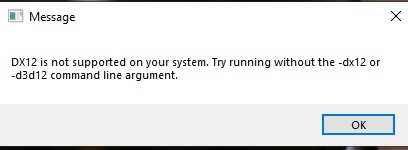 thin oracle
<@&818552355796287508> how do i manually install isle because I am getting the fatal error crash bug
 hollow fulcrumBOT
Many players encounter issues that already have solutions. Be sure to check the pinned messages for quick-fixes to common problems. If an issue persists a representative in this channel will assist you when available, otherwise you may contact Punchpacket directly.
 young geyser
anyone have a fix for the terrible framerate?
 novel hill
Any fixes for the black menu screen? I've looked through the past couple mentions and nothing really gives an answer.
 atomic echo
someone has a solution to join eu1 which has 11 players out of 100 but which puts a message of serveur full?
 hearty jewel
Is there a fix to the DX12 error or is it purely based on pc specs?
Note I've updated all drivers all that jazz basically excepted il have to upgrade but if there's a fix someone lemme know please


 quasi python
 karmic hare
im getting the same error
 amber spoke
Still gives the error.
 lone ingot
How do you Fix the fatal error?
 teal roost
Ah yes 😄

 vast tiger
how do i fix the Render Thread error
 thorn bobcat
what an update. what has been changed?
 swift pendant
This Fatal Error nonsense is getting out of hand...
thin oracle
dose anyone know how to fix this im new to the game and dont know what to do
 heavy horizon
@thin oracle did you update video card and everythin?
 chrome merlin
I checked NVIDIA, Windows update. I can see in the system app that my system can support this DX12. What can i do to open this game

 quasi igloo
Can not find servers
thin oracle
why would i need to update my vid card?
 outer adder
thin oracle
why would i need to update my vid card?
outer adder
thin oracle
why would i need to update my vid card?
to run the game, ur card drivers need to be up to date
thin oracle
say you manually install the latest vid card do you have to delete the previous one
thin oracle
every thing is up to date
heavy horizon
go clean install option tick it of
 iron grail
What can I do if I can't find a specific Server in the Browser?
thin oracle
where would clean install be then?
 whole crown
Does anybody know what to do if your isle is just over and over again patching?
 charred fjord
Does anybody know how to fix “Launch error. One or more directories within the game’s installation path have case-sensibility enabled”
 late marsh
Has anybody found out the glitchy/blurry textures during camera movement yet?
 knotty whale
chrome merlin
I checked NVIDIA, Windows update. I can see in the system app that my system can...
knotty whale
chrome merlin
I checked NVIDIA, Windows update. I can see in the system app that my system can...
did u find a solution? im having the same issue
chrome merlin
knotty whale
did u find a solution? im having the same issue
nope
karmic hare
I'm getting these errors since the patch today
 dusk magnet
A few minutes ago the game was dowloading a patch and now when i try to join the server i play i cant find it i try several times and i cant still find it
 velvet cipher
SHould you install easy-anti cheat manually? didnt come installed when I installed the game
 mint robin
just a question is the update supposed to be 18.5 gbs?
cause i have no clue what my pc is doing
 keen trellis

 ashen dune
mint robin
just a question is the update supposed to be 18.5 gbs?
ashen dune
mint robin
just a question is the update supposed to be 18.5 gbs?
evrima is "moving" data after every update, no mattler how small it is... seems odd
data of the full game
 robust solar
amber spoke
robust solar
amber spoke
same
 low python
keen trellis
PLIS HELP ME
low python
keen trellis
PLIS HELP ME
?
keen trellis
low python
?
I can not play
 trim oracle
anyone know whats going on?


 timber yacht
Hi
Is it ment to be a another update for today?
Both the day of update 6.5. yesterday and again now today. Both yesterday and today the update have consisted of a 17.89 GB patch.
Just wanna know if this is ment to happen
keen trellis
I get this message every time I join the server
 paper pond
Can't join any servers, everytime I'm about to join one game instantly crashes directly onto black screen and doesn't even appear a message pop up with an error.
red aurora
weary cairn
there is a checkbox to revert alt to manual
Thank you sir! I was at work when I had posted my issue, but I hopped on this morning and found what you had meant. If anyone else has this issue it's located under 'GAMEPLAY' Literally says "manual alt attack" next to it.
 mystic jetty
help?! i cant join any server, everytime i join a server my game crashes without any warning, i have tried everything.
 dim oxide
trim oracle
anyone know whats going on?
dim oxide
trim oracle
anyone know whats going on?
im having the same problem
 hoary yarrow
 zinc vector
I found out the lag problem
It's my computer fan turning so slowly
It needs replacement
So I'll do that
 lyric cliff
any1 know how to fix this? i cant open character with tab either
 keen trellis

 south quest
Anyone know what this means?

 atomic jungle
Is giving after the update I am now having all these problems
I can’t even play the new update
Now
atomic jungle
south quest
Anyone know what this means?
I had the same problem, so basically what I was told you gotta have a different graphic driver
Or update it
Or its possibly that your driver can’t handle the game
thin oracle
is anybody else loosing there connection to the host and gets kicked out all the time in evrima?
south quest
How do you update your graphics driver?
keen trellis
plis help me
atomic jungle
With what
keen trellis
 atomic jungle
south quest
How do you update your graphics driver?
atomic jungle
south quest
How do you update your graphics driver?
go to the nvidia website and download nvidia geforce experience or whatever its called now (idk i dont use nvidia anymore) and there should be an option in the app to update your graphics drivers
atomic jungle
keen trellis
For anyone encountering fatal errors leading to crashes You will have to manually uninstall “The Isle” from Steam. This issue is typically caused when someone switches from the Legacy to the EVRIMA branch.
Open “Steam”
Right Click The Isle
Select Properties > Local Files > Browse Local Files
Delete everything inside of The Isle’s folder.
Then
-
Press Windows key.
-
Type "Run" to launch Run program.
-
Type in "%localappdata% and click 'Ok'.
-
Search for TheIsle folder.
-
Delete the TheIsle folder once it has been located.
It has also been known to be caused by strict permissions with a Windows User Account and/or strict Anti-Virus settings
Please reduce what Windows and/or Anti-virus will block as far as programs go. You may need to create a new Windows User account to bypass the issue.
-If the above fails, make sure your GPU/GFX Drivers are updated. If you already updated them, uninstall them and reinstall them if the issue persists.
 solemn wraith
young geyser
anyone have a fix for the terrible framerate?
solemn wraith
young geyser
anyone have a fix for the terrible framerate?
delete config and use low settings but if your around alot of people frame is always gonna be bad

 atomic jungle
Hmmm
 round mauve
after that happens a fatal error

and then my game close
not only that
when i enter in to a official server, like eu 6, i play normal like 2 minutes or that, and then i got rejected from the server
atomic jungle
Hmm
atomic jungle
atomic jungle
**For anyone encountering fatal errors leading to crashes** You will have to man...
Try this
round mauve
and that happened 6 times and was the same
round mauve
atomic jungle
Try this
ok ill see
atomic jungle
Alr
 alpine plover
anyone know why all my attacks are alt attacks even though im not holding alt i cant do normal attacks and i cant find any settings about it i have reset my settings'
round mauve
alpine plover
anyone know why all my attacks are alt attacks even though im not holding alt i ...
go to settings and here in gameplay you will see manual alt atack


 tidal blaze
Quick questions guys the game is not running for me if i start it i get the aduio but blackscreen than i can get to the serverlist but there are none for me and when pressing the refresh button it is ..scanning all frequencies.. for ever ._.
 rocky mesa
why do i have more than a year for the update time?
 keen trellis
atomic jungle
**For anyone encountering fatal errors leading to crashes** You will have to man...
keen trellis
atomic jungle
**For anyone encountering fatal errors leading to crashes** You will have to man...
thank you I will check it right away
atomic jungle
I’m just helping people knowing that I can’t even get to the game
ashen dune
Always getting disconnected from server after ca. 3 minutes, anyone else encountered this issue?
atomic jungle
Look in pin messages
 short urchin
EU 5 is not appearing
 lofty matrix
Here's a new error window I've just had:
           Easy Anti-Cheat

    X        Game Security Violation Detected (#0000000E)
gone for me too. When I played on EU6 it vanished, I shitched to EU5 and now this one is gone 😄
 limpid gyro
My game keeps completely freezing and the only way I can get out of it doing that is turning off my pc what can I do to stop it?
 wooden aurora
hi. I keep getting the following message when im in a server. I lost two ful grown dinos now with this issue.
your connection to the host has been
wooden aurora
ashen dune
Always getting disconnected from server after ca. 3 minutes, anyone else encount...
same issue for me
 lime fiber
atomic jungle
**For anyone encountering fatal errors leading to crashes** You will have to man...
lime fiber
atomic jungle
**For anyone encountering fatal errors leading to crashes** You will have to man...
that fix does not work
atleast with this fatal error
atomic jungle
Oop
 rustic stirrup
So far the newest patch fixed my fatal errors..I don't know if it is a coincidence or not..need to see
lime fiber
rustic stirrup
So far the newest patch fixed my fatal errors..I don't know if it is a coinciden...
I guess you had fatal errors for a different reason
rustic stirrup
lime fiber
I guess you had fatal errors for a different reason
Possible..the errors were yesterday so turning off the pc could of readjusted things
lime fiber
rustic stirrup
Possible..the errors were yesterday so turning off the pc could of readjusted th...
yeah, mine were there since the open ST
wasnt able to play the update even once
 high solar
It’s good to know I am not the only one having the fatal error issue
rustic stirrup
Although I will say after the patch my gpu is at 100% usage on caped 60 fps..yesterday I had the cap at 120 and gpu was at 85-90%
paper pond
rustic stirrup
Although I will say after the patch my gpu is at 100% usage on caped 60 fps..yes...
what's ur gpu ash
rustic stirrup
paper pond
what's ur gpu ash
3080ti
south quest
atomic jungle
go to the nvidia website and download nvidia geforce experience or whatever its ...
Thank youuuuuu
paper pond
damn it even pushes that to 100%? thats odd
dusk magnet
A few minutes ago the game was dowloading a patch and now when i try to join the server i play i cant find it i try several times and i cant still find it
 rustic stirrup
paper pond
damn it even pushes that to 100%? thats odd
rustic stirrup
paper pond
damn it even pushes that to 100%? thats odd
Well everything is on epic on 1440p..but yesterday the usage was lower..night time makes it even hotter
OK nvm 100% only when in bushes..could be the AA..
atomic jungle
What graphic driver does it required to run the update
round mauve
atomic jungle
Try this
didnt work anything
atomic jungle
Oof
round mauve
im reinstaling drivers to see if works but idk
after the update, my skins disappeared too, idk why
 rose mica
just logged on and i have a 17 gig update and i already downloaded all the new updates

 rapid badger
Reinstalling evrima
 coral helm
rapid badger
This pops up everytime, anyone know how to solve?
coral helm
rapid badger
This pops up everytime, anyone know how to solve?
me too!!! did you know how to fix it?
cosmic turret
what is dx 12 ?
rapid badger
coral helm
me too!!! did you know how to fix it?
I try to reinstall, ill tell you the results when its done!
coral helm
rapid badger
I try to reinstall, ill tell you the results when its done!
doesnt works for me... anything of forums or youtube videos
rapid badger
coral helm
doesnt works for me... anything of forums or youtube videos
oof, afther the update theres strange things
coral helm
rapid badger
oof, afther the update theres strange things
yesterday someone said that it was like another type of message like: "server full", that the people counter did not work
cosmic turret
@rapid badger i already uninstall the game i had splash screen issue could`t solve it always saying app failuer running aap
coral helm
but it seems strange
 clever lion
rapid badger
This pops up everytime, anyone know how to solve?
clever lion
rapid badger
This pops up everytime, anyone know how to solve?
same error here...again
it happened to me before the update 6.5, only a windows reinstall fixed it
rapid badger
patches are supposed to fix the game, not break it
coral helm
lmao
rapid badger
;w;
clever lion
hopefully another patch will be deployed....
rapid badger
clever lion
it happened to me before the update 6.5, only a windows reinstall fixed it
it hurts to hear
coral helm
I'm not going to reinstall windows for that reason, when they solve it I'll play xdd
rapid badger
same
clever lion
coral helm
I'm not going to reinstall windows for that reason, when they solve it I'll play...
well...I kinda need it 🙂 I am making content
rapid badger
arts?
clever lion
nope...can't play
clever lion
either on public or even private servers...I load in and after aprox. 1 min it gives that error message
coral helm
we will have to play legacy for now..
rapid badger
When I CAN enter the server, it says that the host has lost connection after 2-3 minutes
 graceful edge
anyone else having trouble with frame rate? before 6.5 I could get 50-60 fps but now on the lowest settings it's stuck at around 20 fps
coral helm
thanks for the feedback, "i'm glad" to know that the error is common, let's see if they fix it soon
rapid badger
graceful edge
anyone else having trouble with frame rate? before 6.5 I could get 50-60 fps but...
maybe because theres alot of people?
clever lion
yeah, fingers crossed
graceful edge
rapid badger
maybe because theres alot of people?
could be, I jumped on NA1 cause it has a queue system
rapid badger
Try to spawn in a place that has less people
my friend had this issue tho, and it was fixed only after the update :"
 pastel narwhal
my controls for lmb and rmb (alt bite and special attack) are all messed up, can anybody tell me what i should set it to?
 pearl acorn
pastel narwhal
my controls for lmb and rmb (alt bite and special attack) are all messed up, can...
pearl acorn
pastel narwhal
my controls for lmb and rmb (alt bite and special attack) are all messed up, can...
If you are experiencing issues with your controls and graphic settings since the latest update (can't move camera, unable to court, Night Vision not working , graphic settings not showing properly , etc) then please try wiping your config files in localappdata.
- If running The Isle, exit the game.
- Open File Explorer.
- Click the address bar at the top.
- Type %localappdata% then press Enter.
- Find "TheIsle" folder. Open it.
- Open the "Saved" folder.
- Delete the "Config" folder. Note: This will reset any of your custom settings to their defaults.
- Restart the game. The issue should be fixed.
pastel narwhal
thank you :>
pastel narwhal
pearl acorn
If you are experiencing issues with your controls and graphic settings since the...
by the way, i live under a rock and i don't pay attention to the dev logs on steam, does safe log work?
rapid badger
@graceful edge
graceful edge
rapid badger
Try to spawn in a place that has less people
i'll give that a go, hopefully it helps fix it
 dense monolith
Hi, I am having a small issue. Every time I try to load into a server it says it is full, even if it has only a few people in it. I have re-installed, and restarted the game and my computer a few times but it doesn't seem to be helping.
pearl acorn
pastel narwhal
by the way, i live under a rock and i don't pay attention to the dev logs on ste...
should work. I've not had problems so far
pearl acorn
dense monolith
Hi, I am having a small issue. Every time I try to load into a server it says it...
thats just a bug, the server browser doesnt display the number of players correctly. The servers are full
rapid badger
graceful edge
i'll give that a go, hopefully it helps fix it
also try to delete the config folder, theres instructions above
dense monolith
pearl acorn
thats just a bug, the server browser doesnt display the number of players correc...
Oh,, okay thank you
pearl acorn
graceful edge
anyone else having trouble with frame rate? before 6.5 I could get 50-60 fps but...
deleting config folder fixed that for me
pearl acorn
dense monolith
Oh,, okay thank you
you could try unofficial servers until people stop playing
 sacred pier
hello , idk if im the only one having this issue , but every time i safe log my dinosaur just stops existing and i cant keep my dino on any server , and if its a issue that other ppl have , how do i fix it?
dense monolith
pearl acorn
you could try unofficial servers until people stop playing
Oh I forgot about unofficial servers haha!
graceful edge
I have deleted the config before when the update first came out but It's updated again since then, I'll delete it again and see what happens
rapid badger
servers are usually empty in the morning and during business hours
pearl acorn
rapid badger
servers are usually empty in the morning and during business hours
😭 i think most of eu has holidays atm, impossible to find a spot
charred fjord
Does anyone know how to fix this?
 pastel narwhal
pearl acorn
If you are experiencing issues with your controls and graphic settings since the...
pastel narwhal
pearl acorn
If you are experiencing issues with your controls and graphic settings since the...
it didn't work
 azure cliff
Anyone know how to fix my settings not being saved, and also any remedies for lag/frame drops?
 umbral flicker
Please @jolly turret restart eu5 or do something, most of players cant see the server and connect.
pearl acorn
pastel narwhal
it didn't work
aw man, can you elaborate on the problem more?
 jolly turret
umbral flicker
Please <@136599675577958400> restart eu5 or do something, most of players cant s...
jolly turret
umbral flicker
Please <@136599675577958400> restart eu5 or do something, most of players cant s...
Not within my power. I'll alert the appropriate personnel.
pastel narwhal
pearl acorn
aw man, can you elaborate on the problem more?
so basically, my lmb isn't bite, but it's alt bite
umbral flicker
jolly turret
Not within my power. I'll alert the appropriate personnel.
Thanks a lot ❤️
pastel narwhal
it's replaced with alt bite
pearl acorn
post it in the Evrima-eu servers or something, i dont think this is the correct channel
azure cliff
jolly turret
Not within my power. I'll alert the appropriate personnel.
It's multiple servers including NA1
If you can include that
pastel narwhal
as a croc rn, rmb doesn't do anything
azure cliff
pearl acorn
post it in the Evrima-eu servers or something, i dont think this is the correct ...
It is, it's a server side issue
jolly turret
azure cliff
It's multiple servers including NA1
👍
pearl acorn
pastel narwhal
so basically, my lmb isn't bite, but it's alt bite
i used to have the same problem in the previous update, safe logging fixed it most of the time. other times would just have to get a new dino.
pastel narwhal
but when i play as a different dinosaur, i think rmb is sometimes left click and sometimes the special attack
 plush ferry
how do i latch onto the bottom of the river as beipiao?
i am holding right click but he just attacks. also, im stuck on the alt attack for my left click
pearl acorn
pastel narwhal
but when i play as a different dinosaur, i think rmb is sometimes left click and...
can you send a screenshot of your keybinds
pastel narwhal
plush ferry
how do i latch onto the bottom of the river as beipiao?
i am holding right click...
u hold ctrl until it looks like the turduckin is clinging to the bottom of the river
ok
this


 silk mural
Finally found some settings which make playable visiting center with fluctuations of like 30 to 45 fps
rapid badger
wont work :"

 frozen pier


 torn spade
Hello, I recently reinstalled The Isle Evrima as I had been playing on Legacy. However, upon launching the game, I encountered a crash message displaying various error codes. Is there anyone available who can assist me with this issue? Thank you!

This is the message^^
silk mural
torn spade
Hello, I recently reinstalled The Isle Evrima as I had been playing on Legacy. H...
Ummm, check the pinned messages first
As its known that upgrading to Evrima has some conflicts and errors
This is the one
torn spade
silk mural
This is the one
Ok, thank you very much!
silk mural
Hope it fixes it for ya
 plain flax
I'm trying to join any eu server but either the server is full or the game crashes without an error message
Does anybody else have the same issue?
pastel narwhal
pearl acorn
can you send a screenshot of your keybinds

 pearl acorn
pastel narwhal
pearl acorn
pastel narwhal
does changing the attack keybinds to other buttons help?
pearl acorn
plain flax
I'm trying to join any eu server but either the server is full or the game crash...
same issue, dont know how to fix
pastel narwhal
pearl acorn
does changing the attack keybinds to other buttons help?
i have tried, but it messed it up a little
i can try
nope it doesn't work
what do you recommend setting it to?
pearl acorn
pastel narwhal
what do you recommend setting it to?
i have the alt attacks set to my thumb mouse buttons
 devout sequoia
I tried the pinned message for fatal crashes, but I am still experiencing the fatal crash when I try to sort unofficial servers by players. Had no crashes last night when I was doing it. 😦

 devout sequoia
this was one of the messages I got before the manual uninstall. New error message after reinstalling was just "Fatal error"
 pearl acorn
 slim tiger
For anyone encountering fatal errors leading to crashes You will have to manually uninstall “The Isle” from Steam. This issue is typically caused when someone switches from the Legacy to the EVRIMA branch.
Open “Steam”
Right Click The Isle
Select Properties > Local Files > Browse Local Files
Delete everything inside of The Isle’s folder.
Then
-
Press Windows key.
-
Type "Run" to launch Run program.
-
Type in "%localappdata% and click 'Ok'.
-
Search for TheIsle folder.
-
Delete the TheIsle folder once it has been located.
It has also been known to be caused by strict permissions with a Windows User Account and/or strict Anti-Virus settings
Please reduce what Windows and/or Anti-virus will block as far as programs go. You may need to create a new Windows User account to bypass the issue.
-If the above fails, make sure your GPU/GFX Drivers are updated. If you already updated them, uninstall them and reinstall them if the issue persists.
i would recommend reinstalling drivers first
bc its less of a drastic change
pearl acorn
devout sequoia
this was one of the messages I got before the manual uninstall. New error messag...
sorry, i have no experience with this. Maybe someone else does!
slim tiger
k
devout sequoia
pearl acorn
sorry, i have no experience with this. Maybe someone else does!
maybe, but ty!
plain flax
pearl acorn
same issue, dont know how to fix
I don't know if this was just coincidental but i deleted my config folder (again) and tried to log into a server and I'm in
silk mural
plain flax
I don't know if this was just coincidental but i deleted my config folder (again...
Deleting the config solves quite some issues
Now the performance depends on how many people are on the server,and your pc specs
 rustic beacon
pls for the love of god fix the player count on the servers
how can it possibly show a count that is off by 70 people
dense monolith
truth ^^
Is there a keybind for the nightvision? I am having a bit of trouble finding it
rustic beacon
X
dense monolith
weird, it isn't working for me
rustic beacon
check key binds
pearl acorn
dense monolith
weird, it isn't working for me
reset your keybinds by deleting the "Saved" folder in localappdata
rustic beacon
else there is a fix where u delete file or smth
pearl acorn
dense monolith
I have and it still isn't working :(
If you are experiencing issues with your controls and graphic settings since the latest update (can't move camera, unable to court, Night Vision not working , graphic settings not showing properly , etc) then please try wiping your config files in localappdata.
- If running The Isle, exit the game.
- Open File Explorer.
- Click the address bar at the top.
- Type %localappdata% then press Enter.
- Find "TheIsle" folder. Open it.
- Open the "Saved" folder.
- Delete the "Config" folder. Note: This will reset any of your custom settings to their defaults.
- Restart the game. The issue should be fixed.
deleting the Saved folder is what fixed it for me
 honest oxide
Until recently everytime i input a skin code it puts in a completely different skin, anyone have any ideas?
plush ferry
is very attack an alt attack now?
pastel narwhal
pearl acorn
i have the alt attacks set to my thumb mouse buttons
wait is that on pc or
pastel narwhal
you mean like on the side?
 cedar hollow
plain flax
I'm trying to join any eu server but either the server is full or the game crash...
cedar hollow
plain flax
I'm trying to join any eu server but either the server is full or the game crash...
same issue :/
pastel narwhal
ohhhh
pearl acorn
how do i fix this man, I've tried reinstalling EAC but it doesnt do anything
 pearl acorn
pastel narwhal
you mean like on the side?
pearl acorn
pastel narwhal
you mean like on the side?
yessir
pastel narwhal
pog
pearl acorn
pog
keen trellis
atomic jungle
**For anyone encountering fatal errors leading to crashes** You will have to man...
and I can't get into the game because of you
pastel narwhal
I CAN'T FIND IT XDD
pearl acorn
pastel narwhal
I CAN'T FIND IT XDD
:c maybe your mouse doesnt have it
atomic jungle
Well idk then
keen trellis
atomic jungle
Well idk then
help
pastel narwhal
yeah but like
for lmb i want it to be bite
and rmb
like pounce or charge or hit or smth
LIKE BEFORE 6.5
keen trellis
atomic jungle
Well idk then
and I can't get into the game because of you
 amber spindle
for me all the servers are empty and no official servs :/
pearl acorn
pastel narwhal
LIKE BEFORE 6.5
maybe they are bugged this update. I have no idea because i only played for like 2 minutes yesterday and got dc'd. Haven't got in since
cedar hollow
plain flax
I'm trying to join any eu server but either the server is full or the game crash...
but if you connect to unofficial servers that not happend true?
pastel narwhal
an isle player that doesn't play the isle
plain flax
cedar hollow
but if you connect to unofficial servers that not happend true?
idk, but try to delete the config folder
worked for me
thin oracle
???

 tidal kiln
does anyone know what to do?
 thin oracle
trying to play evrima
pearl acorn
pastel narwhal
an isle player that doesn't play the isle
there were like 11k people playing yesterday lol
amber spindle
update driver
amber spindle
tidal kiln
does anyone know what to do?
and update windows
pearl acorn
tidal kiln
does anyone know what to do?
updating graphic drivers fixes it, unless ur device doesnt support DX12. You can do a clean uninstall using DDU
pastel narwhal
DOES ANYBODY KNOW HOW TO FIX UR KEYBINDS XDD
pearl acorn
pastel narwhal
DOES ANYBODY KNOW HOW TO FIX UR KEYBINDS XDD
delete config folder, it will reset
:c
 jovial echo
Greetings! I have a problem: when you click on the button sorting servers by number of players, the game hangs and gives errors. What can it be?

 dense monolith
thank you it worked
cedar hollow
plain flax
idk, but try to delete the config folder
worked for me
where is that folder? ill try it too
pearl acorn
pastel narwhal
it still is lmb = alt bite
pain. Is it the same with other dinos
plain flax
cedar hollow
where is that folder? ill try it too
there is a guide in announcements on how to find it
cedar hollow
okay thnx so much
thin oracle
amber spindle
update driver
drivers are updated all of them
and using win 10 also updated
pastel narwhal
pearl acorn
pain. Is it the same with other dinos
 pearl acorn
thin oracle
drivers are updated all of them
pearl acorn
thin oracle
drivers are updated all of them
reinstall graphic deivers
pearl acorn
pastel narwhal
lol
thin oracle
pearl acorn
reinstall graphic deivers
hell nah
amber spindle
this game is broken anyway all servers are empty cant play
pearl acorn
thin oracle
hell nah
you can also try installing DirectX from microsoft to make sure you have dx 12
and reinstalling graphic drivers doesnt take long
willow fiber
game crashes when i try to join servers
pearl acorn
willow fiber
game crashes when i try to join servers
any error message? Could also be from a lot of people trying to join at once
willow fiber
pearl acorn
any error message? Could also be from a lot of people trying to join at once
nah no error message, just will close the game every 2nd/3rd time i try join
thin oracle
pearl acorn
you can also try installing DirectX from microsoft to make sure you have dx 12
i already got direct x 12
 pearl acorn
willow fiber
nah no error message, just will close the game every 2nd/3rd time i try join
pearl acorn
willow fiber
nah no error message, just will close the game every 2nd/3rd time i try join
yeah i have similar problem. are you able to join Unofficial servers?
willow fiber
ill check
thin oracle
thin oracle
i already got direct x 12
this is in dxdiag btw
pearl acorn
thin oracle
i already got direct x 12
delete your Saved folder in %localappdata% > TheIsle and try again
verify files after deleting
and try
willow fiber
pearl acorn
yeah i have similar problem. are you able to join Unofficial servers?
yeah i can join unofficial