#🔧-evrima-troubleshooting-🔧
1 messages · Page 38 of 1
 thin oracle
 weary geode
I need help please

 drowsy quarry
weary geode
I need help please
drowsy quarry
weary geode
I need help please
are you alt tabbing the game while it loads?
and also, try to play the game on windowed mode, this might help with the cause of the crash
weary geode
drowsy quarry
are you alt tabbing the game while it loads?
No
weary geode
drowsy quarry
and also, try to play the game on windowed mode, this might help with the cause ...
I tried but it doesn't work
drowsy quarry
how often does this fatal error occur?
weary geode
I've been trying to find ways to solve the problem for 2 months, before it didn't happen to me but now when I enter the game after 1/2 minutes I always get this error
 edgy thunder
Hi guys. I desperately need help figuring out this Fatal Crash error. I plaid for months fine and this last month, I have had nothing but crashes. Its every 5 minutes. I have updated drivers, disabled my integrated graphics card, need some ideas.
 drowsy cape
the best place to write this is in #evrima-na #evrima-eu or whatever chat represents your server. and make sure to ping the OSA role when you write it. check the pinned comments in those channels for more info
drowsy cape
edgy thunder
Hi guys. I desperately need help figuring out this Fatal Crash error. I plaid fo...
does it happen often? is there a specific time you notice it happen more often that others? or is it just on occasion?
edgy thunder
It happens everytime about five minutes into the server
drowsy cape
You can try running Steam And or the isle as admin. you can also try deleting your config to see if maybe that helps (the 2nd is unlikely, but you might get lucky)
edgy thunder
So I am new to the world of computer gaming and learning as I go, so excuse me if this sounds ignorant, but how do I run the first option?
drowsy cape
you'd want to find your steam/Isle executable, (the isle one can be found in its folder under steam. and the steam one can be found somewhere in the steam folder) You then rightclick it, go to properties. Click compatability, and one of the check boxes should say "run this program as an administrator" if you check that, you will get a pop up everytime asking if you want to run it as admin
edgy thunder
Thanks. I will try that tonight. Its been beyond frustrating. I didnt have this problem when I first downloaded the game.
drowsy cape
edgy thunder
Thanks. I will try that tonight. Its been beyond frustrating. I didnt have this ...
hopefully it works. if you need more assistance, feel free to ask in here again. ill also take a look through some of other peoples errors to see if i can find another fix
drowsy quarry
weary geode
I've been trying to find ways to solve the problem for 2 months, before it didn'...
i don't have many ideas to fix it, take a look at the pinned messages if you haven't already but other than that, you could wait for the update :/
edgy thunder
Thanks. I went to the pinned post and did all that. I disabled the integrated graphics card thinking that would fix it. Its depressing lol
weary geode
drowsy quarry
i don't have many ideas to fix it, take a look at the pinned messages if you hav...
Do you think it could be a problem with the game itself that Could be fixed with an update?
drowsy quarry
yeh I think so
as you may know, the isle is changing to Unreal Engine 5
the current game is on 4
edgy thunder
weary geode
Do you think it could be a problem with the game itself that Could be fixed with...
They had an update come out that screwed up my game as well, constant fatal crash error. My game ran perfect before it.
edgy thunder
drowsy quarry
as you may know, the isle is changing to Unreal Engine 5
Do we know when this is happening?
drowsy quarry
no ETA's, but the update is already on the last testing phase called stress test
weary geode
edgy thunder
They had an update come out that screwed up my game as well, constant fatal cra...
I haven't been able to play for months now, everything was fine before but obviously before an update it must be giving me problems haahah
edgy thunder
weary geode
I haven't been able to play for months now, everything was fine before but obvio...
I feel your pain!!! This game is such a stress relief for me haha and I can't play it
 left swift
I have an issue when I browse servers in evrima. when I go to unnoficial setting and check the filter "Hide Empty" and refresh it does not hide empty severs, the servers with no players are still there
I have tried refreshing but it does the filter does not work why????
 drowsy cape
left swift
I have an issue when I browse servers in evrima. when I go to unnoficial setting...
drowsy cape
left swift
I have an issue when I browse servers in evrima. when I go to unnoficial setting...
i think this is a normal bug. unelss someonee says otherwise, you may just have to deal with it for now
 dense warren
I deleted my config folder but for some reason my carno's eyes are like really dark
drowsy cape
dense warren
I deleted my config folder but for some reason my carno's eyes are like really d...
really dark or non-existent?
dense warren
drowsy cape
really dark or non-existent?
Like black but they're there
drowsy cape
dense warren
Like black but they're there
have you tried changing the colors?
dense warren
Not gonna kill my full carno for that, but i know they were like yellow when i made it
drowsy cape
fair enough. try this then, #🔧-evrima-troubleshooting-🔧 message
 cobalt moat
I am dropping in frames every like 30 seconds. I'm normally stable at 50-120 frames, 20-40 at worst, but it keep dropping to around 1-6 every 30 seconds
 spice stone
cobalt moat
I am dropping in frames every like 30 seconds. I'm normally stable at 50-120 fra...
spice stone
cobalt moat
I am dropping in frames every like 30 seconds. I'm normally stable at 50-120 fra...
Try doing a pc restart
left swift
cobalt moat
I am dropping in frames every like 30 seconds. I'm normally stable at 50-120 fra...
stuttering then probs
try checking your gpu, and gpu vram usage, cpu usage, and ram usage
monitor your hardware with nvidia shadowplay advanced overlay or use whatever amd does idk cause I dont got amd gpu
drowsy cape
cobalt moat
I am dropping in frames every like 30 seconds. I'm normally stable at 50-120 fra...
I have this happen to me every second time i launch the isle on my pc. Restart your computer to see if this helps
 devout crescent
I'm having a problem where every 10 to 15 minutes the game just shuts down. Its not a log out or reset cause every time my dino is back in the same spot same stats which is good, but its annoying to play with it shutting down all the time. Some help would be much appreciated.
drowsy cape
devout crescent
I'm having a problem where every 10 to 15 minutes the game just shuts down. Its ...
Make sure to verify your game files
 stone socket
my game crashes every time i try to get into a server. literally every time i manage to successfully log in. this is a different issue other then me getting kicked out of the server because my wifi dies.
spice stone
stone socket
my game crashes every time i try to get into a server. literally every time i ma...
That wouldn’t be a game issue then. You need a strong, constant wifi connection to play
stone socket
spice stone
That wouldn’t be a game issue then. You need a strong, constant wifi connection ...
crashing because my wifi isn't good enough? ;-;
it only kicks me out of the server, not the entire game, last prompt says: deleted (something) before it was even released
;-;
spice stone
stone socket
crashing because my wifi isn't good enough? ;-;
it only kicks me out of the serv...
You’ll get kicked from a server if your connection isn’t strong yes. That’s with any multiplayer game. The same way you can’t send a text when you have no or little wifi. If you can screenshot the prompt that would be great and help diagnose any other issues
stone socket
spice stone
You’ll get kicked from a server if your connection isn’t strong yes. That’s with...
ik that, but whats with the entire game completely crashing? anyways, got into NA 4 and haven't crashed yet
spice stone
stone socket
ik that, but whats with the entire game completely crashing? anyways, got into N...
I’m unsure on the entire game crashing, the error message will help determine tho.
stone socket
spice stone
I’m unsure on the entire game crashing, the error message will help determine th...
mk ty, ill try and get an image of it
 uncut vortex
@spice stone Tried find the save folder dont think there is one anymore
basically a player randomly has been getting this issue where they court someone but become the mom & dad of the nest when they enter the character pannel
they can nest, kids come out as carbon copies of them & the only way to fix it has been to get it killed & regrow but it keeps appearing.
spice stone
When you court, you become paired with the other player. You then have a new tab that shows your nest, of which you must make. Once made, eggs are laid, players can then join the nest. The children 9/10 are carbon copies of the parents, very rarely is there variation. I believe this is a known bug however.
Unless you mean a nest is already placed and they then become the parent of that nest, in which case that is also a bug without a fix.
uncut vortex
No This is what I mean.

this player is the male. but is showing up as both once courted.
spice stone
uncut vortex
this player is the male. but is showing up as both once courted.
Ohhhh, they become both. Most likely a visual error, not something deleting your config or verifying files would fix. I’d make a bug report about it in #🐞-evrima-bug-reports-🐞. It doesn’t effect the gameplay at all correct, just a visual thing?
uncut vortex
the kids are coming out exactly the same as this player
its not just a visual bug apparently
spice stone
That’s intentional, they should be copies of the parent. Unless you mean just that one player
In the future they will be more varied between the parents but for now it’s usually a copy of mom or dad depending on the gender
uncut vortex
spice stone
That’s intentional, they should be copies of the parent. Unless you mean just th...
I cant even report the bug because its happening on an unofficial server.
uncut vortex
spice stone
That’s intentional, they should be copies of the parent. Unless you mean just th...
its litterally just the one parent exact copies of lettuce
spice stone
I’ll check it out and add it to the list of bugs to check in the stress test. However it’s a game thing, nothing you or I can fix
uncut vortex
yeah, & I sadly cant report it cuz its on an unofficial server
thin oracle
Hi all!
Such a question: Evryma crashes for me every time I go to any of the servers. At the same time, the server is not complete, no errors are visible upon departure. At the same time, the computer itself perfectly pulls this game (unfortunately, there is no screenshot of the problem itself, but I had previously seen similar cases in this chat with the same settings). Is there such a bug in the game? How can this be fixed?
drowsy cape
thin oracle
Hi all!
Such a question: Evryma crashes for me every time I go to any of the ser...
If running The Isle, exit the game.
Press the Windows key
Type %localappdata% then press Enter.
Find "TheIsle" folder. Open it.
Delete the "Saved" folder
Try giving this a shot
 autumn idol
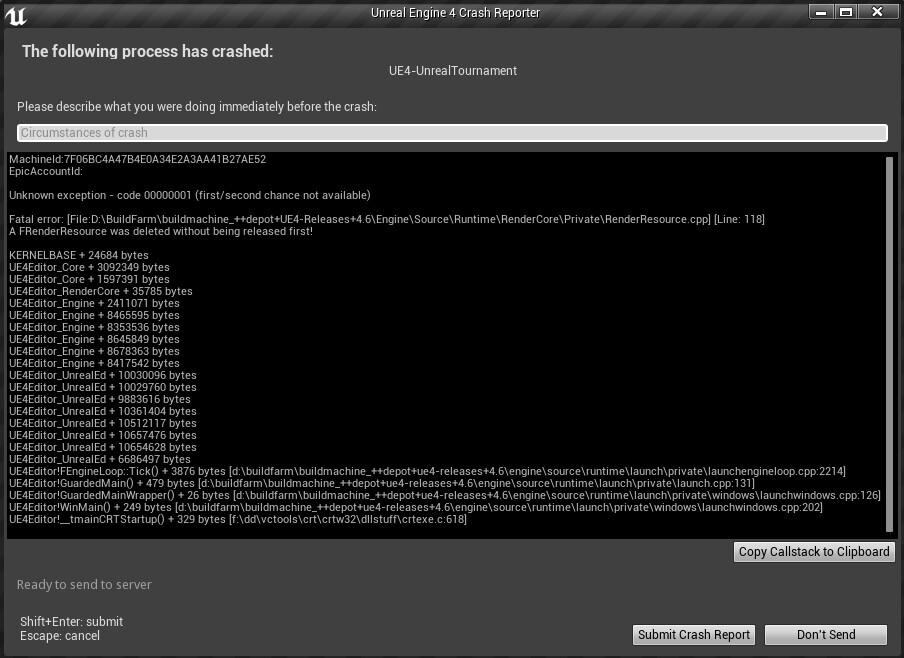
hi guys keep getting error when loading into a server
A FRenderResource was deleted without being released first!
i even tried this Press the Windows key
Type %localappdata% then press Enter.
Find "TheIsle" folder. Open it.
Delete the "Saved" folder
 rigid nexus
autumn idol
A FRenderResource was deleted without being released first!
rigid nexus
autumn idol
A FRenderResource was deleted without being released first!
hm, try verifying your game files

 autumn idol
rigid nexus
hm, try verifying your game files
autumn idol
rigid nexus
hm, try verifying your game files
aleady done that 10 times
trying to reinstall it now manually
im trying this method now
 digital solstice
Hello i have a problem with evrima
i do all the things said in the tutorials and doesnt happening nothing
 silk pike
@digital solstice oh, and also checked the pinned messages in this channel, sometimes there are fixes for common problems in there :D
digital solstice
thanks
silk pike
@digital solstice
For those with that "Easy Anti-Cheat is not installed" issue, there are some steps you can do to solve it
"C:\Program Files (x86)\Steam\steamapps\common\The Isle"
there is a file called InstallAntiCheat.bat, just run it and try running the game again.
--------------------------------- 1 -------------------------------
Go to the game folder. Right click game in steam, properties, local files, browse.
Should send you here: steamapps\common\The Isle
Delete EasyAntiCheat folder.
Then Verify intergrity of game files.
After this the game should download an insignificant small amount of files.
Run the game, now it installs EasyAntiCheat for you.
----------------------------------2--------------------------------
- Right Click The Isle [Evrima] in steam.
- Properties
- Local Files
- Browse
- Open EasyAntiCheat Folder
- Double click EasyAntiChaet_EOS_Setup. Most likely nothing will happen.
- Return to Properties / Local Files
- Verify integrity of the game files.
-----------------------------------3--------------------------------
For anyone else with this issue, go to the game directory
"C:\Program Files (x86)\Steam\steamapps\common\The Isle"
there is a file called InstallAntiCheat.bat, just run it and try running the game again.
(Update windows may work too if none of these doesnt work)
digital solstice
i try
silk pike
try that maybe?
silk pike
didnt work?
digital solstice
but nothing hapenned
digital solstice
ok
silk pike
and if i can't someone else will !
digital solstice

first when i click in the white
and when i click in the other

in this
nothing happened
silk pike
so what happens when you try and launch the game?
 rigid nexus
digital solstice
rigid nexus
digital solstice
What does this error say ? o:
digital solstice
It is in Spanish but it says error because anticheat is not installed
because i am spanish
but i can speak english👍
rigid nexus
I mean, the one when you click on the "InstallAntiCheat" file
digital solstice
a ok
says this

windows cant find this program
revise if you put the wrong name
and try again
that says
rigid nexus
hmm
drowsy cape
Im sure you've tried, maybe verify files and see if that helps?
digital solstice
yes i try
rigid nexus
Since you already tried the 3 main fixes that tunapasta posted, you could try doing this:
-
go to "C: -> Programs(x86) -> EasyAntiCheat_EOS" and delete the EasyAntiCheat_EOS.sys file.
If you don't see the ending .sys, it's just the file which doesn't have the blue bear as a symbol
(see first picture) -
For the second step do this:
- Right Click The Isle in your steam library
- Select Properties -> Local Files -> Browse Local Files
- Delete the "EasyAntiCheat"-folder
- Then verify your game files over steam:
- Right Click The Isle in your steam library
- Select Properties -> Local Files -> Veify integrity of game files
- After that, you go back to the game folder and use the batch files, it's like in the fixes you already tried:
- Right Click The Isle in your steam library
- Select Properties -> Local Files -> Browse Local Files
- double click these two files, in the order of picture 2. A terminal might pop up for a second, but else nothing visible will happen.
And again, it doesn't matter if you see the .bat
5.) Now see if that fixed it

 silk pike
I knew rabbit would be here to (hopefully) save the day! <3
digital solstice
What I am doing tells me that the files will be downloaded again
rigid nexus
digital solstice
What I am doing tells me that the files will be downloaded again
After verifying the files like Thyler said ? 
If it says corrupted files were found, that means it automatically downloaded the files again

 rigid nexus
hm ):
digital solstice
i am gona suicidide
silk pike
try and restart ur PC, that has worked for me before
digital solstice
There is no page where I can install the anticheat?
rigid nexus
I'm not sure, since you'd need the exact version that the game uses, and I don't know which one that is ):
digital solstice
its the only alternative
do you know how i can find the program to download in google?
i don't understand it because when I remove the evrima beta and I don't put anything if it lets me open it, but what happens is that everyone plays in evrima
autumn idol
i still have the same problem after deleting files manually same error this game works on my nerves
digital solstice
@autumn idol
Do you know where I can download anticheat?
autumn idol
digital solstice
<@313593872905273345>
Do you know where I can download anticheat?
yes go to game folder
digital solstice
ok
autumn idol
press browse
 autumn idol
then go install that anticheat
 digital solstice
i said if you know a page to install in google
digital solstice
when i try to install it it opens and closes instantly
digital solstice
autumn idol
did you try to run it as admin?
yes
 winter python
digital solstice
when i try to install it it opens and closes instantly
winter python
digital solstice
when i try to install it it opens and closes instantly
That's normal
digital solstice
winter python
That's normal
how is it normal?
i try to open
and a cmd window open and cole
close*
and nothing happend
winter python
That's just what the file does, it's weird, but it's supposed to do that
Both the Install and Uninstall files do that
digital solstice
And why when I open the isle it tells me that the anticheat is not installed?
winter python
It's a fairly common issue with evrima, there's a few different methods of fixing it pinned in this channel
digital solstice
I have tried all the ones that @silk pike and @rigid nexus have told me and all the ones on youtube and they have not worked for me
silk pike
and you restarted ur PC? @digital solstice
autumn idol
silk pike
not as fatal as mine i love that
🤣
digital solstice
@silk pike do you know if there is a google page where I can download easy anticheat?
silk pike
https://www.easy.ac/en-us/support/game/guides/installer/ this is all it says on the website, it comes as a package with the game though so its through the file you already have
this also shows how to fix most games, so if theres something on here you havent tried give it a shot
digital solstice
but where is that to repair?
 trail sapphire
i get this the whole time
 digital solstice
@trail sapphire i laughed in the face of your mistake mine is 100 times higher i cant even open the game
trail sapphire
lol
digital solstice
SOS
digital solstice
tunapasta pls help meeee
weary geode
silk pike
the MOST fatal error
mine is so fatal that it doesn't even explain to me the reason for the error.
yesterday I tried to find a solution and apparently I have to wait for the next update
digital solstice
yes
silk pike
i cant really think of anything else that hasnt been mentioned already
digital solstice
I swear I'm on the verge of suicide
silk pike
ngl, i've had issues that i couldnt fix with troubleshooting, and then they randomly fixed
and i had no idea why, but it just started working again
@weary geode damn dude, that sucks. Sorry to hear that, what error was it?
weary geode
silk pike
and i had no idea why, but it just started working again
I hope it happens to me too at this point hahaha
weary geode
silk pike
<@763821856687259699> damn dude, that sucks. Sorry to hear that, what error was ...
This one

Like @digital solstice i was going crazy to find a solution, then in the end i realized that sooner or later i will find a way but i mustn't lose my mind
also because all the videos that could help me are in a language I don't know hahaha
weary geode
digital solstice
i am spanish xd
I am Italian but I understand English very well, at least that hahah
digital solstice
The problem is that in the videos they go to the files, they click to install and it opens, I do that and this happens
weary geode
digital solstice
The problem is that in the videos they go to the files, they click to install an...
I understand, even I get a little confused at times
silk pike
@weary geode Sometimes when my game crashes (whilst im in game) and i get a fatal error, i then reboot it, try to rejoin the server i was in, and i get an "easy anti-cheat integrity failed". Maybe you could look into fixing your anti-cheat too, see if that works?
But usually, i just have to retry joining again and its fine. But may have something to do with it, who knows!
digital solstice
weary geode
silk pike
<@763821856687259699> Sometimes when my game crashes (whilst im in game) and i g...
I swear I've tried everything but nothing, it's really a pain
weary geode
silk pike
But usually, i just have to retry joining again and its fine. But may have somet...
the problem is that mine is not a problem that happens to me from time to time, every time I try to re-enter it gives me this error after 2/3 minutes if I'm lucky
Perhaps the only thing I need to do is to remove all the files from the folder but I haven't found a precise guide to do it
digital solstice
LEEEETS GOOOOOOOO
@silk pike @rigid nexus @autumn idol @weary geode i finally repair thank you
The problem was that I had the com windows powershell command line instead of with cmd, this meant that when expressing the data it went to the default instead of the one I was using and that's why it gave me an error
silk pike
digital solstice
LEEEETS GOOOOOOOO
yipeee! good job dude! so glad you got it sorted <3
autumn idol
where do you see what dinasaur does what damage ext blunt bleed etc
drowsy quarry
autumn idol
where do you see what dinasaur does what damage ext blunt bleed etc
the only info you have is the weight and the bite force
everything else you learn gaming or on guide videos
rigid nexus
digital solstice
<@817118569992290304> <@478213198458257409> <@313593872905273345> <@763821856687...
oh! Awesome 😊 I'm glad you managed to fix it.
 west olive
I'm getting a "Connection Failed" Anti-Cheat integrity check failed (0x2200). You have been disconnected. Can anyone help here? I've tried validating the integrity of my files, I've tried deleting anti-cheat then verifying, I've uninstalled and re-installed, and I've done multiple security scans on my device. I have no idea what to do.
thin oracle
The nesting is bugged anyone know a conclusion to this
drowsy cape
thin oracle
The nesting is bugged anyone know a conclusion to this
whats bugged about it
 proud apex
my game wont start AT ALL i tried everything that could find when ever i press lunch on steam nothing happens. before hand legacy wasnt working but this version was when i change my monitor on navida controll panel to 4k evrima stopped working and no its not anti cheat and this issue has been happening since January
 pure sun
how do i access the lungs from a creature i can pick up? they stick to the body when you shake them and i can't pick them out either because i pick the body
proud apex
proud apex
my game wont start AT ALL i tried everything that could find when ever i press l...
I FIXED IT!!!! how i did it i pressed windows + r than find steam delete it than install it than try to run it
drowsy cape
proud apex
I FIXED IT!!!! how i did it i pressed windows + r than find steam delete it than...
gz
drowsy cape
pure sun
how do i access the lungs from a creature i can pick up? they stick to the body ...
If you press g and cannot pick them out, the creature is too small for you to grab them
pure sun
drowsy cape
If you press g and cannot pick them out, the creature is too small for you to gr...
but why can i get the other organs then? is it a bug?
drowsy cape
not too sure
west olive
??
west olive
its cool i uninstalled
devout crescent
drowsy cape
Make sure to verify your game files
I verified the game files and uninstalled then re-installed and verified the files again, but it's still doing it.
drowsy cape
devout crescent
I verified the game files and uninstalled then re-installed and verified the fil...
you can try deleting your config to see if that helps
devout crescent
okay
 tribal obsidian
I’m having trouble launching the evirma branch from steam. I’m not sure if you’ve had any trouble like this at all. But if so please help me figure out a way to fix it
 hearty nest
How do i improve performance in the game?
 heady crest
hey, was there any big update in 2023 on evrima? didnt play for a long time
rigid nexus
heady crest
hey, was there any big update in 2023 on evrima? didnt play for a long time
Not yet, no.
The last update was at the end of December, and the next update is currently in Stress Testing.
A question like that is better asked in #isle-discussion and not in here
heady crest
rigid nexus
Not yet, no.
The last update was at the end of December, and the next update is ...
thank you for your information and sorry for the wrong channel 🙂
rigid nexus
heady crest
thank you for your information and sorry for the wrong channel 🙂
No worries 😊
drowsy cape
hearty nest
How do i improve performance in the game?
Make sure your drivers are up to date, Lower your graphics (except for anti-aliasing) and as a last ditch, you can try to lower your render scale
hearty nest
alr thx ill try that
 untold lagoon
why isn't my graphics settings changing? when I connect to a server everyting goes back to epic quality
or when I restart the game
send help

I literally cannot change these settings no matter what I do, they reset back to epic always
drowsy cape
untold lagoon
why isn't my graphics settings changing? when I connect to a server everyting go...
Try deleting your config. there is a bug in the game where your settings reset everytime you disconnect from a server or relaunch your game. but they should save from the menu to ingame. (theres no known fix for this bug)
 idle pagoda
does anyone know why my game has bad graphics
like i downloaded the game a few months ago and everything ran fine
if anyone knows how to fix this pls tell me
bc i really wanna play
drowsy cape
idle pagoda
does anyone know why my game has bad graphics
could you elaborate more on what you mean by bad graphics
drowsy cape
Few ideas for you. The 10fps thing may just be because youre computer isnt strong enough (the isle is very hard to run) Make sure you're antialiasing is set to max. make sure you render is set to max, make sure your resolution fits your monitor. If none of that works, try setting all your graphics to medium.
As for your FPS. Try lowering graphics (except for antialiasing) Updating your drivers. And as a last ditch, you can lower the renderscale (although this will make the game blurry)
idle pagoda
well its can be bc of my computer bc it ran last time fine
but yeah i will try this out
thx
drowsy cape
best of luck
idle pagoda
btw does it make a diffrences if i download it on a other gb card?
drowsy cape
idle pagoda
btw does it make a diffrences if i download it on a other gb card?
another GB card? im sorry i dont follow
idle pagoda
no its fine im updating my windows
drowsy cape
okay. hopefully your issue will be resolved
idle pagoda
thx
 silk kelp
are the server up?
me and 3 friends are triying to get in but the servers doesnt show up
 frank solstice
silk kelp
are the server up?
frank solstice
silk kelp
are the server up?
me to
silk kelp
does anyone know the issue or for how long will it be?
 nova salmon
No servers loading in evrima
rigid nexus
It seems to be some server issues at the moment, just wait for now
 smoky fractal
hi, is there a solution that servers are displayed? I can't see a single server
have the same problem
 polar onyx
me to
drowsy quarry
smoky fractal
hi, is there a solution that servers are displayed? I can't see a single server
just wait for now
polar onyx
yeah
smoky fractal
drowsy quarry
just wait for now
I've waited 10 minutes xD
drowsy quarry
need to wait more
smoky fractal
drowsy quarry
need to wait more
yess sure 
 mint apex
all EU servers are down... omg
mint apex
there are one AU and one US server online but with skyhigh pings
 rose tendon
Ah, is it a general issue with the Isle atm? I was wondering if my game suddenly broke.
drowsy quarry
yes, it's a general issue
 lost dove
Servers are coming back on one after the other
 civic orbit
EU 1 doesn't want to come back xd
 scenic kiln
Does not let me enter setting i crash when i click it
and goes black screen when i tab out
but goes back in like 2 secodns
 tropic quest
I am having a new issue that has never happened to me before I will play the game for about 15 to 20 min and all of a sudden I am hearing a static sound that will not go away until i log then i come back and its good for another 15 min or so. Any Idea on this one
drowsy quarry
scenic kiln
can i get a admins help
hmmm let's try something
close your game
press windows + r
write %localappdata%
find The Isle folder
go saved > config
delete config
and restart game
polar onyx
can someone help me when i log on the isle i will play for about 5 min then it says host lost the connection then it kicks me out can someone help
Like i literally cant play the isle
or it says you connection to the host has been lost help PLS
tropic quest
I just had the same issue
 undone sparrow
Im playing teno but i cant hear the F call? All other calls i can hear, just not the F call. Anyone had this before?
left swift
tropic quest
I am having a new issue that has never happened to me before I will play the gam...
probs audio issues try running diagnostics or use latencymon
undone sparrow
its only with teno tho, other dinos arent an issue
 fluid arrow
I've had this happen one night but when I got back on a few days later it was fixed
drowsy cape
undone sparrow
Im playing teno but i cant hear the F call? All other calls i can hear, just not...
if you're an adult teno. thats normal. you cant hear your own F call as an adult teno, and at somepoint while growing, you also cant hear your own 2 call. but that fixes later
undone sparrow
ok thanks
 alpine wigeon
Hello my isle wont open and it hasn't been able to for over 2 months and i do not know why i also have 300 something hours on the game
drowsy quarry
alpine wigeon
Hello my isle wont open and it hasn't been able to for over 2 months and i do no...
this guy had the same problem
#🔧-evrima-troubleshooting-🔧 message
maybe what he did can help you?
west olive
west olive
I'm getting a "Connection Failed" Anti-Cheat integrity check failed (0x2200). Yo...
i reinstalled and still no fix pls tell me someone can help
tribal obsidian
digital solstice
The problem was that I had the com windows powershell command line instead of wi...
sorry to reply to this but how did you fix it? like what did you do
 proud pulsar
Hey im kinda new but how do I find my favorited servers? I already checked through steam and nothing shows.
 vocal vine
proud pulsar
Hey im kinda new but how do I find my favorited servers? I already checked throu...
vocal vine
proud pulsar
Hey im kinda new but how do I find my favorited servers? I already checked throu...
I don't believe favouriting works on Evrima yet
digital solstice
@west olive @drowsy quarry @tribal obsidian no problem, In my case what happened was that I had cmd disabled and I had windows powershell or command prompt active so when I tried to install the anticheat it gave me error because it went to the predefined, what I did to solve it was to open powershell as administrator and run a command that I will put now that what it does is to check the errors and correct them.
When I get home I will pass you the command
digital solstice
command: sfc /scannow
@west olive
My case is very specific but maybe it works for you, in any case when doing this you will correct errors, then you will have to restart. Hope this can help you
rigid nexus
Thanks for explaining that 😊
 clear ingot
<@&505047238674874368> hi I am a carno stuck in rocks/pit, IGN is Hold My Donut, co-ords are -99,105.578, -610,503.812, -24,790.188, please can I get a slay or something so I can start over? EU 5
 rough slate
my graphic settings keep resetting, and I can't find any fix for it, any idea?
polar onyx
Help i really need help like pls when I play the isle i go in a server and about 5 mins later I get kicked out and it says your connection to the host has been lost like pls im begging you guys please I can't play the isle
proud pulsar
vocal vine
I don't believe favouriting works on Evrima yet
ok thx
polar onyx
@proud pulsar
proud pulsar
polar onyx
Help i really need help like pls when I play the isle i go in a server and about...
may need to verify your files
polar onyx
proud pulsar
may need to verify your files
how do you do that
proud pulsar
go to your library, right click the isle,press properties, go to local files and click verify integrity
polar onyx
ok
drowsy cape
clear ingot
<@&505047238674874368> hi I am a carno stuck in rocks/pit, IGN is Hold My Donut,...
if you are stuck, you should go to #evrima-na #evrima-eu or whatever channel represents your server, and type "@ officialserveradmin stuck on (SERVER) my ingame name is (NAME)"
drowsy cape
rough slate
my graphic settings keep resetting, and I can't find any fix for it, any idea?
no known fix sorry.
 bright hull

I tried that and it dosent work, it tells me to contact the support team of the game
bright hull
left swift
you could try reinstalling steam then
okiii thank you I will try!
rigid nexus
bright hull
okiii thank you I will try!
I'm sorry, I just roughly read the conversation, you're problem is the language of the game is partially in spanish, and you want to have it in Englisch ?
If that's the case, try doing this:
1.) If running The Isle, exit the game.
2.) Press the windows key (or press "Windows key" + "R")
3.) Type %localappdata% then press Enter. (make sure you're really in Appdata -> local, and not in Appdata -> Roaming!)
4.) Find "TheIsle" folder. Open it.
5.) Open the "Saved" folder, and go into the Config folder.
6.) Open the WindowsClient folder.
7.) Open the "GameUserSettings.ini" (for you it might just be "GameUserSettings")
8.) Scroll to the end, and add this:
[Internationalization] Culture=en
9.) save the change and open the game, now see if it's fixed
left swift
rigid nexus
** **
If that's the case, try doing this:
1.) If running The Isle, exit the gam...
their problem is that the language as a whole on steam and the isle is stuck in spanish
bright hull
rigid nexus
I'm sorry, I just roughly read the conversation, you're problem is the language ...
this was my problem too, its partially in spanish always
bright hull
rigid nexus
** **
If that's the case, try doing this:
1.) If running The Isle, exit the gam...
It works!! Thank you!!
 ✅
✅
rigid nexus
Awesome 😊 I'm glad that helped
 neon basin
hey all, been crashing in the main screen of servers. I can't pick any dino without crashing, does anyone know why this is happening?
Hitting confirm and then crashing immediately
winter python
neon basin
hey all, been crashing in the main screen of servers. I can't pick any dino with...
- If running The Isle, exit the game.
- Press the Windows key
- Type %localappdata% then press Enter.
- Find "TheIsle" folder. Open it.
- Delete the "Saved" folder.
neon basin
winter python
1. If running The Isle, exit the game.
2. Press the Windows key
3. Type %localap...
thank you c:
 cosmic raven
hello I ended up getting stuck on a rock on the islander server, can anyone help me? I'm with carnotauru 100% adult
winter python
cosmic raven
hello I ended up getting stuck on a rock on the islander server, can anyone help...
You'll have to contact the admins on Islander's server to get unstuck, if they offer that as a service
cosmic raven
thanks
 stiff orbit
is there other tricks to run EVRIMA with more than 20fps, than just tweaking the config file?
 elfin vapor
Where has NA2 gone has not been showing up I’ve been trying for bout 20 mins
drowsy cape
elfin vapor
Where has NA2 gone has not been showing up I’ve been trying for bout 20 mins
You can try filtering unofficial, searching official. Refreshing a few times. or restarting your game
drowsy cape
stiff orbit
is there other tricks to run EVRIMA with more than 20fps, than just tweaking the...
Make sure your drivers are up to date, Set your graphics to low (except for antialiasing) and as a last ditch, you can lower render scale and/or resolution.
 fresh fiber
Hello, when I enter any server, it refuses and writes ( anti - cheat integrity check failed ( 0×2200) you have been disconnected. Any help?
frank solstice
fresh fiber
Hello, when I enter any server, it refuses and writes ( anti - cheat integrity c...
go into the install folderfor the InstallAntiCheat.bat from
rigid nexus
fresh fiber
Hello, when I enter any server, it refuses and writes ( anti - cheat integrity c...
You can try these fixes, they also include the one CrankTVBerlin recommanded:
#🔧-evrima-troubleshooting-🔧 message
thin oracle
<@&505047238674874368> Help plis my friend stuck
drowsy cape
thin oracle
<@&505047238674874368> Help plis my friend stuck
To do an unstuck request, go to #evrima-na #evrima-eu or whatever chat represents your server and type "@ officialserveradmin im stuck on (SERVER) My ingame name is (NAME)"
winter python
 little vigil
Is there night vision in this cause i can’t get it to work
little vigil
Is there night vision in this cause i can’t get it to work
If you are experiencing issues with your controls since the latest update (can't move camera, unable to court, etc) then please try wiping your config files in localappdata.
- If running The Isle, exit the game.
- Press the Windows key
- Type %localappdata% then press Enter.
- Find "TheIsle" folder. Open it.
- Open the "Saved" folder.
- Delete the "Config" folder. Note: This will reset any of your custom settings to their defaults.
- Restart the game. The issues should be fixed.
little vigil
Thanks bro
 forest vine
excuse me sorry to bother you guys
how to i toggle night vision
because now everything is pitch black
 bright plaza
Snarky I've sent the link to a post here
bright plaza
winter python
If you are experiencing issues with your controls since the latest update (can't...
And this also is the solution lol
 lofty parrot
hiya - I just tried opening my game but it keeps popping up to a black screen on the main menu, but once it loads up after a while it shows that it cant connect to the steam subset system. Tried verifying the files and clearing download cache but it wont show any servers whatsoever 
It was working beforehand and I'd been playing for a couple of hours, but closed the game to eat irl and tried reopening it but it is popping up with said issue
 hallow rose
I also got the "Steam Subsystem Failure" and cannot relaunch
tried verifying files, restarting, etc
 dim veldt
lofty parrot
hiya - I just tried opening my game but it keeps popping up to a black screen on...
dim veldt
lofty parrot
hiya - I just tried opening my game but it keeps popping up to a black screen on...
Me too. I can like click on things but the menu is black and when I guess where the play button is it doesn’t show any servers.
hallow rose
Mine gets stuck on "welcome to evrima"
dim veldt
Yeah that too
Well actually no
I see the “welcome to evrima” but that’s all I see. I even restart my pc
lofty parrot
yea, when the screens black (for main menu) you can hear the noises of the buttons to press and it only shows the lil display message of sending a bug report to the discord, but when it loads up it either is fine like before, or it says it cant connect to steam subset system. Then i open up severs and it cycles through "scanning for servers", but never finds any or displays a blank option for servers
 languid pivot
lofty parrot
hiya - I just tried opening my game but it keeps popping up to a black screen on...
languid pivot
lofty parrot
hiya - I just tried opening my game but it keeps popping up to a black screen on...
Have you tried starting up in windows mode?
- Open Steam
- Right click “The Isle”
- Navigate to Properties > General > Set Launch Options
- Paste this -windowed mode
I run mine on this when I got black screens in the past.
lofty parrot
languid pivot
Have you tried starting up in windows mode?
- Open Steam
- Right click “The Isl...
ahh ok, ill give that a go - ty :>
dim veldt
I’ll try that too
hallow rose
didn't work, big sad
hallow rose
Literally nothing is working, so disappointing
lofty parrot
doesn't work on my end either :((
dim veldt
Is everyone having this kind of issue?
lofty parrot
hallow rose
Literally nothing is working, so disappointing
it happens sometimes, I'm sure theres a way around it somehow
hallow rose
doesn't seem to be, giving a sus online, not even uninstall/reinstall seems to work
can't pinpoint the problem
dim veldt
I’m guessing it’s on their end of an issue?
hallow rose
such a widespread issue, it would have to be
hallow rose
neither, was 3 hours into a sesh with everyone and got dunked
lofty parrot
i've had blackscreens in the past, but usually they let me still find servers once it loads
hallow rose
yeah the blackscreen doesn't worry me, it's the "Steam subsystem failure"
lofty parrot
hallow rose
neither, was 3 hours into a sesh with everyone and got dunked
same - I played hours beforehand, but once i closed the game to eat and came back it didnt work anymore
dim veldt
Does it go away after a while?
dim veldt
hallow rose
yeah the blackscreen doesn't worry me, it's the "Steam subsystem failure"
I’m not getting that one though
Now when I click on the sounds of the buttons it doesn’t work
Nvm
dim veldt
lofty parrot
same - I played hours beforehand, but once i closed the game to eat and came bac...
Any luck?
hallow rose
yeah when you random click and get in to the server list, nothing loads
nothing but L
lofty parrot
dim veldt
Any luck?
not at the moment, no - trying out smth atm but i dont think its working. But I'm still giving it a go just in case I'm doing smth wrong
dim veldt
lofty parrot
not at the moment, no - trying out smth atm but i dont think its working. But I'...
Let me know when you have better hope than I do
Oh would you look at that. Now it’s saying that steam subsystems failure. I’m no longer getting the black screen but now this. Wth?
hallow rose
gonna try reinstalling fml
lofty parrot
dim veldt
Let me know when you have better hope than I do
will do, ill letcha know if i have any success
dim veldt
I have no success in fixing the issue. I turned off and on my pc and restarted it and nothing works. I’m guessing it’s on the developers side issue.
dim veldt
hallow rose
gonna try reinstalling fml
Did it work?
drowsy cape
dim veldt
I have no success in fixing the issue. I turned off and on my pc and restarted i...
idk if this will fix it but, when you load into the game try pressing F11
 glossy mica
Anyone got a fix for this?;
Whenever I try to load the game, I get the usual start up scene things and when those finnish, I get a long black screen, and when it finally loads, I go to select a server, I get nothing but the "Scanning All Frewhencies" thing like normal, but it takes forever to do anything, and when it finally disappears, I can't see any servers.
Edit: Tried restarting the game, my computer, refreshing the page, typing the name of a server, leaving the selection screen and going back into it, and nothing has fixed this issue yet.
Edit 2: Just managed to enter a server, but had to type in the specific name, and couldn't see any other servers when I looked for them, without the filter/s and search bar
drowsy cape
glossy mica
Anyone got a fix for this?;
Whenever I try to load the game, I get the usual sta...
Try pressing Shift tab. At the bottom of your screen there should be a "settings" button. click that. (Youll have to do a bit of looking around here as i dont remember the exact steps from here) Under one of the tabs, there whould be something like a drop down with numbers. I wanna say it says something related to ping but im not 100% certain. try changing that number and see if that helps
glossy mica
Thanks! Will try that soon!
drowsy cape
glossy mica
Thanks! Will try that soon!
youll find this. you wanna change this
 glossy mica
I see, thanks
drowsy cape
yups. best of luck
glossy mica
Thabnks,stay safe out there!
dim veldt
drowsy cape
idk if this will fix it but, when you load into the game try pressing F11
I can’t even go in to a server
drowsy cape
dim veldt
I can’t even go in to a server
right, but didnt you say you could atleast get to the main menu?
glossy mica
dim veldt
I can’t even go in to a server
Have you tried checking you're game's local files through Steam yet?
dim veldt
I can’t see the Main menu but I hear the sounds of the buttons
drowsy cape
when you get to that point. try pressing F11
glossy mica
Wait for a bit to see what happens
dim veldt
dim veldt
Oh would you look at that. Now it’s saying that steam subsystems failure. I’m no...
When I wait for a bit I see this^
glossy mica
How often has that happened? I've gotten that a couple times
glossy mica
Just restart the game and it's likely to go away
dim veldt
I’ve don’t that and it hasn’t
dim veldt
drowsy cape
when you get to that point. try pressing F11
I’ll try this when I get to the main menu
Wait do you mean like to the server?
glossy mica
It happened to me a couple times tonight, so either restart the game again bu clicking the quit option, otherwise, try restarting Steam
glossy mica
dim veldt
Wait do you mean like to the server?
No, sometimes the game can't connect to the Steam servers properly, so restarting the game or steam, or both should work
dim veldt
Oh it’s fixed… I went in to task manager and quite steam and it’s fixed
glossy mica
Nice
dim veldt
Thank you for that
glossy mica
Np
dim veldt
lofty parrot
will do, ill letcha know if i have any success
You all good? Cause I’ve found a fix
lofty parrot
dim veldt
You all good? Cause I’ve found a fix
Oh? :0
Sorry, was offline when you sent this haha
thin oracle
Heeyyy anyone know how to fix this?
I can load up the game fine and see all the servers but the second I try and get into a server my game just unexpectedly quits. Like if the server is full then it will say “ server full” and it’ll send me to the main menu just fine. But when I try to get in a server and there’s a spot open it will take me to the loading screen and then randomly quit.
Also it won’t let me join empty servers too. It’s like it only does that when there’s a spot open and it’s trying to get me in the game. 🥹
 fresh drum
@dim veldt hello, i seem too be having a similar issue as Pyro. and you said you may have a fix. when i load the game, anticheat, and the AE screen loads and when its supposed to load the menu its just a black screen. could you maybe try to point me in the right direction?
dim veldt
fresh drum
<@222987129251168256> hello, i seem too be having a similar issue as Pyro. and y...
When you load to the main menu you see welcome and no sound is that correct?
dim veldt
lofty parrot
Oh? :0
Sorry, was offline when you sent this haha
Nah it’s alright. I went to task manager and quit steam but before that I didn’t try to get on the isle or even play around with it to fix it. I’m not sure if leaving it alone worked or the other way. See which one works best
 shadow tusk
i finally got evrima to load, says I need a anticheat? is that a general thing?
Or am I missing something?
drowsy quarry
fresh drum
<@222987129251168256> hello, i seem too be having a similar issue as Pyro. and y...
did you tried to hit f11
drowsy quarry
shadow tusk
i finally got evrima to load, says I need a anticheat? is that a general thing?
3 types of fix are on pinned message
dim veldt
drowsy quarry
did you tried to hit f11
His having the issue from the main menu
fresh drum
drowsy quarry
did you tried to hit f11
f11 does not work
fresh drum
dim veldt
When you load to the main menu you see welcome and no sound is that correct?
no sound, im not sure what welcome screen your talking about. but yes.
drowsy quarry
usually no sound or black screen are related to the f11 fix, but since that didn't worked idk 🤔
perhaps use the steam itself to launch the game on windowed by adding -windowed
dim veldt
fresh drum
no sound, im not sure what welcome screen your talking about. but yes.
Give me a favouand wait a bit see if it gives you a steam error if so go task manager and end steam there
Let me know if that works
lofty parrot
dim veldt
Nah it’s alright. I went to task manager and quit steam but before that I didn’t...
Ahh ok, I gave it a go and it seemed to work! ty ty!
dim veldt
Ohh good good
frank solstice
Good morning is it allowed to use Reshade ?
idle pagoda
guys do anyone know how to fix this problem so the rocks and grass and that stuff is like blurry its not realistic and yeah i have a better graphics then what you need for the game : this is my setting my graphics settings is meduim and my fps is on 60 render scale is on 95 and bloom and that stuff is off and yeah thats my settings and yeah i played months ago and the game ran fine but when i installed it again it just not realistic at all if you know how to fix this pls help me out bc i have no glue but yeah thx if you can help out 🙂
drowsy cape
idle pagoda
guys do anyone know how to fix this problem so the rocks and grass and that stuf...
Set antialiasing to Epic | Make sure everything else is set to medium | Make sure your renderscale is at 100% | Make sure your Resolution is correct | Update your graphics drivers. try those
drowsy quarry
frank solstice
Good morning is it allowed to use Reshade ?
on evrima? I'm not sure if the anticheat allows it
idle pagoda
drowsy cape
Set antialiasing to Epic | Make sure everything else is set to medium | Make sur...
how do i update my graphics driver?
drowsy quarry
idle pagoda
how do i update my graphics driver?
Nvidia or amd?
idle pagoda
still dont work
fresh drum
dim veldt
Give me a favouand wait a bit see if it gives you a steam error if so go task ma...
hm. well i ran it and no steam error. no loading either.
 fickle axle
PLS HELP ME MODERATOR STEGO FULL EU3 NOW I UNTIL SAFE LOGOUT
 sharp fossil
fickle axle
PLS HELP ME MODERATOR STEGO FULL EU3 NOW I UNTIL SAFE LOGOUT
sharp fossil
fickle axle
PLS HELP ME MODERATOR STEGO FULL EU3 NOW I UNTIL SAFE LOGOUT
you realize you cant do unstuck requests here right
fickle axle
i know sorry
sharp fossil
fickle axle
i know sorry
okay
 sharp yacht
My game keeps crashing as soon as I join a server. I get to play for like 2 sec then everything freezes and the game shuts down 😦 Is there a way to fix it?
idle pagoda
thyler it still doesnt work 😦
drowsy quarry
idle pagoda
thyler it still doesnt work 😦
did you tried verifying your files through steam?
perhaps you got the settings bug, when you try to change the graphic it resets and does not save
rigid nexus
Did you try verifying your game files ?
 cosmic lava
Does anyone know of a way to get rid of soundbug "tail drag", without relogging?
drowsy cape
cosmic lava
Does anyone know of a way to get rid of soundbug "tail drag", without relogging?
unfortunately as far as im aware, the only way to fix it is by relogging, but you can hopefully minimize the amount of times you get it by not eating on land.
cosmic lava
drowsy cape
unfortunately as far as im aware, the only way to fix it is by relogging, but yo...
Ok thanks, yea tested that - seems to be the way to go. cheers
drowsy cape
yups. best of luck
 analog inlet
Can anyone help me?
 drowsy quarry
analog inlet
Can anyone help me?
drowsy quarry
analog inlet
Can anyone help me?
i tried to message you on #evrima-sa :v
dim veldt
fresh drum
hm. well i ran it and no steam error. no loading either.
Go on task manager and then end steam there and then trying getting on the isle again. Let me know what happens
sharp fossil
dim veldt
Go on task manager and then end steam there and then trying getting on the isle ...
pretty sure @fresh drum has tried it
dim veldt
I got someone else to try and it also worked for them
sharp fossil
dim veldt
I got someone else to try and it also worked for them
yeah but she has to restart her pc sometimes, and she has tried it already and pretty sure she told me it just opens steam as soon as she closes it through tm
dim veldt
It’s steam not connecting to the isle
sharp fossil
dim veldt
It’s steam not connecting to the isle
so the anticheat + the AE screen loading then a black screen is because of steam not connecting to it?
its been like 2 weeks of this
and she says 'it might be the game'
or is
dim veldt
Wait when she loads to the main menu the screen is black right?
sharp fossil
dim veldt
Wait when she loads to the main menu the screen is black right?
yes
theres no sound either
after the ae screen no sound
just
a void
dim veldt
Can she hear the sound of the buttons ?
sharp fossil
no
dim veldt
I’ve had that. No sound of the buttons I’m not sure…
sharp fossil
dim veldt
I’ve had that. No sound of the buttons I’m not sure…
weird
do you know how to solve this
dim veldt
@drowsy quarry sorry for the ping but do you have a fix for this?^
sharp fossil
dim veldt
<@398550373402411009> sorry for the ping but do you have a fix for this?^
she says theyve talked to them and they couldnt help
sharp fossil
nope, restarting her pc, all other sorts guessing 10+ attempts of different tactics but nothing
drowsy quarry
dim veldt
<@398550373402411009> sorry for the ping but do you have a fix for this?^
i dont mind pings dont worry!
lemme read a bit
sharp fossil
steam + isle crashed one time for me and her, pretty sure widespreadf
her isle stopped working
but
mine was working fine
when steam crashed she was in the game nvm
drowsy quarry
the main menu is black?
sharp fossil
drowsy quarry
the main menu is black?
yes
drowsy quarry
or the crash is the issue?
sharp fossil
no it just crashed steam one time
dim veldt
The menu is black and no sound of anything at all
drowsy quarry
try to press f11
sharp fossil
she says f11 doesnt work
 drowsy quarry
yep
sharp fossil
she said its not even windowed mode anymore and she has to restart her pc now
drowsy quarry
jesus
drowsy quarry
@rigid nexus
ello, little help here?
black screen on main menu, no sounds, F11 and steam force windowed ddnt work either
 raw jetty
Me and my friend aren't able to group despite re-logging and re-approaching one another. Any Idea why this isn't working?
drowsy quarry
raw jetty
Me and my friend aren't able to group despite re-logging and re-approaching one ...
are you guys same species?
holding 2 call near eachother?
raw jetty
Mhm.
 flat mortar
does anyone have a fix for this?
 languid pivot
flat mortar
does anyone have a fix for this?
languid pivot
flat mortar
does anyone have a fix for this?
Hey start by checking if your drivers need to be updated mainly your GPU and your (windows) operating system. You can also see if deleting your save file will fix the problem, (windows key + R, type in %localappdata% and then find and open the TheIsle Folder)
flat mortar
languid pivot
Hey start by checking if your drivers need to be updated mainly your GPU and you...
oki i will give it a try
scenic kiln
game freezes when i click settings
rigid nexus
sharp fossil
any other advice
Sorry, that was mid-night for me ):
hmm, that sounds like it might be related to an issue that can occure because of a VR-application called OpenXR.
Try following this post to delete it, it's sometimes installed even if you haven't done any VR-Stuff.
If that doesn't help, does she have any other VR-applications installed ? Like the Occulus app, for example.
#🔧-evrima-troubleshooting-🔧 message
rigid nexus
scenic kiln
game freezes when i click settings
hm, try deleting your Config, that resets all your settings.
I'd recommand taking a screenshot of your Settings before doing that, so you can restore them if something changes.
1.) If running The Isle, exit the game.
2.) Press the windows key (or press "Windows key" + "R")
3.) Type %localappdata% then press Enter. (make sure you're really in Appdata -> local, and not in Appdata -> Roaming!)
4.) Find the TheIsle folder. Open it.
5.) Open the Saved folder
6.) Delete the Config folder
sharp fossil
@fresh drum
fresh drum
rigid nexus
Sorry, that was mid-night for me ):
hmm, that sounds like it might be related t...
i do not have any VR applications on my pc, it shouldnt have anything to do with that. no VR related things are even on my pc :(
rigid nexus
fresh drum
i do not have any VR applications on my pc, it shouldnt have anything to do with...
hm ): Can you still check if you have OpenXR ?
Sometimes it's there even if you never did VR stuff
since it's used from microsoft
fresh drum
ill look real quick.
scenic kiln
rigid nexus
hm, try deleting your Config, that resets all your settings.
I'd recommand takin...
Its working now tysm i have been trying stuff for weeks
rigid nexus
scenic kiln
Its working now tysm i have been trying stuff for weeks
No worries 😊 glad that helped
sharp fossil
rigid nexus
Sorry, that was mid-night for me ):
hmm, that sounds like it might be related t...
She has an oculus so I’m pretty sure she has the app
rigid nexus
Hmm ):
I'm not fully sure what else to try to be honest >.<
I could list some stuff to try, but they're a bit shots in the dark.
fresh drum
anything can help! ive tried a lot already! wont hurt to try though!
rigid nexus
Okay! One sec, this might become a wall of text xD
fresh drum
all good!
rigid nexus
fresh drum
all good!
ah, maybe one thing
if you go here:
- Right Click The Isle in your steam library
- Select Properties -> Local Files -> Browse Local Files
- then go into: TheIsle -> Binaries -> Win64
And start the game over the TheIsleClient-Win64-Shipping.exe, do you get any error message ?
sharp fossil
@fresh drum
fresh drum
rigid nexus
ah, maybe one thing
if you go here:
- Right Click The Isle in your steam librar...
nope, same issue. no error or anything new.
rigid nexus
okay
fresh drum
its been nearly three weeks of this. im not sure what else i can do to fix it :(
rigid nexus
fresh drum
its been nearly three weeks of this. im not sure what else i can do to fix it :(
Here are some fixes to seemingly related issues, or that otherwise sound like the might be able to help you.
Just ideas though, I am unsure what exactly is causing your problem ):
--- 0 ------------------------------------------------------
Make sure your Graphic card drivers are up to date.
Also see if you have an Windows Update, that might help too.
--- 1 ------------------------------------------------------
Do you have an Anti-Virus Program ? If you do, make sure it's not blocking the game.
You should be able to add an exclusion for the "The Isle" steam game folder
(I mean the folder under:
- Right Click The Isle in your steam library
- Select Properties -> Local Files -> Browse Local Files)
Else you could also try adding an exclusion to your windows Firewall, this post should explain it well:
https://support.microsoft.com/en-us/windows/add-an-exclusion-to-windows-security-811816c0-4dfd-af4a-47e4-c301afe13b26
--- 2 ------------------------------------------------------
It could be that you're game has trouble connecting itself with Steam.
That is a common issue if you had Legacy and Evrima installed at the same time, but it can also just appear out of nowhere.
Go to your game files:
- Right Click The Isle in your steam library
- Select Properties -> Local Files -> Browse Local Files
- then go into: TheIsle -> Binaries -> Win64
There create a text file named steam_appid with the number 376210 inside
--- 3 ------------------------------------------------------
A re/un-install from hand can sometimes help with certain issues were a normal uninstall over steam doesn't work.
Some files "survive" if you uninstall a game over steam, therefore this might help.
It will however delete the Skins you have saved to presets, so you might want to save those first.
For a complete uninstall do these 2 steps:
1.) Deleting your Steam game files:
- Right Click The Isle in your steam library
- Select Properties -> Local Files -> Browse Local Files
- Delete everything inside of The Isle’s folder.
2.) Deleting your Local game files
- Press "Windows key" (or "Windows key" + "R" if that doesn't work)
- Type in "%localappdata% and click 'Ok'.
- Search for TheIsle folder.
- Delete the TheIsle folder once you've found it.
Now you can re-install the game over Steam, like normal.
(You might have to restart Steam if the download doesn't start)
--- 4 ------------------------------------------------------
There's an starting error where the game gets blocked by the Anti-cheat, with the error code 30005.
This error doesn't always appear though, so it could be a reason for your problem.
This seems to mainly be caused over one of the latest Windows Updates, this has solved that specific issue for some people:
- Head to Windows Security -> Device security
- Open Core Isolation
- There, disable Memory integrity
- Now restart your Computer (Don't skip this)
Now see if the game loads up normally.
If you want to read up more on what exactly that option does, you can do that here:
https://support.microsoft.com/en-us/windows/core-isolation-e30ed737-17d8-42f3-a2a9-87521df09b78
--- 5 ------------------------------------------------------
I'm not sure if that will be useful ): but you could take a look at what these two people wrote.
They had the same issue quite some time ago.
#🔧-evrima-troubleshooting-🔧 message
#🔧-evrima-troubleshooting-🔧 message
There's also this post, which proposed a work-around. Not a fix but if all else fails maybe this at least gets the game running.
I can't confirm if it still works however.
#🔧-evrima-troubleshooting-🔧 message
I hope one of those helps >.<
Else I might be out of ideas too ):
sharp fossil
@fresh drum last ping I think
flat mortar
languid pivot
Hey start by checking if your drivers need to be updated mainly your GPU and you...
i tried but didnt work
rigid nexus
flat mortar
i tried but didnt work
Did you try verifying your game files ? that might help too

 flat mortar
rigid nexus
Did you try verifying your game files ? that might help too
flat mortar
rigid nexus
Did you try verifying your game files ? that might help too
ya i did
also tried manually installing it
ig my pc is too potato
to run it after the recent update
🥹
fresh drum
rigid nexus
Here are some fixes to seemingly related issues, or that otherwise sound like th...
i tried a few of these, and they didnt seem to work. i do have legacy and evrima both installed, but this glitch only occered when steam had a glitch and disconnected me; but i was still in the game.
rigid nexus
flat mortar
to run it after the recent update
That shouldn't be the problem, I think. If you could run it before.
Hmm, If I remember right ( I might not ) Fatal Error 161 was Anti-cheat related.
You could try this:
-
go to "C: -> Programs(x86) -> EasyAntiCheat_EOS" and delete the EasyAntiCheat_EOS.sys file.
If you don't see the ending .sys, it's just the file which doesn't have the blue bear as a symbol
(see first picture) -
For the second step do this:
- Right Click The Isle in your steam library
- Select Properties -> Local Files -> Browse Local Files
- Delete the "EasyAntiCheat"-folder
- Then verify your game files over steam:
- Right Click The Isle in your steam library
- Select Properties -> Local Files -> Veify integrity of game files
- After that, you go back to the game folder and use the batch files, it's like in the fixes you already tried:
- Right Click The Isle in your steam library
- Select Properties -> Local Files -> Browse Local Files
- double click these two files, in the order of picture 2. A terminal might pop up for a second, but else nothing visible will happen.
And again, it doesn't matter if you see the .bat
5.) Now see if that fixed it

 rigid nexus
fresh drum
i tried a few of these, and they didnt seem to work. i do have legacy and evrima...
rigid nexus
fresh drum
i tried a few of these, and they didnt seem to work. i do have legacy and evrima...
hm ):
flat mortar
rigid nexus
That shouldn't be the problem, I think. If you could run it before.
Hmm, If I re...
okay i will try this out
rigid nexus
@fresh drum Maybe it is Anti-cheat related too You could also try what I wrote to Sasuke just now.
fresh drum
rigid nexus
<@1090832235457945600> Maybe it is Anti-cheat related too <:Hmm:7790806821103206...
sad thing is, i have already tried the uninstall, and install. and they did not work :(
rigid nexus
fresh drum
sad thing is, i have already tried the uninstall, and install. and they did not ...
I'm not sure right now what else you could try ):
fresh drum
rigid nexus
I'm not sure right now what else you could try ):
thats okay, thank you for trying to help though!
rigid nexus
fresh drum
thats okay, thank you for trying to help though!
If nothing works out, you could try writing a private message to Punchpacket and explain the issue.
To message him, you can just go over his name in #announcements.
He might not respond though >.< he gets tons of Messages daily.
If nothing happens after 1-2 Days, you could try writing a little "bump"-message, so it goes back to the top of his DMs
fresh drum
rigid nexus
If nothing works out, you could try writing a private message to Punchpacket and...
oh okay, thank you! ill try that!
rigid nexus
Hopefully you'll manage to fix it! ): I'll cross my fingers for you
fresh drum
thanks! i really appreciate your effort!
 rigid nexus
flat mortar
same error
rigid nexus
flat mortar
same error
hmm, you already tried this, right ? ):
1.) If running The Isle, exit the game.
2.) Press the windows key (or press "Windows key" + "R")
3.) Type %localappdata% then press Enter. (make sure you're really in Appdata -> local, and not in Appdata -> Roaming!)
4.) Find the TheIsle folder. Open it.
5.) Delete the Saved folder
flat mortar
rigid nexus
hmm, you already tried this, right ? ):
1.) If running The Isle, exit the game....
ya i did
let me try again
because i searched about it
and that is the only fix people are suggesting
same error
i assume its my gpu
rigid nexus
flat mortar
same error
You could try switching to Legacy, and then back to Evrima.
That sometimes helps more then just uninstalling
flat mortar
rigid nexus
You could try switching to Legacy, and then back to Evrima.
That sometimes helps...
i did
rigid nexus
hm ):
flat mortar
rigid nexus
hm ):
its okay and also ty for giving your time and looking into my problem
rigid nexus
flat mortar
its okay and also ty for giving your time and looking into my problem
aw no worries! If I think of anything else I'll ping you
flat mortar
rigid nexus
aw no worries! If I think of anything else I'll ping you
sure
 granite elbow
flat mortar
i assume its my gpu
granite elbow
flat mortar
i assume its my gpu
what is your gpu?
granite elbow
flat mortar
could be something about UE4 file being deleted by your AV or something. Refer to this link https://forums.unrealengine.com/t/a-frenderresource-was-deleted-without-being-released-first/302423
Epic Developer Community Forums
I’ve been working on a map for Unreal Tournament, [CTF-Elemental][1], and I’m running into this error/crash after attempting to build lighting (of any quality). The lighting build will complete (100%), but during it’s final processing stages, the editor crashes with the following error: A FRenderResource was deleted without being released fi...
try to look into your AV, it might be quarantined. If it's not there, complete uninstall and reinstall the game might fix it.
languid pivot
granite elbow
what is your gpu?
His system, gt 710 and widows 10 pro 64 bit
granite elbow
languid pivot
His system, gt 710 and widows 10 pro 64 bit
will he be fine? his gpu is pretty low end
languid pivot
granite elbow
will he be fine? his gpu is pretty low end
Not 100% sure he could run it in the earlier updates, but might be to outdated. He's tried every fix rabbit and I could think of so far no luck.
granite elbow
languid pivot
Not 100% sure he could run it in the earlier updates, but might be to outdated. ...
his gpu should be able to run UE4 according to this post. https://forums.unrealengine.com/t/can-unreal-engine-4-26-run-smoothly-on-asus-nvidia-geforce-gt-710-gpu/477459

Epic Developer Community Forums
Asus Nvidia Geforce GT 710 GPU has DirectX 12, so can I run UE 4.26 smoothly by attaching this GPU?
granite elbow
languid pivot
Not 100% sure he could run it in the earlier updates, but might be to outdated. ...
have he tried reinstalling again?
languid pivot
granite elbow
have he tried reinstalling again?
Yup, file deletion, updating systems, file verifying, reinstalling, branch swapping ect.
granite elbow
languid pivot
Yup, file deletion, updating systems, file verifying, reinstalling, branch swapp...
what about running the game without the AV? I'm just guessing here now since he did most of the basic stuff that usually fix errors
languid pivot
granite elbow
what about running the game without the AV? I'm just guessing here now since he ...
Nah haven't tried that hopefully that works.
granite elbow
languid pivot
Nah haven't tried that hopefully that works.
hopefully he comes around so he can enjoy the game if we fixed the error
 river void
Hi, a colleague of mine has a problem with graphics, At his place the graphics look totally terrible. I think it is a problem of some game, do you know how to fix it?

 torn hemlock
I have a problem with the isle evema when entering it writes to me EASY ANTI-CHEAT IS NOT INSTALLED
drowsy quarry
torn hemlock
I have a problem with the isle evema when entering it writes to me EASY ANTI-CHE...
check pinned messages for the fixes
drowsy quarry
river void
Hi, a colleague of mine has a problem with graphics, At his place the graphics l...
check the resolution scale to see if it's on a good number, check antialising too and the resolution of the game
If everything is right ask them to close the game and verify the files on steam
torn hemlock
drowsy quarry
check the resolution scale to see if it's on a good number, check antialising to...
I deleted it and downloaded it again, same problem
torn hemlock
drowsy quarry
did you tried the 3 type of fixes?
no i don't know
torn hemlock
drowsy quarry
try them
worked thanks
drowsy quarry
^^
 tawny raft
yo anyone got a fix that will fix that I can't see the offical servers like any of them at all
even with the filter
 livid pecan
Yellow, I keep on having the "Easy Anti-Cheat is not installed." error... I have verified the integrity of my files, reinstalled the game, any other options?
spice stone
livid pecan
Yellow, I keep on having the "Easy Anti-Cheat is not installed." error... I have...
livid pecan
spice stone
https://discord.com/channels/401464048610312193/723260797719019620/1004216986563...
Aight, thanks! Followed all the steps, helped not, until I tried number three, which was just running the bat file, and it worked :p Thanks again!
flat mortar
granite elbow
what about running the game without the AV? I'm just guessing here now since he ...
ill give it a try
granite elbow
flat mortar
ill give it a try
report back here if it work
 fair citrus
#🔧-evrima-troubleshooting-🔧 Hello I get this error for quite months now. I press to join the server but this message pop up.

I am playing this game for years now plus the beta version and I never had such a problem
spice stone
fair citrus
 raven orchid
so i tried all three of these, yet steam won't let me start up the game. it says there was trouble starting it. any help?
drowsy quarry
@proud apex buddy, my friend here is having the "game wont start" issue, i told him about how you fixed yours, could you explain a bit more what you did?
@safe parcel (this is my friend)
 silk plume
please someone help me it doesnt find any server on my evrima
i just reinstalled it
any official servers*
 river sierra
my resolution is completely messed up and the buttons for the main menu and settings are in different places that i cant hit, anyway to fix this out of the game?
 static wing
I’m trying to nest but it keeps on unpairing me and destroying the nest. Does anyone know how to fix this?
drowsy quarry
river sierra
my resolution is completely messed up and the buttons for the main menu and sett...
press f11
drowsy quarry
static wing
I’m trying to nest but it keeps on unpairing me and destroying the nest. Does an...
forcefully quit the group and unpair, then pair outside the group
drowsy quarry
silk plume
please someone help me it doesnt find any server on my evrima
restart steam?
static wing
drowsy quarry
forcefully quit the group and unpair, then pair outside the group
Ok thank you
 broken jay
hello can someone help me with evrima when i start it on steam it just shows the littel screen and then dose nothing can someone help me please
spice stone
broken jay
hello can someone help me with evrima when i start it on steam it just shows the...
broken jay
i already lookd there is nothing that can help me
spice stone
The little screen is the splash art correct? It’s an utahraptor on top of a human body laying on a car
 cold rivet
question sirs, me and friend just got game yet player list and group function not working at all, this normal?
drowsy cape
cold rivet
question sirs, me and friend just got game yet player list and group function no...
You need to be near your friend and HOLD the 2 button to invite them to your group, and they HOLD the 2 button to accept
cold rivet
❤️
 indigo rock
Hey is there a way to see what server i’m on while I am on it? I have a habit of forgetting and having to join servers until i find it again 😅
torn hemlock
Is there an update that does not show me the number of players or anything other than the names of the servers and I enter them as there is nothing empty
left swift
fair citrus
then so ur using cheats?
fair citrus
@left swift What? no lol. I dont think this game have cheats
granite elbow
fair citrus
<@620429885571072000> What? no lol. I dont think this game have cheats
it does. You haven't met them yet.
fair citrus
@granite elbow Please tell that they cant be use in the servers except admins approval, cause this would suck
granite elbow
fair citrus
<@614714511546384395> Please tell that they cant be use in the servers except a...
sorry to burst your bubble but they can. You can report it to the admins tho if you encounter one.
left swift
fair citrus
<@620429885571072000> What? no lol. I dont think this game have cheats
you failed the anti cheat test so u have cheats then probs
fair citrus
@left swift buddy the only cheats i can put in game are the default cheats that the games gives lol.
left swift
fair citrus
<@620429885571072000> buddy the only cheats i can put in game are the default ch...
you are using
hacks
if you failed it
you're probably using hacks
left swift
if you don't have cheats for the isle then try reinstalling easy anti cheat which is the anti cheat for evrima
fair citrus
left swift
if you don't have cheats for the isle then try reinstalling easy anti cheat whic...
I did. I enter the game i have no more of such a problem
left swift
otherwise you're probably cheating
left swift
fair citrus
I did. I enter the game i have no more of such a problem
oh ok
fair citrus
left swift
otherwise you're probably cheating
Bruh
flat mortar
granite elbow
report back here if it work
i did try without anti virus
still the same error
no idea what is the problem tbh
granite elbow
what is your complete pc specs? @flat mortar
flat mortar
granite elbow
what is your complete pc specs? <@833945389882540043>
pentium g3250 3.20 GHz and gt 710 2gb with 12gb ram
granite elbow
flat mortar
pentium g3250 3.20 GHz and gt 710 2gb with 12gb ram
okay, your OS?
and also your GPU driver's version
flat mortar
granite elbow
okay, your OS?
windows 10 pro
flat mortar
granite elbow
and also your GPU driver's version
version 474.30
weary geode
today I tried to start the game again and it finally gives me an error number, so I can understand what it is, does anyone know what it is and how I can fix it?
 granite elbow
weary geode
today I tried to start the game again and it finally gives me an error number, s...
granite elbow
weary geode
today I tried to start the game again and it finally gives me an error number, s...

it could also mean your pc is running hot
granite elbow
weary geode
today I tried to start the game again and it finally gives me an error number, s...
https://www.youtube.com/watch?v=b62QYjR8wgg&ab_channel=LotusGeek try to follow this

#UE4FATALERROR #D3DDEVICEBEINGHUNG #UNREALENGINE #UNREALENGINE4 #unrealengine5
Unreal engine is exiting due to d3d device being hung in UE4 caused due to the corruption in the display settings either due to outdated device drivers or may be two or more display adapters are causing the issue of d3d device being hung. Sometimes its directx which ...
 native pulsar
does not find the server. What to do?
granite elbow
native pulsar
does not find the server. What to do?
type it in upper right corner. If not working, go back to main menu and try to comeback to server again.
torn hemlock

Is there an update that does not show me the number of players or anything other than the names of the servers and I enter them as there is nothing empty
NEW
all ??????? y
 thin kiln
The crashing is terrible today what is the deal its pretty much unplayable
spice stone
torn hemlock
Try clearing your config and making sure the isle is set to English in steam.
 edgy rampart
yea after I reconnect it works for me but keeps happening
 regal haven
hi i have a problem and i cant run any server i was traing to check files even reinstal the game nothing workks what can i do??
 torn hemlock
edgy rampart
yea after I reconnect it works for me but keeps happening
torn hemlock
edgy rampart
yea after I reconnect it works for me but keeps happening
I did nothing changed as it is in the picture
rigid nexus
regal haven
hi i have a problem and i cant run any server i was traing to check files even r...
Try these fixes:
#🔧-evrima-troubleshooting-🔧 message
<@&933486433342222376> again >.<
Thanks!
rigid nexus
torn hemlock
I did nothing changed as it is in the picture
Are you by any chance from an country which uses a different alphabet / symbols ?
Or your Pc language is set to one like that ?
 analog remnant
Deleted it
rigid nexus
Thank you Eye 😊
torn hemlock
rigid nexus
Are you by any chance from an country which uses a different alphabet / symbols ...
I am from Saudi Arabia, but the computer language is English
I deleted the game but the same problem when I download it
rigid nexus
torn hemlock
I am from Saudi Arabia, but the computer language is English
Hmm, it's probably the game being set to your local language for some reason, but it can't display the symbols.
Sadly the Steam language settings don't help either.
Try doing this, it should fix that issue.
if you have any questions feel free to ask!
1.) If running The Isle, exit the game.
2.) Press the windows key (or press "Windows key" + "R")
3.) Type %localappdata% then press Enter. (make sure you're really in Appdata -> local, and not in Appdata -> Roaming!)
4.) Find "TheIsle" folder. Open it.
5.) Open the "Saved" folder, and go into the Config folder.
6.) Open the WindowsClient folder.
7.) Open the "GameUserSettings.ini" (for you it might just be "GameUserSettings")
8.) Scroll to the end, and add this:
[Internationalization] Culture=en
9.) save the change and open the game, now see if it's fixed
torn hemlock
rigid nexus
Hmm, it's probably the game being set to your local language for some reason, bu...
tex
 cloud bane
My graphic settings are not saved Every time I turn on the game or leave the server, it's all changed to Epic settings
drowsy quarry
cloud bane
My graphic settings are not saved Every time I turn on the game or leave the ser...
known bug with no fix
 valid merlin
I loaded into a server I had saved data on and it put me on the edge of a cliff as a juvenile, help
 tropic kayak
any admins/mods available on Na4 to kill me Percivul @ -201,961.609, -533,365.875, -28,346.758 i am stuck in a huge rock hole in the map
spice stone
tropic kayak
any admins/mods available on Na4 to kill me Percivul @ -201,961.609, -533,365.87...
Check pinned messages in #evrima-na
tropic kayak
tyty
tribal obsidian
So I’ve tried everything to try and get the evrima branch to work but nothing has helped. Does anyone know what’s going on? When I’ve done everything in the pinned I try to launch it and it’ll launch for 5 seconds then stop all together without an error message
sharp fossil
fresh drum
<@222987129251168256> hello, i seem too be having a similar issue as Pyro. and y...
does anyone have a fix
cloud bane
drowsy quarry
known bug with no fix
Can't you fix it?
analog inlet
 drowsy quarry
cloud bane
Can't you fix it?
drowsy quarry
cloud bane
Can't you fix it?
I'm not a dev
west olive
fair citrus
im having the same issue, ive done almost everything and still no fix. this is week 3 without being able to play
 slow olive
I’ve done crashed 5 times tonight and now it won’t launch the game
I keep verifying files and it doesn’t help
left swift
west olive
im having the same issue, ive done almost everything and still no fix. this is w...
reinstall easyanti cheat
left swift
cloud bane
My graphic settings are not saved Every time I turn on the game or leave the ser...
I don't know I dont have that problem some people are getting it some aren't
can't say anything but try all of your options look at a bunch of youtube video's
west olive
has anyone found a fix for Anti-cheat integrity check failed (0x2200) ive been trying to play for weeks now
left swift
@west olive reinstall easy anti cheat
slow olive
My screen went to windowed before it crashed but I never hit anything either
left swift
it worked for a different guy should fix your problem
west olive
i already did that
left swift
have you tried reinstalling the isle?
like uninstalling it from steam then installing the legacy and then evrima
west olive
yes like 8 times now
left swift
verify integrity of game files?
west olive
yeah i did that alot too
left swift
have you ever used the isle mods on legacy? or either version or tried
winter python
west olive
at this point i keep hitting the same wall
Try contacting Punchpacket, he can help a lot with tech issues
west olive
i got killed by a speed hacking croc and this started happening after i rage quit
left swift
yes he's really helpful I would strongly suggest contacting him if you can't find any fixes too
left swift
keef sometimes we have to find fixes on our own
I have had an issue with audio on my pc that lasted for weeks until I fixed it
west olive
i know man i just keep hitting walls that why i can to the chat
left swift
but hopefully u can fix this evrima issue gl
 glacial dragon
a friend of mine is getting this message when enerig everima branch andhe cannot play the game cause of it "its anti-cheat integrity failure (0x2200)". He can only play the lgacy version and not evrima. What can he do to solve the isue please? He has unistalled the game a couple of times and nothing
 trail aurora
my carno is stuck in the NA 3 official server. its pinned between two trees and a cliff. my name in game is Lil Beater
drowsy quarry
trail aurora
my carno is stuck in the NA 3 official server. its pinned between two trees and ...
pinned message at #evrima-na
 solid marsh
in na 6 there's a stego that can see my pachys chat
fair citrus
west olive
hopefully
For me i tried what they told me and it worked.For those with that "Easy Anti-Cheat is not installed" issue, there are some steps you can do to solve it
"C:\Program Files (x86)\Steam\steamapps\common\The Isle"
there is a file called InstallAntiCheat.bat, just run it and try running the game again.
--------------------------------- 1 -------------------------------
Go to the game folder. Right click game in steam, properties, local files, browse.
Should send you here: steamapps\common\The Isle
Delete EasyAntiCheat folder.
Then Verify intergrity of game files.
After this the game should download an insignificant small amount of files.
Run the game, now it installs EasyAntiCheat for you.
----------------------------------2--------------------------------
- Right Click The Isle [Evrima] in steam.
- Properties
- Local Files
- Browse
- Open EasyAntiCheat Folder
- Double click EasyAntiChaet_EOS_Setup. Most likely nothing will happen.
- Return to Properties / Local Files
- Verify integrity of the game files.
-----------------------------------3--------------------------------
For anyone else with this issue, go to the game directory
"C:\Program Files (x86)\Steam\steamapps\common\The Isle"
there is a file called InstallAntiCheat.bat, just run it and try running the game again.
(Update windows may work too if none of these doesnt work)
glacial dragon
thanks will let my friend know 🙂
cloud bane
I followed this method and it changed
 drowsy chasm
hello people, how can i get unstucked from a tree on Evrima?
drowsy cape
drowsy chasm
hello people, how can i get unstucked from a tree on Evrima?
go to #evrima-na #evrima-eu or whatever chat represents your server, and type "@ officialserveradmin im stuck on (SERVER) my in-game name is (NAME)" and if an admin is available hopefully they will come to help (please note admins are all volunteers and not always available)
drowsy chasm
drowsy cape
go to <#543084446853890049> <#855544149407039520> or whatever chat represents yo...
Ok thank you very much for the hint
west olive
fair citrus
For me i tried what they told me and it worked.For those with that "Easy Anti-Ch...
ive already done these steps still no fix
rigid nexus
@vague marsh There are different reasons why you could have this bug.
A few people had this issue recently, and it seemed to have been caused by a windows update.
So the first thing I'd recommand you do, is check if you can update your windows and then restart your PC.
 vague marsh
no i have 0 updates
no updates with the graphics pilots and with the window prametes
rigid nexus
vague marsh
no i have 0 updates
hm, then you could try doing this, that solved the issue for some people:
- Head to Windows Security -> Device security
- Open Core Isolation
- There, disable Memory integrity
- Now restart your Computer (Don't skip this)
Now see if the game loads up normally.
If you want to read up more on what exactly that option does, you can do that here:
https://support.microsoft.com/en-us/windows/core-isolation-e30ed737-17d8-42f3-a2a9-87521df09b78
thin oracle
how do i install the easy anti cheat thing? im new new
i tried the things it said up top but idk how to verify ;-;
rigid nexus
thin oracle
how do i install the easy anti cheat thing? im new new
i tried the things it s...
You can verify your game files like this 😊


Do you mean these fixes ?
Try all 3, if you have any questions feel free to ask!
#🔧-evrima-troubleshooting-🔧 message
 south wyvern
Please tell me there is a way to run evrima on geforce now
slow olive
Can anyone help with this. Game has been acting up the past few days. Don’t know what to do.

 granite crane
My game is freezing when hitting confirm on char creation screen. Does anyone know how to fix it?
Already did a clean install and also tried verifying game files.
tribal obsidian
does anyone know why my gmae launches for 5 seconds then nothing
drowsy quarry
tribal obsidian
does anyone know why my gmae launches for 5 seconds then nothing
it's a drastic fix but until now 2/2 people got it fixed
 tribal obsidian
drowsy quarry
it's a drastic fix but until now 2/2 people got it fixed
tribal obsidian
drowsy quarry
it's a drastic fix but until now 2/2 people got it fixed
ive laready done this many times is the problem
tribal obsidian
alright
 obtuse sundial
How do I play in stress test servers?
rigid nexus
obtuse sundial
How do I play in stress test servers?
You have to apply to be part of the Stress Test, the applications are currently however closed.
There will be a message in #announcements when it eventually opens again, though nobody knows when that will be
obtuse sundial
Alr, thanks.
 outer marsh
My friend can barely play the evrima branch, he keeps getting kicked out the offcial servers saying lost connection to host. is a something on his end or not? i could really used some help here
 icy yoke
outer marsh
My friend can barely play the evrima branch, he keeps getting kicked out the off...
icy yoke
outer marsh
My friend can barely play the evrima branch, he keeps getting kicked out the off...
Maybe it can be fixed if he delets his the isle safed folder
outer marsh
icy yoke
Maybe it can be fixed if he delets his the isle safed folder
thanks we will try it
icy yoke
👌
outer marsh
icy yoke
👌
didnt work 😦
icy yoke
Then i have no idea. That was the only thing that occurred to me
outer marsh
icy yoke
Then i have no idea. That was the only thing that occurred to me
thanks anyway for trying 🙂
rigid nexus
outer marsh
My friend can barely play the evrima branch, he keeps getting kicked out the off...
Hm ): I don't know much about that error sadly.
Do they have an Anti-Virus Program ? If they do, make sure it's not blocking the game.
They should be able to add an exclusion for the "The Isle" steam game folder
(I mean the folder under:
- Right Click The Isle in your steam library
- Select Properties -> Local Files -> Browse Local Files)
Else they could also try adding an exclusion to your windows Firewall, this post should explain it well:
https://support.microsoft.com/en-us/windows/add-an-exclusion-to-windows-security-811816c0-4dfd-af4a-47e4-c301afe13b26
outer marsh
rigid nexus
Hm ): I don't know much about that error sadly.
Do they have an Anti-Virus Prog...
that might work but the thing is tthat he can get in server and play for like 5 mins but it kicks him out. its been doing that since like upd 6
rigid nexus
outer marsh
that might work but the thing is tthat he can get in server and play for like 5...
I'd definitely try these two things, else I can't think of much ):
He could try the standard EAC issues, in hope that it might be EAC related:
#🔧-evrima-troubleshooting-🔧 message
outer marsh
rigid nexus
I'd definitely try these two things, else I can't think of much ):
He could try ...
didnt work sadly might need devs :/
thin oracle
For the last 2 weeks everytime I close out the game this warning pops up. Thing is I'm not running anything Nividea. Any ideas if it'll cause harm to keep playing it that way, or what I need to do to fix it? Thanks in advance

 sterile hazel
How do you get into a stress test server?
rigid nexus
sterile hazel
How do you get into a stress test server?
You would have to apply to being a Stress Tester, but the applications are currently closed.
Nobody knows when they will re-open, but there will be a message in #announcements when they eventually do.
sterile hazel
rigid nexus
You would have to apply to being a Stress Tester, but the applications are curre...
k thx
thin oracle
every time i try to enter settings game freezes and crashes like this:https://www.youtube.com/watch?v=tQyIQfr1frI

tried to reinstall it , did everything that i coul possibly imagine and still crashes every time i enter settings , doesn't matter if im on a server or in the client , can someone help me ?
rigid nexus
thin oracle
tried to reinstall it , did everything that i coul possibly imagine and still cr...
Hm, did you try deleting your saved folder ?
That will reset all your Settings and also delete your skin presets, so you might want to back those up.
1.) If running The Isle, exit the game.
2.) Press the windows key (or press "Windows key" + "R")
3.) Type %localappdata% then press Enter. (make sure you're really in Appdata -> local, and not in Appdata -> Roaming!)
4.) Find the TheIsle folder. Open it.
5.) Delete the Saved folder
rigid nexus
Awesome 😊
 upper stag
I can never enter the servers even though easy anti cheat is installed. This had been going on for months and I’ve tried most things but nothing is working.

It randomly happened for no good reason.
 quaint edge
In update 6.5 they will fix settings saved ?
drowsy quarry
quaint edge
In update 6.5 they will fix settings saved ?
seems fixed for me
spice stone
Same here. Settings have also changed in general
 vivid trench
How can I play 6.5?
spice stone
vivid trench
How can I play 6.5?
It is only available to the stress testing team. The team was selected through applications a while back and if they reopen applications, it will be announced in #announcements
vivid trench

alpine wigeon
Hello i can not open my isle evrima for some reason its been happening scince march and i have over 337 hours
 compact tinsel
alpine wigeon
Hello i can not open my isle evrima for some reason its been happening scince ma...
compact tinsel
alpine wigeon
Hello i can not open my isle evrima for some reason its been happening scince ma...
I'm his friend, the exact thing that happens in order: He presses play, then it says "playing" it dosen't even open then it stops saying "playing" and has the play button.
We are trying the trouble shooting fix for him with the zip file but we don't know what the installation folder is
drowsy quarry
compact tinsel
We are trying the trouble shooting fix for him with the zip file but we don't kn...

thats the only fix i know
compact tinsel
Thanks, I'll have him try it
 nova falcon
I go into the game, then to the official server and the server just crashes into the main hall without errors. What to do?
 versed sundial
is there a way to download the easy anticheat? i figured that stuff would be downloaded with the new update etc
drowsy quarry
versed sundial
is there a way to download the easy anticheat? i figured that stuff would be dow...
there's no new update for now
but you can fix the error by reading the pinned message
versed sundial
ayeee thank you
frank solstice
upper stag
I can never enter the servers even though easy anti cheat is installed. This had...
For those with that "Easy Anti-Cheat is not installed" issue, there are some steps you can do to solve it
"C:\Program Files (x86)\Steam\steamapps\common\The Isle"
there is a file called InstallAntiCheat.bat, just run it and try running the game again.
upper stag
frank solstice
For those with that "Easy Anti-Cheat is not installed" issue, there are some ste...
It’s not that easy anti cheat isn’t installed. It is. The integrity check apparently fails. No matter how many times I do exactly that, installing the anti cheat it doesn’t change it.
 copper geyser
there doesnt seem to be a QnA channel, but when do QA tester / stress tester applications open? do they just open randomly, and what channel would they be in?
winter python
copper geyser
there doesnt seem to be a QnA channel, but when do QA tester / stress tester app...
There's no set times for that, but the form should be shared in #announcements once they do
copper geyser
winter python
There's no set times for that, but the form should be shared in <#40146962265997...
ty. do u know the requirements for the app, like do u have to be a youtuber or a certain age or sum?
 merry orchid
upper stag
It’s not that easy anti cheat isn’t installed. It is. The integrity check appare...
merry orchid
upper stag
It’s not that easy anti cheat isn’t installed. It is. The integrity check appare...
Having this same problem, exiting and reloading doesn't work.
copper geyser
merry orchid
Having this same problem, exiting and reloading doesn't work.
(I love your name XD)
merry orchid
Cheers
winter python
copper geyser
ty. do u know the requirements for the app, like do u have to be a youtuber or a...
18+, though that's about it
copper geyser
winter python
18+, though that's about it
cool! i might have to apply when they next open
merry orchid
"Anti-Cheat integrity check failed (numbers?). You have been disconnected."
I have the anti-cheat installed, I can't figure out why it doesn't work.
copper geyser
merry orchid
I have the anti-cheat installed, I can't figure out why it doesn't work.
ik how to fix that.
one sec.
right click the isle, click properties~
 merry orchid
Okay.
copper geyser
then local files, and verify the integrity of your game files

you might have to verify twice
merry orchid
Alright.
copper geyser
that should fix it! tell me if it doesnt
 spare root
Why wont my beta version controlls work after playing evmira ?
drowsy quarry
spare root
Why wont my beta version controlls work after playing evmira ?
you're saying that your controls don't work?
if so you can do this
 plain fractal
Can I get some help, please? When I try playing Evrima the game launches with a stretched resolution and I can't press any buttons in the main menu. Is there any way I can solve this?
 echo parrot
hey, does anyone know why the fps goes down like crazy when im close to other players? it works fine usually but as soon as im close to another player it starts lagging and the fps goes down to like 10 fps...thank u!
 odd nebula
echo parrot
hey, does anyone know why the fps goes down like crazy when im close to other pl...
odd nebula
echo parrot
hey, does anyone know why the fps goes down like crazy when im close to other pl...
How is your performance when you're not close to other players? What are your usual fps?
 polar atlas
Is there any way to get look sensitivity below the current values within a config file?
 burnt condor
Guys, how can I go to stress testing ?
nova falcon
no saves game settings
sterile hazel
Where can i find a way to get in to the stress test servers
drowsy quarry
burnt condor
Guys, how can I go to stress testing ?
You need to apply and be chosen to be a stress Tester, but the form is closed now.
drowsy quarry
sterile hazel
Where can i find a way to get in to the stress test servers
you can't, unless you're a stress Tester
bright hull
Hi where I can open a ticket for a hackers on eu5?
sterile hazel
drowsy quarry
you can't, unless you're a stress Tester
K well how do you get in then? Application or something?
bright hull
there is a stego hacker killing us all
drowsy quarry
yeah i got chosen on the application
bright hull
I have video proof
drowsy quarry
bright hull
Hi where I can open a ticket for a hackers on eu5?
tag yellow role of admin on the channel of the server you found
sterile hazel
drowsy quarry
yeah i got chosen on the application
K
bright hull
drowsy quarry
tag yellow role of admin on the channel of the server you found
vc channel?
copper geyser
Does anyone know: In the new update, will our current skins be deleted? I have some very nostalgic skins (I still have my first ever deino skin and first ever teno skin) that I DO NOT want to lose.
winter python
copper geyser
Does anyone know: In the new update, will our current skins be deleted? I have s...
They shouldn't get deleted, but it's possible they will no longer be valid as there's a lot of skin/color changes coming
copper geyser
winter python
They shouldn't get deleted, but it's possible they will no longer be valid as th...
so they'll change, or i wont be able to use them?
winter python
copper geyser
so they'll change, or i wont be able to use them?
You won't be able to use them
 steel tree
im stuck in a pit in the ground wth
 violet nymph
i have more the isle videos can i become stress tester?
winter python
violet nymph
i have more the isle videos can i become stress tester?
You can apply to become a content creator using the form in #rules-and-info
drowsy quarry
ive applied for the past 5 months and ddnt got any response, be patient :X
drowsy quarry
violet nymph
i have more the isle videos can i become stress tester?
you dont need to be a content creator to join the stress test, you just need to be helpful :)
 burnt imp
hmm
i joined in 2022
but i cant applied
i think u need content creator
ask the Superlunary
drowsy quarry
Apply to what?
winter python
Applications are currently closed
burnt imp
what
winter python
burnt imp
what
Applications to join the stress test are currently closed, you can't apply right now
drowsy quarry
because the devs closed it...>.>
winter python
Because the devs don't feel that they need more stress testers right now
drowsy quarry
but will open in another moment
 strange smelt
winter python
Because the devs don't feel that they need more stress testers right now
strange smelt
winter python
Because the devs don't feel that they need more stress testers right now
Sorry but didnt the new map have to come w beipi,troo,galli and cera?
burnt imp
strange smelt
Sorry but didnt the new map have to come w beipi,troo,galli and cera?
u are tester?
drowsy quarry
strange smelt
Sorry but didnt the new map have to come w beipi,troo,galli and cera?
nope
the map is supposed to come later, maybe on the up7
strange smelt
burnt imp
u are tester?
Me?Nahh just a para
strange smelt
drowsy quarry
the map is supposed to come later, maybe on the up7
Okeee
 whole root
Having issues with Evrima where every time I log out of a server all of my graphics reset to max settings.. anyone know how to fix this?
drowsy quarry
whole root
Having issues with Evrima where every time I log out of a server all of my graph...
known bug, no known fix :(
seems to be fixed on the new update though
whole root
drowsy quarry
seems to be fixed on the new update though
Okay thanks for the info ☺️
drowsy quarry
no problem ❤️
 stiff birch
Anyone know how to fix crashing at least 2-3 times every time I open the isle evrima and join a server?
thin oracle
How i can play as a rex in envrima?
spice stone
thin oracle
How i can play as a rex in envrima?
Rex isn’t in Evrima
spice stone
stiff birch
Anyone know how to fix crashing at least 2-3 times every time I open the isle ev...
This may help #🔧-evrima-troubleshooting-🔧 message
stiff birch
Sweet, thanks
 pure root
Anyone able to help with a nesting issue im having. Me and the person im nesting with are paired and all of that and were able to nest as pteras just fine the other day but for teno and utah they havent been able to place the nest. We tried flat surfaces and moving around alot while trying to place the nest spot. We tried unpairing and repairing but havent tried logging in and out which may fix it but the server we were on also just had a restart so I thought that would have fixed it Issue fixed (turns out we just forgot males place the nest spot for utahs)
 desert hornet
hey yall silly question-- dont even know if this is the right channel for it-- but when i join a vc in discord, the audio for the game changes and my headphones lose their directionality-- it becomes much more difficult to pinpoint where any given sound is coming from relative to my character. is there a setting in discord i can mess with to fix that??
 tender pecan
stiff birch
Anyone know how to fix crashing at least 2-3 times every time I open the isle ev...
tender pecan
stiff birch
Anyone know how to fix crashing at least 2-3 times every time I open the isle ev...
Try go to Steam, The Isle and check files, if you have any problems it will fix it
 sly basin
Hello, I'm looking for a solution to a problem, I have my graphics settings reset each time I launch the game. Do you have a solution?
I've already tried deleting everything and reinstalling the game, but nothing changes.
drowsy quarry
sly basin
Hello, I'm looking for a solution to a problem, I have my graphics settings rese...
known bug with no known fix :(
though it seems fixed on the new update!
 vernal cape
i dont know how to fix servers, my game only pulls up china servers and im at the point of just deleting the game if i cant find a fix to it.
drowsy quarry
vernal cape
i dont know how to fix servers, my game only pulls up china servers and im at th...
are you on evrima or legacy?
vernal cape
evirma
drowsy quarry
could you send a print
vernal cape
not sure what ya mean
sly basin
@drowsy quarry Thanks for your reply, and I'm glad to hear it's resolved for the upcoming update.
drowsy quarry
vernal cape
not sure what ya mean
screenshot it
vernal cape
yeah 1 sec
drowsy quarry
sly basin
<@398550373402411009> Thanks for your reply, and I'm glad to hear it's resolved ...
no problem ^^
vernal cape
 drowsy quarry
vernal cape
drowsy quarry
vernal cape
thats legacy
vernal cape
my bad i thought it was the other way around
drowsy quarry
evrima is the new version of the game, you can download it by right clicking the isle on steam > properties > betas > selecting Evrima
then you will be able to find servers :D
vernal cape
but why china?
drowsy quarry
legacy is discontinued by the developers, so chinese people took over the game and modded it
drowsy quarry
nope, but the next update brings galli, beipi, troodon and cerato
if you need any further help (being technical or even tips/guides) you can contact me by @ or DM's
 bronze orchid
Annoying Zoomed in & blackscreen tab out problem
I dont know why everything seems normal except its not when i open the isle its too zoomed in just slightly but noticable thats not the part i hate most, what really bothers me is when i Ctrl+Esc, Ctrl+tab or Fn+11 it goes black for about 5-6 seconds both tabing out and in and even looking online i havnt found anything that fixed it yet and im currently uninstalling and reinstalling to see if that works because ive tried everything else, please help (Fn11 seemes to make it work fine when i tab out but as soon as i press fn11 it goes right back to being zoomed in and blurryish and when it goes back my screens black again for a moment and my blue resolution box pops up in the top right but it reads as normal)
 fair relic
How could i play the 6.5 test stress ?
 hollow basin
Evrima just constantly has 1 - 10 fps and it is unplayable. How do I fix this? I have 16 GB of RAM and over 300 GB of storage free. Help me please. <@&818552355796287508>
 hollow fulcrumBOT
Many players encounter issues that already have solutions. Be sure to check the pinned messages for quick-fixes to common problems. If an issue persists a representative in this channel will assist you when available, otherwise you may contact Punchpacket directly.
rigid nexus
fair relic
How could i play the 6.5 test stress ?
The Stress Test is only open to the ST-Team. You would need to apply for it, but the applications are currently closed.
 brittle pond
Devs pls we need Geforce now support for people like me play evrima
rigid nexus
brittle pond
Devs pls we need Geforce now support for people like me play evrima
You might have to wait until Evrima is the main branch, apperantly there are some issues with it being a Beta-branch.
 spring socket
anyone know whatys going on?

 lavish minnow
you guys badly need to make a way to report speed hackers on official servers
rigid nexus
spring socket
anyone know whatys going on?
hm, did you try verifying your game files yet ?


 clear haven
Does anyone know where my game settings file would be located? My game is stuck in the resolution of 3840x2160 and I am unable to change it because the game doesn't fit on my screen.
rigid nexus
clear haven
Does anyone know where my game settings file would be located? My game is stuck ...
Try pressing F11, that should put you in windowed mode and then you can change it in the settings
clear haven
Will try now, thanks!
Yep that worked perfectly, I can now change my resolution, Thank you.
rigid nexus
No worries 😊
frank solstice
Can it be that some servers are offline
 regal sable
failed to intialize the game launcher
how can i fix this <@&818552355796287508>
rigid nexus
regal sable
failed to intialize the game launcher
how can i fix this <@&818552355796287508>
hmm, do you have a screenshot maybe ?
regal sable
i cant post images in discord sadly since i dont have good internet access rn