#🔧-evrima-troubleshooting-🔧
1 messages · Page 27 of 1
 vital laurel
 quartz void
I just spawned in as baby deino and i have -61 growth rate from eating a teno. is this a glitch or how it was supposed to happen becuase im not growing almost at all
vital laurel
like the terrain wont be fully loaded yet
 rigid nexus
hm ): I'm not sure, that's a strange issue >.<
I'd try the following things.
1.) Update GPU drivers and look for an windows update
2.) Try verifying the game files (see pictures)
3.) If that didn't help, a manual reinstall like this:
A re/un-install from hand can sometimes help with certain issues were a normal uninstall over steam doesn't work.
Some files "survive" if you uninstall a game over steam, therefore this might help.
It will however delete
the Skins you have saved to presets, so you might want to save those first.
For a complete uninstall do these 2 steps:
1.) Deleting your Steam game files:
- Right Click The Isle in your steam library
- Select Properties -> Local Files -> Browse Local Files
- Delete everything inside of The Isle’s folder.
2.) Deleting your Local game files
- Press "Windows key" (or "Windows key" + "R" if that doesn't work)
- Type in "%localappdata% and click 'Ok'.
- Search for TheIsle folder.
- Delete the TheIsle folder once you've found it.
Now you can re-install the game over Steam, like normal.

 vital laurel
holy
 mental coyote
Hi I'm a deino on na1 and I seem to be gliched. I had food in my mouth and now I can't drop it I can't bite or sleep any way to fix this befor I starve
 thin oracle
mental coyote
Hi I'm a deino on na1 and I seem to be gliched. I had food in my mouth and now I...
thin oracle
mental coyote
Hi I'm a deino on na1 and I seem to be gliched. I had food in my mouth and now I...
relog
mental coyote
Just did it worked ty
 thorny wadi
rigid nexus
hm ): I'm not sure, that's a strange issue >.<
I'd try the following things.
1....
thorny wadi
rigid nexus
hm ): I'm not sure, that's a strange issue >.<
I'd try the following things.
1....
thank you, i will forward this
rigid nexus
Good luck! hopefully something works >.<
 fair mulch
can somone PLEASE help me whenever load the isle it just gets stuck on the loading screen and it wont load...
rigid nexus
fair mulch
can somone PLEASE help me whenever load the isle it just gets stuck on the load...
hm, what loading screen ? this one ?
 fair mulch
yes
rigid nexus
fair mulch
yes
Are you playing any VR-games by chance ?
rigid nexus
fair mulch
wdym exactly?
Some VR-applications, like OpenXR or the Oculus App (but especially OpenXR) seem to be the main cause for that issue.
Take a look at this post, and follow what it says.
If it doesn't fix it try uninstalling/disabling other VR-programs you might have
#🔧-evrima-troubleshooting-🔧 message
rigid nexus
awesome 😊
thin oracle
im getting a message saying easy anticheat isnt installed, i redownloaded 3 times and verified files, what to do
rigid nexus
thin oracle
im getting a message saying easy anticheat isnt installed, i redownloaded 3 time...
Did you try these 3 fixes ?
#🔧-evrima-troubleshooting-🔧 message
thin oracle
fixed
 sick grove
How do i fix NV not working?
 spice stone
sick grove
How do i fix NV not working?
spice stone
sick grove
How do i fix NV not working?
Check pinned messages please
sick grove
yeah just saw sry
 weak glacier
Game drops to 1 FPS for like 20 seconds, then starts working normally, then just closes with no error message whatsoever.. Anyone got ideas what the deal is?
 odd nebula
weak glacier
Game drops to 1 FPS for like 20 seconds, then starts working normally, then just...
odd nebula
weak glacier
Game drops to 1 FPS for like 20 seconds, then starts working normally, then just...
Since when have you had this issue? And what specs do you have?
weak glacier
Normally the game runs fine on my computer. This has happened twice since this update. All my game files are verified and drivers up to date. I'm guessing its going to be hard to diagnose since theres no error message and it doesnt happen all the time. But it's definitely new since the update
 sterile sierra
I come here if I have a problem right?
sterile sierra
Okay so uhm I have a bug where I hear waterfall noises wherever I go and so does everyone around me (I'm a crocc)
I'm also in NA1 if that helps
rigid nexus
ah, hm >.<
I haven't heard of a solution for that problem ): sorry
sterile sierra
Awh okay thank you anyways
weak glacier
sterile sierra
Okay so uhm I have a bug where I hear waterfall noises wherever I go and so doe...
Is it waterfall, or kinda like a dragging along grass sound?
And did it start after you ate bones?
sterile sierra
Do you know of anyone else who's had this problem?
sterile sierra
weak glacier
Is it waterfall, or kinda like a dragging along grass sound?
Waterfall, and no I haven't eaten any bones
weak glacier
Hmm, well I had a similar audio glitch when I was playing deino earlier. Someone said the solution was to relog
Not sure if you can do a quick, or have to safe log
spice stone
Relogging should resolve the issue. It’s a known bug
rigid nexus
I didn't know that, awesome 😊
I mean >.< not awesome that it even is a bug, but that's great to know
sterile sierra
Well this is the second time this has happened, I ended up safeloggin and coming back and when I came back it came back after awhile
Like 5 minutes and it came back
spice stone
Yeah it’s a weird one. Hopefully after the holidays a patch is made. Unpleasant that it happens, but luckily not game breaking
sterile sierra
Oh alright it just messes with me as well as the fact I can't hunt if other hear me
sterile sierra
I think I've come to a conclusion on why it happens. Everytime I eat I hear waterfall sounds
No matter what I do
My boyfriend has the same problem to
 elder crystal
I'm sure I'm not the first but does anyone know the fix for having to place your mouse cursor away from what you're trying to click?\
 winter python
elder crystal
I'm sure I'm not the first but does anyone know the fix for having to place your...
winter python
elder crystal
I'm sure I'm not the first but does anyone know the fix for having to place your...
That's usually a resolution issue, press f11 to put the game into Windowed mode, then you should be able to access the settings to put the game into the right resolution
elder crystal
Omg thank you so much I've been trying to figure this out for the longest xDDD
 sharp berry
Making a post here in hopes there is something that can be done otherwise that I am missing with a technical support background. About 3 days after the the new patch I have been repeatedly kicked from the high populated servers (na1-6) while I can get a little bit of time on the game in general I don't know if ill get an hour or three seconds before I'm randomly kicked and have to fight for half an hour to get back into the server just to get the boot again right away. Since the issue started I have gone threw clearing out cache files, verifying game files, rebooting, reinstalling game from scratch as well as tested the game on a completely dead game server and never got booted for a whole day prior to above steps and after. if there is any other suggestions that I have not thought of I'm all ears.
 terse stone
Cannot change EVIRMA settings from the menu. go down from epic graphics to high, and they return the second i try to join a server.
EDIT: tried to manually fix them but they still revert.
 brisk herald
Anyone else got a bug where after launching the game it randomly just closes/quits the game while in the menu?
 wheat kindle
Does anyone know how to fix the bug with the controls? I'm not able to look around with my mouse
 drowsy quarry
wheat kindle
Does anyone know how to fix the bug with the controls? I'm not able to look arou...
drowsy quarry
wheat kindle
Does anyone know how to fix the bug with the controls? I'm not able to look arou...
fix is on pinned message
 meager nebula
we have a speed hacking stego in AU1 with a wierd chinese name
drowsy quarry
meager nebula
we have a speed hacking stego in AU1 with a wierd chinese name
write on #evrima-au and tag the official admin role
meager nebula
thx
 willow blaze
it keeps telling me that easy anticheat is not installed even though i see the easy anti cheat files within the isle directory
could anyone help me out with this one?


 vestal garnet
Hey I’m stuck and an NA seven
 chrome willow
can anyone help me out with this one? Reset, uninstalling or deleting the game and installing it back doesn't change LOOKLEFT/RIGHT back to MOUSE X, like it should.

 noble narwhal
I need help when I run settings the game crashes. What should I do?
 deep raptor
chrome willow
can anyone help me out with this one? Reset, uninstalling or deleting the game a...
deep raptor
chrome willow
can anyone help me out with this one? Reset, uninstalling or deleting the game a...
just change it manually?
deep raptor
noble narwhal
I need help when I run settings the game crashes. What should I do?
try validating your game files and if that doesn't help you probably need a clean re-install. steam library -> right click the isle -> properties -> local files ->verify integrity
noble narwhal
ok
chrome willow
deep raptor
just change it manually?
how do you set mouse X
deep raptor
chrome willow
how do you set mouse X
just like any other key, you click on the setting you want to change, then tap mouse x to change that key
chrome willow
the thing is you can't tap mouse X
deep raptor
try deleting %localappfiles%
or localappdata
forgot what exactly the folder is called but it's a folder containing local game settings and configs
deleting it might reset to default
it's commonly deleted when night vision doesn't work because the game will reinstall that folder upon launching
noble narwhal
deep raptor
try validating your game files and if that doesn't help you probably need a clea...
it doesn't work and it says two files could not be verified
willow blaze
FOUND the fix for the easy anti-cheat saying "not installed"
go to Computer management>services and applications>Services>EasyAntiCheat(EpicOnlineServices) - click propreties on it and select start-up option to be automatic, after that attempt starting up the game and it should work(you should notice a slightly quicker loading on the easy anticheat)
that worked for me quite well just now
 vital robin
can anyone help me
game fails to launch with a "fatal error" box on loading screen and forces close
willow blaze
have you tried validating files?
vital robin
never had this issue before ever
willow blaze
have you?
vital robin
i can do it again but it literally just finished updating
willow blaze
usually fatal error is caused by either corrupt files or by the lack of ram(which happened to me once)
willow blaze
if reinstalling the game and validating the files didnt work try restarting the pc
if that didnt work either then manually delete the isle folder and files off the computer and install it again
it should be a clean reinstallation which can help with corrupt files
check your internet connection aswell, slow internet could sometime miss some files or install corrupt files
vital robin
imma update my graphics drive too i guess
willow blaze
that could help aswell yes
vital robin
hopefully this validation works
willow blaze
that could be the issue to the whole problem
if validation doesnt work then simply reinstall the game and youll be good to go!
noble narwhal
noble narwhal
it doesn't work and it says two files could not be verified
Can anyone help me?
 eternal grove
Has anyone gotten the new Nvidia NIS / AMD FSR2 settings to work?
drowsy quarry
noble narwhal
Can anyone help me?
usually this means the steam will try to fix it by downloading the corrupted files
drowsy quarry
 gaunt surge
how about fix for camera lock/it auto chooses my dino
gaunt surge
how about fix for camera lock/it auto chooses my dino
if you're with issues with your mouse/camera do the following
- close the game
- press Windows + R
- write %localappdata%
- find The Isle folder
- Join saved folder
- delete config folder
- restart the game
sick grove
Why is EU 3 down
 worn solstice
A friend of mine has a problem, When she press enter the chat comes up for a bit and then automaticly closes
Does anyone know a solution?
 dapper veldt
I don't know if that's a a bug or not but I died by eating on corpse (didn't saw any attack)
worn solstice
dapper veldt
I don't know if that's a a bug or not but I died by eating on corpse (didn't saw...
idk if its possible in evrima but maybe u ate too much or something?
dapper veldt
No I was not totally full. And I was not hurt or bleeding
 terse kelp
hi, I'm having an issue with my settings resetting every time I connect to a server or restart the game. Is there any way to fix that permanently?
worn solstice
terse kelp
hi, I'm having an issue with my settings resetting every time I connect to a ser...
have u changed anything in the files? at %appdata%
terse kelp
worn solstice
have u changed anything in the files? at %appdata%
no, but I did try to fix by changing the setting file to Read Only, unfortunately that did nothing
worn solstice
ah okay, Then i have no idea
terse kelp
the settings keep reverting to Epic every time I reset the game or connect to a server, pretty weird
worn solstice
ye i can imagine how annoying and weird that is, Sorry for not being able to help
terse kelp
np, hopefully someone can
 deep briar
terse kelp
the settings keep reverting to Epic every time I reset the game or connect to a ...
deep briar
terse kelp
the settings keep reverting to Epic every time I reset the game or connect to a ...
HAH me to same
terse kelp
deep briar
HAH me to same
yeah, it's really annoying. I could run this game 100+ fps but it's running at 60 only because I can't change nothing
rigid nexus
terse kelp
the settings keep reverting to Epic every time I reset the game or connect to a ...
hm, try changing your settings and join an empty server. Then leave and see if the settings stayed the same.
worn solstice
i can run evrima on 5 fps with everything on low
terse kelp
rigid nexus
hm, try changing your settings and join an empty server. Then leave and see if t...
already tried that, doesn't save
 ember marlin
Having a severe crashing issue that happens almost every time I close down my game. The only way I can fix it is by uninstalling the game and reinstalling it. File verification doesn't fix it, and neither does deleting the config. I have copied the error that I get but I'm not sure where to put it.
rigid nexus
terse kelp
already tried that, doesn't save
hm ):
deep briar
every time i turn off the game, the game settings are changed to epic again after turning on the game
terse kelp
rigid nexus
hm ):
did again just now, everything reverts back to Epic
the only setting that's saving is Clouds
worn solstice
Hey rabbithorn do u know a solution to my friends problem?: When she press enter to chat the chat comes up for a bit and then automaticly closes
rigid nexus
worn solstice
Hey rabbithorn do u know a solution to my friends problem?: When she press enter...
hm, I never heard of that issue before ):
The chat closes automatically if nobody wrote in it for a while, I assume you don't mean that ?
worn solstice
no like she presses enter, The chat shows for a second and then automaticly closes when she presses enter
terse kelp
so there's no fix for my issue I suppose?
rigid nexus
worn solstice
no like she presses enter, The chat shows for a second and then automaticly clos...
She could try pressing F6 (that's the button to disable chat) and see if that does anything.
If not just pressing F6 makes it appear again, maybe that helps.
rigid nexus
terse kelp
so there's no fix for my issue I suppose?
nothing I can think of, sorry ):
rigid nexus
terse kelp
so there's no fix for my issue I suppose?
I mean, if you want you could try changing it manually.
I already tried that with someone with that issue, and they said it didn't work though ):
worn solstice
rigid nexus
She could try pressing F6 (that's the button to disable chat) and see if that d...
Okay thanks, I hope it works for her now
ember marlin
Anyone know how to fix this issue?
A FRenderResource was deleted without being released first!


0x00007ffdc92fcd29 KERNELBASE.dll!UnknownFunction []
0x00007ff63d11e956 TheIsleClient-Win64-Shipping.exe!UnknownFunction []
0x00007ff63d120be6 TheIsleClient-Win64-Shipping.exe!UnknownFunction []
0x00007ff63d0e8b00 TheIsleClient-Win64-Shipping.exe!UnknownFunction []
0x00007ff63ee3c5ef TheIsleClient-Win64-Shipping.exe!UnknownFunction []
0x00007ff63c1da1c5 TheIsleClient-Win64-Shipping.exe!UnknownFunction []
0x00007ff63ce36608 TheIsleClient-Win64-Shipping.exe!UnknownFunction []
0x00007ff63ce35d10 TheIsleClient-Win64-Shipping.exe!UnknownFunction []
0x00007ff63e7d7194 TheIsleClient-Win64-Shipping.exe!UnknownFunction []
0x00007ff63e7d6dc3 TheIsleClient-Win64-Shipping.exe!UnknownFunction []
0x00007ff63c26d35a TheIsleClient-Win64-Shipping.exe!UnknownFunction []
0x00007ff63eee0d61 TheIsleClient-Win64-Shipping.exe!UnknownFunction []
0x00007ff63eecd1d1 TheIsleClient-Win64-Shipping.exe!UnknownFunction []
0x00007ff63eeeb600 TheIsleClient-Win64-Shipping.exe!UnknownFunction []
0x00007ff63eaa0d83 TheIsleClient-Win64-Shipping.exe!UnknownFunction []
0x00007ff63e7d8a3b TheIsleClient-Win64-Shipping.exe!UnknownFunction []
0x00007ff63c1c01d3 TheIsleClient-Win64-Shipping.exe!UnknownFunction []
0x00007ff63c1c6ddc TheIsleClient-Win64-Shipping.exe!UnknownFunction []
0x00007ff63c1c6e5a TheIsleClient-Win64-Shipping.exe!UnknownFunction []
0x00007ff63c1c8294 TheIsleClient-Win64-Shipping.exe!UnknownFunction []
0x00007ff63c1d16a4 TheIsleClient-Win64-Shipping.exe!UnknownFunction []
0x00007ff63f92b94e TheIsleClient-Win64-Shipping.exe!UnknownFunction []
0x00007ffdcac77614 KERNEL32.DLL!UnknownFunction []
0x00007ffdcb5c26a1 ntdll.dll!UnknownFunction []```Try verifying your files on steam, then verify them again

 ember marlin
I have already done the delete config thing, and verified my files about a dozen times
rigid nexus
hm
ember marlin
the only way I can fix it rn is by fully uninstalling and reinstalling
but I'm an admin on a server I can't do this every time I want to play the game or do admin stuff
rigid nexus
ember marlin
I have already done the delete config thing, and verified my files about a dozen...
Did you try 2 verifying game files right after each other ? that helped some people.
Else I have another idea
ember marlin
Yep, did that already
I did all the tricks I know of bc I like to avoid coming here if possible
rigid nexus
hm, did you try this:
- Right Click The Isle in your steam library
- Select Properties -> Local Files -> Browse Local Files
- Delete the EAC folder
- Verify your game files
 gleaming fox
nice game when you play on eu3 and this server crash all time for fu your prog all time, thanks for my losing time experience
ember marlin
rigid nexus
hm, did you try this:
- Right Click The Isle in your steam library
- Select Pro...
gonna try this, hopefully it works long term. This error comes back every time I close my game
ember marlin
rigid nexus
hm, did you try this:
- Right Click The Isle in your steam library
- Select Pro...
did not fix it, still got the error
rigid nexus
ember marlin
did not fix it, still got the error
Weird, that fixed the "Fatal error: Line: 161" for me personally.
sorry, then I'm not sure what else you could try besides reinstalling ):
If you do reinstall maybe make it a full reinstall instead of the steam one
 karmic heart
how do i make my graphic settings save? they keep reseting
 mint urchin
Can anyone tell me if with this pc configurations the evrima will run at least 30 fps?
Ryzen 5600 + water cooler
1050 TI 4gb vram
20gb ram
 gentle sapphire
Need help guys. For some reason, I don't have any settings for nightvision. Like, it literally doesn't exist for me in settings, so I can't bind any button. And my friend has this, like she showed me screenshots from game where she has Togglenightvision setting, which I don't have
winter python
gentle sapphire
Need help guys. For some reason, I don't have any settings for nightvision. Like...
If you are experiencing issues with your controls since the latest update (can't move camera, unable to court, etc) then please try wiping your config files in localappdata.
- If running The Isle, exit the game.
- Press the Windows key
- Type %localappdata% then press Enter.
- Find "TheIsle" folder. Open it.
- Open the "Saved" folder.
- Delete the "Config" folder. Note: This will reset any of your custom settings to their defaults.
- Restart the game. The issues should be fixed.
mint urchin
@winter python Can you help me too?
mint urchin
mint urchin
Can anyone tell me if with this pc configurations the evrima will run at least 3...
!
winter python
mint urchin
<@267085947688976384> Can you help me too?
I have a much much worse CPU, but I typically ran the game at about 20-25 FPS. I haven't been able to play the most recent update, though
Same GPU btw
gentle sapphire
winter python
If you are experiencing issues with your controls since the latest update (can't...
Thank you very much, it worked)
 mortal hawk
 pallid wedge
Have you ever resolved problem
pallid wedge
Have you ever resolved problem
It came down to me over looking that the game wasn't set up correctly through firewall.
pallid wedge
mortal hawk
It came down to me over looking that the game wasn't set up correctly through fi...
which firewall is it I can play without issues on official servers non stop but I get boote off randomly on private server since last patch
it's really weird
I tried turning off windows defender didn't change anything
 dire zenith
Hello, I'm having trouble with joining a game that I joined yesterday, I'd like to continue my progress but it keeps telling me the server is full, despite there being 7 spots open
 fickle sedge
dire zenith
Hello, I'm having trouble with joining a game that I joined yesterday, I'd like ...
fickle sedge
dire zenith
Hello, I'm having trouble with joining a game that I joined yesterday, I'd like ...
Visual bug, it has 100/100, but the counter is wrong ^^ Just have to keep trying
dire zenith
ok
 rigid nexus
 hasty haven
Did you try verifying your game files yet ?
karmic heart
hasty haven
just got excactly same thing
rigid nexus
hasty haven
Yes
You could try adding a firewall exclusion, like this link describes:
https://support.microsoft.com/en-us/windows/add-an-exclusion-to-windows-security-811816c0-4dfd-af4a-47e4-c301afe13b26
If you have another anti-virus program make sure it's not blocking the game either
Find out how to stop Windows Security from alerting you about or blocking a trusted file, file type, or process, by adding it to the exclusions list.
hasty haven
Ill try it thx❤️
rigid nexus
pallid wedge
which firewall is it I can play without issues on official servers non stop but ...
You could try this too ? >.<
I'm not sure what "Android 5.0 Lollipop" meant with it, and if you have windows defender disabled it might not even matter.
But it could be worth a try.
I can't think of anything else either sadly ):
pallid wedge
rigid nexus
You could try this too ? >.<
I'm not sure what "Android 5.0 Lollipop" meant with...
[2023.01.01-17.25.12:156][741]LogSecurity: Warning: 141.95.72.185:7575: Closed: Disconnected from server due to Anti-Cheat error. Reason: 'HeartbeatTimeout'. Details: 'Heartbeat timed out'.
[2023.01.01-17.25.12:156][741]LogNet: Error: UEngine::BroadcastNetworkFailure: FailureType = ConnectionLost, ErrorString = Your connection to the host has been lost., Driver = GameNetDriver EOSNetDriver_2147480268
[2023.01.01-17.25.12:156][741]LogNet: Warning: Network Failure: GameNetDriver[ConnectionLost]: Your connection to the host has been lost.
[2023.01.01-17.25.12:156][741]LogTemp: Error: NetworkFailure: Your connection to the host has been lost.
[2023.01.01-17.25.12:157][741]LogTheIsleNetwork: Error: [18:25] Poutine italienne [76561197980945148] ConnectionLost
[2023.01.01-17.25.12:173][742]LogLoad: LoadMap: /Game/TheIsle/Maps/TitleMap?closed
[2023.01.01-17.25.12:173][742]LogWorld: BeginTearingDown for /Game/TheIsle/Maps/Game/Isla_Spiro/Isla_Spiro
[2023.01.01-17.25.12:182][742]LogExit: GameNetDriver EOSNetDriver_2147480268 shut down
that's the error
from my logs
rigid nexus
pallid wedge
from my logs
hm, weird >.<
Do you get some kind of other message in-game ? like "connection not found" or so
rigid nexus
pallid wedge
with this error
That's such a strange issue, I'm not sure what could be causing it ):
What did you try so far ?
Maybe it's EAC acting up, so reinstalling it could help
pallid wedge
I can try
rigid nexus
pallid wedge
I can try
It's a shot-in-the dark >.< but something to try.
I'd go through the 3 standard EAC fixes
#🔧-evrima-troubleshooting-🔧 message
 gaunt kite
Hello everyone, I’ve taken a break from the Isle for about 8 months and I just started playing again. When I loaded into a server, my camera controls were broken, I could only look up and down, I couldn’t look left or right 😦
I reset all my settings to default and I restarted the game multiple times but it didn’t work. Does anyone know a fix to this issue?
winter python
gaunt kite
Hello everyone, I’ve taken a break from the Isle for about 8 months and I just s...
If you are experiencing issues with your controls since the latest update (can't move camera, unable to court, etc) then please try wiping your config files in localappdata.
- If running The Isle, exit the game.
- Press the Windows key
- Type %localappdata% then press Enter.
- Find "TheIsle" folder. Open it.
- Open the "Saved" folder.
- Delete the "Config" folder. Note: This will reset any of your custom settings to their defaults.
- Restart the game. The issues should be fixed.
gaunt kite
Perfect, thank you @winter python I’ll give that a shot
deep raptor
noble narwhal
it doesn't work and it says two files could not be verified
are you sure? Because it should automatically download any non verified files
 orchid moon
Hello, quick question. is there a way to fix the deinos eyes?
 mellow crest
when i start the game it says launch error i have tried many vays to fix it but nothing worked

 peak torrent
mellow crest
when i start the game it says launch error i have tried many vays to fix it but ...
peak torrent
mellow crest
when i start the game it says launch error i have tried many vays to fix it but ...
I'm having the same issue.

 mellow crest
every time i boot up the game its stops seconds later
and i have vcruntime140_1-1(1) placed in the isle folder


 sharp parcel
been having the same problem ever since this update, even on the offical servers too :/
 hard sequoia
I try to open the game, EAC screen opens then its gone and steam says game is running but it never opens. (Freshly installed twice, drivers up to date, windows up to date)
pallid wedge
sharp parcel
been having the same problem ever since this update, even on the offical servers...
I just formated my PC. I'l keep you posted
but so far so good...
sharp parcel
👍
hard sequoia
<@&818552355796287508> Need some assistance with launching the game.
 hollow fulcrumBOT
Many players encounter issues that already have solutions. Be sure to check the pinned messages for quick-fixes to common problems. If an issue persists a representative in this channel will assist you when available, otherwise you may contact Punchpacket directly.
mellow crest
my game doesn't want to boot up and i have tried the pinned messages

 sharp kindle
vcrruntime140_1-.zip
 mint canopy
Hy guys, does the nest and eggs system works on the beta version?
Im playing on a official server and i cant find a way to do it.
Im pressing "N" and it does nothing at all.
Thanks i advance. 🙂
 quartz plover
hi, im having issues with fps. when i look up and down its completely fine and the fps is 40-60 but when i look in the middle its all the way down to 5-8 fps, is there any way to fix it? in the video you can see the fps drop. (ignore the actual fps in the video its just the recorder but in game the fps is fine when looking up and down)
 rotund idol
is anyone else’s keys not working? i logged in just now and my rest key changed from H to R randomly and my nv (X key) isn’t working at all
mellow crest
rotund idol
is anyone else’s keys not working? i logged in just now and my rest key changed ...
Check the pinned messages you can probably find a solution:)
pallid wedge
sharp parcel
been having the same problem ever since this update, even on the offical servers...
Seems to have solved the issue. This is very uncessary but so far it seems to work on my end
 nocturne hull
quartz plover
hi, im having issues with fps. when i look up and down its completely fine and t...
nocturne hull
quartz plover
hi, im having issues with fps. when i look up and down its completely fine and t...
That’s always been a problem for me I think it’s just a problem with the game itself i don’t think it can be fixed
I think at least for me it’s just my computer
nocturne hull
quartz plover
hi, im having issues with fps. when i look up and down its completely fine and t...
For me it helps to just turn down your graphics, so for me my fps is averaged at 12-28
 boreal quail
Why is the anti cheat still not working? Why have the developers not patched this? I have done everything, everything is updated, everything has permission. Other games using anti cheat have no issues, just yours. Verifying files did not work. Uninstalling and reinstalling did not work. Please devs, fix the game I gave you money for so I can play it. I am continually looped from anti cheat to the game, to anti cheat, unable to get into the game. Verifying files did not work. Windows 11 fully updated. GTX 3070 fully updated. Fix your game!!!!!
 worn kelp
boreal quail
Why is the anti cheat still not working? Why have the developers not patched thi...
worn kelp
boreal quail
Why is the anti cheat still not working? Why have the developers not patched thi...
Hello sir
Can i have a minute of your time
pallid wedge
sharp parcel
been having the same problem ever since this update, even on the offical servers...
@worn kelp this one is probably the EAC heartbeat
 edgy sun
Is it alright to ask what this is about
 worn kelp
edgy sun
Is it alright to ask what this is about
worn kelp
edgy sun
Is it alright to ask what this is about
Of course ill need a log file
pallid wedge
edgy sun
Is it alright to ask what this is about
When I get this one it's usually because the server you're trying to join is down / restarting. Was that when trying to join?
boreal quail
Yes pleas @worn kelp
mellow crest
my game doesn't want to boot up and i have tried the pinned messages but nothing worked could i get some help?
rigid nexus
pallid wedge
When I get this one it's usually because the server you're trying to join is dow...
(true, restart was ~2 min before they wrote that message! for NA)
worn kelp
boreal quail
Yes pleas <@163521426672975872>
Can you explain what you are seeing when launching the game?
sharp parcel
pallid wedge
Seems to have solved the issue. This is very uncessary but so far it seems to wo...
:0
good to know, ty man
mellow crest
okay when i start the game it trys to boot it up but moments later it stops
edgy sun
pallid wedge
When I get this one it's usually because the server you're trying to join is dow...
Yes
boreal quail
@worn kelp It takes me to permission to anti cheat, I click yes, then I see the Isle logo, like its about to boot up, then it goes back to the anti cheat permissions, repeat and recycle. I have gone into the files and tried running both the .exe for anti and the isle as administrator, to know effect, I took off the permission thing, then it just went into an internal loop. My drivers are updated, and my OS is updated. Verifying files did not work, nor did completely deleting the files and reinstalling.
worn kelp
boreal quail
<@163521426672975872> It takes me to permission to anti cheat, I click yes, then...
In the isle directory there should be 2 files you tried running the uninstall and the install ?
for EasyAntiCheat
boreal quail
Yes.
dire zenith
hello, im not to sure if its a problem i should adress here, but i am currently trying to make a nest but its not working
am i missing something?
boreal quail
I also tried the windows troubleshooting, but that seemed to make it worse, as it no longer tried to boot the anti.
drowsy quarry
dire zenith
am i missing something?
what species are you, and have you courted yet?
worn kelp
boreal quail
I also tried the windows troubleshooting, but that seemed to make it worse, as i...
It sounds like your EAC is failing to launch can you go to %appdata%/local/TheIsle/Saved/Logs and tell me what you see in there
boreal quail
OK, one sec
dire zenith
drowsy quarry
what species are you, and have you courted yet?
carno and im trying to court but it wont let me
drowsy quarry
dire zenith
carno and im trying to court but it wont let me
female and male? 80% growth or more?
drowsy quarry
dire zenith
unless the conrol for courting is one different from nesting
N to court, need to hold it
it may be that you dont have that key so
quartz plover
nocturne hull
For me it helps to just turn down your graphics, so for me my fps is averaged at...
ah okay thanks ill give it a go
dire zenith
so i need to find a court command?
drowsy quarry
dire zenith
so i need to find a court command?
lets do a test, ill help ya
dire zenith
ty
drowsy quarry
- close the game
- press windows button + R
- search %localappdata%
- find The Isle folder
- Join saved folder
- DELETE config folder
- relaunch game
the issues should be fixed
dire zenith
does the male also have to be 80% or more
drowsy quarry
dire zenith
does the male also have to be 80% or more
ye
mellow crest
@worn kelp do you have any solutions for my game starting to boot up but then stops moments after
dire zenith
gimme a sec
drowsy quarry
im pretty sure the issue is on the keybind, maybe you dont have it
a lot of new players have the bug, gladly its easy to fix
dire zenith
but to court, do we use the nest command n?
drowsy quarry
yep
worn kelp
mellow crest
<@163521426672975872> do you have any solutions for my game starting to boot up ...
Same goes to you can you go to %appdata%/local/TheIsle/Saved/Logs and tell me what you see in there
dire zenith
waiting on 80% on the other part and well try again
mellow crest
okie
boreal quail
I am having trouble locating that file, what is it under?
rigid nexus
mellow crest
<@163521426672975872> do you have any solutions for my game starting to boot up ...
Do you mean like this ?
We've been trying to find a fix for that issue for ages >.<
(not my video!)
https://youtu.be/0Ek_kt1G9ho
 worn kelp
go to your run bar and put in %appdata%
mellow crest
 worn kelp
Can you send me TheIsle.txt
mellow crest
is this it or something else?
 boreal quail
I do not seem to have it for this game. Is it possible because I have yet to successfully open the game on this PC?
worn kelp
 mellow crest
okie one sek
worn kelp
boreal quail
I do not seem to have it for this game. Is it possible because I have yet to suc...
Yep there is another
mellow crest
 rigid nexus
boreal quail
I do not seem to have it for this game. Is it possible because I have yet to suc...
rigid nexus
boreal quail
I do not seem to have it for this game. Is it possible because I have yet to suc...
are you sure you're in %appdata% -> local, and not in %appdata% -> roaming ?
boreal quail
I am in roaming
drowsy quarry
dire zenith
now just have to figure out what we need to build it
debris
rigid nexus
boreal quail
I am in roaming
You have to be in local
%appdata%/local/TheIsle/Saved/Logs
drowsy quarry
dire zenith
now just have to figure out what we need to build it
smell to find sticks, grab it and place on the nest (B)
dire zenith
oh thanks
worn kelp
boreal quail
I do not seem to have it for this game. Is it possible because I have yet to suc...
Can you look for this %appdata%/Roaming/EasyAntiCheat/108bae92517548518cbd371722381ded/
boreal quail
Ill run a search for it
dire zenith
drowsy quarry
debris
what will that look like when we smell it?
drowsy quarry
like sticks
thin oracle
i cant seem to use night vison on EVERMA
drowsy quarry
thin oracle
i cant seem to use night vison on EVERMA
check pinned messages
drowsy quarry
dire zenith
what will that look like when we smell it?
do u need some sort of guide? i think its your first time nesting
boreal quail
Im running the search in my file directory, it is finding nada
dire zenith
drowsy quarry
do u need some sort of guide? i think its your first time nesting
yes
in evirma at least
rigid nexus
mellow crest
You might need to send the whole file.
Not sure what Amarok needs o:
worn kelp
mellow crest
Ill need the file
drowsy quarry
dire zenith
in evirma at least

👀Bem vindo! Welcome!👀
📌Check out my Links!
https://www.twitch.tv/kouggaroo
https://www.facebook.com/AMentedosSonhos/
https://www.instagram.com/amentedossonhos/
📌
Game: The Isle Evrima
Huge thanks to the server "TACO ISLAND" for giving me admin perms.
Link to join their server where you can be an admin too:
https://discord.gg/G2fVYWRFRu
check this
every command and tips is in there
thin oracle
drowsy quarry
check pinned messages
i looked through it couldnt find what i was looking for though i think
drowsy quarry
thin oracle
i looked through it couldnt find what i was looking for though i think
it is in there tho, ill grab it
boreal quail
when I put it in the windows r key combo tells me it does not exist
drowsy quarry
thin oracle
i looked through it couldnt find what i was looking for though i think
- close the game
- press windows button + R
- search %localappdata%
- find The Isle folder
- Join saved folder
- DELETE config folder
- relaunch game
boreal quail
I could find %localappdata% though
drowsy quarry
mellow crest
is that good?
i think you couldve sent it into his Dm's
but that works i guess
rigid nexus
boreal quail
I could find %localappdata% though
And then this one ?
%appdata%/local/TheIsle/Saved/Logs
boreal quail
says windows cannot find it
boreal quail
OK, when I pull up %appdata% I do have anti cheat, I do not have an Isle folder thoguh
 rigid nexus
 In roaming again ?
boreal quail
I am sorry, I really do not know the difference

 rigid nexus
not sure if Amarok is okay with being pinged for this, or if we should just wait
boreal quail
Sorry, I am only mildly capable at these things
rigid nexus
aw no worries 😊 I get it can be confusing if you don't do much with stuff like that
drowsy quarry
boreal quail
Sorry, I am only mildly capable at these things
search "run" on your windows
and try putting %localappdata%
send us a print
rigid nexus
drowsy quarry
and try putting %localappdata%
They found it!
drowsy quarry
good
rigid nexus
boreal quail
This is what amarok was looking for, I assume he wants the "TheIsle.txt" file now, but we're not sure
boreal quail
Oh yes, scroll up a bit, I think thats what you wanted
Is that the very first file?
rigid nexus
yeah!
boreal quail
Is it cool to post here?
rigid nexus
Pretty sure yeah o:
Shouldn't contain any personal/important info
 rigid nexus
(I don't know)
Technically not allowed to ping devs, besides Punch.
Not sure if we should o:
mellow crest
im pretty sure hes checking my log file
boreal quail
I see, np
 steel plank
rigid nexus
Do you mean like this ?
We've been trying to find a fix for that issue for ages ...
steel plank
rigid nexus
Do you mean like this ?
We've been trying to find a fix for that issue for ages ...
anyone knows how to fix this?
i have same issue for days now 😦
about to be 7 days :/
rigid nexus
Nothing I know of, sorry ):
steel plank
😦
boreal quail
Do you think it is safe to ping him just to let him know I put the .txt file out?
mellow crest
boreal quail
Do you think it is safe to ping him just to let him know I put the .txt file out...
mhhh idk
im still waiting for hes solution to fix my problem
boreal quail
I am just really excited to play it on my upgraded pc lol
mellow crest
im also exited to play the game i havnt played evrima in so long
boreal quail
Its really great, no other game quite like it tbh.
rigid nexus
Maybe something sudden came up and he had to go / do that now ):
I'd wait until tomorrow maybe
boreal quail
😦
mellow crest
he will probably ping us when he got a solution
 exotic prairie
Im in the isle and im trying to use night vision but i dont see it in the settings? And i pressed X and its still not working?
mellow crest
 exotic prairie
mellow crest
exotic prairie
mellow crest
Thank you!
mellow crest
Np:)
boreal quail
I am not to mad, at least a dev is stepping in to resolve.
 fallen pollen
Why is it that when I leave a server, the graphics settings are reset?
terse stone
is there a way to safely switch between EVIRMA and legacy without losing data? like saved dinos? or do they save automatically
fickle sedge
terse stone
is there a way to safely switch between EVIRMA and legacy without losing data? l...
They save - but you can have both installed. #isle-discussion message
 lime wharf
when i try to join a server it keeps saying anti cheat integrity check failed
plz help
 rustic wedge
I keep getting a fetal error and game keeps freezing making me need to restart my computer
rustic wedge
So far only happened while I'm on official
fickle sedge
rustic wedge
So far only happened while I'm on official
 honest terrace
i am trying to get my husband onto the isle evirma and he is having issues with launching the game. i already checked the faq
he has tried verifying his game through steam, reinstalling the game, restarting his PC, and launching it through nvidia.. are there any other suggestions? it is saying that his easy anti cheat is not installed and he already ran the process to install it as administrator (in which it immediately exited out apparently).
<@&818552355796287508>
hollow fulcrumBOT
Many players encounter issues that already have solutions. Be sure to check the pinned messages for quick-fixes to common problems. If an issue persists a representative in this channel will assist you when available, otherwise you may contact Punchpacket directly.
honest terrace
(cancel, handled)
hasty haven
Where can i find the main folder of The Isle?
fickle sedge
hasty haven
Where can i find the main folder of The Isle?
Open File Explorer.
Click the address bar at the top.
Type %localappdata% then press Enter.
Find "TheIsle" folder.
hasty haven
fickle sedge
Open File Explorer.
Click the address bar at the top.
Type %localappdata% then p...
Thx again!
fickle sedge
Np 
 worn vigil
happen to me a couple of time today after the server restart, what should i do ?

im playing on au1
nvm its fixed
 hallow parrot
hi ! my stego is stuck on official EU 5 (Solarius)
 cobalt ruin
Do you know how to solve this problem? Plz

 mellow crest
my game doestn wanna boot up and i have tried the pinned messages in the discord could someone help me?
fickle sedge
mellow crest
my game doestn wanna boot up and i have tried the pinned messages in the discord...
What error comes up?
fickle sedge
mellow crest
Can you try launching it from the folder instead of steam?
mellow crest
okie one sek
 mellow crest
my pc doesnt let me screen record my file
evrytime i try it somehow screen records the discord instedt
rigid nexus
): I'm sorry.
That's one of the issues I haven't heard any fixes for >.<
rigid nexus
mellow crest
evrytime i try it somehow screen records the discord instedt
Did Amarok get back to you ?
mellow crest
nope
peak torrent
Whenever I open the isle I get this message.

 fickle sedge
peak torrent
Whenever I open the isle I get this message.
fickle sedge
peak torrent
Whenever I open the isle I get this message.
Run Easy Anti-Cheat (EAC) as an administrator.
Repair Easy Anti-Cheat (EAC).
Reinstall Easy Anti-Cheat (EAC).
Verify the integrity of game files.
Reinstall the game.
 mortal eagle
Well, I opened up the game with a resolution change to 46...randomly now I cant change the resolution back. Its permanently stuck even after I uninstall and reinstall and reoptimizing 1920 resolution through Nvidia. Is there a way for me to fix this? Like permanently delete any files so I can freshly reinstall with the correct resolution?
 rigid nexus
mortal eagle
Well, I opened up the game with a resolution change to 46...randomly now I cant ...
rigid nexus
mortal eagle
Well, I opened up the game with a resolution change to 46...randomly now I cant ...
hm, can you try pressing F11 and then see if it fixes that ? o:
mortal eagle
will try, thanks
rigid nexus
I mean, it should put you in windowed mode.
Then you should be able to change your resolution, hopefully
mortal eagle
reinstalling it rq
mortal eagle
rigid nexus
I mean, it should put you in windowed mode.
Then you should be able to change yo...
worked, if I could give u a hug right now I would. thank you
rigid nexus
mortal eagle
worked, if I could give u a hug right now I would. thank you
aw nice! 😊 I'm glad it worked
boreal quail
Hi, I am wondering if there is any word on a fix for my anticheat problem yet?
mellow crest
boreal quail
Hi, I am wondering if there is any word on a fix for my anticheat problem yet?
look in the pinned messages there probably is a solution there 🙂
boreal quail
I do not see anything about my particular problem I have not already done.
I paid for this game, I like this game. I want to be able to play the game I both paid for and enjoy.
I also placed the .txt file requested here.
mellow crest
i can only play legacy but i want to play evrima
 reef flame
Dunno if this belongs here, but fish AI is now swimming on land

 boreal quail
Your already ahead of me, I cannot play either.
mellow crest
when i click play my game starts booting up but moments later it stops and i have checked the pinned messages could someone help me?
thin oracle
For some reason my hitbox was unusually large and sometimes my dino will just die for no reason?
me and my friend were playing the other day and his dryo seemingly had a heart attack and died for no reason
mellow crest
i think its just the game after all its still a beta
boreal quail
I thought a dev was working on my problem, but I have not heard from them since last night
thin oracle
mellow crest
i think its just the game after all its still a beta
My pachys hitbox was the size of a overweight stego
boreal quail
I wonder if steam will refund me at this point?
I play star citizen which is in alpha and runs anti cheat just fine
being a "beta" is no excuse when I cannot play a game I paid money for
mellow crest
asmo do you have problems with legacy or just evrima?
boreal quail
Neither will run, just loops between loading game and anti cheat permissions.
mellow crest
mhhh
my pc runs legacy smoothly but it cant even open evrima
asmo dm punchpaket about your problems he will probably help you when he sees your dm 🙂
boreal quail
I think at this point as I have already been ghosted by a dev, I am just going to try my luck requesting refund. I spend a lot of money on steam, so maybe they will let me do it.
mellow crest
i would also have done the same but i can play legacy so i wont
now time to wait few hours til a dev trys to help me
 tired plume
hey guys, I have issues connecting anywhere on the map on a new dino. has anybody reported this before ?
mellow crest
check the pinned messages maybe there's a solution to you problem there 🙂
fickle sedge
@mellow crest have you tried these? https://windowsreport.com/steam-game-instantly-closes/

If your Steam game launches and then closes, make sure to check the integrity of the game's files, and update the graphics driver.
mellow crest
fickle sedge
<@945665755834355732> have you tried these? https://windowsreport.com/steam-game...
i have tried many but i can always try more
 granite plover
geforce now?
rigid nexus
granite plover
geforce now?
Doesn't work!
For now at least, maybe when it Evrima becomes the main branch
 alpine turret
heyhey, so! i keep getting this notification whilst trying to join a server! i am connected to the internet and stuff, and i tried verifying integrity of the files but no luck :( am i doing something wrong or is it still my connection?
 nocturne hull
thin oracle
nocturne hull
thin oracle
It’s carno in update 6 it’s not you they massive buffed it’s turn rate and hitbox
nocturne hull
reef flame
Dunno if this belongs here, but fish AI is now swimming on land
Their evolving!
Soon it will be too late
 torpid blaze
alpine turret
heyhey, so! i keep getting this notification whilst trying to join a server! i a...
torpid blaze
alpine turret
heyhey, so! i keep getting this notification whilst trying to join a server! i a...
This has happened to me before but It kicks me from the server and then when i get back in my dino is sent back in time
fickle sedge
Restart, should be back up now.
 dreamy cliff
ok
dreamy cliff
crash again?
mellow crest
@fickle sedge i tried everything form the link you shared with me but my game is still not booting up sadly 😦
fickle sedge
mellow crest
<@190153576247459840> i tried everything form the link you shared with me but my...
Damn.. Was hoping we'd find a solution :/
fickle sedge
https://streamable.com
Can use this to upload videos :)
 lime wharf
oh
thanks
\
the file instantly closes when i try to open it
it doesnt even process and wait
it just dissapears like that
rigid nexus
That's "normal", for whatever reason >.<
It just still "do something" though, so see if it fixed your problem
mellow crest
@fickle sedge do you have any suggestions for me because i dont know what to do?
 quaint edge
why my settings is don't saved ?
 formal stirrup
I can’t
Play isle I need help
Whenever I start up the isle
It says starting
And then just stops running
mellow crest
formal stirrup
I can’t
i have the same problem and everything i have tried didtn work sadly
rigid nexus
There's no known fix for it, that I know of at least ):
I put both of your names on a list I'm keeping, in case I see a potential solution but I can't promise anything >.<
mellow crest
maybe idk
pallid wedge
sharp parcel
:0
Don't bother with reseting your PC. Was a false sense
onmy part
It's still happening
on private servers
sharp parcel
rip
pallid wedge
I'm talking with amarok & Filipe. Pretty sure they will have to check what's up with epic games
As we are running out of ideas
if you look in your logs when it happens in %localappdata%
in TheIsle somewhere
there should be a TheIsle.log
can you upload it here?
after you get disconnected
pretty sure you will find Easy anti cheat Heartbeat timeout in there somewhere
check for Heartbeat
sharp parcel
will try to
 shut pawn
why can i only see the grass like 50 feet in front of me

and also my shadows are like glitching, idk if its cuz i dont have dlss but
sharp parcel
pallid wedge
can you upload it here?
this the correct way to do so?
and I also found heartbeat time out as a cause
 finite yoke
YO
does anyone know why i cant activate my night vision on any server ive triend my controlls and it doenst even show up
rigid nexus
finite yoke
does anyone know why i cant activate my night vision on any server ive triend m...
Try doing this, it should fix it!
(it looks more complicated then it is, it's really easy! if you have any questions feel free to ask)
1.) If running The Isle, exit the game.
2.) Press the windows key (or press "Windows key" + "R")
3.) Type %localappdata% then press Enter. (make sure you're really in Appdata -> local, and not in Appdata -> Roaming!)
4.) Find the TheIsle folder. Open it.
5.) Open the Saved folder, and go into the Config folder.
6.) Open the WindowsClient folder.
7.) Delete the Input.ini file (for you it might be called Input)
8.) Restart the game.
pallid wedge
sharp parcel
yup as I suspected same error
[2023.01.01-09.52.51:523][325]LogSecurity: Warning: 47.225.177.12:7777: Closed: Disconnected from server due to Anti-Cheat error. Reason: 'HeartbeatTimeout'. Details: 'Heartbeat timed out'.
[2023.01.01-09.52.51:524][325]LogNet: Error: UEngine::BroadcastNetworkFailure: FailureType = ConnectionLost, ErrorString = Your connection to the host has been lost., Driver = GameNetDriver EOSNetDriver_2147482030
[2023.01.01-09.52.51:524][325]LogNet: Warning: Network Failure: GameNetDriver[ConnectionLost]: Your connection to the host has been lost.
There's a fuck up with EAC for some people
There's a process I guess that regularly "do something"
which times out
and server kicks you out
pallid wedge
I highly doubt so
it's either they implemented something wrong on The Isle's side or it's a problem on Epic games or steam side
That they need to check with them to have resolved
my Pc is completely reset. There's only the Isle on it and even a VPN won't fix it
so

 cerulean portal
Anyone else can’t thrash as a dieno?
finite yoke
what ur u can thrash w a deino when was that added
nocturne hull
shut pawn
why can i only see the grass like 50 feet in front of me
It’s called render scale
 hollow swan
I keep changing my settings from the main menu to lower them and click apply, but every time I entered back ingame it set to all epic again.. I tried this three times
Anyone know what I can do..?
I was trying to lower my graphic settings to lower lag but it constantly keeps changing back
 split ibex
Getting a fatal error:[File: Unknown] [line: 198] Unreal Engine is exiting due to D3D device being lost(error: 0x887A0006 - 'Hung'
pretty sure i need to update drivers
 brazen dew
Steam deck having issues with evrima anticheat, looks like its a known issue so looks like i’m sorta blocked off from that for a few years til i get a normal PC. Are there servers without the anticheat or does it always kick in on evrima?
finite yoke
@rigid nexus thank you so much ive had to deal with it all day and its been a pain thanks its fixed now ur a life saver
rigid nexus
no worries 😊
finite yoke
thanks
 hot patrol
Olá
How to download graphics?
if I change the image quality the anti-aliasing is ugly, if I close the game it goes back to normal but the settings go back to EPIC?
drowsy quarry
...
drowsy quarry
rigid nexus
no worries 😊
Hey... do you perhaps know how to change graphics via folders instead of inside the game?
this guy wants to know.
rigid nexus
drowsy quarry
Hey... do you perhaps know how to change graphics via folders instead of inside ...
I do, but we tried that already for that issue ):
But it's worth a try a again!
One sec, just went to bed so I'm at my laptop (=> everything slower)
hot patrol
hot patrol
How to download graphics?
if I change the image quality the anti-aliasing is ugl...
Sorry, I wrote this question wrong.
drowsy quarry
i can try to find it manually if you just tell me the quick path
i imagine its a txt file*
rigid nexus
hot patrol
Sorry, I wrote this question wrong.
How do you mean then ? o:
drowsy quarry
rigid nexus
How do you mean then ? o:
dw, im translating him
its exactly what i asked u to
damn my keyboard.
rigid nexus
ah here! sorry, I knew I wrote it before.
but yeah >.< apperantly it didn't help before
rigid nexus
I hope it helps!
rigid nexus
I have no idea, it's weird o:
drowsy quarry
🤔 i literally never had a single issue other than that config file (which is super common and easily fixed)
but yeah, thx again
hot patrol
rigid nexus
I have no idea, it's weird o:
I think this is because my computer has the weakest processor or something.
rigid nexus
I had a Fatal Error : line 161 (or so) on the ST
And the config at the start of 5.0
but else I never had any issues either before
rigid nexus
hot patrol
I think this is because my computer has the weakest processor or something.
I'm not sure that's relevant
hot patrol

rigid nexus

 muted drift
Hey guys, I have my graphic settings at the fullest but the game still looks weird. How do I fix this?
drowsy quarry
 modest solstice
I can get nesting to work
modest solstice
I can get nesting to work
whats your issue
modest solstice
I don’t know how to do it
 polar pilot
whys this happen when i launch evirma
 thin oracle
graphics settings arent saving, i press apply and go into a server but when i look into the settings, its completely all set to epic
tried restart several times
 split kayak
I need help, whenever I try and boot up the game
I get an error saying thay Easy-Anti-Cheat isn't installed

First time booting the game branch up on this computer aswell
muted drift
split kayak
I get an error saying thay Easy-Anti-Cheat isn't installed
You need to manually instal Anti-cheat
Go to the Isles folder
there should be a install anti-cheat
@split kayak

 muted drift
yes
split kayak
ok
muted drift
It worked?
split kayak
lets see
muted drift
It should fix the problem, it worked for me
muted drift
np mate have fun playing 
shut pawn
nocturne hull
It’s called render scale
i cant turn it up
nocturne hull
Oh
drowsy quarry
shut pawn
i cant turn it up
maybe because youre inside a server

 prisma crow
my friend has an issue with the graphics of evirma, every time they change the settings from high to low or medium and then applies it to the game, when they go onto a server or exit the game and come back to the home screen the settings have automatically returned all to high. Help please?
thin oracle
prisma crow
my friend has an issue with the graphics of evirma, every time they change the s...
same issue here
prisma crow
thin oracle
same issue here
and nothing is working to fix it hopefully the devs can do something about this since it is happening to many people
 violet quail
yo guys i have an issue and ive tried so many of the methods to fix it but it isnt working
everytime I open the isle evrima it loads and opens but then closes it and starts reloading and opening and it stays in that cylce idk what to do
 river otter
Can't connect to NA-1, says its full even when the number drops down to 94 and such
 ruby cradle
Unable to enter AU-1 server.
I do not get a server is full error.
I have attached the error message I get
I have deleted the "TheIsle" folder from "%localappdata%" as recommended, but I still face the same problem. I have also tried validating the local files.
Please advise, I would appreciate it if I could keep my progress.*

 floral dome
split kayak
floral dome
split kayak
i get the same issue even tho i did everything that gemini said to do
im so weirded out
i installed easy anti cheat
 quick pike
I think it's because the server is getting restarted, I just got kicked out of EU-7 and got that message
@ruby cradle ^
 teal laurel
my mouse isnt able to select anything in the menu. so i cant do anything, only on this game
winter python
teal laurel
my mouse isnt able to select anything in the menu. so i cant do anything, only o...
Try pressing f11, then adjust your resolution in the settings
teal laurel
winter python
Try pressing f11, then adjust your resolution in the settings
thank you it was the resoultion, i didnt realize at first
ruby cradle
quick pike
I think it's because the server is getting restarted, I just got kicked out of E...
I have been getting that error for 2 days now
quick pike
i guess it's not that server is restarting then
 shadow socket
is there a way to fix my settings reverting to default? it happens even when i exit the settings menu i dont know what to do
the games constantly running on 30 frames
 raw fable
For some reason I need the easy ant-cheat and i have followed the steps that have been given in the pinned troubleshooting page
rigid nexus
raw fable
For some reason I need the easy ant-cheat and i have followed the steps that hav...
hm, so you did all this and still get "EAC not installed" ?
#🔧-evrima-troubleshooting-🔧 message
 vestal seal
Whenever i play evrima its always so laggy and i keep getting fps drops even thought i out everything on low settings please look onto this Thank you....
 visual oxide
It does the same thing to me aswell with being laggy and dropping frames to a point where i instantly die and it then leaves the game and gives me Fatal error message
 atomic sonnet
when i use the settings it freezes the game and the game doesnt close, why?
i deleted the config folder and it fixed it for a while but when i play it now it freezes
visual oxide
I have also encountered a different bug with some of the ai glitching or streching when i ram them with the carno second ability and then they just fly off into the distance

 covert stirrup
i'm not sure if this is an update issue or a me issue lmao, i havent had this before up6

why is my boy eyeless
 split field
hi anybody know how to fix the resolution issue? as its goes to 4k resolution and cant move the cursor properly to chnge the setting
rigid nexus
split field
hi anybody know how to fix the resolution issue? as its goes to 4k resolution an...
Try pressing F11, that should bring you in windowed mode and you should be able to change it
split field
rigid nexus
Try pressing F11, that should bring you in windowed mode and you should be able ...
i'll try it, give me a sec
rigid nexus
 leaden elbow
https://cdn.discordapp.com/attachments/960210487398772746/1059831358391865376/20...
leaden elbow
https://cdn.discordapp.com/attachments/960210487398772746/1059831358391865376/20...
Try doing these fixes, they usually help with that too:
#🔧-evrima-troubleshooting-🔧 message
split field
rigid nexus
Try pressing F11, that should bring you in windowed mode and you should be able ...
HOLY, thank you so much man. it worked!!
rigid nexus
No worries 😊
leaden elbow
many thanks!
rigid nexus
covert stirrup
i'm not sure if this is an update issue or a me issue lmao, i havent had this be...
hm, try resetting your config.
That will reset all your graphic settings and keybinds though, so I recommand taking a screenshot of them first.
1.) If running The Isle, exit the game.
2.) Press the windows key (or press "Windows key" + "R")
3.) Type %localappdata% then press Enter. (make sure you're really in Appdata -> local, and not in Appdata -> Roaming!)
4.) Find the TheIsle folder. Open it.
5.) Open the Saved folder
6.) Delete the Config folder
thin oracle
I can't join a servers due to easyanticheat, but when i go to the local Isle files there is a file named easyanticheat. Anyone know how to fix this?
rigid nexus
thin oracle
I can't join a servers due to easyanticheat, but when i go to the local Isle fil...
What error message do you get when joining server ?
thin oracle
Easyanticheat integrity
rigid nexus
thin oracle
Easyanticheat integrity
Try going through these fixes, they should help with that too
#🔧-evrima-troubleshooting-🔧 message
covert stirrup
rigid nexus
hm, try resetting your config.
That will reset all your graphic settings and key...
thank you, hope it works!
it worked, thank you so much :D
rigid nexus
awesome 😊
thin oracle
When I integrity the game files and it says this ' 26 files were not validated and will be retrieved again' is this good or not?
 ripe laurel
Hello , for some reasons i cant use my nightvision does anyone know how to fix that?
rigid nexus
thin oracle
When I integrity the game files and it says this ' 26 files were not validated a...
That means Steam found 26 corrupted files and downloaded them again!
See if that fixed it for you
rigid nexus
ripe laurel
Hello , for some reasons i cant use my nightvision does anyone know how to fix t...
Try doing this, it should fix it!
(it looks more complicated then it is, it's really easy! if you have any questions feel free to ask)
1.) If running The Isle, exit the game.
2.) Press the windows key (or press "Windows key" + "R")
3.) Type %localappdata% then press Enter. (make sure you're really in Appdata -> local, and not in Appdata -> Roaming!)
4.) Find the TheIsle folder. Open it.
5.) Open the Saved folder, and go into the Config folder.
6.) Open the WindowsClient folder.
7.) Delete the Input.ini file (for you it might be called Input)
8.) Restart the game.
 versed zenith
how do you fix your settings resetting every time you open the game?
rigid nexus
versed zenith
how do you fix your settings resetting every time you open the game?
sorry, no idea ):
I haven't seen a fix around yet, at least nothing people reported that worked
thin oracle
thin oracle
graphics settings arent saving, i press apply and go into a server but when i lo...
anyone got a fix?
floral dome
hey does anyone know how to fix the easy anti cheat issue?
ripe laurel
rigid nexus
Try doing this, it should fix it!
(it looks more complicated then it is, it's re...
thnx it worked perfectly .
floral dome
it keeps on saying error
i followed gemini instructions and it didnt work
this keeps on popping up

idk what the unrecognized game client is
its so weird
 stoic zinc
how do i fix fatal errors? they're so ass
thin oracle
@rigid nexus I also need to choose application to open the files, but I don't know which application.Do you know which one?
For example the anticheatsetup.exe
stoic zinc
floral dome
i think they just randomly happen
no, i looked in pinned messages now, there's a fix
rigid nexus
thin oracle
<@478213198458257409> I also need to choose application to open the files, but I...
For which files do you mean ? o:
floral dome
stoic zinc
no, i looked in pinned messages now, there's a fix
nope
rigid nexus
stoic zinc
no, i looked in pinned messages now, there's a fix
are you going to try the complete manual reinstall ?
thin oracle
The EasyAntiCheat_EOS_Setup.exe
floral dome
it says unrecognized game client on my screen
stoic zinc
rigid nexus
are you going to try the complete manual reinstall ?
yeah, it's reinstalling the game
rigid nexus
stoic zinc
yeah, it's reinstalling the game
You could try verifying your game files first, twice in a row.
That sometimes helps too.
Do you get an specific line with the fatal error ?
stoic zinc
floral dome
it says unrecognized game client on my screen
look in pinned messages and go to Krow's Easy Anti Cheat thing, it'll reinstall your anti cheat, it should fix that
rigid nexus
thin oracle
The EasyAntiCheat_EOS_Setup.exe
hm, can you take a screenshot of that ? >.<
(If you don't have a program for that, use "SnippingTool" it should be installed on your PC)
stoic zinc
rigid nexus
You could try verifying your game files first, twice in a row.
That sometimes he...
TheIsle UE4 has crashed, and will now close.
or smt like that
but i already did the manual reinstall, it's just downloading the game now
rigid nexus
ah fair!
floral dome
stoic zinc
look in pinned messages and go to Krow's Easy Anti Cheat thing, it'll reinstall ...
where is krows anti cheat thing
wdym
i have it installed
i checked
it says that I have an unrecognized client
or smth
rigid nexus
floral dome
i checked
They mean this, just try the fixes even if it's not the same error.
Those are the standard EAC fixes, they help with a lot of problems from it
#🔧-evrima-troubleshooting-🔧 message
stoic zinc
floral dome
where is krows anti cheat thing
sorry for the flood, but this is what Krow said : For those with that "Easy Anti-Cheat is not installed" issue, there are some steps you can do to solve it
"C:\Program Files (x86)\Steam\steamapps\common\The Isle"
there is a file called InstallAntiCheat.bat, just run it and try running the game again.
--------------------------------- 1 -------------------------------
Go to the game folder. Right click game in steam, properties, local files, browse.
Should send you here: steamapps\common\The Isle
Delete EasyAntiCheat folder.
Then Verify intergrity of game files.
After this the game should download an insignificant small amount of files.
Run the game, now it installs EasyAntiCheat for you.
----------------------------------2--------------------------------
- Right Click The Isle [Evrima] in steam.
- Properties
- Local Files
- Browse
- Open EasyAntiCheat Folder
- Double click EasyAntiChaet_EOS_Setup. Most likely nothing will happen.
- Return to Properties / Local Files
- Verify integrity of the game files.
-----------------------------------3--------------------------------
For anyone else with this issue, go to the game directory
"C:\Program Files (x86)\Steam\steamapps\common\The Isle"
there is a file called InstallAntiCheat.bat, just run it and try running the game again.
(Update windows may work too if none of these doesnt work)
sorry for the flood btw
stoic zinc
im trying to help you out, and you say dude?
floral dome
thanks
thin oracle
@rigid nexus
 floral dome
sorry for being rude
stoic zinc
no, i know, im saying if you reinstall anti cheat, with these steps, it might fix your issue
because when anti cheat installs, it re installs everything missing
rigid nexus
thin oracle
<@478213198458257409>
That's really weird, huh
Do you play on Windows or something else ?
thin oracle
I am on steamdeck 😬
rigid nexus
thin oracle
I am on steamdeck 😬
hm >.<
Did the other fixes not help ?
floral dome
how do you verify files
thin oracle
@rigid nexus No
rigid nexus
floral dome
how do you verify files
Like this!

 rigid nexus
thin oracle
<@478213198458257409> No
rigid nexus
thin oracle
<@478213198458257409> No
I'm not sure what to do then, sorry ):
I'm not even sure if EAC supports Steamdeck >.<
thin oracle
Okay, thanks for your help!
 winged agate
Anyone know the new growth times?
 rigid nexus
floral dome
what does this mean
rigid nexus
floral dome
what does this mean
That means that 27 files were missing, since you deleted the EAC folder, and are now re-downloaded!
stoic zinc
floral dome
IT WORKS
so, you deleted the anti cheat file?
stoic zinc
np
 ivory rose
Soo I try to launch evrima; I get the EasyAntiCheat loadup, then the little The Isle box pops up, then nothing. If I wait a real long time I get a black screen I can't do anything with, but it doesn't even appear on the taskbar. This only happens for evrima base game works fine? Steam is convinced the game is running. and its running in the task manager, but its not using any GPU/Disk?
polar pilot
still have this issue and no ones suggested anything. Can I please get some help

 earnest geyser
i need some help with graphic settings reseting i have tried manually setting them but it still isnt working
<@&818552355796287508>
hollow fulcrumBOT
Many players encounter issues that already have solutions. Be sure to check the pinned messages for quick-fixes to common problems. If an issue persists a representative in this channel will assist you when available, otherwise you may contact Punchpacket directly.
 vague storm
queue system is still broken anyone know how to get it working again

 twilit dove
how come my graphics are weird, the spikes on female stegoes are like lego bits, idk how to tell it but they're not sharp on the top, they're like more Flat. and i dont see ANY eyeballs on any dinosaur, my graphics is max. i've checked it before someone asks, but does anyone know the solution to it?

its not spiky
graphics just seems Way off on my screen.
and this is how its supposed to look, screenshot from my gf

 modern warren
my game looks very low quality?
 twilit dove
@modern warren render scale to 100
modern warren
twilit dove
<@747149851632074904> render scale to 100
it's still the same
 sage basin
HELP: Imagine having bought a game that you can never play because there are 7 servers in total and they are always full and after hours of repeated attempts you enter and then the server restarts and another hour of attempts awaits you due to the lack of a queue... Imagine, all this is The Isle [Evrima]
winter python
What are you trying to get help with?
sage basin
I'm looking for a solution to this problem
winter python
If the servers are full, you'll just have to keep trying to join. There should also be more than 7 officials visible, unless you're only referring to those in your region
sage basin
winter python
What are you trying to get help with?
How can I join the server if the queue is not working?
modern warren
keep refreshing until the servers number is below 100/100
the queue doesn't work
its useless
ive been there before
winter python
sage basin
How can I join the server if the queue is not working?
You keep trying to join, just like before the queue happened
sage basin
Yes I'm referring to the EU ones, but the main problem is that every time I try to enter it sends me back to the main menu and I can do it even for an hour without getting results.
 grim garnet
i got disconnected from host twice and when i joined back i was back at the select species screen, what happened?
sage basin
modern warren
keep refreshing until the servers number is below 100/100
I can also update to 90/100 but I can never get in, something just seems to be wrong
winter python
The servers aren't displaying the correct populations most of the time
sage basin
Ok thanks but it's crazy to try for more than half an hour to enter any game server, the possibility of entering a queue would help a lot but nothing ... It continues to be a playable game only for a few I'm sorry, I give up.
twilit dove
winter python
The servers aren't displaying the correct populations most of the time
could u scroll up and help me out pls
my grahpics are just not what its supposed to. everything Epic, maxed. I just tried reinstalling the game. Still bad
winter python
I'd try deleting the config folder and verifying your files, but I'm not sure if that will fix it
- If running The Isle, exit the game.
- Press the Windows key
- Type %localappdata% then press Enter.
- Find "TheIsle" folder. Open it.
- Open the "Saved" folder.
- Delete the "Config" folder. Note: This will reset any of your custom settings to their defaults.
- Restart the game. The issues should be fixed.
 hollow violet
twilit dove
my grahpics are just not what its supposed to. everything Epic, maxed. I just tr...
hollow violet
twilit dove
my grahpics are just not what its supposed to. everything Epic, maxed. I just tr...
If you use Nvidia software, it could be setting your graphics to a default value based off presents in the control panel. Check the Nvidia control panel and see if anything is overidding The Isle graphics specifially.
twilit dove
hollow violet
If you use Nvidia software, it could be setting your graphics to a default value...
i dont rly let nvidia control my games options, its only happened to the isle. i havent enabled anything with nvidia except sync which is on but thats about it
trynna test what lunary told me to try but havent gotten in the game yet
lunary's method fixed it for me
hollow violet
Sounds good, thanks for lettin me know
@frozen tree Can you add to the most recent pin that, if you're experiencing issues as well with graphics options not reflecting what they should be in game, that deleting the saved folder can fix that also?
This person just deleted their saved folder and it fixed their graphics not showing how they should be as listed in their settings.
rigid nexus
It's only an visual bug, sorry ):
The servers currently display the wrong number, so even if it says 96/100 it actually is 100/100
You have to keep trying to get it ):
Yeah!
it's also holidays for many though, and after a big update
 quartz moon
Is there anything to do about a ingame bug like a growing bug
Or is there any admin that could help me
 tame rain

Just killed a pig in eu 5
And I don’t know if I am high or not but this thing huge
It’s gonna cover the map
 wide nimbus
'x' doesnt activate nightvision. Neither can I find nightvision in my settings to set it on the right key.
drowsy quarry
wide nimbus
'x' doesnt activate nightvision. Neither can I find nightvision in my settings t...
fix is on pinned message
wide nimbus
cheers
drowsy quarry
If you are experiencing issues with your controls and graphic settings since the latest update (can't move camera, unable to court, Night Vision not working , graphic settings not showing properly , etc) then please try wiping your config files in localappdata.
- If running The Isle, exit the game.
- Open File Explorer.
- Click the address bar at the top.
- Type %localappdata% then press Enter.
- Find "TheIsle" folder. Open it.
- Open the "Saved" folder.
- Delete the "Config" folder. Note: This will reset any of your custom settings to their defaults.
- Restart the game. The issue should be fixed.
wide nimbus
worked. ty ❤️
drowsy quarry
np!
 cinder forge
The game doesnt find any servers, its just empty after the play button, what can i do? I just bought the game
drowsy quarry
cinder forge
The game doesnt find any servers, its just empty after the play button, what can...
could you send a print here
cinder forge
 drowsy quarry
youre in legacy version it seems
which is the old and abandoned version of the game
 tidal yacht
All European servers are full, I can't get into the game for 25 minutes
cinder forge
drowsy quarry
which is the old and abandoned version of the game
noooooooooooooo, i downloaded the wrong version all day...
drowsy quarry
yee..
cinder forge
my internet is doing this too for some reason nowadays... pain
 drowsy quarry
you will need to go to the branches and switch to evrima
cinder forge
yeaa i did thanks for the help
drowsy quarry
no problem
also
small tip, sometimes it works to boost your internet (incase its steam issue)
start downloading something else on steam and then quickly go back to the isle
cinder forge
It got a bit better yes, thanks
cinder forge
🐲 👍
 brave dew
does anyone know why i cant play the isle everytime i try to to start the game it says "please close winDbg before starting the game"
what is winDbg?
 brave dew
the hell? i never installed it the game was running fine last night so im a bit confused
 brave dew
nothing is working :/
 brisk wave
i went to the salt rocks or whatever they are called and pressed e, and then this error occurred
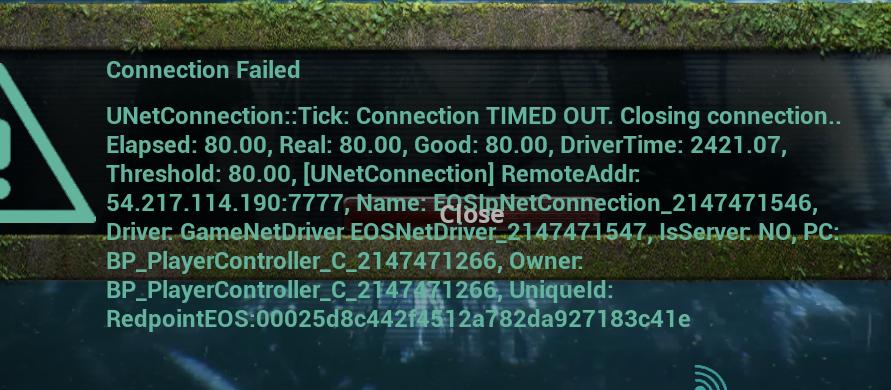
got kicked again with the same error
was just running around
drowsy quarry
try to play on windowed version
 tired star
I have a question all dino i had are wiped from the servers is there a certain time they are stored or something?
drowsy quarry
tired star
I have a question all dino i had are wiped from the servers is there a certain t...
all dinos were wiped after the update 5
 waxen rose
Is randomly getting fatal errors common after the update?
 rich coral
should i be concerned about this?

i only got that just now once after starting the game and trying to connect to eu2 didnt alter my game in any way shape or form
rigid nexus
rich coral
should i be concerned about this?
aw no need to be concerned 😊 it's usually fixed easy enough.
Try these 3 fixes, they help with it too
#🔧-evrima-troubleshooting-🔧 message
 mighty aurora
how do we sign up for gateway?
rigid nexus
mighty aurora
how do we sign up for gateway?
it's only for the Stress test right now, and will be gone soon again.
Signing up for the Stress test can be done when they open the applications again, they'll write in #announcements when they do.
You have to be 18 or above though.
mighty aurora
okay ty(=
rigid nexus
Eventually Gateway will come for the public build though!
violet quail
Evrima keeps loading and doesnt ever completely open
ive tried everything I need help
rigid nexus
violet quail
Evrima keeps loading and doesnt ever completely open
hmm, do you mean you get stuck in this screen ?

 rustic fjord
anyone had any sound bug issues? playing deino and sounds like constant waterfall, and come back even after i relog. I think it may be set off when holding Q
rigid nexus
rustic fjord
anyone had any sound bug issues? playing deino and sounds like constant waterfal...
a few people had that issue, yeah ):
 grand wolf
Anyone know how to fix this? I've been able to join servers for the past few day, but within 5 minutes It says I lose connection to the server and kicks me with no other indication (no crashing or ping spikes)
winter python
This channel is for seeking technical help with the game
 glad vault
winter python
This channel is for seeking technical help with the game
glad vault
winter python
This channel is for seeking technical help with the game
ouh sry, where i can put this¿
nocturne hull
ok is kouga practically the official bug support user lol it seems like he fixes literally every bug
drowsy quarry
what 😭
 chilly delta
Every time when I change something in the settings and then exit the settings and then open the settings again, the settings reset. Can someone please help me????
drowsy quarry
chilly delta
Every time when I change something in the settings and then exit the settings an...
If you are experiencing issues with your controls and graphic settings since the latest update (can't move camera, unable to court, Night Vision not working , graphic settings not showing properly , etc) then please try wiping your config files in localappdata.
- If running The Isle, exit the game.
- Open File Explorer.
- Click the address bar at the top.
- Type %localappdata% then press Enter.
- Find "TheIsle" folder. Open it.
- Open the "Saved" folder.
- Delete the "Config" folder. Note: This will reset any of your custom settings to their defaults.
- Restart the game. The issue should be fixed.
can work but no guarantee
 noble ivy
any fix for fatal error when launching the game?
Fatal error!
Unhandled Exception: EXCEPTION_ACCESS_VIOLATION reading address 0x000001f3daeac038
0x00007ff6796e0695 TheIsleClient-Win64-Shipping.exe!UnknownFunction []
0x00007ff6796b9fb3 TheIsleClient-Win64-Shipping.exe!UnknownFunction []
0x00007ff6796d8592 TheIsleClient-Win64-Shipping.exe!UnknownFunction []
0x00007ff6796e4679 TheIsleClient-Win64-Shipping.exe!UnknownFunction []
0x00007ff6796df410 TheIsleClient-Win64-Shipping.exe!UnknownFunction []
0x00007ff6796711b7 TheIsleClient-Win64-Shipping.exe!UnknownFunction []
0x00007ff67966abd1 TheIsleClient-Win64-Shipping.exe!UnknownFunction []
0x00007ff902d37614 KERNEL32.DLL!UnknownFunction []
0x00007ff9047026a1 ntdll.dll!UnknownFunction []
Crash in runnable thread FAsyncLoadingThread
 shut pawn
drowsy quarry
maybe because youre inside a server
shut pawn
drowsy quarry
maybe because youre inside a server
i dont see an option to
drowsy quarry
send a print
shut pawn
i thought you said render distance
but yes render scale is at 100
and it still looks like that
drowsy quarry
dang
thin oracle
Anyone know if this is a problem on my side? I recently reinstalled the after the new update, but now my game looks all pixelated with max settings and low fps. I've been normally running it perfectly on high settings without a problem, 60+. I did try and lower but nothing changed.
 shut pawn
yes i get the pixely shadows too
thin oracle
sad
 copper stag
I'm getting an issue where I open the game and it loads the EasyAntiCheat, initializes for about a minute, then says "Waiting for game.." for about another 3 minutes and after that the EAC blue screen will close and the game never opens even though it's still running in Steam and by that point I have to open task manager to close The Isle. I've tried verifying files, deleting the EAC_EOS/.sys files, deleted the Open XR folder, set it to run automatically and tried running it as Administrator. Does anybody else have or have had this issue?
nocturne hull
thin oracle
Anyone know if this is a problem on my side? I recently reinstalled the after th...
Same kinda things happening to me idk if it can be fixed
 wet niche
hello ive been trying to launch evrima for months and simply cannot get passed this screen and the game will never open past this (attached) Ive done everything i can think of to try to fix it but nothing seems to work any help is appreciated.

 neat iris
thin oracle
Anyone know if this is a problem on my side? I recently reinstalled the after th...
neat iris
thin oracle
Anyone know if this is a problem on my side? I recently reinstalled the after th...
I have also the pixel graphics tried many things to fix it nothing ever works
hollow violet
wet niche
hello ive been trying to launch evrima for months and simply cannot get passed t...
Make sure to read pins ^
 glad turtle
Hi,so I don't know what I did but now the game model looks like this and the gpu usage is only 37%,can someonw help?

the settings look like this as well

and the fps was 144,but now it's 100
drowsy quarry
put your render scale up, it's super low right now
 tawny timber
Game freezes with trying to sort by player count while looking at unofficial server list
Ping as well ((not as bad tho -- don't have to restart game))
 fathom bay


 fair citrus
I have a problem i cant log in an error pop up
Anti-Cheat integrity check failed(0x2200)
I have anti cheat in the game i also veryfied the files but still the same problem
 agile crag
Cant launch the game. Just redownloaded after a while. Have tried to delete cache, easy anti cheat. Does anyone have other suggestions?
 rigid nexus
agile crag
Cant launch the game. Just redownloaded after a while. Have tried to delete cach...
rigid nexus
agile crag
Cant launch the game. Just redownloaded after a while. Have tried to delete cach...
hm, do you play any VR-games by chance ?
agile crag
@rigid nexus I do alot actually
rigid nexus
agile crag
<@478213198458257409> I do alot actually
Some VR-applications can cause that issue. Especially OpenXR seems to cause it, but also sometimes things like the Oculus app.
Try going through the following Post, if it doesn't work after that try to disable other VR-applications you might have.
steel plank
hey rabbit , i had issue when i launch the isle evirma , it just stops instantly found any fix?
steel plank
steel plank
hey rabbit , i had issue when i launch the isle evirma , it just stops instantly...
had it for about 2 weeks
 native merlin
what button for nv?
rigid nexus
steel plank
hey rabbit , i had issue when i launch the isle evirma , it just stops instantly...
sadly not ): sorry
I haven't heard anything that could work as an potential fix
rigid nexus
native merlin
what button for nv?
it's X
steel plank
rigid nexus
sadly not ): sorry
I haven't heard anything that could work as an potential fix
😦
havent played for 2 weeks
:*(
rigid nexus
I know ): it's frustrating.
We have no idea what could be causing it
native merlin
oh so if x doesnt work ill have to do the troubleshooting then?
rigid nexus
native merlin
oh so if x doesnt work ill have to do the troubleshooting then?
Yeah!
Try doing this, it should fix it!
(it looks more complicated then it is, it's really easy! if you have any questions feel free to ask)
1.) If running The Isle, exit the game.
2.) Press the windows key (or press "Windows key" + "R")
3.) Type %localappdata% then press Enter. (make sure you're really in Appdata -> local, and not in Appdata -> Roaming!)
4.) Find the TheIsle folder. Open it.
5.) Open the Saved folder, and go into the Config folder.
6.) Open the WindowsClient folder.
7.) Delete the Input.ini file (for you it might be called Input)
8.) Restart the game.
native merlin
ill give it a go, thanks!
agile crag
@rigid nexus Youre a lifesaver! ive been at it for weeks trying to look for a solution. Thanks so much for the help
rigid nexus
agile crag
<@478213198458257409> Youre a lifesaver! ive been at it for weeks trying to look...
Did it work ?
awesome 😊
agile crag
@agile crag Working ❤️
rigid nexus
great 😊 it was a big issue for a long time, I'm really glad we found a fix for it
agile crag
rigid nexus
great 😊 it was a big issue for a long time, I'm really glad we found a fix for ...
Appreciate it!
stoic zinc
uhm, why the hell do my graphics just keep changing back to Epic when i change them?
it doesnt show when in the menu, but when i get ingame it tells me
a press apply, and yet it still happens
wait, nvm, i fixed it now
rigid nexus
stoic zinc
wait, nvm, i fixed it now
hm, how did you fix that if you don't mind me asking ? o:
A few people reported that problem but I haven't heard of any way to fix it
 unreal agate
stoic zinc
wait, nvm, i fixed it now
unreal agate
stoic zinc
wait, nvm, i fixed it now
How did you fix it? Having the same problem haha
fr
stoic zinc
rigid nexus
hm, how did you fix that if you don't mind me asking ? o:
A few people reported...
just delete the saved folder in the isle
stoic zinc
unreal agate
How did you fix it? Having the same problem haha
look at my message above
rigid nexus
stoic zinc
just delete the saved folder in the isle
hm, weird o:
I guess we only ever deleted the input.init or the config folder
unreal agate
Wacky
stoic zinc
wait, nvm @rigid nexus and @unreal agate, it doesnt work, stupid game
so annoying having to change my settings whenever i start it up
 vagrant valley
Every time I open evrima it is just stick on 1 fps.
stoic zinc
also, the fatal error "fix" never worked
 jaunty lichen
There's a glitch that is going on since the Gore Update and its frustrating, I have lost 2 full Utahs just because I pounce a Deino. With only one pounce to the Deino, we (Deino and I) immediately got dragged under the map and it takes us to the water. There's no way getting out of the glitch and then you die drowning. <@&505047238674874368>
 buoyant dock
how do i fix the no night vision bug
rigid nexus
buoyant dock
how do i fix the no night vision bug
Try doing this, it should fix it!
(it looks more complicated then it is, it's really easy! if you have any questions feel free to ask)
1.) If running The Isle, exit the game.
2.) Press the windows key (or press "Windows key" + "R")
3.) Type %localappdata% then press Enter. (make sure you're really in Appdata -> local, and not in Appdata -> Roaming!)
4.) Find the TheIsle folder. Open it.
5.) Open the Saved folder, and go into the Config folder.
6.) Open the WindowsClient folder.
7.) Delete the Input.ini file (for you it might be called Input)
8.) Restart the game.
versed zenith
game just crashed 2 times in a row after killing one utah and eating it
fatal error
what the f
no fun allowed I guess
cool, it's like i'm banned from eu6
 lucid minnow
Hey guys, my graphics settings refuse to u-pdate, ive tried everything and they just want to stay on high and it makes the game unplayable for me, please help because theyre just refusing to update
 cinder sapphire
Has anyone fixed the weird graphics bug which makes the graphics look like clay??
versed zenith
lucid minnow
Hey guys, my graphics settings refuse to u-pdate, ive tried everything and they ...
apparently there is no fix for that, I also have that...  look on pinned messages and see if any of those work for you.
lucid minnow
so umm
i just reinstated the folder
and now i dont have nightvision again
but my graphics are fixed 🤣
they are on low now lol
but no nightvision
versed zenith
cinder sapphire
looks like we are in the same boat
you know, i'd pay real money to have the devs release like 10 bug patches and make the game playable instead of waiting for new stuff that like, make the game worse and worse..
drowsy quarry
lucid minnow
but no nightvision
you can always delete the config folder again
thin oracle
thin oracle
Anyone know if this is a problem on my side? I recently reinstalled the after th...
No fix for this??
 tribal walrus
so i deleted the config folder (since my pc cant handle the high graphics i want to put them on medium or low but everytime i enter a server its locked on epic, making me stay at 30fps). i restarted the game but everytime i try to enter a server, the graphics are locked again on epic.
😦
thin oracle
tribal walrus
so i deleted the config folder (since my pc cant handle the high graphics i want...
Everyone is having graphic issues currently and the devs are on vacation
tribal walrus
ohhh ok
 long fiber
steel plank
hey rabbit , i had issue when i launch the isle evirma , it just stops instantly...
long fiber
steel plank
hey rabbit , i had issue when i launch the isle evirma , it just stops instantly...
try updating ur drivers
 random mason
guys, wtf with my graphics?
 cinder sapphire
random mason
guys, wtf with my graphics?
cinder sapphire
random mason
guys, wtf with my graphics?
same for me
reinstalling doesnt fix it
Just tried
 golden iris
I cant join eu servers, it says its full when its not and i lag on any other region
versed zenith
its not you, that's the game. and it's normal not being able to play on NA servers.
just keep trying til you get lucky
thin oracle
random mason
guys, wtf with my graphics?
The devs messed up with them, they'll be fixed once devs get back from vaca
 proper wren
Hii
I need help for nest
I can't invite the other, he doesn't receive the invitation
We left our groups, disconnected and reconnected but nothing happened...
An Idea ? 😅😅
 cosmic lava
???

 willow relic
proper wren
Hii
I need help for nest
I can't invite the other, he doesn't receive the invi...
willow relic
proper wren
Hii
I need help for nest
I can't invite the other, he doesn't receive the invi...
This has happened to me and my friends once, as far as we were aware the nest grouping thing had glitched for us, with a couple of trys with just restarting the entire game we ended up needing to grow new dinos then it worked 🤷
willow relic
cosmic lava
???
I get this sometimes aswell, I just try to rejoin server then it works.
 versed mantle
anyone able to pair but not able to set a nest?
willow relic
Are you trying to set your nest next to a tree, rock, uneven ground etc?
Nests are very picky about where to be set
versed mantle
ive placed it in the same place before, i can try around but i think it may be bugged
cosmic lava
willow relic
I get this sometimes aswell, I just try to rejoin server then it works.
Copy, works now.
willow relic
Try a different spot, that shld work if it's bugged I'm not sure what to do there
Yee! Great
proper wren
willow relic
This has happened to me and my friends once, as far as we were aware the nest gr...
😭😭
willow relic
Yeah haha, but as long as you didn't grow smth huge you shld be fine, and who knows you might find another fix, it's just trial and error
proper wren
willow relic
Yeah haha, but as long as you didn't grow smth huge you shld be fine, and who kn...
Im full deino.. so... No Big deal for nest x)
rigid nexus
proper wren
Im full deino.. so... No Big deal for nest x)
You could try resetting your keybinds, I'm a bit doubtful if that actually will help >.< but it's worth a try, and better then starting new / not grouping
1.) If running The Isle, exit the game.
2.) Press the windows key (or press "Windows key" + "R")
3.) Type %localappdata% then press Enter. (make sure you're really in Appdata -> local, and not in Appdata -> Roaming!)
4.) Find the TheIsle folder. Open it.
5.) Open the Saved folder, and go into the Config folder.
6.) Open the WindowsClient folder.
7.) Delete the Input.ini file (for you it might be called Input)
8.) Restart the game.
proper wren
Delete ??
rigid nexus
proper wren
Delete ??
yeah 😊
 pale shard
Hey, it seems like i can't join official servers in which i have a savestate. No matter if it shows beeing full or not it always says the server is full
rigid nexus
pale shard
Hey, it seems like i can't join official servers in which i have a savestate. No...
That's a visual bug at the moment, sadly ): The servers display the wrong population.
So even if it says 96/100, it actually is 100/100
You just have to keep trying, you should get in eventually
pale shard
i wish it wouldnt always take me to the menu straight away
makes it hard to keep trying
proper wren
rigid nexus
yeah 😊
But why delete
rigid nexus
proper wren
But why delete
Everything in your local folder is generated anew when you successfully start the game up.
Deleting your input.ini is a common fix for control issues, like not being able to use your Nightvision.
It resets all the keybinds and aquires them new, which often fixes these problems.
I'm not sure it will actually help in your case, since it might be your Dino that's bugged, but it is definitely worth a try. Like I said, it's a very common fix for all control related issues.
If you don't trust me, which is fair, no worries 😊 Here's a post from one of the Devs explaining basically the same.
(they just delete the whole Config folder, I prefer recommanding to delete the input file since that won't reset your graphic settings and only the keybinds)
#announcements message
proper wren
rigid nexus
Everything in your *local* folder is generated anew when you successfully start ...
I redid a dino, we'll see
 topaz crow
I've just gotten a better PC recently so i've been able to rejoin evrima, but night vision doesnt seem to work. Any way to fix that?
drowsy quarry
topaz crow
I've just gotten a better PC recently so i've been able to rejoin evrima, but ni...
fix is on pinned message, second one
topaz crow
alrighty, ty!
thin oracle
willow relic
I get this sometimes aswell, I just try to rejoin server then it works.
I tried this and it didn't work I even exited the isle and rejoin and that didn't work so?..
 spice stone
thin oracle
I tried this and it didn't work I even exited the isle and rejoin and that didn'...
spice stone
thin oracle
I tried this and it didn't work I even exited the isle and rejoin and that didn'...
Have you tried pinned messages?
thin oracle
Oh. Nope, I didn't realize it was red Lol- That's a small problem that I do.
 spice goblet
what server on the isle is this again? xD
can anyone tell me why my pachey keeps randomly headbutting stuff?
 dense belfry
anyone know how to fix this? lost my eyes and ive tried re-installing the game but no luck
 drowsy quarry
dense belfry
anyone know how to fix this? lost my eyes and ive tried re-installing the game b...
drowsy quarry
dense belfry
anyone know how to fix this? lost my eyes and ive tried re-installing the game b...
If your Deino's eyes are bugged out>
-
Press Windows key.
-
Type "Run" and launch Run program.
-
Type in %localappdata%\TheIsle\Saved\Config\WindowsClient\GameUserSettings.ini (copy and paste) and click 'Ok'.
-
Find sg.TexturesQuality=x and set X to a lower/higher number (see below on what number equals what)
-
Press CTRL S (Save it)
0=low, 1=medium, 2=high,3=epic, 4=cinematic
If that does not work try this:
- If running The Isle, exit the game.
- Press the windows key (or press "Windows key" + "R")
- Type %localappdata% then press Enter. (make sure you're really in Appdata -> local, and not in Appdata -> Roaming!)
- Find the TheIsle folder. Open it.
- Open the Saved folder
- Delete the Config folder.