#🔧-legacy-troubleshooting-🔧
1 messages · Page 53 of 1
 honest river
honest river
<@456226577798135808>
Kicked From Server
Host closed the connection
If you ha...
honest river
honest river
honest river
<@456226577798135808>
Kicked From Server
Host closed the connection
If you ha...
Alright thank you
good luck!
 rough trail
Reinstalled The isle a days ago
and now when i go to X places like Murky it says that terrain isnt downloaded or something
Like when i was installing it probably some areas didnt downloaded thats my teory
So i think there was an option to see if all the content downloaded correctly; anyone know how to do that?
honest river
you can try verifying your game files for a starter, see if that pushes download of the map @rough trail
honest river
here, let me send you a video
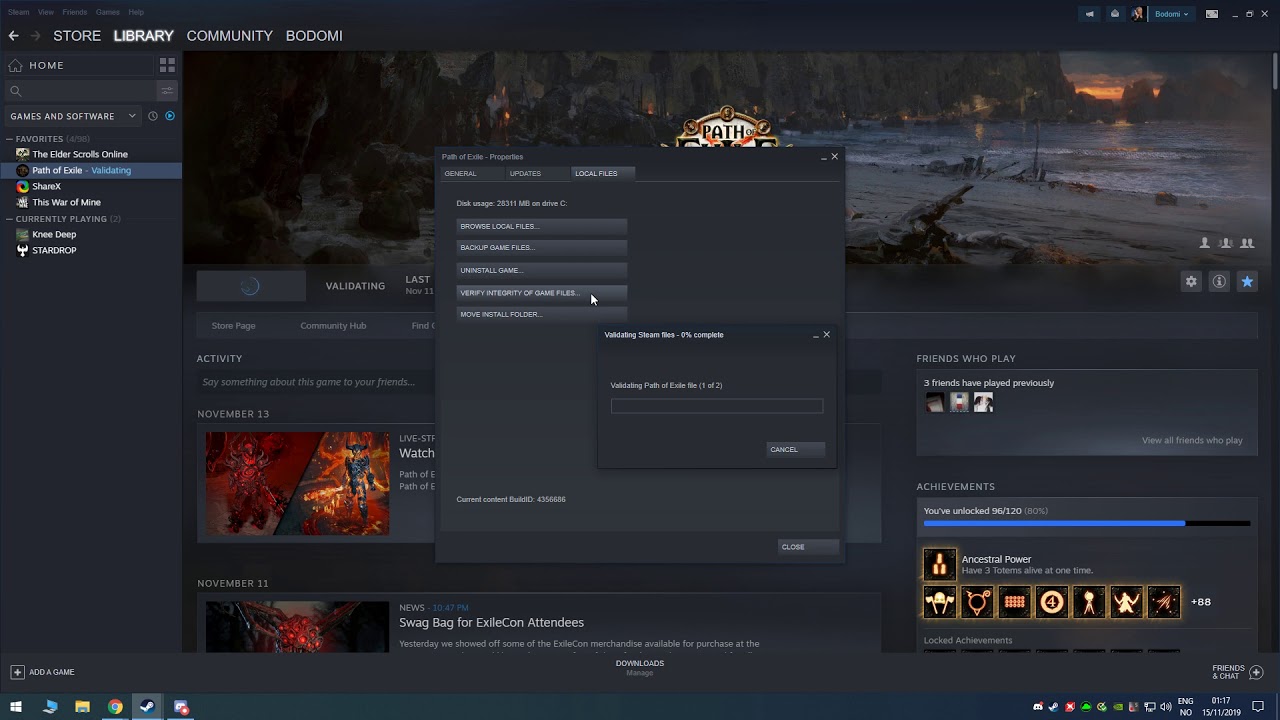
This video shows how to verify the integrity of game files on Steam.
This is useful when the game files are for whatever reason corrupted, or something is missing in the game files.
This video was created in relation to the following Steam Guide: https://steamcommunity.com/sharedfiles/filedetails/?id=1912418281
This video was created in relat...
@rough trail
rough trail
Cool Thanks
honest river
Guys my pc fan stoped spinning help me anyone
Appuals.com
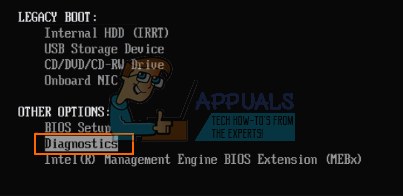
The CPU fan is usually supplied with a 3V or 5V from the PSU (power supply unit) on laptops and 12V on desktops. The port that the fan connects onto the
Ima@check it out rn
good luck
I wish there was a vid
Or something man
I wanna play isle but my pc just won’t turn on there’s only a yellow light man
Linus Tech Tips
I got a pre-built computer roughly a year ago and when checking the temperature of it, I saw that it was reaching 70-80C so I opened it up and the fans had the LEDs on but the fans were not spinning, once I turned the computer off the fans were REALLY hot. Im pretty sure that they are fried but I...
Thank you bro ima do a few test
alright
if this doesn't work, please consult a local PC store
Alright
And they could fix it about how much money
?
Or near if u know
depends
if it's an easy fix, than you can easily do it yourself
but if you need a new fan, you'll need to replace it
honest river
I wish u can call me Nd Helo me
honest river
are there still troubles? Because if you need to talk to me, you can DM me any troubles about your rig
 stuck valley
i keep getting this message after joining any servers, this also happens while safelogging out of any game. Is there anyway to fix this? i also had the controls not working bug a few weeks ago but got it fixed, is it related to me deleting the save file for legacy maybe?
 honest river
stuck valley
i keep getting this message after joining any servers, this also happens while s...
honest river
stuck valley
i keep getting this message after joining any servers, this also happens while s...
Open File Explorer from the taskbar.
Select View > Options > Change folder and search options.
Select the View tab and, in Advanced settings, select Show hidden files, folders, and drives and OK.
Afterwards, at the bottom left of your taskbar there should be a white search bar. Type %APPDATA% in there and open your %APPDATA% folder.
At the top you'll see the filepath, click "Appdata" to go back to the actual Appdata folder, then to local > TheIsle > delete the "Saved" folder.
this is a solution for a fatal error
check if you've done it right
stuck valley
Alright it worked, thank you.
 atomic agate
I have a friend having issues with their game. After some time playing the game will shut down, freezing their pc then a pop up will say "not found" as if The Isle was deleted.
honest river
shows on start

alright two methods
Right click The Isle in your Steam library > left click properties > local files > browse local files.
It should open up your Isle folder.
At the very top of the file path click "common"
It takes you back to a folder list of all your Steam games.
Keep that open, we'll go back to that in a moment. Now right click The Isle in your Steam library > left click properties > local files > uninstall game. After it's uninstalled you'll need to go back to that list of game folders and delete "The Isle" folder. That way there is no trace of The Isle, so when you reinstall the game it doesn't re-use any corrupted content that would normally remain after a normal uninstall
(2)
(1) Right click on the Isle in your steam games list, and click on "Properties"
(2) Click on the tab labeled local files, then click on "BROWSE LOCAL FILES"
(3) This will take you to the game's directory, delete everything in this folder
(4) After deleting, go back to the properties menu and click on "VERIFY INTEGRITY OF GAME FILES"
(5) This will retrieve all of the deleted game files, and reinstall. When you relaunch the game, you should be able to join a server without issue
@honest river
alright thanks man, had no idea what was happening
all good
you can also go in manage and brose local files, its faster
true
however not everyone understands shortcuts
yeah
 cobalt dome
hey i have a problem which seems quite weird

so it says some content files have been locked
by the game it self
 lilac salmon
"In some cases, the Content file locked Steam error may appear because of the antivirus on your computer. You can disable the antivirus while you update the game. ... If disabling the antivirus doesn't help, you might have to uninstall your antivirus or switch to different antivirus software"
honest river
Hey @civic cairn
This type of question works more in #server-hosting
Thank you!
 fallow root
Hello anyone know how to fix this issue So for some reason i can't bite in legacy no matter what i try my mouse works and all but i tried to go to the settings and make the primere attack to lamb but it ain't work btw i first downloaded verona then legacy anyone how how to fix this? plz i wanna play legacy
 graceful furnace
i need help, at my friend doesnt work profile command and esc
tab
he can move
i need help
fallow root
I think i have the same issue can your friend bite tho?
graceful furnace
no
graceful furnace
fallow root
I think i have the same issue can your friend bite tho?
no
fallow root
YEAH then i have the same issue i also can't tap and see the insert ment to
@graceful furnace yeah then i have the same issue i also can't tap and esc and insert to
cobalt dome
"Fatal error:[File:Unknown] [Line: 893]
Couldn`t load default compression settings asset witj path /Engine/Animation/DefaultAnimCurveCompressionSettings
any suggestion ?
 hushed bramble
Is anyone else having issues loading the server list and actually getting into a server? When I go into my task manager while trying to load into a server it’ll say that The Isle isn’t responding. I usually get stuck at 11% for around 3 minutes until it eventually jumps to 100%, becoming stuck once again on that percentage for a few more minutes until I eventually successfully load into the server. I uninstalled my game, but this hasn’t fixed anything.
honest river
cobalt dome
Couldn`t load default compression settings asset witj path /Engine/Animation/Def...
Doing a clean manual uninstall and reinstall of the isle can help. As in going into your appdata files and manually hitting delete on everything on the isle. Also check to make sure your GPU drivers are updated as well as windows.
honest river
fallow root
Hello anyone know how to fix this issue So for some reason i can't bite in legac...
Have you recently swapped from Evrima to Legacy?
There has been an issue with keybinding when people have switched braches.
I recommend this method
Reset Controls/Controls not working properly | Method Two
Open File Explorer from the taskbar.
Select View > Options > Change folder and search options.
Select the View tab and, in Advanced settings, select Show hidden files, folders, and drives and OK.
Afterwards, at the bottom left of your taskbar there should be a white search bar. Type %APPDATA% in there and open your %APPDATA% folder.
At the top you'll see the filepath, click "Appdata" to go back to the actual Appdata folder, then to local > TheIsle > delete the "Saved" folder
Try this as well @honest river @graceful furnace
Good luck to the 3 of you
Same category XD
Haha
Good luck
fallow root
Thx bruh imma try it rn
honest river
honest river
There has been an issue with keybinding when people have switched braches.
I rec...
That whole text
Your saved folder
You need to delete it
So basically that end part is the key
All good
fallow root
Do i have to be on legacy to do this or?
honest river
If that doesn't work, i recommend the forum discussion of troubleshooting fixes http://steamcommunity.com/app/376210/discussions/17/1693788384133493388/

Finding your System Specs Follow this: https://gyazo.com/8c1cac40ec65c922d4950386d9d19aba Now that you know you system specs, do the meet the minimum system specs shown on the Store Page? STOP! Have you Googled your problem? Most problems can be easily solved by a simple google search: htttp://google.com Make sure your Graphics Card Drivers are ...
honest river
fallow root
Do i have to be on legacy to do this or?
If this is a problem on legacy, yes
fallow root
Ok I will try it but i ain't got no hope cuse halv of what you said was enchantment table language for me
honest river
But you can't be 'online' playing legacy to do it
@fallow root
This is a video demonstration on how to go to the save folder
But make sure to delete it
(SAVED FOLDER)
Not open it
fallow root
Ok will do thx for the help bruh
 formal gyro
Can anyone else get in the new stress.servers?
honest river
formal gyro
Can anyone else get in the new stress.servers?
This is not for The Isle legacy, but for The Isle Evrima
alongside, a lot of people are logging into the servers at the same time. Leading to people DCing out of them
 orchid bear
i went to envirma for a second and im trying to switch back to legacy but it's on none how do i just switch back to normal because it's on none for betas and it's still on envirma version
honest river
orchid bear
i went to envirma for a second and im trying to switch back to legacy but it's ...

 honest river
delete and reinstall
orchid bear

ahhh
isn't there a way to move the folder or to just delete the envirma folder to go back to regular version or no?
honest river
"None" is the legacy branch
orchid bear
yea ik imma reinstall it ig because that might it where it would work maybe
 outer loom
Server name?
 ivory flicker
Since yesterday my game acts like I´m always holding s. I already tried using another keyboard but the problem is still there
 tall gate
 wanton portal
are there still legacy servers with people on them?
 hushed otter
When loading game im geting a Black screen from start what do i do
wanton portal
Is there a fix for when i look towards the ground my screen goes super dark almost pitch black it makes fighting hard and seeing in general
 robust vale
I am trying to redownload legacy and It pauses and tells me content locked
 unkempt plover
ok but if i want to play on a server i can play on this version?
 buoyant olive
Hey anyone know how to fix a fatal error “couldn’t loaf default compression settings with asset path /engine/animation/defaultanimcurvecommpressionsettings”
honest river
buoyant olive
Hey anyone know how to fix a fatal error “couldn’t loaf default compression sett...
try this!
Right click The Isle in your Steam library > left click properties > local files > browse local files.
It should open up your Isle folder.
At the very top of the file path click "common"
It takes you back to a folder list of all your Steam games.
Keep that open, we'll go back to that in a moment. Now right click The Isle in your Steam library > left click properties > local files > uninstall game. After it's uninstalled you'll need to go back to that list of game folders and delete "The Isle" folder. That way there is no trace of The Isle, so when you reinstall the game it doesn't re-use any corrupted content that would normally remain after a normal uninstall.
buoyant olive
When i browse the files it takes me straight into the folder with all the isle stuff
honest river
yes
buoyant olive
Ive deleted things in the isle folder earlier and theres nothing in it. Do i need to delete the entire folder or just the things in it?
honest river
delete the folder called "The Isle"
buoyant olive
Ok I deleted it. i also have the folder that it opened and it still has engine and “the isle” folder in it
Delete them too?
honest river
try running the game
buoyant olive
I deleted it
Ok im going to install it again I deleted everything known to the isle in my files so ill see how it goes
 royal trail
Anyone know how to get servers to come on?
Like only certain few servers shop up
nvm I got it to work
 hidden wraith
hi, i don't have "combat" and "communication" controls, i don't know why, i uninstall and reinstall but there still don't show the controls

 manic tinsel
my isle not updateing
lilac salmon
hidden wraith
hi, i don't have "combat" and "communication" controls, i don't know why, i unin...
Open File Explorer from the taskbar.
Select View > Options > Change folder and search options.
Select the View tab and, in Advanced settings, select Show hidden files, folders, and drives and OK.
Afterwards, at the bottom left of your taskbar there should be a white search bar. Type %APPDATA% in there and open your %APPDATA% folder.
At the top you'll see the filepath, click "Appdata" to go back to the actual Appdata folder, then to local > TheIsle > delete the "Saved" folder.
honest river
Hello, just asking is the update 3 out and how do I dowload it??
robust vale
So i switched back to legacy, and ... my del key for admin is not working...
 wintry fog
 torpid summit
why do i only see the EU servers of the test branch?
 merry egret
honest river
torpid summit
why do i only see the EU servers of the test branch?
merry egret
honest river
torpid summit
why do i only see the EU servers of the test branch?
this is the wrong branch
To switch, follow the guide and press "Quality Assurance"
torpid summit
honest river
this is the wrong branch
To switch, follow the guide and press "Quality Assuranc...
i am on quality assurance
honest river
torpid summit
i am on quality assurance
ah good, well servers are restarting currently
torpid summit
Yeah before I deleted the save file I could acces all of the servers but i had to delete the save file because i could not find my air brake butten and after that I couldn’t join any other servers but eu servers
 shut sequoia
Is this for Legacy? (You're in Legacy troubleshooting so I am double checking.)
honest river
it was for QA branch, they did it in the wrong channel
torpid summit
shut sequoia
Is this for Legacy? (You're in Legacy troubleshooting so I am double checking.)
oh yeah oops
 quasi patio
i downloaded the new update and im on the correct version as the stress test servers but when i join i get kicked out and it gives me the "greetings islander" message does anybody know what to do?
 mystic hazel
how do i download the new version? i just got the game
honest river
mystic hazel
how do i download the new version? i just got the game
https://gyazo.com/0c3347f2976f66d2e58bc9814becccd7
Press Quality Assurance branch
honest river
quasi patio
i downloaded the new update and im on the correct version as the stress test ser...
Yes, that server is full.
mystic hazel
how long does it take for me to be fully grown
honest river
mystic hazel
how long does it take for me to be fully grown
Deino. 5h
Ptera. 1h
mystic hazel
what about a t rex? and is that IRL time?
honest river
Yes
 safe creek
eat your fellow crocs
 zenith kiln
sooo uh when I went back to legacy after downloading evrima, all the controls for biting and for game chat were gone
And I also verified the files integrity and that didn't help
honest river
zenith kiln
And I also verified the files integrity and that didn't help
Open File Explorer from the taskbar.
Select View > Options > Change folder and search options.
Select the View tab and, in Advanced settings, select Show hidden files, folders, and drives and OK.
Afterwards, at the bottom left of your taskbar there should be a white search bar. Type %APPDATA% in there and open your %APPDATA% folder.
At the top you'll see the filepath, click "Appdata" to go back to the actual Appdata folder, then to local > TheIsle > delete the "Saved" folder
zenith kiln
Ok, gotcha
 hushed spindle
Hello
some of the admins on my server don't see the dinosaur nicknames and characteristics when they press the "supp" key. Someone can help me ? thank you
 ocean jay
hushed spindle
Hello
some of the admins on my server don't see the dinosaur nicknames and chara...
ocean jay
hushed spindle
Hello
some of the admins on my server don't see the dinosaur nicknames and chara...
Open File Explorer from the taskbar.
Select View > Options > Change folder and search options.
Select the View tab and, in Advanced settings, select Show hidden files, folders, and drives and OK.
Afterwards, at the bottom left of your taskbar there should be a white search bar. Type %APPDATA% in there and open your %APPDATA% folder.
At the top you'll see the filepath, click "Appdata" to go back to the actual Appdata folder, then to local > TheIsle > delete the "Saved" folder
hushed spindle
thanks we will try this
ocean jay
hushed spindle
thanks we will try this
As a former admin myself , it work's 100% It will happen every time you want to play Evrima and switch back to Legacy.
hushed spindle
ah ok I understand better now, thank you very much for this information @ocean jay
ocean jay
hushed spindle
ah ok I understand better now, thank you very much for this information <@!30039...
No problem.
 sleek plank
hello my escape button dsnt work in game for evolve how can i resolve this please ?
 hardy lintel
I figured out this no -bite bug in legacy. If I’m already in a target hit box it won’t allow you to bite. To be allowed to bite and hit, you have to start biting outside the hit box and then enter it. That’s a bitch! Has anyone found a workaround for it?
honest river
sleek plank
hello my escape button dsnt work in game for evolve how can i resolve this pleas...
Are you in the Quality Assurance branch?
Or legacy?
Use this
Reset Controls/Controls not working properly | Method Two
Open File Explorer from the taskbar.
Select View > Options > Change folder and search options.
Select the View tab and, in Advanced settings, select Show hidden files, folders, and drives and OK.
Afterwards, at the bottom left of your taskbar there should be a white search bar. Type %APPDATA% in there and open your %APPDATA% folder.
At the top you'll see the filepath, click "Appdata" to go back to the actual Appdata folder, then to local > TheIsle > delete the "Saved" folder
 steady gust
Not sure what's wrong with my game but when i load into any legacy server everything around me is all fuzzy looking and bad quality. On top of that some of my keys don't work like rest, any attacks, and even my esc menu and insert key doesn't do anything. i tried uninstalling and restarting my computer but it's still messed up. Any idea?
 honest river
Use this
Reset Controls/Controls not working properly | Method Two
Open File Ex...
honest river
honest river
Use this
Reset Controls/Controls not working properly | Method Two
Open File Ex...
@steady gust
honest river
 knotty girder
my friend is having trob n we dont know what to do
knotty girder
my friend is having trob n we dont know what to do
For users encountering a crash on Legacy, try this;
Right click The Isle in your Steam library > left click properties > local files > browse local files.
It should open up your Isle folder.
At the very top of the file path click "common"
It takes you back to a folder list of all your Steam games.
Keep that open, we'll go back to that in a moment. Now right click The Isle in your Steam library > left click properties > local files > uninstall game. After it's uninstalled you'll need to go back to that list of game folders and delete "The Isle" folder. That way there is no trace of The Isle, so when you reinstall the game it doesn't re-use any corrupted content that would normally remain after a normal uninstall.
 pseudo pilot
One message removed from a suspended account.
 fickle thorn
im having an issue with the isle after playing Evrima none of my binds are working for the regular version
honest river
fickle thorn
im having an issue with the isle after playing Evrima none of my binds are worki...
Reset Controls/Controls not working properly | Method Two
Open File Explorer from the taskbar.
Select View > Options > Change folder and search options.
Select the View tab and, in Advanced settings, select Show hidden files, folders, and drives and OK.
Afterwards, at the bottom left of your taskbar there should be a white search bar. Type %APPDATA% in there and open your %APPDATA% folder.
At the top you'll see the filepath, click "Appdata" to go back to the actual Appdata folder, then to local > TheIsle > delete the "Saved" folder
honest river
pseudo pilot
One message removed from a suspended account.
Restart your steam, and redownload
 opal nymph
None of the servers are loading for me on legacy anymore...
it just keeps loading and loading
Any help?
honest river
opal nymph
None of the servers are loading for me on legacy anymore...
If you are having issues seeing servers Click the Hide Empty Box and that may fix the issue.
opal nymph
I have tried many of the methods pinned but still nothing
I have tried that
@honest river
honest river
Check your firewall settings, if you have one
Make sure your internet is working for isle
If not
opal nymph
This only started happening after downloading the QA branch
I’ve just switched back over to legacy and now it’s just started happening
honest river
Ah i see
Try using steam servers. If that doesn't work
Use this guide
2 in one
If servers are not showing up:
- Click Steam in the top left of your Steam library.
- Go to Settings > In-Game > click the bottom dropdown box and change your max pings to 1000. Note: You may need to play around with the best setting for you. Some players have reported 500 works better for them.
IF that doesn't work, follow this:
Open an Administrator level command prompt
- Type in CMD on your windows search through your computer.
- Right click Command Prompt
- Click Run as Admin. It'll open a black weird box
- Type ipconfig /flushdns
- Hit enter
- Type netsh winsock reset
- Hit enter
- Reboot your computer
- Open up The Isle
opal nymph
I have tried that :/
honest river
All of it?
honest river
All right
opal nymph
Hoping that might flush out any files might be causing it
honest river
If that doesn't work, I'll try find a new solution
opal nymph
Thank you
honest river
It could honestly be a file corruption
opal nymph
Not sure
honest river
As it isn't an internet problem,
And occurred when switching branches
honest river
Yeah

 rain stream
thats not an error
rain stream
 normal coral
https://cdn.discordapp.com/attachments/723260797719019620/832472628219346944/202...
normal coral
https://cdn.discordapp.com/attachments/723260797719019620/832472628219346944/202...
that is just a service notice you can accept.
normal coral
but i can't enter test sw
rain stream
because they are full probably and this is the wrong channel this channel is for the legacy version and not the evrima version you are using #🔧-evrima-troubleshooting-🔧
normal coral
So do you know how many version?
rain stream
what?
honest river
normal coral
https://cdn.discordapp.com/attachments/723260797719019620/832472628219346944/202...
If you find yourself getting booted back to the menu after attempting to join a stress test server it's likely because the server is full, even if the playercount says otherwise. That's because of the sheer amount of users attempting to connect to these servers, resulting in the playercounts not displaying the correct number immediately
normal coral
I installed my version and it says its content is locked. How can I fix it?
honest river
normal coral
I installed my version and it says its content is locked. How can I fix it?
For 'Content File locked' errors Either restart your PC>Check your firewall settings>Or make sure The Isle is not running in Task manager before starting.
Make sure you do not have mods installed.
normal coral
ty <3@honest river
honest river
All goose
 empty scroll
Are there no official servers in the basic game but only on the test branch ?
 novel spear
I am stuck in a small cave. Who do i talk to about this problem?
 compact vault
I don't know what happened but I just recently switched back to the Legacy branch, and now whenever I try and go into a server none of my controls work. I can't lay down or get up, I can't attack or move, and my esc. button doesn't work, and my insert button doesn't work either. I checked my controls and everything is the same but everytime I try and press a control nothing happens. The only thing I can do is move my camera around, and I can use my 1,2,3,4 calls
 modest swift
most of my legacy keybinds dont work and i cant change them i cant attack, vocalize sit etc. how do i fix this? i would really appreciate help

 shut cedar
i'm having a "Fatal Error" Crash issue.
If i want to safelog out of the Game, instead of getting back to the menu, i'll get a "fatal Error" message and the Game shuts down.
I verified my Game files, i rolled back the graphics driver:
yesterday everything was fine, any ideas what i could do?
honest river
modest swift
most of my legacy keybinds dont work and i cant change them i cant attack, voca...
have you gone through pins?
honest river
shut cedar
i'm having a "Fatal Error" Crash issue.
If i want to safelog out of the Game, in...
Right click The Isle in your Steam library > left click properties > local files > browse local files.
It should open up your Isle folder.
At the very top of the file path click "common"
It takes you back to a folder list of all your Steam games.
Keep that open, we'll go back to that in a moment. Now right click The Isle in your Steam library > left click properties > local files > uninstall game. After it's uninstalled you'll need to go back to that list of game folders and delete "The Isle" folder. That way there is no trace of The Isle, so when you reinstall the game it doesn't re-use any corrupted content that would normally remain after a normal uninstall.
 coral moss
I just reinstalled the Isle after a long break, and now whenever I join any server it sends me to this server instead
 honest river
coral moss
I just reinstalled the Isle after a long break, and now whenever I join any serv...
honest river
coral moss
I just reinstalled the Isle after a long break, and now whenever I join any serv...
yes, "Chinese hackers"
coral moss
I tried restarting my game but it still sends me back to that one
coral moss
is there anything I can do to fix it?
honest river
no
coral moss
well, thanks for explaining the issue to me ^^
honest river
all good
 lunar helm
so, i must play on this dalaowang server and there is no fix ?
 wild pollen
lunar helm
so, i must play on this dalaowang server and there is no fix ?
wild pollen
lunar helm
so, i must play on this dalaowang server and there is no fix ?
probablyt not till they do something about it, other then that the hackers are gonna be just roaming free there
 daring pine
Nearly all of my legacy controls are not working after coming from the QA branch. Any fix?
 neat crane
is there a bug on legacy, my stam is not regenerating and dropping faster then normal and when i eat and drink none of those levels increase either <@&818552355796287508>
honest river
daring pine
Nearly all of my legacy controls are not working after coming from the QA branch...
Open File Explorer from the taskbar.
Select View > Options > Change folder and search options.
Select the View tab and, in Advanced settings, select Show hidden files, folders, and drives and OK.
Afterwards, at the bottom left of your taskbar there should be a white search bar. Type %APPDATA% in there and open your %APPDATA% folder.
At the top you'll see the filepath, click "Appdata" to go back to the actual Appdata folder, then to local > TheIsle > delete the "Saved" folder
modest swift
honest river
have you gone through pins?
not yet
hardy lintel
Need some serious help. 😦
I figured out this no -bite bug in legacy. If I’m already in a target hit box it won’t allow you to bite. To be allowed to bite and hit, you have to start biting outside the hit box and then enter it. That’s a bitch! Has anyone found a workaround for it?
It forcing me to stay engaged in the fight 10x as long. And as a dilo it’s getting me killed a lot, whereas if it would bite when I tell it to, I would be winning like 90% of the fights. :/
It only happens on v3, not the test server. And I’ve tried uninstalling and reinstalling the game. No luck.
shut cedar
honest river
Right click The Isle in your Steam library > left click properties > local files...
i'm sorry for pinging you.
Thanks for the reply on my Issue that i'm having. if i'm deleting all The Isle Folders, will i lose any of my Dinos in the Game or will i still keep them?
sorry if that's a really stupid Question
coral moss
lunar helm
so, i must play on this dalaowang server and there is no fix ?
I kept spamming their chat until I got banned from there, that seemed to fix it for me
 old scroll
problem finding some servers..? i tried everything i could but still couldn't get it fixed
 undone bridge
Hey, I am redowloading the game and everytime it says this but in different files, everytime a new file downloads it says this. Why does it do that. It alwys downloaded fine, but now not anymore

 zenith bridge
this keeps happening, please help

 coral shell
whats this thing where i select a server and i always spawn on a weird chinese server, never on the one i selected :((
its verry annoying
 dense spire
Any idea how to fix this? It’s been happening for a while and I know others have had issues with it.
 dense spire
Any idea how to fix this? It’s been happening for a while and I know others have...
dense spire
dense spire
Any idea how to fix this? It’s been happening for a while and I know others have...
Fixed: I searched it up on google, you basically have to delete all your files in TheIsle folder and uninstall the game. Then reinstall the game through steam and it should fix the issue. Here’s a link to where I found it: https://steamcommunity.com/app/376210/discussions/14/2985285449005284309/
Can somebody help me? Is this a problem with the game itself or my pc? Anytime I try to play Legacy this message shows up before even getting into the game: Fatal Error: [File:Unknown] [Line: 893] Couldn't load default compression settings asset with path '/engine/animation/DefaultAnimCurveCompressionSettings' When I screenshot it with winkey+sh...
dense spire
zenith bridge
this keeps happening, please help
Can somebody help me? Is this a problem with the game itself or my pc? Anytime I try to play Legacy this message shows up before even getting into the game: Fatal Error: [File:Unknown] [Line: 893] Couldn't load default compression settings asset with path '/engine/animation/DefaultAnimCurveCompressionSettings' When I screenshot it with winkey+sh...
shut cedar
dense spire
Fixed: I searched it up on google, you basically have to delete all your files i...
i'm having the same Issue with this Message :
Fatal error: [File:Unknown] [Line: 855]
Rendering thread exception:
Fatal error!
Unhandled Exception: EXCEPTION_ACCESS_VIOLATION reading address 0x00000038
0x00007ff6ef3c22f8 TheIsleClient-Win64-Shipping.exe!UnknownFunction []
0x00007ff6ef3ac6e1 TheIsleClient-Win64-Shipping.exe!UnknownFunction []
0x00007ff6ef3abdab TheIsleClient-Win64-Shipping.exe!UnknownFunction []
0x00007ff6eeacd841 TheIsleClient-Win64-Shipping.exe!UnknownFunction []
0x00007ff6eee0b770 TheIsleClient-Win64-Shipping.exe!UnknownFunction []
0x00007ff6eedfacd9 TheIsleClient-Win64-Shipping.exe!UnknownFunction []
0x00007ff6ee3d0943 TheIsleClient-Win64-Shipping.exe!UnknownFunction []
0x00007ff6ef3c4c12 TheIsleClient-Win64-Shipping.exe!UnknownFunction []
0x00007ff6ef3c56b3 TheIsleClient-Win64-Shipping.exe!UnknownFunction []
0x00007ff6ee51ad67 TheIsleClient-Win64-Shipping.exe!UnknownFunction []
0x00007ff6ee5186f1 TheIsleClient-Win64-Shipping.exe!UnknownFunction []
0x00007fffee737034 KERNEL32.DLL!UnknownFunction []
0x00007ffff0362651 ntdll.dll!UnknownFunction []
I already uninstalled The isle and deleted "The Isle" Folder and reinstalled it, same issue still happens as soon as i go back to the Main-Menu
 echo ether
<@&818552355796287508> can you guys help me
i have a problem whit my game when i host a game to play it i cant can play and i have a black srean
honest river
shut cedar
i'm sorry for pinging you.
Thanks for the reply on my Issue that i'm having. if ...
you should keep them, seeing as it would be in the server memory
dense spire
shut cedar
i'm having the same Issue with this Message :
Fatal error: [File:Unknown] [Line...
Hey! I tried looking up some info on this error, couldn’t find any helpful information. You might want to update your graphics card drivers and/or update windows.
Or try asking this on the Isle trouble shooting discussion: https://steamcommunity.com/app/376210/discussions/17/

The Isle - The Isle: A World Designed to Kill YouThe Isle is intended to be a gritty, open-world survival horror game. Explore vast landscapes of dense forest and open plains, traverse treacherous mountains and wade through dark swamps where horrors lurk. Hidden within are ruins that hold insight as to what came before. Through it all, keep in m...
shut cedar
dense spire
Hey! I tried looking up some info on this error, couldn’t find any helpful infor...
Already did that. Even reinstalled my Graphics card driver 😦
dense spire
shut cedar
Already did that. Even reinstalled my Graphics card driver 😦
Ahh. I hope you find a solution soon! Sorry I couldn’t provide much help.
 opaque vine
Tried to revert to Legacy and I uhm got this error. So I tried to uninstall and reinstall The Isle and it still does the same...
(problem fixed tyty)
 honest river
opaque vine
Tried to revert to Legacy and I uhm got this error. So I tried to uninstall and ...
honest river
opaque vine
Tried to revert to Legacy and I uhm got this error. So I tried to uninstall and ...
For 'Content File locked' errors Either restart your PC>Check your firewall settings>Or make sure The Isle is not running in Task manager before starting.
opaque vine
Alright Ill do all those. ;w;
 kindred spoke
is there any way to fix the icons in your name? like the ones that changes to that weird "?". I know that it changed with that weird update but i like to see that fixed again xD
 alpine roost
Need some help here, i somehow can’t stand up or open the in game menu in legacy anymore this happend 2 days ago when i had a bug in evrima but i fixed it i tried to restart the game and restart my laptop but nothing works 😦
 weary halo
My key bidnings just artent working...
 fallen falcon
im trying to join servers but it keeps kicking me out like im disconnecting
normal coral
Can guys kill me who is in the same pack?
 forest grove
Alguem me ajudar, meu dino ficou preso numa pedra e ninguem me mata /Can someone hlp me, my dino got stuck in a rock and he doesn't die kkkkkkkkk
normal coral
guys The chat group does not appear. What should I do?
 young crest
weary halo
My key bidnings just artent working...
young crest
weary halo
My key bidnings just artent working...
its a same thing with me dose any one know why is that?
honest river
@young crest @weary halo
Open File Explorer from the taskbar.
Select View > Options > Change folder and search options.
Select the View tab and, in Advanced settings, select Show hidden files, folders, and drives and OK.
Afterwards, at the bottom left of your taskbar there should be a white search bar. Type %APPDATA% in there and open your %APPDATA% folder.
At the top you'll see the filepath, click "Appdata" to go back to the actual Appdata folder, then to local > TheIsle > delete the "Saved" folder
young crest
Thanks, I'll try
honest river
good luck
 willow willow
Hi guys i just changed router and internet provider today and suddenly I can't join any server. It gets stuck on a black screen or in loading forever. Is there any port forwarding for the isle or similar?
 dusty tulip
Can someone help me im in a Legacy server and my controls are not working
 worn flare
Can someone help me?

 gloomy estuary
how long does it take to fully grow a pt
 turbid karma
dusty tulip
Can someone help me im in a Legacy server and my controls are not working
turbid karma
dusty tulip
Can someone help me im in a Legacy server and my controls are not working
same here man
honest river
gloomy estuary
how long does it take to fully grow a pt
1h
honest river
dusty tulip
Can someone help me im in a Legacy server and my controls are not working
Open File Explorer from the taskbar.
Select View > Options > Change folder and search options.
Select the View tab and, in Advanced settings, select Show hidden files, folders, and drives and OK.
Afterwards, at the bottom left of your taskbar there should be a white search bar. Type %APPDATA% in there and open your %APPDATA% folder.
At the top you'll see the filepath, click "Appdata" to go back to the actual Appdata folder, then to local > TheIsle > delete the "Saved" folder
@turbid karma
honest river
worn flare
Can someone help me?
Open File Explorer from the taskbar.
Select View > Options > Change folder and search options.
Select the View tab and, in Advanced settings, select Show hidden files, folders, and drives and OK.
Afterwards, at the bottom left of your taskbar there should be a white search bar. Type %APPDATA% in there and open your %APPDATA% folder.
At the top you'll see the filepath, click "Appdata" to go back to the actual Appdata folder, then to local > TheIsle > delete the "Saved" folder
turbid karma
honest river
Open File Explorer from the taskbar.
Select View > Options > Change folder and ...
your an actual LEGEND mate, thanks
honest river
All good
 chilly mason
I've got a problem with Legacy. I had both Evrima and legacy at the same time and by messing with Evrimas controls I did something to legacy. I cannot use esc, and I cannot bite. I've tried resetting my controls, I've tried redownloading Legacy AND I tried the %appdata% trick, I even uninstalled the isle and reinstalled it and it STILL isn't working! please I need help
chilly mason
chilly mason
I've got a problem with Legacy. I had both Evrima and legacy at the same time an...
nvm I think I was being stupid xD
 strong plaza
can someone help me with this error?
 honest river
strong plaza
can someone help me with this error?
honest river
strong plaza
can someone help me with this error?
Right click The Isle in your Steam library > left click properties > local files > browse local files.
It should open up your Isle folder.
At the very top of the file path click "common"
It takes you back to a folder list of all your Steam games.
Keep that open, we'll go back to that in a moment. Now right click The Isle in your Steam library > left click properties > local files > uninstall game. After it's uninstalled you'll need to go back to that list of game folders and delete "The Isle" folder. That way there is no trace of The Isle, so when you reinstall the game it doesn't re-use any corrupted content that would normally remain after a normal uninstall.
hardy lintel
Need some serious help, but seem to be getting ignored. 😦
I figured out this no -bite bug in legacy. If I’m already in a target hit box it won’t allow you to bite. To be allowed to bite and hit, you have to start biting outside the hit box and then enter it. That’s a bitch! Has anyone found a workaround for it?
It forcing me to stay engaged in the fight 10x as long. And as a dilo it’s getting me killed a lot, whereas if it would bite when I tell it to, I would be winning like 90% of the fights. :/
And I’ve tried uninstalling and reinstalling the game. And now I even have a completely new computer and No luck.
alpine roost
i cant help sorry but many ppl have problems with legacy i see-
honest river
hello our little Deino fell under the map when the bigger one tried to take in the teeth. Now the little one is swimming under the map. Please give us some tips how to get from there. Sorry for my English in advance
lilac salmon
If you are trying to host a server from in game and get a black screen, that is because of recent legacy updates. At the moment you cannot use that feature, and it is broken.
lilac salmon
lilac salmon
If you are trying to host a server from in game and get a black screen, that is ...
 primal wasp
Im on the QA switching to legacy, and its taking a longer time to load then usual, since then I havent really downloaded new games etc that would cause it to take longer, can anybody help?
lilac salmon
Try manually uninstalling and reinstalling
 stone elk
Good evening I am French so sorry for my poor English, I would like to know how to recover the normal parameters on Legacy because I have those of Evrima or at least I do not have all those of Legacy which prevents me for example from being able to go on the tab with the "esc" key in particular.
Thank you for your reply.
honest river
stone elk
Good evening I am French so sorry for my poor English, I would like to know how ...
Open File Explorer from the taskbar.
Select View > Options > Change folder and search options.
Select the View tab and, in Advanced settings, select Show hidden files, folders, and drives and OK.
Afterwards, at the bottom left of your taskbar there should be a white search bar. Type %APPDATA% in there and open your %APPDATA% folder.
At the top you'll see the filepath, click "Appdata" to go back to the actual Appdata folder, then to local > TheIsle > delete the "Saved" folder
 strong venture
Every time i load onto a legacy server I am unable to use most of my keyboard whilst in game, this being everything except walking and roaring. I am unable to rest, open my escape menu, smell, eat or even drink. Does anyone have a solution to this problem?
 glossy cypress
FRIEND of mine is stuck in a hole and can't escape, how can he kill himself?
Anyone?
@lilac thistle My friend, steam name ErictheBare is stuck in a hole on EU9, he wants to die but he's trapped.
stone elk
Thank you for your reply @honest river !!!
I take this opportunity to ask is it normal that I feel that the Legacy version is slow and struggling?
 dense canopy
sorry dumb question, my timer is on 0 and i still cant spawn there, do I need to rejoin?
 rapid willow
Hey, whenever i open up legacy, i cant find certain servers, it happens every time i try to open up the isle. My friend says shes playing on them but every time i try to search it, it doesn't appear. She's tried sending me invites to play on the server via steam, and it only works part of the time. Anyone know a fix?
honest river
rapid willow
Hey, whenever i open up legacy, i cant find certain servers, it happens every ti...
If you are having issues seeing servers Click the Hide Empty Box and that may fix the issue.
try this
 next gust
Anyone know what’s going on with NA2 beta server? It’s disappeared
rapid willow
honest river
If you are having issues seeing servers Click the Hide Empty Box and that may fi...
Ah thank ya, ill try and use that next time ^-^
 honest river
 mellow lily
try verifying your game files
honest river
@spare musk
That's a malicious link
honest river
All good.
Make sure you get everything
Makes it easier if you search his name up on the search button
And delete everything there
 signal flower
I recently started playing The Isle - Legacy, but i've had some major set-backs.. When entering a game, the highlighted tip's for example; nightvision, shows the following: press [] for better vision at night (or something similar). I thought there was supposed to be a keybind inbetween "[]"? Furthermore i can't use Primary/Secondary Attack AND my combat page doesn't unfold when in home screen -> controls. What's just as worse is that i can't even press "esc" to acces settings/exit game/etc. while in game.. I don't have these issues in Evrima or the new Stress Test servers. And i've tried the following: Reset keybinds/Reinstall The Isle/ Switch to Evrima -> Stress Test -> Legacy/ Verified The Isle Files.
hardy lintel
Need some serious help, but seem to be getting ignored. 😦
I figured out this no -bite bug in legacy. If I’m already in a target hit box it won’t allow you to bite. To be allowed to bite and hit, you have to start biting outside the hit box and then enter it. That’s a bitch! Has anyone found a workaround for it?
It forcing me to stay engaged in the fight 10x as long. And as a dilo it’s getting me killed a lot, whereas if it would bite when I tell it to, I would be winning like 90% of the fights. :/
And I’ve tried uninstalling and reinstalling the game. And now I even have a completely new computer and No luck.
 hardy oak

 chrome void
I can’t press confirm when choosing a dinosaur.
honest river
chrome void
I can’t press confirm when choosing a dinosaur.
try this!
Open File Explorer from the taskbar.
Select View > Options > Change folder and search options.
Select the View tab and, in Advanced settings, select Show hidden files, folders, and drives and OK.
Afterwards, at the bottom left of your taskbar there should be a white search bar. Type %APPDATA% in there and open your %APPDATA% folder.
At the top you'll see the filepath, click "Appdata" to go back to the actual Appdata folder, then to local > TheIsle > delete the "Saved" folder
chrome void
I'm not near my computer atm, but i'll try tomorrow!
honest river
all good
 raw wraith
I might be asking a question everyone's been on about, but I played on evrima and went back to legacy as of recent, but my controls aren't working and I can't attack, rest or esc. Only walking around and roaring is what works. I've reset my controls, Uninstalled and deleted the file for the isle and redid it again, but still my controls are not normal. Is there anyone that knows a solution to this?
 sharp imp
I cant join any server, if I want to join, there comes "fatal error"
manic tinsel
 honest river
sharp imp
I cant join any server, if I want to join, there comes "fatal error"
honest river
sharp imp
I cant join any server, if I want to join, there comes "fatal error"
I'm getting this too!!! I can't fix it and i haven't found any help at all. I have tried everything so far; if you find a fix please let me know.
sharp imp
honest river
I'm getting this too!!! I can't fix it and i haven't found any help at all. I ha...
It worked now, I think its appeared, because while I was joining I tabbed out of the game, probably it will help u. Just dont tab out
 inner rock
raw wraith
I might be asking a question everyone's been on about, but I played on evrima an...
inner rock
raw wraith
I might be asking a question everyone's been on about, but I played on evrima an...
I have the exact same problem
 nocturne knot
strong venture
Every time i load onto a legacy server I am unable to use most of my keyboard wh...
nocturne knot
strong venture
Every time i load onto a legacy server I am unable to use most of my keyboard wh...
I just switched over to legacy today and I am experiencing the same problem, did you find a solution?
honest river
sharp imp
It worked now, I think its appeared, because while I was joining I tabbed out of...
No I still get the issue no matter what
sharp imp
nocturne knot
I just switched over to legacy today and I am experiencing the same problem, did...
try to uninstall ur saved
 strong swallow
for some reason I can use wasd, 1234, ctrl, and move my mouse but everything else doesnt work, I cant use night vision, I cant press esc, etc
I cant press enter either
so no chatting
I went to settings and tried to fix it but nothing happened
this is so annoying
 oblique prism
for some reason I can use wasd, 1234, ctrl, and move my mouse but everything else doesnt work, I cant use night vision, I cant press esc, etc
@strong swallow SAME FOR ME and nobody helps
strong swallow
oblique prism
> for some reason I can use wasd, 1234, ctrl, and move my mouse but everything e...
ikr
im gonna just play ervima and see if that fixes it
oblique prism
You wont have problems with evrime i think
lilac salmon
@oblique prism Try Open File Explorer from the taskbar.
Select View > Options > Change folder and search options.
Select the View tab and, in Advanced settings, select Show hidden files, folders, and drives and OK.
Afterwards, at the bottom left of your taskbar there should be a white search bar. Type %APPDATA% in there and open your %APPDATA% folder.
At the top you'll see the filepath, click "Appdata" to go back to the actual Appdata folder, then to local > TheIsle > delete the "Saved" folder.
 whole cargo
well it didnt work
whole cargo
So i am kinda wondering if u guys are gonna make more AUS servers for evrima ?
ive been tryin to join both of them one has 108 and the other 120 and cant join either of them
ive tried for 50 timess
 random fjord
So I can play Evrima but I can't play the Legacy version of the Isle.. Whenever I try to start the game I get this fatal Error, any ideas? Verifying the integrity of the game cache doesn't help unfortunately..
 honest river
random fjord
So I can play Evrima but I can't play the Legacy version of the Isle.. Whenever ...
honest river
random fjord
So I can play Evrima but I can't play the Legacy version of the Isle.. Whenever ...
Right click The Isle in your Steam library > left click properties > local files > browse local files.
It should open up your Isle folder.
At the very top of the file path click "common"
It takes you back to a folder list of all your Steam games.
Keep that open, we'll go back to that in a moment. Now right click The Isle in your Steam library > left click properties > local files > uninstall game. After it's uninstalled you'll need to go back to that list of game folders and delete "The Isle" folder. That way there is no trace of The Isle, so when you reinstall the game it doesn't re-use any corrupted content that would normally remain after a normal uninstall
 flat wagon
I need help!! I’m on legacy. No keys are working. I’ve redownloaded the game like 3 times. When I press tab a gray dotted outline appears. Idk what to do

Looks like the when I press tab
random fjord
honest river
Right click The Isle in your Steam library > left click properties > local files...
Unfortunately that did not solve it.. :(
 polar hill
flat wagon
I need help!! I’m on legacy. No keys are working. I’ve redownloaded the game lik...
polar hill
flat wagon
I need help!! I’m on legacy. No keys are working. I’ve redownloaded the game lik...
i got the same issue rn ...only the controls for walking work for me , nothing else
polar hill
lilac salmon
<@!279083787596595200> Try Open File Explorer from the taskbar.
Select View > Op...
@flat wagon <- this worked for me
 strong sandal
Heya, I was told to come to this channel. Blackscreen upon hosting my own server. I am trying to find the server file to delete it so I can retry\
@spare musk Gotchya Thanks!
 spare musk
all good! i hope you enjoy the game c:
strong sandal
I shall once it gets to working hahahah, doing a fresh install hoping it fixes it 🙂
I noticed in my steam theres a tools section for dedicated server. Is it easier to do that than using the in-game hosting option?
strong swallow
lilac salmon
<@!279083787596595200> Try Open File Explorer from the taskbar.
Select View > Op...
Ok i'll try it out
 west crescent
signal flower
I recently started playing The Isle - Legacy, but i've had some major set-backs....
west crescent
signal flower
I recently started playing The Isle - Legacy, but i've had some major set-backs....
N for night vision E to eat/drink ^^
strong swallow
lilac salmon
<@!279083787596595200> Try Open File Explorer from the taskbar.
Select View > Op...
@signal flower I had the same problem and it worked fine at first but then that happened, so try this
im gonna test it out for myself rn
 crystal steppe
Hi every time i try and join an EU server it makes me join the same Asian server every time is there a way to fix this ??
 torpid stirrup
can anyone explain how to fix this my use button "E" has been glitched on the game it wont do the full animation and i tried to delete my save data and uninstall my game multiple times and my "E" wont fix itself even tried to change the key. And it all started when i switched from quality assurance to legacy.
 maiden basin
someone please help me with this issue as it makes the game unplayable for me. so after i get in a server play for like 5-10 minutes the game crashes and a message is displayed "unreal engine has stopped working due to d3d device (removed)". this has made me lose so many dinos and i cant play with my friends. this started to happen around the release of evrima. so please help me out thank you
 heavy temple
my nightnivsion doesnt work in recordings from the game itself
heavy temple
fatal error still occurs after following the steps of the pinned document, my graphic card driver is up to date and so is my windows
heavy temple
crystal steppe
Hi every time i try and join an EU server it makes me join the same Asian server...
@crystal steppe its the servers themselves. its asian servers advertising themselves as other servers. the only way to fight this is watching for signals this is a "fake server": high ping, usually thenyaw, 200 slots and nearly full
heavy temple
heavy temple
my nightnivsion doesnt work in recordings from the game itself
i fixed this issue with deleting the saved files
 modern meadow
My friend is stuck on a tree what he need to do?
honest river
talk to an admin
unless this is the new Quality Assurance branch or in an official server- which I'm unsure the admins can help
modern meadow
yes is quality assurance
honest river
Admins have no power than
modern meadow
There is no admin on the server?
honest river
most probably
 crystal fiber
anyone else not able to search servers?
 manic fossil
Can't find an english server? Every eu I join is chinese
 lilac dirge
So what I did was I had to go to my steam, view, servers and change the filter to the isle and join a random server that way. Then when I closed the game and reopened it the server list would populate like after 20-45 seconds. Also to know your not on a Chinese server just check the ping.
honest river
guys im new to the isle how can i play legacy?
lilac dirge
Just download the game like normal
hardy lintel
No matter what I do I cannot find the hunting grounds server. I have the steam ping setting at 200. Isle server ping filter set to 50, with all other filters turned off. All ports needed for the game are open. I type the word “hunting” into the search, and it never comes up.
 sonic sonnet
flat wagon
sonic sonnet
flat wagon
type in %APPDATA% check show hidden files click on app data file patch then delete the isle saved folder
 silk mountain
I cannot find servers-
 wheat wolf
Is there any group that isn't filled with Chinese? Like? All of them are in Chinese? Even in the UK groups (my own country) I'm so confused. And it's kinda putting me off the game
torpid stirrup
can anyone explain how to fix this my use button "E" has been glitched on the game it wont do the full animation and i tried to delete my save data and uninstall my game multiple times and my "E" wont fix itself even tried to change the key. And it all started when i switched from quality assurance to legacy.
 verbal temple
Is there a fix for not being able to bite?
sonic sonnet
verbal temple
Is there a fix for not being able to bite?
type in %APPDATA% check show hidden files click on app data file patch then delete the isle saved folder
 undone dust
I need some help with the DisabledDinosaurs=DINO command up in DefaultGame.ini
no matter the spelling, I cannot seem to "remove" dinosaurs
hardy lintel
sonic sonnet
type in %APPDATA% check show hidden files click on app data file patch then dele...
Is this for the issue I have where I’m not allowed to bite ONLY when I am within a targets hit box?
sonic sonnet
hardy lintel
Is this for the issue I have where I’m not allowed to bite ONLY when I am within...
not sure about that one
hardy lintel
sonic sonnet
not sure about that one
It’s driving me nuts. I play dilo. And not letting me bite when I’m in a good assride is getting me killed so much, where as if it functioned I would be winning 10x more fights
sonic sonnet
hardy lintel
It’s driving me nuts. I play dilo. And not letting me bite when I’m in a good a...
Yeah that sucks, you could try to fix i put above, idk if it would work.
wheat wolf
I've tried to play allo and other preds.but I always starve-like there's no food?
verbal temple
sonic sonnet
type in %APPDATA% check show hidden files click on app data file patch then dele...
thanks man
sonic sonnet
verbal temple
thanks man
np
 safe ore
hey guys, anyone help? everytime i load on i go to load the servers up and nothing comes up so i click hide empty and refresh and then nothing comes up still and im playing on quality assurance.
pls its been like this for days now and i havent been able to play for days!
safe ore
@serene karma help pls?
 rose sparrow
I just bought the game and can't find any sever either
@safe ore @serene karma still in normal game like in the beta https://gyazo.com/077b2b60f17815907ac2b0fd77426751 . https://gyazo.com/fcc30add6c0246244820fbee70f6325c . https://gyazo.com/67809c6f50c50130b74d0ddb3c9009ab . https://gyazo.com/140305df4823dd995c69c7175c3804d7 pls halp me -.-


 sonic sonnet
rose sparrow
I just bought the game and can't find any sever either
<@!713015673126912006> ...
sonic sonnet
rose sparrow
I just bought the game and can't find any sever either
<@!713015673126912006> ...
which branch of the game are you playing on?
rose sparrow
Steam and normal play, betas. I can't find any servers @sonic sonnet
sonic sonnet
rose sparrow
Steam and normal play, betas. I can't find any servers <@!588451973502599179>
try using the steam server list, see if that works
honest river
rose sparrow
I just bought the game and can't find any sever either
<@!713015673126912006> ...
Games dogshit it’s happening to me too bout to refund
sonic sonnet
Honestly if i was u guys i would just play evrima
not to many problems with it and its like a 5 gig download
rose sparrow
@sonic sonnet I tried because I see sever, aba sever gives no feedback and can also net on it. I bought the game freshly installed
honest river
I tried reinstalling now it just says disk write error and I can’t download it
sonic sonnet
honest river
I tried reinstalling now it just says disk write error and I can’t download it
thats a steam problem i had that happen with other games
sonic sonnet
rose sparrow
<@!588451973502599179> I tried because I see sever, aba sever gives no feedback ...
If servers are not showing up:
- Click Steam in the top left of your Steam library.
- Go to Settings > In-Game > click the bottom dropdown box and change your max pings to 1000. Note: You may need to play around with the best setting for you. Some players have reported 500 works better for them.
IF that doesn't work, follow this:
Open an Administrator level command prompt
- Type in CMD on your windows search through your computer.
- Right click Command Prompt
- Click Run as Admin. It'll open a black weird box
- Type ipconfig /flushdns
- Hit enter
- Type netsh winsock reset
- Hit enter
- Reboot your computer
- Open up The Isle
(edited)
Jump
honest river
I had no problem downloading other games on there too tho
sonic sonnet
yeah i thought the same thing when i had that issue, i bought r6 recently and i had the same thing
i restarted steam and it was fixed
honest river
I tried fixing it for like 5 hours yesterday I gave up I tried looking at every video
sonic sonnet
go to steam head to the top left click on steam then click exit
honest river
I did that and restarted my pc I cleared download cache I repaired the folder I was downloading it too everything
sonic sonnet
if that doesn't work either wipe the game off your pc and try agian or verify integrity the game files
find every trace of the game and delete it
honest river
It would just say disk write error and steam isn’t responding
sonic sonnet
could be a corrupt download file
find where you downloaded the game and delete everything that says the isle
honest river
Ok I will once I get home
sonic sonnet
Good luck, if that doesn't work feel free to let me know, over my time having the game i have ran into a few dumb issues
rose sparrow
sonic sonnet
If servers are not showing up:
1. Click Steam in the top left of your Steam libr...
not working thx -.-
sonic sonnet
rose sparrow
not working thx -.-
honestly just dm punhpacket hes the community manager he will get back to you
rose sparrow
-.- rilly
sonic sonnet
rose sparrow
-.- rilly
yeah thats the best i got for you if the other fix didnt work
or check pins in this channel
sonic sonnet
For anyone coming for the same problem, deleting the Saved folder in C:\Users<username>\AppData\Local\TheIsle fixed my issue with being unable to find the Legacy Teutonic Servers(edited)
Jump
try this
rose sparrow
Dev team fix pls -.-
sonic sonnet
rose sparrow
Dev team fix pls -.-
wait where are u from?
rose sparrow
germany
sonic sonnet
ok
i know why
1 sec
You see hide empty at the top right?
turn it on, then servers that arent in your region will come up
sonic sonnet
thats weird, i have a friend who is eu he checked that box and he could see na servers
i would just dm punch if i was u
rose sparrow
game is so broken -.-
@sonic sonnet now i see NA Sever but i'm going to disconnect you
i will eu ....
sonic sonnet
Yeah thats weird i really dont know what to tell you, i dont have problems with servers because im NA
rose sparrow

eu sever fund
@sonic sonnet have ms (pink) steam set to 500 now it goes
thx vor halp 😄
sonic sonnet
no problem
honest river
rose sparrow
https://gyazo.com/adeb54c00b7d63d18e1d6d528454cfc5
where did you change the ping?
rose sparrow
im fund not sever
no beta no server beta 1 no sever beta 2 no sever
3h play time NO SEVER dev team tips = no severs
honest river
what
honest river
oh
rose sparrow
3 play in lobby vor sever fix
not working
fuck of dies game
all tips not working dies game is so ........
 neat stump
honest river
neat stump
honest river
@neat stump Are you an admin?
i bought a server via ping perfect, and im curious if anybody knows how to inject non survival dinos into the survival game, all i know is i need my steam id and i cant do it while in game
 tender onyx
Anyone have any clue how to fix my game? i cant H tab or ESC
 humble quartz
please help I cant join a single server and everytime i try to join it kicks me out in like 2 secs
wrong one sorry
honest river
tender onyx
Anyone have any clue how to fix my game? i cant H tab or ESC
Open File Explorer from the taskbar.
Select View > Options > Change folder and search options.
Select the View tab and, in Advanced settings, select Show hidden files, folders, and drives and OK.
Afterwards, at the bottom left of your taskbar there should be a white search bar. Type %APPDATA% in there and open your %APPDATA% folder.
At the top you'll see the filepath, click "Appdata" to go back to the actual Appdata folder, then to local > TheIsle > delete the "Saved" folder
 frail cape
@fickle basalty did someone help yea cause i need help with the same thing i cant use esc or tab
honest river
frail cape
<@160844118736633856>y did someone help yea cause i need help with the same thin...
did you try above?
 hidden swan
Right so I can’t attack, rest, esc chat and night vision
 wanton slate
Follow the text written above by Lightclaw
hidden swan
I may be dumb but I’m having a hard time finding the “app data folder”
lilac salmon
It's probably hidden as it usually is.
I'll guide you through showing it
When you're in users/yourname
At the top you'll see a View, selection
select that
Once done, select 'Options' waaaay over on the right

There
Change folder/search options
Hit view again on the new window
Go down until you sere "Hidden files and folders' select 'show hidden files'
NOW appdata will show.
honest river
might need to change Punch's keybind solution and paste mine from #🔧-evrima-troubleshooting-🔧 into here
lilac salmon
Yeah
Eh.
It's fine. It's legacy. It'll be left in the dust anyways. Evrima has the most issues atm plus Punch's is descriptive.
honest river
true that
hidden swan
appdata folder still isnt showing up for me, i did the "show hidden folders" too... would reinstalling it potentially help?
lilac salmon
I'm.. surprised it didn't work. Reinstalling through steam wont work. 1 sec
honest river
I guess, you could try Localappdata
lilac salmon
- Press Windows key.
- Type "Run" to launch Run program.
- Type in "%localappdata% and click 'Ok'.
lilac salmon
Nooo problem
 fiery raft
so ive just switched back to legacy and my menu or night vision wont work
fiery raft
nvm fixed it
 coarse granite
hi there so i don't know why but i just got chinese server
can anyone help me with that ?
and sometimes when i join a server i get kick or something in the instant
 frosty umbra
i clicked the ‘reset’ button for the settings/controls and now the combat and communication controls are gone? i can only walk around and do all the calls. i can’t attack, hit escape and nothing happens, hit insert and nothing happens. like i cant do anything? i uninstalled the isle and reinstalled it again and its still broken? im literally frustrated and dont know what to do and im abt to cry
can anyone just please help me im losing my mind over this
 languid slate
hey, i was getting a "fatal error line 893" in legacy only & ive tried to reinstall the game but that didnt work, so what do? https://imgur.com/a/B81SQEY

 winged wolf
Lag is really bad on Legacy now, Any reason why? 😦
spare musk
 loud granite
<@&505047238674874368>
loud granite
<@&505047238674874368>
official admins cannot help with lag in any way, shape, or form
spare musk
no one, lag is lag, it happens
loud granite
ever since the evrima update its bad on legacy
lilac salmon
They have no correlations to eachother. You lag issue is just conveniently timed. As far as lag goes, it's either server lag, fps lag, or clientside lag. And you need to determine which. Also legacy has been jittery since they updated legacy. Which I doubt is going to be fixed.
honest river
I need some major help please. In legacy, I cant do anything except for run around and make noise. I cant use escape to pull the menu or enter for chat or insert or anything. I can only run around and make noise and I have tried switching servers, re doing the key binds, I completely uninstalled and reinstalled to my computer and even restarted steam and my pc and it still did not fix the issue. Does anyone know why this is happening or how to fix this?
started yesterday i went to evrima then went back to legacy and legacy wont work.
spare musk
the fix is pinned in #🔧-evrima-troubleshooting-🔧 , you need to delete a file in appdata
honest river
okay thanks
 granite cypress
My bite does not work I can only call and move plz help
 sharp scaffold
my legacy game is bugged-
i just can press wasd h and control i cant even press escape to savelog, may i get help?
lilac salmon
When you are encountering issues with the escape menu and/or inability to properly use keybinds/controls, try this:
-
Press Windows key.
-
Type "Run" to launch Run program.
-
Type in "%localappdata% and click 'Ok'.
-
Search for TheIsle folder.
-
Delete the TheIsle folder once it has been located. No adverse effects will take place by deleting this folder, it will reset your keybinds to the correct keys.
 mint zinc
They should fix the game their promoting on steam rather then work on a completely diffrent one, i didnt pay for evrima, i paid for legacy, and thats beyond unplayable atm, its stupid. Imagine asking for about 20$ for a game you wont be able to fully experience in gameplay.
 oblique kayak
Im having an issue with Legacy recently. Basically i am unable to bite, insert, lay down, click esc, see player's online in the tab menu, and im unable to fix this problem. I have reinstalled the game, deleted the files and then uninstalled and reinstalled the game, updated drivers, deleted the isle files restarted my pc and reinstalled it, i tried validating it through steam, nothing i do seems to fix this problem and i have never had this issue before with the isle. Anyone able to help me solve this?
I have read the pinned messages but none of them seem to match what im encountering
 final cedar
@oblique kayak With the game closed, try going to %localappdata%\TheIsle\Saved\Config\WindowsClient in your file manager and rename input to input2.
 hollow mason
Any fixes for getting instantly disconnected from lobbies? In legacy it says host kicked/disconnected, and in evrima it just instantly throws me back to the start message
Tried reinstalling. Tried checking my firewall, and i cant seem to fin the problem
 warped storm
is it normal that i can't select the QA branch of the isle ?
spare musk
warped storm
is it normal that i can't select the QA branch of the isle ?
update 3 has officially released, and the qa branch has closed
 steady hemlock
Keep getting kicked off a server after a few seconds.
I was able to play for about two hours before I started getting kicked from every server. It seemed to start right after I got to adult suco. I have tried everything. My Geforce drivers are updated, I put the game folder in an Allow List on Malwarebytes, I uninstalled and reinstalled the game and I changed the Server browser pings to 500 (Saw this in a video). I am desperate none of my other friends are having this problem. Help plz 🙂
 edgy matrix
i cant play the game, when i start the game comes "ERROR 893" i rerstarted my pc and deleted the game and then i downloaded it again but its the same pls help me. 🙂 like here https://discordapp.com/channels/401464048610312193/401485101046693888/838449105314775092 without your help i cant play this game anymore 😦
final cedar
@edgy matrix From Punch in the Steam Page I'd suggest a clean installation as something may have corrupted along the way. Uninstall The Isle from your Steam library, navigate into your Steam folder and delete The Isle folder that is left over after you uninstall, afterwards simply reinstall The Isle. That'll ensure that any corrupted content is removed entirely, instead of hanging around for a normal installation.
edgy matrix
final cedar
<@!701925893622464614> From Punch in the Steam Page ```I'd suggest a clean insta...
ok i try it thanks!
coarse granite
well will send again my problem but when i join a sever with players on it it's like i'm kick
but when i join a server with nobody on it there's no problem
honest river
im stuck on the side of a cliff as a stego in a place i cant get out of. i cant walk off the cliff or climb out of the spot im trapped in
honest river
bought this game yesterday was working but now cant find servers. tried 5 reinstalls, changing server browser pings, disabling firewalls nothing works
lilac salmon
Click the 'Hide Empty' box? See if that works?
honest river
I just tried deleting the whole appdata folder and it seems to have worked
lilac salmon
Tick Hide empty
honest river
ok i found 3 Eu servers all the rest china
 ashen hull
steady hemlock
Keep getting kicked off a server after a few seconds.
I was able to play for abo...
ashen hull
steady hemlock
Keep getting kicked off a server after a few seconds.
I was able to play for abo...
i have the same problem on both branches.... the new patch didn't do anything.
honest river
My controls on legacy dont work
honest river
honest river
My controls on legacy dont work
have you tried to solution on pinned?
 north stag
i have a big issue, i cant use any input for my old dino, after playin ENVRIMA for months, i never going back to legacy, how to restore the input ? for now only the mouse/head movment works... thanks
and calls works strangely.... i triend to press the menu buttom, but it work outside the from in-game as dino
buoyant olive
Uh does someone know how to fix none of the HUD showing? i also cant press anything ingame
buoyant olive
north stag
i have a big issue, i cant use any input for my old dino, after playin ENVRIMA f...
Aye i just came back to legacy and it's happening to me
north stag
buoyant olive
Aye i just came back to legacy and it's happening to me
any solutions ?
buoyant olive
north stag
any solutions ?
With the game closed, go to %localappdata%\TheIsle\Saved\Config\WindowsClient in your file manager and rename input to input2.
north stag
thank you♥️ @buoyant olive
 hollow jolt
Heyo, I am sorry if this doesn't belong here, but I don't know where to post this.
We are running a pretty populated server, and just opened an evrima server aswell. Does anyone know how to link that to our discord server, so we can have something like a live-ticker on how many people are on the server at the moment?
north stag
what do you mean exactly ? is automatic ?
hollow jolt
yea
like a playerlist that shows how many people are on the server

something like that
but for the isle
like, what bot do i need ? 😄
 feral vale
anyone know why there are no servers showing up in the serverl list? when i first booted up the isle, i found lots of servers, however when i searched for a specific game mode, all the servers disappeared and now no servers show-

 tender fable
idk it happens to me sometimes and i hit refresh and it fixes it so i would try that, another thing that works is going back to the main menu and then coming back, other than that im out of ideas haha
feral vale
i tried all that, and there were still no servers found xD restarted the game three times, still didn't find any
however right as i posted my question all the servers popped back again- idk how or why but oh well they're back now xD
tender fable
it really do be like that sometimes xD ¯_(ツ)_/¯
feral vale
yup xD
honest river
Nice

 final horizon
Anyone know why legacy randomly freezes for like 30 seconds to a minute all the time now?
I turned my graphics in game all down to medium and it didn't seem to fix anything
Game is saved to SSD as well
I'm tilted, how do I fix this
 last forge
does anyone know why i cant bite, open options, cant open player list with tab, and much more? I can walk, sniff, and rawr
just switched to legacy from evrima
 burnt pawn
last forge
does anyone know why i cant bite, open options, cant open player list with tab, ...
burnt pawn
last forge
does anyone know why i cant bite, open options, cant open player list with tab, ...
yes
gimme sec
\AppData\Local\TheIsle\Saved\SaveGames
if you search for %appdata% then go follow this path, you will get to playersettings.sav, that didnt get updated and is bugged with the evrima one
try delete it and see if it automatically restores, if not ask someone his sav file and replace it
lmk if you good 🙂
burnt pawn
also i just noticed it is in pinned messages, so follow that whole thing if it doesnt work but this works normally
burnt pawn
does it work for now?
 warped lion
i cant find any servers in the isle legacy
 cunning shoal
warped lion
i cant find any servers in the isle legacy
cunning shoal
warped lion
i cant find any servers in the isle legacy
Me either
honest river
Me neither
 haughty kernel
So first time logging back into the isle an for some weird reason i can not attack or TAB menu to find players or able to press ESC to log out anyone have any thoughts an ive already played with my setting in controls
spare musk
haughty kernel
So first time logging back into the isle an for some weird reason i can not atta...
try resetting your controls using the instructions pinned in #🔧-evrima-troubleshooting-🔧
haughty kernel
i did this also
haughty kernel
spare musk
try resetting your controls using the instructions pinned in <#72326079771901962...
this has magically work after doing it for a 2nd time lawl
spare musk
great! glad you can play now lol, control issues suck
haughty kernel
lol yea not i cant get back into server do to have to redo that lol it magically got 30 people in the past 4min lol
 drifting matrix
Anyone can help me figure out why can't I see the official servers? I can see all servers fine but as soon as I check the official server box it says no servers found (I have tried turning off firewall, the server browser pings/minute option on steam and the cmd flushdns etc solutions and nothing worked).
 winter sun
Yesterday i installed Evrima but when i came back to legacy my controls would not work other than WASD, ive tried deleting the saved file but it never appears even if i do that "show hidden files" thing. i play this game a lot and need help ASAP ❤️
 opal torrent
I'm on legacy and every time I try logging in, None of my playable buttons work besides basic movements and calls 1=4 excluding F. My keys work. But in game I cannot bite, eat, drink, sit, f call, and so forth. I cant even open up esc to safelog.
final cedar
@winter sun@opal torrentWith the game closed, try going to %localappdata%\TheIsle\Saved\Config\WindowsClient in your file manager and rename input to input2.
winter sun
final cedar
<@!292636359200342016><@!666831962488700948>With the game closed, try going to ...
Thank you so much ❤️
final cedar
Very welcome
 forest echo
does anyone know why whenever I go to evrima then go back to legacy I always have to update the game?
robust vale
so is there anyway to have both legacy and evrima any more because I had to delete the whole isle and reinstall it to get legacy working right, but now i can't seem to get both versions on my computer any more every time i do, i can either loose all my controls on legacy or it doesn't work at all
 wind mica
Greeting for some reason I am not seeing blood when i use sense. it will show rib cages but nothing else blood related. sure puts a damper on as a carnivore
i do see foot prints
i have done the delete Saved configs to let it remake them
and file verification
 celest hemlock
i just logged onto legacy after ages and all my setting have reset which is no issue BUT i can press escape, TAB, or insert! and i can not bite either! but i can run around? any ideas how i can fix this?
spare musk
celest hemlock
i just logged onto legacy after ages and all my setting have reset which is no i...
theres a fix pinned in #🔧-evrima-troubleshooting-🔧 , you need to delete a folder in localappdata
celest hemlock
spare musk
theres a fix pinned in <#723260797719019620> , you need to delete a folder in lo...
i will give that a go thank you
wind mica
any info on the no blood while tracking?
spare musk
wind mica
any info on the no blood while tracking?
legacy does not have blood while tracking, only evrima
wind mica
like if something is bleeding
spare musk
yea
wind mica
odd
robust vale
forest echo
does anyone know why whenever I go to evrima then go back to legacy I always hav...
because they are different games in general. so when you have one the other isn't there till you download it
forest echo
Oh ok thanks
 umbral jetty
im currently trying to go from evrima to legacy rn, but the only problem is that every 15 seconds, the game stops updating. how do i fix this?
Note: the game stops updating and forces me to manually resume downloading
 sacred umbra
and you will continue to develop the legacy branch?
 astral flint
all my dinos cant bit to the right like the hitbox is messed up iv dont the %appdata% thing and other things can some one help plz
astral flint
some one help me plz
 lean gazelle
my game freezes a lot, sometimes i have to start the game 3 times just to join a server, does anyone know any fix for this ? im playing on a rx 580, ive reinstalled the game multiple times and already updated my gpu drivers, english is not my native
astral flint
so no then on the help part huh idk y i was told that i could be helped here
spare musk
i told you to tag <@&818552355796287508>. are right-hand hitboxes just messed up in legacy or is this a fixable issue?
astral flint
idk all ik is i cant bite to the right and its starting to do it when im looking any other way
 nimble breach
I'm experiencing a bug where I can't do most things on Legacy. Only a few things work, I can only walk and 1, 2, 3 and 4 call, etc. I can't bite, open the chat, run, and not even open the menu with Esc. I thought it was an issue with my keyboard, but it definitely isn't after a few hours of testing on multiple other games, uncluding EVRIMA.
I've been unable to play Legacy because of that.
spare musk
nimble breach
I've been unable to play Legacy because of that.
try resetting your controls manually, the instructions are pinned in #🔧-evrima-troubleshooting-🔧
nimble breach
It worked, ty.
 timber yacht
When i look at a speciffic direction all the shadows just wanish? anybody have a fix?
 frank silo
My lighting has been broken for a while as well. Will there be a patch for this?
timber yacht
legacy wont get any patches
frank silo
😔
 pastel cosmos
My friend keeps having this issue where, he can run the game flawlessly on high graphics - however, after maybe like 20 minutes; he randomly gets disconnected.
We thought it was his ping but, even it was pretty low.
 frigid oxide
as a server hoster. is there a way to take away those chinese servers that use our name on the legacy version? kinda disturbing.....
robust vale
they already tried to help with the fake ones. but it broke legacy so sont think they will do anything again cause they cant
lilac salmon
pastel cosmos
My friend keeps having this issue where, he can run the game flawlessly on high ...
Does he get disconnect periodically from other things as well?
pastel cosmos
lilac salmon
Does he get disconnect periodically from other things as well?
No, it’s literally just The Isle that does it
pastel cosmos
I’m not sure if he has done that, I will ask him. However he has tried everything else: updating drivers, nvidia, and I’ve looked through his files to see if anything was wack and it seemed to all be fine.
It doesn’t matter what server he joins- it could be completely empty, or full, and it’ll disconnect after about 15-25 minutes
However, whenever he first got the game- it didn’t do this for a solid 3 months and it ran fine. Then just suddenly it started doing it, and has been ever since.
lilac salmon
Have him run a verify files through steam, if it still happens manually uninstall and reinstall the isle
For anyone encountering fatal errors leading to crashes You will have to manually uninstall “The Isle” from Steam. This issue is typically caused when someone switches from the Legacy to the EVRIMA branch.
Open “Steam”
Right Click The Isle
Select Properties > Local Files > Browse Local Files
Delete everything inside of The Isle’s folder.
Then
-
Press Windows key.
-
Type "Run" to launch Run program.
-
Type in "%localappdata% and click 'Ok'.
-
Search for TheIsle folder.
-
Delete the TheIsle folder once it has been located.
Basically that ^^^
 wooden root
Does anyone know why legacy's hitboxes are so... Weird?
 limpid trout
@lilac thistle Hey Punch? I have a serious problem with some of the controls.
If you could help me, that would be much appreciated.
 bleak ingot
I seem to be completely unable to load servers?
Just over three days ago I was able to load all Isle servers just fine, and they ran fine too, albeit a little laggy but still working. I was playing then and suddenly got disconnected from the server. It seemed at the time like it was an internet problem on my end, but over the past few days I've not gotten a single server to show up once.
I've already tried:
- Verifying my files (first time though it said I was missing something and they didn't verify but I didn't catch what it was missing)
- Restarting Steam
- Selecting the "Hide Empty" and "Hide Full" boxes
- Uninstalling and reinstalling
- And verifying my files a second time (this time they fully verified after the reinstall)
Only thing I have not done yet is restart my laptop (haven't done due to having multiple things open for a project), but my internet is up and running just fine and has been other than the one time days ago, everything outside of the game works so I'm really unsure of what to do
I tried glancing through the pins to see if I saw anything about it but only thing I noticed was selecting the 'Hide Empty' option when searching for servers but it did nothing
lilac salmon
limpid trout
<@!115385482384375810> Hey Punch? I have a serious problem with some of the cont...
May wanna check the pins. You probably need to reset your controls.
bleak ingot
Still haven't had any luck with getting servers to pop up ^^; Should I just restart my laptop? Idk if it'll do anything if nothing else has worked but it's all I can think of other than maybe messing with files but I am not computer savvy x'D
Update: I restarted and updated my laptop. No luck c':
 undone topaz
@lilac thistle im having a weird issue, all my saved colours disappeared and even after changing controls in the main menu i cannot use anything but WASD, pressing escape doesn’t work, sitting, bite. nothing works for me, any ideas?
 torpid quest
Hi guys I'm having a real problem with the game, I've just re-installed the Isle legacy, but for some reason no matter what server I attempt to join, I am placed in the exact same one. It is a chinese server also which means I cant communicate with anyone and have terrible ping. Any ideas how I can fix this would be amazing
lilac salmon
undone topaz
<@!115385482384375810> im having a weird issue, all my saved colours disappeared...
Open File Explorer from the taskbar.
Select View > Options > Change folder and search options.
Select the View tab and, in Advanced settings, select Show hidden files, folders, and drives and OK.
Afterwards, at the bottom left of your taskbar there should be a white search bar. Type %APPDATA% in there and open your %APPDATA% folder.
At the top you'll see the filepath, click "Appdata" to go back to the actual Appdata folder, then to local > TheIsle > delete the "Saved" folder
Check the pins before you post guys.
 keen pilot
I have had this issue where everytime I close out of a server or a replay, my game crashes.

I have tried the following, and nothing has fixed it;
Verifying the game's files.
Checking my internet connection.
lilac salmon
@keen pilot For anyone encountering fatal errors leading to crashes You will have to manually uninstall “The Isle” from Steam. This issue is typically caused when someone switches from the Legacy to the EVRIMA branch.
Open “Steam”
Right Click The Isle
Select Properties > Local Files > Browse Local Files
Delete everything inside of The Isle’s folder.
Then
-
Press Windows key.
-
Type "Run" to launch Run program.
-
Type in "%localappdata% and click 'Ok'.
-
Search for TheIsle folder.
-
Delete the TheIsle folder once it has been located.
Then Reinstall.
limpid trout
lilac salmon
May wanna check the pins. You probably need to reset your controls.
There are control settings missing
lilac salmon
From the menu?
honest river
hey, i need some help i cant get up, chat, open chat, press esc to see my stuff
and yea.
 errant lion
I need help I restart the settings I can’t do anything just move the Dino
honest river
errant lion
I need help I restart the settings I can’t do anything just move the Dino
same!
errant lion
Same here the problem
errant lion
Idk I can’t do nothing in legacy just moving the Dino I can’t open the chat
honest river
errant lion
Idk I can’t do nothing in legacy just moving the Dino I can’t open the chat
seems u got the same exact problem as me
errant lion
Yup
honest river
i wonder when the mods will be avalible
 versed willow
I also have the exact same problem as you guys, I’ve been trying to fix it on my own for months but it’s not working out. 🥺
honest river
yea trying to ask <@&401466542140817419>
 mild garnet
<@&818552355796287508>
Try this tag instead
honest river
<@&818552355796287508> ah kk
lilac salmon
When you are encountering issues with the escape menu and/or inability to properly use keybinds/controls, try this:
-
Press Windows key.
-
Type "Run" to launch Run program.
-
Type in "%localappdata% and click 'Ok'.
-
Search for TheIsle folder.
-
Delete the TheIsle folder once it has been located. No adverse effects will take place by deleting this folder, it will reset your keybinds to the correct keys
honest river
ty
 winged tangle
Hello, so i kept crushing on Evrima due to fatal error (also have to force shut my PC). I tried all of the pinned fixes and nothing works. the thing is - now its happening to me on legacy too. What should i do?
 obtuse wave
Hello. After playing EVRIMA for a few months, I decided to download the legacy version again to play for a while. the problem is that there are controls that do not work for me. can anybody help me?
 split kraken
obtuse wave
Hello. After playing EVRIMA for a few months, I decided to download the legacy v...
split kraken
obtuse wave
Hello. After playing EVRIMA for a few months, I decided to download the legacy v...
Check the pins and try those fixes
 kindred quarry
On legacy I have this problem I cant attack or use my esc button I have uninstalled and reinstalled but nothing J had some one who's had that same problem help out nothing... So I am here now
Even when I went to my settings in combat it did not show the controls for attacking
 inner forum
Hello, trying to join servers and I keep getting "connection lost, the connection to the server had been lost" message every time. Can anyone help?
 trim chasm
i cant access character menu, get up, or press the escape menu at all in the ilse legacy, what can i do
or even attack.
why?
@kindred quarry did uu fix the issue?
im having it right now
why does legacy keep putting me into fricking chinese servers? jesus
 heady thistle
I hadn't played the Isle in a year, and when I came back today some trees had no shadows and look horrible. Is this a bug or some weird graphics update?
 frank silo
heady thistle
I hadn't played the Isle in a year, and when I came back today some trees had no...
frank silo
heady thistle
I hadn't played the Isle in a year, and when I came back today some trees had no...
I wish they would fix it, but I don’t think Legacy is getting any more patches, even ones to fix the horrid graphics errors
forest echo
whenever I play in the isle I cant bite sniff go into menu and I know its not my keyboard because on minecraft all those keys work does anyone know why?
 formal lance
Yeah the graphic errors are weird idk why they wouldn't fix them.
 barren copper
ive done the thing where u have both versions installed legacy and evrima and when i go onto legacy i can seem to attack and half my binds arent working, is there a fix?
 dull rose
barren copper
ive done the thing where u have both versions installed legacy and evrima and wh...
dull rose
barren copper
ive done the thing where u have both versions installed legacy and evrima and wh...
Check the pinned messages
 light girder
im having the keybinding issue but when i did the thing pinned to fix the problem it didnt work, my key bindings are still broken
the save file isnt there
i even reinstalled the game
 tiny patio
Can anyone help me? My controls on legacy don't work and i heard you have to delete your saved game to reset everything but i cant find my saved game.. I went Properties > Local Files > Browse > TheIsle but there is no saved file at this location
light girder
Boy I'm not the only one lol annoying isn't it
 valid cove
So uhh i've been trying to join different servers all day but i keep getting sent to "World-DaLaoWang-YY:448584" no matter what i do.
I've restarted the game maybe 4 or 5 times and reinstalled it and nothing has worked. Can somebody please help T-T
bleak ingot
bleak ingot
I seem to be completely unable to load servers?
Just over three days ago I was ...
I still haven’t been able to find a solution to this issue and have tried nearly all the fixes I’ve found so far ^^; I’ve checked pinned messages and the only thing I haven’t tried yet is the solution for finding Tuetonic servers because it’s not just one particular server I can’t find, it’s all of them ;3; I’ve also swapped over to Evrima and I’m having the same issue of not having servers pop up
I don’t think it’s an internet issue because it’s been well over a week now and the internet is fine, but I do think it’s my side of things that’s being a pain, I just don’t know what c’:
 dusky anvil
valid cove
So uhh i've been trying to join different servers all day but i keep getting sen...
dusky anvil
valid cove
So uhh i've been trying to join different servers all day but i keep getting sen...
I'm having the same issue, Evrima isn't in a state where I can enjoy it yet, and now even legacy is unplayable because I don't speak Chinese and can't access any other server...
 lean gust
any way to fix the joining the chinese server problem?
 wise eagle
lean gust
wise eagle
lean gust
reinstalling it actually fixed it for me
 snow scaffold
<@&818552355796287508> im haveing an issue with my legacy game after i installed evirma, on legacy i can no longer move on any server/any dino, i cant press H to stand, enter to chat, ESC to log out, but i can use calls (1,2,3,4,F) not sure what went wrong when installing evirma that would have messed legacy up.
winged tangle
winged tangle
Hello, so i kept crushing on Evrima due to fatal error (also have to force shut ...
will someone ever answer me? or after 1100 game hours ill have to get a refund? >.>
 fallen bluff
Is there any way I can restore recordings?
fallen bluff
<@&505047238674874368>
fallen bluff
?
 wintry junco
This Chinese server issue is driving me crazy, any way to fix it?
light girder
Devs did fix it with a patch but seems like they are at it again. I dont think there is any other way to fix that
lean gust
i tried playing legacy again today and it keeps putting me in the chinese server, i tried reinstalling again and that didn’t work
<@&505047238674874368> any solutions?
 hazy mirage
wintry junco
This Chinese server issue is driving me crazy, any way to fix it?
hazy mirage
wintry junco
This Chinese server issue is driving me crazy, any way to fix it?
deleting legacy
you can try adjusting your ping settings and searching for specific servers using the search function. Try that if the fix in pins doesn't work
lean gust
i’m trying to join a specific server i have a character in but it keeps bringing me to the same chinese server no matter what server i pick
 left nacelle
When I play I can access the server configurations and others but when I'm already in a game all I can do is eat drink and move, I can't attack I can't rest I can not even hit the escape I can only move eating and drinking, someone has some solution?
 frigid crown
I’m just curious, is there any problems with the display for ping? Some times when I play, it’ll be decent, 20-50, and then for hours at a time it’ll be 255, no higher no lower
Playing though, it feels like it’s 8-900 at the least. I’ve been killed by gigas at least 100ft behind me on my screen, and can’t bite avas right under me, as well as serious rubber banding when near any other players or AI
 stone cedar
I cannot see any servers due to the Steam subsystem failure, I've tried every single solution for this that is in the pinned messages and I still get the same failure every time, I've never had this failure before until yesterday.
honest river
how can i fix esc and attack buttons not working
Ive tryed to find it on the discord but cant
spare musk
@charred spindle try the fix linked above
spare musk
yup
 charred spindle
it just takes me to a channel
what do i do
there
oh
ok mb
i see
do i have to restart
spare musk
you need to be out of the game
 river plinth
i haven't played the isle in a bit when i go to get back on i cant rest i cant bit or use chat iv deleted the game still the same
 warped rose
Im eu based and can only see server in china with 300 plus ping, i tried lowering the ping through steams servers but then it just loads servers for 30+ mins, I also tried connecting through steam servers list but that just loads up the game and does nothing
 patent citrus
I recently played Evrima, I was told I needed to delete the save file. So I did. But when I went back to Legacy I couldn't do anything. Any fix?
I also cannot find the file anymore, so I think I'm gonna try reinstalling it first.
 magic estuary
In Replays, my Right Mouse Button (to skip ahead forward movement) and Nightvision isn't working.
Any way to fix this?
 honest river
Hi i need help every time i join a server my game crashes and there is a fatal error file unknown and line 510
how can i fix that
 lost junco
in Legacy cant bite, dont see the UI, cant access to Menu with Esc, Nightvision doesnt work... i have to ctrl.tab to get out of the game
 spring escarp
Type "Run" to launch Run program.
-
Type in "%localappdata% and click 'Ok'.
-
Search for TheIsle folder.
-
Delete the TheIsle folder once it has been located. No adverse effects will take place by deleting this folder, it will reset your keybinds to the correct keys. @lost junco
Had the same problem, and I guess this somehow fixed it.
 floral topaz
hi it keeps connecting me to chinese servers even if i connect to asura
any idea how to deal with it?
 coral breach
spring escarp
Type "Run" to launch Run program.
- Type in "%localappdata% and click 'Ok'.
- S...
coral breach
spring escarp
Type "Run" to launch Run program.
- Type in "%localappdata% and click 'Ok'.
- S...
Thank you so much ive had this problem for atleast a week now
 rare salmon
oi
 tall belfry
how do i fix host closed connection nothing works
I CANT EVEN CONNECT TO SERVERS WHY IS THIS BROKEN
ttthis game so fucking stupid it dont even work
fuck this
fuck the devvs
lilac salmon
How can I help
 steep hinge
I can not find any game in the server browser. tried to do the steam hot fix
TY btw.
honest river
they tried the Hide Empty Box solution
steep hinge
Yea, still blank
honest river
however, I presume you pressed reset?
steep hinge
Refresh? Yeah i have
lilac salmon
It seems that Steam will try to show servers closer to you. Alternatively, you can use a VPN if you have one. Can’t see any servers? Try checking your Firewall and if it’s doing anything with The Isle. The best thing to do is to add a firewall exclusion for The Isle's folder located within your steamapps directory
Open Steam
Select “STEAM” on the upper left corner
Go to Settings > in-game
Increase the “In-Game Server Browser: Max Pings / minute” value and see if it helps..
Try that
if all else fails just delete the game entirely by doing the following
Right click The Isle in your Steam library > left click properties > local files > browse local files.
It should open up your Isle folder.
At the very top of the file path click "common"
It takes you back to a folder list of all your Steam games.
Keep that open, we'll go back to that in a moment. Now right click The Isle in your Steam library > left click properties > local files > uninstall game. After it's uninstalled you'll need to go back to that list of game folders and delete "The Isle" folder. That way there is no trace of The Isle, so when you reinstall the game it doesn't re-use any corrupted content that would normally remain after a normal uninstall.
You tried a vpn, fire wall issues, Increase the “In-Game Server Browser: Max Pings / minute” value, 2000/3000/5000 ect?
steep hinge
I increased the in game to the 5000 max; correct.
Currently just uninstalled. (3rd time) Re-installing
Made sure the file is completely gone as well
lilac salmon
When did it start?
steep hinge
I just bought the game today. Trying to get it ready so i can stream it
honest river
are you wanting to stream the base branch? or the newest branch (evrima)?
lilac salmon
Try 1500 as your max pings/ minutes
steep hinge
Anything to be frank, I think the game type idea is great trying to give it exposure and game review. etc.
Roger. One moment will change
it is 1500 now
lilac salmon
Also keep in mind firewall could still be causing it.
If the firewall isn;t an issue and you're sure..
Please reset your system’s Winsock connection settings by opening a Windows command prompt as administrator (go to Start -> All Programs -> Accessories, right-click on “Command Prompt” and choose “Run as administrator”) and entering “netsh winsock reset" (without the quotes). Reboot your computer and check if your problem is fixed now.
If you're a Windows 10 user simply type "CMD" into the search bar at the bottom left, right click "Command Prompt" and select "Run as administrator", then continue following the instructions above.
Try that
Also try 'hide outdated'? I saw someone say that worked for them.
steep hinge
i will try. 6.49GB out of 9.38 to go
I reset the winsock waiting for DL. Then restarting pc
I am back launching game.
no joy.
WE MIGHTBE good one moment
Now i dont have the ability to host my own server at them moment correct?
honest river
yes
server hosting does not work on the legacy branch, and is ||to what I remember|| is a planned feature for the Evrima branch
I also suggest watching some videos on Evrima, if you haven't, it's a lot better compared to Legacy- which is full of large bugs and poor balance
steep hinge
Ok good to know! thank you guys!
 burnt berry
So, when i logged in today about 40 minutes ago into legacy, i spawned in fresh as a baby pachy, and i can't bite, or even press ESC to pause the game. So i went to a different server and spawned in as a Camara, same thing. Can't attack or pause, but everything else works fine... any help?
buoyant olive
I can only bind rest to H nothing else works. is there a fix?
 lament bronze
hey
i need some help
is there anyone who can help me
like i play the isle
but i didnt update to evrima
because i wanna continue with legacy
but one day i joined a chinese server
but then
i changed to different server
but it keeps on teleporting me to same server
i tried reinstalling
not working
 ornate valley
Hi
I have an issue with setting up my server.
Setting up should be done, I followed the instructions in detail.
I do have a Logfile
 lament fable
i switched from evrima to legacy, and now i cant do half the things in the game. i can walk, but thats about it
cant smell, cant attack, cant even go into the menu
rare salmon
OI
lilac salmon
lament fable
cant smell, cant attack, cant even go into the menu
Open File Explorer from the taskbar.
Select View > Options > Change folder and search options.
Select the View tab and, in Advanced settings, select Show hidden files, folders, and drives and OK.
Afterwards, at the bottom left of your taskbar there should be a white search bar. Type %APPDATA% in there and open your %APPDATA% folder.
At the top you'll see the filepath, click "Appdata" to go back to the actual Appdata folder, then to local > TheIsle > delete the "Saved" folder
lilac salmon
 quartz swift
<@&818552355796287508> i have a problem i could use some help trying to fix
quartz swift
<@&818552355796287508> i have a problem i could use some help trying to fix
Whats up
quartz swift
whenever i go to a server it wont let me open menu or let me rst
i've tried to restart the game and verifie game files
lilac salmon
Oh lol
do that thing I just posted
Open File Explorer from the taskbar.
Select View > Options > Change folder and search options.
Select the View tab and, in Advanced settings, select Show hidden files, folders, and drives and OK.
Afterwards, at the bottom left of your taskbar there should be a white search bar. Type %APPDATA% in there and open your %APPDATA% folder.
At the top you'll see the filepath, click "Appdata" to go back to the actual Appdata folder, then to local > TheIsle > delete the "Saved" folder
 pearl oxide
To be honest, that sounds like something that might be fixed the same way as above
Yeah that
quartz swift
ah
lilac salmon
Ye
quartz swift
lol thx my dude it worked
 timber swan
What if I don’t see the white search bar in the bottom left of my taskbar? <@&818552355796287508>
lilac salmon
Referring to what?
timber swan
After u click Show hidden files, folders, and drives then ok. I’m trying to do the thing u had sent earlier
Wait my bad, figured it out. Sorry for the ping
 sweet pivot
Can someone tell me how to get in the game
 versed skiff
so has anyone found a way to fix not being able to find servers, i have tried for a while and no matter what i do i dont find any legacy servers
 quasi sierra
So i deleted my saved folder for the isle when i had evrima installed, but now when i want to go back to legacy i cant use my H key i cant access the esc menu nor can i bite or use the insert menu. Can anyone help me?
i cant undo the delete either because i cant find the folder in my recycling bin
spare musk
delete the same file again, should fix it
quasi sierra
spare musk
delete the same file again, should fix it
but it doesnt exist
spare musk
reopening the game is supposed to regenerate the file
quasi sierra
spare musk
reopening the game is supposed to regenerate the file
and where would it be found?
spare musk
the same place, in your localappdata folder
unless you meant you deleted the entire game in steam, in which case the instructions for finding the appdata folder are pinned in #🔧-evrima-troubleshooting-🔧, from Skysealer
quasi sierra
Thank you very much!
winged tangle
pls help! game keep freezing! any fix for that? sometimes it happens 1 time in a day, sometimes (like now) every few min. i cant play.. what should i do?
 rough grotto
Ok, need help! My servers are all showing this (Noobz is showing for example).
 honest river
Hey so i cant get any servers to show up in the list? not sure why this is happening any help would be much appreicated
this is all ive been seeing for the past 20 minutes

to be honest it seems the isle in general is nuking my internet, and i have pretty decent internet so thats a real accomplishment
every timei have the isle open and attempt to look for servers, anything internet related in the background completely shuts down everything tells me im offline despite my computer saying i have internet access and the problem doesnt resolve until the isle stops searching and finds no servers, not entirely sure what's going on here
 grave scaffold
Hello, i have a decent PC and i still cant play the game.. the fps is a nightmare... im having 10 to 20 fps on high/epic graphics...
RTX 2070 I7 32GB running on a SSD M2
Please help me run the game decently... it cant be bad optimization cause RTX 2070 is a pretty strong card... and i saw other ppl with the same card getting 70 fps on cinematic graphics
lament bronze
@lilac salmon
lilac salmon
Okay yeah
 crude frigate
i cant play The isle legacy D:
winged tangle
winged tangle
pls help! game keep freezing! any fix for that? sometimes it happens 1 time in a...
Theres literally not a single pinned fix for the game freezing and not responding. This is also the 4th time im writing here about it without getting any answer.
crude frigate
Help me what i need to do i can play evrima but i cant play legacy
 little cipher
HELP NEEDED!! My legacy don't work and I really want to play an Allosaurus! Okay so the problem is my legacy keybinds don't work, the only buttons that work are the movement keys and the calls. I've tried to set them to normal and they still won't work.
😦
spare musk
little cipher
HELP NEEDED!! My legacy don't work and I really want to play an Allosaurus! Oka...
you might need to do a hard reset of your controls;
-
Press Windows key.
-
Type "Run" to launch Run program.
-
Type in "%localappdata% and click 'Ok'.
-
Search for TheIsle folder.
-
Delete the TheIsle folder once it has been located. No adverse effects will take place by deleting this folder, it will reset your keybinds to the correct keys.
little cipher
Ok but I'll let you know if it doesn't work
spare musk
👍
little cipher
So you want me to delete everything in the isle folder?
rough grotto
What does it mean when it says "D3D Lost"?
little cipher
ded
 tepid marlin
Hello I’m trying to play legacy but when I load in my controls menu does not have any options for combat or communication, so once I join a server I can’t attack or open chat box, I can walk and sniff, but no input for combat or chat...help please
 stuck roost
Hello When I try to play legacy and try to join a sever nothing shows up any help??
 mellow snow
Hello i cannot find some servers, like Isla nycta or Noobz
only some german or those china servers
 winged tangle
Theres literally not a single pinned fix for the game freezing and not respondin...
winged tangle
winged tangle
Theres literally not a single pinned fix for the game freezing and not respondin...
ill just keep on trying to get an answer.

 slender trail
why am i crashing every time i join a server the game was fine for me 2 weeks ago is there a fix for this ?

 grim raven
About the legacy keybinding problem..
Is there any other way of fixing it, other than deleting the "saved/config" file?
I am playing via Geforce Now, so it really isn't possibile to reach the game's files.
I tried uninstalling, installing (Both TI and GN), trying to delete the said folder, but Geforce doesn't use steam's folders anyway, so yeah. It didn't work.
I'm kind of stuck with this tbh, i have no idea how could i fix this problem, and i really want to play a little bit of legacy.
 nocturne ginkgo
can i get a dev to talk to? (do i just message one?) i have a question about an issue i keep seeing that might be a hack
 drowsy sandal
Who knows the code for TSL
drowsy sandal
@copper jettyCan I use TSL?
honest river
@drowsy sandal Don't ping developers please!
unless it's Punch
 wise marten
 ocean jay
Hmm.
ocean jay
honest river
<@!847452733493870622> Don't ping developers please!
unless it's Punch
Next time you can ping mods for that kind of stuff just so you know 🙂
honest river
I know XD
forgot about it
ocean jay
No worries ^^
honest river
sorry about that, will do next time
 gleaming karma
<@&818552355796287508> im stuck in a bush can you please teleport?
 tulip spindle
so I have switched back from Evrima to legacy to play with a friend and for some reason all the controls are messed up now, and if I try to change them it just doesn't work, so for example I can't press escape to let the menu popup or insert so that my profile shows. even worse is the fact that these controls are not different but nonexistent I have pressed every button but both profile and menu don't show up. and oh yeah X is crouch now... I would like to know how I can solve this.
honest river
Hey. I'm having trouble installing Legacy. I've done it any times before and nothing should be different on my PC since I last did it. But now it downloads completely but won't finalize the install. I've tried deleting all my files and doing it again, same issue. I'm stuck at full download but it still says "resume# instead of play and if I try resuming, it'll try to finalize and end up at resume again.
 meager coral
I can’t use the attack button at all
This is the first time this is happening
@tulip spindle this is the same for me. Did you get a fix?
honest river
<@&401466542140817419> are you no longer answering any troubleshooting questions in regards to Legacy? 🙂
lilac salmon
Tag tech support not mods
also we have lives too we aren't always readily available.
First off check your antivirus
and make sure it aint blocking it.
If that doesn't work try the following.,
You will have to manually uninstall “The Isle” from Steam. This issue is typically caused when someone switches from the Legacy to the EVRIMA branch.
Open “Steam”
Right Click The Isle
Select Properties > Local Files > Browse Local Files
Delete everything inside of The Isle’s folder.
Then
-
Press Windows key.
-
Type "Run" to launch Run program.
-
Type in "%localappdata% and click 'Ok'.
-
Search for TheIsle folder.
-
Delete the TheIsle folder once it has been located.
Let me know if it works.
honest river
Of course, I just looked back and saw there hasn't been any replies for a while. But perhaps it's because I wasn't aware of the Tech Support role. 🙂
 warm cosmos
has this error already been remedied somewhere on this server? I encountered it while trying to be nested into a group. The game crashes only for this server when i try and spawn in, server owners cannot slay me b/c i cannot even spawn properly it seems? Not sure what to do.
Any guidance would be greatly appreciated 😭
 honest river
@lilac salmon tagging you as you said to let you know if it works. I went through the steps you listed and found out that the game folder was corrupted somehow - it wouldn't let me delete it and all the folders were there, but empty, despite it being at 100% download. I had to repair the drive and then it would let me delete the folder and then the download worked and finalized. Just letting you know so in the future you can tell others that they might have to troubleshoot/repair the drive the folder is in to proceed. This issue happened only with The Isle and no other games/game folder on the drive.
honest river
@warm cosmos I'm not tech support, but I do know that servers have data on all players that they can manage. You shouldn't have to spawn in for them to delete your (likely corrupted) data and let you get back in to the server. I don't know what server you are referring to but I'd recommend contacting a mod through the server's Discord and ask them to delete your user data so you can spawn in fresh.
grim raven
grim raven
About the legacy keybinding problem..
Is there any other way of fixing it, othe...
Anyone?
I really want to play a bit of legacy and be nested in, however i literally don't know how could i fix the problem while not having direct contact with the game's folders.
warm cosmos
honest river
<@!233286929439784960> I'm not tech support, but I do know that servers have dat...
It was on Isla Nycta 3, I will reach out to them and see if they can delete that user data for me and I can start fresh, thank you for the tip! 🙂
 clear granite
Legacy as of last night around 12:00 am - 1:00 am has been lagging. This is not the usual teleporting/rubberbanding that happens in general. This is full on before server crash/restart everyone is either standing there, or walking one direction. It's not only me who's experienced it, it is also others and it's happened on other servers as well
 plucky drum
every time i join a server i can not attack or open menu but i can still move around with my mouse and 1234 call.
plucky drum
thanks for the help
 dense wolf
my game always turns black when i try to host a game, someone knows why? or how to fix it?
honest river
Does anyone knows any solution for that?

 uneven mountain
Fatal error: [File:Unknown] [Line: 855]
Rendering thread exception:
Fatal error!
Unhandled Exception: EXCEPTION_ACCESS_VIOLATION reading address 0x00000000
0x00007ff6fd96ef96 TheIsleClient-Win64-Shipping.exe!UnknownFunction []
0x00007ff6fd98d6eb TheIsleClient-Win64-Shipping.exe!UnknownFunction []
0x00007ff6fd97f673 TheIsleClient-Win64-Shipping.exe!UnknownFunction []
0x00007ff6fe386cc2 TheIsleClient-Win64-Shipping.exe!UnknownFunction []
0x00007ff6fe3875ce TheIsleClient-Win64-Shipping.exe!UnknownFunction []
0x00007ff6fdc11d60 TheIsleClient-Win64-Shipping.exe!UnknownFunction []
0x00007ff6fdc23b7b TheIsleClient-Win64-Shipping.exe!UnknownFunction []
0x00007ff6fdd44966 TheIsleClient-Win64-Shipping.exe!UnknownFunction []
0x00007ff6fdd3ba27 TheIsleClient-Win64-Shipping.exe!UnknownFunction []
0x00007ff6fdd3be9e TheIsleClient-Win64-Shipping.exe!UnknownFunction []
0x00007ff6fddb12a9 TheIsleClient-Win64-Shipping.exe!UnknownFunction []
0x00007ff6fdd766de TheIsleClient-Win64-Shipping.exe!UnknownFunction []
0x00007ff6fdd93129 TheIsleClient-Win64-Shipping.exe!UnknownFunction []
0x00007ff6fd3b0943 TheIsleClient-Win64-Shipping.exe!UnknownFunction []
0x00007ff6fe3a4c12 TheIsleClient-Win64-Shipping.exe!UnknownFunction []
0x00007ff6fe3a56b3 TheIsleClient-Win64-Shipping.exe!UnknownFunction []
0x00007ff6fd4fad67 TheIsleClient-Win64-Shipping.exe!UnknownFunction []
0x00007ff6fd4f86f1 TheIsleClient-Win64-Shipping.exe!UnknownFunction []
0x00007ffc66057034 KERNEL32.DLL!UnknownFunction []
0x00007ffc67ba2651 ntdll.dll!UnknownFunction []
semeone help me?
never happened to me please help if you can!
lilac salmon
uneven mountain
Fatal error: [File:Unknown] [Line: 855]
Rendering thread exception:
Fatal error...
Right click The Isle in your Steam library > left click properties > local files > browse local files.
It should open up your Isle folder.
At the very top of the file path click "common"
It takes you back to a folder list of all your Steam games.
Keep that open, we'll go back to that in a moment. Now right click The Isle in your Steam library > left click properties > local files > uninstall game. After it's uninstalled you'll need to go back to that list of game folders and delete "The Isle" folder. That way there is no trace of The Isle, so when you reinstall the game it doesn't re-use any corrupted content that would normally remain after a normal uninstall.
uneven mountain
thank you so much
keen pilot
I can't move in legacy?
I can call, and look around but none of my keeps to get up or walk are working....
 fathom pond
^^^^ me too??
i was actually coming here to ask for help with just that. i can play evrima just fine, but once i move back to the normal isle, i can't. do. anything? i spawn in, and can look around and call, but can't move, get up, activate nightvision, see chat, open options, or literally anything else besides just move my head and call
 tropic wigeon
Yo so like when I search up specific servers to go into and try to join them sometimes I'm put in this one Chinese server I never saw on the list, and it keeps happening, even when I try different servers, I go to the same Chinese one. Heck is up with that?
Reply if you know how to fix this please, I just wanna play on an acrual server I choose
This server

like dude I just wanna play anywhere else but here thanks, stop making me go here
 untold marten
Its becouse they make allot of names and they all go to that one server i have that two, try something that is on the map isle v3
Did that help?
grim raven
grim raven
About the legacy keybinding problem..
Is there any other way of fixing it, othe...
I'm sorry if i keep reposting it. I really am.
I just wondered if there's anyone else with this problem using Geforce Now, as i am trying from few days to fix it, but it still is the same :')
 upper frost
tropic wigeon
like dude I just wanna play anywhere else but here thanks, stop making me go her...
upper frost
tropic wigeon
like dude I just wanna play anywhere else but here thanks, stop making me go her...
I have the same problem
tropic wigeon
upper frost
I have the same problem
Same server?
versed willow
<@&818552355796287508> I can’t get any servers to show up, I’ve tried going back to the main screen, refreshed, restarted my pc, and restarted my game.
lilac salmon
Read pins please, there's a few fixes adressed there.
lean gust
tropic wigeon
Same server?
whenever i try playing legacy i get sent to that same chinese server too i’ve posted about it in here a few times and no help i kinda gave up on trying to play legacy again
tropic wigeon
lean gust
whenever i try playing legacy i get sent to that same chinese server too i’ve po...
Oh no! Well hopefully we can get some help perhaps ;-;
I can get on a few servers but it almost feels like a 10% chance. Is this Chinese server hacking or something do you think?
lean gust
tropic wigeon
Oh no! Well hopefully we can get some help perhaps ;-;
I can get on a few server...
i have no idea honestly, it worked for me once the first time i reinstalled the game but the next day i tried to play and it put me back into the chinese server. since then no matter what, i’ve always been sent to it
tropic wigeon
lean gust
i have no idea honestly, it worked for me once the first time i reinstalled the ...
That is extremely worrying ;-;
 spiral crystal
When I open Legacy it goes to the black loading screen before exiting out with no warning, like I've closed the tab
tropic wigeon
Yeah nah still being thrown into the same chinese server...
 mossy isle
I need help again :((( On legacy isle i reset my keybinds to change it all up and most of them dont work.. i cant open esc i cant sit down etc please help
 rancid furnace
mossy isle
I need help again :((( On legacy isle i reset my keybinds to change it all up an...
rancid furnace
mossy isle
I need help again :((( On legacy isle i reset my keybinds to change it all up an...
same
honest river
rancid furnace
same
Same
 hushed bobcat
@burnt zodiac post the problem here
 cedar lagoon
I'm getting constant freezes while having high fps even after fresh install. Anyone has any idea about this?