#dedicated-server
1 messages · Page 18 of 1
 final current
 dusty yacht
Anyone here more knowledgeable know why my buddy cant join my server with the exact same modlist. Different versions error.
and what ever this is in console.
Sorry for just throwing this here also
 final current
dusty yacht
Anyone here more knowledgeable know why my buddy cant join my server with the ex...
final current
dusty yacht
Anyone here more knowledgeable know why my buddy cant join my server with the ex...
I'd try posting this in #mods-issues for better help. We focus on the out-of-the-box dedicated server here.
 fierce sandal
how do I see what combat difficulty I currently have on my server? I set it to hard in server file with "-modifier combat hard" but now we decided we want normal back and I put "-modifier combat normal", it still feels pretty hard so im not sure is it normal or hard now
 proven niche
fierce sandal
how do I see what combat difficulty I currently have on my server? I set it to h...
proven niche
fierce sandal
how do I see what combat difficulty I currently have on my server? I set it to h...
Check in your F2 info window. It might show there. I can't remember.
fierce sandal
oh, yeah says hard, so how do I change it back to normal?
proven niche
fierce sandal
oh, yeah says hard, so how do I change it back to normal?
In your F5 console, you can use ** listkeys** and removekeys, if it's one of the keys set there.
If not, you can reset the world to totally vanilla with setworldpreset default.
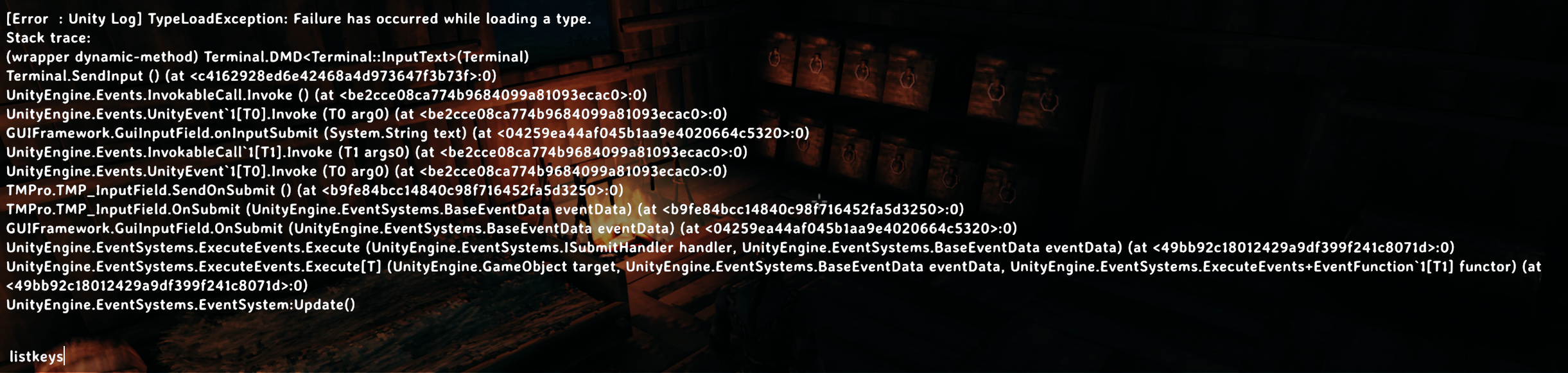 proven niche
You might have to load ServerDevcommands on the server, if it isn't already there. And check your server and your game for any out of date mods, as usual.
fierce sandal
I have ServerDevcommands mod, gonna check what I have
proven niche
Check that it's on both your game and the server, too.
fierce sandal
did you say earlier 7-8 months ago max and mod is not outdated? I see some mod 1y old last update
and 1 mod 2y ago
CombatOwner is the 2y ago
and InstantMonsterLootDrop by aedentrhorn_mods is 1y ago
 fierce sandal
ok gonna start with those and see if something changes
hmm but there is quite few old mods from Smoothbrain, like Mining, Ranching, lumberjacking, etc?
do I really need to remove all of them
proven niche
No, leave her's for last and only remove them if you have to. Those are usually well supported and up to date.
You're working with thunderstore.io for your mods, right?
fierce sandal
if its not fixed by removing those 2 mods would you mind checking my mod list if you instantly see some bad old mods? and yes im using that with r2modman
most of the mods I installed were used by that streamer quin69 and I only added few extra myself
ok removing those 2 made my dev commands work
proven niche
I will if I have time but I can't really do it any better than you can. Just click on the mod in r2modman, choose "website" and you'll see the last udated date right there. Just a couple easy clicks.
proven niche
fierce sandal
ok removing those 2 made my dev commands work
Great. 🍻
fierce sandal
hmm so how do I change it with removekeys? I see it there "preset combat_hard" but when I type "removekey preset" and anything after it says "too many parameters"
proven niche
Use "setworldpreset default" and the whole world goes vanilla.
fierce sandal
ok everything is fixed and working now I think, hope it fixed few other minor weird things we saw during gameplay too with those old mods 😅
thanks
 idle agate
can someone help me set up my server please
i got one through nitrado and i cant join and my friends cant too
proven niche
idle agate
can someone help me set up my server please
Here's the description for this channel. You can see it for yourself by clicking at the top of the screen:
"Valheim dedicated server issues. | We cannot help you with 3rd party hosting sites or give advise which one you should buy/rent"
So, read their instructions again or put in a support ticket with Nitrado.
 placid scaffold
I've got a dedicated server that I want hardcore, but I want to re-enable the map.
Whats the best way to do this?
final current
placid scaffold
I've got a dedicated server that I want hardcore, but I want to re-enable the ma...
Had you set the NoMap global flag? If so, the good news is that using either the -preset Hardcore launch argument or the setworldpreset Hardcore admin console command will result in NoMap being removed.
Just make sure to remove the -setkey NoMap launch argument if that's how you're setting it.
 full owl
Running my own server using dedicated server. Modified admin file. I can get devcommands on but when I try debug mode it tells me it’s not allowed in this environment. Any ideas? Yes server has been restarted. Yes I added steam id to admin file.
proven niche
full owl
Running my own server using dedicated server. Modified admin file. I can get d...
I'm only guessing here as I don't have time to trouble shoot it myself right now. But debugmode may not be an Admin command. You may need to have the ServerDevcommands mod installed on your game and maybe even on the server as well to get it to go into debugmode.
But, yeah. That's just a guess.
final current
Yep, Jaga is correct. No debugmode on dedicated servers in vanilla valheim
 high grove
Hi. Hoping this is the right place for this, but my friend has been hosting our world and we are wanting me to start hasting it, He says that it is a cloud save and then when he goes to C:\Users\Carson\AppData\LocalLow\IronGate\Valheim\worlds_local he said that there were only 3 files and this is what eh sent me. I added it to my same worlds_local file and relauched the game and the world is not there... These file types seem wrong. Are these salvageable at all?
 proven niche
high grove
Hi. Hoping this is the right place for this, but my friend has been hosting our ...
proven niche
high grove
Hi. Hoping this is the right place for this, but my friend has been hosting our ...
It sounds like he sent you the wrong world's files.
If his world saves are saved in the cloud, then they are in his worlds folder. Not his worlds_local folder.
And, the Cashe files are also wrong. Those aren't needed.
He needs to find the .db and .fwl file pair for the world. They have to both have the same date/time so he knows they're a proper pair and go together.
He should be able to move them from cloud to local on his PC with his game start menu options. That would put the file pair in his worlds_local folder.
high grove
proven niche
It sounds like he sent you the wrong world's files.
If his world saves are sa...
Awesome thank you! I will send this his way.
 pliant marlin
Hi all, I've looked through the discord and numerous places online for help with setting up a modded (including Valheim Plus) Valheim Dedicated Server (steam) on my Apple Silicon computer. I've found links to how to do this for the game itself (and was able to get that successfully set up), but I'm not sure where I should be configuring BepInEx for the Server app?
On the mac there is the Valheim dedicated server app and folder. Do I place the mac version of BepInEx in there? I'm unsure of how I'd modify the start_server.command file to enable BepInEx though. I'm aware that I'll most likely need to run this using Rosetta, as some components inside BepInEx aren't apple silicon native yet, but the configuration is confusing me.
Are there any documents/videos explaining how?
 low kettle
pliant marlin
Hi all, I've looked through the discord and numerous places online for help with...
low kettle
pliant marlin
Hi all, I've looked through the discord and numerous places online for help with...
It might be worth looking into something a bit more out of the box.
Anything apple side is a pain in the arse to set up. Let alone a dedicated server.
Pterodactyl, if it runs on your OS, could help you get over the hump. It would turn it into a generally plug and play experience and, added bonus? You can set up dedicated servers for lots of different games if you ever fancied
final current
pliant marlin
Hi all, I've looked through the discord and numerous places online for help with...
How good are you with shell scripting? I remember having to modify the BepInEx wrapper script to pick it up. Issues is on BepInEx's side. The script only really hooks in based on extension like .app. You'll also need to run with an x86_64 emulator as last I checked there still wasn't arm64 support for BepInEx. If you need to dive deeper, I recommend moving the discussion to #mods-issues.
Are you using Crossplay networking or direct/Steam networking?
pliant marlin
final current
How good are you with shell scripting? I remember having to modify the BepInEx w...
Thanks, I will move this to there. I’m not uncomfortable with scripting, so I’ll dig.
pliant marlin
final current
Are you using Crossplay networking or direct/Steam networking?
I’ve got options for either. My biggest challenge is determining where BepInEx goes when using the server?
final current
That query was directed at Huntero
pliant marlin
final current
That query was directed at Huntero
Sorry, was on my phone and apparently didn’t look closely enough at your message.
final current
No problem at all 🙂
 iron kindle
Are there any plans to release a Dedicated Server version that would handle game logic server side? It's kindof stupid that game stability relies on rando's PC/Connection performances....
 agile pecan
iron kindle
Are there any plans to release a Dedicated Server version that would handle game...
agile pecan
iron kindle
Are there any plans to release a Dedicated Server version that would handle game...
I don't think there are plans for that. There is a mod which tries to do that, but I've never used it and I don't know how well it works
 knotty oracle
iron kindle
Are there any plans to release a Dedicated Server version that would handle game...
knotty oracle
iron kindle
Are there any plans to release a Dedicated Server version that would handle game...
I wouldn't have thought so, no.
iron kindle
Sigh, so we're forever stuck with that crappy coding?
knotty oracle
Crappy? It's a design choice.
iron kindle
True, stuck with that crappy design choice forever :\
knotty oracle
Literally nothing wrong with it.
iron kindle
Everything about it is wrong lol
 bleak ivy
Hi, is theis a good spot for help with servers?
agile pecan
knotty oracle
Literally nothing wrong with it.
Weren't suggesting to leave "literally" for things that are true earlier?
bleak ivy
I have a server up, all my friends can join except one who gets odd errors. Have uninstalled and reinstalled, checked with r2modman and thunderstore and a manual install
knotty oracle
agile pecan
Weren't suggesting to leave "literally" for things that are true earlier?
Yes. It's still valid.
agile pecan
Well, there are definitely things wrong with how the network code works
bleak ivy
It's running in the sitting room off a pc, I can connect on wifi but roommate cant and gets "incompatible versions"
 left stream
bleak ivy
It's running in the sitting room off a pc, I can connect on wifi but roommate ca...
left stream
bleak ivy
It's running in the sitting room off a pc, I can connect on wifi but roommate ca...
I assume that is your friend's log that you posted?
iron kindle
bleak ivy
It's running in the sitting room off a pc, I can connect on wifi but roommate ca...
Means your friend doesnt run the same version as the game, either update server or your friend needs to update the game. Could be a mismatch with addons as well
bleak ivy
It is
It's fixed, friends - I changed the language
A week of tinkering and its fixed bw swapping the language around
WTF why do I only do silly games like this and abiotic
proven niche
bleak ivy
WTF why do I only do silly games like this and abiotic
Cut down on your drinking, maybe.
iron kindle
bleak ivy
It's fixed, friends - I changed the language
And are your other friends that were able to connect before that change, still able to connect?
proven niche
I don't think he can hear us. He's probably out on the window ledge thinking about jumping even if it is just a first floor ledge.
iron kindle
lol
bleak ivy
proven niche
Cut down on your drinking, maybe.
I am, it's going pretty well!
bleak ivy
iron kindle
And are your other friends that were able to connect before that change, still a...
Yup, everyone has been able to connect since day one except this one guy who had the issue fixed by changing the language around. Non intuitive fix
iron kindle
Oh ok, he changed his game language?
bleak ivy
yup, fixed the incompat version issue.
final current
I'm guessing mods are involved.
agile pecan
Probably, apparently changing the ingame language is a known "fix" for some issues with certain mods
 woeful zenith
Hey guys, I've been playing Valheim solo on and off since launch, just now trying to get friends into the game, we all live out off grid and run off our own Starlink internet dishes, I'm guessing if we wanted to play together we'd need to rent a dedicated server rather than host ourselves?
 olive depot
woeful zenith
Hey guys, I've been playing Valheim solo on and off since launch, just now tryin...
olive depot
woeful zenith
Hey guys, I've been playing Valheim solo on and off since launch, just now tryin...
I host a server that nobody plays on anymore. I could create a new world and drop in now and then. It's on my spare machine.
proven niche
woeful zenith
Hey guys, I've been playing Valheim solo on and off since launch, just now tryin...
What is it about satellite links that makes you think you probably couldn't self host a dedicated server? Bandwidth? Latency?
olive depot
Typically, during perfect conditions, the physics involved in satellite communications account for approximately 550 milliseconds of latency round-trip time. The longer latency is the primary difference between a standard terrestrial-based network and a geostationary satellite-based network.
woeful zenith
proven niche
What is it about satellite links that makes you think you probably couldn't self...
Honestly no clue lol, haven't even tried. I'm an old outdated dog, used to play Everquest on dial up back in the day and only recently got back into PC gaming
 plain trellis
olive depot
Typically, during perfect conditions, the physics involved in satellite communic...
plain trellis
olive depot
Typically, during perfect conditions, the physics involved in satellite communic...
I think you mixing up Starlink with Viasat (and other old satelite internet providers) Starlink are not in geostationary orbit.
olive depot
@woeful zenith As I said my server is unused. I'd be happy to setup a new world for you and your friends to play on free. DM me.
woeful zenith
olive depot
<@813863615786516501> As I said my server is unused. I'd be happy to setup a new...
Ok thanks, I still need to convince them to buy and play but I'll get back to ya
 wide cipher
don't use # in posts @old narwhal 😄
 eager walrus
final current
Are you using Crossplay networking or direct/Steam networking?
eager walrus
final current
Are you using Crossplay networking or direct/Steam networking?
For now, direct/steam, but eventually both. I'd like to create script that will notify when somebody tries to join (and the server is offline). I figured out the logic/network side of this, but I don't receive any traffic when I try join unavailable server. For now I just tried to listen on TCP/UDP on 2456 and 2457.
For checking players, tools like A2S for Python works fine. But it's of course only if server is working.
I don't know much about how games work on network, but I imagine there should be like some UDP packets that identifies player and its connection.
 snow geyser
eager walrus
For now, direct/steam, but eventually both. I'd like to create script that will ...
snow geyser
eager walrus
For now, direct/steam, but eventually both. I'd like to create script that will ...
For checking players and server you only need one mod on the server called ( discord control ) it reports everything to a discord text channel, allows rcon commands, players online, server saves etc
eager walrus
snow geyser
For checking players and server you only need one mod on the server called ( dis...
Thanks, definitely will be usefull too.
 novel aurora
Anybody looking for a world to join?
novel aurora
olive depot
I host a server that nobody plays on anymore. I could create a new world and dro...
How’d that work out?
@woeful zenith
PM me if anyone interested
Also looking into “Viking Games”
Participants n Creators welcome
woeful zenith
novel aurora
<@813863615786516501>
Haven't tried yet, been busy with sick wife and kids
novel aurora
Sorry to hear that. Hope all goes well.
I’m an old dog myself haha, lemme know if you’re.. UP AND AT THEM
novel aurora
@woeful zenith
novel aurora
 olive depot
novel aurora
How’d that work out?
olive depot
novel aurora
How’d that work out?
I got it all setup with a new world and tested it OK. I wanted access to my old world so I looked up setting up another server. It worked so both worlds are up now.
novel aurora
Just saw your msg now.
Don’t think that’s necessary
olive depot
It's handy having 2 servers running on the same machine. I can log in to whichever I feel like playing.
proven niche
Hmm... If you're the only one playing on your servers, then you don't really need a server at all to just play the game by yourself. If there's other players with you, then you'll need to consider them while you decide to turn one off and the other on.
olive depot
I have both running at the same time. A couple friends play on one and the other one I set up for @woeful zenith and their friends.
 fast warren
Hola! I currently have a fine running dedicated server but I'm curious if someone has any documentation about running two servers at once on the same machine. I am using Windows. Both would be using crossplay.
olive depot
fast warren
Hola! I currently have a fine running dedicated server but I'm curious if someon...
I just did that yesterday. I forwarded another port, created a new folder, copied everything in server 1 folder to server 2 folder and edited .bat file to use other port.
fast warren
olive depot
I just did that yesterday. I forwarded another port, created a new folder, copie...
interesting. so its two different scripts? are you using crossplay? (if youre using crossplay is the playfab IP the same except for the ports being different?)
olive depot
crossplay is enabled
fast warren
did you do something like 3456-3458 vs 2456-2458?
olive depot
exactly
fast warren
Thank you! Ill give it a shot
olive depot
not sure about playfab
fast warren
playfab is crossplay basically
its what microsoft uses as a proxy kinda thing
security reasons i believe
@olive depot same folder and everything just like this?
 olive depot
yes
fast warren
sweet
olive depot
worked for me. good luck.
fast warren
olive depot
worked for me. good luck.
worked like a charm man! thanks again
final current
I would highly recommend using a separate -savedir for both if you haven't already.
olive depot
final current
I would highly recommend using a separate `-savedir` for both if you haven't alr...
I'm curious why that is needed as long as worlds have separate names.
final current
It is not, but it stops you from accidentally cross-contaminating world management and it allows you to have separate whitelist/admin list/bans
olive depot
I see. Thanks.
fast warren
final current
It is not, but it stops you from accidentally cross-contaminating world manageme...
so if im going to be the only admin, then im safe leaving it as is?
final current
Totally up to you if the world names are at least unique. The one case I would say where it's absolutely necessary is if you have the desktop version of the game on the same OS as the dedicated server(s). In that case, the risks are too high IMO as you could find cloud syncing promote or overwrite the wrong version of your world.
fast warren
final current
Totally up to you if the world names are at least unique. The one case I would s...
yeah that makes sense. its a seperate machine
olive depot
Is this the command? -savedir C:\Users\username\AppData\LocalLow\IronGate\Valheim_2
final current
olive depot
Is this the command? -savedir C:\Users\username\AppData\LocalLow\IronGate\Valhei...
That's the argument, yep. You can use any directory the dedicated server's system user has access to.
olive depot
Thanks. Do I need quotes around path?
final current
That's up to whatever command interpreter you're using and whether the path has anything that needs to be escaped for that interpreter.
If this is Windows and you're using cmd.exe (either directly or via a batch script) then you would want double-quotes around it if there are any spaces at the very least. In most cases, it doesn't hurt to have them.
olive depot
OK thanks. Gonna do it.
final current
Cool. I recommend backing up the worlds somewhere then make sure to copy your world .fwl/.db pair to the new <savedir>\worlds_local before starting that one's server again.
plain trellis
FYI:
When hosting multiple private servers for different game-instances and games we play, running Proxmox with one of the VM's with Portainer, has made it so much easier for me. Highly recommended to try out, especially if you have dedicated HW to run the server(s) on.
I'm not a Linux guru, but I got it running after some learning. To me, it was worth the effort.
 hasty moth
Hi, I’m looking for a non modded RP server (I play on steam deck and am not sure how to install mods on there). Are there any available and open for recruitment? 😊
proven niche
hasty moth
Hi, I’m looking for a non modded RP server (I play on steam deck and am not sure...
Check over in the #1024264966712340510 channel. This channel is just for help with setting up the servers. Good luck with it. Have fun!
hasty moth
proven niche
Check over in the <#1024264966712340510> channel. This channel is just for help...
Thank you!!
 stone pasture
How could I reset a world's resources without affecting player buildings protected by wards?
knotty oracle
How would you do it WHILE affecting it?
proven niche
stone pasture
How could I reset a world's resources without affecting player buildings protect...
You should probably ask in one of the mod channels here. They have that kind of info that you're gonna need to do that.
 latent crypt
What if I want to set multiple keys? Like both nomap & nobuildcost, would it be like this?
-setkey nomap, nobuildcost or would it be -setkey nomap nobuildcost
 final current
latent crypt
What if I want to set multiple keys? Like both nomap & nobuildcost, would it be ...
final current
latent crypt
What if I want to set multiple keys? Like both nomap & nobuildcost, would it be ...
-setkey nomap -setkey nobuildcost
 woven blade
Hmm, been a few ywars since I started my Valheim server, isn't it possible to install/update the server via SteamCMD any more?
Ah fixed it, there was some -beta none parameter that wasnt supposed to e there.
 craggy blade
Hi Folks, I am running a dedicated server in immersive mode (via the -preset immersive) and it used to work fine. As of yesterday (after a server restart), we are suddenly able to build portals in the game (and they work). Does anyone know what i have to do to make the portals disappear in the build menu for player again ?
 snow topaz
Does anyone know the devcommands for removing mist from the mistlands?
knotty oracle
I don't believe there are any. But then, it's Mistlands for a reason.
snow topaz
i'm trying to get a good photo of it
proven niche
snow topaz
i'm trying to get a good photo of it
I think the only way to do that would be with a mod. You could ask in one of the mod channels here.
olive depot
fast warren
interesting. so its two different scripts? are you using crossplay? (if youre us...
So only the original server has the crossplay shuffle icon. I think that the problem is they have the same ip.
fast warren
olive depot
So only the original server has the crossplay shuffle icon. I think that the pro...
same for me
however only the second one for me has the crossplay icon
olive depot
Whichever starts first?
fast warren
No idea honestly. I could restart them and see
olive depot
prolly is that
 main eagle
How can I run the Valheim server over a local network? I've tried a dozen ways from the Internet, installed various programs, installed Hamachi and Radmin VPN, nothing helps. The game does not see an open server on any of their computers. Is it even possible to create a local network in this game?
olive depot
main eagle
How can I run the Valheim server over a local network? I've tried a dozen ways f...
If you set up a dedicated server on one machine it's available over the whole internet including other machines on your network.
proven niche
main eagle
How can I run the Valheim server over a local network? I've tried a dozen ways f...
If your game(s) and the server are on the same home LAN, use the server's internal IP address and port to connect. That's without using crossplay on the server.
If you need to have crossplay on the server to support Xbox users, then use the Join Code crossplay puts in the server command window/log.
plain trellis
The last option isn't availible "offline", correct? For playing xbox console and PC Steam on dedicated server, all on same LAN, you must use PlayFab over internet? Or did I miss something?
final current
plain trellis
The last option isn't availible "offline", correct? For playing xbox console and...
Yes. You'd have to use Crossplay to support an Xbox user and that does indeed use PlayFab Party relays on the Internet.
You can do both loopback and LAN networking with the Steam mode (not Crossplay), but even then it still uses Steam's servers on the Internet to facilitate lobby features and Steam user identity. There are workarounds with Steam services emulators, though.
plain trellis
final current
Yes. You'd have to use Crossplay to support an Xbox user and that does indeed us...
Thanks. Lets wish for a pure LAN-'mode' after 1.0, where owner of the game, can create a LAN server for all platform, that doesn't need connection to internet to play. Valheim are awesome to play in the same room with friends.
 ornate delta
This doesnt allow portals to put copper ore through them (havent tried any other ore) -modifier raids none DeathPenalty casual Portals casual
knotty oracle
You need -modifier before each one.
ornate delta
knotty oracle
You need -modifier before each one.
Found that out by trial and error ty for confirmation
 rough rapids
Hi all, i'm trying to run a docker-compose file with a Valheim dedicated server but it does not seem to be working. I'm using "image: lloesche/valheim-server" image.
Should i use a different one? Is there one that can work without a HOME directory?
Thanks a lot for any help 🙏
final current
What are you seeing when you try to use it?
rough rapids
well, thats the log file. i dont see any weird errors that are crashing the server.
so the docker runs. the server just never shows up anywhere (never been able to connect to it)
final current
Looks like it's working well. What's the issue you're encountering?
Rather, how are you trying to connect to it?
rough rapids
we can not connect to the server.
i tried looking for it in the community server browser, and i tried adding it with the direct IP. but both did not seem to work
port forwarding and firewall allow rules were created...but no difference sadly
final current
Can you give us your environment variables? Feel free to obfuscate the password
rough rapids
environment:
- SERVER_NAME="Da_maniaC's Valheim Server"
- WORLD_NAME="Pjukeriksja"
- SERVER_PASS="redactedt"
- SERVER_PUBLIC=True
- TZ=Europe/Amsterdam
final current
Try lowercase "true" (with the quotation marks if using YAML dict syntax to declare the vars). Also, these vars don't match your logs. The logs show it loading a Testworld instead of Pjukeriksja.
And given you're not using Crossplay, make sure you've exposed/published the container's UDP ports to the host in your docker composition and then make sure you've forwarded the host's UDP ports over your NAT if using a home router to connect to the Internet.
I am off to bed. Good luck!
rough rapids
Ahh yes i redacted the world name from the logs...that is why you were seeing a difference.
Thanks for the help so far, will give it a try!
Also, the ports are setup as follows (which allows me to forward the exact same ports throughout the docker/host/network)
ports:
  - 2456-2458:2456-2458/udp
Needs to be an array and the entry should be in quotation marks to prevent YAML from treating it like a dict. See the examples block: https://docs.docker.com/reference/compose-file/services/#short-syntax-3
rough rapids
ah.. i have several other dockers that do not use quotes and work just fine. i tried both methods in the case of Valheim... no difference sadly.
when i start a valheim server on my main gaming pc, it just works. its discoverable to friends and they can join.
all the forwards are working (checked " sudo ss -ulpn | grep 245" and " sudo iptables -S | grep 245" through SSH)
i really don't get why its not working. 🙂
final current
rough rapids
ah.. i have several other dockers that do not use quotes and work just fine. i t...
Are you able to connect via the host system's LAN IP and main gameplay port manually with the docker setup?
And when you got it working native on the host, was that with the default -crossplay argument in place in the included shell script?
rough rapids
on my own PC i always start it with Crossplay yeah.... does that matter?
final current
Yeah, big difference in how the networking works
rough rapids
does the compose file support a CROSSPLAY=true flag or so?
final current
The container has an environment variable like that, yeah, though if you and the other players are using the Steam version, the reduced latency and increased reliability of connecting directly could be worth the trouble of the manual networking you have to do
final current
If you want to try to get direct networking working, a next step would be trying to connect to the game manually using the LAN IP of the host (or loopback if you game on the server PC).
If that works, NAT port forwarding is the likely problem area assuming your ISP isn't using CGNAT
rough rapids
I will try connecting using the LAN IP in a bit
rough rapids
This is so weird... it will connect using the LAN IP, but when i give in the password i set up in Environment it will say "Wrong Password"
 blissful iron
Hey guys, I'm trying to set up a lan server but the catch is I don't have any networking devices. I just moved to a new apartment with my friend and we want to play some Valheim. Is it possible to just plug one Ethernet cable to two PCs and run server on one?
proven niche
blissful iron
Hey guys, I'm trying to set up a lan server but the catch is I don't have any ne...
Both PCs and the server will need internet access. If you only have one ethernet cable use it for the server. If you have Wifi for the PCs, that's not ideal but should work.
If you don't have Wifi, you can try to set up a 'hotspot' temporary Wifi network using the PC that has the ethernet cable. You'll have to investigate how to do that on your cabled PC operating system. And it's not ideal at all but may get you going in a pinch.
proven niche
rough rapids
This is so weird... it will connect using the LAN IP, but when i give in the pas...
Is there some reason it isn't interpreting the -password variable? Is the password 5+ ASCII characters? Are you getting the right -name in your server list, if you get one at all?
Is the container getting the other environment variables from your container's environment file ok? You could try a password of "secret", which I think is the default to see if it's a variable problem.
rough rapids
The only environment variables i have, are in the compose file that i showed earlier.
The image documentation said nothing about another env file with more settings?
proven niche
rough rapids
The only environment variables i have, are in the compose file that i showed ear...
Oh, ok. The environment file is just an option. I didn't remember correctly whether the lloesche container used it or not.
rough rapids
I run a few different dockers that work without a hitch (nginx, npm, pihole, dashy, kavita)
2456-2458 are really the only ports that a valheim container needs right? Because stuff like port 80 is already claimed by other dockers.
proven niche
Yes. It actually only uses the 2456 and 2457 ports right now. The 2458 port might be for later or something. You've forwarded them using IPv4 and UDP protocol in your router, right? Maybe try forwarding the two ports individually.
Oh, and double check that the server's internal IP address hasn't changed. Some home routers will do that without warning unless you specifically set up a permanent IP for the server.
rough rapids
 rough rapids
proven niche
Yes. It actually only uses the 2456 and 2457 ports right now. The 2458 port mi...
rough rapids
proven niche
Yes. It actually only uses the 2456 and 2457 ports right now. The 2458 port mi...
This also seems correct:
username@servername:/DockerData$ sudo docker inspect -f '{{range .NetworkSettings.Networks}}{{.IPAddress}}{{end}}' valheim 172.18.0.2 username@servername:/DockerData$ sudo iptables -t nat -L DOCKER -n -v | grep 245 0 0 DNAT 17 -- !br-0e2f8e57adb1 * 0.0.0.0/0 0.0.0.0/0 udp dpt:2456 to:172.18.0.2:2456 0 0 DNAT 17 -- !br-0e2f8e57adb1 * 0.0.0.0/0 0.0.0.0/0 udp dpt:2457 to:172.18.0.2:2457 0 0 DNAT 17 -- !br-0e2f8e57adb1 * 0.0.0.0/0 0.0.0.0/0 udp dpt:2458 to:172.18.0.2:2458
 rough rapids
turns out its working on lan... but it made a config file using "password" as a server password instead of password
public value says "1" maybe it should be 1 or true also.
when i restart the docker with different variables they do not seem to get updated though.
final current
rough rapids
turns out its working on lan... but it made a config file using "password" as a ...
How are you restarting the containers?
And yes, on that image, it's - SERVER_PUBLIC=true if using the array syntax or SERVER_PUBLIC: "true" if using the dict syntax.
rough rapids
i use OpenMediaVault so i use the restart/start method from there normally
final current
Is this the Compose Plugin for OMV?
rough rapids
yeah
final current
You might try Up instead of Restart
rough rapids
i always use Down and Up actually
im starting to think i might just need a different (more well maintained?) image then loesche tbh
final current
What makes you think that? From the logs you showed it seems to be working well
If it's not acknowledging new env variables you're setting, I doubt it's an image-level issue
Anything show up when you use the Check button?
rough rapids
no its okay
i managed to start and connect to it in LAN mode actually
it turns out, also when i host it from my own PC i need to use Crossplay in order for it to work. Not sure how to set this env for the image (i guess just CROSSPLAY=)
and then the only issue left is the loading of the right world (which also did not seem to work)
final current
When you use Crossplay, your server creates an outbound connection to a relay server hosted by Microsoft and all your players just connect to Microsoft's relay instead of your server directly. It makes it so you don't have to deal with IT networking, but comes with plenty of drawbacks.
Re getting it working on LAN, you've gotten past the password issue?
rough rapids
yeah... turns out i had to set: password , instead of "password"
final current
Alrighty, so in your NAT router (not talking about OMV's firewall), you have UDP forwarding rules that include both ports? And in the forwarding rule, the LAN IP you forward to is your OMV host and that IP hasn't changed since you created the forwarding rules?
rough rapids
Yep, IP is static, rules are in place and i tried TCP/UDP rules and UDP... no difference
i also have allow rules set up in my router firewall for WAN to LAN and LAN to WAN
(fyi: ZDoom and OpenTTD servers i run normally work without any problems)
final current
The WAN IPv4 address reported in the router's admin console, is it the exact same address you see when you browse to https://checkip.amazonaws.com/ from within the LAN?
rough rapids
yeah
final current
Assuming you have your SERVER_PUBLIC env var set up correctly, if you put that IPv4 address in https://geekstrom.de/valheim/check/ do you get back your server stats blob?
rough rapids
oh, thats a nifty tool
in the server log it states
Jun 1 20:11:56 supervisord: valheim-server DEBUG - [134] - Server config is name: "Da_maniaC's Valheim Server", port: 2456/udp, world: Pjukeriksja, public: 1, mod: none
so that should mean its okay
 final current
What about with :2456?
rough rapids
same 😦
final current
OK, if you're absolutely sure the router's admin console WAN IPv4 matched the one that test site returned, then likely a port forwarding or router firewall issue.
final current
This won't help with the Community pane or geekstrom checks, but you will want to make sure you don't have a Crossplay server still running reporting from the same WAN IP, otherwise Valheim game clients will attempt to connect to its relay instead of directly connecting to your new server.
rough rapids
final current
This won't help with the Community pane or geekstrom checks, but you will want t...
that was actually the case when i tested though.... i will check again tomorrow.
thanks for all the help so far! 🙂
final current
Sure thing. I'm sure you'll get it working soon. Have a good one
 inland shard
Hey yall, we just started a dedicated server with superhost. We can't figure out how our xbox friends can play
The host said he enabled crossplay but it still won't work
final current
You've given the Xbox player the server's Crossplay join code? What did they see when they attempted to connect using that join code?
inland shard
We tried using the IP
It shows the server there, but it has a red X through it
"Failed to connect" is the message I get
Replicated by 3 different Xbox players trying to play
final current
If you and the other PC or Mac players had been connecting to the Steam-facilitated server, you'll want to delete your favorites entry for the server before attempting to connect again. I would recommend connecting with the Join Code instead of the IP address in Crossplay mode, even if coming from PC.
If still getting the message, the next time you attempt to connect, I would pull up the server logs provided by your hosting provider to see if there's anything obvious regarding the issue.
inland shard
We can't even find a join code
final current
It should be in the server logs if your hosting provider doesn't make it available on whatever dashboard they present. The server will only have a join code if Crossplay is enabled.
Is superhost a hosting provider? Or did I guess wrong and it's actually a software toolchain?
inland shard
A hosting provider. Thanks for your help. Unfortunately I'm not the one with the software, so I'm just trying to explain to him that he must not have crossplay enabled
final current
Well, he's welcome to stop by and post server logs if he wants some deeper troubleshooting.
 jade saffron
Hey all, im running into issues getting mods to load on a dedicated server ive propped up. The mods I got (just a couple basic ones) all said "Server side" which means that, as I understand it, players that join my server shouldnt need to download them on their own through a modpack on thunderstore or anything, right?
But thats not happening, which either means im not understanding how mods work, or they're not properly installed on the server, just my client.
Currently the mods are siting in users\kreiger\roaming\thunderstore mod manager\datafolder\valheim etc
left stream
jade saffron
Hey all, im running into issues getting mods to load on a dedicated server ive p...
First let's find out if your server is loading the mods. There should be a log file in the bepinex folder.
jade saffron
left stream
First let's find out if your server is loading the mods. There should be a log f...
under config, core or plugins? I assume core
left stream
jade saffron
under config, core or plugins? I assume core
same folder. profile/Bepinex/
jade saffron
to confirm, you mean Appdata/Roaming/Thunderstore Mod Manager/Datafolder/Valheim/Profiles/Default/profiles/BepinEx
there is no log.txt in that foilder or any subfolder that I saw
left stream
c:\Users\Student\AppData\Roaming\r2modmanPlus-local\Valheim\profiles\WILD-WEST\BepInEx\LogOutput.log
jade saffron
yeah, that does not exist, no.
left stream
jade saffron
yeah, that does not exist, no.
it should when you start the server with bepinex.
jade saffron
left stream
it should when you start the server with bepinex.
ok, pretend im substandard intelligence. Walk me through that that means. I hit "Modded" under the Thunderstore app. is there a different/better way to start the file server with bepinex?
left stream
jade saffron
ok, pretend im substandard intelligence. Walk me through that that means. I hit ...
I use r2modman but should be same like thunderstore mod manager.
When you start it for the first time it asks you to select either server or game.
To be honest I don't even do it like that. I install mods separately then I sync that folder to the server's Bepinex/plugins folder. But you can try either way.
jade saffron
Ok, thunderstore does work similar
ly
I chose "valheim dedicated server"
I have 6 mods picked. bepinexpack_valheim by denikson and 5 other assorted QOL mods
the bepin one is the pinned one.
If its easier for you, I have no issue picking up R2modman so we can mnake sure we're on the same page
im already doing it lol
left stream
 jade saffron
Ohh hmm
left stream
Settings > Locations
jade saffron
left stream
That does not say "set manually" it aims me at my steamlibrary\steamapps\common\valheim dedicated server folder on the correct drive.

ok, so I have two mods. bepinexpack and torches eternal, just to test.
now what?
left stream
jade saffron
now what?
start it
jade saffron
from the "start modded" button on the side, or manually from the headless.bat or does it not matter?
left stream
jade saffron
from the "start modded" button on the side, or manually from the headless.bat or...
yes. modded
 left stream
jade saffron
ok its launching
left stream
jade saffron
ok its launching
Have you run that server as vanilla before? configured password, world files etc?
jade saffron
Yeah. I actually had a buddy connect just now while it was up.
its a fresh world. the idea for it is a new server with a more reliable host (me) to do a couple QOL mods for some friends of ours.
I can run the vanilla server all day, but this modding shit is giving me hives lmao.
left stream
jade saffron
I can run the vanilla server all day, but this modding shit is giving me hives l...
would you mind trying it my way - a gap between the modman's and server's folders?
This way you'd have to manually copy/sync the mods from the profiles to the servers folder. I use freefilesync, but any file manager would do.
an advantage is you'll use the bat script and will not accidenlty update the modpack.
jade saffron
left stream
would you mind trying it my way - a gap between the modman's and server's folder...
I dont mind doing that. is that a sync between two folders on the same system or a sync between two different systems?
left stream
jade saffron
I dont mind doing that. is that a sync between two folders on the same system or...
sync means mirror the folder in this case. like delete everything and copy so it's exact same copy.
jade saffron
Yes, is it between two seperate PCS (my gaming pc and the dedicated server) or between two folders on the dedicated server itself.
i guess it doesnt matter. im down to try. hit me.
left stream
jade saffron
Yes, is it between two seperate PCS (my gaming pc and the dedicated server) or b...
I mean I install mods in the modman and I can then sync that folder to local, or remote or any server anywhere. it doesn't matter.
jade saffron
ok, so where do I move the files to for the server? where SHOULD they be in the steamapps folder?
or should they be in locallow?
I assumed they should be somewhere in locallow/irongate/valheim
left stream
ok so you installed the server with steam service aka GUI, and not steamCMD right?
left stream
jade saffron
I assume this is th location of your server
jade saffron
uh, yes.
and yes
My adminlist/bannedlist and save filesa re in appdata/roaming/locallow/irongate/valheim
left stream
jade saffron
My adminlist/bannedlist and save filesa re in appdata/roaming/locallow/irongate/...
Do you also have the game client or only the server on that PC
It's good to separate the folders for world files to avoid issues in such case
jade saffron
the game client is on a seperate PC. I hjave a laptop that is my primary device, the server is on another physical PC entirely.
Valheim game client is not installed on the "server" just the dedicated server.

@left stream are you playing from the same machine you're hosting?
left stream
jade saffron
<@884836659408035850> are you playing from the same machine you're hosting?
no. I have server on linux and I play from windows.
left stream
jade saffron
the game client is on a seperate PC. I hjave a laptop that is my primary device,...
How to manlually install Bepinex?
#dedicated-server message
jade saffron
left stream
no. I have server on linux and I play from windows.
Yeah. my laptop is a macbook, but that shouldn't matter at all, its got steam and its not even involved in this yet, this is pure serverside stuff
left stream
jade saffron
Yeah. my laptop is a macbook, but that shouldn't matter at all, its got steam an...
it matters if some mods don't work on mac. But we're dealing with the server now.
jade saffron
left stream
it matters if some mods don't work on mac. But we're dealing with the server now...
Yeah. if it comes to that, i can play on the same PC im hosting from, but i'll burn that bridge when I get there.
jade saffron
left stream
it matters if some mods don't work on mac. But we're dealing with the server now...
so, in this case im looking at the valheim_server.exe file folder location
@left stream side-question : are some mods truly serverside, as in my friends will not need to manually download anything and it will be managed by the server once everything is up and working, or is that no longer a thing?
bepinex is installed manually
left stream
jade saffron
<@884836659408035850> side-question : are some mods truly serverside, as in my f...
no. the tags on thunderstore can be confusing. There are mod types of mods that can't be properly tagged with only 2 tags. I will post another link now
jade saffron
 left stream
jade saffron
left stream
jade saffron
configure and start start_headless_server.bat
jade saffron
left stream
configure and start start_headless_server.bat
Yeah. I ran it.
and of course a buddy of mine whos up my ass about "HOWS THE SERVER COMING" installs his own mods and is like "idk what the problem is, these work fine"
Do I even need to fuck with any of this then if they just run them all clienside?
left stream
jade saffron
Do I even need to fuck with any of this then if they just run them all clienside...
jade saffron
I thought I wsa doing this so nobody had to run them clienside. like Ark does it, or project zomboid. but if we cant do that anyway.. lol
left stream
jade saffron
I thought I wsa doing this so nobody had to run them clienside. like Ark does it...
no it's not like that. only a few mods are server-only
jade saffron
left stream
no it's not like that. only a few mods are server-only
Thats a giant fucking mess lmao.
Project Zomboid had a very annoying issue where players would naturally update their mods while not in-game but because the server would be persistent, the players would have more updated versions of mods than the server would, and you'd have to constantly bring down the server or restrict people to versions of mods which was a pain to do for PZ specifically.
it sounds like thats the case here as well, maybe to a slighter degree
left stream
jade saffron
Thats a giant fucking mess lmao.
see what i posted above, there are mods that have to be on the server, but most of them are client-side. although it's not good if each player has a different config. That's why they're needed on the server to sync the configs to the clients. I can help you to make modpacks, up to 20ish mods. cause if you need more that that it takes time but it's easy to add/remove mods later on, once you figure out the basics.
jade saffron
left stream
see what i posted above, there are mods that have to be on the server, but most ...
I just need 6 mods.
including bepin
it sounds like maybe everything we need is just... clientside.
left stream
jade saffron
I just need 6 mods.
I'm supposed to move to the mods-issues chan cause this one is for dedi server mostly 😅
left stream
jade saffron
I just need 6 mods.
You may list the mods there in either mods-issues or mods-discussion channel
left stream
jade saffron
it sounds like maybe everything we need is just... clientside.
yeah may work 99%. although some mods would not.
 charred delta
Anyone got a dedicated server and need a builder?
 sage nexus
charred delta
Anyone got a dedicated server and need a builder?
sage nexus
charred delta
Anyone got a dedicated server and need a builder?
Need? no. But if your ping is in the southern hemisphere then I have a server. But you would be better off posting/asking in https://discord.com/channels/391142601740517377/1024264966712340510
charred delta
Aussie here so yep
rough rapids
@final current
I have gotten the dedicated server to work now, but only if i turn off my firewall in my home network router (and i don't really plan to do that).
I have and had set up all the necessary exceptions for Valheim but for some reason it still wont work with the firewall enabled.
I even moved the Valheim Allow rules on top of the entire Rule set now:


Could any of these defenses prevent Valheim from working?
(all my other services such as nginx, kavita, jellyfin, pihole and ZDoom/OpenTTD server work fine with all of this enabled).
 final current
rough rapids
Could any of these defenses prevent Valheim from working?
(all my other servic...
final current
rough rapids
Could any of these defenses prevent Valheim from working?
(all my other servic...
I would first consider disabling UDP flood defense. Game servers, videoconferencing, and video streaming, all mostly work by using a flood of UDP packets.
That may not be enough though as the initial connection attempts should not be picked up as a flood.
final current
I think the biggest point of concern is your Service Type Object. For inbound rules, you want source port to be anything, and only destination ports should be Valheim's
For outbound, you want the opposite (src is 2456-2457, dst is anything). Most Firewalls will be permissive for traffic matching NAT port forwarding rules in either direction, so you may not need an outbound rule at all. You'd have to consult your firewall's documentation.
rough rapids
Yeah for LAN to WAN i actually have another outgoing rule, allowing ports 1024-65536
final current
My guess is it's the Service Type Object then. If you're using it for inbound forwarding or inbound filtering rules, then source port should be every port possible.
final current
And at that point, the Service Type Object should not be used on a LAN to WAN rule.
rough rapids
I will try that when i get home... thanks 🙏
Only one question remains which is loading my existing world (from my current local save).
I put it in the volume/directory that i linked the docker to and have the same name defined in the compose file WORLD_NAME. Is there a flag/setting for loading an existing world instead of generating one perhaps?
Right now i have it in: /valheim/data/worlds_local/
Should it be /valheim/data/server/worlds_local/ perhaps?
final current
There's no flag to force loading of an existing one, but it will do it if your .fwl/.db pair is in the right place.
The image you're using expects that pair to be in /config/worlds_local.
It's assuming you're bind-mounting one of your host's directories to the container's /config dir. It's the dedicated server's "savedir". In addition to the worlds_local subdir, it will also have your banlist, adminlist and both Valheim's and the container's automated backups.
rough rapids
Thanks i will check it.
Almost there 🥳
sage nexus
rough rapids
Could any of these defenses prevent Valheim from working?
(all my other servic...
Block Fraggle Attack
Any broadcast UDP packets received from the Internet is blocked.
sage nexus
rough rapids
Yeah for LAN to WAN i actually have another outgoing rule, allowing ports 1024-6...
65535
it's a zero-indexed range
sage nexus
rough rapids
Only one question remains which is loading my existing world (from my current lo...
-world
valheim_server.x86_64 -port $port -world "$world"
and if that references an .fwl for which there is no corresponding .db: it will generate a new map based on the seed/params within the fwl
but if there is a .db, it loads it
 mortal coral
Does anyone know if the following is correct for setting these world modifiers. I'm on the wiki and I'm not sure of the Portals one, and whether StaminaRate can be set here too.
-modifier Combat easy
-modifier DeathPenalty casual
-modifier Resources more
-modifier Raids none
-modifier Portals portalitems
-modifier StaminaRate 50
I'm pretty sure I can self test most of it, including StaminaRate, but probably not portals. unless I can cheat them into a test world somehow I suppose.
mortal coral
mortal coral
Does anyone know if the following is correct for setting these world modifiers. ...
Maybe it's -setkey StaminaRate 50
mortal coral
mortal coral
Maybe it's -setkey StaminaRate 50
After searching discord more and testing, I can confirm that -setkey 'StaminaRate 25' (with the quotes) appears to work. Possibly this is the method for all the global keys, so the final working argument list is
-modifier Combat easy
-modifier DeathPenalty casual
-modifier Resources more
-modifier Raids none
-modifier Portals portalitems
-setkey 'StaminaRate 50'
final current
Looks good.
final current
sage nexus
-world
`valheim_server.x86_64 -port $port -world "$world"`
The -world argument should not be used on that image. It has its own world management behaviors that depend on you not supplying that argument manually.
rough rapids
@final current
Shouldnt this mean the requests are coming from all sorts of different ports instead of 2457?
 final current
rough rapids
<@287433598825660417>
Shouldnt this mean the requests are coming from all sort...
final current
rough rapids
<@287433598825660417>
Shouldnt this mean the requests are coming from all sort...
Exactly. That's why your source port range should be all possible ports as I mentioned.
rough rapids
(this happens when i use the geekstrom site to check the connectability)
but that is on the WAN side?
if i open up all on the WAN side...then protecting it makes no sense? 🙂
final current
Correct, you shouldn't be protecting the ports you want everyone to be able to access.
The destination range will still be 2456 through 2457.
rough rapids
This rule should mean:
<Any> incoming request from WAN towards <my server IP> + <UDP Ports 2456-2458> = PASS Immediately
 final current
Can you share your Service Type Object? That's where it matters.
 final current
Yes.
rough rapids
Woop Woop
 final current
That will satisfy your average player, though macOS and Linux users can technically configure the kernel to use even lower ports if they want to (most don't).
rough rapids
that was a slip-up on my part... Thanks again!
final current
Don't forget to disable UDP flood protection. And no problem, glad you got it working.
rough rapids
its working now with UDP Flood Protection on.... but if people start dropping i will disable it
final current
rough rapids
its working now with UDP Flood Protection on.... but if people start dropping i ...
If you do leave it on, you should immediately adjust all Steam clients on your LAN so your own machines don't get blocked, e.g. when using the Community servers pane.
Steam Settings (Preferences… on macOS) / In Game / MORE / Server browser pings/minute
and reduce it from the default.
 limpid lance
ok where do i go to look for mods that are serverside only? i have a few friends that play through GeForce so they cant install mods unless the mods are on steam
final current
limpid lance
ok where do i go to look for mods that are serverside only? i have a few friend...
#mods-discussion would get you the most knowledgable eyes for that
limpid lance
ty
sage nexus
final current
The `-world` argument should not be used on that image. It has its own world man...
Oooh... docker. Ew
 ivory token
I’m sure this is pinned somewhere but me and a buddy just rented a server for Xbox. I haven’t looked at it yet but does anyone know how to change some of the settings like you can if you set up a personal server??
Not trying to do anything, just drop combat to easy, death penalty to easy (less reduced skill loss), and maybe a resource modifier. Any help is appreciated even if you point us in the right direction
left stream
ivory token
I’m sure this is pinned somewhere but me and a buddy just rented a server for Xb...
there are 3 ways.
- Change the modifiers locally, you don't have to enter the world just change and exit then upload to the server.
- Set server start parameters, this should be available in the settings on the web-interface that you are using or if you can access and edit the startup script: -modifier combat easy -modifier deathPenalty easy -modifier resources muchmore
- admin commands in the game using setkey
ivory token
left stream
there are 3 ways.
1. Change the modifiers locally, you don't have to enter the w...
Appreciate the breakdown, is the admin commands the one when you hold LB+LT+Start (for Xbox) then type in the “devcommands”
 dim haven
Greetings. little amateur home setup using steam dedicated server on windows os. I migrated a world save db + fwl file from one computer to another, same file location and changed the batchfile to the worldname but the new dedicated server seems not to start up properly. it says game server connected, all objects seems to be loaded. shows ip. but no join code, and then
Register PlayFab server '' with IP ...:2456
Server '********' begin PlayFab create and join network for server ".
Game is allowed in firewall. Just don't know where to open those ports, and probably forgetting tons of adjustements
final current
dim haven
Greetings. little amateur home setup using steam dedicated server on windows os....
Would be up for posting the log? You can obfuscate the IP if you want. As for ports, it looks like you're trying to use Crossplay, so there isn't any port listening or forwarding to worry about.
final current
ivory token
Appreciate the breakdown, is the admin commands the one when you hold LB+LT+Star...
Yes. The server operator would have to add your player ID to the admin list first. From that console, you could then: setworldmodifier combat easy
dim haven
dim haven
indeed those are different logs grouped together. i'll copy the one from cmd to have a better overview
final current
I don't know why this is the case for Crossplay's PlayFab Party, but it requires the MSVC redistributable to be installed: https://learn.microsoft.com/en-us/cpp/windows/latest-supported-vc-redist?view=msvc-170
I think after installing that and restarting you should be good to go
Sometimes missing on a recentish Windows install
dim haven
right, i'm checking windows update page and there are tons to install. you're giving me hope! 🙂
 fervent holly
any recommendations on the best server hosting site? Or at least any to avoid?
dim haven
Ok, installed MSVC redistributable, update complete OS, rebooted and now i got a join code, but when entering in game menu, message "failed to add server. couldn't resolve join code". Then entering ip adress + port number 2456, but message failed to connect
same for old server. seems like save files are corrupted. help?
final current
Hmm, if you have existing favorites entries for the server, recommend deleting those. On the client side, I recommend having a look at the Player.log from around the connection time.
Also note the join code will change if the connection to the PlayFab Party relay is severed for any reason, and you'd have to check the server logs for the latest. Once you successfully have created a working recents/favorite entry for the server, that entry should survive across future join code changes though
 grizzled mica
Hi
final current
fervent holly
any recommendations on the best server hosting site? Or at least any to avoid?
We try not to give advice on 3rd-party hosting sites in here, sorry. There are review sites out there and sometimes Reddit anecdotes can be helpful.
fervent holly
alright fair enough
dim haven
where can i find Player.log?
final current
dim haven
where can i find Player.log?
If your gaming PC is also running Windows, it would be in %USERPROFILE%\AppData\LocalLow\IronGate\Valheim
final current
sure thing, hopefully you get to play on your server soon
dim haven
I don't understand what you mean by that "Also note the join code will change if the connection to the PlayFab Party relay is severed for any reason, and you'd have to check the server logs for the latest. Once you successfully have created a working recents/favorite entry for the server, that entry should survive across future join code changes though"
final current
Basically you only have to connect with the Join Code the first time. After that the game should be able to locate the server's relay going through Recents or Favorites in the menus.
dim haven
Couldn't resolve join code
final current
(resolved offline)
rough rapids
Ì set myself as admin, used devcommands to enable devcommands but when i enter tod it will mention "not valid in current context". am i doing something wrong?
final current
rough rapids
Ì set myself as admin, used devcommands to enable devcommands but when i enter t...
If you're using Jere's Server devcommands mod, devcommands will already be active so you may have accidentally toggled it off
rough rapids
dont think so ? 🙂
 left stream
rough rapids
dont think so ? 🙂
left stream
rough rapids
dont think so ? 🙂
You need mod JereKuusela-Server_devcommands on the server and your client too.
left stream
rough rapids
dont think so ? 🙂
tod 0.5
or something like that should work.
fly
ghost
god
spawn SeekerBrute 😅
rough rapids
@left stream Ahhh... are there any default commands for dedi though?
proven niche
rough rapids
<@884836659408035850> Ahhh... are there any default commands for dedi though?
What do you mean by default? You mean available without mods?
rough rapids
yeah
proven niche
There are Admin commands that you need to have the default Admin status on the server to use. That's all though.
final current
ban, banned, kick, save, setworldmodifier, setworldpreset, resetworldkeys, unban
proven niche
rough rapids
yeah
When you're on the server, you can open the F5 console and type in 'help' to get the list of commands availiable.
rough rapids
@proven niche Yeah there is nothing 'timeofday' or other related in there
is there a serverside mod that will host an admin webpage to control the server with extra commands like 'tod '?
proven niche
rough rapids
is there a serverside mod that will host an admin webpage to control the server ...
They might know in one of the mod channels here. Either #mods-issues or #mods-discussion would be likely. I don't know if that would be an issue for discussion or a discussion of an issue. Just pick one and you can't really go wrong.
final current
If you're at the point of modding for administration, @rough rapids, Server devcommands doesn't actually need to be installed on the server for tod to work. It can just be installed on the client.
final current
correct
rough rapids
is there a category for these type of mods? im curious what else there is
final current
Don't know
But #mods-discussion definitely a good place to ask about the modding landscape
 vestal pewter
Hello people! I played a lot with my friends on a dedicated server like a year ago and there were 0 issues. I just open the ports in ufw, start the server and give them the IP of the machine. However now there is an issue. Unless I enable crossplay nobody can join the server. And everybody gets kicked after a few seconds from the server. Why nobody can join without a crossplay? Regardless of NAT type nobody can join without a crossplay on the server. Something got very well broken with the updates?
rough rapids
I had a similar problem recently. Turned out i had my firewall rules configured incorrectly.
If you turn off crossplay and run the server, and use this site to check, does it show up as Online?
final current
vestal pewter
Hello people! I played a lot with my friends on a dedicated server like a year a...
How is the server routed to the Internet for IPv4? Home router with NAT?
Crossplay is nice and easy because Microsoft handles all of the IT networking instead of you handling it. Nobody connects directly to your server in this case and even your ufw rules won't matter as long as there's an outbound-accept rule and inbound-established accept rule.
When you disable Crossplay, you are responsible for every hop from the Internet to your server's UDP ports.
vestal pewter
final current
How is the server routed to the Internet for IPv4? Home router with NAT?
Crosspl...
Server is a dedicated server from Hetzner where I host all game servers
final current
vestal pewter
Server is a dedicated server from Hetzner where I host all game servers
Can you show us your inbound ufw rule for the ports? And are you using Hetzner Cloud Firewall on top of it?
And you mentioned "regardless of NAT type". Is this server in a private cloud network, routed to a NAT router you set up on Hetzner as well?
vestal pewter
No, no cloud firewall as I use a dedicated servers from them, not cloud
radiant@milky-way:~/valheim-2025$ docker ps
CONTAINER ID   IMAGE                             COMMAND                  CREATED          STATUS          PORTS                                                                             NAMES
6b5c7b80d9c6   ghcr.io/lloesche/valheim-server   "/usr/local/sbin/boo…"   39 minutes ago   Up 39 minutes   80/tcp, 9001/tcp, 0.0.0.0:2456-2458->2456-2458/udp, :::2456-2458->2456-2458/udp   valheim-2025
d05fe4348349   milkybot-openai                   "python main.py"         3 months ago     Up 3 months                                                                                       milkybot-openai
b6be336240c4   nginx:latest                      "/docker-entrypoint.…"   16 months ago    Up 4 months                                                                                       nginx
9482545a4525   grafana/loki:2.8.0                "/usr/bin/loki -conf…"   16 months ago    Up 7 months                                                                                       loki
9466b4449a81   grafana/promtail:2.8.0            "/usr/bin/promtail -…"   16 months ago    Up 7 months                                                                                       promtail
6efc468ced40   prom/prometheus:latest            "/bin/prometheus --c…"   16 months ago    Up 7 months                                                                                       prometheus
14834d0e2065   prom/node-exporter:latest         "/bin/node_exporter …"   16 months ago    Up 7 months                                                                                       node-exporter
f4414e128ed5   grafana/grafana                   "/run.sh"                16 months ago    Up 7 months                                                                                       grafana
radiant@milky-way:~/valheim-2025$ sudo ufw status
[sudo] password for radiant:
Status: active

To                         Action      From
--                         ------      ----
22/tcp                     ALLOW       Anywhere
3000/tcp                   ALLOW       REDACTED
8101/tcp                   ALLOW       REDACTED
8102/tcp                   ALLOW       REDACTED
Anywhere                   ALLOW       REDACTED
8103/tcp                   ALLOW       REDACTED
Anywhere                   ALLOW       REDACTED
Anywhere                   ALLOW       REDACTED
Anywhere                   ALLOW       REDACTED
Anywhere                   ALLOW       REDACTED
2456/udp                   ALLOW       Anywhere
2457/udp                   ALLOW       Anywhere
2458/udp                   ALLOW       Anywhere
2456                       ALLOW       Anywhere
22/tcp (v6)                ALLOW       Anywhere (v6)
2456/udp (v6)              ALLOW       Anywhere (v6)
2457/udp (v6)              ALLOW       Anywhere (v6)
2458/udp (v6)              ALLOW       Anywhere (v6)
2456 (v6)                  ALLOW       Anywhere (v6)
I have a feeling it might be firewall shenanigans because external tools show that 2456 is not reachable...
final current
vestal pewter
No, no cloud firewall as I use a dedicated servers from them, not cloud
```
rad...
Thanks. It will be difficult for external tools to know if 2456 is reachable or not due to the nature of UDP. That geekstrom site that @rough rapids linked can show you if the query port on 2457 is working, but only if it's a public server.
Your ufw rules look good. Hetzner does have an optional firewall for the dedicated server options. You may want to double-check that it is not active in your Robot console.
Then you'll want to check to make sure the public IP address for the server hasn't changed.
Then finally, consider that if you recently disabled Crossplay, Microsoft might still have your relay registration cached. When you try to connect to your non-Crossplay server, check the client logs (Player.log) for the Playfab queries when you try to connect. If you see a line like this:
PlayFab lobby matching search filter 'string_key10 eq '<external ip>:<external port>' and string_key2 eq 'True'': …
that ends in something other than zero lobbies, then the registration is still live with Microsoft. Players would either need to wait for it to expire or you could switch to a port your server hadn't registered.
Additionally, if players added a favorites entry for the server while it was using Crossplay, they would likely need to delete it and re-add it after the Crossplay registration expired.
vestal pewter
final current
Thanks. It will be difficult for external tools to know if 2456 is reachable or ...
Thanks for the tips, I will try to troubleshoot following them. Didn't know about the cache and favorites readd, sounds reasonable
final current
Docs for the dedicated server firewall: https://docs.hetzner.com/robot/dedicated-server/firewall/
I don't recommend using it if you're already using UFW. You can end up unintentionally blocking all reply traffic due to it being stateless.
vestal pewter
final current
Docs for the dedicated server firewall: https://docs.hetzner.com/robot/dedicated...
I don't use it, it lacks flexibility and requires log in to the hetzner to make changes. It is much easier to ssh and do ufw commands for firewall updates
 eager quest
has anyone ran their server on a NAS and had multiple people on it? if so, how did it perform?
final current
eager quest
has anyone ran their server on a NAS and had multiple people on it? if so, how d...
I run it on a DIY NAS. I know of no issues with multiple players specific to NASes. Crossplay will perform poorly with many players connected, regardless of whether on a NAS or not.
If you're using container bridge networking without Crossplay, there's a miniscule extra latency for the port forwarding, but overall still tends to perform well. Valheim Dedicated Server is not efficient at idling and you can expect a CPU core to have some utilization even when no players are connected. If it's an arm64 NAS, note you will have extra latency and CPU waste from whatever x86_64 emulation layer you decide on.
You will want to make sure the savedir is set to something that actually persists and is not temporary to the NAS or to the container if you're using one. If it's an Unraid NAS, ich777 has an image for Valheim that's pretty popular.
You should double-check how your NAS terminates apps or containers it is running. Valheim Dedidcated Server will only save the world on shutdown if terminated with SIGTERM or SIGINT. If you use non-ASCII characters in your world name, you might also want to check the NAS' default unicode normalization rules for the file system match the Unicode code points you are supplying for the world name. If they end up getting normalized to other code points, it can be weird.
eager quest
woah. while i greatly appreciate your info, I understood maybe half of it. I'm not that smart lol
final current
eager quest
woah. while i greatly appreciate your info, I understood maybe half of it. I'm n...
Well, my summary would be that it performs OK. Do you know how much free RAM will be available to Valheim Dedicated Server on the NAS?
eager quest
 final current
Cool, that's enough. A typical dedicated server on x86_64 Linux uses just under 3 GB.
 torn pecan
Hello everyone, my viking friend has too much jitter to play on same server (previously was fine but now he moved very far away and we can't play anymore on my community server) can a dedicated server help on that? ChatGPT suggests yes, did you ever had similar problem? Do you think it will help?
I would use Hetzner
final current
torn pecan
Hello everyone, my viking friend has too much jitter to play on same server (pre...
For Valheim a dedicated server won't typically offer much difference in performance over the in-game server if the dedicated server PC would be playing the game anyway. Locating a server closer to the players by network link can certainly be helpful. A dedicated server might also give the remote player more opportunities to become chunk-leader and have periods where it is less laggy for them (but laggy for you)
Are you using Crossplay or not though? If you're using Crossplay, that can be the biggest factor in geographical connectivity woes.
proven niche
torn pecan
Hello everyone, my viking friend has too much jitter to play on same server (pre...
Your friend could also consider trying an internet tunneling service like CloudFlare's Warp application. It's free for residential use. And it could gdt him a 'premium' route between his PC and the Server location.
torn pecan
Thanks for your responses, we are not using crossplay, he is using mobile phone's hotspot to play on PC
yeah
Facepalm indeed
but when we were in same city was not a problem
knotty oracle
Well, that would be expected.
proven niche
Sorry, can't type right now... Laughing too hard... 🤣
final current
I was skeptical, but sometimes when Jaga recommends Warp it ends up actually helping, I think mainly thanks to the Argo routing. It's a cheap thing to try before springing for cloud hosting at least.
proven niche
Well, have him move it all to the first floor so the data doesn't have to go uphill back and forth. He needs every little nudge he can get. Maybe open a window on the side of his house facing you.
Don't laugh. I have noticed that the lady living next door always goes outside when talking on her cell phone. She says she gets more bars that way. So...
knotty oracle
Some buildings can certainly act like weak Faraday cages.
proven niche
final current
I was skeptical, but sometimes when Jaga recommends Warp it ends up actually hel...
I'm not sure CloudFlare Warp would help at all in this case. Maybe just inprove the route between his PC and his cell phone? Probably not a huge improvement.
When you 'tether' your PC to your smart phone, can you do that with ethernet cable instead of a Wifi hot spot? He might investigate that, at least.
Google's new AI chat bot says: "Some phones and tablets might support using a USB-to-Ethernet adapter to connect to an Ethernet network. However, this requires the phone to have a USB-C or micro-USB port that can accept such an adapter and the phone needs to have the necessary drivers for the adapter to work." I'm pretty sure he (she?) was serious about that, too.
proven niche
Thank you! There's not a lot to laugh about these days. So every little bit helps.
vestal pewter
My issue got resolved by running valheim container on the host network (--network host). For some reason my docker fails to bind the udp ports, idk what is going on there, but it is definitely not a valheim issue at this point
 neat hearth
Is anyone around that is able to help get a dedicated server goin? Keep having connection issues?
final current
neat hearth
Is anyone around that is able to help get a dedicated server goin? Keep having c...
Intermittently disconnecting or not been able to connect at all?
neat hearth
final current
Intermittently disconnecting or not been able to connect at all?
Can connect locally but not from Public IP
final current
neat hearth
Can connect locally but not from Public IP
Alrighty. Is the server using Crossplay or not? And have you forwarded the ports in your router?
neat hearth
final current
Alrighty. Is the server using Crossplay or not? And have you forwarded the ports...
Me as the extrovert is initiating this convo, @lean folio Is the one building it
 lean folio
hi.
lean folio
final current
Alrighty. Is the server using Crossplay or not? And have you forwarded the ports...
i removed the -crossplay in the bat file. and currently i have the server in the router DMZ and windows fire wall off.. so its naked as can be.. still cant connect.
i also tried putting -public 1 in the bat file.
i can connect on the lan. so its working in that area.
final current
Alright. In your router's administration tool/pages, can you compare the WAN IPv4 address reported there with the address you see at https://checkip.amazonaws.com/ ?
lean folio
so the what's my ip. and the amazon one is reporting a different public ip then i see in my router.
final current
OK, does your router one start with 100?
lean folio
yes
final current
lean folio
yes
Then I'm afraid to say your WAN is actually just another LAN at the ISP. An increasingly common conundrum: https://valheim.fandom.com/wiki/Dedicated_servers#Working_with_Carrier-grade_NAT_(CGNAT)
lean folio
ok so its my ISP that's acting as the firewall stopping it.
so i wonder why it works when i share my local game with friends?
im guessing steam is doing some magic?
final current
lean folio
im guessing steam is doing some magic?
If you're using Crossplay with the in-game server, your friends are connecting to one of Microsoft's relays instead of directly to your server (even if you give them your external IP). If you are using a personal VPN with your friends, that might also be facilitating the connection. If your friends are on the same LAN as you, the LAN IP will work.
If it works when you're using some kind of Steam-facilitated sharing but not using Crossplay or a VPN, let us know. I'd be curious about this setup. Supposedly Steam has relays but I don't know if Valheim takes advantage of them.
lean folio
sadly my friends are across the US so no lan option for that. most of the time i just send them a game invite and they can play in my world on my pc. "until i stop the game". so it has to be using some relay magic stuff.
i was hopping i could setup a spare pc as a server so they could just join when ever.
final current
I'll have to play with the Steam invites more. In the best case scenario, it could use UDP hole-punching with a STUN server to trick the routers between to allowing direct traffic flow.
(If anyone else knows more about what network modes Valheim can use with these Steam invites, feel free to chime in.)
In the meantime, @lean folio, if you do want to host a dedicated server for your friends, I would just call your ISP and ask them if you can opt-out of carrier-grade NAT. You can be honest and tell them you'd like to host a game for a couple friends. Worst case, they say no. Some ISPs will offer a higher-cost "static IP" option that includes a non-CGNAT IP address. Many will give you a plain dynamic external IP address for free just by asking.
lean folio
final current
I'll have to play with the Steam invites more. In the best case scenario, it cou...
i think zoom? or something like that use to do the hole punching magic stuff to get past NAT.
so thanks for the help.. it looks like ill either have to do that with my isp or get a vpn to route into my network.
final current
It's a pain to call them and try to get someone technical on the line, but you probably wouldn't have been the first one making that request of them.
neat hearth
final current
It's a pain to call them and try to get someone technical on the line, but you p...
We have Starlink sooo We'll see how it goes....
final current
neat hearth
We have Starlink sooo We'll see how it goes....
If you have the Local Priority or Global Priority plan, you can actually opt-out of CGNAT from the Account Dashboard: https://www.starlink.com/support/article/13f0056c-6f6d-5a55-623c-fe94ad9947c5
neat hearth
final current
If you have the Local Priority or Global Priority plan, you can actually opt-out...
We have residential
final current
Ah, yeah, makes sense, sorry, wish there were more options :< They will allow a residential customer to transfer to a Local Priority plan. You pay for a certain amount of high speed data depending on the plan level, and if you exceed that much data transferred, your are lower speed for the rest of the month unless you "top off"
https://www.starlink.com/support/article/1124df77-fdec-91e7-bed9-ba489cffda25
I have no advice on whether or not that would be worth it.
neat hearth
Maybe have a seperate Starlink plan for the server itself... Our kids are data hogs and we go through 1TB= a service month
final current
Makes sense. The 1TB and 2TB tiers for Priority are expensive unfortunately.
neat hearth
final current
Makes sense. The 1TB and 2TB tiers for Priority are expensive unfortunately.
Yes I have noticed that...
neat hearth
final current
Makes sense. The 1TB and 2TB tiers for Priority are expensive unfortunately.
Do you have any suggestions on other work arounds? whether by other ISP or online server host?
final current
neat hearth
Do you have any suggestions on other work arounds? whether by other ISP or onlin...
gurublade mentioned some of these:
- Valheim's built-in Crossplay, which uses Microsoft's relay servers. Friends would connect using the join/invite code (or optionally your external IP). They can be slower sometimes, but it's easy and built-in.
- VPNs that let you create a virtual LAN with your friends, examples like TailScale, ZeroTier, RADMIN, Hamachi. I don't have a specific recommendation to give amongst those. They all require some up-front setup for whoever will be joining.
- Those Steam invites with the in-game server
- Third-party hosting provider (e.g. Nitrado, GTX Gaming, Supercraft, DatHost, GPORTAL)
If you have other ISP options in the neighborhood, wouldn't hurt to shop around. Many might take kinder to public IP requests than Starlink, or even have public IPs by default.
neat hearth
final current
gurublade mentioned some of these:
* Valheim's built-in Crossplay, which uses Mi...
Guru is my Husby and very techy, I'm just the extrovert that asks questions lol
lean folio
my work friend just gave me a cisco small business router. it has 2 WAN ports, so i could in theory have one to starlink and the other to a local isp with a public address.
final current
Sure, sounds a little complex but fun
If you end up using Crossplay, I recommend choosing a random port higher than 2456 so you aren't competing for that slot with another Starlink customer. You could give the other players the current invite/join code so they don't have to think about the port.
lean folio
final current
If you end up using Crossplay, I recommend choosing a random port higher than 24...
so i have a twingate setup for server maintenance currently setup. ill poke around and see if i can get them to join that way.. thanks for all your help.
final current
You're welcome. Good luck
 tough pivot
i had a pc crash and now valheim server refuses to launch :( reinstalling didn't help
can someone take a look?
06/07/2025 09:56:05: Worldgenerator version setup:2
it hangs a little on this line and crashes spitting rest of the text in no time
@wide cipher maybe you know what's up?
nevermind, i'm so stupid. I added -online 1 instead of -public 1 in args. i think what happened after that is it crashed and didn't free port used for game, so all next startups were doomed from beginning... it works now
wide cipher
tough pivot
nevermind, i'm so stupid. I added `-online 1` instead of `-public 1` in args. i ...
 rough rapids
Anyone know if this works for a Valheim Docker?
 final current
rough rapids
Anyone know if this works for a Valheim Docker?
final current
rough rapids
Anyone know if this works for a Valheim Docker?
To the best of my knowledge that won't work. Is it an AI-generated instruction?
You can certainly run Valheim Dedicated Server inside a screen session if you want. The popular LinuxGSM suite runs the server inside tmux sessions, which are similar.
All that aside, I don't think Valheim Dedicated Server accepts any text, whether commands or otherwise, via stdin. If you need to ensure the world saves before a shutdown, note that a regular SIGINT or SIGTERM (such as from docker stop) will trigger a save before the shutdown. I recommend setting a wide enough --stop-timeout in your run to give Valheim enough time to finish the save. I think I use 120 seconds. https://docs.docker.com/reference/cli/docker/container/run/#stop-timeout
Because there's no stdin handling in Valheim, screen or tmux would be mostly redundant in a docker container. Most of their features you'd already have from your docker runtime alone. You can run the container with --interactive --tty and later attach to it with docker attach if you needed to interact like you would with an attached screen or tmux (but like I said there's not much interaction to be had with Valheim Dedicated Server)
final current
An admin player can also use the save command while connected, either in the Console or in chat with /save
rough rapids
Thanks for the elaborate reply.... i was just looking into the suggestion (yes its AI generated) and it looked interesting
final current
Yeah, understandable. It would certainly be handy if you could use some of those commands from stdin.
Some games do, and that's probably where the AI learned of such a process.
 zinc phoenix
i can't on my Server not God, Fly and Admin commands 😦
final current
zinc phoenix
i can't on my Server not God, Fly and Admin commands 😦
These are not supported by vanilla Valheim when connected to a Dedicated Server. If your player is on the admin list for the server, then you could potentially use a mod on the client like Jere's Server devcommands to enable those.
The few commands in this list should work without a mod though: https://valheim.fandom.com/wiki/Developer_console#Admin_commands (click Show Commands under Admin Commands)
as well as setworldmodifier and setworldpreset
zinc phoenix
i'm in me admin-list, but in-Game stand you are not admin 🤔
final current
Alright, is this a Crossplay server or no? And what is the format of the entry you added to <savedir>/adminlist.txt?
zinc phoenix
I have Cross enabled and I have a Steam64ID in one line (ONLY mine)
final current
zinc phoenix
I have Cross enabled and I have a Steam64ID in one line (ONLY mine)
Try it with platform ID prefix included (pretty much exactly what you see in F2 in-game display). I think It's something like Steam_…. I believe this is required when running a Crossplay server due to it having multiple identity sources possible.
zinc phoenix
final current
Try it with platform ID prefix included (pretty much exactly what you see in F2 ...
Ok, thanks for the idea, I'll give it a try 🙂
no sorry this is it not 😦
final current
zinc phoenix
no sorry this is it not 😦
So the line looks like Steam_6385748285629?
And it matches what you see for your player in F2 dialog's connections
zinc phoenix
yes is not goging
final current
If you have a custom -savedir make sure the file is in that exact directory. And make sure it doesn't have any extra extensions that are being hidden by your file manager. You may need to restart the server for changes to take effect.
Also, if this is the Apple App Store dedicated server, the real savedir can be hidden inside the sandboxed container
zinc phoenix
I could give you access to my root server so that if you would be so kind and of course have the time, you could take a look 🙂
final current
zinc phoenix
I could give you access to my root server so that if you would be so kind and of...
I'll be home in about 15 minutes and will DM. Is it Linux, macOS, or Windows?
fierce sandal
im not sure if this is mod or dedicated server issue

also it shows this icon instead of the 0/16 whatever player amount, so is there some port forward or some other issue then?
oh weird, found the issue, somehow the favorited server was not connecting but when I went to community tab and searched it there then it worked
final current
fierce sandal
oh weird, found the issue, somehow the favorited server was not connecting but w...
If players are directly connecting (not using Crossplay), then there's a chance your public IP address is changing. You could potentially give your players a domain to connect to to add to favorites for something that is kept up to date, but as you've found, the community view could be used as well.
If you go the domain route, there are Dynamic DNS services out there that can work with an agent on your server or your router to keep a domain name record up to date.
 wild blade
how do i start a modded dedicated server, ive already done vanilla so i have port forwarding done (i wanna do a manual one no thunderstore)
proven niche
I just download and install the dedicated server tool from steam simply and manually. Then, update the server's options as you need them in the start up file. Forward your ports if not using crossplay to support Xbox players.
But, I do use the mod manager's profile to keep track of the mods and let me know when there's an update for one or another of them.
Then, I use that profile's plugins folder to copy/paste those mod(s) to the server's plugins folder manually as needed. For me it works.
It's the best of both worlds manual and managed.
wild blade
How do I actually open it do i need to edit one of the .bat files or anything
everytime i do it opens cmd and then it like goes through the process and auto closes which is why i came looking for help
proven niche
The server has it's own .bat file for holding it's options and starting the server. You run the .bat file to start the server. You may have one of the mods that prevents it from running. Check that the mods are all current for the BogWitch game version.
You can add the -logfile "...path/server.log" option to the .bat filel and review it after a failed start to see where the problem is.
wild blade
how will i know where an error is
proven niche
Look for any Error that doesn't complain about a shader. Those non-shader errors could be significant.
fierce sandal
remember you need to have %* at end of the bat file
inside the file where you set the name, password, ports etc. just at the very end put %* to apply mods
also my own question: I have unmodded dedicated server bat file and then I have 1 with mods, is there some easy way to run that vanilla server without mods so I dont have to remove them from the server folder?
proven niche
fierce sandal
also my own question: I have unmodded dedicated server bat file and then I have ...
Well, you could temporarily rename the plugins folder to xplugins for a vanilla run. Or you could make a whole separate folder for the other server entirely to keep everything easier to manage.
wild blade
this is the error im getting, ive deleted the files and its still happening
 knotty oracle
Ugh, paid mods.
proven niche
wild blade
this is the error im getting, ive deleted the files and its still happening
Yeah, that's a pay for play mod. It works for free on your solo game but put it on a server and it crashes the server unless you pay him money for it.
tough pivot
knotty oracle
Ugh, paid mods.
i see nothing wrong with that tbh
knotty oracle
tough pivot
i see nothing wrong with that tbh
Well, it's in breach of the TOS for one.
proven niche
tough pivot
i see nothing wrong with that tbh
This is what's wrong with it: https://www.valheimgame.com/news/regarding-mods/
That's the official developer stance re: mods. Directly from them.
tough pivot
knotty oracle
Well, it's in breach of the TOS for one.
can you show where it's stated? I can't find those for some reason
this one?
 tough pivot
https://www.valheimgame.com/eula/
i think those are rules for content creators (mainly on video sharing platforms) stating which content they forbid. impersonation of their company, making money of re-uploading their official videos without additional content (so reaction videos are still allowed and can be monetized as stated in rule 12 and 13) and a bunch of other sane rules aligned with that

We at Coffee Stain Publishing AB are thrilled that you want to use the content of our games for your own creative project and want to support you.
tough pivot
proven niche
This is what's wrong with it: https://www.valheimgame.com/news/regarding-mods/...
and as for this one they just publicly stating that they don't support it and encourage to make all mods for game free to use. Which i understand and approve, but i can't see "forbid" or "forcing" wording there
sims mods and some minecraft shaders are also pay to use and i can definitely understand why it's like that. some mods require a lot of effort and time, and as long as you don't sale it as official game content and mod by itself has a clear value I think it's perfectly fine
rough rapids
-- fixed it, i had the wrong syntax for mbround18 valheim docker -- ✅
 river vortex
i can't start server dedicated. does anyone can help!!
final current
river vortex
i can't start server dedicated. does anyone can help!!
Your log looks great. No issues that I could see. It's still generating your world as of this snippet's cut-off point.
final current
rough rapids
-- fixed it, i had the wrong syntax for mbround18 valheim docker -- ✅
Cool. Let me know if you have any feedback for lloesche's image. Was going to submit some changes at some point in the near future.
river vortex
final current
Your log looks great. No issues that I could see. It's still generating your wor...
you see the end. it has been waiting like that for about 15 minutes, and i also cant find the server when i enter the game.
final current
the last message is still "No instance when setting progress! Ignoring." after 15 minutes?
river vortex
Yeah I tried waiting for it to finish but it still doesn't change anything.
final current
I see you're using Windows. One notable issue is that the Command shell will block the underlying application if you enter QuickEdit mode, e.g. by clicking inside the window. If this ends up tripping you up, you can disable it:
https://learn.microsoft.com/en-us/answers/questions/2102924/how-to-disable-quickedit-settings-in-windows-11
or https://stackoverflow.com/a/30517482 for more complex ways
But if you are getting passed the world generation and still having issues, feel free to post a longer log with messages past that point. If you're unable to see it, does that mean unable to see it in the Community tab despite starting with the -public 1 argument?
river vortex
I will try to report
river vortex
final current
I see you're using Windows. One notable issue is that the Command shell will blo...
I have tried both of your advice solutions. But they are still the same. I can give you the server information, can you help me to check.
rough rapids
final current
Cool. Let me know if you have any feedback for lloesche's image. Was going to su...
Well according to some troubleshooting, i ran into the issue where if the server is started vanilla first and then you want to run Bepinex afterwards, it will no longer switch to "modded" type. even if you force it. You may have to reinstall the entire docker.
Running on mbround18 docker image now. Its running quite well, though i need to reboot it to activate mods and people are playing on it now.
The funny thing is though.,.we seem to be running into a few more lag/stuttering issues on this one though... we didnt experience them on loesche's image. So its like its just a tiny bit more performance heavy.
And my server at the moment is barely doing anything else tbh. Specs: Core i5 10500T, 32GB 3600Mhz RAM, NVMe SSD.
river vortex
 final current
river vortex
final current
river vortex
Looks great. If it's taking more than 20 minutes and you've made sure to disable Microsoft Command QuickEdit, make sure your OS isn't using swap memory, which will slow down world generation quite a bit.
river vortex
but i can't find my server. i have enter IP:Port to try to connect. but all failed, can you try that for me. this is my Ip
165.232.161.134:2456
final current
Sure, give me a minute, did it get past the world generation progress updates yet?
river vortex
yeah.
I can enter the game now. The window does not close automatically in quickmode. I need to restart it twice.
final current
Cool, and yes, I'm able to connect now via Crossplay.
 pliant iron
I have a question about dedicated servers. Does everyone playing on a private dedicated server have to change their firewall settings to join? I thought I set up my network with port forwarding and added exceptions correctly. Locally I can even connect to the server no problem. But each time my friend tries to add the server via steam server view we get hit with a failed to find the server. Been trying to address this for months but the only way I can get a permanent server up is with crossplay enabled and that has it's own issues.
[01:21]
anyone have any experience with this?
final current
pliant iron
I have a question about dedicated servers. Does everyone playing on a private de...
Most OS and router firewalls will allow outbound UDP and the server's replies back making it easy for client-side game setup. If the other players can connect to a Crossplay relay, they should be able to connect directly to you too (assuming they are on the Steam version). The issue is more likely to be with the server router's NAT port forwarding or your ISP.
The first two things I would look at are:
- Does your ISP use CGNAT for IPv4? https://valheim.fandom.com/wiki/Dedicated_servers#Working_with_Carrier-grade_NAT_(CGNAT)
- Did you forward UDP for both ports? TCP will not be used for gameplay nor Steam queries
pliant iron
I did so for both ports. I'm guessing its still an ISP issue. I guess crossplay will just have to dofor now
final current
pliant iron
I did so for both ports. I'm guessing its still an ISP issue. I guess crossplay ...
Well, it won't hurt to find out for sure. Check your router's self-reported WAN address and compare it with what you see at https://checkip.amazonaws.com/
pliant iron
both are the same from the link you sent and whatismyipaddress. I'm assuming that's what we want to see if it's not an ISP problem
final current
Yeah, if your router's WAN port gets a 100.whatever address from your ISP's DHCP server or it doesn't match your external address, that means you likely have CGNAT. If they match, then that's probably not your problem
Is your server up now? Happy to test a connection.
pliant iron
they match but it starts with 36.
final current
Cool, 36 is an Internet range.
pliant iron
sure we can try it. would having a static LAN IP hurt or help in this case
final current
A static LAN ip helps, it means your forwarding rule will be stable—you won't have to keep updating it.
pliant iron
Thats a good start then. So I only need provide you with the server IP then?
final current
Yep, assuming crossplay is disabled you would give me the external address. You can DM it if you'd prefer.
pliant iron
sending you now
 compact dragon
Why is my no cost not turning off? I run my server through Havoc. I turned the setting on by clicking the box but now it won’t turn off
rough rapids
@final current
Appearantly mbround18's image has Huginn Web UI integrated in the image. It should be starting now that i enabled it, and the game server is running fine. But whenever i go to the URL it says:
 final current
rough rapids
<@287433598825660417>
Appearantly mbround18's image has Huginn Web UI integrate...
final current
rough rapids
<@287433598825660417>
Appearantly mbround18's image has Huginn Web UI integrate...
I don't know how the web UI works off-hand. If it uses the Valve/Steam query port then the server would have to be public and non-Crossplay to work.
I won't be able to dig much deeper today, travelling. Mbround is around here sometimes and you might be able to ask them.
rough rapids
ah, cool 👍
 raven cloak
Hey gamers, I'm trying to spool up a dedicated server and I do not see my world save in the AppData folder under Users or in my steam cloud saves. Anyone run into this?
I see my world save data in the worlds_local folder, but not in C:\Users"me"\AppData\LocalLow\IronGate\Valheim\worlds
final current
raven cloak
I see my world save data in the worlds_local folder, but not in C:\Users\"me"\Ap...
Sure, it won't be hard to find, but before we do, are you planning on running the server on the same PC as your game client?
raven cloak
Yes.
final current
raven cloak
Yes.
It can be dangerous to have the server pointing at a world that is also cloud-managed. You can accidentally promote a version of the world you don't intend or worse promote a blank/fresh version of the world.
If you haven't already, you may want to create a new directory to use as your server's savedir. This directory would host the admin/ban/permit lists as well as the server's own worlds_local dir. You would pass this new directory in a -savedir <path> argument to the server launch.
If you don't want to have a separate savedir, you may want to switch your world to locally-managed before going forward using the Manage Saves dialog in the game. That way the game client's cloud syncing will not conflict with the server's non-cloud-aware world management.
If you do create a separate savedir, you would copy the existing worlds in <savedir>\worlds_local before starting the server.
raven cloak
So, in game, I would need to Manage Saves -> Move to Local the world in question?
final current
If you really wanted to share the same savedir between the client and server, yes.
You can try to back up your world before any of that. If it's cloud managed, the most recent local sync can be cached in one of these two places:
%USERPROFILE%\AppData\LocalLow\IronGate\Valheim\worlds%ProgramFiles(x86)%\Steam\userdata\<steam user ID>\892970\remote\worlds
You're looking for the .fwl/.db file pair with a modified date matching your last play as well as some decent size to the .db file if it's an established world.
raven cloak
The issue I'm running into is that the save is in neither of those locations.
final current
Are there any worlds in your Steam remoting dir?
raven cloak
Ignore me, I was looking at the steam folder that just points to my appdata folder.
I have located the save.
final current
If you've already accidentally started the server while you had a cloud-managed world, make sure to back up that cloud-managed save before it has a chance to be overwritten. The .db file should be several MB in size if it's an established world.
raven cloak
I haven't touched the server tool as I wasn't able to find the save, so that isn't a worry.
I think I may be misunderstanding so I wanted to clarify:
Move to Local OR Make a new directory are my two options to avoid save conflicts?
I'm fine with it saving locally so I'd rather manage it local if there aren't any major drawbacks.
final current
Cool. You can do both. A locally-managed world will be in worlds_local. If you switch a cloud-managed one to local management, it will be copied there.
If you haven't specified a -savedir argument to the server start, it will share the same worlds_local dir as the game client.
raven cloak
Do I manually backup within the game or do I simply copy the .fwl and .db files and then use those?
final current
raven cloak
Do I manually backup within the game or do I simply copy the .fwl and .db files ...
I would manually back up somewhere first (just in case). If you are planning to have the game client and server share a worlds_local, the copy itself will be performed when you switch the save to local management.
If you're using a separate -savedir for the server then you would be responsible for copying a world file pair to <savedir>\worlds_local.
I'm landing now, so will be AFK. Good luck!
 elfin coral
so...i made a world on windows and uploaded it to my raspberry pi 5, trying to get a server started...and i'm getting into this kind of trouble:
how do i get the shaders to play nice?
final current
elfin coral
how do i get the shaders to play nice?
You won't, even on x86_64, a headless server will see those errors (and be fine).
They are probably not the source of your segfault. You will want to make sure that the Steam libraries and libparty.so are under your x86_64 emulation scheme if you haven't already. And note libparty depends on libpulse and libatomic
If you run without -crossplay you may be able to have it work without libparty working, but it will only work with Steam game clients and all networking will be up to you if you do that.
 frozen zephyr
Unable to preload the following plugins: libparty.so problem one
 fallen thicket
Would there be a Linux setup and dependency guide?
I am attempting to setup a Dedicated server to try and prevent a rather anoying GPU crash if I play and host at thew same time. I can get and start Valheim through PufferPanel on Linux, but I think things are missing as the server does not start. So a starting point would be nice.
final current
fallen thicket
Would there be a Linux setup and dependency guide?
I am attempting to setup a D...
Sure, feel free to post the server logs from the start to where things end up. And does the process just exit or does it stick around?
fallen thicket
Let me get the log and get you a link.
fallen thicket
final current
Sure, feel free to post the server logs from the start to where things end up. A...
Mind if I PM you the log file?
Also looks like the process ends and does not hang abount.
final current
fallen thicket
Mind if I PM you the log file?
Also looks like the process ends and does not ha...
Sure, no prob. I'm heading to bed but can look in the morning. Feel free to obfuscate IP address or home directories.
elfin coral
final current
They are probably not the source of your segfault. You will want to make sure th...
What terminal commands do I need to run?
final current
What x86_64 emulator are you using?
I would install libpulse (and libatomic if not automatically pulled in) using your distro's package manager. If your emulator is Box64, then I'd recommend:
export BOX64_LD_LIBRARY_PATH=./linux64
that's assuming you're running it from the main server install dir, but you can make that an absolute path to anywhere your linux64/steamclient.so is.
final current
Cool, then start with the libpulse/libatomic install and see if there's a way to manually mark libs to be emulated/wrapped if it doesn't pick up libparty and steamclient automatically. Heading to bed, good luck!
elfin coral
Cool, thanks.
final current
You may also need libpulse-glib loop library too if I recall. Don't remember exact name
elfin coral
ok...i found where my libparty.so file is...how do i point to it so the script can find it?
@final current
final current
elfin coral
ok...i found where my libparty.so file is...how do i point to it so the script c...
Valheim Dedicated Server should find libparty.so on its own if its downstream dependencies like libpulse, libpulse-glib-mainloop, and libatomic are satisfied, but your x86_64 emulator may need a hint what libraries to auto-wrap. I'm afraid I don't know FEXBash well enough to advise. Maybe someone else in here has experience with it
river vortex
I just reinstalled the OS for the server, from Win 10 to Win Server 2016
anyone know what's wrong with it. It's been there for 15 minutes.
 limpid echo
***As it stands the server host doesn’t see any reason why the way I’ve added the modpack to the server files would crash the server on startup.
The modpack owner basically said “can’t help try my sponsored server host instead”*** <--- is what my mate said And the mod is Road to Muspelheim & Niflheim
river vortex
river vortex
I just reinstalled the OS for the server, from Win 10 to Win Server 2016
plain trellis
river vortex
I just reinstalled the OS for the server, from Win 10 to Win Server 2016
Have you checked if the new OS has all the 3rd party software that modding /running Valheim might require?
river vortex
plain trellis
Have you checked if the new OS has all the 3rd party software that modding /runn...
I don't see any other software reminders. Currently I only downloaded from Steam and started the .bat file
proven niche
river vortex
I don't see any other software reminders. Currently I only downloaded from Steam...
When starting the server from the .bat file, you'll need to be logged into Steam while the server starts up. Once it's running, you can log out of Steam on that PC.
river vortex
proven niche
When starting the server from the .bat file, you'll need to be logged into Steam...
I have steamcmd and even steamclient, I have logged in them
proven niche
river vortex
I have steamcmd and even steamclient, I have logged in them
Using SteamCMD to install and run the server should log you into Steam anonymously automatically. Starting the server from it's .bat file without SteamCMD doesn't auto log you into Steam.
river vortex
tks you, i'll try and report
plain trellis
river vortex
I don't see any other software reminders. Currently I only downloaded from Steam...
I don't know all of the mods in your log, or if they depend on some 3rd party software that Win10 have included, but maybe a server OS don't have. Like .NET and DirextX
river vortex
i'll try
fast warren
Is it possible on dedicated server to have the server auto-kick someone after a period of inactivity?
proven niche
fast warren
Is it possible on dedicated server to have the server auto-kick someone after a ...
I think you'd need a mod to do that. And I'm not even sure there even is a mod for that.
fast warren
proven niche
I think you'd need a mod to do that. And I'm not even sure there even is a mod ...
ah, alright. thanks!
 urban olive
fast warren
Is it possible on dedicated server to have the server auto-kick someone after a ...
urban olive
fast warren
Is it possible on dedicated server to have the server auto-kick someone after a ...
I think you can build that with Expanded world prefabs mod. Which is a server side only mod. However it not a ready made mod with this specific feature you request, but rather a server side mod that lets you build your own rule sets. I don't have complete rule ready for you but you have to poke all players from there you poke self with a delay that has the length of afk you accept. And any player event that cancels the running event and poke self again with the same delay. If the poke with is received at the player then you kick that player. Don't make the timeout too short because since Valheim is client based not all actions are send to the server. So just walking around is seen as AFK. But things like switching tool/weapon is an action. So is killing things looking into containers etc.
fast warren
urban olive
I think you can build that with Expanded world prefabs mod. Which is a server si...
gotcha, the reason im looking is i have some people who tend to AFK/fall asleep/whatever they're doing while im asleep and the zones they are in just keep running.. raids happening etc. while im not around
urban olive
There are enough actions to kick them after 10 minutes or so as there is no valid reason to only walk and never hurt something or being hit or not interact in any other way. Just don't expect it to be valid for really short periods like 1 minute or so.
fast warren
yeah 30 minutes is what I was thinking
urban olive
That will most likely be on the safe side. I have been playing with EWP now a bit. A lot can be done. But because the game is client based you sometimes need to be very creative to force the client to give you the information you need. I have been working on server side anti cheat. And server side characters without need for a client side mod. I have thing build half way now and can read and write the user inventory with a workaround. Which is said that it cannot be done, and if you just use the RPC as intended they are right. But if you abuse them in not intended way you can do more then designed.
fast warren
urban olive
That will most likely be on the safe side. I have been playing with EWP now a bi...
interesting. I like that it is server side only
urban olive
I understand that the Valheim devs are not in the mood for redesigning the whole multiplayer part of the game. As it would need big changes to make it more server driven. But if only they would add a few more RCP messages that would give the servers more leverage to get more information from a client when needed that would make many things a lot easier. One that is missing the most put all in container, which would be really simple to make for the devs as it is almost the same as stack all in container.
There are more things that i am already able to block. For example i do not like the plantall mod because it defeats the aspect of gathering. So i block that mod server side. Sure you can load it and use it, but the server recognizes the illegal planted stuff and removes them within a split second. I can even say which rules apply so if i want to allow it but only if planted in the correct biome that is also an option.
knotty oracle
urban olive
There are more things that i am already able to block. For example i do not like...
You don't have to block a mod to not use it. You can just...not use it.
plain trellis
If you have a open server, it would be hard to enforce that, without forcing everyone on the server to use the same mods that the server has loaded. And by that exclude players not able or want to use mods.
So I like the idea DragonEmperorLS is presenting here.
knotty oracle
plain trellis
If you have a open server, it would be hard to enforce that, without forcing eve...
If you need to enforce something like that you're playing with the wrong people.
plain trellis
If you like to play with randoms on open public server, that's cool. Who are we to say that people shouldn't pursue that idea? Yes, Valheim as of now, aren't build for that, but people are allowed to have visions. And do what they can to achieve them. Better networking code in the game would benefit us all, so a multiplayer session aren't that dependent on players local network and PC/console hardware, or variable latencies across the party.
knotty oracle
plain trellis
If you like to play with randoms on open public server, that's cool. Who are we ...
It'll only really benefit those who play on multiplayer and have poor connections.
agile pecan
knotty oracle
It'll only really benefit those who play on multiplayer and have poor connectio...
Obviously, it would just benefit mp, but the networking code has serious issues, not just if you have a poor connection.
knotty oracle
Not from my experience but the people I play with are only about 100mi away.
agile pecan
Never had ore or cookable food dissappear into nothing when someone else was the zone owner?
knotty oracle
agile pecan
Never had ore or cookable food dissappear into nothing when someone else was the...
No?
agile pecan
knotty oracle
No?
Huh, probably more like to happen with crossplay
knotty oracle
Ah, well that's a different issue all on it's own. Not had to deal with that, thankfully.
And not really something IG can fix
agile pecan
That's not true, at least not entirely. A lot of this networking issues are just amplified by crossplay, the root cause is the net code. For example, in case of the dissappearing ore, it happens because the client removes/destroys the ore from the player inventory and then sends a RPC call which tells the owner to add one ore to the furnace. If the RPC call is never received by the owner, the ore is "lost". The call never reaching the owner is just more likely with a bad connection or crossplay, but can happen for everyone. Since UDP is used for the communcation, the game should be prepared to handle package loss.
Or maybe it's because the client has outdated information when checking if the furnace is already full making it think it can still add ore while the owner discards the calls because the furnace is already full.
Either way, IG could definitely fix this.
plain trellis
Could this be part of the reason we sometimes can "overfill" the kiln/furnace by a few units? I've never noticed missing food or ore in my 1400 hours of playing the game. But then I've never collected exact amount of items for what I need them for. I'm more of a "I'll gather 100 or so, then 100 more, and get even more when I need to." So I could easily "lost" units on the way, and never noticed.
agile pecan
Probably, but I have not looked into that.
Looking a bit deeper, it seems like the steam backend handles reliability/package loss for them (so they can use it much like a TCP connection) while they have to do it themselves for playfab.
eager quest
@agile pecan I just downloaded your server-side qol mod, is there a way to autofill the torches and camp fires as well?
final current
eager quest
<@1232258161508089950> I just downloaded your server-side qol mod, is there a wa...
Hit up #mods-discussion for better support on those kinds of queries
 static arrow
Hello, me and my friends have rented dedicated server for valheim with mods, yesterday I changed valheimplus cfg file and then restarted server and suddendly the server wont load. The bepinex says that it was loaded properly, however there seems to be error with world generator. Idk Why. Does anyone has an idea how to fix, or did you encountered this error? My idea is that maybe backuping and reinstalling could help, but idk.
static arrow
also restoring backups of the world does not work
and we have no world gen mods installed
static arrow
when I download 6 days old backups of the world and put in in my local saves folder. When I launch game and open menu it says BAD VERSION. I use the same mods as are used on server
proven niche
static arrow
Hello, me and my friends have rented dedicated server for valheim with mods, yes...
This channel here is for dedicated servers that you've installed yourself at home. We can't really help with servers that are rented from game hosting companies. For that you would use the hosting company's support.
But since your problem seems to be mods rather than just the server, you can ask about it here in one of the #mods-issues channels and see if they know about it.
 spare meadow
So the server just deleted my world and made another one with the same name. Where can I find the backups so I can put them instead of the new one?
plain trellis
spare meadow
So the server just deleted my world and made another one with the same name. Whe...
There should be multiple backups in the worlds_local folder. At least it is in my server.
spare meadow
and how do I change that with the current one?
plain trellis
spare meadow
and how do I change that with the current one?
Rename it
plain trellis
both

 plain trellis
The world-files are stored in pair, db and fwl. Take a previouse pair that you would like to "test" and remove the "_backup_auto_numbers" part. Move your original db and fwl out of the folder, if you like to keep them,.
spare meadow
alright, got the old world but the buildings are not here, my base disappeared
final current
spare meadow
alright, got the old world but the buildings are not here, my base disappeared
None of those in your screenshot look populated unfortunately, but still might want to copy them somewhere before going further just in case. Was this on the same PC as the game client?
spare meadow
Yes, strange things happened but just made another world
spare meadow
Also world modifiers dont work for some reason (at least resource rate). Anyone knows why? I'm pretty sure that the command is good
-setkey ResourceRate 200
plain trellis
spare meadow
Yes, strange things happened but just made another world
Have you checked your steam account?
https://store.steampowered.com/account/remotestorageapp?appid=892970&index=0
And if you create a new world with idencial name as previouse, the game will overwrite old one.
And does your server setup take additional backups?. My docker setup does, so I have zip files of the worlds histories.
 left creek
Anyone wanna play on a newish dedicated server?
proven niche
left creek
Anyone wanna play on a newish dedicated server?
You can find players who are looking for servers over in this channel #1024264966712340510
proven niche
spare meadow
Also world modifiers dont work for some reason (at least resource rate). Anyone ...
When you do the command in your F5 console, you don't need the - character with it. Just do the** setkey ResourceRate 200**. Then you can do the** listkeys** command to see that it got set ok.
spare meadow
It is not in F5 console, it's in the file of the server with the other configs
final current
spare meadow
It is not in F5 console, it's in the file of the server with the other configs
Is this Linux, macOS, or Windows?
In your copy of the batch file or shell script (if on macOS or Linux), put doublequotes around "ResourceRate 200" so that it is used by cmd (or your shell interpreter if on macOS or Linux) as a single argument value to the -setkey argument.
If this is a docker container, note some images won't re-eval args before passing them to the program so may not be able to work with grouped arguments like that
And while you're there, consider using a separate -savedir for your dedicated server to avoid world management conflicts with the cloud-aware game client. It's very dangerous running the dedicated server on the same system as the game client, moreso when they share a savedir.
 plain needle
It's been over a year and this Ashlands lag has not been fixed? I was excited to jump back in but it's quite literally impossible to play around. Teleporting mobs, dropping through the ground, instant death. I don't understand how a year goes by without optimization..
proven niche
plain needle
It's been over a year and this Ashlands lag has not been fixed? I was excited to...
Ashlands lag seems to be more or less ok for most folks. Why is it so bad for you? Are you on solo game or server? Using crossplay? Got any mods? You on PC or console? Wifi or ethernet cable?
plain needle
Vanilla, beefiest computer you can buy right now and its still shit my dude
proven niche
plain needle
Vanilla, beefiest computer you can buy right now and its still shit my dude
Drat! Nothing left then but Karma, my dude.
knotty oracle
plain needle
It's been over a year and this Ashlands lag has not been fixed? I was excited to...
It was heavily optimised shortly after it was released.
proven niche
Derek, could you go see if someone put up a "Complaint Dept." sign over our door? Wouldn't be the first time...
final current
plain needle
It's been over a year and this Ashlands lag has not been fixed? I was excited to...
Yeah, it's still pretty bad sometimes in multiplayer. If it's an option for your crew, I recommend turning off Crossplay if you haven't already. Also, if you're playing with a friend with a less beefy box, there's a good chance they are the current chunk-master and are responsible for the lag you're seeing
 trim locust
anyone know how to add mods to a dedicated server? i host myself, not a rented one
ive watched videos ect, and it just wont work
ive loaded mods on my normal PC that has the actual game and thats all good
but do the same methed on the dedicated, and its not working
knotty oracle
trim locust
but do the same methed on the dedicated, and its not working
#mods-discussion might
 still turtle
Hello I am back with a new issue i am experiencing with my dedicated server I have hosted on an external PC in my living room.
I am able to connect to it using my internal IP address on my personal PC that is NOT running the server
But my friend is unable to connect to the server using either the internal or external IP.
We have:
- Restarted the server
- Restarted the router
- Prayed
not sure what to do next?
proven niche
still turtle
not sure what to do next?
Check your port forwarding with the geekstrom.de/valheim/check web site.
Review your server's log file to see what is says about your friend's attempt to join.
Have your friend review his player log file to see what it has to say about his attempt to join.
 twin sun
Hello, i came here from valheim reddit as i seek help with my dedicated server. When multiple players are on a boat and either sitting or holding fast, their characters start to wobble/jitter from side to side – but only from the perspective of other players. Everyone sees their own character normally, but others look like they’re sliding around constantly.
Important: This only happens when sitting or holding fast. If players just stand on the boat, there’s no wobble at all.
Server info:
Ubuntu Server - loasche docker image
Ryzen 7 Pro 8700GE
32 GB DDR5 5200 MHz CL40
System load is low – everything else runs fine
Any help or tips are appreciated!
plain trellis
twin sun
Hello, i came here from valheim reddit as i seek help with my dedicated server. ...
It might be network issues, all players should run this test, to check if the networking hardware is up to par.
https://www.waveform.com/tools/bufferbloat
 hazy moth
I just made a server through Valhost, does anyone know how I can change the world modifiers of the server? Thanks
 gaunt turret
Are there issues with -crossplay running on a home grown dedicated windows server? What are the issues as to why -logfile c:\valheimserver\log.txt causes the server to fail to launch?
proven niche
gaunt turret
Are there issues with -crossplay running on a home grown dedicated windows serve...
Just guessing here but you can try to use -logfile "c:\valheimserver\log.txt" instead of without the quotes. And make sure your server has permission to write to the log.txt file.
And the -crossplay issues aren't especially worse on a dedicated server at your home than they would be at a hosting comany's site. It's all about the comm route and use of the extra hops involved with going through the MS playfab network.
proven niche
twin sun
Hello, i came here from valheim reddit as i seek help with my dedicated server. ...
You could try the BetterNetworking mod on the server and on all player's games and see if that helps. I suspect it'll get worse as you get into the later game environments.
gaunt turret
-logfile "c:\valheimserver\log.txt" freezes up at the same place as without the quotes
proven niche
gaunt turret
-logfile "c:\valheimserver\log.txt" freezes up at the same place as without the ...
I thought it might. How about the permissions? Maybe try using a different destination path and name for the log.txt file to see if that makes any difference.
 jovial skiff
Hi all, anyone got any good pages or videos on how to setup a modded server on Ubuntu Linux for a dedicated server, tried a few methods with Docker and no dice and no real fixes
proven niche
jovial skiff
Hi all, anyone got any good pages or videos on how to setup a modded server on U...
You'll probably get more help with mods in one of the mod channels.
jovial skiff
proven niche
You'll probably get more help with mods in one of the mod channels.
ah ok cheers
final current
gaunt turret
-logfile "c:\valheimserver\log.txt" freezes up at the same place as without the ...
What is it freezing up on? Feel free to share your entire command line w/ arguments, obfuscating private stuff
gaunt turret
final current
What is it freezing up on? Feel free to share your entire command line w/ argume...
C:\valheimserver\valheim_server.exe -nographics -batchmode -name "xxxxxx" -port 2456 -world "xxxxxx" -password "xxxxxx" -public 0 -modifier Resources muchmore -modifier deathpenalty casual -modifier combat veryeasy -modifier portals casual -modifier raids none -setkey passivemobs running this for a casual game - -crossplay prevents anyone from connecting with PC, -logfile freezes the startup at "memorysetup-temp-allocator-size-gfx=262144"
Just after line 29
final current
Are you sure it's freezing? I think it stops logging to stdout when you specify a log file. Anything in the log file itself?
gaunt turret
it does put info in the log file, up to that point, but then the server stops loading. I used to use the log file on every launch and the server would continue to load normally, but I had a record of any issues that happened that I couldn't scroll back to
final current
Well, the server will delete the prior session's log file on every start. If you still think it's freezing, what's the last few lines from the log file on a start you've let go for a couple minutes?
gaunt turret
let me set it up and let it run for a few, standby...
Okay...weird, yeah it's working... last time I ran a server (about a year ago) it logged to both screen AND file... anyway to get that functionality back?
If I recall, I used to have a wild card in there that added a date/time stamp to the log file name so it wasn't over written
final current
gaunt turret
Okay...weird, yeah it's working... last time I ran a server (about a year ago) i...
I'm not sure of a way to have logs copied to both stdout and the file out of the box. Iron Gate mostly uses Unity's logging framework and Unity may have changed their behavior for dedicated server in the way you describe. So, unfortunately, it's largely out of their control.
You might consider popping up a PowerShell and doing something like:
Get-Content "c:\valheimserver\log.txt" -Wait -Tail 30
to get the last 30 lines and keep sending more to the console as they come. Or if you're more used to cmd or MS-DOS, you can grab a Win32 build of the GNU utilities for Linux and Unix and do:
tail -n 30 -f "c:\valheimserver\log.txt"
Do note that you can actually get freezes using Microosft's Command terminal programs if you accidentally click inside the screen. They are more geared to desktop/workstation use than server. You can disable this by disabling the "QuickEdit" feature in whatever Command program you're using.
If you grab the GNU utilities, you can also take a look at what tee does and can use it as part of your batch file and drop the -logfile argument to do exactly what you want (pipe to both stdout and a file at the same time)
gaunt turret
Thanks Justin! I'll look into it.... 40 years of some pretty extensive batch programming, my current startup runs a batch file to update with steamcmd, then does a call to load up and run the server
tee huh? I'll look into it thanks!
 olive osprey
Are there ANY big vanilla crossplay servers for this game because im really losing hope going and joining all the servers on this discord and all of them being complete dead ghost towns
twin sun
proven niche
You could try the BetterNetworking mod on the server and on all player's games a...
Thank you and also thanks @plain trellis i will look into that! Reddit kind of confirmed the same.
gaunt turret
final current
If you grab the GNU utilities, you can also take a look at what `tee` does and c...
Hey Justin, just thought I'd throw this in... Got it working! Logfile populates AND in terminal window. Powershell and TEE was this trick, thanks! Powershell commands:
cd
cd valheimserver
.\Update-ValheimServer.bat | Tee-Object c:\valheimserver\log.txt
update-valheimserver.bat is the batch file that runs the steamcmd update process, then calls the Start_headless_server.bat to launch the server
final current
gaunt turret
cd \
cd valheimserver
.\Update-ValheimServer.bat | Tee-Object c:\valheimserver\...
Looks good!
proven niche
olive osprey
Are there ANY big vanilla crossplay servers for this game because im really losi...
Apparently, you've already searched through the #1024264966712340510 channel here and found none. You could always post there yourself asking to form your own group of players wanting to start up a server with you. That might work.
plain trellis
olive osprey
Are there ANY big vanilla crossplay servers for this game because im really losi...
The game supports 10 player in multiplayer, so I wouldn't see that as a big private server.
 soft tapir
Hey, I know for quite a while, there was a bug with the dedicated server on linux when it came to enabling crossplay. Is that still an issue?
proven niche
soft tapir
Hey, I know for quite a while, there was a bug with the dedicated server on linu...
Not exactly, no. There was never a bug with crossplay only for Linux. Crossplay has had the same bug for Windows and Linux both.
And it was never a 'bug'. It's the way crossplay works for both Windows and Linux the same. It forces the server and all players to communicate through the MS playfab network instead of directly with each other. That makes the communication more complex and can create problems that way.
soft tapir
proven niche
Not exactly, no. There was never a bug with crossplay only for Linux. Crosspla...
I remember cross-play working when I set up the server on my windows laptop, but not working on my ubuntu-server...
proven niche
soft tapir
I remember cross-play working when I set up the server on my windows laptop, but...
That was merely a coincidence in your case. It just seemed that way to you at the time.
soft tapir
proven niche
That was merely a coincidence in your case. It just seemed that way to you at t...
It's been a hot minute since I tried, but I distinctly remember an issue with playfab. It would loop trying to initialize or something like that, and I saw a lot about it online as well, so I know it was not just me. There were some directions to install specific packages to help but myself and a lot of others were not having success.
Which is why I then set up the server on windows and it worked fine.
Are you trying to say that I imagined all of this?
proven niche
I am not 'trying' to say anything. I'm giving you actual and correct information that you didn't have. The things that happend to you at the time probably did actually happen. I don't know as I wasn't there, obviously. But you interpreted those things incorrectly because you didn't really know what was actually causing it to happen.
You are certainly free to continue to believe what ever you want as a result of your misunderstanding then and now. What you choose to believe is not my problem.
 bright tide
confused as to why my gather rate is locked at 1x on my server. i have a dathost server, made a world, set it to 2x gather rate, and then we scrapped it cause it was a shit map and i generated a new one and put the gather rate to 3x but when i entered the world it was 1x. so i shut it down, made sure i set the gather rate correctly and saved it, rebooted it and again it was locked at 1x. anyone got ideas?
plain trellis
bright tide
confused as to why my gather rate is locked at 1x on my server. i have a dathost...
This discord doesn't do 3rd party hosting support. Only private, self hosted servers.
final current
soft tapir
It's been a hot minute since I tried, but I distinctly remember an issue with pl...
There are still some library dependencies. Crossplay requires the MSVC Runtime Libraries on Windows for some audio and synchronization stuff, and on linux you'll need libpulse (including glib mainloop support) and libatomic. If you ever want to try getting it working in Ubuntu or any other Linux OS, feel free to reach out here if you encounter an issue.
For the most part, there aren't any Linux-specific Crossplay bugs that I know of, just different libraries needed. Many folks in here are running Linux Crossplay servers.
final current
bright tide
confused as to why my gather rate is locked at 1x on my server. i have a dathost...
Entered the world locally to test, or this is after you uploaded it to your host?
bright tide
final current
Entered the world locally to test, or this is after you uploaded it to your host...
i bought a server on dathost, went into the world modifiers on the website, changed it to 2x, then booted up the world. resources in the world were actually 2x. the seed sucked, so i scrapped it and made another one. did the same thing as before, but when we loaded in and started playing, it was 1x. so i went back into the world modifiers on the website to see if i accidentally didnt save them, but the were saved. and the resources are still locked at 1x.
 bleak zenith
Hey folks, I have a dedicated server (my network, separate machine).
I can connect via internal IP and https://geekstrom.de/valheim/check/ reports the server is up and running 👍
Just yesterday, I could even find and join my server in the Steam client's server list.
I stopped the server, changed the -name and -world in the .bat, restarted the server, and now I can't find the server in the Steam client server list.
I can still join via internal IP in the in-game favorites menu.
I can add (can't join) the external IP in the in-game favorites menu, but it gets added w/ the old (incorrect) server name.
Tried changing port, same thing.
Seems like a cache issue on Steam's side, or locally somehow...?
Any suggestions?
final current
bleak zenith
Hey folks, I have a dedicated server (my network, separate machine).
I can conne...
Can you show us your command line with arguments? Feel free to mangle anything private
final current
And if you had recently had Crossplay enabled, you'll want to wait for the registration with Microsoft to expire and re-create the favorites entry client-side if it had been created against the Crossplay-enabled service.
final current
bright tide
i bought a server on dathost, went into the world modifiers on the website, chan...
Ah, yep, you'll definitely need to touch base with the vendor then, sorry
 lime yacht
Question for anyone that can help. I have a dedicated-server that I use with my friends. Its a small computer its a small compact PC that runs the server in my basement. I have some problems with too many drops. I have tried using console commands and it never works. How can I clear unwanted drops quicker.
proven niche
lime yacht
Question for anyone that can help. I have a dedicated-server that I use with my...
The console command "removedrops" should work for you. You need Admin access and the ServerDevcommands mod on your server and your game.
I don't know of any mod that reduces the time that garbage stuff laying around in the world is removed automatically. Maybe someone else does but I don't. There are mods that give you a new "trash can" type item you can use to delete stuff, if that's what you want.
You can find trash can type mods at thunderstore.io/valheim with a search for "trash" there. Choose one that's says it's been updated by it's author for the BogWitch game version.
bleak zenith
final current
Can you show us your command line with arguments? Feel free to mangle anything p...
valheim_server -name "!Example Name" -port 3155 -world "Niflheimr" -password "xxxxxx" -public 1
I put an "!" in the name for easier server list searching. It has worked in the past.
The port is not default, but again, has worked in the past...
I used to have crossplay enabled, but I have since switched my port and at one point, had it working on this new port.
agile pecan
Is this a normal/expected error log for a dedicated server on linux?
[Error : Unity Log] DllNotFoundException: party assembly:<unknown assembly> type:<unknown type> member:(null) Stack trace: PartyCSharpSDK.SDK.PartyInitialize (System.String titleId, PartyCSharpSDK.PARTY_HANDLE& handle) (at <12dc5236a94c4276b189810a3488e5eb>:0) PlayFab.Party.PlayFabMultiplayerManager.InitializeImpl () (at <12dc5236a94c4276b189810a3488e5eb>:0) PlayFab.Party.PlayFabMultiplayerManager._Initialize () (at <12dc5236a94c4276b189810a3488e5eb>:0) PlayFab.Party.PlayFabMultiplayerManager.Start () (at <12dc5236a94c4276b189810a3488e5eb>:0)
final current
agile pecan
Is this a normal/expected error log for a dedicated server on linux?
`[Error : ...
Nah. Usually means you're missing one of libparty.so's dependencies. You'll want libpulse (including the glib mainloop support) and libatomic. Both usually available from your distribution's package management solution.
final current
bleak zenith
`valheim_server -name "!Example Name" -port 3155 -world "Niflheimr" -password "x...
Thanks! Command line looks ok. If the geekstrom tool is truly able to get to your server's query port over the Internet and your NAT UDP port forwarding, the next thing would be to look at the game client's Player.log after you attempt connection via external IP.
In there, if you see a line for your IP like
that ends in something other than zero lobbies, it means it's trying to connect to a Crossplay relay instead of direct connection.
bleak zenith
final current
Thanks! Command line looks ok. If the geekstrom tool is truly able to get to you...
It does have that line but it ends in zero lobbies
final current
bleak zenith
It does have that line but it ends in zero lobbies
Cool, means Crossplay registration is probably not in the way. Any other hints on that log? And are you sure your router is forwarding both UDP ports and your LAN IP hasn't changed since your forwarding rules were created? And your external IP hasn't changed?
 fast cedar
Hey folks, I'm trying to set up an old dedicated server after a long time away (last played Nov 11 2022). If I load the old server .fwl and .db files in singleplayer I see the map we explored with markers, buildings we built, and all of the trophys at the spawn. If I load those same files with the dedicated server (I've tried putting those files into both worlds and worlds_local) it puts me at the spawn with no map progress or trophys. Am I missing something? Did something major change with the save format that prevents me from reviving our old server?
proven niche
fast cedar
Hey folks, I'm trying to set up an old dedicated server after a *long* time away...
Are you getting a good save when you visit it in your solo game? Double check the save date and time for it's .db and .fwl file pair to be sure you've got the right ones.
final current
fast cedar
Hey folks, I'm trying to set up an old dedicated server after a *long* time away...
Is your -world <worldname> argument matching the <worldname>.fwl/.db file pair name? If you specify a savedir, make sure you're using <savedir>/worlds_local/<worldname>.fwl for the location
 real river
PlayFab's network is really awful. We changed our self-hosted dedicated server to run from SteamCMD to fully disable crossplay, and we have had virtually no issues with disconnects or any serious latency. Multiple vikings sailing together for hours, no issue.
 gilded nest
Hey guys.....ever seen where a player joins a dedicated server, but on his end it says "can't connect", but in game world when you hit F2 it shows him in game? Using anti cheat and SSC, but it's not saying banned for wrong mods, it's just saying he can't connect.
proven niche
gilded nest
Hey guys.....ever seen where a player joins a dedicated server, but on his end i...
It's likely a comm issue of some sort. Has he ever been able to connect or is this a new player? He can check his player log file (next to his world saves files). And you can check your sever's log file, if it has one. Use the -logfile "...\server.log" startup option to have it produce a log.
fast cedar
Thanks for the replies, @proven niche @final current . I found that there were multiple worlds_local directories on my machine. I had been working in ~/.var/app/com.valvesoftware.Steam/.config/unity3d/IronGate/Valheim instead of ~/.config/unity3d/IronGate/Valheim (I swear the latter didn't exist when I first set it up, but maybe that was before I ran the server from a fresh install). That still doesn't explain why when I tried explicitly setting -save_dir to a known path that didn't change anything, but it's working now!
fast cedar
Actually not working now lol. I spawned into a bizarro world in which the spawn had all of our trophies, but the spawn and several large boulders are at the bottoms of deep pits, trees are floating down from the air, and the hillside that our buildings were built on disappeared and left them crumbling and the map is undiscovered. Very strange! Again, the same saves are fine in singleplayer but something weird seems to be up with the dedicated server.


Elevations for boulders and runestones are all kinds of messed up 😅

I grabbed another, fresher save from singleplayer and all is well now. Weird!
final current
fast cedar
I grabbed another, fresher save from singleplayer and all is well now. Weird!
Glad you got it working! Those conditions were reminiscent of a freshly-generated .fwl being paired with an established world's .db, but who knows. As for the savedir argument not working, you don't want the underscore in there if that's how you had it. It's just -savedir
(and I forgot to add it's <savedir>/worlds_local/<worldname>.fwl)
 tall flame
how do you generate a .db file?
final current
tall flame
how do you generate a .db file?
Valheim and Valheim Dedicated Server will create a .fwl file and a .db file at the time of world creation, and they'll save changes to them from memory at regular time intervals while the app is open.
If you're looking in your world saves folder, make sure you've enabled the viewing of all file extensions in your file management software.
tall flame
im in my world saves folder but im not sure how to enable viewing of all files. I can see the fwl but not the db
I have it set to show hidden items but nothing pops up
i guess according to a reddit thread .db isnt saved until 1st world save?
final current
tall flame
i guess according to a reddit thread .db isnt saved until 1st world save?
Maybe. First save of the data to disk will be either when you quit or once every 30 minutes.
What file manager are you using?
For Windows Explorer:
https://support.microsoft.com/en-us/windows/file-explorer-in-windows-ef370130-1cca-9dc5-e0df-2f7416fe1cb1#ID0EFBBBDFD (under Show file name extensions)
For Finder in macOS:
https://support.apple.com/guide/mac-help/mchlp2304/mac
tall flame
i have a lenovo yoga
final current
Cool, if you're using the Windows option, the above link shows how to do it in Windows Explorer. If you're using the Linux option for some Yoga models, you'll have to let us know which desktop environment you're using.
tall flame
gonna be real with you here. I have no idea. I tried to search Asterisk .db and nothing pops up but both my worlds pop up when i search Asterisk.fwl
ill try to figure this out tomorrow i appreciate the link but I guess i'm not in the desktop enviroment for that link. I have it set to show hidden things and it still doesnt display .db
final current
The file wouldn't be hidden, only its extension
tall flame
Okay so my comuter finally generated a db file but it isn't working still. Im here all sunday to try to get this to work.
How do i access console commands on DatHost? I see the console but apparently the server doesn't run the mod i want because "Monstrum" is not in the console commands which is why the rest of the therzie mods don't work.
proven niche
tall flame
Okay so my comuter finally generated a db file but it isn't working still. Im he...
You need to be an Admin on the server. And the ServerDevcommands and UpgradeWorld mods need to be installed and running on both the server and your game. Then, the Monstrum console command should work.
tall flame
I am the admin. As of right now I'm the only person to ever interact with this server. I have upgradeworld installed but I made a brand new world for this. I can play with my mods on my laptop but they aren't being recognized by the server. I did not have Server_Decommands v1.9.7.0 by jerrKuusela downaloaded so I will put that on the server now as well.
proven niche
UpgradeWorld needs to be on the server, too. Not just your game.
tall flame
Im just copying the entire plugin folder to DatHost per its instructions. So alll mods that are on my computer are on DatHost.
@proven niche i also want to express my graditude to you as you have attempted to help this mostly helpless stranger for 3 days now. I really appreciate it.
proven niche
tall flame
Im just copying the entire plugin folder to DatHost per its instructions. So all...
You're very welcome. Don't feel too helpless. We all had to start at the beginning which is usually interesting and frustrating at the same time. 😄
tall flame
I downloaded the mods. I am not seeing a place to enter the console commands on the DatHost side of things.
wait a sec i think i have an idea
Do i type into the dev commands folder now?
proven niche
Get into the game on the server world. Then, type the F5 key to open the console. Type your commands in there. You can do "help" there to get a list of all the possible commands. Type the Monstrum command in there.
tall flame
I can't get into the game cause it says the list isn't compatable. I've yet to ever log into the game while its on a server
proven niche
tall flame
I can't get into the game cause it says the list isn't compatable. I've yet to e...
You'll need to figure out which mod(s) it's complaining about and fix that. Maybe the server couldn't load one or another mods for some reason. Or maybe your game is missing one or two or the mod versions between the server and your game don't match.
tall flame

They are all in my plugins on my laptop. I can see them in the plug in files on the server.
proven niche
Yep, those 4 mods aren't installed and running on the server. Maybe delete them on the server's plugins folder and re-copy them from your game plugins to the server's plugins.
I've gotta run. Hopefully, @final current will be on soon and can take over. Sorry. 🙏
tall flame
alrighty we will see what i can do in the mean time.
final current
Hehe, I'm no good with mods generally tho. #mods-issues will be ok for digging deeper. I recommend taking a look at both the Player.log on the client and the server's log for for hints on what might not be compatible or running.
tall flame
At this point if there is someone who can make this work I'd paypal them lol it just says i need to add monstrum to the console commands on the server but there is no way to edit the console on DatHost from what I can tell.
knotty oracle
You're already paying someone: DatHost.
tall flame
Correct and they sent me a list of things to do but it didnt work. I paid dathost for the location but maybe i need a contractor to fix the walls.
tall flame
WE GOT IT WORKING!!!!
bleak zenith
final current
Cool, means Crossplay registration is probably not in the way. Any other hints o...
Yeah, so the log reads like it searches Playfab and doesn't find anything, so it determines this is a Steam Backend server.
Connecting to server with Steam-backend xxx.xxx.xxx.xxx:xxxx
Starting to connect to xxx.xxx.xxx.xxx:xxxx
Am I Host? False
Got status changed msg k_ESteamNetworkingConnectionState_Connecting
New connection
Got status changed msg k_ESteamNetworkingConnectionState_ProblemDetectedLocally
Got problem 5003:Timed out attempting to connect
Not super helpful, just "ProblemDetectedLocally"
Not quite sure what that can mean.
The router and LAN IP (internal IP?) and external IP haven't changed.
The https://geekstrom.de/valheim/check/ still reports success.
final current
bleak zenith
Not super helpful, just "ProblemDetectedLocally"
Not quite sure what that can me...
That site checks the Steam query port, which is gameplay port +1. A good sign, but you will need to make sure both the gameplay port and query port have UDP forwarded over your NAT router and open in your router and local firewall.
Also note that some routers and some ISPs are bad about local routing (connecting to your own WAN address) and in those rare cases, only those external to you would be able to connect that way.
If your router has UDP Flood Protection, consider disabling it.
One other thing is that sometimes the Steam lib's reported issues are for the Steamworks identity/auth stuff and not an issue connecting to your server. When this happens, causes can be if Steam on the client side had been closed before trying to connect to the server or a licensing issue where the same Steam user is trying to use Valheim on another PC or the dedicated server was launched directly with Steam (authed) instead of launched anonymously (which is recommended)
 arctic scaffold
fast cedar
Actually not working now lol. I spawned into a bizarro world in which the spawn ...
arctic scaffold
fast cedar
Actually not working now lol. I spawned into a bizarro world in which the spawn ...
its probably because of the terrain updates
gaunt turret
Anyone have any issues with -crossplay? I’m curious because we’ve seen adding -crossplay prevents the server from launching. I’ll be troubleshooting this Saturday since we do have one or two people that want to get on it and need that to play.
plain trellis
gaunt turret
Anyone have any issues with -crossplay? I’m curious because we’ve seen adding -c...
All my servers has the -crossplay argument, and have no issues. Rebooted one of the servers yesterday.
final current
gaunt turret
Anyone have any issues with -crossplay? I’m curious because we’ve seen adding -c...
Let us know what you're seeing, how your clients are trying to connect, and if your server is on Linux, macOS., or Windows.
agile pecan
And if you have mods. I think I've heard of mods that are incompatible with crossplay and can cause that issue (but I don't remember which ones)
gaunt turret
No Mods, Vanilla, please and thank you. 🙂 Windows Server2019. Most are playing and connecting just fine on PC, had 12 on this last Sunday with no issues. It's just the crossplay that was being a butt. I'll check the logs when I restart it with -crossplay added to the config and see if/where/when it chokes.
Thanks in advance guys!
final current
gaunt turret
No Mods, Vanilla, please and thank you. 🙂 Windows Server2019. Most are playing ...
Cool, feel free to paste us log snippets or attach the whole log with private info obfuscated.
A couple things to note:
- With Crossplay, you won't be able to connect to the server via the loopback nor LAN IP addresses. You'd either have to use the Crossplay join/invite code or use the external IP address.
- If not already installed for some other software, you'll need the Microsoft Visual C++ runtime library, available here: https://learn.microsoft.com/en-us/cpp/windows/latest-supported-vc-redist?view=msvc-170#latest-microsoft-visual-c-redistributable-version
gaunt turret
What's C++ runtime needed for? Just to run the server or is that required for the -crossplay to run?
final current
gaunt turret
What's C++ runtime needed for? Just to run the server or is that required for th...
It's a sub-dependency of the Windows version of Microsoft's PlayFab Party library. PlayFab Party powers Crossplay's player identification and networking. Microsoft hasn't disclosed exactly what routines that Party uses from the runtime lib. If it's like their Linux dependencies, they might be using it for OS sound system access, or it could be something more benign like printing to the console. Luckily Valheim still lets you use non-Crossplay features when the Party library fails to load.
I bring it up because there's a chance on Windows Server that you've not encountered other software that would have installed it for you already.
gaunt turret
I have not, I built this just a week and a half ago and solely for running Valheim. This is most likely what my issue is. I'll get that installed this weekend and test it out and report back. Thank Justin!
 lunar arch
Hello, I’m new to setting up a dedicated server and am having issues, i got the server started but when I launch it with the -crossplay I can’t connect to the server, and when I switch to -public 1 the server starts fine for me but is not online for anyone else and there is no join code, I’m trying to use a world me and my buddy started on his Xbox, I have the world file in my locallow folder, I just wondering if I did something wrong during the setup process and any help would be appreciated. Thank you. Also I’ll need crossplay to work since my friend will still be on Xbox. I’m using the dedicated server tool though steam on a windows computer
proven niche
lunar arch
Hello, I’m new to setting up a dedicated server and am having issues, i got the ...
Enable -crossplay or your friend won't be able to play on the server. And, IIRC, with crossplay enabled both you and he should use the Join Code to join the server.
Also, the world's file pair needs to be in the dedicated server's save directory in the worlds_local folder.
lunar arch
proven niche
Enable -crossplay or your friend won't be able to play on the server. And, IIRC...
When I have the - crossplay on I get a failed to connect message when launching the server from steam
And I’ll double check the location of the world file
proven niche
lunar arch
When I have the - crossplay on I get a failed to connect message when launching ...
... both you and he should use the Join Code to join the server.
lunar arch
proven niche
... both you and he should use the Join Code to join the server.
How do I get the join code without being in the server? I just recently started play valheim
proven niche
lunar arch
How do I get the join code without being in the server? I just recently started ...
You can have the server create a .log file that will have the Join Code near the end of the log. The server will create a new Join Code every time it starts up.
Use the -logfile server start up option as shown in the instructions manual that came with it when you downloaded the server.
lunar arch
proven niche
You can have the server create a .log file that will have the Join Code near the...
I’ll give that a try and will let y’all know if it works thanks
proven niche
lunar arch
I’ll give that a try and will let y’all know if it works thanks
Ok, good luck with it! Good night.
plain trellis
lunar arch
When I have the - crossplay on I get a failed to connect message when launching ...
Have you done the port forwarding in you router, when you host the dedicated server?
agile pecan
plain trellis
Have you done the port forwarding in you router, when you host the dedicated ser...
Port forwarding is not needed when using crossplay
lunar arch
plain trellis
Have you done the port forwarding in you router, when you host the dedicated ser...
yes
lunar arch
agile pecan
Port forwarding is not needed when using crossplay
should i remove it if i already done it?
lunar arch
it is working!!!!!!!!!!! i just needed to join off the join code not though the server on steam thank yall so much for the help i hope to never do this again lmao jk
proven niche
lunar arch
it is working!!!!!!!!!!! i just needed to join off the join code not though the ...
You're very welcome. And you did all the heavy lifting so, Good Job! Have fun with it! 😄
proven niche
lunar arch
should i remove it if i already done it?
You can leave the port frowarding in your router the way you have it set for non-crossplay use. It'll come in handy in the future if you ever decide you don't need to use -crossplay.
 mystic wolf
I am running a private server. All my clients keep getting booted, this shows up in the log. "Got status changed msg k_ESteamNetworkingConnectionState_ClosedByPeer" My pc is connected to the same switch the Server is connected to, so traffic is direct.
My remote clients who use my VPN are also seeing this same issue. You can immediately log back in once the client is disconnected.
final current
mystic wolf
I am running a private server. All my clients keep getting booted, this shows up...
For your own PC's connection, are you connecting using the LAN IP of the server or the external IP? And when you say same switch, both your gaming client and the server are connected with ethernet and not Wi-fi? Running any Internet security suite software?
 languid pier
How do I copy db and fill files for the a world I want to use for a dedicated server? I had this world my friends and I used but then I shut off the server/rebuilt my tower and now that server isn't there<.bat file with settings>, but I still have the world files
proven niche
languid pier
How do I copy db and fill files for the a world I want to use for a dedicated se...
You have to keep the .db and .fwl file pair properly together. Make sure you've got the right ones by checking the date/time they were created. They have to both be the same. Then, just copy/paste them.
languid pier
proven niche
You have to keep the .db and .fwl file pair properly together. Make sure you've...
Which folder would that go to?
I just reinstalled them back onto my boot drive which it was on originally before my rebuild, that hopefully should help in finding those because they're in my worlds and world_local folders
proven niche
languid pier
Which folder would that go to?
I just reinstalled them back onto my boot drive w...
If you've got them stored locally they go in the worlds_local folder. If you have them saved in the Steam Cloud, then they go in the worlds folder.
languid pier
proven niche
If you've got them stored locally they go in the worlds_local folder. If you ha...
If all the files are there how do you set up the /bat? I've tried it and it created a different seed instead of using the file
proven niche
languid pier
If all the files are there how do you set up the /bat? I've tried it and it crea...
The world file name goes with the -world startup option in the .bat file.
languid pier
proven niche
The world file name goes with the **-world** startup option in the .bat file.
Which one should be used, the db or fwl?
languid pier
proven niche
The world file name goes with the **-world** startup option in the .bat file.
I'm trying each of these and it's oddly not spawning my world with our greeting base
 proven niche
languid pier
I'm trying each of these and it's oddly not spawning my world with our greeting ...
proven niche
languid pier
I'm trying each of these and it's oddly not spawning my world with our greeting ...
There doesn't seem to be a world file pair that you can use there.
languid pier
proven niche
There doesn't seem to be a world file pair that you can use there.
I ended up just clearing both of those folders, downloaded my files from Valheim and dragged them in to both folders. I have it running now! But now I'm going to look into seeing if I can get one of my old phones to run the Bat instead of my laptop so it's always running even if my laptop is shut down
proven niche
languid pier
I ended up just clearing both of those folders, downloaded my files from Valheim...
It's hard to tell from your posts what's going on there but I don't think you can run it on an old phone.
knotty oracle
Unless you can maybe run Linux on it.
languid pier
proven niche
It's hard to tell from your posts what's going on there but I don't think you ca...
I mean I'm pretty sure I shouldn't be able to, but I know I can get Linux on it and with Linux that should be able to run the Bat
proven niche
I think I remember reading somewhere that some ones phone exploded from doing that because it overheated. So, be very careful.
knotty oracle
Just keep it in a bowl of water, it'll be fine.
proven niche
I was thinking maybe the bathtub or the kitchen sink, if there weren't any dishes in there.
languid pier
Hahaha I have mineral oil 🤔
final current
languid pier
I mean I'm pretty sure I shouldn't be able to, but I know I can get Linux on it ...
On a phone, you'll likely need an x86_64 emulator like box64 but it may do the job. The only native arm64 Valheim Dedicated Server builds are for macOS currently
proven niche
final current
On a phone, you'll likely need an x86_64 emulator like box64 but it may do the j...
I wonder what kind of a server comm link you'd end up with for all of that?
gaunt turret
@final current Yep - It was the C++ redistributable that was missing thanks!
Next question - for PlayFab, as one that doesn't own a console. Does the Join Code change for the server? If so, how does a player find the code (non Public server)
or does it HAVE to be a public server for PlayFab?
 burnt widget
hey guys
can I join server? be it modded or not
there are 4 of us looking for a dedicated server hehe
proven niche
burnt widget
there are 4 of us looking for a dedicated server hehe
You'll find the servers to join over in the #1024264966712340510 channel on here. Good luck! Have fun with it.
 placid talon
hey, wondering how hard it is to install bepinex and mods on pt?
placid talon
Pterodactyl
knotty oracle
No idea. You could try asking in #mods-discussion
placid talon
Alr thanks
final current
gaunt turret
Next question - for PlayFab, as one that doesn't own a console. Does the Join Co...
The join/invite code does change: every time the server starts up or it detects that communication to Microsoft's relays is severed. A server operator can find the last code issued by looking at the server's logs. Once connected, a PC or Mac player can also find the current code by pressing Esc and looking in the background of that menu. Once a player has connected using the join/invite code, their recents/favorites entries in the game client should continue to lead to the same Crossplay server even after the code changes.
Crossplay can be used in public or private mode just fine. Public just determines whether its advertised in the community tab. With Crossplay the server is always "external" though. And whether a player connects using the join code or external IP address, they are always connecting through one of Microsoft's relays and never messaging the server directly. Because of this extra relay hop for all legs, Crossplay is slower and less reliable.
The Crossplay server won't accept any inbound communication. The server initiates outbound connectivity to the relay for its own leg. Any port-forwarding on the server's NAT router is ignored and typical stateful routing/firewall is used for return datagrams from the relay instead. You will not be able to connect over a loopback IP nor a LAN IP.
gaunt turret
final current
The join/invite code does change: every time the server starts up or it detects ...
Gotcha! Thanks! I did look into the logs and found the code and passed that along. That player was able to connect for a quick test and then came back later on to the second server I started up and they were able to play for a good while. So, for now, it's up and running good! Running 10% cpu and 40% memory. So, I might look into stacking up some memory to handle things down the road.
bleak zenith
final current
That site checks the Steam query port, which is gameplay port +1. A good sign, b...
query port have UDP forwarded over your NAT router and open in your router and local firewall
I've forwarded 2456-2458 ports on my router and on my local firewall.
When you say NAT router, are you specifying some third thing?
When I forward any ports on my router, it automatically sets the internal IP as static for that device as well.
some ISPs are bad about local routing
I'll double check with a friend to make sure it isn't just me 👍
Not seeing the server in the in-game/Steam client's list though
launched anonymously (which is recommended)
Up until today, I've been attempting w/ steamcmd + command line, which included an anonymous login.
Today I tried out using WindowsGSM to do the setup, but I'm still hitting the same issue.
Is there perhaps an extensive list of ports needed, outside of the Valheim-specific few?
I've also tried forwardng/allowing some of these... https://help.steampowered.com/en/faqs/view/2EA8-4D75-DA21-31EB
proven niche
bleak zenith
> query port have UDP forwarded over your NAT router and open in your router and...
What's your current situation?
You're starting the server without -crossplay enabled and with -public 1?
How are you starting the server now? Manually, or with LinuxGSM, or with SteamCMD?
You can connect using the server's internal IP address?
You can't connect using the external address?
Has anyone tried to connect using the server's external address?
Your only problem, so far, is that the server doesn't show up in the Steam server lists at game start?
Neither the server log or your game logs have any clue as to any problem?
 gilded lintel
Why are steamcmd servers so laggy? Mine is on a good connection and expensive desktop
proven niche
gilded lintel
Why are steamcmd servers so laggy? Mine is on a good connection and expensive de...
Are you using -crossplay? Does it only happen when a certain player joins the server? Is it laggy all the time in all biomes?
gilded lintel
And it only uses 40mb memory max. I hosted a server for another game and it goes up to 16.5gb
In task manager
gilded lintel
proven niche
Are you using -crossplay? Does it only happen when a certain player joins the s...
Yeah and I have someone in it who is from xbox
bleak zenith
proven niche
What's your current situation?
You're starting the server without -crossplay ...
What's your current situation?
I can't find the server in the Steam client server list or in-game server list, though multiple third-party sites/tools seem to see the server. I was able to at one point, but then I changed the-worldand-namein the bat file and it has broken since.
You're starting the server without -crossplay enabled and with -public 1?
Correct on both counts. I'm looking to not use crossplay/playfab.
How are you starting the server now? Manually, or with LinuxGSM, or with SteamCMD?
Right now I'm trying to use WindowsGSM because I found a youtube tutorial from a few months ago that uses it, but no luck so far.
Previously I was using SteamCMD (briefly had it working, broke when I changed my world/name)
You can connect using the server's internal IP address?
Correct
You can't connect using the external address?
Correct
Has anyone tried to connect using the server's external address?
Not since I set up WindowsGSM. Will update with results.
I'm using the Steam client server list as the gold standard because that's the last time it worked for others.
Your only problem, so far, is that the server doesn't show up in the Steam server lists at game start?
Server doesn't show up in the in-game search or in Steam client server list.
I'll lyk when someone else tries it. Obvs if it works for them then no issue -- I'll just join using internal IP.
Neither the server log or your game logs have any clue as to any problem?
Nothing super specific, though currently I'm not seeing any server log updates on attempt.
(client side) player log:
Got status changed msg k_ESteamNetworkingConnectionState_Connecting
New connection
Got status changed msg k_ESteamNetworkingConnectionState_ProblemDetectedLocally
Got problem 5003:Timed out attempting to connect
final current
bleak zenith
> query port have UDP forwarded over your NAT router and open in your router and...
Happy to test connect to you externally should it be helpful, whether on GSM or your manual setup. There are no other ports to forward UDP for besides the game port and query port. There is a TCP port used internally for Steamworks stuff that shouldn't be forwarded.
 fluid thistle
How do you know when the app id changes, to update the server?
final current
fluid thistle
How do you know when the app id changes, to update the server?
Steam app ID should never change. There will be a new manifest ID when a new build is available. You can check Steam console or https://steamdb.info/app/896660/depots/ for new one, or simply try to app update from SteamCMD.
fluid thistle
final current
Steam app ID should never change. There will be a new manifest ID when a new bui...
oh i thought 896660 was different than when I first installed it
final current
You will see 892970 referenced, which is the client. It's also the parent app of the server in Steam's taxonomy so is used by the server for lobby and player auth type stuff.
 potent turret
Hi All, Just spun up a new server for us, and I always check to logs to see how the generation of items goes. But I am seeing these lines "No instance when setting progress!" during the generation that I do not see in my last world I spun up in June is clean and just indicates what was not placed. Not to concerned just wondering if there is something I should be doing to prevent it.
07/01/2025 09:21:29: Setting up generating loading indicator
07/01/2025 09:21:29: No instance when setting progress! Ignoring.
07/01/2025 09:21:29: No instance when setting text! Ignoring.
07/01/2025 09:21:29: Generating locations
07/01/2025 09:21:29: No instance when setting progress! Ignoring.
07/01/2025 09:21:29: No instance when setting progress! Ignoring.
07/01/2025 09:21:29: No instance when setting progress! Ignoring.
07/01/2025 09:21:29: No instance when setting progress! Ignoring.
07/01/2025 09:21:29: No instance when setting progress! Ignoring.
07/01/2025 09:21:31: No instance when setting progress! Ignoring.
07/01/2025 09:21:31: No instance when setting progress! Ignoring.
07/01/2025 09:21:31: No instance when setting progress! Ignoring.
07/01/2025 09:21:45: No instance when setting progress! Ignoring.
07/01/2025 09:22:00: Failed to place all Mistlands_Giant2, placed 94 out of 100
07/01/2025 09:22:00: No instance when setting progress! Ignoring.
07/01/2025 09:22:00: No instance when setting progress! Ignoring.
I don't think you should ignore it as these errors could indicate a problem with the server saving backup world copies. The following comes up in an AI search for this error:
"The error message "No instance when setting progress! Ignoring." in Valheim can indicate an issue with the server not being able to properly access or utilize the player data required to update or save progress. This could be due to various reasons, including server configuration issues, corrupted files, or conflicts with other software running on the server.
Potential Solutions:
Reinstall the Valheim Dedicated Server: A common solution that has worked for others facing similar issues is to uninstall and reinstall the dedicated server software from Steam. Make sure to manually delete the server folder after uninstalling to ensure a clean reinstallation.
Check for Corrupted Save Files: Corrupted save files can prevent the server from properly processing player progress. If your server is not starting, you can try loading a backup of your save game.
Review your Server Configuration: Check your server's startup script (.bat file) to ensure all settings are correct, including the server name and password.
Check for Conflicting Software: In some cases, third-party network management software, such as "Killer Network Suite," has been found to interfere with server saving and cause issues like this. Try disabling such software if you have it installed.
Verify Game Files: If you are running the server from Steam, you can try verifying the integrity of the game files to ensure they are not corrupted.
Remove Mods: If you are using mods, try removing them to see if they are the cause of the issue. "
gaunt turret
Quick question: What's the maximum amount of RAM that an active server should need? Hardware server with 16gig RAM with Server2019 on a VM with 14 gig allocated. Running 2 worlds on it, and hitting about 44% of max allocated memory. For the long term, is this sufficient? Or as the worlds continue to grow and more buildings and terraforming happening would it be better to add more RAM?
proven niche
gaunt turret
Quick question: What's the maximum amount of RAM that an active server should ne...
If it were me, I'd give it some time before making any decisions about a RAM upgrade. It's hard to say where you'll be in even just a month or so. You may only have one server at that point or both servers could expand and push your RAM limit due to additional activity and complexity of the worlds as well as possible mod additions in the future.
final current
potent turret
Hi All, Just spun up a new server for us, and I always check to logs to see how...
In this case, the message is fine and can be ignored. The missing instance is the progress bar UI, which you simply won't have in a headless run
proven niche
final current
In this case, the message is fine and can be ignored. The missing instance is th...
That's good info, Justin. Thanks. But why have I not seen those messages in my headless dedicated servers, too?
I'm not doing anything unusual with them. I simply d/l the server tool, edit the .sh startup file, and execute the script. None of the log files have ever included those messages.
final current
proven niche
That's good info, Justin. Thanks. But why have I not seen those messages in my...
When was the last time you generated a new world? It's the only time you'd see them. I think they started showing up maybe 5 or so builds ago, at least that's when I noticed them
proven niche
final current
When was the last time you generated a new world? It's the only time you'd see t...
Well, that would explain it. The last time one of my servers generated a brand new world was June 1, 2025 19:39 PM. But I don't have the log from that date, unfortunately.
potent turret
final current
In this case, the message is fine and can be ignored. The missing instance is th...
Thanks, this is the first time I have seen it in the logs. Server seems to be working fine.
potent turret
proven niche
Well, that would explain it. The last time one of my servers generated a brand ...
I have logs from a server I spun up 6/10/2025 and it does not have it in the logs. I am on Ubuntu, perhaps something apt updated causing it.
final current
We started getting reports of it in here around March 2025. If you didn't see it in the logs, could have been a world that had already be generated or an older server build.
potent turret
Ah I found it. I generated the world before I updated the server to 220.5,
06/10/2025 15:25:45: Console: Valheim l-0.219.16 (network version 32)
final current
gaunt turret
Quick question: What's the maximum amount of RAM that an active server should ne...
It's probably enough for now as Jaga says. Are you running a Server Core installation or the desktop experience? Core will be like a free RAM upgrade if not already running it and your existing license from Microsoft should cover it. You could get an even bigger RAM upgrade with a server Linux distribution of course.
In the meantime, occasionally checking perfmon once every couple weeks would be good. On Windows, I like to watch swapping by adding "% Usage" of the paging file in addition to % usage of the physical RAM.
gaunt turret
final current
It's probably enough for now as Jaga says. Are you running a Server Core install...
Since I fored it up a few weeks ago, I've been keeping a close eye on it. The initial intent was to burn it in then ship it to someone that was going to purchase an online server. I already have hardware so I built this out with the idea of making it as easy as possible for someone that doesn't know servers like I do. So, I put on Proxmox and installed a windows VM that I would be able to help them if needed. Proxmox can backup the entire VM and recovery is very easy. I think I'll still max out the memory, only about $200 for 64 gig.
 crude cove
Okay, setting up a pure vanilla server, and I just want to check that this is the correct settings right, want it to be somewhat easy for the kids who are going to be playing on it, thank you! They can all go on 1 line right?
-crossplay -preset "normal" -modifier deathPenalty "casual" -modifier resources "most" -modifier raids "less" -modifier portals "casual" -setkey "playerevents"
final current
crude cove
Okay, setting up a pure vanilla server, and I just want to check that this is th...
Syntax is good, and yes, 1 line as arguments to the server executable.
There are some shell tricks you can use to make it multiline depending on your interpreter. If you want multiline, you'll have to let us know if you're on Linux, macOS, or Windows, and if you're using cmd, bash, zsh, etc.
One warning I have for you is -preset can be a bit unpredictable. It can end up clearing out the modifiers and keys you set. I believe order matters though, so if you keep it there at the beginning like you have, the later modifiers and keys you set should take hold just fine.
sage nexus
gaunt turret
Quick question: What's the maximum amount of RAM that an active server should ne...
@final current @proven niche
This may be of interest. Sorry for the format, or lack thereof, but from time to time I remember to document this kind of thing. This is fairly typical of memory usage. Adding a second server in a separate user-shell seems quite memory efficient; presumably due to shared libs etc. I could possibly run 4-ish servers on this hardware, probably more if less or unmodded. The only serious CPU load happens on server initialization.
At 397.3 MiB for /plugins this is a reasonably heavy build-piece mod selection.
The map size would have been ~100-150MiB at this percentage of discovery.
OS is a standard kubuntu 24.10 desktop install with no GUI initialization.
Hardware is a 4 core i5 with 16GB, no PCI graphics card, and no screen attached.
Typically as backup I just tar --compress the entire user directory, which I guess ends up being ~3GB depending on how much old maps, modpacks, logs and other stuff is in there. No doubt smarter methods like incremental rsync or similar would be much more space-efficient.
 proven niche
Interesting... So, what kind of RAM load difference do you notice when players join?
And does it seem to make any difference what they're doing ATM in the world? Like 3players taking on Yagluth -vs- when they're just hangin out, etc.?
Thanks for the info, BTW. 🍻
gaunt turret
This is the mem utilization running 2 servers - 3 or 4 on server1 and 1-3 on server2. When running only server1 with 12 people on taking on Eikthyr (sp) it was around 30% mem but it was a new world at the time - adding the 2nd server only added about 1-2% cpu, and only about 4% on the memory.
 proven niche
gaunt turret
This is the mem utilization running 2 servers - 3 or 4 on server1 and 1-3 on ser...
proven niche
gaunt turret
This is the mem utilization running 2 servers - 3 or 4 on server1 and 1-3 on ser...
So, if you were running each server in it's own container, you'd not have that kind of efficiency when adding the 2nd server?
gilded lintel
How would you add your ingame character as an admin on a steamcmd server?
Or is there a way to use commands outside of the game?
final current
gilded lintel
How would you add your ingame character as an admin on a steamcmd server?
It's based on the player instead of character. You'd add your player ID to the server's <savedir>/adminlist.txt. The player ID is your Steam64ID if not using Crossplay. If you're using Crossplay, it's best to consult either server logs or the F2 dialog when connected to the server.
There is no way to use commands outside of a game client with vanilla Valheim, as far as I know.
gilded lintel
final current
It's based on the player instead of character. You'd add your player ID to the s...
I'm on PC and my server is crossplay
final current
proven niche
So, if you were running each server in it's own container, you'd not have that k...
Whether two shell interpreters or two containers, overhead with typical linux processes is small. If you're using Docker, memory overhead comes from the two daemons: containerd and dockerd, maybe around 125 MiB between the two. That's big by server standards, but the impact is lessened the more containers you're hosting on it.
Podman has better mem overhead for a small number of containers. No big daemons like docker has, but each container has a parent monitoring process that takes less than 2 MiB of mem per container.
A bash shell comes in under 7 MiB if it's interactive (e.g. if using SSH or a desktop's terminal program); can be less than 5 MiB if it's just running a shell script. So in BETLOG's case, that would be two shell interpreters with tiny overhead and if using a desktop terminal GUI, that would be the real overhead.
The all-in-one containers that do backups and whatnot will have overhead from their process-management process, like supervisord. This is what lloeche's (heavyweight) container looks like (RES column is basically memory usage in kibibytes).

A heavy process-management daemon (supervisord running in a Python interpreter), a shell interpreter (bash) for each long-running shell script, including the one that launches the game server itself.
Green lines are just threads of their parent process, in white, so they are just sharing that RES memory with eachother.
So that's kind of worst-case scenario there. 1.6 MiB for podman's conmon, 50 MiB in shell interepreters and all-in-one infrastructure, 2.4 GiB Valheim Dedicated Server. +125 MiB if I were using docker.
Not much gets shared between servers when you host multiple ones unfortunately, whether you're using containers or not.
proven niche
That's good info. Thanks. I was thinking it would be a greater difference since each container runs it's own OS, however small. 🍻
final current
proven niche
That's good info. Thanks. I was thinking it would be a greater difference sinc...
Nah, that would be the case if you put each server in a VM.
With containers, all your containers use the same Linux or NT kernel/drivers. A program running "in" a container is really running in your main kernel, just with its own network namespace, filesystem view, and some security constraints. This is why the tech has taken off so much. Way less overhead than VMs, and less licensing fees when using commercial OSes.
Because they have their own file system view, they have to include some code for common system things that the OS kernel doesn't provide out of the box. For example, in Linux, DNS is not handled by the kernel, but by a supplementary C library like glibc or MUSL, and your container can have one of those libraries inside of it.
It's confusing because many of the base container images are named after an OS distribution, e.g. the debian, ubuntu, or alpine base images everyone uses. They might include system C library as mentioned, and even a package manager program and the packages the OS distro they're named after comes with, but those are just files. Kernel is still the one you're already running, and all those supplementary files aren't loaded into memory or anything unless the program you're running in the container loads them.
If I had scrolled up in that htop screenshot, you would have seen the parent process of Podman's conmon process tree for lloeche valheim on my system would have been my root OS init process, the same parent process of my non-container processes like sshd, cron, DHCP client, etc.
proven niche
final current
Nah, that would be the case if you put each server in a VM.
With containers, al...
Yeah, it was the From: command in some of the container images I saw. I thought it was referring to an actual OS running in the container.
final current
You can actually make a "from scratch" container with just a single program in the image. If you don't bring in a system C library, you'd have to statically compile any extra code it needs or write your own (like DNS name resolution code, directory listing code)
https://www.devopsschool.com/blog/creating-a-simple-parent-base-docker-image-using-scratch/
sage nexus
proven niche
Interesting... So, what kind of RAM load difference do you notice when players ...
players join
Unfortunately I tend ot be playing or solving someones join issues at the time, so even if i have htop open on the other screen it's not that easy to see the sudden changes, linegraphs would be a lot easier. But I have never noticed any diff when players join. My server is dead atm due to eveybodies rl stuff, so i cant really check rn either.
On server start however one core bounces off 100% a few times, and the other 3 wiggle around under 30% till its up.
doing
As above, but I don't think it really makes any difference. I would expect some things like frequent chunkmaster renegotiation, or multiple players moving around on a sailboat to spike a little, but probably not much.
I will try to remember to pay attention to these things when I get the chance to.
gaunt turret
proven niche
Yeah, it was the From: command in some of the container images I saw. I thought...
I did it the lazy way... got the server running and working, stopped it, literally did a copy/pasta on the directory "valheimserver" and renamed it to "valheimserver2" then changed the parameters in the .bat for launching a different world with different modifiers. They open in two separate dos boxes on the desktop. Created a powershell script to split the output to both the screen and the log file (just ask if you'd like it). I might spin up a third server this week for the try hards and set it all to hard core mode.
crude cove
final current
Syntax is good, and yes, 1 line as arguments to the server executable.
There ar...
Thank you, so I am running this just on a windows 11 spare pc I have, with 16gbs ram and when I run the bat file from the valheim dedicated server folder (steam tool installed) the cmd pops up for a second then closes?
 limpid pecan
How easy is it to start up and run a dedicated community server?
crude cove
So my server runs without all of the extra syntax, but not with the others
proven niche
limpid pecan
How easy is it to start up and run a dedicated community server?
It depends. Usually somewhere between a "3" and a "7". Rarely more.
limpid pecan
Can they get pretty populated?
proven niche
limpid pecan
Can they get pretty populated?
Eventually, yes. Pretty much.
limpid pecan
I was thinking of trying to find someone to join me in starting one but I was afraid it would just sit empty because nobody cares about dedicated community servers
proven niche
Check in the #1024264966712340510 channel to see which way the wind is blowing lately.
limpid pecan
Im currently using a steamdeck temporaily till i get a new computer so ill definitely have to find someone to help me, is it too demanding to host big ones?
proven niche
limpid pecan
Im currently using a steamdeck temporaily till i get a new computer so ill defin...
Yes, usually.
final current
crude cove
So my server runs without all of the extra syntax, but not with the others
You kept the executable name at the beginning of the line? Either way, you can pop up a Command terminal, cd to the directory and run the .bat file from that window to see what kind of error is happening
proven niche
gaunt turret
I did it the lazy way... got the server running and working, stopped it, literal...
Yeah, I keep coming back to that approach, too. It works. It's easy, quick, and straightforward. Hard to see why I'd want to add any layers of complexity to it.
gaunt turret
proven niche
Yeah, I keep coming back to that approach, too. It works. It's easy, quick, an...
Right! I have a complex enough job already. I don't need to complicate my life much more than this! 🙂
gaunt turret
final current
You kept the executable name at the beginning of the line? Either way, you can p...
This is how I troubleshoot batch files. Run them from command line so the window stays open rather than closing on you.
final current
limpid pecan
Im currently using a steamdeck temporaily till i get a new computer so ill defin...
If you're talking about running the dedicated server on the Steam Deck, sounds interesting! I definitely don't recommend the in-game server, which would just be exposing your battery to constant thermal sadness. SteamOS comes with OpenSSH's sshd, so wouldn't be terrible for getting the server set up.
I think harder part would be finding a way to keep it plugged in for USB PD while also having an USB-C ethernet adapter going.
limpid pecan
If I cant get a server running well on my steamdeck, I can always try to fond someone here willing to be server hoster for me, I have alot of ideas and plans I want to do on a server so if i have to i will, id like to run it myself but it wouldnt hurt to have someone else help
final current
This one might do the trick: https://www.belkin.com/p/usb-c-to-ethernet-charge-adapter-100w/P-INC019.html
though I've not tested it myself
 tight sedge
Hey Guys. I have just bought a dedicated server via a hosting website. We are trying to run it with the nobuildcost world modifier enabled. Unfortunaltely its not working. Might someone be able to help?
final current
tight sedge
Hey Guys. I have just bought a dedicated server via a hosting website. We are tr...
You'd be best talking with your vendor, especially considering you're paying them. If they're giving you access to the launch script or command line, you can see the PDF manual for the -setkey argument. If you don't have the server downloaded locally, there's a link to the manual in this channel's pins.
If they provide the ability to download and upload world files and restart, you could stop the server, download the world locally, adjust the modifiers/keys with the in-game UI, save, and re-upload the world and start the server back up.
tight sedge
They do give me acces to the launch script which i can edit but it won't accept the input I have for the command line. I guess the input i have to write is -setkey nobuildcost
tight sedge
final current
If they provide the ability to download and upload world files and restart, you ...
Would you be willing to show (or guide me) how to do that?
final current
tight sedge
Would you be willing to show (or guide me) how to do that?
You'd have to consult your vendor's documentation the start/stop/upload/download capabilities if they offer them, as their operation will be vendor-specific.
If you're needing to know where to put the pair of world files (<savedir>/worlds_local/<world name>.fwl and <savedir>/worlds_local/<world name>.db), then let us know if your Valheim game client is running on Linux, macOS, or Windows.
Once it's in the right place locally, Valheim can be started, and from the Start Game dialog, you can select the world and press the World Modifiers button without having to enter the world. I believe the NoBuildCost global key is settable from a checkbox in that dialog. You would then close Valheim and proceed with the upload step.
crude cove
final current
You kept the executable name at the beginning of the line? Either way, you can p...
This is what I get:
 tight sedge
Its Windows. I think i get the jist of your message. Tryiny it right now
final current
@tight sedge, are you an admin player on the server via adminlist? If so, you could alternatively use setkey console command in the devcommands context, but it will note your character as a "cheater" in stats if you enter the devcommands context.
final current
tight sedge
They do give me acces to the launch script which i can edit but it won't accept...
Yes, -setkey nobuildcost would be the correct argument pair for that
tight sedge
final current
<@673540481120075796>, are you an admin player on the server via adminlist? If s...
Yes but wont that enable the building of everything including free armour and weapons upgrades. I just want the buildingcost to be free, and not the rest
final current
tight sedge
Yes but wont that enable the building of everything including free armour and we...
Nah, you can be precise and just use the setkey command once in the devcommands context. You do not need to enter debugmode/B or Hammer preset or anything like that. It would have the same effect on the world as using the -setkey command line argument or setting the key via the in-game dialog.
Your character will be marked as "cheater" regardless tho.
tight sedge
Thats fine its just me and my friends playing on the server
Values need to be entered like this?
final current
Also note the NoBuildCost key does disable creature death resource drops, at least it did last I tried it
final current
tight sedge
Values need to be entered like this?
Looks good to me assuming that's the script the vendor runs. You would have to consult them to know if it's ever replaced (e.g. by updating the server or changing config through the vendor's UI)
tight sedge
Whoopsie I did not send the right picture
Sorry you had to see that
The setkey was the same tho
final current
crude cove
This is what I get:
You might want to post your .bat file contents here. Feel free to obfuscate passwords or world names. You can enclose it with three backticks at the beginning and end for code formatting, e.g.
```bat REM this or that cd … ```
crude cove
This is my "start_headless_server.bat" file text - password removed:
 final current
crude cove
This is my "start_headless_server.bat" file text - password removed:
final current
crude cove
This is my "start_headless_server.bat" file text - password removed:
You've got real typographical double quotation marks around your log file path. You need to replace those with the old-school neutral-position variant from the ASCII set: "…" instead of “…”
crude cove
OMG, Thank you, that worked, I will have to remember that if I copy a folder path from windows!!
 mint gorge
~~Hello! I am trying to help the admin of a server I play on to increase the available slots to over 10.
My questions are:
- Is my admin correct in assuming that the MaxPlayerCount mod is outdated and does not work?
- Does enabling Crossplay indeed hard-cap the slots at 10 where no mod can change this?
- Could a hosting provider hard cap slots to 10, regardless of mods installed?~~
Solved! Crossplay does indeed hard-cap server limit to 10 slots, nomatter what action is taken. (Mods or otherwise)
knotty oracle
mint gorge
~~Hello! I am trying to help the admin of a server I play on to increase the ava...
Probably best asked in #mods-discussion
mint gorge
I appreciate your input! I figured this has more to do with networking.
Its my second point that is most relevant to me- and since its a dedicated server..
proven niche
mint gorge
I appreciate your input! I figured this has more to do with networking.
Its my s...
I don't think going over the game's designed limit of 10 players is a good idea. Every server I've visited that has over 10 players has had problems as a result. And, if a hosting provider says you have a 10 player limit, that has nothing to do with mods. It's their company rule and you should abide by it.
mint gorge
proven niche
I don't think going over the game's designed limit of 10 players is a good idea....
Thank you for your input!
The hosting service in question does allow more slots, it was just an informative question.
My main concern is that I read vague comments about Crossplay not supporting allowing (hard limit even with mods)* over 10 players at all. Do you have some input about that?
I am well aware of instability issues over 10 players ^^ But I appreciate you taking time to respond either way.
proven niche
mint gorge
Thank you for your input!
The hosting service in question does allow more slots,...
It's not just simply instability that's the problem. You're using crossplay on the server in order to support Xbox players. You'll need to use mods on the server and the player's games in order to provide the resources and extra room in the world that more than 10 players would require for a reasonably enjoyable game.
And as the player count goes up, so does the complexity of administering the server required to provide an enjoyable environment and experience for the players. It's not always easy to administer less than 10 in the first place and the extra players make it that much harder. The admin you're trying to help may or may not already be aware of that.
mint gorge
proven niche
It's not just simply instability that's the problem. You're using crossplay on ...
Thanks again for your input!
I am aware of these facts- and they are not relevant to our usecase.
If you have any input about my initial questions, I'd gladly hear them.
If you are still worried about our usecase, feel free to DM me and I can explain it to you.
But it does not change the fact I'd simply just like to know if Crossplay negates the effects of the MaxPlayerCount mod.
I appreciate your concern, but it does not answer my question.
final current
mint gorge
~~Hello! I am trying to help the admin of a server I play on to increase the ava...
Microsoft limit for Crossplay is 128, Valheim's limit (including Crossplay) is indeed 10. It's hard-coded only as much as most constants in the game are. It is theoretically mod-able up to Microsoft's hard ceiling.
MaxPlayerCount mod was actually designed to include Crossplay, though @oak void it's possible the CreateLobby operand for PlayFabNetworking check should be 11 instead of 10 now as they changed it to include the server's relay leg at some point. I see you already updated it for CreateAndJoinNetwork. Feel free to reach out to me (DM, #mods-discussion or your Discord) to discuss.
 oak void
final current
Microsoft limit for Crossplay is 128, Valheim's limit (including Crossplay) is i...
oak void
final current
Microsoft limit for Crossplay is 128, Valheim's limit (including Crossplay) is i...
The code structurally works. There is a limit being placed on Playfab side
mint gorge
final current
Microsoft limit for Crossplay is 128, Valheim's limit (including Crossplay) is i...
Thanks for the clarification! That makes a lot of sense
 random wedge
I'm trying to start my dedicated server and it let's me connect to the server but I've put in the name of one of my world I want to use and it won't upload the worlds data
just wondering if anyone knows how to make it so the world I have already created and played without dedicated server can be used on a dedicated server.
crude cove
I am testing my ded crossplay server, and I am not seeing any "Join Code" listed, also what does this mean? I can find the server in the community tab on my gaming pc, but get a failed when trying to join it?
 final current
crude cove
I am testing my ded crossplay server, and I am not seeing any "Join Code" listed...
final current
crude cove
I am testing my ded crossplay server, and I am not seeing any "Join Code" listed...
You might want to attach your whole log to a post here. Feel free to obfuscate IP addresses or anything you deem private.