#dedicated-server
1 messages · Page 17 of 1
 final current
 frozen robin
final current
Happens when you play your own dedicated server or in-game server?
frozen robin
final current
Happens when you play your own dedicated server or in-game server?
Hey Arthur, thanks for reply. I think I found the reason (router DMZ to another router) but I will test later and let you know
 scenic agate
We only using Valheim plus
 knotty oracle
Only using the worst mod around.
final current
scenic agate
We only using Valheim plus
Well, if you've verified the version matches in both the game client and your server logs, then modifications are generally the only thing left. You'd want to check the mod author's docs/news/support for information on compatibility with the game and server versions you're running.
 hollow hatch
Hi guys just rented a server through nitrado for valhiem but theres a red X so I cannot connect but the server is live
any ideas ? also using gamepass version
final current
hollow hatch
Hi guys just rented a server through nitrado for valhiem but theres a red X so I...
Do you have Crossplay enabled on the server? And are both your gaming device and your server on Nitrado running an up-to-date version of the game?
 river urchin
hello guys, i have a ubuntu 22.04 server with for my valheim server. After the april update and after updating my server, i cant enter my world because the game sas "server have incopatible version"..any ideas?
 proven niche
river urchin
hello guys, i have a ubuntu 22.04 server with for my valheim server. After the a...
proven niche
river urchin
hello guys, i have a ubuntu 22.04 server with for my valheim server. After the a...
If you just downloaded the server from Steam, you can update the server by going to your Steam Library, select the Valheim Server Tool > Properties > Files and reverify the files.
Or, if the issue is with incompatible mods versions, update those.
river urchin
proven niche
If you just downloaded the server from Steam, you can update the server by going...
hey jaga, iam using a ubuntu server not windows, i have no options like too/propertys and so on...
i logging in inside my ubuntu server, login into steam login as anonymous and then i updated my server with this steam console.
Since the beginning it works every time like this, but since this update no chance to come back into my world... 😮
proven niche
river urchin
hey jaga, iam using a ubuntu server not windows, i have no options like too/prop...
Ah, so you have a 'headless' Linux server. I use a Linux server, too. But it's not headless. 🙂
Check your error msgs and tell us exactly which versions of what that it's complaining about.
I've gotta go. Hopefully, someone else in here can pick you up. Good luck with it!
final current
river urchin
hey jaga, iam using a ubuntu server not windows, i have no options like too/prop...
The most common reasons we see for this:
- Your SteamCMD or DepotDownloader are installing to a different directory than the one you're launching from.
- If using systemd, check where your service unit's working path and executable are pointed at and compare with your downloader's default or forced install dir.
- One side truly didn't update or is on a different branch.
- Check your install dir (or forced install dir)'s appmanifest if using SteamCMD to see if you're on a branch like public-test. Ensure your game clients are on the same branch.
- If you need to switch off of
public-testwith SteamCMD, you can use-beta publicfor the app update with no password argument.
- SteamCMD is lying about the upgrade or validation due to either a connectivity issue or bug.
- Upgrade your SteamCMD if it's been a while or check SteamCMD's various log files.
If you're running Ubuntu on a Mac using a Rosetta 2-powered VM, note the latest SteamCMD has issues in this setup.
 glacial pilot
Hello, i am running a valheim server on Google Cloud (Using the free 300$ credit). I've noticed that the server only allocates at max 2 gb of ram usage whereas i allocated 4GB for my VM ram, is there any way to "force" ram allocation? as the same as you'd do on like a minecraft server?
P.S. running on Debian OS
proven niche
glacial pilot
Hello, i am running a valheim server on Google Cloud (Using the free 300$ credit...
Is there a problem with how the server runs with only the 2GB RAM allocated?
frozen robin
final current
Happens when you play your own dedicated server or in-game server?
Hi Justin, @proven niche ye weird thing. I am hosting my own dedicated server (no mods, tried crossplay, public 0, public 1) and playing on it but the moment someone else joins discord or my server, the lag occurs. The ms is very low, but it changes from like 4ms to 12ms and that causes soo massive lag it is not playable and my discord voice is robotic. Let me know if you have any ideas and we can chat in separate channel.
 full owl
So I am failing miserably at using Steams "Valheim Dedicated Server". Been through every web help option and outdated video I could find. No matter what I do with the batch file for the program, it fails to recognize that I want to connect to an existing world save that I have. Everytime I run the batch file when the server boot is complete it still starts the server "My Server" and does not recognize the actual server name I have given the batch file, even though the batch file does not even contain the server name "My Server" anymore. Has anyone else come across this voodoo magic?
 gilded lintel
Do dedicated servers cost money? If so how much and is there a difference between a dedicated server and the average server?
knotty oracle
gilded lintel
Do dedicated servers cost money? If so how much and is there a difference betwee...
Only if you pay for a third party host. If you host your own it'll just cost you your electricity.
gilded lintel
ok awsome!!
 covert jewel
frozen robin
Hi Justin, <@449765565507043329> ye weird thing. I am hosting my own dedicated ...
covert jewel
frozen robin
Hi Justin, <@449765565507043329> ye weird thing. I am hosting my own dedicated ...
Dedicated or client-allowing-connections? Then you're adding in Discord...all this hard-wired (I'd hope)?? Game+ excluded from firewall/anti-virus??
frozen robin
covert jewel
Dedicated or client-allowing-connections? Then you're adding in Discord...all t...
my dedicated server, ethernet cable, all excluded from firewall and windows security
proven niche
full owl
So I am failing miserably at using Steams "Valheim Dedicated Server". Been thro...
It sounds like you are editing and running two different start_headless_server.bat files. Or maybe when you edit it, it doesn't save your edit?
proven niche
frozen robin
Hi Justin, <@449765565507043329> ye weird thing. I am hosting my own dedicated ...
Do you have a comm traffic limit set either in your home router or by your ISP? When you say is happens when anyone else joins it, does that mean anyone from outside your LAN or someone on your same LAN? Does your server's PC use a VPN?
glacial pilot
proven niche
Is there a problem with how the server runs with only the 2GB RAM allocated?
Well, no, not yet at least. I'm just scared that as my party expands, the 2 GB cap will become a problem.
frozen robin
proven niche
Do you have a comm traffic limit set either in your home router or by your ISP? ...
Traffic is not limited, people join in from outside my LAN, and no VPN is installed
covert jewel
frozen robin
my dedicated server, ethernet cable, all excluded from firewall and windows secu...
The way I'm reading ya: Sounds like a network/hardware issue (under spec). Have a stand-alone dedi, then your own gaming client (running Discord) and once a 2nd+ party joins your server it lags AND your Discord voice chat becomes a problem.
Does the Discord issue present w/ 2+ people & the dedi is down/offline??
frozen robin
covert jewel
The way I'm reading ya: Sounds like a network/hardware issue (under spec). Hav...
Hi David, yes. Somehow when another person joins dedicated server it start to lag. It must be network issue, but I just don't see it. Download speed (300 Mbps) and upload (140 Mbps) should be more than enough and bufferbloat test B grade. No, discord doesn't lag with other online games no mater how many people. It is just that hosting a dedicated server brings lag, must be that traffic just avoids it if that is even posible.
frozen robin
covert jewel
The way I'm reading ya: Sounds like a network/hardware issue (under spec). Hav...
I realised that even tho upload speed is fine, my internet behaves bad when loaded. Shall see what can I do to fix that.
 smoky sedge
hello there, is there anyone that could spare some time, to assist me via voice chat on getting a dedicated server running in Kubuntu on a 2nd machine using my own steam account, and have it run on boot in event of power failure (or point me to the easter egg). I have good PC skills but am way out of touch with linux and just need a little perspective from someone who is all over this if they would be kind enough to spare half an hour of their time, pretty please 🙂 (I have been floundering around getting nowhere for a couple of days trying and getting tired of the tmi syndrome)
I have done it all before on windows but about 5 years ago and want to revisit the game
(and hopefully host a few friends)
i followed the guide with the SteamCMD setup, and had it working, but then i could not find the dir structure to put mods in, so went and installed steam through desktop, which created them (not sure how the steamcmd setup works now after that part), and then realised that used my 1 steam account instance and couldnt run game on main PC :/ - yeah I can kill it apparently on server and leave game server running to do it, but that dont allow the automation :/
nevermind I missed this key line
‘start_headless_server.bat’-file (Linux: ‘start_server.sh’).
full owl
proven niche
It sounds like you are editing and running two different start_headless_server.b...
this is what i was thinking as well, but i am following the link from Steam to the file storage location and editing there
 left stream
full owl
this is what i was thinking as well, but i am following the link from Steam to t...
left stream
full owl
this is what i was thinking as well, but i am following the link from Steam to t...
Does you start_headless_server.bat look similar to this? btw Server name and world name are two different things.
 full owl
left stream
Does you start_headless_server.bat look similar to this? btw Server name and wo...
full owl
left stream
Does you start_headless_server.bat look similar to this? btw Server name and wo...
It does indeed. And yea I changed both. There is something super wonky going on. I am gonna try to delete directory and reinstall app then config bat file again.
full owl
Okay, reinstall fixed my issue. I now have the server up... however I have now discovered a new problem. I want to play on an existing server that I have been running locally and booting up as we play. So I want to use that server. Where do I need to copy those local files in order to make sure dedicated server is finding it? I currently have world files in: \AppData\LocalLow\IronGate\Valheim in both "worlds" and "worlds_local" when i load into the world none of our progress is showing.
left stream
full owl
Okay, reinstall fixed my issue. I now have the server up... however I have now ...
It's the same default place unless you override it with -savedir [PATH]
worlds_local is the important one, the other one "worlds" is used by steam only and not for either server or local game.
There's a pdf Valheim Dedicated Server Manual that explains all the startup parameters you may use if you need them.
It looks like your server and the local game are using the same world files?
full owl
left stream
It's the same default place unless you override it with -savedir [PATH]
worlds_l...
so if the files are indeed in worlds_local and im still not seeing progress... voodoo magic?
any truth to steam cloud saves getting in the way?
and yea, ive been through the pdf a few times hoping something was missing
left stream
full owl
any truth to steam cloud saves getting in the way?
I disabled the steam cloud long time ago so I don't remember how it looks.
But I would set a separate folder for the server world files.
I hope you backed up your files. or you can try restoring the .old world file
full owl
i have backed up yes, ill try to disable cloud saves
left stream
full owl
i have backed up yes, ill try to disable cloud saves
In the game there's "Manage saves" when you are at the world selection screen
After some steam update a couple of weeks ago it did switch on so I had to disable the cloud again. I prefer to manage my files and backups locally. Nothing stops you from using an alternative like googledrive or something similar.
 karmic thunder
Is there an FAQ on DS for Windows without having to get it from the Steam client? I have a little spare computer I host my servers on my LAN and in Steam it only appears if I've purchased it. Can I just copy the DS files from my client to host PC? Trying to save my self the headache is all.
karmic thunder
karmic thunder
Is there an FAQ on DS for Windows without having to get it from the Steam client...
I did find the SteamCMD stuff. I went ahead and purchased a game panel for my LAN server. Easier for me in the long run since I use the box for multiple games anyhow! THX
proven niche
karmic thunder
I did find the SteamCMD stuff. I went ahead and purchased a game panel for my LA...
Just curious. What do you mean by "game panel"? What is that?
karmic thunder
proven niche
Just curious. What do you mean by "game panel"? What is that?
It's an administrative console basically, that makes managing your servers easier. I went with AMP, but theres others like Pterodactyl too.
 mild scarab
is it possible to setup my server to where people can use say my domain rather then a ip? if so how?
final current
mild scarab
is it possible to setup my server to where people can use say my domain rather t...
Definitely. If you have a static external/Internet IPv4 address, you would just create an A record pointing to it.
If you're using a residential ISP without a static IP address, you could use a Dynamic DNS vendor to have an updated domain name (which will be an A record). This would involve your router or a computer on your network registering itself with that Dynamic DNS provider at regular intervals to keep the record up to date with your latest IP address. You would then make your prettier domain be a CNAME record that points to your Dynamic DNS provider's record.
From Valheim, people can just do Add Server as they would with an IP address, but would use your domain name instead (with :<port> suffix if not using the default Valheim port)
mild scarab
its on my local network but it has a ipv4 address
final current
Well, you can check your router documentation or admin console to see if it has support for any Dynamic DNS vendors, otherwise, you could search around the net for one that can be updated with a program on a PC on your LAN.
When you said it has an IPv4 address, I assume you meant your router has a dynamic one from your ISP? Feel free to correct me if I misinterpreted.
left stream
final current
Definitely. If you have a static external/Internet IPv4 address, you would just ...
Is there a free one? I know there are a bunch that can forward port 80 for free but not UDP.
I'm using a vpn with port forwarding and I get a semi-custom domain.
final current
left stream
Is there a free one? I know there are a bunch that can forward port 80 for free ...
There are, yes. I'm talking purely about DNS though, and not any kind of data tunneling, forwarding, or proxying.
 fierce sandal
I have played in local server with friend, now im trying to setup dedicated server and I have followed few vids and guides, everything works fine except the world isnt what we have played even when I have named everything in the server bat file with same name our local world is in
what am I missing?
Im running the server on my own pc where I also play
 low summit
my friends and i hosted a dedicated server and ran into terrible lag and latency issues years ago. we put the game to the side for a few years and wondering if multiplayer on a dedicated server is still rough
knotty oracle
if you are too far away from other players, it'll always be an issue.
low summit
we host games within our on-prem server all the time for many years. the issue was/is isolated to valhiem and that was a general consensus then
am just wondering if the issues are still a thing
knotty oracle
The game has nothing to do with it, fundamentally. If someone with poor network connectivity becomes chunk master you're going to have a bad day.
final current
low summit
we host games within our on-prem server all the time for many years. the issue w...
Were you using Crossplay by any chance? It is a primary contributor to multiplayer lag (still is to this day)
final current
fierce sandal
I have played in local server with friend, now im trying to setup dedicated serv...
Running Dedicated Server on the same PC that you play Valheim on can be pretty dangerous for world management without careful consideration. Did you place the world metadata file (<world name>.fwl) and data file (<world name>.db) in your <savedir>/worlds_local directory? And the <world name> stem is also the value in your -world <world name> argument to server start?
I highly recommend using a savedir for the Dedicated Server that's separate from the game client's savedir so the locally-managed worlds the server has access to don't conflict with your game client's world cloud syncing.
fierce sandal
final current
Running Dedicated Server on the same PC that you play Valheim on can be pretty d...
I dont have those .fwl and .db files, I think because its some steam cloud worlds
how do I do that separate thing so they cant mess up?
final current
fierce sandal
how do I do that separate thing so they cant mess up?
Take a look at the manual PDF that comes with the server for documentation on the -savedir argument. You can set it to any directory on your system the server's system user has access to.
fierce sandal
ok so it reads and saves the world from that folder then?
but how do I import/transfer my local world into that folder because I dont have those 2 types of files anywhere
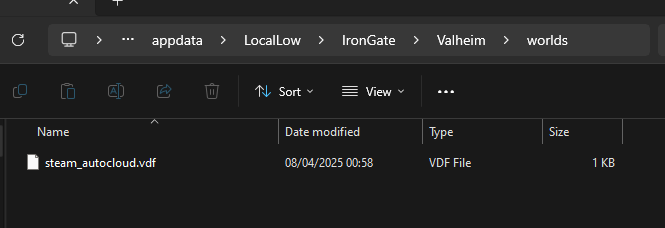
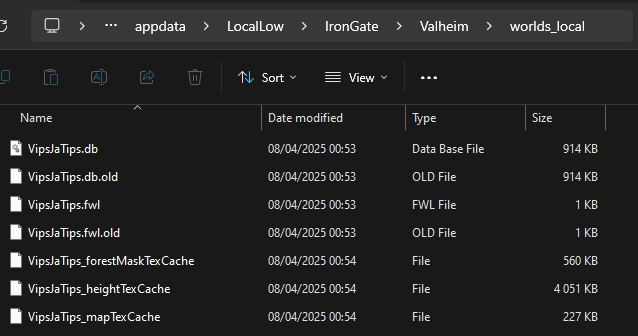
thats what I have
final current
fierce sandal
https://i.imgur.com/jjipnl3.png
Those ones look tiny as if generated by the server just recently if you hadn't placed your existing ones in there already.
I would take a look at %ProgramFiles(x86)%\Steam\userdata\<steam user ID>\892970\remote\worlds. If they're in there and have modification dates and .db file size consistent with your established world, back them up.
Then assuming you're already passing the -world VipsJaTips argument to the server and assuming the server is shut down, you would copy the good/established VipsJaTips.fwl and VipsJaTips.db from there to your newly created savedir's worlds_local.
After all that, if you indeed backed up the good worlds. You might delete the empty/fresh world pair from your regular game client's worlds_local so you avoid using them again or avoid worse like accidentally promoting them overwriting your cloud-synced copy.
fierce sandal
final current
Those ones look tiny as if generated by the server just recently if you hadn't p...
ok thanks, did all that and testing now
fierce sandal
hmm this is taking so much longer than last time, how long should creating server take with decent cpu?
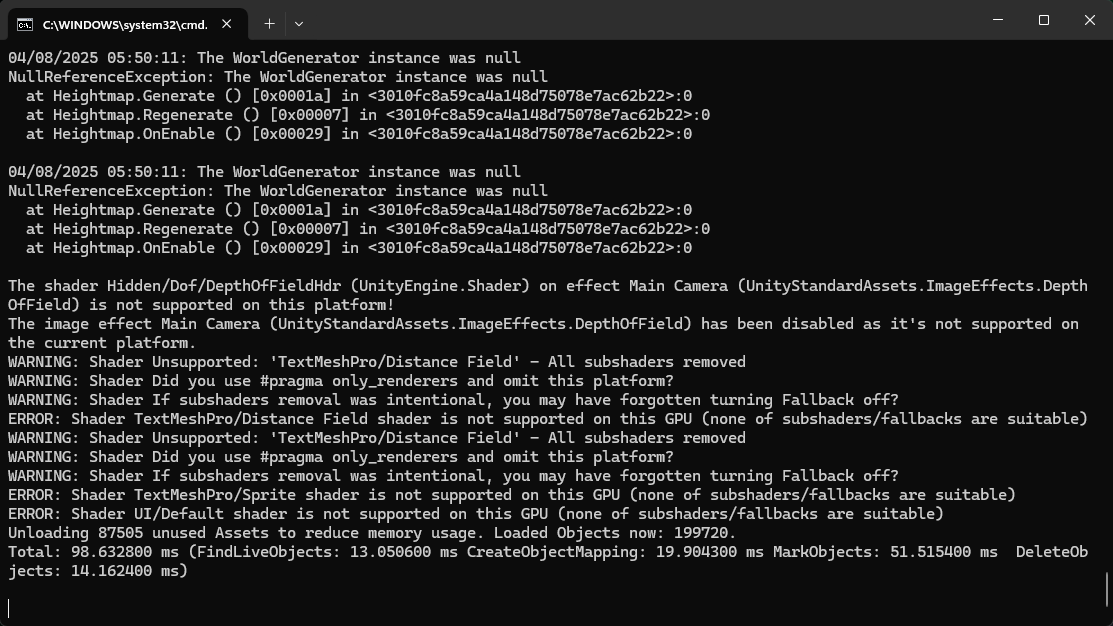
its just in this screen, was there some error or should I just wait more?
I guess the issue was because the pdf says to use -savedir [something] so I used [ ] but I guess it still was " " that it wanted because now it goes further after I tried that
final current
fierce sandal
I guess the issue was because the pdf says to use -savedir [something] so I used...
Yep. How's it looking?
fierce sandal
hmm it still loads default new random world, not the world I was playing
final current
Can you give us your full server start line with arguments? Feel free to obfuscate usernames/passwords.
fierce sandal
final current
Can you give us your full server start line with arguments? Feel free to obfusca...
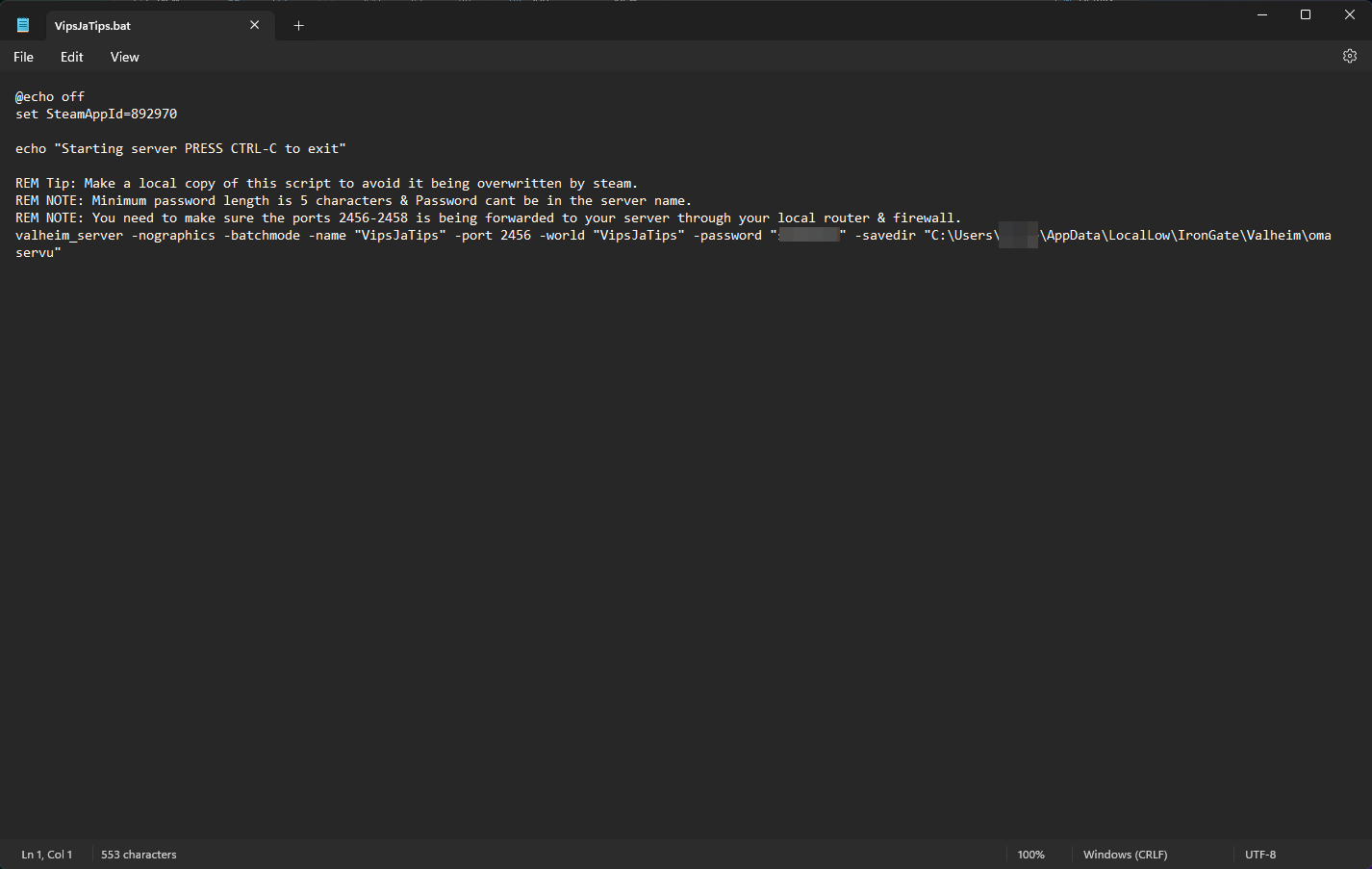
oh hmm sec
I had put the 2 files in that folder but after starting the bat it had created worlds_local folder and some other txt files, so I put those files in the worlds_local folder?
nice, works now after I did that
final current
Yes. Whatever you set savedir to, you put the files in <savedir>/worlds_local, as mentioned here: #dedicated-server message
fierce sandal
yeah I missed that, at least it works for me now, should work for other people joining if I have my port forwarding etc correctly but this is good step forward
final current
Rockin.
fierce sandal
well 1 more thing, im using vpn and if I want to exclude dedicated server from using it with split tunneling, what exe do I have to let pass? I have tried cmd, valheim_server but it still blocks it
final current
fierce sandal
well 1 more thing, im using vpn and if I want to exclude dedicated server from u...
That I don't know. I'm not very familiar with Windows, sorry :/ If it's a freeform field in the splitter configuration, you might want to make it valheim_server.exe specifically with the extension.
 ornate harbor
Hi,
Me (NA hosted) and my friend (India) hopped on a new map it looks like for a brief test things went really well. Although we saw a ping of 250+ we could play the game with that minor delay…
I know it might be odd but I wanted to understand the networking behind a game like this. How is it built to be so efficient even with a huge ping like 260ms sometimes. The simple answer is technology has improved over the years etc. But I wanted to know is this pure tcp/ip UDP exchanges with clever compression or does the game engine do something special?
proven niche
ornate harbor
Hi,
Me (NA hosted) and my friend (India) hopped on a new map it looks like for ...
I don't know of anything special the game engine does. There's a good possibility that you and your friend had a particularly good 'route' when you were playing. Meaning that the various 'hops' along the comm route between you two happened to all be performing well and weren't too loaded down with other traffic or problems at the time.
It may stay that way for you guys or it may not. Comm routes change all the time and vary widely over greater distances. Sometimes they connect cleanly for the best and other times not so much.
Keep in mind that if you run into significant lag with it in the future, you can still look into one of the internet tunneling options I spoke about before, Cloudflare's Warp, etc.
Good luck with it! Have fun. 🍻
ornate harbor
proven niche
I don't know of anything special the game engine does. There's a good possibili...
Yep cool I’ll look into it thanks a ton by the way!
final current
ornate harbor
Hi,
Me (NA hosted) and my friend (India) hopped on a new map it looks like for ...
For network basics, it's all UDP datagrams, either as PlayFab Party messages when using Crossplay or Steamworks Steam Networking messages if not Crossplay.
With Crossplay/PlayFab Party, a player's connection to the server is not direct. It goes something like this for typical gameplay mechanics:
Player ↔︎ PlayFab Party Relay ↔︎ Server ↔︎ PlayFab Party Relay ↔︎ Other Player
You can see why Crossplay can be slow for players. Extra hops aside, it's luck of the draw whether the relay chosen is at good compute capacity and if it's located within low-latency proximity to the server and the players.
As for compression, I think messages are compressed with zlib compression before going out to PlayFab Party when using Crossplay. I don't remember if they're compressed for direct/Steam networking, maybe not.
The networking isn't bad, low-level. The data structures and protocols are efficient. Valheim can be worse than other games just due to the amount of messages/objects involved during intense gameplay in its current state. It has a simple consensus model: the first player to a zone makes the decisions and if that player's computer or connection to the server (or PlayFab Party relay) is slow, everyone else will wait on that decision while their clients acknowledge some of their immediate activity like movement.
fierce sandal
running that server.bat file, is there some command to hide the cmd box after it launches?
proven niche
fierce sandal
running that server.bat file, is there some command to hide the cmd box after it...
There's no command for it. Just click on the minimize button instead.
proven niche
ornate harbor
Yep cool I’ll look into it thanks a ton by the way!
I thought of something else you might want to know about. Windows has a tracert command you can use to see the hops between you and your friends IP address. Open a command window and type in
tracert -4 [IP address or domain name].
Like for example tracert -4 news.google.com. It'll show you the hops and their individual pings to you. I thought it was interesting, anyway. 🙂
 gilded vine
proven niche
I thought of something else you might want to know about. Windows has a tracert...
gilded vine
proven niche
I thought of something else you might want to know about. Windows has a tracert...

"hops" 😄 good name for it
 elder viper
I am sooooo confused right now. I purchased a xbox dedicated server. I am so confused on how setting it up 🫤🫤.
proven niche
elder viper
I am sooooo confused right now. I purchased a xbox dedicated server. I am so con...
You mean you rented a dedicated server from a hosting company that says it's "Xbox compatible"? If so, they should have instructions for you.
elder viper
Im trying to set a world name etc. Im just so confused
proven niche
elder viper
Im trying to set a world name etc. Im just so confused
Me, too. I'd be a little less confused if you'd tell me is the server on your home LAN or rented from a game hosting Co.
elder viper
proven niche
Me, too. I'd be a little less confused if you'd tell me is the server on your h...
Gportal
Now I'm wanting to cancel it but can't cause it won't pop up in the purchase history
 tame agate
knotty oracle
The game has nothing to do with it, fundamentally. If someone with poor network ...
tame agate
knotty oracle
The game has nothing to do with it, fundamentally. If someone with poor network ...
This is a design issue which most other games solve way better. How about instead of defending poor netcode, this gets finally adressed? Ashlands with friends from the same country, good network and decent PCs is still not enjoyable.
final current
fierce sandal
running that server.bat file, is there some command to hide the cmd box after it...
I'm assuming you're on Windows given the .bat mention. This being the case, you would typically create an NT service around the process. There's a commercial suite named FireDaemon Pro that's good for wrapping bat files. There's also a free program called NSSM that can do it.
https://www.firedaemon.com/
https://nssm.cc/
If you just want to fork off the process into the background, but don't want to use Windows Server goodness to manage the program as a service, you can likely do something like that with the /b switch to Microsoft start:
https://learn.microsoft.com/en-us/windows-server/administration/windows-commands/start
Note that process management will be up to you and the console output of Dedicated Server may go nowhere useful to you.
knotty oracle
tame agate
This is a design issue which most other games solve way better. How about instea...
I'm not defending it. It's not perfect. But it's fine for a mostly solo game.
 earnest loom
Hello
I have a Valheim server running on Linux/Docker, I'm having a lot of difficulty configuring access via DNS/public IP, even though it seems simple, I've already released ports and everything else, but I'm only able to access the game through crossplay (join code), can someone help me with this?
I'm new to the area, I'm developing a 24/7 server and creating a community, if anyone can help me, I'd be grateful.
covert jewel
earnest loom
Hello
I have a Valheim server running on Linux/Docker, I'm having a lot of diffi...
If you wanna post your Docker cfg & startup params (& log), that'd be a good start
earnest loom
are these
docker run -d
--name valheim-server
--cap-add=sys_nice
--stop-timeout 120
-p 2456-2458:2456-2458/udp
-v /home/administrador/valheim-server:/home/administrador/valheim-data
-v /home/administrador/valheim-data:/home/valheim/.config/unity3d/IronGate/Valheim
-v /home/administrador/bepinex/BepInExPack_Valheim:/home/valheim/BepInEx
-e SERVER_NAME="Valheim Survival Hard GG"
-e WORLD_NAME="Thule"
-e SERVER_PASS="010101"
-e SERVER_PORT=2456
-e CROSSPLAY=1
-e SERVER_ARGS="-crossplay"
-e MODIFIER_COMBAT="veryhard"
-e MODIFIER_RAIDS="less"
-e MODIFIER_DEATHPENALTY="easy"
-e SETKEY="playerevents"
-e ENABLEDEBUGMODE=1
-e PUBLIC=1
-e SERVER_DESCRIPTION="Dificuldade Muito Difícil. Junte-se à aventura!"
ghcr.io/lloesche/valheim-server
covert jewel
earnest loom
are these
docker run -d \
--name valheim-server \
--cap-add=sys_nice \
--...
Did a vanilla instance work? See you got BepInEx & modifiers. Plus you got a dupe
-e CROSSPLAY=1 \ -e SERVER_ARGS="-crossplay" \
Also, if crossplay is enabled, ports/forwarding aren't needed
earnest loom
The vanilla instance worked fine, we're even playing...
BepInEx is for a mod that only allows debug mode for the administrator.
The cosplay is only active because I can't start the server without it. I have a fixed public DNS IP for the game, ports configured for the server, but I still can't start the server if I remove crossplay.
covert jewel
earnest loom
The vanilla instance worked fine, we're even playing...
BepInEx is for a mod tha...
Just saying lot easier to test vanilla THEN build up as you wish. Still...
Same port on the router. Any firewall/anti-virus disabled for the game/same ports? Shows up in the in-game browser? Log output?
earnest loom
One moment I'm going to send the print of where it stops when I take off the crossplay
It appears connected, but when entering the game it does not appear in the community or even searching for the IP...

 proven niche
Are your server's ports 2456 and 2457 properly forwarded using UDP protocol in your home router? Make sure your Firewall and any VPN on the server PC aren't blocking them.
final current
earnest loom
are these
docker run -d \
--name valheim-server \
--cap-add=sys_nice \
--...
I'm guessing it comes down to port-forwarding at your NAT like Jaga suggests, especially if you're able to connect via the host's 127.0.0.1 or LAN IP when Crossplay is off. Also note that lloesche's image does not use the SETKEY and MODIFIER_* environment variables you're passing. They'd be ignored. You'd want to incorporate them into SERVER_ARGS the standard way.
I think it will also ignore SERVER_DESCRIPTION and ENABLEDEBUGMODE.
Also, PUBLIC=1 should be changed to SERVER_PUBLIC=true
CROSSPLAY should either be the string true or false as well.
https://github.com/lloesche/valheim-server-docker/blob/dev/README.md#environment-variables
fierce sandal
is it normal that the game runs a bit laggy or something when some player in the server have bad performance?
we tested that when they put max settings on so they have bad fps then my game world also feels a bit laggy like trees fall stuttering and not smooth and so on
Im the host with dedicated server
proven niche
fierce sandal
is it normal that the game runs a bit laggy or something when some player in the...
Yes, one player with lag shares his lag with all players. That's just the way the game is designed to communicate between the players and the server.
 still turtle
Hey people who may know a thing or 2, I have a dedicated server I set up a few weeks ago and it works great.....until anyone else joins and then the lag gets pretty bad. I am assuming the best solution is to pay for a server hosting website? I am just completely lost in that space and I guess I at least want confirmation that it would solve this lag issue?
if anyone knows lol
final current
still turtle
Hey people who may know a thing or 2, I have a dedicated server I set up a few w...
Take a look at this checklist to see if any apply to you: #dedicated-server message
And if this is a non-Crossplay server on the same LAN as your gaming PC, definitely make sure your own connection is using the LAN IP (or loopback IP if you're on the same PC as the server).
still turtle
final current
And if this is a non-Crossplay server on the same LAN as your gaming PC, definit...
I do have a non-Crossplay server running on the same LAN as my gaming PC, both connected via ethernet if that matters at all. Im not sure how to check if my game is using the LAN IP or not?
final current
still turtle
I do have a non-Crossplay server running on the same LAN as my gaming PC, both c...
Nice. Well, you would simply find the LAN IP of the server and use that in the Add Server view. With most routers, this would be a 192.168 address. You can usually create a reserved LAN IP for your Ethernet MAC address in your router's DHCP configuration to prevent the LAN IP from changing
still turtle
in my notes for the launcher, it says....

what am i mean to write instead of this 😭
knotty oracle
Nothing, take it out.
final current
If you don't want Crossplay, you leave it out. Note that if you do, the IT networking will be completely up to you.
still turtle
final current
Nice. Well, you would simply find the LAN IP of the server and use that in the A...
yes no need for crossplay, so if i just delete that it will run still?
final current
Yes, but you will be responsible for setting up whatever network infrastructure is required for players to connect directly to you (e.g. port forwarding at your NAT router)
still turtle
final current
Yes, but you will be responsible for setting up whatever network infrastructure ...
okay I see, would people be able to connect via the IP of the router?
I will look into this though thank you!
final current
still turtle
okay I see, would people be able to connect via the IP of the router?
Yep, the router's WAN IP, assuming your ISP hasn't put you on a CGNAT network.
still turtle
i hacked into the mainframe (logged in to my router) and got a port forward set up, its right on my app so that was easy lol
Ill report back if the lag is better
final current
still turtle
i hacked into the mainframe (logged in to my router) and got a port forward set ...
Nice. Make sure you forwarded UDP (TCP forwarding is insufficient). And when you have spare time, consider creating DHCP reserved IPs for the server's MAC address so the LAN IP and forwarding rules require less adjustment over time.
 dense roost
if i set up a server and wanna go back to add world modifier how do i go about that?
final current
dense roost
if i set up a server and wanna go back to add world modifier how do i go about t...
If you're an admin player, you can use the Valheim console to call setworldmodifier or setworldpreset commands.
You can also do one of these if you want to go further:
- Stop the server with a graceful shutdown. Copy the world to your local game client, open the world locally, make the adjustments with GUI or devcommands, shut down the game, then copy the world back to your server and start it.
- If you have access to adjust the server's command-line arguments, you can add
-modifier <modifier> <modifier_value>,-setkey <key>, or-preset <gameplay_preset>. - If you want to be able to set individual keys and you're an admin, you can install BepInEx and the Server devcommands mod on the local game client you use. You would then be able to use
devcommands,listkeys,setkey. You would not need to install the mod on the server for that capability.
dense roost
one other question im curious about..
If i remove my dedicated server from the in game "Join Game" list and modify the world modifiers i can re add it to the "Join Game" list again as the dedicated server? i hope that makes sense lol im new to computers and i followed the "Valhiem dedicated server"
like it wont delete the world if i removed it from the "join Game" list
gilded lintel
dense roost
one other question im curious about..
If i remove my dedicated server from the ...
You dont even need to remove it from the in-game "Join game" tab.
Except maybe if you change the server name or world name
dense roost
yeah i cant change the world modifiers from that list and its not on the main list
its not on the "start game list" just "Join Game"
left stream
dense roost
its not on the "start game list" just "Join Game"
so where are the world files for the dedi server?
knotty oracle
Whereever you've specified in -savedir or the standard directory if you didn't specify anything.
 summer tide
Hey does anyone know if I have a dedicated server through a hosting company if I could make the server crossplay compatible with minimal issues?? I've heard there are issues with cross play but haven't noticed any myself and I'm on a mac
final current
summer tide
Hey does anyone know if I have a dedicated server through a hosting company if I...
Yes, most of the big name Valheim hosts offer it.
summer tide
final current
Yes, most of the big name Valheim hosts offer it.
I heard there were issues with crossplay
I haven't experienced any myself but I do have a fairly sizeable server going up soon and have a few console players
I want it to be as inclusive as possible
final current
Sure. It is slower and less reliable compared to the direct connectivity you get with Steam clients and server running without crossplay.
summer tide
final current
Sure. It is slower and less reliable compared to the direct connectivity you get...
Ok that's minor cause both users are running newest gen consoles
So in theory that should cut back on that a bit
summer tide
final current
Sure. It is slower and less reliable compared to the direct connectivity you get...
Thank you so much
knotty oracle
Doubt the console will have any effect. It's the service itself that's the problem.
 snow topaz
I’m guessing someone here will have an answer, what’s the devcommand for reducing or removing stamina cost… if there is one?
 agile pecan
snow topaz
I’m guessing someone here will have an answer, what’s the devcommand for reducin...
agile pecan
snow topaz
I’m guessing someone here will have an answer, what’s the devcommand for reducin...
setkey StaminaRate 0 should work (I have not tested this myself)
knotty oracle
snow topaz
I’m guessing someone here will have an answer, what’s the devcommand for reducin...
 hollow dirge
Question for people playing dedicated servers (DS). I've heard people have stuttering problems when in the ashlands, even in a DS. My question is whether or not other players experience issues when someone else in the server goes to the ashlands.
proven niche
hollow dirge
Question for people playing dedicated servers (DS). I've heard people have stutt...
Yes, if they are in the same region as the player with the lag.
hollow dirge
proven niche
Yes, if they are in the same region as the player with the lag.
That's a real shame. Hopefully it's optimised before/at full release. Not sure how you'd manage servers with independent players otherwise.
fierce sandal
is there ANY info when it releases? since its been 4 years in early access and its only in 0.2 version atm
or probably its there forever early access games
proven niche
Common sense would indicate it'll be some months after the Deep North biome is updated and finalized. I suspect they're still working on finishing up with the Ashlands.
Meanwhile, Valheim's still the best $20 you ever spent.
knotty oracle
fierce sandal
is there ANY info when it releases? since its been 4 years in early access and i...
The version number is irrelevant. It's not like they're going to be going through 0.2, 0.3, 0.4 all the way up to 1.0. That's not how that works. 1.0/Deep North is pretty much the next update to come save maybe a few more bug fixes/optimisation patches.
fierce sandal
how does patching work with server and the world, does all the new stuff just get added there or do you have to make new run to get the new stuff?
and does the server get updated at same time when you update your game just normally from steam or you need to do something extra?
final current
fierce sandal
how does patching work with server and the world, does all the new stuff just ge...
When a new version of Valheim (whether the game client or dedicated server) loads a world, it checks the world and object versions inside and if they're out of date, it begins a world upgrade process. Depending on what's new from your world/object versions, it will perform biome/location upgrades in uncharted territory (e.g. new dungeons, buildings, flora, npc spawn candidates). In true new biome upgrades there is often an ocean-carving process applied to the terrain near the new biome as well, sometimes even in charted regions. These upgrades can take several minutes, after which the world is written to disk with the changes and the new world/objects schema.
There is often a special automated backup of the fwl/db pair coming out of that as well before the upgrading, if I recall.
As for the dedicated server software itself, if you're using SteamCMD or DepotDownloader, there's no automated updating performed unless you have set that up yourself. It's assumed you'll manually update your install dir when you're ready.
If you're using the desktop/GUI Steam client, then it's up to your Preferences/Settings whether it auto-updates installed apps like the game or the server.
 proven ore
Hi all, I want to setup a LAN server at home, hosted on one pc(pc1) and joined from the host(again pc1) + another pc(pc2). Both PCs are obviously visible to each other and so on, can be pinged. I can join the server from the host pc by using it's local IP(192.168.0.2:2456) but the other PC can't join using the same IP, which should be possible. The server is started WITHOUT -crossplay parameter. Both players are on steam.
launch command:
valheim_server -nographics -batchmode -name "tak" -port 2456 -world "lan" -password "12345" -public 0 -saveinterval 900 -backups 3 -backupshort 3600 -savedir "d:\valheim_worlds"
Any ideas on how to troubleshoot? Is there a way to see a log file from pc2's instance of the game? Local play shouldnt require portforwarding, and the switch is basic plug-n-play smart switch, no issues there.
 proven niche
There are game log files you can check along side your worlds_local folders. Check to see that neither of your PCs are blocking the traffic with their Firewalls or VPNs.
Actually, I would suspect the problem may be with your switch.
proven ore
reinstalled the game on pc2, ran it WITH -crossplay and it worked(connecting via public IP)
tho im still curious why it didnt work locally
will play around with it more for sure
proven ore
proven niche
There are game log files you can check along side your worlds_local folders. Ch...
this is the content of worlds_local, i tried to look for the game log files but cant seem to find them. Google is only giving me server log files, which dont really work in my case since the server didnt even acknowledge a connection in the cmd window
 proven niche
proven ore
reinstalled the game on pc2, ran it WITH -crossplay and it worked(connecting via...
proven niche
proven ore
reinstalled the game on pc2, ran it WITH -crossplay and it worked(connecting via...
Using crossplay sends the comm traffic between the server PC and the other LAN PC directly from those PC's through the MS playfab network. The local PCs don't talk to each other with crossplay enabled.
proven niche
proven ore
this is the content of worlds_local, i tried to look for the game log files but ...
There are game log files you can check along side your worlds_local folders. Not in the worlds_local folders.
proven ore
interesting, not even the host pc can connect locally now(WITHOUT -crossplay)
proven ore
proven niche
There are game log files you can check **along side** your worlds_local folders....
only have the list .txt files
proven niche
proven ore
interesting, not even the host pc can connect locally now(WITHOUT -crossplay)
You can either power cycle the two PCs or try changing the server's ports to clear the caches.
proven niche
proven ore
only have the list .txt files
By default, the game produces a Player.log file in it's Valheim folder. Do you have your File Manager set to hide file extentions?
proven ore
if im running the server without crossplay will the terminal still spit out at least the port that the server is hosted on?
proven ore
proven niche
By default, the game produces a Player.log file in it's Valheim folder. Do you ...
managed to find it
proven ore
proven niche
You can either power cycle the two PCs or try changing the server's ports to cle...
changing the port worked
both PCs can connect now, thank you!
proven niche
You're very welcome. Have fun with it. 🍻
 inner gate
if i create a local world with world modifiers, then close the game and start a dedicated server on the same machine for that same world name, will the modifiers carry over, or do the modifiers need to then be set in the bat file?
 dreamy prairie
I was suggested to go here. This is on the topic of Non-Dedicated. But the problem is completely preventing me from playing with my friends.
I get the "Connection Failed" when trying to join any of my friends and they can't join me either. We are using non-dedicated servers.
What we have tried:
Turning on/off cross-play. (We all use steam.)
Add/remove Community and password.
None of us have ever used mods on Valheim.
It is an allowed app on the Firewall.
Tried joining through steam and inviting.
We changed to older versions.
Uninstalled/reinstalled twice.
Started new characters, used old characters.
New world, old world.
Updated drivers.
Updated Nvidia driver.
Nothing has worked.
Any ideas what we could try?
 buoyant nova
in the 560 hrs ive played the game ive never had this issue till now
 sage nexus
dreamy prairie
I was suggested to go here. This is on the topic of Non-Dedicated. But the probl...
sage nexus
dreamy prairie
I was suggested to go here. This is on the topic of Non-Dedicated. But the probl...
Sounds like theres a required port/protocol not being permitted by whatever allowed app on the Firewall actually means. eg" permitting the game doesnt include the session initiation stuff that steam does
or someone is using the wrong server/client versions
dreamy prairie
sage nexus
Sounds like theres a required port/protocol not being permitted by whatever `all...
Thank you, I will look into it.
sage nexus
proven ore
dreamy prairie
I was suggested to go here. This is on the topic of Non-Dedicated. But the probl...
as in not running the dedicated server and hosting the server from the game menu or?
dreamy prairie
proven ore
as in not running the dedicated server and hosting the server from the game menu...
Hosting from the game menu. Yes.
proven ore
dreamy prairie
Hosting from the game menu. Yes.
why not just do the dedicated server without -crossplay parameter?
dreamy prairie
proven ore
why not just do the dedicated server without -crossplay parameter?
I could try that. Thanks.
proven ore
ah wait but
if you do it like that you need something like zerotierone
or just try with -crossplay and use the IP that the console spits out at the end of the host process
dreamy prairie
proven ore
or just try with -crossplay and use the IP that the console spits out at the end...
I will keep this in mind.
covert jewel
dreamy prairie
Thank you, I will look into it.
W/o Crossplay, you'll need to open the ports on the router (the 'app in the FW' is good, but that's just Windows). Concur w/ using CP & the invite code. SHOULD be the easiest of the 2 (though it doesn't work for me 🤷♂️ )
dreamy prairie
covert jewel
W/o Crossplay, you'll need to open the ports on the router (the 'app in the FW' ...
Okay.
 viscid sparrow
Im playing with crossplay in the US with my dedicated server, all of my friends can join in the US, but my Japan friend is having trouble connecting, any ideas?
no mods
proven niche
viscid sparrow
Im playing with crossplay in the US with my dedicated server, all of my friends ...
Can you provide some info about what kind of problems your friend is having? Can't connect at all? Regular or random disconnects? What error msg does he get, if any? Is he using the server's Join Code to connect?
You and he/she should check your logs to see if there's error messages there that would explain it. Your friend's game puts a Player.log file along side their worlds folders. Your server can create a log file when you give it the -logfile "...path\Server.log" option in it's start up .bat or .sh file.
viscid sparrow
proven niche
Can you provide some info about what kind of problems your friend is having? C...
So, he can see the server and how many people are connected, he tries to join, he sees "Connecting", and it brings him back to the menu with "Can't connect to server", he is military in Japan and has really good internet. Here's the kicker, he used a VPN to connect to the US and was able to put in the password and join when he tried that, but when he did, he was in an empty world, we could see him moving in a world with no grass no trees, just terrain, but he couldnt see us and we couldnt see him even if we were "beside him" on his map.
Both matching/lastest version of the game, no mods, server or client side for any of us
proven niche
Pls read my post again and try to answer as many of my questions as you can. Also, use the suggestions in my 2nd paragraph.
viscid sparrow
proven niche
Pls read my post again and try to answer as many of my questions as you can. Al...
Can you provide some info about what kind of problems your friend is having?:
So, he can see the server and how many people are connected, he tries to join, he sees "Connecting", and it brings him back to the menu with "Can't connect to server"
Can't connect at all?:
he used a VPN to connect to the US and was able to put in the password and join when he tried that, but when he did, he was in an empty world
What error msg does he get, if any?:
it brings him back to the menu with "Can't connect to server"
Is he using the server's Join Code to connect?:
He has tried both IP with and without port attached and join code
Regarding the second paragraph:
He got off cause he was stressed out, so it'd be pointless until he hops back on, but I was watching console when he tried to connect multiple times and it was NOTHING when he tried to connect. The only time I saw anything in response to him joining is when he joined momentarily while connected to a VPN in the US, in which everything was identical in the console to when somebody else joined.
proven niche
viscid sparrow
Can you provide some info about what kind of problems your friend is having?:
*...
It sounds like the problem is between your Japanese friend's PC and the MS playfab relay he needs to connect to the server with. Has the problem always been the same for some time now? Or has this just started to happen?
I honestly don't understand why he got into a strange world that one time with a VPN. Maybe something weird about his connection to the MS playfab network that one time. He may be able to do better using an internet tunneling service like CloudFlare's Warp service. it's free for residential use. And it could strengthen his comm route between Japan and the US and possibly put him in touch with a better MS playfab regional relay.
Do you need to use -crossplay to support Xbox users? Is the server located at your home on your LAN? Can you consider removing crossplay and then forwarding the server's ports with IPv4 UDP protocol in your home router? You would have no Join Code, if you did. Your players would all find your server in the Steam server list at game start or use your WAN IP to join the server. It would be a big change but might help the Japanese player to connect and play on the server. If you do decide to remove -crossplay, you probably should give the server new ports, too. That'll clear any leftover cache data associated with the server's current ports.
still turtle
final current
Nice. Make sure you forwarded UDP (TCP forwarding is insufficient). And when you...
Okay so the server has been running with these new settings, I set up the port forward and changed it to UDP the next day and its working mostly the same. The server is playable, but with even just 1 additional player on the server, there is still consistent latency. The most impactful moments are combat. But even moments where 2 of us are mining a scrap pile, and for up to 30 seconds, I get stuck behind pieces of muddy scrap that were already mined by the other player. I do believe that the latency has decreased in severity overall with the server switches. But recently it is becoming quite frustrating, and I am encountering new and arguably worse latency issues
All of the items i was putting into the cart, just vanished. I looked around to see if they were dropped on the ground. Waited a few minutes hoping they would reappear in my inventory or maybe into the carts inventory, they never did so i relogged and still they were gone. And as a bonus, the entrails, drauger trophy, and mushrooms that did display as being placed into the cart, were also now permanently gone
My question now is, is this due to router issues, or is it possibly due to the complexity of our world? Is it possible that there may be some sort of packet loss or bandwidth issues caused by having 2 players and the dedicated server connected to the same router? And my final question, are these issues that would ultimately be curable by using a server hosting website? Or is this (to an extent) an inevitability for the game?
proven niche
still turtle
My question now is, is this due to router issues, or is it possibly due to the c...
So, you have now removed -crossplay and still have serious lag issues with more than one player on your server?
If the complexity of your world was an issue the lag would likely only show up when players were in a complex area of your world. Such as a huge base area or player "village" you may have built. If you suspect the world may be overly complex or corrupted somehow, you can always do a 'test day' with a brand new fresh world and see if that makes a difference. Always make sure you keep a good backup of your world for projects like that.
Both your router and your ISP are capable of "throttling" your internet bandwidth but that is so rare that it's highly unlikely to be your problem. You can spend some time looking through your routers settings to be sure everything looks normal to you there and ask your ISP support to check for any problems on their end.
If your server or players are behind Firewalls or those PCs are overloaded with Anti-virus activities, etc., that can cause issues with lag as well. Simple PC hardware issues can contribute as well.
Are you, your server, and your players located in more or less the same area or scattered throughout the world? That can matter, too. Sometimes an internet tunneling service can mitigate any comm issues there and sometimes a VPN service can help with comm issues when configured correctly. Other times a VPN can interfere with smooth comm traffic.
gilded lintel
I believe the server provider's reason is correct. You can read a bit more about it here
https://valheim.fandom.com/wiki/Dedicated_servers#Why_does_the_server_lag_happen?
proven niche
Is the lag you experience happening all the time?
In all areas of the world randomly?
Do you notice it when you are on the server alone?
So, the server is rented from a remote hosing Co., in London and you are playing from elsewhere in the UK?
Does it seem to matter who gets into the area you're all playing in first? Is it only when you get there first? Or only when someone else does?
Does it seem to matter who gets into the area you're all playing in first? Is it only when you get there first? Or only when someone else does?
Are you using -crossplay on the server? And, if so, do you need it to support Xbox users.
No, you don't need it or no you don't have it?
Then, remove crossplay from the server and resort to joining using the Steam server list at game start or the server's IP address.
If everyone needed to apologize for being inexperienced, this would indeed be a very sorry ass world.
Check your PC for any possible resources nearing their limit. Such as available RAM, communication bandwidth limiters like automatic anti-virus scans happening too often, Wifi instead of ethernet cable, use of a VPN, etc., etc.
If the VPN app is "disconnectd", that shouldn't be a problem.
More than adequate.
If you haven't already done so, reverify your game files with your Steam client.
Also, verify that any mods you have active, or had active in the past, aren't causing the problem. Either play 'vanilla' for a while or at least make sure that they're recently updated by their author.
It should be easy for you to do a test run or two without those mods just to verify that they aren't contributing to the lag.
Sorry I couldn't be of more help. 😄
 summer pike
how to join this server
proven niche
summer pike
how to join this server
Carefully, and with a good attitude towards the other players.
What they're saying there is that one player with lag can get into an area first and cause his lag to be shared with the other players in that area. Because the first player arriving into an area gets to be the 'chunk master' as far as the server is concerned.
They don't explain it all that well, IMHO.
Yes, but if that were the case, they should be noticing the lag at the same time.
 woeful crow
anyone having lag with dedicated server? im the host and im also lagged
left stream
Total latency between 2 players = player A latecy x2 + player B latecy x2
for example
player A to server 50ms
player B to server 100ms
total latency = 300ms
What you can see is only your ping to the server.
viscid sparrow
proven niche
It sounds like the problem is between your Japanese friend's PC and the MS playf...
CLOUDFLARE WORKED INSTANTLY TY
proven niche
viscid sparrow
CLOUDFLARE WORKED INSTANTLY TY
I'm very glad to hear that! I know your situation was frustrating. 🥳
sage nexus
i regularly play with an indonesian, the dedicated and me are in australia so her ping isnt all that bad, but as far as i can tell they use mobile data or wifi a lot, and any densely poopulated area like this probably has frequent packet loss issues with too many wifis trying to negotiate TX/RX-time... so the lag we get can be pretty intense. It varies a lot from very playable to astoundingly bad. Even when I am the chunkmaster with a 0 ping I can see it happening. Client-side game networking is never as simple as a ping number.
 dull sage
Greetings, quick question. I got a dedicated Server from Nitrado. And we wanna change the Death Penalty. Since not even the support can rly tell me HOW. Maybe anyone here? x.x
proven niche
If you have devcommands access for the server, there are world setkeys you can use at the F5 console to change world modifiers. One of the keys you can set is "SkillReductionRate".
I haven't used it myself but I think it would allow you to control the amt of skills lost on death.
 plain trellis
When 1.0 drops in the fare future, I'm planning to create a new world to run on my server. It's been a few years since I created my existing one in Portainer/Docker.
Is there a new "best practise" to add world modifiers to a new world, or is it still the same old? (Create the world in single player on your local Steam, change the modifiers, then move the 2 world files to the server and boot server up)
final current
plain trellis
When 1.0 drops in the fare future, I'm planning to create a new world to run on ...
No best practice, but it's certainly nice when it's done without mods, and you have a few options. Are your modifiers in the form of the slider-style world modifiers, gameplay presets, or single global keys?
 toxic belfry
So I should just host my own server with my computer? Can 10 people play? i got Gig internet, 7800x3d cpu, 4080gpu, 32gigs of ram ddr5 6000, everyones from my town that wants to play.
proven niche
toxic belfry
So I should just host my own server with my computer? Can 10 people play? i got ...
You should be ok hosting your own dedicated server. You can certainly try it for free and, if it doesn't work out for some reason, then rent one from a hosting Co. with a computer room option in your area.
toxic belfry
thanks!
proven niche
toxic belfry
thanks!
If you'll want to have the dedicated server running 24/7, you can also consider running it on another older unused PC you might have. It doesn't need to be a super power house PC to run the server.
I personally run several dedicated servers at the same time on a refurbished desktop PC I bought from Walmart for $200. It's been great for over 1 year and a half now. 😄
final current
Yep, that's more than enough compute power for the server. The GPU is not required if using Valheim Dedicated Server.
I would just make sure you're connected to your router via ethernet, fiber, or DAC. Wi-fi is not as good for this. And on the network side of things, if everyone is in the same area as you, and they all use the Steam version of the game, you might consider avoiding Crossplay and just set up port-forwarding to your server instead.
Once you download Valheim Dedicated Server from Steam or SteamCMD, you'll find a manual PDF in its install directory with some hints on operation.
plain trellis
final current
No *best* practice, but it's certainly nice when it's done without mods, and you...
Yes, a new world created in vanilla.
I recall that the world I created a few years ago, I did with the sliders that vanilla provides. Just curious if there was any other known methods, that might give more options, and doesn't clash with xbox over crossplay.
final current
plain trellis
Yes, a new world created in vanilla.
I recall that the world I created a few yea...
Sure, here's a breakdown over the methods: #dedicated-server message all of those are possible for a server using Crossplay. If you choose command-line arguments, they are documented in the PDF that comes with the server.
Note that individual keys set with command line args are harder to unset the same way.
toxic belfry
how can i type to people from my dedicated server screen?
the people in the game, but im not in the game, but am on my dedicated server screen
proven niche
toxic belfry
how can i type to people from my dedicated server screen?
the people in the game...
I'm pretty sure you'd have to be in game to talk to players. There may be a mod or two that lets you broadcast msgs into the server players but you'd have to set up scheduled msgs in the mod not just type them in like a chat.
plain trellis
final current
Sure, here's a breakdown over the methods: https://discord.com/channels/39114260...
Thanks. I'll stick with the ol' "create in local Steam, than transfer files", since the docker image doesn't support command line arguments. For me, that would be easier then messing with devcommands. 🙂
final current
plain trellis
Thanks. I'll stick with the ol' "create in local Steam, than transfer files", si...
Are you using Iron Gate's image builder script or a 3rd party image? If so, which one?
plain trellis
final current
Are you using Iron Gate's image builder script or a 3rd party image? If so, whic...
I've been using lloesche / valheim-server-docker
covert jewel
plain trellis
I've been using lloesche / valheim-server-docker
Try LGSM: https://github.com/GameServerManagers/LinuxGSM It's got monitoring/CONFIG (for command line\start-up parameters)+. Best 'part' about containers/Docker: You can stop one, start another to test out w/o losing anything 🤓

GitHub
The command-line tool for quick, simple deployment and management of Linux dedicated game servers. - GameServerManagers/LinuxGSM
final current
plain trellis
I've been using lloesche / valheim-server-docker
With lloesche's image, you can use the SERVER_ARGS environment variable to set:
-preset <preset>- Any number of
-modifier <modifier> <value>slider values - Any number of
-setkey <global_key>that are toggle-able
The only things you can't do from it are remove toggled individual global keys after the fact or set scalar global key values, e.g. SERGER_ARGS=-setkey "SkillReductionRate 0" does not work in the current version.
covert jewel
final current
With lloesche's image, you can use the `SERVER_ARGS` environment variable to set...
LGSM has this same ability (not tried personally). Went this route w/ all my dedi as it 1) Linux (runs better) 2) built in monitoring+ 3) Easy setup for multi-dedi 4) Updated often Diff strokes for diff folks 🤷♂️ 🙂

 silver remnant
Hello guys. Can you change world modifiers on a running server? If yes, how? I have console access (not a rented server) and am set as admin.
proven niche
silver remnant
Hello guys. Can you change world modifiers on a running server? If yes, how? I h...
Here you go: https://valheim.fandom.com/wiki/Global_Keys
silver remnant
Thank you, sir
final current
covert jewel
LGSM has this same ability (not tried personally). Went this route w/ all my de...
sure, and if Gyro had been using LGSM, I would have answered how to do it there. I have nothing against it, it just wasn't what Gyro was using.
 modern cairn
Did the game number for steam consol updates change? my update script looks and sees 896660 and says it's up to date, but when I try to login it says incompatible version. the server logs show the server is 32 and the client is 34, the server is apparently stuck on v 0.219.14 my client is v0.220.5.
(call to steam is +login anonymous +app_update 896660 +quit)
knotty oracle
You definitely need to update your server.
modern cairn
agreed on that, im just trying to figure out why when I ask steam it says im up to date
final current
modern cairn
agreed on that, im just trying to figure out why when I ask steam it says im up ...
Most common reason we see is that you're installing into a different directory from the install directory you're launching from. Check your systemd/OpenRC/supervisord unit or however you're starting it for the path it's using then compare that with your +force_install_dir target.
modern cairn
I will take a look at that.
covert jewel
final current
sure, and if Gyro had been using LGSM, I would have answered how to do it there....
Merely meant to point out there might be another container that does the same, maybe even better/easier. 🤓 Hope he's got it licked regardless
covert jewel
modern cairn
agreed on that, im just trying to figure out why when I ask steam it says im up ...
I've run into that as well. Ususually just nuke the appmanifest or the whole install & let it re-d/l. Need to add +verify to that script too
 dense tide
Hi, attempting to start my server. Doesnt start not sure what else im missing.
Through bisect, anyone able to help?
final current
dense tide
Hi, attempting to start my server. Doesnt start not sure what else im missing.
Looks like you're using mods, a few of them. #mods-issues will be better equipped to help. At the very least, it looks like one of your mods was not properly licensed.
If you back up your world and attempt with vanilla Valheim Dedicated Server, then let us know. The log will be easier to comb through in that case.
dense tide
For sure, i just started the server. Havent loaded into it or anything yet either
 random pollen
So I'm getting a really strange issue when making a valheim server. I've set up a dedicated server, added the mods that I want, copied all of those mods into my own game and joined no problem
Then I did the same on my friends pc, again, he joined with no issue
Then on my other friends pc, she keeps getting the incompatible version error... I have even copied the whole game folder, sent it over and unpacked it and ran that, so the game and all of the mods are guaranteed to be exactly the same as mine, but she still gets the same issue
Any ideas?
proven niche
random pollen
So I'm getting a really strange issue when making a valheim server. I've set up ...
 fallen cradle
hey yall i have a world file from my old dedicated server, is there a way to import it and make it a single player server?
proven niche
fallen cradle
hey yall i have a world file from my old dedicated server, is there a way to imp...
Get the world's file pair (.fwl and .db) from your old server and copy/paste the pair into your game's worlds_local folder.
 pure seal
Is there a documented min or max value for the CLI save interval parameter?
Also is there any sort of sentinel value that can be used to disable auto saving all together? Like possibly -1 or 0?
I've tried searching around for official documentation for this flag and haven't found anything yet.
proven niche
pure seal
Is there a documented min or max value for the CLI save interval parameter?
Als...
What's' your environment? Windows? Linux? Server? Solo game? Docker container?
pure seal
proven niche
What's' your environment? Windows? Linux? Server? Solo game? Docker contain...
Linux, using LGSM script setup for a dedicated server. I can dump other OS info if needed in a bit.
proven niche
pure seal
Linux, using LGSM script setup for a dedicated server. I can dump other OS info ...
I don't know LGSM, sorry. Maybe someone else can help. But check to see if the Dedicated Server Manual .pdf file that comes with the server shows a startup .sh option for controlling saves.
pure seal
All good! Thanks for trying! The PDF I have is the same content as what can be found on https://www.valheimgame.com/support/a-guide-to-dedicated-servers/ which mentions the default value for this CLI flag but doesn't specify if there are a min or max value that can be provided.
 frail pivot
Hello, I am trying to setup a server with friends. We need to add a mod to the server. Is there a way I can make sure all players HAVE to have the mod installed locally to join my dedicated server? As in, they won't get let in to the server unless they have this specific mod installed.
For context, this is the mod: https://thunderstore.io/c/valheim/p/Smoothbrain/ServerCharacters/
(I've also read in some places that ServerCharacters already has this functionality - can anyone confirm?)

Thunderstore
Saves your character on the server, instead of your computer, to prevent you from messing with it.
proven niche
frail pivot
Hello, I am trying to setup a server with friends. We need to add a mod to the s...
You would need to add tis mod: https://thunderstore.io/c/valheim/p/Azumatt/AzuAntiCheat/

Thunderstore
A minor anti-dickhead mod. Server files & folders dictate what mods are allowed. Admins/Moderators bypass the check for plugins.
covert jewel
pure seal
All good! Thanks for trying! The PDF I have is the same content as what can be f...
Guess it won't hurt to try turning 'em to 0 (or -1). The LGSM .CFG files are easy enough to modify.
final current
pure seal
Is there a documented min or max value for the CLI save interval parameter?
Als...
The minimum is 5 seconds. Anything lower, it will clamp to 5 seconds. I don't recommend going anywhere near that low though, for the sake of performance and sanity 🙂
Max is the highest integer you can pack into a single-precision float without digit loss. I think that's 16,777,216 seconds (4,660 hours). That's the safety range, there will be a few select integer you could do higher than that if you really wanted to. And I also don't recommend going anywhere near that unless you intend for this to be a temporary/ephemeral world.
It's not documented.
pure seal
final current
The minimum is 5 seconds. Anything lower, it will clamp to 5 seconds. I don't re...
Perfect, thank you!!
Do you guys open source your docs anywhere? I'm assuming probably not, but if you do I'd be happy to open a PR to document this if you all find those types of contributions useful.
final current
I can't answer authoritatively as I don't work nor contract for Iron Gate, but my guess for best place to make doc suggestions would be the Leave Feedback page under https://www.valheimgame.com/support
Sadly the PDF manual is not open source. The officially-sanctioned wiki on Fandom is open source (and open for edits) though 🙂
final current
Also worth noting that in addition to the save interval, there's a save to disk on graceful termination and keyboard interrupt on the Linux and Windows versions of Dedicated Server (e.g. SIGTERM and SIGINT). This happens regardless of the save interval as long as the process supervisor you're using doesn't give up and SIGKILL before the save is done.
final current
Are they connecting over the Internet? If so, note that when Crossplay is disabled, all aspects of Internet routing/IT networking are in the hands of the server operator. If the server is behind a NAT router, the server operator might consider forwarding the UDP ports to the server's LAN IPv4 address.
Even after all that is straightened out, there may be some downtime before the server's registration with Microsoft's relay servers has lapsed. While the server is still registered with Microsoft, players' clients might still try connecting to Microsoft's relay instead of your server directly. You can get around this by temporarily choosing a different external port.
Are you the server operator?
Alright, first I'd recommend removing the -ip <addr> argument and value from the command line. I don't believe that's a valid argument in the current version of Dedicated Server.
Next, what is your server's route to the Internet? A home router and residential ISP?
pre-defined by who?
Alright, then you will need to do a few things now that networking is in your hands (instead of Microsoft's hands, which you get with Crossplay). My recommended order:
- First make sure your ISP is not using CGNAT for your connection. See the "To determine" paragraph of https://valheim.fandom.com/wiki/Dedicated_servers#Working_with_Carrier-grade_NAT_(CGNAT)
- Consult your router's documentation for how to create a DHCP reservation for your server ethernet adapter's MAC address. This will give it a fixed/reserved LAN IP address (e.g. 192.168) that doesn't change, making it easier to connect to it yourself and create forwarding rules against it.
- Consult your router's documentation for how to forward ports from your router's WAN interface to LAN IPs that are behind NAT. There will usually be a "Port Forwarding" section in the administrative tools somewhere. You will need to forward UDP traffic for the game port (usually
2456) and the game port + 1 (usually2457) to the LAN IP you reserved for your server's ethernet adapter. - If your server had previously started using Crossplay, players may have to wait a little bit for the old Crossplay registration to expire. If players previously connected to your server using Crossplay, they may want to remove whatever favorite entry they had created before and add a new entry for the server. Any prior invite/join codes will no longer apply.
There is a batch script or shell script in the server installation directory that comes with a predefined template to start from, but it doesn't include an -ip <addr> argument. You might be using some 3rd-party toolchain that is including that.
Crossplay makes it easy to access the server from outside by having your server connect out-bound to a relay server run by Microsoft. Microsoft handles making that relay routable from the Internet. When you disable Crossplay, you no longer get that convenience (but there are plenty of benefits to the more direct connectivity you get).
That's why Crossplay tends to be enabled by default. Hosting any kind of server, gaming or otherwise, involves some deeper IT tech than playing the game, typically, but it can be a great way to learn that tech if you're inexperienced.
I don't know what this button is, sorry, maybe part of that 3rd-party toolchain? The details on Crossplay are covered by the manual that comes with Valheim Dedicated Server.
And definitely not showing off. This room exists to help folks launch and use the dedicated server, it's what we do here. If I'm not explaining something well, let me know. Happy to dive deep on any of it.
knotty oracle
Why would expect that? Steam and crossplay are quite different beasts.
final current
2 simple commands where? The batch or shell script only comes with one variant out of the box. If you're using a 3rd-party toolchain, it might be helpful if you tell us which one. There might be someone here who also uses it or at least someone who can point you to their documentation.
As for how you're supposed to know, the manual that comes with the server would be the first thing I'd read.
knotty oracle
Setting up a dedicated server does imply a certain prior understanding of the basics.
final current
When you say server support, who do you mean? Iron Gate? Coffee Stain? This Discord channel? a 3rd-party host?
And when you say reverting to initial state, do you mean running the server with crossplay enabled again? And how are your players trying to connect? Join code? External IP address? Domain?
There is no official Valheim server host, so we really don't know which people you're talking about. Help make it less awkward and just tell us what's going on
knotty oracle
Why not talk to them then, instead of insulting us?
If you're paying for hosting, it's on them to provide support.
final current
It doesn't have a host though, at least not officially, so if you're working with a 3rd party, there might be someone here who knows how that 3rd party operates and can help you with it.
I'm not enjoying this, I'm legitimately trying to help you get your server accessible. I can't do that without the details though.
knotty oracle
No he isn't.
final current
How do you want me to type?
knotty oracle
Well, good luck getting help then with that attitude.
final current
If someone here installs Valheim Dedicated Server today, they don't get a Crossplay button, they don't get "predefined commands", they get a shell script or a batch script, the server executable and supporting files, and a PDF manual. So until you tell us where you're getting these things from, how are we supposed to help you work with them? Then you tell us some nondescript support staff told you something, but you haven't told us who, so how are we to help you with what they were helping you with?
knotty oracle
And you can stop with the childish emote reacts too.
agile pecan
I am honestly amazed by the patience you two are showing here, color me impressed
knotty oracle
agile pecan
I am honestly amazed by the patience you two are showing here, color me impresse...
Justin definitely, me not so much.
final current
 crystal saddle
will it work with the xbox app?
crystal saddle
will it work with the xbox app?
Yep, if you start the server with Crossplay enabled (i.e. with the -crossplay argument), you will find a Join Code in the server logs that you can give to an Xbox player.
 drowsy elbow
final current
It doesn't have a host though, at least not officially, so if you're working wit...
drowsy elbow
final current
It doesn't have a host though, at least not officially, so if you're working wit...
Atleast you don't have to keep helping now 
 oblique dove
Im having issues getting an already generated world save to boot up as my dedicated server. Anyone have a guide or tips?
proven niche
oblique dove
Im having issues getting an already generated world save to boot up as my dedica...
So, you've moved a world file pair from someplace to your dedicated server. And you've kept the world name the same and have updated that in the server's start up file?
I'm guessing that now when you join the server it starts a new world instead of the world you want to move there?
oblique dove
proven niche
So, you've moved a world file pair from someplace to your dedicated server. And...
Correct
I followed a guide on YouTube. But it just starts its own world again
proven niche
oblique dove
Correct
Ok. It sounds like either the proper file pair didn't get to the right place for the server or the server's start up file didn't get the right name for the new world file pair.
Do you think you got the right .db and .fwl file pair from the world's old home ok?
oblique dove
Yes. Just the two files. Put them on a USB and dragged them over. Perhaps the name is wrong? I’m
Not sure
Its all one word as the file « ZandK ». And I put that in. It also names the server « my server » instead of what I wanted it to. Perhaps I’m modifying the wrong file?
@proven niche
proven niche
Don't confuse the two start up options -name and -world it's easy to do. The -name is cosmetic. It's just what the world is known as.
The -world option is where the actual name of the world file pair has to go.
proven niche
oblique dove
Its all one word as the file « ZandK ». And I put that in. It also names the ser...
Are you able to see the file extentions .db and .fwl in your File Explorer? The Windows File Explorer can default to hiding the file extentions and you have to go to it's options and tell it not to hide the extentions.
mild scarab
i imagine i know the answer to this but lets say u self host and got the same file on the server and pc (cuase on windows it is the same location) and i leave the server running but hop on it on single player i imagine it could currupt the file? if im not mistaken im just curious i dont plan to try that but what would happen?
oblique dove
It seems I’m having the same issue even if I self host. It boots up a new world anyways
proven niche
Tell me about your server's situation. It's running on a 2nd PC on your home LAN? Or on the same PC as your game?
oblique dove
Second PC on home LAN
Oh. I may need to make a local copy to avoid it getting overwritten by steam?
proven niche
mild scarab
i imagine i know the answer to this but lets say u self host and got the same fi...
To answer your question, it's best to give the server a seperate save location for it's world files. You do that in the server's start up file with the -savedir option as mentioned in the server's .pdf manual that came with it.
proven niche
oblique dove
Second PC on home LAN
Yes, make a local copy of the world files for the server. It's much easier to keep track of them that way. Just put the world file pair in the server's C:\Users\ <username> \AppData\LocalLow\IronGate\Valheim\worlds_local Folder.
mild scarab
proven niche
To answer your question, it's best to give the server a seperate save location f...
i was just asking in a theoridical point when i log into it on single player i always stop the server then go on and vice versa just wanted to ask cuase my boredum and curiousity is at a high atm i do self host and setup properly but curiosity gets to me
proven niche
mild scarab
i was just asking in a theoridical point when i log into it on single player i a...
For future reference, saying that you 'self host' isn't clear. It could mean you've started up an in-game server or you've installed a dedicated server either on the same PC as your game or a 2nd PC on your LAN. Better to just avoid the 'self host' phrase altogether.
oblique dove
I had a dedicated folder. But no longer do. I’ll reinstall
proven niche
oblique dove
I had a dedicated folder. But no longer do. I’ll reinstall
I'm not entirely sure what you mean by that exactly. But, if it works, it won't matter. So, here's hoping it works. 🙏
oblique dove
proven niche
I'm not entirely sure what you mean by that exactly. But, if it works, it won't...
There is no separate folder for the dedicated server install in irongate, just valheim
oblique dove
proven niche
I'm not entirely sure what you mean by that exactly. But, if it works, it won't...
it appears the world generated is going into the regular valheiom folder
proven niche
oblique dove
There is no separate folder for the dedicated server install in irongate, just v...
That's normal. The server's worlds_local folder belongs there.
Server worlds belong here on the server's PC:
C:\Users\ <username> \AppData\LocalLow\IronGate\Valheim
That's assuming that your server is running on a 2nd PC that has Windows as it's operating system.
 proven niche
oblique dove
Ah, then yes, that is where it is
proven niche
oblique dove
Ah, then yes, that is where it is
Good. Just verify that the world's file pair that's in the worlds_local folder there is, in fact, exactly the world file pair that is on it's old locaton where you're copying it from.
proven niche
oblique dove
This is the text line i should modify correct?
Yes, that's right. Change the -name, the -world, and the -password options. The password needs to be at least 5 chars and not contain the world 'name'.
oblique dove
proven niche
Yes, that's right. Change the -name, the -world, and the -password options. Th...
I am not sure wht fixed it, but it is all working , bless your soul
proven niche
oblique dove
I am not sure wht fixed it, but it is all working , bless your soul
Ha, ha ! That's great! You're very welcome but you did all the heavy lifting there. I just sort of stuck my nose in now and then. I'm really glad you got it sorted out! 🥳
 earnest nymph
Whats the setkey to disable raids on a server?
proven niche
earnest nymph
Whats the setkey to disable raids on a server?
EventRate: The frequency and chance of a raid being triggered with 100 being the standard 20% chance every 46 minutes. eg: 50 would give a 40% chance of a raid every 23 minutes
earnest nymph
proven niche
**EventRate**: The frequency and chance of a raid being triggered with 100 being...
Can it be set to 0?
proven niche
earnest nymph
Can it be set to 0?
I never tried setting it to zero but I would think that should work. Let me know how it goes.
agile pecan
setworldmodifier raids none should work, although I'm not 100% certain about the command
 strange coral
Good day everyone. Was wondering if I can get some help with the modifiers. My friend created a dedicated server on his Windows PC. We noticed that the enemies are all passive. How do we change this or can this only be changed at the start of setting up the server?
proven niche
agile pecan
setworldmodifier raids none should work, although I'm not 100% certain about the...
Yes, "setworldmodifier raids none" works. Thanks for that. 🍻
 verbal thicket
I got a question, i made a vanilla dedicated server, i joined in with my modded valheim version and my azuquickslots is working as intended? Are some mods transferable like that if it doesnt touch the server?
proven niche
verbal thicket
I got a question, i made a vanilla dedicated server, i joined in with my modded ...
Some mods are, yes. Not all though.
verbal thicket
I see, I got bamboozled when I joined.
proven niche
strange coral
Good day everyone. Was wondering if I can get some help with the modifiers. My f...
I think you could use the console command "setworldmodifier combat default". I'll go try it and let you know in a min.
 jovial cave
hello guys, my friends and i (4 of us) are running dedicated server and wer'e running on some ping issues (doors/chests not opening, items not getting picked up, rubberband, etc). Anybody wanna suggest a better dedicated server where this lag/ping issues go away? We're all from US btw.
agile pecan
proven niche
I think you could use the console command "setworldmodifier combat default". I'...
The dedicated server also supports the -resetmodifiers (I think) argument, which will reset all modifiers to the default (as argument in the bat/sh, not the console)
strange coral
proven niche
I think you could use the console command "setworldmodifier combat default". I'...
Thank you very much.
proven niche
strange coral
Good day everyone. Was wondering if I can get some help with the modifiers. My f...
Yeah, the console command "setworldmodifier combat default" works.
still turtle
proven niche
So, you have now removed -crossplay and still have serious lag issues with more ...
I have been monitoring the lag and I do believe it is mostly present in our main/most complex area of the map. When we are out adventuring it rarely lags. I also will drop from 144 to 50fps when i look towards all the builds and things like that lol
 hoary sand
I'm wanting to recreate my current server, but without crossplay enabled, Trying to disable it breaks the server and remote connections can no longer connect. I've tested editing the start_headless_server.bat and removing -crossplay and also with and without adding -public 1. The idea is that cross-play being disabled could possibly be the cause for more lag than desired.
From what I've seen so far, the only way to do it is...
- Download the worldname.db and worldname.fwl files
- Delete the old server
- Create the new server
- Upload the worldname.db and worldname.fwl files
I'm wanting to make sure I'm finding the correct files, currently located in my "\Valheim\896660\Saves\worlds_local" folder on the dedicated server.
proven niche
hoary sand
I'm wanting to recreate my current server, but without crossplay enabled, Trying...
Removing crossplay didn't break your server. It just changes the way you and the other players need to connect to it.
Without crossplay, you need to forward the server's two ports in your home router to it's internal LAN IP address using the UDP protocol. And there's no more join code.
So then find it in the Steam list or use the expernal IP address from outside the LAN or the internal address when you're on the same LAN inside.
hoary sand
I have my router port forwarding already set up. All my other servers work just fine. It's just the one Valheim server that has issues if i try changing the crossplay setting. I can connect to it using my local IP, but my external IP connection no longer works.
proven niche
hoary sand
I have my router port forwarding already set up. All my other servers work just ...
You need to forward the valheim server's ports using the IPv4 UDP protocol. Not TCP.
hoary sand
It's set to for both UDP and TCP
proven niche
Then change the server's ports to clear RAM caches. Or just wait a half hour or so.
gilded lintel
If a person has 2 valheim servers running on the same machine do they need to have different ports
proven niche
gilded lintel
If a person has 2 valheim servers running on the same machine do they need to ha...
Yes. Even when they're just on the same LAN. 🙂
covert jewel
CROSSPLAY now working!! Lobby code generated & showing in server logs 🎉
Thinking my AdGuard ignore(d|s) the DNS requests are being 'local' (circular/recursion)....Nothing in the logs that I can discern (yet? Will have to do some more digging/testing). Even having it disabled (& cache flushed) I got ZERO love.🤷♂️ Odder still, across 4 other game server dedi's & numerous other containers, this has been the only problem-child.
FIX: Add the DNS node to the Docker (compose) & point to DNS server(s) of one's choosing (my router in this case)
 final current
covert jewel
CROSSPLAY *now* working!! Lobby code generated & showing in server logs 🎉
Th...
final current
covert jewel
CROSSPLAY *now* working!! Lobby code generated & showing in server logs 🎉
Th...
I'm curious what DNS resolvers are given to the container by default. BTW, when using crossplay, I strongly recommend dropping the service's ports definition. You should be seeing no inbound-only datagrams to them.
 knotty tinsel
Hello, I’m wondering if anyone who has dedicated online servers have a preferred website they use, I’ve heard of Gportal and Zap but I’m sorta lost on which one is better
proven niche
knotty tinsel
Hello, I’m wondering if anyone who has dedicated online servers have a preferred...
I think it would be a mistake to believe that a couple of people's personal experience in here with either of those companies should in some way be considered a determining factor in which you should choose.
knotty tinsel
proven niche
I think it would be a mistake to believe that a couple of people's personal expe...
I know but the thing is if I’m going to pay I’d rather pay for a server from a website that has a good reputation with the community is all
proven niche
knotty tinsel
I know but the thing is if I’m going to pay I’d rather pay for a server from a w...
If you search, you'll find that there are websites out there who do nothing but review these game hosting sites. They do it professionally considering many, many clients input.
The community in here doesn't speak with one voice and certainly doesn't have any significant data involving the characteristics of any of the hosting companies. All you'll get is a few personal opinions that are just that. Personal opinions.
covert jewel
final current
I'm curious what DNS resolvers are given to the container by default. BTW, when ...
I'll have to do some checks vs. this 'updated' container & the other 'basic' LGSM instances, but found some decent info on how things should w/ in the Docker world.
Still not sure how my Palworld instance works as expected (IIRC, it too using crossplay/PlayFab) vs. VH barfing, both running against AdGuard
https://superuser.com/questions/1702091/how-should-systemd-resolved-and-docker-interact

Super User
This section specifies that a Docker container gets a copy of the host's /etc/resolv.conf. However, when i run a simple container on Fedora 34, i get a different result:
$ cat /etc/resolv.conf
Th...
 hazy mirage
Hi, I'm having a problem with setting up crossplay server.
I've tried enabling in the launch command line with -crossplay it seems that I can't connect to my own server.
I'm using a steam version of the game, I haven't try connect using xbox yet
proven niche
hazy mirage
Hi, I'm having a problem with setting up crossplay server.
I've tried enabling i...
Are you using the Join Code to connect? Crossplay doesn't let you connect directly with the IP address anymore.
hazy mirage
proven niche
Are you using the Join Code to connect? Crossplay doesn't let you connect direc...
I've tried connect using join code and still unable to connect
 final current
hazy mirage
Hi, I'm having a problem with setting up crossplay server.
I've tried enabling i...
final current
hazy mirage
Hi, I'm having a problem with setting up crossplay server.
I've tried enabling i...
When you say launch command line, are you talking about the desktop Steam client's launch parameters for the dedicated server, or the server shell script/batch file's launch arguments coded inside?
hazy mirage
final current
When you say launch command line, are you talking about the desktop Steam client...
on the batch file of the server
final current
Can you paste us the launch command line w/ all arguments (feel free to obfuscate the password)?
And were you getting the join code to use from the logs at server start?
hazy mirage
final current
Can you paste us the launch command line w/ all arguments (feel free to obfuscat...
I found the problem
I didn't realize you can't loopback with crossplay on because it's relaying to playfab
fixed
thanks!
 rustic magnet
Hey everyone, I’m having an issue setting up a free dedicated server. When my friend connects, the map loads as completely new with no houses or structures, even though I’ve set everything up. I’ve tried pretty much everything, but no luck. Anyone know how to fix this?
https://gyazo.com/5bdf64ba8494d1969f56fd6a52d040a8
My .bat file located in valheim dedicated folder : valheim_server -nographics -batchmode -name "Narconi" -port 2456 -world "narconi" -password "13331"
Our local server I am trying to transfer on free dedicated :
https://gyazo.com/0d647b69c31a159443b082d071d7c475

 proven niche
Are you able to connect to your server with your game?
When you and your friend are on the server at the same time, can you see him in your game's F2 info window?
rustic magnet
proven niche
Are you able to connect to your server with your game?
When you and your frie...
Yes, its just completly new map, no houses, explored map etc.
proven niche
rustic magnet
Yes, its just completly new map, no houses, explored map etc.
So, you also see the new world as does your friend. It seems that your server isn't loading the right world files.
Can you move them to local storage on both locations before you copy them to the server? Copy/paste them from one location the other.
rustic magnet
from : \AppData\LocalLow\IronGate\Valheim\worlds_local
pasted to :E:\SteamLibrary\steamapps\common\Valheim dedicated server\Worlds
.db and .fwl files
rustic magnet
proven niche
So, you also see the new world as does your friend. It seems that your server i...
But should I maybe go to main menu and use manage saves and make them move to local ?
Since they are on cloud right now I guess
proven niche
rustic magnet
But should I maybe go to main menu and use manage saves and make them move to lo...
Yes
rustic magnet
proven niche
Yes
Do you mind jumping in voice so I can share to you ?
proven niche
And put them in the server's worlds_local folder not the worlds folder.
proven niche
rustic magnet
Do you mind jumping in voice so I can share to you ?
Can't do VC right now, sorry.
rustic magnet
But in dedicated valheim i do not have worlds_local
proven niche
Move the server's existing world files to 'local'. That should create the folder. Then, if they are the same name, delete them and paste in the new ones.
rustic magnet
proven niche
Move the server's existing world files to 'local'. That should create the folde...
So from main menu I did move to local, now c/p narconi.db and narconi.fwl from \AppData\LocalLow\IronGate\Valheim\worlds_local into E:\SteamLibrary\steamapps\common\Valheim dedicated server\Worlds
It worked, thanks a lot ! How does save works on dedicated server now ?
If I am not in game, and they feel like progressing without me.
proven niche
Your server's worlds are not in the expected default location. But, if it's working, I can't argue with success.
Your server should save it's own saves automatically. Or you can force a server save when on the server using the game menu 'Save' option.
modern cairn
final current
Most common reason we see is that you're installing into a different directory f...
just to close the loop on this one, I ended up having to manually sign into steam CMD and running the install, after that the autoupdate started working as expected again. Thanks for all the help!
 lone trench
hello
I'm trying to run a server from my machine, I set everything up portforwarding etc, my friends and I can join. But the issue is now I'm trying to install bepinex, I dragged the files directly out of the zipped folder and into the dedicated server folder, ran it. Bepinex shows in the console, but it keeps spamming the console and I can't connect
this is without installing any mods yet
knotty oracle
You've already installed mods so that'll be it. Is this the Bepinex that's compiled for Valheim?
knotty oracle
So you've got mods, got it. And are they up to date?
left stream
lone trench
I haven't installed anything except for bepinex
do not delete bepinex.cfg file, but make a copy of it before editing. i only edit the [logging.console] and [logging.disk] sections of the file if i need to change the log outputs. i highly recommend against changing anything else in the file. always make a backup before editing this file.
 lone trench
knotty oracle
So you've got mods, got it. And are they up to date?
lone trench
knotty oracle
So you've got mods, got it. And are they up to date?
nope


I believe I have it running now
@left stream
C:\Program Files (x86)\Steam\steamapps\common\Valheim dedicated server\BepInEx\plugins this is where mods will go correct? and not the other plugins folder?
left stream
lone trench
C:\Program Files (x86)\Steam\steamapps\common\Valheim dedicated server\BepInEx\p...
yes
lone trench
perfect tysm
 main quarry
Do we have a place to share steam IDs of griefers? Took seconds to ban & revert his destruction, but itd be nice to warn other server owners
gilded lintel
I'm recruiting a vanilla server for a new game, but I don't speak English😂
final current
gilded lintel
I'm recruiting a vanilla server for a new game, but I don't speak English😂
#1024264966712340510 is this Discord's best place for recruiting. Unfortunately the post will need to be in English, but you can let people know the location or player language(s) in the post.
knotty oracle
main quarry
Do we have a place to share steam IDs of griefers? Took seconds to ban & revert ...
No, we don't support witchhunts here.
knotty oracle
@main quarry Not sure what was amusing there.
knotty oracle
@median crown ?
 median crown
If people have proof in the logs of someone going into a server and destroying all structures and stealing why would it be a witch hunt to show that to warn other servers? Also I just found the term amusing
 crystal sparrow
im currently hosting a private server for myself and some friends and trying to import a world into it but im not having much luck. does anyone have any ideas for what could be going wrong? im naming the world as the same name as a world that already exists but thats not working. when i launch the already created world in singleplayer it exists as it was before but when i name the world in the batch file i launch the server with the world is completely different even though it is supposed to be the same.
knotty oracle
median crown
If people have proof in the logs of someone going into a server and destroying a...
Because they never do. Its one word against the other and just causes drama. No idea why the term is funny.
gilded vine
what if you had to be a server admin to post the info and could only post once a month so it had to count
proven niche
crystal sparrow
im currently hosting a private server for myself and some friends and trying to ...
Make sure you put the right world file pair in the right server save directory.
crystal sparrow
so move the world files into this directory?
 proven niche
crystal sparrow
so move the world files into this directory?
proven niche
crystal sparrow
so move the world files into this directory?
No. That's the server program directory. You need to put the saved world files into the server's saves directory.
crystal sparrow
oh, where would the servers saves directory be? same place that the game saves worlds?
aka C:\Users\Profile\AppData\LocalLow\IronGate\Valheim\worlds_local
proven niche
More or less but it depends on how you installed the server.
crystal sparrow
i just installed the server software tool from steam
proven niche
On the same PC as your game?
crystal sparrow
yep
proven niche
Then you need to give the server it's own save directory with the -savedir "...path\ServerFiles" start up option in the server's .bat file.
crystal sparrow
so in the batch file id add -savedir "C:\Users\Profile\AppData\LocalLow\IronGate\Valheim\worlds_local"?
proven niche
Almost. Use "C:\Users\Profile\AppData\LocalLow\IronGate\Valheim\ServerSaves".
crystal sparrow
okay, i dont have that serversaves folder so i should just make it then?
proven niche
crystal sparrow
okay, i dont have that serversaves folder so i should just make it then?
Yes.
crystal sparrow
sorry im asking so many questions, im not great with this type of stuff
thank you, ill try that and get back
that unfortuantely didnt work
just loaded up the world and its not even the same seed as what the original singleplayer world is
proven niche
Did you put the world file pair in there first?
crystal sparrow
yes, i did that before i even booted up the server
proven niche
And you put the option in the server's .bat file? And spelled it all right?
You have to use the "-savedir" in front of it, you know.
 proven niche
Why do you have the word "start" at the beginning of that line?
crystal sparrow
i saw on a guide that i needed that
do i not?
ill try it without it i guess cant hurt
no change
proven niche
I dunno... Use your Task Manager to check and see that you're not already running other instances of the server program in the background.
crystal sparrow
im not seeing anything in the task manager that would make me think the server is running. ive got it off and closed and theres nothing in here.
yeah its definitely not, i just started the server and looked at what was in task manager then closed the server and it closed in task manager
proven niche
Ok remove the word start and see if that changes anything. And watch the command window for any errors when it starts up.
crystal sparrow
already did remove start. no errors related to anything important. theres a bunch of shader related errors and warnings but nothing other than that.
shit like this:
 proven niche
Then it seems the server isn't looking in the savedir location for it's world files. Or the world file pair that's in there isn't the right one.
crystal sparrow
i feel like it is:

uh
alright so turns out i cant call myself the medical term for developmentally disabled so i caught a 10 min timeout
my fault og
anyways what i was going to say was in that serversaves file, a worlds_local file got automatically generated when i launched the server
i put the two world files in there and that also didnt work

i had the world files just in serversaves and not in this worlds_local file and that didnt work, tried that first then when i opened up the serversaves folder to see what was up i saw the worlds_local folder then tried that
but i dont feel like it is using this serversaves folder anyways because i have myself as an admin in the server using the adminlist.txt file in this directory: C:\Users\Profile\AppData\LocalLow\IronGate\Valheim but not in the serversaves version of the adminlist.txt and i was still able to use admin commandsw
proven niche
But it did create the worlds_local folder in there, right?
crystal sparrow
yes, there is now a worlds_locals folder in the serversaves folder.

this is what is in that world_local folder now:

the two .old files were generated automatically
i didnt add them in
proven niche
Get into your solo game and load the world in there. Make sure it's still the world you know and love. Then do a manual save in the game and then quit. After that copy/paste the world file pair into the server's savedir again.
proven niche
I dunno, then. I think you're doing everything right but it isn't working.
crystal sparrow
oof, unfortunate. not the end of the world but it is what it is i suppose.
thanks for your time and help, really appreciate it!
proven niche
Sorry I couldn't fix it for you. If I think of anything else, I'll let you know.
median crown
knotty oracle
Because they never do. Its one word against the other and just causes drama. No ...
So if they do have proof wouldn't that be allowed to post then?
knotty oracle
No, it's still not allowed.
median crown
Okay then
median crown
knotty oracle
No, it's still not allowed.
just wondering are you a mod? I would like to know more of the mod and developer opinions on this since I do feel it would benefit a lot of servers. I don't see anything in the rules about listing griefers. If the devs and mods don't want that in the discord it's all good but if they do allow it with proof of course it could help admins run their servers more safely
knotty oracle
median crown
just wondering are you a mod? I would like to know more of the mod and developer...
I'm not. Smiffe would be the one to talk to.
median crown
Okay ty 😊 also I wasn't trying to be rude and am sorry if it came off that way. I was just curious about this
knotty oracle
median crown
Okay ty 😊 also I wasn't trying to be rude and am sorry if it came off that way....
Not at all. If anyone, it was probably me being slightly rude. As Smiffe is probably asleep by now, you could send a message to <@&816973484756172815> and there might be someone up who can answer the question.
plain trellis
median crown
just wondering are you a mod? I would like to know more of the mod and developer...
- There is no official servers for this game, and the game is still in Early Access.
- All multiplayer servers are hosted and maintained by the community.
- One server community (aka person hosting) could have 1 set of rules, and some completely different sets of rules.
- As a server-host you could control (with un-official mods) what mods (or no mods) a player can have running when joining your server. And you can block whom ever you like.
- There is no anti-cheat
- Whom should be the judging that player A has broken a rule, and who sets the rules? What should be the judgement? Whom should handle the appeal process?
- Don't post your password for your server to randoms on internet. Valheim should be for invites only.
median crown
plain trellis
1) There is no official servers for this game, and the game is still in Early Ac...
Yup aware of all this. Was brought up out of curiosity since most servers that advertise in lfg for their servers would agree that someone completely destroying all the buildings they could find, which was an considerable amount, is breaking rules and want to warn others. Modmail told me that they can step in if the admin can prove they joined due to seeing the server advertised in lfg
 lavish burrow
Has anyone tried to setup a server with a mini PC?
plain trellis
median crown
Yup aware of all this. Was brought up out of curiosity since most servers that a...
Maybe you people that advertise your server in lfg channel can create your own discord and create a community around this public server-services?
median crown
plain trellis
Maybe you people that advertise your server in lfg channel can create your own d...
Most have already. But imo if there is proof of griefing on a more destructive level I really don't see why that can't be shared with other servers on a discord that discusses all things Valheim especially when so many servers are advertising on lfg. We all can have different views on that and agree to disagree. However my question was directed towards mods and devs about this to get a more official answer and since they answered me I don't really wish to discuss it anymore with random people, tc
plain trellis
median crown
Most have already. But imo if there is proof of griefing on a more destructive l...
So not cool to discuss this with randoms, but hanging out other randoms (with "proof", mind you) on the same server, is totally cool...
No thank you.
And good that lfg gamers have their own discord for such things.
 feral olive
hello!
im looking to join any dedicated server!
Im a longsword/ archer/ builder!
looking to build a tarvern inn and serve my fellow vikings
median crown
plain trellis
So not cool to discuss this with randoms, but hanging out other randoms (with "p...
Not sure what your issue is with me. I was being polite and I did discuss this with you but now that I have my answer from the devs and mods which tbh are the only ones who could give me answer for what I was curious about, I would like to move past the subject so it's not spamming the channel. Would like to point out that server Admins have logs, they can see who did what so that is proof and I cared enough to ask if we should share said information to help others, geez didn't know a simple question would start all this. Next time, now that I am aware of modmail I'll just go to them since asking on here hoping they will see makes people get a bit crazy haha.
median crown
feral olive
im looking to join any dedicated server!
there are a lot on lfg 🙂 hope you find one that you enjoy
feral olive
where can i find the lfg?
knotty oracle
feral olive
where can i find the lfg?
left stream
lavish burrow
Has anyone tried to setup a server with a mini PC?
specs?
if its x86 then 2 core cpu, 8GB ram vanilla and more for modded, nvme or ssd, wired to the router.
And I'm talking about linux. I dont use windows for servers.
 frozen zephyr
lavish burrow
Has anyone tried to setup a server with a mini PC?
frozen zephyr
lavish burrow
Has anyone tried to setup a server with a mini PC?
People have ran them on a raspberry pi
final current
lavish burrow
Has anyone tried to setup a server with a mini PC?
Yeah, I run on a tiny PC. For Raspberry Pi and similar SBCs on typical ARM chips, note you'd have to use an x86_64 emulator (and x86 emulator for SteamCMD if not using a 3rd-party downloader). The only native arm64 Valheim Dedicated Server build is for macOS.
I don't recommend running the server on a fanless completely closed-case box as the server does not idle efficiently. That said, it's not compute-intensive overall until the save interval hits.
final current
crystal sparrow
alright, did all that and still no luck. world isnt the same
I would do an audit of the .db/.fwl pair in each of these 3 locations:
%USERPROFILE%\AppData\LocalLow\IronGate\Valheim\worlds%USERPROFILE%\AppData\LocalLow\IronGate\Valheim\worlds_local%ProgramFiles(x86)%\Steam\userdata\<steam user ID>\892970\remote\worlds
And look for the pair whose modified date matches your last game client exit when that world was loaded locally, and for a .db file whose size is representative of terrain modifications or building. Windows Explorer will measure such a .db file in multiple mebibytes instead of kibibytes.
plain trellis
median crown
Not sure what your issue is with me. I was being polite and I did discuss this w...
I'm just curious how you thought this would go down.
Have you had any experience with running a server park, and being an in-game admin, in any multiplayer game?
median crown
plain trellis
I'm just curious how you thought this would go down.
Dude give it a rest, I asked a question, it got answered by the right people who treated me with respect and gave me an option to get help with griefers on servers when needed. You're being rude. Just stop.
knotty oracle
Why on Earth restart a 'discussion' from 6 hours ago? O_o
plain trellis
Rude? I trying to grasp how a text file someone can create in 2 minutes should be proof for a "global" ban?
proven niche
He just likes to argue. Just block him.
plain trellis
knotty oracle
Why on Earth restart a 'discussion' from 6 hours ago? O_o
Because now I have time to be online again? o_0
knotty oracle
But it was over and done with. The people whose opinion actually count for something (i.e. the mods) have already adequately answered the question. Nothing more needed saying.
knotty oracle
"I'm just curious how you thought this would go down." is needlessly antagonistic.
plain trellis
Pardon me, Good Sir, for bad choice of wording.
My point was the whole "public shame players, based on text file"-idea.
knotty oracle
Which was covered 24 hours ago. I don't understand why this is still a thing.
plain trellis
Well, neither do I.
median crown
Sorry everyone else for having to read all this. Had no idea asking a simple question would go like this. Some people just like to be rude and cause issues I guess. Ty to those who did answer respectfully, I appreciate it. Now leave me alone Gyro, not sure what your beef is with me asking a question but it's ridiculous.
 spare quail
(I think it was a good idea and a legitimate question to ask)
 opal saddle
Well, aside the rudeness, I have an opinion to the original question. In general terms (applies to ANY game) IMHO it goes like this:
- to have some kind of ban system, a centralized authirity / entity needs to exist. Valhein devs do not provide official servers or this kind of service
- the above entity needs to do the banlist efficiently and lawfully. Albeit it might seem trivial, it is not. Among other things:
- There needs to be a way to prevent abuse;
- There needs to be a way to appeal;
- The list can not be public (i.e. no manual handling of playerIDs around).
Especilly the last point is important. Public shaming was ok a few centuries ago, but these days it's probably illegal - even if it was just a list shared by some random server moderators who know each other but much more so if the list was shared on Discord etc.
Just my 2¢, since I found the original question interesting. This is also some food for thought for anyone running a community somewhere, you might run into a similar situation - think what kind of information is ethical to share, and what is (not) legal.
frozen zephyr
opal saddle
Well, aside the rudeness, I have an opinion to the original question. In general...
You better not play ark then, there ban list is publicly available
median crown
opal saddle
Well, aside the rudeness, I have an opinion to the original question. In general...
Ty that also helps with answering my question. I wonder if it would be an option for the devs and mods to allow us to send them a private list from admins once a month or so with the data and any screenshots or videos showing griefer actions and ofc showing that they joined from searching for the server on lfg and then they can ban them from the discord so that they don't have the opportunity to search for more servers on lfg to go mess up. idk just a thought, my concern is server safety, admin peace of mind, and making sure players can have an enjoyable time and don't have to worry about builds they have done.
 mild heron
have anyone started server from linux via docker?
https://github.com/lloesche/valheim-server-docker i saw this in github this is fine? or should i use script inside game files?
opal saddle
median crown
Ty that also helps with answering my question. I wonder if it would be an option...
That would mean they (at Irongate) would need to start do to stuff I've outlined. Of course you can always ask. Honestly, I think the best option is just to manage a passworded server and keep your own white/backlist. It's your rules (also!) after all.
If you want to organize something yourself with some group then it's of course it's up to you.
opal saddle
frozen zephyr
You better not play ark then, there ban list is publicly available
That's interesting, it's the first game I know which has a public banlist. What playter ID / hash do they use? If it's SteamID then that's really bad (IMHO) as it's trivial to connect to a real person identity (Steam profile). If it's ARK only (and not easy/feasible to connect to anyone) then it's less questionable.
frozen zephyr
opal saddle
That's interesting, it's the first game I know which has a public banlist. What ...
It's EOS IDs, Once Human has posted there ban list in the past also 😂
The once human list even tells you the reason and for how long the ban was for 🤣
proven niche
mild heron
have anyone started server from linux via docker?
To answer your question, yes. Many have used that image successfully. That container image works well as long as you have some experience with docker in general. And take the time to read and understand the instructions carefully that are set up on the image's github page.
mild heron
proven niche
To answer your question, yes. Many have used that image successfully. That cont...
I've already started actually, working well even with mods
But I have 1 question, does cross play flag using steam tunnels?
I don't have white ip, and I don't wanna expose my ip address as well
proven niche
mild heron
I don't have white ip, and I don't wanna expose my ip address as well
I don't know whether your IP address is hidden with crossplay or not. In any case, make sure your host PC's Firewall is properly configured to block unwelcome comm traffic.
And I don't know what a 'white ip' is, sorry. I suspect there are probably VPNs or tunneling services that would work to hide your IP. But many, even most, of the VPNs block the server traffic and wouldn't be an option. You might have a look at Cloudflare's 'Warp' tunnel service. It's free for residential use and may do what you want but I don't really know whether it makes your IP any more secure or not.
Others in here may be more knowledgeable than I am regarding IP security in this case.
Just to add to the already over discussed anti griefer banter going on in here, I suppose, that a server admin who has kick/banned a griefer, could simply put a post in their own LFG channel here letting their other players on their server know that a player has been banned and why.
Then, any other server admins who wanted to know of previously banned players could simply do a search in the LFG channel to see if there are any reports of those players being banned. The other server admins could then consider the validity and fairness of the results of the search and make up their own minds as to how to react or ignore it.
Would such a search be illegal? Or unfair? Or somehow detrimental to the overall welfare of the dedicated server community here? I don't know but probably not.
final current
mild heron
<https://github.com/lloesche/valheim-server-docker> i saw this in github this is...
I mostly use lloesche's image you linked but have experience with others. It's a decent all-in-one setup. My only complaints:
- Despite including busybox in the image, uses the full Debian Vixie Cron daemon for update checks and backups, which is a bit heavyweight, and because it uses full PAM login sessions, will hit privilege denials in higher security setups liked podman or OpenShift unless you explicitly add a few more priveleges to the container run.
- The processing of the
SERVER_ARGSenvironment variable doesn't allow for setting scalar number global key values. e.g.SERGER_ARGS=-setkey "SkillReductionRate 0"would not work. - Like many images, uses SteamCMD to install and update, so isn't compatible with Docker for Mac's use of the Rosetta 2 x86_64 emulator.
Iron Gate's image-building/running script that comes with the Linux depot is alright. If you are on a desktop instead of server, it's convenient for using Steam to manage your installation/upgrades (or your own custom method). It's also compatible with Docker for Mac. My only complaints:
- Uses an Ubuntu base, making the built image a little bigger than it probably needs to be.
- Depending on the launch command/script you pass as your argument, the server can end up using an old rusty Steamworks SDK redistributable lib from the
dockerfolder instead of the up-to-date one that comes from Valve's depot, and that old one doesn't play well with the most modern kernels.
proven niche
final current
I mostly use lloesche's image you linked but have experience with others. It's a...
Do you have a custom docker dedicated server image of yours that you could share here? I'm thinking there would be a pretty good demand for it. And you could put it in the #mods-discussion channel to distinguish it from the 'official' vanilla one.
final current
That's a good idea. Will definitely post something if I can package it neatly. Will probably also make some PRs for lloeche.
I will say I've been exploring @gilded sedge's image lately and like the direction it's been going, using Rust instead of bash for some of the layers, freeing up registers and RAM for the server itself 🙂
 gilded sedge
final current
That's a good idea. Will definitely post something if I can package it neatly. W...
gilded sedge
final current
That's a good idea. Will definitely post something if I can package it neatly. W...
❤️ less than 10MB compiled 🙂 lmk if yall ever need any support
proven niche
Thanks! I was looking for a good place to put this one...
https://tenor.com/view/assassins-creed-valhalla-assassin-creed-valhalla-viking-gif-18719741


 gilded vine
😆 Jaga and gifs go together like margaritas and those little drink umbrellas. You get the one, you gotta expect the other with it.
 sterile spoke
NeEd INput
been a minute and I want to install a dedicated server
I have a stack of R620's which I combined all ram and HD's to
It has proxmov installed with a windows VM, but I wouldn't mind a linux server vm
I'm just wondering the best way to install a server as before I had a server running on TrueNAS
final current
sterile spoke
I'm just wondering the best way to install a server as before I had a server run...
I can't tell you what the best way is, but now that Proxmox has LXC, I would personally avoid the heavyweight nature of a VM and try using LXC for it first, finding a container image that suits the needs.
As I don't actively use Proxmox, I can't tell you a sure-fire path immediately.
sterile spoke
I can run LXC's directly in proxmox
final current
sterile spoke
Can anyone try and connect to my server?
I have a few mins on my lunchbreak, just lmk the addr when you're ready
sterile spoke
final current
I have a few mins on my lunchbreak, just lmk the addr when you're ready
ty, my server is updating almost done
when it's back up I'll let you know
@final current server is back up
sterile spoke
@final current did you want to try conencting?
 vapid galleon
Just curious, I have a linux box with 4 separate Valheim servers running simultaneously (no VM's). Why, or what would be the advantage (if any) of using Containers for those Valheim servers? It seems to me I would just be adding overhead to gain isolation...but don't know why I would need them isolated. I guess I don't understand the reason one would want to do it versus native on linux like I do but there is alot of talk about doing it. Anyone have any thoughts or insights?
proven niche
vapid galleon
Just curious, I have a linux box with 4 separate Valheim servers running simulta...
I suspect the increased security of the container's isolation would be a major advantage. I'm thinking that if your server was infected by a virus, only one of the five separate OS's running there (the host and 4 containers = 5 OS environments) would be affected.
Also, if in the future, you decide to move your server to a bigger and better PC, the containers are very portable and are easily moved to a new environment with little or no disruption to their operation.
And with the use of containers you get to choose exactly which OS each container uses to support it's app. That could be significant for efficiency particularly in the event that the host server may be running other various apps than just Valheim's dedicated server app.
But I'm no expert with containers and others in here will have better opinions to offer you.
final current
I think Jaga has the right of it. I use a container for the management layers available and isolation it provides. It is overhead, though mostly network overhead in a typical setup. It runs like any host OS process might for the most part, so CPU and RAM overhead can be pretty minimal vs going raw. You can reduce network overhead using host networking, but then that's one isolation facet you've removed. The Linux kernel's new ipvlan networking provides a nice compromise between bridge and host networking and is what I go with for a containerized gaming server. It just requires a new IP from your LAN.
 ruby steppe
can someone help me, i bought a nitrado server but it doesnt work
it is stuck saying restarting
 proven niche
I think you're going to need the Nitrado tech support to fix that. Better put in a support ticket with them.
ruby steppe
how do i do that
proven niche
ruby steppe
how do i do that
You should find support instructions on their web page or in the email they sent you.
ruby steppe
i got it working how do i see the server ip
ruby steppe
i paste server id into the thing and it says failed to connect
proven niche
Unfortunately, we can't help you with your Nitrado server. Here's the official channel description. That's what this channel is for:
"Valheim dedicated server issues. | We cannot help you with 3rd party hosting sites or give advise which one you should buy/rent"
You bought the server at Nitrado and you paid for their support, too. Use it.
proven niche
Well, someone was wrong. Again, "We cannot help you with 3rd party hosting sites". Pretty clear.
ruby steppe
k
 thin patrol
Hey can anyone help me with my dedicated server. Currently running through steamcmd, got the server up and I was able to join. I portforwarded ports 2456-2457, my friend cant seem to join. He can find the server on the steam server list, however cannot on valheim
opal saddle
The in-game server list is very slow to update, I suppose (?) is it's on the Steam server list it should be in the in-game too.
He could direct connect, with IP, does it work that way?
Are younusing crossplay?
thin patrol
i removed crossplay because it wasnt working
I checked again and even i wasnt able to join, I did a netsh winsock reset, restarted the vm and turned the server on again and now we can both join
idk how that fixed it
heres another question, how do I get mods going for my own dedicated server?
 warm basin
Question if anyone can answer, I'm hosting my own vanilla dedicated server. All my friends can join right after server restart, but when one shows up later the join code that was used no longer can be resolved. If I restart the service on the server I get a new join code and then it works for the new person. All existing players can also rejoin so long as they added the server to their favorites. The code does not appear to be changing over time, only when a server restart happens.
So to summarize, how do I fix the issue where the SHOWN join code stops working after some period of time? After people get connected it seems fine, it's just an issue with new players joining when the server has been up for some time. The join code is not resolved AND joining by IP also does not seem to work. Only a server reset fixes this. Which of course is not ideal when people are in the middle of doing things in the game.
 burnt cosmos
Is there anyway to up the send/receive on a dedicated server? there used to be, basically getting some lag
thin patrol
anyone in here able to help me add mods to my own dedicated server?
final current
warm basin
Question if anyone can answer, I'm hosting my own vanilla dedicated server. All...
Unfortunately, there is no way to stop the join code from changing, e.g. if the PlayFab Party relay route needs to be re-established due to Microsoft maintenance or your ISP connection having a slow spell. When it changes, you should be able to find the new one in the server logs. Barring that, a player that's connected should be able to see the most up to date one by pressing Esc and looking in the background.
 remote bloom
Need some help here, I'm going a bit insane. Been working on this for the last 3 days nonstop trying everything. I will try to make this simple and to the point.
Total Players: 7 (ALL PC PLAYERS)
5 Players - Online
2 Players - Local (2 PC built by me)
1 Dedicated Server - Local (Built by me, its own PC)
Dedicated Server PC - Windows 11 64 / i7-13700K 128GB / Ethernet Connected 1GB UP/DOWN
Installed the Valheim dedicated server, dropped mods into the respective folders, helped everyone set up r2modman, everyone got in Day 1. Working great. Fast forward 3 days later, we start having item problems in inventory getting locked, relog, its lost. Die, its lost. They would try to chop trees, and they weren't breaking down and relog, axe is broken and tree is chopped. I do some research, hear that playfab is an issue. As we would play, I would see playfab stuff pop up the longer we played. I go to remove -crossplay and this is where it becomes a pain in the ass. I've hosted many crafting games and this has been the most troublesome. I have port forwarded 2456-2458 TCP-UDP, firewall inbound/outbound 2456-2458 TCP-UDP, made the dedicated computer static IP. I am at my wits end. I have no clue why no one can connect to the server except me. My brother cannot join it local IP or public IP. Only I can join it with -crossplay off. Once I put it back on, it works for everyone. From my understanding all -crossplay is doing is making it you dont have to port foward. I do not know what I'm missing here.
As for the mods, thats a different channel but I have an inkling who the culprits are but I want to disable crossplay so I'm here.
proven niche
remote bloom
Need some help here, I'm going a bit insane. Been working on this for the last 3...
With crossplay off, does the web site at geekstrom.de/valheim/check see the server?
Can you change the server's ports to see if clearing port assignment caches makes a difference?
If you restart the server without mods as a test does it connect ok then?
All players trynig to connect by using the external IP address and :2456 get the Failed to Connect error window?
remote bloom
I will triple check my port forwarding, thank you for that website that is super helpful now!
proven niche
Ok, also check Firewall, VPN, ISP CGNAT as possible issues. And, when all else fails, try changing the server's ports to something like 3456-3457, for instance.
And this is all WITHOUT crossplay, right? 😄
remote bloom
Yes will show pics for proof lol, I'm going insane at this point, practically bald hahah
No VPN, No ISP CGNAT (I just came from hosting 7DaysToDie, Ark, Conan, Minecraft all with mods successfully). I will change the ports, I'm assuming I need to change the port forwarding as well to represent the 3456
proven niche
remote bloom
No VPN, No ISP CGNAT (I just came from hosting 7DaysToDie, Ark, Conan, Minecraft...
Yes, change the port forwarding, too. I know it's annoying but worth doing, at this point.
remote bloom
Yea I will try anything, thank you very much. I'm just trying not to have to use -crossplay
How can I check that its taking the new port?
proven niche
Use the geekstrom site.
remote bloom
Still failing sadly but was just trying to make sure its taking it in the .bat file
proven niche
You should be able to join it from your LAN using it's internal IP address site and the new 3456 port.
remote bloom
I will double check now
proven niche
The dedicated server is running on a separate PC on your home LAN, right?
remote bloom
Yes separate PC that I built, I will update the first post
Yup, local IP works with new port
proven niche
Baby steps... Now try the geekstrom site with the external IP address and new port.
Firewall rules updated?
remote bloom
Yea sadly same thing again.
And yes, firewall inbound and outbound updated for 3456-3457 along with port forwarding on the Dedicated Server PC
Still able to join locally but same thing I've been experiencing for the last 3 days. Whats crazy is if I just put -crossplay back on, works fine, everyone can connect etc.
proven niche
You're giving the geekstrom site the external IPv4 address, right?
proven niche
Check it with whatsmyip site. And try temporarily disabling the server's Firewall.
remote bloom
Yup, firewall is off (which i did try before) and that is my correct IP as I did mention, I've hosted other games and its the same they connect to external
I'm absolutely stumped
proven niche
See if you can ping the geekstrom site ok. If you connect ok internally but not externally, then it's pretty certain that it's a comm issue of some sort.
Is the server installed in a docker container or VM or anything similar?
remote bloom
Negative, just downloaded the tool from Steam
proven niche
I'm out of ideas. I'll flag you, if I think of anything else. Maybe someone else in here will jump in with a new idea, too. 🙏
remote bloom
Thank you, I really appreciate the help
proven niche
Sorry I couldn't be of more help for you. Good luck with it!!
remote bloom
Don't worry its okay, its the fact that you reached out
I just wanna have fun with my boys
final current
@remote bloom hopping in here. If you go back to trying to forward the usual UDP ports (2456-2457), happy to try to connect. That geekstrom site I think only checks the query port, which only responds to public queries if your server is publicly listed. There's a good chance things are working if you're sure you have the external IP address correct.
Either way, you might want to paste us your server start command line, with all arguments (feel free to obfuscate any password)
I know you've mentioned no CGNAT, but I'd also still check your router's reported WAN address against https://checkip.amazonaws.com/ or similar to ensure they match up
Also note that if your server isn't publicly listed, other players will get the question mark icon or ❌ for the status icon, but may still be able to connect. The only way status is conveyed correctly is if: you're using crossplay OR you're using direct connection against the exact same external IP address listed in the community lobbies list (if it's public).
remote bloom
I just checked the link you sent me, that shows my IPV4 public IP that I give to my friends to connect to on my pc but if I check the gateway (Frontier ISP, California, USA) WAN IP is a different one. 192.168.xx.xx I will post pic of the server command line. I just made the dedicated PC non-static IP now. I'm trying anything and everything all over again
final current
remote bloom
I just checked the link you sent me, that shows my IPV4 public IP that I give to...
Gateway IP for your LAN would be expected to be 192.168.1.1 or similar, it's more what is reported for the WAN side of the router via the router's admin controls.
Giving your dedicated PC a reserved IP address from the DHCP server is probably a good thing. If you have a reservation for your ethernet adapter's MAC address to give it a fixed 192.168.x.x LAN address, I'd say to keep that. You should check from your OS if it has been assigned that IP at this point though, and of course make sure it matches the target IP of the forwarding rule. It looks like Windows or Windows Server from that screenshot so ipconfig or using the GUI.
Your command line looks good. I assume your password is not "test" as that doesn't fit the minimum requirements.
remote bloom
Yup everything is in check, correct external, correct port forwarding, I am stumped
I dont know how to show proof without doxxing myself so I'm not crazy and bsing here
final current
No problem. So the WAN IP address reported by the router's admin tools matches the one that URL returns?
remote bloom
I dont know whats going as I've hosted other crafting games no problem, its like Valheim is not letting the ports through unless I have -crossplay on somehow
Let me check
final current
If you can't find it, give us the model number of the router and we can point the way.
final current
oof, OK, that really looks like CGNAT if they really did give your router a 192.168 IP address.
remote bloom
I thought the 100s were considered CGNAT
frozen zephyr
they are, 192.168 should never be a cgnat ip
final current
They are, but any private address range that is not allowed to be routed on the Internet could still be used by the ISP
remote bloom
yea I dont think I'm cgnat if I'm hosting other games though thats where I'm confused
frozen zephyr
192.168 normally happens from double nat
remote bloom
i dont think frontier fios is cgnat either from what I see, I can call them and see whats up
and -crossplay works, everyone can join no problem when i have it on
final current
Stolenvw has an interesting point… you don't happen to have another router in front of that router and your modem?
And your router's WAN port is the one connecting to your ISP's equipment?
final current
remote bloom
and -crossplay works, everyone can join no problem when i have it on
Yes, -crossplay bypasses any local port setup by making the first datagrams outbound to a relay. The relay hosted by Microsoft then takes care of the rest of the IT networking for you. Your port forwarding rules are completely ignored in that setup and your selected inbound port is only used as part of an identifier and not actually used to receive traffic.
remote bloom
Yea its a bit of a weird setup here, I had Frontier come out here maybe several months ago and change it up. Wasn't getting good internet for my brother so we have a bit different setup. I'll try to explain it shortly
***Gaming Room - (The important part)
Frontier Fiber Wireless Router FAST 5290 -> gets wan from -> Frontier MoCA Ethernet Adapter FCA262 -> gets internet from coax
Dedicated PC - Ethernet connected to the FAST 5290
My PC - Ethernet connected to the FAST 5290 (The one that can local connect to the server)***
House -
Deco AXE5400 (3 of them spaced in house) ethernet connected on wi-fi router mode -> gets wan from -> Frontier MoCA Ethernet Adapter FCA262 -> gets coax from Frontier ONT Internal Box
Brother's PC - Ethernet connected to Deco AXE5400
We did this because he was having problems playing Marvel Rival and other PVP games and was consistently dropping packets etc. Ever since we did this its been better. Been hosting other crafting games since then. But I realize it might be the problem as its not normal for this and I am not a networking expert for sure.
I just dont know if Valheim is just extra picky or something as I've got no problems with other games. I know with double nat - isn't it 2 routers which is not the case for me? I just have an adapter coax -> ethernet
frozen zephyr
so your double nat, the Frontier ONT should have port fowarding in it also
remote bloom
okay ill go look for the frontier ONT, thats one thing I didn't check at all. I'm getting excited lol. its in the house brb
final current
It would need to forward to your server's router's WAN IP address (which would then forward it to your server's LAN IP).
frozen zephyr
also explains why your brother cant connect but you can, they on a different network by not being connected to the 5290
final current
I would personally be running those routers in AP/switch mode (and not using as routers) if they have that option, just to reduce the amount of networks.
Not saying to re-architect your whole system right now though…
remote bloom
I've gotta be honest, I'm not sure how to access the ONT box or figure this stuff out. I will google it
frozen zephyr
easy way is hook comp to it, and go to its ip address
being behind a 2nd router makes it hard specially when they both using the 192.168 ip range
remote bloom
Im not sure I get it though, because I thought an ONT box is just fiber -> ethernet power bridge
frozen zephyr
if its just a bridge then there has to be an other router somewhere if there is multiple devices hooked to it
remote bloom
I will try to hook up a laptop to it
 violet linden
Could increasing stack size decrease performance in a major way on a modded dedicated server.
 thorn coral
Hello! I'm having some issues with latency on Dedicated server.
I Play on the same system as the server I run.
My issue is that I'm having a half second to Full second delay when other players join my server. My wife plays on a Rog ally or Asus gaming laptop and still have issues. Cross Play is enabled due to Xbox player.
My system is AMD Ryzen 9 5950X 16-Core Processor
128 Gigs Ram
4090.
When everyone is gone It works smooth. But the delay issue we all experience is hampering our experience. Are there any fixes or suggestions?
Also an issue from when I open the game through steam favorite servers and enter the PW from the steam desktop it fails to connect so I connect through my game and select the server manually to access the server.
I don't know if that has anything to do with it.
proven niche
thorn coral
Hello! I'm having some issues with latency on Dedicated server.
I Play on the s...
Is the lag produced equally by any random player joining or is it worse with one or two specific players perhaps from a more distant location?
Is the lag consistent no matter where you are on the server or just in certain biomes or in certain bases?
Is your server new? And, if not, has it always had this issue?
proven niche
violet linden
Could increasing stack size decrease performance in a major way on a modded dedi...
Logically, that doesn't seem likely. I doubt it's ever been actually tested.
thorn coral
Dedicated server is my own PC,
Lag is produced is when anyone of the friends joins the server. We are all regionally local. Wife is in the Same house and I still have lag. I'm not sure if they are getting lag or not. I'll have to ask. It's only when they get close to me in the server. I recently started the server on my PC. Always had this issue so far.
We run Fiber Optic internet
proven niche
What happens when the wife is the only other player on the server? Lag for you as it would be with any other player?
Does she experience the lag when she's on alone or when on with you or other players?
thorn coral
I haven't asked her that, and I'm not sure she would be aware. But I can tell there is a latency, for example when I chop wood or hit mobs there is a half second to second delay from the action to when an axe or pick axe or action on mob "hits"
proven niche
Try adjusting your game graphics settings to reduce the activity level of the game. It has nothing to do with how good your graphics card is. It's just about the amount of activity there.
thorn coral
I'm running at 4k so I'll adjust it down
proven niche
Turn off shadows, particles, etc.
thorn coral
but it looks so much prettier that way ;-;
I'll adjust and report back next time everyone is on the server
Should Framelimit be set?
proven niche
Yes, try somewhere around 40 and see how much difference that actually makes.
thorn coral
let me log into her account and test it shortly
remote bloom
Okay update. I was able to get my brother in, I gave him the WAN IP which allowed him to connect. So me and my brother are able to connect to it. The public IP is still not working. They all fail to connect.
I haven't figured out how to connect to the ONT box or figure out where this 2nd router system is, maybe somehow the Deco is affecting it since its a Wi-Fi Router so I am checking that next. In theory it shouldn't affect my server at all since its not connected to it at all. I tried switching to AP but I am not skilled enough in that department yet. I do not want to change this much just for 1 game.
final current
remote bloom
I haven't figured out how to connect to the ONT box or figure out where this 2nd...
If you're pretty sure the ONT isn't routing, then there is a chance your ethernet bridges are putting one router behind the other. It will be worth it to figure out your network topology from top to bottom either way. One NAT will have to forward to the next NAT down unless you find an approach to flattening the hierarchy.
remote bloom
yea I feel like this is 100% out of my skillset at this point. never had to do this much. im going bald at this point lol. working on trying to figure this out and research at the same time. i appreciate you guys very much
final current
If other games are able to host servers from this same PC, there would be a few possible reasons:
- They use proxies or relay servers from the developer, publisher, or a 3rd party (like Playfab Party like Valheim uses in Crossplay mode).
- Their matchmaking services facilitate perform UDP hole punching for NAT traversal.
- A VPN with port forwarding capabilities or one that puts all players in the same LAN-like subnet.
- Double port-forwarding already set up across both NATs involved for the given game.
- Servers hosted by developer or publisher, but look like you're hosting it.
- Hosted before you changed topology
thorn coral
proven niche
Yes, try somewhere around 40 and see how much difference that actually makes.
So just tested it. It seems that it only occurs when we are close. I turned down to the most possible and there's no difference. Delay happens, when I assume we are in same region/area
final current
thorn coral
So just tested it. It seems that it only occurs when we are close. I turned down...
If the other player is using a laptop other than say the latest M4 MBP and you are using a desktop or workstation, then their performance could easily be impacting your own. Their graphics settings, their OS' scheduling mode (e.g. powersave vs performance), their cooling, are all going to play a part. If either of you is on Wi-fi instead of ethernet, that's also going to be a real killer.
Most of these are sometimes only minor issues, but Crossplay amplifies latency issues by adding extra hops.
If their laptop has a higher-wattage power supply available from the OEM, it would be a good idea to opt for it.
thorn coral
understood I'll continue messing with it so I can figure out what the core issue is.
final current
If you're both on Wi-fi, two people gaming over the same Wi-fi network will be pretty bad. And with Crossplay, note that you're never directly connected to the server. It looks like:
Valheim ↔︎ Internet ↔︎ PlayFab Party Relay ↔︎ Internet ↔︎ Valheim Dedicated Server ↔︎ Internet ↔︎ PlayFab Party Relay ↔︎ Internet ↔︎ Other Player
final current
remote bloom
I haven't figured out how to connect to the ONT box or figure out where this 2nd...
One thing that might help, if these routers' admin consoles provide a DHCP clients list or "connected devices", you can see if one of the routers lists the other.
plain trellis
Do we know what countries hosts the PlayFab network?
final current
plain trellis
Do we know what countries hosts the PlayFab network?
https://valheim.fandom.com/wiki/Dedicated_servers#Crossplay_Relay_Regions you can find an interactive map of those amongst Azure's site
 untold raptor
mdos not working on me dedicated server 🗣️
I’ve been confused on how to install it and just unsure what to do
I could be doing a mistep, but if there is a video I can watch or someone who can help please do. Ive been confujsed for 48 hours +
final current
untold raptor
mdos not working on me dedicated server 🗣️
I’ve been confused on how to install...
If mdos means mods, then #mods-issues would be a good start, letting them know what you have tried so far.
If Motorola DOS or any other DOS, note that the Dedicated Server requires an x86_64 processor (or arm64 for Mac) and only officially supports Linux, macOS, and Windows.
untold raptor
final current
If mdos means mods, then <#1202550198174486599> would be a good start, letting t...
oaky
remote bloom
I wanted to thank you all for the help. I've just went ahead and just rebuilt the entire network system and tried to narrow down its topogoly. I've learned a lot from you guys and I appreciate it. I'm sure I know the exact problem now.
final current
That's great. Let us know if you make it to the finish line and good luck!
 crystal sonnet
Just curious, since I’m just testing things, but euhm anyone can point me in the right direction on how I can open/read the world.db file?
left stream
crystal sonnet
Just curious, since I’m just testing things, but euhm anyone can point me in the...
it's a binary file. what do you want to read?
crystal sonnet
Well I’m trying to retrieve player stats and things from it since the server log only provides a few things like server connecting and disconnecting, I would like to create some sort of player profile
And boss progress etc
left stream
crystal sonnet
And boss progress etc
for that you can use listkeys command to see what bosses are killed.
if you need stats for players independently you can use a mod like
ComfyMods-ReportCard-1.3.0
givenameplz-StatsLogger-1.2.5
or
RustyMods-Almanac-3.4.9
final current
crystal sonnet
Just curious, since I’m just testing things, but euhm anyone can point me in the...
If you really want to read it, note the schema undergoes small changes often as Valheim is updated over time. You can find open source projects that track the schema, but they often end up falling behind at times, e.g. https://github.com/Kakoen/valheim-save-tools
And most of the stats type things you are looking for are stored by clients in Character DB files (.fch) instead, at least with vanilla Valheim.
crystal sonnet
Well it’s intended for valheim servers that run with bepinex,
I’ve been eye-balling that save-tools repo, and I’ve used it but indeed, I’m not getting “everything” I want.
But in other words, there isn’t accually some lib (that is currently up to date ofc) wich I can use to decode that file then?
final current
crystal sonnet
Well it’s intended for valheim servers that run with bepinex,
I’ve been eye-ball...
The only one guaranteed to be up to date is CLI lib assembly_valheim.dll and the supplementary assembly_utils.dll.
You may even be able to call into them yourself if you go down the modding path. A modding-oriented channel or community might be able to help you deeper.
final current
In addition to the commands and mods VELES mentioned, vanilla Valheim has a /stats chat command that might be a good starting point as well.
 sly flume
Has anyone seen an issue recently with "steam register server failed" when trying to register with the lobby? I verified that I am listening on port 2456 I can access it just fine externally/internally. I am using an older version of Valheim (november update time frame).
proven niche
sly flume
Has anyone seen an issue recently with "steam register server failed" when tryin...
Is that a msg from your dedicated server's log file? If so, can you provide several lines above and below it? What's the actual result of that? Do you fail to start up? Are you using crossplay on the server?
sly flume
proven niche
Is that a msg from your dedicated server's log file? If so, can you provide sev...
I'm running the server through the game client. It's an error in the bepinex console when it is trying to connect to the steam lobby. No crossplay. It says k_EResultNoConnection. We are running quite a bit of mods but we are running an old version of Valheim I pulled from the steam depot. I did run it through a dedicated server before but refrained due to some of the mods being locked by the mod author if ran in dedicated mode. No issues up until tonight.
proven niche
Has your in-game server always done that? What's the result? Locks up? Black screen? Crashes to desktop?
sly flume
No first time. The game loads just fine and I can get into the game and even run the server but in the bepinex console it just continuously tries to connect to steam lobby and fails, therefore my wife can't connect to me (neither direct connect via IP local or external or showing up in the console as a valid server). Port forwarding is all working though as I tested listening to port 2456 on UDP and querying that port externally and it can detect that it is listening and active.
If Valheim updated and broke a mod I can understand that because I've gone through all of that more times than I can count but this is a contained copy of Valheim with a contained set of mods that was proven to work with this specific version. My only theory at this point is maybe IronGate only allows certain versions prior to connect to the steam lobby? Not sure if that is a thing or not.
proven niche
Test it without any mods on your game or on your wife's.
sly flume
Thanks. Yeah that is my next step. I just have to make a backup of the world first because I'm afraid that will break some stuff. This RtDmmo modpack makes so many modifications (i.e. new biomes, etc.) that the last time I did this our house disappeared and the world had shifted. lol
proven niche
Or just test it with a new world or an older world from before the RtDMMO modpack.
sly flume
@proven niche so running it as a dedicated server works fine. Running the server from within game still can't connect to the lobby. I think maybe some bepinex caching issue going on or something.
proven niche
sly flume
<@449765565507043329> so running it as a dedicated server works fine. Running th...
Sorry, I can't really tell if you've followed any of my earlier suggestions or not and I'm out of ideas. Maybe someone else can help you.
Good luck with it.
sly flume
Fixed my issue. It was really dumb. I restarted Steam. lol Even though I am running a self contained copy not tied to Steam, Valheim uses Steam for multiplayer when you launch a server through the game itself. Steam was running just fine, but I guess it was in a bad state.
final current
Makes sense. Valheim uses the Steam app's Steamworks API server. Valheim Dedicated Server hosts its own copy via an included Steamworks SDK Redistributable library instead.
 brittle silo
Hey everyone! I wanted to ask a question about server hosting services. Some friends and I are setting up a dedicated server for 11ish players, and we're looking for a hosting service that lets us run with 10+ players and has modding functionality. Does anybody have any hosting services they've personally used that fulfill these criteria?
proven niche
We're not supposed to discuss 3rd party hosting companies here. It's in the channel desctiption.
"We cannot help you with 3rd party hosting sites or give advise which one you should buy/rent"
 mighty fox
is it possible to log player/item levels, deaths, kills on any creature and such ?
proven niche
mighty fox
is it possible to log player/item levels, deaths, kills on **any** creature and ...
If it was you'd need a mod for that and this channel isn't for mods. Sorry.
mighty fox
i was not asking about a mod
proven niche
mighty fox
i was not asking about a mod
Ok, then I'm not sorry.
mighty fox
it was just a question about logs nothing more nothing less.
proven niche
And yet, I answered your question and you continue to complain.
mighty fox
i think you are broken m8
final current
Not possible with server logs in vanilla Valheim Dedicated Server, I'm afraid, @mighty fox. They just aren't that detailed. There are some pretty detailed stats that are recorded in each player's character DB/file. You can see most of them for all players on a server by using the /stats chat command from a game client.
One thing it won't have is species-specific kills/deaths, though.
mighty fox
final current
Not possible with server logs in vanilla Valheim Dedicated Server, I'm afraid, <...
Thank you sir
 hybrid raven
i am having a problem connecting to people decicated servers , the problem is like i can join some server but others i can't despite if it's near my region or not , when i connect to the server it go to the (connecting) screen for couple of seconds then it brings me to the main menu with a massage (failed to connect) but if i used a vpn it let me log into the server / let me go to the password screen , this is with or without any mods i looked for this problem alot and couldn't find any solutoins to it (one thing i noticed most of the server i try to join have crossplay on(and server owners cant turn it off for some reason {even to just test} ) and i saw someone talk about this might be an issue somehow but not sure
have a video record to to show what happens(cant send the video itself because of it's size) https://youtu.be/TOtCvvMc0tc?si=JkY2vEvg2xFPm67W
 plain trellis
hybrid raven
i am having a problem connecting to people decicated servers , the problem is li...
plain trellis
hybrid raven
i am having a problem connecting to people decicated servers , the problem is li...
You need to check the logs of client and server to see what is the reason each time you are not able to connect. There are too many reasons for a "Failed to connect", everything between network, config, mods, setup at server and client.
final current
Your ISP, country, firewall, security software, or DNS proxy (e.g. Pi Hole), may ban some outbound connections to Microsoft Azure, which is where Crossplay servers' relays live
And if you're using a strict outbound firewall, note you can't just unblock outbound traffic to 2456 as you aren't directly connected to the server with Crossplay.
hybrid raven
final current
Your ISP, country, firewall, security software, or DNS proxy (e.g. Pi Hole), may...
so is there servers i wont be able to join unless i use vpn becaused of these bans ?
i checked the firewall before has nothing to do with the game
plain trellis
hybrid raven
so is there servers i wont be able to join unless i use vpn becaused of these ba...
Some ISP will not let you access MS Azure without VPN, and some hosts might be blocking VPN-providers, so you can't connect with VPN. Only your ISP can answer you what servers your allowed to access or not.
This post explains it a bit better:
#dedicated-server message
hybrid raven
plain trellis
Some ISP will not let you access MS Azure without VPN, and some hosts might be b...
ISP is basically the company the provide me internet right ? if that's so then i have to check that company letting me access to the MS Azure ?
plain trellis
hybrid raven
ISP is basically the company the provide me internet right ? if that's so then i...
Yes. This could quickly become very complicated, so good luck.
hybrid raven
just wanted to hop on and play some muiltplayer man ._. , better stick to solo 😔
plain trellis
Indeed.
hybrid raven
thanks anyway guys
full owl
So I have my own server up and saved locally. Works great. But now I wanted to apply a couple world modifiers. I make the changes that I think I need too and then restart the server but the changes do not stick. Has anyone tried this on an existing server and been able to get it to work?
full owl
full owl
So I have my own server up and saved locally. Works great. But now I wanted to...
scratch that, i found that i need to use modifiers on the bat file and not server settings in the game. All set!
proven niche
hybrid raven
just wanted to hop on and play some muiltplayer man ._. , better stick to solo �...
You may be able to help with your connection problems to various servers by changing your VPN's server/destination location.
It's in the VPN settings and will change your comm route and might make it less likely to time out instead of connecting.
It's just a possibility and may or may not help. But it's free to try and couldn't hurt. Good luck with it.
 livid fern
Got me a server running in Docker.
The one bit I couldn't get to play nicely in my YAML was the Discord Webhooks - seems to be a variety of formats.
Any advice on getting a $PLAYER spawned message in a discord channel? happy to share current code.....
final current
livid fern
Got me a server running in Docker.
The one bit I couldn't get to play nicely in...
Shouts in chat used to make it to the server log, but I think they recently turned that off. I can't think of a way to do it without mods and wouldn't know which mods to recommend, sorry.
livid fern
final current
Shouts in chat used to make it to the server log, but I *think* they recently tu...
Thank you. Was low hanging fruit so will ignore. My current challenge is ISP appears to use CG-NAT so will have to look at paying for a static IP 😕
final current
livid fern
Thank you. Was low hanging fruit so will ignore. My current challenge is ISP app...
Good luck! Some ISPs will give you a public IP (not necessarily static) if you just call them up and ask.
 kind frost
So I tried getting a server up and running, and it seemed to be going, but the second I put my ip into my game my fucking internet exploded 😭 anyone might know why?
proven niche
kind frost
So I tried getting a server up and running, and it seemed to be going, but the s...
Several things come to mind... If you're server is using crossplay, you can't use IP addresses to join it. You have to use the JoinCode or maybe find it in the Steam server list. Not sure about that one.
And, if you're not using crossplay, you need to have it's ports forwarded in your router, assuming it's a dedicated server on your home LAN.
And, you may not be able to use the WAN IP addresses when you're on the same LAN as the server, again assuming it's a dedicated server on your home LAN. You might need to use the server PC's internal IP address, if your home router doesn't allow 'loopback' addresses with the WAN address.
kind frost
proven niche
Several things come to mind... If you're server is using crossplay, you can't...
So it pings it fine, like if I check externally the port does route to the server, but when I try connecting when I say my internet explodes it explodes, I think it’s genuinely crashing my router
proven niche
I'm not much help with internet explosions. I've never had that happen to me. Dunno why not... If anyone's internet was gonna explode, you'd think it'd be mine. 🤷♂️
kind frost
I’ll try using the docker stuff instead when I get around to it, I tried using turnkey-gameserver cause it was quick but that might not be the way lo
proven niche
kind frost
I’ll try using the docker stuff instead when I get around to it, I tried using t...
I just d/l my dedicated servers from Steam's GUI and install them barefoot. That's always worked best for me. I'm a simple guy.
kind frost
I might just steamcmd it idk the server is headless rn so
proven niche
kind frost
I might just steamcmd it idk the server is headless rn so
Personally, I find steamcmd just adds another layer of complexity for me. Tried it once, never used it again.
It's only advantage is you don't need to be logged into Steam to install or restart the server. That's never been a problem for me.
final current
kind frost
So it pings it fine, like if I check externally the port does route to the serve...
Using Crossplay or not? And other computers' Internet access are affected when you attempt this?
final current
proven niche
Several things come to mind... If you're server is using crossplay, you can't...
You can actually use the external IP address to connect with Crossplay. The IP address is just used as a locator for the relay, similar to the join code itself, and as you might guess, the game doesn't connect directly to it. You can watch in the Player.log for the game as it tries to query PlayFab Party lobbies for IP addresses you enter before falling back to direct connection with Steam wiring.
Join code will definitely give better results in the long run though for Favorites/recents menu item creation.
 elfin coral
Long time no chat. Quick(-ish) question: has anyone tried hosting several servers on a raspberry pi 5 with 16gb ram? Is that doable? How many servers can I fit on that without issues?
 urban olive
elfin coral
Long time no chat. Quick(-ish) question: has anyone tried hosting several server...
urban olive
elfin coral
Long time no chat. Quick(-ish) question: has anyone tried hosting several server...
You can run it just install a linux server distro and use something like this https://github.com/FEX-Emu/FEX just install steam and from steam install the server. A single valheim server without logged on users starts with 1,5Gb of memory but as players discover areas that will grow. My current playtrough server uses between 2,5 and 3Gb idle with no logged on players. But even if more then 1 will fit in memory i guess the Pi5 will run out off CPU when running more then 1 server. If you really want a cheap to run compact machine you are better of with one of those N100 mini PC's as they are more powerfull and there are models that happily run with 32Gb of memory and almost all of them have a M2 slot for storage. If you add a Pi5 a Case and a M2 storage hat together you spend the same or more as a mini PC. If you don't tinker with electronics and not use the i/o pins ore special connections as the camera connector and don't run of batteries or want to learn about ARM then using any Pi as a desktop or server is just silly, if you want just a desktop or server there are better cheaper options.
GitHub
A fast usermode x86 and x86-64 emulator for Arm64 Linux - FEX-Emu/FEX
elfin coral
urban olive
You can run it just install a linux server distro and use something like this ht...
I mean, it won't really have much to do until it's save time, no? In any case, I'm intending to host a few servers for friends and myself, not make a public community service
I will, of course, be running the server(s) as headless
urban olive
elfin coral
I mean, it won't really have much to do until it's save time, no? In any case, I...
The saving is already causing visible hickups with a powerfull x86 server and fast PCIe4 M2 storage. So i hope you at least have a M2 HAT for your Pi5.
urban olive
elfin coral
I will, of course, be running the server(s) as headless
The server is already almost headless, the console window does not take much resources so saving that will not be noticeable.
If you still want to try it. You can use FEX without the BOX86/64 part that will save you more resources then trying to run without the console.
I guess you already own a Pi5, if you plan to buy one specially for this then just don't unless you like toying around and are not dissapointed if the result works but suboptimal.
elfin coral
urban olive
The saving is already causing visible hickups with a powerfull x86 server and fa...
I'm planning on that, yes
urban olive
People rightfully think running a game server is not that heavy. And they are right it does not swallow a lot of CPU for most games. But the player experience depends mostly on latency. And latency is not only network/internet a large part is how fast the server can respond. Never looked that deep into Valheim server code. But other servers like Conan for example are written with 90% of stuff happening in a single thread so the best server is one with fast single core performance as the other cores do little to nothing.
elfin coral
I mean, pi5 is the fastest pi, so if it can work on a pi, a pi5 will be the best experience
urban olive
elfin coral
I mean, pi5 is the fastest pi, so if it can work on a pi, a pi5 will be the best...
True, and also the Pi4 top spec is 8Gb not sure if that is enough. I know you cannot get it running on 4Gb.
I mean next to the server the OS and the x86 layer also use memory.
elfin coral
I've done some googling, people have had it run on pi4 8gb.
urban olive
I mean i did get it running on a Pi4 with 8Gb but it was awful. And i never tried to load it with multple users and a discovered world. So you can run it with 8Gb but i cannot guarantee it will keep running as more and more stuff needs to be loaded.
For me it was not a serious project, just to learn doing stuff with the Pi and in Linux. My Pi's real job is running my 3D printer.
I also have a dedicated machine for running game servers that is way more powerfull so never intended to keep Valheim running on the Pi.
Currently running 8 game servers 🙂
 elfin coral
I mean I can run it on my pc, but I'd rather be able to turn the pc off. And a pi barely uses power
urban olive
I heared from others that running it of the same machine they play on sometimes gives problems. Not looked into why or what exactly the problem is they have.
I guess that when you only run 1 and have a M2 hat that it will be good enough as long as you play with only a few people on it. So if that is the cheapest option for you then sure try it.
Having anything that can run dedicated 24/7 is worth it specially if you have 1 or 2 friends you play with and sometimes they have time when you are busy and don't have the time. Most people don't leave their gaming rig on 24/7.
But just remember that because you are running on ARM and have things like FEX to translate means that every different game you want to setup a game server for is a new tinker adventure. So i am sure you can get it to work for Valheim because i know that that works. But that does not mean you can run all x86 server code. If you are after something more universal with less headaces then buying a x86 box is a more bullitproof option.
covert jewel
elfin coral
I mean I can run it on my pc, but I'd rather be able to turn the pc off. And a p...
I'd suggest going w/ the NUC/mini-PCs. Sure, bit more on the size & power usage, but better hardware & can (in some instances) swap/increase said hardware (SSD, RAM). By the time you've spent buying all one needs for a Pi(4/5), it's ~ wash in terms of cost
EX: https://www.jeffgeerling.com/blog/2025/intel-n100-better-value-raspberry-pi
elfin coral
covert jewel
I'd suggest going w/ the NUC/mini-PCs. Sure, bit more on the size & power usage...
yeah, no. much costlier than a pi, even with accessories. for the pi, i'm spending maybe 200 usd total. for nucs/mini pcs, ones with enough ram start at 200 usd. i've looked. also, i live next to a microcenter, so there's that
 tropic ferry
I'm copying this question over from #valheim-help
Looking for some help with unexpected lag on my friend's dedicated server (Steam / PC). I know this is a long shot, but wanted to see if anyone wants to walk me through a few troubleshooting steps? I've already checked my ping and it's only 30ms. I also tried turning off my Windows firewall and rebooting my gateway/modem. I have really fast internet as well. Anything we might be missing?
final current
tropic ferry
I'm copying this question over from <#1202320491377856512>
Looking for some he...
Here is my usual checklist: #dedicated-server message
Let me know if any of those are unclear. If the server is using Crossplay, that's personally what I'd tackle first.
covert jewel
elfin coral
yeah, no. much costlier than a pi, even with accessories. for the pi, i'm spendi...
As something WITHOUT a MC w/i a 5-hr drive, there's plenty of capable mini-PCs via FB Marketplace, E-Bay and even Criagslist.
Via the former, got myself an Asus UN65U for $100. Another $40 for 32GB via Amazon & that's more than capable for the task @ hand.
Someone's 'old/junk' laptop (who cares if the screen is cracked, eh?) or even Dell refurbs aren't == if not too much more $
Prime @ $150: https://www.amazon.com/dp/B0CCDL6VS3
DIff. strokes for diff folks 🤓 Good hunting all around

Mini PC Intel N150 12+256
elfin coral
covert jewel
As something WITHOUT a MC w/i a 5-hr drive, there's plenty of capable mini-PCs v...
I'm not dealing with the used market. Requires more effort from me to avoid getting scammed. So fb marketplace, Craigslist are immediate blacklists. Ebay is a maybe, but still largely no. And I'm lucky to have 4 mcs within 2 hours by public transportation. The closest one is a half hour walk(and public transportation isn't much faster).
In any case, I have the pi now, and it's down to installing stuff
I already had a ssd for the task, I have plenty of monitors, keyboards, and mice... So it's a go at this point
elfin coral
urban olive
You can run it just install a linux server distro and use something like this ht...
Would one of these isos work for me? https://mirror.pilotfiber.com/ubuntu-iso/24.04.2/
final current
If you're asking about the Raspberry Pi 5, those are all amd64 distributions. You would need to find an arm64 (aka aarch64) OS installation medium instead.
You would then use an x86_64 (aka amd64) emulator like the one DragonEmperor linked to run Valheim Dedicated Server.
sage nexus
proven niche
Several things come to mind... If you're server is using crossplay, you can't...
you may not be able to use the WAN IP addresses when you're on the same LAN as the server,
You can, but it may be dependent on how dumb the router is, or isnt.
 safe solar
Are there any good mods/options similar to server characters that does not need to be installed client side? I was looking for something that would basically kick if you bring in a non-new character and/or items from outside the server
plain trellis
safe solar
Are there any good mods/options similar to server characters that does not need ...
No.
left stream
safe solar
Are there any good mods/options similar to server characters that does not need ...
I'm also thinking about this. Expand World Prefabs may help.
Or turn up the death penalty to max and if someone logs out-in often then ban him.
safe solar
Ive seen several of the servers listed in servers-and-lfg mention being vanilla compatible and being large enough that i feel like there has to be a realistic solution to this...
left stream
safe solar
Ive seen several of the servers listed in servers-and-lfg mention being vanilla ...
patrol 24/7
hire people from other time zones 3 shifts
using permittedlist.txt is also good
safe solar
🤷♂️
left stream
I have a no-boat idea. meadows and Bforest only on the island. remove boss altars. block some resource drops. Admin placed portals.
All this vanilla-compatible.
proven niche
safe solar
🤷♂️
If there are no vanilla game options to do what you want, and I don't believe there are, then you might want to ask in #mods-discussion where they're used to that sort of thing.
safe solar
will do thanks
 shy sleet
Hi, what server hosting is the best overall for this game? I just want to have my world with 1 mod online 24/7 so me and my friend can play at different times during the day instead of waiting to find a time where we both can play
proven niche
shy sleet
Hi, what server hosting is the best overall for this game? I just want to have m...
We're not supposed to recommend any 3rd party servers on this discord. But you can look for reviews on line in your area.
shy sleet
Odd, I was told in general that I would get an answer here. I already did my due dilligence, but I couldn't find any definitive answer, so I would just like to use whatever the majority of users already use, sadly I do not know which service is that
proven niche
Here's the official channel desctiption from the devs:
"Valheim dedicated server issues. | We cannot help you with 3rd party hosting sites or give advise which one you should buy/rent"
You can easily check it for yourself.
left stream
shy sleet
Hi, what server hosting is the best overall for this game? I just want to have m...
self-host is the best
If you plan on long-term like 6+ months, buying a up to 100$ mini-pc would be cost-effective. We can help you set it up from zero to hero.
Or if you already have a spare pc that you can leave on 24/7.
shy sleet
proven niche
Here's the official channel desctiption from the devs:
"Valheim dedicated serve...
But I am not asking the devs, I want the opinion of players
shy sleet
left stream
self-host is the best
If you plan on long-term like 6+ months, buying a up to 1...
What kinda specs should I look for
I could buy a mini pc, bit what would I need? Also is the electricity bill increasing too much with that?
left stream
HP EliteDesk 800 G2 Mini Desktop i5-6500T
 proven niche
shy sleet
I could buy a mini pc, bit what would I need? Also is the electricity bill incre...
proven niche
shy sleet
I could buy a mini pc, bit what would I need? Also is the electricity bill incre...
Electricity cost for at home server would generally be about $6-7 per month. You'd need a reasonably good I5 or so CPU and maybe 16GB RAM.
It wouldn't need it's own monitor or keyboard/mouse. You can remote into it from your regular PC for free.
left stream
I agree with @proven niche
Age doesn't matter as long as it's 2 core and 8GB at least for vanilla. But for modded you might need more RAM if you have a lot of mods that use a lot of RAM. My modpack of about 40 mods uses about 9GB you can't predict that before you try out. Also recommended to use nvme or ssd and wired connection.
left stream
Once I ordered a 8GB and they sent me one with 16GB by mistake 🤣
But I had to ask for another power supply because they shipped the wrong one.
This on the pic is a 65w model and would not power on with wrong power adapter.
I actually bought a universal 90w one from amazon.
But there's also a 35w model.
I love those old hp, dell, lenovo refurbished desktops and laptops.
shy sleet
left stream
HP EliteDesk 800 G2 Mini Desktop i5-6500T
So that would be enough yo run a server? Can I run another server for another game as well? Is there a risk of fire due to leaving that on 24/7?
left stream
shy sleet
So that would be enough yo run a server? Can I run another server for another ga...
You can run 2 valheim servers if you have enough ram. But I don't know about other games and their hardware requirements. Risk of fire? No.
proven niche
shy sleet
So that would be enough yo run a server? Can I run another server for another ga...
Just make sure the server's vent fans have plenty of room to bring the air in and out to cool it properly. Depending on how dusty your room is, maybe open it up and vacuum it out, gently. 🙂
 plucky raptor
Anybody can help me set up dedicated server. Happy to pay subscription. I'm playing on Mac and I have no idea how all this server stuff works. Do I need download any additional software? Please help haha
shy sleet
left stream
You can run 2 valheim servers if you have enough ram. But I don't know about oth...
Dont i need a GPU? Also, is it worth if its 300 bucks? In my country they do not go for less
proven niche
shy sleet
Dont i need a GPU? Also, is it worth if its 300 bucks? In my country they do not...
Servers don't use graphics at all. No GPU is fine. Whatever graphics that come with the motherboard will be ok.
proven niche
plucky raptor
Anybody can help me set up dedicated server. Happy to pay subscription. I'm play...
Would the dedicated server be running on your MAC or on another older PC using Windows or Linux?
shy sleet
proven niche
Servers don't use graphics at all. No GPU is fine. Whatever graphics that come...
Ah, I see... Sounds interesting. Definetively possible. What about the price tag?
proven niche
shy sleet
Ah, I see... Sounds interesting. Definetively possible. What about the price tag...
Shoot for $150 or so. Maybe plus or minus $50 for that estimate.
I got a refurbished Dell OptiPlex for $120 over 2yrs ago with a good I5 and 32GB of RAM. It's been handling 3 dedicated servers at a time ever since then. Up 24/7 with no problems at all. I installed a Linux OS on it right away. Very efficient.
shy sleet
Sorry to be such a nuisance but could you provide me a couple of links of examples? Like to ebay or something for equipment that is good for this kind of thing? I am a comolete noob at this. Most I've done is to have a modded DayZ server on my laptop
proven niche
Take a few days and look over the deals at Amazon, Walmart, Best Buy and EBay. You'll get a good idea of what's out there and after some experience you'll know a good deal when you see one. They come and go so spend some time at it.
plucky raptor
proven niche
Would the dedicated server be running on your MAC or on another older PC using W...
Running on the same mac I use to play
proven niche
plucky raptor
Running on the same mac I use to play
Unfortunately, I can't help with that. You'll have to wait for someone with MAC experience to come along.
final current
plucky raptor
Anybody can help me set up dedicated server. Happy to pay subscription. I'm play...
If using the Apple App Store version, you don't need to download extra software. The Dedicated Server comes hidden inside the .app package and you can find an example ZSH start script in /Applications/Valheim.app/Contents/Resources/Server/start_server.command
You'll find the manual PDF in that same directory.
The dedicated server that comes with the App Store Valheim only allows the Crossplay networking backend (even if you don't pass the -crossplay command line argument.)
If using the Steam version, you will want to filter your Steam Library by Tools and install the Valheim Dedicated Server software from there. Alternatively you can use SteamCMD or DepotDownloader if you're doing all of this over SSH or otherwise don't have a monitor.
shy sleet
proven niche
Take a few days and look over the deals at Amazon, Walmart, Best Buy and EBay. ...
i5 and 16gb of ram, right?
proven niche
shy sleet
i5 and 16gb of ram, right?
16GB is great for one server that doesn't have a LOT of mods and a lot of players and the world hasn't gotten REAL complicated.
32GB would be overkill at first and possibly required later on. And, if you did need 32GB later you could spend a little more money on RAM later and upgrade it to 32GB.
shy sleet
proven niche
16GB is great for one server that doesn't have a LOT of mods and a lot of player...
Got it, thanks you very much. I will update once I buy one
proven niche
shy sleet
Got it, thanks you very much. I will update once I buy one
Try and make sure you've gotten hold of a good vendor. And, if they have a warranty for a few more bucks, you can get that, too.
vapid galleon
I have a friend who when he logs onto my dedicated server experiences lag and introduces lag to other players. Example is like pick a stone, the stone disappears and a few seconds later reappears. It only happens when he joins...even if it's just 3 of us. His ping is 25ms (we have players with 100ms that don't introduce this lag), his framerate is 150fps (so no slouch pc). I keep thinking it has to be some kind of network intrusion detection or packet inspection or antivirus on his router but don't know and am hoping others have seen and resolved this before. He has his Windows firewall disabled
 naive yew
Hello! I have a problem. I start Velheim dedicated server, some time passes and it closes.
proven niche
vapid galleon
I have a friend who when he logs onto my dedicated server experiences lag and in...
Is his PC on WiFi in a house full of other internet users? Is his game running on Windows, Linux, MAC, Xbox? Is his PC running out of resources like RAM or disk space? Does he have a VPN active? Is his internet connection unstable? A good ping isn't always enough. Is his lag ramdom now and then for him or happens all the time and everywhere? Can he try playing solo game with the same mods as the server? So many questions...
And, you and he both need to check your log files server and client to see if there's anything in there that might explain the problem.
proven niche
naive yew
Hello! I have a problem. I start Velheim dedicated server, some time passes and ...
You can add the -logfile "...path\Server.log" option to your start up .bat or .sh file and then see if there's any errors in the log to explain the problem.
thorn coral
Hello I'm having an issue where it says No isntance when setting progress! Ignoring
final current
thorn coral
Hello I'm having an issue where it says No isntance when setting progress! Ignor...
That's fine, just log noise. The "instance" it's looking for is a progress bar GUI to update, which you won't have in a typical Dedicated Server deployment.
thorn coral
Interesting, my dedicated server isn't picking up the world anymore with progress and starts a new seed instead
final current
Are you running this on a desktop that also has the game client? Or did you change the world name or otherwise adjusted the server launch arguments?
thorn coral
I was playing solo game play and saved my file and uploaded to cloud then closed teh server and restarted the server now I'm no longer able to get my progress to actualize int he server
 olive depot
solo and server worlds are in different locations i believe.
thorn coral
Yeah, I realized I was playing my solo server.
Saved and uploaded to cloud and closed the dedicated server and started a the dedicated server again
olive depot
C:\Users\username\AppData\LocalLow\IronGate\Valheim\worlds
C:\Users\username\AppData\LocalLow\IronGate\Valheim\worlds_local
final current
thorn coral
I was playing solo game play and saved my file and uploaded to cloud then closed...
Hosting the dedicated server on your gaming desktop is very dangerous for world-management. The quick of it is that the Dedicated Server is not typically cloud-account-aware. I highly recommend not doing anything else until you've located your current (populated) world metadata and data files (.fwl and .db) and back them up.
The new locally-managed world your dedicated server generated is at risk of being promoted over your last populated world's save if there's a misstep.
Once done with the backup, you will want to consider setting a seperate savedir for the dedicated server by setting -savedir "<path>" in your launch script or launch configuration. You'd then copy your backed up world metadata+data pair to <savedir>/worlds_local.
If you let us know whether you're on Linux, macOS, or Windows, we can help track down the populated instance.
thorn coral
So, it was working just fine, however I have the populated file. it reverted to the one that was saved much earlier. The issue I'm having now, is that I made the copy of the headless server to prevent that from happening int he future. My problem now is that I can't get the dedicated server to actualize to the populated file and makes an entire new file/seed with the same name that's unpopulated. I will uninstall both dedicated and game delete the files minus the save file and reinstall everything again.
final current
If it already reverted to a much earlier one it might be too late to restore your most recent.
Should be no need to go that far re re-installs Are you on Linux, macOS, or Windows, and to what directory did you put the populated .fwl/.db pair?
final current
And you put the correct <world name>.fwl/<world name>.db pair in <savedir>\worlds_local if savedir is set or %USERPROFILE%\AppData\LocalLow\IronGate\Valheim\worlds_local if not and the file name base matches your -world <world name> argument? And you verified the .db file is very large prior to starting the server?
thorn coral
Working on that right now
thorn coral
I fixed the issue. I had to delete the local files that the dedicated server app created with he same name and download from my cloud to local file. All is well now.
I lost a few hours of progress personally but the other players weren't but duly noted for next time.
final current
Hopwfully you have a separate savedir now to prevent it happening again.
fierce sandal
how do I change server settings when I have dedicated server running?
I tried to find admin commands but I dont know if its there
I think I found some info from fandom world modifiers but this doesnt really say what commands to use to change things, it just says to use console
knotty oracle
The instructions should be in the PDF that came with the server software.
fierce sandal
oh it is there, missed it thanks
but not all of them are in the pdf, like the Fire hazard
knotty oracle
final current
fierce sandal
but not all of them are in the pdf, like the Fire hazard
It's -setkey Fire if using server arguments to set the keys. Note it's unfortunately not possible to remove individual global keys from via the command line arguments. You'd have to use one of the other methods if you later change your mind.
fierce sandal
so if I do that -setkey Fire but later want to remove it I have to open console and type: Fire 0
?
fierce sandal
also I added my ID to adminlist.txt but when I try any command in console it says im not admin
oh maybe its because its just under Valheim folder but there is other folders that have adminlist too, its probably those
final current
fierce sandal
so if I do that -setkey Fire but later want to remove it I have to open console ...
You would either need to have copied the world locally and uncheck Fire Hazards from the World Modifiers dialog in the world selection screen.
Or copy the world locally and use the removekey Fire dev/cheat command
Or as an admin-listed player issuing the resetworldkeys admin command to remove the typical modifier global keys, including fire hazards, while connected to the server.
Or as an admin-listed player with Server devcommands mod installed locally using the removekey Fire dev/cheat command while connected to the server.
Or set any world gameplay preset using the -preset <preset> server launch argument or with the setworldpreset <preset> admin command as an admin-listed player connected to the server.
plucky raptor
final current
If using the Apple App Store version, you don't need to download extra software....
You, sir, are an absolute legend. Thank you so much 👌
fierce sandal
can I see somewhere what are the default values of some setkey commands? Like SkillGainRate
In reddit someone says to use listkeys to see what is active and it doesnt even show anything when I do that
trying other commands too from console, doesnt seem to do anything but doesnt give any error messages either
final current
fierce sandal
can I see somewhere what are the default values of some setkey commands? Like Sk...
Unfortunately, listkeys, setkey, and removekey aren't available to a vanilla admin-listed player on a Dedicated Server. They are more classic developer/cheat commands that are available when playing on a world locally. That's why you get the empty response. You would need to use something like the Server devcommands mod on your local game client to enable them (assuming you're admin-listed).
The long answer to your question on finding their default value is to do two things:
- De-compile the game's CLI assemblies to a higher-level language that is easier to read.
- Extract the Unity GameObject assets to a readable format like YAML.
Within the GameObject assets, you'll find the overall gameplay presets' default values and some of the world setup dialog UI forms. You'd have to reconcile the default values you see there with the scripted defaults and algorithms you see in the CLI assemblies. The one you chose, SkillGainRate is one of the harder ones to figure out as there is both the conversion from the scalar float value you supply with the command or argument, the equations used to use the rate, and possibly presets/modifiers having an effect.
So that brings me to the shorter answer: look around the wiki and other sites to see if someone else has documented it 🙂
I think SkillGainRate's default value is 100 when used from console commands or server arguments.
fierce sandal
Thanks again
 clear junco
Does anyone run their server in a Docker container and figured out how to pass the World Modifiers into the container instance? Sometimes only a single modifier is triggered but I can’t tell if it’s actually active in the server and devcommands won’t work either because it keeps saying I have to be an admin…
final current
clear junco
Does anyone run their server in a Docker container and figured out how to pass t...
Which image are you using? Can you give us the contents of the env var or entry point arg you're using to convey the modifiers?
clear junco
final current
Which image are you using? Can you give us the contents of the env var or entry ...
https://github.com/lloesche/valheim-server-docker
.env:
(the standard variables for name and port)
SERVER_ARGS=“setworldmodifier <modifier_name> <value>, <more modifiers><more values>”
GitHub
Valheim dedicated gameserver with automatic update, World backup, BepInEx and ValheimPlus mod support - lloesche/valheim-server-docker
final current
clear junco
https://github.com/lloesche/valheim-server-docker
.env:
(the standard variables...
That env var is intended to follow the syntax for command line arguments and not console commands. You can find documentation for the server arguments in the official manual. Include the hyphens, no commas.
e.g.
-e SERVER_ARGS="-modifier <modifier_name> <value> -modifier <another modifier> <another value>"
 formal trail
Me and a few friends have a world we've been playing on for a while now, and we wanted to move it to a dedicated server. I'm using valhost.net and once I got the world up I loaded in with the same character I've been using and he spawned in the default spawnpoint with all the map data erased. We were also using world modifiers that weren't saved. Any help?
 hearty locust
formal trail
Me and a few friends have a world we've been playing on for a while now, and we ...
hearty locust
formal trail
Me and a few friends have a world we've been playing on for a while now, and we ...
Did you upload both the .db and .fwl files to your world folder on your dedicated server?
agile pecan
final current
You would either need to have copied the world locally and uncheck Fire Hazards ...
Not sure, but -resetmodifiers might also work
formal trail
I fixed it! I just reuploaded both files. It was originally my buddy's world and he sent it to me. I uploaded it directly from local instead of my steam cloud, which I think was the issue
hearty locust
formal trail
I fixed it! I just reuploaded both files. It was originally my buddy's world and...
Nicely done!
final current
agile pecan
Not sure, but `-resetmodifiers` might also work
Sure, it might, nice one.
 upper salmon
final current
Unfortunately, `listkeys`, `setkey`, and `removekey` aren't available to a vanil...
upper salmon
final current
Unfortunately, `listkeys`, `setkey`, and `removekey` aren't available to a vanil...
@fierce sandal listkeys, setkey, and removekey commands can be used by server admins on a dedicated server well, but the output of command is visible in server log, not on client where you actually have to type them.
final current
upper salmon
<@285599770788233218> listkeys, setkey, and removekey commands can be used by se...
huh, so devcommands / setkey will actually set the key in that case?
upper salmon
final current
huh, so `devcommands` / `setkey` will actually set the key in that case?
Yeah. Not all devcommands will work, but those related to world modifiers would, skiptime also.
One problem tho, feedback if devcommands are toggled or not is presented only on server log as well (not client log).
E.g. Clinet log can say devcommands are off but they can be enabled on the server (if multiple admins toggle them while server is alive).
final current
Thanks. I stand corrected… will have to play around with it.
 white elbow
Hello!
I have a dedicated server that i opened up to the internet. Sometimes it gets laggy and chests wont open, adding resources to ovens etc wont work.
Is there any other solution to this than rebooting the server?
fierce sandal
upper salmon
<@285599770788233218> listkeys, setkey, and removekey commands can be used by se...
oh will test later then
clear junco
final current
That env var is intended to follow the syntax for command line arguments and not...
OK. So what am I configuring wrong? I try it both ways and the modifiers won't load:
environment:
  - SERVER_ARGS="-modifier DeathPenalty veryeasy -modifier portals casual -modifier raids none, -modifier SkillGainRate 150"
SERVER_NAME=
WORLD_NAME=
SERVER_PASS=******************
SERVER_PUBLIC=true
crossplay=true
SERVER_ARGS="-modifier DeathPenalty veryeasy -modifier portals casual -modifier raids none -modifier SkillGainRate 150"
ENABLE_DEV_COMMANDS=true
clear junco
clear junco
OK. So what am I configuring wrong? I try it both ways and the modifiers won't l...
Ignore the comma in the first config, I removed it and tried after sending
left stream
clear junco
OK. So what am I configuring wrong? I try it both ways and the modifiers won't l...
Can you try without skill gain rate?
@clear junco
Do you have to use docker?
Docker is good when you need to set up 10+ servers.
For a few servers it just makes it needlessly complex.
I use LinuxGSM and can recommend it. I just need 3 tools, SFTP file manager, notepad++ and command line to start and stop the server.
I prefer to set the world modifiers locally then upload the world to the server, cause I don't like how the fwl file looks, it will overwrite the modifiers every time the server gets started.
It should work fine, but I don't like the messiness it creates.
clear junco
left stream
<@337357561508659200>
Do you have to use docker?
Docker is good when you need t...
I’ve never heard of LinuxGSM but after looking into it, I think I’ll try that! I just need to backup my worlds and wipe away the old stuff. Thank you!
final current
clear junco
OK. So what am I configuring wrong? I try it both ways and the modifiers won't l...
That looks good except for SkillGainRate. That's an individual global key instead of a modifier slider.
Unfortunately lloesche's inage doesn't parse the args string in a way allowing the rate value to be passed properly. You can use the simpler toggle-based keys via the -setkey argument
final current
Oh yes and CROSSPLAY should be all caps if not already. And if this is compose format, you'll need colons instead of equals signs per YAML syntax.
 blazing aurora
HI THERE FOLKS , IM hosting a game for a about 200 days now and my friend is unable to join , the server is modded , but even in vanilla he cant join me what would be the problem here ? he can join my other friend no problem but not me ,
he just did a factory reset
he aint on the ban list
Not using vpn
HELP WE ARE AT OUR WIITS END nothing seems to work, ANYONE ?
clear junco
final current
Oh yes and `CROSSPLAY` should be all caps if not already. And if this is compose...
Can you elaborate on the colons?
final current
clear junco
Can you elaborate on the colons?
Yeah, it looked like you might have been showing a snippet from a Docker Compose config, in which case, it follows YAML syntax, which uses colons to separate keys and values of a map/dict like environment. Example environment variables syntax here:
https://github.com/docker/awesome-compose/blob/18f59bdb09ecf520dd5758fbf90dec314baec545/minecraft/compose.yaml#L7
environment:
  SERVER_ARGS: "-this or -that"
instead of
environment:
  SERVER_ARGS="this or that"  # not correct
Now… is there a way to check if the modifiers are applied without logging into the game?
Also, thank you for all of the help and being patient with me. I’m still learning docker, et al.
final current
clear junco
Now… is there a way to check if the modifiers are applied without logging into t...
Sure thing. If you're using server arguments to adjust the modifier sliders, you will see "Setting world modifier" in the server log. There is no such logging for -setkey.
The only alternative I know of is to inspect the world metadata file's (<savedir>/<world name>.fwl) bytes any time after the first save interval flush that includes the modifiers.
 snow geyser
Hi
@thorn pumice I’ve been trying to reach an admin on this discord for a long time. Not sure if this is how I do it but don’t have access to any other channel to post in, so … for some reason I am banned ? Or ?
final current
snow geyser
<@575252669443211264> I’ve been trying to reach an admin on this discord for a l...
You will want to send a private DM to the ModMail user. It will prompt you to confirm you're talking about the Valheim discord. Also make sure you have the roles you want selected in id:customize in case it comes down to simple access issue.
frozen zephyr
final current
Yeah, it looked like you might have been showing a snippet from a Docker Compose...
there snippet was also right just discord changed the - becuse they didnt put it in a code block
environment:
  - SERVER_ARGS="this or that"
``` is also valid for a compose fileNice, thanks for the correction, @frozen zephyr
I see that alternative syntax in https://docs.docker.com/compose/how-tos/environment-variables/set-environment-variables/#use-the-environment-attribute did not know that
frozen zephyr
yeah one is map syntax other is array syntax
knotty oracle
final current
You will want to send a private DM to the ModMail user. It will prompt you to co...
Their account is 'limited' and presumably with good cause.
frozen zephyr
https://docs.docker.com/reference/compose-file/services/#environment also shows both ways lol
 wise drift
Running a Modded PW protected dedicated server one of our players has had an issue were he logs into the server, but is actually on a duplicate copy of the world does not realize he is not on our collective world until another logs in and he can see that he is not in the same world. So any ideas what might be causing him to be experiencing this failure to reliably connect to the server?
vapid galleon
proven niche
Is his PC on WiFi in a house full of other internet users? Is his game running ...
Thanks for responding Jaga. I got some more information. His internet is 1G down, 600MB up with Netflix being streamed elsewhere in the house. He runs Steam on Windows 10, the PC was using 9GB out of 32GB ram while testing, plenty of hard disk space, an AMD Ryzen 8 core processor and high-end graphics card (don't remember which make/model). He doesn't run a VPN and has stable internet (he states). His lag is consistent when at least one other person is n the world with him. He will chop at a tree and have about a half second or so before it registers. If he is in alone it is normal (with or without mods) but if anyone else joins he gets the lag and so do the other players. He has no issues in solo world and doesn't recall having them on the few other servers he's played on. I had him use a usb wifi, tether to his 5G phone and connect for a completely separate network and we had the same result. He is trying to get on other servers with other players to see if it happens elsewhere, currently. I am also seeing if he has a different PC to try to eliminate or confirm it is something with his computer. We switched to a gaming DNS server per one suggestion but it made no difference. We haven't looked at any log files either as I'll have to figure out where they are saved. Here is a screenshot while we were in the world. The 0ms ping seems odd and don't know if it was because I happened to have crossplay turned on for this test world or not. The main world doesn't have it on and he experiences the same issue with a 25ms ping.
 final current
vapid galleon
Thanks for responding Jaga. I got some more information. His internet is 1G down...
final current
vapid galleon
Thanks for responding Jaga. I got some more information. His internet is 1G down...
Are all of your players using the Steam version of the game? If so, a big difference will likely come about if you drop Crossplay and use direct networking. The server operator will be responsible for all aspects of IT networking, including UDP port forwarding over NAT if applicable.
proven ore
final current
Are all of your players using the Steam version of the game? If so, a big differ...
they can simplify it if they use zerotier i believe
proven niche
proven ore
they can simplify it if they use zerotier i believe
Setting up a private network for the server and all players might be a godsend for a group starting to experience lag issues in the later more complex game environment. And also an excellent choice where Xbox support is wanted or needed, assuming it supports console players.
However, I suspect it's not simpler compared to having the server host set up his port forwarding so that the group can abandon crossplay, which is problematic on several levels, comm lag being just one.
Personally, I'd use the 'remove crossplay' plan as Plan A and keep the ZeroTier type solution in mind as Plan B. Mostly because it requires all players both current and future to radically evolve their comm environments. Not everyone is capable or comfortable with that. Sadly...
 gusty stag
Hello, our dedicated server crashed the other day, and upon relaunching and logging in, all buildings and items are gone. Our characters are still where we left them in Ashlands though. What can we do to fix?
final current
gusty stag
Hello, our dedicated server crashed the other day, and upon relaunching and logg...
You will want to do an inventory of your possible worlds folders to see if one of the older automated backups is still available. If you tell us whether the server is on Linux, macOS, or Windows, and whether or not this is on a desktop shared with the game itself, we can help list the likely locations.
gusty stag
It is on windows, its ran on a secondary PC
final current
gusty stag
It is on windows, its ran on a secondary PC
Alright. If the server arguments include -savedir <savedir> then you would look in <savedir>\worlds_local.
Otherwise:
%USERPROFILE%\AppData\LocalLow\IronGate\Valheim\worlds_local
where %USERPROFILE% is usually C:\Users\<username>
If you're using Windows Explorer, it helps to enable showing file extensions. You're looking for one of the dated .fwl/.db pairs where the corresponding .db file has a decent size to it.
If you find a good pair, back them up somewhere immediately.
gusty stag
final current
Alright. If the server arguments include `-savedir <savedir>` then you would loo...
Thank you, I'll have a look
gusty stag
final current
Alright. If the server arguments include `-savedir <savedir>` then you would loo...
Appreciate the help, all sorted :)
final current
Nice!
fierce sandal
how does using mods work with dedicated server? if im running the server on my pc that im using to play does it just automatically enable them on server too?
final current
fierce sandal
how does using mods work with dedicated server? if im running the server on my p...
#mods-discussion is going to be more helpful for that, most likely. You may want to include whether or not you're using a mod manager.
 summer mulch
Hypothetically speaking, if i set up a dedicated server, might it need to be reinstalled when deep north drops?
final current
summer mulch
Hypothetically speaking, if i set up a dedicated server, might it need to be rei...
Whatever method you used to install the server can be used to upgrade the server. The server itself is responsible for migrating the schema, terrain, and structures of an older version's world to reflect a new biome. No guarantee that will happen for Deep North but it seems likely. All recent biome and gameplay additions have rolled out like this.
One consistent aspect of recent biome additions has been that the full suite of biome-related upgrades is only possible for unexplored portions of the map. So if you have already made your way through much of your world reserved for Deep North, you won't necessarily get the full biome experience in those areas once it lands.
 main flume
so im lowkey hella dumb thought id throw my towel and ask.. can someone show me how to whitelist on Gportal... its kinda confusing for me
final current
main flume
so im lowkey hella dumb thought id throw my towel and ask.. can someone show me ...
I don't know gportal, but in the meantime, how did you derive your ID to add to the whitelist? And is the server running in Crossplay or Steam mode?
main flume
It's cross and it say Xbox_XBOXID
final current
main flume
It's cross and it say Xbox_XBOXID
How did you find your XBOXID?
main flume
That's the thing idk
final current
main flume
That's the thing idk
Well, I'm assuming GPortal gives you access to the server logs. That's generally the easiest place to get it and you can copy+paste it. You would make an attempt to connect, doesn't have to be successful, then look for something like this in the logs:
PlayFab socket with remote ID playfab/… received local Platform ID Xbox_…
with that platform ID at the end being what you want.
The long way is to join/create a local world and press LT + LB + View. Then look either under Connections or Players to find your entry and take a photo or something.
main flume
Thanks
main flume
final current
Well, I'm assuming GPortal gives you access to the server logs. That's generally...
this is what i have for gport
 final current
Sure, but you want to find the ID in the server logs first.
main flume
ohhhhhhhh
final current
If they don't expose the logs to you on their site nor make them available for download over FTP, then you might have to go the long way to find your ID
kind frost
anyone have a fix for the weird behavior that overloads my wifi when someone views my server on the valhiem browser?
everytime I'd start my server and try to connect or even look at it on the server browser it'd crazy my network entirely
final current
kind frost
anyone have a fix for the weird behavior that overloads my wifi when someone vie...
Wi-fi not a great fit for gaming servers as you probably know. But you can ask browsing players lower their query frequency.
In Steam Settings / In Game / More / Server browser pings/minute
Steam Settings will be Preferences… for your macOS players.
final current
The default practically assumes the player and server are on ethernet. For your own browsing, you can set it all the way down to 250 if you don't need up-to-date stats & status for the servers you're looking at.
kind frost
What's the normal way around this for dedicated servers?
obv there is a way to not have this issue normally, as dedicated servers seem to be hoested for this game all the time
final current
Wired/ethernet connection or avoiding the Steam browser. The community servers tab of the game itself also has a lower ping frequency than the Steam servers browser, if I remember right.
We also have a #1024264966712340510 channel here that can be used to publicize a private server. If you have players lined up, you can make it private and give them a domain name for your server as to make it a bit easier to enter.
If you're using an QoS features of your router, you might also try it with them disabled.
kind frost
Would it be possible to not have it touch the browser at all? the issue arrises when I add the ip to my Select Server thing in the Join Game section, sadly I don't think any QoS changes would help, since it crashes the router when this happens
How'd I make it a community server?
through this menu, using Add server is how I try to join, but if someone does Add server it just bombs my router
 final current
kind frost
Would it be possible to not have it touch the browser at all? the issue arrises...
final current
kind frost
Would it be possible to not have it touch the browser at all? the issue arrises...
That's wild. Maybe it still uses that same query frequency behind the scenes as the Steam server browser. If MaCarBre was online, I would ask them as they know about it more than I. Someone else feel free to chime in if you know 🙂
In the meantime, I'd try it with the 250 ping frequency Steam setting in case it makes a difference here.
Re disabling QoS, it's all about reducing the load on the router's CPU, and those traffic-shaping features can be CPU-sensitive.
kind frost
👍 gotcha ill attempt more later, can't do it when other people in the house are awake cause chance it bombs the wifi lo
final current
Understood, sorry you're in that situation.
If just adding the server to Favorites causes it, I don't see adding it to community servers helping. To answer your question though, if it is started with -public 1, a password set, and Steam-friendly server name, it will show up in the Community tab.
If it makes you feel better, you aren't the only one who is affected by it
https://www.reddit.com/r/Steam/comments/m6nx5t/why_changing_the_maximum_number_of_pings_per/
https://www.teamfortress.tv/39443/sever-browser-kills-my-internet
kind frost
honestly wouldnt be suprised if this is an issue with AT&T and the shitty gateway they provide
yeah I know the gateway is crashing, cause I can not access it when this happens, and I'm directly wired to it
final current
Sure, it could easily have an underpowered CPU if it's not Wifi contention. Both gameplay and Steam's query mechanism involve a storm of tiny UDP packets that involve a great deal of overhead even when not a high degree of bandwidth
Looking through MaCarBre's notes, they indicate that Steam setting does indeed have an impact on Valheim's built-in server browsing, including Favorites tab. So, hopefully that gets you to a better place.
Of course, you'd still want your other players to do the same.
Making it private would likely avoid it too. You would lose the version/player count/online indicator in the Join Game tabs.
You also have 4 entries in your screenshot. If there are any dupes or ones you don't connect to anymore, removing the others can help if they are also Steam servers.
kind frost
ill try making it private and stuff
 worn lantern
Can anyone reccomend a server provider that allows mods?
wise drift
Need some ideas, have a player that whenever they sleep or die gets disconnected from server and rolled back slightly. Only happening to one player on dedicated server. We are using some mods and can’t see anything in the logs only shows her disconnects. Cross posted from Valheim Help
proven niche
worn lantern
Can anyone reccomend a server provider that allows mods?
You would do better to read the on line game hosting site reviews for sites in your area. This channel is specifically not for recommending sites. It's in the channel description:
"We cannot help you with 3rd party hosting sites or give advise which one you should buy/rent"
Find one that meets your specific needs.
proven niche
wise drift
Need some ideas, have a player that whenever they sleep or die gets disconnected...
Have her try playing on her solo game both with and without her mods and see if she has the same problem then in either case to help narrow down the problem.
If she doesn't have the issue in her solo game either with or without mods, then she might be having comm issues connecting to the remote server.
wise drift
proven niche
Have her try playing on her solo game both with and without her mods and see if ...
Thanks will do
final current
wise drift
Need some ideas, have a player that whenever they sleep or die gets disconnected...
And just to be sure, you checked her Player.log? Server log won't have much if it's a client crash.
final current
Any luck with the ping frequency and router crashes, @kind frost?
It would also be great if you share the router model with us in case a similar customer issue comes up. I understand that some routers have puny CPUs, but I feel like there may be a real bug with some of them if a slurry of UDP packets is enough to crash em.
kind frost
final current
Any luck with the ping frequency and router crashes, <@620774457631309825>?
It ...
Ahh I haven't gotten back around to it, since the friend group I play with decided to just not play valheim atm, the modem model for reference is the BGW210
It's known for being kinda horrible in all reality