#xbox-bugs-discussion
1 messages · Page 2 of 1
 twin steeple
 opal quartz
ok i'll try. thx
 barren drum
twin steeple
What do you mean by the "break" button? Pause/start/menu button on controller?
barren drum
twin steeple
What do you mean by the "break" button? Pause/start/menu button on controller?
apologiese got the name wrong. its this 1 here. It was originally the mouse 3 button but i changed it due to ease and convience. however, it wasn't working before then either

also if i try to change the button it automatically goes to L-Shift and won't let me change it unless im quick with pressing the button
twin steeple
barren drum
apologiese got the name wrong. its this 1 here. It was originally the mouse 3 bu...
I'm sorry, to what is the remove (back button) action referring to in your game?
barren drum
breaking things when building
twin steeple
 barren drum
yes that
twin steeple
barren drum
apologiese got the name wrong. its this 1 here. It was originally the mouse 3 bu...
Sorry, got it now 😅 My concentration seems low atm.
So you put your remove bind on mouse side buttons?
Logitech mouse?
barren drum
Yes but the issue was there before I did that
twin steeple
barren drum
Yes but the issue was there before I did that
I would suspect so. We encounter Logitech mice have such problems quite often, and only Logitech mice
If you indeed have a Logitech mouse, it's probably failing.
Try to put deconstruct button on some keyboard key for some time just for test purposes, or try a new mouse.
Here's a recent example: https://steamcommunity.com/app/892970/discussions/1/6369856944157767739/
barren drum
My mouse is a Razer Deathadder Essential. I have tried using my keyboard but the issue was still there. I dont believe its my mouse
as my mouse works fine on other games such as The Finals where i use the back button
twin steeple
barren drum
as my mouse works fine on other games such as The Finals where i use the back bu...
Think last razer mouse that had side buttons not working was Rater naga: https://steamcommunity.com/app/892970/discussions/1/4339851480057064116/
It might be a software issue related to Razer and Unity engine.
Valheim currently has 2 input bugs that could be related:
- Input doesn't work on low FPS consistently
- Some devices keys and not registered as they are are percieved as macros with not delay before input
However both of this cases are pretty consistant. Your mouse button working, but then stopping to work sometimes in your play session seems like a new issue.
barren drum
I see I see. Im updating drivers to double check if that is an issue. Looks like razer needed an update. I'll see if that's causing any issue. One thing i noticed is at random intervals was when i paused the game, then came back to it it'd work for a few minutes before breaking again. This would occur on my xbox controller as well as I thought it was perhaps an issue with the mouse like you suggested, but the issue was there. Even swapping between the two did nothing. I'll see what you've sent and lky if anything has changed
twin steeple
barren drum
I see I see. Im updating drivers to double check if that is an issue. Looks like...
How long till your mouse stops working?
Did you build extensively in those sessions where your deconstruct button stopped working?
Did you ever try physically replugging your mouse when that happens?
barren drum
Its usally like a minute
A bit yeah because I'm trying to make a starter base
I have not no
However, It appears i missed a mouse driver when updating... Its working completely normal now. I even switched between tools and its working properly unlike before. Can't believed I missed that 😅 Tysm for your help man super appreciate it
Ah never mind its done it again- So thats been about 2 minutes.
twin steeple
barren drum
Its usally like a minute
A bit yeah because I'm trying to make a starter base
I ...
And this happens even when you bind deconstruct to some keyboard key?
Think a re-installation might be in order + checking if every file from installation folder gets removed after initial un-instllation, and maybe even wiping registry keys if that's the case.
barren drum
I did uninstall and reinstall the game before and it didn't fix the problem. I'll do what you said and see if anything changes
barren drum
twin steeple
And this happens even when you bind deconstruct to some keyboard key?
Yep! I binded it to V and it didn't work then
 stark dust
Hello, excuse me for disturbing you, I play Valheim on Xbox Series S.
After a freeze of the game, following this I restarted them but since black screen at start
twin steeple
stark dust
Hello, excuse me for disturbing you, I play Valheim on Xbox Series S.
After a f...
Black screen before the starting menu?
stark dust
I have valheim which is displayed in bulk and then black screen
twin steeple
stark dust
I have valheim which is displayed in bulk and then black screen
Do you get any errors before that being displayed? Try turning off the console and unplugg power cable for 30 seconds.
Then launch Valheim and leave it on black screen for 5min.
stark dust
What did I do.
I even tried uninstalling and reinstalling the game but nothing worked.
Wait thanks you so much
twin steeple
stark dust
What did I do.
I even tried uninstalling and reinstalling the game but nothing ...
Could you check if you have optinal diagnostic data turned on? (Xbox settings → account → privacy and online safety)
stark dust
Is à liveeeee
twin steeple
Please check that diagnostic thing above. I have a suspition that it might have been Microsoft just uploading some data from your console due to that crash. How long did you have to wait for it to pass the loading screen this last time?
stark dust
I tried what you told me to do and it worked, thank you very much
twin steeple
stark dust
I tried what you told me to do and it worked, thank you very much
If you gonna have a bit of time later, for information purposes, please check if you had "optional diagnostic data" enabled in (Xbox settings → account → privacy and online safety)
 sacred dawn
the last dyrnwyn thing didnt spawn for me... 😦
was just a blank stone thing with the molten cores around it
barren drum
I've just got issues with my remove button when building. any1 got any ideas? 😅
twin steeple
sacred dawn
the last dyrnwyn thing didnt spawn for me... 😦
You didn't search good enough.
twin steeple
barren drum
I've just got issues with my remove button when building. any1 got any ideas? 😅
Have you tested playing with deconstruct key being on the keyboard sine the game launch?
Or do you only switch once it stops working while being bound to mouse?
barren drum
dont think i quite understand what you mean
sacred dawn
twin steeple
You didn't search good enough.
I found the location.... the little alter thing where its supposed to be I guess was blank and just had the molten cores.
twin steeple
@barren drum You rebind your deconstruct key to some keyboard key. Then you restart the game, and don't touch the option again. In that scenarion, does the bug still happen?
In addition to that, have you done the uninstallation + deleting the potential leftover files in installation folder + installation again?
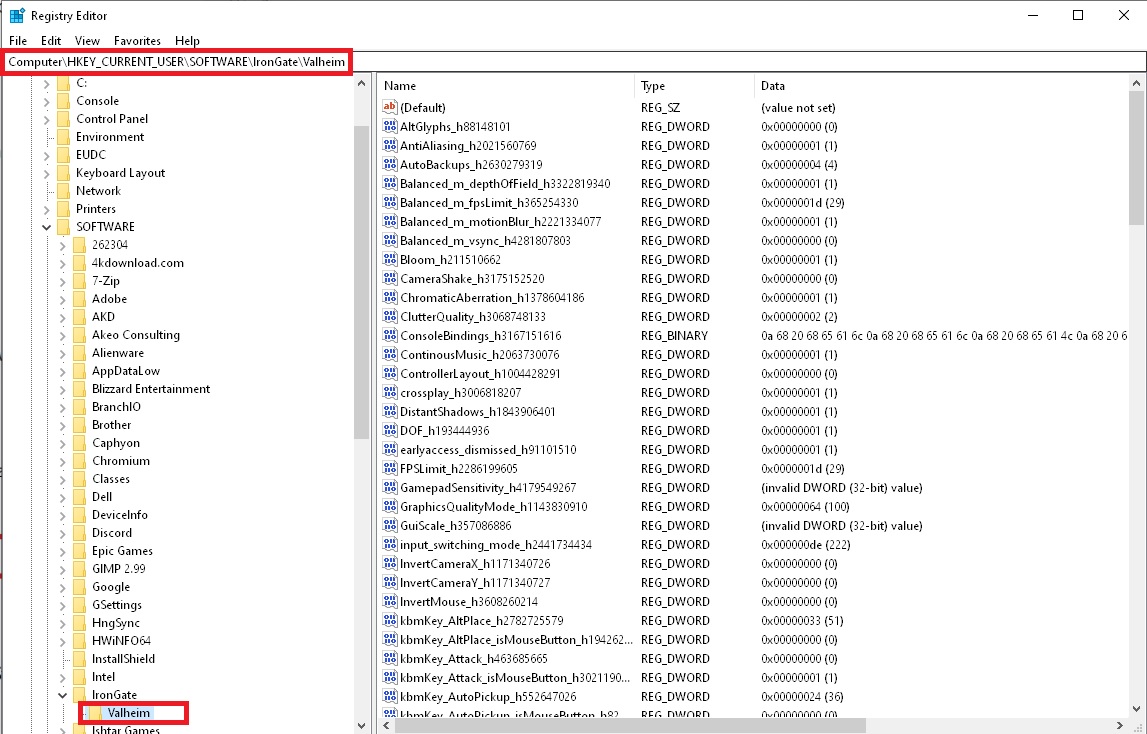
You can also try resetting all Valheim binds by doing the following:
- Click on Windows start and type
regeditorregistry editor. - Manually navigate to Computer\HKEY_CURRENT_USER\SOFTWARE\IronGate\Valheim.
- Delete this Valheim folder in the registry: https://i.imgur.com/pJ90jaP.jpg
 twin steeple
sacred dawn
I found the location.... the little alter thing where its supposed to be I guess...
twin steeple
sacred dawn
I found the location.... the little alter thing where its supposed to be I guess...
Search around that location.
 alpine remnant
I've come across a bug where at random me or my gf or freind will no longer automatically pick up items. It is not due to being overweight as this just happened with me only weighing 77 out of 300. There is no pattern as I said before has this bug be discussed before and is there a fix besides needing to relaunch the game.
twin steeple
alpine remnant
I've come across a bug where at random me or my gf or freind will no longer auto...
Auto-pickup feature is toggleable, as suggested in controller layout image.
LB+LS or LT+LS depending on the layout.
If you end up hitting it by mistake too often, and have some other suggestion that would work better, I'm all ears.
alpine remnant
twin steeple
If you end up hitting it by mistake too often, and have some other suggestion th...
Okay we could be doing that I didn't realize that was a feature sorry about that.
opal quartz
I do have the same problems again, but now reinstallin the xbox app doesn’t fix the black screen. Any other tips?
 viral mesa
alpine remnant
Okay we could be doing that I didn't realize that was a feature sorry about that...
viral mesa
alpine remnant
Okay we could be doing that I didn't realize that was a feature sorry about that...
Yeah happened to me to I always thought it was a bug until I saw it in controls
 golden cave
the U get the chills raid keeps spawning enemies in my base this never happen with any other raid before this a bug?
 robust breach
Can someone help me my builds that is under the roof is decaying to almost to 0 %
 vapid flame
Anyone have an issue with climbing a flame metal tower. I climbed it before no problem but the second time felt like it was slippery and just sliding and couldnt jump untill i slipped right into the lava
(had bubble shield up)
twin steeple
golden cave
the U get the chills raid keeps spawning enemies in my base this never happen wi...
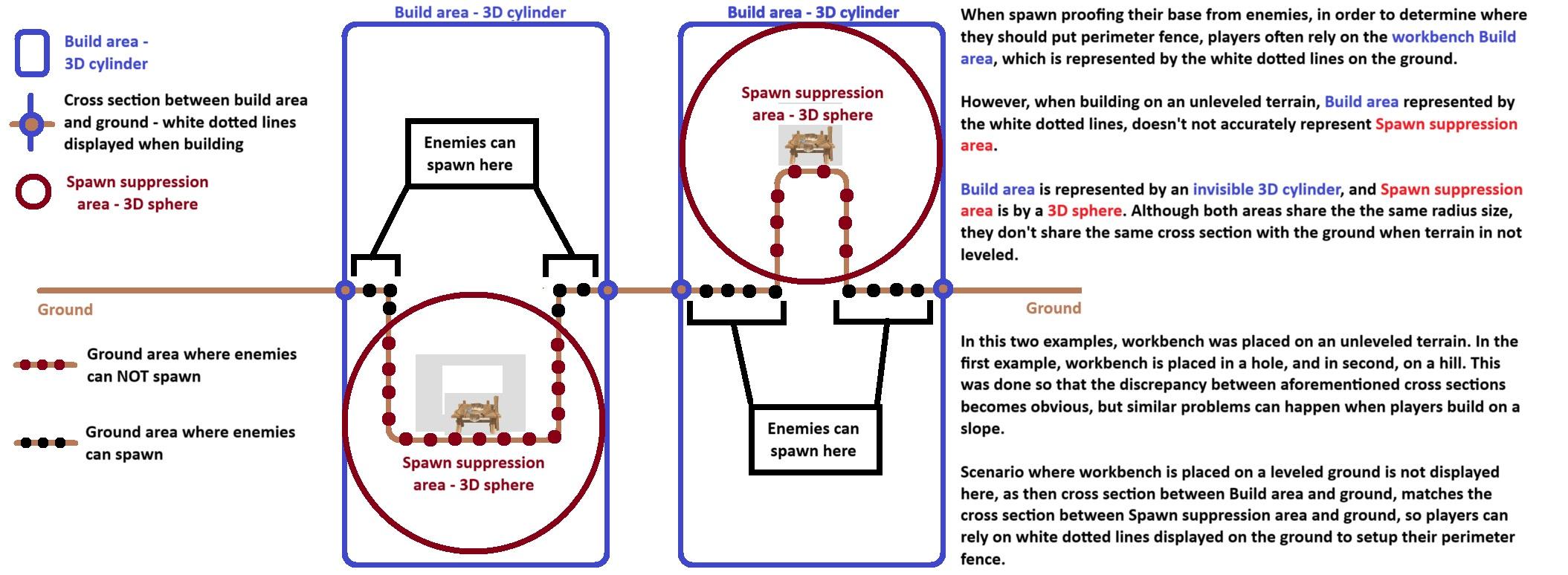
Are you sure that your base is properly spawn proofed now?
Here's an important piece of info you should be aware of when spawn proofing your base:
https://i.imgur.com/pGRZPun.jpg
 twin steeple
vapid flame
Anyone have an issue with climbing a flame metal tower. I climbed it before no p...
twin steeple
vapid flame
Anyone have an issue with climbing a flame metal tower. I climbed it before no p...
Known issue. As a workaround for floating probem, what you can do is reach the flametal pillar, not pick it yet, rather logout and logback in, setup a campfire close by and sit next to it to get some rested buff, and then go for mining it. Setting up a portal real close to it, portaling to the base, re-logging, getting rested and portaling back might also work.
vapid flame
Thanks
 hidden briar
twin steeple
Are you sure that your base is properly spawn proofed now?
Here's an important p...
hidden briar
twin steeple
Are you sure that your base is properly spawn proofed now?
Here's an important p...
how does this work with airborne enemies? does the volume in the sky have to be spawnproofed?
 molten cedar
anyone know why my buddy keeps getting a super long loading screen on valheim when he tries joining me?
 solid patio
Could be a slow connection or the game is just trying to load up your world, which can take some time
 twilit terrace
Loading into my world on Xbox series x and everything except the map is completely wiped. I tried loading the backup saves but all the same. Is there anything to do to fix this?
twin steeple
hidden briar
how does this work with airborne enemies? does the volume in the sky have to be ...
No, only the ground.
twin steeple
molten cedar
anyone know why my buddy keeps getting a super long loading screen on valheim wh...
Tell them to try joining your world via new character to see if loading gets any different.
hidden briar
I assume they pick a spot on the ground and then spawn above that selected spot, so proofing the ground spot blocks the sky spawn?
twin steeple
twilit terrace
Loading into my world on Xbox series x and everything except the map is complete...
Turn off your console fist, physically unplug it, wait 30sec. plug it in again and then launch Valheim and restore an earlier world backup (not character backup).
Latest world backups show up closed to the top. Try the top most backup that has autobackup in its name.
twin steeple
hidden briar
I assume they pick a spot on the ground and then spawn above that selected spot,...
Yeah, exactly.
 dull pendant
So… my Xbox switched my attack to my POV instead of the direction of my character. At first I hate it but then I started to love it. But after Ashlands update it went back to attacking whatever direction I was facing. Is there a way to change this?
twilit terrace
dull pendant
So… my Xbox switched my attack to my POV instead of the direction of my characte...
I remeber changing it as an option in settings
I forget exactly where it was tho
dull pendant
I dug through setting and couldn’t find anything. I might be out of luck which is fine too but I miss it lol
twilit terrace
twin steeple
Turn off your console fist, physically unplug it, wait 30sec. plug it in again a...
Damn no success any other tips? All the backups are significantly smaller then what they were/ what they should be
twilit terrace
dull pendant
I dug through setting and couldn’t find anything. I might be out of luck which i...
Have you tried/ do you have this setting
 twin steeple
twilit terrace
Damn no success any other tips? All the backups are significantly smaller then w...
twin steeple
twilit terrace
Damn no success any other tips? All the backups are significantly smaller then w...
Can you take a pic of your backups aslo with filesizes being visible?
 iron plover
I run a dedicated server on the xbox game pass and there are no adminlist,bannedlist, and permittedlist text files
twin steeple
iron plover
I run a dedicated server on the xbox game pass and there are no adminlist,banned...
They are saves in %username%\AppData\LocalLow\IronGate\Valheim
iron plover
twin steeple
They are saves in %username%\AppData\LocalLow\IronGate\Valheim
isnt this for the steam version?
twin steeple
iron plover
isnt this for the steam version?
Both platforms use the same folder to store saves, client log files and administrator config files for servers.
Copy past the file path above
iron plover
twin steeple
Both platforms use the same folder to store saves, client log files and administ...
found it, thank you very very much
 twin steeple
twilit terrace
twin steeple
twilit terrace
At which point were you in your world progression?
It's really weird even the backups are small in size during the time you played normally
Do you remember those "backup_auto" saves being bigger is file size prior to you trying to restore them?
twilit terrace
Yeah they were much bigger, was on day like 150 I think — hadn’t explored too far out on the map, but did a lot of building
twin steeple
twilit terrace
Yeah they were much bigger, was on day like 150 I think — hadn’t explored too fa...
Are those all backups in the screen? So no backups larger than 338 KB left?
Do you remember seeing any errors prior to this happening? Crashing?
 ivory sphinx
Anyone have a bug where your boat randomly takes damage
twin steeple
ivory sphinx
Anyone have a bug where your boat randomly takes damage
Consistently taking damage? You'll probably have to quit the game from the Xbox menu and re-launch it to fix it.
twin steeple
twilit terrace
Yeah those are all the backups for that worlds
That's a quite throubling. I'm afraid you won't be able to recover your worlds.
We are not aware of anything that could corrupt backups at this moment.
Have you ever synced your Xbox account to a PC?
 manic copper
Hello! I'm getting incompatible versions on my server that is hosted on Bisect Hosting. I restarted the server and it updated, but I'm still getting incompatible versions.
Anyway to check vesions in the command line for the server?
 astral meteor
My server is on Dathost and I’m also getting incompatible version even though I have the current version on server and on my Xbox. Maybe the issue is tied to the cross play feature?
 cold steeple
if my friend is running valheim off microsoft store on pc and gets all the required mods for a server can he join a steam/pc server or does it need to be crossplay because i cant find any crossplay modded servers
twin steeple
cold steeple
if my friend is running valheim off microsoft store on pc and gets all the requi...
Most mods generally don't work for Microsoft store version of the game. You might find more info in #mods-discussion
The server has to have crossplay enabled for Microsoft store player to join.
twin steeple
astral meteor
My server is on Dathost and I’m also getting incompatible version even though I ...
Which version is that?
twin steeple
manic copper
Hello! I'm getting incompatible versions on my server that is hosted on Bisect H...
You'll have to check the server log files to confirm which version is being run.
Is the version you see in the starting menu the same as the verison you see before joining the server via join server tab?
astral meteor
I can connect to the server via Steam on PC with no problem and I’m running current version there as well as on Xbox console. Just the console says it can’t connect to server as server is running older version which can’t be true.
I can’t see the version on the server
I hate cross play 😕 I’m working on moving my character to Steam and will abandon the Xbox route
 civic sluice
I had same issue. then I noticed that the xbox was on newest public test version that was released today. if you installed ashlands using the insider app. you need to remove updating on valheim and reinstall. this worked for me.
twin steeple
astral meteor
I can connect to the server via Steam on PC with no problem and I’m running curr...
You should be able to see your version at least in the bottom right corner of the starting menu, or above patch notes on the left.
astral meteor
civic sluice
I had same issue. then I noticed that the xbox was on newest public test version...
Oh that could be it … I had to access Ashlands by installing from the insider app when it was released … let me try that
astral meteor
twin steeple
You should be able to see your version at least in the bottom right corner of th...
Yes on console the version is sx-0.218.16. I don’t know where to see the version on my server. But seems like my Xbox console updated with the beta version
I’m still hating on Xbox though 😂
twin steeple
astral meteor
Yes on console the version is sx-0.218.16. I don’t know where to see the version...
Yes, you've updated to PTB, and the server probably didn't.
You should usually also be able to see the server version before connecting to it.
astral meteor
twin steeple
Yes, you've updated to PTB, and the server probably didn't.
You should usually a...
Duh … I was looking for it on the server hosting page 😂 yes you’re right … server is on 218.15
 spare oxide
Is there a way to update the server to 218.16 instead of downgrading the Xbox version
twin steeple
spare oxide
Is there a way to update the server to 218.16 instead of downgrading the Xbox ve...
Depends on how you are hosting it. Nitrado for example doesn't support switching to PTB version. Gportal does.
twin steeple
spare oxide
So I can switch the server to PTB. Or just change the Xbox back to non PTB?
Yeah, look for some youtube tutorials about gportal, PTB and Valheim.
Be sure to shutdown the server before you change anything on their site.
 worthy tundra
civic sluice
I had same issue. then I noticed that the xbox was on newest public test version...
worthy tundra
civic sluice
I had same issue. then I noticed that the xbox was on newest public test version...
You use the insider app on xbox right ?
 arctic grove
Alright I've got a question: I've got a dedicated server through nitrado. It's a PC server with cross play enabled and me and all the players in it play it on Xbox. How do I access server settings for it, I'm unsure how to make myself and admin on the server and how to access the console.
civic sluice
worthy tundra
You use the insider app on xbox right ?
i did use the insider app on xbox. i had to remove being updated with public test and restart xbox. i uninstalled and then re installed and it worked
arctic grove
civic sluice
i did use the insider app on xbox. i had to remove being updated with public tes...
Once you restarted the game on the Xbox could you still see your character?
civic sluice
arctic grove
Once you restarted the game on the Xbox could you still see your character?
I had to revert save to prevous for charecter. Manage saves under charecters
arctic grove
civic sluice
I had to revert save to prevous for charecter. Manage saves under charecters
Oh that's an option? You can rollback your character to a previous version?
civic sluice
arctic grove
Oh that's an option? You can rollback your character to a previous version?
Had a few restore points. So i used before update and it worked
arctic grove
civic sluice
Had a few restore points. So i used before update and it worked
Are restore points made automatically? Or should I have done that before entering pbt
civic sluice
arctic grove
Are restore points made automatically? Or should I have done that before enterin...
I didnt do anything to add it. Think it was already setup by default
arctic grove
civic sluice
I didnt do anything to add it. Think it was already setup by default
Awesome. I hope me and my friends who decided to join the PBT to play early can recover our characters. I'm super worried right now 🥲
arctic grove
civic sluice
I didnt do anything to add it. Think it was already setup by default
Wait are you saying you rolled back a locally saved world? Or just your character
 bright fjord
hi im not sure how to roll back my game version on xbox, im on 218.16 but my friends server is on 218.15
 copper quiver
Did you opt for the Xbox Insider program to get the PTB? Try opting out, and reinstalling Valheim?
bright fjord
copper quiver
Did you opt for the Xbox Insider program to get the PTB? Try opting out, and rei...
also did opt out but it hasnt rolled back, it reinstalled the ptb
copper quiver
Did you opt out of Valheim specifically or just the insider program itself?
Though in all honesty, both of those things should give the same results, imo.
Did you see this post just above? #xbox-bugs-discussion message
they mentioned opting out, needing to restart the Xbox to uninstall/reinstall the correct version, then they had to roll back their character save to get it to work.
bright fjord
I didn't see that post but thanks I'll try that aswell
spare oxide
Ok here’s what we learned last night. Just thought I would share our experiences so that it may help someone. On three Xbox accounts the users did not attempt to load the game after update using their character. For those cases once they left the PTB and went back to version 218.15 all characters worked and had existing saves. For the two users that attempted to load into the game with Xbox at version 218.16 and Gportal server 218.15 they can no longer load those characters after leaving the PTB and reinstalling Valheim. So for those two I suggested to them to rejoin PTB, load into private world, dump all there gear and inventory into a chest. Then go back to non PTB valheim and restore there characters prior to joining the PTB. We will find out tonight if that works. They will lose about 2 weeks of skills, map exploration and any trophies. But there gear will be safe. I hope
copper quiver
spare oxide
Ok here’s what we learned last night. Just thought I would share our experience...
Smart. You can use devcommands to respawn the missing objects too, if you don't mind using them.
twin steeple
spare oxide
Ok here’s what we learned last night. Just thought I would share our experience...
Why do you think that the friends that loaded on 0.218.6 should lose two weeks worth of skill points?
Every save automatically gets backed up when it gets loaded on the new game version.
twin steeple
arctic grove
Alright I've got a question: I've got a dedicated server through nitrado. It's a...
Nitrado probably has a way to add new admins to the admin list on their website. Did you scout the website for admin keywords?
spare oxide
twin steeple
Why do you think that the friends that loaded on 0.218.6 should lose two weeks w...
Because he cannot access his character in the 218.15 version. So he has to perform a character restore prior to joining PTB 2 weeks ago
twin steeple
spare oxide
Because he cannot access his character in the 218.15 version. So he has to perf...
They can not access their character in 0.218.15 becaouse it's a 0.218.16 save
spare oxide
Right
twin steeple
0.218.16 came two days ago
so a backup before 2 days has to be restored
the backup should be in the format charactername_backup-timestamp where timestamp is 2 days ago
spare oxide
twin steeple
the backup should be in the format charactername_backup-timestamp where timestam...
Ok my friends restored their characters one day before the update happened for us. Update happened on 5-28, they restored their characters to 5-27. Worked great…thanks for the tip.
 brittle surge
Hello, my friend and I always seem to have a problem connecting… We both can get to the password screen on random community screens but he can’t get to the password screen on my world. It says failed to connect. Any ideas on how to fix this?
twin steeple
brittle surge
Hello, my friend and I always seem to have a problem connecting… We both can get...
Playing on consoles or gamepass PC?
brittle surge
twin steeple
Playing on consoles or gamepass PC?
Console and we both purchased the game
twin steeple
brittle surge
Console and we both purchased the game
Can you both test your NAT type in advanced XBox network settings and report results?
brittle surge
twin steeple
Can you both test your NAT type in advanced XBox network settings and report res...
Oh I forgot to mention we did and we both had opened
 heavy pewter
Hi today with my friend we have tame two asksvin 1 star and it was a success and mating and other stuff yes but when we have start to ride asksvin 1 star all was ok but at a moment a creature was coming and my asksvin was in auto pilot and as hunt all he have see when all its dead we can continue to walk normal but when creature back around I loose the control with me riding and he follow the target I don’t know the reason I think a bug he listening nothing and he stop only after all enemy was destroyed I cannot grab stuff on when I ride too and he as auto attack yes but I cannot push a specific touch for attack when I ride ….my question all is normal or it’s a xbox bug?
twin steeple
brittle surge
Oh I forgot to mention we did and we both had opened
Let me know when you'll both have some time to jump on my test server.
twin steeple
heavy pewter
Hi today with my friend we have tame two asksvin 1 star and it was a success and...
If you want to have a manual control over Asksvin, you have to hold sprint button.
heavy pewter
Oh ty very much for the trick I go try after ☺️
 frozen bluff
Xbox one performance 💀💀💀💀💀
 proper scarab
frozen bluff
Xbox one performance 💀💀💀💀💀
proper scarab
frozen bluff
Xbox one performance 💀💀💀💀💀
Just wait for the ashlands beta performance, its worse
 median quest
Hey! Ive decided to reinstall the game and hop into the new patch (pc gamepass). However, when I logged to my server it seems like all my mistland progress has been removed. I tried multiple restores but they are all irrelevant. Please help! I dont wanna visit those forsaken islands again 😭
twin steeple
median quest
Hey! Ive decided to reinstall the game and hop into the new patch (pc gamepass)....
What about your mistlands progress got removed?
frozen bluff
proper scarab
Just wait for the ashlands beta performance, its worse
Oh god😭😭
twin steeple
frozen bluff
Oh god😭😭
Sry, somehow managed to paste a wrong comment last time. More performance tweaks are constantly on the way for Xbox One console. However there is so much one can do for a 11 year old system. If you have gamepass ultimate subscription, and if you live in a country where Xbox Cloud gaming is available, and if your connection is good, I would recommend uninstalling Valheim to get an option to launch it from the Cloud. It's pretty much the same experience as playing Valheim on the Series X console.
median quest
twin steeple
What about your mistlands progress got removed?
All of it, gear, structures, map discovery, etc. Its like I got a world reset to pre-mistland.
twin steeple
median quest
All of it, gear, structures, map discovery, etc. Its like I got a world reset to...
Can you take a screenshot of your world backups in the manage saves menu?
median quest
twin steeple
Can you take a screenshot of your world backups in the manage saves menu?
I've just checked with the friend I played, and the last checkpoint he has is 17.07.2023, the last time we finished the game (Mistland). In the screenshot you can see all my saves in 2023, which end up at 30.06.2023 😦
 twin steeple
median quest
I've just checked with the friend I played, and the last checkpoint he has is 17...
twin steeple
median quest
I've just checked with the friend I played, and the last checkpoint he has is 17...
The backup you have highlighted here, is a backup of your old world just before it go updated to Ashlands version.
This one:
 median quest
twin steeple
The backup you have highlighted here, is a backup of your old world just before ...
median quest
twin steeple
The backup you have highlighted here, is a backup of your old world just before ...
Yea thats the one that was loaded yesterday and autosaved, which doesnt have my progress from July 2023. I tried to load multiple different saves to find my progress, but failed to find it.
twin steeple
median quest
Yea thats the one that was loaded yesterday and autosaved, which doesnt have my ...
How much MB does your main save on top now have?
This one backup has 30.4MB
You should also be aware that anything that you've built in the old world close to Ashalnds and DeepNorth might sink into the ocean
 median quest
twin steeple
You should also be aware that anything that you've built in the old world close ...
median quest
twin steeple
You should also be aware that anything that you've built in the old world close ...
Oh I dont mind with that, I did built some teleports in both locations but I dont mind losing those. Just looking to get all that marble and progress from Mistland is my prio.
Also, same goes for my character, which seems to be frozen in time before I went Mistlands :\ (no orbs and such)
twin steeple
median quest
It's really werid that you wouldn't have you Mistlands progress in your saves.
Did you end up signing up with your Xbox accout on any other device since?
median quest
As a ps5 owner I try to not speak out loud about the fact I got xbox gamepass on PC. Otherwise my console will turn green..
So no, I didnt log anywhere except from the very same pc 😅
Just to prove a point, my friend just streamed his very well saved character that he created when we played together (which has all progress).
 dawn ivy
How do you whitelist xbox users?
median quest
median quest
As a ps5 owner I try to not speak out loud about the fact I got xbox gamepass on...
So does this means goodbye? Or is there any cold storage DB that the devs can lookup my lost files? 😅
twin steeple
dawn ivy
How do you whitelist xbox users?
By editing permittedlist.txt on your dedicated server and adding "Xbox_IDnumber" to the file. These ID numbers can be seen when players join some server, or they launch their own server and when in world press "F2" or "LT+LB+view button" to summon the performance monitor window.
twin steeple
median quest
So does this means goodbye? Or is there any cold storage DB that the devs can lo...
No, Valheim devs don't have access to your Xbox Cloud files. Only Microsoft does.
I still can't see any reason as to why you would lose your Mistlands progress if you were only playing on PC.
Valheim always stores world save into worldname.db file and worldname.fwl file, and lets say those two files contained Mistlands progress, and were at some point lost. When you launch Valehim, this files wouldn't be there at all, rendering your unable to load your world unless you restore some backup. In your situation, after some time of inactivity you returned to Valheim with this files not being gone, which implies that they were replaced. If files were in Cloud, they can only be replaced from some other files with the same name that come from a different device.
Are you sure you haven't moved your Cloud saves at some point from Cloud to Local, and then did something on your PC, like re-install windows or format your disk?
Judging by this period here, you might have moved main files from Cloud to Local at around June 2023 and continued playing in Mistlands on your local files:

If you since then continued to play on Local saves, then deleted your local save (windows reinstallation, disk replacement, disk format, change of Windows user, ...), upon Valheim launch only the Cloud saves would be visible that existed prior to the time when you moved your saves from Cloud to Local.
median quest
Sadly none of the above.. my PC wasnt formatted or anything.
The only thing that might come into mind is the fact my gamepass sub finished (March 24) and I renewed (June24). So maybe its related to that? IDK... I've contacted XBOX support and hopefully they'll be able to help me somehow.
Last question before giving up - does the fact that I had portals in frozen/firey places could cause that? I do also remember that we sailed over the border of the earth and we had to restore previous versions. Maybe that could also be the reason of this issue? :\
twin steeple
median quest
Sadly none of the above.. my PC wasnt formatted or anything.
The only thing that...
Did you stop playing after sailing to border and then restoring previous backup? Or did you continue to play on a world which clearly had Mistlands progress?
median quest
Sadly I dont remember.. I think we did that as our final act before uninstalling
twin steeple
median quest
Sadly I dont remember.. I think we did that as our final act before uninstalling
When you go to start → type recover → and then open system restore, do you have any system restore points saves there?
median quest
twin steeple
When you go to start → type recover → and then open system restore, do you have ...
from 2023? nope 😄 only few weeks ago, none of which related to Valheim sadly
 lethal basalt
Im on pc and downloaded through gamepass and its saying Platform Privilege required. I have no idea what to do.
 quaint geyser
lethal basalt
Im on pc and downloaded through gamepass and its saying Platform Privilege requi...
quaint geyser
lethal basalt
Im on pc and downloaded through gamepass and its saying Platform Privilege requi...
Quick check here, do you have xbox live? The two others in #general also brought that up as well 🙂
lethal basalt
I dont, but I figured out the problem was I did not have Steam or EA linked. Linked it and it went away
quaint geyser
Interesting, i'll keep that in mind if it comes up again 
lethal basalt
I very much appreciate you homi, you have my gratitude.
quaint geyser
😛 I didn't do much
glhf
 strange lion
does anyone know how to retrieve a character who disappeared on the character list but is still in the saves ?
I tried deleting the character then retrieving it via the saves but it didn't work my character still doesn't appear
twin steeple
strange lion
does anyone know how to retrieve a character who disappeared on the character li...
Console or PC? Tried swtiching back from PTB to live version?
strange lion
PC my character disappeared after switcning PTB to live version
should i switch back to the PTB version ?
sorry about that
twin steeple
strange lion
but now how do i get it to be on the live version?
Basically you can't and you shouldn't play with new saves on old game versions. When you switch from old → new game version, and **load **saves on the new version (enter into a world), Valheim will always backup the old saves before they got updated to the new version of saves. The old backups will be kept in the file format "savename_backup-timestamp", where the time stamp corresponds with the time when you've chosen to load saves on the new game version. Every time you want to switch from new → old game version, you should also **always **restore those old save backups from the old game version via the in-game manage saves button in the starting menu, for both world and character saves.
strange lion
ok tx
 plush stirrup
anyone having an issue on xbox where the items dont auto pickup/loot ? I keep having this issue and only thing that seems to solve it is restarting the game
twin steeple
plush stirrup
anyone having an issue on xbox where the items dont auto pickup/loot ? I keep ha...
Auto-pickup is a toggleable feature. You can press LB+LS or LT+LS depending on the layout to toggle it.
plush stirrup
twin steeple
Auto-pickup is a toggleable feature. You can press LB+LS or LT+LS depending on t...
ty!
heavy pewter
Ok i retry to notice all on my server Xbox a solo server at the beginning actually we are 2 and I have create a big house in grausten and all the house and external wall fall at 1hp i notify we use no mod all settings it’s normal I use no mode no cheat nothing and all wall fall at 1 hp one by one and I have 2300 and more day in game on this server and it’s the first time I see that I’m anxious and these never stop it’s 25 min we fix all … it’s same of a poison was running inside all my structure I have a big server maybe but it’s anormal situation we look actually
And it’s not rules of build was not respected or other because it’s very random I try to post some pics when I can for now we run for save this big house if some as same problem contact me please ty
twin steeple
heavy pewter
Ok i retry to notice all on my server Xbox a solo server at the beginning actual...
Are you playing on a dedicated server?
Does the server have daily restarts?
heavy pewter
twin steeple
Are you playing on a dedicated server?
I play on solo server just I log online for my girlfriend join each day when she is online but the rest of time I play solo offline actually it’s ok but for 30 min we have take dommage inside home outside home and on my defense wall very random place very sure it’s not some monster maybe I think a bug was following we because wall and floor and other structure was no HP and was not break just only very bad full black bare
twin steeple
heavy pewter
I play on solo server just I log online for my girlfriend join each day when she...
After you finish your play session, and you log out to starting menu, I would recommend that you also close your Valheim application via Xbox menu. Your friend should do the same. That should stop random damage on build pieces from occuring.
heavy pewter
twin steeple
After you finish your play session, and you log out to starting menu, I would re...
We have repeat these action 3 time and they are not stop but now it’s finish I have think maybe some damage dealing 400 days before inside the game when we have begin the build but the damage was dealing only now and it’s was very mysterious and not possible it’s an invisible monster
I tell you if the problem persist and sorry for my English☺️
 pseudo mauve
Hi,
Do you know any solution if the game starts with blank screen, only the cursos changes?
It was installed through Xbox app on windows.
twin steeple
pseudo mauve
Hi,
Do you know any solution if the game starts with blank screen, only the curs...
Yeah, first install all of your windows updates, and check optional ones also. Then restart PC.
If that doesn't work, re-install your Xbox app, and then restart your PC one more time. That should do it.
alpine remnant
Load Screen when opening up Valheim takes sooo long now 😴💤 …. just to get to the menu screen ….
 green jay
Hi Xbox friends- is spawning items gone since ashlands update? I can get devcommands to show true by typing /devcommands into the console on Xbox but spawning doesn’t work nor anything else… trying to play the game again minus some grinding oops
twin steeple
green jay
Hi Xbox friends- is spawning items gone since ashlands update? I can get devcomm...
It's "devcommands" first (without backslawh and without quotes). You can only use devcommands if your are the host of the server or playing offline, but not when on a dedicated server.
green jay
Yeah weird- I’m offline and I even started a second world as well- I could only get devcommands to work with the backslash. Heckin weird
Without the backslash I just speak devcommands to the server lol
twin steeple
green jay
Yeah weird- I’m offline and I even started a second world as well- I could only ...
Commands are not typed in the chat rather the console
LT+LB+start button to sommon the console
 astral nacelle
@strange lionlpad the character before you played the ashlands update and that works had to do that. Myself
 covert harness
Hello, anyone knows why my valheim is still in the beat version on xbox pass? I left the xbox insider but my valheim doesnt change to the live version. It still downloads the latest beta ( 218.16) instead of the live (228.15)
twin steeple
covert harness
Hello, anyone knows why my valheim is still in the beat version on xbox pass? I ...
Try to double check if the Xbox Insider signing out process has been finished, and then restart your console
covert harness
Its on PC, but ill try the restart
twin steeple
covert harness
Its on PC, but ill try the restart
PC can usually take a while. No way to force Xbox when it's gonna update the app. Restart rarely helps in my experience.
If you just leave Xbox app open, it should eventually flag Valheim with an update
strange lion
astral nacelle
<@484720874931486752>lpad the character before you played the ashlands update an...
tx but what do you mean by lpad sorry if thats a stupid question
 tribal pelican
Hi does someone know how to fix black screen when launching the game? I am playing on xbox app on my pc and when i open the game i can see only black screen not even the menu.
I tried so many solutions but nothing works
twin steeple
tribal pelican
Hi does someone know how to fix black screen when launching the game? I am playi...
Yeah, first install all of your windows updates, and check optional ones also. Then restart PC.
If that doesn't work, re-install your Xbox app, and then restart your PC one more time. That should do it.
tribal pelican
I will try that thanks
tribal pelican
twin steeple
Yeah, first install all of your windows updates, and check optional ones also. T...
Did not work ://
twin steeple
tribal pelican
Did not work ://
Not even restart after Xbox app reinstallation?
twin steeple
tribal pelican
Idk why this happening it worked yesterday fine
Might be a problem with a specific region, or you had a Windows update recently.
Do you have the same Microsoft account in your Xbox app as you have in your Microsoft store?
Try repairing your gameservices.exe, by going to start → type apps & features → find gameservices.exe → advanced options → repair
twin steeple
tribal pelican
Nah didnt work
Will DM you.
 ivory wind
I joined public test then i left now all my saves are gone anyone know a fix for this
twin steeple
ivory wind
I joined public test then i left now all my saves are gone anyone know a fix for...
Check this comment: #xbox-bugs-discussion message
ivory wind
Yh i did that saves wont load up its bad hours gone
twin steeple
ivory wind
Yh i did that saves wont load up its bad hours gone
You can't see your character saves or your can't load world saves?
ivory wind
I dont see my character but i can go and see the back ups but when i restore nothing happens
twin steeple
ivory wind
I dont see my character but i can go and see the back ups but when i restore not...
You are most likely not restoring the correct backup. Can you screenshot your character backup list?
ivory wind
 twin steeple
ivory wind
twin steeple
ivory wind
It seems like you created this "ulfric" character on PTB in the first place. That character can't be loaded on previous versions of Valheim.
Why did you opt out from PTB?
ivory wind
I met some gamers but i couldn't join there game and tbf i wasn't actually using anyone of the test fetches anyway as am still in mislands i used an old old back up and got my main back thank you bro u helped me out hear
twin steeple
I'm guessing that it wasn't about ulfric character then, rather some other character.
For other characters, you don't have to use an old backup, just a backup with a correct timestamp, like mentioned in that other comment I linked.
ivory wind
twin steeple
For other characters, you don't have to use an old backup, just a backup with a ...
Yh i wanted my main character back as had him 5 mouth but definitely wanted ulfric as i spent a long time on my base only got to the swamp but had the best loot room i ever made are u dev u seem to know alot lol
 abstract heron
So I just try to load in to one of my worlds and it wouldn't let me start like I just couldn't select start making it a server didn't help even starting a new world didn't work so I'm just reinstalling the game if anyone knows about this bug can they help me out if it persists
twin steeple
abstract heron
So I just try to load in to one of my worlds and it wouldn't let me start like I...
Xbox console or PC gamepass?
abstract heron
Take a look at the name of this channel we're in and take a guess
It's Xbox
Fixed it
twin steeple
There is an Xbox app on PC as well
abstract heron
When I reinstalled the game to save changed and it said missing DB so I just loaded a backup and now it works
abstract heron
twin steeple
There is an Xbox app on PC as well
Oh I know
The difference between the two versions can be chalked up to just settings any bug fix that works for one will work for the other in most cases
ivory wind
abstract heron
Take a look at the name of this channel we're in and take a guess
That was rude bro u need to apologise
Has anyone come across that bug where u hit start and then u dont see the menu and then your hud completely disappears
twin steeple
ivory wind
Has anyone come across that bug where u hit start and then u dont see the menu a...
Hud can be toggled with LT + start or LB + start depending on the console layout of choice.
Make sure that you are not holding one of those alternate function button while pressing start
ivory wind
Oh maybe thats why thanks
 untold marten
Hello, If I open a modded server on PC (with Valheim Plus for ex), my friend on Xbox can join and play? (I'm the host)
ivory wind
untold marten
Hello, If I open a modded server on PC (with Valheim Plus for ex), my friend on ...
Am on xbox and i have played on moded severs any chance i could join
untold marten
ivory wind
Am on xbox and i have played on moded severs any chance i could join
the servers were in a hosting service or hosted by your friend?
ivory wind
Not 100 sure just random server but it was definitely moded to the max
 somber sable
Anybody know how to improve my game experience with valheim? Because I'm dealing with a lot of like lag spikes, freezing, Etc. I'm on gamepass pc.
ivory wind
somber sable
Anybody know how to improve my game experience with valheim? Because I'm dealing...
There a setting for better fps or better looking game and thers a balance mode for 120hz
But u should be taking your tree stups out as that may trigger lag
somber sable
I have tinkered with the graphics settings but nothing improves the game experience for me.
somber sable
ivory wind
But u should be taking your tree stups out as that may trigger lag
Tree setups?
If so I dont have any of those.
ivory wind
somber sable
I have tinkered with the graphics settings but nothing improves the game experie...
U know when u chop trees and the stump is left chop them down
somber sable
ivory wind
U know when u chop trees and the stump is left chop them down
Oh ok
twin steeple
somber sable
Anybody know how to improve my game experience with valheim? Because I'm dealing...
What are you PC specs?
twin steeple
untold marten
Hello, If I open a modded server on PC (with Valheim Plus for ex), my friend on ...
It depends on what mods are installed. Try asking in #mods-discussion channel.
ivory wind
twin steeple
It depends on what mods are installed. Try asking in <#1202934289898151966> cha...
Do u think mods will come to xbox at some point
somber sable
twin steeple
What are you PC specs?
I have an NVIDIA GeForce GTX 1660 Ti and an intel i7-9750H
ivory wind
somber sable
I have an NVIDIA GeForce GTX 1660 Ti and an intel i7-9750H
@twin steeple is that good specs bro
twin steeple
somber sable
I have an NVIDIA GeForce GTX 1660 Ti and an intel i7-9750H
Which laptop model?
somber sable
a helios 300
twin steeple
somber sable
a helios 300
Since you are on a laptop, although I'm not not aware of common helios 300 related problem, I would still recommend to install HWiNFO, which which will under sensors tab, monitor all your components and report if any reach close to MAX temps. Stuttering on laptops usually comes from thermal throttling. This is an example how it usually looks in game when temps are the problem: https://www.youtube.com/watch?v=opJJvc_tUW8
twin steeple
ivory wind
Do u think mods will come to xbox at some point
Not very likely I'm afraid. Reportedly some mods work on PC gamepass version, but I wouldn't know much details.
somber sable
twin steeple
Since you are on a laptop, although I'm not not aware of common helios 300 relat...
thx
ivory wind
Os the xbox series s known to lag in the mislands ??
 neon fulcrum
Having problems with boats banging when I try to sail the boat gets destroyed quickly! Help!
twin steeple
ivory wind
Os the xbox series s known to lag in the mislands ??
There might be some lag when there is more enemies around. Play in performance mode if you already aren't
twin steeple
neon fulcrum
Having problems with boats banging when I try to sail the boat gets destroyed qu...
Go to the Xbox menu and quit Valheim from there. Then turn off your console, unplug it from power supply, wait 1min, plug it back on and test.
If boats still don't work, re-install the game.
neon fulcrum
Thanks
 north yoke
Why does my server lag when a specific person enters?
 cloud echo
Me and my friend are playing on Xbox gamepass and he cannot join me but i can join him is there any way to fix this
 bold locust
north yoke
Why does my server lag when a specific person enters?
bold locust
north yoke
Why does my server lag when a specific person enters?
either because of package loss or you have bad peering to that user
WIFI is a typical culprit
bold locust
cloud echo
Me and my friend are playing on Xbox gamepass and he cannot join me but i can jo...
could be because multiple reasons. it can be his internet service provider activly blocks your friend from hosting a server, or he is behind a shared IP which could prevent your friend from hosting
twin steeple
north yoke
Why does my server lag when a specific person enters?
Is that person playing on Xbox or PC?
ivory wind
Loading up valheim and the screen just goes blank saying something up whit the cloud save data
twin steeple
ivory wind
Loading up valheim and the screen just goes blank saying something up whit the c...
On which platfrom are you playing?
ivory wind
Xbox s
ivory wind
twin steeple
On which platfrom are you playing?
Xbox s
twin steeple
ivory wind
Xbox s
Xbox One S or Xbox Series S?
Do you see the error number: 0x80830003 ?
Or can you actually take a pic of the error?
ivory wind
twin steeple
Xbox One S or Xbox Series S?
Do you see the error number: 0x80830003 ?
Or can yo...
Series s sorted it now
 trail nexus
Hello guys.
I’m having a meltdown. When opening the game I just have a black screen but I can see the in-game cursor and I also can move it. I reinstalled it 2 times, even on different storages. Also updated the gpu drivers. On task manager the games seems running ok, using gpu, memory ecc. I’m running the game on pc via Xbox gamepass. Please help me, I’ve been playing the game for 3 months and I don’t want all my hard work and grinding wiped out 🥲
twin steeple
trail nexus
Hello guys.
I’m having a meltdown. When opening the game I just have a black scr...
Hi, basically something went wrong with your Xbox services.
Usually checking if any windows updates are pending + optional windows updates solves the issue.
If not, re-install the Xbox app and restart your PC.
trail nexus
twin steeple
Hi, basically something went wrong with your Xbox services.
Usually checking if ...
Just tried to reinstall the xbox app but it didn't work. Also i got no pending updates for windows.
twin steeple
trail nexus
Just tried to reinstall the xbox app but it didn't work. Also i got no pending u...
Did you restart the PC after Xbox reinstall?
You may also try reinstalling gameservices.exe form the Apps & features menu
Upon next Xbox launch you will be asked to install them again
trail nexus
twin steeple
Did you restart the PC after Xbox reinstall?
I've been struggling for the past 2 hours sir and you just solved my problems. Thanks a lot ❤️
heavy pewter
Hi I have this problem on all the place of my server is cool all it’s ok but and I say but on my Ashland and on my grausten manor place my fps fall fall fall with the time 😅 and me and my girlfriend we has same problem I have my solo server I log on when she come and we are on XBOX SERIE X my question it’s grausten build or wild ressource of stone of grausten it’s a bit to high?😅 I love this game and for more information all my other place don’t has these problem the fps not fall and my connection it’s so very big fast and stable and my girlfriend it’s more big than me again we have an very high fiber verry fast and stable …connection not the problem and if we play a lot of hours the problem increase with time, I notify just I think no issue can be church for now
ivory wind
I have this problem on xbox where no one wants to play with me dose anyone have a fix for this bug
bold locust
heavy pewter
Hi I have this problem on all the place of my server is cool all it’s ok but and...
Grausten have a bit of a problem with FPS drops when you build with it
we know about it and it's going to be fixed
heavy pewter
bold locust
Grausten have a bit of a problem with FPS drops when you build with it
Ty very much I really appreciate your response and I hope you can fix this problem with no pressure my congratulation for your game and Ashland it’s 25 years i play andI wait this quality Ty so much and I wait to see more of your work of this adventure it’s fabulous I know you can fix these problem with success I can wait Ty again and good luck. Continu I enjoy to play valheim 😁 gg Iron Gate
 valid hound
I have a dedicated server hosting world some friends and I play on. It’s been up for a month or so, and we’re almost done with Ashlands. Our main base is in the meadows and there’s often like 6,000 ish instances when I’m at the base and my fps is terrible like 30-40fps.
But last night I was playing and wandered away from base a good distance, like well beyond draw distance or whatever it’s called. 100% could not see my house from where I was probably like double or triple that draw distance. My frames suddenly tanked to 15-20fps, and my instances were at like 15,000. This was a plains biome where the only nearby villages had already been cleared. There was no player-built structures or anything.
Any ideas why my instances would more than double away from base? Frame rate dropped to 6-10fps when I got back to base. Never experienced anything like that. My friend playing in the server with me and walking around with me did not experience the same issue at all.
Logging out and logging back in resolved it. Just curious what might have happened to cause it so I can avoid it in future.
twin steeple
valid hound
I have a dedicated server hosting world some friends and I play on. It’s been up...
Were you playing on a console or PC? Does the issue repeat itself if you venture to that locaton in plains again?
valid hound
twin steeple
Were you playing on a console or PC? Does the issue repeat itself if you venture...
Xbox series x. I have not tried again- happened at the end of the night last night. Can try again later today
 fallow cape
Cant download the aslands update on xbox
just says installing on the xbox insider app?
 empty basin
I'm having a problem where I can't get back on the server I was playing on with my friends. They're on it right now with the update, but for me it says I can't join because I have a later version of the game than the server.
Both of their games are updated though
I already quit the game. Uninstalled and reinstalled. It just says the server has an older version than me.
 slender ledge
You have to remove yourself from the insider edition (or whatever it’s called) that gave you early access to Ashlands.
twin steeple
fallow cape
just says installing on the xbox insider app?
Tried restarting the console?
twin steeple
empty basin
I'm having a problem where I can't get back on the server I was playing on with ...
Check the version the server is on (listed before you click connect to in) and the version listed on the bottom right corner of your starting screen.
If you have the higher version, you would have to sign out from the Valheim preview on the Insider Hub app. Be aware that all the saves that were once loaded on the new version, can't be used on the previous Valheim versions, so you character will be invisible. You would have to use manage saves menu to restore a character backup that dates back before you updated to the PTB version. Those backups have a name format that looks like "charactername_backup-timestamp" (no world "auto" in the backup name).
empty basin
slender ledge
You have to remove yourself from the insider edition (or whatever it’s called) t...
This worked actually. Thank You 🙂
slender ledge
empty basin
This worked actually. Thank You 🙂
👍
 round jackal
hello i keep getting failed to connect to my friend's server can anyone please help or tell me a way to (i cant even see community servers)
twin steeple
round jackal
hello i keep getting failed to connect to my friend's server can anyone please h...
What result do you get when you go to your xbox advanced network settings and perform NAT test?
round jackal
twin steeple
What result do you get when you go to your xbox advanced network settings and pe...
ummm really sorry idk what a nat test is let me go figure out what that is and do it rq and i will tell u the results
round jackal
twin steeple
What result do you get when you go to your xbox advanced network settings and pe...
ah wait hold on that's xbox exclusive im using gamepass (from pc) for that issue im really sry
twin steeple
round jackal
ah wait hold on that's xbox exclusive im using gamepass (from pc) for that issue...
If you are on the PC having this problem, you can visit this link to find out the type of NAT you are behind:
https://tomchen.github.io/symmetric-nat-test/
Are you using any VPN? Which version of Windows are you using?
NAT Test: Am I behind a Symmetric NAT or Normal NAT (Full-cone NAT or other non-symmetric)
round jackal
twin steeple
If you are on the PC having this problem, you can visit this link to find out th...
nope i made sure to uninstall all of my vpns just prior to this, but let me see the nat outcome rq
@twin steeple
 twin steeple
round jackal
nope i made sure to uninstall all of my vpns just prior to this, but let me see ...
twin steeple
round jackal
nope i made sure to uninstall all of my vpns just prior to this, but let me see ...
When you go to google and type my IP, do you get only numbers as your IP address (IPv4) or letters as well? (IPv6)
Are you using any 3rd party security software that might be blocking Valheim?
round jackal
twin steeple
When you go to google and type my IP, do you get only numbers as your IP address...
yep i get ipv4 (just numbers) not ipv6
anddd i dont think so no im not using anything, and i even had to disable my own firewalls from windows defender and i even allowed it through the firewall
twin steeple
round jackal
yep i get ipv4 (just numbers) not ipv6
anddd i dont think so no im not using any...
Have you ever been able to see the servers in the community tab?
round jackal
twin steeple
Have you ever been able to see the servers in the community tab?
nope that's also another issue
twin steeple
Try clicking on the white show player.log button in the starting menu, which will open up a folder with player files in it. DM me that file.
It might contain some useful info.
round jackal
twin steeple
Try clicking on the white show player.log button in the starting menu, which wil...
alright i will im really sorry to be of disturbance to you mate
twin steeple
Which windows are you using?
While I inspect the file, I would recommend checking if you have any optional windows updates offered for installation + reinstalling your Xbox app.
round jackal
twin steeple
Which windows are you using?
While I inspect the file, I would recommend checkin...
win 10 i dont have any optional updates, i havent reinstalled xbox should i try this perhaps?
 uneven robin
hello, figured id propose this to this channel, so as of today, i have a person who has had a xbox, i am on PC, so as of today, we go to load up the server they have on thier Xbox, we've been able to play on this server for a good 2 weeks now, so while we are on discord. they go to load up thier server on thier Xbox, on my end, it shows up in my join list as not connected with the Red X in its usual position, but i go hit the connect button, and on PC, i get this error "your platform privilage settings prevent you from playing on servers that allow crossplay with other platforms". So after much restarting on both ends, i decided to do a test, i had them log onto a server on my end on PC and low and behold, they were able to get onto my server, but appears the opposite as of today can no longer happen. They arent tech savy and i do not own an xbox nor know its setting structure as compared to PC, is there any advice anyone in xbox land could lend our direction, much appreciation for anyone thats had a simular issue
appears the issue corrected itself, as it took forever to type this, it appears i must say the issue unfucked itself, sorry for the typing, .......any idea on what could of caused this.....glitch in the matriox prehaps?
twin steeple
uneven robin
hello, figured id propose this to this channel, so as of today, i have a person ...
Xbox services can sometimes go offline, so privacy setting might be picked up properly.
Generally, you can also check on both Xbox and PX via browser (https://account.xbox.com/), how your Xbox privacy setting look like:
 uneven robin
I'll save and pass this info, awesome and thank you
 forest oar
Why does it say the server is running an old version tagt is incompatible with my version and how do I fix it
When I try to join and server on valheim
 lapis ermine
Morning! so sorry to bother u guys, but i keep having this same issue when starting my game: keep getting a black screen on launch, the irongate screen never gets to appear and i can only see the valheim cursor
running Valheim from xbox game pass on PC, windows 11
0.218.15
no matter if i restart my PC, reinstall the game or verify game files, always have the same result
twin steeple
lapis ermine
Morning! so sorry to bother u guys, but i keep having this same issue when start...
Be sure to check if any windows updates are available + additionally check optional ones.
If that doesn't work, reinstall your Xbox app + restart your PC after that.
 indigo zinc
Could anyone help me?
 restive sage
I’m trying to go back to an older version of the game. I opted in public testing and its two updates ahead of the regular game. I just opted out to play with friends on the old version with ashlands that just came out. How do i go from the nonpublic version to the public version of the game
twin steeple
indigo zinc
Could anyone help me?
Sure, what's troubling you?
twin steeple
restive sage
I’m trying to go back to an older version of the game. I opted in public testing...
Console or PC? Generally you need to opt out from Valheim preview in the Xbox insider hub, then restart your console. On PC you will probably have to wait until Microsoft services pick up on the fact that the game needs to be updated, can be an hour sometimes from my experience.
indigo zinc
twin steeple
Sure, what's troubling you?
My game always crashes when it gets to a part of the map
twin steeple
indigo zinc
My game always crashes when it gets to a part of the map
On which platform are you playing? Using mods?
indigo zinc
twin steeple
On which platform are you playing? Using mods?
Xbox GamePass, to use some mods through R2
When I get to a certain part of the game, my PC restarts and when it turns back on it's muted
twin steeple
indigo zinc
Xbox GamePass, to use some mods through R2
So entire PC restarts, and not just Valheim? Valheim or mod related crashes shouldn't cause entire PC to restart.
Sounds like a power related issue, which might be triggered by a particular scene in Valheim that uses a lot GPU power.
Do you know your system specs?
indigo zinc
twin steeple
So entire PC restarts, and not just Valheim? Valheim or mod related crashes shou...
ryzen 5 5000
rx 580
16ram
twin steeple
indigo zinc
ryzen 5 5000
rx 580
16ram
Will send you a DM
 oblique lark
During the rain when I use the horizontal ashwood pieces, they get damaged but no other pieces are subject to the same effects.?
 noble thistle
Hello I was wondering if anyone could help me I play on Xbox and so when I try to load up the game on my account it goes straight black screen and doesn't load at all but when other account that is on the same system get on valheim it loads perfectly fine and it happend the other night I was playing perfectly fine for 2hrs and then my game crashed and now I can't get back on I've already tried deleting it re installing it and restarting the system I don't what else to do
twin steeple
oblique lark
During the rain when I use the horizontal ashwood pieces, they get damaged but n...
Some Ashwood pieces don't take the rain damage, which still needs to be fixed so that they do take the damage. Only angled pieces shouldn't take damage.
twin steeple
noble thistle
Hello I was wondering if anyone could help me I play on Xbox and so when I try t...
Have you also tried re-installing the Xbox app? It's also imporant to check optional windows updates.
Hm... It's weird that the other account is fine. I'm guessing that you crashes during saving, so the Xbox Cloud might have some problems replacing the save.
A solution might be deleting your local saves stored on your disk, so that the system starts downloading those that are in Xbox Cloud.
noble thistle
I've already tried all that and I have digital version
twin steeple
noble thistle
I've already tried all that and I have digital version
Oh, you are playing on a console? Read your first comment wrong then (lately black screens were all PC related).
Or do you mean something else when you say that you have a digital version?
For Xbox gamepass on PC, you can install it from Xbox app or Microsoft Store. Which one do you have?
noble thistle
I play on consol xbox series x
 iron raptor
Joining my pc friends server and absolutely nothing is loaded in
 twin steeple
iron raptor
Joining my pc friends server and absolutely nothing is loaded in
twin steeple
iron raptor
Joining my pc friends server and absolutely nothing is loaded in
Have you tried joining any other servers?
Are there other Xbox users playing on that particular server?
Someone from you two is probably behind strict NAT (VPN services on PC, internet service provider putting you behind CGNAT).
Xbox user can perform NAT test in advanced network settings.
iron raptor
I think it was his connection I joined another friend and it works fine
 limpid monolith
does anyone know how to solve the black screen problem?
twin steeple
limpid monolith
does anyone know how to solve the black screen problem?
On PC or console?
limpid monolith
pc
twin steeple
limpid monolith
pc
Be sure to check if any windows updates are available + additionally check optional ones.
If that doesn't work, reinstall your Xbox app + restart your PC after that.
limpid monolith
i tried that
twin steeple
limpid monolith
i tried that
Did you specifically restart your PC after?
 twin steeple
So you did restart your PC, but it didn't help the.
Tried reinstalling gamingservices?
limpid monolith
i tried repair
twin steeple
limpid monolith
i tried repair
How long has passed since you encountered this issue?
Where are you from in terms of world region?
limpid monolith
i encountered today and i live in turkey
last time i played valheim was 2 month ago
2 months ago I was playing without problems
twin steeple
limpid monolith
i encountered today and i live in turkey
Can you try launching the game via gamelaunchhelper.exe?
If you installed on C, should be under: C:\XboxGames\Valheim\Content
Also, did you install any mods 2 months ago?
limpid monolith
nop
limpid monolith
twin steeple
Can you try launching the game via gamelaunchhelper.exe?
If you installed on C, ...
didnt work aswell
twin steeple
limpid monolith
didnt work aswell
Try temporary moving all files from:
%username%\AppData\LocalLow\IronGate\Valheim
To somewhere else on desktop, in a backup folder.
limpid monolith
i tried that before but ill try again
twin steeple
limpid monolith
i tried that before but ill try again
No file has to be present in Valheim Appdata folder before launching the game
limpid monolith
didnt work :/
twin steeple
Do you have same account signed in for Xbox app as well as for Microsoft Store?
twin steeple
limpid monolith
yes both same acc
Try copying entie wgs folder and safely back it up, just like you did for Valheim appdata folder
%userprofile%\AppData\Local\Packages\CoffeeStainStudios.Valheim_496a1srhmar9w\SystemAppData\wgs
Then delete the original folder
limpid monolith
do i delete CoffeeStainStudios.Valheim_496a1srhmar9w folder?
twin steeple
Just wgs folder
limpid monolith
twin steeple
Just wgs folder
sorry for late response but it didnt work again
i deleted wgs folder as u said
 twin steeple
limpid monolith
sorry for late response but it didnt work again
twin steeple
limpid monolith
sorry for late response but it didnt work again
Can you DM me your start → type reliability history for todays date?
 winter sparrow
everytime i try to start a server on pc xbox the game crashes
 flat violet
Where can I find the server for the console?
twin steeple
flat violet
Where can I find the server for the console?
You can check #1024264966712340510 All servers that have crossplay enabled, you should be able to connect to.
twin steeple
winter sparrow
everytime i try to start a server on pc xbox the game crashes
Did you attempts to install mods? Can you connect to other people' servers?
alpine remnant
Hiya, I experience crashing and I think I know why. So before I bought Valheim, I tried the demo version and the Xbox created a reserved space. But when I bought the game instead of using the same reserve space it created a new reserved space. This leads to the game often crashing, mainly during (auto)saving but also during gameplay
It could also be something different but I think it's plausible that this is responsible.
twin steeple
alpine remnant
Hiya, I experience crashing and I think I know why. So before I bought Valheim, ...
What do you mean by playing the demo? Playing the game over gamepass? Sighting up for Valheim beta testing on Insiders hub?
On which console are you playing?
How far have you come in terms of biome/bosses progressions?
When you do crash, do you get 0x80830003 and a warning of running out of space?
alpine remnant
twin steeple
What do you mean by playing the demo? Playing the game over gamepass? Sighting u...
I mean the free version which you can play for a few hours to try it out. I'm playing on a XBOX Series X. I just killed the third boss
Amd no I don't get such a warning
twin steeple
alpine remnant
I mean the free version which you can play for a few hours to try it out. I'm pl...
Do you have 2 reserver spaces both 1GB in size?
Generally, you should be seeing two reserved spaces. The smaller one, usually few KB in size is used to store information such as settings and console key binds. The bigger one (1GB) is is generally used for patches and updates.
Have you tried clearing the bigger one yet to see if it would resolve your crashes?
Does your game crash or freeze during auto-saving?
How long are your usualy play sessions?
When approach wrapping up your play sessions, do you logout and quit Valheim app from the Xbox menu (quick resume)?
alpine remnant
twin steeple
Do you have 2 reserver spaces both 1GB in size?
Generally, you should be seeing ...
No. One is like you said a few KB so it's probably that my theory is wrong. I did try clearing the bigger one a few times but I didn't help much. Yes it does crash mainly during that. ~2h but on weekends 4h. No I save abd then press leave game and then leave the game and close the application
 celest fox
limpid monolith
sorry for late response but it didnt work again
celest fox
limpid monolith
sorry for late response but it didnt work again
is it the first time you play since ashland if it is the game will take somtime the generate your world if the none responding window pip up click on wait and wait it can take around 5 min to load up
bah just notice im in xbox bug 😅
twin steeple
celest fox
is it the first time you play since ashland if it is the game will take somtime...
The issue has been resolved. The app couldn't be launched in general due to corrupt Xbox service installation, most likely due to VPN messing up hosts file on windows, which made Xbox services not being able to get in touch with Microsoft servers.
celest fox
ot might not work
 hallow sky
I play the gamepass version and one day the game started booting up with a black screen. I tried everything I could find on the Internet, updated Windows, the game, the drivers and removed the "wgs" folder, but it still starts up with a black screen with the cursor. I found in the Player.log file something saying about my refresh rate and vsync (I use 144hz), but I don't use vsync and my global settings in the nvidia control panel are disabling this, I tried changing my refresh rate to 60hz but there's still nothing new or different
i just want to play valheim but i cant
twin steeple
hallow sky
I play the gamepass version and one day the game started booting up with a black...
Attempt to launch the game again and DM me your player.log file after 1min of black screen
 ruby lintel
Been challeneged with server disconnect icon and unable to have more then one player load into dedicatd server (hosted). This has been happening for over a week and having two servers with this host it looks to be server related - ERROR is :PlayFab network error in session and network with type 'Error' and code '4098': the operation was called with an invalid handle. This looks to be related to playfab - any ideas - support for this hosting site really hasn't resolved issue.
twin steeple
ruby lintel
Been challeneged with server disconnect icon and unable to have more then one pl...
Which hosting site? If you haven't test, I suggest that you do test if the in-game created server with crossplay works for your teammates.
ruby lintel
this was working fine before - xgamingserver is the hosting company - we are over 2900 days in this world. Cross play is enabled and has not been an issue until the past week or so.
and I have no concerns if I have to move to another company if the guranatee it will work - this has been a bit maddening
twin steeple
ruby lintel
this was working fine before - xgamingserver is the hosting company - we are ov...
It's not entirely clear that the probelm is with the hosting company server. It can be the world, characters, mods, or something on your end.
To figure out what it is, I suggest that you test each of those things individually.
The first test I would do, is to take your characters and join a in-game hosted world just to see if your crossplay works properly in general.
Then I can for example host a dedicated server for you, so you can test it. Then I can host your world on my server, etc...
ruby lintel
interesting - since we have used these worlds on this hosting platform for over a year I think the crossplay is fine - but we can attempt that some point today - for awareness - there are no mods and the characters are all the same since we started this world, we used dedicated characters per world
ruby lintel
so we took characters, stipped them with no equipment - joined another world - no issues - went back still naked to the world having issues as second person joins the server disconnect starts flashing - so now wondering if it is world itself
twin steeple
ruby lintel
so we took characters, stipped them with no equipment - joined another world - n...
That other world you tried was hosted in-game or on the same hosting site?
Btw. are you the owner of the server, and have you ever managed files on a dedicated server via FTP program before?
ruby lintel
I own the service and yes I have some background with support and just heard that same issue happened on same server different world
twin steeple
ruby lintel
I own the service and yes I have some background with support and just heard tha...
Let me know if you want to put the world on a server of mine that you can then try out.
ruby lintel
you just need the two files to do that then - and are you using hosting site?
twin steeple
ruby lintel
you just need the two files to do that then - and are you using hosting site?
Yeah, you would need to send me wordname.db and worldname.fwl file. Can host it one one of my system or on Nitrado.
ruby lintel
Private message?
ruby lintel
same issue - server disconnect message off and on with two people connected
you should see error messages in console
and a character never on this server and got the disconnect error after logged in
 buoyant canopy
I have a friend who's on xbox x, who's sound isn't working. They have restarted their console, uninstalled the game, and are using wireless headphones. This is on a server I'm hosting through the version on PC gamepass.
Other games the sound works just fine. I'm not sure what else to try any suggestions?
twin steeple
buoyant canopy
I have a friend who's on xbox x, who's sound isn't working. They have restarted ...
Tell them to try quit Valheim from the Xbox menu (mustn't be running). Then press the menu button while selecting Valhiem in your Xbox home → goto manage game and add-ons → saves data → delete both reserved spaces. After that do the power cycle of the console (turn off, unplug power cable for 30sec, turn back on).
buoyant canopy
twin steeple
Tell them to try quit Valheim from the Xbox menu (mustn't be running). Then pres...
Thanks I'll have them try and I'll let you all know if it works
astral nacelle
So encountered a bug that when fader killed me with the fire and spikes, the spikes followed me back to my base and responded point and then proceeded to level the base over a few of these instances. I recorded one.
twin steeple
astral nacelle
So encountered a bug that when fader killed me with the fire and spikes, the spi...
How far was your base from the boss?
astral nacelle
A solid 60 second+ sprint.
Fader wasn't like. Around an earthen wall or anything like that.
Seemed like the fire burning killed me. As I did he was "mid attack" so the animation and damage aggrod on me followed me. @twin steeple
What I could gather. It happens several times during the fight.
Now, I'm sure it's cuz my base wasn't super far.
But it wasn't loaded in that instance or anything
twin steeple
astral nacelle
Seemed like the fire burning killed me. As I did he was "mid attack" so the anim...
That's the max distance upon which attack can trigger.
How far was your base in relation to that distance on the screen? (spikes in the background)
 astral nacelle
@twin steeple so I'd say it was def farther than that.
The base had the bubble shield, and neither the base nor the bubble shield were loaded in view at the time.
I can't give like a meter distance, but I can say that upon reviving at the base after death with low stamina, it took 10+ sessions of sprinting to do a corpse run.
From the way it happened each time it happened it seemed like the attack targeted us while alive. And it didn't stop targeting or seeking when dead.
Though today we redid the fight and I left the spawn point being in a meadows biome far away and having to simply portal back.
The attack didn't follow outside biome.
The attack also didn't occur once from any of our deaths in the base upon portaling back.
We had been going at him a while. This was on a dedicated server. The game was getting laggy too.
None of these are complaints literally my favorite game rn. Just figured It was worth reporting.
 young hatch
I cant join my pc friends servers, both of us have cross play enabled and everything should work, but when i try to join the server it just loads, says connecting an then goes back to the home page with an error message "Failed to connect". Pls help.
He has set up a dedicated server, but i also cant join the non dedicated servers, but they can join mine just fine.
twin steeple
young hatch
I cant join my pc friends servers, both of us have cross play enabled and everyt...
On which platfrom are you playing? PC or console?
Have you tried connecting to any other random server in the community tab to see if you can reach password prompt?
young hatch
Im on console and hes on pc, they can join me but i never get to the password prompt
Let me see if i can get the password prompt if i join a community server
young hatch
twin steeple
On which platfrom are you playing? PC or console?
When i join community servers it pulls up the password prompt, so what does this mean
twin steeple
young hatch
When i join community servers it pulls up the password prompt, so what does this...
It usually means that you friend who is hosting the server has connection problems.
Most likely due to them using mods, a VPN or their Internet service provider putting them behind strict NAT.
young hatch
Hes hosting the server as a dedicated server, so what should he do
twin steeple
young hatch
Hes hosting the server as a dedicated server, so what should he do
Tell them to come here
young hatch
twin steeple
Tell them to come here
.
 primal juniper
And idk about the NAT but I was able to set up port forwarding peetty easily and it works
I doubt ita connection-related as me and my other pc friend have played on the server together without issue
twin steeple
primal juniper
I doubt ita connection-related as me and my other pc friend have played on the s...
Is anyone from the two PC friends using mods? Which version of the game are you running?
primal juniper
Neither of us use mods no, latest steam version
young hatch
Hes on steam im on gamepass?
twin steeple
primal juniper
Neither of us use mods no, latest steam version
Steam has multiple "latest" versions as it's not about numbers only. 0.218.17 or 0.218.19?
primal juniper
Ill check
young hatch
.19
twin steeple
young hatch
.19
Please DM me the join code and password for the server
young hatch
twin steeple
Please DM me the join code and password for the server
hes the host
primal juniper
Ya mines .19 as well
 modern marsh
quick question = I'd like to play Valheim with my nephews, but they only own an Xbox series S (I'm on PC). I know crossplay is possible, but I wonder if they simply have to play the game and that's it, or there's some caviat I need to follow? Cheers!
twin steeple
modern marsh
quick question = I'd like to play Valheim with my nephews, but they only own an ...
If you don't use mods on the PC, you should have no problems with playing with them. Let me know if you do.
modern marsh
awesome, is there anything they have to do, like buy a gamepass or what ever?
or simply buying the game on Xbox S should be enough? 🙂
twin steeple
modern marsh
awesome, is there anything they have to do, like buy a gamepass or what ever?
To play none-free games in multiplayer on consoles, it's not enough to buy the game.
You also have to have gamepass subscription that allows multiplayer.
If you get the gamepass subscription on Xbox, you don't have to buy the game then.
modern marsh
awesome thanks
 rugged trench
twin steeple
Steam has multiple "latest" versions as it's not about numbers only. 0.218.17 or...
rugged trench
twin steeple
Steam has multiple "latest" versions as it's not about numbers only. 0.218.17 or...
does xbox as well
rugged trench
Hi I need help i have version .17 with no update available
twin steeple
rugged trench
Hi I need help i have version .17 with no update available
Yes, it's the same as I stated above. You are playing on public beta version.
twin steeple
rugged trench
I don't want 2 play ptb
When was the last time you played Valhiem?
rugged trench
When it first came out
twin steeple
rugged trench
When it first came out
So March last year, and then you have a pause till now?
rugged trench
Yea
twin steeple
Have you loaded your character into your world now/recently?
rugged trench
I run servers on other games that needed my time
rugged trench
twin steeple
Have you loaded your character into your world now/recently?
yea
twin steeple
rugged trench
yea
Saves that were once loaded on beta versoin, can't be loaded on public version.
rugged trench
ahh
twin steeple
You will have to restore your saves to a backup that got saved prior to you launching the game on this new public beta version of the game.
If you want to opt out from the beta version, you will have to sign out from the Valheim preview on the Xbox Insiders app, then restart console. Valheim will update. When you reach starting menu, you will have to restore your backups, both for character saves and for world save.
rugged trench
ok tyvm
twin steeple
You can do so by clicking the manage saves button in the starting menu. The backups that you should be restoring, should be named "savename_backup-timestamp" (no word "auto" in the backup name) where a "_timestamp" will corestpong with the date and time you loaded into your world with your character on this latest beta version
 sharp otter
hello I need some help, I have 2 pc bc of different homes, in one I can play without any issues but when it comes to the second one when I open my world, it doesnt let my friend join and he says that it doesnt ask him for a password and it ends with "failed to connect". When I try to join my friend, the same thing pops up. I play on xbox app bc of the gamepass not on steam.
twin steeple
sharp otter
hello I need some help, I have 2 pc bc of different homes, in one I can play wit...
Do you have a VPN program installed on the PC that has problems? (e.g. Nord VPN)
Best to check if you have any VPN adapters installed, by going to start → type "device manager" → open "network adapters"
sharp otter
just checked and nope
twin steeple
sharp otter
just checked and nope
Using any 3rd party antivirus? Tried just rebooting your router? DM me your join code so I can attempt to join as well
sharp otter
twin steeple
Using any 3rd party antivirus? Tried just rebooting your router? DM me your join...
check DM
rugged trench
twin steeple
You can do so by clicking the manage saves button in the starting menu. The back...
tyvm that solved my issue 🤗
 cloud forum
drip?
 alpine remnant
might just be me but im on xbox insider,since the ashlands update i have not been able to play on any deciacted servers its saying that the servers are old and can i revert my insider?
twin steeple
alpine remnant
might just be me but im on xbox insider,since the ashlands update i have not bee...
Xbox Insider has a public beta version of the game, which is not compatible with the main game at this moment.
alpine remnant
how can i revert?
twin steeple
alpine remnant
how can i revert?
If you were playing for some time on the PTB update with a partiuclar character, even if you opt out of the PTB update, you won't be able to play on that server with the same character that you played on PTB.
If you want to opt out, you can do so on the Xbox Insider app again, and then restart the console.
twin steeple
alpine remnant
so make a new character?
New character will work, yes, or a backup of the old character has to be used (depends on how often you were playing in the past few weeks).
alpine remnant
i just reinstalled because i went thru burn out right after the update
alpine remnant
Hello! I am new on valheim and I believe my game is bugged, i have defeated eikthyr and yet haven’t unlocked the forge. I searched up on yt and all the results are saying that I should get it after that boss. Any way to fix this?
twin steeple
alpine remnant
Hello! I am new on valheim and I believe my game is bugged, i have defeated eikt...
You have to have all ingredients for it to show up in your build menu. You are probably missing copper.
 tight aurora
hello I have the problem always when I open Valheim it starts in black screen. can someone help?
twin steeple
tight aurora
hello I have the problem always when I open Valheim it starts in black screen. c...
Can you screenshot your network adapters? (start → type device manager and open it → expand network adapters → take a portion of the screen with "windows key + shift + S" → paste it here
tight aurora
Can I send it to you privately?
twin steeple
tight aurora
Can I send it to you privately?
Yeah, of course
tight aurora
okay i did

 digital basin
hey im trying to get my friends in a game and it keeps saying cant resolve join code
twin steeple
 misty brook
She's probably in the dungeon next door. Did you use harpoon or spear in the dungeon?
twin steeple
digital basin
hey im trying to get my friends in a game and it keeps saying cant resolve join ...
Are you playing on PC or console?
Did you try to join to their servers?
 astral hound
Any guidance would be appreciated. Been playing on Xbox One Series X through Gamepass, on a wired connection with gigabit internet speed. Our server is a closed world hosted on Apex with 4 GB. Ever since Ashlands when we portal to our bases in different biomes, it's takes a while for the world to draw, and the lag is bad. Only 1 - 4 players ever on at a time. I've rebooted the Apex server, unplugged the xbox, deleted files from the console, killed the pets, removed stumps, light sources....anything to improve the lag. I'm getting ready to walk away from the game. This is frustrating. It's my one escape that relaxes me. Help! Have any of you tried things that may have worked?
twin steeple
astral hound
Any guidance would be appreciated. Been playing on Xbox One Series X through Gam...
Does the server owner have an access to a PC (for purposese of downloading the world file from server to PC)?
Can you record and upload how fast/slow is the instance count climbing when you load your base? (F or LB+LT+select menu to summon performance window where instance count can be seen)
 royal blade
Why does the game lag so much on Xbox one? My game doesn't go above 20 fps.
 shrewd stone
astral hound
Any guidance would be appreciated. Been playing on Xbox One Series X through Gam...
shrewd stone
astral hound
Any guidance would be appreciated. Been playing on Xbox One Series X through Gam...
Me and my friends are experiencing similar issues, that we haven’t had before.
- At first login the world takes minutes to draw/load completely.
- Chests fail to load content. After waiting 30+seconds the chests work normal. After returning to the base from a portal the chest issue returns.
- World lags like it have never done before. All biomes in general and Ashland in particular.
Similar to @astral hound we run on Xbox Series X with gamepass. We use performance settings on graphics settings. We play on Dathost service/server hosted in the same geo as we (Sweden) and we both have Ethernet connected boxes and 500mbit/s ISP connection.
The issue started some weeks ago. My gut feeling is that it got worse after latest patch (26/6?).
Fyi @twin steeple
twin steeple
royal blade
Why does the game lag so much on Xbox one? My game doesn't go above 20 fps.
The console is too old and has too weak hardware specs to run Valheim properly.
Valheim wasn't initially built with keeping it performance friendly on old hardware.
The console port only started later, and there's just too many things that need to be optimised.
The performance on the console upon initial launch on March 2023 was even worse, and since then there have been many performance optimisations:
Next optimisation will be related to RAM management to reduce crashes that are still happening due to saving large worlds.
If you have gamepass ultimate subscription + have a good internet connection + live in a country where Xbox Cloud is supported, I would suggest uninstalling Valheim and launching it through the Xbox Cloud, which is equivalent to playing Valheim on Series X console.
twin steeple
shrewd stone
Me and my friends are experiencing similar issues, that we haven’t had before.
...
Try destroying all the boats near that base, don't rebuild them, restart the server. Let me know how it goes.
shrewd stone
twin steeple
Try destroying all the boats near that base, don't rebuild them, restart the ser...
There are no boats present near the base and haven’t been since months ago, so I would argue it is safe to say that is not the issue. Worth noting is that playing only 1 on the server works much better than 1+. Also, another note, the bigger the chests the more frequent the loading content issue.
twin steeple
shrewd stone
There are no boats present near the base and haven’t been since months ago, so I...
Are you the owner of the server?
shrewd stone
It is subscribed through https://dathost.net but I have access to the account

Experience the simplicity of game server hosting with DatHost. From Counter-Strike to Valheim, dive into a world where servers simply work – every time.
twin steeple
shrewd stone
It is subscribed through https://dathost.net but I have access to the account
Can you download your world file (worldname.db and worldname.fwl) and send it to me?
shrewd stone
twin steeple
Can you download your world file (worldname.db and worldname.fwl) and send it to...
Sure. Thanks for trying to help out!
astral hound
twin steeple
Does the server owner have an access to a PC (for purposese of downloading the w...
I have a Mac not a pc, but I have access to the world files if that's best. Thanks for the help, are you a dev? First time on the boards. First time I ever went into the LB+LT+select menu area. Didn't even know it was there. I see a bunch of commands and emotes, but I don't see where the instance count can be seen.
royal blade
twin steeple
The console is too old and has too weak hardware specs to run Valheim properly.
...
In fact, the game is extremely poorly optimized. I already played Valheim on a PC that didn't even have a video card. If you could lower the graphics on the Xbox it would solve the problem. And another, saying that the console is weak is a joke. Run much heavier games at more than 40 fps.
twin steeple
astral hound
I have a Mac not a pc, but I have access to the world files if that's best. Than...
Sounds like you opened the chat window, not the performance window (all 3 buttons needed).
Not an official dev, but helping devs with QA stuff for a long time.
twin steeple
royal blade
In fact, the game is extremely poorly optimized. I already played Valheim on a P...
The Xbox One console is 10 years old.
Lowering graphics is easier, but doesn't help much in this case, ruins the game feel as well.
The main issue is weak CPU that can't handle physics calculations on a single thread when more enemies are active, and Valheim is designed to run on a single thread.
 grim junco
Need help I'm getting very poor fps. I used to get 60 fps before but now i'm getting 12-20 fps. The UI itself is lagginig.
twin steeple
grim junco
Need help I'm getting very poor fps. I used to get 60 fps before but now i'm get...
PC or console? Which model and specs? Low FPS all around or on particular location?
astral hound
twin steeple
Sounds like you opened the chat window, not the performance window (all 3 button...
It looks like it's taking 36 seconds to load 4260 instances. FPS go from 60 down to 32 and the draw in is slow. This is just one particular base (the worst one). My main base has over 6500 instances and there isn't nearly as much lag. Another base is running 39 seconds to get up to 4100 instances. Yesterday I logged on and my buddy had gotten stuck in a wall and I had to break him out. He had logged on and off and was still stuck. lol. Funny, but not funny.
twin steeple
astral hound
It looks like it's taking 36 seconds to load 4260 instances. FPS go from 60 dow...
Probably best that you also DM me your world file, like andstr did
astral hound
twin steeple
Probably best that you also DM me your world file, like andstr did
Send you a friend req, says I can't message you because we don't share a server
 bronze field
Hey, I apologize for what’s probably a frequently reported issue, but I am unable to resolve join codes to and from my friend(s).
All of us are playing on console.
twin steeple
bronze field
Hey, I apologize for what’s probably a frequently reported issue, but I am unabl...
What result you get when you perfrom the NAT type test in Xbox network settings?
bronze field
twin steeple
What result you get when you perfrom the NAT type test in Xbox network settings?
Open.
But that shouldn’t be an issue, when we were able to play together prior to the Ashlands update.
bronze field
???
twin steeple
bronze field
???
Sry. Try new character + reseting your MAC address in Xbox advanced network settings.
Let me know when you are avialable so I can host a server for you as well.
 knotty blaze
can anyone else not launch valheim on xbox app?


this shit has been going on for 24h now it seems

weird...
twin steeple
Yeah, global issue it seems.
knotty blaze
found a key on key websites for under 10 eur, ill just buy that ig
thanks
pc xbox app seems very unreliable
knotty blaze
now i cant get my saves, bruh
knotty blaze
getting these errors launching the game, please help. updated drivers, windows, singed in and out of xbox app, restarted pc etc

when launching the game only black screen appears and thats it

gonna try reinstalling the whole game ig
player.log
tight aurora
every time I open Valheim, it says we cant sync your data with the cloud right now. Can anyone help?
twin steeple
tight aurora
every time I open Valheim, it says we cant sync your data with the cloud right n...
Could be general probelm with xbox services in your area. Were you playing on multiple devices?
tight aurora
just PC
twin steeple
tight aurora
just PC
When you go start and type "device manager", open it, and there under "network adapters", do you see any VPN installed?
Like in this example
https://i.imgur.com/1EtzeoE.png
 tight aurora
i dont have a VPN
 torpid quest
Welp! My world keeps getting corrupted and the world file becomes tiny. I keep getting set back hours and days of work and now it seems i only have 5 backup slots left that isnt corrupted. What can i do to fix this? What am i doing wrong? Please help 😭🥹
twin steeple
torpid quest
Welp! My world keeps getting corrupted and the world file becomes tiny. I keep g...
On which device are you playing?
torpid quest
Xbox series s
twin steeple
torpid quest
Xbox series s
And what's the normal size of your world at this point?
torpid quest
15mb day 250
The corrupted saves are like 2-300kb and dont have any structures or vegetation
twin steeple
Hm.. you shouldn't really have problems with 15mb saves.
Did you get any specific errors, like your console warning you that you are running out of local storage? 0x80830003 error
Can you take a picture of your current backup list? (probably easiest with your phone if you have discord app on the phone)
torpid quest
No errors, brand new xbox and only have valheim installed


4 world saves corrupted so far as you can see
The only thing ive done since i saved and logged out last time on the xbox is to clear my alt wireless MAC adress.
twin steeple
torpid quest
Am I right to assume that the corruption happened the next day/time you went to play?
Do you remember the steps that you usually follow on your console when you decide to end your playsession?
torpid quest
We were playing 3 hours ago, i had a meeting so i saved the world (we are very careful with saving bc its not the first time this has happend) and logged out after the saving completed. I just came back and the world was corrupted (again)
- I only play CO-OP
- I am in EU partner in US
- I play on mobile hotspot
- Xbox brand new (no storage issues)
- Bought this series S bc the older xbox couldnt handle the game very well and lagged alot. No lag after buying new xbox.
I am having an issue with the xbox where it wont search for hotspots and i have to clear the mac adress in order to reconnect to the wifi(sometimes)
(No idea if this is relevant in any way just making sure yall have all the info possible)
- The game has never crashed and ive never lost internet while playing
- we also have an issue where if my co op partner dies and we close the game without saving before they recover their items that its all gone.
twin steeple
torpid quest
We were playing 3 hours ago, i had a meeting so i saved the world (we are very c...
The more info the better. Very much appriciated.
I would recommend that you do a power cycle of your console (turn off the console, unplug power cable for 30sec before turning it back on). Then restore this backup:

When you are playing with friends, and when you end your play session, ask them to logout first + open Xbox menu via Xbox button on controller + select Valheim + quit Valheim from the Xbox menu. That way they will ensure that Valheim got closed properly. Then you do the same, logout + quit Valheim from the Xbox menu.
You might also try to put your console in a mode where it never enters sleep mode, which would require for your to turn it off manually at the end of the day.
twin steeple
torpid quest
* we also have an issue where if my co op partner dies and we close the game wit...
Logging out will also initiate a save. The only way to close the game without saving is through the Xbox menu. If they just logout, their character without inventory will save normally.
torpid quest
It did go into sleep mode with the game open while i was getting ready to leave. You think this could be a cause?
Is there a way to make more backups myself? Incase it gets corrupted again? I am worried im running out of slots with working files
twin steeple
torpid quest
It did go into sleep mode with the game open while i was getting ready to leave....
Yeah, usually this type of world corruption happens to players who host a world and let the console run so other friends can play in the world, while them themselves are not active on the console, so console going into sleep mode and doesn't restore RAM properly when it gets back, corrupting the world.
torpid quest
Turning that sleep mode thing off right away and ill come back here and let you know if it fixed the issue
Thank you very much for investing your time in helping me out. Seems like good tips and suggestions 🙏
twin steeple
torpid quest
Is there a way to make more backups myself? Incase it gets corrupted again? I am...
Auto backups basically constantly overwrite over each other. You can increase the amount of auto backups you can keep. When that amount is reached, Valheim will start overwriting older auto backups. You can't force a autobackup process easily, and the same wouldn't be recommended either, as Xbox can run our of RAM if you save too much as well. However what you can do, is create permanent backups which can be unlimited in amount, by saving manually + logout, this will make these two saves being the same:

When this two saves are the same, you can restore one of them, which will result in creation of a permanent backup.
torpid quest
Ok nice, i will do that!
 polar swift
I cant join any server for some reason i just get failed to connect and get back to main menu any one could help
twin steeple
polar swift
I cant join any server for some reason i just get failed to connect and get back...
Console or PC?
polar swift
twin steeple
Console or PC?
Console
twin steeple
polar swift
Console
What result do you get when you perfrom a NAT type test in the Xbox network settings?
Try resetting your MAC address while there in the advanced network settings as well.
polar swift
twin steeple
What result do you get when you perfrom a NAT type test in the Xbox network sett...
Result is cant get teredo ip adressor
polar swift
But i use ipv4
twin steeple
polar swift
Result is cant get teredo ip adressor
When you check the Valheim version number in the bottom right corner of the starting menu, which number do you see?
You probably have Teredo blocked in your rouhter tho. My Fritz box router has a specefic setting to block it. Can you check which router model do you have?
Are you the owner of the router, or some landlord is?
Also, did you try resetting mac address like I mentioned in the first comment?
polar swift
twin steeple
When you check the Valheim version number in the bottom right corner of the star...
It's ss-0.215.19
polar swift
twin steeple
You probably have Teredo blocked in your rouhter tho. My Fritz box router has a ...
Its my own router and the model is huawei dg4945
polar swift
twin steeple
Also, did you try resetting mac address like I mentioned in the first comment?
Yes already tried that
polar swift
And i also tried redowbloading the game
 prime snow
Hello, today I bought the game on xbox and when I opened it instantly my pc turned off, which made me weird because I play more demanding games like battlefield 5, tarkov and I never shut down, I cordially hope for your help because I am interested in playing the game and I would not like to have to make a refund.
My pc is:
Intel Pentium Gold G5400
NVDIA GTX 1660 Super
twin steeple
polar swift
Its my own router and the model is huawei dg4945
Can''t find the router.
In which country are you? Some countries, like Egypt, block crossplay connections required for Valheim on a state level
If you are not from Egypt, you can follow NAT troubleshooting steps made by Microsoft: https://support.xbox.com/en-AU/help/Hardware-Network/connect-network/xbox-one-nat-error
twin steeple
prime snow
Hello, today I bought the game on xbox and when I opened it instantly my pc turn...
Every game is demanding in a different way, so it stresses the system in a different way.
For full system crashes, you can read Section1:Point6 in this guide:
https://www.reddit.com/r/valheim/comments/uq9b8x/my_valheim_is_crashing_fix_for_crash_guide/
 rocky river
Anyone any idea if iron gate are going to fix fps on xbox??
twin steeple
rocky river
Anyone any idea if iron gate are going to fix fps on xbox??
On which console model?
rocky river
One
twin steeple
rocky river
One
Check this comment: #xbox-bugs-discussion message
rocky river
@twin steeple thank you actually but im gutted ive spent money a game thats not gunna work again
 dusky root
Is this for the xbox app on pc and xbox or just the console?
twin steeple
dusky root
Is this for the xbox app on pc and xbox or just the console?
If you are referring to Xbox Cloud gaming, here is where you can see the list of supported devices:
https://support.xbox.com/en-US/help/games-apps/cloud-gaming/verified-devices-for-xbox-cloud-gaming
dusky root
I'm talking about the xbox pc game pass
twin steeple
dusky root
I'm talking about the xbox pc game pass
I know, but what about it?
dusky root
I can't load up the game on my pc it's just a black screen
twin steeple
dusky root
I can't load up the game on my pc it's just a black screen
So you were referring to the channel then I assume. Yes, this is the channel to report all Xbox console and Xbox PC app issues.
Check last two paragraphs in Section1:Point4 for your specific problem: https://www.reddit.com/r/valheim/comments/uq9b8x/my_valheim_is_crashing_fix_for_crash_guide/
dusky root
Thank you so much, one smaller question do you need a dynamic IP inorder to join people
polar swift
twin steeple
Can''t find the router.
In which country are you? Some countries, like Egypt, bl...
Iam actually in Egypt 😅
So maybe make a mobile hotspot from my laptop with a vpn
twin steeple
polar swift
Iam actually in Egypt 😅
So far none of the players I talked to from Egypt, tried to call their Internet service provider to ask if they can do something, so I encourage you to try that first. I have reports from one person from Egypot saying that "hideallip VPN" works on PC.
polar swift
twin steeple
So far none of the players I talked to from Egypt, tried to call their Internet ...
Alrights Ill try thanks.
 polar furnace
Hello, comrades.
I'm trying to fix local server connectivity problem.
Me and my GF playing crossplay coop.
Me hosting locally on PC (xbox store, win10) and GF on xbox sx, versions are 218.19.
Sometimes there can be a connectivity issues, eg yesterday - there were a persistent disconnect issue - every 20 or 30 minutes xbox loss connection to a server. But usually everything works fine or at least can be fixed with reinstalling game on xbox.
Finally it won't connect at all. Now it's only "unable to connect" on xbox. My PC works fine.
Tried to run via Headless server. GF was able to connect once and disconnected immediately. I was able to connect, but afer 10 or 15 minutes servers console start to throw errors like Playfab reconnect (different codes), and my Client loss connection.
My PC is connected via wifi, but it works pretty fine, there are no problems with other services, connection is stable, good SNR and clear channel (I know what i'm talking).
Internet is working trough triple nat with public IP finally (msqrd+msqrd+one2one nat (static snat/dnat)).
Please, need help what to try next. Right now I'm trying to fix installation on my PC.
polar furnace
Currently, most target err in local server log - PlayFab network error in session 'blabla' and network 'blabla|blabablba' with type 'Error' and code '63': failed to establish or maintain a connection to a network or remote peer
twin steeple
polar furnace
Hello, comrades.
I'm trying to fix local server connectivity problem.
Me and my...
Is Xbox running on the same home network? Have you tested connecting to other server on that Xbox?
Most likely problem is that your NAT setup isn't playing nicely with crossplay. Sometimes even a CGNAT (usually flag Valheim pinging servers as DDOS attack) or only one VPN (e.g. Nord VPN) can be enough to make crossplay not work properly.
polar furnace
twin steeple
Is Xbox running on the same home network? Have you tested connecting to other se...
- Same network.
- Yes, I do. Xbox able to connect to external server (Tried to log in from another PC via mobile Access Point).
- Maybe. Crossplay is not a direct connect, there are some sort of signaling for establishing connection through NAT. But what should I do? Nothing has changed since last time Valheim worked properly.
twin steeple
polar furnace
1. Same network.
2. Yes, I do. Xbox able to connect to external server (Tried to...
Some of the VPN service might have flagged the app and started treating it differently.
There's some port forwarding that Microsoft recommend one can do:
https://support.xbox.com/en-US/help/hardware-network/connect-network/xbox-one-nat-error
I would test if everything works with Xbox and PC having direct access to the internet, to eliminate issues that can arise from withing the game, like character to world bugs.
polar furnace
twin steeple
Some of the VPN service might have flagged the app and started treating it diffe...
Well, I've tried both partially enable/full disable VPN - it won't work anyway.
I'm convenient with this page - Teredo works, UPnP was not working before, and all was fine. I've enabled it today - and it still don't working. I don't think the problem can be cleared without clear understanding of interconnecting via playfab.
Xbox and PC cant'be connected directly to Internet, unfortunately.
polar furnace
Today it works for 2 hours without any fixes. And Again drops. Reconnected PC via phone's AP, working now. Probably, some local regulations.
 neon bison
Good afternoon,
My Valheim game purchased through PC Game Pass is not updated to the latest version 0.218.19 (I have 0.218.17), the fact is that a friend has the latest version contracted by the same service, so I don't understand this.
I have contacted Microsoft and they have told me to contact you.
Thanks for the attention.
 unreal stag
twin steeple
neon bison
Good afternoon,
My Valheim game purchased through PC Game Pass is not updated to...
unreal stag
twin steeple
neon bison
Good afternoon,
My Valheim game purchased through PC Game Pass is not updated to...
You are playing on public beta version of the game because you signed up on Valheim preview on Xbox Insider hub app.
On which platform is your friend playing?
twin steeple
unreal stag
What's the problem, black screen on load?
unreal stag
twin steeple
What's the problem, black screen on load?
yes
twin steeple
unreal stag
yes
Check the last two paragraphs in Section1:Point4 of this guide: https://www.reddit.com/r/valheim/comments/uq9b8x/my_valheim_is_crashing_fix_for_crash_guide/
unreal stag
twin steeple
Check the last two paragraphs in Section1:Point4 of this guide: https://www.redd...
not solved
twin steeple
unreal stag
not solved
Did you check if you have all the Xbox services running?
unreal stag
twin steeple
Did you check if you have all the Xbox services running?
yeah, they are running
twin steeple
unreal stag
yeah, they are running
Can you screenshot the state of your services?
Did you have VPN adapters installed, and do you still do?
Check if you have any additional edits in hosts file as well
C:\Windows\System32\drivers\etc\hosts
 twin steeple
unreal stag
twin steeple
unreal stag
Do you have them running automatically? (startup type)
unreal stag
running manually
twin steeple
unreal stag
running manually
Switch them to automatic and restart PC
If it doesn't help, answer the other questions please
twin steeple
Let me know if you happen to test current PTB version of the game on 4K to report how the pins look like now.
unreal stag
twin steeple
If it doesn't help, answer the other questions please
the last xbox app update fixed it
 simple holly
Im having an issue when I try load up a world it crashes
I’m on pc using it from Xbox pass any help?
 heady rune
simple holly
Im having an issue when I try load up a world it crashes
heady rune
simple holly
Im having an issue when I try load up a world it crashes
Crashing as in the game exits and you see a crash report? Or some other messaging? Or just quitting?
simple holly
heady rune
Crashing as in the game exits and you see a crash report? Or some other messagin...
this happens everytime

In game crashing
heady rune
simple holly
this happens everytime
if this is a new world, it's most likely not a crash but the world generation process. I recommend waiting a while and not clicking around when it starts. It takes a while.
simple holly
heady rune
if this is a new world, it's most likely not a crash but the world generation pr...
It worked out ! Thanks appreciate it a lot
heady rune
Glad it worked out 🙂
 gray cedar
so when I launch the game I get a black screen window with the sword cursor and I can still move the cursor but nothing else. I'm playing on PC on the Xbox game pass. I tried reinstalling both the game and the xbox app, running as admin and all that jazz. I can send the player log if needed I was told by a friend that would help.
twin steeple
gray cedar
so when I launch the game I get a black screen window with the sword cursor and ...
Do you have any VPN services installed?
Check the final two paragrafs in Section1:Pont4
https://www.reddit.com/r/valheim/comments/uq9b8x/my_valheim_is_crashing_fix_for_crash_guide/
Reddit
Explore this post and more from the valheim community
gray cedar
I have proton vpn installed but it wasn't a problem before, also I noticed you were already discussing this above sorry. how do you switch the services from running manual to automatic?
twin steeple
gray cedar
I have proton vpn installed but it wasn't a problem before, also I noticed you w...
You right click on them, go properties and change startup type to automatic, restart pc.
gray cedar
fixed it thanks 
 vital wolf
Is it known that you can multiply throwable objects with the catapult? once I throw for example 1 eitr on the ground I will find the entire stack I have on me!
 unique silo
are their any mods that are server side and work well for a dedicated server that wont block xbox players from joining?
twin steeple
unique silo
are their any mods that are server side and work well for a dedicated server tha...
Better to ask in #mods-discussion
 long lynx
Hi,
Me and my gf wanted to play together she on Xbox S X and me on PC (steam) We can connect only on xbox and if we move from each other like for 200 meters not far the game disconects the PC client if I Host the game on pc xbox can connect but after joining in it will get instant like timeout = no loading items ect.
Im not using any vpn, Nat is good, we are on same Network, we have same version, vanilla game.
I tried to trubleshoot it but I dont know where the problem can be.
and when I get disconected icon on pc when I go back to xbox player it wont reconnect.
This is when i connect the xbox to pc hosted server
this is when i join on pc to xbox hosted server
long lynx
long lynx
this is when i join on pc to xbox hosted server
when our characters are close on xbox hosted server everything is allright
twin steeple
long lynx
Hi,
Me and my gf wanted to play together she on Xbox S X and me on PC (steam) W...
Sounds like a NAT problem still.
Are you both on the same home network?
Devices are connected over WiFi or Ethernet?
I suggest opening a command prompt on PC and executing "tracert 8.8.8.8" command.
First hop will be your router IP, but take notice of other hops, from second forward check if you have any IP results that start with
192.*
172.*
10.*
100.*
long lynx
twin steeple
Sounds like a NAT problem still.
Are you both on the same home network?
Devices ...
Nope
Thats werid i have nat allowed on router
twin steeple
long lynx
Thats werid i have nat allowed on router
Being behind NAT basically means not having a direct access to the Internet.
It's not a matter of you allowing it or not. Depending how strict this NAT is configured on ISP side, problems can happen.
E.g. If your ISP puts you behind several mobile routers + behind NAT, like in this example, there's gonna be problems:
https://i.imgur.com/8Ad2ApC.jpg
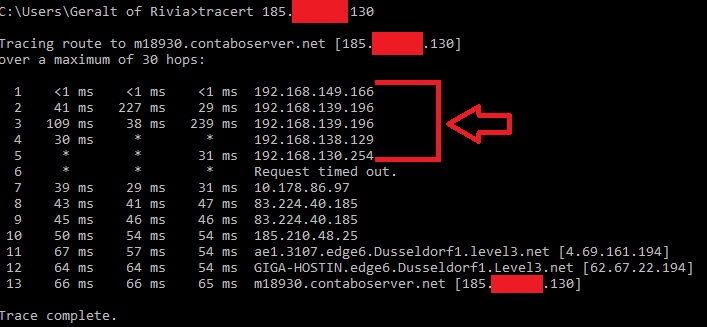


Be free to DM me your trace route if you need help interpreting it.
 zealous rampart
I click the game, it opens, says "Valheim" then immediately goes to a black screen I can't get past. I tried waiting several minutes, nothing. I even tried uninstalling and downloading it again, still a black screen
If anyone has a fix please let me know.
i searched everwhere but i couldnt find help i hope you guys know smt
twin steeple
zealous rampart
I click the game, it opens, says "Valheim" then immediately goes to a black scre...
Check the final two paragrafs in Section1:Pont4
https://www.reddit.com/r/valheim/comments/uq9b8x/my_valheim_is_crashing_fix_for_crash_guide/
zealous rampart
it works tysm!!!
long lynx
twin steeple
Being behind NAT basically means not having a direct access to the Internet.
It'...
I dont have same ips.. but some showed up. but I tested remote dedicated server and we can both join. when I play pc to pc it allways works.
twin steeple
long lynx
I dont have same ips.. but some showed up. but I tested remote dedicated server ...
If you never have a problem with PC ↔ PC while also playing with crossplay enabled (only crossplay is sensitive to strict NAT), then it sounds like Xbox has a NAT problem. What exact result does your GF get when she does a NAT test on Xbox?
Is she connected over WiFi or Ethernet?
alpine remnant
guys why i have to lag when i go to black forest
5fps
twin steeple
alpine remnant
guys why i have to lag when i go to black forest
5fps
Check this comment: #xbox-bugs-discussion message
In short, Valheim is not yet optimised to desired extent for the older consoles
But there are workarounds via Cloud gaming
alpine remnant
twin steeple
In short, Valheim is not yet optimised to desired extent for the older consoles
ia that other way
alpine remnant
anyone else getting playfab error ?
Me too
ok its not just me
Parties aren’t working on Xbox for me either
yeah xbox go down ?>
Sick of Microsoft’s shit tbh
just looked, parties and socials are down
along with gaming on muliplayer
Probably why the playfab isn’t working
yeah
I pay monthly for this I’m tired of the problems it’s gonna go down for like 2 days now
i know it sucks when that happens ... my party just hit mid ashlands and we need help with metal portaling
I can assist
I’m not in Ashlands but I’ll help with metal
 slender leaf
Does anyone know if PlayFab is down? Have a linux dedicated server and it was working fine earlier with crossplay (on pc with gamepass), but now it wont let me connect to any server stating Log into Playfab
Just checked and it looks like Xbox Game Services are down. https://support.xbox.com/en-US/xbox-live-status
For anyone else asking, If you are playing on Xbox or PC Gamepass dedicated servers will not work since cloud saves are synced to servers via Xbox Live services. The more you know...
alpine remnant
slender leaf
Does anyone know if PlayFab is down? Have a linux dedicated server and it was wo...
we were just talkig bout it in the convo above
 nova atlas
Does anyone know how to update valheim since they just came out with an update? Trying to join my friend server and it says incompatible version. I tried to update it but xbox says there’s no update for it. I uninstalled and reinstalled and still didn’t work
twin steeple
nova atlas
Does anyone know how to update valheim since they just came out with an update? ...
On which version are you (number in the bottom right corner of starting menu), and on which version is the server (version number next to server name before you connect to it)?
nova atlas
twin steeple
On which version are you (number in the bottom right corner of starting menu), a...
My version is sx-0.218.19(n-27). Server says 0.218.21. But I was literally playing on the server right before the new patch notes came out so that’s the thing I’m wondering and my friend playing on pc said there’s was an update on steam.
twin steeple
nova atlas
My version is sx-0.218.19(n-27). Server says 0.218.21. But I was literally playi...
You can then attempts to restart the console to see if your console will pick up the new update as available.
It should be available, as it's available for me, but it might not yet be in your region specifically.
nova atlas
Hmmm okay. I did that too.
 deep otter
nova atlas
Hmmm okay. I did that too.
deep otter
nova atlas
Hmmm okay. I did that too.
Did u ever get that issue resolved I was having the same issue with some friends yesterday
twin steeple
deep otter
Did u ever get that issue resolved I was having the same issue with some friends...
It might not be the same issue. Your game also won't update to 0.218.21?
nova atlas
deep otter
Did u ever get that issue resolved I was having the same issue with some friends...
After like an hour of waiting the store finally had the new update on Xbox. So I could play now.
twin steeple
 upbeat quiver
game after todays update is unplayable due to lag
upbeat quiver
game after todays update is unplayable due to lag
How many players?
Are all Xbox players?
Who is the host? (e.g. console, PC, dedicated server)
upbeat quiver
twin steeple
How many players?
Are all Xbox players?
Who is the host? (e.g. console, PC, dedi...
im host
on xbox pc with 2 players
twin steeple
upbeat quiver
on xbox pc with 2 players
Are you talking about performance lag (lower FPS) or network lag (enemies teleporting)?
If it's network lag, In which biome are you experiencing lag?
Any team mate on an older Xbox console (e.g. Xbox One S)?
upbeat quiver
twin steeple
Are you talking about performance lag (lower FPS) or network lag (enemies telepo...
performance lag
teammate is on xbox pc
twin steeple
upbeat quiver
performance lag
What are you PC specs?
Do you have the same performance lag when you load into your world in singleplayer?
upbeat quiver
twin steeple
What are you PC specs?
Do you have the same performance lag when you load into y...
ryzen 7 3050 laptop
i need to check for singleplayer but fps was fine when i played with teammate 2 days ago
only after i installed this new patch im experiencing high lag
twin steeple
upbeat quiver
ryzen 7 3050 laptop
i need to check for singleplayer but fps was fine when i pla...
There have been no other reports about performance being affected on the latest patch.
Are you monitoring your FPS and temps?
Do you have stuttering issues or low FPS in general?
upbeat quiver
twin steeple
Are you monitoring your FPS and temps?
Do you have stuttering issues or low FPS ...
yea i guess i need to get it cleaned
but there is a clear drop in fps after i downloaded this patch
twin steeple
upbeat quiver
but there is a clear drop in fps after i downloaded this patch
Patch has been in beta testing for 2 months. No issues affecting performance have been reported.
upbeat quiver
twin steeple
Patch has been in beta testing for 2 months. No issues affecting performance hav...
ok its better now my gpu was acting up
gray cedar
gray cedar
fixed it thanks <:skol:784053936108732466>
turns out it's still happening, it worked for a few days but now it's back and I can't fix it
twin steeple
gray cedar
turns out it's still happening, it worked for a few days but now it's back and I...
There was a major outage of services less than 24h ago, so might be an after effect of that
Try just restarting the PC if you haven't already
Do you still have proton VPN installed?
 stable kite
anyone know why my game says this? im on xbox app btw.
 twin steeple
stable kite
anyone know why my game says this? im on xbox app btw.
twin steeple
stable kite
anyone know why my game says this? im on xbox app btw.
Probably missing gamepass subscription
stable kite
i have gamepass because i can play online on xbox but not on xbox app on my pc
twin steeple
stable kite
i have gamepass because i can play online on xbox but not on xbox app on my pc
Xbox Game Pass Core?
Try to then swtich to adult preset in your privacy settings
stable kite
twin steeple
Xbox Game Pass Core?
ultimate
twin steeple
settings → acocunt → privacy and online safety → Xbox privacy → adult defaults
twin steeple
stable kite
its on xbox app for pc
You can administer same setting via browser as well, and probably via Xbox app
https://www.xbox.com/en-US/user/settings/privacy-and-safety
stable kite
it works now
gray cedar
twin steeple
Do you still have proton VPN installed?
I have restarted and didn't work.
Yes I sill have proton installed but not open
twin steeple
gray cedar
I have restarted and didn't work.
Yes I sill have proton installed but not open
When you chekc your hosts file, is it altered?
c:\Windows\System32\Drivers\etc\hosts
Should end with
 twin steeple
stable kite
it works now
twin steeple
stable kite
it works now
Did you change any privacy setting or it just started working on its own?
stable kite
i did click admin
gray cedar
twin steeple
Should end with
it ends like this
twin steeple
stable kite
i did click admin
Can you elaborate? Launch Valheim in administrator mode?
twin steeple
gray cedar
it ends like this
Then VPN probably didn't alter it. Check if your proton VPN service is running on the list of services

Mine is disabled. Is yours as well?
Also, are you Xbox services still there, flagged as running?
All 4?
 gray cedar
twin steeple
Then VPN probably didn't alter it. Check if your proton VPN service is running o...
gray cedar
twin steeple
Then VPN probably didn't alter it. Check if your proton VPN service is running o...
I uninstalled proton and it works now, thanks
twin steeple
gray cedar
I uninstalled proton and it works now, thanks <:skol:784053936108732466>
If you are paying for the subscription, try having it installed again, but just disable its services so no instance of it is running while you don't need it.
 old holly
I think I found a bug when playing on xbox series s (is this the right place to report bugs?):
I play on a dedicated server. When the game was suspended and resumed later, the connection to the dedicated server fails. It shows as online in the server list, but after some time trying to connect, a "failed to connect" message is shown. I then have to kill (contextmenu->quit) valheim for it to work again. This started happening after yesterday's update (I'm not on ptb).
twin steeple
old holly
I think I found a bug when playing on xbox series s (is this the right place to ...
Were you the only one playing at the time?
Also, has your console entered sleep mode during your being on the server?
After how many minutes/hours is your console set to turn off after?
old holly
twin steeple
Were you the only one playing at the time?
Also, has your console entered sleep ...
- I was the only player
- console was on the entire time (not in sleep mode nor turned off), but the same thing has also happened, if the console was turned off and the game restarted from "quick resume"
- Set to turn off after an hour (completely, not sleep/fast startup mode)
I was playing, then logged of the server, pressed the home button and returned to the home screen, left for maybe 30 minutes, started valheim again, then the issue occured.
I tried this a few times already and it seems to happen pretty consistently.
 glass cloak
old holly
1. I was the only player
2. console was on the entire time (not in sleep mode no...
glass cloak
old holly
1. I was the only player
2. console was on the entire time (not in sleep mode no...
Can confirm that this is indeed a bug. We're on it! 🫡
old holly
glass cloak
Can confirm that this is indeed a bug. We're on it! 🫡
Nice 😊. Dont know if this is related, but the conditions were similar, so maybe it helps: in earlier versions the game used to freeze for a short time and the return to the main screen (if you were already in character or world selection screen) a few seconds after the game was resumed. I think its not doing that anymore (although I'm not entirely sure)
twin steeple
Seems like new gen console issue. Was testing it on Xbox OS, but couldn't reproduce. Can on Xbox SS.
@old holly Have you seen this kinda of a glitch on your XSS?

@glass cloak think all reports of this happening are only related to XSX
old holly
twin steeple
<@1232258161508089950> Have you seen this kinda of a glitch on your XSS?
Do you mean the black rectangle where the character should be? No, that never happend to me.
 woeful bobcat
is play fab still acting up me and my friends can’t join our world or if we start a new one and type the code in it crashes our game
twin steeple
woeful bobcat
is play fab still acting up me and my friends can’t join our world or if we star...
How do you start a new world? By someone creating a new world via in-game options? You crash during world creation or client crashes when they attempt to join?
 empty trench
woeful bobcat
is play fab still acting up me and my friends can’t join our world or if we star...
empty trench
woeful bobcat
is play fab still acting up me and my friends can’t join our world or if we star...
Crashing as in being unresponsive if that is the case stop touching the device and give it some time, it can take a few minutes before the world is created.
Go take a toilet break, make yourself a snack and some tea or go for a walk and come back later give it at least 5-10 minutes, longer times have been reported as well.
twin steeple
empty trench
Crashing as in being unresponsive if that is the case stop touching the device a...
World generation has been updated on all platforms now, so players should see the generation circle, which is not prone to crashing by clicking around.
There is only a short window in which players can make the app unresponsive now, so we shouldn't be seeing this reports anymore.
empty trench
twin steeple
World generation has been updated on all platforms now, so players should see th...
It shouldn't but it might still happen. Better to try and if it works, nice if not at least that has been ruled out and further investigation into the problem can commence.
woeful bobcat
it still just says failed to connect on me and my friends main server there is a little red x by the server icon is that’s a issue the host of the server or are servers down we both hard reset our xbox’s let the game open for a few minutes and he can log into his server just fine but no one can join him
nova atlas
Okay… so I only play this character in one server, but I accidentally click the wrong server but didn’t type in the password and now this happened. Can someone tell me what happened?
 nova atlas
Okay… so I only play this character in one server, but I accidentally click the ...
nova atlas
nova atlas
Okay… so I only play this character in one server, but I accidentally click the ...
Nvm I forgot that backups was a thing. 🤦🏻♂️ I thought I was going to lose all my stuff and gear.
twin steeple
woeful bobcat
it still just says failed to connect on me and my friends main server there is a...
Was everything working for you before or is it like that since you attempted to play the first time?
Are you all playing on consoles or is someone on the PC?
All of your should do the NAT type test available in network setting on the Xbox.
 whole badger
I try opening the game and it remains like that I tried re-downloading the game and it still doesn't open
 twin steeple
whole badger
I try opening the game and it remains like that I tried re-downloading the game ...
twin steeple
whole badger
I try opening the game and it remains like that I tried re-downloading the game ...
Check the final two paragrafs in Section1:Pont4
https://www.reddit.com/r/valheim/comments/uq9b8x/my_valheim_is_crashing_fix_for_crash_guide/
whole badger
twin steeple
Check the final two paragrafs in Section1:Pont4
https://www.reddit.com/r/valheim...
Thanks it worked
woeful bobcat
twin steeple
Was everything working for you before or is it like that since you attempted to ...
2 of us are on xbox and one on pc its been doing this since the play fab crash
twin steeple
woeful bobcat
2 of us are on xbox and one on pc its been doing this since the play fab crash
Who is the one hosting? Or is it a dedicated servere? Have you tried testing someone else hosting?
 sick aurora
Someone help me, my valhiem won't leave this page. I've tried everything, even formatting my notebook, formatting it and nothing. I play on the notebook through the cloud because my notebook is weak and I can't get out of the password screen.
 twin steeple
sick aurora
Someone help me, my valhiem won't leave this page. I've tried everything, even f...
twin steeple
sick aurora
Someone help me, my valhiem won't leave this page. I've tried everything, even f...
What's that asking your for a password? Xbox Cloud gaming app?
sick aurora
twin steeple
What's that asking your for a password? Xbox Cloud gaming app?
When you start a co-op server, you click RT and then rs to enter the password, correct? Then a page opens for you to enter the password with at least 5 digits, then you press OK or A and go to the screen to start the server. Before it worked, I played well with my friends, now I can't get out of the password screen. I press enter, ESC, OK, letter A, letter B on the controller, I press everything and it doesn't get out of this screen. It makes me angry that I spend hours trying to create worlds and nothing. I'm desperate and I don't know what to do anymore. I play through the Xbox app via the cloud.
twin steeple
sick aurora
When you start a co-op server, you click RT and then rs to enter the password, c...
Seems like a Xbox issue. That keyboard overlay is not a part of Valheim.
Try playing from the browser until this gets fixed: https://www.xbox.com/en-US/play

Xbox Cloud Gaming (Beta) on Xbox.com
Play Xbox Cloud Gaming (Beta) on Xbox.com. Use your Xbox Game Pass Ultimate membership to play 100s of consoles games on PC and supported mobile devices.
Do perhaps have an older Xbox console as well?
Accessing Cloud gaming throuhg it will probably work as well.
 hexed patio
Hey guys,
Myself and my friend (both on steam) just tried to join our other friend's server on Xbox S/x and getting hit with (failed to connect message) but has been working fine for months.
On Valheim reddit, somone else has same issue but Xbox S/S to S/X
is this a known issue?
glass cloak
hexed patio
Hey guys,
Myself and my friend (both on steam) just tried to join our other fri...
There is one known issue right now that will be fixed soon - if your friend on xbox restarts their game (terminating it completely) and starts the server again, can you connect then?
hexed patio
glass cloak
There is one known issue right now that will be fixed soon - if your friend on x...
Not sure, i believe she tried that, however she may have just keep backing out to main menu and trying again
We’re in UK though, so i’d be surprised if the server was the US Central region that’s having the issue? Could be using that region though
 vagrant prawn
Hi all, pretty simple but frustrating issue. Seeming like it may just be bugs?
Me and two friends playing for the first time (all on Xbox only) yesterday on a group server. Today they can’t join. We’ve reinstalled, turned on/off WiFi, just about everything to trouble shoot this. We are both seeing community servers in that tab, so it seems like we’re both connected in some way, but just can’t reach the server we were just playing on yesterday. I am the host and am clicking RT to turn the server on each time. They don’t even get to the enter a password screen. Any suggestions much appreciated.
twin steeple
vagrant prawn
Hi all, pretty simple but frustrating issue. Seeming like it may just be bugs?
...
Check the above 3 comments. There is a known issue that might be causing this. Please all of you try just quitting the Valheim app from the Xbox menu and then launch it again. They shouldn't do anything until you start the server. Have them connect one at the time. If it doesn't work, I'll run a test server for you to check what's going on.
hexed patio
Thanks folks! Will test it tonight and report back
 nova siren
Hello, since the last Valheim update on Xbox Game Pass, version 0.218.21, I have been constantly experiencing disconnections from the server hosted by my friend. Every time, I receive the message 'Disconnected,' and when I try to reconnect, it's impossible. After a few minutes, I can join again, but the same issue occurs. I've tried repairing the files, uninstalling and reinstalling the game, but the problem persists. I should mention that we are both on PC, and I have no connectivity issues with other games I play.
vagrant prawn
twin steeple
Check the above 3 comments. There is a known issue that might be causing this. P...
Thank you! Will do tonight
twin steeple
nova siren
Hello, since the last Valheim update on Xbox Game Pass, version 0.218.21, I have...
Do you immediately disconnect upon joining the server or it happens randomly?
Any of you on the WiFi or have VPN installed (regardless of you using it or not)?
nova siren
It's very random. And we are both on wired connections and without a VPN.
twin steeple
nova siren
It's very random. And we are both on wired connections and without a VPN.
Very random, but how often?
nova siren
twin steeple
Very random, but how often?
It depends; sometimes I can play for an hour without any issues, and other times I connect and lose the connection immediately, to the point where I can't connect anymore, and we have to restart the game clients
 left sun
Hello everyone
Can someone help me with a bug i found? Me and a friend were playing on a local server, i am the host playing on pc through xbox and he plays through steam, it was going fine until my save stopped generating the join code, i am unable to invite him (he tried the pc xbox app version ) and he is unable to join the game, it’s almost like it decided to become offline, he can see the local server on the servers list but there is a symbol with a red X indicating it is offline, i don’t know how to fix this
bold locust
left sun
Hello everyone
Can someone help me with a bug i found? Me and a friend were play...
Xbox can only use playfab (crossplay)
Steam can use both steamAPI and Playfab to connect to other clients.
Playfab cannot use a Local IP to connect since it communicates globally with Playfab servers to assign Join-codes
left sun
bold locust
Xbox can only use playfab (crossplay)
Steam can use both steamAPI and Playfab to...
So the solution would be for him to be the host? I sent him the game save and it didn’t work either, i assume he has to generate the game instead of me then, right?
bold locust
left sun
So the solution would be for him to be the host? I sent him the game save and it...
depends on what IP either of you are trying to connect to
left sun
It would be nice if the game just showed me the server IP so he can connect, but what do you mean by depending on IP? Is there any way he can connect with the server directly using the IP? (Assuming i can figure out what the IP is)
I know you can input the IP to connect to servers, but since my server does not appear as online i’m not sure if trying with the IP is gonna work
twin steeple
left sun
It would be nice if the game just showed me the server IP so he can connect, but...
What, you are playing on Xbox PC app, and you start a world as a server, but when you open ESC menu, there is no join code above the settings options?
bold locust
left sun
I know you can input the IP to connect to servers, but since my server does not ...
best is just use joincode ^
the one running the server just press Escape key or pause the game, and tell the other person the code
left sun
twin steeple
What, you are playing on Xbox PC app, and you start a world as a server, but whe...
Exactly
left sun
bold locust
the one running the server just press Escape key or pause the game, and tell the...
I have tried that but it does not show the join code
twin steeple
left sun
Exactly
Are you sure that you are starting your world as a server? start server + password?
left sun
twin steeple
Are you sure that you are starting your world as a server? start server + passw...
When i created it first i had done this step
twin steeple
What does the player.log say when you attempt to create a server? Send it via DM.
You can grab it via the white show player.log button in the bottom left corcer of the starting menu.
Just create a server one time before logging out and grabbing the file
twin steeple
left sun
When i created it first i had done this step
This step has to be done every time
So every time you have to put a checkmark next to "start server" and type password
left sun
twin steeple
So every time you have to put a checkmark next to "start server" and type passwo...
Let me try that first, maybe that’s the case
bold locust
left sun
I have tried that but it does not show the join code
if you start on steam client, you need to make sure the crossplay is on.
do you have VPN?
left sun
Damn it, it was the little “start server” button all this tima XD
For some reason i thought it was to create a new server instead of allowing online
That just solved it, thank you
I knew it was gonna be either something silly or some very complicated stuff
bold locust
left sun
That just solved it, thank you
it's always nice when it's the small things being problematic
uneven robin
im having connectity issues myself, im on pc, the other person is hosting on xbox, thier server is up on thier end with password, and it won't connect or show that thier server is up you just get the red X, we've had issues before, but today, it just refuses to work, tried every troubleshooting method on the internet, has worked for months and now they can't connect to any of my hosted servers or i cant go to any of thier hosted servers, has anything went down in last 2 days that screwed up the xbox's ability to connect
twin steeple
uneven robin
im having connectity issues myself, im on pc, the other person is hosting on xbo...
Anyone in Egypt? Anyone using VPN? Did your friend perform NAT test on Xbox? Have you on the PC?
uneven robin
looked into the NAT test, they claim thier NAT is open, we can talk on discord though their Xbox
and no, im in US
i guess there was an xbox update today, only varable we can figure
twin steeple
uneven robin
looked into the NAT test, they claim thier NAT is open, we can talk on discord t...
The problem doesn't have to be on their side if you both haven't checked if you can access other server other then each other's.
Have they tried resetting their console?
Are you using VPN on your PC (e.g. Nord VPN)
uneven robin
they restarted a bunch of times, i have no VPN issues
twin steeple
uneven robin
they restarted a bunch of times, i have no VPN issues
What do you mean by having no VPN issues? You are using VPN, but don't have issues with it? Or you are not using it?
@uneven robin I sent you a join code and pass for a test server that you both should try to connect to.
uneven robin
Appreciate it, we gave up for day, we both have work soon, thanks for your advice
twin steeple
uneven robin
Appreciate it, we gave up for day, we both have work soon, thanks for your advic...
Ok, ping us later if it still won't work
 teal beacon
Not sure what's going on, earlier a friend of mine was playing with me, and the game started making him auto-attack. Does anybody know what's going on?
right nevermind
twin steeple
teal beacon
Not sure what's going on, earlier a friend of mine was playing with me, and the ...
Trigger got stuck?
 autumn plume
Why does the game run at 5fps on Xbox one?
twin steeple
autumn plume
Why does the game run at 5fps on Xbox one?
Weak CPU performance on single thread. Check this comment: #xbox-bugs-discussion message
glass cloak
autumn plume
Why does the game run at 5fps on Xbox one?
It does get frame drops occasionally but 5fps sounds lower than usual. It should be much higher than that...
autumn plume
Nah its stuttering all day my brother is lucky if it goes over 10 fps
It is the first xbox one tho or at least first model
glass cloak
Are you in the Ashlands or somewhere else? What's happening around you, lots of enemies, lots of buildings, something else?
 kindred briar
If anyone is having frame rate drop try putting it in performance mode if u haven’t already it makes the game much less choppy
kindred briar
teal beacon
Not sure what's going on, earlier a friend of mine was playing with me, and the ...
i have been having this problem after marking things either click attack one time after or go into your map and click once
kindred briar
and has anyone had world corruption problems the saving has been pissing me off lately
 waxen wigeon
autumn plume
Why does the game run at 5fps on Xbox one?
waxen wigeon
autumn plume
Why does the game run at 5fps on Xbox one?
Might be that Xbox one is outdated or can't effectively run game previews
 acoustic pike
My brother and I have been trying to play together, both on series x. Every time we try to join it says failed to join. We never even get to entering the password. Anybody know what’s going on? We’ve tried everything
heady rune
acoustic pike
My brother and I have been trying to play together, both on series x. Every time...
Are you joining a server with Crossplay enabled?
acoustic pike
heady rune
Are you joining a server with Crossplay enabled?
Im not sure how to look if it is enabled. We are hosting the server ourself, just the two of us playing. We create the password and everything but I don’t see an option for cross-play.
twin steeple
acoustic pike
Im not sure how to look if it is enabled. We are hosting the server ourself, jus...
Xbox console can only use crossplay anyway, so you can't enable/disable it.
Both of you should test who has connection problems by trying to connect to som random server in the community list.
See which one from you two won't be able to reach the password prompt.
Also, before doing that test, restart Valheim, by quitting the app from the Xbox quick resume menu.
acoustic pike
Okay, we have actually done that. I get to the password prompt, he just fails to connect. We are on the same wifi, so I’m not sure why the issue would only be for him
twin steeple
acoustic pike
Okay, we have actually done that. I get to the password prompt, he just fails to...
Tell him to try going to advanced Xbox network settings, where he can reset Mac address.
Also, make sure that he's indeed on the home WiFi, and not some random Free WiFi that Xbox might have cought.
You might also wanna test if he can connect when your Xbox is completely out of power (to eliminate routers issues being able to handle only one Xbox).
acoustic pike
Yeah that’s another thing we’ve already tried, we’ve also uninstalled and reinstalled.
twin steeple
acoustic pike
Yeah that’s another thing we’ve already tried, we’ve also uninstalled and reinst...
What's the thing you tried from the things I listed above?
Also, what result does the each XBOX get when they preform the NAT type test in Xbox network settings?
acoustic pike
We had tried resetting mac address.
Our NAT types are strict
I live in a large apartment complex so there’s not much I can do about the router
Occasionally when I do the test on my xbox it will come back as open
twin steeple
acoustic pike
I live in a large apartment complex so there’s not much I can do about the route...
I doubt you will be able to solve the issue without a router access and doing some port forwarding, or by calling the ISP and asking them to remove you from that NAT. Some ISP have the ability to port forward certain ports remotely as well, the probably the owner of the Internet service would have to call them.
You can at least try connecting your brother's XBOX to a Mobile Phone's WiFi (phone must not be connected to your WiFi, Mobile Internet Data enabled on the phone for accessing the Internet, then enable WiFi hotspot on the phone to which the Xbox can connect to). That should at least confirm if the issue is with the strict NAT (most likely).
acoustic pike
We have now both been able to get to the password screen on a server on the community page. Do you know why we for that server and not for our own?
twin steeple
acoustic pike
We have now both been able to get to the password screen on a server on the comm...
Strict NAT can block certain network traffic depending on how it's configured on the rouhter and/or after rouhter on the ISP side.
This is general Microsoft support page that help with troubleshooting NAT issues.
acoustic pike
Okay. I messaged the ISP for my apt complex, but I doubt that’s going to result in any progress. Thank you
 vital shale
My friend and I have been playing valheim for a while, he plays on xbox and I play on the PC xbox app. All of a sudden when I play on my computer I'm unable to invite anyone to my server. I've restarted my router, un-installed then got rid of all files then reinstalled again. Nothing is working, any advice or am I cursed to switching back to my console?
twin steeple
vital shale
My friend and I have been playing valheim for a while, he plays on xbox and I pl...
You can only invite players once you are in the world, already hosting.
Or are you in the world, sending an invite but nobody receives it?
vital shale
When I'm in the world, the option in the game bar to invite is just grey, it's ticked as a server and it's got a password. It doesn't happen on any other game.
twin steeple
vital shale
When I'm in the world, the option in the game bar to invite is just grey, it's t...
I just tested mine Xbox game bar, and invites work as intended when I'm in the word.
Why they might not be working for you could be listed in the player.log file.
Please DM your player.log. You can grab it from the starting screen if you click on the white show player.log button in the bottom left portion of the starting screen.
Also, how are you starting the game? Through some shortcut of through the Xbox PC app?
vital shale
Through the app, would that be a problem?
vital shale
twin steeple
I just tested mine Xbox game bar, and invites work as intended when I'm in the w...
i found this "09/19/2024 11:04:32 : Get Xbox friends list failed. Error code: hr=0x80190193"
twin steeple
vital shale
i found this "09/19/2024 11:04:32 : Get Xbox friends list failed. Error code: hr...
I also launched it though the Xbox app, and it worked, so that shouldn't be a prbolem. It's probably some obscure problem.
Tried just restarting the PC? (fixes a lot of problems with Xbox services)
Do you have Valheim installed on C driver where OS is or somewhere else?
Go start → type and open "services" → check how all Xbox services are running. Try to switch all to automatic and forcefully stop and start them again.
 vital shale
So i tested that and it didn't seem to fix anything, I'm just going to move back to the console to play valheim. I appreciate your troubleshooting ideas though.
 broken drum
It seems I cannot join my friends (XBox Player) world, no matter what we do. Nothing changed from before. Anyone experiences the same problems?
twin steeple
broken drum
It seems I cannot join my friends (XBox Player) world, no matter what we do. Not...
Test if you can reach password prompt for some random crossplay server in the community tab? (the server has to have this icon next to it 🔀 )
You friend can try quitting Valheim app in the meantime from the Xbox menu and relaunch it.
broken drum
I can reach the password prompt, and my friend followed your recommended steps, yet no success. The world is shown as always offline (red X), even though they started the world as a server.
twin steeple
broken drum
I can reach the password prompt, and my friend followed your recommended steps, ...
If you can't reach a password prompt for some random server, the problem is on your side.
Do you have any VPN services installed (regardless of you using them at this moment)?
broken drum
Nope, no VPN. Also tried playing with my firewall.
Neither my friend nor I have changed anything since our last time (that we would be aware of), and there was no update in-between (if the Steam activity is to be trusted). It just suddenly stopped working, unfortunately.
twin steeple
broken drum
Neither my friend nor I have changed anything since our last time (that we would...
Something definitely happened on your end. It doesn't have to be your machine tho, it can be your ISP as well
Are you from Egypt by any chance?
Test if you have VPN installed by going to start → device manager → network adapters → check if any VPN is mentioned there. If you have it, uninstall it and test Valheim again. Disabling it is sometimes not enough.
You should also test if you are behind NAT and CGNAT (your ISP) by doing the following:
Go to start → type "cmd" → open command prompt → type "tracert 8.8.8.8" and hit enter. You will start pinging google server. First IP hop will be your router IP address, so you can ignore it. What you should be focusing on it checking if other IP addressed from 2nd forward start with numbers 192., 172., 10.* or with 100.*
This is how traceroute looks like for someone who is behing multiple NAT for example:
https://i.imgur.com/8Ad2ApC.jpg
Which will cause issues with crossplay.
Generally if it's ISP's fault, you can call them and request for them to remove you from it.
Many players have done so. Even ISP configuring it properly or changing the type and protocol, cam make things better.
That is of course under assumption that you are behind NAT, and we can't know if you don't do the trace route test.
broken drum
Thanks for your elaborate help.
Not from egypt. Followed all your steps, with following results:
- No VPN's mentioned in the device manager/network adapters section.
- No unusual IP adresses in the cmd prompt, beginning with 192, 172, 10 or 100.
Given the results, I suppose it is something with the ISP or other factors out of our playfield. Or something really obscure, maybe.
Waiting is always an option, I suppose. Problem came out of the dark, maybe it'll dissappear the same way.
Appreciate the time you take to help me out!
twin steeple
broken drum
Thanks for your elaborate help.
Not from egypt. Followed all your steps, with f...
Let me know when you have a time to connec to my Xbox server.
broken drum
I got time now, for couple of hours. I'll be on standby
twin steeple
broken drum
I got time now, for couple of hours. I'll be on standby
Ok, I sent you a DM
 tired tundra
About to get started on VALHEIM again after waiting for Ashlands. But what the heck is Playfab???
 karmic kettle
Does anyone know how to fix "couldn't resolve join code" My and my sibling (on pc) are trying to join our dad (on Xbox) and he created the world when we enter the "join code" we get the error.
twin steeple
karmic kettle
Does anyone know how to fix "couldn't resolve join code" My and my sibling (on ...
There is bug active on current Valheim version that won't allow you to host or join games if you don't restart the game beforehand.
The game has to be restarted from the Xbox menu → select Valheim → Quit → Re-launch Valheim
Until the bug gets fixes, this has to be repeated (game restart) every time you logout from the server.
karmic kettle
Thank you so much life saver <3
 prime seal
Just a heads up I seen just now. Valhiem is in the "Leaving Soon" category of GamePass. If you don't own it already, think about buying it. It's worth it, especially if you've already found yourself here.
glass cloak
tired tundra
About to get started on VALHEIM again after waiting for Ashlands. But what the ...
Playfab is a service made by Microsoft, it's the backend that Valheim uses to establish connections between you and other users if playing online.
 acoustic cedar
Everyday I have problems connecting to my wife's seed on the x-box with my computer. I have to power cycle my network everyday and today it's not working at all. We've rebooted everything 3 times. It won't resolve the code or red X. What's with this?
twin steeple
acoustic cedar
Everyday I have problems connecting to my wife's seed on the x-box with my compu...
Check this comment above: #xbox-bugs-discussion message
acoustic cedar
I'm unable to perform this.
Xbox menu → select Valheim → Quit → Re-launch
There is no quit option.
X-Box menu down left side of screen select Valheim it brings me to the start screen and the only options are start game settings and credit. X-Box doesn't have quit game like my computer.
twin steeple
acoustic cedar
I'm unable to perform this.
Xbox menu → select Valheim → Quit → Re-launch
There...
By "select Valheim" action, I don't mean that you should open it
Just position your selection onto it then press start button on Xbox controller
acoustic cedar
I'm sorry I'm new to X-Box.
twin steeple
acoustic cedar
I'm sorry I'm new to X-Box.
Np, let me know if it's still confusing, will make a pic
acoustic cedar
OK I will try with controler. We've been navigating via keyboard and mouse.
Sir...
Thank you!
twin steeple
acoustic cedar
Sir...
Thank you!
Np, remember to restart the game every time the host logs out.
The official fix for the bug will arrive probably in a few weeks on beta test version (Xbox Insider app has the ability to sign up for the test early public beta patches for Valheim), the live fix will probably arrive at the end of the next month.
acoustic cedar
GTK
We've been power cycling and crossing fingers. Sometimes it works sometimes it doesn't we just kept power cycling till it did.
Knowing the exact step will cut out a lot of hoping for the best.
 radiant ruin
anyone here know where I find a guide to how finding the correct ID for xbox players that I have to add to my whitelist?
radiant ruin
can xbox players join with IP or only join code which seems to change often
twin steeple
radiant ruin
anyone here know where I find a guide to how finding the correct ID for xbox pla...
When console players are on a server, they can press LT+LB+select button (left in the middle of controller) to summon F2 menu where the Xbox ID can be seen. You have to add it with Xbox prefix.
twin steeple
radiant ruin
can xbox players join with IP or only join code which seems to change often
They can join via public IP as well
radiant ruin
twin steeple
They can join via public IP as well
figured out the ID thing, we did a crossplay pc hosted world without a whitelist first so I could see it as the guy didnt know how to open F2 menu on xbox, its holding down both joystick buttons or something yeah?
will let him know to use public IP
twin steeple
radiant ruin
figured out the ID thing, we did a crossplay pc hosted world without a whitelist...
Yeah, you hold LT and LB, and then press select button.
radiant ruin
thanks thats perfect information what I needed, tysm
 south salmon
steam dışında tüm xbox şeylerinde öyle kral or0spu ev1atları bi açıklama zahmetinde bulunmuyor
twin steeple
Check last two paragraphs in Section1:Pont4 of this guide:
https://www.reddit.com/r/valheim/comments/uq9b8x/my_valheim_is_crashing_fix_for_crash_guide/
bold locust
@rigid cedar @noble mantle English only please
 rigid cedar
Sorry my bad
bold locust
we can't help you unless you write in a language we understand. hence we have the rule "english only" 🙂
 tiny onyx
If you save game while holding a cart and then log back in on that save the cart just despawns along with everything in it
This isn’t really bug but idk maybe tone down on the particles in some cases (like bonemass fight or snowstorm) cus it can make the game lag out a little unnecessarily and is a bit overkill ngl
 willow osprey
Hello my problem is I can start the game to the point where you press start game, settings etc. when I press Start game all the Menus disappear and I am left with the background-picture
 hasty moon
Hello, I was playing this game on an Xbox account, but since it’s no longer on Game Pass, I bought it on Steam. The problem is that I can’t retrieve my character and world saves... Is there a solution?
tiny onyx
tiny onyx
If you save game while holding a cart and then log back in on that save the cart...
Edit to this. The cart moves but you do not. Very weird bug lol
twin steeple
hasty moon
Hello, I was playing this game on an Xbox account, but since it’s no longer on G...
Yeah, you can transfer saves only when Valheim can be launched on Xbox PC app, which is now sadly only possible if Valheim is bought on Xboc PC app.
If you played Valheim on a Xbox console, on the PC you can install Xbox app on the Microsoft store. Sign into the Xbox app via your Xbox account that you used on the console. When you launch Valheim via the Xbox PC app, in Valheim in-game manage saves menu, you will see your saves. Select each save you would like to transport to Steam and click on the button "Move to Local". That way your saves will be transferred from Xbox Cloud to your PC, where Steam will automatically pick them up. When you launch Valheim via Steam, you can also access the same in-game manage saves menu, where you can move your saves from Local location to the Steam Cloud (good for backup or if you want to play on multiple devices).
twin steeple
willow osprey
Hello my problem is I can start the game to the point where you press start game...
That's playing on Xbox PC app?
If so, check last two paragraphs in Section1:Pont4 of this guide:
https://www.reddit.com/r/valheim/comments/uq9b8x/my_valheim_is_crashing_fix_for_crash_guide/
It's probably related to game not being able to access Xbox Cloud properly.
twin steeple
tiny onyx
If you save game while holding a cart and then log back in on that save the cart...
You were probably restorimg world save to previous version, but not doing the same for character save.
rigid cedar
When logging in from Xbox, I could not log in. I did not add a mod, Valheim remained on a black screen. What is the solution?
bold locust
rigid cedar
When logging in from Xbox, I could not log in. I did not add a mod, Valheim rema...
Check the final two paragrafs in Section1:Pont4
https://www.reddit.com/r/valheim/comments/uq9b8x/my_valheim_is_crashing_fix_for_crash_guide/
Reddit
Explore this post and more from the valheim community
 tender wind
Why was Valheim removed from Xbox cloud gaming? I knew it was leaving game pass so I bought a copy… but I was planning to keep playing on the cloud. The tech worked great.
 cinder kelp
Why cant i transfer my xbox cloud data to steam?
twin steeple
cinder kelp
Why cant i transfer my xbox cloud data to steam?
You can, but it requires you to launch Valheim via the PC Xbox app.
cinder kelp
twin steeple
You can, but it requires you to launch Valheim via the PC Xbox app.
Isent there any way else? I used to play on game pass and the game isetn in the plan anymore, so I bought the steam version and I cant open the game to transfer the data
twin steeple
cinder kelp
Isent there any way else? I used to play on game pass and the game isetn in the ...
Not really, as Xbox Cloud save files are split into 16MB parts which Steam can't read. It is only when a XBox Cloud save files is marked for moving from Clout to Local does it merge into one file that Steam can read.
cinder kelp
twin steeple
Not really, as Xbox Cloud save files are split into 16MB parts which Steam can't...
Damn, ty anyway for the help
 torn nebula
Trying to join a server with my friend on pc when I join him it just shows connecting doesn't let me put in the password and if he tries to join me it let's him put in the password but just stays on connecting anyone know what might be going on it's vanilla no mods btw
 deep condor
Having problems joining a friend’s server and vise versa. It will not even let me enter a password. Both playing on Xbox, no mods. Never had an issue like this before. I’ve done thorough trouble shooting on my console and am still having the same problem. No specific error message. Is anyone else having this problem or know how to fix it?
twin steeple
torn nebula
Trying to join a server with my friend on pc when I join him it just shows conne...
Are you both on a PC? Anyone using a VPN? Xbox version of the game requires crossplay to be enabled, which can be incompatible with VPN, CGNAT (Internet service provider issues). E.g. Players from Egypt have constant problems accessing it.
@deep condor If one of you is playing on an Xbox console, it's important to know that there is a bug on the live version which won't let you re-connect to the server unless you restart the game before every server connection attempt. So a console player should always do this before connecting to a server:
The game has to be restarted from the Xbox menu by pressing the Xbox button on a controller → position your selection on Valheim and press start button→ Quit → Re-launch Valheim
Until the bug gets fixes, this has to be repeated (game restart) every time you logout from the server.
deep condor
twin steeple
Are you both on a PC? Anyone using a VPN? Xbox version of the game requires cros...
Thanks for the input. I feel like this wasn’t the case a few weeks ago. But I will give it a try and see if it works.
torn nebula
@twin steeple im on xbox and my friends using pc it just shows connecting and doesn't do anything after that
twin steeple
torn nebula
<@196192010581835776> im on xbox and my friends using pc it just shows connectin...
Tried restarting the game like I mentioned?
torn nebula
Yes already been through that
twin steeple
torn nebula
Yes already been through that
Restart the game again in the same way, then host a server, and send me the join code and pass, so I can try to connect to your server.
To test if one is behind NAT and CGNAT, they should do the following:
Go to start → type "cmd" → open command prompt → type "tracert 8.8.8.8" and hit enter. You will start pinging google server. First IP hop will be your router IP address, so you can ignore it. What you should be focusing on it checking if other IP addressed from 2nd forward start with numbers 192., 172., 10.* or with 100.* This is how a trace route[i.imgur.com] looks like from a person who has similar problems in Valheim, and the only solution in such a case has to be done on ISP side.
karmic kettle
Does anyone know how to fix the bug where the game crashes on xbox while farming? This usually only happens on auto save and the xbox in question is a brand new one about three weeks old from game stop, a series X. After the "crash" the game is returned to the main screen but not closed. farming carrots and turnips in one of the viking stone circles in the meadows.
twin steeple
karmic kettle
Does anyone know how to fix the bug where the game crashes on xbox while farming...
No farming related crashes are known.
Are you farming in particular way or farming a particular item?
karmic kettle
twin steeple
Are you farming in particular way or farming a particular item?
My thoughts are its an auto save issue but I don't know it could also have to do with us having planted in the center of the viking stones, the long oblonge shape made out of littel stones.
twin steeple
karmic kettle
My thoughts are its an auto save issue but I don't know it could also have to do...
Probably just a saving issue. Can you check the exact console model that is listed on the white label behind the Xbox?