#steam-bugs-discussion
1 messages · Page 19 of 1
 urban anchor
There seems to be an issue where the ingots or coal disappear after coming out of the stations, for example as I tested with 3 full kilns (75) wood ended up giving me 16 coal in total, not sure if it is because my base is around 11k instances but yea it's happening
Btw it is multiplayer but NO mods
 prisma solar
Then this game needs a lot of work if slight degradation of the CPU causes it to crash so much. Unless you run it at 100% all day every day, it won't degrade enough to cause stability issues, and if it will, Windows will crash constantly
 stark meadow
urban anchor
There seems to be an issue where the ingots or coal disappear after coming out o...
stark meadow
urban anchor
There seems to be an issue where the ingots or coal disappear after coming out o...
How many players walking in and out of base while kilns were working?
stark meadow
prisma solar
Then this game needs a lot of work if slight degradation of the CPU causes it to...
It's all about the Unity engine. If you start crashing in Valheim, you will crash in other Unity games as well using save version of Unity engine
stark meadow
 mental socket
just had an issue where after leaving a mountain > meadows portal the blizzard c...
mental socket
just had an issue where after leaving a mountain > meadows portal the blizzard c...
It's a old known issue since 2021, I don't see it as a big problem, residual freezing until you body recovers from stress 😅 something similar can happen with wet status as well (gaining wet while teleporting)
prisma solar
stark meadow
It's all about the Unity engine. If you start crashing in Valheim, you will cras...
Everything comes down to unity being fragile. Before that version I've only seen this happen on Source 2 which is the most prominent example of a fragile game engine that breaks from every sneeze. Again, it's not related to CPU then, it's a Unity bug. Until your OS starts crashing, CPU is stable
stark meadow
prisma solar
Everything comes down to unity being fragile. Before that version I've only seen...
You can look at it both ways. Games/programs that usually expose degradation or mistuned CPU/RAM have a lot of moments where clocks/power jumps from low to high and vice versa (in Valheim that would be inventory opening, crossing zone borders (common in most Unity games), saving etc). Most games are not procedural (more room for simpler methods of optimisation), so this kinda things don't usually happen. There's a reason why benchmark tools have to be left to run for hours. Most of them also don't test stability during stutters.
But you can't really call it a Unity issue as well. I know a lot of Intel 13/14th gen CPU players that started crashing in Valheim only. Running standard most used benchmarks goes fine. They usually conclude it's just Valheim's fault, and then after few months they start crashing in other games as well and message me back. So in the end you could say it wasn't a Unity issue as the root cause is always mistuned CPU/RAM, which can come mistuned from the box even.
- on the other hand there are Valheim players that haven't crashes once in 8k hours of gameplay.
 trail zodiac
Checking back in with the crashes/freezes I had. Haven't had one in two days now!
Things I did that didn't fully solve it (but may have contributed to it eventually being solved):
- Clean GPU driver reinstall
- Switch to Vulkan (switched back later though)
Final things I did (one or both MAY have solved it - if it doesn't happen again)
- Verify files via Steam
- Turn off discord overlay
Other thing that was ongoing during the time I had issues and was also resolved (maybe unrelated, maybe not)
- Had issues with connection that was randomly dropping out every 10-15 minutes for a minute... Don't see why it would cause this type of crash, but honestly who knows
Was going to turn off Steam overlay next.
Oh and while this seems to be a GPU thing based on how the crash plays out - I do have a 13th gen Intel CPU that I haven't checked for if it has that corrosion issue or not (at this point I almost don't want to know).
Just thought I'd check in with it actually going well 😄 Often people just speak up when things are going badly, not when they are solved.
mental socket
stark meadow
It's a old known issue since 2021, I don't see it as a big problem, residual fre...
yeah I guess it's very minor and making sure every bit is as polished as possible would take from the game's charm
stark meadow
trail zodiac
Checking back in with the crashes/freezes I had. Haven't had one in two days now...
Thanks for letting us know. Black screens are not common for CPU degradation cases, so likely you CPU is ok. If you have 13th gen Intel CPU, I would recommend that you sync all cores for it in BIOS settings (it stops degradation from happening by not allowing CPU to boost just some cores that the game is being run on).
How did you solve your network connection issues?
prisma solar
stark meadow
You can look at it both ways. Games/programs that usually expose degradation or ...
Sure, but this is expected to happen. Whatever this game claims to support should run it without issues. And once again, 13th and 14th generations have an issue unique to them, causing a different kind of degradation that's faster and worse than what normally happens, so don't compare that to other CPUs. If this engine can't correct small instability that is expected to happen on hardware that is still supported by the operating system, then there should at least be a warning that it will be unstable. At that point, because unity won't receive a fix for this anyway, the only thing I can recommend is raising the voltage, but that will only speed up that process.
stark meadow
prisma solar
Sure, but this is expected to happen. Whatever this game claims to support shoul...
It's not just, Intel CPUs, all CPUs that boost only few cores higher than others degrade faster. I know of communities that identified the issue on release and stopped their CPU from degradation by syncing cores. I just used Intel CPUs as an example. Plantly of cases where the same thing (players reporting back crashes started happening in other games) goes for even GPUs.
prisma solar
stark meadow
It's not just, Intel CPUs, all CPUs that boost only few cores higher than others...
I'm not sure what you're talking about. I haven't heard or seen such behavior. All cores of the same type are supposed to boost at the same time
trail zodiac
stark meadow
Thanks for letting us know. Black screens are not common for CPU degradation cas...
Thanks for the tip - I'll look into core sync
Tried a bunch of stuff with the network connectivity, eventually isolating it to the router. I got it from a relative who apparently had some non-standard admin login set for it, so I had to factory reset it to even get into it - and that solved it.
prisma solar
prisma solar
I'm not sure what you're talking about. I haven't heard or seen such behavior. A...
I looked into it, it definitely seems to be the case with Intel CPUs. However I'm not sure how that would cause faster degradation, because it's still in-spec
I saw different frequencies on my AMD CPU too, but it has too many cores to boost at the same time for a game that runs on a single thread. I haven't experienced any degradation so far. And again, if Unity crashes because of this, it's entirely Unity's fault and not related to a feature that's almost 20 years old that's validated for every chip and totally in-spec
 misty marsh
I left mine as it was before, off the patch. Works better anyway. For me it can degrade, they rarely break anyway, this would be a 1st & i can move to amd if so.
Full power no mercy
prisma solar
Apart from 13th and 14th gen with their issues, all other degradation is accounted for. If some software doesn't work because of that, the fault is totally on it
 wintry geode
stark meadow
It's all about the Unity engine. If you start crashing in Valheim, you will cras...
wintry geode
stark meadow
It's all about the Unity engine. If you start crashing in Valheim, you will cras...
Is there a way to fix this?
Just lost my entire inventory due to unity crash
prisma solar
wintry geode
Is there a way to fix this?
If it is related to CPU or RAM, increase the voltage or decrease frequencies, that's the only way
wintry geode
prisma solar
If it is related to CPU or RAM, increase the voltage or decrease frequencies, th...
Can you break that down?
How would one do that?
prisma solar
wintry geode
Can you break that down?
Are you sure that's what's causing the issue?
wintry geode
prisma solar
Are you sure that's what's causing the issue?
Unity crashes with Valheim and Eco. I haven’t tried another unity game, unless Jump Space runs on unity, and it also crashes.
stark meadow
wintry geode
Is there a way to fix this?
You can restore an earlier character save via in-game manage saves menu.
What are your specs and in what manner are you crashing?
wintry geode
stark meadow
You can restore an earlier character save via in-game manage saves menu.
What ar...
Ryzen 5 7600X, Nvidia Geforce RTX 2060, 32 GB RAM, Samsung SSD 860 QVO 2TB
The manner? Popup states unity crashed
stark meadow
wintry geode
Ryzen 5 7600X, Nvidia Geforce RTX 2060, 32 GB RAM, Samsung SSD 860 QVO 2TB
Will DM you about this
wintry geode
Thanks
prisma solar
wintry geode
Ryzen 5 7600X, Nvidia Geforce RTX 2060, 32 GB RAM, Samsung SSD 860 QVO 2TB
32GB is a lot, check RAM
prisma solar
I assume you already got help, but if not, look into your RAM configuration, especially if you're on B chipset. Make sure it is installed correctly according to the motherboard's manual and make sure it's stable at whatever settings you're running it, be it XMP, EXPO or custom OC
 strange crow
My game has been getting stuck on the intro screens before the main menu. Has this been happening to anyone else?
stark meadow
strange crow
My game has been getting stuck on the intro screens before the main menu. Has th...
On which OS are you playing? Try to open your install directory, delete all files you find inside there, and only then install the game again
This will remove your mods, but won't touch your saves
 last shard
When I move my world to a cloud, there are no backups generated. Is this normal behavior?
prisma solar
last shard
When I move my world to a cloud, there are no backups generated. Is this normal ...
It should still be on your computer and have backups
It's just synced to the cloud
stark meadow
last shard
When I move my world to a cloud, there are no backups generated. Is this normal ...
A backup should be left in worlds_local folder if you move a main save from Local to Cloud
worldname_backup_timestamp
 spice lily
We have 2 boss chambers on this seed, both have a boss and they can dig from one to the other.
Its an older seed


 echo shale
Hello. Playing on steam (windows 11) connecting a local world hosted on linux on steam deck. I keep having a reoccuring issue where my game crashes and forces me to close the game. When I load back in, I am a past version of my character, so I spawn in a different location and anything new I may have crafted or looted from a boss disappears. Any one have any idea what the issue is? This is the log files just before crashing, nothing seems out of the ordinary. Do you think it's just a network problem?

 violet marten
Eitr cloak doesn't work properly:
Without it it took ~27 seconds for my mana to regenerate
With a whole set that supposedly grants 100% faster regeneration - it took ~19 seconds
I am not a math guy, but it does look like 50% to me
 rocky fox
maybe the rested buff muddled it a bit, that gives another +100% eitr regen
stark meadow
echo shale
Hello. Playing on steam (windows 11) connecting a local world hosted on linux on...
Game freezes while you play, or freezes when you are out of the game and you alt tab back into it?
Any error that pops up, or game just stays frozen until you are forced to close the game?
stark meadow
spice lily
We have 2 boss chambers on this seed, both have a boss and they can dig from one...
Can you send me your world backups? Would need those prior to you exploring around area
spice lily
stark meadow
Can you send me your world backups? Would need those prior to you exploring arou...
I'm not sure where and which ones because they are all from 2021
 stark meadow
spice lily
I'm not sure where and which ones because they are all from 2021
stark meadow
spice lily
I'm not sure where and which ones because they are all from 2021
Maybe best to just zip them all, put them on google drive, send me the link to files
echo shale
stark meadow
Any error that pops up, or game just stays frozen until you are forced to close ...
Freezes while I'm playing and will stay frozen until I click my mouse once or press a key or something. Then the "valheim is not responding. Wait for it to respond or close" message pops up but no matter how many times I click wait it won't unfreeze
stark meadow
echo shale
Freezes while I'm playing and will stay frozen until I click my mouse once or pr...
Windows 11? Which GPU do you have? Try Windows + Ctrl + Shift + B next time it happens
echo shale
It's windows 11, and playing on a laptop I'll have to check my GPU and get back to you
 somber terrace
echo shale
It's windows 11, and playing on a laptop I'll have to check my GPU and get back ...
somber terrace
echo shale
It's windows 11, and playing on a laptop I'll have to check my GPU and get back ...
Another thing I recommend is opening up Task Manager (CTRL+Shift+ESC), ensuring that it's set to show more details such as CPU/GPU percentage, then clicking the settings gear icon on the bottom left and enabling "Always On Top".
Now, Run Valheim. Task manager should still be visible even in fullscreen. Keep an eye on CPU, Memory, GPU, and Disk percentages as you play and let us know if any of those are consistently hitting 100%.
Also, I recommend launching via the default option, not Vulkan.
echo shale
Ok I'll try this when I get home. Thanks!
echo shale
stark meadow
Windows 11? Which GPU do you have? Try Windows + Ctrl + Shift + B next time it h...
btw it's an AMD radeonT 680M
 gilded sluice
echo shale
btw it's an AMD radeonT 680M
gilded sluice
echo shale
btw it's an AMD radeonT 680M
that one is probably alot lower than the minimum requirement for valheim 🤔
stark meadow
echo shale
btw it's an AMD radeonT 680M
Are you launching Valheim in Vulkan or default?
echo shale
stark meadow
Are you launching Valheim in Vulkan or default?
usually vulkan
stark meadow
echo shale
usually vulkan
Did you get a warning popup not to lauch the game in vulkan?

 desert jewel
How do you know if you have Vulkan?
My system froze and crashed twice this morning playing on a local saved game
stark meadow
desert jewel
How do you know if you have Vulkan?
Do you also have an AMD card?
Valheim asks your how you wanna launch it, unless you clicked "don't ask me again"
You can right click on it in steam library and open properties to chose how you wanna launch it
desert jewel
Ok I'm not using Vulkan
desert jewel
I uninstalled the W11 update on the 29th KB5065789 and seems like it solved the problem
gilded sluice
desert jewel
I uninstalled the W11 update on the 29th KB5065789 and seems like it solved the ...
oh no. yet another windows update issue? 🙁
gilded sluice
desert jewel
I uninstalled the W11 update on the 29th KB5065789 and seems like it solved the ...
do you got a DVD or CD-rom drive in your computer/laptop?
desert jewel
No I have a legion tower. This is the first windows problem Ive has because I recently updated to W11
desert jewel
I saw a Reddit post about this update
stark meadow
desert jewel
I saw a Reddit post about this update
And what PC specs you have?
desert jewel
It's a Intel i9 3.6GHz, 32 RAM, x64 based system
 bright coral
That's good info. Consider giving Microsoft some details of what you encountered in the Feedback Hub, @desert jewel. Might give them a chance to fix the issues before the rollup release. ⊞ Win+F
stark meadow
 untold patio
did anyone find a fix for unity crash ?
untold patio
did anyone find a fix for unity crash ?
So far each player has been dealing with different types of crashes, so fixes were different.
E.g. peregrine858 solved their crashed by removing W11 KB5065789 update from their system. #steam-bugs-discussion message
This won't work for you, as you are on W10, unless we try uninstalling a similar w10 update that came at aprox the same time, but would leave that for last thing to try.
 coarse wagon
Anyone unable to craft after the latest patch? Crafting food so far doesn't work, or mead bases.
bright coral
coarse wagon
Anyone unable to craft after the latest patch? Crafting food so far doesn't work...
I haven't had an issue. Tried after restarting the game?
coarse wagon
bright coral
I haven't had an issue. Tried after restarting the game?
Yep. Restarted. Still no luck.
gilded sluice
coarse wagon
Anyone unable to craft after the latest patch? Crafting food so far doesn't work...
You use any mods?
Full inventory?
coarse wagon
gilded sluice
Full inventory?
Mods, yes. The basic x3 mats one and off the tops of my head the no skill loss. No. Inventory is empty. For clarity, when I go to hit craft, the button is lit like I can use it and I have the mats required but clicking craft does nothing. I even tried switching from stuffed mushrooms to making salads. No go.
Tried meads after that with the same, craft is lit, click, nothing happens. No on screen text telling me why either. Held shift for x5, clicked, and it flipped back to singles but still no item or items crafted.
 low ocean
Mods are not supported though :/ and usually bug reports like that are ignored if there are mods involved.
gilded sluice
coarse wagon
Mods, yes. The basic x3 mats one and off the tops of my head the no skill loss. ...
if it's mods. then -> #mods-issues
or remove all mods and try fully vanilla
coarse wagon
low ocean
Mods are not supported though :/ and usually bug reports like that are ignored i...
Got it. Didn't know.
coarse wagon
coarse wagon
Got it. Didn't know.
Oh. These are the mods provided in the game. These still count?

Either way. I'll switch things up after work and try again.
 gaunt mist
coarse wagon
Oh. These are the mods provided in the game. These still count?
gaunt mist
coarse wagon
Oh. These are the mods provided in the game. These still count?
Those are world modifiers, what they meant with "mods" is downloadable content made by other parties than IG.
So if you haven't downloaded any mods in your game, then you are playing vanilla.
coarse wagon
gaunt mist
So if you haven't downloaded any mods in your game, then you are playing vanilla...
Still playing vanilla then. Thanks for the clarification. I just play to kill time and build really. I haven't used any mods then.
gaunt mist
coarse wagon
Mods, yes. The basic x3 mats one and off the tops of my head the no skill loss. ...
When you say inventory empty, do you mean it's fully empty or do you carry the required items in your inventory?
You seem to have "No build cost" enabled. IIRC it doesn't work the same for crafting items in work stations.
 still sun
Guys I'm trying to join my friends game, crossplay is not selected as advised but it still doesn't work?
Any way to get past this?
gilded sluice
still sun
Any way to get past this?
you use VPN?
and what platform do you run and the person you try to connect to?
coarse wagon
gaunt mist
You seem to have "No build cost" enabled. IIRC it doesn't work the same for craf...
Ive been playing this for the last year or so. I'm not doing anything different than I was doing night before last. I have the crafting items in inventory. I have space for the items I want to craft. The button just stopped working.😂
I'll try a couple things then I might just burn my poor map and start over on a buddys.
 dense stream

Watch Untitled by MaximusTheFluffyProtogen and millions of other Valheim videos on Medal. Tags: #valheim
water bug

Watch Untitled by MaximusTheFluffyProtogen and millions of other Valheim videos on Medal. Tags: #valheim
relogging fixed it 🤷♀️
 bold gazelle
im getting failed to connect while im trying to join my friends game can anyone help? we have seem to have tried everything but nothing works
stark meadow
bold gazelle
im getting failed to connect while im trying to join my friends game can anyone ...
Are you all playing on Steam? If so, tell the host to disable crossplay option before starting the server, otherwise either you or host are probably running VPN in background that is disrupting your connection.
stark meadow
dense stream
https://medal.tv/games/valheim/clips/leNyogZ2yegGYdBh-?invite=cr-MSxQQVcsMjQ2ODg...
Not a vanilla issue
stark meadow
still sun
Guys I'm trying to join my friends game, crossplay is not selected as advised bu...
Can you reach the password prompt for your friends server?
stark meadow
coarse wagon
Anyone unable to craft after the latest patch? Crafting food so far doesn't work...
Do you play in multiplayer or have you recently spawned any of the items via console commands?
dense stream
stark meadow
Not a vanilla issue
I figured as much, lol, I'm hardly in this server but I thought I'd share a silly.
 visual oak
Hello vikings; I need your wisdom with a problem of creatures spawning in the middle of my base town. I'm talking of a very wide zone all built that has been like that for YEARS (one of the spawns happened in a place where building are the same since before Mistlands). I can check the spawn proof area because there's workbenches everywhere and I'm 200% sure there's no gap on it. It has been no changes on the building and NEVER had any spawn problem. A recent change to the artisan table made spawns appear again in the middle of sacrificial stones (where regular base protection 20m radius doesn't reach); a zone that's integrated into my town and a problem I asked here a few weeks ago already. But what's I'm seeing now it's completely different. I'm talking about teleporting into town and finding a bunch of necks spawned literally in front of an active Ward. In fact, both times I found creatures on my town, there were near active Wards. Notice the spawn proofing in my base does NOT rely on those Wards, those are only for decoration. In fact, in the case of the second one, there's a workbench literally 1m under the Ward. What could be happening to my town?
 brittle anvil
gilded sluice
but it's not the right place to ask 😄
brittle anvil
gilded sluice
but it's not the right place to ask 😄
Oh sorry, where's the right place then, for future reference?
stark meadow
visual oak
Hello vikings; I need your wisdom with a problem of creatures spawning in the mi...
Send me your world files so I can check them out
coarse wagon
stark meadow
Do you play in multiplayer or have you recently spawned any of the items via con...
I do play with a friend every once in a while. My map is 99.9% mine. Ive had him come look around but never really play. I jump on other maps. I have no idea how to spawn an item from the console.
stark meadow
coarse wagon
I do play with a friend every once in a while. My map is 99.9% mine. Ive had him...
There's a high chence then some of your friends spawned the item incorrectly, and then every other item you put in that stack will become corrupted as well
You will have to procure new items to determine which stack from the ones you tried to use is corrupt. Don't put the new items in same stack.
coarse wagon
Probably easier to roll back to my save state before the beta then?😂
Thank you MaCarBre.
stark meadow
coarse wagon
Probably easier to roll back to my save state before the beta then?😂
Wouldn't say so. It's not related to Valheim patches. It's just a stack of items that is corrupt for you.
If it's hard to obtain item, then it might be smart to restore a backup.
In any case you should first determine which item is corrupt
 robust rain
Bears can't be ballista targets atm, dunno if it's mentioned
 stark meadow
robust rain
Bears can't be ballista targets atm, dunno if it's mentioned
stark meadow
robust rain
Bears can't be ballista targets atm, dunno if it's mentioned
Yeah, goes for ghost and vile and kvastur
robust rain
yeah but they dont randomly show up in my forest and kill my wolves 
 unkempt skiff

had an abomination spawn inside the bog witch hut. not sure if that's supposed to happen ><


 robust rain
Serpent shield also got rotated on horizontal item stands, but the animation is the old one
On that note, when trying to grab items off item stands I shouldn't auto grab other items that happen to be near the item because I'm still holding E for a millisecond (ree)
 jagged spindle
I cant sync my cloud. is it safe to launch anyway?
jagged spindle
jagged spindle
I cant sync my cloud. is it safe to launch anyway?
in case anybody else thought it was a bug: theres a total outtage for steam rn. it's 7 pm for me. so it's been ongoing for 40 minutes

 candid laurel
steam always goes down on tuesdays but that was a little earlier than normal
 final sonnet

queen boss bug
With his special hit, my character flew to the corner of the wall and I fell under the earth
 spice atlas
well my game crashes way more now. like once every 15 minutes
D3D11: Failed to create RenderTexture (128 x 128 fmt 19 aa 1), error 0x887a0005
D3D11: Failed to create RenderTexture (128 x 128 fmt 27 aa 1), error 0x887a0005
D3D11: Failed to create RenderTexture (128 x 128 fmt 27 aa 1), error 0x887a0005
D3D11: Failed to create RenderTexture (128 x 128 fmt 23 aa 1), error 0x887a0005
D3D11: Failed to create RenderTexture (128 x 128 fmt 19 aa 1), error 0x887a0005
D3D11: Failed to create RenderTexture (128 x 128 fmt 9 aa 1), error 0x887a0005
D3D11: Failed to create RenderTexture (32 x 32 fmt 53 aa 1), error 0x887a0005
D3D11: Failed to create RenderTexture (128 x 64 fmt 53 aa 1), error 0x887a0005
D3D11: Failed to create RenderTexture (128 x 128 fmt 27 aa 1), error 0x887a0005
D3D11: Failed to create RenderTexture (128 x 128 fmt 9 aa 1), error 0x887a0005
D3D11: Failed to create RenderTexture (128 x 128 fmt 9 aa 1), error 0x887a0005
What GPU do you have?
spice atlas
stark meadow
What GPU do you have?
AMD RX 9070 XT
prisma solar
spice atlas
AMD RX 9070 XT
Is your VRAM full or GPU under high load? Do you face issues in other games or in the system? Is there other instability?
spice atlas
prisma solar
Is your VRAM full or GPU under high load? Do you face issues in other games or i...
i have not gotten any. but deinstalling windows update resolved that type of crash.
now i get other errors.
d3d11: failed to create buffer (target 0x200 mode 5 size 1024) [0x887A0005]
d3d11: failed to create buffer (target 0x200 mode kGfxBufferModeScratch size 1024)
d3d11: attempt to lock null buffer
shit cant get any better.
prisma solar
spice atlas
i have not gotten any. but deinstalling windows update resolved that type of cra...
This is a driver/card issue most likely, this specific error code means that your GPU got disconnected from D3D, which could be for many reasons, including unstable GPU/VRAM or even just running out of VRAM
spice atlas
its a 16GB card. i dont know how it would get out of VRAM but ill see what i can do . im on the latest drivers though.
prisma solar
spice atlas
its a 16GB card. i dont know how it would get out of VRAM but ill see what i can...
What about your whole other system? Is it assembled and set up correctly? Did you stress everything?
spice atlas
everything ran fine until 2/3 weeks ago
 muted jackal
Assuming this is a bug, Blue Jute Curtain takes rain damage while Blue Jute Drapes and Red Jute Curtain do not.
prisma solar
spice atlas
everything ran fine until 2/3 weeks ago
And what happened 2/3 weeks ago?
stark meadow
spice atlas
AMD RX 9070 XT
Did you recently tweak your card in Adrenaline?
If not, you might have to to make it stable, like Dragbo had to do here: #steam-bugs-discussion message
However, AMD cards are known to have issues on current Unity version when playing in Vulkan, so play in default d3d11 until Unity Devs heal with that.
I this procedure was also required for some of the new AMD card owners to resovle similar driver issues:
- Disable Windows installing AMD drivers automatically
Start → type and open → biew advanced system settings → Hardware → Device installation Settings → Select "No" option - Restart PC → enter BIOS → Disable (iGPU if present) in BIOS → Save and exit
- Download DDU → read the guide → boot PC in safe mode to un-install graphic drivers (Start → type and run msconfig (system configuraton) → Boot → Safe boot (minimal) → Uninstall AMD graphic drivers using DDU
- Disable safeboot in the same location → Restart PC to Boot normally
- Install Adrenaline drivers
low ocean
Hmm I just died in game. I had died previously and had that "skills do not degrade on death"- buff active. But when I died it said my skills were lowered. Not sure if that happened though, since I dont know what the skills were before. But I wonder is that a bug...
Wait a moment... I left the game, and had 6 mins left on skills do not degrade buff since i died. Now i logged back in, it said i had 9 min 59 seconds left of that buff. So does it reset visually like that, but in reality buff may expire sooner?
stark meadow
low ocean
Wait a moment... I left the game, and had 6 mins left on skills do not degrade b...
There's a known bug that activated no skill drain twice.
low ocean
Now i died again and it said gods are merciful
low ocean
stark meadow
There's a known bug that activated no skill drain twice.
Hmm.. maybe it is related bug or the same bug?
If you die, wait for the loading screen to come up. Then hit ESC to pause the game. The menu with continue, settings, etc comes up.
Now when game finishes loading, the game, game is not paused even though you are in menu. "No skill drain" -buff timer goes on and you get comfortable if spawn place is near fire etc.
spice atlas
stark meadow
Did you recently tweak your card in Adrenaline?
Thank you, ill give that a go and see if the stability returned.
 white coral
awwright. is there any way to stop the sparks from the eitr refinery from getting out and damaging things? (iron cage, stone, black marble are NOT stopping the sparks. They keep escaping and damaging crops.) Iron cage used to do it.
gilded sluice
white coral
awwright. is there any way to stop the sparks from the eitr refinery from gettin...
You use any mods?
Black marble should stop the sparks from escaping and damage is 0 towards it
white coral
gilded sluice
You use any mods?
Black marble should stop the sparks from escaping and damage i...
I do, and that's what I was afraid of. Ok, mod checking time. Thanks.
 queen linden
im getting (for the 1st time since the game was released ) random crashes on linux - ive added detail to the linux chat - where can i report a bug ?
gaunt mist
queen linden
im getting (for the 1st time since the game was released ) random crashes on lin...
~~You could ask in https://discord.com/channels/391142601740517377/1202598415834288128~~
-# Apologies, did read afterwards you already wrote there.
white coral
gilded sluice
You use any mods?
Black marble should stop the sparks from escaping and damage i...
Turns out is is ChaosTricks that does it. Just as an FYI
candid laurel
queen linden
im getting (for the 1st time since the game was released ) random crashes on lin...
if you are using amd gfx you need to swap from vulkan to opengl
queen linden
candid laurel
if you are using amd gfx you need to swap from vulkan to opengl
no, ive been using Vulkan for about 4 years without issues.. (opengl is far far slower also)
candid laurel
the recent upgrade in unity versions introduces a new problem with vulkan on amd cards
queen linden
candid laurel
the recent upgrade in unity versions introduces a new problem with vulkan on amd...
the last update for Valheim was over a month ago though and its been fine since then (until today) more likely a cachyos update - I was hoping to find out what possible update could have caused this really..
low ocean
Well they did update the game silently twice since the big update, but those were small techical fixes, and that Unity update that Arrowmaster mentioned is one of the two. It happened on 3rd October
But if indeed crashing started happening today, and you have played after 3rd October, then something else is the problem.
 tawdry maple
Howdy, hopefully this is a good place to put this. I am playing on a dedicated server I host (linux) and four of us play on it almost every night. Recently we've made it to the Ashlands and one of the players started hard crashing when they go through portals. We've reinstalled her drivers, her game, made a new character, nothing seems to help. All her other games are running fine. Anyone else having that issue? No mods or anything in stalled.
prisma solar
tawdry maple
Howdy, hopefully this is a good place to put this. I am playing on a dedicated s...
Only happens on that specific server or other servers or single player?
stark meadow
tawdry maple
Howdy, hopefully this is a good place to put this. I am playing on a dedicated s...
What do you mean by hard crashing? PC shuts down? Or game closes with an error, black screen with sound, game freezes and has to be closed via task manager..
tawdry maple
prisma solar
Only happens on that specific server or other servers or single player?
I'm not sure she has tried another, it worked fine on this one till just recently and she only plays on this server. I can see if she can try somewhere else.
tawdry maple
stark meadow
What do you mean by hard crashing? PC shuts down? Or game closes with an error, ...
Powers down from the sounds of it.
tawdry maple
I did, it was fine.
prisma solar
On the CPU or GPU?
When going through portals, everything is likely stressed, CPU, GPU and the drive
tawdry maple
She plays couple other games that are far more taxing than Valheim and never has an issue. I ran furmarks several times.
prisma solar
Run CPU stress
tawdry maple
Okay mostly was looking to see if this was some sort of known issue. Sounds like its not. I'll keep diagnosing the machine. Thanks.
prisma solar
It would be fixed by now if it was known, a game shouldn't randomly power off computers
But to me this sounds like it's failing under stress
tawdry maple
lol agreed, but thought it was worth checking. It just started so didn't know if it was a new thing.
prisma solar
Use a clean OS install and try there
If it still does the same, you should basically just figure out which part of the computer is broken
And replace
tawdry maple
Well its a laptop, so.... But yeah I'll keep working on it. Thanks.
prisma solar
A laptop? GG then
Clean and hope it fixes the issue
Otherwise it's permanent
Does the battery work?
On laptops two common issues cause shutdowns, it may be overheating or, if the battery is dead, the power brick may not be delivering enough amps
tawdry maple
Yeah, everything seems fine on it so far. Doesn't seem to be over heating (other than the normal stupid heat lappys run at) and we've seen no other issues with it, literally just when she goes through a portal in this game.
prisma solar
If it's been serviced more than a year ago, clean it properly and put good paste on it
Don't cheap out on thermal paste because it will cook
I have experience with cooking laptops after cheap paste lol
tawdry maple
Its got that liquid metal stuff on it, we had it serviced in the last year. Doesn't seem to be a heat issue. If I had to guess out of the hardware stuff it could be power board is frying. But need more time with it to tell. Just weird its only that one actoin that seems to cause it.
prisma solar
From my experience with laptops, you probably won't fix it unless a clean install magically does
Laptops are just trash, definitely not gaming devices
tawdry maple
I don't disagree, but she's working with what she has. Anyway thanks again.
stark meadow
tawdry maple
Okay mostly was looking to see if this was some sort of known issue. Sounds like...
Almost all shutdown types of crashes were hardware related so far, more related to GPU and its power delivery.
If you don't experience it in other games, just limiting FPS is usually enough to stop the crashes. In some cases power and battery have to be replaced, especially if laptop has hybrid power mode.
Can you find out what exact laptop model does she have? (label on the back)
 hazy rose
anyone know why I dont have a stamina bar?
When i eat food it shows up but it doesnt show up or drain at all when sprinting or doing any stamina related actions
stark meadow
hazy rose
anyone know why I dont have a stamina bar?
When i eat food it shows up but it do...
Probably either one of your mods acting up or you/server owner mistakenly set staminarate world modifers through console.
 thin steppe
Just found a bug, or at least I think its a bug, any fires that are in a shield made by a shield generator go out when it rains. The rain is repelled by the shield, so logically the fires wouldnt go out, so thats why I thought it was a bug.
I figured I'd see if anyone else noticed that too
stark meadow
thin steppe
Just found a bug, or at least I think its a bug, any fires that are in a shield ...
While true shield generators don't protect fires against rain, considered for a change, fixing that won't help protecting fires during thunder storms, as wind can put them out as well.
 dapper orbit
Does anyone know how to solve this problem? valhein - unity 6000.0.46f1 crash problem
stark meadow
dapper orbit
Does anyone know how to solve this problem? valhein - unity 6000.0.46f1 crash p...
What are your PC specs? Valheim freezes then soon after this error pops up?
dapper orbit
stark meadow
What are your PC specs? Valheim freezes then soon after this error pops up?
I5 14400k 32gb RTX 3060, the error pop up is "valhein - unity 6000.0.46f1"
spice atlas
stark meadow
What are your PC specs? Valheim freezes then soon after this error pops up?
im having the same issue.
what does the player.log say?
stark meadow
dapper orbit
I5 14400k 32gb RTX 3060, the error pop up is "valhein - unity 6000.0.46f1"
Does Valheim freezes and you are forced to close the windows, or you get the unity error soon after it freezes and app crashes?
stark meadow
spice atlas
im having the same issue.
what does the player.log say?
Did you do the: #steam-bugs-discussion message?
dapper orbit
stark meadow
Does Valheim freezes and you are forced to close the windows, or you get the uni...
the game simply closes
I play for 10~20mim and the game close
stark meadow
dapper orbit
the game simply closes
Without a popup error?
Do you have any of these crashes recorded here: https://imgur.com/R8sG7lv
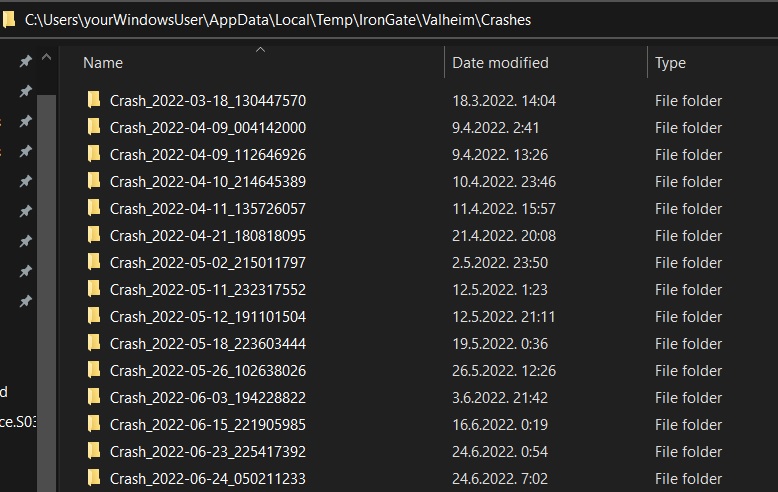
for copy pasting: %username%\AppData\Local\Temp\IronGate\Valheim\Crashes
dapper orbit
This problem happens on my friend's PC, when he wakes up I'll ask.
spice atlas
stark meadow
Did you do the: https://discord.com/channels/391142601740517377/1202549675924787...
yes i did to no avail..
I have many crashreports if needed.
There are instances where I can play for a long time without a crash, and somewhere it crashes within 10 minutes of the previous crash.
The windows event log refers to Unity player for the crash origin.
stark meadow
spice atlas
There are instances where I can play for a long time without a crash, and somewh...
failed to create buffer types or just player.log that stops abruptly?
Did you do the: steam-bugs-discussion or still not? #steam-bugs-discussion message
spice atlas
@stark meadow yes i did those steps.
stark meadow
spice atlas
<@196192010581835776> yes i did those steps.
And you continued crashing? Send me those player.log when you crashes after re-installing drivers in the mannar I suggested
spice atlas
stark meadow
And you continued crashing? Send me those player.log when you crashes after re-i...
i will prepare some for you later today when im at home!
dapper orbit
stark meadow
Without a popup error?
Do you have any of these crashes recorded here: https://i...

and now what to do?
stark meadow
dapper orbit
Best to zip those folders into one zip file and send it to me
dapper orbit
ok 1 moment
stark meadow
You could have DM me those as well.
Two different types of crashing going on there.
First tell your friend to not play on Vulkan, as the warning popup states, which he should have received when launching in Vulkan. Other crashes in d3d11 are CPU/RAM related.
Are you or your friend aware of degradation of Intel 13/14th gen CPUs?
dapper orbit
stark meadow
You could have DM me those as well.
Two different types of crashing going on the...
i send in your dm
 alpine ingot
am i the only one that feels like my fps starts dropping the longer a run goes on? like i cant make it past 2 days on a playthrough until my fps drops to constant 40-45 on a good day.
stark meadow
alpine ingot
am i the only one that feels like my fps starts dropping the longer a run goes o...
Which GPU? Do you have in-game V-sync enabled? Are you using mods?
alpine ingot
stark meadow
Which GPU? Do you have in-game V-sync enabled? Are you using mods?
vanilla, it usually happens in just a few hours if im using mods, my GPU is a 1650, vsync is off, aside from that i go through every existing reddit post / comment on game optimization before launching a run, i only play singleplayer
stark meadow
alpine ingot
vanilla, it usually happens in just a few hours if im using mods, my GPU is a 16...
Is that a laptop? If so, which laptop model?
alpine ingot
stark meadow
Is that a laptop? If so, which laptop model?
Desktop
I5 6th, 16gigs of RAM / could just be a weak rig, however im sure its at least above minimum even if a step behind recommended specs in terms of gpu
prisma solar
alpine ingot
vanilla, it usually happens in just a few hours if im using mods, my GPU is a 16...
aside from that i go through every existing reddit post / comment on game optimization before launching a run
You don't seem to have a bad computer, this is probably hurting more than it's benefiting
alpine ingot
prisma solar
> aside from that i go through every existing reddit post / comment on game opti...
should i just turn all of this off
-console -window-mode exclusive -screen-fullscreen -refresh 60 -USEALLAVAILABLECORES -malloc=system -gfx-enable-gfx-jobs -gfx-enable-native-gfx-jobs
Most of these don't do anything anyway if you put those as launch arguments.
Even though it's probably not temps, just be sure to check temps still. I recommend HWiNFO app in sensors only mode.
From other issues, check if alt-tabbing or minimising the game causes this performance issues. Be in base, minimise, restore the game to check FPS.
Then also do this test if you know how to use console mode: https://www.youtube.com/watch?v=BlvJrvJIb_I
In both these two latter cases, you will have to cleanly re-install your graphic drivers to fix it (try selecting custom install + clean install option first during driver re-installation).
prisma solar
alpine ingot
should i just turn all of this off
```
-console -window-mode exclusive -screen-...
As previously said, most of these don't do anything, but using all cores has all the potential to make it worse, and I'd remove that malloc flag for sure. Anyway, do what the smart man said, but also remove whatever's in your arguments field, it's probably making it worse
alpine ingot
does anything here look out of place
 prisma solar
That frame time
If the game is smooth, it's fine
Also you're probably somewhat limited by that CPU
alpine ingot
occasional drops that im guessing have to do with a cpu bottleneck
yeah unfortunately
prisma solar
If anything runs on the background, you will face lag
Basically close everything and disable Windows stuff if you don't want it in the way
prisma solar
You probably want to monitor it and see what's happening during a drop
You'll at least know where to dig after
alpine ingot
are we talking monitor the game or my system
prisma solar
The system, you want to see if anything is using too much CPU
stark meadow
alpine ingot
does anything here look out of place
Does your FPS go beyond 60 FPS when you are not in menus, e.g. while looking at the ocean?
First you should be sure that your FPS indeed does drop over time, and not that you are just comparing FPS in base vs some other unrelated place.
Note that it's important to not compare FPS during different times of day (e.g. sunset and sunrise), nor when menus are opened (FPS will be capped to 60). You should always check it on same spot, looking at same direction, preferably forcing particular time of day via console. You shouldn't expect to have same FPS in ocean as your case.
You should also differentiate between stuttering (occasional, e.g. when crossing over zone borders) and general performance drop (AVG FPS goes down over time in same spot, same time of day, looking at same direction).
alpine ingot
how taxing would it be compared to normal vanilla if i simply download around 7-8 QoL mods for very basic things like better portals, chest sorting among other things
prisma solar
alpine ingot
how taxing would it be compared to normal vanilla if i simply download around 7-...
It probably won't make the game run faster, but unlikely to be very taxing
low ocean
Looks like Nvidia released new GPU drivers. Hopefully they help those who have had crashes...
 vast flare
Anyone else having issues streaming media while playing? Makes my videos stutter sometimes.
stark meadow
vast flare
Anyone else having issues streaming media while playing? Makes my videos stutter...
Which GPU?
vast flare
stark meadow
Which GPU?
2060 super. Never had the issue until call to Arms started in beta. Now it happens every time I play.
stark meadow
low ocean
Looks like Nvidia released new GPU drivers. Hopefully they help those who have h...
If the game effects other apps, it's a general issue.
You should first try re-installing your drivers (custom install + clean install options during installation process).
prisma solar
vast flare
2060 super. Never had the issue until call to Arms started in beta. Now it happe...
Lower your graphics
vast flare
prisma solar
Lower your graphics
Doesn't matter if it's on low or high. It's an optimization issue since call to Arms. Game doesn't stutter. Second window does.
prisma solar
vast flare
Doesn't matter if it's on low or high. It's an optimization issue since call to ...
A CPU issue? It's obviously caused by the engine update, but that just means there's no fix other than trying to make it easier on the system. You could try reinstalling drivers, but that's not guaranteed to help. As an easy but inconvenient way to test it, try it in a clean OS install? that would tell more about the issue
vast flare
Drivers are reinstalled. Absolutely not reinstalling windows. This is the only game that affects my performance. Never had before the update which tells me there's some bad optimization in the game files. When I check processes my cpu is only at 15-20%. I could see if my cpu was at full use there would be an issue. Memory has no issues either..
stark meadow
vast flare
Drivers are reinstalled. Absolutely not reinstalling windows. This is the only g...
It's not a CPU issue. It happens because your are using GPU acceleration in your browser, and Valheim is stressing GPU more compared to other games you play. Did you re-install drivers in the way I mentioned, and it didn't help?
vast flare
I installed fresh drivers two days ago and haven't noticed a difference. Only seems to happen when streaming prime. Other streaming services work fine. I'm baffled, I love to watch series while I play.
stark meadow
vast flare
I installed fresh drivers two days ago and haven't noticed a difference. Only se...
This still doesn't answer my question about whether you installed drivers in the manner I suggested you should or not.
If you haven't you should restart your PC, check your Nvidia app and whether you have Valheim optimised there and un-optimise it.
What you are describing is not a new issue, players have had even YouTube videos stuttering while playing Valheim in the past. It a matter of driver + OS settings + browser setting + how much Valheim stresses the GPU. It can be related to different things.
From GPU overheating to Vulkan, d3d11, when GPU acc is enabled/disabled in your browser, Valheim in windows mode, exclusive mode, game mode enabled or disabled in windows, same with game bar, test if related to power setting in Nvidia control panel for Valheim, etc.. You can also run previous version of Valhiem to test (Valheim properties in Steam libary → Betas → default_precta
vast flare
stark meadow
This still doesn't answer my question about whether you installed drivers in the...
I mean it's pretty hard to do what you suggested today while I'm still at work! I can give it a go when I'm home and let you know though.
 uneven parrot
Hey! Just wondering if someone is tech sabby enough to explain what's going on.
I have a "Border" in like the middle of my base ish, where every time I cross i, there is a lag spike. It's pretty annoying.
Running the game with mods so I have a terminal with a log open showing ingame events, and it mentions spawning a dungeon every time I cross this "Border"
I haven't found a single dungeon near my base. Any one knows of any hidden structures or something that can trigger this?

 gaunt mist
uneven parrot
Hey! Just wondering if someone is tech sabby enough to explain what's going on.
...
gaunt mist
uneven parrot
Hey! Just wondering if someone is tech sabby enough to explain what's going on.
...
If mod usage, better ask in https://discord.com/channels/391142601740517377/1202550198174486599 honestly. 👍
stark meadow
uneven parrot
Hey! Just wondering if someone is tech sabby enough to explain what's going on.
...
Some locations are also listed as dungeons and loading them causes stutters that can't be removed as long location is there
You would have to use mods or edit world files to remove it, and stop it from being loaded when stepping into active zone where it is
uneven parrot
Aha, that's kind of what I figured
Do you know any buildings/structures in particular? It says that it's specifically 17 rooms, so I'd assume it's an entrance to a "dungeon" area
There is a frostcave in the mountains, but they're like at least 500m away. I kind of assume the game doesn't load those in
stark meadow
uneven parrot
Aha, that's kind of what I figured
Do you know any buildings/structures in part...
Draugr village for example also counts as such dungeon.
You can use printlocations command to see which ones are the closest
 remote lichen
Not sure if this is a bug, but 2 months ago my boyfriend and I found the Yagluth Vegvisir and decided to save there, and has not been able to touch the game since. We get on today to start where we left the game and go to the Yagluth alter, but the area on the map with the Yagluth location contains no sign of an alter at all. Is this a bug, or should I move to a different channel?
stark meadow
remote lichen
Not sure if this is a bug, but 2 months ago my boyfriend and I found the Yagluth...
Not a bug, but it's an issue. You will have to interact with vegvisir again to get correct location, cuz the unexplored areas got re-arranged.
remote lichen
stark meadow
Not a bug, but it's an issue. You will have to interact with vegvisir again to g...
That makes so much sense, I had a suspicion it might be because of updates. Thank you
 steel wedge
Not sure if this is a correct place to ask, but I have this problem for a couple of years now ,and still I did not found any proper solution. My rtx3060 goes wild while playing valheim. 100% usage and temps around 90C. The game feels kinda smooth but there are fps drops sometimes. I tried to change the settings but there is no difference in usage between lowest and max. I tried to limit my frames to 60 and it did help for a while (temps around 60C na usage 55%) but after creating new world i couldn't get more than 45 fps and the usage went back to around 100%. I do not have any issues with other games I play.
My PC specs are: rtx3060 12gb
32gb ram
Ryzen 5500
stark meadow
steel wedge
Not sure if this is a correct place to ask, but I have this problem for a coupl...
That's on desktop, and not laptop, so Ryzen 5500 not Ryzen 5500U right?
steel wedge
stark meadow
That's on desktop, and not laptop, so Ryzen 5500 not Ryzen 5500U right?
Correct. Cpu usage stays around 40% no matter if I use vulkan or directx
stark meadow
steel wedge
Correct. Cpu usage stays around 40% no matter if I use vulkan or directx
CPU doesn't matter, just making sure it's not a laptop.
How large is your PC case?
You won't be above to efficiently solve this by software based solution.
Your card probably needs fan replacements or is missing some thermal pads underneath the metal plate.
Software based solution would be to undervolt the card and tweak its fan curve via MSI afterburner or Nvidia app if it allows it for your card.
steel wedge
stark meadow
CPU doesn't matter, just making sure it's not a laptop.
How large is your PC cas...
I'll run some more benchmarks. But I had no issues playing cyberpunk2077 or other high demanding games. So I doubt thats hardware issue. Anyways thanks for help
 visual sentinel
My game starts crashing since a few days.I dont know why.Using no mods or console.I took a look at the Player.log but I dont know what it means. Tried to post the first Error message in the log but it seems as if its not allowed(got a time out).The crash happens not at the same place or situation.Suddenly game freeze and I got an Error message
stark meadow
steel wedge
I'll run some more benchmarks. But I had no issues playing cyberpunk2077 or othe...
These are no necessarily more demanding games, rather more optimised. No GPU should overheat at 100% usage. Compare your GPU usage in cyberpunk vs Valheim. Extreme areas in Valheim are oceans, blizzard, moder attack, queen spawn attack, casting a bunch of fire in Ashlands, etc..
stark meadow
visual sentinel
My game starts crashing since a few days.I dont know why.Using no mods or consol...
What are your system specs? In what way are you crashing? (black screen, system restart, app freezes are you are forced to close it, app crashes with unity error popup, etc...)
visual sentinel
I am using a intel i 7 14700KF(3,4Ghz) ,64 GB ram with RTX 4070 Ti super. The game freeze an Error message is popping up(not sure but I think its Unity... closes too fast) and then the game closes
stark meadow
visual sentinel
I am using a intel i 7 14700KF(3,4Ghz) ,64 GB ram with RTX 4070 Ti super. The g...
Sounds like a CPU crash. Are you aware of the Intel 14gen CPU suffering degradation problems?
Do you remember when you got the CPU (month/year)
visual sentinel
I got it in november 2024. Not sure what you mean with the intel problems.Never heard about it??
stark meadow
visual sentinel
I got it in november 2024. Not sure what you mean with the intel problems.Never ...
I would recommend to watch this to get the info about it: https://www.youtube.com/watch?v=gTeubeCIwRw, as at some point you might need to replace your CPU.
CPU is boosting some cores over the top to achieve better performance, while not boosting other cores to retain same lifespan on the CPU. In theory this should have worked, but they messed up setting up microcode which resulted in rapid degradation of CPU. BIOS has to be updated + Intel CPU default have to be selected in BIOS profile to stop the degradation from happening. However, I've seen cases where already degraded CPU continued degrading. Best solution to ensure lifespan is to sync all cores, so that few don't boost over the top, and lower MAX clock.
However, this doesn't necessarily have to be the reason you are crashing in particular. Have you tweaked your CPU and RAM yourself? Do you have any antivirus software running in background? When you check windows update and select the option to uninstall an update, do you see this Windows update on the list as available for removal? KB5065789
visual sentinel
Oh that sounds not good... Theres an Update KB5056579(the 8 is missing).Did you mean this one?
I did no tweak to CPU an Ram(didnt know how... 🙂 )
stark meadow
visual sentinel
Oh that sounds not good... Theres an Update KB5056579(the 8 is missing).Did you ...
KB5065789 caused some issues for some players, but if you don't see it, it probably means it was included in some cumulative update I wouldn't recommend uninstalling.
Have you ever tried updating BIOS?
 crystal walrus
Hello everyone. Me and my husband have a little problem whit this game. We were going to play together whit some friends but we can`t seme to be able to log on to there game. We are not on the same sed ass them and they live abut 2-3 Swedish mil from us. Our sed is 0,221,4 and our friends sed is 0,221,5 how do we get the up date sow we get to that sed?
stark meadow
crystal walrus
Hello everyone. Me and my husband have a little problem whit this game. We were ...
Thsoe two should be compatible. You are not getting incompatible version error right? I'm assuming your can't reach password prompt? All playing on Steam?
visual sentinel
No,I havent updated it yet. I m looking at google at the moment because dont know how to do it...
crystal walrus
it ses faild to conect.
stark meadow
visual sentinel
No,I havent updated it yet. I m looking at google at the moment because dont kno...
Will send you a DM about it.
stark meadow
crystal walrus
it ses faild to conect.
Is everyone playing Valheim on Steam platform or you have some teammates playing on other platforms (Xbox, Apple Store)
crystal walrus
no all steam.
visual sentinel
stark meadow
Will send you a DM about it.
Thank you 🙂 Sounds a little bit complicated... Have to stop at the moment - got to go to work... Will continue this night 🙂
stark meadow
crystal walrus
no all steam.
Then it would be best if you could tell the host to stop the server, and disable the crossplay option before starting it again.
You'll have less latency and should eliminate connection issues that are usually caused by some players using VPN. Although it would be best if everyone would check if they have any VPN active (e.g. NordVPN) and stop it from running in background, as those can even disrupt non-crossplay connection.
crystal walrus
okey al do that. thank you fore the help and i hope it works.
low ocean
Are raids working when you have killed eikthyr but not elder? I havent seen single one despite playing for hours and hours and tried even with world setting more instead of normal
gaunt mist
low ocean
Are raids working when you have killed eikthyr but not elder? I havent seen sing...
Should work, you might have had good RNG for them not triggering, or you have been away from your base so requirements haven't met to trigger the raids.
It's 20% chance every 43 minutes when raids can happen.
low ocean
If i recall, in a different world i played with a friend, we didnt see raids before killing elder either. Hmm
gaunt mist
The only raid that can trigger after killing Eikthyr only is "The forest is moving".
Defeating Elder unlocks next army raid and also troll raid, if troll is killed in the world.
low ocean
I know... Before that meaning when eikthyr wasnt killed the one before it didnt trigger either
low ocean
Or bug? 🙂
gaunt mist
Afaik there are currently no bugs related to raids. 
low ocean
Well maybe they should check? Since i dont see them at all
gaunt mist
low ocean
Well maybe they should check? Since i dont see them at all
Hmm, you could check from https://www.valheimgame.com/support/ from "known issues" section or leave feedback about it.

Please leave your feedback in the forms.
stark meadow
low ocean
Are raids working when you have killed eikthyr but not elder? I havent seen sing...
That bug has been fixed. Are you playing on player based raids modifier? You can check which raids can happen via test command, followed by randomevent command in a place where there are 3 player base items.
Or you can send me your character save.
vast flare
Check to see if you have raids enabled.
 vital edge
Hello. Ist there a channel where I can report minor text errors? Or can I post here?
"Stimme" would be correct
 stark meadow
vital edge
Hello. Ist there a channel where I can report minor text errors? Or can I post h...
stark meadow
vital edge
Hello. Ist there a channel where I can report minor text errors? Or can I post h...
For translation errors, best place to report them would be valheim.com/support, translation erros tab
vital edge
stark meadow
For translation errors, best place to report them would be valheim.com/support, ...
Thank you very much. I'm restarting anew world and I noticed some small errors 😉
spice atlas
stark meadow
And you continued crashing? Send me those player.log when you crashes after re-i...
ive played a session, and have had 3 crashes in about an hour, i did send you a DM with the crash log. if possible could u take a look and see if u can recognize the cause.
 hidden mason
Anyone know why Elder isn't showing yellow damage from fire damage (he should be weak to it) same with Yagluth not showing yellow damage to frost/spirit damage ticks...
gaunt mist
hidden mason
Anyone know why Elder isn't showing yellow damage from fire damage (he should be...
Iirc the damage numbers show only white color for dot damage despite weaknesses/resistances. And in case of Yagluth, he is not weak against frost or spirit but takes normal damage from them.
hidden mason
gaunt mist
Iirc the damage numbers show only white color for dot damage despite weaknesses/...
Thanks, that explains what I'm seeing.
 short ibex
Hello world, I want to ask you, if this clip https://youtu.be/GTndNb6Zq5Y is worth posting in here. At 2:18 meadows raid begging with no requirements met.

 gloomy quest
On steam, you can't navigate into the bottom two storage spots on the large green pots using the controller d pad
Correction, you can only navigate to the top storage spot with all three of the pots, medium pot is also bugged out like this.
 lucid geyser
short ibex
Hello world, I want to ask you, if this clip https://youtu.be/GTndNb6Zq5Y is wor...
lucid geyser
short ibex
Hello world, I want to ask you, if this clip https://youtu.be/GTndNb6Zq5Y is wor...
Are you 100% sure that you wasn't within distance of 3 base items (3 campfires?) at the moment the game checked if you was "raideble", fractions of seconds before you actually nailed Eikthyr?
short ibex
@lucid geyser Yes absolutely sure about that, I didn't have any base, no workbenches etc, I would post whole 30 mins run, but I already deleted it, because it was my perma run and I died in dungeon lol.
Edit: Now when I watch the video, at 1:38 you can see raid activated with red circle and red exclamation mark on mini-map, but they did spawn only after Eikthyr defeat. Weird I didn't know that only campfires themselves can trigger raid.
stark meadow
gloomy quest
Correction, you can only navigate to the top storage spot with all three of the ...
True, known issue
stark meadow
short ibex
Hello world, I want to ask you, if this clip https://youtu.be/GTndNb6Zq5Y is wor...
Pretty crazy that you got a raid the moment you built 3 campfires, but doesn't seem like a bug.
Eikthyr raid can spawn before you defeat it
But what could be a bug is the fact that animals didn't spawn and attack you immediately, probably cuz you removed those 3 campfires soon after.
lucid geyser
short ibex
<@337656571255586816> Yes absolutely sure about that, I didn't have any base, no...
3 campfires will do the trick...
gloomy quest
gloomy quest
Correction, you can only navigate to the top storage spot with all three of the ...
Can anyone else confirm this controller bug on Steam? It doesn't seem like it would be specific to a make/model but mine's an Xbox controller.
short ibex
stark meadow
Pretty crazy that you got a raid the moment you built 3 campfires, but doesn't s...
Yes, I mean even the raid event text "Eikthyr rallies the creatures of the forest" appeared only after Eikthyr has been defeated, which itself is quite unusuall I think, but red circle on mini-map appeared so I don't know, game is playing with me and not the other way around lol. Anyway I had world modifier applied in world with "more" raids, but I don't think it matters much. Combat setting was set to very hard but that also doesn't matter I think.
 compact otter
Random question, are golems supposed to just animation cancel when you parry them? Cause they feel so inconsistent to fight them
lucid geyser
compact otter
Random question, are golems supposed to just animation cancel when you parry the...
The different attacks from the stone golems have different animations, that has different parry timing. Some of them are awkward late in the animation, but you can learn them. It's tricky, but you can do it.
You'll experience similar in later biomes, on different mobs.
compact otter
lucid geyser
The different attacks from the stone golems have different animations, that has ...
My issue isn’t the parry timing, what i mean is when they do get staggered after a parry, they sometimes will get out the stun long enough for only one attack, and other times you can land a full 3 hit combo into them.
lucid geyser
compact otter
My issue isn’t the parry timing, what i mean is when they do get staggered after...
In my experiences, fighting the golems, is that different attacks from them, have different duration of stun afterwards. The terrain around the golum also have influence of how long they are stunned.
compact otter
lucid geyser
In my experiences, fighting the golems, is that different attacks from them, hav...
I suppose but i feel as if most enemies with varying attack patterns/types usually all fall under the same stun durations for parries, but maybe golems are the odd one out
lucid geyser
compact otter
I suppose but i feel as if most enemies with varying attack patterns/types usual...
Correct. Golems are a odd one, and I don't think is classified by the devs, as a "bug".
compact otter
lucid geyser
Correct. Golems are a odd one, and I don't think is classified by the devs, as a...
I guess you could chalk it up to a simple factor that golems can be stunned for long but that still feels odd as ive fought most of the nasties of the plains, and still get the full stun effect
lucid geyser
compact otter
I guess you could chalk it up to a simple factor that *golems can be stunned for...
Then you have much to see in the world of Valheim. 🙂
Enjoy Mistland and Ashlands.
compact otter
lucid geyser
Then you have much to see in the world of Valheim. 🙂
Enjoy Mistland and Ashland...
Tbh i cant wait to get straight into the unknown and find what’s in those new biomes
 rugged cloak
Hello, has anyone experienced character / player model / texture glitching out when using draw distance / level of detail above medium?
stark meadow
rugged cloak
Hello, has anyone experienced character / player model / texture glitching out w...
We had one such report so far submitted via online bug tracker, so we don't know the details.
Using mods? Which GPU do you have? Does it happen the moment you enter the world or after some time?
rugged cloak
vanilla (Vulkan), RTX 4060 Laptop GPU, from the moment I enter the world
stark meadow
rugged cloak
vanilla (Vulkan), RTX 4060 Laptop GPU, from the moment I enter the world
Does it happen for a new default character? If not, please check at Barber stations which hair style and/or beard you have.
rugged cloak
Hair: Royal Braids
Beard: Royal
checking new character now
new character, old world still glitching
stark meadow
rugged cloak
new character, old world still glitching
Doubt it's save related.
Based on your specs, you should not have this issue, so I believe it should go away after game re-install and/or graphic driver re-install (select custom install + clean install options during installation process). Try re-install first by deleting all files in the installation folder manually first, then re-installing the game via Steam, and only then installing it again.
rugged cloak
I'm going to reinstall GPU drivers from OEM
 vestal bridge
hey so really weird, but me and my friends are playing valheim and it just happened after we beat moder. Our internet is going out when we join the server, like only mine and my other friends internet just go out, other friends that are on the server are fine. Really strange.
Anyone might know a fix to this?
stark meadow
rugged cloak
I'm going to reinstall GPU drivers from OEM
I would advise to use Nvidia app to tackle drivers. It's probably just graphic drivers that are faulty
rugged cloak
Okay I will give it a try
rugged cloak
Non-OEM drivers for RTX 40 Series (Notebook) seemed to be the issue on Acer Nitro 5 (AN515-58). Clean install of graphics drivers from Acer I keep and update to date on my external HDD and changing setting in nvidia control panel afterwards (without those changes my character had their beard texture away from face + T-pose in menu after log out and on second restart had a leaning pose which disappeared after I moved but beard issue happened again + T-pose of course) seemed to have fixed the issue
stark meadow
rugged cloak
Non-OEM drivers for RTX 40 Series (Notebook) seemed to be the issue on Acer Nitr...
Did you test if the issue went away before you changed any Nvidia settings? By changing setting, I assume you just reset the setting for Valheim profile, or?
rugged cloak
Yes the issue went away before i changed nvidia settings. Clean install defaulted all of my nvidia settings both global and specific program
All that just to see [Vulkan init] extensions: count = 19 in those 2 lines in player.log but getting character texture glitched out so had to got back to 18 with my OEM drivers 😆
rugged cloak
stark meadow
Did you test if the issue went away before you changed any Nvidia settings? By c...
I changed both global setting and program setting only differance being power managment mode -> prefer maximum performance for valheim.exe
 verbal jetty
Hi, I get the error message "Failed to conect" if I try to connect to the server of my friend. I play on Linux Mint but it did work before I switch offmy firewall but I run out of ideas
stark meadow
verbal jetty
Hi, I get the error message "Failed to conect" if I try to connect to the server...
If both of you are on steam, the host should try disabling crossplay option before starting the server. Crossplay is needed for other platforms and is often incompatible with VPN-s, causing connection issues.
verbal jetty
If he switches off cross play. They server appears offline and same error message
stark meadow
verbal jetty
If he switches off cross play. They server appears offline and same error messag...
How is he hosting the server? Using a dedicated server app or hosting their world with in-game options?
verbal jetty
in-game option
stark meadow
verbal jetty
in-game option
He should disable crossplay option, but the "start server" option has to remain enabled.
You both should be online on Steam, and then have him send you a Steam invite to the game.
verbal jetty
Thanks that did work. 🙂
gloomy quest
gloomy quest
Can anyone else confirm this controller bug on Steam? It doesn't seem like it wo...
Ok, no responses, so can anyone confirm they can navigate into the bottom locations of the storage pots with their d pad on controller?
prisma solar
gloomy quest
Ok, no responses, so can anyone confirm they *can* navigate into the bottom loca...
If I knew what a storage pot is and if I knew where my controller had been for the last half a year, I'd check
stark meadow
gloomy quest
Ok, no responses, so can anyone confirm they *can* navigate into the bottom loca...
Responded here: #steam-bugs-discussion message
It's a known issue that you can't use a gamepay/controller to navigate to the bottom inventory spot for the pots, cuz they have only one column of inventory space.
bright coral
The Linux version of Valheim was renamed again in today's stealth update. It's going to break a lot of systems again, without notice.
 knotty prairie
When doing the secondary attack with a greatsword after sprinting, and the ashen cape equipped, the cape flips around the opposite way on the player. I tried this multiple times and was able to consistently repeat it.
gaunt mist
knotty prairie
When doing the secondary attack with a greatsword **after** sprinting, and the a...
You can re-equip the cape so it starts to act normal.
 gilded sluice
 fervent echo
i need help
fervent echo
i need help
well. stop writing in german and someone might be able to help you
fervent echo
Sorry
I want to play with my brother but because of this bug with PlayFab I can't do that
I also did what is written there, but it still doesn't work.
bright coral
fervent echo
Is https://aka.ms/vs/17/release/vc_redist.x64.exe the one you downloaded (the x64 version), and did you try restarting after installation?
fervent echo
I had done that and it hadn't worked, but with the thing you sent now it works, thank you for that, you are the best.
gloomy quest
stark meadow
Responded here: https://discord.com/channels/391142601740517377/1202549675924787...
Sorry, I looked for a reply and didn't see it. Thanks!
 kind swift
Is there any way to view the details of the individual bugs on the valheim support page or are they off limits to the public?
gaunt mist
kind swift
Is there any way to view the details of the individual bugs on the valheim suppo...
Should be found in "known issues" section: https://www.valheimgame.com/support/
Please leave your feedback in the forms.
kind swift
gaunt mist
Should be found in "known issues" section: https://www.valheimgame.com/support/
RIght, but you just see the high level description of the bug. Is there a way to go into the bug to view the details?
gaunt mist
kind swift
RIght, but you just see the high level description of the bug. Is there a way to...
Afaik that is only place to see what bugs are not fixed yet.
And no further details.
gilded sluice
kind swift
RIght, but you just see the high level description of the bug. Is there a way to...
no
 jagged hamlet
gilded sluice
no
jagged hamlet
gilded sluice
no
We should all copy the message link and anytime someone ask something we know Smiffe would say no to (horses) we can just link to this.
 static crown
So im playing valheim with 2 other friends. One of them keeps disconnecting (the other one doesnt). His character freezes from our point of view and we freeze for him ~0.5-5 minutes after he joins. We already tried a few solutions like disabling crossplay or checking if valheim is blocked by the firewall (it never was). Are there any other solutions? Help
gilded sluice
static crown
So im playing valheim with 2 other friends. One of them keeps disconnecting (the...
usual issue is the way your friend connects
wifi, 4G, 5G, wireless etc
gilded sluice
wireless -> wifi -> and then?
static crown
Idk but from what he told me id say router
gilded sluice
usually the package loss from wifi is the problem
but also, how the rest of the connection looks like :/
static crown
Okay package loss rings a bell i saw it on some reddit post a few hours ago
We will test if its the package loss if not ill get back here
gilded sluice
no real to test. since you already see ingame what happens 😓
ask him to connect with a cable or move so your friend gets a better wifi reception
stark meadow
static crown
So im playing valheim with 2 other friends. One of them keeps disconnecting (the...
Yeah, most likely WiFi related, but also tell him to test joining the server from "Favorites" list or via Steam invite and not by clicking on "Friends" or "Community" tabs when searching for servers
static crown
Yeah he joins via steam and it doesnt work😔
stark meadow
static crown
Yeah he joins via steam and it doesnt work😔
Tell them to screenshot us his test results: https://speed.cloudflare.com/

Test your Internet connection. Check your network performance with our Internet speed test. Powered by Cloudflare's global edge network.
 hot fjord
Every time I play the game, the steam cloud goes out of sync and doesn't fix until I restart steam. Doing "Retry Sync" does nothing to fix it. Should I delete my character to test if that works?
 prisma solar
hot fjord
Every time I play the game, the steam cloud goes out of sync and doesn't fix unt...
prisma solar
hot fjord
Every time I play the game, the steam cloud goes out of sync and doesn't fix unt...
Maybe look at steam's logs?
 sonic seal
Can't find useful help on this issue: I'm starting to have objects that are impossible to interact with on my server. It is vanilla version, no mods. The first is wall mounted cultivator. I can't grab it anymore. Can't unbuild. Also destroyed everything around it and it just hovers in the air (mount and cultivator both). The second is a kiln. Can't unbuild it. Can't damage it. If I dig under it, it just floats there... Any hints on how to solve thi sissue??
bright coral
sonic seal
Can't find useful help on this issue: I'm starting to have objects that are impo...
This is after restarting the game/client?
stark meadow
sonic seal
Can't find useful help on this issue: I'm starting to have objects that are impo...
Are you talking about dedicated server or hosting world as server via in-game options?
sonic seal
Yes after restarting, dedicated server
 elfin oar
tips , you can have free server for valheim with romstation , if you dont want to pay
stark meadow
sonic seal
Yes after restarting, dedicated server
You will have to restart the dedicated server itself in order to fix those enemies and objects.
If this happens often, then you will have to check if anyone (server or client) had connection issues that contribute to this happening (losing packets, getting disconnected often).
static crown
static crown
So im playing valheim with 2 other friends. One of them keeps disconnecting (the...
btw we didnt do anything and it started working
low ocean
Was some temporary hitch on his end or someones end, or some temporary hitch on the connection, or the medium which transmits your signals to your ISP. But glad you got those problems fixed
hot fjord
[2025-10-29 08:45:39] [AppID 892970]     Evaluating rule 0 with root="WinAppDataLocalLow" path="IronGate/Valheim/characters" pattern="*"
[2025-10-29 08:45:39] [AppID 892970]         Found 0 files that match C:\Users\ajgia\AppData\LocalLow\IronGate\Valheim\characters\*
[2025-10-29 08:45:39] [AppID 892970]     Evaluating rule 1 with root="WinAppDataLocalLow" path="IronGate/Valheim/worlds" pattern="*"
[2025-10-29 08:45:39] [AppID 892970]         Found 0 files that match C:\Users\ajgia\AppData\LocalLow\IronGate\Valheim\worlds\*
[2025-10-29 08:45:39] [AppID 892970] AutoCloud complete
[2025-10-29 08:45:39] [AppID 892970] Failed sync for 'AC Exit,Sync Disabled,' [login=false][offlineMode=false]```

hellllppp, I have `steam_autocloud.vdf` in both of those directories (characters and worlds), what do you guys have?What's the issue? You can't find your saves?
These are the locations where you should be looking for files: https://i.imgur.com/mTVKf1J.jpg?4
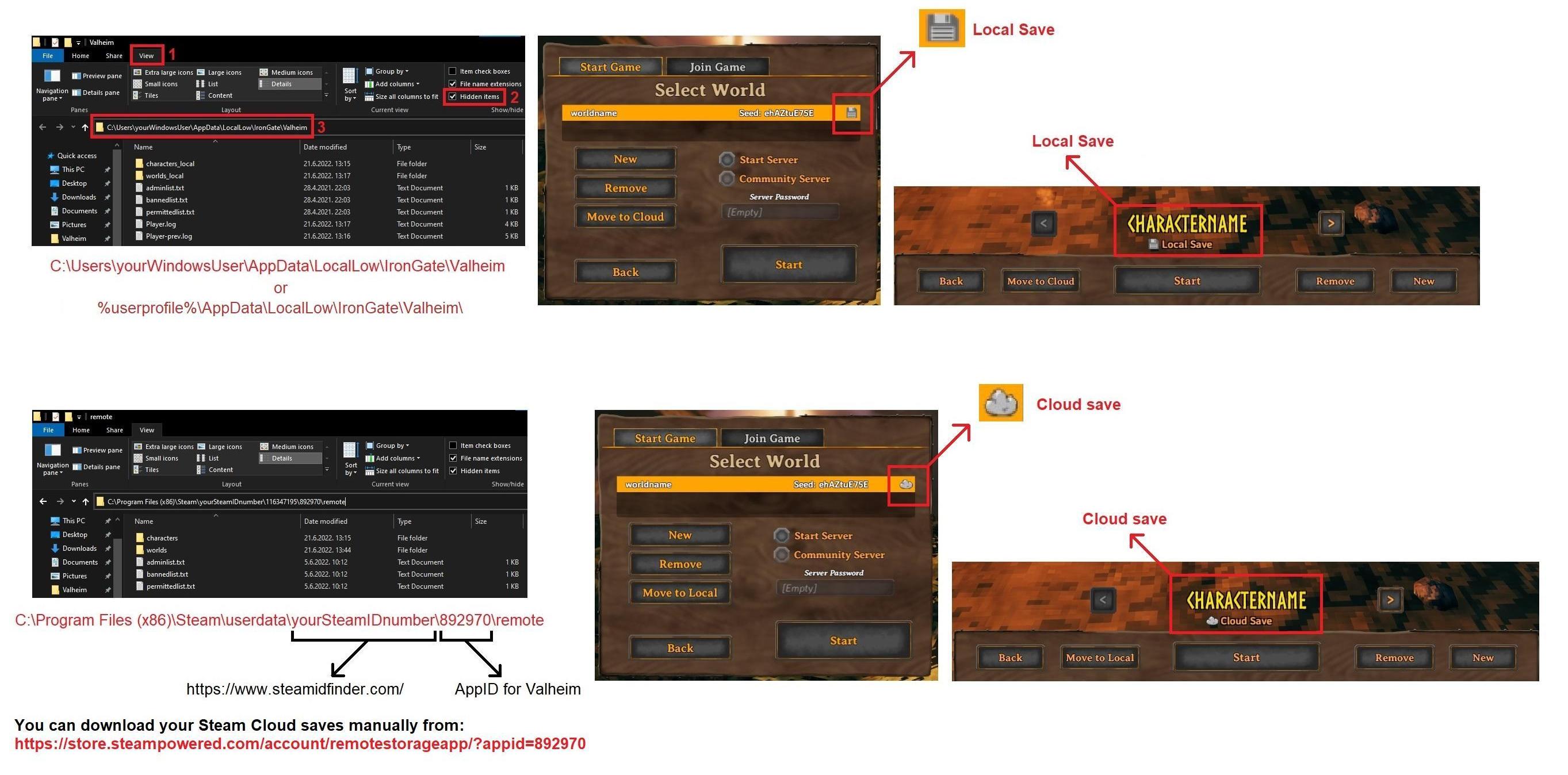 hot fjord
stark meadow
What's the issue? You can't find your saves?
hot fjord
stark meadow
What's the issue? You can't find your saves?
Thank you! But the issue is that the game fails to start because it says steam cloud is out of sync every time. The only recourse I've found so far is to restart steam entirely, and that gets it to sync. I only have cloud saves, and they are where they're supposed to be in the image you linked. The text snippet I linked is from steam's log/cloud_log.txt which is my only source of clues at the moment to make it so I can launch the game reliably
stark meadow
hot fjord
Thank you! But the issue is that the game fails to start because it says steam c...
It gets stuck on Cloud sync every time you close the app?
You should be able to start Valhem even if the Cloud doesn't want to sync. Didn't you have the "play anyway" button available for pressing?
hot fjord
I have the play anyway button, but I have shied away from pressing it in case I muck up my saves
yeah every time I close valheim, it gets stuck on cloud sync. well, maybe not 'stuck'. on the steam valheim library page it says "cloud status: up to date", but when I press Play, it hits me with the 'unable to sync' popup every time
stark meadow
hot fjord
I have the play anyway button, but I have shied away from pressing it in case I ...
Playing anyway shouldn't cause any issues, unless you use same steam account on multiple devices and update same saves.
Try closing your game and send me your Player.log located at %username%\AppData\LocalLow\IronGate\Valheim
Might have some indication that the game doesn't close properly so sync isn't initiated or something
If you are bothered by this sync errors, you can also move your saves from Cloud to Local via in-game manage saves button, at which point Steam will stop messing with saves, but you will have to be careful not forgetting that you have to backup those saves manually if you re-install windows
hot fjord
Thank you so much for your help @stark meadow . While in the process of looking at my Player.log and noting no obvious issues, I realized that my Steam app, despite loading Store pages, actually said "No Connection" down at the bottom. And my friends network was also permanently disconnected. Googling for solutions for this led me to clearing the web browser cache in the steam in-game settings section (and the download cache, which I had already done but which had not fixed the issue), which seems to have fixed the issue! So in the end, not a valheim-steam problem it seems (I forgot the other game I play doesn't use steam cloud sync so that was not a valid data point 🙈 ). Thank again for your help
 echo tartan
anyone else experiencing bad stutters?
I've got a Ryzen 9 5900 XT and an RTX 3070 and I'm getting pretty bad stutters while exploring, something I've never had the displeasure of having to deal with when I had my Ryzen 5 5600. So I'm hoping someone here knows a fix before I start wasting valheim support's time trying to fix something that's probably really easy to fix.
gilded sluice
echo tartan
anyone else experiencing bad stutters?
I've got a Ryzen 9 5900 XT and an RTX 30...
valheim support? 🤔
stark meadow
echo tartan
anyone else experiencing bad stutters?
I've got a Ryzen 9 5900 XT and an RTX 30...
Depends what kind of stuttering is occurring. You won't be able to eliminate stuttering that occurs on zone border crossing during exploration, and it is very unlikely you didn't have it before as well. Just just probably weren't around many locations that trigger it. You can check what different types of stutters can occur here: https://www.reddit.com/r/valheim/comments/1al0zeb/comment/kpciuzg/?
You can potentially improve that stuttering a bit by disabling C-states, increase FCLK frequency, enable SPD write and tweraking other memory related settings in BIOS.
echo tartan
stark meadow
Depends what kind of stuttering is occurring. You won't be able to eliminate stu...
Idk what's causing it exactly but they just feel excessive at this point, with my previous CPU the only stutters I'd get were when the world save would happen
gilded sluice
echo tartan
Idk what's causing it exactly but they just feel excessive at this point, with m...
did you update BIOS, install new drivers etc?
echo tartan
gilded sluice
did you update BIOS, install new drivers etc?
Reinstalled windows, latest BIOS, latest chipset drivers, latest nvidia GPU drivers, AMD EXPO is enabled, turned off all the stupid windows background services, etc etc
gilded sluice
Hm..
Reddit
Explore this post and more from the AMDHelp community
🤔
"_Sooo the actual fix to this issue is disabling cppc and cppc prefferred cores in the bios. Game is butter smooth after that. It works for both Win10 and Win11 _"
echo tartan
gilded sluice
"_Sooo the actual fix to this issue is disabling cppc and cppc prefferred cores ...
Not impossible, but also, this only happens to me in valheim. I'll definitely try it out though.
16 cores might be a little excessive for gaming
gilded sluice
echo tartan
Not impossible, but also, this only happens to me in valheim. I'll definitely tr...
valheim only uses 2 cores, 4 threads
stark meadow
echo tartan
Idk what's causing it exactly but they just feel excessive at this point, with m...
I haven't seen a single system that only stutters during saves. Pretty much all systems stutter when locations get loaded, and the ammount can depend on the world seed. The more locations, the longer the stutter.
The first thing you should do, is check the type of stuttering you are experiencing and check how much you stutter compared to the videos presented in videos on the link I gave you (does stuttering occurs only when you cross zone borders or during other occasions also like while standing still, moving withing a zone, when moving mouse fast etc..)
echo tartan
stark meadow
I haven't seen a single system that only stutters during saves. Pretty much all ...
Really just zone stuttering, but I could swear I've never seen it happen with my previous CPU
echo tartan
gilded sluice
valheim only uses 2 cores, 4 threads
That is, unsettling
echo tartan
gilded sluice
why?
Idk, game is fairly recent, thought the game engine would've been optimized for at least 4 cores 8 threads
gilded sluice
if a game lets the processor freely shedule tasks, the game stutters and are what most people call "unoptimized"
and for legacy reasons, we only use 2 cores, 4 threads
so older PC's can play also
since valheim only needs about 30+ FPS for most people to play without the game doing funky stuff. it should be enough
so we actually tell the processor how and what to loadbalance among the heavier tasks
also older consols like Ps4 and Xbox one needs to be able to run valheim
and those don't have great CPU's to begin with
echo tartan
gilded sluice
_and those don't have great CPU's to begin with_
I mean, 4 cores have been a thing for 20 years now, rare are the people playing on more than 20 year old PCs.
I have an old laptop with a 3rd gen i7 that I use for DnD and yeah it can kinda play the game at 30fps, if I lower the resolution at 25% with a base resolution of 768p
gilded sluice
mid level processors from olden days don't have it
specially not intel 🙁
no threads even
echo tartan
gilded sluice
mid level processors from olden days don't have it
I mean my 3rd gen i7 has 4 cores 8 threads, they're slow but should still be plenty for the game, it's just too graphically demanding for its integrated graphics, also it's not a mid level processor it's literally the most powerful processor that fit in that socket haha
gilded sluice
like. Intel 5000-6000-7000 series all miss hyper-threadding
echo tartan
gilded sluice
like. Intel 5000-6000-7000 series all miss hyper-threadding
Most CPUs yes, but every high end CPU from every generation had hyper threading, at least from my memory. Matter of fact even the i5 that was previously in my laptop had hyper threading, it was a 2 core 4 thread CPU and I still have it in a bin box somewhere in case I melt my i7
echo tartan
I knew I should've upgraded to am5 instead of wasting money on a 16 core am4 cpu
gilded sluice
well 🤔
cost is alot tho
what kind of RAM do you got?
CL13, 3600 Mhz 16 GB sticks?
echo tartan
gilded sluice
CL13, 3600 Mhz 16 GB sticks?
3200MT/s 32GB, 8GB sticks
echo tartan
gilded sluice
what's the CL on them?
I'm at work and I don't remember off the top of my head but should be bellow 20
They're CL 16
I'll try disabling the cppc and preferred cppc options in my BIOS see if that helps anything
Because the stutters aren't just small stutters they're big half a second long frame drops that genuinely bother the hell out of me
gilded sluice
only known stutter atm is if you use massive ammounts of fire sources
and ashlands due to a soundbug
echo tartan
I mean I do have render distance maxxed and lighting and shadow instances on high
gilded sluice
should be a cakewalk for your PC 🤔
how many instances is there? (F2 key ingame to see)
echo tartan
gilded sluice
how many instances is there? (F2 key ingame to see)
I'll check on my lunch break
Shouldn't be that many
echo tartan
gilded sluice
how many instances is there? (F2 key ingame to see)
4449 instances upon loading into the world
echo tartan
Alright so with cppc and cppc preference disabled, it's improved greatly, the stutters I'm getting rn are what feel like normal zone loading stutters instead of the previous big frame drops I was getting. Thanks in no small part to you smiffe for doing the research while I was at work
bright coral
That's good info, thanks for the reporting back.
echo tartan
Might try disabling 1 ccd altogether tonight to see how the performance changes
gilded sluice
@echo tartan your processor don't have core parking, right?
echo tartan
gilded sluice
<@629524759562027019> your processor don't have core parking, right?
It does, I should probably disable that aswell huh
echo tartan
gilded sluice
The issues with core parking should been fixed in bios updates however
I mean it's an old b450 asus board, they probably don't bother with QoL updates for high end CPUs since most people will pair those boards with low end CPUs
stark meadow
echo tartan
Alright so with cppc and cppc preference disabled, it's improved greatly, the st...
I didn't check that your CPU has dual CCD.
By disabling CPPC, you will lose some performance.
Are you aware of how you should setup your dual CCD CPU is Windows? (balanced power plan, game bar enabled, etc.)
echo tartan
stark meadow
I didn't check that your CPU has dual CCD.
By disabling CPPC, you will lose some...
I didn't notice a performance difference, besides less stutters
stark meadow
I would recommend watching this entire video: https://www.youtube.com/watch?v=4wdQpVcL_a4
echo tartan
Also gamebar is enabled and I'm on the performance power plan
Disabling core parking should remedy this problem entirely
I think I've seen that video a few months before buying my 5900 XT
stark meadow
echo tartan
I think I've seen that video a few months before buying my 5900 XT
It applies to your CPU as well. Power plan should be balanced, amongst other things..
echo tartan
stark meadow
It applies to your CPU as well. Power plan should be balanced, amongst other thi...
Ehhh just sounds like another good reason to switch to linux
Once I get my new GPU I'll probably switch to linux
stark meadow
If you ask me the bigger problem is CPU companies making CPU that don't run on single dye
Intel CPU degradation problems also stem from those kinds of decisions (performance cores).
gilded sluice
echo tartan
I mean it's an old b450 asus board, they probably don't bother with QoL updates ...
unsure if they fixed it on that board 🤔
echo tartan
gilded sluice
unsure if they fixed it on that board 🤔
Me neither that's why I'm thinking of either disabling 1 ccd or disabling core parking tonight
gilded sluice
Hm.. shouldn't be a problem for you tho
since it's mainly those with only 3DV-cache on 1 CCD
echo tartan
stark meadow
If you ask me the bigger problem is CPU companies making CPU that don't run on s...
The problem is that putting 16 cores on 1 dye is highly inefficient in terms of manufacturing methods, and limiting it to 8 cores per CCD makes it much easier for them to reliably make and pump out CPUs since the way they make silicon has a high failure rate
echo tartan
gilded sluice
Hm.. shouldn't be a problem for you tho
Shouldn't but it's never impossible
 summer oar
Hey everyone
Is this the right channel for game crashes? Wanted to do a report, but the site stated that it was only for bugs.
 undone jetty
guys, hi, please help, the game crashes
I checked the files, deleted the installation and still crashes
 undone jetty
guys, hi, please help, the game crashes
I checked the files, deleted the instal...
undone jetty
undone jetty
guys, hi, please help, the game crashes
I checked the files, deleted the instal...
I did it
gilded sluice
summer oar
Hey everyone
Is this the right channel for game crashes? Wanted to do a report, ...
Yup. It's a place we can try to help you
stark meadow
undone jetty
I did it
You fixed it and now it no longer crashes?
spice atlas
undone jetty
guys, hi, please help, the game crashes
I checked the files, deleted the instal...
ive had crashes also, Disabled Expo in the BIOS (DDR5) solved my crashes. it might solve problems for other players as well!
gilded sluice
spice atlas
ive had crashes also, Disabled Expo in the BIOS (DDR5) solved my crashes. it mi...
what RAM do you got?
EXPO should pretty much be 100% safe to use 🤔
unless you got RAM that has higher speed than the motherboard manufactorer can't guarantee will work
 sweet quiver
pretty bad interaction with mists and snow: i hadn’t played this game after i bought an RTX 4080, so i was slow to discover this (also didn’t know about this discord), but after recently getting to mistlands, i noticed my PC making an insane howling noise. insert exposition and troubleshooting here, it was my gpu fans. after a bunch of finagling, the mist and snowstorm particles will fry your gpu at over around 120 fps. at 140+ fps, in mistlands, my gpu hit 110°C hotspot, and instantly triggered the fans to go to their highest speed. i noticed this also happen during blizzards in the mountain biome. the only remedy for this was limiting my fps to about 100. which, to say the least, sucks if you’re using a high refresh rate monitor. these two particle effects need to be limited to 60 fps, because right now, they are doing nothing but acting as stress tests for your gpu. please let me unlock my fps again
edit: i’ve tried googling this to see if there was any discussion about it, but no. just “mist is poorly optimized”, nothing that mentions how mist needs to be limited to a certain fps or it’ll turn your gpu into a microwave. :(
gilded sluice
sweet quiver
pretty bad interaction with mists and snow: i hadn’t played this game after i bo...
interesting issue.
I also got a 4080 (super) and got no such issue.
Which model and maker do you have?
sweet quiver
do you play at 1080 or higher resolution? what frames are you experiencing typically? it’s a strix oc
i play at 1080 so i usually get 150+ fps
gilded sluice
I mostly play 1440. but I use to play in 1080
sweet quiver
my girlfriend plays at 1440 and i know her fps isn’t as high, which would obviously prevent this from happening to her
gilded sluice
so you got a Asus STRIX 4080 OC?
sweet quiver
yeah
gilded sluice
ASUS GeForce RTX 4080 Super 16GB TUF Gaming OC
this one I got
so Should be almost the same
sweet quiver
indeed, basically just higher binning etc. i haven’t even messed with the clock on mine lol
gilded sluice
same. mine runs pretty much stock from the box
I don't want to ruin any kind of varrenties
This is what the internet AI says 🤔
 sweet quiver
if you want to see, try monitoring it with hw64 and downscaling to 1080
i tested this for hours, truly. hence the “exposition” part
i didn’t know what that sound was because nothing ever made my gpu do that. lol. i was thinking of making a video of it
gilded sluice
oh I've let my PC sit in mistlands for days without closing down
How old is your 4080?
sweet quiver
like i said, limiting my fps to even 110 is like, enough to not trigger the heating effect? i dont know what to call it
i think it’s two years old, maybe?
sweet quiver
i had considered poor thermal padding or paste from the factory, but it just seems odd it only happens from this one specific thing. i’ll have to run some actual stress tests and see if i can recreate the hotspot temps
and no, lol. not me
gilded sluice
I guess you don't have cyberpunk installed?
sweet quiver
i do not :p
gilded sluice
kk. just curious since it's also a demanding game
sweet quiver
i will say when i was looking for information about this, i saw some people say things like, “turning up my graphics settings to max fixed my overheating” and i was wondering why… and this is surely why. lol. because if your game is at a lower frame rate, you’d never see this happen. i wish i knew more about the programming/unity but alas
but like i said, i’ll have to run a bench and see if my hotspot reaches those insane temps. to be clear, my overall temps are fine, which is why i thought maybe it could be a single poorly cooled module on the gpu*
gilded sluice
Hm.. no real issue for me

200~ FPS
don't you have the dual BIOS btw?
a switch between silent and OC mode on the physical GPU?
sweet quiver
i should clarify, i don’t see any hit in performance, just the hotspot
and i do have the switch, but i’ve never toggled it
of the dozens of games i’ve played, only valheim has made these issues surface :p so troubleshooting my gpu is new to me
one could argue it doesn’t matter because the card will shut down etc if it gets too hot, but it’s just… like it definitely shouldn’t be happening
do you have hw64 open at the same time? what does your hotspot say?
gilded sluice
I don't run HW64
 stark meadow
sweet quiver
i had considered poor thermal padding or paste from the factory, but it just see...
stark meadow
sweet quiver
i had considered poor thermal padding or paste from the factory, but it just see...
It's most likely missing thermal padding. You are not the only one stumbling upon this issue, but it was always hardware related.
 gilded sluice
sweet quiver
i'm wondering why your utilization is so low...
gilded sluice
sweet quiver
i'm wondering why your utilization is so low...
depends on the processor and RAM
atm AMD 7700X with 64GB CL28 6000Mhz RAM
but only 2800 instances
it's like. nothing
sweet quiver
i am getting 300 fps just now in my testing, let me try limiting to 200 and see what temps
gilded sluice
I can get alot higher FPS if I wanted to, but I want the game to look as good as possible also

 sweet quiver
you can see my average temp never goes above like, 65, it's just one hotspot
gilded sluice
I am going to swap my 7700X for a 9800X3D
sweet quiver
this is why the windows reading can be misleading
gilded sluice
but I don't have time to swap it atm
sweet quiver
i mean, i'll put in a warranty request, as my card is only 2 years old, but i'm gonna stand by that this is not normal, these two particles are having such a profound effect on my temps, and an easy fix would be to put a limit on them of 60-100 fps, and everything would be fine
here is the same mist spot with my fps limited to 100, gets to around 70-80

 cedar edge
@gilded sluice ^^
gilded sluice
cedar edge
<@260480620054970378> ^^
yes
gaunt mist
gilded sluice
yes
It was the scam message, taken care of.
gilded sluice
gaunt mist
It was the scam message, taken care of.
saw that
new link, new blocklist item
 true widget
We are playing on a server that my friend created on his computer. Yesterday, suddenly, his computer's graphics card started to reach 100% temperature, causing the game to close. The graphics card model is Asus RTX 4070. Does anyone have any recommendations?
gilded sluice
true widget
We are playing on a server that my friend created on his computer. Yesterday, su...
Hm.. valheim by itself cannot make things to that bad.
you should run some tests on your card itself to see if there are any issues
true widget
Does anyone have any information about this error?
 lucid geyser
true widget
Does anyone have any information about this error?
lucid geyser
true widget
Does anyone have any information about this error?
No. Have you verified your game files on Steam?
true widget
yes
lucid geyser
true widget
yes
Only player logs and windows event log can help you find the cause for game crashes.
true widget
how can I find these logs ?
 wary shard
true widget
Does anyone have any information about this error?
wary shard
true widget
Does anyone have any information about this error?
I need help about this too
 stark meadow
true widget
Does anyone have any information about this error?
stark meadow
true widget
Does anyone have any information about this error?
Who has this error now, you or your friend that's overheating?
stark meadow
wary shard
I need help about this too
You are not playing with Berkay right?
Do you play with mods?
What PC specs do you have?
How often do you crash?
wary shard
stark meadow
You are not playing with Berkay right?
Do you play with mods?
What PC specs do y...
- I'm not
- No
- Radeon Rx 6950 XT, 32gb ram, idk CPU
- Twice a day average ( I play 8 hours a day)
stark meadow
wary shard
1. I'm not
2. No
3. Radeon Rx 6950 XT, 32gb ram, idk CPU
4. Twice a day average ...
It's probably CPU/RAM related issue, so check which CPU you have.
Check if you have any crash logs in: %username%\AppData\Local\Temp\IronGate\Valheim\Crashes
https://imgur.com/R8sG7lv
wary shard
stark meadow
It's probably CPU/RAM related issue, so check which CPU you have.
Check if you h...
Okay Ill have a look later, thx
wary shard
stark meadow
It's probably CPU/RAM related issue, so check which CPU you have.
Check if you h...
oh shit, theres so much personal data xD, can I dm instead of sending in here? 😂
stark meadow
wary shard
oh shit, theres so much personal data xD, can I dm instead of sending in here? �...
Yeah, rather DM the files
wary shard
Im using a ryzen 5 3600 6 core cpu btw
 brisk plover
Earlier I posted on the suggestions channel that the character model should turn transparent when it obscures the player's view. I've since realized that this feature is already in the game, but only works when the character is looking straight or upwards. When looking downwards, it remains opaque. Does anybody else see the same thing?
gilded sluice
go into dungeons
brisk plover
Dungeons are where I noticed the problem. Does it work differently for you?
gilded sluice
works as intended when it needs to 🤔
brisk plover
Hmm. I'm not able to see around my character's head when wearing the Headdress of the Bear in dungeons. Let me see if I can get a screenshot.
 fallow pumice
sweet quiver
but no, 200 fps still fries me lol
fallow pumice
sweet quiver
but no, 200 fps still fries me lol
nasa computer tbh
 wet dragon
We have been able to reproduce the bug again today, unmodded vanilla server (hosted in-home)
stark meadow
wet dragon
These things usually happen when one of the players (usually person interacting with stations) is losing packets or interacting with them while being disconnected (disconnect icon in upper left corner).
wet dragon
stark meadow
These things usually happen when one of the players (usually person interacting ...
interesting, the server and clients are wired on the same LAN, and it only seems to happen when one of us goes through a portal. no disconnect icon in upper left.
could bein on the same LAN be causing the issue?
I suppose one of us could fire up wireshark and stare at packets to see if there is a loss somewhere, though without knowing what nominal traffic looks like, i wouldn't know what to look for.
stark meadow
wet dragon
interesting, the server and clients are wired on the same LAN, and it only seems...
It's not likely you are losing packed on LAN or suffering from buffer bloat, endless something is wrong with some switch.
How did you setup your dedicated server?
During owner transfer you should not be able to interact with objects that are marked for owner transfer (wife → you)
wet dragon
stark meadow
How did you setup your dedicated server?
Dedicated was set up with LGSM.
I usually have the meat in my inventory and am cooking, she goes through a portal, I'm in the middle of loading the cooking station and my Viking makes the movement but there's no meat on the station, yet the number in my inventory has gone down.
stark meadow
wet dragon
Dedicated was set up with LGSM.
I usually have the meat in my inventory and am...
I checked this on my end now (LAN and WAN) and it seems like the game indeed allows you to interact with crafting stations during ownership transfer as well, but it shouldn't. On some stations it results in overflow of resources put it 10/11, and on some cooking stations it results in resource loss. This probably got broken in 2023 (resource loss case) when some changes were done to how RPC works. Will have to check.
 finite oriole
so i think i found a bug where i open a chest and there is no UI for the chest but it still opens and i can still store items into the chest i cant access it at all
stark meadow
finite oriole
so i think i found a bug where i open a chest and there is no UI for the chest b...
Are you using mods?
finite oriole
yes
stark meadow
finite oriole
yes
It's probably your mods then.
finite oriole
it was due to me logging in and after the start up i went into my chest and nothing was there i checked all my mods, and its been working for probably about 20 ish hours and only now just started to do this
stark meadow
finite oriole
it was due to me logging in and after the start up i went into my chest and noth...
That's how it usually is. Mods have bugs as well.
No similar reports so far for Vanilla Valhiem.
Check in #mods-issues
finite oriole
sounds good
wet dragon
stark meadow
I checked this on my end now (LAN and WAN) and it seems like the game indeed all...
ah that bug, we're familiar with that one as well. to the point we slowly push "e" to put things into smelters and stations. I wasn't aware it was related.
 fresh steppe
female vikings using the bear set? is that a bug or feature
stark meadow
fresh steppe
female vikings using the bear set? is that a bug or feature
Intended
fresh steppe
i see
 celest radish
genuinely what is the solution to this 🥲
 cedar edge
kill her more };]
gilded sluice
You run mods I see. So ask the #mods-issues people? 🤔
 warm bone
On startup of my game the loading screen appears to me like this, Title screen music playing and even the colors in the center change which seem to be the color change from campfire. I've uninstalled and re-installed the game. Even turned off steam cloud. I can't seem to get this to get back to normal. I suspected it may be a resolution issue with in-game settings but I don't know where to find those settings in the game files. Any ideas on what may be the issue, how to fix this, or even where to find in-game setting in the files if that can be done would be great.
 stark meadow
warm bone
On startup of my game the loading screen appears to me like this, Title screen m...
stark meadow
warm bone
On startup of my game the loading screen appears to me like this, Title screen m...
Press ALT + ENTER two times.
warm bone
stark meadow
Press ALT + ENTER two times.
I will consider myself stupid, but thank you all the same
stark meadow
warm bone
I will consider myself stupid, but thank you all the same
It is a resolution thing, this is just a quick way to go full screen. Mods or switching up display device can sometimes mess it up.
 tardy thistle
Having trouble launching Valheim, I've verified the game files and uninstalled/reinstalled the game, and I still can't launch it as it instantly crashes
This is the last thing and only thing I see after hitting "PLAY" on steam

I seem to have fixed it by launching the game through thunderstore??? works with the vanilla and modded launch option but just not through steam
gaunt mist
tardy thistle
I seem to have fixed it by launching the game through thunderstore??? works with...
https://discord.com/channels/391142601740517377/1202550198174486599 would be the right channel for searching help for that.
stark meadow
tardy thistle
Having trouble launching Valheim, I've verified the game files and uninstalled/r...
Try to open Valheim install folder, manually deleting all files there, and only then re-installing the game through steam.
If it still crashes after that, list your PC specs.
tardy thistle
I got it working, forgot to say that, after launching it through thunderstore then closing it I could all of a sudden open the game through steam
I don't think it was a issue with mods since I didnt update them or anything, but something wrong with thunderstore itself just messing with steam
cedar edge
pretty sure i just saw steam do another stealth update
bright coral
Yep
I could be wrong, but just looks like publishing polish. Metadata-only changes and pretty new pictures on the Steam pages.
cedar edge
was it you or maybe @candid laurel who linked me to a page that lists all the changes made? i cant find wher ei bookmarked it
candid laurel
cedar edge
site looks right, but im not seeing the format of data i was looking at when they changed filename case
maybe it was manifest history im thinking of
candid laurel
Looks like it was some metadata or something. No change to the depots
cedar edge
the only recent entries i see are very much lacking in information
candid laurel
Even a change in the user tags displayed causes a change number update
gilded sluice
@cedar edge no stealth stuff this time AFAIK
cedar edge
my game only updates when i start it, and i saw the percent download on the bearsuit raveguy splash screen spinning for a few seconds, so something happened
gilded sluice
cedar edge
my game only updates when i start it, and i saw the percent download on the bear...
could be a new picture was uploaded or a text was re-done
cedar edge
🥷

 untold patio
I may have found a little exploit with TWIG. If you attack him from a higher ground, he doesn’t attack back.
 void blaze
TWIG itself is an exploit for the skills system already, so...
gilded sluice
void blaze
TWIG itself is an exploit for the skills system already, so...
yup yup
 chrome aurora
hello, i have a problem
idk who can help me
in my friend´s world we can´t craft some items
i think it´s because we bring some stuff from our past world, anyone have any idea?
🆘
gaunt mist
chrome aurora
i think it´s because we bring some stuff from our past world, anyone have any id...
What kind of stuff (crafting mats, equipment, etc), are they spawned items? Any mods in use?
chrome aurora
for example serpent stew, black metal axe, black metal sword; we don´t use mods
but we get that legally in our other world
gaunt mist
None of those should not affect. Have you spawned any materials, like metal bars?
chrome aurora
noup
gaunt mist
What are you trying to craft?
chrome aurora
the same objects, the sword and the stew
gaunt mist
Do you have required items to craft them?
gaunt mist
Stew requiring cooked serpent meat and black metal sword requiring fine wood and linen.
Just to clarify.
chrome aurora
yep
gaunt mist
Hmm, can you take a screenshot of the crafting menu and the inventory with required items?
 gaunt mist
Do you have more black metal? You could try putting that stack to different chest and try with other stack of same metal.
You sure your friend didn't spawn those?
chrome aurora
gaunt mist
You sure your friend didn't spawn those?
yep
chrome aurora
gaunt mist
Do you have more black metal? You could try putting that stack to different ches...
same thing sr
just to clarify, you can´t craft with items that were spawned?
gaunt mist
chrome aurora
just to clarify, you can´t craft with items that were spawned?
You can, I was asking because sometimes when spawning items like metals one can spawn them "wrong", making them corrupt and then they cannot be used for crafting.
chrome aurora
oooo okei, noted
gaunt mist
And mixing with other stacks they corrupt the other metals too.
chrome aurora
and there is no way to know if they are corrupted?
sorry native spanish, english just for gaming jaja
gaunt mist
Example, when you spawn item like black metal, you use spawn blackmetal *amount* command, and for spawning any equipment (like black metal sword) with quality levels you use spawn swordblackmetal *amount* *quality*.
So if using latter for spawning material like spawn blackmetal *amount* *quality* the said material becomes non usable for crafting.
gaunt mist
chrome aurora
and there is no way to know if they are corrupted?
Only that it cannot be used for crafting.
gaunt mist
I suggest making sure of that, if that's the case he can spawn new metals with only using amount number, not quality.
chrome aurora
and if it´s not?
gaunt mist
I cannot say for sure honestly, I'm not aware of other causes of similar problem.
Someone here can help better if the cause is for other reason.
chrome aurora
im gonna try, thank u
gilded sluice
chrome aurora
you might need to level up the forge some more perhaps 🤔
chrome aurora
gilded sluice
you might need to level up the forge some more perhaps 🤔
its level 4 🤓
it should be fine
gaunt mist
gilded sluice
you might need to level up the forge some more perhaps 🤔
The Forge level requirement is met in the screenshot.
@gilded sluice Do you know other reasons crafting not working than corrupt materials?
gilded sluice
gaunt mist
<@260480620054970378> Do you know other reasons crafting not working than corrup...
the recepies are locked to the characters and not the world 🤔
and shouldn't be locked to boss progression either
I tested making a new char, spawned in the items. no issue
 drifting birch
Hey so I have a question, whenever I start a server to play with my friend but they cannot join me via steam, nor can I invite them, and my server doesn't show up in 'friends servers'. I have looked up everything that could be making it so that my local server just doesn't show up at all but I am still unsure how to fix this :,)
 fierce plank
got a bug on steam multiplayer where the game is preventing me from upgrading tier 2 and 3 ashlands equipment due to needing a 'tier 6' black forge, despite no such thing existing in game. When i hand the gear and upgrade materials to my friend (host) he is able to upgrade them as the required tier displays as tier 5 on his end. The bug is applying for all these items (except the shield as that is already max level).
 gaunt mist
fierce plank
got a bug on steam multiplayer where the game is preventing me from upgrading ti...
gaunt mist
fierce plank
got a bug on steam multiplayer where the game is preventing me from upgrading ti...
That doesn't seem wrong to me. Currently it's only possible to upgrade gem infused flametal weapons to quality 2 and normal flametal weapons to quality 3.
fierce plank
gaunt mist
That doesn't seem wrong to me. Currently it's only possible to upgrade gem infus...
odd. i think there is a greater bug then, because when i handed the axes to my friend for him to upgrade them for me, he gave me this.
 gaunt mist
fierce plank
odd. i think there is a greater bug then, because when i handed the axes to my f...
gaunt mist
fierce plank
odd. i think there is a greater bug then, because when i handed the axes to my f...
Then he uses cheats.
fierce plank
gaunt mist
Then he uses cheats.
as in console commands?
fierce plank
gotcha, i think he may have left it on from when one of us crashed, and it deleted some progress.
gaunt mist
The "culprit" is the host as only host can use console commands on multiplayer server.
And they have to be enabled every time after logging in.
fierce plank
gaunt mist
The "culprit" is the host as only host can use console commands on multiplayer s...
yea. i just dont think he knew. anyway, thanks for your help, it is appreciated.
stark meadow
chrome aurora
and there is no way to know if they are corrupted?
You can see which items are corrupted by throwing them on thef floor, corrupted stack will look like Black Metal [2.3.4] x 20
stark meadow
drifting birch
Hey so I have a question, whenever I start a server to play with my friend but t...
You both have to be online on Steam friends list, otherwise the server won't show up under friends list.
Steam invite should still work regardless. Let your friend wait in the characte menu while you invite them and vice versa
 low solstice
hii
 drowsy dawn
Hi Guys, I have an issue. each time I launch my game it does this. It's stuck for 15 minutes. I reinstalled the game but the bug comes back each time. https://medal.tv/fr/games/valheim/clips/lwmwuaeCkdHIDMGOt?invite=cr-MSw4MnosNDc4MTQzMDE5&v=30

Regarde Untitled de tutur_712 et des millions d'autres vidéos Valheim sur Medal. #valheim
Do you have any idea what's the issue ?
stark meadow
drowsy dawn
Hi Guys, I have an issue. each time I launch my game it does this. It's stuck fo...
Press alt + enter, two times.
drowsy dawn
stark meadow
Press alt + enter, two times.
it worked, thank you
 whole mango
hello i have an issue. The wood arrows does not appear in my workbench. I have more than enough wood to build it. am i experiencing a bug?
stark meadow
whole mango
hello i have an issue. The wood arrows does not appear in my workbench. I have m...
Do you have a screenshot?
whole mango
 stark meadow
whole mango
stark meadow
whole mango
It's most likely not a vanilla issue. I suggest that you post this question in #mods-issues
whole mango
i see i see thank you
gilded sluice
English only please
 modest cosmos
There is a bug when placing the lingering stamina mead with the serving tray(it doesn’t show up until placed…)
stark meadow
modest cosmos
There is a bug when placing the lingering stamina mead with the serving tray(it ...
Yes, we are aware that there's an issue with it specifically
 wise pier
I don't know if I should have written this here. The new hairstyles and items from the last update have not been translated into Ukrainian localization.


 gilded sluice
wise pier
I don't know if I should have written this here. The new hairstyles and items fr...
gilded sluice
wise pier
I don't know if I should have written this here. The new hairstyles and items fr...
you can post here 🙂
https://valheim.com/support
translation problems tab
 wooden gorge
My game has been crashing a lot lately only after the combat update, I think it has to do with the fact that AMD just recently stopped game specific driver support for 6000 series cards and I have a radeon 6600 xt. I yesterday also reinstalled the game so I cleared the folder of all mod files, that could have been causing problems.
 slender charm
I keep finding these platforms in the swamp. The bug is the bench. It isn't really there. I can't fix it or break it. and when I break everything around it it doesn't break.
 gilded sluice
wooden gorge
My game has been crashing a lot lately only after the combat update, I think it ...
gilded sluice
wooden gorge
My game has been crashing a lot lately only after the combat update, I think it ...
you need to actually remove the mod files, not just use the mod unstaller
 stark meadow
wooden gorge
My game has been crashing a lot lately only after the combat update, I think it ...
stark meadow
wooden gorge
My game has been crashing a lot lately only after the combat update, I think it ...
In what manner were you crashing? (app freezes and you are force to close it, app closes with popup, black screen, ...)
Did you check your player.log files for crash clues?
wooden gorge
both as in i got messaghe that it's not responding after freezing and also a crash where my sceen just flickers black and then back to my desktop with valheim off
stark meadow
wooden gorge
both as in i got messaghe that it's not responding after freezing and also a cr...
Sounds like a GPU issue. But check your crash logs in:
%username%\AppData\Local\Temp\IronGate\Valheim\Crashes
You can DM me the player.log file you see there
 bold mango
Hey everyone, curious if anyone else is suddenly experiencing fps drops / stutter when in inventory / chests / map / menu? I don't believe it's an issue of too many objects as it started happening rather suddenly. I feel like I had this issue once in the past and resetting she shader cache and restarting helped, but this time it is not. After consulting Google and ChatGPT I have tried all this:
- Reset Shader cache
- deleted game shader cache
- updated graphics driver
- updated BIOS
- deactivated VSync
- deactivated HAGS
- deactivated Windows game mode
- deactivated Optimizations for windows games
- verified game files (nothing found as far as I can see)
- deactivated Steam overlay
- deactivated Discord overlay
- deactivated Xbox overlay
- deactivated AMD overlay
- checked RAM usage, it's usually around 16-17/32GB
-** finally uninstalled Valheim and deleted everything left over other than saves. That helped for like 15 minutes, then it started happening again.**
I am running:
- MSI MAG X670E TOMAHAWK WIFI (MS-7E12)
- Ryzen 9 7950X3D
- AMD RX 7900 XTX
- Win 11
- 32 (2x16) GB DDR5 RAM (Corsair Vengence)
Does anyone have any clue why this is happening? :/ Anyone experiencing the same issues?
stark meadow
bold mango
Hey everyone, curious if anyone else is suddenly experiencing fps drops / stutte...
Are you playing with mods or vanilla?
Not sure when you said you uninstalled everything, did you also install mods after that again or not
bold mango
stark meadow
Are you playing with mods or vanilla?
completely vanilla, never had mods installed
stark meadow
What you should try next is specifically optimising your windows for your type of CPU (two CCD's).
I recommend watching this entire video:
https://www.youtube.com/watch?v=4wdQpVcL_a4
bold mango
stark meadow
What you should try next is specifically optimising your windows for your type o...
Thanks, I'll give it a go 🙂
stark meadow
bold mango
Thanks, I'll give it a go 🙂
Let us know how it goes after those tweaks mentioned in the video.
gilded sluice
bold mango
Hey everyone, curious if anyone else is suddenly experiencing fps drops / stutte...
have you enabled ReziseableBAR? 🤔
and core parking might be a issue
bold mango
gilded sluice
have you enabled ReziseableBAR? 🤔
and core parking might be a issue
It is on. (AMD SmartAccess Memory) Is is supposed to? 😄
gilded sluice
the game UI does add to lag
do you have MANY map markers (for example)
like 100's? or 1000's?
bold mango
So the first two tweaks in the video seem to have already fixed it. So putting it back on Balnced power plan (was on Ultimate performance) and enabling Game mode again. So funnily enough the opposite of what the allknowing ChatGPT told me to do 😛
gilded sluice
well
bold mango
gilded sluice
like 100's? or 1000's?
probably 100 in total
gilded sluice
ChatGPT will lie if it doesn't know 🤔
but how many FPS do you lose? 🤔
do you use any of the UI scaling in game?
stark meadow
bold mango
So the first two tweaks in the video seem to have already fixed it. So putting i...
Internet is full of general-optimisation fixes, so chat-gpt pick up on that.
Dual CCD CPUs need some specific optimisations.
bold mango
In my understanding core parking shouldn't be a problem because the system config has never changed (always has been this HW config). The mentioned service is running and I have previously done a clean driver install (forgot to mention that).
But if I get the feeling that something is off still I shall install Ryzen Master and check 😄
gilded sluice
sometimes specific nvidia drivers are issues 😄
bold mango
gilded sluice
but how many FPS do you lose? 🤔
It would go from 170+ in highest quality settings on a 5120x1440 monitor to 20 or below when going to inventory
stark meadow
bold mango
In my understanding core parking shouldn't be a problem because the system confi...
Well, don't underestimate all the ways windows can mess things up.
bold mango
but seems fixed now with just the power plan and reactivating game mode.
gilded sluice
well. I can confirm opening my inventory makes my FPS go from 170-230, down to 100-120
bold mango
will keep an eye on it. Thanks very much @gilded sluice and @stark meadow 🙂
bold mango
gilded sluice
well. I can confirm opening my inventory makes my FPS go from 170-230, down to 1...
that is interesting...
bold mango
gilded sluice
do you use any of the UI scaling in game?
Oh forgot to say, no I am not
gilded sluice
kk
I do
what kind of resolution are you using?
I'm at 1440p
with a "normal" monitor ratio 😄
bold mango
5120x1440
gilded sluice
so wide
bold mango
32/9
 bold mango
... and now it's randomly happening again. ffs 😄
gilded sluice
oh?
gilded sluice
well. your resolution is hardware heavy, and the UI uses alot of FPS
bold mango
gilded sluice
well. your resolution is hardware heavy, and the UI uses alot of FPS
yeah the thing is it started happening recently, without changing HW or game settings. Or anything really. So some update must've changed something, whether it was Windows, AMD, or Valheim.
Or something broke of course
bold mango
I don't have an nvidia card so I don't think so^^
bold mango
yeah definetly.
this is really annoying, because this thing has been running perfectly smooth since I built it, with 0 issues.
until this^^
stark meadow
bold mango
... and now it's randomly happening again. ffs 😄
Did you eliminate temps being an issue? You should check MAX temps being hit, not AVG temps. So would recommend HWiNFO tool in sensors only mode.
If you wanna properly reset drivers, you should do it like this: #steam-bugs-discussion message
Met dozen people or so already that had to go though that process to fix AMD drivers
gilded sluice
oh yeah. totally reset / clean wipe your GPU drivers
bold mango
yea I might look into that more extensively. If I just have Ryzen Master and AMD adrenaline check it while repoducing the issue, neither GPU or CPU is climbing above 60°C
Well I think this is something to look at again when it's not 1 am and I have to catch a flight in the morning. Thanks for your help guys, will report back when I have more time for this 🙂
 modern cosmos
Hi, how can I get my items back in Valheim? I have a mod for extra armor items, but when I died, I didn't get the regular 2nd totem where my resources were. One of them had items, but the other didn't. Please help
Sorry for asking such a stupid question.
gaunt mist
modern cosmos
Hi, how can I get my items back in Valheim? I have a mod for extra armor items, ...
You should ask in https://discord.com/channels/391142601740517377/1202550198174486599.
modern cosmos
thanks
stark meadow
modern cosmos
Hi, how can I get my items back in Valheim? I have a mod for extra armor items, ...
Mods or not, you can always try restoring a backup of your character save via manage saves menu (accessible from starting menu)
stark meadow
bold mango
yea I might look into that more extensively. If I just have Ryzen Master and AMD...
Not sure if those pick upon hotpot temps (more sensors) so would advise HWiNFO tool still.
Here's an example how AVG temps are not something you should be looking at: #steam-bugs-discussion message
It's not likely it's temp issue tho
Try all the tweaks mentioned in jays videox as all must be used, not just some.
gilded sluice
And I would try to change back to earlier GPU drivers 🤔
I know AMD had some wierd thing the past updates where they split the GPU drivers into "only works on 9000 series" drivers
 dim pier
Any idea what might be causing this bizarre green colour that starts appearing and takes over the entire screen in every new world I create, but does NOT appear in an existing world? I have never, ever seen it until this morning, and I have well over 2000 hours clocked.
100% Vanilla game, and I already verified the game cache integrity. Reinstalling from scratch now.
 stark meadow
dim pier
Any idea what might be causing this bizarre green colour that starts appearing a...
stark meadow
dim pier
Any idea what might be causing this bizarre green colour that starts appearing a...
Nvida GPU?
dim pier
Yeah.
stark meadow
Best to do a clean re-installation of drivers then. Select "custom installation" + "clean installation" options during installation.
dim pier
Okay, I'll try that. Thanks.
Still happening. 😦
Drivers and game fully reinstalled.
Maybe restarting Windows magically fixes it. It has fixed weird issues in the past...
stark meadow
dim pier
Maybe restarting Windows magically fixes it. It has fixed weird issues in the pa...
Did you do express install or custom?
dim pier
Custom, and clean install, like you suggested.
Restarted Windows now, and the bug doesn't happen anymore. Go figure...
When in doubt, reboot PC. 👍
stark meadow
dim pier
Custom, and clean install, like you suggested.
Restarted Windows now, and the b...
It also might have been reinstall + reboot. Generally you should reboot PC after driver reinstall.
Although I should remember to tell next perosn to only do reboot next time I see this issue.
dim pier
True, could have been the combination.
 flat dawn
I've got my Linux Mint install segfaulting pretty regularly
https://www.reddit.com/r/valheim/comments/1p6in3h/comment/nqqiiss/
Just made a reddit post elaborating but came here after

Reddit
Explore this conversation and more from the valheim community
really not sure what to make of this
gilded sluice
flat dawn
really not sure what to make of this
what is your GPU? O_o
WARNING: radv is not a conformant Vulkan implementation, testing use only. <----
flat dawn
I'm running a 9070, which I did get at the time of swapping to mint
I've downloaded the drivers, although running neofetch wouldn't tell you that, I just get: GPU: AMD ATI 03:00.0 Device 7550
flat dawn
It crashes regardless of Vulkan or OpenGL, I have tried both
I will confirm drivers are installed, but yes thank you
gilded sluice
do a clean re-install or use DDU do completly delete 🤔
After installing vmdvlk 2025.Q1.3 package, all games, Proton and native are working now.
Concerned about the performance I'm missing out on as I thought the Mesa drivers are what is currently recommended.
best to ask in #linux becaus I am a noob when it comes to linux 😄
flat dawn
Ah yes thank you I shall ask there,
stark meadow
flat dawn
Ah yes thank you I shall ask there,
Which kernel version do you have installed?
I would also recommend disabling iGPU in BIOS to eliminate that as being potential issue
flat dawn
WARNING: radv is not a conformant Vulkan implementation, testing use only.
[Vulkan init] SelectPhysicalDevice requestedDeviceIndex=-1 xrDevice=(nil)
[Vulkan init] Physical Device 0x1cc3bb30 [0]: "AMD Radeon RX 9070 (RADV GFX1201)" deviceType=2 vendorID=1002 deviceID=7550
[Vulkan init] Physical Device 0x1cc3bb00 [1]: "AMD Radeon RX 9070" deviceType=2 vendorID=1002 deviceID=7550
[Vulkan init] Physical Device 0x1cc3bad0 [2]: "llvmpipe (LLVM 20.1.2, 256 bits)" deviceType=4 vendorID=10005 deviceID=0
Vulkan detection: 2
Well I got this far with a complete re-install
I'm fairly certain I don't have an iGPU for this rig, kf series
Linux Desktop 6.14.0-36-generic #36~24.04.1-Ubuntu SMP PREEMPT_DYNAMIC Wed Oct 15 15:45:17 UTC 2 x86_64 x86_64 x86_64 GNU/Linux
Well I'm still seeing these messages, I'll come back if theres another crash
Internal: JobTempAlloc has allocations that are more than the maximum lifespan of 4 frames old - this is not allowed and likely a leak
To Debug, run app with -diag-job-temp-memory-leak-validation cmd line argument. This will output the callstacks of the leaked allocations.
gilded sluice
stark meadow
Which kernel version do you have installed?
I would also recommend disabling iGP...
the entire library is probably wrong 🤔
needs to be rebuild (typical linux thing)
stark meadow
flat dawn
Well I'm still seeing these messages, I'll come back if theres another crash
Int...
Since you are crashing randomly, I would say that GPU is probably unstable, so you should probably force lower power/performance level and lock FPS to 60 in Valheim settings, to see if it changes crash frequency.
Good test for that would also be enabling proton mode + playing in d3d11 (not Vulkan). If you still crash with that, the card is likely running on unstable clocks.
If you don't crash in proton, it's some kind of driver setting that needs to be adjusted.
Do you have one or multiple monitors?
flat dawn
Alright I'll load into that and see what happens, this is a brand new card and I would hate for that to be the case.
Single monitor,
I'm thinking that test isn't possible, I'm going to run FurMark for 30 minutes and see if that causes a crash
stark meadow
flat dawn
I'm thinking that test isn't possible, I'm going to run FurMark for 30 minutes a...
what test are you referring to? setting the card on low power mode?
flat dawn
I'm more just running it under a gpu stress test for an hour, if it doesn't crash at max settings for that long it's most likely stable
stark meadow
flat dawn
I'm more just running it under a gpu stress test for an hour, if it doesn't cras...
Doesn't have to be the case, and most often benchmark won't expose GPU being unstable in Valheim. Unlike benchmarks, Valheim oscillates between high and low FPS quite a lot (power spikers), which often leads to crashes compared to running a benchmark that keeps the stress constant.
 raw crypt
Hello, Valheim team.
I would like to report an issue I experienced today with my character save file and ask for your help recovering it.
On November 26th, 2025, I was playing from around 7:00 p.m.. At approximately 10:30 p.m., a power outage occurred in my home and the game closed abruptly. My character is saved in the cloud, but when the power returned and I launched the game again, the only available save was an earlier one, from around 9:30–9:50 p.m.
As a result, all progress made during the last hour was lost, including weapons, armor, and other important items. There was no local save and no visible option to restore a more recent version of my character.
Is there any way you could help me recover my character or restore the lost progress? I would greatly appreciate any solution or guidance to prevent this from happening again.
Thank you for your time and assistance.
stark meadow
raw crypt
Hello, Valheim team.
I would like to report an issue I experienced today with my...
Based on the times you mentioned, you should have found a character save from 09:20. You can check which available backups you have on the starting screen, by clicking on the manage saves menu, characters tab and expanding backup list for your character. There is a time stamp next to each backup.
If you don't have a more recent backup, which is likely you won't, the only way to restore items you lost would be to spawn them via console comđands.
 restive orchid
I am hoping for some help on this as I have been up and down the internet trying to find a resolution to this. I was able to stream to my steam deck just fine for forever and then suddenly today, Valheim is the only game that will not register button inputs when I stream to my steam deck.
I have uninstalled, reinstalled, changed the controller inputs to all different combinations on PC and the Deck. I cannot figure out how to get the game to recognize the inputs from the steam deck anymore. Any ideas or suggestions?
stark meadow
restive orchid
I am hoping for some help on this as I have been up and down the internet trying...
Which PC OS is running the game?
restive orchid
stark meadow
Which PC OS is running the game?
Windows 11
stark meadow
restive orchid
Windows 11
Are you using native Steam deck controller, or external controller?
Did you try enabling mouse mode for the controller on the steam deck?
restive orchid
I am just using the steam deck buttons themselves. No external controller is connected to the steam deck. I believe I did do the mouse mode and it didn’t work. One moment and let try now
restive orchid
stark meadow
Are you using native Steam deck controller, or external controller?
Did you try ...
Interesting. So the mouse mode works. But obviously only for the trackpad and the right trigger to select
So when I say mouse mode works, it was the Mouse Only template that worked. If I enable the mouse on the other gamepad templates, the trackpad works, but the right trigger will not
stark meadow
restive orchid
Interesting. So the mouse mode works. But obviously only for the trackpad and th...
Do you have any controller/joysticks/gamepads plugged into the main PC? If so unplug them
restive orchid
stark meadow
Do you have any controller/joysticks/gamepads plugged into the main PC? If so un...
I have a wireless receiver for an Xbox controller. Hasn’t caused issues in the past, but I removed it. Still no change though. 🙁
stark meadow
Seems there's an issue with Xinput. I tried streaming from my windows PC to linux, and Xbox controller doesn't work, and for PS4 controller I have to enable mouse mode (works normally then, not just as mouse).
restive orchid
stark meadow
Seems there's an issue with Xinput. I tried streaming from my windows PC to linu...
Anything else I can possibly try? 😔
stark meadow
restive orchid
Anything else I can possibly try? 😔
When was the last time this worked for you?
restive orchid
Couple days ago.
stark meadow
restive orchid
Couple days ago.
Hm.. it's weird cuz we didn't update Valheim, and latest Steam deck updates doesn't have official changes for remote play.
If you have good net speed, can you switch to previous Valheim version (Steam library → valheim properties → BETA → default_precta).
Has to be done on both steam deck and PC. Just check if you can use the controller in the menu (don't load into saves).
restive orchid
stark meadow
Hm.. it's weird cuz we didn't update Valheim, and latest Steam deck updates does...
I’ll give that a try now. 🙂
gilded sluice
stark meadow
Hm.. it's weird cuz we didn't update Valheim, and latest Steam deck updates does...
could it be the latest windows updates?
restive orchid
stark meadow
Hm.. it's weird cuz we didn't update Valheim, and latest Steam deck updates does...
No luck. Same issue. 🙁
stark meadow
gilded sluice
could it be the latest windows updates?
no, have same issue on w10
stark meadow
restive orchid
No luck. Same issue. 🙁
Hm... for me old version works
restive orchid
stark meadow
Hm... for me old version works
I set both the PC and Deck to the default_precta - Last stable build before call to arms. Just making sure that’s the correct one.
stark meadow
restive orchid
I set both the PC and Deck to the default_precta - Last stable build before call...
Yep, that's correct. I went back and forth between these two versions, and my Xbox controller only works in the precta version.
I wonder if you also introduced a new issues with your tweaks.
Try switching Valheim to proton mode on Steam deck (Valheim steam library properties → compatibility)
restive orchid
stark meadow
Yep, that's correct. I went back and forth between these two versions, and my Xb...
Funny you brought that up. Let me share the experience I had with that
I tried different proton versions, but it didn’t resolve the issue. But what was weird, was when I made the switch, launched the game, the inputs worked, but the network connectivity was atrocious, then a pop up came up saying proton X version downloaded. I then relaunched Valheim with that proton version, and it did not register inputs again.
It was like it worked while the version I selected was downloading in the background, but with a ton of lag and input delay, but the inputs worked. It was just the moment it finished downloading and I restarted Valheim, it reverted back to the same issue.
stark meadow
restive orchid
Funny you brought that up. Let me share the experience I had with that
Always wait for all proton libraries to download before starting the game in proton.
I got my Xbox controller working on my end now
Don't have Valheim running on your main PC. Then on my Linux system (steam deck in your case), I had to go to Steam Settings → Remote play → Computers and devices → Next to your main PC name click the Connect button → Once you gain controller over Steam app on the PC, launch Valheim
restive orchid
stark meadow
Don't have Valheim running on your main PC. Then on my Linux system (steam deck ...
So I did do this, but the issue was stability as, for some reason, this method was less stable when it comes to connectivity, compared to streaming through the steam library on the deck, and the fact I couldn’t get the keyboard overlay to come up as the Steam button + X shortcut doesn’t work, nor does the keyboard icon display when tapping the … button on the steam deck. If this is the best I can get it though, I’ll just have to settle for this method. My only complaint is just the lack of keyboard access in this method
You have provided a lot of help though! I truly do appreciate the time and effort to assist me. Considering this doesn’t sound like a widespread problem, this may just be a me problem that I just need to keep trying to resolve.
stark meadow
restive orchid
So I did do this, but the issue was stability as, for some reason, this method w...
Try to then first put the PC steam in Big picture mode + be sure that steam overlay is enabled for Valheim on the PC. However don't launch Valheim.
Then do the other steps, Steam Settings → Remote play → Computers and devices → Next to your main PC name click the Connect button..
That should fix the overlay keyboard issue.
And to fix the lag, you might need to change some of the remote play settings on either PC or Steam deck to stream at lower resolution, Not sure on which device you would need to tweak this, as I can see both have "Advanced client options" under Remote play settings.
restive orchid
stark meadow
Try to then first put the PC steam in Big picture mode + be sure that steam over...
I’ll give that a try!
restive orchid
stark meadow
Try to then first put the PC steam in Big picture mode + be sure that steam over...
Well, the big picture mode works for the keyboard overlay, but man it freezes a lot. Swapped back and it was a lot better. Only bad side is the keyboard overlay only works in big picture mode. You have given more than enough of your time for this. I appreciate your help in all of this!
 tulip trench
The game periodically stops responding, requiring me to quit. When I re-enter the game, there's no progress because the save failed.
I tried looking through the logs to figure out the cause, but I couldn't find anything.
What can I look at/check/do to stop the game from crashing?
stark meadow
tulip trench
The game periodically stops responding, requiring me to quit. When I re-enter th...
Nvidia GPU?
Does the freeze hapen when you return to the game after being alt-tabbed on while you are playing?
tulip trench
stark meadow
Nvidia GPU?
Yes, nvidia.
It usually just happens when I'm playing without turning off or anything.
tulip trench
stark meadow
Nvidia GPU?
logs
stark meadow
tulip trench
logs
It's a GPU issue, reinstall drivers first (select custom install + clean installation options during re-install process).
Did you tweak the card clocks recently?
 languid comet
Good afternoon, has Valheim not updated to version 221.6 on Steam? Because I want to play with a friend, but she plays on PC/Xbox and is on version 221.6, while Steam is on version 221.4.
gilded sluice
@languid comet those numbers actually dont matter 😇
We haven't updated in a long while and all platforms are working together.
Its the little number in () that matters
We call them network compability numbers
Like (n-35)
So start the game, look in the bottom corner and you'l sse you and your friends n- number are the same
 balmy garnet
Good day. I am having the Ashlands stuttering issue that becomes more inherent the more I am in that zone. It sounds like it is related to the x3D Performance Cores or Core Parking. Any suggestions?
tulip trench
stark meadow
Did you tweak the card clocks recently?
No
Why do you think the drivers are to blame?
gilded sluice
balmy garnet
Good day. I am having the Ashlands stuttering issue that becomes more inherent t...
No. Issue is still game engine side 😭
In a few versions more recent then our current one, it suppose to be fixed with sound channels and that issue that cause lag
stark meadow
balmy garnet
Good day. I am having the Ashlands stuttering issue that becomes more inherent t...
Are you stuttering only when crossing a zone border, or even when not?
Example of what happens when you walk over a zone border (instance count resets)
https://www.youtube.com/watch?v=Zm6NuawHHPE
stark meadow
tulip trench
No
Why do you think the drivers are to blame?
Just experience helping other players.
Not always, but freezes are usually/cache driver related, while crashes are usually related to unstable clocks.
 gusty echo
Just got slapped through a wall in a putrid cave.

 gusty echo
Just got slapped through a wall in a putrid cave.
gusty echo
gusty echo
Just got slapped through a wall in a putrid cave.
and not sure if i was supposed to die from the fall, but jumped off and fell next to where the dungeon was and landed without getting hurt
 gilded sluice
gusty echo
and not sure if i was supposed to die from the fall, but jumped off and fell nex...
gilded sluice
gusty echo
and not sure if i was supposed to die from the fall, but jumped off and fell nex...
if you got more than 100 HP when you hit the ground, you survive
gusty echo
cool, glad I happened to have above 100
gilded sluice
gusty echo
cool, glad I happened to have above 100
enjoy terminal velocity hero landing 😄
balmy garnet
Thank you Smiffe and Macarbre, I read through some of your steam suggestions to other folks. I have no other issues with any other zones (including a large base). Seems like a combination of issues between playing on a dedicated server and loading “behind” another player in Ashlands along with the instances in the zone.
I did disable the C-State on my CPU (I am not overlocking) and seemed to alleviate some of the stuttering but still present
I also read threads that it’s unity related so I am now on the same page. The audio stuttering is the largest issue for me. Hard to concentrate with audio intermittence
gilded sluice
the audio stutter is sadly due to ashlands wants to use more audiochannels than the game engine can handle
so it's atm still outside of our ability to fix until we can update the game engine again
sadly things like drivers not working on the latest game engine version is now a thing
where for example AMD vulkan drivers didn't work on unity 6 version we choose 😬
balmy garnet
Good to know! Thank you. Engine limitations sound like a nightmare to mitigate
gilded sluice
you can do the same stutter by placing down tons of fire sources in your own base
 queen swan
Is here a way to fix this graphic bug?
 gilded sluice
queen swan
Is here a way to fix this graphic bug?
gilded sluice
queen swan
Is here a way to fix this graphic bug?
yes. log out and back in again
 distant valley
First time ever seeing it in my game, but had a hole in my world the other day.
 gaunt mist
distant valley
First time ever seeing it in my game, but had a hole in my world the other day.
gaunt mist
distant valley
First time ever seeing it in my game, but had a hole in my world the other day.
Those are known issue IIRC, can be fixed with pickaxe.
gilded sluice
distant valley
First time ever seeing it in my game, but had a hole in my world the other day.
those are harmless. haven't really seen them so small before tho 🤔
distant valley
I know, just figured I'd mention it
 upper bronze
Dodge rolling into a wolf that's below you can send you flying
gilded sluice
upper bronze
Dodge rolling into a wolf that's below you can send you flying
now that's cool 😄
gaunt mist
upper bronze
Dodge rolling into a wolf that's below you can send you flying
I've known about that, with feather cape you can fly quite far without using stamina.
tulip trench
stark meadow
Just experience helping other players.
Not always, but freezes are usually/cache...
It didn't work. Everything was fine for a few hours of play, but now it's "Application Not Responding" again.
This problem is very sporadic, but it started relatively recently for me. Everything was fine a month ago.
Logs, if needed.
stark meadow
tulip trench
It didn't work. Everything was fine for a few hours of play, but now it's "Appli...
Do you have in-game v-sync option enabled?
 neon violet
hey im playing valheim with a friend and having a bug i believe, do you think someone here could help or point me in the right direction?
stark meadow
neon violet
hey im playing valheim with a friend and having a bug i believe, do you think so...
You can describe the issue here in this channel
neon violet
so im playing multiplayer with a friend, i am not hosting just joining. everything was fine, but i noticed that a lot of the crafting recipies that he has i do not have. the best example i can give is that he is able to craft the troll armor and i am not, i was the one with the troll hide and i killed the troll so i dont think its a matter of he has materials i dont? is this a common bug or am i just misunderstanding something
we tried validating files, we tried reloading the world, and i tried jolining on a new character, none of that worked
stark meadow
neon violet
so im playing multiplayer with a friend, i am not hosting just joining. everythi...
Is any of you playing with mods active?
neon violet
no mods, we literally both just reinstalled it, clean install no mods
stark meadow
neon violet
no mods, we literally both just reinstalled it, clean install no mods
Can you post a screenshot of your inventory and workbench where the crafting recipe is missing?


 tulip trench
stark meadow
Do you have in-game v-sync option enabled?
tulip trench
stark meadow
Do you have in-game v-sync option enabled?
V-sync off. max 100 fps
neon violet
hes able to craft significantly more than i am, despite having the same mmaterials
neon violet
stark meadow
Can you post a screenshot of your inventory and workbench where the crafting rec...
any ideas ?
stark meadow
neon violet
Playing on Windows? Can you also screenshot how you install folder looks like?
neon violet
stark meadow
Playing on Windows? Can you also screenshot how you install folder looks like?
yeah playing on windows, do you just want mme to go to browse files on the game on steam and ss that?
stark meadow
tulip trench
V-sync off. max 100 fps
Do you see any reports in red/yellow besides Valheim when you go to start → type and open "view reliability history"
stark meadow
neon violet
yeah playing on windows, do you just want mme to go to browse files on the game ...
Yeah, just that
with dates also showing for the files
neon violet
stark meadow
Yeah, just that
 stark meadow
neon violet
stark meadow
neon violet
After re-installing the game, have you tried throwing that 5 Troll hides on the ground and pick it up again?
neon violet
stark meadow
After re-installing the game, have you tried throwing that 5 Troll hides on the ...
loading into the world now after reinstalling, but yeah i already tried throwing it on the ground and picking it back up and it didnt work
stark meadow
neon violet
loading into the world now after reinstalling, but yeah i already tried throwing...
If your base is close to starting stones, can you test throwing them on the ground, logging out, creating new character and then joining back to your friend's world?
Wondering if the issue will persist across different character saves or not
neon violet
reinstalling and throwing on the groujnd didnt work
we also alreadyu tried the new character thing, also didnt work
stark meadow
neon violet
reinstalling and throwing on the groujnd didnt work
Tried going into your own world, throwing them on the ground and picking them back up?
Also, did you install the game on the same drive as your windows is? Or some other drive? How about where you installed Steam?
neon violet
stark meadow
Also, did you install the game on the same drive as your windows is? Or some oth...
its all installed to the same location, let me try my own world right now