#steam-bugs-discussion
1 messages · Page 14 of 1
 stark meadow
Check if you have this setting enabled in Windows control panel, and if you do disable it, and restart your PC.
Did you check around what temps in Asus Armoury crate recently?
 jade socket
it was enabled and I disabled it, but nothing changed, still very laggy
while in the game, my CPU hovers at 50 degrees celcuis and my GPU hovers at 40. I have a cooling pad under my laptop as well, and my fans are set to turbo in my actual laptop
stark meadow
jade socket
it was enabled and I disabled it, but nothing changed, still very laggy
Did you restart PC? It's a must.
Which power profile do you have set in windows control panel (above fast boot option)?
jade socket
I restarted my PC and have the turbo power plan selected
stark meadow
jade socket
I restarted my PC and have the turbo power plan selected
I'm not talking about power plan in Armory crate. Do you also have a Turbo plan listed in windows control panel?
There usually isn't a power plan called turbo there
 stark meadow
jade socket
stark meadow
jade socket
Seems like your Armory crate messed with it and renamed those profiles.
Probably a part of the issue
Try to change those plans and in advanced setting, raise your CPU power for your battery and plugged in mode, both min and max, to 100%

Also, in Armoury crate, which GPU mode do you have selected (standard or ultimate)
jade socket
stark meadow
Try to change those plans and in advanced setting, raise your CPU power for your...
i do not have those options, only Desktop background settings, sleep, display, and battery
These are my only GPU options in armoury crate
 stark meadow
jade socket
These are my only GPU options in armoury crate
stark meadow
jade socket
These are my only GPU options in armoury crate
Seems like you might have an older 2021 version of G14 that doesn't come with MUX switch (ability to disable iGPU and use only your dedicated GPU for gaming). Try to see if you can find an option to disable iGPU in your BIOS settings. If there isn't one, then you can't really control when your iGPU will be used, which might be related to the utilisation issues you have been seeing.
I would also recommend that you check which BIOS version you have installed, so we can compare it with the latest available.
Here's an example on how to check it in windows: #steam-bugs-discussion message
 molten rose
No mods - I'm in creative mode and i didnt know what a dragon egg cup was so i spawned it, and it spawned invisible. i'm unable to destroy it either.

 gilded sluice
molten rose
No mods - I'm in creative mode and i didnt know what a dragon egg cup was so i s...
gilded sluice
molten rose
No mods - I'm in creative mode and i didnt know what a dragon egg cup was so i s...
not a bug
but you can use the forcedelete command to remove it
forcedelete <item name>
molten rose
Thanks!
gilded sluice
if you're not careful tho, you can accidently delete ALOT more than intended tho 😄
so backup first and test it
molten rose
uh yikes, not too bad i suppose
 gilded sluice
molten rose
uh yikes, not too bad i suppose
gilded sluice
molten rose
uh yikes, not too bad i suppose
ah oof
looks like you deleted to much 😄
if you don't exactly spell the item correctly, it will just remove all items within range
stark meadow
Range also has to be specified
 wanton bridge
so yea i have this problem when my friends can't join my server . Server is hosted by me on steam but it was earlier hosted by me on microsoft version . They doesn't have any buildings or trees

Can someone help ?
stark meadow
wanton bridge
so yea i have this problem when my friends can't join my server . Server is host...
On which platform are your friend playing?
Do you have VPN installed?
wanton bridge
stark meadow
On which platform are your friend playing?
we are playing on steam now
wanton bridge
stark meadow
Do you have VPN installed?
No
wanton bridge
wanton bridge
we are playing on steam now
earlier i had a microsoft version and it did work but yesterday it stopped
stark meadow
wanton bridge
earlier i had a microsoft version and it did work but yesterday it stopped
Probably for the same reason. If all of your friends have the same issue, the issue is on your end. It's usually related to you being behind strict NAT (VPN, CGNAT that you Internet service supplier can put you behind, 3rd party antiviruses).
Since you are on Steam now the quickest solution would be to disable crossplay option before starting your world as a server
wanton bridge
stark meadow
Probably for the same reason. If all of your friends have the same issue, the is...
but the question is how did it work for 3 days straight
stark meadow
wanton bridge
but the question is how did it work for 3 days straight
Depends on what you installed, what you programs did, what you internet service supplier did.
Nothing in Valheim changed
When you'll need to start a crossplay server (required for Xbox console, MS Store players, and Apple Store players to join), you can go into more detail about what's really causing the issue. Meanwhile, you can disable crossplay as quick solution.
You can DM me if you need help making crossplay to work or if you still won't be able to connect when you do disable crossplay.
wanton bridge
stark meadow
When you'll need to start a crossplay server (required for Xbox console, MS Stor...
i will try that , one sec
gilded sluice
wanton bridge
so yea i have this problem when my friends can't join my server . Server is host...
looks like the usual connection issues since you got the Disconnected symbol top left corner
wanton bridge
windows defender maybe ?
stark meadow
wanton bridge
windows defender maybe ?
Highly unlikely.
Did you test hosting with crossplay disabled?
wanton bridge
yep, same thing
stark meadow
wanton bridge
yep, same thing
Can you screenshot your installed network adapters?
start → device manager → network adapters
E.g.
 wanton bridge
stark meadow
Can you screenshot your installed network adapters?
start → device manager → net...
wanton bridge
stark meadow
Can you screenshot your installed network adapters?
start → device manager → net...
 stark meadow
wanton bridge
stark meadow
wanton bridge
Seems fine. Try disabling and then enabling your realtek adapters here
Have you tried joining to someone's else server?
wanton bridge
stark meadow
Have you tried joining to someone's else server?
yep, i have the same thing as he
stark meadow
wanton bridge
yep, i have the same thing as he
Are you all in the same world region or different ones?
Try hosting a crossplay server one more time and send me your join code and password, so that we eliminate region as potential problematic variable.
wanton bridge
stark meadow
Are you all in the same world region or different ones?
Try hosting a crossplay ...
pass: 12345

me with my friends all have the same world region
stark meadow
wanton bridge
pass: 12345
DM me sensitive informaiton next time. You don't really want everyone to see and know your password.
On future attemps, don't have the same password.
Yeah, have the same issue as your friends. Have your friends tried hosting amongs each other and have it work without you?
wanton bridge
stark meadow
DM me sensitive informaiton next time. You don't really want everyone to see and...
i wont have same password tho 😅
i did new server for that
wanton bridge
stark meadow
Yeah, have the same issue as your friends. Have your friends tried hosting among...
i will tell you that within 5 minutes becouse they are afk
stark meadow
wanton bridge
i will tell you that within 5 minutes becouse they are afk
Meanwhile just restart your PC and home rouhter if you already haven't
When ti boots back up, open command prompt (start → type cmd and open) and there type this command tracert 8.8.8.8 → wait few minutres for it to complete and DM me your results later.
wanton bridge
stark meadow
Meanwhile just restart your PC and home rouhter if you already haven't
When ti b...
aight
wanton bridge
stark meadow
Meanwhile just restart your PC and home rouhter if you already haven't
When ti b...
I've send you a message
 autumn vortex
Tarpit2 still has a memory leak.
Tarpit3 also has a memory leak. Tarpit1 does not appear to.
Scratch that, all 3 have the leak.
stark meadow
autumn vortex
Tarpit2 still has a memory leak.
Besides this output in the player.log file do you have any other reason for claiming there is a memory leak related to them?
Internal: JobTempAlloc has allocations that are more than the maximum lifespan of 4 frames old - this is not allowed and likely a leak
To Debug, run app with -diag-job-temp-memory-leak-validation cmd line argument. This will output the callstacks of the leaked allocations.
autumn vortex
stark meadow
Besides this output in the player.log file do you have any other reason for clai...
BepinEx logs it without any mods installed. Removing the location removes the warnings inside the logs. Thats pretty obvious to me.
stark meadow
autumn vortex
BepinEx logs it without any mods installed. Removing the location removes the wa...
So I'm right in saying that you are only going by that particular line in the log file to claim there is a memory leak?
autumn vortex
Feel free to use your tools being said you're an expert in this and provide evidence its not.
 marble wolf
Using a mod loader to diagnose coding errors is unusual.
autumn vortex
The process of elimination is valid. All I'm saying is that if the issue is present in these locations, but removing them resolves the issue, then that means something. There's no need to be argumentative. It's something worth looking into.
stark meadow
autumn vortex
The process of elimination is valid. All I'm saying is that if the issue is pres...
There are many things in a world that can display this line in player.log file.
Usually followed with something like this later:
Internal: deleting an allocation that is older than its permitted lifetime of 4 frames (age = 11)
I'm not sure if you are making conclusions only based on this log that there is a memory leak, or you've identified something else related to tarpits causing problems.
autumn vortex
Using no mods other than BepInEx, I went to these locations, and the warning was logged.
I then removed the locations with a command via Upgrade World.
After that, I spawned in the parts of the locations one by one — the blobs, the pickables, etc. I believe it's the status effect (SE) causing the error, likely due to the AOE script that targets SE in Unity.
I'm basing some of this on a mod I deprecated that had similar functions for traps. I also examined the tar pits, which were built similarly.
Internal: JobTempAlloc has allocations that are more than the maximum lifespan of 4 frames old - this is not allowed and likely a leak
Tarpit does have AOE script attached to it internally I did look at the build inside Unity. My traps mod I deprecated had the exact same memory leak and why I deprecated. Maybe coincodence but I thought it was worth pointing out to the devs
Triggering that tar effect over and over eventually causes my frames to drop. In addition logging out then logging back in clearing the znet scene the frames go back up.

 hard bridge
I will never understand people that go cheap on power supplies and surge suppressors with their expensive PCs.
marble wolf
Why anyone would cheap out on a safety feature in ANY context is beyond me.
 pastel inlet
apologies if this isn't the right place for this post. i went from ashlands to my base and smoke was endlessly spawning on me. i tried using other portals and it didn't go away. eventually enough time in ashlands and coming back the pig pen effect was gone. don't think yal intended on this happening to people.
 stark meadow
pastel inlet
apologies if this isn't the right place for this post. i went from ashlands to m...
stark meadow
pastel inlet
apologies if this isn't the right place for this post. i went from ashlands to m...
Known issue, relog to make it go away. Can jappen when you go from Ashlands water to normal water.
 bright coral
Is ||Morgen not showing yellow for lightning damage|| (Ashland's spoiler) a bug or am I misinterpreting.
 crystal walrus
Im looking for help. My Valheim game keeps freezing and crashing and i cant find the reason why.
And every time i lose all the resources i have collected and everything i have crafted.
no mods
gilded sluice
crystal walrus
Im looking for help. My Valheim game keeps freezing and crashing and i cant find...
could you send me your player.log file?
In this hidden folder in windows:
C:\Users\ <username> \AppData\LocalLow\IronGate\Valheim
stark meadow
bright coral
Is ||Morgen not showing yellow for lightning damage|| (Ashland's spoiler) a bug ...
Lighting damage from what exactly? It should show it when you use Dundr for example
 gaunt mist
bright coral
Is ||Morgen not showing yellow for lightning damage|| (Ashland's spoiler) a bug ...
gaunt mist
bright coral
Is ||Morgen not showing yellow for lightning damage|| (Ashland's spoiler) a bug ...
Himminafl?
crystal walrus
How do i find it?
gilded sluice
crystal walrus
How do i find it?
it's a hidden folder
How to view hidden folders in windows 10/11
https://support.microsoft.com/en-us/windows/view-hidden-files-and-folders-in-windows-97fbc472-c603-9d90-91d0-1166d1d9f4b5
or open valheim and click "show player.log" button down left corner in the main menu
stark meadow
crystal walrus
what and how do i send it to you?
You can send it to Smiffe via direct message by dropping the files in the personaly chat
Meanwhile list what PC specs do you have?
crystal walrus
Intel(R) Core(TM) i5-8400 CPU @ 2.80GHz 2.81 GHz RAM 8,00 GB (7,88 GB usable) 64-bit operating system, x64-based processor and 1 TB memory.
I`m Playing with friends on there server and when the game kept freezing and crashing my husband started a noter server and steal my game keeps crashing.
It wont allow me to put the files in the message bar.
stark meadow
crystal walrus
It won`t allow me to put the file`s in the message bar.
You can first message them normally. Then once you are in the big chat you can drag and drop the file into big chat.
stark meadow
crystal walrus
Intel(R) Core(TM) i5-8400 CPU @ 2.80GHz 2.81 GHz R...
Do you know if you have a dedicated graphics card on your PC? (GPU)
If you go to start → type dxdiag and open it → then under display tab you can see which GPU you have
gilded sluice
stark meadow
If you go to start → type dxdiag and open it → then under display tab you can se...
she got a 1050
d3d11: failed to create buffer issue
bright coral
stark meadow
Lighting damage from what exactly? It should show it when you use Dundr for exam...
Have tried with Himmanfl, ||Dundr, Nidhögg the Thundering, Scourging Slayer, Storm Star, Thundering Berserkir, Splitnir the Storming, Storm Fan, and Storm Ripper||. Out of those, I only saw the yellow effect text with ||Dundr|| and occasionally maybe the 3rd chained ||berserkir||. Otherwise, I only saw white damage number on hits. To be expected?
stark meadow
bright coral
Have tried with Himmanfl, ||Dundr, Nidhögg the Thundering, Scourging Slayer, Sto...
Kinda. Everything else does some other type of damage which gets looked at first when colouring damage numbers
We had some complains about axe yellow numbers missing when cutting trees and such
It would probably be a good idea to show yellow numbers at any point weakness is hit for more obvious communication to players
bright coral
Thanks, makes sense. Was worried a damage mechanic wasn't kicking in.
gaunt mist
bright coral
Have tried with Himmanfl, ||Dundr, Nidhögg the Thundering, Scourging Slayer, Sto...
When weapon have split damage types it might not show the weakness to the other damage type if the amount of that damage is lower than the other. All those melee weapons mentioned have higher amount of pierce/slash/blunt damage than lightning which is why they show grey number against Morgen, then Dundr and the chain lightning from iolite weapons deal purely lightning damage which then shows yellow damage number.
bright coral
Thanks!
 steel basin
Hi, idk if it's right that I'm writing here, but steam support doesn't understand me. 2 years ago another steam account shared his library so that I could play Valheim, but after a while his acc was hacked and it couldn't share. I can see valheim in my library as if I have this game, but I can't launch it because I don't have officially the game. When I want to buy it steam says I already have the game in my library and I need to delete it to buy. When I deleted 2 days ago and wanted to buy valheim steam said I can't buy a game that I deleted and that was previously in my library. I wrote to steam support and they said that I can't buy the game twice although I didn't even buy it and played from another account. Please DM if I can really do something and can buy the game
stark meadow
steel basin
Hi, idk if it's right that I'm writing here, but steam support doesn't understan...
Do you have saves backed up?
Have you tried deleting download cache or re-installing Steam?
steel basin
stark meadow
Do you have saves backed up?
Have you tried deleting download cache or re-instal...
No I don't have
I did it rn and still "you already had this game in your library, message to support". Support says write to the developer
stark meadow
steel basin
No I don't have
I did it rn and still "you already had this game in your library...
Valheim developers can't do anything about your Steam account and games you own there.
Installation directory for the game (if you have Steam on C drive) is C:\Program Files (x86)\Steam\steamapps\common\Valheim
Do you have any files there?
steel basin
 gilded sluice
indeed. such issues are 100% steam related.
we cannot do anything on our end to your PC or your steam account
stark meadow
steel basin
This message doesn't make sense. You don't have problems with launching the game, rather problems with owning the game in the first place.
Installation directory for the game (if you have Steam on C drive) is C:\Program Files (x86)\Steam\steamapps\common\Valheim
Do you have any files there?
steel basin
gilded sluice
indeed. such issues are 100% steam related.
we cannot do anything on our end to...
Of course I understand. Only trying to do what steam said
Yes I still have this even after clearing cache twice
 gilded sluice
just poke them again saying "I don't own the game, but I cannot buy it since your system is preventing me"
stark meadow
steel basin
Yes I still have this even after clearing cache twice
Delete all of those files manually, you have mod files installed. Then also delete the Valheim folder those files are contained in.
gilded sluice
steel basin
Yes I still have this even after clearing cache twice
those files can be deleted. but it shouldn't prevent you from buying 🤔
steel basin
gilded sluice
just poke them again saying "I don't own the game, but I cannot buy it since you...
Yes I said and you see the answer
Deleted all and clear cashe, still wont allow
Guess I need another acc to buy
stark meadow
steel basin
Deleted all and clear cashe, still wont allow
Won't allow what? Adding the game to Steam cart so you can complete the purchase?
How does your store page look like anyway, along with add to cart button? Can you screenshot?

 stark meadow
steel basin
stark meadow
steel basin
How does your Valheim look like on Store page I mean?
The part where you can add it to cart and the price that is listed

 stark meadow
steel basin
stark meadow
steel basin
And when you do actually go to Valheim library, you don't have Valheim there on the list?
steel basin
When i dont delete from acc i can see in library, when i delete i cant see but anyway i see in the store like i have in library even if i delete from acc
stark meadow
steel basin
When i dont delete from acc i can see in library, when i delete i cant see but a...
Which error do you get when you do restore the game, so that it becomes visible in your library and you then try to launch it?
steel basin
Idk what happened rn but i can play although i tried 3 times today. Maybe its a bug im not sure
stark meadow
steel basin
Idk what happened rn but i can play although i tried 3 times today. Maybe its a ...
So what error did you had before when you tried to launch the game from library?
steel basin
Before it was error the game was kicked
stark meadow
steel basin
Before it was error the game was kicked
Sounds like it was related to you mod files
steel basin
Anyway now youre my god, I appreciate your help. I think my sutiation was stupid
stark meadow
steel basin
Anyway now youre my god, I appreciate your help. I think my sutiation was stupid
Did you buy the game at any point before or were you ever gifted the game by someone?
Doesn't sound you are just playing it via family sharing (someone giving you privilege to use games from their library)
steel basin
No just another acc shared library when it was allowed 2 years ago
And now i didnt buy, but all this time i cannot play since this acc who shared was hacked
stark meadow
steel basin
And now i didnt buy, but all this time i cannot play since this acc who shared w...
Did you have this other account that was hacked logged in on your PC?
Or did that account give you family persmissions to share their library?
steel basin
stark meadow
Or did that account give you family persmissions to share their library?
Yes this
stark meadow
Have you been able to recover your world in the end?
 tidal path
Is anybody else getting any audio issues while in the ashlands and in close proximity to other players?
stark meadow
tidal path
Is anybody else getting any audio issues while in the ashlands and in close prox...
How long have you been playing in Ashlands so far?
tidal path
This playthrough, we had just arrived for the first time and set up our first outpost
stark meadow
tidal path
This playthrough, we had just arrived for the first time and set up our first ou...
So haven't played in Ashlands on previous patches?
Generally the game currently has some trouble with audio stuttering when too many sounds are playing, its a known issue.
tidal path
We were also near a shield generator as well
tidal path
stark meadow
So haven't played in Ashlands on previous patches?
Generally the game currently ...
Ye that might be it
gilded sluice
sadly a known issue atm 😦
 ocean peak
hiya 😄 hope you are doing well 😄
i found a small visual bug where on the ship in a certain angle suddently the health bar and name of a friend appears if they are directly behind you
(left side)

 paper sparrow
When you have fish of different sizes, the mead ketil says that you have the necessary components (the numbers aren't flashing), but the applicable mead base doesn't light up. For example, with two size-1 groupers and one size-2 grouper, won't light up "Mead Base: Anti-Sting Concoction" even though the "3" by the grouper in the "needed ingredients" window is solid and not flashing.
gaunt mist
paper sparrow
When you have fish of different sizes, the mead ketil says that you have the nec...
Currently the fish used in new meads need to be same quality.
paper sparrow
gaunt mist
Currently the fish used in new meads need to be same quality.
Then, it shouldn't say that I've got the right ingredients.
gaunt mist
I'm not sure if it is currently intentional but I think they are aware of that.
If it was intentional I think the reason would be preventing you from using higher tier fish "accidentally" if you happened to get very high tier one.
 mossy wing
Hello, im looking for help, my game keeps on crashing within 5 minutes if not, instantly when i am in my friends server but when they are in my server nothing happens. I prefer to play on their server because that is our main place. I have tried switching to differnt wifi connections and the problem continues. This wasnt as bad of an issue before, but now we can't play anymore. please @ me if anybody has a response
gilded sluice
mossy wing
Hello, im looking for help, my game keeps on crashing within 5 minutes if not, i...
usual suspects are:
- broken mods since we just updated the game
- do a clean re-install of your graphics cards driver
- Wifi or wireless internet having a bad connection
 pseudo pollen
Hello! I'm unable to summon Bonemass.. Do you have any help/advice?

I'm playing on PC through Steam and using an Xbox controller.. so when I summoned the other 2 bosses it would show me the button on the controller to press to place the items at the alter. I had passive enemies on but was told in the help chat that wouldn't be the cause. I do have it on casual play as well but that also shouldn't make a difference.
I have 10 withered bones in my hotkey bar but when I get to the Bonemass location it won't let me offer the withered bones
 stark meadow
pseudo pollen
stark meadow
pseudo pollen
What button on a controller are you pressing to offer the items?
pseudo pollen
stark meadow
What button on a controller are you pressing to offer the items?
A
but as it shows in my screenshot it's not even telling me to press a button.. and with the other bosses it did
stark meadow
pseudo pollen
A
You have to have Withered bone selected and press Dpad↑
The button for equipping the item
 pseudo pollen
stark meadow
You have to have Withered bone selected and press Dpad↑
pseudo pollen
stark meadow
You have to have Withered bone selected and press Dpad↑
I think you just solved all of my problems 😅 😄
I'm not going to go do it right now because I'm working 😄 but I'll try it tonight and see if it summons him
 narrow imp
Playing for an extended period of time seems impossible, laptop battery dies while on the charger while playing valheim, cant seem to find a way to make it stop, if anyone knows anyway to fix this please let me know :D
valheim is the only game where this seems to be an issue*
bright coral
narrow imp
Playing for an extended period of time seems impossible, laptop battery dies whi...
Are you using the OEM charger for your laptop or a 3rd-party one? What's the wattage?
narrow imp
bright coral
Are you using the OEM charger for your laptop or a 3rd-party one? What's the wat...
OEM Charger 135
LENOVO IdeaPad Gaming 3 15ACH6
game runs perfect over 100 frames on High-Med settings, even tried locking the fps to 30 to no difference
bright coral
narrow imp
LENOVO IdeaPad Gaming 3 15ACH6
Thanks. I suspect you'll want the 170W variant for gaming. Looks like this is the latest OEM charger in that calibre: https://www.lenovo.com/us/en/p/accessories-and-software/chargers-and-batteries/chargers/gx20z46288
No guarantee, but it should be better.
(That's the North American variant, likely different model numbers for different AC characteristics regions of the world)
narrow imp
bright coral
Thanks. I suspect you'll want the 170W variant for gaming. Looks like this is th...
THIS! thank you so much! it seems it was overheating and turning on and off, putting a fan on it has solved the problem!
Fanheim
bright coral
The 170W will not help the overheating problem unfortunately, but does match the max draw that laptop is rated for, and if it avoids exhausting the battery during the high heat, should be better on battery health.
narrow imp
bright coral
The 170W will not help the overheating problem unfortunately, but does match the...
it seems to have been pushing itself to run the game anyway so id assume if it wasnt working so hard to hit that power draw it probably wouldnt get as hot so hopefully the upgrade does stop it but who knows, regardless thank you for the support :D
next your gonna find me tearing the wires outta my walls to fix this lmao
gilded sluice
narrow imp
THIS! thank you so much! it seems it was overheating and turning on and off, put...
a cooling pad is almost a must have if you're gaming longer sessions on any laptop sadly 😦
 cedar rock
My partner and I play together and are experiencing a lot of connection issues.
I'm running the server on our Windows 11 laptop and she joins from our Windows 10 desktop.
Occasionally things stop moving for me (I can't see that she's moving, but sometimes NPCs also freeze), and when this happens she tends to have the "Disconnected" icon in the top corner of the screen. When it recovers the connection my version of the game jumps to her version, and we can continue playing. During a recent session it happened while I was fighting some skeletons and when it recovered I died (thought when she got there the skeletons were also dead).
It seems odd to me that it's the server version that freezes when the disconnection is off?
Is this something anyone else is experiencing and are there any known fixes or workarounds? I had a look at the known issues list, but it's very long and doesn't seem to have search functionality (thanks Monday! :P).
bright coral
cedar rock
My partner and I play together and are experiencing a lot of connection issues.
...
Avoid using Crossplay if you are on the same LAN. If you're using the dedicated server, make sure you're connecting via the server's LAN IP instead of external.
Another thing, if either the clients or server are on Wi-fi, consider switching to Ethernet instead (or fiber or SFP DAC if these are professional workstations). If Ethernet isn't an option, consider switching up wireless tech. 5GHz and higher better for being in the same room, but sometimes 2.4GHz is more reliable between walls, especially with metal-frame housing.
Another note for running the Dedicated Server on the desktop variants of Windows is that the command window (for both cmd and PowerShell) has a QuickEdit mode you can accidentally activate by clicking inside the window, effectively pausing the console and the server itself, blocking connections and gameplay.
stark meadow
cedar rock
My partner and I play together and are experiencing a lot of connection issues.
...
Are you hosting your world or running a dedicated server?
cedar rock
stark meadow
Are you hosting your world or running a dedicated server?
I'm hosting. I haven't worked out how to do the dedicated server yet.
stark meadow
cedar rock
I'm hosting. I haven't worked out how to do the dedicated server yet.
You shouldn't have too much problems then if only two of you are playing.
Are you both on WiFi, or anyone has a wired connection to the home router?
cedar rock
bright coral
Avoid using Crossplay if you are on the same LAN. If you're using the dedicated ...
We're both on WiFi and cable isn't an option unfortunately. We're in the same small room on 5GHz. Maybe it would be worth trying out running a dedicated server. Presume I can run the server AND the gamer on the same machine...
stark meadow
cedar rock
We're both on WiFi and cable isn't an option unfortunately. We're in the same sm...
Dedicated server will only make things worse
Generally I would recommend that you both do this test separately, once when Valheim is closed, and second time when Valheim is running and you are both on the server: https://www.waveform.com/tools/bufferbloat
Let me know how it goes
There generally shouldn't be any differences in terms of score you get if you are both on same connection, so if there are any, it could indicated that there a specific issues with some 3rd party app running in background causing issues (vpn, network optimisers, torrents, etc..)
gilded sluice
cedar rock
We're both on WiFi and cable isn't an option unfortunately. We're in the same sm...
do you use wifi and a wireless router?
cedar rock
gilded sluice
do you use wifi and a wireless router?
Yes
gilded sluice
cedar rock
Yes
that's probably the main issue
and using crossplay of course
since crossplay goes from your laptop -> router -> rounting the USA -> back to your home router -> your partners laptop
so 4 times throught wireless media which is prone to package loss. which is a really achilles heel for valheim and online games they requires alot of data to be sent as a stream between host and client
cedar rock
So... I never really thought about the "Crossplay" option, because it's ticked by default. If I turn it off, does that mean the client will talk directly to the host (so no routing the network traffic via the USA), and maybe would work better?
stark meadow
cedar rock
So... I never really thought about the "Crossplay" option, because it's ticked b...
Generally, if all of your teammates are on Steam platfrom, you shouldn't use crossplay.
It's completely unnecessary.
But also probably not the root cause of your issues.
You won't know what the root cause until you start testing few things out.
cedar rock
Oh, cool! Thank you all very much for your help! We'll give turning crossplay off first a go, because it's the easiest, and see if it makes any different. If not I'll try the Bufferbloat test 🙂
gilded sluice
the issue is the wireless
since you both are connected by WIFI to the same router. you both will limit each others data-rates
imagine both of you watch diffrent netflix movies on your laptops at the same time
it will probably stutter until it has download enough data
cedar rock
That might be true, but we might as well try changing some of the things we can change and see if it helps. Otherwise we'll just have to live with it and/or stop playing until we live somewhere where we can wire up 🙂
stark meadow
cedar rock
That might be true, but we might as well try changing some of the things we _can...
Wired is best, you can look into powerline as well if you have good electrical installation, but there's still many things you can do to boost WiFi signal.
Just to give you an example, a TV running on same WiFi channel as your router can create problems even.
That's why less talk, more tests XD
gilded sluice
cedar rock
That might be true, but we might as well try changing some of the things we _can...
what's the current problem with getting wires?
a "better" sollution could be to get cables connecting your laptops to a router and then use steam networking and use your internal IP's.
should work just fine
cedar rock
The problem with getting wires is that we live in a rental place and the router is downstairs (and we're moving out in July, so wouldn't be worth investing to much in a complicated solution. With the wired-to-a-router, the router wouldn't be connected to the internet but just routing traffic directly between the machines? That could be an option, I guess 🙂 I think we might even have a spare router kicking around somewhere...
cedar rock
We just had a good long session, and it definitely seems like the problem has gone away or at least gotten a lot better. Didn't get any connectivity issues. Thank you! 🙂
 dusk mason
Hey all, since the most recent patch Valheim has been unplayable on my pc - horribly laggy from when I first hit 'play' in Steam. The music starts but the screen stays black for much longer than usual, then there's seconds-long delay after I click any menu option. Too slow to even get to starting to play. I uninstalled and reinstalled the game but it hasn't made any difference. Anyone else had the same experience?
stark meadow
dusk mason
Hey all, since the most recent patch Valheim has been unplayable on my pc - horr...
Probably not related to the last patch. What PC specs do you have?
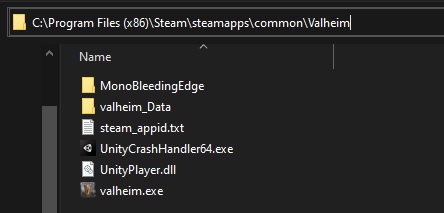
Used mods before? Double check that you don't have more files in your installation folder than these: https://i.imgur.com/vdpdeOA.jpg
 dusk mason
Ah sorry forget it - I've realised it's affecting my other games as well, so obviously not a Valheim problem
Maybe the Steam update
 gentle ferry
Hello ! I've been recently playing on a Multiplayer (4) server hosted by romstation, and played to the point of creating 5 smelters and 2 kilns in a decent open building . Unfortunately they stopped working when I connected today (no drops or fire), adding charcoals or ore doesn't add them to the /20. They are also impossible to destroy, I tried minning under them but they stay in place in the air. Has anyone encountered this bug yet ?
Rip 

 stark meadow
dusk mason
Ah sorry forget it - I've realised it's affecting my other games as well, so obv...
stark meadow
dusk mason
Ah sorry forget it - I've realised it's affecting my other games as well, so obv...
Can be a bunch of things. It's usually not Steam. Most commonly related to Windows updates messing with drivers. More issues on laptops.
gilded sluice
dusk mason
Maybe the Steam update
could be the latest windows update 🤔
stark meadow
gentle ferry
Hello ! I've been recently playing on a Multiplayer (4) server hosted by romstat...
You will have to restart the server to fix it.
 rough schooner
gentle ferry
Hello ! I've been recently playing on a Multiplayer (4) server hosted by romstat...
rough schooner
gentle ferry
Hello ! I've been recently playing on a Multiplayer (4) server hosted by romstat...
I havent tried it with kilns, only with chests. Usually a log in an out works. If it doesnt work restart server
gilded sluice
they had a vert serious issue with windows defender atm
gentle ferry
Thank you for you answers, everything is working now ! 
 wary nacelle
Anyone have an idea how to fix console not working? I don't play with mods
marble wolf
Have you enabled it in Steam?
wary nacelle
yes
gaunt mist
He had, according to the conversation in other channel.
stark meadow
wary nacelle
funny thing is it used to work when I had -console" typed in
Double check that you don't have more files in your installation folder than these: https://i.imgur.com/vdpdeOA.jpg
Also launch the game from Steam library, and not some random shortcut you might have on your desktop
If you are on a laptop, check that you haven't toggled Fn mode, in which case you would have to press Fn + F5 to summon the console
 stark meadow
wary nacelle
stark meadow
wary nacelle
You have a bunch of mods there sill. If you don't plan on playing with mods, delete everything there, and only then reinstlal the game through Steam.
wary nacelle
ah, I never actually got it to work
delete all files and folders and reinstall?
cheers
still not working
stark meadow
wary nacelle
still not working
How are you launchign the game and where did you add the console argument?
Teset pressing F5 here to check if you are even pressing F5 key: https://en.key-test.ru/
 wary nacelle
this time I'm launching the game by right clicking the actual game in steam and adding command there

F5 works, it paused the youtube vid on second monitor
what the fudge, F5 doesn't work
stark meadow
wary nacelle
what the fudge, F5 doesn't work
F5 should refresh the tab in your browser, not pause the video
You have pressed a key combo on your keyboard that activated a different mode
Look up your keyboard/laptop online and how to toogle the mode
stark meadow
wary nacelle
it's only F5, all the other function keys work
So what is your F5 now, space?
wary nacelle
it was my logitech manager, I hadn't changed it though
F5 was play/pause
should be F5 now
that's so weird, thanks though
mossy wing
Hello, my game keeps crashing and i already did a diagnosis on my laptop to check for network issues and i dont have any, this problem has been happening for about 3 weeks now
stark meadow
mossy wing
Hello, my game keeps crashing and i already did a diagnosis on my laptop to chec...
Are you getting disconnected (returned to main menu), or having crashes (app closing)?
mossy wing
Returning to main menu
gilded sluice
your laptop won't understand why valheim will have network issues
you use wifi or dial up modem?
mossy wing
Wifi
Ive tried different wifis like my own hotspot and my moms and it still crashes but this is the only game it does that with
gilded sluice
you have a wireless modem aswell?
gilded sluice
how does your modem connect to the internet?
usually the issue is that your wifi isn't stable enough for valheim networking
mossy wing
Network settings i connect it with a password
gilded sluice
I mean
laptop -> through wifi to router/modem -> which connects how to the internet?
mossy wing
Well it was fine for my other 60 hours of gameplay why is it now starting to crash
gilded sluice
wifi shares bandwidth with everything you connect to your modem
like phones, ipads, laptops etc
but also your neighbours wifi can interfear with your own wifi
mossy wing
Yea and theres a few phones using the wifi but its only recently started to crash while i play multiplayer on valheim
gilded sluice
it crashes because your connection quality isn't good enough
usually you will see it in the top left corner of the screen
mossy wing
Yea but thats weird because i used different wifis for it
It used to work with my hotspot but then it just stopped working with any wifi in general
gilded sluice
hotspot?
mossy wing
Yea where you share cellular data to a device
gilded sluice
yeah. that's usually the worst possible internet you can use
gilded sluice
it depends on how many other users who also uses mobile hotspot in your area / town
mossy wing
But its my phones hotspot i share it to whoever i choose
gilded sluice
valheim still requires a minimum quality
just having "some" connection doesn't help
mossy wing
What is the minimum quality
gilded sluice
there is no real "number" on quality
like you cannot meassure it like you can with upload / download speed
stark meadow
mossy wing
Yea where you share cellular data to a device
Are you on a laptop or PC?
How are you connecting to your phone? (phone and PC/laptop are connected via USB cable, or PC/laptop connected to phone hotspot via WiFi)
mossy wing
I am on laptop
i was using house wifi wireless but then it wasnt working well enough and so i was using wireless hotspot
I have 80 hours of playtime approx
stark meadow
You might also benefit from connecting your phone via USB cable, and then enabling USB tethering to make connection more stable.
However I would rather focus on figuring out why was your home WiFi worse than your mobile data. Have any ideas on why was that?
mossy wing
I do not
stark meadow
Ever did any speed tests on WiFi vs Mobile Connection to see what's the difference there?
gilded sluice
but do you only play by connecting to someones world? or do you play by yourself?
mossy wing
To my friends world
I have not done speed tests, how do i do that?
Oh im running speed test on google now hold on
gilded sluice
speed test isn't the same as quality
stark meadow
mossy wing
Oh im running speed test on google now hold on
Do this test, once while being on home WiFi, and then disconnect from home WiFi, and do the same test while being on your mobile hotspot.
https://www.waveform.com/tools/bufferbloat
You can share the link for your test results after you get a score.
gilded sluice
or something like https://speed.cloudflare.com/
mossy wing
On my house wifi it says 31.2 mbps download and 3.90 mbps upload. My hotspot says 166.5 mbps download and 15.5 mbps upload
stark meadow
mossy wing
On my house wifi it says 31.2 mbps download and 3.90 mbps upload. My hotspot say...
Share the full test score, a link to you test results.
Or a screenshot
Other parameters are more important
gilded sluice
but as wifi goes:
- the more devices you use, the worse the connection quality becomes
- the more wifi networks in your area there are, the worse it gets
mossy wing
Let me run the test again so i can get the screenshot
Hold on sorry
Ill send in my house wifi screenshot first while the other one is still in works
 gilded sluice
that sadly looks extremly bad 😦
mossy wing
Tell me about it
gilded sluice
you couldn't run a cable to your houses router?
mossy wing
I cant
stark meadow
mossy wing
I cant
Would be nice if you could just connect it one time, to preform this test again.
If test remains bad even on cable, there it might not be WiFi's fault.
mossy wing
I can connect a cable to a wireless router?
mossy wing
If i connect cable can other people still use it wireless
gilded sluice
yes
mossy wing
My hotspot wont work on my laptop roght now sadly sorry
How do i find a cable for my labtop
this is the results for house wifi on the other website
 gilded sluice
and sadly the issue with hotspots are you are fighting all other people in your entire area for network stability
gilded sluice
easiest is just go to your local computer store and tell them you need a cable from your laptop to your router
it's alwats a basic cable
mossy wing
Can i find it in best buy?
gilded sluice
sure you could
mossy wing
thank you i will come back when i obtain one someday near
stark meadow
mossy wing
But guys how do i obtain the correct cable for my router
Do you happen to have a box that your rouhter came with? Maybe your Internet Service provider left a box?
They usually come with at least one ethernet cable
mossy wing
oh that box was thrown away
stark meadow
mossy wing
oh that box was thrown away
How much bars do you have on your home WiFi? 3/5? (signal strength)
mossy wing
5
gilded sluice
you could look at the name under it
stark meadow
mossy wing
5
Hm, seems like you have a bit too high latency during upload for 5 bars, so the issue might not be in WiFi.
Can you DM me the following screenshot:
Open task manager (CTRL+SHIFT+ESC) → go to performance tab → on Windows 10 you should see blue link at the bottom called Resource monitor, and on Windows 11 you would have to click on three dots icon to open Resource Monitor → open it → go to network tab → Screenshot processes that use your Internet on your laptop
Looks like this:
 mossy wing
i sent you it
 dire ermine
Guys I am unable to create a new character or start a new game. please help. I have tried deleting cloud save data, local data, irongate folder and uninstalling and reinstalling. nothing has worked
 silver horizon
Anyone know why I have -2,147,483,648 stamina? I also cant regenerate it either. Any tips to fix this?
 balmy garnet
Classic int underflow 😅
silver horizon
balmy garnet
Classic int underflow 😅
do you know how to fix it?
balmy garnet
No
bright coral
silver horizon
Anyone know why I have -2,147,483,648 stamina? I also cant regenerate it either....
Using any mods, or did you pass your character through a character editing tool?
dire ermine
I am unable to breakdown the campfire, is this a bug?
gilded sluice
dire ermine
I am unable to breakdown the campfire, is this a bug?
Sounds like broken mods
ocean peak
hiyaa One question as I have never seen it before is it normal that draugr sometimes spawn within the bog witch safe zone?

 gaunt mist
ocean peak
hiyaa One question as I have never seen it before is it normal that draugr some...
gaunt mist
ocean peak
hiyaa One question as I have never seen it before is it normal that draugr some...
I think that's known issue.
ocean peak
gaunt mist
I think that's known issue.
ok
 queen linden
hi - i am getting crash on map start when using Wayland @ 2K resolution - how to submit a bug report - i.e paste it here ?
should I paste bug report here or in #linux ?
or should I just email contact@irongatestudio.se ?
i.e to report Linux bugs - here or #linux ?
gilded sluice
queen linden
hi - i am getting crash on map start when using Wayland @ 2K resolution - how to...
Wayland?
bright coral
queen linden
hi - i am getting crash on map start when using Wayland @ 2K resolution - how to...
If it's a larger dump or log and you've removed private stuff, you can attach it here in a post. If you're sure it's a bug in Valheim or Unity and not in your own stack, here is a great place to file a report: https://www.valheimgame.com/support
gilded sluice
queen linden
hi - i am getting crash on map start when using Wayland @ 2K resolution - how to...
do you run any mods?
bright coral
gilded sluice
Wayland?
Modern Linux equivalent of Microsoft WDDM and DWM
gilded sluice
I mean
usual answer. the more a user uses his own specialized things. the more the user have to be able to sort out his own specialized things 🤔
not like us valheim developers are magicians when it comes to every single technical thing in the known universe
Stable release
Wayland: 1.23,[2] Weston: 14.0.1[3] / 30 May 2024; 9 months ago
should be compatible 🤔

Custom Parameters:
LD_PRELOAD="/usr/lib/libSDL2-2.0.so.0:/usr/lib32/libSDL2-2.0.so.0" SDL_VIDEODRIVER=wayland %command%
looks like you need to do a bunch of "magic" yourself for it to work
dire ermine
gilded sluice
Sounds like broken mods
No mods installed
gilded sluice
look at this video I posted and the line he has added in his startup Launch options 🤔
queen linden
i have no mods - i put details in #liunx room - also if I set scaling to 95% it stops the crash (I normally have it on native)
gilded sluice
possibly a graphics card or power supply issue 🤔
but you seem to must do some voodoo magic in the steam settings for it to work
queen linden
gilded sluice
_should be compatible_ 🤔
I think that was a while ago - now most things just work in Wayland - also also it works fine wayland at 2k in window mode or 1080 full screen (x11 is fine) - also saw in linux room someone else saying same thing and choosing 95% scaling in the game fixes it (for some reason)
So my solution is either use x11 or choose 95% scaling in wayland - no launch options needed (any more)
queen linden
gilded sluice
probably best place is to ask in <#1202598415834288128>
ive added details in the room - thanks man
gilded sluice
because I know for a fact, it's not something we can solve or fix on our end
since it will 99% chance end up on my table 😄
stark meadow
queen linden
hi - i am getting crash on map start when using Wayland @ 2K resolution - how to...
There's a known Unity issue with AMD cards, MESA drivers and Unity engine
Either install AMD drivers, or play in windows mode, or openGL or proton as a workaround
 empty void
heyo, I have a connection problem on steam. My friend hosts a server from valheim and if I join him once and quit the next time is always failed to connect. If I reinstall the game the first try is ok but the next is failed. We dont use any mods. Is there anyone who had the same issue or know smt?
stark meadow
empty void
heyo, I have a connection problem on steam. My friend hosts a server from valhe...
Which server list tab are you using to connect to your friend?
empty void
I tried the friend tab and the steam overlay join game button too
stark meadow
empty void
I tried the friend tab and the steam overlay join game button too
Don't use friends tab for now. Add your friends server to favorite tab, and delete all other servers. Use favorite tab only
empty void
How can I add it?
stark meadow
empty void
How can I add it?
Have them start the server via crossplay enabled, and add a server to favorites tab via join code.
Your friend will see join code in their pause menu that they have to give to you (6 numbers).
Then next time they start the server, have them start it with crossplay disabled (better for steam only players), but you should still have their server available to connect from favorites tab.
Don't click on other tabs while connecting.
empty void
I will try it thanks 
queen linden
stark meadow
Either install AMD drivers, or play in windows mode, or openGL or proton as a wo...
Also setting scaling to 95% works with AMDGPU /wayland @2K fullscreen - thanks
 rain bison
has anybody had this happen?
i randomly loaded into valheim after a while and my most advnced charachter, (should have late game armour equipped) is now called stranger and is naked.
when i try to load into the seeds i play on it'll go to loading but quickly crach and have an unable to load error.

kinda hideous to think i may have lost my shi
only thing i have done to my files is insert them into the valheim world gen page but that doesnt alter the files in any way
stark meadow
rain bison
has anybody had this happen?
i randomly loaded into valheim after a while and m...
Have you been switching Valheim versions? (e.g. BETA → default_old)
Check that you don't have some temporary steam files that need to be cleaned out.
Section1:Point5:Last paragraph in this guide: https://www.reddit.com/r/valheim/comments/uq9b8x/
rain bison
i dont know if this has anything to do with the recent bug-fix patches but i restored both my charachter and my world to the days before patches and it worked
rain bison
stark meadow
Have you been switching Valheim versions? (e.g. BETA → default_old)
dont think so, i ususally dont do any version switching or PTB unless big drop so i was on base game
stark meadow
rain bison
i dont know if this has anything to do with the recent bug-fix patches but i res...
Be sure to test that your world and character saves properly before playing.
Change something in inventory and world, logout and get back in to confirm changes were saved properly.
rain bison
Ok, just did the relog into both my worlds and everything seems fine
Crashout avoided thanks G
LMAO the one werid thing in my world that i notice is i now have a haunted egg


 remote carbon
help me solve the problem,
my game crashes after a while.
I haven't installed any mods, I've already reinstalled the game and cleaned the registry.
my system: r5 3600 4060 32gb

 cursive meadow
fully nude, invincible fuling :p he is not invincible to pickaxe dmg

(version is latest release)
gilded sluice
remote carbon
help me solve the problem,
my game crashes after a while.
I haven't installed...
can I get to look at your player.log file?
 iron steppe
cursive meadow
fully nude, invincible fuling :p he is not invincible to pickaxe dmg
iron steppe
cursive meadow
fully nude, invincible fuling :p he is not invincible to pickaxe dmg
We’ve seen this from time to time. I’ve had it once myself. No idea what causes it…
cursive meadow
my friend can't see him lol
gilded sluice
iron steppe
We’ve seen this from time to time. I’ve had it once myself. No idea what causes ...
network issues or-desync at the worst possible momement usually
just reload the monster by running away and come back usually solves the issues
or restart server
iron steppe
gilded sluice
network issues or-desync at the worst possible momement usually
Nope. Single player. No mods. It comes up from time to time in here.
gilded sluice
iron steppe
Nope. Single player. No mods. It comes up from time to time in here.
usually never happens in single player 🤔
stark meadow
Also never heard anyone have any mod be invincible in singleplayer.
iron steppe
I’ve only seen it once in 2000hrs.
gilded sluice
could be that 1ms during saving or something breaking the monster 😄
iron steppe
Yep. Just one of those little things…
 restive heart
remote carbon
help me solve the problem,
my game crashes after a while.
I haven't installed...
restive heart
remote carbon
help me solve the problem,
my game crashes after a while.
I haven't installed...
Having the same problem today. Fresh install no mods
Not loading at all just popup and immediate crash... Fresh install, Files verified, tried running as administrator
marble wolf
Fresh install including deleting the game directory?
stark meadow
remote carbon
help me solve the problem,
my game crashes after a while.
I haven't installed...
@restive heart Both of you check if you have any extra files in installation directory. You should not have any more files than this:
https://i.imgur.com/vdpdeOA.jpg
 spice hornet
Having issues with connecting to a friend's server. Player hosted on steam, no crossplatform.
I've tried: modded, unmodded, reinstalling the game, many attempts of brute forcing, restarting devices. Only our first session succeeded and any sessiosn after i have been the only one out of three unable to connect.
stark meadow
spice hornet
Having issues with connecting to a friend's server. Player hosted on steam, no c...
How are you connecting to your friend? Through friends tab, favorites tab, recent tab?
spice hornet
ive tried friends and steam overlay
remote carbon
stark meadow
<@122568264629878784> Both of you check if you have any extra files in installat...
everything is as shown in the picture
 scenic dirge
spice hornet
Having issues with connecting to a friend's server. Player hosted on steam, no c...
scenic dirge
spice hornet
Having issues with connecting to a friend's server. Player hosted on steam, no c...
me too
I have the same problem
stark meadow
spice hornet
ive tried friends and steam overlay
Tell your friend to start a crossplay server, and add the server to favourites tab via join code.
Then have them restart the server with crossplay disabled, and for future attemps use only favorites server.
There are some known issues with friends tab when you have a lot of steam friends.
scenic dirge
spice hornet
Having issues with connecting to a friend's server. Player hosted on steam, no c...
I off firewall, off IPv6 and nothing
stark meadow
scenic dirge
I off firewall, off IPv6 and nothing
Do the same then as I mentioned above, if you are also using friends tab. If not, you don't have the same issue.
stark meadow
remote carbon
everything is as shown in the picture
It's most likely a CPU/memory issue then. I've been seeing a lot of this lately for AMD CPUs. Do you know which motherboard you have?
Also check Section2 in this guide on how to grab player.log files after a crash happens and send me one, after the crash happens.
https://www.reddit.com/r/valheim/comments/uq9b8x/my_valheim_is_crashing_fix_for_crash_guide/
remote carbon
Gigabyte A320M-S2H V2
restive heart
stark meadow
<@122568264629878784> Both of you check if you have any extra files in installat...
Thanks for the reply. Im not home now but I had way more files than that. I was running mods at one time it's very likely I still have some files kicking around
stark meadow
remote carbon
Gigabyte A320M-S2H V2
A different motherboard then compared to rest of players, meaning it's probably AMD driver issue or something related with their newest BIOS updates. Let me know when you find player.log file.
stark meadow
restive heart
Thanks for the reply. Im not home now but I had way more files than that. I was ...
Yeah, best to manually delete everything, then install the game again. Steam re-installation doesn't remove such files.
If you continue crashing after that, list your specs.
remote carbon
stark meadow
A different motherboard then compared to rest of players, meaning it's probably ...
Can I write in private messages?
stark meadow
remote carbon
Can I write in private messages?
Just send me a personal message, and drop a player.log there
spice hornet
stark meadow
Tell your friend to start a crossplay server, and add the server to favourites t...
ill try that
where do we find this join code?
stark meadow
spice hornet
where do we find this join code?
Above the menu, when you hit ESC to pause.
It's only there for crossplay servers
scenic dirge
stark meadow
Tell your friend to start a crossplay server, and add the server to favourites t...
why does it sometimes work sometimes not,
friend still can't get in
you pay for a game where your friend can't join, this must be a joke
My friend can't join despite many attempts
@stark meadow
How to fix
Again, my friend tried to join from favorites and nothing
stark meadow
scenic dirge
why does it sometimes work sometimes not,
How are they attemping to connect?
Using favorite tab only or still using friends tab?
scenic dirge
favourite
And sometimes it works, sometimes it doesn't.
now it doesn't work anymore and can't connect
stark meadow
scenic dirge
favourite
You are hosting the server?
Are you hosting the server with crossplay enabled or disbaled now?
Only the two of your playing, or are there more players that can't connect?
stark meadow
scenic dirge
Yes I hosting the server with enabled crossplay
Disable the crossplay now and restart the server. You were only meant to use it once to get the server to the favorite tab.
On your friend site, they should not click on any other tab, only favorite. Other tabs currently have some issues with pinging servers and throttling connections, so they should not be clicked on.
scenic dirge
but after restarting I have to enable crossplay?
stark meadow
scenic dirge
but after restarting I have to enable crossplay?
Logout.
Disable crossplay.
Start the server with crossplay disabled.
Have your friend connect via favorites tab alone without clicking on other tabs.
If that doesn't work, there might be another issue either on your end or theirs (like using VPN, ping optimisers, etc..) which we can then get into later.
Also, if you continue having issues, clarify how many of your are playing.
scenic dirge
it works now I turned off crossplay and invited through the steam tab, because when a friend tried to join from the favorites tab it didn't work
 brazen briar
Has anyone had constant issues with playing the game and on discord on call at the same time? I got a friend who keeps getting disconnected from the call whenever they try to play.. and it's only for Valheim. Just regular vanilla game, no mods just a normal server. They have the best internet connection out of everyone in the friend group and never had issues like these on any other games we play. Like they have to try to connect to the server over 10 times to get in at times. And then when it does connect them, discord just dies on them.. then half the time when discord is reset the server disconnects them. We don't have a clue what's causing this. No crossplay enabled, we are all on pcs through Steam. But also at times both just run fine, last week there's been a lot of crashing and disconnecting tho :c
stark meadow
brazen briar
Has anyone had constant issues with playing the game and on discord on call at t...
Doesn't sound like they have the best connection.
Have them run this test while Valhiem is closed, once when they are on the server playing
https://www.waveform.com/tools/bufferbloat
While on Discord the whole time
They should also experiment with advanced discord settings, like:

Also tell them to send your their test result in a form of a link that leads to the site so you can forward it to us
brazen briar
stark meadow
Doesn't sound like they have the best connection.
Have them run this test while ...
1st on call, 2nd on call and in server

 stark meadow
brazen briar
1st on call, 2nd on call and in server
stark meadow
brazen briar
1st on call, 2nd on call and in server
Seems like they have issues with latency during upload, which is probably the reason Discord cuts off (needs upload to send data).
How are they connected to their rouhter? WiFi or wire?
brazen briar
stark meadow
How are they connected to their rouhter? WiFi or wire?
wifi
stark meadow
brazen briar
wifi
Do they have an option to connect over cable, and repeat the test?
Or do the test when being closer to the rouhter while on WiFi?
brazen briar
nope
stark meadow
brazen briar
nope
Try to do the same test on the phone, while mobile internet is disabled and they are on home wifi
While being close to the router
brazen briar

We don't think it's a network problem personally, since this has never been a problem before on their end
meanwhile my stats in comparison, and I don't have any issues other than random lag sometimes
 stark meadow
brazen briar
We don't think it's a network problem personally, since this has never been a pr...
stark meadow
brazen briar
We don't think it's a network problem personally, since this has never been a pr...
It's very much a network problem judging by the test you submitted. It's not normal to have 100ms latency during upload.
There can be variaty reasons for this to happen now and not been the case before
What's that last measurment? Seems really bad
brazen briar
just my internet pfff, not theirs
stark meadow
brazen briar
just my internet pfff, not theirs
You have 0 problems?
stark meadow
stark meadow
They should also experiment with advanced discord settings, like:
Did they check their advanced Discord setting? Do they have high packer priority enabled?
What also comes to mind, is disabling Discord overlay in general to see if there is any difference.
brazen briar
stark meadow
Did they check their advanced Discord setting? Do they have high packer priority...
all are offf
brazen briar
stark meadow
What also comes to mind, is disabling Discord overlay in general to see if there...
it's been disabled all along
stark meadow
brazen briar
it's been disabled all along
I got that, keep it disabled
Try enabling high packer priority
Who is hosting the server?
brazen briar
stark meadow
Try enabling high packer priority
where is that? only have hardware acceleration there
brazen briar
stark meadow
Who is hosting the server?
third party
stark meadow
brazen briar
where is that? only have hardware acceleration there
Should be under voice and video tab.
stark meadow
brazen briar
third party
Test you hosting, and them joining your server but with new default character, and seeing if their discord also breaks
 brazen briar
stark meadow
Should be under voice and video tab.
brazen briar
stark meadow
Should be under voice and video tab.
no change with it or me hosting a new world, keeps breaking
stark meadow
brazen briar
no change with it or me hosting a new world, keeps breaking
Did they make a new character?
Have them also check if these are the only files in their installation folder or if they have more than that:
https://i.imgur.com/vdpdeOA.jpg
brazen briar
stark meadow
Did they make a new character?
yeah
stark meadow
brazen briar
yeah
Checked installation filles? Did they find the packet priority setting?
If you have a channel where you two can chat, you can also invite me there so we can take a closer look at what might be happening here.
 void moss
My game keeps crashing whenever im seafaring, it doesnt happen immedietly, but it almost always happens everytime i go sailing
stark meadow
void moss
My game keeps crashing whenever im seafaring, it doesnt happen immedietly, but i...
Probably due to high GPU usage. Which GPU do you have?
void moss
stark meadow
Probably due to high GPU usage. Which GPU do you have?
gtx 1080
stark meadow
void moss
gtx 1080
Did you overclock your card at any point?
Couple of things you should check:
- Check your GPU temps when sailing (best to monitor which MAX temps get hit via HWiNFO tool)
- Check how much FPS you get while sailing
- Try limitng FPS via in-game menu to 60FPS (in-game Vsync has to be disabled)
- Ensure that you card is set to maximum power performance in Nvidia control panel for (Valheim profile and general profile)
void moss
stark meadow
Did you overclock your card at any point?
Couple of things you should check:
- C...
Thank you, I'll try to monitor my GPU and fps in a test sail, also what is the preferred minimum gpu I should have to run valheim without having to limit any graphic settings? I was thinking of upgrading
stark meadow
void moss
Thank you, I'll try to monitor my GPU and fps in a test sail, also what is the p...
You're on a deskop PC btw right?
void moss
stark meadow
You're on a deskop PC btw right?
Correct
void moss
?
gilded sluice
@stark meadow
stark meadow
void moss
Thank you, I'll try to monitor my GPU and fps in a test sail, also what is the p...
You should be fine with 1080 without limiting FPS. I play with 1070 without issues.
Your card probably has some issues, and that's why it started crashing on high GPU usage.
It could be also related to power supply.
Do those tests I suggested, so we get a better picture of what is going on your end.
Did you overclock it at any point?
void moss
stark meadow
It could be also related to power supply.
Do those tests I suggested, so we get ...
thank you, anything that i find out, ill be sure to send it to the chat
void moss
stark meadow
Did you overclock it at any point?
i was about to try, i havent hopped on yet
stark meadow
void moss
i was about to try, i havent hopped on yet
By overclocking it, you will only make things worse, that's why I'm asking
So you haven't overclocked it in the past and applied some kind of profile to it (e.g. via afterburner)
void moss
ooohhh, i dont know if i have overclocked it, where would i monitor that? (i apologize, im not the most tech intellegent)
stark meadow
void moss
ooohhh, i dont know if i have overclocked it, where would i monitor that? (i apo...
If you did, you would probably remember. Maybe if you used Nvidia app, you might have done it unintentionally but not likely.
First install HWiNFO and monitor your MAX temps. Limit FPS to 60fps and see if it reduces crashing.
Do you know how old is your power supply?
void moss
stark meadow
Do you know how old is your power supply?
i just bought a brand new one last year
stark meadow
Also, in what manner are you crashing? (black screen, screen freeze, system crashing, app closing?)
void moss
stark meadow
Also, in what manner are you crashing? (black screen, screen freeze, system cras...
screen freeze
also i do have vsync off
void moss
stark meadow
Also, in what manner are you crashing? (black screen, screen freeze, system cras...
it was an fps problem, thank you
 loud owl
If u stand on bed, look down and click sleep before u land after jumping it does this weird thing.
 gaunt mist
loud owl
If u stand on bed, look down and click sleep before u land after jumping it does...
gaunt mist
loud owl
If u stand on bed, look down and click sleep before u land after jumping it does...
You know that feeling when you are just falling asleep and you get the sudden falling feeling that gives you mini heart attack? It might be that.
gilded sluice
loud owl
If u stand on bed, look down and click sleep before u land after jumping it does...
well known "bug" that is quite funny to be honest
sometimes you can make your character run while it falls asleep
iron steppe
I like that Valheim won’t let you sleep if your slightly wet.
But if you’re on fire you can sleep and burn the bed…
 serene tapir
iron steppe
I like that Valheim won’t let you sleep if your slightly wet.
But if you’re on...
serene tapir
iron steppe
I like that Valheim won’t let you sleep if your slightly wet.
But if you’re on...
I too like to be warm and comfy underneath my blankets
 robust rain
Someone mentioned the +1 sound missing when you pick fruits, and I think I notice it's missing too >_<
gaunt mist
It's missing when picking berries, but not when picking mushrooms.
gilded sluice
the "ding" sound?
 stable cliff
oh, i didn't count that as an issue, as it happened the sound didn't play 100% of the times since the feature was introduces, i'll keep an ear on it..
also "ah! i see you have the machine that goes PIING!"
 rugged plank
i dont know if this is a bug but it seems to be an issue as well for my friend
she has trouble joining our valheim world and this had happened many times. she had connected and reconnected more than 10 times
we let her host our world and its still the same thing
she made a new character, reinstalled the game and somehow cant join any servers
however she does not have this problem for any other multiplayer games. soes anyone knows any fix? she claimed to have seen similar issues on steam discussion but to no resolve
stark meadow
rugged plank
i dont know if this is a bug but it seems to be an issue as well for my friend
You can link your friend this thread which mentions the tests they should be doing to identify where the problem is:
https://steamcommunity.com/app/892970/discussions/1/612032374411149472/#c612032512885010678
You can let us know about test results here.
Are they playing in the same world region as other players on your server? Using WiFi?
rugged plank
yep they are
we have another friend near her area that encounters no such problems like hers
rugged plank
stark meadow
You can link your friend this thread which mentions the tests they should be doi...
alright, will do, thanks a bunch
rugged plank
stark meadow
You can link your friend this thread which mentions the tests they should be doi...
she claimed she has done all except the last one because it was a bit difficult to contact and change the ISP. how to deal with this?
 grizzled leaf
bugs
stark meadow
rugged plank
she claimed she has done all except the last one because it was a bit difficult ...
What were her test results? Using WiFi?
It would probably be best if she could come here
 jagged condor
loud owl
If u stand on bed, look down and click sleep before u land after jumping it does...
jagged condor
loud owl
If u stand on bed, look down and click sleep before u land after jumping it does...
How does one even figure something like this out?😅
 exotic light
Deleted a game seed, started a new one kept the same name but the previous map still continues to show. I went to the userdata and deleted the world data but still when logging in the maps are off. any suggestions?
 stark meadow
exotic light
Deleted a game seed, started a new one kept the same name but the previous map s...
stark meadow
exotic light
Deleted a game seed, started a new one kept the same name but the previous map s...
You have to delete 3 cache files in worlds_local folder for that world name
Starting menu → click on show player.log file in bottom left corner of screen, to find that folder
exotic light
so the link doesnt exist on linux - Ive seen it on windows but its not showing
stark meadow
exotic light
so the link doesnt exist on linux - Ive seen it on windows but its not showing
Can you screenshot?
It should be there. It's bellow the patch notes
exotic light
Yeah i mean I know where it should be
stark meadow
exotic light
Yeah i mean I know where it should be
Screenshot?
exotic light
workin on it
stark meadow
exotic light
workin on it
Try manually navigating to the folder:
/home/steam/.config/unity3d/IronGate/Valheim/worlds_local
 stark meadow
exotic light
stark meadow
exotic light
Weird that you don't have show player.log button. On which Distro are you playing? Mddded/cracked game?
exotic light
No it’s steam deck
stark meadow
exotic light
No it’s steam deck
Ah, you see you have dl in the version number now
Game mode probably doesn't have the button, or were you in desktop mode?
exotic light
Neither have the button
 ebon zenith
Really need to fix the massive lag spikes in ashelands - it really takes away so much from the game
 forest pendant
Not sure what's going on here. Normally yellow with a bit of orange light sources suddenly turn red, and the world outside goes pitch black. No mods, and no raids running
 bright coral
If you're using Wi-fi, consider using Ethernet for your gaming devices instead. If you're using a VPN, consider avoiding it while gaming if not required to connect to your desired server. If it is required, consider Wireguard as the tunelling protocol instead of OpenVPN, IPSEC, or Cisco Anyconnect.
If you're using professional networking equipment and you're routing between VLANs, ensure your VLAN routing is hardware-offloaded (e.g. to your L3 switch chip) instead of going through your router's CPU. The datagram storm from Valheim can be a lot for a router CPU.
stark meadow
forest pendant
Not sure what's going on here. Normally yellow with a bit of orange light source...
Which GPU? Usually a GPU related issue. You might need to reset your game profile for Valheim in your control panel. You might also need to wipe out cache files.
bright coral
Also consider disabling traffic shaping or QoS on your router and any Internet security suites running on any of the machines. If you're using a DNS man-in-the-middle attack for a DNS proxy like pi hole, make sure you are only hijacking DNS traffic and not forwarding all UDP traffic to it.
If you are running this server within the same LAN and both are using the Steam version of the game, then definitely avoid using Crossplay. Once Crossplay is disabled, you'll be able to connect to the other server using its LAN IP instead of external IP and you'll avoid saturating your router (and will avoid going through Microsoft's relay, giving the extra bonus of faster Valheiming)
You won't see the server metadata like version/players appear when connecting via LAN IP (you'll see question mark instead), but the final connection should still happen.
stark meadow
If your entire internet crashes. One of simpler workarounds you should try first, reduce steam browser pings per minute in Steam general settings → in game → set them from 5000 to 250. Do this on every client you have in your home network.
bright coral
You'll just uncheck the "Crossplay" radio button that is selected by default in the in-game server setup pane. Then you'll need to find the internal/LAN IP address of the PC or Mac hosting the server (e.g. ifconfig on Windows or ipconfig on macOS command lines, also inide the Network settings GUI panels for IP networking on either).
With a typical home router, the LAN IP will start with 192.168…
You can then put that IP address (and :<port> segment if not using default port) in the Add Server dialog on the other side.
bright coral
stark meadow
If your entire internet crashes. One of simpler workarounds you should try first...
That's a good tip. I had no idea the default was that high!
Connecting via LAN IP skips an extra hop for the packets through your router CPU. Several extra hops skipped by disabling Crossplay. The only disadvantages to this approach are:
- Apple App Store, Microsoft Store, and Xbox Valheim players won't be able to connect to the server.
- If you want friends to be able to connect remotely from over the Internet, you would be responsible for the networking yourself (e.g. IPv4 NAT UDP port forwarding from your router to your LAN IP, optionally LAN IP DHCP reservations, optionally Dynamic DNS name resolution). Crossplay's relays take care of remote connectivity for you when using it.
- Server metadata like status, player count, and version won't be shown in the server list for the LAN IP entry.
- Your server's LAN IP might change later. You can set a DHCP reservation for that server's MAC address to prevent this.
If the Mac is the server, you'd be looking at a pretty manual mod setup to begin with, regardless of whether it's the server. Otherwise, no harm in using a suite like r2modman when using the in-game server.
Well, definitely sounds like a version mismatch. Consider copying the plugin DLLs directly from the r2modmanaged PC to the other one's plugins dir if you're not sure if they downloaded the same versions. #mods-issues will be the place to dive deeper though.
 low ocean
"Right-click build selection" option in the settings menu is obsolete and does nothing.
 exotic tundra
Hi guys, I do not know if this is the correct channel, I'm going to remove if it's not.
I just arrived in Ashlands and it is unplayable. My friend and I have the audio that stutters all the time, it is pretty buggy. I searched online and it is a common issue, is there any way to fix it?
It is all fine in the other biomes, we have ti just there
gilded sluice
exotic tundra
Hi guys, I do not know if this is the correct channel, I'm going to remove if it...
it's something we know about and we are looking into it
the problem isn't just a "quick fix" since it's more with the current version of the game engine
gaunt mist
gilded sluice
the problem isn't just a "quick fix" since it's more with the current version of...
Is the game engine (Unity was it) getting update any time soon?
gilded sluice
we shall see when
exotic tundra
gilded sluice
it's something we know about and we are looking into it
Alright, good to know, thank you for the info
gaunt mist
Is this a bug? Inside Smouldering Tomb when you hit one of those coffins (where starred skeleton rises from) there appear additional non star skeleton.
gilded sluice
could be but I think it's intentional 🤔
gaunt mist
When you approach it normally (without hitting it) it breaks and starred skeleton rises. When you hit it there appears extra non star skeleton while the starred skeleton rises too. Is it really intentional?
I mean, not a big deal tbh but left me wonder.
gilded sluice
yeah. since you break the sarkofagus and it also breaks by itself at the same time. it spawns 2
gaunt mist
But the coffin breaks either way.
 tender trail
Me and my girlfriend have been playing Valheim crossplay (She's on my new MSI Laptop and I'm on Xbox Series X) for awhile now. All of a sudden two days ago, we start getting the disconnected icon in the top left corner of the screen. Neither of us can open chests, doors, go through portals. We can walk around, but each character appears frozen on the other person's screen. Occassionally it will kick her out of the game saying she got disconnected and my game will go back to normal. I've researched a lot and I'm not seeing any answers. No, I do not have Asus Gamefirst, yes, I have made Valheim run as administrator, yes i've checked firewall... The game is unplayable and I would very much like some answers. P.S., My internet runs at a very high speed so I have no clue why the connection issues are so severe.
marble wolf
Crossplay, it's usually crossplay at fault.
gilded sluice
tender trail
Me and my girlfriend have been playing Valheim crossplay (She's on my new MSI La...
do either of you use VPN?
or wifi?
 jolly laurel
Hi. We have a problem with raids. Mobs dont show up during the raid. This problem happens only in our main base. In other locations where we have mini bases mobs always show up but in our main base the dont. What can be the problem? Raids are set to max
gilded sluice
jolly laurel
Hi. We have a problem with raids. Mobs dont show up during the raid. This proble...
mods or the monsters don't have spot to spawn due to spawn protection from workbenches etc
jolly laurel
we dont have any protection
it is boring without raids. Is there any solution for that?
marble wolf
jolly laurel
it is boring without raids. Is there any solution for that?
Remove your spawn protection.
gilded sluice
it depends on why it doesn't want to spawn
 cedar edge
the comfy gizmo, and probably most gizmo mods, have enormous workbench radii as default, so any workbench may prevent spawns out to several hundred meters
gilded sluice
my guess is a mod or a setting
gilded sluice
cedar edge
the comfy gizmo, and probably most gizmo mods, have enormous workbench radii as ...
This is highly likly the issue
cedar edge
or server settings include no raids
gilded sluice
yeah. press F2 ingame and see the settings
cedar edge
but as they said 'during the raid' i guess we should assume they see the red circle and the raid text....and its not a server setting
gilded sluice
true
jolly laurel
cedar edge
but as they said 'during the raid' i guess we should assume they see the red cir...
yes. There is a red circle but mopnsters dont appear
gilded sluice
jolly laurel
yes. There is a red circle but mopnsters dont appear
but do you or anyone have any mods running?
 cedar edge
squints suspiciouslyat build helper
jolly laurel
gilded sluice
go ask the people in <#1202550198174486599>
okay thanks
jolly laurel
cedar edge
*squints suspiciouslyat build helper*
🗿
cedar edge
oh, and i mis-spoke re gizmo, its actually BUILD HAMMER/CAMERA mods i should have said have the huge workbench radius
jolly laurel
yes.. i thought about too.. İ guess it is because of that mode
gilded sluice
cedar edge
oh, and i mis-spoke re gizmo, its actually BUILD HAMMER/CAMERA mods i should hav...
text markup is bad mmkay 😄
 jovial pendant
Is the stutter when sailing on the roadmap to being fixed? When my partner sits in the front of the boat she is stuttering allover the place on my screen.
stark meadow
jovial pendant
Is the stutter when sailing on the roadmap to being fixed? When my partner sits ...
Not likely. They have too low FPS so they don't render waves properly on time.
They should test lowering graphic settings when sailing
jovial pendant
stark meadow
Not likely. They have too low FPS so they don't render waves properly on time.
"They"?
Do you mean my partner? How does their FPS influence what I see an my screen?
Im sitting at stable 122-130 fps with most on high.
 stark meadow
jovial pendant
Do you mean my partner? How does their FPS influence what I see an my screen?
stark meadow
jovial pendant
Do you mean my partner? How does their FPS influence what I see an my screen?
Yeah, speaking in general terms for any person that is in front. The person is front becomes responsible for calculating boat physics and sending information to other players. If their FPS is too low, they will update boat position infrequently, and it won't match up with waves that other player will render more frequently.
This is not a big problem that requires fixing, as the system with minimal specs should be strong enough to render waves more often.
Usually a problem on integrated GPUs or player with older cards, overheating laptops, etc..
stark meadow
jovial pendant
She is on a 2070 super
Should work fine then. Let her test the FPS next time
Do you have issues with enemies teleporting often as well when playing together?
jovial pendant
No. It just seems like a very suboptimal way of making an engine? Where what she sees affects my rendering?
stark meadow
jovial pendant
No. It just seems like a very suboptimal way of making an engine? Where what sh...
It's not about rendering, rather about syncing boat position on network in corelation to the waves.
jovial pendant
So why not let the one driving the boat be in chart of syncing?
We are on a dedicated server.
She is also stuttering on my screen when saiiling the boat and when Im in front
stark meadow
jovial pendant
So why not let the one driving the boat be in chart of syncing?
If you enter the boat first, and they just enter and don't touch anything in the boat, you probably won't see her flickering.
jovial pendant
I know its a picture and you cant see the stuutter. But she is flying around behind me.
 stark meadow
Are you playing atm? Did you check how does the FPS look like?
jovial pendant
She is capped at 60 fps
For some reason her PC goes crazy in Valheim with uncapped fps
stark meadow
jovial pendant
She is capped at 60 fps
So she has 60FPS cap, and she gets that 60fps when sailing?
jovial pendant
Yes.
stark meadow
In game V-sync enabled or disabled? In-game FPS limit is enabled or the one in ger graphic control panel?
jovial pendant
If we raise it to 100-110 fps her PC starts sounding like a jet engine
We limited the FPS with nvidia
stark meadow
jovial pendant
We limited the FPS with nvidia
So Valheim FPS limiter and V-sync are not enabled?
jovial pendant
Yes.
stark meadow
It should be working fine then. Seems like something weird is going on then.
Check that you haven't also enabled V-sync in graphic card control panel, and triple buffering along with it.
jovial pendant
Does it need to be enabled? Or disabled? VSYNC. I personally disable it everywhere.
stark meadow
jovial pendant
Does it need to be enabled? Or disabled? VSYNC. I personally disable it everywhe...
Theoretically it should be better the way you set it up, but be free to test if there's a difference. You can also test limiting your self to 60 to see if there is a difference.
Are you playing on the same home network?
jovial pendant
We are on a 1 gig up/down connection
Playing on a dedicated server located in our country.
stark meadow
jovial pendant
We are on a 1 gig up/down connection
Check if there is something weird going on with latency during upload and download on site like this: https://www.waveform.com/tools/bufferbloat
Test on her PC, once when Valheim is closed, once when when on boat in Valheim.
If everything looks fine as well, might be the boat that's the problem, tried destroying it? Using mods?
 stark meadow
jovial pendant
This is more or less the same on both PCs
stark meadow
jovial pendant
This is more or less the same on both PCs
Not enough to look at this measurement alone.
Here's an example: https://imgur.com/a/6doO8UT (open link to see album)
jovial pendant
Thought. If she is responsible for the syncing, should I also be stuttering on her screen?
Been down the bufferbloat rabbit hole before with another small game we played. It seems some games especially smaller ones are alot more sensitive than others. Never experienced issues in: Dota2, CS 1.6-CS 2, LoL, WoW, Lost Ark, Diablo 3-4, PoE 1+2 etc.
stark meadow
jovial pendant
Been down the bufferbloat rabbit hole before with another small game we played....
What's your buffer bloat score?
These games you listed have dedicated servers which preform network syncing on their end
In Valheim clients do most of the work
Valheim also uses UDP which does not have built-in congestion control or retransmission mechanisms like TCP
jovial pendant
I mean we bought a dedicated server. Shouldnt that offload some of the strain to the server?
Instead of being client side.
stark meadow
jovial pendant
I mean we bought a dedicated server. Shouldnt that offload some of the strain to...
Not really. Calculation are still being done on client side. Primary purpose of dedicated server in Valhiem is to have game running 24/7 so others can connect at any time, without having to render the game.
Have you also tested how boat acts when you host world normally (not dedicated server? Any difference?
jovial pendant
I will after we are doing playing. But its a rabbit hole. Because that test puts way more strain on your connection than a game would.
stark meadow
jovial pendant
I will after we are doing playing. But its a rabbit hole. Because that test puts...
Yeah can be a rabbit hole. Had cases where people had VPN and network optimisers inistalled that were the cause of their buffer bloat as well. Some had to call their ISP to switch them to a different CGNAT to fix it.
Are you both wired to home router? Save some of those test results and DM me later if you don't mind.
Good to know for reference (like the album I linked).
jovial pendant
Yes. We are both on ethernet cables :d And yes I have turned it OFF and ON again 🤣 ❤️
 errant venture
I have a problem, my game is constantly crashing and I don't understand why, can someone help me?
stark meadow
errant venture
I have a problem, my game is constantly crashing and I don't understand why, can...
What are your PC specs? In what way are you crashing? (freeze, black screen with sound, app crashing, PC restarting, ...)
stark meadow
errant venture
and my pc is good
Please list your exact PC specs. Valheim doesn't simply freeze or crash.
99% of issues are due to systems being unstable.
errant venture
and my pc is good
stark meadow
errant venture
and my pc is good
You can go to Steam → Help → System information to gather data about your PC
stark meadow
errant venture
Intel core and a NVIDIA GeForce RTX 3080
Should be listed like this:

So the CPU brand is what you are looking for
errant venture
 stark meadow
errant venture
stark meadow
errant venture
Screen freezes are usually related to GPU issues, sometimes RAM.
Do you know if you updated your Nvidia drivers lately?
Do you have any mods installed along with Valheim vanilla version of the game?
errant venture
stark meadow
Screen freezes are usually related to GPU issues, sometimes RAM.
Do you know if ...
I don't think I've made any updates and no, I'm playing in vanilla.
stark meadow
errant venture
I don't think I've made any updates and no, I'm playing in vanilla.
How long have you been playing Valheim without issues?
Tried playing some other games for longer lately?
errant venture
I started playing 2 days ago and I easily crashed 4 times
stark meadow
errant venture
I started playing 2 days ago and I easily crashed 4 times
Other games?
Did Valheim freeze every time so far for this 4 times you crashed?
errant venture
No, I don't have any crashes with other games, but the rest of the time Valheim is very fluid.
stark meadow
errant venture
No, I don't have any crashes with other games, but the rest of the time Valheim ...
When you press start → type Nvidia there → do you see Nvidia app or Nvidia Experience app listed there?
Ever used such an app to optimise Valhiem?
errant venture
GeForce® Drivers ??
stark meadow
errant venture
GeForce® Drivers ??
Can you screenshot what you see there on the start when you search for Nvidia?
If you press windows key + shift + S you can capture a portion of the screen with you mouse, which can then be pasted to Discord.
errant venture
 stark meadow
errant venture
stark meadow
errant venture
You have Nvidia app there at the bottom. You can launch it when it opens, open up graphics tab on the left, you should see Valheim profile there.
Does it say that your game is optimised there or not?
errant venture
yes
stark meadow
errant venture
yes
Revert the optimisations by clicking on the revert button.
errant venture
ok
stark meadow
After that click on the drivers tab. Do you have any drivers available for download there?
You should have a green download button available if you do
gilded sluice
Nvidia broadcast was a huge problem for 2 others I've helped rescently 🤔
errant venture
this one ?
 stark meadow
errant venture
this one ?
stark meadow
errant venture
this one ?
Think you went outside of Nvidia app
It should look like this

 stark meadow
errant venture
stark meadow
errant venture
Click on Pilotes on the left
Then you should be able to see green download button
errant venture
ok
stark meadow
When drivers finish downloading, you should select second option (custom installatoin), which will then offer you to put a checkmark on preforming a clean installation, whcih you should then also select.
errant venture
okay
stark meadow
errant venture
okay

Make sure to do these two
When the installation finishes, do NOT optimise Valheim again. Restart PC. Test if Valhiem crashes.
stark meadow
gilded sluice
Nvidia broadcast was a huge problem for 2 others I've helped rescently 🤔
Worth a shot to check later. Although it alludes me why people who don't steam have Broadcast installed in the first place.
I didn't get any popups or offers from Nvida nor Microsoft to install it.
@errant venture Do you stream Valheim while playing?
errant venture
stark meadow
When the installation finishes, do NOT optimise Valheim again. Restart PC. Test ...
I tell you if is crashing again
errant venture
stark meadow
Worth a shot to check later. Although it alludes me why people who don't steam h...
no
 deft gust
Hello everyone,
My friends and I as of today can no longer join my other friend his server, we keep getting the "connecting failed message"
- He on the other hand can join our servers.
- No mods
- No one is using VPN
- Verified his game files on Steam
- Firewall is not blocking anything
We have 1500 days on this server and suddenly we can't join anymore.
Help would be very much welcome!
stark meadow
deft gust
Hello everyone,
My friends and I as of today can no longer join my other frien...
How are you all connecting to that server?
Tried deleting the old server entry in favorites tab and add a new one via new join code host must provide?
deft gust
stark meadow
How are you all connecting to that server?
Tried deleting the old server entry i...
We play through Steam
We have not tried that last part
stark meadow
deft gust
We play through Steam
Crossplay and join codes are available on Steam by default as well, unless the host disabled crossplay.
deft gust
Yes we disabled crossplay
stark meadow
deft gust
Yes we disabled crossplay
How were you usually connecting? Steam invite, favourites tab, recent tab or through friends tab?
deft gust
Favorites and through friends tab
stark meadow
deft gust
Favorites and through friends tab
And when was the last time you successfuly connected like that?
deft gust
1 month ago because he can only host when he's not working
We play a month, skip a month. Repeat
He just got back from work today that's when we found out
stark meadow
deft gust
1 month ago because he can only host when he's not working
Then you will all have to delete old entries from favorite tab.
Tell the host to start a server with crossplay option disabled still.
Find the server on friends tab, but don't connect to it, rather click on the star icon to move it to favorite.
Then go back to favorite tab, wait 1min, then try to connect to the server through favorites tab.
- Old entries in favorite menu won't work, and connecting via friends menu at might cause network connection issues if you have a lot of friends on Steam (known issues)
deft gust
Alright seems simple enough. Will try that tomorrow and let you know if it worked or not.
I'm a little familiar with Steams issues on that part but thanks for reminding me 😃
Thank you for your time
 sinful light
One message removed from a suspended account.
stark meadow
sinful light
One message removed from a suspended account.
What do you mean by your game crashing? App closes?
Or do you just mean that you get returned to main menu?
sinful light
stark meadow
Or do you just mean that you get returned to main menu?
One message removed from a suspended account.
stark meadow
sinful light
One message removed from a suspended account.
Then you are not crashing, just disconnecting. Why you are disconnecting can be for variaty of reasons.
Using mods? Is your friend also connected on your home network?
sinful light
stark meadow
Then you are not crashing, just disconnecting. Why you are disconnecting can be ...
One message removed from a suspended account.
stark meadow
sinful light
One message removed from a suspended account.
So using mods and your friend that is hosting is also connected to the Internet though your home network?
sinful light
stark meadow
So using mods and your friend that is hosting is also connected to the Internet ...
One message removed from a suspended account.
stark meadow
sinful light
One message removed from a suspended account.
Ok, then it's not a local server
You should do this test while Valheim is closed, and then do this test again once Valheim is running and you are on the server, so we can see the difference
https://www.waveform.com/tools/bufferbloat
You can post your results here after by sharidng the test link
sinful light
One message removed from a suspended account.
stark meadow
sinful light
One message removed from a suspended account.
Sure
 manic kettle
On the Picture to the left is what Ashland's looks to me normally but sometimes when I cross some rendering tiles of sort my graphics glitch in to a sea of lava... and I end up walking into something I'm not suppose to if I would see the normal landscape, this is just a rendering of ground it affects. Game with mod or complete vanilla it's the same, I run the game in 4k or HD 1080p but it's the same, so no clue the only thing left is a complete reinstall of the game and maybe pc cuz this is unplayable. anyone seen anything like it.

 stark meadow
manic kettle
On the Picture to the left is what Ashland's looks to me normally but sometimes ...
stark meadow
manic kettle
On the Picture to the left is what Ashland's looks to me normally but sometimes ...
Seems like mods messed up your game. They can permanently affect saves. Best to restore a backup prior to this happening.
manic kettle
stark meadow
Seems like mods messed up your game. They can permanently affect saves. Best to ...
Same in Vanilla
stark meadow
manic kettle
Same in Vanilla
What do you mean by same in vanilla?
If a save gets loaded with mods, the bug can persist even if mods are removed.
manic kettle
stark meadow
What do you mean by same in vanilla?
same glitch happening regardless if I have mods or not, it is a graphical issue how my GPU interact with the game, it dose not affect gameplay in other ways then i just can't see the real ground in game
stark meadow
manic kettle
same glitch happening regardless if I have mods or not, it is a graphical issue ...
Does the glitch go away when you restart PC?
Still not sure what you mean by same in vanilla
Same happens in vanilla on a different world where you never used mods?
One can't always simply disable mods and call their world vanilla. Once modded may always remain modded.
manic kettle
stark meadow
Does the glitch go away when you restart PC?
So just so we can get passed the "New User " talk I'm a PC game user since early 90's so I have taken the normal steps of debugging and yes some steps have been done multiple times.
manic kettle
stark meadow
Same happens in vanilla on a different world where you never used mods?
Yes it happens regardless of save and new world, local save or cloud and regardless of moded game or no mods (vanilla) It happens with the terrain in the entire game regardless of biome, but in the other biomes it a different layer of ground that shows just not lave.
stark meadow
manic kettle
Yes it happens regardless of save and new world, local save or cloud and regardl...
Does the issue persist over game restarts once it happens or does it reset and becomes fine for while until in happens again?
manic kettle
stark meadow
Does the issue persist over game restarts once it happens or does it reset and b...
Regardless of how often you restart the game or the pc or the power plant or the universe it still persist .......
How it behave in game it changes every time I cross a border like the line you see in the Right side screen shot
And it shows like sometimes the lava on ground that have been disturbed and not anything else and sometimes it show on regular ground but not sloped or modified ground
stark meadow
manic kettle
Regardless of how often you restart the game or the pc or the power plant or the...
So you create a new world in vanilla, cross a zone border and terrain immediately gets broken? Or does it take some time and running/flying over the world until it gets broken?
What CPU/GPU do you have?
How long does it take for you to launch the game? (since you press launch on steam until you get to the main menu?
Are you playing on a unconventional drive setup, like external hard drive, RAID, etc..?
manic kettle
I know most likely an entirely fresh reinstall of PC will most likely solve it but then it can happen again down the road, so hence I try to figure it out and solve it if possible. I have a 4090 and the game is on my M2 drive, common setup nothing exotic, Updated drivers for everything, and less then 5 months since last fresh install of Win 10, I have about 2100 hours in Valheim I been running mods for years and have a good grasp at the most basic things game vice. The problem started about 3 weeks ago and I been trying to solve it on my own since then. (Btw English is not my native languish)
stark meadow
manic kettle
I know most likely an entirely fresh reinstall of PC will most likely solve it b...
Which CPU?
So you create a new world in vanilla, cross a zone border and terrain immediately gets broken? Or does it take some time and running/flying over the world until it gets broken?
manic kettle
stark meadow
So you create a new world in vanilla, cross a zone border and terrain immediate...
this happens from the get go, no delay once I cross a graphical border it delaminates and glitch and bounce back eventually until I cross another border of sort
stark meadow
manic kettle
this happens from the get go, no delay once I cross a graphical border it delami...
Plese report back on which CPU you have as well.
Last person and the only other person who reported this was @brazen jacinth here: #steam-bugs-discussion message
Didn't hear from them after they supposedly fixed their issue by restoring an older world backup.
So both of your stories don't really match up, except that it happens both in vanilla worlds (which wasn't confirmed either).
We don't have any info from Shmitty about which specs they were playing on.
Rendering of textures issue points to GPU issues, but the fact that the issue gets triggered when crossing cell borders points to CPU and memory issues.
Can you trigger the issue in vanilla, and once the issuse happens, send me the player.log file?
manic kettle
stark meadow
Which CPU?
Old CPU Soon to be upgraded, but been running this game for a year with out any problems on this setup.
 manic kettle
stark meadow
Plese report back on which CPU you have as well.
manic kettle
stark meadow
Plese report back on which CPU you have as well.
this is the GPU spec
 manic kettle
stark meadow
Can you trigger the issue in vanilla, and once the issuse happens, send me the p...
manic kettle
stark meadow
Can you trigger the issue in vanilla, and once the issuse happens, send me the p...
Yes I can but not right way, Got some appointments to take care of so maybe later today.
gilded sluice
manic kettle
Old CPU Soon to be upgraded, but been running this game for a year with out any ...
what motheboard are you on mate? 🤔
gilded sluice

Tom's Hardware
Rolling back to older drivers seems to be the only fix for some.
oof btw
manic kettle
gilded sluice
what motheboard are you on mate? 🤔
Also due to upgrade. All driver to both MB drivers and Bios up to date.
 manic kettle
gilded sluice
you got 1833Mh> RAM?
manic kettle
gilded sluice
you got 1833Mh> RAM?
 manic kettle
gilded sluice
you got 1833Mh> RAM?
manic kettle
gilded sluice
you got 1833Mh> RAM?
Sorry forgot this
 manic kettle
gilded sluice
oof btw
manic kettle
gilded sluice
oof btw
Problem have been solved .... did a complete uninstall of valheim and deleted the steam game folder. on the test both 1080P and 4K have been stable and no graphical problems. going to start applying mods 1 at the time and see if this has any issues if not , my conclusion is a corrupt file from some random event in the game folder. And if it's a Mod that made the problem and it returns I will get back to you and make the issue known.
gilded sluice
manic kettle
Problem have been solved .... did a complete uninstall of valheim and deleted th...
nice
manic kettle
gilded sluice
nice
I been digging around Ashlands all afternoon looking for the bug, all 33 mods are back and I'm not any smarter about the problem... while I was contemplating most of the possible reasons for the bug I took the time to make you a cozy hut as tnx for the help and time on the subject!

 gilded sluice
manic kettle
I been digging around Ashlands all afternoon looking for the bug, all 33 mods ar...
gilded sluice
manic kettle
I been digging around Ashlands all afternoon looking for the bug, all 33 mods ar...
might been some mod needing an update possible 🤔
manic kettle
🤷♂️
gilded sluice
we also updated today
manic kettle
gilded sluice
we also updated today
I had the problem for a long time, in the regular biomes I did not care a lot but in ash lands it made it unplayable. If I trigger it again I make sure to let you know.
robust rain
Neck trophy is suddely facing down, not up, on a horizontal item stand
Basically identical to the vertical item stand
gilded sluice
robust rain
Basically identical to the vertical item stand
it's intentional
alot of trophies on item stands have been changed
robust rain
:/
gilded sluice
I will look into them tomorrow. some are wierd and have the same rotation on both horizontal and vertical item stands
robust rain
So what's the point in the different stands if they face the same direction now
Please reconsider it it was fine as it was

 granite flint
yup i just found that out as well, the small item stands have rotated, that and now when i press the print screen button on my keyboard the game minimizes..... Anyway, i removed the image i don't know if i ever used gizmo on those stands because it's a very old world lol although i did start it 100% vanilla i'm just not sure anymore about those item stands but the print screen button minimizing the game is new for me since the update
stark meadow
granite flint
yup i just found that out as well, the small item stands have rotated, that and ...
Game minimising when pressing PrintScreen key shouldn't have anything to do with Valheim.
Check what 3rd party apps you have active, and what key gets registered when you press PrtSc key online:
https://en.key-test.ru/
granite flint
no 3rd party apps and worked yesterday and nothing changed besides the game
print screen works normal everywhere i try
that link didn't help tho but for some reason it seems to work again... friggin Windows..
 distant valley
robust rain
So what's the point in the different stands if they face the same direction now
distant valley
robust rain
So what's the point in the different stands if they face the same direction now
I don't know, sometimes like in your example I wish they would face the same way so they're not tilted weirdly when placed on a table. But I agree in principle
 young walrus
robust rain
Please reconsider it it was fine as it was
young walrus
robust rain
Please reconsider it it was fine as it was
Thought I was going crazy! Was there a mention of this anywhere?
 robust rain
young walrus
Thought I was going crazy! Was there a mention of this anywhere?
robust rain
young walrus
Thought I was going crazy! Was there a mention of this anywhere?
Nope :/ all "patchnotes" from today are just April Fool's jokes...
young walrus
All the more reason to use gizmo I guess. Or some mod thats going to revert this ^^
marble wolf
young walrus
All the more reason to use gizmo I guess. Or some mod thats going to revert this...
I don't see how an April Fools prank requires using mods.
young walrus
Why didnt you just let me waste time redoing the chandelier 😋
robust rain
marble wolf
I don't see how an April Fools prank requires using mods.
It's not a prank sadly
young walrus
Why couldnt it be?
robust rain
gilded sluice
it's intentional
because of this
gilded sluice
young walrus
Why couldnt it be?
my collegues told me it's intentional
young walrus
Ahh so there was mention of it!
gilded sluice
no
not publicly
it's a back end fix to make it easier for our graphics team to add things to item stands
marble wolf
robust rain
It's not a prank sadly
My bad, didn't quite realise what you were discussing.
young walrus
Time to figure out new chandeliers 🙂
robust rain
young walrus
Time to figure out new chandeliers 🙂
Go upvote my suggestion pls ❤️
young walrus
Hope it helps
distant valley
Anyone having issues with spawn suppression following the patch? Had a deathsquito and a fuling spawn in places they definitely should not have.
Having a similar issue with surtling trophies now standing straight up on horizontal stands... makes my fake fire not work quite as well

but the placeable stone helps at least
iron steppe
distant valley
Having a similar issue with surtling trophies now standing straight up on horizo...
this is apparently an intentional change
iron steppe
distant valley
Anyone having issues with spawn suppression following the patch? Had a deathsqu...
are you running any mods?
distant valley
iron steppe
are you running any mods?
No
 viral temple
hey guys, weird problem here i am hoping for help with: i am trying to join a friend hosted server i have played many hours on before, but when i join everything is broken. The map is as it is when we first loaded into the server but nothing is there, no mobs, no animals, no plants, no trees, no structures, generated or otherwise. im really confused, all i did to join him was what i normally do, join through his name on steam and click on join game, then it takes me to the choose character screen and i select my character. the disconnect button is also flashing in the top left corner of my screen. i recently did a migration of my operating system and had to reinstall all of my steam games and valhiem was one of them, not sure if that matters but i dont know what else it could be as i already uninstalled the game twice to try and fix it and it still isnt working. any help is appreciated, Thanks!
gilded sluice
viral temple
hey guys, weird problem here i am hoping for help with: i am trying to join a fr...
do you use VPN ?
viral temple
OMG I DO
gilded sluice
viral temple
OMG I DO
don't 😄
gilded sluice
valheim traffic between client <--> client or client <--> crossplay server <--> client doesn't really work to well
robust rain
🤔

 gilded sluice
You might need to re visst hildir to get an updated location for it 🥲
gaunt mist
robust rain
🤔
Content updates switch locations of POIs in unexplored areas.
deft gust
@stark meadow It worked, thank you very much
 short blade
robust rain
Please reconsider it it was fine as it was
short blade
robust rain
Please reconsider it it was fine as it was
Yeah, plz reverse this change. It's ruined some of my shelves, and many of my rug decorations.
 lilac yacht
Here's a weird one:
The wiki shows it should take 1xp to get to lvl1 on all skills, for example.
Wiki states that axes give 1.5xp per attack on a creature - checked this on a new character, everything is kosher.
Cooking, however, is weird:
Wiki states: "1 per food craft, 0.4 when placing items on a Cooking station, 0.6 when picking items"
However, it actually takes four food crafts to get to level 1, or four cooks (adding a meat, waiting for it to cook, and taking it off) to get to level 1
The trend continues for levels two, three and four - requiring 8, 13 and 18 crafts to level up (I stopped after that point because it seemed to follow expectations)
I grabbed a save editor and checked a new character that I've been checking this against, and after three food crafts, it shows me as having 0.75exp in cooking.
What I find strange is that the wiki seems to have the 1x from cauldron and 0.4x + 0.6x from cooking station correct...
I'm unsure if this is intentional, and the wiki is wrong (though it seems correct, considering - or if this is unintentional)
robust rain
short blade
Yeah, plz reverse this change. It's ruined some of my shelves, and many of my r...
Same here, some decor I had since 2021 is now basically unusuable
short blade
I'm not going to pop the trophies out, because it was a real pain in the ass to get them in place. I'm just going to be patient, and hope it's reversed
This is one of my decorations for instance. I don't want the bloody neck showing.
 gilded sluice
short blade
This is one of my decorations for instance. I don't want the bloody neck showin...
gilded sluice
short blade
This is one of my decorations for instance. I don't want the bloody neck showin...
don't chance them
short blade
😦 does that mean we just have to deal w/this awful change?
gilded sluice
no
robust rain
short blade
This is one of my decorations for instance. I don't want the bloody neck showin...
Yes, bloody bits being suddely visible is bugging me so much too 😦
gilded sluice
robust rain
Yes, bloody bits being suddely visible is bugging me so much too 😦

rally more support for the suggestion
short blade
I'd be happy w/option to choose if it sits horizontal, or vertical
robust rain
Go upvote here!
robust rain
gilded sluice
rally more support for the suggestion
upvote me smiffychan 
gilded sluice
not allowed anymore by the users 😦
 civic grotto
Hello everyone ! Just wanted to mention some things I noticed about items; more specifically vegetables and berries.
-Turnips and onions stand up straight when placed on an item stand. This used not to be the case. Carrots are fine.
-Raspberries and blueberries "sink" and clip through the stand (and the table beneath) when placed on an item stand. This, too, used not to be an issue. Cloudberries are unaffected by it.
I'm on a private server, vanilla game, no mods whatsoever.
Here are some screenshots.
Thanks, and have a good one !


 gilded sluice
civic grotto
Hello everyone ! Just wanted to mention some things I noticed about items; more ...
gilded sluice
civic grotto
Hello everyone ! Just wanted to mention some things I noticed about items; more ...
we know about it
civic grotto
gilded sluice
we know about it
Then sorry for the spam. :/
Also, unrelated, a huge thank you to everyone involved in the creation of Valheim! I've been having a blast on the game ever since I discovered it. :3
gilded sluice
civic grotto
Then sorry for the spam. :/
Also, unrelated, a huge **thank you** to everyone i...
np about reporting the same issue 🙂
distant valley
Seen reports of people having issues with crafting benches, being unable to craft things or unable to upgrade things
stark meadow
distant valley
Seen reports of people having issues with crafting benches, being unable to craf...
 dusky lion
is it a bug or a feature that morgen holes can be completely sectioned off so that only the first part is accessable? backroom contains two chest a bunch more things, it's like there is a rockwall spawned right where it should be an opening. if I use debugmode and fly with running I can get through to the backroom so to speak. the hole is really tiny as a result, with backroom it's normal sized of course...
stark meadow
dusky lion
is it a bug or a feature that morgen holes can be completely sectioned off so th...
It's intentional. You shouldn't see it tho on new worlds anymore I think
dusky lion
This is a map I started two days ago
sometimes it spawns correctly though, so it's a full cave
stark meadow
dusky lion
This is a map I started two days ago
Can you type printseeds when you are in that cave with walled of section and past the result?
dusky lion
 stark meadow
Don't see you being in a putrid hole here
You have to be in a case when doing the command
 stark meadow
Might not be working for this location specifically. Can you check which morgen hole is it, by using printlocations and checking which morgenhole is closes to you
Best to use command outside of the cave
Or type "pos" for your position so I can check the exact cave


 stark meadow
dusky lion
thats taken directly outside the entrance
stark meadow
dusky lion
thats taken directly outside the entrance
See it now, that one would be unintentional, since it still spawns on new world
dusky lion
aight thank you, then I know it's not intended, I'll just have that cave as a backup then for the morgen sinew
it was my first cave as i get off the boat, worked a few times and been sealed off a few times
alas demoted to backup cave x)
balmy garnet
Is this considered a bug?
 stark meadow
balmy garnet
Is this considered a bug?
stark meadow
balmy garnet
Is this considered a bug?
Kinda. Some locations rotate in the world when they get spawned, which will probably be fixed and stop trees from going into them.
balmy garnet
The only crypt in the swamp and it was blocked. 😭
gilded sluice
balmy garnet
The only crypt in the swamp and it was blocked. 😭
you can just go as close as you can, and press E to enter
that's far from the worst I've seen
gaunt mist
gilded sluice
you can just go as close as you can, and press E to enter
Except you cannot enter sunken crypts by pressing E, but in other dungeons you can.
balmy garnet
^
gilded sluice
ah right. you can't cheat that by the entrance anymore
 halcyon saddle
Having an issue where all my valheim worlds fail to load. It gives me the error sauying load failed check backups. This is validated by the side window with all that code running that says the world file failed to load and it returns me to title menu.
I have tried deleting all the mods I previously had with no positive change.
I have validated game files with no errors.
At one point I was able to make a new world and move around in it and all that like normal, but then when I tried to load it up again it failed like the rest.
I recently tried to import some world save files from a few previous sessions hosted by other players that shared the world file with me which I placed in the local world file folder.
That is all the relevant information I can remember.
gilded sluice
halcyon saddle
Having an issue where all my valheim worlds fail to load. It gives me the error ...
you need to actually go into the valheim install folder and delete the entire things
mods leave files even after uninstalling
open steam library -> valheim -> right click -> properties -> installed files. blick the [Browse..] button
only these files should be there. but you can just delete all of them and then verify your install
 halcyon saddle
gilded sluice
you need to actually go into the valheim install folder and delete the entire th...
halcyon saddle
gilded sluice
you need to actually go into the valheim install folder and delete the entire th...
Thanks I will give this a try
gilded sluice
👍
halcyon saddle
gilded sluice
👍
Loading an old creative world and I believe it is building the ashlands which it did not attempt before, so that is interesting
 atomic hull
who will help you get to the player
iron steppe
stark meadow
See it now, that one would be unintentional, since it still spawns on new world
It’s even worse than that. Not only can the room be totally blocked off, but Morgan’s can smack you through those wall types, trapping you inside.
Source; one of my recent speed runs.
My guess is the game is doing a collision check on the final push back location, but not along the whole path. So that it thinks it’s ok, but you get smacked through the wall. Only occurs on those thin walls.
It’s happen to me twice. Once into a locked room. The other to the outside of the cave , so at least that one I could fall down the world to escape.
No mods etc.
 terse elk
has anyone encountered this issue before?
i already submitted a report earlier today using the website , i dont know which one of the two i was supposed to use , but i figured might aswell give a headsup here too
gilded sluice
terse elk
yes. it's usually broken mods causing that issue
even when you remove the old mods, the issue still persists
 tame beacon
I need help, I suppose the workbench should be lvled up to 4 but it only registers 1 upgrade.. Anyone having this kind of issue?
 gilded sluice
tame beacon
I need help, I suppose the workbench should be lvled up to 4 but it only registe...
gilded sluice
tame beacon
I need help, I suppose the workbench should be lvled up to 4 but it only registe...
do you or someone you play with use any mods?
terse elk
gilded sluice
yes. it's usually broken mods causing that issue
hello and thank you for the information , is there a way to resolve the issue then? even when i dont use the mod launchers the issue is still there
stark meadow
terse elk
hello and thank you for the information , is there a way to resolve the issue th...
Press alt+enter two times when you encounter this after laucnhing the game
terse elk
will do 🫡
alt+enter 1 time did the trick , i will attempt using mods now
everything is working fine after launching with mods , thank you for your time good sirs 🫡
iron steppe
tame beacon
I need help, I suppose the workbench should be lvled up to 4 but it only registe...
Did you destroy the workbench and rebuild it? The upgrades might be slightly too far.
tame beacon
iron steppe
Did you destroy the workbench and rebuild it? The upgrades might be slightly too...
If you look at the picture they are all next to the wb
tame beacon
gilded sluice
do you or someone you play with use any mods?
Happens on both vanilla or modded. Any idea what mod causing this?
iron steppe
tame beacon
Happens on both vanilla or modded. Any idea what mod causing this?
Could be any mod. No one here will be able to help; but mods are the problem. Doesn’t happen on normal non-modded. (If you try non-modded on same world, it’s probably still broken from the mod)
gilded sluice
tame beacon
Happens on both vanilla or modded. Any idea what mod causing this?
if you just knock those workbench and addons down and re-place them. still not working?
 fossil ingot
Joining codes stopped working altogether.
We used to play with friends using Nucleus Coop (one of the friends doesn't have a PC). An up until the patch 220 everything was fine, but ever since the 220 and onwards stuff just stopped working. And it's not like join codes are only broken on Nucleus. No. They just don't work at all. Even Steam to Steam, it just doesn't work.
We seek help
stark meadow
fossil ingot
Joining codes stopped working altogether.
We used to play with friends using Nu...
If join coded don't work in general, you probably have VPN active in background disrupting it
fossil ingot
Nope, no VPN, no nothing. It doesn't work for anyone
stark meadow
fossil ingot
Nope, no VPN, no nothing. It doesn't work for anyone
Think I told you this on reddit as well
Can you host a world atm?
Send me your join code and pass
fossil ingot
K let's try, wait a min
It's up
It's 507213
And tha pass is 56789
See if it works
stark meadow
fossil ingot
See if it works
Connected without problems
fossil ingot
Weird
tame beacon
tame beacon
I need help, I suppose the workbench should be lvled up to 4 but it only registe...
Seems it is server side issue. Another player posted it just now.. Thx guys will wait for server admins to update there.
stark meadow
fossil ingot
Weird
Who usually hosts the server?
fossil ingot
I host it on the friends PC who owns the world we play in
stark meadow
fossil ingot
I host it on the friends PC who owns the world we play in
So you usually host it, just like you are hosting it now? (now using the same PC)?
fossil ingot
Yeah
stark meadow
fossil ingot
Yeah
Let's continue this in DMs
fossil ingot
We shall
 ocean magnet
Is there any news regarding the intel gen CPU Unstable issues?
gilded sluice
ocean magnet
Is there any news regarding the intel gen CPU Unstable issues?
yes. update bios
tho if your CPU have permanent damage. it's not much that can be done
which CPU you got?