#steam-bugs-discussion
1 messages · Page 6 of 1
 spark fiber
okay yeah its a psu issue, apparently the 3060 requires 550 minimum LMAO, thanks man
 sterile raven
Hey guys new to the discord, but I'm in a group server with my family and we have been looking for the Yagluth vegisir or altar and we haven't been able to find it. I used the seed viewer and went to the location but the altar and vegisir are not where they are said to be. Does anyone have any ideas? Or am I missing something from the newest update? The seed is crO8z73. The altar I'm looking at is at (2225, 2730)
 distant dune
I was wondering if the devs are aware of this bug and if it’s being worked on but I’ve noticed ever since I returned to Valheim with the PTB (and now main branch) of Ashlands, when mining metals, they tend to get stuck in the ground, then may or may not pop out. The iron in the crypts is especially bad because you can’t break through the ground to get a piece of iron that may have gotten stuck. Iron pieces also tend to appear outside of the dungeons after mining them.
 stark meadow
sterile raven
Hey guys new to the discord, but I'm in a group server with my family and we hav...
stark meadow
sterile raven
Hey guys new to the discord, but I'm in a group server with my family and we hav...
The seed alone isn't enough to predict where a location in a world is. You have to upload your world file to the that site. The site is not official. Console commands are best in determining where something in a world is.
stark meadow
distant dune
I was wondering if the devs are aware of this bug and if it’s being worked on bu...
Yes, it's a known issue.
distant dune
Okay cool, thanks
 idle oxide
Hi I just installed Valheim for the first time and have started experiencing major crashes, with my entire PC restarting. Have a Ryzen 7 7800X3D and a 2080Ti. Star Citizen and Cyberpunk 2077 run perfectly fine with no issues, but for some reason Valheim crashes to desktop, crashes my whole system, and even screwed my graphics driver to the point I had to do a clean reinstall of it.
Any ideas? I have turned off precision boost in BIOS, I don't have any CPU or GPU overclocks, I have turned off steam cloud saving and steam overlay, I have turned off VSync and locked FPS to 90, just in case it was infinitely going up, and now I am stumped
stark meadow
idle oxide
Hi I just installed Valheim for the first time and have started experiencing maj...
Did you check the crash guide linked in the pinned comments? Have you tried resetting your BIOS settings to default?
Do you have 2/3 separate cables going from PSU to your GPU, or one cable going from PSU that splits into two parts and each part goes into the GPU?
idle oxide
stark meadow
Did you check the crash guide linked in the pinned comments? Have you tried rese...
just went through the whole list. last thing I need to do is reinstall and try a few things again
nope not working. Even lowest settings in windowed mode, with a frame limit is crashing
I guess my GPU was dying and Valheim pushed it over the edge. graphical artifacts right before it crashes now, and the typical green lines and dots over the screen once the pc starts up from crash, until next restart
How very odd though. Running CP2077 or Star Citizen works just fine as before, even now
stark meadow
idle oxide
nope not working. Even lowest settings in windowed mode, with a frame limit is c...
Did you confirm that your FPS was indeed locked to low number when testing low resolution and low graphic settings?
Checked you power cable like I suggested?
idle oxide
oh right the power cable. its 1 cable split into two, but I need to dig out my power supply box as its modular
idle oxide
havent changed the cable yet but for some reason, fps locking to 30, 60, and 90 crashes
but 75 just works
stark meadow
idle oxide
havent changed the cable yet but for some reason, fps locking to 30, 60, and 90 ...
Did you check you FPS overlay to confirm that FPS is indeed getting limited?
 barren crypt
is the lighting from lightning augmented weapons suposed to chainlight towards neutral mobs like dvergr??
 stark meadow
 steady acorn
those 2 onions said "f*** it", we are vineberries now 😅
steady acorn
those 2 onions said "f*** it", we are vineberries now 😅
Didn't see this happening in vanilla yet. Probably mob related problem.
stark meadow
barren crypt
is the lighting from lightning augmented weapons suposed to chainlight towards n...
Dverger are not friendly. They are neutral.
stark meadow
idle oxide
Yes
75 fps still stable? What's monitor refresh rate?
idle oxide
Crashed once in 3h, as opposed to crashing in less than 5 mins.
144hz ultra wide monitor
I'm on performance mode, 3440x1440 Fullscreen, have turned on another setting at the bottom but I forgot which one
steady acorn
ok i succeed to reproduce the bug of the crops, if im standing my back against the wall while planting, i can target the top of the wall and didnt got the alert for bad soil, i planted a barley on the top of the wall 🤣


 idle oxide
Crashed once in 3h, as opposed to crashing in less than 5 mins.
144hz ultra wide...
idle oxide
idle oxide
Crashed once in 3h, as opposed to crashing in less than 5 mins.
144hz ultra wide...
have been playing for another 2h or so, no crash. idk what it is about 75FPS but It Just Works™️
stark meadow
idle oxide
have been playing for another 2h or so, no crash. idk what it is about 75FPS but...
That's interesting. Btw. do you have current Studio or Game ready driver installed?
idle oxide
Studio
stark meadow
idle oxide
Studio
I got a report recently from someone stating that they were crashing with the latest Studio driver, and crashes got resolved with game ready driver.
idle oxide
still, I am pretty sure my GPU is dying and Valheim just pushed it over the edge. It still works for now in demanding games like CP2077 and SC, but its definitely dying. It's a 5 year old GPU after all, and its been used near constantly for gaming
idle oxide
stark meadow
I got a report recently from someone stating that they were crashing with the la...
huh. I wonder why. My experience was the exact opposite
I guess its based on whatever else they have going on hardware and software wise
 lost plover
Came across these naked Fulings in the plains. Couldn’t kill them and they weren’t attacking me but they also didn’t have any clothes? 😅

 deft flicker
I am not sure if this is the place but everytime i log into the game on windows 10 it lowers my mic output and the sound of everything on my pc. I have already changed the settings in windows that allow games to modify sound settings to no avail.
 lusty aspen
When mining Much in Crypts I am finding Iron on the surface out side of the crypts.
Muck*
lusty aspen
Also getting stunned a lot from wolves mostly, some other mobs as well, as if they are perrying an attack, but I hit them and deal damage first. Shouldn't happen. resulting in stun locks and death.
lusty aspen
So far 100% of the time.
steady acorn
since last patch, the silver shield is no longer translated in the french version, it was all good before (silver shield = bouclier en argent)
 stark meadow
lost plover
Came across these naked Fulings in the plains. Couldn’t kill them and they weren...
stark meadow
lost plover
Came across these naked Fulings in the plains. Couldn’t kill them and they weren...
Were you playing in multiplayer? It's an old bug, not entirely sure if vanilla either. Weird fulling spawn can happen when someone in the team uses cheat engine as well.
stark meadow
deft flicker
I am not sure if this is the place but everytime i log into the game on windows ...
Audio jack or USB connection on the mic?
Any changes when you reduce the in-game volume to 0?
I'm guessing it could be power related. Try capping Valheim to 20 FPS via graphic card control panel + set every setting to low and render scale to 50%, to see if it has any different.
stark meadow
lusty aspen
When mining Much in Crypts I am finding Iron on the surface out side of the cryp...
Yeah, happens on other mining rocks as well. Known issue.
stark meadow
lusty aspen
Also getting stunned a lot from wolves mostly, some other mobs as well, as if th...
I'm not sure what you are referring to here. Wolves attack fast, so if your attack doesn't stagger them, their attack will go through, which may stagger you depending on how much health you have.
lusty aspen
@stark meadow Full health every time.
stark meadow
lusty aspen
<@196192010581835776> Full health every time.
The fact that you are full health doesn't matter. The amount of health does in relation to enemy damage. You can read about how staggering works on this page: https://valheim.fandom.com/wiki/Stagger#:~:text=Staggering won't exceed the,that the staggering expires faster.
There you will find two examples on how it works for the player.
 orchid surge
I can't get valheim+steamdeck to use my USB headphones unless I go to desktop and disable every other device. Valheim plays on the speakers no matter what device I plug in.
Every other game I've tried switches devices just fine.
stark meadow
orchid surge
I can't get valheim+steamdeck to use my USB headphones unless I go to desktop an...
It's a known Linux bug. The workaround is to launch the game in proton mode + vulkan for performance.
orchid surge
Is that better performance than the base Linux version?
stark meadow
orchid surge
Is that better performance than the base Linux version?
Some report it is. Base Linux runs on vulkan on default. On proton, you have to switch to vulkan in valheim properties.
 safe verge
feeding a damaged asksvin only sometimes heals it
 vague walrus
jumped onto a flametal spire tonight, started to slide around unable to really change my facing or jump until a friend threw a basalt bomb under me to get me off the spire and on "solid" ground so i could jump again, almost dropped into lava from the sliding bug. is this well known? how does it happen? how can i stop it?
 serene maple
Hello, yesterday I killed Fader and get its Trophy. Then I mounted it on the monolites to get the new magic power of Fader. But when I active the power, the power activated is The Queen Power (I think this is a bug). Attach image (sorry for my english , im spanish) Greeting!!!!! playing in server gameserv.me (Valheim l-0.218.15 (network version 27))
 stark meadow
vague walrus
jumped onto a flametal spire tonight, started to slide around unable to really c...
stark meadow
vague walrus
jumped onto a flametal spire tonight, started to slide around unable to really c...
If you want to avoid the bug while waiting for a fix, you can build around the leviathan to stop yourself from siding into lava, mine it via catapult, use shield generators to block lava meteors from spawning. Before you start to pickaxe lava leviathan, log out, log back in, build a campfire and sit next to it to get some rest bonus, then go for pickaxing attempt and you shouldn't start sliding.
stark meadow
serene maple
Hello, yesterday I killed Fader and get its Trophy. Then I mounted it on the mon...
Boss powers last 5min, once used, there is a 20 min cool down. Since you timer is not on 20min, rather 12:48min, that means more than 5min has passed since you activated Fader power, which is the reasons why you don't have it active. Queen power is from some other teammate probably. If anyone on the server is playing with mods, the bug is probably related to some mod.
serene maple
ok, I may have gotten confused when I activated the magic and thought that the magic was activated wrong. I will try again, and give you feedback. Thanks
serene maple
stark meadow
Boss powers last 5min, once used, there is a 20 min cool down. Since you timer i...
ok sorry, i tried, was my error. not a bug. sorry and greeting
 dusky lion
https://www.twitch.tv/sn0wlo/clip/PoliteEmpathicHamDoubleRainbow-Ocn-B0ywy5RFkGxF this is dead on in the center, I know I have others but will take ages looking over vods to find them all. however this is clear as day. Spear is thrown around 6 seconds into the clip. Also please just fix the spear in general, I'm stood hitting items in Ashlands but uh for some reason it can't hit them, but I can throw the spear at the jugs etc and that is np. Give us a weapon aim option for proper control.
Right now all weapons are except throwing/bow is locked to a fixed ZY depth hight animation. Fixed Z is not an issue, fixed Y is. Crosshair is there for a reason no? Any warrior back in the day that was worth taking into combat could aim their weapon at least... Just makes fighting in general so scuffed. Before I get a nonsensical reply to this, I have close to 3000h in valheim and tested various ways to get around it, half of those hours are battle focused. High ground to low ground is impossible, low ground to high ground is possible with some trade offs like jumping or taking damage/exessive damage.
 stark meadow
dusky lion
https://www.twitch.tv/sn0wlo/clip/PoliteEmpathicHamDoubleRainbow-Ocn-B0ywy5RFkGx...
stark meadow
dusky lion
https://www.twitch.tv/sn0wlo/clip/PoliteEmpathicHamDoubleRainbow-Ocn-B0ywy5RFkGx...
Don't think this particular example is related to spear, just how the combat on slopes works in general, as you already mentioned.
dusky lion
depends, it might have a way larger weight to happen with spears if that is the case. most of the ground in valheim is sloped, there is not much flatness to be fair
stark meadow
dusky lion
depends, it might have a way larger weight to happen with spears if that is the ...
You should aim higher in such scenarios. I would generally recommend aiming higher when throwing a spear at close range.
To avoid losing the speaer, jump + throw is a good idea and usually the most fun anyway.
All issues with slope combat are known and some fixed might be under way. No promisses.
dusky lion
cross hair is above the seeker though...
are the hitboxes that much smaller than the graphics?
if that is the case then, it's a flaw as well, hitbox should preferably be about 90-99% of the graphical siluet
so what we are seeing is that the spear per animation is going ghrough the seeker, then being released under the hitbox?
which is really odd, in a logical scenario that is a hit per animation before it releases at the end
stark meadow
dusky lion
cross hair is above the seeker though...
No, it wasn't.

In this case isn't about hitboxes, rather relation between crossplay an animaton.
Similarly to how bow doesn't follow crosshair on close range (e.g. aiming directly downwards)
dusky lion
that is above the main body
uh crossplay?
right but in any logical scenario except the technical, this would be a hit
if you have detection of hit all the way through the animation it would be a hit though, the only way this is not a hit, would be that the detection is only after the animation is done
stark meadow
dusky lion
that is above the main body
No, crosshair was on the body here, as the image shows.
Crosshair does not accurately represent where the projectile will hit at close range.
The best way to describe it would be, aim to where the 3rd person animation is showing where the spear is being thrown, and not where crossplay is showing.
dusky lion
i know it doesn't, also here is the outline per pixel to show you where the main body is

but since I can't see where the hitbox is, it's all up in the air
stark meadow
Please watch the video I provided, it should be clear how much higher one must aim at close distance when positioned below the enemy.
You should have aimed at least 1cm higher there.
dusky lion
why are you condesending? if you watch the clip yourself you can see I know this already at the first throw, 3 seconds into the clip
the level difference of the throw on the second go is less than 1 meter
thank you for giving your input but this is one hell of a sad way to deal with bugs
stark meadow
dusky lion
thank you for giving your input but this is one hell of a sad way to deal with b...
Nobody is being condescending. I'm explaining how you should aim if you want to hit.
Nobody is defending that this feel nor that it looks good. However, what I'm saying is that all slope combat behaviour is deterministic, and can be learned, in such a way that they are no surprises.
If one figures out how to aim at close ranger + which melee weapons animations work for combat on slopes, on should have no problems hitting.
dusky lion
stark meadow
Nobody is being condescending. I'm explaining how you should aim if you want to ...
but I didn't ask for your help regarding how to aim a spear in a slope, that is getting side tracked and has nothing to do with the issues
thus that is condesending, you're assuming I don't know, even if I say I have 3000h in the game almost
stark meadow
dusky lion
thus that is condesending, you're assuming I don't know, even if I say I have 30...
By the way how you got surprised in the video, and how often you generally aiming too low, I decided to explain how you should aim.
dusky lion
"how often you generally aiming too low" uh?
I just can't I give up on trying to report bugs to valheim I think @gilded sluice please look into the issues of hitboxes again ❤️
right now I do not feel like playing valheim at all after this discussion
stark meadow
dusky lion
"how often you generally aiming too low" uh?

 dusky lion
stark meadow
dusky lion
stark meadow
my problem isn't that, it's how you're trying to win a debate regarding something that wasn't about winning or losing, it was about finding understanding.
stark meadow
dusky lion
my problem isn't that, it's how you're trying to win a debate regarding somethin...
I was just trying to give you an advice. I'm generally aiming 1cm above the target in my video compared to you in the video.
dusky lion

might wana update the https://www.valheimgame.com/support list so it's actually listed with "All issues with slope combat are known and some fixed might be under way. No promisses." I double checked that list before posting

Please leave your feedback in the forms.
even a few weeks ago when I noticed it, while throwing through all the things I mentioned in the posts then
funny thing, spears can vanish under sea level and be despawned in some occurrences, or be yeeted off world/under the mesh, spears seem to be magical
stark meadow
dusky lion
funny thing, spears can vanish under sea level and be despawned in some occurren...
Yeah, depending on the angle thrown, they can sometimes get stuck into the sea floor and not surface, which will make them despawn.
stark meadow
dusky lion
might wana update the https://www.valheimgame.com/support list so it's actually ...
Some older issues aren't listed, as they were ice boxed long time ago on a different platform, planned for fixing later or not at all.
Not sure if there is much need to list those as well.
dusky lion
Is there a current known issues for Ashlands patch, that is why I posted it? Because over the last 1000h this patch is really weird in some situations, and the stutter is back in mistlands, but way worse in ashlands ofc. using a Ryzen 5800X3D 32GB RAM 3060TI in Vulkan mode, no issues with stability on the machine e.g. blue screens or weird things in other games. Steam library check done. Micro stutters can be reduced by using high in Mistlands and Medium in Ashlands, but they are still there, looking at lava, specifically when picking up loot there is a clear micro stutter on every loot registration to the inventory.
stark meadow
dusky lion
Is there a current known issues for Ashlands patch, that is why I posted it? Be...
Yeah, Devs are aware that there's more stuttering in Ashlands now. I listed some of the common stutter causes here in this reddit comment:
https://www.reddit.com/r/valheim/comments/1al0zeb/comment/kpciuzg/?utm_source=reddit&utm_medium=usertext&utm_name=valheim&utm_content=t1_l9aomuh
Generally Ashlands are stuttering more due to having more locations and how those get loaded. There might also be some optimisation in that aspect in the future in general, but it's pretty big thing to tackle. It's probablly going to be easier to tweak some locations.
Did you ever experience zones/chunks not loading while exploring and having a "hole in terrain" until that particular zone gets loaded?
dusky lion
stark meadow
Did you ever experience zones/chunks not loading while exploring and having a "h...
nope, never encountered this
thanks for the list, non of those seem applicable from what I noticed. I would like to suggest a change though. When you zone into the queen palace, have it save and do a clean up if it's less than 20 minutes left. or just don't have saves/cleanups being done while in the middle of any bossfights...
stark meadow
dusky lion
thanks for the list, non of those seem applicable from what I noticed. I would l...
You can use manual saves to avoid save stutters during combat.
Generally a new saving system is being developed which will make save stuttering generally less, as saving will last much shorter.
Were you referring to save stutters in Ashlands or something else? If not, how would you describe the stutters you noticed in Ashlands?
dusky lion
save stutters in ashlands is no worse than anywhere else I'd say, I have my games on a separate Crucial P3 2TB NVME drive not sure if that impacts less or any different than with e.g. slower drive or being on the same drive as OS. Save stutters last for about 1-2 seconds and are mostly over with 3 seconds I say. Micro stutter in Ashlands is a different beast though, most likely would have to run something like framecapx to see exactly what is going on. but best way to describe it is several spike duration frames but avg frames is around 100-120 with my settings. low fps though I've seen goes down to 20 fps when the spikes happen. Frequent stutter. if you look away from the lava/ heavy building area, like a long a beach and just out at see, its mostly gone and only noticeable when auto loot throws stuff fast into the inventory, per item type it seems, so not per item, but per type.
 raw storm
Hey all, im not sure this is the correct place to ask but here goes.
My buddies and i have been running an ashlands server but recently we are unable to connect (as of yesterday). Today i realized i cannot log into single player games either. Two of my friends who also play on the server are having the same issue where they can not only not log into the dedicated server but also cannot log into their single player games. Is this a known issue? Im having trouble finding answers online.
stark meadow
raw storm
Hey all, im not sure this is the correct place to ask but here goes.
My buddie...
There is no logging in action taking place in single player.
Are you referring to starting a world as a server of your own? Or referring to just starting a world in singleplayer?
Regardless, sounds like a mod issue. Were you playing with mods?
 dreamy forge
yesterday i tried to make a cross out of angled core wood, but it doesnt seems to work with the same angled core wood. I can cross the core wood if i take a 45 angle and a 26 angle, but two 45 or two 26 not. Is this a bug or meant to be?
stark meadow
dreamy forge
yesterday i tried to make a cross out of angled core wood, but it doesnt seems t...
It's an old limitation of the building system, and one of the reasons some X shaped beams were added.
Not sure if it will ever be fixed.
 spiral talon
Hello, I've recently run into an issue where Valheim crashes every time i try to load/create a world. Is there any fixes to this? I've searched around and tried this method: https://www.reddit.com/r/valheim/comments/presl0/crazybugfix_valheim_crash_on_world_load/ but it's not working for me. Also not using any mods. Thank you in advance!
 stark meadow
spiral talon
Hello, I've recently run into an issue where Valheim crashes every time i try to...
stark meadow
spiral talon
Hello, I've recently run into an issue where Valheim crashes every time i try to...
Check this comment: #steam-bugs-discussion message
spiral talon
stark meadow
Check this comment: https://discord.com/channels/391142601740517377/120254967592...
I'll try this, thank you!
The 5-10 min thing worked! Thank you!
 marble wolf
spiral talon
Hello, I've recently run into an issue where Valheim crashes every time i try to...
marble wolf
spiral talon
Hello, I've recently run into an issue where Valheim crashes every time i try to...
Crashes or you get "not responding"? If the latter, you may just need to wait a few minutes. Don't touch the mouse or tab away.
 orchid mango
hello... i have a crash when entering mountains/mistland (idk about ashlands as i am very new into this game), especially when i kill a NPC in mistlands, followed by unity crash saying smth about a ”drgn etc” error, followed by bluescreen (every time). Looked on Reddit, Valheim Reddit, youtube, but nothing seems to solve this. Maybe devs knows smth about this, please?
also, it is the only game that crashes like this (i have mid-high end laptop, with nvidia 4060)
stark meadow
orchid mango
hello... i have a crash when entering mountains/mistland (idk about ashlands as ...
Do you know which CPU does it have, and the exact laptop model (should be listed on the label as well)?
orchid mango
stark meadow
Do you know which CPU does it have, and the exact laptop model (should be listed...
sure, 1 sec
orchid mango
stark meadow
Do you know which CPU does it have, and the exact laptop model (should be listed...
the exact laptop model is Acer Nitro AN515-58 / CPU: 12th gen I5-12500H (16CPUs), 3,1GHz
stark meadow
orchid mango
the exact laptop model is Acer Nitro AN515-58 / CPU: 12th gen I5-12500H (16CPUs)...
Do you immediately crash upon rendering Mist in Mistlands or after some time?
orchid mango
after some time, more exactly: immediately after i kill a seeker/other NPCs in Mistlands - everytime. I think i got only a few crashes in mist lands when i was randomly exploring
stark meadow
orchid mango
after some time, more exactly: immediately after i kill a seeker/other NPCs in M...
Sounds like GPU related, but first try re-installing the game. Then, I would recommend installing HWiNFO program on your PC, which will tell you which MAX temps your laptop reaches on particular components. It would be necessary to check this after spending some time looking at the Mist.
Let me know if you will still experience this issue on current updated game version.
orchid mango
thank you, i will be back with an update
orchid mango
@stark meadow i am in mistlands, i suppose i just let the app running?
stark meadow
orchid mango
<@196192010581835776> i am in mistlands, i suppose i just let the app running?
Yeah, you can alt-tab here and there to see the max temp for GPU, but check CPU as well
Report back how high MAX temps are getting when looking at the mist
orchid mango
can i attach a SS? its a bit demanding for me to read all the stuff, i dont want to say smth wrong
i mean, never read all this stuff so i dont know what numbers tells what
@stark meadow
stark meadow
orchid mango
<@196192010581835776>
Yeah, better to DM me the screenshots
orchid mango
stark meadow
Yeah, better to DM me the screenshots
sent
 wheat terrace
hello, my friend got a problem that in valhaim his mouse and keyboard not working alt+tab offcourse works and also in windows everything works but in valheim not,.. i have not this problem and we are on same server, he has no other controllers and tried verify steam data and now he is reinstaling, anyone have similar problem,.. thank you for any answer
stark meadow
wheat terrace
hello, my friend got a problem that in valhaim his mouse and keyboard not workin...
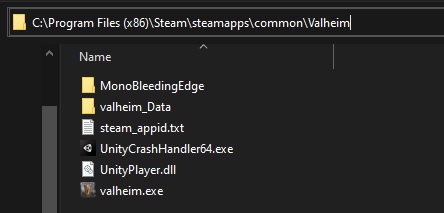
On which OS are they playing? Ask them to check how their installation folder looks like. It should have any extra files other than these:
https://i.imgur.com/vdpdeOA.jpg
 wheat terrace
stark meadow
On which OS are they playing? Ask them to check how their installation folder lo...
wheat terrace
stark meadow
On which OS are they playing? Ask them to check how their installation folder lo...
as i said it is windows but shame to ansver it is windows 7,.. he dont like new windows so i hope it is not the problem,. he had problem somehow he solved it and now it is again, we played yesterday without problem
he verified and also reistaled game and also he never installed mod
safe verge
basalt bombs throw at fixed height depending on how high you aim up, maybe 50-70% of the time?
stark meadow
safe verge
basalt bombs throw at fixed height depending on how high you aim up, maybe 50-70...
Generally not recommended to throw them vertically too much, as they will sink too deep on impact and the rock won't surface high above lava.
safe verge
stark meadow
Generally not recommended to throw them vertically too much, as they will sink t...
if i want to throw one behind another i aim up slightly and they just land on top of each other. its just same height and distance regardless of aim, most of the time
 olive iris
So, mum 'n I are running vanilla Valheim except for the game tweaks allowed by the game settings (teleport metals through portals, reduced death penalty) and I'm experiencing disconnection with obnoxious frequency now, does anyone know what might be causing this? I just get the connection interrupted icon on the upper left corner and disconnect, but I can immediately reconnect and get disconnected again later.
Game build is current live version.
 astral vale
Staff of Protection disappeared on sleeping (zzzzzzzz screen) - PTB server. Only item to disappear.
olive iris
olive iris
So, mum 'n I are running vanilla Valheim except for the game tweaks allowed by t...
This is occurring with game breaking frequency.
I have never made a character named "weenie." My main character's name is Warface but it's listed as deleted?
well uh, I was able to restore it I guess, so that's cool.

 dreamy forge
stark meadow
It's an old limitation of the building system, and one of the reasons some X sha...
dreamy forge
stark meadow
It's an old limitation of the building system, and one of the reasons some X sha...
Core wood X shapes would be a nice feature indeed then 😇
stark meadow
olive iris
I have never made a character named "weenie." My main character's name is Warfac...
It seems like you crashed during saving yesterday, which created this save:

Saves with .new or .stmp at the end of their nave have to be deleted, before you attempt to restore a backup, as those are corrupt residues that happened after a crash during saving. Such corrupt saves can disrupt further saving for that character.
stark meadow
olive iris
So, mum 'n I are running vanilla Valheim except for the game tweaks allowed by t...
How are you hosting the server? One players starts their world as a server through the in-game options?
Anyone on WiFi, or are you both on wireted etherenet cable?
stark meadow
astral vale
Staff of Protection disappeared on sleeping (zzzzzzzz screen) - PTB server. On...
What do you mean by staff disappearing? It was in your inventory and it's no longer there after going through a sleep save?
Playing with mods?
olive iris
stark meadow
It seems like you crashed during saving yesterday, which created this save:
Ah, okay.
olive iris
stark meadow
How are you hosting the server? One players starts their world as a server throu...
I did a sleep. It was hosted on the other player's world, both wired to the same router. The crashing seemed to stop once it locked up my game and generated "weenie" though.
stark meadow
olive iris
I did a sleep. It was hosted on the other player's world, both wired to the same...
I wonder if disconnect would happen again if you were to go back to your old character.
Btw. which beard of choice does your old character have? Wearing feather cape?
Anyone using mods?
olive iris
No mods, neither of ours has any beard I think, and yes feather cape.
astral vale
stark meadow
What do you mean by staff disappearing? It was in your inventory and it's no lon...
No mods. Vanilla PTB
 pulsar plaza
Hi I just upgraded my game from 0.218.17 public test to 0.218.19 live and now the two characters I used on .17 are not available in character selection, I still do see them in Manage saves and when I set my game to public test again, those characters are available again.
stark meadow
pulsar plaza
Hi I just upgraded my game from 0.218.17 public test to 0.218.19 live and now th...
In this particular case, 0.218.19 is not really an upgrade over 0.218.17 (0.218.19 doesn't contain PTB changes)
0.218.19 was more of a hotfix for the live version that was 0.218.15
Normally hotfixes usually have the same version number, but this one in particular had to be higher.
If you were playing on PTB, best to stay on PTB for now.
pulsar plaza
Okay so live and PTB have diverged branches right now? Will stick to PTB then. Thanks!
stark meadow
pulsar plaza
Okay so live and PTB have diverged branches right now? Will stick to PTB then. T...
Yes. Next patch will be another PTB one.
pulsar plaza
stark meadow
Yes. Next patch will be another PTB one.
Cool, how can I determine when the PTB branch goes live again?
stark meadow
pulsar plaza
Cool, how can I determine when the PTB branch goes live again?
When on news channels, like https://valheim.com/news, you see the same patch notes that were previously on PTB.
It's gonna be a while.
pulsar plaza
stark meadow
When on news channels, like https://valheim.com/news, you see the same patch not...
Thanks for the information and thanks for clarifying!
 blissful blaze
Having an issue where new characters are not unlocking portal recipe after picking up finewood, surtling core and greydwarf eyes on the newest version.
stark meadow
blissful blaze
Having an issue where new characters are not unlocking portal recipe after picki...
Either mod related or they haven't interacted with a workbench.
blissful blaze
stark meadow
Either mod related or they haven't interacted with a workbench.
No mods, and have interracted with workbench at lvl 3
blissful blaze
blissful blaze
No mods, and have interracted with workbench at lvl 3
Tested on my hosted server with vanilla settings with two different new characters, and tested on a single player world with new character: same results.
stark meadow
blissful blaze
Tested on my hosted server with vanilla settings with two different new characte...
Everything is fine on my end.
Can you screenshot your client installation folder with dates showing for when files got updated?
blissful blaze
stark meadow
Everything is fine on my end.
Ok odd. Thanks for replying
blissful blaze
stark meadow
Can you screenshot your client installation folder with dates showing for when f...
Welp currently reinstalling. Will update if it fixes.
spark fiber
hey i talked to u about my mic cutting out in oceans and stuff, figured it was a power issue but i switched to a 750W psu and the issues still happening, might just be blue yeti mics software sucking
 sharp steeple
blissful blaze
No mods, and have interracted with workbench at lvl 3
sharp steeple
blissful blaze
No mods, and have interracted with workbench at lvl 3
I know I am late to the party, but I know I have had recipes not show up till I was within range of the bench, after touching the needed materials and had a hammer in my inventory (had removed the hammer to explore).
 maiden summit
So, does anybody else have an issue with the ground and water not working to stand or swim in so your boat falls through the water down to the bottom and your character slides for forever till you reach the Mariana Trench? I do have mods so I just want to confirm if anybody else is having this issue. It seems related to being within proximity with a bonemaw. (I'm also on the PTB)
I know there use to be a similar issue with the flametal spires but that seems to be fixed. I know that was an actual bug because I had that happen to me in complete vanilla.
This is the error code that gets spammed over and over again in the console when it happens
 stark meadow
maiden summit
So, does anybody else have an issue with the ground and water not working to sta...
stark meadow
maiden summit
So, does anybody else have an issue with the ground and water not working to sta...
It's a mod issue. You can try asking in #mods-issues about it. From what I heard, it's caused by mods that add float-able items.
maiden summit
Ohhhhhhhhhhhhh, okay. That makes sense. I do have the "all items float mod" or whatever it is called. Thank you
 stone sequoia
ashen cape physics while mining XD , vanilla not modded

 dusky lion
stark meadow
Were you referring to save stutters in Ashlands or something else? If not, how w...
dusky lion
stark meadow
Were you referring to save stutters in Ashlands or something else? If not, how w...
Nailed down the stutters in Ashlands to the relation to amount of loot on the ground, and likely changes of objects from static objects such as trees or buildings then converted to loot on the ground. I've seen similar stutter before so to speak, when you pop a mineral vein, alas that is a longer duration of similar spiking and fps drop, but you don't get the inconsistent stutters as nothing more is added. Also the amount of loot indicators impact fps a lot, idk what is up with that animation and the fps toll it takes but after a certain amount of objects on the ground the animation starts to eat fps per new object added. I'm guessing this is why in the first or second year of the game loot started consolidating as to have fewer indicators being drawn etc...
 long ruin
Projectile bug is back, noticed since the Mac update, was already a thing before the crashes hotfix that just dropped. When the projectile bug was present a long time ago I can't say I noticed enemy projectiles going through the player but this time I have.
windows 10, updated drivers, no mods, clean install directory, vulkan, 3080, ryzen 9 5900x
 south lance
I haven't seen this being mentioned (probably because almost no one plays at low draw distance setting): Dropped black marble doesn't render properly like other items, the character needs to be much closer for it to appear at all while the same thing doesn't happen with any other dropped item. It doesn't even show the loot particles.
dusky lion
long ruin
Projectile bug is back, noticed since the Mac update, was already a thing before...
This happens in reverse too, projectiles from players in this patch. Glad you have a video of it. Hope it's good enough.
 glossy phoenix
What this error means, will it help to developers? Where we can publicate bugs?
 stark meadow
glossy phoenix
What this error means, will it help to developers? Where we can publicate bugs?
stark meadow
glossy phoenix
What this error means, will it help to developers? Where we can publicate bugs?
What happened in the game here?
glossy phoenix
glitch and crash
stark meadow
south lance
I haven't seen this being mentioned (probably because almost no one plays at low...
Yeah, known, there's few other things in Mistlands that have different render distance.
stark meadow
glossy phoenix
glitch and crash
The player log doeesn't show the crash. Upload your full player log and DM it to me, if you still have the one that happened after a crash.
In what manner do you crash (crash to desktop, app freeze, PC shuts down)?
Did you read the most common crash causes in the guide that's linked in the pinned comments?
stark meadow
long ruin
Projectile bug is back, noticed since the Mac update, was already a thing before...
Compared to the older bug, it seems like it happens more when you are too close to the enemy.
Any instances of enemy attacks going through blocks?
long ruin
stark meadow
Compared to the older bug, it seems like it happens more when you are too close ...
I could see too close pertaining to the deer but I've killed a lot of deer like that. I'll try to keep my eyes out for shots from further away and report back.
I attempted to block that arrow and not entirely sure I got the block off in time. Can't say I've noticed blocks being entirely ineffective but I could watch it for that too. Is that a suspected issue?
dusky lion
long ruin
I could see *too* close pertaining to the deer but I've killed a lot of deer lik...
I've had it happen from 10-20 meters, in-game, as well
 unique robin
Was sailing with a friend of mine and lost connection, when I got back the boat had moved and I drowned. We sailed back for my body bag but it disappeared. Also my spawn is set to the world start spawn and not my bed and nothing will set it back. Pretty annoying, I had over 14 Hours worth of stuff on that character
stark meadow
unique robin
Was sailing with a friend of mine and lost connection, when I got back the boat ...
Did you attempt to close the game or logout at the moment of drowning?
You can restore an earlier character backup from the manage saves buttin in the starting menu.
unique robin
No I did not
 void robin
Hello all. Recently I started having issues with the game crashing my PC. I played on the firelands original patch a d restarted two days ago. Up to the Ashland's patch, as well as previous years, I had no issue or crashes. Now every so often , can be 5 minutes or it can be 1 hours, suddenly PC goes dark, GPU colour lights start flashing red and white (not the indicator lights, the decorative ones) and it's fans kick in hard. Anyone had a similar issue recently or with past patches. I doubt it is PSU because 1) I undervolted my GPU and still happened 2) I strained it with other games and no issues. I have already re-installed Valheim twice. The second time I went to appdata/locallow/irongate and deleted everything as well before the reinstall.
PC specs
Windows 10
16gb ram
GPU asus rx580 oc
Ryzen 7 first gen (I believe 1700)
dusky lion
void robin
Hello all. Recently I started having issues with the game crashing my PC. I play...
test pc with other games, and test your memory for starters, likelyhood of this being valheim is slim to non
keep track of your gpu and cpu temperature as well, if you never repasted your gpu or cpu it could be a heat issue appearing now
 tacit pivot
on my headphones the music just stops playing at some point
 wet nymph
Hello. In my world I host to play with my brother, the map I discover doesn't match what the world actually is once we hit the Ashlands. There are enemies and new dangers all around, as it wasn't explored before the Ashlands went live. And the map my brother is seeing matches the land we are finding, but mine isn't.
I suspect the issue comes from me "checking" the world seed before we began our journey. Before we began to play, I did the console command 'exploremap' to check that it was not a bad seed. This was before Ashlands went live. After I checked this, I did 'resetmap' and played normally. Up until now, every biome layout has matched the map I explore, but two days ago we finally went to the Ashlands, and now my explored map is all wrong. Just to clarify, I did the command to reset the map, so for my entire playthru I see mostly empty map sans anything I have stepped on. I'm guessing that old map data--that I saw pre Ashlands launch--is what my character is reading from a file, even though it doesn't match the world itself. I just can't find how to fix this.
stark meadow
void robin
Hello all. Recently I started having issues with the game crashing my PC. I play...
Full system crashes are never caused by Valheim game logic, so it's not related to some particular patch.
You have the ability to test previous patches as well (Valheim properties in Steam library → beta → select pre-Ashlands and pre-Mistlands patch),
You problem sounds like a power related issue between GPU and PSU, just like the problem I described in the crash guide (link in pinned comments).
Straining your other games is not a good test if those games don't pull your MAX GPU TDP or 100% of GPU usage, like Valheim will.
Undervaluing isn't something that is stable in general. Many players started crashing the moment they undervolted their GPU.
Although it doesn't have to necessarily be related to PSU, how old is your PSU? Do you have a bigger monitor or multiple monitors connected compared to before?
stark meadow
tacit pivot
on my headphones the music just stops playing at some point
Playing with mods? Do you have continuous music options selected in the settings or not?
stark meadow
wet nymph
Hello. In my world I host to play with my brother, the map I discover doesn't ma...
Delete this 3 files in your AppData folder, located at:
%username%\AppData\LocalLow\IronGate\Valheim\worlds_local
 wet nymph
stark meadow
Delete this 3 files in your AppData folder, located at:
%username%\AppData\Local...
wet nymph
stark meadow
Delete this 3 files in your AppData folder, located at:
%username%\AppData\Local...
Omg that fixed it! Thank you so so much! ❤️
tacit pivot
stark meadow
Playing with mods? Do you have continuous music options selected in the settings...
no
void robin
stark meadow
Full system crashes are never caused by Valheim game logic, so it's not related ...
The info on the link are great, thank you so much. No changes on the computer in the last 2 years though the PSU is from 2017 so it can be that is acting up every so often and it didn't while playing other games. The other game I tested with and streined the GPU was Shadow of War on Ultra graphs. I was monitoring the GPU behaviour when the PC crashed and during shadow of war. It was similar. 79-82 C, fans at ~60%, usage at 100%.
 pearl marsh
I'm unable to run the game after the newest update even after reinstalling. When I load into a world the game crashes
 low ocean
 whole glade
I'm playing on steam and my friend is on Xbox. he can join, but will inevitably crash. we've played lots on this server, but not since before the ashlands update. anyone experience anything similar or know more?
 dire oak
Does anyone know a fix for a crash on loading into a world? tried setting it to high priority in task manager and im still having issues.
 bright coral
Did Ashlands update change heights of things? I'm finding myself stuck on staircases that worked fine prior to the update.
stark meadow
pearl marsh
I'm unable to run the game after the newest update even after reinstalling. When...
Re-installation doesn't remove mod files. Double check that you installation folder doesn't have extra files other than these:
https://i.imgur.com/vdpdeOA.jpg
stark meadow
whole glade
I'm playing on steam and my friend is on Xbox. he can join, but will inevitably ...
Is the server a dedicated server or someone is hosting their world from in-game options?
Did your Xbox friend attemps to join the world via new character?
stark meadow
dire oak
Does anyone know a fix for a crash on loading into a world? tried setting it to ...
Are you sure that you are crashing after world loading process?
If you are crashing during loading, be sure to be aware of the following: #steam-bugs-discussion message
stark meadow
bright coral
Did Ashlands update change heights of things? I'm finding myself stuck on stairc...
Stone stairs were changes a bit by mistake.
bright coral
Ah yes, these are stone stairs. Are they changing back? Should I try to rebuild the staircase?
whole glade
stark meadow
Is the server a dedicated server or someone is hosting their world from in-game ...
Well it’s my world, and I selected the “create server” option when loading it. So I assume that means the second. And no, it’s not a new character, it’s the same one he’s always played.
stark meadow
bright coral
Ah yes, these are stone stairs. Are they changing back? Should I try to rebuild ...
They should be fixed, as the change affects fuling locations.
stark meadow
whole glade
Well it’s my world, and I selected the “create server” option when loading it. S...
I know that it's not a new character. I'm asking if they tested new character. It's always important to test a new character to identify if crashes are related to character save or maybe even particular area in the world that they are getting spawned in.
whole glade
stark meadow
I know that it's not a new character. I'm asking if they tested new character. I...
Oh I’m sorry I misunderstood, that’s interesting we will test that next time, we logged off. I appreciate the input though I’ll have to come back another time after some testing
stark meadow
whole glade
Oh I’m sorry I misunderstood, that’s interesting we will test that next time, we...
Are you using any mods on your side?
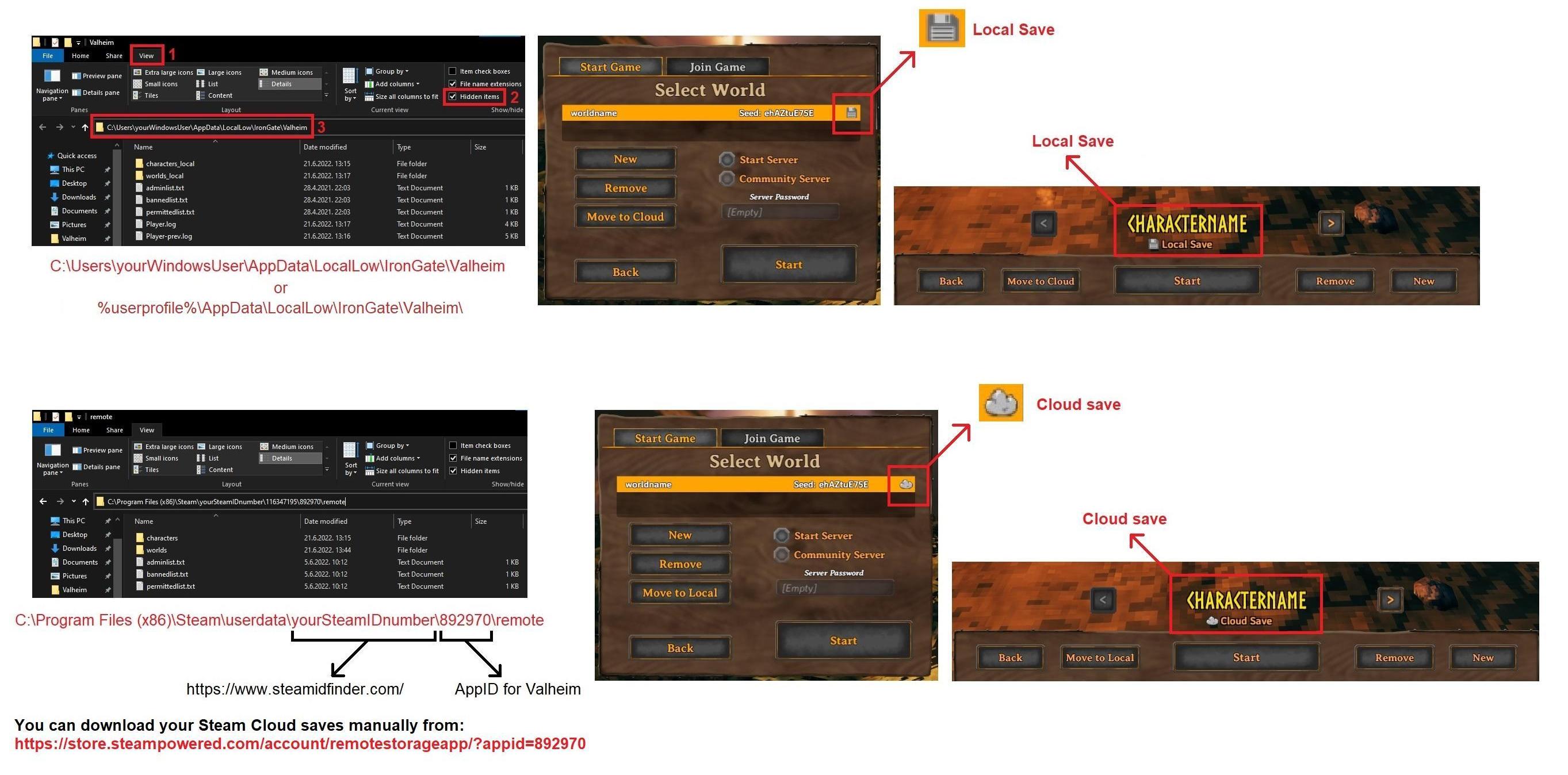
Would be also a good idea if you could backup your current world save files, so we can test what's wrong with it.
Depending on your saves being Local or Cloud, you can find world.db and world.fwl files on one of those locations:
https://i.imgur.com/mTVKf1J.jpg?4
 whole glade
stark meadow
Are you using any mods on your side?
Would be also a good idea if you could back...
whole glade
stark meadow
Are you using any mods on your side?
Would be also a good idea if you could back...
Nope no mods. Perfect thx
 void rock
 mossy hinge
pearl marsh
I'm unable to run the game after the newest update even after reinstalling. When...
mossy hinge
pearl marsh
I'm unable to run the game after the newest update even after reinstalling. When...
I had a problem where old world and/or character files were causing a similar crash. This would even happennif I never loaded said worlds/chars. So, even if they were corrupted, it should not crash the game.
In case you still got the issue after making sure you've reset the game installation, also delete (or move way) all user config and saves.
 void sentinel
Is anyone else having trouble using the console lately?
olive iris
this thing going on with trying to join a non-dedicated game and being disconnected inside a few minutes constantly really, really needs to be addressed sooner rather than later. Game's unplayable when this issue is happening right now. It's hard to get things done with only a few minutes before having to reconnect and enter the password. On top of that, items disappear if they're being transferred between the character and a chest while the disconnect is happening.
https://www.reddit.com/r/valheim/comments/xxl7uf/friend_keeps_disconnecting/
It's been an issue for far too long.
 south lance
Too bad that they like having game-breaking issues in their own game which means they will never fix them

 foggy sonnet
old issue wondering if fix has been found yet, i'm so done trying at this point. 3080, 10900k, nvme drive, 32gb ram ... game starts and performs well with capping to my 144hz refresh then after about 10 seconds it drops to around 20 fps and stays there indefinitely.
south lance
Commenting on an issue that I'm completely they are aware of and saying that "they need to fix it asap because blah blah" is unnecessary as I'm pretty sure that them being devs implies that they work and will attempt to fix the game, especially from game-breaking issues.
If they haven't, it's not because they "don't want to" or anything, it's because those issues could happen for literally anything, and how can they fix it if they don't know why it happens? It could even be something on the player's end.
This kind of statement is putting unnecessary pressure on them to fix ONE thing out of 100000 others that ALSO need to be addressed
foggy sonnet
I've tried just about everything even config add ins to try and make it use my gpu more still nada
olive iris
I mean, in a vacuum that statement's nice, but some issues quite literally prevent gameplay. I don't know what to tell them if they won't fix it and I can't work around it.
Similarly, I don't know what to tell you either if you think I'm out of line bringing it up.
If things are as you say, I'm out of reasons to stay except that I used to like being able to play this game.
stark meadow
void sentinel
Is anyone else having trouble using the console lately?
Nothing has recently changes when it comes to console. What kinds of issues do you have?
stark meadow
olive iris
this thing going on with trying to join a non-dedicated game and being disconnec...
Not all issues related to disconnecting after joining the server are the same.
Are you playing on Steam or PlayFab server (crossplay)?
olive iris
Fair enough. Using Steam, completely vanilla, non-dedicated connection to friend's game with password.
This pops up quite often. It used to disconnect once or twice, but now it is persistent for much longer. Most of the time it effectively prevents gameplay, but sometimes we can have a session without disconnects. I do not yet understand what conditions are provoking this.
stark meadow
olive iris
Fair enough. Using Steam, completely vanilla, non-dedicated connection to friend...
On Steam platform, one can launch a server over both Steam PlayFab network.
Are you aware on what kinds of server you have been playing on or not? (default is a server with crossplay enabled)
olive iris
Should be just one other player's world. As for if crossplay is involved or not, I guess I should check that. That would be under some kind of settings, yes?
I can access the other player's computer and check things as well as mine.
As for PlayFab, first I've heard of that. I don't believe I am using that. Or I am merely incognizant of it.
stark meadow
foggy sonnet
old issue wondering if fix has been found yet, i'm so done trying at this point....
What do you mean by this being an old issue? When was the first time you encountered it?
What do you mean by your FPS staying below 20FPS? What happens when you reduce all graphic settings, does FPS still remain locked to 20 fps?
On which OS are you playing? Have you ever used Nvidia Inspector tweak advanced driver settings at any point?
stark meadow
olive iris
Should be just one other player's world. As for if crossplay is involved or not,...
Generally things you should test when experiecning disconnects:
- (you and the host) Test buffer bloat when Valheim is not running: https://www.waveform.com/tools/bufferbloat
- (you and the host) Reduce Steam browser pings per minute in Steam settings → In game → set from 5000 to 250
- (you and the host) go start → type device manager → go to network adapters and check if any VPN services are installed
- (host) try hosting the world with crossplay option disabled (option is right next to start server button)
- (you and the host) Test if you have both IPv4 and IPv6 active and let me know: https://test-ipv6.com/
- Test wired connection if you are on WiFi, or look into enhancing WiFi signal (e.g. change WiFi channel for example)
void sentinel
stark meadow
Nothing has recently changes when it comes to console. What kinds of issues do y...
It didn't seem to be working properly. Trying to input 'devcommands' it gives out some error message. Might be related to one of my 3-4 mods I'm using, all are primarily QoL mods
I was just trying to spawn in some wood after one of the mods didn't properly input wood en-masse into the charcoal kiln, just eating it up like a void 😄
but it wouldn't even let me use the spawn command
olive iris
stark meadow
Generally things you should test when experiecning disconnects:
- (you and the h...
Sweet, thanks. Gonna go over these and try 'em.
stark meadow
void sentinel
It didn't seem to be working properly. Trying to input 'devcommands' it gives ou...
If you are talking about using commands in a singleplayer world, Issues like this are usually related to wrong mod installations.
You will have better luck finding out to which mod it migh be related to by asking in #mods-issues
olive iris
Got a bufferbloat grade of "B" I guess
I think that's okay?
I don't think we have any sort of VPN installed, either of us. Moving on through the list...
olive iris
stark meadow
Generally things you should test when experiecning disconnects:
- (you and the h...
I have IPv4 and IPv6. Despite being wired on the same internet and modem, the host player only has IPv4. Would this be a potential fault?
IPv6 should now be enabled on host player's point.
stark meadow
olive iris
I have IPv4 and IPv6. Despite being wired on the same internet and modem, the ho...
Some both of you are connected through the same home network?
It doesn't have much sense that they would get a different result for IPv4 and IPv6 other than them being connected over VPN.
B buffer bloat grade is ok. Do they get the same result?
olive iris
Oh right, I need to check their bufferbloat, brb
olive iris
well
Bigger problem now. Host PC refuses to start.
Which brings us out of the scope of Valheim support until that changes I guess
olive iris
stark meadow
Some both of you are connected through the same home network?
It doesn't have mu...
All right, that was fun. Now that we're getting somewhere, host PC bufferbloat is graded at C
stark meadow
olive iris
All right, that was fun. Now that we're getting somewhere, host PC bufferbloat i...
Can you screenshot those network adapters in the device manager on that PC?
olive iris
Sure.
olive iris
stark meadow
Can you screenshot those network adapters in the device manager on that PC?
https://cdn.discordapp.com/attachments/700166428044558396/1259628846827704320/image.png?ex=668c6047&is=668b0ec7&hm=892af35822e21a8edfa13c76847ff6f323f511c7d974cb5027d6defad76aef63&
I dunno, is this what you mean?
 stark meadow
olive iris
https://cdn.discordapp.com/attachments/700166428044558396/1259628846827704320/im...
stark meadow
olive iris
https://cdn.discordapp.com/attachments/700166428044558396/1259628846827704320/im...
Not really, was talking about device manager, but this might do also.
You can see that ProtonVPN has been installed on this PC in the past, and is currently not in use.
Right click on it and disable it. Then also go to start → type "services" and open it → find any service that has VPN in the name → right click → properties → disable
stark meadow
olive iris
Disable in the device manager?
You can do it here, right click, disable.
 olive iris
aaah
stark meadow
After that restart the PC, and do the IPv6 test again, on **both **systems and compare the IPv4 and IPv6 IP address you get on both machines.
The result of the test should be the same on both PCs.
olive iris
Roger will try
also found protonvpn in services, don't see a disable option though
Restarting host PC. This will take a long time.
stark meadow
olive iris
also found protonvpn in services, don't see a disable option though
Did you right click on it and go to properties?
Set start up type to disabled:
 olive iris
oh there it is
I missed it
stark meadow
You might need to stop the service before disabling it.
olive iris
right okay
will uh do that again then
olive iris
stark meadow
After that restart the PC, and do the IPv6 test again, on **both **systems and c...
IPv4 addresses are the same, but IPv6 addresses differ.
stark meadow
olive iris
IPv4 addresses are the same, but IPv6 addresses differ.
Should be fine now. Lower those steam browser pings per minute on both systems, and try playing in co-op for a while.
Let me know if continue to experience disconnects.
olive iris
Roger, when next we can. Thanks. Fingies crossies 🤞
No issues so far, hoping it stays that way.
 atomic granite
My game is bugging on multiplayer on Mountain biome, for the host everything beome static, mobs and players, only starting a new session to work again
 wary fable
Is there any solution for my disconnected server problem ?
olive iris
wary fable
Is there any solution for my disconnected server problem ?
In which case, if our problems were identical, this may be of assistance.
https://discordapp.com/channels/391142601740517377/1202549675924787220/1259609652203884594
wary fable
olive iris
In which case, if our problems were identical, this may be of assistance.
https:...
I play on Steam and my friend is on Xbox but on PC, but this is not the problem. I have another friend from Steam and he can enter my friend’s server without problems.
 silk aurora
anyone else having the permanent frame drop after playing for an hour?
olive iris
wary fable
I play on Steam and my friend is on Xbox but on PC, but this is not the problem....
Ah. Maybe the steps you can do on your end might help, but unfortunately I don't have the technical knowledge to make any promises or provide tailored solutions to these conditions.
Things like reducing the update rate of the steam browser on your end to 250 from 5000.
stark meadow
atomic granite
My game is bugging on multiplayer on Mountain biome, for the host everything beo...
How many people playing?
Network objects usually become stating for others once the players that loaded the first disconnects.
stark meadow
silk aurora
anyone else having the permanent frame drop after playing for an hour?
On which platfrom are you playing on?
stark meadow
wary fable
I play on Steam and my friend is on Xbox but on PC, but this is not the problem....
Can your Xbox friend reach the password prompts for your server?
Ask your Xbox friend to try joining some random server in the community tab, to see if they can reach password prompt.
silk aurora
pc, makes my entire pc just slow down. I thought I was overheating but I can play so many other games for way longer
and have no problems
Even cleaned out my fans just to be safe it wasn't a heat issue
stark meadow
silk aurora
pc, makes my entire pc just slow down. I thought I was overheating but I can pla...
Which OS? Which PC specs? If laptop, which laptop model? Did you actually monitor temperatures or not? (it's not enough to just have other games be ok)
silk aurora
yeah but if I can play god of war or Ghost of Tsushima without any pc problems then it's probably not me
this game doesn't really need high specs to do well
and when it is running fine I'm at like 120fps without any drop, then after like an hour or so I'm stuck at 15
atomic granite
stark meadow
How many people playing?
Network objects usually become stating for others once ...
2 players
stark meadow
silk aurora
yeah but if I can play god of war or Ghost of Tsushima without any pc problems t...
It's not about how the game looks, rather about how much CPU and GPU it utilises.
Valheim will utilise 100% of your GPU, and I don't know if that's the case for GOT.
You still haven't answered the question I asked btw.
stark meadow
atomic granite
2 players
Take notice of upper left corner of the screen on both players, if the disconnect icon appears during those enemy freeze moments.
If so do the things I listed here: #steam-bugs-discussion message
Also, is anyone from the two of you experiencing entire zones not loading or loading slowly? (look like a hole in terrain/mountain)
silk aurora
stark meadow
It's not about how the game looks, rather about how much CPU and GPU it utilises...
it's just an OMEN laptop with a 1660 Ti and 16 GB of ram
stark meadow
silk aurora
it's just an OMEN laptop with a 1660 Ti and 16 GB of ram
Which HP OMEN model and with what specs?
Which OS? (Linux, Mac OS, Windows)
Automatically, since it's a laptop, chances that you are having thermal related issues are high.
I would definitely suggest installing HWiNFO and under sensors tab, pay attention which CPU and GPU MAX temps is the laptop hitting when this performance drops occurs.
 torn valley
Hello I have a problem while starting the game I get something like a console and there is a [Error : Unity Log] MissingMethodException: Method not found: string .Utils.GetSaveDataPath()
Stack trace:
UnityEngine.GameObject:AddComponent(Type)
BepInEx.Bootstrap.Chainloader:Start()
UnityEngine.InputSystem.InputSystem:.cctor()
after a few seconds the game just stops what to do?
 toxic river
torn valley
Hello I have a problem while starting the game I get something like a console an...
toxic river
torn valley
Hello I have a problem while starting the game I get something like a console an...
Delete or update your mods
torn valley
ok
toxic river
#valheim-help message to properly delete mods
torn valley
thx
torn valley
toxic river
https://discord.com/channels/391142601740517377/1202320491377856512/120311518738...
now the game just stops after few seconds
stark meadow
torn valley
now the game just stops after few seconds
At what point does your game crash now? Can you reach the starting menu?
stark meadow
torn valley
little bit after it is starting to load
Probably still messed up by mods. Check the Section5 in this guide on how to do short verson of a a clean reinstallation:
https://www.reddit.com/r/valheim/comments/uq9b8x/my_valheim_is_crashing_fix_for_crash_guide/
Also be sure that you launch Valheim through Steam library, and not through some shortcut afterwards.
torn valley
still doesn't work after i did what it said in the guide
stark meadow
torn valley
still doesn't work after i did what it said in the guide
What are your PC specs?
Can you DM me your player.log file from:
%username%\AppData\LocalLow\IronGate\Valheim
 viral wedge
Howdy guys. Faced with such a bug in the swamps, any ideas on how to solve this bug?
Its just like something stops me, i press W on the keyboard and the character cant pass
stark meadow
viral wedge
Howdy guys. Faced with such a bug in the swamps, any ideas on how to solve this ...
Are you playing with any mods?
Does the bug still happen if you revisit that area?
Do you sometimes encounter terrain not loading (looks like a square hole in the ground)?
viral wedge
stark meadow
Are you playing with any mods?
Does the bug still happen if you revisit that are...
i dont playing with mods. i have re-visited the place, the problem hasnt been fixed. No textures were missing, no visual problems whatsoever
stark meadow
viral wedge
i dont playing with mods. i have re-visited the place, the problem hasnt been fi...
Can you DM me your world and character save file?
viral wedge
stark meadow
Can you DM me your world and character save file?
yeah
 green mural
Hi, I have same issue with exact laptop specification. I would appreciate your help.
stark meadow
green mural
Hi, I have same issue with exact laptop specification. I would appreciate your h...
Most likely the same problem them with laptop unnecessarily using iGPU and overheating.
Check which exact laptop model you have.
Did you perhaps monitor your temps?
green mural
stark meadow
Most likely the same problem them with laptop unnecessarily using iGPU and overh...
My average temp when playing game is above 90°C.
stark meadow
green mural
My average temp when playing game is above 90°C.
You can see how performance drop and stuttering happens due to thermal throttling in this video at 0:46 sec:
https://www.youtube.com/watch?v=opJJvc_tUW8
It less about AVG temps rather which MAX temps your laptop reaches on GPU and CPU
I find that best software to capture that info is HWiNFO under sensors tab
green mural
stark meadow
I find that best software to capture that info is HWiNFO under sensors tab
Thank's for the advice, i'll download it.
 drowsy bone
I'm running into an interesting iteration of the "constant boat damage" bug, that seems unlike other reports I've seen.
Currently, I'm playing in a world with one other friend, run on a dedicated server hosted on the same PC as my client. Any boat built will take constant damage, but only if my character is in it, but not if his character is in it. This issue persists even if he is not online on the server, and even continues if I shut down the dedicated server and load up the world in single player. It also occurs if I open the hold, even if he is on the boat, until he opens the hold again. It happens on all boat types (up to longship, I haven't played ashlands yet so I'm not sure if there's a new boat).
Anybody have any advice on how to solve this? It wasn't an issue initially, but has been a problem for the last week or so. I really don't want to abandon this world and start over, especially if we run the risk of this happening again.
EDIT: Actually, I just went and checked, it seems to be happening to all of my characters across all of my worlds. After restarting the game, it's been resolved. Weird that it's a client side thing
stark meadow
drowsy bone
I'm running into an interesting iteration of the "constant boat damage" bug, tha...
How long was your play session before this boat bug triggered?
 unreal mica
Hi! So I've noticed that whenever I exit a Sunken Crypt in the Swamp, the lighting of the location turns a bit blueish. Is that a general known issue?
stark meadow
unreal mica
Hi! So I've noticed that whenever I exit a Sunken Crypt in the Swamp, the lighti...
Yeah, it is. It's was always the case, but not as severe as after Ashlands update.
unreal mica
ok, thanks!
sharp steeple
That's basically the game not having enough time to fully render, if I'm not mistaken. I see it all the time coming out of any dungeon. I actually use it to my advantage as I can see things slightly better when it is like that as, the way I remember it, the weather effect(s) are the last to load.
stark meadow
For mod related bugs visit #mods-issues. Mind you, mods can permanently corrupt both world and character saves files, but you should always test how you saves behave after launching vanilla game without mods.
 lean shard
Why is this serpent in ashlands bugging my entire game? As soon as it shrieks everyone and everything is unable to move, like he's casting Za Warudo or something.
It's a fresh new world btw
stark meadow
lean shard
Why is this serpent in ashlands bugging my entire game? As soon as it shrieks ev...
Mod related bugs. Using any?
silk aurora
I was told loading the game in vulkan will help with performance issues, is that true?
lean shard
stark meadow
Mod related bugs. Using any?
Yeah like 10
stark meadow
silk aurora
I was told loading the game in vulkan will help with performance issues, is that...
Yes, but it might increase you system temperatures. Usually not a good idea on laptops.
stark meadow
lean shard
Yeah like 10
I'm told it's usually related to mods that cause items to float.
silk aurora
stark meadow
Yes, but it might increase you system temperatures. Usually not a good idea on l...
can I just lower all my settings maybe? bc If I have to do something crazy just so I can play this game then
I'd rather wait until I get a better pc
stark meadow
silk aurora
can I just lower all my settings maybe? bc If I have to do something crazy just ...
Did you test your temperatures first?
Your biggest performance drop might come from thermal throttling, which should be addressed first.
lean shard
stark meadow
I'm told it's usually related to mods that cause items to float.
What a coincidence!
Okay I know enough, thanks
drowsy bone
stark meadow
How long was your play session before this boat bug triggered?
It first happened at the start of a "play session", but the client had been open for a few days, just not connected to any worlds.
stark meadow
drowsy bone
It first happened at the start of a "play session", but the client had been open...
The game was running for days, residing in the starting menu, for few days?
Or are you talking about dedicated server running for few days, and no clients connecting?
drowsy bone
stark meadow
The game was running for days, residing in the starting menu, for few days?
The game was running sitting in the starting menu for a couple of days. Normally, restarting the game would be one of the first things I tried, but I assumed it couldn't be client related for a while <_<
stark meadow
drowsy bone
The game was running sitting in the starting menu for a couple of days. Normally...
Did you old boats start taking damage as soon as you loaded a world?
drowsy bone
Only if I boarded them
 quaint dawn
any way to fix the cloud error
i was playing on my laptop and it is not transferring to my pc and it was 6 hours of bilding
stark meadow
quaint dawn
any way to fix the cloud error
Both systems on windows?
Do you still have access to the laptop, and is there a Cloud sync error on it as well?
quaint dawn
stark meadow
Both systems on windows?
Do you still have access to the laptop, and is there a ...
yeah its my laptop i was jsut playing it downstairs vs on my pc. the main pc gives me cloud error, but when i go to the pc its the current progress. let me double check if the cloud error is on the pc
quaint dawn
stark meadow
Both systems on windows?
Do you still have access to the laptop, and is there a ...
on the laptop says cloud is up to date
it gives me the notification of the "cloud is out of date for "date/time" im going to check my laptop save point then restart my main pc
stark meadow
quaint dawn
on the laptop says cloud is up to date
I would also recommend checking which files are actually in the Cloud here, by logging into Steam in your browser, and then opening this link:
https://store.steampowered.com/account/remotestorageapp/?appid=892970
If the actual files in the Cloud are ok (meaning they are from the laptop), if you ever get presented by a popup to choose Local or Cloud saves on your main PC, choose the Cloud saves.
 quaint dawn
fixed it
rebooted the pc and selected the cloud save option. thank you for the assistance
 teal patio
just a bit of visual annoyance, the streaks are only visible in rain tho

 stark meadow
teal patio
just a bit of visual annoyance, the streaks are only visible in rain tho
stark meadow
teal patio
just a bit of visual annoyance, the streaks are only visible in rain tho
Yeah, happens when specular maps get illuminated during rain. Not sure if it started becoming more pronounced lately
 jagged hamlet
teal patio
just a bit of visual annoyance, the streaks are only visible in rain tho
jagged hamlet
teal patio
just a bit of visual annoyance, the streaks are only visible in rain tho
Punch the rain to make it go away.
 south lance
 bitter canyon
what is that item?
bitter canyon
what is that item?
I assume the hoe? An item that's been there since day 1
bitter canyon
no its not its a bugged texture i loged with a bronze axe
 dapper fulcrum
When I start the game there is a black screen (but I get the sword cursor)
 regal tree
Where can I find the setting to turn on tree spawning? I have once before found it easily but now I just simply cant find it anymore. Any ideas where I could find it? Please @ me
stark meadow
regal tree
Where can I find the setting to turn on tree spawning? I have once before found ...
Are you talking about the ability to spawn trees with console commands?
stark meadow
dapper fulcrum
When I start the game there is a black screen (but I get the sword cursor)
On Windows/Steam? Could be multiple things.
DM me your player.log from %username\AppData\LocalLow\IronGate\Valheim
Check that you installation folder doesn't have more files than these: https://i.imgur.com/vdpdeOA.jpg
regal tree
stark meadow
Are you talking about the ability to spawn trees with console commands?
no, sorry I mean that trees can regrow from their stumps. I know I have seen this before in the in-game settings but now I just cant find it
stark meadow
regal tree
no, sorry I mean that trees can regrow from their stumps. I know I have seen thi...
This feature was never a part of vanilla game, only planting trees from seeds was. Try asking in #mods-discussion
regal tree
stark meadow
This feature was never a part of vanilla game, only planting trees from seeds wa...
im so confused rn. I have previously had a vanilla server (dont even know how to make a modded server) and had the option in the settings
stark meadow
regal tree
im so confused rn. I have previously had a vanilla server (dont even know how to...
Many hosting sites offer dedicated servers come with one-click mod installations.
regal tree
stark meadow
Many hosting sites offer dedicated servers come with one-click mod installations...
but heres the thing, I hosted it myself, no sites or anything. Straight from the game itself
stark meadow
regal tree
but heres the thing, I hosted it myself, no sites or anything. Straight from the...
There was never such an option in vanilla game. If you remember the option, and you remember it working, you were using mods.
There is no other explanation.
regal tree
stark meadow
There was never such an option in vanilla game. If you remember the option, and ...
ok, is there a way to turn my current vanilla server to a modded server so I can turn that setting on?
stark meadow
regal tree
ok, is there a way to turn my current vanilla server to a modded server so I can...
This channel is for questions related to vanilla game. Try the other channel at the following link: #mods-discussion
dapper fulcrum
stark meadow
On Windows/Steam? Could be multiple things.
DM me your player.log from %username...
id check that, i tried everityng
 devout plaza
hey guys does anyone get random lag spikes? i play with low settings on everything and the game normally runs at about 100-120 fps but i often get very small lag spikes and its very annoying. I play on a laptop i7 11k, rtx 3060 6gb, 16 gb ram
stark meadow
devout plaza
hey guys does anyone get random lag spikes? i play with low settings on everythi...
You are probably talking about zone loading stutters I would assume, check this comment for more details: https://www.reddit.com/r/valheim/comments/1al0zeb/comment/kpciuzg/?utm_source=reddit&utm_medium=usertext&utm_name=valheim&utm_content=t1_lbc246i
 gilded torrent
Man, I cannot wait for 0.218.19 to go live on Steam....whew
marble wolf
gilded torrent
Man, I cannot wait for 0.218.19 to go live on Steam....whew
0.218.19 has been live for a while.
gilded torrent
marble wolf
0.218.19 has been live for a while.
Just in Beta I think.
marble wolf
No, it's ONLY in live.
 rich pier
marble wolf
No, it's ONLY in live.
rich pier
marble wolf
No, it's ONLY in live.
He means 0.218.19 doesn't have the gameplay changes that are on the PTB. Only some crash fixes.
#valheim-patchnotes message
 cloud minnow
Is it known that the Straw Rug (rug_straw) is upside down by default?
stark meadow
cloud minnow
Is it known that the Straw Rug (`rug_straw`) is upside down by default?
Yeah, many Z-fighting issues witl rugs now as well. All happened to to quick rug straw fix for it's bottom being invisible.
south lance
Posting this here as I really don't remember this was the case:
Elder's vines make the skeleton attack sound
marble wolf
Heh, that's a weird one.
south lance
Second sound-related issue I've noticed.
Other one being normal trolls making the summoned troll flaming rock throw sound when throwing rocks
marble wolf
I suspect it's a very easy mistake but also a very simple one to correct once it's highlighted.
 dreamy remnant
Fishes are freezing for no reason and I can move them out of the water when I hit them with the pickaxe they sound like metal Bio Xd
stark meadow
dreamy remnant
Fishes are freezing for no reason and I can move them out of the water when I hi...
Sounds like a mod problem. Using any?
dreamy remnant
stark meadow
Sounds like a mod problem. Using any?
Nope
Idk if this a bug or a internet issue but they were not moving
stark meadow
dreamy remnant
Nope
Doesn't sound like a vanilla bug. Ask others and the server owner if they are using mods.
Do you still have this probelm when you load that area? If so, send me your player.log file from:
%username\AppData\LocalLow\IronGate\Valheim
dreamy remnant
stark meadow
Doesn't sound like a vanilla bug. Ask others and the server owner if they are us...
Bro, it’s a vanilla wdym It’s not, I will check later on that area
I will check also the player log
 rocky escarp
Guys i need help, I use Restream to stream the game on YouTube,Twitch etc and i have been trying to stream Valheim by sharing my PC screen and audio via Restream since its the only way for the viewers to hear my friends which are connected with me via Discord, otherwise they would hear them in double if they were on Restream, since my PC's audio is streaming. My problem is each time i open Valheim while streaming with video and audio, my friends audio becomes glitchy and robotic for the viewers,. On my end i hear them perfectly fine but not on the stream. My own mic audio is fine, the game audio is fine as well on the stream but for some reason, when im streaming my desktop using the same method my friends voice audio are good but when Valheim is open its starts again. Can anyone help me fix this please ?
bright coral
rocky escarp
Guys i need help, I use Restream to stream the game on YouTube,Twitch etc and i ...
What software suite are you using to capture the screen and application audio? And are you running Linux or Windows on the PC?
Audio capture is hard as you can end up dealing with multiple sample rates that your OS' audio daemon normally mixes naturally behind the scenes for playback.
rocky escarp
bright coral
What software suite are you using to capture the screen and application audio? A...
Im on Windows 10
bright coral
And capturing with Restream Studio? OBS? Custom ffmpeg chaos?
rocky escarp
bright coral
And capturing with Restream Studio? OBS? Custom ffmpeg chaos?
Yeah Restream
bright coral
It may not be great at mixing multiple sample rates. Consider giving OBS a whirl. It's free and has a global desktop audio source that mixes well enough. Should be able to send something that Restream understands.
rocky escarp
bright coral
It may not be great at mixing multiple sample rates. Consider giving OBS a whirl...
The problem is, i tried it ans the sound problem is solve with OBS but since i can schedule streaming event via Restream, i cant mix it with the OBS Stream. With OBS i only have the option to streaming direclty via my differents platforms (YoutTube channels etc) i dont have the option to use the OBS stream within an event a made in Restream, even tho i have linked my account with OBS.
bright coral
You're probably outside of how much help we'll be in here, unfortunately.
barren crypt
any known bugs that cause boats and tombstone to only yield 1/3 of original loot?
everything was inside a dvergr protected area, all dvergr had been killed but the ward had not been broken yet
stark meadow
rocky escarp
Guys i need help, I use Restream to stream the game on YouTube,Twitch etc and i ...
What's your upload speed and upload latency? https://www.waveform.com/tools/bufferbloat
stark meadow
barren crypt
any known bugs that cause boats and tombstone to only yield 1/3 of original loot...
Boat spawned via devcommands won't drop all the loot
rocky escarp
stark meadow
What's your upload speed and upload latency? https://www.waveform.com/tools/buff...
around 65
stark meadow
rocky escarp
around 65
Can you copy your results like at the bossom and paste it?
You shouldn't be using internet too much while doing this test, so Valheim, steaming has to be off (should → shouldn't typo)
rocky escarp
stark meadow
You shouldn't be using internet too much while doing this test, so Valheim, stea...
I mean except for the Restream tab open, i use no other web page during gaming.
stark meadow
rocky escarp
I mean except for the Restream tab open, i use no other web page during gaming.
Meant that you **shouldn't **be using internet too much while doing this test, so Valheim, steaming has to be off
rocky escarp
stark meadow
Meant that you **shouldn't **be using internet too much while doing this test, s...
 stark meadow
rocky escarp
stark meadow
rocky escarp
Look good. Will send you a DM about other tweaks, so that we don't spawm the channel.
 glass seal
Hi guys i need some help, i am trying to play with some friends in my own world, i click on start server and crossplay (they are from steam and xbox and i am from steam) they can see my server in the list but cant connect it says "Failed to connect", but when one of them start the server everybody can join even me, does anyone know why does it happens when i start the server? and anyone know how to fix it? My steam game was a gift that a friend sent me, i dont know if it makes any diference.
stark meadow
glass seal
Hi guys i need some help, i am trying to play with some friends in my own world,...
Are you using any 3rd party antivirus?
Check if you have any VPN adapters installed, by going to start → type "device manager" → open "network adapters" → look for VPN
glass seal
stark meadow
Are you using any 3rd party antivirus?
Check if you have any VPN adapters instal...
i dont have antivirus only the one from windows, i will check the VPN now
i dont have VPN either, any more things to check? thanks a lot for the help
stark meadow
glass seal
i dont have antivirus only the one from windows, i will check the VPN now
When you go to start → type cmd → open it → type "tracert 8.8.8.8" → you will ping google servers, and trace the route to those servers. Your first hop should be the IP address of your router (usually starts with 192). If the second hop* starts with 192, 172, or 10, you are behind NAT (what VPN also does). Here's a example of a person behind multiple NAT, which manifested in all kinds of weird problems:
https://i.imgur.com/8Ad2ApC.jpg
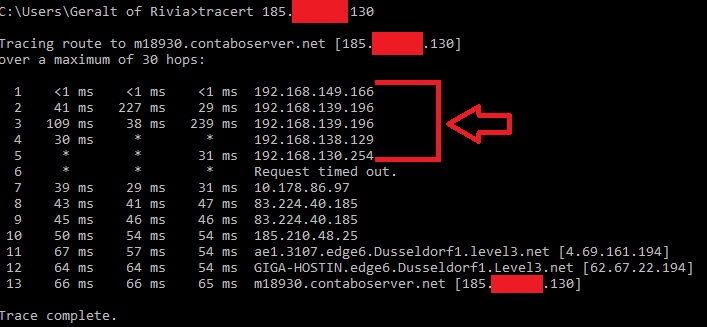
Check this test on your end. Also perfrom this test to check your buffer bloat grade, when you are not using Internet (valhiem closed).
https://www.waveform.com/tools/bufferbloat
glass seal
stark meadow
When you go to start → type cmd → open it → type "tracert 8.8.8.8" → you will pi...
i did this tracert 8.8.8.8 and i got some numbers here, this second gop you mean the one after the "request timed out"?
stark meadow
glass seal
i did this tracert 8.8.8.8 and i got some numbers here, this second gop you mean...
Had a type, not gop, but hop. The first hop is your rouhter, the second hop should not start with 192, 172 or 10
The more further hops you have that start with those numbers, the more you don't have a direct access to the Internet.
You can send me your results in DM if you want
 balmy garnet
ive tried everything it seems to try starting up Valheim through steam but the same Window pops up for a split second saying "Unity 2022.3.17f1_4fc78088f837" and fails to launch. what do i do
 uneven shadow
can anyone help so i have been having a problem were when i try to load a world my game just says valheim.exe and the game crashes and i have done everything file deleted shit and nothing works
 near peak
Has there been any conversation about the performance in Ashlands? My group is constantly getting bad rubber-banding, teleporting, hits conneting far outside of our players' hitboxes. It's nearly unplayable.
We've tried restarting the server. That only helps a little. It's not latency or server performance.
bright coral
balmy garnet
ive tried everything it seems to try starting up Valheim through steam but the s...
On Windows, Linux, or macOS?
stark meadow
balmy garnet
ive tried everything it seems to try starting up Valheim through steam but the s...
I recommend starting by doing the short re-installation described in Section5 of this guide:
https://www.reddit.com/r/valheim/comments/uq9b8x/my_valheim_is_crashing_fix_for_crash_guide/
stark meadow
uneven shadow
can anyone help so i have been having a problem were when i try to load a world ...
Be sure that you are aware of the following, and test new world and new character:
#steam-bugs-discussion message
stark meadow
near peak
Has there been any conversation about the performance in Ashlands? My group is c...
How many players in the same area?
 sharp ledge
Hello, I made a character in ashland beta, but it seem when i update to lastest version, it dissappears on character tab, i restore it from backup, still wouldnt show. It's also in my files but for some reason it wouldnt show in the character tab. Anyway i could fix it?
marble wolf
Wait till the versions are merged or roll back to a previous save.
near peak
stark meadow
How many players in the same area?
It happens with just solo players, and gets progressively worse when adding more. It becomes extremely difficult to track enemies at 4-5 players.
stark meadow
near peak
It happens with just solo players, and gets progressively worse when adding more...
How is the server being hosted?
Rubber banding happening when only one player is in the zone indicated that something might be wrong with the server or that particular player. I would recommend to tell all of your teammates to test their buffer bloat: https://www.waveform.com/tools/bufferbloat
If specific areas are a problem, and cause issues even when one player is there, regardless of who is that player, there might be too many items laying around. You can attemp to load the world in single players and remove those items via "removedrops" command. Generally Ashlands biome has more stuff that needs syncing over network, so networking problems are more common than in other biomes.
stone sequoia
charred warriors flee from fight sometimes, i think their AI follow/attack track is broken
 south lance
Reported bug
 shell nest
Does any body know about the 4098 error code while hosting a regular multiplayer world not dedicated or paid server
stark meadow
shell nest
Does any body know about the 4098 error code while hosting a regular multiplayer...
It can be caused by a number of things. What specific problem do you have?
shell nest
it disconnects my friend from my hosted world, and while it does that i can walk around just cant place anything and open
[Warning: Unity Log] 07/14/2024 19:15:47: PlayFab network error in session 'TheNightsWatch' and network c508d167-f8e8 = with type 'Error' and code '4098': the operation was called with an invalid handle
stark meadow
shell nest
[Warning: Unity Log] 07/14/2024 19:15:47: PlayFab network error in session 'TheN...
The error is not important. How long does your friend usually stay connected?
pearl marsh
stark meadow
Re-installation doesn't remove mod files. Double check that you installation fol...
yeah i dont have extra files and dont play with mods
stark meadow
shell nest
could it be caused from a mod?
Yeah, it can be caused by a mod. But general network tests should be done first.
How does their buffer bloat looks like? https://www.waveform.com/tools/bufferbloat
Tell them to also try reducing steam browser pings per minute from 5000 to 250 in general steam settings → "in game" tab.
stark meadow
pearl marsh
yeah i dont have extra files and dont play with mods
Never played with mods in general?
Do you crash during world loading or do you actually reach the end of the loading screen and see the world rendering?
pearl marsh
nope only play vanilla. I have reinstalled twice and cleared all data and saves both on pc and cloud. Everytime I try to load into a new world the game crashes
 marble wolf
Have you tried waiting? If you're loading a new world it might take a few minutes to generate.
pearl marsh
One hour is the wait ive givin so far lol
shell nest
stark meadow
Yeah, it can be caused by a mod. But general network tests should be done first....
wdym i don't see the setting for the pings per minute
stark meadow
pearl marsh
nope only play vanilla. I have reinstalled twice and cleared all data and saves ...
It doesn't seem like you are crashing after loading, rather during loading.
You have 3 options:
- Once the loading process starts you shouldn't touch anything on the PC until the process finishes, or else you might break the loading by activating the game window at wrong time. On Vulkan, after the game becomes unresponsive, it will stay that way indefinitely.
- Another method is; as soon as the game starts to load the world, minimise the game and don't return to the game for 5-10 min at minimum. Basically don't switch back to game until you are sure it loaded by the sounds you hear.
- Switch to public beta version of the game where world loading/generating process has been improved.
stark meadow
shell nest
wdym i don't see the setting for the pings per minute
Steam settings → in game → scroll down → Steam browser pings/minute → set from 5000 to 250
pearl marsh
stark meadow
It doesn't seem like you are crashing after loading, rather during loading.
You ...
Idk how or why but option two did it
Thank you 🙏
shell nest
stark meadow
Steam settings → in game → scroll down → Steam browser pings/minute → set from 5...
oh find it thx, also turning off the crossplay option in the start server option gave me a noticeable fps boost. Should i also do mine to 250 as well?
stark meadow
shell nest
oh find it thx, also turning off the crossplay option in the start server option...
Yeah, got for it as well. It's not yet clear on whose end the connection gets broken. Did your friend to the buffer bloat test?
shell nest
no not yet hes not on atm but ill have him do it and let yk the results
 tidal temple
hi i have just started play valheim and for some reason it wont stop punching i have restarted and re install and re binded stuff but it wont stop how can i fix this?
stark meadow
tidal temple
hi i have just started play valheim and for some reason it wont stop punching i...
logitech mouse?
tidal temple
no glorius model o
also on a steam deck using proton 9.02 and hosting the game also crossplay enabled
maybe a proton issue ill try change proton
stark meadow
tidal temple
no glorius model o
So playing on a steam deck and streaming to a TV, and using mouse and a keyboard to play or?
tidal temple
stark meadow
So playing on a steam deck and streaming to a TV, and using mouse and a keyboard...
no sorry i mean i am hosting the server for my friends and using a mouse and keyboard also ive unplugged my mouse nothing changed
on my machine not a dedicated server
ooh sorry
so the issue is that the gamepad was enabled but none of the buttons where being pressed
but unenalbing it fixed it
 stark meadow
 silk acorn
When was the last time you plaed normally? You'll need to reinstall
silk acorn
2 months ago
 limpid hamlet
Today i downloaded the Game on my Pc all went normal but every time i start a world my game crash can someone help me here
stark meadow
limpid hamlet
Today i downloaded the Game on my Pc all went normal but every time i start a w...
Read this comment please: #steam-bugs-discussion message
jagged hamlet
limpid hamlet
Today i downloaded the Game on my Pc all went normal but every time i start a w...
You'll have to have patience, the world generation can take some time, average is 5-10 minutes, longer times have been reported though.
So start the game, create a world and leave your pc alone, don't do anything else on it.
Go make a sandwich and some tea or coffee, take a toilet break, go for a walk, just leave your pc alone with valheim for 5-10 minutes so they can get it on.
If the game is still unresponsive after that time, give it some more time.
 spring moon
jagged hamlet
You'll have to have patience, the world generation can take some time, average i...
spring moon
jagged hamlet
You'll have to have patience, the world generation can take some time, average i...
Depends on the specs of the Pc
It will take a lot of time to load new and existing worlds if the pc specs is lower than the minimum or recommended specs needed for valheim.
 haughty meteor
hello, i'm trying to start my server that used to work before ashlands
i press "start server" and it stays at the "loading" screen. Is this a known issue? thanks
stark meadow
haughty meteor
hello, i'm trying to start my server that used to work before ashlands
i press ...
Check this comment: #steam-bugs-discussion message
haughty meteor
ok nvm it worked
 lavish rapids
hi there, anyone knows how to fix the valheim plus error?
marble wolf
Delete it?
lavish rapids
i install the nexusmod version, and when i go to play the game crush
i did it, but...there is no way to use the mod?
marble wolf
I'm not sure why you'd want to. It's awful. But you might be able to get some help in #mods-issues It's certainly not a game bug.
lavish rapids
thanks a lot, i'm sure is not,,,i will try in that chat, thanks
toxic river
Please refer to #mods-issues, this channel is for vanilla game bugs only
 tropic laurel
mb
 hidden dome
Hello, i got a problem when i build on a server with my friend, my constructions are offset even i click correctly. If someone got a solution 😉
stark meadow
hidden dome
Hello, i got a problem when i build on a server with my friend, my construction...
Check what's yours alternate placement button. It should not be mouse1.
 hidden dome
That's works ! Thanks ! and have a nice end of day
 woven patio
Hey guys, I reported a bug on the official bug report website about 10 days ago and I don't see it on the website's list of known issues.
I also made a post on reddit about it to see if anyone had encountered the issue and if yes found a solution. Alas no one replied.
So here I am, if anyone knows a work around that issue or a mod that would fix this, please share ! 🙂
https://www.reddit.com/r/valheim/comments/1dxs2ez/snapping_bug_on_high_number_and_density_of/
Reddit
Explore this post and more from the valheim community
marble wolf
woven patio
Hey guys, I reported a bug on the official bug report website about 10 days ago ...
I mean, the devs are mostly on vacation at the moment. Also, it's only been 10 days.
woven patio
Yeah I'm not expecting the bug will be fixed any time soon (in fact I'm not entirely sure it'll ever be fixed given the circumstances in which it seems to occur). What I'm looking for is if someone experienced the issue and found a work around really !
(this bug is kinda game breaking for my current build, there's entire sections of the main spiral staircase that I would have to freeplace ... probably 100s of pieces ... so if I can avoid that, I will ahah)
For the record I did find a work around for the example I show on that reddit post (see comments), but considering the number of places I have this bug occuring all around my build, using this type of work around (which is time consuming since I need to find a spot where snapping eventually works by trial and error) would be a massive time drain and especially unfun ahah
Ideally a mod fixes this issue altogether, but haven't found one yet
marble wolf
@woven patio 34k instances? O_o Nothing is going to fix that. Have you tried using Q and E to cycle through snap points?
woven patio
I'm at 40k+ atm x)
And yup
Actually I just found a mod that works !
https://www.nexusmods.com/valheim/mods/1504?tab=files&file_id=13937
Will edit the reddit post in case someone else encounters that bug

Nexus Mods :: Valheim
General quality of life building mod that allows you to cycle through various snap-points when targeting a piece in game - without needing to point at them directly with the mouse!
stark meadow
woven patio
Hey guys, I reported a bug on the official bug report website about 10 days ago ...
I don't have any issues with snapping points on 65K instance build on 7fps, so your issue there is related to something else probably.
stark meadow
woven patio
And yup
Actually I just found a mod that works !
https://www.nexusmods.com/valhe...
You can cycle throuhg building snapping points with Q and E in vanilla game as well. No mod needed.
woven patio
stark meadow
I don't have any issues with snapping points on 65K instance build on 7fps, so y...
Yeah if you check my reddit post my home base already broke the 40k instances and I've never had the bug.
My assumption is that the density of blocks is the issue here, with a hard limit on loaded snapping points (ie: too many blocks nearby).
I'm extensively using the snapping tool they implemented with Hildir's Request since it came, doesn't work here as stated before. That mod's slightly different version of the concept works tho so I guess I'll use that now
marble wolf
' a hard limit on loaded snapping points' - I can't imagine that's a thing.
woven patio
marble wolf
<@163007651448356864> 34k instances? O_o Nothing is going to fix that. Have you ...
I'll post a screen of the build in #building-screenshots so you have an idea of the madness ahah 🙂
woven patio
marble wolf
' a hard limit on loaded snapping points' - I can't imagine that's a thing.
Not intended most likely, might just be an array that has a base limit of 1024 (limit for obvious optimisation reasons, which makes sense) entities and it just happens to end up full because of density of this build
Screen shot posted. so you understand how madly dense this is, the tower consists of 24 individual pillars, each being made of 5 different frausten pillar blocks and they all have an internal flametal pillar too. Add walls, decoration pieces, the spiral staircase that is relatively complex, arches ... it's DENSE. Something like 20k+ instances just for the tower ahah
stark meadow
woven patio
Yeah if you check my reddit post my home base already broke the 40k instances an...
I've seen bigger builds that don't have this problem, so doubt that it's piece density.
As you mentioned on the reddit, it's probably mods or those stability pieces that interfere with snapping points.
After Hildir update, that big stone circle in meadows does the same.
Did you test it without mods? You can send me your build so I can check it in more detail as well.
woven patio
stark meadow
I've seen bigger builds that don't have this problem, so doubt that it's piece d...
I've checked with 0 mods, still happens.
I initially thought it was those stones but what makes this bug weird is that it is NOT consistent. The pattern is repeated 5 times with everything because exactly the same.
Where the bug happens ... seems random.
 simple rover
Hello guys, can someone help me fix an issue I'm having? Whenever I try to play in any of my worlds, the game just instantly crashes
I've never downloaded any mods apart from the anti cheat needed to join some community servers
I've also tried verifying game data on steam
marble wolf
Is this a crash, or do you get 'This program is not responding'? If the latter, you might just need to be patient. Wait a few minutes without touching the mouse or tabbing out. The game is updating the world.
simple rover
got it, thank you
 thin basin
I'm playing on Windows on a Vanilla game. When I'm in the Ashlands and I'm trying to get my death cairn back, I push e to pick up the cairn and I'm immediately overencumbered. I stand there desperately trying to get my weight belt on while a charred warrior happily kills me again. I thought this might be a bug since you're supposed to get extra carry weight when you get your corpse run, right?
stark meadow
thin basin
I'm playing on Windows on a Vanilla game. When I'm in the Ashlands and I'm tryin...
You only get carry weight bonus after initial tombstone disappears and you only get +150. So if you had over 450 after pickup up your tombstone (some stones that you picked up on the way to the tombstone + tombstone), you would still be overburdened, even with the bonus.
thin basin
stark meadow
You only get carry weight bonus after initial tombstone disappears and you only ...
I was under 450 when I died. Is there anything else it might be?
thin basin
stark meadow
You only get carry weight bonus after initial tombstone disappears and you only ...
Oh, yes, and I've been turning auto pick up off in case of picking up stones on the way to my cairn, too, good call.
balmy garnet
I have been trying to connect with a Friend both using Steam deck and when he tries to join my server it says "incompztible version"
WE both are using proton experimental, vulkan, and crossplay disabled. Whats going on?
stark meadow
balmy garnet
I have been trying to connect with a Friend both using Steam deck and when he tr...
One of you is probably playing on public test version (0.218.17) while the other one is on live version (0.218.19).
Version number can be seen in the starting menu.
In order to switch version, check Valheim properties in steam library → beta tab.
 sly sable
at&t has a stupid limit of how many tcp connections I can open for a time, and when I click Join Game, Valheim starts querying all the servers and goes past that limit, blocking other outbound connections for several seconds.
Can I do anything to stop that?
I already set the server ping setting in steam, but it didn't help
stark meadow
sly sable
at&t has a stupid limit of how many tcp connections I can open for a time, and w...
Tried not clicking on the join server tab rather just accept a steam invite?
sly sable
I'm connecting to a dedicated server
stark meadow
sly sable
I'm connecting to a dedicated server
Will DM you
sly sable
thanks, I'll give it a try
 fast escarp
I have weird issue with Steam Cloud. Im playing from two computers, so I have character on steam cloud, and Im connecting to private dedicated server.
Recently both computers started maintaining its own version of my character. When I run game on PC I see my character and its backup from when I was playing on PC, but nothing from when playing on laptop. Like I wasnt playing at all. And when I than log in on laptop, I can see my character and all progress which I couldnt see on PC, but also I dont see any character versions made on PC... Hope I stated it clear enough
I checked steam cloud repository, and it says there are no character files from PC. But when I log in remotely on PC, those files are there and Steam Cloud says everything is okay...

 stark meadow
fast escarp
stark meadow
fast escarp
Do you see this Cloud icon (the end of the line) next to your character save on both laptop and PC?
Which device has the older character file atm? PC? Which is this one?
 fast escarp
Yeah, both devices have cloud icon next to its save files.
19. I was playing on laptop, 20. I was playing on PC (realized some items missing, but thought it was character not saved properly due to exit-crash), today Im playing again on laptop (but managed to connect to my PC remotely, download file from cloud - thats why there is local file - and copy to laptop)
stark meadow
fast escarp
Yeah, both devices have cloud icon next to its save files.
19. I was playing on...
Every time you switch a device, you should get this option, where a Cloud save has to be selected.
https://i.imgur.com/ytYxvWa.jpg
Do you remember seeing that? Or do you remember seeing some error next to Valheim in Steam library related to Cloud sync?
 fast escarp
Nope, no error. Everything looks fine, like if there is no error. Also there is no reason for error when everything is working fine, that occurs only when I play in offline regime and "fork" something.
Im using Steam cloud A LOT btw, as I have PC at home and laptop at work
That error should occur only when you have newer data on computer than the ones on Steam cloud recently uploaded from other computer, which shouldnt happen if everything is ok
woven patio
Found a new weird bug I think ahah

While farming grausten, I was breaking rocks with the battering ram and I went for that small rock. It took several 600 shots (precisely always 600), like 20+ and finally it "broke".
But as you can see it stayed, lost its hit box and dropped nothing, weird as fuck ! 😂

The error that occured when the "rock" died
stark meadow
woven patio
Found a new weird bug I think ahah
There are some known issues with colliders on multiple rocks.
Were you playing in multiplayer environment when?
woven patio
That was in solo
stark meadow
fast escarp
You might wanna look into clout_log.txt at \Steam\logs to catch why your Steam Cloud is not syncing properly.
woven patio
Reported the issue on IG's website 🙂
fast escarp
[2024-07-21 06:54:31] [AppID 892970] File is in sync characters/berkyssson.fch
This morning. It says its in sync while it isnt. This was older version from two days ago
[2024-07-20 06:14:40] [AppID 892970] Upload OK for file characters/berkyssson.fch
Yesterday morning. It says it uploaded my character to cloud, but couldnt see it on PC.
Those logs wont help me, as there is no error. Ill look whats on PC also
near peak
My play group has had multiple instances of all users logging out of a server and coming back to see recently collected items missing.
Recently, this was flametal ore collected and put in a chest last night. No one used the material. It’s not in any boxes.
In another recent instance, it was multiple ores, scrap, and ingots that we’d consolidated from other boxes around our world that we put in one box, logged out, came back a day later, and they were gone.
The previous instance before that, it was two players who died in the Mistlands and logged out before collecting their gravestones. When the players came back, the death markers on their maps were gone, and the gravestones were missing.
 blissful cedar
Hello, I have such a glitch in the database, not everywhere, somewhere deeper, somewhere normal, does anyone know how to fix this? I tried to dig the ground, the character at the same level was drowning in the textures in the hole.


This never happened before, apparently the update added such a bug.
stark meadow
blissful cedar
Hello, I have such a glitch in the database, not everywhere, somewhere deeper, s...
Happens on swamp to plains transitions. Yeah, it's a bug.
blissful cedar
stark meadow
Happens on swamp to plains transitions. Yeah, it's a bug.
There's no way to fix it?
stark meadow
near peak
My play group has had multiple instances of all users logging out of a server an...
Do you know how large is your base in terms of instance count? (press F2 while in the middle of the base to check)
How fast is the base loading for the first person who loads into it, vs how fast the second person (while first person is still in the base)?
Do you often put items in chest straight after portaling?
stark meadow
blissful cedar
There's no way to fix it?
You can't fix it yourself. Devs will have to.
blissful cedar
stark meadow
You can't fix it yourself. Devs will have to.
They know about this, I hope?) Am I not the first to do this?
I didn't find any similar problems on Reddit, which is quite strange.
stark meadow
blissful cedar
They know about this, I hope?) Am I not the first to do this?
Yes, Devs are aware of it. It happened due to some terrain tweaks that had to be made to make lava work in Ashlands.
near peak
stark meadow
Do you know how large is your base in terms of instance count? (press F2 while i...
Around 5800. The larger of our bases hasn’t had this issue yet. The Mistlands gravestone issue wasn’t around any base. Our storage is relatively far from our portals, so there’s probably a 10 second delay between portaling and storing
stark meadow
near peak
Around 5800. The larger of our bases hasn’t had this issue yet. The Mistlands gr...
Do you have any boats close to that 5800 base?
near peak
One karve
stark meadow
near peak
One karve
Try to destroy it, and don't build a new one. Let me know how it goes after that.
 silent basin
Dialogue issue in attached photo "...these s rang..."
 marble wolf
I swear that's been reported a few times.
 gilded sluice
silent basin
Dialogue issue in attached photo "...these s rang..."
gilded sluice
silent basin
Dialogue issue in attached photo "...these s rang..."
known issue 🙂
 idle charm
sometimes when i join my world my items dupe
gilded sluice
idle charm
sometimes when i join my world my items dupe
items in your inventory or chests?
 brisk dew
when the smoke bomb is shot, whenever it lands it will appear in stacks from 3-49 when only one is put in the catapult
stark meadow
brisk dew
when the smoke bomb is shot, whenever it lands it will appear in stacks from 3-4...
It's already fixed in beta version of the game, available for public testing.
brisk dew
ah ok, thank you brother
south lance
south lance
brisk dew
when the smoke bomb is shot, whenever it lands it will appear in stacks from 3-4...
Irrelevant to report "bugs" in this channel from a modded game
brisk dew
south lance
Irrelevant to report "bugs" in this channel from a modded game
myb, this was something that was completely vanilla and i was on the latest version of the game so was pretty sure the mods would have nothing to do with that
gilded sluice
brisk dew
myb, this was something that was completely vanilla and i was on the latest vers...
if you have any kind of problem with Valheim. And have mods installed.
uninstall all mods first, then check if the behaviour still happens.
then report it here
since mods usually adds lines of code in places. and it can end up anywhere
doing a whole bunch of wierd interactions
jagged hamlet
Luckily our regulars are used to weird interactions, they happen here daily.
gilded sluice
jagged hamlet
Luckily our regulars are used to weird interactions, they happen here daily.
yours or ours?
jagged hamlet
gilded sluice
yours or ours?
Yes.
gilded sluice
jagged hamlet
Yes.
 idle charm
gilded sluice
items in your inventory or chests?
idle charm
gilded sluice
items in your inventory or chests?
in my inventory and its totally random one time it was axe one time it was hammer and last time it was swamp key
stark meadow
idle charm
in my inventory and its totally random one time it was axe one time it was hamme...
So you put an item in the chest, but after a while it's still in your inventory, so you end up with double?
Or the item in your inventory doubles, so you literally see two items in inventory?
idle charm
stark meadow
So you put an item in the chest, but after a while it's still in your inventory,...
two items in my inventory
stark meadow
idle charm
two items in my inventory
Sounds like a mod problem then. Using any?
idle charm
stark meadow
Sounds like a mod problem then. Using any?
yup one that disable raids ( i didnt know u can do that in game)
stark meadow
idle charm
yup one that disable raids ( i didnt know u can do that in game)
Playing in multiplayer or singleplayer?
idle charm
stark meadow
Playing in multiplayer or singleplayer?
50/50 debends if my friends are online
wait u gave me an idea wait a sec
idle charm
idle charm
wait u gave me an idea wait a sec
ok nwm i was wrong
gilded sluice
idle charm
yup one that disable raids ( i didnt know u can do that in game)
no plans to remove the mod?
idle charm
gilded sluice
no plans to remove the mod?
im lazy
gilded sluice
lazy will get you into problems as we update the game
lazy fix
go into valheim files folder, press delete, validate game files, run valheim
all mods gone 😄
idle charm
so just reinstall?
gilded sluice
no
just delete
reinstall is slower than just delete -> verify files 😄
you on steam right?
idle charm
yah im doing it rn
gilded sluice
steam library -> click valheim -> right click -> properties -> installed files tab -> Browse... -> delete all files in the folder
idle charm
done
gilded sluice
then validate game files in steam library

these are the files you want to only be in there
idle charm
ok thx maybe this will fix it
gilded sluice
possibly
but example. if you play with a friend. and they run mods. it can also cause you issues
not to often. but it can
 severe hazel
Hello, today upgraded from gt640 to rx580, and my PC started to reload when I run the game. CPU - i5-4690, 16 GB ram, before everything was all right.
stark meadow
severe hazel
Hello, today upgraded from gt640 to rx580, and my PC started to reload when I ru...
I would recommend usin DDU software to wipe your old drivers clean. Windows has to be launched in safe mode, where all the old graphic drives can be cleaned up
It could also be a power related issue due old PSU not being able to handle new GPU. How old is your power supply?
severe hazel
stark meadow
It could also be a power related issue due old PSU not being able to handle new ...
12 years, provided with case - Goldenfield ATX S490 (440W)
stark meadow
severe hazel
12 years, provided with case - Goldenfield ATX S490 (440W)
12 years is probably a record (based on what I heard from players so far). My 10 year old one was the cause of my PC restarts.
The PSU before that also blew up after 8 years and left a mark on the wall XD
However the issue can still be something else, so try the clean driver install first. Then you can attempt to downclock your new GPU so that it puts less stress on the power supply. You gonna have a hard time determining that the PSU is an issue without replacing it with a new one.
severe hazel
stark meadow
12 years is probably a record (based on what I heard from players so far). My 10...
i used DDU because i was switching from nvidia to amd, also, i booted gpuz befor launching game, it showed that on start cpu temp gone to 80С though for i5-4690 optimal is 72C
gpu at that moment pulled barely 20W
will try to launch via vulkan + i've seen somewhere script line to partly move game processing from cpu to gpu
gilded sluice
severe hazel
Hello, today upgraded from gt640 to rx580, and my PC started to reload when I ru...
there is a very common problem with aged power supplies
as it ages. it gets used to the power draw over time. so if you get something that will use more. it simply cannot perform
severe hazel
stark meadow
12 years is probably a record (based on what I heard from players so far). My 10...
also, previous gpu (gt640) was 12 years too😅 and before 2023 cpu was i3-4330😅 Motherboard is Asus b85m-e
 modest cosmos
Every time I log out and then back in I have noticed my vine berries are gone? Is this suppose to happen?
marble wolf
No, it's a bug sadly.
marble wolf
The team have been on vacation so not for a little while.
 charred tinsel
Dunno if anyone pointed it out but there's some kind of math problem on the resources modifier.
1.5x resources makes mobs who usually drop 1 thing, drop between 2 and 3
Eg. Freeze glands, black metal scraps, wolf pelts, fangs. Even picking jotun puffs or mage capes is dropping 7?? (Base yield is 3)
I don't think 1.5x 1 = 3 🙂
south lance
Reporting anything regarding an update that has been released for over a year clearly seems unnecessary...
charred tinsel
Then it won't ever get fixed lol just like several other bugs that have been around
 weary brook
Yes, let's just not report several unfun/broken combat interactions because they've existed for a year+ now.
Seems smart.
Giga strange reaction, bugs should be fixed not ignored
charred tinsel
Not sure what he's on today
south lance
weary brook
Yes, let's just not report several unfun/broken combat interactions because they...
Reporting something that they must be very perfectly aware of?
True, I'm sure telling them something they know will even make the bug fix itself
💡 Fix sloped combat
weary brook
They weren't even aware of the seeker stagger bug till me and henrik pestered them about it for days so yea (which had existed for 9+ months at the time)
charred tinsel
Still hasn't been fixed too
charred tinsel
south lance
Reporting something that they must be very perfectly aware of?
True, I'm sure ...
I don't think they're even aware that the resources are giving incorrect values lmao so wtf is even your point ????
weary brook
charred tinsel
I don't think they're even aware that the resources are giving incorrect values ...
I think his point is that it's useless to report known bugs, which is fair, but bugs should be fixed regardless? idk man
marble wolf
I don't think anyone is suggesting that bugs shouldn't be fixed. That's stupid
stark meadow
weary brook
They weren't even aware of the seeker stagger bug till me and henrik pestered th...
Seeker bug has been reported before you two mentioned it: #valheim-public-test message
Problems with x1.5 modifiers are known.
weary brook
But actively discouraging reporting bugs that have existed is indirectly making it so that bugs are less likely to be fixed
charred tinsel
stark meadow
Problems with x1.5 modifiers are known.
Great 👍 all we needed to hear instead of the snobby passive aggressive BS we got from Rianu
weary brook
stark meadow
Seeker bug has been reported before you two mentioned it: https://discord.com/ch...
Pretty sure me and henrik are referring to a different bug here
marble wolf
weary brook
But actively discouraging reporting bugs that have existed is indirectly making ...
In what way?
How is the one stopping the other? That's not how causality works.
charred tinsel
Kindly open your eyes
stark meadow
I don't have a problem seeing the same report all over again. But I can't say that I hear players mentioning x1.5 modifiers problems often. Most of such problems are due to rounding method, some items have weight based distribution, some can naturally spawn in more amounts. Generally all bugs involving world modifers have lower priority for fixing, but will be fixed eventually.
stark meadow
weary brook
Pretty sure me and henrik are referring to a different bug here
Seekers hitting you despite you staggering them? If so, then it's the same.
weary brook
stark meadow
Seekers hitting you despite you staggering them? If so, then it's the same.
Nah it was a pathing/ai issue in the queen sanctum with the seekers if I remember correctly
stark meadow
weary brook
Nah it was a pathing/ai issue in the queen sanctum with the seekers if I remembe...
The queen getting stuck on stairs?
charred tinsel
But yes that still exists, seeker gets staggered mid attack, it continues its attack at 0.2x speed hitting you when you go to melee it while it's staggered.
weary brook
stark meadow
The queen getting stuck on stairs?
No, the actual seekers had some issues pathing towards the character
I'd demo it with video proof but recently uninstalled so yea
gilded sluice
weary brook
No, the actual seekers had some issues pathing towards the character
just saying what mob and where gives quite a clear report tho usually
since it's such a specific location
 bronze cliff
Just had an odd experience fighting Morgan. All started ok blocking and hitting then boom I got hit and died while on full health 190 hp. Wearing level 3 mist shield/armor. I went and got corpse, tried again and no more crazy hits and killed with ease. Is this one shot hit attack normal? Not seen it before.
stark meadow
bronze cliff
Just had an odd experience fighting Morgan. All started ok blocking and hitting ...
Singelplayer or multiplayer?
woven patio
190 hit is insane ! unless it was a 2* morgen which ... I could see happen
Most likely tho you got unlucky and a warrior sneaked in a hit or something 🤔
sharp steeple
weird little audio bug. when a seeker tries to fly and stops (while swimming) the audio continues as if its flying. I am currently playing live without vulkin.
 mighty flax
woven patio
190 hit is insane ! unless it was a 2* morgen which ... I could see happen
Most...
mighty flax
woven patio
190 hit is insane ! unless it was a 2* morgen which ... I could see happen
Most...
i mathed it good, even a 2* morgen only hits for like max 132 if against lvl 3 carapace armor
bronze cliff
woven patio
190 hit is insane ! unless it was a 2* morgen which ... I could see happen
Most...
It was a normal (no star) Morgan found in a cave with no other adds.
And it was multiplayer in normal world mode.
 sly jacinth
for some reason when you enter various biomes when sailing, sometimes the font of the biome rapidly increases in size, this will stay until you close the game. this happens when you go from one biome to ocean

another example
 stark meadow
sly jacinth
for some reason when you enter various biomes when sailing, sometimes the font o...
stark meadow
sly jacinth
for some reason when you enter various biomes when sailing, sometimes the font o...
The text should temporarily incease in size, then decreae back down, without the need to restart the game.
It works normally for me. Are you using mods?
stark meadow
sly jacinth
it is with me maybe 1 year or more
What are your PC specs? (OS, CPU, GPU)
Have you tested new world (you can fly with console commands)
Have you reinstalled your game yet?
sly jacinth
- windows 11, AMD Ryzen 5 5600H and i dont know the last one
- this is probably my 4th world, i used console commands and it happens on every single one of them
- i have reinstalled this game few times
stark meadow
sly jacinth
1. windows 11, AMD Ryzen 5 5600H and i dont know the last one
2. this is probabl...
Try to install X64 version of this:
https://learn.microsoft.com/en-us/cpp/windows/latest-supported-vc-redist?view=msvc-170

If it happens again, DM me your player.log (you can get to it by clicking on the white show player.log button in the bottom left corner of the starting menu).
sly jacinth
alright thanks
bronze cliff
Wind direction on the mini map sometimes doesn’t update until you look at the full screen map after it changes.
stark meadow
bronze cliff
Wind direction on the mini map sometimes doesn’t update until you look at the fu...
How would you know when a wind direction is supposed to change anyway?
 sand jetty
there is a bug where if you have a flint axe equiped when you leave the game, and go into charecter select from the start screen, the axe head will be missing but the rest of the axe is still being held. im on linux
bronze cliff
stark meadow
How would you know when a wind direction is supposed to change anyway?
Because I am in a boat at the time.
stark meadow
bronze cliff
Because I am in a boat at the time.
How would you know when a wind direction is supposed to change when you are in a boat?
Are you talking about using moder power?
 magic obsidian
I am sure it has been brought up. However the stuck in feather fall animation while mining Flametal is the worst bug I have come across in this game. Please fix this. Makes it near impossible to mine flametal if you aren't in debug mode....
stark meadow
magic obsidian
I am sure it has been brought up. However the stuck in feather fall animation wh...
It's not related to the cape. Leviathans have been make unsinkable on public beta version of the game, so the issue doesn't happen anymore.
magic obsidian
I am not playing the Public Test branch.... so it is still happening to me.
marble wolf
magic obsidian
I am not playing the Public Test branch.... so it is still happening to me.
I think what MaCarBre is saying is that it's a known bug that they're working on and that there's a workaround on the PTB if you wanted to try that.
magic obsidian
I am glad they at least know it's an issue!
bronze cliff
stark meadow
How would you know when a wind direction is supposed to change when you are in a...
If you are driving a boat you can see when the wind changes. If you are a passenger all you can see the wind direction on the mini map. The driver sees the wind has changed but to the passenger the wind direction arrow is unchanged until you look at the full screen map then back at the mini map which is now updated.
stark meadow
bronze cliff
If you are driving a boat you can see when the wind changes. If you are a passen...
Just went to check. Don't have such issues. The wind direction changed borh both the host of the world, and the client at the same time on the minimap
Are you talking about using moder power? Anyone using mods? Dedicated server or in-game hosting? If latter, who was the host in your example with the two of you in the boat?
bronze cliff
No Moder or no mods and Friend was hosting.
 still sequoia
anyone knows why the lingering meads seem to not work? i crafted half a black metal chest of each and feels like it's a waste. i still died a bunch of times to the point i'm almost skilless because it wasn't doing anything (130 > 144 is that 25%?)
woven patio
lingering meads are regen meads, not insta health tho
still sequoia
woven patio
lingering meads are regen meads, not insta health tho
ok but how is it calculated? i admit i was expecting a quick boost because of the medium meads
woven patio
Not sure, wiki probably had that info for you 😄
Lingering stamina are really good, health wise the big mead is still a strong contender versus lingering for that extra almost instant health pop
still sequoia
woven patio
Not sure, wiki probably had that info for you 😄
that's the first thing i did but nothing... it just says +25% rate regen so i was expecting a boost
woven patio

Valheim Wiki
Lingering healing mead is a craftable mead. It gives +25% health regeneration for 5 minutes. By fermenting Mead base: Lingering health in the Fermenter. The recipe is typically unlocked when the...
+25% regen for health one, that's probably calculated on food + base regen
still sequoia
where does it say how it is being calculated? i'm blind it seems. 130 to 144 doesn't seem to be 25% to me
woven patio
from health regen
So if you have top tier food that would probably be 16 hp/tick +25% from mead and +50% from rested, so roughly 28hp/tick total 🙂
a tick is 10 seconds btw
still sequoia
that's helpful but still i'm not getting 28hp per tick even if i was rested + lingering health mead. i just tried it in the base. i used the dead raiser to damage myself and then drank a lingering health mead
does the comfort level affect how much percent you are going to get from the rested buff?
woven patio
with max food ?
a lot affect regen
https://valheim.fandom.com/wiki/Health
Valheim Wiki
Health determines how much damage destructibles, creatures, ore deposits, players, structures and trees can take before getting killed or destroyed. Players start with 25 health which can be...
But not confort level directly, rested and resting do tho
base regen value is purely based on your food, so bad food = bad regen
still sequoia
sorry can you please explain what max food is? does it mean i have eaten 3 food items regardless of what it gives and how much time left it is?
i've got the 90 eitr 95 eitr and 105 hp food with me, not sure if they are what's called "max food"
woven patio
Those are the best current food with 2 health based foods and one stamina

regen doesn't fade away until food expires as far as I know but don't quote me on that ahah
still sequoia
OHH gotcha
woven patio
but no food or bad food = no regen or bad regen
still sequoia
tysm
woven patio
so lingering is heavily dependent on the quality of the food you use 🙂
still sequoia
i see. also, when i die, i eat right away ( 1 hp food either piquant or mashed meat + 2 eitr food -- sparkling shroomshake and marinated greens ) and then drink the lingering healing mead. i guess i need to wait till rested buff kicks in after dying or something.
woven patio
yes you should, always 🙂
Rested buff is sooooo powerful, it's more important than stuff in most cases
bronze cliff
Active effects don’t list damage modifiers.
 autumn grail
Is anyone else getting the error 1002 for application hung often? I am crashing 2-3 times a night and speed running is taking a hit. lol. I have done everything from drivers, install/reinstall of the game, bought new pieces of hardware where I was older at and most of the items on the Reddit post for crashes. My computer is an AMD 9 7950x, asus motherboard, asus 3080 gpu and 32gb corsair ddr4 ram 2x16. I was suggested to ask here.
 stark meadow
autumn grail
Is anyone else getting the error 1002 for application hung often? I am crashing ...
stark meadow
autumn grail
Is anyone else getting the error 1002 for application hung often? I am crashing ...
Did you check the most common crash reasons listed here?
https://www.reddit.com/r/valheim/comments/uq9b8x/my_valheim_is_crashing_fix_for_crash_guide/
autumn grail
stark meadow
Did you check the most common crash reasons listed here?
https://www.reddit.com/...
I have done everything on this list. I have even lowered the in game settings and it’s crashing.
It is really random, I have been trying to test different items, recording, streaming etc but it happens randomly. I thought maybe rendering but the other night no crashes, last night 4 in about 90 minutes.
stark meadow
autumn grail
I have done everything on this list. I have even lowered the in game settings an...
What have you done with the BIOS?
In what manner are you crashing? App closing, freezeing, black screen with sound, pc restarting? Have you checked player.log?
autumn grail
stark meadow
What have you done with the BIOS?
I tried underclocking but finally reverted back to standard settings. The crash is a freeze only. Application not responding. I have waited and I h e closed and restarted. Restarting loses all data taken place from the last save. No pc crashes after going back to standard settings in the bios.
stark meadow
autumn grail
I tried underclocking but finally reverted back to standard settings. The crash ...
Did you reset BIOS setting to default or just revert your changes manually?
autumn grail
stark meadow
Did you reset BIOS setting to default or just revert your changes manually?
To default. I can message directly with a video of it happening as I am recording in OBS for speedruns.
I will need to do that later tonight or first thing tomorrow
stark meadow
autumn grail
To default. I can message directly with a video of it happening as I am recordin...
You should also test recording and streaming with another software, and monitor what happens with your RAM.
I've seen cases where players were crashing in Valheim just from having some OBS plugins running in the background, without them even streaming.
Generally OBS should work with Valheim without problems. I've been using it many times for recording on Linux as well, but something might be wrong on your setup specifically. Especially if you have other software that control clocks or CPU priority for applications.
Check which apps are running on your windows startup (start → startupapp apps) and (start → msconfig → services → hide Microsoft services and close all non-Microsoft services that you don't need).
 blissful creek
There are some furniture items that had the wrong name when I saw them last. The marble bench I think shows as wood bench when looking at it.
stark meadow
blissful creek
There are some furniture items that had the wrong name when I saw them last. The...
Yeah, known issue.
 balmy ginkgo
has anyone already documented ashlands spawners in spawning in the middle of a big rock?
stark meadow
balmy ginkgo
has anyone already documented ashlands spawners in spawning in the middle of a b...
Yeah. Runestones can end up inside rocks aslo.
 heady mountain
anyone else getting unity crashes on startup, with absolutely no mods, not ever?
stark meadow
heady mountain
anyone else getting unity crashes on startup, with absolutely no mods, not ever?
There are no general issues. Can you screenshot your installation folder?
heady mountain
this?
 stark meadow
heady mountain
this?
stark meadow
heady mountain
this?
Yeah, looks fine. Are you launching the game from steam library or some shortcut on desktop?
heady mountain
steam
stark meadow
heady mountain
steam
Send me your player.log and your PC specs
heady mountain
sent
 dull solstice
My game keeps crashing so hard that even the power button won't turn off my computer. I end up having to turn off the power supply and reboot. Here's some details:
- Hardware:
- Windows 10 Pro 64bit
- i7 13700 KF
- 64gb 6000mhz DDR5
- RTX 4070 Ti
- WD_Black SN750 2TB Nvm.e
- Asus Strix Z790-H Gaming motherboard
This is my first time playing Valheim since Mistlands. Also, the only thing different is that I'm no longer hosting the map through my computer, but connecting to a dedicated server. There are no mods and I don't overclock.
- What I've tried:
- Checking Event Viewer logs (none)
- Checking Temperatures (GPU at the least is sitting at 74 C)
- Verified Integrity of files
- Updated Windows
- Updated graphics card drivers
- Changed settings from max graphics to balanced.
- Bought liquid cooling (from air), but hasn't arrived yet. I don't think it's a heating issue since I can normally run FF14 and WoW on max at the same time with no issues.
I haven't tried only playing on a single player map to see if that could potentially be the issue. This also happens randomly. Sometimes it'll be 10-15 minutes after starting it. Sometimes it won't crash after a 2h play session. I'm at a loss other than it potentially being some bug with the game that doesn't play nice with one of my hardware components.
stark meadow
dull solstice
My game keeps crashing so hard that even the power button won't turn off my comp...
Watch this video: https://www.youtube.com/watch?v=OVdmK1UGzGs&t=1245s

Sponsor: Thermalright Frozen Prism 360 on Amazon - https://geni.us/FUqbQC
Intel has finally published a statement about the instability of its Raptor Lake and Raptor Lake Refresh CPUs in the 13th & 14th Gen families of CPUs. The Intel 14900K, 13900K, and their alternative CPUs in the same generations now have a confirmed set of issues. Intel has...
dull solstice
Does that apply if I'm not OCing?
Also, it's only happening with Valheim and no other game/software.
(But thank you, I'll be doing a BIOS update ASAP)
stark meadow
Yes, it doesn't matter if you are OCing or not. You CPU most likely has oxidation problem + was OCed without your knowlage all this time, and both degraded its lifespan. In summary, what you need to do is to RMA your CPU as soon as possible if you have warranty. If not, update your BIOS to newest version (google motherboard model and read on how to update BIOS with latest version for that specific motherboard). When you have new BIOS, you have to apply new Intel baseline profiles (BIOS defaults are unstable). If CPU is still unstable after that, new BIOS update will be released sometime in August. If CPU is still unstable after that, it's toast.
dull solstice
Alright. If it doesn't resolve, I'll be back 🙂 Thank you for the help!
 dim raven
Can anyone help me with this issue I'm having? Everytime I try to join a specific server, it won't let me due to an incompatible version error. I am able to join other servers and I am running a vanilla version. My girlfriend and other players are all able to join the server, and it is still running the most up to date version, as am I. It is specifically this server that is broken. None of my characters are able to load it in. I am so lost and have no idea why it isn't letting me play the server.
 tropic torrent
is it possible that the server is running PTB version instead if main game version? Or the server hasn't been updated.
sharp steeple
Besides checking version, if you have any mods loaded and they don't 100% match what you have, then it may say "incompatible version " as well (from what I have read).
 mental cloud
hello i just bought valheim on steam but every time i try to start the world my game stops responding and crashes how could i fix this?
woven patio
Let the game load, if windows tell you the game is unresponsive, just ignore it and let it run 🙂
woven patio
Don't worry you're not the first nor won't be the last 😛
woven patio
From what I've experienced clicking is fine, just need to ignore the windows pop up that goes with it ahah
gilded sluice
woven patio
From what I've experienced clicking is fine, just need to ignore the windows pop...
not always safe no
 fiery hawk
Hello! Lost my character after reinstall my windows. But I see my char in steamcloud. How can I recover him? Help pleease 🥺 
stark meadow
fiery hawk
Hello! Lost my character after reinstall my windows. But I see my char in steamc...
You will have to re-install Steam as well, or else Valheim won't be able to use Steam Cloud saves.
I assume you left steam installed on another driver, while you only installed windows on main drive
fiery hawk
stark meadow
I assume you left steam installed on another driver, while you only installed wi...
Resolved. It was fom public test build, I used code and got my char back. Thanks for your attention!
 grand sage
i have a bug--- i've got a new computer and switched over. everything switched except my old character that i can't select
grand sage
fiery hawk
Resolved. It was fom public test build, I used code and got my char back. Thanks...
where did you get the code?
sharp steeple
the code for beta access is on most posts about ashlands. I believe it is something like "yesimadebackups". there should also be a pinned post somewhere on this server about how to back out of beta.
gilded sluice
grand sage
where did you get the code?
you get it in the PTB channel. but you need to click "join the public test" in the role react
 keen moss
Having an issue playing local multiplayer where after a hit of playtime (or after sleeping) our characters are doing damage in the thousands and one shorting everything. We are using mods but there’s no way I could narrow it down and it seems like a de sync issue to me.
Anyone have any ideas or familiar with this bug?
A bit of playtime*
stark meadow
keen moss
Having an issue playing local multiplayer where after a hit of playtime (or afte...
Most definitely not a vanilla bug. Mod or someone even using cheat engine. Try #mods-issues
keen moss
Okay thanks
grand sage
gilded sluice
you get it in the PTB channel. but you need to click "join the public test" in t...
ya! i did it, it worked! thanks so much
 fickle socket
help! my shield generator built 10m above lava, on grausten, on flametal pillars, keeps randomly deconstructing at full health / full fuel!
stark meadow
fickle socket
help! my shield generator built 10m above lava, on grausten, on flametal pillars...
The issue is fixed but only availabe on PTB atm
fickle socket
PTB?
stark meadow
fickle socket
PTB?
Public beta version of the game
fickle socket
Are there release notes or a change log for the PTB?
fickle socket
"No Access"
marble wolf
fickle socket
Are there release notes or a change log for the PTB?
You'll need to get the role from Channels & Roles.
 lucid olive
seed ShogolaSho
dungeon in -4187, -6469


 blissful igloo
Hey folks, has anyone had issues with GPU utilization despite applying the most popular 'fixes'? Struggling to hit a consistent 50+ FPS on a laptop with a RTX 3070 and a Ryzen7 5800H. Both utils show ~30-40% in task mgr, no thermal throttling. I have tried everything, it feels like..
gfx-enable-gfx-jobs=1 & gfx-enable-native-gfx-jobs=1have no noticeable effect- Exclusive fullscreen reduces my FPS (??)
- Game uses the correct GPU (and power is set to high)
- Tried Vulkan
- Drivers are updated
- Steam launch params
-window-mode exclusive -screen-fullscreen -consoleenable fullscreen with alt+enter, but this reduces fps - Setting render scale to 5% will still not yield anything beyond 40 fps..
- Fullscreen optimization is disabled
- Framerate is uncapped
- Setting priority to high yields no gain.
Are there any lesser known things to do to try and bring up my fps? It's not unplayable, but it feels silly that im averaging 30% GPU util and not pulling at least 50+ fps
stark meadow
blissful igloo
Hey folks, has anyone had issues with GPU utilization despite applying the most ...
What's the scenario where you are measuring your FPS?
How much FPS do you get in empty oceans for example?
blissful igloo
stark meadow
What's the scenario where you are measuring your FPS?
How much FPS do you get in...
Around 50-60 in ocean. Get around 40 or so in a small base (less than 5k instances). Steady 60 on main menu. FPS varies by time of day, but the graphic options dont seem to make a difference at all.. It's very strange.
stark meadow
blissful igloo
Around 50-60 in ocean. Get around 40 or so in a small base (less than 5k instanc...
Do you have a FPS limiter set to 60 in valhiem settings or in nvidia control panel?
Did you at any point use Nvidia inspector or some other 3rd party program to tweak or optimise setting for a particular game?
blissful igloo
stark meadow
Do you have a FPS limiter set to 60 in valhiem settings or in nvidia control pan...
- No, framerate is uncapped everywhere. It will occasionally go up to 70 (night time, looking at floor etc), but then immediately dip down to the average 40-50 range again.
- Not that i know of, all nvidia settings are untouched, except power consumption, framerate (which is set to uncapped) and Adaptive sync (where ive tried both
fastandoff)
Just noticed that looking at the ocean will actually make the GPU usage spike to almost 100% ( with a nice ~60 fps) lol. What is this.. Why the ocean.. But running back into the woods makes the frames go back down to like 40 avg, with ~40% util
stark meadow
blissful igloo
1. No, framerate is uncapped everywhere. It will occasionally go up to 70 (night...
Something seems wrong either with driver or with game profile. Which laptop model do you have?
blissful igloo
Lenovo Legion 5-15ACH6H
Near base:

Could it be a lack of RAM? Task mgr and ISLC both show very high usage during gameplay. System has 16gb.
stark meadow
blissful igloo
Lenovo Legion 5-15ACH6H
We have the same laptop model, so you should have any issues out of the box. Have you launched other games to see if they would be capped to 60fps?
Performance problem is probably not related to the RAM usage. Did you check RAM usage per process while Valheim is running in task manager?
Are you hooked up to power cable and what's your power play in windows control panel?
blissful igloo
stark meadow
We have the same laptop model, so you should have any issues out of the box. Hav...
Hooked up yes, and all power plans are set to max juice. Other games do not suffer from this, i get 100+fps in terraria (example because i played it recently).
Yeah i checked RAM usage, valheim takes a chunk, but again, with nothing running in background there's not a large difference. Small diff between 10+ firefox tabs and no firefox, but still
stark meadow
blissful igloo
Hooked up yes, and all power plans are set to max juice. Other games do not suff...
Try deleting Valheim registry entries:
- Click on Windows start and type
regeditorregistry editor. - Manually navigate to Computer\HKEY_CURRENT_USER\SOFTWARE\IronGate\Valheim.
- Delete this Valheim folder: https://i.imgur.com/pJ90jaP.jpg
After that open nvidia control panel, select Valheim game profile and restore it to default + no further tweaking.
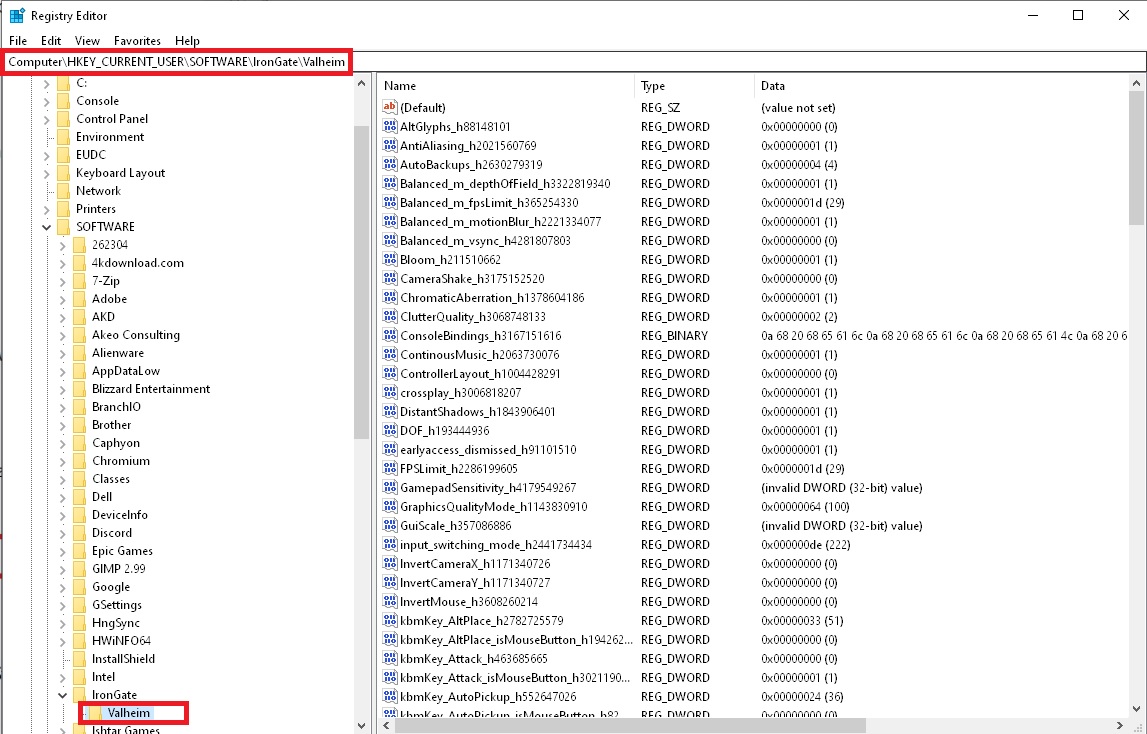
If that doesn't work, go start → type msconfig and open system configuration → services → hide microsoft services → DM me a screenshot of your services
blissful igloo
I greatly appreciate you taking the time to help me troubleshoot!
Should i remove gfx-enable-gfx-jobs=1 & gfx-enable-native-gfx-jobs=1 from bootconf
Ima try booting as is with reset registry and nvidia panel, brb
stark meadow
blissful igloo
Should i remove `gfx-enable-gfx-jobs=1 & gfx-enable-native-gfx-jobs=1` from boot...
That tweak does nothing if you are playing in Vulkan anyway. You can keep it for more performance in d3d11.
blissful igloo
Launching normally, not through vulkan atm
One thing i didnt try yet is forcing different dx levels through steam, come to think of it
Oh here we go

The registry swep sorted me out it seems. Getting a steady 90+ now, with proper GPU util
Thank you very very much MaCarBre! The registry cleanup is a good one, havent had to do that before but ill have to keep it in mind! Excellent, now to test how much performance impact mods have in this game haha
stark meadow
blissful igloo
Thank you very very much MaCarBre! The registry cleanup is a good one, havent ha...
Be sure to check your temps now when FPS in uncapped. Valheim can often use 100% of your GPU, which can degrade fans if you play a lot. Operating on 80°C is normal. I had to replace my fans in 2 years due to playing on uncapped FPS, so now I'm capping the game to 60FPS with new fans.
blissful igloo
Yeah i thought about that. Honestly might just have to run my laptop by the mechanic in any case. Been going strong for a few years already, needs a checkup. Fans, paste, and dust. Appreciate it!
blissful igloo
stark meadow
Be sure to check your temps now when FPS in uncapped. Valheim can often use 100%...
Last question; Do you have any idea of the diff between Windowed Fullscr and Excl Fullscr, at the point now with proper GPU util?
stark meadow
blissful igloo
Last question; Do you have any idea of the diff between Windowed Fullscr and Exc...
Provides some FPS boost in d3d11 in areas where you will already experience high FPS, such as empty oceans. Doesn't do much in Vulkan as Vulkan anyway operates without desktop windows manager control.
blissful igloo
Yeah, referring to non-vulkan. I'll play around with it. Also need to figure out which of my mods actually interferes now, as gpu util is back down with a ~50 item modlist. But the core issue is solved, thank you again very much for that!
stark meadow
blissful igloo
Yeah, referring to non-vulkan. I'll play around with it. Also need to figure out...
Be mindful that certain mods can also edit Valheim settings in registry and mess things up. This might have happened the first time to you as well.
blissful igloo
Ah, that's a good point. But reloading without mods puts gpu back up. So i have something affecting it during gameplay. Gonna go do the 50-50 method to isolate
blissful igloo
Okay, so my issue is.. Partially solved.. I realize now that i get different GPU utilization on different characters.. Has anyone ever seen this? No change in modlist between chars, same location in game, same time of day
stark meadow
blissful igloo
Okay, so my issue is.. Partially solved.. I realize now that i get different GPU...
Mods can permanently corrupt saves, both world and character ones. Did you check if it's related to gear that you have in inventory?
blissful igloo
Good shout, let's see
stark meadow
Also check if you have too many map pins on one character
blissful igloo
Unlikely, i am comparing in a freshly generated world, at spawn at noon
stark meadow
blissful igloo
Unlikely, i am comparing in a freshly generated world, at spawn at noon
When doing FPS comparisons, you should force the same weather, same time of day and probably also disable wind. Or you can load a backup of the same save for every comparison.
blissful igloo
Character one, fully empty inventory, at boss stones. And character two, at boss stones, completely empty inventory


I think i figured it out. Looks like a bad mod.
 stark meadow
blissful igloo
I think i figured it out. Looks like a bad mod.
stark meadow
blissful igloo
I think i figured it out. Looks like a bad mod.
Btw. when I said that mods can permanently corrupt save, it means that the issue can persist ever after uninstalling mods.
blissful igloo
So uninstall mod --> Clean registry? Or reset character? What's the solution here? And WHY ON EARTH (!) does a mod cause my GPU util to drop?
stark meadow
blissful igloo
So uninstall mod --> Clean registry? Or reset character? What's the solution her...
Mods can corrupt saves, where no amount of mod uninstallation or registry cleanup can save those saves afterwards.
Not every mod will do so. Mods can have bugs, or mod bugs can happen cuz mod was designes for earlier Valheim version.
You should check in with #mods-issues to see if a mod you are testing is known to have problems.
gilded sluice
always get a baseline with new character on a new world when testing. since old worlds, old characters etc can be problematic
 obtuse perch
Im trying to load into and make a new server and everytime on the loading screen it says valheim exe is not responding
dim raven
tropic torrent
is it possible that the server is running PTB version instead if main game versi...
Server is up to date and is not PTB. I am not on PTB either so I haven no idea why it isn't working.
gilded sluice
obtuse perch
Im trying to load into and make a new server and everytime on the loading screen...
Are you clicking or alt+tab out from the game while it's loading?
stark meadow
dim raven
Server is up to date and is not PTB. I am not on PTB either so I haven no idea w...
How are you hosting that server? On the same PC you are playing on, or some other device?
 tawny hazel
Hi, is this right channel for gameplay issues? I have lost my world and character for the second time now and i'd like to get some help
For some reason my game can't use any of previous saves
stark meadow
tawny hazel
Hi, is this right channel for gameplay issues? I have lost my world and characte...
Hi, yeah, think we got in touch on Steam forums?
Can you DM me a screenshot of your current character backups form the manage save menu?
tawny hazel
Yeah, no problem
dim raven
stark meadow
How are you hosting that server? On the same PC you are playing on, or some othe...
Its a friends server
stark meadow
dim raven
Its a friends server
When was the last time they restarted the server?
 runic aurora
dim raven
Can anyone help me with this issue I'm having? Everytime I try to join a specifi...
runic aurora
dim raven
Can anyone help me with this issue I'm having? Everytime I try to join a specifi...
I have had this problem before. Use Steam to check for bad files, or straight up reinstall the game.
gilded sluice
re-install doesn't help with mod issues just so ya'll know :/
since steam file checker doesn't remove files that shouldn't be there
dim raven
runic aurora
I have had this problem before. Use Steam to check for bad files, or straight u...
Did that. Didn't work. Also verified the files, everything was fine. He's going to restart the server maybe that will help.
runic aurora
Are we talking modded? In that case, remove the Bepinex mod, clean it out, and install it again. I find it doesn't take its own updates very well.
 split basin
Just made it to Ashlands.... is the spawn rate of the monsters there bugged? Its like a never ending constant swarm of mobs
marble wolf
Not bugged, it's just quite high. Sadly they've nerfed this in the current PTB so that might change.
dim raven
runic aurora
Are we talking modded? In that case, remove the Bepinex mod, clean it out, and ...
I checked the bepin folder like a friend suggested and they found nothing wrong with it.
toxic river
dim raven
I checked the bepin folder like a friend suggested and they found nothing wrong ...
The issue is that you shouldn't have a bepinex folder at all.
#valheim-help message to cleanly uninstall all mods
 plush sandal
hi ı am new dont know the rules ı read them but ı hope ı am not wroting something wrong or a wrong place ı am plating valheim on pc from steam ı have about 700 hours ı came across a bug that when ı mine muddy scrap piles at swamp in sunken crypts some loot like scrap iron leather scraps and withered bones they dont come to me or stay in sunken crypt they litteraly spawns at the surface or somehow teleports there i think its about game hitbox system or about sunken crypts's location i think its a bug and its effects the iron gain from sunken crypts alot i think
i litteraly found 13 scrap iron at the surface next to the sunken crypt that i recently mined every muddy scrap piles not just irons as you could guess leather scraps and withered bones to
i just found 14th scrap iron randomş around a sunken crypth at the surface
15*
:d
sharp steeple
That's a common issue I have seen much more commonly since ashlands went live. So until it gets fixed, just remember to do a sweep outside the sunken crypts.
 green moat
Hello. We have played with friends today and found a glitch with a catapult. Is it appropriate to report it here?
Today we for the first time get to catapult and found something funny. It started with experiments about what we can throw with it and at some point we started throwing rocks. Through several throws we realized, that catapult launch not one, but all stones in your hand. And spend just one.
We continued the experiments and found, that it works with food, some materials and even bombs.
 feral oar
Can anyone help me? When I try to launch the game it always crashes.
I tried reinstalling the game on a different drive, verifying the files, reinstalling my graphics card driver, restarting my pc, checking if I had any mods that would cause the issue (I've never installed mods for this game before anyways)
 robust mason
feral oar
Can anyone help me? When I try to launch the game it always crashes.
I tried re...
robust mason
feral oar
Can anyone help me? When I try to launch the game it always crashes.
I tried re...
Log?
feral oar
robust mason
Log?
robust mason
-
"If you're unable to start the game to do this, you can change TEXTURE_QUALITY in settings.cfg to 0"🤷♂️
-
The “d3d11: failed to create 2D texture” errors usually indicate an issue with DirectX. The most common solutions for those cases are:
Update GPU drivers
Uninstall GeForce Experience
Disable any app used to monitor framerate
Uninstall or reinstall NVIDIA Audio drivers. Some users have also reported that turning off Image Sharpening helped with similar issues, which can be disabled through the NVIDIA Control Panel.
https://forum.kerbalspaceprogram.com/topic/193125-d3d11-failed-to-create-2d-texture-shader/
Kerbal Space Program Forums
Playing a heavily modded RSS / RO game. Id say the game starts about 25% of the time. The other times it will load until the first black screen with the loading icon in the bottom right corner and freeze after a few seconds and become unresponsive. Ive had success deleting the module manager cach...
stark meadow
green moat
Today we for the first time get to catapult and found something funny. It starte...
That bug is already fixed on current public beta version.
 sonic estuary
While holding the mouse or controller secondary attack button, controller movement inputs (left stick) are ignored. This puts controller players at an unfair disadvantage in combat.
 steel monolith
Probably known, but you cannot go up or down the stairs of the small stone structures in the plains while wearing the Flametal Helmet.

 iron dirge
so i was playing last night and i got on to play some more and the game worked perfictly fine and no when i launch the game it opens loads for a seccond and then crashed and closes. ive reinstalled the game but i couldnt find anything online does anyone know whats going on?
stark meadow
sonic estuary
While holding the mouse or controller secondary attack button, controller moveme...
You can change how attack behave related to camera in the settings.
stark meadow
steel monolith
Probably known, but you cannot go up or down the stairs of the small stone struc...
Yeah, stairs got a bit higher. Not helmet related. Known issue.
stark meadow
iron dirge
so i was playing last night and i got on to play some more and the game worked p...
What are your PC specs? Were you playing with mods before? Using any 3rd party antivirus software?
sonic estuary
stark meadow
You can change how attack behave related to camera in the settings.
That affects turning, not movement
 amber geode
Yo my game is not starting, i checked integrity i dont have any betas or owt on its base game i reinstalled it and its jus not starting this shi shows up and then it jus goes back to "play" on steam sorry if ss is bad its hard to capture it on time
 marble wolf
amber geode
Yo my game is not starting, i checked integrity i dont have any betas or owt on ...
marble wolf
amber geode
Yo my game is not starting, i checked integrity i dont have any betas or owt on ...
Looks like mods to me.
amber geode
marble wolf
Looks like mods to me.
I thought i got rid of them all I'll look again but i dont think so
amber geode
marble wolf
Looks like mods to me.
no i have no mods it still same issue
marble wolf
Show us a screenshot of your game folder.
amber geode
 marble wolf
Look at all those mods.
amber geode
Where
marble wolf
amber geode
Bepinex, unstripped_corlib, doorstop. Cfg. All mod related.
amber geode
marble wolf
Bepinex, unstripped_corlib, doorstop. Cfg. All mod related.
Are they the only ones? Been a while since i played lol... mb
 marble wolf
Well, the mods are all probably in the Bepinex folder so yeah that should do it. It's probably just easier to delete the folder and reinstall though.
gilded sluice
amber geode
Are they the only ones? Been a while since i played lol... mb
best thing to do is just to delete the entire folder. and then validate game files on steam
 tacit solstice
Hey guys
just created a new character yesterday and while playing i noticed that in my name not only the first, but also third (out of four) character was in upper case when i looked at my bed/items i crafted
Thought it might be an input error, but i opened the character file in an hex editor and there only the first letter is in upper case. Does anyone know whats going on there and how i might correct it? it somehow really annoys me 😅
stark meadow
sonic estuary
That affects turning, not movement
Then I'm not sure to what you are referring to as being the problem. Can you elaborate?
stark meadow
tacit solstice
Hey guys
just created a new character yesterday and while playing i noticed that...
You probably named the character while having caps lock active. Every other letter gets displayed as a capital one then. Known issue. You can't fix it without mod atm, so look into #mods-discussion for some tips if you want to edit the file.
sonic estuary
stark meadow
Then I'm not sure to what you are referring to as being the problem. Can you ela...
The attack behaviour settings affect which direction the player is facing when attacking, but the issue I described affects how the player moves. While holding the secondary attack button, the player can’t move (walk) with a controller.
stark meadow
sonic estuary
The attack behaviour settings affect which direction the player is facing when a...
Are you talking about that small movement that you can do with the keyboard while alt attack is executing?
Don't think that's a significant advantage.
sonic estuary
It is when doing a sprinting jump secondary, as it cancels sprinting so I move slower. Also there’s no reason for controller players to have this disadvantage, even if it’s usually very small.
stark meadow
sonic estuary
It is when doing a sprinting jump secondary, as it cancels sprinting so I move s...
I see what you mean now. Still don't think it's a big issue. I wasn't aware of that being the case for controllers, so will forward.
tacit solstice
stark meadow
You probably named the character while having caps lock active. Every other lett...
Oh ok, thank you
 near cipher
hello guys can anyone help with valheim.exe is not responding?
sharp steeple
near cipher
hello guys can anyone help with valheim.exe is not responding?
if waiting it out doesn't work (about 5-10 minutes as stated in other chat sections), then there is a good chance it is a broken/old mod that is causing valheim to not load.
gilded sluice
near cipher
hello guys can anyone help with valheim.exe is not responding?
remove mods first

Reddit
Explore this post and more from the valheim community
bronze cliff
Ashlands weapon nature effect. This roots but also seems to paralyze which I don’t think is meant to happen. Mobs that have ranged attack or if a player is in melee range should still be attacked but are not.
 jaunty sentinel
Hey I just hopped on and most of my characters vanished from the menu. I still have the backups, but every time I try to restore them, nothing happens. Does anyone know what's happening? On PTB btw.
stark meadow
jaunty sentinel
Hey I just hopped on and most of my characters vanished from the menu. I still h...
If you don't have your characters visible in the select menu, you are probably not playing on PTB and the saves are PTB saves.
Which version number do you see in the bottom right corner of starting menu?
jaunty sentinel
stark meadow
If you don't have your characters visible in the select menu, you are probably n...
Thank you! I'm pretty sure I never switched back to the live version, so I never would've noticed that.
 jagged garnet
im trying to join this server (jotunheim) and it isnt letting me join I followed all the steps on their discord. it just keeps saying I cannot connect to Jotunheim with a modded assembly file. (reason im here is because their support is pretty slow)
just wanna see if anyone has struggled with this
marble wolf
jagged garnet
im trying to join this server (jotunheim) and it isnt letting me join I followed...
This isn't a problem with the vanilla game. This really needs taking up with their support.
jagged garnet
thanks just thought id see if anyone had an idea
stark meadow
jagged garnet
im trying to join this server (jotunheim) and it isnt letting me join I followed...
Test if you can join some random vanilla server on vanilla setup first, or at least reach password prompt.
Test both types of servers, crossplay (they have intertwined arrows icon 🔀 and steam servers that don't have that icon).
If vanilla works, but this server in particular does not, it's most likely a mod issue, so you can try asking in #mods-issues
jagged garnet
what is a vanilla server i can join
stark meadow
jagged garnet
what is a vanilla server i can join
Test a random server in the community tab. Reaching password prompt is good enough test.
Remove mods first. Vanilla valhiem instalation folder has to look like this: https://i.imgur.com/vdpdeOA.jpg
jagged garnet
they all have passwords no?
oh im dumb sorry, yea the password prompt worked, so i guess theres just something weird with the mod
stark meadow
jagged garnet
oh im dumb sorry, yea the password prompt worked, so i guess theres just somethi...
Did you test both type of servers, crossplay and steam?
jagged garnet
i only see the crossplay icons
stark meadow
jagged garnet
i only see the crossplay icons
Crossplay is the one usually with problems, so if you don't have problems with it, you won't have with steam server either.
jagged garnet
oh okay
 pulsar tide
not sure if this counts as a bug but i was fighting a lox and it started running away halfway through and when i was shooting at it, it ended up getting stuck on a slope and now none of my shots deal damage but i still gain the exp for hitting it, i only dont do damage when im a far enough distance away
 upbeat hatch
Hi guys, I've posted on reddit but I'll give it a bash here too 😄 I'll just copy paste.
We're both having issues with crashes though, and it's getting difficult to continue the game because of the inventory loss 😦
I've been having a lot less issues than he has, but we've scoured the internet for a bit of help and I'm struggling to find a fix.
We both have pretty much the same setup, but with different storage drives and monitors. AMD 5700 XT, Intel Core i9 10850, 32 gig ram, mobo is the Asus ROG Maximus XII hero.
I suspect a large part of the issue is that I'm driver only and he has AMD software, but uninstalling that causes issues in other games so we've settled for not going driver only for him. I'm driver only, but I still get crashes every so often, but to be fair not to the extent he does.
We don't use Vulkan, capped framerate, turned off our second monitors, verified filed, turned off background apps, and followed the megathread with no success. There's no particular time it crashes, it seems to be whenever it wants. The most difficult part is replicating it! We went a full day without a crash, next day was fine for around 2 hours, then it crashed. The time between crashes can be almost instant, or it can be several hours so it's become difficult to figure out what causes it. We found 1 crash log but it didn't have information about the crash in it. The rest of the logs are non existent. Sometimes it's a game freeze, crah to desktop, or hard lock, that's also inconsistent too.
Additional info: I'm hosting, this is the only game it's happened to where we can't source the issue (normally it's a form of GPU issue and we can resolve the crashes in other games) my other half underclocked his GPU and capped framerate and it hasn't helped, no XMP, my RAM speed is 2400, his is 2666, our PSU is Corsair 750w.
Many thanks in advance! 🙂
gilded sluice
upbeat hatch
Hi guys, I've posted on reddit but I'll give it a bash here too 😄 I'll just cop...
well. We don't have any official helpdesk at reddit. so it was wise to pose here
How to fix Valheim crashing problems →
https://www.reddit.com/r/valheim/comments/uq9b8x/
Reddit
Explore this post and more from the valheim community
This guide is a good base to solve most crashes
pulsar tide
well i ended up just farming it for Bow Exp while it was there, i dont mind it i was jsut bringing it to light
stark meadow
upbeat hatch
Hi guys, I've posted on reddit but I'll give it a bash here too 😄 I'll just cop...
Did you both reset BIOS to default already? That's the first thing you should be trying.
stark meadow
pulsar tide
well i ended up just farming it for Bow Exp while it was there, i dont mind it i...
Sry, meant to reply to someone else above.
For the issues you brought forward, both are known
All enemies can sometimes run away unintentionally.
pulsar tide
ah okay thank you
 ashen token
is having fps drops on a 4060 normal when playing this game?
void robin
stark meadow
Full system crashes are never caused by Valheim game logic, so it's not related ...
Update, the issue is the GPU. I bought a new PSU, 1000W because I am planning on building a new PC next year and want to have the option for double GPU. The issue still persists, and I manage to find the primary factor: Environmental particles, snowstorms more specifically. They just over stress my 7 year old RX580 (can be that it needs new thermal paste but I doubt that that is the only issue). The fix I found is a mod that disables them : https://www.nexusmods.com/valheim/mods/2060 . Maybe it is worth pointing it out to devs as a graphics option that can be tonggled on/off? The rest of the game runes great on very high graphs, but when snowstorms break out I have about 10 seconds to drop to low graphs before my PC crashes.

Nexus Mods :: Valheim
Simply disables performance-heavy particle effects like snow.
 sly spire
Hi! My friend have an issue, when he picking up for example a stone (nobody dropped this), the game immediately close and didnt show up the crash report window, if I drop something, he can pick up. Tried new and old character, new and old world, server. Vahleim reinstalled, nothing, windows reinstalled, nothing. I didnt find any system/app error. No antivirus report. Player.log didnt say any usefull information for me. The C:\Users\%username%\AppData\Local\Temp\IronGate\Valheim\Crashes is empty.
gilded sluice
sly spire
Hi! My friend have an issue, when he picking up for example a stone (nobody drop...
how does his install folder look?
SteamLibrary\steamapps\common\Valheim
should look something like this
 stark meadow
ashen token
is having fps drops on a 4060 normal when playing this game?
stark meadow
ashen token
is having fps drops on a 4060 normal when playing this game?
Depends on what kind of drops. You can check what are some known stutter causes here:
https://www.reddit.com/r/valheim/comments/1al0zeb/comment/kpciuzg/?utm_source=reddit&utm_medium=usertext&utm_name=valheim&utm_content=t1_lbc246i
stark meadow
void robin
Update, the issue is the GPU. I bought a new PSU, 1000W because I am planning on...
Have you tried dropping few % on frequency and voltage?
 ashen token
stark meadow
Depends on what kind of drops. You can check what are some known stutter causes ...
ashen token
stark meadow
Depends on what kind of drops. You can check what are some known stutter causes ...
I think the stuttering happens most around fires, i measured the temps, cpu hit 85 max and gpu 65, using an asus laptop 12700h 4060
stark meadow
sly spire
Hi! My friend have an issue, when he picking up for example a stone (nobody drop...
I've seen some weird behaviour like that when players where behind multiple NAT routers, maybe even VPN. Tell them to test how their trace route look like to a google server. Open command prompt, type "tracert 8.8.8.8".
stark meadow
ashen token
I think the stuttering happens most around fires, i measured the temps, cpu hit ...
If 85°C is max temp hit, it should be fine. Monitoring MAX temps or is that just the highest temp you saw while real time monitoring AVG temp? How much FPS do you have before and after it drops? How much fire are we talking?
 sweet copper
Hey guys. Just bought the game, created a character, created a world and when entering the world the error valheim.exe is not responding pops up. What do I do? Checked file integrity, restarted my pc, checked for drivers updates, ran as admin
ashen token
stark meadow
If 85°C is max temp hit, it should be fine. Monitoring MAX temps or is that just...
I'm not sure about how much fps is dropped cuz msi afterburner refreshes each second, but it's noticable. I'm capping my fps on 75 cuz more than that will get cpu temp skyrocketing. As for the fires, i have 5 camp fires and a cauldron in my base
stark meadow
sweet copper
Hey guys. Just bought the game, created a character, created a world and when en...
Check this comment: #steam-bugs-discussion message
sweet copper
stark meadow
Check this comment: https://discord.com/channels/391142601740517377/120254967592...
Ty, just waited for a few minutes and it worked!
stark meadow
ashen token
I'm not sure about how much fps is dropped cuz msi afterburner refreshes each se...
Try to record a video with FPS overlay. Be sure that you are venting your smoke so that it doesn't get trapped inside the house.
Also test running the game on vulkan, but it will also raise your temps.
upbeat hatch
stark meadow
Did you both reset BIOS to default already? That's the first thing you should be...
Thanks, I'll try this. I've not touched my BIOS at all but the other half has just reset his so we'll see if that's fixed anything!
ashen token
stark meadow
Try to record a video with FPS overlay. Be sure that you are venting your smoke ...
Ok. I tried forcing vulkan btw and it made it worse, stutters literally doubled xd
stark meadow
ashen token
Ok. I tried forcing vulkan btw and it made it worse, stutters literally doubled ...
Stutters are probably temp related then. Try lowering max power setting for the CPU in the windows power settings, by tweaking your power plan.

Depending on the laptop model, you might want to kick in the gaming mode, whcih will ramp up the fans.
I would recommend HWiNFO to check whcih MAX temps are being hit when playing.
Not sure if it can run along with afterburner at the same time on your system.
upbeat hatch
Sadly the crashes persist
trying to let it crash on it's own, it went to blackscreen/game not responding so we can access a log
Last entry in the log was "Spawing Dungeon" then it stopped responding
the last crash before that the log said "setting selected recipe 0"
Okay we've found a correlation!
Chests seem to be the main cause
Okay nevermind, there's crashes from spawned greylings and boats as well xD my crash logs won't help the other player though so it's not much to go off. He has no crash logs for some reason
 shell apex
Any1 find a fix to the ZRpc Timeout issue when attempting to connect to other peoples dedicated servers?
-Basically it disconnects me after 30-90 seconds after joining a server and I see a "ZRpc Timeout Detected" warning in the logs
-It seems intermittent, as I played on the server for an hour earlier today but now I can't seem to stay connected.
-Verified files fixed it the last time it happened yesterday but not working today
stark meadow
upbeat hatch
Okay nevermind, there's crashes from spawned greylings and boats as well xD my c...
If you reset your BIOS (has to be reset to defaults and not manual turning off features) + experience black screen on occasions, it's usually GPU related. Do you have 8pin + 6pin card when it comes to power cables?
Check if you have one cable going out of PSU going into the card that splits into two, or two separate cables going from PSU into the card.
Also make sure that the card is not hitting some MAX temps too much, by installing HWiNFO and checking which MAX temps have been reached after a crash.
I would also recommend testing what happens when you slightly down clock your card's frequency and power slightly by 3-5 few percent.
Last user I talked to who had 5600XT was crashing due to windows installing a wrong driver for the card. Which resulted in this error showing when installing Radeon software. For them, it was needed to disable Windows installing graphic driver automatically, before an attemps to install one from Radeon software.
 stark meadow
shell apex
Any1 find a fix to the ZRpc Timeout issue when attempting to connect to other pe...
stark meadow
shell apex
Any1 find a fix to the ZRpc Timeout issue when attempting to connect to other pe...
Are you playing on a modded server that required you to install mods as well?
If you are playing on Steam, first try lowering your browser pings per minute in general Steam settings → In game → set that setting from 5000 to 250.
gilded sluice
shell apex
Any1 find a fix to the ZRpc Timeout issue when attempting to connect to other pe...
ZRpc issues can either be bad WIFI connection dropping packages, or VPN problems
upbeat hatch
stark meadow
If you reset your BIOS (has to be reset to defaults and not manual turning off f...
GPUs should be in a state where they're stable, we've had a lot of issues in the past with them. I'm now driver only and have it in a stable state, the other half has the software and has managed to stabilize it when it comes to other games. We're hoping to be able to switch the nvidia soon, as it's been a rollercoaster with these GPUs. Fix one game, break another sort of thing xD We have tried underclocking, issues persist.
PSU is the Corsair 750w RMx Series, I'd have to see what cables are going where when it comes to that. When we last played I think Hearth and Home was the last update, and I remember that we had a smooth experience with no crashes. I'm thinking of just waiting for an update/full release and see what it's like then. We have other base building games to scratch the itch until then lol
Thank you for your help though! I appreciate that, there were a few extra things we have tried in the meantime but sadly no dice. I'm thankful for your suggestions 
 grizzled kraken
I see more people have the same problem
Valheim makes my GPU use 100% and heat up to 75 degrees
I don't understand why, other heavier games makes it heat less than Valheim
if anybody knows if this is on progress or there is some sort of a fix because I now consider hoping on Valheim because its just not really comfortable to feel my pc heat up so much
stark meadow
upbeat hatch
GPUs should be in a state where they're stable, we've had a lot of issues in the...
Check the cables first. Some pig tail cables won't deliber enough power to the cards, so use separate cables.
Mind you, underclocking is not a simple thing, in a sense that every undeclock should result in more stability. There is such a thing as unstable underclock as well.
stark meadow
grizzled kraken
I see more people have the same problem
Valheim makes my GPU use 100% and heat u...
75°C shouldn't be concerning, even on a laptop. Different tasks use GPU is different ways. It's not a simple matter of which game looks heavier or which games has more GPU related features. Valheim is very GPU heavy when it comes to simulating water and lighting, at to maximise FPS, it will try to use a 100% of the GPU. If you don't want that to happen, or if the GPU can't stand it limit FPS or tweak the GPU so that it's not a stressed on 100%. Any GPU should not be thermal throttling on 100% or exhibit any crashes. If it does, it's simply a badly tweaked GPU. My 1070 in desktop PC runs at 65°C at 100% usage, and the laptop 3060 runs at 80°C. No instability or crashes.
jagged hamlet
grizzled kraken
I see more people have the same problem
Valheim makes my GPU use 100% and heat u...
Define heavier games.
Looking better doesn't mean heavier, more calculations happening is heavier and a whole freaking lot of calculations happen in Valheim, almost every stone can be broken, trees cut down, soil terraformed, every build piece brings more calculations and so on.
grizzled kraken
stark meadow
75°C shouldn't be concerning, even on a laptop. Different tasks use GPU is diffe...
How come your 1070 runs it at 65 and my 3070 runs it at 75? The game does not crash or anything it's just heat up really bad
grizzled kraken
jagged hamlet
Define heavier games.
Looking better doesn't mean heavier, more calculations hap...
Games like Red Dead 2, Sekiro, some shooting games, but I guess you are right the game probably check every tick for interactions on the rendered area so things would break or move realistically
stark meadow
grizzled kraken
How come your 1070 runs it at 65 and my 3070 runs it at 75? The game does not cr...
You shouldn't be concerned about having your GPU temps be at 75°C.
You probably have a higher temp due to your card using more power than my card. I'm also running the game at 1080p.
You can always fine tune the card via some tweaking software so that it uses less power, less voltage with higher fan speed to get better temps.
For cards that have thermal throttling problems on higher temps, undevolting/underclocking can also result in more performance, and prolong the lifespan of the card.
When I was buying the card, I picked the one from a manufacturer that had best best thermal results.
I also replaced by thermal paste and thermal pads on my GPU, about 3 years ago when I started crashing due to PSU failure (thought it was the GPU att).
GPU has 3 fans, even though they are 8 years old.
shell apex
gilded sluice
ZRpc issues can either be bad WIFI connection dropping packages, or VPN problems
Hey thanks for the insights.
In my case I am hardwired through Ethernet, solid internet at 300MBps Down, 50+Up pretty consistently
No vpn in this case either.
shell apex
stark meadow
Are you playing on a modded server that required you to install mods as well?
If...
It is a modded server, I am using r2modman for the modmanager. It's weird, I can usually get into a server the first time of the day but then later on when i want to play again, it gives me this issue. I'll try the browser pings per minute and see if that helps. thanks!
sly spire
gilded sluice
how does his install folder look?
exactly the same as your
 sly spire
stark meadow
I've seen some weird behaviour like that when players where behind multiple NAT ...
sly spire
stark meadow
I've seen some weird behaviour like that when players where behind multiple NAT ...
not possible, local world cant work too
stark meadow
sly spire
not possible, local world cant work too
They crash even in their own world when pickup up a stone?
Crash is then probably related to something else and not to the stone.
In the player log you sent, not crash happened. Send your player's player log after crash happens, before they launch the game again.
sly spire
sly spire
Hi! My friend have an issue, when he picking up for example a stone (nobody drop...
This is the log after the "crash", I tried multiple times, but no crash report, its just close the game
void robin
stark meadow
Have you tried dropping few % on frequency and voltage?
Yeah, here is my set up on the last crash

FPS capped at 30 as well
ashen token
@stark meadow https://youtu.be/8SaR2Ya0iLY?si=KnqhFoQv7ug-FVt0


 cyan kite
when i load into my world it crashes first few times booting up the game
gilded sluice
cyan kite
when i load into my world it crashes first few times booting up the game
stop clicking if you do that during loading
it's a common problem 😦
and don't ALT+TAB either. it cause the same problem
stark meadow
ashen token
<@196192010581835776> https://youtu.be/8SaR2Ya0iLY?si=KnqhFoQv7ug-FVt0
It's hard to tell when are stutters happening when you are moving camera too much and video is recorded on 30fps
It doesn't seem like your FPS is dropping too much at least.
Is the image stuttering when moving the camera alone, even when you are not moving?
ashen token
stark meadow
Is the image stuttering when moving the camera alone, even when you are not movi...
I don't think so, i noticed that when instances increase/decrease the drops are happening
But the highest number of instances that i saw was like 7200, is that a lot?