#💟 i am still building my first pc 💟 part ii
10520 messages · Page 11 of 11 (latest)
 trail kayak
 tiny verge
 noble maple
if i had a cent for every build i helped on i would have like 30 cents
not a lot
i could buy a factory new nova exo
 trail kayak
that's just a gun lmao
 fervent nebula
noble maple
not a lot
fervent nebula
noble maple
not a lot
Thats quite à lot already
I think i helped like 7 build and some Set up
Thats all
noble maple
oh lol
 median quail
Uhh idk, maybe like 5
 tawdry ferry
trail kayak
like how wifi is
tawdry ferry
trail kayak
like how wifi is
it's only available on mobo's that have wifi
median quail
Oh counting tech support? Like 30
tawdry ferry
median quail
Oh counting tech support? Like 30
include that always dude
tawdry ferry
which everyone who's already built a pc would know tbh
tawdry ferry
it's a great drive for many other things, just not gaming
 median quail
Oh well, it’s her money wasted, and her tech support problem to deal with
noble maple
yes
median quail
tf you supposed to do when they only listen to some advice
fervent nebula
tawdry ferry
it's a great drive for many other things, just not gaming
quick question rauko, would you mind helping me later on making a rig for my dad ?
tawdry ferry
fervent nebula
quick question rauko, would you mind helping me later on making a rig for my dad...
'course dude
median quail
After her “wonderful” gen 5 ssds thermal throttle and shit their performance, all we can say is “we told you”
noble maple
fr
fervent nebula
tawdry ferry
'course dude
thanks dude, im hyped to make a rig for him, hes still using my old rx 570 and a 4790k
im already making a budget
tawdry ferry
median quail
After her “wonderful” gen 5 ssds thermal throttle and shit their performance, al...
more so when you've seen how i pointed out it actually benefits from active cooling, whether it be the air cooler from thermaltake or in part of a custom loop
 tulip pelican
Solid old 1080p rig
tawdry ferry
fervent nebula
im already making a budget
fair play, that gpu can be re-used in the newer rig if you wanted to dave a bit
fervent nebula
tawdry ferry
fair play, that gpu can be re-used in the newer rig if you wanted to dave a bit
nah, budget is 1500 euro
noble maple
fervent nebula
thanks dude, im hyped to make a rig for him, hes still using my old rx 570 and a...
give old rig when you make the pc
tawdry ferry
fervent nebula
nah, budget is 1500 euro
fair enough
median quail
tawdry ferry
more so when you've seen how i pointed out it actually benefits from active cool...
Yeah
fervent nebula
hes also using a massive ultrawide whit it
fervent nebula
noble maple
give old rig when you make the pc
im taking it for me lol
fervent nebula
nice
trail kayak
tawdry ferry
which everyone who's already built a pc would know tbh
except when i asked, i was told it was the m.2s as well. and it's definitely not.
fervent nebula
neat 
tawdry ferry
trail kayak
except when i asked, i was told it was the m.2s as well. and it's definitely not...
when and who did you ask ?
noble maple
dont have money to give it a good pc to live in
will prob keep for a while or resell
trail kayak
i asked multiple times in this thread and those answers sent me through a spiral
confused the fuck out of me
fervent nebula
noble maple
dont have money to give it a good pc to live in
whats your current rig ? tell in dms tho dont want to flood the chat here
tawdry ferry
trail kayak
i asked multiple times in this thread and those answers sent me through a spiral
i didn't see you ask it here in this thread, didn't even see you ask about it in the actual second thread either
and yes, i do read through the whole thread
noble maple
tawdry ferry
and yes, i do read through the whole thread
thats a lot of messages to read
tawdry ferry
noble maple
thats a lot of messages to read
it's easier for me to give good advice when i know what's going on
median quail
trail kayak
except when i asked, i was told it was the m.2s as well. and it's definitely not...
How. Must’ve been trolls, because that’s completely inaccurate
tawdry ferry
also means i can help with any corrections if they're needed
noble maple
tawdry ferry
it's easier for me to give good advice when i know what's going on
yeah ig
trail kayak
they had been helping me. they were of equal "status" to you creeper
trail kayak
im on motherboards
 timid lava
LETS GO
trail kayak
i have access to my notes for now
median quail
trail kayak
im on motherboards
So is that a yes?
timid lava
I’ll take it as a yes
median quail
And if so, what are the drives
trail kayak
timid lava
nice job
thank you thank you
timid lava
Yes
What are the drives
timid lava
Wait so you picked the Mobo already?
trail kayak
no but its probably going to be x670e
there are some good b650 boards with interesting features
but i think i have just found out that the x670e chipset has more lanes and has a faster processing power than the b650
median quail
trail kayak
no but its probably going to be x670e
What do you need to know to choose a motherboard
trail kayak
still nothing like a dedicated cpu tho
median quail
Ofc it has more lanes
X670 always has more lanes, and the extreme chipset motherboard have even more
trail kayak
median quail
What do you need to know to choose a motherboard
nothing from you guys
for now
trail kayak
is the x670e chipset faster?
timid lava
Well what do you consider the “fastest”
Like what factor
because that can mean a lot of things
median quail
What features are you looking for in a motherboard?
trail kayak
im not going through this again. nobody knows any features here to help teach me anyway
the only feature they know about is fucking wifi lmao
dream's Notion on Notion
wifi
pcie configuration?
dual x8 (2x pcie gen 4 x8)
post code
led light troubleshooting
beep code
eclk (external clock gen)
usb type c
usb type a
thunderbolt
A-thunderbolt?
optical out
sata
m2
ethernet
audio jacks
10 gb lan
safeboot
bios flashback
dual bios
here are some features that i have compiled tho
that exist
 solemn walrus
trail kayak
the only feature they know about is fucking wifi lmao
solemn walrus
trail kayak
the only feature they know about is fucking wifi lmao
(only one you need)
solemn walrus
trail kayak
https://ambiguous-hen-8da.notion.site/motherboard-list-of-features-6400330cc3ab4...
idk why you have ethernet and 10gb lan separate
every board has flashback
dual bios, eclk and safeboot are only useful if youre hardcore into overclocking
 copper merlin
oh my god this is still going on
solemn walrus
we have already been on this
median quail
Features that matter:
Wi-Fi + Bluetooth
multiple m.2 slots
extra pcie expansion
4 light debug LEDs
Nice to haves:
clear cmos button on the back io
bios flashback
7-segment display debug
Lots of usb (mix of 480Mb, 5Gb, snd 10Gb)
usb c
6+ sata ports
2.5 Gb LAN (if you want fast nas access in the near future)
Features that don’t matter:
thunderbolt
10Gb LAN
tons of usb 10Gb
Features to completely ignore
basically everything else on that list
solemn walrus
but went on storage :(
copper merlin
median quail
Features that matter:
> Wi-Fi + Bluetooth
> multiple m.2 slots
> extra pcie exp...
usb c
ya
s
median quail
👍
Safeboot may be useful, depending on what it is and how it works, idk what it is tho
tawdry ferry
trail kayak
there are some good b650 boards with interesting features
b650e exits, and esentially has the same features as x670e just at a cheaper price
tawdry ferry
median quail
Features that matter:
> Wi-Fi + Bluetooth
> multiple m.2 slots
> extra pcie exp...
bios flashback is on the nice to have part tbh
though tbf you'll find most x670/x670e has the same board layout as the b650/b650e
the only difference might be the rear I/E
median quail
tawdry ferry
bios flashback is on the nice to have part tbh
You agree with the “everything else doesn’t matter”?
tawdry ferry
median quail
You agree with the “everything else doesn’t matter”?
definitely
solemn walrus
tawdry ferry
bios flashback is on the nice to have part tbh
every board has
median quail
Maybe not the prime series (are they still making that?)
 pastel flax
Yes you need one
tawdry ferry
solemn walrus
every board has
nowadays it's a default feature
solemn walrus
pastel flax
Yes you need one
go away blud
pastel flax
solemn walrus
go away blud
Why
solemn walrus
this thread living rent free in your head
pastel flax
Why tf do you care if I’m here
median quail
solemn walrus
go away blud
He’s helping lmao, can stay
tawdry ferry
this shows that you do, as it's at the start of thermal throttling at that point for the drive
 median quail
I 100% agree with a mini fan (Noctua FTW)
tawdry ferry
median quail
I 100% agree with a mini fan (Noctua FTW)
beaten by arctic
pastel flax
median quail
I 100% agree with a mini fan (Noctua FTW)
Lmao
median quail
tawdry ferry
beaten by arctic
They make mini fans like that?
pastel flax
solemn walrus
cause u said, annoyingly, that you will leave, 3 times
I said it twice the first time I did leave then got pinged and stayed the second yes I didn’t leave
Why are you stalking me lmao
tawdry ferry
median quail
They make mini fans like that?
they make 6k and 15k rpm 40mm fans, noctua maxes out at 4.5k rpm
pastel flax
tawdry ferry
they make 6k and 15k rpm 40mm fans, noctua maxes out at 4.5k rpm
Arctic p12 max the best fan imo
solemn walrus
pastel flax
I said it twice the first time I did leave then got pinged and stayed the second...
(you didnt get pinged)
tawdry ferry
median quail
They make mini fans like that?
just to show you https://youtu.be/2mAiWewLEk0?t=134
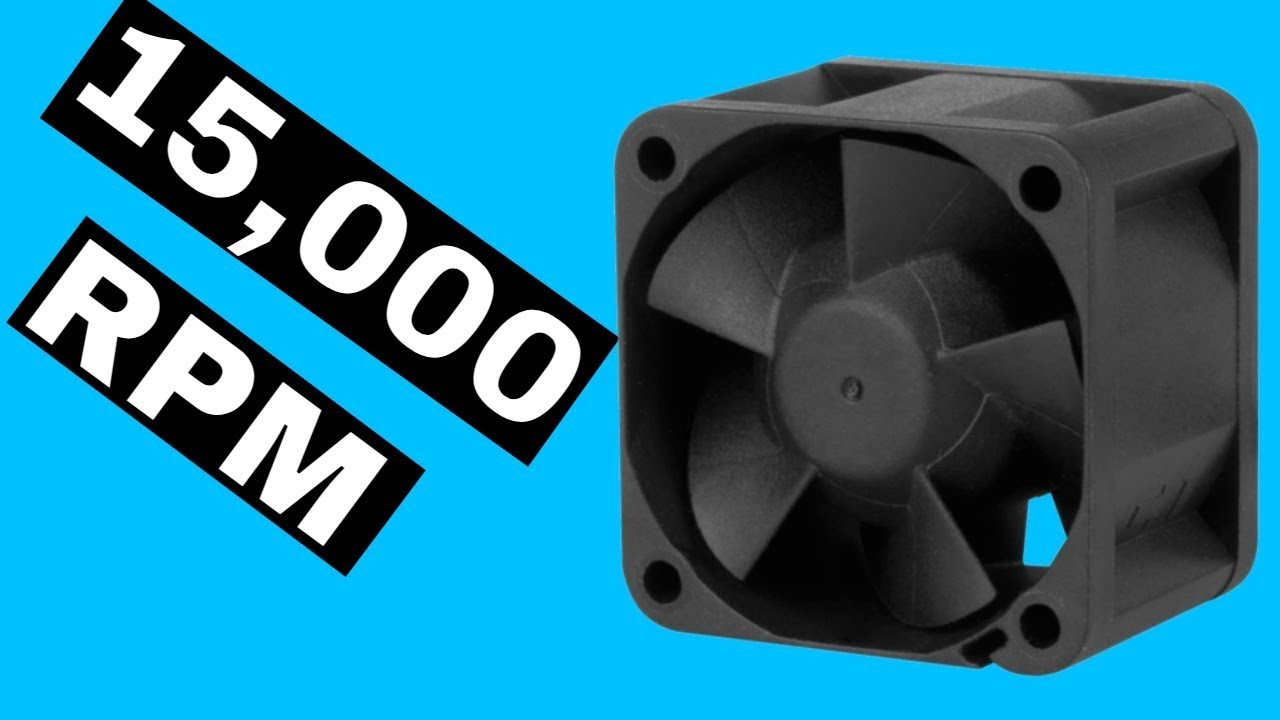
15,000 RPM Fan! Arctic Server Fans - S4028-15K & S4028-6K
Performance
Fan Speed: 1400 - 15000 rpm
Airflow: 19,23 CFM / 32,67 m³/h
Speed Control: Pulse Width Modulation – PWM
Static Pressure: 26.5 mm H₂O
Fan
Fan Frame: Standard
Connector: 2510 4-Pin Fan-Connector
Fan Bearing: Dual Ball Bearing
Operating Ambient Temperature: 0 - 40 °C
Warranty: 6...
median quail
Oh those are server fans
tawdry ferry
and btw, the 6k rpm ones are silent
pastel flax
solemn walrus
(you didnt get pinged)
Lol I did and every time you throw one of these temper tantrums I have shown it to you
tawdry ferry
median quail
Oh those are server fans
what you think noctua 40mm ones are for ?
solemn walrus
pastel flax
Lol I did and every time you throw one of these temper tantrums I have shown it ...
lmao what r u on about
when i disproved that you didnt get pinged u dissapeared
median quail
tawdry ferry
what you think noctua 40mm ones are for ?
are they marketed as server fans?
pastel flax
pastel flax
Lol I did and every time you throw one of these temper tantrums I have shown it ...
Now I’m here to help dream not argue with you so maybe you should do the same
tawdry ferry
median quail
are they marketed as server fans?
marketed for both consumer and server
pastel flax
solemn walrus
lmao what r u on about
when i disproved that you didnt get pinged u dissapeared
Lmao
I didn’t
median quail
tawdry ferry
marketed for both consumer and server
Yeah that makes sense
tawdry ferry
median quail
Yeah that makes sense
still less performant, and louder than arctic funily enough though
solemn walrus
my bad, you just changed topics
median quail
Oh wow
tawdry ferry
15k rpm 40mm arctic fan is the only screamer of a fan arctic really makes
pastel flax
median quail
Oh wow
Ngl Arctic is really underrated
median quail
It is
solemn walrus
anyway
median quail
@trail kayak
Features that matter:
multiple m.2 slots
extra pcie expansion
4 light debug LEDs
Nice to haves:
Wi-Fi + Bluetooth
clear cmos button on the back io
bios flashback
7-segment display debug
Lots of usb (mix of 480Mb, 5Gb, and a little 10Gb)
usb c
6+ sata ports
2.5 Gb LAN (if you want fast nas access in the near future)
pcie button release
Features that don’t matter:
thunderbolt
10Gb LAN
usb 10Gb
Features to completely ignore
basically everything else on that list
tawdry ferry
median quail
Oh wow
if you want a laugh, the ice giant, basically the only air cooler capable of being good enough for a 13900k, uses 4 arctic fans under a different sticker/label
2x p12 pwm, and 2x p12 pwm pst on it
median quail
I’ve heard about that
pastel flax
median quail
<@841694455747706911>
Features that matter:
> multiple m.2 slots
> extra pcie ex...
Add a pci release for the gpu on features that matter
It’s a huge help
median quail
pastel flax
Add a pci release for the gpu on features that matter
Wdym
Oh
Nah that’s a nice to have
solemn walrus
tawdry ferry
if you want a laugh, the ice giant, basically the only air cooler capable of bei...
should have used a T30 
pastel flax
median quail
Oh
It’s amazing to have and very very helpful
tawdry ferry
median quail
I’ve heard about that
 solemn walrus
nvm they werent available back then
tawdry ferry
@median quail

pretty much the most expensive air cooler and you need a wide case for it
median quail
tawdry ferry
<@797640137273901137>
nice
tawdry ferry
median quail
nice
gotta laugh at it using arctic fans, as people used to think noctua are the best
median quail
Ohhh yeah 😂
pastel flax
tawdry ferry
gotta laugh at it using arctic fans, as people used to think noctua are the best
People still do sadly
Arctic is THE best for fans rn
They are cheap af to
tawdry ferry
pastel flax
Arctic is THE best for fans rn
best for value**
pastel flax
I got a p12 pwm for $4
tawdry ferry
5 fans for $30
median quail
Noctua just has such a reputation
tawdry ferry
median quail
Noctua just has such a reputation
arctic has a similar reputation tbf
i've dealt with them when they sent a message out to all arctic lf2 owners about a qc issue during covid quaratine
pastel flax
tawdry ferry
arctic has a similar reputation tbf
Not really
tawdry ferry
pastel flax
Not really
yes, they'll freely give you mounts for newer mobo's
the same as noctua do
median quail
I mean I never heard of arctic until someone here mentioned it. I don’t remember who
 formal iris
10k again
median quail
formal iris
10k again
Shhhhh
solemn walrus
i need me some lian li p28 fr
solemn walrus
theyre the best fans
tawdry ferry
solemn walrus
i need me some lian li p28 fr
they look good but remember, 28mm thick
solemn walrus
3mm cant be that important
pastel flax

tawdry ferry
solemn walrus
3mm cant be that important
it does when you need to get different screw lengths as well as it won't fit in the middle of some coolers
solemn walrus
i dont want em on my cooler (i cant change the fan on it)
tawdry ferry
most screws if you want to use them on a rad cover for up to 25mm thick fans tbh
solemn walrus
i mean if people use T30s, im sure P28s are possible
tawdry ferry
solemn walrus
i mean if people use T30s, im sure P28s are possible
sure on cases, not so much on rads, as they don't come straight away with screws for thicker fans
if i ever used some arctic bionix p120 a-rgb i have to contact arctic for them to send out different screws
because it's a 30mm thick fan
solemn walrus
well, the fans come with the screws dont they
tawdry ferry
solemn walrus
well, the fans come with the screws dont they
for cases mainly yeah
just long enough to screw the fan to the case itself, no more
 loud berry
solemn walrus
well, the fans come with the screws dont they
loud berry
solemn walrus
well, the fans come with the screws dont they
LMFAO
solemn walrus
loud berry
LMFAO
what r u lmfaoing about
pastel flax
solemn walrus
what r u lmfaoing about
They don’t
loud berry
Let’s find the most expensive and intricate screws for these case fans
solemn walrus
wat
loud berry
Also im picking up the parts for my build today guys
pastel flax
Yay
solemn walrus
idc
tawdry ferry
pastel flax
They don’t
they do, though, but it's your bog standard screw for the case
pastel flax
solemn walrus
idc
Bro stop
pastel flax
tawdry ferry
they do, though, but it's your bog standard screw for the case
Yeah not for rads though
median quail
I made the mistake of buying arctic p12’s instead of arctic p12 pwm’s
tawdry ferry
pastel flax
Yeah not for rads though
nope, rads have their own, namely for a 25mm fan to be used with it
pastel flax
tawdry ferry
nope, rads have their own, namely for a 25mm fan to be used with it
I meant the rad won’t come with 28 mm screws
tawdry ferry
median quail
I made the mistake of buying arctic p12’s instead of arctic p12 pwm’s
didn't i correct you on that one with the link?
tawdry ferry
pastel flax
I meant the rad won’t come with 28 mm screws
for a 25mm fan, the screw would be 28mm long at most
solemn walrus
median quail
I made the mistake of buying arctic p12’s instead of arctic p12 pwm’s
fr happened to me
tawdry ferry
for a 28mm fan the screw would need to be 30-32mm long
for a 30mm fan the screw will need to be 33-35mm long
solemn walrus
solemn walrus
fr happened to me
meh, they push air and are relatively quiet anyway, so
median quail
tawdry ferry
didn't i correct you on that one with the link?
Wdym
median quail
solemn walrus
fr happened to me
Yeah, I was so excited to plug my fans into my fan hub, and they just ran at 100% :/
Had to get fan splitters
tawdry ferry
median quail
Wdym
ah might of been someone else
i know i've corrected a fair few in regards to the difference between a p12 and a p12 pwm/pwm pst
solemn walrus
median quail
Yeah, I was so excited to plug my fans into my fan hub, and they just ran at 100...
next summer im getting a splitter and a 200mm fan
solemn walrus
solemn walrus
next summer im getting a splitter and a 200mm fan
side panel open, bam lots of air
tawdry ferry
solemn walrus
next summer im getting a splitter and a 200mm fan
phanteks, fractal and noctual for that size tbf
median quail
tawdry ferry
i know i've corrected a fair few in regards to the difference between a p12 and ...
Idk, I know someone told me about them here. It may have been you, or Dxtchin
solemn walrus
solemn walrus
side panel open, bam lots of air
embracing the redneck
tawdry ferry
solemn walrus
embracing the redneck
when you fit a radiator fan from a car there
median quail
But I looked at Amazon, and saw the 2 different listings, and didn’t understand that 1 was 3 pin and 1 was 4 pin
solemn walrus
solemn walrus
might be a bit too redneck for me
if i knew how to solder, id do that
tawdry ferry
solemn walrus
if i knew how to solder, id do that
that's the easy bit of it tbh
solemn walrus
dont have the tools for it
tawdry ferry
getting good solder nowadays not as easy as it used to be
median quail
tawdry ferry
i know i've corrected a fair few in regards to the difference between a p12 and ...
Are the pst ones daisy-chainable?
solemn walrus
im supposed to be building my own ethernet cable or smth very soon
solemn walrus
median quail
Are the pst ones daisy-chainable?
ye
tawdry ferry
median quail
Are the pst ones daisy-chainable?
yup, requires no splitter at all
solemn walrus
solemn walrus
im supposed to be building my own ethernet cable or smth very soon <:whoa:717980...
gotta love networking courses
tawdry ferry
solemn walrus
im supposed to be building my own ethernet cable or smth very soon <:whoa:717980...
ah, means using a decent crimper and cutter/stripper
grab something like this dude, for yourself @solemn walrus

 tawdry ferry
it's better than using one of this style

i have one of these for doing rj11/12
phone line/dsl connector
solemn walrus
?
 tawdry ferry
solemn walrus
?
tawdry ferry
solemn walrus
?
aye
solemn walrus
might be a bit over my budget
tawdry ferry
can get one of these cheaply for testing the cables
 median quail
I wanna do Ethernet too, so like this?
https://www.amazon.com/gp/aw/d/B07YC9TQKH/?

RJ45 Crimp Tool Pass Through Crimper Cutter for Cat6a Cat6 Cat5 Cat5e 8P8C Modular Connector Ethernet All-in-one Wire Tool
solemn walrus
remove everytjing after the ?
tawdry ferry
median quail
I wanna do Ethernet too, so like this?
https://www.amazon.com/gp/aw/d/B07YC9TQKH...
delete everything after the first '?' to shrink the link
but otherwise, yeah that's decent for it
tawdry ferry
median quail
Why is there that much garbage in a link
link tracking, search result, search result tracking, purchase tracking
median quail
Wow
tawdry ferry
pretty much on most websites if you delete everything oafter the first '?' you remove all of that
and via link tracking alone it shows who it's shared out to even if the person doesn' buy it, someone seld might
tawdry ferry
you have basically the same happening with cookies, which results in you seeing adverts related to things you've already bought
median quail
Yeah
tulip pelican
tawdry ferry
From what I’ve seen they’re pretty suboptimal cooling for the price mainly because of the way the cooler site. It doesn’t get the freshest of air unless you have fans ontop of your case and it’s still meh
Plus it’s ridiculously overpriced
 wooden heron
ohms measures resistance on the electrical circuit
median quail
Lol that’s a lil while ago
wooden heron
like the first message
median quail
Oh yeah it is
wooden heron
I just had some electrical information to share
median quail
Fair
tawdry ferry
tulip pelican
Plus it’s ridiculously overpriced
it's that but it does what a noctua nh-d15 can't do tbh
tulip pelican
The nh d15 gets ran over by a $40 cooler so
tawdry ferry
cool a 13900k without thermal throttling
median quail
Anything that’s “the best” will be overpriced, because the company knows that it can sell it for more
tawdry ferry
median quail
Anything that’s “the best” will be overpriced, because the company knows that it...
arctic and thermalright says otherwise on that
solemn walrus
yes but wheres the fun in that
tulip pelican

trail kayak
median quail
<@841694455747706911>
Features that matter:
> multiple m.2 slots
> extra pcie ex...
i am one of the people who can trully appreciate a list like this
however you didnt include anymore features and you left some out. could you please help me finish this list
trail kayak
tawdry ferry
if you want a laugh, the ice giant, basically the only air cooler capable of bei...
wdym by sticker label
solemn walrus
trail kayak
i am one of the people who can trully appreciate a list like this
however you d...
 solemn walrus
trail kayak
wdym by sticker label
solemn walrus
trail kayak
wdym by sticker label
this


 median quail
trail kayak
i am one of the people who can trully appreciate a list like this
however you d...
median quail
trail kayak
i am one of the people who can trully appreciate a list like this
however you d...
The ones I left out are the ones that literally do not matter
tawdry ferry
trail kayak
i am one of the people who can trully appreciate a list like this
however you d...
the ones he left out is so insignificant it's not needed
median quail
Hence the:
Features to completely ignore:
basically everything else
I think i included everything useful in that. If anyone else thinks of another, I may add it
tawdry ferry
the need for 10Gbe is a definite "does not matter"
median quail
Yeah, especially with the (aquantia?) nic that has so many issues
They may have solved thsoe
tawdry ferry
also the need for 10g usb really is a "does not matter"
median quail
tawdry ferry
also the need for 10g usb really is a "does not matter"
thats what you meant
tawdry ferry
median quail
*thats* what you meant
both
median quail
Oh
tawdry ferry
10Gbe = 10 Gigabit ethernet
median quail
I kinda already had those both in the “does not matter” but yeah it makes sense
median quail
tawdry ferry
10Gbe = 10 Gigabit ethernet
That’s what I thought
Or were you just agreeing with me?
median quail
tawdry ferry
wifi and bt should be put in the "nice to have"
Would right angle usb be nice to have or doesn’t matter
median quail
and dual x8 doesnt matter at all, so i should put that in completely ignore?
tawdry ferry
median quail
and dual x8 doesnt matter at all, so i should put that in completely ignore?
yup
 proven fern
b-b-but a6000 sli
median quail
SLI is dead
Motherboards:
Features that matter:
multiple m.2 slots
extra pcie expansion
4 light debug LEDs
Nice to haves:
Wi-Fi + Bluetooth
bios flashback
7-segment display debug
Lots of usb (mix of 480Mb and 5Gb)
Many Fan Headers
6+ sata ports
2.5 Gb LAN (if you want fast nas access in the near future)
Clear CMOS Button on Rear I/O
PCIE Release Button
Nice to have but doesn't matter:
Right-Angle Internal Headers
USB-C
Features that don’t matter:
Thunderbolt
10Gb LAN
10+ Gb USB
Beep Codes
Covers
Completely Ignore:
ECG (external clock gen)
Any Screens
Optical Out Audio
x16 -> dual x8
Dual BIOS
SafeBoot
basically everything else
Dream asked me to put everything else on
from her website list thing
proven fern
median quail
SLI is dead
so is optane
tawdry ferry
proven fern
b-b-but a6000 sli
that's nvlink not sli, still though it's dead
median quail
for nvlink, shed actually be wasting money on the quadros
proven fern
the fact that a6000 and 6000 ada are what nvidia decided to call these 2 gpus is so annoying
median quail
multi-gpu gaming is dead
proven fern
i keep mixing them up
proven fern
median quail
multi-gpu gaming is dead
well aware
median quail
lol
trail kayak
proven fern
the fact that a6000 and 6000 ada are what nvidia decided to call these 2 gpus is...
why are we talking about workstation gpus and quadros and multigpu support lmao
median quail
trail kayak
why are we talking about workstation gpus and quadros and multigpu support lmao
idk, just ignore that
proven fern
No reason doesn't matter
median quail
trail kayak
what does running a 2nd gpu even do
the nvlink bridge combines them. but multi-gpu is dead and there's only like 10 games that support it
trail kayak
ik its dead and ik some people do it cause its cheaper for what they want to do of they go older gpus
median quail
its not really cheaper
trail kayak
but did it increase performance back then
proven fern
The reason it still exists on Quadros is it's still useful for professional workloads and servers
Also yeah
trail kayak
median quail
its not really cheaper
it honestly depends what youre comparing
median quail
"back then" in 2009
proven fern
Even 1080ti sli was decent
median quail
there's no point in continuing this discussion so lets move on
proven fern
Shit was worthless at 20 series
trail kayak
buildzoid loves multi gpus so i just wanna know why lmap
tulip pelican
I feel 4 bug led lights should come standard
proven fern
It looks cool frankly
tulip pelican
7 second displays are nice to have
trail kayak
im at work. not much progress is gonna happen
even at home i need to look back at my mb sheet
median quail
trail kayak
buildzoid loves multi gpus so i just wanna know why lmap
look up multi gpu yourself if you wanna learn more
trail kayak
how did it increase performance tho?
tulip pelican
Because theirs more graphics processing power?
proven fern
1080ti sli is like 3080 performance
median quail
trail kayak
how did it increase performance tho?
using both gpus to render instead of 1
proven fern
Was actually a crazy fucking gain
trail kayak
so like double the processing power?
tulip pelican
Fairly certain its useless in 4000 series as it doesnt suppoirt sli
median quail
proven fern
1080ti sli is like 3080 performance
no way, not that much
tulip pelican
defo not
median quail
median quail
**Motherboards:**
__Features that matter:__
> multiple m.2 slots
> extra pcie ex...
also, @trail kayak, i think this includes all the features from your mb feature list
tulip pelican
sli was never super useful in my opiniuon after like 20 series
proven fern
Nah it was huge
tulip pelican
cause graphics cards became so powerful
proven fern
Let me try find some benches
tulip pelican
its useless in games
trail kayak
median quail
also, <@841694455747706911>, i think this includes all the features from your mb...
ty i saw and skimmed it and im grateful but i wont have time to really dive into it until after work
tulip pelican
completely
trail kayak
so like realistically speaking. what games can i not play with my build so far
median quail
tulip pelican
Yea lets talk about crossfire
bruh
median quail
trail kayak
so like realistically speaking. what games can i not play with my build so far
wdym
trail kayak
like on my laptop i can only play rainbow six on lowest settings
what games can i not play with my current build
the pc build
median quail
with a 4090 and a 7950x3D you can play anything afaik
tulip pelican
at max 4k settings
tawdry ferry
proven fern
the fact that a6000 and 6000 ada are what nvidia decided to call these 2 gpus is...
a6000 and a6000 ada*
trail kayak
ik i can do cyberpunk 4k rt
tulip pelican
Defo starfield
proven fern
With dlss
tulip pelican
It’s more cpu bound anyway
proven fern
Nothing doing cyberpunk 4k rt without upscalers
With more than 20 frames
I should add
I mean it runs
tulip pelican
If you did low RT you could
tawdry ferry
trail kayak
but did it increase performance back then
it was at best a 6% gain while creating more neat and needing more power, it was less gains and more waste, especially as a single gpu can do it more efficiently
tawdry ferry
proven fern
The reason it still exists on Quadros is it's still useful for professional work...
more for tying an accelerator card to a a quadro
median quail
can we not discuss multiple gpus? It's not going to help the thread
tulip pelican
Probably why SLI and crossfire are pretty much dead now
tawdry ferry
tulip pelican
I feel 4 bug led lights should come standard
nope, what should come standard again is a speaker attached to the mobo
proven fern
tawdry ferry
a6000 and a6000 ada*
Even worse
median quail
tawdry ferry
nope, what should come standard again is a speaker attached to the mobo
honestly yeah
tawdry ferry
proven fern
Even worse <:linuth:654379955043696680>
there's even an a4000 and a4000 ada
tulip pelican
tawdry ferry
nope, what should come standard again is a speaker attached to the mobo
Well considering debug lights arent even a standard yet
id say theyd need to be first at very least
tawdry ferry
tulip pelican
Well considering debug lights arent even a standard yet
speakers where standard til they decided to just have it as a header
median quail
is it still a header?
tawdry ferry
median quail
is it still a header?
yup, depends on the mobo for it's location
on asus boards it's right in with the front panel header
median quail
thats a lot to ask
tulip pelican
Is it tho
median quail
yes
just a lil speaker on the motherboard
connected to the header thats already there
tulip pelican
How’s it a lot to just make it work with rear IO lol
tawdry ferry
tulip pelican
How’s it a lot to just make it work with rear IO lol
you'd have to patch it through the audio codec chip which takes more wiring
where as having it directly to a speaker is less pcb reconfig
and more direct pathway
tulip pelican
Well asus is adding stupid shit like auxiliary board power for gpus so
Can’t be too much of a change from something like that
median quail
i still think a speaker on the motherboard is better. and getting everyone to agree to a standard like that?
tulip pelican
I don’t see why 7 segment displays aren’t just standardized lol
Or at very least debug lights
trail kayak
also the a6000 and the 6000 ada are ass
proven fern
I mean in general they aren't but for your use case absolutely
trail kayak
no like in general they are.
median quail
trail kayak
no like in general they are.
no, for their purpose, theyre amazing
proven fern
 what are you talking about
trail kayak
probably the least useful workstation gpu release.
only good for a higher tensor core count which is only for AI
the 4090 literally out preforms both of them in most workloads.
median quail
and this is why
 trail kayak
oh wow it has ecc
median quail
thats important for its workload
trail kayak
ecc memory is great but what is it doing on a gpu
median quail
trail kayak
ecc memory is great but what is it doing on a gpu
same thing its doing on a cpu.....correcting ram errors
tulip pelican
Pretty useful for ai
median quail
which for workstation/server uses, certified drivers and loads of (can be ecc) ram are so useful
trail kayak
not even workstation uses.
just ai
like top ai
you can do all of that without the a6000 or the 6000 ada
median quail
do you know how much revenue Nvidia gets from selling ai gpus?
trail kayak
i mean do you?
median quail
a lot
trail kayak
its probably a lot
tulip pelican
Way more then they do with consumer products
median quail
which is why they kinda dont care about GeForce
trail kayak
but since you brought it up. might as well tell me the number lmao
tawdry ferry
trail kayak
also the a6000 and the 6000 ada are ass
the a6000 ada is ass compared to a 4090
trail kayak
yeah it is
tawdry ferry
but an a6000 is way better than a 3090
median quail
Nvidia just made $13.5B revenue over the AI boom
-TheVerge

The Verge
On a staggering $13.5 billion in revenue.
trail kayak
the 6000 ada has a theoretical perf that is greater the the 4090 like maybe +7% or so
but not really
tawdry ferry
and quadro cards get the best silicon dies meanwhile geforce cards get's their rejects
proven fern
It does draw like half the power than a 4090
tawdry ferry
so essentially all geforce cards use rejected dies that doesn't make the cut for quadro's
median quail
max power consumtion is 300W
trail kayak
yeah i knew that
tawdry ferry
and quadro's are the top of the line cards to use for workstations
trail kayak
but thats still fine
median quail
but why are we talking about workstation gpus
tawdry ferry
median quail
max power consumtion is 300W
quadro's are the most efficient cards for power usage nvidia can release
tawdry ferry
trail kayak
you can do all of that without the a6000 or the 6000 ada
you can, but at the same time quadro cards have double the vram capacity of what any geforce card to their equivalence has
and beside that, if you really want to get into ai, you would use an accelerator card like an a100 or a1000 right next to the quadro card
median quail
can we move on to a more useful topic?
tawdry ferry
sure
median quail
and if dream is busy, we should leave this thread alone until she has time
tawdry ferry
trail kayak
ecc memory is great but what is it doing on a gpu
it's on all quadro's
tawdry ferry
trail kayak
so like realistically speaking. what games can i not play with my build so far
tlou, starfield
noble maple
isnt ecc on workstation gpus for it to correct errors obv?
median quail
noble maple
isnt ecc on workstation gpus for it to correct errors obv?
thats what i said too lmao
noble maple
cuz consumer stuff doesnt need that right?
noble maple
median quail
thats what i said too lmao
lmfao
median quail
exactly
noble maple
anyways bye i finish hw
median quail
sounds good
tawdry ferry
tawdry ferry
tlou, starfield
these 2 are badly optimized that no matter what it's not going to be better than 20fps no matter what resolution
noble maple
so nothing can play those well?
tawdry ferry
they can play them, just it's not high fps
which alot of people want
i know nvidia has released a newer driver to work better but still
noble maple
yeah
tawdry ferry
oh i forgot about tarkov with it's memory leaks
it's playable but when they happen it can crash your system
tawdry ferry
starfield is $100 as it is
noble maple
oh damn