#networking
1 messages · Page 381 of 1
 sinful anchor
 plain siren
if you got a damn decent network, storage server, and nic cards on both yes
 low pond
plain siren
if you got a damn decent network, storage server, and nic cards on both yes
low pond
plain siren
if you got a damn decent network, storage server, and nic cards on both yes
Since when did just a gigabit become a damn decent network 🤔
plain siren
A residential grade network that can handle the pressure of intense local file transfer at full Nic speed is damn good by common standards
sinful anchor
Ive got a dell poweredge a nighthawk router and a razer blade sooooo that would be enough
plain siren
You usually need the storage server to have good processing power, a great nic, and some fast drives (or large and fast cache drives)
Then the switch needs to have more than a gigabit of switching capacity or QoS from Windows and the Switch/Router will start splitting up the bandwidth
sinful anchor
Wym by qos
plain siren
Then the client (Computer/Laptop/whatever) needs to have a reliable, stable, and decently high end uplink with the LAN Network everything is attached to
plain siren
sinful anchor
Wym by qos
Quality of Service.
QOS is a service on Windows (For the Programs running) and Routers/Switches (for the devices attached) that ensure no one eats up all the bandwidth (or lets you split up bandwidth in dedicated portions to specific network transfers)
sinful anchor
In my lan i only have my 3 laptop ans my tv and server thats all so not a lots of services
Devices
sinful anchor
plain siren
Then the client (Computer/Laptop/whatever) needs to have a reliable, stable, and...
How can i have one ??
plain siren
If your switch has 1 Gbit of Switching capacity, 5 Gbit Ports, your Server, your Machine.... well for example you are on discord rn, you may be streaming, etc... thats using up part of that gigabit switching capacity
sinful anchor
Im using rj45 by cpl
sinful anchor
plain siren
If your switch has 1 Gbit of Switching capacity, 5 Gbit Ports, your Server, your...
Ahhh okay i see
plain siren
Just because you got 5x 1 Gigabit Ports doesnt mean you can pump out 5 Gigabit of transactions out the switch for example... you can only move 1gbit as a whole between everything
Combined the with the fact you are using an AIO Router (Wifi AP + Gateway + Firewall + Switch + Router) [The Nighthawk], its prob a bit loaded with tasks and already has limited switching/routing bandwidth
sinful anchor
And can i chose like my wifi card for internet browsing discord etc and Keep my lan card for iscsi only ??
sinful anchor
Okay but it will help nop ??
plain siren
you still wont get the speeds you need to not die of fucking terribad lag loading assets over the network
(Ive tried)
sinful anchor
So how can i get good perf with this then ??
plain siren
You are going to need to lay out your entire current setup for me:
The Server, its contents (What type of CPU, Drive, Network Card)
The Router Model
and the Model of your Computer
and how everything is connected
What OS' its running
And how your network is currently laid out (Including other clients liek TV's, IoT Devices, etc)
Because if you want actual good performance for something like this... you are gonna have to finally get into traffic shaping and network partitioning (wiiiiiiiiiittttttth VLANs!) to make this work.... especially on a Consumer Grade Router/Switch
sinful anchor
Even if i have like 2 service running on my whole lan ?? I do need vlan ??1
plain siren
Well you have another option tbh
Plug the ethernet from your machine directly into the server
Assign manual IP's
sinful anchor
I can do that if flat rj45 câble exist
plain siren
And you can actually talk directly over the wire
Flat RJ45 does exist
and RJ45 is the connector (the jack)
sinful anchor
Just need to go under my door
plain siren
Ethernet is the Protocol
Cat5/6/7 Cable is the actual Wire
"Flat Cat5 Cable" or "Flat Ethernet Cable"
https://www.amazon.com/Ethernet-High-Speed-Internet-Shielded-Connectors/dp/B097MW1MM8/ > Cat8 kek
But whatever it works

Cat 8 Ethernet Cable 25FT, 26AWG Braided High Speed Internet LAN Cable Shielded 40gbps 2000mhz, Flat Cat8 Patch Cord with Gold Plated RJ45 Connectors for Modem,Routers, Gaming,PS5,PS4
sinful anchor
Seem good
And how about a 1gbit cpl directly connected to my server ???
Seem easier
plain siren
sinful anchor
And how about a 1gbit cpl directly connected to my server ???
well, thats what i meant...
sinful anchor
Using cpl ??
plain siren
sinful anchor
Using cpl ??
what do you mean by CPL?
sinful anchor
The plastic that you put to get internet pver electricity
sinful anchor
Hmmmm i see
plain siren
And btw, if your power is dirty, Powerline Adapters will have packet loss and latency issues
sinful anchor
Nah it isnt
And what do i really need to do to get it to work ??
Just need to assign the Ip on the power line ??
plain siren
Laptop > Assign IP of 192.168.0.1, Set Gateway to 192.168.0.2
Server > Assign IP of 192.168.0.2, Set Gateway to 192.168.0.1
From your laptop, you can connect to the server from 192.168.0.2
From your server, you can connect to your laptop from 192.168.0.1
sinful anchor
Okaaayyy i see pretty easy then
plain siren
yeah direct PC<>PC Ethernet Links are pretty easy
plain siren
just so you know... your SATA Drives are 6 Gigabit/s
Your NVMe SSD is way faster...
Your ethernet is 1 Gigabit/s
think about it for a moment.
(you are basically limited to the speed of 1/6.5th of your internal drive).
plain siren
NVMe 2.0 goes 36 Gigabit/s
sinful anchor
Yeah but i only have 500gb on it
The only thing that i've bought for my blade was 64gb kit of ram
 opaque nimbus
Guyss Does a bad router affect ur wifi speed even if ure using lan cable?
 hollow tapir
what do you mean
 worn bone
I wanna configure my local nextcloud server such that I can access it anywhere in the world
how do I do that?
someone suggested port forwarding but idk how to do that
 peak cloak
opaque nimbus
Guyss Does a bad router affect ur wifi speed even if ure using lan cable?
peak cloak
opaque nimbus
Guyss Does a bad router affect ur wifi speed even if ure using lan cable?
of course
a router that can only route 200mb/s will only be able to route 200 mb/s, regardless if it's wifi or ethernet
 worldly sinew
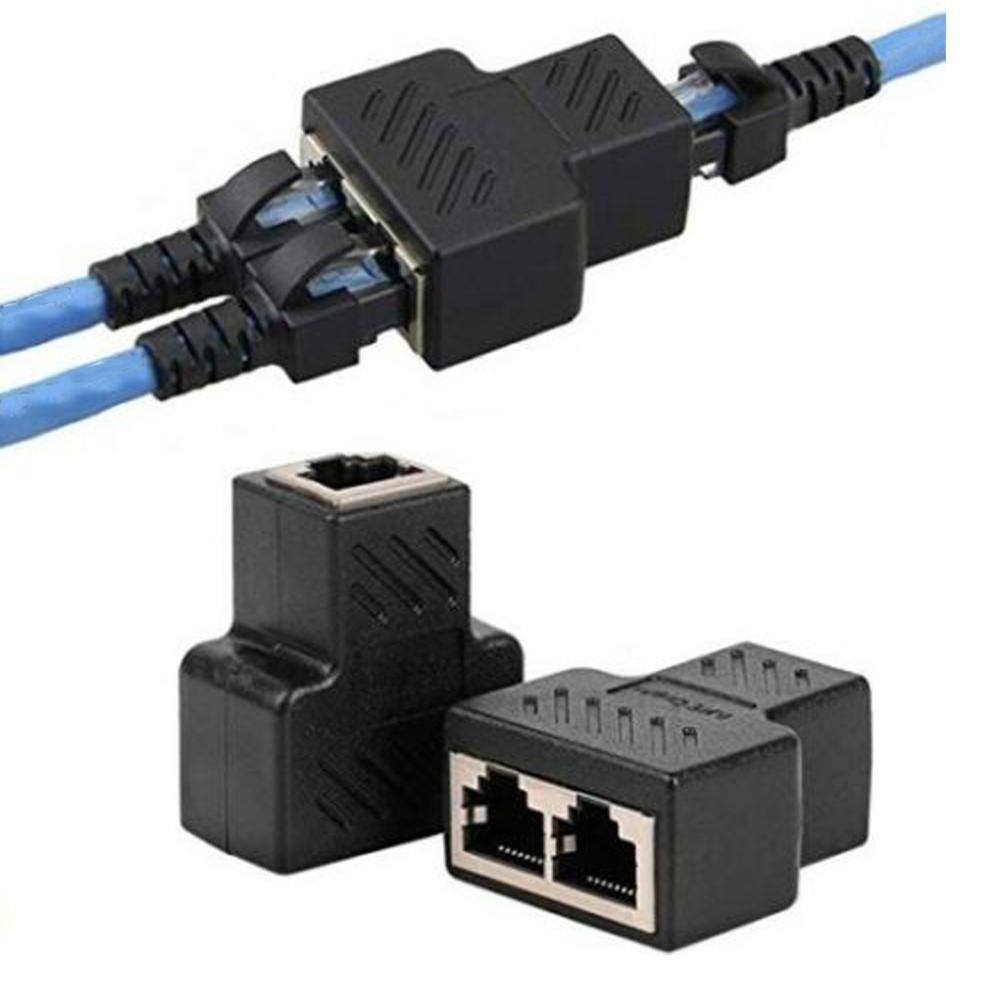
I am planning on getting a long ethernet cable to connect to my router downstairs. If I connect the long cable to a splitter in my room then use two short ethernet cables to connect to my console and PC, will that work? if I am only using one device, will that give the same result as directly plugging in the long cable to the device?
peak cloak
worldly sinew
I am planning on getting a long ethernet cable to connect to my router downstair...
splitter? you mean switch?
as long as this "long" cable is less than 100meters, yes
worldly sinew
peak cloak
splitter? you mean switch?
something like thishttps://www.aliexpress.com/item/1005001386811681.html?src=google&aff_fcid=da136ab9ba1448d5971b961d2856f902-1640012697643-02527-UneMJZVf&aff_fsk=UneMJZVf&aff_platform=aaf&sk=UneMJZVf&aff_trace_key=da136ab9ba1448d5971b961d2856f902-1640012697643-02527-UneMJZVf&terminal_id=f77551accf61440db2c003528d86efe8
aliexpress.com
Smarter Shopping, Better Living! Aliexpress.com
peak cloak
worldly sinew
something like thishttps://www.aliexpress.com/item/1005001386811681.html?src=goo...
noo
worldly sinew
peak cloak
noo
this wont work?
peak cloak
worldly sinew
this wont work?
the only way I see it working is if you have 2 splitters one on each end, and you will be limited to less than 100mbps
and would require 2 short (patch) cables into router as well
worldly sinew
peak cloak
the only way I see it working is if you have 2 splitters one on each end, and yo...
no, I will run one cable from the router and plug it into the "right side" shown in the image. then use two other cables connected to the left side for my two devices
peak cloak
worldly sinew
no, I will run one cable from the router and plug it into the "right side" shown...
that won't work
it doesn't have a switch chip inside
worldly sinew
peak cloak
yes
worldly sinew
ok
for the ethernet cable, I am planning on getting a 20m one
is there anything I should watch out for?
worldly sinew
and if I am using a switch, getting a cat6 long cable but cat5e short ones is the same as using all cat 5e ?
or will it be better since cat6 has bigger bandwidth (from what I read)?
opaque nimbus
guys i think my PC cable lan receiver thing is damaged
peak cloak
worldly sinew
or will it be better since cat6 has bigger bandwidth (from what I read)?
not really
it can support higher freqencies and such, but you will be limited by the interfaces on each end
opaque nimbus
My lan speed in other gadgets are 125mbps but i only get 9mbps on my PC (lan). is there anything i can do to fix it?
peak cloak
swith, router, and pc I bet can only do gigabit
opaque nimbus
or is my motherboard basically damaged now
worldly sinew
peak cloak
it can support higher freqencies and such, but you will be limited by the interf...
so by the router and switch?
or you mean the devices?
peak cloak
worldly sinew
so by the router and switch?
or you mean the devices?
by everything
opaque nimbus
peak cloak
swith, router, and pc I bet can only do gigabit
my router just died due to lightning, like literally got hit when it was raining thunder
@peak cloak how can i confirm that my PC lan cable receiver is damaged?
im using my backup router for now
 thick minnow
2,5gbe should already be avaible by now for routers baseline why vendors so lazy
peak cloak
thick minnow
2,5gbe should already be avaible by now for routers baseline why vendors so lazy
the way most do it, it's practically useless
thick minnow
paying 300 bucks for a premium router that only has 1 gbe lan ports /facepalm
peak cloak
300 bucks is wayyy to much

The EdgeRouter™X delivers cost-effective routing performance in an ultra‑compact form factor.
what I have
opaque nimbus
present, what should i do for now?
peak cloak
¯_(ツ)_/¯
thick minnow
https://www.asus.com/nl/Networking-IoT-Servers/WiFi-Routers/ASUS-Gaming-Routers/RT-AX88U/ what i have
ASUS Nederland
ASUS gaming-routers bieden de allerbeste gaming-ervaring, met een arsenaal aan functies en tools die zijn ontworpen om de online gaming-prestaties te verbeteren en het concurrentievoordeel te geven dat nodig is om te winnen.
peak cloak
asus...
opaque nimbus
peak cloak
¯\_(ツ)_/¯
should i buy a new router for now and see if my PC recovers the wifi speed?
thick minnow
i hate that router so much i got merlin on it and telling my router by script to not advertise it self as dns and to piss off
cos i use my nas as dhcp server + pihole bassicly
peak cloak
I can do whatever I want
thick minnow
It likes to shutdown wan just cos it cannot connect to dns even tho it has a ip adress configured
 thick minnow
I wanna get a switch with 2,5 gbe lan ports that i can install my own router os on that i want
 thick minnow
Oh sorry i forgot you dont speak my language
managed switch or something
ax88u is bassicly just a linux device with fancy interface
peak cloak
thick minnow
managed switch or something
no?
switch doesn't do routing
or do you mean L3 Switch
those still don't have the best routing performance
thick minnow
No idea im still researching on it
but just want to install my own software on it and firewall kind of like pfsense
peak cloak
why your own software
thick minnow
own dhcp server also
peak cloak
EdgeOS is pretty good
thick minnow
Cos i want configuration to work my way
peak cloak
RouterOS as well for mikrotik devices
thick minnow
Not the way asus or some other brand has set it up
peak cloak
thick minnow
Cos i want configuration to work my way
actual routers let you configure everything
thick minnow
cos my network relies on local dns
peak cloak
edgeos, routeros, etc.
@thick minnow http://demo.mt.lv/webfig
routeros demo
can configure anything
it's too manual in some things
thick minnow
as long it accepts ssh and configuration via ssh as well and persist its good
thick minnow
interface is slow and lacking in configuration often
and slow cos just typing a command is faster usually then setting a few options
 peak cloak
thick minnow
and slow cos just typing a command is faster usually then setting a few options
peak cloak
thick minnow
and slow cos just typing a command is faster usually then setting a few options
I like vyos
it's cli only, edgeos is very similar
thick minnow
Its easier to deploy a docker container in shell then via interface for example
peak cloak
thick minnow
Its easier to deploy a docker container in shell then via interface for example
Codes: K - kernel, C - connected, S - static, R - RIP, B - BGP
       O - OSPF, IA - OSPF inter area
       N1 - OSPF NSSA external type 1, N2 - OSPF NSSA external type 2
       E1 - OSPF external type 1, E2 - OSPF external type 2
       > - selected route, * - FIB route, p - stale info

IP Route Table for VRF "default"
S    *> 0.0.0.0/0 [210/0] via 173.63.205.1, eth1
C    *> 0.0.0.0/30 is directly connected, wg0
C    *> 10.0.10.0/24 is directly connected, eth4.10
C    *> 10.0.20.0/24 is directly connected, eth4.20
C    *> 10.0.30.0/24 is directly connected, eth4.30
C    *> 10.0.40.0/24 is directly connected, eth4.40
C    *> 10.1.1.0/30 is directly connected, wg0
C    *> 10.10.10.0/24 is directly connected, eth4.1010
C    *> 10.10.20.0/24 is directly connected, eth4.1020
C    *> 10.10.30.0/24 is directly connected, eth4.1030
C    *> 10.200.1.0/24 is directly connected, eth4.2000
C    *> 127.0.0.0/8 is directly connected, lo
S    *> 172.16.0.0/12 [1/0] via 10.10.20.46, eth4.1020
C    *> 173.0.0.0/24 is directly connected, eth1
C *> 192.168.100.0/24 is directly connected, eth4.100```I can do basically any vyatta command in edgeos
I like the cli this has, routeros not so much, maybe it's just a case of getting used to it
thick minnow
im still learning how to do stuff by command but most stuff i already know is so much easier and faster then doing it by interface
sometimes its simply not even possible by interface
peak cloak
I like vyatta based cli, many nice things like tab autocomplete, ? for available options, etc.
and config is json-like
thick minnow
I blame windows honestly for my lack of knowledge they made things so easy you just skip that kind of knowledge while in linux its mandatory to know such thing
peak cloak
this is an example of a port forwarding rule in vyos ```rule 10 {
description "forward minecraft to 10.10.30.60 (Brothers server)"
destination {
port 25565
}
inbound-interface eth0
protocol tcp_udp
translation {
address 10.10.30.60
}
}
That kind of thing i like about asus and is pretty easy to setup
Just copy paste bassicly
Wish my router could setup ipv6 ipam honestly altho its probably possible to do with dnsmasq script as well i just haven't done my research yet on it
 primal ice
build your own linux or bsd (pfsense/opnsense) router box. enjoy iptables. have what ever ports you want to spend money on configured how ever you want.
peak cloak
iptables 🤮
primal ice
heh
plain siren
peak cloak
those still don't have the best routing performance
No but they do damn well for what they need be
Just wait guise..... FPGA based Software Defined Network appliances that can do L2/L3 Switching, Routing, Firewall, Gateway, etc based on what functions you flash onto it
 slate berry
Learn about the history of the Internet. In this course you will learn how the Internet was created, who created it, and how it works. Along the way you will meet many of the innovators who developed the Internet and Web technologies that we use today.
🔗 Course website: https://ihts.pr4e.com/
✏️ Dr. Charles Severance developed this course. He ...
Really cool course for anyone interested in understanding the history of the internet and how it has become what it is today;
 solemn robin
Why is my downloadspeed so slow (12mbps) in steam and other applications but when i do a speedtest its 100 mb up and down
peak cloak
solemn robin
Why is my downloadspeed so slow (12mbps) in steam and other applications but whe...
steam measures in megabytes per second
speed test is megabits
 spiral drift
Dumb question, pretty sure the obvious answer is correct, the modem for an Xfinity connection has to be from their approved hardware list, right?
plain siren
spiral drift
Dumb question, pretty sure the obvious answer is correct, the modem for an Xfini...
"Depends"
Whats your current model of Modem?
spiral drift
I'm moving and changing providers, trying to select a modem now without kneecapping myself
Planning to get just a modem and set up some microtik equipment from that.
I'm also wondering how much DOCSIS version/channels matters for me, I'm an online student and I play some games but I'm not streaming or anything abnormally network dependent
plain siren
spiral drift
I'm also wondering how much DOCSIS version/channels matters for me, I'm an onlin...
Gigabit does way better on 3.1
But 3.1 supports 10Gbit, 3.0 supports 1 Gbit
spiral drift
I'm signing up for a "600 down" plan, who knows what speeds will actually be though.
opaque nimbus
Guys, could my faulty motherboard be the reason why my lan cable isnt fast?
plain siren
spiral drift
I'm signing up for a "600 down" plan, who knows what speeds will actually be tho...
Well, find out for one where the TAP point is for everyone on your street... take a look at the quality of it and see if its rusted/beaten/etc..... If it is, then the noise from your neighbors bad physical connection will fudge with yours... cuz... Coax
 autumn bay
is a physical LAN design just saying what goes where ?
peak cloak
autumn bay
is a physical LAN design just saying what goes where ?
What?
Like a design, yes and no
autumn bay
oh ok thanks
peak cloak
I mean, you also have network design
but that's not pysical, but rather the design of the network itself ontop of the physical layer
autumn bay
im doing the lan and wan stuff rn
autumn bay
peak cloak
but that's not pysical, but rather the design of the network itself ontop of the...
 peak cloak
autumn bay
peak cloak
autumn bay
that's like neither
autumn bay
this a logical one
peak cloak
I guess
autumn bay
then the physical one is just saying what goes where
 rocky badge
@clear igloo

 clear igloo
rocky badge
<@!291198741862416384>
clear igloo
rocky badge
<@!291198741862416384>
HA, 21 years uptime
rocky badge
that router can drink now
 hollow marlin
If NTP was accurate, based on the last reboot date, it would be actually old enough to rent a car
 waxen scroll
Orlando?
waxen scroll
rocky badge
<@!291198741862416384>
Lurick and I have an NDA so we can share 🤣
 midnight light
im having troubles port forwarding for a mc server and when i try to check the port is timed out
peak cloak
midnight light
im having troubles port forwarding for a mc server and when i try to check the ...
what are the first two octets of your WAN IP, from router
midnight light
someone helped me it works
 inland tundra
any one know of any good ethernet network switches where you can chose how much bandwith goes in and outputs?
 sudden kayak
most managed switches will be able to do some level of traffic shaping... but if you supply a little more detail about what you're trying to do we can probably help in a more useful way
 azure mortar
Anyone got a recommendation for how many Ethernet runs to put in a bedroom, currently planning for 2.
low pond
Depends on your needs? Good to plan ahead so you decide which room will have what device which would need a computer, or a AP, etc
azure mortar
The house is a flip so I don't have any needs, AP's will be ceiling mounted and Ethernet will be run to locations for cameras. Rooms with tv's will probably get 4 Ethernet ports.
low pond
Exactly, you know your answer then :P
 oblique hound

 copper rover
Ethernet dongle to phone? Or does it translate the mounted file system to an SMB share over the network?
 tall pagoda
Which one is my public DNSSEC key? The upper or lower one?

And i dont even know which setting i should use then
 copper rover
tall pagoda
Which one is my public DNSSEC key? The upper or lower one?
copper rover
tall pagoda
Which one is my public DNSSEC key? The upper or lower one?
I have no idea as I haven't had to deal with DNSSEC, But Cloudflare does go over it in a rather informative way. I'll be reading this myself at some point.
Cloudflare
DNSSEC helps The domain name system (DNS) which the phone book of the Internet to be secure, Find out how it works here.
autumn bay
will a redundant network with 2 switches have 2 ethernet cables running to each switch ?
 dry bronze
autumn bay
will a redundant network with 2 switches have 2 ethernet cables running to each ...
dry bronze
autumn bay
will a redundant network with 2 switches have 2 ethernet cables running to each ...
if you have redundant cores/distro then every edge switch would have two uplinks(whether cooper or fiber). an edge switch should have a connection to each of the two redundant core/distro
autumn bay
dry bronze
if you have redundant cores/distro then every edge switch would have two uplinks...
ooo ok thanks
dry bronze
autumn bay
ooo ok thanks
guess i should also add that the redundant cores should be doing VPC(Cisco) or MLAG and then the two links on the edge switch would be a portchannel/LACP lag
autumn bay
dry bronze
guess i should also add that the redundant cores should be doing VPC(Cisco) or M...
so there will be 2 cables that go into the pc or no?
im using 2 switches
and a wire would go from one and the other into the pc
dry bronze
so you mean from a switch to endpoint
autumn bay
yeah
dry bronze
thats more than most people would do, but you could do two connections to a desktop if whatever network card or OS it had supported teaming/bonding
autumn bay
dry bronze
thats more than most people would do, but you could do two connections to a desk...
will LACP give it 2 IPs ?
dry bronze
with LACP it would act as one NIC so it would have one Mac/IP
autumn bay
dry bronze
with LACP it would act as one NIC so it would have one Mac/IP
oh ok thanks for clarifying
dry bronze
autumn bay
oh ok thanks for clarifying
no problem 👍
rocky badge
@clear igloo https://i.ryois.me/BpqbC1yE0y.png

It's still funny that I see other routers/devices on my ISP's side lol
dry bronze
rocky badge
<@!291198741862416384> https://i.ryois.me/BpqbC1yE0y.png
thought it was concerning for a second but i guess it makes sense, they aren't going to block traffic between customers. if a neighbor was hosting a resource you wanted to use,like a game or plex server, that would annoy people pretty quick if they blocked it.
rocky badge
Yeah I also provide some support for a business that's on the same ISP as I am @dry bronze
They are on 100/100, while I'm on 1000/500.
I can max out a connection between them really ez 🤣
Really nice since most of my friends are on the same ISP, so p2p is fast af between them.
dry bronze
rocky badge
They are on 100/100, while I'm on 1000/500.
for a long time the hotel i work at had a 50Mb connection from the local fiber ISP while residential could get like 100Mbit as the slowest
I may have gotten 300Mb before work finally got gig
rocky badge
Lol
 south blade

Trying to give my new WiFi adapter on Ubuntu a static address, does it have to be what showed up automatically or can it be whatever? It's the same hostname that it shows for the wired LAN.
dry bronze
It can be whatever IP in the same subnet as long as it's not already used. You'd probably have to delete the lease and then add your reservation.
south blade
 peak cloak
it's wifi, that's around what I get
south blade
Ok, besides on mobile where I don't usually care to check I'm usually wired. Going to be cancelling my service and waiting for Starlink for a while. :/
peak cloak
what's wrong with it rn?
south blade
My service?
south blade
My full 400Mbps+, but moving outside the city, new house built, and don't want to make any new holes for now, so sticking to wireless while I wait for Starlink to see how I'm going to setup the house.
south blade
Yeah, switching phone plans to deal with it for a bit, $170 for Viasat internet! No thanks.
 civic elk
Speedy

Depends on which field u want to specialise in, networking kinda broad
I would presume alot of companies need the role you are looking for
So mostly anywhere enterprise level i guess
And i believe the 'networking' in this channel topic refers to computer networking
low pond
Someone deleted their messages kek?
 dawn yoke
wifi is shit and pc shows this even tho ethernet not plugged in can someone help?? (peep halo infinite[ethernet doesn’t work don’t ask me to plug it in])

 pure tendon
Is there a such thing as a DNS server validator? Like my router advertises via DHCP that it's the DNS server to use Internally; I'm sure it passes requests upstream in certain case where it doesn't know the answer (or it expired ttl). Though I'm almost certain it fails some DNS requests. For instance if I target an any request at it via dig, it fails most of the time but works sometimes.
The same any request targeted to Google DNS passes every time. I figure some other things may be failing, but figure there must be a test suite or something somewhere to find some more red flags
Funny enough if I go in the router and set the DHCP DNS server to Google DNS, everything seems fine since the router doesn't advertise itself as primary DNS anymore. If I don't set the DNS server and the router advertises itself, certain devices fail to connect (I posted about this several days ago: #networking message). I figure they may do something DNS-wise that the router borks at.
I'm already trying to convince Asus (router mfg) something is up... But getting an actual technical person as opposed to the run-around and phone tag sucks.
Discord
Discord is the easiest way to communicate over voice, video, and text. Chat, hang out, and stay close with your friends and communities.
 lost lily
apparently the 3DS doesn't like my 10.x.x.x subnet

well i'll use homebrew to force it, i dont care
civic elk
What is that subnet mask
lost lily
a normal /24 subnet mask (?)
clear igloo
rocky badge
They are on 100/100, while I'm on 1000/500.
psh, only 1000/500 😛
peak cloak
pure tendon
The same any request targeted to Google DNS passes every time. I figure some oth...
what's the specific request
dry bronze
lost lily
a normal /24 subnet mask (?)
The subnet should be 255.255.255.0
 dry bronze
lost lily
on my desktop 255.255.255.255 works just fine
dry bronze
lost lily
on my desktop 255.255.255.255 works just fine
That's weird. It shouldnt. That is a single host, /32 network
Weird. But a /24 is 255.255.255.0 so try that on your 3ds and see
 fair niche
Is this switch any good? https://www.netgear.com/business/wired/switches/plus/jgs524pe/
clear igloo
It's fine for basics
thick minnow
Could you recommend on a 48/24P PoE switch similar to mikrotik's switchs?
 oak pecan
IDK if this goes in here or #tech-support but I'm trying to setup FTP on my local network, and the directories are listed, but I can't run any commands. Passive mode works, and I do have read/write perms. If there are troubleshooting steps out there, please do tell.
Should've stated I'm using my routers built-in FTP option, on a Linksys EA7200.
Fixed it.
rocky badge
clear igloo
psh, only 1000/500 😛
it's the only gigabit plan they offer
 meager ginkgo
current settings
 rocky badge
@meager ginkgo TX high 😈
 fluid terrace
Hello. I am trying to look into getting a new router setup as our old Orbi mesh system is missing some monitoring and QOS features. I would like to stick with a mesh system because we have a little office shed thing that we use as a work office and need a solid connection. Any advice would be great. Would it be better to create my own mesh system? Thank you I’m advance for the help.
 amber hornet
i have a PC that i need to have comunicate with 2 different home networks. they both have internet access, but one of them in much faster. Is there a way to set windows 11 to not use one network for internet? one will be wifi, the other will be ethernet
peak cloak
amber hornet
i have a PC that i need to have comunicate with 2 different home networks. they ...
you just want the other one to access NAS?
if so, you can just mess with routes
amber hornet
well, its more like this one will be the NAS
i have a media server that i sometimes run on my main PC
peak cloak
ah, but you are basically connected to both, to just have access to the NAS from both networks?
you could change the metric for default route to be lower for the slower connection or get rid of that route completly
and windows won't use the connection for internet access, aka 0.0.0.0
peak cloak
amber hornet
never messed with routs
in cmd do route print
maybe there is a better way to do it in windows, but from a networking perspective for me, this is the way to do it
amber hornet
is there a better way to have my PC be able to be accesed by both networks?
pure tendon
peak cloak
what's the specific request
Something like: dig google.com @192.168.0.1 ANY fails intermittently but if i instead @8.8.8.8 it works fine every time
amber hornet
i was just thinking that was because it doesnt require any new hardware
peak cloak
amber hornet
is there a better way to have my PC be able to be accesed by both networks?
I mean this would work
it would be more optimal to have ethernet on both, but other than that it's good
but windows isn't great for this stuff, but I guess you can make it work
amber hornet
yeah, its just til i can get a dual wan router
peak cloak
amber hornet
yeah, its just til i can get a dual wan router

Raymond.CC Blog
It is common to find two networking adapters in a notebook or in an all-in-one desktop which are a wireless and wired connection. Since both adapters can
so there's a way to change the metric in the GUI
#3
 amber hornet
ah cool! ill give that a try
peak cloak
higher lower metric means higher favorability pretty sure
dry bronze
“the network adapter with the lowest metric in the routing table will be used”
clear igloo
Yup, lower is better in this case
amber hornet
well... apparently, the media server i use cannot be accessed across 2 networks without running 2 instances of the server.
peak cloak
dry bronze
“the network adapter with the lowest metric in the routing table will be used”
messed it up, yep
dry bronze
peak cloak
messed it up, yep
I couldn't remember 100% so I read your link to be sure 😛
amber hornet
know of a media server that can show on 2 networks?
dry bronze
As long as you have routes in your network it shouldn't be a problem
peak cloak
amber hornet
well... apparently, the media server i use cannot be accessed across 2 networks ...
hmm, you should be able to.
dry bronze
Oh you were trying to give the server 2 interfaces
You just need to have something to route between your two subnets
peak cloak
dry bronze
You just need to have something to route between your two subnets
yeah I proposed that first a while back
dry bronze
Actually @amber hornet you could probably do Plex and your subnet that didn't have the server on it would just reach it from the internet
That might require paying for Plex pass though
amber hornet
not sure that would be too viable in my case. really need to try and keep everythign local. Part of the reason of having 2 networks, was to make sure that 2 of the PCs have un hindered upload for streaming
peak cloak
amber hornet
not sure that would be too viable in my case. really need to try and keep everyt...
alternative to plex is jellyfin, I use it myself
 lavish cargo


the top image is the one with no wifi
this is the one with wif

i keep gettign undetified network
why?
plus there is no dropdown
for the pc with wifi, the pc without wifi has it. i think thats supposed to be correct tho
copper rover
lavish cargo
this is the one with wif
Why are you trying to share that connection?
copper rover
So you're bridging one PC into another via ethernet.
copper rover
It's a non-conventional way of doing things
lavish cargo
i have no other way
primal ice
you need to share the wifi connection with the ethernet port (bridge) then plug the ethernet ports of the computers into each other.
lavish cargo
ok lemme try
wait i know im dumb but would i have to unplug the main pc ethernet first?
primal ice
yes
lavish cargo
ok
primal ice
okay you need a switch then if you are already using ethernet.
lavish cargo
primal ice
okay you need a switch then if you are already using ethernet.
im not
i have this but i dont think my cables are long enough

ok ill tty thanks
copper rover
I haven't looked into much, but would be nice to do the opposite; turn the WiFi adapter into an AP with the PC wired up with Ethernet.
 primal ice
lavish cargo
i have this but i dont think my cables are long enough
primal ice
lavish cargo
i have this but i dont think my cables are long enough
that is coax it will not work with out adapters. MoCA.
 primal ice
that is ethernet cables.
copper rover
I think I'm going to try this.
http://woshub.com/how-to-create-a-wi-fi-access-point-on-windows-10
primal ice
yeah that is basically opposite of what they were trying to do.
copper rover
Just want to ensure it's going to bridge so it's all on the same subnet
lavish cargo
ok bye
 whole trout
Looking for networking guys who can help a smart home guy figure some things out on a pretty basic issue I’m dealing with. 😅
clear igloo
@waxen scroll
 waxen scroll
Shelly's need to be on the same subnet as home assistant otherwise you need to use CoIOT
Cloud admins are not network or onprem smart
That reminds me to follow up about our cloud team trying to shadow IT
clear igloo
Yah, curious how that's going, lol
 long thistle
i ran cat 8 in my house and i want to create 10 gig network
i want it to look like that

server = nas
and i need 10 gig switch and router
switch - i was considering between NETGEAR XS708T and TP-Link TL-SG3428X
tp link is much cheaper and has 24 ports
but i don't know if netgear would be better even with 8 ports
in addition to the switch, what router should I choose?
plain siren
waxen scroll
Cloud admins are not network or onprem smart
Cloud Admins should be Network Masters
Unless they Single Cloud, Single Point Admins
peak cloak
long thistle
and i need 10 gig switch and router
Don't need 10gig router
If you only have 10gig between local connections, and therefore not routing, there is no need for 10gig router
long thistle
i know that i need 10 gig router
peak cloak
Why
peak cloak
Miktotik has a 10gig router for 200 bucks
But it only has 1 10gig sfp+ interface which means it requires a router-on-a-stick setup
long thistle
long thistle
i want it to look like that
i know
peak cloak
And configuration is not the easiest for a newbie
long thistle
i'm a network tech so it's not a problem
and i could do this myself but i have a lot of work to do
so i need a little help with choosing a devices
thick minnow
1u x86_64 server or a router from netgate (for pfsense)?
peak cloak
Pfsense really doesn't have the best performance I heard
long thistle
what about opnsense?
peak cloak
Same deal, its a purely software router

MikroTik is a Latvian company which was founded in 1996 to develop routers and wireless ISP systems. MikroTik now provides hardware and software for Internet connectivity in most of the countries around the world.
It's hard finding things with 2x sfp+ that aren't crazy expensive, this could work with router on a stick setup
thick minnow
Nice its even have poe out
long thistle
it'll be a lot cheaper to buy a router instead of building a computer for pfsense or something like that
thick minnow
ONLY WINBOX
long thistle
ok, i'll consider the RB4011iGS+RM
and what about switch?
i though about poe switch but these i mentioned don't have ones
poe would be for ap ofc
peak cloak
You would need managed switch to setup vlans to do router on a stick. Miktotik has a 10gig switch but it's sfp+ and not really optimal for your setup
long thistle
peak cloak
You would need managed switch to setup vlans to do router on a stick. Miktotik h...
why it's not optimal?
the router and the switch could be connected with that
peak cloak
long thistle
why it's not optimal?
Sfp+ vs copper rj45
Can't use too many sfp+ rj45 transceivers, as they use lots of energy and emit heat. Plus they are $$$
long thistle
cost is not a problem because it's for work for 4 people
peak cloak
So like you can't populate all ports with transceivers usually
peak cloak
There is no best really. You can build a router, run vyos/pfsense/opnsense. Buy that mikotík one and run router on a stick. There's that 400 dollar one too, which has 2 sfp+ ports. It really all depends on constraints. Since you are going for copper cabling it would be better to get an rj45 switch.
long thistle
computer for pfsense would cost me above 500 dollars so i'll choose these mikrotiks
thanks for help, guys!
thick minnow
If I'm powering poe device and one cave give it 15v and the other the same, will the device get a input of 30v?
It might be stupid Q
lost lily
thick minnow
If I'm powering poe device and one cave give it 15v and the other the same, wil...
V? you mean W
thick minnow
If it iot devices go with home asistent
IP cams goo with zoneminder
sinful anchor
heyyooo guys does some of you know a good usb c to ethernet that can make 10gb/s
civic elk
sinful anchor
heyyooo guys does some of you know a good usb c to ethernet that can make 10gb/s
Doesnt exist. And in settings where you do need 10gbps connection, you probably arent gonna use usbc anyway.
plain siren
sinful anchor
heyyooo guys does some of you know a good usb c to ethernet that can make 10gb/s

USB C to 2.5 Gbps Ethernet Adapter,BYEASY Thunderbolt 3/Type C to RJ45 2500Mbps LAN Network Adapter Compatible with MacBook Pro,MacBook Air 2018 and Later,iPad Pro 2018 and Later,XPS,Dell and More

UPTab Thunderbolt 3 to 10G Ethernet Adapter (Certified Thunderbolt 3 10GbE Ethernet Adapter) with NBASE-T Support Fan-Less (Not Compatible with a USB-C Port Without The Thunderbolt Logo)
plain siren
civic elk
Doesnt exist. And in settings where you do need 10gbps connection, you probably ...
I mean, it exists on Thunderbolt Type-C
civic elk
TIL
plain siren
You can also connect 2 Devices Directly with C <> C if its USB 4.0
USB 4 20 Gbps and USB 4 40Gbps Host to Host connections does Host IP Networking over the C Cable

 main flame
Anyone had good results with NIC Teaming in Win10 or am I forced to stop being lazy and convert my home media server to Windows Server?
I have not bought the new NIC yet. But I figure Intel would be the way to go
peak cloak
main flame
Anyone had good results with NIC Teaming in Win10 or am I forced to stop being l...
Just use Linux
main flame
I'm already too deep in Windows to switch
plain siren
main flame
Anyone had good results with NIC Teaming in Win10 or am I forced to stop being l...
You Cannot Nicteam in Win 10
main flame
plain siren
You Cannot Nicteam in Win 10
From my searching it seems you can do it via PS and also Intel provides software for it.
plain siren
Powershell will tell you > Cant be done on Consumer OS'
main flame
Well that's rather annoying
main flame
plain siren
Powershell will tell you > Cant be done on Consumer OS'
Thoughts on Intel NIC teaming in win10 then? They seem to offer it in their driver package
 main flame
Looks like this pos asus router supports it too, thunderbirds may be a go
 unreal terrace
i dont have got a single idea why

ive opened some ports on the device im connecting (firewall settings) and i made a regedit change (according to this: https://windowsreport.com/cannot-connect-l2tp-vpn-windows-10/ )

A complete step-by-step guide to help you troubleshoot issues if you cannot connect to L2TP VPN on Windows 10 using the built-in VPN provider.
thick minnow
thick minnow
Can it replace my DSL modem?
?
 vital ocean
thick minnow
Can it replace my DSL modem?
vital ocean
thick minnow
Can it replace my DSL modem?
Maybe. But you'll need something with multi network outlets, as you'll need to get some more power in there. This should work #troll
 thick minnow
How can I connect it with the DSL to rj45? I have only one DSL soucet
vital ocean
Just need a 5 port Dlink switch I guess?
thick minnow
I will just modem
hi guys, I have a VPS running a wireguard tunnel my minecraft server is connected to, how would I forward minecraft traffic (port 25565) pointed at the VPS through the tunnel to the MC server?
I imagine it has to do with setting up iptables on the VPS, but I also don't know how to tell the MC server to send return packets on the wireguard interface (or would it do that automatically?)
plain siren
thick minnow
I imagine it has to do with setting up iptables on the VPS, but I also don't kno...
iptables -t nat -A PREROUTING -p tcp --dport 25565 -j DNAT --to-destination <MCIP>:25565
iptables -t nat -A POSTROUTING -s <MCIP> -j MASQUERADE
thick minnow
I found an article that had a different way of doing the second command:
iptables -t nat -A POSTROUTING -p tcp -d <EXAMPLE> -–dport 25565 -j MASQUERADE
specifies a couple different things and uses -d instead of -s, not sure why, I feel like if I knew anything about iptables I'd be less helpless at this
plain siren
that just defines -p TCP (TCP Packets) and Port.
mine just masquerades all traffic to the MC Server
thick minnow
just confirmed it doesn't seem to be an interface problem, spun up nginx on the MC server and the VPS is able to reach it using the wireguard vpn, but by adding the iptables command for forwarding port 80, I can't hit it using the public IP of the VPS
I think I need to start over, how do I clear any changes to iptables?
 flat wagon
is there a such thing as a SFP+ keystone patch panel
where u can just connect a sfp+ module into it and it's just a female to female connector
thick minnow
I keep searching on the internet for how to get this working, and the iptables commands go through without errors, but nothing gets it working
I've resorted to troubleshooting with a vm lab and nginx standing in for minecraft, no matter what i do on the "public" machine, it wont forward through to my server
civic elk
flat wagon
is there a such thing as a SFP+ keystone patch panel
where u can just connect a ...
optical distribution frame?
peak cloak
flat wagon
is there a such thing as a SFP+ keystone patch panel
where u can just connect a ...
Not for modules
For optical interfaces yes
clear igloo
flat wagon
is there a such thing as a SFP+ keystone patch panel
where u can just connect a ...
No, the above mentions are correct
SFP* requires power (among other parts)
peak cloak
thick minnow
I've resorted to troubleshooting with a vm lab and nginx standing in for minecra...
     rule 10 {
         description "forward minecraft to 10.10.30.60"
         destination {
             port 25565
         }
         inbound-interface eth0
         protocol tcp_udp
         translation {
             address 10.10.30.60
         }
     }
}
source {
     rule 10 {
         outbound-interface eth0
         translation {
             address masquerade
         }
     }
 }```
This is what the rules should look likein iptable form ofc
I had issues as well
so I just switched to vyos
make sure ip forward is enabled
 snow lance
new router 😎

i bought a mikrotik cuz you guys here said its good
very confusing ui tho
my previous router had 100 mbps switch so i was capped at 95
 lone plank
Yo what wifi card should I consider buying since my motherboard doesn’t come included with wifi
peak cloak
snow lance
very confusing ui tho
routeros takes a while getting used to
I got myself a HEX S and learning routeros coming from EdgeOS
snow lance
lmao
im trying to get port forwarding to work but its dummy might be my isp again doe
peak cloak
snow lance
im trying to get port forwarding to work but its dummy might be my isp again doe
you need to make a destination nat rule. What are the first 2 octets of your WAN IP
ISP could be doing cgnat
in cli you can do ip address print
snow lance
peak cloak
you need to make a destination nat rule. What are the first 2 octets of your WAN...
87.72
peak cloak
snow lance
87.72
yeah you should be fine
snow lance
didnt work on my previous router since recently so thats why
peak cloak
they could block some ports
snow lance
peak cloak
you need to make a destination nat rule. What are the first 2 octets of your WAN...
81.161
still no work
peak cloak
what's the rule you are doing
you also need to add a firewall rule pretty sure
cuz NAT is one thing, firewall is another


 peak cloak
snow lance
what else i need to do?
peak cloak
snow lance
what else i need to do?
looking things up rn. I'm learning routeros myself as well
peak cloak
snow lance
this is firewall rule?
snow lance
lmfao does anyone know this os fully 
snow lance
peak cloak
this is firewall rule?
yep its in filter rules
peak cloak
@tender hazel
peak cloak
snow lance
apprently when you scroll down to action you need it to be dst-nat "To address" is the address you are forwarding too, and ports is self explanitory. You need to get rid of dst address
cuz when a connection is made from WAN, it will have router's IP in dst header
if you filter with destination which is a local ip, ofc it won't work
and I think with NAT rule it adds firewall rule from what I read? I'm not 100% sure
snow lance
ok so add dst nat to filter and nat?
peak cloak
snow lance
ok so add dst nat to filter and nat?
for now get rid of filter rule
snow lance
 peak cloak
snow lance
peak cloak
snow lance
yeah you need to specify to-address and to-ports

 tender hazel
if you use the default mikrotik firewall, all DSTNAT is automatically allowed without having to create separate filter rules
don't set the "Dst. Address" for the DSTNAT rule
snow lance
tender hazel
if you use the default mikrotik firewall, all DSTNAT is automatically allowed wi...
well its default yes
snow lance
tender hazel
don't set the "Dst. Address" for the DSTNAT rule
this in nat?
 tender hazel
yes, remove that
snow lance
still no work
tender hazel
did you click the up triangle to remove it or did you just delete the address
snow lance
up triangle
tender hazel
ok good
those settings are correct for a port forward
how do you know it isn't working?
 tender hazel
yes
snow lance
hmmm
peak cloak
snow lance
this good?
scroll down to action
tender hazel
it looks like at one point you changed chain=dstnat to chain=forward by mistake
snow lance
 tender hazel
yeah that's all correct.. are you on a pppoe connection or something?
peak cloak
tender hazel
it looks like at one point you changed chain=dstnat to chain=forward by mistake
my fault, since I thought you needed to add a firewall rule
snow lance
pppoe?
snow lance
i have vpn but disabled for chrome rn
snow lance
tender hazel
make sure chain is set to dstnat
 peak cloak
snow lance
canyouseeme
peak cloak
snow lance
canyouseeme
is the server running
snow lance
no
tender hazel
yeah I would make sure at this point that it is actually running on your system on that port
snow lance
lemme try 8096 then
peak cloak
well then there is your answer
tender hazel
yeah that's why it doesn't show as up
peak cloak
the server you are port forwarding to needs to be up to respond to requests
tender hazel
^^^
tender hazel
windows firewall?
do you see the rule counter for the rule going up?
in the firewall list?
the bytes / packets columns on the right in the NAT list
snow lance
probs, the packet count go up when i enter on canyouseeme
snow lance
tender hazel
do you see the rule counter for the rule going up?
on nat yes
tender hazel
yes, so as long as you are using the factory default firewall the device came with, that means your rule is configured correctly and your computer is blocking the connection
windows firewall or whatever
you are better off using winbox to manage the mikrotik because you can customize the columns and it is snappier than using the web interface
and winbox also organizes things into tabs better in the settings, while in webfig all the tabs are stacked vertically into one long list
I'm sure eventually they will improve the look and feel of webfig
tender hazel
peak cloak
my fault, since I thought you needed to add a firewall rule
you would if it were not the default mikrotik firewall, but the default one has the final forward chain block rule set to "drop all other forward chain traffic that isn't dst-nat"
peak cloak
tender hazel
you would if it were not the default mikrotik firewall, but the default one has ...
ahh makes sense
all of this is new coming from vyos/edgeos, trying to learn it
tender hazel
mikrotik does it that way so that you just make a dstnat rule and port forwarding will work, and also to make it so that if you want upnp, the upnp doesn't have to create filter rules, only nat rules
peak cloak
there's no operational/configuration mode which I am soo used to
tender hazel
yeah in mikrotik it is all in one.. which has some disadvantages.. the biggest being that the config exports in a way that assumes a blank config to begin with
so if you import on a router that already has config you can get errors because it will try adding a new bridge called bridge when there is already a bridge called bridge
if there was a separate config and operational mode, that wouldn't happen
peak cloak
@tender hazel also I don't get this. Trying to add a new network, netmask 255.255.255.0 which turns into 24. But what's the /32 for in address. That's the IP network for router I guess?
 tender hazel
you don't need to add a dhcp network that way
delete that
it is easier to use the wizard
first you go add the IP address to the router on that network under IP->Addresses
then you go into the IP->DHCP server tab and hit the DHCP setup button
the DHCP setup button will walk you through a wizard that creates the DHCP server, DHCP network, and IP pool, all three of which are needed for DHCP operation
I use the wizard all the time myself so I don't forget to create one of those three things
tender hazel
it says the DHCP server is invalid?
usually the reason for an invalid DHCP server is if you are trying to set up a DHCP server on an interface that is a slave interface to another interface
in the case of slave interfaces you have to set up DHCP server on the master interface
peak cloak
tender hazel
usually the reason for an invalid DHCP server is if you are trying to set up a D...
I removed it from the default bridge I think
it says only ether3 is in the bridge
trying to set it up as my current ER-X is
tender hazel
and you went into ip->addresses and gave ether3 an IP address?
peak cloak
ether2, yes
tender hazel
or sorry yes ether2
under interfaces->interface list, what letters do you see next to ether2
show your ip address that you added to ether2
peak cloak
tender hazel
under interfaces->interface list, what letters do you see next to ether2
it's not there
tender hazel
oops
sorry I mean under interfaces->interface
the window in winbox says interface list at the top
peak cloak
# ADDRESS          NETWORK       INTERFACE

;;; defconf

0 192.168.88.1/24  192.168.88.0  bridge

1 192.168.1.1/24 192.168.1.0 ether2```ok yes so what you have on ether2 is correct
and show what is in interface
with /interface print
peak cloak
Columns: NAME, TYPE, ACTUAL-MTU, L2MTU, MAX-L2MTU, MAC-ADDRESS

#    NAME    TYPE    ACTUAL-MTU  L2MTU  MAX-L2MTU  MAC-ADDRESS

0    ether1  ether         1500   1596       2026  08:55:31:FC:7B:8A

1    ether2  ether         1500   1596       2026  08:55:31:FC:7B:8B

2 RS ether3  ether         1500   1596       2026  08:55:31:FC:7B:8C

3    ether4  ether         1500   1596       2026  08:55:31:FC:7B:8D

4    ether5  ether         1500   1596       2026  08:55:31:FC:7B:8E

5    sfp1    ether         1500   1596       2026  08:55:31:FC:7B:8F

;;; defconf

6 R  bridge  bridge        1500   1596             08:55:31:FC:7B:8B
ether2 shows not running
peak cloak
yeah nothings connected
tender hazel
that's probably why the dhcp server is invalid
peak cloak
ah ok
tender hazel
I thought you had something plugged into it already
peak cloak
invalid is weird naming
like as if something was configured wrong
gonna plug into it and see
tender hazel
you might get more information if you run /ip dhcp-server print or /ip dhcp-server export
sometimes it shows in the command line why something is invalid but not the gui
peak cloak
yeah no it's fine. How can I enabled access to webui through ether2. It seems to get IP. I added ether2 to LAN interface list
tender hazel
yeah as long as ether2 is in the LAN interface list you should get access to the webui through ether2 automatically
unless you changed any settings in that regard
ex. firewall or some subnet limitation under ip->services
peak cloak
nope haven't changed anything there
 nova igloo
guys is this subnetting calculation correct?
 peak cloak
it works
peak cloak
nova igloo
guys is this subnetting calculation correct?
as for this let me look


 tender hazel
your subnet calculation is not correct, no
tender hazel
you can't have a /26 subnet that starts at .8 and goes to .71
if you have a /26 it has to start at .0 or .64 or .128 or .192
not somewhere in between
nova igloo
tender hazel
you can't have a /26 subnet that starts at .8 and goes to .71
oh even then network address have to follow the bits rule
tender hazel
yes
if you have a /25 it has to start at either .0 or .128, nothing else
what you could do to simplify things would be to have four /24 subnets, from 96 to 99 or 100 to 103
you could summarize them with 192.168.96.0/22 or 192.168.100.0/22
clear igloo
nova igloo
guys is this subnetting calculation correct?
Largest # of hosts to smallest, always
nova igloo
clear igloo
Largest # of hosts to smallest, always
u mean the network size?
clear igloo
Subnet the /25 first and then work down to the /29 last
tender hazel
I assume the only reason you are using these smaller network sizes is to try to put everything inside 192.168.100.0/24 to simplify firewall rules and such
clear igloo
tender hazel
I assume the only reason you are using these smaller network sizes is to try to ...
School assignment most likely
tender hazel
school assignment?
if that's the case then yeah what I suggest may not meet the requirements
nova igloo
clear igloo
School assignment most likely
yeah it is, the most confusing part "subnetting"
peak cloak
school assigments usually have not practical old things
clear igloo
VLSM rules are to start with the subnet needing the most hosts and then work down basically
tender hazel
so if you have a /25 and two /26 networks, that takes up an entire /24 by itself
and the /29 would have to come from another /24
tender hazel
yes
nova igloo
is this correct? but i dont think i have enaf IP to use
 clear igloo
Your /29 would be 192.168.101.0/29
tender hazel
the PNG LAN would have a network address of 192.168.100.192
nova igloo
You will be given one class C block of IP addresses that you must subnet and provide the IP addressing plan for the network. You are given the 192.168.100.0 address space to use in your network design.
Im given only 1 block of c address 😦
clear igloo
If they only gave you a /24 to work with though then it's not possible to fit it into a single /24
tender hazel
nova igloo
Im given only 1 block of c address 😦
if you were told that you need to fit a /25, two /26's and a /29 into the same class C block, that is impossible
there is no way to answer that question
so did the question tell you that you needed a /25, two /26's and a /29, or did you decide that you needed that?
nova igloo
yeah even the usable address gone more than 255
peak cloak
nova igloo
You will be given one class C block of IP addresses that you must subnet and pro...
what are the exact requirements to put into that one /24
nova igloo
it give this to me, and also a physical design
the WLAN is connected to the LAN of the same location
 tender hazel
I'm guessing that the question didn't tell you that you needed a /25, two /26's and a /29
yeah so that's number of hosts, that's not telling you what subnet size to use
clear igloo
Don't assume they can be combined (wireless and wired)
tender hazel
yeah if wireless and wired are the same subnet they wouldn't split up the number of hosts in that way
nova igloo
here's the physical design for the conenctions, yeah the wlan r connected to the router
 tender hazel
the only reason they would give you a table like that is if the wired and wireless LANs in each place were separate
clear igloo
Yup, they need to be separate, that's the challenge for you to realize. Just because they're in the same location doesn't mean they need to or should be on the same subnet
tender hazel
having two networks connected to the same router in the same place does not make them the same network
nova igloo
so it means im going to setup two vlan on one interface
tender hazel
are they even the same interface?
if you have two different interfaces on a router, they are not connected, they are two different networks
it is only connected if it is a switch and not a router
nova igloo
yeah should be, since only one fiber connection r shown on the question paper
clear igloo
Sub-interfaces
nova igloo
okay, lemme try again
tender hazel
or there would be zero reason to give you the number of LAN hosts and the WLAN hosts as two separate things
except to confuse you on purpose
clear igloo
||3x /28, 2x /27, and 2x /26 if my math is right based on the above||
tender hazel
that seems right to me, the question is whether they also want him to allocate /30 or /31 PTP subnets between the routers themselves
clear igloo
Probably /30s later on or use a different subnet
clear igloo
I don't remember /31s being taught in the early classes but that could have changed since my days 🙂
tender hazel
we had a new network team member who joined our team earlier this year
she had her CCNA
but she didn't know how to configure an IP address in windows, and she thought that since 10.0.0.0/8 is class A that you could only use it as a single /8 and not subnet it
clear igloo
yikes!
waxen scroll
isnt CCNA hard now?
tender hazel
and she spent most of her time at work studying cisco things thinking that that would let her get a higher paying job, because she was convinced that she should make lots of money after getting CCNA
clear igloo
It's like all the things I think (wireless/routing/switching/data center/etc)
tender hazel
so we let her go
waxen scroll
kek
clear igloo
Haha, certs =/= money 😄
Maybe after you land the job if you're work tells you to then maybe
waxen scroll
tender hazel
and she spent most of her time at work studying cisco things thinking that that ...
the school I went to for networking was similar.... "I'm an ex-HVAC tech and made no money, now im here for networking because $$$$$"
tender hazel
yup, she was convinced that she would suddenly get a big salary and an important position somewhere just with CCNA, even though she didn't know how to set IP address in windows
waxen scroll
networking is waaaaay harder than CCNA / school level unfortunately ;/ . I was kinda mad when I learned that my schooling really was not enough to network on my own
tender hazel
such paper CCNAs are useless, we get lots of applicants like that who were not into computers or IT at all and then went for their CCNA and got that, even though they didn't really know anything else
clear igloo
The stories I could tell about people with certs who think the same way 🙂
waxen scroll
the job that really taught me networking didnt care about my CCNA
 little schooner
tender hazel
such paper CCNAs are useless, we get lots of applicants like that who were not i...
little schooner
tender hazel
such paper CCNAs are useless, we get lots of applicants like that who were not i...
I let my ccna expire I didn't see any value in it
I was the only student in my class that went for it
tender hazel
the stupid thing was that she was in a position where she could have learned a lot more varied things aside from just cisco, things that would have helped her get a better job
clear igloo
Had people with certs all over their resume, on a VIDEO interview, try to google questions we asked them
tender hazel
but instead she had a one track mind that if she ignored everything else about computers and just learned cisco, cisco, cisco and absolutely nothing else, that it would be great
clear igloo
Certs don't make you smart, I've tossed a few resumes with CCIE on them and zero work experience (fresh out of college) because of that
tender hazel
"oh, I don't have to know how to use windows, I'll just learn cisco and cisco only and nothing else and everything will be great"
it shows how out of touch such people are
little schooner
I'd rather learn networking concepts that can apply to everything
clear igloo
Even if you're in a pretty much only Cisco shop you still need more experience than just that
nova igloo
i think it looks correct now 🙂
 tender hazel
but sometimes the marketing people or trainers make these lofty and unrealistic promises that you can just get a CCNA and start making a fortune, omitting the fact that that assumes you already know a bunch of things about computers and not just how to send email and use a web browser
clear igloo
nova igloo
i think it looks correct now 🙂
negative
You need to change those to /28s, there are only 6 usable addresses but 8 hosts in the last two subnets
But pretty good otherwise
waxen scroll
not sure what new CCNA teaches but old one did no BGP. You pretty much couldn't work most jobs that hired for network engineer
nova igloo
(Note: Remember that the interfaces of routers also require IP addresses and are included in the addressing scheme.)
I think the addresses r included 🙂 finally get it right
clear igloo
Still, the network and broadcast aren't usable on the interfaces as is
nova igloo
wait what
clear igloo
Unless you do /31s you cannot use a broadcast or network address on interfaces/hosts/etc.
in most cases*
waxen scroll
clear igloo
Still, the network and broadcast aren't usable on the interfaces as is
I once complained to a sysadmin who stole a .0 address from me in a /23 . That's premium space. I WANTED it for my VM 😦
clear igloo
Yah, when you move up to /23s and start having .0 hosts that was a whole ball of fun for me starting out, lol
clear igloo
nova igloo
wait what
think of broadcast and network addresses as reserved/unusable in most contexts
tender hazel
nova igloo
wait what
what he means is the number of usable addresses is 6 for the last two subnets
you can't fit 8 hosts with only 6 usable addresses
number of usable addresses has to be >= the number of hosts you will have
clear igloo
Yah, he (BryanC12) was saying the network and broadcast could be used on the router interfaces which isn't the case
waxen scroll
ive yet to meet a CCIE resume in which I was able to successfully validate it on the cisco website
when that happens I toss it
nova igloo
so it mean when host+interfaces=8, i still need another extra two for thr reserve
clear igloo
yes, convert them to /28s and you're good 🙂
tender hazel
(Note: Remember that the interfaces of routers also require IP addresses and are included in the addressing scheme.)
^^^ I assume that is saying that the router IP is included in the "hosts" count
clear igloo
Yup, that's how I read that
tender hazel
if the router IP wasn't included in the hosts count you would need yet another IP for the router
plain siren
waxen scroll
ive yet to meet a CCIE resume in which I was able to successfully validate it on...
Cisco's Website for Validation is Hit/Miss/Miss/Miss/Miss many times for some stupid reason.
waxen scroll
yeah, like its case sensitive
plain siren
And there are a few times where they do like ALL CAPS for some peoples names
tender hazel
@nova igloo the router is considered to be another host on the subnet, so is in the count of hosts
plain siren
I had one where there was 2.... yes TWO spaces between the names
tender hazel
when you do a usable addresses calculation it tells you how many usable addresses you have for hosts
waxen scroll
I have let a few misses through but they usually fail the interview or I tell HR they need to check with cisco if/when an offer is made
tender hazel
which means hosts, including the router, can only use those addresses
so if you have 8 hosts (which includes the router) and 6 usable addresses for hosts, that will not work
nova igloo
tender hazel
which means hosts, including the router, can only use those addresses
i see, so now i only have 5 usable address
waxen scroll
i work in banking so they do those crazy background checks anyway
tender hazel
as I said the router counts as a host, so 6 (5 other hosts + 1 router host)
if you are excluding the router itself there would only be 5 usable addresses yes
plain siren
waxen scroll
I have let a few misses through but they usually fail the interview or I tell HR...
Ever since Cisco went CompTIA Trash Tier on their testing and whatnot ... ive started asking for other types of certs as primary req
waxen scroll
have they? I feel like its harder content these days
tender hazel
that's why it is important that the question specifies whether it is including the router in the host count or not.. and in this case the note clarifies that the router is included in the count of hosts
waxen scroll
CCNP got easier I think, but CCNA harder
plain siren
yeah CCNA harder... but CCIE was dumbed down pretty hard
nova igloo
So, will my ip works now? since the NOTES mention that it is included in the HOSTS count
plain siren
and CCDE .... ugh a joke
clear igloo
No, you need to convert the /29s to /28s
You're requirements are 8 usable/host addresses
nova igloo
oh yeah forgot about the question is 8 hosts not 6 hosts 😄
tender hazel
yes
waxen scroll
honestly if you're a real CCIE who did their time, I dont know why you'd apply at my job
plain siren
I wonder if CCDA is relevant anymore too
nova igloo
it looks sexy now haha
 waxen scroll
real CCIE needs to be designing new stuff constantly, not adding onto existing
clear igloo
It doesn't exist, it's all CCNA for entry level now
plain siren
nova igloo
it looks sexy now haha
Just use the 10.X.X.X Class
nova igloo
plain siren
Just use the 10.X.X.X Class
i cant, its an assignment
plain siren
10.SITE/LOCATION.SUBNET/VLAN.HOST/CLIENT
tender hazel
a big issue is that cisco is still pushing classful addressing these days
emphasizing it too much
tender hazel
meanwhile it is only something of historical interest for the most part
clear igloo
It helps ease you into subnetting which can be tricky but at least they aren't doing classful subnetting still XD
Class a/b/c needs to be dropped though, I agree
tender hazel
kinda like the old rule that when you subnet something, say a /24 into a bunch of /29's, the first and last subnet are not usable.. that hasn't applied in many years and is still taught sometimes in the modern day
waxen scroll
little schooner
they don't push ipv6 as hard
yeah well, most companies arent letting you put v6 in anyway
clear igloo
IPv6 is the devil!!!!
hiss
waxen scroll
i might try to get [large finance company] to put v6 PoC in this year cause we got more team members and I might have time
little schooner
waxen scroll
yeah well, most companies arent letting you put v6 in anyway
it's gotten so bad that our college network administrator isn't even allowed to use the commit or save commands on the switches. they def will push back so hard if he suggests ipv6
plain siren
Well they might not have a choice
With IPv4 Ran out.... newer services on the internet are using IPv6 Only
tender hazel
one big driver towards IPv6 is cellular providers going to IPv6 only and providing IPv4 only over 464XLAT and other solutions
waxen scroll
I can tell them we can PoC with the public wifi and use that as an excuse to get it deep into our cores
plain siren
T-Mobile is set to start de-commissioning IPv4 on their Cell networks
tender hazel
which breaks IPv4 VPNs
so then you have to tell your employees sorry, you can't use the VPN anymore because your cell provider only supports IPv6 and we don't
long thistle
plain siren
T-Mobile is set to start de-commissioning IPv4 on their Cell networks
orange did it last year
plain siren
tender hazel
so then you have to tell your employees sorry, you can't use the VPN anymore bec...
Newer Residental ISP's only have IPv6 too
little schooner
tender hazel
one big driver towards IPv6 is cellular providers going to IPv6 only and providi...
464XLAT.... lol that sounds like a crazy acronym
waxen scroll
@plain siren i worked for [Major US retailer everyone knows] and started ipv6. I found someone already turned it on in the internet edge.... I noticed no ACL on the interface... I went to an SSH website like "no... no they didnt..." ssh worked. LOL
tender hazel
it is essentially like a proxy server to let you get to IPv4 only websites with only IPv6
it works fine for websites but not for VPNs
plain siren
waxen scroll
<@!589542595341058048> i worked for [Major US retailer everyone knows] and start...
Oh god
waxen scroll
ssh was exposed for about 2 years
plain siren
 tender hazel
the other thing that will happen is meraki is adding IPv6 into their MX line, currently the support is in public beta
when that is generally released, suddenly all these merakis that upgrade are going to begin to request IPv6 by default
and many companies who did not have IPv6 before will suddenly get it because the meraki is doing it on its own
plain siren
Department of Defense had AT&T wire up one of their "DoD Towns" (A City with a bunch of DoD Employees) with Fiber... and they did CGNAT + No IPv6
waxen scroll
@plain siren we use 3rd party ddos filtering. i'm praying they dont charge extra to turn on ipv6, otherwise this project is dead before it began
plain siren
DOD Called up AT&T and got on their ass so damn hard
They had to send one of their Datacenter Babysitters down to go reconfigure the entire thing to IPV6 Native
tender hazel
there aren't really any IPv6 DDoS attacks yet.. though they will likely increase over time
waxen scroll
tender hazel
there aren't really any IPv6 DDoS attacks yet.. though they will likely increase...
yeah, compliance / risk dept dont care. needs filters
plain siren
waxen scroll
<@!589542595341058048> we use 3rd party ddos filtering. i'm praying they dont ch...
If they charge extra for IPv6, Id be so pissed off.
tender hazel
it is really nice that on routeros v7 IPv6 is enabled by default
plain siren
Like come on people, IPv4 is technically OFFICIALY DEPRECATED by the Number Authorities....
waxen scroll
i cant threaten them with cloudflare cause they're a crap service that breaks half the internet a few times a year 😐
tender hazel
it is now built in instead of a separate package
plain siren
waxen scroll
i cant threaten them with cloudflare cause they're a crap service that breaks ha...
Cloudflare doesnt even like this themselves
tender hazel
there is a "disable IPv6" checkbox only because many users demanded it
plain siren
They know they have too many people relying on them but no competition to push
tender hazel
but the IPv6 menu and firewall rules are still there
plain siren
Im that crazy bastard that does IPv6 Only internally and NAT64 + DNS64 at the edge for IPv4
plain siren
its pretty damn easy tbh
waxen scroll
we can at least try on public wifi and test VPN appliance
plain siren
Give router Prefix and IPv6 Assignment.... it screams at all the clients "HEY... We got XYZ/## Assignment... Pick your own fucking IP"
waxen scroll
so idk about that part
plain siren
Router Advertisement.
waxen scroll
we have load balancers that need to know IPs... not sure how annoying that gets over time
plain siren
The generated IPv6 is generated based on the MAC Addr for the Host Side of the IP
its De-Facto Static.
waxen scroll
right but if VMs are dynamically built and such thats gonna be annoying
they cant just slap known IPs in, it'll keep changing
plain siren
Thats why you use local DNS with automated Client Entries
waxen scroll
true
plain siren
In reality, you shouldnt be using IP #'s at all in Application Configurations and such
waxen scroll
i think right now they use IPs for node records
tender hazel
we have to revise our naming scheme, it is too long
we used to have a much shorter naming scheme but the naming scheme was extended to include lots of extra information about the device
things like the manufacturer, the deployment type, the company that owns the site, etc.
waxen scroll
@clear igloo is your customer using dynamics in the server subnets?
plain siren
host1.vm.application.domain.tld
host2.vm.application.domain.tld
host3.vm.application.domain.tld
host4.vm.application.domain.tld
vm.application.domain.tld = Load Balance the host1-4
tender hazel
it made the names so long that people started using the IPs and is now a barrier preventing us from people using the IPv6
clear igloo
waxen scroll
<@!291198741862416384> is your customer using dynamics in the server subnets?
Not sure, I think so, haven't asked in a long time, I just inject routes to test scale based on their network profiles 😛
If you mean dynamic DNS, I think so
tender hazel
so I'm trying to push for a new naming scheme that is short enough that people wnat to use the names
waxen scroll
does cisco have a CVD for ipv6?
clear igloo
I'm sure they do, I'd be surprised if they didn't, lol
tender hazel
the naming scheme is not the place to document lots of information about the device
if it about making a short name to uniquely identify that device so that you don't have to connect with the IP
waxen scroll
im curious what cisco came up with vs what I come up with
clear igloo
They have one from 2008 as the first link on google XD
plain siren
waxen scroll
2008 so long ago
nova igloo
waxen scroll
does cisco have a CVD for ipv6?
nope, only learn how it works
waxen scroll
42 pages? not bad. I might read it all
clear igloo
nova igloo
nope, only learn how it works
CVD is cisco validated design, basically a best practice guide of sorts
nova igloo
yeah, but there r zero marks related to IPV6
waxen scroll
@plain siren our IPAM better support it free too, i'd also rage if not
plain siren
Whats your IPAM Solution
waxen scroll
bluecat
nova igloo
hope human can fully migrate to ipv6 soon, less complex 😄
plain siren
yes it does
tender hazel
@plain siren when opening that it gives a warning that it is an outdated version and there is a much newer one available
plain siren
https://www.ciscopress.com/store/ipv6-for-enterprise-networks-9781587142277 I bet they mean this
Increasingly, enterprises that formerly shunned IPv6 are considering implementation or actively moving forward with it. IPv6 for Enterprise Networks brings together all the information network engineers and other professionals need to successfully deploy IPv6 in their campus, WAN/branch and data center environments.
tender hazel
no it says to go to cisco.com/go/cvd for the latest version
plain siren
Yeah but it aint there sadly
waxen scroll
I did have the book but it belonged to someone else. heh. oh well
plain siren
waxen scroll
<@!589542595341058048> our IPAM better support it free too, i'd also rage if not
You can also still deploy IPv6 Statefully with DHCPv6 to ease into it
waxen scroll
so I did this exercise years ago and ended up choosing DHCP and I dont recall why
i looked at a feature matrix and went "hell no" to other options
plain siren
Its an easy way to Keep Track of Assignments
Although, an IPAM + DNS Solution should do just as well if not better anyways
waxen scroll
how does DHCP flags work for eui-64?
 true nova
i will do you networking folk proud and use ipv6 for my network whenever I move 
waxen scroll
like doing pxe
plain siren
Oh, Linklocal
waxen scroll
its part of the RA or something?
plain siren
notice how the last half of the IPV6 matches the Link Local IPv6 after fe80::
 tender hazel
yes, the RA says in it whether the device should get Other information from DHCP with the o flag
if the o flag is provided the device should make a dhcpv6 request to get those additional options that you want to set like PXE
tender hazel
/127 on PTPs is fine
plain siren
DHCPV6(config)#interface FastEthernet 0/1
DHCPV6(config-if)#ipv6 address 2001:2222:2222:2222::2/64
DHCPV6(config-if)#ipv6 dhcp server STATELESS
DHCPV6(config-if)#ipv6 nd other-config-flag
And bang, RA is setup and done.
tender hazel
it can be done as a safety thing to prevent the neighbor discovery table from filling up
however even if you are using /127's, you should still treat them like /64's and only use one /127 per /64
instead of trying to shove all your /127's into one /64
waxen scroll
I can see /64 on PTP to ISP cause you can advertise it and people can reach for traces/pings
tender hazel
yes, it is mostly for internal use at an ISP that you would use a /127
because as I said you can prevent a neighbor table from filling up
but in all honesty in many cases you don't even need to use /127's internally because OSPFv3 can establish neighbor between two routers over link local
so you don't even need PTP subnets everywhere like in IPv4
plain siren
Ipv6 actually has a "Standardized Block Size Intention Layout" too
tender hazel
we don't use PTP subnets at all in IPv6
plain siren
 tender hazel
we use link local for that, most routers only have their IPv6 loopback and that's it
waxen scroll
so how does a traceroute work with only linklocal on the link
tender hazel
it works, but it returns the global ipv6 loopback of that router instead of the closest interface like it would with IPv4
for us that wasn't a big deal
waxen scroll
oh? ill need to lab that
tender hazel
the nice thing too is that it keeps the routing table size a lot smaller
our IPv6 routing table is half the size of our IPv4 routing table because no PTP subnets
waxen scroll
lucky for us we're our own private provider so ATT cant be like 5k prefix only
plain siren
And god bless the death of NAT
tender hazel
in IPv4 we have like hundreds of /30s and those are all not there in IPv6
plain siren
AT&T is providing /52's IIRC by default for IPV6
waxen scroll
hah yeah, I worked at a place that made me filter all /30 and /29 eventually cause the providers were mad as hell
tender hazel
we did need to use global IPv6 PTPs for only about 8 subnets only to work around a mikrotik issue where you couldn't do recursive routing with IPv6 with link local addresses
that's been fixed in routeros v7 but routeros v7 is too new to be safe to move to
plain siren
best subnet ID in IPv6, 2700:XXXX:XXXX:beef::
waxen scroll
what are you doing for FHRP in ipv6? I think it has a natural solution for that, right? I know HSRP, GLBP, etc all still work
plain siren
BEEF-NET
tender hazel
I got a laugh out of facebook's ip scheme the first time I saw it.. all of their addresses have face:b00c in them
waxen scroll
mine will be 0FED:BEEF:
plain siren
FHRP shouldnt be needed unless you need sub-second failover, you can just use RA's
waxen scroll
this place HATES packet loss
plain siren
tender hazel
I got a laugh out of facebook's ip scheme the first time I saw it.. all of their...
Oh shit thats kinda cool
waxen scroll
devs are all MUH APPS
plain siren
VRRP in IPv6 fails over super damn quickly too
waxen scroll
"but you failed over to the other datacenter..." BUT LOST PACKETS
plain siren
Ill fail over to the other Avail Zone.. if that dont work... the Other DC... if that dont work... the other Cloud... if that dont work then something else happened thats way worse
Just climb that abstraction pyramid until you fall off
waxen scroll
I will be happy if the architect already made a plan, a good plan, and was just waiting to ask someone to work it
speed things up
plain siren
https://community.cisco.com/t5/networking-documents/ipv6-glbp-configuration-example/ta-p/3127155
pure GLBP is better that FHRP based on RA in case of load balancing apparently on Cisco Implementation
Introduction First Hop Redudancy for IPv6 can be achieved via different protocols like HSRP, GLBP or VRRP. The Gateway Load Balancing Protocol (GLBP) feature provides automatic router backup for IPv6 hosts configured with a single default gateway on an IEEE 802.3 LAN. GLBP provides benefits of Loa...
waxen scroll
if we have no address space or planning yet, ugh
plain siren
waxen scroll
I will be happy if the architect already made a plan, a good plan, and was just ...
Need a new Architect? My contract job rn is in Final Validation stage and completion... I gotta dig around to find a new gig kek
otherwise ima be bored as fuuuuuuu
waxen scroll
who knows. we dont now but the great resignation has already claimed so many high level people
"I did not expect to leave but new job told me to name my price"
plain siren
All ive been doing the past 2 years is Architecting Solutions and Networking for Multi-Cloud, Multi-GeoLoc Diagrams and Plans the size of 9 or 10 whiteboards and its starting to feel FUN
Thats how I know ive been doing this over and over for too long already
waxen scroll
no more anxiety?
plain siren
Its turned into OCD in my Designs
Everything gotta look symmetrical, neat, fully labeled and intent-based design...
and a highschool drop out gotta be able to look at it and go "Hey, that looks like a map!"
plain siren
waxen scroll
no more anxiety?
Anxiety hits when the Rollout happens for me
waxen scroll
it only hits for me when I touch something that can interfere with the company making money
plain siren
I get ballsy and have the rollout push globally at once fully
when it works, it feels like god came down and covered you in bliss because of how insane the idea is of "Works the first time"
When it doesnt..... You got 20 mins.
waxen scroll
i work on networks where if it goes to hell it means tons of money per second lost