
#networking
1 messages · Page 324 of 1
 buoyant shell
 tame carbon
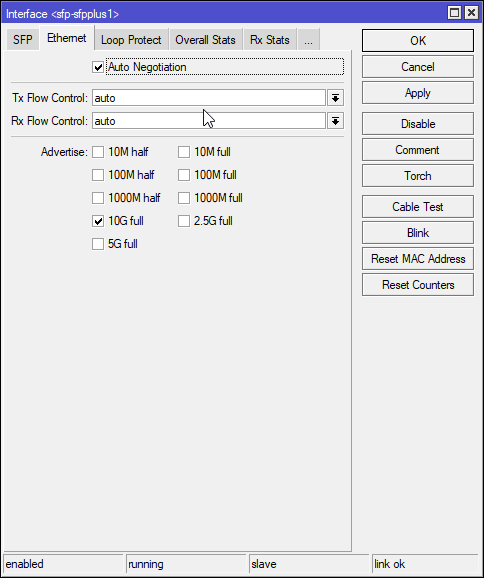
that should be auto negotiate
buoyant shell
alr thanks
Ik Ik it sounds dumb but I just heard a thing on tik tok about it and just wanted to know what it is their for
tame carbon
wat xD
buoyant shell
Lol they said u can get more speed and I got confused how
tame carbon
@buoyant shell https://i.imgur.com/jTaWTSs.png
 buoyant shell
Yea i shoulda used common sense
 peak cloak
buoyant shell
Lol they said u can get more speed and I got confused how
peak cloak
buoyant shell
Lol they said u can get more speed and I got confused how
you can't lol
tame carbon
@buoyant shell auto negotiate just picks the best available speed for the link
buoyant shell
oh ok
tame carbon
if both sides are gigabit, it will do that
@buoyant shell if say, one of the 8 wires in the cable was broken
 strong mulch
I apologize if this isn't the place to ask this but I'm having some I think its networking issues with Forza Horizon 4, and when i go to check Xbox Networking it says something about Teredo is unable to qualify, and I can't fix it with Microsoft's reccomendations?
buoyant shell
50 down and 10 up
tame carbon
it wouldnt be able to do gigabit, and it falls back to 100M
fast ethernet needs 4 wires, gigabit needs all 8
10Gbit is another standard, and so is 2.5G and 5G
buoyant shell
Darn yea I just CAT 6 installed in my room and im blown away
I used a wifi extender before
peak cloak
anything above 10gig use fiber
tame carbon
yeah 10G on cat6a ~ up to 25 meters
peak cloak
or even 10gig
tame carbon
beyond that, use fiber optics.
peak cloak
use fiber
tame carbon
Fiber optics can go for many kilometers
and go up to insanity speeds
10G, 25G, 40G, 100G, 200G or even 400G
and thats a single color of light
you can then put 96 colors on a single fiber, for practically infinite bandwidth
with 100G, that's 9.6tbit/s

this is mostly used for trans-atlantic fiber optics and long haul fiber
@buoyant shell 10G can be nice at home, if you have a NAS that is very fast
its still somewhat affordable
once you go to faster link speeds, it gets expensive really quickly
@peak cloak btw, for short distances, copper is actually faster than fiber
those DACs have less latency
because there's one layer less of electronic switching logic
tame carbon
nothing is faster than light
oh
ok
xD
@peak cloak actually that is not true either
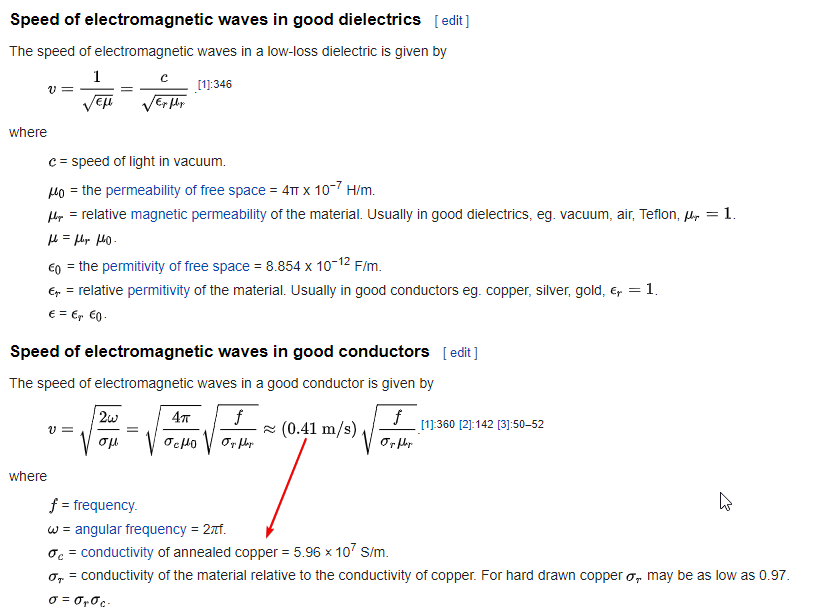
electrons move at quite a snail pace
but charge potentials can spread way faster
peak cloak
huh
tame carbon
Drift velocity, the average speed at which electrons travel in a conductor when subjected to an electric field, is about 1mm per second.
the change of the electric field traverses the wire much faster
@peak cloak its not really electrons moving per-se
its more that there's an imbalance in charge
and this causes current to flow
but the actual movement of electrons is really slow
this imbalance in charge
is electric potential
and that's measured in Volt
buoyant shell
I’m just happy I have 50 down and 10 up I had 10 down and 1 up before
tame carbon
Nicee
@buoyant shell I was on 4/0.6 for many years
and I've worked with dial up systems before xD
and yes, this is still operational, though I no longer work for that company
@peak cloak https://i.imgur.com/j1UhoUs.png
 buoyant shell
Old Speedtest but still gold

Speedtest.net
Test your Internet connection bandwidth to locations around the world with this interactive broadband speed test from Ookla
tame carbon
speedtest slow
can barely keep up
@buoyant shell https://www.speedtest.net/result/11253160776.png
 buoyant shell
🥜
tame carbon
fastest access I have
buoyant shell
CAT 8?
buoyant shell
Darn
peak cloak
buoyant shell
CAT 8?
has nothing to do with the cable lol
buoyant shell
Idk bro
tame carbon
@buoyant shell copper is just consumer market
buoyant shell
I see fast internet and it makes me happy
tame carbon
enterprise is all different technology
but uses same standards as the home stuff
just different connectors and cable types
 lean pebble
Yo
 acoustic horizon
Glad I could help. Hope it works out. I work in fintech aws-based shop myself, feel free to ask things if you have questions
 outer nebula
acoustic horizon
Glad I could help. Hope it works out. I work in fintech aws-based shop myself, f...
outer nebula
acoustic horizon
Glad I could help. Hope it works out. I work in fintech aws-based shop myself, f...
I do hope so! how hard is it to work with aws?
acoustic horizon
well. it's not. in onprem you would be ordering and assembling and maintaining hardware whereas with cloud it's a click of a button (or more accurately a line in your terraform code)
consider signing up for aws free tier
 ancient osprey
Okay this is a rea dumb question, but with a cloud hosted OpenVPN can I bypass streaming restrictions? If so how? Please @me if you could…
 thick minnow
ancient osprey
Okay this is a rea dumb question, but with a cloud hosted OpenVPN can I bypass s...
thick minnow
ancient osprey
Okay this is a rea dumb question, but with a cloud hosted OpenVPN can I bypass s...
You could, but if you use a really well know cloud provider it couldd detect that you're using a VPN and I suggest using Wireguard over OpenVPN and changing the default port
As for setting it up, there are plenty in this server who can help
especially in this channel
 rose sparrow
Hey!
Can someone please check where's the bottle neck.
I am using a CAT5 cable (30m) to get connection from one room to another. I have routed the cable from the exterior of my building.
First of the connection being established is 100 mbit full duplex. Both the routers are gigabit. I can understand this may be due to poor quality of the wire
Next for local file transfer via SMB or FTP, I am getting full 100mbps but for internet, I am getting only 20mbps
I have a 200mbps connection... Checked it n-number of times, it is working great.
I tired changing both the primary and secondary routers.. still the same.
Tried connecting one end directly to the Cable modem and other end to my pc, still getting the same 20mbps speed
Can someone please tell where might be the bottle neck?
If i am getting 100mbps for local file transfer. I should get 100mbps net speed too. But I am getting 20
ancient osprey
thick minnow
You could, but if you use a really well know cloud provider it couldd detect tha...
What’s the difference?
thick minnow
ancient osprey
What’s the difference?
Wireguard is. a newer protocol, with higher bandwidth, if that's what you're asking
 unkempt birch
@rose sparrow have you tried going into your admin access via you IP address and mess with some settings in there?I had an issue where my wireless adapter wasn’t connecting to my Verizon AC router. As it turns out there was a setting in my router preventing a proper connection with a specific band for the WiFi. Once I turned the setting off I was able to get my speeds from ~60 ish mbps to ~230 mbps on a Verizon Fios 500 mbps connection. This was because the setting was limiting the bands that the ac WiFi was putting out. So instead of properly connecting to an ac band it connected to an N band resulting in lower speeds. Of course this was over WiFi so if you are talking about a wired connection this information may not be relevant at all.
ancient osprey
thick minnow
Wireguard is. a newer protocol, with higher bandwidth, if that's what you're ask...
Pretty much. I hate companies having my data, but I also hate streaming restrictions so I just want to either pay for a decent VPN or create my own. I’m using PIA right now, but it’s honestly not my favorite thing for bypassing restrictions
 robust plinth
I mean if you really hate companies having your data, I wouldn't say PIA is your way of going. Yes they claim to "not" safe or have data. But remember they're a US base company and if government wanted information they're at will to collected / share.
ancient osprey
robust plinth
I mean if you really hate companies having your data, I wouldn't say PIA is your...
Yeah, my time with them is at an end and I want to be able to bypass streaming restrictions and still have a good VPN. I was looking at either doing my own using Linode or using something like PrivateVPN. Thoughts??
robust plinth
If anything, I would recommend hosting your own vpn 😄
Cause doing that your at well... At your own risk / will 😄
ancient osprey
Lmao, that is the dream, but I’m like which would be better in the long run?
robust plinth
Hosting your own is a fun project, but remember you're one trouble shooting / doing maintenance.
I sometime host my own, but then I get lazy to maintenance it... So I jump from that to ExpressVPN
ancient osprey
How is ExpressVPN compared to PrivateVPN?
robust plinth
Speeds for one, are alot better on ExpressVPN
If you want pre-speed NordVPN wireguard tech is good. But has it down falls I'm sure you're aware of.
Like them storing your IP.
ancient osprey
What’s the streaming restrictions bypass like?
Sorry I ask a lot of questions. Just would rather have a customers opinion than a company
robust plinth
Nah you're good hehe. In my point of view its good, it has it's ups and downs, but I've notice alot better output on ExpressVPN vs PIA when it comes down to netflix.
I use it all time for HBO and netflix 😛
ancient osprey
Lmao, I was jus about to ask. PrivateVPN is looking like a good option, but like idkkkkk. I want as little of my data out there as possible, ya know? What are you thoughts?
robust plinth
I mean most paid vpn's will always have their own hit or miss. If your data means alot there isn't anything like hosting your own VPN.
ancient osprey
I mean I’m fine giving up some data, but when it comes to reliable streaming restrictions bypass I wanna know it’s secure and it will work
Nord bad. Nord very bad right?
 lean pebble
Morning
lean pebble
robust plinth
I mean most paid vpn's will always have their own hit or miss. If your data mean...
Ivacy sometimes works for bypass
Last time I used it it worked perfectly fine
robust plinth
@ancient osprey nordvpn one of first to host wireguard protocols. They call it "nordlynx"
@lean pebble I do that, I sometime forget about my vpn lol
lean pebble
But the only issue I had with them is configuration on Linux because they don't have their software for Linux.
That's why I started to use private proxy server on my own server
Squid
lean pebble
I tried expressvpn was awful
robust plinth
hehe
lean pebble
Ivacy offers you dedicated IP if you need it
robust plinth
yea I've used nordvpn dedicated for awhile
lean pebble
I tried from Hong Kong was awful ping 😆
robust plinth
oh yea, that firewall tricky on vpn. You need find one that works well 😄
lean pebble
I didn't noticed that they included it in the price of the sale.
So I asked them to cancel only the dedicated IP address
Oh gosh my full stack teacher compiling html file
😂
robust plinth
oh boy hehe
 jaunty talon
Anyone here have a VPN setup that you use a idP wth SAML for authentication (with 2FA)? And in case you have, which product do you use?
 ruby bramble
Dual 5gb ethernet next to my school desk

 bright prawn
looks great
almost as good as the ethernet ports kids in my middle school would stab to death and open with pencils
ruby bramble
bright prawn
almost as good as the ethernet ports kids in my middle school would stab to deat...
Whyyyy
ruby bramble
Unfortunately cat 5 cant do 10gb
bright prawn
it was usually around 80-100 megabit
nobody used the school ethernet anyways
i jacked my own internet to the school computers so i could get past the website block
they didn't even allow us to play flash games
ruby bramble
Ouef
tame carbon
bright prawn
almost as good as the ethernet ports kids in my middle school would stab to deat...
10kV anti-tamper system
bright prawn
zap dem kids
 vestal surge
What does a ubiquit controller look like with non-unifi switches? Does it break anything?
Or would it still see clients on the side of the switch?
tame carbon
@vestal surge depends
if you are using vlans, you might want to get a managed switch
brand doesnt really matter
vestal surge
Yeah I've got a managed switch on the way because unifi is out of stock
tame carbon
its all standardized anyways
vestal surge
Uplink will have two vlans, managed switch will send one out to one client and the other out to three
thick minnow
i cant login to to my nas anymore
thick minnow
OH
peak cloak
 dusk oasis
Should I need a modem for this router ? Mikrotik hAP AC2
dusk oasis
Should I need a modem for this router ? Mikrotik hAP AC2
What type of internet access do you have rn
Dsl?
Check you existing network
Is there a modem?
What type of cable goes into the current router
If it's ethernet your good
If it's something like a phone line then the setup could get a bit more involved
peak cloak
I have fiber too
But the ont converts it to ethernet
So no fiber to the router itself
ruby bramble
Our router dirctly does fiber fiber however that goes to our swich and is then converted to ethrnet so the oposite
thick minnow
can someone please help with my nas
ruby bramble
thick minnow
can someone please help with my nas
Wats the problem?
thick minnow
its a netgear readynas duo v2
ruby bramble
Try admin admin
tame carbon

thick minnow
didnt work
 empty sinew
thick minnow
its a netgear readynas duo v2
empty sinew
thick minnow
its a netgear readynas duo v2
Google your specific model, there are usually websites with common usernames and passwords (default)
peak cloak
Do you have data on it?
 thorny vector
thick minnow
peak cloak
Do you have data on it?
thorny vector
thick minnow
peak cloak
Do you have data on it?
i just got it 2nd hand
peak cloak
thick minnow
i just got it 2nd hand
Factory reset it
ruby bramble
thick minnow
didnt work
Chck the stickr on the bottom
thick minnow
ruby bramble
Chck the stickr on the bottom
doesnt say anything special
just the model
thick minnow
i already pressed the reset button
peak cloak
ruby bramble
Dual 5gb ethernet next to my school desk
5gb? doubt
rate limiting and qos exists
and a school prob has 1 10g link
thick minnow
networking in schools is almost always shit
empty sinew
y e s
peak cloak
thick minnow
networking in schools is almost always shit
because you have like a 10g or less upstream for like hundreds of devices
plus it usually goes over a dedicated fiber to the main school first
before being routed to the internet
thick minnow
and it always looks like this

 clear igloo
thick minnow
and it always looks like this
clear igloo
thick minnow
and it always looks like this
Hey now, someone tried!
to make it look bad 😛
peak cloak
there's this cool web ui at like http://10.128.128.128
clear igloo
yup @peak cloak
I'm blanking on the other address but yah, you can see signal strength and other stats of the connected AP
thick minnow
peak cloak
there's this cool web ui at like http://10.128.128.128
ahh yes, nothing
peak cloak
24 mbps
peak cloak
thick minnow
ahh yes, nothing
yes, it's a private ip
only if you are internally connected
tame carbon
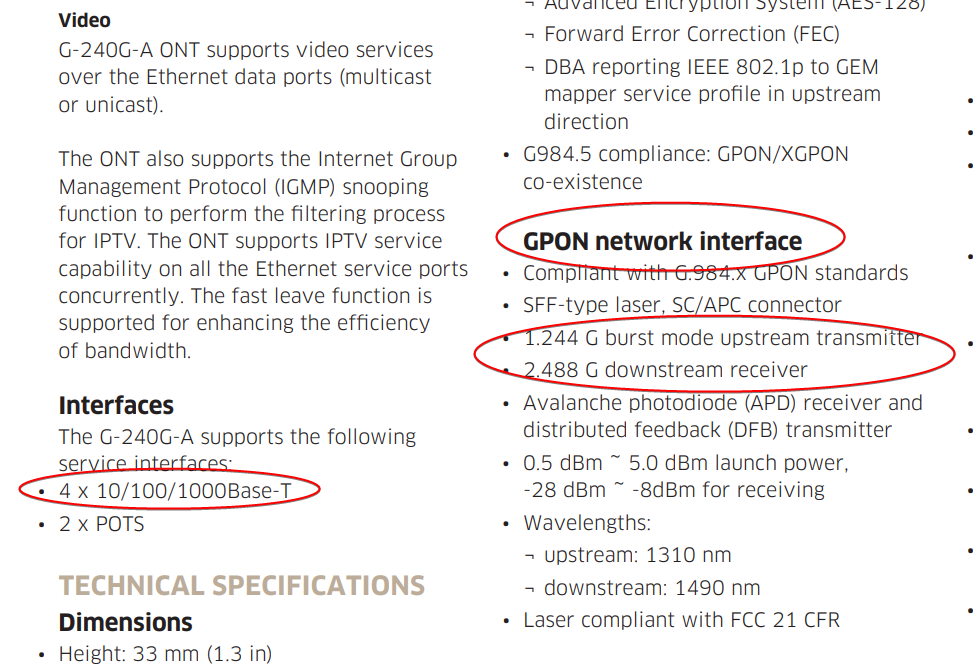
Anyone know if it is possible, to use this ONT https://www.goamt.com/wp-content/uploads/2015/08/7368_ISAM_ONT_G-240G-A_AMT.pdf
for pure telephone service?
instead of plugging the ONU directly into the ONT, we'd have it in a switch, doing VLAN offhanding
and use it only for POTS
Stupid Telus' 1.5G service
on a device with only 1G ports.
 tame carbon
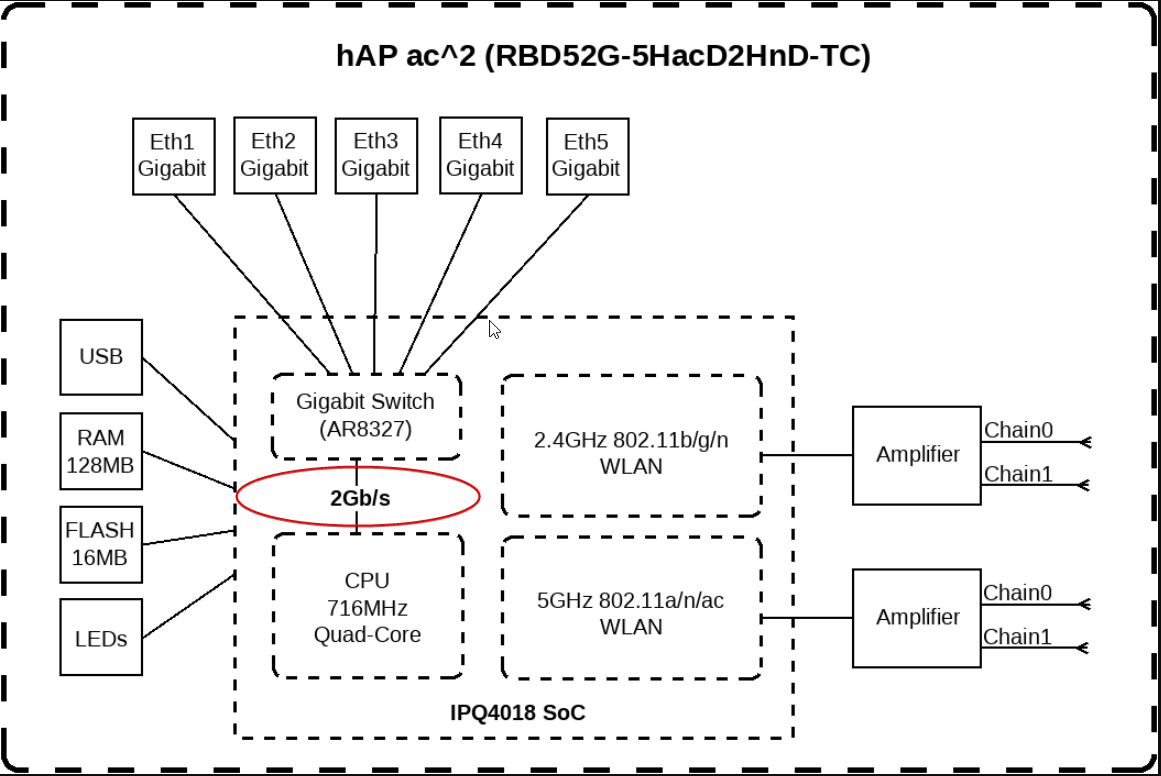
@dusk oasis routing is done in software.
dusk oasis
Is it an actual router
peak cloak
dusk oasis
Is it an actual router
yes
tame carbon
@dusk oasis https://i.imgur.com/m4IU8ex.png
 dusk oasis
My connection is Fiber optic cable!
peak cloak
dusk oasis
My connection is Fiber optic cable!
but do you have an ONT?
or does it go directly into directly current router
an all-in-one
tame carbon
@peak cloak I called Telus lol
asking them what this BS is with 1.5G service on a 1G ONT
They wouldnt give me any details without a stupid customer reference.
Pricks.
peak cloak
ah
tame carbon
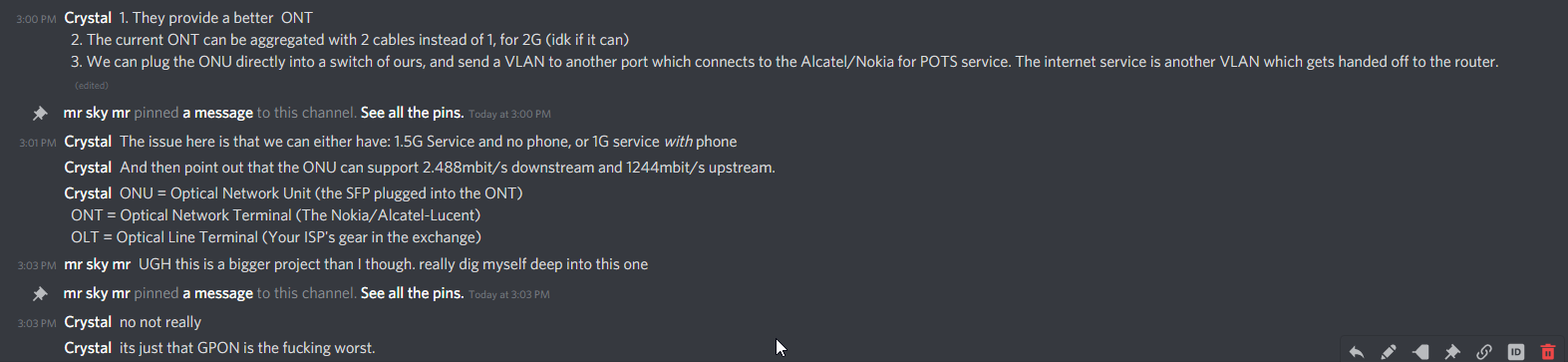
and if they plug the GPON directly into another device
they loose phone service
so its either 1G + phone, or 1.5G and no phone
tame carbon
@peak cloak basically: https://i.imgur.com/Sp9CIe9.png
but with indian tech support (sounded like it)
you are kinda hopelessly doomed.
unless there's a literate senior support person
useless.
Doesnt even support LACP
 austere veldt
Hi! So i have an old TP-Link Access Point that supports multiple SSID mode. In order to use 2 SSIDs on different VLANs, do I need a switch aswell to make the 2 VLANs work? Because I tried to set it up and got wifi on one SSID/VLAN but not on the second one
tame carbon
@austere veldt does it even support vlans?
you need a vlan capable router
and switch
austere veldt
tame carbon
<@!216939780531814401> does it even support vlans?
Yes, on the setup page of the AP, it allows me to choose the VLAN for each SSID
tame carbon
vlans are just a header in the ethernet frame
some unmanaged switches strip these vlan headers
so its usually best you use switches that have explicit support for vlans
you need to set up a trunk to the AP
austere veldt
'aight, thanks for the tip! I'll look into it
tame carbon
basically, you need a switch, that has the vlans you need configured on the port that goes to the AP
and then the other port to your router, also needs those vlans configured
the router, then has a subnet and address on each vlan
so it can route packets out
 outer nebula
acoustic horizon
consider signing up for aws free tier
outer nebula
acoustic horizon
consider signing up for aws free tier
I might just do that! sadly i wont have this laptop for the whole period so signing up would a challenge itself. I do appreciate de recommendation!
acoustic horizon
also
I have to say that cloud/devops is free money as a job
The shortage of qualified personnel made the salaries skyrocket.
If you're semi-decent companies will be at each other's throats with competing offers to get you.
outer nebula
I'm also following up this guy on youtube called NetworkChuck that given me the first insights of cloud/devops
outer nebula
acoustic horizon
The shortage of qualified personnel made the salaries skyrocket.
I have noticed that with interview, they are willing to hire people to little to no knowledge but with the condition of being determined to learn and cooperate (entry level as they also said).
peak cloak
austere veldt
Yes, on the setup page of the AP, it allows me to choose the VLAN for each SSID
what AP?
I might have the same one
acoustic horizon
outer nebula
I have noticed that with interview, they are willing to hire people to little to...
As a team lead who's hiring for a member, I approve of this approach.
austere veldt
peak cloak
what AP?
It's a TL-WA701ND
tame carbon
outer nebula
I have noticed that with interview, they are willing to hire people to little to...
same with my recent job interview
we mostly used business terms and didnt talk much about technical skills
I was asked if I was willing to learn full stack development, ontop of my existing backend experience
to which I agreed
FREE TRAINING
milk it
work paying you to learn something? fuck, I used pay for this as a student. Sign me up
 waxen scroll

 frigid pine
outer nebula
I have noticed that with interview, they are willing to hire people to little to...
frigid pine
outer nebula
I have noticed that with interview, they are willing to hire people to little to...

 little schooner
which one of you said hardware offloading routers were better than pfsense ones for gig speed? you were right from the beginning. I upgraded to 800 mbps plan at a reasonable price ($69.99) compared to last year ($129.99) and I couldn't even get more than 350 mbps.
I connected directly to the modem and was pulling the full speed. I went ahead and bought a new Edgerouter. I want my full speed...
@waxen scroll omg ever since the new local fiber company rolled out their cheap internet access in the neighborhood, Comcast prices actually make sense again!
thank goodness for competition
waxen scroll
some how internet only prices in my area make sense too
theres no real competition yet
peak cloak
little schooner
which one of you said hardware offloading routers were better than pfsense ones ...
I think I did
which edgerouter?
make sure to turn on hardware offload
for full speeds
tame carbon

@little schooner that would be me
@little schooner join the dark side, get a mikrotik
peak cloak
waxen scroll
edgerouter isnt even cloud managed
edgerouters barely get updates
waxen scroll
@little schooner i said that
i said that pfsense = crap
i said why use clunky dells to run your home network that burn power
i said it all
@little schooner you saying i was right?
tame carbon

little schooner
I was implying that my decision to go pfsense was bad lol
waxen scroll
@little schooner run a packet flood test to the pfsense, you'll see the CPU spike 100% and the throughput is awful
waxen scroll
iperf might work, i had specialized tools when i did it
little schooner
@waxen scroll were those tools expensive?
 short condor
Hi guys. I’m in a bit of a need. I have a networking setup atm that contains some unify products and some own-made. The setup is as follows. A modem connected to a pfSense-box that has a whole system vpn connection. To this pfsense box I have a ubiquiti USG Pro 4 connected. To that I have a 24 port poe switch from ubiquiti. To that I have a cloud key gen 2 plus and a nanoHD access point. Then everything is connected to the switch via cable. What I am trying to do Is remove the Usg pro 4 from the equation. I feel that the pfsense box is more than enough. The problem I have is when I remove the Usg by bypassing it and connecting the switch to the pfsense-box the everything gets inaccessible and I can not access anything. No interface or anything. What am I doing wrong?
tame carbon
:facedesk:
tame carbon
@little schooner unifi expensive. for $199 you have 10G router
tame carbon
@waxen scroll the 10G is kind a lie really
in realitty, you get at most 5G
if you use SFP+ as uplink
little schooner
that's terrible
tame carbon
because each of the 5 ports is a switching group connected at 2.5G
@little schooner but it has a 2gbit/s hardware offload for VPN
and a quadcore at 1.4GHz lol
if you use fastpath, its completely offloaded
but I've been able to do a bandwidth test to the router at full 10G
waxen scroll
@clear igloo i know $8000 cisco routers with all gig interfaces that only do like 200mbit out of the box
peak cloak
short condor
Hi guys. I’m in a bit of a need. I have a networking setup atm that contains som...
so you were double NATing?
is the pfsense doing dhcp?
short condor
peak cloak
is the pfsense doing dhcp?
Yes it is.
short condor
peak cloak
so you were double NATing?
Double nat?
peak cloak
you know what NAT is?
basically translates the one IP you get from ISP to your many LAN devices
short condor
Yes I know that. But it is in a hierarchy. Modem with its own 192.168.0.1, pfsense with its own 192.168.99.1 and UniFi with its own 192.168.100.1
Maybe I have set it up I a over complicated way.
peak cloak
is pfsense doing NAT?
peak cloak
short condor
Maybe I have set it up I a over complicated way.
yeah...
short condor
peak cloak
is pfsense doing NAT?
It is outbounding yes.
peak cloak
ok what happens if you get rid of USG and just connect to pfsense?
short condor
 peak cloak
show output of ipconfig /all on windows
short condor
peak cloak
ok what happens if you get rid of USG and just connect to pfsense?
Everything is killed and I get no internet access on anything going out from the pfsense box.
peak cloak
short condor
Everything is killed and I get no internet access on anything going out from the...
well there must be a reason
@little schooner you know pfsense?
short condor
I think the problem lies in the UniFi setup.
peak cloak
short condor
I think the problem lies in the UniFi setup.
but you just said you got rid of the USG?
short condor
I did and it didn’t give me internet. When I reconnect the Usg everything is working fine.
Maybe I have given the unifi setup a predefined ip? Is it possible to dhcp from the pfsense box?
peak cloak
short condor
I did and it didn’t give me internet. When I reconnect the Usg everything is wor...
ok, but for one just saying "it doesn't work" isn't really how you troubleshoot networks. For example you may be connected, but dhcp may not work. Or that you may have connection to the router, but not to the internet
peak cloak
short condor
I did and it didn’t give me internet. When I reconnect the Usg everything is wor...
what do your NAT rules look like
short condor
I have no connection to the modem, pfsense or UniFi when I disconnect the Usg.
short condor
peak cloak
what do your NAT rules look like
 peak cloak
you said pfsense has 192.168.99.1, on what interface? LAN or WAN?
peak cloak
and the WAN interface address is a global IP?
short condor
 peak cloak
ok, so you have like triple nat lol
short condor
The wan is given on .133 from the modem.
peak cloak
ok so in this configuration your "modem" is acting as a router
short condor
My modem is just the provider isp one. As it is internet over coaxial I can not remove it from the setup. It is just a dummy. Coaxial to Ethernet. Just sending the signal to the unit next in line. In this setup it is the pfsense box. I want all the routing to be done through the pfsense box as a base and the switch for connection.
peak cloak
short condor
My modem is just the provider isp one. As it is internet over coaxial I can not ...
but it's not, it is clearly doing NAT and DHCP at least
what you want later is to have the modem in passthough mode
to get rid of all it's routing
but that's not relavent right now
@short condor try changing NAT mode to hybrid
short condor
peak cloak
but it's not, it is clearly doing NAT and DHCP at least

This is the “modem” setting
short condor
So if I turn it off, what happens?
peak cloak
pfsense
short condor
Yea I understand that.
peak cloak
short condor
So if I turn it off, what happens?
pfsense won't get an IP
what you need is for the modem to just passthough all it's traffic
for it to act as an actual modem
but first let's fix pfsense
short condor
Will that kill the “routing” possibility?
peak cloak
short condor
Will that kill the “routing” possibility?
wdym?
short condor
If I connect the computer to the pfsense box directly everything works fine.
peak cloak
short condor
If I connect the computer to the pfsense box directly everything works fine.
ohh
then what doesn't work?
@short condor I want you to try something, connect the pc to just pfsense directly on it's LAN interface and do ipconfig /all
in cli
short condor
Let me explain. If I connect my computer to the pfsense box directly I get internet. If I connect to the switch via the Usg connected to pfsense I get internet. If I connect the switch directly to the pfsense box and bypass the Usg then I don’t get internet on the lan ports of the switch.
short condor
Problem is everything is in the rackmount atm. I’ll have to reconnect. Give me a few minutes. 👌🏻
Can’t access my windows machine for some reason. VNC won’t connect. No screen connected to it.
short condor
peak cloak
just speculating won't do anything
What do you want me to give you? Some of the addresses are not supposed to be public on the internet right? 😅
I have a print-screen of the /all command on my windows machine.
peak cloak
short condor
What do you want me to give you? Some of the addresses are not supposed to be pu...
the output of it
yes they are called private ips
not routable over the internet
short condor
So a print screen is the output does not contain any personal information accessible from the outside?
peak cloak
short condor
So a print screen is the output does not contain any personal information access...
no, it shouldn't. At most domain name, but if you didn't configure it it's not there
short condor
peak cloak
no, it shouldn't. At most domain name, but if you didn't configure it it's not t...

This is now connected with the Usg in place.
short condor
192.168.102.10 - 192.168.102.254
And “enable dhcp server on LAN interface” is checked.
Is it possible to make the UniFi setup to get a ip via dhcp? Maybe I have assigned the switch a static ip range.
peak cloak
switch should get IP by dhcp by default
but switch's IP shouldn't matter
even if it's invalid
short condor
peak cloak
but switch's IP shouldn't matter
 peak cloak
short condor
peak cloak
short condor
show this, but directly connected to pfsense instead
peak cloak
short condor
yes but the IP shouldn't matter to the actual functionality of switching. Yes the managment will be inaccessible but it should still switch packets
short condor
peak cloak
show this, but directly connected to pfsense instead
Can’t. I don’t have a screen on my rackmounted hardware. It is all over VNC. 😕

 short condor
“Connection type” ipv4 is use dhcp
peak cloak
yes
short condor
Strange that it does not work.
short condor
Would not mind redoing everything
peak cloak
This is what be the ideal setup
@short condor

modem is in passthough mode
pfsense does all routing
what all-in-one modem do you have?
short condor
peak cloak
modem is in passthough mode
That is no problem. Easily done.
 short condor
Then the output in pfsense should be dhcp as it is now.
peak cloak
now I'm not too experienced with pfsense
peak cloak
short condor
Then the output in pfsense should be dhcp as it is now.
wdym by output
LAN interface?
short condor
Yes sorry. LAN interface that will connect to the switch.
peak cloak
yeah
you can use any private subnet you want
Just you need to change the dhcp range as well as the router's ethernet interface IP
short condor
I think I have messed up something in the UniFi setup. I have given the UniFi setup 101.1 and pfsense is 102.1. Maybe that is making things messy.
short condor
Well, I’m already invested. I like their protect capability with the cameras and such.
short condor
Well, it is possible to turn it off. But still.
What would be a good alternative then?
short condor
Well, I have pfsense so I only need a switch and a access point.
short condor
Only reason I use it is because of whole network openvpn
peak cloak
I mean that can configured in linux
short condor
It gives me the full 500/500 that I pay for from my isp, even over vpn. So I am happy.
Btw! This is the “lan” interface config. Should it be static ip under ipv4 or should I check dhcp? 🤔
 peak cloak
short condor
Btw! This is the “lan” interface config. Should it be static ip under ipv4 or sh...
peak cloak
short condor
Btw! This is the “lan” interface config. Should it be static ip under ipv4 or sh...
nah you are statically configuring the IP of pfsense
on the LAN interface
what are your dhcp settings just curious?
let's try something, disconnect the USG and directly connect the switch to pfsense
now on a computer do ipconfig /all
@short condor
short condor
Can it be done on Mac?
peak cloak
idk the mac eqivalent
short condor
Do I reboot any networking gear?
peak cloak
short condor
Can it be done on Mac?
try ip a
or ifconfig
that's the linux eqivalent
short condor
ifconfig -a is the command.
 short condor
Wifi
peak cloak
ok shows it's active
short condor
I restarted my cloud key and I am restarting the switch. They still show the old ip 101
peak cloak
you aren't doing any vlan stuff right?
peak cloak
try pinging 192.168.102.1
short condor
Now that I have restarted the cloudkey it shows the 102 ip. I’m waiting for the switch to boot
peak cloak
@tame carbon arp issue?
tame carbon
@short condor does everything break when you plug in a switch?
short condor
Okay, so I rebooted and now both switch and cloudkey get the 102 ip. I can access my VNC machine over internet no problem. Seems to have been the reboot that did it.........
tame carbon
wat
 short condor
All of them got removed from my account...
peak cloak
why I avoid unifi
short condor
I removed the USG and now my devices are not adopted to my account anymore... I can’t access them.
peak cloak
short condor
I removed the USG and now my devices are not adopted to my account anymore... I ...
Maybe ask in a unifi discord? I really don't know anything about unfi. I just keep my unifi controller on the same network as my usw flex mini
You know what
Maybe because the ip changed
Completely new network
@short condor maybe reset all of them?
short condor
-.- Reconfiguring everything is not what I need right now...
peak cloak
short condor
-.- Reconfiguring everything is not what I need right now...
You know what
I think I have a solution
short condor
Throw everything in the garbage?
peak cloak
@short condor change the dhcp range, as well as the pfsense ip to the 192.168.101.x network
So I would do dhcp range: 192.168.101.100-192.168.101.254
And change the proxmox lan ip to 192.168.101.1
short condor
Yea, problem is I can not access anything anymore. All the wireless stuff are down.
short condor
No ethernet port on the MacBook. 😅
short condor
Well...
peak cloak
I always also keep one interface on my router untouched just so I can access it in case I lock myself out
short condor
I reinstalled the USG.
Someday I’ll wipe everything and then reinstalling. For now i at least know that pfsense is ok, the isp modem has pass through and that a reboot will fix most things. 😅 thanks for the help!
 fringe crow
Work has wifi for employees because service sucks at the location... the wifi allows me to message and post on discord but not join chat rooms... how can I bypass this?
little schooner
waxen scroll
<@!366313443810082820> why u still workin at that school
things have been good here. It's highly likely they are making me full time very soon
 distant wedge
Anyone here know wholesalers in Canada that sell the UDM?
peak cloak
UDM...
 plain siren
distant wedge
Anyone here know wholesalers in Canada that sell the UDM?
plain siren
distant wedge
Anyone here know wholesalers in Canada that sell the UDM?
Never used them myself but some Maple Syrup friends of mine says they good
dusk oasis
@peak cloak
@tame carbon
Is mikrotik hAP ac2 designed as wifi router?
@peak cloak
dusk oasis
I just want to use it as a normal wifi router
I'm not going to buy mikrotik hAP ac2
It's an access point!
Not a wifi router
plain siren
dusk oasis
Not a wifi router
Good job on making the distinction that most dont regarding Router vs AP
It can run routerboard and do routing
so its capable of being both
dusk oasis
Umm
plain siren
It can handle the routing or just be an AP
dusk oasis
Does the ISP's stock router enough for 300mbps?
plain siren
Thats a [need more information] question but "Yes" and "No" depending
I call their stock "routers" "AIO's" or "All in ones" because they are.. all in one units
They can do everything, but they do it all badly
thick minnow
plain siren
They can do everything, but they do it all badly
Basically a "Jack of all trades, master of none" sorta situation
plain siren
If you tack on 10 Devices, 4 streaming lets say, about 50% of these AIO's choke from my visual experience.
If you have them where they get little to no airflow, they will choke regardless
dusk oasis
So what should I buy for normal uses
plain siren
Really the question is: is the AIO doing fine right now?
If it is, seems like its fitting your normal uses fine
plain siren
thick minnow
Basically a "Jack of all trades, master of none" sorta situation
Exactly this
But they are more like the 5th down from Jack of all Trades
dusk oasis
4 mobile and a laptop on wifi, a tv and a pc on ethernet!
dusk oasis
plain siren
Really the question is: is the AIO doing fine right now?
But it's expensive
plain siren
Rental fee?
plain siren
I think you missed it, but thats what I call an ISP Stock router, an AIO.
So i was asking: is it working fine right now?
dusk oasis
I'm going to...
plain siren
If the stock ISP router is working fine
then dont change it
If its causing problems, then we need to change it
But until then, leave it be
plain siren
thats why I left it open ended. "Is the ISP Router doing fine?"
That question has to be answered first
tame carbon
@plain siren btw I tried helping the guy with his Telus 1.5G
and he's not gonna get 1.5G service if he wants POTS
telus straight up ^
they dont have a better ONT for at least a couple months
plain siren
Yeah, I didnt realize he wanted POTS..
plain siren
it is a VLAN actually
tame carbon
my idea was to get one of those mtiks ONU SFPs
and then using his mikrotik switch he bought
plain siren
You cant extract it however,
tame carbon
fuck
@plain siren another person used those nokia/alcatel ONTs in bonding mode
to get ~1.5gbit
with ports 1 & 4
plain siren
VLAN 885 is the VOIP and then you need the logon SIP creds
I did manage something really fun the other day
tame carbon
@plain siren what about bonding?
plain siren
I dont see how that would work out unless its bonding happening on ISP Side and Gateway
tame carbon
@plain siren no I ment, between the ONT and the switch
it has 4 LAN ports
this is the one
someone on reddit claimed to have done it this way
plain siren
OH
tame carbon
but I couldn't find any evidence to back this up
plain siren
They bonded the copper + fiber link?
tame carbon
speedtests lol. fuck
dusk oasis
@tame carbon
But the setup is so complicated
tame carbon
@plain siren https://i.imgur.com/YgpoE2R.png

@plain siren "Bonding doesnt work" vs "It does work" in the same sentence
and unifi xD
plain siren
ok so this would not give full 2G
tame carbon
yeah except give you aggregated 1G
plain siren
yeah itll split the speed between the outputs 1G each when they negotiated 1g
but it wont properly bond switch
tame carbon
@plain siren and I spoke to Telus tech support, they are actual idiots
dusk oasis
I just need a good router for home uses , not a complicated network switch
tame carbon
they gave some cheap excuse that "you dont get more than 930mbit because our network is overloaded"
and
"1.5G is only when you use multiple computers" which is a fucking lie"=
ONT only does 1G
plain siren
930Mbit because their speed control on the GEM Ports cant get that detailed of resolution and they trim off the top headasses
plain siren
I know but it should be 1000 although its not 100%
tame carbon
I seriously do not understand who thought it was a good idea to deliver 1.5G service to consumers
they can't handle the sp33d
if you just had an ONT with 2.5G negotiation
plain siren
If you calculate the additional overhead tacked on by streaming to normal use
Its almost dead on
Idea was good execution was
uhh
less than
tame carbon
you can say trash
plain siren
I was going for garbage
tame carbon
rubbish?
plain siren
road kill
tame carbon
@plain siren what I dont understand is... an ONT doesnt need to be complicated lol
it has to have two ports
a 1G ethernet for IPTV, and a 2.5G for data
plain siren
Actually an ONT isnt needed anymore in reality
tame carbon
GPON is just.. convolluted
tame carbon
@plain siren is there any "difficulties" with just delivering active fiber?
just good old DHCP over a vlan?
tame carbon
why is it always money
always.
@plain siren I get to deal with another fiber ISP soon in germany
delivering business internet
I am really curious what kind of connection itll be
if my hunch is right, its probably just SMF/AE
since they run a 4km dedicated fiber
plain siren
I can give you a technical overview of the whole gPON system but yeah its convoluted

 tame carbon
@plain siren oh yeah ^ makes tonns of sense 
plain siren
tame carbon
<@!589542595341058048> oh yeah ^ makes tonns of sense <:KEKW:670048864052445204>
Oh man it gets fun
plain siren
 tame carbon
@plain siren lol I really wonder what a geomagnetic storm would do to the 'ol copper network
plain siren
So with AE you need switching/routing hardware for every "block" of subscribers
With gPON, you can have 1 switch GEM port serve 64 customers
tame carbon
okay, and is CWDM not an option ?
or wait
you have a complicated demux at the exchange
plain siren
 plain siren
AE will be found in high SLA, high throughput networks
gPON will be found in super high density
tame carbon
@plain siren I was quoted 40 grand for my fiber line
either that
or get a 2 year dataplan and pay 13,50/month for fiber upkeep
plain siren
 tame carbon
@plain siren GPON is TDM right?
isnt there a way to do GPON with various wavelengths?
plain siren
 tame carbon
they need to make a lovechild of WDM and GPON
plain siren
So GPON Encapsulated Model
GEM
Its how Voice, TV, Management, and Internet (ethernet) is packaged into the single feed

 tame carbon
so tagged traffic
plain siren
Tagged at a higher encapsulation basically
Its like the ISP level of a VLAN Trunk
And guess what, if you really want to, you can sniff this traffic and compare it to the currently accepted GEM Model and further extract it
VLAN 1000 on AT&T Fiber is used for ONT Management
Which is just SNMP
tame carbon
@plain siren when deciding on GPON or AE https://www.youtube.com/watch?v=zwiqg_dq1Ek

Pretty much what I think of when anyone rattles off a load of numbers or stats...
plain siren
The math for non-assured bandwitdh
 thick minnow
That reminds me, some person made a video about how ISPs break mathematics
tame carbon
basically ^ the better the S/N ratio is, the more banwidth.
@thick minnow minutephysics
plain siren
 tame carbon

Get a free trial of Audible at https://audible.com/minutephysics or by texting 'minutephysics' to 500500
Support MinutePhysics on Patreon! http://www.patreon.com/minutephysics
Link to Patreon Supporters: http://www.minutephysics.com/supporters/
MinutePhysics is on twitter - @minutephysics
And facebook - http://facebook.com/minutephysics
This ...
thick minnow
Yup
plain siren
here is best effort
 tame carbon
@plain siren how much bandwidth even goes down the fiber in total?

 tame carbon
"Guys, lets build a fiber network. And make sure it is total cancer for our customers"
plain siren
ITU-T G.984.3 is the Regulative Standard on gPON
https://www.itu.int/rec/dologin_pub.asp?lang=e&id=T-REC-G.984.3-202003-I!Amd1!PDF-E&type=items here is the 1 amendment made so far
tame carbon
I only know ITU-T E.164 from the top of my head
plain siren
Thats ENUM right
tame carbon
Phone numbering scheme yes
plain siren
Sorry not ENUM then
tame carbon
E.164 can be distilled into a regular expression
which you stuff into your DB to make sure you dont get invalid phone #
plain siren
It was E.164 DNS that was ENUM hehe
 peak cloak
tame carbon
<@!222482269829332992> can this do routing?
peak cloak
tame carbon
<@!222482269829332992> can this do routing?
routing bread
tame carbon
BreadOS
plain siren
tame carbon
<@!222482269829332992> can this do routing?
BreakfastOS, Bread based Nic's
tame carbon
@plain siren fucking callcenters
plain siren
lol
tame carbon
just got called by another callcenter
from my old ISP
asking me the same question
AGAIN
if I was willing to switch to their fiber service.
this is the third time
thick minnow
Can you sue them for that?
tame carbon
@plain siren then he got sidetracked, and I told him: I'm not switching back to KPN, and I wish you a good day
"Im pretty sure you are busy with bothering other people, have a nice day"
@thick minnow not yet
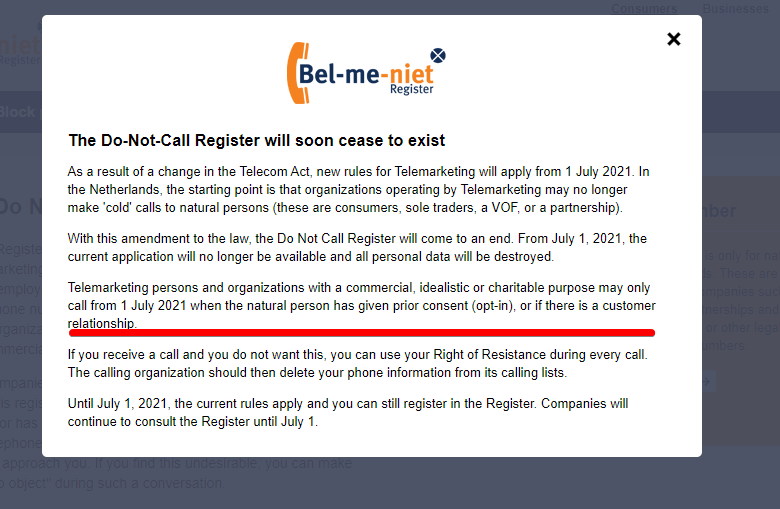
come July the 5th, new law goes into effect.
No more cold calls.
Companies cannot call you for business purposes, unless you had dealings with them prior
I told him that on the phone
and he said: yeah thats only for energy companies isnt it?
to which I replied; no no, those are a different breed of time wasters, equally annoying
the new law applies to all marketing
thick minnow
tame carbon
<@!222482269829332992> can this do routing?
Thats a switch
 thick minnow
YES
(If I lived in the netherlands)
peak cloak
 plain siren
peak cloak
https://cdn.discordapp.com/attachments/184324186284621824/831874675331170334/omS...
plain siren
peak cloak
https://cdn.discordapp.com/attachments/184324186284621824/831874675331170334/omS...
wait what
tame carbon
@plain siren detour
plain siren
Was the keystones not close enough to the PC and they still wanted a clean way
So they shoved the PC's connection into the rail
This is like the only way I can see this being a REMOTELY valid thing to do
tame carbon
You'd get bonus points if you did this with a switch
and then hidden the switch inside the rail
@plain siren I always reply rudely to telemarketing. Though I stay respectful to the person doing it
and when I 'cuss', it is at their company, not the person
cynicism. I love it.
thick minnow
tame carbon
https://i.imgur.com/aLuEjgp.png
OMG finally
 hidden socket
Dies anybody know if this can be used for wifi

It's a NTL box
Or is it just cable? (I'm in the uk)
thick minnow
People still use Itanium?

 limpid pond
Replaced the switch today with a managed netgear switch, fixed every error I've been having 🙌
tame carbon
hidden socket
Dies anybody know if this can be used for wifi
wat do you think?
peak cloak
hidden socket
Wifi? Or internet?
hidden socket
peak cloak
Wifi? Or internet?
I meant internet xD
hidden socket
Ethernet is exactly what i needed. thank you
Do you have any good moca suggestions? cause some are 100 and some cost 30
peak cloak
hidden socket
Do you have any good moca suggestions? cause some are 100 and some cost 30
moca 2.0 for gigabit
moca is expensive
you need 2
one for each end
the ones for 100 bucks are a pair I'm pretty sure
hidden socket
oh ok thank you!
tame carbon
@hidden socket cheaper alternative is pulling the cable and running ethernet
MoCa is a bit of a bodge
plain siren
I like to think of MoCa as what you get if you stuck a wifi AP and WiFi Client's antenna's together.
 fair knot
Would there be any signal degradation if I used an extender like this to join two 20m ethernet cables? It's not powered.
 plain siren
You do it only once you are prob fine
fair knot
ok cool
 hollow marlin
plain siren
hollow marlin
plain siren
Are you running Adtran ONTs? We tested them and are decent for their dirt cheap price but lacking on their chassis.
plain siren
hollow marlin
Are you running Adtran ONTs? We tested them and are decent for their dirt cheap ...
Dirt cheap is the only reason I actually have some toy equipment like this to play with.
I have a lab environment with some Adtran equipment tucked away, and I find lots of compromises for what it is.
plain siren
hollow marlin
Are you running Adtran ONTs? We tested them and are decent for their dirt cheap ...
Build quality is really what kinda scared me tbh
plain siren
 tender hazel
or the ONT? or both?
tender hazel
or the ONT? or both?
"yes"
Everything of theirs just feels...... flimsy
And im not sure what model my stuff is
5004 19-Inch, apparently first generation with like 1 602X and 1 374
For toying with it, it works fine, but its configuration is totally a PITA, I had issues getting the thing to "see" my "Subscribers", and like noted: it felt built like trash
served its purpose
tender hazel
we have a TA5004 in the office but haven't done anything with it yet
our initial rollout is active ethernet only to a limited number of customers even though we ran a lot of fiber, we put in mikrotik sfp+ 24 port switches temporarily b/c we didn't have active ethernet cards and the fiber guy waited too long to order them
plain siren
I hope I didnt just start worrying you
its not to say they dont work, but they "just work" imho
hollow marlin
I would say less of build quality and more limitations in AOS. Last place we had a ton a 5ks from GPON to DSL and while overall solid stability wise, visibility, tshooting and some odd config limitations were a no go. All our equipment here for GPON/AE is all Calix
tender hazel
we haven't done too much with the configuration of the units.. I know the CLI mimics cisco IOS
hollow marlin
AOS and IOS is a true to life meme of "let me copy your homework but change some things to its not the same"
We do use Adtran IADs here though for SIP/PRIs which out of the vendors has been the most robust
I do know Adtran sent us their beta test for their new ONTs for their SD-WAN solutions that coworker was testing. I know he sent it back like 4-5 days after receiving it so thats not a good sign. Ill have to meet with him to see what he thought of it as its their reaction to compete with Calix's AXOS platform
tender hazel
I can't even find that SD-WAN thing on their website
hollow marlin
Let me see if I can get the model. Like I said it was a "beta" ONT so I am not sure how much they are advertising outside major customers
tender hazel
I found press releases for it.. the model is 934
but it isn't on their website from what I can see
hollow marlin
Its under the SD-Access for more info https://www.adtran.com/index.php/sd-access
SD-WAN/Access, same buzz words
tame carbon
@toxic chasm was this a serious problem of yours, or purely theoretical?
 undone smelt
Can anyone help me with this wifi problem. So with the wifi card Archer (TX3000E) i have i get 410 download and 0.55 upload but i was 400 down and up and i have tried Ethernet and i get 500 download and 75 upload and my school pc with Ethernet gets 500 up and down are there a reason for this?
i have tried to update the wifi card and did not help too
Here the pc parts that i have:
Cpu: AMD Ryzen 7 5800x
GPU: MSI GeForce RTX 3070 GAMING X TRIO
Motherboard: MSI MAG B550 TOMAHAWK
Ram: 2x G.Skill Ripjaws V DDR4 16GB KIT 3200Mhz
Storage: samsung ssd 970 evo plus 500gb
Seagate SkyHawk 2TB 3.5'' HDD
Wifi-card: TP-Link Archer TX3000E Wi-Fi 6
peak cloak
undone smelt
Can anyone help me with this wifi problem. So with the wifi card Archer (TX3000E...
because it's wifi
ethernet is better
undone smelt
ya but i would still get slower speeds than a school laptop with the ethernet
undone smelt
i want to know why
undone smelt
ok, that still dont help me
@ me if you can help
tame carbon
have a look at this: https://mikrotik.com/product/audience

MikroTik is a Latvian company which was founded in 1996 to develop routers and wireless ISP systems. MikroTik now provides hardware and software for Internet connectivity in most of the countries around the world.
 toxic chasm
tame carbon
<@!232283826166956032> was this a serious problem of yours, or purely theoretica...
toxic chasm
tame carbon
<@!232283826166956032> was this a serious problem of yours, or purely theoretica...
It's a real problem
tame carbon
@toxic chasm this thing has 1x 2.4GHz wireless, and 3x 5GHz
You can use one of the 5GHz channels as a backhaul, to smaller units
It comes with an app to configure them
Mikrotik is carrier grade quality, most people here would recommend it
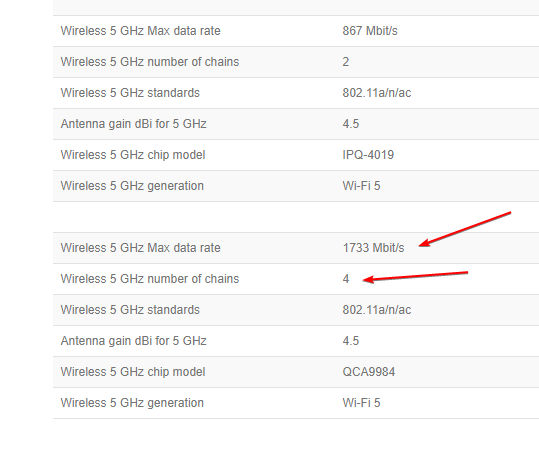
so it has 3 radios in total
toxic chasm
Something with a few more ethernet ports would be good. Already running 2 switches
tame carbon
@toxic chasm if you'll indulge for a moment... let me show you something
as @peak cloak said
toxic chasm
Honestly the biggest thing is how well it handles >700 active connections
tame carbon
@toxic chasm how much bandwidth do you have in total outgoing?
and do you have any heavy local traffic?
peak cloak
toxic chasm
Something with a few more ethernet ports would be good. Already running 2 switch...
how many devices?
 toxic chasm
I have 200x20 to the outside world. I have moderate to heavy local traffic
tame carbon
and you just need a switch to add ports
thinking about what might be best...
there's multiple solutions
toxic chasm
Bandwidth is not the real problem. The problem is latency with a ton of active connections
tame carbon
are they concentrated?
or in different rooms/
700 active connections?
what
700 devices?
xD
toxic chasm
They are in direct places. My router is next to my entertainment center with 5 devices connected, I have a switch in my room with 3 devices, and there is a switch in my roommates room with 3 devices
peak cloak
toxic chasm
They are in direct places. My router is next to my entertainment center with 5 d...
ah so not too many
tame carbon
@toxic chasm so wait, you have wired access in most locations? :o
toxic chasm
No 1 local device with >700 outgoing connections
toxic chasm
tame carbon
<@!232283826166956032> so wait, you have wired access in most locations? :o
Yes. I do wired when I can
peak cloak
connections don't really matter right? or because of the NAT state table size?
tame carbon
@toxic chasm https://mikrotik.com/product/hap_ac3 this is a very powerful home wireless router. it runs RouterOS which has many many features.
MikroTik is a Latvian company which was founded in 1996 to develop routers and wireless ISP systems. MikroTik now provides hardware and software for Internet connectivity in most of the countries around the world.
toxic chasm
Idk, when I have that many outgoing connections my ping goes to like 400
tame carbon
@toxic chasm now the cool thing.
peak cloak
toxic chasm
Idk, when I have that many outgoing connections my ping goes to like 400
yeah probobly router ran out of space for NAT state table

 toxic chasm
Btw my current router is the asus rt-ac56u
 toxic chasm
tame carbon
and couple of these ^
toxic chasm
tame carbon
and couple of these ^
Only a 650 sqft place
peak cloak
toxic chasm
Only a 650 sqft place
only one Access Point would be fine then
tame carbon
@toxic chasm yeah but if you put one of these in each room, everyone is on their own 5GHz channel.
toxic chasm
Yeah
toxic chasm
tame carbon
<@!232283826166956032> yeah but if you put one of these in each room, everyone i...
Isn't that going to cause spectrum congestion?
tame carbon
I get 1ms latency on 5GHz with those ^
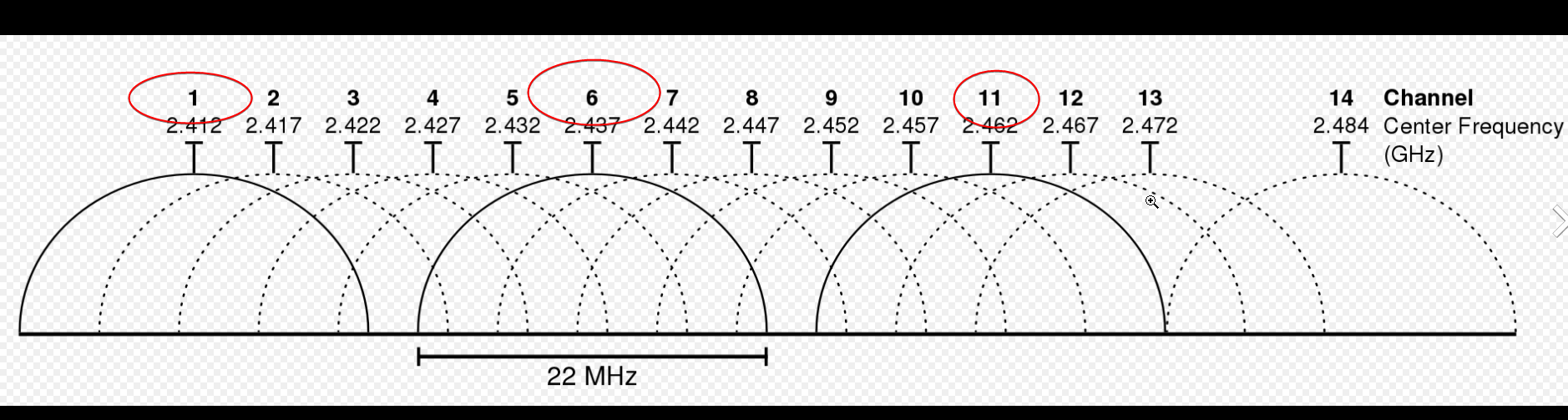
@toxic chasm 5GHz has a LOT more channels that dont overlap
2.4GHz only 3
peak cloak
toxic chasm
Isn't that going to cause spectrum congestion?
not really if properly configured with right TX power
plus it's one SSID
only one name





 toxic chasm
peak cloak
not really if properly configured with right TX power
toxic chasm
peak cloak
not really if properly configured with right TX power
There are over a dozen 5g networks in range of me
tame carbon
5Ghz doesnt have that much range
when the device next to you starts signalling
it drowns out the signal


@toxic chasm multiple radios is the only solution
you put them in different rooms, the phone connects to the closest one
and the idea with the single central router, is that they are all managed by the same device
so you dont notice it when it switches from one radio to another
its seamless basically
toxic chasm
tame carbon
@toxic chasm thats way overkill for your purposes
I have that one, but not with the wireless. that's waste of money
https://cdn.discordapp.com/attachments/776722183119699988/777646103775674368/IMG-20200922-WA0001.jpg


That's an RB4011 ^
but its for 10gbit/s
that one goes to my switch
@toxic chasm these cost $60
 toxic chasm
I just want something that works this time. The specs of the one you linked looked rather close to what I already have
toxic chasm
I'm tired of file transfers to my NAS failing 8 TB into them
tame carbon

I have one of these to get my NAS and PC to be highspeed
one is connected to the router as well
peak cloak
toxic chasm
I'm tired of file transfers to my NAS failing 8 TB into them
connections on the same network though a switch would not go to the router
tame carbon
tiny 4x 10gbit/s switch for $120
and that switch runs same operating system as all those other devices
I like it for that reason
those asus things have almost no features, never get updates
and are very buggy
toxic chasm
peak cloak
connections on the same network though a switch would not go to the router
Hum, maybe I should upgrade the switch in my room too
It is just some random crap I find laying around
tame carbon
@toxic chasm depends on what you need
ports and speed

$130
24x gigabit and 2x 10gbit
though wait
I wouldnt actually get that one
SwitchOS meh.
toxic chasm
I would like to do 10gb to my NAS, but I would need a crazy adapter for my laptop
peak cloak
router does not need to be 10gig if you just want 10gig over the same network without routing
tame carbon
@toxic chasm if you are on the same network, it doesnt route
toxic chasm
I don't use a desktop, just a laptop with a 4c/8t cpu 64gb ram, and a 2070
peak cloak
toxic chasm
I would like to do 10gb to my NAS, but I would need a crazy adapter for my lapto...
lol
tame carbon
it just switches.
peak cloak
toxic chasm
I don't use a desktop, just a laptop with a 4c/8t cpu 64gb ram, and a 2070
ah rip
what you want is a sfp+ adapter
tame carbon
@toxic chasm those 10G interfaces are not RJ45, they use SFP+
its a modular interface
can do both copper and fiber
toxic chasm
Looks like it would need a $200 huge network adapter
toxic chasm
For 10gb over USB?
peak cloak
tame carbon
no PCIe
he said he had a laptop
toxic chasm
Like I said, laptop
tame carbon
@toxic chasm what kind of interfaces do you have?