#networking
1 messages · Page 318 of 1
 plain siren
the intention of running your own authoritative NS would be to have that be where it says "This is our local domain"
In larger multi-geo networks, you have your root domain "root.tld" and then lets say.. physical sites:
home.root.tld
office1.root.tld
etc
Your authtv. NS would delegate that part of its zone (the root.tld) to the nameserver on site to set that local domain (ns1.home.root.tld would be authtv. for home.root.tld)
plain siren
yeah its actually somewhat complex but it makes sense at the same time
In your case, its an easy setup.
However, its not something you wanna start carving at until you consider a proper network design in head
 west vortex
Well I can't do much with my router. It's an Amplifi Alien, so the settings are super simple
plain siren
the DNS is usually that tree that everything grows from
west vortex
It just lets me add my own DNS servers and a few other networking options for the most part
west vortex
Like I said, I just want it to be able to say "Okay, I have these two DNS servers working" and if one goes offline, it will use the other. I want both DNS servers to access the root servers out there in the world instead of asking Google DNS or Cloudflare for the lookup info
west vortex
I thought authoritative was the term for that kind of local DNS
plain siren
DNS Servers that you design for that are meant to assign domain names and host names to machines and give you a local structure
A cache/relay/proxy
thats just...
that
west vortex
Okay so in my use case it's just a cache/recursive DNS?
plain siren
Setup 2 Raspi's and do the following: You put one in 1 box, 1 in another

and yeah you got your recursive
west vortex
Yeah that's what I did, except they go into my router so that it's automatic for all devices
west vortex
Except my router is saying my DNS config is wrong somehow, even though it's definitely not
plain siren
Ubiquiti
plain siren
yus
plain siren

Im clocking out
west vortex
And I tested manually in the windows ethernet adapter options, I put in each DNS server by itself, and it works
Thanks again man
west vortex
really appreciate it
 slender shale
Have a 20+ day email chain from an ISP that resells our lines, adamant that we can't tell that a customer is using a VPN on the line
Do they think that traffic is just invisible?

 frigid pine
slender shale
Do they think that traffic is just invisible?
frigid pine
slender shale
Do they think that traffic is just invisible?
Just show it to them.
slender shale
frigid pine
Just show it to them.
It ain't my job to prove stupidity at the end of the day.
The customer's had 4 new IP's and gets geo-blocked from IPTV within 2 days every time, if they can't work out it's following them that's their issue
 lean pebble
I just noticed that when I'm connected to the gre tunnel and pinging my home external IP I get 135ms.
 grave rune
how do you straight up block countries on Ubiquiti firewall

 twin zealot
grave rune
how do you straight up block countries on Ubiquiti firewall
twin zealot
grave rune
how do you straight up block countries on Ubiquiti firewall

Today we discuss Geo IP Filtering on the UDM Pro & UDM Base
Click this I dare you: http://bit.ly/3ktrwox
Disclaimer: You'll notice in this video I'm using an RDP connection as a test for GEO IP Filtering. This RDP Session is open via the Internet and is not used in primary production.
You should use a VPN for these types of connections scenar...
 tame carbon
@tender hazel do you know what happens if you restore a backup of a tik onto another identical device?
do the MAC addresses change
or does it inherit from the backup ?
slender shale
I don't know specifically for MikroTik, but the MAC address comes from the chip itself
Unless it has spoofing
tame carbon
You can set it
I am just wondering, because it would be nice if it did.
Would make a big installation a bit easier to maintain if I can't be there at any time to fix it
so I need to be able to just tell someone over the phone to plug the new device into their laptop, so I can load the backup on there
before we install it in its location
. The system's backup file also contains the device's MAC addresses, which are also restored when the backup file is loaded.
I think I answered my own question
grave rune
twin zealot
https://www.youtube.com/watch?v=bbYlz5Rls6w&ab_channel=180DegreesITSolutions
Thanks mate
slender shale
Well there we go haha
twin zealot
np
grave rune

 compact python

 sturdy ledge
hi is there any way i can tell if my ax200 chip in my pc is using 160mhz channel width or not
grave rune
how to fix half the downloads and some web things not working on Ubiquiti security Gateway

 peak cloak
grave rune
how to fix half the downloads and some web things not working on Ubiquiti securi...
peak cloak
grave rune
how to fix half the downloads and some web things not working on Ubiquiti securi...
didn't you just block a bunch of ips
there's your answer
peak cloak
oh
well you have some sort of firewall
idk ubiquitishit things
show your firewall rules?
 peak cloak
or it could be dns
grave rune
How could I change my DNS and what's a good one
 grave rune
This is all I've got
 peak cloak
you have to have dhcp somewhere
grave rune
I don't know why it just stopped today
 peak cloak
wtf is that
grave rune
 grave rune
Ok in command prompt or PowerShell
peak cloak
doesn't matter
grave rune
all good

 waxen saddle
DHCP name server is set to auto. Set it to manual and you can enter any DNS server.
grave rune
I am just so confused why it doesn't work and it just started not working
peak cloak
I bet it's dns
grave rune
Ok I changed it so I try again
peak cloak
first you need to renew your dhcp lease
to make sure it uses that DNS server
so
ipconfig /release
ipconfig /renew
grave rune
Cool
Now I get the site cannot be reached
I was not given a valid IP

Some stuff still doesn't work
Some stuff still doesn't work

I think it's completely broken now
peak cloak
grave rune
I think it's completely broken now
show the output of ipconfig /all
grave rune


 grave rune
that what i did

 peak cloak
grave rune
peak cloak
grave rune
yeah no that's not how it works
exit that
go to general
under that there should be Use following dns servers
or something like that
not on windows rn

 peak cloak
grave rune
Now the internet doesn't work on it
peak cloak
grave rune
Now the internet doesn't work on it
under Alternate Config you need to change it back to automatic private IP address
peak cloak
grave rune
because you changed IP assignment to manual
Go to the Control Panel
Click Network and Internet > Network and Sharing Center > Change adapter settings
right-click the Ethernet interface and select Properties
Select the Networking tab. Under This connection uses the following items, select Internet Protocol Version 4 and then click Properties
Select Use the following DNS server addresses
grave rune
It is set to automatic
 grave rune
Yes
 grave rune
Did that still got no internet
peak cloak
show ipconfig /all again?
grave rune
 peak cloak
you forgot the /
grave rune
 peak cloak
yeah
no default gateway
urgh
in the normal windows settings make sure ip assingment is set to automatic
grave rune
Windows diagnostic couldn't fix the problem
peak cloak
it never does
in the normal windows settings make sure ip assingment is set to automatic
 grave rune
Yes
grave rune
Normal speed about 100 megabits
peak cloak
you sure it's 100megabits
grave rune
Yes use two different speed
peak cloak
usually game downloads are in bytes
grave rune
No I mean speed test websites
grave rune
It will not still download
grave rune
Epic games launcher won't open as well
peak cloak
unifi making simple things complicated... as always
grave rune
Getting Gateway 502
peak cloak
huh
peak cloak
grave rune
Getting Gateway 502
epic is probobly just down
yep

downdetector.com
Real-time problems and outages for Epic Games. Online gaming not working? Is the server down? Here you see what is going on.
lol
all this
and...
grave rune
But I'm also getting you some programs won't download from Microsoft
I still can't install that director X
Getting network config errors
peak cloak
restart windows
grave rune
Probably just try tomorrow
grave rune
peak cloak
restart windows
I have
peak cloak
after our changes?
grave rune
Yes
grave rune
And I think the Microsoft download service would be reliable
lean pebble
its funny microsoft store download speed are super fast I'm downloading there on 15MB/s with 40Mbps vdsl bundle
 limber elk
Wait 15MB/s is like 120Mbps
lean pebble
ya
peak cloak
lean pebble
ya
that doesn't make any sense...
lean pebble
I know but thats what I get in microsoft store
peak cloak
you sure...
lean pebble
yea
peak cloak
I don't belive that
lean pebble
Next time I use the mstore I'll take a pic
lean pebble
Idk but that what it showed and it was pretty dawn fast
 frozen condor
could just be a caching agreement on the ISPs part with msft
peak cloak
frozen condor
could just be a caching agreement on the ISPs part with msft
but it's dsl
frozen condor
oh
peak cloak
limited physically
lean pebble
I don't think so my ISP is good but my internet infrastructure sucks (they are separated)
frozen condor
it could be combining downloading and extracting speed like origin does 
lean pebble
Idk man origin never was good on my network when downloading I hate them xD
But epic always taking all the bandwidth and crashing my net xD
nvidia to
lean pebble
anyone know how to setup gre tunnel on pfsense ?
 hollow marlin
GRE is the simplest tunnel to setup. Instead of trying it on pfsense, can you post your routing table on the VM?
 hot hawk
i have a wireguard vpn tunnel set up on a ddwrt router, i can connect to it when im on my network, but cant connect to it when i am out side of my network
tame carbon
@hot hawk fw policies?
tame carbon
@hot hawk I assume you are using your public IP to connect, while you are on your LAN?
But that same public IP doesnt work from the WAN side (internet) ?
hot hawk
yea
tame carbon
if the VPN is running on your router, it will need some INPUT firewall rules
to allow incoming traffic to the router on the wireguard port
your LAN traffic isnt subject to those firewall rules
hot hawk
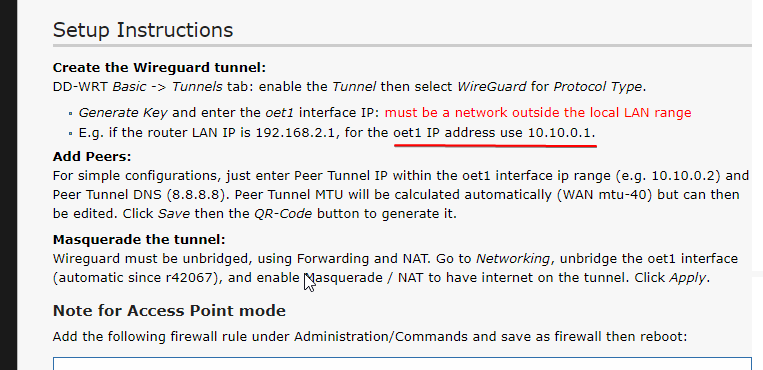
i basically just followed the settings here:
https://wiki.dd-wrt.com/wiki/index.php/Wireguard
hot hawk
tame carbon
if the VPN is running on your router, it will need some `INPUT` firewall rules
only "rules" i have atm is the command under "Note for Access Point mode"
tame carbon
@hot hawk your interface on your router is listening on a specific port
my guess would be that a firewall rule is blocking traffic to that port
peak cloak
port forward is just for NAT
hot hawk
o
hot hawk
this router is in a lan to lan config to my main router/modem combo
i can prob look but im pretty sure i havent seen a firewall setting
tame carbon
are you sure? :P
peak cloak
routers?
hot hawk
yes
peak cloak
or just switches
hot hawk
i am 100% sure
hot hawk
^
peak cloak
or are you actually routing?
tame carbon
@hot hawk is your entire network a single subnet?
hot hawk
tame carbon
<@!526806117993545748> is your entire network a single subnet?
yes
192.168.0.x
is the subnet
tame carbon
192.168.0.0/24 (for future reference)
peak cloak
hot hawk
192.168.0.x
not a subnet fyi. What crystal posted is a subnet however
tame carbon
@hot hawk but the VPN service, is that running your main router?
hot hawk
o
hot hawk
tame carbon
<@!526806117993545748> but the VPN service, is that running your main router?
no
tame carbon
then you need to port forward.
hot hawk
on the main router
tame carbon
Yes.
peak cloak
yes
tame carbon
Because your public IP is the WAN interface of your main router.
peak cloak
of course
hot hawk
do i need to do it on the secondary router which the vpn is on r no
peak cloak
hot hawk
do i need to do it on the secondary router which the vpn is on r no
is the secondary router doing NAT?
hot hawk
no
tame carbon
@hot hawk wireguard listens on some port, I forget, but pretend its 50100 for a moment
peak cloak
hot hawk
no
then no
hot hawk
kk
tame carbon
your public IP on port 50100 has to forward that to a local IP
hot hawk
tame carbon
<@!526806117993545748> wireguard listens on some port, I forget, but pretend its...
i have the local port forwarded, but not the mtu
tame carbon
that local IP would be LAN IP if your 2nd 'router'
hot hawk
 peak cloak
tame carbon
your public IP on port 50100 has to forward that to a local IP
peak cloak
tame carbon
your public IP on port 50100 has to forward that to a local IP
51820 udp
 tame carbon
UDP yes.
hot hawk
thats on my main rn
peak cloak
hot hawk
thats on my main rn
and 192.168.0.2 is the IP of the "router" running wireguard?
hot hawk
yes
hot hawk
it shows sending data but does not revive any data
so it seems no working plus stuff no load
when im on my network it works fine
peak cloak
hot hawk
it shows sending data but does not revive any data
using public IP to connect?
hot hawk
peak cloak
using public IP to connect?
not sure i just scanned with qr code
let me see what settings wireguard got
tame carbon
@hot hawk can you run this on your PC in your LAN? ping 1.1.1.1 -l 1472 -f ?
do you get replies ?
peak cloak
hot hawk
not sure i just scanned with qr code
ohh, that makes sense then
hot hawk
 hot hawk
tame carbon
encoding private IP
hot hawk
tame carbon
encoding private IP
Berh
hot hawk
 tame carbon
wut
peak cloak
wut
hot hawk
Wait
peak cloak
let me check what it shows on my phone
hot hawk
 peak cloak
yep
tame carbon
Endpoint
peak cloak
there we go
tame carbon
its wrong.
peak cloak
the endpoint
hot hawk
Berh
tame carbon
that should be your public IP
oh what a lovely day in NAT-land
can't we just use v6 already ffs
hot hawk
i can just change the ip to my public ip in endpoint?
tame carbon
yeah public IP and same port
hot hawk
df
ok my public ip is on a tottally different subnet than i last remembered it
smh i may need to account for a dynamic ip grr
peak cloak
my "dynamic" IP doesn't really change
on my last ISP it only changed if I turned off my router
but now it doesn't really change at all
 tender hazel
I use a dynamic dns name for mine
hot hawk
tender hazel
I use a dynamic dns name for mine
yea too lazy to set that up
tender hazel
Mikrotik does that out of the box by default
tame carbon
@lean pebble #networking message
peak cloak
hot hawk
~~yea too lazy to set that up~~
it really isn't hard
lean pebble
hollow marlin
GRE is the simplest tunnel to setup. Instead of trying it on pfsense, can you po...
I have both the pfsense is testing my main gre tunnel is centos 7 vm in cloud
tame carbon
post routing tables :P
 tame carbon
ping is a great tool for this
lean pebble
peak cloak
see if you can ping the internet
not true
My bad my eyes connected the two sentences xd
tame carbon
@hot hawk change the address of the interface. set it to 10.10.0.2/0 to a /32
lean pebble
tame carbon
post routing tables :P
are you talking to me?
lean pebble
haha
tame carbon
but you dont provide information that might help
tame carbon
peak cloak
see if you can ping your router
tunnel address is very strange
why would it be 10.10.0.2/0
pretty sure you put individual clients on a /32
hot hawk
tame carbon
<@!526806117993545748> change the address of the interface. set it to `10.10.0.2...
kk
tame carbon
lol when some guy in Internet HQ stumbles and accidentally flips the "global mute" lever
lean pebble
    link/gre 144.x.x x peer 82.x.x.x
    inet 10.70.3.1/30 scope global gre-tun1
``` VPS Link hot hawk
tame carbon
<@!526806117993545748> change the address of the interface. set it to `10.10.0.2...
hot hawk
tame carbon
<@!526806117993545748> change the address of the interface. set it to `10.10.0.2...
still no internet
hey at least the router sees the device
wooo
 tame carbon
@hot hawk can you ping from your phone to your router?
tame carbon
@hot hawk no ping the IP of the router peer on that 10.10.0.0/24
your phone is at 10.10.0.2
tame carbon
what is the other peer?
hot hawk
10.10.0.0/24 is unreachable
tame carbon
yeah beucase thats not an address, but a subnet
hot hawk
tame carbon
what is the other peer?
how to check 😳
tame carbon
yeah
with 0ms
because thats the phone itself
@hot hawk https://i.imgur.com/Ac8uTFV.png
 hot hawk
tame carbon
<@!526806117993545748> https://i.imgur.com/Ac8uTFV.png
hot hawk
tame carbon
<@!526806117993545748> https://i.imgur.com/Ac8uTFV.png
not sure where to enter in the interface ip cuz i dont see an option e

 gritty valley
@hot hawk what You want to acomplish? Phone tunneling to router?
peak cloak
hot hawk
yes oet1 is a tunnel, just no where to set an ip
need to masquarede it
so go to networking
and enable masquarade for that tunnel interface
peak cloak
gritty valley
<@!526806117993545748> what You want to acomplish? Phone tunneling to router?
vpn to home network
tunnel works
lean pebble
haha now my mtik refuse to enable the gre tunnel to my windows machine 😛
peak cloak
just routing
gritty valley
emm, using /0 will not work 😄
peak cloak
gritty valley
emm, using /0 will not work 😄
yes, we know
hot hawk
peak cloak
and enable masquarade for that tunnel interface
think masquarade is some where else on ddwrt
cant seem to find it under networking
tame carbon
its iptables
 gritty valley
For my MTik setup:
/interface wireguard peers
add allowed-address=10.10.11.3/32 endpoint-address="" interface=wireguard persistent-keepalive=1m public-key=\
    "KEY"
@gritty valley I'm afraid to break my entire setup. havent yet gone for rOS7
CAPs on v6 can't connect to v7 CAPsMAN
gritty valley
Phone side
 tame carbon
@gritty valley his wireguard endpoint sits on his LAN. Its behind another NAT
gritty valley
tame carbon
CAPs on v6 can't connect to v7 CAPsMAN
It should work faik
gritty valley
tame carbon
<@!94421999442464768> his wireguard endpoint sits on his LAN. Its behind another...
Ah, not on GW?
tame carbon
@gritty valley nah docs say specifically that it doesn't.
hot hawk
Test
tame carbon
WAN -> Router -> LAN -> "Router /w wireguard"
tame carbon
@hot hawk that fix the issue?
tame carbon
@hot hawk as a final test, try pinging the LAN IP of your main router from your phone
hot hawk
Pings just fine
tame carbon
kewl
hot hawk
Me still noob at this
tame carbon
wireguard is surprisingly easy to use
hot hawk
Last vpn server I had was a md4 open VPN server on Android lollipop lol
tame carbon
its less complicated than L2TP/IPsec that's for sure
hot hawk
I tried setting up a openvpn server on ddwrt
gritty valley
tame carbon
its less complicated than L2TP/IPsec that's for sure
If only L2TP/IPsec would allow Always-On for domains
Hence I forced my way to WG
hot hawk
Gave up cuz key too complicated for me e
tame carbon
@gritty valley wat? really? I have always-on VPN with l2tp
gritty valley
tame carbon
<@!94421999442464768> wat? really? I have always-on VPN with l2tp
on Android - if you want to use domain name (because dynamic IPs at home) - You cant enable always-on
gritty valley
I just let my 4011 do all the shaninigans as GW
tame carbon
same
There's just a binding somewhere https://i.imgur.com/cIHGpIK.png
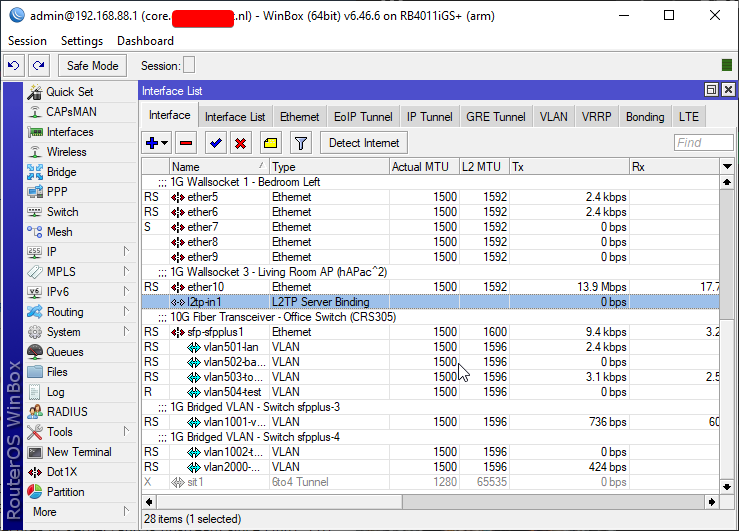
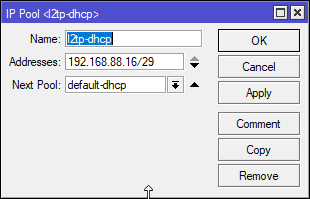
yeah it just hands out a couple addresses, and then if I need more it just dumps them on my LAN
hot hawk
berh when u cant make a happy face
 tame carbon
try double P
gritty valley
huehue 😄
gritty valley
meh, I just run UM + WPA3 EAP 
tame carbon
the only limitation I can find on my phone with l2tp
is that you must provide a DNS server on the local range of the VPN
that's it.
lean pebble
my mangle rule dead
gritty valley
[F]
lean pebble
yeah its dead gg
hot hawk
wait
so it seems wireguard breaks when i add a second peer
its peer tunnel ip is 10.10.0.3
tame carbon
 lean pebble
I had enough of gre for one day 😆 I'm taking a break
Now all the mtik tunnel side is broken even mangle rule haha
tame carbon
@hot hawk depends on the hardware you have, but wireguard can run multithreaded
gritty valley
Atleast with my phone the bottleneck is LTE speed
tame carbon
wireguard can easily do 800mbit or more, whereas if you wanted to reach such speeds with ipsec, you need a hardware acceleration chip
hot hawk
tame carbon
<@!526806117993545748> depends on the hardware you have, but wireguard can run m...
me with a 5 year old router my cousin gave to me cuz wireless on it doesnt work
tame carbon
Yeah your phone processor can easily do gigabit
hot hawk
yea doubt it
tame carbon
Its just the wireless interface that is the bottleneck
hot hawk
my s20 on lte gets 30-40 mbps down
tame carbon
Yeah but that's your carrier
hot hawk
i only get 2 mpbs down on wireguard
gritty valley
yeah, sounds like Your bottleneck is with GW
gritty valley
and its intra-routing
tame carbon
limited by the lowest speed
I have a 250/250 line, so I can get full speed over that
gritty valley
500/500 and as I said - LTE is the bottleneck for me
tame carbon
but your upload is the major bottleneck here
tame carbon
@hot hawk you can limit what subnets the VPN will be used for
so instead of 0.0.0.0/0 you enter your home LAN
and all public traffic will go through your phone carrier
except LAN traffic will be through your tunnel
tame carbon
so you get at most 10mbit/s
hot hawk
Mbps
tame carbon

Speedtest.net
Test your Internet connection bandwidth to locations around the world with this interactive broadband speed test from Ookla
hot hawk
yea 200/10
tame carbon

 tame carbon
what is this ^ LMAO
 desert yacht
5ms is really good
tame carbon
are you on AT&T ?
peak cloak
5ms on coax is good
desert yacht
i'm on coax and get 13ms
hot hawk
^
peak cloak
tame carbon
*vrooom* https://i.imgur.com/oxfMVyb.png
more vroom
 hot hawk
i get 15 ms on coax
gritty valley
 desert yacht
what
tame carbon
hold my beer
peak cloak
hot hawk
i get 15 ms on coax
wait your on fiber?
 clear igloo
That's still good, 15ms on spectrum is very good actually
desert yacht
peak cloak
wait your on fiber?
not fiber directly to the home
peak cloak
desert yacht
not fiber directly to the home
yeah of course
your on fiber at some point
desert yacht
yeah
tame carbon
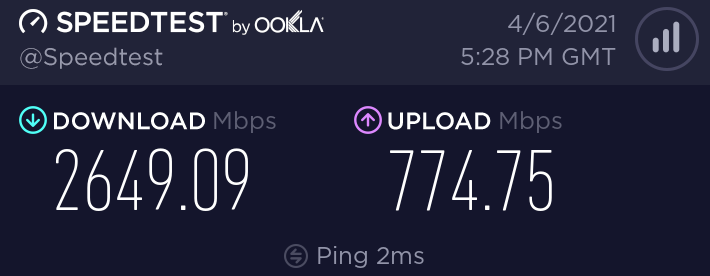
Get smoked. https://i.imgur.com/gZoypIC.png
 peak cloak
the questions is, when
desert yacht
on the end my road begins the fiber
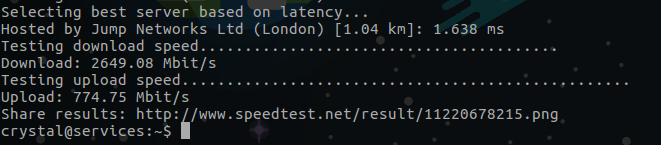 gritty valley
The only reason I didnt take gig up/down was just becausee I wouldnt saturate it
peak cloak
gritty valley
The only reason I didnt take gig up/down was just becausee I wouldnt saturate it
yeah same
we have lowest one of 300/300
tame carbon
ok look its not at home. but it counts right? xD
hot hawk
the only reason i dont have gig cuz too expensive
desert yacht
well my max is 500 down and 50 up
hot hawk
tame carbon
ok look its not at home. but it counts right? xD
lol
my school does 500/500
i should get a vpn there
tame carbon
this is just a VPS in a datacenter lol
peak cloak
hot hawk
my school does 500/500
at a pc?
tame carbon
Linode has blazing fast internet
peak cloak
they don't do qos, lol
hot hawk
no even on phone
tame carbon
Spoilers (isp)
desert yacht
hot hawk
my school does 500/500
my school has 2x 50mbits bundled together
peak cloak
hot hawk
no even on phone
they must not do qos
hot hawk
well i mean its in just one room
peak cloak
desert yacht
my school has 2x 50mbits bundled together
my school is their own ISP
hot hawk
every where else its dog crap
tame carbon
@peak cloak same
peak cloak
because so many devices
desert yacht
they use a home router lol
 dire osprey
peak cloak
my school is their own ISP
dire osprey
peak cloak
my school is their own ISP
most universities are tbh
tame carbon
When I log onto my school network with my credentials, I get my own public IP
peak cloak
dire osprey
most universities are tbh
High school
hot hawk
desert yacht
they use a home router lol
lol
dire osprey
oh lol
desert yacht
and then connect it to a big switch
peak cloak
tame carbon
When I log onto my school network with my credentials, I get my own public IP
oh it's not natted? or ipv6?
hot hawk
;0
desert yacht
hot hawk
lol
but yeah the unifi access points totally worth it /s
peak cloak
desert yacht
and then connect it to a big switch
oh we have a full on server rack with dedicated fiber to the main campus I think
gritty valley
Probly uni has their own /16 block
tame carbon
^
Its very nice when you are working on projects with eachother
esp when you are a developer
easily put stuff up
no stupid firewall or shit
everyone gets 100M
peak cloak
huh
gritty valley
Atleast You dont find MT Switches running ROS v5 on campus
peak cloak
no security issues?
gritty valley
tame carbon
@peak cloak EAP and I think from the WAN there's some policies, I think webservers and such are allowed
if you run a torrent, you get expelled.
 thick minnow
tame carbon
if you run a torrent, you get expelled.
thick minnow
tame carbon
if you run a torrent, you get expelled.
Even Linux iso torrents?
tame carbon
Why would you do that? we have our own mirror @ 1gbit/s
peak cloak
I just looked it up, my school get a /17, 4 /24's and one /22
thick minnow
Well, usually for me torrenting the ISO is faster than downloading
tame carbon
well, gigabit
that's as fast as the cable goes
@thick minnow the servers on the school grounds have a bunch of servers
and they host mirrors for ubuntu debian and fedora
hot hawk
👀
thick minnow
Ah, that makes sense
tame carbon
oh yeah and I asked for raspbian too when I was working on that lol
because that stuff was a bit slower
these admins do everything to reduce traffic
4 buildings, total connection I think is 10G
 tame carbon
The first bump is people figure out what video calling is
https://i.imgur.com/RcrIwJQ.png
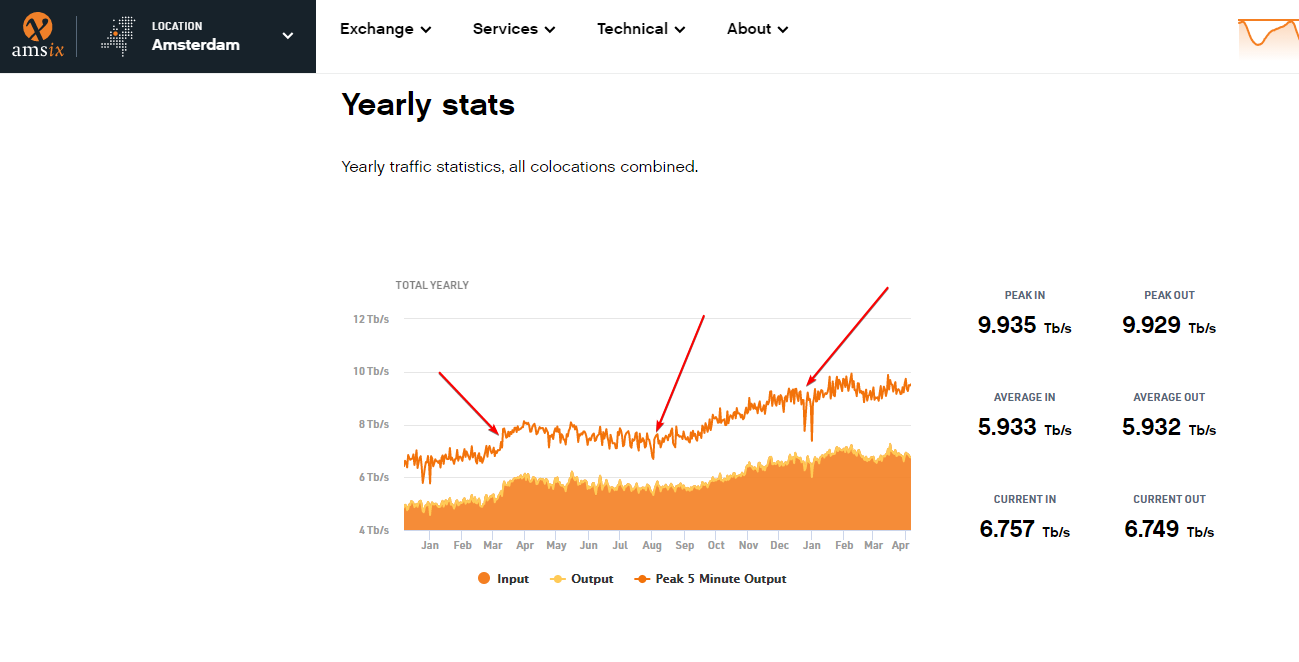
the second arrow points at service provider outages and them scaling up their resources
and that big crash, probably teams
hot hawk
gritty valley
Dont, Dont remind that
tame carbon
people working at home
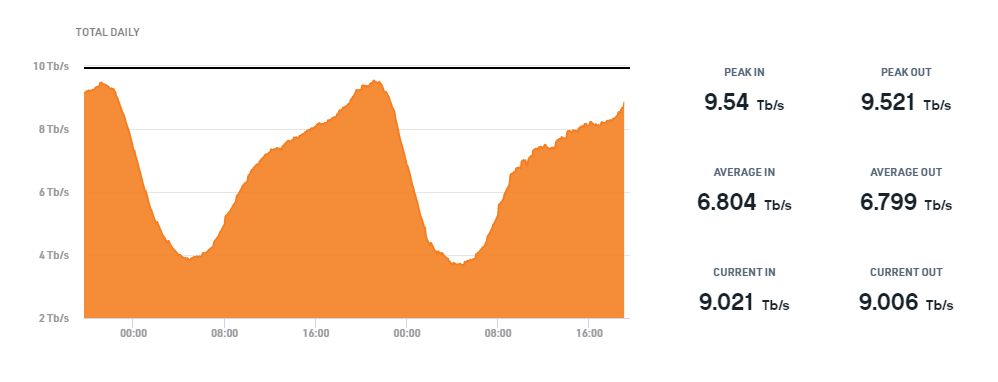
dutch exchange
increased by 45% in a year.
we hit ~10tbit/s during evenings
hot hawk

tame carbon
traceroute 1.1.1.1
traceroute to 1.1.1.1 (1.1.1.1), 30 hops max, 60 byte packets
 1  router.<redacted>.nl (192.168.88.1)  0.169 ms  0.167 ms  0.161 ms
 2  r2.serv.dro.weserve.nl (46.243.152.3)  5.670 ms  5.704 ms  5.751 ms
 3  46.249.55.194 (46.249.55.194)  6.244 ms  15.720 ms  5.925 ms
 4  185.8.179.33 (185.8.179.33)  8.527 ms  7.430 ms  6.341 ms
 5  ams-ix.as13335.net (80.249.211.140)  8.664 ms  8.666 ms  8.661 ms
 6  one.one.one.one (1.1.1.1)  8.028 ms  7.951 ms  7.912 ms
@hot hawk its interesting to see how different ISPs use different routes
my old copper ISP had their own large network across the internet, and peered with many parties directly
with X-connects
and the traffic to the exchange was much slower
hot hawk
🤔
tame carbon
and the ISP I have now, peers directly with a colocation partner that peers with AMS-IX among a tonn of other parties
 lean pebble
I have the best internet.
 tame carbon
@hot hawk at high network speeds like fiber, it really becomes important what deals your ISP has with other network operators
hot hawk
 lean pebble
I get 7ms to 1.1.1.1
tame carbon
@hot hawk yeah cloudflare peers directly with your ISP
My distance from the exchange is so short, that it doesnt really matter
I get to cloudflare directly from the exchange
hot hawk
i have no idea where my cable goes
tame carbon
@hot hawk you can :D
hot hawk
i just know it goes down the street
tame carbon
@hot hawk you see those IP addresses?
if they are in a datacenter
they often have an address associated with them
and the letters
hot hawk
tame carbon
@hot hawk look at the hop #3
thats in atlanta
then it routes to another place in ashb. state va
not sure where that is
errrr, hop 5
sorry
 tame carbon
@hot hawk HOP 1 is your router, hop 2 is poorly configured ISP router,
3 and 4 are properly configured ISP routers
charter.com is the transit for this route
it goes from their backbone in atlanta
to somewhere in virginia
hot hawk

tame carbon
🤿 erade
peak cloak
verizon doesn't look to peer with cloudflare
hot hawk
i should rlly be doing homework 😳
peak cloak
 peak cloak
 sweet pawn
Anyone know about NAT types?
sweet pawn
Anyone know about NAT types?
yeah, masquarade, source nat, destination nat
lean pebble
Cloudflare have servers in my ISP datacenter
And have servers 20 minutes from me in the city near me
tame carbon
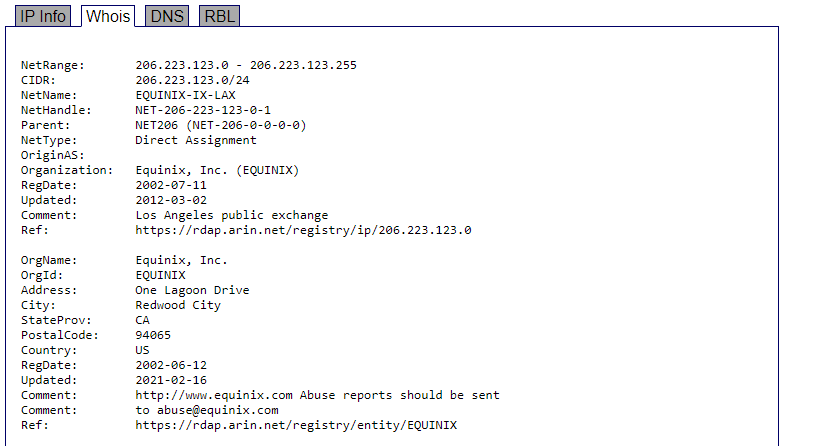
@hot hawk ok so lets keep tracing
@hot hawk so it goes through charter.. lets see who their peering partner is
sweet pawn
peak cloak
yeah, masquarade, source nat, destination nat
Don't know whats that
tame carbon
 lean pebble
 marble nacelle
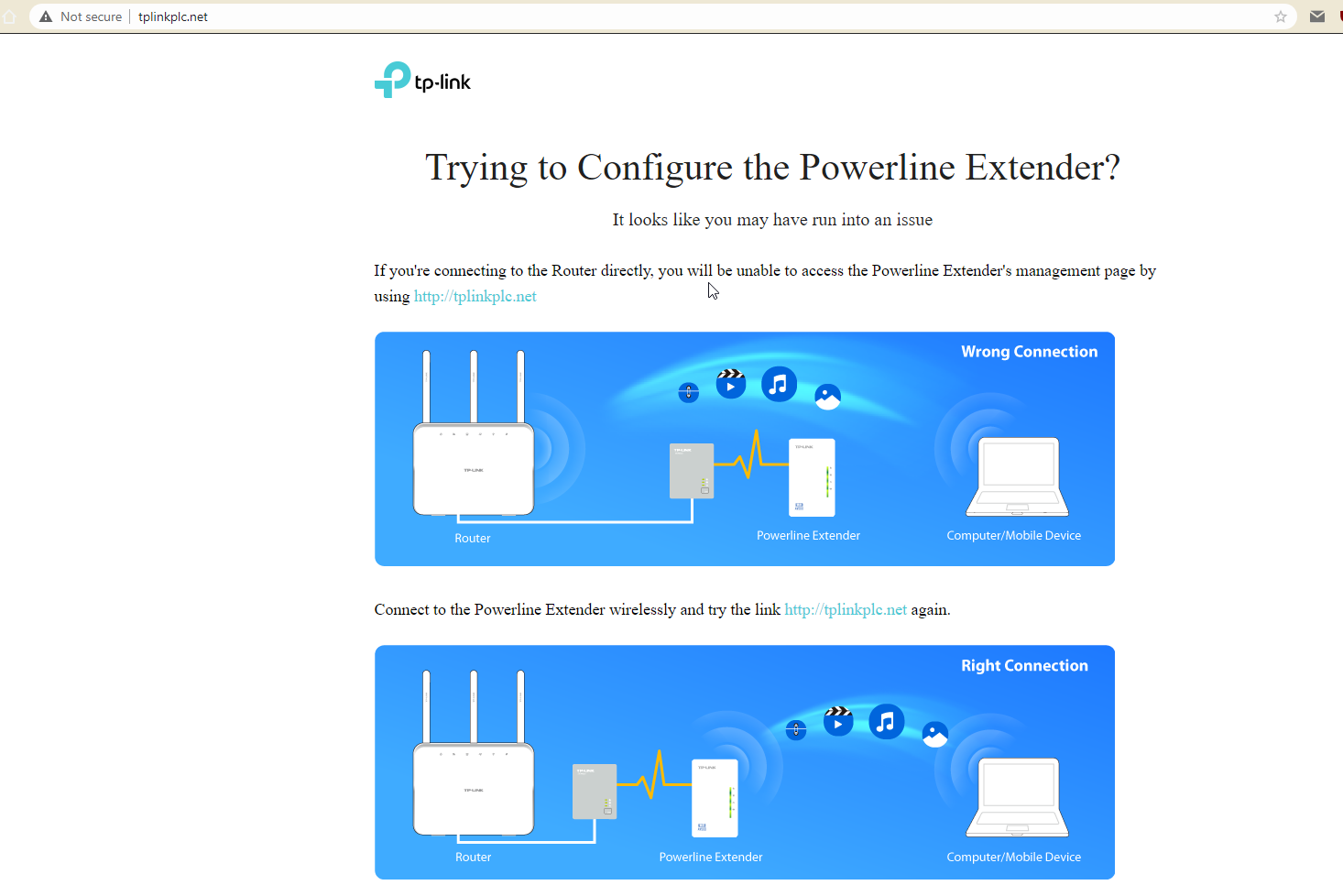
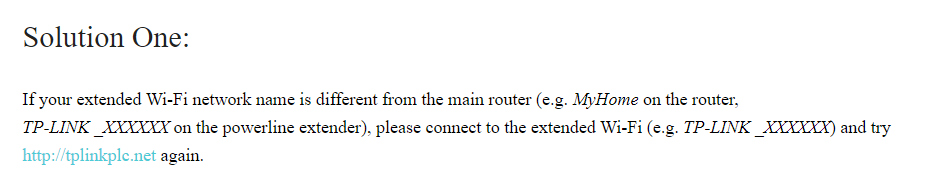
So im trying to acces the main page in tplink but it wouldnt let me , it opens my router page tho but im tryna setup my tp link and i cant
peak cloak
@tame carbon huh, so it seems that fios just their core network under alter.net
if I look that up it just shows news
marble nacelle
marble nacelle
So im trying to acces the main page in tplink but it wouldnt let me , it opens m...
 tame carbon
very helpful images 
lean pebble
My ISP have direct fiber line to Germany frankfort
tame carbon
the closer to the exchange the better
AMS-IX basically just an internet hotel
bunch of people connect to them
and the exchange just helps provide the connectivity between the parties
in the case of AMS-IX they have ~900 ports
tame carbon
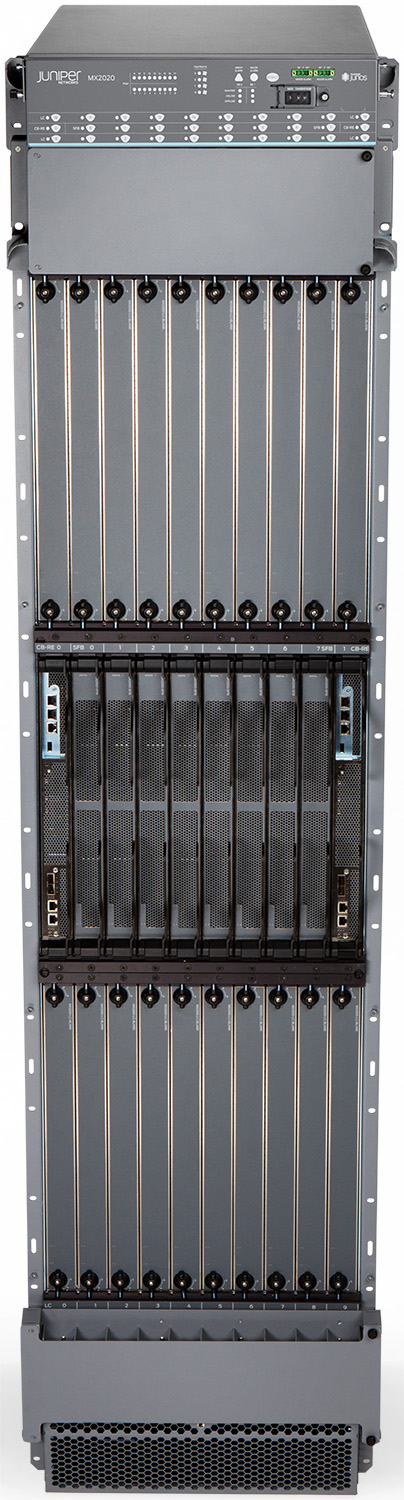
https://www.juniper.net/assets/img/products/image-library/mx-series/mx2020/mx2020-frontwtop-high.jpg
 lean pebble
Connect directly to it isn't cheap at all
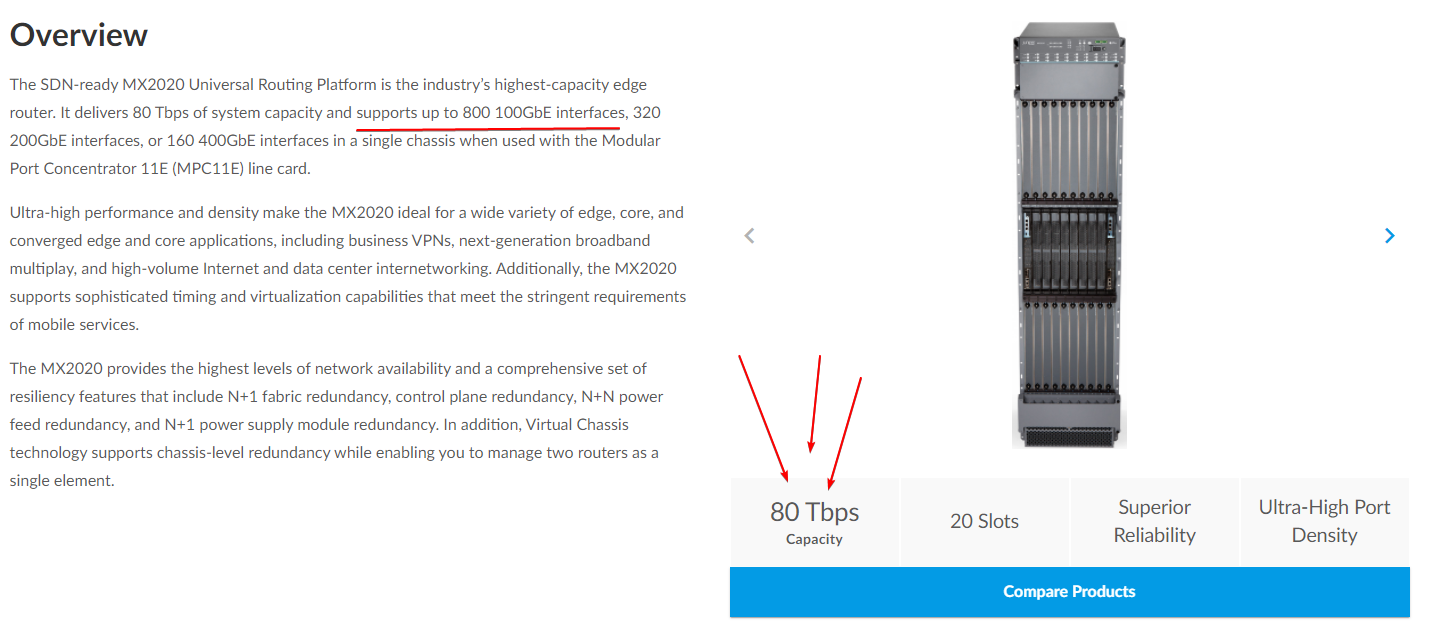 tame carbon
an exchange could literally be 1 rack.
lean pebble
Our ISPs here have max 1.2tb total
tame carbon
have you seen my coffee?
lean pebble
Nope
My doggo wanna go out he is patrolling here between the lower floor to my room upstairs
marble nacelle
bruh i got buried
tame carbon
@marble nacelle actually I think, everyone is waiting who speaks up first about the wifi extender
@peak cloak you know more about tplink than I do xD
lean pebble
I just want my 1Gbps bundle buy private houses for buried under the hood.
What is the tplink extender module ? @marble nacelle
tame carbon
fiber optics solve the problem of copper theft, it doesnt however prevent the idiots from digging it up :3
marble nacelle
lean pebble
What is the tplink extender module ? <@345050182896975874>
TL-WPA4220 AV500
lean pebble
Here it happens almost every week in northern Israel
hollow marlin
tame carbon
https://www.juniper.net/assets/img/products/image-library/mx-series/mx2020/mx202...
Move to the Juniper dark side Crystal
tame carbon
@hollow marlin their smaller edge routers look so sick
but I am weary
I recently read something about spyware
I'm not buying US network equipment anymore
hollow marlin
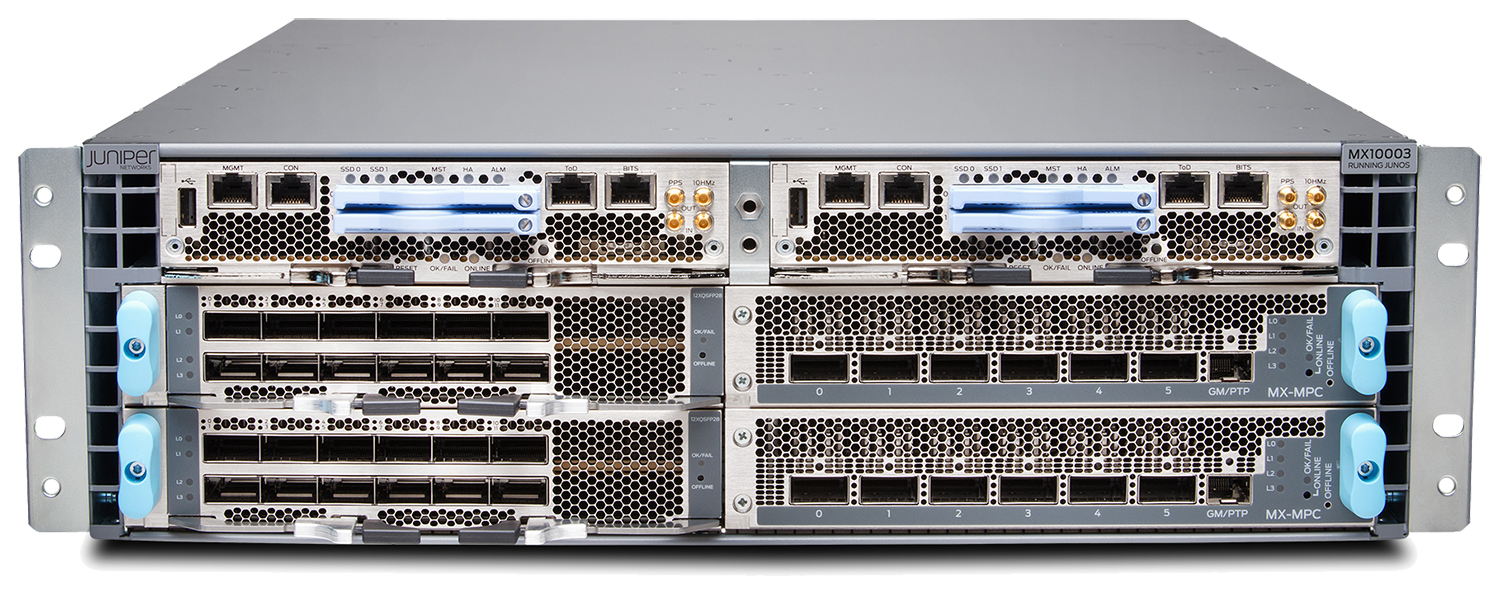
We have a ton of MX10003s scattered about at the edge.
lean pebble
marble nacelle
TL-WPA4220 AV500
Disconnect from your wifi and connect to the extender directly with cable to configure it
I guess it just have the same range as your home network that's why you can't access it.
Juan can you help me with the gre?
hollow marlin
tame carbon
I recently read something about spyware
Yeah there was a potential backdoor but I have not heard anything since. Honestly its not much to worry about
lean pebble
I killed it
marble nacelle
lean pebble
Disconnect from your wifi and connect to the extender directly with cable to con...
when i do that nothing pops up
 lean pebble
I used junpier
tame carbon
so much connectivity :ooooo
lean pebble
Nice product
tame carbon
you even got friggen clocksignal probes
lean pebble
marble nacelle
when i do that nothing pops up
Do you get IP address from it ?
lean pebble
Weird
lean pebble
Try reset it to default settings
hollow marlin
Yeah they are dense for their use case, 2.4tbps is plenty for 2RU
tame carbon
@hollow marlin it looks like two routers in 1 case
its got identical modules at the top
hollow marlin
tame carbon
<@!462711605063450628> are those things at the front for wireless RTC?
They are for very obscure monitoring. Its TDM based IIRC
The two top cards are the RE (Routing engine). The other slots are for the MICs which are the ports. The control plane and forwarding plane are separate.
tame carbon
does the housing have any sort of magic to it?
or do you need at least 1 routing engine?
hollow marlin
Its called the chassis, all it is a ton of pins that make up the backplane for the cards to talk to each other
And yep, you need at least 1 RE as its the management/control for the router
tame carbon
the other runs in slave then
yeah thats cool
the backplane is quite short
so you can get enormous bandwidth
do you know what kind of protocol they use for the interconnects?
marble nacelle
lean pebble
Try reset it to default settings
i just did so
nothing changed

this comes up
instead of tp link
 marble nacelle
tame carbon
<@!345050182896975874> thats your router
marble nacelle
tame carbon
<@!345050182896975874> thats your router
yep
marble nacelle
tame carbon
<@!345050182896975874> thats your router
i want my tp link router to come up
tame carbon
@marble nacelle you need to give the repeater an IP address on the same subnet
marble nacelle
tame carbon
<@!345050182896975874> you need to give the repeater an IP address on the same s...
how do i do that
tame carbon
@marble nacelle do you know how the tplink obtains its IP address?
marble nacelle
tame carbon
<@!345050182896975874> do you know how the tplink obtains its IP address?
no
 lone sun
It kisses its feet
tame carbon
@lean pebble you have the manual url?
hollow marlin
tame carbon
the other runs in slave then
Not really a slave, the PFE (Packet Forwarding Engine) is composed of switchchips that handle the actual forwarding. Each of the cards in the slots have the chips. RE does all the management, builds the routing table, handles adjacencies, sends/processes control traffic (STP, ICMP, etc) and once it has a routing table or forwarding table it pushes it down to the PFE and is all done on the cards.
Just like with your RB4011, the switchip handles L2 forwarding unless the CPU is needed
 limpid lion
marble nacelle
no
limpid lion
marble nacelle
no
did you try using the app to configure the adapter?
tame carbon
actually on routerOS that switching chip has actual interrupts
marble nacelle
limpid lion
did you try using the app to configure the adapter?
it doesnt connect to the app
limpid lion
tame carbon
<@!108502561731952640> shouldnt need an app
Yeah
tame carbon
@marble nacelle I'm consulting the manual rn
peak cloak
marble nacelle
it doesnt connect to the app
check your router dhcp server, see if it got an IP address
limpid lion
if no IP in dhcp server maybe a factory reset?
marble nacelle
where do i find the dhcp ip
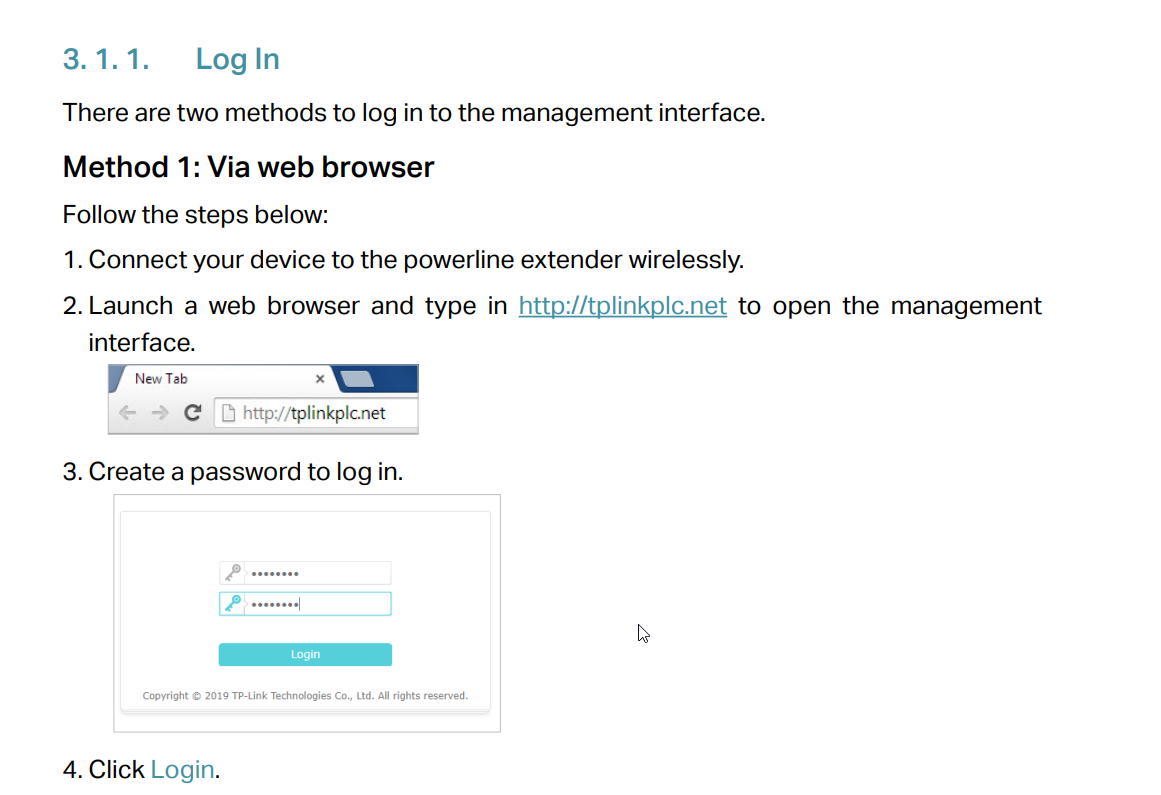 limpid lion
marble nacelle
where do i find the dhcp ip
limpid lion
marble nacelle
where do i find the dhcp ip
Should be on your router page
peak cloak
marble nacelle
where do i find the dhcp ip
go to your router and go to devices or something like that. In a normal router it's dhcp leases
peak cloak
tame carbon
https://i.imgur.com/nXHBdAu.png
that's just plain wrong
 marble nacelle

 marble nacelle
question
lean pebble
Lol
tame carbon
this manual is so bad ahahaha. what is this tplink.
 gritty valley
tame carbon
this manual is so bad ahahaha. what is this tplink.
gritty valley
tame carbon
this manual is so bad ahahaha. what is this tplink.
What did You expect from TPLink
tame carbon





 peak cloak
marble nacelle
peak cloak
marble nacelle
no
tame carbon
fuck you tplink.
lean pebble
tame carbon
fuck you tplink.
😆 😆 😆
limpid lion
Called "Network map" on my router
lean pebble
Yeah their manuals are bad af
tame carbon
@marble nacelle Okay, assuming this thing just uses DHCP. Go to your huawei router. And look for DHCP Leases.
peak cloak
 tame carbon
or DHCP Client List
marble nacelle
Yeah i found it
tame carbon
:)
tame carbon
 lean pebble
I think the extender have its own dhcp server
limpid lion
lean pebble
I think the extender have its own dhcp server
It does yes
tame carbon
@marble nacelle can you find the tplink ones?
marble nacelle
nah theres no label for tp link in there
limpid lion
peak cloak
why...
No idea lmao
limpid lion
marble nacelle
nah theres no label for tp link in there
you could check the mac address on the back of the adapter and maybe find it in the list?
lean pebble
So just need to fac reset and connect to it directly and wait untill it gives you IP address
marble nacelle
limpid lion
you could check the mac address on the back of the adapter and maybe find it in ...
nice idea
tame carbon
@marble nacelle ok lets do this. we need to jsut use a network scanner.,
peak cloak
@tame carbon I think they want you to connect to it's wifi directly
tame carbon
no
lean pebble
I use fing on my phone to find all devices on my network
tame carbon
@peak cloak it just bridges, with same ssid
lean pebble
Yeah
limpid lion
should be
tame carbon
@marble nacelle it has two. the wireless and wired each have a MAC.
lean pebble
They call the cable connection wlan
tame carbon
but they could also be the same.
lean pebble
Abit same the end should be different
marble nacelle
couldnt find it there
tender hazel
I agree with PresentMonkey, I think it wants the user to connect with wifi to the extender
and then go to that site
limpid lion
marble nacelle
couldnt find it there
Might be worth to just factory reset it IMO and see if that fixes it
marble nacelle
limpid lion
Might be worth to just factory reset it IMO and see if that fixes it
i did that like 5 times
limpid lion
ah
tender hazel
what does it do?
marble nacelle
nothing
limpid lion
and there is no new SSID for the extender itself?
peak cloak
@marble nacelle ok, so does the extender make a new wifi connection?
lean pebble
Usually they write the IP address on the back of the extender
peak cloak
tame carbon
it wants wireless configuration?
yes, look at the image you posted
tender hazel
I think with this they have a little built in wifi ap
peak cloak
marble nacelle
peak cloak
<@!345050182896975874> ok, so does the extender make a new wifi connection?
yes , its called tp link something
tender hazel
I have tplink smart plugs at home here for using google to turn my lights on and off and they have little wifi aps in them
peak cloak
marble nacelle
yes , its called tp link something
ok connect to that
marble nacelle
im connected via cable
peak cloak
then go to configuration websit
tender hazel
you connect to the wifi ap for the initial configuration to get it to connect to your home wireless
peak cloak
marble nacelle
im connected via cable
to your router or the tplink
limpid lion
tender hazel
you connect to the wifi ap for the initial configuration to get it to connect to...
Yep , think this is it as well
tame carbon
@peak cloak that's not gonna work, dns cache :xD
marble nacelle
peak cloak
to your router or the tplink
i also tried on my laptop but it still shows up as hawiw shit
tame carbon
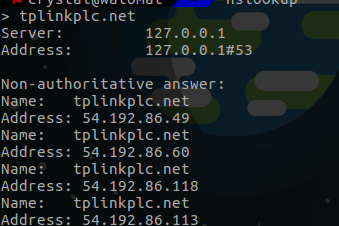
its still not telling us what the default IP is
because of this stupid dns hack they try to do
lean pebble
ipconfig /flushdns in cmd
tame carbon
@marble nacelle seriously, just try https://macvendors.com/
peak cloak
marble nacelle
i also tried on my laptop but it still shows up as hawiw shit
connected via wifi to the tplink?
lean pebble
Will fix it
tame carbon
@marble nacelle enter the mac address of the device without a label
I can;t imagine that the web interface is only available from wireless and not from wired
tame carbon
@marble nacelle MAC addresses are traceable to a vendor name
if the MAC says something about tplink
marble nacelle
it showed up as TP-LINK TECHNOLOGIES CO.,LTD.
marble nacelle
theres no lease for TP-LINK TECHNOLOGIES CO.,LTD.
lean pebble
Do you have 2 of those devices?
marble nacelle
yes
lean pebble
Just click the pair button
marble nacelle
they are paired
lean pebble
So it should work
tame carbon
thats just the network side of things
@lean pebble they want you to use the fancy web interface
@marble nacelle just connect to the wireless network
that it creates
then run ipconfig /flushdns in the command prompt
marble nacelle
lol tried that
tame carbon
and go to that url again
@marble nacelle another option would be to quickly install zenmap
that's a network scanner
the n we dont need their shitty dns
marble nacelle
ok im installing it
tame carbon
zenmap is nice to figure out what is where
@marble nacelle once you have connected to the wireless network, run ipconfig /all
try that
might just list the IP for us there
Should be the address of the DHCP Server
tame carbon
what does it say?
marble nacelle
fuck
tame carbon
@marble nacelle look at the interfaces
wait
inb4 its just working
but ssid is wrong
limpid lion
no way it just works without configuring right
tame carbon
dont really need an address on L3 if you just do forwarding
lean pebble
It should copy the settings automatically when you connect it and click on pair
tame carbon
this is why I dont like repeaters
marble nacelle
lean pebble
It should copy the settings automatically when you connect it and click on pair
yeh but i want to switch it to 5ghz
lean pebble
Ah
tame carbon
CAPsMAN ftw.
can manage 1
10
or 100 antennas
easy.
I forget what the limit is
lean pebble
I have my 3 little boxes that I can manage 1 and automatically changing all of them
tender hazel
that extender can't do 5ghz
marble nacelle
It cant?
tender hazel
TL-WPA4220
marble nacelle
ye
tame carbon
how much did this one cost?
marble nacelle
50 dollars
marble nacelle
problem is i bought it 2 years ago and forgot about it
tame carbon
mhn
marble nacelle
i just started using it for my second setup
tame carbon
@marble nacelle what kind of network speeds you expect to get?
tame carbon
do you have a fast internet connection?
marble nacelle
ye
tender hazel
you're only going to get 500Mbps from 5ghz in the best conditions
tame carbon
@marble nacelle if you really want to do this properly, you should into some kind of managed wireless solution
peak cloak
use ethernet if you want fast speeds
marble nacelle
im using ethernet on my computer
peak cloak
I call 300 on wifi good enough
marble nacelle
thats i have tplink
tame carbon
@marble nacelle for mikrotik that's CAPsMAN, I think Unifi cough expensive cough can do it too
peak cloak
I wouldn't use unifi...
tame carbon
and tplink omeda also has a managed wireless solution
tender hazel
you can get a few audiences
marble nacelle
so which extender should i buy ? one that supports 5ghz ofc
tender hazel
that should work better
tame carbon
@marble nacelle no no, the idea is that you do not use an extender