#networking
1 messages · Page 306 of 1
 zinc ember
Ok thanks for the information and your time 🙂
 tame carbon
@slate sonnet they are located in ~/.ssh/
 slate sonnet
I know where they are located. I need to know can I just copy paste the directories after I reinstall windows
 tender hazel
you probably don't need to reinstall windows, you can likely do a "reset"
slate sonnet
tender hazel
you probably don't need to reinstall windows, you can likely do a "reset"
I want to do a fresh reinstall
Because the install that I have went through 2 platform changes
And I think that one of the old drivers is causing a memory leak
And plus idk what’s taking up a lot of my ssd storage, so I want to "start fresh"
I went from an i3 3220 to an i5 3570k, then to a pentium g4560 and a different motherboard, then I went to a ryzen 3100 and a different motherboard for that
All while using the same ssd
tender hazel
A reset is essentially the same as a reinstall
Only the documents are preserved
The Windows registry is new and Windows directory and program data directory are new
If you aren’t sure what us using your storage you can run windirstat
It is great for that
tame carbon
spacesniffer ftw
slate sonnet
Eh, it's easier for me to just backup all the files that I need and that's it
And just wipe the ssd
And my big hdd
Want to finally change that to gpt instead of mbr
So that everything is gpt
I've nearly filled up my 300gb backup hdd lmao
Almost perfectly
 copper horizon
qq for the other networking folks: what are some used enterprise-type routers that would be good for a homelab that isn't DIY, ubiquiti, cisco? (i.e. in the AP world, you can get a sweet deal on ruckus, arubas etc.). I'm aware of mirkotik, but curious what others in the space are. Used junipers all seem quite old and have a long lifetime in use so not much on the secondary market
 untold elbow
pfsense or opnsense are the other two go-to options
and you usually just buy a system build for running one of those
tame carbon
@copper horizon mikrotik is still king for people looking to get into networking
very easy to use
powerful featureset
and they dont impose any artificial limits on their gear
copper horizon
agreed, just found it interesting not many others on the secondary market like there is in the access point world
unless im looking for the wrong keywords
tame carbon
I wouldn't look to unifi if you just want a router
their wireless solutions are superior to perhaps mikrotik
but their routers and fw arent as fine-tuneable
copper horizon
im on ruckus wireless 🙂
tame carbon
I use mikrotik wireless here as well
just cus I can manage my entire network from a single device.
but i am biased af.
untold elbow
im on unifi switching, WAPs, and security cam. pfsense for routing/firewall
tame carbon
 untold elbow
but i might migrate switches to mikrotik when it's time to replace gear
tame carbon
the issue with pfsense isnt so much capabilities..
throughput is your main problem
mikrotik sells 10Gbit capable routers for less than $200
copper horizon
I'm lazy so I avoid pfsense / opnsense if i could help it
untold elbow
yeah but im not routing at 10gbit
tame carbon
@untold elbow proxy all the arp
 peak cloak
also higher power usage and no hardware acceleration
copper horizon
sounds like it would be a good opportunity for another brand to come in to compete with mikrotik, similar features, better UI etc
tame carbon
the CPU on the RB4011 is like 15% utilized
xD
@copper horizon Juniper, Cisco and Ciena is all ISP level stuff
copper horizon
Someone mentioned watchguard which is on my list to check out
tame carbon
very capable, very complicated, very expensive
copper horizon
oh havent heard of cienna will check that out
tame carbon
@copper horizon the issue is cost.
those enterprise routers all start at the price: Request a quote.
copper horizon
yeah heh anytime you see that its like oh... ok expect 1k. i usually pick up things on the secondary market that businesses liquidate or whatever
tame carbon
@copper horizon I got one of these hanging in my network closet https://mikrotik.com/product/rb4011igs_rm

MikroTik is a Latvian company which was founded in 1996 to develop routers and wireless ISP systems. MikroTik now provides hardware and software for Internet connectivity in most of the countries around the world.
copper horizon
kind of cool to see how enterprise differs from consumer
tame carbon
@copper horizon consumer routers = crappy tplink webGUI, asus, linksys, etc
tame carbon
asus should be banned from selling routers.
untold elbow
got 19 antennas and costs $850
tame carbon
they are the worst of them all.
untold elbow
but it has RGB
tame carbon
@untold elbow it also runs out of disk space with DHCP leases 
crashing the entire device
untold elbow
oh you want memory in your router? you need the $900 model
copper horizon
decent deal here maybe https://www.ebay.com/itm/Mixed-Lot-firewalls-switches-Ciena-3920-Watchguard-XTM5-Cisco-2960-Sonicwall/203287486714?hash=item2f54e0e0fa:g:SI8AAOSwvwRgNXJg

eBay
Watchguard XTM5 firewall. Ciena 3930 170-3930-800. Mixed Lot Firewalls, Server, Switches. Cisco catalyst 2960-s. Cisco Catalyst 2960-s. Cisco ASR1001.
untold elbow
old enterprise gear is a good deal, but be prepared for the noise and power consumption
copper horizon
true
tame carbon
meanwhile.. RB4011 is passively cooled
@copper horizon if you want to play around with it. You can download RouterOS for x86
and install it on a computer/virtual machine
without a license you get 30 days trial
on their hardware the licenses are included for free
copper horizon
i got a hex inbound for one of my relatives ice cream shop (they dont need anything fancy, i just wanted somethign to vlan off the credit card machine)
tame carbon
neat
copper horizon
their ui is as much detailed as I want to get without diving into command line even though im comfortable in cmd line. for production im lazy lol
tame carbon
winbox is basically shell.
copper horizon
just want it to work, a few clicks, i get my vanilla shake and im outta there
tame carbon
The GUI shows the same as the CLI
@copper horizon generally using them is quite easy. Factory defaults on them is usually a home router config
with WAN on ether1
and LAN on the other ports
They actually have a button for this in the OS
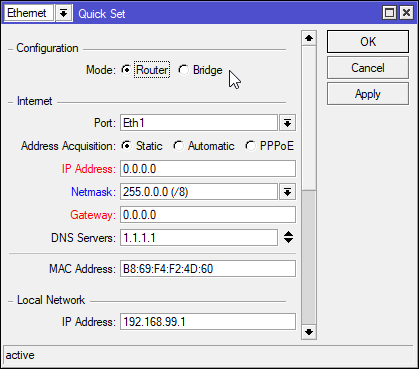
For idiots ^
Dont ever use quickset if you value your configurations.
It breaks everything if you use it after configurations have been done.
Depending on the kind of device it is, defaults may vary
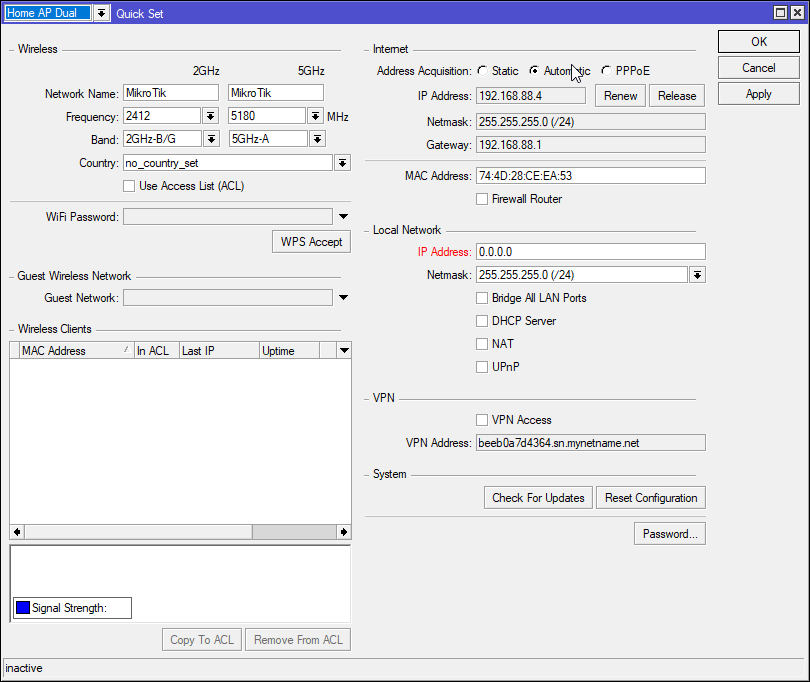
This is when configuring it as a home dual band AP
copper horizon
tame carbon
Dont ever use quickset if you value your configurations.
good to know, thx
tame carbon
@copper horizon I actually dont manage wireless on the APs themselves :)

CAPs forwarding, allows a central router to control access points on other mikrotiks
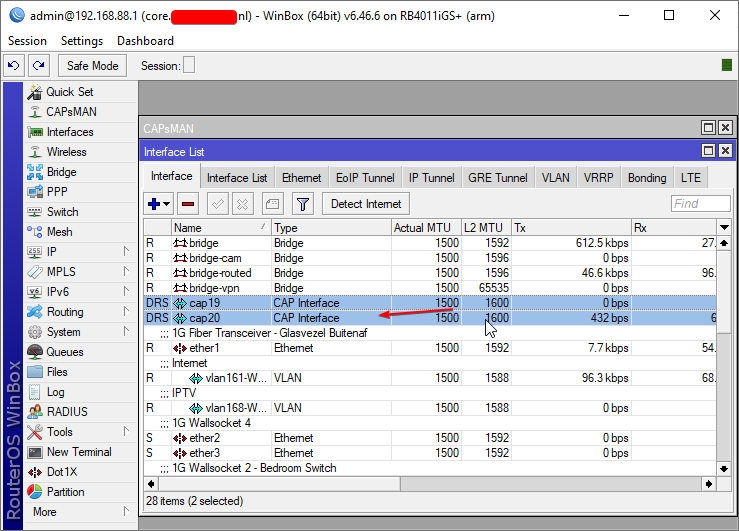
I'm still learning the ins and outs of CAPsMAN

 thick minnow
What the-\
 hollow marlin
tame carbon
<@!665483139505717249> Juniper, Cisco and Ciena is all ISP level stuff
hollow marlin
tame carbon
<@!665483139505717249> Juniper, Cisco and Ciena is all ISP level stuff
I come here to get away from dealing with Cienas at work 🤮
 clear igloo
@hollow marlin SCEP can die in a fire 😠
tame carbon
would be cool
if there was some kind of open standard for software defined networking
that ran on all routers.
so applications could just export a net profile and the router would allow importing these.
clear igloo
That would require cooperation 😛
tame carbon
this would be something that ISPs could use instead of the garbage they..
oh
lol true
hollow marlin
clear igloo
<@!462711605063450628> SCEP can die in a fire 😠
With the one offs I was thrown in to deal with it, yes, yes it can die in a fire
clear igloo
hollow marlin
With the one offs I was thrown in to deal with it, yes, yes it can die in a fire
Fighting with getting it to work, I found a Linux version that does SCEP but not NDES and that works but SCEP/NDES on windows, no work
tame carbon
RTFMs in #tech-support
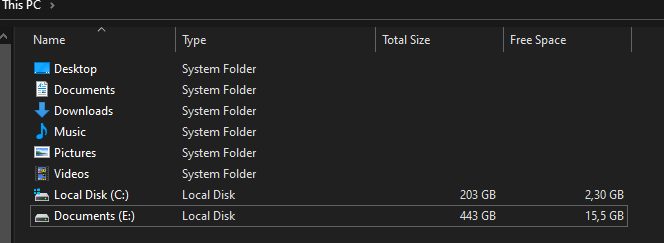
 molten kestrel
😂
 wooden orbit
Is it possible to run both a wired and wireless connection at the same time and have different tasks/programs assigned to each one?
So for example have OBS use the wired connection (PC to modem/router) and the game that's being played/streamed use a seperate wireless one (hotspot through phone).
tame carbon
aren't those basically the same network?
@wooden orbit I'm not entirely sure what you are trying to do
tender hazel
there's no point in doing that probably, just use the wired connection for everything
 rocky badge
@clear igloo 😩 Gigabit is so slow
clear igloo
@rocky badge You need multi-gigabits!
rocky badge
 tame carbon
you need a 10G pipe
tender hazel
copying virtual machines over ethernet is a very different situation than streaming with OBS
wooden orbit
tame carbon
aren't those basically the same network?
No, they're completely seperate from each other
Wired one is the network/connection that is available my ISP at home and the wireless one is from my phone provider
wooden orbit
tender hazel
there's no point in doing that probably, just use the wired connection for every...
I would if my wired connection wouldn't be having problems
tame carbon
you need a load balancer/router for this
semi complicated. you could set filters for certain services to go out your wired internet
 tender cliff
Hi I have 2 laptops and I'd like to create wireless LAN network between the two. Firstly is this possible and if so how would I do it
 waxen scroll
@rocky badge what about garage door openers?
myQ seems dumb because of the $1/m fee
rocky badge
lol
waxen scroll
my traditional opener just started to malfunction, so i'm in the market

 clear igloo
lol
waxen scroll

 peak prairie
I'm planning on adding a 2nd router to the home network and this tutorial says to make the SSID the same as the primary router. Is that optional?
https://www.youtube.com/watch?v=qpcWucapIRg

Welcome back to the Ultimate Tech Hub. On this episode we will show you how to install 2 different wireless routers in one single home network. We chose 2 different brand routers for this video. One router is a Linksys and other router is a Netgear. UPDATE: I made an error with the IP Address for the Secondary Router so make that IP address 192....
waxen scroll
why do you need two routers
peak cloak
peak prairie
I'm planning on adding a 2nd router to the home network and this tutorial says t...
for one you want another Access Point not router
and yes you would want the same SSID
 uneven moon
Is there a better alternative to logmein hamachi?
peak cloak
uneven moon
Is there a better alternative to logmein hamachi?
zerotier
peak prairie
I'm renting a room and want to isolate my devices. Also, I want my xbox to go through my router because it connects to my VPN.
peak cloak
peak prairie
I'm renting a room and want to isolate my devices. Also, I want my xbox to go th...
vlans
or seperate subnets
peak prairie
?
peak cloak
for isolation
peak prairie
Ok? How does that help with having my xbox go through my VPN?
peak prairie
peak cloak
for one you want another Access Point not router
Is that easy to do? Do I need to get additional hardware?
tame carbon
@peak prairie you need something other than those crappy consumer routers
most of them cant do vlans
peak prairie
This is what I have.
https://www.asus.com/us/Networking-IoT-Servers/WiFi-6/All-series/RT-AX58U/
ASUS USA
tame carbon
ASUS
tender hazel
you shouldn't use the same SSID if you want to actually put a router behind another
but putting a router behind another will only really protect the devices that are behind the router that is behind the other one
peak prairie
That's the goal
tender hazel
isn't it the opposite of what you want?
tame carbon
double NAT
peak cloak
using nat as security...
tender hazel
the person renting the room would have access to all of your devices, but you would be blocked from accessing theirs
tame carbon
xD
tender hazel
which is the opposite of what you want I think
peak prairie
tender hazel
which is the opposite of what you want I think
I'm the tenent. I'm renting the room in someone else's house.
peak cloak
oh
tender hazel
are you trying to secure your stuff or theirs?
peak cloak
that's changes things up
peak prairie
tender hazel
are you trying to secure your stuff or theirs?
Mine.
tender hazel
ok, then it will be ok
peak prairie
tame carbon
double NAT
Is there a way to avoid that?
tame carbon
thats what home routers do by default
they have a public WAN on a single port, and they translate the IP addresses for devices on its LAN side
to the wider network it appears as though all is coming from your router
but this makes things like port forwarding and such twice as complicated
as you have to forward twice, because you are behind a 2nd router that translates traffic
peak prairie
Therefore increased latency?
tame carbon
no
it just breaks communication in both directions
devices behind the NAT can reach all devices upstream
but not vice versa
but it would do in your purposes
just know that you cannot port forward as easily, because the owner of the house has to forward these to your router, so you can then forward them to your PC
peak prairie
Their also using equipment provided by the ISP... 🤮
Unless they setup a password on their router, it should be easy to get in.
hollow marlin
This wouldn't be a problem if people were not so afraid of v6
thick minnow
i wold upgrade my home network but i wold have to have a really good reason to have a server rack in the living room
peak cloak
thick minnow
i wold upgrade my home network but i wold have to have a really good reason to h...
do you have a basement?
 odd pier
 thick minnow
no i live in the uk
peak cloak
and do you need a server rack or will a network rack be fine?
(The difference is depth)
thick minnow
i mean i plant to move out soon then i can do whatever the hell i like
 distant wedge
just stick giant antennas out the back of it and tell her it's the wifi router
clear igloo
rocky badge
dual 6c/12t Xeons, 16GB of RAM
that's all? 😦
rocky badge

thick minnow
i plan to get a simple wife yagi antenna

SimpleWiFi
Most Powerful Coverage up to 7,500 sq ft. Improves 4G LTE & 3G Works for all phones, all carriers Up to +72 dB gain Complete kit, all parts included Improve your WiFi or cellular signal & service Improve your WiFi or cellular signal & service Works for WiFi or cellular devices: routers, modems, signal boost
peak cloak
thick minnow
i plan to get a simple wife yagi antenna
just get an actual AP
thick minnow
i mean i need a portable long range solution for work. hopefully should be doing to red team engagements
thick minnow
yes sir
peak cloak
nice, I want to go into that field
thick minnow
learn how to social engineer
thick minnow
once you have done that you can then use what you just learned to get a job in cyber security
old but helps @peak cloak https://youtu.be/__lvS2pjuSg

These are the videos from Derbycon 2016:
http://www.irongeek.com/i.php?page=videos/derbycon6/mainlist
DEF CON talks are a good place to start too
peak cloak
yeah I've watched a bit of defcon talks
peak cloak
thanks
thick minnow
and get a linked in account
it helps if you allso have your own website that you have built yourself
what do you think for nas / cloud storage
peak cloak
thick minnow
and get a linked in account
yeah we did that in class
planning on making a simple resume website
need to figure out a domain though
for email too
thick minnow
register your domain on name cheap
peak cloak
initials + number seem to be cheap
thick minnow
they give free protection
peak cloak
thick minnow
no linke they redact your name from the register
oh yeah, that
thick minnow
then use OVH VPS whith docker to host the lamp stack or something
 tribal ferry
Anyone know of any reputable Amazon sellers for 10G Cat 6a?
thick minnow
or host it in your house whith a raspberry pi
tribal ferry
Need about 30ft of Cat 6a and some reviews are saying that the cables aren’t actually Cat 6a.
peak cloak
thick minnow
or host it in your house whith a raspberry pi
I have servers at home
just reliability
rocky badge
peak cloak
planning on making a simple resume website
gh pages
peak cloak
rocky badge
gh pages
oh yeah gh is also good
thick minnow
im building a raspberry pi cluster for reliability
peak cloak
for hosting
thick minnow
and cloud flair takes care of the ddos protection
thick minnow
yh rubbernecks is cool
tame carbon

► Album & 4k Video: http://NigelStanford.com/y/a-/Automatica
► Spotify: http://NigelStanford.com/y/Spotify
Subscribe and like to see more Robot videos, as I release them for my album Automatica.
Robots rock, they were fun to work with. My favorite is the robotic drummer. More work to be done, and maybe I could play with them live. Stay tuned :)...
peak cloak
tame carbon
https://www.youtube.com/watch?v=bAdqazixuRY
it's pretty cool
saw that a while back
tame carbon
those robotic arms are expensive as hell lol
I've seen them at university
mechatronics I think is the subject
combination of hardware programming and electrical engineering
as well as mechanical
rocky badge
@clear igloo yeet https://blob.rocks/XbeFgTn8aT.png
 clear igloo
👀 is that 25G I see?
rocky badge
virtual interface for wg lol
clear igloo
lol
tame carbon
fuck me
these bitcoin mining people
are such pricks
like. ffs. go do something useful for society
they are just leeches.
waste of power, precious minerals
 lone sun
@tame carbon Don't say that, bitcoin mining is predicted to cure cancer some day. 🥺
tame carbon
people have used the blockchain to hide instructions for their botnet

ZDNet
BTC transactions are being used to obfuscate malicious activity.
instead of a command and control server
these people move money over btc
and encode instructions in them
its genious
and hard to well.. mitigate
lone sun
🤔 Think I've seen this before. Basically exploiting other peoples computers without their consent to aid in their mining operations right?
tame carbon
@lone sun nah
that's something else
This is basically trojan horses that sit dormant on a computer
and instead of communicating with a server on the internet
they read the blockchain ledger to decode instructions
they just search for transactions from a specific address
and all of that is anonymous
the virus never communicates with the attacker
thick minnow
tame carbon
the virus never communicates with the attacker
that is cool
and really scuffed
allot of work has gone into that
tame carbon
if you're a skilled programmer you can make these kinds of things
requires some math understanding as well
but mostly algorithms
thick minnow
yh did some research on botnets and such i even made on that can execute python commands that were displayed on a .onion site but allways needed a c2 server of some sort
peak prairie
I just spent the last couple of hours trying to get this to work with my router and have gotten nowhere. If anyone is willing to walk me through the steps over voice chat that would be great. Otherwise, I give up. I don't know what else to try.
https://www.asus.com/us/Networking-IoT-Servers/WiFi-6/All-series/RT-AX58U/
ASUS USA
tender hazel
peak prairie
I just spent the last couple of hours trying to get this to work with my router ...
That video is not what you want to do
you need the internet port on your router connected to one of the internal ports on the upstream router
and you need the dhcp server enabled on your router
and you need a different SSID and password
that tutorial video is basically for taking a second router and configuring it to be used as an access point instead of a router
you shouldn't even need a video.. just taking the router with its factory default configuration you should be able to plug the internet port into one of the lan side ports on the upstream router and it should get an IP and get online
the only thing that might be wrong that might cause a problem is if the LAN side of both routers are 192.168.1.1 or something like that
so that is the only thing you may have to change on the ASUS.. you may have to change your LAN subnet to something else if it matches the LAN subnet of the upstream router

 hollow marlin
rocky badge
<@!462711605063450628> :(
hollow marlin
rocky badge
<@!462711605063450628> :(
Thats some congestion you got going on there
rocky badge
hollow marlin
It get any better since?
tender hazel
if your provider being DDoS'ed and they don't have automated protection against that?
rocky badge
hollow marlin
It get any better since?
yeah it was only a couple of minutes
lone sun
tame carbon
the virus never communicates with the attacker
🧐 Man, this is why I can't take the cyber security career field seriously. You really can't secure something that wasn't designed from the ground up with security in mind to start with. All this because the internet was made by a bunch of asocial jerk offs. Its a joke to me. 🤷♂️
peak cloak
wut
tender hazel
it was probably a DDoS attack
lone sun
😆 What do you mean what? Someone will always find a loophole around tacked on security features because the internet itself in its beginning was a gigantic open butt crack.
peak cloak
lone sun
😆 What do you mean what? Someone will always find a loophole around tacked on s...
I mean, do you have any alternatives
lone sun
🤷♂️ There really isn't except to rebuild the entire infrastructure from the ground up with security in mind. This will never likely happen unless by an act of God. And yes I am a God believer.
peak cloak
in any network there will be vulterabilites
hollow marlin
rocky badge
yeah it was only a couple of minutes
Id probably go with over saturation of your PON
rocky badge
Yeah that's what I was thinking as well lmao
hollow marlin
lone sun
🤷♂️ There really isn't except to rebuild the entire infrastructure from the gr...
Zero Trust is the closest model you'll get. Its the new buzz word but still has its weak points. Not to mention the nightmare that is the mgmt overhead which means 99% of companies cannot deploy it
tender hazel
I set up a captive portal solution not too long ago and was rather frustrated by the behavior of real world devices, which forced me to use less security instead of more
when you have a captive portal, you have to redirect to an http site, not https because otherwise it gets detected as a man in the middle attack and you have all sorts of scary warnings displayed to the end user
but I wanted for the captive portal login page, loaded via HTTP, to submit via HTTPS so at least that would be secure
and for whatever stupid reason, mobile android browser considers it a security risk if you have an HTTP page and submit a form to some other HTTPS site with a valid certificate, but no security risk if you have an HTTP page and submit a form to some other HTTP site, and so when you try to use proper security, it doesn't work
so unless I want to break things for mobile android, I have to end up sending a lot of stuff unencrypted that I would rather encrypt
I can totally understand blocking an HTTPS page from submitting to a form on HTTP via POST, that's certainly not secure. But why a device would allow one site on HTTP to POST a form to another site on HTTP, while preventing that same site from POST-ing a form to another site on HTTPS is beyond me
tribal ferry
Got a quick question.
I’ll be running Ethernet cables into my new basement closet server room for my new homelab setup.
The cables will be running on the underside of the exposed floor beams in the half unfinished path of the basement until they run into the walls of the closet, in which I’ll then need to decide whether to bring the cables into the room from the top of the wall or the bottom.
Should I run the cables into the room at the top of the closet and then run them down the walls once inside, or should I run them down the walls and bring them back up once in the closet?
peak cloak
tribal ferry
Should I run the cables into the room at the top of the closet and then run them...
I would do the first
don't put them in the server closet walls
tribal ferry
Let me draw a diagram quick so it makes more sense

Not a full diagram but it’s good enough
The shaded part is where the rack is going
The area to the right and below of the server room is unfinished garage area, I can easily run cables along walls without worries about how it looks
I wasn’t referring to running cables inside the walls
peak cloak
ah
now I think I understand
for looks run it like in the pic
depends also on the direction of the floor beams
tribal ferry
Diagram is a top-down view of my basement area
peak cloak
oh
tribal ferry
yeah haha
more just wondering if i should run it on the exposed walls outside the room or inside the room
thick minnow
Hey there! I have been having severe rubberbanding and lag in games lately and noticed my ping spiking quite a bit. I contacted my ISP, cox, and I was told everything looked fine on my end and the node in my neighborhood was overloaded because of covid. They said they split my node on friday and I am still seeing a lot of issues. I have seen a lot of people move to filing an fcc complaint if the isp doesn't do anything but wanted to do some more research before doing that. I ran pingplotter on EAs servers (I mostly play apex) as well as google and yahoo. I see a lot of packetloss at certain hops (5 and 7 here), but am not entirely sure how to interpret the data to know for sure if it is an isp issue. If anyone has any advice, I would love to hear it. Thanks
 tender hazel
@tribal ferry what cables are you running? are you running your own solid core cable and patching it in on a patch panel or outlet on both sides?
riser/plenum grade?
tribal ferry
tender hazel
<@!517852052563427329> what cables are you running? are you running your own sol...
Preterminated cable, and no.
Generic cable, it’s not running in ventilation areas.
It’s in my home as well, not a business.
peak cloak
thick minnow
Hey there! I have been having severe rubberbanding and lag in games lately and n...
no clue how to read that, run a traceroute
in cmd tracert 1.1.1.1
thick minnow
 thick minnow
correct, cox "gigablast" in san diego
peak cloak
ok so seems like peering congestion
because on ping plotter the most latency was between cox and zayo
thick minnow
I have had two techs come out and both pretty much has said our node just has too much traffic. Said it was at like 95% capacity just constantly. Although noticed almost no difference when our node was slpit about a week ago
thick minnow
that's kind of what I was thinking. Cox seems pretty stubborn about doing anything. I understand the covid situation, but I was basically told we'll get to it when we get to it
here's a tracert to EA if that is at all helpful
 peak cloak
doesn't seem like a local node issue looking at the traceroute
thick minnow
oh interesting
peak cloak
most latency looks to be on zayo's end
you could also run an mtr
it's basically a combination of ping and traceroute
SourceForge
Download WinMTR for free. WinMTR is a free MS Windows visual application that combines the functionality of the traceroute and ping in a single network diagnostic tool.
seems like peering congestion tbh
thick minnow
peering meaning the issue is occuring between the larger networks? I am assuming cox and zayo?
excuse my primitive understanding of networking haha
peak cloak
well yeah peering is basically kinda like ISP's buying internet from other ISPs
exchanging data
for example
ISP 1 peers with just Level 3
ISP 2 peers with Level 3 and google
on isp 1 traffic has to go all the way to level 3 and back to google
on isp 2 traffic can just go directly to google
thick minnow
oh gotcha. well that is interesting. I am running an mtr right now and see what that says
wow, thank you for that info. I was pretty confident and cox was pretty confident this was a local issue
pinging google again
 peak cloak
cox probobly know more than me, but just from this it doesn't look that local
although, to 10.9.20.1 the worst is pretty high
I assume that's like the local node
thick minnow
as far as resolving these issues, do you have any suggestions. most of my research basically says I should put together some pingplotter logs and file an fcc complaint
peak cloak
no clue tbh, my internet service has been fine
thick minnow
I envy your situation haha
some games are basically unplayable for me at the moment
tribal ferry
If you’re in a large urban area, look for a different ISP
thick minnow
The first tech I got was a contractor but I got a supervisor who worked directly for cox the second time and he basically refused to do anything
I'm in the San Diego area and my options are basically cox, att, or spectrum
peak cloak
at least you have options
thick minnow
cox offers the highest bandwidth which is what we have
peak cloak
many don't
thick minnow
that's true
tribal ferry
Att fiber?
thick minnow
From my understanding, cox is the least bad of all my options. or thats what people seem to say
I don't believe we get att fiber
let me check
 peak cloak
yeah
the jitter to the first IP is bad
jitter is basically the range of latency
so your best is 6
worst is 119
pretty bad
tribal ferry
i’m by some miracle lucky enough to have one isp, comcast, but have multi-gigabit options
peak cloak
I assume that's the congested node
thick minnow
oof the best att internet we can get from att is max 50mbps
tribal ferry
no att fiber?
thick minnow
the last cox tech I talked to basically said there is no hope for fiber lines in my area
so att fiber
no*
tribal ferry

Stay connected. Stay in touch. Connect your home. Discover what you can do with Google Fiber gigabit internet.
Google Fiber is in San Diego
thick minnow
not at my address sadly :((
tribal ferry
Still might be good to contact them to see where the closest fiber node is
Present, did you have any advice on whether to run the cables in at the bottom or the top?
peak cloak
I would say outside the room
tribal ferry
Run it down the walls outside the room, and bring the cables in at the bottom of the wall?
 obtuse oxide
what does it mean by "to get at least three equal sized subnetworks"?
 static knoll
obtuse oxide
what does it mean by "to get at least three equal sized subnetworks"?
static knoll
obtuse oxide
what does it mean by "to get at least three equal sized subnetworks"?
you need to make 3 subnetworks that are of equal size (i.e. 3 connections on each subnetwork)
Something like that probably
obtuse oxide
i thought so, its about vlans
tender hazel
oh cool
I just got EAP authentication working at home with my mikrotik (on routeros v7 beta5) as the RADIUS server
I don't really need EAP wifi I guess, but it is cool that I can do it now without needing some kind of external RADIUS server
 late geyser
roight, now i gotta do firewall configs
the actual security aspect of the cisco asa 5505
and as @clear igloo put it, "the fun stuff"
late geyser
either way, i now have access to a GUI
late geyser
enabled anti-spoofing at least
 slender shale
tender hazel
I just got EAP authentication working at home with my mikrotik (on routeros v7 b...
slender shale
tender hazel
I just got EAP authentication working at home with my mikrotik (on routeros v7 b...
This is the first I've heard of a MikroTik and they are cute as hell, are they PoE++?
 vestal stirrup
Yo i need some help with port forwarding. Im in the default gateway website and i have added the port 25565 to the port forwarding with my PC's IP address and TCP/UDP but it still wont work. Any ideas?
slender shale
You got a screenshot?
 robust plinth
Have you save / restart the router? Also if you done that check firewall make sure it's not blocking those ports
slender shale
@vestal stirrup
 slender shale
No that's good, LTT rules are no personal info
I assume this is for MC as it's 25565
vestal stirrup
yessir
the top port forwarding thing is using the public IP and the bottom is my PC's IP
slender shale
Typically you'd have incoming and outgoing port forward options
Like they're usually on seperate tables
vestal stirrup
the optioins I have is port forwarding, and port triggering not sure if that is anything
 slender shale
port forwarding is like "Always point port 25565 to this IP"
port triggering is like "when this port is needed, point it to this IP"
vestal stirrup
oh aight aight
slender shale
so it's a static vs dynamic thing
vestal stirrup
ye aight but ye those are the only options i have that a related to porting
I also have IP routing
QoS config
vestal stirrup
robust plinth
Have you save / restart the router? Also if you done that check firewall make su...
I have done all of those options but port is still closed for my IP
robust plinth
Do you have anti-virus software?
vestal stirrup
only using windows protection
robust plinth
you can try adding "New Rule" in firewall for same port forwarding
vestal stirrup
let me try quickly
I cant select TCP/UDP, i can only select one or the other so... which one
robust plinth
under inbound, should allow you do new port with TCP / UDP option won't let you pick both
vestal stirrup
ye i can only do TCP or UDP so should i just create 2 rules and only difference being one is TCP and the other is UDP???
robust plinth
Yeah you would have to make two rules, one for TCP another for UDP
vestal stirrup
aight and what about outbound
robust plinth
Wouldn't hurt
vestal stirrup
how do i know which one to choose
 oak night
I used Noip
 oak night
Enable DDNS
oak night
Insert Username and password in the correct fields
And the domain that you chose in the registration page of Noip
tame carbon
lone sun
🧐 Man, this is why I can't take the cyber security career field seriously. You ...
Really? Cyber security is an important field of research
They document CVE's and take the heat from companies when exposing exploits
and they can reverse engineer like no other, better than the guys who wrote the software to begin with
tame carbon
slender shale
This is the first I've heard of a MikroTik and they are cute as hell, are they P...
they come in many different models
all their APs support PoE-in, and they also have PoE capable switches
entire network here is running on mikrotik :)
slender shale
ah sick
tame carbon
@slender shale discovering mikrotik was an eye opener for me too
slender shale
been such a busy morning I've had 15 calls in the last hour
thick minnow
idk if it counts as networking
but my lan driver just wont install
windows 10
Network adapter missing
or something like that
plz help i can only use wifi now
mobo = rog strix z490-e
i tried drivers from the disk included from asus
directly from intel
nothing works
tame carbon
@thick minnow does the device even show up in device manager?
thick minnow
nope
thats the problem
thats what the drivers are for
but the drivers cannot find the network adapter
slender shale
#tech-support bud
thick minnow
oki
tame carbon
@thick minnow probably dead card
if its connected and not being registered, most likely a hardware issue
tame carbon
@thick minnow is the network card on the motherboard ?
because if it is not being detected, you might want to RMA the board
tame carbon
@thick minnow yeah chipset devices like that should be made available to the OS
thick minnow
the rest works and i really dont want to disassamble the pc
tame carbon
if not, then there is most likely a hardware fault
thick minnow
so would a network card work
tame carbon
if you have a PCIe slot, sure
tame carbon
@thick minnow xD I have a pile of gigabit and fast ethernet cards too
I actually have a couple PCI cards too, with 10M
tame carbon
@thick minnow I have a strong preference for intel NICs
thick minnow
tame carbon
I actually have a couple PCI cards too, with 10M
thats some real speed xD
thick minnow
woah didnt know that still excisted
thick minnow
https://www.megekko.nl/product/2140/180263/Ethernetkaart/Intel-Pro-1000CT-Gigabit-Network-Card-PCI-E this one?

Megekko
Koop nu de Intel Pro 1000CT Gigabit Network Card PCI E bij Megekko. Voor 22:30 besteld, morgen in huis! Ook op zondag!
tame carbon
@thick minnow that card looks fine yeah https://i.imgur.com/BjauBkZ.png
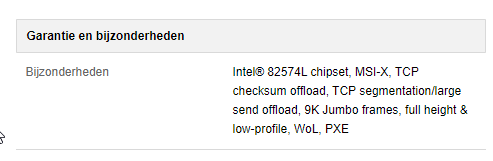
@thick minnow issue with those offbrand network cards is that they don't always play nice with virtual machines
there might be cheaper gigabit cards
thick minnow
oh i dont use virtual machines
tame carbon
if you can afford the 26 euros, go for it
thick minnow
but it needs to be reliable its for my brother and just needs to work
tame carbon
there are USB gigabit dongles that sell for less than that
@thick minnow that card would do fine
and you wont have to install drivers for it
windows has those by default
Intel cards pretty well supported
late geyser
i'm still stuck on firewall on this 5505
still no clue what to do
service policy rules???
slender shale
PCI net cards I find are pretty reliable to be honest
slender shale
You can get PCI-E gigabit cards for £12 on amazon
EDUP Gigabit Ethernet PCI Express PCI-E Network Card 10/100/1000Mbps RJ45 LAN Adapter Converter for Desktop PC https://www.amazon.co.uk/dp/B07PSGQ4H7/ref=cm_sw_r_cp_api_fabc_D5CKYS0MGY7T12CM9WKC?_encoding=UTF8&psc=1
Obviously cost = reliability like
slender shale
That's fair, but obviously that's just an example
I assume if you're fussed about chip you're wanting to VM
tame carbon
@slender shale and that card is not MDI-X capable
someone even complained about that in the comments
slender shale
Aye, but like I said they are available that was just the first one I found
on a call atm so I can't find another
tame carbon
@slender shale cards that don't support MDI-X are annoying in that they may not play nice when connecting two computers together
without Auto-MDI-X you need a crossover cable
tame carbon
Because your switch can take care of that yes, because it is MDI-Capable
peak cloak
@tame carbon just curious, if you have a switch that supports MDI-X but PC doesn't does that work?
tame carbon
@peak cloak at least one of the two needs to have Auto MDI-X
peak cloak
can you let's say use a cross over cable and the switch will take care of it
ah ok
cool
tame carbon
NICs are usually MDI, where the switch is MDI-X
X meaning crossover
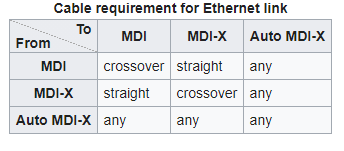
@peak cloak the moment you have auto on either side, it works automatically
most modern cards support this, and this is why I wouldn't buy a card that doesnt have it
it may not be an issue now, but can potentially be one in the future
@slender shale ok so that card you linked, uses an RTL8111F
Crossover Detection & Auto-Correction
is listed..
slender shale
Classic Amazon resellers
tame carbon
yeah offbrand cards like that, they just use some board design with that chip
manufacture it, and resell
realtek may make ethernet chips, but they dont sell cards with them on
slender shale
aye, but the MDI-X should always work as long as the chip supports it
auto*
because it's a virtual pin swap
tame carbon
well according to the RTL doc, it does
slender shale
so it's handled by the chip
tame carbon
@slender shale such a card isnt anything special.
The chip it has onboard is a PCIe to ethernet chip
everything else on it is just signal filtering and such with capacitors and resistors
slender shale
Aye exactly what I'm saying bud
tame carbon
@slender shale 10M ethernet https://images-na.ssl-images-amazon.com/images/I/51wGqgBDlmL._AC_SL1000_.jpg

uses SPI (serial peripheral interface)
the IC, an oscillator and some resistors 
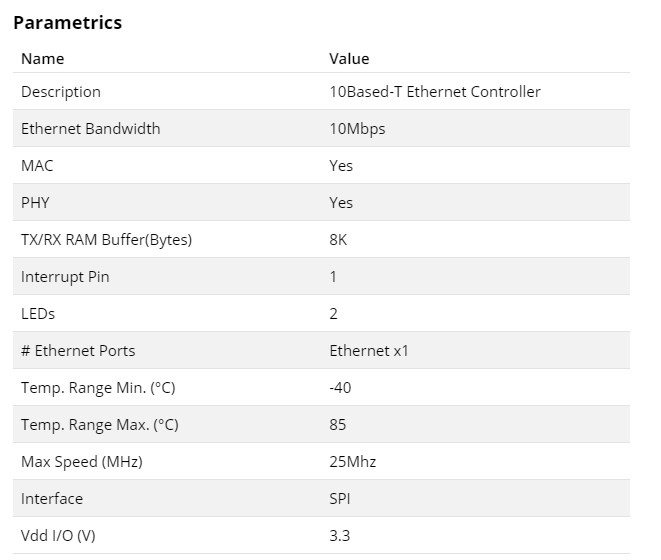
this interface is just MDI
doesnt have any sort of special sauce
peak cloak
any good cheap ip cams you would recommend?
just want something to monitor my server rack
tame carbon
@peak cloak Im using those RLC410 I think
pretty cheap
and they do RTSP h264 encoding and have a microphone on board
and they are waterproof too xD
interface configuration isnt the best
but you can set the NTP server and network config, and configure what framerate and resolution it has to do
the web viewer it has is total crap
oh and as with all these cameras
the OS is riddled with exploits
so isolate them
peak cloak
yeah ofc
tame carbon
@tender hazel do you know if the SFP and ether1 of such an mANT can be used to daisy chain two sectors together?
if I plug an RJ45 module into it, I could run a single data cable to the tower
hollow marlin
Unless you need PoE, yeah you can do that
tame carbon
@hollow marlin I would need PoE
the idea is to have an electrical box
and three cables going up to the antennas
with two poe injectors
hollow marlin
Yeah PoE and SFP = no worky
 brave wagon
sorry if im interrupting, you might remember me crystal
tame carbon
@hollow marlin those injectors that mikrotik provides, those are passive though?
so it wouldn't be a problem if I have Ether-> Injector -> AP1 -> SFP -> Injector -> AP2
brave wagon
turns out there is no way i can run wired
i need a way to propagate internet through my house without cable
something other than orbi that i currently have and keep crashing
does anyone know something
hollow marlin
tame carbon
so it wouldn't be a problem if I have Ether-> Injector -> AP1 -> SFP -> Injector...
Oh if its SFP -> injector -> PoE IN port, then yeah that'll work
brave wagon
i need wired internet in some places
peak cloak
brave wagon
i need wired internet in some places
you have coax in the walls?
brave wagon
no
peak prairie
tender hazel
so that is the only thing you may have to change on the ASUS.. you may have to c...
So many variables... 😵
In short, I should be able to go from the LAN on the upstream router to the WAN on the downstream router? I'll be available later this afternoon or evening to go over it in detail.
tame carbon
@unborn sun not sure why it says that
it says no speedtests, but I've posted plenty before
as long as nobody minds, who cares
rocky badge
@clear igloo Lets see which one happens first...
All of the APs update or parents get home
clear igloo
lol
 honest wind

 little schooner
@rocky badge this was a few releases ago but I saw unifi changed the way networks are assigned to APs. Instead of using wifi profiles with a set of ssids, the admin makes the ssids and the APs subscribe to that Ssid on the radio band you choose
honest wind
So there's cat5 and cat6 right? What cat is this?
little schooner
I think it is so much easier to manage now
honest wind
not sure which cat my new switch uses now
rocky badge
little schooner
<@236237361703288842> this was a few releases ago but I saw unifi changed the wa...
Yeah
rocky badge
clear igloo
lol
And it finished before they were home!
tame carbon
@honest wind Cat 'o nine tails: https://www.getdigital.de/web/getdigital/gfx/products/__generated__resized/1100x1100/Admin_Peitsche_03.jpg
 little schooner
I upgraded expecting it would give me trouble but a quick read of the docs and I was up and running again fast
tame carbon
for stupid RTFMs and ID10T's
rocky badge
 honest wind
Pebkac's
rocky badge
I just have all of my APs broadcasting everything lol
rocky badge
Because with the positioning and radio settings of each AP, I need all of them to cover all of the house
little schooner
Yeah makes sense
Oh yeah forgot, the concept of AP groups
I couldn't remember that detail
That's good bc that means it hasn't broken since I touched it lol
 unborn sun
Is 95mbps down and 94 up good
rocky badge
Lol
little schooner
@unborn sun up speed is fantastic!
unborn sun
wired ethernet
rocky badge
depends on you tbh
tame carbon
its at least a symetric line
rocky badge
whatever you need is good for you
unborn sun
Ok
 pastel sail
So when I’m downloading anything on my pc it’s around 5-7mbs and when I do a speed test it says about 50-60mbs download and 11-12mbs upload, I have cat6 ethernet cables and the lan port in my mobo is gigabit and my power line adapters suport up to 600mbs,and when I played on console things would download at about 50mbs wireless, Id like to know why there’s such a difference in speeds if anyone knows why
pastel sail
Mbps
rocky badge
If you're downloading from Steam, web browser, etc, its MB/s
tame carbon
1 byte is 8 bits
rocky badge
Speedtest shows Mbps
pastel sail
Yeah mbps then
clear igloo
pastel sail
So when I’m downloading anything on my pc it’s around 5-7mbs and when I do a spe...
Most powerline adapters that don't advertise gigabit have 100Mbps ports from what I've seen, what model powerline?
tame carbon
@clear igloo tplink does
rocky badge
From the numbers you said it seems like you're reading MB/s and Mbps wrong ¯_(ツ)_/¯
tame carbon
supposedly the ones I have here do 500mbit, but I've never gotten above 150
pastel sail
clear igloo
Most powerline adapters that don't advertise gigabit have 100Mbps ports from wha...
Tp link av600
clear igloo
These?
https://www.tp-link.com/us/service-provider/powerline-adapter/tl-pa4010-kit/#specifications
10/100Mbps ports only
The TL-PA4010 KIT transforms your home's existing electrical circuit into a high-speed network—ideal for daily use. No configuration required.
thick minnow
honest wind
Cat1 maybe
clear igloo
Sorry, I got you confused with someone else, I thought you were being limited to 100Mbps 🙂
Powerline in general though is down to wiring quality in the walls and age
pastel sail
clear igloo
These?
https://www.tp-link.com/us/service-provider/powerline-adapter/tl-pa4010-k...
Yeah that looks to be the same one I got off Amazon
pastel sail
clear igloo
Powerline in general though is down to wiring quality in the walls and age
Oh well that could definitely be the issue then
Tyty!
rocky badge
@clear igloo I'm seeing if this place wants networking out in the pavilion for live streaming and shit 😂 its gonna be around $400-500 after the rest of the parts and crap. https://blob.rocks/FHHHVLWXJM.png

But this would give us a gigabit link between the two buildings
clear igloo
Nice!
tame carbon
@rocky badge you have permits and all?
rocky badge
you don't need license for 60ghz
tame carbon
Here, you do.
rocky badge
not in the US ¯_(ツ)_/¯
tame carbon
even 6GHz is subject to licensing
rocky badge
Only wireless I need licensing for with Ubiquiti are their AF-3X, AF-4X, RocketM365 or AF-11
hrm not bad
clear igloo
not bad at all
rocky badge
outdoor ready too
PoE powered with PoE out on all ports
I'm giving them my old USG and US-8-60W too lol
clear igloo
That's cool 🙂
rocky badge
yes
peak cloak
yes (I misread)
tame carbon
are you on wireless?
 trim rose
ye
tame carbon
yeah depending on transmit power of your device
trim rose
kk
peak cloak
what do you pay for from your isp?
trim rose
also
tame carbon
@trim rose ideally you would use a wired connection
peak cloak
150/150?
trim rose
i pay for 200
tame carbon
because it seems you are leaving bandwidth on the table
tame carbon
run a cable
trim rose
i tried
but i have no where to put it
it's on the ground
and people would just step on it
peak cloak
in the wall?
tame carbon
@trim rose simplest way is with a cable duct or in the wall
peak cloak
or is it in a rented place?
trim rose
it's hard





 trim rose
to put it in the wall
honest wind
you can screw / mount it on the wal las well, doesn't need to be inside
trim rose
yea
honest wind
you can also use command strips if it's light enough if renting and you're not allowed to drill holes
 royal onyx
Is it possible for me to use my SIPUDP Voip connection free with my broadband, from any where else (not being connected to that broadband) maybe using any kind of virtual server? Or any Proxy shit?? Is it possible? Please don't judge me if my question is stupid.
trim rose
i don't think my dad would allowed me to put cable in the wall
i tried to use a powerline adapter
i got 10 mbps up and 2 down

tame carbon
@trim rose data flows through cables
and ideally they have their dedicated cables
just get yourself those ducts
trim rose
yeah
tame carbon
and ethernet cable
trim rose
idk where to put them
tame carbon
along the wall?
trim rose
hmmmmm
idk if they would allow me to move the router
how long can a ethernet cable be?
peak cloak
keep in mind though
if you put router in basement
you need some sort of other wifi source
because then wifi will be bad
trim rose
ok here is how my house is
i have 4 floor (including basment)
router is in floor 2
my pc is in floor 3
im gonna buy a long ethernet cable
and try to hide the cable somehow
peak cloak
@trim rose do you have coax in the walls?
peak cloak
 peak cloak
 trim rose
my router uses fiber
wait
actually
i think I have 1 in my room
is there like adapter for like coax to ethernet?
peak cloak
the adapters are a bit expensive though
trim rose
wow
it's more then enough
my router can do 300
im probably gonna buy that
wait
@peak cloak my house is a bit old
is there like multiple version of coax?
trim rose
ok
peak cloak
dociss, moca, catv
trim rose
how do I know which one is the one installed ?
peak cloak
coax is coax
trim rose
ok
peak cloak
just make sure you can return
tame carbon
those are different protocols for the same cable
peak cloak
never used it
trim rose
ok
trim rose
yea
peak cloak
better than powerline
trim rose
Okay
peak cloak
1.1 can only do 175 mbits
trim rose
what can 2.0 do?
peak cloak
gigabit
rocky badge
@clear igloo actually


100m of fiber $40
wait shit
I forgot customized comes from Asia
clear igloo
rip
rocky badge
So it won't even get here until April 6th
ooh
there's on on amazon

Ars Technica
"I always do that. I always mess up some mundane detail!"—Michael Bolton
tame carbon
sure an organization like Wellington university makes backups before they delete content?
peak cloak
trim rose
<@!222482269829332992> what do I need to buy?
two moca adapters, also I think the splitter that the coax cables are connected too can split moca, but idk that much about coax networking
peak cloak
yes
rocky badge
the goCoax is still cheaper lol
trim rose
yea
rocky badge
60*2 120 or pack of 2 for $170
tame carbon
morse-modem
tame carbon
... --- ...
anyone know anything about NStreme or nv2 ?
and how they operate/are configured?
tender hazel
peak prairie
So many variables... 😵
In short, I should be able to go from the LAN on the up...
Yes.. reset your asus back to factory defaults first because a lot of the explanation in that video was not for what you are trying to do. Just reset it to factory defaults, connect the WAN port of your asus to one of the LAN ports of the upstream router and see if it works. The only thing that might not work is the upstream router might use the same subnet as your ASUS by default which won't work, and then you would have to change the subnet of your ASUS so it is different from the upstream router.
tender hazel
tame carbon
anyone know anything about NStreme or nv2 ?
don't bother with either
 topaz smelt
Worth? Or should I find something else
 topaz smelt
I just saw it at a discount and was curious
I haven't heard anything about TPLink, probably for good reason?
topaz smelt
I'm just not trying to go buck wild on buying a new router. I might have some spare stimmy money but I'd rather not spend all of it.
I can't find a newer model Nighthawk for under $250
peak cloak
topaz smelt
I'm just not trying to go buck wild on buying a new router. I might have some sp...
do you need a new router?
topaz smelt
I'm still rocking my ISP provided one and it's a pile of ass
peak cloak
ah
topaz smelt
I don't even know what brand it is. Its model number is RAC2V1K
 unreal smelt
Looks like something they got OEM'd for them
topaz smelt
Yeah. The only branding on it is "Spectrum"
tender hazel
TP-Link IPv6 support is terrible
although that is also true for a lot of the other router vendors (belkin, netgear, dlink until recently)
topaz smelt
I'm not 100% sure how IPs work but I might only have v6?
I tried setting up Nord's Smart VPN or whatever it is to use my PS5 on it and it said it didn't support my IP. Didn't even give me a chance to change anything.
I struggled so hard last night to try and get my PS5 on a VPN so I could watch Naruto Shippuden on Funimation but nothing would work. I have to airplay it from my iPad to my TV and it's a massive headache.
tender hazel
IP address lookup, location, proxy detection, email tracing, IP hiding tips, blacklist check, speed test, and forums. Find, get, and show my IP address.
topaz smelt
Yeah, that only shows me v6
But Nord's website just defaults to being unable to use it, because they don't support v6 for their Smart VPN service yet
It's Smart DNS, not Smart VPN
My bad
clear igloo
Is this Spectrum the ISP?
topaz smelt
Yes
clear igloo
They do dual stack but IPv4 is definitely enabled
IPv6 should fall back to IPv4 by default if IPv6 is unreachable
topaz smelt
I'll have to look into it more when I get home, but last night I had no options to change on Nord's website
clear igloo
I'd err on the side of Nord not rejecting IPv6 traffic correctly to force it to fall back to IPv4
topaz smelt
Probably no way around it, is there?
clear igloo
I mean aside contacting their support and seeing if they can fix something on their side, you could disable IPv6 on the Spectrum router
if possible of course
topaz smelt
What are the downsides of disabling v6, if any?
peak cloak
you don't get acess to the v6 internet
topaz smelt
I'm just gonna blame all these issues on Funimation lmao. If Shippuden was available in English outside of the UK I wouldn't have a VPN lmao
peak cloak
v6 in general is better
topaz smelt
Something something car engine joke
I'll probably be back with more questions about it in an hour or so
clear igloo
There are some sites (mostly test sites) that are IPv6 only, I don't know of any major site that's IPv6 only right now so you wouldn't really lose out on anything but it's just perplexing that it's not falling back and I had Spectrum for a while and I know they do support dual stack and fall back to IPv4 correctly when it's implemented right
tender hazel
you should be seeing both ipv4 and ipv6 addresses on whatismyipaddress.com
something is probably wrong if you don't see a v4 address at all
topaz smelt
It wouldn't surprise me. I've had all kinds of issues with Spectrum.
tender hazel
with dual stack you should see both, because you will have both IPs at the same time
are you checking this on a PC?
@topaz smelt
topaz smelt
I am
So, I think it's getting a bit stranger
I just tried it again, and it couldn't find my v6
But I rebooted my router and then it took 2 minutes to find my v4
tender hazel
So sometimes you check and it shows a v4 and no v6?
topaz smelt
And vice versa
I disabled v6 on my wired connection and my v4 populated on Nord's website
So I at least got that bit activated
thick minnow
Does anyone have an idea why my upstairs Linksys wifi router connected to my ISPs gateway randomly loses internet connection? I checked everything but nothing is faulty, and theres no way to trigger it. My Windows PC also loses ethernet connection randomly, Windows internet troubleshoot says it doesnt have an IP address assigned. Connecting it via WIFI to the same router works fine tho. And my Mac connected via Ethernet also never had any issues with that.
peak cloak
thick minnow
Does anyone have an idea why my upstairs Linksys wifi router connected to my ISP...
that second router is connected via ethernet or wifi
thick minnow
Both my PC and my Linksys wifi router never had any connection issues before we switched from 4G to fiber optic internet so its definetly not faulty hardware
thick minnow
peak cloak
that second router is connected via ethernet or wifi
ethernet of course
peak cloak
good
peak cloak
thick minnow
Both my PC and my Linksys wifi router never had any connection issues before we ...
different ISP router?
thick minnow
We had some Huawei LTE router before, our new ISP has their own router
ARRIS something
peak cloak
thick minnow
We had some Huawei LTE router before, our new ISP has their own router
could be faulty router, thing is you don't know if it's the router or the actual fiber connection
does the ISP router have a fiber port?
or is it just a router
and there is a seperate ONT?
rocky badge
@clear igloo I think we've settled on just running Ethernet to an outdoor AP and just use that 🤣
tender hazel
how is the linksys wifi router configured compared to the ISP gateway