#networking
1 messages · Page 301 of 1
 waxen scroll
 plucky cargo
 south blade
Anyone know how to use a dd-wrt router as a wireless adapter?
Want to connect this old dd-wrt 100mbps router to my main wirelessly, but I seem to be getting something wrong
 tender hazel
Nobody used the torrent feature
I'm running 7.0beta4 at home
We deployed a bunch of the RB3011's to customers, they are an older model now
we also deploy hEX S units, but they are for different purposes
At home I run an RB4011 with wifi
they are coming out with the ax wifi (wifi6) functionality rather soon
probably next month or two there will be a testing release
I'm actually quite happy with ROS 7 beta4 at home
on my RB4011
Wireguard VPN is working excellent, and I haven't had any instability
I've had a couple minor bugs, but no unexplained reboots etc. that were typical with earlier RouterOS v7 beta versions
My home router and all APs are running on RouterOS 7 beta4 now
for the past few weeks
 lean pebble
Watching YouTube learning how to do policy routing on mtik his accent gosh.
Abu!
tender hazel
policy routing isn't difficult - the only difficult thing is figuring out the logic - it is really easy to make a mistake and accidentally policy route traffic that you don't want to
lean pebble
Ya I know I just not familiar with routeros
tender hazel
the commands are easy, it is the logic that is tricky
lean pebble
I moved from fortigate
tender hazel
I know fortigate really well too, I manage quite a few fortigate devices
the problem is that when you use policy routing especially on MikroTik, it basically ignores the regular main routing table, including what subnets the router has
so your policy routing rules can send traffic that matches an interface that the router has as a local interface, and send it back out
lean pebble
I know too but it started to do some problems my units are not new, second handed fg
tender hazel
creating a loop instead of delivering it as you want
lean pebble
So I bought new hex-s
tender hazel
so you need to make sure that any policy routing rules you use are not going to send traffic that should be delivered locally to the router back out to some other router
for instance, if the router has an IP 192.168.1.1/24 and there is a packet arriving at the router destined for 192.168.1.2
lean pebble
I know how to use policy route just not familiar with routeros xD
tender hazel
the policy routing doesn't check the main routing table
so you could end up sending that packet back out the interface it came in and you end up with a mess
lean pebble
I'm testing my gre tunnel on specific machine on my network
There is a specific command for policy route in mtik?
Or via gui or something?
 thick minnow
Hey, I'm running stock drivers for my integrated network port but I'm getting dummy slow downloads on the browsers (unless I do another download on top of the first one which is really wierd) can I get some clues on this??
tender hazel
lean pebble
Or via gui or something?
With MikroTik you can do almost everything through the winbox gui
there is almost nothing that you have to actually go to the command line to do
it is a blessing and a curse, because it means that the GUI is almost overloaded with options
so for people new to it, it can be overwhelming, but I like having all of the options shown to me in the GUI
waxen scroll
@rocky badge what's with the extremely low quality threads in r/sysadmin lately? Wondering if some mod that cared about it quit
tender hazel
lean pebble
There is a specific command for policy route in mtik?
Policy routing is accomplished via '/ip firewall mangle' rules
 rocky badge
waxen scroll
<@236237361703288842> what's with the extremely low quality threads in r/sysadmi...
rocky badge
waxen scroll
<@236237361703288842> what's with the extremely low quality threads in r/sysadmi...
Lol idk
tender hazel
action either "mark routing" or "route"
mark routing and route are different from each other
mark routing allows you to set the packet matched by the mangle rule to use that routing table where you specify the name
route means the packet must go to the next hop that you specify in the mangle rule
route can be easier if you are just doing a really simple policy based routing config
but generally you will use mark routing and specify the routing table name
tender hazel
no
@lean pebble for chain you have to use either prerouting or output
depending on what traffic you are trying to policy route
the mark routing rules only work with those two chains
lean pebble
Can't prerouting
tender hazel
why can't use you use prerouting?
lean pebble
Not letting me apply the rule with it
tender hazel
what is the error message?
 tender hazel
ok right
so the problem is that you are trying to tell it to match packets that are supposed to be sent to a particular outgoing interface
but in prerouting it is happening before it decides what outbound interface the packet will be sent from
that's why the outgoing interface matching is not possible
you need to use criteria other than outbound interface to match the packet
lean pebble
Ok
tender hazel
for policy routing you can only use two chains - prerouting or output. Output chain only affects packets sent by the router as the source, prerouting is for packets sent by other systems routed through the router
lean pebble
Output works prerouting doesn't.
So prerouting happening before it decides to what interface it goes
tender hazel
in most cases, most of what you will want to do with policy routing matches only prerouting and not output
output only matches traffic that the router itself originates
for instance, if you use the router to ping something on the internet, that will match the output chain
if you use the router to create a VPN tunnel with another router on the internet, those VPN packets will be output chain
lean pebble
I need to use the policy route for specific machine for sending the traffic to my tunnel
tender hazel
if you use the router to create GRE packets to send to another router, those will be output chain
lean pebble
My gre tunnel is centos machine
Already configured and working perfectly the only problem I have is with mtik
lean pebble
Ya
tender hazel
you are establishing GRE tunnel between mikrotik and centos?
lean pebble
They both can talk and sending packets if I use regular routing but I need here policy route
Yap
tender hazel
ok, and the packets you want to policy route through the mikrotik, do they originate from the mikrotik, or are they routed from something else?
lean pebble
Going through the mtik to my centos gre tunnel
The issue is when I enable it my vm that suppose to connect via the gre have no internet because miss configuration on my mtik
tender hazel
right, so you do need to use the prerouting chain
but you can't match the traffic on outbound interface
you have to match via something else
lean pebble
Via destination address?
tender hazel
in any chain you can match based on source or destination IP address or address list
so that is a safe workaround
tender hazel
it depends on your situation - you are specifying what criteria should be used for matching packets that should be policy routed
you'll only want to match packets that should override the normal routing process
lean pebble
Let's say my internal network 10.0.20.11 my vm ip, my internal gre ip is 10.70.1.1 centos machine, mtik gre tunnel internal IP 10.70.1.2
tender hazel
I'm afraid I don't entirely understand your setup
you have a VM 10.0.20.11, and is the centos machine or the mikrotik router on that network?
lean pebble
I have my mtik and centos server that used as gre
tender hazel
yes I understand that
lean pebble
tender hazel
you have a VM 10.0.20.11, and is the centos machine or the mikrotik router on th...
Yap
tender hazel
but which?
tender hazel
ok, and which device is on your home network? the centos server or the mikrotik?
tender hazel
ok
so it is really like this
VM 10.0.20.11 <--> MTik 10.0.20.1 <--> MTik (same device) 10.70.1.2 <--> Centos 10.70.1.1 <--> (some other network)??
tender hazel
what is the reason you are using policy routing in this scenario?
lean pebble
For passing specific machine traffic to the gre tunnel
That's how I did it on my old fortigate and it worked
tender hazel
right but, is there some traffic from the VM 10.0.20.11 that you don't want to go across the GRE tunnel, or do you want everything to go across the GRE tunnel?
tender hazel
so then your mangle rule has to match only source address
chain=prerouting
src-address=10.0.20.11
lean pebble
Ok
tender hazel
action=route
route-dst=10.70.1.1
oops that last line may be incorrect
there sorry, fixed
lean pebble
With passthrough?
tender hazel
chain=prerouting src-address=10.0.20.11 action=route route-dst=10.70.1.1
passthrough depends
whether you want future rules to match that traffic too
or whether you want it to stop processing once it hits that mangle rule
lean pebble
Ok
I added this rule I hope I did it right
Mangle - prerouting - src.address 10.0.20.11 - action - route - route.dst 10.70.1.1
tender hazel
yes
lean pebble
I still get my real external IP on my vm at home
tender hazel
in your ip firewall filter tab do you have a "fasttrack" rule?
tender hazel
what do you mean by disabled on the gre interface
lean pebble
I have interface that called gre-new that pointing from my external IP address to my gre vps in the cloud
tender hazel
right but how did you "disable" the fasttrack rule for that interface?
lean pebble
Removed the V from it
tender hazel
removed the V?
 tender hazel
look in ip firewall filter, see if you have a rule with action fasttrack connection
lean pebble
I have
 lean pebble
Ok
tender hazel
fasttrack is great but disables a bunch of other features and you might need one of those in this case
go to ip firewall connections and select all connections and delete them with the minus sign
 tender hazel
it won't break anything - disabling fasttrack connection rule is safe, and deleting the connections just clears your current connections, so you might lose connection to discord and any file transfers that are going on but they will reconnect
lean pebble
They'll reconnect with the same IP they had right ?
tender hazel
yes
lean pebble
Ok good
It's morning here that's why I'm asking we're working from home
Idk why but with mtik my gre tunnel is slower than it was before
Much slower
tender hazel
slower compared to what?
lean pebble
To what I had with my old fortigate
tender hazel
run a few speedtests over it and see what the results are - it may have to do with TCP MSS clamping
lean pebble
Ya that's it, when I disabled it I finally could ping from my vm directly to my internal vps gre IP 10.70.1.1
Only fixed the ping surfing still slow af.
tender hazel
yeah so 100ms and higher is a fairly high latency
but you are saying that if you ping the centos server outside the GRE tunnel it is 59ms
and if you ping inside the GRE tunnel it is 100+?
lean pebble
10.70.1.1 is my internal centos gre tunnel
tender hazel
10.70.1.1 is at the VPS though right?
lean pebble
If I ping from my home 10.0.20.11 I get 59ms
If I ping from my windows vm to my mtik via 10.70.1.2 I get 100+ms
lean pebble
tender hazel
10.70.1.1 is at the VPS though right?
Yap
tender hazel
yeah so that is not normal latency, but I'm not exactly sure where the issue is
lean pebble
Weird from other device on my network that not forwarded by the gre tunnel when I pine 10.70.1.2 that's works great
 tribal ferry
I’ve been talking to Xfinity about Gigabit Pro
lean pebble
I wish I had gigabit
tribal ferry
My bill only increases something like $25 from my $250 to $275
I’m lucky enough to have gigabit and be in their service around for 2 gb up/down
lean pebble
What are the benefits of pro?
tribal ferry
2 gb up/down and like 5ms response time to major service providers
Anyway, I thought it was something like an additional $300 on top of what I pay
aka not worth it
but if I just have to rack the juniper switch myself and set it up on my own, I only have to pay $500 for them to run the fiber from the utility pole to my basement
lean pebble
Onetime fee ?
I wish in my country I could pay them to put a fiber to my house but they don't want to do it
lean pebble
Nice
lean pebble
Lol
tribal ferry
 lean pebble
Nice that you can pay for them to put a new fiber to your basement
Here even if I'm telling them that I'm willing to pay they resist
tribal ferry
Hmmm
Going to have to think if I want to do this
But yeah I’m super surprised I even have this available
I live very rural and the chances of this fiber being on my road and not on a separate run is luck beyond me
rocky badge
tribal ferry
2 gb up/down and like 5ms response time to major service providers
Actually
its 2 Gig/2 Gig on the fiber PLUS
1 Gig/1 Gig on the RJ45 handoff
tribal ferry
1 gig line, yeah
tribal ferry
PLUS a super swanky Juniper switch
rocky badge
That's a $9k switch
 ocean pivot
But 300 a month is oof
rocky badge
Xfinity Gigabit Pro is actually pretty nice
tribal ferry
No idea why the hell they would give that to rent lmao
tribal ferry
ocean pivot
But 300 a month is oof
They priced it for me as only a $25 price increase
rocky badge
ocean pivot
But 300 a month is oof
For 3Gbps, static IPv4, static IPv6 /48
tribal ferry
From my current $250 to $275, and $500 one-time install fee
ocean pivot
tribal ferry
They priced it for me as only a $25 price increase
I pay $49 a month for gigabit up and down tho
tribal ferry
Yeah but this is a dedicated fiber line direct to the Comcast switching point for the town
rocky badge
That's probably GPON anyways
tribal ferry
This isn’t no GPON lol
rocky badge
This is dedi..
yup lol
you won't be sharing that fiber connection
its basically a business offering for residential
tribal ferry
if this was sold b2b this would probably be $1k a month
rocky badge
or more 😂
tribal ferry
inb4 pretend to be residential and get this for your business
rocky badge

tribal ferry
ahhhh why did they have to price this mildly within my price range
like now that this is attainable this is now going to be in the back of my head
tribal ferry
I’ve already got a whole udmp setup
rocky badge
nicee
tribal ferry
I’m moving all of my things downstairs into my basement with a 24u rack
rocky badge
There's one guy in another server with 10 Gig service with a UDMP....lol
tribal ferry
I picked up an R420 and my server rack will start to fill
rocky badge
it actually pushes 10 gig nicely
tribal ferry
And a mk 24 port routeros switch
rocky badge
oh nice lol
rocky badge
I've got a R620...but no rack 😦
tribal ferry
They’re probably in Colorado with that isp
rocky badge
They get it for free since they helped an ISP acquire a deal with their apartment complex to provide internet services
tribal ferry
How well does udmp take a 10g WAN?
rocky badge
pretty nicely
tribal ferry
% usage?
rocky badge
plus yeah trying to find something on the WAN to saturate it for a while lol
tribal ferry
Daily backups to a google drive lol
rocky badge
lol
rocky badge
lol
Most people I know just either do SFP+ out to a switch or single gigabit port to a switch
tribal ferry
Yeah, I’ll be running a DAC to my mk switch
If I do a 10G backbone for my home network then I’ll get some backbone aggregation switche
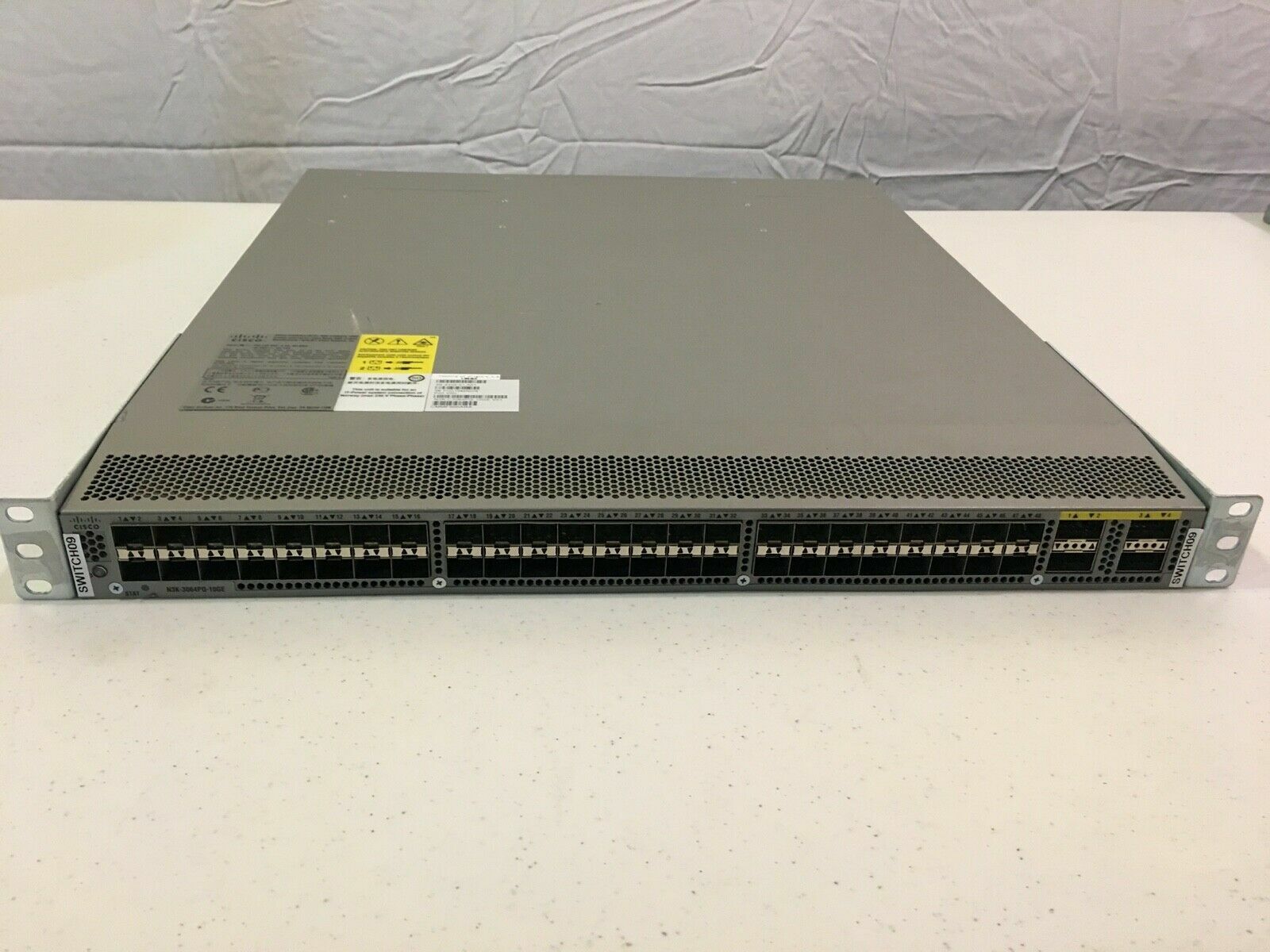
Nexus 6064 or something probably
tribal ferry
Idk
I know the product name ends in 64
Might be 3064
Yeah that’s it
Sell for cheap enough on ebay, could probably save up for it
rocky badge
ah yea
tribal ferry
I’d have to implement this anyway if I do upgrade my internet
I only run on 1G at the moment at home
 rocky badge
yea
 tribal ferry
Are you in the US?
rocky badge
ya
tribal ferry
Check with Xfinity to see if they have their gigabit pro available at your address
You might be surprised lol
tribal ferry
Ah alright
rocky badge
I've been looking at startech's 42u rack lol
tribal ferry
Do you plan to use that much rackspace
tribal ferry
lol same
I thought of getting that same rack but I realized it’s sort of cumbersome and too large
rocky badge
I've got Spectrum, AT&T fiber, and a municipal fiber ISP to choose from here
tribal ferry
AT&T fiber GPON?
tribal ferry
1G up/down max speed I’d guess?
rocky badge
yeah
The municipal ISP said they do active ethernet for business
but GPON for residential :(
tribal ferry
If you work from home, would that qualify as a business? 🤔
 tribal ferry
Business service still 1G?
rocky badge
Yeah
tribal ferry
Yeah probably not much benefit then
rocky badge
There's no blocked ports, besides the normal SMTP, NetBIOS, etc, and no data caps for any of the services lol
rocky badge
And I can get multiple IPs on residential anyways lol
tribal ferry
There is absolutely zero fiber in my area besides this
rocky badge
rip
tribal ferry
Comcast is the only good ISP for me, all others are satellite
rocky badge
but at least its nice fiber
tribal ferry
yeah
rocky badge
and not too much more than your current plan
tribal ferry
I was really surprised
I’m glad I inquired more this time rather than rushing off last time
rocky badge
lol
tribal ferry
Basically you can pay for them to setup the Juniper switch which acts as the termination point for the fiber
It’s an additional $500
Or just do it yourself and you save that
rocky badge
lol
tribal ferry
Since the fiber is located already on my road outside my home and they don’t need to run it from another endpoint I only need to pay $500 for them to run it from the telephone pole into my basement
rocky badge
Do you know JunOS
tribal ferry
Never used junos before lmao
rocky badge
lmao
tribal ferry
But who says you can’t do anything when you have #networking and r/homelab lmao
tribal ferry
Not sure if I’m 100% correct on that activation fee details though
Agent was definitely referencing some guide or something lol
rocky badge
Lol
tribal ferry
They might set it up even in that $500 install fee idrk
They list an install fee and an activation fee
Install fee I’m 100% sure is for the running of the fiber into the home
rocky badge
yeah
tribal ferry
Not really sure what the activation fee covers or if its optional
lean pebble
Here now they finally published the prices for fiber installation.
Gpon connection direct cable 700$ for private houses
rocky badge

Medium
Yesterday, Comcast activated a 2000Mbit fiber service at my home. 2000Mbits is fast enough to download an entire 1080p movie in 24 seconds…
Because they're pulling the fiber from the street and splicing it
tribal ferry
Not sure if that’s accurate still
rocky badge
Yeah
rocky badge
This one's 2020 https://todayamerican.medium.com/the-definitive-guide-on-how-to-get-xfinity-gigabit-pro-2gbps-up-down-residential-internet-42605c8e86fe

Medium
I will add a background to this story when I get a chance. This article is part of the Internet WFH Series I started here:
lean pebble
Ya
In Israel for private houses they charge 700$
For installation
Even if you already have the fiber in your neighborhood
tribal ferry
Idk, agent told me $271.45 new monthly pricing, which is about $25 up from my current $250
I explicitly asked her if she was referring to the 2 g up/down gigabit pro and she confirmed
The $271.45 includes me keeping the TV and home phone
tribal ferry
Still goes over coax
tribal ferry
Over fiber, yeah
rocky badge
Idk if its IPTV or RFoG
tribal ferry
Some ISPs do that with their triple play fiber GPON
rocky badge
I know there are some models of ONTs that do coax TV but I don't have that
tribal ferry
Well in the gigabit pro it’s not a GPON connection so there is no ONT
tribal ferry
It was cheaper for me to get Internet, TV, and phone than just internet and TV
I don’t need the phone but I have it anyway since it lowers the bill a bit
rocky badge
So they still have the bundle deal with gig pro?
rocky badge
Yeah my grandmother is on Xfinity and she quad plays 😂
tribal ferry
What’s the fourth?
rocky badge
Removing phone makes everything go up
tribal ferry
Security?
rocky badge
yea
tribal ferry
I guess they’ve changed the way the pricing works for gigabit pro
tribal ferry
Idrk how it works but all I know is for my situation it would be that $25 increase per month and $1k upfront for install and activation
rocky badge
wow
tribal ferry
So it’s just whether I can stomach the upfront costs and probably a new switch
tribal ferry
I guess they wouldn’t care if you self hosted applications since it’s not really a residential line lol
rocky badge
So they have their own gigabit connection 😂
lol yeah
they already don't really care on residential iirc
tribal ferry
Could just wireguard tunnel my servers to an EC2 instance
Yeah unless if you do an absolute ass load of bandwidth
rocky badge
yeah lol
tribal ferry
But then I’d have to buy 2g or 10g cards for my computer and my servers
And a 10g switch
Hmmmmmm


 tribal ferry
What are you using to monitor your traffic?
rocky badge
That's pfSense
tribal ferry
Ah alright
I plan to spin up a pfsense VM on my server once it’s in the rack and use the secondary lan port on the server for a testing network
rocky badge
nice
 slate sonnet
Hey all, I have a vps that I want to connect to with my phone
I have my ssh key added on my pc but idk how I would add my phone
slate sonnet
Yes, I got that
Termius asks for a private key
How would I access my private key on my vps?
rocky badge
you don't store the private key on the VPS
You only store the public key
And then your private key stays on the SSH clients
rocky badge
Your private key
slate sonnet
But where do I find that
 cold turtle
 rocky badge
you generated it when you setup the keys
slate sonnet
ssh-keygen?
rocky badge
yes
slate sonnet
So I just search for my private key on my pc then, right?
rocky badge
yes
slate sonnet
I figured it out tho
Just generated a new key in the app and added the public key in my vps
thick minnow
Are the ethernet ports somewhat capped in bandwidth? In terms of your task Manger tells it receives 40 something mgps but everything else that does downloads only hits max 6 mbps?? Is there any kind of fix or am I just stuck with a slow connection?
 glacial cedar
Any suggestions for best cat 7 ethernet cable
 tame carbon
@glacial cedar cat7 is unnecessary
@slate sonnet Nice. Yeah you should generate one key file per device. This is useful.
When the device gets stolen and thus the key becomes compromised. You can easily revoke access by removing the public key from your vps.
Unlike passwords, which are a universal entry for anyone..
tame carbon
@slate sonnet learning the ropes
nice
@thick minnow ethernet operates at set speeds. Link speed is either 100M or 1000M
slate sonnet
Windows is too much of a memory hog to be used as a minecraft server lmao
4gb of ram usage at idle and I'm trying to run mods
tame carbon
@thick minnow if you have less than that, you probably have a bottleneck elsewhere
@slate sonnet yep, windows not really ideal for hosting services on
@slate sonnet https://i.imgur.com/oWEZDbr.png
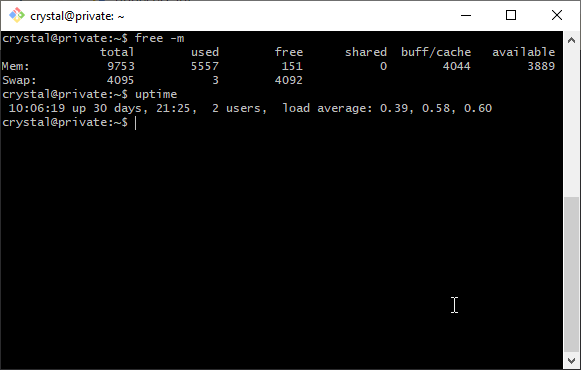
:D
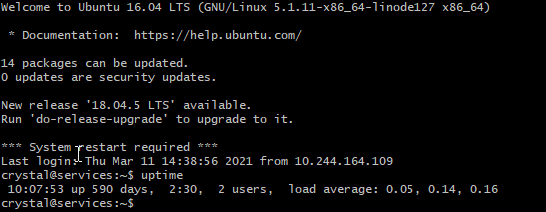 slate sonnet
Btw
tame carbon
I only do restarts to apply kernel patches if there's a critical security vuln
slate sonnet
On my ssh key it says "scratch@scrublinux"
tame carbon
and the only security hole on my machines this year was the sudo exploit
tame carbon
@slate sonnet yeah its common to have an email address associated with an ssh key
so you know what key is whose
slate sonnet
I want to add this linux install to the list of auth devices
slate sonnet
No, my question is do I have to keep the "scratch@scrublinux" at the end
Or just copy paste the key without the end
tame carbon
that's part of the key yeah
slate sonnet
Oh okay
tame carbon
@slate sonnet its used as identification
like on github, when you sign off on a commit
you do so with your private key & email
tame carbon
@slate sonnet the email doesnt have to be valid
just, for ssh keys that you use with services like git
you should use valid emails for those
@slate sonnet it comes from old school computing :)
when people first started using keys, they used it to verify authenticity
and in the context of the linux kernel, it was used to keep in touch with maintainers of code
because every line of code on the repository, has an ssh key that signed off on it
and thus, if you need to contact said person who wrote the code, you can always send them an email
tame carbon
yeah email is foo@bar
tame carbon
nah, its hostname
tame carbon
technically root@localhost is a valid email address
realistically, you'll never be able to send an email to localhost
@slate sonnet all of this has to do with URLs
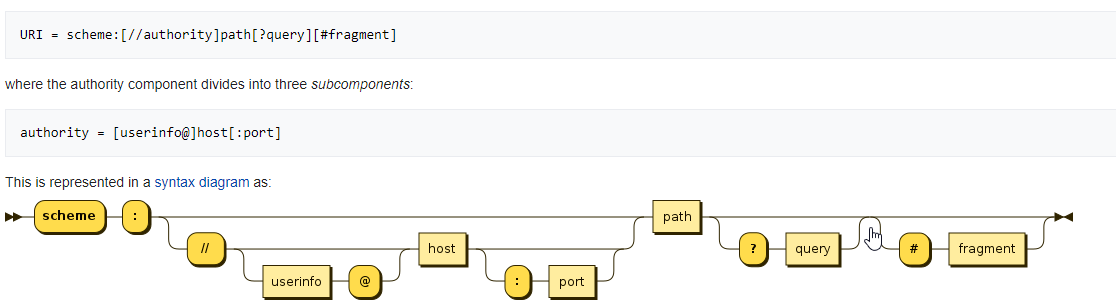
this scheme applies to pretty much any form of resource identification
so for ssh you'd have something like: ssh://user@host
you can even point to a file on the remote system like so: ssh://user@host/path/to/file.txt
ftp://anonymous@host/foo.txt
http://host/foo.txt
etc.
slate sonnet
Copying and pasting ssh keys is a pain when you have 2 systems on 1 pc
tender hazel
I just upgraded my modem/service at home and now I have IPv6 on my mikrotik router without having to tunnel
tame carbon
@tender hazel nice, ND with SLAAC?
tender hazel
I use SLAAC for local IP addressing yes, but I get a prefix from my ISP through DHCPv6 prefix delegation
tame carbon
I removed the v6 tunnel on my network. Because netflix on v6 thinks I am from united states...
@tender hazel what kind of prefix do they assign? /48 ?
tender hazel
I had to specify a prefix hint of ::/56 to get a /56.... by default they gave a /64 which is not great
tame carbon
well, a /56 is at least better than nothing :)
tender hazel
a /56 is just fine, it gives me addressing for up to 256 VLANs at home
I can't see myself needing anywhere near that number of VLANs at home anyway
tame carbon

I have like 10 vlans here
my ISP doesn't do dualstack yet :(
I'm just glad I got a /29 (v4)
tender hazel
before I was tunneling v6 from my friend halfway across the country, not from HE or whatever
he runs a v6 tunneling service
the only issue that I had was that it messes up geolocation
so I would go to google and type restaurants near me and get the geolocation for where he lives
tame carbon
@tender hazel that's exactly my issue
tender hazel
and it's a bit slower than native v6 from the ISP
tame carbon
except, I noticed it while watching netflix
suddenly, the page refreshed and it was like: YO. this TV series is not available your country
tender hazel
heh yeah, I had to stop using HE for IPv6 because netflix started flagging their tunnelbroker service as a VPN and I couldn't watch netflix at all with IPv6 enabled
tame carbon
I ordered one of those big outdoor antennas from mikrotik
gonna see how good they are at range
tender hazel
which ones?
tame carbon
metal 52ac
I need to help my dad out, setting up a big public network
its pretty sweet, the camping he operates is getting fiber optics soon
so we can finally ditch the ripoff-ISP, and go lightspeed
and offer every camping guest decent wifi
tender hazel
the only issue with the metal 52ac (and it may not be an issue depending on your setup) is that it can't supply 2.4ghz and 5ghz at the same time
tame carbon
@tender hazel I'm aware
Its going to be used as a 2.4GHz AP
I'll be using them in central locations to provide wide range coverage
in high density areas such as the terrace near the bar and restaurant
I'll be putting one of those 5GHz sector antennas

MikroTik is a Latvian company which was founded in 1996 to develop routers and wireless ISP systems. MikroTik now provides hardware and software for Internet connectivity in most of the countries around the world.
Not sure what to get yet.. but something like this ^
but every pole will have one of those big omni directional antennas with 2.4
and 5GHz sector in some high density areas
slate sonnet
@tame carbon in order to add my "second pc", all I have to do is add another line in postup and postdown rules with the ip of my linux install and configure wireguards allowed ips?
And add the public keys so that I connect to the vps with wireguard
tame carbon
@slate sonnet uhhhhh
Im not sure if we need a 2nd tunnel for that
idk enough about wireguard
slate sonnet
Wait, can't I just reuse the 10.0.0.2 ip that I have on my windows install?
tame carbon
@slate sonnet you can only have a single client connected at this time
if you want to have multiple devices
you need to add a 2nd [Peer]
to your config
slate sonnet
Well I mean I can't have 2 os's running at the same time
tame carbon
oh, dual boot config on same machine?
slate sonnet
Yup
tame carbon
@slate sonnet still, you'll have two different keys
slate sonnet
Yeah
slate sonnet
Okay
slate sonnet
Yeah, no harm in trying
tame carbon
@slate sonnet quick google search says: yeah this should be how its done
https://i.imgur.com/RDB4vBV.png
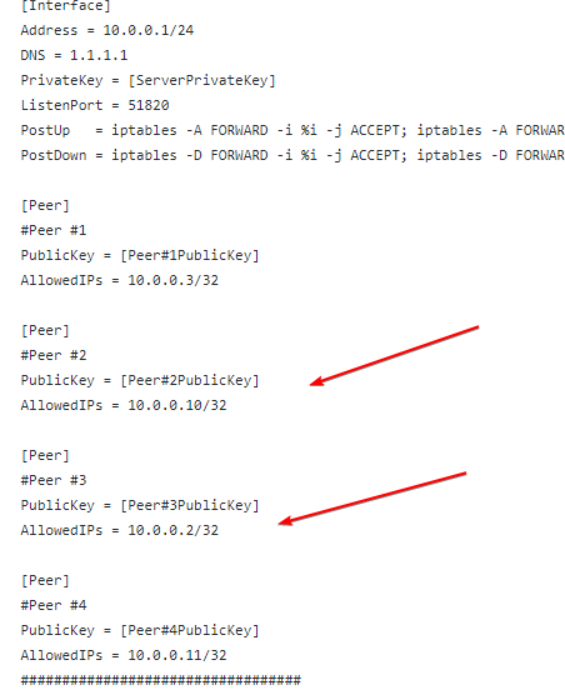 slate sonnet
That's the server config or client?
tame carbon
server config
remember, the server needs to know the public key of the client that connects
slate sonnet
This is so annoying on linux
@tame carbon you said that you had a tutorial written down or something, right?
tame carbon
what?
slate sonnet
To do the wireguard stuff
slate sonnet
The postup and postdown stuff
slate sonnet
tame carbon
I mean, you have the link to the tutorial don't you?
I'm confused on what I should do on linux
slate sonnet
tame carbon
only on the server
Okay
So on client I don't need the postup and postdown rules?
tame carbon
those postup postdown rules merely modify the routing table in the kernel
but only the server has to do that
tame carbon
yeah, you modify the existing config file
and add another [Peer] block
it should be the same as the existing one, only the public key is different
slate sonnet
I'm talking about client side
On the client side atm I have my private key in the conf
tame carbon
@slate sonnet you can just copy the tunnel configuration you had on your windows machine
slate sonnet
Okay
lean pebble
My gre works but sucks.
Router Internal gre ip 120ms
Vps internal IP 60ms :laughing:
Mikrotik so weird with it
tame carbon
@slate sonnet https://github.com/mochman/Bypass_CGNAT

GitHub
Wireguard setup to bypass CGNAT with a VPS. Contribute to mochman/Bypass_CGNAT development by creating an account on GitHub.
step 2b
@slate sonnet you don't need any postup or postdown rules on the client
since we only use NAT on the server
@slate sonnet those rules in the tutorial are for this: https://i.imgur.com/saa0dDI.png
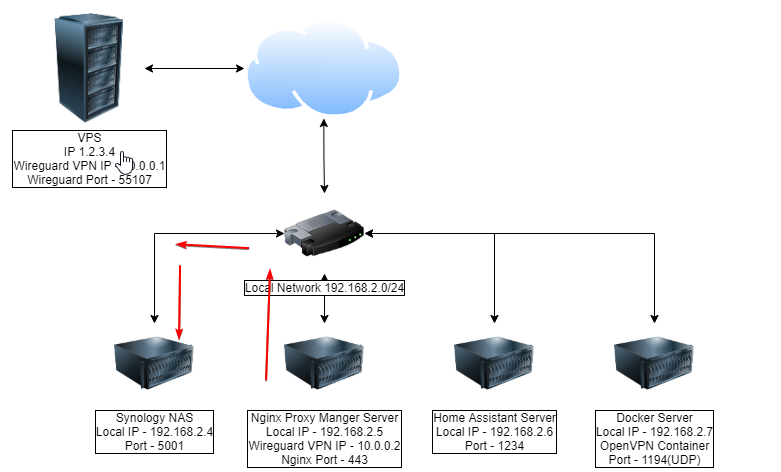
that tutorial assumes one computer on the LAN acting as gateway
and it uses NAT on the client, to forward packets to other computers on the LAN
slate sonnet
So basically I can copy my windows client config without the keys, right?
tame carbon
yeah
slate sonnet
Okay
slate sonnet
Yes
Now I need to figure out how to get a public key on linux
Or is the public key the server key?
No, it's not
I think I got it
 clear igloo
From a local machine to your public machine?
slate sonnet
I need my wireguard public key on my client pc
Idk where it's saved
Or how to generate it
clear igloo
what linux?
clear igloo
cat ~/.ssh/id_rsa.pub
clear igloo
that's the only public key I know of
clear igloo
should just be ssh key generation and then copy the pub key
slate sonnet
If it is, I'm done
clear igloo
let me check the wireguard docs, 1 sec
slate sonnet
But it doesn't look like an ssh key though
slate sonnet
The private key is already filled out though on my client pc
clear igloo
then:
wg pubkey privatekey publickey
it will generate a publickey using that command and store it in a file called publickey
using the privatekey file
then you can cat publickey and copy it
clear igloo
oh, I missed you need to do:
cd /etc/wireguard
sudo umask 0777
sudo cat /etc/wireguard/publickey
sudo cat /etc/wireguard/privatekey
I haven't messed with it or read some of the earlier message so sorry if I'm being redundant 🙂
slate sonnet
permission denied
slate sonnet
clear igloo
I haven't messed with it or read some of the earlier message so sorry if I'm bei...
No problem
clear igloo
ah, might need to do su by itself
and then just umask 0777 after authenticating
some clients let you do sudo su to stay root, depends
clear igloo
Looks like there is an even easier way to do it
https://www.wireguardconfig.com/
lean pebble
clear igloo
oh, I missed you need to do:
cd /etc/wireguard
sudo umask 0777
Omg hell no
clear igloo
lean pebble
Omg hell no
That's what every guide says shrug
lean pebble
Well those guides is useless if they say that
clear igloo
 lean pebble
Oh it's unmask
slate sonnet
Well I think I figured it out
clear igloo
lean pebble
Oh it's unmask
yah
clear igloo
slate sonnet
Well I think I figured it out
Nice, what was the issue?
lean pebble
Well I'll never put 777 on something.
I'm not using unmask that much to remember what it does except unmasking
xD
slate sonnet
And started from scratch
clear igloo
pebkac errors are the best 😄
lean pebble
slate sonnet
I deleted wireshark and installed it
What is the problem with it?
lean pebble
Oh ok
lean pebble
I hope you didn't use chmod -R 777 wireshark folder 😆
clear igloo
Yah, always "fun" when you miss a step and get many steps later before realizing it
slate sonnet
lean pebble
I hope you didn't use chmod -R 777 wireshark folder 😆
No
Well I deleted wireshark so I think all the folders should have deleted too
clear igloo
lean pebble
Well I'll never put 777 on something.
I'm not using unmask that much to remember...
I think umask is just to give 0777 to that specific user only
slate sonnet
(Unless I don't know that part about linux)
lean pebble
Well it's more fun to miss something when you build modules into kernels or things like nginx
Umask should make it default folder permissions before something became broken
I don't think 0777 is default permission for anything 😂
clear igloo
ah, that might be it, been a while since I dabbled in it too 😛
lean pebble
I just reread about it
slate sonnet
I want to cry, wireguard is giving me an error
line unrecognized
I didn't add spaces between the = when writing the publickey
But I can't edit it because apparently the directory doesn't exist
I hate this so much
slate sonnet
But on another terminal I can edit it
slate sonnet
lean pebble
What folder doesn't exist?
/etc/wireguard/wg0.conf
slate sonnet
slate sonnet
But on another terminal I can edit it
And I checked to see if there are spaces
And there are spaces
lean pebble
Lol
lean pebble
😂
clear igloo
whoops 😄
lean pebble
I had a feeling that something is wrong
slate sonnet
But wireguard is seeing it without spaces
lean pebble
I'm not familiar enough with wiregaurd but check is wireguad supports spaces in name
Did you wrote it between " "?
lean pebble
Try write it between " "
slate sonnet
It's not supposed to be like that
Btw, I'm following this guide
GitHub
Wireguard setup to bypass CGNAT with a VPS. Contribute to mochman/Bypass_CGNAT development by creating an account on GitHub.
lean pebble
Oh
slate sonnet
For commands and stuff
lean pebble
Well first it's 077 not 0777
slate sonnet
What does 077 do anyway?
lean pebble
mask is different from chmod , default mask usually 022
Sometimes need to change it for certain files and folders
Last time I used it was 6 years ago I think I don't remember for what use cases need to do it



 lean pebble
Ok your home internal IPs are in different subnet I hope
I see you use internal IPs of 10.0.0./24 on the vps
What is the problem again ?
It's not showing ?
slate sonnet
1 sec

@lean pebble
Basically it says as if I don't have any spaces at the = sign
But in the conf I do
As I'm supposed to
lean pebble
You could just copy
Lol
I didn't notice it to
My brain have auto correct
😆
Remove 1 k and it should be good
lean pebble
Send the error
slate sonnet
 lean pebble
Can you do fuser -k wireguardport/tcp or what ever protocol it uses ?
clear igloo
do
ln -s /usr/bin/resolvectl /usr/local/bin/resolvconf
slate sonnet
clear igloo
do
ln -s /usr/bin/resolvectl /usr/local/bin/resolvconf
Copy the whole line?
lean pebble
Oh well wiregaurd is not my specialty
clear igloo
slate sonnet
Copy the whole line?
yah, you could also try this instead
systemctl start wg-quick@(name)
but replace (name) obviously
lean pebble
It'll not help I think
clear igloo
Yah, I'm seeing people talk about possibly needing
sudo apt install openresolv
instead
lean pebble
Wireguad not recognize the command resolveconf
slate sonnet
clear igloo
do
ln -s /usr/bin/resolvectl /usr/local/bin/resolvconf
Fixed it I think
No error
lean pebble
Started ?
slate sonnet
 lean pebble
It's green now ?
slate sonnet
Yup
clear igloo
yeet 😄
lean pebble
Good
slate sonnet
Gonna check connection to vps now
clear igloo
https://superuser.com/questions/1500691/usr-bin-wg-quick-line-31-resolvconf-command-not-found-wireguard-debian/1500896
This is where it mentions making the symlink on debian manually

Super User
Error Message:
/usr/bin/wg-quick: line 31: resolvconf: command not found
The issue:
I am not fully certain, I do have openresolv installed rn and have tried it and got the same response when
lean pebble
Finally the ISPs here corporate with the fiber I can't believe it's happening 😂
clear igloo
Nice 😄
lean pebble
They gonna connect private houses after 12 years of waiting, and they finally got a brain and giving the customer the option to use his own network gear that support fiber
slate sonnet
Huh, I can't ping my vps
lean pebble
Are you sure you're connected to wiregaurd?
lean pebble
Do you want me to check if I can ping it via your wireguad connection?
slate sonnet
VPS can't see me either
lean pebble
Make sure your vps internal IPs are different from your home subnet
slate sonnet
No, vps is fine
lean pebble
Are you 100% sure ?
slate sonnet
Well I basically copy pasted the config I had on windows
Changed the keys
And that's it
slate sonnet
lean pebble
Are you 100% sure ?
Yes
lean pebble
Wait a sec
Where are you trying to install wireguard?
On rented vps or on your computer ?
slate sonnet
My computer

VPS is fine on windows
Basically I'm trying to connect to my vps and make it route traffic to my pc on linux
Like I have it on my windows install
Doing this to bypass cgnat
lean pebble
Ok
slate sonnet
And want to use linux since I only have 8gb of ram and windows is a ram hog
lean pebble
I have a gaming vm
slate sonnet
So I can pass my main gpu for gaming
slate sonnet
KDE Neon
lean pebble
Ok
thick minnow
slate sonnet
KDE Neon
Ayyyyy, fellow neon user
thick minnow
Hello
lean pebble
How are you feeling today?
slate sonnet
thick minnow
Ayyyyy, fellow neon user
😄
thick minnow
lean pebble
How are you feeling today?
Pretty good thank you
slate sonnet
lean pebble
Check your Linux firewall
How would I do that?
lean pebble
Wait you followed the guide that tells you how to install wireguard server on your system
You just need to install wireguard client
slate sonnet
Yes
lean pebble
Not the whole server again
slate sonnet
I’ve installed the client
lean pebble
That's why you can't ping your server
thick minnow
slate sonnet
How would I do that?
I think it's systemctl firewalld or something like that?
slate sonnet
lean pebble
That's why you can't ping your server
No?
lean pebble
Neon uses firewalld?
slate sonnet
Why can I ping my vps then?
lean pebble
If yes firewall-cmd --list-all
slate sonnet
On windows
lean pebble
Because windows only uses client not server
lean pebble
The guide you sent me earlier today referring to wireguard server not client
lean pebble

Snapcraft
Get the latest version of WireGuard for on KDE Neon - WireGuard VPN (userspace)
slate sonnet
thick minnow
I think it's `systemctl firewalld` or something like that?
Unknown operation
lean pebble
thick minnow
I think it's `systemctl firewalld` or something like that?
You was close enough
slate sonnet
But there isn’t a server or client though
slate sonnet
Check 2b
slate sonnet
slate sonnet
Check 2b
GitHub
Wireguard setup to bypass CGNAT with a VPS. Contribute to mochman/Bypass_CGNAT development by creating an account on GitHub.
thick minnow
Okay, I'm somewhat confused, what's happening? What's the issue? also, I'm unlikely to be helpful at all considering I've only used nyr's wireguard roadwarrior script to set up my VPN
Also, what is CGNAT
lean pebble
Lol
slate sonnet
CGNAT basically means I have a double nat
lean pebble
Cgnat is shared IP
slate sonnet
I think
slate sonnet
lean pebble
Cgnat is shared IP
This too
lean pebble
He gets double nat from.his ISP that means shared IP he can't do port forwarding and things like this
lean pebble
Yap
slate sonnet
I've setup wireguard on windows, and it works fine
Now I'm trying to do it on linux
thick minnow
Ah okay
lean pebble
Try install only wiregaurd client
slate sonnet
Okay
slate sonnet
How would I clean uninstall wireguard then?
Okay
How would I stop the service then
lean pebble
systemctl stop wiregaurd@name
The name you choose for it
Basically the same command you used for start it but with stop
lean pebble
Make sure you do it on your pc and not on your vps
slate sonnet
So now sudo snap install wireguard?
thick minnow
lean pebble
I never used kde neon so I'm not familiar with his package manager
I believe they use apt since it uses an Ubuntu base
 peak cloak
It's apt
lean pebble
Oh ok
peak cloak
You can use snap, but avoid it
lean pebble
Here is wg master presetmonkey
lean pebble
Help him install wg client on neon
lean pebble
peak cloak
It's literally basically Ubuntu with kde features
Good to know
slate sonnet
Is there a "client" and a "server" version of wireguard?
peak cloak
Should be just apt install wireguard
lean pebble
Too much ububtu based distro
slate sonnet
peak cloak
Should be just apt install wireguard
That is what I did
slate sonnet
Okay
lean pebble
I'll try it later on to play with it
slate sonnet
I technically added my public keys and stuff
But I can't ping my vps
With the internal ip
lean pebble
My gre tunnel died 😂 since I moved to mtik
peak cloak
You need to add a second peer in your vps config @slate sonnet
slate sonnet
I did
slate sonnet
Public keys are okay?
peak cloak
Yeah, pretty sure but you can mask it as well if you want
lean pebble
Wg is strange need to learn it
 untold elbow
wg is great
lean pebble
Should be
slate sonnet
 lean pebble
Never used it I'll learn it sometime this year
slate sonnet
Do I have to?
lean pebble
Same ip twice
lean pebble
Change one to 0.3
slate sonnet
I am not running both systems at the same time
slate sonnet
Okay
lean pebble
Always better use different IPs
untold elbow
wg associates the public keys (which are different between those two peer systems) and the IPs
lean pebble
Good morning / afternoon / evening everyone
tame carbon
@untold elbow should be fine as long as both peers dont connect?
untold elbow
@tame carbon in theory, yes, but if he's having issues, that's the first thing i'd suggest changing
lean pebble
It's the same pc with dual boot
untold elbow
once you get it working, put them both back to 10.0.0.2 and see if it works
lean pebble
He can use only 1 peer to
tame carbon
that might work
slate sonnet
Okay, so I changed the ip to .3
tame carbon
@slate sonnet your port forwarding rules will also have to be adjusted
slate sonnet
What exactly should I change?
Add the same postup and postdown rules, but with the added ip?
tame carbon
yeah if you change IP address
slate sonnet
So if I do this on my linux install, I can't forward anymore on windows?
tame carbon
if you use the same private key as @untold elbow suggested
then you could
then both machines use the same [Peer] configuration
slate sonnet
Could I technically use the same private and public key from my windows install on my linux install?
tame carbon
That's what I am saying ^^
untold elbow
copy the whole wg config file