#networking
1 messages · Page 300 of 1
 tame carbon
@lunar spade Computer -> Switch -> Router:
crystal@private:~$ ping 192.168.88.1
PING 192.168.88.1 (192.168.88.1) 56(84) bytes of data.
64 bytes from 192.168.88.1: icmp_seq=1 ttl=64 time=0.143 ms
64 bytes from 192.168.88.1: icmp_seq=2 ttl=64 time=0.182 ms
64 bytes from 192.168.88.1: icmp_seq=3 ttl=64 time=0.134 ms
64 bytes from 192.168.88.1: icmp_seq=4 ttl=64 time=0.144 ms
64 bytes from 192.168.88.1: icmp_seq=5 ttl=64 time=0.207 ms
64 bytes from 192.168.88.1: icmp_seq=6 ttl=64 time=0.134 ms
64 bytes from 192.168.88.1: icmp_seq=7 ttl=64 time=0.149 ms
the connections are fiber optics.
let me add 1 more step, to the downstairs wifi router, that one is on copper.
64 bytes from 192.168.88.4: icmp_seq=10 ttl=64 time=0.250 ms
64 bytes from 192.168.88.4: icmp_seq=11 ttl=64 time=0.209 ms
64 bytes from 192.168.88.4: icmp_seq=12 ttl=64 time=0.234 ms
64 bytes from 192.168.88.4: icmp_seq=13 ttl=64 time=0.227 ms
64 bytes from 192.168.88.4: icmp_seq=14 ttl=64 time=0.281 ms
64 bytes from 192.168.88.4: icmp_seq=15 ttl=64 time=0.201 ms
64 bytes from 192.168.88.4: icmp_seq=16 ttl=64 time=0.195 ms
64 bytes from 192.168.88.4: icmp_seq=17 ttl=64 time=0.175 ms
64 bytes from 192.168.88.4: icmp_seq=18 ttl=64 time=0.208 ms
64 bytes from 192.168.88.4: icmp_seq=19 ttl=64 time=0.214 ms
64 bytes from 192.168.88.4: icmp_seq=20 ttl=64 time=0.226 ms
average is a bit higher... but its still less than 1ms in total
 lunar spade
I was being sarcastic with the ping being long
tame carbon
nah
but its a good question nontheless ;)
crystal@private:~$ ping 127.0.0.1
PING 127.0.0.1 (127.0.0.1) 56(84) bytes of data.
64 bytes from 127.0.0.1: icmp_seq=1 ttl=64 time=0.022 ms
64 bytes from 127.0.0.1: icmp_seq=2 ttl=64 time=0.032 ms
64 bytes from 127.0.0.1: icmp_seq=3 ttl=64 time=0.022 ms
64 bytes from 127.0.0.1: icmp_seq=4 ttl=64 time=0.029 ms
64 bytes from 127.0.0.1: icmp_seq=5 ttl=64 time=0.022 ms
Even localhost has some latency to it
lunar spade
Intresting though, i thought it would be 2-7
tame carbon
faster cpu is obviously lower latency :D
Its IPC

In computer science, inter-process communication or interprocess communication (IPC) refers specifically to the mechanisms an operating system provides to allow the processes to manage shared data. Typically, applications can use IPC, categorized as clients and servers, where the client requests data and the server responds to client requests. M...
wifi adds a lot of latency
especially with a crappy access point or poor signal

phone is my pocket right now, and my body is inbetween me and the AP, and there's 2 walls
still 58 mbit, not bad
lets try ping :)
Pinging 192.168.88.88 with 32 bytes of data:
Reply from 192.168.88.88: bytes=32 time=456ms TTL=64
Reply from 192.168.88.88: bytes=32 time=267ms TTL=64
Reply from 192.168.88.88: bytes=32 time=26ms TTL=64
Reply from 192.168.88.88: bytes=32 time=729ms TTL=64
Reply from 192.168.88.88: bytes=32 time=74ms TTL=64
Reply from 192.168.88.88: bytes=32 time=574ms TTL=64
Reply from 192.168.88.88: bytes=32 time=121ms TTL=64
Reply from 192.168.88.88: bytes=32 time=41ms TTL=64
total garbage
lunar spade
K thanks
 oak night

 dense furnace
 lone sun
lunar spade
lone sun
lunar spade
I got the 24 port network switch and i got all 20 ethenert jacks plugged in now
my network speed is 750
im able to get 760 and same with my borthers pc, but my dads pc only gets 100 megabits per second, i double checked the cable and it is CAT 5E, what could be the reason
he has a Ryzen 5 3600 in his machine
 willow hinge
I want to upgrade my home network. I have recently been experienceing internet slowdowns on the wired devices. So I want to upgrade the entire network with ethernet cables and multiple wireless access points. any recommendations?
 peak cloak
lunar spade
im able to get 760 and same with my borthers pc, but my dads pc only gets 100 me...
peak cloak
lunar spade
im able to get 760 and same with my borthers pc, but my dads pc only gets 100 me...
it's the cablle 100%
100mb is the difference between 1000Base-T and 100Base-T
or the pc
peak cloak
lunar spade
i already checked, and it is Cat 5E
is it certified cat5e
check another cable
because the connectors may not be crimped properly
check the connectors
I have cat5e wired here
lunar spade
peak cloak
is it certified cat5e
It is certified, and was bought just today, its a 25 foot cable
peak cloak
lunar spade
It is certified, and was bought just today, its a 25 foot cable
try another one
could also be the ethernet card
lunar spade
I dont have any other 25ft cables
tame carbon
@willow hinge unifi if you want an easy setup, mikrotik if you want to have more options, but its bit more involved to setup
mikrotik also much cheaper
one of the mikrotik devices (usually the router) acts a controller to the wireless access points
generally pretty easy to setup

MikroTik is a Latvian company which was founded in 1996 to develop routers and wireless ISP systems. MikroTik now provides hardware and software for Internet connectivity in most of the countries around the world.
cAP ac for wireless APs, and a router, that really depends on your needs
lunar spade
@peak cloak i get 700-800
peak cloak
lunar spade
<@222482269829332992> i get 700-800
same port on the switch?
just to make sure
if everything works fine then it's the PC
lunar spade
peak cloak
same port on the switch?
The switch is in my basement, the 2 pc are upstairs
peak cloak
lunar spade
The switch is in my basement, the 2 pc are upstairs
still
try on the same port
lunar spade
So no they are different ports
peak cloak
to verify the port isn't the issue
lunar spade
peak cloak
to verify the port isn't the issue
I dont know which port goes where
There is 17 of them
lunar spade
peak cloak
find it
They are unlabeled, and were installed 15 years ago
peak cloak
lunar spade
They are unlabeled, and were installed 15 years ago
you sure the cable in the wall isn't the issue
peak cloak
get a cable tester
tame carbon
@peak cloak mikrotik released a new device https://mikrotik.com/product/knot
MikroTik is a Latvian company which was founded in 1996 to develop routers and wireless ISP systems. MikroTik now provides hardware and software for Internet connectivity in most of the countries around the world.
peak cloak
it's really helpful for troubleshooting
lunar spade
peak cloak
it's really helpful for troubleshooting
How would that work
peak cloak
tame carbon
<@!222482269829332992> mikrotik released a new device https://mikrotik.com/produ...
interesting
lunar spade
Since ethernet works on it, but at 10% the speed
peak cloak
lunar spade
How would that work
tells you what pairs are good and if there are any faults
peak cloak
lunar spade
Since ethernet works on it, but at 10% the speed
exactly
at 100mbps
100Base-T only requires 4 wires
(2 pairs)
1000Base-T requires all 8 wires (4 pairs)
tame carbon
@peak cloak huh. apparently this thing can use Modbus
which is an industrial protocol for things like smart meters and gas meters
it has gpio ports and can turn modbus into tcp
this is for things like site monitoring
if you have a temperature sensor or something else
lunar spade
peak cloak
at 100mbps
So there is different physical cables?
peak cloak
lunar spade
So there is different physical cables?
no
cat5e is cat5e
but the way someone termianted it
show a pic of the termination
lunar spade
I have no idea what that means
 peak cloak
termination is where the cable is crimped
lunar spade
The cable is Cat5e
peak cloak
ok
tame carbon
cat6 is twisted pair with twisted core around a plastic core
peak cloak
lunar spade
The cable is Cat5e
but show us the termination
 peak cloak
@tame carbon I feel it's something with the termination, some weird thing where they split one 5e into 2 100Base-T
lunar spade
 peak cloak
lunar spade
peak cloak
lunar spade
the in wall cable
tame carbon
another one of those?
peak cloak
we know that cable is certified
tame carbon
what are you trying to do?
peak cloak
tame carbon
does the device he connect to support gigabit?
he said it's the same motherboard as his
which works
lunar spade
 lunar spade
tame carbon
is that gigabit?
lunar spade
tame carbon
is that gigabit?
Yes
tame carbon
then its a busted line
lunar spade
 lunar spade
peak cloak
or some weird split thing they did
lunar spade
peak cloak
or some weird split thing they did
We have one werid split thing yeah
peak cloak
lunar spade
We have one werid split thing yeah
show a pic
peak cloak
lunar spade
no patch panel?
something like this is a patch panel


if not that's alright, just curious
lunar spade
Oh i just realized they are labeled
peak cloak
to know your setup
lunar spade
And i read “bathroom bedroom”instead of “bowness room” for the split one
lunar spade
peak cloak
something like this is a patch panel
We removed it
peak cloak
why...
lunar spade
Thats what we did
lunar spade
Yes i said earlier
I relized they had writting
But the marker used was kinda smuged so i misread “Bonus Room” for something else
 peak cloak
ok, and is that the cable from your dad's pc?
lunar spade
It goes to that room yes
lunar spade
Guess my dad is screwed then
peak cloak
what you can do is reterminate the cable to be one
and then
do to where the outlet is and reterminate that as well
lunar spade
Oh yeah that could work
lunar spade
The other outlet is used for a TV/Console
peak cloak
see, yeah
if you reterminate it to gigabit then the other won't work
what you can do is buy a small switch
and put that in the room to split that cable to dad's pc and TV
and your dad will still get gigabit
willow hinge
tame carbon
<@!329748093123690519> unifi if you want an easy setup, mikrotik if you want to ...
Thank you for the information
 hexed fox
Any reason to throw cat 8 cables onto a home gaming setup?
 lilac knoll
no
peak cloak
no
peak cloak
hexed fox
Any reason to throw cat 8 cables onto a home gaming setup?
cat6 is enough
anything higher is really a waste
if you want overkill you go for fiber, lol
hexed fox
also what does this mean 16 10/100/1000Mbps Auto-Negotiation RJ45
lilac knoll
It can connect to 10/100/1000 mbps ports
 rocky badge
16 ports that can operate at 10/100/1000Mbps automatically
hexed fox
looking to buy a switch for 3 PCs
lilac knoll
Older hardware may have 10/100 mbps ports; this means it is backwards compatible with those
hexed fox
ahhh
hexed fox
you guys recommend any switches or is it mostly all the same stuff at a consumer level?
rocky badge
Just connecting multiple things, you don't need anything more?
rocky badge
tbh a simple tplink/netgear should be fine
peak cloak
hexed fox
you guys recommend any switches or is it mostly all the same stuff at a consumer...
most is the same
unless you want anything advanced like vlans, etc.
hexed fox
Im curious, nothing that I'm gonna do today, but, if I have a patch panel and I wanna shoot ethernet to all the rooms in a house what would I be looking for within the panel?
peak cloak
hexed fox
Im curious, nothing that I'm gonna do today, but, if I have a patch panel and I ...
I don't really understand your question? You have a patch panel? Or you want recommendations on one?
hexed fox
peak cloak
I don't really understand your question? You have a patch panel? Or you want rec...
theres a weird patch panel set up in my friends house from a previous owner and they're trying to figure out how they'd be able to utilize it to get ethernet to all the wall jacks in the house
peak cloak
hexed fox
theres a weird patch panel set up in my friends house from a previous owner and ...
usually a patch panel should already be wired to around the house
the point of a patch panel is to terminate everything at one location
hexed fox
doesn't seem to be happening atm
lilac knoll
Cat7 in the walls; rj45 wall plates to the rooms; patch panel takes the cat7 from the rooms and you patch it to the switch
lilac knoll
You’re gonna want that 10gbps eventually and running cable is not fun
rocky badge
cat7 is not a standard
peak cloak
cat6 can do 10 gig
rocky badge

What is Cat7 Ethernet? It is a performance rating of Ethernet cable that is largely abandoned by the industry. Read on to learn more about how to avoid mislabeled cables.
peak cloak
also anything above 10 gig, just use fiber
with fiber your limited more by transceivers than cable
willow hinge
Can I use a unmanaged POE+ switch with non poe devices like a computer
lilac knoll
For short cable lengths, DACs are faster
peak cloak
willow hinge
Can I use a unmanaged POE+ switch with non poe devices like a computer
yeah
willow hinge
Thank you
peak cloak
poe checks if a device is poe before sending power
except for passive poe
watch out for that
that's why I don't like passive poe
rocky badge
802.3af/at/bt should
peak cloak
rocky badge
802.3af/at/bt **should**
there's been cases of it not?
rocky badge
passive PoE can send voltages that may damage the device
but most conform to 802.3af/at/bt anyways
peak cloak
yeah, passive poe is annoying
willow hinge
can I use the netgear GS308P without issues, I cannot find anyting about it being passive, just wanting to make sure. I cannot find much online either.
or what would you reccomend,
rocky badge
That's fine
willow hinge
Thank you
 buoyant shell
So I’m changing my Wifi channels will it affect anything around me because my speeds are faster but I’m curious if anything else is affected I changed it from Upper Channel 6 (40Mz) to Upper Channel 1 (40Mz)
 plain siren
buoyant shell
So I’m changing my Wifi channels will it affect anything around me because my sp...
plain siren
buoyant shell
So I’m changing my Wifi channels will it affect anything around me because my sp...
No, that change was transparent to you basically. It just happened to be that Ch. 1 was less crowded and as a result, better condition than 6 for you. It just tuned to a new freq and does its thing as normal
buoyant shell
Alright thanks cause my speeds were is kbps before and it’s like 30 Mbps which is near my advertised speed
Would ping also be affected along with my wireless and wired wifi extenders?
And what does lower secondary channels mean? Compared to upper
plain siren
buoyant shell
Alright thanks cause my speeds were is kbps before and it’s like 30 Mbps which i...
Its just how they are logically partitioned for identification (Lower and Upper. It literally relates to the Frequency [High or Lower of the Band]) The channels are there to allow for many AP's to sit next to each other and not talk over each other. Think of your local RF Environment as a Telephone Switch from back then. There is a limited amount of channels. You got many people making calls near you (Your RF Environment). So in order for lets say 5 people to talk at the same time without hearing each other, the band was split up into multiple "lines" (lets say 5 in this case, so 5 people, 5 channels)
Devices on the same channel that are WiFi AP's can actually see each other "Neighbors" as its called and learn to take times talking to they dont collide and talk at the same time. But the more AP's you have using the same channel, the longer an AP has to wait before sending out its info again.
buoyant shell
Oh ok thanks
 tawny flint
hey guys will this https://www.amazon.com.au/gp/product/B000W3V2TS/ref=ox_sc_act_title_1?smid=A3JCEYBC5L8UJ8&psc=1 work with ReadyNAS PRo6
NETGEAR Spare Disk Tray with Screws for Readynas 1100: Network Attached Storage: Amazon.com.au
 tribal ferry
Not going to explain the backstory behind this because its late, but would this coaxial cable be RG6?
Lists itself as “Series 6” on the cable, not sure if that identifies itself as RG6
 plain siren
@tribal ferry Yes, thats another "marketing friendly" term used for RG6
tribal ferry
Was double checking, thank you!
plain siren
Seems you got a Belden Series 6 Plenum RG6 Cable
@tribal ferry https://secure.libertycable.com/RUB_IMAGES/images/spec/BEL9118 Specification.pdf Your cable
tribal ferry
Yeah, I’m running some cabling in my basement into my new server room for my modem.
Was testing a splitter to make sure it worked and this was the only cable laying around, I’ll go around and pick up a longer cable tomorrow.
 thick minnow
Zerxal, what are you running a server room for?
thick minnow
what OS's are you going to run?
tribal ferry
ProxMox
plain siren
I put my HomeDC in my Attic, cba to move everything to basement
tribal ferry
I’ve picked up an R420 and MicroTik switch for this
Will move the rest of my unifi hardware down here as well to prevent the amount of heat going into my office
tribal ferry
plain siren
I put my HomeDC in my Attic, cba to move everything to basement
Your attic is going to get hot fast
plain siren
Its a finished attic with its own 1T HVAC Unit
tribal ferry
Ah alright
Yeah, my basement is naturally cold
Have an A/C down there coincidentally, will be helpful if things get a tad too hot in the summer
plain siren
I got 3 Racks up in my attic rn, its putting out enough heat to raise the temp from 74 to 79 while HVAC is on full blast + the exhaust fans/vents in the server room running
plain siren
48
tribal ferry
For what?
plain siren
42U + 6U Net Box stack attachments
thick minnow
i get too frustrated with servers. I just shut my pc down when i'm done with it
plain siren
Lots of shit tbh. For example; I dont have storage in any of my workstations/PC's
Its all network boot over the 100Gbit uplinks to the High BW Fiber Switch + the NVMe Flash SAN Array (Over a 400Gbit Backbone)
I get bored
I can run virtual desktops and network stored user profiles/roaming profiles quite easily. It makes it easy to modify (even heavily) and configure/update the environments to meet needs.
tribal ferry
I definitely considered running mmf to interconnect my basement and second floor but the current cable works fine for now
If I ever run a 10G backbone for aggregation I’ll have to rerun the outdoor cabling to be cat 6
What fiber switch do you use?
Something from Cisco or Juniper, or a different manufacturer?
plain siren
7504R3 Aristas
tribal ferry
How much did that cost you?
tribal ferry
$281k?
plain siren
Base model is 204K
tribal ferry

plain siren
Im running an ISP out of my house to the rest of the neighborhood.
plain siren
Yes USD
plain siren
I got 6/8 x 100G Fiber Uplinks to the local IX, dark fiber
tribal ferry
How did you go about getting 100G fiber to your home?
tribal ferry
Guessing you live quite close to a large metro area?
plain siren
it was 31 miles of cable
Im in the Greater area of a large metro area and I wanted Direct to T1 access
tribal ferry
Are you in your local IX?
Oh
Didn’t see that message haha
My god I cannot imagine how much 31 miles of cabling would cost
plain siren
Yeah, I rent space for access links and even offer IP Transit and Peering options to everyone else in the cab
tribal ferry
Wouldn’t it be more cost effective to colocate all of your hardware?
plain siren
I have to be able to aggregate all the homes here physically
tribal ferry
The datacenter would already have those dark fiber uplinks or be significantly closer
plain siren
I aint using a PON Network to serve uplinks to customers, I am using Active Fiber so each customer is a port/dedicated link.
The IX was the DC.
I just made a direct link from the DC (Which hosts the IX) closest to me with T1 full spec offerings and my physical location
Latency is an extra 4ms
 vale reef
plain siren
I got 6/8 x 100G Fiber Uplinks to the local IX, dark fiber
vale reef
plain siren
I got 6/8 x 100G Fiber Uplinks to the local IX, dark fiber
I thought you were planning a UDMP
plain siren
Hahaha, I ditched all that Unifi Shit
tribal ferry
So, is the core of your network at the IX and your home is just a switching area to aggregate the connections to clients?
vale reef
plain siren
Hahaha, I ditched all that Unifi Shit
What did you replace it with
tribal ferry
I apologize if I’m being nosy, this is just really neat lol
plain siren
At the end of the day, I can use Vyatta VM's and prob do some Infra as Code shit and get better results
tribal ferry
Why Vyatta over something like pfsense?
plain siren
tribal ferry
So, is the core of your network at the IX and your home is just a switching area...
Infra as Code, SDN
 vale reef
"My wallet has been burning for the past 2 months... Oh well."
tribal ferry
Is the core of your network at the IX and your home is just a switching area to aggregate the connections to clients?
plain siren
Indeed. You see all the amazon shit I was messing with
plain siren
tribal ferry
Is the core of your network at the IX and your home is just a switching area to ...
Its a node in the mesh
vale reef
Wait how does dark fiber have a speed though, isn't dark fiber unused strands?
plain siren
Or privately owned but shared conduit
vale reef
plain siren
I got 6/8 x 100G Fiber Uplinks to the local IX, dark fiber
then how does it have a speed
plain siren
Limitations of the uplink?
vale reef
Ok
@plain siren Do you have any pics of the fiber or your network? It sounds super interesting
tribal ferry
Was about to ask to see if there’s any diagrams of the full network lol
plain siren
I can prob get the ones the contractor sent me, I know I printed them and stuck them in the filing cab lol
vale reef
You don't have any on your phone?
Oh sorry nvm you were talking about just fiber
My b
plain siren
I have a total of 2 pics on my phone rn
tribal ferry
Of the fiber?
plain siren
Anyways think of a ring/spiderweb mesh of router/switch ISP Dist grade hunks of machines. One of the physical locations was my place but they are physically placed around the neighborhood to reduce total amount of cable needed.
tribal ferry
I’m guessing the dark fiber goes to the IX, and from there is the 31 mile cable to your home?
plain siren
Yeah its basically a really long WAN Link
Although 2 strands are directed to another router on same side but opposite the cross way at the corner of the neighborhood to ensure high avail.
tribal ferry
Don’t know if you know anything about this, but there’s a fiber strand that runs along the road parallel to my house.
The only company I know offering fiber from it to my home is xfinity, are these sort of cables owned by companies or the township?
I have a hard time believing only one company offers service out of it
plain siren
AT&T Pays for 80 Gbit 99.999% Uptime Transit permissions so thats nice.
Ok so this really depends
The "Core" or "Backbone" network which ties ISP's that you normally interact with together is the the T1 Providers. They own the cables and make up the submarine and main cross-nation data line.
plain siren
The bigger consumer/business ISP's that are B2C and B2B such as AT&T, Comcast, etc, will alot of the time own their shit
Actually the T1 Providers is L3, Hurricane Electric, tata, etc
tribal ferry
Cogent, yeah
The main thing that throws a red flag is that I live quite rural but the road is trafficked decently
I’m not in suburbia
plain siren
They usually own partial of many of the DC's that make up the IXs and hold them. Usually ownership is shared amongst the T1 or some other company that is partnered just to make said DC.
Ofc AT&T and so on have their own major backbones and DC's but they have at least 50% of their network spread across these "co-tier" networks
Then you have your smaller players
They resell ISP plans basically
There is times when ISP's will partner and take shared ownership of cables too
Usually to split costs, make a project actually within budget if split, etc
Much like Pipelines, Gas Lines, and Electrical Grids works too
More than likely Comcast or whoever does own that fiber line next to you, but I bet they would sell some of the bandwidth to another provider if asked
Its the real-estate that holds value
tribal ferry
It’s an above ground cable
Who would I contact to find who owns the cable?
Comcast or the township?
tribal ferry
I’m not looking to buy some major 100G connection, just see if there’s anyone who can potentially provide fiber to me besides Comcast
Alright, would that be the only place or anywhere else?
plain siren

FCC Fixed Broadband Deployment
This application provides a visualization of the residential fixed broadband deployment data collected on FCC Form 477. Facilities-based providers of broadband service report Form 477 data in June and December each year. Providers report fixed-broadband deployment data at the census block level. Form 477 data are reported using 2010 Census block...
Most providers are filing 477's now so if its an option, itll show up here
plain siren
When was the fiber delployed?
tribal ferry
I do not know
But I can look out my window right now if it was day and see a white optiloop plainly in the air
One of these things
 plain siren
Ahh
tribal ferry
And it has to be on the road, I’ve contacted Comcast and they’ve confirmed that Gigabit Pro is available at my address
plain siren
And most likely they have some sort of deal with local politicians that will allow them to hold ownership of that fiber infra and block other installations
Oh shit did I say that out loud?
tribal ferry
Haha
More I’m looking to see if I can avoid $300/month + $1k installation for 2G up/down
Installation cost I understand, but the monthly cost seems a lot
I have 1G down/50 up cable from Comcast at the moment, but maybe I can do better lol
 hollow marlin
300/month for 2g/2g is not unreasonable depending on what is lighting the fiber. Also they are not holding on to prevent installs, once you license a slot on the pole, you own it until you sell it or go under. Little is stopping another ISP from licensing another slot (vertical position on the pole)
Just contact your county office and ask who is licenced on the pole, it's public information.
tribal ferry
hollow marlin
300/month for 2g/2g is not unreasonable depending on what is lighting the fiber....
Yeah, it’s not a pon connection either as I’ve mentioned before, full unshared fiber.
Not sure if I can get it any cheaper than what comcast lists for it
They do lock me into a 2-year contract with it, though.
hollow marlin
That's just called AE, typically reserved for business customers but not uncommon to see it for residential. I'd just see what you can find who is on the pole
tame carbon
@hollow marlin hai hai. question for you.
What outdoor AP do you recommend for omni directional connectivity?
I was leaning towards the metal 52 ac
It'll be backed by a 1000/500 fiber link. And there will be around 200 users over a wide area
Also wondering if an RB4011 would be fast enough to handle the queueing (since each user would be limited to a certain speed)
They also sell those mAnt sector access points, though they are only 5GHz. and I am unsure if its useful to have a 5GHz only public hotspot..
 desert briar
You going for all mikrotik infrastructure? @tame carbon
tame carbon
@desert briar that was the plan
I need to set up three networks
a private one for the owners of the business
a business network for the computers and POS systems
as well as a public hotspot, with a captive portal (german laws and whatnot require this)
Now i know mikrotik can do that captive portal bit, its just a matter of selecting the right hardware
and I'd like to have a single AP type, in the case of damage or repairs (I cant be on site, since its a 4 hour drive)
I just want to have a single AP type, we can just deploy as we want
desert briar
if you want to traffic shape cant you just do it on the switch?
tame carbon
only way I know of limiting traffic is with queues
backbone is just gigabit ethernet
desert briar
Yeah well, queues = traffic shaping
tame carbon
I wanted to use the RB4011 for this
desert briar
I wonder though, no idea how tik performs
desert briar
Yeah well, question is whether it can handle shaping
i guess it all goes to the CPU
tame carbon
@desert briar I'm using it here at home for two tenants
to limit them to 50/50
at full load on their line, its 1% cpu
so I think its safe to assume, It can do it.
The issue is more one of selecting wireless APs
desert briar
Well, in that case I think you will be fine. But its better to wait for juan to say his thoughts, he is the man after all 
tame carbon
MikroTik is a Latvian company which was founded in 1996 to develop routers and wireless ISP systems. MikroTik now provides hardware and software for Internet connectivity in most of the countries around the world.
I was considering these ^
desert briar
I only have a mikrotik swith and a small RB2011 router
desert briar
Yeah I know, its also the big bad brother when it comes to price
desert briar
Yeah well, I know. Still. I guess if you work fulltime and can afford it
tame carbon
Budget for this whole network is around 3000-4000 at the most
Cable laying is not an issue, since we have an excavator on site
@desert briar the current ISP that operates there, uses a 2.5km p2p antenna
they own and operate the public wifi as well (with overpriced vouchers)
and its crappy 20mbit/s
desert briar
Im just surprised u can get those speeds. My ISP wont sell anything more than 1000/100, despite having a fiber optic cable
Would be nice for hosting
tame carbon
they use p2p for the wifi covarage over the area
 untold elbow
do you need to design/build a NAS? 😄 because i can help with that 😄
tame carbon
@untold elbow nah its just an internet solution
untold elbow
😦 ok ill leave
desert briar
Maybe one day when I wont be limited to refurbished hardware 😛
tame carbon
twice a week a big tractor comes and pumps the sewage tanks
untold elbow
get that elon musk internet
tame carbon
they managed to pressure the local municipalities to run sewer systems
and at the same time, we found a business fiber operator
willing to peer with us
they will be running 5km fiber optics
desert briar
Thats pretty amazing tbh
tame carbon
my dad went to a convention last year, to look at what other business have in terms of wifi solutions
and those are all overpriced.
so I convinced my dad, that we can do it ourselves
peak cloak
When you mean peer? Does that mean you yourself need an ASN
tame carbon
@peak cloak details.. I don't know yet
desert briar
Oh, thats what I assumed
peak cloak
Ah ok
tame carbon
all I know is they deliver business internet
and support multiple IP addresses
which is important.
desert briar
Props to going mikrotik though, almost every small business I see in my area uses ubiquity
peak cloak
Because I thought when you peer you don't even get ips, you get ips from iana and you announce them?
desert briar
kind of takes the beauty away 😄
tame carbon
@peak cloak I guess peering wasnt the right word
but either way, internet service.
1000/500
tame carbon
@peak cloak currently. they dont even have flatrate.
they pay 1,50/GB
its rediculous.
desert briar
ouch
tame carbon
@desert briar the ISP wasnt even willing to supply internet
not until we agreed that they would be allowed to sell wifi vouchers to the camping guests
those vouchers dont work half the time
and you get some stupid vouchers like 5GB for 2 days -.-
which is useless to most camping users
desert briar
Oh, thats why you want a captive portal. It was actually a requirement
tame carbon
@desert briar captive portal is primarily for law
we need to log MAC addresses and time of sign on
desert briar
Yeah well, law or not I dont think theres any other way to distribute internet with a "voucher" like access without a captive portal
tame carbon
@desert briar in the long term we're unsure as to what the plan was
probably gonna give everyone free internet
like 4mbit
and if they pay us extra
they get the full fat 50mbit/s
or something like that
The camping itself is in a valley, with no mobile phone service.
and its a big turnoff for young people
desert briar
I mean people camp to get away from tech and relax. If you give them 4mbit its perfectly sufficient to do their texting, maybe watch a video
tame carbon
@desert briar yeah thats what old people will say
but the next of kin they drag with them, don't agree
desert briar
but you just said there are no young people because theres no service!
and excuse me but Im 20 
tame carbon
@desert briar 16-25
at full capacity there's around 1200 guests
majority over 40 ofcourse, but still they have families too
desert briar
Offtopic, what about covid? Thats a lot of people
tame carbon
well, season isnt in yet..
last year, they worked within covid restrictions
and actually had the best year ever.
only restrictions in place are "keep your distance" "1 person in kiosk at most"
and pool was also restricted
@desert briar but that's besides the point right now. We're offseason, so we can still do digging and infrastructure things
and we got word that the fiber operator will start digging operations soon
desert briar
Sounds like plan, sorry I couldnt be much help
also
good morning juan 😄
long time no see
tame carbon

Provided to YouTube by Ingrooves
Pure Energy · Space Buddha
Full Circle
Composer: Eliad Grundland
Writer: "Unknown"
Auto-generated by YouTube.
hollow marlin
tame carbon
<@!462711605063450628> hai hai. question for you.
What outdoor AP do you recomme...
I have no experience with their WISP products. One of our WISP peers was all Mikrotik up in the mountains and while I did get pulled in to support him, I never saw what APs he was using
hollow marlin
desert briar
good morning juan 😄
Morning dude!
tame carbon
@hollow marlin the current ISP that provides internet there, has a combination of metal ac's (the older variant) as well as those SXT-2's for backbone p2p
but there's at some points, 3 hops of p2p antennas
service is awful.
we're planning on running ethernet to them directly. and skipping on the p2p
desert briar
Goodluck man, hope you get your answers. Kinda out of my skill zone at this point
tame carbon
Well, I set out a query to my African friend
desert briar
Let me know if you need someone to wreck the network though 
tame carbon
he's the one who taught me the mikrotik magic
and he sets up wireless networks in south africa
in rural areas
I think he spent a good weekend talking to me, teaching me all the ins and outs
everything else I managed to cobble together by tinkering and asking here :)
desert briar
Its always nice to run your ideas through with other peeps
tame carbon
@desert briar lol and he sits on a treasure trove of AFRINIC v4 prefixes.
desert briar
I seriously need to get back to my homelab, ive been neglecting it for the past month
Was working for something work related and now that project pretty much overtook my free time as im developing it further, building on top of it
hollow marlin
tame carbon
but there's at some points, 3 hops of p2p antennas
That like our campsite, they went all Unifi and its complete crap. I was going to offer rebuilding it on the side but don't feel like supporting it every time im there
tame carbon
@hollow marlin I've had good experience with CAPsMAN, and thought i could scale it up big time
desert briar
I feel like ubiquity is like apple of networking. Great for users who want something good out of the box, but it doesnt give you much breathing room when it comes to advanced configurations
tame carbon
I know unifi has an easy way to do voucher based access
but mikrotik can do this too. with the only downside: API only.
so I'll have to write a small program they can use to manage these vouchers
@desert briar come to think of it. I haven't heard from my african friend in over a year now..
hollow marlin
These are the airMax series too which all I have read is complete garbage. Combine that with shooting through trees and 2-4 APs, its just a mess
desert briar
Hope he is well too. I met a guy on one of my courses like half a year ago too. His name was adam, he worked at cisco for 16 years, got laid off due to covid. One day he just complained about big abdominal pains
havent heard from him since
Messaged him on linkedin too. Wonder about him all the time
tame carbon
idek what substances he was taking.
His doc prescribed him stuff to deal with the pain from previous abuse
so he was already quite fucked
desert briar
fingers crossed man
tame carbon
weather today here is so weird
this morning we had an insane amount of downpour
then hail.
and then thunder
hollow marlin
Finally was warm enough yesterday all the snow melted and woke up to another inch of snow ffs. Never experience weird until you have thundersnow
tame carbon
@hollow marlin Global warming yes :)
more unpredictable and extreme weather patterns
 clear igloo
hollow marlin
Finally was warm enough yesterday all the snow melted and woke up to another inc...
clear igloo
hollow marlin
Finally was warm enough yesterday all the snow melted and woke up to another inc...
thundersnow, scare them peeps, thundersnow 10 feet deep 
Never had thundersnow, would probably scare people to death in the south
tame carbon
@desert briar nah I think he's cool was last seen 21 days ago.
last time he check in on IRC
so he's around
desert briar
Theres this whole stigma around irc, blackhat hackers using it and what not. People dont realize that most of the servers are plaintext
tame carbon
@desert briar thats why we use it
because its so simple
we dont need bells and whistles
and we've been using it for a long time
IRC also doesnt keep logs around
desert briar
Yeah, I feel you. For me novelty kinda wore off. But its a good platform for sure, if you know what ur getting into
Meh
anyone can say that
hollow marlin
Just got my fancy voice training certificate. Thats going straight on the fridge
clear igloo
hollow marlin
Just got my fancy voice training certificate. Thats going straight on the fridge
Haha, frame it!
 little schooner
desert briar
IRC damn man
little schooner
desert briar
IRC damn man
Last time I used IRC was for one mmo that didn't have a dedicated find groups features to do activities together with ppl. The game didn't have anything built it so people went over to IRC to make groups
hollow marlin
Now that this was done, up next is call routing and translations is next in 2 weeks which will be a blast. We're going national by the end of the year. Im lead for designing the network but I need to be familiar with the voice side of things as well. I am pretty familiar with the handoff side of things (SIP trunks, T1s, PRIs etc) but carrier routing is foreign to me
little schooner
Then years later the website came for groups and IRC just died
desert briar
hollow marlin
Just got my fancy voice training certificate. Thats going straight on the fridge
Congrats
thick minnow
hollow marlin
Now that this was done, up next is call routing and translations is next in 2 we...
Wow congratulations, is this for a Cisco cert? Becoming a network engineer?
I'm working on some OpenShift certs this month, I'm not terrible at networking but it's definitely one of my weaker points. I think network engineers are underappreciated in the industry - and definitely well paid as hell.
hollow marlin
thick minnow
Wow congratulations, is this for a Cisco cert? Becoming a network engineer?
It was just a prerequisite vendor course for carrier voice. No testing or anything. I already have my NP for both Juniper and Cisco. Im a core engineer for an ISP but this project is quite large and the network engineers will be taking on a majority of it so we are going through some training to have somewhat of an understanding. I hate voice, but sadly I cannot escape it in the telco space
tame carbon
I like how the terminology on POSIX signals comes from the telco space
HUP Hang-Up
 hollow marlin
tame carbon
software developers make more than network engineers
hollow marlin
tame carbon
software developers make more than network engineers
Devops and security is where the money is make in the networking space. Engineers/architects have a low cap in scope of things.
hollow marlin
tame carbon
I like how the terminology on POSIX signals comes from the telco space
Wouldn't surprise me. A lot came from the early days of ATM
tame carbon
ya, but now you have a network. With no software to run on it :)
that software is usually the most expensive part, especially if its custom
tame carbon
Yes.
@hollow marlin yeah but considering that individual features can take 2-4 hours to implement
that's about the largest timeframe you allocate for a task
@hollow marlin at all the previous employers, the network admin was usually 1 guy
offset by 8 or more developers
but you always need both :)
without a network engineer, the software developers can't do work
hollow marlin
Thats about right. Even smaller enterprises, only a few are needed. Hell my teams is 4 core engineers supporting 10,000s of customers across two states. Just need a NOC that handles the customers and some of the provisioning of the last mile circuit.
tame carbon
@hollow marlin they hired an external company to do the devops. while the developers said they wanted to do it themselves
we just wanted a clustered jenkins machine, debian repo and maven repo
hollow marlin
There is a larger ISP the steam rolled in the north-east of the US and they don't have that much larger of a team
tame carbon
and didnt need a consultant to conclude the same thing
and then when the consultancy came
they didnt look at the build pipeline
they wanted to make CD before we even had CI
I scoffed, told them good luck.
they had a mess in their software stack, with dependencies manually installed
and they wanted to use ansible 
clear igloo
who needs proper code when you have ansible 😄
tame carbon
@clear igloo I actually spend 3 months
rebuilding the packaging solution
so each of our components was its own debian package
with dependencies and all
acceptance pipeline was a full stack integration on a virtual machine using scripts
that installed the entire environment
but idk why they hired a consultant for this
we could have done it ourselves
hollow marlin
clear igloo
who needs proper code when you have ansible 😄
I need to just sit through the INE overview for Ansible before my subscription expires next month. Ill never use it but I guess I should have an understanding before its too late
clear igloo
hollow marlin
I need to just sit through the INE overview for Ansible before my subscription e...
Yup, take advantage of it while you can
hollow marlin
Basically just uses netconf right?
clear igloo
I'm not 100% sure myself, I need to dig into ansible too
I just checked on my INE account, I've apparently got 1100 rack tokens, lol
tame carbon
wow this is rad. you can play CIV multiplayer like this: https://i.imgur.com/Khfm9rs.png
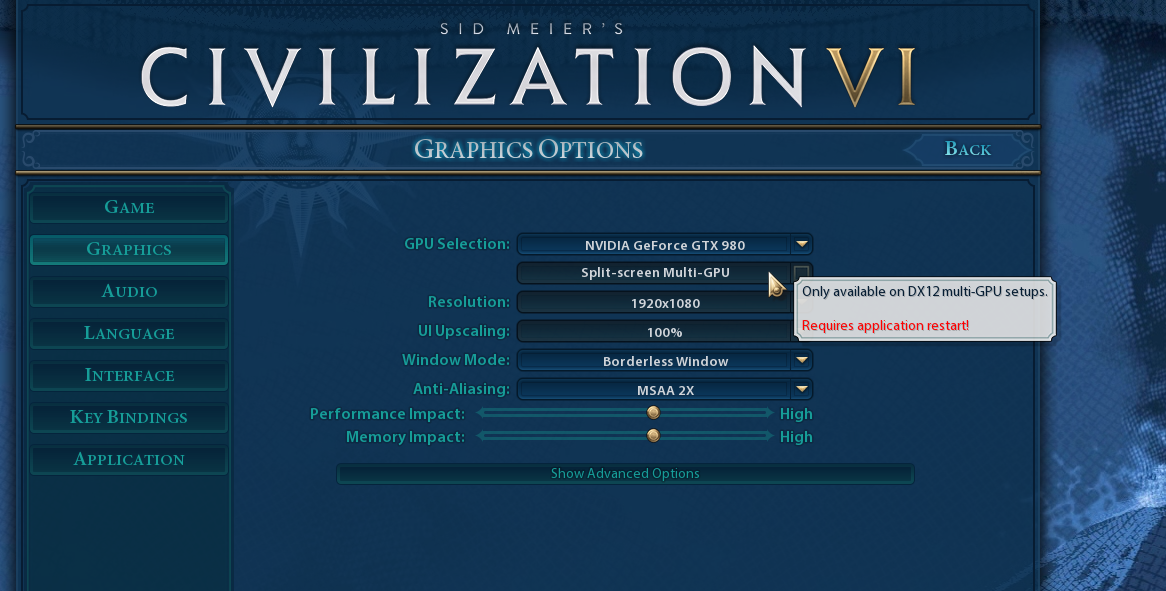
split screen multiplayer
hollow marlin
clear igloo
I'm not 100% sure myself, I need to dig into ansible too
discord movie night? lol
Nothing says Friday night parting like 8 hours of Ansible training
clear igloo
hollow marlin
discord movie night? lol
Nothing says Friday night parting like 8 hours of Ansib...
Yah!
clear igloo
@hollow marlin So, you'll love this, customer has been using catalyst 9000 switches for a while and just recently "found out" they have USB ports on them for console and FLIPPED their ever loving lids like it's some big evil thing anyone can just plug into and siphon data from or something. Like what about the ethernet console port that has been there for years? How about some AAA on the console port or some security in your data center instead? They asked, with a straight face, how can we remove the USB port from the box? Can we rip it out at the factory!?!
hollow marlin
lmao 😆
Wait to they find out most vendors have USB console in any equipment released over the past few years. I guess hoping that hackerman does not have a console cable is considered security.
clear igloo
Haha, USB just spews data when plugged into 😛
hollow marlin
I vaguely remember on r/networking someone mentioned they glued the console port on their equipment for physical security
clear igloo
Haha, that doesn't surprise me, a dead/shutdown port is the most secure port 😄
hackman can't get me if they can't get in to start with
hollow marlin
Thats the preferred method, we cant imaging going the route of RFID badges and locked doors for physical access
clear igloo
locked doors? That's evil!
 slate sonnet
Hey all, so a couple days ago I setup a vps and setup wireguard to bypass a cgnat so that I can host a minecraft server. Could I technically setup a second minecraft server, add it to the wireguard connection and be able to connect to the second server too?
If I change the port of course
Since I don’t think I would be able to keep the same port
hollow marlin
Yep, just add a new PREROUTNIG and POSTROUTING rule like before with the new src. port. I can't remember the exact rules you had but you might have to tweak some of the iptables rules depending how you have WG setup
slate sonnet
So basically add a new ip into the wireguard config
And copy paste the rules I have for my pc but with a different port
Correct?
peak cloak
slate sonnet
So basically add a new ip into the wireguard config
it's more of iptables than wireguard
show your current iptables on the vps
slate sonnet
1 sec
 grave fulcrum
Someone told me to ask here
So my dad uses a mac to edit 4k+ videos and he uses a "LaCie Rugged Mini 2TB USB 3.0 (2.0)". It becomes chaos because he has 20+ of those. Is there a easier way to have a harddisk management or for example will a nas work?
that also will be fast at transferring files?****
clear igloo
Get a DAS or a good NAS and just do DAC cables for 10Gbit
A DAS will probably be cheaper if you don't need remote access since it's just a NAS without networking and you plug it right in but I haven't looked at a DAS system in forever so not 100% sure on that price comparision
rocky badge
clear igloo
Get a DAS or a good NAS and just do DAC cables for 10Gbit
I want a NAS :(
peak cloak
grave fulcrum
So my dad uses a mac to edit 4k+ videos and he uses a "LaCie Rugged Mini 2TB USB...
yeah what lurick said, a NAS or DAS would be good. Just make sure to always have offsite backups
clear igloo
rocky badge
I want a NAS :(
I thought you had one
clear igloo
lol
grave fulcrum
And will a nas and a das system be the same speed?
clear igloo
Depends on the NAS and DAS and drives you get
peak cloak
grave fulcrum
And will a nas and a das system be the same speed?
nas is also limited by network speed
you would want 10 gig
clear igloo
yup
grave fulcrum
can you use wired nas?
grave fulcrum
so the nas just goes directly into the pc
peak cloak
you can, or use a switch
clear igloo
a DAS goes direct to the PC, a NAS CAN go direct or not
 slow pivot
rocky badge
I want a NAS :(
slow pivot
rocky badge
I want a NAS :(
I am shocked you don't have a SAN tbh
tame carbon
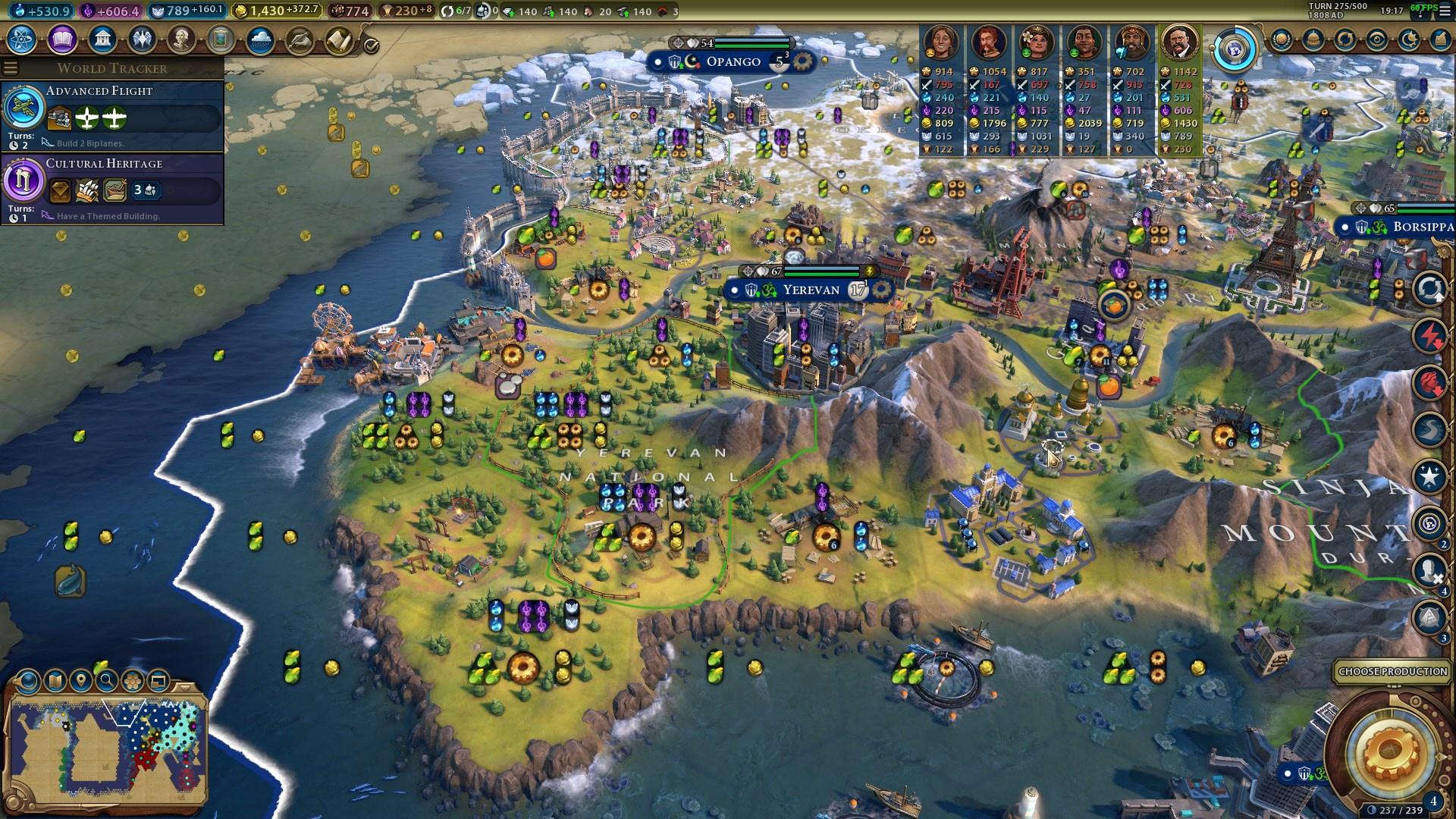
@grave fulcrum a NAS is for a multiuser environment. The moment multiple machines need access, it is superior
rocky badge
slow pivot
I am shocked you don't have a SAN tbh
Lol
@clear igloo so I tried the second ethernet port on my ONT
It is active, but probably not bridged to the GPON connection
Since I don't get an IP from it
clear igloo
Sounds about right
hollow marlin
rocky badge
It is active, but probably not bridged to the GPON connection
Yeah, ONTs are provisioned at the port level for services. Its actually a pain configuring a bridge on Adtran ONTs between the ports
Also prevents the customer from looping up at their ONT because STP is not to be run past the PE
rocky badge
Oof
@clear igloo @slow pivot I'd love a NAS/SAN for VM storage....
That's the only use I have for it tbh
But I'd want it to be all NVMe....
Since I love having local NVMe on my ESXi hosts
but $$$$
slow pivot
I am gonna have to increase my VM storage; almost filled 4TB of nvme now
slow pivot
Are you using it all atm?


 slow pivot
How many are you running now?
rocky badge
my parents would kill me though
slow pivot
Although frankenrack is doing great
rocky badge
I also want a new UPS
This smol temp UPS is ok but not enough https://blob.rocks/b2y8GsX9aJ.png

Its only 600W
So that's around 420W used
Server UPS then make that the network UPS
Because its the servers that succing the wattage
little schooner
@slow pivot what NVMe drive are you using
slow pivot
little schooner
<@189577713026072576> what NVMe drive are you using
960s and 970s
little schooner
Neat
rocky badge
nice, I'm using an ADATA XPG SX8200 Pro fo rmy main server and a PM981 for another
Looking at getting a WD Black SN750 for another server

 slow pivot
Since a lot of the high speed storage is all client-related, the cost doesn't bother me. The performance and reliability mean more
slow pivot
You should pass through smaller nvme drives then for the best performance
rocky badge
Its still snappy 😛
 carmine moss
adata xpg sx8200 pro are nice ssd runnin them best value where i am
 slow pivot
Oouf
rocky badge
 slow pivot
That is still kinda slow latency
rocky badge
 slow pivot
Rnd4k seems really high
rocky badge
And MySQL performance is fine for my usage lol
slow pivot
Yeah I wasn't saying they are garbage numbers, I meant they seem really high
rocky badge
Shock surprise 970 Evo is around the same as a PM981 😂 https://blob.rocks/NzbDxQ4vim.png
 slow pivot
Especially given the way CDM does benchmarking
rocky badge
one with the black title bar is the 970 Evo
on my desktop IOPS....970 Evo https://blob.rocks/nzTo46IKwS.png
 clear igloo
Needs some PCIe 4.0 😄
rocky badge
lol
clear igloo
 rocky badge
:p
lilac knoll
Are there any remoting solutions that do higher than 60 fps
rocky badge
Parsec
 wheat solstice
Anyone recommend any good APs that are suitable for a larger house? Looking for something that does handover well. I believe that means I want 802.11r?
rocky badge
How many APs
wheat solstice
honestly not sure since I haven't moved in yet, 524m² over 2 floors. I'm guessing I'm gonna need at least 4.
rocky badge
so ~1.7ksqft
wheat solstice
524m² is 5640sqft
wheat solstice
yea
rocky badge
Anything in particular you want besides 11r?
WiFi 6? Single management? Easy? More involved?
tame carbon
Cost
wheat solstice
nothing I can think of I'd need that was special. I'd like it to be decent and I have money to spend, Wifi 6 would certainly be nice, I'm looking at microtik gear atm so yea
wheat solstice
🤷 these things don't seem to be super expensive, even the unifi wifi 6 ones are like £130... so yea
wheat solstice
could be either, the place has ethernet wall sockets in most rooms, but I'd be open to running more cables to get them on the ceiling. Mostly just learning about my options atm
won't be moving for a month so just hitting the prosumer network gear learning curve early 🙂
rocky badge
if you wanted WiFi 6, the U6 Lites are €79 excluding VAT
What are the interior walls
Drywall?
wheat solstice
That's interesting, I was looking at the unifi ones and not sure which to get. Would I not want the HD ones?
rocky badge
HD = high density
wheat solstice
honestly not sure, it's a 2009 new build so I'd guess drywall, but can't be sure
rocky badge
Probably drywall then
wheat solstice
I know the floor for the upstairs is solid concrete though, so that's gonna ruin the day 😂
rocky badge
Yeah, are you gonna have APs on that level?
or going to try and rely on the floor below it lol
wheat solstice
yea I will, imagine it will be required for good functionality
there's ethernet ports up there anyway so no reason why not
rocky badge
https://eu.store.ui.com/collections/unifi-network-access-points/products/unifi-ap-6-lite
https://cdn.discordapp.com/attachments/329068706019934218/817108482062024755/image0.png

Ubiquiti Store Europe
Wi-Fi 6 Access Point with dual-band 2x2 MIMO in a compact design for low-profile mounting.
UniFi 6 Lite is a 2x2 Wi-Fi 6 access point that delivers up to 1.5 Gbps aggregate radio rate with 5 GHz (MU-MIMO and OFDMA) and 2.4 GHz (MIMO) radios. Mount UniFi 6 Lite horizontally in the ceiling to cover a high-density environment, or mount it vertica...

834Mbps local from U6 Lite to iPhone 11 pro
in a real home environment
wheat solstice
fancy, should do the job nicely. Can I run the unifi controller software to manage them if all I have is APs?
rocky badge
Yeah
You can run the controller software on Windows, Linux, macOS. Or buy their dedicated hardware controller
And it doesn't need to be on 24/7, that's only if you want real time/historic stats or captive portal
wheat solstice
yea I already had a fiddle with it in docker, have a home server so it'll live there happily.
wheat solstice
so basically:
RB2011UIAS-RM (Router)
MikroTik CRS328-24P-4S+RM (For powering PoE cameras and ethernet ports around the house)
MikroTik CSS610-8G-2S+IN (For my office, can get 10G into my home server/nas)
- however many unifi 6 lites I need
And I'm set I think \o/
tame carbon
@wheat solstice RB2011 is pretty old. I wouldnt get that one
wheat solstice
@tame carbon what would you recommend?
@rocky badge nice, I was thinking I might have to get another AP to cover the yard. Time will tell lol
tame carbon
@wheat solstice either an RB4011 or a hEX S
rocky badge
Also....multi user is pretty good too
tame carbon
@rocky badge do you have any experience with mikrotik outdoor APs ?
rocky badge
I can get ~200Mbps+ on two devices simultaneously on the same AP
wheat solstice
@tame carbon that explains, I searched for RB4011 (you mentioned it before) and I got a RB2011 in the results and missed the difference 😂
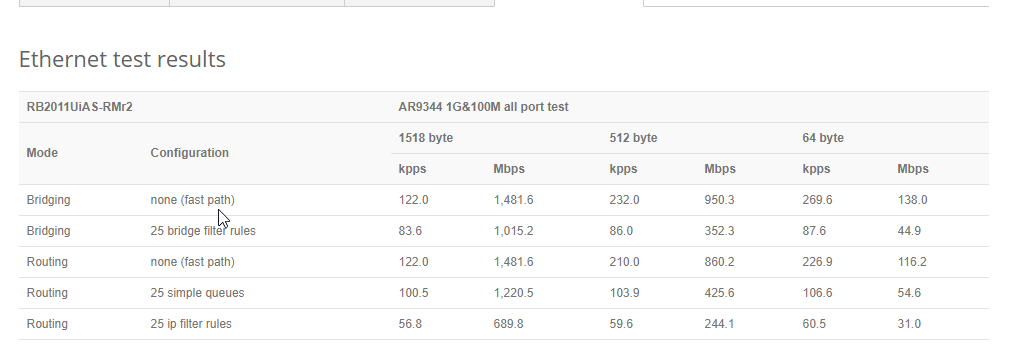
 tame carbon
RB4011: https://i.imgur.com/zHOZSZ0.png
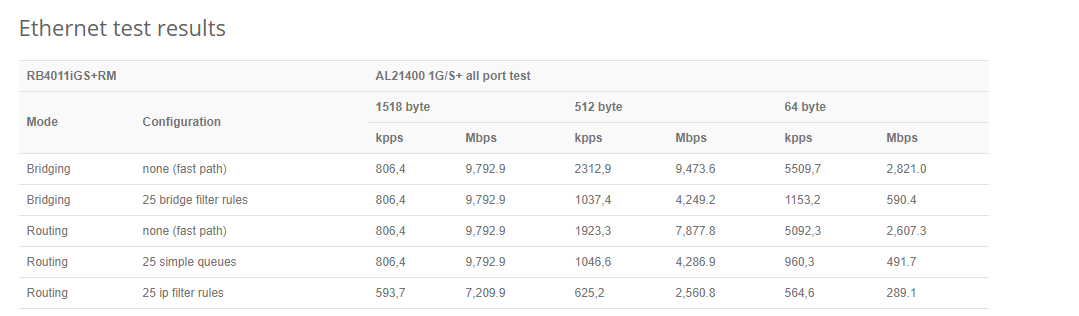
also has a very fast cpu, so you can do whatever you want it without it ever getting bottlenecked
wheat solstice
nice, only a few £ more so that works
tame carbon
MikroTik is a Latvian company which was founded in 1996 to develop routers and wireless ISP systems. MikroTik now provides hardware and software for Internet connectivity in most of the countries around the world.
rocky badge
@clear igloo I wish I got more of these https://store.ui.com/collections/unifi-network-routing-switching/products/usw-flex-mini

Ubiquiti Inc.
5-Port managed Gigabit Ethernet switch powered by 802.3af/at PoE or 5V, 1A USB-C power adapter.
Build and expand your network with the UniFi® Switch, part of the Ubiquiti Networks® UniFi Enterprise System. The UniFi Switch, model USW-Flex-Mini, is a smart managed Gigabit switch. It offers 5 RJ45 Ethernet ports, providing 1 Gigabit links to you...
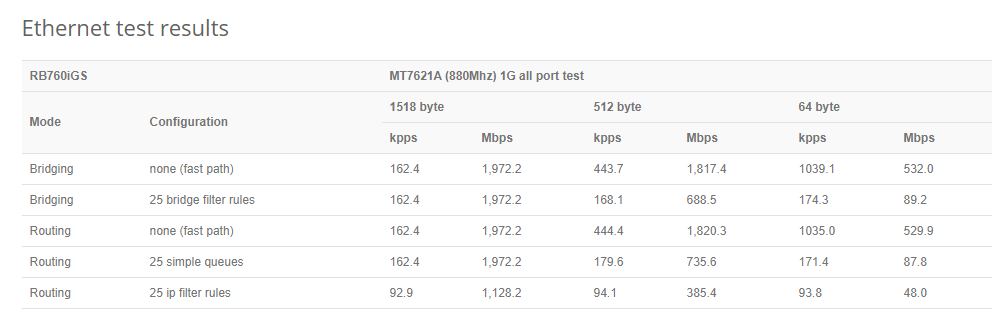 rocky badge
I'd love to throw them wherever I need to
clear igloo
rocky badge
<@!291198741862416384> I wish I got more of these https://store.ui.com/collectio...
buy 5 pack 😛
rocky badge
😂
wheat solstice
@tame carbon seems like unifi is the way to go with APs though? do you agree on that one too?
rocky badge
I'd also love to have one just in my backpack
tame carbon
if you want wifi 6 then you dont have a choice with mikrotik
they only have wifi 5 right now
rocky badge
wheat solstice
<@!167698274969452544> seems like unifi is the way to go with APs though? do you...
Guess who you're asking
:P
tame carbon
🔥
rocky badge
@clear igloo My friend has 7 of them
wheat solstice
@rocky badge haha, I know he likes microtik, but nothing more than that 😂
tame carbon
full disclosure
rocky badge
lol
tame carbon
mtik routers are pretty sweet
rocky badge
 tame carbon
unifi ap's are nice too
rocky badge
7 of then 
clear igloo
why?!?!
wheat solstice
@tame carbon the hex S seems a lot cheaper and no real downside, since my internet will be 500mbit (1gbit coming "soon")... might as well use that?
lilac knoll
old aruba iaps pretty decent; not wifi6 though
tame carbon
@wheat solstice its a nice one yeah. both have SFP, though the RB4011 has SFP+ and is 10G ready
rocky badge
And it integrates with my existing UniFi network....even more shitttttt
wheat solstice
@tame carbon yea I was thinking that, but then since it doesn't have a second SFP+ port it's not as useful. I imagine by the time my ISP gets to >1gbit offerings there will be much better microtik gear for less money 🙂
tame carbon
@wheat solstice I use it with a 10G switch alongside
rocky badge
lilac knoll
old aruba iaps pretty decent; not wifi6 though
Never used Aruba at home...lmao
Although iirc some have a standalone option?
So you don't need the WLC
lilac knoll
Yes, the IAPs are standalone
rocky badge
ah are those the Instant line?
wheat solstice
@tame carbon do you need 10G on the router if you have 10G on the switch that everything is connected to anyway?
rocky badge
Tbh I'd kinda like a tunnel based controller setup for wireless lol
So runs to APs only have one VLAN
lilac knoll
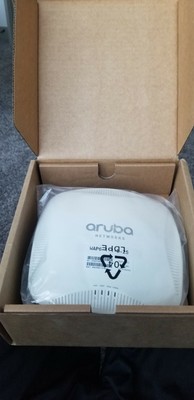
eBay
Sale is for one (1) used Aruba Instant 215 access point. Tested, and updated to recent 6.5.4.x firmware. Upgrade to 8.x.x.x is available for free from Aruba if needed.
lilac knoll
$40...
lilac knoll
rocky badge
ah are those the Instant line?
Correct
tame carbon
oh wat
MikroTik is a Latvian company which was founded in 1996 to develop routers and wireless ISP systems. MikroTik now provides hardware and software for Internet connectivity in most of the countries around the world.
I haven't seen this one before, this is new
very strange
 rocky badge
@clear igloo me can haz https://cdn.shopify.com/s/files/1/1439/1668/products/USW-Aggregation-PRO_001_1024x1024.png?v=1600764797 😛
 clear igloo
Needs more ports
rocky badge
I wanna 10 gig everything
but uh
I need at least 9 SFP+ ports 🤣
Is 28 enough then?
tame carbon
@rocky badge https://mikrotik.com/product/crs326_24s_2q_rm
MikroTik is a Latvian company which was founded in 1996 to develop routers and wireless ISP systems. MikroTik now provides hardware and software for Internet connectivity in most of the countries around the world.
rocky badge
lol
clear igloo
rocky badge
Is 28 enough then?
no, 54 😛
tame carbon
24 ports
rocky badge
128!
tame carbon
$500
rocky badge
I wonder....if I could find a pair of Cisco switches that can mc-lag 😂
lilac knoll
Mellanox sx1024 ... 48 sfp+/12 qsfp (40/56gbps)
clear igloo
rocky badge
I wonder....if I could find a pair of Cisco switches that can mc-lag 😂
Catalyst 6500s 😄
 clear igloo
ooof
wheat solstice
If I have a setup like:
heX 5 (1 gbit ethernet) -> switch (10gbit SFP) -> other switch (10gbit SFP) -> home server
Does that mean that my server can do 10gbit on the LAN (well, at least, multiple 1gbit)? or does the heX 5 also need 10G?
clear igloo
wheat solstice
If I have a setup like:
heX 5 (1 gbit ethernet) -> switch (10gbit SFP) -> other...
No, unless it's on a different subnet
and the switch isn't L3 capable
rocky badge
yeah ^
As long as its the same layer 2 domain
the switch should switch by MAC
And doesn't go through the router
wheat solstice
Ah I see, so on that basis if I wanted that functionality, I should upgrade to the RB4011 like Crystal said, plug the switch into the 10G SFP+ port on the RB4011, and then my home server can do 10G?
rocky badge
but if you're going across VLANs, the switch needs to be able to forward Layer 3 or router has the capabilities
rocky badge
wheat solstice
Ah I see, so on that basis if I wanted that functionality, I should upgrade to t...
is your server going to be on the same VLAN as your PC
if yes, you don't need 10 gig on the router
clear igloo
rocky badge
is your server going to be on the same VLAN as your PC
no going to be*
wheat solstice
this assumes I have learned about VLANs yet, still figuring that out 😂
but we'll go with yes, on the basis that I don't really need to separate things out.
clear igloo
if it's all one vlan then no 10g on the router, if different vlans then 10g on router is needed for 10g
rocky badge
^
clear igloo
😄
rocky badge
Jeff's Mountain Side Shop (Portland) Garage Gallery
https://sponaugle.com/newhouse/IMG_7456s5.jpeg
like holy shit dude lmao https://sponaugle.com/newhouse/IMG_8099s5.jpeg
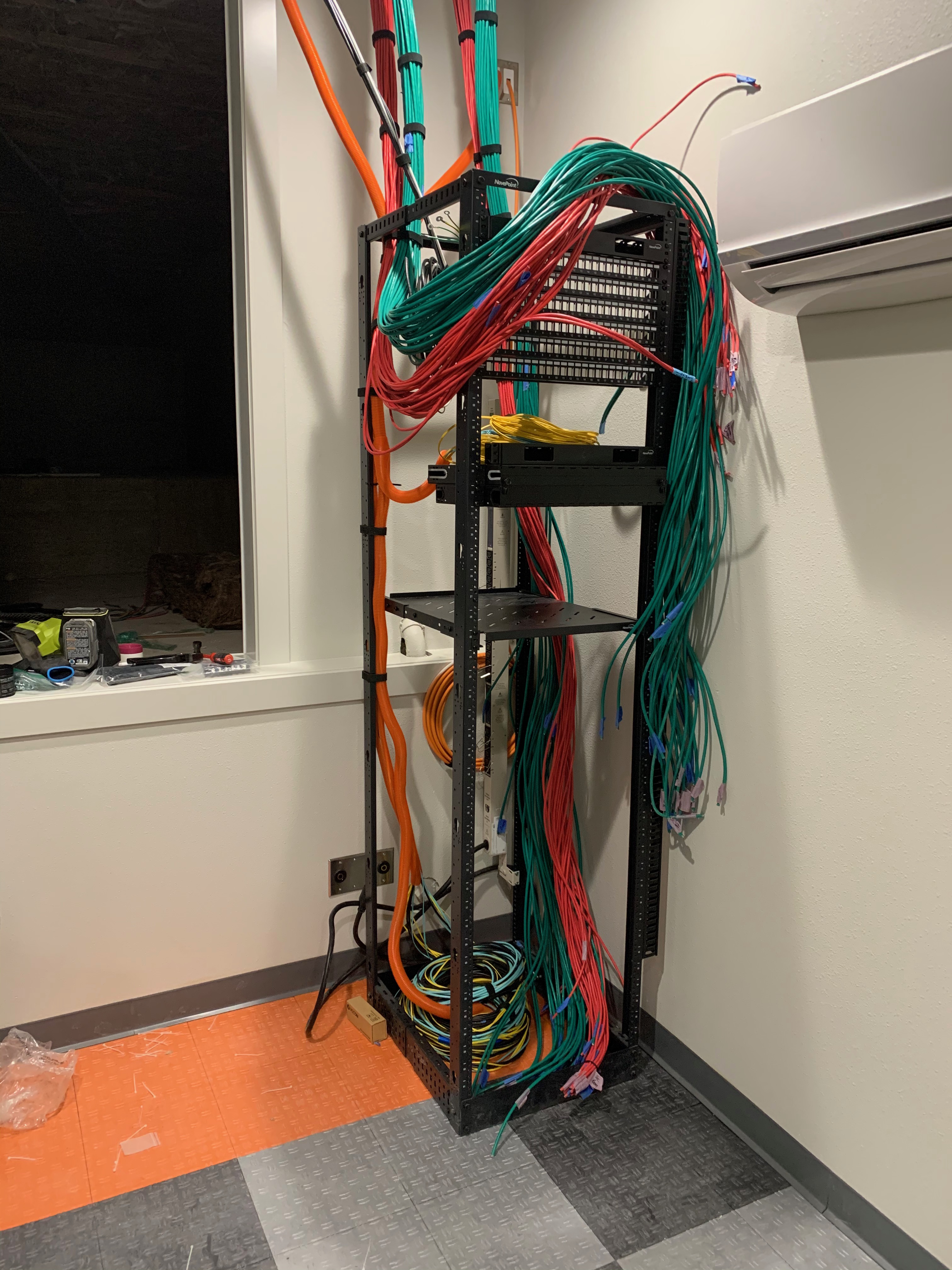
 clear igloo
Are you SURE that's a home? 😛
rocky badge
https://sponaugle.com/newhouse/IMG_8591s5.jpeg yes its a home 😂

like jfc dude lmaooooo
clear igloo
wow, yah
A buddy at work just built his home, ran over 5000' of cable and I thought that was a lot
lilac knoll
It’s not just a house ... includes a shop too
rocky badge
Yeah...
@clear igloo like the shit dude 😂 https://sponaugle.com/newhouse/IMG_0101s6.jpeg
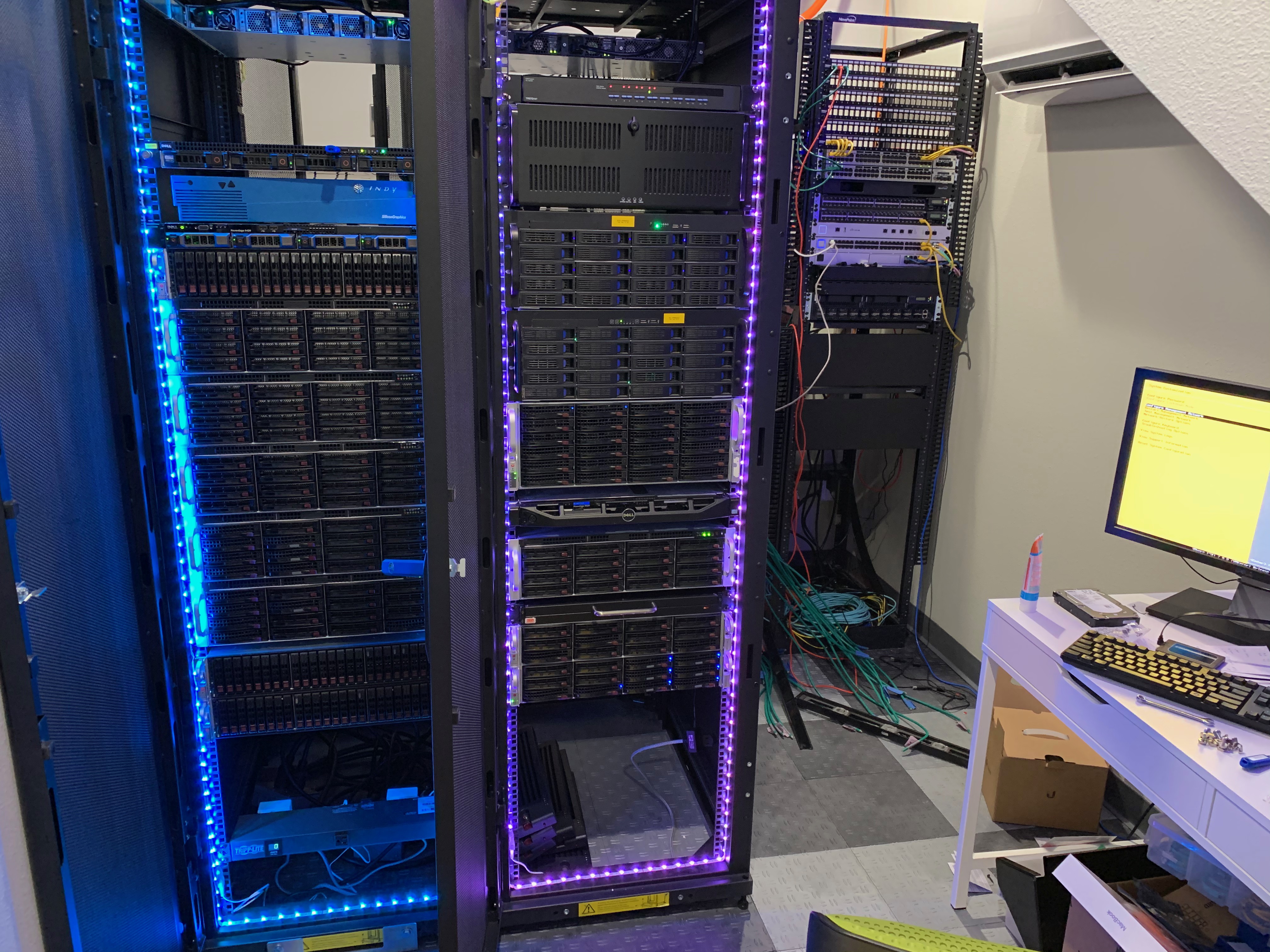 clear igloo
I think the economical thing at that point is a 100Gb link into the home and host the servers in a DC 😛
rocky badge
😂
clear igloo
Like imagine not having a raised floor data center in your home 
lilac knoll
Dude’s got a ton of land. Just needs some tesla batteries and a solar array
rocky badge
When you need a p2p bridge to get networking on your PROPERTY
@clear igloo When the networking and storage is probably the cheapest part of that house
Because a lot of that could've been from eBay for "cheap"
clear igloo
Yah, looking at the thread I can only imagine the cost of building that house
rocky badge
millions
Given the future of electric cars, I am putting 100 amp circuits on both sides of the upper garage (on a single shared 100amp breaker, but with low voltage wiring so two Tesla chargers can share), plus two 100 amp drops in the lower garage for the same thing. All of these will be off that dedicated 200 amp meter that does time of day, which means when the Teslas are programmed for charging after 10pm the cost per kWh goes down to about 5.5 cents.

``` shittttI saw somewhere he has 240v to the server room lol
clear igloo
Oh definitely
tame carbon
Instead of bickering which mikrotik is best for an outdoor setup
rocky badge
I got my first shipment of low voltage wire. 50,000 ft of Cat 6A and Cat 6, lots of speaker wire, security wire, and about 2600m of fiber. My low voltage trailer is coming along!
tame carbon
Im just gonna buy one
rocky badge
50k ft of Cat6(A) 
tame carbon
so I bought the metal 52ac, probably going to test it, see how well it does
clear igloo
rocky badge
`I got my first shipment of low voltage wire. 50,000 ft of Cat 6A and Cat 6, lot...
8500 ft of fiber ffs!

 clear igloo
rocky badge
50k ft of Cat6(A) <:HAHA:766118005372878878>
clear igloo
rocky badge
50k ft of Cat6(A) <:HAHA:766118005372878878>
That's enough to run ethernet to an airplane's cruising height with plenty to spare 😛
rocky badge
lmao
clear igloo
I was scared those would say navepoint at first 😛
rocky badge
😂
clear igloo
monoprice good
rocky badge
Electrical panels are getting populated. There are a total of 9 panels in this house, so lots to do.
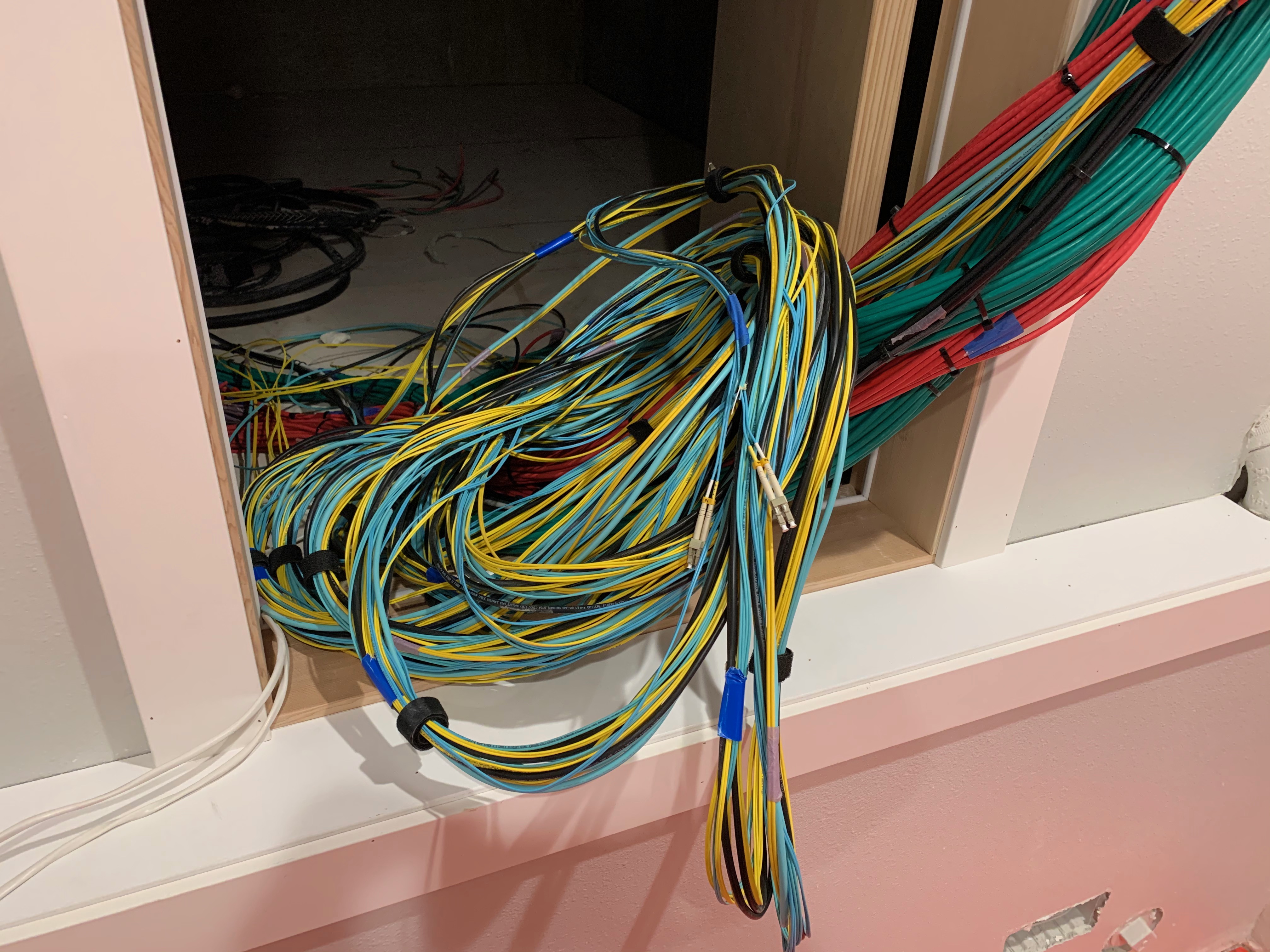
@clear igloo holyyyyy
clear igloo
why even bother with mm at that point
rocky badge
ikr
I moved over my UPS for the server room. This is an 8/16 kVa APC Symmetra UPS that will be hardwired into a dedicated panel. All of the server room, the media room upstairs, and my office will be in the UPS.
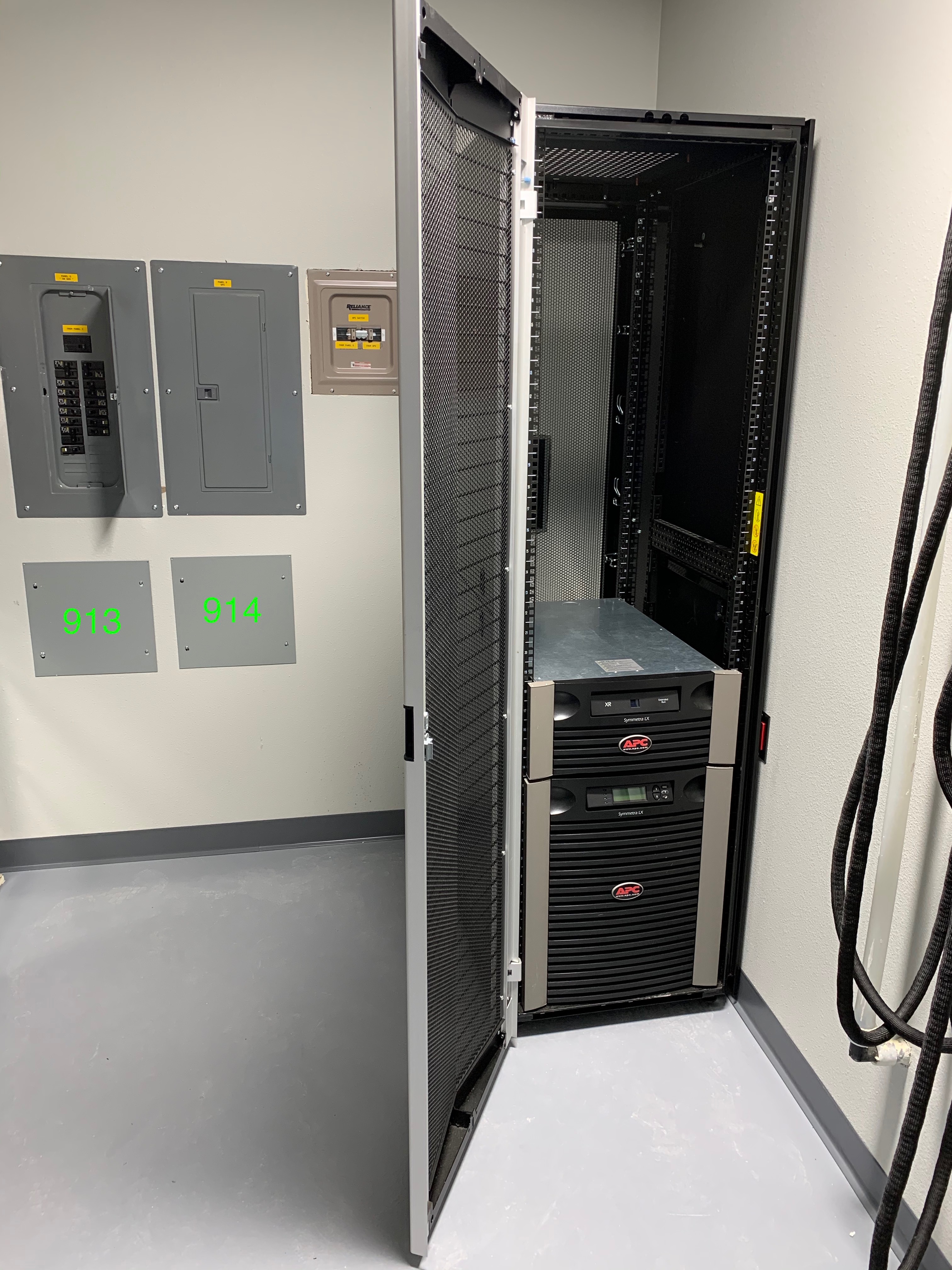
What internet does he even have coming into the house lol
tame carbon
@rocky badge btw there was a small update on the #OVHFIRE
according to them, the fire might have started in one of the UPSes
rocky badge
Yeah
tame carbon
which had received maintenance prior to the fire
so someone messed up xD
now I'm not so sure if Rouing was kidding xD
cus he said "that's what happens if you drop a screwdriver on a bus bar"
 lone marten
Hi everyone! This is the firewall logs section on my router - any idea what this means/how to solve this?
https://cdn.discordapp.com/attachments/381193783296917507/820332983025795082/unknown.png
 tame carbon
the firewall is dropping invalid packets
thats probably just random noise from the internet
peak cloak
lone marten
Hi everyone! This is the `firewall logs` section on my router - any idea what th...
says invalid state
normal for router to drop that

Unix & Linux Stack Exchange
I set up some iptables rules so it logs and drops the packets that are INVALID (--state INVALID). Reading the logs how can I understand why the packet was considered invalid? For example, the follo...
lone marten
peak cloak
normal for router to drop that
Get lots of them, just traced the IP and it seems mostly from Google and Facebook (source IP)
Any idea whether this is harmful/needs checking? The internet (both wifi as ethernet) are both drastically slow last couple of days - no idea why
peak cloak
lone marten
Get lots of them, just traced the IP and it seems mostly from _Google_ and _Face...
iirc source can be spoofed
tame carbon
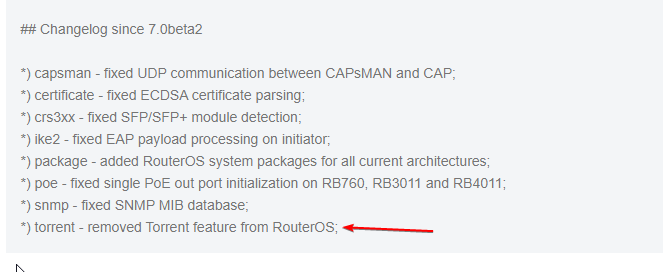




 dusky rover
rocky badge
<@!291198741862416384> like the shit dude 😂 https://sponaugle.com/newhouse/IMG_...
dusky rover
rocky badge
<@!291198741862416384> like the shit dude 😂 https://sponaugle.com/newhouse/IMG_...
when is rgb becomming a standard in racks
rocky badge
lol