#networking
1 messages · Page 299 of 1
 peak cloak
 dense furnace
not too bad tho
 slate sonnet
 dense furnace
you're at the bottom?
dense furnace
dense furnace
you're at the bottom?
^ stupid question ^
 tame carbon
 2  r2.serv.dro.weserve.nl (46.243.152.3)  6.569 ms  6.277 ms  6.478 ms
 3  46.249.55.194 (46.249.55.194)  7.108 ms  6.882 ms  7.250 ms
 4  185.8.179.34 (185.8.179.34)  13.201 ms  13.189 ms  13.241 ms
 5  ae1-498.rt.srv.dro.nl.retn.net (87.245.246.60)  6.678 ms  6.629 ms  6.608 ms
 6  ae3-10.rt1.m9.msk.ru.retn.net (87.245.232.188)  51.555 ms  50.097 ms  47.593 ms
 7  194.87.80.92 (194.87.80.92)  48.859 ms  49.366 ms  47.010 ms
retn.net is the transit for me
they peer in Dronten with my ISP
directly to moscow
it doesnt even go through amsterdam
tame carbon
@dense furnace stupid fiber network here is 5ms latency.
no
fiber carrier & isp are two entities here
and they use some kind of QinQ
and it has 5ms latency.
dense furnace
huh
tame carbon
@dense furnace I dont know what kind of fiber path this is, or what other kind of tunnel services they run on this..
the fiber carrier is some company
that rents out their fiber network
slate sonnet
tame carbon
there's multiple ISPs that deliver fiber service here
and I'd assume its going through their equipment
All I know is, there's 5ms latency between my house and the ISP datacenter on other side of the country
and I have a singlemode fiber that plugs into my gear
dense furnace
so what can we possible do to help scratch with the "high" ping?
tame carbon
Nothing.
dense furnace
sad noises
tame carbon
There's honestly nothing wrong
@slate sonnet there will be some latency between your network and the VPS
that is expected
but the VPS itself is quite well connected, so your friends will have a fast route to it
slate sonnet
Didn't expect there to be that much latency though
slate sonnet
Okay
slate sonnet
Idk?
tame carbon
test?
slate sonnet
120
slate sonnet
Okay
tame carbon
direct connection., you'd have maybe 80-90ms
zerotier sets up a p2p tunnel directly between computers
thats why its slightly faster
but you need that client
slate sonnet
Yeah
tame carbon
@slate sonnet you can always have zerotier running as well
let people connect via zerotier or public ip
slate sonnet
How would I do that?
dense furnace
what about the reverse ssh tunnel?
slate sonnet
I always set the zerotier ip into the ip address space
tame carbon
@slate sonnet the server.properties still has ip= right?
slate sonnet
Yes
tame carbon
that means it listens on all network interfaces on that computer
127.0.0.1, your LAN IP, as well as 10.0.0.2
and by extension, your public VPS IP
via 10.0.0.2
zerotier just adds another network to that list
tame carbon
having a vps as an endpoint to your self hosted stuff is actually not a bad idea at all
it protects your private identity
and in the case of some skid ddosing you, you can just disconnect the tunnel
slate sonnet
Well I'll experiment later again with a few friends
And I guess I'll get their opinion
slate sonnet
Haha
tame carbon
should someone else need this again xD
tame carbon
cya
 hollow marlin
tame carbon
and they use some kind of QinQ
hollow marlin
tame carbon
and they use some kind of QinQ
QinQ does not add any latency, but its very much needed within ISP networks
tame carbon
@hollow marlin yeah but I am suspecting, that I am going through another DC first
and then they have a X-connect with my ISP
hollow marlin
4094 vlans are not enough
tame carbon
@hollow marlin this is a DC host, that only a couple years ago started doing FttH
hollow marlin
That would do it, no way to tell on your end. Yay L2 \o/
tame carbon
and they just have a cross connect to the fiber carrier that builds the network
@hollow marlin do you think its L2 transit?
hollow marlin
Almost guarantee it is. The cross connect is call NNI (network to network interface) in the telcom space
tame carbon
so I don't know whats going on then
tame carbon
yeah
and 5ms first hop is not bad
DSL was like 21
and those networks interally are always congested as hell
dense furnace
:D
hollow marlin
tame carbon
DSL was like 21
If the DSL line correction is set from interleaved to fast you can obtain fiber level latency if not ns better
hollow marlin
Yep, going to have a ton of loss probably. Coppers index is better than fiber
Also 4.5km is well past the critical point for DSL...I think, I don't feel like digging up the memories from DSL engineer days
 tribal ferry
The switch is here! 
 tame carbon
@tribal ferry welcome to the club
tame carbon
vendor neutrality
tribal ferry
this
tame carbon
@tribal ferry have you used these before?
tame carbon
you want me to run you through the inital setup ?
tribal ferry
i'm not setting it up at this moment, if you have a video to link to then sure
tame carbon
Well, just some steps
tribal ferry
Sure then
tame carbon

MikroTik is a Latvian company which was founded in 1996 to develop routers and wireless ISP systems. MikroTik now provides hardware and software for Internet connectivity in most of the countries around the world.
You need to get winbox
Plug your laptop into ether2 on the device
and then it will show up in the config util
tribal ferry
did i need to buy a console cable?
tame carbon
@tribal ferry it can be configured over L2 without an IP
tribal ferry
ah alright
tame carbon
you can use winbox for that
username admin, with no password
change the password, and then hook it up to a network with DHCP
and then go to System -> Packages
and check for updates
then reboot
reconnect with winbox, and then simply go to System -> RouterBoard and upgrade the firmware to the latest version
after that. you're pretty much done.
when you first connect to winbox, the device will give you a choice
tribal ferry
do i need to do something in routeros to use it as a switch and not router or will it be preconfigured for that?
tame carbon
just use routeros
tribal ferry
yeah i am
tame carbon
switch features work just as well
 waxen scroll
@hollow marlin pay attention to training, not LTT
tribal ferry
anything i need to do in routeros after booting into it?
tame carbon
@tribal ferry https://i.imgur.com/pCna2Q1.png
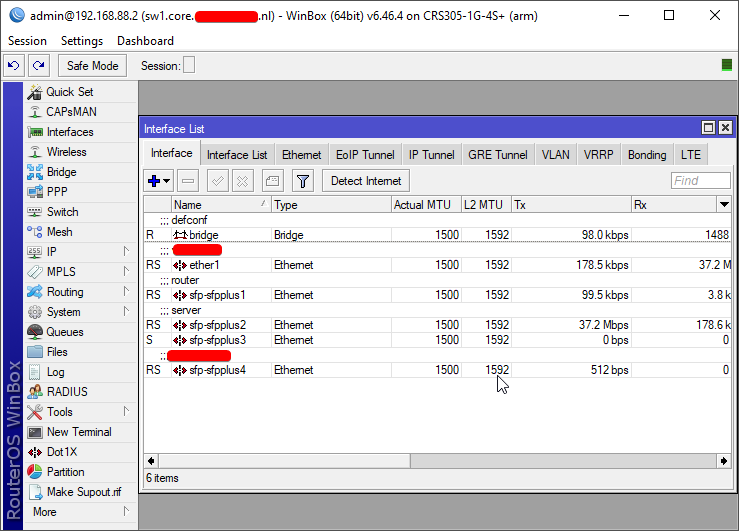
@tribal ferry if you go to QuickSet in the top left
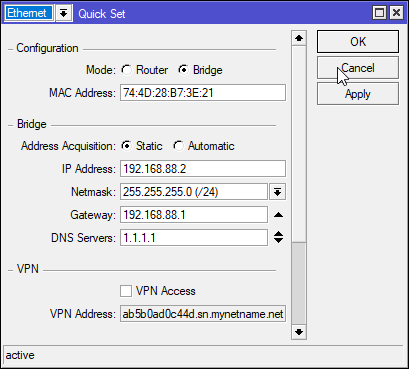
you set it to bridge
and it just creates 1 bridge, puts all the hardware interfaces on that bridge
and fw should be completely empty
this is pretty much the simplest configuration
vlans you can do afterwards
waxen scroll
what's a vlan
tame carbon
@tribal ferry you know what a vlan is right?
tribal ferry
yep
tame carbon
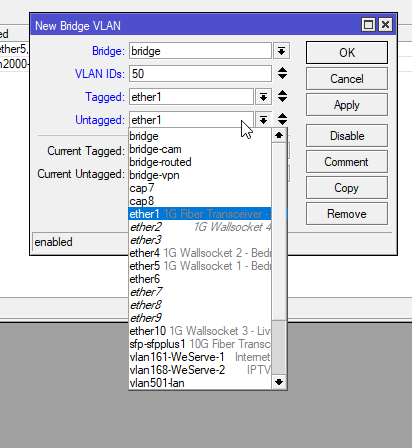
you go to Bridge -> VLAN
tribal ferry
i'm saying i already have a few on my udmp
is there anything special i need to do in here to get them to work
 hollow marlin
waxen scroll
<@!462711605063450628> pay attention to training, not LTT
hollow marlin
waxen scroll
<@!462711605063450628> pay attention to training, not LTT
But ISDN is so boring....😭
tame carbon
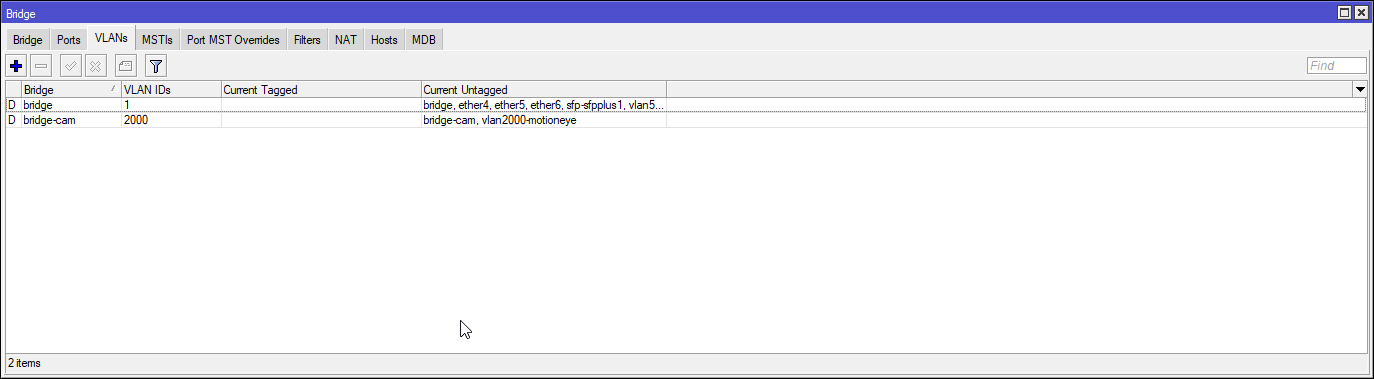
@tribal ferry each of these bridge vlans, represents an ID, and which ports are tagged and which ports are untagged
tribal ferry
alright
tame carbon
so the tagged port would be your trunk to the router
and untagged would be an access port
@tribal ferry found a better image
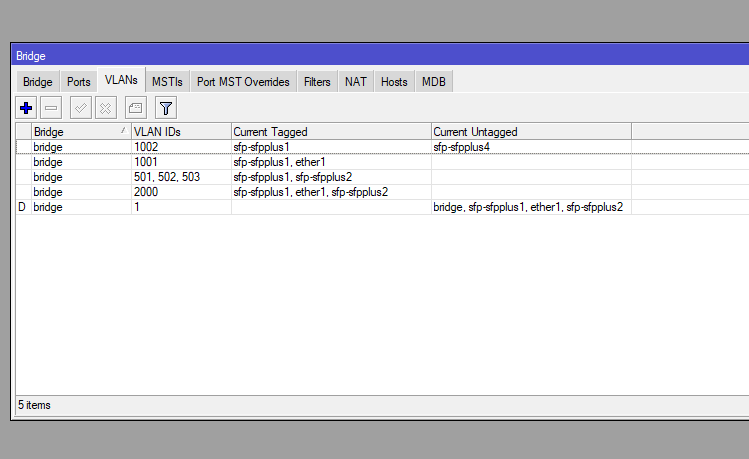
This is on an actual switch
waxen scroll
hollow marlin
But ISDN is so boring....😭
I can haz VRF instead of VLAN
tame carbon
@tribal ferry any entry with 'D' in front of it is a dynamically configured entry
because the bridge itself is on vlan 1
and if you add a vlan interface
it will also add an entry here, https://i.imgur.com/Z0N8v1u.png
that first entry is my trunk ^
though my vlans are still a bit of a mess xD
tribal ferry
lol
thank you for the intro
i should hopefully be able to glide through the setup
tame carbon
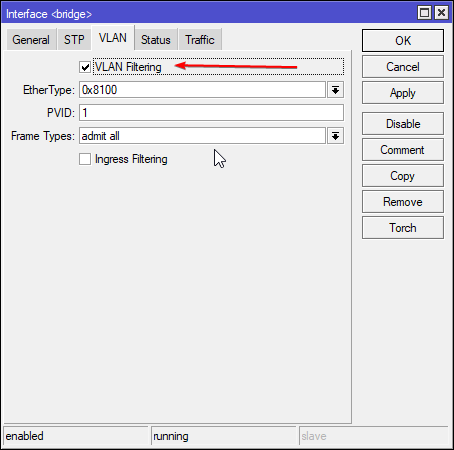
@tribal ferry oh ye make sure you configure the bridge correctly xD
tribal ferry
i'm sure #networking will help me out if i have issues lol
 tribal ferry
what does it do?
tame carbon
you need that ticked
for vlans to work
@tribal ferry in routerOS you can also just create an actual interface https://i.imgur.com/FiAJujA.png
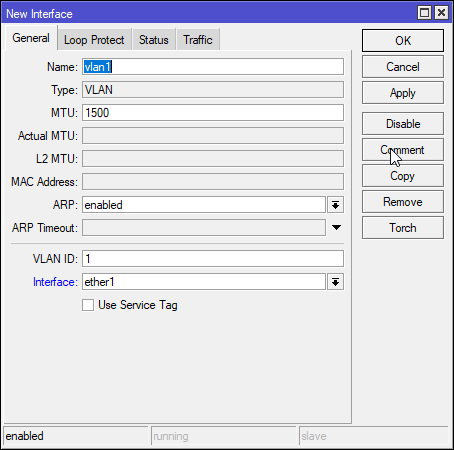
and assign it to a port
but you only need this for L3 features
tribal ferry
probably easier to just make a vlan rather than go through with an interface
yeah i'm not concerned about the tiny delay of not using l3 on the switch
tame carbon
which switch is it specifically?
its basically same on the CRS305 i have here
fast switching chip, with like 1.2G routing capabilities
tribal ferry
CRS326-24G-2S+RM
tame carbon
so it has a little bit of horsepowers for L3
but not full power
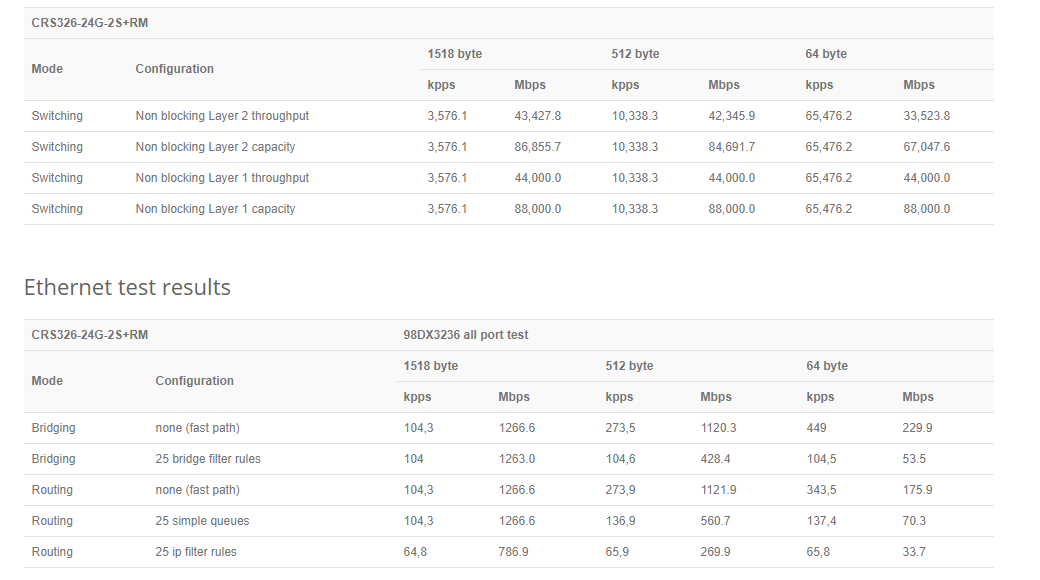
@tribal ferry you still create a bridge, but its switching
tribal ferry
alright
tame carbon
but only one bridge can use hw acceleration on the switching chip itself
trying to find out where exactly you check this again
Ah yes, you click on the actual port
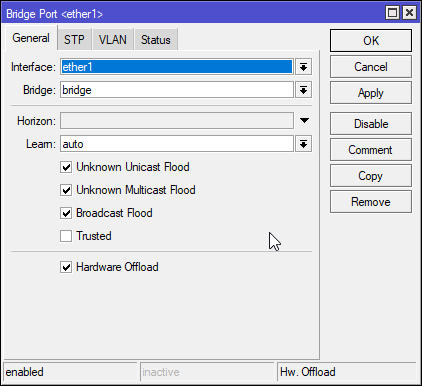
Hardware offload.
if you create a 2nd bridge, it wont be a root bridge, and thus be running on CPU
tribal ferry
I'll see how I go with it, I try creating the interfaces when I get it setup.
 hollow marlin
tame carbon
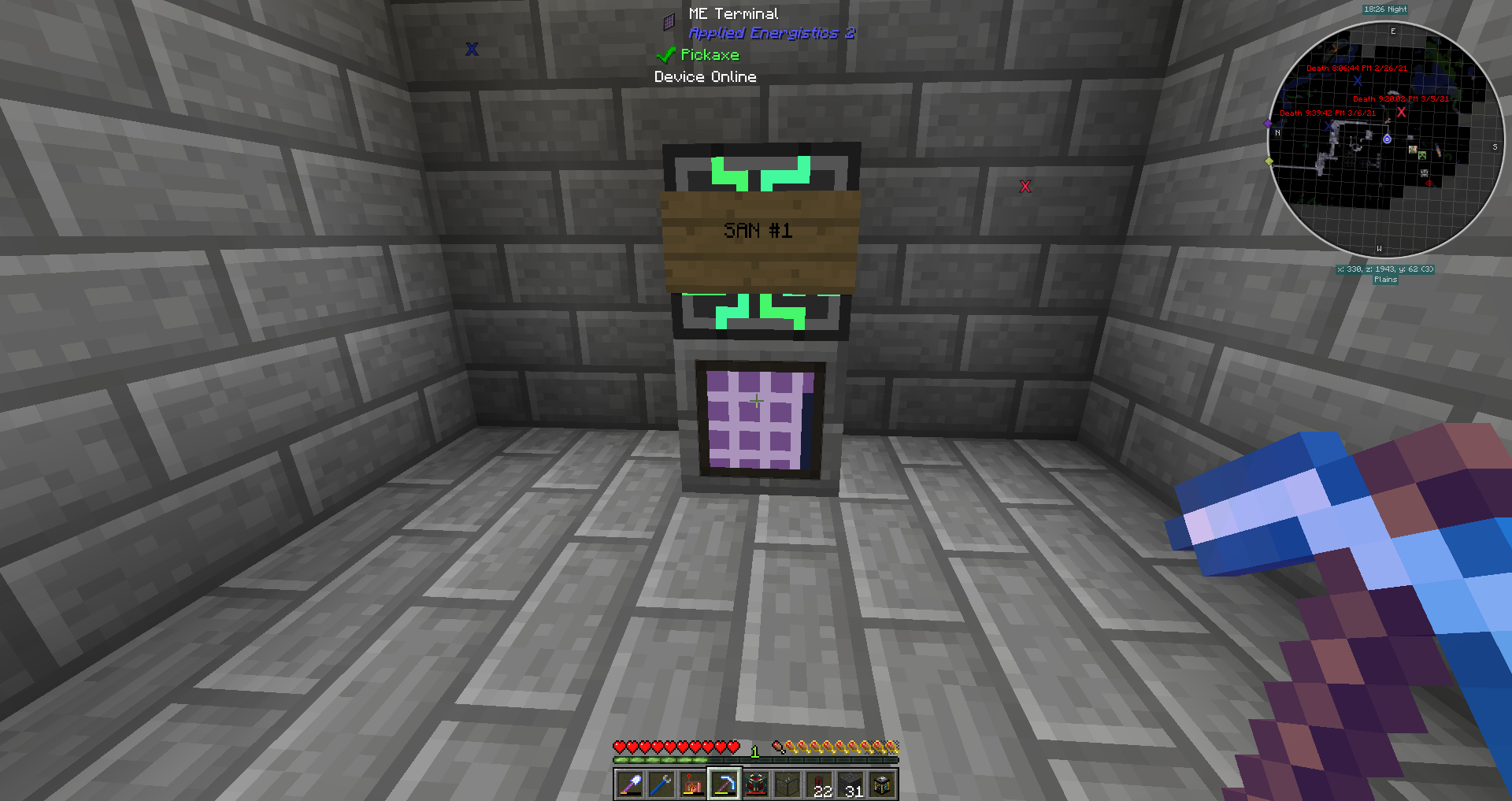
When minecraft goes too far
hollow marlin
tame carbon
When minecraft goes too far
do switching next pls, I expect no minimum then QinQ support
hollow marlin
Anything in MC seems to be possible
tame carbon
Each cable can carry 32 channels
that glowing thing in the middle is the controller
and I basically have a trunk running through my base
and p2p busses everywhere, going to those colored cables you see there
all items and crafting can be completely automated with this thing
you can hook it up to every machine
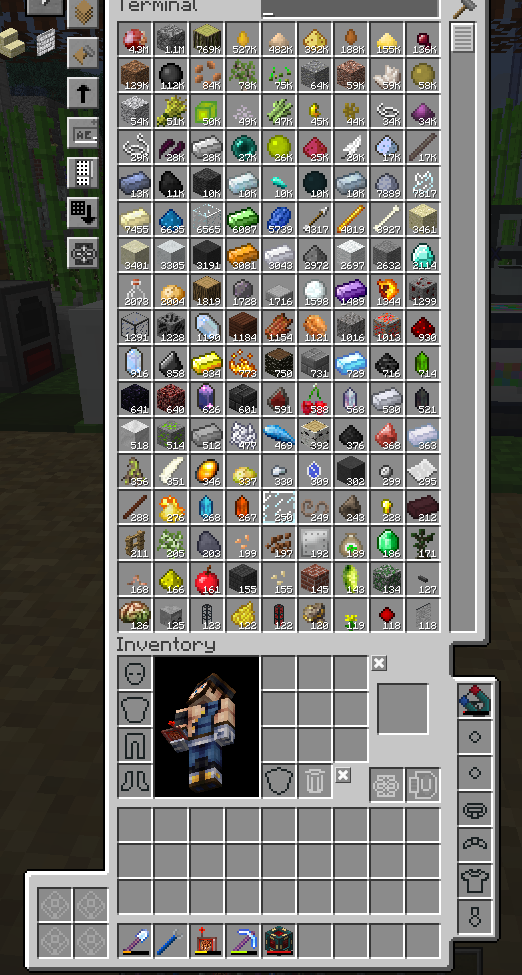
@hollow marlin and ultimately, its just a gigantic chest. https://i.imgur.com/PI1bSor.png
 lean pebble
tame carbon
When minecraft goes too far
lean pebble
tame carbon
When minecraft goes too far
I forgot where I put my multimc 😂
 wise sedge
how fast a internet do I need to run a minecraft server?
is 15mb/s up and 100mb/s down good enough?
lean pebble
Ya it's good enough I think
 clear igloo
how many people?
lean pebble
And plugins
wise sedge
no plugins, how much do I need per person?
not too sure how many will join at a time but probalby under 10
clear igloo
then its plenty
clear igloo
It's at most 512Kbps per person iirc
clear igloo
up
clear igloo
wise sedge
it is really the upload I am worried about
per person
wise sedge
would the usage of paper do anything
clear igloo
Some older figures say 100Kbps per person so I'd say 512Kbps is on the really high side looking at it
clear igloo
Yah 2-5Mbps up for 10 people is more than plenty
tame carbon
nah, I mean
2mbit/s per player on average
you get spikes in traffic
when player moves around
tame carbon
max block height has been increased 2 times so far
everytime they do, more memory strain and network
tame carbon
clear igloo
Yah 2-5Mbps up for 10 people is more than plenty
that'll work. but if someone loads in, you feel lag momentarily
clear igloo
Some 2020 FTB posts say 100MB/hour per person so it really depends
wise sedge
I will see how it goes
tame carbon
@clear igloo idling in one place couple kbit/s
but flying at full speed
~2.7mbit/s
just tested it
clear igloo
Well yah, I guess I assumed a generic survival not free build or whatever 🙂
wise sedge
so everyone using elytra will lag it for sure?
tame carbon
if you dont have fast network
or people using nether
anytime chunk updates are sent
wise sedge
yeah, I have 15mb up max
clear igloo
Yah, cap render distance to 10 or 12 really helps
wise sedge
ok thanks
 orchid kraken
Question guys, if I have an AX router/client and 1g/1g internet, why is my wifi speedtest always around 300d/600u
my wired speeds are around 850-920 bidirectional
peak cloak
orchid kraken
Question guys, if I have an AX router/client and 1g/1g internet, why is my wifi ...
because wifi...
probobly some channel stuff
orchid kraken
Right, but shouldn't AX be more performant than AC?
peak cloak
orchid kraken
I mean I pay for gigabit. Might as well have it
but like, gigabit is overkill for most things
if you pay for gigabit, that means wired, not wireless
orchid kraken
sure, i expect degradation compared to wired
but downspeed compared to my AC setup is almost the same
Asus 68u to 86ax, expected more of a change
peak cloak
does your client device support AX?
orchid kraken
yes
orchid kraken
even when using iperf i was getting 250 mbps to a desktop
same as my AC router
wasn't sure if I should try another router
 wooden orbit
Can anyone help me troubleshoot my networking problems (ping spikes mainly) or get me in contact with someone who can?
peak cloak
wooden orbit
Can anyone help me troubleshoot my networking problems (ping spikes mainly) or g...
ping your router
you can fine your router's IP by doing ipconfig /all
wooden orbit
I already did
peak cloak
then it's the default gateway
wooden orbit
Ping to my modem is fine
peak cloak
what did you get?
sounds like ISP issues then
nothing you could really do
maybe let ping run for a bit?
wooden orbit
I had massive packet loss before (+95% first hop on PingPlotter), but I fixed it my disabling IPv6
peak cloak
wooden orbit
I had massive packet loss before (+95% first hop on PingPlotter), but I fixed it...
sounds like bad router
wooden orbit
I have a bunch of screenshots with data I could provide
That's what I'm thinking
I'm currently using an all in one modem from my ISP which is already at least 3 years old
Was thinking about switching it out for a third-party one, but it's a pretty hefty investment (especially if it's not the problem)
peak cloak
wooden orbit
Was thinking about switching it out for a third-party one, but it's a pretty hef...
I mean not really, you can get a good router for 100 bucks
wooden orbit
I need a modem, which would cost me around 250€
peak cloak
wooden orbit
We still use cable here in Germany
yeah that's the case for I think everywhere
although now both ISPs in my location are fiber
tame carbon
@wooden orbit packet loss to your router? or over the dsl line itself?
wooden orbit
I did have packet loss for the past 6 months or so, but I got recommended to disabled IPv6 and it worked

These were my results before disabling IPv6
peak cloak
I mean that's not really the best indicator
because ICMP packets are like lowest priority will get dropped more often
could be ISP too
wooden orbit
Yes I'm connected through LAN directly to my modem
tame carbon
do you have v4?
do a traceroute to 1.1.1.1
that pingplotter program is terrible
idk how you read this thing
makes no sense
wooden orbit
v4? I'm using a cat7 cable if that's what you're asking
peak cloak
also cat7 is ridiculously overkill
wooden orbit
 wooden orbit
I'm not sure if that changes anything, but when I had my DNS set to Cloudflare (1.1.1.1) I was getting PL again on the first hop
tame carbon
@wooden orbit I'm pretty sure this is a line fault
peak cloak
wooden orbit
I'm not sure if that changes anything, but when I had my DNS set to Cloudflare (...
that has nothing to do with it
tame carbon
this is hardware problems in the cables
most like signal interference or degredation
rusted cable or who knows
WinMTR is a free MS Windows visual application that combines the functionality of the traceroute and ping in a single network diagnostic tool.
put in the same host 1.1.1.1
@wooden orbit cloudflare has nothing to with this, we're just using it as a server to test against to see where the packets are being dropped
since they usually are the closest server
wooden orbit
My ISP told me like 4 months ago that I'm affected by irradiation (if that's the correct translation)
I'll do the WinMTR test in a sec
peak cloak
wooden orbit
My ISP told me like 4 months ago that I'm affected by irradiation (if that's the...
dsl or coax?
tame carbon
@wooden orbit I think your ISP is talking about interference
Coaxial networks are quite sensitive to this
single faulty power supply can knock down an entire neighborhood
and its incredibly difficult to trace down even for the network engineers
but this is their problem
tame carbon
welcome to the world of shitty ISPs
tame carbon
I've had 8 technicians on site to fix issues before
the 9th, had a suit and tie
and a tiny am radio
and just walked around the building
listening for interference
went to neighbor, and unplugged a power brick from an old broken NAS
problem = solved
peak cloak
lol
wooden orbit
I wish I've had a technician like that
tame carbon
but this was on DSL... bleeding into the power grid. And the DSL cable had a single loop under the driveway right across the power lines
so this was a very unlikely scenario
so it was picking up the interference from the power grid
and giving me tonns packet loss
coaxial can suffer from this too
@wooden orbit do you have the mtr results?
wooden orbit
tame carbon
retransmits
yeah
so its intermittened
ping will be low
and then suddenly spike up
wooden orbit
exactly
tame carbon
because there's some signal issues
that causes the modem to retransmit the data
which increases latency
if the interference is bad enough
it drops the packet entirely
all I can say is...
get fiber optics if you can :)
wooden orbit
i wish lol
so its either due to a faulty cable or something else that causes interference?
tame carbon
something with the line itself, either modem, cable, local exchange
but could be anything as I said earlier
electric interference can make this kind of stuff go haywire
wooden orbit
i've heard that modems can also cause these kind of problems if they have memory leaks
wooden orbit
so replacing the modem wont make much of a difference?
tame carbon
if the modem itself is faulty, yeah
but if that doesnt fix it
its the line
like, as a consumer you don't have the tools to measure and diagnose coaxial networks
you need training and specialized tools
and this is the ISP side of the network, its their responsibility
so call support
xD
wooden orbit
aight thanks for the input and help so far
i'll try to get in contact with them again
wooden orbit
at least i kind of understand what the problem is now haha
tame carbon
since coaxial bandwidth is shared between multiple modems
DSL is a direct connection between the exchange and modem
coax is shared
coax is faster than dsl, but less reliable
fiber optics is best of both worlds, and then some
wooden orbit
well i also contacted another isp that provides dsl to our apartment
peak cloak
tame carbon
fiber optics is best of both worlds, and then some
PON...
tame carbon
and you might be able to get a vectoring line
@peak cloak not here xD
regular SMF over here
DOM modules
@wooden orbit VDSL at short distances is also relatively fast
wooden orbit
yeah i'll look into it tmrw with the isp since they wanted to call me about it
but im afraid that the cables themselves are pretty old in our house
i live in an apt building btw
tame carbon
@wooden orbit well, the worst part is
it doesnt have to be here
it can be anywhere along the cable
from here to the exchange
thats why its hard to track down for technicians
anyways
im going to bed
late already
wise sedge
what is the max speed for 20mhz 5g wifi?
wise sedge
what are some factors to wifi speed?
there is a channel where I can get great signal but basically unusable internet
 lone sun
@wise sedge 🤔 To my recollection the the 20mhz channel band doesn't have much to do with the max speed on 5ghz. Its more about bandwidth than anything else. If you see a ton of people using one channel on a WIFI analyzer, just pick another one that is cleaner. The best thing about the 5ghz band is its less prone to outside interference than the 2.4 ghz. Its also faster, albeit the downside is it becomes less effective at longer ranges. If the distance between you and the modem/router isn't too great, I'd go with 5ghz every single time. 👍 👍
wise sedge
everyone in my complex is using 80mhz and taking up all of the channels
like one 80mhz ap takes up 149 151 153 155 157 159 161
@lone sun
and I dont seem to be able to get 300mb/s with 20mhz
lone sun
@wise sedge 🤷♂️ Try a 20hmz ap. You've got nothing to lose. Even 2.4 ghz would be perfectly fine to be honest with you if it means the bandwidth is there. Whether or not you use 2.4 or 5ghz mostly depends on your needs and circumstances.
lone sun
🤔 What is the speed you are actually paying for? Keep in mind, that the speed you expect is very hit or miss when it comes to wifi. There are too many outside influences that would determine it because the packets are sent open air.
wise sedge
300
lone sun
Do you have to use wifi? You can't use ethernet?
wise sedge
And I get that with a speed test with 80mhz but signal is a bit bad
Can't get an Ethernet cable for now
I basically have 2 channels with 80mhz
On 5ghz
lone sun
🤷♂️ Yeah, unless your facility installs more access points or I guess increases the bandwidth, there isn't that much you can do about it as far as I know. WI-Fi troubles aren't quite as straight forward as ethernet. If I were you, I'd do everything I can to stick with a wired connection as much as possible.
Trust me, I work at an Amazon warehouse where almost everything is done through WIFI. We consistently run into WIFI bandwidth issues even in a facility using top notch enterprise quality WIFI. If its hard for Amazon to avoid it with all the money they have, then I can imagine how hard it'd be for your complex.
😒 Can't stand wifi
 keen vessel
Can you help me then @lone sun
wise sedge
I guess, thanks @lone sun
lone sun
😆 Depends, I was going to bed.
lone sun
wise sedge
I guess, thanks <@!386039649996505089>
No problem.
keen vessel
lone sun
😆 Depends, I was going to bed.
Oh ok
Well in our house we have two wife routers one upstairs and one downstairs. The upstairs one is connected to the internet but the downstairs one needs be connected via a tplink and they disconnect randomly do you know why
slate sonnet
Hey all, so yesterday I setup a vps for network routing from my pc to bypass the cgnat on my home network, and in the process of hardening it I setup ssh so that I can only log into my vps through my pc
How would I authenticate my phone too?
I would google but idk what to type in google
 limber elk
Hello ppl, anyone know what could cause phone to not be able to get connection to certain apps ? It works on mobile data but not on wifi
dense furnace
slate sonnet
How would I authenticate my phone too?
Hey you
you can add an additional ssh key OR copy ur ssh key from computer to phone
dense furnace
probably :D
Just add the new key on a new line in the same file.
authorized_keys
in user/.ssh/
slate sonnet
/root/.ssh/?
dense furnace
with root username?
slate sonnet
Yes
slate sonnet
dense furnace
idk if you can generate a ssh key on phone
I can
dense furnace
/root/.ssh/authorized_keys
slate sonnet
Okay
dense furnace
edit it with nano or whatever editor you use
:D
new line, paste new key, save, exit
slate sonnet
And so I would generate the key on my phone and copy the key?
dense furnace
yes
well
you public key
goes to the server
the private key stays on your phone/computer
slate sonnet
So I paste the public key of my phone to the server?
dense furnace
:D probably with a command
dense furnace
y
but idk if that command will overwrite the old key
I guess there is a option for this, but idk right now
but it would be much easier, to copie ur current ssh key to phone
on windows it's also located in user/.ssh
or whatever path you chose
slate sonnet
I figured it out
dense furnace
nice
does it work?
remember, if you fuck up your ssh keys now, you won't be able to login again
😂 😭
But no worrry
slate sonnet
@dense furnace figuring out a way to copy my key from my iphone atm lmao
Trying to ssh into it but I am logging into root, which I don't want
Do I have to restart ssh?
Hmm
Permission denied
Oh well
Doesn't matter too much I guess
tame carbon
@slate sonnet wadup
@slate sonnet you can import your key on your phone
while copying a private key is discouraged (because you cannot revoke access to a single device)
it is still the easiest way
slate sonnet
Just noticed your ping @tame carbon
So just add the key to the ssh list on my vps?
Because I did that (I think) and it says permission denied (so basically as if nothing happened)
tame carbon
the id_rsa.pub yes
tame carbon
yeah, on the next line right?
slate sonnet
Yes
tame carbon
if its not letting you in, make sure your ssh client is using your keyfile.
slate sonnet
How would I do that?
I'm on a jailbroken iPhone so I'm using linux commands (I think)
Or maybe I don't know what I'm talking about lol
Well I have apt, so I'm assuming that it's linux

This is what it looks like atm
tame carbon
that looks correct
tame carbon
are you sure your ssh client on your phone is using your private key?
slate sonnet
I'm using openssh in the terminal
I tried using ssh apps earlier and I couldn't get them to work for some reason (probably configuration error on my part)
(Probably definitely configuration error on my part)
 hexed fox
anybody know a rough guestimate for setting up wireless networking, like the distance before you need a wireless repeater? Or obstacles?
tame carbon
@hexed fox walls are your enemy
and wireless repeaters are a joke. They only worsen the signal quality
free line of sight, you get decent range, 20-30 meters
hexed fox
shiet....
hexed fox
tame carbon
<@!93133903358857216> walls are your enemy
know anything about ethernet hubs?
tame carbon
We dont use hubs anymore. Switches are the way forward.
@hexed fox if you want to have large area wireless coverage. The best solution is running a cable to the rooms you will most likely be using wifi in
and then placing an access point in each room
or if you have a two story building, one on each floor
hexed fox
yeah I'm workin on upgrading my friends place but its 2 stories, and the main modem is upstairs, theres no TRUE clearance without passing at least 2 feet of dry wall
 hexed fox
plus their internet is cable, the factory modem they gave them only has 2 lan ports
they need at least 3 to set up this gaming room
plus the wireless signal
for their phones etc
tame carbon
modem -> router -> switch -> all the devices in the house
your wireless access points are also connected to the switch

This is a switch ^
You plug your router into one of them, and all your computers in the others
hexed fox
yeah but....the factory stuff they got is like a fuckin Cox cable combo router/wifi brick...thing
tame carbon
yeah, some brands allow you to disable the internal routing & wifi
hexed fox
I could definately use a switch
tame carbon
so you can use your own gear
so the ISP device becomes a pure modem
and you can put your own router in place
hexed fox
how would I cross 2 stories with the modem connection without running cable?
tame carbon
@hexed fox another option would be powerline ethernet
hexed fox
they have plenty of coax ports in the house
 carmine moss
Why do almost all 8 port switches look the same I like having the cables on the back and lights on the front
tame carbon
@hexed fox you could use coax directly with MoCa, but this is very expensive
hexed fox
uuuugh TP links....
tame carbon
@hexed fox powerline ethernet is pretty neat. Though the performance varies
it uses the electric cables in your building to transmit data
they are rated for 500mbit/s or more, but in practice they get 30-100mbit/s
if you have fast internet, its suboptimal
ethernet cable is still superior
carmine moss
I'm happy Linksys had the power and ethernet on the back and the lights in the front
tame carbon
@hexed fox nah, you only have 1 modem & 1 router
@hexed fox from there. you gotta run cables.
hexed fox
1 router downstairs?
tame carbon
No, you only have one router
A router routes traffic between two networks
The internet and your local network.
If you want more wireless coverage, you just need an access point
hexed fox
I can't get this to work without running cable....
tame carbon
Basically ^
carmine moss
You can have an ap with a switch build in or just an ap in a switch
tame carbon
A lot of consumer hardware is an "all in one"
they combine router, wifi and switching functionality into a single device
hexed fox
It is an all in one device
carmine moss
You can run 1 cable down into a switch into an ap or a combo unit
But then disable routing!
tame carbon
@hexed fox you basically need a single cable to go downstairs. Or use powerline ethernet.
Running cable is the cheapest option
carmine moss
It's also the most reliable way
tame carbon
when people renovate their houses, I always tell them to install ethernet jacks in every room
Because otherwise they try janky solutions with mesh wifi
and mesh wifi and fast internet... leaves performance on the table
hexed fox
Dude...the way this house is built....
tame carbon
@hexed fox lol got any old telephone lines internally? :D
hexed fox
Cox cable is janky...
tame carbon
I've used old telephone lines for ethernet before xD
Its just copper
100M though, not gigabit.
carmine moss
Tbh I like mesh more then powerline
hexed fox
It has old Telephone line ports in the walls
carmine moss
But mesh is also not the best
tame carbon
but ethernet 100Mbit only needs 2 pairs :D
hexed fox
like who the hell uses a telephone....
tame carbon
nah, you can reuse the wiring in the house ;)
if you splice a network jack on the telephone wire
you can use it for data
hexed fox
upstairs does have ethernet ports though....
tame carbon
xD
hexed fox
strangely enough
the upstairs loft and downstairs living room have like double coax coming out of the wall and an ethernet port
tame carbon
so you do have an ethernet port?
hexed fox
ya
tame carbon
are you sure its ethernet, and not just RJ11 ?
hexed fox
ehhh I haven't tested it
 tame carbon
do you know where those cables go?
hexed fox
uhhhh apparently theres a box in a closet somewhere that their cable company socketed to the wall
has tons of random fuckin coax coming out of it
tame carbon
yeah, but does the ethernet terminate there as well?
hexed fox
no idea
tame carbon

sometimes they use something like this ^
where each port is an outlet in the house
hexed fox
I'd have to look at that box again
tame carbon
Those things are called 'patch panels'

so you have a switch hooked up, which connects to the router, and all the outlets in the house
hexed fox
Dude that panel is fuckin titanic....its like you could run a fuckin lan center....wtf am I even looking at....
oof...imma save this for tomorrow
tame carbon
 hexed fox
the panel is the size of that times two
tame carbon
you got one of these ?
hexed fox
nope
hexed fox
they do have markings
tame carbon
that matches to the panel
if you have a patch panel, you are in luck my friend :)
cus this makes setting up a big network much easier
hexed fox
Im gonna have to dig in there tomorrow and check things out with a flashlight
they basically let the cable guy have the run of the panel, theres like chopped up coax in here and shit lol
it wasn't a clean job whoever was here last
tame carbon
if its a bunch of cables in a mess, might be good to clean it up a bit
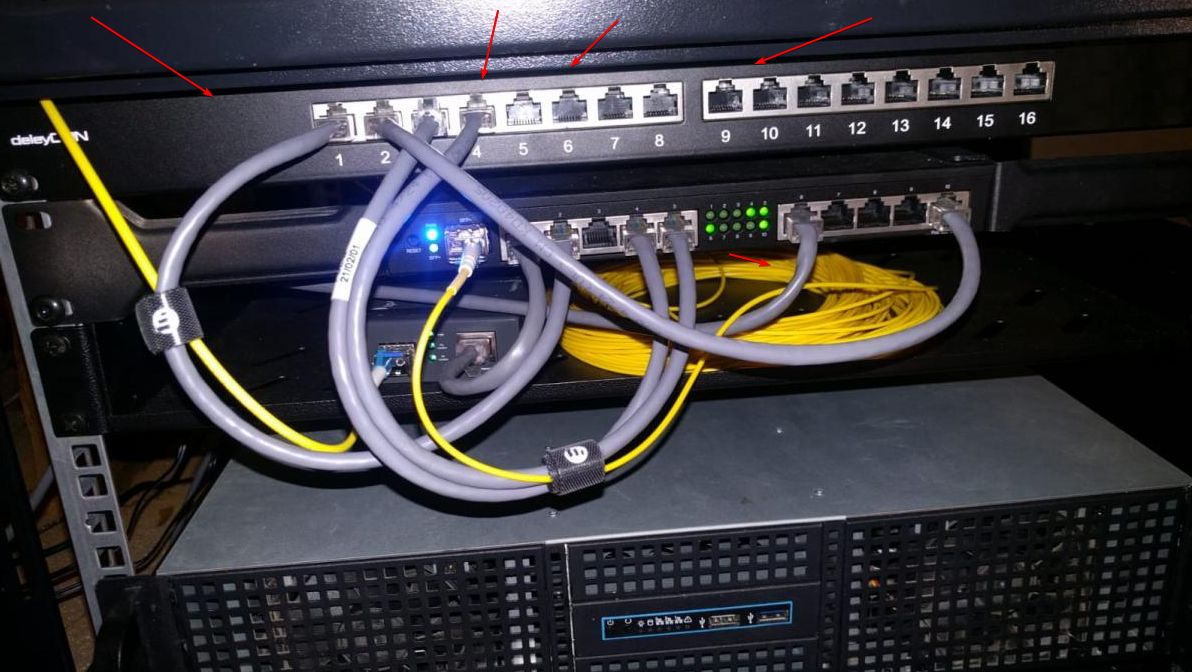
See that thing at the top here ^ is my patch panel
each of those ports goes to a room in the house
hexed fox
I don't know why they didn't set it up using the panel in the first place
I'm gonna do some more tests and see if any of this stuff is still connected to the wall ports
tame carbon
@hexed fox pro tip: grab a noteblock. and make a diagram
of what rooms go to what outlets and such
if the ports arent numbered. number them yourself by testing which is which
I had the joy of this once... 100 networked outlets in an office building. Without labels on them
took me entire day of walking back and forth
to label each of them
tame carbon
@hexed fox if the modem you have, has an outlet closeby
you can plug the modem -> outlet -> patch panel -> switch -> all the other ports on your panel
hexed fox
faster way to check?
tame carbon
well, you can keep the modem where it is right now, if there's an outlet nearby
hexed fox
there is
tame carbon
do you have two network devices you can plug in on either side?
you plug something in the outlet
and then try each port on the patch panel
until you get a signal
rinse and repeat for each port.
hexed fox
yeah, the combo unit has 2 ports only
tame carbon
plug one port into the wall socket, and take your laptop to the patch panel
plug laptop directly into patch panel, and see if it detects ethernet
lack of ports on the modem/router isnt an issue
that's what switches were invented for
hexed fox
yeah im gonna save this for tomorrow during the day, the panels in a closet but the closet is full of tons of randomness I can't fully get in here LOL
when they clean it out I'll dive in
that and I need to get more short cables
tame carbon
@hexed fox we can run you through the process if you need help
even recommend you hardware if you need some
hexed fox
noice
 dusky rover
tame carbon
https://i.imgur.com/ZplQDkp.png
dusky rover
tame carbon
https://i.imgur.com/ZplQDkp.png
When you find time take some paper tape and label the cables , that small thing saved my a$$
tame carbon
@dusky rover outlets are labelled. and the ports on the router underneath have labels in the software control
tame carbon
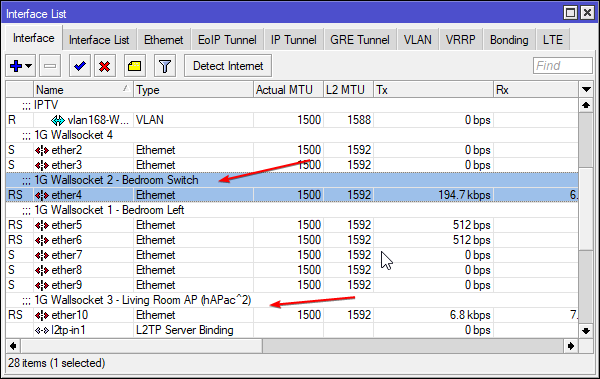 dusky rover
thats nice, propriatory software or is it open for usage
tame carbon
RouterOS
dusky rover
yea my hobbyism do be hobyism
tame carbon
mikrotik's propietary operating system for their hardware
based on linux
but routerOS is great :)
dusky rover
ooo sounds nice
tame carbon
very advanced and easy to use
@dusky rover https://i.imgur.com/HMaQAum.png
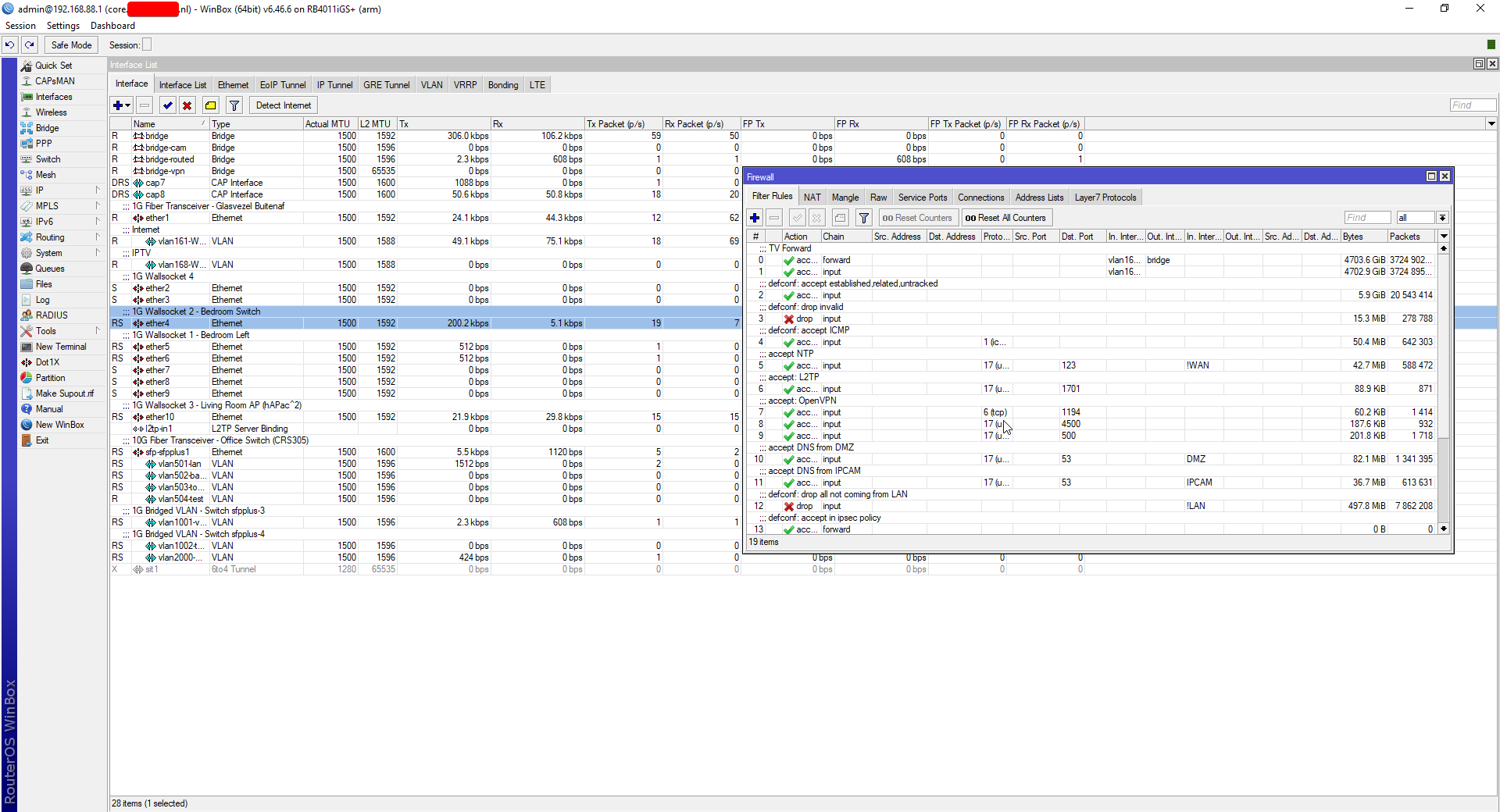
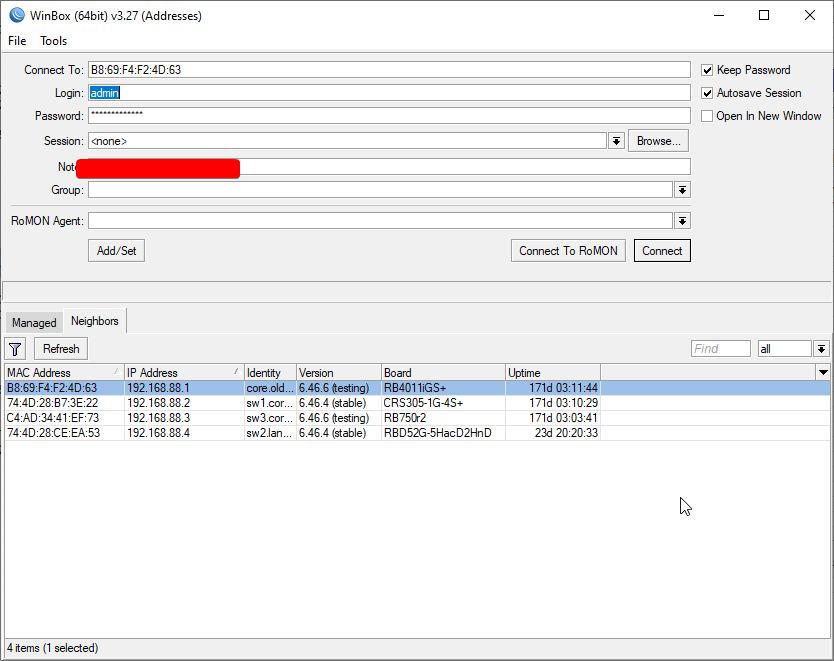
Management utility is called Winbox
dusky rover
time to set it up
tame carbon
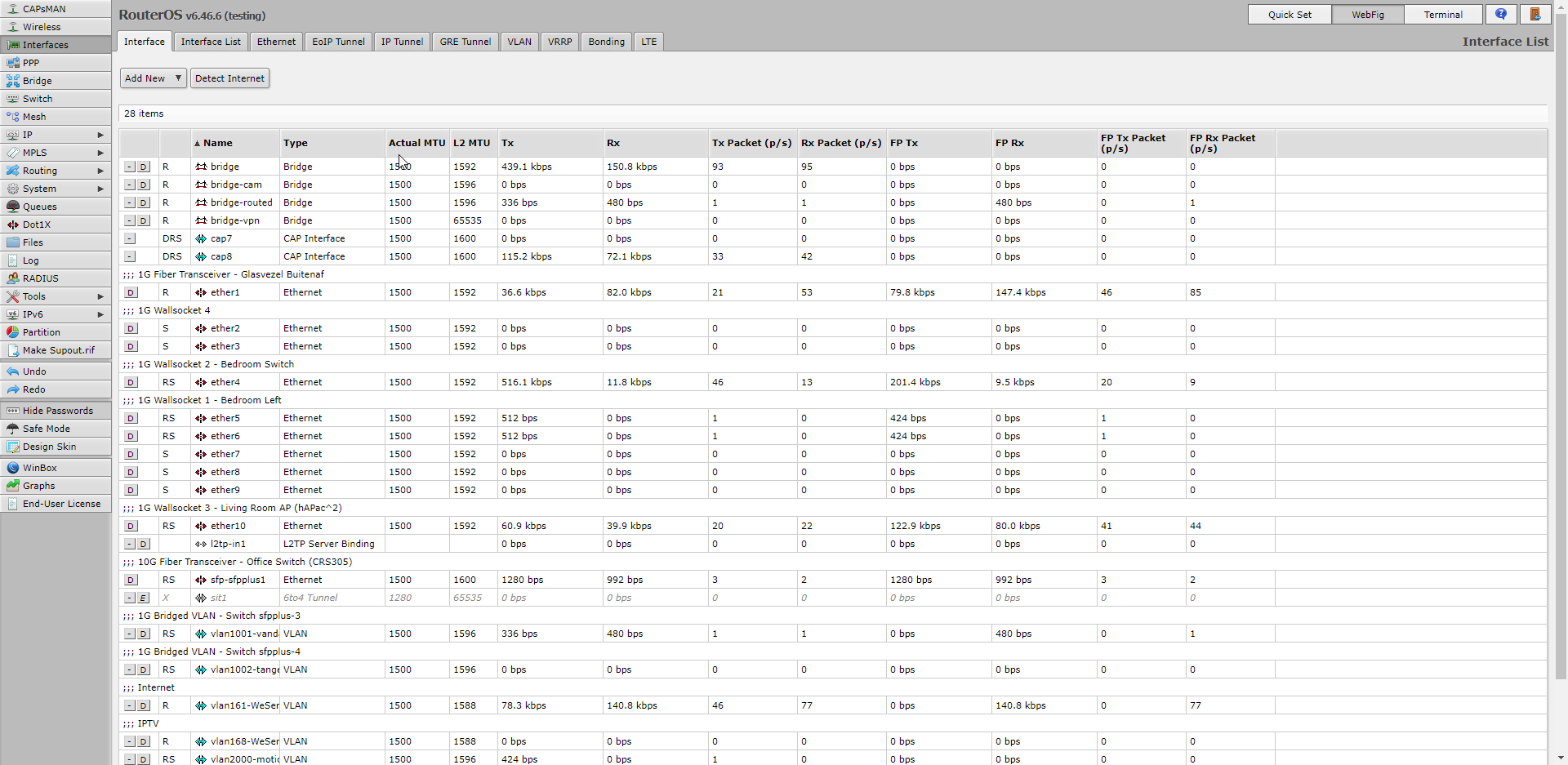
webconfig ^
looks pretty much identical
benefit of using winbox is the autodiscovery of connected devices
can configure the hardware even without an IP
using L2 only
dusky rover
oooooo
 thick minnow
Does anyone know how to make a nvr recorder from a raspberry pi (3b) and what camera to use with that?
tame carbon
@thick minnow the camera interface on the pi is CSI
Camera Serial Interface
There's a linux driver called V4L2 (Video 4 Linux) that can use the broadcom mcu's interface to read cam data
Explanation of some fundamental Linux usage and commands for getting around the Raspberry Pi and managing its filesystem and users
peak cloak
also that
thick minnow
oh
thick minnow
yeah i have one camera but its 1440p idk if the pi can handle that
peak cloak

Medium
Using an Open Source NVR software combined with a OpenSource hardware to build your affordable CCTV solution.
 tall pagoda
Is it possible to use a Linksys WRT54G Ver7 as WDS?
 hardy sandal

peak cloak
tall pagoda
Is it possible to use a Linksys WRT54G Ver7 as WDS?
WDS?
oh
idk
never used it
 untold elbow
LinksysInfo.org
Guide to setting up WDS on the WRT54G/WRT54GS
Thanks to Justin Olanin for posting this guide to setting up WDS on the WRT54G/WRT54GS
WDS Justins guide to setting up WDS with Alchemy-pre5.2.2 v2.09.1.8sv
(can be applied to other versions...
first result for "wrt54g wds"
untold elbow
lol what'd they do
tame carbon

Ars Technica
Microsoft-owned Github pulls down proof-of-concept code posted by researcher.
untold elbow
what'd they do this time*
untold elbow
oh, yeah, i saw that, i guess i don't really see the big deal for removing exploit code
tame carbon
@untold elbow because its their own platform
If this was an exploit for any other system
it would be up
untold elbow
you think so? do they allow exploit code in general to be hosted?
i thought it was just the fact that it was an unpatched explout
exploit even
i guess metasploit is on github so now i dont know what to think
untold elbow
ok thats kind of sketchy, i think you've convinced me
tame carbon
125k unpatched servers
and they take down the exploit PoC
"Nothing is wrong peeps, go on about your day"
thick minnow
the place i work just took down our github code for that reason
tame carbon
Microsoft shouldnt be the gatekeeper of the largest open source platform
They are the antichrist of opensource
untold elbow
thick minnow
the place i work just took down our github code for that reason
because it was a PoC for an unpatched exploit?
tame carbon
Microsoft has released a patch already
thick minnow
we do cyber security and had a opensource phishing platform
tame carbon
Its just, sysadmins sleeping at their desk.
thick minnow
and alot of exploits
tame carbon
remember when former US president declared that iranians are not to be trusted?
and prompty. everyone who was of irianian heritage, got their github account suspended
with no access to private repository source code.
 waxen saddle
@tame carbon the very article you posted mentions Microsoft may not have had a hand in the takedown at all
tame carbon
No heads up
tame carbon
@waxen saddle 
come on
you think they had nothing to do with it?
They own the platform
and own exchange
They are only worried about their bottom line
waxen saddle
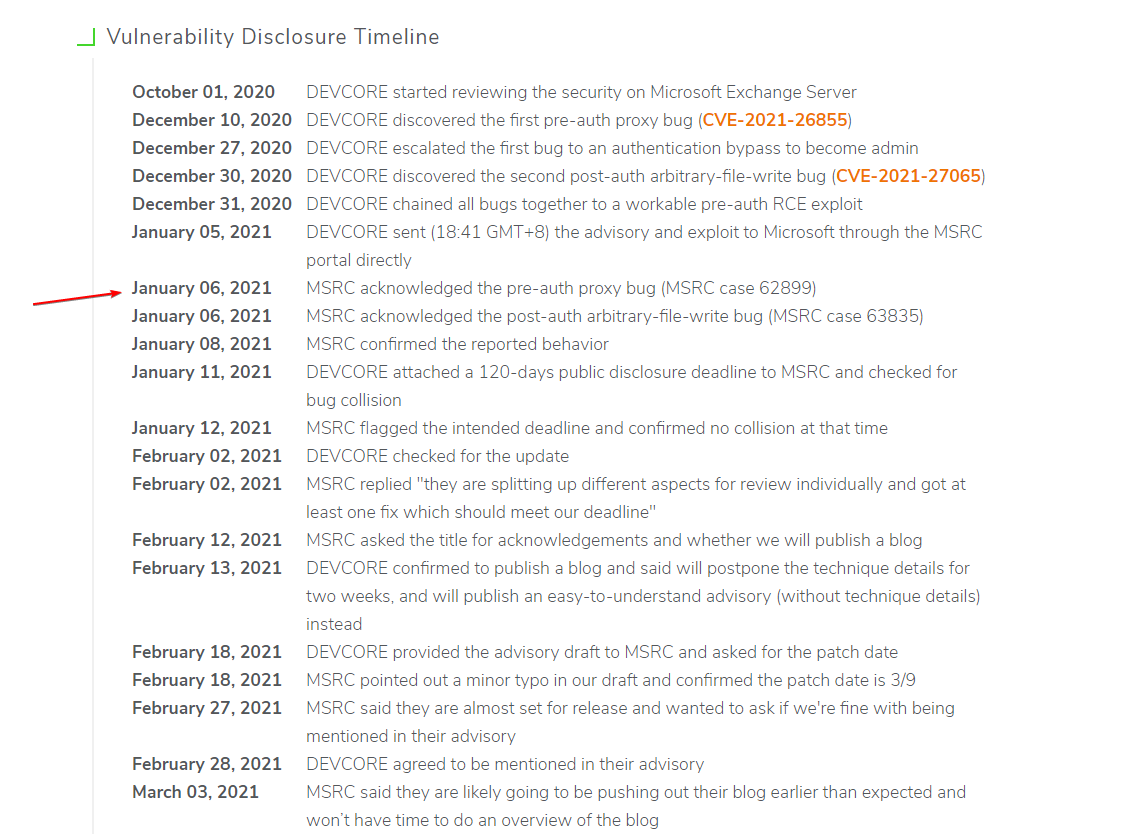
It’s also an active exploit. How long has the exploit been known? There is such a thing as disclosure decency.
thick minnow
might be able to find it on exploit DB
 thick minnow
we need a cyber security chat in this discord
tame carbon
MEANWHILE

GitLab
PoC of proxylogon chain SSRF(CVE-2021-26855) to write file testanull/PoC_proxyLogon.py https://web.archive.org/web/20210310164403/https://gist.github.com/testanull/fabd8eeb46f120c4b15f8793617ca7d1
Sourcecode is still up^
Just somewhere else
tame carbon
youtube-dl is back on github
untold elbow
but at least MS made the right decision on that one
tame carbon
after criticism
untold elbow
no i know
waxen saddle
Next week: MS buys gitlab
untold elbow
gitlab can be self hosted though
tame carbon
@untold elbow or you selfhost github
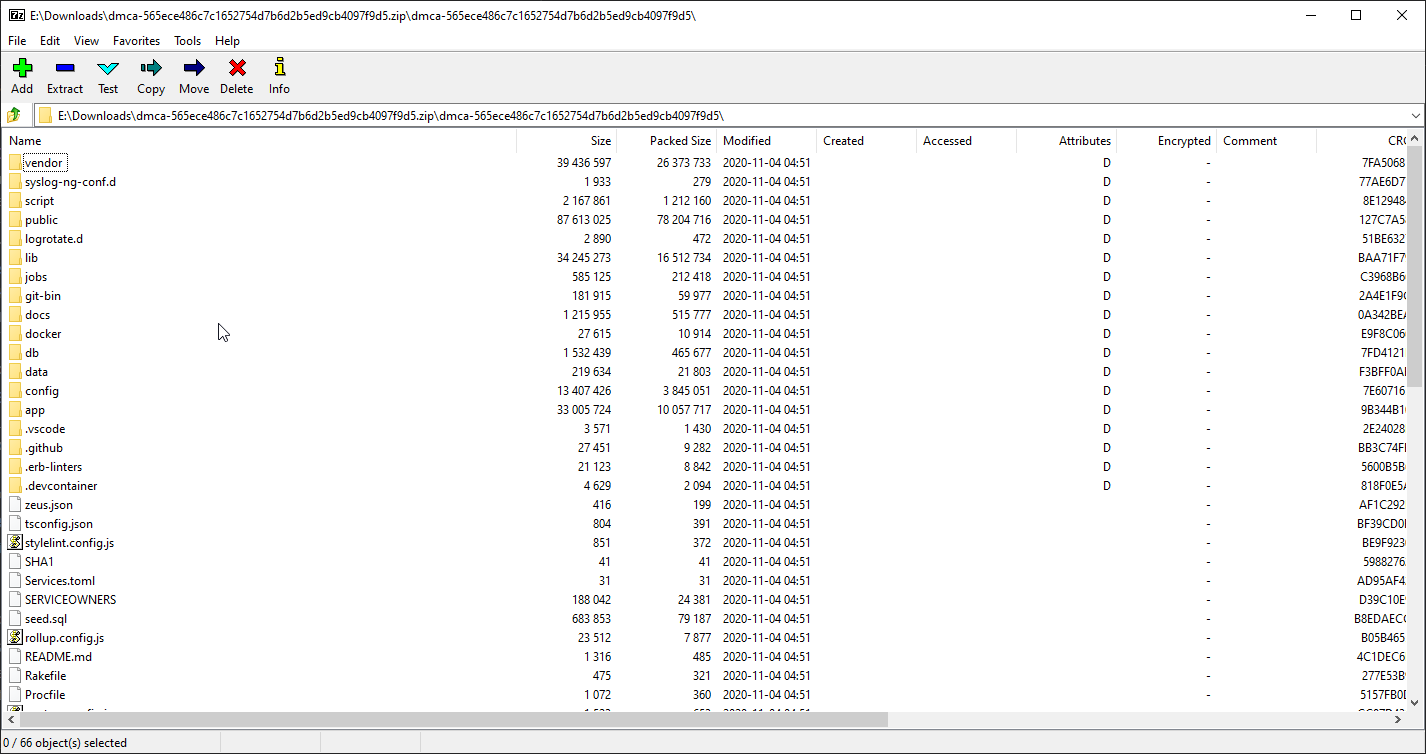
I have a full clone of github enterprise :D
unobfuscated
untold elbow
is the github code open source?
tame carbon

Ars Technica
GitHub wasn't actually compromised, despite appearances to the contrary.
No it isnt
untold elbow
oh right i saw that too
tame carbon
But their enterprise instance is shared with companies that run their own instances
They get clones with responsible disclosure
But those got nicked.
I looked through it
lots and lots of ruby code
entire stack, Pipeline, git engine and webapp
untold elbow
have you tried spinning it up?
tame carbon
Nah
untold elbow
probably a lot of work
thick minnow
have a look though the code
tame carbon
@untold elbow https://i.imgur.com/Bqr8EoT.png
 thick minnow
i have done some source code pen test where it pings them when it get compiled or spun up
tame carbon
its a 140MB file
untold elbow
thick minnow
i have done some source code pen test where it pings them when it get compiled o...
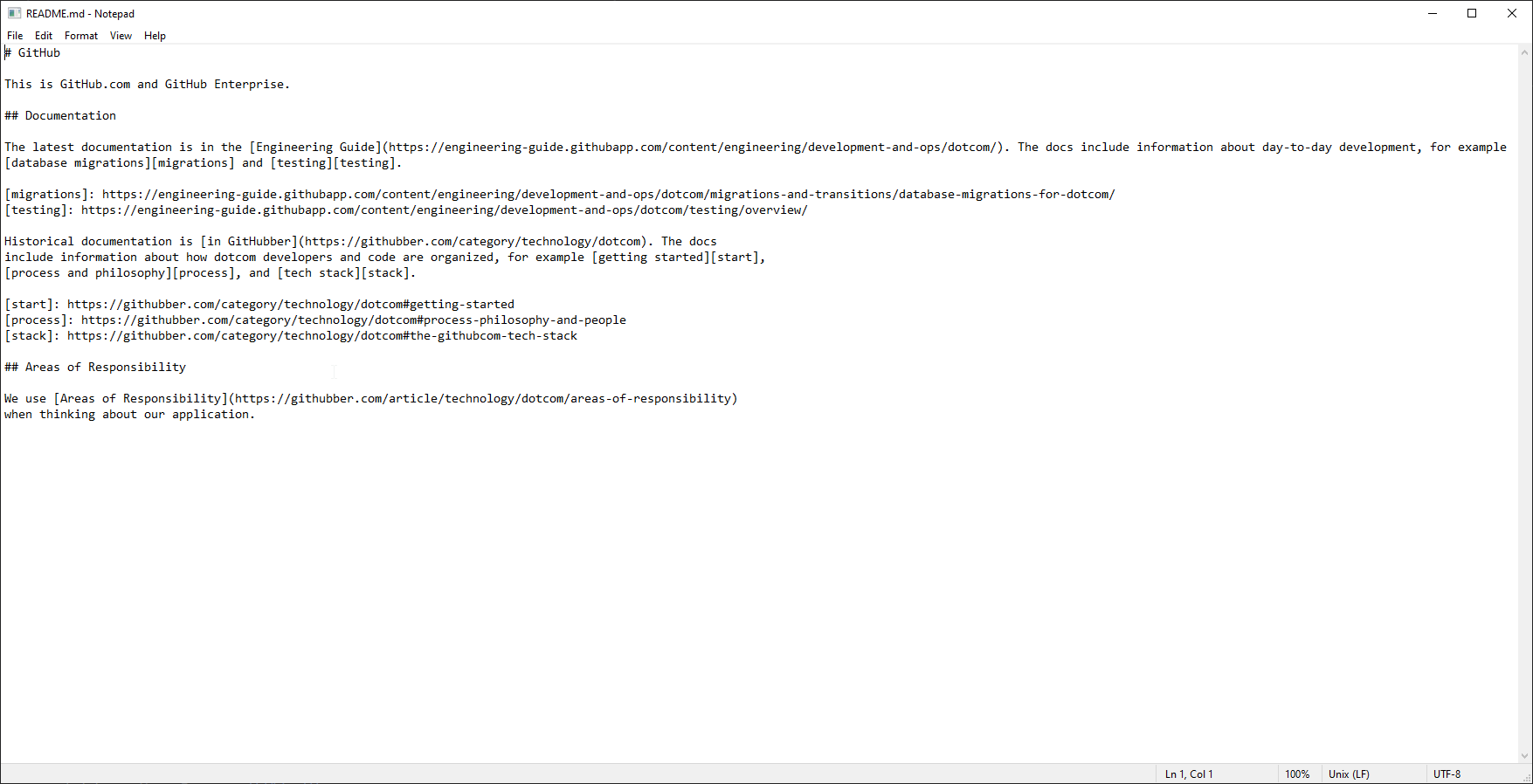
right, but it's not like someone snuck in there and stole it
thick minnow
anyway i need to do more work
untold elbow
they posted it on their own site lol
 untold elbow
i still have a cd of the windows 2000 code leak
untold elbow
and i remember playing the HL2 source code leak from before it was released
overflow error
 olive pine
why is gamers nexus in my recommended
thick minnow
has anyne found the soure for cyberpunk yet
untold elbow
GN and LTT work together on stuff a lot
thick minnow
source
tame carbon
For those who haven't laughed at windows 2000
This can make your day ^
There's flamewars between employees
in the sourcecode
Its like an autobiography of how not to write an operating system
 untold elbow
lol
tame carbon
They patch their program bugs, in their OS
no wonder its full of idiosyncracies
my favorite: https://i.imgur.com/5QG8Wt8.png
 tall pagoda
Cannot find option disable
 tame carbon
@tall pagoda what is this?
untold elbow
i think he's trying to set up some wifi thing on his wrt54g or something
"Is it possible to use a Linksys WRT54G Ver7 as WDS?"
tame carbon
@tall pagoda even WDS clients have an IP on the local network
so you'll probably want DHCP
tall pagoda
I want to use as bridge for a computer where normal wifi gets slow and no cables are allowed.
tame carbon
@tall pagoda yeah WDS will do that for you
but just like a managed switch, the device itself also has an IP address
which it uses DHCP for usually
tall pagoda
It seems that V7 doesn't support WDS
tribal ferry
@tame carbon not sure if you’re there but I’m setting it up now, what would the default IP for it be if I’m connected into it with an Ethernet cable?
hm, it shows up in neighbors but admin and no password fails to connect to it
yeah, web interface isn’t up either
tame carbon
@tribal ferry hiya
tribal ferry
heyo
lone sun
🤔 If I am using open wifi, is my connection still technically secure if the website is using TLS? Can someone still see me typing in my password for instance?
untold elbow
no
peak cloak
lone sun
🤔 If I am using open wifi, is my connection still technically secure if the web...
yes your connection is still secure, as long as you have have HTTPS no
even on a private wifi, if someone else knows the preshared key, they can see any unsecured protcols
lone sun
peak cloak
yes your connection is still secure, as long as you have have HTTPS no
🙂 Awesome, at least the engineers got something right. So the only ones that can see my actvity are those running the server nodes or relay nodes as usual? 🤔
peak cloak
lone sun
🙂 Awesome, at least the engineers got something right. So the only ones that ca...
relay nodes?
wut?
lone sun
The nodes through which your connection uses as hop points is what I'm referring to....I think..🤔 @peak cloak
peak cloak
lone sun
The nodes through which your connection uses as hop points is what I'm referring...
so routers
they don't see the info either
all they see is that they are encrypted
only a device with the SSL private key can decrypt it
lone sun
🤔 So at what point do those Internet exchange points come into play? Where are the actual "entry" and "exit" nodes? Isn't your connection supposed to be decrypted at some point for the whole thing to work?

 hollow marlin
I went down a rabbit hole understanding DH at the mathematical level because at first it confused the crap out of me
peak cloak
lone sun
🤔 So at what point do those Internet exchange points come into play? Where are ...
internet exchanges just connect many networks together. All the internet does it transmit packets, routers don't decrypt anything. It's just a connection between you and the webserver
your info is decrypted at the webserver
that's it
 lunar spade
Whats a good network switch?
I have Cat5e and I need a network switch with 8 ports minimum
lunar spade
I dont know which one i need
lunar spade
peak cloak
do you need features like vlans?
I dont know what that means
tame carbon
ok then you don't
xD
@lunar spade any unmanaged switch will do
there's not much they can do wrong with that
lunar spade
Im connecting them to 4 pc, 2 consoles, and 5 tv
lunar spade
K i will search at my local store
tame carbon
@lunar spade unmanaged means, that the switch has no configuration
you just plug it in and use it
lunar spade
Canadian prices btw
Wait hold on wrong thing
None of these network swtiches have a dedicated ethernet port in?
Only numbers 1-8
peak cloak
lunar spade
None of these network swtiches have a dedicated ethernet port in?
yeah
doesn't need to
tame carbon
@lunar spade they have a bridge, and all the ports are on that bridge
its nothing more than that
devices on the same bridge, can talk to eachother
that's what a switch does.
lunar spade
So i can plug Router to Ethernet port 1, and then the other 7 ports can use ethernet
tame carbon
yep
lunar spade
Ok
tame carbon
@lunar spade ethernet is a network on its own
It allows computers to exchange ethernet packets with eachother
the next layer above is the IP layer. These create IP networks
to get computers on one IP network to talk to computers on another IP network, you need routing
that's what your router does.
It routes packets between your local IP network (usually 192.168.1.0/24) and the internet (which is just a bunch of networks connected together)
peak cloak
lunar spade
Will having a network switch effect ping or up/down?
technically yes, but very minimal
lunar spade
Ok, so nothing i can notice then