#networking
1 messages · Page 295 of 1
 gusty zinc
 lean pebble
Any good pcie extension for sata?
 thick minnow
rn I have a modem in my basement, and 3 wireless amplifiers from which I can run ethernet. I get about 60-80mbps, though I want to achieve higher speeds. What shall I do? We get 100mbps from our ISP so that sucks.
 tall pagoda
Call your ISP to raise internet speed to 250 Mbit/s
tall pagoda
thick minnow
rn I have a modem in my basement, and 3 wireless amplifiers from which I can run...
I have this cable in my house
Nedis CCGP85221WT100 netwerkkabel 10 m Cat6 S/FTP (S-STP) Wit. Nedis CCGP85221WT100. Lengte snoer: 10 m, Kabel standaard: Cat6, Kabelafscherming: S/FTP...
 crisp bay
Hi, I asked in #tech-support abt SevTech server error where I can't connect to it... more here: #tech-support message pls DM me ty!
 peak cloak
I run some servers so I want that to be isolated. I only have 1 nic so vlans are nice as I have one for management, 1 for wan servers, and 1 for lan server. When I make a VM I just select the linux bridge I want. Also it's great for testing. So like for example only I want to be on the ipv6 enabled network so I just change the vlan for my PC. Also multiple ssids corresponding to different vlans. Pretty useful as I have one that's 192.168.x.x for work vpns so it doesn't conflict.
So my wan server network is completely firewalled off
Can't access anything internally
 tame carbon
@peak cloak same here, my LAN can just access my public range with NAT
but I don't masquerade
lean pebble
Should I use unraid for my home backup / plex server?
tame carbon
and pay for linux? lel
thick minnow
tame carbon
and pay for linux? lel
Can't you just compile it from source? The paid ones as well?
lean pebble
I want to do software raid there is away to do it while installing my Linux os or only after everything installed?
lean pebble
Never had a chance to do it via installation
 patent egret
Which Linux distro would you guys use for a small VM host? I'm considering moving OPNsense into a VM. Usually I'd go for Arch Linux for the host but it doesn't seem like a great idea to use a rolling release distro as host for an infrastructure critical system
lean pebble
tame carbon
but only because my root volume isnt on raid
I want everything will be raided
 plain siren
patent egret
Which Linux distro would you guys use for a small VM host? I'm considering movin...
plain siren
patent egret
Which Linux distro would you guys use for a small VM host? I'm considering movin...
Alpine, SmartOS...
thick minnow
Ubuntu server
tame carbon
@patent egret I just installed debian and am using kvm
plain siren
I use Alpine because I keep everything bare bones and its defacto debloated
lean pebble
I'm on fedora but this is me because it's my main os on my main pc
patent egret
There might be another VM on the same host for non-critical services that have to be available all the time but no more than 2. Sadly the machine itself is based on an i5-4590 (4 cores, no hyperthreading/SMT)
lean pebble
But probably Debian based os
tame carbon
debian from a netinstall with minimal packages is already quite bloat-free
patent egret
I was considering Xen as well. Gotta look into SmartOS - haven't heard that one before
tame carbon
doesnt beat alpine, but its still useable
thick minnow
ClearLinuxOS (by Intel) ftw (jk btw)
plain siren
Idk, with thier mid-progress of moving Init Systems plus their Tendency to have all the Data Files for every Alt Package avail for every core service for their.... compatibility... it feels pretty bloat
peak cloak
idk how heavy proxmox is, but it uses KVM/QEMU which is pretty light weight for VMs
you could just do debain + KVM/QEMU
plain siren
K3OS + K3S + Containers and be almost paper thin light weight.
Skip the Hypervisor all together
plain siren
Portainer hehe
patent egret
yeah ofc it does, Xen uses KVM/QEMU too
 plain siren
OpenNebula because itll do it all for you anyways.
 tame carbon
wat
@plain siren what kind of dark magic is that
8GB ram
3056 virtual machines
?
tame carbon
how does it interface with baremetal?
plain siren
from PXE Installing of your Hypervisor down to VM Creation and K8s/Container Clusters Creation Inside those VM's.... itll do it all

 waxen saddle
Is there Hardware pass through to VM’s in OpenNebula?
plain siren
Its all based on whatever you setup the service stack with.
tame carbon
@waxen saddle judging by the picture above, it doesnt matter
plain siren
 tame carbon
since the features of your VM depend on what kind of hypervisor you are using
and kvm can just do hw passthrough
vmware too, I think
plain siren
Yeah it has some tight integrations with VMWare's entire suite
Which is cool if you use it
tame carbon
last few years this cloud craze
has gotten out of control
now there's a control panel for your control panel
nebula -> k8s -> some app
plain siren
Nebula is the Orchestration Interface, K8s is Orchestration Daemon
And some would still say Moores law is dead.... I say Containers happened.
OpenNebula > VMWare > K8s > Docker or OXP > ContainerD > The Container
waxen saddle
Maybe. I’m able to host everything but 2 or 3 services in a container.
Haven’t quite figured out Ansible, LTSP yet.
peak cloak
The worst is when people don't actually understand what is happening in the container
peak cloak
waxen saddle
Haven’t quite figured out Ansible, LTSP yet.
yeah ansible seems cool
packer too
waxen saddle
I even rolled my own container for OTA TV to Multicast streaming with SAP announce. That was a fun project.
One thing irks me though. For the life of me, I cannot get Portainer to use my CIFS NAS as storage. So all my configuration files are locked in the Portainer environment. It’s the gaping hole in my setup right now.
I’ve considered moving to another Docker manager, but I dunno where the actual problem is. The problem is that there’s always a permissions issue. I can get it so that some containers write to my NAS when they are initializing, but when the main process in the container takes over, it doesn’t have permissions to write to the NAS.
I’ve tried different PID’s for the container, mounting the NAS on the host, creating the docker user on the NAS, etc... extensive googling... maybe I’m not smart enough. Lol. Everyone else seems to be able to get it to work.
tame carbon
fuck amazon. seriously
rechargeable batteries, and the default purchase option: subscription
way to ruin the fucking environment
 clear igloo
They offer subscriptions for socks and dust cloths too as the default 😛
tame carbon
I'm fed up with my mom buying single use triple-A's for this STUPID doorbell
it rarely rings, and needs a new battery every 2-3 months
 little schooner
@tame carbon my smart doorlock is in the same situation
Except it wants 4 AA batteries!!
Dies pretty quickly. Like 2 3 months as well
peak cloak
we just have an old-fashion wired doorbell and just a good ole lock
little schooner
@peak cloak dumb locks still have their place in life, yes
waxen saddle
Wired smart locks would work pretty well too (with manual override), but companies just don't sell those.
peak cloak
waxen saddle
Wired smart locks would work pretty well too (with manual override), but compani...
yeah that would be nice
 hollow marlin
little schooner
<@167698274969452544> my smart doorlock is in the same situation
hollow marlin
little schooner
<@167698274969452544> my smart doorlock is in the same situation
My Yale last about the same. Ive gone full rechargeable across the board though
clear igloo
little schooner
Dies pretty quickly. Like 2 3 months as well
I've got one that goes a good 8-12 months on 4 AA batteries
little schooner
Which one is that
clear igloo
Kwikset 910
tame carbon
@clear igloo you can get single use lithium cells in AA format
though thats only for things that you dont want to replace batteries for that often
like an LED headband
clear igloo
tame carbon
though thats only for things that you dont want to replace batteries for that of...
Yah, this lock lasts fine with normal AA batteries but I've seen those too
clear igloo
wow!
tame carbon
retains charge much better
clear igloo
One thing I'll never buy again is Amazon Basics AA batteries. half the pack worked fine and when I replaced them at least one of every battery in the 4 packs exploded
tame carbon
dont buy basics at all
I boycott that shit
its often worse quality
and its amazon's master plan
 carmine moss
i just get ikea batteries
clear igloo
oh, I remembered wrong, it was Energizer bulk pack batteries
carmine moss
they are rebranded panasonics where i live
clear igloo
tame carbon
<@!291198741862416384> energizer is a scam
Yah, they were cheap and I guess for a reason
tame carbon
@clear igloo as for portable power, besides that stupid doorbell, everything here is with lithium cells
I have one of those battery banks
you can just put in an 18650 cell
and have 3200mAh
those cells are just far easier
they can do much higher current, hold more charge
and recharge quickly
carmine moss
i wish i had 18650 in some devices they are great
carmine moss
they are pretty cheap in battery banks 2 euro and a bit per cell
tame carbon
cheap cells are a fire hazzard
I currently have a batch of Sony VTC6 cells
30A, 3000mAh
I was using Samsung INR-18650's before
those are 25A
@carmine moss with cells, especially from dodgy sources, you really want to manually test them
and cycle them through once, measuring how much capacity they take, and if they heat up or not
tame carbon
they sometimes sell 5A cells as though they are 20A
and if you overcurrent them repeatedly, and next time you go to charge them, you start a fire.
@carmine moss 220mAh ?
 thats next to no charge at all
tame carbon
3.7V is nominal voltage for all 18650s
only interesting points are capacity and max current
4.2 is full, 3.2 is empty
< 3.0V = dead
@carmine moss I thought the video LTT made on their lithium battery thing, to be very irresponsible
they bought a bunch of thirdparty cells
and just put them in a bank
giving absolutely no care to cell imbalance
carmine moss
yeah that is a problem
tame carbon
like, if you put 50 cells next to eachother
and one of them starts a fire
you have a chinese firecracker

Well I really did it this time boys, this is what thermal runaway on Tesla 18650 cells look like, remember, safety first and don’t forget to checkout the indiegogo link here!”
Campain Link: http://www.igg.me/at/richrebuilds
Should you desire to support this channel please donate to
https://www.paypal.me/princeofthehouse
&
https://www.patreon.c...
Watch 30 seconds of this ^
xD
carmine moss
yeah batteries are a risk a lot of times at least 18650 are somewat safer vs other lithium batteries
tame carbon
lithium is very reactive
and once it gets going
you aint putting it out
18650's are lithium ion
I think you're talking about lithium polymer
carmine moss
yeah that's the problem also cheap laptop batteries use bad 18650's
tame carbon
LiPo's expand and then burst with a ball of flames
carmine moss
and then stores sell you cheap knockoff ones saying they are real for laptops
tame carbon
amazon doesnt even permit the sale of lithium ion anymore ;P
or any lithium batteries for that matter
like, they are not toys.
they can potentially be a fire hazard
carmine moss
yeah people don't know how to take care safly of them
tame carbon
and with the dumb shit you see on youtube these days
good xD so normies at least cant get their hands on some
carmine moss
there is a channel called my play house he makes a lot of lithium ion banks but even what he does is sometimes problematic
tame carbon
as long as you take safety precautions
carmine moss
at least he is being as safe as he can he just has used some bad gear at times
tame carbon
only thing you really need to contain a lithium fire
is a steel barrel where you can dump the shit in
to let it fizzle out
carmine moss
he does it in his basement of his old house so yeah
tame carbon
water is the single worst idea xD
@carmine moss this is the true ali-express experience: https://www.youtube.com/watch?v=WOwhah8AifU

A video recently appeared online showed one Chinese family's electric scooter exploded while being charged at home.
The video, shot by the family's surveillance camera installed in their living room showed the whole family were sitting at home Sunday afternoon when smoke came out of the scooter being charged in the living room, accompanied by ...
carmine moss
Yeah those are a safety risk
 wheat solstice
Buying a house soon and it's all wired up already with ethernet. My friends are saying that ubiquiti is basically the best way to go, but it's looking like to get a basic setup on Ubiquiti will cost £1000+ anyone have any suggestions? is it worth it?
peak cloak
ubiquiti unfi imo is eh
peak cloak
unifi is "easier"
tame carbon
its just a bit less fancy config
wheat solstice
I mean the main stuff I want is nice handover between multiple access points, and some way of banning all my smart home devices from the internet
peak cloak
multiple APs can be done pretty easily (but not fully seamless)
tame carbon
mikrotik doesnt have seamless roaming, but AP handover is like 100ms
peak cloak
and for smart home that's also easily done with vlans
tame carbon
and mikrotik also has support for multiple antenna setups
wheat solstice
so the microtik takes 100ms to hand over, but the unifi stuff can do it seamlessly?
tame carbon
@wheat solstice well, the idea with seamless roaming is that the AP suggests to the phone that it should switch
peak cloak
truly seamless requires r/k support?
tame carbon
without 802.1rk support, the phone just switches to another AP
but mikrotik is smart enough to hand out the same IP, and immediate update the arp table
so you don't notice it
IEEE 802.11r-2008 or fast BSS transition (FT), also called fast roaming, is an amendment to the IEEE 802.11 standard to permit continuous connectivity aboard wireless devices in motion, with fast and secure handoffs from one base station to another managed in a seamless manner. It was published on July 15, 2008. IEEE 802.11r-2008 was rolled up...
but even without this, experience is still good
wheat solstice
I see, I mean the main thing I'm hoping to avoid, I used to have a basic setup with two routers with the same SSID, but the laptop/phone would absolutely cling to whatever it was attached to. So it'd stay on the downstairs router when upstairs, and you'd have to manually reconnect to get it to stop being silly.
tame carbon
yeah but those are independent no?
peak cloak
Your TX power may have been too high?
wheat solstice
yea they were just normal boring routers with nothing fancy
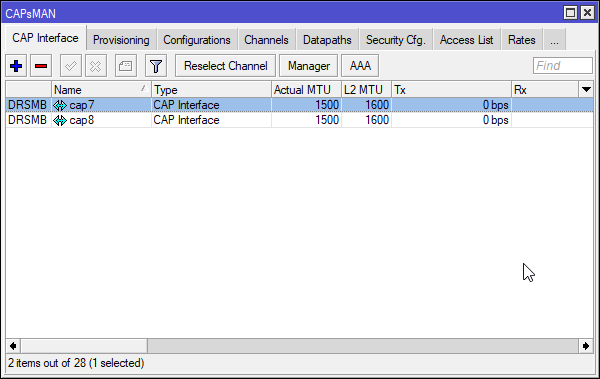 wheat solstice
I think I should definitely investigate microtik as well though. I'm a programmer by day and a fan of more open things, I have been a bit hesitant of the unifi stuff because it feels very iphoney.
tame carbon
and the router controls the access points
so when a phone moves to another area, it should just kick it off and move to the other AP
@wheat solstice what kind of net speed do you have?
and how many APs do you plan on putting out?
wheat solstice
@tame carbon 500mbit, hopefully going up to 1gbit in the future once it becomes available.
APs will be between 2 and 4 I would think.
tame carbon
like their standard dual chain access points cost about 60 bucks each
peak cloak
wheat solstice
I think I should definitely investigate microtik as well though. I'm a programme...
yeah unifi is like the apple of networking. Ubiquity edgemax aka their ISP line is much more open
I have the ER-X myself
tame carbon
and the router, you can go as wildy as you want
60 bucks for a 5 port gigabit router
wheat solstice
@tame carbon I also have a home server (Think NAS) that I'd ideally like on a 10g link.
tame carbon
@wheat solstice lol you should get the router I have, since my stuff here is 10G as well xD
peak cloak
wheat solstice
<@!167698274969452544> I also have a home server (Think NAS) that I'd ideally li...
sfp+ or copper?
tame carbon

MikroTik is a Latvian company which was founded in 1996 to develop routers and wireless ISP systems. MikroTik now provides hardware and software for Internet connectivity in most of the countries around the world.
wheat solstice
@peak cloak probably copper, since I'd have to run the cable, so it'd be weird to run SFP links in the walls.
tame carbon
this thing mops the floor with the ER-X
peak cloak
wheat solstice
<@!222482269829332992> probably copper, since I'd have to run the cable, so it'd...
You should do SFP+ tbh
much cheaper
SFP+ is just a connector
then you put in a module
which can be fiber, copper, etc.
tame carbon
if you get a router with 10GbE RJ45, instead of SFP+, you can't do fiber
SFP+ can do both RJ45 or Fiber, depending on the module
wheat solstice
ah, so I could do SFP -> ethernet -> SFP -> Switch in the office -> SFP -> Home server?
tame carbon
@wheat solstice SFP+ is just an interface
peak cloak
wheat solstice
ah, so I could do SFP -> ethernet -> SFP -> Switch in the office -> SFP -> Home ...
sfp+, sfp is slower
tame carbon
you plug a module in there
@wheat solstice this would be my first recommendation

10x 1G
and 1x 10G
$190
I have this one at home
very pleased with it
wheat solstice
yea, seems reasonably priced and available in the UK too which is good.
So that's my router. The one 10G port can go to my office, and I guess I use one of those ports as the WAN port to the modem.
tame carbon
@wheat solstice you only use this for routing
if you want more 10G connectivity
you'd use a switch
tame carbon
@wheat solstice and the place you plug your cables in doesnt really matter ,since VLANs are king.
wheat solstice
VLANs hurt my brain coming from the typical land of Asus routers 🙂
tame carbon
Its not that complicated really
wheat solstice
Yea, I'm sure I'll wrap my head around it lol
tame carbon
I could help you set some up on this gear
tame carbon
@wheat solstice I have this one hanging in my office:
 wheat solstice
Good news is I've come at this problem nice and early, probably at least a month out from moving. So I got time to learn 🙂
tame carbon
@wheat solstice on this, I plugged in my router and server with 10G, as well as my workstation
MikroTik is a Latvian company which was founded in 1996 to develop routers and wireless ISP systems. MikroTik now provides hardware and software for Internet connectivity in most of the countries around the world.
peak cloak
 tame carbon
your actual network is a virtual network ontop of the physical network
physical ethernet is just to connect them up
peak cloak
Here I was also explaining the difference between vlan and subnet
wheat solstice
I see
peak cloak
a subnet goes onto a vlan
vlan is just a way to have multiple L2 networks on one pysical link
all the switch and router do is add/remove a tag to an ethernet packet
tame carbon
vlans are ethernet networks (layer 2)
subnets are IP networks (layer 3)
vlans just add some extra data to your data packet
with a number between 1 and 4095
if its 1, that means there's no vlan active, that's regular ethernet
@wheat solstice imagine you have a switch with 10 ports and a single highspeed port to the router
you can give each physical port a different vlan ID
and then the cable to the router, can have 10 virtual interfaces on the router's side
in mikrotik it looks like this: https://i.imgur.com/k2yPxG7.png
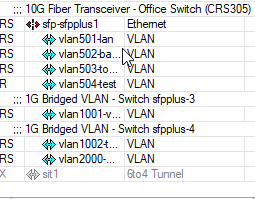
SFP+ interface, with multiple vlans associated
and they behave like ethernet interfaces basically
 wheat solstice
I see, so to start with I'd probably need the RB4011iGS+RM, A couple of switches (one for the garage where ethernet all terminates, one in my office) and some APs, although it seems like microtik doesn't have any WiFi 6 aps yet 😦
peak cloak
or in a congested area like an apartment or city
wheat solstice
I definitely have more than 10 devices 🙂
tame carbon
it helps reduce latency
but if you have more access points spread across the house
it shouldnt be an issue
tame carbon
@wheat solstice https://mikrotik.com/product/cap_ac#fndtn-specifications
MikroTik is a Latvian company which was founded in 1996 to develop routers and wireless ISP systems. MikroTik now provides hardware and software for Internet connectivity in most of the countries around the world.
these are pretty cost effective
peak cloak

TP-Link
wheat solstice
yea they do seem to be fairly cheap, like £50. On this basis seems like I could rig my house up for less than half the price it'd cost me to do it on unifi, pretty decent saving
peak cloak
^and you can install or buy a controller for more seamless roaming I think
tame carbon
@wheat solstice all those devices run the same operating system
and you can use your RB4011 to control those APs
peak cloak
I only have 1 AP so I didn't use the controller
tame carbon
as a group
you can set up multiple wireless networks across them
like a guest network, isolating them to a seperate vlan and subnet
and even limit their bandwidth
xD
wheat solstice
Yea, I think choosing a platform is important right? That's the whole allure of unifi in the first place, that you have one central place to control everything, and you can identify every device on the network because all the APs/switches talk to the controller, etc
peak cloak
I have things all over the place
tame carbon
single vendor is easier in most scenarios
tame carbon
switches dont really matter xD
peak cloak
tame carbon
switches dont really matter xD
I mean they kinda do
especially managed ones
clear igloo
Yah, they don't matter much outside of home features but in larger enterprise situations of course it can easily matter
wheat solstice
what microtik switch would be recommended? May as well stay in house since I'm looking at a microtik switch, and microtik APs
tame carbon
how many ports? xD
wheat solstice
12 would probably be enough, 24 would be nice
tame carbon
MikroTik is a Latvian company which was founded in 1996 to develop routers and wireless ISP systems. MikroTik now provides hardware and software for Internet connectivity in most of the countries around the world.
wheat solstice
the place has ethernet in every room (unfortunately cat5e) and also my office consumes a reasonably quantity of ethernet ports (6+)
tame carbon
wait no, I changed the link click again
wheat solstice
fun, would be nice to have PoE somewhere too for cameras
clear igloo
PoE for APs is definitely worth it
wheat solstice
still cheaper than unifi 😂
tame carbon
but that is true
peak cloak
yes, poe is great
wheat solstice
and yea, will need PoE for APs too
tame carbon
MikroTik is a Latvian company which was founded in 1996 to develop routers and wireless ISP systems. MikroTik now provides hardware and software for Internet connectivity in most of the countries around the world.
wheat solstice
works out at £531 for the same stuff that'd cost me £1167 over at unifi
tame carbon
wheat solstice
guess I gotta hit up some youtube and investigate the microtik side of things 🙂
tame carbon
and mtik is Latvian, so probably no NSA backdoor xD
wheat solstice
don't suppose the firmware is open source, I can dream
tame carbon
@wheat solstice sadly no
wheat solstice
that's one thing that annoys me, I'm moving from a nice open source router to a proprietary one, I hate that as a thing
tame carbon
RouterOS is based on some older version of linux
but its pretty much in house
but it does have an API
and scripting capabilities
wheat solstice
I see, not as bad then, assume you can SSH into them and do things too if you want
tame carbon
you use their config tool Winbox
but they also have cli
winbox is just a graphical shell around the cli
wheat solstice
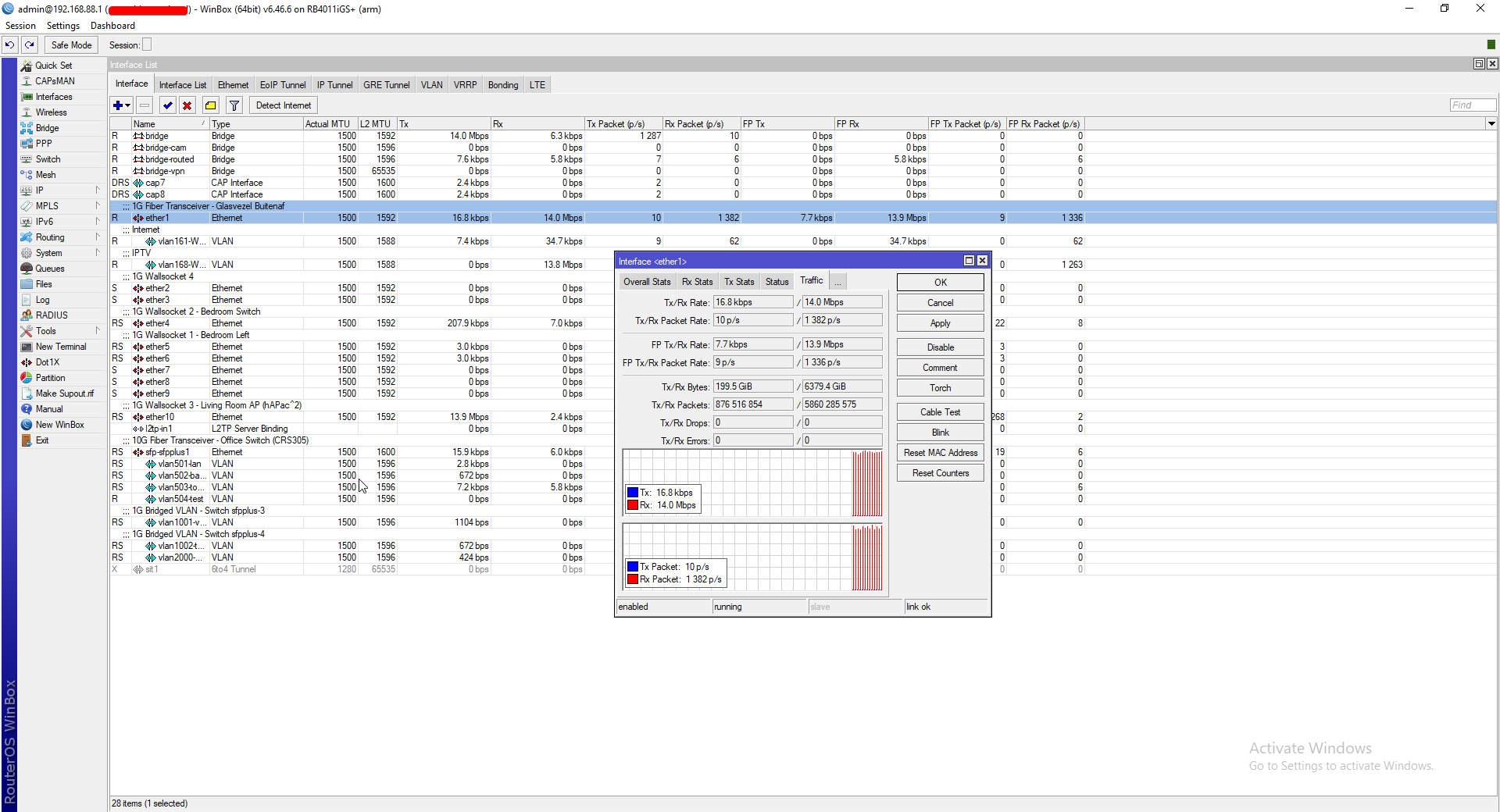
😂 they only have a Windows version of this software?
tame carbon
winbox runs on wine just fine xD
wheat solstice

 wheat solstice
yea don't mind too much it being oldschool, just a bit bad that the software isn't ported to Linux, especially considering it's a tool for network admins, who tend to be the type of people that run Linux 😂
tame carbon
well, its using linux internally
and you can install RouterOS on x86
just need a license
wheat solstice
I see
tame carbon
the RB4011 is a quadcore arm cpu
but some of their devices use MIPS
mikrotik really caters to the lower and middle segment
they have really sharp prices for enterprise features
wheat solstice
I wonder what the pfSense people typically do. I used to run pfSense like a decade ago and it was very nice.
tame carbon
pfsense has one major issue
same with RouterOS on x86
you dont have any hardware acceleration.
the RB4011 can route full 10gbit/s with 25 firewall filter rules
if you do that on pfsense, good luck xD
wheat solstice
makes sense
yea, I remember I ran pfSense on a potato and it chugged at rather low speeds 🙂
but 10 years ago that obviously didn't matter much.
tame carbon
I have one of these as a portable router

I have a couple presets in mine, where I can just plug it in
and it sets up a VPN tunnel to my home
wheat solstice
Back when I used to travel a lot I had one of the popular TP-Link travel routers flashed with OpenWRT and an OpenVPN client, was pretty cool
yea, basically the same thing, but newer 🙂
tame carbon
but that hAP mini costs $20
and it can route 300mbit/s
3x 100M ports
and it can run off a usb port
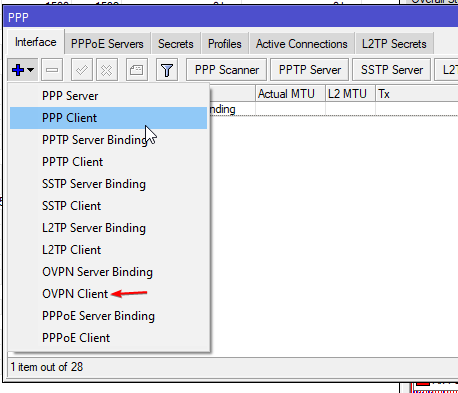
RouterOS 7 will add wireguard support
but thats still beta right now
wheat solstice
The other thing that might help me understand a bit more, this microtik router we are looking at - how does it differ from the typical asus router I'm used to? I understand it doesn't have WiFi or a modem built in, but what else?
tame carbon
@wheat solstice most consumer routers are just a bridge, two kinds of interface groups: WAN and LAN
and a NAT between them
it can't really do anything else
port forwarding
thats the only other thing most of them support xD
but thats firewall
wheat solstice
makes sense, I mean that's what I'm used to and understand atm
tame carbon
if you have a single public IP
your router will masquerade the connections when you go to the internet
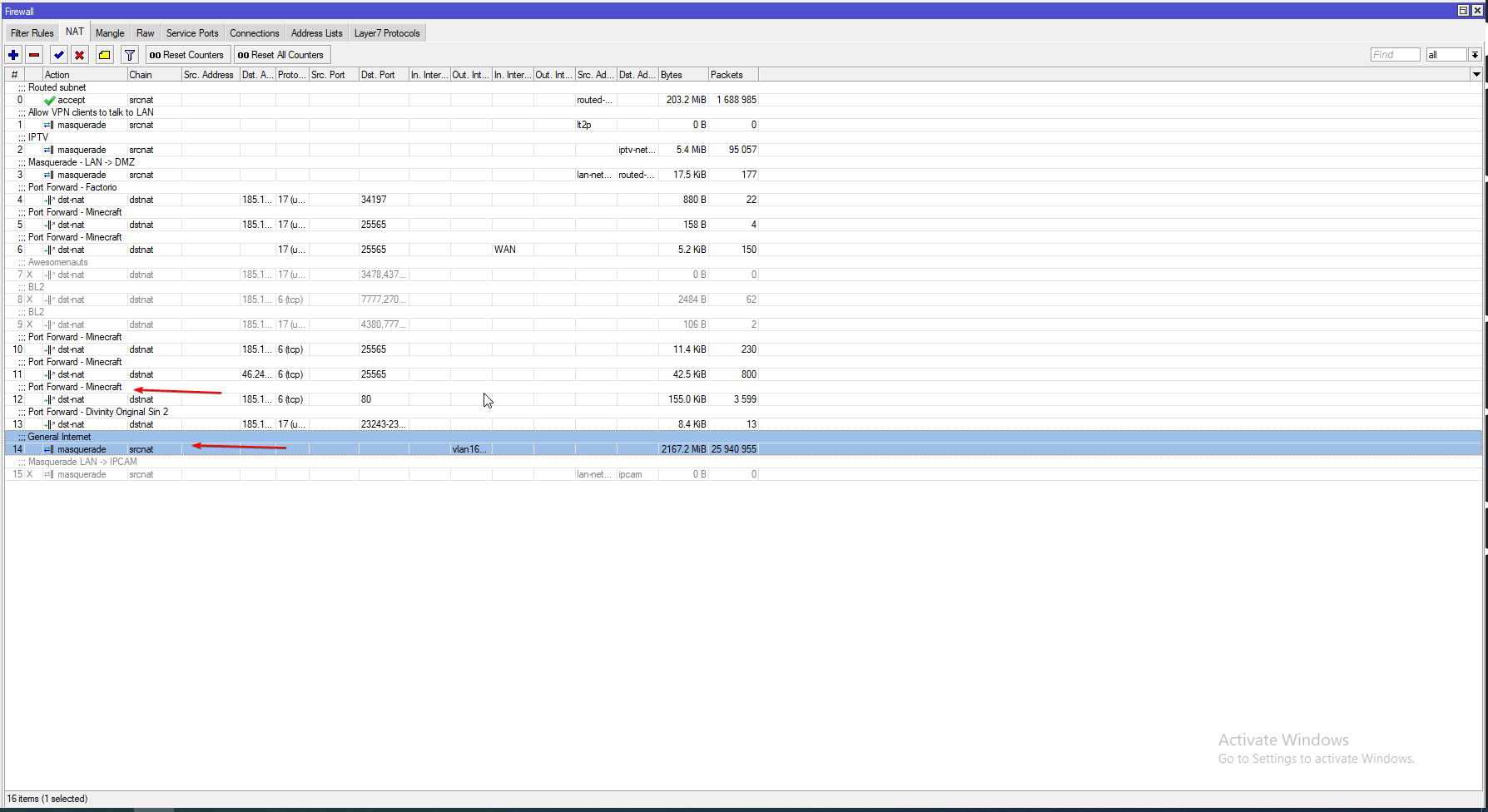
if you look at these two rules
general internet, translates outgoing connections
and the other rule, is for port forwarding
wheat solstice
what's masquerade? 🙂
tame carbon
You know what port forwarding is right?
wheat solstice
yup
wheat solstice
map incoming traffic on port X to IP Y on port Z, makes sense
tame carbon
yeah, NAT is network address translation
so the other way around
so from a local address, over a shared IP to the internet
the router basically connects on your behalf
and any packets that you or the server send, get translated
that's source-NAT
and the technique is called Masquerading
 peak cloak
we basically need to NAT because we ran out of ipv4 addresses
tame carbon
xD
peak cloak
ipv6 is a whole other story
wheat solstice
Oh I see what you're saying, so masquerade is the routers process of forwarding packets back and fourth between the computer on LAN, and computers on the internet
tame carbon
well, I think the last part you said, is a more general description for NAT as a whole
but yeah
wheat solstice
yea think I get it
wheat solstice
so your screenshot is essentially a port forward for a local minecraft server?
tame carbon
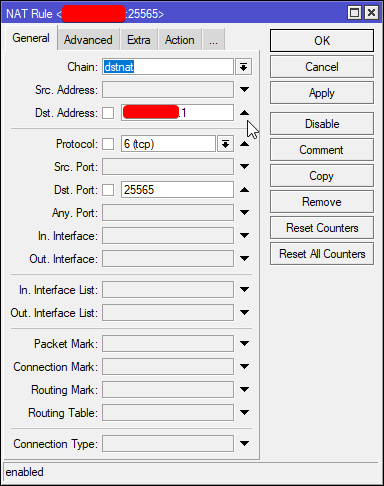
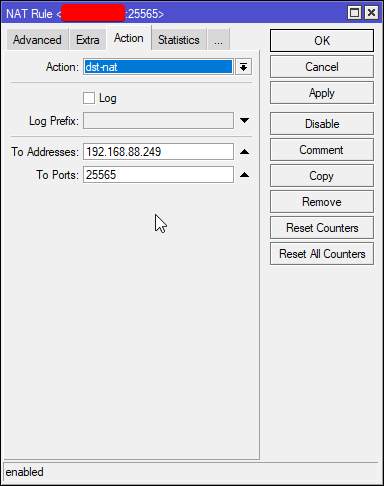
first tab is the filter rule
and the 3rd tab is the Action with items that match the filter
wheat solstice
Clearly it's a lot more configurable, I just have a little learning curve ahead of me 🙂
tame carbon
and NAT is only a small part of the rest of the firewall
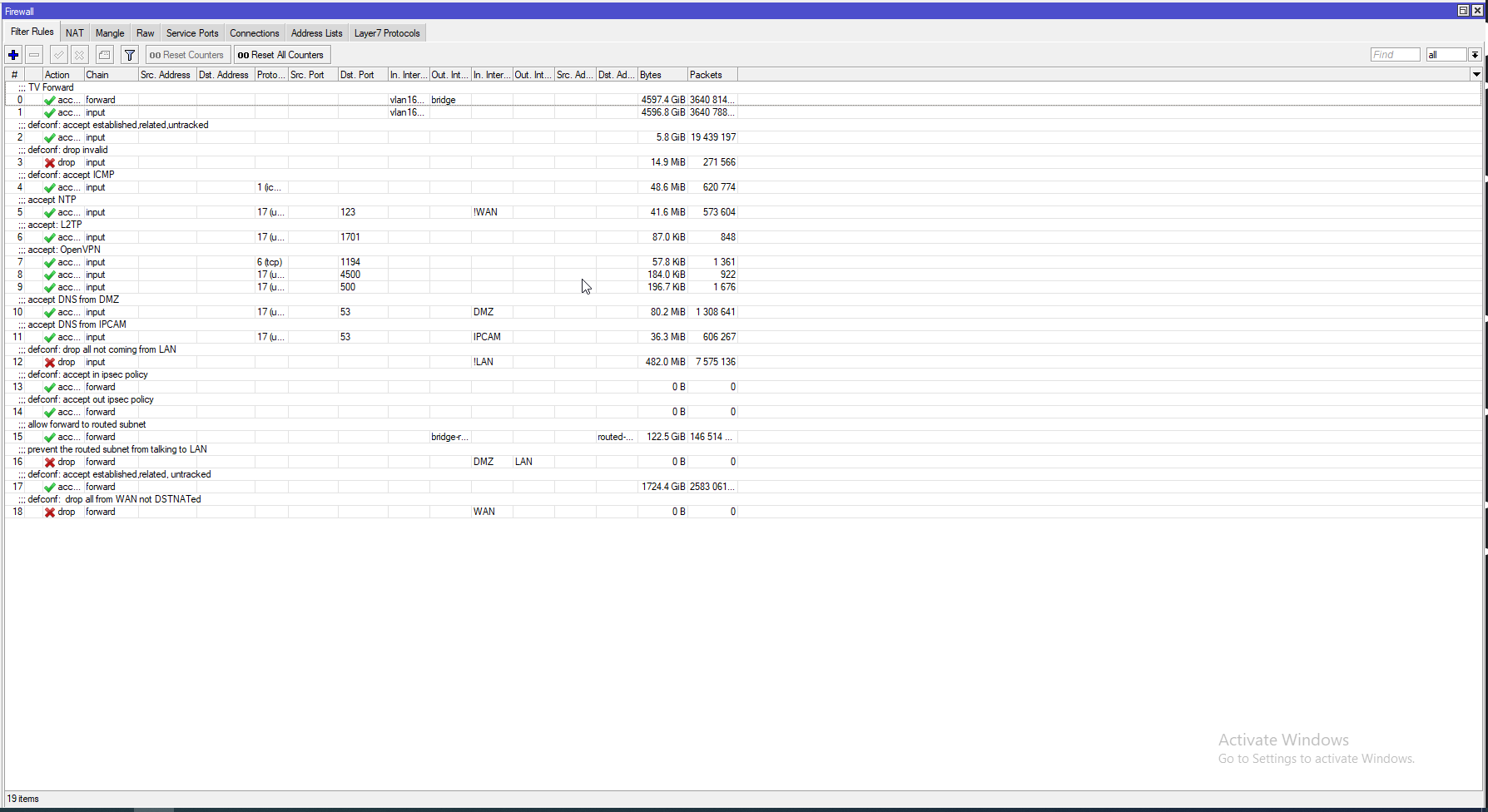
that's also highly configurable
luckily, default configuration that ships on them
is pretty much set up for a home network
wheat solstice
what useful stuff can I do with it that I couldn't do on a typical router? might help me to understand more, it's still a bit of a black box to me lol
and that's good too haha, a default that works and I can figure things out as I go
peak cloak
wheat solstice
what useful stuff can I do with it that I couldn't do on a typical router? might...
customize everything that the router does
wheat solstice
yea but I'm just thinking a real world example
peak cloak
so it's an actual router not just a NAT device
tame carbon
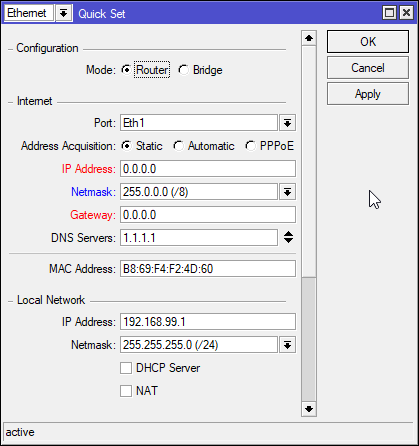
@wheat solstice best part, routerOS has a single window with the 'normie' configuration
 peak cloak
let's say in my example I have a WAN server VLAN
tame carbon
xDD
if you use quickset after doing advanced configs
it breaks your entire install
wheat solstice
yay for normie configuration
peak cloak
All my server vms are on that VLAN so I add firewall rules so if case the WAN server get's infected it can't see my home network at all
tame carbon
@wheat solstice I have a public /29 range
wheat solstice
@peak cloak ah I see, yea I'd want to do something like that for smart home devices, block them all from the internet and only have them visible to my home server (running home assistant) - does sound like something I couldn't do on a normal router, but which would be useful
tame carbon
8 public IPs associated to my router
peak cloak
wheat solstice
<@!222482269829332992> ah I see, yea I'd want to do something like that for smar...
yeah you could definatly do that
tame carbon
and I have an isolated vlan for that subnet, each virtual machine on my server has its own public IP
wheat solstice
@tame carbon I have a /29 too, although isn't that 5 IPs not 8?
peak cloak
wheat solstice
<@!167698274969452544> I have a /29 too, although isn't that 5 IPs not 8?
lucky
tame carbon
6 addressable hosts
one of which is your router
but you can use NAT on the router's IP
wheat solstice
yea, and one is the gateway
wheat solstice
I don't have any use for the /29...I'm just using one of the IPs atm >.<
took a bit of fiddling to get my boring asus router to work lol
peak cloak
wheat solstice
I don't have any use for the /29...I'm just using one of the IPs atm >.<
wasting ipv4 addresses /s
wheat solstice
@peak cloak they came free with the connection lol, I got the business line since I wanted static IP and 12 hour SLA 😄
tame carbon
someone talked trash to me in #public-chat yesterday
because I was hating on asus
because they build shit routers.
clear igloo
RGB makes wifi go brrr
wheat solstice
🤷 mine has always served me pretty well, I think they are probably one of the better "consumer grade" ones, but I am starting to see why these types of router are better
clear igloo

wheat solstice
haha ok that is funny 😂
Also for funny, me and my friends have been joking. The house I'm getting has spotlights in the ceiling, about 16 per room. The running joke is WiFi bulbs 😄
peak cloak
wheat solstice
Also for funny, me and my friends have been joking. The house I'm getting has sp...
you laugth but that's a thing
li-fi
thick minnow
Lifi
wheat solstice
haha
tame carbon
LiFi yeah
 waxen scroll
clear igloo
<:omegalul:619666838002860072>
waxen scroll
clear igloo
<:omegalul:619666838002860072>

tame carbon
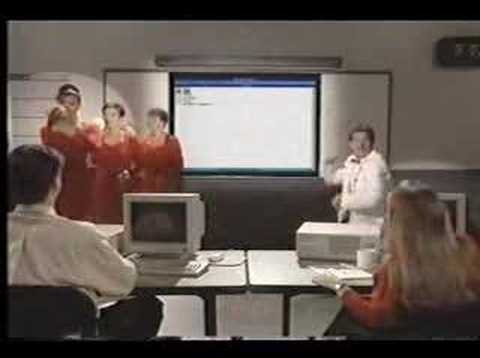
Found this in the back room of my old job. It was titled "YO MS Raps!" MS-DOS 5.0 was the first version available in a retail package. Looks like MS spent a few $$$ to produce the effects in this video to promote it.
High Quality Here: http://www.youtube.com/watch?v=WxC6PytZMqc
clear igloo
If it's not more expensive over a red version then I'd go for it, they are supposed to be better rated from what I can tell
Gold can do a bit more read/write over the red pro and has longer MTBF and minor other spec differences
clear igloo
red pro is $610 on amazon so basically same price then
Someone mentioned power draw is a tad higher on the gold though but only by a few watts
 ripe coral
Looking for a network card, since I think my MB's ethernet is being dumb?
MB: ASRock AB350M Top slot has a GPU, so all that remains is the lower slot, not sure what the slot is or whats compatible
 quasi bramble
plain siren
quasi bramble
plain siren
@ripe coral When it comes to Wireless, look for PCIe Adapters with AX3000 Chipsets
Wired, you want Intel 350 or perhaps an older 82574L Controller. I350 is the go-to
ripe coral
def want wired, but alright
 static knoll
plain siren
<@!145613725074849792> When it comes to Wireless, look for PCIe Adapters with AX...
static knoll
plain siren
<@!145613725074849792> When it comes to Wireless, look for PCIe Adapters with AX...
Aren't they still expensive as heck?
N adapters alone are still $13 or so
 vagrant hamlet
Can someone give me a run down on how to set up ftp connection for my Minecraft server
peak cloak
set up ftp?
vagrant hamlet
Yh
peak cloak
or connecting to an ftp server
vagrant hamlet
Yeah that lol
 vagrant hamlet
I’m new to this
peak cloak
vagrant hamlet
Yeah that lol
just download filezilla and connect
peak cloak
 grave rune
How to make my rack look better
grave rune
How to make my rack look better
looks good already
vagrant hamlet
Ok thx
grave rune
peak cloak
looks good already
Ok I just don't know if ups is big enough or get a second one just for the server
peak cloak
there are also other ftp clients
peak cloak
grave rune
Ok I just don't know if ups is big enough or get a second one just for the serv...
I wish my rack looked that good
grave rune
Thanks stuff cheap because I'm an electrician just get it from the wholesaler that's why I have such a big ups
grave rune
Yeah that one was even 2 Grand just for me it's normally about 3 grand msrp
 hardy sandal
I have 2.2kw ups for 90€ from ebay
hardy sandal
Well yes batteries are death
One battery is 60€
Im looking for "cheap" nexus 5010 for home use
peak cloak
hardy sandal
Im looking for "cheap" nexus 5010 for home use
why tho
isn't it like 24 sfp+
hardy sandal
10gbps network bro
peak cloak
you need that many ports?
hardy sandal
Yes and nexus support extenders
hardy sandal
peak cloak
you need that many ports?
I have 48 port cisco now and 24 ports is in use
hardy sandal
Well i need better router so i build pc with sfp and rj45 cards
hardy sandal
peak cloak
I don't like pfsense
Why?
peak cloak
hardy sandal
Why?
no hardware accelertion
not power efficent
just get a dedicated router with an OS tuned to the hardware
hardy sandal
🤔
little schooner
@peak cloak quad core pfsense seems to work for me though I don't have a gigabit line to test
peak cloak
little schooner
<@222482269829332992> quad core pfsense seems to work for me though I don't have...
I mean you could test local routing perf right?
Across subnets
little schooner
Does that require more than the router itself to do?
peak cloak
well router and 2 devices
little schooner
I mean I guess I could open laptop and desktop and test
Yeah hmm
I should test that
tame carbon
@hardy sandal I have a $190 RB4011
10gbit capable router
MikroTik is a Latvian company which was founded in 1996 to develop routers and wireless ISP systems. MikroTik now provides hardware and software for Internet connectivity in most of the countries around the world.
pfsense is really inefficient for high throughput routing
MikroTik is a Latvian company which was founded in 1996 to develop routers and wireless ISP systems. MikroTik now provides hardware and software for Internet connectivity in most of the countries around the world.
that completely mops the floor with any pfsense box
 south escarp
Hi guys. My friend is new in networking and I am trying to explain him connection between application, ports, IP, MAC and internet interface. Does anyone of you have any charts which I could use? I know mr google is helpful but I need something which is not oversimplified.
peak cloak
south escarp
Hi guys. My friend is new in networking and I am trying to explain him connectio...
invite him here
also
the osi model
 south escarp
peak cloak
invite him here
south escarp
peak cloak
invite him here
He is already asleep. GMT +1
peak cloak
Ah alright
south escarp
peak cloak
He knows osi. But he has problems to understand connections between layers. The chart I would need had to look something like this
 peak cloak
this is good

basically everything gets stacked on top
routers for example modify the MAC header
and routers that do NAT modify the IP header also
south escarp
Yeah. That is not bad.
Its complicated since teacher doesnt care about people which arent tech dedicated.
south escarp
Mechatronics. Basicly from ground up HW level to software level.
peak cloak
ah
I'm a HS junior for mechtronics as well
although we don't do anywhere as depth
I just like networking and learn it by myself
south escarp
peak cloak
although we don't do anywhere as depth
yeah.
south escarp
peak cloak
I just like networking and learn it by myself
Too. I love pcs since 12. After 9 years I can surrly tell. There is so much stuff to learn in pc... Its almost impossible.
south escarp
@peak cloak Anyway. Thanks for help. I will try to make it to good use.
peak cloak
np
 lone sun
peak cloak
lone sun
peak cloak
I know layers 7, 6, and 5 all happen basically at once in the entire data PDU process. Makes sense as to why the other layers are the main focus. 🤷♂️
lone sun
peak cloak
the upper layers are just part of data
Yeah, I mean, it has to happen at once when you think about it. If the session between nodes is established before the security protocols can take action, then the session can never be secure. Its compromised right from the jump. So it either happens all at once, or shouldn't happen at all.
 severe wigeon
tame carbon
that completely mops the floor with any pfsense box
severe wigeon
tame carbon
that completely mops the floor with any pfsense box
It doesn't though 
little schooner
@peak cloak this is opnsense routing speed, wifi-to-wifi clients, across subnets

I dont have any wired clients... well not available rn
hardy sandal
tame carbon
<@!481916987774074921> I have a $190 RB4011
Mikrotik Routerboard is good?
 naive terrace
Hello guys I'm trying to build a cheap server for NAS and plex
Maybe hosting more stuff on it and i found this
Do u think it's good cus im not experienced with xeon
 thick minnow
link?
 sullen elm
naive terrace
Hello guys I'm trying to build a cheap server for NAS and plex
Maybe hosting mo...
sullen elm
naive terrace
Hello guys I'm trying to build a cheap server for NAS and plex
Maybe hosting mo...
yeah, a link would be helpful
naive terrace
E5620 2.56GHz işlemci + Turbox x58 Anakart +8GB ECC Ram+Cpu Fan 999,90 TL yerine 939,90 TL
https://urun.n11.com/sogutucu-ve-fan/e5620-256ghz-islemci-turbox-x58-anakart-8gb-ecc-ramcpu-fan-P473828795

E5620 2.56GHz işlemci + Turbox x58 Anakart +8GB ECC Ram+Cpu Fan en iyi özellikleri ve gerçek kullanıcı yorumları en ucuz fiyatlarla n11.com'da. Kampanyalı ve indirimli fiyatlarla satın al.
sullen elm
wait
that comes with a mobo, ram, cpu and hestasink?
if that's the case
it does not look very attractive
te heatsink looks trash
and 8gb ram is not enough for seamless plex streaming
naive terrace
I have a 212 fan so i dont really care about that one
sullen elm
ok
naive terrace
Why i need more ram?
sullen elm
then the mobo looks fine
I am a bit skeptical about the ram though
16gigs is perfect
8gigs is not enough
naive terrace
I found another combo with 16 gb ram and better cpu
sullen elm
link?
naive terrace
But it cost 180$
sullen elm
the other one?
naive terrace
X5660 3.20GHz işlemci + Turbox x58 Anakart +16GB ECC Ram +Fan 1.499,90 TL yerine 1.399,90 TL
https://urun.n11.com/sogutucu-ve-fan/x5660-320ghz-islemci-turbox-x58-anakart-16gb-ecc-ram-fan-P473829123
X5660 3.20GHz işlemci + Turbox x58 Anakart +16GB ECC Ram +Fan en iyi özellikleri ve gerçek kullanıcı yorumları en ucuz fiyatlarla n11.com'da. Kampanyalı ve indirimli fiyatlarla satın al.
sullen elm
because I am not familiar with the currency
sullen elm
this looks way more perfect
the second one
If you can afford it
go with the second bundle
naive terrace
I dont think the cost is justified but again I dont really know much about xeon
sullen elm
the fisrt one is fine
naive terrace
What i need is a nas to backup my data
sullen elm
4 cores 8 threads
naive terrace
Yeah
sullen elm
at 2.4GhZ
it's enough for plex decoding
at 1080p
but it has a 80w TDP
that's why I am concerned about the cooler
It's also an old model
with only DDR3 support
so you eill have trouble upgrading
naive terrace
Should i find a core i3 or core i5 for example 2nd gen instead?
naive terrace
It's mainly NAS and maybe plex
sullen elm
hmmmm
I f you are on a tight budget then go with a an i5
maybe a second hand i7 4th gen
naive terrace
That cost a lot
naive terrace
Yeah about 280$ with the mobo
sullen elm
Is that ok?
naive terrace
No that's a lot
sullen elm
then go with the second bundle
naive terrace
Still need ram and the drives
sullen elm
check coolermaster's docs
I am not sure about that
but on the second bundle, the cooler is ok
tame carbon
@hardy sandal I'm a big fan of them. They have very good prices for the lower and middle segment
a 10gbit router for under 200 bucks, yeah. beats what you can build on a budget with pfsense
and the software, RouterOS has quite a lot of features
@sullen elm I self assembled a small server with a Ryzen 2600 on a mini ITX board
hardy sandal
@tame carbon whatabout cisco ?
tame carbon
@hardy sandal much more expensive
their high end routers make little sense for SOHO environments
even their small business solutions are "Request a quote" or "Contact sales"
@hardy sandal my views on this are biased though. I prefer cost effective solutions, and mikrotik is king for me in this regard
cheap, fast, reliable and tonns of options
clear igloo
tame carbon
<@!481916987774074921> much more expensive
come on now, an ASR9922 is perfect for a soho environment 
Heating and internet all in the same unit!
tame carbon
@clear igloo you can just use a pfsense box instead
cheaper, same BTU output
get one of those DDR2 xeons
clear igloo
lol, but you can't do 400g on pfsense
tame carbon
xD
clear igloo
Gotta think about the sales people man!
clear igloo
Yah, I need to update mine at some point
thick minnow
tame carbon
I wrote my resume today
Well, congratulations then
tame carbon
the flex is real. I listed a bunch of companies that I do work for on my own
even providing "Fiber optic internet service"
Which is true to some degree
clear igloo
If I didn't get my gear for zero cost as part of work I'd probably be mikrotik myself, no way would I pay enterprise prices for home use, lol
thick minnow
Did you add, chief network debugger at the LTT Discord server?
tame carbon
that's not me
if anyone that would be Jakkuh
since he's the only LTT guy who shows his face around here
clear igloo
tame carbon
Which is *true* to some degree
enhancing your resume is good. Just don't listen to any recruiters who say "{technology}, you've heard that word so put it down"
thick minnow
Okay wrong use of words
tame carbon
@clear igloo I called them up yesterday, spoke over the phone with the boss for 10-15 mins
they look for java developers who came into this job through hobbyists experience
and I started at age 15
clear igloo
That's awesome
tame carbon
so I'm the kind of person they are looking for
thick minnow
tame carbon
and I started at age 15
Wait- 15?
tame carbon
@thick minnow ya
thick minnow
Okay then
clear igloo
I started dabbling in programming around that age too, I was going to be a game developer at first
tame carbon
games never interested me
I'm more interested in the nitty gritty data stuff
servers, backend services, middleware
clear igloo
Thankfully DeVry was such a massive pile of teaching I stopped halfway through my degree and left that behind. Of course years later I'm now doing python programming as a network engineer 
tame carbon
@clear igloo and i fully understand for them to ask for developers that made a job out of their hobby
because the people in university were people with windows on their laptop
and 0 programming experience
60% dropped out the first year
clear igloo
Sounds about right
tame carbon
the best students are the ones who are a gigantic nerd before they started university
they suck at business courses and design
and excel at coding and architecture design
they can see the bigger picture far better
@clear igloo oh, new caliber of scam attempts
I get an SMS now from DHL
saying that they have a package for me, and a url I need to visit to pay for the delivery
clear igloo
HA!
tame carbon
phone number starts with +31 6 which is dutch mobile phone
and the webaddress isnt even DHL
thick minnow
😹
little schooner
Well, my domain admin account uses a password that's easy to find in dictionary. I should change it today
thick minnow
little schooner
Well, my domain admin account uses a password that's easy to find in dictionary....
lemme guess ||password||
waxen scroll
little schooner
Well, my domain admin account uses a password that's easy to find in dictionary....

little schooner
All changed now c:
 untold elbow
admin!
im gonna qrencode my password and get one of these https://www.ebay.com/itm/BAOSHARE-QR-Code-Scanner-Wired-1D-2D-Handheld-USB-Barcode-Reader/133685123442?epid=18033752908&hash=item1f20411972:g:hOQAAOSwJVxgRFys

eBay
2D Code: PDF417,QR Code,Data Matrix. Support 1D and 2D printing scanning. 1D Code: Codabar,Code 39,Code 32,Code 93,Code 128,GS1-128,UPC-A,UPC-E,EAN/JAN-8,EAN/JAN-13,GS1 DataBar(RSS14),GS1 DataBar Limited,GS1 DataBar Expanded,Interleaved 2 of 5 (ITF5),Industrial 2 of 5 ,Matrix 2 of 5 and so on.
no fuss no muss
tame carbon
might as well just write the password on a post-it note
and stick it on your monitor
untold elbow
yeah but what if it's 250 characters long
also that may or may not have been a joke

 untold elbow
suspension of disbelief ruined, i formally retract my "lol"
untold elbow
USAA's online banking app still only allows passwords up to 12 characters
tame carbon
arbitrary limits
untold elbow
and ive been giving them grief about it for several years
tame carbon
who gives a shit about pw length lmfao
my systems would support passwords up to 1024 or however much ram
untold elbow
it's a holdover from ancient encryption standards that broke if you use more than X characters
tame carbon
since I only store hashes anyways
them setting a 12-char limit
sounds like they just store password in cleartext.
untold elbow
dunno, i give them the benefit of the doubt... partially because i don't want to believe anyone is that stupid, but partially because i do all my banking with them
tame carbon
there's usually a test for this kind of foolish system
if you request a "Forgot password"
and they email you a cleartext pw
thats instant red flag
untold elbow
no, they don't do that, they do a normal reset link
that's a huge red flag, yes
site that do that, i stop using right away
 untold elbow
they may as well just display it on the web page
 thorny hill
Hi is anyone familiar with setting up a domain and setting up your ip for Minecraft server? It shows the server is online but times out when testing domain
little schooner
tame carbon
might as well just write the password on a post-it note
The supervisor does that with some passwords
But idk what systems they access. I doubt anything critical
tame carbon
@thorny hill domain names merely resolve a name to an IP
all you need is an A record that points to your IP address
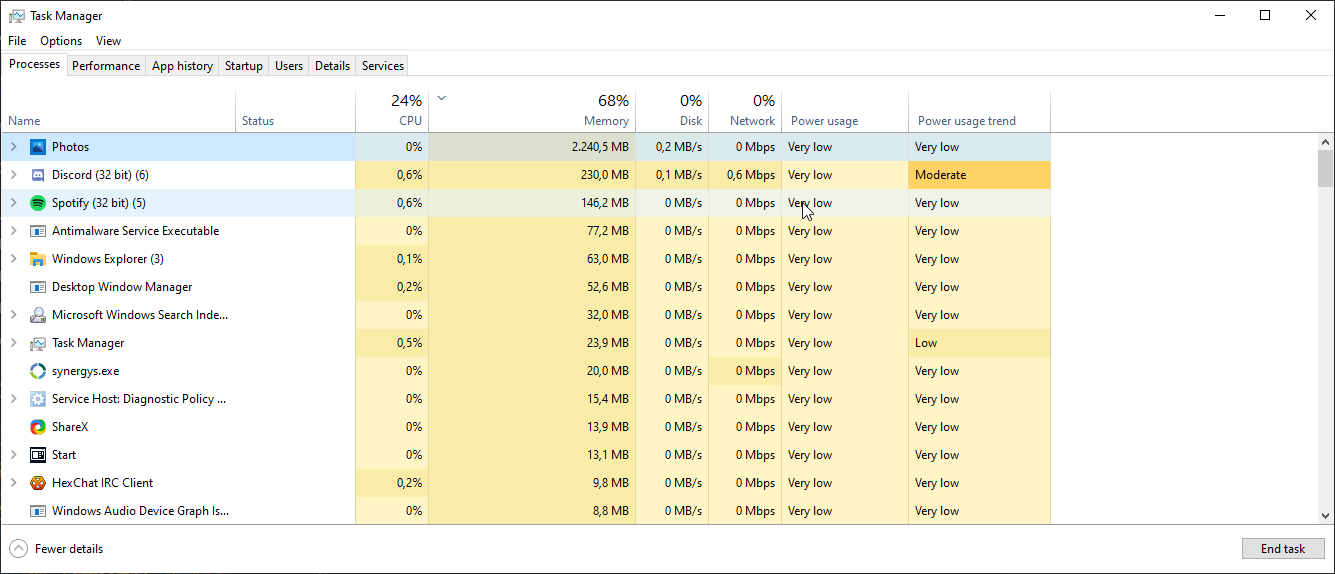
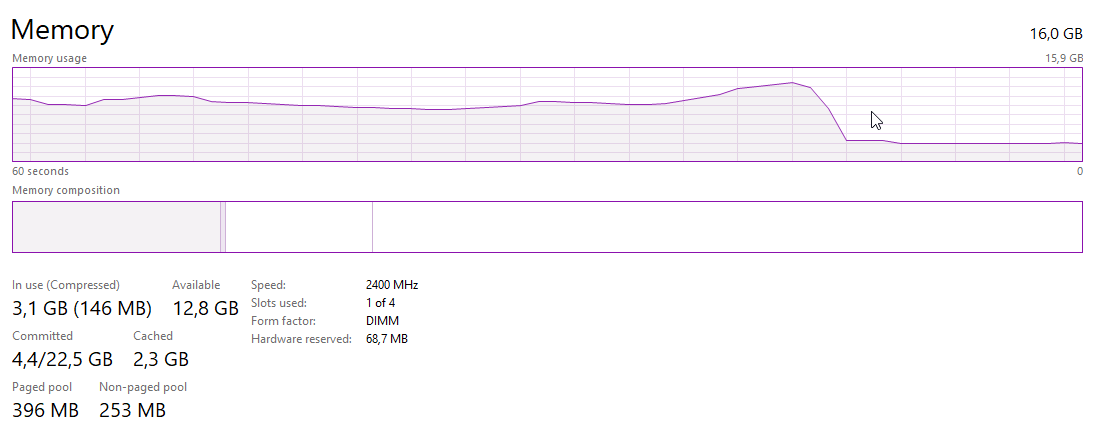
WTF.
 thorny hill
tame carbon
<@!689239673498894360> domain names merely resolve a name to an IP
thorny hill
tame carbon
<@!689239673498894360> domain names merely resolve a name to an IP
thank you. i had that. I guess the provider just needed time to get everything updated and it is working!
tame carbon
@thorny hill yeah DNS can take some time to fully propegate
 south blade
Was about to ask how to figure out why I can't access a website but think I just realized something, it's PIA VPN's DNS servers probably blocking it. How can I access this website without disabling PIA?
Actually, what DNS should I be changing to that works with PIA and won't leak?
 tawny hemlock
What cable is rated at 1gbps
peak cloak
tawny hemlock
What cable is rated at 1gbps
cat5e and up
tawny hemlock
ok
peak cloak
tawny hemlock
ok
I would use cat 6
tawny hemlock
yeah i new that would work im going to by 1000ft of cat 6
peak cloak
tawny hemlock
yeah i new that would work im going to by 1000ft of cat 6
umm, 1000!?
gig ethernet only supports up to 100 meters aka 300ish feet
tawny hemlock
xd 1000 meeters total it is a 16 poart swithc
tawny hemlock
and im prety surer it is cat 6 1000ft for 10gb
tawny hemlock
ah
peak cloak
55 meters
tawny hemlock
ok
peak cloak
and for 10 gig you might as well just do fiber
tawny hemlock
cat 6a is lots cheper than fiber
peak cloak
umm not really
tawny hemlock
but fiber got the transivers
peak cloak
copper 10 gig end recievers are expensive
10 gig transceivers are cheap
I would say the sfp+ pcie cards are the most expensive
also good luck finding a cheap 10 gig copper switch
tawny hemlock
283.99 for modem switch cable and conectors
peak cloak
modem?
tawny hemlock
because im not using the router from my isp to run a 1g switch and i kinda need a conectoin
tawny hemlock
i have a acses point the modem is to the osuside world
peak cloak
tawny hemlock
i have a acses point the modem is to the osuside world
yes you still need a router
tawny hemlock
why
peak cloak
ok, let me explain
tawny hemlock
an aces point is just a router but no modem
peak cloak
so you get one ipv4 IP from your ISP, a router NATs that one ip to multiple IPs for your LAN among other services like DHCP which hands outs ips. For ipv6 it routes between the 2 subnets and does router-advert
peak cloak
tawny hemlock
an aces point is just a router but no modem
no
An access point is just for wifi
You still need a router
I have an ER-X

no wifi
just a router
tawny hemlock

 tawny hemlock
 tawny hemlock
Yeah it is i thought it was something totally different my dad bought it without nowing anything about networking
peak cloak
yeah I have an AP for my wifi, this one to be exact https://www.tp-link.com/us/business-networking/ceiling-mount-access-point/eap225/
AC1350 Wireless MU-MIMO Gigabit Ceiling Mount Access Point
tawny hemlock
Can you send me the neweg link to to yours
peak cloak
tawny hemlock
Can you send me the neweg link to to yours
why?
tawny hemlock
The router
tawny hemlock
I'm doing this all on rack shelf
peak cloak
ah nice
mikrotik also has some nice things
their Hex-S is also nice
although none of these routers are simple
Ex:

and if you want to setup ipv6 for example you need to use the cli
tawny hemlock
Yeah lol so two ap router modem switched cables wall plates conectors and switche 419
tame carbon
@tawny hemlock those mikrotiks allow you to configure multiple access points as a single network
and you could have a single router like the hEX S as a controller to those APs
each cost around 60 bucks
and you can just add as many APs as you want
even configure guest networks and such
unifi does this too, but mikrotik is a bit cheaper
peak cloak
waxen scroll
<@!222482269829332992> and dont forget to make an ipv6 firewall
ah yes
I did that
tame carbon
latest tplink stuff can do it too, Omada or Omeda I think, but who cares xD
waxen scroll
i didnt and then one day thought about it and was like OOPS
tawny hemlock
tame carbon
and you could have a single router like the hEX S as a controller to those APs
?
tame carbon
one of these: https://cdn.discordapp.com/attachments/387022787480387605/818912747520524328/1539_hi_res.png


and many of these ^
tawny hemlock
plug evrthing ito the swtich switch to router router to modem
tame carbon
@tawny hemlock depending on the modem you have, you might be able to disable its router functionality and use it as a bridge
in that case, you can enter your ISP's credentials in the router itself
and even control your own firewall
because the built in ones from the ISP are total shit
peak cloak
tame carbon
in that case, you can enter your ISP's credentials in the router itself
if it's PPPoE only
tame carbon
yeah PPPoE
peak cloak
usually it's just DHCP
tame carbon
though some cable modems also support bridging
tawny hemlock
it is staying at my parents house when i move out dosent need to be that fancy
tame carbon
I mean, how much coverage do you need?
if you need multiple access points and want a reliable experience, those mikrotiks are best value
unifi setups are very expensive
MikroTik is a Latvian company which was founded in 1996 to develop routers and wireless ISP systems. MikroTik now provides hardware and software for Internet connectivity in most of the countries around the world.
you could also get one of these
it has an internal wireless as well
tawny hemlock
1788 sq ft
peak cloak
tawny hemlock
it is staying at my parents house when i move out dosent need to be that fancy
I mean so is mine but mines's kinda advanced with vlans and all that
tame carbon
@tawny hemlock mostly matters how many rooms you have
peak cloak
but not as fancy as blob's lol
tame carbon
walls are your enemy
if you didnt have walls, you could put one ap in the middle
and have coverage everywhere
1788sq ft isnt a lot
ideally you just want the APs near where you are most likely going to use it
1 or 2 ought to do it
with $120 you'd be done
get a hAP ac2 and a cap ac
tawny hemlock
yeah ill do 2 ap one on each floor because it will be fine in my room wich is on floor 2.5 will be fine because i use lan most of the time
tame carbon
can you run cables?
like, these cAP ac's are relatively cheap
and they support PoE
if you have a PoE capable switch, you dont have to plug in adapters in the AP
easier with ceiling mounts
ceiling panels are the best
cus you can just toss the AP on top of them xD
love that in office areas
tawny hemlock
the ap come with a peo injector
tame carbon
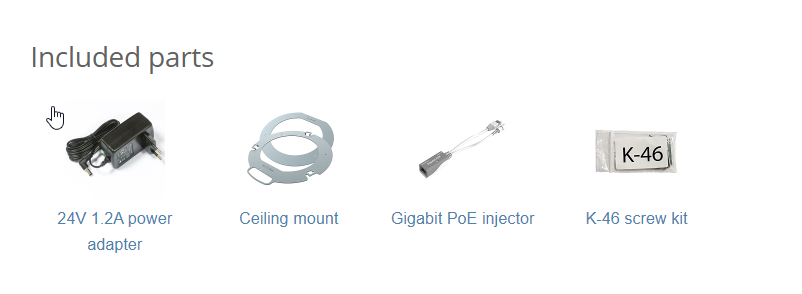
yeah
but a PoE switch could reduce cable mess even more
they would have it built in
but if you dont mind having a couple of those injectors
they just use DC
tawny hemlock
one stipulatoin it needs to have a us wall plug
tame carbon
if you order mikrotik in US, you probably get one of those yeah
they are an EU company
tawny hemlock
how much are they per ap
tame carbon
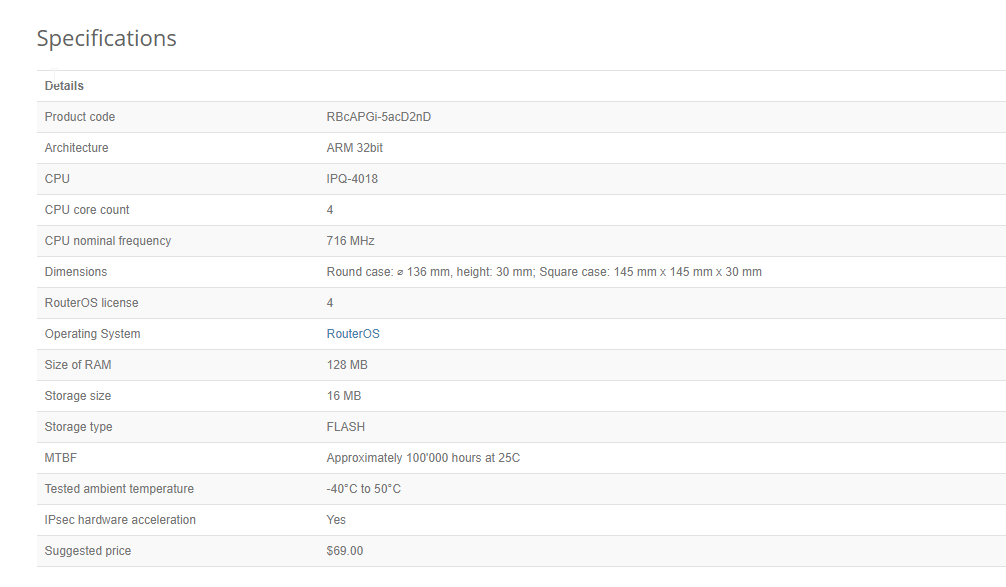
MikroTik is a Latvian company which was founded in 1996 to develop routers and wireless ISP systems. MikroTik now provides hardware and software for Internet connectivity in most of the countries around the world.
those things can also function as a router xD
they only have two ports though
they have a quadcore cpu onboard :P
peak cloak
tame carbon
those things can also function as a router xD
a very bad one
peak cloak
huh
tame carbon
but it can route xD
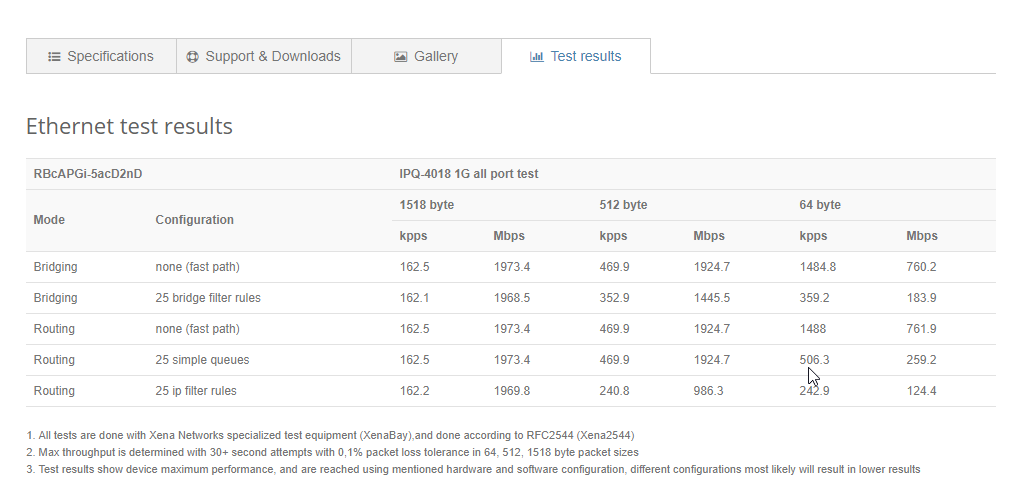
so you could get two cAPs
or a cAP ac, and a hAP ac (it has more ports)

this guy has same routing speed as those APs
it also has wireless
but it has more ports
and a VPN accelerator chip onboard
tawny hemlock
i dont need the fancy gear
tame carbon
@tawny hemlock this thing costs $69
same price as the APs
just saying, you can mix and match.
but if you just get one device, then I would recommend the hAP ac2
tame carbon
what kind of net speed do you have?
and I don't touch tplink stuff with a 10 foot pole
I've thrown away 3 tplink routers so far
tawny hemlock
the max i have seen is like 200mega bit ever
it dosent matere very few of the devices that wouldent be lan that could take advantege of 5ghz
peak cloak
tame carbon
These are 2.4GHz only APs too
the EAP225 is 5ghz



 tawny hemlock
yeah im beeing cheap
tame carbon
MikroTik is a Latvian company which was founded in 1996 to develop routers and wireless ISP systems. MikroTik now provides hardware and software for Internet connectivity in most of the countries around the world.
$20
has all the features that the big beefy routers have lol
I use this one on the go
for when I need to share my internet on phone with multiple devices
powers with usb
tawny hemlock
bru wifi 4
tawny hemlock
and 2.4ghz only
tame carbon
but it has 3 ports and can route at 300mbit/s xD
and has all the advanced features of routerOS
@peak cloak I'll consider tplink, once they publish actual bandwidth tests on their devices
they don't put the max throughput on the tin.
tawny hemlock
tame carbon
thats an unmanaged switch